#frontend-archived
1 messages · Page 54 of 1
 fluid shoal
 worn rain
@fluid shoal if you add the camera entity in the list of entities for the glance you will get a cam icon that will launch the live stream
worn rain
No problem
 tender wasp
@fluid shoal a PR was just recently merged that adds what you want I think. If you have a camera_image as the background of a picture-glance card, clicking it will show the more-info card (full view) for the camera
It's out in dev now I believe, should make it into 73.2
@worn rain I see. I think there is already on open request on the ui-schema repo for what you want https://github.com/home-assistant/ui-schema/issues/46
@fluid shoal btw, camera-preview was replaced by picture-entity. If you set the entity config value of a picture-entity card to a camera entity, it behaves exactly like the old camera-preview card
fluid shoal
I noticed that camera-preview was replaced with picture-entity / picture-glance. Adding the camera as an entity works for me - I don't clicking the icon vs clicking the image.
 calm rock
@north spear worked perfect , tks
 stiff wing
Hello there, I need support with iframe card. I don'g know why when I use this url: http://www.vigimeteo.com/widget_vigi_dep_s.html?a=320160&b=
The card is blank
 undone egret
@stiff wing is your setup secured with ssl
stiff wing
not the Hass.io device but the communication from the reverse proxy with internet is secured by ssl
undone egret
then it wont work .... https to https or http to http ..... mixing wont work
stiff wing
OK it's logics.Thanks
Other question perhaps with a quick answer. In the Markdown card, is it possible to use a string coming from a template or a sensor state ?
 quick beacon
No, and it won't be added. Use a custom card instead
 gaunt wadi
 north spear
good morning
Not sure if people saw this, but it's sooo cool: https://www.reddit.com/r/homeassistant/comments/8xilwl/a_quick_experiment_using_a_pictureelements_card/
 placid geyser
Good morning Marius. Great find.
 uneven flower
Good morning, I'm a noob and was wondering if i can add my dlink camera?
 storm lion
That's very nice @north spear - I had an idea of setting up a wide angle camera in each room and taking a picture with all the possible combinations of states and doing that but I think this looks better for less work
placid geyser
@storm lion Not sure if it would actually be less work as you have to draw all the changes rather than taking pictures and editing them into one.
 vapid field
Would it be a possibility to bring back the ‘last changed ‘ text for entities in the entities card? Only thing thats keeping me from switching over
 wheat current
That is possible with this custom card https://github.com/ciotlosm/custom-lovelace/tree/dev/entity-attributes-card
vapid field
Thank you!
Oh actually I don’t think that gives me what I want. I mean like the custom-ui last changed text in grey underneath the entity instead of a separate chart
wheat current
It give you the same info, just looks a bit different
vapid field
Yes but I was kinda looking for that look. Thanks though. Maybe I will try and make my first custom card for this
north spear
@vapid field raise and issue with a screenshot against that repo
I can help with code as well as a simple custom row for entities is easy to do
 worthy kiln
I played around with the new UI. And have some missing features:
1.) Scenes in picture-elements cant be activated via the tap_action: toggle
2.) Picture Highlighting of picture-glance should be also available in picture-elements
3.) on/off picture switching in picture-glance seems not to work for me. Only the automated highlighting.
north spear
@worthy kiln raise a feedback issue in ui-schema as recommended in lovelace docs
worthy kiln
you mean this site: https://github.com/home-assistant/ui-schema ?
I cant post anything there
Ah got it, sorry
 candid rapids
is anyone else using dark sky with the weather forecast card? I don't think the times are converted from UTC to the local time zone
When I directly call their api and get the times and convert them they match up to the current hour. But in the frontend they aren't converted
 split granite
Presumably you've got the timezone set to your local timezone in homeassistant:?
candid rapids
yeah
it looks like the code just converts the date format, not the time zone
https://github.com/home-assistant/home-assistant-polymer/blob/18b52b53cba0c71db2525fc7ac8426376094a35b/src/dialogs/more-info/controls/more-info-weather.js#L137
 pearl fulcrum
Hey people - Can anyone help me with a formatting issue I’m having with the Glance card?
I’m adding in:
entities:
- entity: binary_sensor.movement_backyard
name: Movement?
But the “name” line is breaking things
Urgh, never mind... PEBKAC
😄
 fallow oak
Is it possible to add a group or a glob (automation.*) to any card in lovelace and render all matching entities?
north spear
Adding a group doesn't make sense
instead of defining the group you would define an entities card in lovelace
wildcard aggregation is not supported in any lovelace cards, but you can always use the monster 😃
fallow oak
Monster?
north spear
(I always laugh hearing myself saying that)
north spear
You can read docs here: https://github.com/ciotlosm/custom-lovelace/blob/master/monster-card/README.md
fallow oak
Wow! Cool! Thanks!
😃
@north spear That is perfect! Exactly what I´ve wanted for a year now! 😃
north spear
Check also https://community.home-assistant.io/t/lovelace-gauge-card/58880 if you're a fun of weird cards
fallow oak
Yeah, I noticed that one already! I am absolutely sure I´m gonna use that for something! 😉
north spear
there are more requests here: https://github.com/ciotlosm/custom-lovelace/issues for inspiration
fallow oak
Hehe... I made a feature request just like this a while back, before Lovelace was announed... (https://github.com/ciotlosm/custom-lovelace/issues/20)
I really like how much customization can be done with this UI!
So, adding all zwave entities to one view, and all automations to another now takes me 3 minutes, compared to 30 minutes of copy/pasting before. And it is dynamic, so when I add a zwave device or an automation at a later point in time it just pops right in where it belongs! 😄
🥇
north spear
I'm glad people find a use for it
fallow oak
Is t possible to define a card without including it in a view?
Or, more acurately... Is it possible to add a card inside a card?
north spear
depends
can you explain what you are after ?
https://user-images.githubusercontent.com/7738048/42446481-1ac27c1e-837f-11e8-94e7-02ef35f2d853.png example of card within a card
fallow oak
I was hoping to use the monster card to render any media-players that are not idle using the media-control card....
  - title: Media
    id: media
    icon: mdi:youtube
    cards:
      - type: "custom:monster-card"
        card:
          type: media-control
          title: Mediaspillere
        filter:
          include:
            - domain: media_player
hmm
that won't work
because monster card uses multiple entities cards to send data further
if media-control would support multiple entities that would have been an option
it can be done , but not with monster card
fallow oak
Not sure I understand completely why, but thats OK! 😉
So if not with monster-card, what are the options...?
north spear
Build another custom card that supports adding in multiple cards
to be honest not that hard to build
calm rock
Hi , im having problems to get the custom cards rendered on ipad : error : n.setconfig is not a function ( in n.setconfig(t) n.setconfig is undefined . ; any suggestions on what can i try ?
north spear
@calm rock see FAQ: https://github.com/ciotlosm/custom-lovelace/blob/master/README.md#faq
calm rock
ok tks
north spear
@fallow oak looking at the card list it seems your use case is a niche because only media-control could be used for such a thing
plant-status, media-control to be more exact
not sure it's worth a custom card investment as I don't foresee people having 100 plants to maintain 😃
fallow oak
@north spear I am used to my ideas being a niche... Not a problem! I´ll just find a way that is slightly less ideal to me, but still perfectly adequate! 😉
north spear
@calm rock have you tried setting frontend: to javascript latest?
north spear
yep
 foggy tendon
I have this camera sensor about iss on my configuration.yaml: camera:
- platform: generic
name: ISS
still_image_url: https://maps.googleapis.com/maps/api/staticmap?center={{ states.binary_sensor.iss.attributes.lat }},{{ states.binary_sensor.iss.attributes.long }}&zoom=5&size=500x500&maptype=roadmap&markers=color:blue%7Clabel:P%7C{{ states.binary_sensor.iss.attributes.lat }},{{ states.binary_sensor.iss.attributes.long }}&key=AIzaSyCqRhZzR9_IsYnYPgMNklF_Qopt1BMKRVw
limit_refetch_to_url_change: true
And i wanto to put inside lovelace and did the following: - type: iframe
title: ISS
aspect_ratio: 90%
url: https://maps.googleapis.com/maps/api/staticmap?center={{ states.binary_sensor.iss.attributes.lat }},{{ states.binary_sensor.iss.attributes.long }}&zoom=5&size=500x500&maptype=roadmap&markers=color:blue%7Clabel:P%7C{{ states.binary_sensor.iss.attributes.lat }},{{ states.binary_sensor.iss.attributes.long }}&key=AIzaSyCqRhZzR9_IsYnYPgMNklF_Qopt1BMKRVw
But it doesn't show anything in the frontend. How to convert into lovelace format?
foggy tendon
Ah... can you give me an example? I am at very first with lovelace
 half osprey
Look at the documentation that is linked at the topic of this channel
foggy tendon
i tried this: - type: map
title: ISS
entities:
- camera.iss
But it shows map of where i am living...
 raven nacelle
@foggy tendon The docs indicate that you need an entity with location information. Camera does not have location information
try using binary_sensor.iss in the entities...not sure if map card only works with device_tracker entities
foggy tendon
yes i tried also this but no success...
raven nacelle
how are you adding it?
vapid field
Is it possible to activate a glance when you press it? Now i have to press it, and then choose for "on" or "off". This is my lovelace UI: https://i.imgur.com/hrBcCaj.png. I want to activate the "Logitech 5.1" immediately when i press it
raven nacelle
@vapid field There is a issue to allow toggling from glance cards https://github.com/home-assistant/ui-schema/issues/46. For now, you can use picture-entity card that allows you to toggle
vapid field
Ah alright. Gonna try that out. Thanks for checking out
foggy tendon
In this way: - type: map
title: ISS
entities:
- binary_sensor.iss
vapid field
I also can't trigger a scene thats under "picture-glance". But i can trigger it as a normal entity. But that issue is probably also already addressed
foggy tendon
@raven nacelle i see binary_sensor.iss has coordinates inside, but it continue to show map of my home
 subtle rune
@half osprey You mentioned that templates don't work in frontend. I was thinking of making a markdown-card with a summary of my home (like "3 lights on, 2 windows open") in a template. But then that won't work?
half osprey
Correct.
However, you can create a custom card
Custom cards are in JavaScript and have access to full state of the house too
subtle rune
Yes, I will do that then. JS is no problem 😃
Will probably be easier than making a template for that anyway 😄
half osprey
I've been thinking about maybe adding template support, but it would then be something like it refreshes every minute or so
As templates need to be rendered in the backend, and we wouldn't want to update it on every state change
But I think for now it's better to not implement it, as custom cards are better 😉
wheat current
Better to do custom then, with instant update
half osprey
yep
subtle rune
Will start working on that!
half osprey
When you make something cool, make sure to share the love ❤
north spear
@subtle rune make sure you make proper use of shadowRoot and avoid global methods 😃
subtle rune
Of course! Will try to make it dynamic so that more ppl can use
north spear
I've been having some problems once I started to consider multiple custom cards or multiple instances of my custom card
north spear
I think i've got most of it right with gauge card
monster is special because it uses existing cards that handle that complexity
subtle rune
Will look at your cards for reference!
foggy tendon
How to use geocode platform inside lovelace?
half osprey
@north spear you think that we should update our custom card example to use shadow dom ?
north spear
@half osprey I was trying to dumb down my GaugeCard code so you can review
maybe people can use that as template
half osprey
ok
north spear
I'm sure I have mistakes in there
half osprey
the downside of using shadow dom without Polymer/Lit Element is that you need to activate the polyfills yourself
It will be better soon as Firefox will enable ShadowDOM and custom elements by default
north spear
hmm
I have been testing gauge-card with firefox and it works
as long as people enable custom-elements
that bug is only to have it on by default
half osprey
Yep
But it's kinda lame to ask people to turn on experimental features 😉
It's not in stable for a reason…
 high canyon
is there not a polyfill for older browsers?
half osprey
There is but if you use just custom elements, the polyfills are not activated
north spear
took me a few hours to get to this stage, probably not within my skills to produce a proper sample for Lovelace official
half osprey
I think that your sample tries to do too much. Keep it simpler 😃
You think the docs example is too simple? https://developers.home-assistant.io/docs/en/lovelace_custom_card.html#defining-your-card
north spear
yep
half osprey
btw, if you want to re-create this.$ in your element, it's a couple of lines: https://github.com/ruphin/gluonjs/blob/master/src/gluon.js#L39-L44
You think my advanced example is too advanced? 😛 https://developers.home-assistant.io/docs/en/lovelace_custom_card.html#advanced-example
north spear
I'll be honest with my problems on those examples:
half osprey
I think that we should aim to get the examples in the docs just right. I don't mind adding another one or updating them
yes please
The goal of the docs is to get people started, so if we didn't do a good job, we need to improve
north spear
style is problematic in my opinion. One makes use of external style and one just specifies minimum style inline
I like custom cards that are self contained, epsecially if you want to run them at speed or local
north spear
true
half osprey
I guess I can not use a custom font
Just thought it was more appropriate with the line components
I can get carried away sometimes haha
north spear
would be nice if there would be a minimum library to use from HA, instead of using unpkg.com
people will get confused with versions and such
half osprey
The nice thing about the module imports is that it's not put in global scope
So you can load multiple versions
It's slower, but won't break
I think that such a lib should come from the community and not be part of our main UI
Because we can't ever optimize our frontend if we need to keep all these methods around that a custom card might call
north spear
that is true
half osprey
We are already loading some legacy layer for now
With HTML imports, Polymer hybrid support
It will eventually be removed
north spear
also a more-info-dialog in the example would be nice
half osprey
Custom card example:
- Use ShadowDOM
- Open more info dialog
that's what I have thus far to improve on the basic card
north spear
maybe style in basic card
half osprey
ok
north spear
and the basic card always redoes card content, even if state is not changed
I guess it can get people into bad practices
is LitElement going to be available in official cards ?
half osprey
It's the successor of the Polymer Element, so yes
north spear
will it be possible for custom cards to use whatever you use to have available LitElement to avoid loading other external libraries ?
and without asking to run webpack or something
half osprey
Well the problem is that if we expose LitElement, how could we ever migrate to the next thing 😉
I think that it's better if we have lit element be loaded by the people using it
We won't start using LitElement until it hits 1.0
They are still talking about changing the syntax a little
If there was a lib called customSupport that would load LitElement and other helpers for custom cards, users could just add that in their resources
north spear
darn it, I really wished there was an easy way without too many implications to have custom cards be standalone files
half osprey
north spear
and get benefit of being closer to core cards while still maintaining the simple syntax of render templates with template literals
I guess I'll have to use a build server and publish versions
half osprey
No need for a build server for JS modules
Just use microbundle and commit the created files to your GitHub repo
in a dist folder
north spear
I'm too lazy to do manual steps, I'd rather get a build server 😃
btw, Opera, Firefox Nightly, Chrome, Safari work with custom elements
it's only Firefox stable that still requires flags from the big browsers
I'm unsure about IE
split granite
Quick one for the docs - the docs say See state_image object structure for state_image - but it's not linked to any documentation, and I can't see anything 🤷
quick beacon
split granite
Is that supposed to be in response to me @quick beacon ?
north spear
not, it was targeted at me
split granite
Cool, though it didn't make sense
north spear
It seems major browsers addes support and Edge as expected is last of the pack. Firefox is not there yet but getting there
 snow stone
Starting to play with Lovelace. Is there a different way to show cameras rather then picture-entity or picture-glance? Camera-preview has been deprecated and while the other two work fine, they seem to require me to overlay an entity on top of it which I don't always want. Is there a reason that entities is a required field?
 frosty pelican
@snow stone just use picture-entity and use the camera as the entity
its essentially the same thing
snow stone
@frosty pelican Will try that. Thanks!
north spear
And @half osprey, if anyone is crazy brave enough to go for the monster, they must go all in, including enabling custom flags in FF 😅
half osprey
Which I know that you didn't have any issues with, but I tried it on a friends iPhone last week and I did get crashes 😦
north spear
my iphone 6 is pretty old and slow, but latest javascript works like a charm on it with 11.4
happy to help with testing if you want
north spear
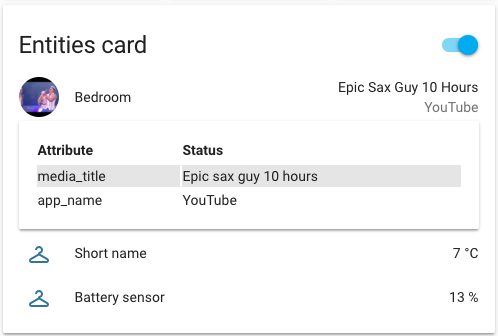
Updates to attributes custom card on dev branch:
- type: custom:entity-attributes-card
  title: Attributes Card
  attributes:
    - key: media_player.bedroom.app_name
      name: Application
    - key: media_player.bedroom.media_title
      name: Media center
    - climate.heatpump.current_temperature
 dapper rain
firefox nightly works with custom elements out of the box ?
north spear
Yep
dapper rain
but is the inspector working too now? when i set the flags in ff 61 inspector was unusable
north spear
I’ve not tried it
Actually i did to check some elements and styles
But not extensively
snow stone
Can you still have the little circle 'badges' or whatever they are called at the top of a page in lovelace?
raven nacelle
@snow stone use state-badge
frosty pelican
@raven nacelle it needs to be in a card though right?
snow stone
@raven nacelle Thanks I will take a look. Having trouble finding how to do that other then in a picture-element card
raven nacelle
yes....has to be in the card
snow stone
Ok, thanks. I will do it that way then
@raven nacelle Can you do it in a glance card or just a picture-elements card?
frosty pelican
that was my next question 😄
raven nacelle
only in elements card
frosty pelican
to be honest though the glance card has really grown on me
raven nacelle
if you are using glance, why do you need badges
frosty pelican
i just wish the text wrapped like the badges do instead of ...
snow stone
@frosty pelican This is exactly my issue. I can do it without badges. It just looked nicer before
frosty pelican
my old UI had badges everywhere lol
raven nacelle
ok....I never used badges. May be that is why I don't see the value of those
frosty pelican
yea i like them since they don't take up so much space and you can fit a few bunched together....great for sensors and binary sensors but I am finding glance to be a suitable replacement
snow stone
Here is my before and after. https://imgur.com/a/pk9AjVo
It's not a huge deal but I preferred the badge to what is now in the my glance
frosty pelican
@snow stone ive taken this as an opportunity to redo the UI since entity-filter is a really powerful card
raven nacelle
Why can't you use glance card there
 kind shellBOT
Take a Peak at https://github.com/dshokouhi/Home-AssistantConfig and see if it helps

 buoyant skiff
i really need to get cracking away at lovelace
raven nacelle
@frosty pelican My problem with those badges is that they take up one entire row
buoyant skiff
would make it so much better for untappd stuff im doing now
raven nacelle
better off using one of the cards, so that the real estate is not wasted
frosty pelican
@raven nacelle yea you gotta stick them all together to make better use
snow stone
@raven nacelle I am using the glance card. The bottom hlf of that screenshot is the glance card which is replacing the badges. It is just annoying how everything is like 'Upstair...'
frosty pelican
at this point ive been redoing things so much and as ive been going the new interface is growing on me more and more
raven nacelle
you can define the label title on glance card
snow stone
Ok, I can probably get what I am looking for then. Just need to do some more playing around. Thanks!
frosty pelican
i need to play with picture-elements today....going to use my botvac cleaning map as my "floorplan" lol
 pure void
What botvac do you have? I'm contemplating getting one.
raven nacelle
@north spear did you test the javascript: latest in the frontend? I recall, it is typically latest. In fact, I get tons of errors if I add javascript: latest.
frosty pelican
@pure void a D7
raven nacelle
Yeah....but I thought latest was the default
north spear
yes, but still has to be set on each device
raven nacelle
true
but that is one time...
and I am sure we will not even have to do that soon
 sudden lion
Will there be a possibilty to run a view from lovelace in "kiosk mode" without the menus?
 serene sierra
is it possible to use templates with '--paper-item-icon-color': for changing colour for states?
 royal tundra
Anyone else getting "local/lovelace.html:2:112 Uncaught TypeError: Cannot read property 'shadowRoot' of null"? Getting that on a Galaxy S9 in Chrome and the Samsung browser
tender wasp
@sudden lion I know that's on the radar. I think the dev team just wanted to give people some time to get acquainted with lovelace and using cards for navigation and stuff first, but its a possibility in the future
sudden lion
That would be awsome, for my usecases it could replace hadashboard and floorplan and just rely on the awsome lovelace
north spear
@royal tundra that hack is no longer required. You can delete lovelace.html and the stuff in your frontend: and just use "set default" from dev-info panel
north spear
no problem
split granite
Am I right in thinking there's no way to explicitly order the cards in any way?
north spear
they are ordered
but there is logic on how the flow goes depending on the number of cards and width of screen
You can also kind of have some sort of grid. i've seen some make use of panel and stack cards
but it's more of a hack
split granite
Yeah, it sorts vaguely close to what I write, until a certain point when it just tries to make it fit
Which is good, and annoying 🤷
 leaden vapor
Bueno. How's this Lovelace thing looking? I just noticed it and am thinking about trying it.
storm lion
Do it!!!!
frosty pelican
dive in!!!
leaden vapor
Is this something to be concerned about? Note: Enabling latest on IOS could cause automation and script editor to crash.
split granite
Don't use the automation editor - it's still very much incomplete 😉
leaden vapor
Not even sure what the automation editor is. I use Sublime for all of my config.
north spear
@leaden vapor you can try it on your device and see if you are bothered. On mine I didn't see any issues. There were more problems with "confirm" dialog than this
and you only need that feature enabled if you use custom components
leaden vapor
Hmm....okay...here we go.
storm lion
One of us, one of us!
split granite
As anti-UI as I am, I do think it's (mostly) a huge improvement over the current UI
The only thing it can't do is replace HA Floorplan
(so far anyway, we are a whole two releases in)
 glossy birch
it is getting there... I've seen few models of floor plans too
glossy birch
@raven nacelle has one
raven nacelle
@split granite Floor plan is mostly there
split granite
I've played with the picture-elements in a panel, but... it doesn't allow me to make things "pretty"
frosty pelican
^^ agreed
split granite
It puts icons in places, not allowing me to make a door the door barrier (for example)
leaden vapor
Are we moving towards a multi-user capability for HA?
raven nacelle
the pretty things will happen soon when the PR by @tender wasp gets merged (read very soon)
split granite
It can't duplicate what https://github.com/DubhAd/Home-AssistantConfig/wiki/View-Floorplan gives me right now
But I'm hopeful 😃
glossy birch
I am not a UI consumer, I have them in case if I need them, but I don't actively use them. Never used the custom ui and I dont see a need for it
frosty pelican
I find entity-filter highly useful for things for leak and smoke detectors
makes perfect sense to only show it to me wehn it needs to be seen
raven nacelle
Most of it is honestly already possible if you have the floorplan
glossy birch
no floor plans for me
split granite
Yeah, it's things like doors, and garden lights, and other bits, that it won't do for me
raven nacelle
it should be there in the next beta
split granite
Cool
raven nacelle
garden lights, doors, or anything else etc.
frosty pelican
that preview that was posted wtih the CSS looked amazing
leaden vapor
Hey, could this lovelace thing become a touch-screen interface?
raven nacelle
It already is touch enabled
leaden vapor
Really?
storm lion
everything's always worked on mobile and tablets?
leaden vapor
So, does it do away with the app? Just access it via mobile browser?
storm lion
and android
leaden vapor
Ohhhhhjeeez. But accessing it via the browser doesn't update location I would presume.
storm lion
depends how you do location tracking
frosty pelican
if you rely on ios: then you will always need the app I believe
leaden vapor
A combination of nmap to detect devices at home, and the mobile HA app to send location data home.
so, yeah, ios:
raven nacelle
you can continue to use the app....nothing has changed
leaden vapor
Honestly, tracking where I am isn't that important. Tracking that I'm home or away is more important...and nmap seems to take care of that...happy bubbles hardware is scarce.
storm lion
yeah, and they seem to have forgot there open source roots
 mortal cape
App mind lock
split granite
Damn. I want multiple state images based off different entities... looks like I'm going to need to create an input_select and an automation...
north spear
storm lion
yes! 😁
north spear
what should it do? 😃
wheat current
nothing, it should just say "BEER" 😛
north spear
use picture-entity 🤣
buoyant skiff
haha
look in lounge 😛
nooo i want a special card 😛
so i can post lists
like my wishlist
without it getting cluttered
north spear
:))
frosty pelican
maybe list them as attributes and use entity-attributes 😛
 simple plaza
anyone know if lovelace supports the persistent notifications? i dont see them and it seems to be one of the things holding me back from a complete transition
north spear
@simple plaza persistent notifications are not yet there
probably doable using a custom card
but not out of the box
and notifications will be coming for sure to core
simple plaza
cool cool, thats what i was assuming. any assistance with a custom card? 😇
wheat current
@north spear any plans of adding a version number inside your .js ?:)
north spear
@wheat current I should think of some better versioning so that it helps with caching too
I'll create an issue for it
north spear
@simple plaza you can raise an issue, but make sure you include some example and a workflow description. I haven’t played much with notification.
Should be lightweight if I build it considering it will arrive in core soon
Maybe just a table with messages and dismiss buttons
simple plaza
@north spear I honestly haven't messed at all with lovelace with the exception of migrating my current setup into it. I understand that you would effectively be reinventing the wheel before its actually made. I honestly just wouldn't really know where to start, i do see the docs for custom cards, but havent really dug in. If its too much trouble, i understand.
north spear
Not much trouble if it’s simple like a table. I just wouldn’t want to invest time in a complex custom card that will be obsolete in a release or two
simple plaza
nah, i get it. it would just need to display any notification. i have custom notifications for when my batteries are low as well as when i update hass (docker) it automatically reinstalls some dependencies for zwave and such, that way i can visually see its working on it. so i would imagine a table with the text and a dismiss button would be all that is necessary
foggy tendon
how to add automations to a card with - type: entities ?
frosty pelican
@foggy tendon are you trying to add all automations to a card?
foggy tendon
No, only some of them
frosty pelican
just use the entity id
split granite
They're just entities
foggy tendon
yes i was thinking this but if i add them as entities i get error
frosty pelican
im personally just using monster card to display them all, along with my scripts
split granite
    - type: entities
      title: Automations for downstairs
      entities:
      - automation.hall_lights_on
      - automation.hall_lights_off
      - automation.hall_lights_off_departure
Haven't tried the custom monster card, or the gauge, yet. However I'm a whole 5 hours or so in to Lovelace
frosty pelican
hahaha
foggy tendon
@split granite entity not found
frosty pelican
the gauge is really cool

 frosty pelican
i spent a few hours updating icons to make things look better lol
split granite
I've tweaked a few, but not many yet
vapid field
everytime you click overview it will reload and scrool down to the bottom of page is that supose to be like that?
should reload and stay on top?
foggy tendon
@split granite yes, you're right... wrong automation name
foggy tendon
how to use the old control: hidden in lovelace?
 polar kelp
show_header_toggle: false https://www.home-assistant.io/lovelace/entities/
vapid field
- type: picture-glance for use to a cameras you can add buttons to it, the problem i find with this
is that then you cant double click to see camera in bigger screen
is there any card you can add buttons and also be able to open camera window for bigger view?
polar kelp
@north spear The new example picture for bignumber-card is kind of weird... What does 21% temperature even mean?
frosty pelican
@vapid field use the camera as an entity in picture-glance and click on the icon to view it larger
i think next release they will make it so clicking on the picture loads the camera though
you can also use picture-entity if you only want to display the camera and it will function like you expect it to
vapid field
yes mate i was using picture-entity and works great just was trying to get buttons on it
frosty pelican
then yea for now in picture-glance use the camera as one of its entities
vapid field
thanks, cant wait for next releases, lovelace rox!!!!!!!
 cunning lotus
Hey guys, if anyone is around, I think I just ran across a bug in lovelace
If I set a view to be a panel, it breaks if the first card is of type "custom:monster-card"
 devout onyx
Anyone know how to get the picture-elements card to load a .png with a transparent color correctly? It loads now, but the background is white (even though my theme background is not). I'm 90% sure I saved it correctly.
or even better, can we load SVG files? Since I assume a lot of people will be making floorplans in Inkscape or something...
nevermind svg works great already. God I love Home Assistant.
 cloud escarp
just noticed using picture entity as toggles for lights doesnt seem to work correct with dimmable lights
it is turning it on at 0 percent brightness
using with mqtt lights
north spear
@polar kelp you are right. Happy to get a better example for the docs
@cunning lotus what error do you get?
placid geyser
Is it possible to automatically hide an entity-filter card when it's empty?
north spear
yes
did you read docs ?
due to popular demand, I present to you beer-card https://github.com/ciotlosm/custom-lovelace/blob/dev/beer-card/README.md if anyone is happy to test it out
high canyon
What's your use case for it?
north spear
apparently it can display a multi-line text with an icon
high canyon
well i got that :p, I don't have any multiline text data sources
north spear
@buoyant skiff and @wheat current might know more 😃
high canyon
ah 😃
placid geyser
@north spear thanks, I obviously didn't look close enough. Sorry.
 tacit atlas
just stared switching my UI over to love lace, last 30 mins loving it so far
wheat current
@pearl fulcrum
      - type: markdown
        title: weblink
        content: >
          [Home-Assistant](https://www.home-assistant.io/)
Ooooh nice
wheat current
multiple links:
        content: >
          - [Home-Assistant](https://www.home-assistant.io/)

          - [Home-Assistant](https://www.home-assistant.io/)

          - [Home-Assistant](https://www.home-assistant.io/)
add a blank line between them
north spear
@wheat current would be nice if you added those examples in markdown docs
pearl fulcrum
For whatever reason that’s not showing up for me :/
wheat current
~format
kind shellBOT
:information_source:
Format Code:
To format your text as code, enter three backticks on the first line, press Enter for a new line, paste your code, press Enter again for another new line, and lastly three more backticks. Here's an example:
```
code here
```
Click on the link to learn how to format: https://raw.githubusercontent.com/skalavala/HassBot/master/format.gif
 pearl fulcrum
Whoops, thanks. Didn’t think I could do that on mobile.
- title: Web Links
    icon: mdi:web
    id: media_view
    theme: dark-mode
    cards:
      - type: markdown
        title: Web Links
        content: >
          [Home-Assistant](https://www.home-assistant.io)
Also, you can edit your posts 😉
pearl fulcrum
AND DELETE! This is the future!
wheat current
@pearl fulcrum indents was off, it should be:
  - title: Web Links
    icon: mdi:web
    id: media_view
    theme: dark-mode
    cards:
      - type: markdown
        title: Web Links
        content: >
          [Home-Assistant](https://www.home-assistant.io)
I think that’s a pasting issue - what you sent back is the same as what I have in my editor.
wheat current
And that works for me, are you on the latest version?
pearl fulcrum
Yea, 0.73.1 through Hassio - Let me double check this isnt a browser cache thingy
wheat current
pearl fulcrum
Yea, the card shows as blank white for me for some reason.
north spear
maybe
  - title: Web Links
    icon: mdi:web
    id: media_view
    theme: dark-mode
    cards:
      - type: markdown
        title: Web Links
        content: >-
          [Home-Assistant](https://www.home-assistant.io)
content: >-
pearl fulcrum
Hmm that didn’t work for me either
- title: Web Links
    icon: mdi:web
    id: media_view
    theme: dark-mode
    cards:
      - type: markdown
        title: Web Links
        content: >
          - [Home-Assistant](https://www.home-assistant.io)
No idea when I paste that it’s messing up the indentation of the first line
north spear
try changing to content: >-
wheat current
your config give me:
wheat current
~share the whole config
kind shellBOT
:point_down:
Format Code:
Please use https://www.hastebin.com to share code.
pearl fulcrum
Hold up, I’m just going to throw it into my first tab and see how it reacts
Ok, something else is going on because in my first tab, it works fine.
tacit atlas
I am just looking in https://github.com/home-assistant/home-assistant-polymer/tree/master/src/cards is there a page that shows us what each card looks like ? i found a couple on https://www.home-assistant.io/lovelace/ but not a full list
wheat current
That should be the full official list
tacit atlas
@wheat current thanks 😃
 tacit atlas
Is it possible to resize cards ? I am having the below
odd i cant seem to add pics
split granite
Image posting is denied by default, as too many people posted their code as images instead
foggy tendon
Is it possible to rotate a local jpg to use in picture-glance? I have a photo shot in portrait mode, but lovelace shows it in panorama mode
split granite
You'll almost certainly find that the image is panorama (aka landscape) mode, but has a tag to tell image viewers to rotate it
If you run it through an image editor you'll be able to save it in portrait mode
foggy tendon
@split granite i already have in portrait mode, but when i try to use it into picture-glance it is shown as landscape
split granite
Let me test one out
tacit atlas
Thanks @split granite any idea how i can resize the box ? Is this possible ?
split granite
Pretty sure you can't
tacit atlas
Damn, i shall rename them then , thank you
split granite
@foggy tendon I've just tried with a portrait image, it shows as portrait
If you're seeing it in landscape mode then it means that it has a rotate tag and is really in landscape layout
foggy tendon
@split granite maybe because i am using it with panel true?
split granite
Nope, just tried that, still shows as portrait for me
Open your image in a proper image editor (for example gimp), export it as a new image format (say, png), try again
http://leancrew.com/all-this/2009/04/derotating-jpegs-with-exiftool/ is a worthwhile read for you
foggy tendon
👌
north spear
I'll post this here in case anyone is interested: https://github.com/ciotlosm/custom-lovelace/tree/dev/plan-coordinates
 pallid linden
heh super handy
thanks!
i am just playing around with 'type: picture-elements' now
is there an easy way to make the picture a more suitable size
i find my imgur link is a tiny picture and yet in lovelace its massive
split granite
There only seems to be two sizes - normal, and panel (full size of the window)
high canyon
anyone know a tool to create svg of floor plans for the lovelace card?
half osprey
high canyon
@split granite Thought that might be the case, man I hate inkscape :p
split granite
🤣
It's not that bad once you get used to it
Then again, I've used CAD software before... my definition of easy may be broken 😛
high canyon
I never have the patience to learn it though
would prefer to draw it in fusion360 than inkscape
foggy tendon
@north spear Interesting and very useful. How to install into lovelace.yaml or where to put?
foggy tendon
Link to docs? Put the .js into www and add to resources?
north spear
yes
and add a card with that type
https://github.com/ciotlosm/custom-lovelace generic docs
foggy tendon
👌
 proven pond
Is it possible to create an Android "app" for the lovelace UI which you can for the default UI?
foggy tendon
@proven pond I am trying to use wallpanel apk but it crashes.. with the default UI (not lovelace) it works very good
split granite
If you set Lovelace to the default UI for that device @proven pond then that's what the "app" gives you
half osprey
@split granite actually, adding to your home screen on Android currently defaults always to states. Fixed in 74
split granite
Interesting, because I've got the shortcut saved, and it just gave me Lovelace...
half osprey
Ah, shortcut is not the same as add to home screen !
On Android, in Chrome, open menu while on Home Assistant website and click "Add to Home Screen"
It will install Home Assistan as an app, be visible in app drawer
open urls linking to your instance
And not show url bar when open
proven pond
Exactly
The default UI change still gives me the standard UI when using the link "Overview" even if the setting says "Remove Lovelace as default UI"
foggy tendon
@half osprey my Chrome on Samsung S8+ has no "Add to home screen" option
half osprey
Then you're not using SSL
foggy tendon
Yes, i am using SSL
half osprey
maybe it's named differently, "Install" or something
Usually it's because people are not navigating to their Home Assistant over https
foggy tendon
If i know how to put here a screenshot i will send you of my Chrome
half osprey
You don't have to, I believe you 😉
foggy tendon
my Chrome version is 67.0.3396.87
half osprey
It's supported since Chrome 31
foggy tendon
really strange
frosty pelican
try to clear browser cache
its possible you saw it in teh past and hit "no thanks" and it is not showing up anymore
mortal cape
@foggy tendon what's the first thing you see when you hit the 3 dots in chrome?
foggy tendon
new tab
mortal cape
and further down you see "find in page" ?
foggy tendon
yes
mortal cape
and below that?
foggy tendon
Open Assistant
half osprey
open assistant
you have already installed it
it's in your app drawer
it might even be already on your desktop
foggy tendon
yes i have assistant but it always open the HASS into states
half osprey
omg
mortal cape
loop
half osprey
that's literally what we just talked about and how it was fixed in 74
I'm out of here
 mild veldt
is there a way to size my custom images for picture-glance use in my config or should I actually resize the files?
tacit atlas
Can anyone advise me ? I am using type: picture-entity but the color wheel is missing same goes for picture-glance any idea how i would enable this in lovelace ?
mild veldt
color wheel?
frosty pelican
@tacit atlas its not possible in picture-glance but in picture-entity make sure tap_action is not set to toggle and it will open the more info panel so you can turn on the light and use the color wheel
tacit atlas
i am using "picture-entity" am i being super silly but i cant get to the color wheel
 frosty pelican
what does the config look like for it?
tacit atlas
frosty pelican
you have to remove tap_action: toggle so the more info panel shows up
you can't have both like that
tacit atlas
thanks @frosty pelican miss understanding on my side, i wanted both 😛 haha
frosty pelican
@tacit atlas yea it would be nice to add a "long press" action to bring up the more-info panel
 near berry
@split granite how do I specify which I want "There only seems to be two sizes - normal, and panel (full size of the window)"
frosty pelican
or maybe a tap region 🤔
tacit atlas
@frosty pelican sure would,. I am just moving my UI to love lace but that has caused me to rethink my approach.
frosty pelican
yea ive redone things on my UI too for Lovelace
made some good use of the entity-filter
near berry
@north spear I love the plan-Coordinates but cant get it to work. is it used as an atribute of picture-elements ? It's nit really clear to me and anything I try is throwing me errors
brb
north spear
No it’s a standalone card
You have to load it and use it like any other custom card
You can find documentation in the same repository and also a frequently asked questions section
But IIdeally you followed the official custom card documentation from home assistant
 sour snow
Should the name attribute work for entities on the history-graph card just like it works on the entities card?
quick beacon
no
sour snow
Ok, thanks.
kind shellBOT
@lapis oriole posted a message that is more than 15 lines. It is now available at: https://hastebin.com/yocoriqema
 lapis oriole
@north spear Thanks again for your effort! This time I can't get it (plan-coordinates) working. See error above. What could be done wrong by me?
north spear
Which browser are you using
lapis oriole
I've tried Safari and Chrome (osx)
north spear
It should work on chrome but I will take a look when I get to a computer
I hope you have time for some testing
snow stone
Does osx maybe have the same javascript issue as IOS? If so he might need to add "javascript_version: latest" to "frontend:"
north spear
I tested it on macOS
snow stone
Ok
 hexed scaffold
I can't get the show_header_toggle to actually show a toggle. I have two lights defined like such:
cards:
- type: entities
title: Test
show_header_toggle: true
entities:
- light.wd_100_test
- light.vestibule_north
and the toggle never shows up
north spear
What is your Home Assistant version
hexed scaffold
0.73.1 - upgraded this am
north spear
Try to clear browser cache
hexed scaffold
Tried incognito and chrome, safari and firefox... nothing
lapis oriole
@north spear Thanks for your reply! No hurry, of course. Only if you have some time left 😉 Screenshot: https://www.evernote.com/l/AAWaTGx45qRIsLXOY6cdEFPRINvVu9Z9S-8
I already restarted HA 0.73.1, cleared history and caches, and indeed 'frontend:
javascript_version: latest' is in my configuration.yaml.
 fading sorrel
Awesome bunch of PR's for lovelace on the docs waiting for review
My main issue with these PRs, I'm not used to Lovelace yet, so I'm uncertain about the contents
So if someone could jump in here: https://waffle.io/home-assistant/home-assistant.io

waffle.io
Waffle.io is automated project management powered by your GitHub issues & pull requests. We track your work so you don't have to!
quick beacon
well, the reference docs got removed
north spear
@hexed scaffold your code looks fine. Can you remove show_header_toggle completely as it should by default show the header?
@quick beacon I still have most of it copied on 0.73.0 branch so people could compare with that, but that doesn't include latest changes since the guys started moving them
buoyant skiff
Marius im really close now 😛 to my beer card
did some serious regexp magic to do a valid json file
north spear
glad to hear
buoyant skiff
did a dirty bash file to pull together that list in that format
north spear
@lapis oriole will take a look at plan-coordinates.js in a minute
lapis oriole
@north spear Take your time. Not a big deal!
leaden vapor
After configuring Lovelace on my system, my normal UI is behaving strangely. No view tabs, and I have one input_number entity that I've removed from config, but it won't go away from the UI. Full reboot, cleared cache on browser...it's wierd.
north spear
@lapis oriole seems firefox and safari doesn't work
not with current code
because it doesn't have path on mousemove object
lapis oriole
Don't know how... but suddenly it works with chrome! Also tried FF with no luck. Chrome is ok, the 'floorplan' for the second floor will be much easier to do. Thanks to you !!!! You are my hero! https://www.evernote.com/l/AAVVDFlUq7lIEZ9tAFZeNLfvEnlPhxY3VYE
north spear
I will make a note in the docs
it's harder to hack something for safari because it doesn't get top most element if you use shadowdom (that we use)
 molten abyss
is it possible to not have the shaded title on a picture-entity? or is there a better card for just displaying a picture?
north spear
mild veldt
@molten abyss for actually just a picture, use the picture type: https://www.home-assistant.io/lovelace/picture/
molten abyss
aahh .. ty ... i had been on that page looking, but i didn't notice the right column of links, ty
lapis oriole
@north spear I also noticed that it only works (for me) with the left HA menu panel opened !
north spear
for me works both ways
maybe you still have an older version and you have an image at the right side hiding the coordinates underneath
might be worth adding ?v=1 at the end of the resources URL to cache bust
split granite
@near berry If you look at https://www.home-assistant.io/lovelace/views/#configuration-variables you'll see how to make it a panel
 teal socket
I am having issue with picture-glance cards, if I add more then 1 entity they disappear. Anyone seen this?
Even with one entity though I have no icons on the bottom of the image
tender wasp
@teal socket are you using the entities config value, or entity? https://www.home-assistant.io/lovelace/picture-glance/#configuration-variables
teal socket
I copied it straight from the docs
'''- type: picture-glance
image: https://images.pexels.com/photos/276724/pexels-photo-276724.jpeg?auto=compress&cs=tinysrgb&dpr=2&h=240&w=495
title: Kitchen Lights
entities:
- switch.switch_2
- switch.Switch_3
- light.level
- switch.uclight_sink
- switch.uclight_bar'''

If I comment all but one entity out it works minus an icon. If I leave then the card is no where to be found
tender wasp
My guess is something is wrong with your config, formatting or something. "works minus an icon" means it's not working since your entities are displayed as icons. If you aren't seeing any icons, none of your entities are being recognized
teal socket
The capital S in Switch_3 was the issue
I finally found the error in the error log and worked back. Still no icons, even though they show on the regular UI. But I can work on that.
Helped to show someone else my problem
 crude hull
did map card get removed at some point?
ah wait hang on, i see, it came out in .1 and i'm not on that yet
lapis oriole
@north spear Adding ?v=1 at the end of the resources URL solved the issue. Thanks again!!!
north spear
no problem
molten abyss
do i need to store the weather images locally? Or would it be sourced from my weather sensor? I added weather from my ecobee, but i have no icons.
north spear
can you be more specific ? are you using weather-forecast from lovelace? custom card?
 stable socket
Hey guys, does anyone have a link to a guide to lovelace? past the docs
split granite
That's it right now
There are various people's GitHubs that have their existing config, but that's really it
stable socket
Fair enough, just wondering if there's any other options for display etc.
split granite
Everything's in the docs
You've got panels (one card in a view) and normal views (multiple cards), and multiple card types
north spear
and don't forget custom cards 😄
split granite
It is only on the second release though, so keep an eye on the changelog (in the docs) and expect it to develop a bit
Oh yes
There's some really cool stuff in there
It's not quite a case that every day something new arrives there, but it feels a little like it 😄
split granite
Reminds me, need to raise a bug/feature/something about weather icons...
 empty heath
I hate being a developer sometimes -- it's almost always impossible to come up with variable, function, and class names!
stable socket
Is there a way to align left/right/centre etc. for the cards?
empty heath
I think you'd just have to use three vertical stacks inside of a horizontal stack. I'm really not sure, lol.
stable socket
Ah okay, I can't see any mention of stacks in the docs?
empty heath
Hey, at least you were looking at some sort of docs!
sudden lion
So far i like lovelace, the only thing i need to get used to again is those loooooooong config files with everything in 1 place. Messes with my brain
split granite
Yeah, I want includes in it 😃
sudden lion
i want packages 😉
split granite
Ssssssh
sudden lion
But could live with includes
split granite
If you're not careful some developer may hear you and we'll start another war... 😛
empty heath
But I thought wars were good for the economy!!!! 😂
split granite
Is your last name Stark or something 😉
empty heath
@sudden lion It appears that YAML includes do work for Lovelace. 😮
@split granite also ^
split granite
Wooot!
split granite
Tomorrow I'll be breaking up my config into something sane 😄
north spear
"includes do work for Lovelace" => not for long I've been told 😅
split granite
Booooooo
😛
I'm already at 800 lines, and that's before we get Floorplan like functionality
empty heath
!include_dir_merge_list currently works on 0.72.
split granite
includes will be a big deal
empty heath
@north spear Was there a reason for disabling support for includes on Lovelace?
sudden lion
@empty heath I've been told the support will be taken away at some point
empty heath
Eww. 😦
sudden lion
oh, @north spear already told you
empty heath
Lol
stable socket
Guessing there's no way to change the title on the weather card?
north spear
Just to remind you @split granite @empty heath 😅
split granite
Sucks, but 🤷
north spear
depends
what if you get interface to view & edit things individually (regardless if they are stored together)?
what if you get the ability to add cards & modify their params (maybe even preview) from the UI ?
split granite
Oh, yes, if we get that functionality, it'll be cool
However the cynic in me looks at the automation editor, and the group editor... 😉
north spear
😃 different story
split granite
(hands up if you've been here long enough to remember the group editor)
north spear
I have to admit I haven't, but this time things are a bit different
this is a complete UI isolation, which allows for fancy stuff
split granite
🤞 😉
 tacit cave
@north spear, will the picture-elements card accept a svg?
quick beacon
are SVGs images?
tacit cave
hah, no... 😂
empty heath
@tacit cave How is an SVG not an image?
tacit cave
it's a vector file
empty heath
Better question: does the browser properly display it as an image? 😉
tacit cave
Yes! I must have an issue in my config, it's not working atm.
empty heath
The mime type describes it as an image 🤷 image/svg+xml
 bitter plinth
hey guys
on the "old" UI, I hide my cameras from the UI when I'm at home... is there any way to do this on lovelace?
tacit cave
Yep, typo in config, svg works #ItsAnImage
 rare night
working on a new component. Is there any way to not keep busting the cache for the javascript file?
tacit cave
I think ctrl+f5 is the only way. 🤷
frosty pelican
or use incognito for testing lol
cunning lotus
@north spear The error I get is that the custom type doesn't exist. And yet if I change the panel option to false (or comment it out) it works. Last night this happened for the custom:weather-card as well, but that is working tonight. I created an issue (#95) in the ui-schema repository with some more details (sorry, I should have posted that here)
cloud escarp
Is it a known bug that if you use entity picture with toggle and have it toggling a dimmer that it will toggle off but not on?
It switches it to on with 0% brightness
cunning lotus
@cloud escarp I have seen that discussed in the forums, but that's all I remember
cloud escarp
Wasn't sure if that is a bug or an expected function
Didn't see it in the bug tracker
 fair spoke
So much fun reading through the logs everyday. Constantly getting new ideas, and really enjoying the fast paced innovation. Keep up the great work guys! 👍
 lucid trail
hmm Dale's migration script is cool but it is just hanging there right now doing nothing ...wonder if it is just because I have a ton of packages
 coarse monolith
@lucid trail did the same to me. I had to use curl for it to work.... 🤷♂️
lucid trail
@coarse monolith oh interesting ... thx for the reply I'll look into that ... too lazy to build it by hand lol
coarse monolith
I was too... But ended up redoing a lot of it to fit the new style and options... Helps get a base, though
lucid trail
well i did floorplan sooo .... 😃
tender wasp
@cloud escarp the card is just calling light.turn_on and I don't have that issue using the demo dimmers or zwave dimmers. What light platform are your dimmers using? And does the same thing happen if you use the dev-services panel to call light.turn_on?
lucid trail
@coarse monolith well what do you know ... that curl method gave me a starting point 👍
This lovelace UI is nice ... thinking I can display everything on the old UI and use the lovelace UI as the default ...that will provide a good troubleshooting interface for me and still maintain a nice UI for the WAF
cloud escarp
@tender wasp mqtt which work fine in glances or the old ui but not picture entity
tender wasp
Huh. So in a picture glance card, clicking the icon for the light works fine, but using a picture-entity card turns back on to 0 brightness? I'll setup an mqtt light at some point and see if I can reproduce this, but both of those cards literally call the same function in the same file to toggle the lights so I'm not sure what could be going on
And you're talking about the same light right? Not 1 mqtt light in a picture-glance card and a different mqtt light in a picture-entity card?
north spear
@cunning lotus any JS errors? Did you read the FAQ?
half osprey
@rare night check checkbox in dev tools to disable cache
Here is an interesting gotcha that I just figured out. If you don't have a www dir in your config, you will need to restart Home Assistant to activate it
mild veldt
is it possible to use the picture glance card with no picture? I like the thin bar grouping with just icons
wheat current
The docs say that image is optional, so that shoulld work
mild veldt
i get errors if no image is specified
mild veldt
giving a fake camera_image entity works. thanks
near berry
is there a way to trigger a scene from picture-elements ?
I tried with a service-button but that triggered al my scenes at once.....
pretty funny though 😃
Found it !
high canyon
for picture-glance can we customise the image used for each entity?
split granite
Doesn't appear so (I'd like that too - indeed for sensors with a numeric value I'd like the number to be displayed)
 dense roost
@mild veldt you can also use a transparent image sized to the height you want it to be.
high canyon
@split granite ah well, not the end of the world, I have a switch that a less generic icon would be more useful for, but I can cope.
dense roost
Has anyone noticed that Lovelace can now be set as default in place of states, except when you add home assistant to your Android home screen as a web app, then it defaults back to states. After you open it the second time and from there forward.
split granite
That's a known bug - was being discussed yesterday
north spear
And also fixed in dev
high canyon
can I hide media-player controls when the corresponding device is switched off?
 simple jolt
Is there a way to set an action that once motion is triggered it uses navigation_path to take me to the camera view in Lovelace?
high canyon
@north spear I should have guessed the monster_card might be able to do it, but I am getting an error, "cannot read property 'include' of undefined
north spear
Send a config
high canyon
            card:
            - type: media-control
              entity: media_player.dinning_room_speaker
            when:
              entity: media_player.dinning_room_speaker
              state: "on"
this is inside a vertical stack
north spear
Hehe. It was never intended for such use and while I can fix this, it would be better to use entity-filter for such a use case instead of a custom card
Until next release when entity filter will support this I will release a fix
high canyon
ooh didn't realse entity filter would work for this, will give it a try
split granite
@buoyant skiff I used https://gist.github.com/OttoWinter/730383148041824bc47786ea292572f8, but as I said, it doesn't produce 0.73 formatted output
I also tweaked it so that it wrote to a new file, rather than over-writing my existing config
Hopefully there'll be an updated one that works soon
north spear
@high canyon it was actually supported
      - type: custom:monster-card
        card:
          type: media-control
          entity: media_player.bedroom
        filter:
          include:
            - entity_id: media_player.bedroom
        when:
          entity: media_player.bedroom
          state: "playing"
nope, you can't
high canyon
would just have to include the card once for each state i want it visible in?
north spear
porbably, or make a new template sensor that aggregates values as you wish
and use that for "when"
high canyon
thanks 😃
tacit cave
Is it possible to “overwrite” an icon with the picture-entity card?
I wasn’t sure if style could handle that. I’m not familiar with css
subtle rune
@north spear Could you filter on states below or above a number in your monster card?
north spear
not yet
subtle rune
Thanks!
north spear
it's been requested https://github.com/ciotlosm/custom-lovelace/issues/17
and will probably get implemented soon
storm lion
storm lion
agree 😃
half osprey
I hope he makes it a little smaller 😉
north spear
@half osprey the top part is different sensor
storm lion
and maybe the transition a little smoother, but hey good start
north spear
and the content of the thermostat is svg and has proper scaling, you can make it full screen or very small and it works
half osprey
Would fit nice in a horizontal stack
raven nacelle
Something like that will also be great to indicate temperature/humidity on picture-elements
half osprey
it's easy to do for picture elements already. Just use CSS to set background of a thermostat behind a state label ?
coarse monolith
can a camera be used with picture-elements, yet?
nm - apparently that's picture-glance
these two seem to be almost the same functionally.... curious if there is plan to be combined.
north spear
@coarse monolith different purpose
picture glance has bottom controls
fixed and simple, few params
picture-elements has flexibility but setup requires a lot more params, can't combine them
as for your question, if it's not mentioned in the manual there is a high chance that it's not possible
here's the link to picture-elements https://www.home-assistant.io/lovelace/picture-elements/
leaden vapor
On the picture elements setup, is it limited to using entities that are simple toggles, like a light which is either on or off, or can you add cover items and input number items, for example, a thermostat setting?
north spear
@leaden vapor any entity
leaden vapor
Should we be hopeful for a grid layout with drag and drop functionality in the future?
north spear
Maybe custom at start
leaden vapor
Haven't tested it yet, but is there a limit to the size of the image that can be used for picture elements? Are they automatically resized to a specific aspect ratio, and if not, is the % value of the placement of entities a % of the width of the original image, or the card's width?
split granite
Seems to be resized down to the card width
leaden vapor
What's the default card width?
And, is there a limit to the number of columns on the UI?
I know...I ask a lot of questions.
split granite
Not sure, and how wide is your monitor 🤷
north spear
easy algorithm
    function _complexCompare(a, b) {
      const _compare = {
        '>': (x, y) => x > y,
        '<': (x, y) => x < y,
        '<=': (x, y) => x <= y,
        '>=': (x, y) => x >= y,
        '=': (x, y) => x === y,
      };
      let operator = '=';
      let y = b;
      if (typeof (a) == 'number' && typeof (b) == 'string'
        && b.split(" ").length > 1) {
        operator = b.split(" ")[0];
        y = b.split(" ")[1];
      }
      return _compare[operator](a, y);
    }
and you get fingers crossed that stuff doesn't blow up 😃
but allows you do to do:
        filter:
          include:
            - domain: media_player
              attributes:
                media_duration: '<= 300'
                is_volume_muted: false
that card is really earning it's name
north spear
mhm
now you know why it was kind of avoided in core 😃
it seems that humidity and temperature sensor value is not really number, but string
tender wasp
Yeah I think that was a wise choice 😆 now it's all on you
north spear
at least in demo
half osprey
when things have a unit of measurement, you can usually assume they ave numeric
north spear
Added changelog https://github.com/ciotlosm/custom-lovelace/blob/master/monster-card/changelog.md @subtle rune
 opal ingot
is there a working migration script for hass 0.73 to convert old groups into lovelace? the old one by otto winter doesn't seems to work any longer
split granite
You can do a search/replace to fix it up afterwards
frosty pelican
thanks for the update to the monster card @north spear 😃 working great!
north spear
Glad to hear. What did you build with it ?
frosty pelican
just a glance card to show rooms above 80 Fahrenheit for now 😛
north spear
out of all custom cards, I wouldn't have expected to get a PR for beer-card
mild veldt
😉 I had a use case
beer-card is now my perfect todo list replacement and able to display my projects from todoist
if only i could mark things as complete
@north spear, again, thanks for the help with my first PR
fallow oak
Is there a way to put an automation trigger directly onto a card (any card)? I´ve tried this, but it only (de)acivates the automation:
    - type: picture-glance
      title: Stuff
      image: /local/sunset.jpg
      entities:
        - cover.garasjeport
        - automation.going_to_bed
        - automation.leave_for_the_day
I think there was something coming up in next release (check issues for scenes or maybe repo for PRs)
storm lion
it's our year end at work at the moment so am sooo busy all day and then have "homework" too it seems, trying to keep up with all the amazing stuff going on here is exciting (lots and lots of ideas) and frustrating (not being able to spend the time to immediately implement them
fallow oak
@storm lion I am at the complete opposite end of things.... Everyone in my office except me are on holiday, and most of the people elsewhere on the uni as well.... I´ve had 3 days of nothing but HA this week..... When at work!
north spear
@fallow oak i think picture-elements work with services so might work with automation
fallow oak
Oh,I´ll give it a try! Thanks! 😃
storm lion
sounds like heaven!
fallow oak
@north spear It does work!
calm rock
Hi, ! , im testing the "picture element" floorplan example , not sure what im doing wrong as the icon light do not appear on the state card , just the service button .
raven nacelle
you probably added it as a button...please check the docs carefully. You need state-icon
raven nacelle
That should work....try just adding one light to isolate the issue
calm rock
@raven nacelle , no nothing , just the empty floorplan
 cunning violet
Are you sure the spacing is right after entity?
vapid field
i have set my lovelace on my android phone, but for some reason it always goes back to the old frontend to get back to lovelace i need get back to dev and set again but on the next time refresh gets back to old frontend
i have already clean cookies result is always same, is this some bug?
raven nacelle
@vapid field Should be fixed in the next update
vapid field
nice :)
thanks
leaden vapor
Can the UI configuration be split with includes or does it need to be one big ass file?
raven nacelle
@leaden vapor includes probably work, but not encouraged
undone egret
thats what has kept me on the fence .... i can imagine the file would be 2k to 3k lines 🤣
 gaunt owl
shouldn't this work?
- title: Debug
  cards:
  - type: entity-filter
    filter:
      include:
        - domain: automation
@north spear there are no javascript errors in the console. I saw on ciotslom's custom-lovelace respository issue#34 talks about the issue with monster-card and panel-view. Apparently it's a lovelace bug. (see here... https://github.com/ciotlosm/custom-lovelace/issues/34 )
raven nacelle
@undone egret If your UI is 3K lines....you have bigger problems to worry about 😂
cunning lotus
is there a way in lovelace to define and re-use groups? (if not, do you know if it's planned?)
raven nacelle
@gaunt owl Did you check the docs?
gaunt owl
I did.... and it's no longer there. But it was before.... I thought. But I'm seeing a post now about how that feature was taken away but is now in monster-card. So I'm going through that forum post to see what's up.
solved:
- title: Debug
  cards:
  - type: "custom:monster-card"
    card:
      type: entities
      title: Stuff
    filter:
      include:
        - domain: automation
Hey there. Under state-image config variables for picture-entity there's an on and an off but there's also a reference to the state_image object structure. Under State Objects in the docs, there's a reference to the attribute entity_picture which suggests that we can have an image instead of an icon, but I don't see where we can show a picture based on a condition or a template for different states of that object. How do I define an on and off image in the entity_picture attribute for a given entity?
raven nacelle
yes....filter card has been updated https://www.home-assistant.io/lovelace/entity-filter/
undone egret
@raven nacelle 300 just in my groups folder and no telling how many scattered out in package files
leaden vapor
Or is this only a feature of the new UI?
bitter plinth
any way to have the "updater" component in the UI without getting the "entity not found" error, when there is no update?
quick beacon
^some cards have error handling, glance for example 😛
bitter plinth
@quick beacon cool. thanks!
and if I use a glance card in an entity-filter, it hides the card completly when there's no update! yay
leaden vapor
I guess, in other words, is it possible in an Entity Card to have an entity image (instead of icon) that changes based upon the state of the entity?
I used customize.yaml to change the icon to an image, but I don't know how to make that image dependent upon a state.
raven nacelle
@leaden vapor You can use entity_picture_template
 slate inlet
I have a question. I tried to set a MDI for my first view, the default one, but this does not work. Is this not supported yet?
raven nacelle
@slate inlet mdi icons work for views. See example https://github.com/arsaboo/homeassistant-config/blob/master/ui-lovelace.yaml#L9
leaden vapor
Hmm.. @raven nacelle Does that have to be defined in the entity_registry or in the customize.yaml? I did it in the customize and it changed to a generic person icon.
slate inlet
I have it like this now but it does not change the icon, is there something wrong?
views:
  - tab_icon: mdi:home-assistant
name: Main```Like this: device_tracker.jons_iphone_7: entity_picture_template: >- {% if states('device_tracker.jons_iphone_7', 'home') %} /local/images/icons/iphone7color.jpg {% else %} /local/images/icons/iphone7bw.jpg {% endif %}
fair spoke
Maybe this is the wrong place to ask this, but it popped into my head while working on my lovelace UI.....
Is there any way to expose just the "TTS" portion of a media card? What I'd really like to do is have a messaging card that would allow me to select a media device and send a TTS message to it, but I realize my request is probably not common 😄
dapper rain
i think you could make custom card for it
mild veldt
@fair spoke you could probably create a dummy input_text element along with an automation to achieve that
then throw it in a entities card
or are you looking to have it within a media player card?
fair spoke
No, entities card would work fine. I'll take a look at that, thanks!
raven nacelle
@leaden vapor looks about right. I have a few examples in my repo
devout onyx
Should zones show up in the lovelace map card? They show up in the "classic" map, but not the card.
fair spoke
@mild veldt https://pasteboard.co/Huc6Tk7.jpg Works, thanks for the suggestion. Wish the text line would stretch across the card, but not a big deal.
 devout onyx
nevermind I need to add the zone entities.
tacit cave
@raven nacelle is it possible to overwrite the icon for a state-icon element inside a picture-element card?
tacit cave
Cool, I'm just playing around anyways. Thanks!
subtle rune
Do you think some of the features from Andreys Custom UI will make it in as default in Lovelace? I'm thinking about sliders for dimmable lights, confirm lock controls, adding badges to state cards (this might be more suitable for a custom card maybe)? Or will it have to be custom cards for all things?
buoyant skiff
@subtle rune gotten far with lovelace ?
subtle rune
@buoyant skiff How do you mean?
buoyant skiff
setting it up and running it
havent even started i gotten sidetracked everytime i started
subtle rune
I have tried it out and made a few views. Wouldn't call it "far" though. I would spend more time with it if I could make the switch to use it now, but sliders and confirmable controls are holding me back. I'm not ready to sacrifice those features yet, as they are too important to me.
wheat current
On 73 is there a replacement for picture-entity? Where you can press the picture/camerafees to execute services?
buoyant skiff
only one infact
subtle rune
I guess I could live without sliders for a while, but confirmable controls.. I have a few things I really dont want to accidentally turn on while swiping on phone
buoyant skiff
well the good thing is that that ui is separate
so setting it up wont effect your other ui
just a matter of ye old swedish expression "ta tummen ur..."
haha
thats my problem
subtle rune
Yes, that is a good thing while playing around. But I have a lot of things going on with my setup, I don't want to put much time into something I can't really use yet
Your'e swedish and not in the swedish ha discord server?
split granite
@wheat current picture-entity still exists in 0.73
buoyant skiff
thats all the channels i need
wheat current
I know it exists but it now open the entity card and not execute the service directly
split granite
You've set tap_action?
wheat current
No? 😅
wheat current
~rtfm @wheat current ....
kind shellBOT
@wheat current RTFM is a well known phrase, used when someone hasn't taken time to read the documentation. Please take time to Read The $%#@ Manual - author unknown.
split granite
🤣
subtle rune
"Unused entities" is a so f-in great feature! I haven't used the standard default view in so long, so I'm dealing with a few lost and forgotten entities that's just hanging around.. 😄
buoyant skiff
documentation is wrong on activating python envoirment
bash $ sudo -u homeassistant -H -s $ source /srv/homeassistant/bin/activate
should be
bash; sudo -u homeassistant -H -s; source /srv/homeassistant/bin/activate
That should be over multiple lines, line breaks before the $ and the bash not showing
Can you submit an edit and ping the PR URL to me please - I'll get it merged
buoyant skiff
sidetracked again 😛
haha
shakes fist at Tinkerer
let me get lovelace god damn it 😛
INFO:__main__:Successfully migrated lovelace configuration to /home/homeassistant/.homeassistant/ui-lovelace.yaml
😄
hehe a bit broken lovelace ui but now i got a file atleast
north spear
pfff.. this is getting too many repos and branches too manage
own custom, official docs, fe repo, be repo, custom components, dev docs, plus all combination startup sequence to test a specific setup with sym link
north spear
oh well, i could reduce that by just not contributing 😃
split granite
😛
north spear
never going to happen, it's addictive I guess
I guess the biggest drawback is that I have two different locations that I work from that I ahve to keep in sync
split granite
You need some form of synctool 😉
north spear
I usually end up with a lot of git magic to get back to the correct state.. just to forget I left something not commited somewhere that I accidentally reset 😃
 woeful inlet
Is lovelace already useable enough for the "mainstream"? I saw some projects and would love to tinker with it a bit. And is there good documentation already for beginners?
split granite
Please look at the channel topic for a link to the documentation
As for whether it's usable enough, just scroll up and read 😉
 waxen wolf
@woeful inlet since the devs consider it the way to go, i'd spend some time with it already
things might change a bit here and there but overall its the future i suppose
woeful inlet
Oh haha missed that link completely, thanks! I'll give it a whirl later today and read this channel 😃
Thanks all!
north spear
Good thing is that is not a hard switch. You can try it in parallel
buoyant skiff
well atleast i dont any broken cards anymore but i need to fix it so it looks better gonna redo my webui
 wheat current
you need to attach the beer card to it as well
wheat current
/home/homeassistant/.homeassistant/www/beer-card.js
buoyant skiff
ty