#frontend-archived
1 messages · Page 52 of 1
 vapid field
vapid field
vapid field
@half osprey is URL of an image required there compared to camera-preview?
 half osprey
Not if the entity is a camera entity
 placid geyser
Maybe this is a stupid question but why is there a mix of - and _? As in entity-filter and state_filter
 quick beacon
if you use dash in keys you have to use quotes
placid geyser
fair enough, but wouldn't it be more consistent to use _ then?
half osprey
Only the types have dashes, all options have underscores
placid geyser
Ok. I get it. Thanks for explaining it.
I was expecting a technical reason. Lovelace is just great, guys.
 storm lion
navigation_path doesn't seem to be working when using camera_image can anyone else confirm?
half osprey
picture-entity doesn't support navigation_path
picture-glance, picture, picture-elements
do support it
storm lion
sorry picture-glance is what i meant 😛
half osprey
are you sure that you are using the last version ?
storm lion
really sorry.. I was on latest on my dev environment I've been using for screen shots for the examples, clearly not on my live system... Idiot move on my part
 lean nova
Is there a list of changes to lovelace that gets published? I'm trying to infer from whats broken, and what the RC docs say...
but some of this isn't making much sense.
lean nova
oh sweet. Thanks so much
"entity-filter no longer allows to show all entities or a full domain" yeah... that would do it. :/
 north spear
@lean nova custom cards in coming to assist 😄
lean nova
oh?
north spear
custom cards are so easy to use with lovelace
lean nova
I saw some of that. I just set up a debug panel that used the domain filter a lot.
north spear
so people are looking to develop some that bring that functionality
lean nova
oh nice.
north spear
and not just filter , also exclude filter 😄
lean nova
I contemplated trying to see if I could add a helper debug panel just had cards for every domain so you could get a good overview of your setup as you're building the UI
ah yes... that would be nice.
ugh, hastebin is being janky. 😦
north spear
it's been like that for a couple of hours
lean nova
aw
        filter:
          - entity_id: '*iphone*'
            domain: device_trackers
does that seems sane?>
wont render... :/
half osprey
you can create a custom card that reinstates old logic
lean nova
haha
lean nova
yeah. I'll almost certainly go down that path sooner than later.
north spear
the card provided there already has the include /exclude logic
just none of the pretty interface
lean nova
yeah
also... Why doesn't this render right?
      - type: history-graph
        entity: history_graph.purifier_data
it matches those docs..
north spear
hmm
it got changed
no idea in which release
use :
- type: history-graph
  entities:
    - history_graph.purifier_data
I'll update docs
lean nova
hm. I think it actually expects a list of entities now? I just get an empty bar graph if I do that.
north spear
that was what I posted above, a list of entities
 lapis oriole
@north spear You are amazing!! Thanks a lot!👍
north spear
Not sure for what, but if it helps makes me happy
lapis oriole
For all your commitment and helpfulness.
lean nova
yeah... not quite sure what I'm doing wrong, but it never renders the graphs
@north spear No, I meant a list of individual entities to graph... just passing in the one history_graph entity results in a single blank bar graph.
north spear
I only tested it using demo component
lean nova
hm ok
north spear
hmm
it still expects a history_graph
history_graph.recent_switches in demo has entity_id: switch.ac,switch.decorative_lights
but I think something broke
quick beacon
      - type: history-graph
        title: history-graph
        entities:
          - sensor.outside_temperature
          - media_player.lounge_room
meh
yeah, something did change
😃
@lean nova listen to @quick beacon , i'm just talking sh*t it seems
lean nova
I mean... the docs do say it takes a history_graph entitiy... 😛 it is nice to manage all the lists of entities in one place though...
north spear
fixed docs 😦
lean nova

GitHub
After talking in discord for a while we discovered that this card requires a list of discrete elements to graph, instead of a history_graph entity. I've updated these docs accordingly.
and the upcoming docs are still wrong too. 😦

These cards are WIP and things may change.
lean nova
yeah, gimme a minute. I did that in-UI... so I have to pull it.
north spear
the lovelace card types will probably go away as the docs will move to /lovelace under official docs. I was supposed to help but other stuff got in the way 😟
lean nova
yeah
north spear
thanks!
lean nova
@north spear that branch was already based on that branch
north spear
yeah, but I commited in the meantime, and didn't want to refuse the pull request as it had good changes in
i corrected the description on the same line you corrected. but than again, I might just be tired that I read badly
anyway, thanks for the help
lean nova
yeah, I updated the pull req to fix that typo,. but the example is correct now, etc.
sweet, just saw you merged it. 😃
Thanks!
oh yessssss loving the horizontal and vertical cards.
north spear
and to think they almost got removed 😃
lean nova
I kinda wish I could force a full width horizontal card......
oh man, just these two are enough to give me enough layout control to be happy
Not sure I could ask for more!
north spear
yeah, at least you get panel now to force full screen for card
lean nova
Yeah, I'm just interested in grouping related items...
history graphs and current data for example.
north spear
my monster card looks a tiny bit better 😃
 dapper rain
is there any eta on when custom ui gets supported by lovelace?
north spear
Lovelace supports, custom must update probably
dapper rain
nah it's not supported yet to have custom ui for an entity in e.g. an entities card
quick beacon
it doesnt support custom state cards atm
north spear
But it does support custom cards
dapper rain
yeah it would be nice to have also to give authors the chance to adapt to lovelace custom ui before lovelace leaves beta maybe
@north spear it does but that's not exactly helpful in most cases
dapper rain
yeah but i like the new cards but right now lack of custom ui support is keeping me from switching
quick beacon
so go and fix it...
dapper rain
i'm not exactly sure about how you planned to support it
so if i make a pr and you had something else in mind it's not worth much
north spear
Hmm
Maybe I am thick, but is lovelace missing stuff to make custom ui work? Or does custom ui need changes to use lovelace features?
And is custom ui a supported feature of HA or a side project?
dapper rain
i heard before custom ui would need to be adapted. i think that's because it's plain js then and no html imports anymore
the custom ui imports would need to be adapted*
html before and for lovelace probably plain js
dapper rain
right now there is no way to define custom ui in lovelace
you can not override the standard cards yet
this would need to be changed to have some attribute for custom ui
and then the value would need to be evaluated in the appropriate places to show the custom card instead of default
north spear
Might be worth raising issues then to discuss
Still not something to keep lovelace releases
dapper rain
or apparently only the latter. the processConfigEntities is already generic enough to handle arbitrary attributes
not sure though if it's enough just to change the card here https://github.com/home-assistant/home-assistant-polymer/blob/master/src/panels/lovelace/cards/hui-entities-card.js#L122
vapid field
Any examples of lovelace?
Want to get stared on it today but wanted to see what people have done with it
dapper rain
@quick beacon i think i found a way
 raven nacelle
@vapid field Check https://github.com/ciotlosm/docs-lovelace also, I have configured my entire frontend in Lovelace

GitHub
docs-lovelace - Documentation for Home Assistant Experimental UI: Lovelace
~arsaboo
 kind shellBOT
For best of the best home automations, visit my repo at https://github.com/arsaboo/homeassistant-config
 wooden canyon
I updated to the latest beta available through the hassio mechanism, b1. Snaps from cameras are being obtained by the shell_command and placed in the www/images folder reusing the same name. HA is not updating the pictures. All the pictures have turned b&w. Using type: picture-glance
trying to have snaps taken on cameras based on motion or time to reflect as the backgrounds for the room cards
vapid field
@raven nacelle got any pics?
raven nacelle
anything specific you are looking for?
vapid field
Just an overall how it looks other than the one posted in their blog
 frosty pelican
yea a screenshot of the UI would be great to compare it to the yaml
 undone egret
@quick beacon @half osprey thought about you two working on lovelace..... btw good work
raven nacelle
@vapid field Gimme some time...will upload all the screenshots soon
dapper rain
@half osprey would you be alright if i submit this as pr for custom ui?
      let tag = stateObj ? `state-card-${stateCardType(this.hass, stateObj)}` : 'state-card-display';
      if (entity.custom_ui) {
        tag = entity.custom_ui;
      }
      const element = document.createElement(tag);
      if (!DOMAINS_HIDE_MORE_INFO.includes(computeDomain(entityId))) {
        element.classList.add('state-card-dialog');
        element.addEventListener('click', () => this.fire('hass-more-info', { entityId }));
      }
      element.stateObj = stateObj;
      element.hass = this.hass;
      if (entity.name) {
        element.overrideName = entity.name;
      }
      if (entity.custom_ui) {
        element.config = entity;
      }
Attention!: Please use https://www.hastebin.com to share code that is more than 10-15 lines. You have been warned, @dapper rain!
Please read rule #6 here #rules
half osprey
Hmm
Probably, but config will have to be setConfig
And don't compute a type if custom UI is available
Actually, I think custom UI needs to be implemented like cards
So check for a type (right now we just have type default which does compute) and have "custom:" for custom ui
vapid field
@raven nacelle thanks bra
half osprey
It needs to be extracted in a method like we did for create card element
half osprey
Create a create-entity-row-element file that does what create card does, but for rows
The whole file
Error handling etc
dapper rain
only for custom ui rows or for all rows then?
half osprey
All
dapper rain
but the cards don't support e.g. setConfig yet
half osprey
if (element.setConfig) element.setConfig(entity)
Or if ('setConfig' in element), it's faster
dapper rain
yeah was just unsure if you want all cards to be changed
half osprey
We can't. All old cards are currently being used in the legacy UI too
dapper rain
i've got it done but hastebin doesn't want to save
@half osprey this is what you had in mind? https://nopaste.xyz/?a1471e9d2c4b9406#wljO3UahgZRSzMi44ahd1V/agVX0W6YbLB3nnTRPppM=
works so far with just
    for (let i = 0; i < entities.length; i++) {
      const entity = entities[i];
      const entityId = entity.entity;

      const element = createEntityRowElement(entity, this.hass);

      this._elements.push({ entityId, element });
      const container = document.createElement('div');
      container.appendChild(element);
      root.appendChild(container);
    }
it looks quite good actually
half osprey
I guess you can do something like const type = card.type || 'default';
but yeah overall looking great
half osprey
How does it look in an entities card ?
dapper rain
that is the entities card
half osprey
With an ok entity above and below ?
Oh
I see, we will just not render the whole entities card
makes sense
Can you add the index that is incorrect ?
dapper rain
dapper rain
so no index?
not sure though if that will work because of the context
element.addEventListener('click', () => this.fire('hass-more-info', { entityId }));
half osprey
yeah that will still work
quick beacon
can't we use createCardElement also for state-cards? it only needs an additional boolean and a 2nd list of cards
...the error card can be used by both as it's only a div
half osprey
hmm
dapper rain
createCardElement doesn't know about hass etc
quick beacon
... why do we need hass there?
dapper rain
it would need quite many modifications to get it working
for stateObj etc
and to pass hass to the element
quick beacon
we don't need the stateObj to compute the cardType
half osprey
stateObj is passed to stateCardType
because we use canToggleStage
so we check if a service for turn_on/off exists and then render a toggle
I think we should keep it 2 standalone functions
Because I also want to change the error for entity not found
Maybe make it light yellow, not stand out that bad
As it could be a discovery thing
Wrong config or incorrect type / non-existing custom UI -> show red error
half osprey
how does for…of transpiles to ES5 ?
I remember back in the days it would not be transpiled
half osprey
It looks like it depends on the iterator symbol being available
dapper rain
so keep it forEach or make it for of ?
half osprey
If we can verify it works on ES5 builds, I am fine with for…of
vapid field
so i just tried lovelace, following this guide: https://developers.home-assistant.io/docs/en/lovelace_index.html and it looks the same to me as regular one
dapper rain
@half osprey looking at the code i guess there is no easy way to override history charts entity names from lovelace config ?
half osprey
Not right now, you'll have to update the history chart elements to support overriding names
dapper rain
yeah i thought about just altering stateHistory in hui-history-graph-card.js
half osprey
All changes need to remain backwards compatible with the legacy UI
dapper rain
hui-history-graph-card.js is lovelace only so would change nothing for legacy
half osprey
Yeah, but that is not the one that does the rendering… it uses another component for that
dapper rain
yeah i would just replace the names in stateHistory
half osprey
that is too expensive, we should allow adding some name overrides or something
dapper rain
  _historyChanged() {
    if (!this.stateHistory) {
      return;
    }
    for (const entity of this.stateHistory.line[0].data) {
      this._names[entity.entity_id] && (entity.name = this._names[entity.entity_id]);
    }
  }
please use if statements and not do boolean shortcuts
dapper rain
but overall it would be ok ?
      - type: history-graph
        entities:
          - name: Test
            entity: sensor.test
          - sensor.test2
yeah was just asking if you are generally ok with the way it's done
 hallow granite
@vapid field have the same ..looks same like standard ui
Didn't really stick into it yet but I will ..
vapid field
So the point of it now is speed? I mean for me even the dark theme still looks white
half osprey
I suggest you read the documentation
 mortal cape
no more wildcards in entity-filter?
mortal cape
fun while it lasted
half osprey
Someone will create a custom card to bring it back
With the new approach to filters you control ordering, name overrides
And eventually custom UI
mortal cape
it made short work of those components that pull in many sensors. Darksky, Pollen, etc....here's a card for all the google homes, here's one for all my speakers. I made more use of it than I should have. I'll keep an eye out for the custom card option
undone egret
@half osprey did you notice the website had 73 being released on july 6th
raven nacelle
On the beta website...right? Don't recall if we always had a date there
undone egret
🤔 i dont know now it says 72.1
north spear
you probably used: https://rc--home-assistant-docs.netlify.com/
undone egret
i dunno ... didnt try too but all good
raven nacelle
yes...the date is only on the beta website (which is a projected date)
@north spear Looks like there is a need for the exclude filters custom card 😉
north spear
yeah, i'll work on it
I've called it monster-card, but maybe I should have called it can-of-worms-card :))
raven nacelle
ok
north spear
if anyone is interested to move cards to official docs (https://rc--home-assistant-docs.netlify.com/lovelace), give me a ping
half osprey
@mortal cape my future vision is that such components that generate a lot of sensors will include a suggested lovelace config and we automatically add that to a view when you set it up.
Doing a complete dynamic filter made adding options like exclude necessary and override name or custom UI difficult
We give. We take.
wooden canyon
some things changes in the latest beta. where do i find a catalog of such changes so I can adjust accordingly.
raven nacelle
@vapid field I updated the other screenshots on my repo
vapid field
~arsaboo
kind shellBOT
For best of the best home automations, visit my repo at https://github.com/arsaboo/homeassistant-config
vapid field
@raven nacelle that looks awesome!
lol i did the same thing with my lennar print 😛
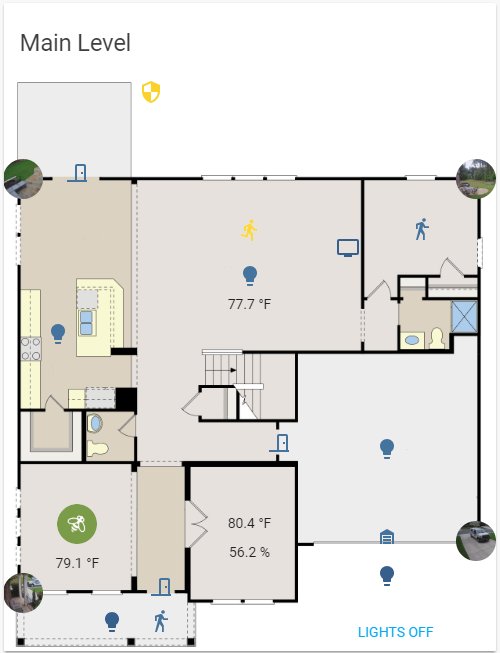
but with floorplan
raven nacelle
I went around looking for my plan...luckily they reuse the same plan 😜
I saved the link now and, for safe measures, also got a copy of it
vapid field
they sure do, i did the exact same thing, i just googled lennar + my exact sqrt ft and got some weird name but same thing
raven nacelle
funny, you could make out it was Lennar property
vapid field
raven nacelle
perfect...just remove the labels from there and you have a great floorplan to use
vapid field
i guess on beta version you can set lovelace as default UI?
raven nacelle
yes, you can. Although on the desktop, the default option does not work reliably for me.
north spear
Clicking Overview in menu takes you to old ui
raven nacelle
It works quite reliably on the iOS app
north spear
Without the hack? Just beta feature?
north spear
Weird. Clicking overview gets you to lovelace?
raven nacelle
on the HA iOS app ?
north spear
Yep
north spear
Yes. That is correct
north spear
Indeed
raven nacelle
BTW, not sure if state-icon is the best way to present cameras on the floorplan.
@vapid field The image that you sent was from floor plan? I like the camera representation there
vapid field
ik twas
it*
im working on trying to understand how it works with lovelace
like whenever i try - type: picture-elements i get unknown card type
north spear
What is you HA version?
vapid field
.73.0b6
north spear
Can you post a link to a hastebin of your ui-lovelace.yaml?
vapid field
i think it may have to do with the picture path? http://prntscr.com/k2m4gb
vapid field
what does /local actually represent?
dapper rain
no idea what you mean buy you could just try
raven nacelle
Best way is open the image in an image editor and use the location to find the %
otherwise it is lot of trial and error
raven nacelle
Looks like the picture card cannot be used inside picture-elements
storm lion
interesting, what's the idea of use case for that?
raven nacelle
right now, we can only use state-label, state-icon, or state-text with picture elements card.
I want to, for example, indicate a camera icon for my camera
which basically will be a camera image
instead of
that is just one use case, but I would think ppl would want to add other elements on these images and interact with them
if we allow a generic image option that should solve the problem
the picture card comes close, but it does work with picture elements
storm lion
lovely idea!
@half osprey - still haven't got all my sensors represented yet, but as requested, how my current lovelace interface sits:
https://www.youtube.com/watch?v=6FX9_leiikw&feature=youtu.be
half osprey
perfect !
Let me put it on the Twitter
btw lol at those Exit signs haha
@raven nacelle there is a difference between the elements that we support and the cards that we support

Have you taken a look at Lovelace yet? Today Jack Johnson shares the love with a walkthrough of his UI ❤️
 Twitter
@storm lion is your config public? If so, please add it to the description of the video
raven nacelle
@half osprey I agree. I am just thinking that we need a generic picture-entity support for the elements card. Instead of presenting a generic light, I can then use a lamp to present my table lamp. Basically, distinguish between entities
storm lion
The exit signs were the best way I could think of doing it 😀 . I'm all on git so will add a link now
raven nacelle
just a thought and I understand that it may be something we don't want to do to avoid complexities. But, something like type: picture-entityelement would be a great addition to picture-elements card. I will create an issue explaining what I am thinking and may be
 serene sierra
Hello! Floorplan is compatible with Lovelace UI?
raven nacelle
not the Floorplan, but you can create one using picture-elements card.
serene sierra
ok ty
raven nacelle
@storm lion Great job 👏
storm lion
@half osprey - link to the device docs or to - https://rc--home-assistant-docs.netlify.com/lovelace
Haha thanks @raven nacelle 👍 hopefully gives some people some ideas
half osprey
@storm lion dev docs for now
 radiant drum
Hi! Will it be possible to change pictures in picture-elements card? for example when the light goes on it shows lightbulbs on and when it goes off, the picture change to lightbulbs off.
storm lion
@half osprey - updated and tidied up 👍
raven nacelle
@radiant drum If you use state-icon, it will show blue when off and yellow when on.
similar to what you see on your UI
radiant drum
It will not change the picture?
raven nacelle
No, that is what I was trying to explain earlier.
that we need something like that
where we can change the picture based on the state
radiant drum
yeah..something like this: https://pastebin.com/349ETd50
kind shellBOT
Attention!: Please use https://www.hastebin.com to share code that is more than 10-15 lines. You have been warned, @radiant drum!
Please read rule #6 here #rules
radiant drum
Hope it will possible in the future 😃
half osprey
@storm lion could you mention the version that you're running (73 beta 5) and YouTube caps descriptions off after 3 lines, so move the link to your github repo to be on the 3rd line. It's the most important.
serene sierra
trying to add custom card followed by guide but having error Custom element doesn't exist: "custom-card-example".
north spear
are you using latest docs? https://developers.home-assistant.io/docs/en/next/lovelace_custom_card.html
storm lion
@half osprey - sorry I know even less about youtubing and twittering than I do about coding 😛 - updated now though. Thanks for the guidance 👍 - I've also figured out I have a twitter account I set up at some point so will try and answer questions best I can
dapper rain
@serene sierra that means for some reason your custom element is not defined
serene sierra
@dapper rain dunno why still told i was tried reboot and everything i have content-card-example.js inside my /.homeassistant/www directory
dapper rain
You need to add it to Lovelace config
serene sierra
yep inside my ui-lovelace.yaml i was added this ```views:
- tab_icon: mdi:home
name: Home
cards:- type: "custom:custom-card-example"
entity: alarm_control_panel.home_alarm```
- type: "custom:custom-card-example"
dapper rain
It needs to be added to resources too
serene sierra
  - url: /local/content-card-example.js
type: js``` all set from guideThen maybe the problem is in the js
serene sierra
/.homeassistant/www/content-card-example.js is = /local/content-card-example.js right?
quick beacon
not sure if the demo code is still valid for old releases....
dapper rain
Yes
You could check if it's loaded via the network inspector but probably the js is the problem
serene sierra
mmm what i need to do? im have this frontend: javascript_version: latest extra_html_url: - /local/custom_ui/state-card-custom-ui.html - /local/custom_ui/state-card-tiles.html - /local/lovelace.html extra_html_url_es5: - /local/custom_ui/state-card-custom-ui-es5.html - /local/custom_ui/state-card-tiles_es5.html themes: !include frontend_themes.yaml inside my configuration.yaml
dapper rain
The js file might be the problem
serene sierra
ah ok ty
half osprey
Did you add the file to your www did in config?
serene sierra
upgraded to 0.73.0.dev0 and now when i tried make custom card i have error in UI ```i.setConfig is not a function
{
"type": "custom:content-card-example",
"entity": "input_boolean.switch_tv"
}```
half osprey
Check the dev tools to make sure it is loaded correctly
Also which browser? Use chrome for now. Safari and edge is kinda wonky
serene sierra
safari and firefox yes im have that file
oh its only firefox issue because i can see it clearly in safari @half osprey thanks
 lethal sand
anyone get the custom state card for floorplan to work with lovelace?
vapid field
Can i use toggle on dimmer light?
@lethal sand it kinda works natively with a picture and status on top
Im working on mine now
lethal sand
I cant seem to get anything to work on it, just a blank frame for iframe.
kind shellBOT
For best of the best home automations, visit my repo at https://github.com/arsaboo/homeassistant-config
lethal sand
cool, ill check it out
vapid field
Mine is looking like this https://ibb.co/ia8vMd
Just stared so should look better soonish
lethal sand
heres my floorplan, works in normal panel_iframe at least. https://ibb.co/n94VnJ
 cunning violet
@half osprey Took my time but here's my Lovelace demo.
https://youtu.be/yAQWQkl1zjs
cunning violet
@waxen wolf No sound..was just a screen recording.
half osprey
@cunning violet very cool! I'll share it online tomorrow
If you have some config shared online, please update your description with a link
 fading sorrel
@cunning violet Holy mother of Home Automations
I really need to start playing with Lovelace... that just looks just awesome
north spear
If anyone interested: https://github.com/ciotlosm/custom-lovelace/blob/master/gauge-card/README.md a good use case for stack cards and lovelace custom card 😃
undone egret
Have them on my dashboard with color graduated values. Great for quick reference
 feral grotto
Hi guys, weird issue on lovelace, my second camera doesn't display (it does on "regular viewer"). It gives me: Log Details (ERROR)
Thu Jul 05 2018 08:21:06 GMT-0400 (Eastern Daylight Time)
https://10.20.30.253:8123/frontend_latest/app-4292f66004397bd401a51afce535490e.js:2:37089 Uncaught TypeError: Cannot read property '_domain' of undefined
quick beacon
the entity_id is not correct
feral grotto
it was and it is 😦
It was, it wasn't anymore, I corrected it and now it works again 😛
damn _ instead of .
thanks!
north spear
bignumber-card
gauge-card
For those interested in more big cards to use with stack for sensor display
raven nacelle
Would be cool if the gauge card could allow color gradations - green when low and red when high
may be something for v2
north spear
@raven nacelle easily added, I'll put it on the todo
raven nacelle
I created the image for something like that
half osprey
@north spear are you going to make it so that people can set number boundaries when to switch to a color? or just have a min/max and create colors based on that ?
I would btw totally consider those as built-in cards
storm lion
Ideal for temperature sensors - with a new baby making sure each room is in the right "temperature range" with a visual gauge would be amazing!
 eager wharf
I'd like to use it for something like Pollen index, as that usually determines if I'm going to enjoy my day or not lol. The color gradient mockup that @raven nacelle showed would be cool for something like that
Or even just colors in the gauge card as is
storm lion
How many jobs I've completed that my wife has assigned to me on todoist.. that's what determines the level of enjoyment of my day 😃
half osprey
@north spear I tweeted about your cards https://twitter.com/balloob/status/1014860776744673280


One of my favorite things about the @home_assistant Lovelace UI is how easy it is to create and share custom cards. The chat is full of people with ideas and others that quickly prototype and implement.
All powered by web components and the open web. Each card ~100 lines ...
Twitter
north spear
@half osprey set boundaries makes most sense, and change color of whole bar based on the current value
@half osprey thanks for the tweet
but I wouldn't know how to get this in the main code, I'd have to ask @quick beacon for guidance 😃
north spear
I liked https://github.com/JohnrBell/Gauge_CSS because it was pure css without much junk
but I guess the component needs to be far more generic to support various sensors with different color needs if it gets integrated
mortal cape
raven nacelle
@mortal cape That looks great and already has the color gradation
north spear
@mortal cape one other big problem (that I solved in gauge_css) is to scale properly
most of these use fixed size, and resizing doesn't really work well
mortal cape
ah
it was the first to come up for search so I figured you'd seen it too and passed on it for some reason
north spear
that uses javascript as well, and it's not easily compatible to import the min js with the module I was creating
as I said, the more lightweight, the better
raven nacelle
Seems it does not scale well
north spear
@raven nacelle did you specify min / max ?
north spear
aaaa
raven nacelle
when you add 3 cards there, it doesn't scale
north spear
the size
raven nacelle
yes
north spear
you can use scale , if you know you want 3
add scale: '30px'
and see how it works
I'll try to see if I can figure size based on a parent
at the moment you have to adjust scale parameter based on how many you want to stack together
raven nacelle
With scale: 35px
mortal cape
I do like the gauges that transition from one color to another vs the ones that use static blocks of color, but if it scales and fits properly that would take priority. This is one of those things that will inspire many other variations I imagine. So a good custom card to "put out there"
north spear
@mortal cape what I had in mind was color that transition
I use
         - type: horizontal-stack
            cards:
              - type: custom:bignumber-card
                title: Temperature
                entity: sensor.short_name
              - type: custom:gauge-card
                title: Oil
                entity: sensor.battery_sensor
                scale: 35px
              - type: custom:bignumber-card
                title: Oil
                entity: sensor.battery_sensor
scale: 35px works with 3 in a row
raven nacelle
+1 for scaling and color coding
north spear
@raven nacelle did you try to use scale: 35px for your 3 card setup ?
raven nacelle
the image that I sent was with 35px
the chart scales, the temperature rating does not and and the title gets cropped.
north spear
ah right
I'll fix those 😉
Ok, seems it's better now
I'll look at color tonight, I think should be an easy addition
I have already an idea on how that will work
half osprey
@north spear if you want to import things, write es instead of js for your custom card. See advanced custom card as example.
Making sure whatever gauge lib we pick, it's light
We cant pull in a full charting lib just for gauges
north spear
ok, I'll finish this first to be usable with color for more feedback and then have a look at that
my current version is css only based on that lightwegith gauge chart
half osprey
I like that
north spear
every other gauge I saw was using a fair amount of js
would something like this be flexible enough?
          - type: custom:gauge-card
            entity: sensor.battery_sensor
            sectors:
              - min: 8
                max: 15
                color: '#43bf58'
are numbers valid keys?
sectors:
  "0": red
  "10": orange
  "20": green
how do you define than which is the whole range for a color ?
you can't assume good is going up or down
fuel is red towards 0, but temperature is the other way around
plus some have blue when low , others have red
quick beacon
^so I would change the order of the colors? 🤔
north spear
makes sense
mortal cape
sometimes these gauges have an option to reverse (invert?) the direction. I don't recall if that happens in grafana or where I saw that
not the direction but the range so 1 to 100 or 100 to 1 for example
north spear
Ah ok. But i think a setup like crusader727 said is flexible enough
And we predefine colors based on theme
 cinder rapids
Wow I’m going to have to quit my job to be able to keep up with the changes to HA and Lovelace.
 pure void
the breakneck speed of additions/corrections is a terrible thing to deal with 😉
north spear
There is a changelog 😃
north spear
@raven nacelle @mortal cape up to test gauge colors ?
😄
if it's allowed to hijack this channel for custom cards discussions (just thought about it that I'm a bit off-topic probably)
mortal cape
@north spear sure!
raven nacelle
Absolutely
north spear
not sure how intuitive are the docs
but the values should read "from this value"
so if you'd want to start with red and end with green should still be doable
raven nacelle
Let me check... Gimme 5 min
storm lion
Would a custom card repository, much like the add-ons store in hassio be something worth considering?
Probably not right now whole thing he systems still evolving but longer term
north spear
@storm lion
"Marius - Today at 7:59 PM
I had an idea of a hassio addon that could manage a custom cards setup where you could point it to git repos and it will add the cards to resources and download the files to your /config/www"
storm lion
Lol... See now that man has great ideas ^
north spear
maybe @fading sorrel has some space in his backlog
fading sorrel
?
north spear
for a new hassio addon 😃
fading sorrel
I see
I have considered those kind of add-ons
(comparable to an CustomUI or Floorplan add-on)
storm lion
Lol.. I was thinking as part of the core ha, so non-hassio users can select it too
fading sorrel
But i've decided not to build add-ons to manage static files within the Home Assistant configuration space
It makes no sense
north spear
@fading sorrel in this case even to just download the file, and have a crude version system
like allowing users to specify text version files
fading sorrel
@north spear Docker containers run services
I'm not going to build it
feel free to do yourself
I do not agree on the methods needed
storm lion
So you install your nest which gives certain data in a certain format, just click the nest climate card from the "store", your ecobee well that labels things differently in attributes (for example) grab the ecobee card... Same for vacuums and anything that gives masses of information in the attributes field in a certain way... The GUI card it displays can even reflect the device...
north spear
mkay, I'll think of other solutions
mortal cape
@north spear is "severity:" incorrect, in your example?
fading sorrel
Another example is "custom_deps" add-on, which should be deleted
mortal cape
@fading sorrel these are essentially custom cards with lovelace
fading sorrel
I know
and essentially just code
that needs to be placed in the correct location
(same as the custom_deps does)
mortal cape
what determines the size for stacks...the number of cards?
more cards, smaller cards?
mortal cape
@north spear
north spear
are you sure you updated?
mortal cape
I will double check
north spear
for multiple to fit, you need to update scale to something like '35px'
north spear
😃
@mortal cape I'll try to find out how to get scale adjusted automagically based on space available
raven nacelle
Looking good
mortal cape
@north spear I need to tweak things
north spear
rounding or text size parameter ?
north spear
looks pretty good. I think i'll do the same for my systems tab
mortal cape
first time I've used markdown. How does it get centered?
north spear
in native markdown (unsure which flavour is used) you can't center without html/css
storm lion
That looks amazing @north spear
north spear
but sooo cool to see how cards work together
north spear
so glad horizontal-stack didn't go away 😃
 rigid harness
@north spear In same style the latest cards discussed, would it make sense with something like a big-entity card?. Could see some use cases for big switch or light. Ie. dashboard setup.
north spear
@rigid harness no need
@rigid harness you can already use https://github.com/ciotlosm/docs-lovelace/blob/master/card-picture-entity.md for toggle stuff
You can get it as pretty as you wish
 sudden lion
Can you get this "full screen" ? https://github.com/ciotlosm/docs-lovelace/blob/master/card-picture-elements.md
north spear
@sudden lion yes, using https://github.com/ciotlosm/docs-lovelace/blob/master/view-panel.md
sudden lion
ah cool
rigid harness
@north spear Sure, was thinking not all use cases would fit into the picture style. Let’s say for a light within a view for a room, entity icon with color scheme showing state could be really easy accessible, and not to flashy.
north spear
@rigid harness than maybe glance and wait for https://github.com/home-assistant/ui-schema/issues/49 ?
storm lion
I can see it being useful to make bigger cards too.. so maybe inside a room the camera is two cards wide and tall for example
rigid harness
Could get the same effect, but not exactly what I was thinking. Styling to really show of a single entity within one card stacked together with gauge-card, bignumber-card, could make good for making elements stand out more and be really easy accessible. Dashboard-style-ish
raven nacelle
@rigid harness This should help https://github.com/home-assistant/ui-schema/issues/75
adding generic elements should be useful to make elements stand out or visually distinct
north spear
@rigid harness for toggle switch picture-entity should be enough
for your light situation you would need something different, but not sure what your expected outcome would look like
but you'd need something different only because lights can have hue state coded in the picture
@half osprey would a picture-light be possible? where you provide a black and white image and you get either yellow when on or the correct color through CSS based on light state?
come to think of it, I could implement that through custom cards
not that hard
@rigid harness would a black and white image with right "hue" based on light attributes work for you?
rigid harness
That would work, I was thinking colored material icons would do the job, without having to create a picture for each entity. But I see your point that this is somewhat covered by ie. glance
north spear
both glance and picture-elements
you could create a picture elements with a light on top
but with a proper custom component you could use https://discourse-cdn-sjc1.com/smartthings/uploads/default/original/2X/5/5ac658b32161878f98591deaa981a53f67d96f8d.png and just have it with right state and color everything in the color of the light
 rigid harness
https://ibb.co/kJaCmd Beeing able to create something like this was my idea.
Won't pursue any more. Thanks for your time, thanks for your awsome work!
north spear
would something like https://materialdesignicons.com/ "lamp" icon work with various color and title underneath ?
rigid harness
That’s what I was thinking. Use the mid:xxx icon defined for the entity.
north spear
pretty simplistic toggle approach, but doable. I'll have a look tomorrow.
rigid harness
Cool, thanks! 🤘
half osprey

reddit
47 votes and 13 so far on reddit
Saw this on Reddit. So cool
@north spear about new cards. I prefer we first built as custom cards. See what works, see what config options we need. Once we have more experience and see a need, we can promote to built in card
That way we avoid having to upset people like with the filter card
 amber ginkgo
Anyone tell me if I can use a local .jpg for picture-glance? Can't figure out the file/URL format.
quick beacon
amber ginkgo
Funny! I had an erroneous apostrophe at the end of my URL. Fixed now image: /local/lovelace/10PoakaLounge.jpg
 lucid trail
i can't wait to migrate to this from floorplan once it get s a bit more mature...
north spear
@half osprey I think that makes sense. @storm lion the repo you proposed would make sense as a 1st stage and a filter. That would also help make cards a bit more standard, at least in name & docs. However with this in mind I think the naming standard much change
 buoyant skiff
been looking at the screenshots and examples cant wait for 0.73 to drop and for me to get started with lovelace i know i do it now but itseems like a good idea to wait and let others go thru the growing pains etc 😃
north spear
I am also waiting on 0.73 to migrate my production setup
I have a spare to test stuff out and wrap my head around things
saves time when it hits
north spear
glad to hear
 wheat current
The docs you have created @north spear will save all of us a lot of time 😄
buoyant skiff
gonna use that for cpu load from various systems
north spear
if you spot mistakes, please let me know. Either PR or issue or on chat
yeah, after I saw @mortal cape's image of his setup I immediately thought of my systems tab too 😄
wheat current
That monster card , will it be possible to filter on attributes at some point in the future?
north spear
to be honest, I did the gauge-card for a reddit post, just to help with an example what can be done easily
@wheat current yes
buoyant skiff
well it was a good plan 😄
north spear
you want to filter on attributes using wildcard method like entities?
wheat current
Preferably yes 😃
buoyant skiff
the only part that is problematic part with homeassistant is that its so damn addictive 😛
cant stop doing stuff in it and adding more content to it
north spear
if you'd have a practical example in mind for attribute filter, would you mind raising an issue against https://github.com/ciotlosm/custom-lovelace/ ?
buoyant skiff
need to migrate my custom_compoment stuff to github
since ludeeus setup a git for us yesterday
good initiative to have collective makes it easier to for users to find it
should probly put stickies on forums for both lovelace and compoments
 waxen wolf
any idea why this gives me a "error in card configuration"?
      - type: picture-glance
        image: #"/local/office.jpg"
        camera_image: camera.digoo
        title: "Büro"
        entities:
          - light.silberne_lampe
          - light.grosse_stehlampe
Try:
      - type: picture-glance
        #image: "/local/office.jpg"
        camera_image: camera.digoo
        title: "Büro"
        entities:
          - light.silberne_lampe
          - light.grosse_stehlampe
yeah that shebang is outta place 😛
waxen wolf
sadly already tried that 😦 thanks @wheat current
the # is in place (at least according to the card documentation).
wheat current
Not acording to yaml
waxen wolf
true but in the documentation of the card its mentioned like this
- type: picture-glance
  image:
  camera_image: camera.demo_camera
  title: Living
  entities:
    - switch.decorative_lights
    - light.ceiling_lights
    - lock.front_door
    - binary_sensor.movement_backyard
    - binary_sensor.basement_floor_wet
so i just tried to comment out my actual value to keep image:
anyway. neither works with image:, image: #asdf or #image: asdf. must be another issue
the cam itself works though. at least through the debugging view
maybe i have to wait until 0.73. i am still on 72.1
waxen wolf
interesting
i am using a onvif camera
not sure if that makes a difference
let me try to use ffmpeg instead
i mean its basically the same but different i guess?!
wheat current
I didn't change the camera :P
waxen wolf
i see the same picture but on the bottom there is a half cut text that says "error in card configuration"
dont you see that too?
north spear
that setup with camera_image was added in 0.73.0b3
waxen wolf
thanks marius, that makes sense
wheat current
oh... yes... forgot to change branch 😛
north spear
@wheat current if hassio would also publish such attributes for containers to use as sensors in HA .... endless posibilities to get system tab auto show problematic things
like containers eating bandwidth
or other things
sounds like might be pretty useful
wheat current
@north spear i think someone is working on that ;)
For hassio users that have used the alternative installer (users that have full access to the host) they can add the ha-dockermon container and my component will pick up add-ons as well 😉
wheat current
Awesome 😃
waxen wolf
before i start it
i suppose you can create lovelace packages the same way you did in legacy?
or almost the same way
north spear
ui-lovelace.yaml doens't support packages
wheat current
does it support !include? it does support !include :)
https://hastebin.com/kalovamovu.coffeescript
buoyant skiff
tempted to update to beta due to auth2
wheat current
Should release today/tomorrow so the betea should be pretty stable now 😃
waxen wolf
@wheat current thanks. include is all i need to have "packages"
waxen wolf
okay sorting gets screwed up that way. ill see if i can include them manually
would still be a lot cleaner
okay that doesnt work as expected. maybe someone smarter than me will find a way to include them manually aka invidually
waxen wolf
@mortal cape my idea was to have something like this
views:
    !include packages_firstview.yaml
    !include packages_2ndview.yaml
etc
but thats not how include works apparently
when i !include_dir_list it will sort it by whatever method. i could maybe try to name it 1-2-3-4 and so on
mortal cape
if you did it that way (like in ludeeus' example) then yeah, I would think 01.yaml and 02.yaml (for example) would be the order
I'll try it
waxen wolf
ill too
half osprey
Lovelace is not supposed to support the includes
waxen wolf
i know
half osprey
Because we're going to write yaml and all tags will be removed
waxen wolf
it still kind of works though ;p
half osprey
For now.
mortal cape
tags?
half osprey
The include tag
half osprey
Guess it's not a tag, a statement or whatever
Didn't sleep last night so brain little fuzzy
waxen wolf
is there already a concept for lovelace packages?
half osprey
No
And I don't want it either
Because by keeping it simple we can support this use case: you set up a new integration via the UI and it will add the entities that go with that integration in a new card to your UI
Is it a Sonos, we'll show the group coordinators, is it a system monitor, we maybe add a few gauges already perfect configured
However, the difference with old UI is that we do this once
After that, up to user how to configure
Just help them get started
waxen wolf
and that cant be done via packages? or hooks or whatever its called in programming :p
waxen wolf
you know how the users are. they will have a 21300 line ui-lovelace.yaml at some point
mortal cape
I wasn't interested in packages, but I was curious about breaking my lovelace.yaml into smaller parts
wheat current
@north spear yes please 😃
half osprey
With packages it's 100x more complicated.
waxen wolf
that i have no idea of. i am not a programmer. but i remember the old times when there were no packages
and it was crazy
north spear
        filter:
          include:
            - domain: device_tracker
              attribute: battery
              value: 53
sample filter
I might migrate to:
          include:
            - domain: device_tracker
              attr: battery
              attr_value: 53
could you do something similar like we have with automations?
with "conditions" and/or
dont remember the syntax anymore
north spear
@waxen wolf there are and / or conditions
any new list entry is OR any object in same list entry is AND
waxen wolf
cool
wheat current
@north spear got a link to a js file i can get?
north spear
yes, one sec. I'll adjust first keys
wheat current
I'll grab a ☕ then 😃
north spear
hmmmmmmmmmmmm
how about:
      - domain: device_tracker
        attr:
          - battery: 53
          - source_type: router
even better 😄
north spear
ok
updated
      - domain: device_tracker
        attributes:
          battery: 53
          source_type: gps
let me know how it works when you get a chance. I only tested it on demo entities
wheat current
can't get it to show anything, does it requre beta?
north spear
unfortunately yes, because of the setConfig change
maybe @raven nacelle wants to try it out 😃
I know he's running beta
waxen wolf
so refreshing to have the UI separated from the actual configuration. can finally play around with the design without restarting the whole service all the time.
buoyant skiff
^^
north spear
such a quiet day 😃
wheat current
@granite prawn look at the channel description 😉
 granite prawn
@wheat current i did, but it mostly went over my stupid head
im going to try this https://gist.github.com/OttoWinter/730383148041824bc47786ea292572f8
wheat current
that tool and the one @empty heath made based on that one are cool.
but IMO lovelace is something new, and its better to rething how you want you UI and start from scratch
granite prawn
thats a good point you make. im going to have one more look at it before starting at it 😃
thanks mate
lapis oriole
I love the lovelace progress !! Thumbs up for you devs and testers! I love the custom monster-card. Any tip where to find a list (to filter) of available domains and states and attributes? Can't find it myself. Thanks in advance for a reply.
wheat current
that is individual to what you have ;)
In you UI look at  , what you see there is what you can use
lapis oriole
@wheat current Yes, thanks!!! Now I get it, stupid me 😉
north spear
Would people pe interested in a lovelace card like this https://codepen.io/dalhundal/pen/KpabZB ?
for thermostats
 inner topaz
you will need to pay NEST royalties for that design 😉
north spear
hmm
it's just a gauge with text in the middle, nothing that special
just the concept of a round dial, not necessary with leaf and the fine lines
north spear
I think if it would implement the leaf and the controls on the right like nest might be a problem
but I don't think a ring with a number in the middle shouldn't be subject to UI/UX
mortal cape
@north spear Replace the leaf with a green light. I actually don't think the leaf is a problem
north spear
I don't like the leaf to provide info ..it's just a fancy gimmic for marketing
i took the screenshot as I liked the way it was done with SVG on that site
mortal cape
I don't have a nest. Is it for some kind of eco mode?
north spear
something like that
mortal cape
That seems to be what "leaf" implies across platforms anymore. I think cars use it too?
north spear
don't know
mortal cape
I guess the exact shape and style of leaf may differ from one to another
north spear
something like in cars tell you that you are "Green" when you don't step on the gas :))
mortal cape
ah
north spear
marketing
the only place I see a thermostat using state and data properly is when things change dramatically and you don't want the termostat to do it twice
like not stopping thermostat from heating as it's reaching it's current 22 degree target because it knows in 5 minutes must reach 25 because of schedule
but these are minor things that don't win much energy, away home win more, but even then only when heat latency is not high (like floor heating)
unless you go on vacation
rest ... marketing
raven nacelle
@north spear I was thinking exactly about that
it will be nice to even have something similar on top of the picture-elements card
for displaying temperature/humidity
north spear
nah, I'd either build something that you can control stuff with or not at all 😄
raven nacelle
fair enough....
buoyant skiff
@north spear would be very interested
raven nacelle
I had something like this in mind to indicate sensor values on the picture-elements card (example from Floorplan thread)
mortal cape
@raven nacelle @north spear would the bignumber custom card work with picture-entity
north spear
should be doable , I don't see why not
mortal cape
well you could have a picture with a temp overlaying
it wouldn't work for your floorplan example
mortal cape
@north spear actually, you know what might be cool...is if bignumber had color options like gauge
so the whole card transitions from one color to another?
north spear
hmm, that is probably easier
mortal cape
it's basically a different type of gauge I guess
buoyant skiff
Could use that for a download meter
mortal cape
all kinds of things
north spear
ok, I'll update the issue to allow this
I need to fix bignumber anyway to scale a bit better
buoyant skiff
One upload and download next to each other
mortal cape
@north spear I just noticed in your options for bignumber it says type string Required custom:gauge-card
buoyant skiff
😀
mortal cape
@north spear another idea might be bignumber as a meter, horizontal or vertical, where a chosen color is filling up/down or left/right. Maybe that would be another card altogether
half osprey
@raven nacelle just style the state label element to have a background image?
raven nacelle
that will be perfect...how?
raven nacelle
          - type: state-label
            entity: sensor.temperature_158d0001ab3c88
            style:
              top: 40%
              left: 50%
              '--background-color': red
Does not work
raven nacelle
Ok... - type: state-label entity: sensor.temperature_158d0001ab3c88 style: top: 40% left: 50% 'background-color': red 'border-radius': 50%
works 😃
Is it background-image for background image? 'background-image': /local/icons/rashmi_owntracks_home.png does not work
half osprey
it needs more settings
If you google CSS background: https://developer.mozilla.org/en-US/docs/Web/CSS/background
 empty heath
@wheat current In my opinion, if you’re just getting started with Lovelace, the tools might help you better understand how it works and how it looks, with minimal effort.
wheat current
That is true, but this change is an exelent point to rethink stuff 😃
half osprey
@raven nacelle btw, since it's CSS, you can even just right click the element and click inspect and change the CSS and see results on the fly. Once you're happy copy it over to your config
raven nacelle
True....need to first create another sensor to round off the values and then I will try to create one for temperature and humidity
storm lion
Been away from my pc all day.. I must have missed at least 15 amazing new Lovelace things..
vapid field
is the entity custom name feature working in 73 for you ?
or is it still in beta only
half osprey
part of 0.73
vapid field
thanks. I get error mapping values are not allowed here, and the entity is not displayed
half osprey
that's a YAML error
 tender wasp
@vapid field can you share that section of your config?
vapid field
ooops, I think the upgrade to 73 had not completed successfully after all...
ok it works now
sudden lion
I'm getting an error on 0.73 with the picture-elements card:
waxen wolf
@sudden lion sure you updated? 😃 can you share your card config
waxen wolf
well, the box looks like 0.73 as well.
sudden lion
Same for vertical-stack
seems the new cards are not there in some way
Did another restart of ha and now it works
waxen wolf
designing the ui while not restarting hass is so good ❤
raven nacelle
@north spear To use the Nest UI as a background to indicate temperature, will be better to use the css or just as a background image?
north spear
Depends on which card
sudden lion
When i use picture-elements as a panel how can i best scale the picture to just fill the screen and not go outside the screen area?
north spear
You could just embed it in background and align text sensors on top
raven nacelle
@sudden lion It should automatically scale
north spear
I see stat state badge allows style
That would also be an option
Maybe even better as probably more accurate when scaling
waxen wolf
when using the monster cards and specifying a title, the actual card doesnt get this name. any idea why?
north spear
Can you post config?
raven nacelle
@north spear So, state-badge with background image?
north spear
Yes @raven nacelle
kind shellBOT
@waxen wolf posted a message that is more than 15 lines. It is now available at: https://hastebin.com/rovumijoza
raven nacelle
@north spear Cool...will try it out. Keep you posted
waxen wolf
thanks @north spear
waxen wolf
reading disability it seems ;p
north spear
😃
waxen wolf
because i actually had those open while creating them 😃
north spear
Seems I wrote too many docs. I had to open my own docs to read params for picture-elements
sudden lion
Using picture-elements and placing objects.. is there an easier way then just guessing the % 😛 ?
north spear
@sudden lion nothing documented
But i’m sure there are tools showing this
Most photo editors show relative coordinates for cursor. Just need one configurable to %
sudden lion
can just make an overlay or something for easier eyeballing
north spear
That too
sudden lion
Tried to find a overview of all allowed style elements, is it on the github page?
"Style options"
north spear
Don’t think so. I haven’t played with that
But should be fairly easy to find out
Just use developer tools and play with available syles there
Than just use then in lovelace
sudden lion
😒
mortal cape
oooh side-eye
north spear
Developer tools = what you get native from any browse allowing you to see source code and stuff
sudden lion
ah, ofc
north spear
I am also on a mobile phone so harder to type properly. Happy enough I could edit github and do a rebase to get 0.73 updated in changelog 😃
I hope monster will cover for me 😃
north spear
Why not? I will check tomorrow
raven nacelle
it just displays the regular temperature badge and then adds the background image
 uneven vector
has anyone thought about letting entity-based cards (ie that take entities:) take a group instead, and use its entities?
a lot of the lovelace stuff can replace groups you typically make for display, but sometimes you want a group to control things too, and you'd have to duplicate it in a group and listing out individual items in the ui-lovelace.yaml
 timid burrow
does Otto Winter's migration script work with Hassio?
I'm running hassio on a Pi 3 (ResinOS)
mortal cape
@timid burrow https://github.com/dale3h/python-lovelace
timid burrow
yeah I'm trying it now
mortal cape
You'll end up with the same setup you have now, for the most part
timid burrow
there's a few hassio hacks
I'm using groups in packages though so it might not work?
timid burrow
error running the shell command
Sat Jul 07 2018 12:01:49 GMT+1000 (Australian Eastern Standard Time)
Error running command: python3 lovelace_migrate.py -c /config, return code: 1
NoneType: None
it had single quotes
they just don't show here
tender wasp
@uneven vector This would be a decision Paulus would have to make, but I think this would sort of undermine one of the main goals of lovelace, which is to decouple the front and backend
timid burrow
do I maybe need to make the script executable?
uneven vector
@tender wasp I get that's the goal. it would still be decoupled, because the card only knows about the group, rather than the group knowing about how to display itself
let me see if I can come up with an example, I'm shuffling some changes between branches
tender wasp
Yeah, maybe. But this still seems too much like having view configuration in the backend.. the only way to change the entities displayed as part of that group would be to change the group config.
It should be straightforward to implement, but that would definitely have to be a balloob decision
uneven vector
I might not be explaining it well, because putting view stuff in the backend isn't the idea
tender wasp
I think I understand, you want to define an entity for a card as group.something and have the card display a control for each entity in the group right?
uneven vector
maybe I did explain it right then 😄
like, for the type: entities, having a way to expand a group, rather than specifying each entity in entities:
tender wasp
Haha yeah I think so. And it may be something that can be added, but to me that still feels like view configuration in the backend since you are determining which entities will get displayed in the frontend by editing your backend config
uneven vector
guess there's always custom cards, right? 😉
tender wasp
👍 yep, another great thing about lovelace
uneven vector
my thinking for this use case, is say I have a group of locks. I'm pretty sure if one is locked, the group is locked even though some could be unlocked. if I'm debugging some automation, I'd want a place to see the state of each entity in that group
timid burrow
@mortal cape how do I not run it from my pi?
mortal cape
you can run it from something else where python is installed
dale3h's will work with packages, otto's will not
tender wasp
Yeah I definitely understand the use case, but that's why we have the entities card with a show_header_toggle option 😉
timid burrow
ugh
vapid field
hi
timid burrow
ah gotcha. missed it
vapid field
not related to lovelace, but is it possible to install hassbian and have it install a specific ha version, not the latest one?
mortal cape
@vapid field try hassbian-dev. Or even general homeassistant channel would have been better
vapid field
ok thanks
mortal cape
@timid burrow honestly, with the current scripts you'll end up with a generic list of entities with none of the features that make Lovelace interesting. You're better off copying examples from the doc pages into your own file and trying out the new stuff.
timid burrow
well I'm just thinking it's going to be forced eventually.... as you know I don't see much benefit anyway but if I can use my current config as the basis then I can play around with it
half osprey
So there is still a place for groups in Home Assistant, because they are being used for automations
Right now we didn't implement support for groups for two reasons: one is to drive people away from their UI-only groups
The second one is more technical: we'll need to add code to check the entities that belong to a group on each state change
I think the way I would want to implement it is a hui-group-card, that works like our filter card: it will wrap another card and set the entities on a wrapped card config
north spear
I think that would be easy to do as custom card
Maybe someone to raise an issue https://github.com/ciotlosm/custom-lovelace/issues to see how this would fit using custom cards
lapis oriole
Any suggestion how to get rid of this errors on my iphone x ? https://www.evernote.com/l/AAXICSLrf-dLIp7lb53eb8HGMEQBMUG1ZbA
lapis oriole
I'm on 0.73 , clearing cache did not solve it. Anything else I could try?
north spear
Using the browser on the iPhone
lapis oriole
This is within the Safari browser.
north spear
In your configuration do you have JavaScript latest set
?
I’m not at the computer at the moment so not much help but usually The set config error is due to an older version of Lovelace
lapis oriole
It's not a big deal right now. I will search further how to set latest JavaScript. Is this in a config file? Sorry for my noobness.
north spear
That configuration sits with then your configuration.yml under front and setting
lapis oriole
Thanks!!! I will check and try to correct.
north spear
If you have time try the Google chrome browser on your iPhone X
lapis oriole
This and clearing cache again did it:
frontend:
javascript_version: latest
Your skills and helpfulness are amazing!!! Thanks!!!!!
Same issue with Chrome is also gone now. 😃
north spear
Super
 candid rapids
How come I can't get the cards in two different columns? They overflow pretty far down and don't separate out. I tried putting first and bottom two into 2 different vertical-stacks but no go. https://i.imgur.com/BzVYLYr.png
 half osprey
If your first stack is less than 5 height (and weather card is that), it will render 2nd stack underneath it
Less is more, just remove the vertical stacks
candid rapids
even without the stacks it puts them all in column. I've tried every combination and it doesn't seem to work
 split granite
https://github.com/ciotlosm/docs-lovelace I'm finding rather handy, as linked from the channel topic
dapper rain
what is cardsize exactly ?