#@danh picked up the nRF52840 board (didn
1 messages · Page 1 of 1 (latest)
 wintry acorn
ga = go ahead?
Am I going to need circuitpython with this board or can I go back to Arduino IDE?
How hard is it to get BLE running on this board?
I've looked at a few iOS apps for receiving Bluetooth. Any suggestions? I ultimately want to export the data in some sort of text file, i'e' .csv .tab fixed length?
??? you there ???
wintry acorn
Also, is there a way to extend the board to use I2C? There are no I2C connects on the board but I do have a "tailed" I2C connector. Can I just make connects to SDA, SDL, 3V and Gnd pads on the board?
 foggy apex
wintry acorn
??? you there ???
foggy apex
wintry acorn
??? you there ???
sorry, someone came to the house
yes, you can just use the dupont-to-stemma cable arrangement.
wintry acorn
hey, beggars can't be choosers! I appreciate your time when its available nd if its not, when then I happily wait
foggy apex
also this https://www.adafruit.com/product/4515

The SparkFun Qwiic FeatherWing (Shield for Thing Plus) provides an easy-to-assemble way to add the STEMMA QT / Qwiic connect ecosystem to any development board with Feather/Thing Plus ...
wintry acorn
I was looking at the Bluefruit connect and it's kind of useless for my needs unless I'm doing something wrong
foggy apex
you could stack in the usual Feather stacking headers arrangment or use a doubler: https://www.adafruit.com/product/2890

This is the FeatherWing Doubler - a prototyping add-on and more for all Feather boards. This is similar to our FeatherWing Proto except there are two! The magic of the Doubler comes when ...
the bluefruit connect app is for manual control, yes
there are triplers and quads too
for now you can just use a breadboard and the stemma/qt to dupont cable
wintry acorn
thx, but I have to keep this project at just the board and the bettery. I was thinking of adding a second sattelite sensor but thats WAY down the road. I'm still trying to get a stream of data broadcast. I need something like a Serial.print command but for Bluetooth. Had no idea how much was involved
I won't be adding headers to the sense board. it will be mounted via nylon screws to a small rubber sheet
actually the 4515 shield is nice but I'd only be adding one more sensor so it would be overkill
foggy apex
gotta make a phone call but will get back to you on the BLE "serial"
wintry acorn
THX!!!
gotten further with you in 2 days than 2 months of forums. And support people who grown unfond of me!I'll be here
foggy apex
ok, in terms of sending data. With BLE, as you may know, you can build a BLE service which supplies characteristics that are data fields. Some of these are standard and well-defined, like the BLE "Heart Rate Monitor" service. There is also a service called the "Nordic UART Service" which is designed for bidirectional byte-based datastreams. People often use that to build some ad hoc protocol. That is what the Bluefruit LE Connect apps do: the BLE device sends/receives data over such a stream. We have a library that talks that ad hoc protocol: https://github.com/adafruit/Adafruit_CircuitPython_BluefruitConnect.
You said you wanted to talk to iOS and/or Android. You can't easily write, say, a Python. script on iOS that talks BLE, because apps are more locked down for security reasons: there is no Python app for instance, that talks to the outside world. In the Android world, this is easier: https://appinventor.mit.edu/. Though since I looked at that they also now do iOS, so my experience may be out of date.
sample BLE UART (and other examples): https://github.com/adafruit/Adafruit_CircuitPython_BLE/tree/main/examples. See ble_uart*.py
wintry acorn
Nope, no Python unless absolutely neccessary. Just send 6 numbers at .125 second intervals. On the iOS side I just need a way to capture that data and send it to a file, ultimately it will go into Excel
foggy apex
just need a way to capture that data and send it to a file, ultimately it will go into Excel
"just" is doing a lot of work here. You would need to write an app, or find some BLE app that alerady does that
wintry acorn
I found a couple of iOS apps nRF connect, nRF Toolbox which look like they will do what I need, I just need to figure how to send them out to a server.
from a Bluetooth Server
foggy apex
nRF Connect doesn't automate anything -- it's for looking at what a device is advertising, etc.
nrf toolbox has BLE UART but it's not really automated either
wintry acorn
If either just captures the data I can do the transfer manually
Looks like I may have to jump back into Swift and Xcode but Apple DOES NOT make development as easy as the old CodeWarrior days. I used to love to program in MacPascal. Got an award from RCA Solid State for a Mac program written in Pascal
foggy apex
nrf toolbox captures data but just on the screen, it does not log to a file as far as I know
Both Bluefruit LE Connect and nRF toolbox are open-source apps you can crib from. App Inventor has beta BLE iOS support. It's a scriptable app. See this thread from yesterday (!): https://community.appinventor.mit.edu/t/is-there-any-ble-support-for-ios/130625

MIT App Inventor Community
Help! is there any BLE support for iOS???
The circuitpython side on the nRF52840 is not hard: there are multiple examples of sending/receiving data with BLE UART
wintry acorn
DARN, you are just a wealth of knowledge
foggy apex
that's because I did a lot of the BLE impl on nRF
like, here for instance, is an example of using BLE UART: https://learn.adafruit.com/circuitpython-ble-libraries-on-any-computer/ble-uart-example
wintry acorn
Question is, is CircuitPython fast enough to do 125mSec transmission of data?
foggy apex
should be
note that Bluefruit LE Connect will send 9dof data but it is from the phone, not to the phone. But you could use the same protocol the other direction
wintry acorn
Well you given me a bunch to go thru so I'll let you go help other lost souls. I have to buy my wife lunch so I'll drop off now and start studying. AGAIN, wish I had run into you about 2 months ago! Best, Joe B
just noticed MIT in the docs, did you graduate from there?
foggy apex
undergrad, Berkeley grad school
wintry acorn
looks like the board got delayed by UPS. What a surprise. Everything has been delayed by UPS.
looks like the uart is going from the computer to the board, not the other way around.
Also, I still have the issue of not being able to get circup running on either mac. Probably wait for the board to get here to start playing around with that because I'm tired of trying to get regular libraries on the Pico board.
wintry acorn
foggy apex
undergrad, Berkeley grad school
nice, never did the college thing. when I would have gone Vietnam was happening and you needed to be at the top, which I wasn't. I did, however break my back racing boats so the military frowned on signing me up. All my knowledge comes from devouring every class RCA Solid State gave in house and a couple of classes at Rutgers and Fairchild-Schulmberger. Gave me enough knowledge to be dangerous. Did publish a paper in Electronics Test magazine, presented at an IEEE conference and got a patent at RCA which they patted me on the back, gave me $250 and a gold leaf duplicate of the first page of the patent.
Don't suppose there's a version of CircuitPython that runs on a Metro Mini 328 V2
foggy apex
wintry acorn
Don't suppose there's a version of CircuitPython that runs on a Metro Mini 328 V...
No, there's way too little RAM and flash. There is https://sneklang.org/
wintry acorn
Hey Dan, I see that the nRF52840 has Arduino IDE support. Which library has the codea and examples? Thanks, Joe
Also, there are 10 Adafruit Feather boards:
Adafruit ESP32 Feather
Adafruit Feather ESP32 V2
Adafruit Feather ESP32-C6
Adafruit Feather ESP32-S2
Adafruit Feather ESP32-S2 Reverse TFT
Adafruit Feather ESP32-S2 TFT
Adafruit Feather ESP32-S3 2MB PSRAM
Adafruit Feather ESP32-S3 No PSRAM
Adafruit Feather ESP32-S3 Reverse TFT
Adafruit Feather ESP32-S3 TFT
Which is the Sense board?
Thanks,
Joe
foggy apex
wintry acorn
Also, there are 10 Adafruit Feather boards:
Adafruit ESP32 Feather
Adafruit Feat...
You have to install the nrf board support package. Those are all from the espressif board support package. https://learn.adafruit.com/adafruit-feather-sense/arduino-support-setup. The directions are for Arduino 1.x but 2.x is ismilar.
wintry acorn
I also added
https://adafruit.github.io/arduino-board-index/package_adafruit_index.json
to the Arduino settings page and found the Adafruit nRF52 boards and now the Adafruit Feather nRF52840 Sense shows up as one of the boards. Now I just have to wait for it to actually get here
I tried compiling the Blinky code and it looked like it didn't throw any errors. I noticed something about have to install drivers. Do I actually need to do that to get the board to connect, or since it compiled it should be OK?
foggy apex
wintry acorn
I tried compiling the Blinky code and it looked like it didn't throw any errors....
you don't need any drivers unless you are on Windows 7. You may need to update to bootloader in order to load CircuitPython 9: https://learn.adafruit.com/adafruit-feather-sense/update-bootloader
wintry acorn
I saw that part. Shouldn't be a prroblem
foggy apex
wintry acorn
I saw that part. Shouldn't be a prroblem
The UF2 method will probably not work because the bootloader will be too old, if indeed it is out of date.
wintry acorn
just ordered the board so whats the chance its old?
wintry acorn
I thought this had a USB-C connector! Is this a micro B?
foggy apex
wintry acorn
I thought this had a USB-C connector! Is this a micro B?
it's micro-B, the design is several years old, before we switched
wintry acorn
I have so many cables I found a micro usb so I'm connected. Trying to figure out the bootloader stuff. Also what's a good test example on the Arduino? You know my endgame send out sensor data via BLE. Thanks, Joe B
foggy apex
wintry acorn
I have so many cables I found a micro usb so I'm connected. Trying to figure out...
https://learn.adafruit.com/introducing-the-adafruit-nrf52840-feather/examples. It's worth reading the whole guide
This is older but has more background on BLE: https://learn.adafruit.com/bluefruit-nrf52-feather-learning-guide. It was written when the only nRF board was nRF52832 (which doesn't have native USB)
wintry acorn
will do! thanks. plus looking at the MicroPython vs CircuitPython vs Arduino. I'm most familiar with Arduino but picked up books on BLE and Python so here we go......
foggy apex
we are not going to be able to help you with MicroPython details. There is a micropython discord
wintry acorn
no biggie, you've been invaluable with info.
wintry acorn
foggy apex
<https://learn.adafruit.com/introducing-the-adafruit-nrf52840-feather/examples>....
went thru the examples and got some stuff running and it looks like I need to figure out the UART stuff for sending data to my iPad. Using BLE Connect on my iPad I can send code back and forth but on the iPad when I connect I get 8 modules. Is there any way to just use the UART part of the code?
wintry acorn
What a mess trying to use MIT App Inventor. It forces me to use Google Chrome (which I HATE) and I have to use my Google email not my regular email. Add this to send 6 numbers from a sensor over Bluetooth. I GIVE UP!
wintry acorn
this board is a nightmare, all I keep doing is banging my head against stuff on the adafruit site which I have to get you to help me figure out, all the while thinking all I want to do is send sensor data over BLE.
wintry acorn
Hey danh, I’m close to the idea of paying some to write the code. I am almost 3 months in an no further than I was when I started. Either that or just dump the project because it is making me crazy. Known anyone who writes code?
wintry acorn
what is the difference between Adafruit Feather nRF52840 Sense and the Adafruit Feather nRF52840 Sense TFT?
foggy apex
wintry acorn
what is the difference between Adafruit Feather nRF52840 Sense and the Adafruit ...
there is no Feather nR52840 Sense TFT. There are some ESP32-nn Feather TFT's
foggy apex
wintry acorn
Hey danh, I’m close to the idea of paying some to write the code. I am almost 3 ...
Try just sending some sensor data over the BLE UART connection for now. Don't try to parse it yet. Can you get BLE UART to work at all?
wintry acorn
I think…I know it will show up in the nRF connect app and will show specifics of the board. I’ve also finally gotten App Inventor sort of running. Digging thru the docs right now but I think that if I can get the Bluetooth to connect then I’ll have to figure out how to send the data.
I just came off the elections, 2 13 hour days and the guy who was supposed to deliver the ballots got sick so I loaded them in my jeep and got sweaty and cold, it was like 48 degrees at the drop off so I’ve been pretty sick for4days now and with sickness comes grumpiness. Probably better if I just read for a day or so
wintry acorn
foggy apex
there is no Feather nR52840 Sense TFT. There are some ESP32-nn Feather TFT's
 foggy apex
wintry acorn
foggy apex
wintry acorn
That may be anticipatory for a possible product, but the product does not exist yet.
various things were put on hold during the Great Chip Shortage
wintry acorn
great chip shortage????
wintry acorn
I hate when I lose code! I modified a sketch for the nRF52 that had all the sensors being addressed to just sending out the 9DoF data, no frills, no labels just the numbers and nw I can't find it.
wintry acorn
@danh do you know what sketch runs thru all the sensor on the board?
wintry acorn
nevermind, it wasn't an Arduino sketch, it was CircuitPython. So I either find the CircuitPython BLUArt wrapper or setup the sensors in Arduino. Going back to bed, still sick!
foggy apex
There is https://learn.adafruit.com/adafruit-feather-sense/arduino-sensor-example in Arduino also
take it easy for a while!
wintry acorn
don't think I've ever been this sick for so long. My doc may want me in the hospital for a few days.
Thanks danh
wintry acorn
hey danh, back to the land of the living....
file not found errors:
#include <Adafruit_APDS9960.h>
#include <Adafruit_BMP280.h>
#include <Adafruit_LIS3MDL.h>
#include <Adafruit_LSM6DS33.h>
#include <Adafruit_LSM6DS3TRC.h>
#include <Adafruit_SHT31.h>
is there a bundle or package where these are? thx
wintry acorn
THIS is insanity!!! The board has DISAPPEARED!! On both of my machines, when I connect the cable, the little yellow light blinks, so I guess that means there is power but I can't send code to the board anymore. I have a ton of usb-c cables but only ONE mini usb. This board and this project are cursed! I can't keep throwing money this when I keep running into roadblocks. Restarted Arduino, restarted the Macs. Same result. Any ideas????
found 2 more mini usb cables, same thing, board doesn't show up
can connect a UNO R3 to Arduino IDE on both Macs using the same port, different cable
could also connect the ESP32 Pico (didn't I start with that board??) to both Macs. At this point I can only surmise that the nRF52840 is visiting never-never land. Of course right as I was about to start ACTUALLY doing what I started out wanting to do
wintry acorn
tried holding down the reset button for 2 seconds and the board came up to the point where i could get it to Adafruit_TinyUSB.
But now I back to throwing errors on the 6 libraries I have listed.
think I found what I needed going thru the github docs. i'll get back if I continue having issues
👍
foggy apex
you need to install those libraries in Arduino IDE. You also need to install the Adafruit nRF52 board package if you haven't done that yet.
wintry acorn
Thanks danh! I already figured what I needed from github and I have the full sensor test sketch up and running. My next goal will be getting the sketched. pared back to just the sensors I need. Will probably add the altitude sensor although I think I'll need another sensor BMP to get it setup, but right now it's going to be the bare minimum 9DoF to get started with the BLUART data transmission. No news is good news with me. If you don't hear from me things are working. joeb
wintry acorn
I have pared down all the code to send just the 9 numbers I need. 3 from the magenometer, 3 from the accelerometer and 3 from the gyro. Curios that all I get from the gyro is zeros. So my next quest if finding the details for the 3 sets of numbers. There is some documentation for individual boards but not for the chips on the nRF52840 or I'm missing something?
Also, there are 2 libraries for the accel/gyro but I believe only one of them is needed. I have:
Adafruit_LSM6DS3TRC lsm6ds3trc and
Adafruit_LSM6DS33 lsm6ds33. Looking thru the nRF52840 docs its not clear which chipset is on the board
Think I've made great progress although I still can't figure out whats up with the connection to the board from the computers
thanks again, joe b
wintry acorn
@danh, you there?
foggy apex
yes
wintry acorn
sorry, someone trying to pull some credit card scam but I caught it.
I figured that I would need to go in-depth on the board so i pulled up the 584 page doc on the nRF52840. Just wanted to know. if there anything else i should be scoping out.
foggy apex
wintry acorn
I figured that I would need to go in-depth on the board so i pulled up the 584 p...
I don't think you really need that but you will absorb some interesting details. I will be off for a while soon.
wintry acorn
@danh Are you back on yet?
From my reading, it seems like I want to set my board up as an "Advertising Beacon". I don't need any signals coming from the receiver, it just needs to capture the data coming from the "beacon". Those are the targets I am going to work on but I still haven't found anything specific to capturing and converting the data into a .csv format. I've seen references to it but no actual code.
wintry acorn
Went to the BLE UART:Controller page. Load the Controller example sketch. Tried to compile the code and ran into these errors:
I assume this has to do with the packetparser.cpp file but I don't know. 2 steps forward, 6 steps back......
wintry acorn
I pasted the packetParser code in the controller and the errors went away. And here I am, back to the same place. I can pull the 9 values I want from the board but still can't figure out how to send them without using an ios app that is overkill. Could you give me suggestions as who I could hire to finish this code for me. I am beyond frustrated at this point. Everything I read just confuses me more. Thanks, Joe B
foggy apex
wintry acorn
From my reading, it seems like I want to set my board up as an "Advertising Beac...
Sending data via advertising is like UDP. It can get lost. If that's OK with you (lossy sending), then OK.
but still can't figure out how to send them without using an ios app that is overkill.
it sounds like you mean the receiving is overkill. Yes, that's a problem. It's hard to make simple apps. That's why I suggested App Inventor.
wintry acorn
I've been trying to learn App Inventor but I still haven't gotten past the foggy residue of being sick.
wintry acorn
App Inventor would probably be a good option if it didn't keep blowing up. I've written a note on the support forum
It just boggles my mind that this was SO EASY 10 years ago and now it's so difficult........
wintry acorn
And remember when I wrote the note about Web Connect? 2 weeks or so ago. Still haven't heard anything. Seems like I just keep running into walls
wintry acorn
forgot about me????
foggy apex
i didn't know you were waiting for an answer. About Web Connect? I don't remember the problem.
wintry acorn
It didn't work and I wrote a bug report on the page. My current nemisis is App Inventor. I carefully followed the setup instructions. When I got to scanning the QRCode the iOS app blew up. When I tried to run the software emulator that blew up (gave me Terminal errors) I have been looking thru the MIT site for days and posting. I have tried on both of my Macs with the same result. So far the only thing I haven't tried is picking up an Android (which was suggested). I live on SSN and have no job (I'm 75 and although I have a resume as long as my arm with references to back up my resume) and my prospects for employment in the current job market is the same as the proverbial snowball in hades. So I thought to resurrect this old project from a decade ago and it has been brick wall after brick wall punctuated by making my bank account smaller and smaller trying to come up with something that works.
I don't mean to be gruff or mean or a pain in the butt but I can't believe how difficult sending 9 numbers from a sensor over bluetooth to a logging app on an iOS device can be. Maybe it's time to relegate myself to a museum with the rest of the dinosaurs........
foggy apex
https://www.st.com/en/embedded-software/stblesensor.html
https://apps.apple.com/us/app/blexar/id1439459314
https://makersportal.com/blog/2018/10/31/sending-arduino-data-to-ios-iphoneipad-using-blexar-bluetooth-app
https://makersportal.com/blog/arduino-sensor-data-logging-and-visualization-on-iphone
from websearch for ios ble data logging app
wintry acorn
always a wealth of knowledge......
foggy apex
sometimes I think I was a reference librarian in a previous life. But all I did here was a search; I had no idea if such apps already existed
wintry acorn
you must use better search terms. all I got was medical device interfaces. speaking of which I'll be offline for a while. got a surgery coming up (knee replacement). don't know if I'll be nice enough to be online for a few weeks. Really wated to work with Ap Inventor, always liked "rolling my own"
It shows great promise if I could get the silly thing to run
foggy apex
wintry acorn
you must use better search terms. all I got was medical device interfaces. speak...
a family member just had hip replacement surgery. HIGHLY recommended is an "ice machine", which is the opposite of a heating pad. It's a cooler with a pump that circulates cold water through a pad you can wrap around the affected region. https://www.polarproducts.com/polarshop/pc/home.asp. This was a huge help in pain control and reducing swelling.
wintry acorn
jeez, can I move next door?
I'll have to make my rocket scientist kid feel bad enough to buy me one. Although he's a real cheapskate, after he emptied my back account getting a degree in Aerospace Engineering. I think he ca afford a couple of undred bucks
foggy apex
it may be covered by insurance
wintry acorn
just thinking that although I never pass up a chance to make mr tight pants feel cheep:)
wintry acorn
Guess I have to switch all the Adafruit_BMP280 calls to Adafruit Feather nRF52840 calls?
Whoops, I have to include the sensors that are on the board, not the board. Oh well, back later
foggy apex
another related project: https://learn.adafruit.com/bluetooth-le-broadcastnet-sensor-node-raspberry-pi-wifi-bridge; deliver data via BLE to a Raspberry Pi that then posts that data to Adafruit IO (IoT data collection system). You could view that data on your Adafruit IO dashboard via a browser on a phone
foggy apex
one more thing, which maybe you glanced at a long time ago: https://learn.adafruit.com/bluefruit-le-connect/mqtt
Bluefruit LE Connect app will take data over BLE serial and post it to Adafruit IO. It only does one feed, but you could send multiple values in one feed.
wintry acorn
@danh Any idea why all of a sudden I'm getting bootloader errors?
foggy apex
please elaborate, but I have to be afk for a couple of hours now
wintry acorn
found the error (actually it just disappeared when I got home), so I was back to where I was. Now I have to figure out how to use the BLE on the nRF52840 instead of the MakersPortal code and I may eventually get back to doing this with CircuitPython but I need to get the data transmission working first.
ps been visiting doctors getting auths for the past 2 days
wintry acorn
foggy apex
another related project: <https://learn.adafruit.com/bluetooth-le-broadcastnet-s...
don't have any raspberry pis but half a dozen UNO R3, a few ATMega2560s, a couple of Nanos, and a Giga R1 WIFI. I think i have some others but the Giga might be a good fit for my project. Thoughts?
wintry acorn
Also found calibration routines for the sensors. Just have been getting json errors with :
/Users/joebanko/Documents/Arduino/libraries/ArduinoJson/src/ArduinoJson/compatibility.hpp:63:58: note: declared here
63 | class ARDUINOJSON_DEPRECATED("use JsonDocument instead") StaticJsonDocument
foggy apex
wintry acorn
Also found calibration routines for the sensors. Just have been getting json err...
these json errors I have no experience with
foggy apex
wintry acorn
don't have any raspberry pis but half a dozen UNO R3, a few ATMega2560s, a coupl...
you need a combo BLE/wifi board. I don't know whether the Giga R1 Wifi can do that. I helped someone with that board a bit; the libraries seemed immature.
https://learn.adafruit.com/bluefruit-le-connect/mqtt may be the easiest thing to try for now.
Also note that if your host computer has Bluetooth, you can play with that as a gateway for https://learn.adafruit.com/bluetooth-le-broadcastnet-sensor-node-raspberry-pi-wifi-bridge. See https://learn.adafruit.com/circuitpython-ble-libraries-on-any-computer
wintry acorn
now I remember what I wrote the note on; it was the WebConnect for programming CircuitPython from a web browser. Have to see if I can find it. As you mentioned I 've been reading so much it's hard to remember what I read where. I think the code for transmitting data over BLE was in the BLU ART literature. The GIGA is a distraction right now and it looks like I'd have to run MicroPython on it and it distracts from my goals. I have settled on the nRF52840 Feather Sense as the core element and send the data to BLExAR app on my iPad. I found a little 3.7v 520nm laser diode which I may use to help with positioning. I think I have enough docs and hardware to be dangerous now so I hope I won't be bothering you as much.
BTW, my insurance said that the cooler rack for my knee was unproven technology so they wouldn't pay for it. Back to ice packs I guess. later......
wintry acorn
@danh What do you know about AHRS calibration? I've been trying to figure out documentation on github but am totally lost. I keep running into those darn JSON errors. Do you know anyone who understands why this is happening?
foggy apex
wintry acorn
@danh What do you know about AHRS calibration? I've been trying to figure out do...
I know nothing about that. But I assume there's a syntax or naming error in the json.
wintry acorn
I think what I have the most problem with is that I read the articles, try to make the code run and then find out the code is from 7 years ago. Even digging thru github it takes me hours to figure out that a single line needs to be changed. And nowhere is there a single reference to needing to change a JSON document, and I've looked. But I'm still waiting to hear back on a feedback item I wrote a month ago on WebConnect.
And what I want to do EXACTLY, is shown on this page:
https://learn.adafruit.com/how-to-fuse-motion-sensor-data-into-ahrs-orientation-euler-quaternions
EXACTLY where I've been trying to get for months! If I thought the code and hardware would would work as it is SHOWN, I would spend yet more money and buy it, just so I could continue on. But so far with all the articles I've read, all the forum posts I've read, all the different hardware I've purchased which is supposed to work, I can see what I want to do but have absolutely NO confidence that what I see on that page can work with the hardware and software that is shown.

A basic IMU (Intertial Measurement Unit) generally provides raw sensor data, whereas an AHRS takes this data one step further, converting it into heading or direction in degrees.
wintry acorn
Here's an example of what I mean. I have CircuitPython installed as per the "CircuitPython on Feather Sense" I have all the libraries installed. I get to "import board" section and try to execute:
import board
dir(board)
and get the following in REPL:
import board
Traceback (most recent call last):
File "<python-input-2>", line 1, in <module>
import board
ModuleNotFoundError: No module named 'board'The text on the page says:
" The board module is built into CircuitPython"
??????????
wintry acorn
Now the drive no longer shows up as CIRCUITPY after I tried running:
SPDX-FileCopyrightText: 2020 anecdata for Adafruit Industries
SPDX-FileCopyrightText: 2021 Neradoc for Adafruit Industries
SPDX-FileCopyrightText: 2021-2023 Kattni Rembor for Adafruit Industries
SPDX-FileCopyrightText: 2023 Dan Halbert for Adafruit Industries
SPDX-License-Identifier: MIT
"""CircuitPython Essentials Pin Map Script"""
It doesn't show up at all! It will only show up as FTHRSNSBOOT when I dbl-click the reset. I tried copying the adafruit-circuitpython-feather_nrf52840_express-en_US-9.2.1.uf2 back onto the drive and NOTHING!
Now what??????
Do I need to do that CLUE_Flash_Erase.UF2?
And start over?
foggy apex
wintry acorn
Here's an example of what I mean. I have CircuitPython installed as per the "Cir...
This looks like you are running, not on the board, but on the host computer. What editor are you using? If it's not in "CircuitPython mode", you may be running on the host, in regular desktop Python. There is no build of CircuitPython that does not have board.
wintry acorn
would the CLUE board get me to where I'm going WITHOUT having to jump thru all these hoops?
foggy apex
To paste code, see these hints: #welcome message
foggy apex
wintry acorn
Now the drive no longer shows up as CIRCUITPY after I tried running:
# SPDX-File...
it looks like you are installing the regular Feather nRF52840 UF2, not the Sense UF2?
it's possible code.py is crashing hard
wintry acorn
no you were right, I was running import board on the mac. what can I use to get to python pn the board? Mu, Thonny?
foggy apex
wintry acorn
no you were right, I was running import board on the mac. what can I use to get ...
you can use the serial windwos in Mu or Thonny, or you can use the screen serial program, or tio, which you can install with "brew" (homebrew).
what editor are you using now?
wintry acorn
the chrome circuitpython editor is acting differently that before. I have to do the serial connect and then select CIRCUITPY as the root folder. Is that right?
foggy apex
if CIRCUITPY is not showing up as a mounted drive, then the web editor thinks it can only read/write files via the REPL, so it's trying to do that.
You may want to reboot your Mac. It may be confused
what editor do you use if you're not using CirciutPython?
wintry acorn
I've installed everyhing you've suggested to get at the board. right now I'm connected with the CircuitPython Chrome editor
I did the CLUE erase and the reinstalled adafruit-circuitpython-feather_bluefruit_sense-en_US-9.2.1.uf2 which is the correct .uf2 file and the drive is mounting but I still get the second set of dialog to choose the drive.
I'm going to restyart the iMac where the board is onnected but I still have Discord running on the Air
The good news is that the board did show up in thew iOS Bluefruit Connect app.
foggy apex
wintry acorn
I did the CLUE erase and the reinstalled adafruit-circuitpython-feather_bluefrui...
If it's asking you to choose CIRCUITPY, that's fine.
I'll ask again, which editor do you like to use when you're not doing CircuitPython?
wintry acorn
Back to the CLUE, I really like the screen, it fits with my vision so how much more trouble would I have to go thru with the CLUE? Can it run CircuitPython or just Arduino? Also is CircuitPython a subset of MicroPython?
I use BBEdit for years. html, c, pascal, everything that uses text
foggy apex
The CLUE is an nRF52840 board and can run CircuitPython just fine. It was designed for use with CircuitPython. CircuitPython is a friendly fork of MicroPython. The base Python interpreter is pretty much the same in both. It's the hw modules (analog, the BLE module, etc.) that are different.
are you familiar with brew/homebrew on the mac? do you install things with it?
wintry acorn
I like using BBEdit with the Chrome PythonEditor, feels like "home"
foggy apex
so you edit files with BBEdit, and use the Chrome Serial window only (not the editor)?
wintry acorn
I installed a couple of things with brew
foggy apex
tio is a nice terminal program that is available via brew. It reconnects after disconnects. I like it much better than screen.
wintry acorn
no the editor is too clunky plus I have a lot of key command stuff setup in BBEdit
foggy apex
BBEdit + tio would be a fine workflow
and then never mind about the Chrome-based editor/terminal
wintry acorn
I thoughrt I installed tiobut I got a commands not found. I also use BBEdit with terminal. Makees it easier to save code fragments and terminal outputs
foggy apex
is brew installed? brew install tio
wintry acorn
looks like its installing
downloading a lopt and now its generating a CA. OK back to a command prompt
wow, got a big long error message that started with:
==> Pouring python@3.13--3.13.0_1.ventura.bottle.1.tar.gz
Error: The brew link step did not complete successfully
The formula built, but is not symlinked into /usr/local
Could not symlink bin/idle3
Target /usr/local/bin/idle3
already exists. You may want to remove it:
rm '/usr/local/bin/idle3'
To force the link and overwrite all conflicting files:
brew link --overwrite python@3.13
To list all files that would be deleted:
brew link --overwrite python@3.13 --dry-run
Possible conflicting files are:
/usr/local/bin/idle3 -> /Library/Frameworks/Python.framework/Versions/3.13/bin/idle3
/usr/local/bin/idle3.13 -> /Library/Frameworks/Python.framework/Versions/3.13/bin/idle3.13
/usr/local/bin/pydoc3 -> /Library/Frameworks/Python.framework/Versions/3.13/bin/pydoc3
/usr/local/bin/pydoc3.13 -> /Library/Frameworks/Python.framework/Versions/3.13/bin/pydoc3.13
/usr/local/bin/python3 -> /Library/Frameworks/Python.framework/Versions/3.13/bin/python3
/usr/local/bin/python3-config -> /Library/Frameworks/Python.framework/Versions/3.13/bin/python3-config
/usr/local/bin/python3.13 -> /Library/Frameworks/Python.framework/Versions/3.13/bin/python3.13
/usr/local/bin/python3.13-config -> /Library/Frameworks/Python.framework/Versions/3.13/bin/python3.13-config
foggy apex
it's trying to update python. If you don't want Python 3.13 you might remove it
I don't do dev on macs, so my experience with brew is somewhat limited
wintry acorn
got this when I started tio:
Usage: tio [<options>] <tty-device|profile|tid>
Connect to TTY device directly or via configuration profile or topology ID.
wintry acorn
jbanko@JoesiMac-5 ~ % ls /dev/cu.*
/dev/cu.Bluetooth-Incoming-Port /dev/cu.usbmodem148301 /dev/cu.usbmodem205E384E53331 /dev/cu.usbserial-EN052059
its 148301
I should have listened more in UNIX class 25 years ago......
foggy apex
To stop tio, it's ctrl-t q
ctrl-t whatever are all the commands. ctrl-t ? will list the commands
those devices are very macos-y. Linux is /dev/ttyACM0, ACM1, etc.
wintry acorn
I wish the Web Bluetooth Dashboard was accessible.
now what? the board was showing up in bluefruit connect on the iPad and now its not. Shouldn't the board be running code.py which looks to be BLE advertising of the sensors.
It showed back up but in Blufruit Connect all I'm seeing is long text strings. Shouldn't I be seeing values?
foggy apex
i think the strings need to be parsed, but I'm not familiar with it
wintry acorn
The board is also showing up in BLExAR but with no information other than board pinouts. Looks like I going to have to do MORE reading on BLExAR. I already contacted them about the Feather Sense Board and if the had any sample stuff.
Still trying to get info on AHDR and how to get it running on the Feather Sense. THAT is where I've been trying to get since the beginning. I did a couple of forum posts and haven't gotten any responses yet. But the example they show is for the CLUE which is why I asked about it. What the heck, another $60. You guys kill me with shipping. $18 for a USPS mailer envelope.
wintry acorn
can I get back to the Arduino world just by uploading a sketch or do I have to remove CircuitPython first? I really want to figure out the AHRS coding because I really need that for my project.
foggy apex
wintry acorn
can I get back to the Arduino world just by uploading a sketch or do I have to r...
CircuitPython is "just another program", so if you load an Arduino program, it will overwrite CircuitPython. The Arduino program will probably leave CIRCUITPY alone, assuming it doesn't mess with that part of flash. But back up CIRCUITPY if you don't have a backup of what's on it.
wintry acorn
been there done that, i have gBytes of backups on an external. You should see my SQL libraries, 20 years of code
wintry acorn
tried to run the calibration on Adafruit SensorLab - Magnetometer Calibration. Ran into the same JSON errors, posted on the forum. Also the Motion Cal software doesn't show a port. Any idea who I can talk to about AHDR? I left another Feedback/Correction post on the calibration page......
Have you ever used Jupyter??? jeez, this is getting even further out of hand.......
wintry acorn
I am so lost.............
get_ipython().run_line_magic('matplotlib', 'notebook')
and then more errors based on this ipython stuff.
THIS is what I hate about command line. If you live in this world its no big deal. For someone like me its a freaking nightmare.
The clock ticks and I get nowhere.........
wintry acorn
@danh I am getting errors on the accelerometer definition. In the original code.py it is defined as
import adafruit_lsm6ds.lsm6ds33 but that causes an error because its the wrong accelerometer and this
import Adafruit_lsm6ds.lsm6ds3trc //adafruit_lsm6ds.lsm6ds33
Traceback (most recent call last):
File "<stdin>", line 1
SyntaxError: invalid syntaxdoesn't work either. What should the correct syntax be and shouldn't the code.py on the .uf2 file be corrected for the newewr accelerometer?
foggy apex
wintry acorn
@danh I am getting errors on the accelerometer definition. In the original code....
// is a C / C++ comment; use #
wintry acorn
DUH! Thats what I get jumping back and forth but still should the sensor be the lsm6ds3trc for the new board and the lmm6ds33 be fore the older feather sense boards?
foggy apex
wintry acorn
DUH! Thats what I get jumping back and forth but still should the sensor be the ...
yes, we should note that in the guide. Where is that code from again?
will be afk for a while
wintry acorn
Thats what gets installed with the
adafruit-circuitpython-feather_bluefruit_sense-en_US-9.2.1.uf2
file
in code.py
wow! Did I actually help?
wintry acorn
Well pat yourself on the back! I got a BLE connection of my OWN running with my sensors. Still have to figure out the BluefruitConnect and BLExAR sides so I did accomplish something today.
I think next up is figuring out how to write my own AHDR. I'm pretty good at coding when I have a general idea of what I want. I'll be here. I'm making my wife cook dinner. later......
wintry acorn
picked up a CLUE. It negates the need for a BLE connection because of the built in display
still trying to find the single line BLE code for sending a line of text or number. I saw it somewhere and forgot where
also trying to find the codes for changing resolutions on the sensors.
afk for a while,back later
foggy apex
you can use BLE UART, e.g. https://learn.adafruit.com/circuitpython-ble-libraries-on-any-computer/ble-uart-example
wintry acorn
only issue is that I did the code in Arduino but I'm getting pretty good at jumping back and forth (long as I remember the difference between // and #). The other issue is if the CLUE and the Feather Sense have the horsepower and space to run AHDR. I started looking at the MahonyAHDR library but I can't figure out where to put the .cpp and .h files. And I don't know if there is CircuitPython code for AHDR. Thanks for the link! Will talk whenever. later......
wintry acorn
Is it possible to have 2 9DoF boards on the same I2C bus? One of them is the Feather Sense nRF52840 and the second board is a LSM6DSOX + LIS3MDL - Precision 9 DoF. Yes, I know I would have to add an I2C connector to the proper pins on the Feather Sense nRF52840, (Red = 3.3VDC Power, Black = Ground, Blue = I2C SDA Data, Yellow = I2C SCL Clock), but then how would pull data from the 2 9DoFs. Is there a way to select which board I'm pulling data from?
Just a late night epiphany......
foggy apex
wintry acorn
Is it possible to have 2 9DoF boards on the same I2C bus? One of them is the Fea...
Multiple devices can be on the same I2C bus if the I2C addresses are all different. In some cases the I2C device has a jumper or two to let you vary the address. The I2C address is often printed on the board, or is in the primary Guide for the breakout for that sensor.
If the addresses are not unique, you can use a second I2C bus. On the nRF52840, you can chose any two other pins for that (it has a mostly full-crossbar to connect devices to pins).
If this is in Arduino, it's more work to set up the second bus, and you have to check that the drivers have an API that lets you pass an alternate I2C bus. See https://stackoverflow.com/a/73068799/142996 and look at the documentation or the .h file for each driver.
wintry acorn
thanks danh. it just occurred to me that I have 4 9DoF boards and it would add another dimension to measure which gives me a more complete picture of the arm. One would be on the back of the hand and the would be mid forearm. I assume the same idea if I were to use the CLUE as the main board AND I still have the ESP32 Pico so I could have multiple UARTS. Speaking of UARTS I was trying to get the AHDR calibration working inside Bluefruit Connect. The modules are in there they just don't do anything unless I'm missing something in the setup or which code example I'm using
Any ideas on AHDR for CircuitPython?
foggy apex
wintry acorn
Any ideas on AHDR for CircuitPython?
I don't know about it.
wintry acorn
From what I've seen of AHDR it is definitely a non-trivial undertaking.
wintry acorn
@danh any ideas what the issue is?
SPDX-FileCopyrightText: 2020 Dan Halbert for Adafruit Industries
SPDX-License-Identifier: MIT
Provide an "eval()" service over BLE UART.
from adafruit_ble import BLERadio
from adafruit_ble.advertising.standard import ProvideServicesAdvertisement
from adafruit_ble.services.nordic import UARTServiceble = BLERadio()
uart = UARTService()
advertisemen uart.write(result.encode("utf-8"))
Traceback (most recent call last):
File "<stdin>", line 1
SyntaxError: invalid syntax
trying to run standard.py from https://learn.adafruit.com/circuitpython-ble-libraries-on-any-computer/ble-uart-example
Do I need any lib other. than adafruit_ble?
trying to run on ESP32 Pico
foggy apex
that should be sufficient
>>> advertisemen     uart.write(result.encode("utf-8"))
Traceback (most recent call last):
  File "<stdin>", line 1
SyntaxError: invalid syntax
>>>
that looks like a paste problem
wintry acorn
copying from the page using copy raw file. Is that wrong?
foggy apex
the REPL cannot keep up with a big paste sometimes. Paste a few lines at a time or use an editor.
wintry acorn
wrote the file into code.py, saved, did restart (using code.circuitpython.org, only way I've found to write to the Pico
Adafruit CircuitPython 9.2.0 on 2024-10-28; Adafruit QT Py ESP32 PICO with ESP32
soft reboot
Auto-reload is on. Simply save files over USB to run them or enter REPL to disable.
code.py output:
Traceback (most recent call last):
File "code.py", line 20, in <module>
ImportError: can't perform relative importCode done running.
Press any key to enter the REPL. Use CTRL-D to reload.
this is line 20
from . import Advertisement, LazyObjectField
wintry acorn
Am I missing libraries on the Pico? This is all I have in the lib folder:
 wintry acorn
I tried this code:
SPDX-FileCopyrightText: 2020 Dan Halbert for Adafruit Industries
SPDX-License-Identifier: MIT
Provide an "eval()" service over BLE UART.
from adafruit_ble import BLERadio
from adafruit_ble.advertising.standard import ProvideServicesAdvertisement
from adafruit_ble.services.nordic import UARTService
ble = BLERadio()
uart = UARTService()
advertisement = ProvideServicesAdvertisement(uart)
while True:
ble.start_advertising(advertisement)
print("Waiting to connect")
while not ble.connected:
pass
print("Connected")
while ble.connected:
s = uart.readline()
if s:
try:
result = str(eval(s))
except Exception as e:
result = repr(e)
uart.write(result.encode("utf-8"))
and I can connect using BLExAR but not Bluefruit Connect. I tried 2 + 2 on BLExAR but got nothing back. Shouldn't I have received "4" on BLExAR?
wintry acorn
restarted everything and now I can connect from both iOS apps but only the Bluefruit Connect does the eval. Going to move onto sending sensor data to the iOS apps. I'm good to go for the time being. later......
I guess I should read up on adafruit_ble.services.nordic
wintry acorn
@foggy apex I have been trying to get code.py, which is installed with the.uf2 file but just can't get it to work. Any way you could help out? Here's what I have:
wintry acorn
I changed the code for the accel import to
import adafruit_lsm6ds.lsm6ds3trc
which seemed to run without an error but I can't get the instantiation code correct
lsm6ds3trc = adafruit_lsm6ds.lsm6ds3trc(board.I2C())
how do I code this correctly? thanks!
code.circuitpython.org freezes after the error and it has to be quit.
wintry acorn
I give up. Tired of beating my head against this. Whenever I think I'm getting somewhere I run into a wall
foggy apex
You can give up for the evening 🙂 . Please upload the whole file. You can use the + to the left.
If you post code, put it in triple backquotes. See #welcome message
wintry acorn
@foggy apex you've been a ton of help but I need to step away from this project. I have become disgusted with the amount of roadblocks I've run into with Adafruit. All I do is run into code that doesn't work, confusing documentation and you are the only one I have found with Adafruit is responsive but I feel like I take up a lot of your time and because of my limitations with UNIX and Python I am totally lost. Whenever I think I'm getting somewhere I run into a wall. I've tried to get MIT Inventor running but I hit the same sort of issues.
Remember where this whole project started; mounting a device on my hand that would send orientation information back to an iOS device or a laptop. I've seen examples of EXACTLY that running on the Adafruit website but no matter how much money I spend or how much I read its always some problem with software not being updated, software not working, or documentation being confusing or wrong.
This last thing with the CircuitPython for the Feather Sense nRF52840 was the straw.
I've gotten to the point where I'm really tired of berating my brains out on this stuff. Even with my limited skills I was able to track down the issue to 2 lines of code where the wrong accelerometer/gyro was defined but I don't know how to fix it.
I am going to look at other chipsets which may actually be able to get me to my target but if I don't find anything I'm just going to can the whole project. I'll check back in a couple. of weeks but I really have lost faith in Adafruit being able to supply the electronics I need.
foggy apex
wintry acorn
<@329766224093249548> you've been a ton of help but I need to step away from thi...
I understand. I don't think it's the hardware, but the difficulty of doing something with a phone app. I'm not sure about what you saw on the website: there is some video of using a CPX as a mouse -- that translates accelerometer input to HID directly. There may be a MIDI project like that.
Anyway, take it easy and I hope you find something that meets your needs.
wintry acorn
Nope, here is the link:
https://learn.adafruit.com/how-to-fuse-motion-sensor-data-into-ahrs-orientation-euler-quaternions
A basic IMU (Intertial Measurement Unit) generally provides raw sensor data, whereas an AHRS takes this data one step further, converting it into heading or direction in degrees.
Got all the way thru to the MotionCal software which wouldn't recognize a port. Sent an email contact, haven't heard back. Wrote a Feedback/Corrections note on the page. And of course you can't get by to the working. code unless MotionCal works.
And that is why I said I was going to look into writing. my own AHRS
BTW, I have CircuitPython running on both the Pico and the Feather Sense. Was trying to get the 2 boards talking, then I wouldn't need 2 I2C busses
wintry acorn
I KNOW I wrote a feedback page somewhere in that guide
foggy apex
maybe you wrote it in a sensor guide?
 foggy apex
thanks. Someone wrote earlier:
In Chrome 86 they have renamed som parameters in web serial api and thus breaks the WebSerial Visualiser. See https://bugs.chromium.org/p/chromium/issues/detail?id=884928#c123 and https://bugs.chromium.org/p/chromium/issues/detail?id=884928#c124.
so this probably needs to be revisited, since it's from 2020
wintry acorn
I can't get past the MotionCal part. I even tried to do Juypter notebook. The api error maybe the reason that broke. It broke after I entered the port as /dev/cu.??????
Forgot the dev address I used. Investigated the MahonyAHRS but couldn't figure out where to put the Mahony.h file so I couldn't get to run.
See what I mean, bang, bang, bang........
Not like I'm not trying
wintry acorn
I figured that. I have always tried to see if other methods work in whatever I do. That's why I was so good at SQL. I didn't follow the rules but found different ways to solve stuff thats why this is making me so crazy
Also in Blufruit Connect the AHRS modules show up but they don't work. The UART eval works right and so do other things, color/accelerometer although I lose the logic of sending the iOS accelerometer data TO the FeatherSense or the Pico instead of the other way around.
foggy apex
yes, it's weird that is sends the phone accelerometer data
wintry acorn
and as you can see I HATE giving up! I. just wish I could get the accelerometer/gyro instantiation call formatted. I was doing pretty good get CircuitPython BLE running on the Sense and the Pico
And if I read up more on the AHRS algorithims I'll just write my own.
I've also started using Thonny on the Macs instead of the Chrome python editor
Talk later, at the doctors office.
wintry acorn
I am trying to erase the Sense board using CLUE_Flash_Erase.UF2 so I can load the .uf2. Then I can show you the code errors.
how long should it take to erase?
@foggy apex you there?
when I try to put the original
adafruit-circuitpython-feather_bluefruit_sense-en_US-9.2.1.uf2 , I dowloaded a new copy,
it doesn't put the original code.py file on the board, it puts on the one that I modified!
WHAT is going on???
foggy apex
Loading a UF2 doesn’t erase all of flash. CIRCUITPY is preserved.
wintry acorn
even if I load CLUE_Flash_Erase.UF2 on the FTHRSNSBOOT?
I thought loading the erase .uf2 would erase the board completely
foggy apex
sounds like it might not have actually erase. But you don't need to ersae to load a new UF2.
IF you want to erase CIRCUITPY, do
import storage
storage.erase_filesystem()
in the REPL
in general you don't need to nuke the board. That's a last ditch effort when something is crashing and you can't recover from it
i am going to take a walk now
wintry acorn
BAH! I tried wrapping the code like in #welcome
the code runs until I try to connect then it crashes. I figured out the syntax for the line that was crashing the code
let me know when you're back. I think the issue is with
While True
foggy apex
wintry acorn
the code runs until I try to connect then it crashes. I figured out the syntax f...
I'm only back for a bit. What do you mean by "crash"? Which line is it?
The while True: loop and the reconnect logic look fine.
wintry acorn
I'm trying to send just one of the values like the accelerometer data to see if I can figure how to decode the big long ascii strings but all the values get sent. I assume I have to remove all the services, i.e.:
button_svc = ButtonService(),
humidity_svc = HumidityService()
and keep
accel_svc = AccelerometerService()
and then remove all the update statements inside the while True loop.
Correct?
wintry acorn
Well raise my rent! I've got the Sense sending data to the Adafruit_WebBluetooth_Dashboard. Looks like it's going to be a long night......
wintry acorn
I also got the gyro added. Getting a little groggy to dive into the magnetometer. Is that the lis3mdl? But here is a pic of WebBluetooth Dashboard working. Either I fixed something or you folks did because I don't remember it working but it does now.

Also have to figure out how to get rid of the big black bar running under the graphs. Got lost in GitHub trying to find the docs on changing resolution ranges in the accelerometer/gyro and magnetometer and ran into a couple of 404 page errors from the Adafruit website. But I did accomplish a lot. After I get the magnetometer running I'm going to look at the AHRS code and see if I can get around the MotionCal piece. Later......
foggy apex
the *Service classes do not send text-based data. They are individual BLE services whose characteristics are binary data
wintry acorn
hmmm... got the magnetometer added but it adding uT at the end of the data

isn't that text based data?
foggy apex
it is converted to text for dispaly
from script.js in the dashboard:
  magnetometer: {
    serviceId: '0500',
    characteristicId: '0501',
    panelType: "graph",
    structure: ['Float32', 'Float32', 'Float32'],
    data: {x:[], y:[], z:[]},
    properties: ['notify'],
    textFormat: function(value) {
      return numeral(value).format('0.00') + ' µT';
    },
    measurementPeriod: 500,
  },
the struture is 3 32-bit floats
this is different than the Bluefruit LE app, and Adafruit_CircuitPython_BluefruitConnect which sends data over a text channel. It does not use different BLE services for each kind of data. Instead, it uses an ad hoc packet protocol over serial, with mixed binary and text data.
wintry acorn
foggy apex
from script.js in the dashboard:
```js
magnetometer: {
serviceId: '0500',
...
then the WebBluetooth is receiving the 3 floats and tacking uT on the ed for display, correct? The data that is being sent is 3 floats
foggy apex
it's three binary floats. they are converted to base-10 text float strings
wintry acorn
interesting that the accel/gyro don't add text
wintry acorn
at least I'm starting to understand the syntax. just ran into another wall; all the AHRS code is in Arduino. You don't know of anyone doing CircuitPython implementations or am I going to have to jump back to coding in Arduino?
I think you already said that......
I started researching how AHRS is calculated and ran into subscription issues to get at the papers. Plus since Adafruit implementations are in Arduino I'm guessing CircuitPython isn't fast enough or doesn't have fast enough math.
wintry acorn
Thanks! I started looking at that doc. If you think of anything else that'd be great. I have gotten to the point of getting what I want from the sensors so now I just have to get it into presentable format. I think I'll schedule another meeting with the sponsors of this project now that I'm closer.
BLINKA??????
OK, will be reading up on Blinka now......
foggy apex
https://learn.adafruit.com/circuitpython-on-raspberrypi-linux is the main guide for that
wintry acorn
took a break from reading and tried running the Sense on battery and it connects wirelessly! Thanks for putting up with and helping this old PIA
foggy apex
np - i've just got to get you to take things in stride 🙂
wintry acorn
just trying to accomplish. things before i kick the bucket. my survival odds get lkower day by day and I'd really like to get this project up and running. Working on getting the Pico running with a LSMD6SOX + LIS3MDL board. Just a little difficult because the Pico doesn't mount as a drive so I have to move libs using the Chrome CircuitPython editor, which does work
can I use
import storage
storage.erase_filesystem()
to get a clean code.py on the pico?
yup, that worked so now I have to reload the libs.
wintry acorn
somewhere in my readings was a doc on setting up BLE on the Pico. Got any ideas OH Great Librarian?
wintry acorn
@foggy apex where the heck do .h files go? I'm getting file not found errors. I have the file just don't know where it goes.
#include "BluefruitConfig.h"
????????
foggy apex
If it's a library file, it's in the library. If it's part of your program, it's in the same directory as the .ino file
wintry acorn
got the error with sine.h.
so I should save the downloaded sketch, the drop the .h files in the directory?
That worked but then I get this string of error messages. I also see the
Multiple libraries were found for "Adafruit_TinyUSB.h"
I see this error all the time. I just wish I could download code that works and isn't 7 years old.
foggy apex
if the .h files are part of the sketch, yes,
wintry acorn
And I get errors like this
In file included from /Users/joebanko/Documents/Arduino/libraries/Adafruit_BluefruitLE_nRF51/Adafruit_BLE.h:43,
from /Users/joebanko/Documents/Arduino/plotter_sketch/plotter_sketch.ino:23:
/Users/joebanko/Documents/Arduino/libraries/Adafruit_BluefruitLE_nRF51/utility/errors.h:196:3: error: conflicting declaration 'typedef enum err_t err_t'
196 | } err_t;
and Adafruit_TinyUSB.h isn't even in the sketch plotter_sketch.
wintry acorn
you probably already left but I just wanted to say Happy Thanksgiving and many thanks for all the help you've given me the past few weeks. Have a safe and happy day. Not sure where you're at but hopefully its not one of the places thats going to have lousy weather. Very best, Joe B
foggy apex
Hope you have a nice Thaksgiving too!
wintry acorn
hey dan, is there. a way to decompile .mpy files? I think I'd understand things better if I could see the uncompiled files. Are they on GitHub somewhere?
wintry acorn
digging some more I found the basics and had T_Mo (forum poster) help me with the tuple syntax. You can see the code, if you're interested in the CircuitPython forum under the post "Tuple Syntax"
wintry acorn
It does show up in BLExAR and Bluefruit Connect now but still doesn't plot. In BluefruitConnect the numbers come in thru the UART. Nothing shows up in the plotter so there is still something missing. And trying to get any of the AHRS calibrations to run crashes BluefruitConnect on the iPad.
In BLExAR the numbers sit at the bottom plot area and get displayed rapidly on top of each other. Contacted BLExAR because all they have are Arduino sketches.
wintry acorn
@danh have seen your name all over the bluefruitconnect documentation. I just don't understand the usage. HOW do I format the data to be used by plotters. I am using
uart.write(f"({lis3mdl.magnetic[0]:.2f},{lis3mdl.magnetic[1]:.2f},{lis3mdl.magnetic[2]:.2f})")
from the docs it looks like I need to do some sort of packet as in
class adafruit_bluefruit_connect.magnetometer_packet.MagnetometerPacket(x: float, y: float, z: float)
Is that what I need to figure out?
if you can give me an example of this I could figure the rest out. thanks
wintry acorn
30 hours of trying to get this to work, with NO help. I don't understand all the BluefruitConnect documentation and neither does anyone else on the forums or here so I just have to wait for you to come back on..........
wintry acorn
I have however come up with an 2 AHRS rudimentary systems in CircuitPython. One using purely Accelerometer/Gyro data and the second adding an uncalibrated Magnetometer. I am in the midst of rewriting them to send the data via BLE
wintry acorn
Just got the CLUE and when I tried to install CircuitPython using the MacBook Air (OSX Sonoma 14.2.1) the system threw an error. Installed OK on the iMac
foggy apex
See https://blog.adafruit.com/2023/12/05/macos-sonoma-problems-writing-to-circuitpy/. Upgrade to Sonoma 14.4 or later.
wintry acorn
foggy apex
See <https://blog.adafruit.com/2023/12/05/macos-sonoma-problems-writing-to-circu...
won't go to 14.4 until EastWest gives the OK. I'm sure there are other things that will break as well. It seems like Apple is in the mode of not giving a _____ of what they break. I just setup the CLUE on my iMac. Problem solved
still beating my brains out on how to send data; roll, pitch and yaw from my AHRS routine or sending accel/gyro/mag would be good as well, to the plotters. I just need to get a handle on the concept which I haven't been able to do since the day after Thanksgiving and I have been literally glued to my Macs reading, editing and watching code crash.
I'vr also been getting errors on my CLUE when trying to dispay data. I have found a lot of the source code for the .mpy files but am still over my head with understanding
these lines of code crash:
acceleration = clue.acceleration
gyro = clue.gyro
magnetic = clue.magnetic
clue_display[3].text = "Temp: {:.2f} a".format(acceleration)
clue_display[5].text = "Gyro: {:.2f} g".format(gyro)
clue_display[7].text = "Mag: {:.2f} m".format(magnetic)
with a
Traceback (most recent call last):
File "<stdin>", line 18, in <module>
ValueError: unknown format code 'f' for object of type 'tuple'
what the heck does that mean? It would be nice if. there was code printing out those values to the display.
Again, if I had just a shred of an idea of what is wrong I could fix it.
wintry acorn
nevermind on the clue data display. I needed tuples
wintry acorn
Just an FYI, I now have functioning code that sends simplistic AHRS data over BLE to BluefruitConnect which crashes a lot on the MacOSX, iMac, not the Air. And is also prone to crashing on iOS after about 5 minutes of sending data to it. It has run longer but it has also crashed after 20 or 30 seconds. You have not been online as much so I contacted a very old friend from MIT who got me pointed in the right direction. I need to figure out how to write a table to the Sense and the CLUE to store and access the magnetometer data as right now it is drifting and throwing the other numbers off. I've also started to play with mpy-cross to do my own libraries, I guess we'll talk sometime......
I'm also going to start posting on the help-with-circuitpython channel instead of here.
foggy apex
i was away for thanksgiving. But it's good to have more people see your questions.
wintry acorn
Another FYI! On to visualization. I have written boot.py code that checks if the UserSwitch is down on the Sense. If it is I write a simple magnetic calibration file from 10 seconds of twisting and rotating the board at which point the board blinks green to let me know the file has been written. When code.py runs it loads the calibration file and uses it in the AHRS calculations. The drifting I was seeing is pretty much gone or not significant. And of course the AHRS data (roll, pitch, yaw) is getting sent to Bluefruit Connect plotter. But I am seeing BluefruitConnect crashes. Is that something I just have to live with until I get the visualization part done or id there something you might suggest?
BTW My friend in game development said there is a way to send angular data into a Blender file. Have you ever heard of anything like that?
Considering a month or so ago I was pretty clueless with Python and command line, I think I've gotten pretty far. Thanks for your help along the way!
 foggy apex
If Bluefruit Connect is crashing, please file an issue here. If you know of a way to reproduce it, that would be great. Does the app disappear?
wintry acorn
yes, the app has to be restarted. just found out that python on the mac doesn't have bluetooth sockets so I can't use Blender. Why am I not surprised, I'm on a Mac......
I'll file the issue. It's generally not repeatable. I connect to the Sense and the data is plotting and it just crashes. Sometimes it will run for 10 minutes and the crash. Same thing on the iMac and Air. I downloaded the OSX versions of Bluefruit Connect.
And Processing won't run on the Mac. Something about java not being loaded which I know it is. It would be nice if I could just capture the data in Bluefruit Connect. I only need 8-10 seconds blocks. Still haven't heard from BLExAR.....
here, where?
foggy apex
Sorry, bad paste: https://github.com/adafruit/Bluefruit_LE_Connect_v2 is the iOS app
wintry acorn
hey, with all the crap I've installed I'm trying to install things like matplotlib or bleak or other things. I keep getting this same stupid error:
externally-managed-environment
I can't fix python, I can't run pip, says command not found, if I try to use pip3, I get the same error. I thought getting the bluetooth AHSR stuff was no fun. This is a nightmare. Everything I try to install runs into that error and I don't like the thought of the override "break system"
so how do I write an issue in github?
foggy apex
Take a look at https://learn.adafruit.com/python-virtual-environment-usage-on-raspberry-pi, which is about creating a "venv" (virtual environment) for Python. It's for RPi, but the principles are the same.
In GitHub, click on Issues in the horizontal choices below the repo name, and then there click "New Issue"
wintry acorn
just got someone saying that I should do a virtual environment virtualenv. What does that do? Won't python get confused? I hate this unix crap, I just don't understand how you can have 2 different instances of code and magically the right one will run
issue #62 written
and I also don't understand what caused this error to happen. I wish there was a way to eliminate all of these python instances and just do all venv's. And once again, to do one thing; make Python work with Bluetooth
foggy apex
venv and virtualenv are actually two different versions of virtual environments. venv is newer
macos python is kind of the worst, because apple is very slow to update the version of python shipped with macOS. There's even a cartoon about this you may have seen:
https://xkcd.com/1987/
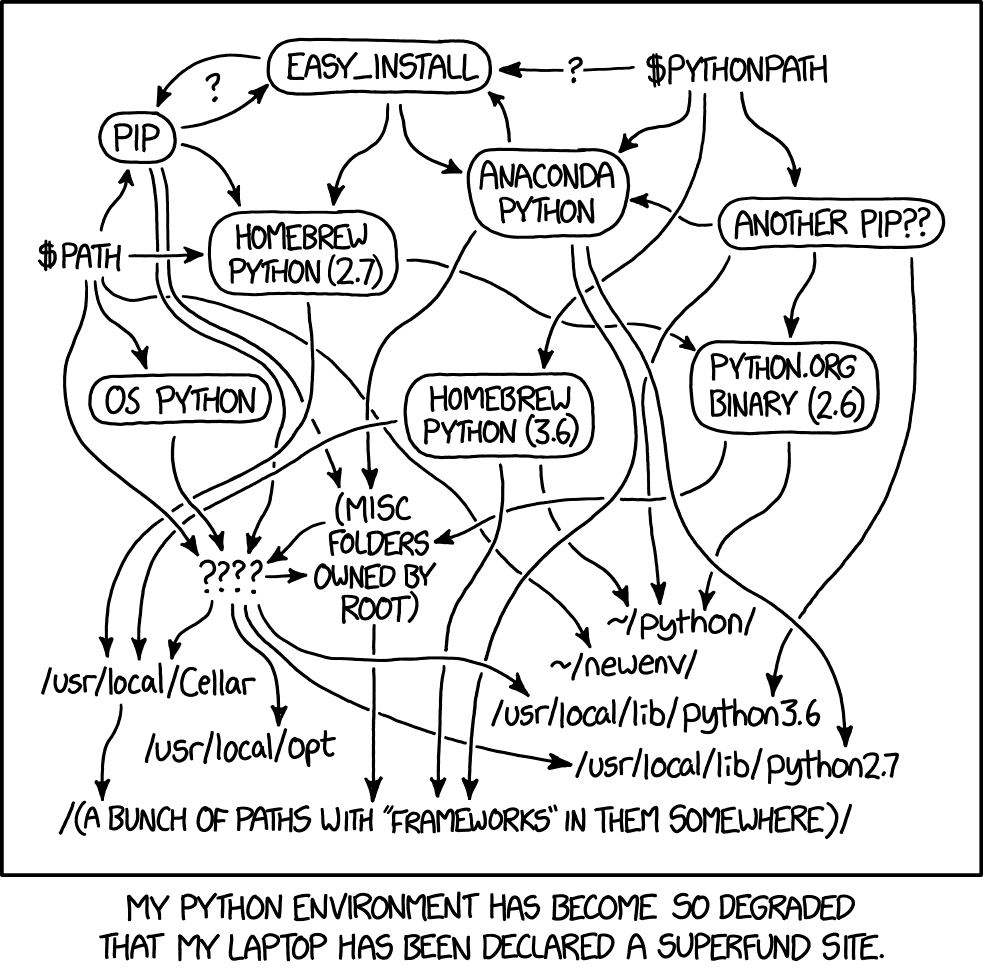
The Python environmental protection agency wants to seal it in a cement chamber, with pictorial messages to future civilizations warning them about the danger of using sudo to install random Python packages.
and that diagram itself is out of date
wintry acorn
Well I'm abandoning trying to get Bluetooth sockets running on the iMac and the Air is fairly pristine and I have been doing most of my CircuitPython on the Air. So I am looking for your direction here; what should I install first? Homebrew and then the latest Python and then hopefully Bleak or PyBluez. Now when I install should I be doing it in a venv? I want to stay as far away from Mac Python as possible, so if you could help me get this setup on the Air I would be grateful and you will have save me half a head of gray hair.
Anything else I should do with the BluetoothConnect issue? I actually had Bluefruit Connect running on the iMac (Ventura) for about 3 hours grabbing data from the Sense. It did crash once on the iMac but like I said most of my dev work is on the Air now and I have seen a bunch of crashes on the Air as well as iOS.
Thanks
foggy apex
I tried this on my Sequoia machine, but it shoudl work on yours:
- install brew [i had it already]
brew install python- Do
which -a python3
should show:
/opt/homebrew/.py/bin/python3
/usr/bin/python3
- Do
python3 -- version. Should be 3.13.something - Create a venv in ~:
python3 -mvenv .py
# or call it whatever you want, instead of .py
- Activate it:
source .py/bin/activate
- Then you will see a shell prompt with
(.py)in it. - Now you can do:
pip3 install adafruit-circuitpython-ble
- To test: Get https://github.com/adafruit/Adafruit_CircuitPython_BLE/blob/main/examples/ble_uart_echo_test.py onto your nrf board and run it
- Download https://github.com/adafruit/Adafruit_CircuitPython_BLE/blob/main/examples/ble_uart_echo_client.py onto the mac, and run it:
python3 Downloads/ble_uart_echo_client.py
If you wnat to leave the venv, do
deactivate
joebanko@Joes-Laptop ~ % install brew
usage: install [-bCcpSsv] [-B suffix] [-f flags] [-g group] [-m mode]
[-o owner] file1 file2
install [-bCcpSsv] [-B suffix] [-f flags] [-g group] [-m mode]
[-o owner] file1 ... fileN directory
install -d [-v] [-g group] [-m mode] [-o owner] directory ...
foggy apex
I mean "install brew" (not a command to type), as described on the brew website
wintry acorn
duh, you see how clueless i am
wintry acorn
terminal asked to use bluetooth, then executed a bunch of bleak, which means that bluetooth is running in python using bleak, correct?
i'm still in my venv which i named .pyth
and i can jump back and forth into the venv. question is when do I. need to use the venv
wintry acorn
good news: all the python/bleak stuff appear to be running. Blender python is a real pain. I crashed Blender like 6 times. So my search for a visualizer continues. Any suggestions? I looked at matplotlib but I hate to mess with the system when its working.
The CircuitPython code is runnin real well except every once in a while I get a 180° jump in the yaw values. From what I've read the magnetometers can be noisy. I also have to tear down the Mahony AHRS to see if I can tap into it and I need to do my mag cal for longer than 10 seconds.
wish I could get MIT App Inventor to run. Still trying to. find something that isn't overly complex that will take my BLE data and rotate a rectangle on a screen
foggy apex
wintry acorn
terminal asked to use bluetooth, then executed a bunch of bleak, which means tha...
that is all correct.
Use the venv whenever you are running Python and want to use libraries (or install new ones) you installed via pip3. Basically all the time. I activate the venv in my shell initialization file (.bash_aliases for me, but that will vary: .profile, etc.)
wintry acorn
What are you running Sequoia on? I'm terrified of moving to new Mac OSXes because of how much of my music software it has broken. I mentioned that I beta test music software for EastWest sounds and have access to a huge amount of software and going to Sonoma originally broke a lot of things. I'm probably going to go to 14.4 and cross my fingers.
I'm also communicating with the App Inventor folks who have said that BLE is not "working" on iOS yet. Although I got another post that said I could get to a working version on TestFlight.
foggy apex
Sequoia is on a Mac Mini M1. I have Ventura on an older Intel plain Macbok. I use these machines mostly for testing. I do development on an Ubuntu machine.
If you want to be on the bleeding edge I'm sure the App Inv folks want testers.
wintry acorn
I just ran into a major HUH???? Been working on smoothing out data by adding a Kalman filter. Works beautifully. So I tried going battery power. Ran the code and for the first few seconds I was getting good data on BluefruitConnect. Then my magnetometer data started being pinned to the limits; 0,360. After a few seconds BC crashed. When. I fired it back up the Sense no longer appeared, on battery. If I plugged in via USB everything looked fine for a while and then same situation. Pinned limits and then crash. Now the Sense is acting flaky with everythinh. Any chance the board got damaged by the battery. I used the Adafruit 3.7V batteries and the Adafruit charger. Any ideas?
be back later......
wintry acorn
I thought of that but with the battery connected I still get the same issue.
wintry acorn
Code error! WOW. All I need now is the visualizer.
wintry acorn
Going to try Unity, this should be fun. Also going to try to rewrite my code for the CLUE.
wintry acorn
CLUE just doesn't have the speed for some of the math I'm doing. I am going to rewrite all of the Sense code to use a more potent AHRS. My simple one was OK but I'm not really happy with the way the data is coming out.
I'm also going to try adding the second board (Adafruit LSM6DSOX + LIS3MDL) onto the I2C bus. The LSM6DSOX won't be a problem but the Sense has a LIS3MDL so I am changing the address of the 2nd LIS3MDL to the. alternate address using the solder jumper.
wintry acorn
hey @foggy apex I was searching for numpy for CicuitPython and figure it might be too big to put on the Sense and then I read and was told that numpy was a subclass of ulab. If. I write
from ulab import numpy as np
it works just fine with what I'm writing. Is the CircuitPython version of ulab a parent of a pared down version of the numpy class? I should be able to use numpy this way shouldn't I?
thanks
foggy apex
wintry acorn
hey <@329766224093249548> I was searching for numpy for CicuitPython and figure...
This is fine. ulab provides some numpy-compatible stuff, some scipy compatible stuff, and other things. It is implemented in C so it is fast. https://micropython-ulab.readthedocs.io/en/latest/