#circuitpython-dev
1 messages · Page 290 of 1
 slender iron
 timber mango
I have already poked deeper into the Circuitpython stuff and I am having a great time!
 raven canopy
as a please-don't-let-my-C-exist-publicly person myself, don't let that stop you. everyone has been super helpful during code reviews and discord discussions.
timber mango
My only regret is that I did not jump in here right from the time Adafruit started working on Circuitpython. 😃
 lone axle
what is on that line of your code?
and you may need to update the CP on your device and/or the library in use.
timber mango
@lone axle I had not saved some of my changes, but I just did that and am letting the script run until it hits that section of code again. This Feather M4 Express has v5.0.0-beta.3 on it right now.
It will take a little over two minutes more for the script to get to where that section of code is triggered.
lone axle
I got an error like that at one point, but I'm not 100% sure when or what I was doing at the time.
I think it was something where I referenced a new feature of something and needed to update the system or library
 idle owl
@gilded cradle Please don't merge PRs into PyBadger right now. I will have to figure out what changes were made and add them to the refactor because I have no idea how to do a rebase that complicated. I had Nina close the other PR she created and included the changes in my PR instead.
 gilded cradle
Oh, sorry @idle owl
 tiny oriole
woohoo! my new display came
timber mango
What did you get??
tiny oriole
just a replacement for the display on the CLUE nRF that i broke
timber mango
@gilded cradle I saw your comment on PR #65 to please rebase. I looked that up on the net, but still do not get what I am supposed to do. There are several different cases shown.
gilded cradle
It includes the animation example even though that has already been merged in. Just pull in changes from the adafruit master branch and push that up to your repo.
timber mango
I have no idea what Circuitpython feature I could be trying to use that is not implemented. I will upgrade to the current 5.x beta and libraries and see if that helps.
 manic glacierBOT

I have this sample code running on a PyGamer:
import board
import audioio
import digitalio
import time

note = audioio.WaveFile(open("c4.wav", "rb"))

audio = audioio.AudioOut(board.SPEAKER)
mixer = audioio.Mixer(voice_count=2, sample_rate=8000,
    channel_count=2, bits_per_sample=16, samples_signed=True)

speaker_en = digitalio.DigitalInOut(board.SPEAKER_ENABLE)
speaker_en.direction = digitalio.Direction.OUTPUT
speaker_en.value = True
audio.play(mixer)

print("playi...
In my example, in a loop reading the device as fast as possible, and doing other unrelated things..
while 1:
     acceleration = cpx.acceleration
    .....
You can get an error:
Traceback (most recent call last):
  File "code.py", line 63, in
  File "adafruit_circuitplayground/circuit_playground_base.py", line 261, in acceleration
  File "adafruit_lis3dh.py", line 159, in acceleration
  File "adafruit_lis3dh.py", line 328, in _read_register
  File "adafruit...
The inline doc for read and write operations in {busio,bitbangio}.{I2C,SPI} says that the end values may be None, in which case they default to len(buf). However, the default value is really INT_MAX. If you give None explicitly, you'll get an error.
Related to https://github.com/adafruit/Adafruit_CircuitPython_BusDevice/pull/45.
Either None should be handled or the doc should be hanged.
@jepler did you want this to be in 5.0.0?
manic glacierBOT

Got this error while copying the .UF2 file onto a NRF58240 in Bootloader mode.
CIRCUITPY drive showed up after this, but I thought I should report it.
Windows 10, got the '840 about 2 months ago.
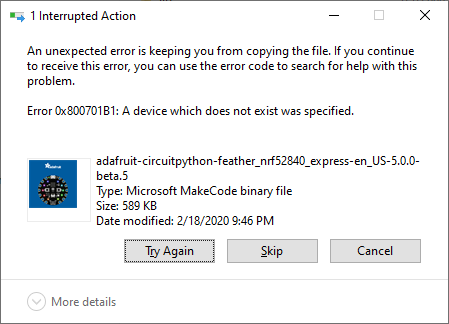

I wouldn't hold back a release for this, it's a "would be nice" in my opinion.
timber mango
I just updated this Feather M4 Express to 5.x-beta.5 with the Feb 18th library bundle and am getting this error with the stock example script from the library. I also had to update the example to be compatible with the current Feb 18th HTU21D library. I will open an issue on that.
Traceback (most recent call last):
  File "main.py", line 8, in <module>
  File "adafruit_htu21d.py", line 89, in __init__
  File "adafruit_htu21d.py", line 95, in _command
  File "adafruit_htu21d.py", line 95, in _command
  File "adafruit_bus_device/i2c_device.py", line 99, in write
TypeError: can't convert NoneType to int```

```python
import time
import board
import busio
from adafruit_htu21d import HTU21D

# Create library object using our Bus I2C port
i2c = busio.I2C(board.SCL, board.SDA)
sensor = HTU21D(i2c)       <-- Line 8


while True:
    print("\nTemperature: %0.1f C" % sensor.temperature)
    print("Humidity: %0.1f %%" % sensor.relative_humidity)
time.sleep(2)```OK, looks good!
BTW, we recommend that you create a branch in your own fork repo for the PR: https://learn.adafruit.com/contribute-to-circuitpython-with-git-and-github/always-work-on-a-branch
 tidal kiln
timber mango
tidal kiln
timber mango
OK. Will that fix be in another beta?
tidal kiln
it's a library fix, not a firmware fix. it should be in the next library bundle release. maybe tomorrow.
lone axle
You can download that library by itself from the release page right now
timber mango
I already have the Feb 18th library bundle.
lone axle
right, I mean you can download the updated library that fixes the issue individually right now. You don't have to wait for the next bundle release...
tidal kiln
yep. you can do it manually now if you want. grab that zip. replace your CIRCUITPY/lib/adafruit_bus_device folder with that one.
otherwise you'll have to wait until next the next bundle release for it to show up in there
manic glacierBOT
After a quick look, I'm thinking this is due to the I2C pins not being released on soft reload because the display is in use on I2C. The I2C singleton may be getting freed but displayio still has hold of the pins. The singleton should not be be freed and re-instantiated. Will need more investigation.
timber mango
I need to find a way to 'package' the way I define tasks and trigger them. Oh, it still needs a bit of refinement, but it works great!
manic glacierBOT
What is in INFO_UF2.txt? I want to duplicate with the same bootloader version.
UF2 Bootloader 0.2.6 lib/nrfx (v1.1.0-1-g096e770) lib/tinyusb (legacy-525-ga1c59649) s140 6.1.1
Model: Adafruit Feather nRF52840 Express
Board-ID: NRF52-Bluefruit-v0
Bootloader: s140 6.1.1
Date: Dec 21 2018
 tough flax
BTW, I have the BLE HID Periph example working - thanks, @tulip sleet for the help
 crimson ferry
@prime flower Any thoughts about ESP-IDF v4.0 vs. (LTS) v3.3.x for NINA? https://github.com/espressif/esp-idf/releases
manic glacierBOT

(Code review comments on formatting also distract from deeper level review too.)
Yes, I've seen that happen quite a few times in some projects. My way for dealing with that is to make 2 passes at the code, first one is the obvious formatting issues and then I take a second pass looking only at the functionality of the code and comment on that.
Yes I understand we don't want to scare people off with comments about formatting but we also want to have nice code :D
Looks good! @mubes please run make translate and add the .po files to the PR.
manic glacierBOT

(Code review comments on formatting also distract from deeper level review too.)
Yes, I've seen that happen quite a few times in some projects. My way for dealing with that is to make 2 passes at the code, first one is the obvious formatting issues and then I take a second pass looking only at the functionality of the code and comment on that.
Yes I understand we don't want to scare people off with comments about formatting but we also want to have nice code :D
That was t...
manic glacierBOT

 cursive condor
hello here. I've worked to improve the lib adafruit_turtle : speed, pensize, background color, background pictures. Do I submit a PR with all the changes at once or do I need to do a separate PR for each functionality ?
I also plan to translate it to french: would you include it in the bundle ? Is it usefull ? ( aka. do you have stats on downloads of the french versions of CP ?)
timber mango
My huge sensor script can now track temperature and humidity ranges and log what it finds to the SD card. I can easily set how large a range I want to track for each reading.
I need a USB-A male to 2.1mm plug cable, but there does not seem to be any pre-made ones available. 😦 Does anyone know where I can buy one about 6" to 8?" I apologize for the off-topic request, but this does pertain to Circuitpython in a powering a small robot running Circuitpython sort of way. 🙂
lone axle
@timber mango perhaps not an ideal solution but they do have kits like this: https://www.amazon.com/Onite-5-5x2-1mm-Connectors-Notebook-Adapter/dp/B01C5F4GW0 that come with tons of different connectors. It looks to me like this one contains a USB A male cable that can have the different tips added to it, and one of the tips is 2.1mm jack.
 lyric bay
Something like this maybe? aceyoon USB 5.5mm 2.1mm Barrel Jack 3ft 4Pack USB 5V DC Cable 2.1 5.5 mm Male Power Plug Charger Cord 5 Volt 2A for Laptop, Notebook, HUB Splitter, Router, LED Lights, USB Speaker https://www.amazon.com/dp/B07GN3XQ7N/ref=cm_sw_r_cp_apa_i_JnvtEbD8A0NH2
timber mango
@lyric bay Those have the right connectors but I would still have to hack them up because they are way too long. I only need 6" to 8."
@lone axle Those could work but length is still a problem. I am trying to not have to hack cables up or make something custom.
manic glacierBOT

lgtm - please be aware that there's not enough memory in circuitpy to talk to the wifi module and do internetty things :)
 prime flower
@crimson ferry re: "Any thoughts about ESP-IDF v4.0 vs. (LTS) v3.3.x for NINA? ". I'm going to hold off rebuilding on 4.0 for a bit. My reasoning is that 3.3.x is LTS, we'll stay on 3.3.x for a while since it's stable. The switch to 4.0 will occur when I (or someone else) works towards implementing BT on ESP32 co-processors, 4.0 adds NimBLE support. The provisioning manager is also interesting - I'd consider switching to 4.x if someone wants to implement it
manic glacierBOT
prime flower
@crimson ferry espressif also changed the build system in 4.x
manic glacierBOT
Looks good, but it would be good to add wifi module pins.
The pin definitions here don't include unexposed pins that are connected to the WiFi module. I think it would make sense to add them. You could look at PyPortal and similar boards for the pin names we use, to make them consistent.
If you do work on this file again, could you reorder these to group the pins together that are aliases? For instance, A5 and SCL are the same. Look at some other board definitions for examples.
timber mango
I wish there was a BLE and WiFi Featherwing we could add to existing projects. I would add one of them to my PyGamer!
manic glacierBOT
"I think it would make sense to add them". I agree with @ladyada that it's going to be hard to do anything very interesting in the RAM and flash available, but something extremely minimal might be possible.
crimson ferry
@prime flower The only thing that caught my attention was "Fixed failure to connect to some Apple APs in WPA2-PSK mode", which may affect some people.
slender iron
@cursive condor Ideally separate PRs but if they are already done then one is fine. What are you planning on translating? The function calls themselves? We've been having trouble with our download stats recently.
prime flower
@crimson ferry Do you think we could pull that commit instead of rebuilding?
crimson ferry
Maybe. I don't know the mechanics of that. I'll ltry to find the change though to see how extensive it is.
If this is all it is https://github.com/espressif/esp-idf/issues/4204 I'm not too concerned.
cursive condor
@slender iron : ok np i'll do that separately. For the translation : the functions names, the turtle attributes and the colors ...
crimson ferry
@prime flower Looks like this is it, but I can't seem to view the code https://github.com/espressif/esp-idf/commit/45c72dd3728126a2599441de7a5f0eafca53bca5?diff=split#diff-08e9c1c20e5e2e173f137be3b2979063
cursive condor
and ... of course, all the doc // comments in code ...
crimson ferry
Does this symbol in GitHub mean it's not open source?
slender iron
@cursive condor that would be great! let's just make sure it is in a separate file so that it can be imported separately from the english one (though it should use the english version internally)
cursive condor
yup. i'll do a separate repo for that.
well so while testing those various improvements, i've timed the turtle moves. a greater pen size make it slower for example. but 5pixels is double the time of 1 pixel... not 5 times. it roughly double for every 5 pixels upward. What is the logic ?
I mean i make it draw 10 times a 220x220 square. a speed maximal, it take 2.5 to 2.7 secs. for size 1
for pen size 19 it take 9.77 sec
for pen 5 it take 3.75 s.
it's no longer linear... well ...
And at a moment, the speed 3 was faster than speed 4 (more steps and more sleep at each step, but it was still faster...)
manic glacierBOT
@siddacious I'm trying to duplicate this, and not succeeding. I have a code.py that I think is the essence of your display setup. I have a 128x32 OLED, not the 128x64, but I don't that that should matter.
import board
import displayio
import adafruit_displayio_ssd1306

displayio.release_displays()
i2c = board.I2C()
display_bus = displayio.I2CDisplay(i2c, device_address=0x3c)
display = adafruit_displayio_ssd1306.SSD1306(display_bus, width=128, height=32)

splash = displa...@lone axle You around?
lone axle
@idle owl yep
idle owl
Excellent. Let's chat PyBadger example.
@lone axle I think there may not be a better place for it at the moment without creating a new guide, which we haven't discussed with you or the interested internal folks, so that idea should wait for now. So I'm thinking, maybe we restructure the folders to make it more clear what it works on, and we'll keep it in PyBadger. Only downside for you at the moment is that you need to incorporate my refactor into your code and PR. Up to you how you want to do that, a rebase is possible, but you may also simply want to close your PR and create a new one once the refactor is merged (which may not happen until the end of this week - we're waiting on one tester).
I would suggest making a folder in examples/ called examples/pybadge_pygamer_examples and then within that create a folder called tilemap_game and then put both the code and the assets all within that folder.
We can move it out of that repo later if we come up with a better place for it.
I'm not sure people looking for a game example will look at the badge-focused library repo, so I'm not sure it'll get the exposure it deserves there, but for now, without a guide, I can't think of a better place.
lone axle
Okay, yep I think I'll need to get the new refactoring moved in to my branch and tweak the example script to work the new way possibly. I will probably go ahead and close it for now and make a new one.
manic glacierBOT
"I think it would make sense to add them". I agree with @ladyada that it's going to be hard to do anything very interesting in the RAM and flash available, but something extremely minimal might be possible.
Hello, it's weird not to have WiFi for a so-called IoT board, but using the onboard ATECC608A secure chip and LSM6DS3 IMU is useful enough to me and and probably for others.
idle owl
Whatever is easiest for you, works for me as well.
The code shouldn't be different, only import/instantiation of the library is different
so at least there's that
ooh wait. It might be different for you
because of how it handles the joystick now.
it doesn't treat it as buttons anymore.
It's a separate thing. So I guess I did change a feature.
I didn't look through your code to see how it works, so I'm not sure if I broke your code or not.
lone axle
Yeah, I think I got a bit narrow minded on the pybadger library. I used it a lot more for the "all in one" buttons handling across all of those devices and started to think of it kind of like the circuitplayground or CLUE libraries as a sort of "easy button" type access to the boards features when it reality it does do that but it's really more focused on the actual badge usages.
idle owl
Yeah, PyBadger isn't really like CP or CLUE per se. It was designed to be badge-focused, not board-focused
We didn't do a CP/CLUE type lib for PyGamer or PyBadge
I think there wasn't enough built into it to warrant it perhaps?
Like Circuit Playground and Clue have SO much to work with.
lone axle
I haven't taken a look yet either but, yep sounds like it'll need tweaked to handle the joystick / dpad portions as well.
idle owl
That concerns me a little, I hope I didn't break anyone else's code.
I'm not sure very many people were using it though.
I can add that feature back in if necessary. It seemed redundant though.
lone axle
Yeah agree'd there for sure. playground and CLUE get a lot more mileage out of the "easy button" since they do so much more
I'll give it a try later this evening and let you know what I find.
idle owl
Ok, right on. Thanks.
lone axle
Is the joystick on pygamer now treated differently than dpad on pybadge? or are they both the same, just a bit different than they used to be?
idle owl
Joystick is now treated differently.
You get raw potentiometer values instead of dpad type things.
lone axle
Oh nice
idle owl
If you can give me a valid reason to add the dpad treatment back in, I will, it's not hard to do.
cursive condor
better break early if it's for such a nice update
idle owl
@cursive condor Yeah, the earlier the better.
lone axle
My thought would be to support games/apps working on both PyBadge and PyGamer without leaving it up to the app developer to handle the logic difference.
If they behave differently, for a game like the tilemap one I would probably write logic in the game to get it back to functioning pretty much the same as the dpad so that my code could run on both without any changes.
idle owl
In my mind, anyone going to the trouble of writing a game, which seems super complicated to me, would be handling the button/joystick stuff within the program itself. I had honestly never considered someone using PyBadger button handling to create a game until you did it.
lone axle
But I do totally dig the raw potentiometer values as well. And I can definitely see a big appeal of that for other types of games where joystick sensitivity could make it more fun.
idle owl
well, it's not one or the other
it's raw values, or both
the raw value function is separate
it was already there, I didn't add it this time.
lone axle
Ah
idle owl
I wrote it into it in the first place.
Yeah. 🙂
So, adding back in the dpad treatment isn't going to get rid of the ability to access the raw values.
 lapis hemlock
well, it's not one or the other
@idle owl for a second I thought that this was a poem🙂
lone axle
Okay. I'll close the existing PR for now. Tonight I'll test out the updated library to see how it affects the game. I'll get the example refactored into a sub-directory as you noted and keep an eye out for the new changes to get merged then I'll create a new PR after that.
idle owl
@lone axle Sounds good. Why don't you test it tonight, and tell me whether to add back in the dpad treatment. You've convinced me, but it's worth you testing it first before I do it.
lone axle
Will do.
I expect no problems, but I'll go ahead and try the updated library with an Edge Badge tonight as well.
idle owl
@lone axle Excellent. I replied to the PR with this update. Thanks!
manic glacierBOT

 bright aspen
I need advice. I know this isn't exactly the advice place, but I think this might be the best place to ask. I'm working on an audiometer project using CircuitPython and a Feather. I might need to drop down to C. However, I have been bragging on CircuitPython and would like to stick with that. The reasons I might need to drop down to C are these: 1. I have to make my own board derived from said Feather (can't even use the Feather as a daughter board) and I don't know if CircuitPython will work. 2. I need MCLK for I2S (a multiple of BCLK). 3. I want the computer to see the drive only during development. 4. I need a PID and I need to be able to set it. 5. I want to minimize Python chatter on the USB serial connection. So... Are some of these in the works? I am terrified of CircuitPython innards and I get lost in the layers, but I might jump in if it is less work than making a C program. Are there guides (and maybe handholding) available?
 tulip sleet
@bright aspen you can make CircuitPython builds that disable various USB devices. I have a CPy volume control with a special build that doesn't expose MSC or CDC. If I need to fix it, I load the regular uf2. As for I2S, we'll probably get to that eventually.
But if you need to use Arduino or raw C, then that's what you need. You are not a traitor 🙂
 meager fog
@tidal kiln dya wanna try figuring out whats up with the ADT?
i think its something small
and im chasing down some other bugs 🙂
tidal kiln
willing to try - got any ideas of what it might be?
meager fog
nope 😦
manic glacierBOT
re: https://forums.adafruit.com/viewtopic.php?f=60&t=162220
A hackspace magazine example no longer works due to 30k more memory use.
Would someone be willing to replicate this? Thanks!
meager fog
mabye not waiting long enough after reset https://github.com/adafruit/Adafruit_CircuitPython_ADT7410/blob/master/adafruit_adt7410.py#L84

GitHub
A circuitpython library for the Analog Devices ADT7410 temperature sensor - adafruit/Adafruit_CircuitPython_ADT7410
tidal kiln
maybe. but it was acting up in REPL also.
meager fog
in arduino we dont check for status
GitHub
Adafruit Arduino library for the Analog Devices ADT7410 Temperature Sensor - adafruit/Adafruit_ADT7410
maybe remove?
manic glacierBOT
@jepler wanna take a look?
im suspicious of the bitmap, maybe it wasnt converted to 8-bit indexed?
idle owl
@tidal kiln and @lone axle Nice catch on the PyBadger README. Thanks.
bright aspen
@tulip sleet Thanks for the quick response. I will consider today whether to make a special CircuitPython build. BTW, an MCLK pin does seem to be available on each of Feather M4 Express and Feather STM32. Thank you for the assurance that I am not a traitor. 
tidal kiln
@idle owl np. thanks for updating 🙂
slender iron
@bright aspen https://github.com/adafruit/circuitpython/pull/2629 is a good example of adding another pin to an existing output class

GitHub
These patches implement RTS/CTS and RS485 handling for UART by means of adding optional rts, cts, rs485_dir and rs485_invert options to the Python UART constructor. Implementation is complete and ...
manic glacierBOT
I can duplicate this with "UF2 Bootloader 0.2.6", but it works fine with 0.2.9. So just update the bootloader if you want to stop seeing this.
This seems similar to #1575, which was fixed in the bootloader by fixes pertaining to https://github.com/adafruit/Adafruit_nRF52_Bootloader/issues/46.
meager fog
@bright aspen check D2
bright aspen
@slender iron Thank you for the example. (I did notice that RTS/CTS was a possibility when I had to do it in software and magic.) I am willing to consider working on MCLK for CircuitPython, but my schedule is tight and I might be able to do the HAL for just one processor. Or I can team with somebody. Where does this start? Create an issue? There are some decisions.
slender iron
@bright aspen issue would be welcome. You can add it for just one processor and throw an error on others like the RTS/CTS PR does.
slender iron
on it 🙂
I'm pretty excited about this rpi BLE stuff
its cool to implement the lowest layer and see the other stuff just work
bright aspen
There can be some confusion in names in this discussion; all my fault. In the M4 datasheet MCLK (with the L) is something else. The I2S signals are SCK (BCK), WS (LRCK) and SD, plus an optional MCK a constrained multiple of WS. The M4 data sheet uses SCK, FS, SDO/SDI and MCK, respectively. It is the MCK I want for the cool DACs.
slender iron
@tulip sleet are you done with reviews for the day? I've likely got a lot of iteration to do around the BLE libs and I'm wondering if I should just submit them
tulip sleet
i can do reviews any time. I am looking at remaining 5.0.0 issues (I2C at the moment).
slender iron
GitHub
Mocking it only helps with this repo's CI. Reverse dependencies
would still need to know to mock bleak as well. By not importing it,
we don't require special treatment from reverse ...
thanks!
tulip sleet
the blnka bleio is now failing due to doc build, as you prob know
slender iron
which one? I see PR 2 as green after my black commit
tulip sleet
i added black integration to emacs (not my code, just loaded the library)
"blacken-buffer" 🙂
slender iron
the other way to solve it would be to mock bleak in all the sphinx conf but I'd rather avoid that
🙂
@tulip sleet did you realize I was talking about https://github.com/adafruit/Adafruit_Blinka_bleio/pull/2 ?
GitHub
Mocking it only helps with this repo's CI. Reverse dependencies
would still need to know to mock bleak as well. By not importing it,
we don't require special treatment from reverse ...
tulip sleet
yes, i just got that email, just looking at it now and thinking a bit, but it's annoying that the knowledge of bleak can't be local, so your solution seems like the "best".
slender iron
kk, thanks!
main thing was to get something in there so I don't have to spread the bleak mock around
I'll get the ble lib going on it and then eddystone should work too
slender iron
yup, will do now
 lone sandalBOT
 slender iron
@tulip sleet https://github.com/adafruit/Adafruit_CircuitPython_BLE/pull/70 is passing
tulip sleet
merged!
 indigo wedge
@meager fog any luck? I just built master and flashed it onto the Feather and it boots 🙂
will push board support for the Feather soon
slender iron
@tulip sleet https://github.com/adafruit/Adafruit_CircuitPython_BLE_Eddystone/pull/1 is green
manic glacierBOT
meager fog
@indigo wedge havent had time since - i think its best if you can send over the boards
so i have more than one to work with
could be i have some error in my stuff
tulip sleet
@slender iron that was not in my "Review Requests"; fine to re-request
tulip sleet
all set
slender iron
thanks!
tulip sleet
i guess it goes away from "Review Requests" if I review and then a re-review is not requested. I should remember to punch the button too on reviews I need to be redone.
manic glacierBOT
@rhooper I am going to try to finish this off, since we should fix #2442 for 5.0.0. When you say:
The board seems to be resetting on me after this change - hold tight for more testing.
is that immediate or after a long running time again? I could run your complicated Christmas tree example without actually having any neopixels attached as a test.
@rhooper I am going to try to finish this off, since we should fix #2442 for 5.0.0. When you say:
The board seems to be resetting on me after this change - hold tight for more testing.
is that immediate or after a long running time again? I could run your complicated Christmas tree example without actually having any neopixels attached as a test.
Feather M7 1011 VID 0x239A PID 0x0091 # bootloader
PID 0x8091 # arduino
PID 0x8092 # circuitpython
idle owl
@tulip sleet I have that code for PR #2449 if you want it.
The build is a Feather nRF and a NEOPXL8 as a level shifter. Though it failed on a Feather M4 as well.
tulip sleet
sure, thanks, the PR broke in some way when I commented and reopened it. I'm getting a github server error now
trying to figure out how to tell github about it
i thought the problem was all about nRF. Failing on a Feather M4 would be new, I think.
idle owl
Oh I know what else was modified. The LED Animation lib. I'll include it with the code in a zip. He was able to repro the crash without all of this, iirc.
lapis hemlock
@slender iron Scott, I was wondering, whether the inner workings of ulab should/could be simplified considerably. In short, many ulab functions work with general iterables, as well as ndarrays. This flexibility adds a lot of extra code, and I think we could shave off a lot of that by restricting operator arguments to ndarrays. Any thoughts on that? Only if you don't concentrate on the St. Matthew Passion, that is...
slender iron
😄 I'm ok if it was limited but I don't have a lot of background with numpy. @tulip sleet has used it before and may have thoughts
lapis hemlock
I think the question is not strictly related to numpy. You could still pass a general iterable to a function, but you would have to wrap it with ulab.ndarray, so that it is converted first. In that case, we would have to treat iterables only in the make_new_ndarray function, and nowhere else. As it is now, we have to inspect the argument in each function.
slender iron
that is fine with me
lapis hemlock
The other option is that we use the fact that ndarrays are also iterable, but that has a performance cost.
It is much faster to iterate over a C array, than a micropython iterable. Approx. factor of 4.
slender iron
I'd rather lean into the performance because that's why people will use it
lapis hemlock
Section on computation expenses.
tulip sleet
it is true you can do this in numpy
>>> import numpy as np
>>> np.transpose([[1,2,3],[3,4,5]])
array([[1, 3],
       [2, 4],
       [3, 5]])
but it is also true that it's not harder to do:
>>> a = np.array([[1,2,3],[3,4,5]])
>>> a
array([[1, 2, 3],
       [3, 4, 5]])
>>> np.transpose(a)
array([[1, 3],
       [2, 4],
       [3, 5]])
I have a script that uses the accelerometer on the Circuit Playground Express to detect eight different tilt directions. The sensitivity can be easily set in the script. Would this be good as a demo?
tulip sleet
Given that a pretense of ulab strict compatibility with numpy is gone, I think it's fine to make it more restrictive
timber mango
It also indicates the direction of tilt using all the neopixels. 🙂
tulip sleet
we could always write a ulab wrapper that calls numpy underneath if people want to use ulab code with real numpy.
lapis hemlock
@tulip sleet Desperate times call for desperate measures. If numpy could run on a microcontroller, we wouldn't have to re-invent the wheel...
lapis hemlock
This won't break compatibility. transpose(array([[1, 2], [3, 4]])) will work on both platforms. It just means that you have to be a tad bit more careful on the MCU, but you can port code from the MCU to the PC.
tulip sleet
i was thinking more of the module breakup and naming, right; the mapping is very straightforward
manic glacierBOT
lapis hemlock
We have broken up the modules, but importing is a bit odd. https://github.com/v923z/micropython-ulab/pull/41#issuecomment-588073617

GitHub
When client code is written like
...
fft.fft(...)
and a particular target disables fft at compile time, the error will occur early (at 'import' time), not late when the fft functio...
Do you have sub-modules on CP?
tulip sleet
i'm trying to think of any examples of module.submodule in native CPy right now...
lapis hemlock
Well, numpy has tons of those. E.g., linalg, fft. scipy, too.
Back to my first question, a solution could be that we call make_new_ndarray at the beginning of each function, if the argument is not already an ndarray, but that obviously costs RAM.
This would basically do the wrapping that you mentioned earlier.
tulip sleet
i don't think we have any, but it wasn't necessarily a deliberate decision.
lapis hemlock
I believe, the tools are missing in micropython.
tulip sleet
you still have to validate that it's an ndarray, so calling a converter vs a validator is not really more code, right?
lapis hemlock
I mean, we have sub-modules, and we can import them, but they don't behave exactly as in CPy.
That's right.
You are right, we have to do that.
tulip sleet
does numpy always do the casting to an ndarray or does it sometimes expect only an ndarray?
lapis hemlock
I presume it does conversion, if necessary, otherwise your earlier example wouldn't work.
tulip sleet
i was just choosing a very obvious example. I should look at the numpy doc (but there's a lot of it). In honesty, I haven't used numpy since about 2010 or so
do you do broadcasting?
lapis hemlock
But I think, if we do the conversion, we won't lose anything: you either do the conversion yourself, in which case you have to create the ndarray, or you convert only, if the argument is not an ndarray, but then you just generate an ndarray.
I am working on it. Not that trivial, especially in the general case. But we'll get there.
In general, numpy takes anything that can be iterated over.
tulip sleet
looking at the reference doc, yes, everything takes an array_like as input and returns an ndarray
the main thing is encourage people to create ndarrays up front instead of doing a lot of conversion, since that just generates garbage
lapis hemlock
OK, so you want to work with ndarray arguments only. Is that it?
tulip sleet
no, i just mean it's fine to take array_like args (like nested lists), but we should encourage people to start with an ndarray if they can (like doing I/O to/from an ndarray), or initializing an ndarray instead of initializing a list and then converting it)
it's just "how to get your data to fit" advice
lapis hemlock
@onyx hinge implemented memoryview(array), so you can get the bare pointer from the ndarray, and feed it into DMA, or whatever. So, the I/O will pipe into an ndarray directly, no conversion is necessary.
tulip sleet
that is very good
lapis hemlock
I think that should address your concern.
In any case, thanks for the input! It is getting late here, so I bid you farewell.
tulip sleet
good night!
lapis hemlock
🥱
timber mango
I wish I could build a custom version of Circuitpython.
tulip sleet
 fallen anvil
@indigo wedge I have tinyuf2 (sort of) up on the imxrt1020-evk board. What's the best thing to do...keep working then send you a PR for comment?
bloody heck, it works too!
Umm..how do I get back to uf2 once I've got circuitpython running?
(nice problem to have, I guess....)
indigo wedge
Press rst button twice fast
Also congrats, great job!
And yeah, once you feel like the code is ready, make a pr
fallen anvil
Hmm...looks like there's something to be done there still....that just takes me back into CP, even when very fast clicking
indigo wedge
Then maybe not too fast :D
Like somewhere between 250 and 500 ms between
I don't quite remember what's the exact wait time
fallen anvil
(It's messy at the moment, you wont like it, brackets left right and centre 😁 )
indigo wedge
😬
fallen anvil
Nah, deffo something broken there. The delay routine is different in the SDK between 1011 and 1021 so I've a good idea whats wrong
indigo wedge
Right, I think we have a define for that in cpy
fallen anvil
Yeah, had to move a few things around into a the platform definitions. Will need to revisit that now for 1011 to avoid breaking the existing code. Plenty more to be done...
indigo wedge
yeah i tried to make it as platform-abstract as possible but i'm sure there's stuff to be moved out
thanks 🙂
fallen anvil
It certainly wasn't painful...just ther usual stuff when you start generalising code. Anyway, let's see if I can get this fixed tonight, then I'll put up a preliminary PR, but not for pulling.
timber mango
@tulip sleet I can not build Circuitpython because I am on a Raspberry Pi 4.
tulip sleet
you can, it will just be slow, but people have done it
timber mango
That would drag down everything so much that I could not do anything else.
raven canopy
is the RPi your main/only?
timber mango
Yes.
raven canopy
for reference, my previous excursions on a 3b+ with a headless Ubuntu Server 19.04 running GCC7 took ~6 minutes to build circuitpython. (we're on GCC9 now, and i haven't run a build yet since upgrading)
timber mango
Really? Interesting...
raven canopy
the real downside with Raspbian at the moment is having to compile arm-none-eabi-gcc from source. if you go with an aarch64/arm64 distro on the RPi, you can grab the available binary.
fallen anvil
I just invested heavily;
$ time make BOARD=imxrt1020_evk -j 30
Use make V=1, make V=2 or set BUILD_VERBOSE similarly in your environment to increase build verbosity.
QSTR updated
Converting to uf2, output size: 494080, start address: 0x6000c000
Wrote 494080 bytes to build-imxrt1020_evk/firmware.uf2

real	0m12.056s
user	0m52.096s
sys	0m9.393s
$
compiling from source took jerry...some serious hours.
manic glacierBOT

@dhalbert the old version of this PR (https://github.com/adafruit/circuitpython/pull/2449/commits/34c9e00f08b77f5336db911e376f15512bf0790b) didn't clean up on reset. so I tried to do so like @tannewt requested in later commits. That resulted in crashes - I don't quit recall when.
To test for the soft reset without the patch, the simplest approach was to have large neopixel_write intermixed and other code. For example the stuff the tree code did with AggregatePixels in https://github.com/a...
fallen anvil
@indigo wedge OK, I'm officially an idiot. Spent the last hour chasing down why reset won't work....only to find out it's cos I'm pressing the wrong button.
User Error
Replace User and Press Any Key
@fallen anvil I once spent 45 minutes trying to figure out why my DotStars wouldn't light up. Finally figured out I hadn't plugged them into the power brick. I then spent another 30 minutes trying to figure out why they still wouldn't work. Finally figured out I hadn't plugged the power brick into the wall.
manic glacierBOT

CircuitPython does not implement MCK out for I2S, digital audio, which is fine for audio DACs that create their own. However, other audio DACs require this clock. MCK out should be implemented.
fallen anvil
@indigo wedge You have a PR. Night all.
manic glacierBOT

@dhalbert That wasn't quite what wasn't working for me but I think I've narrowed down how to reproduce it:
import board
import busio

# Step 1: run the code as is, should output scan data

# Step 2: comment out the i2c init using board.I2C()
i2c = board.I2C()

# Step 3: Uncomment this i2c init using busio.I2C and save to reload
#i2c = busio.I2C(board.SCL, board.SDA)

i2c.try_lock()
for res in i2c.scan():
    print("Found address:", hex(res))
i2c.unlock()
as far...
@dhalbert I forgot to mention that if you pull power/reset between using board.I2C and busio.I2C it works fine
manic glacierBOT
Names: The I2S signals are SCK (BCK), WS (LRCK) and SD. There is also an optional MCK constrained to a multiple of WS. The SAM D5x/E5x Family Data Sheet uses the names SCK, FS, SDO/SDI and MCK, respectively. The STM32 data sheet uses the names CK, FS, SD and MCK.
Need: Many audio codecs and DACs need an MCK. The following are a few 3.3V+5V audio DACs that need an MCK.
WM8741
CS4398
AK4495EQ/SEQ
PCM1792
Next: Implementability on CircuitPython boards. API consideration...
manic glacierBOT
The needs for MCK frequencies are particular multiples of the WS (LRCK) frequency, typically 256. Some DACs have a fixed multiple. Some DACs can handle several multiples. For 16-bit samples, the Cirrus Logic CS4398 can take 64x, 96x, or any multiple of those up to 1152x.
MCK must be derived from the same clock source as SCK (BCK) but does not have to have any definite phase relationship with it. That is, it can't drift off. Implementations typically derive both MCK and the other I2S cl...
tough flax
Strange question... on the NRF52840 is there a fast (enough) way to convert cartesian (X,Y) coordinates to polar (r,theta)? Fast enough that it can be done in the main loop? I'm looking for a way to quantize an analog joystick into 16 areas (8 directions X 2 amplitudes).
I'm worried that the atan() and sqrt() will be too slow
meager fog
@tough flax i think it will be fast enough - you need to have data come out within 100-200 ms to seem instantaneous
tough flax
Ok, I am used to working on Trinkets so I might be spoiled on these new-fangled boards 🙂
This is a really fun project ... save room on the S&T 3/4 for this one 🙂
tough flax
Looks like it works, thank @meager fog
meager fog
👍
 ruby atlas
And if you feel it's too slow, i imagine you could always (pre)compute a lookup table.
 solar whale
@tulip sleet @slender iron I am finally back home and ready to resume my work on the RFM9x/69 drivers. We had briefly discussed to possibility of adding a interrupt driven packet receive buffer in the C core. I'd like to give that a try -- is there something "similar" that you recommend I look at as an example to get started with it.
timber mango
@solar whale As soon as I find the new antennas I bought, I will be ready to help test and perhaps contribute to the effort. I have two Feather M0 RFM69 boards, two RFM69 breakouts, and an RFM69 bonnet for Raspberry Pi. I am going to connect the two breakout boards to my two Feather M4 Express boards. 😃
I have had to move four times in eight months so have never quite gotten everything unpacked. I also have three Raspberry Pi 3 and a Raspberry Pi 0 W. The Raspberry Pi 4 is my main computer.
solar whale
I have been away for most of the past 2 weeks -- It'll take me awhile to remember what i was doing and why it was not working ...
timber mango
Everything is Circuitpython, right?
solar whale
yes -- although I test it against arduino (radiohead) and that is the biggest challenge. I can tweak the CP code to add delays where I need them, but not the Arduino side and it is causing some real problems.
timber mango
I can imagine! Going for full compatibility with RadioHead is a major effort but is also what I want.
solar whale
The biggest problem is that the RadioHead code "acks" too quickly for the CP code , especially on the Raspberry Pi to receive it reliably.
timber mango
That is the difference between interpreted and compiled code. We may just need more speed to make this work. Ha, the need for speed...
solar whale
Speed always helps, but I am hopeful that we can add a small receive buffer in the CP core "C code' that will work much like the interrupt service routines on the RadioHead code does.
timber mango
I will see if I can load up the Arduino stuff on one of my Feather RFM69 boards. I have been having problems with Arduino for some reason.
Ah, that would be nice, and it could be used for other things too.
solar whale
possibly -- that is the hope.
timber mango
A FIFO somewhat like what the old 16550 UARTs used.
The corresponding transmit buffer would be nice to have too.
That would allow faster response to the RadioHead transactions.
I also have a Jetson Nano it might be fun to add to the fray. 🙂 😉
I believe the 16550 had 16 byte FIFOs, but I will have to look that up to be sure.
solar whale
the rfm69 is not bad since the packet sizes are small -- the RFM9x can be up to 252 bytes....
timber mango
Indeed! I went with RFM69 because it was less expensive. I also do not need the range of the RFM9x.
The RFM9x are probably faster too.
solar whale
lots of options on the rfm9x.. I just realized that while it will be good to add the FIFO to the CP core, it won't help on the Raspberry Pi.... I have been experimenting with interrupts there with mixed results. But the RPI will need a completely different solution...
timber mango
I am really interested in the MESH capabilities too, for my robots. 😉
solar whale
the Radiohead lib has lots of interesting stuff in it.
timber mango
Yes, it does! I have browsed through the docs a bit.
solar whale
It was nice to get away for awhile, but there is so much to catch up on from the last two weeks....
timber mango
For the Raspberry Pi, it may need a C module linked in for Python.
solar whale
The real bottleneck appears to be in the SPI interface. There are some large delays dues to multitasking since you have to "play nice" with the interface. I'f seen some examples do some "risky" things and are much faster, but I'm not sure if they will really work reliably.
idle owl
Morning, folks.
solar whale
Hi Kattni
timber mango
Morning Kattni
I do not like the thought of messing with risky stuff. I want reliability first.
I will probably take a post breakfast nap. I have been up all night.
I have an hour or two before breakfast though.
We might want to talk to the fellow who wrote the gamepad library.
timber mango
It is 2/20/20 today! 🙂
manic glacierBOT
Deferring this to after 5.0.0. It's a very good idea, but we want to vet it against a bunch of I2C devices first, since there may be a few that are pathological.
CODAL fix:
https://github.com/lancaster-university/codal-samd/blob/cplay_master_i2c_hack/src/ZI2C.cpp#L10
Another discussion:
https://www.raspberrypi.org/forums/viewtopic.php?t=241491
Related to #2635. Deferring until after 5.0.0.
In the example above, do you still have the code.py running? The display is going to grab and hold the I2C pins between soft reloads, because it is using the display for REPL output. So the general idea is to always use board.I2C() in your code instead of busio.I2C(board.SCL, board.SDA). The latter will fail if a display needs the I2C bus so it can exist across soft reloads.
Testing without a code.py:
Adafruit CircuitPython 5.0.0-beta.5 on 2020-02-05; Adafruit Metro M4 Expr...@solar whale so you need to do an SPI transaction, triggered by an external interrupt. I don't think you want to actually do the SPI inside the interrupt handler. Instead you would set a flag and have it done "promptly", so as a background task. The background task would have to know how to do the SPI transaction: what request to send over SPI and where to put the result (in a FIFO). It would ask for the packet and put it in a FIFO. The SPI transaction could be done synchronously, because the packets are not all that large. Or a DMA transaction could be set up. ...more
There are examples of interrupt handlers in rotaryio, PulseIn, etc. The most cogent examples of doing SPI in a background task are probably displayio.
I think this could be done as some kind of general extension to SPI, instead of specifically for RFM. A lot of the code could be in shared-module, if it uses the common_hal SPI routines to do the work, similar to what displayio does. Only the interrupt handlers would be port-specific.
This is going to be a lot of work, and a general API will need to be thought through.
is it the case now that the packets arrive so fast that even a a busy-wait loop in Python trying to receive packets as fast as possible is not fast enough?
idle owl
@tulip sleet Let's say you have two boards, one with an analog light sensor, one without. If the pin that the light sensor is on is capable of analogio, and that same pin on the board without is also capable of analogio, there's no way to determine using CircuitPython that the board doesn't have a light sensor on it, correct?
It would successfully create the object and provide garbage data.
tulip sleet
I think we might be able to detect it is unconnected
idle owl
what if it's connected to something else. or not broken out or whatever.
I think it's irrelevant in the end, but I don't want to provide misinformation regarding the ability to detect if it exists.
tulip sleet
if it's connected to something else, can't tell. If it's tied to a pull-up or pull-down if not broken out, couldn't tell. But we could try it with a pull-up and a pull-down to see if something else is affecting it. I think that would be safe, but I'd have to think about it a bit
idle owl
It's not worth all that.
The board in question has a light sensor, not sure how the person missed it.
I will say "It's only detectable in certain situations, and it's a complicated process to do it."
tulip sleet
do they want to detect if it's there or not?
idle owl
No, they wanted to detect that it wasn't there so it didn't allow for the use of the light property on that board. But it has one. So I'm not sure what they're getting at.
"Is there a way to check if the light sensor isn't present, like for PyBadge LC?" ... PyBadge LC has one, I'm looking at it right now.
Not to mention it gets even more complicated because PyBadge LC uses PyBadge build.
No separate pin def.
tulip sleet
idea is: make a DigitalInOut on the pin, make it an input. turn on the pulldown, and see if .value is False. Then turn on the pullup, and see if it's True. But it depends on the current-driving capability fo the light sensor overriding the pull-up or pull-down
idle owl
Oi.
That's a lot to put in a library.
I made an unsupported function that throws an error, and added light to the list on the board that has its own module and doesn't have a light sensor.
Much cleaner and simpler I would say.
tulip sleet
if the person running the code on the board knows whether it has a light sensor or not, then yes
idle owl
Right. I do. and I wrote the library. So the lib knows.
In this case, we're trying to make the lib aware, not the user code.
tulip sleet
is this specifically for PyBadge LC, or is it for some other third-party board? We could make an LC-specific build, we just haven't bothered yet
idle owl
Yes. And I asked Limor a couple of days ago about making a pin def for LC and she said no.
But my point is, LC has a light sensor.
So it's a non-issue in the end.
tulip sleet
ah ok
idle owl
But I wanted to explain the situation anyway.
tulip sleet
i could look at the schematic and part to see if there's an easy way to tell, but yeah, if you're importing a different module for different boards anyway, that makes more sense, since there may be other differences too
idle owl
Correct. But the only way to tell the difference between PyBadge and LC is look at it. No difference in os.uname().machine etc because it's a PyBadge build. So pybadge is a single module for PyBadge, LC and EdgeBadge if you wanted to use it.
Otherwise I would have created an LC module for it.
tulip sleet
and no way to tell how many neopixels either
idle owl
Which is why I asked Limor.
correct.
It's hard coded to 5.
And acceleration returns None if it's not present...
timber mango
If a light sensor on a board is no longer functioning, could that fact be detected?
idle owl
it's a bit frustrating.
¯_(ツ)_/¯
@timber mango You could test whether the data you're getting back is correct by shining a light on it, and if it's not, it's likely no longer functioning. Beyond that, it all depends on what else is going on with the pin whether it's detectable with software.
tulip sleet
could be multiple ways it could fail
idle owl
Right.
timber mango
Ahh, I was just curious. 🙂
I want to make my PyGamer into a wireless controller for various autonomous mobile devices I construct.
lone axle
I'd love to see a PyGamer down the line with the ESP32 co-processor like PyPortal... I have visions of high score boards and multiplayer games 
cursive condor
I'v got a turtle object that use 3440 bytes in memory instead of +37000 initially. (ok, the trick is only black and white and scale=2) it only affect a little bit the speed.
timber mango
@lone axle We can add the AirLift WiFi Featherwing now. I am thing more along the lines of an RFM69/9x sort of thing mostly just for control and telemetry.
cursive condor
without the scaling, I can reduce it to 9000 B (for a 240x240 display)
lone axle
@cursive condor dang! sounds like a nice improvement. If/when you need someone to test on CPX feel free to ping me I can give it a try
cursive condor
I'll add you to my alpha repo if you want to test. (and if I find How 😉 )
timber mango
I would really like to see an AirLift/Bluetooth BLE 5.x Featherwing be made.
lone axle
Cool, sounds good to me. Evenings and weekends (Central US time) are when I can do the actual testing. But you can ping me here anytime and I'll get it when I am around.
cursive condor
@lone axle nice. I've added a way to load a bmp as background too (as you said you'd use that)
solar whale
@tulip sleet thanks for the pointers -- I'll take a look. is it the case now that the packets arrive so fast that even a a busy-wait loop in Python trying to receive packets as fast as possible is not fast enough? The biggest problem seems to be switching from transmit to receive fast enough so as not to miss the "ack" packet sent by the receiver. It's no so much a problem of receiving fast enough, but making the transition fast enough. I am hoping that the use of an ISR to execute the transmit/receive switchover will help. It seems to work fine that way for Arduino. I need to rethink the whole implementation so this will be a good way to start.
tulip sleet
so maybe the switch from transmit to receive should immediately poll for the ack (or is it already doing that?)
solar whale
it is, but not fast enough -- however, it it much worse on the Raspberry Pi than on an MCU -- On the MCU - thus the CP need may be more just to allow an ISR to initiate the transmit/receive. I need to separate these issues. there really are two problems. one is the transition (and it may only be a real problem on the Pi) the other is minimizing the likelihood of missing a packet when polling - the ISR would help CP with that.
the problem on the Pi is that there are some very long delay between SPI transactions due to the way spidev works. A separate issue.
idle owl
@gilded cradle Made a change to the play/start/stop_tone and play_file in the PyBadger library. If you could test it one more time, I'd appreciate it.
@gilded cradle Then if it works, please merge it.
@tulip sleet Can you inherit a method/function into another method? like a super where you can still change all the args but you don't duplicate the code.
tulip sleet
no, but you could just have one method call another, like have a specific one call a general one
idle owl
hmm.
I want to take a current one and modify it slightly and add a couple of things to it. Sounds like I need to duplicate it.
tulip sleet
like "make_it_purple()" calls "make_it_a_color(color)"
idle owl
hmm ok
right
This is all in the interest of not breaking current code.
Otherwise I'd simply change the current one.
tulip sleet
so if you reimplmenet the current one to call a more general funtion, then a new function can also call the more general one
idle owl
oh hmm.
well played. No idea if this will work.
But good idea.
It's already been refactored to call something else.
I guess it can call methods within methods.
not sure I can boil it down any more is I guess my point
@tidal kiln Do you have a PyBadge or PyGamer? And a few minutes?
tulip sleet
sure. one thing that is sometimes not such great practice is to pass a "control" argument that tells the called function what to do in a major way, like read instead of write, or do something elsecompletely different. it makes more sense to provide two different functions that do two different things.
timber mango
I have a PyGamer.
idle owl
@tulip sleet That makes sense. In this case I think there's enough difference that I should duplicate it and make the changes.
@timber mango Do you want to test some PR code for me? I can send you a zip with all the libs, code and media you need. The test suite code.py is ugly, but it has a thorough explanation of what is supposed to do what in a doc string in the beginning. I need one set of features tested.
timber mango
Sure, I can do that! 🙂
idle owl
Here are all the files you need. (And extra libs, I didn't bother cleaning it up.)
timber mango
OK, I will have a go at it!
idle owl
Thanks 🙂
idle owl
I zipped that off of my PyGamer, so everything should be there.
timber mango
I have to reboot. System not recognizing my Gamer. BRB
idle owl
Ok
timber mango
OK, I am back and have everything loaded on my PyGamer.
@idle owl What do you need me to do?
idle owl
@timber mango Did it make a tone and play a wav file sound on startup? And on pressing button A does it make a tone as well?
timber mango
Yes and yes.
idle owl
Excellent. That's all I needed. 🙂
timber mango
Cool! Glad I could help!
idle owl
Everything else was thoroughly tested, I made changes to the audio code and wanted to make sure it wasn't only working for me.
@gilded cradle You're off the hook if you want to be. 🙂 Code has been tested. You're obviously welcome to test it as well, but it's not necessary.
timber mango
Wait, it did not play the wave when I pressed button A.
timber mango
OK, that is what it did then. 🙂
idle owl
Nice
timber mango
@idle owl My PyGamer is at your service anytime you need it and I am almost always here.
idle owl
Thanks! I'll keep that in mind.
@timber mango This is you on GitHub, correct? https://github.com/geekguy-wy
 gilded cradle
Ok Kattni, tested on PyGamer on CP 4 and 5 and on the CLUE. Should I test more boards or do you think that it's good?
timber mango
"geekguy" was already taken.
idle owl
@gilded cradle Nah that's good enough. JP is testing it as well, so we'll wait until he finishes, and then I'll have you merge it.
tough flax
Hey @idle owl late to the party here, but if you’re trying to tell pygamer can badge at runtime can’t you check the value of the analog thumbstick? That will be about 1.6v on the pygamer and pulled high on the badge? Or am I missing the point
gilded cradle
ok
idle owl
@tough flax You're off a bit. I was talking about checking between PyBadge and PyBadge LC.
Accelerometer will work.
idle owl
But the issue was someone was looking at the light sensor, and they're present on both PyBadge and LC. So it's a non-issue.
@gilded cradle Alright test was successul. Please merge the PR.
gilded cradle
@idle owl, one thing I noticed is on the CLUE it plays a tone at startup, but I don't hear the wave file on startup. Is that normal?
tough flax
Probably not a bad addition to the library to know which board though
idle owl
Yes, it can't play wav files, @gilded cradle Speaker is too small
gilded cradle
Ok, cool. Just checking
idle owl
@tough flax Everything else is the same for the most part. There's no separate pin def for the LC, so right now telling them apart is difficult, and since the accelerometer is the only feature in the lib that is different, it simply returns None if the board is the LC. Everything else works essentially the same.
It's more of a buzzer than a speaker 🙂
gilded cradle
Ok merged @idle owl, you want to release?
idle owl
Yep, I'll do it
gilded cradle
Awesome
tough flax
@idle owl adding a note to the guide saying “if you want to check whether this is an LC@the accel will be None” it might not hurt. But you’re right, this is not critical
lone axle
@tough flax PyBadge and PyBadge LC both have D-pad buttons instead of joystick. Only the PyGamer has the joystick
oh
I have misunderstood your point actually I think.
tough flax
Np
timber mango
I must reboot again. This is crazy! System does not like my PyGamer for some reason.
lone axle
Need some more coffee ☕. Brain saw accelerometer but thought joystick for some reason =x
 ionic elk
I'm unable to get a working control setup going for PulseOut on the Feather M4. Does this setup code from the documentation look right to people familiar with the module?
import array
import pulseio
import board

pwm = pulseio.PWMOut(board.D13, duty_cycle=2 ** 15)
pulse = pulseio.PulseOut(pwm)
#                             on   off     on     off   on
pulses = array.array('H', [65000, 1000, 65000, 65000, 1000])
pulse.send(pulses)

# Modify the array of pulses.
pulses[0] = 200
pulse.send(pulses)
Each of these sends only gives me 1 pulse.
@slender iron have there been breaking changes to PulseOut that could have made this happen?
timber mango
I am back (again).
slender iron
@ionic elk try increasing your pwm frequency
@idle owl where did you talk about making a separate board def for pybadge lc? I think that is the best option
idle owl
@slender iron It's not necessary. I talked about it with Limor sometime this week, Monday meeting maybe. There's not really an issue though, so...
slender iron
k, I wasn't in the monday meeting
idle owl
I realise that. I'm saying that seems like the only time I could have talked about it where you weren't aware or present.
slender iron
it doesn't make sense to require a different board detection scheme just for that one
👍
ionic elk
@slender iron ah yeah, I'd tried it at 1000 but it still basically blocked any distinction in the signal. 7k you can see them properly.
idle owl
There isn't a different board detection scheme for it. The only difference is checking for the accelerometer and returning none if it doesn't have it.
ionic elk
PWMOut used to have a default of like 7k, didn't it? Seems like that example code should be updated to specify a readable frequency
slender iron
how are you testing whether you have a pygamer or pybadge?
idle owl
No.
Well, yes. in __init__.py but that's an easy differentiation
The discussion was about PyBadge vs PyBadge LC
slender iron
@ionic elk I think it's always been 500 hz or something
@idle owl my point is that pybadge lc vs not should be an easy differentiation too
idle owl
@slender iron I understand. That's why I brought it up on Monday. You're welcome to talk to Limor about it. The library works fine as is. The issue brought up earlier was a non issue because the difference that was whether there was a light sensor, and there is on both boards, so I'm not sure what was going on there in the first place.
slender iron
ah ok
idle owl
I misread your question earlier as "are you testing" not "how". I'm using os.uname().machine to figure out which board is which.
slender iron
right, but that doesn't work for the LC and it should
slender iron
ok, I may follow up with her about it
bright aspen
Is I2S for the Feather STM32F404 Express ready?
slender iron
I don't believe so
@tidal kiln mind taking over for me here: https://forums.adafruit.com/viewtopic.php?f=60&t=162388 I'm not sure how to help 'em
tidal kiln
@slender iron sure....interesting...another adt related one.
slender iron
yup, that's why I figured you'd have context
manic glacierBOT
What happens to the display when the VM finishes? Does it stop working?
I don't have the setup right now so can't check, but if we consider the port as WIP then I think it's fine for now, I want to spend more time with the SW soon so will implement this functionality :)
Let's merge as is?
tidal kiln
@slender iron yep. added that one to my menagerie:
https://github.com/adafruit/Adafruit_CircuitPython_ADT7410/issues/7
manic glacierBOT
Implementability: I think pins are available for MCK on a couple Feather Express boards.
- M4 RX/D0
- STM D6 (but I2S is not ready yet)
Works for me. We have https://github.com/adafruit/circuitpython/issues/2486 as a reminder to fix never reset.
Looks good! I'm excited to get one!
slender iron
thanks @tidal kiln
manic glacierBOT
API: Here are a couple approaches.
Both add an optional MCK pin assignment to audiobusio.I2SOut() with a default of None.
- Add optional frequency (Hz) to audiobusio.I2SOut() which is required if an MCK pin is not None. Typically, this will have values like 12_288_000, which can be the default value. This would be output even when there is no audio playing. This approach does not change the API for play(), except for a reminder of playing at a rate with the appropriate MCK:LRCK ra...
manic glacierBOT
Related:
This is related to these possible enhancements:
- Master/Slave MCK
- Master/Slave SCK (BCK) and WS (LRCK)
- Run idle after playing where SCK and WS continue with +0 data, where a new play() can come in without missing a beat (if the sample rate is unchanged)
- Allow play() to queue a playable which starts at the next WS (LRCK) after the current playable (if the sample rate is unchanged).
- Allow other bits per sample.
This is related to reported pops and buffer starva...
Please light your flaming arrows now.
manic glacierBOT
Gonna close this; If there is a bug, it's hard to hit. If I can narrow down the case we can discuss re-opening. Currently I can only reproduce by involving my sip and puff code initially
This should be fixed by https://github.com/adafruit/Adafruit_CircuitPython_SD/pull/26. Closing for now. Please start a new issue in https://github.com/adafruit/Adafruit_CircuitPython_SD if you still see SD problems. Thanks.
cursive condor
@lone axle I've setup a repo and invited you 🙂
if anyone want to test an improved turtle lib, it's here : https://github.com/Marius-450/marius_turtle_alpha

GitHub
dev repo for improvements of adafruit_turtle lib. demo code for Monster M4sk and Circuit Playground + TFT Gizmo - Marius-450/marius_turtle_alpha
timber mango
@cursive condor Would that also work on a PyGamer??
tulip sleet
@cursive condor is this upward compatible with our turtle lib? we'd welcome pull requests for the main library and for demos
cursive condor
@timber mango : can you test it ? does the actual lib is working ?
timber mango
I have a PyGamer, so I could test it for you.
cursive condor
@tulip sleet : it's the goal : upward compatible. I'm preparing a serie of PR for that
tulip sleet
excellent; thank you
cursive condor
@timber mango take the demo code for CP+TFT Gizmo it should be easy to make it compatible, you only have to initialize the display (and name it display2)
timber mango
OK!
cursive condor
well ... I see one problem... the display height isn't divisible by 10 ... so the background will be missing the last 8 pixels
but it's just a guess. I just have 240x240 displays for testing...
anyway, problem seen, I think I have the solution (and it should only be a minor bug)
lone axle
Sweet! thank you. I will give it a try tonight on CPX + Gizmo
cursive condor
with the scale option, it should run... is 8.8KB too much to ask ? 😛
manic glacierBOT
slender iron
anyone remember where we reverse the bytes in a ble address?
tulip sleet
when we print it, not sure it's elsewhere
slender iron
looks
👍
broadcastnet prints it reversed
@tulip sleet interesting ble stack!
keeps looking
tulip sleet
ah, posted in wrong channel 🙂
slender iron
I wonder if anyone is actually using their bluetooth support
tulip sleet
you mean the classic support?
tulip sleet
i have seen people post issues against them
slender iron
interesting that the new stack is only free for non-commercial use
tulip sleet
i'm surprised they would incorporate it given that
slender iron
yup, makes sense why they are keeping nimble in
manic glacierBOT
ports/nrf/common-hal/busio/SPI.c was originally licensed as LGPL and came from some Arduino code. Nothing remains of the original code. Relicensing to MIT license for consistency with rest of licensing.
This PR has no code changes; only comments.
manic glacierBOT
ionic elk
@tulip sleet quick little style question for you - do you have a convention for when you use the static keyword in all caps, like STATIC?
crimson ferry
@slender iron I'm making some updates to ESP32SPI. Any reason we shouldn't just use (encourage) the ItsyBitsyM4- and FeatherM4-compatible pinouts in the example? Not sure the benefit of keeping the other pin assigments in there. https://github.com/adafruit/Adafruit_CircuitPython_ESP32SPI/blob/master/examples/esp32spi_simpletest.py
ionic elk
@tulip sleet Micropython uses all caps all the time, Scott doesn't use them at all, you seem to use them sometimes.
tulip sleet
STATIC is a macro that is usually just static. The idea is that you can redefine it to nothing so that the symbol is available even when debugging (e.g. -g) is not turned on. We don't care a lot about this, but it's used consistently in MicroPython as STATIC, so we I usually do that. However, no big deal either way.
I saw on a recent PR to MPy that Damien changed all the lower case static to STATIC
slender iron
@crimson ferry nope, that would be good. I have a number of pending changes too
GitHub
ESP32 as wifi with SPI interface. Contribute to adafruit/Adafruit_CircuitPython_ESP32SPI development by creating an account on GitHub.
crimson ferry
Should I wait? Mainly I'm doing ESP32 GPIO example and related updates, clean-up.
slender iron
you can take a look at my changes and see if we'd overlap on files
ionic elk
@tulip sleet redefine STATIC? Would that be across the whole program? That seems like it'd be liable to run into conflicts
But thanks for the answer
tulip sleet
no, you would just change #define STATIC static to #define STATIC in one header file
oh yeah, I see what you mean.
if the same name was used multiple places. I'm not sure what he has in mind then
I haven't gratuitously changed it in code that might be merged from upstream. Otherwise it doesn't matter.
crimson ferry
@slender iron We overlap on adafruit_esp32spi.py. Not conflicting functions so far. I haven't done this before... should I wait, or will GitHub sort it out?
slender iron
we can sort it out 🙂
crimson ferry
cool
slender iron
I hope to PR it tomorrow but I have one more change I want to do on broadcastnet first
manic glacierBOT
cursive condor
and I don't understand the related source code
slender iron
@cursive condor why do you want a scale of 127?
cursive condor
use a 1x1 bitmap for a uniform background
i took care of it in my code, (use a 2x2 bitmap scale 120 works great)
slender iron
scale is 16 bit here: https://github.com/adafruit/circuitpython/blob/master/shared-module/displayio/Group.h#L49
GitHub
CircuitPython - a Python implementation for teaching coding with microcontrollers - adafruit/circuitpython
cursive condor
but I don't understand why it fails ( and even more curious : silently)
slender iron
some math probably just rolls over because it runs out of bits
cursive condor
but 16 bits = max value of 65.536 ... 128 is for 7 bits or 8 unsigned, no ?
slender iron
yup, but that number is used in a bunch of math that may not be enough bits
cursive condor
that was the part I searched for 🙂
I like to know where the limitations come from
BTW it could be a good idea to limit the scale to be < 128 ... or find why...
slender iron
ya, it'll require digging to fix
scale is validated here: https://github.com/adafruit/circuitpython/blob/master/shared-bindings/displayio/Group.c#L71
GitHub
CircuitPython - a Python implementation for teaching coding with microcontrollers - adafruit/circuitpython
lone axle
@cursive condor I tried using mpy-cross on marius_turtle.py and code_demo_CP+TFT.py to squeeze it as far as it can go, but still not quite enough on the CPX. 😢 I modified to print mem_before variable before it starts trying to init the turtle
code.py output:
mem_before: 15200
Traceback (most recent call last):
  File "code.py", line 1, in <module>
  File "turtle_example.py", line 57, in <module>
  File "marius_turtle.py", line 184, in __init__
MemoryError: memory allocation failed, allocating 28800 bytes
@cursive condor I got this error when trying to load your stuff:Auto-reload is on. Simply save files over USB to run them or enter REPL to disable. main.py output: Traceback (most recent call last): File "main.py", line 18, in <module> File "adafruit_gizmo/tft_gizmo.py", line 37, in <module> ImportError: no module named 'adafruit_st7789'
timber mango
@lone axle Have you tried loading on an nRF?
manic glacierBOT
timber mango
@cursive condor I copied the adafruit_st7789 library into my lib and it loaded fine, although I do not get anything on my screen. I will have to see if I can find the screen definition for the PyGamer's 160x128 screen.
cursive condor
yeah, you have to modify a few lines the start for the pygamer... I don't know how you initialize the display with that board
@lone axle try to initialize the turtle with the line commented out, with scale=2
or to reduce the number of colors ...
but 15k is just barely enough for 4colors ... but with scale=2 and 15 colors, 9k should be enough
lone axle
Ok. Will give it a try in a bit when im back home
cursive condor
I've considered reducing the memory need automatically in case of memory error ... but how to chose between reducing area or reducing colors to 4 or 2 ?
and if the turtle reduce the area the user must be aware... same for the colors ... so it's user side to reduce memory need
manic glacierBOT
I was trying a BLE program on the latest master, and ran into this:
>>> from adafruit_ble.services.nordic import UARTService
Traceback (most recent call last):
  File "", line 1, in
  File "adafruit_ble/services/nordic.py", line 38, in
  File "adafruit_ble/services/nordic.py", line 50, in UARTService
  File "adafruit_ble/uuid/__init__.py", line 74, in __init__
_bleio.BluetoothError: Unknown soft device error: 0002
A build from the commit just before #2644 doesn't hav...
Error 0002 is SD not enabled. The failure is in UUID creation. So the SD was enabled previously before #2644, but is now not enabled implicitly.
lone axle
@cursive condor with scale=4 and Color.colors = Color.colors[:4] it runs on the CPX! 🎉
cursive condor
uhuh ...
scale 4 is huge ...
Thanks for testing ! I'm so happy it worked...
if you can send me one round of data from the serial it would be great, to compare perfs.
scale 4 with pensize 19 ... the square must cover most of the screen
lone axle
It's been running for a bit. Here's what it has so far:
code.py output:
Memory used by turtle object : 2320
bg_color 1 size 1
speed 0 : 6.02905 sec
speed 1 : 27.166 sec
speed 2 : 29.985 sec
speed 3 : 25.427 sec
speed 4 : 24.589 sec
speed 5 : 21.109 sec
speed 6 : 19.927 sec
speed 7 : 17.01 sec
speed 8 : 16.6899 sec
speed 9 : 13.6011 sec
speed 10 : 13.3071 sec
speed 0 : 5.98193 sec
bg_color 0 size 2
speed 0 : 14.686 sec
speed 1 : 84.645 sec
speed 2 : 74.041 sec
speed 3 : 67.9829 sec
speed 4 : 55.5779 sec
speed 5 : 45.77 sec
speed 6 : 38.5388 sec
speed 7 : 34.1343 sec
speed 8 : 31.2739 sec
speed 9 : 29.4238 sec
thanks again 🙂 perfs are not very good ...
are you using a recent build or beta 5 ?
lone axle
beta 5
cursive condor
there is a SPI improvement that can help in most recent builds
gosh at cost of 8 precious KB of memory
cursive condor
I love to push hardware to the max and test the boundaries 😛
oh that SPI thing was perhaps just for the nrf ? there was also an allocation time bug at the same time, that was annoying and was slowing everything down
lone axle
drat, back to memory error with current newest build:
  File "code.py", line 56, in <module>
  File "marius_turtle.py", line 184, in __init__
MemoryError: memory allocation failed, allocating 960 bytes
2 color works tho
cursive condor
the memory is packed ... it's crazy ...
removing all the bitmaps, it stays something like 1500 B I don't really know where they are
and for those with plenty of memory and a decent CPU clock : I'll add the use_a_bitmap_for_turtle_sprite() stuff soon
lone axle
neat! I'm gonna play with it on CLUE for a bit.
tulip sleet
@slender iron disabling the BLE remote editing broke BLE initialization; the adapter (and therefore the SD) wasn't enabled automatically like it was before. I was considering where to put in adapter enabling. It turns out there is a mechanism, MICROPY_MODULE_BUILTIN_INIT, which will run a ___init__ function when you import a native module. It's not used very much in MicroPython, and is disabled in our ports, but it seems perfect: if you import _bleio, then we can use that mechanism to run _bleio.__init___(), and it can enable the adapter (which enables the SD). Does this sound good to you?
there might be other uses for this in displayio or whatever
manic glacierBOT
Fixes #2646.
Uses MICROPY_MODULE_BUILTIN_INIT mechanism to call a native module __init__() function when the module is imported. This mechanism was disabled, but might come in handy in other cases.
Also ixed one minor doc thing I found by accident.
tulip sleet
how do you load stuff on it?
 exotic pumice
bluetooth or swd
tulip sleet
nrf52832 is too small for us
slender iron
@exotic pumice I have one but haven't had time to hack on it
tulip sleet
we stopped supporting it a while ago
slender iron
@tulip sleet I think that is the nrf51
exotic pumice
even with spi flash?
slender iron
832 was dropped due to lack of usb iirc
tulip sleet
it also had not really enough flash
with SD; I think
we had to use an old SD that was not compatible with the '840 SD, and to update it would have squeezed the image, I think
but mainly USB, yes
or more exactly, I was also not willing to support the old and new SD's 🙂
exotic pumice
@slender iron good chance to practice embedded rust 😛
exotic pumice
yeah a lot of people in our matrix chatroom have been buying them and playing with them
I ordered mine but it hasn't shipped yet
it has micropython support I think
lone axle
Is touchio expected to work on clue pin P1?
using both touchio with pin 1 and clue.touch_1 I'm always getting False but on pins 0 and 2 I get True when touching.
tulip sleet
@lone axle testing...
@lone axle it's working for me. Make sure nothing is touching any of the pins when you first invoke clue.touch_1. The pins are calibrated as "untouched" when they are first referenced
@idle owl @ruby atlas I think I might have a fix for the nrf neopixel write PR. Will give you something to test in the morning. It's been running for 15 minutes right now
lone axle
Tried it sort of balancing on it's own in the air from the usb cable when I first import and get the value the first time. Still no luck though always false for me. Maybe a quirk in my board. I can try it on my wife's tomorrow.
Thank you for verifying
tulip sleet
i was just lying mine on the table. See if touching from the back makes any difference: there aren't adjacent traces like on the front
there are 1MOhm pulldown resistors on each touch pin; it's unlikely but possible that one is missing. Also you could try using pin 1 as an output and see if you can toggle it.
lone axle
Okay, thank you. I'll give that a try tomorrow. Off to bed for now.
tulip sleet
g'night!
manic glacierBOT
This is a continuation of @rhooper's #2449, with the same basic idea: allocate a heap buffer for neopixel_write when necessary, and save it for reuse. The last commit to #2449 was crashing; these further changes leave freeing the buffer to the garbage collector, and putting the buffer into the root pointers.
I ran @rhooper's Christmas tree code overnight with this on a shortened NeoPixel strip. It is still running 10 hours later.
There is something wrong with #2449 for me: I can only ...
idle owl
@tulip sleet Good to hear!
timber mango
Greetings!
idle owl
Good morning
timber mango
Will a computer still recognize a device if it is safe mode? I am running on an RPi 4 with Raspbian Buster (the latest).
idle owl
It should, yes. If you connect the board and then connect to the serial console, it should give you a message about being in safe mode and a potential reason for it. I have had boards crash into the hardfault handler so badly that they weren't recognised though.
And I couldn't connect to serial.
timber mango
@idle owl My system finally recognized my PyGamer. You are in safe mode: something unanticipated happened. CircuitPython core code crashed hard. Whoops! Crash into the HardFault_Handler. I was able to connect to the REPL.
idle owl
If you can reproduce it, please file an issue on CircuitPython.
With your current setup and any relevant information etc.
timber mango
I will, if I can get my PyGamer back into normal mode.
idle owl
If you have it up, copy your code off of it, delete it, and reset it.
Should get it back unless you have a wonky build of CP.
timber mango
I did that and am waiting for my system to recognize the PyGamer now.
I am running the standard 5.0.0-beta.5
I still have your stuff loaded.
timber mango
@idle owl I am trying for the second time to get my system to recognize my PyGamer after I erased the file system.
timber mango
It was finally recognized and I am restoring it from backup now.
@idle owl My PyGamer went right back into safe mode.
tulip sleet
did it go into safe mode after you loaded a code.py?
If so, file an issue with the code that causes it.
timber mango
I was in the process of restoring files to it. I do not know if that had anything to do with it going into safe mode though.
I am trying to recreate this now.
I need to go to an appointment, but will get back to this after that.
 marble hornet
why does the nrf52840 raytac module need the usb line connected to pin 32?
timber mango
@idle owl @tulip sleet 1) I blitzed the file system and my PyGamer came back just fine with a CIRCUITPY drive. 2) I restored all my files to CIRCUITPY. 3) I ejected it and unplugged it. 4) It came back up in safe mode when I plugged it back in.
tulip sleet
so there's something about that set of code that's exercising a bug. Could you file an issue with a zip file with the contents of CIRCUITPY? Thanks.
timber mango
Yes, I will do that when I get back from my appointment.
tulip sleet
@marble hornet pin 32 is VBUS. From the data sheet: When using the USB peripheral, a 5 V USB supply needs to be provided on the VBUS pin.
The USB peripheral has a dedicated internal voltage regulator for converting the VBUS supply to 3.3 V
used by the USB signalling interface (D+ and D- lines, and pull-up on D+). The rest of the USB peripheral
(USBD) is supplied through the main supply like any other on-chip feature. As a consequence, both VBUS
and either VDDH or VDD supplies are required for USB peripheral operation.
marble hornet
thanks! must have missed it, somehow
similar to how programmers need a voltage reference from the target?
 arctic violet
Has there been any community indication to when CLUE would be in stock?
manic glacierBOT
Sorry about this! I only tested the advertising demo I'm working on. Will look at the PR now.
Great solution! I hadn't seen the module __init__ mechanic.
#2449 crashes for me too.
slender iron
@arctic violet I haven't seen any info recently. I know we're having some trouble sourcing PCBs atm
arctic violet
To be expected I guess
I imagine the global supply chain is going to be pretty messed up for another month
slender iron
yup, interesting discussion about it on the MacroFab Engineering Podcast this week: https://macrofab.com/blog/mep-ep212-the-end-of-electronics-manufacturing/

Chris Church returns to the podcast to discuss the recent outbreak of COVID-19 or Coronavirus in China and how it is impacting Electronics Manufacturing.
arctic violet
Oo interesting, thanks
A company I work with in China is currently only 40% staffed.
slender iron
Glad to see them taking precautions. We can wait for PCBs. 🙂
manic glacierBOT
[adafruit/circuitpython] Pull request review submitted: #2648 cached heap buffer for neopixel\_write
One questions about realloc. Otherwise good!
Want to use realloc here instead? https://github.com/adafruit/circuitpython/blob/master/py/misc.h#L104 That would reuse the same space if there is room after. (Otherwise it allocates a new chunk.)
arctic violet
For sure @slender iron, no idea what it's like over there but it sounds like everyone's taking the right level of precautions
meager fog
@tidal kiln hihi im around for a lil bit
tidal kiln
@meager fog sry, afk right now with errands, but back l8r
meager fog
@tidal kiln 👍
manic glacierBOT
Thanks for the changes. There are still some missing ESP32 pins, still, mainly having to do with the separate TX/RX lines for updating, but it's not vital they're added. GPIO33 is called "...BUSY" by us, but '...ACK" on the Arduino schematic. I'm not sure it's worth changing these now or not. We could just get the board in. @ladyada do you have an opinion?
oh shoot i missed the serial nina pins - lets merge so this is in before the next realaseand @fgallaire please submit a pr for those two pins :)
Schematics:
Typical Adafruit board:

Arduino Nano 33 IoT:

 grim jetty
@slender iron I am interested in building a shared-module that uses eigen3 which indirectly references the c++ standard library. Am I completely out of luck, or is there a way to proceed? It looks like the entire project is hardwired to build with gcc with no allowance for some code to be compiled with g++?
slender iron
@grim jetty I don't know of anyone who has gotten C++ hooked in. I do know that there is an issue talking about it. I believe I removed the init call needed by C++
manic glacierBOT

@arturo182:
Following your article and links on Hackster.io
I was trying to test the firmware with my board but seems there is documentation on how to flash the board with CircuitPyhon built. I have two IMXRT1010-EVK so I can use one of those for testing.
Do I need to just follow MicroPython method or there is a documentation somewhere that I can follow on how to flash the board CircuitPython way.
I am on Window 7.
Hear from you soon!
God blesses!!!
Best regards,
Sanya...
grim jetty
Ok, thanks, good to know before I waste too much of my time on it ... then is it fair to say that all shared-module extension work should be done in plain C?
slender iron
I think C++ would be ok if someone figured out how to integrate it in. (Rust would be cool too.) But for now plain C is the standard way.
tulip sleet
@grim jetty have you been following the work to integrate https://github.com/v923z/micropython-ulab in CircuitPython?
GitHub
a numpy-like fast vector module for micropython. Contribute to v923z/micropython-ulab development by creating an account on GitHub.
grim jetty
@tulip sleet I haven't been following that closely, but it would be a powerful addition to circuit python. Does the work expose a method to include C++ code in circuitpython or did you mean something else?
tulip sleet
no, I just mean that it includes linear algebra things that you might find useful, perhaps as a substitute to using eigen3. If there is some functionality that you'd like to see that's in eigen3 but not in ulab, we/you could consider porting it
grim jetty
That would be a plausible way forward ... instead of embedding c++ code that uses eigen3, see if a pure python version could be made fast enough. Is there anything available to test within the circuitpython universe?
tulip sleet
but do you want to do things quickly that would normally be done in C? ulab is really just a wrapper on some underlying C numpy-like code. The ulab library is all C.
not pure python at all
ruby atlas
@tulip sleet did you want me to look at the PR and/or run the code here to exercise the NRF - since we still have the tree code on the tree NRF.
tulip sleet
@ruby atlas I did exercise it with the tree code that @idle owl sent me. You could try it on the original; i have one suggestion by scott to incorporate and re-try, but I can get you a uf2 later
your testing would pretty much duplicate mine, I think, so it might not be necessary, but a second tester is fine
ruby atlas
🙂 i'm sure it's fine with the fixes. (Compiling from your branch - yay git remote add)
I had a look and that makes a lot of sense, and the root pointers is not something I knew about. I thought about realloc() but didn't get to that because I'd broken it with the use of static.
hrm, i think i need to update the ble library.
_bleio.BluetoothError: Unknown soft device error: 0002
tulip sleet
@ruby atlas oh, that's a problem that was fixed by a later PR. Merge from the latest adafruit/master. I had a hack fix in your Python code, but better to merge
the library should be ok
error 0002 is that that softdvice isn't enabled
ruby atlas
ok - rebuilding with that merged.
. o O ( this is the second time i've touched ANY code all week... the first time was just 15 minutes ago - starting to miss it! )
is neopixel.mpy in the bundle using _pixelbuf?
(doesn't seem so)
hmm - seems to need an update for the _pixelbuf changes by @slender iron
grim jetty
@tulip sleet (sorry, I used inconsistent wording) I want to do things quickly that are currently being done in C++. It sounds like wrapping the C++ code for circuitpython is a no-go, but porting the functionality to python and leveraging ulab for the matrix/vector stuff might be worth looking at. We would need to do some real timing tests on actual hardware. Is there a good place I can watch to catch when ulab becomes available for circuit python?
tulip sleet
@grim jetty we're not including ulab in the 5.0.0 release, but hope to have another release soon after. The main thing would be to avoid a lot of vector/matrix operations implemented directly in Python, as opposed to doing them directly in ulab.
@ruby atlas I'm about to add the realloc suggested by Scott. Also I merge from upstream
grim jetty
@tulip sleet Yep, and then my worry is how much time the other non-ulab/matrix/vector bits would take to run. I'll keep my eyes open for ulab integration then after 5.0.0. I have a teensy40 here so I have my fingers crossed I can get enough performance out of it for what I'm trying to do. I do think it's amazing and cool and useful to have python running on embedded devices.
tulip sleet
@grim jetty if you want to experiment now, you can access the build artifacts from the current pull request, which is still in progress: https://github.com/adafruit/circuitpython/pull/2583 To get the artifacts, click on Checks:
and then click on Artifacts:
ruby atlas
@slender iron and @tulip sleet https://github.com/adafruit/Adafruit_CircuitPython_NeoPixel/pull/74
GitHub
This MR adds support for _pixelbuf.
Notable is that this means .buf is gone. The way _pixelbuf works now means there is no .buf property. In theory we can emulate that with a @Property.
tulip sleet
@ruby atlas build docs failure in your latest push 😦
ruby atlas
figures.
tulip sleet
@ruby atlas ok I pushed the realloc changes which you can find on dhalbert and the PR branch. Testing now; hasn't crashed yet (he says 30 seconds later)
manic glacierBOT
I pushed the realloc changes, and @rhooper and I are testing. @tannewt I'll request a re-review after some extended testing runs.
ruby atlas
hmmm... doc fail is on a reference to .show() -- something that should probably have docs, but the method is in now in _pixelbuf
tulip sleet
I guess you'll have to put in an extended xref to show, I can't remember the syntax for that off the bat
ruby atlas
the sphinx docs weren't very clear, so i made a guess, but sphinx didn't like anything locally, so i'm relying on actions.
(and of course once again pylint dislikes me, and the version of pylint that we use isn't in the .github/workflows/build.yml ... so i gave up and am relying on actions for that too...)
huh, actions doesn't keep the build products.
so i can't view the docs it generated.
(so far i really hate github actions - much prefer gitlab, travis, and others)
(and why is sphinx-build -E -W -b html . _build/html not working locally.......... same version....)
oh.. missing blink in that venv
ruby atlas
I'm sure there is... But it's more of a general statement that actions doesn't feel well designed.
ruby atlas
Every time I've encountered it I have issues with it being hard to use, hard to troubleshoot, poorly documented, and involving too much magic or at-a-distance stuff.
Not to mention relying heavily on 3rd party modules.
 amber bronze
I’d be more favorable towards it if they had left the beta label intact
slender iron
@ruby atlas I think it's a bit unfair to compare a new offering to ones that have been out a while. I'm liking it for the additional concurrency and the PR artifacts. With Travis people had to build their own versions of a PR
ruby atlas
that’s fair. i’ve mostly had the joy of self-hosted gitlab enterprise CI/CD lately. there’s clear advantages over travis for open source. hopefully it’ll become easier to work with Actions over time.
Concurrency and self builds is a good argument for living with something new!
manic glacierBOT
yay - will merge once passing
a noob question before:
I named the NINA RESET_N ESP_RESET after other boards naming, but RESET_N is linked to +3V3 while typical Adafruit board have ESP_RESET linked to GND, so should I rename my ESP_RESET in ESP_RESETN ?
fallen anvil
@indigo wedge Very odd...when I boot Versiboard2 (imxrt1020) from tinyuf2 I have to have SKIP_SYSCLK_INIT defined otherwise it falls over inside clock initialisation....however, imxrt1020_evk doesn't fall over without this define. There is no electrical difference between the two boards that would be boot affecting, except VersiBoard2 uses the secondary pinmux for the QSPI. Any suggestions what might be going on?
indigo wedge
Hmm, not sure, only ever used the default pinmux, sorry
fallen anvil
Yeah, my fear is it's not the pinmux, just happens to be triggered in one build and not the other. I'll keep digging.
fallen anvil
Found it. Falls over on this line; CLOCK_InitSysPfd(kCLOCK_Pfd2, 18); , and tinyuf2 switches to pfd2. We were just lucky on the _evk. In general I think we need a 'put everything back where you found it' routine in tinyuf2 that restores the platform as close as possible to boot condition before transferring control.
(word to the wise...never design a board using the secondary pinmux, it's a pain in the a__)
manic glacierBOT
This is still happening to me with nrf52840 boards and it's driving me bonkers. I'll look more into this. It may have something to do with the SD being on and periodically advertising. The zip is my full CIRCUITPY contents on a Feather nRF52840 with a battery plugged in along with usb attached.
Looks like an old-ish build: Adafruit CircuitPython 5.0.0-beta.4-111-g89829aea8 on 2020-01-30; Adafruit Feather nRF52840 Express with nRF52840
indigo wedge
@fallen anvil seems master there's a bug in your recent code 😄
>>> import board
>>> uart = board.UART()
Traceback (most recent call last):
  File "<stdin>", line 1, in <module>
ValueError: RS485 inversion specified when not in RS485 mode
Ok, I've replicated this twice with: Adafruit CircuitPython 5.0.0-beta.5-144-gbd9572c8a on 2020-02-22; Adafruit Feather nRF52840 Express with nRF52840
@hathach The missing piece was to eject the drive before sleeping the computer but leave the CIRCUITPY device connected. Wait a few minutes until the Mac stops talking to the device and then wake the Mac up. It'll keep requesting something that will eventually timeout and restart the computer. I have Beagle traces from each time I can shar...
manic glacierBOT
@ladyada I can take a look on Tuesday if that's soon enough
marble hornet
i'm having a rare but odd issue. i cannot make an instance of the module type
>>> module = type(get)
>>> test = module('test')
Traceback (most recent call last):
  File "<stdin>", line 1, in <module>
TypeError: cannot create 'module' instances```but this does work in cpython, is there a space or speed reason for this?
i have a workaround by subclassing dict but it would be nicer to actually make a module
manic glacierBOT
fallen anvil
@indigo wedge that's not good. That code should be benign unless you're actively using the functionality. Will look into it. I have found another problem that if you hang the send for too long then the platform will assert...it's not normally how you would expect to use RTS/CTS but nevertheless that needs to be improved to throw a exception too. What board are you building for?
indigo wedge
This is on the mimxrt1011 feather
I have a esp32 on it and I'm trying to flash Nina fw to the esp but can't get that to work, need to do more testing to see if it's HW or sw, seems it works to a point and then hangs
I was thinking of making a uart pass-through like there is in arduino code but I don't think there's a way to do that cause input() has no timeout or expected len, it will only return after a new line so its not suitable to read binary data
fallen anvil
Can't you just back to back a couple of uarts and do reads with a 0.1s timeout or something? Where is input() from (don't know this platform at all well at the python level yet)?
indigo wedge
Yes I can pass the esp uart to the uart on the header but I don't have any usb uarts on hand so can't test that. All my stuff is at my hackerspace ;)
fallen anvil
Where is input() from, the usb?
(should have some time later today/this evening so will try to create a tinyuf2 pullable PR too)
indigo wedge
Yes it's from the USB tty
fallen anvil
I can't believe I'm suggesting this, but you could hack up a bit of code on the pc side to send two hex digits followed by newline....won't be quick but probably good enough for what you need...
manic glacierBOT
Silly mistake in ifdef nesting :-(
fallen anvil
@indigo wedge That should get you going again.
indigo wedge
Thanks, I just reverted locally :D
fallen anvil
yeah, figured you would, but please take a look and verify the patch once you've time and its available to avoid the screaming hordes at my door 🙂
(Loading using uf2 certainly makes development a heck of a lot easier!)
manic glacierBOT
indigo wedge
I think I'm the only one using master so don't worry about hordes 😉
fallen anvil
Mathematically speaking, would that then make you a degenerate hoard? Anyway, onto tinyuf2....
(My career was never in comedy)
manic glacierBOT
manic glacierBOT

running the libs from the latest bundle to use with CircuitPython 4.x.x:
adafruit-circuitpython-bundle-4.x.mpy-20200222.zip
adafruit-circuitpython-pca10059-en_US-4.1.2.uf2
Loading the first libraries:
import board
from pulseio import PWMOut
from adafruit_ble.uart import UARTServer
from adafruit_bluefruit_connect.packet import Packet
Result in the following error code:
code.py output:
Traceback (most recent call last):
File "code.py", line 3, in
File "adafruit_ble/__init...
manic glacierBOT
If you want to use 4.1.2, then use release 1.0.2 of the adafruit_ble library: https://github.com/adafruit/Adafruit_CircuitPython_BLE/releases/tag/1.0.2. But we hope to release 5.0.0 for general availability quite soon, with release-candidate releases starting this week. So do consider moving to 5.0.0-beta.5 right now.
Right now we don't have a way of customizing the bundles so that the 4.x and 5.x bundles are guaranteed compatible with their respective release. It's not an easy problem to ...
lone axle
Is there a text library or something to draw letters with the 16x8 LED HT16K33 matrix's like this one? https://www.adafruit.com/product/3150

You will chirp with delight when you see how easy it is to make your very own 8x16 LED matrix display for any Feather. This kit combines two of our adorable miniature LED matrices with a ...
manic glacierBOT
Thanks, the error message is indeed gone now.
However running the Bluefruit Connect app using my Android, the following message appears when trying to connect:
code.py output:
Traceback (most recent call last):
File "code.py", line 11, in <module>
File "/lib/adafruit_ble/uart.py", line 76, in start_advertising
OSError: Failed to start advertising, err 0x0012
I guess the best way forward is going for the 5.0.0 beta release...
5.x is where a ton of BLE work got done, we recommend going with the latest build/beta release - it'll be release-candidate very soon and its stable :)
The API has changed a lot, so you'll need new versions of the libraries, and also you'll need to update your own program.
crimson ferry
@lone axle I don't think so, maybe it was possible in the old 5x8 or gfx days of CP. It would be nice to have displayio for the matrix FeatherWings: neopixel, dotstar, 8x16, charlieplex. Or at least terminalio
lone axle
Just got my featherwing put together this morning. I may have a go at making a simple way to display text
manic glacierBOT
I got it working with the beta version...thanks for the support. Looking forward to the official 5.0.0 release
fallen anvil
@indigo wedge Will there be a tinyuf2 VID/PID per board or will 239a:0077 be the 'standard' for any board in uf2 mode?
indigo wedge
if you're using CPY you can request a PID by filing an issue in the CPY repo
each board will have a unique one
fallen anvil
It's more a structural question for if it needs to be in the board_config.h or can go in bsp.h
indigo wedge
it's per board
when in doubt, check https://github.com/adafruit/uf2-samdx1
GitHub
MSC bootloader (based on UF2) for SAMD21. Contribute to adafruit/uf2-samdx1 development by creating an account on GitHub.
fallen anvil
OK. Can we use 239a:0077 as a fallback then, 'cos otherwise folks will start inventing them, and it's best that there's at least a default so they don't!
Following your suggestion and ripping out as much as possible from board_config.h....and making people get a USBID will be a hurdle...
indigo wedge
not sure if that's a good fallback, it's specifically assigned to the 1011 evk https://github.com/adafruit/circuitpython/issues/2451#issuecomment-570957122
GitHub
I would like to request PIDs for 2 of my i.MX RT Feathers: 1011 and 1062, and for the MIMXRT1010_EVK board, so 3 in total. Thanks!
also it's the adafruit VID
fallen anvil
OK. I think this is a philosophical question above my pay grade. We'll end up using a lot of PIDs to provide one for every board...and we can get config of the board from INFO_UF2.TXT.
...plus the overhead of keeping them, and it will (slightly) limit the adoption of tinyuf2. But OTOH I can see why you would want to have individual ones for engineering cleanliness....
indigo wedge
hmm, what is the default one for tinyusb hid
fallen anvil
looking at whats in the tinyusb lib dir
indigo wedge
heh, seems to be 0xcafe and PID depends on classes used https://github.com/hathach/tinyusb/blob/master/examples/device/hid_composite/src/usb_descriptors.c#L52

GitHub
An open source cross-platform USB stack for embedded system - hathach/tinyusb
fallen anvil
yeah, that's probably a bit naughty 🙂
I'm just aware VIDs/PIDs aren't free... If we just allocated one from the Adafruit VID as a fallback then any 'non-blessed' uf2 could fall back to using that and Adafruit gets some ruboff kudos for supporting uf2 🙂
(0xCAFE is not formally allocated to anyone at all)
indigo wedge
yes we could probably get a generic tinyuf2 pid
fallen anvil
It doesn't stop blessed boards from having their own
indigo wedge
yep yep, just the default
fallen anvil
Would you mind equesting one since you'll 'own' it....it just fuzzes things if I ask for it.
manic glacierBOT
I'd like to request a single PID to be used as the default for tinyuf2 (https://github.com/arturo182/tinyuf2/) boards that don't define their own.
Thanks :)
fallen anvil
ta. I've added a catchall into bsp.h and will put the right numbers in there when they're allocated.
indigo wedge
you know what's funny 😅

GitHub
An open source cross-platform UF2 bootloader based on the TinyUSB library - arturo182/tinyuf2
don't think we use that yet
fallen anvil
well, that would probably be a handy thing to have 🙂 Not right now, just sorting these three boards out. Turned out the 1010 boot problem was the same issue about clocks. Just cleanup to do now and then I'll update the PR. Perhaps not this evening though.
(Sorry for clogging the CP Discord, but I guess there's nowhere else for this at the moment)
indigo wedge
we could ask @river quest to create a new channel if we find it sufficiently required 😄
and don't worry about the speed, i've been slacking a lot recently so there's no pressure right now
fallen anvil
Either stuff gets done while Ive got my eye on it or it languishes uncontrollably...so let's go for the faster option.
One Q: any particular reason for not using the DDR transfers on the QSPI? It's faster and the clock rates are lower. I've got the magic incantations here already, and they'll give a decent speedup (133Mhz ->200Mhz effectively)
indigo wedge
The reason is I took the default configs and haven't looked at possible speedups yet 😄
fallen anvil
Oh...great, in which case I'll add them in and short circuit the process a bit. The only one that really matters is the DDR read tbh. It will need testing reasonably well on every board though in case there are any hiccups.
indigo wedge
It would be awesome for CPY too
fallen anvil
Your write & erase xonfigs are quite sophisticated for defaults...don't recall seeing those before.
Actually, it's mostly for CPY. There's an argument says we should be super-conservative for tUF2
indigo wedge
True, although we do want fast flash speeds 🙂
fallen anvil
I don't think the speed of writing to the flash is a major factor in its overall performanxe., comparatively speaking
Actually, at the moment it's a bit too fast; when re-writing (so there's little actual writing to be done) the drive disappears too early and Linux, at least, complains. Had to raise the 300mS to 1000mS pre reset pause to make that go away.
indigo wedge
interesting, i haven't seen that
fallen anvil
Well, I was abusing it in lots of other ways at the time, so it's possible I'd tickled something else. Need to get it out there and played with by a few people....it's so much nicer than debug flashing.
lone axle
@slender iron playing around with ble patchwork a bit. How many results do you think a BLE scan could reasonably return?
timber mango
@lone axle I have been really into working with displays lately. I bought a PyGamer because it hs everything compared to the PyBadge and PyBadge LC. I do not like to be limited by my hardware. I am also very interested in working with TensorFlow Lite, and just discovered I can install it on a Raspberry Pi 3 or faster. 🙂
lone axle
Nice, I like the PyGamer too. I just got my 8x16 LED Matrix FeatherWing built this morning and was using the PyGamer to play with it.
timber mango
Cool! I need to get two of those too. I also need two 7-Segment x 4 and one more 7x14 Segment alphanumeric displays (already have one).
 half sedge
This week the "wealth" of my family has been under attack. Thanks to some legal advice, the pressure lowered a bit.
So I borrowed a bit of my sleeping time to finish my demo/project of the week: https://twitter.com/DavidGlaude/status/1231738102693220354?s=19
I hope you will enjoy it.
Plan is to find the killer app for conference badge...


Using @adafruit CLUE board color sensor, I transmit a color in #Bluetooth BLE to a Circuit Playground Bluefruit.
Just a few lines of @CircuitPython
code thanks to the CLUE library: https://t.co/4j502E3GRr
PS: This could be the base for a conference badge killer application....
 Twitter
timber mango
Twitter
timber mango
Those wires inside USB cables sure are thin. I am not sure I want to use them for power cables.
 main meteor
Better USB cables have thicker wires, at least for the power wires.
timber mango
I may have to build my own cable, but I really do not want to do that.
main meteor
It's not hard if you use these.

If you love DIY cable-rigging, then these USB adapters are right up your alley! Making custom USB cables has never been easier. Just grab one of our ribbon cables, then swap and switch any ...
timber mango
I do not think those can be used with regular wire. I need two different cables.
I have been poking at my PyGamer. It just happens to have buttons and a joystick, which I need. I will need to add wireless to it.
crimson ferry
You can use these shells, really just a couple of solder joints https://www.adafruit.com/?q=usb connector
Adafruit Industries, Unique & fun DIY electronics and kits : - Tools Gift Certificates Arduino Cables Sensors LEDs Books Breakout Boards Power EL Wire/Tape/Panel Components & Parts LCDs & Displays Wearables Prototyping Raspberry Pi Wireless Young Engineers 3D printing NeoPixe...
timber mango
@anecdata That link did not take me directly to the product. What is the product number??
slender iron
@lone axle looks good! I wonder if it should fill in once per minute based on the closest color
lone axle
@slender iron yeah, I think it should auto_refresh on some schedule eventually and order the grid based on signal strength.
I won't have a way to test more than 3-4 devices I think
slender iron
or the grid can be a history of who you are next to
lone axle
Oh nice, I like that
Is there any problem with scanning and advertising at the same time? It seemed to be working for me but wasn't sure.
slender iron
shouldn't be. it actually alternates between them
lone axle
Is there any way I can (easily) spoof extra devices so I could test with a bunch of pretend ones?
slender iron
Hey all, just a reminder that the meeting is tomorrow at 11am Pacific / 2pm Eastern here on Discord. All are welcome. The notes doc is here: https://docs.google.com/document/d/1bGuche1SWmuFUABTWpuwapGnSaz4pG9yWR_Y0JOzdbw/edit?usp=sharing <@&356864093652516868>

Google Docs
CircuitPython Weekly February 24th, 2020 Welcome to the CircuitPython Weekly meeting notes! Feel free to add your Hug Reports and Status Updates early. During the meeting, we go through them as a round robin sorted by username. If you can’t make the meeting and would still ...
@lone axle don't think so. any nrf will work though
you can also get more from the store
lone axle
Does the bluefruit LE sniffer allow advertising or is it listening only?
slender iron
I'm not sure
slender iron
@fallen anvil adafruit has 16-bits of USB PID so we don't have to worry too much about running out
tough flax
So, am I remembering wrong? Was there a feature in the BLE app that lets you set the WiFi SSID and Pwd for an airlift wing?
tough flax
Also, which cp compatible board has the lowest power modes? I’m looking at a solar power sensor that needs to read every minute or so and connect to adafruit iO every 15 min to report values. Planning on either using a low power cp board with airlift or esp with Arduino
fallen anvil
@slender iron yes, it's not really using up PIDs that concerns me, it's mostly just planning for success....if tUF2 gets widespread adoption then folks will just use whatever random VID/PID they come across, which will pollute any nice structure we build. The alternative is to have a fallback VID/PID which gets used in the absence of any other, which keeps the population clean...indeed, I'm not certain there's actually a need for identifiers per board, apart from that being the usb 'expectation'.
indigo wedge
btw @fallen anvil we got the PID 🙂 https://github.com/adafruit/circuitpython/issues/2651#issuecomment-590136747
GitHub
I'd like to request a single PID to be used as the default for tinyuf2 (https://github.com/arturo182/tinyuf2/) boards that don't define their own. Thanks :)
So yeah, our boards have separate PIDs courtesy of Adafruit and if someone wants to add a new board and they don't have their own VID/PID, they should not reuse any of the other boards' PID but just skip the defines in the board config and they will get the default one.
fallen anvil
@indigo wedge big push just done to that tinyUF2 PR. Now working cleanly across the three implemented boards and with a structure for incorporating new boards easily. Off for lunch now.
indigo wedge
Thanks, I can have a look in the evening. Are you UK-based?
fallen anvil
Yep. Generally around until about midnight GMT. There will be changes I'm sure, but depending on what they are it might be easier to accept this PR into a branch and then do them directly.
 onyx hinge
@slender iron missing the meeting today, back home tomorrow
tulip sleet
@tough flax
Was there a feature in the BLE app that lets you set the WiFi SSID and Pwd for an airlift wing?
Do you mean wifi or BLE? And do you mean acting as an access point?
@tough flax We don't have a good low-power option right now. We're planning on working on low power soon, probably for 6.0.0. I think the best solution now is to use one of these: https://www.adafruit.com/?q=tpl
tough flax
I have one of the timers. You’re right it’s probably the right answer
 simple pulsar
@meager fog It was a while ago but you were after me? (I'm now CLUEd up, btw, thanks)
tough flax
On the WiFi I meant configuring the WiFi over the bluefruit app. So you’d connect to the nrf and go to the updates or config section and it would have a place to enter the ssid id you had an airlift attached. I must have remembered wrong. But thanks for the time idea @tulip sleet
timber mango
Hello, I am using circuitpython with a RPI4 to control a DHT11 and get temperature and humidity.
So far the example code works flawlessly and I get these values printed to the console.
Now I would like to control a 5V relay.
If the humidity get's higher than 40% the relay should switch.
I connected the relay board to the 5V of the PI and the input to the GPIO port 4.
Now, as soon as I set the port 4 to OUTPUT (digitalio.Direction.OUTPUT) the GPIO is set to 1 and the relay switches.
If I try to set the value to False nothing happens and the relay does not move.
As soon as I set the GPIO to INPUT the relay switches again. I do not think that this is the solution though.
Here the example code:
import time
import board
import digitalio

relay = digitalio.DigitalInOut(board.D4)
relay.direction = digitalio.Direction.OUTPUT
relay.value = False
Can anyone help me on this?
Here the full code:
import time
import board
import digitalio

# Initial the dht device, with data pin connected to:
relay = digitalio.DigitalInOut(board.D4)
relay.direction = digitalio.Direction.OUTPUT
relay.value = False

print("After setting relay.value " + str(relay.value))

while True:
    try:
        # Print the values to the serial port
        print("High humidity")
        relay.value = True
        print("After setting value to True " + str(relay.value))
        time.sleep(2.0)
        relay.value = False
        print("After setting value to False " + str(relay.value))
    except RuntimeError as error:
        # Errors happen fairly often, DHT's are hard to read, just keep going
        print(error.args[0])

    time.sleep(2.0)
@slender iron I just lost access to the notes doc. Did permissions get changed somehow?
tiny oriole
Yep. i just lost access too
timber mango
@timber mango Don't use 5V on the RPi pins, you may fry them.
@tulip sleet I will use external power supply after this testing..
tulip sleet
which relay board do you mean?
timber mango
which relay board do you mean?
@tulip sleet Something like this:
https://www.cytron.io/image/cache/catalog/products/BB-RELAY-5V-01/BB-RELAY-5V-01-0-1-1-800x800.jpg


I am already using it with a Rpi3 and Node-Red to open a garage, the issue is not the relay, as it switches if I set
digitalio.Direction. to OUTPUT or INPUT.
but not if I set value = False or True
tulip sleet
is it this board? https://www.cytron.io/p-single-channel-5v-relay-breakout-board?search=bb relay&description=1 The description says it changed from an active high device to an active low as of Feb 2020. Do you know which version you have? It is expecting 5v from the RPi pin, not 3.3v, but I need to look further
setting it to input causes it to be floating, not grounded, so that may release the relay
it depends on whether it is looking for high or low to switch. If you detach the relay from the RPi and connect the IN pin to 5V or ground, does the relay close on 5V or on ground?
timber mango
is it this board? https://www.cytron.io/p-single-channel-5v-relay-breakout-board?search=bb relay&description=1 The description says it changed from an active high device to an active low as of Feb 2020. Do you know which version you have? It is expecting 5v from the RPi pin, not 3.3v, but I need to look further
@tulip sleet I bought them on Amazon (https://www.amazon.it/gp/product/B07FF1HNZF/ref=ppx_yo_dt_b_asin_title_o09_s00?ie=UTF8&psc=1)
The issue is that it's not switching.
The relay works without issue with RPi.GPIO
import RPi.GPIO as GPIO
import time

channel = 4

# GPIO setup
GPIO.setmode(GPIO.BCM)
GPIO.setup(channel, GPIO.OUT)


def motor_on(pin):
    GPIO.output(pin, GPIO.HIGH)  # Turn motor on


def motor_off(pin):
    GPIO.output(pin, GPIO.LOW)  # Turn motor off


if __name__ == '__main__':
    try:
        motor_on(channel)
        time.sleep(1)
        motor_off(channel)
        time.sleep(1)
        GPIO.cleanup()
    except KeyboardInterrupt:
        GPIO.cleanup()
the exact same relay, or the same brand
tulip sleet
no need
let me look further on diff between using GPIO and CPy library. It may be a pull-up/pull-down issue.
timber mango
Sure, thanks!
tulip sleet
@timber mango have you tried the GPIO example on the RPi4 on that particular pin?
timber mango
Yep, same device, same Pin..