#circuitpython-dev
1 messages · Page 282 of 1
 uneven yarrow
 lone axle
I was running a webserver but it was only serving to localhost rather than 0.0.0.0, so it would only respond to requests coming from the PC that was running it, not the PyPortal (in my case) or any other devices on the network.
uneven yarrow
just tried to hit the server from my phone and got connection refused.
adjusting ...
 stuck elbow
that is a confusing error for something like that
uneven yarrow
so in a facepalm inducing moment I completely forgot to include the port that node was running on in the url on both my phone and in my code
I added it to my phone and can get to the node server so that def works
get a new error stack on the controller
stuck elbow
what board is this?
uneven yarrow
the metro m4 airlift
stuck elbow
so the esp32 is built-in, right?
uneven yarrow
yep
stuck elbow
and it should already come flashed with the right firmware
do you have anything connected to the board?
uneven yarrow
right
oh!
OH!!!
it's working!
hold on, I'll explain in a min
just checking a couple of things
hmm, now I'm hitting ssid errors that I need to troubleshoot, but the thing that got me unstuck was
- the inclusion of the port that node is running on (of course)
- making sure the
httpprotocol was included in the server string - not pining my local node server
after I got successful responses from both the plain text and json endpoints on the node server
stuck elbow
sorry for the confusing advice
uneven yarrow
no worries at all!
I appreciate the help 🙂
so now I'm hitting a really weird problem, I can't connect to my AP from the metro anymore. I haven't changed any of the connection information and if I run the AP scan before trying to connect I def see the SSID
and this was def working a moment ago
I did try connecting to our guest network and can't connect to that one either
same error, no such ssid
brb
 solar whale
@uneven yarrow use a try/except and try again -- this often happened to me with that version of the firmware -- I think it finally got better in version 1.6
while not esp.is_connected:
    try:
        esp.connect_AP(b'SSID', b'password')
    except RuntimeError as e:
        print("could not connect to AP, retrying: ",e)
        continue
I often found that it would connect on the first try after a power cycle, but on repeated connects after a reboot , it would take 2 tries.
 manic glacierBOT

This removes downscaling (halving-add) when multiple voices are being mixed. To avoid clipping, and get similar behavior to before, set the "level" of each voice to (1/voice_count).
Slow paths that were applicable to only M0 chips were removed.
As a side effect, the internal volume representation is now 0 .. 0x8000 (inclusive), which additionally makes a level of exactly 0.5 representable.
Testing performed, on PyGamer: For all 4 data cases, for stereo and mono, for 1 and 2 voices, ...
 tulip sleet
@slender iron there is a problem with the lazy evaluation of advertising flags in the BLE library; could I talk to you about this? The flags only show up in the bytes(advertisement) if the advertisement is printed first, because they get instantiated then. Also I think we need a subclass of Advertisement for ScanResponse that doesn't have flags (because all Advertisements have flags otherwise).
 slender iron
I can chat after I'm done talking with kattni
tulip sleet
sure, thanks, ping me
uneven yarrow
back, thanks @solar whale, I'm going to try thta now
oh, @solar whale I've got the try catch in the loop. that's what's spitting out the error I'm seeing
solar whale
does it retry and keep failing?
uneven yarrow
yeah
it's weird b/c it was def working consistently just before hitting the errors
solar whale
hmmm...no idea..
uneven yarrow
i'm continuing to troubleshoot
stuck elbow
how are you powering it?
 marble hornet
what version of pylint are we using?
uneven yarrow
update: I made a hotspot on my phone and swapped out the AP information and I can connect to it
leaving everything else the same
at the moment the metro is powered via usb from my computer but eventually it will be powered via 12v in the barrel jack
re: pylint, let me check
I had it disabled, but now I'm using pylint
v
3? not sure how to check it (new to py)
it's just so weird that the scanner can see the AP that I want but the connection code can no longer see the SSID
I'm walking through the esp32spi code and I saw that there was a debug mode. I turned that on and I get "Conn status: 1"
trying to figure out what the 1 means 😛
 idle owl
@marble hornet 1.9.2
Which as a side note, if I remember correctly, requires Python 3.6 - it is unhappy with the newer versions.
marble hornet
thanks.
 crimson ferry
@uneven yarrow {0: 'WL_IDLE_STATUS', 1: 'WL_NO_SSID_AVAIL', 2: 'WL_SCAN_COMPLETED', 3: 'WL_CONNECTED', 4: 'WL_CONNECT_FAILED', 5: 'WL_CONNECTION_LOST', 6: 'WL_DISCONNECTED', 7: 'WL_AP_LISTENING', 8: 'WL_AP_CONNECTED', 9: 'WL_AP_FAILED', 10: 'WL_NO_SHIELD', }
uneven yarrow
ahty
crimson ferry
there are more, but these are the most common
uneven yarrow
cool, ty. I ended up pivoting for now
AFAIK the hangup is with our company router (or at least how the esp32 interacts with it)
so I popped up the mobile hot spot on my phone to test it out
that works and the requests work so I'm going to set up a smaller router to create a network for development
we have 80ish people here so I don't know if it's the access points, the access point linking, the number of people connecting, or what
but in the end this project will likely have it's own dedicated router anyway so I might as well get that set up now
thanks for the help everyone!
crimson ferry
I have a bunch of ESP32-enabled CircuitPython devices, and they do occasionally get a string of (various) errors when trying to connect. I've attributed it partially to quirkiness of the ESP32, but moreso to transient wi-fi conditions that I haven't been able to pinpoint. I just loop the tries and reset the ESP32 automatically after some attempts, and eventually things work again. ‾\(ツ)/‾
uneven yarrow
def good to know that this isn't an abnormal thing
crimson ferry
Oddly, my ESP8266-based devices (Arduino-dev'd), running two-year-old code, are much better at maintaining a robust connection for many months. Same Arduino code on ESP32 isn't as robust (could well be that I haven't adapted the code properly for the ESP32).
crimson ferry
@uneven yarrow btw, I believe most Airlift devices ship with NINA esp.firmware_version 1.2.2. Later versions have incorporated updates and bug fixes to Espressif's core: https://github.com/adafruit/nina-fw/releases May be worth looking at.

GitHub
Firmware for u-blox NINA W102 WiFi/BT module. Contribute to adafruit/nina-fw development by creating an account on GitHub.
uneven yarrow
oh nice!
can you flash just the nina firmware or do you have to re-flash everything at once?
crimson ferry
There are instructions for re-flashing linked on that page 🙂
uneven yarrow
(I read through the page on flashing and it looked like you had to flash the metro, the esp32, and then reload the uf2)
awesome
crimson ferry
Yeah, the process depends on the hardware config. Standalone EP32s are easiest
solar whale
I have found that the "SSID not found" messages I used to see routinely (failed once then connected) are no longer occurring with 1.6.
uneven yarrow
awesome 🙂 I'm going to keep going with the temp router for now (I want to prove out a couple of concepts before the end of the day) but I'm def going to circle back and update the firmware
crimson ferry
I've been collecting stats on a mix of 1.2.2 through 1.5.0. Maybe I should just bite the bullet and update them all to 1.6.0
solar whale
It is a "process"
 sly falcon
@crimson ferry I hear all the cool kids are doing it 😜
uneven yarrow
brief side note: I'm new-ish to python (I've been coding in it off and on, but I've been using it a lot more in all of my current projects) and I love it 🙂
very cool to be able to write hardware code in it
:chef-kiss-emoji:
solar whale
I spent 40 years writing instrument control code in assembly languages and C.... CircuitPython is incredible...
sly falcon
@solar whale oh man....just imagining that makes my brain try to crawl out of my skull
uneven yarrow
def 🙂 I was a web dev so I was primarily node/js/shell/php and I've been writing a lot of C lately. Python feels very familiar but so much cleaner
crimson ferry
:fondly remembers writing real-time machine control in PDP11 assembler:
solar whale
I had a great time doing it --- no regrets
uneven yarrow
at first I read --- no regrets as --no-regrets 😛
sly falcon
lol
uneven yarrow
that's the flag you throw before you close your eyes and walk away
sly falcon
@solar whale what sort of instruments were these?
solar whale
@sly falcon Space-physics experiment -- measuring magnetic and electric fields on satellites -- still have software running on 5 operating spacecraft.
sly falcon
holy cow that is super awesome! 🤯
solar whale
one launced in 1994 !! the others in 2015 -- several in between -- no longer operating.
sly falcon
that is so cool...haha
shoot...now I need to run to 3 hours of interviews...I'd much rather stay here....I'll be back later/tomorrow, though!
solar whale
thanks -- as noted, it was a great career (recently retired) I had a lot of fun doing it.
Good luck!
manic glacierBOT

Add CAN bus API. Very common in cars and robots. https://en.wikipedia.org/wiki/CAN_bus

Please add CAN and CAN FD support.
Teensy 4.0 have two CAN 2.0B and one CAN FD port.
marble hornet
@solar whale THAT'S so cool! would you ever use cp in production if you weren't in retirement? (also congratulations on retiring.)
solar whale
@marble hornet thanks -- I doubt I would be able to use CP on these type of projects. For several reasons.. These are totally interrupt (hard real-time) driven for most of the data acquisition. Speed is a major concern since the processors tend to run at very low speeds to conserve power ( the last ones ran at 8MHz!).
also - radiation hardened ARMs are just starting to appear ...
 main meteor
The only rad-hard CPU I've programmed for is the 1802, but there are others out there.
 ivory yew
Circuitpython can have little a canbus, as a treat.
 limber tulip
Hi all. I have a Feather M0 express I’d like to use in a project but I’d need to add WiFI. What is a CP compatible way to do that? Also, can CP write to a FeatherWing 7 segment display? I tried searching around the site but the answers aren’t clear to me.
crimson ferry
@limber tulip CircuitPython can definitely drive a 7-Segment wing https://learn.adafruit.com/adafruit-7-segment-led-featherwings/circuitpython But The Airlift / ESP32SPI Wi-Fi capability needs more memory than is available on a M0 (use an M4).
 limber tulip
@crimson ferry Thanks for the fast response. I have the M0 as a spare which is why I asked.
Is the Metro Express AirLift Lite the only CP board that has WiFi built in?
manic glacierBOT

This has not been tested on the target yet because it doesn't exist yet.
crimson ferry
@limber tulip Also: all three Pyportal sizes (and there may be a PyBadge not yet released with built-in Wi-Fi https://circuitpython.org/board/pybadge_airlift/)
manic glacierBOT
The board schematic is here for a cross reference:
https://github.com/oshwabadge2020/Badge-PCB/blob/master/schematic.pdf/badge.pdf
crimson ferry
But it's also fairly easy to add an Airlift wing to a Feather M4. Or add a Bitsy Airlift add-on to an Itsy Bitsy M4. Lots of other combinations, but I think the above are the easiest.
solar whale
@main meteor there are several -rad hard 8051s have seen a lot of use ( not by me) . We have used rad-hard SPARCs for several projects. Several others are available as well -even a very old rad-hard FORTH processor!
limber tulip
@crimson ferry Thanks again. I have a couple of PyPortals in project already 🙂 As CP grows I am really preferring to for quick projects
manic glacierBOT

Please request a new PID by filing an issue, here's an example: #2519
This should be you/your company.
 tough flax
Hey @idle owl It looks like you wrote this code.... is there a way to pass in an alternative address to the I2C backpack? I'd like to drive two LCD displays and it looks like the hardware allows for it 🙂 https://github.com/adafruit/Adafruit_CircuitPython_CharLCD/blob/master/adafruit_character_lcd/character_lcd_i2c.py
GitHub
Library code for character LCD interfacing. Contribute to adafruit/Adafruit_CircuitPython_CharLCD development by creating an account on GitHub.
idle owl
Haven't looked into it. There's an issue for it: https://github.com/adafruit/Adafruit_CircuitPython_CharLCD/issues/38 Fairly sure it involves adding the address= parameter somewhere, either in the subclass or in the super and sub both.
GitHub
The constructors for Character_LCD_I2C and Character_LCD_RGB_I2C don't take an optional address parameter to specify an alternate I2C address. They should, and the address should be passed ...
tough flax
Ok, perhaps this is something I can fix as I get the hardware done....
manic glacierBOT
Well it is a community design so there was no company but maybe I can just use my company.
tough flax
Looks like it just needs to make it to the MCP230XX constructor
manic glacierBOT
Adding a port and a UF2 bootloader for the open hardware summit badge.
Was asked to change the VID/PID in the PR.
https://github.com/adafruit/circuitpython/pull/2528
Thank you!

OHS2020 badge VID 0x239A PID 0x007F # bootloader
PID 0x807F # arduino
PID 0x8080 # circuitpython
 tidal kiln
@tough flax yah, looks like...i could probably give that a go right now if you want?
ivory yew
At this point I'm convinced LadyAda wrote a bot to assign USB VID/PIDs.
tough flax
It won't be a rush for me until after 2/1 - just wondered if I was missing something, but thanks @tidal kiln
tidal kiln
might as well get it done ahead of time. let me see what i can do.
tough flax
BTW, I posted on Twitter, but does anyone remember there being "jumbo" 16x2 LCD displays? Was that my imagination?
tidal kiln
how jumbo?
manic glacierBOT
Hopefully resolved with the latest commit.
OSHWA it is. Resolved with the latest commit.
manic glacierBOT
This LGTM, but I don't (yet) have merge privileges here. :3
i do :) @mwelling can you create a PR for
https://github.com/adafruit/circuitpython-org
as well?
Sure I will do the PR there too.
Any special steps for creating the bootloader?
I can review the circuitpython-org PR quickly if you send it over in the next hour or so.
For the bootloader check out: https://github.com/adafruit/Adafruit_nRF52_Bootloader/pull/102
@mwelling uf2 bootloader is very similar to this process here, just submit the PR to
https://github.com/microsoft/uf2-samdx1
 bright aspen
I have been wandering through the grand halls of the CircuitPython implementation, always curious, mostly gawking, sometimes confused. I've come across audio_dma_background(). It seems that that can potentially take a long time. Am I looking at that right?
manic glacierBOT
mergin' cause pre-VID change passed, and current board sub-build passed and im going to 🌮

CIrcuit Python firmware version: 5.0.0 beta 3: https://github.com/adafruit/circuitpython/releases/tag/5.0.0-beta.3
Not 100% sure what version of Circuitpython_BLE i'm on; whatever is the version that came precompiled in this bundle (and used the bundle for 5.x.x): https://github.com/adafruit/Adafruit_CircuitPython_Bundle/releases/tag/20200111
Looking at the release of CIrcuitpython_BLE though, I would assume it would have to be https://github.com/adafruit/Adafruit_CircuitPython_BLE/rele...
uneven yarrow
Thanks for the help troubleshooting today! I was able to get a magic bullet all the way through the process.
tomorrow will be troubleshooting some of the connection issues I was seeing and then trying to get websockets going in circuit python
 orchid basinBOT
Add page and images for the OHS2020 badge.
Sorry for taking so long I had to create the 3D renders because I don't have any board.

Hi, thanks for submitting. Could you pare the features down to what's in the list on this page? https://learn.adafruit.com/how-to-add-a-new-board-to-the-circuitpython-org-website/adding-to-downloads
Thanks
@makermelissa Is that better?
Yes, thank you. I have one other small change is to request so that the images look their best on the site. Would you be able to resize the large and small images to 780x600 and 293x225? If not, I could do it in a separate PR. Thanks.
Sure lemme take a look.
tidal kiln
orchid basinBOT

This was an oversight on my part; I didn't realize that the feature list was intended for tags and not freeform text.
We could also add all the defined tags to template.md with a comment, which would clarify this for folks submitting new boards.
manic glacierBOT

Functionality looks good to me, reading it. Just an observation and a suggestion (stylistic).
Slow paths that were applicable to only M0 chips were removed.
Included in this is the removal of checking that the CMSIS macros are available. Seems an acceptable removal, as SAMD51, nrf52840, STM32xx, and iMXxx are all M4/M7 and have the CMSIS core macros available.
To avoid clipping, and get similar behavior to before, set the "level" of each voice to (1/voice_count).
Does this re...
This UNLIKELY macro is defined, but I don't see it used. However, I do see likely not (LIKELY(!<...>)) used. Should those be changed to UNLIKELY?
Name change suggestion: mix_down_voices. At least I think that would be comparable terminology for flattening the levels.
 raven canopy
bundler. 😡
tulip sleet
@graceful heart I have to stop for the evening soon, but thanks for your perseverance.
 graceful heart
@tulip sleet Not a problem at all, thanks for looking into this! its certainly a weird issue. Let me know if there is anything else I can do or provide to help with the debugging.
marble hornet
scalling bytearrays in 565 😡
lone axle
@uneven yarrow very neat setup! I ended up using three.js to render the CPB model inside of the Bluefruit Playground Android app.
hadn't done anything with it before but definitely am enticed to tinker more. I like the way you set it up for remote control across the network.
manic glacierBOT
I'll remove the unused macro. LIKELY(x) and UNLIKELY(x) have value equal to x (while influencing the optimizer's layout of code), so UNLIKELY(x) is different than LIKELY(!x).
Yes, if anybody was mixing in a second level=0 voice just to cut the volume of the first voice in half, that code will need to be revised. Having one voice and setting level=0.5 will do that now.
uneven yarrow
@lone axle thanks! I'm excited to get a message all of the way through the setup. I was a web dev for years so that part was fairly straight forward, but knitting all of the electronics together was a bit more difficult, especially since python as a language is still somewhat new
having a web background def helped with thinking through the esp32 support code 🙂
 sterile bronze
@tough flax I found this for your larger 1602 display. Not cheap but maybe you can find other listings for it. https://www.aliexpress.com/i/32881721602.html
Enjoy ✓Free Shipping Worldwide! ✓Limited Time Sale ✓Easy Return.
marble hornet
how do you specify a method's param as keyword in sphinx notation?
working some docs for some upgrades to the RGB display library
orchid basinBOT
Excellent, Thanks you for changing this!
Thanks for the template suggestion, I'll need to look into that. Would you mind opening an issue with that suggestion?
raven canopy
@marble hornet :param <type,type> <name>: <description>
marble hornet
thanks for the response so late: <type.type> ?
raven canopy
you can supply multiple types. separated by commas.
marble hornet
thanks!
raven canopy
yw!
marble hornet
and do we document if it's default and not just kwarg?
raven canopy
typically, i will put the default value in the description. but, autodoc will show the default in the function signature.
example in the rST documentation: https://www.sphinx-doc.org/en/master/usage/restructuredtext/domains.html#info-field-lists
note: you don't need the .. py:function stuff. autodoc handles all of that.
marble hornet
thanks! and that's really cool. isn;'t code written to write code so cool!
raven canopy
indeed! hehe
 hoary hill
Is it possible to have CircuitPython running on RISC-V boards like this one: https://www.seeedstudio.com/Sipeed-Longan-Nano-RISC-V-GD32VF103CBT6-Development-Board-p-4205.html?

Longan Nano is a development board based on GD32VF103CBT6 MCU with RISC-V 32-bit core of GigaDevice. Longan Nano sold by Seeed comes with a 0.96inch 160x80 IPS RGB LCD and an acrylic transparent case.
marble hornet
if they have usb support baked in it is possible (boards w/out it are no longer supported). as far as i know there is not a currently working port but there's no reason it shouldn't work.
 wind trellis
Note: That board has 128kB of Flash on the MCU and no external memory. CircuitPython just barely runs on a non-Express Feather M0 having 256kB on the chip with little space left for a user program, so I don't see it happening. I expect (as a total outsider, no inside info) to see it on some RISC-V platform at some point though.
marble hornet
wait for a bigger chip[?
marble hornet
or maybe upy?
stuck elbow
upy runs on riscv already, iirc
not sure what kind of resources it needs for it, though
marble hornet
@stuck elbow have you ever met a lcd/oled that didn't have the origin in the top left?
stuck elbow
@marble hornet you can set the origin to any corner with the registers usually
the MADCTL specifically
it has two bits for flipping horizontally and vertically, and a bit for swapping x and y
marble hornet
oh, i always thought that was just memory rad order and direction but i guess i can see how it could work like that too
cool!
 indigo wedge
remember when I said I was 100% sure i screwed up gpios somewhere in the imx port?
well...
probably explains why my ESP UART is not working
seems to work after fixing that 😓
indigo wedge
so good so far

 onyx hinge
@bright aspen yes, both audio and display background processes can block for quite a long time, especially if they have to do things that involve I/O to flash or SD.
ivory yew
@indigo wedge at least it was a software bug and not a hardware one.
indigo wedge
yeah dunno, it only fixed half the issue, i can sync but can't flash, need to investigate more
ivory yew
I once had an off-by-one error in hardware 😶
bright aspen
@onyx hinge The long audio block is something I will have to consider in audio, especially if I add an encryption layer over external memory. I would not want to starve the audio. Maybe, as changes are made, the built-in layers can ask for a piece of background and eagerly prep one buffer.
 obsidian compass
The circuitpython sticker whites off after a few months, maybe consider a matte finish one? @odd flax
The Raspberry pi sticker which came in last year Rpi day kit is going strong 🙂
indigo wedge
There's a 100 boards on https://circuitpython.org now, time to party 🎉

The easiest way to program microcontrollers
obsidian compass
There's a 100 boards on https://circuitpython.org now, time to party 🎉
@indigo wedge WoW! Which one took the 100th spot?
The easiest way to program microcontrollers
stuck elbow
parties for a few seconds and goes back to sleep
indigo wedge
it's the Open Hardware Summit badge, which seems fitting 🙂 https://circuitpython.org/board/ohs2020_badge/
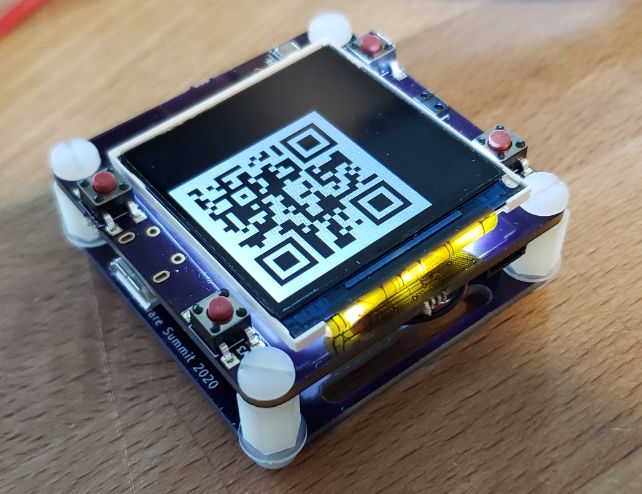
This is the badge for the Open Hardware Summit in NYC on on March 13th.Conference LinkIt is going to be in a wrist watch form factor with several awesome features. Rigado BMD340 (Nordic nRF52840) 1.54” LCD 4 user buttons BME680 Temperature, Pressure, and Humidity sensor...
stuck elbow
by Drew?
obsidian compass
Awesome 🎉
indigo wedge
Yeah I think it was a collab but he was involved
orchid basinBOT
@makermelissa asked me to open an issue for a suggestion I made in #380; I figured it would be easier to just make it a pull request. The learn guide for adding a board mentions the constraints on tags, but the README doesn't; I think adding instructions and the official tags to the template file would streamline this process for people adding new boards.
onyx hinge
Just at the onset of a glitch in mp3 playback. Theory: python SD card driver is invoked during background task, performs memory allocations, requires a gc.collect.
usually the background task is shorter but also the actual SD I/O (trace D2) is right at the beginning. audio is the first background task. gc pause is the first thing I can think of that would cause a long pause before starting SD I/O
bright aspen
@onyx hinge What is D0 in you 'scope traces? CS?
onyx hinge
I think it's actually MISO
 ionic elk
For the Jlink users of this channel, is it just me or is the JLink documentation really awful?
onyx hinge
@ionic elk I don't so much use the documentation as google someone who tells me how to do the thing I want to do, and then remember it 🙂
ionic elk
I'm attempting that, but DANG it's making it hard.
I'm just trying to understand this line in Scott's tutorial, JLinkGDBServer -if SWD -device ATSAMD21G18, but they don't seem to list the actual options in their huge horrible manuals anywhere
plus no --help option
solar whale
-if selects the interface type (SWD) and --device specifies the device being debugged
ionic elk
@solar whale thanks - just found the right spot in the right manual as you said that
was looking in the JLinkGDBServer manual, rather than the generic JLink manual.
solar whale
ah -- it's been awhile since I looked at the docs -- did not recall where it was specified. glad you found it.
ionic elk
Yeah I guess the JLinkGDBServer manual is mostly just a GUI manual which is why I was getting frustrated. The J-Link main user guide is actually pretty complete. So I was just looking at the wrong thing.
solar whale
@lone axle finally got a chance to try v08 of the BluefruitPlayground app. Works well on both my ZTE and Moto-x phones -- the acceleration demo images is still all black on the ZTE. OK on the Moto-x. THe neopixel registration is good on both.
lone axle
@solar whale Thank you 🙂. The black model is a weird one. I think we will need to test some more of the three.js example pages to see if any of them will render the color details on that device. There are a few other things I am going to wrap up first, but I will put together a few web pages to try loading on that device, the results of that may give us a way to get it working in the app.
solar whale
@lone axle Sounds good and no pressure from me. I'm amazed at what IS working! No need to hold up other things to get that one issue fixed.
lone axle
Here are 2 to try for now. https://threejs.org/examples/webgl_loader_json_claraio.html (should see a pink teapot) and https://threejs.org/examples/webgl_loader_collada.html (should see a spinning elf lady figure with white and green clothes)
if those show up as black similarly on the ZTE device I think it's likely the same root cause, we can try a few other formats to try finding one that will work. If those show up correctly then hopefully the fix should be something relatively easy.
bright aspen
@onyx hinge The SPI looks very slow to me in your 'scope image. Is the 10.0 ms at the top the time per major division or that for the entire trace? If it is 10 ms per division, then it looks like a command takes about 3 ms. Maybe a clock rate can be estimated, maybe 20 kHz. Maybe the SD interface is unduly slow.
onyx hinge
@bright aspen Yes, something like that. clock speed should be whatever is default
I mean, no, it's not 20kHz
scope says 1.31MHz when zooming on a trace
and switched to actual SCK
which is weird because doesn't this say 13.2MHz ?```class SDCard:
def init(self, spi, cs, baudrate=1320000):
no, no, that is 1.32MHz
well that certainly shrank the amount of time doing SD I/O
now at 12.5MHz (requested: 12MHz)
bright aspen
Scope sample rate?
onyx hinge
25.0MSa/s so fast enough that it's getting marginal to actually look at the signal content
thanks for asking and making me look! I had looked at that 1320000 and didn't believe it could be <10MHz so converted it to 13.2MHz in my head
I tried "doubling" it to 26MHz and that was too much. But of course that was actually 20x'ing it.
bright aspen
The think the SD SPI clock rate is 0-25 MHz. Maybe there is room for an increase. But then, was I really seeing very long sector reads in the earlier image?
manic glacierBOT

This looks good to me, and I agree with @sommersoft's comments as well.
onyx hinge
@bright aspen I think it could be reading up to 1.5kB at a time or so
slender iron
@onyx hinge gc.collect would make sense
 umbral ice
I'd like to use STM32F405 for a project but I need rotaryio, which is not implemented yet. I'm ok with attempting to port the code from another board and build it.
My best thought for an approach:
- Compare implemented .c and .h files between ports for something like digitalio
- Try to use these differences to write the STM32 rotaryio files using the other board as a template.
Is this sensible? Is one board as a template a better choice than others?
I believe I can build my own bootloader files for testing before I'd do a pull request.
 simple pulsar
Does anyone know why pylint chokes on use of const() for CircuitPython? I know this isn't part of "big" Python but I've got some code which works fine and is being rejected by the Learn guide's pylint.
************* Module cpb-quick-draw
cpb/cpb-quick-draw.py 161: Undefined variable 'const' (undefined-variable)
cpb/cpb-quick-draw.py 162: Undefined variable 'const' (undefined-variable)
@simple pulsar do you have from micropython import const in the file?
bright aspen
@onyx hinge I'm curious about SD signals and will look at it myself. What board are you using?
onyx hinge
@bright aspen pygamer. The signals are easy to capture, they're right on the feather header
bright aspen
@onyx hinge Christmas was a good time to give those away, so I have none. I'll go with Feather M4 Express.
onyx hinge
Indeed, and those boards make a great impression
If you're wiring via a breadboard you may need those lower speeds...
bright aspen
@onyx hinge The clock is 1.33 MHz. CS is down 4 ms for a 512 byte read and 11 ms for a 1.5 kB read. There seems to be something going on right after CS goes up.
@onyx hinge I'm reading sectors directly from an SDCard instance.
@onyx hinge A gc added 4 ms to the 11 ms to read 1.5 kB, according to time.monotonic_ns().
onyx hinge
When starting a read it repeatedly sends something until the card says it's ready
onyx hinge
GitHub
SD card drivers for Adafruit CircuitPython. Contribute to adafruit/Adafruit_CircuitPython_SD development by creating an account on GitHub.
orchid basinBOT

Attempting to add the Seeeduino Xiao board.
(circuitpython port was submitted separately)
*Sorry, have not tested changes locally via ruby, etc.
ionic elk
@slender iron have you ever dealt with your JLink just not connecting to anything at all, on your mac? ERROR: Failed to listen at socket (Err = -1)
Some kind of port error? I can get around it by intentionally making the JLink fail by unplugging the target power, but I was wondering if you had a better workaround.
slender iron
generally that happens if you have some of it running still
@indigo wedge we'll need to use a register to store bootloader state since we shuffle the flexram at startup
bright aspen
@onyx hinge For me, setting the clock speed to 12 MHz cut the 1.5 kB read time down to 2.5 ms. Now the 4 ms gc seems significant.
onyx hinge
I agree, it made a big difference.
tidal kiln
is rotaryio interrupt based?
bright aspen
@onyx hinge Better measurements: Reading 1.5 kB takes 2.82 ms (after the previous read effects a collection) and 8.23 ms when the read seems to effect a collection. Interestingly, the extra 5.4 ms seems to be split before and after the beginning of CS, about 2 ms before and 3 ms after. (I told it 12 MHz, I don't know what frequency it actually is using.)
onyx hinge
ideally 512 bytes could go over an SPI bus in in 4096 bit times or 341us at 12MHz!
Seems like the gc "pause" should strictly be on one side of the CS assertion though I could see that by coincidence it could either be before or after -- gc pauses are essentially random, they depend on the history of all previous allocations.
 meager fog
@tidal kiln i can make your gdox guide live?
tidal kiln
sure. i think its ready2go.
simple pulsar
@solar whale No, I've never needed that, the code runs fine without it. Am I supposed to have it?
e.g. ```Press any key to enter the REPL. Use CTRL-D to reload.
Adafruit CircuitPython 4.1.2 on 2019-12-18; Adafruit CircuitPlayground Express with samd21g18
a=1
b=const(2)

Would it be feasible/possible to port CircuitPython to the steam controller's main processor (the LPC11U37F)?
The real advantage is a wireless remote control that can be programmed to use the nRF51822 ([via USART+CTS+RTS and SWDIO/SWDCLK](https://github.com/greggersaurus/OpenSteamController/blob/master/ReverseEngineering/Luna_maiboard_V000456-00_rev3.md#nrf51822...
solar whale
@simple pulsar no idea. I’ve seen it in some libraries. https://github.com/adafruit/Adafruit_CircuitPython_RFM69/blob/master/adafruit_rfm69.py#L72. I’m reaching beyond my competence.
GitHub
CircuitPython module for the RFM69 series of 433/915 mhz packet radios. - adafruit/Adafruit_CircuitPython_RFM69
raven canopy
if i understand correctly, pylint will attempt to import any necessary modules in order to verify objects, signatures, etc...
solar whale
I just thought pylint was like the QWERTY keyboard. Just to slow things down 😉
raven canopy
hmm. actually, looks like they might be working with the AST, vs import/inspect. there's a lot of code to read there...
tulip sleet
@umbral ice The rotaryio I/O for either atmel-samd or nrf would be a good model to copy. They are similar (using GPIO interrupts) but the state transition calculation is by table in atmel-samd and by calculation in nrf. Or if there's an onboard periph you could try that.
Some people have complained that our implementations are "slow" because they provide transition only on each click (using the gray-code generated by the encoder), but we did it that way for debouncing reasons. You could make it have more transitions per click but it would have jitter.
umbral ice
@tulip sleet thanks for the point in the right direction! Should I open an issue to track progress and discussion I need along the way?
tulip sleet
sure; @ionic elk is doing most of the STM32F405 work so he may have some further comment
ionic elk
yeah sure thing I'm around anytime if you need help
tulip sleet
i will say that there's a lot of bad code out there for rotary encoders, and I had to derive the table in atmel-samd from first principles
umbral ice
I'm sure I will, but I'll try to plod along for a while. My background is 10+ years in R, 6 months in Python, and a semester of Fortran 10 years ago.
C isn't my strong suit but I'll see how I get along
tulip sleet
the interrupt handling in those ports is about the simplest possible, so it should be easy to understand
umbral ice
Ok. So circuitpython doesn't support interrupts unless they're compiled in C?
tidal kiln
(neat. answers my question too)
tulip sleet
right
bright aspen
@onyx hinge Ah, it is looking like the part before the CS assertion grows and grows and then at some point there is also a long time after the assertion. After that the part before the assertion is small. I am using a couple digital I/O pins to time the read and to pulse when the free memory suddenly jumps up. I am reusing my bytearray.
tidal kiln
@tulip sleet can you please take a look at this and offer any suggestions:
https://forums.adafruit.com/viewtopic.php?f=60&t=160990
tulip sleet
@tidal kiln right it sounds like it's spending all its time in the rotaryio interrupt handler. It was written for manual rotary controls, not some high speed tracking. If they run the motor a lot more slowly does it get better? That would be a tell-tale.
There is a quadrature decoder built-in peripheral on SAMD51, but we haven't rewritten the code to use it.
umbral ice
Does circuitpython have a ready API for compiled C modules? for instance where you just pass arguments between and do the heavy lifting in C. A-la rcpp for R
tidal kiln
@tulip sleet thanks. what i figured.
manic glacierBOT
[adafruit/circuitpython] Pull request opened: #2532 Refine iMX RT memory layout and add three boards
Introduces a way to place CircuitPython code and data into
tightly coupled memory (TCM) which is accessible by the CPU in a
single cycle. It also frees up room in the corresponding cache for
intermittent data. Loading from external flash is slow!
The data cache is also now enabled.
Adds support for the iMX RT 1021 chip. Adds three new boards:
- iMX RT 1020 EVK
- iMX RT 1060 EVK
- Teensy 4.0
Related to #2492, #2472 and #2477. Fixes #2475.
manic glacierBOT
Please don't merge. Teensy doesn't work. The 1060 EVK does though. :-/
manic glacierBOT

asyncio is not hard to use, is standard and would help CircuitPython appeal even more to a particular set of users. It is hard to wrap your head around in an hour, and is not suitable for a person's "hello world" but anyone can learn the basic asyncio patterns; kids and adults alike. I would switch to MicroPython for uasyncio but for the CircuitPython device libraries I'm locked into.
Where I'm coming from: I have written asynchronous software in many languages and in coroutine, threa...
manic glacierBOT

Well, from my PoW trio's structured-programming abstractions (bounded scopes for tasks, deterministic cancellation and error propagation, and its avoidance of callbacks) avoid many pitfalls you tend to run into when writing async code "in the wild" and, frankly, "forces" me to write better and more concise programs.

I would love that, beep me for testing if ever it exist and I don't notice it... but this seems unlikely.
 half sedge
About counting the number of "board", everybody seems to party saying there are 100 (now 101) but some maybe should not be counted... such as CPE+Crikit and CPE+DisplayIO also Feather M0 Express + Crikit. Those are likely there because of the M0 limitation and freezing the right module in is the only way to keep enough memory for user code.
I am also interested to know what is special about the Pycon 2019 CPE (compare to CPE) or the CPE 4-H. Do they have some special hardware, or is it just to help the owner find those board. Same for Pycon 2018 Gemma M0.
Maybe we can count Serpente as 3 separate board... but they use the same code.
manic glacierBOT
Oh, I can see the problem I made here 😬
When did this code go in the new version? Do we assume it's taken care by the bootloader? What if there is no bootloader?
Have you verified that this register survives a reset with a reset button?
All these files feel like not exactly tied to the imx port, could we move them to a common space somewhere?
Have you tested this with the uf2 bootloader?
 river quest
hi folks, here's the DRAFT of the upcoming “Python for microcontrollers” newsletter that ships out tuesday at 11am ET via adafruitdaily.com - please send any links, news, events and more via an issue/PR, or @ us or really any thing 🙂 we'll get it added!
GitHub
Community newsletter for python on microcontrollers - adafruit/circuitpython-weekly-newsletter
manic glacierBOT

A few random thoughts:
Some programmers will be coming from MakeCode. Something similar or with easy-to-explain differences would be cool.
Some beginning programmers (usually those with entrepreneurial spirit) use LiveCode, a HyperCard-like language. LiveCode uses event/message handlers. Events and messages are handled only during waits and the like.
New programmers and programmers new to a way to do this often get confused about when events and callbacks are handled. Or about the ch...
manic glacierBOT

If you don't mind. Can you share it?
manic glacierBOT
thanks for all the good thoughts. we def want to add some support for this. what would be extremely helpful is if folks could post up usage cases where they need concurrancy/async/sleep/interrupts. pseudocode or descriptions - there's a lot of cases and we want to make sure we cover them :)
Concepts can build on those learned in beginning CP examples.
Events/callbacks
An example is digitalio, used to create an abstraction around a pin. One can change whether it is an input or output and so on. Input can have a pull-up. Perhaps an input can also have functions to call on change events. The function is passed the object. The added functionality can be a model for making other classes that have events. It is what to do when. Such objects might be called event objects. They...

It wasn't in the release notes but I thought I'd check 5.0.0.beta.3. FYI, I'm still seeing the NeoPixels left on.
Use case...
LED control. The state of device is reflected in one or more LEDs. (I recently used a light-pipe to the an on-board LED in a quick build.) Besides color, the blink is controlled. That might be off, fast blink, slow blink, or warble. The blink adds a distinction that is color-blind friendly, red might be only fast blink. The rate can be off a little and a little jitter is OK.
meager fog
@tidal kiln hey no biggie but are you workin this weekend
if so, i have a small quest - if not ill just diy 🙂
manic glacierBOT

Another use case: MQTT. I control an LED strip via MQTT messages and the latency in handling the MQTT loop severally lowers the rate at which I can update the LEDS.
indigo wedge
Anyone ever dealt with a display that has 3 pixels per byte? Seems the current displayio code might not support that cause of math like this uint8_t pixels_per_byte = 8 / self->colorspace.depth; @slender iron
tidal kiln
@meager fog on and off, but go ahead. what's up?
manic glacierBOT
Use case...
Keypad handler. Keypad concepts include short tap, double tap, long press and shift. Sequences of taps and presses enabled by shifts (including the trivial single) trigger events that might be dynamically changed. Timing of button presses must be human. Debounce is handled. Events are allowed to change attributes.
128K Flash / 12KB SRAM makes it not a great target - our current 'minimal' configuration is samd21 with 256K / 32K and its a tight fit :)
only option that makes sense to us is you could program that chip to send BLE data that could be picked up by one of our BLE circuitpy boards.
meager fog
@tidal kiln theres a regression failure on raspi with the neopixel 4.1 library
i think we can fix it, just needs some check somewhere
i can look at it with you - bbiab
tidal kiln
tidal kiln
that looks like it should be broken for CP as well. there's no longer a buf member.
slender iron
@indigo wedge what chip is it?
slender iron
ah, interesting
could definitely be that the displayio math doesn't work well for it
indigo wedge
you can see "8" looks like "B" cause the 3 pixels per byte are not quite sent correctly
slender iron
its been a while since I worked on that code
indigo wedge
I mean, for sure, there is no int depth that can make this be 3 uint8_t pixels_per_byte = 8 / colorspace->depth;
indigo wedge
it's actually 2 bpp but padded
manic glacierBOT

Sure, no problem Sai. I have to go out for a little while and I want to take a few minutes when I get back to make sure I'm sending you files that work, but I'll pass along what I've got later today.
Tim
-----Original Message-----
From: Sai Yamanoor notifications@github.com
To: adafruit/circuitpython circuitpython@noreply.github.com
Cc: timvgso timvictor@aol.com; Mention mention@noreply.github.com
Sent: Sat, Jan 18, 2020 12:27 pm
Subject: Re: [adafruit/circuitpython] Rewriting M...
wind trellis
Yikes, I thought I was replying to a private email there. I'm glad I didn't get any more personal than that. 😮
manic glacierBOT
Thank you. @ladyada your experience is invaluable. The memory issue was my main concern. I guess I'll try Arduino IDE support instead. The mentioned OpenSteamController project has not started to reprogram the nrf51822 (via SWDIO/SWDCLK) yet, but they have written c++ firmware that can read most of the inputs (except the mpu6500) from the LPC11U37F.
For those that landed here from Google: this idea is dead, please follow the [OpenSteamController project](https://github.com/greggersaurus/...
meager fog
@tidal kiln yah
@tidal kiln anyways im back and hackin for rest of the day - i can look at it or if you can - i can do IMU stuff 🙂
manic glacierBOT
yep agreed, there's arduino drivers for all those chips - so ya just need to find a way to program the chip (DFU? SWD?) and find someone with an LPC11 BSP. good luck, and let us know if you find anything, we'll blog it up!
tidal kiln
@meager fog might be better for roy to take a look at? i got it working with some hacking, but i'm not 100% sure i follow the general design and intent of pixelbuf.
i just replaced this:
https://github.com/adafruit/Adafruit_CircuitPython_NeoPixel/blob/master/neopixel.py#L151
with this:
neopixel_write(self.pin, self._bytearray)
hmm ideally the buf comes from the superclass adafruit_pypixelbuf
tidal kiln
yep. but there isn't any with that specific name. but two other bufs.
meager fog
weird its not there
why did this ever work!?
but i think we're best off adding buf to https://github.com/adafruit/Adafruit_CircuitPython_Pypixelbuf/blob/master/adafruit_pypixelbuf.py
GitHub
Contribute to adafruit/Adafruit_CircuitPython_Pypixelbuf development by creating an account on GitHub.
instead of changing neopixel?
cause right now the neopixel library works with the hardware def of pypixelbuf
it just wasnt tested on non-hardware-based boards
tidal kiln
ah. OK. indeed. for the CP firmware, there is a buf:
https://circuitpython.readthedocs.io/en/latest/shared-bindings/_pixelbuf/PixelBuf.html#pixelbuf.PixelBuf.buf
meager fog
could dynamically create it as a property
well actually - we should make it a variable so it works on circuitpy without destroying memory
hm
tidal kiln
yah. so this actually looks like an issue for:
https://github.com/adafruit/Adafruit_CircuitPython_Pypixelbuf
meager fog
@ruby atlas hihi are you working on any fixes to pixelbuf at this time
manic glacierBOT
Thanks for chiming in ladyada! Here is what I'm pining for every time I open my current project:
- I'd like the hardware interrupts to be handled by the library and only used to wake my code in a normal execution context (i.e., I don't want to write interrupt handlers where I'm not allowed to allocate or call other functions. At least I don't want to need to normally).
- Every listener of an event (like an on_fall()) receives notification of that event when it occurs.
Here's a prog...
tidal kiln
just added this to the PixelBuf class and it seemed to fix it:
    @property
    def buf(self):
        return self._bytearray
lol
 ruby atlas
@meager fog i plan to look at the complaints about buf not being assignable.
meager fog
yeah submit a PR 🙂
ruby atlas
however we should also teach people not to use buf
because the Neopixel and Dotstar and so on objects are indexable/sliceable.
meager fog
@ruby atlas the issues are not related to assignability, the 'buf' variable doesnt exist at all
you'll need to remove it from the NeoPixel library if you dont want people to use it
solar whale
Does it make sense that I am seeing a long delay between SPI transactions under Blinka on a Raspberry Pi Zerow -- I am talking to an RFM9x -- the SPI baudrate is 5MHz and I can see the transactions look OK but there is a > 6ms gap between transactions -- is that because Blinks opens and closes the SPI bus for every transaction?
ruby atlas
it does, it's readable. but not assignable - it's a quirk of circuitpython.
meager fog
where's buf exist?
ruby atlas
if there's no setter on the property that happens.
meager fog
we cant find it 😦
ruby atlas
give me a minute to pull code and open editors.
was driving for 10h last night in the snow storm 🙂
meager fog
https://github.com/adafruit/Adafruit_CircuitPython_Pypixelbuf/blob/master/adafruit_pypixelbuf.py#L73
GitHub
Contribute to adafruit/Adafruit_CircuitPython_Pypixelbuf development by creating an account on GitHub.
np take your time -
no rush from us, we'd like to patch in the right way 😄 and its snowing out so i aint got nothing else to do
ruby atlas
lol yeah, i drove overnight last night to avoid being stuck in that snowstorm all day today.
highway 401 sucks badly in daytime when it's snowing.
meager fog
when you're a kid road trips sound super fun. 😄
ruby atlas
i still prefer the 8-10h drive over flying or the train.
meager fog
then you adult and its way 😦
ruby atlas
(because flying takes just as long to get here sometimes)
tidal kiln
@meager fog i'll let @ruby atlas work it out - i'm really mostly just guessing at it
ruby atlas
https://github.com/adafruit/circuitpython/blob/master/shared-bindings/_pixelbuf/PixelBuf.c#L445 is where buf exists in PixelBuf and https://github.com/adafruit/circuitpython/blob/master/shared-bindings/_pixelbuf/PixelBuf.c#L303 is the reason it says it doesn't exist when trying to assign.

GitHub
CircuitPython - a Python implementation for teaching coding with microcontrollers - adafruit/circuitpython
meager fog
@ruby atlas yah, we're looking at the purepython version
tahts what gets used for raspi
we're trying to read .buf
ruby atlas
and that's failing? that's an error by me. 🙂
meager fog
GitHub
CircuitPython drivers for neopixels. Contribute to adafruit/Adafruit_CircuitPython_NeoPixel development by creating an account on GitHub.
that works if you are using _pixelbuf
but does not exist in _pypixelbuf
ok cool!
thats fine 😄
@tidal kiln - plz PR!
ez to fix
ruby atlas
and i guess we need an issue filed in Pypixelbuf linked to https://github.com/adafruit/circuitpython/issues/2502 to have the two APIs in sync when I fix #2502
GitHub
_pixelbuf.buf doesn't have a setter, breaking some code. See adafruit/Adafruit_CircuitPython_NeoPixel#65
tidal kiln
ruby atlas
because i'll need to make sure the setter behaves the same way in both.
meager fog
dont need setter yet - we dont even have a getter 😄
ruby atlas
right.
ruby atlas
let me check which buffer the getter returns in _pixelbuf.
ruby atlas
in _pixelbuf, it returns buf not the rawbuf.
so probably what you posted is probably correct, checking pypixelbuf code
actually, not sure.
not even sure .buf behaves the same way it used to in neopixel.py before pixelbuf
rawbuf is the unadjusted buffer, buf is the brightness-adjusted buffer.
so I feel like buf as it stands in _pixelbuf is just simply wrong.
meager fog
self.buf is the post brightness adjust buffer
ruby atlas
hrm. this is where i want to have a look at some people's pre-existing use of .buf to fix this.
manic glacierBOT
Afraid of going a little off topic here, but I think they're using DFU as the process to reprogram the LPC11U37F is strikingly similar to updating CircuitPython (hold right trigger when plugging in USB and a small HDD is enumerated that contains firmware.bin). The one concern that's been lurking in my mind is no hard reset button, but valve most likely left usual testing pads exposed, so maybe there's a solution that involves soldiering.
ruby atlas
what was it before in neopixel (looks at old code)
meager fog
because neopixel_write does not do any brightness adjust
meager fog
GitHub
CircuitPython drivers for neopixels. Contribute to adafruit/Adafruit_CircuitPython_NeoPixel development by creating an account on GitHub.
yes .buf has always been the raw-un-adjusted brightness
however, you removed the brighness adjust
where does htat happen now - during assignment?
ruby atlas
ugh, yeah, i got it wrong.
yeah. _pixelbuf uses two buffers now for speed, by default, but can work on one buffer if needed.
meager fog
what is the goal of pixelbuf
ruby atlas
so .buf is returning the adjusted buffer in _pixelbuf, but we want it to return the unadjusted buffer.
meager fog
when does brightness adjustment happen
during pixel-color-assignment or right before show()
historically, it would happen before show()
its ok the way it is - but need to know when its expected now
ruby atlas
pixelbuf does it during indexing/slicing. the goal of pixelbuf was to accelerate all operations on pixels to make them (nearly) the same speed when at full brightness or not. it's focus was on ensuring that all slice and index operations were really fast.
meager fog
kk
ruby atlas
also as a side effect, make dotstar, neopixel, and others compact.
removing .buf from _pixelbuf wouldn't be a bad idea. Right now neopixel and dotstar don't hold onto their buffers they give to _pixelbuf, but they could, and then could expose them locally via a buf @property.
meager fog
lets not perform surgery
ruby atlas
(they're anonymously passed in)
meager fog
where is the brightness done in
on the request for .buf?
at some point, values are divided down to make them less bright - what call does that?
manic glacierBOT
It's taken care of by the boot ROM that is built into the chip. Without it, this code wouldn't load from the flash.
ruby atlas
anywhere brightness is calculated:
https://github.com/adafruit/circuitpython/blob/master/shared-bindings/_pixelbuf/PixelBuf.c#L231
https://github.com/adafruit/circuitpython/blob/master/shared-module/_pixelbuf/PixelBuf.c#L34
GitHub
CircuitPython - a Python implementation for teaching coding with microcontrollers - adafruit/circuitpython
GitHub
CircuitPython - a Python implementation for teaching coding with microcontrollers - adafruit/circuitpython
pixelbuf_set_pixel is called during pixelbuf_pixelbuf_subscr
meager fog
maybe im not asking right
ruby atlas
So the two places adjusted brightness is calculated are during assignment via slicing/indexing, and during a brightness property change.
meager fog
internally the raw unshifted data is stored in....
ruby atlas
there is no helper (yet) to let you trigger the recalculation.
meager fog
if i set a pixel with like
meager fog
strip[0] = (255, 255, 255)
and i set .brightness = 0.5
rawbuf = (255, 255, 255)
and when i query for .buf it will give me (128, 128, 128)?
ruby atlas
that would store (255, 255, 255) in rawbuf and (127, 127, 127) in buf
meager fog
gr8
so .buf is recalculated on every set_brightness call
rather than on .show
we always store 2 full buffers of data - one raw and one dimmed
ruby atlas
only the changed pixels.
meager fog
?? what do you mean changed pixels
if i set_brightness, all pixels changed
unless they're (0, 0, 0)
ruby atlas
oh jhang on i misread
yes, set brightness recalculates .buf
from the raw buffer (if there is one, otherwise it does nothing until the next pixel write, but that's a special case that I don't know if anyone uses yet).
ruby atlas
i don't actually know anymore. at the time i started writing it I was worried that two buffers might not be a great idea for memory.
because it uses preallocated buffers and no temporary ones it seems to use the same or less total memory.
i guess brightness=1 would be a good case for it, and could in theory be faster.
i'd be happy ripping out all the single buffer code to make it more compact, faster, and easier to read.
ruby atlas
agree, glad we're discussing it 🙂
tidal kiln
yep. watching.
meager fog
lets patch pypixelbuf, i dont think it was ever tested
the buf property should listcomp the raw buffer against brighness
eg...
ruby atlas
i'd slice assign.
meager fog
GitHub
CircuitPython drivers for neopixels. Contribute to adafruit/Adafruit_CircuitPython_NeoPixel development by creating an account on GitHub.
lets get it working, can optimize after
Pi's run at 700mhz
ruby atlas
@property
def buf(self):
   return self._rawbytearray

@buf.setter
def buf(self, buffer):
    self._rawbytearray = buffer
    self[:] = self[:]
its not the rawbytearray tho
its the brightness-adjusted one
@tidal kiln bytearray([int(i * self.brightness) for i in self.buf]) try that for the property contents, can test if self.brightness > 0.99
ruby atlas
you sure, https://github.com/adafruit/Adafruit_CircuitPython_NeoPixel/blob/853de6c5aa8c56b720d70772c90fa82198b7b7fb/neopixel.py#L237 is the where the brightness adjustment is done in the old neopixel, which uses buf as an unadjusted source.
GitHub
CircuitPython drivers for neopixels. Contribute to adafruit/Adafruit_CircuitPython_NeoPixel development by creating an account on GitHub.
meager fog
correct, and you changed neopixel
so now we have to do the adjustment in .buf
GitHub
CircuitPython drivers for neopixels. Contribute to adafruit/Adafruit_CircuitPython_NeoPixel development by creating an account on GitHub.
thus
we must make the adjustment in self.buf propertyu
ruby atlas
i guess i'm not following completely. are we accepting the accidental change to the behaviour of neopixel (.buf), or trying to fix it to behave the way it was before?
meager fog
i want to fix it
@ruby atlas take a nap 🙂
there's nothing you have to do
it is not running now, we just have to get it up n walking 😄
ill set up my pi
tidal kiln
@ruby atlas issue is RPi/Blinka specific, so for here:
https://github.com/adafruit/Adafruit_CircuitPython_NeoPixel/blob/master/neopixel.py#L151
there is no .buf here:
https://github.com/adafruit/Adafruit_CircuitPython_Pypixelbuf/blob/master/adafruit_pypixelbuf.py
@meager fog that seems to generally work for the getter side of things
meager fog
@tidal kiln good enough
lets get it so the pi folks can at least use existing code - can add setter later
ruby atlas
GitHub
CircuitPython drivers for neopixels. Contribute to adafruit/Adafruit_CircuitPython_NeoPixel development by creating an account on GitHub.
untested, but that should work.
except one bug i see
meager fog
@ruby atlas please take a good nap and we'll look at it tomorrow 🙂
10 hr drive isnt compatible with brain intensive code 😄
ruby atlas
i did nap 🙂 but the above is for @tidal kiln to see how i'd fix it 🙂
ruby atlas
should I pr that and tag @tidal kiln ?
meager fog
sure always put in PRs if you need to get your thoughts down
ruby atlas
done. 🙂
manic glacierBOT
I'd like to comment, and hopefully improve on, this example:
  async def toggle_pin( pin: digitalio.DigitalInOut, button: digitalio.DigitalInOut ) -> :
    while True:
      value = await button.on_change()  # like rise/fall on a Debounce
      if value:  # swap pin on fall.  Could have just used on_fall() instead
        pin.value = not pin.value
  run_this_coroutine(toggle_pin(led1, button))
  async_coroutine_feature.run_forever()
I don't understand what you mean by "swap ...
tidal kiln
@meager fog fwiw:
https://github.com/adafruit/Adafruit_CircuitPython_Pypixelbuf/pull/4
tidal kiln
cool. thanks for double checking and testing.
manic glacierBOT
My workaround in CircuitPython is to create state machines. Objects are checked often to see if their states need to change or they need to call back.
My classes have functions called spin. (In my mind is an image of the magician adding spinning plates to his act while keeping the other plates spinning.) Each time spin is called it checks I/O and time.monotonic_ns() and changes state of the object accordingly and calls callbacks as needed. I use time.monotonic_ns() a lot. (I feel like Greg...
half sedge
Hi, I have a question about how to "not end" a python code.
I have seen while True: pass
And while True: (code to set a neopixel color)
And maybe your guide is doing while True: time.sleep(1)
I looked at Neopixel example, and also Turtle graphic example.
Is there a right way to do nothing at the end of a Python code? A way that would be CircuitPython compatible (considering there is not async).
tidal kiln
those are all examples of putting an infinite loop at the end to prevent the code from exiting (ending)
you can do something in the loop, but don't have to
half sedge
That's my problem, it is infinite loop.
I was looking for a "pause()"
Something that would only end on a Ctrl-C
tidal kiln
pass is fine
tidal kiln
some examples might have time.sleep(), but its effectively the same thing
half sedge
The uggliest is this: https://learn.adafruit.com/circuitpython-made-easy-on-circuit-playground-express/neopixels
Adafruit Learning System
Get started with just a few lines of code!
Loop on setting the same neopixel to the same value...
meager fog
@half sedge please dont use 'ugliest' when referring to code
half sedge
@meager fog What should be used, I am not native english speaker.
meager fog
you can say "this seems less efficient, why is it done like this?"
tidal kiln
are you wanting more code to run after pressing CTRL-C?
bright aspen
To me, the neopixel example is code that is modified in later steps where the final loop is important.
half sedge
My feeling is that example should teach good practice and NOT active loop. Blinky is never ending, so that loop is OK. Setting Neopixel and then doing nothing... you don't need a loop, but you want your script not to end. Turtle Graphic, you want your graphic to be visible at the end, so you have finish your work but want to stay in the script.
tidal kiln
the loop is generally needed, otherwise the hardware resets at code exit and the results are not as expected
meager fog
that code was written for people who do not know about pass or delay just yet
tidal kiln
this:
while True:
    cp.pixels[0] = (255, 0, 0)
could also be done like this:
cp.pixels[0] = (255, 0, 0)
while True:
    pass
but it's just a simple example
meager fog
like literally its their very first circuitpython example
we wanted to have the least number of lines of code
bright aspen
By "final loop is important", I mean that in later steps there is effect in the loop, such as printing.
meager fog
and to make it easy to insert delays
you can see the non-delay loop and delay-loop progression here https://learn.adafruit.com/circuitpython-made-easy-on-circuit-playground-express/red-led
@tidal kiln still pip upgrading 😄
bright aspen
I'm an experienced programmer and I had to learn pass when I first got into Python.
tidal kiln
@meager fog probably for the best. not sure what state this pi i tested with is in.
half sedge
Ok, so line minimisation is the goal. In Turtle Graphic, as this is a general issue, the "while True: pass" is the standard but it can be explained. And this is not the first piece of CircuitPython user will see.
tidal kiln
there's a buried FAQ about it here:
https://learn.adafruit.com/welcome-to-circuitpython/creating-and-editing-code#faq-3029962
manic glacierBOT
Use case...
Motion control. Like the LED use case, but with motion.
(Back in October I made a hat for my costume. I was in a hurry and took some shortcuts in motion control software and in a few places made some sudden changes, fast but not too bad. As I was going out the door something broke and I quickly changed a servo motor to something else available, bigger but it could fit. We got to the event and I put my hat on, a gesture that enables it. Fortunately, nobody got hurt.)
manic glacierBOT

I'm using a hacked kindle to make a picture frame that has a phone number,
and it will display whatever you text to it... but only if it rhymes. A way
to bring more doggerel into my life. An embedded-ish context that's maybe
more like Raspberry Pi than CircuitPython, but it seems relevant to me?
Since folks have compiled vanilla Python 3.7 for it, I took it as a chance
to use Trio for the first time, and I LOVED it. I'm a full time programmer,
so I was getting all ready to use my usual stuf...
meager fog
@tidal kiln ok tested!
simple pulsar
@half sedge Are you referring to avoiding programming examples which encourage burning cpu as a novice wouldn't understand it's (sometimes) ok in the embedded world and a no-no elsewhere?
tidal kiln
@meager fog worked?
meager fog
@tidal kiln yah i just wanted to verify that if you changed brightness and ran show it would do the expected thing, which it does 🙂 i bumped
tidal kiln
yeah
and you responded in issue thread. cool.
ok. i'm going afk / async for rest of the day.
ruby atlas
i really need to put a Pi with a GPIO breakout into my travel kit.
and my default test hardware set.
meager fog
@tidal kiln yeah! later
half sedge
@simple pulsar I was reading the basic CP documentation. And I had in mind the "simpler mechanisms for asynchronous processing" question. And then I found the Neopixel basic code doing something very odd, and remembered that in Turtle Graphic there is another busy loop ( and in displayio sometime there is a busy loop and sometime not see https://learn.adafruit.com/circuitpython-display-support-using-displayio/text). Since Circuit Python is not having any asynchronous, there is no issue in doing a busy loop at the end (as this is the end anyway). Well, there is no issue, but there could be something going on with sound or pixel animation). I was just worried at what is shown and what would be the recommended way to wait. I found this: https://blog.miguelgrinberg.com/post/how-to-make-python-wait but this is when you have asynchronous processing.
manic glacierBOT
I'd like to comment, and hopefully improve on, this example:
Hi @smurfix! I super disagree with a lot of your take on my proposal - but please don't mistake my below frankness for anything other than direct, explicit communication for clear understanding ❤️
tl;dr: I believe it is almost uniformly a set of regressions in flexibility, conformity and cognitive burden.
I don't understand what you mean by "swap pin on fail".
You misread. fall not fail. In Debounce it's cal...
orchid basinBOT

Still missing small and large images for Orange Pi One and Lite, I'll be adding them tomorrow or Monday.
onyx hinge

Tindie
CircuitPython-based PCB badge with included virtual pet (Tamagotchi clone) software
lone axle
I've added a new v09 debug apk file to the Android Bluefruit Playground repo. This version contains the About, Welcome, and Help pages as well as any Strings that were missing from the iOS version, and a few other fixes. There will probably be one more new version this weekend to tie up a few more things, but this one knocked out the majority of the remaining list. https://github.com/FoamyGuy/Android_Bluefruit_Playground

GitHub
Contribute to FoamyGuy/Android_Bluefruit_Playground development by creating an account on GitHub.
As always anyone interested or willing to test with a CPB and an Android device is most appreciated. If you have installed any previous versions of the app you should manually uninstall them before loading this one.
 timber mango
@lone axle Great work!
lone axle
Thank you 🙂
manic glacierBOT
I'd like for you to confirm that you tested this with the uf2 bootloader so my Feather's don't suddenly stop working 😅
manic glacierBOT
Don't think this logic works, the previous code was checking the address of _bootloader_dbl_tap, if it was 0 then there was no bootloader and if it was at the end of stack then there was a bootloader, the new version just checks a register value.
manic glacierBOT
Correction: I'll push a work-in-progress branch today or tomorrow. Locating my notes and demo code and recreating my test rig took a bit longer than expected!
@WarriorOfWire Yes it's a reduction in flexibility. The point is that in the 60s, removing "goto" in favor of "for" and "while" loops was a reduction in flexibility too, and people complained for much the same reason you complain now. Surprise, Python doesn't have a "goto" and nobody misses it.
The concurrency equivalent of "goto" is to have a task/coroutine that you can fire off and forget. I want Python to not have that either, and for much the same reason. Sure it's more flexible, but t...

@tannewt Just for fun, I downloaded and tried this PR on a Teensy4.0 -- using teensy_loader_cli
works!
Press any key to enter the REPL. Use CTRL-D to reload.
Adafruit CircuitPython 5.0.0-beta.3-69-g1c3960634 on 2020-01-19; Teensy 4.0 with IMXRT1062DVJ6A
>>> help('modules')
__main__          busio             microcontroller   struct
_os               collections       micropython       supervisor
_pixelbuf         digitalio         neopixel_write    sys
_time errno ...SInce you are busy, when you find the time, just share whatever you have
and I will try to recreate it. DO not worry about it.
Sai
On Sun, Jan 19, 2020 at 5:41 AM timvgso notifications@github.com wrote:
Correction: I'll push a work-in-progress branch today or tomorrow.
Locating my notes and demo code and recreating my test rig took a bit
longer than expected!—
You are receiving this because you were mentioned.
Reply to this email directly, view it on GitHub
<https://gith...
manic glacierBOT
FYI-- I tried using an I2C device but am getting errors reading the library from the Flash
Press any key to enter the REPL. Use CTRL-D to reload.
Adafruit CircuitPython 5.0.0-beta.3-69-g1c3960634 on 2020-01-19; Teensy 4.0 with IMXRT1062DVJ6A
>>>
>>>
>>> import msa301_simpletest
Traceback (most recent call last):
  File "<stdin>", line 1, in <module>
  File "msa301_simpletest.py", line 4, in <module>
  File "/lib/adafruit_msa301.py", line 54
SyntaxError: invalid syntax
>>> ...Alright, got the last few things taken care of. There is a new v10 debug apk in the repo now.
https://github.com/FoamyGuy/Android_Bluefruit_Playground
GitHub
Contribute to FoamyGuy/Android_Bluefruit_Playground development by creating an account on GitHub.
I still need to work with jerryn to troubleshoot the 3D model rendering issue on one of his devices. But this v10 build addresses every other issue I've been made aware of. I think it should be very close to identical to the iOS app now.
slender iron
Hi all! The community meeting is a day later this week due to the Martin Luther King Jr Holiday here in the US. So, the meeting is at 11am Pacific / 2pm Eastern on TUESDAY here on Discord. Everyone is welcome to attend. Meeting notes doc is here: https://docs.google.com/document/d/18m7yrgn4nOo9WlOdCEgef30L4WS01_h2igVvyrZV4lQ/edit?usp=sharing <@&356864093652516868>

Google Docs
CircuitPython Weekly January 21st, 2020 This meeting is on Tuesday! NOT Monday! Welcome to the meeting notes! Feel free to add your notes for Hug Reports and Status Updates early. We do it as a round robin sorted by username. If you can’t make the meeting, then add them...
ruby atlas
Sigh. This would have been nice to know much earlier - I had freed up my 2pm on Monday and have a meeting in the tuesday time window instead.
slender iron
@ruby atlas we talked about at the end of last week's meeting
solar whale
@slender iron I made some comments in the PR for Teensy rather than creating issues at this point . let me know if you would prefer issues. 2 concerns -- 1)issue reading from flash 2) issue with REPL response
ruby atlas
I wasn't present - often can't attend monday at 2pm.
because it typically conflicted with meetings.
slender iron
just saying, this isn't the first notice of the change
solar whale
@lone axle tested V10 -- looks great! still black image for accel on ZTE, but otherwise working well.
the image is full color in the other screens.
 solar whale
@lone axle one minor difference from IOS -- in the Color Wheel screen ,the new color is not shown until you tap the square on the right in android -- it shows up immediately in IOS
so on android you have to select the color then tap the square -- on IOS you just select the color
lone axle
@solar whale thanks for trying it out. Ill ping you later today with a page that has some three.js troubleshooting. I've got a note now to update the neopixels as soon as new color is chosen, thank you.
lone axle
😀
manic glacierBOT
@WarriorOfWire I like the elegance of your quality_of_life_style(). I would like to discuss that and, to that end, simplified your program and added detail with some assumptions.
import warriorofwire_async
import digitalio
import warriorofwire_debouncer

button = warriorofwire_debouncer.Debouncer(digitalio.DigitalInOut(D1))
button.direction = digitalio.Direction.INPUT  # ?
led1 = digitalio.DigitalInOut(D2)
led2 = digitalio.DigitalInOut(D3)
led1.direction = digitalio.Direction.OU...@lone axle finally had a chance this morning to play around with your Android port on my Pixel 3a and everything worked as I expected it to. To be fair, I don't own an iOS device, so no way to compare, but from a greenfield/newbie perspective, it rocks 👍
lone axle
@sly falcon sweet! thank you for testing it out.
sly falcon
@lone axle you're welcome! Be sure to ping me if you need anything specific tested...happy to help!
manic glacierBOT
@WarriorOfWire Yes it's a reduction in flexibility. The point is that in the 60s, removing "goto" in favor of "for" and "while" loops was a reduction in flexibility too, and people complained for much the same reason you complain now. Surprise, Python doesn't have a "goto" and nobody misses it.
This false equivalence argument does not convince me. The challenges of concurrent software do not approximate the problem form of goto, and a global task group instance would be essentially eq...
manic glacierBOT

Hello again everyone. I'm happy to see this discussion continuing in a spirited manner with a lot of back and forth, ideas proposed and assessed, and folks expressing their needs and wants.
As far as I can tell everyone is doing a good job of communicating well and even handedly, however I will none the less take this opportunity to remind everyone of the code of conduct for CircuitPython and its libraries:
https://github.com/adafruit/circuitpython/blob/master/CODE_OF_CONDUCT.md
Thi...
lone axle
@solar whale I've added v11 debug apk file to the repo. This one changes the neopixels as soon as you select a color with the color picker. I've also added some three js test page links: https://github.com/FoamyGuy/Android_Bluefruit_Playground/blob/master/threejs_tests.md. When you have a minute try loading these pages on the ZTE device and let me know if you see models in them rendered properly.
manic glacierBOT
OK, let's see if I did this right. :-) Everything I've done so far should be in here, plus a few paragraphs at the top of the README about how far I'd gotten:
https://github.com/timvgso/Adafruit_CircuitPython_MCP230xx/tree/mcp23s08-working
Thank you so much! Appreciate it!
Sai
On Sun, Jan 19, 2020 at 8:48 PM timvgso notifications@github.com wrote:
OK, let's see if I did this right. :-) Everything I've done so far should
be in here, plus a few paragraphs at the top of the README about how far
I'd gotten:https://github.com/timvgso/Adafruit_CircuitPython_MCP230xx/tree/mcp23s08-working
—
You are receiving this because you were mentioned.
Reply to this email directly, view it on GitHub
<https://github.com/a...
solar whale
@lone axle the color wheel works fine in V11 -- on the ZTE, the images at that link do not work but they do work on the moto-x and my iPhone
hmmm -- one little detail -- now the square on the right of the color section area does not display the color until I touch the brightness selector once.
odd - that is only on the ZTE, not on the moto-x... maybe the ZTE is just weird...I'm OK with moving on...
lone axle
Heh, there is definitely some of that on Android.
solar whale
oh wait -- I did not update the moto-x yet...
lone axle
Ah, I see what's happening
it's getting stuck on the lowest brightness setting until you explicitly set it higher.
solar whale
ah -- yes
lone axle
Do you know if the iPhone app defaults to fully bright or fully dim?
solar whale
just a sec -- it goes to about 1/3 = also it turns off the neopixels when you disconnect
actually when you leave the neopixel module -- it turns off the neopixels
lone axle
Ah, thank you. I will implement both of those changes.
lone axle
@solar whale v12 apk is in the repo now with 30% brightness default, and turns of the neopixels when you leave that module.
manic glacierBOT
@WarriorOfWire I'm glad we seem to be on the same page.
A callback is one task. A coroutine is effectively a sequence of tasks. Yes, a callback can be implemented as a trivial coroutine, but not all of the coroutine overhead is needed.
Of the methods for handling event programming, these come to my mind for this discussion:
- looping calling update() for all modules requesting it
- built-in primitive callbacks
- async/await and functions built with those
My gut feel (not to...
This false equivalence argument does not convince me.
Well, it does convince me. I have written a lot of asyncio code which uniformly became shorter, more correct, and easier to understand when I rewrote it with Trio's/anyio's semantics.
A single global corotine runner / task group does nothing to keep exceptions local because the call stack that led to its invocation gets lost. As an example. take a producer/consumer pattern: if one dies, you want the other to be cancelled too, othe...
manic glacierBOT
@WarriorOfWire:
Of the methods for handling event programming, these come to my mind for this discussion:
looping calling update() for all modules requesting it
built-in primitive callbacks
async/await and functions built with those
My gut feel (not to be trusted) says that the built-in primitive callbacks are the sweet spot for optimum use of a microcontroller.
The main problem I have with the first two is that you need to decompose long-running subtas...
solar whale
@lone axle v12 works well. I did notice one more difference from IOS, but I'm not sure which is "correct". on IOS when you are in the color Wheel and you change the brightness, the "color" of the square (actual color and the value below it) do not change. only the brightness changes. On the Android, the color value and the color in the square change to reflect the change in brightness. Are the color and brightness values transmitted independently or is the color scaled by the brightness? In the old neopixel "color-picker" demo it looks like they were transmitted separately https://github.com/adafruit/Adafruit_nRF52_Arduino/blob/master/libraries/Bluefruit52Lib/examples/Peripheral/neopixel/neopixel.ino but I have not been able to figure out how the brightness is controlled in the cpla_ble.ino app. It appears to be handled here https://github.com/adafruit/Adafruit_nRF52_Arduino/blob/master/libraries/BLEAdafruitService/src/services/BLEAdafruitAddressablePixel.cpp and I don't see a separate control for brightness. Do you scale it before you send it? If so, then I think your way is correct. If they are send independently, then I would go with the IOS way. I hope that makes sense. Sorry I did not notice this sooner.
onyx hinge
good morning
lone axle
@solar whale as far as I can tell the brightness does not seem to be implemented separately from color. I worked from this doc: https://cdn-learn.adafruit.com/downloads/pdf/bluefruit-playground-app.pdf At the very end of it there is documentation of the BLE services / characteristics. Page 28 is the one for the Neopixels
I ended up just manipulating the color to affect brightness so #0000FF is blue at max brightness and #000001 is blue at min brightness
That being said I would love it if brightness was separated because then it'd be a bit easier to show a meaningful color on the phone screen at low brightness levels
I may poke around on the firmware side at some point and see if I can work brightness into it.
solar whale
I came to the same conclusion from looking at the code. As noted, it appears to be different that was done for the older "color-picker" code. I think your way makes sense. You may want to reach out the the IOS app author for clarification.
lone axle
Ok cool. Ty 🙂
idle owl
@onyx hinge Good morning 🙂
solar whale
And give that the ZTE is clearly 3-D challenged -- I would not hold up relasing the App for it!
lone axle
I wonder from the Neopixel / Dotstar's perspective if there is any difference between setting a very dark color like #000001 vs. setting a bright color like #0000FF and setting the brightness to something like like 0.01? Are both those getting abstracted into the same thing by the driver / library? Or is it literally making the LED function differently?
solar whale
I was under the impression that "brightness" was simply scaling of the color values.
idle owl
I believe it is the same concept with the way the current libraries work.
Except it's been moved to pixelbuf so I'm not certain anymore without looking at the pixelbuf code.
There are different ways to do it, but I don't think CircuitPython does it in one of the different ways.
manic glacierBOT
Thank you everyone for your continuing comments. Just FYI, async/await are available since we have MicroPython as our base code, but they are not currently turned on. So we could build something on top of those.
solar whale
an I have not kept up at all with pixelbuf ...but the cpb_play.ino is an Arduino program any way.
lone axle
Ah cool. I had hoped they were relatively equal, when I first started that neo pixel module I briefly wondered if I would be hurting the LEDs by setting them to such a dark color.
idle owl
Oh if that's your concern, no, from a hardware perspective, you're not hurting anything.
solar whale
just hurts your eyes
lone axle
Hooray, lol yeah.
idle owl
One thing I will say, because it's caught me more than once, if you have brightness set super low, and then set the LED color super low, they will appear to be off.
lone axle
I spent a lot of time with a sheet of tissue paper draped over it to protect my eyes some.
Oh yeah, I remember catching myself with that on the CPX before
idle owl
You will assume your code is wrong, doesn't work, or there's power issues etc etc etc until you remember that gotcha.
solar whale
good point @idle owl it is an "over-determined" system.
indigo wedge
the stemma/stemma qt/qwiic connector situation is quite confusing, I ordered stemma to jumper cables and now that i got them i realized I needed stemma qt ones not these bigger ones 😦
idle owl
It's like having an audio interface connected to your laptop and listening to something through an app that has separate volume, finding you can't hear, and then trying to figure out which of the 6 volume controllers is the issue.
@indigo wedge Oi, yeah. The QT/qwiic is a smaller formfactor.
solar whale
@indigo wedge I think I have ordered more stemma/qwiic cables in the past few months than anything else! Toss a few in every order....
indigo wedge
yeah, i don't have any cables or boards and need some to test the new imx adafruit feather 😄
solar whale
ooh -- sounds like fun.....
tidal kiln
@indigo wedge have you seen this guide?
https://learn.adafruit.com/introducing-adafruit-stemma-qt/stemma-qt-comparison
indigo wedge
yes but it just adds to the confusion 😄
solar whale
in addition to "flexible cables" we need "flex-connectors" 😉
onyx hinge
stuck elbow
they are horrible
however, it would be interesting to have a STEMMA-like system, but designed for flex ribbons
probably too expensive, though
manic glacierBOT
@smurfix (That was my comment.) I recognize that async/await allows for easier and better expression of some asynchronous tasks. However...
I keep having to address running out of memory. I worry that a full async/await would make things a lot worse. (I have not tried it in MicroPython, so that is just my gut feel.)
Yes, the await can be a marker reminding the programmer that things can change.
The use of async/await might improve overall performance but it will hurt latency.
A...
manic glacierBOT
While working on audio playback, I noticed that there were problems affecting only the right channel, and only on samd dac; not on i2s or on nrf.
These problems affected both the mp3 and mixer audio sources, and stem from the necessary handling of the "single_channel" flag to the "get_buffer" method being complicated and not (as far as I could see) documented.
Rather than fix the similar bug at least twice, I think it is preferable to shift the responsibility to the port that requires i...
manic glacierBOT
 orchid basinBOT
Hey! how can I add notes on the page? Is there any format to follow? Is just to mention that the pinout on Orange Pi One and Lite the pins are shifted 180 degrees.
You could probably just put it in the description section, but what do you mean that they're shifted 180 degrees? According to pics and pinout diagrams I could find, it appears they are the same direction.
Hi, there should be 3 images for each board and they should be in 10:13 aspect ration to look their best. You can check out a guide I wrote on doing this here:
https://learn.adafruit.com/how-to-add-a-new-board-to-the-circuitpython-org-website/preparing-the-images.
Hey @makermelissa!
That's what I thought at first but as for https://linux-sunxi.org/Xunlong_Orange_Pi_One_%26_Lite if you head over the expansion port it states that shifting 180 degrees.
I can add the same info as in sunxi in the description as you suggested.
Regards.
Regarding the images, I commented when opening the PR that I'll add them I just didn't get the time to edit them :( sorry for that. I'll do it tomorrow for sure.
I did add the original ones and it just missing the small and large right? Or you ment that even the original are wrong?
timber mango
lurking
orchid basinBOT
Oh, gotcha. I missed that. If the small and large are present, the original dimensions don't really matter. It's supposed to be a fallback image, but using one large image that's loaded can slow things down.
No problem, I'll do it tomorrow for sure so all images are ok and site doesn't take long to load, thank you very much for your comments. I really appreciate you taking the time on reviewing my endless PRs hahaha.
I see what you mean, they're shifted 180 degrees from the Raspberry Pi rather than from each other. It probably doesn't matter to add it to here. This is more the type of thing that would be put into a guide.
Ok, so I'll fix the images and we are ok, right? If you want me to do something regarding the guide just let me know.
Also if there is anything else you want me to change in this PR just tell me.
timber mango
I can not hear anything.
stuck elbow
what would you expect to hear?
solar whale
@timber mango no meeting today. It is tomorrow due to US holiday
timber mango
Oh, right, sorry.
solar whale
Have you joined them before? -- in the voice channel
timber mango
This is my first time here.
solar whale
Good -- welcome -- when there isa meeting go to the CircuitPython Voice channel -- scroll down on the channel list
If you want to test it go there now
I just joined
unmute to talk
timber mango
Ah, OK, got it! I do not have a mic.
solar whale
ok can you hear me?
timber mango
Yes!
timber mango
np
thought i could try and help for demostration
I will be here if I remember.
im pretty sure if oyu have mobile discord, they can @ you and then you would remember
I do have the mobile app but have some difficulty with it.
oh ok
Oh, here I am from the mobile app.
solar whale
@timber mango to leave the voice chat -- click the Phone symbol to "hang up"
timber mango
ok.
This is pretty cool, so I will start coming here. I have been doing a lot of stuff with Circuitpython for robotics.
solar whale
great! -- I've seen you on the Forums -- welcome to Discord. You'll find a lot of helpful folks here.
stuck elbow
what kind of robotics?
timber mango
I have one of the little red robot kits and a three deck black round robot. I am working with the NXP IMU for AHRS right now.
@solar whale I know. Everyone on the forums has been a great help to me.
manic glacierBOT
For me, the key to the name of this function is it deals with just one voice I am not sure about the terminology of mixing "up" and/or "down". I could call it mix_down_one_voice if that sounds good to you.
timber mango
I am using mostly only Adafruit stuff on my robots. This stuff just works!
manic glacierBOT
This looks good to me, and I agree with @sommersoft's comments as well.
meager fog
@tidal kiln hiya need help w/neopixely things?
tidal kiln
@meager fog neopixel_spi is currently broken..but working on it
meager fog
@tidal kiln thanx
tidal kiln
are there other happenings?
tidal kiln
i can probably get something working eventually. just working through details and trade-offs.
meager fog
ya
tidal kiln
what do you think about no longer subclassing neopixel?
meager fog
tahts ok by me
tidal kiln
not ideal. would have duplicate code.
but subclassing also required some non-ideal kluges.
slender iron
@timber mango I added you to the circuitpythonista group so you get pinged about circuitpython meetings
onyx hinge
I got off track a bit and wrote some basic elementwise operations in ARM THUMB https://gist.github.com/6cafc1b1337642cd8ddf2608302ae00d
Requires a change in mpconfig{board or port}.mk: ```+# Allow native code to be emitted
+CIRCUITPY_ENABLE_MPY_NATIVE = 1
didn't measure performance yet but in theory it should be pretty alright
(and it is absolutely easy to cause hard fault errors)
timber mango
@slender iron Thank you!
tidal kiln
is there a way to call a super's super init? ex:
ClassA <- ClassB <- ClassC
so in ClassC, i want to call ClassA's init
manic glacierBOT

Hi, received my new feather M4 express and trying to run one of the sample codes from your website. I keep receiving the error below:
You are running in safe mode which means something unanticipated happened.
Looks like our core CircuitPython code crashed hard. Whoops!
Please file an issue at https://github.com/adafruit/circuitpython/issues
with the contents of your CIRCUITPY drive and this message:
Crash into the HardFault_Handler.
I have tried reapplying the circuit python bootl...
manic glacierBOT

if you examine SysTick->LOAD on Teensy4 with circuitpython (tannewt), you will see the value is 599998. it should be 599999
For Teensy4 branch, problem is in tick.c, SysTick_Config(ticks_per_ms-1);
For arturo's 1062 branch, problem is in ports/mimxrt10xx/tick.c, SysTick_Config(ticks_per_ms-1);
The SysTick_Config() subtracts 1 internally, so you don't need/want the -1 in the function call.
(I don't have one of arturo's 1062 boards, so I have not verified the problem)
For Teensy4, see r...

Yeah, the MAC thing is interesting. The random MAC function works for me, but doesn't match a lot of other people's use cases by the looks, eg: people who want to have DHCP set a stable IP.
@tannewt et al what do you think of adding:
a) a configuration method to get/set the MAC (eth.macaddr(b'\xaa\xbb\xcc\xdd\xee\xff'); print(eth.macaddr()))
and/or
b) stashing the MAC to NVRAM somewhere so it is persistent once chosen?
manic glacierBOT
Oh, you mean this code, copied straight from MicroPython:
    // TODO
    *_errno = MP_EINVAL;
    return -1;
Yeah, I should fix that. Unfortunately the Wiznet5500 doesn't seem to support a socket timeout, just a "sock_io_mode" bitmask so each socket is either blocking (polled) or non-blocking (returns SOCK_BUSY) ...
bright aspen
I've been looking at SDcard speed. This is related to general external speed and audio performance. It seems there is some overhead for each SPI operation. Is this to be expected?
With a 12 MHz clock the call to read one block takes about 1.5 ms. However, there is about 0.7 ms delay until waiting for data and about 0.1 ms delay after data is received until the function returns. These might be places that time can be trimmed. Of course, reading multiple blocks can improve throughput but it increases latency.
I partially annotated some logic analyzer traces:
manic glacierBOT
huh can you try circuitpy 5.x (the latest release) https://circuitpython.org/board/feather_m4_express/
@nickzoic I think we should provide some way to set the address. But I was thinking it should be an optional argument the constructor so doesn't change from the very start.
We have 256 bytes of internal config storage on atmel-samd; right now a small fraction of that is used to store USB clock calibration info. On nrf we have 32kB of flash used for bonding information. In both of those cases that storage is used by the underlying native modules, and is not directly exposed to the user. Bu...
onyx hinge
@tidal kiln A.__init__(self, ...) should do it, you just have to manually name the class. super().__init__ is just a magic way to name the direct base class. At least, that's how I understand it. Could be python2 thinking, though, I didn't check it just now.
manic glacierBOT
Hey Dan! Happy New Year!
I was thinking that for 99% of users it's something they never want to think about so long as it doesn't change, so it'd make sense to stash six bytes into "hidden" non-volatile storage (eg: not the parts exposed by the filesystem or microcontroller.nvm) ...
tidal kiln
@onyx hinge thanks. will try that out.
manic glacierBOT
I have pondered a little on what might be a simple approach to doing several things at once, easy concepts for beginners. I just made this up, so it might be quite flawed.
run One way to do to several things at once (in my proposed scheme) is to "run" several functions, as one might run several programs. This builds upon common concepts and borrows the term "run". The functions share the processor and might even communicate amongst themselves. They coexist, cooperate and collaborate;...
orchid basinBOT
Doing a little more thorough review...
Double check that your info for the boards is correct. I see a couple of descriptions referencing the name Orange Pi PC. Otherwise just update the images and it should be good.
manic glacierBOT

This is going to sound egotistical, but I really do urge everyone coming to this issue from an asyncio or callbacks-oriented background to learn a bit about Trio. You may or may not end up liking it – when has there ever been a programming concept that everyone liked :-) – but it's genuinely a paradigm-shift compared to other approaches, so you kind of have to spend some time with it to "get" how it fits together, and without that there's a lot of talking past each other.
To convince you t...
manic glacierBOT
USB in #2532 is having issues. Like not producing the correct data for CDC and MSC.
https://forum.pjrc.com/threads/59040-CircuitPython-on-Teensy-4!?p=226968#post226968
Will disable the DCache for now and we can fix this and re-enable the DCache after.
manic glacierBOT

Hi, I made my own board based on SAMD21, I could burn the U2F support successfully, but once I tried to install circuit python my board not respond, until I press reset twice to get in bootloader mode.
I'm using this SPI Flash https://datasheet.lcsc.com/szlcsc/1912111437_BOYAMICRO-BY25D40ASOIG_C382741.pdf
and this #define:
// Datasheet: https://datasheet.lcsc.com/szlcsc/1912111437_BOYAMICRO-BY25D40ASOIG_C382741.pdf
#define BY25D40 {
.total_size = (1 << 22), /* 4 MiB */
...
manic glacierBOT
Looks great! Congrats on getting to production!
Sounds to me like release_displays isn't correctly releasing anything. The expectation is that all of the pins should be free for reuse. It isn't expected that the display get reinitialized automatically.
@jerryneedell I have a feeling its related to enabling the DCache. I think I'll disable it for now.
@arturo182 I hear ya about testing with UF2. I just haven't gotten the time to do it. Will ping when this is ready for another look.
I also need to update the USB PIDs before committing.
hoary hill
Is there available somewhere a summary table of which CircuitPython modules available (or unavailable) on which boards' default UF2 file downloaded from circuitpython.org? Clarification: I wanted a cheap and small circuitpython board for my projects, and bought a couples of Trinket M0 from Adafruit. However only when they arrived and failed to run my code, I've found out that they does not support, by default, the rotary encoders on my schematics!! Either I now need to buy the Express boards (and believe me, it'll take ages for them to arrive to where I live), or recompile the UF2 for the Trinket M0, which I am not very confident of doing... I'm also wondering, what else is not supported on this board? The summary table for all CircuitPython boards (currently 101 - awesome, congratulations!!) would help on deciding which board to buy or not to buy for the particular task at hand... Anyone have any idea?
manic glacierBOT
@njsmith I read your blog on Trio. You refer to the clear fact that "nurseries" have the same expressive power as "go statements." That is because Trio does not limit what goes inside of them. It neither prevents a user from stashing the result of a nursery expression's aenter(), e.g., on a package level variable nor does it eliminate the "go statement" (the apparent point of the library) even from the library's own feature set. The "nursery" construct is just one of many useful opt-i...
stuck elbow
@hoary hill you mean something like https://circuitpython.readthedocs.io/en/4.x/shared-bindings/index.html#support-matrix ?
manic glacierBOT
It neither prevents a user from stashing the result of a nursery expression's
__aenter__(), e.g., on a package level variable nor does it eliminate the "go statement" (the apparent point of the library) even from the library's own feature set.
You're missing the point. The point isn't that you may or may not save nurseries to some variable and pass them along to some other code; that doesn't violate any invariants. The point is that the nursery's __aexit__() will block new tasks fro...
I haven't had that issue on the Feathers or evks so I think it might be only on your branch :D
hoary hill
@stuck elbow Yes, something like that, but not by chips, by the boards... Not sure if "SAMD21, SAMD21 Express, SAMD51, SAMD51 Express, and ESP8266" covers all newer supported circuitpython's boards? What about the Pyboard, or the nRF boards?...
indigo wedge
yeah I think that matrix is a bit out of date, now that we have nrf, stm32 and imx
stuck elbow
especially since esp8266 is not supported since a while
but that is a problem with such tables — they go obsolete the moment you publish them
 fierce girder
meeting is today? (tuesday)
hoary hill
@stuck elbow @indigo wedge So I understand that this table is the only one exist, and it is no longer been maintained?
stuck elbow
it says that PewPew M4 supports _bleio, which doesn't sound correct
also network and ps2io...
I don't think that's automatically generated
I stand corrected, it is: https://github.com/adafruit/circuitpython/blob/master/docs/shared_bindings_matrix.py
GitHub
CircuitPython - a Python implementation for teaching coding with microcontrollers - adafruit/circuitpython
hoary hill
Yes, this is exactly what I've meant! However I don't see the PyBoard here... BTW, could anyone confirm that I'll need the STLink to load CurcuitPython into Pyboard? The download page for Pyboard at https://circuitpython.org/board/pyboard_v11/ gives BIN file instead of UF2 or DFU...

The pyboard is a compact and powerful electronics development board that runs MicroPython. It connects to your PC over USB, giving you a USB flash drive to save your Python scripts, and a serial Python prompt (a REPL) for instant programming. Requires a micro USB cable, and w...
stuck elbow
@hoary hill I don't think CircuitPython is supported on pyboard, it runs MicroPython
hoary hill
Hmm, just found out that the support matrix says Trinket M0 supports rotaryio, while this https://learn.adafruit.com/rotary-encoder/circuitpython, as well as my own experience, says no... I'm using 4.1.2, maybe need to try ver 5?..
stuck elbow
@hoary hill it looks like the code that generates that table has problems
solar whale
pyboard is in the stm32f4 port -- now supported by CP https://github.com/adafruit/circuitpython/tree/master/ports/stm32f4/boards
may still be a "work in progress"
hoary hill
@stuck elbow that was what I've been told on this forum previously (don't remember, was that you?) re pyboard! But then what is the file posted on the circuitpython download page?... I'll have to get the STLink just to try what is it...
stuck elbow
@hoary hill as @solar whale says, it may be ready soon
hoary hill
@stuck elbow @solar whale Great, then I'll have some more boards to play with CircuitPython - got several pyboards from their first Kickstarter...
solar whale
for the feather stm32f405 board, you can load CP via "dfu-util" no debugger needed. Not sure if the Pyboard supports that or not...
tulip sleet
@hoary hill I'm confused why your experience is that trinket M0 is not supporting rotaryio:
Adafruit CircuitPython 4.1.2 on 2019-12-18; Adafruit Trinket M0 with samd21e18
>>> import rotaryio
>>>
The support matrix table is generated automatically for 5.0. It was not really possible to do that for 4.x before we regularized how things were turned on and off.
manic glacierBOT
Suppose we use the burned in serial number (available as microcontroller.cpu.uid) to generate the MAC address. It's meant to be unique, so I think it will serve the purpose well. There could still be a way to set it in the constructor if the user so desired, but we don't have to add that now.
tulip sleet
@hoary hill I have edited the rotaryio guide so it's now current for 4.x.
hoary hill
@tulip sleet Thanks for updating the guide! Let me try again when I get home - I have several Trinkets, maybe I've not updated them all to 4.x and was still trying with the 3.x ones!...
@solar whale Yes I'm using dfu-util to load MicroPython to Pyboards, but the files were DFU extensions. The last time I've tried with the downloaded CircuitPython BIN file, it said incorrect format. Let me try again when I get home...
solar whale
If I recall correctly, for the stm32f405 dfu-util gives a warning for a .bin that support may be deprecated, but it did work, see https://learn.adafruit.com/adafruit-stm32f405-feather-express/dfu-bootloader-details
stuck elbow
@tulip sleet I wonder why the table is so confused about the PewPew M4
indigo wedge
pyboard is not listed cause the script doesn't seem to parse the stm port directory https://github.com/adafruit/circuitpython/blob/master/docs/shared_bindings_matrix.py#L29
GitHub
CircuitPython - a Python implementation for teaching coding with microcontrollers - adafruit/circuitpython
manic glacierBOT
Hey, I tried that today and it's working. Also, I ordered 2 FM4Ex and tried the second one today. Same error message when using CircuitPython 4.1.2, but is now working with 5.0.0-beta.3.
ok we fixed whatever bug you had :)
as we're moving toward 5x release soon, we will close this ticket. please keep to 5x!
tulip sleet
@stuck elbow I am puzzled about that - maybe there's some skew in the table. Could you file an issue on the script? Thanks.
stuck elbow
@tulip sleet I want to try and debug it, but no time atm, I will file a bug
manic glacierBOT

The support matrix that can be found at https://circuitpython.readthedocs.io/en/latest/shared-bindings/support_matrix.html#support-matrix has some weird modules listed for PewPew M4 and uGame, and probably some other boards. It claims that PewPew M4 has the network module, for instance, even though it's explicitly disabled in the board.mk and probably not even supported on SAMD51. Same with _bleio.
As far as I can tell, it's generated with https://github.com/adafruit/circuitpython/...
ionic elk
@stuck elbow @hoary hill @solar whale Just want to clarify here, though it seems you worked things out! Pyboard is fully supported in the stm32 port. You can flash firmware to it with an stlink or by using the ROM dfu-util bootloader that is built into every STM32F4 by default. We don't currently have UF2 support up and running for all boards, the Meowbit will be the first, after which I'll be looking to add support to everything with built in flash. I'll look into the the scripting issue for the website.
solar whale
@ionic elk so it uses dfu-util just like the feather_stm32f405?
ionic elk
Yes, every STM32F4 can use dfu-util if you have access to the reset and boot pins
it's an included feature from ST in read-only memory that can't be removed, I don't program it.
solar whale
Thanks!
hoary hill
@solar whale actually I've mistaken, the tool I'm using to upload FW to pyboard is the Windows-based DfuSe Demo. It gives "Incorrect file format" error, and doesn't even allow to upload the BIN file... I've just downloaded dfu-util-0.9-win64 to try, but it gives "Cannot open DFU device 0483:df11" So seems pyboard is not supported? Any chance there'll be the CircuitPython DFU file for pyboard?
solar whale
I'll let @ionic elk respond -- not clear why it is not working with the PyBoard.
I don't have one to try it on.
ionic elk
@hoary hill are you following all the steps in https://learn.adafruit.com/adafruit-stm32f405-feather-express/dfu-bootloader-details?
stuck elbow
@ionic elk good to know! sorry for misinformation
ionic elk
Make sure you are seeing the bootloader device appear on your machine first, otherwise you should check your connection to Boot0. If it's attached, you shouldn't need a .dfu file, .bin are also supported. you can also get the https://www.st.com/en/development-tools/stm32cubeprog.html which is a gui tool

STMicroelectronics
STM32CubeProg - STM32CubeProgrammer software for all STM32, STM32CubeProg, STMicroelectronics
Again, I want to stress that I don't actually do anything to program or support the DFU bootloader on ST - it's a built in feature of the hardware that cannot be modified or erased. I couldn't remove support for it if I tried.
manic glacierBOT

USB in #2532 is having issues. Like not producing the correct data for CDC and MSC.
https://forum.pjrc.com/threads/59040-CircuitPython-on-Teensy-4!?p=226968#post226968
Will disable the DCache for now and we can fix this and re-enable the DCache after.
@tannewt can you sum up the discussion in pjrc forum, seem like they have a strict IP restriction. I tried opera but still cannot pass their firewall.

river quest

CircuitPython reached a major milestone last week as it welcomed its 100th board into the fold: the wristwatch form factored badge designed for the 10th annual Open Source Hardware Summit, which ta…
i will not be at the 2pm today folks, but wanted to say hi and thanks for another great week together 🙂
slender iron
@gilded cradle do you know if adafruit_blinka works ok in the CI?
 gilded cradle
Do you mean Github CI or Travis CI?
gilded cradle
I don't think it currently does
slender iron
but I'm testing it locally and it's complaining about board being None
 lone sandalBOT
 slender iron
hrm, I wonder what the best approach is
gilded cradle
Maybe setting some kind of environment variable?
slender iron
welp, my first problem was adafruit_ble importing board
I bet it would work if I didn't do that
slender iron
Google Docs
CircuitPython Weekly January 21st, 2020 This meeting is on Tuesday! NOT Monday! Welcome to the meeting notes! Feel free to add your notes for Hug Reports and Status Updates early. We do it as a round robin sorted by username. If you can’t make the meeting, then add them...
gilded cradle
Thanks
timber mango
Just lurking, no mic.
ionic elk
@slender iron what is the difference between busio_spi_obj_t* bus; and
busio_spi_obj_t inline_bus;? There's an equivalency check in DisplayIO that's failing between these two for STM32 only.
slender iron
the first is allocated on the heap, the second is statically allocated within a display object
ionic elk
I don't see anything that says they have to be the same for a board.SPI object, so why are they required to be identical for the bus to be de-inited?
if (self->bus == &self->inline_bus) {
   common_hal_busio_spi_deinit(self->bus);
}
 serene warren
Just lurking folks.
But, how do I listen in and watch?
I usually watch the youtube after the fact
serene warren
Ahhhh. I see. Thanks
raven canopy
The other option would be to stub it in platdetect...
onyx hinge
it's fun to see some new people listening in!
timber mango
Text only, no mice.
slender iron
<@&356864093652516868> meeting is starting!
graceful heart
text only / lurking
onyx hinge
welcome @serene warren and @timber mango !
fierce girder
joining 🙂
 old smelt
Lurking today
half sedge
Lurking anyway. I am in a noisy environment.
manic glacierBOT

Moving to my new machine has solved my debugger crashes so here's some new debugging findings.
 plucky flint
General hugs to all... I'm dad taxiing in a moment.
indigo wedge
look ma, i'm on tv
onyx hinge
@inland tusk can you go ahead and mute? thanks!
 modern wing
Good afternoon all you wonderful folks, I'm happily lurking today!
 inland tusk
I am lurking
slender iron

Adafruit Industries - Makers, hackers, artists, designers and engineers!
YAY! The Open Hardware Summit 2020 badge is CircuitPython powered, check out the hackaday.io project page, GitHub, and some Tweets. We will post more as the summit approaches (March 13th 2020, NYU …
fierce girder
hooray! 🙂
indigo wedge
Woo 🥳
slender iron
 fierce girder
more details on our hackaday.io project page https://hackaday.io/project/168483-open-hardware-summit-2020-badge/log/173037-circuitpython-support
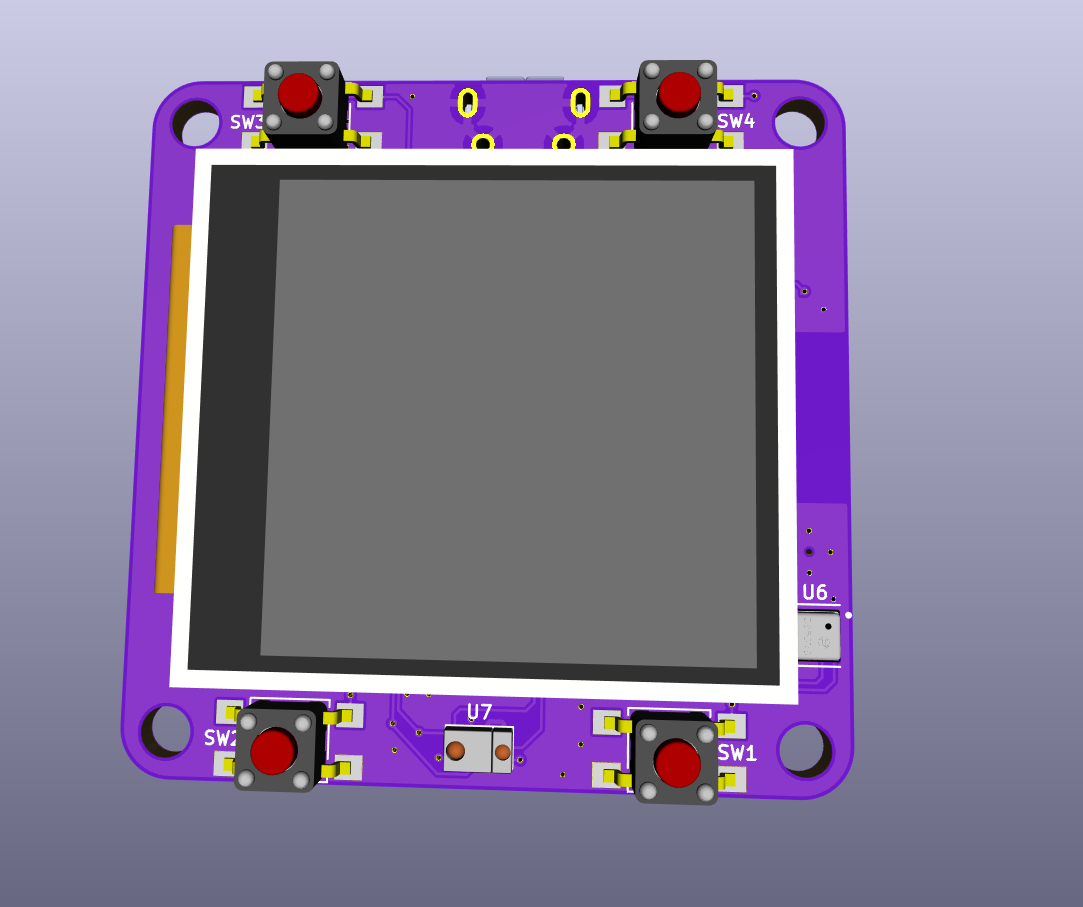
@Michael Welling got page added for the badge:Add support for OHS2020 Badge #103: https://github.com/adafruit/Adafruit_nRF52_Bootloader/pull/103Ohs2020 badge page #377: https://github.com/adafruit/circuitpython-org/pull/377Ohs2020 badge initial support #2528 https://gith...
ionic elk
hot dang that new webpage does look good
slender iron

Eventbrite
Our first Meetup, hosted at Loft Orbital in SF will feature a presentation on an open-source Python cubesat framework by Max and KickSat-2 project by Zac from Stanford's Robotic Exploration Lab.Agenda:6:30-7:00pm Free Food & Networking7:00-8:00pm Keynote talks and Q&ASpeakers...

Adafruit Industries - Makers, hackers, artists, designers and engineers!
Looks like there is a LoRA Watch is in development that is CircuitPython powered, check out the tweets and the Facebook page.
modern wing
2020 is the year of watches? It's about time.
slender iron

Adafruit Industries - Makers, hackers, artists, designers and engineers!
Have a look at the latest art for CLUE, images above and a vid with CLUE spinning around (video). Sign up here to get an email when CLUE is shipping! adafruiit.com/clue What is CLUE? We wanted to b…
fierce girder
also a watch? 😉
slender iron
onyx hinge

microbit watch container with KSB040 expansion board
There are two top container files, one is with cute design, another is regular.
I use neoprene for watch band. Neoprene is so soft that you can wear for a long time. If sweating, just take it off to cold wash.
Revised: af...
 lofty nova
Hi Everybody and an Happy New Pythonic Year
As I've not been able to spend much time around CircuitPython lately, would you mind removing me from the circuitpythonistas list?
Thanks, and keep the cool things happens 
timber mango
I am running beta 5.0.0 on my robot control code.
tulip sleet
@lofty nova removed; you are welcome back whenever
sterile bronze
Lurking
raven canopy
@gilded cradle I based Blinka board count off of PlatformDetect. We can change it if desired...
gilded cradle
Yeah, I think it we change it to look at the number of boards in the circuitpython-org repo, it should be very accurate.
simple pulsar
I am now mostly lurking
gilded cradle
@raven canopy, I made some notes regarding this a couple of weeks ago in https://github.com/adafruit/adabot/issues/119#issuecomment-571875935
GitHub
As mentioned in the 9 Dec 2019 weekly meeting, some stats & metrics are desired for things related to Adafruit_Blinka. PyPI download stats are already gathered daily here. Doesn't i...
lone axle
Nope, sorry must not have it hooked up correctly
Thank you 🙂 I'll try to get the mic worked out for next week.
tulip sleet
@lone axle check Voice and Video in Settings in discord. There is a tester in there
modern wing
@lone axle I've been surprised when Discord automagically changes my default audio input/output device from my system defaults. Give that a quick check in the Discord app.
lone axle
@tulip sleet I can here myself on that tester page. I notice I'm set for "Push to Talk" instead of Voice Input. Perhaps I just needed to press a button somewhere
tulip sleet
set to Voice Input and just keep yourself muted (next to your name at the bottom left) except when you want to talk
lone axle
Yeah, I think that is my issue. It seems like I got set to "push to talk" but didn't actually have a key set to use for it
idle owl
@lone axle You can try again when we get to you for the status updates.
half sedge
@gilded cradle I found things bizarre in Blinka, I think you are the expert: (1) MCP2221 should be in this list: https://circuitpython.org/blinka (2) Because MCP2221 does not support SPI, but only I2C, the following FAQ question should be adapted: https://learn.adafruit.com/circuitpython-libraries-on-any-computer-with-mcp2221/faq-troubleshooting (3) In page https://circuitpython.org/blinka/binho_nova/ the "installation instructions" should link to https://learn.adafruit.com/circuitpython-with-binho-nova-multi-protocol-usb-host-adapter/overview (4) Maybe MCP2221, Binho_nova and FT232H could be together on their "Blinka on PC" as opposed to "Blinka on SBC".
The easiest way to program microcontrollers

Adafruit Learning System
A simple way to get I2C, GPIO, ADC, and DAC support on any PC with USB.
The Binho Nova brings Multi-Protocol USB Host Adapters into the 21st Century. No more fumbling through development with cumbersome, clunky, out-dated adapters. Let your productivity soar to new heights!With support for I2C, SPI, UART, 1-WIRE, SWI protocols all in one slim, ro...

Adafruit Learning System
A simple and fun way to communicate with sensors and components using the Binho Nova.
timber mango
This is a picture of the electronics for my Little Red Rover. The lower one is my test circuit for the conversion of the IMU code from Arduino to Circuitpython.
half sedge
@gilded cradle Sorry for the brain dump, I don't know where to report all of those. 🙂
gilded cradle
Forgot a hug report: @plucky flint for getting a mu-editor fix for Catalina
graceful heart
bonding appears to be working great for me 😄
gilded cradle
@half sedge regarding your list: (1), yeah we can add that. (2) @tidal kiln do you want to address that? (3) Good idea (4) Do you want to submit a comment on the learn guide page (click the feedback/corrections link)?
half sedge
@gilded cradle I can report some stuff on the learn guide page. The think I don't like is that it is anonymous and unidirectional. So whoever receive my remark cannot react, and I have no clue if I have been read, if something was done.
fierce girder
poor PCBs 🙂
gilded cradle
You can report the website issues at https://github.com/adafruit/circuitpython-org/issues
GitHub
CircuitPython's website. Contribute to adafruit/circuitpython-org development by creating an account on GitHub.
tidal kiln
@half sedge That's a shared FAQ. What do you want to see changed?
slender iron

GitHub
Example code for IoT CircuitPython demo. Contribute to dglaude/Fosdem20CircuitPython development by creating an account on GitHub.
fierce girder
GitHub
The 1st generation BeagleBone Green has an unusual board ID: Here is the SeeedStudio BeagleBone Green from image-builder README: 1A: [aa 55 33 ee 41 33 33 35 42 4e 4c 54 1a 00 00 00 |.U3.A335BNLT.....
half sedge
@tidal kiln The thing is that there are a lot of SPI FAQ on a board that does not do SPI (MCP2221) so that was bizarre. If it is shared, then that is fine I guess.
tidal kiln
yah, it's a trade off with having the FAQ be shared with all the boards.
half sedge
I was thinking it was a copy and paste mistake... they look very similar to shared effect.
timber mango
Yes, lurking, no mic.
slender iron
👍
idle owl
@timber mango For future reference, even if you don't have a mic, you can participate by typing in your hug reports and status updates into this chat.
Or adding them to the notes doc.
timber mango
@idle owl Oh, OK, than you.
tidal kiln
@half sedge how about adding some text at the top that mentions it being a shared FAQ and only look for the info that applies to your board? might help make it more clear?
serene warren
Notes Doc?
tulip sleet
Google Docs
CircuitPython Weekly January 21st, 2020 This meeting is on Tuesday! NOT Monday! Welcome to the meeting notes! Feel free to add your notes for Hug Reports and Status Updates early. We do it as a round robin sorted by username. If you can’t make the meeting, then add them...
serene warren
Thasnk @tulip sleet
manic glacierBOT


Build from master branch.
Building micro python (make in ports/unix) fails with:
Use make V=1, make V=2 or set BUILD_VERBOSE similarly in your environment to increase build verbosity.
In file included from ../../py/emitnx64.c:13:
../../py/emitnative.c:467:32: error: pragma diagnostic pop could not pop, no matching push [-Werror,-Wunknown-pragmas]
        #pragma GCC diagnostic pop
Suggested fix on line 462 of
        #pragma GCC diagnostic push
#pragma GCC ...I'm going to BETT show tomorrow and Kittenbot have a stand there so I may meet some of their staff.
half sedge
@idle owl the reordering in chronological order is done.