#circuitpython-dev
1 messages · Page 274 of 1
 onyx hinge
 meager fog
but yeah - and test both wav and MP3
maybe write a test sketch for wave / mp3 for DAC and I2S
since now there's like 4 ways to test
also, mono/stereo mixing is probably not fully tested
like i remember it was not able to deal with playing mono into stereo and stereo into mono (?)
onyx hinge
I have a feeling that for various reasons, mixer should probably just convert everything to signed 16, and maybe even stereo
meager fog
yeah
pjrc Audio converts/requires 44.1k 16b
thats how they solve it
def cannot deal with mixed freq, but mixing stereo/mono should be possible
onyx hinge
I have been using this script which lets me quickly do 8/16, signed/unsigned, and mono/stereo, but it's all with rawsample ... ```def go(at = 'h', channel_count = 1):
wave = array.array(at, [values[at][0]]) * channel_count * 24
for i in range(len(wave)//2, len(wave)):
wave[i] = values[at][1]
print(wave)
enable = digitalio.DigitalInOut(board.SPEAKER_ENABLE)
enable.direction = digitalio.Direction.OUTPUT
enable.value = True

audio = audiopwmio.PWMAudioOut(board.SPEAKER)
wave_sample = audiocore.RawSample(wave, channel_count = channel_count)

audio.play(wave_sample, loop=True)
time.sleep(1)
audio.stop()
audio.deinit()
enable.deinit()
oh ha yeah
onyx hinge
sometimes rawsample behaves differently, in my experience
 timber mango
hey
meager fog
@timber mango please post in #help-with-circuitpython 🙂
@onyx hinge also, please try playing mp3/wav from SD card. i dont think it will work. but try again anyhow 🙂
onyx hinge
@meager fog looks like I have a pyportal where I could test with sd
meager fog
yah
onyx hinge
OK I chucked THAT into the checklist on the draft PR
while I'm here do you want any OTHER board build of this? something M4'ish? I didn't try it yet myself.
I can, I have pyportal and pygamer
@meager fog is it because of how circuitpython accesses the SD card that you think it won't work? too slow?
onyx hinge
is this related? https://github.com/adafruit/circuitpython/issues/1717

GitHub
@ladyada says this code is solid: https://github.com/greiman/SdFat
oops, doesn't build on pyportal, will have to do some fixing 😓
onyx hinge
it's not happy on pyportal, possibly because of all the messages scrolling on the console(?). the audio is there but it is skipping really badly.
meager fog
wow haha
funny cause pyportal is 2x faster
wonder why its skippy
QSPI should be as fast
chip has lots of RAM
onyx hinge
it's fine once I take out the prints
meager fog
maybe tinyusb is blocking it
onyx hinge
hard to tell what it is without looking. if the screen can't be updated without making mp3s halt that'll be .. too bad
but .. mr. optimization can look at it right?
pyportal build if you want it
onyx hinge
right, the displayio lcd display
onyx hinge
I suspect that scrolling/updating it was making the audio skip
meager fog
yeah that is super blocking
onyx hinge
right
meager fog
doesn't suprise me at all
onyx hinge
I'm going to head out for now. I'll keep an eye on the PR and basecamp if you have any other notes about this. otherwise, I suspect there will be a renaming to audiomp3.MP3File or similar for tannewt, and these little items that always turn up along the way.
meager fog
yep now its the long road to merging
onyx hinge
After that, give me a couple days to get up to speed on stm32 for audio stuff
onyx hinge
see you! thanks!
meager fog
pt and i will do a video showing this off
 teal bear
hello cpx'ers. I have a kinda python question:
Adafruit CircuitPython 5.0.0-beta.0 on 2019-11-19
import sys; sys.path => ['', '/', '.frozen', '/lib']
im having trouble understanding why there is both '' and '/' for something that doesn't get run from a shell
 raven canopy
The import machinery uses the sys.path when looking for stuff. In the case of circuitpython, both the cwd and root are included to ensure any available modules are discovered (by precedence). At least, that's how I understand it. @teal bear
CPython wouldn't include root, I think. Instead it would include the site-packages dir based on it's installation.
teal bear
that doesn't explain why it is there
er, doesn't explain why both '' and '/' are there
raven canopy
They are hardcoded: https://github.com/adafruit/circuitpython/blob/master/main.c#L125
 river quest
good work @onyx hinge https://youtu.be/4xh_mPaYG3s

We're testing out a new PR in CircuitPython by JEpler. This one adds native MP3 decoding - no playback chip required! Thanks to the patent expiration, we can...
 tough flax
I still think it's so cool to watch a thread here and then see Limor & Phil 10 minutes later talking about it. Weird world
 simple pulsar
@timber mango - CircuitPython is based on Python 3, not 2.7, print needs the brackets. BTW, this type of question might be better off in #help-with-circuitpython
simple pulsar
C uses includes and angle brackets but the Python syntax for import does not use angle brackets. Are you following some example code?
In case it's not obvious, it's quiet partly because it's the day after US Thanksgiving.
timber mango
import board
from pulseio import PWMOut
from adafruit_ble.uart import UARTServer
from adafruit_bluefruit_connect.packet import Packet
from adafruit_bluefruit_connect.color_packet import ColorPacket
r = PWMOut(board.LED2_R, duty_cycle=0)
g = PWMOut(board.LED2_G, duty_cycle=0)
b = PWMOut(board.LED2_B, duty_cycle=0)
uart_server = UARTServer()
while True:
uart_server.start_advertising()
while not uart_server.connected:
pass
while uart_server.connected:
packet = Packet.from_stream(uart_server)
if isinstance(packet, ColorPacket):
print(packet.color)
dc = [-257*c+65535 for c in packet.color]
r.duty_cycle, g.duty_cycle, b.duty_cycle = dc
this
color picker
wait i dont use this<> look
simple pulsar
I'm writing some code that's very similar to this. Note there's no angle brackets in that code. That code does not work on the version of adafruit_ble I am using. On a Circuit Playground Bluefruit I am using from adafruit_ble.uart_server import UARTServer - note uart_server in there and not uart.
timber mango
simple pulsar
I'm not sure why that code is different, I know there's a fair amount of work going on at the moment with these libraries so possible things have been rearranged
timber mango
😦 i need this for
Engineering work
simple pulsar
Does from adafruit_ble.uart_server import UARTServer work for you?
This is some code designed to work with latest libraries and the CPB board: https://learn.adafruit.com/color-remote-with-circuit-playground-bluefruit/code-the-color-remote-with-circuitpython

Adafruit Learning System
Mix NeoPixels wirelessly with a Bluetooth LE remote control!
timber mango
but i dont have folder uart_server inide adafruit_ble
look at path
i have example in package but when i try to run does"t have library . I am sad
simple pulsar
Unfortunately, I'm not familiar with all the versions of this library.
I see some code in https://learn.adafruit.com/adafruit-circuit-playground-bluefruit/playground-color-picker which looks like it may match that library.

Adafruit Learning System
Circuit Playground Bluefruit: Everything amazing about Circuit Playground, now with the power of Bluetooth!
That uses from adafruit_ble.services.nordic import UARTService - nordic is a reference to family of chips which includes that used on the CPB.
raven canopy
Something to check as well: the BLE library in the full bundle is for Circuitpython 4.x and earlier. For Circuitpython 5.x and later, you have to download the specific library from the GitHub repo. https://github.com/adafruit/Adafruit_CircuitPython_BLE/releases
 round sigil
Help. My Mac will no longer boot my Circuit Playground Express CIRCUITPY drive. I first received this error message upon saving a code.py >> "unable to save file permission denied 'volumes/CIRCUITPY'". I've reset the board and mounted CPLAYBOOT. I installed adafruit-circuitpython-circuitplayground_express-en_US-4.1.0.uf2 as per the the instructions on the adafruit site, I've copied it to the CPLAYBOOT drive. It then disappears but does not mount again. Anyone have any ideas why this is suddenly happening? 😢
The drive doesn't show in disk utility either!
Scrub that, I plugged it into a different USB port and it works now. Very odd.
 idle owl
@raven canopy The latest version is in the bundle now.
raven canopy
Ahh. I missed that, apparently.
 manic glacierBOT

Just a heads up that I have run into serious issues with the current master CP build for the pca10059.
Attempting to erase files from the file system or executing storage.erase_filesystem() causes the board to hand be completely unusable --and caused my linux box to hang!!
I reproduced this on 2 different pca10059's
I had to reflash the bootloader to recover the board -- it works fin with CP 4.1.0
I'll do more testing tomorrow, but wanted to put out a warning.
I seemed to work OK a...
manic glacierBOT

I'm creating this issue to collect information about possible solution for a flash translation layer for CircuitPython. While the flash memories CircuitPython boards normally use have a reasonably good lifetime, the FAT filesystem is not very friendly for flash. Adding the complexity of a wear-leveling layer would normally be an overkill, but I have recently discovered that there are some ready to use libraries for doing this, and some of them are optimized for low-resource systems. It might ...
One such library is https://github.com/dlbeer/dhara
It's BSD-licensed, and it's optimized for low-resource systems.
manic glacierBOT
Test case:
Reflash bootlader -- from Adafruit_nRF52_Bootloader
make BOARD = pca10059 erase
make BOARD = pca10059 sd
make BOARD = pca10059 flash
load CP 4.1.0 to board
copy " blinky.py" to board
all OK -- can erase/rcopy blinky.py
leave blinky.py on board
load CP5.0 (current master build)
looks OK -- blinky.py executive OK via REPL
delete blinky. py
PCA10059 hangs -- eventually disconnects from USB
reboot - single reset fails -- can connect to USB but no REPL
double ...

There's some difference in behaviour here between the Circuit Playground Bluefruit and Circuit Playground Express. If you turn on some pixels and then hit Cntrl-D in REPL on a CPX then pixels turn off. On a CPB it they remain on.
Press any key to enter the REPL. Use CTRL-D to reload.
Adafruit CircuitPython 5.0.0-beta.0 on 2019-11-19; Adafruit Circuit Playground Bluefruit with nRF52840
>>>
>>> from adafruit_circuitplayground.bluefruit import cpb
>>> cpb.pixels[5] = (50, 0, 0)
>>> ...I tried using a Maker Diary nrf52840 USB dongle and am having the same issues....
perhaps it is common to the nRF52840 builds without an SPI flash file system...
manic glacierBOT

I am revamping the internal flash partitioning and am suspicious that there’s an overlap between nvm and the file system. But it might be different problem too.
manic glacierBOT

This also addresses a problem where current_tick() / wait_until() could be wrong by 1ms on nRF, by copying systick code from the samd port.
Testing performed: on pyportal and cpb, looked at time.monotonic_ns values. The values always went forward, and usually by "consistent" amounts in a small loop:
# Sub-millisecond times on pyportal with patch
>>> l = [time.monotonic_ns() for i in range(99)]
>>> all(l[i] >> [l[i] - l[i-1] for i in range(1,len(l))]
[28850, 27825, 27650, 2780... sterile bronze
@simple pulsar and others I was trying the code for the same project as you and I also ran into the problem were the error occurred stating that " ImportError: no module named 'adafruit_ble.uart_server' ". I also found this problem with the code for the Snowglobe project by John Park. I couldn't find the file uart_server inside the adafruit_ble folder or any where else. Maybe @idle owl , @tulip sleet , @slender iron or others has an answer if this has been removed or changed in the latest 5.0.0 beta.0 release.
manic glacierBOT

Here's another FTL for NOR memories used on the Hackaday Supercon 2019 badge (it doesn't include a license file): tjftl
manic glacierBOT
I think this is ready for review.
 solar whale
@sterile bronze the latest BLE implementation and BLE library have changes to the API and UARTServer has been reworked -- there are new examples in the AdaFruit_CirCuitPython_BLE library repository (also included in the "Bundle). The SnowGlobe project will need to be updated
the examples are here: https://github.com/adafruit/Adafruit_CircuitPython_BLE/tree/master/examples
sterile bronze
@solar whale Thanks I'll have a look
solar whale
I made a version of the snowglobe that works -- may not be perfect, but I'll post it in a minute
here is my version -- note I left out the option to rename the BLE advertised name - was not sure how to make that work. There may be better ways, but this is working for me. Your mileage may vary 😉
solar whale
@sterile bronze In case you want to try it, I also made a version of the "luminnary" that works with the new API.

Adafruit Learning System
Fill Your Home with Magically Controlled Lights
meager fog
@solar whale thanks - please chat with @tulip sleet to get these updated, we want to get all guides updated and PR'd to https://github.com/adafruit/Adafruit_Learning_System_Guides/pulls

GitHub
Smaller programs and scripts to display "inline" in Adafruit Learning System guides - adafruit/Adafruit_Learning_System_Guides
solar whale
@meager fog sure -- will do -- the luminary was simple -- for the snow-globe - there were a few things I wanted to make sure I had right before doing a PR. I'll check with him.
meager fog
thanks
timber mango
Hello can someone help me on a python question?
sterile bronze
@solar whale I did the snowglobe example again and made the changes for the BLE and got everything working except the device naming function to see on the phone. I'll look at that closer later. Thanks again.
solar whale
@sterile bronze great -- that is exactly where I ended up! Good luck!
@timber mango Only if you ask it 😉
timber mango
ok
lol
Consider the following function:
def remove_negs(num_list):
‘’’Remove the negative numbers from the list num_list’’’
    for item in num_list:
        if item < 0 :
            num_list.remove(item)
    return num_list

When remove_negs([1, 2, 3, -3, 6, -1, -3, 1]) is executed, the result is [1, 2, 3, 6, -3, 1].  Your classmate thinks what is happening is that if there are two negative numbers in a row (e.g., -1, -3) that the second number will not be removed.  Is this the problem?  If not, explain what the real problem is.  Support your answer with examples.

Rewrite the function so that it works are intended.
@timber mango I suggest moving this to the #general-tech channel since it is not related to CircuitPython (this channel is really for discussion about the development of CircuitPython). You may find more help in the other channel -- but since this looks like a "homework" problem, the help may well be general pointers. Good luck!
timber mango
ok
simple pulsar
@sterile bronze I got some errors when I upgraded to the beta release this morning. @solar whale - thanks for the code samples, I'll take a look in a bit and adapt my code to the new style interface/library layout
simple pulsar
Q1. Are UARTClient and UARTServer replaced by UARTService in https://github.com/adafruit/Adafruit_CircuitPython_BLE/blob/master/adafruit_ble/services/nordic.py ? Q2. How can I set the timeout on read() ?
GitHub
Bluetooth Low Energy (BLE) library for CircuitPython - adafruit/Adafruit_CircuitPython_BLE
simple pulsar
I've seen example code before which used try around read()/write() for uart with adafruit_ble. Is this still needed? Can exceptions be thrown from those? There's no use of try in https://github.com/adafruit/Adafruit_CircuitPython_BLE/blob/master/examples/ble_uart_echo_client.py and https://github.com/adafruit/Adafruit_CircuitPython_BLE/blob/master/examples/ble_uart_echo_test.py
GitHub
Bluetooth Low Energy (BLE) library for CircuitPython - adafruit/Adafruit_CircuitPython_BLE
GitHub
Bluetooth Low Energy (BLE) library for CircuitPython - adafruit/Adafruit_CircuitPython_BLE
 graceful heart
is anyone familiar with how the BLE functionality that is supposedly a part of the nina-fw for ESP32 works?https://github.com/adafruit/nina-fw
the arduion-ble https://github.com/arduino-libraries/ArduinoBLE library says it uses the nina FW.
I haven't done a ton of digging into what the arduino lib is doing yet with the FW, but I didn't notice anything too obvious in the nina-fw for interfacing with its ble functionality. I expected to see some commands in commandHandler.cpp for SPI commands I could send like using the wifi part of the module, but not seeing anything....
Just curious to know how to arduino lib uses it to know if itd be possible to use my ESP32 breakout for playing around with BLE in CPy with some effort.
GitHub
Firmware for u-blox NINA W102 WiFi/BT module. Contribute to adafruit/nina-fw development by creating an account on GitHub.

GitHub
ArduinoBLE library for Arduino. Contribute to arduino-libraries/ArduinoBLE development by creating an account on GitHub.
meager fog
@graceful heart we haven't used it - its 'in' the firmware, but we dont have circuitpy support
its not using SPI i think its UART
if you want to take a stab at it, we'd be grateful 🙂
graceful heart
hmmm, interesting. Haven't used UART before, I think. Will need to do some reading then.
meager fog
GitHub
ArduinoBLE library for Arduino. Contribute to arduino-libraries/ArduinoBLE development by creating an account on GitHub.
graceful heart
ah! Thanks!
meager fog
i mean its all there - its just not easy to untangle 🙂
graceful heart
I'm pretty much 0% familiar with how UART works. Before I get too far if I were to do some reading, do the exposed pins in the airlift breakout allow for communicating with UART?
meager fog
yes they are labeled RX and TX
 tulip sleet
@sterile bronze @solar whale I have PR's submitted that update all the CPy BLE Learn Guides. Some have already been updated, but others are awaiting testing by the original Guide authors. Thanks @solar whale for the Luminary update, which showed up after the original set I worked on. To try out the newest code, see the pull requests: https://github.com/adafruit/Adafruit_Learning_System_Guides/pulls
solar whale
@tulip sleet thanks for all the updates! There is another recent one that needs updating. https://github.com/adafruit/Adafruit_Learning_System_Guides/tree/master/Snow_Globe_BLE_CPB I have a working version except that I could not get the renaming of the device to work. Have you looked this one?
GitHub
Smaller programs and scripts to display "inline" in Adafruit Learning System guides - adafruit/Adafruit_Learning_System_Guides
solar whale
@tulip sleet what is the correct way to do this under the new BLE API uart_server = UARTServer(name=MYNAME) Except for that, i think I have the Snow_Globe_BLE_CPB updated -- here is the new version. Once I get the name set, I'll pass this to @split ocean
manic glacierBOT

Hello,
I'm porting CircuitPython to the RAK5010 board (mentioned here https://twitter.com/jmarcelino/status/1201032376257843202 ). This is a nRF52840 board with interesting connectivity (2G and LTE-M) plus sensors: https://doc.rakwireless.com/datasheet/rakproducts/rak5010-wistrio-nb-iot-tracker-datasheet .
It would really help if you could facilitate a suitable VID / PID for this as indicated in the (excellent!) porting documentation. I'm expecting to submit a PR for it in the next fe...
sterile bronze
@solar whale I found the same thing as you. I was searching the readthedocs, the py files and I couldn't figure out how to set the name in BLE either. I know we can do it in Arduino so I'm just thinking that it is something that is missing in the adafruit_ble folder files.
simple pulsar
@solar whale Do you mean UARTServer(name=MYNAME) is the old or the new interface?
solar whale
@simple pulsar that is the "old way"
tulip sleet
@solar whale it appears to be a bug that the name is not include in the advertisements. Also, BLERadio._adapter.name could be used to set the default name for now, but we should allow the name to be set in the advertisements.
solar whale
@tulip sleet thanks -- I'll try BLERadio._adapter.name and see if that works for now.
tulip sleet
GitHub
The various advertisement classes, including ProvideServicesAdvertisement, etc. are not including a name in the advertising packet or scan response. This means that when the devices first appear in...
GitHub
BLERadio should provide a .name get/set property, and a read-only .address property.
solar whale
@tulip sleet this seems to work ```ble = BLERadio()
uart = UARTService()
advertisement = ProvideServicesAdvertisement(uart)
ble._adapter.name = SNOWGLOBE_NAME
I think you will not see the revised name in the list of what to connect to until after the first connection (because it will cache the name as associated with that address).
solar whale
yup! that is what I saw.
OK -- I'll put in a PR for the snowglobe and put you and John Park as reviewers.
I made a few other minor changes. He can decide if they are OK
simple pulsar
How do I set timeout for read() and write() on UARTService on the new interface?
tulip sleet
@simple pulsar it is a deficiency that you cannot. I meant to file an issue but forgot.
we need to add some args
tulip sleet
GitHub
Add optional args to constructor to allow setting buffer sizes and timeouts for StreamOut and StreamIn objects.
solar whale
@tulip sleet looking at the pylint guide now -- about time I set it up correctly....
tulip sleet
you want to make sure it uses the .pylintrc in the Learn Guide repo. That turns off a LOT of checking by default. I'm not sure you need to reinstall it, but you need to specify that .pylintrc explicitly somehow (I'd guess there's a command line arg for that).
pylint --rcfile=...
solar whale
much better
tulip sleet
also there is the pylint_check script in the repo, but that will check everything
solar whale
just looking at that
tulip sleet
will be afk for a while
solar whale
enjoy!
manic glacierBOT

 upbeat plover
You guys work hard, everytime i look CP has a new board.
manic glacierBOT

RAK5010           VID 0x239A    PID 0x006D  # bootloader
                                PID 0x806D  # arduino
                                PID 0x806E  # circuitpython
OK! draft of the python on hardware newsletter is up, adding all the news, boards, and more - add yours as an issue/PR, or @ us - https://github.com/adafruit/circuitpython-weekly-newsletter/blob/gh-pages/_drafts/2019-12-03-draft.md ships out tues am from https://www.adafruitdaily.com
GitHub
Community newsletter for python on microcontrollers - adafruit/circuitpython-weekly-newsletter
 slender iron
Hi all, our CircuitPython Community meeting is tomorrow at 11am Pacific / 2pm Eastern here in the CircuitPython text and voice channel. All are welcome to attend. The notes doc for it is here: https://docs.google.com/document/d/1BObFjPQ2WiowNJhBWh4538KA-rx_0grJyErmIKwtbps/edit?usp=sharing <@&356864093652516868>

Google Docs
CircuitPython Weekly December 2nd, 2019 Welcome to the meeting notes! Feel free to add your notes for Hug Reports and Status Updates early. We do it as a round robin sorted by username. If you can’t make the meeting, then add them anyway with a “(missing meeting)” aft...
river quest
ok @slender iron and anyone who is here, this is a sneak preview ! https://youtu.be/pThUwgZF6p0

Preview of "Bluefruit Playground" ... working on the best way to record the iPhone screen and the wireless Circuit Playground Bluefruit (Nordic nRF52840). Us...
this is mostly to get some workflow on how to record all this (easily) but posted it up since it's kinda cool either way
onyx hinge
hmm I wonder if those LSBs actually must be kept at the reset value of 0... makes right justification less convenient, since you have to zero out the bits anyway(!)
slender iron
app looks great @river quest !
 neat crescent
Whenwill that app be available?
onyx hinge
[LEDs activate in video] ow my eyes
@neat crescent This has been the case for Adafruit's past phone apps that work with bluefruit, https://github.com/adafruit/Bluefruit_LE_Connect_v2 fwiw
GitHub
iOS app for use with Bluefruit Bluetooth LE modules and dev boards from Adafruit (v2.0) - adafruit/Bluefruit_LE_Connect_v2
as for availability, probably when it's ready 😉
tough flax
If I add a directory to FROZEN_MPY_DIRS twice, does it include the libraries twice?
tough flax
Ok, pretty sure the answer is no
onyx hinge
@tough flax looks like what happens is, the script tools/preprocess_frozen_modules visits its arguments in order, transferring them to an output path. Later, everything in that output path is transformed to mpy and actually frozen into the library. So if a location for example.py is listed twice, it's the second example.py that will be included. Listing the same directory containing example.py twice would be a special case of that.
 main meteor
That's a very good explanation, thanks!
 ionic elk
Back from thanksgiving and at work today
manic glacierBOT
By treating each unicode code-point as a single entity for huffman compression, the overall compression rate can be somewhat improved without changing the algorithm. On the decompression side, when compressed values above 127 are encountered, they need to be converted from a 16-bit Unicode code point into a UTF-8 byte sequence.
Doing this returns approximately 1.5kB of flash storage with the zh_Latn_pinyin translation. (292 -> 1768 bytes remaining in my build of trinket_m0)
Other "more...
Suppose we made the choice of byte vs code point be a compile-time option? Then we could choose the best one for the particular translation.
manic glacierBOT
I think tick_status and tick_status2 need to be volatile to ensure the compiler does not optimize away the second assignment.
manic glacierBOT
Agree about the desire to share code here. I started to factor out the tick code in #2297 but didn't get to sharing the code in current_tick.
The reason the code from current_tick is not shared with the new common_hal_time_monotonic_ns is that the systick timer is finer grained than 1us (I think it's 15.625ns on nRF at 64MHz for instance), but current_tick reports in us. The extra precision is probably not actually useful, so if it's preferable I can write the one in terms of t...
Ah yes, SysTick_Type volatile, through a set of macros. I was doing a simple grep that didn't make that obvious.
onyx hinge
wow github actions is hostile to trying to grep in a log...
{"count":1,"value":{"Message":"Uri expired"}}```(just wanted to produce a table of binary size change for my PR, but instead I'm being punished)
main meteor
Really short authentication period?
onyx hinge
I guess!
manic glacierBOT
I may have mistranscribed the values earlier, or the translation size differs from trinket_m0 to pirkey_m0 (pirkey_m0 finished its Actions sooner, so I chose it for this table). Here are the savings from github actions logs, and all boards are slightly improved. In this particular build, de_DE is the now the most resource constrained.
pirkey_m0 | Free flash (bytes) | |
-- | -- | -- | --
Translation | Before | After | Saved
pl | 4464 | 4900 | 436
en_US | 5440 | 5488 | 48
pt_BR | ...
manic glacierBOT
 onyx hinge
spresense is insufficiently arm-based to have SysTick?
or .. the port doesn't use it for timekeeping as is?
ah http://nuttx.org/doku.php?id=wiki:nxinternal:time-delays#timer_hook I guess it's using nuttx rtos
tulip sleet
@onyx hinge i would like to eventually get rid of SysTick for RTC use, and use the actual RTC instead, so that we can do real sleep, etc.
onyx hinge
What's the resolution of RTC?
idle owl
@tulip sleet I have a few things to talk to you about regarding BLE and such. I know you're planning to be heads down with Scott, but if you have a few minutes I'd appreciate it.
onyx hinge
@tulip sleet that's not so bad when it comes to intervals you can measure from circuitpython code anyway
idle owl
@tulip sleet Can we do audio or video?
tulip sleet
yes, I don't think it would be bad. We have the us_delay routines anyway
manic glacierBOT
@ladyada Here's a photo of a full test rig:

Here's the PYB nano pinout. Tested using I2C1, SPI1 + X8 CS, A0, PWM on X1, and the TX/RX on X2/X3 (if you try the other serial note that the TX/RX on PB7 and PB6 in this picture is WRONG, they're switched, R:7 T:6).
 ...
...
slender iron
@onyx hinge did you look in the github api for a way to get the logs?
onyx hinge
@slender iron not yet, I was just copying the URL to do a cURL of it..
slender iron
it may be part of their checks api
 ivory yew
hrm as far as I can tell the log isn't available from the checks api
http get https://api.github.com/repos/adafruit/circuitpython/check-runs/329648568 Accept:"application/vnd.github.antiope-preview+json"
HTTP/1.1 200 OK

{
    "app": {...},
    "check_suite": {
        "id": 338187786
    },
    "completed_at": "2019-12-02T17:41:14Z",
    "conclusion": "success",
    "details_url": "https://developer.github.com/actions/",
    "external_id": "8dc3daab-8b09-5da3-78cc-1d2979db081e",
    "head_sha": "12737e282152d7bed7dac540029af9dd5b423ec6",
    "html_url": "https://github.com/adafruit/circuitpython/runs/329648568",
    "id": 329648568,
    "name": "build-arm (pybadge)",
    "node_id": "MDg6Q2hlY2tSdW4zMjk2NDg1Njg=",
    "output": {
        "annotations_count": 0,
        "annotations_url": "https://api.github.com/repos/adafruit/circuitpython/check-runs/329648568/annotations",
        "summary": null,
        "text": null,
        "title": null
    },
    "pull_requests": [],
    "started_at": "2019-12-02T17:33:49Z",
    "status": "completed",
    "url": "https://api.github.com/repos/adafruit/circuitpython/check-runs/329648568"
}
Hitting the annotations_url returns an empty list.
time to break out o' beautiful soup. 🙃
onyx hinge
@ivory yew thanks for looking, I didn't get that far
onyx hinge
I'll keep that in mind
what a drag!
- You have to accept the End User License Agreement to be able to download and use the Spresense bootloader binary.
Adafruit CircuitPython 5.0.0-beta.0-83-g83ecb1b65-dirty on 2019-12-02; SPRESENSE with CXD5602 🎊
slender iron
@idle owl are you running the meeting? I sent out the notes doc so I thought I would. Totally ok not though
 errant grail
Text only today. Hugs and status are in the notes.
idle owl
@slender iron I hadn't gotten to sending the notes doc this weekend before you got to it. I can run it.
Didn't you run last week?
slender iron
yup
river quest
lots of good @errant grail stuff in the newsletter this week, thankya 🙂
errant grail
Thanks @river quest !
 neat folio
multi-tasking... so mostly just listening/lurking 😦 but HUGS-TO-ALL 🙂
 tidal kiln
** lurking **
 turbid radish
I will be lurking today. Ping me on slack if I can help
 wraith tiger
Just lurking
onyx hinge
A plethysmograph is an instrument for measuring changes in volume within an organ or whole body. The word is derived from the Greek "plethysmos", and "graphos".
neat folio
@slender iron ...............O.............O............O...... 😉
timber mango
lurking today
slender iron
Google Docs
CircuitPython Weekly December 2nd, 2019 Video of the meeting is available on YouTube. Join here for the chat all week: http://adafru.it/discord The weekly happens normally at 2pm ET/11am PT on Mondays except when US holidays occur on Monday. Check the #circuitpython c...
river quest
Made with Mu, origins of Mu :)
https://madewith.mu/mu/users/2019/12/02/mu-book.html

Made With Mu
I was recently contacted by Mitsuharu Aoyama (青山光春), a Japanese maker and author. It turns out they’ve written a cool book about using CircuitPython on the Circuit Playground Express with Mu. Not only is it really great to see folks write about Mu, but the book has ...
turbid radish
If anyone hasn't subscribed to the Circuit Python weekly newsletter released by Adafruit, head to https://www.adafruitdaily.com/ to subscribe. The next one comes out tomorrow. A great way to stay in touch with the news over the holiday season.
river quest
Preview of "Bluefruit Playground" ... our new app for the nordic based Circuit Playground Express Bluefruit (will be in beta soon!)
https://youtu.be/pThUwgZF6p0
Enjoy the videos and music you love, upload original content, and share it all with friends, family, and the world on YouTube.
Native MP3 decoding/playback in CircuitPython, go JEpler!
https://youtu.be/4xh_mPaYG3s
Enjoy the videos and music you love, upload original content, and share it all with friends, family, and the world on YouTube.
wraith tiger
Much fruit... So snakey...
river quest
NXP i.MX RT family takes flight with Feather and CircuitPython!
https://twitter.com/arturo182/status/1199841134253682690

.@CircuitPython snakes its way to the powerful @NXP https://t.co/m7qEmH32Bp RT family of MCUs, 500+ MHz and up to 1 MB RAM. Right now I'm working on 2 Feathers: RT1011 + ESP32, and RT1062 with more GPIOs broken out (including the LCD interface) and a SD card.
(thread)
Likes
147

 Twitter


Circuitpython snakes its way to Fomu thanks to TinyUSB:
https://github.com/xobs/circuitpython/releases

GitHub
Contribute to xobs/circuitpython development by creating an account on GitHub.
Notifications and more, CircuitPython / BLE:
https://twitter.com/tannewt/status/1199782734723313664
https://youtu.be/-pBEdDONKyQ?t=359

Love working with @adafruit folks including @Dan_Halbert. This how we confirmed notifications from slack arrive to @CircuitPython via BLE.
 Twitter

To show and share your project at 7:30pm today, view the chat or in discord https://adafru.it/discord and look for the JOIN link to join. For best results be...
New video CircuitPython and Raspberry Pi (Korean language). 3 so far!:
https://www.youtube.com/channel/UCq7SPRGmLmjnFPHqYmgFcAg/featured

YouTube
It's a place to make fun things and share information. Mainly on electronics and hardware. Blog : https://maduinos.blogspot.com/
Build a "Buddy the Elf":
https://github.com/gallaugher/buddy-the-elf
https://youtu.be/AHcwQRxTjOY

GitHub
Buddy the Elf Cutout waves, talks, opens candy box, controllable via cap touch + bluetooth - gallaugher/buddy-the-elf
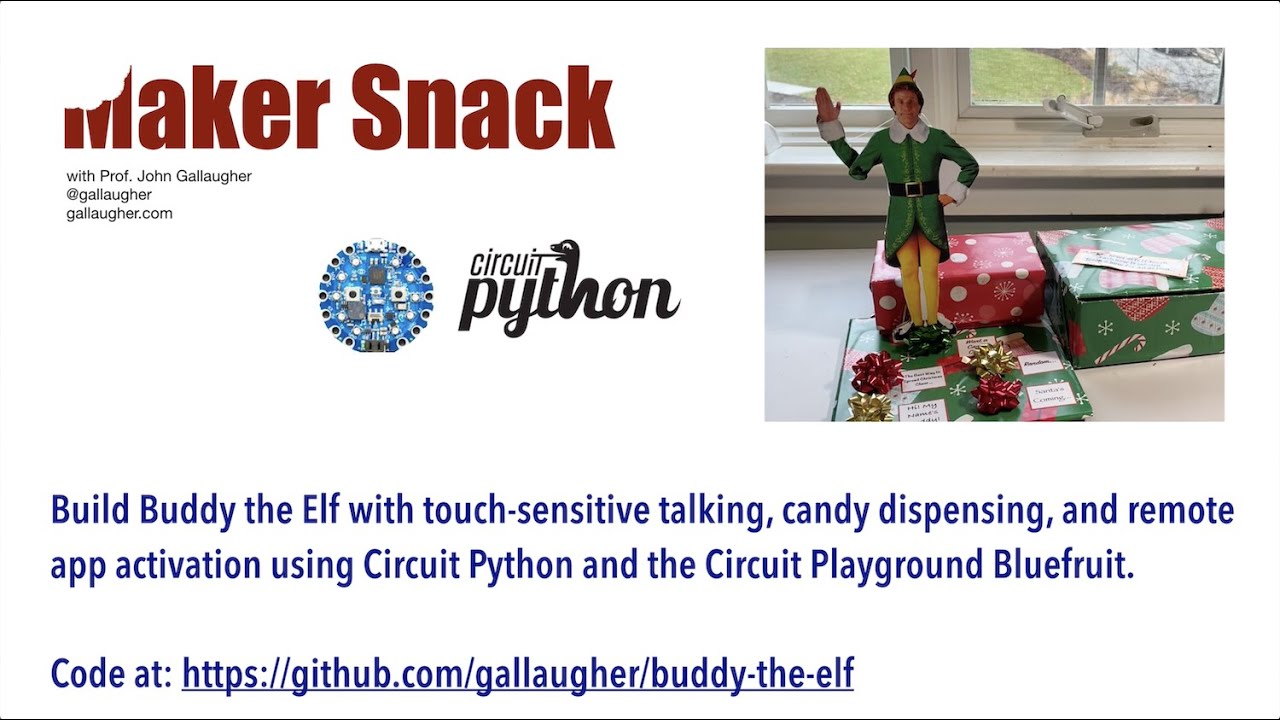
Instructions for building a CircuitPython-Powered, Touch-Sensitive, Bluetooth Aware, App-Controllable, Talking, Christmas Cheer and Candy-Cane Dispensing "Bu...
TIS THE SEASON, we published a few things for the sale-and-giving season...
#ADADEALS electronics and more not from Adafruit:
https://blog.adafruit.com/?s=%23adadeals
#DigiWish
Digi-Key is giving away free stuff for about a month, Python on hardware!
https://www.digikey.com/en/resources/social/digi-wish
#GivingTuesday
We'll publish tech specific causes and more, send yours and we'll help get the word out!
#GivingTuesdayPSF is on December 3rd and runs for 24 hours local time. Visit the Python Foundation - @ThePSF to see what they are doing this year how you can make a difference in the Python community
https://twitter.com/search?q=%23GivingTuesday&src=typed_query&f=live
https://twitter.com/search?q=%23GivingTuesdayPSF&src=typed_query&f=live
8h ago @GivingTuesday tweeted: "1 more day til #GivingTuesday
#MondayMot.." - read what others are saying and join the conversation.
Twitter
On Nov 6 @ThePSF tweeted: "This year's #GivingTuesdayPSF is on Dece.." - read what others are saying and join the conversation.
Twitter
 trim elm
Lurking
 old smelt
Lurking
river quest
and of course, our big sale today is all CircuitPython...
https://blog.adafruit.com/2019/12/02/this-cyber-monday-its-circuitpython-monday-at-adafruit-use-the-code-adathanks-to-get-20-off-circuitpython-boards-and-15-off-items-storewide/

Adafruit Industries - Makers, hackers, artists, designers and engineers!
Don’t you love how Black Friday just bulldozes right through the weekend and runs smack into Cyber Monday?! That’s right folks – Cyber Monday is CIRCUITPYTHON Monday here at Adafruit this yea…
DRAFT HERE!
https://github.com/adafruit/circuitpython-weekly-newsletter/blob/gh-pages/_drafts/2019-12-03-draft.md
Goes out 11am on Tues! via https://www.adafruitdaily.com/
GitHub
Community newsletter for python on microcontrollers - adafruit/circuitpython-weekly-newsletter
manic glacierBOT
thanks I realized i actually have a different board - so i ordered a bunch of em :) the board i have this this one: https://www.aliexpress.com/item/4000069263843.html which has a 25mhz xtal. it'll be a week till i get the pybnano in, dya wanna try making a def for this board intead/as well?
turbid radish
MP3 = Awesome JEpler!
manic glacierBOT
@ladyada I actually have done all the pin definitions for that as the "blackpill" (you recommended both a couple months back, I think), but I've had some problems, which is why I dropped #2312. It's erratic to flash (frequently fails validation or won't load the flash loader, doesn't work at all with gdb, etc), and I can't get USB to enumerate. I can keep hacking at it, but the PYB Nano is MUCH more stable with the same MCU (F411) which makes me wonder if there's a sourcing related issue with...
errant grail
(first draft)
idle owl
@tulip sleet Please mute 🙂
onyx hinge
glass slide laser etched with "0" for edge lit display
ionic elk
@onyx hinge we should sync up on the audioIO stuff if you get a minute
tulip sleet
@idle owl sorry, had to reboot!
onyx hinge
@ionic elk happy to stick around to talk about it
@ionic elk toss something into "in the weeds" if you prefer to do it via voice?
ionic elk
Sure, we could do some in the weeds discussion
I don't have the notes up, so if you've got that open you might be faster
nvm found em
onyx hinge
@solar whale gcc toolchain download (.tar.gz for amd64 and aarch64 linux, among others) https://developer.arm.com/tools-and-software/open-source-software/developer-tools/gnu-toolchain/gnu-rm/downloads
ARM Developer
Download the GNU Embedded Toolchain for ARM, an open source suite of tools for C, C++ and Assembly programming for ARM Cortex-M and Cortex-R families.

GitHub
My first look at the stm32f407 processor. Contribute to sbaconbits/stm32f4_first_look development by creating an account on GitHub.
manic glacierBOT
OK, my previous comments are now moot, given the new results.
turbid radish
Thanks all
 gilded cradle
Thank you
errant grail
Thanks!
ionic elk
@onyx hinge if you send me your email I can hit you up with some ST reference
idle owl
@slender iron https://github.com/adafruit/adafruit-circuitpython-weekly-meeting/blob/master/2018/2019-12-02.md
GitHub
Notes from the weekly circuitpython meetings on Discord - adafruit/adafruit-circuitpython-weekly-meeting
@slender iron https://github.com/adafruit/adafruit-circuitpython-weekly-meeting/blob/master/2019/2019-12-02.md
GitHub
Notes from the weekly circuitpython meetings on Discord - adafruit/adafruit-circuitpython-weekly-meeting
slender iron
@idle owl https://youtu.be/_Nd-fIfJHsw
Enjoy the videos and music you love, upload original content, and share it all with friends, family, and the world on YouTube.
onyx hinge
@tulip sleet thanks for the gentle push, I got back ~100 bytes on de_DE, which was the new most constrained build
slender iron
@idle owl here too: https://diode.zone/videos/watch/5f1bede6-8880-43cb-ad69-d95933b4a263

Meeting notes are available here: https://github.com/adafruit/adafruit-circuitpython-weekly-meeting/blob/master/2019/2019-12-02.md
Join here for the chat all week: http://adafru.it/discord
The weekly happens normally at 2pm ET/11am PT on Mondays except when US holidays occu...
idle owl
@slender iron Got it. Thanks again for recording.
slender iron
np 🙂
meager fog
@ionic elk hihi
ionic elk
hullo
ionic elk
They burn but it's hit and miss
voodoo magiks
have to plug everything in a certain way, erase flash, sacrifice calf, etc
and then they don't enumerate USB. Serial REPL works but that's it
was going to do more digging after fixing current neopixel issue & displayio issues
manic glacierBOT

 slender iron
@idle owl what animations did you add to LED_animation?
ionic elk
@meager fog oh dang that's what that is! I should do that then, internal flash is a pain
I mistook it for a debug connector just glancing
Gimme a sec to get that bin over to you gotta finish a build
ionic elk
Sure I've got lots of those flash chips you had me order ages ago
So I've got lots of everything
I might try and get the MCO working as an optional startup thing in port.c too, just as a double check for clock problems
manic glacierBOT

[adafruit/circuitpython] New comment on issue #2310: Need two calls to refresh\(\) to update display
@tomacorp Did you try changing target_frames_per_second? It skips the refresh if you are behind the target rate so that the next frame will have a better chance of hitting it.
idle owl
@slender iron Color cycle, blink, comet, sparkle.
slender iron
any links to them? we're trying to decide what animations should be in the bluefruit app. (I'd add you to the thread on basecamp but it is a huge catch-all.)
idle owl
It's in a branch on my fork. Hold on.
manic glacierBOT
@C47D That looks perfect! @deshipu thank you for creating this issue.
idle owl
FYI still needs some cleanup, but it works at the moment. https://github.com/kattni/Adafruit_CircuitPython_LED_Animation/blob/animations/adafruit_led_animation/animation.py uses code something like this cpb_comet = Comet(cpb.pixels, 0.05, color.MAGENTA, tail_length=5) and then cpb_comet.animate() to run it.

GitHub
CircuitPython helps for LED colors and animations. Contribute to kattni/Adafruit_CircuitPython_LED_Animation development by creating an account on GitHub.
manic glacierBOT
slender iron
@idle owl ok, perfect. thanks!
idle owl
@slender iron You're welcome.
slender iron
@idle owl I don't think Solid needs speed as an argument 🙂
idle owl
@slender iron Like I said, WIP.
slender iron
kk 🙂
manic glacierBOT
idle owl
Bbiab.
tulip sleet
@slender iron could I talk to you about adding name and tx_power to various advertisements by default? Also, do you have updated code to add appearance to an advertisement? It's commented out right now in the published lib
slender iron
@tulip sleet ya, I'm around
manic glacierBOT
Nice! Looks great! Thanks for sticking with this.
So, I think the native call needs to be moved from mp_obj_subscr to obj_instance. As is, a subclass of a native object won't be able to override subscr. This won't require reimplementing or moving the errors thrown by mp_obj_subscr because instance_subscr can return MP_OBJ_NULL to prevent the early return and cause an error.
The native call also needs to pass in the original instance and each native implementation will need to get the subobj to use. That will allow the native subscr full a...
manic glacierBOT
This is a really interesting backtrace because it is a mass storage write (mscd_xfer_cb) occurring while we are flushing the filesystem (filesystem_flush) so that we can free the supervisor allocated cache in favor of a mp heap allocated one.
On SAMD we don't have this issue because neopixel_write doesn't call RUN_BACKGROUND_TASKS and therefore the USB processing. Removing background tasks from neopixel_write is probably the simplest fix but may cause audio playback issues during...

If I understand you correctly, instead of instance_subscr calling mp_obj_subscr, it should do something like this:
    if (member[0] == MP_OBJ_SENTINEL) {
        //return mp_obj_subscr(self->subobj[0], index, value, instance);

        mp_obj_type_t *type = mp_obj_get_type(self->subobj[0]);
        if (type->subscr != NULL) {
            mp_obj_t ret = type->subscr(self_in, index, value, instance);
// May have called port specific C code. Make sure it didn't mess up...Did you update list's subscr as well? It'll need to get subobj[0] itself. Not doing so could explain the first failure.
The second will fail if namedtuple's native object subscr hasn't been updated.
@jepler audiomp3 would be good because it'll give us flexibility when to include it. I don't like the current approach of an optional class because the import will succeed and code will failure later.
@ladyada It should work with any output.
Super awesome! Thank you so much for adding this.
I had originally added support for all byte values in order to handle compressing dynamically loaded strings but we haven't added that. I'm happy to trade that future for this reality. Thanks!
ivory yew
I'm super happy the USB background change is in.
onyx hinge
Thanks @slender iron for all the merged PRs
manic glacierBOT
This is due to nrf not implementing get_fattime: https://github.com/adafruit/circuitpython/blob/master/ports/nrf/fatfs_port.c#L31
The fix would be to factor get_fattime out and make it depend on rtc_get_time_source_time which is used by localtime
For reference, SAMD uses common_hal_rtc_get_time ...
slender iron
@onyx hinge thank you for all of the awesome PRs!
manic glacierBOT
I did not update any subscr methods. I'll give those two a try, and if that works, I'll know what to check for codebase-wide.
onyx hinge
@slender iron any thoughts on how to do something "vtable like" for audio samples? Those dispatch functions are making my eyeballs itch
manic glacierBOT
Just ran it up on a CPX. It runs ok. I copied a file from Windoze and that was ok. @jepler were you doing other read tests or just writes into the FAT filesystem?
onyx hinge
Is there a way to place it after the type object in flash?
slender iron
@onyx hinge could add a struct of function pointers. Not sure the compiler can or will in-line now or after that.
Could also figure out how to do slim c++
onyx hinge
oh ho ! ``` // One of disjoint protocols (interfaces), like mp_stream_p_t, etc.
const void *protocol;
hum on second thought I don't know how this is supposed to work
there's no "check if conforms to protocol", there's just dereferencing protocol if it's not null
backs away slowly
so like if I set my type's .protocol, it could be passed to things that "expect" mp_stream_p_t, and then bad happens, because no type checking
manic glacierBOT

[adafruit/circuitpython] New comment on issue #2310: Need two calls to refresh\(\) to update display
@tannewt No, I did not try changing target_frames_per_second.
For this application, I think I need a blocking call to update the display.
Within this constraint, I want the display to update as frequently as
possible.
I am using this:
while not board.DISPLAY.refresh(minimum_frames_per_second=0):
pass
The idea is to do the erase, but not update the display until after the new
data is available.
Here is the pseudo-code -
while True:
measure_waveform_data()
draw_waveform_p...
manic glacierBOT
upbeat plover
@onyx hinge nice work with localization "compress as unicode"
 maiden chasm
@slender iron Probably something went wrong during recording CircuitPython Weekly as there is only your voice recorded https://youtu.be/_Nd-fIfJHsw
Meeting notes are available here: https://github.com/adafruit/adafruit-circuitpython-weekly-meeting/blob/master/2019/2019-12-02.md Join here for the chat all...
But diode.zone record seems to be ok
slender iron
@maiden chasm oh no! I checked the mp4 that I uploaded to diode.zone but I think I uploaded the wrong file to youtube.
manic glacierBOT

This is awesome @ladyada and @jepler, perfect timing :-)
For this year's CircuitPython powered badges, we decided to ditch the VS1003B chip and go with a small speaker shaped shitty add-on with a small piezo buzzer:

So far, we tested it with the pulseio.PWMOut, and we'd love to see how MP3s would sound with this new setup.
@jepler which DAC have you used? We'll look int...
manic glacierBOT
@urish in theory this is going to work with whatever kind if circuitpython AudioOut you have, whether that's DAC-based AudioOut of samd chips, I2S AudioOut of samd and nRF chips, PWM AudioOut of nRF chips, etc. in practice, there could always be problems. For now, if you can't try a build that just includes this draft PR, I recommend making sure you can play a 16-bit, 2-channel, 44.1kHz WaveFile or RawSample through what you have; that should be a pretty good test. Let us know if you run ...
ionic elk
Has anyone tried STM32Duino's implementation of a Neopixel? Specifically on a NON feather board. Something under this ARDUINO_ARCH_STM32 tag, https://github.com/adafruit/Adafruit_NeoPixel/blob/9cf5e96e8f436cc3460f6e7a32b20aceab6e905c/Adafruit_NeoPixel.cpp#L1902
GitHub
Arduino library for controlling single-wire LED pixels (NeoPixel, WS2812, etc.) - adafruit/Adafruit_NeoPixel
I'm puzzled because with the toying around I'm doing with my neopixel implementation, I don't see how their code here could possibly work - the SetOutputPin function takes too many cycles and throws all the math off. So if it actually does work in practice, that would be interesting to know.
manic glacierBOT
@jepler I built your branch and got it to work on the badge, though, there's a lot of background static noise and the MP3 I'm using for testing is played in a wrong sample rate. I attach it if you are interested in looking into this.
Thanks for all your efforts so far!
timber mango
Hello I'm new here and don't know if I'm on the right place. I review the SPI Neopixel library code and suspect the RESET pattern is far too long and could ruin the performance. The code set a 512 bytes long reset pattern making a 640 us reset signal instead of the 80 us expected.
idle owl
@timber mango Your best bet is to file an issue on the repo. That section of code is going to be redone soon anyway, but I'm not sure if the redo is taking that into consideration.
manic glacierBOT
[adafruit/circuitpython] New comment on issue #2310: Need two calls to refresh\(\) to update display
@tomacorp The refresh will almost always blocking if you set target_frames_per_second=1 because your loop should always run faster than one frame per second.
idle owl
@tulip sleet I moved the try/except in the peripheral code to around Packet.from_stream(uart) and kept the print for the error, removed the delay from the central code, and now I can't even get it to error, even spamming it with button packets. The print is before the continue, it should print it to the serial console right? or is the continue making it somehow skip the print?
Also, still crashing to the hardfault_handler on the central.
Ok weird, I changed it to a different animation and now it's back to failing constantly.
Constant Bad checksum sprinkled with a few Unregistered packet type b'!!'.
or b'!]', b'!x' and b'!v'.
That's all without sending button packets - color packets only. Without the delay in the central code.
But it does mean the try/except is in the correct place at least.
And again it disappears with the delay in the central code. Ok. Done trying to get rid of that delay.
tulip sleet
@idle owl do you mean there's a print in the except:? Yes, it should print. The continue will make it discard broken packets, so it's missing packets, but invisibly.
idle owl
It started printing eventually. It wasn't erroring at first.
tulip sleet
The time.sleep is a better solution, because it's flooding the connection otherwise
idle owl
Right, I keep checking to see if changes to my code make the time.sleep unnecessary.
And finding it has not. 😄
I need to build from master and see if this is still failing to the hardault_handler though. Because this is getting annoying.
I thought I figured out what was causing it
but I did not
tulip sleet
do you get the hard fault with the time.sleep?
idle owl
Yes.
Also get it with all the try/except code around the uart connection.
The lack of which I thought was causing it, so I put it everywhere it's needed, and still crashes
tulip sleet
don't bother to try to get around it. We need to fix it.
a hard fault is not a mistake in your code, it's a bug in ours
idle owl
I wasn't trying, it was accidental that it stopped crashing for a bit after I added that in.
manic glacierBOT

Running 5.0.0.beta0 on Circuit Playground Bluefruit. This code is adapted from the Central example in the Adafruit CircuitPython BLE repo. The commented out part is sending button packets without debouncing (for project testing purposes) - it crashes regardless of which code I'm using. Current code.py attached.
idle owl
@tulip sleet What milestone do I assign it
idle owl
Added.
onyx hinge
@upbeat plover thanks, I was tickled that something so simple was able to get back over 1kB of flash!
ivory yew
I tested out the SysTick refactor stuff last night on Sol and it seems to work fine.
Outputting a sine wave seems to have the same stepping artifacts with the new build as the old build.
& it didn't seem to delay midi messages or cause more usb midi receive buffer overflows.
onyx hinge
@slender iron @tulip sleet I've been looking at the "protocol" pointer of type objects and I have some ideas about how to make it "safe" (as long as everyone agrees on a qstr name for their protocol). It would enable using "protocol" for sample sources and NOT create a situation where passing it to stream-ish APIs would just crash because of inappropriate function call use. BUT it would change all protocol-using objects, including streams, incompatibly to micropython. And of course it has code size implications. Is this worth pursuing? Is it worth upstreaming? (It LOOKS like a zero overhead but still unsafe version would be doable by preprocessor ickyness)
Implementations of a protocol get: ``` STATIC const mp_stream_p_t lwip_socket_stream_p = {
- MP_PROTO_IMPLEMENT(MP_QSTR_protocol_stream)
.read = lwip_socket_read,
and users of a protocol get- const mp_vfs_proto_t *proto = mp_obj_get_type(vfs->obj)->protocol; - const mp_vfs_proto_t proto = (mp_vfs_proto_t)mp_proto_get(MP_QSTR_protocol_vfs, vfs->obj);
if (proto != NULL) {
so now instead of blindly using a protocol's function pointer blindly, it checks that MP_QSTR_protocol_vfs matches MP_QSTR_protocol_stream (it doesn't!) and so you get a NULL pointer back, saving you from the problem
tulip sleet
@onyx hinge I ran into this a while ago while looking at vfs, but wasn't sure what to do about it. If you have a question for upstream about the intent of how to use the protocol field, feel free to ask in an issue there (thought I don't know if you'd get a response).
We have made other incompatible changes wrt upstream, such as how we handle keyword args (or some arg thing, I forget). So it would not be terrible
tulip sleet
@idle owl is that from the hardfault code?
ivory yew
that's a lot of bytes.
ivory yew
Y'all got any more of those... gigabytes?
idle owl
Right?
I mean, come on, CircuitPython can't handle a tiny 4000000000 bytes? WHAT YEAR IS THIS.
ivory yew
4000000000 bytes should be enough for anyone.
manic glacierBOT
Do you have to push the buttons in some way to initiate the crash?
No, it crashes with no interaction.
idle owl
Right, don't remember what that means.
tulip sleet
I'm just trimming down the example
idle owl
and it just crashed into the hardfault_handler immediately after connecting to the peripheral. Or rather after finding it, not sure it got to connecting.
Fair enough.
It sometimes connects though before crashing.
tulip sleet
the way the code is written, it appears to send no packets if no buttons are pressed. Is that right?
idle owl
It's sending color packets the whole time.
But no button packets, no.
Only sends button packets on press.
Or release.
which is unnecessary but I was trying to understand the BLE code.
tulip sleet
ok, yes, it looks like it's sending color packets dependent on the accelerometer
idle owl
Correct
tulip sleet
ok, I'll just remove all the button code and just leave the color packets
idle owl
Ok
manic glacierBOT
[adafruit/circuitpython] New comment on issue #2310: Need two calls to refresh\(\) to update display
@tannewt The target_frames_per_second=1 did not work for me, because then
it only updates once a second. In some settings I like getting about 14
frames per second, which is a snappy scope!
I also tried minimum_frames_per_second=1 . When it first starts, the trace
does not appear. After about 1 second, I get "RuntimeError: Below minimum
frame rate".
On Tue, Dec 3, 2019 at 9:47 AM Scott Shawcroft notifications@github.com
wrote:
@tomacorp https://github.com/tomacorp The refresh will a...
ionic elk
hey @tulip sleet, have you ever had an optimization setting cause a hang before?
I'm over it now, but while I was debugging, certain versions of my neopixel code couldn't use the (Os) GCC flags, or USB wouldn't enumerate
tulip sleet
so that sounds like the timing code is optimization-dependent
and maybe the neopixel code was running too slow and hogging the interrupts??
@idle owl I cannot get the hard fault, but it might depend on the client. What client code are you using?
idle owl
You need a separate library to make it work. I'll send you a zip of all my files.
@tulip sleet
The animation library is WIP.
tulip sleet
i just want to simulate the receiver. it's working fine with an alpha.5 receiver
idle owl
Just to toss in some extra variables for you 🙄
That zip is all the files on my receiver.
libs and code.py
tulip sleet
i am using a feather as the central, and just sending color packets with the red changing on each one (so I can see it in the prints)
no accelerometer
idle owl
Oh... I'm using CPBs.
tulip sleet
yah, but it should be the same. Can you try just sending a fixed (r,g,b) and see if it still crashes? Don't call cpb.acceleration
manic glacierBOT
In order to implement a proper keyboard, with working LEDs for CapsLock, NumLock and the like, we need to be able to receive and examine the SetReport requests, as they contain the bitmask of which LEDs should be on.
From https://wiki.osdev.org/USB_Human_Interface_Devices#LED_lamps:
To set the LED lamps, the driver sends a SetReport request to the device using a standard USB Setup Transaction, with a one-byte data stage. The setup packet's request type should contain 0x21, the request c...
tulip sleet
does the receiver do different things based on the color?
idle owl
Changes the color of an animation.
Which it did successfully based on the static color I sent.
tulip sleet
try this on the sender side:
    r = 0
    while uart_connection and uart_connection.connected:
        r = (r + 5) % 256
        color = (r, 0, 0)
        color_packet = ColorPacket(color)
...
so it will vary the color, in a cyclic way
does the receiver only change the animation if the color changes?
(I know, I could just read the code)
idle owl
Ok it's cycling and the receiver is changing along with it
tulip sleet
ok, we'll wait a bit for a crash
idle owl
@tulip sleet So if it doesn't crash, is it the accelerometer causing it? And will we need to jlink a CPB to get it figured out? or I guess wire up a LIS3DH to the Feather makes more sense...
tulip sleet
I have a CPB with jlink jumpers on it, but it's a bit of a pain to set up. So I'll go back to that. This is weird
it shouldn't make a difference, but there may be some odd interaction between the I2C stuff and BLE???
idle owl
Perhaps? I figure find the weirdest bug I can that totally borks my project code seemed like the best use of my time today.
tulip sleet
actually, I don't have such a CPB, but not hard to make one. thanks, this is all helpful
(I have a CPX with jumpers)
idle owl
(Right. CPB is too new. Haven't needed it yet.)
Still no crash. It was happening quicker than this before as far as I can remember.
Should I add a bunch of print debugging to see where in the code it's getting to before failing?
@tulip sleet Not sure if that will help you or not.
tulip sleet
i'll just try to reproduce it first
idle owl
Ok.
manic glacierBOT

Hi,
I am from XinaBox, we manufacture modular electronics. We want to port
circuitpython to our boards/xChips, please facilitate VID/PIDs for these:
- CC03 (based on SAMD21)
- CS11 (based on SAMD21)
- CW03 (based on SAMD21)
- ...and for soon to be launched xChip based on nRF52840, CB03
Your assistance is appreciated. Thanks :)
idle owl
@tulip sleet Can you send data from the peripheral to the central?
idle owl
Oh man, I had not thought of that, that is brilliant.
If I ever had to do that, I would have been fumbling around with wires.
tulip sleet
it's a bit tricky to hold it in place to tack the first pad. But regular jumpers are pretty fragile; I like this better.
onyx hinge
Good idea shamelessly stolen
manic glacierBOT
Unlike the Atmel and NRF ports, the STM32F series has many different max CPU speeds across the starter, foundation and advanced lines. At lower CPU speeds, the previous neopixel code encounters an issue where the cycle time required to change a GPIO pin begins to approach the maximum allowable logic high period for a neopixel 0 bit. This results in the neopixel outputting a strong white as every bit is evaluated as 1 rather than 0.
I had hoped to replace the system with a weighted one, wh...
tulip sleet
@idle owl I think I reproduced the crash by removing the time.sleep(0.1). But it also locked up my desktop computer 🙂
idle owl
@tulip sleet That's a feature.
manic glacierBOT
Hi @KalbeAbbas @gotfredsen we grant VID/PIDs to hobbyist, DIY and independent makers. we can grant you one VID/PID. for the amount of hardware you are making, you must purchase a USB VID.
This PR adds the I2C never reset common hal function, required by DisplayIO, which was missed in the original implementation. Also fixes some index bugs with both I2C and SPI, and ensures they are freed from the never-reset category when de-inited.
@hierophect by chance does this fix the non-working SPI TFT DisplayIO?
On a simple loop, it's nearly twice as fast:
>>> import time
>>> def t(c):
...     start = time.monotonic()
...     for _ in range(c):
...         pass
...     print(time.monotonic() - start)
...
>>> t(5000)
0.0609741
>>> t(100000)
1.2301
>>> t(1000000)
12.351
>>> def t(c):
...     start = time.monotonic()
...     for _ in range(c):
...         pass
...     print(time.monotonic() - start)
...
>>> t(5000
... )
0.0350037
>>> t(100000)
0...@tulip sleet It crashed to the hardfault handler.
Running the code you suggested with the red brightness cycle.
idle owl
You're welcome
manic glacierBOT
@dhalbert wanna re-try that test that the person compared a samd51 with pyboard? we should be at near-parity?
onyx hinge
@tulip sleet @slender iron https://github.com/jepler/circuitpython/commit/f79e73efd14bcb53c973db1895ce442459257794 checked protocols

GitHub
Protocols are nice, but there is no way for C code to verify whether
a type's "protocol" structure actually implements some particular
protocol. As a result, you can pass...
tulip sleet
@onyx hinge We were half the speed after the initial speed-up, so I think this is very close, if not now completely equivalent
manic glacierBOT
We were half the MicroPython speed after the initial speed-up, so I think this is very close, if not now completely equivalent.
onyx hinge
@tulip sleet hm, I don't have a pyboard but I guess I can compare my numbers directly to theirs if you have a link to the test I should run. but samd51 and pyboard don't seem that directly comparable, aren't they different CPU manufacturers and all?
ivory yew
I didn't notice a large speed increase with the bg tasks change. Hmm.
I'm gonna do a bit more profiling tonight and see if there's some other bottleneck.
tulip sleet
@onyx hinge so we should all upgrade to gcc9? I am surprised we are not getting compile errors becuase of the new (?) inlines flags
manic glacierBOT
@dhalbert yep, wanna re-run it on a samd51? or i can
onyx hinge
@ivory yew you are using @micropy.native decorators already? I bet that they bypassed at least some background calls
ivory yew
Nope
onyx hinge
@tulip sleet better if everyone uses a similar toolchain I'm guessing... fewer surprises
ivory yew
I haven't started decorating Sol's library or underlying drivers.
tulip sleet
@ivory yew if the background tasks are significant, then you won't see a big speedup, I think. These are just loop tests
ivory yew
The test program I'm using doesn't have any USB interaction (other than checking an empty USB MIDI buffer)
not sure about other background tasks.
tulip sleet
do you use displayio?
ivory yew
no
onyx hinge
yeah it definitely depends on what the board is doing. For instance if you're playing audio, that probably takes background time
ivory yew
no displays on Sol
tulip sleet
that test I did was on nrf
ivory yew
Then again, Sol has a bunch of stuff disabled.
tulip sleet
but my original testing was on samd
ivory yew
tulip sleet
@onyx hinge but do you understand why I'm not getting compile errors due to the new -f flags? Or maybe they are not new?
ivory yew
So if displayio, audioio, and network are dominating background task time then that change wouldn't really improve things.
onyx hinge
@tulip sleet the flags themselves are not new. Just the defaults were changed between gcc7 and gcc9 to make C++ people happier.
(and the optimizer overall makes slightly different choices, and samd builds enlarged a little bit on average)
tulip sleet
we were about 10x slower than MPy originally on a loop test. setting VM COMPUTED_GOTO flag got us 5x, and this is another 2x
ivory yew
*improve things for this board, specifically.
onyx hinge
@ivory yew right, and it doesn't mean that there aren't things that could be optimized about specific background tasks
but basically that PR added a special fast case for when it's <1ms since the last time background tasks had a chance to run, which just short circuits everything and doesn't check e.g., if the audio buffer needs to be refilled
if what's really happening is a blocking read of a wav file from SD, say, then this didn't do anything to improve how long that took (I don't know what kind of workload you're running)
not audioio I guess 🙂
I thought the winterbloom was something to do with audio, guess I got my facts wrong
ivory yew
It's a modular synthesizer module, but it doesn't deal with audio signals.
just control voltage.
so it's a glorified function generator.
 orchid basinBOT

Here's all the boards that have been added to Blinka, but never were put up here because I thought we were waiting on guides. :)
ivory yew
(low frequency) function generator.
onyx hinge
ah, that's the sound of me being unfamiliar with the whole concept despite being typecast as the circuitpython audio person
ivory yew
basically control voltage wiggles the knobs on other modules (like the knob that says how loud something is, or the knob that says what frequency something should play notes at)
Sol generates control voltage based on MIDI
& tells other modules how to make noises and such.
onyx hinge
That makes sense at a very general level
onyx hinge
@ivory yew do you have an o'scope or logic scope? you could enable MONITOR_BACKGROUND_TASKS in ports/atmel-samd/background.c and scope how much of your time is being spent in the background task
you might need to customize the pin, and the relationship to "regular" pins is distant due to needing something fast and low-level
ivory yew
I have a cheap 2-channel oscope. I can definitely try that out.
It's entirely possible there's some aspect of my code that's the bottleneck right now.
probable, even.
onyx hinge
here's how it looks after the background change, when there's nothing to do in the background
tiny tiny peaks mostly 1ms apart, with some jitter
sometimes longer, like that dim trace just after the trigger point, when there is something to do like receiving USB
if there are lots of tiny peaks closer than 1ms, then something is causing it to enter background tasks more than expected; if they aren't tiny peaks, but long mesas, that means there is real background work going on.
ivory yew
cool, good to know.
manic glacierBOT
Also happens on the Circuit Playground Bluefruit running 5.0.0 beta 0
onyx hinge
time for a break, but had some good progress on using "protocol" as the vtable for audiosamples
 ruby atlas
I wish there was a way to restart in normal mode after a hardfault without using the reset button... or maybe have the supervisor to wait a bit for serial input, and then reboot if not.
(i haven't yet looked at the hardfault handler code)
onyx hinge
@ruby atlas I have wished for the same thing .. the onscreen prompts even kinda imply the next reset is supposed to be to regular mode
I forget exactly what it says
ruby atlas
You are running in safe mode which means something unanticipated happened.
Looks like our core CircuitPython code crashed hard. Whoops!
Please file an issue at https://github.com/adafruit/circuitpython/issues
 with the contents of your CIRCUITPY drive and this message:
Crash into the HardFault_Handler.

Press any key to enter the REPL. Use CTRL-D to reload.
Adafruit CircuitPython 5.0.0-beta.0 on 2019-11-19; Adafruit Circuit Playground Bluefruit with nRF52840
>>>```maybe it's "Use CTRL-D to reload" that makes me think it should exit safe mode and run your code...
and even if ctrl-d doesn't do it, some microcontroller.reset incantation ideally would be able to, but I don't think it does.
ruby atlas
it doesn't 🙂
raven canopy
ruby atlas
but what I really want is either it to default to waiting like 15 seconds for a key and then restarting, or have a way to enable that.
ah yes. i vaguely remember that in the supervisor.
raven canopy
then, use reset()...
ruby atlas
maybe safe mode could run safe_mode.py if found?
raven canopy
its not a quick thing though. probably easier to hit the reset button. 😄
ruby atlas
except when you're dealing with a frequent crash 🙂
raven canopy
you could stash it in a safe_mode.py and just import it from the REPL.
ruby atlas
which might be ```
import time
import microcontroller
print("Hard fault... Hit CTRL-C to abort restart.")
time.sleep()
microcontroll.er.on_next_reset(classmicrocontroller.RunMode.NORMAL)
microcontroller.reset()
bingo!
manic glacierBOT
DisplayIO is back! And... still buggy. Works for the SSD1306, but not the ILI9341 TFT as used on the TFT Featherwing.
A control Saleae for the Atmel M4 Express Feather looks like this:

One block of data:

Sub...
manic glacierBOT
Please post the full Saleae captures somewhere. I usually start at the reset and compare from there. Make sure the capture has the Reset and Data/Command lines as well as Clock, Enable (aka Chip Select) and MOSI.
simple pulsar
@onyx hinge Many people have been at it, I thought 90 degrees one would be best but I'm not so sure now: https://www.instructables.com/id/CircuitPython-and-Bearables-Badge-Simple-Example/

Instructables
CircuitPython and Bearables Badge: Simple Example: The Pimoroni Bearables Bear Kit is an affordable, simple, fun kit demonstrating conductive thread and the wearables concept. It also comes in a fox form, the fox badge is electrically identical to the bear badge. The badge ha...
manic glacierBOT
Here's the code for the other side:
CPB_client.zip
I was unable to get this to crash with the original code: I ran it for several hours. I originally thought I had reproduced it by removing the sleep on the central side, but a second try didn't produce that. I had other troubles (USB freezing up on Ubuntu) and had to reboot, but they may have been unrelated. After rebooting it was fine.
manic glacierBOT
Audio sample sources are essentially objects with virtual methods. However, the existing approach is to have dispatch functions that just check for each statically known type of object in turn. Using the underlying "protocol" facility of Micropython enables use of function pointers instead, so that the dispatch function need not know about all the sample types. This will make it slightly easier to add mp3 playback as a new audio sample source.
Protocols are nice, but before now there wa...
I'd mildly like this for the mp3 PR but that's no reason to hurry it.
manic glacierBOT
I usually start at the reset and compare from there.
Hmm. On my M4 Express, I don't see any activity on the reset line, when operating or soft/hard rebooting.
manic glacierBOT
Saleae Captures (for REPL screen shown on keyboard interrupt):
M4 Express:
Atmel REPL output sample.logicdata.zip
STM32:
STM32 REPL output.logicdata.zip
Seeing some pretty clear differences that could be related to pin pull settings. Digging.

Based on the Documentation busio.UART should support 9 bit data. However, when i try to create a UART port
serial485 = busio.UART(board.TX, board.RX, baudrate=38400, bits=9)
I get the following NotImplimentedError:
NotImplementedError: bytes > 8 bits not supported
Here is the state of the code and the UF2 of what CircuitPython is on it:
manic glacierBOT
[adafruit/circuitpython] New comment on issue #2310: Need two calls to refresh\(\) to update display
Ah! Thanks for trying this. Looks like we should add support for target_frames_per_second=None to refresh every call.
From what I can tell, the only Circuitpython devices that will support variable UART word length are the STM32s, and even they can only do 8 or 9, not 7. Atmel, NRF and CXD all either throw errors or ignore it.
We dropped support for 9 bits for atmel-samd due to complications when upgrading from the atmel-samd ASF3 to ASF4 libraries. The documentation should be clearer.
@hierophect I do see that stm32f4 supports 9 bits, but the read/write buffering seems to assume max 8-bit bytes. Maybe this is a bug? We need to decide whether it's worth supporting 9-bit bytes.
@ericboxer What is your application that needs 9-bit bytes?
@dhalbert Gotcha, that makes sense.
I needed a quick and dirty to connect up to an existing RS485 bus that uses 9 bit. The main device on the bus is an STM32F4, and one of the other slave devices is an older SiLabs 8051.
manic glacierBOT
trying with
Adafruit CircuitPython 5.0.0-beta.0-109-g15886b150 on 2019-12-03; Adafruit Feather M4 Express with samd51j19
got 18.765 seconds @ 120 MHz, so a 7.4x improvement over original 138.39 :)
idle owl
@tulip sleet I just copied a file off of the central CPB, and it crashed into the hardfault handler after staying up all night.
tulip sleet
@idle owl, ok, that is really helpful, it is filesystem or USB activity that is causing the issue
could you add that to the issue?
idle owl
Already planned on it as soon as I get this guide finalised for Limor.
orchid basinBOT

[adafruit/circuitpython-org] New comment on issue #330: https://www\.circuitpython\.org/ is insecure
chrome too, here is some more info:
NET::ERR_CERT_COMMON_NAME_INVALID

manic glacierBOT
You don't need to get the str here yourself. MicroPython has a custom %q for qstrs in format strings.
Overall this looks really good. Using a QSTR for the protocol enum and error message is clever.
Two minor things and then this should be good to go.
amazing teamwork everyone !
Why have nop here? Doesn't it just make your single loop iteration slower and therefore less granular?
My updated code ran all night without crashing. I copied a file off of the board today and it crashed into the Hardfault_Handler.
@dhalbert I set it up on a different board that is also incidentally the new rev. I copied all the necessary files to it, and it immediately crashed into the Hardfault_Handler. On reset, it came back up and seems to be working so far.
Including the current code with libraries.
[CPB_central.zip](https://github.com/adafruit/circuitpython/files/3923409/C...
slender iron
@ruby atlas I recommend using a debugger when dealing with a hard fault. You can then set a breakpoint to stop at the reset into safemode
@ionic elk did you try the spi display at a slower speed? it's always a good sanity check
idle owl
@slender iron The hardfault was happening on a Circuit Playground Bluefruit and we were trying to iterate on code using the CPB and running into it.
slender iron
you can try and reproduce it on a feather 840
idle owl
I think Dan tried.
But duly noted. Reproing it on a Feather still doesn't help me finish this code though 😄
slender iron
true
orchid basinBOT

[adafruit/circuitpython-org] New comment on issue #330: https://www\.circuitpython\.org/ is insecure
This is currently a known issue with GitHub pages. I'll see about setting up a cloudflare redirect or something similar.
Discussion here:
https://github.community/t5/GitHub-Pages/Does-GitHub-Pages-Support-HTTPS-for-www-and-subdomains/m-p/7202#M495
https://github.com/isaacs/github/issues/1675
manic glacierBOT
I'd suggest slowing down the display when debugging to 1 mhz. If it works then you know it's a speed issue which I've seen when using jumper wires to a display. It also ensure the Saleae can keep up.
Pin pull settings should be off because SPI doesn't use pulls at all.
Not having it here would cause the compiler to optimize the loop out under certain settings. For a while having Os optimization would cause the entire board to hang, and I never quite figured that out. But I can revisit removing these if you think it'd provide benefits.
orchid basinBOT
[adafruit/circuitpython-org] New comment on issue #330: https://www\.circuitpython\.org/ is insecure
@ptorrone keep this in mind when linking to the site. I saw the www. version recently in something (can't remember what.)
[adafruit/circuitpython-org] New comment on issue #330: https://www\.circuitpython\.org/ is insecure
@tannewt @jwcooper yep, looks like https://circuitpython.org/ is fine, so if anyone sees www somewhere and can edit, please do, otherwise let me know and i'll edit, or we'll see what we can do.
idle owl
@tulip sleet I don't understand how to take the uart_connection[UARTService].write(button_packet.to_bytes()) error handling and make it only be in one place. I thought initially I could make a function and call it, but you said that's not how it works because it has to check the result etc. I would appreciate some assistance when you have a few minutes.
orchid basinBOT
[adafruit/circuitpython-org] New comment on issue #330: https://www\.circuitpython\.org/ is insecure
I’m not familiar with the intricacies of Github pages, but on apache-based servers, you can add a rule that will forward somebody from www.circuitpython.org http://www.circuitpython.org/ to circuitpython.org. Likewise with http to https. Is there a way of doing that with the GitHub pages?
Melissa
On Dec 4, 2019, at 10:47 AM, phillip torrone notifications@github.com wrote:
@tannewt https://github.com/tannewt @jwcooper https://github.com/jwcooper yep, looks like https://circuit...
[adafruit/circuitpython-org] New comment on issue #330: https://www\.circuitpython\.org/ is insecure
Unfortunately, I haven't seen any access to anything like this yet. GitHub doesn't really offer a suggested solution.
The best option I've seen is have www.circuitpython.org be setup with CloudFlare ssl and do a CloudFlare page rule to redirect it back to circuitpython.org. GitHub is using letsencrypt to create the ssl cert, and isn't creating one that's valid for www.circuitpython.org. They offer the option to do one or the other.
There is a hack to swap the cname in github settings,...
manic glacierBOT
@tannewt I mentioned pin pullups since looking at the data it was one of the few differences between the two implementations on the MOSI line. Atmel brings the line up by default, while STM32 just kind of leaves it wherever the last bit was. After doing some reading, though, I see there's really nothing in any spec that indicates it would matter.
I'm more concerned about the clock line:
Atmel:
 and I think this reflects an intermediate approach of void*-typing at the interface. I'll remove this. Did you catch more than one site where I did it, or is this the only one you saw?
slender iron
hi @split ocean does this work?
onyx hinge
hm does anyone know how it's supposed to work to subclass in C ? that is, what does the type to be subclassed need to look like?
tulip sleet
@onyx hinge not sure I understand, since no classes in C, of course. Are you asking about in CPy/MPy?
tulip sleet
with typedef?
onyx hinge
(they will actually share some Python methods and properties)
tulip sleet
there are examples in displayio
not sure if there's C subtype of C type. There's Python subtype of C type
onyx hinge
-    { &mp_type_type },
+    { &audioio_samplebase_type },
     .name = MP_QSTR_RawSample,
``` and now I need to make audioio_samplebase_type...does that make the question any clearer? right now, it's not working: ```>>> import audiocore
audiocore.RawSample(b'\0\377')
Traceback (most recent call last):
File "<stdin>", line 1, in <module>
TypeError: 'SampleBase' object is not callable
audiocore.RawSample
<SampleBase>
False
>>> audiocore.RawSample, audiocore.SampleBase
(<SampleBase>, <class 'SampleBase'>)
weird, RawSample became a SampleBase instance, which is not what is intended at all
tulip sleet
not sure you can do that, I'll look for examples, but see this comment:
struct _mp_obj_type_t {
    // A type is an object so must start with this entry, which points to mp_type_type.
    mp_obj_base_t base;
@onyx hinge I looked through all the mp_obj_type_t creations, and they all have mp_type_type as the type. No exceptions.
onyx hinge
OK, I can work with that, just repeating the same "base class" methods in the locals of each "derived" class. Might not help code size quite as much, but still more code sharing than before
tulip sleet
MPy doesn't really support subclassing native types in Python; some of it works by accident. Scott made it work better. He discussed it with Damien and Damien thought it was a good idea but it was an incompatible change in the MPy internal API and he was reluctant to do it in MPy.
tidal kiln
semver question - a capability was added in a backwards compatible way, so a minor version bump was done. BUT now that capability is removed (for reasons) - is that now a major or minor version bump?
tulip sleet
I'd major-version it, because it's no longer backwards compat
those are the rules of semver
integers are cheap
tidal kiln
yah, that's how i was thinking too. funny how a backwards compat thing can become a non-backwards compat thing
onyx hinge
a lot of work for 36 bytes 😕
idle owl
Ok I have a weird thing happening. For this animation code, using "Blink" which is "ColorCycle" with a color and black, when assigning it a mixed color on initialisation (mixed being e.g. cyan vs blue being not mixed), it flashes once or twice correctly, then it begins flashing the mixed color for a moment and then shows a dimmer slightly off version of the color. Here's where it gets weird. It's happening with two NeoPixel strips connected to a CPB - and if I remove one strip, the issue stops happening. Sounds like a power issue, right? But if I connect the other CPB to it and start sending it color packets, and send it the same CYAN color, it does not do it.
Wait, I guess maybe the color packet being sent is less intense than the init color. So I guess maybe that's it?
But it doesn't appear to dim the solid colors at full brightness, but I guess it's only drawing from one LED at a time with the solid colors vs 2 or 3 for mixed.
That must be it. Have to figure out scaling the initial color back a little I guess if I want two strips on this.
Or external power which isn't going to happen on this one.
Anyone know LED draw math really well and also USB power? Two strips is 60 NeoPixels, both are clipped to the VOUT on the CPB.
tulip sleet
VOUT is from USB. If you reduce the brightness to, say, 0.2, do you see the same dimming?
idle owl
@tulip sleet When I update the file on the client, it causes a soft reboot on both boards (which I think is typical on a Mac, you write anything anywhere and it likes to reload the CP boards), and pretty much every time it's crashing the central into the hardfault_handler. FYI.
I know VOUT is USB. That's why I asked whether anyone knew both well enough to tell me if it's drawing too much. And no, I don't see the dimming at a lower brightness. That's why the color_packet being sent isn't seeing the same behavior because it's dimmer.
Took me typing all that out to figure that part out 🤦
tulip sleet
a full brightness NeoPixel (255, 255,255) draws 60ma. A USB port might be limited to 0.5A or so, but it depends. Is this via a USB hub from your MacBook?
we'd look up the specs of the hub
idle owl
I tried it connected directly to a high powered wall plug and it did the same.
It is on a hub right now, yes.
but wall had the same behavior
Non-powered hub plugged into powered hub
tulip sleet
if the colors are wrong (not just uniformly dimmer), it sounds like a neopixel_write timing problem. You could try simpler code that just sets all the pixels to the sent color, and try it with short and long strips
neopixel_write is tricky on the nRF because it has to worry about not screwing up BLE timing
slender iron
@tulip sleet can you ping or dm on slack? testing sample code
content doesn't matter
one more, it hit my laptop. (thought I had closed it but hadn't)
perfect! thank you
ondiskbitmap is so slow
idle owl
@tulip sleet Simple code is doing the same behavior. Setting it directly to cyan does the flash and turns dim.
tulip sleet
is at at brightness=1.0?
what's the capacity of the wall power supply?
also check white as the color. plain R and G and B, are they OK?
idle owl
Plain colors, yes. They are fine, but they are only using 1 of 3 LEDs in each NeoPixel. Capacity of the wall supply, need to check. Brightness is at 1 yes.
3amps it looks like
tidal kiln
how do you get around pylint getting confused about class members in a context manager? it's like it doesn't understand the context manager returns a different class
idle owl
@tidal kiln If it's legitimate, you do a pylint: disable= and the warning.
We try to avoid it, but it's unavoidable in some cases.
Don't disable it globally, disable it at each location for that section.
tidal kiln
it's weird. same code was passing before. only diff now is it's in a new repo.
tidal kiln
lemme check...
manic glacierBOT
Another update: every time I write something to the client, it soft reloads both boards, and fairly consistently crashes the central into safe mode with the Hardfault_Handler. I'm on MacOS.
tidal kiln
looks like it
idle owl
Odd that it would suddenly fail. But that's a pretty common thing that Pylint complains about and can't handle. Is it no-member?
tidal kiln
yep. and sorta deja vu. remember that happening a lot back in the early days.
idle owl
Yeah.
tulip sleet
@idle owl can you just attach a voltmeter to the external supply output and see if it sags on cyan?
idle owl
I assume so?
tidal kiln
@idle owl are you still doing all the pypi stuff for new libs?
tulip sleet
@idle owl not sure if that was for me or cater, but anyway, take some data with a voltmeter and that will be telling
idle owl
@tulip sleet It was for you, the I assume so is because I'm not certain we have one here. Will know in a few minutes
@tidal kiln Yeah if it makes sense.
tidal kiln
@idle owl thanks. it does. https://github.com/adafruit/Adafruit_CircuitPython_NeoPixel_SPI
idle owl
@tidal kiln Ahhhh yes. Excellent. Good to see that moved.
tidal kiln
i can take care of PR'ing bundle add
idle owl
@tidal kiln Create an issue and assign it to me please. I'm in the middle of a thing at the moment.
idle owl
@tulip sleet So the pin is 4.9V, with one strip connected (which shows up at full brightness and stays cyan), it's 4.2V, and then if I connect the second strip, it changes the color on both and drops to 2.5V.
tulip sleet
@idle owl ok, so whatever that supply says, it's not adequate. Is it something we sell as a 3A supply?
idle owl
No, it's an Anker.
tulip sleet
does it have multiple USB ports? It might be 3A total, but each individual port may be more limited
idle owl
It does have multiple yes. Says 3A at 5V, and then drops from there in the info on the side of it.
I think the only power supplies I have that are single port are USB-C and I don't have a c-to-micro cable with me I don't think. Dropped the ball on that one seriously.
tulip sleet
if you have an STM Feather you could use the USB-C supply and tap off the USB pin
but it may still be current-limited. USB-C has complicated current handling, I think
idle owl
Thing is, if it doesn't work with the power I have, it won't work for others using this project. So doing fancy stuff doesn't help me in the long run. 😄
That said:
tulip sleet
does this project need brightness=1.0?
idle owl
Plugging it into the 6600mAh battery I am going to use, makes it work properly. 😆
It needs brightness = 1.0 for everything but the initial color.
Which is annoying.
So I'll do something to drop that because the rest of the code works fine.
Basically it's only too bright before bluetooth connects.
tulip sleet
before you set a color you could check if r+g+b > some value, and if so, divide them all by 2, and check again
but that may be overkill
idle owl
I think so yeah.
People will eventually run into this, and we will tell them it's a limitation of USB and that many NeoPixels.
Until then, I will modify my code to not have the issue and move on
idle owl
@tulip sleet So, it appears to have crashed into safe mode when plugged into power only. Reset it once and it comes up ok. another FYI, it happened when not connected to the laptop.
Like I plugged it into power and it crashed on first startup.
tulip sleet
@idle owl I can try that with the J-link attached and with a power-only cable
idle owl
I don't know if it'll consistently do that
but it did it to me just now.
I was hoping power only would resolve the issue, because no writing.
I guess all I can hope for at this point is that it stays up reasonably well.
@tulip sleet Do you have time to look at this code? I feel like it's something simple, at least for you, but not so much for me.
idle owl
The error handling code that's in every section. How do I make it only be in one place, or at least be in one place and called in a shorter format everywhere else.
No, about the error handling.
Power consumption is sorted I think. Crashing has to be sorted on CP's end, so it's probably not an issue with my code. 🙂
Or maybe it is! I always assume it is. But keep being told I shouldn't get to the hardfault handler regardless.
tulip sleet
does the receiver do something on button release, or just button press
idle owl
So I did that for debouncing. Receiver does nothing on release.
and also wanted to know how the press/release code worked
I guess it can be pulled out of there now
and keep only the mode changes for debouncing
tulip sleet
so no reason to send anything on release. Also I would do name them button_a_pressed and set to True/False instead of doing a string comparison
idle owl
oh hmm
ok
That's how I did it ages ago and have done it since 🙂
hardfault handler. 🙄
ok updated the debouncing code at least.
slender iron
@tulip sleet fixed iOS HID!
tulip sleet
# Will return None if no longer connected; otherwise will return the connection
def send_packet(uart_connection, packet):
    try:
        uart_connection[UARTService].write(packet.to_bytes())
    except OSError:
        try:
            uart_connection.disconnect()
        except: # pylint: disable=bare-except
            pass
        return None
    return uart_connection

        # ...
        if cpb.button_a and not button_a_pressed:
            button_a_pressed = True
            uart_connection = send_packet(uart_connection,  ButtonPacket(ButtonPacket.LEFT, pressed=True))
        # ...
@slender iron woo hoo!
slender iron
my hardware revision string was a bunch of zeroes
I added debugging that can print out values that are being read
tulip sleet
so it doesn't like zeros?? pretty picky
slender iron
ya, it doesn't treat it as a null terminated string apparently
😄
I think I'll leave the debugging in behind a flag
tulip sleet
yes, all these prints in the BLE code seem really necessary
idle owl
@tulip sleet specific to button_packet? what about for color packets?
idle owl
ok
slender iron
here is what I have going now: https://gist.github.com/tannewt/4482c9ca4b69a6029e8bcc713eb07ad9
 tulip sleet
is that too tricky?
idle owl
Are you asking me?
idle owl
I mean I don't really get it, but this code already will involve a lot of handwaving, so nothing new there I guess.
tulip sleet
alternatively you could return True/False, and check the value. If False, set uart_connection = None
that is quite a bit less tricky
idle owl
what would that look like
tulip sleet
# Will return False if failed
def send_packet(uart_connection, button_packet):
    try:
        uart_connection[UARTService].write(button_packet.to_bytes())
    except OSError:
        try:
            uart_connection.disconnect()
        except: # pylint: disable=bare-except
            pass
        return False
    return True

        # ...
        if cpb.button_a and not button_a_pressed:
            button_a_pressed = True
            if not send_packet(uart_connection,  ButtonPacket(ButtonPacket.LEFT, pressed=True)):
                uart_connection = False
        # ...
  File "code.py", line 117, in <module>
  File "code.py", line 111, in <module>
TypeError: 'bool' object is not subscriptable```@tulip sleet ^
hold on let me update everything to use the new code because it's failing at a later point
  File "code.py", line 93, in <module>
AttributeError: 'bool' object has no attribute 'connected'```post code again
idle owl
the original version with None runs at least, but it's not sending color packets. I must have borked up that bit.
tulip sleet
so, that's because it sets uart_connection to None and still goes on and checks other stuff and tries to send further packets
my new code above is easier to understand. I'll edt yours, hold on.
idle owl
ok
tulip sleet
idle owl
Ok, it's running, but it's not sending color packets anymore.
Button packets are being sent.
tulip sleet
I misspelled True as Ture
tulip sleet
🤷
anyway, does the code seem better? Limor is right, that the error checking is a pain, because you are now depending on something remote that you don't have control over
tulip sleet
btw, there's a stray r = 0 in there
manic glacierBOT
This also sets TinyUSB to master and to not include its submodules.
It also fixes an old displayio example comment and retries gattc
reads.
idle owl
Trying to appease the linter - is this still accurate and clear? @tulip sleet ```python
Will return False if no longer connected
def send_packet(uart_connection_name, packet):
try:
uart_connection_name[UARTService].write(packet.to_bytes())
except OSError:
try:
uart_connection_name.disconnect()
except: # pylint: disable=bare-except
pass
return False
return True```
or do you have something better
Started with uart_connection_object
tulip sleet
I don't see in the actual code that .disconnect() can throw anything, so you may not need the second try-except
tulip sleet
ah, wait, it will throw _bleio.ConnectionError if it's already disconencted
slender iron
instead of exempting the bare except you should add the exception type
idle owl
I got this when I moved them apart Failed to write attribute value, err 0x3002
I don't know the exception type. That was in the original code in the BLE library examples.
idle owl
(then I crashed into the hardfault handler. 😆)
tulip sleet
(I think some other things could be idempotent too, like start and stop advertising)
slender iron
it depends on what you think is correct
tulip sleet
it reduces the need for error handling
slender iron
not throwing errors means it can look like things work when they don't
tulip sleet
the q is whether it's an error to ask to disconnect an already disconnected connection. If the process of disconnecting causes an error, yes, that's an error
tulip sleet
yeah, that's a real error. There are intervals where you decide to disconnect, and then a disconnect happens before you call disconnect, and so you have to catch the "but I'm already disconnected" error, and i think that's not worth it:
if  conn.connected:
    conn.disconnect()
I don't really want to have to guard all the calls to .disconnect
would you accept a PR to remove the ensure:
STATIC mp_obj_t bleio_connection_disconnect(mp_obj_t self_in) {
    bleio_connection_obj_t *self = MP_OBJ_TO_PTR(self_in);
    ensure_connected(self);

    common_hal_bleio_connection_disconnect(self->connection);

    return mp_const_none;
}
ya, that's ok to me
tulip sleet
ok, thanks, I'll put it on my list 🙂
slender iron
👍
tulip sleet
@idle owl so you can leave the pylint thing in for now, and it will go away later 🙂
idle owl
@tulip sleet Ok. Will do.
manic glacierBOT
This is only where I noticed it.
@hierophect It does look weird. Is that in the file you sent me?
What display breakout are you testing with? Some that support I2C will tie MOSI and MISO together for SDA.
The gap between clock bursts is an artifact of the internal memory transfer rate and size. That is why the STM is 16bit bursts, internally the driver is writing two bytes at a time. It disappears in the 1mhz example because the internal transfer is faster than the SPI.
Does the screen still fail at the 1mhz rate? C...
Isn't DWT->CYCCNT a volatile read? It shouldn't be optimized out then.
ivory yew
weird, something about the newest builds is killing my status neopixel
downloading a bunch of firmwares to try to figure out where this was introducd.
https://github.com/adafruit/circuitpython/pull/2297 broke the status neopixel for me.
it doesn't seem to be working from user code or from the supervisor.
it's weird - one of my boards had a semi-working led, but it was displaying colors incorrectly.
the firmware from right before that change works fine.
manic glacierBOT

It seems something about #2297 broke the status neopixel, at least for Winterbloom Sol boards.
Firmware built from previous revisions works fine, and all firmwares built after the change are affected.
The pixel works in the bootloader, but once circuitpython starts it's off. Neither the supervisor nor user code (using neopixel_write or neopixel) are able to control the neopixel.
Surprisingly, I had one board where the status pixel almost worked - it just displayed the colors ...
onyx hinge
@ivory yew ugh that's weird. I'll try to look into it today, though I also would like to shake some of the bugs out of mp3 so I'm starting there...
manic glacierBOT
Currently _bleio.Connection.disconnect() throws an exception if the connection is already disconnected. That makes
if conn.connected:
    conn.disconnect()
have a potential race condition, if a disconnect happens between checking and disconnecting. So you'd have to guard the disconnect() with a try-except. This removes that necessity.
onyx hinge
yay the looping bug was shallow
onyx hinge
OK what's going on with I/O on SD cards? I can't read more than 512 bytes in one go? ```>>> with open('/sd/alot-16.mp3', 'rb') as f: print(len(f.read(512)))
...
512
with open('/sd/alot-16.mp3', 'rb') as f: print(len(f.read(512) + f.read(512)))
...
1024
with open('/sd/alot-16.mp3', 'rb') as f: print(len(f.read(1024)))
...
Traceback (most recent call last):
File "<stdin>", line 1, in <module>
File "<stdin>", line 1, in <module>
OSError: [Errno 5] Input/output error
er I guess more than 1023..
"cmd 12" fails on this sd card
onyx hinge
The received byte immediataly following CMD12 is a stuff byte, it should be discarded prior to receive the response of the CMD12 [http://elm-chan.org/docs/mmc/mmc_e.html]
hm adafruit_sdcard doesn't seem to work like this. reading and discarding a byte does seem to help. not enough to let an mp3 file at 16kbit/s play without skipping though.
oh looks like this https://github.com/adafruit/Adafruit_CircuitPython_SD/issues/25
GitHub
readblocks with multiple block fails when using fast/new cards. The card returns a non 0 status after CMD12 (end of transfert). It may work with old/small/slow cards when ignoring some 127 returns....
 minor plume
Is anybody working on a CircuitPython library for the maxim MAX30102 pulse oximeter/heart rate sensor? Looking at taking on porting the Arduino library for a project I'm working on, but don't want to duplicate effort if someone else is doing it.
onyx hinge
ooh with the newest version of the lib I am playing a 16kbit/s mp3 from sd
128kbit/s!!
lame "vbr-extreme" !
320kbit/s
this is awesome @meager fog
also mono files play fine, contrary to some worried comments I saw.
idle owl
@minor plume Not that I'm aware of. File an issue on the CircuitPython repo saying you'd like to work on that lib so there's a note of it.
@minor plume Also I'll inquire internally.
onyx hinge
some of them don't play back at the right rate, I think
or something is weird about these extreme low bitrate files, maybe they're just UGH awful bad
5 seconds gets the same length into the song, so it can't be that the bitrate is wrong
manic glacierBOT
The neopixel protocol is very timing sensitive, so the original code probably had to compensate for all those background tasks being called in the background...
minor plume
@idle owl will do! I'll also doubtless be hitting the group up for help as I dive into this.
idle owl
Please do! We're here to help.
ivory yew
Thanks, @onyx hinge. I was very confused last night trying to figure out what caused that. :x
onyx hinge
@ivory yew pyportal should be similar enough for me to use it for testing? I see they're the same mcu, SAMD51J20A
ivory yew
probably
the one tricky thing about mine is that I use a through-hole neopixel.
but that didn't require any changes to the firmware vs. boards that use a smt one.
onyx hinge
doesn't seem likely to make a difference
ivory yew
(early prototypes had a smt one so 🤷♀️)
onyx hinge
unfortunately I'm not reproducing a problem on my pyportal. this all works: ```Press any key to enter the REPL. Use CTRL-D to reload.
Adafruit CircuitPython 5.0.0-beta.0-59-gd8f4a3e82-dirty on 2019-12-05; Adafruit PyPortal with samd51j20
import board, neopixel
n = neopixel.NeoPixel(board.NEOPIXEL, 1)
n[0] = 0
n[0] = 0xff
n[0] = 0xff00
n[0] = 0xffff00
@ivory yew does that fairly resemble a test you might have done?
manic glacierBOT

The Maxim 30101/30102 are sensors that measure pulse ox (blood O2 saturation) and heart rate. DigiKey has an evaluation board for this sensor, as do other vendors such as SparkFun and MakerFocus. As near as I can tell, all of these boards communicate using i2c, and the protocol is pretty well docum...
minor plume
(Hopefully I did that correctly.)
idle owl
@minor plume That's great! Very thorough, thanks for the links. I'm still waiting to hear back whether we're doing anything with it internally - even if we are, it may not preclude you doing it. Either way, I should know soon.
minor plume
@idle owl Sounds good. I'm probably not going to have time to do much beyond read the data sheets before next week, so no rush. I did notice that Adafruit doesn't sell a breakout board for this sensor. 🤷♀️
At least currently.
onyx hinge
I thought @slender iron mentioned something about pulse oximeters in the last discord meeting but I don't see it in the notes. maybe it was in the before/after banter or maybe I imagined it.
idle owl
@minor plume Yeah that's why I wanted to ask internally, because someone may be working on a board for it. In which case we would need a driver.
minor plume
@idle owl Makes sense. Either way, I'll start reading the datasheets, so I can contribute if someone at Adafruit is doing it and start the effort if not. 🙂
minor plume
(I also need to learn a lot more about how i2c works in any case, so it'll be a good thing either way.)
idle owl
That's how it goes 😄
minor plume
Always more things to learn. That's what makes it fun!
ivory yew
@onyx hinge yep, so this is even weirder. On mine, the neopixel doesn't work at all in CircuitPython.
except for the first board that I upgraded, which kinda worked but only if you set it values > ~127.
which really does sound like a timing issue.
ivory yew
hrm.
onyx hinge
I don't suppose you can capture a scope trace of it
ivory yew
I have an oscope but not a logic analyzer.
though I might be able to visit @slender iron and get him to capture it.
manic glacierBOT
Fixed. It turned out to be a phase issue. Unlike flash, DisplayIO doesn't currently specify the polarity, it just uses whatever the default is, which isn't a defined property. In the STM32 implementation, that default ended up not being 0,0, which is required for the TFT to work.
@tannewt I'd suggest we either add phase and polarity to the Fourwire construct as Baudrate is, or make sure they're set to 0,0 by default as a safety measure.
ivory yew
I have the bitscope micro & I don't love it.
onyx hinge
lots of compromises on those inexpensive scope type hardware
ivory yew
The other key difference between Sol and PyPortal is that Sol disables displayio and audioio, which are both significant background tasks. I wonder if that might trigger it?
onyx hinge
I wonder what'd happen if I load a sol build on pyportal
ivory yew
you'd have no flash access
the neopixel miiight be on the same pin? (it's on the same pin as the feather m4)
onyx hinge
hm I either don't have a feather m4 or can't find it in the pile. metro m4 and pyportal
ivory yew
oh the pyportal doesn't have a crystal, does it?
ivory yew
that could make a difference.
onyx hinge
metro m4 has a 32768Hz xtal "X4"
ivory yew
yeah, try that?
onyx hinge
Adafruit CircuitPython 3.1.2 on 2019-01-07; Adafruit Metro M4 Express with samd51j19
well that's not fresh is it
ivory yew
I'm gonna attempt to use the bitscope's logic analyzer app.
onyx hinge
well that old version works 😜
also works at
Adafruit CircuitPython 5.0.0-beta.0-60-g4eae7fa05-dirty on 2019-12-05; Adafruit Metro M4 Express with samd51j19
let me just double check, I was assuming that my current branch is in the future of the background tasks PR but I didn't actually verify it..
oookay so I've been wasting my time, my branch is in the PAST of tick-refactor
let me test again again 
ivory yew
oops
onyx hinge
yay(!) I repro'd your problem @ivory yew
ivory yew
yay!
manic glacierBOT
onyx hinge
I know the pulses should be wider and narrower, but the wide ones still aren't very wide
ionic elk
Is there a reason why neopixels are so annoying, by the way? Having just come out of reprogramming the STM32 ones I'm feeling your pain here
Did the manufacturer count on people buying special driver chips, or something...?
onyx hinge
Bisecting: 38 revisions left to test after this (roughly 5 steps)
ionic elk
Keep in mind that the current implementation of neopixels assumes a set, very specific clock rate that is implemented entirely in nop operations
ivory yew
@onyx hinge I bisected last night and that indicated that the systick change was the one.
ionic elk
I spent the start of my week trying to make a dynamic version for STM32 and failed entirely
onyx hinge
@ivory yew I know I should believe you 🙂
onyx hinge
so far I'm the one messing up the testing and you're right every time
solar whale
FYI -- just verified that with current master -- neopixel on a METRO_M4_Airlift does not work
idle owl
whee!
ivory yew

we found a bug!
Alright bitscope, I guess you get a stay of execution. One day I will replace you, though.
onyx hinge
7f744a2369a5036cadfa05575da1704f709c98bb is the first bad commit
commit 7f744a2369a5036cadfa05575da1704f709c98bb
Author: Jeff Epler <jepler@gmail.com>
Date:   Mon Nov 18 08:22:41 2019 -0600

    Supervisor: move most of systick to the supervisor
Metro M4 airlift it was working with this build ```ress any key to enter the REPL. Use CTRL-D to reload.
Adafruit CircuitPython 5.0.0-beta.0-93-ge1a904f74 on 2019-12-02; Adafruit Metro M4 Airlift Lite with samd51j19
@ionic elk I think you might have been spared an essential part of this patchset
tulip sleet
tulip sleet
it would also be interesting just to add delays at the beginning or the end of the routine
ivory yew
could we force to be at a specific address using the linker?
tulip sleet
it may no longer be a problem because I did disable the caches. That long comment is a justification of turning off the caches and the result of several hours of head-scratching debugging
easiest way to check is just to insert some junk code at the beginning of the routine
maybe common_hal_neopixel_write() is just being called too fast and the interpixel timing is too fast
ivory yew
idk, look at the bad capture
in the good one is long pulse, short pulse repeated. The bad capture is all over the place.
tulip sleet
i see what you mean
manic glacierBOT
Slight update: @jepler was able to reproduce this on SAMD builds.
Also, here's a logic analyzer capture from the broken build when writing (0b01010101, 0b01010101, 0b01010101) to the pixel:

Compared to a working build:
