#circuitpython-dev
1 messages · Page 268 of 1
 idle owl
(hah! indeed.)
 trim elm
@idle owl Is there a list anywhere of the screens currently supported and not supported by displayio?
idle owl
There is not. Limor was listing a few off the other day in Slack, I can try to find the links if you'd like.
trim elm
@idle owl That'd be really helpful. Also, do simpletests for certain displays exist for displayio, and if so, where are they located?
idle owl
I'm not sure. @gilded cradle would probably know.
@trim elm https://www.adafruit.com/product/3152 https://www.adafruit.com/product/2974 were the two things Limor linked in Slack. Not sure how much help that is.

You will chirp with delight when you see how easy it is to make your very own 8x16 LED matrix display for any Feather. This kit combines two of our adorable miniature LED matrices with a ...

These are 9x16 Charlieplexed LEDs designed to match with the Adafruit 16x9 Charlieplexed PWM LED Matrix Driver - IS31FL3731. You don't get any resistors or driver chips with ...
trim elm
Ok, so would I be right in assuming that all the lcd displays are supported by displayio
trim elm
Yeah
 pastel panther
I bet you could use the GitHub API to find all the .py files in the CP repos, and wget/curl them. Or just make it clone every CP repo
There is a Python lib for interacting with it...PyGithub? 👀
trim elm
Yep, that works perfectly
idle owl
Basically everything that still uses framebuf I think.
trim elm
ok
 mystic anvil
I've read that bluetooth 5.0 has the ablility to be battery-less. Is there a development board on the adafuit site that can do this?
pastel panther
No
mystic anvil
wow thats too bad in the year of 2019
pastel panther
Well, depends on what you mean by batteryless
pastel panther
Nope, nothing we sell does that as far as I know. If you can find something else that does it would be interesting to look at
 raven canopy
One of those moments where you're happy with failure!
mystic anvil
Looks like https://www.atmosic.com/ are selling the chips

A fabless semiconductor company, designing lowest power wireless solutions to dramatically reduce battery power, aiming to deliver forever battery life and the battery free connected Internet of Things for keyboards, mice, RF remotes, beacons, sensors, wearables, and asset tr...
trim elm
@idle owl none of the examples use the gfx library, so I think I'll close the PR since it'd be rather redundant and confusing to have multiple simpletests for a single module
However, I will make another pr letting people know that gfx will likely be deprecated soon, and that they should look up the screen name in adafruit's profile to find the repo with simpletests for it
 manic glacierBOT

 gilded cradle
@trim elm all the color TFTs and OLEDs (with the exception of the RA8875) work with displayio. All eInks work with displayio and a good chunk of the monochrome ones work with it (though I'm not sure on exactly which ones don't).
trim elm
Ok. Thanks for the info @gilded cradle. I think that it might make sense to give instructions in the gfx library to find the drivers using displayio for each display to avoid confusion until gfx is eventually deprecated. I made a PR to do exactly that, and would love your review on it since you seem very knowledgable on the various circuitpython display libraries
gilded cradle
Ok yeah, as Kattni pointed out, the GFX library is really only good for a few of the LED matrix type displays at this point.
trim elm
Ok
 lone sandalBOT

 fathom basalt
@mystic anvil That looks interesting. But I think it might be early days for Atmosic. I don't see a developer board available, yet. Next, I'd ask which available iOS or Android devices implement a compatible BLE 5 stack. Or at least which Nordic nRF devices do.
 slender iron
@trim elm the displayio drivers are split out by driver chip to match other sensors. They should have simpletests for most of the displays we sell that use them
@pastel panther you can clone the bundle repo and update/init all the submodules to get the current state
manic glacierBOT
 trim elm
@slender iron yup. I changed the readme for gfx to let people know this, since it’s not immediately apparent when you’re looking at the library itself
 ionic elk
@meager fog @slender iron UART working!
manic glacierBOT

Please factor out this chunk. It's in here three times.
I think you need to set all reserved_uart entries to true here first. That way only available uarts are false.
Remove this if it's not needed.
Here are some initial comments. I'm headed out now for the day but will look at the rest tonight.

I don't follow, why would that be? Reserved UART works the same as all the other busio items - uart entries are zero until inited, where they're reserved.
True. And I should expand the quantity to the full 10, which is the maximum possible supported via the F413
ionic elk
@slender iron Do I need to manually mark the UART objects for deletion during a reset now somehow, since they're in global state? UART works fine the first time you plug in the chip but it has problems if you soft reboot.
let me know if there's some special way I need to take care of that.
 orchid basinBOT

[adafruit/circuitpython-org] Pull request review submitted: #309 Libraries Contributing Page Updates
Thank you so much for doing this!
idle owl
@ionic elk Scott won't be back until this evening Pacific Time.
ionic elk
Ok
@tulip sleet what's this cxd56 folder, by the way? I still have it past your big deletion PR
ionic elk
That's pretty cool
manic glacierBOT
 manic glacierBOT
mmm. I can't include peripherals/stm32f4/periph.h at this stage of compilation, however. And putting it in the board defines would mean a repeated define for every board that never changes.
I'm going to leave it for now. But I do want to revisit this, because I think there's a lot of MCU stuff that's relegated to board definitions right now, and I think that might be appropriate to change.
Are you sure? it's pretty ugly and it obscures functionality
STATIC USART_TypeDef * assign_uart_or_throw(busio_uart_obj_t *self, bool pin_eval,
                                            int uart_index, bool uart_taken) {
    if(pin_eval) {
        //assign a root pointer pointer for IRQ
        MP_STATE_PORT(cpy_uart_obj_all)[uart_index] = self;
        return mcu_uart_banks[uart_index];
    } else {
        if (uart_taken) {
mp_raise_ValueError(translate("Hardwa...@tulip sleet We need to give serious consideration to including the BLE pre-release in the 5.x bundle. The CPB is getting into people's hands and I think it's causing issues.
 tulip sleet
@idle owl we need to implement https://github.com/adafruit/Adafruit_CircuitPython_Bundle/issues/181
maybe have a little discussion with @raven canopy et al about how to proceed
idle owl
Will do
manic glacierBOT
 manic glacierBOT
idle owl
manic glacierBOT
idle owl
@tulip sleet No enum support in CP, correct?
 ivory yew
nah the module isn't there.
idle owl
I saw that, wanted to verify I wasn't missing something.
ivory yew
it's a pure python module iirc so if you really want it you can copy it from the cpython source tree. 😛
It's bigger than I remember it being: https://github.com/python/cpython/blob/master/Lib/enum.py
ivory yew
It also uses metaclasses
because why not?
"I can fake it for less." - yeah, I mean if you just need it for namespacing that's easy enough to not need this.
If you need it to behave like IntEnum that's a little more tedious
idle owl
It's been done already in drivers with enum-like classes
ivory yew
yarp, I even did it in mine: https://github.com/theacodes/Winterbloom_AD5689/blob/master/winterbloom_ad5689.py#L57-L61
idle owl
Fair enough
 main meteor
Useful, and much smaller than the full enum module.
manic glacierBOT
 ionic elk
Well, I wrapped up UART, but tannewt is out today so I'm just waiting on him to review
@meager fog if it's ok I was hoping to take most of tomorrow to catch up on some other projects that I've fallen behind on in meatspace. But after that I believe the order of operations was PWM, then cleanup/board support expansion.
I'd like to get the Meowbit supported, and those boards from Aliexpress you linked a while back that I've got on my desk
ionic elk
let's see I'm at the wrong computer give me a sec
@meager fog looks like the CI issue is the new spresense
manic glacierBOT
ionic elk
Ok bin is up. Note that there is an issue with the UART when the board is soft-rebooted. I think this has to do with garbage collector stuff, since we need to store the uarts in global state. I'll be poking @slender iron about it as soon as he's back around
 meager fog
yah not uexpected
ok next up look at pwmout!
yeah wow it totally locks up on soft reset
maybe also get rid of the UART:3 debug output
i hard rebooted and now i get no more than 1 char in_waiting
unclear why, at least once it was accumulating characters
ionic elk
Yeah I think what happens is that the UART object isn't deleted on reset, and we get some kind of buffer confusion going on
ionic elk
If you power cycle it'll work
meager fog
hmm
ionic elk
It's a soft reboot only thing
ionic elk
Oh hmm, I didn't see that behavior. I'll revisit first thing tomorrow
That would rule out a GC problem
meager fog
use this gps library with debug output
it will print the number of characters in the buffer
on hard reset, sometimes it does not go above 1
orchid basinBOT
 ionic elk
@meager fog thanks!
slender iron
@ionic elk back and looking at your pr now. let's discuss everything related to it there so it's in one place
manic glacierBOT
Can this be busio_uart_obj_t*? That way you won't need to cast it later.
Please double check that this PR doesn't change the version of TinyUSB. The Spresense build is failing because tinyusb is an older version that what is checked in.
I don't know why it's crashing after soft reset. The backtrace of the crash should provide info to help hunt it down. The busio_uart_obj_t data will be left alone until the next vm run where it may be allocated for something else and cleared. I'd suggest clearing the pointer array in uart_reset as well to make sure other memory ...
K, I was thinking about the other entries for unsupported UART indices. They shouldn't be read because the pins won't reference them.
Want to use MAX_UART here?
manic glacierBOT
 manic glacierBOT

@hathach has gotten SPIM3 to work with BLE in use on Arduino, so this should be retested, trying to duplicate those conditions.
 crimson ferry
@prime flower afaict, Vref calibration isn't the source of my variation. Chips since start of 2018 have built-in Vref calibration (my test chip is ADC VRef calibration: 1107mV; default is 1100mV), supplying Vref as a param is ignored (I tried). So I'm going to back out of user-customizable calibration, and let it do auto-calibration (added those commands). I'll clean up, do final test, and submit digital and analog reads.
manic glacierBOT
 manic glacierBOT

Minor changes to Robo HAT MM1 pins.
- All Pins Names are from the perspective of SAMD51
- All TX pins are Pad 0.
- All RX pins are Pad 1.
manic glacierBOT

 onyx hinge
hi all, still catching up on sleep & life & $DAY_JOB. The weekend is feeling like the soonest that I'll get back to any sustained  activity. when I do, looks like it should be this issue about audiomixer, to look into whether it is wrapping, or clipping... I have all the HW I need to do that, as far as I can tell.
raven canopy
@onyx hinge you'll likely understand it better than I do, but don't hesitate to ping me if you have mixer questions.
onyx hinge
@raven canopy will do! thanks!
manic glacierBOT
@tannewt on the subject of tinyusb, I often find I have a hard time keeping it synced when merging in upstream/master. It only every happens with tinyusb, too. There are no messages or conflicts or anything to signify that the wrong version is taking priority during the merge.
Do you have any idea what that might be?
trim elm
@idle owl not sure if you're the right person to ask about this, but for the BNO055 module, should we remove the deprecated variables (old: gyroscope, new: gyro, they have the same value) and update the simpletests and learn guides to match?
manic glacierBOT
Unfortunately no - I cannot link peripheral files in portconfig without causing QSTR errors. Hence why I was wondering if there should maybe be an mcu-level config file outside of Peripherals, as with the boardconfig files. The current pattern across ports seems to be to just copy the same MCU information across all boards, which is kind of a maintainability hassle.
See above. I could just have this definition in every mpconfigboard.h file if that's better, though.
slender iron
@prime flower https://forums.adafruit.com/viewtopic.php?f=60&t=157592
 prime flower
@slender iron Thanks, looking into and responding
Responded, going to look into a better way of handling the nina-fw version check, it's tricky...
idle owl
@trim elm Anything library related, I'm the right person to ask. Looks like you opened a PR already?
trim elm
@idle owl yeah. Bryan said that it’d be a good idea to remove them, although we should make sure to update the code in the learn guide to reflect that
idle owl
Ok, sounds good.
meager fog
@ionic elk lemme know if yr hackin today
ionic elk
Wrapping up meatspace stuff RN but I'll be back in the weeds this evening
manic glacierBOT
@hierophect Merging and changing branches doesn't automatically update submodules. After merging and before committing I recommend running git status to make sure everything is as you expect. After merging you'll want to git submodule update --init --recursive . to make sure you have the correct submodule.
QSTR errors can be a red herring because the deps on generating them isn't perfect. So, whenever you see an error with missing QSTR first try cleaning and rebuilding.
Please try it again with a clean build to see if you can use the real type. If it still doesn't work then please post the error.
Why can't you include it here?
I agree it's a bit weird but I like it more than having it repeated. The other option is to move it after the three pin searches.
To get TinyUSB back to the checked in version I recommend looking on github for the hash and then locally change to lib/tinyusb and check it out. The commit change should show on git status and then you can commit it and push.
To get TinyUSB back to the checked in version I recommend looking on github for the hash and then locally change to
lib/tinyusband check it out. The commit change should show ongit statusand then you can commit it and push.
Yes, I usually do:
$ cd lib/tinyusb
$ git checkout master
$ git pull
$ git log
# check that the commit matches the commit in adafruit/circuitpython
# and checkout the wanted commit or just ...@slender iron I would like to pass some values in to the .ld linker scripts (like nvm size). There's no simple built-in way to do this: most people use cpp or a cpp-alike kinda thing (filepp, preprocess) and produce a temporary .ld with the appropriate changes. If you have an opinion on which tool to use, lemme know. It may require an additional brew install on Mac, and apt get on Linux. Or I might use Python string.Template which is simple and is part of batteries included.
slender iron
@tulip sleet I'd probably use python to do it since we already have other python scripts in the build process
tulip sleet
that's what I was thinking, just to reduce the # of dependencies in the build process
slender iron
and it's easy to understand too
 tidal kiln
anyone tried using a BDF font file that only has a subset of glyphs? for use with adafruit_display_text.label.
oh. i think i got it. got to be sure to include a capital M:
https://github.com/adafruit/Adafruit_CircuitPython_Display_Text/blob/master/adafruit_display_text/label.py#L87
slender iron
ah, ya. M is used for layout
ivory yew
Is that just to get like the max height that a glyph could be?
slender iron
ya
ivory yew
Could we do max(list of heights from existing glyphs) instead?
Or is this enough of an edge case that it probably isn't worth it?
slender iron
We could do that but then the layout will change if the included glyphs does
ivory yew
Bitmap fonts are fun. :)
slender iron
yup 🙂
ivory yew
Could we use FONTBOUNDINGBOX from the BDF file instead of the M character's bounding box?
Or is it the case that M is often larger than the global bounding box?
I might poke at that a bit when I have some time.
main meteor
I also enjoy bitmap fonts, and remember wondering which bounding box to use, and how scaling works in various situations. The HP font I lifted from a terminal is fun. The IBM font I lifted from another terminal has a bizarre encoding I'm still trying to iron out in a non-manual fashion.
ivory yew
BDF thankfully has a long history and lots of open source implementations that we can steal- I mean, learn from.
slender iron
@ivory yew I think the bounding box may be too big but it's worth a try
ivory yew
I may take a look at what X does later. I need to rest right now. ✌️
slender iron
👍
idle owl
Ok so what the @property returns is set in the @property.setter, you don't have to return anything in the .setter.
crimson ferry
@ivory yew I've wrestled with this too, often because I use a subset of glyphs and want dynamic (sometimes unpredictable) text. So I recreate the label every time based on the BB of the string to avoid those pesky errors, sometimes even automatically using a smaller font to fit the text in the available space. Always looking for a better way.
raven canopy
@idle owl i think "yes" is the answer to your question. the decorators are just shortcuts to the appropriate attribute property(getter=None, setter=None, deleter=None).
idle owl
@raven canopy It wasn't really a question, I was making a statement of something I sorted out. But thank you 🙂
raven canopy
hehe. "This is my rubber duck, and I have named it 'Discord'."
idle owl
Apparently
 pearl notch
Hi all. I’m looking for ideas for simple (2 hour) Halloween projects with Circuit Playground Express and maybe a motor or two, for elementary and middle school students. One idea is a little plastic pumpkin whose lid opens, NeoPixels light, and sounds play. I went to a Halloween store last night looking for such a pumpkin and found nothing, nor anything else that could be moved by a motor in an interesting and simple way.
tidal kiln
@pearl notch should be something like that in the Learn system, ex:
https://learn.adafruit.com/spooky-circuit-playground-express-mystery-box
slender iron
@tulip sleet any idea why device info wouldn't be readable after pairing?
orchid basinBOT

Added with the TFT Gizmo description since that's obviously all it's used for. Wasn't sure on the photo, so I used the CPX with Gizmo photo showing the CPX.
 pearl notch
@tidal kiln Great ideas. Thanks!
ivory yew
hmmm having the Label's origin be the left edge for x and the center point for y is weird.
Using M is technically a lie, though it works for common english words. For accented characters its going to not be "centered".
So by using this "centerpoint" you have the trade-off between either common English phrasing looking "centered" or being technically accurate and having non-English phrases look correct.
most font renderers make the origin for multiline text be the top-left of the absolute maximum text bounding box.
tidal kiln
in case you haven't come across this yet:
https://github.com/adafruit/Adafruit_CircuitPython_Display_Text/issues/4
ivory yew
Interesting that our text rendering uses a TileGrid instance for every glyph.
anyways, that's all the time I can spend on that tonight. 🤷
manic glacierBOT

Please implement SPI slave and I2C slave for the SAMD51 and SAMD21 boards. The SPI slave would benefit from being implemented using DMA, as well.
Thanks.
raven canopy
boo on GitHub. i spent like 5 hours wading through CSS to get some pretty table action going, and it just wipes it and converts to Markdown. Oh well. RosiePi is working...mostly.
https://github.com/sommersoft/circuitpython/pull/8/checks?check_run_id=265025972
though, i'll still probably stick with generating html. don't even want to attempt nesting tables in markdown. 🤕
manic glacierBOT
 manic glacierBOT

This PR solves the problem with too many open devices. Now, instead of creating new descriptor files, those that were created when the device was first opened are used.
manic glacierBOT
This PR changes the way to get stack addresses. Now instead of using only values from the linker file, you can define the top and limit address of the stack in the code.
Two new functions have been added: port_stack_get_limit and port_stack_get_top.
For atmel-samd, nrf and stm32f4 stack addresses are returned using values from the linker file. For cxd56, the stack addresses have been taken from the task where CircuitPython is running.
manic glacierBOT
This PR changes the way to get stack addresses. Now instead of using only values from the linker file, you can define the top and limit address of the stack in the code.
Two new functions have been added: port_stack_get_limit and port_stack_get_top.
For atmel-samd, nrf and stm32f4 stack addresses are returned using values from the linker file. For cxd56 the stack addresses have been taken from the task where CircuitPython is running.
This PR changes the way to get stack addresses. Now instead of using only values from the linker file, you can define the top and limit address of the stack in the code.
Two new functions have been added: port_stack_get_limit and port_stack_get_top.
For atmel-samd, nrf and stm32f4 stack addresses are returned using values from the linker file. For cxd56 the stack addresses have been taken from the task where CircuitPython is running.
manic glacierBOT

This causes at least one test failure. I don't immediately understand why, but since it is running the tests for the threaded interpreter on unix, it seems like it could be relevant to your changes. I also didn't immediately reproduce the failure locally.
b'True\nTrue\nTrue\nTrue\n'
### Actual
b'CRASH'
FAIL thread/thread_gc1.py```This PR changes the way to get stack addresses. Now instead of using only values from the linker file, you can define the top and limit address of the stack in the code.
Two new functions have been added: port_stack_get_limit and port_stack_get_top.
For atmel-samd, nrf and stm32f4 stack addresses are returned using values from the linker file. For cxd56 the stack addresses have been taken from the task where CircuitPython is running.
manic glacierBOT
@kamtom480 I'm not sure why you resubmitted the PR multiple times, but don't worry about have a "clean" set of commits. It's fine with us to push new commits that fix build problems, typos, etc.
@dhalbert I just wanted to rerun tests. I didn't want to add new commits. There is a problem with these tests because sometimes they do not work properly. Maybe this is caused by the -j2 parameter when building?
 manic glacierBOT
It's already implemented, but not turned on on the sAMD21 boards due to lack of space. You could turn it on and turn something else off. It's controlled by the CIRCUITPY_I2CSLAVE value, which you can set in mpconfigboard.mk. E.g., look at ports/atmel-samd/boards/feather_m0_express/mpconfigboard.mk
tulip sleet
@slender iron
@tulip sleet any idea why device info wouldn't be readable after pairing?
Hmm, no, I haven't seen that problem. I was reading it successfully with nRFConnect while debugging BLE HID. Maybe recheck the security/permission settings?
manic glacierBOT
Your changes should not be affecting the micropython tests at all, I think, because your code is not used when building unix micropython.
We have seen these kinds of thread test failures occasionally, but not for a long time, so I'm not sure why they have reappeared. I'm not sure -j2 is involved because the test runner is a Python script, and I'm not sure anything from the makefiles are running in parallel at that point. But we'd have to take a closer look.
Consolidating all include discussion to here. Errors do occur on a clean build, though it did get rid of the QSTR (I remember getting some at one point on a clean build, so I'll link those if they show up again). Specific issue is that the micropython base objects are not defined at this point of compilation:
In file included from ./peripherals/stm32f4/periph.h:34:0,
                 from ./mpconfigport.h:41,
                 from ../../py/mpconfig.h:45,
from ../.... slender iron
@tulip sleet I think it was due to unsuccessful pairing since I wasn't forgetting the device each reset
tulip sleet
yes, that would make sense, because if those fields are not world-read, then the key changes each time. I was always careful to forget each time during testing.
slender iron
ya, I realize that now. got uart echo going yesterday
ionic elk
@tulip sleet @slender iron I'm investigating a potential issue where the current checkout of tinyusb causes enumeration failure on the F405 and possibly the other STM32s. Have there been recent structural changes?
tulip sleet
@ionic elk do you know which commit worked and which now doesn't?
there is a lot of churn in tinyusb right now
does this have anything to do with the number-of-endpoints changes?
ionic elk
I'm double checking everything and will post momentarily
Ok, double checked. d3e48da5 is working (October 1st develop merge), current circuitpython commit e413c9e is not.
No compilation issues, assert failures or crashes.
Just doesn't enumerate.
orchid basinBOT

How's this looking? Do I need to add or change anything?
manic glacierBOT
Dan -- thanks very much for you replies. Any word on whether this might work for the SAMD51 boards?
This was indeed tested on SAMD51 boards when the PR was done: https://github.com/adafruit/circuitpython/pull/1064#issuecomment-410435059. It is included in the SAMD51 builds.
ionic elk
@slender iron I'm having a really bewildering problem. Could I chat with you for a sec?
slender iron
sure
manic glacierBOT

With my Argon the CircuitPython installation has never worked.
I have reinstalled the boot-loader several times but the uf2 file after writing fails to have any effect.
Help please..
Billy..
ionic elk
Can USB "ban" devices from certain ports?
ionic elk
I mean I'm still trying to pin it down but it seems like if I unplug and then replug, it'll stop showing up
Or potentially when I try to recompile/reload
manic glacierBOT
What do you think about closing open files on reset instead? That way resources that aren't used in a new version of the code aren't left open.
@jepler I think the thread tests are flaky and the failure isn't related.
I have followed the instructions and my boron lte board is the same
Looks good to me! Thank you for the refactor.
30c9ad2 Update Spresense SDK to 1.4.1 - kamtom480
96756b3 Add functions to get top and limit stack - kamtom480
f3151bb Use get top and limit stack functions - kamtom480
4338511 Add get top and limit functions for Spresense - kamtom480
e2cb29f Change default stack size to 64kiB for Spresense - kamtom480
manic glacierBOT
Are you able to see the *BOOT drive after installing the bootloader?
ionic elk
@slender iron I'm struggling to get down to the bottom of this - my code doesn't run at all when the debugger is attached, nor does it connect to USB. This is the typical where report, can you spot if there's something off about it?
manic glacierBOT
I think an MCU specific file is probably the easiest way to go. You want to add more to them later anyway right? Getting includes situated can be tricky.
Yeah the bootloader shows as ARGONBOOT and BORONBOOT as expected. When I drop the uf2 file onto drive it writes then nothing. No drive appears but the COM port is active.
Ok, I'll draft something up for that. But I don't think we can avoid the void pointer, as noted.
slender iron
@ionic elk Do you have a beagle?
manic glacierBOT
Try listing the drive from the REPL. os.listdir() Did you just get the Particle boards? It's possible they switched SPI flash chip and CircuitPython isn't configured to talk with it.
ionic elk
yes
slender iron
I'd suggest using that to understand how far usb is getting
ionic elk
it seems like it's stuck in maybe_run_list
I think I just missed that because there's tusb irq stuff that happens on and off so it's different each time, but they all come back to that one function
manic glacierBOT
OK now i'm not sure what to do... REPL- I've got Mu which just tells me there is not Adafruit boards available.
The Particle boards are built around an NRF52840 whicih I have been using with Zephyr for months but am currently trying to re-program (re-flash to stock) the ESP32 for standard AT commands.
Circuit Python was a good choose to do this but I'm failing at the first hurdle.
You can access the REPL without Mu by following these instructions: https://learn.adafruit.com/welcome-to-circuitpython/kattni-connecting-to-the-serial-console#using-something-else-8-11
You'll have to look into the Particle docs to find out if there is a different SPI Flash.
They both use the MX25L1606. I have attached block diagrams
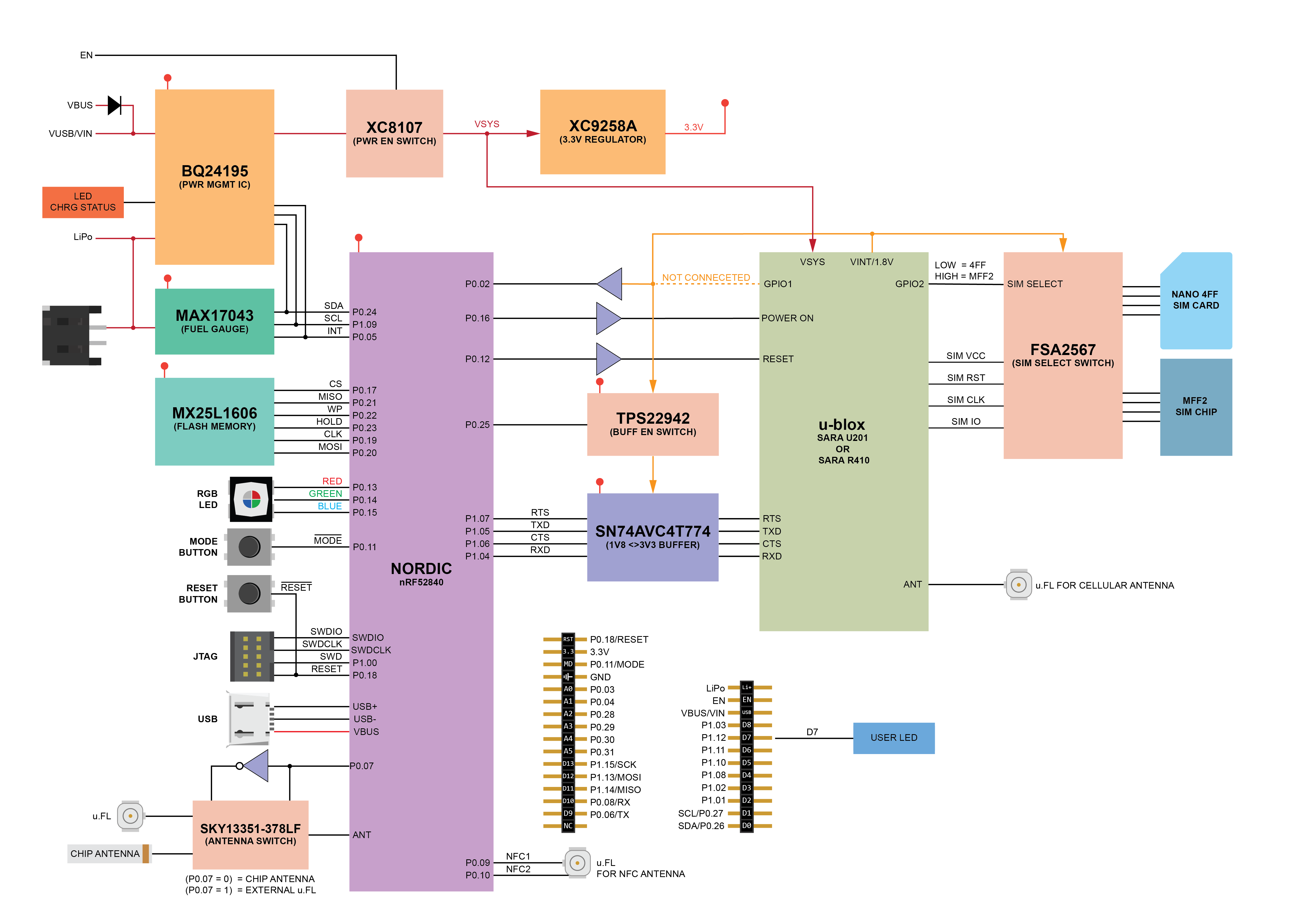

manic glacierBOT
I use Putty and Termite but just get a blank screen. This is okay, according to the guide?
How do I get my program to the board? Do I go back to BOOT mode them copy?
PROGRESS:
Just flashed with the Adafruit Feather nRF52840 Express with nRF52840 version of CircuitP and we have REPL prompt
manic glacierBOT
PROGRESS:
Used adafruit-circuitpython-pca10059-en_US-4.1.0.uf2 and it has appeared as drive and COM port
 turbid radish
Get CircuitPython information on Reddit at https://www.reddit.com/r/circuitpython/

reddit
CircuitPython - Python on microcontrollers! Welcome to our community! All things Python, CircuitPython, MicroPython and more!
tidal kiln
is there a CP driver in works for this?
https://www.adafruit.com/product/4351
idle owl
@tidal kiln Talk to @prime flower. I feel like he might be the one if there is one.
 old smelt
Seeing the dialogue about the Particle Argon board reminded me that our J-Link just arrived this morning, and an Argon is the first thing I want to try updating with it.
However, after installing everything, I get this error from Arduino:
java.io.IOException: Cannot run program "nrfjprog": error=2, No such file or directory
Looks like it can't find the hex file it's trying to pass to nrfjprog:
nrfjprog --program /Users/jason/Library/Arduino15/packages/adafruit/hardware/nrf52/0.14.0/bootloader/feather_nrf52840_express/feather_nrf52840_express_bootloader-0.2.13_s140_6.1.1.hex -f nrf52 --chiperase --reset
And, sure enough, it's not there:
total 136
-rw-r--r--   1 jason  staff   3332 Sep 27 00:14 CODE_OF_CONDUCT.md
-rw-r--r--   1 jason  staff    868 Sep 27 00:14 LICENSE
-rw-r--r--   1 jason  staff   5853 Sep 27 00:14 README.md
-rw-r--r--   1 jason  staff   9797 Sep 27 00:14 boards.txt
-rw-r--r--   1 jason  staff  20032 Sep 27 00:14 changelog.md
drwxr-xr-x   3 jason  staff     96 Sep 27 00:14 cores/
-rw-r--r--   1 jason  staff   2252 Sep 27 00:14 keywords.txt
drwxr-xr-x  12 jason  staff    384 Sep 27 00:14 libraries/
-rw-r--r--   1 jason  staff   8613 Sep 27 00:14 platform.txt
-rw-r--r--   1 jason  staff   1662 Sep 27 00:14 programmers.txt
drwxr-xr-x   7 jason  staff    224 Sep 27 00:14 tools/
drwxr-xr-x   8 jason  staff    256 Sep 27 00:14 variants/
Did I miss a step in order to get the bootloader/ directory and files?
Or do I have to build that?
manic glacierBOT
 slender iron
@old smelt I loaded it straight from the bootloader repo after building
prime flower
@tidal kiln Nope, I haven't done it., no current plans to (ATECC is a bit easier to work with but im interested in a cp driver for the trust m in the future)
there's no pure-python impl,. for it like there was for the atecc either
tidal kiln
sounds like there's more to it than just read datasheet, do some i2c back and forth, etc. ?
manic glacierBOT
I have been following these instructions and not having success
manic glacierBOT

Just to clarify - did you try the adafruit_circuitpython_particle_argon_en_US-4.1.0.uf2?
manic glacierBOT
 manic glacierBOT
 old smelt
@slender iron - thanks. So, I do have to build CP locally to create that directory, then? I got the impression from the Learn guide that it was included as part of the boards package through Arduino. I must have misunderstood something.
No problem, though. I'll build it.
slender iron
@old smelt aren't you trying to get the bootloader?
old smelt
Yes.
old smelt
Yes. I think that is the intent, but the bootloader directory isn't there in the boards package.
Also - when I tried to move on to the manual build, there's a reference to running this script:
But I don't see that shell script there any longer.
BTW, I am looking at this guide: https://learn.adafruit.com/circuitpython-on-the-nrf52/build-flash-particle
 manic glacierBOT
lone sandalBOT
manic glacierBOT
lone sandalBOT

 solar whale
@old smelt you don't have to "download" the softdevices anymore ... where did you see that?
old smelt
It’s in one if the guides. I’ll find it when I’m back at my desk.
solar whale
np -- did you get the particle working following that guide?
BTW - IIRC - the bootloader is included in the Arduino IDE so you can burn it without building it that way. Or you can build it and load as in the guide -- make sure you flash both the bootlader and the sd if you build it.
manic glacierBOT

Thanks @ladyada , I'd love to use a working version w/students on Monday, but when I download the .zip above, then grab the .uf2 in en_US (adafruit-circuitpython-circuitplayground_bluefruit-en_US-20191012-a146ce5.uf2), then delete the old .uf2 from the CPXb and copy this new file over, unplug & plug back in, then run @jepler's sample code (using my own .wav), I still get the same behavior - a buzzing hang instead of a 5th play. So sorry if I'm doing something obviously wrong. Thanks!
please try the latest build on S3 in case it makes a difference
when I use ARGON version doesn't appear as a USB drive.
If I use Xenon then USB Drive (CURCUITPY) appears
With ARGON or BORON still nothing with XENON:
Adafruit CircuitPython 4.1.0 on 2019-08-03; Particle Xenon with nRF52840
>>>
>>>
>>>
>>>
>>>
>>> control=C
Traceback (most recent call last):
  File "<stdin>", line 1, in <module>
NameError: name 'C' is not defined
>>>
The only thing that separates them is the UART connection to Modems
Any thoughts?
manic glacierBOT
Makes no sense to me. I use the argon build on argon and xenon build on xenon.
Not sir3 if it matters, do you have the argon boot loader on the Argon? How did you install the boot loader? Did you use this guide? https://learn.adafruit.com/circuitpython-on-the-nrf52/build-flash-particle

There is a problem with fast/recent cards when reading multiple blocks.
Basic fat operations will work (as they access just one block at once), and so for any reads less than 1024 bytes long.
But reading two or more blocks will (sometimes) get a return value of 127 or 63, and data will be mangled.
See https://github.com/adafruit/Adafruit_CircuitPython_SD/issues/25.
manic glacierBOT
So sorry - @jepler set me straight. I was copying over the .uf2 you'd kindly linked above, but to CIRCUITPY, I didn't double-click to copy it to CPLAYBOOT. Once I did that all worked great. Didn't mean to trouble you. This'll be great to introduce on Monday. I very much appreciate your kind help. Cheers!
old smelt
@solar whale - The reference to the Nordic SoftDevice download is in the "Prepare to Build" section of the "CircuitPython on the nRF52" guide: https://learn.adafruit.com/circuitpython-on-the-nrf52/prepare-to-build
Regarding the bootloader in the Arduino IDE, I don't have that directory when I install the Adafruit nrf52 board package
That's kinda where this all started. I tried using Method 1 in the Particle guide, and nrfjprog failed because there no bootloader hex file in the Arduino directories.
solar whale
ah -- I think the arduino IDE is waiting for an update -- the last release was missing the bootloader files -- @gentle bronze is that correct? is there a pending update to the released Arduino for the nrf52840 that has the bootloader files?
the guide does need to be updated - the download sd step is not needed
@old smelt I came into this late -- what board are you trying to use?
old smelt
Particle Argon
manic glacierBOT
solar whale
The “build your own” should work for the ARGON if you want to go that way.
old smelt
@solar whale - thanks for the help. I'm stepping through the build process again - skipping the softdevices step. Not sure how I jumped the tracks to that other guide. But I'll try the Manual Build instructions for the Argon and see how that goes.
Of course, I'm home now, and the J-Link is at the office. Sigh...
main meteor
Emulate it with a spare micro?
old smelt
@main meteor - Emulate the J-Link?
main meteor
I was thinking of writing a J-link emulation but found someone had already done so
main meteor
Enjoy!
old smelt
Thanks!
manic glacierBOT
manic glacierBOT
That is the guide is used and have used the "correct" version on both the Argon and Boron boards with the same result.
I have been using these boards with Zephyr for months now and was looking at circuitpython as a alternative but its not been successful so far.
manic glacierBOT

 gentle bronze
@solar whale @old smelt yeah right, I upgraded the bootloader but somehow forgot to commit new binaries. I am about to release it in the next week. Meanwhile you can download that folder in the current github https://github.com/adafruit/Adafruit_nRF52_Arduino

GitHub
Adafruit code for the Nordic nRF52 BLE SoC on Arduino - adafruit/Adafruit_nRF52_Arduino
 craggy galleon
Hey #circuitpython-dev team,
I am still getting the TypeError: extra keyword arguments given when I use the Bus Device Library with some packages in CPY 5.0.0
I logged the issue here: https://github.com/adafruit/Adafruit_CircuitPython_INA219/issues/12
GitHub
There seems that there is an issue in either i2c_bits.py or i2c_device.py. When I run the INA219 CircuitPython example, it errors out. The correct address has been entered as I tried with an incorr...
Is this something that might need fixing at the library level? Or am I completely missing something?
Running on a raspberry pi to I2C is perfectly fine. It's just trying to run it on my SAMD51 board it fails.
old smelt
Thanks @gentle bronze. I’ll give it a try.
 obsidian compass
Hi, here's my video to CircuitPython powered Hardware Interactive poster presentation from PyCon India 2019 : https://youtu.be/mmLI0HKfPQI

PyCon India 2019 | CircuiPython Poster Presentation ------------------------------------------------------ Got a chance to present a poster on circuitPython ...
and here's the blog post with steps we followed to build this : https://www.codensolder.com/blog/circuitpython-poster

~stark
Have you ever seen a conference poster presentation that itself is an interactive hardware project? Take a look at CircuitPython Powered interactive poster presented by Ayan Pahwa at PyCon India 2019 - Chennai.
turbid radish
Don't forget that Adafruit publishes the weekly Python on Microcontrollers newsletter - the best! Sign up at www.adafruitdaily.com
No spam, your email is never sold off, unsubscribe any time
slender iron
@craggy galleon what version of CP are you using?
make sure submodules are updated if you are building it yourself
obsidian compass
Hi @slender iron I want to contribute a CP library for TC74 temperature sensor, would need some help to get started with
cc @idle owl
idle owl
@obsidian compass This guide covers the process. Please submit it to the Community Bundle when you finish it! https://learn.adafruit.com/creating-and-sharing-a-circuitpython-library

Adafruit Learning System
Share your code with the world
obsidian compass
Thanks @idle owl , should I create an issue for same ?
idle owl
Yes if you'd like to. It's a good way to let others know what you're working on and you can use it to track progress and have discussions.
obsidian compass
Cool, thanks 🙂
@idle owl do the issue needs to be created at circuitpython repo or community bundle repo?
idle owl
@obsidian compass You can create the issue on the CircuitPython repo. If you are able, please assign it to the "Libraries" milestone. If you are unable to do that, please post a link here once the issue is created and I will do that.
manic glacierBOT
TC74 from microchip is a cheap and good i2c based temperature sensor, will be good to have a supported library in CircuitPython
obsidian compass
@idle owl ^^ here's the link. Can you assign me under Assignees and add milestone
idle owl
Done. Thanks for doing this!
obsidian compass
Thanks alot for guiding 🙂
manic glacierBOT
ionic elk
@gentle bronze @tulip sleet I'm seeing failed asserts of TU_ASSERT(drv_id < USBD_CLASS_DRIVER_COUNT,) in usbd.c, caused by ep2drv being the invalid value of 0xFF. What could be the root cause of that?
idle owl
<@&356864093652516868> Here is the notes document for Monday’s CircuitPython Weekly meeting. Everyone is encouraged to attend! Please add your hug reports and status updates even if you’ll be attending the meeting - it’s super helpful! If you are unable to attend but would still like to include updates, feel free to include them in the notes and I’ll read them off during the meeting. Hope to see you there! https://docs.google.com/document/d/1TNurhLRLXydYWOQ9oqcdQY68vVULWxDKYK-ob51QCJ4/edit

Google Docs
CircuitPython Weekly for 21 October 2019 Welcome to the CircuitPython Weekly meeting notes! Feel free to add your Hug Reports and Status Updates early. During the meeting, we go through them as a round robin sorted by username. If you can’t make the meeting and would stil...
 broken hedge
I must have done something to corrupt my CPX Bluefruit. When I plug it into my Mac running Mojave, I get a dialog box stating "The disk you inserted was not readable by this computer" with a three button choice: Initialize... Ignore, or Eject. Any ideas on how I can save the device? Thanks!
solar whale
@broken hedge can you open a terminal session to the REPL?
broken hedge
@solar whale I can't get into the REPL. The CPXb only shows up as CPLAYBTBOOT. I can drag over the latest .uf2, but I still get the dialog box w/three options when I unplug/plug it back in. If I double-click Reset I get CPLAYBTBOOT again. I can drag the "lib" over, too, but still can't get back to CIRCUITPY and I keep getting the "The disk you inserted was not readable by this computer." dialog on my Mac when I plug the CPXb in again. This error does not show if plug in quickly & double-press reset, but I remain on CPLAYBTBOOT.
 strange cargo
@broken hedge, if you single-click reset do you see the device show in /dev. for me on Mac it is /dev/tty.usbmodem14411
and if you have a /dev device, can you get to the REPL via screen: screen /dev/tty.usbmodem14411 ?
broken hedge
@strange cargo I can open a terminal, cd to /dev, and among the files in that directory the only one that has usbmodem in the title is: tty.usbmodem14601
strange cargo
if you disconnect the CPB and then ls /dev/tty.* does that file go way?
broken hedge
When I try to screen /dev/tty.usbmodem14601 I get a Cannot find a PTY and I'm pushed back out to the prompt
Yes - when I disconnect the CPXb & list files, I don't get the usbmodem file, but when I plug the CPXb back in, I can see that file.
strange cargo
ok. I had an issue with a bad CPB recently. this looks a bit similar, but also a bit different. I was able to get to the REPL, but not to the CIRCUITPY storage.
broken hedge
That is, named tty.usbmodem14601
strange cargo
here is the forum post I did: https://forums.adafruit.com/viewtopic.php?f=60&t=156951
but again, what you're seeing seems a little different. I've never seen that "Cannot find PTY" message
broken hedge
I don't see it mounted as a volume on my Mac, but strangely, when I got into Mu and kept pressing Serial on and off, I finally got a Serial REPL and get a prompt stating: Adafruit CircuitPython 5.0.0-alpha.4 on 2019-09-15; Adafruit Circuit Playground Bluefruit with nRF52840
I've tried import storage, then storage.erase_filesystem()
but that didn't work.
broken hedge
After os.listdir() I get:
Traceback (most recent call last):
File "<stdin>", line 1, in <module>
OSError: [Errno 19] Unsupported operation
strange cargo
that looks like the problem I had! read my forum post, especially see the last few screenshots.
what happens if you do os.uname() ?
solar whale
@broken hedge at REPL you can erase and rebuild the file system ```import storage
Sorry wrong tic —
Import storage
storge.erase_filesystem()
broken hedge
Thx - I am able to import storage. When I press enter after storage.erase_filesystem() Mu REPL freezes and I get the "The disk you inserted was not readable..." dialog box again.
solar whale
Hmm — it is normal for it to disconnect and reconnect with the new file-system — this sounds like a hardware failure ....
broken hedge
After trying the storage.erase... I've dragged over the latest 5.0 .uf2, to CPLAYBFBOOT, but still no luck. Same error.
broken hedge
I'll send a note to support@adafruit.com, since that looks like what @strange cargo's rec was in the forums. I'll post a follow up on the forum so others know in case there's an issue with the CPXbs. Thanks for your help & patience!
solar whale
Good luck — hopefully support can help you.
Since you get to REPL, the CP .uf2 is working OK — may be an issue with the flash chip — it does not seem to be accessing it.
Just tp be sure, what .uf2 are you copying to it?
strange cargo
when I went through the process with support, they sent me out a new CPB promptly. but they did not ask for the broken one back. I still have it here (in a bag marked "BAD flash storage!") ... if anyone at AdaFruit wants the bad one back to study I would gladly send it.
broken hedge
adafruit-circuitpython-circuitplayground_bluefruit-en_US-5.0.0-alpha.4.uf2. And the REPL in Mu shows Adafruit CircuitPython 5.0.0-alpha.4.uf2 after CTRL-C'ing to the prompt.
I've also offered the errant CPXb up for testing if they want it back. I've used others & haven't run into this problem. I've got two classes of 50 each, but haven't heard of any problems from the students, although tomorrow is our first major hands-on Circuit Python session.
ivory yew
Mmm random question: does __slots__ make any difference at all on circuitpython?
manic glacierBOT
Thanks @ladyada , I'll give it a try .
onyx hinge
@ivory yew I'm going to guess "no" because the string __slots__ isn't anywhere in the source.
manic glacierBOT
I closed the files for analogio (analogin_reset()) and pwmout (pwmout_reset()) before. Now I added closing files for UART on reset.
This PR was supposed to prevent the creation of a new file descriptor during reinitialization of the peripherals.
@dhalbert I don't have this button.
craggy galleon
@slender iron Can confirm no more issues in latest CircuitPython build. I just did a build with below details and the issue seems to have disappeared.
Adafruit CircuitPython 5.0.0-alpha.4-241-g84c0d6c I had to manually build it.
As a test I did one with the old build and discovered the issue was still present.
Adafruit CircuitPython 5.0.0-alpha.4 on 2019-09-15; Robo HAT MM1 with samd51g19
The builds on CircuitPython.org are bad or stale (more than 1 month old now). Can they be refreshed soon?
onyx hinge
I've investigated, and I think that the threaded mode of the unix micropython/circuitpython is just busted. Possibly we should disable it in our CI. https://gist.github.com/jepler/96ac702a5159b0ec95f1cffb72cfad68

Gist
-fsanitize=thread error in circuitpython's unix testsuite - sanitize-thread-error.txt
@craggy galleon Hi! I think that "alpha.4" is the latest tagged release, so that's what the top link on https://circuitpython.org/board/robohatmm1_m4/ gets you. You can access newer, non-tagged builds, by following the link that says "browse S3". From there you choose your language (en_US, say), and the top link appears to be the newest. It matches the "84c0d6c" you mentioned. https://adafruit-circuit-python.s3.amazonaws.com/index.html?prefix=bin/robohatmm1_m4/en_US/ https://adafruit-circuit-python.s3.amazonaws.com/bin/robohatmm1_m4/en_US/adafruit-circuitpython-robohatmm1_m4-en_US-20191021-84c0d6c.uf2 -- hope this helps
The Robotics Masters Robo HAT MM1 is an open source robotics controller board for Raspberry Pi. It is education focused but works in many applications. The R...
@slender iron ^^^ see above about threads, I meant to @-mention you but didn't
craggy galleon
very helpful. thank you @onyx hinge ! 😃
I still think should be updated if a known issue exists in (most) of the builds relating to the register / busio changes.
Is there an update cycle?
solar whale
Do any of the displayio gurus know if this "Group already used" is due to a known API change and what needs to be changed. https://github.com/adafruit/Adafruit_Learning_System_Guides/issues/891
GitHub
This fails for CP5.0-alpha. It works for CP 4.1.0 Press any key to enter the REPL. Use CTRL-D to reload. Adafruit CircuitPython 5.0.0-alpha.4-167-g0ccab508f on 2019-10-11; Adafruit PyPortal with sa...
manic glacierBOT
@dhalbert I don't have this button.
OK, if it happens again, just ping one of us in the PR and we will re-run the build.
nrfx 1.8.0 is now available. We should update https://github.com/adafruit/nrfx and the checkout we use for CPy.
Notably:
Fixed an issue in the TWIM driver that would make the driver stuck when a premature STOP condition was generated by a slave device. The driver now handles this situation properly and signals that a bus error occurred.
turbid radish

Adafruit Industries - Makers, hackers, artists, designers and engineers!
The Python on Microcontrollers newsletter – your #1 source for Python information every week Subscribe today, arrives in your inbox every Tuesday The word is out that our newsletter is the place fo…
 swift arrow
@solar whale @strange cargo @broken hedge I noticed that the CPXBLE and MU will not give me a REPL on my Windows 7 laptop, but will work fine on my Windows 10 desktop. I have uninstalled and reinstalled MU release and Alpha.. CP 5.0 Aphla 4
I find that interesting given what others are reporting
I believe I fixed it by loading the latest adafruit drivers.. Is there such a beast for MacOS?
I believe @solar whale released a new build of the drivers two weeks ago..
The interesting thing is I could upload programs to the CPXBLE without issue.. I just couldn;t get a REPL/Serial
solar whale
not me, I don't do drivers 😉 checking on my Mac
swift arrow
heheh maybe it was @tulip sleet
solar whale
Mine shows up on MAcOS Catalina -- I have no idea what drivers I have installed -- it's been a long time since I installed any -- any idea how to check?
/dev/tty.usbmodemxxxxxx
tulip sleet
@swift arrow @solar whale there are no drivers for the mac; we use the builtin drivers
solar whale
ah -- not using mu though -- will try
swift arrow
It would be interesting to hear if it works for you @solar whale . I have no Macs to try with (It's Windows or Linux for me)
solar whale
just upgraded to mu 1.0.2 and it works
swift arrow
thanks @solar whale for trying it
solar whale
I don't have any Windows boxes to try it on...sorry (not sorry 😉 )
old smelt
@gentle bronze - Just ran across this: https://github.com/adafruit/Adafruit_nRF52_Arduino/issues/266
I'll give this a try.
Is there a setting for programmers.txt to tell Arduino where the nrfjprog.ini file lives? Bumping into an error on that, now.
GitHub
Issues I tried to burn bootloader based on the following steps. https://github.com/adafruit/Adafruit_nRF52_Arduino#burning-new-bootloader However the following error occured and I couldn't ...
manic glacierBOT
 ionic elk
@tulip sleet could I chat with you about interrupts when you have a minute?
tulip sleet
@ionic elk Hi, I am back.
ionic elk
@tulip sleet got a sec to jump in the voice?
tulip sleet
hold on one sec
@ionic elk jump into Amelia Earhart so people don't think there is CPy chat going on
orchid basinBOT

nice work folks, added to newsletter, we're now up to 81 boards!
tulip sleet
@ionic elk I am going to file an issue and/or ask Thach tonight about the interupt prio. If you look at ports/atmel-samd/tick.c you see I set the tick prio to 0 and USB to 1, but I am not sure those settings are maintained by TinyUSB.
so you don't need to ask separately
also in that routine all other peripherals are set to level 7 (or whatever the lowest level is). So we just use 0, 1, and lowest (probabably 7)
tulip sleet
yes, I set it high so we would not use lose timer ticks, so I don't know why we see the clock running slow under load
ionic elk
Are you sure it isn't being overridden by some HAL feature in Atmel?
Because it'd be at risk of that in STM32
ionic elk
I don't see where in the routine all other peripherals are set low
tulip sleet
lines 78-81
manic glacierBOT
@siddacious @kattni plz update the library readme to clarify it will also work on the TC74 :)
ionic elk
Gotcha
Yeah I have all of this managed by the HAL right now, so I'll need to revisit that.
I wonder if I'm running into some kind of circular systick issue with my timeouts? One that's taking a ton of time, and crowding out USB
Though that still shouldn't be it... hmmm.
slender iron
@craggy galleon we don't have a set release schedule. I was hoping to get the bleio changes I've been heads down on into the next release but it's unclear when those will be merged. The bug you're seeing is relatively minor since it only impacts builds with busdevice frozen in. Most don't have it. Are your boards generally available for folks now?
manic glacierBOT
@ladyada do you think we can update the library to be generic and used with both. Not sure but TC74 supports low power modes, can add function to utilise that, I can work on it. :)
thats right, some things may vary, please check the TC74 and PCT2075 datasheet, i believe PCT has everything TC74 does but please add any functions!
 rotund basin
Hey All, do you think it is realistic to switch pin functions during a program? For example on the adalogger the mosi and miso pins can be used as a UART as well as SPI , wondering if I can connect both a uart sensor and SPI slave to the same pins ans just switch the functions? 🤔
ionic elk
@rotund basin you can de-init a module to get access to the pins again, which will remove the pin reservation and any settings they had going. But you'll lose access to all the settings of the peripheral you had, so you'll need to re-set them if you go back to the original.
I wouldn't put an SPI and UART device on the exact same bus, either, without some kind of mux in between to selectively close them off from the circuit. Otherwise you might run into some weird bus interference. You'll want to watch pullup/pulldown settings as well, since those will vary between implementations.
manic glacierBOT
ivory yew
There are chips designed specifically for serial multiplexing.
If there's a CS on your receiving UART device you might be able to get away with toggling the CS pins between transfers to avoid bus contention, but I'd definitely look at a mux for a final design.
ionic elk
@ivory yew @rotund basin one mux I've used before was the tca9548a, was pretty nice for I2C devices though I'm not sure how well it'd work for mixed protocols. Note that most muxes are high impedance on both sides, so that affects where you should put pullups.
Even if all your devices did have a CS/chip enable line, my concern with mixing protocols would be incompatible internal pullup settings that could mess stuff up. But it'd be very specific to your setup.
ivory yew
SPI often doesn't need pullups/pulldowns, but it definitely depends on the case.
ionic elk
@tulip sleet the part of this IRQ code I could use some help understanding is why the nrf port's tick.c code doesn't have all the IRQ overrides that the atmel-samd one does. Is that all being relegated to tinyusb, or nrfx?
 errant grail
@idle owl: I'll be lurking during the meeting today (sprinkler blow-out day), but wanted to drop off a hug report. Don't have google doc access -- can I DM it to you?
tulip sleet
@ionic elk The nrf code might just be "wrong" or incomplete. The atmel code is the most tested and worked over. We'll wait and see what Thach says to my issue query.
obsidian compass
@errant grail I am free rn can add it for you if you want
idle owl
@errant grail You can post it here as well!
errant grail
here 'tis:
The StringCar M0 made it to circuitpython.org! Big hug to everyone who inspired and encouraged this project. Over the past 5 years, the support of the incredible Adafruit community supercharged my learning and growth -- coming back to hardware and software design after a 35-year absence. (BTW, the M4 proto controller design is done and should be heading off to OSH Park this week.)
Thanks!
ivory yew
That is so rad, @errant grail
obsidian compass
Text only today
onyx hinge
somebody have the meeting notes link?
obsidian compass
Google Docs
CircuitPython Weekly for 21 October 2019 Welcome to the CircuitPython Weekly meeting notes! Feel free to add your Hug Reports and Status Updates early. During the meeting, we go through them as a round robin sorted by username. If you can’t make the meeting and would stil...
onyx hinge
@obsidian compass thank you
ivory yew
lurking today
tidal kiln
** lurking **
crimson ferry
lurking
 sterile bronze
lurking
turbid radish
Lurking
 timber mango
just lurjing today
 river quest
Happy Open source hardware month! We have 21 posts so far!
https://blog.adafruit.com/?s=%23OHM2019
81 boards on CircuitPython.org! (CGrover!)
https://circuitpython.org/downloads
https://circuitpython.org/board/stringcar_m0_express/
CircuitPython Organization
The Cedar Grove StringCar M0 Express is an ATSAMD21-based CircuitPython compatible board used to control a simple string car racer robot. The board is archit...
onyx hinge
around the world in 81 boards
river quest
CircuitPython Blinka snakes its way to Amazon AWS IoT (Thanks Brent)
https://docs.aws.amazon.com/iot/latest/developerguide/iot-moisture-raspi-setup.html
Insert your micro SD card into the Raspberry Pi, connect your monitor, keyboard, mouse, and, if you're not using Wi-Fi, Ethernet cable. Do not connect the power cable yet.
old smelt
Lurking
river quest
CircuitPython Libraries contributing! New section on circuitpython.org (Thanks Kattni, Justin, and more)
https://circuitpython.org/libraries/contributing
CircuitPython Organization
Make your own CircuitPython powered interactive conference poster
https://youtu.be/mmLI0HKfPQI
https://www.codensolder.com/blog/circuitpython-poster
PyCon India 2019 | CircuiPython Poster Presentation ------------------------------------------------------ Got a chance to present a poster on circuitPython ...
~stark
Have you ever seen a conference poster presentation that itself is an interactive hardware project? Take a look at CircuitPython Powered interactive poster presented by Ayan Pahwa at PyCon India 2019 - Chennai.
obsidian compass
yay!
river quest
Bluefruit on macOS Catalina + Catalyst (Thanks Collin)
https://youtu.be/uwRm5PNhPX4

Jerry tweeted about macOS Catalina's new feature that allows running iOS apps using Catalyst, the example was our Bluefruit app, so we of course had to try i...
PyDev of the Week: Sophy Wong
https://www.blog.pythonlibrary.org/2019/10/21/pydev-of-the-week-sophy-wong/
Thea made another CircuitPython library, WinterbloomVoltageIO. VoltageIO lets you set output voltage to your DACs instead of having to do the maths to calculate voltage every time. It also lets you do the reverse for ADCs!
https://github.com/theacodes/Winterbloom_VoltageIO

GitHub
A CircuitPython helper library for dealing with voltage values in DACs and ADCs - theacodes/Winterbloom_VoltageIO
Using Apple MacBook airs and pros along with Circuit Playgrounds to teach basic coding to get ready for 2 and 3rd grade robotics from Mike Pitcher, Director of Academic Technologies at The University of Texas at El Paso, and Apple Distinguished Educator 2017.
https://twitter.com/thshadow/status/1185234688971104256

Using @AppleEDU MacBook airs and pros along w @adafruit circuit playgrounds to teach basic coding to get ready for 2 and 3rd grade robotics @UTEPTechE

 Twitter
Check out what the team is up to and more
https://github.com/adafruit/circuitpython-weekly-newsletter/blob/gh-pages/_drafts/2019-10-22-draft.md#what-is-the-team-up-to
GitHub
Community newsletter for python on microcontrollers - adafruit/circuitpython-weekly-newsletter
DRAFT is here for this week, thanks for the contributions, add yours!
https://github.com/adafruit/circuitpython-weekly-newsletter/blob/gh-pages/_drafts/2019-10-22-draft.md
GitHub
Community newsletter for python on microcontrollers - adafruit/circuitpython-weekly-newsletter
 inland tusk
lurking today😋
ionic elk
@tulip sleet off topic for meeting, but I think revising tick.c has helped the USB issue, not seeing crashes now. But st doesn't have a count item in IRQn_Type, so I'm going to have to manually define it for every board if I want to iterate through peripheral priorities. This HAL just can't make anything easy, can it.
solar whale
🥙
tidal kiln
old smelt
Have to duck out early today. One hug report in notes doc. Have a great week, all!
inland tusk
lurking today
ivory yew
😭 💜
slender iron
@inland tusk we have you marked in the notes as lurking. thanks!
inland tusk
10--4
turbid radish
Adafruit Industries - Makers, hackers, artists, designers and engineers!
The Python on Microcontrollers newsletter – your #1 source for Python information every week Subscribe today, arrives in your inbox every Tuesday The word is out that our newsletter is the place fo…
errant grail
The StringCar M0 made it to circuitpython.org! Big hug to everyone who inspired and encouraged this project. Over the past 5 years, the support of the incredible Adafruit community supercharged my learning and growth -- coming back to hardware and software design after a 35-year absence. (BTW, the M4 proto controller design is done and should be heading off to OSH Park this week.)
ionic elk
give sec sorry discord and mic
trim elm
I'll be lurking for the rest of the meeting
turbid radish
onyx hinge
Hug reports to this tiny spider crawling across the table
gilded cradle
My internet dropping out had some good timing at least.
solar whale

Adafruit Learning System
Circuit Playground Bluefruit: Everything amazing about Circuit Playground, now with the power of Bluetooth!
inland tusk
I have OBS available
solar whale
inland tusk
OBS has a linux version
prime flower
thx jerry!
ionic elk
@meager fog are you online today? Hoping to ask a question about this python gps library
slender iron
@ionic elk please ask here generally first
trim elm
Gtg since my phone’s about to die
ionic elk
Sure, I'm wondering if there's a sort of flow control with the GPS. Normally I see a constant stream of data, but I'm currently only seeing a chunk of data at startup and then it halts.
don't have to talk about it during the meeting though
slender iron
I don't think there is. The UART TX line is kinda dumb in that it should just transmit continuously. An oscilloscope or logic analyzer can help you verify that it is still transmitting
onyx hinge
Usually GPS sends a series of lines every 1 second
meager fog
@ionic elk hi
ionic elk
I'll have to break that out then. Having a FT232 on the line will disrupt the uart data, right? it can't act as a passive sniffer?
onyx hinge
@slender iron congrats to your wife on her new job! I hope it suits her
meager fog
@ionic elk you can have a passive sniffer
connect the RX line of the FT232 to the RX line of the Feather
and you can listen to the same data
ionic elk
Hmm. Well, I did give that a shot, I just figured it was causing the failure. What I'm observing is that there's a single chunk of data sent, and then it halts
meager fog
@ionic elk connect the FT232 directly to the GPS
and open a serial console
what is the data you are reading
inland tusk
@slender iron good trip to florida
slender iron
@onyx hinge thanks! we're excited about it. it's a really good commute from our house
ionic elk
$GPRMC,000017.799,V,,,,,0.00,0.00,060180,,,N*43
$GPGGA,000018.799,,,,,0,00,,,M,,M,,*76
@ionic elk it does not send anything after that?
ionic elk
Nope nevermind it was a FTDI mixup.
meager fog
@ionic elk ok so you are set to test the GPS output?
prime flower
@solar whale Yep I did that demo on 4.x.
ionic elk
Sorry having a bunch of computer breakdowns
slender iron
 onyx hinge
I'm going to head back to work, talk to all of you later. Good luck in the weeds.
solar whale
@prime flower i think it will alos impact the new IOT demos -- have you tried 5.0 yet?
prime flower
@median aurora Have not, will stick around for in the weeds re: this topic. I'll gladly update demos if you dont have time.
slender iron
@median aurora congrats on the success of the satellite
prime flower
GitHub
Smaller programs and scripts to display "inline" in Adafruit Learning System guides - adafruit/Adafruit_Learning_System_Guides
GitHub
This fails for CP5.0-alpha. It works for CP 4.1.0 Press any key to enter the REPL. Use CTRL-D to reload. Adafruit CircuitPython 5.0.0-alpha.4-167-g0ccab508f on 2019-10-11; Adafruit PyPortal with sa...
obsidian compass
@idle owl , @slender iron , I tried recording meeting with Quicktime player screen recording with built in mic. It works well.
ionic elk
@meager fog I'm getting more useful data now, yes. The library still isn't detecting data in the ringbuffer with the GPS compared to when I manually send stuff on the line, but that might still be internal
turbid radish
Thank you Kattni, Scott, everyone
obsidian compass
Thanks all
slender iron
@solar whale I see something suspicious
        self._icon_group = displayio.Group(max_size=1)
        self.append(self._icon_group)
        board.DISPLAY.show(self._icon_group)
icon group is being added to the "self" group and then the display top level as well
solar whale
do you see a quick "fix"
crimson ferry
@gilded cradle The 180-second warning in the EPD guide... is there some background on that (link maybe)? I've been updating my B&W FeatherWing every 2 seconds for weeks o_O
slender iron
all of the board.DISPLAY.shows seem wrong to me
slender iron
since the GFX class is a group itself I'd expect it to be added to the display
crimson ferry
@gilded cradle Oh, interesting. I usually thought of burn in when the same thing was displayed too long, but I suppose the refresh process is harsh.
gilded cradle
yeah, it's flipping the ink droplets back and forth and some can get stuck.
crimson ferry
How long was it before the one in the photo showed sticky artifacts?
gilded cradle
Just a handful of times really for me.
I've gotten it to be better than it was in the photo, but it still has some artifacts.
crimson ferry
I've thought about testing some kind of wiper function for my OLEDs, not sure if they're salvageable. On the EPD though... the 180-second param basically limits how often you can refresh, but the duration of the refresh never changes, right?
gilded cradle
yeah
meager fog
@ionic elk ok do you know how to attack the bug you have?
prime flower
https://github.com/adafruit/Adafruit_Learning_System_Guides/blob/master/PyPortal_OpenWeather/openweather_graphics.py @solar whale
GitHub
Smaller programs and scripts to display "inline" in Adafruit Learning System guides - adafruit/Adafruit_Learning_System_Guides
ionic elk
@meager fog ever time I think I do, it throws me a new curveball.
meager fog
@ionic elk ok are you chatting with dan as you work on it to verify your assumptions and path
ionic elk
yes, I had a chance to chat with him this morning. It's possible I may be intersecting with issues in tinyusb, so we made an issue this morning for that
main meteor
Hmm, I have some old eInk displays that have been displaying static data for over a year (they're not even connected to any electronics). I should try firing them up and see if they have an afterimage or somesuch.
solar whale
@prime flower Openweather works after removing the call to "refresh_now" and "wait_for_frame" - last 2 lines -- same as in the thermometer. I take a closer look at both then put in a PR, hopefully tonight.
prime flower
@solar whale thanks, i'll fixup and test the other ones tomorrow
ionic elk
@slender iron when you say PWM, you mean pulseio, correct? Is there a particular order to the priorities there?
 rotund basin
Thanks @ionic elk
Hey All, I seem to have a uart issue. I am running a simple loop back test from RX to SDA and TX to SCL because the uart test said that SCL is rx and SDA is TX however , as I write from one port to another , I don't see the data print to the screen , I've tried this with and without the sleep....
My board is the adalogger running 4.1
tidal kiln
@rotund basin is anything soldered to the proto board?
rotund basin
Yes everything is
tidal kiln
am i following your wiring correctly?
TX---green-white-yellow---SDA
RX---blue-black-blue---SCL
Correct
tidal kiln
you setup SDA as TX, you have TX to TX
similar for SCL, RX to RX
you need TX to RX, and RX to TX
rotund basin
@tidal kiln I don't follow... SDA is a TX pin for UART , and is connected to RX , likewise SCL is RX uart pin and connected to TX
Also the led does flash every second
But no data is printing
tidal kiln
isn't SDA connected to TX?
rotund basin
Sda is yellow , and connected to rx
tidal kiln
you've setup uart_two with SDA as TX:
https://circuitpython.readthedocs.io/en/latest/shared-bindings/busio/UART.html#busio.UART
rotund basin
Yes, isn't that correct?
tidal kiln
and the wires go to the other UART's TX
rotund basin
crimson ferry
@solar whale https://github.com/adafruit/Adafruit_CircuitPython_Bundle/issues/195 ...and I guess Learn Guides too ...oh, n/m, you commented on that already o_O
GitHub
For 5.0 displayio compatibility. grep of Library Bundle shows wait_for_frame or refresh_soon used in: - [ ] pyportal (drivers and helpers) - [ ] miniqr/examples/ - [ ] turtle (drivers and helpers) ...
rotund basin
Yes they go to board.tx and board.rx
tidal kiln
one UART's TX needs to go to the other UART's RX
rotund basin
Correct , and it does , doesn't it ?
tidal kiln
TX---green-white-yellow---SDA
RX---blue-black-blue---SCL
ok, read the wires wrong then, so it's this:
TX---green-white-blue---SCL
RX---blue-brown-yellow---SDA
Yes
slender iron
@ionic elk Definitely PWM first in pulseio. It's used for servos and backlights. PulseIn and PulseOut are for IR and DHT which are used much less often.
rotund basin
Hey @tulip sleet think you can sanity check this? Dual uart , using SDA as uart TX and SCL as uart rx , write to board.TX and board.RX ?
tidal kiln
@rotund basin try this:
import time
import board
import busio

print("UART loopback test.")

uart = busio.UART(board.TX, board.RX, baudrate=9600)
uart_two = busio.UART(board.SDA, board.SCL, baudrate=9600)

count = 0
while True:
    uart_two.write(bytes([count]))
    data = uart.read(1)
    print(data)
    count += 1
    time.sleep(1)
Kk
tidal kiln
couple of things
you commented out the line that printed the read data
(red arrow)
and you essentially turn the LED off immediately after turning it on
(green arrows)
rotund basin
oh, i just modified the example in the essentials folder. 😉
rotund basin
the 4.1 version
tidal kiln
where's that?
did your version print anything out? it looks like that much of it should have worked.
receiving the two non-printing characters every second
 tidal kiln
yah, i think the LED indication as shown might not work as intended
but you should have at least seen something printed to serial monitor
rotund basin
Your code works great
rotund basin
Not sure why it didn't
tidal kiln
i gotta run, but here's a version that'll blink the LED for 1 second
import time
import board
import busio
import digitalio

led = digitalio.DigitalInOut(board.D13)
led.direction = digitalio.Direction.OUTPUT

print("UART loopback test.")

uart = busio.UART(board.TX, board.RX, baudrate=9600)
uart_two = busio.UART(board.SDA, board.SCL, baudrate=9600)

count = 0
while True:
    data_buffer = bytes([0x48, 0x45, 0x4C, 0x4C, 0x4F])
    uart_two.write(data_buffer)

    data = uart.read(32)

    if data is not None:
        led.value = True

        data_string = ''.join([chr(b) for b in data])
        print("{}:{}".format(count, data_string))
        count += 1

        time.sleep(1)
        led.value = False
anyone know how to keep an object initialized? when I import a module and run a function 1 time, it works. When i run the function again i get a Value Error ValueError: Object has been deinitialized and can no longer be used. , This is when I do a uart.readline()
trim elm
@rotund basin Is the object initialized inside the function?
solar whale
@prime flower submitted PRS for PyPortal_Smart_Thermometer and PyPortal_Openweather -- I can't assign reviewers. I'm still trying to understand what the differences are, but they both work now with CP4.10 and CP5 ...
manic glacierBOT

@ladyada README updated!
[adafruit/circuitpython] New branch created: siddacious\-patch\-1
6e5ce43 small typo fix for acceleration - siddacious
manic glacierBOT
I looked at the MicroPython micro:bit radio stuff and don't think compatibility is possible because it uses the lowest level radio API. We'd have to sacrifice BLE support which isn't a good idea. Instead, we can implement the same radio API as the micro:bit over BLE advertisements.
This PR refines the _bleio API. It was originally motivated by
the addition of a new CircuitPython service that enables reading
and modifying files on the device. Moving the BLE lifecycle outside
of the VM motivated a number of changes to remove heap allocations
in some APIs.
It also motivated unifying connection initiation to the Adapter class
rather than the Central and Peripheral classes which have been removed.
Adapter now handles the GAP portion of BLE including advertising, whi...
This part of the unix micropython port isn't related to any functionality used in CircuitPython, and at least one of the tests (thread_gc) fails with non-negligible frequency.
Reasons to revisit this in the future would include if/when thread support is added in CircuitPython.
I tried using gcc 8.3's "sanitize=thread" mode to run the thread_gc test, and many diagnostics were issued. I suspect some are spurious. But others appear serious. Among them, the one shown here: https://gist.github.com/jepler/96ac702a5159b0ec95f1cffb72cfad68
After printing the diagnostics, in sanitize=thread mode, the test almost always hangs, which is different than the behavior normally.
What I infer from this is that the multiple threads are not sufficiently protected from each ot...
gentle bronze
@old smelt yes, you could change the path to nrfjprog, however, it would be easier to create an symlink to one of location in PATH https://github.com/adafruit/Adafruit_nRF52_Arduino/blob/master/programmers.txt#L6
GitHub
Adafruit code for the Nordic nRF52 BLE SoC on Arduino - adafruit/Adafruit_nRF52_Arduino
old smelt
Yes I did create a link. But it’s still looking for the ini file.
Is that something that can be configured in the programmers.txt as well?
gentle bronze
@ionic elk it means the driver is not supported, or some request that usbd doens't know where to forward it to. Do you have a reliable way to reproduce it ? I'm seeing failed asserts of TU_ASSERT(drv_id < USBD_CLASS_DRIVER_COUNT,) in usbd.c, caused by ep2drv being the invalid value of 0xFF. What could be the root cause of that?
@old smelt yeah, you can modify the path to it here https://github.com/adafruit/Adafruit_nRF52_Arduino/blob/master/programmers.txt#L6
GitHub
Adafruit code for the Nordic nRF52 BLE SoC on Arduino - adafruit/Adafruit_nRF52_Arduino
old smelt
Is there a full list somewhere of all the configuration options that can be defined in the programmers.txt file?
gentle bronze
this may help https://github.com/arduino/Arduino/wiki/Arduino-IDE-1.5-3rd-party-Hardware-specification

GitHub
open-source electronics prototyping platform. Contribute to arduino/Arduino development by creating an account on GitHub.
raven canopy
@solar whale i just tried this PR, and rpi-ws281x installs fine on Ubuntu. haven't tested it yet though...
https://github.com/rpi-ws281x/rpi-ws281x-python/pull/23
solar whale
@raven canopy Nice! -- I will try it tomorrow -- thanks!
solar whale
Thanks!
craggy galleon
@slender iron they should be available in the coming weeks. #crowdsupply will be distributing it's set in 2-3 weeks time. I'm excited! 😅
solar whale
@raven canopy How did you install rpi-ws281x with the PR?
@raven canopy nevermind -- got it -- instructions were in the PR
solar whale
@raven canopy I can blink an LED via an FT232H -- woohooo! -- still trying to get neopixels to work
and I2C works via the ft232h -- I suppose I should try direct connections to the RPi....
if I try without the FT232H I get ```Python 3.7.3 (default, Oct 7 2019, 12:56:13)
[GCC 8.3.0] on linux
Type "help", "copyright", "credits" or "license" for more information.
import board
Traceback (most recent call last):
File "<stdin>", line 1, in <module>
File "/home/jerryneedell/.local/lib/python3.7/site-packages/board.py", line 107, in <module>
raise NotImplementedError("Board not supported {}".format(board_id))
NotImplementedError: Board not supported None
why would a uart.deinit() throw TypeError: 'NoneType' object is not iterable ??
also, it seems that Print can't print "NoneType" but if data is None ; that is not detected?
this worked in 2.x , not sure what changed
raven canopy
@solar whale the NotImplemented is from PlatformDetect not recognizing non-Raspbian Pi's. I'm working on a PR for that: https://github.com/adafruit/Adafruit_Python_PlatformDetect/pull/40 It also appears like you can set an environment variable to force it...
prime flower
@solar whale Will take a look in a moment, thanks
rotund basin
ok, i found the problem
2 uart is not stable.
board.rx works fine. SCL as uart is not stable.
is there a build where this works?
This is how I tested this:
code:
`import time
import board
import busio
print("UART test.")
uart = busio.UART(board.TX, board.RX, baudrate=9600)
uart_two = busio.UART(board.SDA, board.SCL, baudrate=9600)
count = 0
while True:
#uart_two.write(bytes([count]))
data = uart_two.readline()
print(data)
data_a = uart.readline()
print(data_a)
count += 1
time.sleep(1)`
uart works when connected to the TX of my gps sensor; uart_two does not work it only provides None.
I switch the wires
output when board.rx is connected :
b',19,02,17,,,,,,1.78,0.88,1.54,101\r\n'
None
b'19,02,17,,,,,,1.40,0.71,1.21,10E\r\n'
None
b'02,17,,,,,1.40,0.71,1.21,109\r\n'
None
b'2,17,,,,,,1.78,0.88,1.55,100\r\n'
None
b'9,02,17,,,,,,1.40,0.71,1.21,1*0E\r\n'
output when SCL is connected :None
None
None
None
None
None
None
None
None
None
None
None
manic glacierBOT

When using a second UART (other than RX and TX) the Circuit Python firmware does not treat the second UART as the first UART.
When using a GPS sensor to send UART data to an Adalogger M0; The data to board.RX worked perfectly, while the data sent to board.SCL was not read. Futhermore, when trying to init and deint the second uart (i.e. board.SCL) , the uart object becomes throws value error; as if it was not created.
To reproduce: On version 4.1
Use GPS or similar sensor writing to ...
prime flower
@solar whale thx for the work, merged in, I opened 3x PRs for the other projects which use the GFX helper class
orchid basinBOT
tulip sleet
@ionic elk I have to go out soon for an errand but would like to check in with you later about how UART is going. Let me know when you're around.
ionic elk
@tulip sleet hey Dan, Scott recommended that I take a break from UART since it was kind of driving me up the wall, so I'm doing PWM at the moment, but I'm still happy to check in
tulip sleet
@ionic elk that's great, that's what I was going to suggest if you were not already doing it
scott and i thought tinyusb may not doing anything with the prio levels, but we're not sure, need to wait for thach's reply
ionic elk
@tulip sleet he got back this morning - he said it wasn't changing them at all
I rewrote tick.c to be more explicit anyway, but it wasn't really helping
tulip sleet
so better to make some progress on something else and get some satisfaction, and then circle back. Try the empty interrupt handler like we talked about, but fine to leave it alone for some days
ionic elk
I think it'll be good to switch gears though in case there is tinyusb stuff involved, to give some extra time for you guys to work on it and make sure I'm not conflating unrelated issues.
Yeah I think PWM should be pretty straightforward. it looks like ST makes setting up the timer peripherals pretty easy.
speaking of which, @meager fog, quick request for the Feather F405 when you're online - do you think you could map D13 to a pin with a hardware timer, so I can give it hardware PWM? Currently, it's on PC1, which doesn't have a timer peripheral on it.
tulip sleet
so you can pulse the LED? if timers are scarce, maybe we want to leave them for other uses
i'm not sure we would rev the board at this point
ionic elk
They aren't really scarce in general, there's quite a lot of them on the PA and PB channels, basically every pin
tulip sleet
gotta go but will be online later when out (waiting for something)
ionic elk
but the PC port doesn't have as many
slender iron
@craggy galleon I can do a release at the end of next week when I'm back or @tulip sleet can do one sooner if he likes
ionic elk
@slender iron looking through the existing PWM implementations, it seems like they're hardware based. Is that correct? Or is there a bit-bang PWM system in there that I'm missing?
slender iron
it's only hardware based
ionic elk
ok, just wanted to double check
how do you feel about the D13 LED pin on the feather? I definitely wish I'd caught it sooner
slender iron
it's not the end of the world but will make the bootloader fade tougher
ionic elk
not sure quite what @tulip sleet meant by leaving timers for other uses
slender iron
no biggie for cp though
usually timers are scarce but timer channels aren't
so it's nice to have more timers on user accessible pins
ionic elk
Oh, gotcha. Well, the F405 has about 10 timers exposed on the 64pin, so hopefully that wouldn't be too restrictive. But I don't want to ask for anything unreasonable
what is the bootloader fade?
tulip sleet
Pulsing led on double-click
rotund basin
Anyone have thoughts on how to get the second uart working ?
tulip sleet
@rotund basin I am out but will try this later when I get back home.
rotund basin
@tulip sleet ok , thanks I really appreciate it ... it's a critical feature in my product
tulip sleet
Did you try swapping the connections between the to make sure it’s CPy and not external?
rotund basin
@tulip sleet yes and I posted the output in here
ionic elk
@tulip sleet by the way, in the vein of the cleanup, can I PR the removal of the stm32 library in lib? It was only there because of the micropython stm32 port
it's annoying for greps
tulip sleet
That would be great! I wasn’t sure whether you might be depending on it or not.
ionic elk
nope I've got my own, up to date one
rotund basin
@danh I think it's a stability issue, it worked yesterday but today , it can't get a good uart object for the second uart
ionic elk
imma do that rn
tulip sleet
@rotund basin does it work after a hard reset?
tulip sleet
I mean power cycle or reset button
rotund basin
just hit reset. it's not working
tulip sleet
Try a power cycle, but should be the same
rotund basin
same
manic glacierBOT
This PR removes the old stm32lib library that was used by the now removed micropython stm32 port, but has been replaced by newer and more easily maintained versions in tinyusb and stm32f4.
turbid radish
Buy a Circuit Playground Express (CircuitPython programmable) at the normal price, Adafruit gives one to Black Girls Code. What a deal!

Circuit Playground Express is the next step towards a perfect introduction to electronics and programming. We've taken the original Circuit Playground Classic and made it even better! ...
tulip sleet
@rotund basin 🙁 ok will circle back later
rotund basin
thanks!
manic glacierBOT

Fixes #2086
When the frequency of a PWMOut is change it re-sets the PWM's duty cycle as
well, since the registers have to be re-calculated based on the new frequency.
Unfortunately, common_hal_pulseio_pwmout_get_duty_cycle
will return a value very close to, but not exactly, the value passed to common_hal_pulseio_pwmout_set_duty_cycle. If the frequency is modified
without the calling code also re-setting the duty cycle then the duty cycle
will decay over time. This fixes that pro...
I haven't had a chance to test this out on real hardware yet, but if someone wants to beat me to it by all means. :)
ivory yew
baby's first CircuitPython PR. 🙂
idle owl
@solar whale Where did you submit the PRs for the PyPortal projects? The Learn Guide repo?
@ivory yew Congrats!!
solar whale
@idle owl yes. They have been merged.
idle owl
@solar whale Ok, I was asking because I wanted to know where you couldn't assign reviewers and fix that if it made sense. I can add you as a collaborator on that repo which I think would resolve that issue if you'd like. You're always testing things anyway.
solar whale
That’s fine with me.
I was quite proud of myself in that I was able to make 2 PRs t the same repo without getting them confused 😉
idle owl
@solar whale Nice! I know the feeling.
rotund basin
hey @tulip sleet i know you are going to look into this later ..... I can't seem to find any of the SERCOM code that manages the different SERCOMs. For example, how do these functions know which SERCOM ? SDA and SCL are SERCOM4-ALT in the datasheet. While default RX and TX are SERCOM 0. I can't seem to find any functions that call this one, to set the sercom clock....https://github.com/adafruit/samd-peripherals/blob/5b18f0a58a620fc11b630438d84b2b374ad1188b/samd/samd21/sercom.c#L74 ??
GitHub
A thin API above SAMD peripherals that is uniform across SAMD21 and SAMD51 - adafruit/samd-peripherals
idle owl
@solar whale Added! You have write access to that repo so you can also review/merge PRs if you're ever interested. Anne handles most of those as they're typically from guide authors submitting new code, but sometimes we get unsolicited ones from community members that need testing. You should definitely be able to assign reviewers now though.
solar whale
@idle owl Great - thanks!
idle owl
Thank you for being such an epic bug hunter!
solar whale
Even if spiders aren't bugs...
idle owl
😄 valid.
manic glacierBOT
 meager fog
@tidal kiln lemme know when yr ready for the Next Project idea
manic glacierBOT
I'm back on this and still not able to either my Argon or Boron board to bring up Circuit Python?
I have tried various boot-loaders and uf2 but still nothing.
If a flash the uf2 for the Xenon on either a Argon or Boron it comes up straight away.
Lost....need some ideas.
Billy..
Some direct reponces to questions:
> Do you have the argon boot loader on the Argon?
I'm using the Argon on the Argon and Boron on the Boron.
adafruit-circuitpython-particle_argon-en_US-4.1.0.uf2
adafruit-circuitpython-particle_argon-en_US-4.0.1.uf2
adafruit-circuitpython-particle_argon-en_US-4.0.0.uf2
adafruit-circuitpython-particle_argon-en_US-5.0.0-alpha.4.uf2
adafruit-circuitpython-particle_boron-en_US-4.1.0.uf2
> How did you install the boot loader?
**> D...
meager fog
@ionic elk hiya PCBs are already ordered
i prioritized ADCs
it is annoying D11-D13 dont have PWM but that was the tradeoff
rotund basin
hey @tulip sleet did another test with a third UART. SERCOM 0 as well , but it didn't work either. Here is the updated code `import busio
print("UART test.")
uart = busio.UART(board.TX, board.RX, baudrate=9600)
uart_three = busio.UART(board.D10, board.D12, baudrate=9600)
uart_two = busio.UART(board.SDA, board.SCL, baudrate=9600)
while uart_two is None:
uart_two = busio.UART(board.SDA, board.SCL, baudrate=9600)
count = 0
while True:
#uart_two.write(bytes([count]))
data = uart_two.readline()
print(data)
data_a = uart.readline()
print(data_a)
data_b = uart_three.readline()
print(data_a)
count += 1
time.sleep(1)`
meager fog
@ionic elk D11 and D12 were I2S so i wanted to expose those
also there arent really many free pins :/
manic glacierBOT
How did you flash the bootloader -- with the Arduino IDE?
get your board into the Bootloader and post the contents of the INFO_UF2.TXT file.
I just flashed the afadfruit_bluefruit_nrf52840 bootlaoade via a J-Link as described in the guide and then put the particle_argon_4.1.0.uf2 on it and all worked fine.
How did you flash the bootloader
I used nrfjprog, I even out of habit do an eraseall.
nrfjprog --program particle_argon_bootloader-0.2.13_s140_6.1.1.hex --sectoranduicrerase -f nrf52 --reset
get your board into the Bootloader and post the contents of the INFO_UF2.TXT file.
The bootloader works as expected which is the frustrating thing.
I am starting to think its a windows thing, Win10 can be a pain "resolving" problems for you.
Thanks for your continued support.
Billy..
If you have arduino installed -- update to the lated adafruit nrf5284 BSP and try that.
If you have arduino installed -- update to the lated adafruit nrf52840 BSP and try that.
Not an Arduino guy, normally i would be hacking code onto the NRF52 via C and nrfjprog. I generally don't use them USB drives, USB is just as a serial console.
Thats why I'm startting to suspect this could be a windows problem
ddi you do all three steps
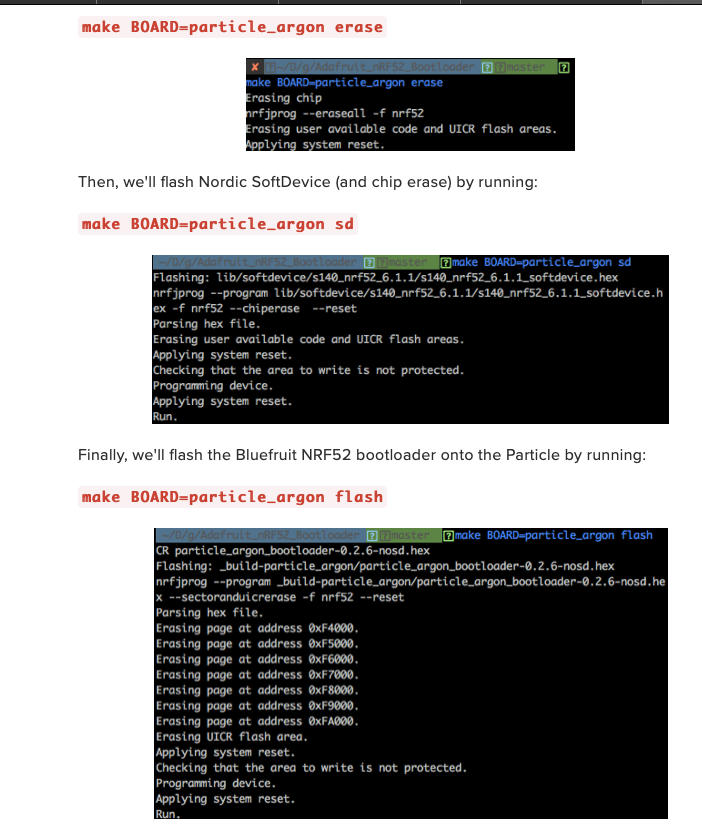
I may be wrong -- where did you get the bootloader file -- I will try to replicate it.
tulip sleet
@rotund basin I am not able to reproduce your problem:
Adafruit CircuitPython 4.1.0 on 2019-08-02; Adafruit Feather M0 Adalogger with samd21g18
>>> import board,busio
>>> uart = busio.UART(board.TX, board.RX, baudrate=9600)
>>> uart_two = busio.UART(board.SDA, board.SCL, baudrate=9600)
>>> uart.readline()
b'I am typing at uart one\r'
>>> uart_two.readline()
b'i am typing at uart two\r'
I'm using a couple of USB-to-serial converters: one is FTDI, one is something else
rotund basin
hmm, i am using ublox m8p kit uart to the m0
i did notice that a loop from board.tx to board.scl did work a little better.
but i am not sure why this gps only works on board.rx and not the other uart pins
tulip sleet
physically, how are you connecting to the pins? do you have some headers soldered on? are you using a breadboard? I'm using stacking headers
do the gps and the adalogger share a common ground?
rotund basin
the gps and adalogger share the PC as power and ground...
everything is soldered to the protoboard
tulip sleet
do you see this with a single board? Do you have other boards to try?
rotund basin
this is a brand new board. just got it.
tulip sleet
do you have another M0 feather you can try on a breadboard, etc.?
manic glacierBOT
OK -- I just downloaded the same bootloader .hex file from the nrf52 bootloader repository and used the same command to flash it (after erasing) and then loaded the 4.10. .UF2 and it all worked as expected. perhaps it it is windows -- I'm out of ideas ....
Jerry, found it.... ruddy Windows.
In device manager it was only showed as Argon serial port. Not normally a problem as I only use serial comms.
So un-installed device and started again...bingo it's working.
Now how do we get this into the trouble shooting guide.
Congratulations! Glad it is working -- I think @dhalbert maintains that guide.
tidal kiln
@rotund basin just curious - any reason you aren't using a breadboard?
manic glacierBOT
Is this Windows 10 or 7? Did you install any drivers initially that might have taken control of this? I don't remember if Particle supplies any drivers.
rotund basin
@tidal kiln thought the protoboard was cool and didn't want the connections to fall out
i think the second adalogger is a dud
tidal kiln
for initial testing and development, a breadboard makes things much easier
that's what i was doing yesterday
manic glacierBOT
Still odd that you had partial success with the xenon build ....
tulip sleet
@rotund basin i looked at your photo from yesterday. Are the jumper wires soldered to the Perma-proto board or just stuck in?
rotund basin
@tulip sleet soldered
the third adalogger seems to work, but the first one did work on the first day too
tulip sleet
which GPS are you using? Are the outputs 3.3v or 5v? 5v is not healthy for the M0.
same q for any USB-to-serial adapters you're using
tulip sleet
@rotund basin glad it seems to be working, and keep up the testing, and give us clear photos of the top and bottom of the boards if you are still having trouble
solar whale
@tidal kiln -- the Playground-O_phone is really great!! Thanks!
tidal kiln
@solar whale thanks. the important part was a @tulip sleet thing. i just added glitter.
solar whale
My dog is not happy with the tone generator!
tidal kiln
ha! i almost added a warning box in the guide for that!
manic glacierBOT
The Xenon build presented a difference device which appeared as a USB Drive, which is the clue I needed to trace the issue. 100% Windows trying to be clever but failing.
I don't use a Particle Xenon as I use the NRF52_DevKit seems silly to buy another version of the same thing.
So if someone does not see a CIRCUITPY drive they need to look in Device Manager -> Disk Drives; if they do not see an Argon/Boron/Xenon drive they need to check ->Ports (COM &LPT) to see if they have ARGON Seria...
prime flower
@crimson ferry Here's my build of 1.5.0. This'll be the release binary. If everything looks good, let me know on github and I'll start merging and releasing. Thanks for your cont'd work on it 🙂
manic glacierBOT
This is apparently a hardware issue. Please check connections before submitting bugs.
crimson ferry
Difference in byte count of about 1k, presumably due to env. I'll test it out.
rotund basin
@tulip sleet got the first adalogger to work too. some connection issue i think... maybe flux residue...
crimson ferry
@prime flower Looks good so far, let me test it out for a bit. Can you think of anything that would contribute to byte count differences? After my build, I only changed CHANGELOG, README.md, and code-of-conduct.md
tidal kiln
@slender iron anyway to load a sprite sheet from a file with transparency? thinking no...but been a while since i last visited this.
slender iron
@tidal kiln I don't believe so. You can use a certain color to mean transparency and mark it in the palette as transparent
tidal kiln
yep, that works great for a simple manually created sprite
if you use adafruit_imageload.load, anyway to know the correct entry in the returned palette?
slender iron
I'd just iterate through the palette looking for the color
tidal kiln
ok. thanks. let me play around with that...
onyx hinge
@slender iron @tulip sleet hey can you guys let me know more about what I can do for bluetooth reviewing which was mentioned in the meeting? I may not be around but of couse I'll be back
slender iron
we were hoping you'd take a look at any PRs Dan has while I'm on vacation (starting tomorrow). I'm bringing my laptop though and will try to do the reviews myself
tulip sleet
i hope to finish reviewing the Scott's initial PR soon. Even if there are some issues, I would probably merge it anyway and then submit other PR's to fix it up. It works on a number of examples already.
onyx hinge
OK that helps me understand what is needed. thanks
ionic elk
@meager fog sounds good, totally understandable tradeoff.
mostly just wanted to see whether I needed to do software pwm for the LED for consistency
sounds like it's not too big a deal
manic glacierBOT
 manic glacierBOT
"Double" but this is times 3?
This looks really excellent! The refactoring to Connection makes a lot of sense and really presents the right abstraction. Thank you for the big re-think!
:+1: :slightly_smiling_face:
Why did you use the struct here?
The check failures are all in supervisor/shared/bluetooth.c, I think.
tulip sleet
@slender iron finished #2236 review - structurally excellent, requested changes and questions are minor
crimson ferry
@prime flower During make, it still says "App "nina-fw" version: 1.4.0-7-"... I can't find where that's coming from (a 5th place?)
tulip sleet
@crimson ferry might it be based on the git tag?
crimson ferry
Thanks Dan, that makes sense
We found four places where the version number has to get changed. I guess we found a 5th
manic glacierBOT
Just found this in the nRF SDK release notes for v15.3.0:
The workaround for Anomaly 198 for nRF52840 SPIM3 peripheral that has been implemented in nrfx_spim cannot be used with a SoftDevice.
Flag NRFX_SPIM3_NRF52840_ANOMALY_198_WORKAROUND_ENABLED must be set to zero.
The workaround based on a dedicated RAM block for SPIM3 must be used instead.
 slender iron
thanks @tulip sleet ! running a final lib test and then will make that PR
crimson ferry
Has anyone used miniesptool to flash an airlift wing/bitsy add-on? It seems maybe a little out of date?
manic glacierBOT
Why is UART the only thing reset from port_reset? deinit won't be automatically called on reload.
Tested on an Adafruit Gemma M0.
Test code:
import time
import board
import pulseio

duty_cycle = 32768
pwm = pulseio.PWMOut(board.A2, frequency=5000, duty_cycle=duty_cycle,  variable_frequency=True)

for _ in range(100000):
    pwm.frequency = 150

print("Set duty cycle: ", duty_cycle, ", Read duty cycle: ", pwm.duty_cycle)
Reproduction of original issue:
Adafruit CircuitPython 5.0.0-alpha.4-241-g84c0d6cdf on 2019-10-21; Adafruit Gemma M0 with ...Seems like the CI failures are due to DNS flakiness in the CI system. This should be ready for review. :)
I don't believe the typedef is available because of the circular import.
Yup, self-reference.
crimson ferry
Hm, SerialESPPassthrough.ino won't compile either. Updating NINA wings is going to experience some friction.
tulip sleet
@slender iron in the BLE PR, when you say for an example that # This hasn't been updated, I'm not sure what you mean, because it does use peer.connect(), etc.
orchid basinBOT

Ever since the GitHub Actions workflow to build the site was put in, the cron job has also been running on my fork (I'm a beta participant in Actions).
Obviously, it fails since I don't have the secrets, which triggers a daily email about the failure. Its a minor nuisance, but once Actions availability increases this might get out of hand.
Unfortunately, the way that schedule events currently work, it cannot be limited itself. I tried on a rest repo.
This change will only run the `...
slender iron
@tulip sleet I may have started but not finished
tulip sleet
it was the rgb examples, which sound like they are partly working (you mentioned safe mode on one)?
slender iron
safe mode was the uart echo client
tulip sleet
ah ok, so the echo client is the one that could be a model implementation
slender iron
ya, there should be both sides of uart to build on
tulip sleet
do you have any guesses about the safe mode?
slender iron
I started the client before the peripheral
tulip sleet
also you removed EddystoneBeacon (maybe just didn't have time to reimplement)
slender iron
that might have been it
ya, I didn't have time. it should be easy to define the advertising structure though
tulip sleet
k, i will reconstruct. I can't do a real review before you leave: I think I need to try it out and understand a bunch of stuff first. Also I'll think about names of things
have a good break!
slender iron
thanks sorry about that. I will! I'm happy to hand it off. will try and check in thursday sometime. tomorrow is all flying. should be able to get back on the core pr tonight after choir hopefully
crimson ferry
@sly falcon Would you mind loading up a NINA 1.5.0 bin when you get some time? https://discordapp.com/channels/327254708534116352/327298996332658690/636308962567782410 mainly just to put more eyes and miles on it. Nothing should break.
 sly falcon
@crimson ferry sure - will do! I'll see if I can get it flashed on my PyPortal tomorrow and then I can take it to the office to pick up in during the day 👍
manic glacierBOT
 crimson ferry
@sly falcon Thank you! Just a note that 1.4.0 and 1.5.0 are built with the newer ESP-IDF v3.3, which has many bug fixes and stability improvements that we could conceivably notice over time.
ivory yew
Wow the BLE library is a lot of code.
crimson ferry
"Any sufficiently advanced technology is indistinguishable from magic." 😉
manic glacierBOT

a RAM block according to interconnect diagram is probably a 8KB of RAMx.
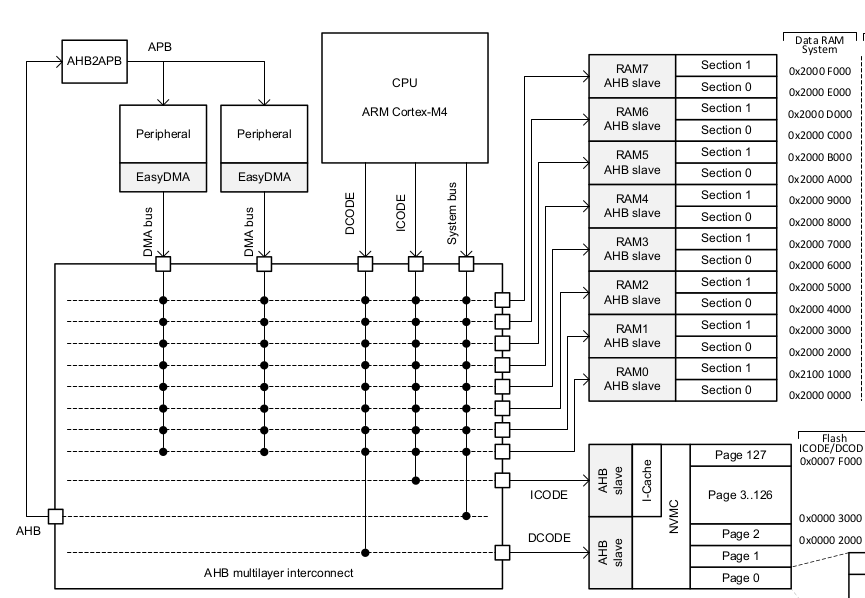
manic glacierBOT
common-hal/_bleio/Adapter.c: In function 'common_hal_bleio_adapter_start_scan':
common-hal/_bleio/Adapter.c:390:17: error: comparing floating point with == or != is unsafe [-Werror=float-equal]
     if (timeout == 0.0f) {
Tried it but the compiler complained.
common-hal/_bleio/Adapter.c: At top level:
./common-hal/_bleio/__init__.h:42:16: error: array 'base_error_messages' assumed to have one element [-Werror]
 const mp_obj_t base_error_messages[];
Changed to triple. It's all a rough guess. It isn't connection related because this is the attribute table which holds service, characteristic and descriptor info I believe. When it's too small creating a Service or similar will fail with NOMEM.
There must always be an empty connection because the SD has the same connection limit. If it calls us, there must be one free.
Comment added.
We should always have a connection which matches the conn_handle from the SD because we track as many as it supports.
Thanks for the fast review @dhalbert. Please take another look. I'll be on a plane all Wednesday but will try to take a peek Thursday.
pearl notch
Hi all. I’ve missed you. Tomorrow in class at the junior high we’ll do servo motor programming in CircuitPython. https://davebsoft.com/programming-for-kids/classes/cpx/#20191023
Dave Briccetti writes software for clients, and teaches programming to kids.
manic glacierBOT
This is what the reset_port function looks like after changes:
void reset_port(void) {
#if CIRCUITPY_ANALOGIO
    analogin_reset();
#endif
#if CIRCUITPY_PULSEIO
    pulseout_reset();
    pwmout_reset();
#endif
#if CIRCUITPY_BUSIO
    busio_uart_reset();
#endif

    reset_all_pins();
}
analogin_reset, pulseout_reset, pwmout_reset and reset_all_pins functions were here before. In this PR I only add busio_uart_reset because only that was missing.
@dhalbe...
solar whale
@prime flower @crimson ferry I am unable to flash the 1.5.0 nina-fw to my pyportal using the "passthrough" --```jerryneedell@Ubuntu-Macmini:~$ ~/.local/bin/esptool.py --port /dev/ttyACM0 --before no_reset --baud 115200 write_flash 0 ~/Downloads/NINA_W102-1.5.0.bin
esptool.py v2.8
Serial port /dev/ttyACM0
Connecting.................._
Detecting chip type... ESP32
Chip is ESP32D0WDQ6 (revision 1)
Features: WiFi, BT, Dual Core, 240MHz, VRef calibration in efuse, Coding Scheme None
Crystal is 40MHz
MAC: c4:4f:33:0d:5b:d1
Uploading stub...
Running stub...
Stub running...
Configuring flash size...
Auto-detected Flash size: 4MB
Compressed 1154048 bytes to 628454...
Writing at 0x00010000... (12 %)
A fatal error occurred: Timed out waiting for packet header
I don't have the sources to try loading the separate pieces as has worked in the past https://github.com/adafruit/nina-fw/issues/6
GitHub
See comments in this PR. adafruit/Adafruit_CircuitPython_ESP32SPI#45 (comment)
I can flash it to an ESP32 Huzzah Feather -- possible the issue is with the passthrough
@sly falcon see above if you are trying on a PyPortal
solar whale
1.5.0 works fine for my basic tests on feather_m4_express with esp32 huzzah feather ....
solar whale
@prime flower @crimson ferry is 1.5.0 just the current master with pr 14? I can build taht loaclly and see if I can load it piecewise with th passthrough as I have in the past
@prime flower @crimson ferry @sly falcon very odd -- I built the nina-fw 1.5.0 (added pr14) - and my .bin loads to the pyportal fine via the passthrough. but the posted .bin fails as above....binaries are the same size.
rotund basin
Good Morning Adafruit 🙂 I let this code `import time
import board
import busio
print("UART test.")
uart = busio.UART(board.TX, board.RX, baudrate=9600)
uart_three = busio.UART(board.D10, board.D12, baudrate=9600)
uart_two = busio.UART(board.SDA, board.SCL, baudrate=9600)
while uart_two is None:
uart_two = busio.UART(board.SDA, board.SCL, baudrate=9600)
count = 0
while True:
#uart_two.write(bytes([count]))
data = uart_two.readline()
print(data)
data_a = uart.readline()
print(data_a)
data_b = uart_three.readline()
print(data_a)
count += 1
time.sleep(1) and woke up to this error: None
None
Traceback (most recent call last):
File "<stdin>", line 1, in <module>
File "cater.py", line 17, in <module>
MemoryError: memory allocation failed, allocating 3856 bytes
`
What causes this error and how do I prevent this in the future?
craggy galleon
@slender iron - next week is perfect! Boards went through production today.
solar whale
@rotund basin you can monitor the memory ```import gc
print(gc.mem_free())
print the free memory before each read
also you can try freeing memory with gc.collect() -- try printing memory and freeing memory with each loop
rotund basin
thanks @solar whale will do!
solar whale
not sure why it would run out like that...
were the reads before the two Nones normal
rotund basin
yes two of them have no data
I am watching the gc.mem_free() jusr decrease ....
do we have to enable gc ?
rotund basin
adding gc.collect before the sleep statement seems to work.
so i suppose gc is not enabled by default ?
solar whale
it is, but it may not be collecting fast often enough for this case
rotund basin
perfect, thank you kindly @solar whale \
solar whale
this is an adalogger? not much memory to spare ....
rotund basin
yes it
yes it's an adalogger, just pushing testing to extremes to make code more robust.
I have an SD card I use 🙂
solar whale
@rotund basin the issue may be a symptom of other issues so be careful.
rotund basin
yes, i had to power cycle the chip after that error.
solar whale
not sure how big a buffer the uart needs -- and how it allocate it on each read -- if you get a bad read - there could seem to be a lot of data....
for robustness, you cold use try/except and catch the error - then do a gc.collect() or resstart or whatever
but gc.collect() may be too late after the memory allocation error ...
rotund basin
understood, I will ensure I use gc.collect often
solar whale
good luck!
prime flower
@solar whale Odd, I was able to passthru to the pyportal OK but I built from my binary
Try decreasing your baud rate?
solar whale
I'll try that in a bit ... puzzling -- see my note in the PR -- only obvious diff is a slight difference in the compression.
prime flower
Could be an odd artifact from compression/discord, but I've loaded .uf2s from discord just fine
crimson ferry
I was just able to update PyPortal to the 1.5.0 from Discord using the passthru .UF2, with no issue. Up and running.
solar whale
@crimson ferry what OS are you using to upload - I am using linux (Ubuntu 18.04)
crimson ferry
macOS 10.15 (Catalina) and esptool.py 2.6
solar whale
I'll try that
crimson ferry
I'll load it up again like 10 times and see what the success rate is
It's odd to me that the binaries should differ, but I compared mine to @prime flower and they differ by 1024, and also in content. There's a good bit of readaable text in the binary, including (variable length) build paths. I wonder if there's a way to guarantee the build process uses only the necessary components and matching builds can be achieved.
prime flower
. I wonder if there's a way to guarantee the build process uses only the necessary components and matching builds can be achieved.
that'd be thru the sdkconfig file
crimson ferry
I suppose Travis is the answer to that?
prime flower
@crimson ferry I didnt pull in the updated commandhandler, I was building off an outdated PR
solar whale
Ah -- it is working OK on my MAC -- at least it is past 12%
crimson ferry
The 2nd time in a row I tried, I had to reload the passthrough onto PyPortal, it wouldn't just connect and write again.
prime flower
looks like it's 1154048 bytes again, which is larger than yours...
Which Passthru are you using?
crimson ferry
what's different in that new build?
prime flower
It's based off your latest commits, prv. one I didnt pull latest