#circuitpython-dev
1 messages · Page 243 of 1
 manic glacierBOT
 manic glacierBOT

Ya, I'd prefer it in shared-module so that it is consistent with everything else. How did you measure the space difference? I'd expect it to be inlined and generate the same result.
Ah, I thought you already have a separate struct for gamepad_shift_obj. I'd recommend adding a separate one. It will take less memory than direct gamepad because it holds fewer pins.
manic glacierBOT
Thanks @DTV96Calibre! Let me know if the original issue happens again. I save directly to the disk as well but usually have the file saved in my editor while I'm working on it.
manic glacierBOT

Hey Dan, thanks for the patch, I'll check this out this weekend.
I've got to get into the habit of writing an automated test for these things so I don't keep stuffing up last minute changes!
Cheers, Nick

I think I understand now. You mean the singleton can be any python object, so I can store either one. Thanks.
I looked at the free flash displayed at the end of compilation, but this wasn't a scientific test, and there were several changes at once, so it's possible that particular one indeed didn't make any difference. I will reorganize it all, since I need separate files for the second class anyways.
By the way, is there a way to tell the compiler to not inline a particular function? For example, the validate_pin is rather short, so it would be inlined multiple times, but we don't particularly care about the speed of initialization, that is only done once anyways, and it would be better to save that space for cases when we do need the speed...
manic glacierBOT
This way boards with smaller screens can use smaller fonts
 lone sandalBOT
 manic glacierBOT
manic glacierBOT
manic glacierBOT

@tannewt I will try and recreate in S3, I can reproduce it pretty reliably, so will let you know.
Does the board crash after the traceback? what is the code.py you are using?
I don't believe so, it just does the flashing light thing where it shows you the line number where the issue is. Which is line 1 of "<stdin>" apparently. And it was a few different code.py files as it has happened about 5 times, just as soon as I encountered any kind of syntax exception, like mis-spelling a function name this happens and I have to reflash.
 meager fog
@raven canopy heya i have osme requests for adabot if you think you can add em
manic glacierBOT

You can __attribute__ ((noinline)) to the function declaration. I think there may be some cases where it ignores the advice, but you could try it with and without and see if you see a code difference. But in general we haven't tried to second-guess the compiler on inlining, except to adjust -finline-limit. I think -Os may make the decision in a relatively sophisticated way.
 upbeat plover
wow, blinka working pretty good, just tested FRAM on raspberry pi zero wireless, very pleased
manic glacierBOT
You are right, in the long run it will actually be probably detrimental to mess with the algorithm.
 idle owl
@meager fog Adabot can do anything 😉 File an issue on the adabot repo if you haven't already. That's the best way to track them.
idle owl
@upbeat plover You tested FRAM on RPi? Which chip?
idle owl
I remember thinking we tested it and it didn't work right. That's why the guide doesn't have RPi wiring diagrams in it.
I don't remember specifically what didn't work though.
upbeat plover
ill fully test it again right now
idle owl
Thanks!
manic glacierBOT
upbeat plover
@idle owl fully working for me
idle owl
Huh.
upbeat plover
import board
import time
import busio
import adafruit_fram

print("Hello blinka!")

# Create library object using our Bus I2C port
i2c = busio.I2C(board.SCL, board.SDA)
fram = adafruit_fram.FRAM_I2C(i2c)
print("I2C loaded!")

print(fram[5622:5660])

fram[0] = 1

print(fram[0])

# Try to create an I2C device
i2c = busio.I2C(board.SCL, board.SDA)
print("I2C ok!")

# Try to create an SPI device
spi = busio.SPI(board.SCLK, board.MOSI, board.MISO)
print("SPI ok!")

print("Finished Loading!")

while True:
    pass
my test
read the data i had stored at 5622
idle owl
I have made a note to revisit it at some point and update the guide page to reflect RPi usage. I think I have the wiring diagrams already done so that's handy 😃
Thank you!
upbeat plover
im testing minitft joypad right now, can only test I2C currently
backlight and buttons
 slender iron
<@&356864093652516868> I'm going to do a release today. Should it be 🅰 beta.7 or 🅱 rc.0?
 umbral dagger
@slender iron What's the confidence level on it being complete and correct for a 4.0?
slender iron
possible but unlikely
umbral dagger
then A
To me an RC says "barring something totally unseen this is it", whereas a beta says "this is close but needs more testing/stressing".
slender iron
ya, that's true
there are a number of changes I'd like into the stable release so it makes sense to do a beta
manic glacierBOT
I'm going to finish this so it gets into beta.7.
 raven canopy
@meager fog sorry, been in an all-morning-meeting. Like kattni mentioned, putting in an issue may work best. adabot can do just about anything she puts her mind to... 
slender iron
@stuck elbow are you around tonight or should I fix up your ugame10 PR?
 tulip sleet
@slender iron want to approve https://github.com/adafruit/circuitpython/pull/1779 instead of waiting for Nick?
i did test it
slender iron
I was going to wait since he said he'd get to it this weekend
tulip sleet
then definitely beta
 tulip sleet
oh wow Scott, great! 30 mins too
slender iron
ya, 10 min presentation, 20 min for questions
upbeat plover
seesaw stuff seems to be working on blinka raspberry pi zero wireless, got featherwing minitft joypad buttons and backlight to work all fine. Need some blinka displayio >.<
manic glacierBOT
Closing this as a bug. If you'd like a new feature, feel free to open the request as a new issue.
 gilded cradle
Aww man @slender iron, I’m gonna miss your presentation since I won’t get in until the next day. Hopefully it will be recorded.
slender iron
I'm not sure it is because it's a smaller closed event
gilded cradle
Oh, that’s unfortunate. 🙁
tulip sleet
@gilded cradle A. Jesse Jiryu Davis will be covering the event and will post a detailed write up on the official blog of The PSF shortly after the conference so you won’t be missing out.
it says
gilded cradle
Oh, that’s good at least.
tulip sleet
we can get Scott to brief us 😃
gilded cradle
True. I like that idea. 😃
 prime flower
@solar whale Good news - I finished up/PR'd the Hue bridge controller code this afternoon. Even has auto-discovery and a few nice features (RGB->HSB, and then conversion to match datatypes for the API) that some libraries I've seen lack.
 stuck elbow
@slender iron I will work some more today
@slender iron I'm fixing the gamepad PR right now
 solar whale
@prime flower Cool! -- looking at the PR now -- will give it a try.
slender iron
kk
stuck elbow
@slender iron by the way, I just had a crash while copying a file over USB while the Stage library was using the display in a tight loop
@slender iron not sure if I should report it, since it was on µGame
tulip sleet
@timber mango if it is on the latest master, then it's still interesting
stuck elbow
ok, I will report it then
it was a 200kB wav file, and it copied fine if I ctrl+c the program first
but when the program is running, it just hangs
tulip sleet
ugame10 uses a qspi flash chip?
stuck elbow
no, regular spi
tulip sleet
but still external?
stuck elbow
yes
you can probably reproduce it by doing spi writes in a tight loop and then trying to copy a bigger file
I will check that today
tulip sleet
I can use a Feather M0 and a TFT FeatherWing or something like that
stuck elbow
I think you don't need the display actually connected
spi peripheral doesn't care
just write whatever to the spi very fast
manic glacierBOT
You shouldn't need to add these anymore. We have a newer mechanic called never_reset that keeps them from resetting.
solar whale
@prime flower having trouble getting a username -- do I start the hue_simpletest then go press the button on my bridge?
@prime flower Woot! got -it - its working!
prime flower
@solar whale YAY!
@solar whale I'd appreciate any comments on that PR. I think it's at a good point to merge, but you might discover something amiss
solar whale
Sure -- I need to figure out which bulb is which - I have several -- I added a print of the get_lights() and am sorting through it. Need to control the correct one.
prime flower
yea - the bridge responds with a ~lot~ of data about what it has
manic glacierBOT
solar whale
Ah - now I see it! Boring white bulb! I need to hook up a color bulb. I also have an led strip...
manic glacierBOT
It actually works pretty much the same, I was just able to remove a lot of Python code for the display initialization and handling.
solar whale
@prime flower are you creating a guide? The steps for getting the username were not immediately obvious 😉
prime flower
@solar whale of course 😃 it'll be similar to the LIFX PyPortal one, just for Philips Hue
Bridge setup is fairly tricky, I've tried to streamline it the past day and I think it's at a decent point when provided with instructions
solar whale
Yeah -- took me a few tries to figure out what was needed, but then it worked great. Ive seen enough to approve the PR. will keep playing with it...
prime flower
same 😃
idle owl
@prime flower Hey. For PyPI setup, let's use the same process as RTD - create an issue on the repo and tag me on it. Better tracking and visibility.
solar whale
Cool -- got a Hue Color Lamp working -- Nice Job @prime flower
prime flower
😄 Thank you!
The RGB to HSV code took me a while this morning but I really don't think anyone wants to convert rgb to hsv manually, and then convert the hsv values to uint_8 values
solar whale
Thanks for doing that!
prime flower
Writing the guide RN, did you hit any weirdness with setup that I should include?
solar whale
not really - just was not obvious at first when to press the button on the bridge. or even that you had the magic auto config in there and all I had to do was run it! I first tried entering my hue account username....and go my ip address from the hue app. -- it's so much easier to "let you do it"
prime flower
Oh - yeah. It waits 120sec for you to go find your link
that number was totally not influenced by the time it took for me to leave my room and sprint to the link a few times 😆
solar whale
doing a print(my_bridge.get_lights()) was also very helpful to me to get the right bulb!
prime flower
Noted! I'll add a section for "Listing your Lights"
meager fog

Are you ready? Really ready? Cause here comes the Adafruit Grand Central featuring the Microchip ATSAMD51. This dev board is so big, it's not named after a Metro train, it's a whole ...
have some skinny grand centrals in stock shortly
gilded cradle
Hi @meager fog, I have a moment if you're not busy.
meager fog
@gilded cradle yah!
so heres the Thing We Gotta Do
now that we have SPITFT for arduino, we need to keep individual drivers from Doing Things to the CS or SPI pins
they should ask SPITFT to perform a 'transaction' or 'command'
but they really should not be messing with the GPIO
gilded cradle
You mean like for the RA8875?
meager fog
not really
more like its just an API abstraction
its not like an optimized hardware thing
gilded cradle
So that way it works kinda like in Circuit Python?
meager fog
more like its dangerous to toggle pins given there might be DMA stuff happening
yeah more like htat
gilded cradle
Ok. Do you know of any drivers that are messing with gpio off the top of your head?
meager fog
all of them
gilded cradle
Ah, gotcha
gilded cradle
Sounds good.
meager fog

GitHub
Adafruit library for the 1.27" and 1.5" color OLEDs in the shop - adafruit/Adafruit-SSD1351-library
it shouldnt do that
gilded cradle
Want me to try and finish the last ra8875 issue first or go to the ssd1351?
gilded cradle
Ok
meager fog
ra8875 is soething youc an do on yr own no biggie
gilded cradle
Yeah
meager fog
so instead of startwrite/spiwrite/endwrite (BAD)
it should call something like SPITFT::sendCommand(commandbyte, databytes, numdatabytes)
and sendcommand will do the CS, SPI stuff
gilded cradle
Oh, I get it. Should the send command be part of the spitft?
gilded cradle
Ok
meager fog
commandbyte is a uint8_t, databytes is a uint8_t *, numdata is uint8_t
gilded cradle
makes sensee
meager fog
maybe start by refactoring this
GitHub
Adafruit library for the 1.27" and 1.5" color OLEDs in the shop - adafruit/Adafruit-SSD1351-library
GitHub
Adafruit library for the 1.27" and 1.5" color OLEDs in the shop - adafruit/Adafruit-SSD1351-library
GitHub
Adafruit library for the 1.27" and 1.5" color OLEDs in the shop - adafruit/Adafruit-SSD1351-library
gilded cradle
Yeah, that looks like a good starting point
meager fog
and FINALLY (hardest) https://github.com/adafruit/Adafruit-SSD1351-library/blob/master/Adafruit_SSD1351.cpp#L225
GitHub
Adafruit library for the 1.27" and 1.5" color OLEDs in the shop - adafruit/Adafruit-SSD1351-library
gilded cradle
Wait, they're all pointing to line 225
gilded cradle
yeah
meager fog
ok so add the funciton here
GitHub
Adafruit GFX graphics core library, this is the 'core' class that all our other graphics libraries derive from - adafruit/Adafruit-GFX-Library
PR it and ill take a look
we'll need to make one with const databytes and one with non-const
gilded cradle
Ok
meager fog
GitHub
Adafruit library for the 1.27" and 1.5" color OLEDs in the shop - adafruit/Adafruit-SSD1351-library
thats the first one to do (invert)
then second do these two setaddrs https://github.com/adafruit/Adafruit-SSD1351-library/blob/master/Adafruit_SSD1351.cpp#L344
GitHub
Adafruit library for the 1.27" and 1.5" color OLEDs in the shop - adafruit/Adafruit-SSD1351-library
then rotate https://github.com/adafruit/Adafruit-SSD1351-library/blob/master/Adafruit_SSD1351.cpp#L285
GitHub
Adafruit library for the 1.27" and 1.5" color OLEDs in the shop - adafruit/Adafruit-SSD1351-library
gilded cradle
Ok, sounds good. I don't have my display with me at the moment, but I can try it out tonight.
meager fog
and finally this one that has consts https://github.com/adafruit/Adafruit-SSD1351-library/blob/master/Adafruit_SSD1351.cpp#L222
GitHub
Adafruit library for the 1.27" and 1.5" color OLEDs in the shop - adafruit/Adafruit-SSD1351-library
np
ill check it tonite
i think it wont be so bad once we do it
Then we'll also de-spiWriteify ImageLoader
we'll do releases, wait a bit
then eventually protect spiWrite and friends
gilded cradle
Yeah, I'll probably model it to be very similar to the CP displayio one, which isn't much different.
meager fog
and they must go thru the sendcommand function
gilded cradle
Yep
meager fog
also if you happen to bump into any displays that are not SPITFT'd already, we can do that
but i think we got em all
gilded cradle
Ok, I think the SSD1331 wasn't because that was a little trickier, but I may be remembering wrong
meager fog
also we may have forgotten it
so let start with this one 😃
then we'll work our way up to ILI9341
gilded cradle
nevermind, I remembered wrong, but it could be improved.
Sounds good.
I think I got all the color displays (except ra8875) displayio'd so most of the issues should be ironed out at this point.
That's why I wanted to use that as a model.
I'll get ssd1351 done and go from there. 😃
Gotta run, but I'll work on it tonight.
gilded cradle
Later
manic glacierBOT

I'm going to finish this so it gets into beta.7.
Thank you for finishing this up!
@maholli No problem! I removed displayio support to get it to build with other translations.
stuck elbow
yay, github down
idle owl
Seems to be working for me.
prime flower
working here
slender iron
@tulip sleet we should switch rgb leds to pixelbuf
that would slim down their python libraries I think
manic glacierBOT
 slender iron
@upbeat plover you closed the pr I was working on. what are you working on?
slender iron
I'll make a pr shortly for it
it took a lot of poking to get all of the builds to fit
not many translations have 48 extra unicode characters 😃
slender iron
🤞 the build passes
 orchid basinBOT

I'm going to get an initial PR for /_data/libraries.json in tonight, hopefully. That will at least start things.
But, as I'm constructing the adabot auto-update-majik part, I have a question. This kind of ties into my lack of knowledge with the plan for automating files.json updates.
@kattni, @tannewt:
Should I plan to utilize adabot's fork for cloning, updating, and then PRing? Or would direct commits be preferred?
The ma...
 tidal kiln
@slender iron anyway to use OnDiskBitmap to load a BMP and somehow specify a transparency channel?
slender iron
not currently
I believe I fixed image load last night though
I can make a pr with it
tidal kiln
ooo. do that. i'll test it!
i gave it a go, but didn't fully understand the packed pixel stuff
slender iron
kk
tidal kiln
cool. thanks. as you can.
tidal kiln
the one in the repo?
lone sandalBOT
 slender iron
@tidal kiln nope a new one
tidal kiln
the 3 in the repo just checked out 😃
slender iron
great! I just linted it so hopefully it still works
tidal kiln
but not with purple flowers 😦
i fetched before your linting - but that all looked cosmetic
tidal kiln
i think so
 exotic pumice
7161038, what a great commit message
"turn off displayio because it is a satellite"
exotic pumice
@slender iron does circuitpython for gameboys work on game boy colour?
slender iron
not yet but I think it's doable
exotic pumice
I just saw a new inventory post from the local used game store with an atomic purple game boy colour
slender iron
I see them on ebay for ~$25 in an unknown state
exotic pumice
I think it's probably like $35-50
in good condition and cleaned etc.
CAD, and no shipping cost
I found an old post of theirs that says $42.50
not bad
slender iron
oh snap, maybe I can do the release. a wild @tulip sleet appeared
tulip sleet
@slender iron says "we should switch rgb leds to pixelbuf" think that's a 4.1 goal? yes, we just came back from dinner, etc.
tulip sleet
We need to figure out a strategy for freezing a library without backward compatibility
or rename the lib, or somsething
slender iron
what's an example?
tulip sleet
if neopixel uses pixelbuf, say, then what about people running 3.x? we need 3.x and 4.x versions of the library
slender iron
I believe there is a python impl of pixelbuf
tulip sleet
ok, depends on how big it is - I have not paid close attention
 brave ledge
working with the latest adabox, which version of pyportal should I be using? CircuitPython 4.0.0-beta.6 is latest but it says it is unstable? should I be using a n earlier version?
tulip sleet
@brave ledge all 4.0.0 versions are unstable until we do a final release; the newer versions are less unstable
brave ledge
OK I'll give it a shot...thanks
tulip sleet
also there have been library changes, so use the latest version to match the latest versions of the example code (you'll need to update what's was shipped).
brave ledge
OK just like in the update page...thanks again
lone sandalBOT
 manic glacierBOT
[adafruit/circuitpython] New tag created: 4\.0\.0\-beta\.7
[adafruit/circuitpython] New tag created: 2\.2\.0rc1

The docs indicate zlib support: https://circuitpython.readthedocs.io/en/latest/docs/library/uzlib.html
However, it doesn't look like it's implemented for the nRF52840. I tried the Feather nRF52840 Express and the PCA10059.
I'm trying to write a CircuitPython Png decoder and this would be very helpful.
 orchid basinBOT

Automated website update for release 4.0.0-beta.7 by AdaBot.
New boards:
- metro_m4_airlift_lite
- bast_pro_mini_m0
- pewpew13
- gemma_m0_pycon2018
- circuitplayground_express_4h
- circuitplayground_express_digikey_pycon2019
- kicksat-sprite
New languages:
- zh_Latn_pinyin
manic glacierBOT
 crimson ferry
I just got the 4.0.0-b7 email. Does it take a while for the downloads to update on circuitpython.org (still showing 4.0.0-b6)?
The assets list on https://github.com/adafruit/circuitpython/releases/tag/4.0.0-beta.7 is of course showing the 4.0.0-b7 versions.
GitHub
CircuitPython - a Python implementation for teaching coding with microcontrollers - adafruit/circuitpython
raven canopy
@crimson ferry as you can see a couple posts above yours, the circuitpython.org updates are through PRs in GitHub. the site won't update until the PR is merged. i'll review it now, so should be a couple minutes...
crimson ferry
Thanks! No biggie, just curious about the process. 😃
orchid basinBOT
manic glacierBOT
 slender iron
thanks @raven canopy I was at dinner
upbeat plover
4.0.0 Beta 7 and 6 displayio are like crazy slower then beta 5 for me
doing a button test on minitft, where it prints text say what buttons are pressed when they are pressed, version 5 has no lag and can keep up with as fast as i can press buttons but version 6 and 7... i have to hold down buttons for longer then a second and it prints the text very slow
using feather m4 express and minitft joypad featherwing
stuck elbow

@upbeat plover you need to set the speed of the spi bus before you create the fourwire bus, otherwise it defaults to some slow default
stuck elbow
@meager fog I don't know if it's just my prototype, because I know the audio has been redesigned, but I can hear the traffic from the SPI bus in the speaker
makes it quite noisy
manic glacierBOT
This requires #1778
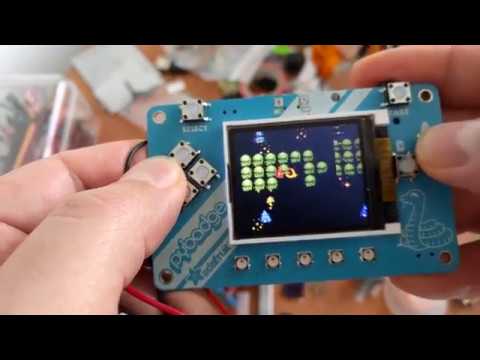
Add a variant of the pybadge board definition, that has the _stage module enabled, and includes frozen stage and ugame modules, for running µGame games.
Since the stage library doesn't allow rotating the screen in software, and uses RGB pixels (and not BGR), I had to modify the MADCTL register in the display initialization, in addition to adding all the required modules.
Now the Chinese translation doesn't fit, I will leave it like this for now.
 stuck elbow
@tulip sleet I wasn't able to reproduce that SPI + copying bug on beta 7
meager fog
@stuck elbow yeha i have improved the AREF filtering some
also we have a buzzer which is not as loud
upbeat plover
@stuck elbow how do i change the SPI speed? i was using the featherwing helper lib, minitft, what would be good speed for feather m4 express?
is there something i can add to that lib? i had to customize it before use anyways cause my CS DC pins are moved on my featherwing
crimson ferry
@upbeat plover Is minitft_featherwing available somewhere? It's not in yesterday's library bundle.
upbeat plover
@crimson ferry i found it here https://github.com/adafruit/Adafruit_CircuitPython_FeatherWing
very new think still under dev
GitHub
CircuitPython classes for Adafruit FeatherWings. Contribute to adafruit/Adafruit_CircuitPython_FeatherWing development by creating an account on GitHub.
solar whale
I think it got added late yesterday -- should in in todays bundle
crimson ferry
Cool, thanks!
solar whale
GitHub
CircuitPython classes for Adafruit FeatherWings. Contribute to adafruit/Adafruit_CircuitPython_FeatherWing development by creating an account on GitHub.
upbeat plover
@solar whale its not in the 4/12/19, you mean its gana be updated again today?
solar whale
the Bundle is released every day if anything has been updated/added
you can see the featherwing update was few hours after yesterdays release
that was from the #adafruit-github-feed channel -- it's a good resource for keeping up to date on releases
upbeat plover
@solar whale do you know how to change the spi speed for displayio bus? deshipu was saying thats the reason beta 7 and 6 are so much slower for me then beta 5, like super slow
solar whale
@upbeat plover take a look at his last comment in this issue https://github.com/adafruit/circuitpython/issues/1771
GitHub
I have been testing a "slideshow" using a feather_m4_express and an feather_nrf52840 wiht a TFT featherewing (ILI9341). It runs fine on the feather_m4_express but it does not work on the ...
nevermind -- here he is!
stuck elbow
@upbeat plover spi.configure(baudrate=24_000_000)
 river quest
@stuck elbow the games you just posted here (vids) are great
the little ladyada one with sparky, omg
stuck elbow
@timber mango you got them on the µGames I sent you last year
solar whale
spi.configure(baudrate=12000000)
display_bus = displayio.FourWire(spi, command=board.D10, chip_select=board.D9)```those too 😃
solar whale
@stuck elbow is the above correct? added () to bard.SPI call
stuck elbow
@solar whale I think you need a lock too
stuck elbow
@solar whale basically the FourWire uses whatever frequency was set when it was created
but I see this is not intuitive
river quest
@slender iron over the weekend i'm gonna do a bunch of things on /downloads for .org the new boards are there, some have photos and text, etc. i'll make the md files for them, etc. and have limor review all the PRs
solar whale
@stuck elbow It's just "different" so takes some time to get used to.
stuck elbow
we should probably update all the display drivers with that
upbeat plover
thanks guys
i put it in the minitft featherwing helper lib, should i do pull request?
solar whale
that works much better on the minitft! thanks
@upbeat plover @stuck elbow It's not clear to me where it should be set -- Is the default of 12000000 to ensure compatibility with all boards. If so, then I think the driver should not assume it needs to be changed. I assume we could add a kwarg to set it -- or just document how to set it before calling the driver.
stuck elbow
@solar whale if you set it to higher than the given board supports, the board will just set it to the highest supported value
so it should be set to the highest supported speed of the display, I think
solar whale
sounds good -- perhaps it would be a good "in the weeds" topic for a CP weekly....
@upbeat plover no harm in submitting a PR to generate discussion!
upbeat plover
@solar whale idk what im doing wrong, i lock spi then config the speed, but the display will not startup, code gets stuck on display_bus setup
solar whale
did you unlock after setting the speed?
solar whale
I kept editing one file and copying over a different one -- took awhile to figure out what was going on...
while not spi.try_lock():
    pass
spi.configure(baudrate=24000000)
spi.unlock()
tft_cs = board.D5
tft_dc = board.D6

displayio.release_displays()
display_bus = displayio.FourWire(spi, command=tft_dc, chip_select=tft_cs, reset=board.D9)
I was not using the featherewing diver
upbeat plover
i got the helper lib working fine and good, with 24m speed, ill do PR right now
umbral dagger
@tulip sleet Any update on that ble write (lack of) buffering issue?
gilded cradle
Ok, I just bumped the library version
Looks like removing the old cache fixed the problem though
meager fog
yah
just do that, itll happen whenver there's a new release
we have to delete the cache, it isnt smart enough
gilded cradle
Ah, ok. I didn't even realize I could do that before today. 😃
gilded cradle
Ok
meager fog
you can remove https://github.com/adafruit/Adafruit-GFX-Library/pull/209/files#diff-a647762e91acf5b997515a44f2d831d7R1639

GitHub
I created a non-const and const version as we discussed and also an overloaded one that allows just the command byte for functions like the SSD1351 invert, which I tested.
and just make the other functions default to NULL/0
gilded cradle
Ok
meager fog
and on the const one
GitHub
I created a non-const and const version as we discussed and also an overloaded one that allows just the command byte for functions like the SSD1351 invert, which I tested.
it should do a progmem read (that's AVR'speak for reading from FLASH not RAM)
you'll note to save memory we have the initstrings in flash and we use progmem
now on ARM, its actually not used because ARM has 32 bits so its smart enough to know automatically when data is from flash
but AVR had only 16 bits, so we need a special function
upshot is, make sure you try it on an UNO or 32u4 or somethin
gilded cradle
So we have it pass multiple bytes at a time or something?
meager fog
it already should do that?
gilded cradle
Ok
meager fog
i mean, it does now, it iterates over the # of bytes
piWrite(*dataBytes);
that should be changed to progmem read
(compare with the SSD1351 init code to see)
gilded cradle
Oh, I think I get what you're saying
meager fog
you pass in a pointer, but this time its a FLASH pointer
gilded cradle
yeah, ok
meager fog
compiler will autopick
but it looks good - try it with the SSD1351 - if it works we'll merge both
gilded cradle
Ok, I will.
lone sandalBOT
 raven canopy
@meager fog i'm around if you want to chat adabot
orchid basinBOT
Adding the JSON file for #119.
gilded cradle
@meager fog, The command is working good for most of it. The only issue I'm having is with setAddrWindow because the startWrite/endWrites are called in from the GFX lib. Any suggestions?
crimson ferry
The adafruit-circuitpython-bundle-4.x-mpy-20190413 that just auto-released has the minitft featherwing library, but doesn't seem to have the required adafruit_st7735r library. Is that intended for now? (manual load is all good of course)
gilded cradle
Yeah, I'm aware of that. I need to talk with the others to see what the plan is on that.
upbeat plover
@gilded cradle Im having issue with the minitft lib, i fixed the speed, but now the buttons are not working right
some of them get stuck returning true always
"""
featherM4 & mini TFT joypad featherwing tester
"""
import board
import neopixel
import terminalio
import time
from adafruit_featherwing import minitft_featherwing
from adafruit_display_text import label
import gc

pixel = neopixel.NeoPixel(board.NEOPIXEL, 1)
pixel[0] = (0, 0, 0)
gc.collect()
print(gc.mem_free())

wing = minitft_featherwing.MiniTFTFeatherWing()

def getbuttons():
    print(wing.buttons)  # added just to see what is going on
    buttons = wing.buttons
    if buttons.right:
        RIGHTtext = "RIGHT "
    else:
        RIGHTtext = ""

    if buttons.down:
        DOWNtext = "DOWN "
    else:
        DOWNtext = ""

    if buttons.left:
        LEFTtext = "LEFT "
    else:
        LEFTtext = ""

    if buttons.up:
        UPtext = "UP "
    else:
        UPtext = ""

    if buttons.a:
        Atext = "A "
    else:
        Atext = ""

    if buttons.b:
        Btext = "B "
    else:
        Btext = ""

    if buttons.select:
        SELtext = "SEL "
    else:
        SELtext = " "

    texts = RIGHTtext + DOWNtext + LEFTtext + UPtext + Atext + Btext + SELtext
    return texts

time.sleep(0.5)

while True:
    text_area = label.Label(terminalio.FONT, text=getbuttons())
    text_area.x = 45
    text_area.y = 38
    wing.display.show(text_area)
is it the code im using?
sometimes it works okay while in REPL but when plugged into a power source not a PC buttons are always true
gilded cradle
The buttons use seesaw, which is i2c. I'll have to try while not connected to a computer to see what's happening though. Are you using Beta 7? I thought I saw something, but want to check for sure.
upbeat plover
let me check just to make sure it is, but i think so
Adafruit CircuitPython 4.0.0-beta.7 on 2019-04-13; Adafruit Feather M4 Express with samd51j19
gilded cradle
Ok, I just plugged my into non computer power and it's doing like you described. Can you file an issue for that?
upbeat plover
yes
gilded cradle
Thanks
I'm wondering if it's maybe a seesaw issue with the internal pullups, but I can look into it.
upbeat plover
i think @stuck elbow was say something about doing it differently with a was press kind of function instead of grab current state
stuck elbow
@upbeat plover that was for the PyBadge board
with seesaw we don't really have much choice, unless seesaw itself got extended to add button press buffering
solar whale
@stuck elbow when using try_lock() for SPI, is it safe to just wait for True or it it good practice to implement a timeout be to avoid a hang? That is, will it ever just hang?
stuck elbow
personally I don't see a point of locks in a single-thread environment with all-blocking i/o
but it makes sense when displayio is doing refreshes in the background
in theory any spi transfer should finish sooner or later, but it could happen that something goes wrong due to a bug and it doesn't get unlocked
but then again, I don't think you should write your python code expecting bugs in the python interpreter or libraries
so I think it's fine to just wait with a while
solar whale
ok -- seems to be what I have seen in other places. I'm used to "fault tolerant" code and have been disciplined to always use timeouts on loops, but I think it is overkill here.
stuck elbow
I suppose it depends on what the code is for
 wraith tiger
A wild OSH Park order has appeared (not my design).
When populated, this will be a USB passthrough breakout/sniffing enabler.
This will serve my "logic analyze all the things!" goal.
And allow analyzing the usb traffic from my DMM.
 meager fog
@gilded cradle ok im back from getting socks 🐾
if you want to look at the command/SSD1351 stuff now
gilded cradle
Ok
meager fog
did you get invert() switched over and workin'
gilded cradle
Yeah, I got 3 out of 4 successfully done.
meager fog
ok so where ya at now
gilded cradle
I was just running into an issue with setAddrWindow where startWrite and endWrite are called from GFX
meager fog
oki
lets loooook
k so you got the init code, invert and rotate code all on sendcommand()?
gilded cradle
yes
gilded cradle
I did the code for the SetAddrWindow, having startWrite and endwrite both inside and outside the functions causes problems.
yeah
gilded cradle
I was thinking skip the setaddrwindow code for the moment since that's called in the gfx library and then revisit it later to strip out the start/end in gfx.
ok
meager fog
yeah
make setAddrWindow protected
thats the right way to do it
lets commit and if you're up for it we could sweep thru the issues/PRs
most are probably stale
gilded cradle
Then that PR should be good
gilded cradle
Sounds good
gilded cradle
Ok
idle owl
Socks are great. :socks:
idle owl
same.
meager fog
@gilded cradle ok make lil changes to PR, ESP8266 uses pin #0 a lot
then ill merge, you can bump
gilded cradle
You mean for the _cs line or something else?
gilded cradle
Ok, we have a lot of those in GFX, but I can remove that one.
meager fog
lets just do this one for now
gilded cradle
ok
gilded cradle
oh, ok. Just a sec
manic glacierBOT

It would be useful to have a hid ready check similar to how .serial_avaliable is exposed. I was exploiting a bug in that function using it as a ready check in a beta, using it as a feature, and was informed in #1769 that this was actually a bug not a feature. KMK (Keyboard software for circuitpython) is using this to detect a master slave architecture in split keyboards to see if it is the uart master or slave simply checking if it has HID, and is therefor the one plugged in, now powered wi...
gilded cradle
Ok, looks like it passed
river quest
@slender iron one fuzzy data point, my bonkers hypercard like pyportal project seems to run faster with beta 7, so that's rad
 scarlet maple
@meager fog you'd mentioned setting debug=2 in https://github.com/mikerenfro/iot-office-door-sign/issues/1#issuecomment-482214390 -- doesn't appear to be any different than debug=True. Regardless, have it set and back to stress testing.

GitHub
At times, the PyPortal will crash with part of a background displayed. Currently stress-testing the existing code with more frequent wget and fetch calls to see what exceptions are thrown and how b...
river quest
so far everything complex with wifi and other things that have pushed what pyportal can do, all work too
gilded cradle
😃 yay
gilded cradle
?
meager fog
i feel very silly
it should be if(_cs >= 0)
i must have been much more tired than i thought
meager fog
-.-
gilded cradle
Pushed
meager fog
squashed n mergdd!
meager fog
nice
gilded cradle
bumped
meager fog
@gilded cradle ok meanwhile you can do the PR(s) for SSD1351
you'll have to wait till the version gets distributed (takes up to an hr)
before travis will work
but you can do other code while-u-wait
gilded cradle
Ok. Should I leave setAddrWindow as it was?
gilded cradle
Oh right. Ok, will do
gilded cradle
Yeah, I just need to protect it, then I can PR it.
meager fog
okie
orchid basinBOT

 meager fog
@gilded cradle oki wanna do other stuff in the meantime?
gilded cradle
sure
meager fog
ok lets start from olest
GitHub
There's an issue with PROGMEM in glcdfont.c and Adafruit_SSD1351.cpp (Adafruit_GFX, does it right) as well as the bitbanging SPI implementation: C:\Arduino\libraries\Adafruit_SSD1351\Adafruit_S...
ok can you just try compiling it for due
dont worry about running it
orchid basinBOT
gilded cradle
It seems to compile for Due just fine.
I happen to already have a due and could try hooking it up and running it on that.
gilded cradle
Ok
orchid basinBOT
meager fog
GitHub
I want to use this library, but I don't know wether this works with an arduino mega or standalone atmega2560 mcu (internal 8MHz) or standalone atmega644?
gilded cradle
Ok
meager fog
do mind tring the SSD1351 with ESP8266 feather
its a good test because ESP is so weirdo
gilded cradle
yeah, give me a bit, I was redoing the pins on mine and need to solder some on real quick
meager fog
np, also please check https://github.com/adafruit/Adafruit-SSD1351-library/issues/5
GitHub
Header files is missing #include guard
gilded cradle
ok
meager fog
also do you have a Teensy 3.6? or 3.2?
orchid basinBOT
meager fog
yeah try it with a 3.6
because they're so fast its actually messed up some displays, that way we know where to put in a delay
gilded cradle
Ok. With the 1351?
meager fog
yah
gilded cradle
ok
meager fog
lets do all the 1351 then we'll do the 1331
gilded cradle
Ok
meager fog
do you hvae one of those? tiny oleds
meager fog
GitHub
This changes was tested on a Teensy 3.2 running at 96 MHz and using the native SPI interface. That speed usually result in garbage on the OLED screen. Using a SPI transaction to limit the speed of ...
yeah
gilded cradle
It's compiling for esp8266, but nothing displaying. I gotta play with it a bit.
meager fog
np can try older version of course
gilded cradle
yeah, just to verify if it was my change that broke it or not
Yeah, it doesn't seem to work with either version. I even double checked the wiring.
Did you want me to try it with PR #7 @meager fog ?
meager fog
@gilded cradle thats kinda odd
you cant merge that PR - the code isnt even there anymore
are you using a feather?
gilded cradle
Yeah, a feather huzzah
meager fog
what pins are you using for DC/CS
gilded cradle
12 and 13 according to the numbers on the board
gilded cradle
ok
meager fog
ez fix 😃
upbeat plover
woot woot think i found fix for minitft
gilded cradle
Cool @upbeat plover, do you want to update and PR?
upbeat plover
yeah im testing make sure real fast
meager fog
@gilded cradle hmm can you post a pic?
upbeat plover
i just change order of the init stuff
gilded cradle
Yeah, just a moment
meager fog
there's no real reason it wont work with the ESP
idont have an ssd1351 on me igh tnow but i can get one late
upbeat plover
yeah looks like i can close issue now? did you want to test first @gilded cradle
gilded cradle
I wasn't sure if you included that in your SPI speed PR.
upbeat plover
yeah i just did, and fixed the errors i had with it.... it looks good for the bundle now
meager fog
@gilded cradle hmm wanna try adding a delay() or two in the init code?
gilded cradle
Yeah, that's what I'm thinking @meager fog
gilded cradle
That was attempting to use hardware SPI. I can try the software SPI and see if that works.
meager fog
@gilded cradle worth a shot
gilded cradle
😃
Ok, software spi is working. I'll try taking out the delays now and update to my changes.
meager fog
@gilded cradle hmm software SPI works but not hardwre SPI?
maybe the speed is too fast?
gilded cradle
Perhaps, but I put delays next to all SPIwrite and writecommand calls
meager fog
i meant spi clock speed
gilded cradle
Oh, yeah. I can try adjusting that.
scarlet maple
@untold arch getting more frequent truncated downloads from the image conversion service in the last few minutes if you have anything to look at on your end.
meager fog
nope
don't know why its happening, if you discover anything please let us know, we haven't been able to debug where its failing
scarlet maple
I know it's not my workplace Wifi, as I've been testing this at home for the last few hours. Would any headers or other responses be helpful at all?
scarlet maple
Can give you some whens from my timestamps, but that's about all. Seeing if there's anything obvious in the responses.
meager fog
yah let us know!
scarlet maple
From my end, Sun, 14 Apr 2019 00:08:38 GMT succeeded (x-request-id: 5a6ff777-8645-482e-9ef0-30543e4cc0e9), and both Sun, 14 Apr 2019 00:06:33 GMT (x-request-id: 9c450138-b57b-4800-abfa-27be3e8712bb) and Sun, 14 Apr 2019 00:10:51 GMT (x-request-id: 02da7365-1022-416b-8877-ef2248fc6b5d) failed. AIO username is mwrenfro. Might help finding the relevant access logs or others.
meager fog
ok! not sure if we even keep logs but we'll try looking again some time this week
river quest
CircuitPython provides an approachable and logical means of conducting science with hardware. Paired with low-cost hardware shown to work in space, we can en...
scarlet maple
I've recorded the request IDs in my original ticket. May rearrange my code.py to direct download a BMP from my server to see if it's more consistent. Wouldn't be a live conversion like AIO.
 🚀
idle owl
🚀
idle owl
A mate of mine gave it consideration but the math required couldn't be handled along with the overhead of CircuitPython, unfortunately.
gilded cradle
Yeah, I was thinking an RPi with Blinka
river quest
maybe a blinka drill / boring' device too
idle owl
He's beginning with a Pocket Beagle - which has Blinka support. So I bet you're right.
river quest
yah, lots'o SBCs will support blinka, or do now, i am not sure how we'll list all those yet
idle owl
We'll get there
river quest
yah, still thinkin how it can work out ... /downloads is rockin' (working on adding a few more boards now)
idle owl
/libraries is going to be started next week it looks like. I'm excited to get started with that.
river quest
yah, i have some ideas/questions on that too, we can chatter on monday...
idle owl
Ok right on
river quest
the learn system does a neat trick with getting "part" of a downloads repo in a zip
that might be something we can do there too
there are times i just want to get some things in a repo, but not all
idle owl
right
river quest
however, it can get really messy/complicated fast
so anyhoo, we can chat laterz and see
manic glacierBOT
 meager fog
@gilded cradle any luck?
gilded cradle
No, not yet. I was helping someone on #help-with-circuitpython , but it looks like hexthat is taking over
I set the SPI down to 4 MHz, but didn't have any luck. I'm going to try adding delays back in too
meager fog
hrm
yah its something lik that
GitHub
This changes was tested on a Teensy 3.2 running at 96 MHz and using the native SPI interface. That speed usually result in garbage on the OLED screen. Using a SPI transaction to limit the speed of ...
gilded cradle
Ok, I can try putting in a delay there too
river quest
OK! there are over 53+ boards that support CircuitPython! https://circuitpython.org/downloads
CircuitPython Organization
meager fog
@gilded cradle heya any luck?
gilded cradle
I'm trying a nodemcu to see if that makes any difference
Yeah, that didn't help I'm trying the Feather Huzzah again. Software SPI works fine with changes, but I'm, still not getting hardware spi to work.
river quest
manic glacierBOT
 stuck elbow
https://education.lego.com
manic glacierBOT
 manic glacierBOT
I'm back after few month away. I'm working on an updated translation and already added correction and suggestion from @odeevee (thank you!)

Bonjour
Let me know if you need help
river quest
draft is up folks ! if there anything, please @ me and/or do a PR, we'll add it! https://github.com/adafruit/circuitpython-weekly-newsletter/blob/gh-pages/_drafts/2910-04-16-draft.md
GitHub
Community newsletter for python on microcontrollers - adafruit/circuitpython-weekly-newsletter
slender iron
<@&356864093652516868> The meeting notes doc for tomorrow is here: <old link>
stuck elbow
@slender iron isn't that the old one?
meager fog
@gilded cradle any success? i could pick up an oled
slender iron
<@&356864093652516868> For real: https://docs.google.com/document/d/1uHQZyOF26oH5slXt1ZVpj_mWtyy2l2beApzGIE4oUxs/edit?usp=sharing

Google Docs
CircuitPython Weekly April 15th, 2019 Welcome to the meeting notes! Feel free to add your notes for Hug Reports and Status Updates early. We do it as a round robin sorted by username. If you can’t make the meeting, then add them anyway with a “(missing meeting)” after y...
gilded cradle
No luck @meager fog. I tried it on the Due and it was failing there as well, so I was trying it from that angle.
scarlet maple
@meager fog I assume the backend for adafruit.io isn't open-sourced and posted somewhere on Github? If so, no big deal. I've switched where I'm storing my images for my PyPortal office door sign, and have recently gotten short downloads and now a total hang. So it doesn't appear to be related to my workplace's web servers, Internet connection, or security hardware, at least. May test converting the images myself and using the wget and set_background methods directly.
gilded cradle
So go ahead and pick up an OLED and see if maybe you can figure it out. I'm still suspecting that it needs delays since it doesn't work on either of those boards and I suspect it also doesn't work on an M4 or ESP32.
I'll keep working on it on and off throughout the day to see if I can get it working too.
meager fog
@gilded cradle ok back !
@scarlet maple it is not, its a massssive ruby application.
mel, i grabbed one of each
gilded cradle
Ok, cool
gilded cradle
Ok, 😃
meager fog
ok its beeing weird on a feather m0 too
gilded cradle
Like it's not displaying?
meager fog
no its displaying but weirdless
gilded cradle
Ok, I'm going to try plugging one in
gilded cradle
Oh, ok. Mine's not showing up in ports on my mac, so I probably need some kind of driver.
meager fog
for ESP8266? yeah you need the Silabs driver
gilded cradle
No for feather m0
esp8266 shows up fine
I think my M0 is just behaving weird is all
Oh, now it's behaving
 obsidian dome
At boot time CircuitPython writes the version of CircuitPython, the date, and the board name into /boot_out.txt. Is this information available from a python call, or do I need to open the file /boot_out.txt and parse the information?
gilded cradle
I think I had put wrong version of CP on my M0 is all.
obsidian dome
@meager fog Thanks!!!
gilded cradle
Hitting reset a bunch got it alive
gilded cradle
Ok, that's good
meager fog
ok i think yeah its casting to the wrong initializer
gilded cradle
Ok, so the init code is bad or something?
gilded cradle
Oh
gilded cradle
Ok, thanks for getting that
gilded cradle
No problem
meager fog
ok comited
try it, then rebase in your changes (or do em by hand)
once you get it working with the new changes - plz test with various boards
may want to set up multiple breadboards so you can plug n play
i think its wise to test with an AVR (328p or 32u4), ESP32 and ESP8266, an M0 or M4 and a teensy 3.6
gilded cradle
Ok. I’ll be a little bit and then I can do that.
obsidian dome
Having odd problem with audio on a Hallowing using 4.0Beta7. Playing sound gives about 1/2 second buzz before the sound plays... but occasionally it doesn't. Happens on either USB power or battery. Same code works fine on a CPX running 4.0Beta7. Is there something about Hallowing audio that I should handle differently (other than the lack of a SPEAKER_ENABLE)?
stuck elbow
@obsidian dome I don't suppose you have an osciloscope you could connect to it?
obsidian dome
If only.
It sounds like something (M0 or PAM) is repeating the last tiny bit of the previous buffer. The tone is not reliably the same.
stuck elbow
the pam is just a simple amplifier, it has no memory
let me try on mine
@obsidian dome is it only playing, or also doing screen updates?
does it go away if you do displayio.release_displays()?
obsidian dome
Let me check.
Not clear that has an effect. I am now getting less frequent problems. Not clear if this is the source of the change.
obsidian dome
I can now confirm it is related to displayio
@stuck elbow Any thoughts on what that means? Do I need to turn off the display to use audio on the Hallowing?
stuck elbow
@obsidian dome I think the SPI transfers for the display are somehow interfering with the audio playback
I reported it here: https://github.com/adafruit/circuitpython/issues/1762
GitHub
I tried to make a game that would have both music and graphics. I decided to make a simple Tetris game for the Hallowing. The code is here: https://github.com/deshipu/hallowing-tetris Unfortunately...
obsidian dome
I have a thought. The Hallowing now shows the "console" on the display. This means when i print('playing') it tries to update the display. Interesting, if I don't do any "print('playing')" the problem doesn't seem to occur.
Anyone know how to turn off the "console" effect on the Hallowing display?
stuck elbow
displayio.release_displays()
obsidian dome
That turns the display completely off. If I could "schedule" display updates for when audio isn't playing, I could show information without affecting sound.
Right now, I want to just simply disable having console output go to the display.
Hmmm. Now i see the paragraph on release_displays() at https://circuitpython.readthedocs.io/en/latest/shared-bindings/displayio/__init__.html telling me I would need to do this to set up the display for my use.
Any idea how to set the size of the audio I/O buffer as they talk about in the issue?
stuck elbow
GitHub
CircuitPython - a Python implementation for teaching coding with microcontrollers - adafruit/circuitpython
but honestly, I don't think it will help, since your problem is before it even starts playing
obsidian dome
So the question would be setting the audio buffer size, and somehow determining if a display update was in progress. I don't see anything in displayio that let's me ask if a draw is in progress.
stuck elbow
I suspect this is something about interrupt priorities or such
obsidian dome
I think that is definitely possible.
I am going to annotate the issue on github, as I think this is a use case they hadn't covered in the notes there.
manic glacierBOT

I can confirm the same problem. Buffer length may not address the issue. Consider where a display update starts just prior to playing audio. For example, on a Hallowing:
print('playing sound file')
wave_file = open(filename, 'rb')
wave = audioio.WaveFile(wave_file)
audio.play(wave)
The print() statement will start a display update, and once the audio.play() routine starts it is already too late. It seems like audio is stuck with bad buffer values before it even s...
meager fog
@gilded cradle im back when u wanna keep hacking
obsidian dome
I am trying to assess how much battery I will need for a Hallowing application. I'd like to let it run and somehow track when the power runs out. What's a good approach? So far the best idea I have is to open a file on the flash and write timestamps into it. Can the Hallowing read battery voltage? If so, what level would represent "power failure immenent?"
solar whale
@obsidian dome the battery monitor for the Hallowing is described here https://learn.adafruit.com/adafruit-hallowing/pinouts

This is Hallowing..this is Hallowing... Hallowing! Hallowing!
obsidian dome
Thanks. I figured it had to be out there somewhere. Thanks for the clue.
tidal kiln
can also use board.BATTERY for the pin
solar whale
you can see the voltage divider on the schematic https://learn.adafruit.com/assets/63150
gilded cradle
Hihi @meager fog. Just trying to resolve some merge conflicts from when I rebased.
manic glacierBOT
Many updates and new strings translated + spell checking
gilded cradle
Ok, got it to work by using the deprecated constructor
But it's acting quite slow
I'm wondering if I left some delays in there somewhere
manic glacierBOT
@barbudor Your help is welcome.
You can review the PR here: https://github.com/adafruit/circuitpython/pull/1794 for spell checking or better translation :)

We've also just noticed something which looks like an USB enumeration issue on Windows 10, so I thought I'd post in this issue, rather than create a new one.
@TheKitty could you test whether a CircuitPython build based on commit 5b0c1c8df9b205221b50c588abf4106dced0ca1c works for you ?
Background: today, when testing my attempt to rebase the top two commits from https://github.com/debrouxl/circuitpython/commits/master (my modified version targeting the TI-Python Adapter ~ Trinket M0), @c...
gilded cradle
Ok yeah, it was something I did to the GFX library. I refetched/pulled and it that dixed the slowness.
 steel swallow
I gotta see what's up with circuit python, adafruit is always posting stuff on youtube about circuit python and I am not satisfied with a quick glance on wikipedia.
ok I just tried installing berryconda on rasberry pi3, I got jupyter notebook to load, but I can't get it to load libraries especially scipy libraries if anyone can determine what the issue is that would be cool because jupyter lab is a really good way to import circuitpython libraries and break down the code into chunks so that you can debug easier than running python IDLE.
manic glacierBOT

@dhalbert, could this be the same issue as #1749 ?
The first bad commit post-dates 4.0.0-beta.6, FWIW :)
gilded cradle
@steel swallow, I followed this guide to get CP running on a Raspberry Pi: https://learn.adafruit.com/circuitpython-on-raspberrypi-linux

Make hardware and interface with sensors super easy using CircuitPython
steel swallow
ok I posted to the author on github I will go with adafruits circuitpython setup until the author gets back to me, he is just one of the anaconda builders and he hasn't responded to me yet on github on this issue, at least adafruit's guide I know it probably works
gilded cradle
Yeah, I didn't seem to have any issues when I followed it.
 red harbor
Is there a CircuitPython-compatible board best suited to 5V logic or is level shifting necessary in all cases?
gilded cradle
I think most run at 3.3v. On one of my projects, I was surprised when I started converting from and Arduino Mega to a Grand Central that many of the peripherals that I thought needed 5V ran fine on 3.3v. Just be a little careful when connecting stuff since you don't want to feed 5v into the microprocessor pins. I think as long as Vin is also 3.3v on the peripheral, it should be fine with 3.3v logic.
steel swallow
Is it better to hook up your pi and arduino with serial or USB and leave the raspberry for python routines only and run all motors and actuators off of arduino?
I just googled it it looks complicated
meager fog
@steel swallow the pi can do motor stuff and actuators, you need a motor driver no matter what
but there's plenty of pins. i find it easier to have only one controller 😃
steel swallow
Ok I will go look on the store I get $$$ on Thursday
manic glacierBOT
@siddacious - Possibly... This may be a timing issue.
@hathach Take a look at the report above and let us know if you have any thoughts.
steel swallow
I am gonna get this metro M0 card also I want to play with circuitpython even though I will have to refactor all the code I have
gilded cradle
Hi @meager fog, I'm back if you want to do some more hacking.
steel swallow
No watching the video I won’t have to refactor anything
gilded cradle
ok
meager fog
ok where ya at
oh i realized we cant protect setWindowAddr yet
until after we do the image loader
gilded cradle
Tested esp8266 with my update successfully and left it there
Oh, ok
I can unprotect and push
gilded cradle
Let me test that one real quick
Ok, gotta reinstall Arduino 1.8.8 since 1.8.9 isn't supported by teensyduino yet.
nevermind, found a beta support version 😃
Ok, teensy 3.6 works great, but I just found a variable I declared and never used.
meager fog
@gilded cradle ok i think thats good
you can commit & bump
oh let me review PR
and then we'll bump
gilded cradle
Yeah, I'm trying to fix some conflicts, then I'll push
Ok, I think I got it. I want to retest first.
Yep, it works
Ok, travis is happy
Ok, I'll bump
@meager fog, want me to start on SSD1331 next?
meager fog
@gilded cradle oh lets go thru the issues on 1351
then 1331
sorry im looking at some DMA things
gilded cradle
Oh right
meager fog
ok you tested with teensy 3.6?
gilded cradle
Yes
meager fog
great closin
gilded cradle
👍
meager fog
@gilded cradle k all closed, can you check https://github.com/adafruit/Adafruit-SSD1351-library/issues/19
GitHub
when using tft.fillcircle at the edge of the screen, even though I see in the library that there are methods in place to prevent this from happening, the circle (when a big enough radius is picked)...
gilded cradle
Yep
meager fog
that code isn't handled here but its worth checking and moving the issue if it still happens
maybe fill a circle on the right half ot he screen thats large
gilded cradle
Sounds good. I'll verify
gilded cradle
Right, for now
meager fog
ok yeah i keep forgetting
gilded cradle
At least there is not startWrite and endWrite anymore
meager fog
right right
yeah you have to set up the transaction before
thats fine
ok rad
ok lets do a bump and release
gilded cradle
Yay
meager fog
so next, before you flip to ssd1331
re-implement the bmp example in ImageLoad library
and then you can remove the bmp example
gilded cradle
Oh yeah, ok
meager fog
GitHub
This should compile for the ESP8266 now.
and friends
then we'll update the guide to tell em to go here
gilded cradle
ok, sounds good. I'll go do the bmp example reimplementation.
gilded cradle
Ok
meager fog
but later, once all the other libraries are updated
gilded cradle
Right
gilded cradle
ST7789?
meager fog
HX8357
gilded cradle
Ok, that was a fun one
meager fog
then ST77xx (which is all 3)
gilded cradle
Yeah
meager fog
then finally ILI9341
gilded cradle
Perfect
river quest
ok! newsletter preview, it's a big one, and will have some (more) news by tues with some big news coming on monday to be added - https://github.com/adafruit/circuitpython-weekly-newsletter/blob/gh-pages/_drafts/2910-04-16-draft.md
GitHub
Community newsletter for python on microcontrollers - adafruit/circuitpython-weekly-newsletter
gilded cradle
I'm trying the ImageReader 1351 example on the Teensy 3.6 and there's some graphic anomalies. I'm wondering if it's related to the speed or something else. They're pretty consistent.
I'll try some other variable such as different boards, sd card reader, etc just to make sure it's not related to refactoring.
 main meteor
Looks like a wraparound error of some sort, but I suppose a timing problem could cause that sort of thing somehow.
steel swallow
Well I ran into a problem with Mu-editor on windows and solved it eventually, you have to install through powershell pip3 and then command line it. I tried treating it like a windows app and it didn't work so well 😄
gilded cradle
It was an SD Card reader issue. I used the external SD on the 1351 instead of the internal one on the teensy and that worked fine.
I can see how you thought it was a wraparround issue @main meteor, the 3 images are supposed to all appear there overlapped.
Issue was the blue lines
tulip sleet
@umbral dagger @tulip sleet Any update on that ble write (lack of) buffering issue? I haven't had a chance to work on this yet; still working on 4.0 core stuff and some bootloader issues. Still on my short list!
@stuck elbow @tulip sleet I wasn't able to reproduce that SPI + copying bug on beta 7 That's good to hear. I hadn't had a chance to try to replicate it. don't see an issue so we'll just let it go by.
umbral dagger
@tulip sleet Cool. Let me know., I have a project blockign on it.
slender iron
@pastel panther do you have a schematic for this cp32-wroom module?
 pastel panther
@slender iron yea, I'll push it and do a PR for the board files
slender iron
@pastel panther I found your repo for it
pastel panther
ok, sweet
manic glacierBOT
This is an update to the board files for my CP32-M4 board to support the Rev. with the WROVER footprint.
tulip sleet
@gilded cradle do you have a hallowing? I'm seeing a flickering effect when varying the brightness on that display. Will file an issue in circuitpython but thought it might be up your alley
gilded cradle
Yeah, I have 2 of them
tulip sleet
ok, tnx, issue to appear shortly
gilded cradle
Ok
tulip sleet
@gilded cradle ok, turns out it's not confined to hallowing; I see it on the pyportal too
gilded cradle
Ok
tulip sleet
this may be up your alley or it may be for scott. anyway i'll finish the issue
gilded cradle
Ok, I have a couple pyportals as well.
manic glacierBOT
This test program should smoothly increase the brightness, but there's prounounced flickering as the brightness increases. Flickering is visible both on PyPortal and Hallowing:
import time
import board
import displayio

while True:
    # Fade up the backlight
    for b in range(101):
        board.DISPLAY.brightness = b / 100
        time.sleep(0.1)
@wallarug Neat! I didn't realize you had compiled it yourself. I'd recommend forking CircuitPython to add the board def directly. We'd love to have it merged into the main repo.
I think your issue may be that the current code doesn't support wave out 0 from TCs. (SERVO_3 above uses TC[0].) We use it internally for the 16bit top value. Without out a fine grained top value we wouldn't be able to get precise frequency of the PWM.
Another tricky bit can be that the number of capture/compare...
@Joe-Davidson1802 Did you manage to reproduce from the latest S3 build or Beta 7? Sounds like the filesystem is getting wiped or at least code.py is.
manic glacierBOT

This is related to pulseio PWMOut on the backlight pin. From what I can tell, this pin is a TCC type and looking at pulseio in the common_hal, it appears to be disabling double buffering before setting the duty cycle and then reenabling it. I'm not sure if there's a problem in there, but it gets even more interesting if you change the time.sleep to 1. You can observe that right after the brightness is set, there's kind of a ramp-up that takes like a half second and I think this ramp-up is cre...
manic glacierBOT
I'd rather not introduce a build variant. Why don't we just enable _stage? We have enough memory for stage and ugame. For MADCTL you can release_displays and reinit it yourself.
manic glacierBOT
@tannewt Sorry, no chance over the weekend should be able to give it a try tonight.
manic glacierBOT

@tannet Thank you! I will fork soon and do a PR into the main repo when ready.
I think what is happening here is exactly what you outlined above.
TC3[0] is not usable.
In the example Python file we have we go through the servos in order.
| Servo | Auto-Configured TCC | Equivalent |
|---|---|---|
| SERVO1 | TCC0[6] | TCC0[2] |
| SERVO2 | TCC0[7] | TCC0[3] |
| Attempt: SERVO3 | TCC0[2] | TCC0[6] |
Since TC3[0] is unavailable, we end up w...
manic glacierBOT

 rare geode
Congratulations on the CircuitPython course everyone! That's awesome
stuck elbow
course?
 manic glacierBOT
 river quest

Codecademy
The perfect introduction to electronics and programming. ⚡️
manic glacierBOT

is there any chance that the wiznet ethernet wing will work with the feather M4 express in the final CP4 release ? the last time I tried it was with CP4 beta6 which still gave an IO error on send when done from REPL. when executing the sequence from a file it hanged and couldn´t be aborted via ctrl C.
@gvcp Please open an issue if something about Ethernet isn't working. Include your program and other details. Thanks!
manic glacierBOT

Hi! I am also trying to implement full quadrature resolution with rotaryio for a university project. I tried copying the rotaryio files from nickzoic's repo into the current release of circuit python and compiling but that didn't seem to work for me. Can I second the request for the built .u2f that you guys used for testing? That would help me out alot until the change can be added into the official release.
manic glacierBOT
@tannewt Awesome seems to be working now. I won't be having to be so careful about making syntax mistakes now!

Great! Glad it's fixed. Thank you for retesting.
@kdb424 did you try the "sending a do-nothing report" described above as a workaround for now?

 simple pulsar
Hello all. I've just noticed that pasting several lines of code into REPL on 4.0.0 beta 5 makes a mess with lost characters. I do the same thing on 3.1.1 and there's no character loss. Is this a known issue? I've not rummaged in github yet.
manic glacierBOT

I've put that uf2 on one CPX but not got the board connected to the relevant hardware at the moment. I'll get back to this in a few days.
upbeat plover
@simple pulsar what does 4.0.0 beta 7 do?
simple pulsar
Funny you should ask, just downloading now...
manic glacierBOT
I cleaned up this pull request, but it still requires #1778 for the python code to work.
slender iron
@simple pulsar beta 7 should work. I fixed it
slender iron
yup!
simple pulsar
new in the sense of new to CircuitPython
Did you notice anything that might cause https://github.com/adafruit/circuitpython/issues/1639 whilst you were fixing that?
GitHub
My near-perfect code has just spat an exception. I'm running 4.0.0-beta.3-4-g186e31591-dirty which 4.0.0 beta 3 with a minor tweak. The exception has half-appeared on my console (PuTTY on Windo...
Not same thing as it's not about character loss but flow control could come into it
manic glacierBOT

@deshipu
Since with async the interval is just a loop with a delay, you can easily control the number of repeats
Sure, but for beginning coders, I think keeping the common aspects of these intervals out of the function definitions makes them simpler to write and understand. E.g. this is boiled down to the essence of the task:
def toggle_d1():
     d1.value = not d1.value
and leaves all the bookkeeping for delay, start time, and repeats to the library. For my studen...
solar whale
CP weekly today?
idle owl
Yep!
orchid basinBOT
@kattni, @sommersoft
Should we display the open issues in the contributing section since they are included in the libraries.json? If so, it might be useful if we can include the title in the libraries.json with the url (I'm assuming this will be in the API already for github, if not, no big deal).
Also, can we add the release bundle download links in the libraries.json? I can pull them from the API, if we need to, but we're already building this json file, so it may make sense to include...
manic glacierBOT
@pvanallen in my limited experience, it's really difficult to teach people this style of programming (where the inside of the loop is in a separate function from the rest of the code), and it results in code that is difficult to follow. You can of course do it with async if you really hate yourself:
def blink_inner(pin):
    pin.value = not pin.value

async def blink1(pin, interval, start_at,  repeats, func=blink_inner):
    await meanwhile.sleep(start_at)
for repeat in...Come to think of it, it should be trivial to make a decorator function that would add what blink1 does in the above example to any function.
orchid basinBOT

@jwcooper The contributing section will only contain a small blurb about contributing and a link to a second page. This is intentional - the library report page will be a lot of information and I want it separate from the main page which is meant to be a basic introduction to/download page for CircuitPython libraries. cpy.org/libraries will have a link to cpy.org/contributing or cpy.org/libraries/contributing which will contain the issues/PRs/repo issues.
solar whale
@idle owl was the link to the notes posted -- I'm not finding it.
idle owl
<@&356864093652516868> Here is the notes doc for today's meeting: https://docs.google.com/document/d/1uHQZyOF26oH5slXt1ZVpj_mWtyy2l2beApzGIE4oUxs/edit
Google Docs
CircuitPython Weekly April 15th, 2019 Welcome to the meeting notes! Feel free to add your notes for Hug Reports and Status Updates early. We do it as a round robin sorted by username. If you can’t make the meeting, then add them anyway with a “(missing meeting)” after y...
orchid basinBOT
@kattni That sounds good. I can move that functionality to /libraries/contributing. We'll probably want the issue titles for that page in the json, since we could re-use that functionality on the contributing, if possible.
 inland tusk
where is everybody?
slender iron
still in our meeting
tulip sleet
ok, we will be starting shortly
 sterile bronze
just lurking
stuck elbow
can someone say something? or @slender iron type something on your keyboard? :P
yup, can't hear a thing
brb
ok, that was a circuitpython disabling my sound again
sneaky thing
tulip sleet
we need to figure out what linux is doing to cause that muting
 old smelt
Lurking
stuck elbow
you mentioned it happens on osx too?
tulip sleet
i dunno, i'll try it
orchid basinBOT
can include the [issue] title in the libraries.json with the url
Yeah, that's easy enough. I can add that tonight.
Also, can we add the release bundle download links in the libraries.json?
The planned schedule to run the script for libraries.json is once a week. The Bundle releases are done daily (if there is an update). It may be better to JS with the API, or simply point to the release page https://github.com/adafruit/Adafruit_CircuitPython_Bundle/releases/latest.
@sommersoft Sounds good. I'll likely hard link the /latest page as well as build the release bundle zip links from the api with js.
prime flower

Learn Hardware Programming with CircuitPython. The perfect introduction to electronics and programming ⚡️ @Codecademy @adafruit @CircuitPython
https://t.co/q5uQDUKAWW

 Twitter
inland tusk
Twitter
inland tusk
lurking for hug reports
tidal kiln
lurking
hug to danh for forums support and UF2 / mac fix
 fierce girder
😃
raven canopy
Just a group hug this week!
inland tusk
I had to check on a problem
prime flower
thanks scott!
slender iron
np @prime flower
idle owl
@timber mango Are you lurking in the meeting or would you like to give a status update?
 timber mango
i was just listening. Sorry if was private 😳
timber mango
i am kind of newbie on discord..j
idle owl
@timber mango All good! Feel free to hang out and listen 😃