#circuitpython-dev
1 messages · Page 236 of 1
 solar whale
 tulip sleet
yes
the slideshow will fail if you try to write to the drive while it's running. It gets stuck in the background loop when there's a reload pending (due to a file write).
that's what Limor saw (she was updating code and/or pics while it was running).
solar whale
ah -- OK -- I wonn't do that! I'll pull 1604 and see how it works
tulip sleet
#1577 may be a different problem
solar whale
I also changed the SD mount to use board.SPI() otherwise it complained when it created the display device
tulip sleet
in slideshowsd.py?
solar whale
I was using slideshowf -- did not have slideshowsd
it had commented out lines for sd
tulip sleet
i am not sure this is much different, but I was testing with this
solar whale
was taht for pyportal -- it uses board.DISPLAY
solar whale
yes -- just testing it
tulip sleet
i started with that but couldn't get it to break :), so I just waited for my pyportal to show up
solar whale
it was going great until I tried the SD card 😉
still fails with 1604
Press any key to enter the REPL. Use CTRL-D to reload.
Adafruit CircuitPython 4.0.0-beta.2-142-gced37c100 on 2019-03-02; Adafruit Feather M4 Express with samd51j19
>>>
>>> import slidesjow_sd
Traceback (most recent call last):
  File "<stdin>", line 1, in <module>
ImportError: no module named 'slidesjow_sd'
>>> import slideshow_sd
cats1.bmp            Size: 37.0 KB
IMG_0493.bmp         Size: 37.0 KB
IMG_1027.bmp         Size: 66.2 KB
skye1.bmp            Size: 46.2 KB
Traceback (most recent call last):
  File "<stdin>", line 1, in <module>
  File "slideshow_sd.py", line 56, in <module>
  File "adafruit_slideshow.py", line 200, in __init__
  File "adafruit_slideshow.py", line 305, in advance
OSError: [Errno 5] Input/output error
>>>
if you can get a reproducible problem with 1604, that will be very helpful! I didn't see the #1577 problem at all. I'm using a 4GB card; what are you using? (brand and size)
solar whale
8GB sandisk -- it works fine if I just mount it and read from it
as you can see it reads the file list
tulip sleet
did you prep the card with images on the host computer?
tulip sleet
There is this issue https://github.com/adafruit/Adafruit_CircuitPython_SD/issues/11 but not sure if there's a relation. The sdcard code needs more work
solar whale
works fine from the Flash drive
np -- I'll look over the issues and see if I have anything new to add. Sorry I did not review them first.
tulip sleet
try reformatting the card on the host and copying the images fresh. That's the only thing I can suggest.
tulip sleet
yes
solar whale
thanks -- I'll keep trying -- have to go do some errands first
 manic glacierBOT

Travis is listing errors like this on the nrf builds:
common-hal/nvm/ByteArray.c: In function 'write_page':
common-hal/nvm/ByteArray.c:44:31: error: 'FLASH_PAGE_SIZE' undeclared (first use in this function)
     if (offset == 0 && len == FLASH_PAGE_SIZE) {
Remove this comment; it's not necessarily true any more.
I don't think this is necessary, but see below for other issues.
The CPU is halted while flash erases and writes are in progress, it appears, from the datasheet and some comments in https://devzone.nordicsemi.com.
I realize using internal_flash.c itself is not the right way to go, because that's conditionally compiled, and included only when there's an internal filesystem. But a low-level flash-writing routine could be factored out to nrf/peripherals or something like that. May or may not be worth it.
 crimson ferry
@pastel panther That's what's confusing me. I can't find those pin defs anywhere, but example code for PyPortal and Feather M4 use those constants, and they work. Not sure where they're coming from.
tulip sleet
@crimson ferry Each board has its own pin definitions. Some are documented in the Learn Guides, and some are not (but maybe should be). You can see them all in the source code in circuitpython/ports/*/boards/pins.c: https://github.com/adafruit/circuitpython/tree/master/ports
But we shouldn't have to have regular users read the source code, so if you see omissions in the Learn Guides, please let us know. Thanks!
crimson ferry
Thanks! Found the ESP_ control pins in PyPortal pins.c, but I don't see them for Feather M4 even though examples use them. The original thing I was wondering was whether those pin defs should go out to all Express boards since any of those could be used with ESP32SPI. Minor thing, but consistency in docs and example code. Or maybe that's not the right place for them, and pin numbers should be the order of the day.
tulip sleet
@crimson ferry The ESP is just one example of something that could be connected to the SPI pins on any board, so we wouldn't make up specific pin names for a specific SPI device. If there are Feather examples that use the PyPortal pin names then that's a mistake; le us know.
crimson ferry
Thanks, much ado about nothing I think. Some examples sent me down a rabbit hole. I'm on the learning curve and asking a lot of questions. I shouldn't go mucking about in libraries at this point, but I'm happy to help tweaking docs, examples, etc. if that's of interest (just need to figure out the process).
 pastel panther
@crimson ferry I just checked all the examples in the ESP32SPI repo and I agree with you that there is room for improvement there. They're not consistent (some refer to board.ESP_CS, others board.D9 for the same pin). Additionally none suggest what board they were written for or that they can/should be changed for other boards.
This is totally understandable because this is a brand new library that is still in active development by multiple people, however improving the docs will be helpful down the line.
also please do go mucking about in libraries! More eyes on the code from different viewpoints is helpful, especially the example code. We appreciate you voicing that they're a bit confusing!
If you are willing to help out fixing up the examples, here is a guide on the workflow that we (and most open source communities) use:
https://learn.adafruit.com/contribute-to-circuitpython-with-git-and-github/overview

From fork to merge, this guide covers all the steps necessary for a successful Git and GitHub workflow.
solar whale
ESP32     METRO_M4      function
RST          D5         reset
GND          GND        ground
USB          +5         power
33/A9        D10        ready/busy
14/A6        MOSI       SPI MOSI
SDA/23       MISO       SPI MISO
SCK/5        D9         SPI CS
MOSI/18      SCK        SPI SCK
thsi is what I use for a metro/feather_m4
crimson ferry
I use same for Feather M4 & ItsyBitsy M4
pastel panther
Tbh the 'wifi co-processor' guide could use some work in the esp32spi part as well. @solar whale is that something I can do?
solar whale
@pastel panther You may want to check with @meager fog but I'm sure any help would be appreciated. There is very little information now for the esp32spi setup.
also @gilded cradle has been quite involved with it.
pastel panther
It seems like things are stable enough in the libs for that to be warranted, ya?
solar whale
I think so -- the hardest thing is deciding waht demos to document! also it ties into wifimanger and adafruit-io
but it is stable and working quite well at this point.. a few open issues but no biggies.
pastel panther
I'm going to see if I understand displayio enough (and the code's there) to get a little wifi signal strength indicator going from rssi/signal_strength
manic glacierBOT
 crimson ferry
Best examples for displayio are the Hallowing guides?
manic glacierBOT

Just a quick fix to update the OnDiskBitmap example code. Tested on a PyPortal with a sample.bmp doggo
pastel panther
@crimson ferry There aren't any great examples yet. This one is the one I just submitted a PR for but it assumes a built in display like a PyPortal or Hallowing:
this is the only other one I'm aware of at this point and it requires an ILI9341 screen. It may have some bugs as well

Gist
basic displayio with ili9341. GitHub Gist: instantly share code, notes, and snippets.
In that example Sprite should be TileGrid
tbh displayio is still alpha-ish at this point. Anyone venturing into that territory is advised to bring a machete and snake bite kit
 prime flower
@pastel panther I eagerly await your RSSI meter. Are you going to do it with multiple BMPs or render it differently?
crimson ferry
Thanks. I eventually want to be able to mirror, as closely as possible, what I display on PyPortal, TFT+ touch, and even ePaper 😉
pastel panther
I think TileGrid is named such that it can allow you to keep a map of bmps in a single bmp, so I'm going to look in that direction. If not I'll probably just have several mono bmps
Glyph may have a part here too
@crimson ferry it's totally doable; it's what I did before I got my PyPortal
prime flower
I'm trying to figure out a good animation for "sending data to IO" on the display
maybe spinning the adafruit logo when its sending data would be fun
pastel panther
that would be cool. Aseprite is a great tool for such things
prime flower
Oh, that looks awesome
pastel panther
definitely worth the $15
prime flower
Going to download the trial and see what I can do with it, looks ideal though thanks!
 meager fog
@pastel panther @solar whale the reason esp32spi isnt documented fully is the feather is kinda overkill board to use, was going to replace with the minimal breakout coming out soon
like, next week
pastel panther
😃
solar whale
@meager fog That's great! I was hoping for such a board! WooHoo!
meager fog
kk
pastel panther
heeey @meager fog how about a ESP32-WROVER-IB or similar breakout with an external antenna hookup?
perhaps it's a bit late to ask for such a thing if there is already one coming down the pike
pastel panther
wrover is the longer one
pastel panther
nice
meager fog
and optimized ESP32SPI-only breakout (just layed out so no ETA)
pastel panther
mmmm... yum
I thought there were other differences other than the wrover being longer but maybe not
solar whale
Will we load code via "passthru" or via TX/RX or either?
I assume it will ship with NINA_W102 installed
meager fog
yeah
and you can load code with tx/rx/gp0
@pastel panther the wrover is longer cause of PSRAM, but WROOM has a version w/uFL
crimson ferry
I'm drooling over here. Feather Huzzah32 gets you the battery & charger, but smaller and less $ is... 🎉
 umbral dagger
@meager fog I've been excited to get my hands on this. A little less-so now that the PyPortal is out, but there are tons of non-screen IoT applications.
meager fog
yay
yah now that the software is solid and tested, we can kick off a lot of iot things - metro wifi n more
mostly had to waste my time figuring out which implementation to use
pastel panther
@meager fog do you have a sense of how resource strapped the esp32 is with the NINA firmware going full bore? It seems like there might be spare capacity there but I'm not really basing that on anything
meager fog
plenty left
i think it has one core just for wifi, one for SPI
its barely doing anything
crimson ferry
I have an army of arduino 8266 huzzah & feather IoT devices, but I really want future ones to be CP+WiFi, so this is awesome, more choices for form factor, etc.
meager fog
im curious if ESP8266 could be adapted to run the SPI code - its possible i think
manic glacierBOT

There appears to be some conflict with displayio and SPI.
I have a TFT featherewing on a Feather_m4_express ( same issue on a particle xenon)
and if I run the stmpe610_simpletest which reads the TFT touch screen it works normally as long as I have not configured displayio first. If set up diaplayio -- so the REPL is being echoed to the screen, and then try the stmpe610_simpletest, it crashes.
PR #1604 had no impact on this -- it behaved the same with or without it.
normal run
Pr...@meager fog the 8266 has issues with TLS1.1/2 doesn't it?
manic glacierBOT

Hey there, the learn.adafruit.com link is broken, but the blog post is still up. What's the corrent learn.adafruit.com link?
@pmcanseco both of the links above work for me as does the one in this blog post:
https://blog.adafruit.com/2018/02/02/guide-update-get-connected-to-the-repl-using-pycharm/
Are you talking about a different link? If so please paste it here.
manic glacierBOT

@kattni made it private because it stopped working (i think?)

I removed the page because it never really worked properly. It was inconsistent and for me, at least, required deleting all of my settings to get it to work each time. It was never designed to work with CircuitPython, it was designed to work with MicroPython, so it provides a lot of features that are irrelevant to CP such as flashing the board.
If you wish to access the REPL from PyCharm, consider using the built in terminal and screen to connect to the serial console/REPL.
 idle owl
<@&356864093652516868> Here is the notes doc for Monday's CircuitPython Weekly. Feel free to add your hug reports and status updates. Thanks! https://docs.google.com/document/d/1K9VhGkd1craMPgTVJkkKg64Qe0MgnjUO7rCuHelz40I/edit?usp=sharing

Google Docs
CircuitPython Weekly for 4 March 2019 Community News State of CircuitPython + Libraries Overall Hug reports Status Updates In The Weeds Wrap-Up
pastel panther
It's still Saturday!
idle owl
Indeed.
 obsidian hemlock
what is the 3rd element in the proxy for? I know the first two are get/set.
const mp_obj_property_t displayio_ondiskbitmap_height_obj = {
    .base.type = &mp_type_property,
    .proxy = {(mp_obj_t)&displayio_ondiskbitmap_get_height_obj,
              (mp_obj_t)&mp_const_none_obj,
              (mp_obj_t)&mp_const_none_obj},

};
from py/objproperty.h:
typedef struct _mp_obj_property_t {
    mp_obj_base_t base;
    mp_obj_t proxy[3]; // getter, setter, deleter
} mp_obj_property_t;
that suggests a deleter
manic glacierBOT
this could be me not understanding tilegrid but when i subclass it to create shapes with outlines, it displays in the right spot, but the position is weirdly transformed?
download this:
https://github.com/ladyada/Adafruit_CircuitPython_Display_Shapes/blob/master/adafruit_display_shapes/rect.py
then run:
import board
from adafruit_display_shapes.rect import Rect

# Make the display context
splash = displayio.Group()
board.DISPLAY.show(splash)
rect = Rect(10, ...that makes sense
pastel panther
saw your PR update; I'll take a look in a minute
manic glacierBOT

No worries, that makes sense & shouldn't be too hard to get going.
Travis is listing errors like this on the nrf builds:
common-hal/nvm/ByteArray.c: In function 'write_page':
common-hal/nvm/ByteArray.c:44:31: error: 'FLASH_PAGE_SIZE' undeclared (first use in this function)
     if (offset == 0 && len == FLASH_PAGE_SIZE) {
Oh, right, I meant to selectively compile this code only for boards where NVM is configured ... I'll work out how to do that ...
 exotic pumice
my Rust samd51 PR got merged 🎉
it's not in the dependency manager for rust though because the guy who has access to that disappeared
he's back!
pastel panther
congrats @exotic pumice ! I've been meaning to take a look at it as rust seems pretty cool and obviously I love micros
exotic pumice
yeah, I'll have to write a learn guide at some point but idk if it's ready for that
manic glacierBOT
@> > PS: I had build errors in lib/tinyusb/src/class/msc/msc_device.c when building master with compiler version gcc-arm-none-eabi-8-2018-q4-major & ended up having to build with -Wno-error=stringop-truncation
I told @hathach about this when testing out gcc8, so he's aware: hathach/tinyusb#33
Ah, great, I should have gone and searched for that! Looks like it's just getting paranoid about us copying the first 8 bytes of an 8-bytes-plus...
 river quest
a little preview for folks here on the weekend...
manic glacierBOT
Check with #if CIRCUITPY_NVM (not #ifdef, it will b 1 or 0). I’m on my phone so can’t check easily, but I think that’s right.
Looks great!
Adafruit CircuitPython 4.0.0-beta.2-174-g0ac40235b-dirty on 2019-03-02; Adafruit PyPortal with samd51j20
>>> import board
>>> board.DISPLAY.height
240
>>> board.DISPLAY.width
320
Someone else will have to merge but this looks good to go. @dhalbert?
pastel panther
@river quest it's so bendy!
manic glacierBOT
On Sun, 3 Mar 2019, at 10:52, Dan Halbert wrote:
Check with
#if CIRCUITPY_NVM(not#ifdef, it will b 1 or 0). I’m on my phone so can’t check easily, but I think that’s right.
Yeah, that stuff changed a bit since I originally wrote it and I didn't get the rebase quite right ...
-----N
umbral dagger
@river quest eink ring?
pastel panther
hunts for a spare sercom
meager fog
anyone want to try SHAPEZ
i haz SHAPES
🔴 and ⬜

GitHub
various shapes! Contribute to ladyada/Adafruit_CircuitPython_Display_Shapes development by creating an account on GitHub.
exotic pumice
I got everything published 
btw we had sam21_mini before circuitpython did. just had to brag
meager fog
@pastel panther oh wow that was fast, i just went to make myself some 🍵
@exotic pumice nice work 😃
ok next up - BUTTONS
which is why i needed shapes to begin wif
pastel panther
I've been at my bench all day
exotic pumice
@meager fog, thank you for creating awesome hardware
manic glacierBOT

Its time again to try and get this in. Updates since #1144:
-
Instead of putting this in
pulseio, this creates a newfrequencyioto better manage inclusion/exclusion. Most of the smaller builds (M0 basic, CPX, etc) were exceeding flash size. -
Now uses a single "reference TC" for interrupts/results calculation, and "capture TCs" for frequency sensing. This keeps the interrupts from flooding the MCU, but does eliminate 1 timer available for capture. I've had up to 2MHz input detected...
Closing in favor of #1614.
 stone bronze
Are circuitpython libraries compatible with micropython?
 raven canopy
@stone bronze not likely for most, if not all, of them. though, they might just need some minimal conversion.
stone bronze
Mmm kay, thank you
manic glacierBOT
a followup - the issue does not occur if I execute
displayio.release_displays()
then run the stmpe610_simpletest
manic glacierBOT
 manic glacierBOT
I believe tjhe displayio object (and its SPI object) and the pin assignments live past a soft reload, so that the screen can show the text of the reload. I'm not sure if your issue is associated with this, but it's something to keep in mind.
Use uint16_t here instead of mp_int_t, because that's the type of width and height that are passed in.
I don't think you meant mp_float_t here anyway.
manic glacierBOT

Yep. Hopefully if anyone else (future me) runs into the same issue, they'll find this. Otherwise, I suppose there's nothing to fix, without making things clunkier, anyway.
manic glacierBOT

 modern wing
And I got my PyPortal yesterday! And I spied a certain @gilded cradle 's tweet with using the stemma connector 😃
 gilded cradle
Yeah, I was just seeing what I could do with just I2C.
modern wing
Success?
gilded cradle
Yes, so far.
modern wing
🎉
exotic pumice
I need some travis sympathy rn
my build was successful, until it started packing the changes and ran out of time
big oof
manic glacierBOT
 manic glacierBOT
I have been trying to use a particle xenon with a tft featherwing to test displayio.
In general, it works fine except that very often I on power up, the system goes into SAFE mode due to a low power condition. I have not seen this with the feather nrf52840 or feather_m4_express.
It usually recovers and boots normally if I just press RESET so it appears to be related to the power up.
Since the issue does not occur with the feather nrf52840 it appears it is due to the power supply on...
manic glacierBOT
It might be that the power supply design is such that there's more of delay than on the feather before the the voltage gets above 2.7V, which is the brownout threshold. We could wait some number of milliseconds before enabling the brownout detection. This is in port_init() in ports/nrf/supervisor/port.c`.
manic glacierBOT
Thanks! I will experiment with it.
 lone sandalBOT
 manic glacierBOT
hmm -- I tried adding delays from 2 to 10 ms and it made no difference but I found something else of interest. Grounding the EN pin on the particle_xenon only drops the 3.3V signal to 1V ?? It goes to 0V on a Feather_m4 (and I assume on all feathers) Both rise to 3.3 V in a few hundred microseconds but does the threshold test possibly get confused because the xenon is starting at 1V? In any case - having EN not working properly is troublesome. That is how the TFT featherwing controls power...
manic glacierBOT

Opened up new M0 express and updated to CircuitPython 3.1.2 from the latest Repo and get the following:
Traceback (most recent call last):
File "main.py", line 14, in <module>
File "adafruit_hid/keyboard.py", line 35, in <module>
File "adafruit_hid/keycode.py", line 31, in <module>
File "adafruit_hid/keycode.py", line 195, in Keycode
MemoryError: memory allocation failed, allocating 776 bytes
Adafruit CircuitPython 3.1.2 on 2019-01-07; Adafruit Metro M0 Express with samd21g18
manic glacierBOT
Which version of the adafruit_hid library did you load? You need to use the compiled .mpy 3.x version from here: https://github.com/adafruit/Adafruit_CircuitPython_HID/releases/latest. Otherwise you'll run out of memory when importing. And if you have both the .py and .mpy versions, the .py will take precedence.
exotic pumice
does the neotrellis not have a crystal?
exotic pumice
have I asked this before?
pastel panther
offers to play eagle chicken
turns board over
nope, it does not appear to. I think the pins are busy key matrix-ing and sensor-ing
exotic pumice
yeah, a contributor to atsamd-rs was wondering why GenericClockController::with_external_32kosc() wasn't working
that would be it
we have trellis support now
kinda
pastel panther
nice
exotic pumice
the neopixels are pretty broken but that's an external library to atsamd-rs
pastel panther
right. keep in mind it's also got the status dotstar on the back
pastel panther
You would think it would be easier, having it's own clock 🤷
exotic pumice
it requires a bitbang-ed spi driver
pastel panther
sercoms not working yet?
exotic pumice
no, circuitpython uses a bitbang spi driver
the pins are backwards so you can't use a sercom
pastel panther
oh right
exotic pumice
that was a fun day
exotic pumice
kinda
pastel panther
I mean i'm sure you have plenty of other stuff to keep you busy
exotic pumice
I wrote a bitbang spi driver but didn't expect it to work
it's really slow
we got neopixels working first
"working"
which means flashing arbitrary colours rapidly
but all we really needed was proof the board was running our code
and not panicing
pastel panther
I mean, even random blinking is something to be proud of
exotic pumice
yup
also, another reason we went with neopixels is I don't have any boards with dotstars so I would be less able to help if the bitbang spi driver didn't work
exotic pumice
I did, until my raspberry pi died, and the guy doing the neotrellis did not
after I wrote bitbang spi I tried to do bitbang uart rx, that's a nightmare
pastel panther
hm. are the neopixels using a sercom?
pastel panther
you are correct, no sercom on pa27
exotic pumice

GitHub
A ws2812 implementation, using a timer-based delay - smart-leds-rs/ws2812-timer-delay-rs
I forgot this had the "slow" feature
that might work
yeah it works
I think the trellis guy went to bed
pastel panther
who's that?
exotic pumice
lol
pastel panther
😃
exotic pumice
I'll try a uf2 and if it does nothing do you know how to work bossac?
I'm just not convinced my uf2 converter works correctly
pastel panther
It's been a while but ya
I'm kinda busy with some driver work atm but I can try later
manic glacierBOT
 manic glacierBOT
a few more observations:
I checked a particle argon and also found that the 3.3V only goes to 1V when EN is grounded.
Interestingly, when I did that, the argon rebooted to Safe Mode!
The Safe mode boot only appears to occur if the EN pin is used to power cycle the xenon board on the TFT featherwing. It boots reliably if I just apply power via the USB port.
I will post a question to the Particle.IO forum.
manic glacierBOT
 manic glacierBOT
 solar whale
I'm sure nothing will change 😉 https://blog.travis-ci.com/2019-01-23-travis-ci-joins-idera-inc?utm_source=acquisition_email&utm_campaign=acquisition_comms
When we started working on a Continuous Integration solution back in 2011, it was hard to imagine what Travis CI would become. Years later, we’re still continuously working to make our community an...
Not new, but just received an e-mail regarding this -- I miissed the original announcement
river quest
archiving the post...
Will anything change for me?
At Travis CI, we are committed to remaining the solid stand-alone solution you have come to rely on. We will continue to offer the same services to our hosted and on-premises users. With the support from our new partners, we will be able to invest in expanding and improving our core product, to have Travis CI be the best Continuous Integration and Development solution for software projects out there. We will join Idera’s Testing Tools division, which also includes TestRail, Ranorex, and Kiuwan.
What impact will this have on open source?
Open source is at the heart of Travis CI. We will continue to maintain a free, hosted service for open source projects, and will keep building features for the open source community. Additionally, our code will stay open source and under an MIT license. This is who we are, this is what made us successful.
pastel panther
remembers is private equity firm, lays off senior technical staff
idle owl
<@&356864093652516868> Here is the notes doc for today's CircuitPython Weekly in a little over an hour. Please add your hug reports and status updates even if you'll be there in voice. Thanks! https://docs.google.com/document/d/1K9VhGkd1craMPgTVJkkKg64Qe0MgnjUO7rCuHelz40I/edit#
Google Docs
CircuitPython Weekly for 4 March 2019 Community News Latest HackSpace magazine (issue 16) has 3 or so articles which include CircuitPython and some familiar community members! Check it out the latest issue on their site, free PDF download: https://hackspace.raspberrypi.org/is...
manic glacierBOT

after flashing the latest (4.0.0 beta 2) firmware and loading 4.x libraries, I can see the trellis m4 as a storage device and can load/execute code on it, however I cannot see the device as a tty serial connection:
vjmorrison@penguin:~$ ls /dev/tty*
/dev/tty
vjmorrison@penguin:~$ python3 -m serial.tools.list_ports
no ports found
vjmorrison@penguin:~$ ls /dev
console fd initctl lxd net ptmx random stderr stdout urandom zero
core full log mqueue null pts...
manic glacierBOT
@jerryneedell you tested this, I think? Could you approve so we can get wider testing on this? Thanks.
modern wing
I will be lurking today folks, waiting in the doctors office.... 💤
 inland tusk
good day to all
 errant grail
No audio for me today. Things are noisy over here today. High levels of classical music.
idle owl
We're still finishing up a meeting. Going to be a couple of minutes.
modern wing
Indeed, good afternoon all you wonderful people 😃
@errant grail that’s ok, keep on Hayden.
inland tusk
No mic for me either. I am on a train to philly from florida
 tidal kiln
lurking
errant grail
Testing no-mic. One, two, three.
raven canopy
"test". <---- Can you read that?
tulip sleet
the "e" is missing
 stuck elbow
@raven canopy we can't, something must be broken
meager fog
ok im on audio today!
 old smelt
Lurking
modern wing
Lurking 😃
stuck elbow
_has no mic
river quest
ok @idle owl made it (had to do running-an-adafruit thing)
meager fog
LETS GET THIS PARTY STARTED!!
idle owl

HackSpace magazine
LEDs are often the first component beginner's use, but they can also be highly expressive. We look at what it takes to make LED art
We also chat with Jasmine Brackett from Tindie and take a look at how drones are improving lives in East Africa
 turbid radish
Find maker jobs in 3D and CAD, Art, Design, Education, Embedded Development, Engineering, Fabrication, Marketing and Communications, and Web Development
prime flower
Find maker jobs in 3D and CAD, Art, Design, Education, Embedded Development, Engineering, Fabrication, Marketing and Communications, and Web Development
pastel panther
(lerkin' an' twerkin')
 slender iron
@sterile bronze @jolly egret are you lurking?
 sterile bronze
yes scott
slender iron
kk thanks
 fluid helm
Just lurking this week 🙂
meager fog
ill do hugz & update at once - cause i gotta run at 2:30
pastel panther
😃
gilded cradle
I was playing with those last night
turbid radish
HyperCard!
pastel panther
PyperCard!
modern wing
Very nifty!
river quest
 marble hornet
OMG THE HYPERCARD LOOKS AWESOME!
modern wing
Thanks 😃
meager fog
ok muuuuted
prime flower
+1 for the textarea update, calculating the width with a lot of text areas was difficult (especially with sensor values/changing textareas)
cant wait to try it 😃
river quest
yay!
fluid helm
What's the expected price for the PyPortal?
meager fog
yep! it does 'break' current code so FYI - the origin point is now at t he font Baseline not top-left bounding box corner
pastel panther
probably the price in the store
fluid helm
ah cool! didn't catch it had been released
river quest
fluid helm
ta! @river quest
idle owl
@tall granite Are you lurking today?
 tall granite
Lurking... Driving
slender iron
thank you!
raven canopy
- @sajattack for getting their SAMD Rust work finished and merged. Been fun to watch the progress on that.
- @kattni for the "kattni-on-the-spot" adabot merges over the weekend.
- @adafruit for getting the PyPortals out to folks. Awesome device, and looks like people are enjoying it immensely.
- Group Hug!
slender iron
back soon with focus 😃
meager fog
but we're keeping the circuitpython fire warm for ya
slender iron
ya, seems like it!
errant grail
Not lurking today, though. Just text only.
idle owl
Oh I'll come back to you for hug reports!
errant grail
np!
slender iron
🎉
meager fog
k gotta run - thanks everyon!
errant grail
Group hug today to the community and team for the amazing work done on PyPortal! The abstraction provided by the pyportal class makes it sooo easy -- up and running in less than 10 minutes. Looking forward to the enhancements as I have plans…
old smelt
@idle owl - have a second to share my hug report: @main meteor, @tulip sleet, @meager fog, @solar whale and a few others who I am forgetting who helped me get displayio going on my Poor Man's PyPortal (Metro M4 Express + TFT )
pastel panther
@errant grail I expect a Euro Rack module stat
errant grail
@pastel panther one is in the works...
meager fog
@errant grail there may be a DAC output on D3 😃
errant grail
meager fog
🎵
gilded cradle
Thanks Mike, I always enjoy reading the Newsletter.
modern wing
+1 Mike, the newsletter is an absolute joy.
prime flower
Special Project 869 will be an improvement over Special Project 868 ?
turbid radish
in every single way
modern wing
870 will knock your socks off. It might be a robot designed to literally take off your socks.
raven canopy
Last Week:
-
adabot:
- added import checks for renamed
ure,ujson, anduerrnomodules. - updated
-vcommand arg to ensurevalidate_contentsis always run [first], so that bundles that are in-work are not included in validator results. Does not run/output full results unless explicitly included as a validator.
- added import checks for renamed
-
FrequencyIn: PR is in!
This Week:
- circuitpython-build-tools:
- Work on folderizing example files
- adabot:
- Look into library insights results showing zeroes
pastel panther
btw the original shipment of my board still isn't here , I only have them because OSH Park is awesome and pushed through a replacement
prime flower
@pastel panther IoMushrooms would be perfect for an #IoTuesday, even if it's not done yet 😃
fluid helm
Congrats!! @slender iron
turbid radish
congrats Scott!
slender iron
thank you!
prime flower
Congrats Scott!
pastel panther
@prime flower I got a bunch of pix so I can send 'em over with some deets
gilded cradle
Congrats
modern wing
Congratulations bud!
errant grail
Congratulations Scott!
pastel panther
Also congrats Scott!
umbral dagger
Just my $0.02: PyPortal alarm clock project is done, guide is written. Just putting finishing touches on it and prototyping a case in cardboard. All CP. It turned out nicely, although faster/optimized screen update will make it nicer.
marble hornet
2 cents? how so?
inland tusk
STATUS UPDATE Completed the mouth piece code for my midi ocrina. I am also going to build a mouth organ too.!
errant grail
Wrapped up the Range_Slicer CircuitPython library yesterday and am celebrating the successful completion of my first multiple-instance class today (with coffee and speculaas cookies). The class was derived from a synth project that needed to emulate a rotary switch with a potentiometer. It evolved into a general-purpose analog value converter that compresses or expands the input value then quantizes it into a collection of precise output slice values. The class detects input value changes and applies selectable hysteresis when slice edge thresholds are reached to eliminate noisy dead-zone issues, all without any internal delays in the code.
Applications include converting rotary knob position to MIDI control or note values, analog signal noise processing, as well as level detection and display. Have successfully tested up to 6 simultaneous instances with one of John Park’s projects and will be using it as the primary processing algorithm for a new Eurorack module.
Next step is to test it with 16 simultaneous instances on the Grand Central M4 Express board. I also want to try replacing the linear algorithm with some non-linear processes that could be used for things like decibels, dew-point, and pH. I may get distracted by using it to create a NeoPixel strip/array color organ with multiple analog inputs and overlapping color zones. No – Must. Finish. GitHub. Documentation. First.
pastel panther
@errant grail ❤ ❤ ❤
errant grail
slender iron
@umbral dagger screen optimizations will come once 4.0.0 rc is out the door and soaking
pastel panther
sooooooooooo useful
meager fog
back from my meetin'
 jolly egret
This meeting is so awesome!!(First time visitor)
I have to send a hug report to all of you!
As a young CS Lead for my Robotics team I am going to use some of your meeting structure for my team. Thank you so much for all of the great work you do!
marble hornet
anyone have sphinx experience wiling to stick around after the meeting, I would love help?
meager fog
@jolly egret awesome, please do 😃
umbral dagger
@slender iron That's cool. Part of the UX of the clock is swiping.
slender iron
left and right? that could use hardware scroll
marble hornet
@umbral dagger is your touchscreen swipe interpretation code up anywhere?
raven canopy
@solar whale I can test a xenon later.
jolly egret
I am trying to get my Jetson TX2 to run your Circuit Python libraries and am hoping to get some direction to getting the platform detect libraries to detect my board but I am having problems. Any advice will be great. Attached is a overview picture of our custom circuit that is running 4 or 5 Adafruit products that fall under your circuit python libraries.
I'm building this platform on a nodejs express server.
Thanks in advance for any advice.
solar whale

GitHub
I have been trying to use a particle xenon with a tft featherwing to test displayio. In general, it works fine except that very often on power up, the system goes into SAFE mode due to a low power ...
raven canopy
@solar whale mine still have OEM firmware, so I can close that loop as well
marble hornet
i haz a q too
meager fog
@jolly egret hiya goood news coming soooon
but its a secret
so pretend you didnt hear a thing about it
modern wing
Hear what? Huh?
turbid radish
what??
pastel panther
hear a thing about what?!
raven canopy
"Not out yet. Don't ask." 😁
 meager fog
@jolly egret the best thing you can do is - IF the code does come thru as a PR, we can tag you to test
pastel panther
gotta run! byeeeee 👋
meager fog
😃 thanks - please subscribe to the open issue
jolly egret
@meager fog is there a link so I don't subscribe to the wrong thing?
fluid helm
This might already exist, but will there be (or is there) an online CircuitPython editor for Chromebooks
meager fog
GitHub
people have requested another linux device to support!
tulip sleet

GitHub
We're looking at porting CircuitPython to Zephyr. We currently support SAMD21, SAMD51, ESP8266, and nRF52832 and nrf52840. The nRF ports are in progress. One feature we need (and most other lan...
fluid helm
Ah cool, yeah, I think that would probably be the best option
meager fog
@tall yacht https://learn.adafruit.com/using-circuit-playground-express-makecode-circuitpython-on-a-chromebook

A chromebook works just as well as other computers for using MakeCode and CircuitPython!
tidal kiln
decloaking...
quick/late hug report to @solar whale for getting someone working again this morning in #help-with-circuitpython.
...cloaking
slender iron
definitely!
raven canopy
Right. PCIe slot is always a PCIe slot. It doesn't dynamically become a SATA port...
phone makes me slow hehe
jolly egret
Thank you so much everyone!!!!!! I'll be here next week just to listen in! Exciting things you all are doing!
turbid radish
Thanks everyone, the community is what makes CircuitPython what it is
raven canopy
Agreed! Thanks everyone!
errant grail
Thanks!
gilded cradle
Thanks
solar whale
Nice job @idle owl
turbid radish
Thanks Scott, Kattni & Dan
meager fog
👋
modern wing
Thank you all, keep being wonderful!
gilded cradle
Yeah, glitchy
inland tusk
thanks everyone
errant grail
@idle owl You'll need more and more-bigger screens.
fluid helm
Who's the best person to contact over writing tutorials for learn? I'd like to write some beginner projects for the EduBlocks circuitpython editor
modern wing
@errant grail that will never end either... always need more/bigger screens
idle owl
@fluid helm Mike Barela 😃
prime flower
@fluid helm @turbid radish
fluid helm
Thanks! I'll message Mike
idle owl
@errant grail Yes and yes. (But also we zoom way in for the meeting)
errant grail
@modern wing I've gone vertical with mine. There's still another 2.5ft available until the ceiling gets in the way.
idle owl
I'm working with a laptop screen and a 21" old screen. so.....
tulip sleet
sphinx-build . ~/temp
old smelt
Had to duck away to a 2:00. Thanks all!
modern wing
I got my pyportal on Friday — given the situation I’m in, I should be able to look at it on Wednesday or so 😃
marble hornet
here is my index.rst file:
   sphinx-quickstart on Mon Mar  4 15:12:17 2019.
   You can adapt this file completely to your liking, but it should at least
   contain the root `toctree` directive.

Welcome to TG-Gui's documentation!
==================================

.. toctree::
   :maxdepth: 2
   :caption: Sub-Modules:
   ../tg_gui/index.rst

Indices and tables
==================

* :ref:`genindex`
* :ref:`modindex`
* :ref:`search`
it is giving me this error:
Running Sphinx v1.8.4
loading pickled environment... done
building [mo]: targets for 0 po files that are out of date
building [html]: targets for 1 source files that are out of date
updating environment: [] 0 added, 1 changed, 0 removed
reading sources... [100%] index
/Users/jonahym/Desktop/tg_gui/docs/index.rst:9: WARNING: Error in "toctree" directive:
invalid option block.

.. toctree::
   :maxdepth: 2
   :caption: Sub-Modules:
   ../tg_gui/index.rst
looking for now-outdated files... none found
pickling environment... done
checking consistency... done
preparing documents... done
writing output... [100%] index
generating indices... genindex
writing additional pages... search
copying static files... done
copying extra files... done
dumping search index in English (code: en) ... done
dumping object inventory... done
build succeeded, 1 warning.

The HTML pages are in _build/html.
does an invalid option block rings a bell for anyone?
solar whale
@umbral dagger trying the alarm clock, but getting error about keyword splash-max -- what update am I missing?
ah found it -- pr 7
umbral dagger
@solar whale That's still in a PR in the PyPortal module.
raven canopy
@marble hornet try putting an empty line after the caption line
solar whale
also FYI -- I like using "id" instead of "q" for openweaher -- allows mor conroll when city name is noe unique.
marble hornet
@raven canopy caption line?
raven canopy
   :caption: Sub-modules

   ../tg_gui/index.rst
Like Python, reST is whitespace sensitive.
marble hornet
gave: /Users/jonahym/Desktop/tg_gui/docs/index.rst:9: WARNING: toctree contains reference to nonexisting document 'tg_gui/index'
raven canopy
Well, it's progress. 😁
marble hornet
agreed
marble hornet
yes
raven canopy
Alright. Try adding/changing the sys.path there to include the directory above docs like here: https://github.com/adafruit/Adafruit_CircuitPython_Bundle/blob/d6a48364ca4174f88406a876af82cf1e930a7a9f/docs/conf.py#L5

GitHub
A bundle of useful CircuitPython libraries ready to use from the filesystem. - adafruit/Adafruit_CircuitPython_Bundle
Then, remove the ../ from the toctree pointer.
solar whale
@umbral dagger its running! nice!
marble hornet
invalid option block.

.. toctree::
   :maxdepth: 2
   :caption: Sub-Modules:
tg_gui/index.rst```hrmmm it's back dun dun dun
raven canopy
Empty line?
marble hornet
i threw the code up on github: https://github.com/TG-Techie/tg_gui/tree/add-docs/docs
but i don;t think so: https://github.com/TG-Techie/tg_gui/blob/add-docs/docs/index.rst#L5

GitHub
Status: 1.x stable. needs documentation . Contribute to TG-Techie/tg_gui development by creating an account on GitHub.
GitHub
Status: 1.x stable. needs documentation . Contribute to TG-Techie/tg_gui development by creating an account on GitHub.
inland tusk
@idle owl Where is thie tutorial on learning how to use Git and Github?
idle owl
Search the Learn system, I don't have the link handy. Also it should be linked in the CircuitPython Library tracking issue.
meager fog
@umbral dagger hey i want to bump splash to 15
can u live with that instead of a kwarg?
umbral dagger
sure
umbral dagger
@meager fog PR is updated
manic glacierBOT
In the long run maybe the DPLL1 stuff might be factored out into samd-peripherals, in case other code wants to do similar stuff
Yeah, that is totally doable I think. I can work that soon.
exotic pumice
Can someone with a NeoTrellis M4 please try this UF2?
apparently testing neopixel code on one SAMD51 isn't good enough for it to work on all SAMD51s, and tarcieri seems afk at the moment
frequency in just got merged? gratz @raven canopy
raven canopy
@marble hornet I spot a couple things I think, but I'm on my phone. I'll try to sit down with it a little tonight..
marble hornet
thank you
raven canopy
Thanks @exotic pumice! It's been a journey, that's for sure. Still could use tweaks I'm sure. And nRF porting is going to prove...adventurous at first looks. 😄
exotic pumice
haha
video is up https://www.youtube.com/watch?v=BNUx2s7Q23s

Notes can be found here: https://github.com/adafruit/adafruit-circuitpython-weekly-meeting/blob/master/2019/2019-03-04.md Visit the Adafruit shop online - ht...
watching now
inland tusk
@exotic pumice got your uf2 will try it as soon as possible. probably tommorrow.
exotic pumice
thanks @inland tusk
solar whale
@umbral dagger cool! the alarm went off!
@raven canopy FYI -- tried grounding EN on a "stock" particle argon board still get 1V
marble hornet
does travis have blinka installed?
how does it find modules in modules?
here is my issue:
Removing everything under '_build'...
Running Sphinx v1.8.4
making output directory...
loading intersphinx inventory from https://docs.python.org/objects.inv...
intersphinx inventory has moved: https://docs.python.org/objects.inv -> https://docs.python.org/3/objects.inv
building [mo]: targets for 0 po files that are out of date
building [html]: targets for 5 source files that are out of date
updating environment: 5 added, 0 changed, 0 removed
reading sources... [100%] system_handler
WARNING: autodoc: failed to import module 'gui'; the following exception was raised:
No module named 'gui'
WARNING: autodoc: failed to import module 'system'; the following exception was raised:
No module named 'system'
WARNING: autodoc: failed to import module 'system_handler'; the following exception was raised:
No module named 'system_handler'
looking for now-outdated files... none found
pickling environment... done
checking consistency... /Users/jonahym/Desktop/tg_gui/docs/modules.rst: WARNING: document isn't included in any toctree
done
preparing documents... done
writing output... [100%] system_handler
generating indices... genindex
writing additional pages... search
copying static files... done
copying extra files... done
dumping search index in English (code: en) ... done
dumping object inventory... done
build succeeded, 4 warnings.

The HTML pages are in _build/html.```autodoc_mock_imports, defined in conf.py, does a pretend import of the modules listed in it
are those your modules in your repo?
tulip sleet
could you push all this to a repo if you have not already?
it's hard to debug without seeing the whole thign
marble hornet
GitHub
Status: 1.x stable. needs documentation . Contribute to TG-Techie/tg_gui development by creating an account on GitHub.
tulip sleet
trying stuff...
tulip sleet
there are two index.rst files: one is in docs, the other in tg_tui/tg_gui
there should be only one, in docs. In general I would say copy the layout of a an existing library, like BluefruitConnect or some other library that has multiple source files
that's not the problem, but it needs fixing
marble hornet
okay... do i need to point the make file to the ../tg_guil/index.rst
oh i see, it made them in docs
raven canopy
@solar whale i'm seeing it too, but a peak of 0.7V. on stock firmware, i don't even get the status LED with EN tied to ground. (which isn't surpising...)
solar whale
Thanks for confirming.
marble hornet
but it is still giving me import errors
tulip sleet
@marble hornet you have separate .rst's for each file, you can use an api.rst instead. The main bug for "gui not found", etc., is that in the .rst file that mentions the module, it's listed as .. automodule:: gui, but it should be .. automodule:: tg_gui.gui, and same for the other modules.
that will fix the import errors, then that exposes other errors
marble hornet
trying...
tulip sleet
also, if programs is some examples, move it out of tg_gui and up one. also having both the repo and the module called tg_gui is confusing, and leads to tg_gui/tg_gui
marble hornet
okay, i can defiantly move examples to another location
tulip sleet
again, take a typical library as an example, and I think you'll be happy. sphinx is a lot of incantations, and it's good to start from a template.
if you want to be defiant, that's ok 😃
i have found it to be one of the least friendly doc systems I have encountered
marble hornet
I changed modules.rst to api.rst and removed the foobars.rst. however i am not seeing where the .. automodule:: tg_gui.gui goes as modules did not have automodule:: anywhere init
**in space it 😆
tulip sleet
marble hornet
awesome, it can;t find mem_free error, I'm guessing a try except would not work since it would run and still hit the mem_free?
raven canopy
@solar whale looking at the sheet for the Vreg they used, seems it doesn't go to 0V. 0.8-3.6 is what i'm seeing; though i could def be missing something in the sheet.
https://www.mouser.com/ProductDetail/Torex-Semiconductor/XC9258A33CER-G?qs=%2Fha2pyFadujUTQZk8f4smMiptD3WzT2R4AV22OoGCTR08u5uwHdHuQ%3D%3D
tulip sleet
@marble hornet it doesn't know anything about what's in the gc module, so you need to autodoc_mock_import that
tulip sleet
yah
solar whale
@raven canopy interesting so the question is if that had an impact on the CP brownout detection. I missed that in the datasheet. Thanks!
Also may not be a great “off” state.
marble hornet
okay, progress!
raven canopy
52840 sheet shows 1.7V as triggering brownout reset (w/ some hysteresis). https://www.nordicsemi.com/DocLib/Content/Product_Spec/nRF52840/latest/power?137#unique_603653482__fig
side note: i like nordic's new DocLib. the DevZone was a bit annoying and flaky.
marble hornet
working...
none of the submodules have anything in them
/Users/jonahym/Desktop/tg_gui/docs/index.rst:12: WARNING: toctree contains reference to nonexisting document '.. automodule:: tg_gui.gui'
/Users/jonahym/Desktop/tg_gui/docs/index.rst:12: WARNING: toctree contains reference to nonexisting document ':members:'
/Users/jonahym/Desktop/tg_gui/docs/index.rst:12: WARNING: toctree contains reference to nonexisting document '.. automodule:: tg_gui.system'
/Users/jonahym/Desktop/tg_gui/docs/index.rst:12: WARNING: toctree contains reference to nonexisting document ':members:'
/Users/jonahym/Desktop/tg_gui/docs/index.rst:12: WARNING: toctree contains reference to nonexisting document '.. automodule:: tg_gui.system_handler'
/Users/jonahym/Desktop/tg_gui/docs/index.rst:12: WARNING: toctree contains reference to nonexisting document ':members:'
looking for now-outdated files... none found
pickling environment... done``` arg main meteor
Did you do ```
git submodule sync
git submodule update --init --recursive
not that kinda submod, sphinx, there is code there, it just isn;t seeing it
main meteor
Blarg. Oops.
marble hornet
thanks anyway tho! it is appreciated .
raven canopy
@solar whale comparing the chip "power lines" between feather_52840 and the xenon, there is definitely some difference in how VDD & VDDH are routed. its beyond my abilities to decipher, but it stands to reason in my mind as a likely source for the differences in behavior.
marble hornet
@raven canopy is it the atsam that has the firmware choice of the busk-boot or linear or its it the nrf?
raven canopy
looking at the nrf sheet i have open rn, it appears it is hw only... but i haven't studied the power stuff enough to speak definitively. 😄
for either chip...
manic glacierBOT
meager fog
@umbral dagger heya wanna get this PR ready to rock https://github.com/adafruit/Adafruit_CircuitPython_RPLIDAR/pull/1

and then the guide can go live?
 ruby lake
tries getting a featherwing from digikey to fill out an order
exotic pumice
do dotstars work at any clock speed or?
raven canopy
iirc, there is a range, but they're more "forgiving" than neopixels.
exotic pumice
mm, datasheet says 800-1200KHz
My bitbang driver goes 420KHz when I tell it to go 3MHz lol
maybe if I tell it to go 6MHz it will go 800KHz
raven canopy
yeah, was just looking at that. that KHz unit is...confusing. 😄
exotic pumice
apparently it's quite common to run them upwards of 12MHz so the datasheet must just be a guideline
also
manic glacierBOT
I tried on an older Samsung Chromebook, updated to the latest OS. It looks like you're running in developer mode or something like that. Could you confirm and describe what you're doing?
If dmesg is available, could you paste what's in the system log when you plug in the board? That will give us some clues about what the USB issues are. Thanks.
I do see /dev/ttyACM0 with a Trinket M0 on my Chromebook, but not with 4.0.0-beta.2. I'm trying to use BeagleTerm. I can't connect, but that m...
pastel panther
hey @meager fog I've got the basic current/voltage/power driver working with register in continuous mode; should I also try to get one shot, adjustable averaging, adjustable conversion time, or alerting working?
gilded cradle
I think my PyPortal just died 😦
pastel panther
😳
gilded cradle
No lights no drive
raven canopy
😦
pastel panther
do you have a hot air gun?
gilded cradle
Yeah, somewhere
pastel panther
let the debugging begin!
gilded cradle
?
pastel panther
I would test the power first
I mean you said it looks like like a doornail, right?
no lights whatsoever?
gilded cradle
Well it was working and I loaded an arduino sketch onto it and then reset and unplugged it and it stopped working after that
No lights whatsoever
pastel panther
can you get a bootloader drive?
pastel panther
😃
pastel panther
ya, I don't think the PP has a led on the power rail
pastel panther
fwiw if you have a jlink almost anything is fixable but fortunately that's not necessary
exotic pumice
just kinda glitchy though?
yeah
that's what the last guy that tried it got
the first version (not linked) was just colours glitching all over the place, the 2nd version was that, and the third version is as you say, no dice.
hmm
pastel panther
can you make an elf with debug symbols?
pastel panther
err
exotic pumice
pastel panther
I was going to say I have the other m4 boards but no swd on my trellis atm
exotic pumice
ah
pastel panther
hmm..
pastel panther
yes....
I guess I wanted to open the trellis case anyways to clean it 😐
(I'm not busy)
gimmie a few
exotic pumice
thanks so much
I wonder if the lack of crystal plays a role?
more unstable?
it might be good to measure clocks
pastel panther
I don't think so cause other adafruit boards have no crystal and can talk neopixel just fine
exotic pumice
the weird thing is the third version is as close to the adafruit code I can get
and apparently that's the one that doesn't work at all
    fn write_byte(&mut self, data: u8) {
        let mut bitmask: u8 = 0x80;
        while bitmask != 0 {
            self.pin.set_high();
            delay(2);
            if data & bitmask != 0 {
                delay(3);
                self.pin.set_low();
            } else {
                self.pin.set_low();
                delay(2);
            }
            bitmask >>= 1;
            delay(4);
        }
        delay(3);
    }
Vs
  for(;;) {
        *set = pinMask;
        // This is the time where the line is always high regardless of the bit.
        // For the SK6812 its 0.3us +- 0.15us
        #ifdef SAMD21
        asm("nop; nop;");
        #endif
        #ifdef SAMD51
        delay_cycles(2);
        #endif
        if((p & bitMask) != 0) {
            // This is the high delay unique to a one bit.
            // For the SK6812 its 0.3us
            #ifdef SAMD21
            asm("nop; nop; nop; nop; nop; nop; nop;");
            #endif
            #ifdef SAMD51
            delay_cycles(3);
            #endif
            *clr = pinMask;
        } else {
            *clr = pinMask;
            // This is the low delay unique to a zero bit.
            // For the SK6812 its 0.3us
            #ifdef SAMD21
            asm("nop; nop;");
            #endif
            #ifdef SAMD51
            delay_cycles(2);
            #endif
        }
        if((bitMask >>= 1) != 0) {
            // This is the delay between bits in a byte and is the 1 code low
            // level time from the datasheet.
            // For the SK6812 its 0.6us +- 0.15us
            #ifdef SAMD21
            asm("nop; nop; nop; nop; nop;");
            #endif
            #ifdef SAMD51
            delay_cycles(4);
            #endif
        } else {
            if(ptr >= end) break;
            p       = *ptr++;
            bitMask = 0x80;
            // This is the delay between bytes. It's similar to the other branch
            // in the if statement except its tuned to account for the time the
            // above operations take.
            // For the SK6812 its 0.6us +- 0.15us
            #ifdef SAMD51
            delay_cycles(3);
            #endif
        }
    }
wait why is that referencing sk6812?
pastel panther
I think it's a neopixel compatible
exotic pumice
ok
pastel panther
I think saleae had a neopixel analyzer ... one minute
it at least thinks you're sending data for all 32
exotic pumice
always good
it's hard to read this but that kinda looks like a brightness scaled down rainbow to me
can you measure frequency?
exotic pumice
supposed to be 800, eh?
exotic pumice
on metro, not on trellis
trellis doesn't have a lot of gpio so idk if it's even possible
pastel panther
most of the pins are connected to something so there should be something to probe to; I had to grab onto a leg of the level shifter to get a trace of the neopixels for example
pastel panther
that's like every pin
you set the mode of a pin to put a clock out on a pin
mode M i think
exotic pumice
yeah, but only certain pins are capable of it
afaik
only certain pins are actually connected to the gclks I mean
and I gotta know which pin and which gclk
pastel panther
lemee see if there is a pin that would be particularly easy
you're not using the flash?
exotic pumice
nope
pastel panther
if you can use glck 4 or 5 that would be easy ish; PA10 or PA11 respectively
if not I can find something else
pastel panther
exotic pumice
close enough
pastel panther
I think I gotta call it
exotic pumice
thanks for all your help
pastel panther
"We aim to please. You aim too, please"
exotic pumice
lol
pastel panther
good night!
exotic pumice
g'night
modern wing
@tulip sleet -- here are some notes I took while doing a fresh install of GCC ARM for MacOS. I hope this saves you some time in updating the Build CircuitPython guide.
Thanks to @raven canopy , @pastel panther , and @exotic pumice for their help in troubleshooting $PATH issues I faced.
exotic pumice
doing some math using @pastel panther' measurements 800/630 = 1.27 * 3MHz = 3.8MHz, I've produced a new version, maybe @inland tusk can try tomorrow?
manic glacierBOT

 simple pulsar
@tulip sleet For that version of 4.0.0 with the bug fix (4.0.0-beta.2-141-g2c9fbb5d4-dirty) I've noticed the micropython library (I assume this built/frozen in?) doesn't have mem_info ```>>> import micropython
micropython.mem_info(1)
Traceback (most recent call last):
File "<stdin>", line 1, in <module>
AttributeError: 'module' object has no attribute 'mem_info'
dir(micropython)
['name', 'const', 'heap_lock', 'heap_unlock', 'kbd_intr', 'opt_level']
@modern wing Thanks! I will use your notes as a basis to update the Building CircuitPython guide
manic glacierBOT
I was able to see the system logs via file:///var/log/messages. I don't see any errors, and ttyACM0 is mentioned in the logs when I plug it in, but it's not visible to BeagleTerm. I don't want to wipe this chromebook to enable developer mode, so I may try some other way (like putting CloudReady on a laptop).
I also tried the latest build of CircuitPython and it's still not working. It's not specific to the Trellis.
raven canopy
@simple pulsar mem_info() was turned off for space. https://github.com/adafruit/circuitpython/commit/844c20106bee7639f5fa83535806932bae354a71
 simple pulsar
@raven canopy thanks
raven canopy
note: the setting has since been moved to py/circuitpy_mpconfig.h, if you wanted to try and turn it back on. @simple pulsar
manic glacierBOT
 umbral dagger
@meager fog Sphinx is whining.. I've tried a few tweaks to no avail.
tidal kiln
@umbral dagger looks like you're missing a ..code-block to start the example
umbral dagger
ah
tidal kiln
you can look at same file in any other repo for general ref
umbral dagger
Yeah.. I just replaced the todo with the code.
pastel panther
@exotic pumice 👆 that was taken in slow mo. Methinks you got it but need some delays
the _slow version seems infinitely so. All the pixels are lit but not moving
umbral dagger
@tidal kiln Any idea about the error now?
tidal kiln
looking...
try changing that to:
`adafruit_circuitpython_rplidar`
now i think it's trying to find self.port, so it can make a link in the doc string, but failing:
https://github.com/adafruit/Adafruit_CircuitPython_RPLIDAR/pull/1/files#diff-04307a18cace1d8ed2c3d595dd4f3b19R160
umbral dagger
Writing the code was the easy part.
tidal kiln
yep. need coffee mugs that say that.
umbral dagger
@tidal kiln WooHoo passes travis!
tidal kiln
woot!
exotic pumice
@pastel panther It has the same delay as my cpx rainbow. That's just what it does for some reason. The metro m4 works better with slow on but the trellis doesn't like it apparently. Thanks again for trying.
See also https://twitter.com/dwrensha/status/1102789887458193408 https://twitter.com/bascule/status/1102416500042813440


Blinking some LEDs with @bascule’s @rustlang code, running on an @adafruit NeoTrellis M4 housed in a custom aluminum enclosure built by @doridoidea.
Now I’ve gotta figure out how to lower the brightness... https://t.co/zp5XkvbwjM
 Twitter


Just got my @rustembedded board support crate for the @Adafruit NeoTrellis M4 working! 🎉
Where normally you might blink one LED to test, on this thing the test wouldn't be complete without blinking them all! https://t.co/wDdx3SN0bh https://t.co/JFFf642Nnx
Twitter
I wonder, is it a different brand of neopixel, with slightly different timing requirements?
pastel panther
Maybe? What are you trying to tell them to do?
exotic pumice
Rainbow cycle
pastel panther
Maybe try with something simpler to debug like r>g>b cycle with substantial delays. Maybe even just one pixel to start
Also try at half brightness
exotic pumice
This is actully supposed to be like 1/8th brightness but it's broken
I tried a red blink and it just blinked random colours
(on off)
pastel panther
Looking at the previously posted data I can see what you mean
pastel panther
I can try checking with my scope tonight further down the chain to see what they're doing with the data.
exotic pumice
Thanks
exotic pumice
Yeah
 gusty topaz
@lime trellis that SAM32 board looks amazing. So it would be an M4+ESP32+datalogger in feather form factor?
pastel panther
Can you make a version that looks for presses on the stemma pins with one to send a single red pixel on then off, then the other to send two blue pixels on then off with a different timing?
Also you should make a video for the eevblog scope giveaway
exotic pumice
By press you mean input high?
I found a library for the actual keypad we could try
But that might just add complexity
pastel panther
Set the internal pull-up and check for low
exotic pumice
Ok
pastel panther
I would skip the keypad lib for now
exotic pumice
So sda and scl?
something like this?
https://gist.github.com/sajattack/0696c9d55b0adb76346fdeb189dba5a8#file-sid-rs-L47

Gist
siddacious' requested demo. GitHub Gist: instantly share code, notes, and snippets.
pastel panther
Perfect! I think those are the right pins, don't know the label->port mapping but I can check when I get back home
exotic pumice
pb8 and pb9
 lime trellis
@gusty topaz yep! It's a bit longer than a normal feather, but the pinout is compatible with Feather Wings so you can use any existing boards with added hardware capability
@gusty topaz the github has everything you need to order boards from OSH park (or others). https://github.com/maholli/SAM32

GitHub
Feather-sized SAMD51 with M4 core serving as UART bridge to WROOM ESP32 - maholli/SAM32
meager fog
@pastel panther hihi im here now
pastel panther
bueno
meager fog
@umbral dagger are you all travis'n ok now?
@pastel panther ok so Q is...what to implement for the INA260?
pastel panther
yup
pastel panther
I think that's the default?
meager fog
yeah but to select the different #
pastel panther
sure
meager fog
i think adjustable conversion time is also useful
i think for mode - you only need shutdown, continuous for both and triggered for both
and for alerts, expose the registers but don't wrapper them nicely
tidal kiln
@tulip sleet it looks like UF2's for radio feathers haven't been generated since alpha 3. is that expected?
gusty topaz
@lime trellis how much would it be to have it ordered from OSH park ? (ballpark)
tulip sleet
@tidal kiln I think we didn't generate them because the boards didn't come with UF2 bootloaders. We can change that back.
meager fog
since we have a guide on how to load UF2 i think lets do UF2s
tulip sleet
i'll fix the generator.
meager fog
@pastel panther ok does that sounds good? ^^
pastel panther
by "for both" you mean current and voltage?
tidal kiln
@tulip sleet awesome. thanks.
meager fog
yeah i mena i dont see a need to have a mode thats only one or the other
so the mode is either 'off' 'continuous' or 'trigger'
pastel panther
ok, that should be good for now. I'll ping you if I need any clarified
meager fog
yep!
i think with register and judicious use of consts it isn't onerous
you could have class enums if you like
up 2 u
manic glacierBOT
Some users have put UF2 bootloaders on their RFM Feathers. Make life easier for them.
pastel panther
kk
exotic pumice
@pastel panther thanks for the tip on the oscilloscope giveaway, I'll give that a shot
main meteor
@gusty topaz I grabbed the files from the repo: $10 for 3 boards.
exotic pumice
fired up the webcam to make sure I had nothing crazy in the background. oh yeah, i think this will do.
gusty topaz
@main meteor wow, that’s not bad at all.
main meteor
It's 2.12 x 0.94 inches for 1.99 square inches: OSHPark charges a flat $5 per square inch for 3 boards 😃
tulip sleet
@tidal kiln if you approve https://github.com/adafruit/circuitpython/pull/1618 there should be .uf2 builds for RFM in AWS S3 when it builds after the merge.
manic glacierBOT
tulip sleet
Merged.
manic glacierBOT
I installed the latest version of CloudReady, which is Chromium OS, on an old netbook and did not have this issue, so I'm not sure what's going on. Tagging @hathach for reference, but this is going to be trickier to debug than I thought. I'll get some USB traces from my other Chromebook at some point.
exotic pumice
@pastel panther https://www.youtube.com/watch?v=ZK8WysSEnMI

Original video: https://www.youtube.com/watch?v=4cB2tQpxxng Rust on SAMD21/51: https://github.com/atsamd-rs/atsamd $10 (CAD) Logic Analyzer: https://www.alie...
manic glacierBOT

 keen parcel
hi all, I just got my pyportal and am trying to run some tests against Adafruit IO, but I can't seem to load images via URL or from the device. All I see on the pyportal screen is text.
Is there a debug flag I need to unset?
(src with URLs for the versions of each package I'm using: https://gist.github.com/abachman/0fa524e7c4dd5c4ee0bd11213884a417)
idle owl
@keen parcel What text are you seeing on the screen?
keen parcel
"Fetching stream from https://io.adafruit..............Created file of 154262 bytes in 75.0 seconds
Set background to /sd/cache.bmp"
I can post a pic of the device
manic glacierBOT
The TFT FeatherWing uses the regular SPI pins to talk to the display. "stmpe610_simpletest.py does:
spi = busio.SPI(board.SCK, board.MOSI, board.MISO)
So since those pins are already in use by displayio, you'll get an error.
idle owl
Ok so the code is running at least... That's more what I was wondering was whether for some reason it wasn't even getting to your code.
keen parcel
yeah, seems to be running / communicating fine
idle owl
What in your code is generating images though?
It looks like all you have is something happening if you touch the screen.
keen parcel
this is via the https://github.com/adafruit/Adafruit_Learning_System_Guides/tree/master/PyPyportal_Cutefuzz example
GitHub
Smaller programs and scripts to display "inline" in Adafruit Learning System guides - adafruit/Adafruit_Learning_System_Guides
not sure what you mean
idle owl
Looking again, hold on
keen parcel
if I comment out the .fetch() command, I see "Set background to /background.bmp"
manic glacierBOT
I changed it to use board.SPI() so I don't get the "pin in use" error.
keen parcel
I'm running the most recent test build from https://adafruit-circuit-python.s3.amazonaws.com/index.html?prefix=bin/pyportal/en_US/
are those built with some debug output flags set to default true?
idle owl
I don't think so, no. There's debug in the PyPortal lib but you have to set it. I set it to False by default
keen parcel
that is, it doesn't seem to be a problem with data
or reading files
it's just stuck in serial mode?
idle owl
Shouldn't work like that. Hold on, I'm loading libs. I haven't done anything with PyPortal yet so mine is empty.
keen parcel
no worries, I'm in no rush at all
built the image-formatter for IO but haven't had a chance to play with it, is all :D
keen parcel
I can't load images from the CIRCUITPY volume either
idle owl
Ok I switched to the quotes demo simply to see, and mine isn't showing the background image either.
Printing the quote, but it's not loading the background.
I did delete the font though, hold on let me add it.
Hmm the font file isn't in the guide.
Hold on. Getting the file.
I think there's an issue. Trying to troubleshoot it now.
@keen parcel Give me a couple of minutes here.
idle owl
@keen parcel Ok try using this version of the PyPortal library: https://github.com/adafruit/Adafruit_CircuitPython_PyPortal/releases/tag/1.0.3
GitHub
CircuitPython driver for Adafruit PyPortal. Contribute to adafruit/Adafruit_CircuitPython_PyPortal development by creating an account on GitHub.
@keen parcel Let me know if it works please! I think there's an issue in the latest release of that library, but I'd like your testing to confirm it.
keen parcel
no, thank you
I'm still new to this world (circuitpython) but am so happy you all are coming into my world (adafruit io) :D
question: do I have to use the .mpy version of adafruit_pyportal, or can I load adafruit_pyportal.py into the lib/ folder on the CIRCUITPY volume?
tidal kiln
either
idle owl
@keen parcel The issue with the .mpys is that we need them on boards with limited space. The PyPortal has a lot of space. .py versions are fine.
tidal kiln
.mpy is a "compressed" .py, to help with space, but they are functionally equiv
keen parcel
cool cool. Are they like the .pyc files python generates elsewhere?
idle owl
I have the entire lib bundle in .py form on mine right now. If you run into space issues because you load a bunch of images or something, then switch to the .mpys.
I don't know what pyc files do. mpy strips out the docstrings and whitespace essentially.
keen parcel
(that's a very hand-wavy, "like")
manic glacierBOT
st.read_data() eventually uses BusDevice, which should wait for and then grab the lock for the SPI bus, locking out displayio while reading. Somehow someone is violating the lock protocol. We'll have to read the displayio code to look at this.
meager fog
🚆 ⏰

We're selling out fast but making more all the time! Sign up to be notified when it's in the store!Are you ready? Really ready? Cause here comes the Adafruit Grand Central featuring ...
there are some grand centrals in stock
more coming soon but now's a good time to snaggz one
 rustic nymph
@meager fog thank you, grabbed one as soon as I got the email!
main meteor
Are you getting the production parameters optimized?
 floral dagger
Is the Grand Central fully Mega compatible? I'm really considering it to replace the board on my 3d printer if so.
ruby lake
Got my grand central today, whee
exotic pumice
@floral dagger it uses 3.3v logic, not 5V
floral dagger
well 💩 still a cool board though. Thanks @exotic pumice
manic glacierBOT
The common_hal routines common_hal_displayio_fourwire_begin_transaction() and common_hal_displayio_parallelbus_begin_transaction() return true or false depending on whether they've successfully started a display transaction. However, their return value is never checked: the callers assume that once called, the transaction has begun, even though the start-transaction has failed.
For ParallelBus, it doesn't matter, because there's no contention, and the routine always returns `true...
OK, I believe this problem is due to #1619.
 tough flax
Very excited to have my PyPortal in hand... have @split ocean's Twitter code running and seeing it connect and get data (yay)... but it never leaves the console & shows the image. What am I missing?
Adafruit CircuitPython 2c9fbb5 on 2019-02-24; Adafruit PyPortal with samd51j20
meager fog
i think i have a mistake
i have to fix it
you can use an earlier pyportal release
library
tough flax
Ok! let me find an older one
Outstanding! FWIW the 3/2 version fixed it
Hey! I had no idea we were that close to 1000! I’ll actually enjoy this test :-).
Thanks @meager fog
meager fog
yay ill fix whatever i broke later otnite
tough flax
Gotcha - BTW, I'm going to use this device to make a very loud point
Medicare/aid (CMS) defines a "Speech Generating Device" very clearly (code E2510)... it's priced at $7000+. I believe this device lets me create one that matches the spec for $55 + a case.
tough flax
It’s a weird thing. The spec says the device must not be a general purpose computing device and must be able to play synthetic speech and use scanning.
It says very little about the actual usefulness (screen size, memory etc)
Mainly because it was written in 2001 and the one revision was trivial
So, I like that the portal has everything needed to make a compliant device built in
I’m planning on leveraging open board format
Writing a gateway that converts and translates as needed and feeds down the files and data
Actually a button press example would help as would a library that unpacks zips 😃
idle owl
@gilded cradle After discussion, we're thinking don't bother with the CharliePlex FeatherWing in the FeatherWing library. The driver for it is simple enough as it is, that there's nothing added by including it in the FeatherWing library.
meager fog
@tough flax we dont have a zip unpackin' library - button code is here https://github.com/ladyada/Adafruit_CircuitPython_Display_Button
GitHub
Press it! Contribute to ladyada/Adafruit_CircuitPython_Display_Button development by creating an account on GitHub.
tough flax
Great!
gilded cradle
Ok, thanks @idle owl
raven canopy
@solar whale @river quest @pastel panther (and @tulip sleet & @slender iron), listening to the latest PythonBytes podcast, and they mention the Travis-CI acquired by Idera, lays off senior engineers and some possible ways to go beyond Travis if needed. https://pythonbytes.fm/episodes/show/120/aws-mongodb-and-the-economic-realities-of-open-source-and-more
😬 is correct. hopefully nothing happens on the Travis side. that's a large body of work to try and transfer. 🤞
solar whale
It sure is -- I had no idea how much work had to go into it until watching you over the past few months.
tough flax
@meager fog - THAT'S what you meant by "sound board"! 😃 I thought you meant the product
I assumed I was being ignorant
tough flax
GitHub
Press it! Contribute to ladyada/Adafruit_CircuitPython_Display_Button development by creating an account on GitHub.
Got it
yes, great starter
Wedge case is done - will post up on Thingiverse for @twin mica and @fast wharf's show tomorrow
tough flax
@meager fog am I missing button_background.bmp ? I found the Adafruit_Display_Shapes...
Hmm... perhaps I'm not seeing the latest in this repository? I'm not stressed about it @meager fog - it gives me a great place to start.
meager fog
yeah im almost done
@tough flax want to try my latest commit?
it should fix all things
meager fog
lemme see
download the py here
GitHub
CircuitPython driver for Adafruit PyPortal. Contribute to ladyada/Adafruit_CircuitPython_PyPortal development by creating an account on GitHub.
this is a button background u can use
tough flax
Great - just need wavs 😃
I can make wavs if needed
This is an amazing tool
Just for debugging python code
Background works, everything looks good until it looks for a wav - I will make a few
meager fog
wavs are for u
to make - i just used the neotrellis ones i had left over
GitHub
position images where we say they should be positioned (not ignored)
fix word wrap helper
allow use without a URL (no internet usage)
nicely named touchscreen pins
fix broken splash display (whee)
it should fix the bug i had before
tough flax
Well, it works on the soundboard
let me check on the twitter code
Yep! loads the image... also, the soundboard code seems much faster to load?
Perhaps that's just it connecting to the wifi faster
I have sound working! (looking for volume control now - or will re-export from audacity louder)
Amplified it in Audacity - good enough for now. I probably will add an external speaker in the enclosure (plenty of room
Success! Thanks @meager fog
gilded cradle
That's awesome @tough flax
exotic pumice
@pastel panther my partner in crime on the neopixel library wanted your raw logic analyzer data, without the decoder applied
pastel panther
sure, one sec
exotic pumice
thanks
pastel panther
It looks like I didn't save it but I can get you some in a few hours
exotic pumice
ok
you seemed knowledgable about gclk/io. Do you know what happens if you have output enable set but aren't using pin function m?
because I noticed the neopixel pin is connected to gclk/io 1, and gclk1 is the 32KHz oscillator
 split ocean
Anyone here with a PyPortal familiar with using the local.txt file to spoof JSON data?
pastel panther
@exotic pumice DS says "set a pin to mode M first" but didn't say what would happen if you didn't, as far as I can tell
pastel panther
are you wanting to output the crystal to the neopixel pin?
pastel panther
I don't think it's possible to use a pin for gpio and output a clock to it
exotic pumice
ok good
pastel panther
at the same time at least
since the modes are mutex
I don't know if it will be helpful but ben heck had some recent videos that involved clocking neopixels. It was mainly about getting hardware to do the heavy lifting for you but there might be some nuggets of wisdom there
exotic pumice
I watched that
gilded cradle
Hi @split ocean , I just looked at the code and it looks like you just put your JSON data right in the file.
It looks like you need to do a fetch() and then call the json() function on the result.
Yeah, just tested it with the twitter example
I just put
[{"followers_count":500}]
into local.txt and it loaded fine.
tough flax
@meager fog a bit of weirdness in the SoundBoard... if you change buttons, it plays right away - if you stay on the same button (tap... tap..) it doesn't replay until you wait a while.
Found it, @meager fog
while True:
    p = pyportal.touchscreen.touch_point
    if p:
        print(p)
        for b in buttons:
            if b.contains(p):
                print("Touched", b.name)
                if currently_pressed != b: # don't restart if playing
                    pyportal.play_file(cwd + "/" + b.name,
                                       wait_to_finish=False)
                currently_pressed = b
                break
        else:
            currently_pressed = None
    else:
        currently_pressed = None
    time.sleep(0.05)
Added the second "else" clause to clear the currently_pressed if there is no touch at all. Probably a more elegant way to do it, but this covers both cases, touching an area without a button and not touching anything.
manic glacierBOT
 tough flax
If anyone has the command line for ffmpeg to convert into an acceptable WAV file for the portal, I'd appreciate it. I've gotten Amazon Polly to generate my text-to-speech (OGG) and converted that into WAVs that work using ogg123. However, I need to amplify each file, and ffmpeg can do that as a filter (I've listened in Audacity to the result), but the PyPortal dies with
Traceback (most recent call last):
  File "code.py", line 52, in <module>
  File "/lib/adafruit_pyportal.py", line 487, in play_file
ValueError: Data chunk must follow fmt chunk
I'm headed to bed but am very happy with the progress 😃
manic glacierBOT
AS noted by @sommersoft it looks like the power regulator on the Xenon is working as desighend
According to the datasheet the output voltage only goes to ~.8 V when the CE (EN pin) is Low.
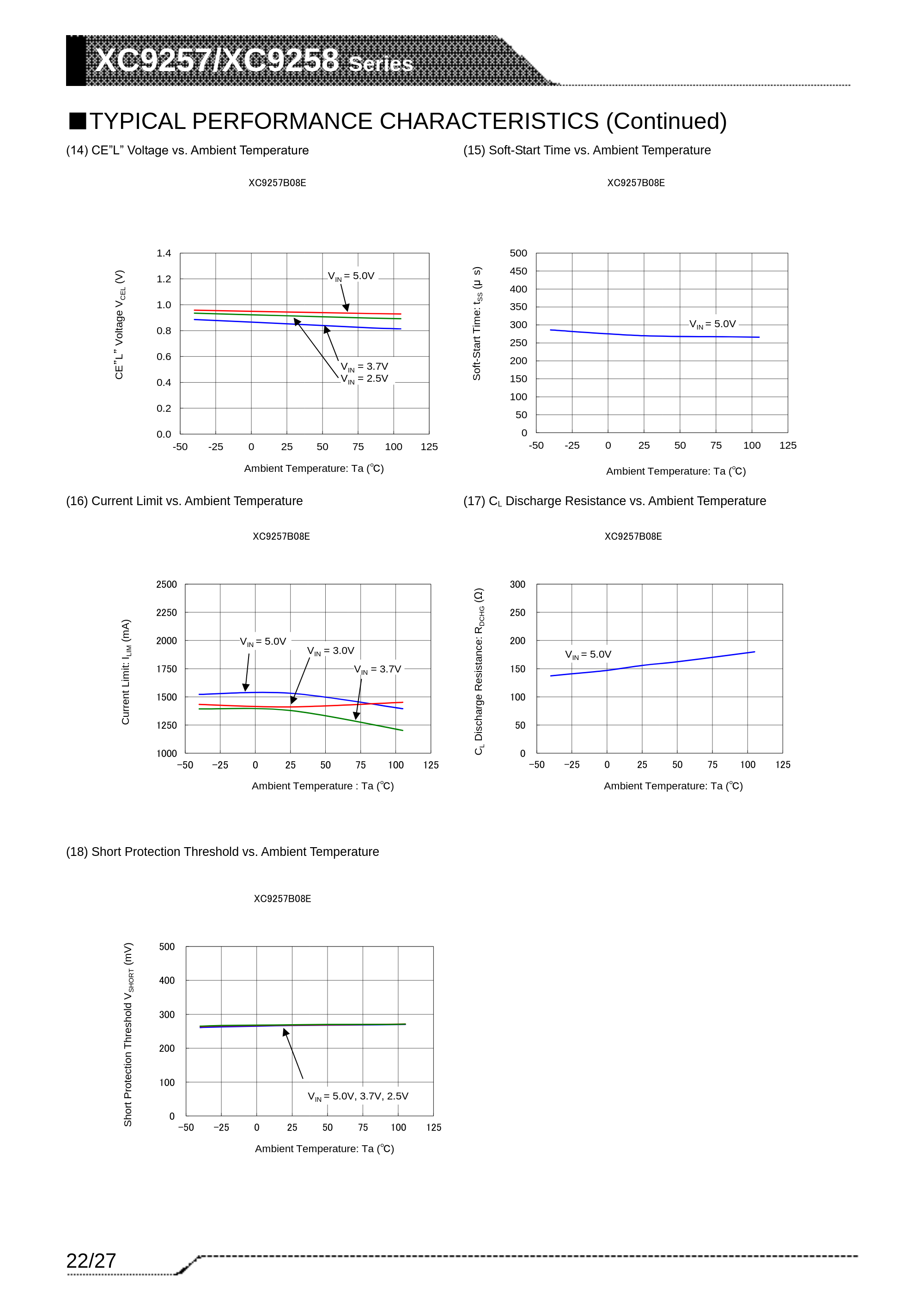
So, the question remains, why does CP go to Safe Mode when the EN Pin is brought back to High? Is this something that should be "fixed" in CP or is it because the Particle boards are not op...
stuck elbow
I just learned about the SSD2805 chip — that opens up a whole new batch of awesome displays
@tough flax I think I successfully used sox to generate the files I needed
if you search adafruit of sox, there should be some examples
or just use this: https://langdoc.github.io/2017-05-28-sox-trick.html
 timber mango
Hi all. Im all new to python, arduino and everything around it. Trying out Mu-editor and CircuitPython but i get the message that I need to flash my device with CircuitPython. Is it possible to flash and use it on an Arduino UNO?
 dapper warren
Ops, wrong user login 😃
stuck elbow
it's not possible to use CircuitPython with an UNO, you need one of the devices that are supported, see https://learn.adafruit.com/welcome-to-circuitpython/circuitpython-hardware

New to CircuitPython? This is the place to start.
solar whale
@raven canopy If you feel like another test on your XENON -- I noticed on mine that with EN grounded, if I apply power (plug in the USB) the 3,3V goes up to ~.7V as you saw, but if it then unground EN it goes to 3.3V and if I reground EN it goes to ~1.2v and stays there. I also observed tif I remove power (unplug the USB) the 3.3V drop to ~.5V and very slowly decays. I can force it 0V by grounding the 3.3V pin.
getting some discussion on the particle.io forum https://community.particle.io/t/xenon-3-3v-output-when-en-grounded/48218

Particle
I am powering a Xenon board via the USB connector and trying ti use the EN pin as an “on/off” switch. When I measure the 3.3V pin on the Particle Xenon with the EN pin grounded, I see 1.0V not 0V as I expected. It reads 3.3V and operates normally if EN is not grounded...
stuck elbow
Xenon 2 Megablast
pastel panther
@solar whale that regulator is weird
raven canopy
@solar whale I can run that later. Suspect it will just confirm what you're seeing. I briefly tried to scrape through the nRF code to spot where BOR is handled, but couldn't locate it. I can try some more, but I imagine Dan knows exactly where it is. nrfx is muuuch different than ASF4. 😄
solar whale
@raven canopy No rush -- I've lost most of my hair already....
pastel panther
lol
solar whale
interesting note from the particle.io forum -- If I use a lipo to power it -- I only see .46V when EN grounded.... confirmed bu another user there.
raven canopy
I read that. I can only assume it has to do with the charging circuit in the path...
solar whale
That's what I was thinking. I think I'll use my feather52840 with the TFT featherwing going forward.
very clean 0V or 3,3V on it
split ocean
thanks @gilded cradle I thought that was the case. I had it working w the Quote.py Learn Guide example, but the OpenWeatherMap one isn't happy about it.
pastel panther
@solar whale where did you see the '.8v when CE low' info in the datasheet? I found one diagram that seemed to say that but I thought it was talking about the voltage that would be seen by the regulator as low (first diagram, page 22)
gilded cradle
Ah, ok. That one's a little finicky. I think it actually does a call to weather and another to get the time and that might be the issue.
I have to look to be sure though.
split ocean
I love these descriptions it provides Heavy intensity rain 8:14 AM
solar whale
@pastel panther I think I am just misunderstanding the output voltage range -- it is .8 - 3.6 V -- I saw and got confused by that figure on page 22 as well
gilded cradle
Yeah, it looks like the issue is that the get_local_time() function in PyPortal doesn't do a normal fetch
modern wing
Current Weather: It's *never* too late to buy a boat.
split ocean
LOL
@gilded cradle this is the error I get code.py output: Set background to 0 No SD card found: no SD card Set icon to /weather_background.bmp Getting time from internet! Traceback (most recent call last): File "code.py", line 52, in <module> File "code.py", line 48, in <module> File "/lib/adafruit_pyportal.py", line 513, in get_local_time File "/lib/adafruit_pyportal.py", line 604, in _connect_esp AttributeError: 'PyPortal' object has no attribute '_esp'
I'm running latest pyportal.py not the bundle .mpy btw
gilded cradle
Yeah, like I thought, it's get_local_time() causing the problem
solar whale
BTW -- you can use "id" instead of "q" to select a city then use the CITY ID -- not the City name -- taht avoids duplicate city name confusion.
gilded cradle
It's doing a call through the ESP wifi manager and not looking at the localtime.txt file
solar whale
I also tied "zip" and my "zipcode,us" and got a city nearby, but not quite right.
split ocean
Oh, I only have a local.txt w the fake JSON, should I add a localtime.txt as well?
gilded cradle
Let me see if there is even a mechanism to bypass that
split ocean
Thank you!
@solar whale nice, I was wondering about that. Poughkeepsie is easy, but "Springfield, US" could be a bit of an issue :)
solar whale
I'm in Durham (NH) but there are many.
split ocean
LOL I imagine there's a big difference between your Durham and the one in NC as far as weather goes.
solar whale
Sure is!
timber mango
Is anyone is YouTuber
gilded cradle
Hi @split ocean , it looks like the trick is to just not call pyportal.get_local_time() in the openweather code
Let me see what would be the best alternative.
split ocean
@solar whale I just tried that by using a zip code in the LOCATION variable in the openweather.py file and it works very nicely, thanks for that.
solar whale
@gilded cradle are you having a problem with the openweather?
gilded cradle
Since the time won't be correct (no internet), it might be best to just do a print(time sting) with time string being whatever you want it to say.
split ocean
@gilded cradle OK, thanks. I don't need to have this be very elegant, I don't plan to include it in the guide, but it'll make it much easier to document the build by showing different data on the screen, not just the actual weather at the time.
gilded cradle
Not me jerry
Yeah, it appears to fetch the current time from the internet and print it out. Since you're trying to do it offline, I would just not call that one.
split ocean
huh, if I comment out lines 48 and 49 in openweather.py it still seems to be displaying local time on the PyPortal.
gilded cradle
Yeah, I think it just takes whatever it was last updated to.