#circuitpython-dev
1 messages · Page 228 of 1
 tulip sleet
 slender iron
ok cool! good idea
ya, I'm trying to learn from alpha.4
trying displayio with a full color oled now
tulip sleet
vg
slender iron
heh, looks like I didn't enable displayio for all m4s 😃
 pastel panther
@slender iron should the non-adafruit m4 board designers add the displayio define themselves or are you going to add them?
 manic glacierBOT

Thanks everyone. I'm not much of a Unix person, so I found this link helpful (with modifications for the newer 7-2018-q2 version): https://gist.github.com/joegoggins/7763637
slender iron
@pastel panther I'm changing it to be on for anything that qualifies as "express"
so it should be inherited
pastel panther
coolio
 gusty topaz
Guys, quick question: Can I install Circuitpython to the Adafruit Feather M0 Adalogger just like I would on a Feather M0 Express? (there are both bin and uf2 files in the Circuitpython 3.x repo).
slender iron
the adalogger may not ship with the uf2 bootloader
pastel panther
I am wrong, it doesn't look like there is a build for it
tulip sleet
I think some newer adaloggers may have shipped with a uf2 bootloader. If you doubleclick, do you see ...BOOT as a mounted drive?
gusty topaz
Well... I haven't bought it yet, I'm doing some research before buying it.
There is a uf2 file in the repository...
tulip sleet
there is a 3.x build for it. However, it doesn't have an external flash chip on the board, so you'd be very limited as to the CIRCUITPY filesystem size (64kB).
gusty topaz
tulip sleet
also, the build is missing some features in order to make room for the on-chip CIRCUITPY. You may want to get a Feather M4 Express and an Adalogger FeatherWing. That would give you much more RAM (due to the M4) and flash (due to Express)
gusty topaz
@tulip sleet That's an excellent point...
tulip sleet

A Feather board without ambition is a Feather board without FeatherWings! This is the Adalogger FeatherWing: it adds both a battery-backed Real Time Clock and micro SD card storage to any ...
gusty topaz
or I can just get the SD card SPI breakout... which is cheaper, right?
tulip sleet
by $1.45
gusty topaz

Not just a simple breakout board, this microSD adapter goes the extra mile - designed for ease of use.Onboard 5v->3v regulator provides 150mA for power-hungry cards3v level shifting means ...
tulip sleet
the wing is a lot more convenient. Just don't forget stacking headers

It's what you've been waiting for, the Feather M4 Express featuring ATSAMD51. This Feather is fast like a swift, smart like an owl, strong like a ox-bird (it's half ox, half ...
or at least female headers, if not stacking
and you're not breadboarding it
gusty topaz
Well that's the thing... I have a trippler with a GPS featherwing, a Lora featherwing and an M0 Express already setup (no stacking headers 😦 )
tulip sleet
you want to add the adalogger to this setup?
gusty topaz
yep
tulip sleet
so buy the adalogger wing and a set of stacking headers, and you can put it underneath one of the existing boards on the tripler
and if you want more RAM, buy a Feather M4 and put the stacking headers on it, substituting for the M0
pastel panther
(and speed)
pastel panther
pro tip: electrons can go up and down
tulip sleet
i just always get stacking headers for pretty much everything
gusty topaz
yeah, buying the stacking headers and the adalogger is the way to go. I guess I'm OK with the M0 on speed and RAM. I've had it for a while and wanted to use it for a project.
tulip sleet
you probably want it underneath anyway due to the radio antennas wanting to be uppermost
pastel panther
I should make a feather doubler doubler
tulip sleet
you can take a tripler and put stacking header on one end and plug it into another tripler, and then it will fall over (so get some standoffs
gusty topaz
hmm I was thinking putting it underneath the M0.. that way the GPS geatherwing and LORA are by themselves on the other end.
 raven canopy
@pastel panther i await your SAMD Beowulf cluster on S&T. 😆
tulip sleet
https://www.adafruit.com/product/2830 is a single set, but you can make more with these (have to pull a pin and cut them): https://www.adafruit.com/product/3366

These two Female Stacking Headers alone are, well, lonely. But pair them with any of our Feather boards and you're in business!What do they do? They stack. Put the headers through your ...

Headers are like the duct tape of electronics. They're great for connecting things together, soldering to perf-boards, sockets for wires or break-away header, etc. We go through ...
gusty topaz
I wanted to keep the build as flat as possible. I guess it's not going to be that flat after all (I'm already using short headers).
 umbral dagger
I'm still wishing for short stacking headers.
gusty topaz
On one of my previous projects I used a doubler with two levels and it ended up being pretty chunky:
umbral dagger
Are there any displayio examples floating around? FeatherM4 + the 480x320 TFT wing
gusty topaz
pastel panther

Gist
basic displayio with ili9341. GitHub Gist: instantly share code, notes, and snippets.
not sure if those are the same display; you might have to steal the init bytes from the driver if not
@gusty topaz looks clean
gusty topaz
@umbral dagger yeah, short stacking headers would be sweet. I was almost sure they were available... I guess I'm wrong.
@pastel panther thanks, but it's a bit chunky.
pastel panther
@gusty topaz you 3d printed the case ?
umbral dagger
@pastel panther Does that work with Alpha5 or do I need to built head?
gusty topaz
@pastel panther yep.
gusty topaz
I designed it and printed it.
pastel panther
@gusty topaz if you really want to go flat, you can diy your own feather tripler with perf board and solder directly to it without the female headers
gusty topaz
hmmm yeah, you are right...
pastel panther
I've pretty much stopped using a breadboard for many things and just pull out the perf board. Ain't no one got time for loose jumpers
gusty topaz
You are courageous... I can do some serious damage if I attempted to DIY a trippler with a perf board...
Are there any advantages of using the featherwing adalogger over using the SD card breakout?
manic glacierBOT
 gusty topaz
A Feather board without ambition is a Feather board without FeatherWings! This is the Adalogger FeatherWing: it adds both a battery-backed Real Time Clock and micro SD card storage to any ...
Not just a simple breakout board, this microSD adapter goes the extra mile - designed for ease of use.Onboard 5v->3v regulator provides 150mA for power-hungry cards3v level shifting means ...
manic glacierBOT
[adafruit/circuitpython] New comment on pull request #1487: Enable displayio on all Express boards\.
@dhalbert No need for the immediate review. I'm not sure it'll fit in everything so I'm let Travis try.
umbral dagger
@pastel panther Pretty much the same here (straight to perfboard) for simple things. My current 3 UART + I2C thing I put on breadboard to prove it out.
@pastel panther Almost.. written for the smaller screen I guess.
Duh... the width & height are constructor args.
There is a line of garbage pixels at the top, though.
manic glacierBOT
 raven canopy
<@&356864093652516868> Here is the recording of the meeting from today. (I was scrolling through adafruit's twitter, and spotted it.)
https://youtu.be/RdL3hzPOfNY
Notes with time codes are available here: https://github.com/adafruit/adafruit-circuitpython-weekly-meeting/blob/master/2019/2019-01-22.md Thanks to @kattni ...
slender iron
thanks @raven canopy I missed that
@umbral dagger I'm not sure where the off by one error is that leads to that line
 exotic pumice
@slender iron @tulip sleet so do I just pip install pycortexmdebug or ?
tulip sleet
@exotic pumice I am using @slender iron's version here: https://github.com/tannewt/PyCortexMDebug
GitHub
A set of GDB/Python-based utilities to make life debugging ARM Cortex M processors a bit easier - tannewt/PyCortexMDebug
manic glacierBOT
[adafruit/circuitpython] New comment on pull request #1487: Enable displayio on all Express boards\.
Ok, next run should pass. Had to skip builds with frozen libs.
tulip sleet
no, the python stuff is read by gdb. doesn't need to be installed
exotic pumice
oh
just download the one file and load it in gdb? https://github.com/bnahill/PyCortexMDebug/blob/master/cmdebug/svd_gdb.py

GitHub
A set of GDB/Python-based utilities to make life debugging ARM Cortex M processors a bit easier - bnahill/PyCortexMDebug
 ruby atlas
maann, where did today go.
@slender iron doesn't look like it was too hard to merge the PR to master.
tulip sleet
@exotic pumice, oh, looks like I'm using the bnahill repo (see the .gdbinit file). Maybe they took back scott's changes
slender iron
nope! happy to have it in @ruby atlas. thanks! I think the next step is getting the python version in the bundle
choir time for me, ttyl
pastel panther
@gusty topaz For $1.25 more you get a RTC with battery backup with the wing; seems like a no-brainer to me
exotic pumice
wow it takes a while for this thing to load the svd
tulip sleet
@exotic pumice I'd highly recommend getting a j-link instead of openocd. I'll think you'll find it easier. If you're non-commercial:
https://www.adafruit.com/product/3571
https://www.adafruit.com/product/1369
https://www.adafruit.com/product/2094
https://www.adafruit.com/product/2743
https://www.adafruit.com/product/1675

Doing some serious development on any ARM-based platform, and tired of 'printf' plus an LED to debug? A proper JTAG/SWD HW debugger can make debugging more of a pleasure and less of ...

The SEGGER J-Link EDU is identical to the more expensive J-Link BASE model except for the terms of use.If you're going to use your debugger strictly for personal, non-commercial ...

This adapter board is designed for adapting a 'classic' 2x10 (0.1"/2.54mm pitch) JTAG cable to a slimmer 2x5 (0.05"/1.27mm pitch) SWD Cable. It's helpful for using products like the ...

This adapter board is designed to make it easier to use ARM dev boards that use slimmer 2x5 (0.05"/1.27mm pitch) SWD cables for programming. It's helpful for using products like the ...

These little cables are handy when programming or debugging a tiny board that uses 10-pin 1.27mm (0.05") pitch SWD programming connectors. We see these connectors often on ARM Cortex ...
yeah, the svd is big
tulip sleet
is it ok on samd51? I thought the flashing was not well supported ... oh, right, you said you use bossac
the edu mini j-link is $20
exotic pumice
yeah it actually took installing a patch for openocd
for the 51 to work
$20 I don't need to spend right now lol
tulip sleet
ok, understand!
exotic pumice
thanks

 exotic pumice
somehow my uart ctrlb and ctrlc are zeroed
despite
            sercom.usart().ctrlb.modify(|_, w| {
                w.sbmode().clear_bit(); // 0 is one stop bit see sec 25.8.2
                w.chsize().bits(0x0);
                w.txen().set_bit();
                w.rxen().set_bit()
            });

 solar whale
@tulip sleet the Adafruit_CircuitPython_BLE release mentions a Location beacon example, but it tis not in the repo.
tulip sleet
that's a mistake, I should add one; maybe i should just use yorus
solar whale
Feel free
tulip sleet
@solar whale where does it say there's a beacon example? just want to make sure the filename is right, etc.
solar whale
in the release notes

GitHub
Contribute to adafruit/Adafruit_CircuitPython_BLE development by creating an account on GitHub.
tulip sleet
that's just a list of capabilities, not examples, but I agree an example would be good. I was a little reluctant to impersonate an iBeacon, but there are almost no apps that understand other company codes
solar whale
sorry --I misunderstood -- no problem - I understand
tulip sleet
did you try another company code with that app?
oh, that's the same app I ahve, well 0xffff didnt' work
solar whale
If I recall correctly, it dd not work until I used the Apple code, but I'll test it again tomorrow.
right -- that is what I tried.
tulip sleet
ok, no reason to try agian. Maybe I'll just publish with the Apple company code. or I'll ask the higher ups
solar whale
OK -- no rush to put it in , but it is a nice demo.
bed time here -- thanks for all the updates -- looking forward to playing with it tomorrow...💤
tulip sleet
@slender iron if you have a chance to approve my Bundle PR, the BLE libs will get in the overnight bundle build, in time for your release. ty never mind, decided it was ok for me to do myself
 tough flax
@tulip sleet didn't you tell me what this meant?
[ 1081.261733] usb 1-1.1.2: new full-speed USB device number 8 using dwc_otg
[ 1086.422393] usb 1-1.1.2: device descriptor read/64, error -110
I can't tell if it's a problem in the descriptor or in the data that's being sent
tulip sleet
my guess is a descriptor error, like a bad length somewhere or something like that. I searched our DM history but didn't find "110"
on my way to 💤
manic glacierBOT

 smoky shell
@tough flax in that snippet, the first USB transaction that's being attempted (the host kernel asking the device for its device descriptor) is timing out
dunno if my commentary is too late to be helpful, but given the first transaction is failing entirely, I'd suspect the device isn't properly responding to anything USB
manic glacierBOT

 lone sandalBOT
 manic glacierBOT

 manic glacierBOT

 cinder dune
I'm about to try something strange
I'm going to use the Julia language with my neopixels and a raspberry pi
*try
tulip sleet
@cinder dune that will be very interesting. Tell us more after yout try.
cinder dune
I will!
 stuck elbow
it's a long shot, but is anyone going to FOSDEM next month?
solar whale
@tulip sleet just updated to current master and rebuilt feather_nrf52840 -- uart_echo still fails on uart.write(bytes([one_byte])) -- am I missing somethng?
hmmm -- the usage example does not use "bytes" ```from adafruit_ble.uart import UARTServer
uart_server = UARTServer()
uart_server.start_advertising()
Wait for a connection.
while not uart_server.connected:
pass
uart_server.write('abc')```

 slender iron
welcome @smoky shell !
exotic pumice
ooh what's our favourite switch hacker/twitch streamer doing here? 😃
slender iron
being helpful with usb 😃
 fluid helm

It's here!
Introducing a brand new EduBlocks BETA editor release!
Say hello to EduBlocks for @adafruit CircuitPython! Create and prototype awesome projects with this block based editor for building CircuitPython code!
Try out the BETA today: https://t.co/8IaibPxPlr

 Twitter
exotic pumice
Twitter
exotic pumice
nice
fluid helm
I'll be writing a guide soon on learn to show how you can turn libraries into extensions
slender iron
@tulip sleet do you have a script to clean up s3?
manic glacierBOT
 tulip sleet
@slender iron I don't have a script but here are some aws s3 CLI examples I saved:
aws s3 ls --recursive adafruit-circuit-python/bin > adafruit-circuit-python.ls.txt
aws s3 rm --recursive s3://adafruit-circuit-python/bin --exclude '*' --include '*201809*'
aws s3 rm --dryrun --recursive s3://adafruit-circuit-python/bin --exclude '*' --include '*201805*'
yes - jerryn found some issues with the doc and he can't get the uart echo to work, but the bluefruit connect demo works for me
i'm working on a demo for S&T
tulip sleet
i think so, we can ship a beta.1 soon enough
slender iron
yup totally
pastel panther
beta party!!! 🎉
solar whale
@tulip sleet do you use a crickit featherwing and feather_nr52840 for the bluefruit connect demo?
tulip sleet
yes
solar whale
ok - I'll try that in a bit. also updating my iPhone -- see if that helps
tulip sleet
i will test it again too. I was testing the UART stuff just from the REPL, to/from the phone. But I had tried on an old phone running iOS 10 as well as an IOS 12.latest
 meager fog
@umbral dagger elllu
solar whale
do you still have the "bytes" in your uart.write ?
meager fog
@umbral dagger checkin' in with ya if you're done with hackspace
umbral dagger
@meager fog I was last time you asked 😃 Though do you mean this month or in general?
umbral dagger
@meager fog What's up?
solar whale
@tulip sleet attempting to connect to uart demo with IOS 12.1.3 eventaully gives ```ess any key to enter the REPL. Use CTRL-D to reload.
Adafruit CircuitPython 4.0.0-alpha.5-223-g07a4cc0c4 on 2019-01-23; Adafruit Feather nRF52840 Express with nRF52840
import ble_test
Traceback (most recent call last):
File "<stdin>", line 1, in <module>
File "ble_test.py", line 19, in <module>
File "ble_test.py", line 17, in <module>
File "ble_test.py", line 14, in <module>
File "adafruit_ble/uart.py", line 130, in write
OSError: Failed to read CCCD value, err 0x3002
@tulip sleet want to add more info to the bleio release notes?
solar whale
@tulip sleet but I am more concerned about why your nrf52840 does not fail on the uart.wrie(bytes( )) in the uart_server demo
meager fog
@umbral dagger oh sorry i thought you were still wrappin' up an article
just doing a check on whats on yr plate cause i know there's a lot
and we can plan out which guides to do next/prioritization. or you can tell me what you're up to
 desert iris
very nice. But I came to late with my german translations (opamp = Tasm-Devil)👌
tulip sleet
@slender iron I was in the shower; I'll look at the draft release
slender iron
feel free to edit it @tulip sleet
@desert iris there will always be another release 😃 Thanks for the translations!
umbral dagger
@meager fog cool cool. Bouncing between the Z80/CPM emulator on the Grand Central, and the Feather M4 + bme280 + esp8266 + PM2.5 environmental monitor
tulip sleet
@solar whale this is working for me in th REPL:
Adafruit CircuitPython 4.0.0-alpha.5-220-gfb2d87bf4 on 2019-01-22; Adafruit Feather nRF52840 Express with nRF52840
>>>
>>> from adafruit_ble.uart import UARTServer
>>> u = UARTServer()
>>> u.start_advertising()
>>> u.write('abc')
>>> u.write(b'abc')
I can see the "abc" in the UART window in the app
umbral dagger
@meager fog The latter is almost working... semi-random failures on the esp when talking to Adafruit IO
tulip sleet
UARTServer() no longer starts advertising automatically. Maybe the demo is wrong. Where is the demo code?
solar whale
looks fine -- the example uses .write(bytes[one_byte])) and it fails every thime
in the BLE repo examples folder
GitHub
Contribute to adafruit/Adafruit_CircuitPython_BLE development by creating an account on GitHub.
tulip sleet
yeah, that example is wrong, because it doesn't start advertising. I need to fix that.
meager fog
@umbral dagger for the latter do you wanna wait until we have an ESP32 breakout and the more-stable SPI code?
tulip sleet
uart = UARTServer()
uart.start_advertising()

while True:
     one_byte = uart.read(1)
    ...
i feel like maybe its not quite ready for real usage 😃
solar whale
OK -- at least that explains it! wil try
tulip sleet
I forgot to update all the examples.
meager fog
@umbral dagger do you think you could do the SPI bitbang library this week? there's a couple things that could use it
tulip sleet
spent more time fighting with travis
meager fog
@umbral dagger if not let me know and i can find someone else to code i tup
just lemme know 😃
umbral dagger
@meager fog Yeah, I can go back to that. Ran into a blocker but I think I found a way around it. It's largely done.
solar whale
@tulip sleet waht is missing here ?? ```from adafruit_ble.uart import UARTServer
uart = UARTServer()
uart.start_advertising()
Wait for a connection
while not uart.connected:
pass
while uart.connected:
# Returns b'' if nothing was read.
one_byte = uart.read(1)
if one_byte:
uart.write(one_byte)
it does --- just not with latest IOS
meager fog
@umbral dagger ok i think if you dont mind lets put the adafruit.io thing on pause - with a better module you'll have more luck
tulip sleet
i am using latest iOS
meager fog
@umbral dagger doesn't make sense to keep sufferin' 😃
tulip sleet
on an iphone 6s
solar whale
12.1.3?
manic glacierBOT
There is still a lot work to be done. I've got the problem, that I feel uncomfortable to translate native python error messages because it will be harder to search for those errors in the Internet after translations.
solar whale
12.1 works
umbral dagger
@meager fog Is that setting up for a leek?
tulip sleet
@solar whale yes
solar whale
hmmm --- I'll keep trying
solar whale
well - that did not work for me either.
tulip sleet
let me try that exact code, but I have to do some other stuff first
solar whale
ok -- thanks -- I'll find my crickit...
manic glacierBOT
meager fog
@umbral dagger not that leeky - we have ESP8266 breakouts, i'll make one for ESP32 😉
tulip sleet
@slender iron I added a few sentences to the release notes, describing bleio in a little more detail, mentioning the second library, and adding a warning about outdated docs in the Known Issues.
tulip sleet
@slender iron btw, I had tried some FUSE filesystems for S3, and they were all terrible: slow, awkward authentication, and bad defaults (leading to ridiculous file permissions). The aws s3 CLI is limited but it works
slender iron
kk, fine with me. trying to figure out credentials now
meager fog
@umbral dagger ok so, chekin your list - whatcha wanna wrap up next, the CPM?
tulip sleet
@solar whale
umbral dagger
@meager fog I'll focus on the bitbang SPI, then the CPM.
tulip sleet
I put the code above in echo.py, did import echo after a ctrl-D, then went to the app, saw "CIRCUITPY" appear, connected, went to UART section of app, and typed and sent the above.
umbral dagger
@meager fog Apart from the flakey 8266 behaviour, the rest of the environment sensor works.
tulip sleet
I am filtering on UART-only apps in the bluefruit app. It takes a second or two for it to appear.
solar whale
sigh... hmm-- It works on IOS 12.1 on my iPhone6 but not on IPhone 7 with latest IOS -- may be the iPhone 7.... but also have Android issues... OK -- don't worry about it --- I'll keep working on it.
works fine from the desktop app....
solar whale
Adafruit Bluefruit LE Connect
meager fog
@umbral dagger yeah the 8266 just kinda sux - i dont know if its worth documenting with it, its really flaky
tulip sleet
we have a new iPad I can try too
manic glacierBOT
slender iron
is poking the release
solar whale
@tulip sleet the crickit controller demo works on the iPhone6 w IOS 12.1 but not with the Iphone7 on 12.1.3 ... 😦 but the demo works great
aslo I cannot get it to work with Andriod at all -- give an error that it can't initialize the uart on the android app.
tulip sleet
the new ipad will not even connect, it just hangs saying "connecting..." it's running 12.1.1
solar whale
ah -- the plot thickens ....
tulip sleet
there may be some extra protocol negotiation some of the devices are doing that we are not expecting, but why 🤷 ? I'm getting a demo ready for S&T, so I'll do some more concentrated debugging later
solar whale
I have the Bluefruit Connect App source code and I have compiled it -- I can try connecting to it via XCode and see if it give any information -- it's not a simple process, will try when I have some time --- Good luck on S&T -- this can all wait.
tulip sleet
i have the BLE sniffer I can use, and also can turn on instrumentation in CPy which is currently commented out.
manic glacierBOT
slender iron
https://github.com/adafruit/circuitpython/releases/tag/4.0.0-beta.0 330 release assets!
GitHub
CircuitPython - a Python implementation for teaching coding with microcontrollers - adafruit/circuitpython
solar whale
@slender iron Now you're just showing off 😉 Congratulations on Beta 0!!
 idle owl
We need a :blinka_party: emoji
exotic pumice
like party parrot but blinka
 drowsy geyser
@idle owl A bunch of snakes with party hats and confetti? 😉
idle owl
I was thinking  plus 🎉
drowsy geyser
That would do. 😃
idle owl
Got in right behind CircuitPython again! Every time, I swear 😆
solar whale
@tulip sleet just FYI -- IOS 12.1.3 on the IPhone 7 does work with my BLE UART Friend -- no idea what that tells us -- just another data point.
 river quest
looks close CircuitPython on the cover of the next HackSpace magazine (and NeoPixels)
 buoyant wigeon
Hello everyone ... I'm looking for help.
During updating FW (from CP_3.1.1 to CP_3.1.2) my ItsyBitsy_M0 got stuck. It happened when copying dirs LIB and EXAMPLE to SPIFlash ... I probably wanted to copy more data than the capacity of the SPIFlash.
In fact, only the bootloader works (BLINK from Arduino IDE works OK).
If I try to copy the CP into the ItsyBitsy_M0 it gets stuck again.
I have such a feeling that I need to erase SPIFlash.
I found a suitable tool for it ... Adafruit_SPIFlash (https://github.com/adafruit/Adafruit_SPIFlash/tree/master/examples), but this doesn't work for ItsyBitsy_M0.
Can someone help and tell me how to turn my ItsyBitsy_M0 to life again.
idle owl
@tulip sleet There's no flash eraser on the troubleshooting page for the ItsyBitsy M0 or M4.
@buoyant wigeon Can you get to the REPL at all?
buoyant wigeon
NO, no response from CP...
idle owl
Ok.
tulip sleet
i haven't made flash erasers for a while, limor has been making them
idle owl
@tulip sleet Hmm alright. I figured the Itsy M0 would have been from your time making them, that's why I asked you. Where are they kept other than the learn guide?
idle owl
Ok.
@buoyant wigeon We're going to make you a special CircuitPython build to try to fix your issue.
@tulip sleet I was thinking maybe we had them on GitHub somewhere or something.
tulip sleet
we should
idle owl
Fair enough 😄
@buoyant wigeon What exactly to you mean by "gets stuck" with installing CircuitPython from the uf2?
buoyant wigeon
WOW... it would be nice, special erase tool...
idle owl
We have them for many boards, we simply don't have one for Itsy at the moment.
I'm hoping the build Dan creates for you will work because it depends on where you're "getting stuck" with the install whether it'll get to the point where it can erase. That's my concern.
I'm not sure it's really a question you can answer. Since the "where" is happening behind the scenes.
@tidal kiln Are you around?
 tidal kiln
yep
buoyant wigeon
"gets stuck" ... = I copy CP into ItsyBitsy, the whole process seems OK, restart and CIRCUITPY drive doesn't appear...
idle owl
@buoyant wigeon That's promising. We'll see how it works.
tulip sleet
try this - I can't find my itsy m0's at the moment to test
tidal kiln
hmmm. this again. we had discussion on this...current process works but is hacky..needed better solution...did we create an issue?
tulip sleet
there's a better solution in 4.0 - you can get into safe mode early
idle owl
@buoyant wigeon Try installing the uf2 Dan just linked.
tulip sleet
with a triple click (last click a bit delayed)
tidal kiln
ah. and then erase FS from there?
buoyant wigeon
@tulip sleet Thanks... I will try it and will be back...
idle owl
@buoyant wigeon Remember this build will delete everything from your board. So be careful with it in general so you don't accidentally load it when you did not intend to.
tulip sleet
@buoyant wigeon replace it with regular CPy when you are done.
idle owl
@tidal kiln May I ask a few questions about the PN532? I seem to remember you being the one who dealt with it on RPi...
tidal kiln
"Danger Erase" nice. would make for a good B side track maybe.
@idle owl sure. been a while. and i've got some work i want to get back to on it at some point.
idle owl
@tidal kiln I'm updating the guide for CPy and Py on RPi usage
And I'm confused about the wiring. The only wiring diagram uses SPI, but the CP example does not use SPI. It came with a little chip thingie and I'm not sure if I need it? etc. Confused.
tidal kiln
looking....
chip is a level shifter
you set mode with the jumpers
can do spi/i2c/uart
i wired it all up at some point when i did that refactor work
tidal kiln
the board 3v only, so would need it if using with a 5v board
idle owl
which these are not.... correct?
buoyant wigeon
@tulip sleet @idle owl You are the best... SUCCESS... ItsyBitsy is BACK.... Thanks a lot, you are AWESOME!!!!
idle owl
@buoyant wigeon Great!
tidal kiln
🤔 hmmm...is there a 5v board in the CP line up....?? i don't think there is...
idle owl
I was referring to CP boards and RPi when I said "these"
tidal kiln
rpi is def 3v
tidal kiln
3v is part of the feather spec:
https://learn.adafruit.com/adafruit-feather/feather-specification#power-3-12
so...yah...i think you're pretty safe not using that little chip
now...how did i figure out i2c wiring?
oh. it's on the silk. SDA/ SCL
@idle owl do you have pi?
idle owl
I do. But I wasn't planning to wire it up. I can though if I need to.
tidal kiln
you're working up fritzing diagrams?
idle owl
Yeah. For breakout and shield. I guess breakout on CP something and a Pi. Shield on Metro Mx
I'll need to have it hooked up to something for the guide but I typically go with CP for testing the examples.
tidal kiln
ok. should just be a matter of setting those two jumpers for mode - there's a decoder ring printed on the board
and then follow the silk labels on the pins
idle owl
Ok
tidal kiln
it'd be good to hook this up to a pi and verify with blinka
i'm not sure i did that last time
tidal kiln
i can test the pi out if you want
idle owl
Brennen's been my goto for testing on the Pi so I don't have that sequence down yet, it's still a stilted process for me. I've only tested a couple of Pi hats.
That would be really great if you could
tidal kiln
i only have breakout, but that's all that matters for pi
tidal kiln
let's go the other direction - let me re-verify what works on pi first, then can send you deets
idle owl
That makes a lot more sense. It is not how we were doing it previously for most of the boards though 😄
Thank you so much!
tidal kiln
on a scale of zebra to nebraska, how urgent is this?
idle owl
definitely zebra. Limor wants the guide updated this week.
(The date on it is today in Basecamp, but....)
tidal kiln
so more like watermelon level urgent, ok..let me get on it..
idle owl
Thank you!
@tidal kiln So... if I'm reading this right, this CircuitPython library for the PN532 can read/write data from/to a card?
tidal kiln
yep
you can encode the tags with custom info
and then read it back
they come with some default info, so you can read right away if you want
"info" = varies depending on standard, mifare, etc.
idle owl
right on, thanks
tidal kiln
@idle owl chip example, uno is a 5V board:
https://cdn-learn.adafruit.com/assets/assets/000/002/715/original/rfid___nfc_pn532wiring.jpg?1396786098
it has a voltage regulator that outputs the 3.3v that can be used for power, that's why that wire goes straight in
but the logic pins are 5v, so go through the level converter
except for MISO, since in that case it's the 5V arduino receiving the 3V signal from the PN532, so 3V into 5V, which is generally safe
5V into 3V is generally not
idle owl
I saw that wiring photo and that's what started the confusion.
Thank you for explaining it
idle owl
@tidal kiln I hooked it up to a Feather and I'm getting RuntimeError: SDA or SCL needs a pull up
tidal kiln
hmmm. probably not on board.
idle owl
Also it looks like like the req_pin is included in the basic example.. but it's not hooked up for CircuitPython
though my code hasn't gotten that far. it's failing on the i2c instantiation with the pull up error.
so it needs to be connected to 3.3v?
tidal kiln
yah, you'll need to add external pull ups.
since those pins do different things, they couldn't be bolted on
yep, pull up to 3.3v
idle owl
with a resistor or simply a jumper?
tidal kiln
resistor
idle owl
what size
tidal kiln
two, one on each SCL / SDA
tidal kiln
got some 10k?
idle owl
yes I do
tidal kiln
start there
idle owl
ok works now. Turns out it helps to have the power rail plugged into the 3.3v pin on the breakout and not the next non-existent pin over.
Reads the card that came with it and my chip. Neat
manic glacierBOT
It didn't match ColorConverter which confused me greatly.
slender iron
heh, I did a release and then fixed a bug 😃
raven canopy
is it supposed to happen the other way around? 😜
 cunning crypt
Key words: "supposed to"
raven canopy
and...sneeky peeky:
By board:
[('arduino_mkr1300', {'4.0.0-beta.0': 0}), ('arduino_mkrzero', {'4.0.0-beta.0': 0}), ('arduino_zero', {'4.0.0-beta.0': 0, '3.1.2': 115}), ('catwan_usbstick', {'4.0.0-beta.0': 0}), ('circuitplayground_express', {'4.0.0-beta.0': 0, '3.1.2': 612}), ('circuitplayground_express_crickit', {'4.0.0-beta.0': 0, '3.1.2': 121}), ('feather52832', {'3.1.2': 23}), ('feather_huzzah', {'3.1.2': 221}), ('feather_m0_adalogger', {'4.0.0-beta.0': 0, '3.1.2': 50}), ('feather_m0_basic', {'4.0.0-beta.0': 0, '3.1.2': 84}), ('feather_m0_express', {'4.0.0-beta.0': 0, '3.1.2': 131}),
It finally passed. Next time, I will check for error before making a pull request. Online-editing is obviously not the way to make valid changes.
They should raise an exception to make incorrect use more obvious.
tulip sleet
@slender iron I'll revise the release notes in the three places to add a warning that bleio is not working properly on some models of phones/tablets :(. Seems to be newr iOS devices, and maybe not Android at all? I haven't tested Android yet, but I only have a really old tablet and an Amazon Fire that's a couple of years old (which is a pain to add non-Amazon store apps to).
slender iron
@tulip sleet no worries! we can always do more betas
 raven canopy
11 downloads of 4.0.0-beta.0, so far. 😄
umbral dagger
expect one more for each board once I get the page open 😃
 gilded cradle
I downloaded it for my feather m4 earlier
umbral dagger
ok.. just the boards I have...
 modern wing
I will admit, I've been slacking on that. But, starting in late Feb., I'll have a boatload of free time.
tidal kiln
@idle owl what's your success rate for i2c / spi / uart?
raven canopy
@umbral dagger @gilded cradle thanks! now its up to 29... (i'm working on adabot, so i'm getting dl stats)
exotic pumice
any guesses why setting sercom3->usart->ctrla->enable clears sercom3->usart->ctrlb->txen?
drowsy geyser
Hmmm, the Amazon S3 bucket for the CP images has the latest build on the 14th. I suspect that's not right, but don't know how to investigate....
slender iron
@drowsy geyser did you go into the language folder?
drowsy geyser
Doh! No, I was looking in the top level bin/board directories. <sheepish>
slender iron
ya, I need to delete or move those others
drowsy geyser
Thanks, Scott.
idle owl
@tidal kiln Limor said that SPI is basically the only thing that works for RPi. That I need to show wiring diagrams for all 3 on Pi, but with HUGE WARNINGS not to use UART or I2C.
tidal kiln
whew. that's the reality i'm seeing also. 😃
i was reading scroll back, and she did most of the pi work, and that was the same general fun happening then
idle owl
Yeah. I talked to her about it in the meeting tonight. That's what she said.
manic glacierBOT
 tidal kiln
@idle owl pins are RPI - PN532
SPI 👍
5V - 5.0V
GND - GND
MOSI - MOSI
MISO - MISO
SCLK - SCK
BCM5 - SSEL
I2C 😰
5V - 5.0V
GND - GND
SDA - SDA
SCL -SCL
BCM6 - RSTPD_N
BCM12 - P32
UART 👎
5V - 5V
GND - GND
TXD - RX
RXD - TX
found the answer to my previous question:
Writing '1' to CTRLB.TXEN when the USART is disabled will set CTRLB.TXEN immediately. When the
USART is enabled, CTRLB.TXEN will be cleared, and SYNCBUSY.CTRLB will be set and remain set until
the transmitter is enabled. When the transmitter is enabled, CTRLB.TXEN will read back as '1'.
tidal kiln
example looks like it hasn't been updated for serial on rpi, so here's what i was doing:
# UART connection
import serial
uart = serial.Serial("/dev/serial0", baudrate=115200, timeout=100)
pn532 = PN532_UART(uart, debug=False)
I don't think I'm showing the code for it even
I guess it should go in the example?..
if we're saying don't do it, eh
idle owl
ah ok

 exotic pumice
new question: why is syncbusy.length set when I've never touched the length register in my life and I've even done a swrst?
I'm not using the 32-bit extension either


 slender iron
@pastel panther did you start the wroom samd51 module yet? I might take a crack at it
pastel panther
@slender iron I did not
slender iron
kk, I'm shooting to have some fun stuff for pycascades and pycon
pastel panther
one thought that I had is to include the patch pcb to replace the CP2104 as a "peninsula" of sorts sticking off the top or bottom with mousebites since it's smaller than OSH Park's minimum.
I was also thinking of moving to a 51J to make all the pins/castillations functional
pastel panther
agreed
let me know when you do start; I'd like to help but I need to put a bow on my guide first
slender iron
ya totally
I'm just thinking I should get this pygamer prototype going first
and probably the gameboy too.....
pastel panther
@slender iron are you wanting the drivers in adafruit_rgb_display to be ported/divvied into individual displayio'd drivers like the ST7735 one you just pushed?
manic glacierBOT
Newer BLE devices may ask to lengthen the basic BLE packet size. This request was not being handled, and so the connection attempt from a central to CircuitPython Peripheral was hanging. Respond in the correct way to this request.
@jerryneedell This I believe will fix https://github.com/adafruit/Adafruit_CircuitPython_BLE/issues/2. I tested on a 2018 iPad. Didn't test on an Android device, but thanks for testing if you are able to do so.
iPhone 6s and lower did not send this request. iP...
tulip sleet
@solar whale I think I have a fix for the iPhone 7 problem. ^^. UARTServer now works on a 2018 iPad.
solar whale
@tulip sleet great -- downloading and testing it now
yay! works on Iphone7 with IOS 12.1.3 ... on to android
still not quite working on Android -- connects, but UART does not work
slender iron
@pastel panther I didn't start there but ya, I'd like displayio displays broken out into separate repos
solar whale
@tulip sleet Crickit demo also connects, but no response -- on Android
Andriod message "Uart protocol can not be initialized"
tulip sleet
probably something else similar to the above. What version of Android are you using?
solar whale
I've tried 2 -- one is 7.1.1 -- checking the other
its older 5.something
same problem on older one
Still -- great that you got the newer iPhone/IPad working!
The Adnroid does connect -- and the App closes when it disconnects, It just can't get its Uart protocol to work.
tulip sleet
@solar whale if you uncomment the mp_printf at line 280 in ports/nrf/common-hal/bleio/Peripheral.c, that will print out the opcodes of all the unhandled BLE events. It's fine that some aren't handled, but there may be one that I need to handle. Then try the UART on Android and give me what shows up in the REPL. Maybe also do the exact same thing from the iPhone so I can compare the two. Thanks!
solar whale
ok -- will do it now
 terse kayak
Let me know if you want anything done with Android 8.0.0 ... But It sounds like the Android issue is common to all Andriod
solar whale
on Android 5.1 ```Press any key to enter the REPL. Use CTRL-D to reload.
Adafruit CircuitPython 4.0.0-beta.0-4-gb1f1bb138-dirty on 2019-01-23; Adafruit Feather nRF52840 Express with nRF52840
import ble_uart
Unhandled peripheral event: 0x0012
Unhandled peripheral event: 0x0052
on iPhone 7 ```Press any key to enter the REPL. Use CTRL-D to reload.
Adafruit CircuitPython 4.0.0-beta.0-4-gb1f1bb138-dirty on 2019-01-23; Adafruit Feather nRF52840 Express with nRF52840
import ble_uart
Unhandled peripheral event: 0x0012
Unhandled peripheral event: 0x0024
Unhandled peripheral event: 0x0050
Unhandled peripheral event: 0x0050
Unhandled peripheral event: 0x0050
Unhandled peripheral event: 0x0057
Unhandled peripheral event: 0x0057
Unhandled peripheral event: 0x0057
Unhandled peripheral event: 0x0057
Unhandled peripheral event: 0x0057
Unhandled peripheral event: 0x0057
first 3 before ater initial connection -- before using UART screen
another "0x50" when entering UART then rest when something typed
Android 7.1 ```
Press any key to enter the REPL. Use CTRL-D to reload.
Adafruit CircuitPython 4.0.0-beta.0-4-gb1f1bb138-dirty on 2019-01-23; Adafruit Feather nRF52840 Express with nRF52840
import ble_uart
Unhandled peripheral event: 0x0012
Unhandled peripheral event: 0x0012
Unhandled peripheral event: 0x0012
Unhandled peripheral event: 0x0052
0x0052 is BLE_GATTS_EVT_SYS_ATTR_MISSING, so it's asking for some attribute and not getting a response
solar whale
teh 0x12s at initial connect -- 0x52 when trring to open UART
tulip sleet
yeah, 0x12 are expected and I don't need to handle them.
solar whale
so the 0x52 sounds promising -- just need to give it what it wants 😉
gusty topaz
Guys, I need a little help here. I'm going through the example for the GPS FeatherWing (CP) and when running code.py, it gives me an error: TypeError: unsupported types for : 'int', 'str' The line referenced on the Traceback reads: gps.send_command('PMTK314,0,1,0,1,0,0,0,0,0,0,0,0,0,0,0,0,0,0,0')
(it's the example line from the learning page).
tulip sleet
@solar whale yes! looking it up; I may need more info, not sure yet
solar whale
@gusty topaz If you are using CP4 then try gps.send_command(bytes('PMTK314,0,1,0,1,0,0,0,0,0,0,0,0,0,0,0,0,0,0,0','utf-8'))
also make sure you set the uart timeout in seconds, not milliseconds
the UART API changed
gusty topaz
I'm using CP3
solar whale
hmmm -- nevermind -- not sure what's up then.
tulip sleet
@gusty topaz what line is the error on, and could you give the URL of the sampel code?
gusty topaz
Sure...
solar whale
@tulip sleet does the GPS lib handle both UART API versions? I had to change that llne in my gps program.
tulip sleet
no, prob not, prob there should be an issue
gusty topaz

Where are your Feathers at? Now you know!
tulip sleet
at least I don't think so -- I don't remember someone fixing that.
gusty topaz
Line 31 of the example code (CP Library section).
tulip sleet
and show the complete error with all the lines
that are printed out
@solar whale add this new case before the default right where you uncommented the mp_printf:
    case BLE_GATTS_EVT_SYS_ATTR_MISSING:
        sd_ble_gatts_sys_attr_set(self->conn_handle, NULL, 0, 0);
        break;

    default:
        // For debugging.
        // mp_printf(&mp_plat_print, "Unhandled peripheral event: 0x%04x\n", ble_evt->header.evt_id);
        break;
    }
ok
tulip sleet
not sure if that's right. I need to go charge up my Android devices.
but I think it might work
gusty topaz
@tulip sleet Here it is: `
code.py output: Traceback (most recent call last): File "code.py", line 31, in <module> File "adafruit_gps.py", line 126, in send_command TypeError: unsupported types for : 'int', 'str'
solar whale
@tulip sleet Woohoo!! it works !! Well done!
tulip sleet
@solar whale @SoutherDragon it does look like the UART code was changed to use bytes() instead of strings.
@gusty topaz trying changing line 31 to:
gps.send_command(b'PMTK314,0,1,0,1,0,0,0,0,0,0,0,0,0,0,0,0,0,0,0')
and line 40 to
gps.send_command(b'PMTK220,1000')
note the "b"
gusty topaz
Got it, I'll try that...
solar whale
@tulip sleet crickit demo works as well!!
gusty topaz
yeah... demo working now. You did it again @tulip sleet !!!
solar whale
Tried both Android 7.1 and 5.1 -- both work
tulip sleet
ok, I'll push a change to my PR if Scott hasn't approved it yet.
solar whale
Thanks for the quick fix --- I'm off to bed -- early day tomorrow -- good night!
tulip sleet
great to work with you on this!
solar whale
The feeling is mutual!
manic glacierBOT
Pushed another commit, which handles the additional event BLE_GATTS_EVT_SYS_ATTR_MISSING, used by Android devices. Tested by @jerryneedell on Android, fixes those too.
tulip sleet
@gusty topaz OK! I'll get the example fixed in the Learn Guide.
gusty topaz
Thanks Sir!.
Thanks for your help @tulip sleet and @solar whale . Have a good night!.
tulip sleet
good night! Turns out example was already fixed the in library -- the guide was just showing old code.
gusty topaz
ohh... ok, I should have checked there first.
tulip sleet
wasn't your fault. the guides seem to cache old code. The file changed names and it was using the code from the old name.
and there were some other examples inline that were wrong, so I fixed those too. All good!
gusty topaz
Great!, thanks again.
manic glacierBOT

 modest atlas
Can someone point me in right direction for controlling the brightness of some neopixels using a potentiometer
import board
from analogio import AnalogIn

analogin = AnalogIn(board.A6)

def getVoltage(pin):
    return (pin.value / 257)

brightness1 = getVoltage(analogin)

pixels = neopixel.NeoPixel(board.NEOPIXEL, 10, brightness=brightness1)
pixels.fill((0, 0, 0))
pixels.show()

while True:
    pixels.fill((255, 0, 0))
    pixels.show()
```I get the concept I think but it doesn't seem to update live
raven canopy
@modest atlas the brightness code will need to be inside the while True: loop. also, you'll need to adjust the voltage math. brightness is a float, with the range of 0-1.
modest atlas
pin.value / 65535
raven canopy
while True:
    pixels.fill((255, 0, 0))
    pixels.brightness = getVoltage(analogin)
    pixels.show()
yeah, of the top of my head, that would be the correct mathing.
modest atlas
I still get same think
it doesn't update live
thing*
if I turn knob some and reset it updates
raven canopy
hmm. ahh, auto_write is set to true (default). try putting the brightness line above the fill line.
also, with auto_write, you don't need show()
modest atlas
nope
raven canopy
what board are you using?
modest atlas
cpy express
raven canopy
let me scrounge up a pot...
manic glacierBOT
 modest atlas
import board
from analogio import AnalogIn

analogin = AnalogIn(board.A6)

def getVoltage(pin):
    return (pin.value/ 65535)

brightness1 = getVoltage(analogin)

pixels = neopixel.NeoPixel(board.NEOPIXEL, 10, brightness=brightness1)
pixels.fill((0, 0, 0))
pixels.show()

while True:
print(brightness1)```this gves me lve reading of pot 0-1.0
live
tidal kiln
@modest atlas how are you interacting with the CPX? using MU? via REPL?
modest atlas
mu
tidal kiln
have you accessed the REPL before?
modest atlas
yep
tidal kiln
should open a window that has the REPL
modest atlas
opened
tidal kiln
see the >>> prompt?
modest atlas
there
tidal kiln
ok, let's try some stuff interactively
modest atlas
sounds good
tidal kiln
it's a little klunkly, cause you have to type everything in
but it's more hand on, so kind helps get a better feel for things
hold on sec, let me come up with first set of commands....
modest atlas
perfect
tidal kiln
Adafruit CircuitPython 3.1.2 on 2019-01-07; Adafruit CircuitPlayground Express with samd21g18
>>> import board
>>> import neopixel
>>> pixels = neopixel.NeoPixel(board.NEOPIXEL, 10)
>>> pixels.fill(0x112233)
>>>
that should get you some blueish neopixels
manic glacierBOT
 tidal kiln
if you don't like the hex value for color, you can also you (r,g,b) style
modest atlas
works for me
tidal kiln
like this:
>>> pixels.fill((50,10,30))
color should change right away
the values range from 0 to 255
modest atlas
sure did magenta
modest atlas
off
tidal kiln
try other values between 0 and 1
tidal kiln
so that's the general idea for the neopixels, how you change color and brightness
want to move to reading the pot?
modest atlas
yes sir
tidal kiln
you're making a voltage divider with the pot? 3 wires, one to gnd, one to 3v, one to A6?
modest atlas
yes sir
tidal kiln
>>> from analogio import AnalogIn
>>> pot = AnalogIn(board.A6)
>>> pot.value
21680
yep
tidal kiln
turn the pot, read again, value changes?
>>> pot.value
32752
>>> pot.value
13744
>>> pot.value
8608
>>> pot.value
13024
>>> pot.value
64
yes sir
tidal kiln
cool. now we just need to tie this together.
pot.value will range from near 0 to near 65535
and pixels.brightness wants a value from 0 to 1
in this case, we can just divide to get there, but let's use something, so you can see it and know how it works - it will be useful for other stuff
it's called map_range - it's like map in arduino if you've done that
modest atlas
heard of
manic glacierBOT
 tidal kiln
>>> from simpleio import map_range
>>> map_range(pot.value, 0, 65535, 0, 1)
0.780529
that's works aswell
tidal kiln
turn pot, read again, and value changes...
>>> map_range(pot.value, 0, 65535, 0, 1)
0.997085
>>> map_range(pot.value, 0, 65535, 0, 1)
0.994156
>>> map_range(pot.value, 0, 65535, 0, 1)
0.963393
>>> map_range(pot.value, 0, 65535, 0, 1)
0.757092
>>> map_range(pot.value, 0, 65535, 0, 1)
0.485603
>>> map_range(pot.value, 0, 65535, 0, 1)
0.136965
>>> map_range(pot.value, 0, 65535, 0, 1)
0.0021973
yep. so finally the magic you were after:
>>> pixels.brightness = map_range(pot.value, 0, 65535, 0, 1)
that's works
tidal kiln
turn pot, run that again, brightness changes?
modest atlas
not live but if I fresh
tidal kiln
yep. only when you run the command.
modest atlas
that's working
tidal kiln
that's all there is to the nuts and bolts
to make it "live" is just a matter of putting it in a loop
so you don't have to keep typing the command
manic glacierBOT
 tidal kiln
>>> while True:
...     pixels.brightness = map_range(pot.value, 0, 65535, 0, 1)
...
typing in loops like that can be a little tricky in REPL
after the first line, it should give you the ...
and then you can type the second line
when you get the second ... hit backspace and enter
modest atlas
wha-la its working
bravo
oh nice! what a great leason
thank you so much fir all your time
tidal kiln
this is functionally equivalent, but shows more of what is going on:
>>> while True:
...     pot_position = pot.value
...     brightness = map_range(pot_position, 0, 65535, 0, 1)
...     pixels.brightness = brightness
...
you read the pot value
do some math
and set the brightness
ok...your turn...see if you can put all that into a .py file
modest atlas
ill do that now
import neopixel
from analogio import AnalogIn
from simpleio import map_range

pixels = neopixel.NeoPixel(board.NEOPIXEL, 10)
pixels.fill((0,0,0))

pixels.brightness = 0

pot = AnalogIn(board.A6)

while True:
    pixels.fill((255,0,0))
pixels.brightness = map_range(pot.value, 0, 65535, 0, 1)```that worked!
that feels good
tidal kiln
@raven canopy sry for butting in
modest atlas
this is one amazing community
raven canopy
@tidal kiln 😉 didn't take it that way, at all. like @modest atlas just mentioned...its a community!
tidal kiln
hope you didn't dig up a pot for no reason 😦
raven canopy
hehe. i did, but it was acting super flakey. i don't even know what it was rated at. 😆
tidal kiln
1.21 gigawatts?
raven canopy
might have been closer to 1.19. 🤷
modest atlas
will the pixel.brightness class work with dotstart as well
tidal kiln
you would use a different library for dotstars
modest atlas
yes sir
tidal kiln
but it has a brightness setting as well
modest atlas
how do I check what setting they have
tidal kiln
so once you've done the import and created the dotstar object, it would look very similar
modest atlas
like the .show or .fill .brightness
modest atlas
dang I have so so sooooo many questions will save them all for later but it never ends fr me
modest atlas
i have a nRF52840 here i cant wait to play with
 tawny creek
greetings all! I have a custom NRF52840 board that I was able to flash a bootloader on but cannot see "NRFBOOT", I can see the neopixel (blue) and the status LED blink, I can also press and hold the reset button and see the adaDFU appear on the iOS bluetooth app and I am able to connect to the module.
what are some ways I can debug and make progress so I can load up CP firmware?
manic glacierBOT
 tulip sleet
@tawny creek which bootloader did you flash? And check your pin assignments against the ones given for pca10056 or pca10059 or feather52840 to make sure the bootloader's idea of the pins (especially the USB pins) matches how you did the board.
manic glacierBOT
 manic glacierBOT
 idle owl
@tidal kiln When I get these Pi fritzez done can I send you screenshots to eyeball?
tidal kiln
sure
idle owl
Thanks.
tidal kiln
did you figure out the BCM numbering?
idle owl
I thought it was eq to GPIO numbers?
tidal kiln
yep. but for figuring out where they are on the fritzing part?
idle owl
you can highlight over the pin sometimes, it's not working right now, but I have a little PCB guide thingie here with all the pinouts silked on it.
Usually you can highlight over the correct part of the pin and it tells you what it is. But it's being rude at the moment.
tidal kiln
this is the main goto:
https://pinout.xyz/#
idle owl
I have this: https://www.adafruit.com/product/2263

This board makes connecting wires to the Raspberry Pi GPIO incredibly easy. It's a reference board that makes it really easy to see if you're connecting your wires correctly. ...
but yah I've seen that link too
tidal kiln
those are BCM
i think you can just ignore any comments about BCM, everything seems to be using it - that thing, CP, etc
6 = 6
idle owl
I'd never seen that acronym is all. GPIO or D is what I've seen.
Blinka responds to D6 etc
tidal kiln
just confusing pin reference fun
idle owl
fair enough
tidal kiln
BCM ~= "broadcom"
tidal kiln
confusion mainly comes from when people say something like "attach to pin 6"
6 = D6, BCM6, wiring pi 6, physical pin 6 on RPi header, physical pin 6 on broadcom chip, pad 6??? etc.
this is much less an issue in CP land, since the board labels and CP all agree

 tawny creek
@tulip sleet Thank you it was the Adafruit_nRF52_Bootloader! Where is the USB pin defined? I'm using the USB+ and USB- as labeled on the module
tulip sleet
@tawny creek oh, you're using a module! Also I see that the USB pins are dedicated. Are you double-clicking and you don't see the BOOT drive?
tawny creek
I dont 😦
tulip sleet
what board is this?
tawny creek
slender iron
@tawny creek I think the bootloader checks a pin's value at startup to know the mode
GitHub
USB-enabled bootloaders for the nRF52 BLE SoC chips - adafruit/Adafruit_nRF52_Bootloader
actually second check https://github.com/adafruit/Adafruit_nRF52_Bootloader/blob/master/src/main.c#L188
GitHub
USB-enabled bootloaders for the nRF52 BLE SoC chips - adafruit/Adafruit_nRF52_Bootloader
tawny creek
I've set up P1.06 as Button 2, and the only reset pin available as Button 1
tawny creek
Does these line #define BUTTON_PULL NRF_GPIO_PIN_PULLUP pull both of them up?
slender iron
I have no idea
GitHub
USB-enabled bootloaders for the nRF52 BLE SoC chips - adafruit/Adafruit_nRF52_Bootloader
that's what the colors mean
tawny creek
yeah i think im in that state by default even though im not connected via bt
tulip sleet
@slender iron @solar whale Just FYI, I'm debugging an issue where BLE code is failing when the board is not connected to USB, but is fine when it is connected. It appears to be inside UUID(). This may be an issue of the softdevice not be initialized properly if USB is not connected. (I was trying to take a movie of CircusPython with power but not USB connected, just due to cable length).
the UUID() call is the first softdevice call it has to do.
slender iron
@tawny creek that startup mode is based on the button and not BLE
solar whale
@tulip sleet Thanks for the heads up -- One thought, check to make sure your crickit is powering up normally. I keep forgetting to reset the crickit when I load firmware to the feather. The crickit stays in bootlaoder mode.. probably not related, but something I have gotten caught by a few times.
I should have some time to play with it this evening and tomorrow.
tawny creek
@slender iron ah ok the case title confused me
tulip sleet
@slender iron tud_cdc_write_flush() and other usb operations are being called even though there is no USB cable attached. This seems to be from supervisor/shared/usb.c:usb_init(), which sets _usb_enabled even when it's not connected. Should there be some other kind of check about whether USB is really in use or not?
maybe usb_enabled() should be calling serial_connected() instead of just checking _usb_enabled
slender iron
my brain is in display land at the moment
I do want to rework cdc to flush automatically
tulip sleet
i'm seeing hangs even before it gets to the softdevice code, so I think maybe we haven't really tested 4.0 disconnected from USB yet, though I'm surprised it hasn't come up.
ok, I'll keep looking and will circle back if i get stuck
solar whale
@tulip sleet I have been running an argon off USB for a long time with 4.0
not using BLE
tulip sleet
thanks, that's a relief, didn't make sense to me it didn't work. I'm trying to track this down. it's not failing where I expect it to fail. Theory above about unitialized softdevice is not true, that's not the problem. but I'm getting there.
solar whale
last buid on that argon was from Jan 16 -- I'll update to Beta 0 and make sure it still runs
yup - current master is running w/o USB
solar whale
@tulip sleet I tried connectiing to the crickit demo (running as code.py) then unplugged USB and it continued to work, but on power cycle I the feather_nrf52840 neopixel is blinking green (maybe orange) the 5 blues -- is that what you see?
tulip sleet
yep, that's exactly the symptom. The issue is that enabling the softdevice is failing because it's saying there's an interrupt in use that is reserved by the softdevice. Am trying to track this down.
i have a heck of a time with those colors. I originally connected up a UART cable to TX/RX and wrote stuff to the UART to see where it was actually failing.
solar whale
ok -- must be orange then 5 cyans -- means it failing on the import UARTServer line with OSError
Let me know if I can be of any help.
tulip sleet
It appears it actually is failing on the UARTServer() call; I think the line number is inside that code rather than in main.py. That call creates some UUID()'s, and the first of those tries to enable the softdevice, and fails.
actually no, I take that back, it's the import, which creates some class variables by calling UUID(...), and those are failing
solar whale
@tulip sleet is this the interrupt that is already "in use" https://github.com/adafruit/circuitpython/blob/master/ports/nrf/common-hal/bleio/Adapter.c#L51
GitHub
CircuitPython - a Python implementation for teaching coding with microcontrollers - adafruit/circuitpython
tulip sleet
line 53 is returning a non-NRF_SUCCESS error code; that's where it has issues. I am on the trail of some other stuff. The usb initialization is assuming there's no softdevice (incorrectly). The fact that it works appears to be an accident.
that is, #define SOFTDEVICE_PRESENT was not actually set anywhere, even though it's critical. I think we should enable the softdevice much earlier than we are.
meager fog
@tidal kiln heya i dont understand this PR

GitHub
When using the i2c-gpio overlay with default settings, it will be given bus number 3 and the SDA/SCL pins will be on 23 and 24: pi@raspberrypi:~ $ dmesg | grep i2c [ 3.907573] i2c /dev entries driv...
they're not using i2c-gpio right?
tidal kiln
i think they are:
https://forums.adafruit.com/viewtopic.php?f=60&t=146354#p725054
but also somewhat verified on pi
i didn't actually hook anything up
just enabled the overlay and then checked dmesg and /dev
meager fog
ooh hold on i think my instructions are wrong
exotic pumice
somehow my clocks regressed to 6MHz, despite my clock source file being identical to when it was working
😦
cstep and fstep are 0
manic glacierBOT
 tough flax
Any chance there's a CP library for this that I'm missing? https://www.adafruit.com/product/3575

If you've got a resistive touch screen that you'd like to use, you'll need this breakout! It has a medium pitch (1.0mm) connector soldered onto it, and it's broken out into ...
meager fog
@tough flax not yet, you could write one based on the arduino touchscreen library - isn't too hard!
meager fog
@tidal kiln guide is fixed, ill leave the issue open because it may come up in the future. meanwhile ask em to reload the clock-stretch page and redo it to match
tidal kiln
so still HW i2c, just slowed down?
manic glacierBOT

 main meteor
I should see if it's possible to implement clock stretching with soft I2C.
 old smelt
On todays Python on hardware video, there was a brief mention of a RISC-V board. I managed to find what I think was the referenced article on Robot Zero One. Looks like it was MicroPython-focused.
Has anyone looked at CIrcuitPython for other RISC-V chips?
SiFive?
tough flax
@meager fog I think I'm asking for more than I need 😃 I am trying to use one of these https://www.adafruit.com/product/3103 with the touchpad board as a breakout... I think all I really need is to know how X+, Y+, X-, Y- map to GND, 3V, X, Y

Sometimes a simple analog control device can be the perfect tactile solution for your project, but they can be surprisingly hard to come by. Luckily we've found a low cost, quality PSP ...
And I can probably figure that out with a multimeter in a pinch 😃
tidal kiln
tidal kiln
this is also probably valid:
https://cdn-shop.adafruit.com/1200x900/444-03.jpg
you're basically using that touch screen thing as a simple breakout
but its silk is for touchscreen use
so use that ^^^ pin out and it makes more sense what's being shown with that metro wiring
tough flax
Gotcha - thanks

 meager fog
@tidal kiln yeah slow down i2c a lot and itll work
ive had it running for a couple hours
tidal kiln
cool
so, yah, consider that other issue a general request for sw i2c support via that overlay
i tried that out a while back with the BNO, and it also seemed to work fine
so, options.
meager fog
true - i think long term yeah it would be nice to have. but its a nice to have 😃
tidal kiln
i think the default could be just a one liner?
add a (3, D24, D23) line here:
https://github.com/adafruit/Adafruit_Blinka/blob/master/src/adafruit_blinka/microcontroller/bcm283x/pin.py#L119
manic glacierBOT
 tough flax
Thanks @tulip sleet & @split ocean for help with the #XAC - here's me succeeding at RocketLeague using just the XAC and CircuitPython on an ItsyBitsy M4 😃 (Sorry about the dead air at the beginning) https://youtu.be/xca-KXfnwsQ?t=52
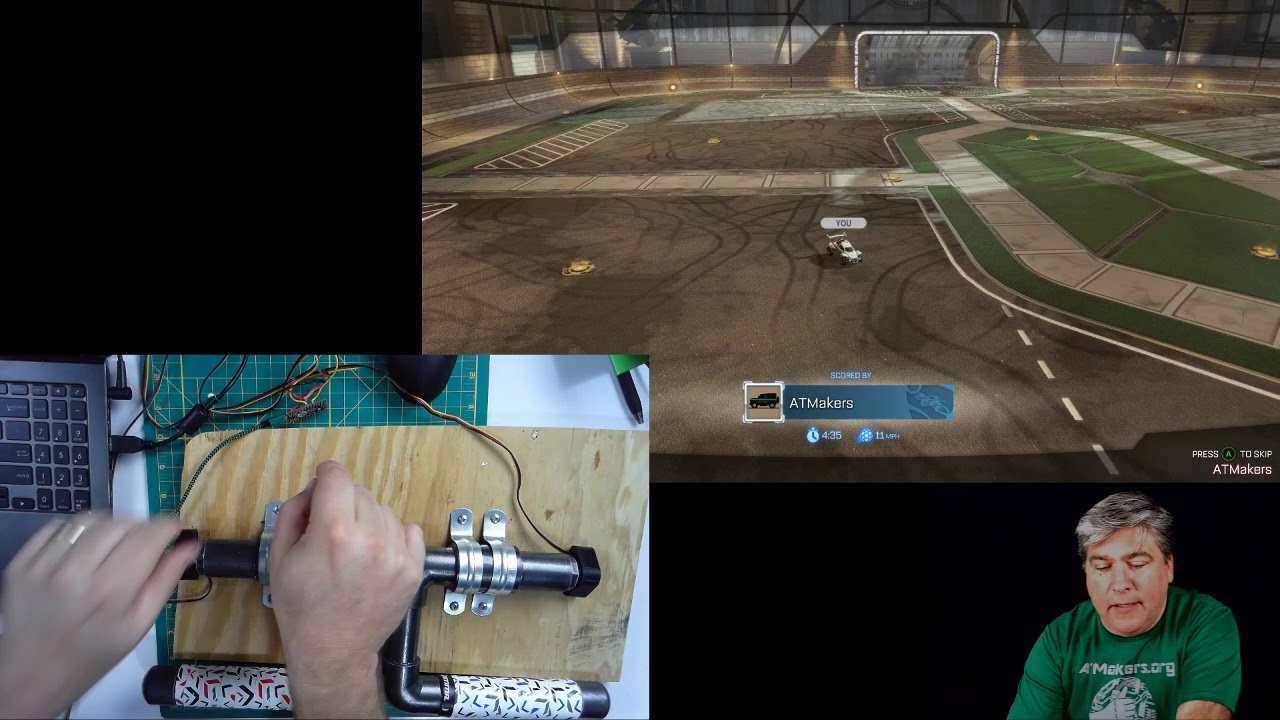
NOTE: Sorry about the delay at the beginning - I'm editing it but for now just skip to 1:00 Just a quick video showing using the XAC and custom CircuitPython...
tulip sleet
@tough flax wow, great! was just adding a delay the fix from a few days ago (or much more since then)?
tough flax
Yes! I realized it in the shower (go figure)... only thing it could be was a timing issue. We should probably see if there's a way Gamepad's constructor could wait to return until it knew it was good?
tulip sleet
There is a one-second retry here: https://github.com/adafruit/Adafruit_CircuitPython_HID/blob/master/adafruit_hid/gamepad.py#L86 but maybe that wasn't enough
raven canopy
@tough flax awesome work! that last shot was a good one. 🚀 ⚽
@tough flax are you going to put some sensitivity/trim adjustment on it? or does the XAC already have that available? (haven't looked at the XAC yet, really)
tough flax
So...
😃
I have a problem for math folks
I used to be a math folk
But I'm old and my Trig brain cells died
raven canopy
hehe. mine never gestated...
tough flax
The way I do the mapping, I end up with a circle that I can reach. I can reach full forward, full left, full right, and full back
but I can't hit the corners
I need a way to map that circle onto the square it inscribes 😃
I believe it's a projection (like a map)
but I don't remember how to do them. Something like take the arctangent of the Y/X and then scale by the sin/cos of 1/2 the angle?
Right now, I just multiply by 2 and clip 😃
So the center is much less sensitive than the edges
Anyway... the XAC DOES have sensitivity and even mapping options
and you can change them on each profile
So... there's lots of options
raven canopy
nice! glad they thought of that on the XAC. wrt the math...i have nothing to offer. 😦
tough flax
@tulip sleet I'm not sure that's it - it seems that if the gamepad is setup too early, Linux and the XAC never really recover. Like the host isn't ready and just writes off the peripheral
tulip sleet
so even trying too early is a mistake, it has to be good and ready
tough flax
Yes, I was hoping there was a way to tell if it was ready - maybe in the USB stack
tulip sleet
gotta go 💤 but GREAT it works
solar whale
is this a known issue new with beta-0? ```uto-reload is on. Simply save files over USB to run them or enter REPL to disable.
code.py output:
Traceback (most recent call last):
File "code.py", line 114, in <module>
File "code.py", line 79, in <module>
File "/lib/adafruit_gps.py", line 110, in update
File "/lib/adafruit_gps.py", line 186, in _parse_gpgga
TypeError: time.struct_time() takes exactly 1 argument
not known; go ahead and make it known; @slender iron did a big sweep of keyword arg changes; thanks!
working with hathach on debugging the BLE vs USB thing. He just got up; I'm going to 💤
solar whale
OK -- I'll file an issue -- goodnight!
manic glacierBOT

Just tried running some code I have been using for quite awhile on 4.0 alpha but it now breaks.
uto-reload is on. Simply save files over USB to run them or enter REPL to disable.
code.py output:
Traceback (most recent call last):
  File "code.py", line 114, in <module>
  File "code.py", line 79, in <module>
  File "/lib/adafruit_gps.py", line 110, in update
  File "/lib/adafruit_gps.py", line 186, in _parse_gpgga
TypeError: time.struct_time() takes exactly 1 argument
has ti...
 misty wolf
Hello. I apologize if this is answered somewhere else. I know there are ways to increase the adc sample rate in Arduino. Using circuit python, what is the standard sample rate for the m4 boards (I have an itsy bitsy) and what can that be reliably increased to? I understand that's probably a vague question.
manic glacierBOT
it is not clear what is wrong with this statement
https://github.com/adafruit/Adafruit_CircuitPython_GPS/blob/master/adafruit_gps.py#L186

If I revert back to this build, the code runs normally.
Adafruit CircuitPython 4.0.0-alpha.5-133-g9678a5a32 on 2019-01-12; Adafruit ItsyBitsy M4 Express with samd51g19
>>>
@old smelt I have one of the original hifives but its pretty low memory for circuitpython. 32k is tight on the samd21
 split ocean
Nicely done @tough flax !
tough flax
Thanks, @split ocean! Making lots of little game controllers (we need a name for these)
This works!
split ocean
No way! That's excellent.
tough flax
Video is processing https://youtu.be/Uhxnqj4tdfU
 manic glacierBOT

(back from vacation) That's really interesting! That's using just time-to-threshold and averaging over 10 cycles where I'm trying to get all fancy and stuff ... i'll try that out!
 manic glacierBOT
compared CP4.0 Beta to CPython (Python3 on Ubuntu Linux)
Press any key to enter the REPL. Use CTRL-D to reload.
Adafruit CircuitPython 4.0.0-beta.0-15-g6be4b07e1 on 2019-01-24; Adafruit Metro M4 Express with samd51j19
>>>
>>>
>>> import time
>>> x = time.struct_time((0,0,0,0,0,0,0,0,0))
Traceback (most recent call last):
  File "<stdin>", line 1, in <module>
TypeError: time.struct_time() takes exactly 1 argument
>>>
jerryneedell@Ubuntu-Macmini:~$ python3
Pyth...@slender iron - thanks for the feedback on the SiFive boards. I have one of the first boards, as well. Just curious about it after Phillip's reference yesterday. Is there a good reference for minimum specs to support CircuitPython? Apologize if that's already posted somewhere obvious. Chalk it up to being new around here...
old smelt
I spend most of my time focused on FPGA-based hardware. But I am fascinated with CircuitPython for micros and have a longer-term interest in Python for High Level Synthesis in FPGAs/ASICs. CP seems like a logical step along that progression. So, I'm trying to soak up what I can, when I can.
main meteor
I'd love to play with FPGAs, but most of them use undocumented proprietary formats, and the tools provided by the vendors tend to be DOS-only, with a Linux version that's unusably buggy.
lone sandalBOT

 marble hornet
hey, i am about to start and overhaul of my gui and want to get rid of these ._ files in my repo, does anyone know how?
tidal kiln
@marble hornet .gitignore
marble hornet
do i just recommit then? after adding ._*??
tidal kiln
hmmm. good point. it'll stop tracking right away. but are they removed?
i'm more used to having it setup from the start
i think you just need to commit again
marble hornet
they didn't download, i only see them on the website
marble hornet
answer(cater.newest_query) == True
True
tidal kiln
did you add .gitignore to your local copy?
tidal kiln
and then do another commit?
marble hornet
should i use add --all? --u?
tidal kiln
nothing special, just proceed as normal
it'll take effect at the next commit
you can use git status as a way to sort of verify things
marble hornet
okay... trying...
still github after adding each file manually
but not on my local clone
tidal kiln
which files did you add manually?
marble hornet
all in the photo besides ._readme
oh
you can do them one by one manually on gihub
hrmm
 fathom lava
Can any Git wizards here help me? I updated .travis.yml and a readme in the circuitpython repo, but it seems that I also pushed some "submodule" changes (https://github.com/ShawnHymel/circuitpython/commit/d10fa4a8cb9d6e133eee09ecc914f3c7bc4fbcfa). How do I update the submodules so that they won't conflict with the upstream repo when I go to do a pull request? cd'ing and pulling in each submodule (https://github.com/tj/git-extras/pull/80) didn't seem to help.
pastel panther
@marble hornet Did you git rm each file before adding it to your .gitignore? You may have to remove them from the .gitignore then git rm them, then re-add them to the .gitignore
@fathom lava in the cp root folder, try git submodule sync; git submodule update --init --recursive
manic glacierBOT
 fathom lava
@pastel panther Thank you! It looks like it synced my submodules, but git status shows no changes, so there's nothing to push to my repo. Do I need to git revert, sync, then make my changes again?
fathom lava
got it, thanks
pastel panther
you'll probably need to --force the next push
manic glacierBOT
 marble hornet
@slender iron what does the (1) in the mpconfig*.h do for displayio?
slender iron
@marble hornet turns it on (1) => true
@old smelt mithro got tinyusb working in an ice40up5k recently
we use the same stack in circuitpython
I'm gonna pick up an ECP5 with my next parts order too
@main meteor the open source fpga tools have come a long way. look for symbiflow and nextpnr for more info
old smelt
@slender iron - that's right! I forgot about FuPy. I'll have to review their project. Thanks!
slender iron
Getting there on the terminal
pastel panther
something tells me my little bitty tft isn't going to be useful for error messages without some work. Maybe cycling through the lines of an error message to fit on a smaller display?
slender iron
how small?
pastel panther
160x80
same one as this:
https://www.adafruit.com/product/3321

Add a dazzling color display to your Feather project with this Adafruit Mini Color TFT with Joystick FeatherWing.It has so much stuff going on, we could not fit any more parts on the ...
slender iron
ah ok. I have that
manic glacierBOT
marble hornet
great job! and thnx
slender iron
@tulip sleet or @idle owl need anything from me before I go heads down again?
tulip sleet
@slender iron nope, I am working with Thach on the tusb stuff (which you prob saw already)
slender iron
yup yup
marble hornet
@slender iron here is what i am running main.py, pin_port just makes ports and renames pin for me so i don;t have to remember them . please ignore thre uart erroras it is in a try and except, i just printed the Exception as e: when i uncomment the inputs it says there are too many positional arguments, but if i only give it the spi bus: disp_spi it says it wants the command line
they are all from the board module except the spi port
marble hornet
oh! 👌 trying...
solar whale
@slender iron any idea about the time.struct_time issue? I'm trying to follow it, but not getting very far.
slender iron
@solar whale looking now
solar whale
thanks
marble hornet
@slender iron ti worked! i'd love to get started on the rect and round_rect wrapper etc
it**
i guess Ti works too, the calculators are great! but kidding aside: ifyou can point me to the method or doc i'll get started
slender iron
@solar whale should it be (kw_args != NULL && kw_args->used > 0)?
slender iron
I'll try it here too
solar whale
but not clear to me wha any of the tests fail now.
slender iron
ya, me neither
manic glacierBOT


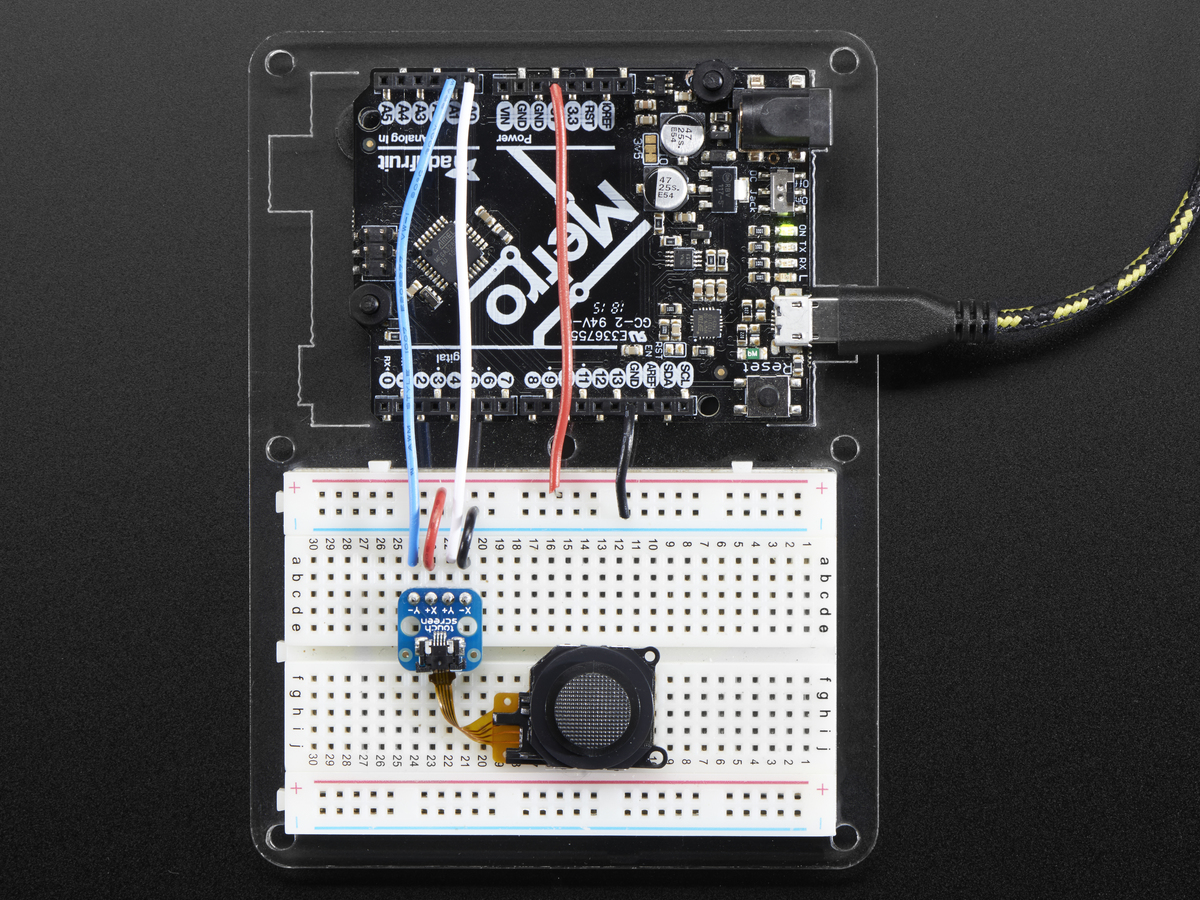

Added pinout files and updated README. I didn't forget about .travis.yml this time! SparkFun VID/PID created by @jimblom for port to SparkFun SAMD21 Dev.
slender iron
@solar whale kwargs isn't null
solar whale
ah -- why?
solar whale
building now
manic glacierBOT
@ShawnHymel looks good - we will merge once travis completes!
solar whale
it works!
slender iron
🎉
solar whale
>>>
>>> import time
>>> x = time.struct_time((0,0,0,0,0,0,0,0,0))
>>> x
struct_time(tm_year=0, tm_mon=0, tm_mday=0, tm_hour=0, tm_min=0, tm_sec=0, tm_wday=0, tm_yday=0, tm_isdst=0)
>>>
and my gps code works as well!
is kw_args ever == NULL ?
solar whale
ok -- thanks -- seems happy now -- works for pcf8523 and gps
 lime trellis
hi all! are there any examples of a samd51 running crystalless? I can get it to boot into bootloader mode, but it doesn't like any UF2 that I'm passing it
Only reference I can find is this comment by @tulip sleet : https://github.com/adafruit/circuitpython/issues/648#issuecomment-387547704

GitHub
Currently all 3.0 boards are using the 48MHz DFLL in crystalless mode. It's locked to the USB clock when available, but it would be good to use the on-board crystal for boards that have it. 2.x...
slender iron
@lime trellis its always crystall-less afaik
lime trellis
hmmm then have you see a case where the BOOT drive mounts fine, but dragging over a UF2 just results in it rebooting back to BOOT?
slender iron
what board are you using?
lime trellis
custom board
slender iron
and what uf2 are you loading?
lime trellis
all ones I've built myself. But I've tried the ItsyBitsy M4 and Feather M4 firmware as well. same behavior
slender iron
I've had a similar issue on a board when the decoupling caps were too small
not sure it went back to BOOT though
stuck elbow
I could never get to work a bootloader I built myself, for some reason
lime trellis
I've built quite a few for other boards. they seem fine so far
I was thinking it might have to do with #define BOOT_USART_BUS_CLOCK_INDEX MCLK_APBAMASK_SERCOM0 in the board_config.h file for the uf2-samdx1 boards
manic glacierBOT
[adafruit/circuitpython] New comment on issue #1493: call to time\.struct\_time\(\) fails in beta\-0
as suggested by @tannewt made this chsnge
jerryneedell@Ubuntu-Macmini:~/circuitpython_master/ports/atmel-samd$ git diff
diff --git a/shared-bindings/time/__init__.c b/shared-bindings/time/__init__.c
index f19b972d0..3babe2db4 100644
--- a/shared-bindings/time/__init__.c
+++ b/shared-bindings/time/__init__.c
@@ -84,7 +84,7 @@ MP_DEFINE_CONST_FUN_OBJ_1(time_sleep_obj, time_sleep);

 #if MICROPY_PY_COLLECTIONS
mp_obj_t struct_time_make_new(const mp_obj_type_t *type, size_t n_a...@slender iron do you want to fold the time.struct_time fix into a PR you are working on or would you lime me to create one for it?
solar whale
😉 OK -- I have to go out for an hour or so -- will do it when I get back.
slender iron
k no rush
exotic pumice
@slender iron I thought you guys were using xosc32k
exotic pumice
ok, I wonder if that's part of my problem
I know you're not using usbcrm
boards/feather_m0_express_crickit/mpconfigboard.h
24:#define BOARD_HAS_CRYSTAL 1

boards/grandcentral_m4_express/mpconfigboard.h
32:#define BOARD_HAS_CRYSTAL 1

boards/feather_m0_express/mpconfigboard.h
25:#define BOARD_HAS_CRYSTAL 1

boards/feather_radiofruit_zigbee/mpconfigboard.h
23:#define BOARD_HAS_CRYSTAL 1

boards/metro_m4_express/mpconfigboard.h
31:#define BOARD_HAS_CRYSTAL 1

boards/feather_m4_express/mpconfigboard.h
29:#define BOARD_HAS_CRYSTAL 1

boards/metro_m0_express/mpconfigboard.h
30:#define BOARD_HAS_CRYSTAL 1
if (board_has_crystal()) {
        init_clock_source_xosc32k();
        OSC32KCTRL->RTCCTRL.bit.RTCSEL = OSC32KCTRL_RTCCTRL_RTCSEL_XOSC1K_Val;
    } else {
        OSC32KCTRL->RTCCTRL.bit.RTCSEL = OSC32KCTRL_RTCCTRL_RTCSEL_ULP1K_Val;
    }
Please help anybody... I have Arduino Zero with UF2 bootloader but no CPy in UF2 format... only BIN. How to flash this BIN into Arduino Zero???
exotic pumice
you can convert bin to uf2 with this python script https://github.com/Microsoft/uf2/blob/master/utils/uf2conv.py

GitHub
UF2 file format specification. Contribute to Microsoft/uf2 development by creating an account on GitHub.
buoyant wigeon
@exotic pumice Many thanks... will try
pastel panther
@buoyant wigeon what do you mean by "no CPy in UF2 format?" There are uf2s of CP for the zero here: https://github.com/adafruit/circuitpython/releases
GitHub
CircuitPython - a Python implementation for teaching coding with microcontrollers - adafruit/circuitpython
buoyant wigeon
@pastel panther I am maybe blind... I see only mkzero...
buoyant wigeon
@pastel panther adafruit-circuitpython-arduino_zero-3.1.2.bin
pastel panther
@buoyant wigeon I'm not sure why a uf2 isn't being built for the arduino zero but I'd have to assume there is a good reason. @tulip sleet do you know?
buoyant wigeon
@pastel panther I didn't know uf2conv.py... I had some troubles with cmd line... but finally I was succesfull... THANKS for good advice
pastel panther
did you get it loaded?
manic glacierBOT
fixes #1493 -- change suggested by @tannewt
tested on metro_m4_express and itsybitsym4_express
buoyant wigeon
yes, loaded...and have REPL
manic glacierBOT
I just submitted thia PR -- but it does not appear to have kicked off Travis build -- did I do something wrong?
idle owl
@solar whale I'm not sure why it isn't triggering a build.
solar whale
@idle owl hmm -- Travis hates me 😦
idle owl
But I don't deal with circuitpython very often.... Could be there's something needed on your end to get it to trigger.
solar whale
not in the past
idle owl
How recent "not in the past" though? I thought there were fairly recent changes to how it builds.... though I'm basing this on seriously peripheral awareness... like from reading GitHub threads and that's it.
So I'm not the best person to troubleshoot this. Probably best to wait for Scott or Dan to have a moment.
solar whale
ok -- it is running on travis.org
idle owl
That's... weird.
And leads me to believe there's definitely something off.
We migrated everything.
solar whale
apparently my fork is still on travis.org -- some of my repos have migrated.
some have not
idle owl
Hmm.
solar whale
but it is running the wrong build -- I'm confused...
now it just started the correct one....
idle owl
Travis is mysterious.
solar whale
i'll wait until it finishes and see if it magically appears in the adafruit repo
manic glacierBOT
travis ran on travis-ci.org and passed, but I don't know how to get it to migrate my fork to travis-ci.com?
idle owl
when you wire something up the same way you did yesterday and now it doesn't work. 😖
manic glacierBOT
Hi, we enrolled in the Travis beta migration program: https://docs.travis-ci.com/user/migrate/open-source-on-travis-ci-com/#existing-open-source-repositories-on-travis-ciorg. Once we were in it, a list of repos we could migrate showed up on https://travis-ci.org/account/repositories at the bottom, if I remember right, with "Migrate" buttons. You can also just wait for them to migrate your repo eventually.