#circuitpython-dev
1 messages · Page 216 of 1
 solar whale
I tried 😦
 meager fog
yeah sorry just saw that
np we can adjust in library, what is the method we should use instead?
we can just try: both
😃
solar whale
in stead of str.encode('utf-8') use bytes(str,"utf-8")
solar whale
should be OK on M4
meager fog
unbytes
solar whale
do you want me to set it up as a try/except
solar whale
hmmm -- need to check -- did not get an error -- maybe I did not get fare enought to use decode
where is decode used -- don't see it
nevermind
I just have not triggered it yet. Let me see -- hmmm -- I don't see decode as a function for the M4 either ``` Adafruit CircuitPython 4.0.0-alpha.3-43-g80db2cec9 on 2018-12-03; Adafruit Feather M4 Express with samd51j19
x="abcd"
dir(x)
['class', 'center', 'count', 'encode', 'endswith', 'find', 'format', 'index', 'isalpha', 'isdigit', 'islower', 'isspace', 'isupper', 'join', 'lower', 'lstrip', 'partition', 'replace', 'rfind', 'rindex', 'rpartition', 'rsplit', 'rstrip', 'split', 'splitlines', 'startswith', 'strip', 'upper']
 slender iron
@solar whale issue would be great. I'd like to have it on
solar whale
@slender iron will do
slender iron
thanks
solar whale
@meager fog ok itse in bytes ```>>> dir(bytes)
['class', 'name', 'center', 'count', 'decode', 'endswith', 'find', 'format', 'index', 'isalpha', 'isdigit', 'islower', 'isspace', 'isupper', 'join', 'lower', 'lstrip', 'partition', 'replace', 'rfind', 'rindex', 'rpartition', 'rsplit', 'rstrip', 'split', 'splitlines', 'startswith', 'strip', 'upper']
k
yah either way please do a PR
and ill test
otherwise i can do a search/replace but im in a nother chunk o code right now
solar whale
vut not in nrf bytes ```Adafruit CircuitPython 4.0.0-alpha.4-1-g801d9a5ab on 2018-12-07; Particle Argon with nRF52840
dir(bytes)
['count', 'endswith', 'find', 'format', 'index', 'isalpha', 'isdigit', 'islower', 'isspace', 'isupper', 'join', 'lower', 'lstrip', 'replace', 'rfind', 'rindex', 'rsplit', 'rstrip', 'split', 'startswith', 'strip', 'upper']
OK -- I'll work aon a PR -- need to figure out how to replace decode
got it str(bytething,'utf-8') replaces bytething.decode('utf-8') ```>>> x = "abcd"
b = bytes(x,"utf-8")
b
b'abcd'
s = str(b,'utf-8')
s
'abcd'
x
'abcd'
@meager fog I have an esp8266 connected to my particle_argon -- just tx/rx -- I can talk to it, but how do I get it to go into "AT mode"
meager fog
you have to upload the AT firmware
its not built in or anything, its a special program
solar whale
ah -- duh -- that makes sense
solar whale
I found something, but may save some confusion if you have it or a link to it -
thanks
solar whale
do I need to do something different t thaan esptool.py --baud 460800 write_flash 0 AT_firmware_1.6.2.0.bin it's not happy with that
meager fog
whts it say
solar whale
np
meager fog
$ esptool.py --no-stub --chip esp8266 --baud 115200 --port /dev/ttyS5 write_flash 0x00000 outty.bin
try that
switch ttyS5 with whatever you got
and bin file
does the upload work?
solar whale
no -- does not like --no-stub --chip esp8266
usage: esptool [-h] [--port PORT] [--baud BAUD]
               {load_ram,dump_mem,read_mem,write_mem,write_flash,run,image_info,make_image,elf2image,read_mac,chip_id,flash_id,read_flash,verify_flash,erase_flash,version}
               ...
esptool: error: argument operation: invalid choice: 'esp8266' (choose from 'load_ram', 'dump_mem', 'read_mem', 'write_mem', 'write_flash', 'run', 'image_info', 'make_image', 'elf2image', 'read_mac', 'chip_id', 'flash_id', 'read_flash', 'verify_flash', 'erase_flash', 'version')
mine loads ok, but does not run properly after reset ```jerryneedell@Ubuntu-Macmini:~/Downloads$ esptool.py --baud 115200 write_flash 0 AT_firmware_1.6.2.0.bin
esptool.py v1.2
Connecting...
Auto-detected Flash size: 32m
Running Cesanta flasher stub...
Flash params set to 0x0040
Writing 712704 @ 0x0... 712704 (100 %)
Wrote 712704 bytes at 0x0 in 61.8 seconds (92.3 kbit/s)...
Leaving...
click the reset button?
solar whale
then it goes nuts -- blue light flashes and garbage streams
I think I goofed -- I tried loading a file from Expressif boot_v1.7.bin but it may havescrewed up the bootloader 😦
I can reload CP now, it bootsw. but I get some odd stuff at startup.
justa sec
It may be OK
solar whale
good! - I tried reloading and it is sort of communicating -- I'll keep at it -- thanks
meager fog
ok i wonder if you have an old version of esptool too
 manic glacierBOT

k on your scope you should def be able to see the discharge curve. also you can try putting the wire in water, that should also be detectable
meager fog
@solar whale yah i hav esptool.py v2.2
solar whale
tyring to update -- just pip install esptool
ah mine is part of esp-open sdk
ok -- now have 2.5.1
meager fog
nice
solar whale
yay -- it speaks ```>>>
import esp8266comm
b'\r\n'
b'AT version:1.6.2.0(Apr 13 2018 11:10:59)\r\n'
b'SDK ver\r\n'
b'compileme:Jun 7 2018 19:34:26\r\n'
b'Bin ver:1.6.2\r\n'
b'OK\r\n'
b''
ATE0
b'ATE0\r\n'
b'\r\n'
b'OK\r\n'
b''
AT+GMR
b'AT version:1.6.2.0(Apr 13 2018 11:10:59)\r\n'
b'SDK ver\n'
b'compileime:Jun 7 2018 19:34:26\r\n'
b'Bn ver1.6.2\r\n'
b'OK\r\n'
b''
yay! ```Adafruit CircuitPython 4.0.0-alpha.3-43-g80db2cec9 on 2018-12-03; Adafruit Feather M4 Express with samd51j19
import espatcommand_simpletest
ESP AT commands
---> AT+RST
<--- b'\x8e\x8c\x0cl\x0c\x0cl\xec\x8cl\x8e|\xecl\x0c\x8e\x0el\x80\x02n\xfc\x00\x8c\x9e\xe2\x8cb\x0cll\xec\x8c\x8e\x12\x0cb\x0c\x02\x02\x8c\x9e\xe2\x8cb\x0cl\x0c\x8cb\x1crlrl\r\nready\r\nAT+RST\r\n\r\nOK\r\n'
---> AT+RST
<--- b'AT+RST\r\n\r\nOK\r\n'
---> ATE0
<--- b'ATE0'
---> ATE0
<--- b'ATE0\r\n\r\nERROR\r\n'
---> ATE0
<--- b'ATE0\r\n\r\nOK\r\n'
---> AT+GMR
<--- b'AT version:1.6.2.0(Apr 13 2018 11:10:59)\r\nSDK version:2.2.1(6ab97e9)\r\ncompile time:Jun 7 2018 19:34:26\r\nBin version(Wroom 02):1.6.2\r\nOK\r\n'
Connected to AT software version 1.6.2.0
---> AT+CWMODE_CUR?
<--- b'+CWMODE_CUR:2\r\n\r\nOK\r\n'
---> AT+CWMODE_CUR=1
<--- b'\r\nOK\r\n'
---> AT+CWMODE_CUR?
<--- b'+CWMODE_CUR:1\r\n\r\nOK\r\n'
Mode is now 1
---> AT+CWLAP
cool -- it even connected to my network!! I think it helps to set UART_CUR=115200,8,1,0,0 -- no flow control
manic glacierBOT

The trailing __ is needed for RST links here and above. You can see the output on GitHub by clicking View File: https://github.com/adafruit/circuitpython/blob/f8ded46ad69ebba2de5b791bde16c50c4d2b1d1b/README.rst

The current master code causes a error when booting an esp8266
I have not tested esp8266 recently -- not sure when this began
this prevents ampy from working :-(
>>>
PYB: soft reboot
#6 ets_task(401003c8, 3, 3fff83ec, 4)
Traceback (most recent call last):
  File "_boot.py", line 4, in <module>
ImportError: no module named 'storage'


Press any key to enter the REPL. Use CTRL-D to soft reset.

Adafruit CircuitPython 4.0.0-alpha.4-4-g2b739e1eb on 2018-12-09; ESP module wit...
This error happened in the doc build in travis, I think because the link is a redirect (redirects to https://store.arduino.cc/usa/arduino-mkrzero or presumably something else that's location-dependent).
Warning, treated as error:
/home/travis/build/adafruit/circuitpython/README.rst:63:'any' reference target not found: https://store.arduino.cc/arduino-mkrzero
The command "(! var_search "${TRAVIS_TESTS-}" docs || sphinx-build -E -W -b html . _build/html)" exited with 2.
 fluid helm
Updates to the CircuitPython editor, circuitpython features will now be made available in the upcoming EduBlocks v2 which is a full modal editor on the web
as this will be a big project, i'm still going to be releasing the Beta over christmas so people can access it
solar whale
esp8266 issue has been around awhile -- working back to find where it broke.
alpha2 is ok
broke in alpha3 😦
manic glacierBOT
This issues occurred between 4.0.0-alpha.2 and alpha.3
alpha2 is OK alpha3 is not

Certainly can!
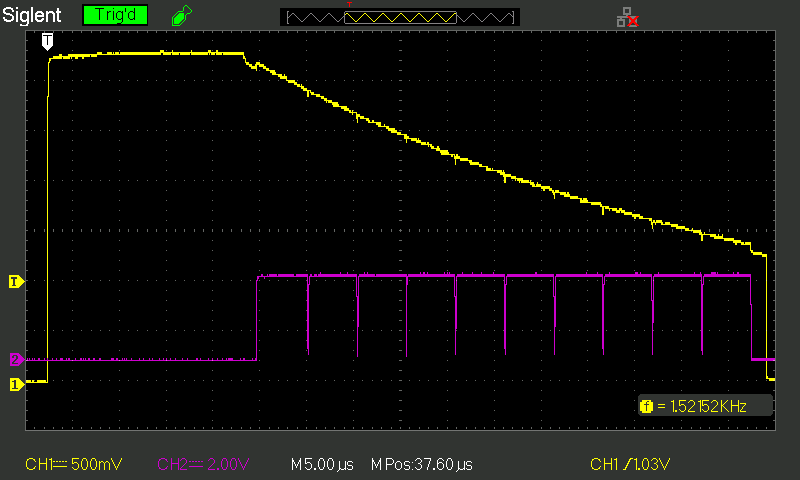
Yellow: the touch pad voltage
Purple: a clock signal I added in to show the sample rate.
Breadboards and flying leads is all a bit too messy to behave nicely with touch sensing so I'll make up a little test board like I did for the ESP32 one: https://nick.zoic.org/art/esp32-capacitive-sensors/ ... the above is just intended as a proof of concept for the "sing...
 craggy harbor
hey guys, how can I read e.g. 50 pulses with pulseIn (https://circuitpython.readthedocs.io/en/latest/shared-bindings/pulseio/PulseIn.html) ?
Are there any examples, because on that site there's only one that reads a single pulse.
manic glacierBOT
kk thanks! i do think its good to have both options, how about default to drive_pin=None and if it is, do the single-wire setup, otherwise, use the driver pin
solar whale
@meager fog great progress today --- Now your espatcommand simpletest works between my M4 nad esp8266 -- when I switch the M4 for the particle_argon with same code, the resonses are not getting back properly. I can do manual AT commands through the particle to the ESP8266 but something not working when I use the espatcommands -- gives me something clear to troubleshoot. I'm try to make more progress tomorrow. Thanks for all the help with getting the AT firmware loaded.
 exotic pumice
hey @meager fog, just curious, what is the goal for AdafruitDAP? I think it would be nice to use one device to SWD another.
but that doesn't seem to be built in
I tried to implement SWD in circuitpy for this purpose but then found out about AdafruitDAP
meager fog
yes you can SWD a chip direct from another chip
cirucitpy does not have a low level SWD support at this time, it may not work - you need to do special pin tricks very fast
exotic pumice
ok
solar whale
@meager fog another pr for minor change to your simpletest
meager fog
kk
exotic pumice
would openocd integration be difficult?
craggy harbor
hey guys, how can I read e.g. 50 pulses with pulseIn (https://circuitpython.readthedocs.io/en/latest/shared-bindings/pulseio/PulseIn.html) ?
Are there any examples, because on that site there's only one that reads a single pulse.
@solar whale 😄
solar whale
This is the place to ask! Just need someone who knows to come online!
meager fog
@exotic pumice no idea, isnt really meant for that, its meant for fully standalone operation
exotic pumice
ok
 raven canopy
@craggy harbor just need to add the maximum number of pulses to record when you create the object:
pulses = pulseio.PulseIn(board.D?, maxlen=50)
@solar whale and @raven canopy thank you very much!
so what does it detect as a pulse? from rising to falling edge?
raven canopy
@slender iron BoardTest? intrigued... 🤔
@craggy harbor the pulse detected is the duration of the pin being driven HIGH.
starts on the rise, and stops on the fall
craggy harbor
yeah so essentially from rising to falling edge 😃
I have a sender that sends pulses that all have the same length but the output is a bit different
In the output that I read from a pin of my antenna with pulseio I get very varying lengths
raven canopy
what frequency are you trying to detect?
craggy harbor
433.92 MHz
Maybe it's too slow?
The antenna pipes its output / reading directly to that pin
raven canopy
Too fast, I think. PulseIn caps out at about 512KHz iirc. give me a sec; there was an issue about it.
craggy harbor
Hmmmm I see okay, I will wait 😃
raven canopy
actually, 128KHz is the best I got before it started locking up. There was a change that avoids PulseIn locking up now. But, yeah, 433MHz is too fast for CircuitPython and PulseIn.
craggy harbor
hmmm that's a pity!
Could I get a faster reading if I use DigitalInOut?
And implement something like pulseIn myself?
raven canopy
worth a shot, but i'm not confident it will be as fast as PulseIn. PulseIn captures on the C-side with interrupts. digitalio will only go as fast as the VM loop on the Python side.
raven canopy
to boot, clock cycles != maximum capture rate. for instance, if you use the Timer periph on the SAMD, it takes a minimum of 3 clock ticks to register a single change in pin state...
craggy harbor
@exotic pumice so probably people who use the antenna that I use, use its "synchronous" mode where the antenna stores the data in a FIFO and read it from there I guess 🤔
exotic pumice
I guess
craggy harbor
ok thanks 😃
 tawny creek
update on my SPI flash exploration! To review I was having issues getting a custom trinket M0 based board with SPI flash . Starting on CP 4.3 I wasn't able to mount CIRCUITPY
On CP 4.4, keeping these commented out made CIRCUITPY appear:
//#define MICROPY_HW_APA102_SCK    (&pin_PA01)```

But now the dotstar LED is stuck at pink/purple and doesn't blink as a status light.Were the dotstar and the flash sharing a SERCOM maybe?
 tough flax
Quick Q? Is there an FFT or similar lib for CP that can give an approx freq for a sound coming in the mic (on CPX or similar)
exotic pumice
I think FrequencyIn is a work in progress
 tulip sleet
@tough flax we were trying some zero-crossing detection code in CPy that did primitive frequency detection, but it didn't work all that well for complex waveforms. It worked better on a slide whistle than a kid's recorder, for instance.
There's plenty of Arduino code for that, of course. What kind of tone are you trying to detect?
tulip sleet
@tough flax yes, that is going to be tough. The current CPX mic code already produces somewhat noisy output, because we apply a real-time filter that's not that great. It might be worth trying this with some Arduino libraries first to see if anything works well.
tough flax
Ok. Maybe an m4 with a separate mic?
meager fog
bill, i know that you can sample ADC at about ~16khz on an m4, but you'll have to adapt the freq code. and still, it doesnt work perfectly
tulip sleet
@tough flax here's the code we were trying
There are better pitch detection algorithms but they require more oomph than we can get out of CPy in real time
tawny creek
@exotic pumice Yeah I think that's might be the case, do you know how to switch SERCOM channels? Preferably a solution that doesn't require hardware revision ><
tough flax
These would be 350-800 hz. I’ll take a look at the code. Thanks! Btw if I have to go arduino is there a process for building a uf2 file from the ide?
exotic pumice
you can copy the current.uf2 back can't you?
tough flax
I mean build an image in arduino use and have the uf2 I can distribute
exotic pumice
yeah, so you can flash the arduino file to the device, then copy it back as CURRENT.UF2
tulip sleet
no way from Arduino IDE directly. you can convert a .bin to a .uf2, or copy CURRENT.UF2 back as sajattack mentioned
it will not include anything in the SPI flash, just the internal flash
exotic pumice
btw I made a bin to uf2 converter in Rust, should be faster than the python one https://github.com/sajattack/uf2conv-rs

GitHub
Converts binary files to Microsoft's UF2 format https://github.com/Microsoft/uf2 - sajattack/uf2conv-rs
tough flax
Great info. Thanks!
exotic pumice
the bin to uf2 method will be smaller I think if that matters
I'm pretty sure CURRENT.UF2 does the whole flash size, plus UF2 has a bunch of wasted space
still only 1MB though
on my M4
 gilded cradle
I have an Itsy Bitsy M4 Express and it stopped working all of the sudden. There a brief flash on an LED when plugged in, but otherwise no sign of life. Voltages appear normal. I'm wondering if it lost it's bootloader somehow and if so, I'm having trouble finding much info on how to re-upload. or if it's even possible for me to do. @slender iron any ideas?
meager fog
if you have a jlink you can reburn the bootloader
m4 bootloader should be protected, but they do (rarely) get zapped
gilded cradle
What connections do I use on the itsy bitsy?
tulip sleet
does it show ITSYM4BOOT on double-click at all?
meager fog
SWD and SWC are underneath, reset is on a breakout pin
gilded cradle
Is that swclk and swdio?
meager fog
yeah
tawny creek
@exotic pumice https://github.com/adafruit/circuitpython/blob/master/ports/atmel-samd/boards/trinket_m0_haxpress/mpconfigboard.h
Essentially this one but with lines 6,7 uncommented

GitHub
CircuitPython - a Python implementation for teaching coding with microcontrollers - adafruit/circuitpython
gilded cradle
Thanks, I'll get a hold of one.
gilded cradle
Thanks!
tawny creek
its worth noting that no additional modifications before alpha 4.3 are needed to make it work
exotic pumice
@tawny creek yeah so looking at the datasheet PA16/17/19 are Sercom 1 or 3 and PA00/PA01 are sercom 1
and idk how circuitpy decides which sercom to use
but it's probably using 1 for both
tawny creek
yeah on builds that work it says "in use" as an error
exotic pumice
yeah
meager fog
it alwyas uses the lowest sercom first
gilded cradle
@tulip sleet Just saw your message. No, nothing.
exotic pumice
@tawny creek you'll have to ask @meager fog or @slender iron how to fix that
meager fog
see ^ its documented on the trinket - not something we can easily 'fix'
raven canopy
@tawny creek looking at Trinket Haxpress' mpconfigport.h, it also disables the dotstar pins.
exotic pumice
lol what's a haxpress
raven canopy
@exotic pumice a trinket with a spi flash chip.
tawny creek
@raven canopy yeah was able to enable those pre 4.3 with no issues on conflicting sercom , is ‘’’ #define SPI_FLASH_SERCOM SERCOM3’’’ still valid?
raven canopy
Like the other Express boards, but was done by a community member.
exotic pumice
ah
manic glacierBOT
The nrf52 builds fail to build if MICROPY_CPYTHON_COMPAT is enabled
jerryneedell@Ubuntu-Macmini:~/circuitpython_jerryn/ports/nrf$ make BOARD=particle_argon
Use make V=1, make V=2 or set BUILD_VERBOSE similarly in your environment to increase build verbosity.
QSTR updated
FREEZE freeze
LINK build-particle_argon/firmware.elf
build-particle_argon/py/modio.o:(.rodata.mp_module_io_globals_table+0x1c): undefined reference to `mp_type_textio'
collect2: error: ld returned 1 exit stat...@tawny creek I'm not sure. 🤷
tawny creek
Trying things out now 😇 at least my connections, and chips aren’t faulty
exotic pumice
oh shoot I was looking at the m4 datasheet
raven canopy
@tawny creek ahh, I see now. That define was dropped from 3.x to 4.x. I would have to track down further to see it still has any effect.
exotic pumice
good thing they're the same in that respect
I must've got the wires crossed between your trinket and Melissa's itsy bitsy
tawny creek
@raven canopy building one now to see if it does
was worth a try but nooope ^^ doesn't do anything
manic glacierBOT
to fix this and enable CPYTHON_COMPAT and a few other items that are different from the ATMEL SAMD51 builds
jerryneedell@Ubuntu-Macmini:~/circuitpython_jerryn/ports/nrf$ git diff
diff --git a/ports/nrf/mpconfigport.h b/ports/nrf/mpconfigport.h
index 86f5af20a..8b1c27367 100644
--- a/ports/nrf/mpconfigport.h
+++ b/ports/nrf/mpconfigport.h
@@ -74,16 +74,16 @@
 #define mp_builtin_open_obj mp_vfs_open_obj
 #endif

-#define MICROPY_CPYTHON_COMPAT                   (0)
+#define...Should I create a PR for this or wait for a complete review of mpconfigport.h for the nrf builds?
tawny creek
@exotic pumice @raven canopy
#define CIRCUITPY_BITBANG_APA102
solves the issue \o/
Hurraaaaaay!!!
exotic pumice
not optimal
tawny creek
yeah? how so @exotic pumice, I just poked at the Itsybitsy M0 Express and noticed this
If there was a way to explicitly define which SERCOM port is used for things, I'd like to know the alternatives
exotic pumice
I'm trying to figure out where and why the ability to choose a sercom was taken away
bitbanging is always kind of hacky
I think I found it https://github.com/adafruit/circuitpython/commit/9d91111b1b6a1eee77a88b13faf695ee0c5caea3

GitHub
This started while adding USB MIDI support (and descriptor support is
in this change.) When seeing that I'd have to implement the MIDI class
logic twice, once for atmel-samd and once for nrf, I...
also bitbanging uses more cpu
tawny creek
@exotic pumice hmm so maybe #define MICROPY_HW_APA102_SERCOM SERCOM3 maybe
exotic pumice
no that was taken out too
tawny creek
oh
exotic pumice
GitHub
This started while adding USB MIDI support (and descriptor support is
in this change.) When seeing that I'd have to implement the MIDI class
logic twice, once for atmel-samd and once for nrf, I...
that's the line number
tawny creek
looks like it was added on ports/atmel-samd/common-hal/busio/SPI.c line 64?
exotic pumice
oh, right you are
tawny creek
hrm, no bueno
exotic pumice
let me grep for that pound-def and see where else it gets used
only the one spot, and that's just to choose what gets reset, not what gets used
tawny creek
ah okay, just tried SERCOM2, SERCOM3 and both failed
exotic pumice
SERCOM2 definitely wouldn't work
super fast recursive grep util btw https://github.com/BurntSushi/ripgrep

GitHub
ripgrep recursively searches directories for a regex pattern - BurntSushi/ripgrep
tawny creek
@exotic pumice oooooo! have not heard/seen this
exotic pumice
comes in very handy
meager fog
@solar whale <--- b'\r\nRecv 66 bytes\r\n\r\nSEND OK\r\n' b'HTTP/1.1 200 OK\r\nServer: nginx/1.10.3 (Ubuntu)\r\nDate: Mon, 10 Dec 2018 03:16:20 GMT\r\nContent-Type: text/html\r\nContent-Length: 73\r\nLast-Modified: Thu, 16 Feb 2017 17:42:29 GMT\r\nConnection: keep-alive\r\nETag: "58a5e485-49"\r\nAccept-Ranges: bytes\r\n\r\nThis is a test of the CC3000 module!\nIf you can read this, its working :)'
solar whale
via esp8266 atcommands??
solar whale
nice!
nrf uart is very strange ... I feel like I'm just missing something
I think there eill be a lot of intereset in using the ESP8266 this way -- bridges all the ATMEL boards
tough flax
Hey folks, would the FFT code in here work for what I'm looking for? https://learn.adafruit.com/trellis-m4-audio-visualizer-and-filter

Colored lights bouncing to the music and low pass/band pass filter effects are a must have for any party. Now you can bring the party to your Trellis M4 with the Audio Visualizer and Filter!
(Yes, I know it's Arduino)
meager fog
bill, thats arduino only, isnt for circuitpy
 main meteor
Alas, import numpy isn't for circuitpy either 😃 (yet...)
 ruby atlas
I'm not sure where importable C (compiled) modules fall on the roadmap.
main meteor
I should look up how to set up the circuitpy build environment (for this and other reasons).
meager fog
here is a guide! https://learn.adafruit.com/extending-circuitpython

Turn the dials to 11 by writing CircuitPython modules in C.
ruby atlas
@main meteor you totally should.
though if you start crashing your board, you probably want a segger https://www.adafruit.com/product/3571 and cables

Doing some serious development on any ARM-based platform, and tired of 'printf' plus an LED to debug? A proper JTAG/SWD HW debugger can make debugging more of a pleasure and less of ...
main meteor
People have been giving me assignments, I should see about actually doing them.
tough flax
Yes, @layada - I got that - I just thought since we'd started the question here I'd follow it up 😃
exotic pumice
not to be a downer but a zipped numpy library is 4MB
main meteor
I'll want a programmer especially since one of the things people have asked for is SWD support from CP 😃
ruby atlas
Yeah, numpy isn't going to happen
main meteor
Might happen with the SAMD9000J 😃
ruby atlas
What I was thinking is that once there's loadable C module support, an FFT module might be a great thing.
exotic pumice
@main meteor I think Adafruit_DAP does what we were looking for
in arduino but w/e
ruby atlas
But a custom build with an FFT module would be just as cool
When the Arduino code is mostly pure C it's not hard to port it into CircuitPython.
(As a built in module)
main meteor
I thought so too (and suggested it, but @slender iron asked for it in circuitpython, possibly in jest)
ruby atlas
The challenge is always memory/flash
exotic pumice
I don't know if you saw but I made an attempt in circuitpy
ruby atlas
Well, if you could come up with a generic, but compact bit of code that could be added to CircuitPython to enable FFT at realtime speeds...
@exotic pumice cool!
exotic pumice
solar whale
@meager fog aha -- it looka like response += self._uart.read(self._uart.in_waiting is not working on the nrf. Using uart.readline starts things working ``` response += self._uart.readline()
response += self._uart.read(self._uart.in_waiting)
I can't help myself. I keep putting TM4MIDIC.UF2 on my Trellis M4
exotic pumice
couldn't get it to work, but then again, I was trying to probe the swd pins with jumper cables
solar whale
not a fix, but a big clue
meager fog
i wonder if in_waiting isnt working yet
solar whale
nothing gets returned when it is used --- looking at code
ruby atlas
I really should look into what it would take to make the Trellis M4 wirelessly do Midi over USB. The USB cable gets in the way when tilting the pad.
Lorawan? 😃
exotic pumice
why not ble?
ruby atlas
True.
Anything with enough bandwidth would work I bet.
3125 bytes/s if my googling was correct.
exotic pumice
I think midi is fairly conservative
ruby atlas
when it came out it wasn't. 😃
exotic pumice
people can do midi on c64 so I think you're fine
ruby atlas
yeah.
I need to put together instructions to put into my 10yo daughter's stocking on how to assemble the trellis m4 (into a 3d printed enclosure I have yet to print) and hook it up to garbage band. She likes instructions.
exotic pumice
garbage band lol
ruby atlas
it can be used to make music, but mostly it makes...
 last drum
Is it possible to generate tones with the TrellisM4 board using CircuitPython? I would like to program the TrellisM4 to make it into a simple synthesizer.
exotic pumice

The NeoTrellis M4 is an all-in-one USB + NeoPixel + Elastomer + Audio board.
ruby atlas
I don't know if you can run CircuitPython code fast enough to do realtime synthesis.
But you sure could build a custom CircuitPython to do it.
(with C code)
exotic pumice
I think FrequencyOut would do tones
ruby atlas
yeah, but that's not enough to do synthesis.
last drum
I know there is a tone() function for the CircuitPlayground Express but not (yet?) on the TrellisM4
exotic pumice
maybe pwmout
ruby atlas
right, but can you generate at least 22khz of bytes fast enough in CircuitPython?
last drum
is there a pwmout on the TrellisM4?
ruby atlas
(44k is better)
ruby atlas
a pwm signal can be turned into audio. does it make the audio you want is the question 😃
square wave!
exotic pumice
ruby atlas
Note the sample rate 😃
Also note that it's pre computed then played
Idea: C-assisted fast (complex) math module for CircuitPython. Take formulas, compile them, and then run them on arrays much faster than doing it via the runtime.
(reality - that's a big job)
@last drum I feel like the current best option is to use the Trellis M4 as a controller for a faster device (eg as a USB keyboard, over serial, or midi).
last drum
Thanks Roy
ruby atlas

Play music on software (or hardware!) synthesizers using the 8x4 button grid, and control pitch bend and mod wheel by tilting the Trellis M4
solar whale
@meager fog -- got it to run on the particle_argon ```b'WIFI CONNECTED\r\nWIFI GOT IP\r\n\r\nOK\r\n'
b'OK\r\n'
<--- b'WIFI CONNECTED\r\nWIFI GOT IP\r\n\r\nOK\r\n'
---> AT+CIFSR
b'+CIFSR:STAIP,"10.0.0.91"\r\n+CIFSR:STAMAC,"84:f3:eb:b2:9b:ab"\r\n\r\nOK\r\n'
b'OK\r\n'
<--- b'+CIFSR:STAIP,"10.0.0.91"\r\n+CIFSR:STAMAC,"84:f3:eb:b2:9b:ab"\r\n\r\nOK\r\n'
My IP Address: 10.0.0.91
wow yay
ok i just commited some more - i made it a little more simple to use
we still need some try blocks for failure modes
here's a bitcoin example https://github.com/ladyada/Adafruit_CircuitPython_espatcommands/blob/master/examples/espatcommand_bitcoinprice.py

GitHub
Contribute to ladyada/Adafruit_CircuitPython_espatcommands development by creating an account on GitHub.
(not a lot of APIs without keys)
solar whale
great, I'll pull your changes tomorrow well
raven canopy
@solar whale I'm dieing to know. What's the default baudrate the Argon is reporting?
solar whale
@raven canopy don't get too excited -- this isjust with the argon talking to an ESP8266 via UART -- not the onboard ESP32
raven canopy
Ahhh. I shall not sleep soundly... 😆
solar whale
once this is stable -- I'll see if I can get it to talk to the ESP32 --- may have to upload new firware to ESP32 but should be doable.
raven canopy
I really hope we don't have to go through that. I am this close to filing an issue on argon-ncp-firmware; the readme, code docs, and code all say something different. (defalut baud, which uart is used, etc)
meager fog
sommer, its not a big deal to update the esp32 firmware
there's prebuilt binaries available on esp's site
raven canopy
I meant to look at particle's steps to update it; the argon-ncp-firmware page talks about esptool, but I don't see how that could go through the nrf...
solar whale
@meager fog has some magic for that
meager fog
GitHub
Contribute to ladyada/Adafruit_CircuitPython_miniesptool development by creating an account on GitHub.
less magic, more implementation
raven canopy
I was mistaken; argon-ncp says to use picocom, not esptool.
solar whale
💤 good-night all --- more fun tomorrow ((later today ...)
manic glacierBOT
Adafruit CircuitPython 4.0.0-alpha.4-4-g2b739e1 on 2018-12-08; Adafruit Feather M4 Express with samd51j19
using atom with dan's flush-write plugin, but i dont think its related. try below and change print text then save, it wont restart till time.sleep finishes
while True:
    print('hello')
    time.sleep(10)
There appears to be a problem with the uart.in_wating property for the nrf port -- I have been trying to use it on Particle Argon board but it seems to always return zero even when there is definitely something in the UART receive buffer.
uart.readline() works and returns the data even though uart.in_waiting says 0 bytes
This function works properly on the ATMEL SAMD51 (feather m4 express) I am trying to use the same code on the particle argon board.
 urban light
Hello everyone! I have this product: https://www.adafruit.com/product/2345 (Adafruit RGB Matrix HAT + RTC for Raspberry Pi). Can someone help me suggesting some library (python, nodeJS, Java) to write some text? If it is possible static text but also scrolling

You can now create a dazzling display with your Raspberry Pi Model Zero/A+/B+/Pi 2 or Pi 3 with the Adafruit RGB Matrix HAT. This HAT plugs into your Pi and makes it super easy to control ...
Thank you in advance for the help!
manic glacierBOT
I have verified the same behavior on an PCA10056 board. uart.in_waiting is always 0
 timber mango
Hi
if you're like me and can't wait to use your neotrellis with Mu ( @meager fog 's PR is here : https://github.com/mu-editor/mu/pull/721 )...
GitHub
two prong approach to the large # of boards we are workin' on
add a bunch of PIDs
add a 'catchall' where PID = None
@ntoll do you have a date for the next minor release? we could gene...
find the file "mu/modes/adafruit.py" and add (0x239A, 0x8030), # Adafruit Trellis M4 Express to the list of valid boards
Trellis M4 with mu editor 😃
Good morning, has anyone had luck getting Ampy to work with Windows 10 & Python?
solar whale
@timber mango more info would help. I don't use Windows 10 but I do use ampy. what board are you using -- what version of CircuitPython -- what errors are you seeing?
timber mango
I've got a basic Windows 10 install with Python 2.7 installed. Following the guide, I installed ampy with "pip install adafruit-ampy", but the ampy command is not recognized after the install. The install appears to install ok.
I'm following the guide here: https://github.com/adafruit/ampy
GitHub
Adafruit MicroPython Tool - Utility to interact with a MicroPython board over a serial connection. - adafruit/ampy
solar whale
it may be a path issue -- at your terminal try ls ~/.local/bin
timber mango
Hmmm, probably different on Windows, since ls won't work, and there's no .local directory in my user profile folder. Let me do some digging
solar whale
sorry -- hopefully someone with windows can help -- my guess is that you r PATH is just not finding it.
timber mango
Python is in my path, so stuff installed through pip like esptool work fine
I just can't seem to find where the ampy bits are 😃 thank you all the same
solar whale
good luck!
 lone axle
It looks like ampy leaves a binary in the in the "scripts" directory inside of the python isntall
I'm on Windows 7 instead of 10, but probably works roughly the same.
after pip install adafruit-ampy I had to add this folder to my PATH environment variable: C:\Python27\Scripts then after doing that I can run the ampy command from cmd terminal
You would need to find wherever your python is installed, there should be Scripts inside of it. Check in that folder for ampy, as long as it's in there it should work if you add that dir to your PATH.
timber mango
oh sweet let me check
Interesting, no ampy binary there, and looking at where pip installs Ampy, I found this folder... several ampy utils but no ampy binary:
I have a Raspberry Pi 3 on my desk that may become my ampy utility box 😃
lone axle
Ah, weird I ended up with ampy.exe in there:
maybe make sure you don't have another python environment on your PC. Perhaps when you run pip install it's actually pointing to a different instance of python than the one your are checking in?
 tidal kiln
@idle owl i seem to be getting same thing:
https://github.com/adafruit/Adafruit_CircuitPython_PN532/issues/8
is the pypi setup on that repo OK?
 idle owl
As far as I can tell, yes. But I'm on mobile at the moment. I'll look into it more later today.
timber mango
what's the best way to browse circuit python projects people have done?
tidal kiln
timber mango
@tidal kiln thanks! I found this too: https://learn.adafruit.com/category/circuitpython
meager fog
@solar whale @raven canopy ive moved the esp repos to 'adafruit account
and we will cookie it soon for release
i got a bitcoin demo workin' 😄
tidal kiln
@timber mango yep. that may be an even better way. 😃
solar whale
@meager fog inn your'e example you import adafruit_espatcommands but in the adafruit_espatcommands.py the class is espatcommands and I get errors using your example. Do I have something set up wrong? I
meager fog
oh yeah cause im writing code directly on the board
so the py's are in the github repo subfolder
i usually clean those up before final releae
solar whale
ok -- np -- I'm easily confused 😉
meager fog
f ya can fix it by hand for now
solar whale
sure -- I do -- that's fine
slender iron
<@&356864093652516868> here is the notes doc for today's meeting: https://docs.google.com/document/d/1Z8xlfZ1mi7b2xQZvnsiodQe1qzxeEILXj0buuQB03rQ/edit?usp=sharing
Google Docs
CircuitPython Weekly December 10th, 2018 Hug Reports @tannewt Status Updates @tannewt In the Weeds (Discussion)
solar whale
BTW -- where did you get the .bin for the AT firmware? looking for it for both esp8266 and esp32 but I can't find it as a single file.. I think I can build it but if you have them as single files its simpler.
I'm thinking I will flash the AT firmware to an ESP32 as well so I can test it with an M4 to compare with the particle_argon
meager fog
@solar whale i made it by writing the 4 release files, then dumping the firmware back into one
solar whale
OK -- that works
raven canopy
@solar whale I remember seeing some on espressif's site...
solar whale
@raven canopy yeah -- I have them -- was just hoping for a combined version all ready to go. No problem.
raven canopy
Ahh, I didn't read far into install. They aren't standalone, and need combination with firmware?
meager fog
they're like little piecemeals
esptool lets you define the offsets in the program command line, i just combo'd em
raven canopy
Never easy, eh? 😆
solar whale
looks like there is a AT version 1.7 out there 😃
solar whale
😬 oops
meager fog
er 1MB esp chip, and i want to make sure this works with a n esp8285 coproc
to be frank..its not gonna be magically better at 1.7
its kinda clunky from the start
theres a lot of retry loops
but its fast when it works 😃
solar whale
Thanks -- I'll be off for a bit - back for the CP meeting .
manic glacierBOT
solar whale
@raven canopy I now have the particle talking to an external ESP32 with the AT Firmware installed ... still come uart issues, but this gives me more control -- and it is at 115200 baud!!
timber mango
I am now paying the (small) price to pay for starting CircuitPython with the Huzzah. Best way to learn though, huh? I really need Wifi 😃
solar whale
did you get ampy working?
 wraith tiger
Btw, I won’t likely make the cp meetings very often. I’ve taken a job at Microcenter and will often be working during meeting time.
timber mango
@solar whale I installed Raspbian on a spare Raspberry Pi, installed smb, installed all the tools there.
idle owl
@wraith tiger Feel free to post your status updates and hug reports and we can read them out during the meeting if you'd like.
timber mango
The Windows 10 stuff just doesn't seem to work, not sure why. If anyone wants to step through it in a few hours I'd be happy to document and update the guide, but I ran out of ideas. It looks like ampy was silently failing to install through Python 2.7
tulip sleet
@timber mango did you try with Python 3, and have Python 2.7 uninstalled?
timber mango
No, but I can.
tulip sleet
since you say pip, which could be either version, maybe not have 2.7 around
timber mango
ahh, that could be- the doc says pip3 for some platforms, pip for Windows
let me try
 hazy gust
these m4's are fast 😃 my neopixel strip code runs so much faster than m0.
is there code\libs for DMA?
timber mango
Wow Python 3.x for Windows is weird, it lets you "install for all users" but tries to put it in your profile's directory. Weird.
slender iron
@hazy gust what do you want to use DMA for? we use it under the hood as we can
tulip sleet
@timber mango A little googling shows that Python 2 and 3 on Windows simultaneously is tricky: https://timothybramlett.com/To-run-Python-2-and-3-side-by-side-on-Windows.html
Timothy Bramlett
How to run Python 2 and 3 side by side on Windows
slender iron
@tulip sleet I need this for the release: https://github.com/adafruit/circuitpython/pull/1392
 timber mango
I just ditched 2.7, that's my comfort zone and I'm committed to CP and Python 3.x now 😃
hazy gust
@slender iron driving neopixels (sorry I'm new). wanted to see what DMA offers in terms of neopixels. I see there is arduino code.
slender iron
@hazy gust ah, we don't use dma for neopixels at the moment in circuitpython
timber mango
@tulip sleet that was it, I will go update the docs now 😃 thank you
slender iron
<@&356864093652516868> Meeting is in 5 minutes or so
hazy gust
@slender iron does DMA offer a performance advantage at all? say for FX like pulsing 90+ neopixels.
slender iron
@timber mango @hazy gust you are welcome to join in as well
timber mango
@slender iron how to join?
slender iron
@hazy gust it could in the future if we returned immediately from the show call
join the circuitpython voice channel on the left
hazy gust
cool 😃
timber mango
ok, sounds good to listen in.
slender iron
with dma you can overlap the pixel value computation with the transmission
timber mango
@hazy gust as far as i know dma mainly helps in getting 'ready-made ' data from the memory area to the pixels without cpu cycles.
good to know iam correct in that memory 😉
so more time for the animations on the cpu..
I have an account with Adafruit and the ability to post learn guides, but it doesn't look like I have any edit access to the CP article. What's the best way to request that access? Email support?
 stuck elbow
in lurking mode
timber mango
lurking on the call
 errant grail
No microphone today.
exotic pumice
I don't really have anything to say


 river quest
here too (pt)
tulip sleet
@tidal kiln lotsa white noise from your aaudio
 gusty kiln
(it's in the doc, but i'm out for this one.)
tidal kiln
just lurking this week. noise fixed?
tulip sleet
you're muted, so ok
slender iron
@timber mango @hazy gust @timber mango I added you to circuitpython helpers role so you get notified about meetings. let me know if you don't want that role
@exotic pumice too
exotic pumice
yay
timber mango
happy to help when I can, as long as I'm not going to slow anyone down by my absence
slender iron
nope! all are welcome!
river quest
yay!
meager fog
HUGZ: @tidal kiln for picking up so many PR tweaks, @idle owl for re-doing our hat/shield/featherwings, @solar whale for bein' an ESP-hackin' pal this weekend, @raven canopy for adding some arduino-library stuff to adabot
text only!
@slender iron for tinyusb - using it a lot, its SOLID
raven canopy
Travis :swords: PyPi
exotic pumice
daemons?
meager fog
daemon demons
timber mango
yes 😉
exotic pumice
thanks to @meager fog for answering my dap questions
oh and that cool stuff that went down in #help-with-makecode
raven canopy
- @jerryn & @ladyada for the push over the weekend to get ESPxx AT communication working over various UARTs.
- A Group Hug beyond that!
solar whale
🔨
wraith tiger
Exorcising daemons? 😝
meager fog
💸
river quest
+1 for the ones that @meager fog had, and it was fun to jam out over the weekend with @solar whale - we just posted up the bitcoin project! https://blog.adafruit.com/2018/12/10/display-the-price-of-bitcoin-with-circuitpython-using-an-adafruit-feather-and-huzzah-esp8266-breakout-adafruit-circuitpython-bitcoin-esp8266/

Adafruit Industries - Makers, hackers, artists, designers and engineers!
Here’s how to display the price of Bitcoin with CircuitPython using an Adafruit Feather (Adafruit Feather M4 Express – Featuring ATSAMD51 – ATSAMD51 Cortex M4) and HUZZAH ESP8266 …
lone axle
I am
meager fog
yay
tidal kiln
no mic. group.
errant grail
Group hug and special thanks to all the inventive folks working on NeoTrellis projects. A hug to Ladyada as well for designing the STEMMA interface for I2C, UART, audio input, and other uses. Nice to have a consistent, compact, and flexible interface. BTW, there’s a STEMMA interface on my Feather M4/CPy lunchbox synth PCB that’s connected to a temporary OLED display needed for testing and troubleshooting.
slender iron
🎉
meager fog
status update: ive been neck deep in ESP8xxx-as-wifi-coprocessor hacking. its very alpha
hazy gust
lurking
meager fog
BUT if you have a spare esp8266 chip with at least 1MB flash (most do) you can try following along and try to connect to internet services, find stuff i did wrong 😃
you definitly need an M4 for now to hack on it
river quest
text only for me for this part: we updated the awesome-circuitpython list on github. we are always looking for help keeping it updated - https://github.com/adafruit/awesome-circuitpython AND the "python on microcontrollers" newsletter is approaching 4,000 readers, you can add to it, post suggestions to include, etc. and more - https://github.com/adafruit/circuitpython-weekly-newsletter
GitHub
A curated list of awesome CircuitPython guides, videos, libraries, frameworks, software and resources. - adafruit/awesome-circuitpython
GitHub
Community newsletter for python on microcontrollers - adafruit/circuitpython-weekly-newsletter
exotic pumice
I tried to get SWD running on CPY between the last time I was on and now. Didn't have much luck. Not sure whether that has to do with my implementation or general technical feasibility. I'm also still working on rusty spidma (between studying for exams and advent of code)
raven canopy
Last Week:
- Adabot:
- Chased Adabot on Travis errors; we're getting close I think.
- Added commits-since-release to the Arduino report
- FRAM: SPI Learn Guide done, and in review
This Week:
- Finish I2C FRAM Learn Guides with CircuitPython usage
- Adabot insights pagination issue
meager fog
coming soooon 😃
errant grail
Congrats @slender iron !
meager fog
THANKS @idle owl
slender iron
👍
lone axle
Getting close to finished with writing my first guide on learn.adafruit.com which covers how to use the Android Circuit Python Editor that I created.
Just last night I got REPL macros working mostly, looking forward to getting that finished up this week.
errant grail
Merged a couple of @split ocean ‘s projects this week to create a CircuitPython-based NeoTrellis “Launch Pad” for USB-HID and MIDI control (via STEMMA). My digital audio workstation’s (DAW) control surface interface is designed for just MIDI, but I wanted to simultaneously incorporate USB-HID commands. The result is an expanded control surface that exactly fits my personal DAW workflow and can dynamically morph for other, more typical applications like MU, Atom, and window/app selection.
Projects for the remainder of this week include the highly anticipated prototype of a dual 5-volt CV output board from the NeoTrellis for my Eurorack synth setup (using CircuitPython, of course) and excitedly assembling a bunch of new PCBs as soon as the OSH Park order arrives.
slender iron
I can hear @solar whale too. @inland tusk you may need to reload
exotic pumice
I couldn't hear @inland tusk earlier
exotic pumice
sorry, I have more to say than I initially thought :P
in the weeds: why was #define SPI_FLASH_SERCOM SERCOMx removed, and what's the replacement? cc @tawny creek
 inland tusk
On MCP23017 reading whole port
tulip sleet
@solar whale i'm tasked to fix it - if you can't hear me
meager fog
thanks dan!
slender iron
small pr would be great @solar whale
solar whale
great! will do
meager fog
esp32 peripherals are also a little challening
the arduino support isnt solid yet, makes it a tough target
river quest
expect to see a lot of activity and more around the nrf52840s, including we'll probably have our version in stock in the next couple weeks
solar whale
@tulip sleet let me know if you need any more information re: nrf uart issue
 neat folio
sorry for "butting in"... seemed kind of related to current topic... thanx 😃
exotic pumice
ok, thanks for clarification
meager fog
@neat folio all good, this is stuff we're thinkin about
tulip sleet
GitHub
CircuitPython driver for MCP230xx GPIO Expanders. Contribute to adafruit/Adafruit_CircuitPython_MCP230xx development by creating an account on GitHub.
tidal kiln
even better - it's a property 😃
raven canopy
Gotta run for a much-less-awesome meeting. Have a great afternoon everyone!!
river quest
great work @idle owl
slender iron
getting close if not a record
raven canopy
Or...meeting ends just in time. 😄
timber mango
thanks for being so open!
great to get some inside views!
inland tusk
Just need to know when.
solar whale
discord is alway open so -- we can find each other if needed
errant grail
Thanks all!
meager fog
thanks everyone!
slender iron
thank you!
meager fog
👋
slender iron
👋
tulip sleet
bye
exotic pumice
👋
inland tusk
👌
idle owl
<@&356864093652516868> Next meeting is 17 December 2018. The meeting after that will NOT be on Monday, due to the holiday. It will be on Thursday, 27 December 2018. Thanks!
exotic pumice
sorry I showed up out of nowhere with no notes
inland tusk
Gutten Obien!
exotic pumice
Lord Protector of the Realm and the ESP8266
manic glacierBOT

@C47D sorry for switching back to English but I also want @tannewt to get the information. I saw some things I wanted to ask.
Is there a way to confirm all string in English are in all translated files? My question is because I thought i have translated everything :cry: but it seems it is not.
I'll try to check the differences and let you guys know but if you know the answer first let me know.
Regards.
meager fog
CIrcuitPython on SGI Indigo!
exotic pumice
ARM is optionally Big Endian, but no one uses it
meager fog
CircuitPython on your Mac SE/30
solar whale
my interenet is in/out -- sorry if I'm mising parts of this
timber mango
I would donate to a campaign to get CPY on an SGI
meager fog
@solar whale we're in the weeds-weeds. which endian is better 😄
timber mango
Or Sun pizzabox
meager fog
⚔
solar whale
may be better to miss😉
timber mango
Sure it's using 180W of power, but it's cool right? 😃
neat folio
after the weeds is the best part
circuit python on my Radio Shack Color Computer 😉
@timber mango yes.... SGI is way cool
timber mango
Indigos are still pricey on Ebay
solar whale
Thanks all -- have to go for awhile -- back for fun later.
timber mango

eBay
R10000 195MHz CPU. This has the fastest CPU available in the Indigo2 line. The display output of these machines uses a 13W3 style connector and will require a 13W3 to HD15 (VGA) adapter cable and a display which supports the "sync-on-Green" timing system. | eBay!
neat folio
page switching... 😉
the Color Computer eventually got 128K I think... 😉
ok , so we have to upgrade to Amiga 😉
exotic pumice
@slender iron sorry to derail your big-endian hate 😛 what do you think about checking if a sercom is in use and trying the other ones that share the pinout?
it was the 21
yeah
It looked like they were both on 1 and 3, and they were both grabbing for 1
meager fog
after that, the universe explodes
but we'll go back in time
and we'll do CIRCUITPYTHON IN VICTORIAN ENGLAND
same deal, but we'll be smoking pipes, wearin' corsets
yeah!
yeah!
MORE ALE!
MORE MEAD FOR THE LASS!
l8r fold
exotic pumice
drink mead every day
tulip sleet
byyyyyyyyye
neat folio
I never "leave" a channel... I just "join" another channel 😉
timber mango
Has anyone tried to run the Ada IO library on the Huzzah with CP?
manic glacierBOT
solar whale
@timber mango I don't hink it is meant for CP --- I use the umqtt lib from micropython on my esp8266
when you use run -- the file is local on your host, not on the esp8266
timber mango
ah ok
solar whale
the libraries probably need to be on the esp8266, I think -- I don't use run much
timber mango
I'll give mqtt a go, CP doesn't like the click library
solar whale
I prefer to ppen a terminal sesson to the REPL
solar whale
ok -- do you have the micropython umqtt li, I can give you a link and an example if you want
timber mango
If you have those it sure would help
solar whale
just a sec

GitHub
Core Python libraries ported to MicroPython. Contribute to micropython/micropython-lib development by creating an account on GitHub.
the demo code just ask for a feed and a velu ( just a space in betweet) myfeed 100
timber mango
thanks!
 split ocean
@meager fog I should have kept my SGI Octane!
manic glacierBOT
addresses #1389 - sets a few other flags as they are for the SAMD51 builds
idle owl
@tidal kiln Looking at PN532. As far as I can tell, it should be working.
Wait...
Nevermind. I see it.
idle owl
I think.
timber mango
@idle owl dumb question for you- after I make the updates, how do I save/publish the changes to the learn article?
idle owl
@timber mango If the page is already created and live, the changes are automatically saved as you go. But refresh to make sure they took. Good practice.
timber mango
Got it- thanks
tawny creek
@exotic pumice thanks for slipping that question in!
exotic pumice
yw
tawny creek
I don't know of circumstances where defining the SERCOM for SPI is necessary, but would be cool to have a way to override that for cases when you need to switch them around for other things like the dotstar or other things.
tidal kiln
@idle owl yes? no? maybe?
manic glacierBOT
idle owl
@tidal kiln I just now did a new release. Travis hasn't run on it yet. Then we need to wait for it to populate to PyPI for you to test.
tidal kiln
you found something?
idle owl
Yeah. There was an issue with setup.py
Ok Travis says it deployed successfully. You're looking for 2.0.1
It'll take a few minutes I think.
tidal kiln
thanks. nice find. looking at pr diff. pretty subtle.
@idle owl seems to be fixed. the import works now at least. want to respond to issue thread?
idle owl
Can you? I'm in the middle of a bunch of stuff at the moment....
tidal kiln
yep
idle owl
Thank you
tulip sleet
@slender iron failure at line 7142: https://travis-ci.org/adafruit/circuitpython/jobs/466246133 also there's a lot of json in there, maybe you just didn't do a fold yet
tidal kiln
@idle owl reported to be fixed. issue closed. thanks again.
idle owl
Excellent, thank you for keeping up with the issue.
craggy harbor
@exotic pumice @raven canopy Hi 😄 I'm back
I actually messed up when I told you my RF receiver sends 433mhz data.
The baud rate at which it receives data is 2600k 😄
I'm pretty sure this should be possible with CP!
Is it possible to set pulseio.pulseIn to measure the "gaps" between pulses by the way? Because the signal that I'm trying to pick up is actually inverted :smh:
slender iron
@tulip sleet looking now
@craggy harbor pulsein gives times between edges so you should have all the info you need
@tulip sleet I think that was just a network hiccup
looks like it uploaded most things ok
slender iron
the other jobs worked
tidal kiln
@tulip sleet feather m0 adalogger bootloader question has come up again. i also got one recently. it does not appear to ship with UF2 bootloader - correct?
tulip sleet
@tidal kiln that's what I found; I bought one in October and it doesn't have UF2
(just retested it to make sure)
craggy harbor
@slender iron Oh I see so index 0 is the first pulse, index 1 is the first "gap" etc?
slender iron
right, the second time will be how long it was low
craggy harbor
okay perfect 😃
slender iron
great!
tidal kiln
@slender iron q for you then - this guide loads CP via a link to another guide which is deprecated. is there a new way to go about this?
slender iron
oh man
tulip sleet
also says to use code.txt
slender iron
I'm not exactly sure what you are asking about it
tidal kiln
TLDR - how should I load CP onto a Feather M0 Adalogger?
slender iron
with bossa
tidal kiln
sweet thanks dan
tulip sleet
are learn guides loading really slow for you too? I'll report it
tidal kiln
seems like normal load speed for me
tulip sleet
are you logged in?
tulip sleet
yeah, it's much faster not logged in for me; hmmm
tidal kiln
@slender iron i can fix the guide if you want - it's just a link update
tidal kiln
prototype everything!
slender iron
😃
manic glacierBOT
meager fog
@solar whale heya just followup with the new code i wrote, i only have good http connections maybe 50% of the time, but the code recovers and retries, so its been running nonstop for a fe whours
unclear why the connections fail, i just dont get a reply from the ESP module, but it works later
manic glacierBOT
OK so it's working nicely with the single pin setup described above. Here's the test setup:

... and here's some test code (the thresholds are set manually)
import board
import touchio
t0 = touchio.TouchIn(board.A0)
t1 = touchio.TouchIn(board.A1)

t0.threshold = 170
t1.threshold = 165

while True:
    print("%4d %d %4d %d" % (t0.raw_value, t0.value, t1.raw_value, t1.value))

I am trying to understand a bit better how string compression is supposed to work. In particular, I have the feeling that in my nrf-based build, the raw strings are stored in the flash as well as the compressed strings.
For example, if I build like this:
$ pwd
.../circuitpython-dev/ports/nrf
$ make BOARD=pca10059
...
And look for this particular string: https://github.com/adafruit/circuitpython/blob/master/py/lexer.c#L345
$ strings build-pca10059/firmware.bin | ...Ya, it looks like lto isn't enabled for nrf. (We may not have noticed since we are less space constrained.) That means the English form will be compiled in along side the compressed translation. There is a stub translate method that is generated with a huge mapping from english to the translation that ideally gets optimized away.
That zero length binary can happen when enabling LTO. To fix, you add the used attribute to key methods like handlers which then call everything else and keep i...
Also, we haven't tried gcc 8.2.0 yet. We're on 7.3.1. But that is probably not the problem.
Ya, it looks like lto isn't enabled for nrf. (We may not have noticed since we are less space constrained.) That means the English form will be compiled in along side the compressed translation. There is a stub
translatemethod that is generated with a huge mapping from english to the translation that ideally gets optimized away.
Indeed, translate.o is on top of the list for .text size.
That zero length binary can happen when enabling LTO. To fix, you add the used attribute to...
@jimblom I've pushed the fixes to your branch and will merge after Travis is happy.
Handlers like Reset_Handler (calls main eventually) and HardFault_Handler that are defined by ARM.
Take a look in ports/atmel-samd
Thanks, giving it a try.
I added __attribute__((used)) to the various handlers in device/nrf52/startup_nrf52840.c, it didn't seem to change anything.
try handler in supervisor/port.c
Still nothing. I find it a bit strange that despite marking some functions as used (and even main, in main.c, is marked as used), I still get 0 bytes of .text.
manic glacierBOT
kk have you been able to try it with nrf52840?
f67814f Adding SparkFun nRF52840 Mini board support. - jimblom
09316b3 remove non-broken-out nrf pins. re-organize pin... - jimblom
8a981dc Merge remote-tracking branch 'adafruit/master' ... - tannewt
8fc72e8 Add SPI and I2C to SparkFun nRF52840 mini defin... - tannewt
ed8ee24 Merge pull request #1367 from sparkfun/master - tannewt
manic glacierBOT
Sadly no, I've got a makerdiary 52840 'micro dev kit' here
https://www.tindie.com/products/Zelin/nrf52840-micro-dev-kit-usb-dongle/
but I haven't got it to talk to me yet ...
ok can you get a nrf52840 DK or something to test with? we aren't targeting the '832 so much - im sure its similar but we'll need to test on the '840!
manic glacierBOT

@tannewt I see you added support for Particle Mesh boards 👍, any news regarding Thread support?
Nope, I just added the board definitions to lay the foundation for someone else.
OK yep, ordered a big devkit and a little dongle so hopefully I can actually build to the right targets this time!
Send us a '840 feather when they're available :-)
slender iron
@gentle bronze is tinyusb on the lpc43xx working still?
I may do a minimal circuitpython port to send to the great scott gadget folks
 gentle bronze
@slender iron yeah, the device should work, I tested with EA 4357 kit

Embedded Artists
The LPC4357 Developer's Kit lets you get up-and-running quickly with the NXP LPC4357 MCU. All relevant interfaces are available for evaluation and prototyping.
slender iron
kk, I have the 4367 kit here
gentle bronze
haven't tried with other board, there maybe some bsp set up you may encounter
slender iron
I think they are using a 4330
slender iron
kk, cool
gentle bronze
4367 lpcxpresso ?
gentle bronze
you can try to run the example here https://github.com/hathach/tinyusb/tree/develop/examples/device/cdc_msc_hid/ses/lpc43xx

GitHub
A silly USB stack for Embedded System. Contribute to hathach/tinyusb development by creating an account on GitHub.
manic glacierBOT
Got it, so still no concrete plans for Thread mesh at this time, correct?
slender iron
kk, I might have time to try that in the next week
gentle bronze
with segger ide, it is set up with lpc4357 memory map, but i guess it is more or less the same
gentle bronze
that is cool, enjoy yourself 😄
slender iron
thanks! I will. I'm getting married and going to iceland. 😃
gentle bronze
😍
enjoy those last days of freedom, you will miss it haha 😄 😄
jk, congratulation 😄
🤗
slender iron
haha, I'm happy to be married. already living that life and enjoying it
the wedding is a formality 😃
gentle bronze
👏
manic glacierBOT
 solar whale
@meager fog thanks for the warning about the connections. I have not run enough full tests on it yet to have noticed. I now ave an ESP32 with the AT firmware . It looks like I’ll need to adjust some of the command response checks for it. The nice thing is I can drop the baud rate to 9600 when connected to the particle argon and I don’t get the buffering issues. I think it will be good to reflash the ESP32 on the argon. I’ll look at miniesptool for that.
 plucky flint
Heads up folks... I'll be cutting a 1.0.2 Mu release by the end of this week (contains bug fixes). This will add a whole bunch of new Adafruit boards to Mu too.
 upbeat plover
can you add fonts?
manic glacierBOT

Will do. I'll cancel the PR and re-submit with the test code in the other repo. Thanks!
@dhalbert
Thanks for catching that. I'm new to Travis and RST, so this is all learning for me :)
Closing PR. Will submit MKRZero port separately and move test suite to different repo as per @tannewt 's request.
manic glacierBOT
New pins and board files. Updated READMEs.
 vague folio
I've got a question about development using CircuitPython. So, I understand that the code is developed directly on the device itself, and that if we lose the target device, we've also lost the "source" code. Is there a way to mitigate or prevent that?
Ideally, a way that's more automated than just "copying the files over before disconnecting it"
idle owl
Not exactly. The other option is to develop on your computer and copy the files to the device. But that's only marginally better in that if the device becomes corrupted or lost, the original dev files are on your machine.
It's still the same non-automated process in reverse.
vague folio
Ok, good to know
idle owl
You know what, that's not entirely true.
idle owl
There is a setting in PyCharm somewhere that you can mess with that will save the files locally and to the device.
stuck elbow
Then again, because it's just copying a file, you can automate it in a million ways
idle owl
I don't remember the details, but I do remember someone had that setup.
stuck elbow
mu doea it, I think
Does
You have one button for saving it on your disk, and another for copying to the device
tidal kiln
"Load" vs. "Save"?
vague folio
So yes, I could automate the file copy in a myriad of ways, but I was hoping it would be integrated into the dev environment. I'll take a look at PyCharm and see if that works
idle owl
It was something that involved changing settings in at least a couple of places, if I remember correctly.
vague folio
@stuck elbow I've got Mu open, and I'm not seeing an option for doing that. I've got just a simple save button
the load is the open command
tidal kiln
is there a "Load" button?
hmmmm. that seems to be essentially "Open"
FWIW - I'm not automated at all. I save locally and just have a terminal window open to do a cp file.py /path/to/CIRCUITPY/. ; sync to push to target board.
vague folio
Ok, good to know
slender iron
travis isn't testing github 😕
solar whale
cool! time to push in a few PR's while Travis isn';t looking 😉
tidal kiln
@vague folio something like that would be a good Mu feature if it's not there already. check to see if it's not already being discussed:
https://github.com/mu-editor/mu/issues
slender iron

Our service which listens for event payloads from Github is currently down, which will result in delays to jobs. This only affects builds on travis-ci.org- open source builds on travis-ci.com should still work normally.
solar whale
@slender iron just noticed that the sparkfun mini builds on aws are only .bin - should there also be.uf2s?
slender iron
ya, I messed that up
I need to make uf2 the default
otherwise I'll keep making the same mistake
solar whale
np -- mine won't he here until tomorror 😉
slender iron
😄
tidal kiln
@idle owl can't remember if i've asked you this before - has a CP driver for this been considered?
https://www.adafruit.com/product/2719
it keeps coming up every now and then
slender iron
I'll do that while travis is unhappy
idle owl
@tidal kiln Not that I'm aware of. You can create an issue on CP for it if you'd like. Or if you're interested in doing it, I can find out if that would work.
tidal kiln
i'll do the issue thing. and that way i'll have a way to check the answer again when i forget 😃
idle owl
Sounds good
manic glacierBOT

There have been a few cases of people looking to get this to work with Python:
https://www.adafruit.com/product/2719
I'm assuming the SSD1306 driver wouldn't work.

Actually it should. Those displays all use the same commands, they just differ in resolution.
I think I removed it incorrectly when I factored it out for nrf and atmel-samd.
My guess is that the sleep isn't checking to see if a reload has been requested.
tulip sleet
@slender iron also pca10056, pca10059 and feather nrf52840 have only .bin
slender iron
ya, I'm changing it to default to uf2
and have those first two as both bin and uf2 (for jerry)
manic glacierBOT
@yeyeto2788 The compiler ensures that all built-in exception messages are translatable. There may be others that haven't been set up to be. What are some examples? We can help get everything translatable.
We still may be adding strings as well while we add new features. I hope to get us to a "string freeze" phase before we do the stable release of 4.0.0.
We also do not have a way to provide translations for the strings in our libraries. I would like to add that at some point as well.
Correct. We're currently focused on BLE and getting it in a stable release.
slender iron
@fathom lava I poked your PR to get Travis to build
manic glacierBOT
I'm not sure what's left. Are your changes available somewhere to try? Are you trying to recover the flash space that the english strings take up?
ssd1306 could be renamed ssd130x, it probably needs some work because we provide framebuf as software only
The commands I mentioned earlier are with the master branch of the current repo (sorry, that wasn't clear), so you should be able to reproduce easily.
Yes, I am trying to free up flash space, as we are currently running of space.
stuck elbow
@vague folio are you in the circuitpython mode?
The button that nornally is upload should be it
idle owl
I have servo!! ```import time
from adafruit_servokit import ServoKit
kit = ServoKit()
kit.servo0.angle = 180
time.sleep(0.5)
kit.servo0.angle = 0```
tidal kiln
your ServoBWiSH has come true
vague folio
@stuck elbow Yes, I am in CircuitPython mode. The buttons I see are New, Load, Save, Serial, ....etc. I'm assuming you are talking about the Save button?
manic glacierBOT
Oh, or maybe you meant my attempts to enable LTO and __attribute__((used)). In that case I'll upload that in a few minutes.
The whole display handling is in flux right now, it doesn't make sense to change anything until that stabilizes.
Ok, please see the latest commit on the lto branch, on my fork:
stuck elbow
@vague folio I mean the upload button, should be somewhere next to repl.
Sorry, not at a computer right now
manic glacierBOT
@tannewt it is just a question I got on my mind since for example, when you do a soft reset of the board the information about CircuitPython version, compilation date and microcontroller is not in Spanish. As far as I saw, that string was translated into Spanish but it is still showing up in English :cry:
I was also curious about how those errors/strings are added into the files that need to be translated.
I suppose that the libraries might also need to be translated into other languag...
vague folio
Here's what I'm seeing now. (worth noting that I'm not connected to a board at the moment, but my memory is telling me that this didn't change when it was connected)
manic glacierBOT
[adafruit/circuitpython] New comment on pull request #1397: Added board support for Arduino MKR Zero
This passed but GitHub doesn't see it for some reason. Merging it now.
tidal kiln
@stuck elbow my mu buttons are same as @vague folio , maybe it doesn't show up in adafruit mode? theres a "Flash" button in micro:bit mode - maybe that's it?
in micro:bit mode:
manic glacierBOT
Thanks for posting your branch! I poked at it a bit but wasn't able to get it working and I'm out of ideas. Sorry!
slender iron
stuck elbow
I guess I have an older version
@slender iron that should work, maybe the spi clock is too fast by default?
slender iron
I didn't read it all over. was hoping someone else would reply
tidal kiln
they aren't specifying a MOSI pin
solar whale
@meager fog this is a feather m4 express and esp8266- yay! Now to get the ESP32 working. I do see lots of retries...
stuck elbow
Look what I found: https://hackaday.io/project/162561-android-circuit-python-editor

It's an Android app that uses USB Serial to communicate with Circuit Python boards. You can use it to see the print() outputs for debugging, or enter the REPL to execute python commands on the board. Using the REPL we can read and write the main.py and other files stored on t...
tidal kiln
@slender iron that thread you linked brings up an interesting question - should an error/warning or something be thrown if calling write when MOSI is not specified?
slender iron
sure!
tidal kiln
to the core SPI module?
could be done in busdevice, but seems like it should be done lower
 simple pulsar
Hi, quick question to confirm my understanding of the Feather range. Is the statement "The non-express Feather M0 boards do not have a UF2 (USB Flasher version 2) bootloader and cannot use the .uf2 files." true/accurate?
tulip sleet
@simple pulsar some of them are now shipping with the UF2 bootloader, because it's upward compatible with the Arduino bootloader. (I think maybe Feather M0 Proto). And you can replace the bootloader on any Feather board by using the update-bootloader...ino suitable for that board or the .bin.
we had some support issues because of windows drivers issues when these boards switched to .uf2
but updating the drivers fixes the problem
simple pulsar
Is there a guide on the Learn subsite which explains all this? I'm just writing an article and wanted a statement about how to get CircuitPython onto a Feather M0 Bluefruit LE. Mine had no FEATHERBOOT and that forced me to learn all about the bossac thingy
I'm just re-reading https://learn.adafruit.com/munny-lamp/code-with-circuitpython - I don't think @split ocean specifically mentions/deals with this...

Your colorful, glowing, wireless vinyl desk buddy!
tulip sleet
I don't know what was on the board @split ocean started with; maybe he'll respond here. In general we don't recommend updating bootloaders unless necessary because people can brick their board if they make a mistake (some have installed the wrong bootloader). using bossac and the CPy .bin instead of .uf2 is not too terrible, though it's good to find the right version of bossac (it can be found inside the Arduino15 dir after you install a SAMD board support package).
simple pulsar
@tulip sleet Is this safest approach to recommend to bossac a bin file for CircuitPython installation then rather than recommend a UF2 bootloader and then CircuitPython .uf2?
tulip sleet
yes, i'd say so, since all the appropriate Learn Guides talk about that scenario as opposed to replacing the bootloader
simple pulsar
https://learn.adafruit.com/adafruit-feather-m0-express-designed-for-circuit-python-circuitpython/uf2-bootloader-details#updating-the-bootloader-45-30 is the only thing I've found so far about replacing bootloader and it includes, "In general, you shouldn't have to update the bootloader!" - I can see that doesn't apply if you want UF2 but it will still (usefully) put people off changing it

Get running faster than ever with the first Adafruit Express board
split ocean
Hi @simple pulsar that was weeks ago and now I hardly remember doing it :) I was able to put CircuitPython on that Bluefruit feather over USB with the normal bootloader mode and the .uf2 for CircuitPython on the Feather M0 Adalogger.
tulip sleet
it's possible we are now shipping some with the uf2 bootloader, but there's probably a mix of boards out there
simple pulsar
I got mine maybe 3 months ago from Mouser EU
I certainly had no FEATHERBOOT
@split ocean Thanks, I'm just writing a Learn article and wondering what to put in there. I know from my experience that I had to go down the bossa route
split ocean
Yeah, when I was working on that Munny lamp @meager fog suggested using the Adalogger .uf2 to get CircuitPython going on it.
simple pulsar
She told me that too but I'm curious why the other one isn't recommended or perhaps doesn't work. I've got the adalogger one loaded up and it certainly works.
solar whale
The difference between the “basic” bootloaders is just which pins are defined. The adalogger has some useful pins defined.
I can get the details later.
If I recall correctly it is D8 that is needed
solar whale
GitHub
CircuitPython - a Python implementation for teaching coding with microcontrollers - adafruit/circuitpython
board.D8 does not exist on a m0 basic
GitHub
CircuitPython - a Python implementation for teaching coding with microcontrollers - adafruit/circuitpython
It is not brought it to a header pin do it is not defined on the basic. It is used internally on the adalogger and other boards with installed SPI devices.
simple pulsar
Oh, I see
I was inspired by John's code and that certainly references D8, ```spi_bus = busio.SPI(board.SCK, MOSI=board.MOSI, MISO=board.MISO)
cs = DigitalInOut(board.D8)
irq = DigitalInOut(board.D7)
rst = DigitalInOut(board.D4)
bluefruit = BluefruitSPI(spi_bus, cs, irq, rst, debug=False)
Right. That is what requires it. You might be able to use the feather rfmxx. Builds as well. They also define D8 but the adalogger works
Never mind they won’t work either.
A quick look and I think only the adalogger has it.
simple pulsar
THERE CAN BE ONLY ONE!
gusty kiln
@vague folio for what it's worth, i usually just do this kind of thing: https://code.p1k3.com/gitea/brennen/snakeswitch/src/branch/master/Makefile

p1k3 gitea
then edit the code in a folder and run make to upload.
simple pulsar
@split ocean btw, forgot to mention that the adafruit_bluefruitspi library is now in the main bundle so you can drop the part which explains how to get it directly.
main meteor
@slender iron looks like the new Particle debugger uses the compact keyed SWD connector you were referring to.
meager fog
@solar whale heya just checkin in - congrats on the esp8266 success. yeah theres'a lot of retries. i figure we can clean it all up and see if its stabalizable or just shrug and say "retry!"
split ocean
Thanks @simple pulsar I'll drop that part of the guide.
Is anyone here familiar with the "No Name" drive showing up when CIRCUITPY drive is expected? Seeing some people getting this w Trellis M4 on the forums https://forums.adafruit.com/viewtopic.php?f=59&t=144799
manic glacierBOT
 manic glacierBOT

 marble hornet
@umbral dagger sorry, i just i realized was typing in the wrong chat! where is your guide?
 umbral dagger
Turn the dials to 11 by writing CircuitPython modules in C.
I plan to follow up with more on the subject.
timber mango
Hi, yesterday I bought a Trinket M0. But I deleted the preinstalled main.py 😦 can somebody send me the file? or is it copyrighted?
timber mango
I'm curious, what is everyone's workflow for coding on CircuitPython? Traditional file/folder structures worked ok when it was using the Arduino IDE, but now that we've essentially moved to 3rd party IDEs of choice, how does everyone handle releases? Github as the primary release manager? Even for personal projects?
umbral dagger
@timber mango Seems too long to post here. It's all opensource, though. It's probably on github somewhere.. but I'm not sure where.
timber mango
@umbral dagger Nope I can't find it
tidal kiln
manic glacierBOT
moli, we had to refactor all of the usb stack but we’re getting there, subscribe to this topic and youll kniw the moment its available. no ETA 😁
tidal kiln
@timber mango for the dev cycle - text edtitor + terminal window(s), for publishing, collab, release, etc. - github
meager fog
@umbral dagger checkin your guide now
umbral dagger
@meager fog Cool cool. Both are ready for a final check.
solar whale
@meager fog got the bitcoin example working with the ESP32 -- I have to made a few changes to timeouts and to the CIPSEND response check.. I'll see if I can get a version that works with both esp8266 and esp32 then submit a pr.
solar whale
just an esp32 on an M4 for now -- moving to the argoon next
meager fog
np
uart thing is a little more complex than we thought, not sure how you want to work around it
solar whale
yeah -- not sure --- first I think I need to get miniesptool to allow me to reflash the argon esp32 -- then we can play with the baud rate
meager fog
@solar whale ooh good point
ok i also had some minor tweaks, ive been running the code for 4 days to catch all my assumptions
solar whale
I can't get the ESP32 on the argon to respond to AT+UART commands. not sure why -- works fine with an external ESP32
manic glacierBOT
This will also test the travis-ci.com GitHub Apps integration.
meager fog
@solar whale mystery
solar whale
yup 🤷
meager fog
@umbral dagger heya we got that fresh new download-subdirectory thing working
wanna try it with your guide?
umbral dagger
@meager fog Sure
meager fog
ok for the midi player, please update learn-repo so it contains all the files in the correct structure
if it isnt
umbral dagger
@meager fog PR in
meager fog
@umbral dagger k, ping me when travis passes if ya dont mind
then ditto for the RPG gameboard
tulip sleet
<@&356864093652516868> All travis builds are now on travis-ci.com, not travis-ci.org, and use GitHub Apps, not GitHub Services (which is being discontinued) . No significant differences to be seen. adabot repo cron job has been migrated over.
meager fog
wow thanks dan!
@umbral dagger Example here:
https://learn.adafruit.com/adafruit-dc-and-stepper-motor-hat-for-raspberry-pi/using-dc-motors

Stackable Steppers and DC motor control for your Raspberry Pi
looks like it 'just knows'?
ill try
slender iron
great job @tulip sleet !
meager fog
@umbral dagger looks like its not 100% perfect yet, let me ask justin - it dropped the mid and wav files
slender iron
@gentle bronze congrats on merging develop into master!
manic glacierBOT
87073b4 Update badge to travis-ci.com - dhalbert
9e97f9e Merge pull request #1401 from dhalbert/travis-c... - dhalbert
gentle bronze
@slender iron yeah, thanks. The host stack still need lots of work, but that is too much work to wrap it up. At least it can work as proof of concept now. The device stack should now work well on all supported mcu :)
Hopefully this will prevent other confusion :)
It is nice to finally get master update, that is ~600 commit behind develop 😂😂
umbral dagger
@meager fog We can always update it when it's solid.
meager fog
@umbral dagger yeah its a simple fix
@umbral dagger ok i made the midi file synth guide live
@umbral dagger ok 2 things, add a README.txt to the arp/drum sample folder with attribution credits where they came from
then do up the RPG soundboard, same deal
and ill merge the PR
raven canopy
Thanks for the migration @tulip sleet!! Traversing .com and .org is getting tiresome. 😄
umbral dagger
@meager fog PR ready
meager fog
@umbral dagger thanks, the download zip thing works now
check it out!
@tulip sleet https://travis-ci.com/adafruit/travis-ci-arduino
🤷
tulip sleet
@meager fog we could back off from the 2.5.0-beta for arduino for now. I can debug this more later. They seem to break things on new releases consistently.
meager fog
no i mean, i think i fixed it?
tulip sleet
there were two problems: one was the download link for doxygen, our issue. But the esp8266 builds were also breaking - completely separate issue
e.g. this build, which I ran this morning on travis-ci.com as a check: https://travis-ci.com/adafruit/Adafruit-GFX-Library esp8266 part fails. has nothing to do with travis switchover or the download. just a coincidence.
on second thought, I can fix the options issues. the build fail for travis-ci-arduino is something else.
umbral dagger
@idle owl Sort of it seems.
idle owl
So if I had to set defaults for the kwargs, what would be the best defaults?
tulip sleet
we had a long discussion about this when I was doing the crickit library. take a look at the defaults there
idle owl
Ok
tulip sleet
jerry did lots of testing
umbral dagger
I've found many that like 500-2500
tulip sleet
the defaults are "safe", but may not give the full range
idle owl
I remembered Dave did the servo tester so I figured I'd ask.
umbral dagger
but others that are closer to 1000-2000
idle owl
Right, I need to give them some defaults so they don't have to be set every time, but are available if someone wants to set them.
Ok
meager fog
1000-2000 is the 'classic' default
idle owl
Ok good because I wasn't seeing it in Crickit
tulip sleet
manic glacierBOT
The one difference I'm seeing relates to the charge pump on initialization:
https://github.com/adafruit/Adafruit_CircuitPython_SSD1306/blob/master/adafruit_ssd1306.py#L113
The SSD1305 does not appear to have that or require it.
idle owl
@meager fog @umbral dagger @tulip sleet Thanks 😃
slender iron
@gentle bronze ya, I think merging early is good. We'll get to the host stack at some point. For now the device stack is good. 😃
meager fog
@umbral dagger RPG repo still has samples.zip you can remove
also no biggie but please use README.txt not just README cause some os's dont like non-extention files
@umbral dagger wait i forgot, you also need to document the lib's needed
umbral dagger
@meager fog That one got in the queue before I started doing that as a matter of course. On it.
meager fog
np - i added a note in BC
i'm still figuring this out, as we're doing mroe M4 projects the filestructure gets complex
umbral dagger
@meager fog The soundboard just needs external libs for the trellis/keypad/neopixel. Same as the midi synth.
solar whale
cool! ```Auto-reload is on. Simply save files over USB to run them or enter REPL to disable.
Press any key to enter the REPL. Use CTRL-D to reload.
Adafruit CircuitPython 4.0.0-alpha.5-19-g69bb4ae67 on 2018-12-11; SparkFun Pro nRF52840 Mini with nRF52840
help('modules')
main busio math struct
analogio collections microcontroller supervisor
array digitalio micropython sys
binascii framebuf neopixel_write test
bitbangio gamepad os time
bleio gc pulseio uio
board hashlib random ujson
builtins json storage usb_hid
Plus any modules on the filesystem
import board
dir(board)
['class', 'A0', 'A1', 'A2', 'A3', 'A4', 'A5', 'A6', 'A7', 'BUTTON1', 'D0', 'D1', 'D10', 'D11', 'D12', 'D13', 'D14', 'D15', 'D16', 'D17', 'D3', 'D4', 'D5', 'D6', 'D7', 'D8', 'D9', 'I2C', 'LED1', 'MISO', 'MOSI', 'QWIIC', 'RX', 'SCK', 'SCL', 'SDA', 'SPI', 'TX', 'UART']
bummer - no QSPI flash on th e SPARKFun Mini -- only a ~250K file system -- oh well ..
@meager fog quick update -- miniesptool works well on esp8266 breakout and feather -- I had some issues at first, but I think they were due to my having CP and a boot.py on the esp8266 that was trying to do a network connection. One I removed that it worked much better. Still not getting very far with the nrf uart (at least on the argon) - just can't get reliable communications . Still working on that. I do have a working version of espatcommands for the ESP32 but I have not yet gotten a version that works for both -- my changes are pretty simple, so if you have some updates go ahead and do them -- I can pull your updated version and keep working an a merged version. Other then for the argon, I doubt there will be a lot of demand to the ESP32 version anyway.
umbral dagger
@meager fog Are you still actively editing the RPG soundboard guide? I'm locked out. Ok ito take it over?
meager fog
@umbral dagger yeah cool - good to mention tho
manic glacierBOT
 meager fog
@umbral dagger odd - im out
@solar whale for the esp32 wanna pass in a var to indicate which chip to use?
solar whale
I think I just found a way to make it work for both
umbral dagger
@meager fog It's cool. I bumped you and made the changes.
meager fog
thanks - just cathcing up on msgs
solar whale
yup -- works for both -- I'll put in a PR after a few more checks and you can see what I changed -- just a few timeouts and had to be a bit more flexible with the CIPSEND prompt check -- the ESP32 does not put a space after the > .
 obtuse ibex
I have a Adafruit HalloWing M0 Express and I am struggling hardcore to get it to work properly on my windows pc. x.o
meager fog
@solar whale yeah this stuff is heck-a not documented. like how long should we wait??
solar whale
Looking at the docs -- the wording for CIPSEND is the same fr both!! but the response is not 😬
meager fog
waat
solar whale
fuzzy respnses