#circuitpython-dev
1 messages · Page 195 of 1
 tough flax
so it won't actually decode the file
So... copying the bmp folder over successfully loads a BMP file (yay)
But displayio is not in the build
I can't setup the build env on this machine so I might be done for the night 😕
So, the latest build (en_US-20180910-9ace50a) doesn't seem to have this displayio in it. I'm OK with waiting on this, but is there a way to kick off a Travis build?
 high oracle
Is the inline assembler available in circuit python port?
 slender iron
@high oracle nope. too advanced for what we're going for
high oracle
Thanks @slender iron
slender iron
np
 manic glacierBOT

Per @tannewt and @ATMakersBill's Discord Chat, loading multiple image files will be needed by many scenarios.
Right now, loadimage() allocates the pallete and bitmap objects for each file load. At best this means that the user will need to delete the bitmap object (which scales with widthXheight) before loading the next image. That will cause memory fragmentation depending on Python's memory management.
Scott is looking at reading directly from files to the Display's screenbuffer, ...
tough flax
FYI I did get one image loaded 😃
manic glacierBOT

Yes, the datasheet is not clear about this, but it controls how the pixels are written by the memory write commands, not how they are sent to the display. At least that's what I figured out with my experiments, I might remember it wrong, it was a year ago.
manic glacierBOT
Actually, that wasn't PTLAR. PTLAR is for only using a part of the display (for example, when the rest is covered by the bezel).
 high sluice
Hello,
I'm using a Trinket M0 with CircuitPython to run a virtual mouse and it works great.
But is there a way to not mount the Trinket as a USB storage device? (presumably a different bootloader?)
Use case: I'm happy with my CircuitPython code and I don't anticipate changing it and I want to use my device as strictly a plug-n-play and not have it do anything besides the virtual mouse functions.
of course it's not out of the question that I would eventually want to change my code so I'm guessing I can just reload the normal boot loader, test with the mass storage device as normal and then switch back.
 tawny creek
@high sluice I'm not sure if there is a flag to not mount CIRCUITPY on the bootloader: https://github.com/adafruit/uf2-samdx1

GitHub
MSC bootloader (based on UF2) for SAMD21. Contribute to adafruit/uf2-samdx1 development by creating an account on GitHub.
high sluice
thanks for the link. 👀
manic glacierBOT

@CBMalloch how is the light beam being interfaced to the microcontroller? We may be able to add a C helper for it.
It's highly unlikely we'll ever allow for predictable timing in Python execution. There are too many critical things happening around the VM to do it.
@dhalbert Increasing works for me. Its possible this is the error when the parse stack runs out of space since it's not actively running python code.
slender iron
@high sluice I don't think you want a new bootloader. That only controls the *BOOT drive. I think you want this: https://github.com/adafruit/circuitpython/issues/1015

GitHub
A couple of forum posts recently have asked if HID or MSC could be disabled for security or device interference reasons. We need some kind of dynamic USB descriptors to do this. https://forums.adaf...
manic glacierBOT
This would be helpful in some of our projects as well. One way I could see this working is to check for the presence (or absence) of a file or config option in the BOOT filesystem. So, when CP's UF2 is loaded, it checks for that file (maybe a config file?) and checked which USB descriptors to present.
This would make it possible to enter the bootloader mode, tell it to not share the mass storage device or the HID (or the Serial port?) and restart. If you ever wanted to change that, just...
[adafruit/circuitpython] New comment on issue #1182: Support streaming pixel data off the filesystem
After an evening of thinking about it, I think this is the only way to do the "load any image" approach.... and it really needs to be memory aware (like only having a single scan-line buffer and everything else static).
manic glacierBOT
The idea I had was to control the descriptors from boot.py which runs before usb enumeration.
Where does that live? On the BOOT drive or on the CIRCUITPY drive? How does a user edit it?
high sluice
@slender iron yes, that seems to be what I want.
 ruby lake
are there any numbers on how long a pin toggle takes in cp? Say something like somepin.value = True; somepin.value = False; somepin.value = True --how long does the pin actually stay false/low in milliseconds or microseconds
I can measure it later of course
on an m0, I figure the m4 will be faster because m4
manic glacierBOT

 stuck elbow
@ruby lake I'm afraid this can change from version to version and from device to device
if you need to toggle pins fast, use the pulseio module
or busio
ruby lake
@timber mango it is not time-critical for me, I am just curious
I know the duration is fine for latching a regiter
~register
 stoic marsh
in the Mu 1.0.0 enviroment I am using Circuit Playground express. and Crtl-d nor Crtl-c are working after I save the program
 arctic heron
In my (limited) experience, something (possibly out of memory) has made your app go south. If you reset does it come back?
stoic marsh
@arctic heron If i shut down Mu and restart it works for 1 time
arctic heron
Sounds like something in there is hanging. I'd start by commenting out some and trying to narrow down what is killing it. Or, you could try REPL to execute some of the statements individually
arctic heron
And lots of print of course 😀
manic glacierBOT

66a7e45 PWMOut was not claming channels on shared TCCs - dhalbert
[adafruit/circuitpython] New branch created: pwmout\-tcc\-channel\-claiming
[circuitpython] Branch pwmout\-tcc\-channel\-claiming was force-pushed to `c3918ba`
Fixes #1106.
@deshipu - you may want to test this. I did try a test case similar to yours. The code was allocating the same TCC channel to multiple pins. This means that you may run out of timers earlier previously, because we were allocating the same TCC and channel to multiple pins by accident.
manic glacierBOT
f289863 bump gcc-arm-embedded to 7-2018q2 to save flash... - dhalbert
Some builds didn't fit any more by a tiny amount, so I bumped the compiler up to the version I was already using anyway.
manic glacierBOT
Didn't mean to do a PR from adafruit/circuitpython. I had to reclone and recloned from adafruit/ instead of dhalbert/
tough flax
So... my trinket's Dotstar just suddenly switched from RGB to GBR? Is that like a thing?
Actually it's BGR... I'm quite confused. This was just working
This is bizarre - This code comes up RED # Used if we do HID output, see below
One pixel connected internally!
dot = dotstar.DotStar(APA102_MOSI, APA102_SCK, 1, brightness=0.8)
RED = (255, 0, 0)
YELLOW = (255, 150, 0)
ORANGE = (255, 40, 0)
GREEN = (0, 255, 0)
TEAL = (0, 255, 120)
CYAN = (0, 255, 255)
BLUE = (0, 0, 255)
PURPLE = (180, 0, 255)
MAGENTA = (255, 0, 20)
WHITE = (255, 255, 255)
dot.fill(BLUE)
dot.show()
while True:
time.sleep(1)
I honestly think I have a bum Trinket M0
manic glacierBOT

This is the direction I was leaning in my "investigation" as well. In that since an existing TCC set at the desired frequency was looked for and used, any subsequent changes to it applied to all latched pins. I had stopped short of digging into the channel aspects before doing some domestics. Nice work @dhalbert!
tough flax
Ok, I found the problem... it's a problem with the examples in the Learning System. https://learn.adafruit.com/mini-pinball-table-with-gemma-m0/code-the-gemma-m0-with-circuitpython

Use CircuitPython and the Gemma M0 to control iPad pinball built into an extruded aluminum mini table!
MOSI and SCK are reversed in the example - which leads the DotStar to go nuts
Where do I enter issues for the examples?
 raven canopy
@tough flax since those code examples are not hosted on GitHub, i would use the Feedback? Corrections? link on the left side of the guide.
tough flax
I created an issue https://github.com/adafruit/Adafruit_Learning_System_Guides/issues/327

GitHub
Hi all, I was working from an example from the Learning System and found an error in the sample code. Turns out I see it once in the forums as well (but I don't know how to report that). To be ...
I figure there's a project or the learning system guides, so that is where it should live
raven canopy
@slender iron working the meeting notes. i made these requested changes a while back, but forgot to ping you for a re-review and/or merge: https://github.com/adafruit/Adafruit_CircuitPython_MCP230xx/pull/1
tough flax
The thing is I'm really not sure I copied that code... I think it might have been on the Trinket when I opened it. - I wish I had copied the code as it was
 sturdy furnace
Has anyone recorded (and played) audio with a CPX?
e.g. produced a .wav or equivalent file. I'm getting some weird results
 lone sandalBOT
 manic glacierBOT
manic glacierBOT
manic glacierBOT
CIRCUITPY just like code.py. You can edit it the same way but it won't be rerun automatically. Instead, one needs to eject the drive and then reset the board (using the button or unplugging).
I understand how that would be helpful for the HID descriptors, etc. But shouldn't the Mass Storage descriptor be controllable by something not on that drive?
 meager fog
@umbral dagger hey hey im checkin your guide
would it be possible to get a gif of your or a friend wearing them and tiling your head?
 umbral dagger
@meager fog Sure thing
@meager fog Where are you thinking of putting it?
@meager fog I replaced the one at the top of the overview page. Let me know if that's good or you want it as the thumbnail instead/as well.
manic glacierBOT
usb_write() was only using 8 bits to represent buffer length. If buffer was larger, length would be wrong.
Fixes #1181, and might fix some other mysterious USB output bugs.
- Cherry-pick 02b3f62 UART timeout zero fix from
masterto3.x. - Add
UART.in_waiting-- characters in buffer waiting to be read (duplicating PySerial API) - Add
UART.reset_input_buffer()-- clear input buffer, discarding unread characters (PySerial API) - Remove unused fields in
UARTobject. - Clear
board.{UART,SPI,I2C}singletons on soft reset. Previously a ctrl-D wouldn't clear these objects, and trying to create them again and use them would cause a crash. - Clean up `#if...

awesome. do you want me to test with hardware tonite?
 tulip sleet
@slender iron hmm sphinx in travis is now 1.8.0, was 1.7.7, and the docs build is failing. will investigate. Might just force the version if necessary
slender iron

GitHub
Problem Build fails with syntax error SyntaxError: unqualified exec is not allowed in function 'run' it contains a nested function with free variables Procedure to reproduce the problem tox...
on it 😃 can merge anyway
slender iron
nrf is failing for the other build
tulip sleet
yeah, I forgot there were nrf builds in 3.x; i did do esp8266
have to add one routine
manic glacierBOT
slender iron
yup yup, no problem
manic glacierBOT
Also, renamed Sprite's palette to pixel_shader so it can be
anything that produces colors based on values (including color values).
Added a ColorConverter that converts RGB888 (found in bitmaps) to
RGB565 for the display.
Fixes #1182
raven canopy
@tidal kiln HT16K33 merged. I'll leave the LSM9x PR reviews/merges for @idle owl, so that she can update the learn guides at the same time.
 tidal kiln
@raven canopy saw that. thanks! one more HT16K33 PR coming in about a minute. 😃
tidal kiln
yep
tidal kiln
yah. it's been slow today.
 charred lake
Hello all
I have a quick question; hopefully this is the right place... I'm using Mu Editor on Raspberry Pi to control my Circuit Playground Express... I don't see a Plotter button on my Mu Editor, is it because I'm using the Raspberry Pi or what? I have Mu Editor 1.0.0-1~rpt1 (if this helps)
tidal kiln
@raven canopy thanks!
 acoustic pollen
is there a function in circuit python for the cpx for it to detect a sudden stop in acceleration?
tough flax
Thank you all for you help this week!
charred lake
Well, I got my answer, it's def due to PyQtChart not on Raspberry Pi, sigh, that's a bit sad
tidal kiln
@charred lake bummer. but that's what i'd figure also.
@acoustic pollen there's shake detect that might work
charred lake
@cater Yeah, I did some research reading through github after some frustration. Hopefully PyQtChart can be added in the future to Raspberry Pi. Perhaps there's a workaround, I shall try to find one.
 compact hornet
My Feather M4 just arrived. I'm always a little shocked at how small these things are. 😃
charred lake
Nice! Always exciting to get a new toy
ruby lake
hah, well THAT will do it. My MIDICV shield thinks SPI is in "arduino position" on the headers.
this being a metro m0
manic glacierBOT
Initialize self->needs_refresh in common_hal_displayio_group_construct() ?
(or are you depending on it starting as zero?)
charred lake
@tidal kiln HAHA! I got the Plotter (on Mu Editor) to work on Raspberry Pi!!! Yeeehaaaawwww - After hours and hours of research.
tidal kiln
@charred lake nice! was there an issue in the mu repo for that? you should post how you solved it.
charred lake
@tidal kiln I can't take full credit for it, but I can help facilitate where to find the solution (and what NOT to do). It has nothing to do with the mu repo though; it's just that Raspberry Pi doesn't have PyQtChart nor any packages of it for an easy install. So you have to install a few dev packages and manually compile/build a few others to get it to work.
You also have to make sure you build SIP 4.18.1 and not any other version (doesn't work with any newer versions)
That's a small price to pay, I'm so happy Plotter is now working on my Raspberry Pi!
ruby lake
ok, so the question becomes, can I use digital pins D11 and D13 as MOSI and SCK and have circuitpython form a hardware SPI port on them?
(on the Metro M0 Express)
raven canopy
@ruby lake looking at the mux real quick...
@ruby lake they both have SERCOM available, so you should be fine.
ruby lake
@raven canopy yeah it runs a but better now using the D11/D13 SPI 😉
~bit
there are still a couple glitches but I'll sort those out
manic glacierBOT

It is still work in progress but current code works with 8 MB MX25R6435F on pca10056. The read speed is ok, but the write is painfully slow (will improve later). I would like to have as many review/suggestion as possible.
- added
flash_apidirectory and move all the flash there - flash_api.c implement generic read/write blocks API with page caching along with python glueing.
- flash_api use flash_hal_erase/read/program which are implemented by internal or qspi flash.
- flash hal will...
the awful write speed really need some improvement !!

manic glacierBOT

im also using the nrf52832 with the STMPE610 . i can read the ID but im getting no data from the registers.
anyone had this problem?

Are you using the latest version of the stmpe610 library - the default baud rate was changed to 1MHz. Can you post and example of the code you are using?
i think im using the last version , yes the baud is 1M
here is the example of the init:
void _SMTPE610_init(void)
{
uint8_t d ;
ts_hardware_init();
writeRegister8(SYS_CTRL1, SYS_CTRL1_RESET); // 0x03 / 0x02
for ( d=0; d<65; d++)
{
readRegister8(d);
}
writeRegister8(SYS_CTRL2, 0x00); // Enable TSC and ADC Blocks
writeRegister8(TSC_CTRL, 0x04); // X, Y mode
writeRegister8(TSC_CTRL, 0x05); // Enable Device, No tracking index,...
ah - you are using the Arduino IDE -- My experience has been with the CircuitPython Library. I have used it on an nrf52832 with CircuitPython.
Ah - sorry --- Still , the discussion above was with respect to the CircuitPython implementation.
I really am not sure what your code is doing and what you mean by
i can read the ID but im getting no data from the registers.
does readregister8(d) -- display the value?
yes im getting some values . but its the initialization
Are you using the SPI or I2C interface? The SPI can be tricky since it can sometime use either clock edge when it initializes. the the cod in the Arduino Library detects this and switches modes:
see https://github.com/adafruit/Adafruit_STMPE610/blob/master/Adafruit_STMPE610.cpp
I'm not sure if that is related to your problem or not. - You may want to post your questions to that repository to see if anyone has any suggestions.

 fierce girder
Howdy, I'm Drew Fustini, the maintainer of Adafruit_BBIO and @meager fog suggested I look at getting CircuitPython drivers to work on the BeagleBone, similar to the work that has been done for Raspberry Pi.
manic glacierBOT
Added a to-do list to initial comment. UART.in_waiting and UART.reset_input_buffer() implemented by #1186.
Adds some features requested in #1128.
manic glacierBOT
using SPI. im controlling the SS so data is control. since im getting the correct data (ID and VER) i guess that the SPI is correct. am i wrong?
Agreed, If you can read the ID then it is not clear why you can't read other registers. I'm not sure what else to suggest.
I suggest posting this in the Adafruit Forums https://forums.adafruit.com/viewforum.php?f=19
From what you have posted, it is still not completely clear to me what is not working. Can you post an example of the code that is not working?
tulip sleet
@fierce girder Great! Have at it and let us know how we can help.
fierce girder
Thanks!
tulip sleet
@slender iron I have prepared release notes and a blog post for 3.0.2 and will await Limor's final testing. Also will merge 3.x changes into master when it's cooked.
slender iron
sounds good @tulip sleet !
meager fog
@ruby lake for D11/D12/D13 yes i think i put them purposefully on a SPI sercom
@fierce girder hiii
im here!
slender iron
welcome @fierce girder !
meager fog
thanks for comin' by
i have to get my BBB going
im a bit under the weathe today, but i dont expect bumpy codin'
wanna start by forkin blinka?
manic glacierBOT
Write speed isn't critical to using CircuitPython. Yes, it'd be nice if it was faster but let's ignore it for now and focus on getting all of the APIs going.
I suggest filing a separate issue for it for the full 4.0.0 release milestone and moving onto other tasks for now.
fierce girder
Sorry to hear you aren't feeling well.
Do you mean fork this repo?
https://github.com/adafruit/circuitpython
GitHub
CircuitPython - a Python implementation for teaching coding with microcontrollers - adafruit/circuitpython
meager fog
nope
this one 😃
GitHub
Contribute to adafruit/Adafruit_Blinka development by creating an account on GitHub.
ruby lake
@meager fog Yeah it works much better now 😉
meager fog
yeah i also put an i2c sercom on a4/a5
mabye thats the m4 metro tho
m0 i stuck to zero compat
drew, is there a quickstart for upgrading to latest
like 'sudo apt-get upgrade'?
fierce girder
@meager fog I would recommend grabbing latest image from http://beagleboard.org/latest-images
Debian 9.5 2018-08-30 4GB SD IoT
fierce girder
Earlier this we made the change to handling device tree overlays in the bootloader
meager fog
np ok will burn this to a 4GB card and stick into tf slot
fierce girder
This simplified many ways in which users interact with the pin modes and peripherals
meager fog
ok cool
fierce girder
Yes, I usually run from microSD, instead of eMMC, as I'm always updating to our weekly bb.org snapshot images
fierce girder
Yes, forked https://github.com/pdp7/Adafruit_Blinka

GitHub
Contribute to pdp7/Adafruit_Blinka development by creating an account on GitHub.
meager fog
gr8
now git clone that to your BBB
im behind ya cause im still burning this SD
is there an easy way to set up samba for editng on desktop
(i know how to do it on pi, but maybe BBB has something more elegant)
fierce girder
I'm not too familiar... I've always just edited in vim via ssh
@meager fog you will need to update the bootloader on the eMMC
https://elinux.org/Beagleboard:BeagleBoneBlack_Debian#U-Boot_Overlays
Can you boot the BeagleBone from eMMC while you waiting for the flashing SD card?
Run this /opt/scripts/tools/developers/update_bootloader.sh
The reason is that the SoC ROM bootloader looks at eMMC first. If you have a pre 2018 uboot on your eMMC, then it will cause uboot overlays not to work
Despite the fact that a new image is on the microSD card
The alternative is once booted from the new SD card, you could run dd to erase the bootloader partition on the eMMC. The SoC ROM bootloader will then skip the eMMC uboot and go directly to microSD uboot and uboot overlays will work OK.
fierce girder
Fyi, when running from SD, this erases the eMMC's version of u-boot:
sudo dd if=/dev/zero of=/dev/mmcblk1 bs=1M count=10
meager fog
ok well its been a while so ill just do whacha recommend
Are you 100% sure, on selecting [am335x_evm] (y/n)? y
-----------------------------
log: dd if=/tmp/tmp.HcSbEPex7d/dl/MLO-am335x_evm-v2018.09-r2 of=/dev/mmcblk0 seek=1 bs=128k
0+1 records in
0+1 records out
90932 bytes (91 kB) copied, 0.00391849 s, 23.2 MB/s
log: dd if=/tmp/tmp.HcSbEPex7d/dl/u-boot-am335x_evm-v2018.09-r2.img of=/dev/mmcblk0 seek=1 bs=384k
1+1 records in
1+1 records out
447372 bytes (447 kB) copied, 0.0182809 s, 24.5 MB/s
-----------------------------
Bootloader Updated
Bootloader Recovery Complete
ok done reboot with uSD in slot?
manic glacierBOT
@tannewt phew, I am trying to increase usb msc buffer size to 8KB but it doesn't help as well. probably need to dive deeper into the flash datasheet timing etc ... I will try to wrap it up now.
arctic heron
What would be the best way to discuss a proposal to add write_timeout to UART? An issue?
fierce girder
@meager fog yes reboot with uSD
fierce girder
After reboot, run:
/opt/scripts/tools/version.sh
meager fog
@arctic heron yes please! we have a 'uart 4.0' issue
thats a good place 😃
drew - waitin for usb enumeration...
arctic heron
Alright. How to implement it is straightforward enough (follow pySerial, mostly), but how to make it not break current implementations who are thinking the write_timeout will be the same as the read timeout is the trick. I'll try to write something up with a proposal
meager fog
paul, thanks - we did just add two new UART elements
in_waiting (inbuffer size) and reset_input() (clear input buffer)
if you wanna try em!
arctic heron
Yah, I say that. in_waiting makes sharing code with pySerial a lot easier, and allows non-0 timeouts on read, which can alleviate the problem of no seperate timeout for write
meager fog
@fierce girder hmm i see a COM port but connecting no longer gives me login
tulip sleet
@arctic heron Pick a ...2dd9407... build from here: https://adafruit-circuit-python.s3.amazonaws.com/index.html?prefix=bin
fierce girder
@meager fog do you have an FTDI Cable handy?
meager fog
yah
tulip sleet
@arctic heron branch is 3.x
fierce girder
@meager fog pins https://elinux.org/Beagleboard:BeagleBone_Black_Serial
meager fog
ok i need a pinmap now
fierce girder
If it is a problem with eMMC, then holding down the USER BOOT push button will force the SoC ROM bootloader to look only at uSD
If it is problem with uSD, then the serial console should provide some hints
meager fog
oh wait theres an ftdi slot
ok hold on
no errors i can see
debian@beaglebone:~$ uname -a
Linux beaglebone 4.14.67-ti-r73 #1 SMP PREEMPT Thu Aug 30 00:08:52 UTC 2018 armv
🤷
but im logged in so whoc ares
fierce girder
Please run After reboot, run:
/opt/scripts/tools/version.sh
meager fog
oh hold on
i started installing samba
yah im on ether
root@beaglebone:/home/debian# /opt/scripts/tools/version.sh
git:/opt/scripts/:[73593ebe3b7d3cc381eeb502d45ccb33a6ec5e78]
eeprom:[A335BNLT00C01618BBBK17E0]
model:[TI_AM335x_BeagleBone_Black]
dogtag:[BeagleBoard.org Debian Image 2018-08-30]
bootloader:[microSD-(push-button)]:[/dev/mmcblk0]:[U-Boot 2018.03-00002-gac9cce7c6a]:[location: dd MBR]
bootloader:[eMMC-(default)]:[/dev/mmcblk1]:[U-Boot 2018.09-00002-g0b54a51eee]:[location: dd MBR]
kernel:[4.14.67-ti-r73]
nodejs:[v6.14.4]
uboot_overlay_options:[enable_uboot_overlays=1]
uboot_overlay_options:[uboot_overlay_pru=/lib/firmware/AM335X-PRU-RPROC-4-14-TI-00A0.dtbo]
uboot_overlay_options:[enable_uboot_cape_universal=1]
pkg check: to individually upgrade run: [sudo apt install --only-upgrade <pkg>]
pkg:[bb-cape-overlays]:[4.4.20180803.0-0rcnee0~stretch+20180804]
pkg:[bb-wl18xx-firmware]:[1.20180517-0rcnee0~stretch+20180517]
pkg:[kmod]:[23-2rcnee1~stretch+20171005]
pkg:[librobotcontrol]:[1.0.2-git20180829.0-0rcnee0~stretch+20180830]
pkg:[firmware-ti-connectivity]:[20170823-1rcnee1~stretch+20180328]
groups:[debian : debian adm kmem dialout cdrom floppy audio dip video plugdev users systemd-journal i2c bluetooth netdev cloud9ide gpio pwm eqep admin spi tisdk weston-launch xenomai]
cmdline:[console=ttyO0,115200n8 bone_capemgr.uboot_capemgr_enabled=1 root=/dev/mmcblk0p1 ro rootfstype=ext4 rootwait coherent_pool=1M net.ifnames=0 quiet]
dmesg | grep pinctrl-single
[    1.099695] pinctrl-single 44e10800.pinmux: 142 pins at pa f9e10800 size 568
dmesg | grep gpio-of-helper
[    1.111742] gpio-of-helper ocp:cape-universal: ready
END
@tulip sleet you ok reviewing #1188?
tulip sleet
I am reviewing some of it but if you could look at the QSPI-specifc stuff given your experience that would be great.
slender iron
looks like most of it was copied over
tulip sleet
yeah, so maybe just qspi_flash.c, which is the actual impl
meager fog
@fierce girder ok made a new 'bone' account, set up samba
im ready (finally) to code!
oh wait we gotta setup python3
slender iron
@tulip sleet I take it back. its not copied 😦
 pastel panther
does anyone know if there has been any effort to do something like FadeCandy/FastLED style dithering and/or general led animation helpers for CP?
tulip sleet
@pastel panther in C or in Python?
pastel panther
In C presumably
tulip sleet
https://github.com/adafruit/circuitpython/pull/943 (pixelbuf) is ongoing but not done
pastel panther
python would be a good starting point but I imagine it would cap out fairly fast
tulip sleet
that's at a lower level, but functionality could be added there
pastel panther
Cool I thought that might be a good foundation
fierce girder
Ok thanks
meager fog
er instead of /home/pi put whatever
so that you at least get this
Python 3.5.3 (default, Jan 19 2017, 14:11:04)
[GCC 6.3.0 20170118] on linux
Type "help", "copyright", "credits" or "license" for more information.
>>> import digitalio
Traceback (most recent call last):
  File "<stdin>", line 1, in <module>
  File "/home/bone/Adafruit_Blinka/src/digitalio.py", line 10, in <module>
    from adafruit_blinka.agnostic import board_id
  File "/home/bone/Adafruit_Blinka/src/adafruit_blinka/agnostic/__init__.py", line 23, in <module>
    from Adafruit_GPIO import Platform
ImportError: No module named 'Adafruit_GPIO'
when you try to import digitalio
fierce girder
Should be possible to install Adafruit GPIO from pip
Though I usually install from the repo since I'm doing development
manic glacierBOT
Just an oversight. I've added it to displayio_group_construct. Thanks!
manic glacierBOT
@hathach We'd like to make this implementation be as similar as possible to the atmel-samd QSPI and external flash implementation, so that we can factor out the common code as much as possible and only implement the lowest level routines in a chip-specific way. For instance, that code has parameterized chip support, and it already has caching logic. Did you try copying that impl? This impl is more different than we thought it would be.
meager fog
drew, now you can run https://learn.adafruit.com/circuitpython-on-raspberrypi-linux/digital-i-o#blinky-time-3-16

Make hardware and interface with sensors super easy using CircuitPython
and see it breaks
manic glacierBOT
I think its ok. You can change files through the REPL or use the REPL to reboot to safe mode which skips all user code.
A common technique for the similar problem of flipping read-only for the file system is to read an external line connected to a switch to determine whether to do it or not on boot.
meager fog
ok heres code to detect BBB

@fierce girder lets add LEDs first
and any user buttons
whats the user led/button pin names
pins arent indicated by number right, just by string name>?
@fierce girder you around still?
ok well ping me when you're back
fierce girder
Got disconnected. Back
The pins names are normally refered to by header and pin number
Such as P8 or P9 header, and pins 1-46
manic glacierBOT
@dhalbert many of the spi std command for flash is handled by nrfx qspi driver. Since nrf52840 has enough memory (4K) to cache the whole page. I just refactor both caching for internal + external flash giving it to only basic hal erase, read, program. At anywhere you could use block API flash_read_blocks/flash_write_blocks instead of internal/external_flash_write_blocks. The flash_ will use either internal or external depending on the config. Those can be changed to function pointer for conc...
fierce girder
@meager fog for example, P9_12 is by default set to GPIO mode
What actually happens though, is there a mapping to the gpio pin number in Linux GPIO subsystem
meager fog
ok cool
im back too! with 🍵!
ok for now we'll use PX_XX notation
raspi has 'bcm names' which are the underlying gpio #'s
ok so almost ready for first tests, what method should we use for GPIO togglin
like what python library/binding is best
fierce girder
GitHub
Adafruit's BeagleBone IO Python Library. Contribute to adafruit/adafruit-beaglebone-io-python development by creating an account on GitHub.
meager fog
in python plz 😃
fierce girder
Has the mapping to GPIO from the perspective of Linux
fierce girder
Yes, Adafruit_BBIO.GPIO uses those mappings
fierce girder
For example
import Adafruit_BBIO.GPIO as GPIO GPIO.setup("P9_12", GPIO.OUT) GPIO.output("P9_12", GPIO.HIGH)
meager fog
invalid permz
do i have to be root? is there a way to add me to the group for gpio access
fierce girder
No, with newer kernels, udev works
meager fog
ok hit me with the udev
charred lake
Talking about Beagle Boards, I need to get around to repairing mine, I fried it 😛
fierce girder
You run that as a standalone program and what was the output?
meager fog
ValueError: Set gpio direction failed, missing file or invalid permissions.
fierce girder
Can you try running with sudo to determine that it is in fact permission
fierce girder
ok
so debian@beaglebone:~$ strace -e file -f python gpio.py 2>&1 | grep /gpio/
access("/sys/class/gpio/gpio60", R_OK|W_OK|X_OK) = -1 ENOENT (No such file or directory)
open("/sys/class/gpio/export", O_WRONLY) = 3
open("/sys/class/gpio/gpio60/direction", O_WRONLY) = 3
open("/sys/class/gpio/gpio60/value", O_WRONLY) = 3
open("/sys/class/gpio/gpio60/value", O_WRONLY) = 3
open("/sys/class/gpio/unexport", O_WRONLY) = 3
meager fog
nope nothin comes up
fierce girder
do you have this?
debian@beaglebone:~$ ls -ltar /sys/class/gpio/export
-rw-rw---- 1 root gpio 4096 Sep 10 04:21 /sys/class/gpio/export
meager fog
yah
fierce girder
debian@beaglebone:~$ id debian
uid=1000(debian) gid=1000(debian) groups=1000(debian),4(adm),15(kmem),20(dialout),24(cdrom),25(floppy),29(audio),30(dip),44(video),46(plugdev),100(users),101(systemd-journal),108(i2c),111(bluetooth),112(netdev),115(cloud9ide),999(gpio),998(pwm),997(eqep),996(admin),995(spi),994(tisdk),993(weston-launch),992(xenomai)
so that is in group gpio
meager fog
im user bone
fierce girder
so that is why the debian user is able to do it
ah... did you create a new accout?
arctic heron
I shoulda brought my BBB to work so I could play along 😃
meager fog
it helps me find problems, like this one
meager fog
totally
fierce girder
so new user accounts would probably want to be in the same groups
meager fog
that is not what other people do
i have to be in the soul of someone who does not follow the default path
fierce girder
sure
meager fog
gr8 added to guide instructions
fierce girder
thanks
arctic heron
I doubt it is hard for you to get into the soul of someone who does not follow the default path.
meager fog
it is practice
thats how you write good docs
very zen
you have to be the fool that makes things foolproof 😄
@fierce girder much progress, ok are there any gpio connected to LEDs i can toggle
arctic heron
I find for experienced devs understanding the default path is often harder.
fierce girder
other important groups
debian@beaglebone:~$ ls -latr /sys/class/pwm/pwmchip0/export
-rw-rw---- 1 root pwm 4096 Jan 1 2000 /sys/class/pwm/pwmchip0/export
debian@beaglebone:~$ ls -latr /dev/i2c* |head -1
crw-rw---- 1 root i2c 89, 0 Sep 10 04:21 /dev/i2c-0
debian@beaglebone:~$ ls -latr /dev/spidev* |head -1
crw-rw---- 1 root spi 153, 0 Sep 10 04:21 /dev/spidev1.1
meager fog
ok will do those too!
fierce girder
gpio, pwm, i2c, spi
meager fog
gr8 added to my list
stuck elbow
oh, hi Drew!
fierce girder
GitHub
Adafruit's BeagleBone IO Python Library. Contribute to adafruit/adafruit-beaglebone-io-python development by creating an account on GitHub.
GPIO.output("USR%d" % i, GPIO.HIGH)
meager fog
lovely!
hold on
ill give you test code momentarililily
oh interesting
i cannot set those pins to be inputs?
are they hardcoded somehow?
fierce girder
the USR LED pin?
meager fog
yah
  File "gpio.py", line 4, in <module>
    GPIO.setup("USR1", GPIO.IN)
ValueError: Set gpio mode failed, missing file or invalid permissions.
well a USR LED is a hardware circuit
meager fog
iz a gpio 😃
fierce girder
not on P8/P9
fierce girder
it is controlled with GPIO.setup() and GPIO.output()
but it is a not on the P8/P9 header
there is no way for it to be an import
USR0-3 are LEDs on the beaglebone
it is special case https://github.com/adafruit/adafruit-beaglebone-io-python/blob/master/source/event_gpio.c#L199
GitHub
Adafruit's BeagleBone IO Python Library. Contribute to adafruit/adafruit-beaglebone-io-python development by creating an account on GitHub.
so nice to use since built-in to the hardware
fierce girder
but not useful as a true GPIO pin
P9_12 is a good pin to wire up an LED or a button
fierce girder
 fierce girder
P9_12 and P9_15 are good to use for examples since default pin mode is GPIO
technically USR0-3 could be abstracted as LEDs
fierce girder
Linux kernel uses LED subsystem for them /sys/class/leds/
meager fog
i think i will have to add it later
fierce girder
versus
fierce girder
versus the GPIO subsystem (/sys/class/gpio)
meager fog
but it should check what is the default state required
ok ill skip the USR LEDs
good edge case tho
fierce girder
yes
meager fog
didnt bump into this one with raspi
fierce girder
can come back to it... Adafruit_BBIO is based on the sematics of RPi.GPIO which is not great (I think the original author [Ben?] would admit to that... it was a just a quick project back in 2012 😃
the proper abstration for USR0-3 is as LEDs
this is how the Linux kernel treats them
but in the world of Adafruit_BBIO / RPi.GPIO, there was no abstraction for LED
meager fog
we dont hae to use BBIO
i want to use libgpiod in the long run
since the way gpio is done in linux is a crime
fierce girder
yes, for GPIO, Adafruit_BBIO will need to move to the new character device, and the python bindings for libgpiod make sense to use
fierce girder
although Adafruit_BBIO is a collection of modules beyond just GPIO
The biggest issue potentially with Adafruit_BBIO is basically just a C extensions
is that an acceptable dependency for CircuitPython?
meager fog
yeah i mean as long as we can pip it
i dont care
we use rpi_ws281x for neopixel support on raspi
and thats really terrible C code
fierce girder
Ultimately, I think Adafruit_BBIO.GPIO should transition to libgpiod bindings. But there is other functionality in Adafruit_BBIO. ADC and PWM being the most important modules after GPIO.
meager fog
drew - review &ill merge https://github.com/adafruit/Adafruit_Blinka/pull/36/files
 fierce girder
will do
meager fog
i just invited u to the repo
fierce girder
thanks
meager fog
htne you can fastforward your fork
and try it
then we have to add the GPIO pin name bindings
but thats ez, just a lot on BBB
i2c and spi should just work once we get the names in
meager fog
nope
thats the code
test
this is the test code
but it wont work until i do the merge
and i cant assign you as s reviewer until you accept the invite
fierce girder
Ok thanks
meager fog
let me know when you accept it
manic glacierBOT
There is additional logic in the atmel-samd port that isn't in this one because it wasn't started from a copy. For example, the SPI flash chip is detected rather than hard coded. Ideally this logic would be shared but for now it can be copied if that's easier.
Ideally you'd only need to replace the implementations [here](https://github.com/adafruit/circuitpython/blob/master/ports/...
manic glacierBOT
@tannewt ah yeah, I am adding support device lookup table with JEDEC manufacturer and device ID. Instead of using 3 bytes response from 0x9F for manufacture id, memory type and capacity, can we use only 2 bytes response from 0x90 command (manufacture id, device id) ?
slender iron
@gentle bronze why do it differently than the samd port?
slender iron
all but the mcu specific stuff
meager fog
@fierce girder np leme know when you've accepted invite
fierce girder
accepted
 gentle bronze
nrf got hardware qspi, it doesn't need to do at spi command except for a few for initialization.
I ended up with something 80% like internal_flash
so I just refactor them to have common flash caching for both internal & qspi flash
meager fog
@fierce girder ok review it & approve if you agree 😄
slender iron
@gentle bronze I'd rather have one implementation than two even if that means you need to use a lower level nrf api
I don't think you'd need to though
gentle bronze
You mean the internal/external _flash_read/write API ?
I would seperate them without issues
slender iron
@gentle bronze I expected you to copy internal_flash.*, flash_api.* and external_flash into the nrf port, delete the samd specific parts and replace it with nrf. that way we can factor out the common parts later to share between the ports
gentle bronze
I would rename the file and exported API, though, the implementation for nrf is much simpler than samd port in this case, we don't really need to have many stub. When refactoring out, we still only reply on API
slender iron
I realize I was never explicit about that though
gentle bronze
yeah, if there is share binding, I would follow that
slender iron
I'd rather have one more complicated API thats shared than two different APIs even if one is simpler
I want to get to the point where its like shared-bindings but it isn't yet
gentle bronze
please make it to share binding, I will know what to follow.
slender iron
For now, can you copy the files I listed over and not change function definitions? That will make it easier to refactor later
gentle bronze
I will keep the following block API
void external_flash_flush(void);
bool external_flash_read_block(uint8_t *dest, uint32_t block);
bool external_flash_write_block(const uint8_t *src, uint32_t block);
void internal_flash_flush(void);
bool internal_flash_read_block(uint8_t *dest, uint32_t block);
bool internal_flash_write_block(const uint8_t *src, uint32_t block);
slender iron
thats way higher than it needs to be though
gentle bronze
lower than that is port specific already
slender iron
I'm thinking spi_flash_command, spi_flash_read_command etc
https://github.com/adafruit/circuitpython/blob/master/ports/atmel-samd/external_flash/spi_flash_api.h should be enough
GitHub
CircuitPython - a Python implementation for teaching coding with microcontrollers - adafruit/circuitpython
I see a couple minor things that do need to be factored out of external_flash.c
GitHub
CircuitPython - a Python implementation for teaching coding with microcontrollers - adafruit/circuitpython
and
fierce girder
@meager fog the hello blinky test works. I have reviewed and approved
slender iron
GitHub
CircuitPython - a Python implementation for teaching coding with microcontrollers - adafruit/circuitpython
but the rest should work
gentle bronze
@slender iron I could implement then spi_flash_api.h since it is an abstraction, it would be easy enough.
slender iron
ok cool!
gentle bronze
the external_flash.c is not needed
slender iron
yes it is
gentle bronze
it can be done in much simpler way in nrf port
meager fog
@fierce girder awesome. ok next up
can you assist in adding all the GPIO?
and testin' em
meanwhile i can look at i2c
fierce girder
@meager fog sure, I will take a look at that
gentle bronze
@tannew when you move it to shared, I will change to adapt it. Since many in the external_flash.c already implmented by nrfx driver
tulip sleet
@gentle bronze is the point that the actual peripheral is more capable, or is it that the nrfx library is higher level?
gentle bronze
the hw prph
@tulip sleet you configure register, it will do the whole read / write data with wren and all the spi level
tulip sleet
do you think the slow write is due to the periph or the library or not sure?
slender iron
it handles all of the write enable stuff
gentle bronze
@tulip sleet the write speed may need to enabled high performance mode or something, it is probably flash device specific config. I did benchtest CP on CPX, the write speed is also around 3x kbps
meager fog
@violet stone ping!
 violet stone
@meager fog pong!
meager fog
yay
you just need a cute puppy icon
ok grab yer htu21d
and a metro m4
or other m4 board
violet stone
1 sec
meager fog
puppy!,!
gentle bronze
@tulip sleet @slender iron the nrfx hw prph already done lots of spi cmd level for us. I think we shouldn't implement the lower level spi command based on it, then go one turn around with software !!
SPI command can be useful for generic configuring such as read JEDEC ID etc ..
tulip sleet
@slender iron @gentle bronze do you think we might go the other way with spi flash: modify existing atmel-samd Api to be closer to nrf periph, and then implement as necessary in sw for atmel-samd and use nrfx direct for nrf
violet stone
I have to solder some headers on the HTU21d
meager fog
kk i wait!
gentle bronze
@tulip sleet I have no ideas, didn't work with atmel chip much.
tulip sleet
maybe we are missing a slightly higher level api in the current samd impl
slender iron
@tulip sleet I'm fine reorganizing it later but for now I want it all copied and edited. I don't want them to be different
gentle bronze
I think we only need to keep the API clean and clear for all ports.
tulip sleet
well i mean that if currently there are say two calls necessary in the atmel api that the nrf can (or must) do in one, then forcing the nrf to do something it shouldn't (or can't?) is weird
slender iron
it can always ignore incoming commands if it wants
slender iron
if it wants to manage write enable you can return early from spi_flash_command
tulip sleet
that's broken out in atmel, then just skip that for now, but should be commented that we should refactor
and the write-enable calls are no-ops in nrf?
slender iron
they can be if we want to let the peripheral manage it
later we can reorganize it if we want. but its used for normal spi as well
tulip sleet
i don't have a detailed enough picture to have a strong opinion right now. @gentle bronze maybe sleep on this - you are up too late as it is
slender iron
good night @gentle bronze !
tulip sleet
good night!
arctic heron
I don't want to stir up a discussion that has almost certainly beat to death (but before I looked), is there anywhere you would consider a good discussion on a plan -- or plan not to -- merge with micropython?
anywhere -> discussion forum, etc
I just want to read, not have the discussion
slender iron
we don't have any immediate or medium term plans
and I don't know of where we've discussed it
the projects have different goals
gentle bronze
only want to say, nrf hw is currnetly doing higher level API than software in samd port. We should have a higher level software API for both, rather than forcing nrf to follow lower level API
tulip sleet
@gentle bronze ultimately yes, i think that's the right solution. with some sleep maybe this will become clearer
slender iron
I regularly talk with damien and offer to help upstream anything he is interested in merging
meager fog
@violet stone soldered?
gentle bronze
💤
violet stone
@meager fog Just wiring it up
meager fog
k are you using a metro?
violet stone
the itsybitsy m4 I just ordered
meager fog
ok rad, update to latest 3.0 release too!
violet stone
@meager fog Dragged the .uf2 onto the drive, and reset, but file's still there and boot_out.txt still says 3.0.0-beta.0?
meager fog
hmm
you dragged onto the ITSYBOOT right?
also check the terminal output for sure
i like Mu because it autodetects the com port
violet stone
@meager fog K, updated
Download mu as well, though I'm pretty much wedded for life to Atom at this point 😛
arctic heron
i'm hard core hours-a-day pycharm user, still find mu pretty useful. Often use pyCharm with a deployment target which copies to the CPX (etc) and then use MU to tweak and debug
violet stone
@arctic heron Cool, just firing it up now to have a look
manic glacierBOT
 meager fog
@violet stone ok hav eyou done circuitpython essentials?

The next step in learning CircuitPython.
violet stone
Looking through it now
meager fog
maybe just digitalio and https://learn.adafruit.com/circuitpython-essentials/circuitpython-i2c for now
The next step in learning CircuitPython.
violet stone
@meager fog The output should show up in the REPL window post save, right? Not seeing anything.
meager fog
did you click in repl first?
odd, i see repl carets
if you type in there does it echo?
violet stone
Sees the sensor
violet stone
_ pats self on back_
 violet stone
yup
meager fog
ok try following it lemme knwo if you have q
the guide is good to read when you have time
violet stone
👍
meager fog
but the checklist will get you going
once you have the cookiecut and commit
look at the si7021 library
its nearly the same
violet stone
K ... easy sensor so shouldn't be too complicated
meager fog
hardest part is getting structure and travis going
violet stone
Cool, I'll poke at it a bit and ping if my brain explodes
meager fog
@slender iron hi imma test out the hallowing tft bitmap display code
slender iron
👍
meager fog
is latest s3 the latest build?
slender iron
should be
meager fog
@slender iron ok got it loaded, next up - is your example sketch with the auto-shuffle somehwere
i found the rtd example
slender iron
 slender iron
great!
manic glacierBOT
Issue : https://github.com/adafruit/circuitpython/issues/1149
I choose VOLTAGE_MONITOR like the Feather M4 Express, over BATTERY like the Hallowing.
VOLTAGE_MONITOR is longer look less ambiguous to me (for me the BATTERY pin could be the pin where I connect a battery, not the pin to monitor it) but I did not change the hallowing to avoid breaking anything.
I only tested on my Feather M0 Express.
I didn't change the pins of boards I didn't found in the learning system guides.
meager fog
@fierce girder ok when do you want to have the remaining GPIO added by?
fierce girder
I'm taking care of some Open Hardware Summit badge issues right now, but I will fill in the rest of the GPIO pins this evening. thanks
manic glacierBOT
In all of these, please move this line so it's just under the D_ name of the pin (usually D9), instead of somewhere else (e.g., see D1/TX) example.
It's called BATTERY (inconsistently) on the Hallowing because the board is labeled "BAT".
meager fog
@fierce girder kk i can test/review once you have a PR!
then we'll do SPI/I2C and others
tulip sleet
@slender iron the common_hal_..._configure_... routines don't throw ValueError with a msg when they get a param that won't work. Instead they just return false, and the shared-binding routines throw MP_EIO, which is kinda uninformative. Whaddaya think about throwing more informative msgs? E.g. nrf doesn't support 16-bit SPI, and only supports >8MHz spi on one instance. I could report useful msgs in that case.
not sure if there was a strong reason just to return false vs throw
 rustic nymph
So my Trinket M0 when I first plug it in the RGB turns green, then orange, then white
but if I use the reset button it turns green and stays green
tulip sleet
rustic nymph
It went solid green, solid orange, solid white
I think maybe I had a conflicting code.py
one was code - copy.py
tulip sleet
slender iron
@tulip sleet ideally common_hal impls would be micropython free so an error code would be better
tulip sleet
we have lots of mp_raise's in common_hal, but mostly in the constructors
rustic nymph
ok still doing it, green for about 5 seconds, orange, off, white
slender iron
ya, thats why I said ideally 😛
rustic nymph
 tulip sleet
not sure why ideally though - i mean, common-hal is for pyhton impl, so not sure the motivation
@rustic nymph what version of CircuitPython are you using?
 slender iron
ideally shared-bindings would handle all of the python stuff. having raises in common-hal makes it harder to use it in the vm
er, outside the vm
tulip sleet
that i understand, yes, ok, I'll think about error codes in this case
@rustic nymph does it run fine after pressing reset?
rustic nymph
yes
tulip sleet
put a time.sleep(1) before kbd=Keyboard()
slender iron
can you not see the error over serial?
tulip sleet
they could, theoretically, but it only happens on power-up not on reset, so hard to connect to repl immediately on pwoer up
rustic nymph
still does it with that sleep
I changed it to sleep(15) and its still doing it in the timeframe in the video
tulip sleet
is there an ir sensor on the back? I don't see antyhing conencted
tulip sleet
which sensor?
rustic nymph
I use 4 to power it
tulip sleet
OOH
rustic nymph
tulip sleet
hold on
don't use 4 to power it, use the 3v pin. it's not ready fast enough when you power it via 4. Also, the pin may not provide enough current
then you don't need sleep
you could put a sleep after turning on pin4, but better to power it from 3V
rustic nymph
I have this and it still goes white immediately - https://pastebin.com/RVPLbgGF
and the light on the IR receiver never lights up from usb plug in - white
tulip sleet
you'd have to put a sleep after powerPin.value = True, and you don't need any of the others. But like I said, use the 3V pin in preference
rustic nymph
why after the pin going true?
tulip sleet
because you aren't supply any power to the IR sensor until you bring pin D4 high, so it isn't even on, and it probably takes a bit of time to turn on. when you press reset it's already been on so it may recover faster (e.g. if there's a cap on the IR sensor board)
rustic nymph
sleep of 5 didnt work
tulip sleet
on line 36?
rustic nymph
tulip sleet
if you go into the repl and type ctrl-C and then type ctrl-D, does it work?
rustic nymph
Mu says it cant connect to device on that com port when its white
tulip sleet
so press reset and then connect, and then be in the repl
rustic nymph
that works
tulip sleet
you mean you send stuff to the IR sensor and you get output?
rustic nymph
yes
tulip sleet
then I'm not sure - what OS?
rustic nymph
windows 10
tulip sleet
the video of orange and white is hard to interpret. It's green, then orange, then white. Could you describe the sequence with gaps more explicitly? Does it get stuck on white?
tulip sleet
rustic nymph
i rewired it to use the 3v pin and it still does it
tulip sleet
... (good on power) I don't immediately see anything wrong. Maybe comment out the keyboard stuff and just do print's, and see if it still hangs. Possible it's an HID problem.
rustic nymph
nope
tulip sleet
could you pastebin the code now?
rustic nymph
tulip sleet
take out the extraneous sleeps, line 2, 33
you still have layout.write() not commented out line 60, 63, etc.
i think you could get rid of the pulses.clear() and pulses.resume(). I don't see those used in examples.
ruby lake
hm, channel outputs still glitchy, I figure I have something broken in the assigner code
tulip sleet
if usb power, you might see 5v on sig pin, no? That's not good for the input pin
line 63 is not commented out
pastel panther
@ruby lake what are you working on?
rustic nymph
still nothing on fresh plugin
ruby lake
@pastel panther 4-channel MIDICV, it has worked for years (decades?) using C, and assembly fir the Z8 stuff
pastel panther
@ruby lake are you reviving an old project or upgrading it?
ruby lake
@pastel panther Making a CP version
pastel panther
nice; using your module playground board?
tulip sleet
@rustic nymph sorry, I'm at a loss now. If you disconnect the SIG line to 3, does it still fail? Trying to figure out if it's code or the sensor.
rustic nymph
@tulip sleet I deleted everything in code.py, on fresh plugin the light pulses green a few times then goes white, on reset it stays pulsing green
ruby lake
eventually, doing tests on my Arduino shield first, since I had that laying around
rustic nymph
@tulip sleet ive disconnect the sensor entirely at this point
ruby lake
when I make the module playground v2 I will use an 8-channel DAC directly, and get rid of the tdm mux and s/h amps
tulip sleet
@rustic nymph and it still fails on power-up? OK that's very helpful.
post the latest version of the code and I'll try it here on another board
rustic nymph
@tulip sleet I deleted everything in lib folder, cleared code.py entirely, and it pulses green twice then white on fresh boot
pastel panther
@ruby lake Nice; have you thought about building in an m4 instead of using a feather? I wouldn't mind giving one a go if you're interested.
ruby lake
I might do that at some point
rustic nymph
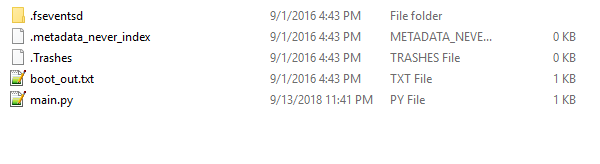
the contents are - .fseventsd (empty), lib (empty), .metadata_never_index, .Trashes, boot_out.txt, code.py
there is code.py but its empty
rustic nymph
ok default main.py goes white almost immediately

CircuitPython or Arduino IDE on this tiny little microcontroller board
from there
rustic nymph
fresh boot = green, orange, off, white
reset = green
now notepad++ says the file or directory \main.py is corrupt and unreadable
tulip sleet
oh, you are using notepad++, that's not a good choice unless you're ejecting after each write. It's doesn't write the file out fully each time
get into the repl, do
import storage
storage.erase_filesystem()
what other editors do you have?
rustic nymph
Ill use Mu now
tulip sleet
yes, that's safer
rustic nymph
ok I did that through Mu
tulip sleet
with no main.py it should pulse green when plugged in
if you were making all those edits in Notepad++, you may not have been testing what you thought you were testing. esp pressing reset a lot
windows thinks it knows what's on the drive, but it doesn't write out stuff for 10's of seconds, so what it thinks and what's really on the drive are not the same
see https://learn.adafruit.com/welcome-to-circuitpython/creating-and-editing-code#1-use-an-editor-that-writes-out-the-file-completely-when-you-save-it-6-13 and the paragraphs before that link
rustic nymph
so it did pulse after doing the storage.erase
I rebuilt the original file using Mu and saved it, now doing the green, orange, white thing again
tulip sleet
with sensor not connected?
rustic nymph
correct
tulip sleet
ok, drop that file here and I'll try it on my trinket
rustic nymph
Ok did storage erase again, pulsing green light
rustic nymph
fresh plugin, pulses green a few times then white
tulip sleet
with empty filesysteM?
 tulip sleet
are you running any monitoring programs like AIDA64?
rustic nymph
no
tulip sleet
what's in boot_out.txt?
rustic nymph
Adafruit CircuitPython 3.0.1 on 2018-08-21; Adafruit Trinket M0 with samd21e18
tulip sleet
is this on a hub or straight to computer?
rustic nymph
straight
tulip sleet
when you say "white" you mean pure white, not greenish?
rustic nymph
well id saying it has a pink tint?
tulip sleet
ok, do you have a micro-USB phone charger or something you can try powering it with, or another non Windows computer?
rustic nymph
tried a different cable
did storage.erase_filesystem
pulses green a few times then white again
tulip sleet
don't write a main.py, just trying plugging into a power supply or another computer. Shouldn't go white, should pulse green indefinitely. If it goes white on a power supply, I'd say it's a hardware issue
you might try measuring the 3v pin to see if it's 3.3v, but if it is, then something is fried in a weird way
rustic nymph
I think its dead
I created a main.py with the while: True pass
did ctrl-c, ctrl-d with no issue
I removed power, plugged it back it and now main.py is {
tulip sleet
after erase_filesystem() see if it pulses green indefintely, without a main.py. That means it's waiting in the repl
rustic nymph
No it was going to white
tulip sleet
ok, that's bad news if empty filesystem and going to white. that should never happen. i'd say just try a power supply to rule out computer, but it doesn't sound good
rustic nymph
Thanks for your help Dan, I gotta get to bed here
rustic nymph
I have an itsy bitsy I'll try the code on
manic glacierBOT
[adafruit/circuitpython] Pull request opened: #1190 Add trellis m4 variant and little fix for samr21
tested with trellis m4 rev B (purple)
manic glacierBOT
 marble hornet
Anyone know how to copy and instance of a custom class in cp? I know it works for lists. I tried .copy() . _ _ _copy _ _ _() .deepcopy() and a bunch of googling. ANY help welcome. thanks either way.
?
 solar whale
@tulip sleet much better. Breadboard compatible! Comes up at 3.3v - running open drain bilnky. Life is good 😉
solar whale
Yes - nrf52840 "Dongle" - AKA pca10059
marble hornet
ah
solar whale
nice board for $10 https://www.nordicsemi.com/eng/Products/nRF52840-Dongle
Ultra Low Power Wireless Technology Solutions from Nordic Semiconductor
marble hornet
wow that is really cheap ! (to untrained price ears)
solar whale
makes it easy to justify getting a few to play with 😉 Still that is the same price as a Raspberry Pi Zero W -- Still amazes me...
marble hornet
apple watches and wear os watches. Whole devices in packages smaller than a wall AC-DC brick !!!!!!! it's so amazing
from banging rocks to ...
manic glacierBOT
Looks good! Only q is would you like to to add the trellis board to .travis.yml and tools/build_adafruit_bins.sh ?
tulip sleet

Adafruit Industries - Makers, hackers, artists, designers and engineers!
Download the 3.0.2 release from This is the a bug fix and minor feature release for the 3.x stable series. There are a few important fixes and some additions to busio.UART. Please check out the 3.…
ruby lake
I've decided my hardware is flaky, the 3.3v logic signals can't quite play nice with the 5v mux chip
stuck elbow
@tulip sleet the pwm fix didn't get in?
tulip sleet
it did! supposed to!
stuck elbow
thanks
tulip sleet
you scared me 😃
@timber mango i forgot to put it in the release notes. I'll add. I think I wrote it and it got deleted during editng.
@timber mango all updated
marble hornet
any thoughts on the object copying question ?
tulip sleet
@marble hornet regular Python has copy.copy and copy.deep_copy. MPy/CPy don't. But in general it's not necessarily obvious whether for any particular attribute in an object you want to copy it or just refer to it. So you may as well just write a .copy method for the class in question.
marble hornet
may i ask how one would do that,? just return the class calling itself with saved inputs for init?
tulip sleet
it depends a lot on whether the __init__() method sets all the attributes you want, or whether you want to copy some attributes that are computed or added later.
marble hornet
thanks!
tulip sleet
like here's a simple example:
class C:
    def __init__(self, x):
        self.x = x
        self.y = x+2

    def set_list(self, l):
        self.l = l

    def copy(self):
        cpy = C(self.x)
        cpy.l = self.l.copy()
so the init method sets x and y. Later you can set self.l. When copying, you make a copy of the list so it's not shared (so the two objects can change their own copies independently. But if .l were a tuple, then it's immutable, so you wouldn't need to copy it., etc.
 wraith tiger
I created a simple virtual die on the micro:bit with MicroPython: https://youtu.be/RsWxPQvKYMw

A demo of a simple program I wrote in MicroPython that turns a BBC Micro:bit into a virtual die. Press either the A or B button on the Micro:bit and it will ...
charred lake
Adafruit Crickit still out of stock :(
Crickit for Circuit Playground Express
That's pretty cool @wraith tiger
manic glacierBOT
manic glacierBOT

 onyx hinge
Woo thanks for 3.0.2 @tulip sleet and all contributors!
fierce girder
@meager fog fyi - I have been validating the open hardware summit badges I recently received but will get back to the BeagleBone support in CircuitPython once I know the badges don't need rework 😃 I should be able to get a PR created for all GPIO pins by tomorrow
fierce girder
thanks
meager fog
good luck!
charred lake
Man I love CircuitPython!
raven canopy
@charred lake yay! that's the idea. 😄
charred lake
@raven canopy haha! You guys are epic! 😄
 timber mango
you folks did boocoo work on it. ;)
Simple USB in Atmel Start was plenty for me, and that's a dirt basic implementation (with an example project to work from).
Very clear to me that the ringbuffer in usb.c is in my future. ;)
charred lake
@timber mango I commend you sir!
 velvet oasis
Hello, does anyone have a sort of anti-rebound routine for a switch?
while button.value == 1:
the press of a button generates so many hits that passes by my routine
raven canopy
@velvet oasis button debouncing is usually done with delays. the "blocking" method would be to use time.sleep(n) to halt all further execution so that no additional reads are taken. n can usually be around 0.01; adjust as you see fit. example at the top of this learn guide: https://learn.adafruit.com/circuitpython-essentials/circuitpython-digital-in-out
the non-blocking way involves delaying by comparing elapsing time. like so:
import time
interval = 1000
last_execution = time.monotonic()
current_time = last_execution
while True:
    current_time = time.monotonic()
    if (current_time - interval >= last_execution):
        # do that stuff we want to do
        last_execution = time.monotonic()
 fluid helm
We are hacking with CircuitPlaygrounds and Edublocks at PyCon UK
charred lake
Niiiiiiiiiiiiiiiiice!
manic glacierBOT
So individual pixels can be read and written.
bitmap[0,0] = 1
I tried to enable high performance bit but couldn't get it written any faster. It is probably default mode already. Note: nrf52 SCK clock speed is only up to 32 Mhz.
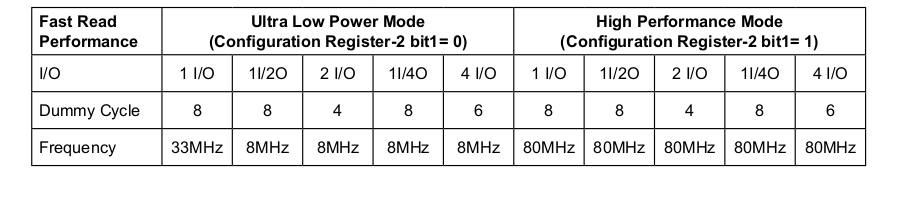
I post an issue on Nordic devzone to see if there is anyone got more lucky than us.
https://devzone.nordicsemi.com/f/nordic-q-a/38570/write-speed-with-mx25r6435f-on-nrf52840dk
 scarlet fjord
hey so im having a bit of trouble with my neopixels
ive hand-soldered some on to a board of mine and im not sure if ive managed to kill the chips or if my code doesnt work. This is what I'm doing:
import board
import neopixel

pixpin = board.D5
numpix = 4

strip = neopixel.NeoPixel(pixpin, numpix, brightness=0.3, auto_write=False)

while True:
    strip.fill((255, 0, 0))
and I'm getting nothing on my board.
This is my board:
have i broken something, or am i just doing it wrong?
tough flax
Can anyone help me find the implementation of the input() method in CP? Actually any advice about how to trace a python function down to the implementation in C would be great.
marble hornet
Anyone else having trouble with jlc PCB and not dimensions or milling layers ?
tough flax
Found it - thanks anyway
meager fog
@scarlet fjord set auto_write to True
pastel panther
@scarlet fjord It's always possible but unless there is some visible damage or you saw them burst into flames or something, I would say a soldering or wiring issue is more likely.
Do you have another known good neopixel device you can test your code with?
scarlet fjord
i do not 😅
i have some spare chips though so i might try soldering some wires to it and see whats going on tomorrow if you dont think ive managed to kill them 😛
pastel panther
I mean, where there is a will, there is a way to break them but I've only ever killed one by reworking it too many times and manhandling it in the process
manic glacierBOT
Discovered while working on Lib/test/test_shutil.py
Adafruit CircuitPython patchbase-7-g216f0f952-dirty on 2018-09-15; Adafruit Metro M4 Express with samd51j19
>>> import os
>>> os.mkdir('/tmp')

>>> os.mkdir('/tmp/foo')
>>> os.listdir('/tmp')
['foo']

>>> os.rename('/tmp/foo', '/tmp/foo/bar')

>>> os.listdir('/tmp')
[]
>>> os.listdir('/tmp/foo')
Traceback (most recent call last):
File "<stdin>", ...I've now been through all the tests that test unittest itself (except mock).
unittest.expectedFailure is adding a property on the function and this is working using the function name as dictionary key.
The other use case is functions marked with unittest.skip. Skip itself raises an exception so that is working. But if all functions in a class is marked skipped, unittest also skips calling setUp, so this functionality is lost. This is no big deal, since the only real loss i...
 upbeat plover
i cant flash my adafruit adalogger M0, it exits bootloader mode instantly, then flashes red
ill try throwing something on it with arduino
cant find its port
tulip sleet
@upbeat plover does the red led pulse if you double-click?
upbeat plover
once then, turns off and the red flashes every sec
tulip sleet
weird, did you load Blink?
the pulsing is a "breathing" look
gotta eat lunch - back in a little while
upbeat plover
ive flashed before... it seems broken right now
it auto exits bootloader after 1 sec
it pulse on, then off, then on, then goes to a red flash
will i need to j-tag it or something to fix it?
manic glacierBOT
I have added a second optional parameter to input() that acts like a timeout.
When input("PROMPT>", 10) is called with a timeout parameter, it will return in that number of milliseconds if there is no data available on the USB serial connection.
This is not a true async serial read, it's just a workaround to let allow other tasks to occur while waiting for serial input to start. Once a keystroke is read, the method drops into readline processing allowing for command history e...
I created a workaround for this and am sharing it via this pull request
https://github.com/adafruit/circuitpython/pull/1193
Not sure it's the right solution, but it does solve our issues.
tough flax
(FYI First PR here, please be gentle)
manic glacierBOT

The addition of in_waiting has made non-blocking timed reads much easier; however, I think it would be very valuable to have the write_timeout separate from timeout, as is the case in pySerial. It is very common to want to wait on writes but not on reads, so separate timeouts are handy. Also useful is out_waiting, in this case so you can implement your own buffering.
I've been trying to do a bunch of asynio type stuff with the UART and those two (along with my 0 timeout fix) would be a ver...
arctic heron
Is there a planned date to merge 3.x forward to master?
manic glacierBOT
I see from the Travis build that this fails on some ports that don't have usb_bytes_available().
If there is a desire to go forward, I can add checks for particular architectures or features that work. For our (short-term) needs the M0 will work for us (which doesn't imply anything for accepting the PR of course - we can build from our fork)
manic glacierBOT

You can take example from the Arduboy game format:
https://community.arduboy.com/t/arduboy-game-format-guide-arduboy-files/2784
It is a zip file ending in .arduboy which contains a precompiled binary and some metadata:
- game.hex
- info.json
- screenshot00.png
- banner.png
For CircuitPython, this could be as simple as shipping a .uf2 file with one or more games inside it. The advantage of this solution instead of shipping Python files, is that you can evolve the gaming API along ...
 lethal bear
By the way, this is also how Smalltalk/Squeak works and the images still work more than 20 years later: https://squeak.js.org/run/#url=https://freudenbergs.de/bert/squeakjs&files=[Squeak1.13u.image,Squeak1.13u.changes,SqueakV1.sources]&swapButtons=true
@slender iron Is it possible to beta-test the DMA display rendering? Is the code available on GitHub?
My long term goal is to bring MicroBlocks (http://microblocks.fun) to game consoles. I tried with @stuck elbow's uGame but I got stuck because the rendering to the ST7735 was too slow
tulip sleet
@arctic heron I will merge 3.x to master on Tuesday or earlier.
arctic heron
👍
tulip sleet
@upbeat plover A very early batch of Feathers was shipped with unprotected bootloaders. Depending on its age, yours might be from that batch. You do need a j-link (https://www.adafruit.com/product/3571 is cheapest) or openocd https://learn.adafruit.com/programming-microcontrollers-using-openocd-on-raspberry-pi to re-program
solar whale
@tulip sleet @upbeat plover is on an adalogger M0. Were they also shipped with an unprotected bootloader like the M4? They used to be shipped with the Arduino bootloader and you could use bossac to load the UF2 bootloader. Sorry if I came into this late.
tulip sleet
@solar whale @upbeat plover this was an issue with early M0s from late 2015, when they were first introduced.
I had some of these that I set fuses on.
solar whale
Ah. Thanks for clarifying.
tulip sleet
np - it is a little worrying that the bootloader would be damaged, because it takes some setup to write the flash. There may be some kind of latent bug (same for the M4 issue)
charred lake
My girls are ready to turn this wooden house into a creepy holloween house with sound, motion detecting, and more. Using CircuitPython on Circuit Playground Express+Raspberry Pi (with my help and supervision of course).
Stay tuned!
pastel panther
@charred lake sounds awesome! I look forward to seeing it in action
 runic spindle
hello! super new to this discord, and really excited to keep learning 😃
anyone here know how to calculate fourier transforms with circuit python on cpx? I see there's arduino code for it here but i'm wondering if there's a library for circuit python as well? https://learn.adafruit.com/circuit-playground-sound-controlled-robot/using-the-microphone
Appreciate any help, thank you so much!

Make your Circuit Playground mobile and change direction via sound
pastel panther
@runic spindle I don't know, sorry
runic spindle
thank you anyway @pastel panther !
pastel panther
There is apparently an audio in call
https://circuitpython.readthedocs.io/en/latest/shared-bindings/audiobusio/PDMIn.html
and the normal CPX library, but it doesn't look like it has mic support yet:
https://learn.adafruit.com/circuitpython-made-easy-on-circuit-playground-express/first-things-first
Get started with just a few lines of code!
I have an old version so I could be wrong about the mic support of the cpx lib
runic spindle
hmm so i'll have to attach a separate mic i guess
good thing i have one lying around 😄
worst case its a small project so i can just transition everything to arduino
pastel panther
Sorry if I wasn't clear; the first link was a way of accessing the mic
runic spindle
ohh interesting
pastel panther
I'm just not sure if it's integrated into the CPX helper library yet. You should be able to use PDMin directly
The arduino/C library for the circuit python has the FFT support built in but I don't know if it's available in the Circuit Python version yet
runic spindle
ah i see so if i really wanted to i could do the FFT calculation myself in CircuitPython using PDMin
?
might just transition to Arduino ahahaha. this is all super helpful though thank you for your help!!
pastel panther
no problem, glad to help
runic spindle
i made a bongo cat robot plush and i just want to make it bongo when it hears a low pitch sound ahahaha https://twitter.com/chardane/status/1041219760367665153


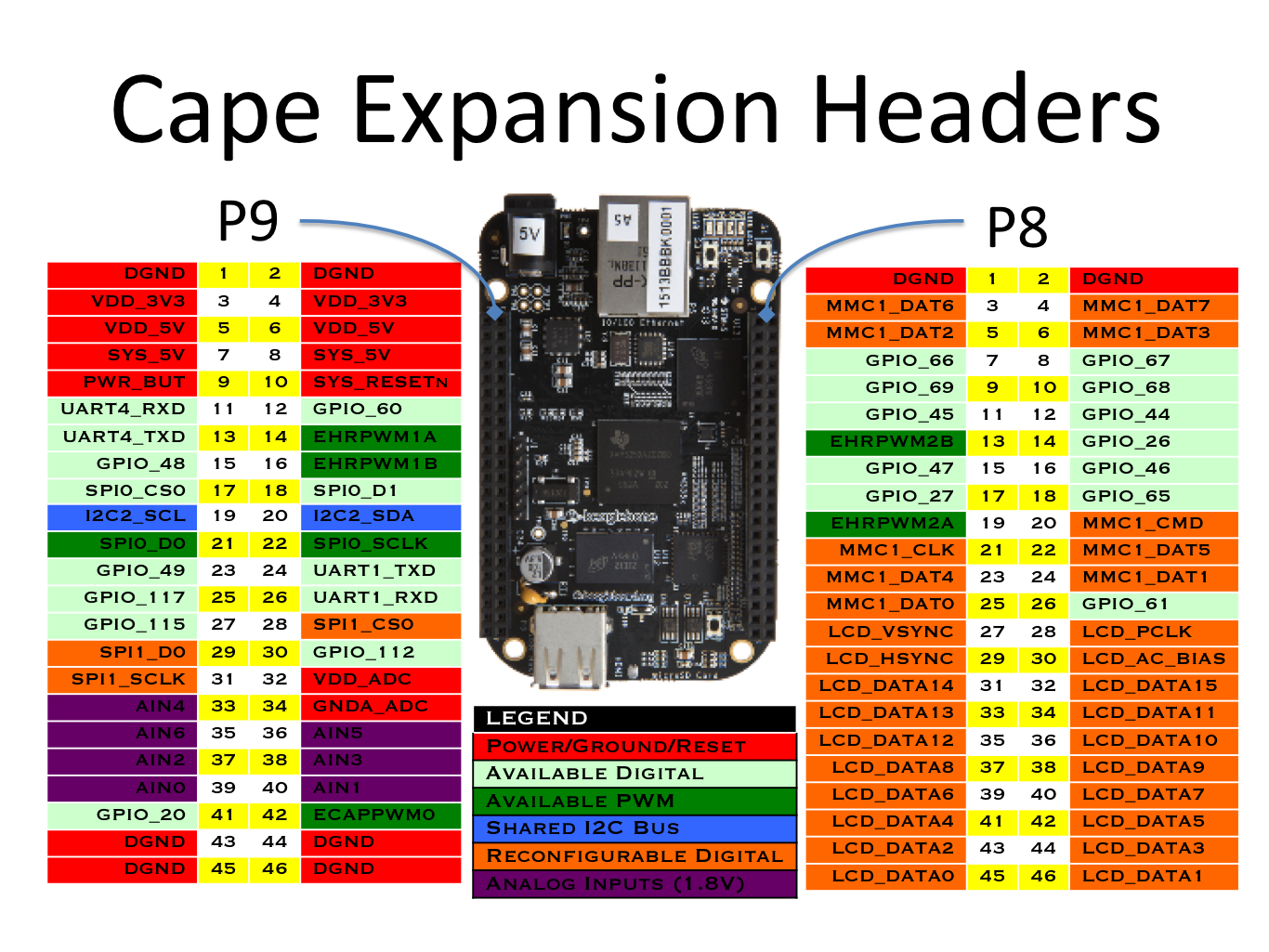

I love #BongoCat so much I made it a robot plush ahahaha!! 😂😍
First time playing around with @adafruit crickit! 🤖 Thank you @StrayRogue for bringing Bongo Cat into the world 👏🏼🙏🏼💖🎉
#12monthsofmakes September ✅ https://t.co/qWx8ui9uZo
Likes
470
 Twitter
magnitude works using RMS but i thought that detecting low tones with FFT would be much cooler hahaha
raven canopy
@runic spindle FFT has been discussed here before. IIRC, it would need to reside on the C side; the Python side is not fast enough to be all that useable. MicroPython has a FFT, but requires an FPU-capable MCU (M0 doesn't have FPU). Arduino is probably your best bet...
runic spindle
very cool, thank you for that info!
raven canopy
you can search this channel for the history. may be some relevant links/discussion...
manic glacierBOT
I don't want to add this as is because it breaks compatibility with CPython because input only takes in a prompt. https://docs.python.org/3/library/functions.html#input
You could add this as a custom function in a custom module. It gets it closer to the second usb serial api that would be good in the long term. Let me know if you want help with that.
manic glacierBOT
I get it - I have no problem with that
manic glacierBOT
i think we're slowly going to try and add all pyserial supported functions, but ya some are more useful than others :)
meager fog
@runic spindle soooo cuuute 
manic glacierBOT
@davidperrenoud Thanks for the tips! I like the idea of packaging in a zip.
I don't really want to use uf2 to ship games though because its more complicated than editing files on a CIRCUITPY drive. Ideally we'd have the fast iteration loop with game files just like code.py.
slender iron
@lethal bear all my work is going into the master branch. Its not very optimized yet though
slender iron
<@&356864093652516868> Join us tomorrow at 11am Pacific/2 pm in the voice channel for the one year anniversary of the CircuitPython weekly meeting! 🎉  🎉 For a flash back check out the first recording here: https://youtu.be/OX825aegraw

Join here for the chat all week: http://adafru.it/discord ----------------------------------------- Visit the Adafruit shop online - http://www.adafruit.com ...
pastel panther
parteeeeeeee 🎆
lethal bear
@slender iron Are you using parallel, MIPI or SPI interface? I only see mention of SPI in displayio
manic glacierBOT
Fixes #1008 as well (and maybe also via other PRs).
These are not incredibly vital but would be nice for consistency with atmel port.
Breaks out task from #526.
Broke out remaining tasks into individual issues and closed in favor of them. (e.g. #1194).
tulip sleet
git stuff above is just issue bookkeeping getting the nrf52 task tracking up to date
@indigo wedge of the remaining nrf52 tasks https://github.com/adafruit/circuitpython/labels/nrf52 are there some that you particularly want to do yourself? @gentle bronze and I would plan to do what's remaining by default. @gentle bronze is also working on nrf52 Arduino support.
gentle bronze
@tulip sleet there is still lots of nrf52 issues. Please assign me to issue that you feel must have for the feahther launch to implement. Since Arduino nrf52840 basic aren't runnable yet, I would like to make it at least usable for the user. Since many would expect to use it with Arduino as well.
 indigo wedge
I've been really busy recently so can't contribute much right now, I have a mostly complete ble code rewrite waiting for a rebase and push but not much more than that.
gentle bronze
@indigo wedge yeah, ble is the most fun part of nrf52 port, that would be great
tulip sleet
@indigo wedge that's fine - you are a volunteer and your contributions have been very helpful! The BLE stuff, especially (from my point of view) the API we want to present, is certainly where your expertise is very valuable.
indigo wedge
i have it 95% done, just need time for that 5%
tulip sleet
we have lots more to do -- it is not a blocker 😃
indigo wedge
I'm pondering making a CP nRF52840 badge for this year's CCC so might spend more time on it soon 😉
stuck elbow
@indigo wedge I saw the new rocket badge yesterday
indigo wedge
oh? do you have a link?
stuck elbow
says blinkenrocket.com on the box
I got a kit, the new one is 2x smaller, with the 20mm matrix
indigo wedge
don't think i ever heard of this
stuck elbow
you program it from the browser from your phone or computer with an audio jack
manic glacierBOT
This is also how GP Blocks and MicroBlocks works:
- .gpp file (a zip file)
- objects.gpod
- thumbnail.png
- ancestor
- hash
- topHash
- modules/
- 6b3f57d31cf79cb743a589a0f3862f09493fe246ab02a8b9bf44132136f14f38
The code, sounds and images are all saved in the .gpod file which I assume stands for GP Object Database. You could also save the code as separate .gp files, but then you lose some of the advantages of...
stuck elbow
took them 2 years to perfect that technique
indigo wedge
nice, I've been looking into that as a way to sync with the phone
stuck elbow
@indigo wedge if you decide to do that badge, I would be very interested to get involved
indigo wedge
I've been tweeting about it, not sure if you saw it, current idea is to have the badge be also a optional smartwatch with eink
ruby lake
audio firmware update has been used in synth gear for a few years
Olivier Gillet (Mutable Instruments) does all his code open-source, for example https://github.com/pichenettes/avr-audio-bootloader

GitHub
Audio (FSK / QPSK) bootloader for AVR projects. Contribute to pichenettes/avr-audio-bootloader development by creating an account on GitHub.
stuck elbow
@indigo wedge I toyed with that idea a bit for the pycon.uk badge, I even did some research with the cheap e-inks, I figured out how to drive them fast
https://hackaday.io/project/100853-circuitpython-badge/log/139310-the-look-up-table-holds-the-secret

I spent half of the last night poring over the datasheets and wading through horrible C code examples, but finally I managed to find the code that was used to make this example:Inside I found a lot of scrambled code, unused files, copy-pasted fragments, but also the thing I w...
I also did some brainstorming with the watch design, if you are interested:
https://hackaday.io/project/100853-circuitpython-badge/log/142479-the-shape
Now that I have the e-ink display drivers written, it's time to start thinking about another prototype, the Mark III. But what shape should it have? For the LCD/OLED I just went for the game handheld looks, because those displays are suitable for making simple games, that lay...
indigo wedge
Very interesting, I will look at this later after work, thanks
For the shape I already have the one I used and verified last year, it's quite comfortable
fluid helm
PyCon UK badge? Did i miss this for this year? @stuck elbow
stuck elbow
@fluid helm there should have been a lightning talk for it
I couldn't come, so I'm not sure if it actually happened
stuck elbow
that's the plan, and we wanted to recruit some people this year to help with it
but it's all very fuzzy still
by the way, I have some ideas about how to cut the cost in half if we need that
 covert oxide
qemu
Hi all, I'm trying to understand what tests are being executed after each Circuitpython promotion. Rosie executes the tests on board of tests/basics and tests/circuitpython, and travis executes everything else under test/ for Unix port, is this correct? and qemu tests are gone?
manic glacierBOT
I think uheap can be removed instead. I don't know anyone who uses it.
slender iron
@covert oxide I think we turned them off
@lethal bear fourwire spi for now but I'm trying to design it so its easy to swap in a different bus protocol
covert oxide
thank you @slender iron , as for the other tests, is my understanding correct? Rosie executes the tests on board of tests/basics and tests/circuitpython for all ports, and Travis executes everything else under test/ for Unix port? sorry, I'm not very experienced understanding how this works.
slender iron
ya, I think so
stuck elbow
I think the maker faire was a success, I always had at least 3 kids standing by my table and playing the games
arctic heron
@indigo wedge The last 5% takes 80% of the time...
stuck elbow
wasn't it 20%?
tidal kiln
i think it's generally asymptotic
 idle owl
Thanks!!
raven canopy
Hehe. Sure..
<@&356864093652516868> Meeting starting shortly. Anyone else, feel free to join in as well!
upbeat plover
@tulip sleet after i get (https://www.adafruit.com/product/3571) debugger is there a very simple tut i can follow, one that doenst require building anything in python?
slender iron

Google Docs
Adafruit CircuitPython Weekly September 17th, 2018 State of CircuitPython + Libraries * 21 pull requests merged * 9 authors - caternuson, sommersoft, aarondewindt, brentru, tannewt, dastels, ladyada, dhalbert, hathach * 4 reviewers - sommersoft, ladyada, dhalbert, tannewt...
upbeat plover
for reprogramming my adalogger m0?
fluid helm
Won't be able to make it this evening as flying to San Francisco tomorrow, have a good meeting all!
idle owl
@fluid helm Have a good one!
idle owl
Hooray!
tidal kiln
🍰 1 YEAR!!!
 neat folio
just lurking, (and restarting PC and it decided to do updates 😦 )
yay origin stories 😃
 errant grail
yay @idle owl!