
#circuitpython-dev
1 messages · Page 190 of 1
 idle owl
 teal bear
thanks
ack.. so many choices :p this one, right? adafruit-circuitpython-circuitplayground_express-3.0.0.uf2
idle owl
Yes
 wraith tiger
@slender iron My first programming experience was in BASIC on an Atari 800.
teal bear
downloaded, - me and my bag of CPXs are off to PS1's nerp meeting - bye!
wraith tiger
I think we got one not too long after they became available, so it might have been '79 or '80.
 slender iron
@wraith tiger awesome. I wanna get circuitpython going on it
idle owl
@teal bear Have fun!
slender iron
in it? not on the cpu
wraith tiger
Gonna make a CP cartridge?
slender iron
at some point hopefully
wraith tiger
The only thing I actually remember, programming wise, was pranking my friend Jason. I had snake type game written in basic ( I don't remember where it came from - I might have typed it in from a magazine) that used the joystick for movement, but not the fire buttons. I hacked the game so my joystick would add points to my score when I hit the fire button.
slender iron
lol thats awesome!
 stuck elbow
Nibbles
 rotund basin
hey all, can someone tell my why my boot.py puts my adalogger in safe mode without errors in boot_out?
 manic glacierBOT

What should happen if someone tries to re-use the same channel? Like this:
sensor1 = some_i2c_sensor.Sensor(tca.chan[0])
sensor2 = some_i2c_sensor.Sensor(tca.chan[0])
Maybe throw a RunTime error that says "Channel in use."?
 solar whale
rotund basin
solar whale
rotund basin
@solar whale great question, I was planning to initialize everything on boot and run some basic diagnostics.. but please tell me, what is a better structure, what should go into boot.py and what should not ? 🤔
solar whale
@rotund basin hopefully someone else can provide better guidance, but I'm not sure of the state of the FS at the time boot.py is run .. looking at the code to see if I can tell.
rotund basin
@solar whale true that, I'll change it up too on my end. Thank you for the wisdom 😀
solar whale
@rotund basin FYI, the only thing I have used boot.py for is to initialize the network for an ESP8266 or to set the CIRCUITPY FS writeable by Circuitpython for logging data to the onboard Flash.
rotund basin
@solar whale i think i have a ghost in the machine .... getting this new error after removing that boot.py ; ValueError: Invalid pins on this line ``` esp32_uart = busio.UART(board.A1, board.A2, baudrate=9600, timeout=3000)
how does it get run?
rotund basin
i call it from another function called setup
so setup.robot_setup, init's remote and calls the getCommand
rotund basin
same here
solar whale
sorry - I'm not at home so I cant poke at my adalogger.
rotund basin
i put it back in boot and don't get that error any longer
solar whale
I don't know enough about the pin assignments to comment -- have you tried moving to some of the Dxx pins??
Clearly I have no idea why it is behavinng as it is... sorry.
you may not get the error message if it is going to Safe mode -- it is not running your code is it?
rotund basin
what do you have to do to make the SD card writeable ?
it mounts, i can make directories
solar whale
open the file wit write access.
rotund basin
but i can't seem to write / append a file
this gives me a ReadOnly Error : with open('/storage/work-areas/work-area-tmp.txt',
'a+b') as f:
i see the problem
I need the path to be /sd_card first
thanks @solar whale 😃
solar whale
f.write("Hello world!\r\n")
doh! the path wasn't it
"w" only overwrites
I need to append
and prefer to write binary
oh you mean REPL it , hold on
OSError: [Errno 30]
solar whale
f.write("This is another line!\r\n")
they fail.
read only error
i don't get it, i've mkdir worked.
why can i make directories and not files?
solar whale
post your code
rotund basin
boot.py ```import adafruit_sdcard
import digitalio
import storage
import board
import busio
import os
SD_CS = board.D4
spi = busio.SPI(board.SCK, board.MOSI, board.MISO)
cs = digitalio.DigitalInOut(SD_CS)
sd_card = adafruit_sdcard.SDCard(spi, cs)
vfs = storage.VfsFat(sd_card)
storage.mount(vfs, "/sd_card")
if 'storage' not in os.listdir('/sd_card'):
vfs.mkdir('storage')
if 'work-areas' not in os.listdir('/sd_card/storage'):
vfs.mkdir('/storage/work-areas')
then ... REPL line ```>>> with open("/sd/test.txt", "w") as f:
... f.write("Hello world!\r\n")
...
Traceback (most recent call last):
File "<stdin>", line 1, in <module>
OSError: [Errno 30]
yes one moment
...     f.write("Helloe world!\r\n")
...
Traceback (most recent call last):
  File "<stdin>", line 1, in <module>
OSError: [Errno 30]
same error
solar whale
as I said before, I don't use boot, py to mount it -- rename boot.py to sdmount.py and in REPL import sdmount then try writing to it
did you change it to mount as "sd"?
rotund basin
ok hold on
...      f.write("Helloe world!\r\n")
...
15
that works .... i think
thanks @solar whale
solar whale
here is how I mount it ```import adafruit_sdcard
import busio
import digitalio
import board
import storage
import sys
Connect to the card and mount the filesystem.
spi = busio.SPI(board.SCK, board.MOSI, board.MISO)
cs = digitalio.DigitalInOut(board.SD_CS)
sdcard = adafruit_sdcard.SDCard(spi, cs)
vfs = storage.VfsFat(sdcard)
storage.mount(vfs, "/sd")
sys.path.append("/sd")
the last line with sys.path stuff make it easier to find files -- may not be useful for you.
but I do this via an import sdmount in the REPL -- not in boot.py
rotund basin
wow @solar whale just not my day is it? ```Adafruit CircuitPython 3.0.0 on 2018-07-09; Adafruit Feather M0 Adalogger with samd21g18
import sdmount
import setup
Traceback (most recent call last):
File "<stdin>", line 1, in <module>
File "setup.py", line 5, in <module>
MemoryError: memory allocation failed, allocating %u bytes
it works in repl ? ```
Adafruit CircuitPython 3.0.0 on 2018-07-09; Adafruit Feather M0 Adalogger with samd21g18
import os
import struct
import sdmount
import drivemotor
import gps
import remote
import time
so strange
which is #$%^, because it worked find when i had my SD mount in boot.py ; but then i couldn't write to the SD card.
 granite crow
hi @slender iron , np, i hope i can have more time this week to improve the strings already pushed, i think translate the function arguments is a no-go, will watch the stream recording
rotund basin
it works fine in repl with no error ```Adafruit CircuitPython 3.0.0 on 2018-07-09; Adafruit Feather M0 Adalogger with samd21g18
import board
import digitalio
import busio
import struct
esp32_uart = busio.UART(board.A1, board.A2, baudrate=9600, timeout=3000)
maybe this build isn't stable.... ?
rotund basin
@slender iron scott why would code work in REPL and not in script?
rotund basin
ok i am starting to think it's a memory / RAM issue
my smaller scripts work fine, but when i combine them into the larger script they start to fail
is there better hardware with an SD card for lots of code? 😜
rotund basin
when i call it code.py it doens't error but it doesn't seem to pint out and it exits early.
 opaque thicket
Hey guys - n00b question here: I've got a speaker connected to my itsy bitsy m0, and the moment it boots up, the speaker's quietly humming. I'm concerned that if I have this system running off battery power, the idle speaker's going to eat up energy. Is there any way I can stop passing voltage from V(hi) to amp to speaker?
(I suppose I ought to say stop applying voltage across the speaker components, not passing... :\ )
manic glacierBOT

please check on this it has AT Commands
http://ww1.microchip.com/downloads/en/appnotes/atmel-xxxxx-atwinc1500-at-command_applicatio_note.pdf
Can you please show how the binary file can be burned
manic glacierBOT

huh, no idea! maybe contact atmel and ask for assistance? we haven't burned AT firmware ever
can you show how it can be programmed using SPI
slender iron
@idle owl please always use three numbers in version numbers like 0.2.0 (re: https://github.com/adafruit/Adafruit_Blinka/releases)
manic glacierBOT

Hi Sandeep,
I've been working on porting LWIP across to the M4 (SAMD51) port and from there hope to get support for the WizNet 5500 wired ethernet and maybe eventually the ATWINC1500 wifi module too. But that's a totally different approach.
I had a look at the application note you posted: they look pretty complete and yeah, it looks like once you've loaded some special firmware you can send AT commands to the ATWINC over a UART. But it seems like a messy way to go about it.
manic glacierBOT
hi nick,
Thank you very much for your feeeback, We are using WINC1500 for one of our application
Where we are using NXP controller for Energy Meter and by using our WIFI module this should be connected to cloud so can you please help me with best possible way to figure out this problem
rotund basin
Hey all, just a general theme ... if your code works fine in repl and in a small script file , then when you import that code into a larger file and your code no longer works ... you have some memory issue ?
rotund basin
you know, if I allocate my UARTS before my SPI , i get invalid PINS on my SPI? And if Allocate SPI before UARTS , i get invalid pins on my UART?
manic glacierBOT
My best suggestion at this point, if you want to use CircuitPython &
WiFi, would be to use a ESP8266 based board.It's a relatively low-end CPU but the WiFi stack is based on LWIP and is
pretty mature.
-----Nick
Nick Moore nick@zoic.org 0409 656 267
idle owl
@slender iron Sorry about that. I do know that. 😄
rotund basin
Do I need to github my issues ?
rotund basin
I'm sorry for not posting enough information. This is broken. Please run bug.py on an adalogger if needed.
you will get Invalid pins errors
manic glacierBOT

to reproduce.
Run bug.py on an adalogger M0
when sd mount is last on import i get this:
import bug
Traceback (most recent call last):
File "<stdin>", line 1, in <module>
File "bug.py", line 4, in <module>
File "sdmount.py", line 9, in <module>
ValueError: Invalid pins
You can change the order of import in bug.py and get other invalid pins for UART.
 prime flower
Portable Adafruit IO Environmental Logger in progress!
the weatherproof project box really does fit a feather and a battery incredibly well
(logitech G300s for scale). CP + RPi version up next, less-portable though...unless I switch to a Pi Zero W
rotund basin
Anyone know a work around to my issue above ?
manic glacierBOT

I'm gonna get started on German translations.

I started to worked on the french translation.
Any help is welcome !
slender iron
@rotund basin try a build from the 3.x branch. @onyx hinge fixed one issue with UARTs that may be your problem
rotund basin
Thanks @slender iron tanner will do!
 gusty kiln
@prime flower i'm planning to take some of those project boxes to the desert soon - it seems like a pretty solid design for that kind of thing.
prime flower
@gusty kiln they're solid
lid with drilled out holes in the background, a drill press cuts like butter through it
proof!
gusty kiln
nice. i was gonna ask about that.
using 'em for my first sorta-real circuitpy project (couple hundred lines of code anyhow), so i s'pose it's kinda relevant to this channel. :)
 tidal kiln
"desert" + "soon" hmmmm. gonna give them a playa test?
gusty kiln
yeeeep.
prime flower
I think they can survive the playa, slap a CP sticker on the back 😄 
manic glacierBOT
tidal kiln
@prime flower a pi zero w seems like a good idea, why not switch?
prime flower
@tidal kiln SHH, don't give away the next step of my afternoon 🤣
idk if pi zero w works with blinka...
gusty kiln
it seems like it... mostly should?
i mean, same pinouts and such. but then again, i don't know what i'm talking about.
manic glacierBOT
Thanks, will fix and keep on translating tomorrow.
slender iron
anyone know rpi python stuff? https://forums.adafruit.com/viewtopic.php?f=60&t=139464
manic glacierBOT

Thank you!
On Tue, Aug 14, 2018 at 10:24 AM Sebastian Plamauer <
notifications@github.com> wrote:
Thanks, will fix and keep on translating tomorrow.
—
You are receiving this because you commented.Reply to this email directly, view it on GitHub
https://github.com/adafruit/circuitpython/pull/1114#issuecomment-412950661,
or mute the thread
https://github.com/notifications/unsubscribe-auth/AADNqf5JlMxerWXrGLm9hegSK1nlQu0Zks5uQwexgaJpZM4V8ubu
.
gusty kiln
@slender iron giving that a look.
slender iron
thanks!
stuck elbow
hmm, it worked with sudo
I suspect that user has set PYTHONPATH to something funny or something like that
gusty kiln
if you want a global install of a module on raspbian, you need the sudo, so that could be the main thing...
(unless they're in a virtualenv, but doesn't seem like it.)
 hearty stratus
does anyone know where the diagnostic LED codes are documented?
manic glacierBOT
Thanks for the reproduction steps! I'll try and look in the next week or so.
hearty stratus
I have a trinket m0 that runs fine in mu-editor but when i plug it into a computer (which should run the script) it gives me a solid GREEN, 6 YELLOW, 8 BLUE blinks
hearty stratus
Basically, I'm trying to make an automation keyboard to boot to partition, do stuff on boot
slender iron
thats the line number. lemme find the docs
New to CircuitPython? This is the place to start.
hearty stratus
ah thanks!
manic glacierBOT
It might just be a legacy thing. Feel free to remove the ifdef.
hearty stratus
works fine on one computer, not on the other 😦
manic glacierBOT
I'm not sure we should have it on by default but I'm happy to have it in the repo. I'd probably call it matrix or something similar.
hearty stratus
ah... so it looks like this isn't going to work
since im not in the OS yet micropython isn't detected as a HID device or something
any external keyboard works tho so i dont get it
slender iron
there is a difference between boot hid and not
slender iron
in circuitpython it would take work to change the descriptor. I don't know about micropython
 slender iron
😃
hearty stratus
which you commented on it appears
slender iron
thats for the nrf52
hearty stratus
ah
well, darn. im fairly new to python and i think changing descriptor would be too over my head
manic glacierBOT
I'd suggest moving shared_timer_handler back into CircuitPython and externing it from peripherals.
The code to find a TC could go into peripherals though.
 pseudo lodge
Hey all, I've been playing with CircuitPython occasionally this past month, but I still have a couple seemingly basic questions I haven't resolved.
My biggest challenge is debugging issues with main.py
If an exception occurs before I can connect to the serial port, how do I find out what happened?
stuck elbow
in short, you can't — the message has been sent into the void
you can restart the board and see if you get the same error
ctrl+d in the terminal does it
but if it's something random or coming from an interaction, then tough luck
pseudo lodge
I didn't know about ctrl+d. That would cover most cases I've had issues with.
So far I haven't been concerned with random issues. Just deterministic problems.
pseudo lodge
auto restart seems to only happen when python code is running. If I'm in the REPL (either manually, or through an exception), I need to select the reset button.
This would explain why I was missing the super helpful msg: "Press any key to enter the REPL. Use CTRL-D to reload."
I never saw that msg until pressing ctrl-d for the first time today
teal bear
I has suggestion: include a code.py in adafruit-circuitpython-circuitplayground_express-3.0.0.uf2
is there somewhere I can submit this? or is here the place
stuck elbow
the issues on github, I suppose
the problem is that for the express boards the disk is separate from the uf2
tidal kiln
anyone know what sphinx doesn't like here?
https://travis-ci.org/caternuson/Adafruit_CircuitPython_TCA9548A/builds/416046731#L557
idle owl
You need double backticks around it or it tries to reference it and can't find it.
In the docstring.
tidal kiln
@idle owl FTW! awesome. thanks.
idle owl
@tidal kiln You're welcome 😃
tidal kiln
that came from cookiecutter though 🤔
solar whale
I have to catch up on my jargon -- for a minute, I thought FTW was just a reverse spelling. Google set me straight 😉
rotund basin
@slender iron downloaded the latest incremental release , it's still doesn't work. issue 1111 still breaks it.
rotund basin
and combining into a single file, produces a strange result too ```import busio
import board
global command
import digitalio
import struct
import adafruit_sdcard
import storage
import os
gps_uart = busio.UART(board.TX, board.RX, baudrate=9600, timeout=3000)
remoteEn = digitalio.DigitalInOut(board.SDA)
remoteEn.direction = digitalio.Direction.OUTPUT
esp32_uart = busio.UART(board.A1, board.A2, baudrate=9600, timeout=3000)
esp32_uart.deinit()
SD_CS = board.D4
spi = busio.SPI(board.SCK, board.MOSI, board.MISO)
cs = digitalio.DigitalInOut(SD_CS)
sd_card = adafruit_sdcard.SDCard(spi, cs)
vfs = storage.VfsFat(sd_card)
storage.mount(vfs, "/sd_card")
if 'storage' not in os.listdir('/sd_card'):
vfs.mkdir('storage')
if 'work-areas' not in os.listdir('/sd_card/storage'):
vfs.mkdir('/storage/work-areas')``` Press any key to enter the REPL. Use CTRL-D to reload.
Adafruit CircuitPython 5f08ebd on 2018-08-14; Adafruit Feather M0 Adalogger with samd21g18
import bug2
Traceback (most recent call last):
File "<stdin>", line 1, in <module>
File "bug2.py", line 25, in <module>
NameError: name 'adafru' is not defined
after adding the .deinit()
ok might have found a work around
this works.
but ... you have to have it all in the same file. using imports will not work
manic glacierBOT
here is a work around. Put them in the same file and deinit() them before the other ones. Importing the modules don't work with this bug.
bug2.py.txt
manic glacierBOT
actually the work around is really impractical because it's not modular and it still doesn't work
manic glacierBOT
i think this is related to https://github.com/adafruit/circuitpython/issues/699, because changing my remote pins to A3 , and A4 fixed the problem
slender iron
@stuck elbow you free to chat displays?
stuck elbow
@slender iron in a moment
slender iron
k thanks!
stuck elbow
ready when you are
 raven canopy
listeners welcome? 😄
slender iron
ya
raven canopy
how do you keep track of a reset vs non-reset flag?
 red dock
@slender iron I was listening to the "weekly" and an I was wondering if some of your graphics work this week will cross over into expanded graphics libraries we talked about.
slender iron
@red dock maybe. where are you at on it?
raven canopy
"I'm sorry Dave, I cannot do that."
red dock
@slender iron I haven't tried to do anything with graphics since last week. I switched over to working on my lighting driver and lux sensor segment. I'm working through some issues there, and probably won't have a really solid code for that tell late this week at the earliest.
I'm just really excited you're working on graphics and I want to stay in touch if there's anything I can do. Although admittedly I'm more of a beginner than I want to be on this stuff.
slender iron
ok, I'm definitely working on it this week.
stuck elbow
 red dock
Does circuitpython have any capability of programming with multiple threads? Has anybody played with that.
stuck elbow
@red dock it doesn't
@red dock there are some libraries written in C that do stuff in the background, though
and if you are desperate you can make your custom firmware with your own C code added for it
red dock
@stuck elbow I figured. Doing something in the background in C is an interesting idea. I probably won't get into that today, I would be interested in looking at that in the near future if you want to point me to where I would get started exploring that idea.
stuck elbow
I'm recently working on a led matrix driving code that does that
right now it's hacky, but I hope to clean it up a bit soon, then it could probably be a good example
red dock
@stuck elbow Interesting, will you let me know?
stuck elbow
I have notoriously bad memory :(
there is an issue on the bug tracker for it
you can track that https://github.com/adafruit/circuitpython/issues/1110
GitHub
I'm currently experimenting with driving LED matrices (both charlieplexed and normal) directly with the GPIO pins. I have some hacky code that does the deed in the background by using a timer, ...
red dock
Ok, sweet.
rotund basin
@slender iron is there a uart write buffer example? I am getting this error and others trying to send in data TypeError: function expected at most 4 arguments, got 6
here is my code setup_data='' #if 'config.dat' in os.listdir('/sd_card/storage'): with open('/sd_card/storage/config.dat', 'w') as f: f.write('configured=1') with open('/sd_card/storage/config.dat', 'r') as f: for line in f: # send this data to the server aline = f.readline() setup_data += aline.strip() # end remote control setup_data +=' END\n' remote.unRemote() print('sending....') esp32uart.sendData(setup_data)
sendData is a uart.write
anyone can help, if scott is not available please.
raven canopy
@slender iron PR in for adabot patching.
 marble hornet
hey, does anyone know how to scalea byte array? like turn a 6-long, 3x2, bytearray into a 24, long, 6x4, byte array?
in cp
?
 granite crow
i have been reading about google protobuf, actually i first "meet" (watched) @slender iron on youtube talking about them, do you think the python bindings for protobuf are usable on circuitpython?
red dock
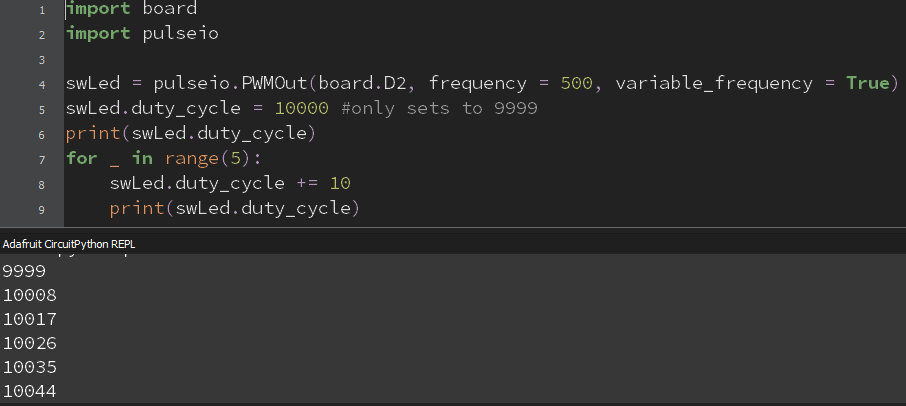
so I'm playing with pulseio.PWMOut, and the .duty_cycle attribute.
now you'd think that if foo.duty_cycle = 10000, then print(foo.duty_cycle) would print 10000, but it prints 9999.
and then foo.duty_cycle += 10 gives you 10008
repeating the foo.duty_cycle += 10 gives 10015, then 10021, 10028,10034, 10041, and 10047.
the same procedure with -= gives similarly weird values except it in general subtracts more not less than you intended. For instance subtracting 7 gives you about a 10 point drop.
I need to get going, but I think this is a bug.
tidal kiln
@red dock may be related to this:
https://github.com/adafruit/circuitpython/issues/1106
but can confirm, i'm seeing same:
Adafruit CircuitPython 3.0.0 on 2018-07-09; Adafruit Feather M4 Express with samd51j19
>>> import board
>>> import pulseio
>>> pwm = pulseio.PWMOut(board.D13)
>>> pwm.duty_cycle = 10000
>>> print(pwm.duty_cycle)
9999
>>> for _ in range(5):
...     pwm.duty_cycle += 10
...     print(pwm.duty_cycle)
...
...
...
10008
10017
10026
10035
10044
>>>
@tidal kiln sidenote: i found that if you backspace to the 0 position, you don't need to hit enter 3 times. its still keystrokes, but... 😄
tidal kiln
to end the for loop?
raven canopy
yeah
tidal kiln
indeed!
>>> for _ in range(5):
...     print("hey, you're right!")
...
hey, you're right!
hey, you're right!
hey, you're right!
hey, you're right!
hey, you're right!
>>>
🤣
tidal kiln
and it was only one backspace
raven canopy
shaved a whole keystroke! haha
raven canopy
woohoo! adding FREQM measurement of DFLL (sans HardFault) fixes M4 FrequencyIn accuracy! well, gets it a lot closer. upper ranges are still fuzzy; may work that out later.
now, to figure out how to make FREQM completely available for anyone to use in C land. halfway there, but its using a static gclk(11).
manic glacierBOT
 manic glacierBOT

Newsletter say " @arofarn, volunteered to do French " but there is not file in the Github.
@turbinenreiter , I believe the first step is to create your de.po file and push it here: https://github.com/adafruit/circuitpython/tree/master/locale
This is because the first step for someone wanting to help is to check if the file exist, not to dig in every linked issue on #1098 ...
 half sedge
Is @timber mango around here? Trying to see the progress for French Translation...
manic glacierBOT
Strings internationalization : french started here: #1113
Strings internationalization : french started here #1113
half sedge
Sorry, I updated the wrong issue. It is deleted now.
manic glacierBOT
First submission for review.
I would like to help... but actually since I learned IT in English it is very hard to find the proper french word. I am more of a "franglais" when talking about computer things in French. :-(
I quick and dirty tried to find words frequency to see if there were computer terminology that was "difficult" and translator should agree on. They need to share the same translation for the same word for consistency.
So here is what I can share (can be useful for all languages) and to be discussed...
I just submitted a PR : https://github.com/adafruit/circuitpython/pull/1116
About some of the words:
arguments => "arguments" or "paramètres" both exist in french
must => "doit" or "nécessite"
bytes => "octets" only if it means the unit (not the type)
out of range => "hors gamme"
keyword => "mot-clef" but keyword-parameter => "paramètre nommé"
pin => I hesitated between "Entrée/sortie", "broche" and just "pin". I finally choose "broche"
For some translations, I looked the french t...
manic glacierBOT
Suggestion:
481 #: py/compile.c:2271
msgid "LHS of keyword arg must be an id"
msgstr "La partie gauche d'un argument mot-clef doit être un identifiant"
I believe this is relative to "named argument" or "optional argument" so there might be a better french name for this than "argument mot-clef".
Suggestion:
562 #: py/emitnative.c:2126
msgid "casting"
msgstr "Conversion de type"
Personally I say "typage" but this might be "franglish".
Please merge those two lines 810+811:
msgstr "on ne peut envoyé une valeur différente de None à un générateur"
"fraîchement démarré"
Suggestion:
821 #: py/objgenerator.c:251
msgid "can't pend throw to just-started generator"
msgstr "on ne peut ???lever une exception en attente??? à/dans un générateur fraîchement démarré"
This is very tricky. I believe "pend" is for "pending" and "throw" is for "throwing an exception".
Maybe you should ask an english rewording or explanation of the message to be sure to translate the right thing. I guess you don't get that kind of message frequently. :-)
manic glacierBOT

having trouble with S140 v6.1.0, couldnt start advertising, same code work with S140 v6.0.0. Nordic release note say the 6.1.0 is binary compatible with v6.0.0, seems there is some hidden issue. Posted in the devzone for support already.
https://devzone.nordicsemi.com/f/nordic-q-a/37473/advertising-does-not-start-with-s140-6-1-0-same-hex-run-without-issue-with-s140-6-0-0
Seems good to me.
Apparently the source POT file has multi-line that start with an empty line like this:
msgid ""
In that case, not all of your translation start with:
msgstr ""
I believe I did check them all, very quickly, but I have a general good feeling about this translation.
Maybe you should re-check all the 'step' and 'slice' to have a consistent use?
Or always say "pas 'step'" and "tranche 'slice'"???
Here are a few pending (not counting msgid "can't pend throw...
manic glacierBOT
Formating error on the following lines?:
35 #: main.c:148 main.c:221
67 #: main.c:240
81 #: main.c:246
89 #: main.c:247
954 #: py/objstr.c:1029
1154 #: py/persistentcode.c:223
1320 #: shared-bindings/audiobusio/PDMIn.c:208
1326 #: shared-bindings/audioio/RawSample.c:98
1443 #: shared-bindings/pulseio/PWMOut.c:164
1449 #: shared-bindings/pulseio/PWMOut.c:195
1540 #: shared-bindings/util.c:38
??? I see nothing wrong
Suggestion:
821 #: py/obj...
 covert oxide
so, trying to build CircuitPython on Mac, clean code, and I get..
make -C mpy-cross V=2
GEN build/genhdr/mpversion.h
python ../py/makeversionhdr.py build/genhdr/mpversion.h
msgfmt -o build/genhdr/en_US.mo ../locale/en_US.po
make: msgfmt: No such file or directory
make: *** [build/genhdr/en_US.mo] Error 1
Anyone know how to fix this? I was able to build last week but not this week on fresh code..
manic glacierBOT
I reviewed, but I do not have write access... someone with right access should do something to unblock.
rotund basin
what's the most memory efficient way to read contents of a file ? I'm running out of memory when I read a line . 😉
marble hornet
Does anyone know how to scale byte arrays? like turning a 6long, 3x2, bytearray into a 24long, 6x4, bytearray?
in cp?
thank you for any and all help
stuck elbow
@marble hornet I didn't know bytearrays can be 2-dimensional
marble hornet
just imaginary 2d, if you catch my drift
manic glacierBOT
 stuck elbow
you can just do all the usual operations you do on lists, so you can for example append a 18-item array to the end
manic glacierBOT
Last blocking thing that was missing was the charset. I built and uploaded a french firmware successfully on Feather M0 express and Feather M4 express boards.
It looks OK, even special character like "éèà" :)
@dglaude : Ican only give you access to my fork => https://github.com/arofarn/circuitpython/tree/patch-1
manic glacierBOT

bits is an argument name, so maybe drop 'Les' : bits doit être 7, 8 ou 9
Typo: La fonction nécessite un verrou.

A colleague took a closer look at this and found that the mp_hal_stdout_tx_strn_cooked() function in lib/utils/stdout_helpers.c sends the output string one character at a time. This results in many small USB transactions which ends up slowing down the prints.
Changing the mp_hal_stdout_tx_strn_cooked() function to call mp_hal_stdout_tx_strn() with the complete string improves the performance.
"sous-scriptable" should be better
I agree and it's shorter without losing its sense
I changed line #120 too for consistency:
msgstr "'bit clock' et 'word select' doivent partagé une horloge"
 stoic marsh
anyone know some good video tutorials on circiutpython state machines or python state machines in general?
manic glacierBOT

@hchhaya,
Thanks for continuing to dig into this.
In some "quick" reviewing, I'm not sure that mp_hal_stdout_tx_strn_cooked() is causing the issue. The function has no changes between 2.x, 3.x, and current master. I can't speak to why it is forcing the use of CRLF, and it could possibly be optimized by handling the conversion before sending the string out.
Just my quick-thoughts on the subject. I think it's a good start to debugging this
 feral badger
Hi, beginner here. Just started playing with circuit python on circuit playground express, and cpx library looks super useful but it doesnt have the one thing I need: microphone. Can someone give me a sample code to use microphone? Thanks!
stuck elbow
something like this? https://learn.adafruit.com/adafruit-circuit-playground-express/playground-sound-meter

Make faster and easier than ever with MakeCode, code.org CSD, CircuitPython or Arduino!
manic glacierBOT
I need to use 2 UART for a project. The first one with Ultimate GPS featherwing, the second one to communicate with a Raspberry pi.
It seems that not every couple of pins can handle UART but it does not always trigger Exceptions when I used invalid pins.
Tested with these simples scripts :
- M4 express as sender :
import busio, board, time

uart = busio.UART(board.TX, board.RX, baudrate = 9600, timeout=2000, parity=None)

while True:
    t = time.monotonic()
uart.wri...You could communicate with the Pi over USB.
I mean serial over USB
Hoping it is another RX/TX
slender iron
@marble hornet you'll need to write code to scale it out. I don't know of any helpers that do it.
@covert oxide you need gettext because we use it for translations
@granite crow I doubt the library would work because CPython libraries are usually too large. You could probably make one using struct though
@rotund basin you'll need to show the uart.write itself to know
covert oxide
@slender iron thank you!! I did have it, but it wasnt linked correctly.
tidal kiln
@slender iron did you see that duty_cycle quirk from yesterday? just wondering if that's something new or known.
slender iron
@tidal kiln ya, looks like our math is missing a +1
tidal kiln
worth a new issue? or does the one i linked cover it?
slender iron
new would be good I think
tidal kiln
@red dock want to file an issue for the duty_cycle "feature" you discovered? (if not, i can)
manic glacierBOT
Yes, the init order matters because of the SERCOM selection under the hood. What is the bug here? Can this issue be closed?
prime flower
Redid the orientation of the monitor @gusty kiln
tidal kiln
is it being powered by coffee?
prime flower
Ha, mug for scale.
I'm going to glue some magnets to it and mount it upside down on my desk
manic glacierBOT
I'm confused. Where is the second UART initialized?
@hchhaya That behavior does sound suspect. The USB stack changed between 2.x and 3.x so I suspect its the problem. This is probably the best place to start tracing the changes from: http://elixir.tronnes.org/circuitpython/latest/source/ports/atmel-samd/usb.c#L282
Whoops, with these scripts I search for pins usable as second UART.
I use 2 UART on my projet : the first for Ultimate GPS featherwing and the second to communicate with a raspberry pi
Git repository with full code there : https://framagit.org/arofarn/Cameteo/tree/master/circuitpython/code
Sorry, I first talk about this on the forum and forget to copy the full context :
https://forums.adafruit.com/viewtopic.php?f=57&t=139541
red dock
@tidal kiln So, this may seem silly, but I don't know how to file an issue yet, so maybe you should. Or point me that direction and I'm sure I can figure it out.
tidal kiln
@red dock you need a github account, otherwise it's very easy and i can show you how if you want
red dock
I have an account
tidal kiln
cool. go here:
https://github.com/adafruit/circuitpython/issues
and click the "New issue" button. should be easy after that. just give the issue a good name and describe as best you can.
manic glacierBOT
Thanks! Looks like a number of builds are running out of memory. I'm working on compressing them now so we should be able to check this in within the next few days.

"broche" seems typical, see for instance: https://fr.wikipedia.org/wiki/Atmel_AVR
idle owl
@tidal kiln Do you have a minute to review a PR?
tidal kiln
sure
idle owl

@tidal kiln I responded. I can link you to the updated page if you want to see it.
(It's live, I guess given that I redid the whole thing I could have made a different page and gotten it reviewed before making it live.)
manic glacierBOT

In general, PWMOut.duty_cycle does not retain or increment or set values correctly.
It is also frequency dependent, so the amount of incorrectness changes with frequency.
It may be that frequency changes are simply compounding the initial value inaccuracy.
May or may not be related to https://github.com/adafruit/circuitpython/issues/1106
And now for some examples:

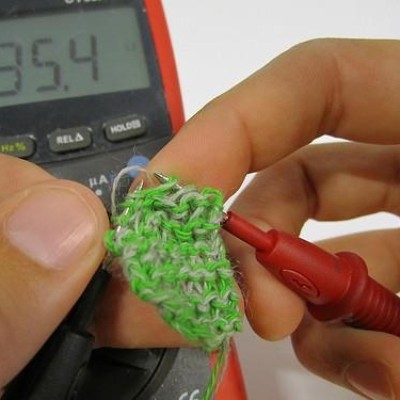
A sensor to sense the presence of different gasses in the air we breathe.
Example code not yet embedded, will do that once the update is in.
tidal kiln
unrelated / quick edit -> "t's easy to use the CCS811 sensor with..." (the I got deleted)
idle owl
thanks 😃
@tidal kiln Like so? python while True: print("CO2: {} PPM, TVOC: {} PPM, Temp: {} C" .format(ccs811.eco2, ccs811.tvoc, ccs811.temperature)) time.sleep(0.5)
I mean, it works on the board,. but making sure I have the right idea.
tidal kiln
yep. it can get fancier, with stuff inside the {}. but that's fine for a basic example.
tidal kiln
@slender iron any thoughts on use of % vs format?
slender iron
format is more modern
tidal kiln
thnks. my thinking too.
idle owl
@tidal kiln passed
prime flower
@slender iron re: issue on SimpleIO posted not too long ago...Servo class should be removed entirely?
slender iron
ya, why have two?
tidal kiln
@idle owl want me to merge?
idle owl
@tidal kiln yes please
tidal kiln
okie dokie. t's done.
idle owl
Thank you, @tidal kiln!
tidal kiln
so...for requirements.txt in CP lib repo, if there are no requirements - (a) no file, or (b) empty file?
idle owl
empty file.
tidal kiln
can i put an ascii art kitty in it?
idle owl
I mean, if you really want to
But pip will try to install an ascii art kitty.
Probably.
raven canopy
Travis CI
Build #3 failed.
Reason: I'm a dog person.
😄
idle owl
@raven canopy or @tidal kiln if you have a moment: https://github.com/adafruit/Adafruit_CircuitPython_AMG88xx/pull/9 it's entirely cosmetic changes, bringing the example more in line with our convention.
wait
I need to update the other example too
FALSE ALARM.
give me a minute, sorry 😄
raven canopy
@tidal kiln paper, rock, scissors? ✂
tidal kiln
i can check it in a few...working on a PR of my own
raven canopy
i can grab it real quick...waiting for WSL to finish updates.
idle owl
if there's an example that's RPi only, would you add pi to the name of the file as well as put the warning docstring that I already added?
Because you KNOW someone is going to be .. irritated for lack of a more dyno-friendly word to use here... when they try that example on Feather and it fails.
I think add pi to the name. @raven canopy ?
or rpi?
raven canopy
yeah, that makes sense; i vote rpi. also, there is at least one Learn Guide that will need the link updated. i'll put the link up in the merge.
idle owl
ok hold on and let me rename the file
Ok. One more Travis run and then it should be good.
@raven canopy Do you mean the AMG88xx guide? That I am currently redoing entirely?
raven canopy
errr...yep. i guess you already know about it then. 😆
idle owl
That I do 😉
raven canopy
hmm. since RPi examples are apparently getting added, should we also add them to examples.rst? or would we be asking for too much confusion?
idle owl
I'm... not sure. I'm also not sure there will be a ton of them, since the whole idea is that everything is cross compatible.
In this case, there was already an RPi thing for this one and we ported it to Python.
so it's not really CircuitPython anyway.
I would say no.
Since that shows up under circuitpython.rtd.whatever
If only that were the real url 😄
tidal kiln
@raven canopy @slender iron thanks for TCA code review...updates pushed.
raven canopy
k. if it will be few-and-far, then i can agree with that. whatever library now in work 😄
idle owl
We're 25 out of 87 in and we've added 1 RPi example.
or 25/90 I guess, but some stuff doesn't have its own guide... anyway.. you get the idea.
@raven canopy Thank you!
raven canopy
@tidal kiln yw, too. though Scott did the heavy lifting. Lunch-time reviews might not be a good idea moving forward.
tidal kiln
@raven canopy since you mentioned updating cookiecutter - i may have run into another quirk. not sure. @idle owl gave me the fix. needed to have double back ticks in the docstring in the main .py file, otherwise pylint was griping.
idle owl
@raven canopy Oh I meant to mention, we're done with the overarching PyPi stuff with the repos. So I've added it to everything that's going to get it. So they're ready for you to add the pylint force reinstall if you can figure out checking if it's already in there.
raven canopy
@tidal kiln is that in the Travis history, or were you running pylint local?
@idle owl roger that. I think the best way we'll have is to run the patch that doubled the lines, then run another behind it to remove the duplicate...
tidal kiln
@raven canopy travis on my repo:
https://travis-ci.org/caternuson/Adafruit_CircuitPython_TCA9548A/builds/416046731#L557
tidal kiln
in case it's not obvious - simply adding double back ticks here fixed it:
https://github.com/caternuson/Adafruit_CircuitPython_TCA9548A/blob/master/adafruit_tca9548a.py#L23
raven canopy
ahh man...WSL doesn't handle the special filenames any better than Windows. Guess I'm working in GitHub's editor... 😦
tidal kiln
interesting. pylint didn't catch this:
https://github.com/caternuson/Adafruit_CircuitPython_TCA9548A/blob/prototype/adafruit_tca9548a.py#L59
that's some left over i forgot to get rid of. i'd think i'd get "member not used" or something report.
raven canopy
or...i'm also not-so-smart sometimes. ls -a helps to see files starting with .. 🤦
tidal kiln
yep. -p is another nice one to add / to folders. i alias my ls to be -ap
raven canopy
i like it. i probably should roll through some setup in WSL. i'm rarely in it; usually in VM.
@idle owl travis.yml PyPi -> cookiecutter: should we put the boiler plate stuff in there?
nevermind...whitespace is still there. must've been an issue on my system/editor.
idle owl
@raven canopy hmm... not sure. Because you have to do the thing to encrypt the password, I don't know how much of that process can be cookiecuttered.
raven canopy
@idle owl k. just a thought. i didn't know if Blinka support was going to be expected at the outset going forward.
manic glacierBOT
 idle owl
@raven canopy Oh hmm. Yeah I think it is.
raven canopy
well, we can add a .. todo to the password line. i won't put it in my update...think it needs more discussion (amongst you all, at least)
idle owl
Yeah agreed. We need to see how much of it can go into cookiecutter. I'm wondering if it'll be more like the Adabot/RTD/Travis process, where we have to do that process.
tidal kiln
@slender iron just saw this:
https://github.com/adafruit/Adafruit_CircuitPython_TSL2591/issues/7#issuecomment-413278153
i can take a look on sunday at earliest (sry, heading to mountains)
granite crow
thanks for the reply @slender iron i will take a look into the struct module, will update spanish strings next weekend tho
slender iron
@tidal kiln no worries! enjoy!
feral badger
Hi! I'm very new to all this stuff. Has anyone ever tried to play .xm files on circuit playground express? Seems like it only plays wav
manic glacierBOT
manic glacierBOT

Sorry, I don't know how to do these changes and get an .uf2 file to update my ItsyBitsyM4.
manic glacierBOT
 idle owl
@feral badger CircuitPython only supports wav files.
feral badger
@idle owl I see, thanks! I did see some Python libraries that reads xm like this one: https://github.com/RecursiveGreen/pymod
I was wondering if one could read xm files like that and just use the play_tone function to play them?

GitHub
pymod - A pure Python library that reads/writes/plays music modules (MOD/IT/S3M/XM/etc.)
feral badger
being limited to wav sucks, I can barely play anything with the 2MB disk size. But with xm, so many possibilities in keygenmusic.com!!
 main meteor
Add a microSD card?
stuck elbow
@feral badger it can also play RTTL tunes
@feral badger also, at this point you probably want to add an mp3 shield anyways
feral badger
I don't have equipment to add sd card.. I live in NYC, I might go to tinkersphere and see if they can help
I don't know what RTTL or mp3 shield are, I'll take a look
stuck elbow

GitHub
Adafruit_CircuitPython_RTTTL - Play RTTTL tunes in CircuitPython
manic glacierBOT
heyhey scott - i can review but dont know much about the bug to really know what this is fixin!
manic glacierBOT

I would also love to see a driver for PN532.
 acoustic pollen
not sure if a general python question would go here, but i'm trying to decompress a file and all i know for decompressing the files are that compared to an original png on every other nibble, the first bit of that nibble is +1, then the second is +5, and the third is +1, and the fourth is +5, and then that pattern repeats
so i just need a script for python that every other nibble of a file has the first bit -1, second bit -5, third bit -1 and fourth bit -5
 lone sandalBOT
 stuck elbow
@acoustic pollen there is no trick for it, you just have to do it manually, like you would do it in C
 sharp rain
@acoustic pollen are you trying to decompress a PNG file in circuit python on a microcontroller?
acoustic pollen
no, i just asked in offtopic where general python questions would go and they just told me to go here
sharp rain
ah, 😃
the stackexchange python forums are great, at least in my experience.
i was worried for a second 😛
stuck elbow
there is a micropython library for decompressing png, btw
stuck elbow
 sharp rain
i was warned the memory couldn't hold huffman tables
stuck elbow
yeah, this is for pyboard, which has more memory, I think
hmm, ah, no, it was for the esp8266
sharp rain
looots of library imports too
prime flower
Arduino Environmental Monitor // CircuitPython Version
CircuitPython version uses a Pi Zero W running Adafruit Blinka, buncha circuitpyth. libs, and the Adafruit IO Python Client. !
stuck elbow
why did you use a weather-proof case if you then drilled holes in it? %-)
but it looks very professional
prime flower
It's the perfect enclosure size for the parts, I like the transparency too
stuck elbow
I wonder if the powerbank would fit inside
prime flower
It won't unless I take it apart 😦
I'm also putting magnets on the back of it and tossing them on the side of my metal desk
also that'd defeat the point of a mintyboost/power bank for the Pi. I want it to be portable. A fun extension to this would be tossing an adalogger on there for offline
manic glacierBOT

My board to host exception unpickling broke when I pulled the latest master.
There's an extra \r in every line except the one that prints the exception.
cpboard.CPboardRemoteError: b'Traceback (most recent call last):\r\r\n File "<stdin>", line 21, in <module>\r\r\n File "<stdin>", line 18, in slave_func\r\r\n File "<stdin>", line 10, in slave_func\r\r\nKeyboardInterrupt: \r\n'
Reverting the translate change fixed it for me:
diff --git a/py/obj.c b/py/obj.c
...Version 5
- Move MICROPY_VM_HOOK_LOOP out of mp_hal_is_interrupted() and into the respective loops
- Rebase
slender iron
@feral badger I'd like to support modtracking files for the gaming handheld. gotta do graphics first
red dock
So I think my metro M0 is hosed. It shows up as "USB Drive". Is there anything I can do, or is it time to buy another board?
 cunning crypt
@red dock What do you mean? It's supposed to show up as a USB drive with the name "CIRCUITPY"
Can you put it into bootloader mode, and does it show up as a different drive then?
red dock
I can put it in bootloader mode, and it shows up as METROBOOT, but it won't let me copy files to it.
cunning crypt
It only lets you copy .uf2 files to it, to update CircuitPython.
red dock
It also doesn't let me copy files to it when it's not in bootloader mode
Right, so it won't let me update to 3.0.0 or backdate to 2.3.1
cunning crypt
That seems strange, if it's showing up.
red dock
I could try "formatting" the "USB Drive", but I'm not sure that's a good idea.
cunning crypt
I'd... advise against it
I don't think it'd help.
Do you have anything attached to it?
red dock
I think my USB cable was going flakey, so I replaced it, but I think it may have been the instigator.
I do, but nothing is "on"
cunning crypt
My suggestion would be to try it with nothing connected. I can't imagine that would cause issues with an M0, but it shouldn't hurt to check.
@umbral dagger have you experienced anything similar?
cunning crypt
@red dock Can you get to the REPL?
 umbral dagger
>>> storage.erase_filesystem()```It's trying
It's funny because at first Mu gave me a device error, but then in REPL it knows I have a Metro M0 Express with samd21g18
umbral dagger
@red dock Can you get to the REPL from a cmd line?
@red dock Metro M0 Express? I.e. does it have external flash?
red dock
It is /does
It's now not showing up as a USB Drive either, but it does still let me put it in bootloader mode
rotund basin
Anyone know if the uart.write is different than the arduino serial.write ?
manic glacierBOT
This saves code space in builds which use link-time optimization.
The optimization drops the untranslated strings and replaces them
with a compressed_string_t struct. It can then be decompressed to
a c string.
Builds without LTO work as well but include both untranslated
strings and compressed strings.
This work could be expanded to include QSTRs and loaded strings if
a compress method is added to C. Its tracked in #531.
raven canopy
@slender iron to stub out common-hal for a port, do all functions need a stub or only the constructor? (frequencyin for esp)
manic glacierBOT
check: this change is on purpose?
should this call mp_common_errno_to_str()? or remove gutted function so it doesnt get called by accident?
slender iron
@raven canopy all of them. you can use weak functions to do it once. notro did it in shared-bindings already somewhere
raven canopy
okie dokie. i'll dig into what he did. thanks!
manic glacierBOT
Ya, it reduces the verbosity which is my preference.
slender iron
np!
manic glacierBOT
50 is arbitrary since we don't know the length yet. That's why its checked below against the actual length (which includes NULL). It has to be declared in this scope so it survives down to the print call below.
It can't because we only want to allocate to the stack. decompressing here would require a heap allocation since the stack disappears on return. I think we do really want to call both.
np - plz grep to check all calls to this are now calling common :)
Done!
/V/E/circuitpython (huffman|✔) $ ag -Q mp_errno_to_str .
py/moduerrno.c
104:const char* mp_errno_to_str(mp_obj_t errno_val) {
127:const char* mp_errno_to_str(mp_obj_t errno_val) {

py/mperrno.h
143:const char* mp_errno_to_str(mp_obj_t errno_val);

py/objexcept.c
124:                    msg = mp_errno_to_str(o->args->items[0]);
hey all i'm trying to write code to arduino but it's not working here is my code any ideas pleasE? def sendData(data): txenable.value = True remote.unRemote() esp32_uart = busio.UART(board.A3, board.A4, baudrate=115200, timeout=3000) print(data) esp32_uart.write(struct.pack('s',data)) esp32_uart.write(struct.pack('s','\n')) esp32_uart.deinit() txenable.value = False
slender iron
what does the arduino receive?
for the second line you can do b'\n' for a byte string
rotund basin
Well @slender iron tanner it receives bytes because I have an arduino test program that sends serial.write which is binary , but our uart.write inst matching up
manic glacierBOT
I added string compression in #1121 so please update this PR to include it. Thanks!
I added string compression in #1121 so please update this PR to include it. Thanks!
feral badger
@slender iron ah, I'm making this thing for burning man, don't have a lot of time 😃 maybe next year
gusty kiln
@feral badger i know that feel.
manic glacierBOT

Replace usage of pin number alone with port+pin combination in NRF port of PWMOut
marble hornet
Library v1.0. On GitHub in minutes! Whoop Whoop !
marble hornet
@idle owl may i ask why the rgb library requires blinka? i did not see it in the code(st7735r & rgb)
 bronze geyser
I was able to build/run an Atmel Start project on an Itsy Bitsy M0 Express. It helped me explore the SamD21 registers. https://github.com/BitKnitting/wakey_circuitpython/wiki/Getting-to-Binary:-Atmel-Start-Itsy-Bitsy-M0-Express
GitHub
Contribute to wakey_circuitpython development by creating an account on Github.
 manic glacierBOT
This differs between 3.x and 4.x:
diff --git a/py/vm.c b/py/vm.c
index 72d0d0d60..b5f53ee9a 100644
--- a/py/vm.c
+++ b/py/vm.c
@@ -136,7 +136,7 @@ mp_vm_return_kind_t mp_execute_bytecode(mp_code_state_t *code_state, volatile mp
     #define ENTRY(op) entry_##op
     #define ENTRY_DEFAULT entry_default
 #else
-    #define DISPATCH() goto dispatch_loop
+    #define DISPATCH() break
     #define DISPATCH_WITH_PEND_EXC_CHECK() goto pending_exception_check
#define ENTRY(o...@marble hornet Blinka is for using the libraries with Python on Linux machines with GPIO available. It's not required for CircuitPython usage.
So, for example, Raspberry Pi usage of that library will require Blinka.
marble hornet
ah, thanks!
prime flower
@idle owl Aside from the CP_Essentials and JP's lock, do you know of any other guides using Simpleio.Servo?
idle owl
¯_(ツ)_/¯
prime flower
ok, no problem
 cunning trail
@prime flower When I was working on getting servos working on CPX, I ran across demo code from the Gemma M0 guide and probably the Circuit Python guide - linked from the Circuit Playground guide? I think one of those implementations conflicted with trying to use demo code from the other. Maybe examples from the Gemma M0 are based on earlier CircuitPython work from TonyD? Specifying movement angles is probably best for users like me instead of doing the complicated timing changes.
prime flower
@cunning trail Could you link the guide?
We use angles now, way easier.
@idle owl Could you review the PR on the Learning Guide repo for your essentials guide (simpleio->adafruit_motor)? Thanks! https://github.com/adafruit/Adafruit_Learning_System_Guides/pull/300

GitHub
Replacing simpleio's servo helper with adafruit_motor's servo helper.
Issue: adafruit/Adafruit_CircuitPython_SimpleIO#33
Learn Guide Page Affected: https://learn.adafruit.com/circuitpython-...
idle owl
I'll take a look at it in a bit, right in the middle of something at the moment.
prime flower
no rush 😃
 plush roost
memory a big problem on CPX? I'm getting memory errors after only 150 lines of code (extending neopixel)
stuck elbow
it doesn't matter how many lines you have as much as what they do
but yes, you only have a couple dozen kilobytes
plush roost
does the Metro have more or do I need to consider something else?
stuck elbow
the m4 boards have more
sharp rain
@plush roost .py files?
plush roost
yes, 2
sharp rain
it's pretty terrible.
the .py needs to be compiled, which takes ram
you can pre-compile with mpy-cross into .mpy files and then skip that step to save startup memory
but those .mpy will still be stored in ram (albeit a lot smaller)
so if you still have problems you will need to freeze the modules into flash which is more work
manic glacierBOT
I'm working on it. Lots of new strings !
I'm not sure how to translate 'advertisment' in the context of bluetooth : 'visibilité', 'publicité'... ?
There is some other (few) strings too cryptic for me or difficult to translate in french properly, but I guess.
It builds for me on feather M0 express, feather M4 express (I let travis checks for the rest)
sharp rain
the M4 boards have 6x the ram I believe, so in practice it becomes less a problem, lol
plush roost
hmm, ok I'll look into that thanks. Sounds like I'll have to get something that has much more memory, I've barely started this project (animated neopixel painting)
sharp rain
if you're not familiar with mpy-cross we can give more info 😃
plush roost
read about it, havent messed with it yet 😃
sharp rain
It's a simple command line tool, and you drag the generated mpy file to your board, just like py.
You can download executables for windows, easy peasy
Here's the latest. https://github.com/adafruit/circuitpython/releases
GitHub
circuitpython - CircuitPython - a Python implementation for teaching coding with microcontrollers
If you're running CP3. Otherwise, find the older release, scroll to mpy-cross-3.x-windows.exe, save, run command line.
Be advised, you should use the -s option to set your debug file name to something shorter. It defaults to a long file path. And it takes A LOT of memory.
Also, things like documentation literals take space, and even function names are really bulky.
sharp rain
most of the built in libraries are frozen into flash inside the CP build, so "no", not RAM anyway.
For the M0 board, after a few hundred lines of toying around, I find I need to extract all my code into a separate file that I precompile with mpy-cross
My main.py then looks like this...
run()
The M4 have a redonculous ram like 192KB, but I don't thing there's a CPX version.
just stop me if you know all this, lol
plush roost
ha I know very little 😃 Most programming I do is PC scripting so dealing with tight memory is new to me
sharp rain
It will take you an evening to figure out. It's probably worth it.
plush roost
Been experimenting and learning circuitpython with the express and the project was gonna be a Metro M0
sharp rain
Adafruit is all like... "whee,! python! code! save! run!", but the reality is once you get past toy problems, the M0 boards hit a wall really quick
If you're just doing neopixels, a few sensors, clicky buttons, etc, you've got tons of room on the M0 boards if you do the precompile stuff. No problem.
plush roost
ok cool, I hate solving my problems with buying something else 😃
sharp rain
excatly
im like. it's four bucks, don't be so cheap, and then im like... but whyyyyyyy
lol
plush roost
hehe thanks man!
bronze geyser
In my ongoing series..."In case you're bored (a board?)" I wrote the 2nd in the installment: Using Eclipse to debug an Atmel Start project... https://github.com/BitKnitting/wakey_circuitpython/wiki/Using-Eclipse-to-Debug
GitHub
Contribute to wakey_circuitpython development by creating an account on Github.
rotund basin
hey all I am still trying to get my Circuit Python M0 to communicate with an Ardunio ESP32. here is my Arduino code digitalWrite(UART_READY, HIGH); uart_trans_end = false; while (Serial2.available() && display_data == false) { //Reading M0 data //Serial2.readBytes(buf22, 200); byte inChar = Serial2.read(); //storedData += inChar; receivedBytes[ndx] = inChar; ndx++; if (inChar == '\n') {display_data = true; numReceived = ndx; ndx = 0;} // line ending indication } here is my circuit python code ```import board
import busio
import digitalio
import remote
import time
import struct
txenable = digitalio.DigitalInOut(board.A2)
def initESPTx():
txenable.switch_to_output(drive_mode=digitalio.DriveMode.OPEN_DRAIN)  ##low enables motor
txenable.direction = digitalio.Direction.OUTPUT
def sendData(data):
txenable.value = True
remote.unRemote()
esp32_uart = busio.UART(board.A3, board.A4, baudrate=9600, timeout=3000)
time.sleep(3)
print(data)
esp32_uart.write(data)
esp32_uart.deinit()
txenable.value = False``` the problem is that the Ardunio detects there is data, but it doesn't comprehend the data. Any ideas what I am missing, I've been at this for a week already.... 😦
stuck elbow
"comprehend"?
rotund basin
yes, like all the bytes are empty spaces coming out of the arduino
or no data for each thing
stuck elbow
have you tried printing them as numbers?
rotund basin
on the arduino? I have Prints to the Serial Monitor .... it's also blank
stuck elbow
try println(data, HEX);
rotund basin
kk
stuck elbow
I need to run, check the uart speed too
rotund basin
i did that already, thanks for the help!
rotund basin
ok updating this arduino code while (Serial2.available() && display_data == false) { //Reading M0 data byte inChar = Serial2.read(); storedData += String(inChar,HEX); Serial.println(inChar); Serial.println(storedData);
all 0
all the time
prime flower
@idle owl thanks for the mergein/review, updated the guide page to reflect changes.
cunning trail
@prime flower Its all mushed in there https://learn.adafruit.com/adafruit-gemma-m0?view=all#circuitpython

The Gemma M0 will super-charge your wearables! Small, light, and it's easy to use, so you can do more.
prime flower
@cunning trail It's part of the Essentials Guide. I just changed it to reflect adafruit_motor not simpleio's servo
The Gemma M0 will super-charge your wearables! Small, light, and it's easy to use, so you can do more.
the essentials guide is mirrored into board guides
stuck elbow
@rotund basin how do you have them connected?
rotund basin
i have them connected on UARTs.
ESP32 on Serial2 and adalogger on another uart
i can receive hex data from the ESP32 to the adalogger python no problem
but i can't get the arduino to understand the m0
stuck elbow
@rotund basin sure, but did you cross the wires?
rotund basin
no
its not a hardware issue, sometimes i gets some of the bytes i send
i traced it to this issue
(Serial2.available() is not true
so now i wonder if the circut python on the Sercom2 uart is working... hmm..
ok I sent 0x24 on the scope
notice 0x24 taking too long?
manic glacierBOT
bronze geyser
I wrote up how to wake up the Itsy Bitsy from standby mode. Now that this is better understood, the next step will be to put it within a CircuitPython module (I've done this once, however I wasn't confident with the robustness so I took a step back to gain a better understanding on what is going on with standby / external interrupts) https://github.com/BitKnitting/wakey_circuitpython/wiki/Wake-Up-SamD21-Through-an-External-Interrupt
GitHub
Contribute to wakey_circuitpython development by creating an account on Github.
slender iron
@idle owl good review on https://github.com/adafruit/Adafruit_Learning_System_Guides/pull/299#pullrequestreview-147279777 !
 idle owl
thanks. Helped JP too to go through the process, he was really pleased
slender iron
💯
manic glacierBOT
Instructions on building CircuitPython are here: https://learn.adafruit.com/building-circuitpython
I can't do much more myself since its fixed for me.
What board and version exactly? I don't see double \r in the translation file for trinket on 5dd420f7
@notro Any idea why? It looks like the change was intentional: https://github.com/micropython/micropython/commit/869024dd6e62905b7e1069b547856a769b3b24ba
No need to translate everything in the first PR! Anything helps.
Rebasing is needed though to ensure everything still builds. Let me know when that is done and then we can merge. Thanks!
manic glacierBOT
 cunning trail
@prime flower I believe @meager fog is moved that the adafruit_motor drivers are working. Thanks for the update.
 velvet badger
Howdy...
Anybody about?
Well, maybe if somebody pops in and sees this they'll have an answer before I figure it out: I put the latest circuitpython on my Gemma M0, and when I try to 'from adafruit_hid.keyboard import Keyboard' it's not finding the module. This is how all the sample code imports the HID stuff. Did something change in 3.0.0?
velvet badger
figured it out. adafruit_hid not included. had to add it.
manic glacierBOT
Rebase done, but I can't build locally anymore. I got some errors in ../../shared-bindings/i2cslave/I2CSlave.c :
error: passing argument 1 of 'mp_raise_ValueError' from incompatible pointer type [-Werror=incompatible-pointer-types]
It seems to expect compressed strings...
 timber mango
hello all,
I'm new to circuitpython and already very impressed with the feather M0 features.
found some nice examples, but could not found any information about rtc.alarm is it possible to implement?
stuck elbow
there are currently no callbacks in CircuitPython, because they are very tricky to use
manic glacierBOT
 cunning trail
@prime flower @umbral dagger simpleio servo - adafruit_motor change too? https://learn.adafruit.com/circuit-playground-express-auto-sunglasses/circuiutpython

Use one pair of glasses for normal, bright, and dark conditions, controlled by a Circuit Playground Express
umbral dagger
@cunning trail @prime flower I just saw that and made the change to my current project.
cunning trail
Thanks. It's gotta be difficult keeping up all the documentation.
umbral dagger
The angle seems to work differently. 90 using simpleio seems to be about 45 with adafruit_motor.
manic glacierBOT
Thanks for your review @tannewt!
The translate() changes where applied after travis had checked the
i2cslave PR so this wasn't caught.
Here's a minimal example:
traceback_extra_r.py
import serial
import time

with serial.Serial('/dev/ttyACM0', baudrate=115200) as ser:
    ser.write(b'\x02')  # Ctrl-B
    time.sleep(0.1)
    print(ser.read(ser.inWaiting()))

    cmd = b'raise OSError()\r\n'
    ser.write(cmd)
    time.sleep(0.1)
    print(ser.read(ser.inWaiting()))
Result
pi@cp:~/work/circuitpython $ python3 test/traceback_extra_r.py
b'\r\n\r\nAdafruit CircuitPython 4.0.0-alpha-950-g1a...Hmm, 2.5% perfomance improvement is nice.
Here are the various places where mp_pending_exception is checked:
mp_vm_return_kind_t mp_execute_bytecode(mp_code_state_t *code_state, volatile mp_obj_t inject_exc) {
...
pending_exception_check:
MICROPY_VM_HOOK_LOOP
#if MICROPY_ENABLE_SCHEDULER
...
#else
// This is an inlined variant of... indigo hazel
Can someone help figure out why I am receiving this error?
stuck elbow
because the code you have written is not a valid python code
in particular, the "def" keyword is only used to define functions and methods
perhaps you should start with some python tutorial first
also, the rest of your code looks like mangled C code, and not python either
indigo hazel
Alright, I tried taking some FastLED demo code (arduino) and could not get the buttons on the CPX to control which animation to display.
velvet badger
Howdy all
Slater: Arduino code is very different. But there are some fantastic python tutorials out there.
indigo hazel
@velvet badger any recommendations for a complete noob?
velvet badger
How do you prefer to learn? Books, videos? Willing to put money into it?
indigo hazel
probably videos, I'll put some money into it, just depends on the cost.
velvet badger
I highly recommend Michael Kennedy's courses. A lot of free python courses are adequate, but with his courses you not only learn the basics of the language but you learn a lot of unique pythonic stuff that the free video tutorials don't always teach you: https://training.talkpython.fm/courses/explore_python_jumpstart/python-language-jumpstart-building-10-apps
Best online Python courses from a trusted source from the folks who bring you the Talk Python To Me podcast.
Also you get to make stuff that is actually kind of fun. That always helps for me.
indigo hazel
Thanks for that! And transferring from full python to circuitpython is not too difficult?
idle owl
There are a lot of resources on the Adafruit Learn system as well. If you're looking to learn CircuitPython, you may want to start with CircuitPython basics.
velvet badger
Not at all. Circuitpython is very simple by comparison.
idle owl
The concepts are the same though.
@indigo hazel It looks like you're beyond the Welcome to CircuitPython guide already (since you have code on the board and the serial console up and going) but you could check this out if you'd like: https://learn.adafruit.com/circuitpython-essentials/circuitpython-essentials

The next step in learning CircuitPython.
It's not video though.
This has a few more things than the Essentials guide that are more specific to Circuit Playground Express. https://learn.adafruit.com/adafruit-circuit-playground-express/circuitpython-playground
Make faster and easier than ever with MakeCode, code.org CSD, CircuitPython or Arduino!
indigo hazel
Ive looked through that and feel a little lost when looking at it. I'll do some more digging though.
Oh awesome Ill check that out.
idle owl
It also includes the whole Essentials guide, so check the second one out instead.
 sick creek
Crickit is good friend for it
idle owl
If you need help, we're often here, you can always ask.
I say often because it's typically quieter on weekends and some evenings. But our community is good about getting back to you at some point when you ask a question.
indigo hazel
Thanks @idle owl
velvet badger
The adafruit and python communities are the best.
solar whale
hmm - what did I miss -- just did a fresh clone of the master repo, but all builds are failing with ```In file included from ../../shared-bindings/i2cslave/I2CSlave.c:40:0:
../../py/runtime.h:152:15: note: expected 'const compressed_string_t * {aka const struct <anonymous> *}' but argument is of type 'const char *'
NORETURN void mp_raise_ValueError(const compressed_string_t *msg);
^~~~~~~~~~~~~~~~~~~
cc1: all warnings being treated as errors
../../py/mkrules.mk:55: recipe for target 'build-circuitplayground_express_crickit/shared-bindings/i2cslave/I2CSlave.o' failed
make: *** [build-circuitplayground_express_crickit/shared-bindings/i2cslave/I2CSlave.o] Error 1
make: *** Waiting for unfinished jobs....
the esp8266 and nrf builds complete OK -- all atmel builds fail do to the strig compression -- is something missing in the repo?
marble hornet
i have a question chip question
solar whale
Ah nevermind -- PR 1123 fixes the ATMEL builds
marble hornet
does cp support the atsamd51p20 now? provided one made an appropriate pin def.
???
rotund basin
@marble hornet it should work .... it's an M4 chip
marble hornet
#define MICROPY_HW_MCU_NAME ? @rotund basin
rotund basin
@marble hornet typically i just copy a similar board folder , edit the pins.c file and rebuild. You can name it for your board for now...
marble hornet
thanks!
rotund basin
good luck!
marble hornet
i'll try it asaihhw
 thorny bear
I got my circuitpython to work with my ili9341 display after going through https://learn.adafruit.com/micropython-hardware-ili9341-tft-and-featherwing/circuitpython but I can't sort out how to rotate the text so I can use the display in landscape instead of portrait... anyone have any ideas?

How to draw on a ILI9341 TFT display with CircuitPython!
manic glacierBOT
stuck elbow
@thorny bear you have to write the right value to the MADCTL register of the display
thorny bear
looking...
stuck elbow
you will also need to change the resolution in the driver from 320x240 to 240x320
thorny bear
I'm not putting this together here... it looks like this is how the screen refreshes...
wow I'm lost... still poking at it... 😃
So in D7, that controls whether "0" is at the "top" or "bottom" of the panel, yes?
that would mean that if I'm in portrait mode, D7 is currently 1 and D6 is currently 0
there's no way i have this right...
stuck elbow
pgae 110 is what you want
thorny bear
Column address set?
thorny bear
ah ok
stuck elbow
generally you want to set MV and then MX or MY if your display is mirrored or up-side-down
try experimenting with it a bit
you can't break it
thorny bear
so if I'm turning the panel 90 degrees ccw I Need MV set to 1....
ok... but to get me to the point where I can experiment, is there an article on how to push these settings?
stuck elbow
if you look at the driver's source, it's setting those settings in the initialization
GitHub
Adafruit_CircuitPython_RGB_Display - Drivers for RGB displays for Adafruit CircuitPython.
this is where it sets MADCTL
thorny bear
Ahhhh ok. I was stopped before because in the LIB that file is in hex... got it.
stuck elbow
you can change it by doing display.write(0x36, '\xYOURVALUE')
for example, display.write(0x36, b'\x68')
thorny bear
I almost had it... why '\x68' ?
stuck elbow
that's \x48 with the bit for MV set
0x48 | 0x20
if you look at bin(0x48) you can see the bits
 sterile cedar
hi all, I'm completely new at programming and would like to get into circuitpython but i can't decide on which board to buy, any suggestions?
thorny bear
looking...
stuck elbow
@sterile cedar circuit playground express is awesome
cunning crypt
@sterile cedar Circuit Playground Express, for certain
sterile cedar
nice, thanks!
stuck elbow
@sterile cedar it has a lot of stuff built-in
cunning crypt
It has a ton of built-in things, so you don't need to attach anything else to start your experimentation
sterile cedar
wow, that is a lot of goodies
thorny bear
@sterile cedar it is really nice, that's what got me into python in general...
 simple pulsar
@sterile cedar fyi - HackSpace magazine annual paper subscription comes with an Adafruit Circuit Playground Express
sterile cedar
O.o
thorny bear
@stuck elbow Ok, I have it flipped upside down from the earlier MV code you posted. so the 0x36 part I get... I'm changing the memory access control... thing... but the b\x68 part... I'm guessing you're converting binary into... hex?
trying to unpack this here... If I take their string on p127... 00110110, i convert that and get 36...
in hex...
so with the bit set like you said...
that would be 00010110... which converts to 16 so... I was on the wrong track
unless D0 is first, not last in which case I'd get 01101000 - which is 68...
which is what I wanted to see... so that means....
adding ML to the mix I'd have binary of 01100000
which is 60....
which wasn't right at all. 😃
umbral dagger
@sterile cedar The Circuit Playgound Express is an amazing board, so much building hardware. It's a great place to start. You can get so far with it using just the onboard hardware. Adding a CRICKIT gives you even more capabilities with minimal effort.
bronze geyser
i'm tired...but...what am i missing? I forked then cloned the latest CP build. i go into ports/atmel-samd. i make BOARD=itsybitsy_m0_express make fails ../../shared-bindings/i2cslave/I2CSlave.c:107:29: error: passing argument 1 of mp_raise_ValueError' from incompatible pointer type [-Werror=incompatible-pointer-types] mp_raise_ValueError("addresses is empty"); ^~~~~~~~~~~~~~~~~~~~ In file included from ../../shared-bindings/i2cslave/I2CSlave.c:40:0: ../../py/runtime.h:152:15: note: expected 'const compressed_string_t * {aka const struct <anonymous> *}' but argument is of type 'const char *' NORETURN void mp_raise_ValueError(const compressed_string_t *msg);
cunning crypt
@thorny bear What was the value that you had to send?
thorny bear
well 36 got me aligned right which I did mainly because that looked like stock.
only problem is it looks like I flipped bgr, because my red screen is now blue
solar whale
@bronze geyser I ran into this as well -- see PR #1123 -- it fixed the problem for me.
thorny bear
@cunning crypt 3E corrected the rgb
solar whale
@bronze geyser https://github.com/adafruit/circuitpython/pull/1123

GitHub
The translate() changes where applied after travis had checked the
i2cslave PR so this wasn't caught.
bronze geyser
@solar whale - thank you. my apologies if this is a dumb ? (i'm tired...) what git command will merge this PR into my local git repo?
@solar whale i figure git merge something ...but i've spent a lot of today messing with git submodules...now git has totally wiped out any good feelings i had...
solar whale
git fetch origin pull/1123/head:pr_1123 then git checkout pr_1123 it creates a new branch called pr_1123
stuck elbow
@thorny bear welcome to the display hackers club
solar whale
at tleast that works from master
thorny bear
@stuck elbow I'm only standing on the shoulders of giants. 😃 I still haven't gottent he font thing sorted, but at least now my text fits on the panel. 😃
solar whale
oops -corrected typo above uss 1123 everywhere
thorny bear
@stuck elbow thanks again for your help on this AND that font issue like a month ago.
bronze geyser
@solar whale hmm... so i have: $ git remote -v circuitpython https://github.com/adafruit/circuitpython.git (fetch) circuitpython https://github.com/adafruit/circuitpython.git (push) origin https://github.com/BitKnitting/circuitpython.git (fetch) origin https://github.com/BitKnitting/circuitpython.git (push) i do $ git fetch origin pull/1123/head:pr_112 fatal: Couldn't find remote ref pull/1123/head
solar whale
git fetch origin pull/ID/head:pr_ID with ID set to the PR
ah -- I am not using my own fork''
try fetch from circuitpython
bronze geyser
@solar whale yah - i was just thinkin my origin is not the original...just a ...clone...
solar whale
for testing - I jsut clone the repo, not a fork of it. I only use my fork if I am creating PRs
bronze geyser
@solar whale ah...makes sense. Thank you. ```$ git fetch https://github.com/adafruit/circuitpython.git pull/1123/head:pr_112
remote: Counting objects: 10, done.
remote: Compressing objects: 100% (4/4), done.
remote: Total 10 (delta 6), reused 10 (delta 6), pack-reused 0
Unpacking objects: 100% (10/10), done.
From https://github.com/adafruit/circuitpython
- [new ref] refs/pull/1123/head -> pr_112
origin    https://github.com/adafruit/circuitpython.git (fetch)
origin    https://github.com/adafruit/circuitpython.git (push)
sorry about the 112 error but I thiny you can sort that out
dont forget to checkout the new branch!!!
I usually do - at least once!
bronze geyser
@solar whale ooh - exciting. thank you. (i'm laughing because what would take the 'ordinary' 1/2 hour has taken me all day...and really what i wanted was to start offa the stable release 3. The challenge then became getting the submodules....what this pointed out to me was my superficial knowledge of git / github...particularly around submodules/subtrees...)
@solar whale and i got even sillier. i wanted to put circuitpython in a subfolder of my repo....but...no...circuitpython and then all the submodules...i mean i just didn't GIT that enough.
solar whale
@bronze geyser I've been away for a few weeks so I too, wanted a clean start and was confued byt eh failures... my usual steps are clone the repo then git submodule update --init --recursive then make -C mpy-cross
bronze geyser
@solar whale i very much appreciate your help. thank you.
solar whale
@bronze geyser you're welcome -- good luck!
manic glacierBOT

FYI - without this PR, the current master fails to build any of the ATMEL boards with errors like this ```jerryneedell@Ubuntu-Macmini:~/circuitpython_master$ git remote -v
origin https://github.com/adafruit/circuitpython.git (fetch)
origin https://github.com/adafruit/circuitpython.git (push)
after including this PR -- all the builds succeed. I have only tried using the metro_m4_express and it seems OK.oops -- fixed error messages in the PR referenced above
raven canopy
@solar whale have you run into import huffman -> no module huffman found? i'm assuming i just need to apt-get it...but, figured i'd ask anyway.
raven canopy
@solar whale apt-got it (:D). now on to the next build error...
make: msgfmt: Command not found
../../py/py.mk:301: recipe for target 'build-metro_m4_express/genhdr/en_US.mo' failed
``` 🤔ahh...i think that is the gettext error that Scott has been answering a ton. 😄
bronze geyser
i'm using gdb w/ CP build. is there a way to view peripheral registers? (I can do this in Eclipse w/ EmbedSysRegView...i think someone mentioned a python script?)
@slender iron - i think you mentioned there was a way to view peripheral registers while debugging w/ gdb?
manic glacierBOT

In Micropython, there is _thread, which is a minimal implementation of threading.
https://docs.pycom.io/chapter/firmwareapi/micropython/_thread.html
Is it supported in Circuitpython? If so, how can I import it? If not, it would be incredibly useful. For example, here's an example I developed for Micropython on the ESP32
https://github.com/pvanallen/esp32-getstarted/blob/master/docs/multitasking.md
solar whale
@raven canopy I guess using a Linux platform avoided those issues. Are you building now?
raven canopy
@solar whale i build in VM, so platform wasn't the "real" issue. a lot had to do with finally bringing my working tree up to current. it can be painful with the shared folder with Windows. I'm at the I2Cslave failure; debating on pulling that PR down or not. I've got some fixes to do with my pending and upcoming PRs for FrequencyIn...trying not to mangle it too much. 😄
solar whale
@raven canopy I'm not sure what the status of that PR is. Just know "it worked for me". Lots of recent changes WRT Strings...
raven canopy
yeah, its pretty new. they caught it after the original PR was merged.
solar whale
tyypical Friday Night!
raven canopy
hehe. yep. welcome back, btw!
solar whale
thanks!
 upbeat plover
I'm unable to download Mu from https://codewith.mu/en/download
trying to get win64 version
 meager fog
sterile cedar
meager fog
sterile cedar
worked for me too
upbeat plover
seems to be working now, from 12pm to like 8pm (PST) was downloading less then 100kbs... now it seems to be downloading at over 1.7mbs
i had tried several times with different web browsers too, kind of strange
manic glacierBOT

There is not threading in CircuitPython.
rotund basin
Hey all ... I seem to have a large issue here. I don't understand why in REPL, my uart.write's work , and when in a script the uart.write's execute but the data is garbage ... almost like the baud speed is getting messed up. here is my code ```import board
import busio
import digitalio
import time
txenable = digitalio.DigitalInOut(board.A2)
def initESPTx():
txenable.switch_to_output(drive_mode=digitalio.DriveMode.OPEN_DRAIN)  ##low enables motor
txenable.direction = digitalio.Direction.OUTPUT

txenable.value = True
def sendData(data):
esp32_uart = busio.UART(board.A3, board.A4, baudrate=115200, timeout=3000)
txenable.value = True
#esp32_uart = busio.UART(board.TX, board.RX, baudrate=115200, timeout=3000)
print(data)
esp32_uart.write(data)
esp32_uart.deinit()
txenable.value = False
perhaps the fact that you deinit it instantly, before it gets a chance to send?
why do you create and deinit the uart every time anyways?
why not create it at the beginning of your program and keep it?
rotund basin
@stuck elbow there are multiple issues. This does not work ```import board
import busio
import digitalio
import remote
import time
import struct
txenable = digitalio.DigitalInOut(board.A2)
esp32_uart = busio.UART(board.A3, board.A4, baudrate=115200, timeout=3000)
def initESPTx():
txenable.switch_to_output(drive_mode=digitalio.DriveMode.OPEN_DRAIN)  ##low enables motor
txenable.direction = digitalio.Direction.OUTPUT

txenable.value = True
def sendData(data):
txenable.value = True
remote.unRemote()
print(data)
esp32_uart.write(data)
time.sleep(0.1)
#esp32_uart.deinit()
txenable.value = False
  File "<stdin>", line 1, in <module>
  File "esp32uart.py", line 23
SyntaxError: invalid syntaxbecause esp32_uart is out of scope
adding delays did not resolve the "bad data problem" new function ```def sendData(data):
txenable.value = True
remote.unRemote()
esp32_uart = busio.UART(board.A3, board.A4, baudrate=115200, timeout=3000)
print(data)
time.sleep(0.5)
esp32_uart.write(data)
time.sleep(0.1)
time.sleep(0.5)
esp32_uart.deinit()
txenable.value = False```
removing import remote fixes esp32_uart scope. because remote has another uart definition
manic glacierBOT
I downloaded and tested https://adafruit-circuit-python.s3.amazonaws.com/index.html?prefix=bin/itsybitsy_m4_express/ -- it works as before when conencted to 3V power and a 3V GPIO pin (D13) but it still fails is powered via VUSB and the 5V D5 pin?
rotund basin
this does not write standard bytes still ```import board
import busio
import digitalio
import time
txenable = digitalio.DigitalInOut(board.A2)
esp32_uart = busio.UART(board.A3, board.A4, baudrate=115200, timeout=3000)
def initESPTx():
txenable.switch_to_output(drive_mode=digitalio.DriveMode.OPEN_DRAIN)  ##low enables motor
txenable.direction = digitalio.Direction.OUTPUT

txenable.value = True
def sendData(data):
txenable.value = True
print(data)
esp32_uart.write(data)
txenable.value = False
import esp32uart, call init function, then send data. It executes in REPL but the data is not readable ... time for the Oscope
and the line just goes high and stays there... hmm...
going to revert. last incremental build might have broke uart.
rotund basin
well, reverted back to 3.0.0 ... still not working, going to try UART 1
625 Hz ... hmm
manic glacierBOT
`import board
import busio
import digitalio
import time
import struct
txenable = digitalio.DigitalInOut(board.A2)
esp32_uart = busio.UART(board.TX, board.RX, baudrate=115200, timeout=3000)
def initESPTx():
txenable.switch_to_output(drive_mode=digitalio.DriveMode.OPEN_DRAIN)  ##low enables motor
txenable.direction = digitalio.Direction.OUTPUT

txenable.value = True
def sendData(data):
txenable.value = True
print(data)
esp32_uart.write...
rotund basin
i give up
stuck elbow
@rotund basin out of scope errors raise NameError not SyntaxError
manic glacierBOT
Hi - Please quote the exact error messages when submitting bug reports. This is not a scope issue -- it's actually probably bug #1056, which has been fixed but we haven't released a fixed version yet.
I've edited your code samples to use triple backquotes. Do something like this when pasting in code:
```
import busio
```
When the esp32_uart is places bottom of the imports, this is the error:
Traceback (most recent call last):
File "<stdin>", line 1, in <module>
File "esp32uart.py", line 21, in sendData
NameError: name 'e' is not defined
Additionally, the latest incremental release could not test the fix because it causes the adalogger to safe-mode .
I call it a scope issue because the uart definition has to be "in the scope" of the same function to work.
rotund basin
@stuck elbow you are correct. there are multiple errors
manic glacierBOT
Hmm, there is no e in the source code examples above, so I don't think I'm looking at the code that's failing for you.
#1056 describes a problem with the underlying UART buffer getting moved around, unbeknownst to the code. That causes UART writes to fail.
When you say "latest incremental release", wht do you mean?
Kind Sir,
The "e" is the beginning letter of esp32_uart.
last incremental release is adafruit-circuitpython-feather_m0_adalogger-en_US-20180817-5dd420f
Additionally, this issue still persists on the following older build:
adafruit-circuitpython-feather_m0_adalogger-es-20180814-5f08ebd
manic glacierBOT
Can you upload the file with the code that is failing for you? You can do it by zip-ing it and then dragging the zip file into the text entry area. I suspect you have some unicode characters in your code that look like normal letters, but are not, or that are invisible, but cause problems.
manic glacierBOT
upbeat plover
how do i reduce noise on pins when running this code like this? i can remove the analog sensor and it still jumps around crazy like something else is influencing it.
    # CircuitPython AnalogIn Demo
    import time
    import board
    from analogio import AnalogIn

    analog_in = AnalogIn(board.A1)


    def get_voltage(pin):
        return (pin.value * 3.3) / 65536


    while True:
        print((get_voltage(analog_in),))
        time.sleep(0.1)
@upbeat plover compute the average of maybe 10 samples or more and use that. most sensors are "noisy" to some degree
stuck elbow
an unconnected analog pin will give you pretty much random readings, it acts like an antenna picking up local electromagnetic emissions
also, try increasing the sleep time
upbeat plover
okay thanks guys, kinda crazy getting 0.8v to 2.5v with nothing connected to pin
rotund basin
@upbeat plover you can always ground the pin when not in use. should get 0 😉
manic glacierBOT
yes, this may be closed.
regarding #1056 ..... usart RX works perfectly fine. usart TX does not seem to be included in the work for #1056 , i maintain that usart TX is broken. It either sends nothing, or sends garbage.
We are thinking about ways to do multiprocessing and asynchronous processing, but we want to make it easy for beginners, and not just replicate existing tricky mechanisms. So we have not turned on the existing MicroPython mechanisms in our builds.
upbeat plover
Did few test with potentiometer and yeah sensors just super noisy, Is there anything i can do about that besides average results? Like add resistors and capacitors is some way???
rotund basin
@upbeat plover what sensor is it?
 tulip sleet
@rotund basin I tried your esp32uart.py, and I don't get the bare e error. Are you see that error after importing the code, or just typing it into the REPL?
@upbeat plover which board are you using?
upbeat plover
thermistor also a photoresistor, im sure the photoresistor is just jumping around from shadows but not sure why the temp would be
rotund basin
@tulip sleet ```Press any key to enter the REPL. Use CTRL-D to reload.
Adafruit CircuitPython 3700bc8 on 2018-08-11; Adafruit Feather M0 Adalogger with samd21g18
import esp32uart
esp32uart.initESPTx()
espreuart.sendData('0x24')
Traceback (most recent call last):
File "<stdin>", line 1, in <module>
NameError: name 'espreuart' is not defined
esp32uart.sendData('0x24')
0x24
Traceback (most recent call last):
File "<stdin>", line 1, in <module>
File "esp32uart.py", line 21, in sendData
NameError: name 'e' is not defined
@tulip sleet adalogger with running "Adafruit CircuitPython 5dd420f on 2018-08-17; Adafruit Feather M0 Adalogger with samd21g18"
tulip sleet
@rotund basin it looks like the file on CIRCUITPY is not the file you posted. What editor on what OS are you using to edit?
the bare e and espreuart are clearly scrambled up
rotund basin
@tulip sleet the espreuart is a typo
the second error is it
I use IDLE for python scripting
i change the file , to test things ...
and TX doens't work
tulip sleet
idle is not a good choice for an editor, because it does not write back the entire file immediately when you save the file. It may look OK in the IDLE editor, but the data on CIRCUITPY will not necessarily match what you see in the editor. Is this Windows?
rotund basin
@tulip sleet yes windows, i save to a folder then copy and replace the file
then ctrl-d to reset
tulip sleet
you have to eject the drive after copying. Windows can take up to 90 seconds to write the whole file back if you don't eject first. The Mu editor and several other editors will do the equivalent of an Eject
so probably only part of your file is on CIRCUITPY, and it's scrambled up from repeated writes.
tulip sleet
Yah, it's a real problem: this section and the surrounding text explain the problem: https://learn.adafruit.com/welcome-to-circuitpython/creating-and-editing-code#1-use-an-editor-that-writes-out-the-file-completely-when-you-save-it-6-13
upbeat plover
I got the sensors to work as intended..... I had wiring wrong on breadboard for one of the sensors.....
tulip sleet
@rotund basin some of the problems you are seeing may be due to this, some not
but it would be good to start from scratch with known-good files and then re-test
rotund basin
@tulip sleet we will soon find out
manic glacierBOT


On a similar theme, I just reported the example on https://learn.adafruit.com/sensor-plotting-with-mu-and-circuitpython/sound being broken, tested against a CPX board running 3.0.0. This looks like it's a change from 2.x, frequency is now sample_rate with no preservation of the old value for older code:
- https://circuitpython.readthedocs.io/en/2.x/shared-bindings/audiobusio/PDMIn.html
- https://circuitpython.readthedocs.io/en/latest/shared-bindings/audiobusio/PDMIn.html
I'll ...
using the Mu editor to make new code.
when executing this code on my adalogger_m0 ; my adalogger becomes unresponsive.
the REPL is as follows:
Adafruit CircuitPython 3700bc8 on 2018-08-11; Adafruit Feather M0 Adalogger with samd21g18
import send_uart_data
send_uart_data.send_data('0x24')
....
It never returns...
send_uart_data.zip
rotund basin
@tulip sleet feels like my problem got worse. 😜
tulip sleet
Do you reallly mean this send_uart_data.send_data('0x24') instead of this ...(0x24)? In the first case you're sending a string of four chars: "0", "x", "2", and "4". That should not cause it to hang, though
rotund basin
@tulip sleet ```Adafruit CircuitPython 3700bc8 on 2018-08-11; Adafruit Feather M0 Adalogger with samd21g18
import send_uart_data
send_uart_data.send_data('0x24')
Adafruit CircuitPython 3700bc8 on 2018-08-11; Adafruit Feather M0 Adalogger with samd21g18
import send_uart_data
send_uart_data(0x24)
Traceback (most recent call last):
File "<stdin>", line 1, in <module>
TypeError: 'module' object is not callable
send_uart_data is the name of a module, that you imported, so you can't call it.
rotund basin
lol
one moment
sending not string doesn't work ```send_uart_data.send_data(0x24)
Traceback (most recent call last):
File "<stdin>", line 1, in <module>
File "send_uart_data.py", line 8, in send_data
TypeError: object with buffer protocol required
can't send numbers
tulip sleet
@rotund basin send_uart_data.send_data('\x24')
you have to use something (like a string or bytearray) that does buffer protocol. You can use \xnn to send the hex number nn
rotund basin
@tulip sleet she went out to lunch again
tulip sleet
'\x01\x02'
rotund basin
adalogger not happy with sending Tx.
tulip sleet
i will try that particular build .. will take a few mins
rotund basin
i can try another build .. just let me know which one
 peak thicket
Hi,
Got a CPX and Crickit and want to use the HC-SR04 sensor with it. Can't find a CircuitPython library for it. Anyone knows if it exist?
tulip sleet
@rotund basin Please try this build: https://adafruit-circuit-python.s3.amazonaws.com/bin/feather_m0_adalogger/adafruit-circuitpython-feather_m0_adalogger-20180808-2e80f37.bin
Adafruit CircuitPython 3.0.0-4-g2e80f37 on 2018-08-08; Adafruit Feather M0 Adalogger with samd21g18
>>>
>>> import send_uart_data
>>> send_uart_data.send_data('\x24')
>>>
so it returns
tidal kiln
@peak thicket looks like there's a driver in the community bundle you can try:
https://github.com/adafruit/CircuitPython_Community_Bundle
peak thicket
Thanks, I'll go there now and let you know how it turns out.
rotund basin
@tulip sleet i confirm that 1) the function returns. and 2) no data is seen on the connected Oscope
tulip sleet
@rotund basin breaking out my saleae
thorny bear
hey all! working through a data sheet here and Radomir taught me a lot about pushing settings to the hardware. there's one part I'm missing. On https://cdn-shop.adafruit.com/datasheets/ILI9341.pdf Page 127 I know that I can rotate the screen by using display.write(0x36, b'\x3E') My thinking was that the 0x36 part corresponded to the Memory Access Control Setting on that page... like that was it's id number, with the x3e being the settings...
If you're with me so far, my question is this... I want to change the dpi now and that setting is listed as 3Ah.... Does this mean I would do display.write(0x3A, b'\x[whateverthebinaryworksoutas]') ?
rotund basin
@thorny bear it seems you would just modify the 0x36 bits . so convert 0x36 to binary , change the bits to the 1 or 0 and then convert back to hex
thorny bear
36h doesn't contain dpi settings though...
tulip sleet
@thorny bear do you mean display.write(0x36, b'\x3A')
thorny bear
@tulip sleet I don't believe I do... if 0x36 is the Memory access control, thats not where dpi info is...
@tulip sleet that should be on 0x3a if I'm reading page 134 right
tulip sleet
so I think your original proposal is correct, it's -- X DPI[2:0] X DBI[2:0] -- The X's are don't care, so just DPI-DBI as two hex digits
tidal kiln
@thorny bear
0x36 = the address of the register
0x3E = what you're setting the register to
thorny bear
@tidal kiln Yes. ok cool. That's what I was trying to confirm.
thank you @tulip sleet as well!
I don't think my original idea is going to work unfortunately, but at least now I've confirmed that I know how to do what the info sheet tells me..
I was trying to change the dpi of the panel to get around the fact that I have only one VERY small text size.
tidal kiln
@thorny bear actually, hold on, let me read the datasheet a little more...
thorny bear
so if I could make my 320@240 panel a 170*120 panel (or some variant in between), that might get me around that problem
but it looks like I can't change that at the hardware level.
Part of me wants to just rewrite the whole thing in the arduino ide so I have the library where I can change font sizes, but I'l trying to use this project to learn python so...
tidal kiln
looks like it's more like command/parameter, so...
0x36 = command
0x3E = parameter
thorny bear
ok. cool. thanks again. Like I said, I don't think the original plan's going to work though.
tidal kiln
@thorny bear look at page 134
tidal kiln
see how the table at the top has a row called "Command" and a row called "Parameter"
thorny bear
right
tidal kiln
do you understand the hex numbers?
thorny bear
well, I do... but here's the thing: I know that display.write(0x36, b'\x3E') modifys what's on page 127 and according to what you've got, the parameter number shouldn't be 00 on that page
tulip sleet
@rotund basin The simplest test:
import board, busio
uart = busio.UART(board.TX, board.RX)
does not work if imported as a file, but does work from the REPL. So I'll reopen the closed bug, etc. Thanks for finding this, and sorry we don't have a simple fix for right now
tidal kiln
the parameter number is whatever you want it to be to set those things that are described on page 127: MY, MX, MV, ML, BGR, MH
tulip sleet
you can go back to 3.0.0, and create the uart as the last thing in the file, and that might work
thorny bear
@tidal kiln ahhh ok I think we're saying the same thing...
tidal kiln
do you know how to turn hex into 1's and 0's? and vice versa?
thorny bear
I do
rotund basin
thanks @tulip sleet for believing in me 😉 i can try that again .. but i think the multiple uart issue is not fixed , i've tried that
@tulip sleet any guesses if we know when Tx might be fixed?
tidal kiln
cool. then you just read the section that applies to whatever "command" you're interested in, come up with the string of 1's and 0's to do what you want - that is your "parameter", then send it out:
display.write(command, parameter)
tulip sleet
the bug is caused by other things (like functions or classes) being defined after the uart object is created
thorny bear
@tidal kiln yep. I got that... this issue is that I can't do what I thought I could from that setting.
tulip sleet
so maybe define a function to create the uart object, and then call it, and use the value that it returns
thorny bear
(or apparently any others)
tidal kiln
there is no DPI setting for command 0x36 / Memory Access Control
rotund basin
@tulip sleet have i not tried that already?
tulip sleet
def new_uart():
    return busio.UART(board.TX, board.RX)
@tidal kiln true.. and there also isn't a way to change the dpi resolution as a whole either
tulip sleet
you were creating it each time, just create it once and pass it to your send_data function
thorny bear
@tidal kiln only dpi modes which isn't going to halve the resolution so I can sneak around the incomplete text function
if I could change the font size on the ili9341 none of this would be needed.
tidal kiln
what's described for 0x3A doesn't really sound like DPI in the way you're probably thinking
looks like it's just setting the pixel color format to either 16bits/pixel or 18bits/pixel
thorny bear
yep.
so... any ideas on modifying the resolution?
it seems like I'd need to make a whole new library or something
tulip sleet
@rotund basin also use b'\x24', etc., not '\x24', because for some chars (not \x24) unicode conversion may happen under the covers, and you don't want that
stuck elbow
@tulip sleet you mean b'\x24'?
tulip sleet
yes, oops, editing...
stuck elbow
for a moment I thought there is a shorter way of writing it for bytes
tulip sleet
i was testing with \xbb, which was writing two bytes
thorny bear
hey @stuck elbow ! still poking at that display from yesterday.
tulip sleet
@stuck elbow I wish...
stuck elbow
@thorny bear yeah, I see, those displays really have fixed resolution
rotund basin
import busio

def new_uart():
    return busio.UART(board.TX, board.RX, baudrate=115200, timeout=3000)


def send_data(data):
    this_uart.write(data)

this_uart = new_uart()``` @tulip sleet something like this?@stuck elbow so I see... is it possible to change it programatically? I know I can double the font size but I need something in the middle for everything to fit...
@stuck elbow without writing a new library for it, it looks doubtful
rotund basin
doesn't work ```Press any key to enter the REPL. Use CTRL-D to reload.
Adafruit CircuitPython 3700bc8 on 2018-08-11; Adafruit Feather M0 Adalogger with samd21g18
import send_uart_data
send_uart_data(b'\x24')
Traceback (most recent call last):
File "<stdin>", line 1, in <module>
TypeError: 'module' object is not callable
send_uart_data.send_data(b'\x24')
rotund basin
doh! i keep doing that
stuck elbow
not including verbs in the module names helps
tulip sleet
@rotund basin yes, the code above might work around the bug, but I'm not sure. I'm writing up a new issue.
stuck elbow
@thorny bear yeah, new library and a larger font
thorny bear
hnnnng
rotund basin
@tulip sleet thanks. ... rewriting my python code to another language seems daunting ....
manic glacierBOT
Following on #1056 and #1078, it appears that PR #1078 still has issues, depending on whether or not the code is imported from a file:
Tested on commit 2e80f37 on an M0 Adalogger:
REPL:
Adafruit CircuitPython 3.0.0-4-g2e80f37 on 2018-08-08; Adafruit Feather M0 Adalogger with samd21g18
>>> import board,busio
>>> uart = busio.UART(board.TX, board.RX)
>>> uart.write(b'\xbb')
1
But in a file:
file test_uart.py:
import board, busio
uart = busio.UART(board.TX, board....@thorny bear I plan to work on a new library for those displays for doing only text, but there is a million other things competing for attention
thorny bear
@stuck elbow are you a vegetarian? I can pay you in bacon. 😄
seriously though if you have the time, I'd really appreciate it.
stuck elbow
I like to keep this a hobby
thorny bear
no worries, it is difficult to refuse the siren song of bacon.
but if you DO find yourself with the time, you would be a hero to us all*. (* - people using display panels with a circuit python)
manic glacierBOT
Some issues with CIRCUITPY writing worked out in discord. Closed in favor of #1126
rotund basin
2.3.1 doesn't seem to have struct for import ?
stuck elbow
ustruct
rotund basin
ahh ok
stuck elbow
MicroPython heritage
rotund basin
there doesn't seem to be an adafruit_sdcard library for 2.3.1 ...
tulip sleet
rotund basin
ahh, you are da man @tulip sleet
rotund basin
it appears UART Tx doesn't work on sercom 2 for 2.3.1