#circuitpython-dev
1 messages · Page 162 of 1
 manic glacierBOT

I'd like to see these renamed to binascii and hashlib to match CPython too. Please verify they are strict subsets of the CPython versions too.
I'm a little wary of using callbacks because it is a form of concurrency. Overall I like the API though.
In general, lets not get too hung up on the API. We can evolve it as we learn what we need. Remember we can potentially have two or more APIs: 1) a low level API that is the minimum the C needs to expose and 2) a user-friendly API (or more) that are for specific use cases.
Audio output is supported but we still need to implement audiobusio.PDMIn.
 indigo wedge
CircuitPython only maintains the atmel-samd and esp8266 ports. The rest are here to maintain compatibility with the MicroPython parent project.
Might be time to add nrf to the readme 😉
It also seems that in the esp8266 port readme all mentions are to MP not CP
manic glacierBOT

Ok then, I will try to get something going then and we'll see how it will end up looking :)
 river quest
Each board is snake tested by Blinka the #circuitpython-dev snake @river quest https://www.adafruit.com/product/3382

This is a product page for a chip! We thought we'd set up a place for everyone who's as excited as we are for the new Microchip ATSAMD51 chip to read about it, learn about it, and ...
indigo wedge
Good that she's defanged 😃
manic glacierBOT
Awesome! Thank you!
On Fri, Apr 13, 2018 at 3:04 PM arturo182 notifications@github.com wrote:
Ok then, I will try to get something going then and we'll see how it will
end up looking :)—
You are receiving this because you commented.
Reply to this email directly, view it on GitHub
https://github.com/adafruit/circuitpython/issues/586#issuecomment-381271568,
or mute the thread
<https://github.com/notifications/unsubscribe-auth/AADNqYi9vs5UqA_vJpt3eMg-EIangmHnks5toSDtgaJp...

@tannewt how strict are we about strict subsets? For instance, within ubinascii the function names are a strict subset
>>> import ubinascii
>>> dir(ubinascii)
['__name__', 'hexlify', 'unhexlify', 'a2b_base64', 'b2a_base64']
but I quickly found that CP is more loose with type requirements than CPython3. CP:
>>> ubinascii.hexlify('12345')
b'3132333435'
Python 3.5.3:
>>> binascii.hexlify('12345')
TypeError: a bytes-like object is required, not 'str'
Si...
Ideally we'd throw the same error. The goal would be that CircuitPython code will run in CPython just fine.
 astral spoke
hi guys
what difference between circuitpython and micropython?
 slender iron

GitHub
circuitpython - CircuitPython - a Python implementation for teaching coding with microcontrollers
In general, circuitpython is focused on beginners while micropython is for advanced and industrial users
astral spoke
@slender iron understood, thank you
slender iron
no problem 😃
astral spoke
if I have stack fragmentation problem in micropython, I beginner or not?))
astral spoke
http://dpaste.com/0R31YZA output micropython.mem_info(1)
17 Kb free, but a = bytearray(3500) is maximum, >= 3500 give memory allocation error
I think using dictionaries in micropython -> bad idea
astral spoke
this is example
slender iron
circuitpython has some allocation changes that can help reduce fragmentation
astral spoke
hm, it's interesting, maybe I try it
slender iron
what mcu are you running on?
astral spoke
esp8266
manic glacierBOT
Okay, let's consider this to be in hold until I can work on making the module more cpython3 compatible. It'll be 2 weeks minimum.
slender iron
@onyx hinge do you want to get that PR and follow up with the CPython stuff?
I didn't mean to block you on it
@astral spoke I don't know what your problem is
astral spoke
My problem - in random time some function got memory allocation error, current firmware have about 350 lines of code
 onyx hinge
@slender iron waiting on it is fine with me, I won't be doing CP while I'm on the road anyway.
astral spoke
Maybe I need remove all dictionaries from code and move all keys from dictionaries to variables, but I'm not sure about it.
slender iron
@onyx hinge kk, have a good trip! gonna be in NYC?
@astral spoke variables are stored in dictionaries too
onyx hinge
@slender iron US Southwest, visiting some national parks
slender iron
even better! my parents just got back from there and had a great time
astral spoke
maybe I need to use ustruct module for lists and integers
slender iron
¯_(ツ)_/¯
 raven canopy
@astral spoke like tannewt suggested, i would maybe break that 3500 into smaller pieces if you can. micropython is probably trying to allocate a single block for the whole thing, which is giving you problems. although, if the issue is arising as your code continues to run, i'd look for a memory leak or an ever-growing variable...
onyx hinge
Purr is coming along nicely, I'm sad to have to pause while I have momentum. https://github.com/jepler/purr
 slender iron
@onyx hinge you'll come back fresher and be able to dive back in
astral spoke
@raven canopy I have only one list and function clear it when len(listName) >= 10
raven canopy
@onyx hinge and remember, "it's a dry heat". 😄 ☀
slender iron
@astral spoke how many imports do you do?
raven canopy
@astral spoke how large are the list items? len(listName) >= 10 == list[1,2,3,4,5,6,7,8,9,10,....]
astral spoke
dict with 3 keys in each element of list
I think it small
imports http://prntscr.com/j50420
 manic glacierBOT
Its 256b on M0 and 8k on M4 to match flash erase sizes.
Fixes #758
raven canopy
so list could get to:
list[{'1': 1, '2': 2, '3': 3}, {'1': 1, '2': 2, '3': 3}, {'1': 1, '2': 2, '3': 3}, {'1': 1, '2': 2, '3': 3}, {'1': 1, '2': 2, '3': 3}, {'1': 1, '2': 2, '3': 3}, {'1': 1, '2': 2, '3': 3}, {'1': 1, '2': 2, '3': 3}, {'1': 1, '2': 2, '3': 3}, {'1': 1, '2': 2, '3': 3}]
could you get away with a smaller list size; say 8?
also, if you're only using the same 3 keys for each item, i would dump the dictionaries and just iterate through list indexes: list[ [0,1,2], [0,1,2], ...]
gotta run real quick... later peoples.
astral spoke
@raven canopy I will try, thank you
 manic glacierBOT
The resulting firmware doesn't boot, whether built with gcc version 5.4.1 20160919 (15:5.4.1+svn241155-1) or gcc version 7.2.1 20170904 (release) [ARM/embedded-7-branch revision 255204] (GNU Tools for Arm Embedded Processors 7-2017-q4-major). Rather than resetting into CircuitPython, it just resets into a loop that executes a 'wfe' instruction forever. It looks like the interrupt vector table is just not there!
This may be upstream bug https://sourceware.org/bugzilla/show_bug.cgi?id=2250...

Saleae Update.
After learning to use it (short learning curve...Saleae did excellent on that front), here is the 2.x to 3.x comparison.
2.2.4
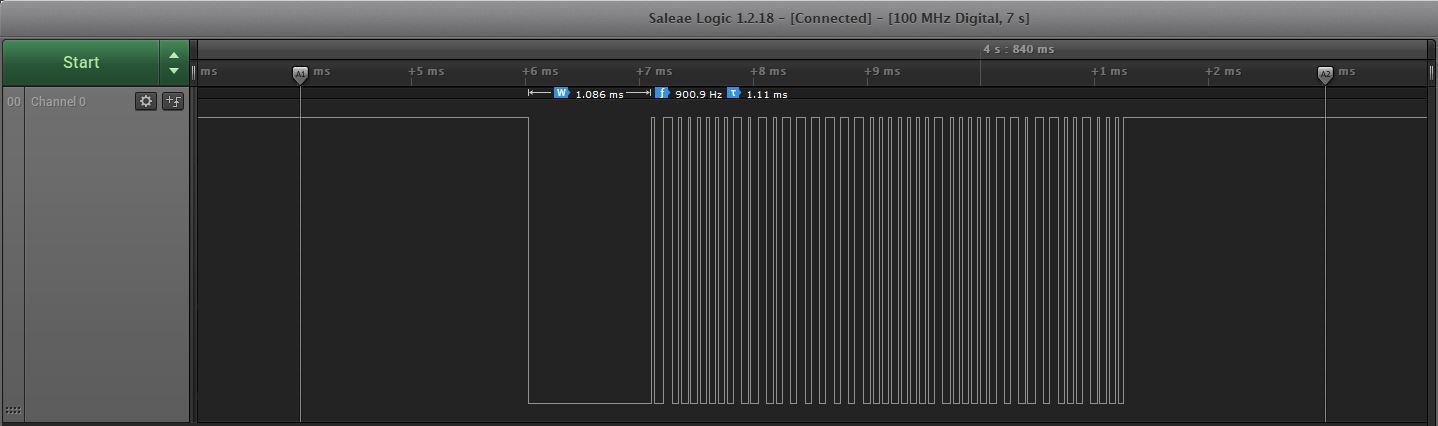
3.0.0-alpha.4
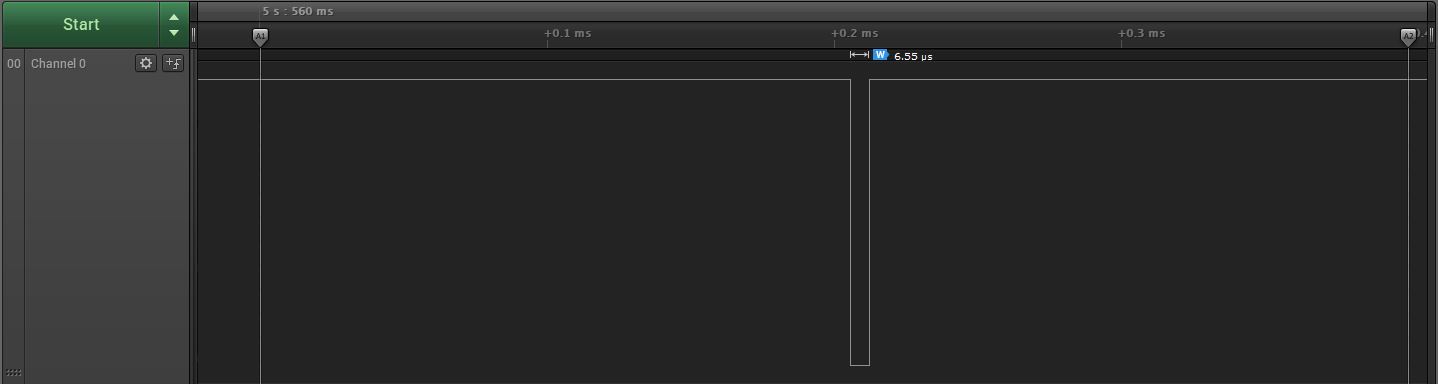
Based on the duration annotation...
 unreal ginkgo
i have no clue if i'm even supposed to be using the alpha builds
i guess i'm just kinda impatient
 stuck elbow
@glad rapids it's tricky, because they are used for REPL
 glad rapids
Yup
stuck elbow
@unreal ginkgo if nobody uses them, there is no testing...
glad rapids
I'm trying connect Cicruit Playground to an ESP8266
unreal ginkgo
fair enough, i guess im just not sure what im exactly testing
stuck elbow
@glad rapids the simplest approach is to just use print() in your program for output, and input() for input...
glad rapids
No I am looking into use the i2c bus
glad rapids
I thought i could just do the same but with i2c
stuck elbow
actually, I think we don't have slave support for either i2c nor spi
glad rapids
getting erros on the writeto line
I thought this was a bus? that you send a message out then the other device could grab it
That is how I was going to design it with UART
stuck elbow
the problem is that master generates the clock
and you can only have one clock at a time
glad rapids
So I read into the SCL
stuck elbow
the slaves have to listen for the clock, but not generate it
glad rapids
Ah
stuck elbow
so basically you need different code for the slave
glad rapids
Its cool that I have a Playground with tons os sensors and stuff but no way to send it to a Wifi device
I saw some Arduino project that connected the two
stuck elbow
arduino has slave support
so you can do the slave on an aduino, and the master on cp
 tulip sleet
@glad rapids busio.UART on ESP8266 only supports TX, and only on pin GPIO2, as I think you know.
You could also make up an ad-hoc SPI-like protocol, or send SPI from the CPX slowly and do busy waiting on the ESP8266 side to read it in a bitbang way. Look for alternations of a clock line, and check a data line for state when the clock indicates to.
unreal ginkgo
was trying to see if the new audio changes worked and i guess i'm not really sure what i'm missing
or if everything has been updated to involve that
i'm new to this testing bit
tulip sleet
@unreal ginkgo not sure what you mean? Did you try to play a wav file or a raw sample?
unreal ginkgo
something about audioio not being imported
i might just be missing the right files
or at least the latest ones
before using the alpha lib it said the files were outdated or something so i just imported all those
manic glacierBOT

I tried a few different vales for the trigger wait.
with 100 I get a good reading then fail on the next
at 10 I get 2 good reading then fail
Press any key to enter the REPL. Use CTRL-D to reload.

Adafruit CircuitPython 3.0.0-alpha.3-100-g8f3bf5f-dirty on 2018-04-05; Adafruit Feather M0 Express with samd21g18
>>> import dht22_test
23.7 54.9
23.7 55.2
Traceback (most recent call last):
  File "<stdin>", line 1, in <module>
  File "dht22_test.py", line 7, in <module>
File "ad...setting it to 500 - I got a few more readings - but the SALEA only show a 4.6 microsecond pulse not 500 microsecond.
@jerryn, did the Saleae show more than the first low pulse? Wondering if your catching the 2 interrupts I was getting from construct...
 solar whale
with 500 -- got bad checksum but lots of pulses
manic glacierBOT
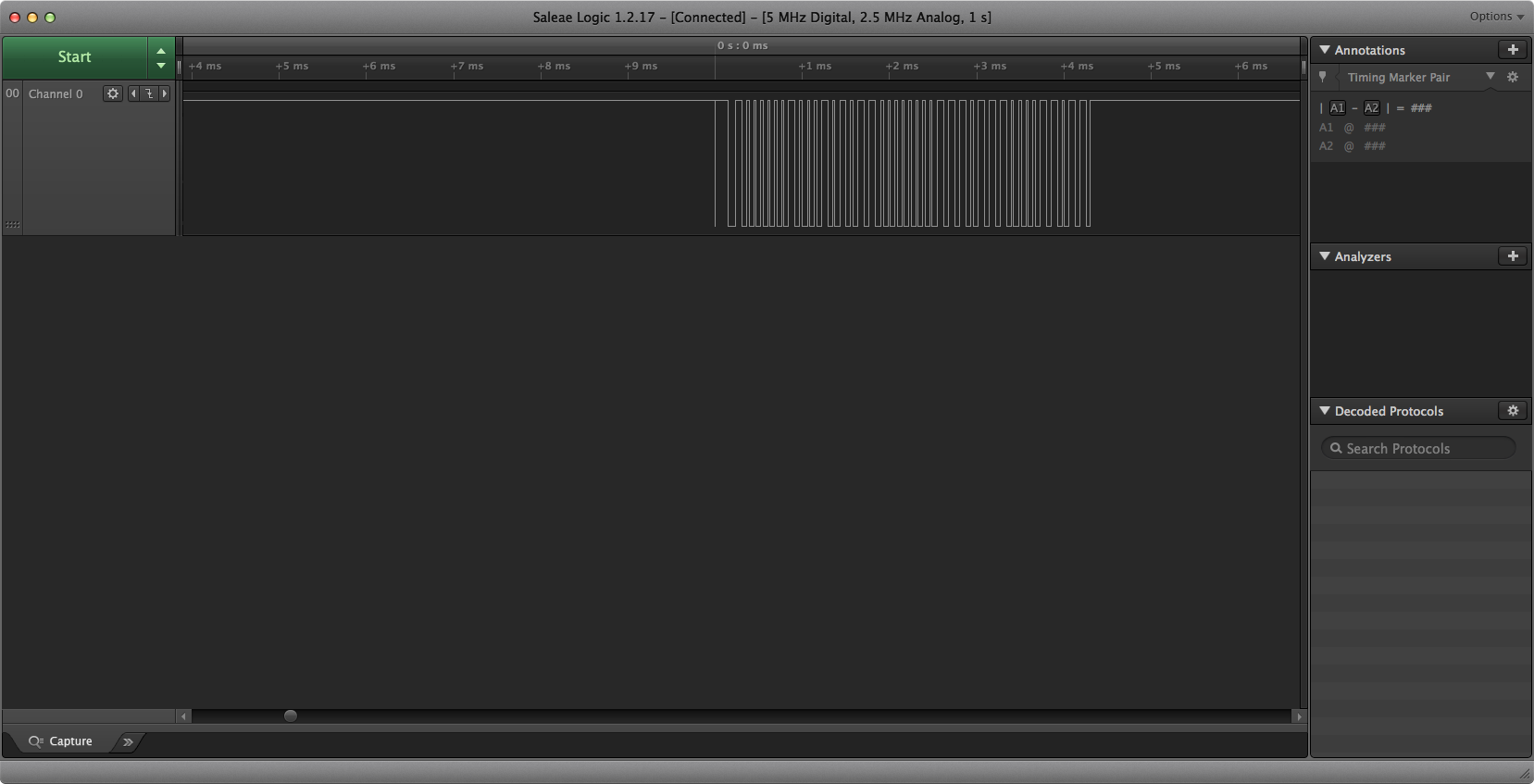
this was with 500 -- I see the pushes, but am getting bad checksums most of the time...
glad rapids
Not sure why this code is failing
Lock the I2C bus before we try to send data
while not i2c.try_lock():
    pass
try:
    i2c.writeto(0x08, bytes([0x05]), stop=False)
finally:
    i2c.unlock()
Fails on the writeto line
solar whale
@raven canopy I need to head off for the evening, but just wanted to let you know I was seeing some sign of life from it. I consistently get the Bad checksums now - an not just the lone pulse. Can't reliable reproduce the "good" readings.
manic glacierBOT
at a triger_duration of 100 - I do see a 100 microsecond pulse and a good first reading. then a bad checksum on the next.
unreal ginkgo
i guess im kinda not sure how to get audio playing in general with the alpha test thing
tulip sleet
@glad rapids `writeto() expects to see an I2C device at I2C address 0x08. If there isn't one, it will fail. What's it throwing?
@unreal ginkgo Did you see the examples in the doc? http://circuitpython.readthedocs.io/en/latest/shared-bindings/audioio/AudioOut.html
unreal ginkgo
does that work in the 3.0 test stuff?
because all i get with import audioio is that it isnt found
Traceback (most recent call last):
File "code.py", line 9, in <module>
ImportError: no module named 'audioio'
tulip sleet
which board are you trying it on?
tulip sleet
it's not in alpha.4, it's been put in since then. You'd have to build it yourself (or I can drop a build here).
actually the builds are in aws, hold on
tulip sleet
what's on line 69?
 timber mango

Wouldn't it be cool to drive a tiny OLED display, read a color sensor, or even just flash some LEDs directly from your computer? Sure you can program an Arduino or ...
Is this compatible with the Trinket M0
Never mind
 agile remnant
got a question question about circuitpython and interrupts. Working with a rotary encoder. I'm trying to move my listening code out of the main loop... I see micropython machine and pin classes that take callbacks. Any body know if interrupt callbacks can work on an m0_express?
raven canopy
@agile remnant ISRs/callbacks are not available in circuitpython. as you may have read in the micropython docs, they are difficult in this type of implementation: http://docs.micropython.org/en/latest/pyboard/reference/isr_rules.html
asyncio is being developed though (no ETA): https://docs.python.org/3/library/asyncio.html
agile remnant
ok, yea actually it was this https://circuitpython.readthedocs.io/en/programming_guide/docs/reference/isr_rules.html document that made it sound do-able (if you're careful), but your saying it just wont work, good to know it would be futile. I'll watch asyncio with some hope there.
raven canopy
hmm...that page shouldn't exist for circuitpython; it is confusing (case in point). we've been cleaning up the docs to remove this kind of stuff that came over from micropython, but is either different or non-existent in circuitpython. thanks for bringing it up!
agile remnant
Fork left overs, understood, thanks
timber mango
@indigo wedge gonna try to install latest cpy on this PCA10056!
@agile remnant there's some discussion on uasyncio, i think its best to expect it to run on the m4 chips...the m0's dont have a ton o memory
unreal ginkgo
these fancy alpha(?) builds are weird and confusing
timber mango
audioio has changed a bunch
timber mango
its still in heavy reworking, to support i2c. can you just use 2.2? thats well known
why do you need 3.0?
er i2s not i2c
unreal ginkgo
mostly the problem with playing audio and having lights do stuff at the same time
timber mango
oh yeah thats buggy right now :/
we hvae an open issue on it
(which is why we're rewriting a bunch of audio stuff :D)
unreal ginkgo
alright!
at least all the light stuff still works so i'll just be confused at what i can't see and hope you have good luck with fixing all of it
timber mango
lol thank you, playing audio while doing neopixels at the same time is really hard because both things have strict timing :/
if you hvae dotstars you may want to try those
they're less picky
unreal ginkgo
interesting
raven canopy
@unreal ginkgo the "latest" Read The Docs is usually the most up-to-date with everything. here is the one for AudioOut: http://circuitpython.readthedocs.io/en/latest/shared-bindings/audioio/AudioOut.html#audioio.AudioOut
unreal ginkgo
alright!
timber mango
oh hmm looks like maybe the 3.0 did fix it

GitHub
if you start to play a file, then do some neopixel stuff before the file is done playing, you get a hardcrash!
verified with 2.1 and 2.2
@unreal ginkgo what hardware are you using?
unreal ginkgo
whatever was at the top of this list is what i was running on my playground express
unreal ginkgo
neat!
timber mango
@unreal ginkgo try this
import audioio
import audiobusio
import board
import array
import time
import math

FREQUENCY = 440    # 440 Hz middle 'A'
SAMPLERATE = 8000  # 8000 samples/second, recommended!

# Generate one period of sine wav.
length = SAMPLERATE // FREQUENCY
sine_wave = array.array("H", [0] * length)
for i in range(length):
    sine_wave[i] = int(math.sin(math.pi * 2 * i / 18) * (2 ** 15) + 2 ** 15)

sine_wave_sample = audioio.RawSample(sine_wave, sample_rate=8000)

# enable the speaker
spkrenable = DigitalInOut(board.SPEAKER_ENABLE)
spkrenable.direction = Direction.OUTPUT
spkrenable.value = True

spkr = audioio.AudioOut(board.SPEAKER)
spkr.play(sine_wave_sample, loop=True)
time.sleep(1)           # until...
spkr.stop()           # we tell the board to stop
alright then .w.
timber mango
and then this will beep and play a sound
import audioio
import audiobusio
import board
import array
import time
import math

# enable the speaker
spkrenable = DigitalInOut(board.SPEAKER_ENABLE)
spkrenable.direction = Direction.OUTPUT
spkrenable.value = True


FREQUENCY = 440    # 440 Hz middle 'A'
SAMPLERATE = 8000  # 8000 samples/second, recommended!

# Generate one period of sine wav.
length = SAMPLERATE // FREQUENCY
sine_wave = array.array("H", [0] * length)
for i in range(length):
    sine_wave[i] = int(math.sin(math.pi * 2 * i / 18) * (2 ** 15) + 2 ** 15)

sine_wave_sample = audioio.RawSample(sine_wave, sample_rate=8000)

spkr = audioio.AudioOut(board.SPEAKER)
spkr.play(sine_wave_sample, loop=True)
time.sleep(1)           # until...
spkr.stop()           # we tell the board to stop

f = open("rimshot.wav", "rb")
wav = audioio.WaveFile(f)
spkr.play(wav)
while spkr.playing:
    pass
print("Stopped")
you can remove the beep part once you know it all works
timber mango
yes always!
timber mango
lol
unreal ginkgo
well it works!
timber mango
huzzah!
unreal ginkgo
now all i need to do is figure out how to save even more space
unreal ginkgo
yeah, especially when the file being used is 817 kb
well, it works, now to figure out how to get it to play other files
timber mango
you've gotten this far, you can figure it out - we believe in you 😃
unreal ginkgo
thanks!
well i've figured out how to get that changed
now the only problem is how to have it play different files on different commands
and to readjust the lights
it works with the main sound so far which is good at least
and i've done it
i'll put a video in show and tell soon
i'll get the other parts working as soon as i can
timber mango
awesome!
you'll get there, just make backups and take notes when things work
its just a process of learning
raven canopy
🎉 excellent work @unreal ginkgo!!
timber mango
and makes success that much better 😃
unreal ginkgo
wait
okay forgot some things i guess
gotta make sure i can do it twice in a row
theeere we go
now all that's left is figuring out what's what with the other few files and having it be able to play different files at different times
raven canopy
hmm. might have to switch over to the itsybitsy for debugging. 3.x has gotten too big for the trinket with DEBUG=1. 11K over now that HID and audio are back in... 😦
should probably look into updating the vagrant box's gcc too (it's still on 4.8.4).
 tawny creek
@unreal ginkgo great! 😄
unreal ginkgo
One tiny little personal tweak and some physical stuff and I’ll be completely done
unreal ginkgo
there we have it!
100% done!
tawny creek
until next project :}
 devout yew
hi, can anyone help me with the 3d printed usb foot switch project?
https://learn.adafruit.com/USB-foot-switch-circuit-python/software currently the code will not hold the button down. it will just quickly press it.

3D printed foot switch USB controller
i have no idea what part of the code needs to be edited to change the function
manic glacierBOT
@sommersoft I think the reason it locks up for tick_duration > 1000 is becasue it is usint tick_delay with interrupts disabled - this will wait forever since tick_ms won't increment with interrupts disabled.
https://github.com/adafruit/circuitpython/blob/master/ports/atmel-samd/tick.c#L64
manic glacierBOT
This function does not appear to be generating consistent delays.
https://github.com/adafruit/circuitpython/blob/master/ports/atmel-samd/tick.c#L59
 vague monolith
@devout yew I believe you're looking to comment out the kbd.relase_all() line
line 41
You can add a comment by #kbd.relase_all() the # infront of the line. That would make the key act as if it's being held down.
manic glacierBOT
 manic glacierBOT
Still trying to understand tick_delay, but this is all new to 3.0 and it look like the problem is caused here. If the requested delay is less than the time until the next tick, I think the current logic generates a short pulse for the Pulseio.resume trigger_duration.
@jerryneedell that is exactly where I was heading too. I was studying it yesterday. I'm going to start trying to read some values during debug...
manic glacierBOT
@sommersoft I tried simply replacing the call to tick_delay with delay_us (as in 2.2.4) and setting the dely back to 1000. It now runs but I get quite a few checksum errors about and bad readings. However, I do get many successful readings. Not a real fix, but I think it points to tick_delay as the main culprit.
Adafruit CircuitPython 3.0.0-alpha.4-dirty on 2018-04-15; Adafruit Feather M0 Express with samd21g18
>>>
>>>
>>> import dht22_test
20.6 55.0
20.6 54.9
20.6 54.9
 RunTime Error  Checksum did not validate. Try again.
225.4 54.8
 RunTime Error  Checksum did not validate. Try again.
225.4 54.8
 RunTime Error  Checksum did not validate. Try again.
225.4 54.8
20.6 54.7
20.6 54.7
20.6 54.7
 RunTime Error  Checksum did not validate. Try again.
6553.5 6553.5
20.6 54.6
20.6 54...@solar whale DHT22: 6553.5 6553.5, did you timewarp to the Sun real quick? ☀ 😎 😄
solar whale
@raven canopy Ther may be 2 issues - some bad readings - and the tick_delay. I use tick delay but ignore the errors, then it does runs sometimes - some with good results, some with bad.
raven canopy
i getting ready to debug. building trinket without hid/audio right now (won't fit with them and DEBUG=1). also just put the headers on the itsy_express.
manic glacierBOT
There may be 2 issues going on. If I go back to using tick_delay with the code ablove, it eventaully recovers from the incomplete buffer errors then gives some good readings and some bad readings.
solar whale
I can also try using my metr0_m4 revb or metro_m0 - they have headers.
raven canopy
@solar whale i was just about to ask if you were seeing the same on your m4_dev board...
solar whale
have not tried it yet - I'll do that now
raven canopy
darn... can't build without HID unless i revert or hammer it out of supervisor. itsy it is!
solar whale
similar results on M4 - but never get what looks like a correct reading
raven canopy
and the hits just keep on coming. itsy boots fine with 3.x-alpha.4. but won't with my master DEBUG=1 build. 🤔
hmm. must be one of the debug flags. we'll see what we get without it...
solar whale
I'm struggling with J-link on M4 -- been awhile since I tried
raven canopy
hehe. i was in the same place earlier this week with the esp. 😄
well, now i have to figure out how to narrow down watching tick_delay. the status rgb uses it and it's running every cycle...
hehe. easier then i thought. enter REPL...solid white, no tick_delay. 😄
 meager fog
ok i removed my secondary account so now there's just one of me
raven canopy
guess we'll have to cope with the reality that there can't be two of you. 😄
manic glacierBOT
@sommersoft#0222 I think there are 2 problems with tick_delay -- as written ```
us_between_ticks - us
will be negative since us is 1000 in our case and us_between_tics is always < 1000  but I think since us_between_ticks and us ar defines as unsigned ints,  this diff is always assignee 0xffffffff  because the diff is negative - so tick_delay returns immediately. Setting us to < 1000  will sometimes work as seen depending if us_between_ticks is > us.

If we "fix this" then it will ...
example of mis handling of diff between unsigned ints.
jerryneedell@Ubuntu-Macmini:~/projects/metro_m4_express$ ./test
64 a 5a ffffffa6
jerryneedell@Ubuntu-Macmini:~/projects/metro_m4_express$ cat test.c
#include <stdint.h>
#include <stdio.h>
void main()
{
    uint32_t x,y;

    x=100;
    y=10;
    printf("%x %x %x %x\n",x,y,x-y,y-x);
}
@raven canopy is it correct taht SysTick->VAL is only reset if interrupts are enabled?
raven canopy
i'd have to dig into it further. i'm still checking vals... my imminent GH post is going on the assumption that it does need interrupts though... @slender iron, any idea if that assumption is correct?
manic glacierBOT
@jerryneedell it seems that this is similar to the 2.x wait_until function, in that it too would freeze with interrupts off. I finally was able to step through tick_delay with debug (got atmel studio to force it with debug set). Here is what I saw:
tick_ms: 199340
ticks_per_us: 48      # (obviously, but nice to verify)
us_between_ticks: 178
start_ms: <optimized out> unfortunately; even though it isn't used in the final calc?
which make the final eval = `while (SysTick->...
right - I see the same thing, but as an unsigned int, -47,822 is alway greater than SysTick->Val so it will return immediately thus the short pulse. Id er set trigger_duration to say 500 then sometime we get lucky and we get a normal start pulse. Sometimes not depending on where the call comes with respire tot the 1ms tick cycle.
raven canopy
hehe. edited that post. need to recalc using unsigned ints...
solar whale
-47822 == 4294919474 as un unsigned int
raven canopy
yep. just got that myself, after verifying with an online calc.
solar whale
the arithemtic is easy to fix, but tick_delay will still hang without interrupts.
I think this is a problem for all pulseio usage of the trigger_duration. For the DHT we might be able to workaround it by disableing the trigger pulse generated by pulseio and generating one " manually" using time.sleep. The actual pulse length is is not critical.
slender iron
@raven canopy @solar whale the systick value will continue to increase but the ticks_ms depends on interrupts
since its update in the SysTick_Handler
solar whale
but does sysTick-> VAL get reset when it hits 0 if interrupts are disabled?
SysTick handler is an ISR, no?
solar whale
so it won't run
SysTick->VAL is set to board dependent value set to be 1 ms - then it counts down to 0 and triggers the handlers, correct? but with interrupt disabled, I think it will just sit at 0.
slender iron
I'd expect it to reset but a second interrupt will get combined with the first
solar whale
ah - so the HW resets it even if the ISR code does not run.. might be able to work with that
I think using tick_duration > 1000 is a bigger problem since it needs tick_ms
slender iron
I think so
raven canopy
yeah, i imagine this is where it hangs: tick_delay L#64: while (ticks_ms == start_ms) {}
solar whale
right
raven canopy
the m0+ tech reference doesn't explain SysTick very well, but it is tied to NVIC. and atomic_enter_critical does turn off global interrupts. Still hunting SysTick->VAL down...
manic glacierBOT

How should the other ports that use the time module deal with this rtc module:
- They should also use the rtc module
- Add a weak rtc_get_time_source_time() that raises NotImplementedError to keep the time module standalone
- Add a MICROPY_RTC define that the port can set if it wants/has rtc
solar whale
grrr - I hate it when I build for the wrong board then re-upload the wrong old version - more than once .....
this is where bash history can be too helpful...
timber mango
haha.
I now save .bash_history incrementally by date (still doing it manually though; not a cron job).
I do a lot of redundant work in bash so sometimes a 'good' command line disappears off the end of the backlog -- trying to prevent that so I don't have to re-research a 'good' command line syntax effort twice.
raven canopy
its easy for me. my CLI uses are pretty specialized, so i can just use the rolling history and it usually ends up quicker.
solar whale
my problem was that I had been building for feather_m0_express but I was loading to metro_m4 when I meant to build for m4 --- too many up arrows
raven canopy
ok...adulting time. later taters.
solar whale
I need a break, too!
@slender iron Is the whole use of the 1 ms tick counter and interrupt new to 3.0?
manic glacierBOT
OK - finally made some progress - I changed tick_delay to:
void tick_delay(uint32_t us) {
    uint32_t ticks_per_us = common_hal_mcu_processor_get_frequency() / 1000 / 1000;
    uint32_t us_between_ticks = SysTick->VAL / ticks_per_us;
    uint64_t start_ms = ticks_ms;
    while (us > 1000) {
        while (ticks_ms == start_ms) {}
        us -= us_between_ticks;
        start_ms = ticks_ms;
        us_between_ticks = 1000;
    }
    if(us < us_between_ticks){
while ...@vague monolith thanks, now i gotta figure out why the tinket m0 wont let me write to it any more
@vague monolith sorry, but the button never releases now 😦
manic glacierBOT
This change to tick_delay still has its drawbacks - It does occasionally still "hang" and I think that is an edge case when the RESET of the SysTick->VAL is not getting caught properly probably due to testing against 999. I need find a cleaner way to detect the RESET.
There is clearly a problem with tick_delay as written. @tannewt - should I create a separate issue for tick_delay?
manic glacierBOT
this may be hard to read, but it shows the pulses and decoded values for some dht22 reads. You can see that some of the reads have a spurious pulse of lengh 80 at the start and this trows off the whole train.
Others have some clearly bad pulse lengths (>1000)
Adafruit CircuitPython 3.0.0-alpha.4-dirty on 2018-04-15; Adafruit Feather M0 Express with samd21g18
>>>
>>> import dht22_test
array('H', [53, 26, 54, 26, 54, 26, 54, 26, 53, 27, 53, 26, 54, 74, 54, 25, 66, 26, 54, 26, 54,...ah - fixed the metro_m4 and most of the errors on the feather_m0:
in the dht driver:
    def _get_pulses(self):
        """ _get_pulses implements the communication protcol for
        DHT11 and DHT22 type devices.  It sends a start signal
        of a specific length and listens and measures the
        return signal lengths.

        return pulses (array.array uint16) contains alternating high and low
        transition times starting with a low transition time.  Normally
...@solar whale The idea is similar to 2.x but I switched it from TC5 to the SysTick timer
solar whale
@slender iron thanks - I was getting lost trying to compare. I think I am making progress. I hope you can follow my posts to the github issue.
slender iron
I'll take a look later tonight 😃
solar whale
no rush - I'm just trying to document what I've tried. Really 2 issues - one related to tick_delay, one in the dht driver.
slender iron
kk
manic glacierBOT
example from metro_m4_express_revb - with modified tick_delay and modified dht driver.
Still some glitches and I had some cases where I think the "edge condition" noted above cause some problems. Overall - it is "working" under 3.0 - not perfect, but much better.
If you think this is headed in the right direction I'll create a PR tomorrow,
manic glacierBOT
I think I have a much cleaner way to detect the reset of SysTick->VAL. I’ll try it tomorrow. I’ll just look for it to increase in value. This will signify a reset. It won’t be a big change so let me know if you have other suggestions.
raven canopy
holy cow @solar whale, you've been on a tear! 😄 jacking in to catch up...
raven canopy
@solar whale, this is the best "outline" i can find of SysTick: http://microchipdeveloper.com/32arm:samd21-systick. it's basically a prettier version of the ARM v6M manual. After reading a few times, for anything over the full SysTick rotation, we might be able to use the COUNTFLAG register; keeps things chip agnostic (may already be used somewhere, just haven't seen it). Also, definitely need to see what else tick_delay affects; DHTx seems like it would be a narrow view. I vote for a new issue, but leave the final call up to tannewt or Dan.
solar whale
@raven canopy thanks for that link. That agrees with what I came to understand today. Nice to see it in writing! I think we can even handle the >1000 trigger_duration with this when interrupts are disabled. We’ll see. Sometime these ideas don’t look so great the next day 😉
raven canopy
after like 5 iterations failing logic...brain is done. Bosch season 4 is calling. 😄 chat at ya'll tomorrow...
slender iron
@tidal kiln when you have a chance could you move this to the rpi forum? https://forums.adafruit.com/viewtopic.php?f=60&t=134126
manic glacierBOT
Ok, thanks! Please open a new PR if you get it going later. Thanks for trying!
Thanks for the work on this! I'd suggest A variant of 2. that stubs it out in each port. That way its easy to see where to implement it. (Hopefully we'll have it in all that support it eventually.)
Also, you should be able to update this with the newer submodule for asf4 which includes the calendar changes.
Thanks!
@sommersoft and @jerryneedell you are amazing! Thank you for sorting this out!
I don't think we need another issue. This has so much good background it'd be worse to split the discussion up. Thanks again!
manic glacierBOT
OK - I think this fixes tick_delay and allow it to work even for us > 1000.
void tick_delay(uint32_t us) {
    uint32_t ticks_per_us = common_hal_mcu_processor_get_frequency() / 1000 / 1000;
    uint32_t us_between_ticks = SysTick->VAL / ticks_per_us;
    uint32_t start_tick;
    while (us > 1000) {
        start_tick=SysTick->VAL;  // wait for SysTick->VAL to  RESET
        while (SysTick->VAL < start_tick) {}
        us -= us_between_ticks;
        us_between_ticks = 1000;
...works for dht11 as well now that tick_delay can handle the 1800 microsecond trigger_duration.
Version 2
Changes:
- Make RTC.datetime an attribute
- Add RTC.calibration attribute
- Use MP_STATE_VM(rtc_time_source)
- Add rtc_reset()
- Update to latest asf4 commit to get hal_calendar
- Support samd51, only compile tested. I don't know if have got the clock right.
- Add a weak rtc_get_time_source_time() to avoid breaking ports. I just wanted this version out the door (since you already had pulled my asf4 change) so I didn't contemplate your suggestion about a variation of op...
manic glacierBOT
with these changes, tick_delay works with pulseio.PulseIn to handle trigger_duration
This was necessary for DHT22/11 support
It also can handle delays of >1000 microseconds even with interrupts disabled.
No longer depends on ticks_ms
also cast argument to common_hal_mcu_delay_us in PulseIn.c
solar whale
@raven canopy The use of COUNTFLAG for the tick_delay looks interesting. One concern is that reading it clears it ! Not a problem now since it does not appear to be used anywhere else, but this is a bit scary.
astral spoke
guys, how can I use array in micropython/circuitpython ? It has only two methods, append and extend, it is not enough I think))
 tidal kiln
@astral spoke what are you trying / wanting to do? and can you clarify what you mean by "array"?
astral spoke
import array
I try to reduce heap fragmentation...
And no luck last few days with it
tidal kiln
ah. good info. hmm. others here will be able to answer that better than me.
astral spoke
Main problem, if I write + 10 lines of code and I got memory allocation error (about 17000 free memory). Current code about 350 lines
I think problem in heap fragmentation
In code nothing special, collect button press count and send it via wifi to mqtt server
raven canopy
@solar whale yeah, as I went through some iterations last night, I kept thinking about secondary effects. COUNTFLAG shouldn't be much of an issue. The problem is how we're not starting at zero. us_ticks_between is only until the next ms, not the next RELOAD. I think that same problem is in effect when setting us_between_ticks = 1000. Still munching on the thoughts I have though... (I'll move this post into the GH issue as well)
astral spoke
Someone have problems like me or micropython ready for very simple code only? blink led for example.
solar whale
@raven canopy I don't see the problem - the RELOAD happens every ms. doesn't it?
It works with 1000 -- and with 18000
@astral spoke what board are you using?
astral spoke
@solar whale esp8266 generic dev board
solar whale
@astral spoke can you post an example of the code that is giving you trouble?
astral spoke
@solar whale all 350 lines of code giving trouble and I don't know why
solar whale
is it for micropython or Circuitpython?
astral spoke
micropython
stuck elbow
well, we don't know either without seeing it
solar whale
@raven canopy what I hoped to be doing was to break the delay into 2 parts if necessary - first one goes down to the RELOAD at the next ms then it finishes after the RELOAD. If > 1000 then it adds steps of 1000.
astral spoke
This is my N try of code optimization, and still no luck.
bytes instead strings in dictionary keys - another try)))
After desktop version of python, micropython looks like hell...
astral spoke
I have check for it
line 219
error happens in random time if I try to add few simple functions (extra 10-20 lines of code)
looks like 350 lines of code it's micropython limit)))
when I have about 17000 free memory, it's weird
stuck elbow
wait, so you get that error when you try to import it?
have you tried to compile it to an .mpy file?
I actually had the same problem with micropython
astral spoke
No, for example: I added 20 lines of code, upload it to esp, all works fine and in random time I got memory allocation error
stuck elbow
can you also pastebin the complete exception?
astral spoke
How can .mpy help?
stuck elbow
well, since .mpy is already parsed, the micropython doesn't need to use memory to parse it and hold the parsed bytecode in ram
astral spoke
You tried it? It's helps?
stuck elbow
somewhat
astral spoke
I think rewrite code on C is better solution after my bad experience with micropython
@stuck elbow are you tried .mpy?
It is helps with your problem?
I'm not sure about profit if I use mpy
Micropython on microcontoroller must be simplier than C (in theory), but practice says C == micropython. It is sad
stuck elbow
shrugs
works for me
use whatever you like
at least you get an exception when you run out of the memory in Python, not a crash like in C
astral spoke
I like python, but micropython != python
raven canopy
@solar whale sorry, got caught up at work. I meant to say tick instead of ms. Like I said though, I'm still munching on my thoughts. Probably making it more complex than it is; i tend to do that and walk backwards. 😄
stuck elbow
@astral spoke I couldn't care less
solar whale
@raven canopy np - I know how that work stuff sure gets in the way...
tidal kiln
@astral spoke this is a circuitpython channel, not a micropython channel. but they both make a lot of compromises to get python running on microcontrollers. there will always be trade offs in doing this.
solar whale
@raven canopy still puzzled by your concern. As I understand it, there is a RELOAD at each "tick" (it is configured to occur every ms)
stuck elbow
@astral spoke I would try with the mpy and see if that helps, and if it doesn't, I would think about how to avoid creating a million objects in your program, and instead re-use the same few objects
@astral spoke or just switch to a raspberry pi — it has more memory than you could ever use up
astral spoke
where is million objects? 20 != 1000000
@tidal kiln circuitpython have same problems
stuck elbow
@astral spoke circuitpython has much less fragmentation in 3.0
@astral spoke you are creating a new list every time your old list gets too big
instead of truncating the old list
astral spoke
@stuck elbow this line cleans existing global variable DEVICE_DATA
stuck elbow
it doesn't clean it, it just creates a new list
consider doing DEVICE_DATA[:] = [] instead
 rotund basin
Can feather m0 be used in spi slave ?
stuck elbow
@rotund basin in principle yes, but circuitpython doesn't have the support for it
@rotund basin I think that arduino does, though
rotund basin
@stuck elbow you are correct
slender iron
<@&370994983664091136> @raven canopy Metro M4 will be in stock soon. Please make a free order for one and email me the order number. Email me (scott@adafruit.com) if you need instructions. https://www.adafruit.com/product/3382
Are you ready? Really ready? Cause here comes the fastest, most powerful Metro ever. The Adafruit Metro M4 featuring the Microchip ATSAMD51. This Metro is like a bullet train, with it's ...
@stuck elbow too
solar whale
Thank you!
 quick remnant
Nice chip, any plans to be able to get to the Ethernet on the chip?
in a future product?
Was just looking at the spec, does it also have the PHY on the chip too?
n/m that is 53 and 54, so I guess any plans for a board with that?
meager fog
you need an RTOS + PHY
it isnt...as useful as people think
honestly, id recommend just using a wiznet 5500
quick remnant
too slow
meager fog
unless you need massive thruput. the effort to get a tcpip stack on there, its months of work
use a raspi then 😃 on-chip ethernet never seems to be as good as people like
either the stack isnt good enough, or the overhead eats at your performance
quick remnant
Tell me about id, a few years back I did a board with older version of that line
but PHY is one chip 😃
meager fog
PHY is still $1.50
and a stack is a massive undertaking to get right
teensy has been promising ethernet for maybe a year now?
thing is you dont want ethernet, you want bsd sockets
thats a different thing 😃
quick remnant
I forgot which one I looked at but it was an alt open source TCP stack, with good IPV6 support too
meager fog
maybe in some far future! it would be cool...but for now we recommend a w5500 or go to a beaglebone/raspi
quick remnant
just looking for an alt lower power solution for smaller devices
meager fog
ethernet is not low power?
raven canopy
@solar whale your line of thinking is correct. I was visualization in the wrong direction for us in relation to RELOAD. 😵
 fresh knoll
rpi3b+ is poe
astral spoke
@stuck elbow interesting DEVICE_DATA[:] = [] Can I buy beer for you? 😃
quick remnant
didn't get in on the first 1000, waiting for May to play with one
meager fog
https://www.adafruit.com/product/3238 these poe splitters works with anything 😃

Power over Ethernet (PoE) splitters can make your project wiring a breeze - and best of all they work to connect any 802.3af-capable router to any Ethernet device, even if it doesn't ...
quick remnant
missed the order by like 5 min
meager fog
? they're in stock https://www.adafruit.com/product/3775

The Raspberry Pi 3 Model B is the most popular Raspberry Pi computer made, and the Pi Foundation knows you can always make a good thing better! And what could make the Pi 3 better? How about ...
quick remnant
you still have some, got the announcement e-mail blast from Newark as soon as they had them, went to the site, there were 5 left, and by the time I got the order done, they were down to 0
I figured if they were out, you would be too
stuck elbow
@astral spoke I take it helped?
astral spoke
@stuck elbow Not sure, but it was helpful advice
astral spoke
@stuck elbow also helpful. Do you drink beer? 😃
stuck elbow
@astral spoke we are all here to help, and it's enough for us to know we helped, thanks
astral spoke
@stuck elbow thank you
slender iron
<@&356864093652516868> and everyone else. CircuitPython Weekly Meeting in one hour here on Discord!
solar whale
WHat did I do wrong? ```Counting objects: 3, done.
Delta compression using up to 8 threads.
Compressing objects: 100% (3/3), done.
Writing objects: 100% (3/3), 358 bytes | 0 bytes/s, done.
Total 3 (delta 2), reused 0 (delta 0)
remote: Resolving deltas: 100% (2/2), completed with 2 local objects.
To https://github.com/jerryneedell/Adafruit_CircuitPython_DHT.git
! [remote rejected] jerryn_dht -> jerryn_dht (pre-receive hook declined)
error: failed to push some refs to 'https://github.com/jerryneedell/Adafruit_CircuitPython_DHT.git'
nevermind - recloned and all ok.
meager fog
@slender iron fyi we're doing a light rev on the metro m0 express to come with thm headers and GD25Q flash
i also bumped to 2.2.4
slender iron
👍
meager fog
mostly just more durable, i like the thm headers 😃
slender iron
totally
meager fog
@slender iron m4's are getting prepped
slender iron
if I'm reading the datasheet right we should be able to DMA to PORT
meager fog
reallY??
that is within philb's interestes
because we were using timer/waveform to do neopixel dma
slender iron
the high speed bus system chart shows all four APB bridges serviceable by DMA
and the memory map say PORT is on bridge B
meager fog
HmmMmMm
oooh snazzy new pix now at v

Are you ready? Really ready? Cause here comes the fastest, most powerful Metro ever. The Adafruit Metro M4 featuring the Microchip ATSAMD51. This Metro is like a bullet train, with it's ...
slender iron
pretty
slender iron
12 minutes
meager fog
ok i will go FAST
meager fog
i do
i want to put them in, notify everyone and then remove again so we can avoid non-beta people ordering
slender iron
notify the beta folks?
meager fog
yeah in 12 min
slender iron
kk 😃
meager fog
i figure they'll be here in meeting? mostly?
slender iron
mostly yeah
jepler is on vacation for a couple weeks
(not actually a beta person but helpful)
meager fog
we'll keep some stashed no matter what
slender iron
👍
meager fog
we fabbed 150
slender iron
cool cool, I think they'll go fast
slender iron
awesome!
raven canopy
👋
slender iron
@shrewd bough we're listening to you
 ruby lake
ooh m4 thingys
raven canopy
I don't even see them in the voice channel on my app... But I do hear it.
meager fog
https://www.adafruit.com/product/3382 is now in stock
Are you ready? Really ready? Cause here comes the fastest, most powerful Metro ever. The Adafruit Metro M4 featuring the Microchip ATSAMD51. This Metro is like a bullet train, with it's ...
we have a limited number, please pick up 2 only if you are pretty sure you're going to destroy one 😄
manic glacierBOT
nothing was added re- disabling interrupts - that is done in pulseio -- should it not disable them?
quick remnant
more trying to figure out how they're going to be used
don't have the time right now
meager fog
@quick remnant this run is for the beta testers, we'll have more later 😃
we wanted to replace any old rev B boards people had
stuck elbow
doing the order right now
quick remnant
don't worry not planning to get one, don't have the time right now
raven canopy
It's like a fluffy pillow...
 copper shuttle
Hey guys, noobie needing advice here
I've installed circuit python on my circuit playground express, but I'd like to go back, like a factory reset, so I can use it with the MakeCode again
meager fog
yayyyyy M4
@copper shuttle just double click to get back to the CIRCUITPLAYBOOT drive
and drag over the UF2, it will 'reset' back to MAKECODE
dont forget to make a backup of your python code, it should not be deleted but its always best to save
yayyayaya
 idle owl
Yay!
copper shuttle
Double click where exactly? xd
And which UF2 should I drag over?
I tried putting a .uf2 example I made on the site, restarted it, but nothing happened
 errant grail
Text only today. Group hug including Ladyada for the release of the Metro M4!
meager fog
thanks cg
quick remnant
Not up to speed enough to give any sorry
quick remnant
just trying to get a feel for the dev process around CP
raven canopy
@jerryn for collabing on DHT/PulseIn/tick_delay. @Dan Halbert for speedy fixes on HID, and @tannewt for getting audioio out. Group hug for all that I've forgotten. Last minute: @adafruit and m4-testers for...M4
slender iron
@meager fog any hug reports?
meager fog
yah! thanks to dean for helping get these m4's wrapped up, philb for the silkscreen
errant grail
Yes! PT for the great Blinka graphics!
meager fog
scott for audio! it works better now it seems 😃 and dan for multimedia keys which i have bene wanting for a while 😄
kattni has rocked out the plotter demos, and pt video'd them with some cool greenscreening
so its a team effor 😃
if anyone else is planning on some M4 fun, please pick up a Metro M4 ASAP, we have some left of the 25 we put in a half hour ago
but they're going fast
 hollow ingot
Ooops was surprised to be asked by name; gave a status report not hug report - sorry guys. Have been working through https://www.gov.uk/government/publications/gcse-computer-science to see how educators can be guided to fulfil these criteria through Micro/Circuit-Python exercises built on rock-bottom ESP8266 kits and widgets from Aliexpress - selected a DOIT NodeMCU-M for now.

Subject content, aims and learning objectives for GCSE in computer science for teaching from 2016.
stuck elbow
I suspect there might be something uncanny happening with i2c reads being cached — so the read succeeds — but I have no idea how to check that
tidal kiln
what about clock stretching and bitbangio?
errant grail
Three status items:
- Finished CPy holiday light animations. During that process, noticed that time.monotonic and time.sleep accuracy isn’t what I originally thought (and follows what the team already knows), but it's okay for the “6-hrs on” timer. As a result, developing a suite of benchmark tests to compare performance on the various CPy processor foundations, starting with time (including PWM) and then including other features such as calculation throughput, etc. Wondering if I'm reinventing something? Are there any existing benchmark test suites out there?
- Working with the ILIO9341 display (2.4” TFT FeatherWing) as part of the conversion of the corrosion detector from Arduino to CPy using Tony D’s library. Line and pixel graphics is functional. Next step is to incorporate his MicroPython bitmap font library.
- Side note: my band’s CD release party extended into the weekend but is over now. Whew. Not as resilient as I once was.
Fun time for all.
hollow ingot
@errant grail take a look at https://github.com/ShrimpingIt/bitfont to see if there's any resources you can bring across

GitHub
bitfont - A renderer-agnostic port of u8g2 pixel fonts to python3, suitable for low-resource environments like micropython.
errant grail
@hollow ingot Thanks!
meager fog
ok removing the metro m4 from stock for now
we'll have more in soon 😃
but we dont want to confuse people. we have some stashed, if you absolulely need one from the first run please contact @slender iron
stuck elbow

A handheld running CircuitPython and cheap enough for a badge.
hollow ingot
@errant grail Affero is my default setting, but happy to relicense within limitations imposed given I'm 'downstream' from u8g2, though strictly no code survives since all information was transformed from BDF to python so probably no actual legal limits. Just let me know what license would suit.
raven canopy
@jerryn has DHT & tick_delay PRs in, so that is just about done. Will continue to push against ESP8266 GPIO16 (Magic 8 Ball: outlook not good). Might work on PulseIn for ESP/nRF.
Lol
slender iron
@meager fog any status updates?
meager fog
just metro m4 release, itsy m4 in progress
metro m0 going thru a light revision to include THM headers
errant grail
@hollow ingot I'll continue with Tony D's library for the time being (I'm a beginner -- it's a learning process for me), but will check out yours when I get that figured out.
raven canopy
Hehe. Here are my prepped notes: with tick_delay imminently traversing milliseconds, do we want to handle updating tick_ms if interrupts are disabled? Obviously depends on nature/level of interrupts being disabled; i.e. will NVICPending or OVR update after re-enable.
Slightly.. 😄
However, if you need 1500us, how do you do that?
stuck elbow
can't you re-enable the interrupt in between the pixels?
 umbral dagger
@slender iron wIll do. I’m looking forward to getting back to CP. Also, looking at extending the platform to a lisp.
raven canopy
SAMD51 has GetActive for NVIC right? SAMD21 doesn't, so tricky to know if interrupts are enabled...
stays silent
:+1:
stuck elbow
do we have problems with esp8266 and the bno055? I missed that
clock stretching is working on the esp8266
stuck elbow
I wonder if we could somehow disconnect the clock line so that we could capture on the trace which side is pulling it?
I found my bno055 yesterday, so I can give it a go too
idle owl
270 does not work for I2C. 😄
stuck elbow
you can limit the speed with i2c.config I think
but it should work in the fast mode
4.7kΩ is required by standard for the 400kHz mode, iirc
@slender iron remember to get the uGames :)
raven canopy
K
errant grail
Thanks!
stuck elbow
thank you!
raven canopy
Thanks! Later.
stuck elbow
the cake is a lie ;-)
solar whale
@tidal kiln may not be relevant but this was the thread I recalled https://forums.adafruit.com/viewtopic.php?f=19&t=128919&hilit=BNO055+pullup
tidal kiln
thanks @solar whale will take a look
manic glacierBOT
I'll look at modifying PulseIn.resume to work better with this an only disable interrupts for < 1ms
errant grail
Later folks! Appreciate the discussion and the help.
umbral dagger
@slender iron Argh. I was offline and missed the "in stock" window.
meager fog
@umbral dagger are you on now?
meager fog
@umbral dagger grab em now 😃
umbral dagger
@meager fog Grabbed.
hollow ingot
Thanks all. My week had a lot of stupid stuff around dropcatching domains (vgkits.com etc.) configuring resources and securing Twitter, Facebook, Instagram, Github etc. for the simple name vgkits for disseminating info.
idle owl
@hollow ingot Thanks for making the meeting!
hollow ingot
For discussion, a very drafty example of guidance for educators to source from wild-west Aliexpress for a particular project lives at https://vgkits.org/blog/project0/ Posts like this will need images/video and lots of suggestions from people to make them less horrid (hence all the social media OAuth) as well as beating wordpress with a big graphic design stick! There's a bunch of unpublished supporting material which I'm trying to prioritise and clean up until people can usefully land at https://vgkits.org Basic idea is offering bagged and prepped kits based on openly-disclosed Aliexpress sourcing. If successful, would feed enough revenue through to prepare more and more detailed guides+examples, with confident adopters not sourcing from us at all. Focus is supporting educators who are willing to put up with the complexity of self-sourcing/flying wires/blue smoke as a route to Python3 physical computing in UK schools. Certainly not ready for newsletter, yet, but hopefully soon. Some rationale/project orientation at https://vgkits.org/blog/2018/04/10/beginning/ Very much forward to getting back to software. Think adafruit-blinka could help people have a soft-landing given the work on circuitpython and esp. drivers.
The Rainbow kit is our first experiment with defining a Python-programmable kit for the classroom. Educators with the time and confidence should be able to sour
Teaching with Python Gadgets in the Classroom
VGKits.org is a resource for educators introducing physical computing with Python, in computing, D&T and science classrooms. Our guide helps educators choose the right components, source them cost-effectively and prepare them for compelling activ...
meager fog
@umbral dagger ok locked em back up, thanks!
ruby lake
M4 will easily do this key assigner I want to recreate
meager fog
@ruby lake yay its super fast. one sad 😦 is the G19 QFN48 doesnt have i2s, like at all
the J19 on t he metro does, and we brought out mck
but the feather & itsy wont
ruby lake
I am sad and happy then. 😉
meager fog
dunno why they just like, ditched i2s on the qfn48. the pins are 'there' in the pinmux
ruby lake
J19 superfeather!
solar whale
Have to go - have a good afternoon/evening and all other timezones
stuck elbow
I have ever only seen i2s used for bit-banging
 bronze geyser
i am porting (up through sending a packet0 Adafruit's RFM69 circuit python library to the Raspberry Pi: https://github.com/BitKnitting/RFM69_pi/blob/master/RFM69_pi.py ...Challenge: My call to send() times out. Debug: in the logic directory: https://github.com/BitKnitting/RFM69_pi, I have placed logic analyzer runs for Feather and Pi. There are three patterns: 1) init 2) temperature 3) send. init and temperature show "pretty much" the same SPI . PROBLEM: pi's send() never gets to 0x28 (i.e.: send complete)...rather there's 0x27 (w/ timeout info?). So I believe the send times out. But i am unclear what causes it because the api/spi code "seems identical to me." Any thoughts/advice greatly appreciated. thank you.
Note: I used meld to compare the pi vs. feather csv outputs of the logic analyzer sniffs...
oops: NOTE - I am using Adafruit's RFM69 BoB wired to the Raspberry pi.
So I think the problem is PLL Lock....hmmm....
 pastel panther
@meager fog That's so strange about I2S on the G; Did you test it at all to see if it's just a datasheet issue? I guess I'll have to update my symbols in eagle :<
slender iron
@pastel panther The cmsis includes don't have the memory mappings for I2S with the G and the datasheet says its not included in the G variant
tulip sleet
you could try it, but you'd have to fake out the software library to see if it does anything. We don't know whether it's fused off, bad documentation, or just not guaranteed to work (like maybe they don't test for it in that variant).
pastel panther
lame-o
tulip sleet
if you have a receptive MicroChip sales engineer to ask, that might or might not be informative
pastel panther
seems like a stretch that it would be cmsis and the datasheet both being wrong
tulip sleet
yeh, and the pinmux section has a big caveat that says in effect "just because the pins are listed here doesn't mean it works: check the capabilities section"
pastel panther
especially when we already know that the pinmux matrix isn't a guarantee that a pin has a function
right
I already ran into that with some timers I think
manic glacierBOT
I made a trivial change to common_hal_pulsein_resume to leave interrupts enabled if trigger_duration >=1000. DHT22 and DHT11 still seem to work. DHT22 trigger is 1000 DHT11 is 18000.
void common_hal_pulseio_pulsein_resume(pulseio_pulsein_obj_t* self,
        uint16_t trigger_duration) {
    // Make sure we're paused.
    common_hal_pulseio_pulsein_pause(self);

    // Send the trigger pulse.
    if (trigger_duration > 0) {
gpio_set_pin_pull_mode(self->pin, GPIO_PULL_...That looks good to me! It would be good to make sure in the timing code that interrupts are enabled. (And return early if they are.)
slender iron
@tulip sleet can you review https://github.com/adafruit/circuitpython/pull/764 when you have a chance?

GitHub
Its 256b on M0 and 8k on M4 to match flash erase sizes.
Fixes #758
tulip sleet
@slender iron - sorry, I missed that somehow. One Q: The old impl set some fuse bits to protect the "EEPROM emulation area". I think you didn't do that this time , but if so it means a full flash erase will delete the data (which is fine with me). Is that right?
slender iron
@tulip sleet those bits don't actually protect it all. I just used it as a smoother upgrade path at the time. With the SAMD51 if we use those bits it'll require reading and writing in a different way
tulip sleet
sounds good! tnx!
slender iron
np, thank you!
timber mango
@solar whale: have a nice zone. ;)
manic glacierBOT

Thank you so much! I made a couple small tweaks and am merging. Feel free to follow up with any changes you'd still like to make.
I cloned ladyada's repo and tested this by hand and it works.
pastel panther
hey @tulip sleet is AnalogOut supposed to work on the m4?
tulip sleet
it's supposed to
i added and tested it, a while ago
are you asking about CircuitPython, or an issue you're having doing it in C?
pastel panther
in CP
this should result in 3.3v on A0, right?:
import board
dac = analogio.AnalogOut(board.A0)
dac.value = 65535
it should, and i tested it on the rev B board a month or to ago
pastel panther
let me do another sanity check
tulip sleet
i will wire it up here
pastel panther
yea, just double checked with my mm
both my logic and mm say no dice
tried both from repl and writing a code.py
tulip sleet
it works for me, but I'm on a build that doesn't have Scott's new audio stuff. Let me try that one.
that had some analog changes
@pastel panther works for me on the latest master too, on a rev F board
pastel panther
hmm
I only have the rev b. Let me check again
check checked again and compared against D12 and the 3v3 pin to make sure I was properly grounded
still no dice
just built about an hour ago: Adafruit CircuitPython 3.0.0-alpha.4-21-g7f7cbe8 on 2018-04-16; Metro M4 Express Rev B (Black) with samd51j19
tulip sleet
@pastel panther I will try a rev b. I am building against the same commit
pastel panther
ok
tulip sleet
did you git submodule update?
pastel panther
yup, didn't build until I did
tulip sleet
ok, duplicated your problem on the rev b board. the pin assignments for A0 and A1 haven't changed, though, so the problem is not as obvious as one might suspect.
pastel panther
I can create an issue
For what it's worth I found this issue testing the adc with current master on my custom G19 m4 board
so I don't think it's just the rev b
tulip sleet
I rechecked on the latest boards and it works. we are dropping support for the rev b boards. But hmm, if it doesn't work on your board...
pastel panther
the implication is that it won't work on the feather m4 and itsy bitsy m4
(maybe)
tulip sleet
@slender iron might have an intuition about what changed. The new audio code can output to a DAC.
pastel panther
it's hard to say for sure without knowing more specifics, though the fact that you say the pinout is the same for the newest m4 and the rev b suggests it's probably not a hardware issue
tulip sleet
go ahead and open an issue, since as you say it may fail on the other m4 boards. Thanks for this.
pastel panther
will do
manic glacierBOT

It would appear that something is awry with AnalogOut on current master for the Metro M4 rev. B as well as my SAMD51G19 based board.
import analogio
import digitalio
import board
d12 = digitalio.DigitalInOut(board.D12)
d12.direction = digitalio.Direction.OUTPUT
d12.value = True
dac = analogio.AnalogOut(board.A0)
dac.value = 65535
The above should result in 3.3v on D12 and A0 however A0 shows 0v
The pin assignments for A0 and 1 have not changed from rev B to rev F, but the new AudioOut support might be doing something to interfere with AnalogOut.
On a Metro M4 rev F, the above code works and sends 3.3V to A0.
manic glacierBOT

Yeah, we should use the exe for windows. Looks good to me as well.
 lost moss
?showtimes
 digital shoreBOT
3D Hangouts - 11am ET Wednesdays
Show & Tell (YT only) - 7:30pm ET
Wednesdays Ask an Engineer - 8pm ET
Wednesdays Desk of Ladyada - Random hacker times
John Park's Workshop - 4pm EST Thursdays
manic glacierBOT
 manic glacierBOT
Did you solder together the jumper on the back of the Rev B? The internal voltage reference is broken on the rev A of the SAMD51. The Rev F metro has it connected by default.
 wide depot
Hello all,
Has anyone had problems building today's master of CP for feather M0 Express?
I think commit 81d395d8256ce0b4d5a2a37dd2f4b5ec789da2a5 brought a problem:
common-hal/rtc/RTC.c:33:10: fatal error: hal_calendar.h: No such file or directory
#include <hal_calendar.h>
^~~~~~~~~~~~~~~~
compilation terminated.
stuck elbow
@wide depot did you do git submodule update --init --recursive after the pull?
that might help
wide depot
@stuck elbow Thanks - it did help. I have forgotten about the submodules.
indigo wedge
The introduction of Zigbee support further extends Nordic’s comprehensive low power short range connectivity solution portfolio, which additionally includes solutions for Bluetooth 5, Bluetooth mesh and Thread.
Zigbee in CP? 😉
stuck elbow
that might require considerable work
manic glacierBOT
@sommersoft good catch on change to LOAD.
@tannewt just to clarify - if tick_delay is called with us > 1000 but interrupts disabled, you wan to just return immediately thus ignoring the delay request, correct? Do you want to raise an Error?
 wooden lichen
Has the USB host function of the M0 been integrated in circuitpython?
I'm not talking about talking to an usb host*
manic glacierBOT
sigh Yes, that fixed it. I'll go update my boards now and throw the old ones in the trash :(
manic glacierBOT
@jerryneedell, I'm not sure we can check for interrupt status. In the meeting yesterday I mentioned using the NVIC to check, but that only works if turning off those interrupts. When using the hal_atomic macros, no magic I can find to check interrupt status. Maybe add the option to pass the atomic flags object and re-enable the interrupts inside tick_delay? @tannewt, am I off and/or missing something here?
astral spoke
@stuck elbow http://prntscr.com/j6hpj4 mpy-cross quest - success
 stuck elbow
awesome!
though I admit it makes it a little less convenient to do development
hmm... wouldn't it be great if ampy had an option to run mpy-cross on a file before uploading it?
astral spoke
sounds good
I used this article https://learn.adafruit.com/micropython-for-samd21/frozen-modules#external-frozen-modules

How to use MicroPython with boards like the Feather M0 & Arduino Zero!
stuck elbow
great!
astral spoke
special thanks for Tony (article author)
stuck elbow
@timber lion ^^
bronze geyser
Just an update...i've been 'porting' Adafruit's circuit python to rasp pi. yesterday, i couldn't figure out why send was failing. I got it to work....and had fun getting into the details of SPI + RFM69 register flags...anywho. YIPPEE!... on to receive...
stuck elbow
you mean rpi baremetal?
bronze geyser
what is rpi baremetal?
stuck elbow
raspberry pi without an operating system
there is a port of micropython for it
running mp directly on the board, without linux
bronze geyser
oh...sorry. No...i do not understand stuff enough for that. Raspberry Pi w/ Raspian...i wanted to write my experience thing in python. where the other end is a Feather. I wanted to use Tony's library. Well, the RadioHead goop led me to port his stuff instead of crufting from an existing raspberry pi python rfm69 port.
stuck elbow
ah, so you are porting from circuitpython to c python?
bronze geyser
me, i sit back in awe of you folks that see the beauty in each and every bit. When I was younger, the group I was in had devs who debugged by looking at hex traces. No symbolic libraries for them...hhmmm..
bronze geyser
i just took Tony's Adafruit_rfm69.py library (pure python - dah good stuff)...and put in the raspberry pi isms for SPI...and interrupt handling of RFM69 (offa DIO0 instead of polling)
oh that's interesting. the challenge with that is the reason i am using the raspberry pi is for db stuff..and connecting my nodes (running RFM69) to dah Internet via MQTT.
stuck elbow
rfm69 is huge, I can barely get my head around nrf24l01
stuck elbow
the amount of registers, options you can set, different modes
bronze geyser
ah indeed. This is why porting offa Tony's and RadioHead's is not that bad. They've wrappered all this stuff. AND their code serves as examples with what the intent is with the datasheets. With that said, I am enjoying learning about PLL...I mean...I had no idea..
 light pagoda
hello world , lol
solar whale
@light pagoda Hello.
light pagoda
I come seeking help as I have no idea what I'm doing lol
solar whale
Well - if it is related to CircuitPython, this is a good place to start 😉
What are you trying to do?
light pagoda
here's a link to the fourm post
I have 4 x 8 rgbw neopixels on a gemma M0 and I want them to blink a few time then fade to on and stay on
I got them to blink but can't get past that point
solar whale
you r While True will just keep looping - is that what you want?
light pagoda
no just one loop
blink a few time then fade to on and stay on
didnt' even think of that
solar whale
so get rid of the while True: (also remove the indentation)
@light pagoda good luck and let us know how it goes.
light pagoda
ok so now I have the blink and it goes once
now the fade to on and stay on, has eluded me for three days 😦 since I have never done any coding in my life
tidal kiln
"bink a few times" --> use a loop, but not an infinite loop
infinite loop:
while True:
    # code here loops forever
loop with specific number of cycles:
for _ in range(COUNT):
    # code here will run COUNT times
@tidal kiln do you know the resolution of brightness = I see .02 -- is that meaningful?
 opaque patrol
@tidal kiln its funny because I just wrote this function....```def blink(count, delay, color, brightness = 1.0):
# save current brightness setting to restore
old_brightness = strip.brightness
strip.brightness = brightness
for _ in range(count):
    strip.fill(color)
    strip.show()
    time.sleep(delay)
    strip.fill((0,0,0))
    strip.show()
    time.sleep(delay)

# restore original brightness
strip.brightness = old_brightness
brightness (float) – Brightness of the pixels between 0.0 and 1.0 where 1.0 is full brightness
light pagoda
I only want it to go through once every time it's powered on
solar whale
got that, but I was just curious what it could resolve. I'll dig into it later.
solar whale
or more like is .02 different than .03 and what is non-zero....
tidal kiln
@solar whale i think it'll be whatever float is for current cp version, for the value, but then some truncation may occur when it actually gets used:
https://github.com/adafruit/Adafruit_CircuitPython_NeoPixel/blob/master/neopixel.py#L227
light pagoda
so what do I need to do now to get it to fade after it blinks?
tidal kiln
vary brightness. in a loop.
light pagoda
fade to on I mean
solar whale
@tidal kiln so it scales the actual setting (0-255) by the brightness - so there are 256 possible values - or resolution of ~.004
tidal kiln
think of off as a brightness of 0, and on as a brightness of 1
light pagoda
@carter thank but how do I stanslate that to the code as I really am fumbling in the dark here
*thanks
opaque patrol
I think this function will do it...anyone see any issues? ``` def fade_up(color, milliseconds, start_brightness = 0.0, end_brightness = 1.0):
strip.brightness = start_brightness
strip.fill(color)
strip.show()
# use max to prevent div from being 0.0
div = max(0.001, float(end_brightness - start_brightness))

inc = float(milliseconds) / div
sb = start_brightness

while sb < end_brightness:
    strip.brightness = sb
    strip.show()
    # clamp decimal places to 2
    sb = ((sb + inc) * 100.0) / 100.0


strip.brightness = end_brightness
strip.show()
sor of , but you can set a pixel "intensity" from 0 - 255 for each color - but then the brightness just scales that. so setting it to 200 with a brightness of .5 is the same as setting it to 100. the brightness is a nice way to limit the maximum settings.
sorry - this is off-topic for this case - I was just thinking "out loud"
@opaque patrol my comment was to @tidal kiln not related to your code
tidal kiln
is milliseconds intended to be used for some kind of timing?
opaque patrol
when working with just a base color, (red, green or blue), I find it easier to adjust that value like @solar whale mentioned
@tidal kiln yeah, how long it should take to go from start to end, say 3000 for 3 seconds
tidal kiln
should there be a time.sleep()?
manic glacierBOT
 opaque patrol
I was wondering if I needed a sleep, I don't think so
light pagoda
getting this error?
opaque patrol
change them to start_brightness=0.0, end_brightness=1.0
If you copy/pasted the code, make sure it uses tabs or spaces that are consistent with the rest of your code....
tidal kiln
those spaces shouldn't matter, it may have to do with where / how you are trying to define the function
light pagoda
that working but it's not fadeing it's just doing another blink?
opaque patrol
try commenting out the blink code so it just fades to on
tidal kiln
@light pagoda one thing to watch out for is white space and indentation, it is used in circuitpython (and python) to determine segments of code
light pagoda
hmmm not getting anything
tidal kiln
how to markup code:
```python
code goes here
what do you mean markup?
tidal kiln
for pasting code here
tidal kiln
to make it look like this:
print("hello world")
ahh 😃
tidal kiln
you need to call the fade_up function
light pagoda
hmm
tidal kiln
also, you can edit a previous post
so you can go back and add the ticks, you need them at the top (start) and bottom (end)
 sick creek
super code comes here
tidal kiln
the ticks are the main thing, so you can just do this:
```
code goes here
code test
adding python after the first set of ticks tells it what language it is
upper left on keyboard (typically), same key as ~
there it is
light pagoda
from digitalio import DigitalInOut, Direction
import board
import neopixel
import time
import pulseio

pixpin = board.D0
numpix = 32

led = DigitalInOut(board.D13)
led.direction = Direction.OUTPUT

strip = neopixel.NeoPixel(pixpin, numpix, bpp=4, brightness=.4, auto_write=False,)

color1 = (100, 0, 0, 90)
color2 = (200, 0, 0, 30)
color3 = (255, 0, 0, 0)
color4 = (0, 0, 255, 0)

strip.fill(color1)
strip.show()
time.sleep(.001)
strip.fill((0, 0, 0, 0))
strip.show()
time.sleep(.01)
strip.fill(color2)
strip.show()
time.sleep(.1)
strip.fill((0, 0, 0, 0))
strip.show()
time.sleep(.1)
strip.fill(color3)
strip.show()
time.sleep(.1)
strip.fill((0, 0, 0, 0))
strip.show()
time.sleep(.2)

def fade_up(color, milliseconds, start_brightness=0.0, end_brightness=1.0):

    strip.brightness = start_brightness
    strip.fill(color3)
    strip.show()

    # use max to prevent div from being 0.0
    div = max(0.001, float(end_brightness - start_brightness))

    inc = float(milliseconds) / div
    sb = start_brightness

    while sb < end_brightness:
    strip.brightness = sb
    strip.show()
    # clamp decimal places to 2
    sb = ((sb + inc) * 100.0) / 100.0
    strip.brightness = end_brightness
    strip.show()
there we go
tidal kiln
and just a single set of ticks for inlining, like this: `code`
to make that look like code
opaque patrol
the fade_up is a function, you would then need to call the function...
I am testing it now on a cpx, doesn't 'appear' to fade in like I thought it would
light pagoda
can you explain how I would call it, sorry if this is a dumb question
tidal kiln
just the name of the function along with values for the parameters
something like:
fade_up((255,0,0), 2000)
which would use the default values for start and end brightness
or, you could set those if you want:
fade_up((255,0,0), 2000, 0.2, 0.8)
just a thought - can the gemma handle brighnesss = 1
light pagoda
yes it can
tidal kiln
basic function definition / usage is like:
# define the function
def foo():
    print("hello world")

# elsewhere in code, use it
foo()
Change the inc = line (math was backwards) and don't worry about clamping the decimal places... ```
def fade_up(color, milliseconds, start_brightness = 0.0, end_brightness = 1.0):
strip.brightness = start_brightness
strip.fill(color)
strip.show()
# use max to prevent div from being 0.0
div = max(0.001, float(end_brightness - start_brightness))

inc = (div / float(milliseconds))
sb = start_brightness

while sb < end_brightness:
    strip.brightness = sb
    strip.show()
    sb += inc

strip.brightness = end_brightness
strip.show()
where would I put the fade_up((255,0,0), 2000, 0.2, 0.8) as I think im putting it in the wrong spot as it says it's undified
tidal kiln
see my simple example above
light pagoda
the print world?
tidal kiln
nope, that's the function. it's a simple example, so only has one line.
also there are no parameters being passed in, so it's just empty ()
and then to "call" the function, i.e. make it go, the syntax is:
foo()
@light pagoda in your code, these are function calls.```
strip.fill(color1)
here's a simpe example with a parameter being passed in:
def foo(name):
    print("hello " + name)
and then somewhere else, i could call this function with:
foo("marty mcfly")
ok starting to understand 😦 lol
opaque patrol
this line 'defines' the function and everything indented after that is part of the function, ```
def fade_up(color, milliseconds, start_brightness = 0.0, end_brightness = 1.0):
Until a line that isn't indented,
light pagoda
ok
    strip.brightness = start_brightness
    strip.fill(color)
    strip.show()

    # use max to prevent div from being 0.0
    div = max(0.001, float(end_brightness - start_brightness))

    inc = (div / float(milliseconds))
    sb = start_brightness

    while sb < end_brightness:
        strip.brightness = sb
        strip.show()
        sb += inc

    strip.brightness = end_brightness
strip.show()```These are the parameters ```
color, milliseconds, start_brightness = 0.0, end_brightness = 1.0
this should go after the blink right?
opaque patrol
and the start_brightness and end_brightness have default values assigned to them which means they are optional. If you omit them, they will use the defaults
The function def can go anywhere as long as it appears before you call it, but calling the function should go after the blink code
You can also call it multiple times, which is why I created a function
light pagoda
from digitalio import DigitalInOut, Direction
import board
import neopixel
import time
# import pulseio

pixpin = board.D0
numpix = 32

led = DigitalInOut(board.D13)
led.direction = Direction.OUTPUT

strip = neopixel.NeoPixel(pixpin, numpix, bpp=4, brightness=.4, auto_write=False,)

color1 = (100, 0, 0, 90)
color2 = (200, 0, 0, 30)
color3 = (255, 0, 0, 0)
color4 = (0, 0, 255, 0)

strip.fill(color1)
strip.show()
time.sleep(.001)
strip.fill((0, 0, 0, 0))
strip.show()
time.sleep(.01)
strip.fill(color2)
strip.show()
time.sleep(.1)
strip.fill((0, 0, 0, 0))
strip.show()
time.sleep(.1)
strip.fill(color3)
strip.show()
time.sleep(.1)
strip.fill((0, 0, 0, 0))
strip.show()
time.sleep(.2)

def fade_up(color, milliseconds, start_brightness=0.0, end_brightness=1.0):
    strip.brightness = start_brightness
    strip.fill(color)
    strip.show()

    # use max to prevent div from being 0.0
    div = max(0.001, float(end_brightness - start_brightness))

    inc = (div / float(milliseconds))
    sb = start_brightness

    while sb < end_brightness:
        strip.brightness = sb
        strip.show()
        sb += inc

    strip.brightness = end_brightness
    strip.show()
I really feel like an idiot, I may just quit this lol
opaque patrol
if it is confusing, just get rid of the function and use this code instead ```
fade in color
strip.fill((255, 0, 0))
start brightness
sb = 0.2
end brightness
eb = 0.8
while sb < eb:
strip.brightness = sb
strip.show()
sb += 0.005
time.sleep(0.04)
this sets the color with the fill function, then sets the start and end and the while loop increments the start until it reaches the end. You can play around with the values for increment and in the sleep function in the loop to change how fast it takes
light pagoda
nothing................ i'm just going to put my head in the paper shredder
opaque patrol
did you get an error message
light pagoda
just nothing happened but the blink cycle
timber mango
Tolerate feeling foolish. It'll pass.
opaque patrol
the code I pasted for an RGB strip and not an RGBW strip, you need to add a ,0 to the color or replace it with one of your color variables.
light pagoda
thanks but I'ma mechanical engineer yet i've never done programming and I feel i should get this
timber mango
One of the ways to get good at programming hardware is to keep your eyes on the screen while typing -- this speeds each iteration of write some code -- try it out on the hardware.
Touch typing is essential to good progress, and is worthwhile learning to do it, if you don't do so already.
light pagoda
so now it blinks a few time then stays on - Just need the fade part before it turns on - i'm sure i'm missing something
from digitalio import DigitalInOut, Direction
import board
import neopixel
import time
# import pulseio

pixpin = board.D0
numpix = 32

led = DigitalInOut(board.D13)
led.direction = Direction.OUTPUT

strip = neopixel.NeoPixel(pixpin, numpix, bpp=4, brightness=.4, auto_write=False,)

color1 = (100, 0, 0, 90)
color2 = (200, 0, 0, 30)
color3 = (255, 0, 0, 0)
color4 = (0, 0, 255, 0)

strip.fill(color1)
strip.show()
time.sleep(.001)
strip.fill((0, 0, 0, 0))
strip.show()
time.sleep(.01)
strip.fill(color2)
strip.show()
time.sleep(.1)
strip.fill((0, 0, 0, 0))
strip.show()
time.sleep(.1)
strip.fill(color3)
strip.show()
time.sleep(.1)
strip.fill((0, 0, 0, 0))
strip.show()
time.sleep(.2)

# fade in color
strip.fill((255, 0, 0, 0))

# start brightness
sb = 0.2
# end brightness
eb = 0.8

while sb < eb:
    strip.brightness = sb
    strip.show()
    sb += 0.005
    time.sleep(0.04)
I got it!
I just needed to change some values
opaque patrol
I was going to say, it is probably fading up so fast, that you don't see it...
solar whale
nice! Well done @opaque patrol and @tidal kiln
@tidal kiln sorry for the brightness distraction while you were working this. It was something I had been thinking about but never bothered to dig into. I understand it much better now.
light pagoda
me too , kinda lol
stuck elbow
um, is the recent cp supposed to work on Trinket M0?
because I can't get master to work on it
I get purple LED and no USB
tidal kiln
@stuck elbow recent = ?
stuck elbow
current master
solar whale
@stuck elbow will rebuild and try - It was working a few days ago..
tidal kiln
ah. so cutting edge latest.
my build setup is probably way behind. thanks @solar whale, i'll let you take a look.
solar whale
hard part is finding the trinket on my desk 😉
tidal kiln
hint: it's very small, and wafer thin
solar whale
mine works, but not absolutely latest master it was from 2 days ago - I'll update and try again.
hmm more changes tahtn I expected -- building
stuck elbow
remember to update submodules
solar whale
will you post an issue?
stuck elbow
I will, thanks for confirming
solar whale
glad to - I suppose I should try in on something else.
manic glacierBOT

It seems that the current master (7f7cbe8efa7d61683872fa93629491bce7ef5135) breaks Trinket M0 — after flashing the device doesn't appear as USB at all, and the LED is purple. It is working with 3.0.0-alpha.4, so the breaking change must be somewhere in between. I'm now trying to find which commit breaks it.
solar whale
works OK on metro_m4_express_revb
stuck elbow
I'm afraid it might be the audio stuff
manic glacierBOT
FYI - I reproduced this on a Trinket_M0 -- I also built for my metro_m4_express_revb and it seems to be working OK.
manic glacierBOT
I just tested it with a Feather M0 Express, and it works fine, but it doesn't work with the µGame 10 board — so it probably only affects crystalless boards.
stuck elbow
actually, scratch that, feather works
light pagoda
is there anyway to get this to blink faster, i've tried changing the value to even .004 and dosn't seem to go any faster
strip.fill(color1) strip.show() time.sleep(.04) strip.fill((0, 0, 0, 0)) strip.show() time.sleep(.01) strip.fill(color2) strip.show() time.sleep(.1) strip.fill((0, 0, 0, 0)) strip.show() time.sleep(.1) strip.fill(color3) strip.show() time.sleep(.1) strip.fill((0, 0, 0, 0)) strip.show() time.sleep(.002)
stuck elbow
the other commands take some time too, so there is a limit at how fast it can go
tidal kiln
and you can only go so low with the value passed in:
https://github.com/adafruit/circuitpython/issues/429
double 0 numbers are gettting near there
just tested this:
while True:
    cpx.pixels.fill((255,0,0))
    cpx.pixels.fill((0,))
and it's fast, but not super fast. i think you're just hitting a limitation of current speed capability
light pagoda
bummer, but it'll do
tulip sleet
@light pagoda try setting dark = (0,0,0,0) and just using the variable name. That may save a bit of time. And just take away the time.sleep() calls, which will also save time.
light pagoda
thanks man just did that and it's a bit faster
opaque patrol
@light pagoda You can also try setting the brightness to 1.0 and adjusting the color values to control the brightness. Then the neopixel library won't need to calculate the brightness level.
timber mango
every 'show' costs time.
raven canopy
@stuck elbow @solar whale testing Trinket too, while testing a new vagrant box using xenial instead of trusty...
@tulip sleet for gcc7, are you using that PPA from "jonathan-something". the only packages on ubuntu's page are for artful and bionic...
raven canopy
third confirmation of no-USB-Trinket mode.
manic glacierBOT
 solar whale
CP3.0 fails for Gemma M0 as well....
raven canopy
wish I was able to build with DEBUG on...
solar whale
won't fit?
raven canopy
nope. 14K over...
/usr/bin/../lib/gcc/arm-none-eabi/7.2.1/../../../../arm-none-eabi/bin/ld: build-trinket_m0/firmware.elf section `.text' will not fit in region `FLASH'
/usr/bin/../lib/gcc/arm-none-eabi/7.2.1/../../../../arm-none-eabi/bin/ld: region `FLASH' overflowed by 14396 bytes
intersting - just discoverd taht the build I was using to test DHT on feather_m0_express does not work on gemma_m0 - that would have really confused me yesterday!!
dmesg says it cannot read the boot sector of the FS
raven canopy
turning -flto back on gets me down to "over 4K"... dare I remove -fno-inline? 😄
without debug on, I can at least see that the callstack is in main.c. but "line: 934302385" is not exactly helpful. haha
solar whale
my guess it it ends up in ___fatal_eror
manic glacierBOT
also fails in same way on gemma_m0.
solar whale
@raven canopy I am going to add the 2 minor twaeks to the PR - fix LOAD and don't disable interrupts for > 1000 just so I don't lose track of them.
slender iron
hey all, sorry trinket usb is broken!
raven canopy
got debug working. -flto on and -fno-inline -fno-ipa-sra off...
slender iron
I've been traveling all day 😃
raven canopy
what was it you said to me a couple months ago: "Move fast and break things." 😛
idle owl
Entirely.
manic glacierBOT
added minor updates - adjust LOAD value to ticks_per_ms -1
do not enable interrupt on common_hal_mcu_pulsein_resume if trigger_delay >= 1000
slender iron
yup, and the converse is "fix things fast" 😃
solar whale
nice - break it and leave town 😉
tulip sleet
@raven canopy I am using this ppa: https://launchpad.net/~team-gcc-arm-embedded/+archive/ubuntu/ppa. It doesn't have bionic yet: https://answers.launchpad.net/gcc-arm-embedded/+question/665673
that's the "official" ppa
raven canopy
stepping over for a couple minutes, stuck in a 3 line loop starting at:
hri_sysctrl_get_PCLKSR_XOSC32KRDY_bit (const void * const hw = 0x40000800) Line: 798
ah, thats likely the rtc stuff
raven canopy
thanks @tulip sleet. i'll run vagrant in xenial for a while, and update the repo if all is well.
slender iron
I think it assumes the external clock
tulip sleet
I just put in '-fno-inline' recently for debugging ease recently, but I've done lots of gdb debugging without it.
raven canopy
full stack:
(gdb) bt
 #0  hri_sysctrl_get_PCLKSR_XOSC32KRDY_bit (hw=0x40000800) at asf4/samd21/hri/hri_sysctrl_d21.h:798
#1  _sysctrl_init_sources () at asf4/samd21/hpl/sysctrl/hpl_sysctrl.c:127
#2  _init_chip () at asf4/samd21/hpl/core/hpl_init.c:80
#3  init_mcu () at asf4/samd21/hal/include/hal_init.h:68
#4  port_init () at supervisor/port.c:123
#5  main () at ../../main.c:229
Bringing some "insight" over from discord. Just want to keep the discussion up-to-date...
Stepping through in debug, Trinket is getting stuck in a loop here:
(gdb) bt
 #0  hri_sysctrl_get_PCLKSR_XOSC32KRDY_bit (hw=0x40000800) at asf4/samd21/hri/hri_sysctrl_d21.h:798
#1  _sysctrl_init_sources () at asf4/samd21/hpl/sysctrl/hpl_sysctrl.c:127
#2  _init_chip () at asf4/samd21/hpl/core/hpl_init.c:80
#3  init_mcu () at asf4/samd21/hal/include/hal_init.h:68
#4 port_init () at supervis...yeah, my guess is that its the PR from notro that I merged
maybe we should disable RTC if we don't have an external crystal?
or is there an internal 32k osc?
raven canopy
scans room for someone to answer 🤣
i vaguely remember there being an internal from dances with atmel start. but that may be a genclk that i'm thinking of.
solar whale
i'm trying reverting pr 745 that added the RTC
slender iron
@raven canopy I think you are right
raven canopy
@slender iron according to START, there is a 32K internal OSC32K.
slender iron
cool! shouldn't be too hard to fix then
raven canopy
#ifdef CRYSTALESS (or thereabouts)?
solar whale
Trinket does boot with pr 745 removed
slender iron
probably easiest to change it to always using the internal crystal
in asf4_conf if I remember right
 raven canopy
the RTC commits did change them to XOSC32K in asf4_conf. also turns on the external osc. is that not handled in the ld's?
slender iron
no for the samd21 its in the other board related files
for samd51 I think we're always crystalless
 gusty topaz
Guys, what wireless protocols can be handled by CircuitPython and on which boards? e.g. BLE, LORA, WiFi?
raven canopy
yeah. just found it in CPX's mpconfigboard: CALIBRATE CRYSTALLES 1?
tulip sleet
@gusty topaz we have initial libraries for RFM69 and RFM9x (LoRa). The ESP8266 version of CircuitPython supports the Python wifi functions on that chip.
you could use a serial-based BLE adapter, but there's no special library
solar whale
@gusty topaz also some alpha BLE on the feather nrf52
manic glacierBOT
@jerryneedell I wouldn't raise an error because this is deep in C land. I'd either do 0 to make it obvious something is wrong or 1000 to make a best effort.
You should be able to check interrupt status by reading PRIMASK. https://github.com/adafruit/asf4/blob/02e264253c76b85c567ecdfce69ad0de0970da63/samd51/hal/src/hal_atomic.c#L56
Its an arm core thing so you'll likely find documentation on that register there.
gusty topaz
@tulip sleet yeah, I imagined so with regards to WiFi options.
slender iron
@raven canopy I'm confusing myself with how 2.x did it
I don't think 3.x uses the crystal at all yet
tulip sleet
no crystal use on any boards on 3.0
slender iron
so configuring the RTC to use the internal 32k and filing an issue to make external crystal work would be enough
gusty topaz
@solar whale Yeah, I actually have the nrf52 in front of me, but I was planning to use Arduino IDE with it since I heard that BLE support (alpha) is really basic as of today.
tulip sleet
good ble support for the nrf52 will come after CPy 3.0.
gusty topaz
.. although I would love to code in CP instead of dealing with C/Arduino.
tulip sleet
you got it!
solar whale
@gusty topaz I don't know enough BLE to be bothered by the limitations at this point 😉 I see that the Arduino BSP has had a ton of development recently.
raven canopy
@slender iron all good! samd21 sheet has this to say: The RTC is typically clocked by the 1.024kHz output from the 32.768kHz High-Accuracy Internal Crystal Oscillator(OSC32K). even if an external clock is available, would the internal suffice? they'll be synced right? of course, if external is present, internal could[should?] be disabled...
slender iron
@raven canopy internal should be pretty good but I think externals can be better. Its safe enough for us to ignore the external for now though.
gusty topaz
@solar whale well, my BLE knowledge is almost "0" too, but I get the impression an "alpha" version is probably not the wise choice when trying to learn. 😃
tulip sleet
@raven canopy does it say "High-Accuracy Internal Crystal Oscillator(OSC32K)"; the internal does not use a crystal.
gusty topaz
@tulip sleet Is there a ETA for support of BLE on CP? Ballpark?
manic glacierBOT
FWIW - reverting PR_745 ( added RTC) seems to bring Trinket_M0 and Gemma_M0 back to life. They Boot and CIRCUITPY is mountable.
Note: with PR 745 removed, on the Gemma_M0 the dotstar flashes - sort of red/purple until REPL is entered - then is goes white as usual. Trinket m0 does the normal green fade prior to REPL.
tulip sleet
we don't do ETA's; it's done when it's done, but consider that we haven't finished 3.0 yet, and this will be after that.
raven canopy
@tulip sleet that's pasted from the sheet. i'm thinking it's a semantic thing though? another vague memory: internal oscillator is based off the genclk and divided...
tulip sleet
I think OSC32K is an internal RC clock. Downloading a PDF reader now to confirm 😃
on a laptop, not my regular machine
raven canopy
here is the word usage in the SYSCTRL section: "32.768kHz High Accuracy Internal Oscillator (OSC32K)"
gusty topaz
@tulip sleet Got it.
raven canopy
i think it's just a typo when they said "Crystal"...
tulip sleet
wishful thinking 😃
raven canopy
touché
slender iron
@gusty topaz we'll get to BLE. We've just gotta polish up 3.0 and the SAMD51 first
tulip sleet
BLE is very interesting because it really enables phone/tablet connectivity
gusty topaz
Yep.. exactly.
wait... why is the Adafruit Feather M0 with RFM95 LoRa Radio - 900MHz listed as hardware supporting Circuitpython/Micropython on Adafruit? : https://www.adafruit.com/category/924
Adafruit Industries, Unique & fun DIY electronics and kits : Micropython & Circuit Python - Tools Gift Certificates Arduino Cables Sensors LEDs Books Breakout Boards Power EL Wire/Tape/Panel Components & Parts LCDs & Displays Wearables Prototypin...
tulip sleet
@gusty topaz See the CPy sections in this guide: https://learn.adafruit.com/adafruit-rfm69hcw-and-rfm96-rfm95-rfm98-lora-packet-padio-breakouts

Radio transceiver modules for long distance data communication
solar whale
Goodnight all - sorry I can't stay up and follow the progress. Good luck with it!
gusty topaz
@tulip sleet ohhh... sweeet!. You da man Dan!.
raven canopy
night @solar whale!
tulip sleet
not me - Tony DiCola wrote those libraries - did a great job getting them to work
gusty topaz
I mean, thanks for letting me know!.
I didn't know he had worked on it. I've seen a bunch of his tutorials, I almost feel I know the guy. 😃
raven canopy
reverting XOSC32 to OSC32 did the trick. let me verify RTC still working, then I'll put in a PR.
is RTC's epoch 1 Jan 2000? being lazy by asking here... 😄
slender iron
I don't know @raven canopy
raven canopy
k. i'll look it up.
slender iron
sorry I'm not more helpful. my brain is lacking sleep
raven canopy
haha. it's all good. you're going to sleep until like noon tomorrow...
if you're lucky enough, that is. 😄
raven canopy
and the documentation doesn't say what epoch is. might want to get notro to put that in. i'm pretty certain it is 1 Jan 2000 if you don't set a source...
slender iron
feel free to ping them
slender iron
sure
raven canopy
seems to work fine on Trinket now. building feather m0 express to test that.
slender iron
I'm off to bed. will review tomorrow. thanks @raven canopy
raven canopy
night! no worries. teamwork makes the dream work... ⏭
slender iron
👍
manic glacierBOT
This reverts asf4_configs to use the internal 32Khz oscillator for the RTC clock. Use of external oscillator was causing crystalless boards (Trinket, Gemma, µGame, etc) to not boot properly. See Issue #767.
Tested this on both Trinket and Feather M0 Express (without external RTC source). Functions seem to still work properly, and the clock is human-accurate (well, for me thru 16 minutes). Reverted SAMD51 configs as well, but cannot test them yet.
raven canopy
just noticed my redundant statement "Real Time Clock clock". ugh. 🤦
manic glacierBOT
built and executed on metro_m4_rexpress_revb -- seems to work OK.
wooden lichen
Are there plans to make circuitpython for the esp-wrover?
stuck elbow
you mean the esp32?
wooden lichen
Yeah but with the 4MB extra ram
The 4mb extra ram would make it ideal for circuitpython
stuck elbow
there is a fork of MicroPython done by Loboris that supports it
as far as I have heard, CircuitPython plans to have esp32 support eventually, but not any time soon
no idea if that will include the spi ram support, but it's a possibility
@raven canopy in Polish we call such terms "buttery butter"
wooden lichen
Ok great!!
indigo wedge
In English you could call it pleonasm
indigo wedge
it comes from Greek, but same word is used in English and Swedish too
indigo wedge
PCB board 😄
stuck elbow
smd device
slender iron
@stuck elbow how many ugames did you send to adafruit?
manic glacierBOT
This is fixed by #768