#circuitpython-dev
1 messages · Page 161 of 1
 onyx hinge
let's see what happens if you: git fetch origin pull/747/merge:pr_747
or, once on your branch pr_747, you could 'git merge origin/master'
I think 747/head is the changes for pr_747 relative to the branch of master from when the PR was last created/updated
and 747/merge includes changes on the branch to merge to that are newer than the PR
but .. this is getting to the boundary of my github knowledge. I'm more confident that doing a 'git merge origin/master' while on your pr_747 will bring in the other changes from master
 solar whale
bingo! - git merge origin/master updated the Makefile
thanks - git is always teaching me something!
onyx hinge
we need circuitgit, a friendly version of git that can run directly on our microcontrollers.
 manic glacierBOT

I am getting to following warning when compiling ```
jerryneedell@Ubuntu-Macmini:~/projects/adafruit_github/circuitpython_master/ports/atmel-samd$ make BOARD=itsybitsy_m0_express
Use make V=1, make V=2 or set BUILD_VERBOSE similarly in your environment to increase build verbosity.
install -d build-itsybitsy_m0_express/genhdr
python3 tools/gen_usb_descriptor.py
--manufacturer "Adafruit Industries LLC"
--product "Itsy Bitsy M0 Express"
--vid 0x239A
--pid 0x8012
--output_c_...

I was thinking we could add a precise_time module too.

@jerryn Don't worry about this warning. -flto has a spurious warning bug. It's fixed in the next version of gcc. I changed how the USB device structure is declared at compile time, and it brought this back.
Ah - Thanks for the reminder - I had forgotten about this. I think I am going to get a lot of mileage out of this PR!
 wide depot
Hello all! Has anyone had any problems building master branch of CircuitPython lately for smad21? Here what I get while building for feather_m0_express:
vagrant@vagrant-ubuntu-trusty-64:~/source/circuitpython/ports/atmel-samd$ make BOARD=feather_m0_express
Use make V=1, make V=2 or set BUILD_VERBOSE similarly in your environment to increase build verbosity.
install -d build-feather_m0_express
python3 tools/gen_usb_descriptor.py
--manufacturer "Adafruit Industries LLC"
--product "Feather M0 Express"
--vid 0x239A
--pid 0x8023
--output_c_file build-feather_m0_express/autogen_usb_descriptor.c
--output_h_file build-feather_m0_express/genhdr/autogen_usb_descriptor.h
Traceback (most recent call last):
File "tools/gen_usb_descriptor.py", line 9, in <module>
from adafruit_usb_descriptor import cdc, hid, msc, standard, util
ImportError: cannot import name 'hid'
make: *** [autogen_usb_descriptor.intermediate] Error 1
@tulip sleet, judging from commits, that is the reason I can't build master anymore. Can be wrong, though.
 idle owl
hid was just added. I don't know how to work with that error, but when Scott or Dan get back they can help, I think it's something simple with the HID being new.
 tulip sleet
@timber mango this was just fixed. Pull again to get pr #748.
also you must do git submodule update
actually that might be the main problem
manic glacierBOT
on the metro_m4_express_revb - the FS gets erased, but my linux box gets upset when it trys to unmount the CIRCUITPY dirve
[  318.707071] usb 3-3.4: output irq status -32 received
[  318.718099] cdc_acm 3-3.4:1.1: urb 8 failed submission with -2
[  318.718125] xhci_hcd 0000:00:14.0: WARN Cannot submit Set TR Deq Ptr
[  318.718130] xhci_hcd 0000:00:14.0: A Set TR Deq Ptr command is pending.
[  319.462709] usb 3-3.4: reset full-speed USB device number 8 using xhci_hcd
[ 319.584665]...@idle owl thanks. @tulip sleet I will check the changes. As for the git submodules - it made things worth (specific to my case, I think). I work in a branch and back-merge against the master at least once a day (just in case my customer decides to contribute to you repo)
manic glacierBOT
@jerryn You mean the USB port becomes unusable? The reset done by erase_filesystem() is basically the same as pulling the plug or pressing the reset button. When I tried it on Ubuntu it just remounted CIRCUITPY, and I was able to get into the REPL again. Is this on Raspbian?
wide depot
@tulip sleet yep - managed to build it, but with the warning:
vagrant@vagrant-ubuntu-trusty-64:~/source/circuitpython/ports/atmel-samd$ make BOARD=feather_m0_express
Use make V=1, make V=2 or set BUILD_VERBOSE similarly in your environment to increase build verbosity.
install -d build-feather_m0_express/genhdr
python3 tools/gen_usb_descriptor.py
--manufacturer "Adafruit Industries LLC"
--product "Feather M0 Express"
--vid 0x239A
--pid 0x8023
--output_c_file build-feather_m0_express/autogen_usb_descriptor.c
--output_h_file build-feather_m0_express/genhdr/autogen_usb_descriptor.h
Generating build-feather_m0_express/genhdr/mpversion.h
GEN build-feather_m0_express/genhdr/qstr.i.last
QSTR updated
GEN build-feather_m0_express/genhdr/qstrdefs.generated.h
../../shared-bindings/usb_hid/init.h:33:23: warning: size of 'common_hal_usb_hid_devices' differ from the size of original declaration [-Wlto-type-mismatch]
extern mp_obj_tuple_t common_hal_usb_hid_devices;
^
common-hal/usb_hid/init.c:83:16: note: 'common_hal_usb_hid_devices' was previously declared here
mp_obj_tuple_t common_hal_usb_hid_devices = {
^
52508 bytes free in flash out of 253696 bytes ( 247.75 kb ).
4212 bytes free in ram for stack out of 32768 bytes ( 32.0 kb ).
Create build-feather_m0_express/firmware.bin
Create build-feather_m0_express/firmware.uf2
python2 ../../tools/uf2/utils/uf2conv.py -b 0x2000 -c -o build-feather_m0_express/firmware.uf2 build-feather_m0_express/firmware.bin
Converting to uf2, output size: 402432, start address: 0x2000
Wrote 402432 bytes to build-feather_m0_express/firmware.uf2.
I think that is something you have mentioned earlier, gcc version-specific.
Thanks once again.
manic glacierBOT
just tried again - it erases the FS but CIRCUITPY is not unmounted - it still shows the original FS - If I unmount I cannot recount it. reseting the M4 result in the error above. Rebooting the Ubuntu machine brings it all back.
solar whale
@tulip sleet have you tried the FS erase on an M4 with Ubuntu?
I t works fine on the metro M0 Express
manic glacierBOT
Tried it on a metro_m0_express - worked fine.
manic glacierBOT
BTW - the breaks the esp8266 ```
FREEZE modules
build/shared-module/storage/init.o:(.text.common_hal_storage_erase_filesystem+0x0): undefined reference to filesystem_init' build/shared-module/storage/__init__.o: In function common_hal_storage_erase_filesystem':
init.c:(.text.common_hal_storage_erase_filesystem+0xd): undefined reference to `filesystem_init'
Makefile:249: recipe for target 'build/firmware.elf' failed
make: *** [build/firmware.elf] Error 1

The following line of code should send the data to the file created during with open("/sd_card/log.txt", "a") as sdc: in csv format:
print(time_stamp, temperature, humidity, battery_voltage, sep=',', file=sdc)
Instead it prints to the serial console in csv format, and does not print to the file.
We should throw an exception to show this is not supported.
 slender iron
<@&356864093652516868> The recording from today's meeting is here: https://youtu.be/vo-aCPO9IPA
Notes with timecodes are available here: https://gist.github.com/tannewt/2a5490e2ef62e97fd453d285c1b36e53 Join here for the chat all week: http://adafru.it/d...
manic glacierBOT
Nitpick but I think this will read better as force_create.
manic glacierBOT
@jerryneedell I am also using Ubuntu 16.04 x64, and don't see this with the M4 on my machine (a vanilla Dell Optiplex, 2013 or so). So it may depend on the low-level USB drivers or might be a timing problem.
I don't necessarily think this will help, but could you try adding a 1-second delay before resetting, in ports/atmel_samd/shared-module/storage/__Init__.c ?
At the top:
#include "py/mphal.h"
at the end of the file, add a delay call:
void common_hal_storage_erase_... tidal kiln
anybody have a bno055 handy?
manic glacierBOT
ading the dealy did not have any impact, but connecting the M4 to a USB port directly on the Host machine (no hub) does work.
tidal kiln
np. thanks for checking.
onyx hinge
@idle owl that bit me too.
er, I was apparently scrolled way back, the print(file=) missing support got me
idle owl
Oh! Ok good to know it wasn't only me. Means it's a solid issue.
onyx hinge
looks like unrecognized keywords are simply ignored? >>> print("look ma, no hands", mom=False) look ma, no hands
    void *stream_obj = &mp_sys_stdout_obj;
    mp_map_elem_t *file_elem = mp_map_lookup(kwargs, MP_OBJ_NEW_QSTR(MP_QSTR_file), MP_MAP_LOOKUP);
``` it can be optionally compiled outhmm
onyx hinge
ports/atmel-samd/mpconfigport.h:#define MICROPY_PY_IO (0)
tulip sleet
that is a known issue in MicroPython, that keyword args are not checked for validity - bleh
tidal kiln
space savings?
tulip sleet
I think... I remember reading about it.
manic glacierBOT
Tried on M4 revb on MacOS -- remounts successfully - even on USB2 Hub
Tried on Raspian to Pi 3B+ - fails to unmount just as Ubuntu - power cycling hub remounts it successfully.
onyx hinge
#define MICROPY_PY_IO (1) doesn't work because reasons
tulip sleet
@onyx hinge I pulled the latest esp toolchain and built it, but I'm now getting compilation errors:
../../lib/utils/pyexec.c: In function 'parse_compile_execute':
../../lib/utils/pyexec.c:94:13: error: dereferencing type-punned pointer will break strict-aliasing rules [-Werror=strict-aliasing]
             *((uint32_t volatile*) &parse_tree.chunk) = 0;
             ^
cc1: all warnings being treated as errors
../../py/mkrules.mk:53: recipe for target 'build/lib/utils/pyexec.o' failed
make: *** [build/lib/utils/pyexec.o] Error 1
i am disappointed about print(..., file=...)
onyx hinge
@tulip sleet best guess that's due to https://github.com/adafruit/circuitpython/pull/750 which added that line
 tulip sleet
oh yes, hmm
onyx hinge
atmel-samd Makefile has Makefile: -fno-strict-aliasing
tulip sleet
ok, I'll change that when I fix the erase_filesystem() for esp8266. Thanks!
onyx hinge
+CFLAGS = $(INC) -Wall -Wpointer-arith -Werror -Wno-strict-aliasing -std=gnu99 -nostdlib -DUART_OS=$(UART_OS) \
``` verified locally that this change silences the diagnostic and allows the esp8266 build to complete again.@tulip sleet I'd be happy to PR it before I call it a night
tulip sleet
sure, since it breaks the current build, tnx
esp8266 continues to be a poor relation. we always forget to test it, but it's quite popular
onyx hinge
it's unfortunate that it's not currently tested by travis, but I haven't found the tuits to look at that yet.
I assume the stumbling block is access to the SDK, which takes a lot of time to build and isn't (?) available in handy packages such as PPAs
manic glacierBOT

This caused a fatal compiler diagnostic after #750. This compiler
flag is already specified in the atmel-samd builds, so it makes
sense to do it here for the same reasons.
Thanks @dhalbert for reporting the problem on discord.
onyx hinge
goodnight all
 raven canopy
night @onyx hinge! good 💤s
tidal kiln
- BNO055 checked on Pi using Python 2 and 3 - works
- BNO055 checked on Trinket M0 using Arduino - works
- BNO055 checked on Feather M0 Express using CP 2.2.4 - see below
- i2c.scan() with above reports correct address
- TCS34725 checked on same Feather as a sanity check - works
Adafruit CircuitPython 2.2.4 on 2018-03-07; Adafruit Feather M0 Express with samd21g18
>>> import board
>>> import busio
>>> import adafruit_bno055
>>> i2c = busio.I2C(board.SCL, board.SDA)
>>> sensor = adafruit_bno055.BNO055(i2c)
Traceback (most recent call last):
  File "<stdin>", line 1, in <module>
  File "adafruit_bno055.py", line 127, in __init__
  File "adafruit_bno055.py", line 138, in _write_register
  File "adafruit_bno055.py", line 138, in _write_register
  File "adafruit_bus_device/i2c_device.py", line 102, in write
OSError: 19
>>>
Goodnight all!
raven canopy
night @solar whale. try not to dream of non-restarts. 😄
raven canopy
@tidal kiln i don't have a BNO055 to help with, but looked at possible conflicts. The pin mappings in 2.2.4 match the schematic. The on-board LIS3DH i2c addresses start at 0x30, so shouldn't conflict with 0x28 or 0x29 of the BNO. The LIS3DH and SCL/SDA pins are also on different SERCOM pins, so that shouldn't cause an issue either... 🤷
tidal kiln
@raven canopy thanks for checking. i feel like i'm missing something obvious.
raven canopy
try running the "find your sensor"? i could stop being lazy and lookup OSError 19... https://learn.adafruit.com/adafruit-circuit-playground-express/circuitpython-i2c#find-your-sensor
as i thought. OSError 19 == No Such Device
tidal kiln
the i2c scan works, finds and reports correct address
raven canopy
of course it does...not help. 😄
tidal kiln
i'll let it rest for the night and scope it tomorrow if it still does this
raven canopy
@tidal kiln just for reference (for tomorrow if you're already gone). since bus_device is a frozen module on CPX, I checked that from circuitpython 2.x; the commit for the submodule is a little outdated, but all the commits it is missing are just related to examples and documentation. long explanation short: it shouldn't be the cause of the issue either.
manic glacierBOT

 plucky flint
Hi folks.... what this tweet says: https://twitter.com/ntoll/status/983647141477351424

Got an @adafruit Circuit Playground Express running #CircuitPython? Do you use Mu as a code editor? 🐮🐄Of course you do!
Here's "Attack of the Killer-Cave Plotter from the Planet Raxxla!" for your entertainment:
 Twitter
manic glacierBOT
Twitter
manic glacierBOT

 indigo wedge
Hi, I'm trying to show circuit python to a young hacker and we're having problems with Mu, he's following this tutorial https://learn.adafruit.com/adafruit-circuit-playground-express/installing-mu-editor with a CPX, after installing Mu it doesn't start, running on Windows 7

Make faster and easier than ever with MakeCode, CircuitPython or Arduino!
@idle owl any idea?
ok I found this https://github.com/mu-editor/mu/issues/354#issuecomment-371559465, will update the computer and try again 😉

GitHub
Attempting to start Mu in a virtualenv on Windows gives an ImportError. NB this does not happen with a stdlib venv.
From within a fresh clone on Windows:
py -3 -mvirtualenv .venv
.venv\scripts\act...
solar whale
@idle owl Just a heads up - If I install Mu (for Mac OS) via the "button" on https://learn.adafruit.com/welcome-to-circuitpython/installing-mu-editor I get mu-beta14 (no plotting) but if I install it via pip3 I get mu-beta15 (with plotting).

New to CircuitPython? This is the place to start.
onyx hinge
am I overlooking a hex or base64 encode/decode in CP2.2.4 on ESP8266?
ah there's a ubinascii module available
 stuck elbow
you can also always do ''.join('%02x' % v for v in your_numbers)
onyx hinge
fun base64 fact: encoding any alphanumeric string of length 3 results in another alphanumeric string, no punctuation characters.
 split ocean
@tulip sleet I've gotten a few questions about the maximum rate for hid.keyboard to type keys. Is this limited only by the speed of the board and efficiency of the code?
tulip sleet
@split ocean should be. Are you missing keystrokes?
split ocean
no -- people just want to know if they can have it type faster.
tulip sleet
it should be able to type very fast. Also if they want to type lots of text, you can use KeyboardLayoutUS and give it a string to type instead of using the raw keycodes. It will look up the keycodes for the characters. Few or none of the examples use that, but if you are typing lots of text instead of just single characters it's much more convenient and less verbose.
kbd = Keyboard()
layout = KeyboardLayoutUS(kbd)

# Type 'abc' followed by Enter (a newline).
layout.write('abc\n')
@solar whale trying to implement storage.erase_filesystem() on ESP8266: The filesystem is read-only to CIrcuitPython and I have to undo that. It's also re-created when I upload a fresh CircuitPython (with boot.py, etc.). I don't think boot.py would be replaced if I just erase it, so that's a problem, so I'm thinking of just throwing NotImplementedError.
solar whale
@tulip sleet Sounds good to me - Since the ESP8266 load is alwasy done with ESPTOOL it is easy to add the Erase step there if needed
split ocean
@tulip sleet thanks. There's a user who wants to increase the rate for tapping a single key, based on my radio tuner project https://learn.adafruit.com/adabox007/sdr-tuning-knob

Explore and use the contents of your AdaBox 007
stuck elbow
wait, why is the filesystem read-only on the esp8266?
tulip sleet
@stuck elbow I don't know but I thought it's readonly to MicroPython. I'm getting a readonly error back from disk_initialize()
via the ioctl interface
how does ampy et al write files?
do they turn off the readonly and turn it back?
stuck elbow
it shouldn't be read-only
tulip sleet
ok, that's odd: getting STA_PROTECT back from line 79 in vfs_fat_diskio.c
i may be using the wrong vfs. I thought there was only one, so I was using the first one.
stuck elbow
that might be the root one
tulip sleet
or I might have the pointer wrong. It does a lot of void casting which messes up any possible type checking
so the root one is not the regular one? How many filesystems are there?
stuck elbow
I remember pfalcon wanted to make it like unix
so that there is a read-only root filesystem, and all other filesystems are mounted on it
even if there is only one
tulip sleet
ah, I see, so I have to walk down the list to the next one. But in any case, erasing it will not restore boot.py, which will be a problem, so I think just not implementing erase_filesystem for esp8266 is a better idea, because otherwise it brings up new support issues.
stuck elbow
yes, I think so too
I was just alarmed to hear that the filesystem is read-only
the esp8266 really doesn't get much love
tulip sleet
I am pretty unfamiliar with the extmod filesystem stuff. Scott reworked a lot of that.
thanks for the correction
tidal kiln
@stuck elbow do you have a bno055 available for testing?
stuck elbow
yes
tidal kiln
can you test with latest 2.2.4. scroll up a bit to see what i'm getting.
simple test. just seeing if anyone else gets the same thing.
tulip sleet
@split ocean I tried:
>>> for i in range(500):
...     k.press(Keycode.A);k.release_all()
it was FAST
i had the old library, so you can use k.send(Keycode.A) instead. The new library was just published to the bundle this morning, so you can get a fresh bundle. Or use the old one for backwards compatibility
stuck elbow
@tidal kiln I can do that this evening, right now still at work :(
tidal kiln
@stuck elbow awesome. thanks. i'm going to keep beating on it today. will let you know if i discover anything.
solar whale
@tidal kiln looks like the bno055 is popular https://forums.adafruit.com/viewtopic.php?f=8&t=133896&p=664582#p664582
tulip sleet
@stuck elbow I am going to add HID joystick support to 3.0. We discussed this yesterday in the meeting. I will use xbox or similar controller as a model for what button press and joystick controls to use. If you have an opinion would be happy to hear it. The idea, like HID Mouse and Keyboard, is to emulate a joystick. Not sure which joysticks are supported out of the box (without external drivers) on Windows, MacOS, and Linxu.
happy to talk later if you are busy
stuck elbow
@tidal kiln what that driver does, it restarts the chip, and then waits in a loop for it to become available
@tulip sleet joysticks on linux are a mess
I suppose it would make sense to test it with pygame's joystick support
tulip sleet
i can see what pygame wants for jostick codes
tidal kiln
@solar whale hmmm. interesting. i'm looking into this because of another esp8266+bno055 thread:
https://forums.adafruit.com/viewtopic.php?f=19&t=133511
could be related. the one you linked is the dump when running via ampy. the one i'm looking into is via repl.
i had similar results with an esp8266, but i've gone to samd for testing.
solar whale
but yours was erro 19 not I2C not found
@tidal kiln I don't have a bno055 to test - sorry I can't be of more help.
tidal kiln
np. thanks. that thread's good for additional info.
manic glacierBOT
On ESP8266: throw NotImplementedError. It would be possible to erase the filesystem but then the needed boot.py would not be present. It's easier to just erase flash and re-upload CircuitPython. The NotImplementedError suggests this.
On nrf: placeholder NotImplementedError for now.
onyx hinge
I was looking at https://www.thingiverse.com/thing:1090461 which @twin mica linked yesterday during the weekly meeting. I think the device liberated from an e-cigarette has a logic level output that detects "sip" (vacuum) only, not "puff", based on the description there. I didn't find any quick explanations of how exactly the sensor works, either. (lots of slightly to extremely dodgy sites come up when you search about these devices, since they're adjacent to drug abuse)
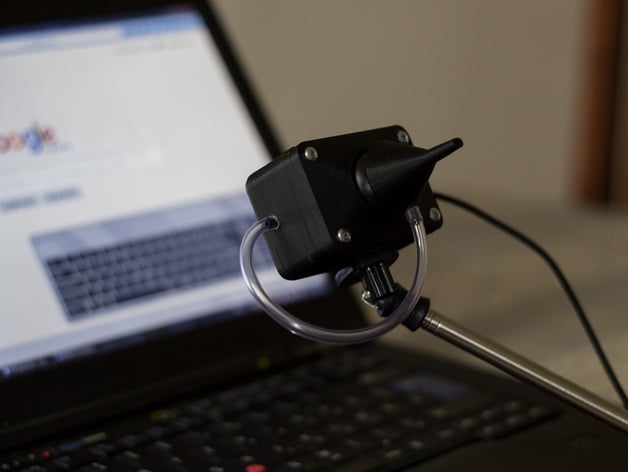
About
This project was intended to prove if it is possible to build a pointing device (mouse) for people with disabilities for under 20 USD, using only components which are widely available as well as a 3D printer. The result is a basic mouth ope...
I wonder whether barometric pressure sensors would be feasible to use for sip/puff. They are quite inexpensive from the looks of it, digikey has many under $2USD in single quantity.
slender iron
@onyx hinge and @tulip sleet Thanks for fixing the build after I broke it!
onyx hinge
ah oops I was looking at qty2500 pricing
that particular sensor is $3.18 qty1 https://www.digikey.com/product-detail/en/infineon-technologies/DPS310XTSA1/DPS310XTSA1CT-ND/6565756
Order Infineon Technologies DPS310XTSA1 (DPS310XTSA1CT-ND) at DigiKey. Check stock and pricing, view product specifications, and order online.
 twin mica
@onyx hinge yeah I see a few breakouts on the ads shop too https://www.adafruit.com/?q=pressure sensor
Adafruit Industries, Unique & fun DIY electronics and kits : - Tools Gift Certificates Arduino Cables Sensors LEDs Books Breakout Boards Power EL Wire/Tape/Panel Components & Parts LCDs & Displays Wearables Prototyping Raspberry Pi Wireless Youn...
slender iron
@twin mica Could you just put one of those in an enclosure?
twin mica
@slender iron yea totally
slender iron
seems like sip and puff must be more complicated than that
onyx hinge
I think you would just have to work out a durable way to attach the straw to the IC over its hole
slender iron
@tough flax could know
Anyone with a bme680 want to reproduce this: https://forums.adafruit.com/viewtopic.php?f=60&t=132231 (see the bottom for current issue)?
tidal kiln
the pressure sensor could just hang out in a plenum, don't really need to have the tubulation routed directly to the vent hole.
 tough flax
Not sure: I think the barometers are too slow. There are pressure sensors that the LipSync uses that are not expensive and work well
solar whale
back in the 90s my father-in-law used one of these - It was amazing!! He was a quadriplegic and this allowed him amazing access to the compter. https://ajot.aota.org/article.aspx?articleid=1877091 -- download the PDF for the full article.
twin mica
https://hackaday.io/project/13424-lipsync link for reference
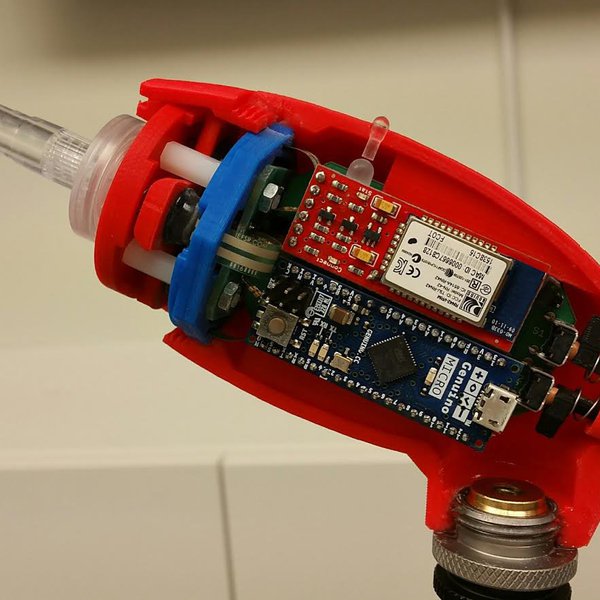
Touchscreen devices have become a staple piece of technology in this day and age. Most people cannot get through the day without using their smartphone. It keeps us connected. It keeps us organized. It is an integral part of our social lives. Fo...
onyx hinge
this particular device claims pressure measurement rate from 1Hz to 128Hz..
tough flax
Here is what the LipSync uses. It is more than I thought https://www.digikey.com/product-detail/en/nxp-usa-inc/MPXV7002DPT1/MPXV7002DPT1CT-ND/3524215
Order NXP USA Inc. MPXV7002DPT1 (MPXV7002DPT1CT-ND) at DigiKey. Check stock and pricing, view product specifications, and order online.
Given the low volumes, a $15 part isn’t the end or the world
solar whale
this is a better description of the "headmaster" - note that it used an ultrasonic detector for mouse motion and a puff switch. I think an accelerometer could do the pointing now https://www.microsoft.com/buxtoncollection/a/pdf/HeadMaster Introduction.pdf
I just though the "historical" context would be of interest. So many better tools at our disposal now!
twin mica
@tough flax might be a good option. It even has a little plug for connecting a tube
solar whale
@tidal kiln now the new bno055 post has caught up to yours after fixing the wiring 😉 https://forums.adafruit.com/viewtopic.php?f=8&t=133896&p=664618#p664618
slender iron
MPL3115A2 is $4.32 in singles: https://www.digikey.com/product-detail/en/nxp-usa-inc/MPL3115A2/MPL3115A2-ND/2817529
Order NXP USA Inc. MPL3115A2 (MPL3115A2-ND) at DigiKey. Check stock and pricing, view product specifications, and order online.
tidal kiln
it'd be worth testing one of the baro sensors
pressure = read_sensor()  # pressure in PSI
if pressure < 14.7 - SOME_TOL:
    detect = SIP
if pressure > 14.7 + SOME_TOL:
    detect = PUFF
@solar whale yay! (i guess)
manic glacierBOT
Raising NotImplementedError makes sense to me because the ESP8266 is much less likely to have corruption since it doesn't do USB mass storage.
aa8c262 add storage.erase_filesystem() to erase and ref... - dhalbert
eb7d0e3 Create genhdr/ directory in time - jepler
3b511e5 Prevent a heap pointer from living on the stack... - tannewt
fd70383 Fix rom qstr pool length. - tannewt
1e9a271 esp8266: Disable "strict aliasing" in compiler ... - jepler

I have a Feather Huzzah and a project which will require all of the pins . . . so I need to use GPIO16 as an input . . . but, when I use the following lines of code in a python program or type them into the REPL, the Huzzah crashes
<import board
import digitalio
button = digitalio.DigitalInOut(board.GPIO16)>
The output on the REPL shows
<Fatal exception 9(LoadStoreAlignmentCause):
epc1=0x4023a85f, epc2=0x00000000, epc3=0x00000000, excvaddr=0x000000fe, depc=0x00000000
ets Jan 8 ...
I posted this to the forum, but will add here as well. GPIO16 may require some special care -- still looking into this, but it may be related to this:
https://bbs.espressif.com/viewtopic.php?t=632
https://tttapa.github.io/ESP8266/Chap04 - Microcontroller.html

In looking at the pin definitions in CircuitPython, GPIO16 is mapped as XPD_DCDC. XP_DCDC is the pin for "Deep Sleep Wakeup" according to this: https://github.com/esp8266/esp8266-wiki/wiki/Pin-definition
Is this relevant? https://www.esp8266.com/viewtopic.php?f=13&t=13118
does
button = digitalio.DigitalInOut(board.GPIO16)
cause CP to try to initialize it with a Pull-Up? If so, does that cause a problem
raven canopy
Hehe. If I would have scrolled a little further on the link you posted @solar whale, frivilous post wouldn't have happened. 🤔 😄
manic glacierBOT
nah - it looks like the default is pull= None so this should not be a problem
https://github.com/adafruit/circuitpython/blob/master/shared-bindings/digitalio/DigitalInOut.c#L164
CP defaults to INPUT and Pull.NONE when the pin is assigned . . . so the pin would be floating (unless external pull-=up / pull-down is applied) . . . when I connect the Featherwing OLED (where an external 100k pull-up is present) I experience the same crash.
I have also tried holding GPIO16 to ground / 3.3v (after the Feather Huzzah has booted and before/while I type the commands into the REPL . . . same effect the ESP8266 crashes.
AH -- I know I have attached Featherwink OLED to ESP8266 before. I just plugged one into a working ESP8266 - with CP3.0 and it still works.
 pastel panther
hey @slender iron, @tulip sleet et. al, are there any outstanding issues you would like me to take a look at? I'm back into LOL detox and done with hardware stuff I've been working on and would be glad to be of help. I was going to look at issue 670 but I'm game to look at whatever
slender iron
@pastel panther Any of the 3.0 related issues would be awesome!
manic glacierBOT
and I have rerproduced your crash with the OLED feathering when I assign the pin
pastel panther
@slender iron awesome, I'll probably take a look at touch stuff assuming no one is currently neck deep in it
slender iron
nope! we're not sure how hard the m4 touch stuff will be
they don't have it working on arduino m4 yet either
manic glacierBOT
tricky to apply 'special care' in Circuitpython . . . there is no way to switch the GPIO to output until it is assigned . . . and the crash has already happened at that point !
Will need some 'trickery' within Circuitpython itself !
pastel panther
I was planning on looking at the m0 stuff to get my feet wet, assuming it will be easier
manic glacierBOT
agreed! At least the issue is reproducible...with or without the OLED connected.
manic glacierBOT
I'm slowly digging through the source, but at this point I can say that it does treat GPIO16 specially in a lot of places...
tidal kiln
@stuck elbow it's something about the reset
stuck elbow
yes
probably the chip after reset responds to reads, but is not ready for writes yet
or something like that
because there is a loop there that waits for the chip to respond after the reset
I can't find my module, I must have misplaced it somewhere
tidal kiln
looks like you just keep trying to get the chip id back to determine when it's done with reset?
https://github.com/adafruit/Adafruit_CircuitPython_BNO055/blob/master/adafruit_bno055.py#L154
stuck elbow
yes
tidal kiln
that seems to work ok (i'm looking at saleae traces)
but then the next attempt to write:
https://github.com/adafruit/Adafruit_CircuitPython_BNO055/blob/master/adafruit_bno055.py#L127
looks like this
slender iron
playing a song you love with code you wrote is so satisfying 😃 🎵 ♥ 🎉
stuck elbow
what are you playing?
slender iron
the start of a lemolo song
stuck elbow
@tidal kiln can you try addind some delay at the end of the reset?
tidal kiln
same. increase?
fyi - it seems to work OK if i comment out self.reset() in __init__
@stuck elbow 1.0 works 😃
@stuck elbow seems to want a little over half a second
onyx hinge
@tidal kiln @stuck elbow BNO055 datasheet page 13, "POR time, from reset to normal mode, typ 650ms"
tidal kiln
hey hey. look at that.
stuck elbow
@onyx hinge yeah, but that's after the loop that waits for the first response
onyx hinge
@stuck elbow oh hm
stuck elbow
so it seems that the chip responds much earlier than it is ready for writing
and what surprises me the most is that this used to work
stuck elbow
because of that sleep(0.1)
tidal kiln
i reopened this: https://github.com/adafruit/Adafruit_CircuitPython_BNO055/issues/2
@stuck elbow want me to try an older version of cp?
stuck elbow
I'm not sure it's worth the effort
we can just replace the whole loop with a delay and be done
idle owl
@solar whale Yeah.... there's not another package for it yet. Thanks for letting me know.
@indigo wedge I'm not sure, I don't really work much with Windows. Hopefully you got some help.
manic glacierBOT
We use a scratch block on the SPI flash when we cannot allocate memory through the VM. This means that we use the scratch flash when we're in our wait state after code runs even though the heap is unused. Instead, we should use the heap memory for it. It'll save some life of the scratch block and speed up writes that occur outside of the VM.
manic glacierBOT
I have tested it with a second Feather Huzzah and it behaves exactely they samw (i.e. crashes when they pin is assigned). Essentially, assigning the pin is causing a reset.
And I have reproduced it on mine. I am convinced this is a CP bug. Now to find it!
I have used OLED feather wings on esp8266s but I’m not sure if it was ever with CP. I’ll try to review this an see if I can find any clues to when GPIO16 became in issue.
It also may be worth trying it under Arduino just to see if it works. It may be a day or two before I can get to this but I’m interested in following up on it.
tidal kiln
is this still true? needing to use bitbangio for esp8266?
https://learn.adafruit.com/adafruit-bno055-absolute-orientation-sensor/circuitpython-code#usage
cause i just did this....
Adafruit CircuitPython 2.2.4 on 2018-03-07; ESP module with ESP8266
>>> import board
>>> import busio
>>> import adafruit_tcs34725
>>> i2c = busio.I2C(board.SCL, board.SDA)
>>> sensor = adafruit_tcs34725.TCS34725(i2c)
>>> sensor.color_rgb_bytes
(59, 21, 8)
>>>
is the alias reliable enough that documentation could be simplified to just say use busio?
stuck elbow
I think so
 tawny creek
@onyx hinge grattis på födelsedagen! (happy birthday in swedish, also im not swedish) -- nice loot!
onyx hinge
@tawny creek thank you!
pastel panther
@onyx hinge happy birthday! And that's quite a nice birthday collection!
onyx hinge
Adafruit CircuitPython 3.0.0-alpha.3-97-g593949721-dirty on 2018-04-10; Bluefruit nRF52 Feather with NRF52832 and also I got the j-link going with gdb on linux: Program received signal SIGINT, Interrupt. 0x0003aae2 in hal_uart_available (p_instance=p_instance@entry=0x40002000) at hal/hal_uart.c:112 112 return fifo_count(_ff_uart);
solar whale
@onyx hinge Happy Birthday! Enjoy the new toys!
manic glacierBOT
solar whale
sigh ... just finished build all boards before the tag 😉
pastel panther
you should just make a script to do it for you. It will still take time but at least you won't have to type a bojillion commands 8)
solar whale
yeah - I keep telling myself that!
pastel panther
what OS are you using?
slender iron
tools/build_adafruit_bins.sh
pastel panther
lol
of course it exists
I use these a ton
alias mkb0='make BOARD=itsybitsy_m0_express'
alias mkcpx='make BOARD=circuitplayground_express'
alias mkf0='make BOARD=feather_m0_express'
alias mkm0='make BOARD=metro_m0_express'
alias mkm4='make BOARD=metro_m4_express'
alias mkm4p='make BOARD=m4_proto'
alias mks='make BOARD=samd51_proto'
alias mkt0='make BOARD=trinket_m0'
@pastel panther using Linux Ubuntu -- trying tools/build-adafruit_bins now
pastel panther
If you're building the whole 'kitten-kaboodle' that's probably a better choice
my aliases are great for one offs though
solar whale
need to make afew adjustment - I have a revb metor m4 and a fer nrf52 variants, but it gets a lot of them
raven canopy
i use the up arrow a lot... but, i don't change builds that often, and it's always in a vagrant box, so that option is easy for me. 😄
@solar whale i think i've narrowed in on a esp/GPIO16 fix. had to switch gears to some legal research though...
solar whale
someday I will learn to use the bash history command
@raven canopy great - look forward to hearing more.
raven canopy
note: the legal research was not esp8266 or GPIO16 related... hehe, decided to clear that statement up.
solar whale
whew - I was worried -- still concerned -- hope everything is OK
solar whale
ah yes --- good luck
raven canopy
if you want to do some comparing, here is where I'm at. common_hal_digitalio_digitalinout_construct copied this code:https://github.com/adafruit/circuitpython/blob/master/ports/esp8266/common-hal/digitalio/DigitalInOut.c#L37 from machine_pin, but didn't include the handling of pin 16: https://github.com/adafruit/circuitpython/blob/master/ports/esp8266/machine_pin.c#L194.
common_hal_digitalinout_switch_to_input however, does handle it here: https://github.com/adafruit/circuitpython/blob/master/ports/esp8266/common-hal/digitalio/DigitalInOut.c#L65
darn...Markdown fail.
pastel panther
@solar whale by "learn to" do you mean "remember to"? It's fairly straightforward, at least they way I use it, usually just typing history to see what I've run and then occasionally typing !<history_entry_number> to re-run the command
solar whale
@pastel panther Nice work - I have to get some sleep now - I will try to look at this in detail tomorrow
oops that was meant for @raven canopy
solar whale
@pastel panther wha ti mean was using the keystrokes entries to search for past entries -- magic stuff
pastel panther
I was all "um, thanks? It was just a few aliases"
ah sure
I do history|grep <thing_i_care_about> a lot
anyhoo, ttyl
solar whale
buts just using history is a big help!
pastel panther
for sure!
solar whale
goodnight --losing ability to focus....
manic glacierBOT
 indigo wedge
Is the time plan for CP3 public anywhere? Want to see when I got to get my act together to get the nRF52 port in shape for beta and release
onyx hinge
I wonder why -flto breaks the nrf52 builds .. at least with my super-ancient gcc
https://gcc.gnu.org/bugzilla/show_bug.cgi?id=83967 doesn't really seem to be the same thing, I just get an executable with 0 bytes of text
hm, -flto and -Wl,--gc-sections interact destructively?
indigo wedge
Trying to use https://github.com/adafruit/Adafruit_CircuitPython_IRRemote and 1. the example in the readme is outdated, it uses decode() which doesn't seem to exist anymore, but the example in examples/ seems to be more reliable, however every time i try to use it on CPX I hit either https://github.com/adafruit/Adafruit_CircuitPython_IRRemote/blob/master/adafruit_irremote.py#L142 or https://github.com/adafruit/Adafruit_CircuitPython_IRRemote/blob/master/adafruit_irremote.py#L149

GitHub
Adafruit_CircuitPython_IRRemote - CircuitPython drivers for IR remote send and receive
GitHub
Adafruit_CircuitPython_IRRemote - CircuitPython drivers for IR remote send and receive
GitHub
Adafruit_CircuitPython_IRRemote - CircuitPython drivers for IR remote send and receive
not sure what to do about it
this is with a remote that came with https://www.adafruit.com/product/3697

AdaBox006 – CircuitPython is the perfect gift for folks who are just getting started in the world of DIY electronics. It's an excellent addition to our family of DIY projects, ...
solar whale
@onyx hinge just to check, you can build feather52 "out of the box" with the current master, correct?
onyx hinge
@solar whale yes the build was fine. had a few small humps using j-link to flash it for the first time, though.
I'm still unclear on how/whether bootloading works on it
and I didn't try it any more than to get to the ">>>" prompt
solar whale
I have used bot the serial bootlaoder and j-link -- I tend to use J-link on the feather52 - seems simpler. I use the searial bootlader on my nrf52840 SDK board.
onyx hinge
right now I think I can just leave the j-link devoted to the feather52 so that will be fine
solar whale
I bought a bunch of the small 10pin cables and have one on each board that I use with the J-link - makes it easy to jump around but most of the time I use int on the feather52.
good luck digging into it. Your improvements have been great!
onyx hinge
thanks. I don't have anything specific in mind for the nrf52 at the moment but @slender iron wanted me to have one so here we are
idle owl
It's the next logical step so it's a good thing to have. And I bet you'll come up with something great for it @onyx hinge 😉
solar whale
Support for it has come along way very quickly due to great work by ktownsend and @indigo wedge - I still have only scratched the surface of using it with BLE, but I have been trying out various I2C and SPI boards with it with mostly good results. A few quirks with some I2C devices.
indigo wedge
Yes I want to revamp the BLE API before RTL, but having so little time for side stuff recently.
Nordic did a first proper non-alpha/beta release of the s140 softdevice for the NRF52840, need to update the BLE code for that.
they changed the advertising code, I've seen
solar whale
@indigo wedge we all understand the time constraints - no pressure from me - just appreciation!
indigo wedge
I would like to make the BLE API easier to use, just add a service, characteristics and get callbacks when new data arrives, but I understand the idea that it should be an API that is also available on linux/RPi, to make it easy to transfer code
tbh the API right now is derived from a linux library but not 100% compatible with it anyway, and the library is using bluez, which affects the API
@solar whale , I know, but still feeling bad about it 😉
idle owl
@indigo wedge You shouldn't. Life is still happening around all of this and we know that 😃
indigo wedge
As a official CircuitPython Helper I need to deliver 😄
solar whale
Blinka is a tough taskmaster
idle owl
@solar whale We dropped the RTC code and went with time.monotonic(). So no more gc.collect everywhere.
I'm still running into issues with I2C, but you didn't, so I've decided to ignore it and blame a flaky sensor.
solar whale
@idle owl That sounds like a good idea - leaves a little room for users to add code without breaking it! I never tried it on 2.2.4 - I can do that this evening if you think it useful or if there is a latent issue it will surface as more people try to use it 😉 These kinds of things always seem to come back eventually.
maybe I should try it on an nrf52 😉
idle owl
I'll let you know later whether to test it. I'm not sure yet whether it would be useful. I need to look at the data I have, but it's packed up right now so it'll wait
tulip sleet
@indigo wedge "Is the time plan for CP3 public anywhere? " There's no hidden schedule. It's done when it's done, or, practically speaking, as we add more features and fix bugs it will be more and more usable.
indigo wedge
hehe, you mean you don't run scrum with a scrum master and daily standup meetings, retrospectives and planning meetings? 😄
indigo wedge
This looks like a really promising library, but it's very early in development but I really like the plan they have for the API in their examples (most not implemented) https://github.com/TheCellule/python-bleson/blob/master/docs/examples.rst

I know Scott mentioned that we could maybe help some library or make a fork so we have CP <-> RPi compatibility
I mean you can't get easier than this :)
    def on_data_received(bytes):
        print(bytes)

    led_write_char = Characteristic(MICROBIT_LED_CHAR, CHAR_WRITE)
    led_write_char.on_data_received = on_data_received


    led_service = Service(MICROBIT_LED_SERVICE)
    led_service.add_characteristic(led_write_char)

    peripheral = Peripheral(adapter)
    peripheral.add_service(led_service)
    peripheral.start()
Sorry for monologuing 😉
onyx hinge
@indigo wedge please continue monologuing
indigo wedge
I think I'm monologued out for now 😃
 timber mango
What's the difference between circuitpython and micropython?
solar whale
@timber mango there is a summary here: https://github.com/adafruit/circuitpython/blob/master/README.rst
GitHub
circuitpython - CircuitPython - a Python implementation for teaching coding with microcontrollers
raven canopy
@indigo wedge I can take care of the README example conflict later today. If you want you can put in an issue on the repo. I can peek at the bugs, but I don't have the remote to test 'em.
solar whale
@raven canopy interesting stuff re:GPIO16 on ESP8266 - I have stated looking for some guidance in the Arduino code, but not getting very far, yet...
 candid ravine
@solar whale bash history recall: copy the most recent command using <search-string> to the top of the history stack !?<search-string>?:p
solar whale
@candid ravine Thanks! Thats the "magic" I was looking for 😉
candid ravine
@solar whale If you're sure that your <search-string> is unique enough and you simply want to repeat the command, don't add the ":p" to the end
solar whale
very nice -- :p is just what I wanted. Usually a minor "tweak" to be done
candid ravine
Yeah, I like the ability to do a quick edit...has saved my behind many times 😁
slender iron
@indigo wedge re:timeline. What dan said. Its ready when its ready. I don't really care if nRF52 is fully baked for 3.x either. It can be beta support. I'm ok punting stable nRF52 into 4.x.
@solar whale I've switched to fish shell instead of bash and like its more aggressive autocompletes
manic glacierBOT

 bronze wagon
New here, love the CircuitPython effort! Want to help, and already have something to contribute, but I can't seem to figure out how to get access to repo to create pull request... is there a page somewhere covers getting git access and the process used to propose code changes?
 river quest
GitHub
circuitpython - CircuitPython - a Python implementation for teaching coding with microcontrollers
latest...
GitHub
circuitpython - CircuitPython - a Python implementation for teaching coding with microcontrollers
bronze wagon
Thanks @river quest, and I've read the contributing section(s), but I didn't see anything specific to the code review and pull request process for this repo. (I don't have permission to publish a branch to make a pull request from).
tidal kiln
@bronze wagon the basic process is to fork the repo, make changes, and submit pr. you don't need access to the main repo to do this. you would be doing the work on the forked copy in your own repo.
bronze wagon
Thanks @tidal kiln! Been using too many different tools lately 😦
river quest
oh @bronze wagon ... the lead developer is here @slender iron
and @tidal kiln replied too, whoops
slender iron
👍
stuck elbow
ah, the led probably
pastel panther
thats the dotstar
stuck elbow
are you publishing those designs anywhere?
pastel panther
They're on my github (or will be soon) and I'll probably make a hackaday.io page
idle owl
@pastel panther That's neat!
stuck elbow
must really have taken a lot of effort to fit all that on two layers
pastel panther
I meant to test the flash footprint but I got ancy
tidal kiln
@pastel panther neat. like the silk.
pastel panther
actually the first go at a slightly larger board was harder, but I learned a lot of lessons on that one
@tidal kiln, thanks. The top silk is horrendous as there are parts everywhere
pastel panther
Thanks 😃
stuck elbow
what are those triangular footprints next to BAT and RX?
pastel panther
There is a power led and a user led that is shared with pin 4 I think
no charging on this one, though there is a 5!
timber mango
@pastel panther do you want our file to compare/mod?
pastel panther
@meager fog Yes, hat would be amazing! Thanks!
pastel panther
Thanks; I have a lot to learn from your schematics; they're so clean!
river quest
happy 3.0.0 alpha day... https://github.com/adafruit/circuitpython/releases/tag/3.0.0-alpha.4
GitHub
circuitpython - CircuitPython - a Python implementation for teaching coding with microcontrollers
next week there will be cake
🍰
pastel panther
Those are cool!
bronze wagon
That Itsy M4 looks very cool ... anyone know if/when the Feather M4 series will be out (like the Bluefruit M4?)
pastel panther
@timber mango As expected it looks like you left off the inductor and crystal? That would have made it a bit easier to leave rooms for top silks but I wanted to at least leave on the inductor for theoretical efficiency gains when running from a battery.
That said I'm a total newb when it comes to such things so for all I know it wouldn't make a difference
manic glacierBOT

 errant grail
Designed a front panel for a NeoPixel controller project that I'm trying to wrap up today. Rasta Blinka. 
pastel panther
Is Rasta Blinka a vegetarian? 😛
errant grail
She only eats electrons when rastered. Sort of like Max Headroom.
 sick creek
are you going to show that in show and tell?
errant grail
@sick creek Nope. I'm in an internet bandwidth-challenged zone.
It's a pretty basic project using a Trinket M0 and some edge-lighted Neos.
 sharp bramble
Hi team! The question of the day... what steps would be necessary to work either I2S or some other support for getting sound level from the CPX into the Express() helper? Or, should I look somewhere else to possibly grab a sound level? (I can understand if the answer is "that needs to be rolled into the CP core, and is a heavy lift," or perhaps it is "we need an I2S FFI wrapper in Python for CP," or any number of other answers...)
I'm just trying to estimate how much effort would be involved in supporting a student doing a translation from MakeCode to CP on the CPX where sound is involved.
I used Goggle, and found this: https://learn.adafruit.com/adafruit-circuit-playground-express/playground-sound-meter
Make faster and easier than ever with MakeCode, CircuitPython or Arduino!
Which, answers my question.
 vague monolith
Isn't requests library built in to circuit python?
slender iron
@vague monolith we inherit urequests from micropython. not sure how close it is to requests
vague monolith
Yeah I don't see it on the huzzah bin
solar whale
@vague monolith - you have to get it from the micropython libs repo - https://github.com/micropython/micropython-lib/tree/master/urequests - just use the .py

convert it to a .mpy
it is not built-in
solar whale
what happend?
vague monolith
value error on a requests.get
r = requests.get('google.com')
Traceback (most recent call last):
File "<stdin>", line 1, in <module>
File "requests.py", line 112, in get
File "requests.py", line 39, in request
ValueError: need more than 1 values to unpack
solar whale
here is an exampl e for adafuit.io ```
import time
import urequests
while True:
response=urequests.get("https://io.adafruit.com/api/v2/user",headers={"X-AIO-KEY":"YOURKEYHERE"})
print(response.json())
response.close()
payload={'value':'2000'}
response=urequests.post("https://io.adafruit.com/api/v2/UOURUSERNAME/feeds/YOURFEED/data",json=payload,headers={"X-AIO-KEY":"YOURKEYHERE"})
print(response.json())
response.close()
time.sleep(30)
I am no expert on using requests!
vague monolith
I know the get is failing. Probably due to other missing dependancies. I guess I could just run micropython and have it out of the box.
it's jsut a huzzah
solar whale
so is mine - esp8266 huzzah -- it works for me.
I get the same erro with your command - it is looking for more arguments.
hmm - it has been updated since I downloaded it -- was urequest in my version
I'll try the new one
but in mine using urequests.get('google.com') fails as it did for you
nevermind -- I was confused by the module name -- it is urequests
'''>>> r = urequests.get('google.com')
Traceback (most recent call last):
File "<stdin>", line 1, in <module>
File "urequests.py", line 112, in get
File "urequests.py", line 39, in request
ValueError: need more than 1 values to unpack
'''
vague monolith
lol because didn't specify http://
i'm an idiot
switching back to circuitpython now.
solar whale
Warning: getaddrinfo constraints not supported
Traceback (most recent call last):
  File "<stdin>", line 1, in <module>
  File "urequests.py", line 112, in get
  File "urequests.py", line 100, in request
  File "urequests.py", line 97, in request
NotImplementedError: Redirects not yet supported
>>>
``` 😦yeah that's fine
solar whale
clearly you are way ahead of me in actualy using it - good luck!
I managed to get my adafruit.io exmple working but there is much to learn ...
vague monolith
it's not as complete as requests it's missing a lot but will work for what I want.
I was going to check the current price of bitcoin everyminute and update the neopixels with the most previous tick green/red.
solar whale
Have fun! Glad it will work for you!
vague monolith
@solar whale you can do somehting like r = requets.get('https://api.coindesk.com/v1/bpi/currentprice.json')
r.json()['bpi']['USD']['rate']
the neopixel library isn't there any more?
ugh
solar whale
it is not built in - need to get it from the Adafruit CircuitPython Bundle
GitHub
Adafruit_CircuitPython_Bundle - A bundle of useful CircuitPython libraries ready to use from the filesystem.
or just from https://github.com/adafruit/Adafruit_CircuitPython_NeoPixel/tree/f872892e5b257c33896d7f1cd6afe8f4c1ddd089
GitHub
Adafruit_CircuitPython_NeoPixel - CircuitPython drivers for neopixels.
solar whale
it used to be included - you are correct.
it was removed when it was changed to use the same driver as the M0 boards.
vague monolith
K, thought I was losing it.
solar whale
going offline for a bit -- good luck! Thanks for the usage tips!
onyx hinge
thanks for the ambient knowledge about (u)requests. It pushed me to write a tiny webservice that I'll use in my next circuitpython clock, the one which does display the full local time (but where I don't care about seconds). https://media.unpythonic.net/cgi-bin/dateinfo?TZ=CST6CDT will return a lump of json including timezone info
pastel panther
@stuck elbow by 5! I meant a level shifted out for neopixel addressing, though now that I think about it I forgot to verify that the pin can DMA
onyx hinge
can anyone translate this into terms I'd understand? "Warning: getaddrinfo constraints not supported" (printed each time I use urequests)
    if (n_args > 2) {
mp_warning("getaddrinfo constraints not supported");``` seems getaddrinfo is being called with more than 2 arguments, but so ?I see this regularly, but have ignored it 😉
but I get this ```>>> import urequests
r=urequests.get('https://media.unpythonic.net/cgi-bin/dateinfo?TZ=CST6CDT')
Warning: getaddrinfo constraints not supported
Traceback (most recent call last):
File "<stdin>", line 1, in <module>
File "urequests.py", line 112, in get
File "urequests.py", line 53, in request
OSError: -2
drat! It does work here, I ge ta nice json object back
Warning: getaddrinfo constraints not supported
{'offset': 18000, 'tznames': ['CST', 'CDT'], 'gmtime': [2018, 4, 11, 22, 11, 17, 2, 101, 0], 'dst_warning': False, 'timestamp': 1.52348e+09, 'localtime': [2018, 4, 11, 17, 11, 17, 2, 101, 1], 'isdst': 1, 'tzname': 'CDT'}
the device/fw is Adafruit CircuitPython 2.2.4-4-g1062e193e on 2018-04-06; ESP module with ESP8266
and urequests.py is from git today
onyx hinge
Warning: getaddrinfo constraints not supported
Fatal exception 29(StoreProhibitedCause):```well it works some of the times. ouch.
solar whale
you may have to close the socket
vague monolith
onyx hinge
seems like for me it fails more consistently when I chain it with requests.get(...).json()
which is weird
solar whale
@vague monolith - is taht CP or MP ?? using requests??
solar whale
ok ```>>> import urequests as requests
requests.get('https://media.unpythonic.net/cgi-bin/dateinfo?TZ=CST6CDT').json()
Warning: getaddrinfo constraints not supported
{'offset': 18000, 'tznames': ['CST', 'CDT'], 'gmtime': [2018, 4, 11, 22, 33, 48, 2, 101, 0], 'dst_warning': False, 'timestamp': 1.52349e+09, 'localtime': [2018, 4, 11, 17, 33, 48, 2, 101, 1], 'isdst': 1, 'tzname': 'CDT'}
this seems to work ``` >>> import urequests as requests
r= requests.get('https://media.unpythonic.net/cgi-bin/dateinfo?TZ=CST6CDT')
Warning: getaddrinfo constraints not supported
r.json()
{'offset': 18000, 'tznames': ['CST', 'CDT'], 'gmtime': [2018, 4, 11, 22, 37, 5, 2, 101, 0], 'dst_warning': False, 'timestamp': 1.52349e+09, 'localtime': [2018, 4, 11, 17, 37, 5, 2, 101, 1], 'isdst': 1, 'tzname': 'CDT'}
r.close()
r= requests.get('https://media.unpythonic.net/cgi-bin/dateinfo?TZ=CST6CDT')
Warning: getaddrinfo constraints not supported
r.json()
{'offset': 18000, 'tznames': ['CST', 'CDT'], 'gmtime': [2018, 4, 11, 22, 37, 22, 2, 101, 0], 'dst_warning': False, 'timestamp': 1.52349e+09, 'localtime': [2018, 4, 11, 17, 37, 22, 2, 101, 1], 'isdst': 1, 'tzname': 'CDT'}
r.close()
@onyx hinge did you just rename the urequests.py to requests.py?
onyx hinge
@solar whale I wrote but didn't show you: ```try:
import requests
except:
import urequests as requests
ah - I'm not crazy...
onyx hinge
nope, not related to (u)requests anyway
solar whale
😉
For some reason I had to power cycle my esp8266 to clear the OSError -2 issue
in some previous testing I found it useful to close the socket - there was a note to taht effect somewhere
vague monolith
Oh sorry yeah I renamed to requests.py instead of urequests
solar whale
NP - I was puzzled because I compared my version of urequest.py to the current in github and they are the same but you were using requests.... I get confused easily 😉
vague monolith
@onyx hinge the .json will not always update. if the new request fails you'll still have the old .json
solar whale
the note about closing the request was here: https://github.com/micropython/micropython-lib/blob/master/urequests/example_xively.py#L13
This may not be relevant to your issues, but it was a big problem with memory usage.
solar whale
@onyx hinge @vague monolith thanks for all the requests info - this works nicely ```
import time
import urequests as requests
while True:
r= requests.get('https://media.unpythonic.net/cgi-bin/dateinfo?TZ=EST5EDT')
print(r.json()['gmtime'])
print(r.json()['localtime'])
r.close()
time.sleep(5)
whee, showing local time on the OLED display works, and it's totally dark when I don't request it to show the time. I'm going to try this bedside, where we recently eliminated the always-on red LEDs of the clock-alarm
slender iron
@onyx hinge thats why I want an eink alarm clock!
onyx hinge
@slender iron that would be neat too
slender iron
oleds look very nice though too
onyx hinge
I just wish the OLED "contrast" (really, brightness) would go lower.
slender iron
totally
onyx hinge
also it's slightly irritating that the OLED button "A" turns on the red LED, "B" is the GPIO16 that crashes when you use it, and "C" turns on a blue LED.
I guess I could cut the trace and rewire it some other way .. that's what the two sets of holes are for, yeah?
slender iron
not sure
solar whale
@onyx hinge @raven canopy is hot on the GPIO16 traiil
onyx hinge
https://cdn-learn.adafruit.com/assets/assets/000/031/977/original/feather_fabprint.png?1461694374 the black silkscreen makes it hard to see on the one I have in hand, but you can see there are top side traces from the inner thru-holes to the outer

@raven canopy I'm depending on you, otherwise blue or red LEDs will bother me at night
slender iron
cutting traces would work or you could remove the leds
onyx hinge
or if I put a decent enclosure on it I won't see them
slender iron
ya
onyx hinge
naturally there's a good one from a guide on adafruit.com, except it didn't quite work with my USB cables (the plastic moulding was too big to fit). I just need to do a little modification to the STL and print again.

A Multipurpose Enclosure for Adafruit Feather
(and dannng but I want an excuse to pick up the LCD touchscreen everytime I look at that guide)
onyx hinge
sits down to actually work on those fuzzing crashes
400-some "different" crashes according to afl-fuzz, semiautomatically narrowed to 50 files that either give crashes at different addresses, or textually different assertions
all against circuitpython master of a few weeks ago, so some items are fixed upstream
slender iron
eesh, damien's been merging them upstream right?
onyx hinge
probably half of these are the same as ones I've already reported to him
slender iron
cool cool
onyx hinge
there were about 22-24 in the first batch and this was another run on the interpreter from before any fixes
but with stuff that is known/expected to crash, like ustruct, eliminated from consideration
slender iron
👍
onyx hinge
micropython_fuzzing: ../../py/emitbc.c:409: mp_emit_bc_end_pass: Assertion `emit->stack_size == 0' failed.```how does it find things like this? I remain in awe of fuzzers, and I hope I always will.
slender iron
I have no idea 😃
solar whale
some things are not meant to be known...
onyx hinge
The lid part needs an iteration to expose just the display and button, and we'll see whether it has stability problems due to urequests...
 lost moss
Eee I am always scared to touch bare boards while working
onyx hinge
@lost moss indeed. and intended use involves trying to press the "A" button in the dark!
raven canopy
@onyx hinge @solar whale i'll try my best with gpio16. now i have to remember/update building on esp. it's been a few months. 😄
onyx hinge
@raven canopy indeed, I just recently broke building with old SDKs so update update update
raven canopy
yeah, i was watching it. 😬
onyx hinge
I'll be set up to test your fixes though
solar whale
@raven canopy not dumping it on you. I’ll try to help.
raven canopy
@solar whale def didn't take it that way. did you find anything in Arduinoland?
solar whale
No. Ran out of time tonight. Tomorrow is another day !
raven canopy
I had a "life evening", so i'm just now sitting down to "work". gonna tackle the IR Remote readme example that Arturo brought up earlier. then i'll pivot back to esp...
solar whale
Have fun! Good night from the East coast,
raven canopy
night @solar whale! 😴
 glad rapids
Help
" File "/Library/Python/2.7/site-packages/ampy/pyboard.py", line 210, in enter_raw_repl
raise PyboardError('could not enter raw repl')
ampy.pyboard.PyboardError: could not enter raw repl"
Using ampy to try to push a new main.py somehow got screwed up
Do I need to erase the board
timber mango
I don't think ampy boards need erasure. Erasing came as a consequence of an external SPI flashROM iirc.
Ampy boards probably use cp2104 chip for USB bridge. Maybe.
Now if you didn't need ampy but used it that'd be a fish of a different color.
timber mango
Can you use the REPL?
There is an internal filesystem; maybe that can be erased for ampy-enabled boards.
glad rapids
Yes I can get into to REPL
timber mango
I
glad rapids
any ampy cause the same error
timber mango
I'd take a few minutes to make some permanent notes on what's utilized and so forth, so the next time it goes away you have some notion of what's no longer operative. That serial port for example, is something you want to memorize. It's name is quite helpful when mapping out the basic system and how it operates.
So you're stuck with the code that is already loaded (if any) and cannot upload new code. Right? But you can play with the REPL and do simple math and print statements. Right?
raven canopy
@glad rapids have you done ampy updates before? and what board (error makes me think pyboard)? just wondering if it's a worked-then-didn't situation...
glad rapids
Correct
its esp8266 Huzzah
So I loaded circuitpython and loaded my program
everything worked
I am have used screen and hit crtl A C
twice possible it this is how it got into this bad state
timber mango
Yeah your operating system can easily hog the serial port so it's then unavailable for new conversations -- the serial port has to be cleanly released to access it again.
hog == occupy
I don't know how many times in Linux I've found the operating system referring to the M0 target as /dev/ttyACM1 when I thought it ought to be /dev/ttyACM0 (as usual).
Tab-completion at the command line prompt usually reveals which one it is, at the moment.
timber mango
Yeah unplugging will often correct it but it's not my favorite thing to do, depending on what has sync'd and what has not. May corrupt on-device storage media (that tiny flashROM space on the MCU itself that holds a tiny filesystem, I think).
I like to live as though it cannot be unplugged at all. I practice simulating that one constraint, fairly often.
It can take many iterations to figure out how to release it by typing stuff at the keyboard and/or clicking at stuff with the mouse. ;)
(then I also enjoy ruling out mouse use -- at all ;)
One legit thing to practice is to (one way or another) fully release the target board from the host PC, then plug the target into a battery pack (I use the USB 5V packs that are used to recharge a cell phone).
When the target is connected only to that battery, it should do something unique and identifying (buzz the piezo, or blink an LED in a known pattern, for examples).
Then I count to five mississippi and plug it back into the host PC like I was starting the morning coffee and want to see a login to the REPL for the first time that day.
It should just do the right things. If it doesn't, I lose that round and try again.
glad rapids
reflashed the firmware and it did not fix it
Although I did not do an and full erase
esp8266 is not as easy as the CircuitPlayground which show up as a USB drive
timber mango
https://www.adafruit.com/product/2821 suggests this is a CP2104 interface USB to UARTbridge.
(PID 2821 is Adafruit Feather HUZZAH with ESP8266)
CPX is M0 target which supports USB internally. No CP2104 bridge on CPX target (nor on any M0 targets).
The one odd one I have is the Arduino M0 Pro which has something to provide a second USB port. Can't remember how it does it.
raven canopy
@glad rapids are you following the Learn Guide by chance? https://learn.adafruit.com/micropython-basics-load-files-and-run-code/file-operations
glad rapids
@raven canopy Yes did this and everything was working
timber mango
I use CP2104 with a Silabs C8051F330D chip to talk to the UART on the 8051 from a host PC USB port. CP2104 is also the piUART chip. It's a nice chip. ;)
It is very similar in concept, I think, to those USB to RS-232 dongles they used to sell at Staples and other office supply shops (Belkin made the one I have).
So you need a good solid CP2104 driver installed on your host PC.
Linux has had one for years. I think it's so common its found even in 'fringe' distributions of Linux.
raven canopy
@glad rapids guess this is happening elsewhere too: https://github.com/adafruit/ampy/issues/43
timber mango
How do you erase the flash? Is that a stock -switch for ampy?
raven canopy
i think esptool can erase the flash...
glad rapids
esptoo
timber mango
Yeah that uses pySerial
raven canopy
@glad rapids glad its back to normal function for you. ESP support lags around here, mainly because of the upstream support, and the current focus is SAMD51.
glad rapids
OK
Seems like this might have done the trick
get into REPL
then
import os
os.rename(‘main.py’,’someothername.py’)
timber mango
That is a similar workflow to the one used to wake up a stubborn M0 target. Zap the SPI flashROM; upload the .uf2 for very basic access to the SPI flashROM at host PC operating system level. Add some libs to the filesystem. Add application code to the filesystem.
glad rapids
This seems to be happening a lot
raven canopy
yeah, that issue was surprisingly fresh. though the upstream issue is pretty old.
timber mango
Maybe main.py has a nasty in it.
OTOH when you erased flashROM it should have been gone.
Even in CircuitPython on M0 targets (Gemmo M0; CPX; Trinket M0) I once in a while saw odd stuff where I was sure main.py was erased -- but it wasn't.
It was unexpected enough that I did not map it for sure, just why it persisted.
Sometimes it's just easier in the long run to have a very simple main.py and then call the real code from some other file.
raven canopy
i forgot how long building esp-open-sdk takes... 😪
pastel panther
@raven canopy you can't find a binary?
raven canopy
updating the SDK...in a vagrant box.
pastel panther
I guess I assumed there would be a deb or rpm
raven canopy
nope. its really just a makefile. (pfalcon says exactly that in the repo 😄 )
raven canopy
yeah. but...fails. troubleshooting so that i can test adding ~5 lines of code. nothing is ever easy. haha
timber mango
Hehe.
pastel panther
And I just realized that the JST on the bottom of my m4 board now means plugging it into a breadboard is a bit .... tricky
timber mango
I had to figure out pages.github.com and rawgit.com on my own recently.
pastel panther
That reminds me I need to setup a github page
timber mango
https://wa1tnr.github.io/Bookmarks/Learning/learning_wa1tnr.html
https://rawgit.com/wa1tnr/Bookmarks/master/Learning/learning_wa1tnr.html
The problem stems from attempting to validate this HTML in-situ:
https://raw.githubusercontent.com/wa1tnr/Bookmarks/master/Learning/learning_wa1tnr.html
raven canopy
extralong headers to the rescue! 🏄
pastel panther
!
I think I have some!
wait, no they're the wrong long
:?
time to hang it off the edge of the bredboard
who needs those last 5 pins
pastel panther
In retrospect it makes sense as a breadboarded board doesn't need to be as portable so not having a battery isn't the end of the world
raven canopy
true.
i've decided it's too late to fight with esp & axtls. my brain just isn't in it...and the will power tank is low.
solar whale
@raven canopy just found this -- have not had time to study it, may or may not be relevant .... https://github.com/esp8266/Arduino/blob/master/cores/esp8266/core_esp8266_wiring_digital.c#L68

I looks like it always used INPUT_PULLDOWN for GPIO16 if set to INPUT
 bronze geyser
The adafruit_rfm69.py module: https://github.com/adafruit/Adafruit_CircuitPython_RFM69/blob/master/adafruit_rfm69.py has an * in its init s. e.g.: def __init__(self, address, *, offset=0, bits=1):. I am somewhat familiar with *args and *kwargs...but this is different. I tried "Google is my friend"...however I still do not understand how a function takes an asterick like this in python? (thank you)
GitHub
Adafruit_CircuitPython_RFM69 - CircuitPython module for the RFM69 series of 433/915 mhz packet radios.
solar whale
@bronze geyser it took becoming more than friends with Google, but I found this: https://stackoverflow.com/questions/14301967/python-bare-asterisk-in-function-argument - it forces the use of keywords

What does a bare asterisk in the arguments of a function do?
When I looked at the pickle module, I see this: (http://docs.python.org/3.3/library/pickle.html#pickle.dump)
pickle.dump(obj, file, pr...
bronze geyser
@solar whale YOU ARE AWESOME. Thank you. Getting the Google search terms right is an ongoing practice. I truly appreciate you helping with this. I think it would help if I spelled astrick correctly 😃 ...(astrerisk). Again, thank you.
solar whale
it took me two tries to spell it correctly as well 😉
onyx hinge
is there swd/jtag on the esp8266 feather? I am finding some mentions about it, but none seems complete enough to tell me how to actually wire it. e.g., http://www.myelin.co.nz/post/2016/2/6/
https://visualgdb.com/tutorials/esp8266/nodemcu/jtag/ may be enough info
something to try tonight if I have time...!
 feral saffron
What do you do when your Gemma M0 gets corrupted?
solar whale
@feral saffron see the section in Troubleshooting - for how to erase/restore the Gemma FS https://learn.adafruit.com/welcome-to-circuitpython?view=all#for-non-express-boards-with-a-uf2-bootloader-gemma-m0-trinket-m0
New to CircuitPython? This is the place to start.
onyx hinge
edges closer to writing an ampy replacement from scratch
raven canopy
@solar whale I came across that INPUT_PULLDOWN_16 macro in the SDK manual, but I'm not sure we have it available. I think the macro is just being re-created by writing to the registers. Just gotta finish the SDK update battle to test it.. 😄
solar whale
@raven canopy FYI - I updated the SDK by cloning the repo anew and reinstalling. I did have to make sure my PATH pointed to the new installation afterwards. It is working.
 gusty topaz
Guys, I noticed the latest Alpha version includes "preliminary" support for the Bluefruit nRF52 board. Does that include BLE support?. If so, is there a tutorial/learn page you can point me to?
solar whale
@gusty topaz take a look here - https://github.com/adafruit/circuitpython/tree/master/ports/nrf/boards/feather52
GitHub
circuitpython - CircuitPython - a Python implementation for teaching coding with microcontrollers
there is an example ble_scan in /examples
gusty topaz
@solar whale Thanks!, but.. wow.. not for the faint of heart!. I thought the last alpha version was already ready to be uploaded to the Bluefruit, it looks like I need to build CircuitPython per the instructions on the README file?
solar whale
@gusty topaz there is a binary for the feather52 avaialble on the release page, but I think you will need to install the sofdevice in order to use BLE - https://github.com/adafruit/circuitpython/releases/tag/3.0.0-alpha.4
GitHub
circuitpython - CircuitPython - a Python implementation for teaching coding with microcontrollers
possibly @indigo wedge can clarify the minimum steps needed. I have been building it locally so I'm not sure about a clean start...
indigo wedge
@gusty topaz yes, if you clone the master branch or use the release @solar whale linked, you can use BLE on nRF52 in a limited capacity, if you follow the readme at https://github.com/adafruit/circuitpython/tree/master/ports/nrf/boards/feather52 it should answer your questions
GitHub
circuitpython - CircuitPython - a Python implementation for teaching coding with microcontrollers
there are examples in both https://github.com/adafruit/circuitpython/tree/master/ports/nrf/boards/feather52/examples and https://github.com/adafruit/circuitpython/tree/master/ports/nrf/examples but I'm not 100% sure how up to date they are
GitHub
circuitpython - CircuitPython - a Python implementation for teaching coding with microcontrollers
GitHub
circuitpython - CircuitPython - a Python implementation for teaching coding with microcontrollers
I'm hoping to get BLE and the examples in a more usable state for CP 3 RTL
solar whale
@indigo wedge do you have to load the
"boot-flash" as well as the release binary?
indigo wedge
only if you have the default dual bank bootloader
if you have the single bank one then no need
solar whale
OK - so the boot-loader needs to be updated at least once 😉
indigo wedge
indeed
gusty topaz
ok... let me make sure if I'm following you guys. So, can I just follow the instructions here: https://learn.adafruit.com/welcome-to-circuitpython?view=all#installing-circuitpython to install it on the Bluefruit nrf52 using the latest CP 3 release here: https://github.com/adafruit/circuitpython/releases/tag/3.0.0-alpha.4
New to CircuitPython? This is the place to start.
GitHub
circuitpython - CircuitPython - a Python implementation for teaching coding with microcontrollers
indigo wedge
I don't think the feather comes with a bootloader that shows up as a disk
as it says here, it comes with a serial bootloader and you need a special utility to perform the installation https://github.com/adafruit/circuitpython/tree/master/ports/nrf/boards/feather52#installing-nrfutil
GitHub
circuitpython - CircuitPython - a Python implementation for teaching coding with microcontrollers
solar whale
That is correct. You have to use the nrfutil to load via the serial bootloader - or a J-link if you have one.
sick creek
my rosie to closer to Jetson Rosie but I feel like it need Blinka to it
gusty topaz
Sorry guys, I'm trying to follow up your comments here as this will be the first time I work with CP Alpha (I worked with MicroPython on the ESP8266 in the past)...
Per the instructions, I should opdate bootloader to single-bank version using nrfutil by writing $ make BOARD=feather52 SERIAL=/dev/tty.SLAB_USBtoUART boot-flash..
At what point should I use the .bin CP firmware referenced in this page? https://github.com/adafruit/circuitpython/releases/tag/3.0.0-alpha.4
GitHub
circuitpython - CircuitPython - a Python implementation for teaching coding with microcontrollers
solar whale
That assume you have the full toolchain installed and it will also rebuild the binary. That will work if you have it installed. the SERIAL port listed is I thin for MaCOS - yours may be differnt.
To be honest, I have never tried using a pre-built binary like this. I will need to do some experimentation. I can try to do this this evening and report back
It may be simpler just to install the toolchain and build it yourself as in the instructions. What OS is your computer?
gusty topaz
MacOS
solar whale
You can install it all using homebrew. Again, not for the "faint-of heart"
gusty topaz
@solar whale 😃 I thought it would be useful to test and see if the CP 3.0 bin file offered for the BF nrf52 can be installed on the board. After all, that's where users will be directed to go if they want to use CP on their boards in the newar future, right?
I think I told @slender iron I'd be glad to test it on my new nrf52 board.
solar whale
@gusty topaz In theory, yes. but the nrf52 support is still catching up to the Alpha state of the other boards - I will try to work up a set of instructions for it but It may be tonight or tomorrow before I can get to it.
gusty topaz
@solar whale Got it, thanks for your help, I really appreciate it. I was also wondering how reliable the BLE support is for this board. It's going to be an integral part of the project and I was wondering if the same that can be done with the Arduino library, can be done with the current implementation on CP (i.e. interaction with the iOS bluefruit app, scan, etc.).
solar whale
@gusty topaz @indigo wedge can shed more light on the current state, but my impression is that it is far behind the Arduino support at this time.
Th main focus of the nrf52 support has been on getting the core support for CP working (I2C, SPI, etc) As noted, there is limited support for BLE implemented at this time and full support may lag behind as CP 3.0 is brought online for the atmel_samd M0/M4 boards.
tulip sleet
@ gamers @stuck elbow @slender iron working on HID gamepad/joystick API. are multi-press button commands common, like "press these two buttons together" or "use this button as a shift key" kind of thing? or button held and then a joystick moved? I can add convenience functions to API for that if so
gusty topaz
@solar whale that makes sense, I guess I'll go with the Arduino option then. There are clear exmaples included on the "learn" page for the board. Not as easy / fun to code, though.
solar whale
@gusty topaz I hope I did not "scare you off". Keep a close watch on the CP 3.0 releases.
gusty topaz
@solar whale not at all!, thanks for your help!
glad rapids
So I noticed all of the featured boards: https://learn.adafruit.com/welcome-to-circuitpython/featured_products don't have wifi
I just got ESP8266 working with Circuit Py but its not as nice as others, mainly ampy to move over files no mounting of USB
What do people use to get sensor data off of device in to the Internet
solar whale
@glad rapids One thing I have been playing with it to establish a UART connection from an M0 board to an ESP8266 then let the ESP8266 receive data from the M0 and send it to the internet. A bit of a kludge, but it works...
still a "work in progress"
 quick remnant
now that it's come up, I hope that I'm not out of place, but just wondering what percentage of folks using circuitpython are using it for some type of IoT application?
solar whale
@quick remnant - as noted, the "I" part is a bit weak at the present- I think there will be a lot more once BLE and Wifi become supported.
@glad rapids another method I have played with is using RFm69 radios to connect an M0 and an ESP8266. I gave up on it since I kept running into memory limitations with the currently available boards.
glad rapids
I thought since Circuit PLayground can talk to the BlueFruit board (Ardurino space) I could use the same concepts but send data to ESP8266 and out to the internet
quick remnant
@solar whale The reason I ask is that I have been trying for a while (2 yers as a Side project) to solve the problem of IoT being mostly only a very expensive proposition, and the problem of having to do everything yourself, and have the skills of at least 5 different people. Hardware Engineer, Embedded device programmer, Networking guru, Cloud programmer, etc... And also using it for many other applications other than just data acquisition. And a solution that even Cloud hosted would only cost around $1 per device/mo
solar whale
@quick remnant my interests are far more mundane,. I just like to tinker with these boards and sensors.
slender iron
@gusty topaz Preliminary means very preliminary for the nRF 😃 Thanks for trying it though!
There is a lot of work on the nRF52840 USB happening in the background that will make it all much easier
quick remnant
@solar whale even for stuff like that, wouldn't it be nice if it were a lot easier, and you didn't have to keep re-inventing the wheel, and figuring out a protocol for your devices to speak w/ each other, and just having one library that could be used in almost one device?
slender iron
@quick remnant I definitely want to get there. The ESP support just isn't a priority at the moment because it doesn't have built-in USB
wifi will be next on the list after BLE
quick remnant
What's the problem with ESP Wifi?
That was one of the two devices I used for a proof of concept project, the other being RPi, and also host based apps to emulate devices, just to see that the same API could be used for device, app, or anything else, and I could cover almost every use case, no matter how complex
slender iron
nothing, we just can't do everything at once
quick remnant
Isn't WIFI ok?
slender iron
what do you mean by that?
quick remnant
Oh, sorry just in CP context sorry, I read it wrong
solar whale
ESP8266 Wifi works with CP.
quick remnant
in general WIFI works great on ESP
then I guess I don't understand what you mean, since you said it was in the priority list after BLE
stuck elbow
@tulip sleet it's common to have "hold a button and move the joystick" things — for example a button for acceleration in a racing game, two buttons at a time are less common, but also appear — for example in fighting games.
in fact, you will probably find every conceivable combination in fighting games
slender iron
@quick remnant I want to circle back to wifi in circuitpython and polish it up. Add ESP32 support then too
quick remnant
ahh
stuck elbow
and ble
tulip sleet
@stuck elbow my idea is to have a set_buttons(*buttons) and a clear_buttons(*buttons). Both will change report state but not send. There'll be a separate .send_report(). For convenience, also click_buttons(*buttons), which will change button state, send report and release those buttons (and not others that may remain pressed). *buttons is varags of integers in range 0-15. These are conceptual function names, not final. also properties .x .y .z. .rz, and convenience functions for joystick movements that send a report. Some Arduino librariies have "autowrite" true/false attribute kinda like neopixels to send report when state is set
glad rapids
@slender iron Wifi Yes
Yes is ESP had USB and Wifi it would be a rockin platform
I think the main issue lots of Sensors CircuitPython but not a great platform to build IoT, almost need to go back to Arduino
slender iron
@glad rapids I'm aware its not great and we'll get there 😃
gusty topaz
@glad rapids @slender iron Well, I don't know about that. CP/MicroPython is pretty great as it is right now. I built this without writing a single line of code in Arduino/C, just MircoPython and Adafruit hardware: http://www.movingelectrons.net/blog/2017/10/18/solar-powered-internet-connected-lawn-sprinkler.html
But I agree, having a fully CircuitPython capable Huzzah32 (ESP32) would be amazing.
slender iron
thats awesome! you should add it as a link to the newsletter for next week: https://github.com/adafruit/circuitpython-weekly-newsletter/blob/gh-pages/_drafts/2018-04-17-weekly.md
GitHub
circuitpython-weekly-newsletter - Community newsletter for python on microcontrollers
gusty topaz
@slender iron really, you think it's worth featuring?.
slender iron
its worth adding to the list!
gusty topaz
OK!
slender iron
alpha 4 is the feature
gusty topaz
@river quest ok, sure.... oh, wait, how do I add it?. There is no form.
river quest
we use github, so clicky the edit button, then make PR

Adafruit Industries - Makers, hackers, artists, designers and engineers!
Adafruit has spam-free newsletters and never shares your email address. We are so bonkers about this we made another site called Adafruitdaily.com where you sign up for our newsletter. We don’…
gusty topaz
You know we are all geeks when in order to contribute to the newsletter, we need to do a PR on GitHub.... LOVE IT! 😃
manic glacierBOT
slender iron
yeah, I realize that
gusty topaz
I didn't know about the MU editor. Just saw the screenshots, looks nice and pretty easy to use (reminds me of the Arduino IDE).
sick creek
so itsy is itsy still
gusty topaz
@timber mango first, I'm a bit starstruck by interacting with LadyAda, big fan Ma'am!. Second: that's really nice. So does that mean that there is no need to use Ampy?, can MU write directly to the board?
timber mango
yes! but only on the boards that hvae 'mass storage' - SAMD21 right now
ESP8266 and nRF52832 need ampy because you cant just save a file 😦
gusty topaz
ok.. so I guess that would also be the case for the Huzzah32 once CP support is provided to it.
timber mango
yep
those chips do not have 'native' usb so we cannot turm them into disks like we can with SAMD21, '51 and the nRF52840
glad rapids
Problem is SAMD21 offers now Radios
@meager fog What you have created is really special and awesome 😃
onyx hinge
[GCC 4.7.2] on linux2
Type "help", "copyright", "credits" or "license" for more information.
>>> import purr.purr, purr.commands, hashlib
>>> p = purr.purr.purr_serial("/dev/ttyUSB0", 115200)
>>> p.enter_purr()
>>> p.exec('import os')
>>> p.eval('tuple(os.uname())')
('esp8266', 'esp8266', '2.2.0-dev(9422289)', '2.2.4-4-g1062e193e on 2018-04-06', 'ESP module with ESP8266')
>>> content = purr.commands.getfile(p, "/main.py")   # computes checksum locally
>>> print((len(content), hashlib.sha256(content).hexdigest()))
(2505, '91b6...')
>>> print(purr.commands.checksum(p, "/main.py"))    # computes checksum remotely
(2505, b'91b6...')```so I have a good start on what I think is a more robust remote interface to circuitpython... but only tested on one board so far
 unreal ginkgo
Hello!
I haven’t been around because I haven’t really done much
I guess all I need now is to figure out how the issue i had was
manic glacierBOT
This evolves the API from 2.x (and breaks it). Playback devices are now
separate from the samples themselves. This allows for greater playback
flexibility. Two sample sources are audioio.RawSample and audioio.WaveFile.
They can both be mono or stereo. They can be output to audioio.AudioOut or
audiobusio.I2SOut.
Internally, the dma tracking has changed from a TC counting block transfers
to an interrupt generated by the block event sent to the EVSYS. This reduces
the overhead of each D...
glad rapids
I hit the same error as last night when trying to copy over my main.py
When it is running on my esp8266
ampy --port /dev/tty.SLAB_USBtoUART put wifi_main.py main.py
#7 ets_task(40100164, 3, 3fff8380, 4)
boot.py output:
main.py output:
Traceback (most recent call last):
File "main.py", line 20, in <module>
KeyboardInterrupt:
Press any key to enter the REPL. Use CTRL-D to soft reset.
Traceback (most recent call last):
File "/usr/local/bin/ampy", line 11, in <module>
load_entry_point('adafruit-ampy==1.0.3', 'console_scripts', 'ampy')()
File "/Library/Python/2.7/site-packages/click/core.py", line 722, in call
return self.main(*args, **kwargs)
File "/Library/Python/2.7/site-packages/click/core.py", line 697, in main
rv = self.invoke(ctx)
File "/Library/Python/2.7/site-packages/click/core.py", line 1066, in invoke
return _process_result(sub_ctx.command.invoke(sub_ctx))
File "/Library/Python/2.7/site-packages/click/core.py", line 895, in invoke
return ctx.invoke(self.callback, **ctx.params)
File "/Library/Python/2.7/site-packages/click/core.py", line 535, in invoke
return callback(*args, **kwargs)
File "/Library/Python/2.7/site-packages/ampy/cli.py", line 213, in put
board_files.put(remote, infile.read())
File "/Library/Python/2.7/site-packages/ampy/files.py", line 136, in put
self._pyboard.enter_raw_repl()
File "/Library/Python/2.7/site-packages/ampy/pyboard.py", line 210, in enter_raw_repl
raise PyboardError('could not enter raw repl')
ampy.pyboard.PyboardError: could not enter raw repl
Why does this happen?
stuck elbow
do you have the console open in any other program?
glad rapids
No
I'm using screen
buy I exit out of screen before I use ampy
It keeps happening if the program is running
To fix it without erase_flash, reload firmware is ..
import os
exit screen
then I am fine again
raven canopy
i vaguely remember there being a certain way to kill screen that may help. @tulip sleet, i have seen you put up here i think (though not ESP8266 related).
glad rapids
So I am still a newbie, but I do know how to program just not a great python programmer
So to kill screen I am using control A \
and then answer Y
Maybe there is a better way and this is putting repl into a bad state so when I come in with ampy all heck breaks loose
raven canopy
that may be it...i'm a non mac user. 🤷
tulip sleet
that's the way on the mac. The ctrl-A commands are somewhat different on Mac and Linux. I was going to say make sure there are no extraneous characters on the input line befor exiting screen, but I believe the ctrl-A has no effect if it's not at the beginning fo the line.
stuck elbow
@glad rapids https://github.com/adafruit/circuitpython/issues/636

GitHub
I just tried using CircuitPython on a HUZZAH — I got the released binaries for 2.2.3 and used ampy to upload files to it. Everything works fine until you upload main.py, after that ampy is no longe...
I thought it looked familiar :)
raven canopy
oh man! i forgot about that one when Pete put the issue up yesterday... thanks @stuck elbow.
glad rapids
Yup, at least night I reflashed but today I am just doing the import os method
solar whale
tulip sleet
is this new as of 2.2.something or has it been true for a long time?
stuck elbow
@glad rapids in the mean time, for testing you could use "ampy run yourfile.py"
glad rapids
OK that is better so if I am doing rapid proto typing use run until I get it right
stuck elbow
@tulip sleet we don't know, because nobody used cp on the esp8266 all that time...
raven canopy
@solar whale when you said earlier "cloning repo anew and reinstalling", I am having to go further i think. scrapped the whole vagrant and starting from zero. just updating esp-open-sdk did not work, and starting fresh there broke something. we'll see how this goes... 😣
tulip sleet
I recloned esp-open-sdk and rebuilt it. I also found that trying to build it -j4 did not seem to work. The build finished instantly.
solar whale
It should get the new SDK!
raven canopy
well, you all are wise to avoid the #WindowsWoes. 😄
on the other hand, starting fresh is a good thing sometimes.
onyx hinge
begins to sense it's hubris to try to replace ampy in an afternoon of work
glad rapids
General question CircuitPython is a port of MicroPython ? yes/no ?
raven canopy
yes
glad rapids
Is it merging each release of Micropython
raven canopy
not every one of them, no.
glad rapids
Trying to ramp up on CP and WLAN and Sockets to see if this is going to work
raven canopy
there is enough divergence that pulling from upstream takes some work beyond git pull (that i know of; tannewt and Dan Halbert know better than I do).
tulip sleet
@glad rapids we last merged MicroPython v1.9.3
manic glacierBOT
We were storing the wrong current color.
tulip sleet
@slender iron audio output PR -- travis is having trouble with itsy m4 build
slender iron
yup, looking now
manic glacierBOT
I chased rgb_adjusted countless times and walked over this every single time. Great catch!!
onyx hinge
@tulip sleet fwiw I had the same experience with "-j4" and esp-open-sdk
raven canopy
@slender iron just waiting on travis re: pixel...
tulip sleet
@slender iron
slender iron
@tulip sleet look in the configuration summary
tulip sleet
@slender iron but then why are there pins for it in pinmux table? 48-pin package is only 51G. I'm not arguing with you, but I wonder if it's a typo. I mean, it's the same chip, they just don't connect some of the pins and flip certain fuses. Maybe the libraries read the config summary, not the pinmux table? This is a q for a sales engineer.
slender iron
I have no idea why they did it that way
but the header files are missing all of the defines. thats why the compile fails
tulip sleet
maybe take this over to limor
glad rapids
MU editor where do you bring up the plotter
Sorry for new newbie question but I can seem to figure it out
raven canopy
@glad rapids it should be a button next to the REPL button. which version are you on? iirc, plotter is only in 1.0.0.beta.15
raven canopy
glad rapids
Where do you get beta.15
raven canopy
finally got ESP building again. and the Saleae showed up; it's "heftier" than i imagined. 😄 〰
manic glacierBOT
It was disabled to start because internal flash wasn't used at the very start.
slender iron
Any opinions on how big the nvm should be on the M4?
tidal kiln
1.21 gigawatts?
stuck elbow
jiggawatts?
stuck elbow
2k is a nice round number: enough to fit 16 of 16-color images of size 16x16
 opaque patrol
You like your 31-bit numbers
slender iron
could do 4096 instead
manic glacierBOT
Should this be divisor >= (1 << 8), or maybe clearer divisor > 0xff? Otherwise divisor=0x100 could be used for an 8-bit clock, which won't work
It's possible that if we need to turn on clocks in a complicated way later (say to enabled crystaled clocks), checking these #define may not be reliable. Just something to watch out for, nothing to change now.
Maybe forbid this up front? Can't do audio out if the AnalogOut exists?
slender iron
@unreal ginkgo its mostly an old feature from 2.x but now has SAMD51 and I2S support
tidal kiln
@stuck elbow were you planning to do this?
https://github.com/adafruit/Adafruit_CircuitPython_BNO055/issues/2#issuecomment-380883813
unreal ginkgo
Alright then!
manic glacierBOT

added quotes around some absolute paths so spaces and odd chars dont break shell scripts (for building nrf52)
only tested in mingw!
stuck elbow
@tidal kiln a bit busy here recently, but if you make a pr, I will happily review it
manic glacierBOT

For me right now the blocker on this issue (in addition to some time limitations) is agreeing on a API so we can continue BLE development. I know we want a API that would easily port to RPi and similar.
So to continue the conversation, I recently found a new library that has some potential, https://github.com/TheCellule/python-bleson
It aims to work on Linux, Mac and Windows, there is some mention of them working on a MicroPython port but not sure what's the status on that, https://gith...
 jovial wind
So - was wondering whether the CPX capacitance tabs would work for a dog's nose?
 uneven yarrow
Morning. I'm having a visual issue in vscode when working on circuit python code and I'm wondering if anyone knows the fix for it. I'm working on my project in a folder on my computer and I wrote a task to copy over the main.py file to my trinket on command (I wanted to be able to keep my code in a git repository and can't do that directly on the trinket).
In my project folder I have a lib folder with all of the libraries I'm using. When I look at my main.py code I'm getting the error squiggles under the board and pulseio library. I figured "oh, let me just add all of the libraries available for circuit python to my lib folder so that everything can be referenced and I'll only move the libraries I need over to the trinket", so I downloaded and moved over the latest circuit python libraries from https://learn.adafruit.com/welcome-to-circuitpython/circuitpython-libraries
The problem is I still get the red error squiggles
New to CircuitPython? This is the place to start.
and when I look through the zip of all of the circuit python libraries, I don't see an adafruit_board.mpy or adafruit-pulseio.mpy file. Is there a place to get ahold of these??
tidal kiln
board and pulseio are core modules, so they are just part of the cp firmware
not sure why you are getting the repl squiggles though, do the imports actually work if you try them?
sick creek
@tidal kiln are there extension of circuitpython for VS Code?
uneven yarrow
sorry, hold on
tidal kiln
@sick creek nothing CP specific that i know of, but you can use it as a text editor for working with CP code
uneven yarrow
back
sick creek
well what cschmitz use seems like VS Code
uneven yarrow
not sure why you are getting the repl squiggles though, do the imports actually work if you try them?
they work once I move the code to the board
well what cschmitz use seems like VS Code
yeah I def think it's a vscode issue, and I'm considering just turning the linting off
sick creek
i was thinking if it checks from python and those arent there so it give those
uneven yarrow
but if there was a way to get ahold of the libraries so I didn't have to it would be rad
yeah I def think you're right
if those are just part of the firmware I'll just turn the error check off
or ignore the squiggles
tidal kiln
they are
uneven yarrow
k, just wanted to check
sick creek
if someone made toolkit extension it would be great
stuck elbow
blinky lights!
lost moss
Woah That looks awesome @stuck elbow
stuck elbow
it's an IS31FL3733 chip with two 7×11 led matrices
controlled with circuitpython, of course
onyx hinge
drat, 'ubinascii' is not standard on circuitpython, looks like it's on esp8266 but not the rest.
stuck elbow
@onyx hinge what do you need from it?
onyx hinge
@stuck elbow conversion to/from base64
stuck elbow
you can do it in python...
onyx hinge
sure, and I will if I have to
onyx hinge
though .. this for my ampy alternative and you only need that on oddballs like esp8266 that can't mount as USB block device. so maybe I should just beg for it in nrf52832 and not try to get it into e.g., trinket m0
indigo wedge
I'd assume they are dim cause they are in the process of blinking
lost moss
Ooooh
indigo wedge
I got some nice matrices yesterday too 😉 https://twitter.com/arturo182/status/984490520020955137

 tidal kiln
@agile plover please limit the server invites to one channel and keep them to a minimum
indigo wedge
Aaand discord choses to use the most boring photo, there's more if you click the tweet 😄
stuck elbow
@indigo wedge that's RGB, right?
lost moss
Can we send multiple invites in one channel...? @tidal kiln
stuck elbow
how are you driving it?
lost moss
@stuck elbow Thats Looks rgb
tidal kiln
@lost moss see comment in #general-tech
indigo wedge
@stuck elbow yep, 8x8 RGB
stuck elbow
IS31FL3741 would work for those
indigo wedge
in the photos it's just VDD and GND connected directly but I have a PCB on the way with a DM163 and a samd09, but in the end i will probably use some more popular driver
lost moss
Oh
tidal kiln
@stuck elbow interesting pixel count, any reason why 7 and 11?
stuck elbow
@tidal kiln that's how they sell them
@tidal kiln and the chip only has 12 cathodes, so not enough to do 16x16
errant grail
Well, all the CircuitPython holiday lighting controllers are done (Trinket M0 + 60 element NeoPixel strips). Have just enough time to complete the ten-foot interconnecting cables before the holidays begin -- perhaps by October. 😉
raven canopy
@errant grail they look great! i am still in awe at your clean enclosure/panel game. bravo, good sir!
errant grail
Thanks! It took 20+ years of trying different techniques to land on this one. It can be a little time-consuming, though.
tidal kiln
@errant grail those look very nice. the color matched case is a nice touch.
errant grail
@tidal kiln Thanks. My wife is an artist and holds me to a high standard.
Also, since the NeoPixel animation is tied to each decoration's shape, I wanted to have a quick way of matching the controller to the decoration.
Just wouldn't look right to light up the jolly elf like a tree.
raven canopy
Random Workflow Shot for @solar whale, @onyx hinge, and @rare lava: working GPIO16 best i can. current status: anytime i touch a register associated with it...reset city! 😣
onyx hinge
@raven canopy I appreciate that you're trying to work through the frustration for us.
By the way, I am going to be travelling and have greatly curtailed time for CP and discord for about two weeks. What is the etiquette for that? I would hate to have people fruitlessly @-mentioning me.
raven canopy
no worries! i love puzzles... 😄 i'm really hoping it's not the hardware problem i've read a few places. ESP-12 may have the pin tied to the external reset pin.
@onyx hinge i don't think there is a "out of office" reply. just setting your status to either "Do Not Disturb" or "Invisible" is the best you can do. We can also catch any, if we remember. 😄
onyx hinge
@raven canopy I have read that some modules tied pin 16 and reset together internally, but I'm not sure that's the case here. At least, I can freely drive feather "16" either high or low externally without generating a reset.
raven canopy
yeah, the down side is that it's under the shielding, so not "easy" to verify...
i'm crawling back to the pin function defs at start/reset. documentation is so hard to find on this one. most times when you read "i got it working", the how is missing.
onyx hinge
that's frustrating
tidal kiln
is the main.py that ships with isty bitsy up somewhere?
https://forums.adafruit.com/viewtopic.php?f=62&t=134081&p=665324
manic glacierBOT
That's all I've tested so I added a comment about it.
Yup totally. I figure when we make the clock init more complex we can do it in this file and stop using ASF4 completely.

 timber mango
@tidal kiln I maintain my own library of shipped versions of main.py and such. Post them here when people inquire. Have not seen a repository. Don't have an itsy bitsy to reap from (which is how my lib got built - from pulls).
manic glacierBOT
tested feather52 makefile on windows/mingw only
Thanks for the quick review! I don't expect it to be perfect but am happy to follow up with fixes later.
onyx hinge
hm so main and init can't be .mpy files ?
@slender iron after unmounting "/" is it possible to do read/write access to the device's blocks from Python? I have a crazy idea to write a layer to do either an nbd or a fuse interface to serial-only devices. Looks like fuse is more feasible, but probably slower.
manic glacierBOT
These modules would be very handy to have in order to implement a
more robust replacement for ampy. It costs 2192 bytes of text and
no data or bss.
'ubinascii' has base64 encoding, which can be used to create a fully
8-bit-clean transport above the slightly cooked serial connection of
these boards.
'uhashlib' is a bit less critical, but I have found it handy to
be able to robustly checksum remote files.
I see this as only being useful on ports which don't have USB block
device...
manic glacierBOT
Adding @microbuilder as a reviewer, because he is best aware of the storage budget on nrf.
tidal kiln
tawny creek
YES
tawny creek
AWWWe adorable silkscreen!!!
solar whale
WooHoo!
river quest
out of the oven soon, sign up for the boards-in-store https://www.adafruit.com/product/3382

This is a product page for a chip! We thought we'd set up a place for everyone who's as excited as we are for the new Microchip ATSAMD51 chip to read about it, learn about it, and ...
river quest
JR East Train Departure melodies on an apple PowerCD (1993)
solar whale
@tidal kiln I have the main.py from my itsybitsy - do you want me to post it ro the forum? - here it is: lots in it!
onyx hinge
will mosfet the cat be on the final board, or only the beta boards?
tidal kiln
@solar whale sure. that'd be great. thanks!
solar whale
done
manic glacierBOT
@jepler can you verify that you can still build the feather with SD 5.0.0 (make clean && make ... SOFTDEV_VERSION=5.0.0)
Because looking at https://travis-ci.org/adafruit/circuitpython/jobs/366250196#L1146 and https://github.com/adafruit/circuitpython/blob/master/ports/nrf/boards/feather52/custom_nrf52832_dfu_app_5.0.0.ld#L26, I'm not sure if it will fit.
onyx hinge
the good: ported a pure python base85 encoder/decoder to circuitpython. the bad: it takes 866x as long to encode a string as ubinascii
er, maybe I slipped a decimal and it's only 87x as bad
timber mango
LEEEKZ FROM 1996
river quest
first one out of the oven, tested, running #circuitpython-dev https://www.adafruit.com/product/3382
This is a product page for a chip! We thought we'd set up a place for everyone who's as excited as we are for the new Microchip ATSAMD51 chip to read about it, learn about it, and ...
manic glacierBOT
Yes, it succeeds locally. But note that I am building with a different (older) arm-none-eabi toolchain than is recommended. (My bins are actually somewhat bigger)
I'm also sitting on a patch to enable lto for nrf52 (didn't actually test the resulting binary yet, and anyway I have the same toolchain concerns when it comes to local testing); it saves nearly 6kB of text so if I let you have that can I use up 2kB of the savings right away?
This gets an improvement in binary size, but it is modest (just shy of 6kB)
Before the change, on travis:
text data bss dec hex filename
189048 1184 36972 227204 37784 build-feather52-s132/firmware.elf
After:
text data bss dec hex filename
183068 1120 36876 221064 35f88 build-feather52-s132/firmware.elf
Note: I haven't actually tested the resulting firmware yet, and what I build locally is coming from a different (older) a...
Also, remember there are still a few shared modules left on the list to try and get in #526. Not trying to shoot this down, just a reminder of the juggling act. :smile: