#circuitpython-dev
1 messages · Page 150 of 1
 stuck elbow
sorry, not on my best right now, I don't understand again
 timber mango
lets say someone entered 255 255 255 instead of 255, 255, 255, how would i write it so it accepted both formats?
stuck elbow
hmm, let me think
timber mango
dont worry if its a faff xD
stuck elbow
I think you would need to use regular expressions for that
import re

r, g, b = re.split(r"[\s,:;.]+", "255, 255 255", 3)
something like this
 tidal kiln
how about conditional checking if "," in ...
stuck elbow
made a mistake, fixed
that example splits on any of the charcters listed, \s stands for whitespace
 slender iron
@timber mango I would recommend not worrying about efficiency until you run up against the memory limit
its a common mistake to "prematurely optimize" something because you likely don't know what to optimize until you actually need it
@tawdry ether I don't think non-blocking from stdin is possible. where are you seeing that it is?
 tawdry ether
@slender iron, I guess I was looking at python 2 docs: https://docs.python.org/2/library/stdtypes.html#file.read
There's also a discussion about blocking vs non-blocking streams in the micropython docs: https://docs.micropython.org/en/latest/pyboard/library/uio.html
slender iron
kk, I don't think we have a good answer for it now
tidal kiln
@slender iron this issue was closed, but looks like only 1/2 of it was resolved:
https://github.com/adafruit/Adafruit_CircuitPython_NeoPixel/issues/1
do you consider it done? the unresolved part being how to set different pixel orders.

GitHub
Support different pixel orders and RGBW strips · Issue #1 · adafruit/Adafruit_CircuitPython_NeoPixel
Right now the neopixel modules supports GRB order 400khz and 800khz pixel strips. We should update the module to support a wider range of pixel types:
RGB and other arbitrary byte orders
RGBW strip...
 timber lion
yeah non blocking stdin on micropython isn't possible
but possible in regular python, you have to use OS primitives though and select
you're polling for avaialbility of reading from the stdin file descriptor
like oldschool TCP etc socket programming
it's a different mindset
wouldn't surprise me to see some sort of select equivalent in micropython eventually
but it's not there yet
 raven canopy
@tidal kiln i almost (re)started that conversation last night. 😄 seems the decision will need to be "document it better" or "change the lib to handle different orders"...
tawdry ether
Thanks @timber lion and @slender iron. It looks like this issue filed by @meager fog is what I'm looking for: https://github.com/adafruit/circuitpython/issues/231
I'll keep an eye on that.

GitHub
OK its odd but hear me out :)
python used to allow raw REPL keygrabs (e.g. 'press any key to continue') but deprecated it in 3 for just input() which is blocking and requires a return key
it would ...
timber lion
something you might consider though
since you're adapting a serial protocol that you don't have a lot of flexibilty to own and control
you might just hook up a usb to serial converted to the hardware UART on your board
that gives you a new serial port that the REPL won't touch
so you're free to send anything and everything to it unscathed
it's nice too in that it separates your board control from the protocol
when you want to change board functionality, talk to the python REPL and issue control code or commands
for the actual protocol etc you're just reading from a different serial port (and writing to a different one from the host)
but have the knowledge that nothing will ever change the bytes or try to interpret them
tawdry ether
That's a good idea, I'll put some thought into it. It's really about removing road blocks so others can get up and running simply. That seems like replacing one road block with another.
And I do own the serial protocol, so I could do some text encoding to work with the regular USB serial interface, but blocking on input is a deal breaker because the script can't be doing other things if it's waiting for input.
tidal kiln
@raven canopy yep. why i'm asking.
slender iron
@tidal kiln feel free to reopen
tidal kiln
k
timber lion
yeah that's tricky, with other micropython boards you mgiht be able to setup an interrupt that runs code 'side by side' your main input check
eventually we'll get them in circuitpython too
it might be worth checking though if our UART does nonblocking.. i can't remember but i don't think it has an available function
if it did though that would be another good way to do it.. there's no technical reason we couldn't add an available check to see if the UART buffer has data
tawdry ether
This seems to suggest that it's nonblocking: https://learn.adafruit.com/adafruit-gemma-m0/circuitpython-uart-serial

The Gemma M0 will super-charge your wearables! Small, light, and it's easy to use, so you can do more.
stuck elbow
the real UART has a timeout
 manic glacierBOT

When I do a search in https://tannewt-circuitpython.readthedocs.io/en/delete_out_of_date/ for things like busio or DigitalInOut, they don't show up, and I can't find them in the left sidebar. Is that build OK?
 ruby lake
The uart call itself seems to be non-blocking as far as I can tell in my use of the serial port for midi
Just set the timeout very small, not sure if zero works but I use timeout=1
timber lion
ah cool yeah there you go that might be a good option
ruby lake
ideally timeout=0 would fall through if no data was flagged as available, but I have jammed dense midi packet streams at the feather m0x and it hasn't borken yet.
manic glacierBOT

IMHO the canonical python way to handle non-blocking io is with select: https://docs.python.org/3/library/select.html Like Radomir mentions though it quickly gets into platform specific optimizations for desktop though (poll, epoll, kpoll, etc.), but at the end of the day they're all the same idea of polling for availability of data from an arbitrary file descriptor with a select-like API. Adding a select API and ability to use it to poll for new chars from stdin, etc. would be handy, and i...
 graceful tusk
I ported a grove rgb lcd library to circuitpython. https://github.com/MomentumV/CircuitPy-i2c-lcd

GitHub
CircuitPy-i2c-lcd - This is a port to circuipython of support for a i2c Grove LCD RGB Backlight two line display.
need to finish the examples and a little documentation about the differences
timber lion
wow i love that i find new things in python3 every day
this new selectors module is beautiful! https://docs.python.org/3/library/selectors.html#module-selectors
takes all the cruft out of using select... very cool!
i just started using f strings in some recent code too and wow those are nice
tidal kiln
but cruft builds character
timber lion
python 3.6+.. it's time to drop python 2 😃
ruby lake
are there options to get mpy-cross to output statistics?
timber mango
I wonder if python 2 will ever die out, so much that will never be updated to python 3
tawdry ether
I managed to rig up a usb serial cable to the RX and TX pins on the Circuit Playground Express and used busio.UART. timeout=0 doesn't seem to work, but timeout=1 works well enough. Installing the extra USB serial drivers and having two USB cables is a bit of a hassle, but it seems like the only option right now. Thanks for the suggestion, @timber lion!
tidal kiln
@slender iron do you know why this was put at the class level?
https://github.com/adafruit/Adafruit_CircuitPython_NeoPixel/blob/master/neopixel.py#L79

GitHub
Adafruit_CircuitPython_NeoPixel - CircuitPython drivers for neopixels.
manic glacierBOT

 idle owl
@pastel panther Partially 😄
 frail geode
Maybe a silly question, maybe the wrong channel. Is there Arduino IDE support for the beta Metro M4s? I've been in Python-land so long I don't even remember 😃
manic glacierBOT
 idle owl
@frail geode Yes last I knew
frail geode
Yeah, looks like I see instructions on the Adafruit arduinocore github samd51 branch
manic glacierBOT
-
busio.UART: ported to ASF4. Allow rx-only and tx-only. Add.baudrater/w property. -
Make NeoPixel timing deterministic by turning off caches during NeoPixel writes.
-
Incorporate asf4 updates:
a. async USART driver
b. bringing Atmel START configuration closer to what we use
c. Clock initialization order now specified byCIRCUITPY_GCLK_INIT_1STand_LAST. -
supervisor/port.c: Move commented-out clock-test pin setting to correct location. -
Turn on `busio.OneWir...
manic glacierBOT

I'm seeing similar weirdness developing my own python library. Subtle, seemingly innocuous changes trigger a MemoryError exception. I don't have a solid test case, but in an attempt to track things down I've put a print(gc.mem_free() / 1024) my main code.py file and started commenting out swaths of code in the library that it's importing. It'll print >10K of memory left in one run, but uncommenting a msg = "" all of sudden triggers a MemoryError exception. It's repeatable for a few runs, but ...

That's effects of memory fragmentation, most likely — you don't only need to have that much memory free, you have to have it all in one chunk to allocate it.
That makes sense, is there a recommended process for limiting fragmentation? Reseting the board more often?
Reset works, of course. There also has been some awesome work in #547 to improve the situation.
Awesome! Seems that this is worth a mention in a troubleshooting page somewhere. This isn't something that's regularly encountered in your every day python development.
There's no memory state saved between resets, so it starts from scratch after each reset. #547 will help a lot. For now, two things to do are perhaps to load larger modules first, and compile (mpy-cross) as many modules as you can, so you don't have to compile to bytecodes on chip.
 manic glacierBOT
Thanks @dhalbert. Could you clarify what a reset is? Pressing the reset button? Power cycling the board? The soft reboot that happens after saving your code.py or library file?
manic glacierBOT
Not sure if this qualifies as something that is asked constantly, but this page has a couple issues that I ran into when trying to read serial data with the CircuitPython on the Circuit Playground Express (CPX): https://github.com/AllwineDesigns/CircuitPythonSerialGlitchiness
Things that I think are worth noting on an FAQ or troubleshooting page are:
- The USB serial connection is only accessible using stdin/stdout.
- Reading from stdin requires blocking your script.
- CircuitPython u...
raven canopy
i'm starting to enjoy Travis. for the same reason i like golf. hehe ⛳ 🏌 👀
manic glacierBOT
manic glacierBOT

That build was getting the wrong conf.py. I cleared up everything and it looks better. https://tannewt-circuitpython.readthedocs.io/en/delete_out_of_date/docs/index.html
This changed some too: https://tannewt-circuitpython.readthedocs.io/en/delete_out_of_date/docs/library/index.html
 humble mural
@prime flower @stuck elbow @tidal kiln thanks for the help earlier and sorry for the delay in response. My school blocks Discord and my classroom is a concrete block inside another concrete block. Between the links you sent and what I found in the Learn section I have a lot to digest. But I do have one question. If I were to make a wearable with 5-8 neopixles and one ir receiver what CircuitPython based board would you recommend?
tidal kiln
@compact solstice a CPX has all that built in
it's been known to be worn:
https://www.adafruit.com/product/3333
Circuit Playground Express is the next step towards a perfect introduction to electronics and programming. We've taken the original Circuit Playground Classic and made it even better! ...
or maybe the Gemma M0:
https://www.adafruit.com/product/3501
The Adafruit Gemma M0 is a super small microcontroller board, with just enough built-in to create many simple projects. It may look small and cute: round, about the size of a quarter, with ...
humble mural
@tidal kiln I can use one IRremote transmit to x number of CPX’s. Interesting we’ll start there, thanks!!
raven canopy
for reviews on libraries, do all the Librarians get notified, or do we need to add reviewers?
 tulip sleet
@raven canopy the Librarians get email notifications, but they don't seem to show up in the searches for "which PR's are you a reviewer on?" I was trying to figure that out earlier today.
raven canopy
ok. wasn't sure if that all extended to the libs, or if it was just the core. thanks @tulip sleet
humble mural
Hello all, quick question. CircuitPython (generaly speaking) mimics the structure of an Arduino sketch. Each CP program has one section that declares and assigns variables and does all the stuff that is done in the "void setup" and the the while loop which equates to the "void loop". I just want to make sure that is the convention used in CP. Thanks.
tulip sleet
@compact solstice For small programs, that's fine. You could break it down into setup and loop functions to call if you'd like to be more organized. I don't think we ever thought about it as a style!
humble mural
@tulip sleet Thanks, right now I am breaking down small programs and most all have followed that construct. The takeway here is that I should be locked into that style, jsut accept it as a one way of writng CP code.
tulip sleet
right (did you mean "should not be lcoked into that style"?)
humble mural
You are correct
humble mural
Hello , I need a little help breaking down this line of code. "pixels = neopixel.NeoPixel(board.NEOPIXEL, 10)" I know that we are defining the object pixels, but I can't figure out the class, and I would like to know where I can read up on the rest of the class. Thanks.
I'm really stuck on the last number 10, been scratching my head on that for the last 20 minutes.
raven canopy
@humble mural the ReadTheDocs (aka RTD) will hold most of the API. We're still working on getting it all straight, so just ask if there's some conflicting confusing info.
http://circuitpython.readthedocs.io/en/latest/?
here is the NeoPixel page: https://circuitpython.readthedocs.io/projects/neopixel/en/latest/
humble mural
@raven canopy Yes sir, awesome. Already up. Thanks!
raven canopy
wow. that RTD page needs some love. the 10 is the number of pixels in your strip/jewel/etc.... @humble mural
 raven canopy
actually...there was another link at the bottom of the page: https://circuitpython.readthedocs.io/projects/neopixel/en/latest/api.html
humble mural
@raven canopy this is it...correct... http://circuitpython.readthedocs.io/projects/neopixel/en/latest/_modules/neopixel.html?highlight=neopixels
They are both on point!
raven canopy
yeah. the new doc setup is a little cleaner and more..."in your face" with the information. maybe i'll do NeoPixels tonight; would probably be one of the highest used docs i imagine. because blinky is why we all do this. 
humble mural
@idle owl When will be posted on the Adafruit site?
humble mural
I searched "CircuitPython and Circuit Playground Express Ikea lamp project", what too much in search bar?
raven canopy
tis on the blog...
raven canopy
lol

Adafruit Industries - Makers, hackers, artists, designers and engineers!
Use CircuitPython to turn your Ikea (or any!) lamps into interactive colorful fun! This guide will show you how to use CircuitPython and your Circuit Playground Express to make an interactive lamp,…
idle owl
Maybe? You can click the link https://learn.adafruit.com/hacking-ikea-lamps-with-circuit-playground-express/ from the GitHub issue that popped up or what I just pasted.

Use CircuitPython to turn your Ikea (or any!) lamps into interactive colorful fun!
raven canopy
man...i won by like time.monotonic() + .002...
humble mural
👌🏻
@raven canopy if that was meant for me, it went over way over my head, if not disregard
idle owl
@raven canopy Plus different pictures, though. 😄
raven canopy
wow. didn't even notice that.... @humble mural just an attempt at humor that kattni and i posted the same_ish_ link almost simultaneously. 😄
idle owl
I had extra pictures, so I figured might as well do up the blog post with its own.
humble mural
Got to go to bed, I'm up at 0500. Thanks for all the help, I have a boatload of reading and coding to do, great. Good night.
raven canopy
night!
idle owl
Night!
humble mural
The "great" was super sincere, i re-read my post andd it could have been read as cynical, peace.
idle owl
@raven canopy For your PRs did you build Sphinx locally to test it?
raven canopy
Travis
idle owl
Ok.
raven canopy
hmm. for the neopixel index.rst, should i put a link to the überguide, or a adafruit.com/neopixel/#all type link?
idle owl
Mmm.... the all type link is unlikely to ever be out of date, though it seems unlikely that guide would change much. I think go with all just to cover.
raven canopy
sold! 😄
 pastel panther
anyone know how to deal with this?
>>> import busio
>>> import adafruit_mpl3115a2
Traceback (most recent call last):
  File "<stdin>", line 1, in <module>
  File "adafruit_mpl3115a2.py", line 34, in <module>
ImportError: no module named 'ustruct'
I got it to not throw the error once (not sure that I did anything special) but then when I tried using the library I got a different error:
>>> import board
>>> import busio
>>> import adafruit_mpl3115a2
>>> i2c = busio.I2C(board.SCL, board.SDA)
>>> sensor = adafruit_mpl3115a2.MPL3115A2(i2c)
Traceback (most recent call last):
  File "<stdin>", line 1, in <module>
AttributeError: 'module' object has no attribute 'MPL3115A2'
this is on my Feather m0 with 3.0 as of some time this week
idle owl
It's struct in CircuitPython, isn't it?
pastel panther
🤷
idle owl
ustruct is MicroPython, so struct might be a good place to start. Not sure on the lib import error though.
pastel panther
Maybe I accidentally downloaded the micropython lib?
idle owl
https://github.com/adafruit/Adafruit_CircuitPython_MPL3115A2 is what I get through the guide for it
GitHub
Adafruit_CircuitPython_MPL3115A2 - CircuitPython module for the MPL3115A2 barometric pressure & temperature sensor.
pastel panther
Thats where I got it, so it's clearly CP
pastel panther
I can take a look at fixing it if you give me an overview of what needs to be done
idle owl
I don't remember all the details but I remember we updated a bunch to use struct and this evidently uses ustruct
Let me see if I can find an example
pastel panther
this seems relevant
https://github.com/adafruit/circuitpython/issues/205
GitHub
Again, good for docs and structure.
idle owl
It does indeed
https://github.com/adafruit/Adafruit_CircuitPython_FXOS8700/pull/4/files and https://github.com/adafruit/Adafruit_CircuitPython_FXAS21002C/pull/2/files both update it
GitHub
fixes both issues - tested with metro m0 running 2.2 and m4 running 3.0
GitHub
tested with metro m0 on 2.2 and m4 on 3.0
raven canopy
yeah. struct is what you want.
idle owl
But I'm not sure if that's how we're doing it still.
pastel panther
I'll open an issue for the lib and whomever cares can comment on the right way to fix it
raven canopy
for the import error, do a dir(adafruit_mpl3115A2) and see if all of the members imported. i would get partial imports with...we'll call 'em "memory issues".
idle owl
Yeah that's right. @fading solstice went through and did all that. Must have either published that lib afterwards or missed one.
pastel panther
@raven canopy I did and 'twas empy-ish
idle owl
@pastel panther Sounds good. Issue would be great.
raven canopy
are you using .py or .mpy?
pastel panther
I previously got a memory error when trying to import several times without a reset
.mpy
pastel panther
The stuff in CIRCUITPY/lib doesn't get loaded until it's used, right?
idle owl
Correct
pastel panther
@raven canopy m0x
idle owl
Also, it's time for me to try to sleep. Good luck! Night all.
@raven canopy I'll get to your PRs tomrrow
pastel panther
I'm going to clear out the rest of the drive as I have a code.py I'm not using
@idle owl 'night!
raven canopy
@idle owl okie dokie! night!
idle owl
@pastel panther One more thing: you plugged in a CPX and it made a coin bip every time you tapped it?
Out of the bag?
Or was it just a series of tones that followed the rainbow.... with one loud noise on startup.
pastel panther
@idle owl it seemed to randomly choose between coin blip and a 'yip' sound
when I bumped it, as the rainbow was playing
idle owl
That's super exciting! That means they're shipping with CircuitPython now!
pastel panther
weeee
idle owl
We had no ETA on that, it was when the other ones were out.
pastel panther
and my trinket m0 and itsy bitsy m0 both had CPY touch demos
idle owl
Did it have CP installed already? Did you have a reason to check?
pastel panther
They all did
idle owl
Aaaahhh!!! That's so exciting. Yes, it's shipping with a demo written using the library I wrote. So I'm half responsible.
idle owl
Oh right, you have to jlink the right bootloader on the mynewt nrf52s
That means everyone that buys a CPX now is getting code I wrote.... that is so crazy awesome
pastel panther
Right, I got this one because it already had the SWD header
thats so cool!
I suppose thats kinda your first shipped product?
idle owl
Yah for sure
pastel panther
that's exciting
idle owl
I'm so excited about it 😄
Ladyada told me they'd be shipping eventually but until it actually happened.... Gah! Thank you so much for letting me know!
That's so amazing
Ok ok ok, I need to try to sleep. lol.
pastel panther
have good sleeps!
success!
>>> import board
>>> import busio
>>> import adafruit_mpl3115a2
>>> i2c = busio.I2C(board.SCL, board.SDA)
>>> sensor = adafruit_mpl3115a2.MPL3115A2(i2c)
>>> print('Pressure: {0:0.3f} pascals'.format(sensor.pressure))
Pressure: 101797.747 pascals
>>> print('Altitude: {0:0.3f} meters'.format(sensor.altitude))
Altitude: -40.563 meters
>>> print('Temperature: {0:0.3f} degrees Celsius'.format(sensor.temperature))
Temperature: 19.063 degrees Celsius
That altitude seems rather subterranian
raven canopy
ahh-boooo-hissss. sphinx doesn't like Ü.... have to go with regular Uberguide, which is much less Über. 🇩🇪
pastel panther
boo-urns
raven canopy
@pastel panther what was the magic trick?
pastel panther
I think the previous code loaded a bunch of libs and then crashed due to some version incompatibility
raven canopy
well, that's a new record for me. only one Travis fail... it's like winning a silver medal!!! 🥈
raven canopy
i'm going to say...both? lol
raven canopy
hosted. it runs pylint on the code (testing, of sorts), and then it runs a sphinx build of the docs (also a test). but, i think its all just running inside the VM and is actually built elsewhere (adabot).
pastel panther
cool
raven canopy
for the core stuff, it actually builds for each platform/board
pastel panther
I've been meaning to read up on all the tooling that's been being worked on the last while
raven canopy
here's the log of the one i just ran. kind of a boring read...but also fun. 😄 https://travis-ci.org/sommersoft/Adafruit_CircuitPython_NeoPixel/builds/344655004
pastel panther
Dat pylint score tho
https://www.youtube.com/watch?v=Q9joOlIkf6s

(I hope to god nobody seriously thinks I don't know what thyme is, and actually thought he said time)
raven canopy
hehe. i didn't write the code, so i can't take credit. basically. anything less than 10/10 is a failed build. worst i ever got was -0.91/10. yes...negative. 😆
pastel panther
that's almost impressive
raven canopy
pylint is picky. that was my first one...not very pythonic and the doc strings were greek to me.
ok. i think 3 PRs is enough for today...
 fierce oar
any night owls around? i have noobish circuit python questions 😃
pastel panther
hey @fierce oar I'm here
fierce oar
hi @pastel panther just wondering how people manage their working code files, i'm used to naming my files something descriptive while i'm working on them so i'm getting tripped up with just one file named code.py
 errant grail
Hi @fierce oar @pastel panther !
pastel panther
I assume most people have their code broken into modules with meaningful names that they import as needed
fierce oar
hi @errant grail !
errant grail
I've been maintaining "meaningful" code file names on my host system, then transferring a "tag" file onto the root of the board.
... on the host:
fierce oar
ah ok hmm what do you mean by host system
errant grail
my desktop system
pastel panther
errant grail
the tagfile contains:
pastel panther
@errant grail are your tags like a versioning system?
errant grail
so on the CPy board's root directory, there's a main.py and a text file that shows the latest version (by its filename)
Yes, so the CPy root directory has an obvious reference to the filename on the desktop/host
Here's the CIRCUITPY directory for the snowman project:
note that I also kept a version of the stringcar routines and libraries on this Trinket whilst working on the snowman project.
pastel panther
those file names seem excessive to me but hey, if it works for you!
errant grail
They may be, but I have a lot of irons in the fire...
pastel panther
I let git remember things like that for me 😉
errant grail
... and I used to be the IT Configuration Manager for a research lab.
I'm just not git savvy enough (yet).
pastel panther
I'd highly advise you work on that
errant grail
@fierce oar are we helping? (or just talking in code) 😉
fierce oar
yes! though I think I am at a more basic level for now
mostly i am used to the arduino ide which is basically like regular file management
pastel panther
@fierce oar what are you finding that is different/counterintuitive/confusing about circuit python?
fierce oar
well i am using Mu to edit the code, and saving the file to upload it to the board
so i guess i am working directly on the board, which maybe i shouldnt be doing? seems like i should work on files on my computer and put them on the board to run/test them?
pastel panther
What you're doing is probably going to be fine most times but personally I would take the second approach you mentioned to have a backup
fierce oar
ah
pastel panther
occasionally there can be an issue where the code on the CP board gets erased which would mean losing all your code if it was the only copy. It's pretty rare but it can happen
errant grail
Excellent point, @pastel panther
fierce oar
@pastel panther oh good point
pastel panther
It would be cool if mu had a "build" button that saved the current files and copied them to the device
fierce oar
yeah that would be cool
pastel panther
it wouldn't really be building but would have the same effect
errant grail
... or maybe a git interface?
pastel panther
I bet you could script it pretty easy. I wonder how extensible mu is
looks
uhg, I think I left my power supply at a friends house and I'm at 3%
fierce oar
so for now, all my code files will be named code.py, and be stored on the board, and if i want, i can make a text file copy and name it something descriptive and keep it somewhere on my computer
@pastel panther eep! thanks for your help 😃
pastel panther
found it!
errant grail
you can certainly save it as a .py file. The CPy board acts just like a thumb drive for copying files.
... save it on your computer
pastel panther
(secretly it can even be a txt file but that's not suggested)
@fierce oar What OS are you using?
errant grail
Sorry, but I've got to run. Time for popcorn and TV with the fam. Have to leave the cave once in a while, I guess. G'nite!
fierce oar
macOS high sierra
nice! enjoy @errant grail always nice chattin and thanks for the help!!!
errant grail
You're welcome!
pastel panther
so you could have a bash script that copies any files over and renames them if you end up with a bunch of files
toodles @errant grail ! Enjoy the popcorn!
pastel panther
if you want to get fancy you can even make an alias or bash function for more complicated multi-step things
I'm a lazy typer, especially for things I do a lot so I have a lot of aliases. Here are a few CP relevant ones:
alias bos='bossac -e -w -v -R -p cu.usbmodem1411'
alias py='screen /dev/tty.usbmodem1411'
alias flm4='cp build-metro_m4_express/firmware.uf2 /Volumes/METROM4BOOT'
alias flf0='cp build-feather_m0_express/firmware.uf2 /Volumes/FEATHERBOOT'
alias mkf0='make BOARD=feather_m0_express'
alias mkm0='make BOARD=metro_m0_express'
alias mkm4='make BOARD=metro_m4_express'
alias mkm4p='make BOARD=m4_proto'
alias mks='make BOARD=samd51_proto'
alias mkt0='make BOARD=trinket_m0'
alias mkb0='make BOARD=itsybitsy_m0'
alias mkcpx='make BOARD=circuitplayground_express'
alias ag='arm-none-eabi-gdb-py'
alias gdbs51='JLinkGDBServer -if SWD -device ATSAMD51G19'
alias gdbs11='JLinkGDBServer -if SWD -device ATSAMD11D14'
for my work stuff it's down to two characters for some stuff that I'm doing all the time
makes my bash history incomprehensible for anyone else but 🤷
fierce oar
wow! super efficient!
pastel panther
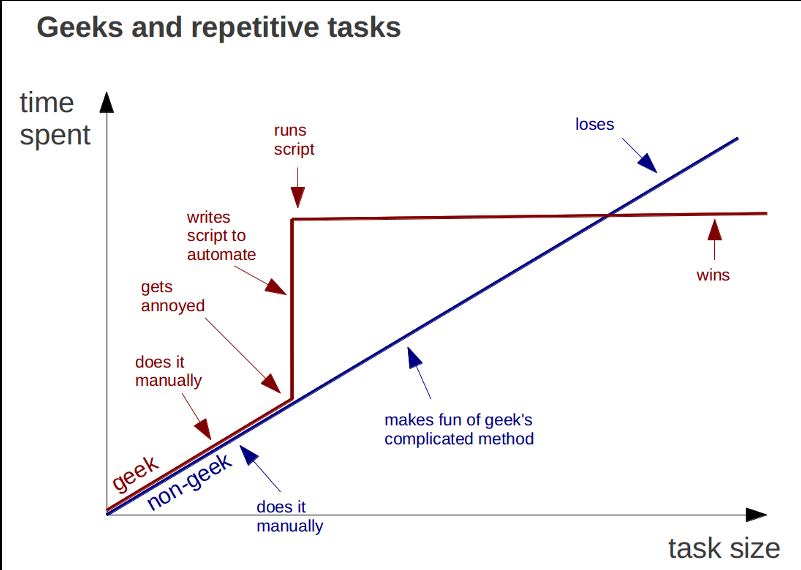
Relevant image:
http://marcgg.com/assets/blog/automation-win.png
 fierce oar
hehe
somewhere at the end of the geek line should also be a "makes a graph about it" 😃
pastel panther
lol, yea 😃
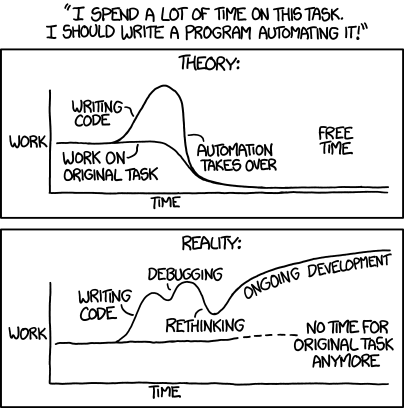
xkcd's take on the matter is also worth considering:
https://imgs.xkcd.com/comics/automation.png
 pastel panther
I'll let you know if I ever have any
Are you working on a project or just familiarizing yourself with CP?
fierce oar
i am working on a project, and trying to learn basic CP things, just trying to get the demos on the adafruit learning system to work, and then tweak them a little
right now trying to use the cap touch on gemma to light a strip of neopixels
pastel panther
cool. You might even be able to get the touch pressure to change the color
fierce oar
yes! id love to do that!
pastel panther
I've been meaning to do more with cap touch; it seems like a cool way to add an interesting UI to a project
fierce oar
hey it's working now! yay!
pastel panther
wew!
fierce oar
im still pretty new to the coding side of things so i get pretty excited when things work 😃
pastel panther
dude, I still get irrationally happy when my leds blink after a battle with some code. I know those feels
fierce oar
i was starting to feel pretty comfortable messing with arduino code, and now kind of starting over with cp
but it's sooo awesome to have so many helpful people here and others learning at the same time
pastel panther
Yea, the adafruit community (and the CP community specifically if I may say) is pretty dang cool
fierce oar
agree!
pastel panther
Your feedback as a beginner is especially important to us as one of the main goals of CP is to make coding easier to do and learn, so If you have any thoughts about how things could be better please let us know
fierce oar
oh yay will do! thanks so much 😃 im excited to dig deeper into cp in a couple of weeks when i have more time
gonna head to bed now, gotta be up early for work tomorrow, thanks again for all your help!
pastel panther
glad to help. Good night!
timber lion
latin 1 and supplement chars in sinobit firmware now (those are accent chars, etc.): https://twitter.com/tdicola/status/966604293338902528


¿Hablas español? Parlez-vous Français? sino:bit MicroPython does now with Latin 1 & supplement chars in firmware. :) @RealSexyCyborg Found some bugs though, like web editor code fails with unicode. More to investigate, and hope to free up major space for Chinese chars next. https://t.co/X4VCrnVHpC
 Twitter
noticing some fun bugs though like code generated from the web editor with those higher byte range unicode chars fails to load
i have a feeling JS is mangling the strings that get embedded in the firmware
all kinds of fun bugs you find when characters go above 128 😃
 solar whale
@tulip sleet Hooked up GPS to Metro M4 Express RevB - UART is working! Yay! Minor note - revb B pins.c does not have RX/TX defined. D0/D1 works.
manic glacierBOT
It seems to me that being able to select or await on a DigitaIO object (or something that wraps it) would handle most of the cases for us. SPI and I2C are clocked by master, so nothing interesting happens with them without the master initiating it. AnalogIO could be selectable/awaitable also, but would require specifying a threshold. Selecting on a timer would pretty much be equivalent to doing select with a timeout, so I'm not that sure this is useful.
tulip sleet
@solar whale I added RX/TX to pins.c but should have been backported to the _revb board.
solar whale
I saw them in M4_Express - poor neglected revb 😉
tulip sleet
that was version skew - Scott copied the original pins.c, which I had updated in the PR. I should have caught that in the PR.
solar whale
@tulip sleet for the forum poster who used bossac to load a .uf2 file to CPX it looks like he recovered OK by using bossac to reload bootloader with .bin - should he have used the update-bootlader instead?
tulip sleet
@solar whale I think the bootloader was fine the whole time. It wouldn't get overwritten except by the updater. They might have loaded a program that was crashing. Then they loaded the bootloader which somehow didn't crash.
On Linux I often see ...BOOT not automount, but it does show up in the file manager window. This user was doing it from the command line, so that was not visible. Somehow now it's automounting. Based on the syslog, it looks like an RPi.
I haven't found a reason for sometime automounting and sometimes not, and I've done a lot of websearching on the subject.
solar whale
@tulip sleet I see the same thing - not predictable. If it does not auto mount and I click on the drive in file manager, it mounts but is "read-only" for drag/drop. I can write via the command line but not drag files via file manager. Closing the File manager and restarting seems to help.
tulip sleet
I don't see the read-only part. I'm using the Nemo file manager (switched to cinnamon on Ubuntu after being tired of the Unity UI). It might be something like the same device on the same port getting an error (e.g. when you double-click and cause CIRCUITPY to abruptly disappear), so it decides automount might not be safe. Sometimes it seems to help to move to another port. But I haven't found any settings or log messages explaining that behavior.
tidal kiln
@tulip sleet " I think the bootloader was fine the whole time. It wouldn't get overwritten except by the updater."
Thanks for confirming that, that's what I was thinking too.
@tulip sleet "I've done a lot of websearching on the subject"
have you come across stuff that talks about gvfs in any of that? (GNOME virtual file system)
 inner raft
How do you switch a Trinket M0 back to circuit python mode after uploading via the Arduino IDE? I can get it into bootloader mode just fine, but not sure how to get back to mounting the CIRCUITPY drive.
pastel panther
copying an appropriate CP firmware.uf2 should do it
Let me remember where they are...
inner raft
Ok, I wasn't sure if that was the only way
pastel panther
GitHub
circuitpython - CircuitPython - a Python implementation for teaching coding with microcontrollers
inner raft
I read through that on https://learn.adafruit.com/adafruit-trinket-m0-circuitpython-arduino/troubleshooting but wasn't sure if that was for this situation too.

CircuitPython or Arduino IDE on this tiny little microcontroller board
pastel panther
CP is essentially the program that is being uploaded/programmed to the board so if it's replaced by something else like an arduino program you'll have to put it back
inner raft
Is there a section in the getting started guide that details switching back and forth that I'm missing? If not it might be good to add just a little bit on that. I was pretty confused about swapping back and forth vs repairing an existing circuitpy setup.
pastel panther
the BOOT drive still works because it's created by the bootloader which stays in place at the top of the memory space
Not that I know of offhand but I'm not as familiar with the documentation as some. @idle owl?
That would be important to have, especially given many people do both CP and arduino
inner raft
Even just a line that said something like "The following process is also used to restore circuit python after using the Arduino IDE."
pastel panther
totally
inner raft
bam! its back to circuitpython now 😃 thanks @pastel panther !
pastel panther
No problem, glad to help
tidal kiln
@inner raft do you think it would help to have a "How to Go Back and Forth" section in this guide?
https://learn.adafruit.com/welcome-to-circuitpython
it's pretty much:
Arduino -> CP: just upload a sketch
CP -> Arduino: reinstall CP (bootloader, UF2 drag/drop)
and for CPX, there's also makecode

New to CircuitPython? This is the place to start.
inner raft
If its that simple, I don't think it needs to be its own section. Maybe just but a blurb to that affect in both the CircuitPython sections and the Arduino IDE sections.
but making it its own section might be simpler, then its just in one place rather than sprinkled all over the place
I also didn't find the general circuit python guide when I was looking, I was just inside the Trinket M0 guide. I didn't make the connection that it was a more generic solution as opposed to trinket specific.
tidal kiln
before kattni wrote that general guide, we just had stuff sprinkled through the board specific guides and elsewhere. and we still do. we're workign on trying to get it all cleaned up.
inner raft
documentation is hard 😃
even still, its a lot more complete than most open source projects, so you're all still way ahead 😄
manic glacierBOT

@arturo182 Hiya ... related to the P0_00,P0_00 issue, should I put in a new PR for the other boards to fix that?
tidal kiln
@inner raft you're not the first person to ask this.
@idle owl worth adding somewhere?
manic glacierBOT
Now that @hathach is back from holidays (new year), I'm going to do some project planning to figure out the minimum requirements for a viable USB solution that covers both SAMDxx and nRF52840 and should be maintainable across future platforms. It will be a separate repo and project so that I can do the project management on Github and track things there, but I'll post a link here once a first pass at requirements and deliverables is done (on the USB side, not CP-specific at this point since i...
manic glacierBOT
@microbuilder sounds excellent. @dpgeorge may want to use it in MicroPython for nRF52 USB as well.
timber mango
very interesting video / tool on documenting & tracking builds with circuitpython

A tool to help tell a more complete story of the making process. Code versions, serial log data, and notes are automatically saved and shown across time. htt...
the code tool tracks changes/notes/REPL
timber lion
ah neat @meager fog yeah I was actually looking at VS code extensions as a better IDE. I'm running a full anaconda distribution behind the scenes in the extension and am considering exposing jupyter etc (VS code's python extension already does this actually, you can bring up jupyter notebooks in new tabs). VS code has a full file watch mode built in so you can register to do things when files are saved, like load them to a micropython board (what i'm planning) or record them in a version system (kind of like this person)
if you watch my sinobit tweet i'm actually using the extension
VS code is really nice i'm finding
¿Hablas español? Parlez-vous Français? sino:bit MicroPython does now with Latin 1 & supplement chars in firmware. :) @RealSexyCyborg Found some bugs though, like web editor code fails with unicode. More to investigate, and hope to free up major space for Chinese chars next. https://t.co/X4VCrnVHpC
Twitter
but i'd like to do a file watch mode that supports pushing to any micropython board over serial connection, or copying to a USB capable board (with optional rename to main.py).. that way you always have a backup of your code on your machine
pastel panther
@timber lion I started using VS code a while back and I love it so far. I just need to train it to not be confused by the duplicate files across the different CP ports
@timber lion Please do share any other VS code coolness you find. I'm currently working on testing out the gdb integration
timber lion
and since i have a full anaconda toolchain hidden inside it i'm going to publish MPY cross packages to it and then auto MPY files
one click, convert to MPY, send to board
even automatically on file save
pastel panther
nice
timber lion
it should be really handy
and eventually i'd like to put in a bokeh-based realtime plot
but with more than line graphs.. too boring 😃 should support all the major graphs, bar, scatter, etc
it's easy with bokeh and friends
pastel panther
I wonder how portable some of the cool graphing tools from the R world are to python or whatever VS code uses underneath, JS I think?
nvm bokeh looks just as good
pretty
oh hey @timber lion or @tulip sleet are the new-ish metro_m4_revB board files for the m4 metro that all the testers have? I assume thats so the main directory can be used for the final board?
tulip sleet
@pastel panther you got it.
pastel panther
kk, I'll have to update my aliases
tulip sleet
I did too 😃 and now i have to keep track of which board I'm using. I have four different versions now.
pastel panther
@tulip sleet I don't know if you saw my messages but I think my SPI problem was largely the SPI led matrix I was using. Problem went away when I switched to a SPI flash
hah lol
color coded usb cables?
and appropriate aliases for stuff like mkred, mkblu ,etc
tulip sleet
oh I didn't understand what you meant. I thought there was nothing connected to the board when you were getting that apparent short
pastel panther
That would have been a sensible starting point but no
tulip sleet
I have marked both ends of my USB cables with matching marks and different on different cables to keep track. Used some paint markers
also shorter cables would help
pastel panther
I still had some issues with getting a good looking MISO but I think that was a wiring issue
@tulip sleet These look good too https://www.amazon.com/Anker-4-Pack-PowerLine-Micro-USB/dp/B015XR60MQ
stuck elbow
bulletproof!
tulip sleet
monoprice has 0.5m1/1.5ft cables
pastel panther
I've killed enough micro usb cables that I don't bother with the cheepos anymore
even the amazon basics cables felt pretty good but eventually died at the micro end
The jury is still out on the ankers but they feel pretty solid. I think the micro usb connector is just too small to provide enough mechanical strength
@stuck elbow #dataramid
stuck elbow
?
pastel panther
you mentioned 'bullet proof'. I thought that was a reference to the aramid/kevlar fibers in the anker cables
stuck elbow
it was a reference to one of the images in there
so yeah
I don't know, I never killed any, except for some extremely cheap ones
and even that took years
I guess it depends on what you do with them
pastel panther
mabye I'm just a gorilla at heart
pastel panther
<@&356864093652516868> <@&370994983664091136> If any MetroWing users have smallish feature requests or feedback, let me know. I'm thinking of doing another tweak revision to add more /better silks and have a run done at a jlcpc or one of these cheepo board houses.
stuck elbow
@pastel panther qspi?
pastel panther
@stuck elbow on the metrowing? or are you just posing an abstract question?
pastel panther
were you thinking of my m4 board?
pastel panther
no prob, I know how it goes. Yea, it's already in rev1 alongside a 'regular' spi flash that is wired wrong 😑
I should be able to test QSPI as I checked those pinouts several times but I'll have to see how I need to adapt my board files. Should be easy enough but I want to finish checking SPI, i2c and pwm
I hope to finish up with that this weekend and take a look at the dotstar ticket
now I finally have official boards with dotstars I can make sure my fix (once I find it) isn't specific to my board
ruby lake
hw request, put SWP/SWC-like pads on the usb 😉
pastel panther
@ruby lake Socialist Workers Party and State Water Contractors?
ruby lake
er SWD, the pogo pins used to probe the m0. Am trying to think of a way to get the usb data signals accessible w/o munging the form factor (of the feather in this case)
pastel panther
Hmm.. good idea; You were suggesting adding pads like the SWD ones? Thats a pretty good idea actually, especially for when you use the wrong USB footprint and your connector only works half the time
not that I would know anything about that 😑
I just broke mine out to pins because there is some overlap on the G18/19 between the position decoder and usb pins
ended up being useful
ruby lake
The use case I have (and others may have) is getting to the usb from a feather plugged into a device where the onboard usb connector is not easy to get to
pastel panther
yea, or you want to desolder the usb to make it smaller
it should be a 30 minute job to hook that up in eagle
ruby lake
in my case, I will have the feather mounted on a board and behind a panel, with the host board offering a usb connector through the panel. So, I just need to run a short tp from host to usb pads
pastel panther
I suggest you give it a try! The trinket boards would probably be like $3 or so from OSHpark
Feathers probably around $10/3
ruby lake
I'd do the feather, as I have another tweak to consider, though there is the SPI flash part in the way now.
pastel panther
If you're feeling especially fiddily you could hook up a wire directly to the pin but that would be nutty
ruby lake
the I2S MC pin is needed for many of the audio dacs/codecs
pastel panther
That looks nice; I was look at using this:
http://www.ti.com/lit/ds/symlink/pcm1792a.pdf
stuck elbow
CircuitPython running on Lameboy, a handheld that a friend made.
got the pewpew running on it
it's esp8266-based
idle owl
@pastel panther @tulip sleet Those Anker cables are the ones I use for everything.
 umbral dagger
@pastel panther Still waiting on my boards.
manic glacierBOT

I've been looking into getting the Dotstar to work for my m4 board so I can take a look at this now that I have a trinket and bitsy.
umbral dagger
@timber mango My uGame arrived. Nice build. I'm eager to make soem time to hack on it.
@timber mango The pushbuttons are especially nice.
idle owl
@tidal kiln @inner raft I added the CircuitPython/Arduino thing to this issue, and I'll see about adding it to this page. We're turning this more into an FAQ than Expectations when we're done. https://github.com/adafruit/circuitpython/issues/583

GitHub
Expand the CircuitPython Expectations page to include more FAQs. If there are other things you are finding people constantly asking, please comment on this issue! Thanks!
Potentially combine with C...
pastel panther
@umbral dagger Do you have feather-sized and ISP headers? I got a bunch off ebay a while back and can send you some if you want
umbral dagger
@pastel panther I have more headers than I really need... and more on the way of those I'm not overflowing with 😃 Thanks though.
idle owl
Jerry sent me everything I needed. Made it so much easier.
umbral dagger
My drawers of 1x female & male header strips are so full they almost won't close.
idle owl
I could have cobbled together enough headers but it would have been some halfsies in some places.
Also, the awesome button. That is completely unawesomely soldered on. But it works.
pastel panther
hah
umbral dagger
It's somethign I make sure to always have plentifully on hand. I use a lot of them.
pastel panther
Like I always say, better than a paperclip
idle owl
Yah I have a ton of headers, not the right sized ones is all, for the Metrowing.
pastel panther
(I don't always say that)
idle owl
(Noted)
Oh, @pastel panther, what about making sure the pins aren't hitting on the barrel jack on the Metro?
It fits pretty well if you trim them flat once you solder them.
Actually I'm looking at it, and I'm not sure how much more clearance you'd get than you get from trimming them flat. You'd still be resting the board on the barrel jack.
pastel panther
@idle owl Yea, that's on my mind. I think I might be able to do it if I flipped the featherwing slots around since the 12 pin side has a convenient gap
pastel panther
That would mean re-routing most of of the board though 😝
idle owl
Yah, I get it
pastel panther
I'm not saying I won't do it. just probably not any time soon
idle owl
That's totally fair. You gain a mm or 2, and it's not blocking functionality at the moment.
pastel panther
Actually it would be a great way to practice the new routing tools in eagle
I'm kinda thinking that if I can get the BOM low enough I might be able to make goodie bags for Awesome People™
idle owl
Ooh. That would be neat. For multiple reasons.
@tulip sleet Am I seeing right that there's no travis on cookiecutter-adafruit-circuitpython?
umbral dagger
SMT headers would solve that (but be a big rework).
idle owl
What's the T in that acryonym
I at least assume I'm guessing the rest right from context...
raven canopy
Surface Mount Technology if memory serves me right.
tulip sleet
@idle owl I don't think it's buildable because it's full of things that need to be changed when it's used as a template.
idle owl
@tulip sleet That makes sense. Thank you.
@raven canopy Ah. I was wondering if it was the end of "mount".
pastel panther
@umbral dagger SMT headers wouldn't be all that hard (would actually make the routing easier in spots) but haven't been impressed by them on the one metro I have with them. They seem kinda bendy
idle owl
Agreed on bendy. I keep thinking I broke it.
tulip sleet
Now that Adafruit has a selective solder machine they can do through-hole headers by machine.
idle owl
The flat bottom board is really nice though 😄
pastel panther
I put huge gobs of solder on mine in a vein attempt to strengthen it.
I actually like the rubber feet ; I should probably get some more
umbral dagger
@pastel panther @idle owl I do agree about the bendiness. Not the greatest maybe for repeated use.
I think it's largely due to the nature of the female headers: being made from flat metal means the tabs (even for through hole) do tend to be bendy.
tidal kiln
@idle owl good call on the arduino/cp switcheroo. that's a good place for it.
idle owl
Thanks, I thought it might be.
inner raft
I wonder if the swiss headers are less bendy...
stuck elbow
swiss?
umbral dagger
@inner raft They are since they're machined and not stamped.
tulip sleet
The swiss headers I know are all through-hole.
umbral dagger
Yes, they're through hole. I can't recall seeing SMT swiss headers.
inner raft
oh, true
tidal kiln
@timber mango https://www.adafruit.com/product/3646
tulip sleet
@stuck elbow example of "Swiss" https://www.adafruit.com/product/3646 Also same headers that come with pyboard header kit.
umbral dagger
You both beat me to it 😃
manic glacierBOT
Unify the CircuitPython quick starts for mirroring across all the board guides!
For CircuitPython Expectations, see issue #583
QUICK START PAGES:
-
[ ] CircuitPython Built-Ins
-
[ ] CircuitPython Digital In & Out
-
[ ] CircuitPython Analog In
-
[ ] CircuitPython Analog Out
-
[ ] CircuitPython Internal Dotstar (NeoPixel)
-
[ ] CircuitPython Cap Touch
-
[ ] CircuitPython I2C Scan
-
[ ] CircuitPython I2C Sensor
-
[ ] CircuitPython UART Serial
-
[ ] Circui...
pastel panther
Swiss headers are nice but aren't they incompatible with regular stamped headers? I could deal with that if I could find swiss stacking headers
stuck elbow
@tulip sleet aah, machined headers
idle owl
@raven canopy When you get a chance, can you make sure your issues that need closing get closed? I was unsure on one of them whether you thought you had more to do, so I'll have you take a look.
pastel panther
aah the joys of ticket management
idle owl
Yah, the nice thing about GitHub is, you can always close and reopen if needed. It's one of the better systems I've worked with.
pastel panther
It's pretty good for what it's doing. My work likes to complicate things so we have bitbucket (a gitghub like thing) and JIRA, a separate ticketing system
fortunately they're both made by atlassian so they integrate to some extent
idle owl
I worked IT at uni, and we had an incredibly over complicated ticketing system that I knew better than anyone else, which isn't always useful.
Integration is nice at least.
pastel panther
You can do things like have ticket numbers in the commit message that will close the ticket or otherwise change the state. I think github might be able to do something similar but it's slightly trickier when you're dealing with PRs
idle owl
Yah I think you're right on both counts there regarding GitHub.
Given that we have some issues with tons of stuff in them, might make more sense to deal with what we have now. Means going through it every so often, but it's part of the workflow now. 😃
pastel panther
yea, we never use it at work as it's a non issue since the ticket usually has more going on than just the associated code.
This is kinda nice if obvious; sorting by activity:
manic glacierBOT
ok lets look at https://learn.adafruit.com/adafruit-trinket-m0-circuitpython-arduino/circuitpython-built-ins first
do we want to move the bottom section "Things to watch out for!" to 'Expectations'? maybe just point people to the Expectations page. otherwise this is kinda generic already?
I was thinking on this one. It is generic already, yes. I put it on the page because there's a couple of changes I think we need to make. I agree the "Things to watch out for" needs to be moved to The Expectations Expansion (I'll add to that issue when I'm done with this comment). I also think the "Handy Tips" page needs to be split between Built-Ins and Expectations (already updated that issue to reflect this).
Otherwise, it may be worth cleaning it up a little if we're going to be mirror...
Include the following from CircuitPython Built-Ins (some of this is already included):
Things to watch out for!
- The wide body of python libraries have not been ported over, so while we wish you could import numpy, numpy isn't available. So you may have to port some code over yourself!
-
For the ATSAMD21 based boards (Feather M0, Metro M0, Trinket M0, Gemma M0, Circuit PlayGround Express) there's a limited amount of RAM, we've found you can have about 250-ish lines of python...
Ok I split Handy Tips up, unmirrored and deleted that page. I quick updated Built-Ins. I think if we decide to add much more to it, we'll want to do some clearer delineation, but it looks great for now! The Expectations page and issue have been updated with the info removed from Built-Ins. I think Built-Ins is done for now!
okidoke lets move to digital IO
https://learn.adafruit.com/adafruit-trinket-m0-circuitpython-arduino/circuitpython-digital-in-out
i think i picked the pin #'s because they exist on all devices (other than cpx) so what we need to do is add a side2 element with a photo or fritzing showing where the digital #13 LED and pin #2 are)
So a side2 list including every board?
i think better to have one side2 per board
Yah that's what I meant :)
On it!
idle owl
@pastel panther Looks like it shipped with Arduino, not CircuitPython.
Similar demos though.
manic glacierBOT
Is D2 on the ItsyBitsy the 2 in the corner or is it the alternate of A2?
idle owl
Hmm. There's a typo in the demo for the Metro M0 Express. Also, I swear I've never gotten pwm.duty_cycle to work right. It's suppose to pulse the LED right?
stuck elbow
no
idle owl
Oh.
stuck elbow
it's supposed to make it brighter
it sets how long the led is on compared to how long it's off
but with very fast blinking, it seems like the led just dims
idle owl
It doesn't seem to do anything but turn on the LED to me.
or is that what you're saying.
stuck elbow
can you show me the exact code you are trying?
idle owl
import board
import neopixel
# import digitalio
import pulseio
# import time

pixels = neopixel.NeoPixel(board.NEOPIXEL, 1, brightness=0.1)

# led = digitalio.DigitalInOut(board.D13)
# led_direction = digitalio.Direction.OUTPUT


pwm = pulseio.PWMOut(board.D13)

while True:
    pixels.fill((0, 255, 0))
    pwm.duty_cycle = 2 ** 15
I've tried it before with other code and it seemed like it did the same thing.
stuck elbow
well, you are setting the duty_cycle to a constant value
so nothing will be changing
idle owl
Ah.... ok
I completely get it now.
I remember looking it up and for "pulsing the LED" that's what comes up, but it is never clarified past that, if I remember correctly anyway, I haven't tried again in a bit.
That makes a lot of sense now that you point that out. Thank you.
manic glacierBOT
I just tried using CircuitPython on a HUZZAH — I got the released binaries for 2.2.3 and used ampy to upload files to it. Everything works fine until you upload main.py, after that ampy is no longer able to upload anything. It waits a long time, and finally crashes with:
b'#5 ets_task(40100164, 3, 3fff8380, 4)\r\nboot.py output:\r\nmain.py output:\r\nTraceback (most recent call last):\r\n File "main.py", line 1, in <module>\r\n File "menu.py", line 4, in <module>\r\n File "pew.py... prime flower
@idle owl Thanks for the reviews/merging, I'm going to finish the stragglers up tomorrow and that issue will be done 😄
idle owl
@prime flower Excellent, thanks for the great work!
prime flower
Oh, for the LED dimming I've used https://learn.adafruit.com/adafruit-trinket-m0-circuitpython-arduino/circuitpython-pwm before
CircuitPython or Arduino IDE on this tiny little microcontroller board
check out how the code modifies the duty_cycle for the LED, that may be useful for pulsing/dimming @idle owl
tidal kiln
manic glacierBOT
@jallwine @dhalbert means the soft reload that happens on save.
As @deshipu points out, we have improvements in master (future 3.0.0) that could help a bunch.

README Badges: some have Gitter some don't. Do we want all, some, or none to have it?
@sommersoft I remove them in favor of the Discord badge when I come across them.
manic glacierBOT
D2 on itsybitsy is labeled '2' yeah
manic glacierBOT

How about an acronym decoder ring, with links.
CP = CircuitPython (link to welcome to guide)
CPC = Circuit Playground Classic (link to PID 3000)
CPX = Circuit Playground Express (link to PID 3333)
pastel panther
@idle owl Awe man, sorry to pop your bubble; I think just assumed it was CP because...I never arduino anymore? Plus I though I heard about you doing something similar. Sorry!
idle owl
No worries. I didn't think they should have been shipping with CP yet, but hey! Never know 😃 But yeah they're not, it's an Arduino sketch.
pastel panther
i swear I saw CIRCUITPY drive...
idle owl
Someone else who just ordered one checked and couldn't get the CIRCUITPY drive to show up, so who knows. Maybe you got overly excited too 😉
idle owl
Huh.
pastel panther
 ~$ ls -ltr /Volumes/CIRCUITPY/
total 278
-rwxrwxrwx  1 bsiepert  staff     95 Sep  1  2016 boot_out.txt
-rwxrwxrwx  1 bsiepert  staff   3627 Jan  3 22:31 main.py
drwxrwxrwx  1 bsiepert  staff   1024 Jan  3 22:31 lib
drwxrwxrwx  1 bsiepert  staff   1024 Jan  3 22:31 Windows 7 Driver
-rwxrwxrwx  1 bsiepert  staff   4426 Jan  3 22:31 Wild Eep.wav
-rwxrwxrwx  1 bsiepert  staff   3099 Jan  3 22:31 README.txt
-rwxrwxrwx  1 bsiepert  staff  74606 Jan  3 22:31 Fanfare.wav
-rwxrwxrwx  1 bsiepert  staff  42654 Jan  3 22:31 Coin.wav
-rwxrwxrwx  1 bsiepert  staff   7832 Jan  3 22:31 Boing.wav
😑
idle owl
😄 Ok I'm back to being ridiculously excited. Even if you're the only one who got one somehow.
pastel panther
I just read and and I gotta say it's a darn good piece of example code
maybe they were like
that dude
;P
lemee check the trinket
idle owl
I only helped a little with the code. But all of the craziness with LIS3DH that happened was so we could put tap in this code.
The library that it's built on was basically me though. That's the part that's me.
so the demos on the others aren't anything I touched
idle owl
Yah the rest are shipping with CP as far as I know
pastel panther
now I wanna make a CPXL
it clearly needs an altimeter and 9dof and a m4 and an oled
humble mural
Hello everyone. I searche the Learning Guides and i couldn't find a Laser Harp. Does any one know of an open source project of DIY plans. I've been looking for an hout now and only one show up and it's ok.
pastel panther
@humble mural are you looking for something you know exists or trying to see if one exists?
raven canopy
that tap fiasco was fun to watch (i was still a lurker at that point)
humble mural
@pastel panther a better/updated version of this... http://www.instructables.com/id/Frameless-Laser-Harp/

Instructables.com
We are a generation that love sound and light – can’t do without them really. Our most preferred time of day is night, or what we would call evening. We...
pastel panther
you were hoping that someone had made a learn guide about how to make one? I haven't heard of one
idle owl
@raven canopy Really it was fun to do, but no less of a beast for it
humble mural
In a perfect world (CircuitPython world) I'd like to try that with a Metro Express.
pastel panther
I think al the tools are there to start protyping
raven canopy
it looks doable. don't see anything that isn't currently supported in circuitpython. just have to put it all together...
pastel panther
you can probably steal most of the hardware from the arduino version
humble mural
@pastel panther I'll replicate it in its current version, then once I get it going , I' move it over to Metro Express one piece at a time.
True
pastel panther
software wise it's probably just checking and ADC for voltage pulses
then sending midi? i guess?
tulip sleet
There are a number of threads on the Arduino forums: https://www.google.com/search?q=laser+harp&domains=http%3A%2F%2Fforum.arduino.cc&sitesearch=http%3A%2F%2Fforum.arduino.cc
pastel panther
didn't read that far
I think they did a more harp like version on the ben heck show a while back
tulip sleet
One good thread here: https://forums.adafruit.com/viewtopic.php?f=14&t=4860
humble mural
I'm pretty comfortable with programing Python but transitioning that knowledge to microcontrollers has been difficult. It has led me to beleive that I probably don't know as much Python as I thought I did, but frankly, this is a blast!
pastel panther

Ben works on a Laser Harp using lasers and a photoresistor while Felix sets up the intel Edison with VST: virtual studio technology MIDI music driver to play...
humble mural
@tulip sleet I am going to start pulling them up know and at least bookmark them and start reading them.
humble mural
@tulip sleet @pastel panther @raven canopy These resourses are amazing thank you.
raven canopy
@humble mural know what is more awesomer? the fact that you're teaching this stuff! I can only speak for myself, but that makes me want to do more (and better) work with  .
.
humble mural
@raven canopy Wait till you hear this. I am hip deep trying to figure out the IR remote that will be used for multiple CPX with the goal of eventually using to control wearable neopixel bracelets a la pixmob.com. This laser harp request came from a group of students that emailed about an hour ago trying to pick my brain on this topic. Behind your back we sing the praises for Adafruit loud and clear. Thanks!
inner raft
can't wait to see all your students in here asking questions 😄
raven canopy
i'm just a contributor, so i sing in chorus with you all for Adafruit. they've built something quite amazing.
idle owl
Oh Ben Heck Show! My friend Karen is on that show. She's the one on the right in the vid you posted, @pastel panther
 last mirageBOT
Commands:
<:GreenTick:415231984542154763> Here is a list of the current MakerBot commands. <:GreenTick:415231984542154763>
!make - Gives you a random Adafruit guide.
!product <id or search> (number/search) - Searches or gives you the url
to the adafruit product requested
!opensource - Link to the MakerSandbot github page!
!news - See the latest news!m!suggest - Suggest features!
!version - Shows information on the bot version.
!invite - Invite this bot to your server!
!ms - Gives you the invite to the MakerSandbox server.
!about - Shows info about the bot.
 @MakerSandbot#7501 by @Codingpro#9213
idle owl
@MakerSandbot#7501 by @Codingpro#9213
idle owl
@blazing trail I have! I see you've added a ton of stuff! Great job!
last mirageBOT
Older News:
Bot is now on v1.8.0!
@MakerSandbot#7501 by @Codingpro#9213
<:GreenTick:415231984542154763> MakerSandbot is on 3 Servers!
YAY!!
@MakerSandbot#7501 by @Codingpro#9213
idle owl
@humble mural We're planning on adding a channel and special role for educators here on the Discord server. Is that something you'd like to be a part of? It's entirely voluntary but we were talking about trying to make it easier for educators here on Discord to find each other and exchange ideas if they wanted. The role involves you being in a list like, for example, the CircuitPython Helpers on the right. The channel will simply be a forum for discussion like this channel.
@inner raft Are you still an educator or do I remember you saying you used to be?
 blazing trail
I wana be an educator 😉
inner raft
A part time one. I've taught a web programming class at the U of A a couple of semesters (CS 337)
idle owl
I'm sure you already are in a lot of ways, @blazing trail
last mirageBOT
<:GreenTick:415231984542154763> MakerSandbot is on 3 Servers!
YAY!!
@MakerSandbot#7501 by @Codingpro#9213
blazing trail
fixed!
idle owl
@inner raft Well, same to you then, would you like to be added to the role we'll be creating?
The idea is if another educator joins us and is looking to connect, you'd all be easier to find.
blazing trail
smart
inner raft
Oh definitely. I love teaching/training!
humble mural
@idle owl and @inner raft I'm a high school teacher in Miami Lakes, Fl. I would love to help out however I can. I don't want to oversell my skill set. When it comes to using CP with microcontrollers I am jsut starting of (as I am sure you can tell by my questions).
blazing trail
@idle owl why is there a master punner role?
raven canopy
@blazing trail because Andon is the Master Punner... 😄
blazing trail
ik
inner raft
@compact solstice I hope no one expects us to be experts on all the technical bits, but knowing what works in a class of 30-100 people is a lot different than what works for a single dev 😃
idle owl
@humble mural It's not necessarily about your skillset. CircuitPython is relatively new to a lot of people and having it in education is definitely new. You're learning it to teach it. And that's the experience that you'll have to share. 😃
@inner raft Exactly
blazing trail
@raven canopy look up master punner in the search bar on the top right
raven canopy
@humble mural its not so much about what you know with regards to the platform. its more about using it in education... exactly what kattni says, as i type this. hehe
humble mural
I would love to offer the classroom perspective and give my input as to what works in the classroom. There is a whole curriculum component that may be beneficial. Linking projects to state and district standards, lesson plans, best practices, what component work best etc.
idle owl
We've had more than just the two of you asking about creating a curriculum and whether we have resources. We have the Learn guides and the educator's discount, but there's not necessarily anything specific. But as we build this community, we are creating new opportunities. This came up at our weekly CircuitPython meeting this week, and is when I suggested the Discord role and channel to start connecting educators with each other to start on this adventure together 😃
humble mural
I love the idea. It ties in to what I have been tasked to do in our district, we want to introduce the first IoT curriculum frameworks in the State of Florida and possibly the United States. Right now I have taken all of your CircuitPython guides to rank them from 1 to n in order of difficulty. Then I am matching the skilles needed to complete those guides. As they complete tasks and show competence they can earn badges also. My administration is very exciting.
idle owl
That's so great to hear!
humble mural
First we start with broad strokes, then competencies, then break them down to units and lesson plans.
Best part about it is I am letting the students select the guides that they think they will like best. My goal there is that the students feel ownership of the prgram and that they are taking part in something self created.
idle owl
That can mean the difference between students wanting to learn and not wanting any part of it. Kids don't get to feel in control of a lot of things in their lives, so giving them that opportunity can change lives.
ruby lake
hm, this 2nd feather m0x doesn't want to show up as a drive
hm, Feather m0x learn pages need a "first time power up" section
pastel panther
@idle owl You know karen? Cool! I always thought she brought a needed perspective to the show
Now that I'm done with Altered Carbon I can get back to the CP hacking
ruby lake
should a CIRCUITPY: drive appear when the feather is unwrapped and truned on for the first time? (it is flashing D13 and cycling the pixel)
pastel panther
@ruby lake it depends on what the feather was loaded with before it was shipped
timber mango
@ruby lake some feather m0 express have py but older ones do not
it depends when you ordered
ruby lake
This one I ordered this week
ruby lake
I'll have a look with an IDE
yeah I'll figure it out
timber mango
we're moving the old boards over
ruby lake
btw the first time I turned a CPX on, it made a bright flash and a noise. Do you know what that does to someone who has blown up a thousand things? 😉
ok I can query the fm0x in arduino IDE
 ebon horizon
Maybe they should do a crescendo with some “sparkles” like the Sierra logo from the early Kings/Space Quest games
ruby lake
there, I forgot that for some reason this machine refuses to show the FEATHERBOOT: drive
it shows CIRCUITPY: fine however
manic glacierBOT
Of course I forgot to add, that main.py contains an infinite loop.
manic glacierBOT
I'm trying to build my own version on the 2.2.3 CircuitPython for HUZZAH, but I'm getting the following error:
In file included from ./esp_mphal.h:73:0,
                 from ../py/mphal.h:32,
                 from ../py/mpprint.c:33:
./etshal.h:9:6: error: conflicting types for 'ets_delay_us'
 void ets_delay_us();
      ^
./etshal.h:9:1: note: an argument type that has a default promotion can't match an empty parameter name list declaration
 void ets_delay_us();
 ^
In file inc...so ive written a python script for the m0 trinket for the built in Dot Star, and i want to expand it to use on a ~3m dotstar strip
what would i gave to change?
 manic glacierBOT
The following changes made it compile:
diff --git a/esp8266/etshal.h b/esp8266/etshal.h
index 34787779f..32942bcb2 100644
--- a/esp8266/etshal.h
+++ b/esp8266/etshal.h
@@ -6,14 +6,14 @@
 // see http://esp8266-re.foogod.com/wiki/Random_Number_Generator
 #define WDEV_HWRNG ((volatile uint32_t*)0x3ff20e44)

-void ets_delay_us();
+void ets_delay_us(uint16_t us);
 void ets_intr_lock(void);
 void ets_intr_unlock(void);
 void ets_isr_mask(uint32_t mask);
 void ets_isr_unmas...
I get the following error when building CP3.0 for the ESP8266
build/shared-bindings/busio/UART.o:(.text.busio_uart_obj_get_baudrate+0x0): undefined reference to `common_hal_busio_uart_get_baudrate'
build/shared-bindings/busio/UART.o: In function `busio_uart_obj_get_baudrate':
UART.c:(.text.busio_uart_obj_get_baudrate+0x18): undefined reference to `common_hal_busio_uart_get_baudrate'
build/shared-bindings/busio/UART.o:(.text.busio_uart_obj_set_baudrate+0x0): undefined reference to `...Even after that, I still get:
xtensa-lx106-elf-ld: build/firmware.elf section `.text' will not fit in region `iram1_0_seg'
xtensa-lx106-elf-ld: region `iram1_0_seg' overflowed by 61096 bytes
I guess the firmware grew too much?
hmmm - I just did a fresh pull and checkout of 2.x and I get the following error:
make[2]: Leaving directory '/home/jerryneedell/projects/adafruit_github/circuitpython_2x/lib/axtls/ssl'
make[1]: Leaving directory '/home/jerryneedell/projects/adafruit_github/circuitpython_2x/lib/axtls'
cp ../lib/axtls/_stage/libaxtls.a build/libaxtls.a
make: *** No rule to make target 'drivers/dht/dht.c', needed by 'build/genhdr/qstr.i.last'.  Stop.
It looks like the drivers/dht folder was removed with #632 - this breaks esp8266 build for 2.x as noted above.
@deshipu my version of the SDK is pretty old - I have not updated it recent;y - perhaps I'll hold off...
@jerryneedell you can always checkout an earlier version, the thing is, we need to know which one...
@deshipu how can I verify the version? I also see
ESP8266_NONOS_SDK_V2.0.0_16_08_10
in my build folder.
looks like it is:
sdk -> ESP8266_NONOS_SDK_V2.0.0_16_08_10
It is the same version on my linux box (May 2017) and on a "vagrant" install I did on my Mac in January. I have not updated it since then. It looks like the vagrant install used the latest available at the time.
does your 2.x clone have the "drivers/dht "folder ?
OK so do you also get the same error I am getting from the Makefile? Or don't you get that far.
For now I'm trying to build 2.2.3, I didn't try with 2.x, since I have some modifications I wanted to test that I don't want to commit.
I think that your issue is separate from what I'm getting.
@deshipu yes - sorry if I hijacked your issue - should I create a new one?
I think it would be best for keeping track of both of them in a non-confusing way :)
It looks like PR #632 has caused some problems for the ESP8266 BSP:
make[2]: Leaving directory '/home/jerryneedell/projects/adafruit_github/circuitpython_2x/lib/axtls/ssl'
make[1]: Leaving directory '/home/jerryneedell/projects/adafruit_github/circuitpython_2x/lib/axtls'
cp ../lib/axtls/_stage/libaxtls.a build/libaxtls.a
make: *** No rule to make target 'drivers/dht/dht.c', needed by 'build/genhdr/qstr.i.last'.  Stop.
The drivers/dht folder was removed by the PR.
manic glacierBOT
@deshipu that is a big increase in size (60k) - we didn't add that much. PR's to fix would be great.
@jerryneedell I see the dht issue. We should remove that driver completely, since we have a CircuitPython substitute. You can open a quick issue to remind us.
It seems like the increase in size is also due to the new SDK. Checking out commit 4ea62358c98799c1d4d1e711e5cff08045fc4dec and building with that makes it work.
manic glacierBOT
I think we should just come up with some way of making sure that a given version of CircuitPython gets built with a matching version of the esp-open-sdk. There are going to be more breaking changes like this one, and it's not feasible for us to keep updating all the branches to fix them.
tidal kiln
@timber mango why not use the dostar library?
https://learn.adafruit.com/adafruit-trinket-m0-circuitpython-arduino/circuitpython-dotstar
http://circuitpython.readthedocs.io/projects/dotstar/en/latest/README.html
then you would just set the pins and number of pixels for whatever your ~3m strip is
tidal kiln
wheres the example you were looking at?
tulip sleet
@solar whale @slender iron I'm removing esp module dht support from esp8266 to fix 2.x build https://github.com/adafruit/circuitpython/issues/639. But there is also apa102 support and ds18x20 support in the esp module. These are handled by SPI and OneWire and our CircuitPython libraries, so unless you know of some reason to keep them I will remove them also.
also esp.neopixel_write. Removing that because we have the standalone neopixel_write module
solar whale
@tulip sleet no objections to removing them from me. I assume they can all work via the libraries in the Bundle, correct?
tulip sleet
they should be able to. if not, there are bugs to fix. you were not use esp.apa102_write or esp.dht_readinto or esp.neopixel_write, were you?
solar whale
@tulip sleet tough day for esp8266 - I hope the busio issues in 3.0 are not too much of a problem.
tulip sleet
that is easy - I just forgot to implement it. esp8266 really needs to be in travis
i added .baudrate and forgot to add it in common-hal for esp
solar whale
yes, but I can see whey it is a pain to do
I'll have to review my esp8266 dht examples and adapt as needed. Not a problem.
manic glacierBOT
Fixes #639. There was old support for dht, ds18x20 (OneWire temp sensor), apa102, and neopixel in the esp module. These are now handled by SPI, OneWire, bitbang, and the native neopixel_write module.
prime flower
does anyone happen to know where the Circuit Playground Express' .wav files are stored?
(like the turnon sound)
tidal kiln
there are some here:
https://github.com/adafruit/Adafruit_Learning_System_Guides/tree/master/Introducing_CircuitPlaygroundExpress
GitHub
Adafruit_Learning_System_Guides - Smaller programs and scripts to display "inline" in Adafruit Learning System guides
prime flower
it's ok, I just needed one for an audioio demo
pastel panther
I might be able one from my CPX or bitsy if you know one you need
prime flower
thanks siddacious, I'm all set with the ones from in that repo
manic glacierBOT
yes! reviewed and looks good to me - i can merge if you want - or you can wait for tannewt
checked against schematic. if you want i can merge it
@ladyada Thanks! Go ahead! or kattni can.
slender iron
@tulip sleet thanks for fixing esp
idle owl
@slender iron Please add @inner raft and @humble mural to the new educator role!
slender iron
Done!
idle owl
Excellent thank you!
inner raft
oh wow, thanks 😃 I'll try and be helpful!
idle owl
@inner raft You already have been 😃
manic glacierBOT
FYI - Just tried with current master - issue is still present:
Adafruit CircuitPython 3.0.0-alpha.1-205-g6daf4bd on 2018-02-23; Adafruit Trinket M0 with samd21e18
>>>
>>>
>>> from board import *
>>> import time
>>> import adafruit_dotstar as dotstar
>>> pixel = dotstar.DotStar(APA102_SCK, APA102_MOSI, 1, brightness=.2)
Traceback (most recent call last):
  File "<stdin>", line 1, in <module>
  File "adafruit_dotstar.py", line 70, in __init__
ValueError: Pin PA00 in use
>>>
...Thanks for the update. The reason you're getting that specific error is that the PA00 and PA01 pins aren't being reserved for dotstar use because the status led code for dotstars is broken at the moment and I don't think it compiles with them enabled.
I got it to compile but it was crashing somewhere in the SPI setup code so I'll have to take a closer look tonight or this weekend. I'll update with my progress as appropriate.
solar whale
@tulip sleet Thanks for adding the RX/TX to Metro_M4_Revb - works great!
tulip sleet
you're welcome! I wasn't able to duplicate the strange crashes on RX/TX you saw, but I didn't try very hard. If it's easy to try again, let us know.
solar whale
yup - still completely hoses the REPL and connection to /dev/ttyACM0
all I did was reverse the wires between the GPS RX/TX and D0/D1. One way all OK - other way /dev/ttyACM0 won't connect.
slender iron
@solar whale could you try it while an arduino sketch is running?
manic glacierBOT
FYI - verified that this issue is still present with current master.
Normally GPS RX goes to D1 (M4 TX) and GPS TX goes to D0 (M4 RX)
It now works great when I do this.
If I swap the wires, I am unable to use the connection to /dev/ttyACM0 - it may connect for a few seconds (but REPL does not work), then eventually won't even connect.
solar whale
@slender iron OK - It'll try that. May take a awhile to get it organized....
slender iron
@solar whale first coudl you try with only one wire connected?
my concern is that its a hardware issue not a software one
solar whale
yup - trying one wire now
slender iron
the rx line runs right next to the usb lines
solar whale
previously I tried on M0 and could not reproduce it.
tulip sleet
can you try with D2 and D3 as tx and rx? that pair works (and D4/D5 too and a number of others)
slender iron
@solar whale there is no code related to it right?
solar whale
I'll work on an arduino test this evening - need to go find it.
tulip sleet
i'll try this later - have to cook now. I do have a gps featherwing
solar whale
feeding time here too - have a good dinner!
raven canopy
bon apetit, you alls!
solar whale
@tulip sleet @slender iron lookin back at my notes, I may not have tried it on the M0 - I will try that after dinner as well.
slender iron
@solar whale getting it going with arduino on the m4 would demonstrate its not a hardware thing which is my main concern
if its software we can always fix it later
solar whale
OK - I'll try that first.
slender iron
thanks!
humble mural
@idle owl @slender iron Thanks, I hope to be as helpful as possible. #CPinTheClassroom
manic glacierBOT
Ok, done! Let me know if you want anything changed, and if not, what's next!
solar whale
@slender iron unfortunately, the GPS example on Arduino are not immediately compatible with the M4 - Serial is broken - digging, but not getting very far.
@slender iron I'm at a loss. Does anyone have an eaxmple of now to use an M4 or M0 express with an Ultimat GPS breakout under Arduino? I am trying the "echo" eample, but can't get it to compile.
solar whale
I should know better then to debug on a Friday night - At this point I can't upload anything to the M4 RevB via arduino
idle owl
Hmm.
solar whale
I have not tried using arduino with M4 in quite a long time, but something is very broken. I cannot upload blinky at this point either via linux or Mac. If anyone has tried using arduino with M4 Metro Express (revB) recently, let me know. So far all I have accomplished is wiping out my Cp File system. Arduino just says there is no device at ttyACM0. CP 3.0 is working fine.
manic glacierBOT
Trying to initialize DigitalInOut on pin GPIO12 results in:
>>> dc = digitalio.DigitalInOut(board.GPIO12)
Traceback (most recent call last):
  File "<stdin>", line 1, in <module>
ValueError: Pin MTDI in use
Seems like the pins are not reset on reset.
I did some more digging, and the issue is actually more complex. It looks like you can't use GPIO12 whenever the SPI perihpheral is created, even if you only defined MOSI and no MISO for it.
humble mural
Hello, I need a CP solution that has Wifi, everything that has CP in the product title is sold out, can I run CP on this board? https://www.adafruit.com/product/3213

Feather is the new development board from Adafruit, and like its namesake it is thin, light, and lets you fly! We designed Feather to be a new standard for portable microcontroller ...
idle owl
Yes that's the only one that supports wifi, but be aware that loading CP on the ESP chips is totally different than the M0 chips.
pastel panther
👋
idle owl
Hiya
pastel panther
I get to solder swd headers on my trinket and bitsy, wew!
idle owl
Oi. Good luck. I'd need it anyway 😄
pastel panther
The bitsy at least has dedicated pins. The pads on the trinket shouldn't be too bad. I'll probably add a hot glue strain relief
tulip sleet
@pastel panther On a Feather board I soldered a two-fer of break-off M/M header. I tipped it at an angle so the short end was touching the SWD pads. Then I could just slide female Dupont jumpers on the long end. The Trinket looks like the spacing is a little closer than 0.1", but it still might work (but then you couldn't put it in the breadboard).
humble mural
@idle owl Are these the instructions??? https://learn.adafruit.com/welcome-to-circuitpython/circuitpython-for-esp8266
New to CircuitPython? This is the place to start.
idle owl
@humble mural Looks right yes.
humble mural
Thanks!!
manic glacierBOT
ok looked! A2 != D2 (gemma m0 is a weird one) - so for Feather & CPX we'll need to do something else - maybe add another example or commented out line for D7 on CPX and D5 on Feather?
pastel panther
I think I'll steal your lead but use some 30awg silicon wire to route the pins out to the "back" by the reset button
manic glacierBOT
Hmm I looked through pinouts to verify those. Oops. I like the commented out line option. Or do D7 on both? Is there an issue with D7 on the Feather?
hmm not sure what pinout that is, you can see equivalent pins here
https://github.com/adafruit/circuitpython/blob/master/ports/atmel-samd/boards/feather_m0_express/pins.c
e.g. no "D2" appears
D7 is great on the CPX because its the switch, so very easy to test. D7 isnt exposed on feather m0
Ok keen. I'll do up images for those and submit a PR for the code.
tulip sleet
@solar whale @slender iron I have my GPS Featherwing working with the M4 revB (black board). It has a fix and is reporting nicely. If I exit picocom, reverse RX/TX, and get back into the REPL, I just see "Waiting for fix..." No problem getting in to the REPL and no problem staying in the repl
idle owl
@raven canopy Glad it went better than you expected!
raven canopy
lol... totally posted that in a channel different than i thought i was in. 🙃
tulip sleet
@solar whale our house seems to be moving slowly at about 0.03 knots. by tomorrow morning we should be down the street
idle owl
@raven canopy I thought so 😉
manic glacierBOT
I was not able to reproduce this on my rev B M4 with the latest master. It works fine connected properly. If I switch the leads I just get "Waiting for fix...". I can go out of the REPL and re-enter, and I can hard-reset and then enter the REPL.
I am using the GPS Featherwing, powered by 3.3V and GND from the Metro M4. Are you using the GPS breakout with VIN and GND?
Using your supplied test program: [gpstest.py.txt](https://github.com/adafruit/circuitpython/files/1754019/gpstest.py.txt...
tulip sleet
@solar whale sometimes I get Unicode error when i do import gpstest, but I just ctrl-D and try again
raven canopy
odd...i update docs, and pylint starts catching stuff. this one must have been an early lib. 🤷
but its silly import stuff; not used..blah...this one before that one...blah. hehe
nvm, that was the example. scrolled up...argh!
i'm thinking that this was a debug effort: https://github.com/sommersoft/Adafruit_CircuitPython_BME680/blob/4061b4dc10399cb498d3ee5fbb722dfce1fe91aa/adafruit_bme680.py#L304
its inside a _private function, so RTD won't render it...
thoughts?
 civic socket
Does anyone know how to install MU in RHEL? I have an anaconda distro of python2 and python3.
raven canopy
sorry @civic socket, i do not. and it's pretty slow in here right now.
idle owl
@raven canopy It won't render things inside private functions. You'll need to find somewhere else to put it.
raven canopy
yeah. since it was already inside a private function, i was thinking that it was just being used to debug/check. i'm thinking that it can be deleted, instead of moving or pylint disable=... i'm only running into this because i'm updating the docs. 😄
there are a couple other things pylint is angry about, but i've got a good line on that.
idle owl
Oh I just reread what you were saying. Sorry, I misunderstood.
raven canopy
no worries. i probably didn't do a great job splaining...it was thought spray out of my hands.
i looked through the history on the repo. it used to all be # commented out.
idle owl
@raven canopy Hmm. I want to make sure we sort what it was meant for before we delete it. Yah I see that too
raven canopy
well, given my recent delete history...i can leave it for now. lol
idle owl
The update was clearly to deal with it being a lot of lines and having updated variable names, but I'm not sure what it was for in the first place. So that's why I want to wait.
@raven canopy No worries!
raven canopy
@idle owl do you possibly have a BME680? there were some attribute assignments that pylint flagged, and rightfully so IMO. want to test my update before i PR, but I don't have the sensor available.
idle owl
Evidently I do
raven canopy
haha. that's a good surprise!
@idle owl when you get a chance. doesn't have to be anytime soon.
here is the commit if you want to see the changes: https://github.com/sommersoft/Adafruit_CircuitPython_BME680/commit/aaa757e37a6008202d6fdf027f77e167f3fe7ca8 @idle owl
idle owl
pylint said to make those private? interesting.
raven canopy
well, if you look at the previous (current?) version...the attributes without _ don't even get used. so, when the ones with _ are used in the functions, they'll always start at 0 or None since they're never initialized. that's my understanding at least...
oh..and that one will have to be mpy'd. i don't have mpy-cross even set up yet... sorry. 😧
idle owl
I do, no worries 😃
raven canopy
@idle owl i figured out what all that print statement mess is. its the debug message that came from the Arduino library: https://github.com/adafruit/Adafruit_BME680/blob/23d7673a03f4702106eb7e9ca47f397f529f6fe0/Adafruit_BME680.cpp#L140
the version has debug=False in the __init__...back to reading.
so, the debug=False is used in the bme_I2C.__init__. it directly prints out the results from I2C._read and I2C._write.
idle owl
So it's possible that the docstring is carryover from Arduino then?
raven canopy
i'm thinking so. 🤷
i wonder if there were plans to make the debug output pretty like the Arduino version?
but that lib is massive, as it is...
this may be my superpower. finding 🐇 🕳s
ok. time to shut it down...my brain is getting mushy. night all you night 🦉s!
idle owl
ok. it's getting too late for me to brain it tonight. same. night!
civic socket
Does anyone know how to install MU in RHEL? I have an anaconda distro of python2 and python3.
manic glacierBOT
I am using a breakout with VIN to Metro 3V , GND to GND.
With no code executing, but GPS VIN and GND Connected. I can reproduce the following:
Power off Metro M4 (all off)
Connect Metro D1 to GPS TX
Power ON (power to Metro M4 - also powers GPS)
Enter REPL via ttyACM0 - sometimes works for awhile (seconds to 10s of seconds)
REPL stops responding - eventually connection to ttyACM0 is dropped
I tried the same with D1 connect to 3V or to GND and had no problems.
solar whale
@civic socket I don;t have a RHEL system to test on but you can try it in a virtual environment just to see if it works - here are the instructions for setting it up - https://mu.readthedocs.io/en/latest/setup.html essentially clone the mu repository then run it in a python virtual environment.
@civic socket I assume thsis did not work for you: https://codewith.mu/
nevermind - https://codewith.mu/ gets an old version
@tulip sleet I also get the occasional "unicode" error especialy when connectiing/disconnecting. Don't think that is a concern. Simple setup to reproduce: Connecting D1 to the GPS TX with the GPS powered, but no code running on M4 still causes REPL on ttyACM0 to hang/disconnect. Sometimes it takes awhile (seconds - 10s of seconds). If I do this before power up sometimes I can connect briefly, sometimes not at all.
@tulip sleet BTW - my house is moving at up to 1 knot much of the time! seems to be circling around and does not get very far 😉
manic glacierBOT
I wonder if this may be an issue with the GPS, not with the M4. Is it possible that abusing the GPS TX pin causes the GPS unit to draw excess current and is just dragging the 3.0 V line down causing the M4 to hang. I'll hook up a scope to it this afternoon and see if there is something happening on 3V.
manic glacierBOT
The breakout (https://learn.adafruit.com/adafruit-ultimate-gps, right?) can take up to 5V on its VIN, so you could try powering it from the 5V pin. Is your USB power possibly wimpy? (Seems unlikely.)
The regulator on the breakout is low-dropout (310mv typical, 450mv max).
There is a level shifter on the GPS RX but not TX. Schematic: https://cdn-learn.adafruit.com/assets/assets/000/022/494/original/gpssch.png?1421536475

 crystal pumice
hey, so i wanted to make with my M0 express and DotStar, a digital sand. but i found out ive got the LIS3DH accelometer instead of the LSM303. what are my option? 😩
pastel panther
You should be able to do it still, just the part where you get info from the accelerometer will be different
let me double check that there is a CP lib for the LIS3DH
GitHub
Adafruit_CircuitPython_LIS3DH - Adafruit CircuitPython module for the LIS3DH accelerometer.
basically download and use that lib instead of the one for the accelerometer you don't have
Let us know if you have trouble or something doesn't make sense
crystal pumice
thanks you 😃
will keep you posted
btw, is it always recommended to convert the py lib's into mpy?
pastel panther
if you can yes, as it saves space
with the feather m0x, you should be ok though for that demo
mpys only save space on the flash (like a HD) but it ends up the same size in memory which is the main issue for some of the smaller devices. The express devices have 2MB of storage so you should be fine with just a few libs
raven canopy
also comes into play when importing; express will have storage for any of them. but, you can still run into problems when importing if you don't have a large enough chunk on the heap...
pastel panther
really? I thought mpys and pys "compile" to the same size in memory?
or does it load the code first
nvm, you're probably right
is talking out of his butt
raven canopy
the mpy is already bytecoded...no interpretation space needed. the py is done in the ram... (that's my horrible horrible explanation of it) 😄
pastel panther
@crystal pumice so in short, I'm a dum dum and you should use mpys wherever you can
raven canopy
just depends on what you're doing. you'll get away with a lot more using mpy though.
pastel panther
This is what happens when you talk about non-trivial topics before you've had your coffee
raven canopy
i'm only half way through my first cup...i'm there with ya. ☕
manic glacierBOT
I was able to recompile after removing the PA00 and PA01 from the reserved pins and the above example works just fine. My trinket m0 mpconfigboard.h currently looks like
#define MICROPY_HW_BOARD_NAME "Adafruit Trinket M0"
#define MICROPY_HW_MCU_NAME "samd21e18"

// Rev B - Black
// #define MICROPY_HW_APA102_MOSI   (&pin_PA00)
// #define MICROPY_HW_APA102_SCK    (&pin_PA01)

#define MICROPY_PORT_A        (PORT_PA24 | PORT_PA25)
//#define MICROPY_PORT_A (PORT_PA00 | PORT_PA...The baudrate issue is on my list to fix.
pastel panther
heya @tulip sleet
tulip sleet
@pastel panther @raven canopy Importing a .py means it has to be compiled into bytecodes: there might not be enough space for that (or the space might be fragmented). The .mpy and .py do end up occupying the same amount of space afterwards.
hi
manic glacierBOT
Oh, wait that's a different baudrate issue, but still, can look at it.
raven canopy
@tulip sleet thanks for the much better explanation. mine was like half of that.. 😄
pastel panther
@tulip sleet It looks like busio_spi_obj_t doens't have a current_baudrate anymore; is that due to a difference with ASF4 or a different approach? Looks like it could get thevalue from hri_sercomspi_get_BAUD_reg
tulip sleet
it could get it from that reg but it has to back-compute a frequency (aka baudrate). However, there's already a function to do that! common_hal_ubsio_spi_get_frequency() in common-hal/busio/SPI.c
I added a .frequency property that you can get and set, and this is implementing that.
crystal pumice
hi, so i tried to connect the LIS3DH. when im trying to run in the REPL the line: lis3dh = adafruit_lis3dh.LIS3DH_I2C(i2c) i get: NameError: name 'i2c' is not defined
connections seems ok
pastel panther
@crystal pumice sounds like you didn't create your i2c object?
can you paste your code (within ``` quotes)
like
```
code here
```
crystal pumice
"""
pastel panther
@tulip sleet I assume the .frequency is on your fork/local copy? So you're actively working on this?
crystal pumice
"""
import board
import busio
import adafruit_lis3dh
lis3dh = adafruit_lis3dh.LIS3DH_I2C(i2c)
"""
tulip sleet
@pastel panther it was checked in a while ago on master when I did the SPI implementation.
pastel panther
@crystal pumice two things: you need to use a backtick (generally to the left of the 1 key) and you need to have the backticks, code and backticks all in one post
that said I can read your code and you need to create an i2c object

Learn how to talk to I2C and SPI devices with CircuitPython!
tulip sleet
example for lis3dh here: https://learn.adafruit.com/circuitpython-hardware-lis3dh-accelerometer/software#intialization
@pastel panther that baud-rate check is just seeing if the status_apa102 was initialized properly or not. There should be a better way to check. So don't call the frequency thing there. I can take a look at this.
pastel panther
ok
Please keep me posted; I'm trying to level up my debugging skills. I gave it a try about a month ago but ended up deep in some stacktrace with gdb and couldn't narrow down what was causing the crash
pastel panther
anyone use visual studio code for CP development?
raven canopy
(no...but I'll ask a question anyway, hehe) you mean the IDE, or C#?
 reef seal
I whipped up a quick nonblockingtimer class to make working with time.monotonic() easier. Take a look here: https://github.com/mikepschneider/circuitpy_ms/blob/master/CIRCUITPY/nonblockingtimer.py and example usage here: https://github.com/mikepschneider/circuitpy_ms/blob/master/CIRCUITPY/demos.py @raven canopy
 pastel panther
lol, the IDE. I'm trying to get the IntelliSense configured to not be confused by the CP directory structure
@reef seal awesome!
raven canopy
@reef seal that is nice, indeed. i would recommend adding an option to set the initial interval:
def __init__(self, interval=None):
    self.current_time = time.monotonic()
    self.last_time = self.current_time
    if interval is None:
        self.interval = 0.5
    else:
        self.interval = interval
also, i would make the attributes private
raven canopy
put in issue on the circuitpython github. we might be able to squeeze that into the time library. well yeah, "private". 😄
reef seal
OK, should I make a pull request? or what's the procedure?
manic glacierBOT
Interesting - I tried powering the GPS via 5V and I was unable to reproduce the problem.
However, I have now gone back to 3V input and I also cannot reproduce the problem. Perhaps it was somehow due to the wiring on my breadboard. I have a lot of stuff connected.
Sorry if this has all been a red herring.
Since I can't reproduce it and since no one else has ever produced it and since it is only due to a miswiring in the first place, I think we can close this.
raven canopy
i would start with an issue. you can put the link to your repo for people to review. it is more up to the project leads if they want to include it in the standard lib; they try to stay close to standard CPython modules without straying too much. Micro/CircuitPython modules have a little more freedom. If they green light it, then we can help you to roll it into
reef seal
right on
raven canopy
of course, this means kattni would have to update her freshly minted Ikea lamp guide. 😄
reef seal
what's the lamp guide?
raven canopy
Use CircuitPython to turn your Ikea (or any!) lamps into interactive colorful fun!
raven canopy
i'm not normally a fan of Ikea...but i want both of those. haha
@reef seal and just for a pre-emptive primer, give this a read: http://circuitpython.readthedocs.io/en/latest/docs/design_guide.html#
tulip sleet
@reef seal We'd keeps this as a separate library and not put it in time, because we are trying to retain compatibility with CPython libraries.
Consider making .interval be a property (or just document the attribute, since it's a trivial property implementation).
reef seal
cool I will check that out @tulip sleet
raven canopy
@reef seal i'm trying to think of some other timing "utilities", but coming up short. If there are some though, you could name the library something like TimerUtils. Allows for expansion/additions...
i would still put up an issue. for two reasons: lets everyone know that you're working on it (reduces duplicative efforts), and allows for comments and ideas.
reef seal
@raven canopy sounds good, happy to contribute
manic glacierBOT
busio.UART on ESP8266 provides a TX-only UART on GPIO2.
Fixed some bugs in the implementation. (Not clear if it was previously usable.)
civic socket
[david@dps mu]$ ./mu-0.9.13.linux.bin
./mu-0.9.13.linux.bin: /lib64/libc.so.6: version `GLIBC_2.14' not found (required by /tmp/_MEI08L4rn/libz.so.1)
It is a RHEL 6.9. Can't get there from here.
stuck elbow
that's quite ancient
blows the dust from it
I guess you need to run it from the source
raven canopy
@civic socket after some quick googling, seems like RHEL 6.9 considers anything over GLIBC 2.12 a security vulnerablity. here are a couple options: https://stackoverflow.com/questions/35616650/how-to-upgrade-glibc-from-version-2-12-to-2-14-on-centos
man...sphinx is hating a docstring with \n....
reef seal
Traceback (most recent call last):
  File "code.py", line 3, in <module>
MemoryError: memory allocation failed, allocating 282 bytes
I get this when I try to load too much code??
idle owl
Are you using .mpy for all your libs?
Typically that means it's failing on an import, it hasn't gotten to your code yet.
reef seal
I'm not using .mpy for my own code. I think it's default for libraries?
raven canopy
yeah, it's failing that import. is that the same one on your repo?
reef seal
it goes away when I comment out a large enough chunk of code, I think there's just too much maybe??
raven canopy
yeah, it gets tricky sometimes when you get to the upper bounds of the heap. a couple characters here and there can make a difference. unless you want to mpy-cross your files, i would strip documentation lines (# blah). that's usually what I do when i start hitting the limit...
idle owl
The other option is to mpy-cross your code.py. Rename it to something else like democode.py and then create a code.py with only import democode.mpyat the top.
reef seal
ok cool, mpy-cross looks pretty simple to use. That should shrink it down quite a bit yes?
oh also clever @idle owl
idle owl
However if your current demo library isn't .mpy, start there.
raven canopy
yes, it also "pre compiles" into bytecode, so circuitpython doesn't have to use space to do that on the heap. (see Dan Halbert's explanation from earlier today on the subject ...^^^^...)
raven canopy
charLCD is kicking my butt on the new docs...on travis #17. 😵
timber mango
I am now bitbanging ST7565 LCD using CircuitPython GPIO (no SPI). Writing text messages, basically in binary encoded glyphs, directly to the hardware.
Working code. Prints 'WA1' to upper left LCD.
reef seal
  File "code.py", line 3, in <module>
ValueError: Incompatible .mpy file. Please update all .mpy files. See http://adafru.it/mpy-update for more info.
I guess my library version doesn't match my mpy-cross version? How do I check?
stuck elbow
just checkout and compile the same version that you have flashed
or download it from the release page
you can see the version of CP in the boot_out.txt file
stuck elbow
just download the correct one, I guess
reef seal
I got it from here: https://github.com/micropython/micropython/tree/master/mpy-cross

GitHub
micropython - MicroPython - a lean and efficient Python implementation for microcontrollers and constrained systems
is there a compiled version somewhere?
or check out to a tag? There's no tag for v2.2.3
raven canopy
i think deshipu is referring to downloading the driver bundle that matches your firmware. bundle 2.2.1 is the latest and should work with circuitpython 2.2.3. https://github.com/adafruit/Adafruit_CircuitPython_Bundle/releases/download/20180216/adafruit-circuitpython-bundle-2.2.1-mpy-20180216.zip
timber mango
It's bytecode. I don't think it changes often at all. A fairly old mpy-cross would ordinarily be fine. @stuck elbow agree?
raven canopy
however, if the error is complaining about your locally mpy'd file...that I can't speak to. i haven't delved into mpy-cross usage yet...
@timber mango the major revisions will throw an error. i.e.: circuitpython 3.x with library bundle 2.x (that one got me once)
timber mango
Yes of course. That's very different though. :)
Pretty sure Dan said not to worry for 2.x versions.
Plus it would abend fairly badly I'd suppose if it didn't run as expected.
So you would know immediately. ;)
sommersoft just mpy-cross this.py and you're done.
Copy the resultant .mpy into /lib on the target board (in a subdirectory if that seems to be the sensible place to store it).
It's replacing an uncompiled textual version (a .py) of itself with a compiled bytecode version.
raven canopy
yeah. i understand the operation. just haven't used it yet. stubborn is all 😄
reef seal
@raven canopy I already have version 20180216 of the libs
timber mango
raven canopy
@reef seal ok. then i would guess it has to do with your personal mpy'd files. but again, i won't be of much help there. sorry.
timber mango
The error message may be overbroadened when the real problem is more specific.
In general you do not mpy-cross installed files, only those you authored that are not shipped as part of the system.
reef seal
i'm only compiling the files I wrote
timber mango
Well how difficult is it to enumerate (for yourself) every file on the system? You have the .uf2, and the lib directory. And your code. And .. anything you brought in from outside.
The assumption is a micropython-like environment and hardware. CircuitPython in our case.
reef seal
I know how to list all the files on the board. But what do I do with that info?