#circuitpython-dev
1 messages · Page 146 of 1
 pastel panther
 errant grail
My next design will probably incorporate the Itsybitsy M0 Express. Give me a month then I'll just have to talk to you about your M4 experience.
pastel panther
sure thing. Once I update the board to fix the bugs I found I'll check it in and send you a link
I can even send you one of the mk1 boards if you want, though there are a handful of issues to be aware of
(including the fact I never routed my D13 led)
errant grail
That's okay -- I'm moving too slowly for that right now. I'll let you work out the bugs and will express my appreciation when the time comes. 😉
pastel panther
stares at the 5 extra m4 boards with no home
I got overly ambitious and ordered 6 copies of the untested board 😑
errant grail
I know that feeling -- boards are fairly inexpensive any more. I have a good collection of excess guitar pedal, preamplifier, stringcar controller (old and new), USB power monitor, synths, and various other lonely boards that call out to me occasionally. Even though I don't have projects for them, they want their components installed. I think they want to feel useful.
 manic glacierBOT

That would be great! I'd say in some regards nRF51 is keeping us back with the ble driver, so dropping it would be beneficial. I don't see any problems with maintaining both nRF52832 and nRF52840, they are quite similar. We could even look into supporting nRF52810, but AFAIK the chips are not available yet and there is no DK for it, Nordic's SDK says to use the nRF52830 DK with some peripherals turned off to simulate nRF52810, which doesn't make sense for us, cause if someone already has the ...

my pleasure! go for it :)
 timber lion
doesn't look like much but this is really cool, now i've got a custom c extension for microbit micropython that's driving the sino:bit's HT1632 charlieplex controller. it's lighting exactly the pixels I expect it to light 😃 easy to start doing proper drawing next
 stuck elbow
burning the midnight oil?
timber lion
haha yeah i really wanted to get something going and the mbed hal took a lot longer to figure out
let's just say the documentation leaves a bit to be desired lol (there is no doc i can find)
stuck elbow
use the source, Luke 😃
that's the joys of working on the bleeding edge
do you plan to have the same api as the original micro:bit?
 solar whale
arrgh - whoever thought this was a useful way to display bytearrays ```>>> b=bytearray([0,5,100,255])
b
bytearray(b'\x00\x05d\xff')``` displaying the 100 as an ascii 'd' was just not intuitive to me!
 tulip sleet
@solar whale you can do tuple(b) or list(b) for clarity
 tidal kiln
@solar whale agree. i ran into that some weeks ago and made similar comment. in my case the hex value just happened to translate to \, so the output was very confusing.
solar whale
I just kept staring at it wondering where the 0x05d came from 😉
tidal kiln
yep, same here. and ended up wasting time assuming it was something else, chasing false leads, etc.
>>> bytearray([0x01,0x02,0x03,0x1f,0xff])
bytearray(b'\x01\x02\x03\x1f\xff')
>>> bytearray([0x48,0x45,0x4c,0x4c,0x4f])
bytearray(b'HELLO')
>>> bytearray([0x28,0x02,0x5c,0x1f,0xff])
bytearray(b'(\x02\\\x1f\xff')
this really got me confused ```>>> b=bytearray([0,55])
b
bytearray(b'\x007')
@tulip sleet is there a way to get the tuple and list trick to print in hex?
tulip sleet
[hex(x) for x in b]
tidal kiln
yah, i think that's what i did before too
solar whale
nice! thanks.
tulip sleet
i love comprehensions
tidal kiln
yep. def one of python's cool tricks.
wonder why the default print behavior of bytearray doesn't just format it like that
tulip sleet
I think a lot of the use for bytearray is for string hacking. We're in the fringes using it to talk to I2C devices, etc. https://www.python.org/dev/peps/pep-3137/
 raven canopy
you can struct.unpack('fmt', bytearray) too. Learned that from Scott working on Unique ID.
solar whale
struct seems to be the magical answer to so many things ...
tidal kiln
i should learn to use it more / better. pretty swiss army knife-y.
manic glacierBOT

Purely for convenience sake, the UART pinout on the PCA10056 is as follows:
<img width="665" alt="screen shot 2018-02-07 at 17 56 26" src="https://user-images.githubusercontent.com/181073/35929827-b117651a-0c30-11e8-89a9-71fe1b396a4c.png">
Source: http://infocenter.nordicsemi.com/pdf/nRF52840_PDK_User_Guide_v1.0.pdf
manic glacierBOT

We can close this. There is a separate issue for the L3GD20 (#596).
I'm on board with supporting the samd51G.
For the clock debug pins we can either change them or simply remove them. Its there for debugging only and can be added back as needed.
PRs welcome! Thank you!
nRF52810 is maybe not possible - 192KB and you have to include the SD? seems challenging - we can barely fit the SAMD core into 256K and thats without BLE. Either way i think nordic's bitten off quite a bit of work for themselves, i do not expect it before 2019! :) we'll revisit when they're available
Nordic just recently tweeted that the nRF52810 went into production (https://twitter.com/NordicTweets/status/961197875995824128) but you might be right, that flash amount is not really enough.
And yeah, between 3 BLE chips and the new LTE-M SoC, SiP and DK, they have a lot on their plate :D
I noticed that in the readme for the port the Nordic Thingy52 is mentioned as supported even though there is no board file for it and I don't think it is pin compatible to the nRF52832 DK, so we shou...
im into the Thingy! its pretty cool. i tried to get them to let us stock it, ill try again too :) either way, a Thingy target would be neat, hopefully can be doe as a variant the way SAMD boards are done
timber lion
@timber mango yeah not sure about sticking with the original microbit stuff, i think a clean slate nRF51 simple build that just uses the most basic HAL would be ideal.. looking deeply into the microbit port it's cool but also very much throwing in everything and the kitchen sink to fill up flash space
like i stripped out the antigravity joke module
that saved 1.5k
of flash
there's all kinds of other fun stuff like the love module, the zen of python, etc. that take a ton of space
and i'm kinda dubious of the need for the whole microbit-dal layer from lancaster u
without the nRF51 doing the charlieplexing now there isn't much need for that DAL
it's just the accelerometer and magnetometer mainly.. and those could be simple little standalone drivers/modules
but it would be nice to have microbit compat, like the display is 12x12 vs 5x5 on microbit so you could actually upsample drawing commands for the microbit to draw 2x2 pixels framed by 1 row of unused pixels on the sinobit
so everything would 'just work' on the sinobit that worked on micro
but i do want to add chinese text rendering support and that's a big unknown to me, i'm sure it will take a lot of flash
500+ characters, all defined as 12x12 bitmaps
no idea how well micropython will handle unicode for it too.. fingers crossed 😃
so that's why i think a stripped down barebone nrf51 version would be nice to start from
manic glacierBOT
Hey @microbuilder I'm working on removing nRF51 stuff from the ble driver and I test by building feather52 and pca10056, pca10056 works with SD 6, feather works with SD 2 and SD 5 but there is a linker script missing for SD 3, otherwise I think it would work too. So my question is, do we need/want to support all these SDs for the feather? Couldn't we just have support for SD 5 in the feather and 6 for pca10056, they are actually very similar API-wise and very few ifdefs would be needed, other...
stuck elbow
@timber lion the whole DAL thing was basically forced on them by the BBC
12 is an inconvenient number, 1.5 of a byte
timber lion
yeah i was trying to wrap my head around all the layers of hardware access.. there's a lot 😃
as far as i can see i think there's a nRF hal, the mbed hal, and the lancaster DAL/hal thing
but it is pretty darn cool that so much was able to fit in the constraints
stuck elbow
politics never work well with engineering
I'm shocked that nobody yet ported the speech module to other micropython boards
timber lion
yeah that could be a fun thing to pull out
timber lion
i miss the auto qstr creation from other ports
kind of nice to have explicit knowledge and control of them though
 idle owl
@tulip sleet Is there a way to use cprofile with CircuitPython?
stuck elbow
@timber lion yeah, getting rid of automation is often refreshing
tulip sleet
@idle owl cprofile has to dump a lot of data somewhere, so prob not practical or have to create an infrastructure to do that. Is this to measure the performance of CPy or a CPy program?
idle owl
@tulip sleet Yeah I'm trying to figure out what's eating all my time. Program.
tulip sleet
i'd just print time.monotonic() at various points in the program or something like that
tidal kiln
@idle owl are you worrying about minutes, seconds, or smaller?
idle owl
@tidal kiln I'm not sure. I believe time.monotonic will be acceptable for what I need.
tidal kiln
yep. if you're getting down to ms and lower, then maybe use saleae.
idle owl
Yeah thinking about that too
timber lion
something that helps too, sometimes if you get too granular with timing measurements it slows everything down.. like timing inside a tight loop will add overhead of calling time.monotonic repeatedly and might not really show you what's slow vs. fast. in that case a good option is to time at a higher level, like take time measurements every 10, 100, 1000, etc. iterations of the loops. then divide the total time by # of iterations and you can get a good average time spent in the loop without as much overhead from the profiling
idle owl
@timber lion I think time.monotonic should work for what I need, but if not, that's a great idea, thank you.
manic glacierBOT
We only use s132v2.x, s132v5.x and s140 ... I'm OK with dropping the others.
I'd like to continue to support s132v2.0.1 for now for historical reasons since the Arduino nRF52 boards ship with S132v2.0.1 and a bootloader based on that, so that means things will work out of the box there, and people can switch back to Arduino with the same HW and bootloader.
Oh, does that mean i should leave the arduino_primo board files and support? I thought we discussed only the feather and nRF52 DKs, but it shouldn't be a problem to bring it back and make sure it builds. Just let me know
No, sorry ... I mean that the same HW people order (feather52) can be used for programming inside the Arduino IDE as well, which currently supports both S132v2.0.1 (default) and v5.0.0. Not the same as the Primo board!
Ok then we're good :D

Most likely caused by copy-paste.
manic glacierBOT

I've been working on this today, but @dhalbert noticed that using the standard epoch designation (1970) won't work if we pass it anything larger than 2^30 (since the top bit is a sign bit).
We think it has to either use a later epoch than 1970, or maybe shifting the epoch (https://howardhinnant.github.io/date_algorithms.html#civil_from_days) is a way to avoid this as well.
I don't think we should use a different epoch. Lets comment it with a warning about int size and make sure we handle the larger ints available on m4 boards.
 heady dove
I had a chance to try the example codes in the CP lsm303 this afternoon, I tried two different programs and got this same error (different line #) File "main.py", line 11, in <module>
AttributeError: 'module' object has no attribute 'LSM303'
Press any key to enter the REPL. Use CTRL-D to soft reset.
add 1
aid 1
station: 00:e0:4c:08:b0:07 join, AID = 1
not sure as to the meaning of the error, but I hope it is helpful
idle owl
@heady dove If you want to format code, put three backticks (the one at the top left of your keyboard) on either side of your code to make a codeblockOr put one on either side for inline code.
manic glacierBOT

But we can't use the 1/1/1970 epoch to convert the current date/time, because the number of seconds to now since 1/1/1970 is > 230. We can only do dates up to sometime in 2014. If we think we're going to get values from some other source that are >230, we have to think about what to do.
heady dove
@idle owl Thank you, I will try to do that, I was trying to format it in the message but when I hit return it sent
idle owl
No worries! It took me a while to get it into habit, so I thought I would let you know.
heady dove
10-4
manic glacierBOT
[adafruit/circuitpython] Pull request opened: #599 Update conf\.py for new ports and port location\.
This reduces the build time of sphinx.
And update the core attributes to match the style.
@adafruit/circuitpythonlibrarians Please check this out too.
This implements the changes discussed in #591. I removed th nRF51 board and some nRF52 boards that we don't want to support. Also some additional cleaning on the way.
Status
| Board | SD | SD ver | Builds | Boots |
|---|---|---|---|---|
| feather52 | no SD | yes | ||
| feather52 | s132 | 2.0.1 | yes | |
| feather52 | s132 | 5.0.0 | yes | |
| pca10056 | no SD | yes | yes | |
| pca10056 | s140 | 6.0.0 | yes | yes |
Once I get the feather52 I can test the three builds for it to verify they work, but I think the code review could be ...
 indigo wedge
I think microbuilder might hate me soon 😅
idle owl
@indigo wedge Na! It's all part of the process, you're doing great!
indigo wedge
heh, thanks 😅
manic glacierBOT
The default is actually feather52 now, with S132v2.0.1 and BLE enabled by default.
 brittle tiger
Does anybody know if circuit python has bluetooth support?
idle owl
It's being worked on, but at the moment no.
brittle tiger
Ok cool thanks
idle owl
(╯°□°)╯︵ ┻━┻
 slender iron
uh oh
idle owl
I can't figure out why this code isn't doing what it should. The input is being recognised, it prints, but it doesn't affect the brightness of the pixels.
idle owl
I can set it explicitly though
the input isn't affecting it. That's what's weird. I can set it inside the loop right above the input as pixels.brightness = 0.3 or whatever, and it works, but the input does't change it

Gist
timber lion
how big of a chance in brightness are you making? small values might not have a visible effect without gamma correction
like a change from 1.0 to 0.9 could be pretty hard to see
idle owl
It's small, but I tried it larger too and it fails.
Right, but at 0.1, it should shut off 10 tried later, and it doesn't.
timber lion
since our eyes have a non linear brightness response gamma correction helps a ton, it offsets the color brightness to match how our eyes perceive based on a curve
idle owl
I tried making it larger, I tried simply setting it explicitly, not actually changing it
timber lion
ah interesting
idle owl
Making the change larger I mean.
I haven't run it with pdb in it, that was just added, but I haven't tried it yet.
idle owl
how does it work other times then?
slender iron
fill or setting a color will trigger the show
timber lion
oh yeah you want to call show
slender iron
and/or fix brightness
timber lion
subtle thing, yeah only a color change fires the auto show logic
idle owl
That was it!!!
timber lion
something that might help too if the wheel math and all that gets tricky or complicated, the HSV color space can help in a couple ways
you get brightness for free with the value (3rd parameter) of HSV color, just move it up down betweeon 0 and 1.0 to darken or brightne
idle owl
I'm not sure what you're referring to.
timber lion
and color rainbows / cycles are just changing the hue parameter (1st parameter) from 0 to 1.0 or 0 to 360 based on the code
idle owl
Oh hmm
timber lion
check out the cyber flower code for example: https://github.com/adafruit/Cyber_Flower/blob/master/main.py

GitHub
Cyber_Flower - Cyber Flower: Digital Valentine with Gemma M0 and CircuitPython
can see instead of doing RGB color math for a rainbow it does HSV color
so all the funky stuff with wheel goes away 😃
this is how it moves through a rainbow
idle owl
I have wheel down pat 😉 Wheel and I are buddies. But it took a while.
timber lion
# The touch input is not being touched (touch.value is False) so
        # compute the hue with a smooth cycle over time.
        # First use the sine function to smoothly generate a value that goes
        # from -1.0 to 1.0 at a certain frequency to match the rainbow period.
        x = math.sin(2.0*math.pi*rainbow_freq*current)
        # Then compute the hue by converting the sine wave value from something
        # that goes from -1.0 to 1.0 to instead go from 0 to 1.0 hue.
        hue = lerp(x, -1.0, 1.0, 0.0, 1.0)
        # Finally update the DotStar LED by converting the HSV color at the
        # specified hue to a RGB color the LED understands.
        color = fancy.gamma_adjust(fancy.CHSV(hue, 1.0, BRIGHTNESS))
ahh ok. I wondered what that was all about. I looked at that code earlier.
timber lion
yep i basically take a sine wave that over time will always oscillate between -1 and 1 and make it move to the range 0 to 1.0
which can feed right into the hue for HSV
then you get brightness as that last parameter for free too
but the cool thing is since its driven by a sine wave it's easier to reason about the animation
idle owl
@slender iron @timber lion fyi, show fixed it, thank you sooooooo much for that.
ah I see
timber lion
to make it slower or faster you change the frequency
slender iron
np, we should fix brightness too
timber lion
yeah it's just a different way to approach a similar animation, cool to compare to wheel
idle owl
nice!
timber lion
i like approaching stuff as a signals problem, but it takes a while to really grok how they generate and can be composed
idle owl
Yeah I can see that
timber lion
you find a lot of nails when you have a signal hammer 😃 the heart beat is just two exponential decay signals that i add together
idle owl
neat!
timber lion
and move them out of phase with each other a bit (basically one is started later than the other)
manic glacierBOT

By the way, we could use this extension for Sphinx: https://sphinxcontrib-napoleon.readthedocs.io/en/latest/
Would you want to switch to google style docstrings then @deshipu ?
idle owl
@tulip sleet Remember that weird REPL lag I was getting a while back? Where I thought my code was failing, but it was that the REPL wasn't responding right away, and then spammed the prints as though it buffered everything and then spammed it out. I was getting it again yesterday.
Wait... do we have aync and await support in CircuitPython?
tulip sleet
no sorry, no async/await. It's in MPy but it's not turned for us (or implemented, I think).
idle owl
Oh, ok. Bummer.
tulip sleet
that lag could be something locking up the CPU necessarily or unnecessarily (like maybe continuous NeoPixel writes??)
something that might be turning off interrupts
idle owl
Thing is, I tested it last time by having it do something on the board to see if it was the REPL or the board, it was the REPL.. Board responded immediately.
I didn't test it again that way this time, I was just dealing with it to get other stuff done.
tulip sleet
was it on Mac
idle owl
Yeah
manic glacierBOT
I think it should be device not devices
tulip sleet
i haven't seen the lag stuff ever. If the board wasn't busy running a program then I'm not sure what might be up.
idle owl
Ok. If I find it again I'll try to repro it consistantly and then file an issue.
tulip sleet
def! tnx
tidal kiln
@heady dove did you get that error trying to run one of the examples in the library repo?
heady dove
yes
idle owl
@tulip sleet Do we have plans for async?
heady dove
I ran two actuall
tidal kiln
which one(s)
heady dove
raw and cooked and on copied and pasted from the guide
slender iron
@idle owl same as interrupts
idle owl
@slender iron Got it. Thanks.
tulip sleet
@idle owl ok, too slow
tidal kiln
@heady dove how did you install the LSM303 library on to your board?
heady dove
"put" the folder onto the device with ampy
tidal kiln
can you access REPL?
heady dove
yes I screen in, do a ctrl D and that was the output
I tried importing at the repl
and it didn't error or complain
heady dove
no actually I didn't
that would have been a logicl thing to do
I think I got called away to shovel snow 😛
tidal kiln
yep. also you can edit a previous message. LIKE THIS!
was that the only ampy command you ran? that will only copy over your program, not the library.
heady dove
no I moved the library over, deleted the bno055 stuff, removes some other files
tidal kiln
what was the ampy command you used for moving the library over?
tidal kiln
where Adafruit_LSM303 was a local folder?
heady dove
yes
tidal kiln
i think i see what's happening. can you go to the REPL now?
tidal kiln
try this: import Adafruit_LSM303.adafruit_lsm303
heady dove
no same error
tidal kiln
what's the error?
heady dove
ok. try this? import adafruit_lsm303
heady dove
['__name__', '__path__']
slender iron
can ampy list all of the files on the drive?
heady dove
yes hold on
webrepl_cfg.py
main.py
Adafruit_LSM303
adafruit_bus_device
adafruit_register
now list Adafruit_LSM303
basically, python's import statement uses folder and filenames to find what to import
tidal kiln
ampy ls Adafruit_LSM303
heady dove
ahh duh
tidal kiln
- the port specifier if needed
if that doesn't work, it might need a slash ampy ls /Adafruit_LSM303
heady dove
api.rst
.pylintrc
CODE_OF_CONDUCT.md
README.rst
.gitignore
.travis.yml
readthedocs.yml
adafruit_lsm303.py
requirements.txt
conf.py
examples
huh. so why didn't import Adafruit_LSM303.adafruit_lsm303 work?
heady dove
I'm going to take that as a rhetorical question
yes Ladyada sent a like to the github files
link
slender iron
download one of the adafruit-circuitpython files here: https://github.com/adafruit/Adafruit_CircuitPython_LSM303/releases/tag/1.0.1
GitHub
Adafruit_CircuitPython_LSM303 - CircuitPython driver for the LSM303 accelerometer/magnetometer.
(download the one that matches your version)
heady dove
my version of ...?
tidal kiln
circuitpython
heady dove
ahh
tidal kiln
numbers after lsm303 in zip name
heady dove
and ampy it onto my huzzah
heady dove
when I extract to my computer it is a folder named lib, with the library inside. I want to move the lib folder to my 8266
slender iron
yeah
tidal kiln
yep
heady dove
done
slender iron
now try import adafruit_lsm303
slender iron
yay!
tidal kiln
dir(adafruit_lsm303)
heady dove
same ['__name__', '__path__']
tidal kiln
is old folder still there?
slender iron
hrm
heady dove
I didn't remove it so yes
can I remove things from the repl or do I have to do it with ampy?
tidal kiln
use ampy
heady dove
and I should remove the Adafruit_LSM303 directory
tidal kiln
yah, do that
heady dove
done
tidal kiln
soft reboot back into REPL and try again
heady dove
hehehehe accelerometer data!
heady dove
yes
tidal kiln
ha. ok. well problem solved at least.
heady dove
so it was the newer lib that did it?
tidal kiln
more of getting the file in the right location
heady dove
Thanks again for all the help you all are amazing
tidal kiln
@idle owl might be good to update this with more CP specific info:
https://learn.adafruit.com/welcome-to-circuitpython/circuitpython-for-esp8266#upload-libraries-and-files-using-ampy
(just picking on you by default, looks like that page may be borrowed)

New to CircuitPython? This is the place to start.
heady dove
can I ask a question on sending that data out the wifi port
I will read that, I also have the micropython book that Ladyada recommended on new products a while back
slow but sure I learn 😛
idle owl
@tidal kiln Yeah I didn't write that one up, I haven't done it myself.
tidal kiln
@heady dove no worries, i think the info there could have more to it, add more explicit steps on what it takes to get the library from github and ampy it over, basically what we just walked you through.
heady dove
Okay all, Thanks again I'll get out of your hair .... till my next stumble 😛
manic glacierBOT
Napoleon looks really nice. I don't know how it would be in practice but it looks a lot less finicky than RST. It might really encourage folks to write more documentation.
manic glacierBOT

Here's my feedback on the whole file (it's easier to put this all in one spot):
- 'Cookiecutter is a cool tool...' - I'd refrain from using 'cool' to describe tooling in technical docs like this, it can come across with the wrong tone (i.e. you aren't 'cool' if you aren't using cookiecutter). Better to take a neutral tone and remove it, i.e. 'Cookiecutter is a tool'.
- Scope, it should clarify what this covers. The top says Circuitpython and its libraries--is that just stuff in the circui...
And yeah totally agree +1 on napoleon or NumPy / Google Python Style / etc. doc strings vs. RST. The RST ones are hard to read in the raw form once you get more than a few parameters. Not the end of the world to live with them, but maybe explicit advice to move to napoleon style for new docs would be good to think about and put in.
 languid sage
Did I see, read, or maybe dream that there was a new release of CP this week? If so, how do I get it??? Thx
idle owl
@languid sage Download it from GitHub! https://github.com/adafruit/circuitpython/releases
GitHub
circuitpython - CircuitPython - a Python implementation for teaching coding with microcontrollers
slender iron
M4 ADC doesn't like me
slender iron
no!
idle owl
I'm kidding. 😄
slender iron
maybe I should try that
idle owl
Right?
slender iron
will let that sit overnight
idle owl
sounds like a good plan.
tulip sleet
are you using the ASF4 drivers or do they not do the calibration?
slender iron
I am
they don't do the calibration and the nvmctrl defines don't tell me where to get the values
the registers do exist
my result is always 0 which is weird
tulip sleet
these libraries are toy
slender iron
I'm not sure the arduino code for the m0 loads the calibration registers either
tulip sleet
if these are test chips maybe they didn't burn calibration values at the factory
slender iron
¯_(ツ)_/¯
tulip sleet
that's my today also:
build without uart code compiled in (values are correct):
(gdb) p usb_descriptors
$5 = "\022\001\000\002\357\002\001@\232#\024\200\000...
build with uart code compiled in (no one is calling it):
(gdb) p usb_descriptors
$5 = "\260I\003\000\377\001\000\000\022\001\000\002\357\002\001@\232#\024
The first eight bytes are from adjacent memory. All the usb descriptor global addresses are off by eight bytes. LTO or not, doesn't matter. 😕
idle owl
Oi
slender iron
@tulip sleet do you have it pushed somewhere?
tulip sleet
? ? 🤷 ? ?
slender iron
did you diff the map files?
slender iron
hrm, crazy
tulip sleet
it's like the relocation is wrong
I'll push it to you to take a look if I'm still stuck after tomw mornign.
tulip sleet
no, these are globals set in autogen_usb_descriptor.c
slender iron
right, but they are mutable so they end up in ram
and we have a loop on startup that copies them from flash to ram
tulip sleet
hrmm, where is that?
slender iron
tulip sleet
I thought that was done pre-main()
slender iron
it is pre-main
could be wrong still
it uses _etext and _srelocate from the linker map
sidata isn't aligned when srelocate is
tulip sleet
I will look at the maps. Something in the uart code is changing a base or offset or something, but that's weird. DId a lot of lto off/on, turning function and data sections on/ off, etc. I can make it work/not work just by commenting out the busio.UART entry in shared-bindings/busio/__init__.c. That changes the size of the firmware by a lot because it throws out or includes the uart code.
i will look at those values in gdb in the two versions.
that's extremely helpful, thanks.
slender iron
I think its wrong if anything ends up in exdix
tulip sleet
i do see an exdix section
slender iron
the startup copy starts from _etext but it should start from _sidata
tulip sleet
is that a bug?
slender iron
I think so
it depends on the link command I think
I believe we drop exidx for samd21
tulip sleet
this is '21
slender iron
oh! hrm
tulip sleet
but I think it's also broken on '51
slender iron
thats still my guess
if the linker map says its putting stuff in exidx then we'll copy from the wrong place I think
tulip sleet
I saw exdix go by, but that's when I was doing -fno-data-sections -fno-function-sections
I don't know why this should be different for the uart code, but maybe we're just crossing a size threshold or something. is this code the same in 2.x?
slender iron
I'm looking for the startup code in 2.x/asf3 now
GitHub
circuitpython - CircuitPython - a Python implementation for teaching coding with microcontrollers
its different
starts at sidata
looks like I may have changed it
tulip sleet
could you video chat about this for a bit, or do you need to eat?
slender iron
I can
idle owl
Can I sit in?
tulip sleet
sure
idle owl
@raven canopy What wasn't supposed to happen?
raven canopy
lol
i meant to merge a branch onto MY master and it skipped me and went to the adafruit repo. result = double commit history since i was working on an open PR. 😶
idle owl
Ahh ok
 cunning crypt
A double commit history? It just shows you're doubly committed!
idle owl
I love how that's called "heavy multiplication x". It's sooooo multiplied.
raven canopy
its for multiplying floats. standard ❌ only works up to 8bit ints... 😄
idle owl
@raven canopy There's two PRs now. You can close one and continue on the previous one, I think.
Is that the issue?
raven canopy
yeah. it's not THAT bad of an issue. just wasn't what I wanted to do. hehe
idle owl
That's fair 😃
raven canopy
there. that's better. and pylint is angry... surprise!
idle owl
Yeah it happens
manic glacierBOT
 raven canopy
it's merely catching my mistakes. the sarcastic surprise was really directed inward. 😄
idle owl
I know 😄 I totally get it
manic glacierBOT
 manic glacierBOT

Here's my fixes. I did a test build for the metro m4 and it compiled fine and gave me MSC and CDC. Let me know if you'd like any tweaks.
manic glacierBOT
timber lion
tonight's sino:bit micropython hacking: https://twitter.com/tdicola/status/961550557109350400 published a port and hex file with example demo if anyone is curious


This sino:bit 'arc reactor' is powered by MicroPython code! @RealSexyCyborg @glowascii Find 1st release of my MicroPython port here https://t.co/dKkCtaLHeU with basic LED pixel drawing. Reactor demo: https://t.co/eVgHoJTFo2 I need to learn how to say 'iron man' in Mandarin. :) https://t.co/lmFSpBeg4R
 Twitter
manic glacierBOT
Twitter
manic glacierBOT
Would you want to switch to google style docstrings then @deshipu?
Personally I don't have a preference — I'm used to all three styles of docs, and they are more or less equivalent in my eyes. I also don't really have time to go over our documentation and fix it in all the places. I just thought that I will point out that we have some choice in this matter.
 crystal pumice
hey there, so ive got my M0 express and went in to boot mode. just cheacking, b4 i copy the latest circuitpython UF2 file, should i delete the files in the FEATHERBOOT DRIVE? (CURRENT.UF2,INDEX.HTM,INFO_UF2.TXT)
solar whale
@crystal pumice No - Just drag the latest .uf2 image to the FEATHERBOOT drive.
crystal pumice
10q
solar whale
The active image is always reported as CURRENT.UF2 on the FEATHEBOOT drive. No need to rename anything.
crystal pumice
cheers
"Adafruit CircuitPython 2.2.3 on 2018-02-06; Adafruit Feather M0 Express with samd21g18" wohoo, so easy 😃
solar whale
That's the intent!
 half sedge
So Itsy Bitsy M0 is in notification mode ( https://www.adafruit.com/product/3727 ), but how do we discover when is the pIrKey going to be?

What's smaller than a Feather but larger than a Trinket? It's an Adafruit ItsyBitsy M0 Express! Small, powerful, with a rockin' ATSAMD21 Cortex M0 processor running at 48 MHz - ...
manic glacierBOT
fyi feather will be 51g 😀
 ruby lake
I always need "one more pin" 😉
tulip sleet
@crystal pumice the ...BOOT drives are a limited simulation of a FAT filesystem. You can't actually remove those files or add arbitrary new files. When you copy a .UF2 to the drive its contents get flashed, as you saw. If there's an error (very rare) you'll see the name of the .UF2 you attempted to flash instead of CURRENT.UF2.
 serene depot
hey.. one question about circuit phyton in general. is it possible to use arbitrary libraries in circuit python. i.e. a keepass kdbx reader library to open kdbx files on a samd?
stuck elbow
as long as they are pure python (don't depend on binary libraries) and as long as they only use the subset that circuit python provides, they should work, but they will probably consume a lot of memory
serene depot
ok, how can i find out how much memory they will consume? running on a windows machine woun't do the trick i guess
stuck elbow
kdbx relies on lxml and pycrypto, which are not available
stuck elbow
I know that lxml is a c++ library with python bindings -- so yes for that one
pycrypto itself is a python library, but it uses cffi to call C libraries
and that's also not supported in CircuitPython
serene depot
i understnad
stuck elbow
so in practice, only very simple python libraries will work without modification
serene depot
yeah that was my first impression as well.. hoped I'm wrong 😃
manic glacierBOT
https://developers.google.com/web/updates/2016/03/access-usb-devices-on-the-web
https://github.com/webusb/arduino
Expose REPL w/WebUSB HID -> no native serial monitor required whatsoever
But is Chrome only right now. Still, Chrome is a popular browser.
Lets ponder for 4.0 or beyond!
manic glacierBOT
I think this is a good idea too! We could share a lot of development work between a WebUSB webpage and a standalone, cross-platform Electron app (which is chromium under the hood).
@ladyada 👍
Let me know if you need alpha/beta testers!
manic glacierBOT

On the M4 boards we can store ints > 2**30. We could provide a separate method that could handle the conversion from a series of ints or bytes if we want to handle the M0. time.gmtime should match what CPython does regardless of whether the input ints can be current time or not.
slender iron
@raven canopy let me know if you have questions about what I suggest for trellis
stuck elbow
@slender iron would it be OK if I write in µGame documentation that people can come here for help with CircuitPython?
@slender iron or should I rather direct them to some separate place?
stuck elbow
I didn't make an official release yet, the devices ship with 2.1
I should probably make a proper firmware release soon, though
slender iron
is it a separate repo?
 opaque patrol
@stuck elbow Do you still have ugames to sell or have you sold out?
slender iron
we could have travis auto-build it
 sick creek
@slender iron have you build rosie to Pi Cluster?
slender iron
no, rosie is currently unhappy and I'm forcing myself to ignore it
stuck elbow
@opaque patrol I have about 10 left
idle owl
@languid sage No worries! I'm glad I had something ready to help you out!
stuck elbow
@slender iron I still need to figure out enabling specific modules and frozen libraries just for that one board for that, but it would be great in the future
slender iron
kk, the CPX does its own frozen modules. I'm not sure about the built-ins though
stuck elbow
I can do that with a few ifdefs, I just need to take the time to sit and do it
right now I'm prioritizing the docs
idle owl
Docs are good
stuck elbow
docs and support is what makes the projects live or die
idle owl
That's entirely accurate.
 sharp bramble
Here's a few messages I put in the wrong channel...
I'm in deep this term, and so I'm just going to bomb an Adafruit Mu idea that, given time, I'll see if I can hack in and do a PR on. In short: students need to be able to save their programs (on the CPx), and hit a button that says "Run." That button should copy the currently open tab to a file called "main.py." Currently, it's hard on the students to be doing multiple different things with the CPx, and have no way to keep their programs.
If the code could be saved, by default, on the host machine, but you hit "Run" and it copies it to main.py, that would be good/better. In short, making the student directly edit main.py isn't useful in a classroom context. They have no good way to easily switch between explorations and programs short of copy-pasting.
There might be other solutions. Point being, students, using a CPx in class, write many programs, not one, and Mu provides no good way to switch between. (I also need to hack in the ability to close tabs and do a PR on that. However, I should do that against the upstream project...)
I just realized I have no idea what channel I'm in.
Well, now I know what channel I'm in. But, that was a copy-paste.
😄
Mercy. There are days. Hopefully, something in that makes sense.
Unrelated, are there docs somewhere for how I can generate my own .mpy, so students can get a tighter/compiled version of my library?
idle owl
It does. And it's all part of trying to integrate the CircuitPython workflow into a classroom setting. I agree what you're saying would make things easier, but the CP workflow is relatively new in general so there's some significant growing pains.
stuck elbow
afaik Mu is intentionally kept simple so that it's easy to hack on — you should be able to add that
sharp bramble
Yep.
And, no criticism implied; I'm aware of its newness. I'm just discovering, with 30 students using the CPx in an intro computing context, that there's a workflow issue that I haven't had time to sit down and hack on... so, I'm dumping it into the external community brain.
idle owl
There might be a doc somewhere. I'm not sure. I know there's an mpy-cross download available with every CircuitPython release
No worries! I didn't see it as criticism at all. We can test all we want in our own space but until it's in the hands of other people, we have no idea how people will use it.
sharp bramble
I'll study the build process for the libraries, and figure it out. The mpy question is lower priority for me than improving the workflow for my students.
idle owl
So you coming to us like this is part of how we build a better language and better environment for it.
sharp bramble
Ultimately, I'd also like to hack in a way for students to add libraries via a Github URL, a la Makecode.
stuck elbow
@idle owl do you know where that mpy-cross is available? I just had someone ask me about it
sharp bramble
But, again... it's on my list. I just have to get through the next week or two. Many thanks to both of you.
stuck elbow
and I can't see it at https://github.com/adafruit/circuitpython/releases
GitHub
circuitpython - CircuitPython - a Python implementation for teaching coding with microcontrollers
idle owl
Oh wait. You're right. thinks
Oh! It's with 2.2.0
Scroll down further
So actually, I'm uncertain whether it will produce a compatible library or not. I believe I've been testing libs made with a 2.2.0-mpy-cross on 2.2.1 at least, so I think the changes to CP are not significant to mpy-cross
idle owl
@sharp bramble For sure. It is an odd workflow to get used to, so I understand your reasoning behind the features you're suggesting.
@stuck elbow FYI the High Sierra mpy-cross is flaky on earlier versions of Mac, if I remember correctly.
 cunning notch
is 'mpy' something Adafruit created or is compressing py files a thing I've just never heard of before?
manic glacierBOT
Google style docstrings are easier to read as plain text. However, the inline docs we have for the core APIs can only be rST because they aren't extracted from Python files.
Do we still want to switch to Google Style for libraries?
cunning notch
compressing and/or compiling I mean
stuck elbow
@cunning notch it's part of micropython, it does the same step as the interpreter normally does before running the code anyways
it parses the text of your program and converts it into a format that can then be directly interpreted — doing it on your computer simply saves one step
manic glacierBOT
cunning notch
@stuck elbow Gotcha, thanks
manic glacierBOT
@arturo182 and @dhalbert Done.
Regarding Napoleon and Google style comments: I've opened #607 to discuss it. The core APIs have to be rST because they aren't pull from docstrings.
@tdicola Great feedback! Here is a bullet-for-bullet reply:
- Cookiecutter - Removed "cool".
- Scope - Done, including links!
- Module naming - Added
- Verify your device - Agreed, changed.
- getters / setters - I don't feel like I've seen this enough to provide general guidelines. Lets talk specifics o...
tulip sleet
@sharp bramble a good place to give Mu feedback is in its issues list: https://github.com/mu-editor/mu/issues
ruby lake
btw, I determined the serial driver issue; it was caused by some old version used by the Cypress PSoC SDK
idle owl
Good catch!
slender iron
😃
tidal kiln
did you call show? 😋
manic glacierBOT
This introduces SAMD51 support and re-enables SAMD21 support.
Fixes #263
stuck elbow
oh, great, the last one I've been missing!
idle owl
I thought that was odd. That you snuck that one in there for some reason.
slender iron
So, what should I do next? audio, nvm, pulseio, touchio or usb_hid?
idle owl
Apparently audio, based on @stuck elbow's reaction 😃
stuck elbow
I think pulseio is the most useful, looking from a neutral point of view
idle owl
That was my thought as well
stuck elbow
well, I can wait, I will probably wait for a release anyways
slender iron
@tulip sleet what do you want to take on next?
idle owl
@slender iron do you have a minute to look at my code and explain something to me?
slender iron
yup!
idle owl
Why does line 61 have to be where it is? I tried moving it above that except, and I tried moving it above line 67 as well, and both ways, the code continues to decode the IR signal correctly, but nothing happens with the lights. https://gist.github.com/kattni/ff80c5ff2a0c25c683d5697518af5264
Gist
Obviously I can leave it there, but I want to know why
slender iron
its because thats the action to take when a repeat signal is received
idle owl
Hmm ok. Is that because the remote spams?
Or is that because this little remote is a NEC remote. It's the Adafruit mini IR remote
stuck elbow
NEC has a separate code for repeating the last command
slender iron
right, thats how a remote conveys the button is being held
idle owl
ok
stuck elbow
but I don't see that being handled there
ah, sorry IRNECRepeatException
I see it now
slender iron
exactly
idle owl
Yah
stuck elbow
but why an exception?
idle owl
It acts like an error from the lib, as far as I can tell. So the code will fail on it without the except
stuck elbow
this looks like doing program flow with exceptions, which is smelly
idle owl
I know.
@stuck elbow https://github.com/adafruit/Adafruit_CircuitPython_IRRemote/blob/master/adafruit_irremote.py
GitHub
Adafruit_CircuitPython_IRRemote - CircuitPython drivers for IR remote send and receive
stuck elbow
(not that Python itself doesn't do that with StopIteration for example)
idle owl
right
line 89.
Starts the NEC Repeat bit
And since there's always IR noise, the DecodeException has to be in there too or it fails on noise since noise can have a len of 1...
among other things that raise that one.
@slender iron thanks!
slender iron
np
tulip sleet
@slender iron i could do usb_hid or something else, doesn't matter.
slender iron
no preference? usb_hid needs the usb_descriptor to have hid descriptors added
slender iron
kk
manic glacierBOT
You can use hri_gclk_set_PCHCTRL_CHEN_bit(const void *const hw, uint8_t index) instead of the general register write.
Use hri_adc_write_CALIB_LINEARITY_CAL_bf(const void *const hw, hri_adc_calib_reg_t data) and you don't have to do the bit-shifting etc. The write hri routines are nicer than the set ones.
Use hri_adc_write_CALIB_BIAS_CAL_bf(const void *const hw, hri_adc_calib_reg_t data) instead to avoid shifting, etc.
The bit shifting is to get it out of the fuses section so I think I still need it. Looking at set vs write it looks like I want write otherwise my values are actually ored with the register. Yuck
Also remove a rogue neopixel_write.
I'd have to do a second call to set GEN then as well. I copied this out of the ASF4 example code. Still want me to change it?
Ok, uses write now instead of set.
slender iron
time to climb 😄
idle owl
@slender iron have fun!
idle owl
I think my changes to this code make the MemoryError exceptions unnecessary. Need to leave it running for a while to see, but that's pretty keen.
 jovial wind
with the outstanding examples directories, is there anything specific preventing those from being created? I was thinking of having a go
manic glacierBOT

hmm -I downloaded this PR to master and built and installed the feather52 but now I cannot access the board via ampy (via USB_ as in the past.
Traceback (most recent call last):
  File "/usr/local/bin/ampy", line 9, in <module>
    load_entry_point('adafruit-ampy==1.0.3', 'console_scripts', 'ampy')()
  File "/usr/local/lib/python3.5/dist-packages/click-6.7-py3.5.egg/click/core.py", line 722, in __call__
...hmmm - this may be why?
Adafruit CircuitPython 3.0.0-alpha.1-120-g381f47b on 2018-02-08; Bluefruit nRF52 Feather with NRF52832
>>>
>>>
>>> import os
>>> os.listdir()
Traceback (most recent call last):
  File "<stdin>", line 1, in <module>
OSError: 19
>>>
If I go back to master ad build feather52, the FS is created as expected and ampy also works normally
manic glacierBOT

This should be it's.
However, is there a reason to include "even though it's weird?" Seems like it should be enough to state "Comment is after".
 civic socket
Two Absolute Orient IMU Fusion BrkOut's just arrived for my adaLogger based sleep apnia homebrew monitor. One will go in a headband, and the other on the chest. The idea is to measure head position relative to the body, which is often a factor in snoring and night time breathing problems. To add are chest and belly expansion monitors based on the Conductive rubber Cord Stretch sensor, some temperature monitors, a microphone to pick up breathing sounds, and a pulse rate sensor, like the pulse-oxygen saturation sensors seen in hospitals. The sensor head is only an IR LED, a red LED and a photo transistor on the other side of the finger. Eventually I would like to include some more sensing in the headband to pick up REM and other sleep states. To my question. Is there example code in circuit python that I can peruse for things like reading out the Absolute Orient IMU Fusion BrkOut? For storing data to the microSD card, for storing a digitization of a microphone signal? I'm a 64 year old former silicon valley hardware designer, but I don't want to reinvent what I can copy. Is there a repository somewhere?
solar whale
@civic socket This guide will give you some information about using the SDCard with Circuitpython https://learn.adafruit.com/micropython-hardware-sd-cards

Learn how to use a microSD card to store code & data with CircuitPython and MicroPython!
civic socket
I followed some earlier posts and found https://github.com/adafruit/circuitpython
GitHub
circuitpython - CircuitPython - a Python implementation for teaching coding with microcontrollers
solar whale
@civic socket Have you tried any of the sensors on your Adalogger via Circuitython yet?
civic socket
only as far as running the main. py copied from the trinket. There is some corrections to make, that someone suggested last time, that sadly I haven't gotten to.
solar whale
That is the source code for Circuitpython, not really a users guide 😉
What board are you planning to run CircuitPython on?
raven canopy
@civic socket here is the example code for the BNO055 (IMU) in the  library. It's pretty basic (reading values): https://github.com/adafruit/Adafruit_CircuitPython_BNO055/blob/master/examples/values.py
civic socket
I've followed the directions, and successfully put Circuit Python into the flash on the adaFruit board. I can blink the red and green LED's. That is as far as I've gotten.
solar whale
which adafruit board?
civic socket
sorry, I meant adaLogger
solar whale
You will find that there is not much room for code (drivers for the sensors) on the adalogger but you can put the code on the SD Card. The guide above shows you how.
Sounds like a great project - good luck with it!
civic socket
ok, and https://learn.adafruit.com/adafruit-bno055-absolute-orientation-sensor/overview looks useful too.
for code on the SD card do you mean I should look at https://learn.adafruit.com/micropython-hardware-sd-cards ?

Absolute orientation without the Ph.D in digital signal processing!
Learn how to use a microSD card to store code & data with CircuitPython and MicroPython!
solar whale
yes - those will be good places to start. You can start by puting the code on the internal File system. But if you run out of space, it is nice to have the option of using the SD Card.
civic socket
great, thanks!
solar whale
bed time here - good night all.
 humble mural
Hello everyone and thanks for having this area. Is this an appropriate area to ask a CPX question?
raven canopy
@humble mural hello. It is a good place to ask. A little quiet right now, so answer(s) may not be immediate.
humble mural
Hello sommersoft, thanks for reply. I will keep your comments in mind.
I am just starting off with CPX and I think I have seen too many Adafruit videos (out of order). In short (so I can figure it myself). What is the most current trainnin/lesson guide for the CPX for exclusive coding Python. thanks in advance.
raven canopy
@humble mural For the CPX specifically, I would say this is the "best" place to start: https://learn.adafruit.com/adafruit-circuit-playground-express/circuitpython-quickstart
For general CircuitPython stuff, kattni's guide is about as comprehensive as it gets (but isn't CPX specific): https://learn.adafruit.com/welcome-to-circuitpython
And lastly, if you checkout the bottom of the CPX item page, there is a whole host of project guides that can help you learn certain aspects to using the CPX: https://www.adafruit.com/product/3333
on another note, I totally understand the "adafruit learning overload". so much awesome information in this community, it's easy to get deep, fast. 😄
tulip sleet
@slender iron just figured out the clocking problem. new version of ASF4 added logic to configure the reference GCLK's first, then initialize the oscillators, then configure the other GCLK's. There are #defines that are set in hpl/core/hpl_init.c (NOT in a config .h file) that define this order. It was wrong for our clock config. Ugh. I put xref comments in all places to remind us to keep this stuff sync'd up.
second weird bug that has nothing to do with UART.
humble mural
@raven canopy Thanks. I really appreciate the input. I just happened to find kattni's guide and I was reading that just a moment ago. We use inteliJ so I was excited to see the PyCharm information but bummed when it didn't really work the same way.
I'm a high school teacher and I want to incorporate CPX in my curriculum, so you can see why I am eager to master this. My school was generous enough to order a class set and I want to hit the ground running.
raven canopy
way cool! there are a couple educators that participate here; one is developing curriculum as well.
humble mural
@raven canopy I would love to meet them and interact. In fact, I started work curriculum frameworks for IoT for the state of Florida. I teach programming, so I find that it is a huge need that is currently not served. Thanks for the help, off to bed, good night everyone. I get up in about 5 hours.
raven canopy
if you search "curriculum" in the search box, you'll come across a few discussions and can DM them. sleep well. i'm in the panhandle, btw...
humble mural
Awesome!!!!!
manic glacierBOT

So, I'll press forward with just extending serial_connected to the python layer. I want to dig a little on the nRF port being hardcoded to return true;, though.
I started to look at checking/tracking USB enumeration...a bit out of my depth. That ASF4 stuff is seriously fragmented. Don't know how you and Dan deal with that on the regular...
pastel panther
@slender iron so, I'm trying to output the clocks for my SAMD51G like so, based on referencing the datasheet:
gpio_set_pin_function(PIN_PA10, GPIO_PIN_FUNCTION_M); // GCLK4
gpio_set_pin_function(PIN_PA16, GPIO_PIN_FUNCTION_M); // GCLK2
gpio_set_pin_function(PIN_PA17, GPIO_PIN_FUNCTION_M); // GCLK3
gpio_set_pin_function(PIN_PB22, GPIO_PIN_FUNCTION_M); // GCLK0
gpio_set_pin_function(PIN_PB23, GPIO_PIN_FUNCTION_M); // GCLK1
in ports/atmel-samd/supervisor/port.c however I'm not getting anything out
slender iron
in the clock config make sure the OE bit is enabled too
pastel panther
oh duh
pastel panther
isn't there a default clock?
that's always on? or is it not outputable?
They appear to be enabled, at least 0, 1 and 5
slender iron
GCLK is always going
yeah, by default we have 120, 48 and 2
in the way I set it up
(units are mhz)
pastel panther
lookin' at atmel-samd/asf4_conf/samd51/hpl_gclk_config.h
slender iron
yup, thats the right place
manic glacierBOT
Tweaked the data descriptor description. Please take another look @kattni
pastel panther
I have master as of yesterday and they certainly appear enabled
slender iron
ah, another thing is to make sure the pins aren't being reset by the supervisor
in the board file there is a list of pins you should add them to
slender iron
its the poorly names MICROPY_PORT_A etc
pastel panther
right
on a separate note, was your feather ice40 tangentially related to this?
https://fupy.github.io/
hey, whaddaya know, it's a clock!
pastel panther
really? Cool!
slender iron
now you can help debug clock problems
pastel panther
yay?
pastel panther
was dan saying that master of adafruit/asf4 has a atstart file that reflects the current clock setup? I'm thinking I should figure out what generator is being used by SPI and make sure it's working
slender iron
I think it is but I haven't looked at it
pastel panther
Ok. I had nearly groked reading the clock setup between the (2?) files that comprise it but if START can render it in a reasonable way that might be nice to check out
slender iron
i think this is where its coming from: https://github.com/adafruit/circuitpython/blob/master/ports/atmel-samd/asf4_conf/samd51/peripheral_clk_config.h#L632
GitHub
circuitpython - CircuitPython - a Python implementation for teaching coding with microcontrollers
manic glacierBOT
Thanks for testing @jerryneedell , I'm having problems getting my feather 52 to work at all, so can't test just yet. But I did one change to the FLASH management code and I suspect it's something there, 19 is ENODEV https://github.com/adafruit/circuitpython/blob/master/py/mperrno.h#L57
Fixed by 82bc11585e68490e5caba7745ff89f108a489eb5
@deanm1278 this is done right?
Here is where I left on this. Not sure where it was at: https://github.com/tannewt/usb_descriptor/tree/hid
errant grail
To make it easier to learn and prototype with CircuitPython when traveling, in a waiting room, or at the makerspace, I picked up one of the purple zipper cases (https://www.adafruit.com/product/3704) and made a CircuitPython to-go kit. Now I just need a Blinka iron-on patch to top it off.
slender iron
I just ordered an orange one but should have gone purple
errant grail
The case is just the right size for a FeatherWing 2.4" TFT display. I have a black one that may be altered to include a clear polycarb window for the 2nd gen corrosion monitor remote. The case's substrate is formed flexible foam, similar to foamed PVC, with a layer of fabric on the inside and outside. The outside is a coated synthetic fabric that is very heat-sensitive. Sewing may be the best way to attach parts and patches to the case.
slender iron
nice!
timber lion
woo tonight's sino:bit micropython hacking adds support for the microbit.display module. it upsamples 5x5 microbit LEDs to 2x2 pixels on the sinobit. works great! only loss is pixel brightness control since sinobit can't support it, but for most uses it shouldn't matter. all the existing microbit micropython code should run as is. i was trying out the examples like magic 8 ball and they're great https://twitter.com/tdicola/status/961904335318802437

New sino:bit MicroPython release now with micro:bit display support! Can run micro:bit examples that now draw and scroll messages on the larger sino:bit display. Existing micro:bit Python code should 'just work'! @RealSexyCyborg @glowascii Grab it at https://t.co/dKkCtaLHeU :) https://t.co/6nPeRAifug
Twitter
manic glacierBOT
@arturo182 I really don't get why two boards don't show up at all over USB, even with the CP210x drivers installed (but even without them it should still show up on the USB bus). Have you tried using the J-Link (or CMSIS-DAP, etc.) to wipe the flash, and the reprogram the bootloader here: https://github.com/adafruit/circuitpython/tree/master/ports/nrf/boards/feather52/bootloader ... though the USB Serial bridge is a dedicated chip separate from the nRF52832??? I have about 15 of those boards,...
manic glacierBOT
I have tried JLink and that works, meaning the nRF is fine, the LEDs also work meaning power is delivered to the board. The FW doesn't matter since the CP2102 is dedicated so it should work anyway. I get no USB activity whatsoever on Linux and Windows, really strange.
cunning notch
How do I remove wifi settings from the ESP8266? All I can find on the web says I need to reflash it. Is there no setting to flush it?
stuck elbow
You can't, as far as I can tell, but if you just disable wifi, it will remember it's disabled
I think it remembers the last 3 or 5 credentials, so if you keep changing it, you will flush it out too
cunning notch
Thanks
manic glacierBOT
Yeah, I just thought the UART pin state on the nRF52832 might be causing some sort of conflict with the CP2104 at startup, but I'm totally stretching my imagination here since we've sold thousands of these things and this is the first I've seen this, and on two boards at once. :(
cunning notch
Not sure if this question is for this room but... I need a precise RTC (#3028) and a data logger (#2922). Without a battery in the 2922, will the RTC on the Adalogger be disabled?
manic glacierBOT
-
Make
_extext and_sidata` coincide. Old _etext location did not include .ARM.exidx sections, which were usually absent but not always. So flash data was copied to RAM in wrong place. -
Use decimal constants with "K" and "M" suffixes in .ld files instead of hex constants, to make them easier to read and check for accuracy. Had to enhance a Python script that reads the .ld files to handle the suffixes.
stuck elbow
@cunning notch no, it will just not keep the time when switched off
but that doesn't mean you can't use another rtc
tidal kiln
@cunning notch another option might be to get a feather adalogger, comes in 32u4 (#2795) and M0 (#2796) flavors. then you can add your precise RTC to those.
cunning notch
@tidal kiln Oh! Awesome. Thanks.
Of course, being an M0 I assume CP works fine?
Oh wait. I need the wifi power of the ESP8266.
Any other wifi options for Feather boards?
tidal kiln
ok. yah, was just throwing those out as options.
feather wifi options: https://learn.adafruit.com/adafruit-feather/wifi-feathers

Boards of a Feather flock together!
cunning notch
The current project is running on a RPI. The data is being logged to a 32GB low profile USB drive. The goal is to collect it via API to a local server. I'll need to do the same with my CP option.
tidal kiln
what's wrong with the RPI setup?
cunning notch
Nothing at all. I had to make the RPI Read Only using the Adafruit script. I want to look at a more microcontroller solution. These are running in an industrial environment. Right now, I have a RPI with 3 HATs on it (RTC, RS232, EzConnect). Just looking to make it smaller and simpler.
The other option is an AutomationDirect Productivity series PLC.
The device receives a signal from PLC running on secondary equipment. When a signal is received, it prints a label via RS232 on a Zebra printer (ZPL code).
Just trying to think forward to the next guy that has to maintain what I put in place. 😃
This project is growing and I want to standardize how we want to do it. I of course prefer python.
tidal kiln
sounds like a fun project.
for going the feather route, look through that guide I linked for what seems like it might be best fit.
have you considered something based on a pi zero w? to make it smaller at least. with maybe a custom micro HAT.
cunning notch
I have actually. I'm trying to avoid as much "custom" hardware as I can. I want to be able to give a BOM and instructions to a maintenance guy and say, "here, make this."
The last challenge I see with the feather is RS232. I need to get ASCII out to a RS232 port. Based on feedback from this group, the MAX3100E/MAX3111E might be a good way to go. But that would be a custom build (soldering an IC to a PCB, etc.).
I went with the RPI first because I love it and all the HATs.
manic glacierBOT

We finally have examples folders for all the Adafruit Bundle Libraries. Thanks everyone!
cunning notch
Just placed another order for some feathers! 😃
manic glacierBOT
@arturo182 odd! we do check each one with a linux computer to program in the firmware over USB so its...unlikely you have two bad ones :) can you try a few different USB cables, those charge-only cables are a scourge.
AMAZING!!!! thanks x 1000 for your help @mrmcwethy
@mrmcwethy thank you and thank everyone who else who contributed examples! The libraries are in great shape!
manic glacierBOT
The nRF may not be able to tell because it uses a separate USB to UART chip. The newer ones will do USB but this probably hasn't been updated for it.
Do a PR for the serial connection first and then do usb enumeration separately.
manic glacierBOT
Ok, so this is super strange, out of 3 cables, I got the Feather working only with 1, and I know the other 2 have data wires, because I've been using them with the Nordic DKs. Maybe I can experiment a little more later to see if I can make sense of this. But now my Feathers enumerate and I get a tty! So I can soon test and fix the code and we can merge! :)
Yay! I dont know what it is but there has been a lot of 'bad' usb cables. we're also going to tweak that nrf52 design to be low-power capable, might help as well. thanks for being resiliant :)
half sedge
On the Itsy Bitsy M0 shop page: https://www.adafruit.com/product/3727 they suggest to acquire "Also include 1 x Adafruit LiIon/LiPoly Backpack Add-On for Pro Trinket/ItsyBitsy ($4.95)".
What's smaller than a Feather but larger than a Trinket? It's an Adafruit ItsyBitsy M0 Express! Small, powerful, with a rockin' ATSAMD21 Cortex M0 processor running at 48 MHz - ...
Does this make sense? There does not seems to be compatible attachement for that.
And there is just like the Trinket M0 a place to solder a JST connector.
Please explain or confirm and fix. 😃
timber lion
oh it solders above the board, check out the photos here: https://www.adafruit.com/product/2124
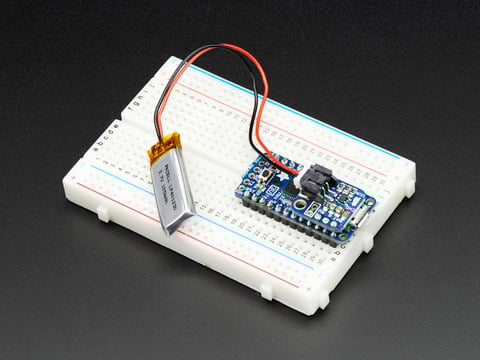
If you have an ItsyBitsy or Pro Trinket you probably know it's the perfect little size for a portable project. This LiPoly backpack makes it really easy to do! Instead of wiring 2 or 3 ...
anything with a bat, ground, vcc set of pins will work
(in that order)
half sedge
But wait... there is a space to solder a JST connector at the back of the ItsyBitsy M0. Where that recommended acquisition is an old product for the Pro Trinket/ItsyBitsy. So why would I want that piggy baging solder on top add-on if I can solder at the bottom a JST. And will it actually work?
Well there is the charging...
half sedge
😦 ItsyBitsy M0 + Lowest Shipping cost to Belgium is 27.00$ => 22.07€ . Because this is above 22€ Belgium will at the minimum ask me for 21% of VAT and maybe even more for processing that. I believe I will calm down and wait for Pimoroni or other Adafruit Reseller in EU to have that. I should actually avoid watching Adafruit New nEw neW.
Yeah it is VAT (on cost + transport) + 15€. So shipping cost more than the product. Then import double that price (because I am just at the limit). This is how I ordered my "Circuit Playground Express - Developer Edition PID: 3333" and yes that extra cost was a surprise for me. But I can wait for the ItsyBitsy M0.
manic glacierBOT

 strange juniper
Help please, I experimented with circuit python on my cpx and now I'd like to switch back to arduino. I can't find any info...
raven canopy
@strange juniper here is what I do. 1) put the CPX in bootloader mode by pressing the RESET button twice (red LED should start blinking). 2) burn the Arduino bootloader, or upload a sketch.
step 1 may be extraneous, but that's just how i roll. and I'll get you a webpage to reference in a sec.
strange juniper
@raven canopy Thank you! I've never loaded the Arduino bootloader so a doc would be a great help.
manic glacierBOT
Looks great! Thanks for the update!
raven canopy
@strange juniper I could've sworn I've seen a "how to switch between" paragraph, but that may have been in previous edits. At any rate, here is a good bookmark for you for the steps I just mentioned. again, step 1 is probably only needed if "you ever get in a 'wierd' spot". 😄 https://learn.adafruit.com/adafruit-circuit-playground-express/set-up-arduino-ide#manually-bootloading
strange juniper
Thanks. I've been trying that it hasn't seemed to be working. But maybe it is working and I just can't recognize that. When I try to upload a sketch I'm getting an SAM-BA error. I wasn't sure if that was due to having run circuitpython on the board previously.
Now that I know I'm using the right process helps. I'll try a different approach.
raven canopy
what is the exact error message?
strange juniper
SAM-BA operation failed
raven canopy
hmm. were you using Arduino with the board before circuitpython?
strange juniper
yes, I tinkered with it a little then loaded circuitpytoin on it.
I'm kinda comfortable with ardhuno sketches, not a guru, but not a noob.
raven canopy
while in reset, are you trying to upload a sketch or just burn the bootloader?
strange juniper
Upload a sketch
raven canopy
try just burning the bootloader. if it burns, then reset into normal mode and try uploading the sketch.
raven canopy
From the Arduino IDE, Tools -> Programmer -> USBtinyISP. Then Tools -> Burn Bootloader.
strange juniper
Ahhh. I'm a victim of my own inexperience. I'll try that right now.
raven canopy
we're all inexperienced at one point. no worries. also, check that you're using the correct serial port. it switches when you enter bootloader (i forogot to mention that earlier..b/c i forgot myself)
idle owl
@slender iron I approved your PR but I can't merge it, I don't have access.
strange juniper
Hmmm, it's telling me select a programmer. I did switch to USBtinyISP.
Let me look that up on the web
raven canopy
do you have all of the board libraries? (Arduino SAMD, Adafruit SAMD)
if you scroll up on that page I linked, it will get you started from scratch
nvm...you've already used Arduino with it so you should have the board libs. (its friday...my brain is shutting down)
strange juniper
Pretty sure I do/did download them. Double checking now. I get the Friday thing. Really appreciate you helping.
Yeah, verified. Arduino SAMD 1.6.17 installed. Hmmmm, the plot thickens
raven canopy
try installing the adafruit SAMD lib too.
strange juniper
The setup page only lists the arduino samd support
raven canopy
hmm. right you are...
strange juniper
Where/how do I get the adafruit samd? When I put it in the search bar it comes up empty, well, it lists arduino boards. No specifc adafruit baord managers
raven canopy
this is on the trinket page: https://learn.adafruit.com/adafruit-trinket-m0-circuitpython-arduino/arduino-ide-setup
@idle owl I know you're not an Arduino user, but is the Adafruit SAMD board library needed for the CPX? There are differences between the Trinket M0 and CPX learn guides for setting up Arduino IDE.
idle owl
@raven canopy Looks like Adafruit SAMD (32-Bits ARM Cortex M0) is needed
If I go to the Boards menu under Tools, that's the heading that the Adafruit Circuit Playground Express is listed under.
Hope that helps. Dinner time here!
raven canopy
@idle owl its missing from the CPX guide, which only lists the Arduino SAMD library steps. want me to put in feedback?
and bon appetit!!
strange juniper
Added the 3rd party url to my preferences. It was blank.
Restarted the IDE (FWIW I'm using 1.8.3)
Loading the adafruit SAMD now, 1.0.22. - Loaded
Restarted the IDE - verified the adafruit samd loaded.
Plugged int he CPX
Selected the correct com port.
Put in bootloader mode
Ensured that USBtinyISP was the selected programmer
Selected burn bootloader
Get the error message that I need to select a programmer from Tools 😦
tidal kiln
@raven canopy this was discussed not too long ago (not here), and the short answer is the CPX guide should work as is
raven canopy
@tidal kiln alrighty, works for me. 😄
well, bootloader isn't working... on my trinket. just updated Adafruit SAMD to 1.0.22, going to try that.
strange juniper
Ok, please let me know what you find out
tidal kiln
@raven canopy are you asking because of the issues @strange juniper is having?
raven canopy
yeah. i'm getting the same error he is. it worked for me like a week ago...
tidal kiln
oh weird. just walked in. guess i need to read me some scroll back buffer. unless someone wants to TLDR for me.
raven canopy
TLDR: trying to replace with Arduino on the CPX. Arduino IDE is giving "Please select a programmer" error while trying to burn the bootloader using "USBtinyISP" (and all others I've tried)
strange juniper
Background. I did use arduino on this device before trying/installing circuit python
If you need any details please let me know I'd be happy to supply them.
tidal kiln
@strange juniper let's check basics first - can you get the CPX into bootloader mode? double press reset, get a CPLAYBOOT drive to show up?
strange juniper
Yes. that works and the CPLAYBOOT drive comes up.
Happy to walk through this. I'm a software tester, know the drill.
raven canopy
I have faith that cater can figure it out.
tidal kiln
is it currently running circuitpython ok?
tidal kiln
arduino blink?
strange juniper
yes.
tidal kiln
just now?
strange juniper
Previously to this conversation. This has been a several night affair.
tidal kiln
any idea what's changed since then?
raven canopy
not to muddy up and interrupt: just got a sketch to upload (while burn bootloader was still failing).
tidal kiln
if double reset brings up CPLAYBOOT, then bootloader is probably OK
strange juniper
No. But. My current issue is a SAM-BA error when trying to load a different sketch.
My trying bootloader and loading the sketch blink was a blind try on my part. I could not find aclear document stating how to get back to arduino from circuit python.
Then I tried to load a gyro demo sketch and got the SAM-BA error. Could not find a clear resolution for that on the web.
tidal kiln
in general:
CP to Arduino = just upload an Arduino sketch
Arduino to CP = go into bootloader and drag CP UF2 over
strange juniper
Thank you. That helps.
tidal kiln
does the blink sketch also fail in the same way?
strange juniper
No it works.
Difference is
When I uploading it the CPX does not bring up bootloader during the upload.
tidal kiln
it = what?
strange juniper
The demo gyro demo sketch.
strange juniper
Yes, the blink sketch uploads normally and works.
Yes, here is a link to the sketch: MPU-6050 (Available from: http://eeenthusiast.com/product/6dof-mpu-6050-accelerometer-gyroscope-temperature/)
EEEnthusiast
Projects, Tutorials, Reviews and more...
Or would you rather I post the sketch?
I assume discord does snippets
tidal kiln
that link is 404
you can put it here if it's not super long
and surround it with three back ticks for syntax highlighting
#define LIKE_THIS

Discord
Want to inject some flavor into your everyday text chat? You're in luck! Discord uses Markdown, a simple plain text formatting system that'll help you make your sentences stand out. Here's how to d...
raven canopy
tidal kiln

GitHub
Contribute to EEEnthusiast development by creating an account on GitHub.
strange juniper
Yes.
strange juniper
Ok, so what is different. Yes
Asking myself, what is different, not you
You've been wonderful
tidal kiln
yah, i'm not sure what could cause a sketch dependent issue with uploading
blink works, but not that?
strange juniper
Yep
tidal kiln
you say you're on 1.8.3?
strange juniper
Yes on windoze
tidal kiln
would you be willing to just start fresh with the arduino software?
strange juniper
Got a different proposition for you. Let me try another CPX. I have two. Until I had a solid answer about switching back from circuit python I was afraid to try it. I'll try that and if it fails in the same way I can reload the IDE on my windoe mahcine. I can also try my work MAC if I have no luck here.
tidal kiln
ok. there's one trick to a "fresh" install of arduino, so let me know when/if you're ready to go that route.
raven canopy
you could also try upgrading to Arduino 1.8.5. (like i said, just worked for me)
raven canopy
@strange juniper sorry i was taking you down a incorrect path....
tidal kiln
trick = also delete the Arduino15 folder, wherever that is on windows. maybe:
C:\Users(username)\AppData\Local\Arduino15
raven canopy
yeah, arduino defintely likes to boggle installs in that directory. been down that road a few times.
strange juniper
@raven canopy That is perfectly fine. Thank you for saying that. That means a lot to. I've been in your seat before. I have some understanding.
Will do @tidal kiln and report my results here.
I too am going to break for dinner.
@tidal kiln As I said, you've been great! I really appreciate the effort
raven canopy
same here. pizza is awaiting a metal disc... 😋
tidal kiln
@strange juniper if you do the fresh install, also try doing what the CPX guide says, that way we can have some more testing that the guide is OK as is
strange juniper
I'm very ok with that. I like testing procedure and documents 😃
tidal kiln
i have so many things installed that maybe it works for me because of something the guide is missing
and.....good luck!
strange juniper
Thanks
jovial wind
@tidal kiln would it work to test it in a docker env? https://hub.docker.com/r/davechick/arduino-dev/
tidal kiln
@jovial wind maybe. that or some other virtual box. don't tell anyone, but it's a trick i need to learn. 😃
jovial wind
@tidal kiln I think you could just do docker pull davechick/arduino-dev once docker and arduino-core is installed. I was just thinking python virtualenv but for the arduino dev env
but I'm just as bad with that...I'll have lots of stuff installed, and then just write up scripts that grow to be something bigger, and then wish I'd used a virtualenv later heh
also just noticed that all the examples are done..should have backscrolled earlier
manic glacierBOT
 strange juniper
@tidal kiln
@raven canopy
Upgrade to 1.8.5 and now I can't Blink to upload - At least things are becoming more consistent :)
Uninstalled 1.8.5
Deleted everything in the Arduino15 directory
Installed 1.8.5
Interesting, my CPX is currently plugged in and when I started the IDE it is prompting me to install a package for the CPX. I think I will. I have verified that the SAMD is not installed.
Clicked the install link and the SAMD is listed in the board manager and installing it.
Quit and re-opened the IDE
Put the CPX in bootloader and successfully uploaded blink
Opened the demo sketch and put the CPX in bootloader
Nope. Same failure:
SAM-BA operation failed
An error occurred while uploading the sketch
If plug the board in, don't go to bootloader I have gotten a success twice and a fail once, the SAM-BA error while uploading blink
All this is being done on the original board I started with
Conclusion:
I might have some race condition going on with my setup - I'll try doing some substituting with my 2nd CPX and I'll try the IDE on a different machine
Thank you for your help!
idle owl
Are you choosing the correct port? This question is entirely based on a totally different setup returning a SAM-BA error due to not specifying the correct port - totally different as in not even Arduino based, but I figured ask anyway.
strange juniper
Yes, when I upload. But as part of the up load my CPX does a reset and goes into bootloader again.
idle owl
Right, ok. Was worth checking.
strange juniper
Thank you too @idle owl for pitching in on this
idle owl
Yeah for sure. I'm very new to Arduino so my help is limited. Trying the IDE on a different machine sounds like a solid next step.
New as in really didn't do much with it until this week. But I didn't have any issues with the Feather M0 Express when I loaded a sketch on it, and it's in the same board library.
To verify: Once you reloaded the IDE, you installed Arduino SAMD Boards version 1.6.15+ (I think it's higher now), and the Adafruit SAMD Boards packages in the Boards Manager? And then restarted the Arduino program?
strange juniper
Yes to the Arduino SAMD, no to the adafruit SAMD. THat is based on a request from Acater to use the CPX guide exclusively.
idle owl
Oh hmm, there was an update to the Adafruit SAMD Boards package in the last day. Shouldn't make a difference for you though, it should have worked regardless.
Ahhh ok
I think it might be wrong.
If it doesn't tell you to install the Adafruit SAMD boards package. I'm going to check it.
Oh hmm.
You're right. I wonder if the Arduino SAMD boards was updated to include it. Or whether the guide is incorrect. I'm not sure which.
Huh. Ok. I looked it up. It's included.
strange juniper
Ahh, ok.
 strange juniper
I'd assume that this means it's included
adafruit_circuitplayground_m0.name=Adafruit Circuit Playground Express
idle owl
Agreed. The Classic was not an M0 SAMD board.
Good to know. So the guide, at least as far as technically speaking, is correct.
Have you already checked the Adafruit forums?
I just did but if you already had I didn't want to link you to what you've already read.
I found one that might help.
raven canopy
man. super bummer!
strange juniper
I did but did not find anything particularly helpful. I'd love to see what you found.
idle owl
It isn't CPX, it's Feather M0 but it's the same error https://forums.adafruit.com/viewtopic.php?f=8&t=117533&p=650303&hilit=sam+ba#p650303
strange juniper
Oh @idle owl The port on the left side of my machine is the 3.0. That where I have room for the board. Standby.
idle owl
The last response says switching from 3.0 to 2.0 didn't help, they did something with putting it into the bootloader manually.
strange juniper
No SAM-BA error!
idle owl
Nice!!
strange juniper
Sample set of one result, but I'll take it!
idle owl
So the USB Is being silly. We run into that all the time with CircuitPython.
raven canopy
foiled by progressive technology! whodathunkit! 😄
strange juniper
Bingo
raven canopy
great find @idle owl!
strange juniper
That was the one I tried!
idle owl
Oh nice!!
strange juniper
But now a new question
idle owl
😃
strange juniper
I just tried blink. The led is blinking, but the first neopixel isstayingon and green.
That is different
strange juniper
I just did a 'powercycl' and same result
Hitting the reset button does the same thing too
idle owl
Odd. Blink isn't fancy for the CPX or anything is it? It's just the simple pin 13 LED_BUILTIN ?
strange juniper
Right. Blink doesn't even know pixels exist.
idle owl
I've never used Arduino with the CPX, is it possible that the first NeoPixel works as a status light with Arduino loaded?
Wait I have it all setup, and I have a CPX sitting here. I can load it up. Give me a second here.
strange juniper
Switched back to the other port and I got the same result, pixel lit. LED blinking
strange juniper
Was your board running circuitpython previous to this?
idle owl
No, this was fresh out of the bag, so it had a MakeCode demo on it.
Should I load CP on it first to test where you were at?
I mean it shouldn't matter, I wouldn't think.
strange juniper
yes. My genesis is:
tinkered with arduino
Loaded CP
Switched back to using arduino
strange juniper
Yeah, your board is part way there 😃
idle owl
Even loading a .py to really test it. Ok that's done.
strange juniper
Cool
idle owl
Now heading back to Arduino.
strange juniper
Ok, I put it in bootloader and loaded blink
idle owl
I have blinking red LED and no green NeoPixel.
Did you try reloading Blink?
I think we had some weirdness with the first NeoPIxel, but I thought it was CircuitPython related. And I didn't think it was green when it was acting up.
strange juniper
Did your CPX do a reboot and go back to bootloader when the upload was complete?
idle owl
No, it rebooted to the blinking red LED.
strange juniper
Mine is acting differently
stand by
I'm going to try my other cpx board
I messed with arduino on it. Then loaded circuitpython.
I'm going to plug it in to my 2.0 port and just upload blink to it.
strange juniper
ok
Works correctly. Uploaded. The CPX reset, all pixels went dull green. then turned off and the led started blinking.
I think I hosed this other one.
strange juniper
ok
idle owl
Put the unruly one into the bootloader, and drag this file to it: https://cdn-learn.adafruit.com/assets/assets/000/048/745/original/flash_erase_express.ino.circuitplay.uf2?1512152080
We call it the flash eraser for when CircuitPython gets totally hosed
strange juniper
Oh, I tried that earlier today. I'm happy to do it again
strange juniper
Blue led
idle owl
Good
strange juniper
Blinky green pixel
idle owl
Ok. Put it back in the bootloader and then try loading Blink again
strange juniper
Nope. Blinky LED and green pixel.
idle owl
Weird....
That's all I've got. I would consider posting to the Adafruit forums. It's usually really difficult to actually hose these boards, so I'm wondering if there's simply something we're missing. The support people on the forums might have a better idea.
strange juniper
Thank you for trying. You've been great. I will post my issue there and see what comes up. I'm done for the night, it's 11 here
strange juniper
You too, enjoy the weekend! I
idle owl
Thank you!
 noble lance
Anyone have any ideas/tips on how to calculate the average frequency of the input of the microphone on the circuit playground?
stuck elbow
@noble lance FFT?
timber lion
tonight's sinobit micropython hacking, I ported the web editor to use my sinobit firmware 😃 pretty darn sweet, write code in browser and copy to sinobit just like microbit but using my sinobit firmware: https://twitter.com/tdicola/status/962260220427755522
We have a webpage and web-based editor for sino:bit MicroPython now! Ported the micro:bit versions to use my firmware. Write code, download hex, drag to sino:bit drive and it runs: https://t.co/ikcXIKQ4N6 and https://t.co/0bjRUKhHYN Happy hacking! @RealSexyCyborg @glowascii :)
 Twitter
homepage i made here: https://tdicola.github.io/sinobit-micropython/ and the editor: https://tdicola.github.io/sinobit-micropython/editor/editor.html
sino:bit MicroPython
Port of MicroPython for the sino:bit single board computer (a variant of the BBC micro:bit & Calliope Mini).
did some github pages magic to make it all just hosted straight from github
it works really well
if you have a sinobit check it out
it's using the latest firmware i made that emulates the microbit display so all microbit code should work
but you can import the sinobit module to use the full 12x12 display
sick creek
@timber lion could that web editor to make PWA
stuck elbow
@noble lance https://hackaday.com/2018/02/10/all-the-stuff-you-wished-you-knew-about-fourier-transforms-but-were-afraid-to-ask/
The Fourier transform underpins so much of our technological lives, in most cases probably without our realising it. The ability to mathematically split a waveform into its frequency components and…
manic glacierBOT

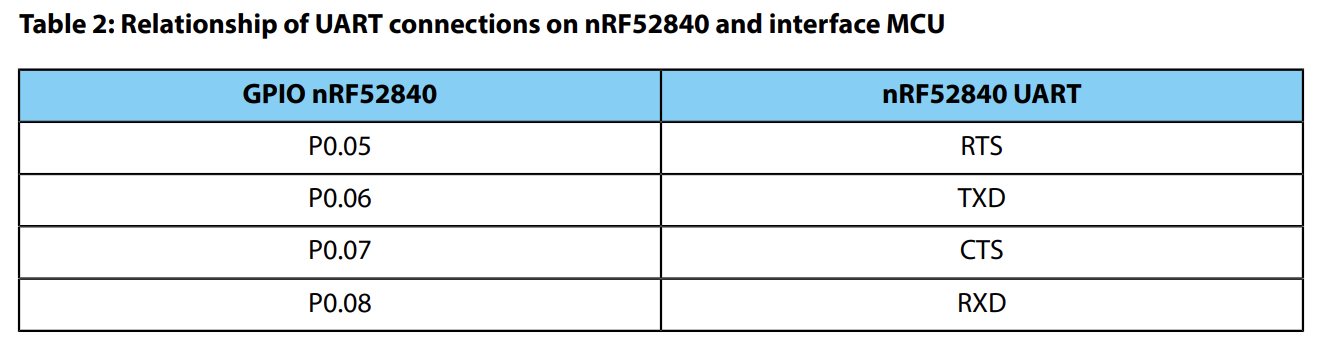
On (L)ubuntu 17.10 if I plug in a stock Feather M0 Express running CircuitPython provided by adafruit-circuitpython-feather_m0_express-2.2.3.uf2 and then wait a respectful amount of time for it to launch, connecting using screen /dev/ttyACM0 115200 then I get
SyntaxError: invalid syntax
Whatever I type as my first command, including empty line.
If I am more swift to connect to the board, I can see a whole load of AT commands are echoed to /dev/ACM0 sent as if the Feather was being ...
manic glacierBOT
Got my Feather working with the DFU bootloader and verified that all three cases (no SD, v2.0.1 and v5.0.0) work. Also fixed the flash issue @jerryneedell found.
noble lance
@stuck elbow thanks!
 timber mango
Hello. I worked with the Metro-M0 Express, attached a 2.4'' Touch-TFT and enjoyed the Arduino demos. But now: how can I the same demos running in CircuitPython? As far as I understand I would need to have the "Adafruit_ILI9341-master" and "Adafruit-GFX-Library-master" ported to CircuitPython. Is that correct? Are there other demos (including touch & text-output) already available for CircuitPython?
stuck elbow
@timber mango you will need https://github.com/adafruit/micropython-adafruit-rgb-display but I don't know about any demos with it
GitHub
micropython-adafruit-rgb-display - MicroPython library for RGB pixel displays.
This might also prove useful: https://github.com/adafruit/micropython-adafruit-gfx
GitHub
micropython-adafruit-gfx - Pixel graphics drawing library for MicroPython.
timber mango
Thanks my friend. It's true, these I need. But I could not find demos either.
stuck elbow
It's still early days with CircuitPython, not everything is yet documented as well as we would like
indigo wedge
threre's a small example in the docs http://circuitpython.readthedocs.io/projects/rgb_display/en/latest/README.html
stuck elbow
and the gfx library has some examples in the examples directory too
timber mango
when using one of the examples I get the following errors: "no module named 'machine' / 'ili9341' / 'gfx'
what to do next? sorry it if it's a bit boring for you - I just started digging into Python ...
I did copy the file "gfx.py" into a subfolder which I named "adafruit_gfx"
The subfolder "adafruit_rgb_display" contains both "ili9341.py" AND "ili9341.mpy". Which is relevant and why was none found?
stuck elbow
that example is for micropython not for circuitpython
the library will work on both, but the examples would need to be adapted
timber mango
@arthuro182: I used the example you mention alreay, it works. Thanks
solar whale
@indigo wedge just tried PR#601 on feather52 -- no problems 😃 Thanks
timber mango
The only remaining problem appears to be the line
import adafruit_gfx.gfx as gfx
which leads to
File "/lib/adafruit_rgb_display/init.py", line 2, in <module>
MemoryError: memory allocation failed, allocating 224 bytes
stuck elbow
right, you want to use the compiled version of the library
you can get it from here: https://github.com/adafruit/micropython-adafruit-rgb-display/releases
GitHub
micropython-adafruit-rgb-display - MicroPython library for RGB pixel displays.
timber mango
of which library? gfx.py?
when excluding the line import ... gfx ... (as above) there is no problem which points to the adafruit_rgb_display-folder
can I recogize a compiled version of a library at the extension "mpy" versus "py" for the source?
indigo wedge
@solar whale awesome!
timber mango
sorry, a bug: i wanted to say gfx.py unavailable in compiled version 😃
as far as i understand now I should have gfx.mpy instead
timber mango
the example named ili934_test from the micropython-adafruit-gfx-master calls
graphics = gfx.GFX(240, 320, display.pixel, hline=fast_hline, vline=fast_vline)
timber lion
you might wonder, can the sinobit micropython port run digital sand? why yes, yes it can 😃 https://twitter.com/tdicola/status/962407566306197504 runs it pretty darn well.. 20 grains at a good speed. seems quite a bit faster than the SAMD21

Ported @PaintYourDragon @dastels 'digital sand' simulation to sino:bit MicroPython @RealSexyCyborg @glowascii @adafruit @ntoll This is SUPER cool! 20 grains run well. Code is here: https://t.co/eJjAHnMygf (too big to fit in web editor :( load with ampy) https://t.co/8xOus6AOMo
Twitter
i think i can optimize a bit more and add even more grains
or toss it in a C function 😃
stuck elbow
@timber mango you can also get the mpy-cross from here https://github.com/adafruit/circuitpython/releases/tag/2.2.0 and compile gfx.mpy yourself with it
GitHub
circuitpython - CircuitPython - a Python implementation for teaching coding with microcontrollers
timber mango
@timber mango - thanks, it works, so I got a gfx.mpy. but the following line bring me back to the memory problem
import adafruit_gfx.gfx as gfx
==> File "/lib/adafruit_rgb_display/init.py", line 2, in <module>
MemoryError: memory allocation failed, allocating 224 bytes
idle owl
@stuck elbow Yes there is. https://github.com/adafruit/Adafruit_CircuitPython_RGB_Display/tree/master/adafruit_rgb_display
GitHub
Adafruit_CircuitPython_RGB_Display - Drivers for RGB displays for Adafruit CircuitPython.
stuck elbow
I can't see it
idle owl
Really? it's __init__.py: https://github.com/adafruit/Adafruit_CircuitPython_RGB_Display/blob/master/adafruit_rgb_display/__init__.py
GitHub
Adafruit_CircuitPython_RGB_Display - Drivers for RGB displays for Adafruit CircuitPython.
idle owl
Oh I was thinking the error just eliminated the __ ... nm.
Like errors ignore when they're .mpy files and call them .py files. Something like that.
stuck elbow
I guess the gfx library takes so much memory that there is nothing left for the display driver
idle owl
Seems possible.
timber mango
I guess the underlines were accidentally stripped when I pasted it here. Indeed it should be init.py
idle owl
Oh it's the markdown messing with it.
stuck elbow
ah, it's the stupid markdown format of discord
you can put strings between ` marks
like this
to avoid that
anyways, that's just trying to import the display driver library
idle owl
@timber mango One backtick (top left of the keyboard) on either side of something makes it inline code. Three backticks on either side of something makes it a code block
timber mango
@stuck elbow: memory consumption appears the correct suspicion
the messages slightly differ when I change the order of the lines
import adafruit_gfx.gfx as gfx
import adafruit_rgb_display.ili9341 as ili9341
but both error messages indicate lack of memory
I wonder how much (or how little) memory there is available on the Metro-M0 Express ?