#circuitpython-dev
1 messages · Page 143 of 1
 tulip sleet
 solar whale
list of shame 😉
 robust coral
On Linux and OS X, can the "sync" mount option make all of these editors safe?
 tidal kiln
@robust coral in general, yes
 umbral dagger
I tend not to edit directly on the board. It's nice to have a copy on my disk in the event that something bad happens.
 manic glacierBOT

just adding a note, the arduino library is here https://github.com/adafruit/Adafruit_SHT31

 raven canopy
@umbral dagger that's what I've been doing, too. Granted, mostly for dev. My workflow is 4 windows (samd at least): REPL, two file windows, and IDE(s). If only windows could add "all windows equal" or quadrant to the stacked/side-by-side options.
I have been meaning to give mu a run though...
manic glacierBOT

Unless someone else want this one - you can assign it to me and I'll give it a shot.
solar whale
I have begun to appreciate mu when I do want to work directly on the device FS. It has been working well for me.
manic glacierBOT

Its done through a cast so I'm not sure if sizeof would work: https://github.com/adafruit/circuitpython/blob/master/py/objfun.c#L356
umbral dagger
@raven canopy For me it’s emacs, a terminal for repl, and a file manager window. If I’m hacking on CP itself (as opposed to working with it) add another terminal for building. I have a 27” 4k display so there are always other windows floating around. Typically netflix or a music player.
solar whale
@rotund basin I'm not sure what you are looking for - have you looked at this guide? https://learn.adafruit.com/micropython-hardware-sd-cards?view=all

Learn how to use a microSD card to store code & data with CircuitPython and MicroPython!
 rotund basin
@solar whale last time I was in the room it was gitter and before release 2. I want to know if storages can mount any SD card or does it have to be the feather ?
solar whale
I've used the featherwing (adalogger) and a breakout board as well as the m0 Adalogger. All seem to work OK. There were some reports of issue with some types of SD Cards. Not sure where that stands, but SanDisk cards have worked well for me.
I'v also used the SD card on aTFT display.
rotund basin
@solar whale perfect thank you , I can make my robot now
solar whale
Good luck!
 slender iron
oh! @rotund basin who was doing the lawn mowing robot? welcome back!
here is the final heap video: https://youtu.be/gSfmVdRejTk

In CircuitPython 3.x we've changed the way objects are saved in memory. We now separate them into two different sides of the heap so that long lived objects ...
tidal kiln
Sweep!
rotund basin
@slender iron yes it's me robot mower smartmow sorry I was away for a while
slender iron
no problem @rotund basin! How are things?
rotund basin
@slender iron I'm good I'm thanks for asking 😃 how are you?
slender iron
I'm great! circuitpython is going super well
rotund basin
Great I'm going to use it for my robots 😃
slender iron
awesome!
 stuck elbow
Is this demo cheesy enough?
slender iron
@stuck elbow thats awesome
stuck elbow
finally writing the docs, since I'm on a sick day today
stuck elbow
I'm starting to think about asking for a half-year sabbatical at work, just to finish all the projects properly
slender iron
that'd be fun!
 sleek storm
Where do I find the API docs for CircuitPython_CircuitPlayground?
I just got a CircuitPlayground Express I'm playing with
tulip sleet
@sleek storm there's a formatted version of what's in the code here: http://circuitpython.readthedocs.io/projects/circuitplayground/en/latest/adafruit_circuitplayground/index.html#module-adafruit_circuitplayground.express
 crystal pumice
hey guys, what hardware do u reccomend to purchase with the M0 Express in order to tinker with different libaries?
like leds, servos, sensonrs and more 😃
 idle owl
Sounds like you already have a pretty good idea 😃 This category has a lot of options for compatible hardware: https://www.adafruit.com/category/956 Otherwise do a search for NeoPixels or DotStars (different libs for both, but both LEDs), servos and so on, if it's not included in that category to pick something.
crystal pumice
10x
 bronze geyser
I wrote up my experience with the RFM69 library in case it can help others....https://bitknitting.wordpress.com/2018/01/25/rfm69-on-circuitpython/
I am excited to see a library for the RFM69 for CircuitPython from Adafruit. While I want to use LoRa, this library is a good start to a RadioHead port. The Goal The goal of this post is to docum…
idle owl
@slender iron Do you have a few? I'm having trouble getting sphinx to build. I remembered to add the mock_imports, but it isn't fixing this issue, google isn't helping, and I'm not sure where to go with it.
slender iron
yup
 half sedge
Hi, I am about to do this: https://twitter.com/DavidGlaude/status/956285836538019848

Will I be able to program that Tiny45 on my "Crazy Clock by Geppetto Electronic" using my "PCB quick connect clip" (for Raspberry PiZero) by @flatmax.
Could I use the just in time Circuit Python AVR programmer by @ladyada ? https://t.co/k2G5xczPAm
This is totally new for me.

 Twitter
Updating my feather M0 express to 2.2.1 and installing @meager fog AVR programmer.
What could go wrong? This is supposed to work, right?
I have the signature, I was able to compile the C code on a Pi.
Typo in https://learn.adafruit.com/stand-alone-programming-avrs-using-circuitpython/software-setup :

Program your favorite AVR chips directly from CircuitPython
slender iron
@half sedge it should work!
half sedge
You should fill the missing word with Gemma M0 and Trinked M0.
And the bot does not like me to use x times X.
slender iron
where is the typo?
 stoic gazelle
@idle owl gave a Welcome to CircuitPython talk at our local Linux user group a couple of weeks ago
I just got the video up on youtube:
https://youtu.be/307Ia_mv8AA
CircuitPython is a programming language designed to simplify experimentation and education on low-cost microcontrollers. It's super simple to get started wit...
half sedge
@slender iron It seems to be missing words, between "Remember for non-express boards like the" and ", you'll need to manually install the necessary library from the bundle:"
Anyway, I have the famous "SPI transaction failed". I powered my chip and verified there is a common ground and there is a cristal on the board.
I inverted MISO and MOSI (just in case) and normally I use the right pin for reset.
It is a Tiny45, so I believe it is 3.3V
I don't see where I made a mistake, but since I don't know what I am doing, anything can be wrong.
Ok, I give up for tonight. Maybe redoing the wiring tomorrow will fix it. Or the pin on my crazy clock do not follow the standard order.
slender iron
@half sedge added Trinket M0
 timber mango
the trinket pro is the same as the the trinket M0
slender iron
no, the trinket pro is older
timber mango
okay
slender iron
@idle owl if you have time, take a glance over this guide page for me please: https://learn.adafruit.com/adafruit-stepper-dc-motor-featherwing/tdicola-circuitpython

Make your feather motorized
I switched it to using the featherwing library
idle owl
@slender iron Np, looking now
slender iron
thanks
stuck elbow
@idle owl watching your talk, I just want to clarify — the M0 boards are all 3.3V
idle owl
Thank you, my answer felt off on that one. I only partially undersood.
stuck elbow
also, there are both analog inputs (all the A* pins) and one analog output (the A0 pin)
idle owl
Yah Scott just explained that one too
I knew they were on there, I couldn't remember the specifics.
stuck elbow
yeah, it's hard to remember everything on stage
especially when the audience asks randomly
idle owl
Yeah there were a couple of odd questions.
stuck elbow
I think you answered very well to most of them
idle owl
Sure!
slender iron
finally wrapping that work up
bronze geyser
@idle owl I am very grateful for your help as well as others here.
idle owl
@bronze geyser I'm happy to help! You've been doing really well with everything.
idle owl
@slender iron PR in for joy_featherwing 😃
slender iron
will look tomorrow
idle owl
excellent
slender iron
time to go have dinner
idle owl
Have a good one!
slender iron
you too!
timber mango
i have question about the trinket m0
female headers or male headers
I went with stacking headers. Barely fit but I like them.
No real room for the fastener, though, if you're used to using them with other target boards that have a bit more elbow room (Feather M0 Express for example).
raven canopy
@timber mango its kind of purpose dependent.
breadboard: male.
breadboard->final project: stacking female works well since you can cut the leads after breadboarding. but, they are harder to desolder if you change your mind.
final project only: depends on your choice of connectors...kind of anything goes.
and truth be told, that whole list could be rearranged. i guess the minimum threshold is this: "if you can make it work, it's fine."
raven canopy
 Trellis library has addressable light! i was going to put up a video (because blinky!), but my phone's battery said no. are all bitwise operations always this difficult? i eventually had to hand write each step out to grasp what wasn't working... 🤓
stuck elbow
I found sone extra low female headers that I like to use with the trinket. Their pins are long enough that with the thin pcb that trinket uses you can even stack them.
slender iron
@raven canopy yeah, bitwise is complicated. I don't think we should require its use with any of our libraries
@fading solstice are you looking for more work to do? seems like the examples stuff is done
 fading solstice
@slender iron almost done yes. three more to do. But i can start thinking about more to do. what do you have in mind?
slender iron
@fading solstice read the docs setup
I started working on some adabot checks yesterday and I was thinking I could wrap them up today and hand it over to you
if you'd rather do code then I'm happy to do it
raven canopy
@slender iron it's all in the back end; user only supplies a number 1-16. Just like the HT16K33 library, using non-bitwise, hard variables would pointlessly use up memory. At least, that's how I perceive it.
slender iron
@raven canopy thats good. what do you mean by hard variables?
raven canopy
Something like led1 = b'0x00\0x04\.... for each led.
slender iron
ah, sure
 sharp bramble
Hi CP team... please feel free to redirect me if this question belongs somewhere else (a ticket on a Github repos, forum, etc.). I'm encountering crashing bugs with the Adafruit packaged (?) version of Mu on some versions of OSX. Here's an image of the report I got from a student: https://ibb.co/csnZUG

It looks like it was built against a Python for 10.12, and they're running 10.11, which might be a source of problem (or might not)? I can switch to writing code in a text editor, and have them save to the CPx directly, but I thought I'd give Mu a go.
Naturally, the one machine I tested on, nothing went wrong... 😄
I'm not sure if this is a Mu repos ticket, or an Adafruit repos ticket, or a forum question, or...
idle owl
That's a good question.
manic glacierBOT
 idle owl
@sharp bramble Ok. Post an issue to the Adafruit Mu repo with all of this information. I need to think on whether it makes sense to post to the forums as well or not. Or let someone else give feedback on that too. But I think the Adafruit Mu repo is a good place to start since that's where we're keeping the versions Adafruit built.
I think I had issues with the .app version as well
I had to use the command line one that has the odd ternimal-launcher thing, but it worked ok. Did you have your student try both versions?
sharp bramble
No; I don't know if I knew there were two versions. I'll work with the student and see if we can get one working and one failing, which would be useful unto itself.
timber mango
@raven canopy
idle owl
Let me make sure it's still the case that there's two. Something could have changed since the last time I tried Mu.
@sharp bramble Actually, there's only the one. Is this the link you used? https://github.com/adafruit/mu/releases/tag/1.0.0b13

GitHub
mu - A "micro" editor for MicroPython and the BBC micro:bit. Written in Python and Qt5.
It unzips to a terminal-launcher version of Mu. I'm not on the same OS as your student though, so the fact that it works does not imply it will for your student.
This is the direct link: https://github.com/adafruit/mu/releases/download/1.0.0b13/macosx_mu.zip
@sharp bramble Make sure your student tried that version. It may be that they did and it doesn't work.
sharp bramble
Yes. That's the link I put into my materials.
To use your CPx with Python, you will need to take a few steps. You should, of course, feel no fear in asking questions about getting things set up.
I had to verify.
idle owl
Ok. It was worth looking into, but that won't fix the issue. I would file an issue and we'll go from there.
sharp bramble
My Mac is currently up to 10.13, which is ahead of the 10.12 that Mu was built on. I will encourage the student to update their OS, and see if that fixes it.
idle owl
That might also help!
sharp bramble
I'll still file the issue, as it could be an OS/Python build issue.
idle owl
Thank you!
sharp bramble
That's my guess, from the error message. It looks like a symbol is missing deep down in the Python build, which could be an OS-versioning problem. How to fix that... ?. Perhaps building Mu on an older OS? Or, against an older Python? I don't know. I'll file the ticket for now, and will file any findings I have to the ticket. Thank you again, @idle owl .
raven canopy
Thanks @timber mango. I understand the operators and most of the theory. This specific operation just stretched my understanding by having to hit specific values.
idle owl
@sharp bramble You're welcome. Thank you for filing the issue. That's how we make things better 😃
sharp bramble
I can't file issues on that repos.
sharp bramble
Thanks. And, I'll see if I can get a Mu build going on my machine this weekend. That won't explicitly help, but it would get me to a point that I can dig deeper in the future.
timber mango
@raven canopy I use gforth to tell me the answers as it already has a full vocabulary for this. Some calculators (galculator comes to mind) have similar function, but I like gforth. I think bc or dc will also do this (these are all linux/unix available; dunnough about the Other Platforms Available to you. )
sharp bramble
@idle owl I assume this thing will email me if you at-mention me? I'm not a Discord expert.
idle owl
@sharp bramble No, if you have Discord setup to send notifications, it'll send you a desktop or push notification (if you're on mobile). So you'd have to keep checking back if you don't have it setup that way. There's no email options that I'm seeing.
sharp bramble
Groovy.
idle owl
@sharp bramble Ok issues have been enabed on the https://github.com/adafruit/mu repo. Please file your issue there, and include all the info we discussed. Thanks so much!
GitHub
mu - A "micro" editor for MicroPython and the BBC micro:bit. Written in Python and Qt5.
idle owl
Trying to get Mu editor installed on a fresh Linux install and it is not going well.
stuck elbow
what's wrong?
you just unpack the binary and put it in any directory and it just works...
idle owl
I'm using pip3 to get it and it's failing. Is there some other place I was supposed to get it from?
stuck elbow
how is it failing?
 brazen cave
is it possible to code a trinket or something similor to send a pre formed tweet at the push of a button? I'm completely new to this stuff
idle owl
ok, Running Python 3.5.3. First it told me pip3 wasn't updated enough. And pip3 install --upgrade pip didn't work. So I ended up finding that you can download pip3 from pypa and so I did that and updated it. Now when I do pip3 install mu_editor, it's telling me it can't find pyqt5, can't find a version that fits, no matching distrubution found. So I looked that up and it says you get that error if you're using an unsupported version of Python, which I'm not (supports 3.5 and later)
So I tried installing that separately and it's giving the same error.
Their website isn't really helpful. and google is failing me.
idle owl
um.. yes. Linux Mint 18.whatever it is right now... I literally just installed linux on this machine.
10 minutes ago.
slender iron
@brazen cave It would be hard with a Trinket because it doesn't have any way to connect to the internet.
stuck elbow
just sudo apt-get install python3-pyqt5?
idle owl
oh I tried to do it using pip3. let me try that.
stuck elbow
install all the things you can from your distro's packages, only install the things you don't have there with pip
idle owl
ah
brazen cave
@slender iron what would you reccomend to use?
slender iron
@brazen cave The Feather Huzzah with ESP8266 or maybe a raspberry pi 0 W
brazen cave
I want to keep it fairly small, so I'll try a huzzah
slender iron
👍 Are you going to use CircuitPython or Arduino?
idle owl
@stuck elbow do you always use pip in venv then?
brazen cave
i was going to try CircuitPython
slender iron
cool 😃 have you used the twitter API already?
brazen cave
i used it with php, but that was some time ago
slender iron
might be worth doing with desktop python first
idle owl
@stuck elbow ah I see.
brazen cave
i haven't done any real coding for a long time, i figured it was time to learn something new
idle owl
Now it's failing on qscintilla. Googling to see if I can figure out how to get it installed. apt-get doesn't have it, and pip3 is failing to find it.
hmm. Says 64-bit linux on the package page. I'm fairly certain this is 32bit.
idle owl
Oh, you're good
idle owl
weirdest part of this? I just tried installing mu_editor again and it failed on something else. this is rather confusing. And not great because I went through this so I could explain to someone else how to get a lab-computer image setup for me to work with CircuitPython.
stuck elbow
I think we need to have two commands in the instructions, one apt-get with all the deps, and then the pip3
but of course then you need an rpm version for the other distros
and possibly pacman, etc.
timber mango
@slender iron im having an odd thing occur, with the itsybitsy m0's
if i erase the chip, cpy doesnt re-create the FS
but it works with existing FS
i wonder if something changed
 pallid mural
how do I uninstall circuitpython from my circuitplayground express board?
slender iron
@timber mango how long are you waiting? there is a delay now
timber mango
@pallid mural with arduino?
pallid mural
circuitplayground express
slender iron
@pallid mural to use Arduino just upload a sketch
pallid mural
I mean uninstall the circuitpython.uf2 from my circuitplayground express board
timber mango
@slender iron a while, i got the pulsing green LED, repl works, and a 'ghost' drive
ill try again a bit
idle owl
@pallid mural There is an erase file that will work, but I'm not sure what you're getting at. There's always something on the board, you don't exactly uninstall CircuitPython
slender iron
@timber mango hrm, weird. dan did tweak it to try and not wipe it when we don't mean to
idle owl
Ah yeah, you need it to be in the bootloader to accept .uf2 files
If you're still having issues, you can follow the instructions here: https://learn.adafruit.com/adafruit-circuit-playground-express/troubleshooting#for-the-circuit-playground-express-feather-m0-express-and-metro-m0-express

Make faster and easier than ever with MakeCode, CircuitPython or Arduino!
But it sounds like you needed the bootloader
timber mango
@slender iron maybe somethings a bit different with the way this flash works, but ill keep going and just write over the FS
pallid mural
yeah I fixed it after doubleclicking the reset button
idle owl
Excellent!
slender iron
@timber mango maybe. is the flash chip different from the one on my itsybitsy?
idle owl
@stuck elbow I installed .qsci and matplotlib, and now it's still failing on qscintilla. I'm realising it says "requirement qscintilla==2.10.1" which is not the latest version. So that means likely the version I installed does not ==2.10.1. Which I guess means it needs exactly that version? oi.
timber mango
oof maybe. can you read off the marking
slender iron
let me find it
idle owl
Weirder, if I sudo pip3 install mu_editor and pip3 install mu_editor I get different results. It's failing on pyqt5 without the sudo. I'm kind of lost.
stuck elbow
@idle owl that's stupid 😦
pallid mural
pip is unreliable...
stuck elbow
package management is hard
pallid mural
I cant install tensorflow x86 on my laptop with a x86 processor
stuck elbow
@pallid mural are you sure it's not amd64?
slender iron
@timber mango 8N?28 OE1167
stuck elbow
most cpus these days are 64 bit
stuck elbow
i5 is amd64 arch
idle owl
.... I just figured out why sudo and not are giving different results. With sudo it's using pip3 v. 8.1.1, and without it's using the new version I installed, 9.0.1.
timber mango
@slender iron yah i think youve got the 1mb version
slender iron
@timber mango woudl you like me to try it? otherwise I can do an order monday to get a newer one
timber mango
tan, nah, ill figure it out
slender iron
kk
idle owl
so pip3 install mu_editor finds the matplotlib I installed, then tries to do whatever it does with it and fails with Command "python setup egg_info" failed with error code 1 in /tmp/pip-build-blah/matplotlib
slender iron
bye @pallid mural
idle owl
@pallid mural Bye!
timber mango
can at least get the test procedure worked out. i hope i didnt mess something up with the 2.2.1 release 😦
slender iron
we can always do another release
idle owl
I googled and a lot of things say to run pip3 install --upgrade setup-tools but this fails with no matching distribution found.
timber mango
no! there are limited release numbers. you dont just grow on trees !!!1
slender iron
troll 😛
filesystem creation code is here: https://github.com/adafruit/circuitpython/blob/2.x/atmel-samd/main.c#L122
GitHub
circuitpython - CircuitPython - a Python implementation for teaching coding with microcontrollers
idle owl
@timber mango fancy! have fun 😃
idle owl
I'm.. about to give up on installing mu.
stuck elbow
I don't even understand why it needs half of those dependencies
idle owl
neither do I.
idle owl
I already use PyCharm for my environment. How did you get the MPy plugin to work with our stuff?
 timber lion
just tell it you're using an esp8266 but point it at our board's serial port and it can show repl
timber lion
then edit files directly on the chip FS
yeah it's a little hacky 😃
but you get some nice auto completion etc
idle owl
I'm trying to get Mu installed for a beginner workshop I'm running in April. It's not for my everyday use
timber lion
not for the circuitpython apis unfortunately
ahh yeah smart idea to look at mu there
pallid mural
Norton 360 doesnt like mu
timber lion
hrm you might try pip installing it in an anaconda environment
 sick creek
@idle owl nice Circuit Python teaching video you did
timber lion
anaconda gives you an isolated python environment that i think automatically has all the messy Qt stuff setup
idle owl
@timber lion good to know. Thank you. I'll definitely give that a try
timber lion
check out https://www.anaconda.com/download/

Download Anaconda Distribution for 1,000+ Python and R data science packages, a package, environment, and dependency manager, and free community support.
idle owl
I've used it before, not in a while though
timber lion
the way it works is you run a command window that opens an anaconda session and any python, pip, etc. commands you run there are done with anaconda's python
idle owl
I had it installed for a conference I went to last June, but didn't use it afterwards so removed it
timber lion
vs. any system installed python
idle owl
ahh ok
timber lion
yeah it's nice when system python is in a weird or unknown state.. basically ignore it all and start fresh 😃
i think they have some little getting started videos too https://www.anaconda.com/videos/
Anaconda
View recordings of our webinars and conference presentations to stay abreast of the latest developments in Anaconda's products and services.
idle owl
I installed Linux a half our ago or something fresh. Figured it would be simple to get Mu going
timber lion
ouch yeah Qt makes it really tricky i've found.. it's just another dimension of possibly different versions of things
idle owl
I need to give someone else steps to install Mu on an image for a set of machines in a computer lab at the convention, so if Anaconda works, that would be a lot easier than fighting with installing everything manually.
stuck elbow
if you don't need the latest version, there are binaries at codewith.mu
idle owl
I was under the impression the binaries were buggy. So I was trying to get latest.
Hah. I'm starting to think that the issue here is that this machine is 32 bit.
Can't run the Mu binary
so
stuck elbow
that old?
stuck elbow
14 years, nice
idle owl
Right?
hah! Truth. Also... the bot doesn't like to talk about growing up apparently.
I have to give this machine credit though, it's trucked through everything until this.
IBM ThinkPad.
idle owl
Got it from a friend a few years back. Apparently I need to look into getting another machine for Linux testing though.
 tulip sleet
@idle owl do you want a desktop or laptop?
idle owl
@tulip sleet Laptop would be easiest to deal with.
tulip sleet
@idle owl I’ve been buying refurb Dells: https://www.dealnews.com/Dell-Refurbished-Store-coupon-40-to-50-off-free-shipping/2186279.html. Always a coupon. Or a new one from Dell Outlet.
idle owl
@stuck elbow So theoretically, a fresh linux install would require pip3 be installed, then pip3 install mu_editor, and then it just works?
@tulip sleet Good to know, thanks.
stuck elbow
@idle owl I don't know, I would still install the big stuff, like QT, with apt
idle owl
Ok. I'll hold off on telling them what to do until I can run through it myself.
stuck elbow
let me try in a fresh virtualenv
slender iron
@stuck elbow fyi, I got back to you on the structarray PR
stuck elbow
@slender iron thanks, looking
idle owl
@stuck elbow It's not super time critical. And it's something I want to know how to do anyway.
stuck elbow
@idle owl it worked for me very quickly: http://paste.openstack.org/show/654109/
@slender iron looks good!
slender iron
awesome! Thanks for the review @stuck elbow
idle owl
@stuck elbow Awesome, thank you 😃
slender iron
I was way behind on getting RTD going for new drivers
stuck elbow
they are a bit annoying, with the manual hook installation
slender iron
yeah, its stupid that the itnegration from github's side no longer works
I figured out how to compare the versions RTD has vs the latest on github
so I can detect when its not working
idle owl
fancy
idle owl
Oi, oops. I got way ahead of myself on the PR I put up. Totally blanked on all that. I knew it needed to be done.
slender iron
np
idle owl
What's weirder is I swear I updated some of that when we were talking.... oh. wait. I was editing the wrong file. I just saw that.
slender iron
😃
raven canopy
@slender iron now that i have 1/2 of the Trellis library working, I'm contemplating the pros/cons of combining it with/utilizing the HT16K33 library. I'll put it up on that PR comment thread (or elsewhere if you'd rather). I'd definitely like to get ladyada's perspective on what she'd like to see (it is her company, afterall :D).
slender iron
@raven canopy ok, I'll follow up there
raven canopy
alright. i'll put up a link here too once i get it posted...many eyes and all! 👀
slender iron
sounds good. I probably won't reply until monday because I'm heads down on RTD now
raven canopy
all good. at this point, it's "easy" to go either direction. i'll be hacking the button part all weekend most likely.
idle owl
@slender iron Ok, updated. for whenever you've got a moment.
tulip sleet
@slender iron great on RTD . I was trying to point someone to library doc yesterday and had a lot of trouble. Was going to bring it up but you’re being proactive.
slender iron
yup yup, expect lots of fix PRs
I only have an hour or so before I have to go do pottery 😃
tulip sleet
I am about to go to a concert. Ttyl
slender iron
have fun!
brazen cave
is there much of a difference between circuitpython and regular?
tidal kiln
regular = ?
brazen cave
Normal python?
 analog drift
You mean syntax wise?
brazen cave
yup
I'm compleetely new to this, the only languages I've ever used are html and php So I'm gonna be asking a lot of questions
analog drift
I am currently trying to get my feather M0 installed 😛
I know python. I have yet to work with CircuitPython
slender iron
the syntax between the two is the same but the libraries (aka modules) may be different
analog drift
Which syntax version btw. Python3.5? Or Python2.7?
slender iron
3.4
brazen cave
http://nodotcom.org/python-twitter-tutorial.html i want to use something like to to auto post a tweet at the push of a button
analog drift
Is there any interest to get async syntax?
slender iron
long term yes, short term no
slender iron
new hardware including bluetooth
I have a draft blog post thats a better answer
just gotta polish it up on monday
if you look in the pinned messages there are recordings of the meetings where we cover it too
analog drift
Thanks
slender iron
np
analog drift
I was pretty excided when a coworker at work showed this project (CircuitPython). So glad there is something besides C/C++ out there for microprocessors to do some fun side projects. I am sick and tired of using the alternatives.
Btw, I am getting SAM-BA operation failed trying to flash adafruit-circuitpython-feather_m0_basic-2.2.1.bin onto the Feather M0 (with WiFi) using bossac. The bootloader ramping/flashing red light is indicating it is in bootloader mode as far as I can tell.
idle owl
I think you need to specify the port if you're getting that error
Or at least specifying the port has resolved that issue for some.
analog drift
@idle owl No that is definately it. However, I have two ports for the WiFi module. Should I play roullete to seee which one I guessed right?
idle owl
That's the best I'd have to offer, so go for it 😃
analog drift
Well. If it fails, I could always buy another one right 😉
idle owl
I didn't think it could break it...
analog drift
Sorry. That was just a joke
idle owl
😄 fair enough.
analog drift
But flashing to the other com port COM5 did it
idle owl
Excellent!
analog drift
flashing to COM1 gave the error. Which I assume is what bossac tried to flash to by default
idle owl
Makes sense
For the most part, bossac gets it right. Sometimes you have to specify.
Or if you have an older version, I think. There were a few cases where it needed port.
analog drift
Yea, this WiFi Feather M0 came up as two ports. I used Putty to look at COM5 and it printed out WiFi access points, where COM1 didn't do anything.
I'm guessing the applicaiton to list out WiFi access points was a testing flash to ensure quality of the device?
idle owl
No idea
 pastel panther
👋
raven canopy
<@&356864093652516868> I am working on an Adafruit Trellis library, and would like to get your thoughts on something. I'd like to ask you all to take a look at a comment (link below) on a closed PR for the HT16K33 library. Topic Summary: standalone Trellis library vs combining it with HT16K33 library. Thanks in advance for any time you take looking, and any discussion or suggestions you submit.
https://github.com/adafruit/Adafruit_CircuitPython_HT16K33/pull/3#issuecomment-360961990
timber mango
@raven canopy I would tolerate the inelegance and keep them separate, as less configuration / translation is a win for the Beginner, who is generally the target audience. Also, smaller footprint.
I think the idea is that the people who do the main push on the 'parent' library are in a better position, down the road, to think more deeply about how the children of that library are making use of it.
Eventually the API simplifies and children of the lib start looking a lot more alike.
All that said, due to form factor factors (!) different pins on different target boards perform equivalent functions, and remapping comes with that.
If I sound like I know what I'm talking about, that's more style than substance. ;)
raven canopy
Thanks @timber mango. I'm going to hold any additional comments I have for now...trying to remain neutral. and style has gotten me where I am today...which, I guess could be worse. 😜
i'm off to bed. way too little sleep last night.. later all you remaining night 🦉s
manic glacierBOT
 manic glacierBOT

This issue might serve as partial documentation.
This took a lot of digging to find. A carriage return sent over usb serial is replaced with a new line character when sent e.g. sys.stdout.write('String\n') or print('String\n', end='').
The source of the change seems to be the mp_hal_stdout_tx_strn_cooked() function in \lib\utils\stdout_helpers.c
It has the comment:
"Send "cooked" string of given length, where every occurrence of LF character is replaced with CR LF."
This issue might serve as partial documentation.
This took a lot of digging to find. A carriage return sent over usb serial is replaced with a new line character when read with e.g. sys.stdin.read(1).
The source of the change seems to be the stdio_read() function in \lib\utils\sys_stdio_mphal.c
The reason for this behavior is unclear.
idle owl
@stuck elbow I tested the RGB display lib change, it's still showing the same problem.
analog drift
I am trying to use the library for the touch screen feather board using the library: https://github.com/adafruit/Adafruit_CircuitPython_RGB_Display . D2 and D3 are required but my board apparently only has D0, D1, D5, D6, D9, D10-D13.
GitHub
Adafruit_CircuitPython_RGB_Display - Drivers for RGB displays for Adafruit CircuitPython.
The tutorial also shows D2 being imported twice when the second import of D2 was meant to be D3. Additionally, the sleep is unreachable outside of the while statement when it needs to be tabbed in.
analog drift
@stuck elbow TFT FeatherWing - 2.4" 320x240 Touchscreen For All Feathers
It is attached via feather pinout configuration
So I unfortunately have to use whichever pins it is plugged into
stuck elbow
@analog drift would you mind submitting a pull request with the fixes?
analog drift
Sure
stuck elbow
you can edit it here: https://github.com/adafruit/Adafruit_CircuitPython_RGB_Display/edit/master/README.rst

GitHub
GitHub is where people build software. More than 27 million people use GitHub to discover, fork, and contribute to over 76 million projects.
stuck elbow
@idle owl about that RGB problem
@idle owl I think that different modules are wired differently, and some expect RGB while others expect BGR
idle owl
ah
stuck elbow
@idle owl could you try your module with MADCTL set both to 0xc0 and 0xc8?
idle owl
Yeah I left it wired up so I could test it
stuck elbow
I think one of them will be correct, but it will be wrong on another module, tec.
etc.
idle owl
oh you mean one then the other, not set to both at the same time
stuck elbow
right
idle owl
Setting it to 0xc0 fixed a stripe on it that I thought was a hardware failure, but still shows red. (for blue)
8 is still opposite too
stuck elbow
this is ST7735 or ST7735R?
idle owl
R
stuck elbow
and you are changing the right place?
idle owl
Adafruit doesn't sell a ST7735
no I'm not changing it in the right place
Or at least there's another place that exists
stuck elbow
one for the ST7725 and one for ST7735R
idle owl
I was changing it at the top. Totally wrong.
You had it set to 0, I changed it to 8. And I have red for red. Checking blue.
Blue is blue 😃
(_MADCTL, b'\xc8'),
idle owl
hmm.
stuck elbow
so how did you reproduce that bug?
idle owl
I was testing it when we were linting the libs. And I was getting the opposite color.
stuck elbow
it was 0xc8 then
idle owl
I didn't notice because I was excited that it even worked, and then Andon asked whether it was still doing it.
I have no idea then.
I'm now second guessing myself but I swear it was reproducible...
wait
I didn't do it using hex
I did it using the color565
Which is also producing the correct color now.
stuck elbow
0xf800 should be red
idle owl
It wasn't before. Because I didn't understand 16bit hex until today. So I had to have used the color565 method
0xf800 shows red
stuck elbow
and 0x001f should be blue
stuck elbow
so now it works, I hate when it does that
idle owl
ugh yes.
PyCharm just did the same thing to me. Not happy.
That little stripe on the display is weird. I thought it was a HW issue. But changing the MADCTL in the wrong place made it disappear for a short time.
stuck elbow
is that a 128x160 display, or 128x128?
and is the stripe of randomly colored pixels?
idle owl
128x128. It was randomly colored pixels until it disappeared, now it's the last color that filled it.
stuck elbow
I know what it is, but it will be a little hard to fix
idle owl
I'm not worried about it unless it's a repro'd thing for other people.
stuck elbow
it is
idle owl
Hmph.
I was going to say that I got this display specifically to test this lib, so it's fine, but if it's something we need to fix, we should probably fix it.
stuck elbow
The problem is that the chip in that display is for 160x160 resolution, but also handles smaller displays. However, the way this smaller display is connected, it doesn't start at 0 — it's shifted by 2 pixels in one direction and 3 pixels in other.
idle owl
oi....
stuck elbow
This is solved by offseting all the pixel calls etc.
but the MADCTL also rotates this display by 90°
so now the shifts are wrong
idle owl
ohh I see
stuck elbow
The problem is, I have a bunch of those display modules, and each one of them has the display shifted differently
idle owl
oi.
So we'd have to write up libs for each one? Or can we have the user pass in the size of the display and have it work that way?
Or some other way
stuck elbow
well, we only need it for the ones that Adafruit sells
idle owl
right
stuck elbow
unfortunately I don't have any of those
stuck elbow
because the chinese ones are so much cheaper 😛
idle owl
I have some of the adafruit ones
stuck elbow
in any case, that driver needs some love
I have learned a lot about those displays while I was working on µGame
and I see a lot of unnecessary stuff in that driver
which I copied from the Arduino driver 2 years ago when I was writing the MicroPython libs, and then it was copied over for the CircuitPython
cargo cult
idle owl
oi yeah
 languid sage
@idle owl saw our comment on 16-bit HEX... it doesn't exst. it represents 4-bits. Hex was formally taught by IBM back in the 1960's when the IBM System 360 (mainframe) was introduced. Prior to that we used octal notation to observe and document memory contents. Octal was using the digits 0-7 to represent the binary patterns 000-111. Hex just shifted to a 4-bit notation using 0-9A-F to represent 0000-1111. So a "normal" 8-bit byte is represented as 2 hex digits. And RBG colors are represented as 6 hex digits. (RRGGBB, where red might be 800000, blue 0000ff, etc.) A great discussion of hex values and colors can be found in the X Windows System User Guide developed at MIT in the 1980's. Your boss lady may very well have a copy.
Actually if dealing with 24-bit color systems, color is represented a #RRRGGGBBB.
timber mango
The next logical step up would be a base-32 notation. That's a lot of symbols!
 light gate
Will the audioio api work with the Trinket? Where do I find it or does it com with the Trinket?
raven canopy
@light gate unfortunately, audioio currently only works with the SAMD Express boards (Express = additional Flash memory). The Trinket M0 just doesn't have enough storage for the firmware, library, and user code. If you look at this page, you will see which modules work on each of the boards (aka "ports"). This is not to say that future changes to support will happen; just a current state.
http://circuitpython.readthedocs.io/en/latest/shared-bindings/index.html#support-matrix
light gate
Thanks I will check the page out... Chuck
raven canopy
This line above should have read: This is not to say that future changes to support will not happen; just a current state
light gate
Thanks again.
@sommersoft and if I had to find the api's to place in the Circuitpython folder where would they be located?
@sommersoft I see they are called "Modules"
Must be in the latest UF2 file.
manic glacierBOT
I have the basics working - can now read temperature and humidity and pass the checksums! The si7021 circuitpython library was a a great guide along with the Arduino llibrary for the sht31. I hope to have something to share in the next few days.
tidal kiln

New to CircuitPython? This is the place to start.
the term 'library' and 'module' unfortunately gets used interchangeably sometimes
raven canopy
yeah. "Core Modules" is more akin to "Libraries included in the core firmware, and included in the .uf2"...
manic glacierBOT
 timber lion
neat circuitpython and gemma m0 idea i'm working on, 'cyber flower': https://twitter.com/tdicola/status/957502518325489664


Sneak peek at my 'cyber flower' digital valentine using an @adafruit Gemma M0. CircuitPython code drives the built-in DotStar LED to light up a silk flower with colors. Touch the flower and it pulses with a pink heart beat. Easy to build--basically just Gemma M0 and flower! https://t.co/n85yE9olIr
Twitter
timber lion
here's a gist of the code if anyone is curious right now to see: https://gist.github.com/tdicola/cf81c7c8475ed4b936f443d7a27bb1cc it uses a wire soldered to D0 that acts as cap touch sensing to trigger the heart beat. still playing with it a bit to get it more responsive to touch (might work better with a ground wire soldered too I'm noticing)

Gist
Cyber Flower digital valentine with Gemma M0 and CircuitPython.
idle owl
Hah! I got the REPL working in PyCharm!
 plain oriole
@idle owl no kidding? Got a guide on how?
idle owl
I can explain it. There's a MicroPython plugin they wrote for it. It doesn't directly support CircuitPython. Here's how I did it, but I don't know if my workflow is different. Download the plugin - I think I did it through the plugins interface. Plug in your board. Open/create a "project" (directory). It can't be the CIRCUITPY directory, is what I found. Open Preferences > Languages & Frameworks > MicroPython. Click on your directory in the list. Check the box to "Enable MicroPython support", choose ESP8266 as "Device type", and for "Device path" you need to manually enter the path to the serial connection (so on mac, it was /dev/tty.usbmodem####). (It won't autodetect it, I assume because it's not an ESP8266). Initially it asked me to install some dependencies, which I did. If all that works, then under the "Tools" menu, you'll find MicroPython > MicroPython REPL. Click that and it should open the REPL at the bottom of the screen.
I ran into a lot of issues initially, but I think it was because I was trying to enable it on the CIRCUITPY directory, and not something else. You'll have to go in and manually change it if you plug in different boards that end up with different paths for the serial connection.
https://github.com/vlasovskikh/intellij-micropython The README on this has some info, but not the workaround to get it to work with an M0 board. But the screenshots help for once you get it enabled.

GitHub
intellij-micropython - Plugin for MicroPython devices in IntelliJ and PyCharm
plain oriole
awesome. I hadn't seen that plugin. I'll give it a try. Thanks!
idle owl
You're welcome!
tidal kiln
@idle owl cool. good summary.
related blog post fwiw: https://blog.jetbrains.com/pycharm/2018/01/micropython-plugin-for-pycharm/
idle owl
@tidal kiln Thanks. Yeah I read that, but had forgotten about it. Thanks for linking it.
raven canopy
why didn't anyone tell me that tonyd already wrote a python trellis library?!? and how did i miss it?? 😜 no matter...its done now.
correction: single trellis is done. still have to work on the library for a matrix of multiple trelli.
slender iron
<@&356864093652516868> Meeting tomorrow as usual here on Discord. It'll be at 11am Pacific / 2pm Eastern time.
manic glacierBOT

As noted in the PR, learn guide will need to be updated to reflect this change when 3.0 is released. Issue fixed with https://github.com/adafruit/circuitpython/pull/540.
 strong violet
I noticed a difference between CircuitPython and vanilla MicroPython. Ctrl+D in raw REPL doesn't run main.py in MicroPython but does it in CircuitPython (ver 2.2 on Playground Express).
Is it indended and what's the rationale behind this change?
With my current knowledge I like the original design better, as it provides a way to reset the environment for the REPL, without being distracted by the main.py
Are there any alternative means for resetting the environment in CircuitPython?
tulip sleet
@strong violet Our rationale is explained here: http://circuitpython.readthedocs.io/en/2.x/README.html#behavior. In addition we have the auto-reload mechanism: when main.py (or any file) is rewritten via the CIRCUITPY drive, the VM is restarted and main.py is read again. The idea is to make it easy to edit and change programs without using the REPL or the reset button (random pressing of which can corrupt the CIRCUITPY drive).
@strong violet are you specifically distinguishing between the behavior in the raw REPL vs the regular REPL?
manic glacierBOT
 slender iron
Adafruit Industries - Makers, hackers, artists, designers and engineers!
Wow, 2017 was an amazing year for CircuitPython. At this time last year I (@tannewt) was working alone on the core while @tdicola did the first guides and @deshipu helped with drivers. CircuitPytho…
stuck elbow
@slender iron you can't reveal your evil master plan at the beginning like that, you have to wait until you have the heroes all tied up over the shark pool
slender iron
@stuck elbow we are the heros
stuck elbow
who's the villain then?
slender iron
don't need one to be heroic
stuck elbow
but it's all so much simpler with one
but on a more serious note, great writeup
and you got it ready just in time for the hackchat
slender iron
true 😃 I'm ok with complex. Thank you! I figured it was good timing
stuck elbow
real life has no sense of a good story
slender iron
exactly
manic glacierBOT
Running make on a fresh checkout gives me this error:
$ make -j8 BOARD=trinket_m0
Use make V=1, make V=2 or set BUILD_VERBOSE similarly in your environment to increase build verbosity.
install -d build-trinket_m0
python3 tools/gen_usb_descriptor.py \
	--manufacturer "Adafruit Industries LLC"\
	--product "Trinket M0"\
	--vid 0x239A\
	--pid 0x801F\
	build-trinket_m0/autogen_usb_descriptor.c
Traceback (most recent call last):
File "tools/gen_usb_descriptor.py", line 9, in <modu...Nevermind, forgot to checkout the subrepos.
stuck elbow
I'm not thinking today
idle owl
It happens. I spent an embarrassingly long time yesterday fighting with a library because I had accidentally copied the .py and the .mpy into the /lib folder at some point and I was testing via the .mpy.
tidal kiln
nice post @slender iron
timber mango
I need a sound check in the voice channel for the meeting. all set!
stuck elbow
now I'm getting "mpy-tool.py: error: too few arguments" when trying to use MPY_FROZEN_DIR
tulip sleet
@stuck elbow did you build mpy-cross yet? You have to build it manually.
We should probably fix that. There was a reason once but I don't think it's a good reason anymore.
stuck elbow
I did
tulip sleet
try to emulate the MPY_FROZEN_DIRS settings in the CPX boards dir
notice DIR vs DIRS
stuck elbow
same error
interestingly, BOARD=circuitpython_express works
ok, this must be something wrong with the other files in that directory, when I copied just the python files to a new directory, it works
slender iron
thanks @tidal kiln !
manic glacierBOT
There has been multiple uGame prototypes with differences in the pins
and other details. This updates the board definition to fit the final
uGame 10 design.
slender iron
<@&356864093652516868> meeting starting soon!
 errant grail
It's an awesome keyboard.
tidal kiln
the keyboard is part of the meeting ambiance
errant grail
No update. Group hug!
 opaque patrol
(tappity, tap, tap tap, tappity, tap)
umbral dagger

LEDs are made of silicon - pretty much digital sand - so this just makes sense.

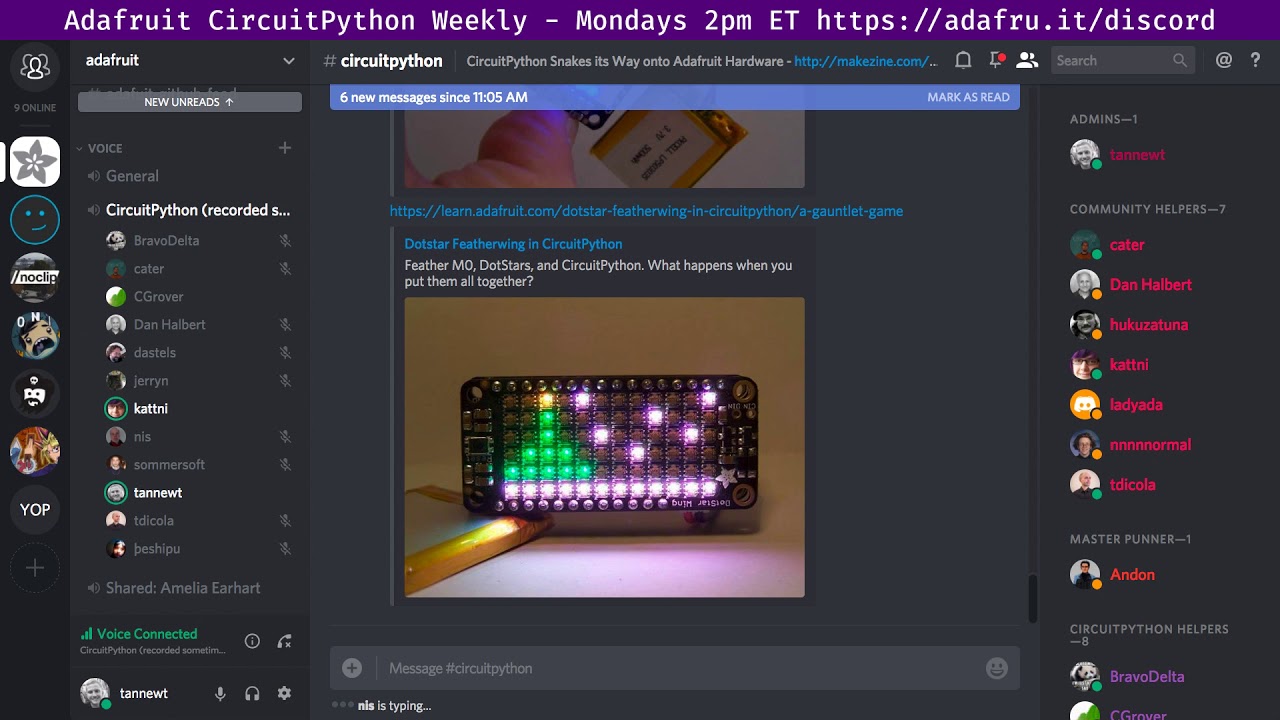
Feather M0, DotStars, and CircuitPython. What happens when you put them all together?
timber mango
To the community for consistently responding positively and not squashing exploratory ideas I've put out in the past week. I'm a hug-as-you-go kind of person, so I'll try to keep in mind there's a time and place to make the extra effort to give a good hug. ;) Receptivity here in this very meeting, last week, during the In The Weeds session, was a wonderful welcome for me! Also for Kattni's awesome reading of technical stuff during the meeting last week.
timber mango
client crashed. back.
stuck elbow
errant grail
no progress
to report
Thanks!
Woo hoo!
(couldn't touch CPy much this past week -- making backing tracks for the band's final song for the CD. Herding felines.)
timber mango
I mainly use Circuit Python in conjunction with helping newcomers with their projects. They don't always ask in #circuitpython-dev, either. ;)
TX/RX UART pair used to connect two microcontroller projects together, but concerned with the fact both projects are connected via USB to separate laptops. When I unplugged the Trinket M0 from the USB jack, it blinked the 'are you crazy' blink pattern, which I take to be an undervoltage condition (0.9 volts under Vcc from what I measured).
Also working on an R2-R ladder net to be able to read an 8-bit binary input on a single ADC pin. Front panel construction going on with that this week, since all resistors in the experimental version are 100k potentiometers!
errant grail
Except you're powering the MCU directly through the GPIO. It would backcharge the regulator through the MPU. The internal protection diode probably has a lower forward drop voltage than the external diode.
raven canopy
Trellis base library complete. Starting Trellis Matrix tonight. After that, might start hitting nRF52 shared modules...not sure. (Or docs? 🤷)
timber mango
stuck elbow
rename them to .cpy
slender iron

Daniele Procida http://2017.pycon-au.org/schedule/presentation/15/ #pyconau This talk was given at PyCon Australia 2017 which was held from 3-8 August, 2017 ...
opaque patrol
Daniele Procida http://2017.pycon-au.org/schedule/presentation/15/ #pyconau This talk was given at PyCon Australia 2017 which was held from 3-8 August, 2017 ...
stuck elbow
https://jacobian.org/writing/what-to-write/ <-- this is also a nice resource on docs
tidal kiln
idle owl
timber mango
heya anyone else want to review https://github.com/adafruit/Adafruit_CircuitPython_SHT31D/pull/1 before i accept? @slender iron ?

GitHub
This is the initial version of a driver for the sht31-d temperature/humidity sensor.
idle owl
GitHub
Adafruit_CircuitPython_FeatherWing - CircuitPython classes for Adafruit FeatherWings
idle owl
@timber mango Looking now.
errant grail
Thanks everyone! Amazing community here.
timber mango
Thank you!
raven canopy
Later guys!
errant grail
Scott in the background: https://www.youtube.com/watch?v=hzB53YL78rE

It was okay. I like it, actually.
Ambience.
tidal kiln
also @ pycon 2017 portland: https://www.youtube.com/watch?v=azf6yzuJt54

"Speaker: Daniele Procida Nearly everyone (especially in the Python community) agrees that good documentation is important to the success of software project...
timber mango
http://www.avrfreaks.net/comment/900895#comment-900895
This comment seems definitive. I'm powering the Trinket M0 through TX/RX of the remaining powered microcontroller, when I unplug the first one (Trinket M0) from USB/REPL. This has to be addressed.
My schematic showed Fritzing objects for other microcontrollers. The wired and tested version was between CPX and Trinket M0. One or the other was frequently unplugged from USB (out of convenience; only one laptop had a development environment capable of generating a new .UF2 upload for testing -- and both microcontroller's code needed improvement during this experimental phase, programming the UARTs to talk to each other via TX/RX pairs).
errant grail
Thanks!
idle owl
@timber mango Does this still need to be tested?
manic glacierBOT
I have tested the _stage module, and it works fine, so I'm including it
in he sources again. It's still disabled by default in the
mpconfigport.h.
stuck elbow
now, the gamepad library seems to make it crash really bad
The command "([[ -z "$TRAVIS_BOARD" ]] || (wget https://s3.amazonaws.com/adafruit-circuit-python/gcc-arm-embedded_7-2017q4-1~trusty3_amd64.deb && sudo dpkg -i gcc-arm-embedded*_amd64.deb))" failed and exited with 1 during .
hmm, travis seems to be unwell
manic glacierBOT
Can I somehow re-run Travis? It seems to have stumbled on some connectivity problems.
tulip sleet
I can just restart it. Hold on.
there is a "Restart Build" button for me on the right side. Not sure if you can see that or not based on privs.
stuck elbow
thanks, I don't have that button
manic glacierBOT

Restarted the travis build. It's having fetch problems some times (this was not the first time).
PORT_PA18 is in MICROPY_PORT_A twice.
idle owl
ok keen. I think that was actually the first sensor I ever bought. So it's somewhere here 😃
manic glacierBOT
I didn't notice that, thanks. I wonder why PA18 was there already. Oh, well, fixed now.
Sorry, a change got included that shouldn't be there.
idle owl
@timber lion Would it make sense to start calling them sensorname_test.py instead of simpletest.py to make it easier to differentiate if you have a lot of example code downloaded?
or sensorname_simpletest.py
idle owl
@timber mango working on reviewing it, realising git's not making it easy to review the most recent updates to it.
timber mango
you can view it on his github fork btw
idle owl
oh. that might have been a smarter way to do it. I'm halfway through it now. 😄
idle owl
I'll look for it in a bit and give it a try. I have some suggested changes that'll need to be tested anyway
 digital slate
hi all, quick question about modules. Is there a way to tell from the REPL which packages are available? Or do I just need to try importing?
digital slate
oh nice
stuck elbow
you can also call help on any object you would like to see information about
digital slate
was trying to do ubinascii and doesn't seem like it's included, but very much could be PEBKAC
I'm very much enjoying CircuitPython though
stuck elbow
I don't think there is ubinascii included
digital slate
that was the conclusion I was coming to as well
stuck elbow
do you need md5? base64?
you can just install the python version: https://github.com/micropython/micropython-lib/tree/master/binascii

ah, no, sorry, that uses ubinascii under the hood
digital slate
right, so that kind of gets to my question: it's not possible to just drop a ubinascii.py file into my lib folder? That was what I was looking for before I came here
stuck elbow
it will fail trying to import ubinascii
opaque patrol
what are you wanting to convert to or from binary?
digital slate
oh right, I had written ubinascii.py above. Is ubinascii somewhere in one of the compiled libraries?
want to go ascii -> hex
stuck elbow
print("".join(hex(ord(c)) for c in your_string))
oh so I'm just chasing a library solution for something that doesn't need one?
stuck elbow
well, it's nice to have a library, but when you don't, you have to improvise
digital slate
right right, I had assumed that was the main way to convert to hex, which was silly
ok, cool, thanks for the pointer, I'm cool with improvising!
stuck elbow
hmm, actually that gives you the numbers with 0x
print(''.join('{:02x}'.format(ord(c)) for c in your_string))
this should work better
idle owl
@solar whale I'll check it out again once you push the commit.
solar whale
@idle owl thanks. It may be later tonight or tomorrow before I can work on it.
idle owl
@solar whale no worries!
digital slate
@stuck elbow worked like a charm in the end, thank you
timber mango
@slender iron heya im investigating the itsybitsy i think i did something wrong in my PR
so the release binary doesnt work :/
timber mango

GitHub
Update SPI Flash code to allow differing flash 'types' (seems like some are 0x40 some are 0x60
Update SPI Flash def's with the matching macros
Add W25Q16 USON Flash type
Add working Itsy Bitsy M0 E...
slender iron
@timber mango I think there is a mistake in the W25Q80DV.h file
what did you have in mind?
timber mango
i dont know, i was going to start debugging it
but im not sure how to get my fork in the right state
because i did a PR from a branch to 2.x
should i switch to this branch https://github.com/ladyada/circuitpython/tree/itsybitsy_m0_fixes then try to rebase from upstream 2x?
GitHub
circuitpython - CircuitPython - a Python implementation for teaching coding with microcontrollers
slender iron
starting a new branch is probably best
timber mango
k my 2.x is also out of sync
slender iron
@timber mango what does git remote -v show for you?
timber mango
$ git remote -v
origin git@github.com:ladyada/circuitpython.git (fetch)
origin git@github.com:ladyada/circuitpython.git (push)
upstream https://github.com/adafruit/circuitpython.git (fetch)
upstream https://github.com/adafruit/circuitpython.git (push)
GitHub
circuitpython - CircuitPython - a Python implementation for teaching coding with microcontrollers
slender iron
ok, so do git fetch upstream and then git checkout upstream 2.x
timber mango
from my 2.x?
slender iron
this will get you to "detached head" on upstreams 2.x
in whatever directory you want to work on the fix in
timber mango
k one sec
dya mean "git checkout upstream/2.x"
/quote $ git checkout upstream 2.x
error: pathspec 'upstream' did not match any file(s) known to git.
error: pathspec '2.x' did not match any file(s) known to git.
slender iron
yeah
then to create a new branch from it you'll do git checkout -b fix_itsybitsy_flash or whatever you want the new branch to be called
slender iron
that should be based on the latest 2.x
digital slate
hi @slender iron ! Glad i thought to come here for help, this is a great resource
slender iron
I'm glad it worked well!
digital slate
Alas, I'm discussing the normal python tonight with Mr Kridner and Mr Nelson from the Beagley team
but CircuitPython pulled me into this world and for that I am grateful 😃
slender iron
exciting! I haven't heard of Beagley
I'm glad it has! python makes it easy to get going
tidal kiln
Beagley = Beagle Boards?
digital slate
haha, yes, sorry
slender iron
ah! that makes more sense
digital slate
anyhoo, I'll go hang in the general chat and not muck up the works here, looks like good progress being made
idle owl
ooh. Those boards are manufactured about 20 minutes from here.
slender iron
@digital slate we're not strict about it. we talk all thing circuitpython and python here
idle owl
Yeah! Everyone's welcome to join in
slender iron
@digital slate I'm about to post this week's as well
digital slate
neat, will keep an eye out
mentioned CircuitPython (and my use of it) last week on the show
slender iron
awesome! I'm only a third or so of the way through it
idle owl
That's great!
slender iron
I remember you mentioning that you've been using it
digital slate
yeah, very much so
slender iron
@digital slate you nailed it on amp hour, plug it in, edit, save and it auto-reloads
<@&356864093652516868> Here is the recording from the meeting today: https://youtu.be/F4OR6-OZTtk
Notes are available here: https://gist.github.com/tannewt/6da8770b345ce43d7da6e1b7ce6e3ab6 Join here for the chat all week: http://adafru.it/discord The week...
idle owl
@slender iron Thanks!
slender iron
np 😃
strict sphinx build example: https://travis-ci.org/tannewt/Adafruit_CircuitPython_PCF8523/builds/334973956
idle owl
oi
raven canopy
begs adabot please help us! 😄
manic glacierBOT
We're hosting a HackChat on Hackaday.io at February 2, 2018 12:00 pm PST / 3pm EST. Lets blog it up that its happening.
raven canopy
otherwise, that's going to be a PR or two...
manic glacierBOT
Reiterate on Wednesday on the blog and show and tell. Also a couple hours before on Friday.
slender iron
<@&356864093652516868> We have a HackChat on Friday too! I forgot to mention it in the meeting. Details are here: https://blog.adafruit.com/2018/01/29/circuitpython-hack-chat-this-friday-february-2-2018-at-1200-pm-pst-3pm-est-hackadayio-hackaday-adafruit-circuitpython/
Adafruit Industries - Makers, hackers, artists, designers and engineers!
Join us on Hackaday.io this Friday at noon Pacific / 3pm Eastern to discuss all things CircuitPython! Need inspiration for questions? Check out our CircuitPython in 2018 blog post, this week’…
slender iron
I hope no one brings an axe to grind
 cunning crypt
We'll have to stay sharp.
slender iron
lol, yup
manic glacierBOT
Here is the event page: https://hackaday.io/event/34310-circuit-python-hack-chat You may need to join it.
Video of last year's is here: https://youtu.be/jTNVra3IENs
@ptorrone Maybe we should start the stream early to cover basics before people ask questions?
We should do voice chat in Discord so we can coordinate who is answering what questions.
idle owl
This is listed under the CircuitPython heading in the store, but there is no CP driver for it: https://www.adafruit.com/product/3315

A Feather board without ambition is a Feather board without FeatherWings! Spice up your Feather project with a beautiful 2.4" touchscreen display shield with built in microSD card ...
Wait maybe that's not the one I'm thinking.
Although I don't think there's a driver for that one either. This is the one I was thinking of https://learn.adafruit.com/adafruit-3-5-tft-featherwing

A lovely color display for any Feather, show off your Feather plumage!
Unless I'm missing something.
opaque patrol
GitHub
Adafruit_CircuitPython_RGB_Display - Drivers for RGB displays for Adafruit CircuitPython.
idle owl
I thought it wasn't in there. I think it's a new display controller.
opaque patrol
I thought it was the ili9341, but I am looking at the page now
idle owl
I think it's updated from that one.
cunning crypt
HX8537D according to here: https://learn.adafruit.com/adafruit-3-5-tft-featherwing/tft-graphics-test
A lovely color display for any Feather, show off your Feather plumage!
idle owl
Ah that's what I was missing, thank you. Yeah it might work with the earlier driver.
cunning crypt
Also, @idle owl and @opaque patrol - You may have, literally, made me money. Last year I made a three thousand dollar mistake in not double-verifying that the screens I was having put on my boards worked 100% like I thought they did.
They were HX8357D screens. At that point in time, there was no HX8357D driver that would even compile on an ESP8266 for Arduino.
Now there is.
opaque patrol
Are you using CP or Arduino?
cunning crypt
Granted, those devices have a bunch of issues completely unrelated to the screen, but! The screen was the device, effectively
Arduino
idle owl
It doesn't work with the previous driver.
At least the 3.5" doesn't.
So my original statement stands. 😃
cunning crypt
Doesn't work with the CP driver? Bummer.
manic glacierBOT
Fixes #464. Corrects baud rate computation to match formula. Allow rate to be 0, which allows maximum rate. On both M0 and M4, with SPI SERCOM clocked at 48 MHz, I can get 24Mhz SPI clock pulses now, as verified by my Saleae.
Previous error checking used to error out above a maximum SPI frequency. That was not intentional, but was due to checking for the baud register value being 0. That is no longer the case: 0 is a legitimate value. The frequency can be arbitrarily high, and you'll just ...
raven canopy
shouldn't be too hard to add....looks like it's just setting some params. he says without looking at the datasheets 😄
idle owl
Heh. It probably shouldn't be on the CP compatible list of FeatherWings is my point. Not yet anyway.
raven canopy
two options: 1) remove it from the CP store. 2) all-nighter the driver before anyone orders tomorrow.
idle owl
@slender iron FeatherWing lib issue created.
raven canopy
does adabot talk to the storefront at all?
raven canopy
didn't think it did. i went for the long shot.
idle owl
Yeah the store's updated manually, as far as I know.
raven canopy
hey, people need jobs! i imagine we all wrestle with "how far do i/we automate this" quite a bit.
idle owl
You automate it and find something else awesome for that person's time. That's the ideal situation anyway. Turns out with a growing business, that's not so difficult. There's always more to be done.
opaque patrol
You become an expert on configuring and fixing the automation. Someone has to maintain the bots
raven canopy
that is a very Toyota Production System answer! which means i dig it. (I'm a fan of Taishi Ohno & Masaki Imai)
cunning crypt
So, you build something to automate it. Then spend your time building a better something to automate it.
raven canopy
great. now i'm fighting feature creep and a desire to ramble on about productivity (which is oddly oxymoronic)
cunning crypt
Then build something to automate the automating
raven canopy
just realized that i used me throughout these for..loops. my visual basic is showing... 😝
timber mango
ITS GOING TO BE OKAY. ;)
strong violet
@tulip sleet Yes, I was referring to (expected) different behaviour in the raw REPL compared to regular REPL. In MicroPython Ctrl+D behaves differently in the raw mode (skips running user code), but CP runs user code in both modes.
manic glacierBOT

What's the status of the nRF52840 port, is anyone working on it?
I followed the structure of the feather52 code and added the s140 6.0.0 softdevice to the download script and makefiles so it's used when building the nrf52840, but there is the case of adding support for it in the bluetooth driver.
If no one is currently working on adding s140 support in the bluetooth driver, I'd like to look into it. I have a lot of professional experience with the nRF52 series, so I believe it shouldn't...
manic glacierBOT

It's on our radar, but no exact ETA since no modules are commercially available and the chips aren't in final production yet. Any PRs are always welcome for review, of course. We're currently looking at USB support on the nRF52840, but that's somewhat independent of the CP port itself.
I thought of something better overnight, which is to accept any frequency and just give the nearest one. So it would never throw an exception for a bad frequency. Then I will also add an attribute to return the actual frequency. If you like that, hold off on the merge and I'll push something new.
Yes, I think that would be the best approach — I think many APIs behave that way. However, I don't have the rights to merge anything here. I'm still more than happy to review and test it, of course.
Cool, then I guess I can have a stab at it, I have the nRF52840 DK and even a few nRF52840 chips, that I made into my own module (https://twitter.com/arturo182/status/951567482921332736) where I have USB working (and working on BLE). This is all in a private, hobby context.
manic glacierBOT
@deshipu @tannewt updated since last night:
atmel-samd: Correct computation of SPI baud rate.
all: Add .frequency read-only property for busio.SPI to return actual frequency.
Fix esp8266/posix_helpers.c, which was not up to date for the new long-lived/short-lived heap allocation scheme.
git breakage: hold on until I fix the commits.
timber lion
oh interesting @idle owl regarding simple test names.. yeah i'm fine either way. i don't think it's super common to put all the examples in one spot for most users, but it can't hurt to put the library name in front of it either
er hurt
manic glacierBOT
please note, 24 mhz is outside the spec for the SERCOM max clock speed
so you can do it but its 'unofficial overclocking' :)
https://github.com/arduino/ArduinoCore-samd/issues/147
http://community.atmel.com/forum/samd21-sd-card-spi-max-speed
http://atmel.force.com/support/articles/en_US/FAQ/SPI-max-clock-frequency-in-SAMD-SAMR-devices (which doesnt exist anymore, thanks Microchip!)
We can keep the default in all the libraries at 12MHz, but a 24MHz SPI is really a huge improvement with displays (and only slightly out of the 20MHz spec for them), and I think it's worth it to be able to set it when one knows what they are doing.
https://github.com/arduino/ArduinoCore-samd/issues/147#issuecomment-224027127 mentions that the datasheet gives a Typical value of 12MHz, and doesn't specify a Max. The SAMD51 datasheet doesn't specify a Max either. I can allow it but add a warning to the API documentation. Would that be OK?
 opal elk
silly question: what's the proper way to use a venv when doing CP development?
I had it done and then went and moved so I lost my tmux session :p
opal elk
do I put venv in, say, /Adafruit_CircuitPython_LIS3DH ?
stuck elbow
or . as a shortcut for source
opal elk
I'm experienced with python scripts, but very inexperienced with all this python project hullabaloo
stuck elbow
you can put it anywhere, I've seen people who like to have a central directory with all their virtual environments, or even use a program to manage them
personally I like to put them as a subdirectory in whatever they are for
slender iron
thats what I use when its a venv for a particular location
I also have a top level venv I use sometimes
opal elk
oh. I... already had that dir
tulip sleet
@slender iron do you want to review https://github.com/adafruit/circuitpython/pull/560 also? Already approved by @stuck elbow .
slender iron
looking now
tulip sleet
i made one unrelated change to make esp8266 work with new heap stuff
just added the long-lived boolean to one call
slender iron
ah thank you
tulip sleet
esp8266 is the stepchild
stuck elbow
it's not going to get better with more ports
idle owl
ok sanity check: I thought pulseio was included in gemma and trinket now?
tulip sleet
no - we just forget to test
stuck elbow
@idle owl I thought so too
slender iron
part of getting ports more reliable is having travis build them
idle owl
yah we're having some issues with it, so I thought maybe it was me remembering wrong
it's not
reflash solved it.
opal elk
adafruit/Adafruit_CircuitPython_LIS3DH#12 has the code change done but I'd like to test it first. hopefully will be able to hook a CPX up to it tonight.
manic glacierBOT
On CPX, the CIRCUITPY drive does not show up as of commit 065e82015f0d2bd6732c62b7375fcc7af87fa0cf
manic glacierBOT
This is a one-character change. Fixes #562.
hey @Sigafoos I'm gonna look at this right now :)
timber mango
@slender iron heya GC Q on 2.2.1 maybe relevant to your interests
i thought the gc auto-collects when memory is low
yet this works when removing the gc calls does not
'''import time
from digitalio import DigitalInOut, Direction, Pull
from analogio import AnalogIn
import audioio
import touchio
import pulseio
import neopixel
import adafruit_dotstar
from adafruit_motor import servo
import gc
gc.collect()
keyboard support
import adafruit_hid.keyboard
from adafruit_hid.keycode import Keycode'''
idle owl
@timber mango it's three backticks to do the codeblock formatting.
tulip sleet
@meager fog do you get an out of memory or some other error?
try importing the larger modules first. This is kind of exactly what the new heap stuff is supposed to fix.
slender iron
@timber mango it does auto-collect but that doesn't save you from fragmentation. You calling it explicitly will change the fragmentation pattern going forwards
idle owl
Good to know.
timber mango
oki, well, it works now 😃
i wonder, would it ever make sense to auto-collect after an import
since that's a very memory-intensive situtation but happens early only
ill also try to rearrange the imports. i was going for pythonic but ironically i think that means smallest first 😄
idle owl
is that what determines it? I wondered because I was doing alphabetically but pylint gets mad about things sometimes and I wondered why.
manic glacierBOT
add write_readinto support to bitbangio https://github.com/adafruit/circuitpython/issues/472
note that in the current master branch bitbangio module is not compiled in by default and will have to be added into the makefile
code sample:
import bitbangio
import board

spi = bitbangio.SPI(board.D10, board.D6, board.D9)

while not spi.try_lock():
    pass

a = bytearray(2)
spi.write_readinto(bytes([9, 88]), a)

#if mosi and miso ...@meager fog when you import a builtin module it doesn't use up much RAM except to add some names to dictionaries. When you import a .mpy it will do that and put a block of bytecode in RAM. And when you import a .py it has to parse it and then save all the stuff above. You could run out of RAM while parsing or run out of RAM for the bytecodes (or static data). If you import the large .py files first they'll have more headroom and free RAM to do the parsing. If the whole thing is just too big to fit then the order doesn't matter.
idle owl
@tulip sleet Thanks for clarifying that. Super helpful
manic glacierBOT
Is this a tab instead of spaces? (I realize its pedantic.) Could please set your editor up to do 4 spaces when tab is hit?
Please change the params to buffer_in, buffer_out to match the comment below.
raven canopy
oh man...the triple x got me again. sorry @digital shore
raven canopy
@idle owl you undoubtedly have more pylint experience than me. however, it seems to want system (CPython or built-ins; not sure) modules before user modules. the only other thing that has really tripped me up is from not-triple-x import *...does not like that.
but, i'll defer to more expertly discussion.
raven canopy
true. in CPython, you rarely worry about the memory, so definitely a good flag for :blinka:
oh..discord wants a reset, since adafruit emoticons are not working.
manic glacierBOT
raven canopy
yeah, it's been doing that lately. last update.
it might have something to do with sleep vs shutdown. but, its inconsequintial.
idle owl
Anyway, yeah, try to avoid from lib import *. Doing from lib import something-specific is fine.
@slender iron Tony is fine with doing name_simpletest.py. I think since it won't matter to linting and Adabot, we should consider going that route.
slender iron
works for me @idle owl
idle owl
I'd like input is any else has thought on it. We're talking about the basic example that will be included in each library in the bundle. At the moment, naming is inconsistent, except where named by the same person - i.e. TonyD names all of his simpletest.py, so his repos are consistent with each other. My suggestion is to call it sensorname_simpletest.py in the event that someone has more than one of the demos downloaded at the same time.
slender iron
I think sensorname_simpletest.py makes sense
in fact, I can update cookiecutter for it
idle owl
excellent
raven canopy
ya got my vote. speaking of cookiecutter, i need to investigate why it won't make create the .py file when I run it. it's either another "Windows says no" or "sommersoft did it wrong"... 😄
slender iron
¯_(ツ)_/¯
manic glacierBOT
currently has CDC + MSC only
once key/mouse HID support is added we can extend to do multimedia (and maybe joystick!)
It looks like there are still tabs in the two SPI.c files. Could you untabify them in Atmel Studio or maybe from the command line? http://mlawire.blogspot.com/2009/07/convert-tabs-to-spaces.html
idle owl
@solar whale are you around?
manic glacierBOT
ReadTheDocs is awesome for hosting reference docs based on GitHub code. However, we've been bad about ensuring its set up and formatted consistently. Ideally, they would all be like this.
We should do a pass over all of the drivers to ensure that they do these things:
What priority do you have for this @ladyada? I don't feel like its required for 3.0 Beta so I'd prefer to wait a bit. Ideally, I'd only assign it to myself once I'm working on it in case someone else beats me to it.
@arturo182 what piece are you going to look at? I believe @hathach is looking into USB.
solar whale
@idle owl sorry - I was tied up - I'll make the changes you and @slender iron requested.
idle owl
@solar whale No worries! I was going to just tell you instead of doing another review if you were around, that was why I asked.
solar whale
I never knew spaces were such a valuable comodity 😉
idle owl
it's all about spaces in Python
@solar whale I'm excited, this is the first sensor I ever got. And was never able to use it because I wanted to use CircuitPython.
solar whale
@idle owl I've been wanting to use this as well. It was a very good learning experience getting it working.
@idle owl @slender iron Travis unhappy 😦 Not clear to me why.
idle owl
Yah I was just looking at that
slender iron
I'll look too
solar whale
I did 2 quick commits - was that a problem?
idle owl
No, I don't think so. I think there's an issue somewhere.
slender iron
you need to add a .travis.yml
idle owl
Oh at the top it says couldn't find travis.yml file
solar whale
I don't have a .travis.yml = where do I get it?
slender iron
did you run cookiecutter?
solar whale
yes
solar whale
linux - ls -la does not show it.
solar whale
ah - found it~
idle owl
nice!
slender iron
I think you are missing .pylintrc too
solar whale
i copied th files t a new subdir and it did not get copied . I'll move it now and recommit. alomg with .pylintrc
do I need .gitignore as well?
idle owl
no I think that's local only
slender iron
yup
slender iron
now you know 😃
idle owl
indeed!
slender iron
you can check this for reference: https://github.com/adafruit/cookiecutter-adafruit-circuitpython/tree/master/{{ cookiecutter.library_name }}
GitHub
cookiecutter-adafruit-circuitpython - Cookiecutter template for Adafruit's CircuitPython libraries.
solar whale
ok recommitted
slender iron
k, travis is trying again
solar whale
I wondered wher the .travis.yml was supposed to come from - sorry for the confusion.
I ran cookie cutter but then cloned my fork of the temporaty repo
idle owl
and there's pylint doing it's thing. 😃
solar whale
yup
idle owl
you have it sorted how to read that?
solar whale
I think so - just deleted the trailing lines - will try again.
idle owl
There were issues in 2 files.
slender iron
you can always fix some and push again. I do it when I'm lazy and don't want to set it up locally
solar whale
oh - bad whitespace !!
idle owl
All about spaces 😉
slender iron
you can merge it
idle owl
ok keen. I tested it already.
slender iron
I'm gonna disappear to dinner with a friend sometime soon hopefully
idle owl
excellent!
You want to approve? Or I can merge it with your changes outstanding I think.
Wait I might not have access to merge, now that I'm looking at it
I'm not seeing the button, and usually it's there even if travis hasn't finished
solar whale
no rush - have a good dinner - hopefully I make travis happy by the time you are done 😉
idle owl
thanks 😃
solar whale
still some cleanup to do...
slender iron
no worries, you'll get used to pylint's nit picks as you do more 😃
idle owl
yep. gets all of us.
solar whale
yay!
idle owl
Did you change it from "return the sensor status" to "The sensor status"?
I can't find that change, but I'm not sure I'm seeing the most recent commit
solar whale
ooh - good catch - sorry - I will do that now!
idle owl
no worries!
solar whale
I hope it is ok to misspell a word in the commit comment ...
idle owl
yah it's fine 😃
manic glacierBOT
Having the busio & CDC+MSC being done and stable is more important than USB HID, so how about after that feels solid - up to y'all whether it's in the beta or not!
idle owl
@solar whale great job! I'm doing the release now
solar whale
@idle owl Woohoo! Thanks!
raven canopy
congrats on getting through linting @solar whale! its almost as exciting as a roller coaster. 😄
solar whale
@raven canopy Thanks! I feel like I have been through an initiation rite!
raven canopy
...scored a -.91/10 was a painful drop for me. haha
idle owl
GitHub
Adafruit_CircuitPython_SHT31D - CircuitPython driver for the SHT31-D temperature and humidity sensor
idle owl
same!
manic glacierBOT
From what I've seen there is no support to even start building for the pca10056 so I started adding that and then also I added support for the v6.0.0 of the softdevice and now the build fails because Nordic modified the SDK between s132 and s140 so I wanted to get that working.
manic glacierBOT
@arturo192 Ok perfect! Keep us posted if you have any questions! You can find me on Discord most days.
manic glacierBOT
 manic glacierBOT

Additional clarification:
-
24 MHz can work absolutely fine (at least inside the MCU) and should not be considered overclocking. The SAMD21 datasheet specifies a typical SPI SCK period (tSCK) of 42 ns, which translates into a typical SPI clock of 23.8 MHz. Hence, a 24 MHz clock is within a 1% tolerance with respect to the typical value given in the datasheet.
-
Despite the previous, in my pull request https://github.com/arduino/ArduinoCore-samd/pull/292, *I conservatively kept 12 MHz as...
tidal kiln
oof. is that a negative lint score? didn't know it did that.
idle owl
Yeah....
manic glacierBOT
 manic glacierBOT
@joseangeljimenez hiya can you show us where you see tSCK of 42 ns? The one I just downloaded from microchip shows 84:
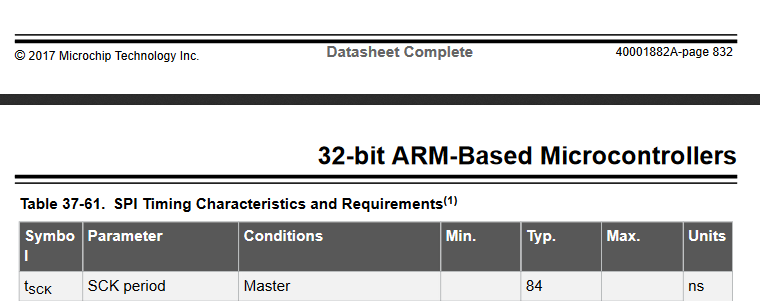
idle owl
@slender iron we don't have itertools do we?
slender iron
I'm not sure what it is
idle owl
module that has stuff in it that helps with iteration
REPL doesn't think it's built in. So I assumed not, but thought I would ask
slender iron
yeah, I don't think its there
timber lion
ah no unfortunately it's not in micropython
idle owl
ok thanks
timber lion
i think there was a port someone was working on
yeah some basic stuff here: https://github.com/micropython/micropython-lib/tree/master/itertools
but might not be worth pulling it in as a dependency, could just copy out the functions and use them (with a mention back to it)
manic glacierBOT
@ladyada I am really sorry for the confusion! I checked this using my old locally stored datasheet rev 42181D (dated 09/2014), where it states tSCK (typ.) = 42 ns. You are absolutely right that the newest datasheet shows 84 ns.
I have been working with the SAMD21 for several years now and designed several boards using SPI clocks up to 24 MHz, with a proper layout (5-6 mils narrow, short tracks PCB). I guess that Atmel revised (conservatively) the typical value of tSCK.
![image](https://...
conf.py for Sphinx will be moved here.
This is needed before #566 is done.
opal elk
itertools is magic, but possibly overkill for circuitpython
stuck elbow
I always felt like most of itertools should actually be a part of Python, and not done as function calls