#circuitpython-dev
1 messages · Page 135 of 1
 idle owl
 cunning crypt
There's class ST7735 and class ST7735R
idle owl
Oh. looking
cunning crypt
It worked for me with ST7735R
Also, mildly relevant: https://github.com/adafruit/Adafruit_CircuitPython_RGB_Display/issues/5
GitHub
Running a ST7735R on a Feather M0 Basic, and when it should display red - IE, color565(255,0,0) - it displays blue instead, and the reverse is also true.
The super simple code I am using:
import bu...
cunning crypt
I think I spent several hours over the course of two or three days before figuring that out.
I felt... a little silly.
But hey, at least it meant I knew exactly what your issue was.
idle owl
Yeah seriously. Although everything is still running and I'm still not seeing a pixel.
cunning crypt
Pixel is hard to see. I use fill screen.
idle owl
    # Clear the display
    display.fill(0)
    # Clear the screen blue.
    display.fill(color565(0,0,255))
    # Pause 2 seconds.
time.sleep(2)```Like that?
Still nothing.
cunning crypt
import digitalio
import board
import time
from adafruit_rgb_display import color565
import adafruit_rgb_display.st7735 as st7735

spi = busio.SPI(clock=board.SCK, MOSI=board.MOSI, MISO=board.MISO)

display = st7735.ST7735R(spi, cs=digitalio.DigitalInOut(board.D9), dc=digitalio.DigitalInOut(board.D10), rst=digitalio.DigitalInOut(board.D11))

#display.fill(color565(255,0,0))


while True:
    time.sleep(2.5)
    print("RED")
    display.fill(color565(255,0,0))
    time.sleep(2.5)
    print("BLUE")
display.fill(color565(0,0,255))```That's the entirety of my test program.
Obviously, your pins may need to be changed
idle owl
Yeah. I change them to match. So I wired something else wrong then?
cunning crypt
Maybe? Without being physically there, I don't know. What board are you using it on?
And what else are you using in conjunction with it?
 ruby lake
is it possible to use busio.UART() with the rx pin only?
idle owl
Display to Board: SCK to SCK, SO to MO, SI to MI and the others are on pins, is the SO and SI backwards?
TCS = cs right?
idle owl
All I have is SO and SI. Checking pinout.
cunning crypt
Is it not the one you linked?
(IE, non-Adafruit board)
I'd assume MISO = SO, and MOSI = SI, just with the "MI" missing.
AHA, OK
@idle owl There's slightly different silkscreen names on the back and the front
idle owl
Oh it's on the back in it's entirety
Yeah
Just figured that out, can't take it out to look at it and also wire it, hah. So now trying to match from image.
I had them backwards.
cunning crypt
I've done that so, so many times.
idle owl
And still nothing.
Oh now it's gone static looking.
That's new.
Bars and wierd pixelation across it.
 raven canopy
try the non R
idle owl
I don't follow.
cunning crypt
The ST7735 initializer instead of the ST7735R one
raven canopy
sorry. incomplete thoughts escape sometimes...
cunning crypt
Also, check RST and D/C to make sure they're right.
I'm 90% sure the R is the correct one.
idle owl
Checking again, but I think I fixed that already.
Yah those are right.
Oi.
@raven canopy no worries. I have the same all the time
Original "example" code, same results with different class.
cunning crypt
Feather M0 basic, right?
idle owl
M0 Express
raven canopy
are you using the SD?
MISO - this is the SPI Master In Slave Out pin, its used for the SD card. It isn't used for the TFT display which is write-only
cunning crypt
Having it connected won't cause problems, but it won't hurt
cunning crypt
I've got to load CP back onto my Feather
idle owl
AHHA It's not me! It's a bug in the driver!!!!
I'm testing a different version of it. I just went back to the original (which I STILL had to fix something in) and the original with the fix works.
Your code works!
cunning crypt
Oh man. It would have taken me quite some time to determine that it was the driver
idle owl
I have a weird line up one side, but I don't think that's code.
And you are right, difficult to see a pixel. Little guy right in the middle was supposed to be different, could barely see it.
But the test code works now (even if it is hard to see a tiny pixel.)
Thank you for your help! I wouldn't ever have sorted the R thing without it. Seriously. Oi. I get why that took you forever to find.
cunning crypt
The only reason I found it was because I dug into the code to see if there was something wrong with it.
While I didn't have a single clue as to what I was looking at, I DID notice that there were two initializers
idle owl
Good catch!
cunning crypt
I have those sometimes
OK, now this is weird.
I've found information that python sets are immutable, but my command line is saying otherwise.
 timber mango
TFT doesn't have a slave out (MISO) connection, as it sends nothing back to the microcontroller. The SD card needs this connection, but the TFT does not.
raven canopy
@cunning crypt from the Python documentation:
The set type is mutable — the contents can be changed using methods like add() and remove(). Since it is mutable, it has no hash value and cannot be used as either a dictionary key or as an element of another set. The frozenset type is immutable and hashable — its contents cannot be altered after it is created; it can therefore be used as a dictionary key or as an element of another set.
cunning crypt
Right.
It's just that the thing I was peeking at was saying that set was immutable
Although looking at it, the whole thing is full of errors, so I probably shouldn't be looking at that page anyway
raven canopy
well, ONE of them is. so it's not totally wrong. 😄
idle owl
@cunning crypt For your guide, remember you don't necessarily have to teach everything. You can learn it yourself if that's your goal but you can reference other things in your guide. Otherwise you can get mired down in the details and end up trying forever to get it right.
cunning crypt
Oh, yes.
Arrays are one of the things I will be covering because they're vastly different.
The REPL? I don't necessarily need to cover that other than to say "Hey, it exists. Take a look at Kattni's guide to figure it out"
idle owl
Ok 😃 Just wanted to make sure you didn't end up down a rabbit hole. I've ventured into that one and it's not needed.
cunning crypt
Oh, it's a good warning.
I could easily do that.
I was writing an e-mail to a friend detailing a bit of the fiction world for the story I'm working on. It took all evening because of rabbit holes. I ended up not writing much of the silly information I learned because it was irrelevant, but on the plus side, now that I know that information it'll make my writing that much better.
Fun fact: There's a breed of python that lived 43 years in captivity.
raven canopy
i bet those pythons would not be good at finding rabbit holes in the wild....
timber mango
All I can tell you is I wrote a lot more than I ever saved to any storage medium. You don't have to burn mass storage to be instantly rid of a preliminary draft.
I usually know far more at the bottom of the page than I did when I began it at the top of the page. Salvage is often not worth the exercise.
"I have destroyed her! You cannot have her back like thees!" -nis the Ferrari mechanic, depriving the customer of their own car
 manic glacierBOT
 manic glacierBOT

This is mostly specific to the feather52 board (bootloader changes), and doesn't apply to the micro:bit or any other boards we are likely to support such as the PCA10040.
I think we should remove other boards that we definitely won't be able to support, but I'd like to define what that list should be first so have kept things as is for the moment, and the files already exist in master so I think we can kick that can down the road to the next PR. They should go if we can't support them, though, especially with the API level changes required for maintenance.
Clock support on the nRF series does actually vary a lot board to board depending on HW design since t...
manic glacierBOT

Are you also planning support for the PCA10056 board?
FYI - I was able to merge the latest version into master and create/upload a working version for my feather52 board.
 limber tulip
@tulip sleet I have the new uf2 and VU meter code a test drive. The VU meter code seems to work much better and looks better as well. Nicely done.
When I was creating my game I wanted to go with a small sample size so I could get readings quickly. But if I set a small one, say NUM_SAMPLES=50, it seems to hang the board still. I.e. happens with both uf2s. Not sure if this is expected?
 stuck elbow
I recall there is a minimum sample size required
there was some discussion about this a few weeks ago
or was that sampling frequency?
I can't remember, sorry
limber tulip
I haven't dug into the code yet. I switched away from that approach for the game so it isn't a big issue for me. The attempt was to be able to detect a sound spike while also doing other things in the code.
 tulip sleet
@limber tulip - thanks, I'll check the min buffer size. It should not hang or crash.
@stuck elbow the min sampling freq is now a little below 16000, up from the previous default of 8000. 8000 clocks the mic too slowly at the (fixed) oversampling rate we chose (x64)
 formal surge
I am new with circuit python and has a question someone might have the answer: I am using Trinket M0, how do I do interrupt driven functions and how do I read the internal timer register of the uC with circuit python? Thanks
tulip sleet
@formal surge Hi - welcome! We are currently not supporting interrupts, unlike some versions of MicroPython. See here: https://forums.adafruit.com/viewtopic.php?f=60&t=128366. The timer register is not available directly but you can use time.monotonic() which returns a float with msec accuracy (until it gets big enough to not have enough precision to represent every msec tick).
 opaque patrol
Last week I got my DS 1302 rtc to work in CP so I created a binary count-down timer using feather neopixel (with more readable output to the serial console)....I thought it was working fine until I noticed last night it showed 3 days - 25 hours 50 minutes 22 seconds, which technically is not incorrect
timber mango
25 hours is a long day.
manic glacierBOT
It's on our radar due to USB and since this is currently the only board available (widely) with this chipset.
formal surge
@tulip sleet Thank you very much for the response. I was using interrupt driven ADC conversion and input capture functions with arduino and wanted to try trinket (maybe circuit python). Maybe one day circuit python can have that kind of advanced functions library so that it can be a more complete alternative to arduino ide..
 slender iron
@ruby lake UART one direction is something we want to add in 3.x: https://github.com/adafruit/circuitpython/issues/228

GitHub
It would be nice to be able to initialize uart with a single pin, either transmit or receive. For example I have an app where I only need to receive data from uart on a Gemma M0 so I'd like to be a...
ruby lake
ah, no rush, but I want to use an M0 trinket in the future
slender iron
@formal surge we'll get to interrupts eventually. For now, we're focused on making circuitpython better for beginners who have never programmed rather than those coming from Arduino.
@ruby lake it shouldn't be too hard. its just not done yet
ruby lake
trinket w/5 pins is just enough for midi in, CV out, gate out and scl/sda
raven canopy
@slender iron uid update in case I can't make it to thursday's meeting (hoilday edition). So far the following have failed: 1) co-op serial_number over to common-hal, 2) copying the load_serial_number() guts (from serial.c) over to common-hal, and 3) trying to just sprintf to hex. 1 & 2 would keep the board from mounting the vfs; I'm suspecting memory access conflicts. 3 wouldn't compile b/c of a linker issue that I couldn't chase down.
Current approach: I've moved the function guts from load_serial_number() into seperate .c/.h so each separate function can access it without (hopefully) stepping onto each other. Compile gives me no syntax errors (finally), but now it appears that I'll need to work on the Makefile(s) due to undefined errors.
This is all on my desktop and I'm out of town for the next week, so not much moving until I get back. I know, how does this guy not have a laptop? Its 2017! 😄
slender iron
@raven canopy no worries! I'd just suggest us chatting 1:1 if you keep getting stuck
raven canopy
I've thought about DM'ing you or Dan a couple times this week. But stubborn lone wolf persistence...it's a character flaw. sometimes. 🐺
slender iron
@raven canopy please do next time. we're here to get you unstuck
 solar whale
Here is a first for me - using a feather nRF52 board (running CP 3.0.) to debug an I2C sensor issue (tsl2561) . nice to have a new platform to play on 😉
solar whale
@tidal kiln - I just put in a PR for the TSL2561 to ( I hope) fix the lux calculation. Take a look and see if you think it is OK.
 tidal kiln
@solar whale how do you get a ratio of 0?
solar whale
@tidal kiln See my note in the issue - If I put it in black box I get ch0=1, ch1=0 so ratio is 0
tidal kiln
the values are unsigned, so negative ratio should never occur. but still, sloppy if structure on my part.
let me check that dark box behavior
idle owl
Trying to get an SSD1331 OLED working. Checked the wiring repeatedly. Code runs fine. Switched to original driver. It's displaying multicolored pixellation. Am I missing something obvious?
tidal kiln
hmmm. where can i get a dark box? who do i know that has those? hmmmmm
idle owl
I'm sensing a "hint" in there.
tidal kiln
yep. that's not good.
>>> tsl.luminosity
(1, 0)
>>> tsl.lux
Traceback (most recent call last):
  File "<stdin>", line 1, in <module>
  File "adafruit_tsl2561.py", line 91, in lux
  File "adafruit_tsl2561.py", line 165, in _compute_lux
NameError: local variable referenced before assignment
>>>
that's better
>>> tsl.luminosity
(1, 0)
>>> tsl.lux
0.4864
>>>
@solar whale thanks for that. you want to respond to that forum post?
solar whale
@tidal kiln sure - thanks
@tidal kiln does the new version automatically get released and include in the Bundle?
tidal kiln
i think you need to do a new release, and then the nightly bundle build will catch it. @slender iron - correct?
@idle owl you probably know also ⬆
idle owl
@tidal kiln @solar whale Yeah you need to do a new release.
solar whale
@idle owl @tidal kiln I've never done a release - how do I do it? Can I?
idle owl
If you have write access to the repo, you should be able to. I can walk you through it right now if you'd like, it's pretty simple.
If you don't have access, I can probably do it
solar whale
I don't think I do - so please go ahead.
idle owl
I'll do it, no issue. But I'm curious to see if you do. Go to the repo, and click on "5 releases" above the code
tidal kiln
oh, yeah, you'd need permissions to the repo
solar whale
i'm there
idle owl
You'll see the most recent release that I did. Above it is "Releases" "Tags" and to the right "Draft a new release"
Do you have the last button?
idle owl
Ah ok. It was worth checking 😃
Tell me what was updated please
And who did the work
(github handles if possible)
tidal kiln

GitHub
fixes lux calculation to accept a ratio of 0 (use >=0 instead of >0 ). Simplified if/elif tests to only test upper limit on each case. It is not necessary to test both lower and upper each time s...
solar whale
what he said 😉
tidal kiln

GitHub
See this forum post: https://forums.adafruit.com/viewtopic.php?f=60&t=128396
The chain of if statements in _compute_lux()can fail to set lux if ratio <= 0 or possibly if somehow a value slips betwe...
idle owl
Ok thanks
solar whale
Dan found it, we both fixed it.
idle owl
Done
tidal kiln
@solar whale think you found the real issue, that (1,0) behavior, and that ratio can indeed be 0
idle owl
I thanked all 3 of you, so nyah.
solar whale
@idle owl Thanks!
tidal kiln
@idle owl did you figure out your SSD1331 issue?
idle owl
@tidal kiln Nope. It's still sitting here staticky-looking
tidal kiln
what's the PID?
idle owl

We love our black and white monochrome displays but we also like to dabble with some color now and then. Our new 0.96" color OLED displays are perfect when you need an ultra-small ...
I'm not convinced it isn't a driver issue. I found one for the last display issue I had inside this lib.
brb
tidal kiln
what driver are you using?
 lofty topaz
@idle owl Don't know if this will help but I have the 1.5s and test them with this tutorial and it works fine. Not sure if it will work with yours but...

Big, bright colorful OLED
I know it's Arduino, but if your concerned about the display itself, this makes a nice testbed to validate the device. Quick and easily.
idle owl
@tidal kiln I'm using the original driver now, I first tried ti with the PR version
The display powers and there's one bar that seems to respond to the color I tell it to "fill"
Doesn't work at all with the PR driver, but I wasn't ready to rule it being a me-issue yet
But considering the last two issues were driver issues, I'm leaning that direction
tidal kiln
can you link to it?
idle owl

GitHub
Adafruit_CircuitPython_RGB_Display - Drivers for RGB displays for Adafruit CircuitPython.
Let me alter the entire lib back to original. I altered what I thought it was using back to original but I'll load it out of the bundle. if it's in there.
Same thing with bundle version
So PR doesn't work. Current version is pixellated.
I have to get going though. I'll ping you when I'm back if you're around.
tidal kiln
ok. i might not be much help though. don't have the HW to follow along.
was willing to take a look if it was anything obvious or something
idle owl
I figured that was it but I can't test anything you find until later.
 meager fog
@tidal kiln heya i have QUESTION
tidal kiln
k. hopefully i have ANSWER
@idle owl looks like some init is commented out:
https://github.com/adafruit/Adafruit_CircuitPython_RGB_Display/blob/master/adafruit_rgb_display/ssd1331.py#L69
compare to arduino init:
https://github.com/adafruit/Adafruit-SSD1331-OLED-Driver-Library-for-Arduino/blob/master/Adafruit_SSD1331.cpp#L283
GitHub
Adafruit_CircuitPython_RGB_Display - Drivers for RGB displays for Adafruit CircuitPython.
GitHub
Adafruit-SSD1331-OLED-Driver-Library-for-Arduino - For 0.96" OLEDs in the Adafruit shop
meager fog
@tidal kiln i want to fix CPX audio in arduino - i know this is the circuitpy forum but im just a rulebreaker - do you ahve an API you would recommend
right now we just have a raw value read. i have to redo some of this anyways because the analog mic and digital mic are different in ways
tidal kiln
good question. i haven't looked at the new mic too much. seems like the API might depend on it somewhat. like new capabilities.
hmmm. looking now. is there even currently anything for CPX?
meager fog
not really
its in a separate repo - called Adafruit_ZeroPDM
its ready for integration tho
tidal kiln
sadly, i never came up with a good CPC guide that was about highlighting the mic, that would've helped
there was basically just soundSensor() which was nothing more than an analog read
simple, but good enough for basic usage
ah, then the mic member had other features
 heady dove
Hello all, a Discord neophyte here. I seem to have put an incorrect version of 'lib' on my Circuit Playground Express, and it won't allow me to delete it, Seems to be a permission thing I get an OSError: 30 any thoughts on how to get to square one?
tidal kiln
i'd think it be good to have soundSensor() available and behave as much the same as possible, so it could be used with either CPC or CPX
and then you could have the .mic member be different for each, and that's where the unique capabilities would be
solar whale
@heady dove how are you trying to delete it? YOu shoud do it via the mounted FS (CIRCUITPY) ?
meager fog
@tidal kiln yeah i think most people just want SPL right?
tidal kiln
yeah, at a minimum
heady dove
I have tried to drag it or right click and move to trash from the Ubuntu desktop and repl'd in and tried os.remove() and os.rmdir()
solar whale
os.remove will not work since only the USB drive is mounte read/write
heady dove
I also tried dragging a new uf2 into the device, but all the files and directories remain after
tidal kiln
@heady dove i've had that happen on ubuntu also, some permission thing under the hood is getting wrapped around the axel, try accessing it from command line
/media/username/CIRCUITPY/
solar whale
yo can try cd /media/<username>/CIRCUITPY then rm -rf lib
heady dove
should I do it with sudo?
solar whale
sometimes on Linux - it mounts, but it the File Manager thinks it is read-only. cd'ing to the directory works for me in that case -- sudo should not be needed.
tidal kiln
ls -la
solar whale
OK - sounds like the FS got corrupted - you can wipe it and then reload everyting as described here https://learn.adafruit.com/welcome-to-circuitpython#circuitpy-drive-issues

New to CircuitPython? This is the place to start.
tidal kiln
what does that show for permissions?
 fading solstice
@idle owl are you still having problem with RGB?
idle owl
@tidal kiln I uncommented all of those and it still didn't work.
@fading solstice Yeah but in this case even with the original driver.
@fading solstice The two I tested yesterday both work now!
tidal kiln
@idle owl well, i was 120% guessing 😦
idle owl
@tidal kiln It was a great idea, just wasn't the issue
fading solstice
which one is not working then
tidal kiln
@meager fog i think short answer is NO, sry, no good ideas for API, at least beyond basic SPL
meager fog
ok np 😃
heady dove
lib is drwxr-xr-x
@solar whale when I drag the newest adafruit-circuitpython-circuitplayground_express-2.2.0-rc1.uf2 file it reboots but still has all files I have copied to the device
solar whale
@heady dove did you do the "erase" step
tidal kiln
https://learn.adafruit.com/welcome-to-circuitpython/adafruit2-troubleshooting#circuitpy-drive-issues
New to CircuitPython? This is the place to start.
i think @solar whale 's URL got truncated a bit
solar whale
https://learn.adafruit.com/welcome-to-circuitpython#circuitpy-drive-issues -- at this link don't go by the picture bleow
New to CircuitPython? This is the place to start.
first step is to download and execute the "eraser"
tidal kiln
@solar whale your link just goes to the first page of the guide
heady dove
the bit in "troubleshooting"?
solar whale
odd - not for me - then scroll down to troubleshootiing - CIRCUITPY drive-issues.
heady dove
think I got it, thanks all! This is a nice lil community
solar whale
You are very welcome.
heady dove
Bingo!
solar whale
@tidal kiln On my discord screen, I see the full link I posted then below it shows the link to the parent page with a picture of blinka.
tidal kiln
oh, you must have the default setting, where it renders the link
heady dove
So I want the the .py version of the lib not the .mpy version?
solar whale
@heady dove - no - you ahpusl be using the 2.1 version of the lib with the .mpy -- just a sec
GitHub
Adafruit_CircuitPython_Bundle - A bundle of useful CircuitPython libraries ready to use from the filesystem.
unzip adafruit-circuitpython-bundle-2.1.0-mpy-20171221.zip and use the lib/ file
heady dove
I have 2.2.0-rc1
solar whale
tahts OK - the lib 2.x is compatible with the 2.x version of Circuitpython - just uses the latest available
heady dove
I thought that was what I loaded and it errored when I tried to use it
I'l try it again, now I know how to get back to square one 😛
idle owl
Ok I'm headed out now. Be back later. @fading solstice Let me know if you want me to test further later. I have the rest of the displays in the driver that Adafruit carries in transit so I can finish testing that lib Tuesday and Wednesday.
solar whale
you may have just had a file system corruption problem - wait until the copy is done - then a few minutes!
solar whale
no problem - I've done it myself several times
heady dove
again, thanks for all the help, I'm sure I'll be back
solar whale
always welcome.
 flint oyster
I've got a question for you guys since I'm new to python
I have a true binary string: b'\x00\x00\x00\x06' that I need to convert to an integer: 6. Is there a method to do that?
meager fog
is it a true 32-bit
flint oyster
yes
meager fog
GitHub
Adafruit_CircuitPython_BME280 - CircuitPython driver for the BME280
use struct.unpack - its a little...arcane at first
but with practice you can extract any kind of data from binary representation
your type is likely 'big endian' and 'L' for the type
 tawny creek
@solar whale are there trinket m0/gemma m0 erasers too? -
flint oyster
thanks @meager fog I'll look at it
solar whale
Yes - in the same link
@tawny creek just below the Circuit PLaygoring eraser - it has a link to one for gemma/tinket
tawny creek
Ah!!! thanks blind - handy!
tidal kiln
@flint oyster
>>> import struct
>>> foo = b'\x00\x00\x00\x06'
>>> struct.unpack(">L",foo)[0]
6
>>>
yeah that works
solar whale
Can anyone help with https://forums.adafruit.com/viewtopic.php?f=52&t=128375 ? Is there any issue with loading an Arduino sketch on a trinket M0 then going back to CircuitPython.?
tidal kiln
they'd have to set the protection bits to actually wipe out the bootloader
or unset, i guess
there should generally be no issue, like you said
other than arduino erases the fs
solar whale
I've gone back/forth many time on other M0's - just wanted to make sure there was not something different about the Trinket.
tidal kiln
same brain, so shouldn't be, and i'v e been using a trinket for most of my driver dev, and i go back and forth also - using arduino to sometimes sanity check things
oh. wait.
" I have a SEGGER J-Link EDU mini successfully connected to the Trinket. "
well, with that, they can do anything
solar whale
I think the poster has managed to wipe it now... not sure what the problem is.
tidal kiln
yeah. seems that way. i missed that. thought they were just loading through arduino IDE.
solar whale
Good evening all (or whater time it is for you 😉 )
tidal kiln
they should get firmware bin:
https://adafruit-circuit-python.s3.amazonaws.com/index.html?prefix=bin/trinket_m0/
and reload that
with their jlink
solar whale
@tidal kiln can you post that to the forum. I’m about to head out.
tidal kiln
sure
tries to remember proper loadbin command...
@slender iron do you use jlink through atmel studio?
 wraith tiger
I saw a post on the forums about IDEs for CircuitPython. Has anyone taken a look at Thonny?
 robust coral
I’m keeping a CPX and an AcerC720P Chromebook in my bag these days. I fool around with it on my commute. With CircuitPython’s quick prototyping it’s been an inspiration factory. Thanks to everybody who made these beautiful things exist!
wraith tiger
It's a cross platform IDE aimed especially at beginners, There is a plugin for the BBC micro:bit.
Maybe a Thonny plugin could be developed for CircuitPython.
stuck elbow
@idle owl not sure about the circuitpython drivers for that rgb display, but I did the micropython ones, and the ones for the oled screens are a bit sketchy
@idle owl they worked with some displays I have but not with others
I suspect I did the initialization wrong somewhere
@idle owl I did some fixes for the micropython ones since the circuitpython one was written, not sure if those were ported
stuck elbow
I would like to propose a slight change in the process for all this linting: can we do that in separate pull requests?
 timber lion
yeah i agree, lint pull requests should purely be to enable lint and fix errors it has.. any other changes like to the API or functionality should be a separate pull so it's easier to test in isolation (as a change to functionality & API is a bit more risky and needs careful validation)
timber mango
There's an extremely bright flash of neopixel(s) from latest CPX demo (as shipped) when plugging into USB. Not deterministic but tends to be the 1st or 1st and 2nd NPX).
 upper gull
@idle owl On the Welcome to Circuit Python guide, on the troubleshooting page, where you give instructions for erasing a Circuitpython drive...could I suggest adding a line to remind folks to re-install the lib folder after re-installing the CircuitPython.uf2?
meager fog
@upper gull will do! 😃
 sweet vapor
is it possible to get CircuitPy on any M0 feather, like one of the M0 packet radio feather boards?
cunning crypt
@sweet vapor Yes!
The extra stuff on the boards isn't supported, but you can put the basic M0 Feather CircuitPython on any of them.
sweet vapor
oh I was hoping you'd say Yes, but now it is the doing. It does't have the UF2 on it any where. I'm not sure how to load that.
cunning crypt
Most Feather M0 boards don't have the UF2 bootloaders.
You'll have to use bossac
@idle owl @meager fog It looks like the "Welcome to CircuitPython" says all boards ship with the UF2 bootloader, which AFAIK isn't true.
cunning crypt
@sweet vapor Here's the "Loading MicroPython" guide for Basic M0

How to use MicroPython with boards like the Feather M0 & Arduino Zero!
You'll have to get the .bin file for CircuitPython but is otherwise the same process
The .bin file can be found here: https://github.com/adafruit/circuitpython/releases
GitHub
circuitpython - CircuitPython - a Python implementation for teaching coding with microcontrollers
adafruit-circuitpython-feather-m0-basic-2.2.0-rc1.bin is the one.
meager fog
im workin' on it right now its here...
New to CircuitPython? This is the place to start.
meager fog
~maybe~ its still something we're debating
because the non-express build is so limited, its a little unfair to put UF2 on them with the expectation python will work
e.g. the M0 WiFi is just not going to ever have wifi-capable python, it wont fit.
cunning crypt
Mildly disappointing, but not unexpected.
I remember you found a physically tiny flash chip for a M0 Trinket Express. Perhaps the existing M0 basics could be replaced by M0 Express versions eventually.
meager fog
we will likely just skip to M4
cunning crypt
A perfectly reasonable approach. I'm eager to get my hands on some M4 stuff once it's ready.
meager fog
@sweet vapor try this https://learn.adafruit.com/welcome-to-circuitpython/non-uf2-installation
New to CircuitPython? This is the place to start.
sweet vapor
thanks, good to see its possible in a beta kind of way, reversible and help is so, well, helpful!
cunning crypt
@sweet vapor It's super easy to switch it to Arduino. Just upload an Arduino sketch.
meager fog
<@&356864093652516868> added an esp8266 'starter helper' as well https://learn.adafruit.com/welcome-to-circuitpython/circuitpython-for-esp8266
New to CircuitPython? This is the place to start.
cunning crypt
Awesome
 formal plover
@meager fog yass!
meager fog
yay
 umbral dagger
@meager fog Sweet! I have a esp8266 breakout that I haven't gotten around to play with yet.
umbral dagger
I noticed that in the repo. CircuitPython on Sino:bit will be cool.
meager fog
sinobit is nrf51 - you can use micropy on it for sure, but circuitpy wont fit 😦
meager fog
yah its a pretty 'distinct' fork
timber mango
I ran the .uf2 instrux you just posted here, on the CPX, after erasing it, then I was still able to do the usual installation of the current Circuit Python (2.1.0 or 2.2.0 rc1, either). No problem. I used the Feather M0 Basic .bin (with bossac -e -w -v -R): $ md5sum ./adafruit-circuitpython-feather_m0_basic-2.1.0.bin a27ae2bcf10a4a6d2e56df395609e083 ./adafruit-circuitpython-feather_m0_basic-2.1.0.bin << this didn't kill CPX
meager fog
it wont kill it
it just will be very confused
and wont use the external SPI flash. its just...weird 😃
timber mango
Yeah I don't own a non-express Feather M0!
Oh CPX did blink it's NeoPixel red, though, on a reset, after the bossac. That was cool. 😉
manic glacierBOT

PDMIn: a 63-sample record buffer would crash or hang. Discovered by RoadFun in discord.
- Fixed computation of second buffer DMA size when number of values requested is >32 and <64.
- In sample processing loop, don't try to alter last DMA size on the fly. It's probably already in progress at that point (and I think the wrong descriptor might have been being adjusted). Just ignore extra samples.
 errant grail
After testing, I noticed that the simpleio.map_range function doesn't allow the upper boundary of the output range to be smaller than the lower boundary. The Arduino map() function allows it so that you can reverse the output range. Here's the original simpleio.map_range code: python def map_range(x, in_min, in_max, out_min, out_max): return max(min((x-in_min) * (out_max - out_min) / (in_max-in_min) + out_min, out_max), out_min) and the fix I used for my project: python def map_range(x, in_min, in_max, out_min, out_max): if out_min <= out_max: return max(min((x-in_min) * (out_max - out_min) / (in_max-in_min) + out_min, out_max), out_min) else: return min(max((x-in_min) * (out_max - out_min) / (in_max-in_min) + out_min, out_max), out_min)
I'm not github-skilled just yet, so I didn't post this as an issue. I could use some help with that, I suppose...
idle owl
Ooh it's really simple. I can help if you'd like!
errant grail
Certainly!
idle owl
You've basically nailed it already. Do you have a link to the repo?
errant grail
No. I have a github account but have never used it.
idle owl
Ok, I think this is it: https://github.com/adafruit/Adafruit_CircuitPython_SimpleIO
GitHub
Adafruit_CircuitPython_SimpleIO - Simple CircuitPython classes to do a wide variety of basic functionality.
You'll want to login to GitHub
errant grail
I'll see if I can figure it out. Thanks!
idle owl
I can still help!
Basically, you'll see under the repo name: "<>Code" and then "(!) Issues". You click issues, and then click the green button that says "New Issue"
errant grail
It may take me a while -- don't want you to spend time on it until I'm better acquainted with github, that's all.
I'll try it now...
idle owl
And then put in it everything you put in here, the more details the better, makes it easier to reproduce the issue later and to fix it too since you already made a fix!
errant grail
Got it! There's a first time for everything, I guess. Thanks!
idle owl
@errant grail Great job! You're welcome!
 hot moon
Question: I've been using CircuitPython on a CircuitPlaygroundExpress board. Fun! But now I'm experimenting with running it on a Feather Huzzah. Got it installed. Python works via the REPL just fine. But should I expect this board to mount as a USB drive? Or is that a feature of only some CircuitPython boards?
stuck elbow
@hot moon unfrotunately the Huzzah doesn't support native USB, so it can't mount as a disk.
@hot moon you have to use a tool like "ampy" to copy files on it over the serial connection
@hot moon see this: https://learn.adafruit.com/micropython-basics-load-files-and-run-code/

Learn a simple workflow for developing code on a MicroPython board.
hot moon
@stuck elbow Thanks for the reply. Yeah, I've read the Ampy stuff, not installed it yet, but soon. For future reference, is there a rule-of-thumb, or a list, about which boards support the USB-mount-drive thing?
stuck elbow
Basically right now only the -M0 boards have native USB, and the -M4 boards will have it too, when they are released.
That means all the feather m0s, trinket m0, gema m0, circuitplayground express, and metro m0
the only other board that runs circuitpython is the huzzah (not counting the non-adafruit ESP8266 boards)
fading solstice
@stuck elbow should i just remove class DummyPin for now?
stuck elbow
@fading solstice I think so, but that should be in a separate commit
@fading solstice I think it would make sense to move it to the simpleio module, as there might be more libraries needing it
@fading solstice sorry for pointing out things that are outside of the scope of that particular pull request
fading solstice
@stuck elbow thanks for the review. the code looks better as a result. i do not know how or why i deleted the _DISPLAYON line. sorry about that. glad you caught it
stuck elbow
That's what the reviews are for. Thank you for doing this work.
solar whale
note to self - uploading the feather_m0_express image to a metro_m0_express creates confusion...a few more lost hairs. Loading the correct image works much better. FYI - after loading the wrong image, no File System appeard on reboot. One for item to add to my checklist 😉
tidal kiln
@hot moon hot off the presses: https://learn.adafruit.com/welcome-to-circuitpython/circuitpython-for-esp8266
New to CircuitPython? This is the place to start.
hot moon
@tidal kiln LOL well THAT'S what I call service. Now we'll see if I did it "right". 😃
solar whale
Can anyone point me to the latest "eraser" for the metro-m4-express?
manic glacierBOT
Pushed another commit to not discard samples at the ned. When we're getting near the end of samples to collect, adjust the length of the last DMA buffer to only get exactly as many samples as needed. Do this after the second-to-last buffer has been processed, but before processing the next-to-last buffer. This way we adjust the buffer that doesn't have a DMA in process. See the comments for even more detail.
(@tannewt That might have been your original intention with this code before I sta...
 slender iron
@umbral dagger you might be able to fit cpy into the nrf51. I believe the pull request its based on managed to work on the micro:bit
@solar whale I invited you to the circuitpython librarian team so you should be able to release libs now
solar whale
@slender iron I saw that - and signed on. Thank you!
slender iron
great!
manic glacierBOT
Ok its up to you. I worry this location may be harder to find than a board specific section in the port README.
I guess I'm thinking towards a world where we have multiple board designs of our own with nrf52 just like the M0. Its fine with me to wait until we actually need it refactored.
One other thing to do in this PR or a follow up would be getting Travis to build the feather52 binary every commit. That way we'll know it always builds. :-) To do that tools/build_adafruit_bins.sh and .travis.yml would need to change.
solar whale
@meager fog Did something change with the Arduino support for the metro_M4? I can't even compile blink.ino any more... here are teh first few errors ```In file included from /Users/jerryneedell/Documents/Arduino/hardware/Adafruit/samd/cores/arduino/Arduino.h:66:0,
from /var/folders/ks/mrdb06x88xjfrz0059b3xxw00000gn/T/arduino_build_159807/sketch/Blink.ino.cpp:1:
/Users/jerryneedell/Documents/Arduino/hardware/Adafruit/samd/cores/arduino/WVariant.h:107:36: error: 'TCC_INST_NUM' was not declared in this scope
extern const void* g_apTCInstances[TCC_INST_NUM+TC_INST_NUM] ;
^
/Users/jerryneedell/Documents/Arduino/hardware/Adafruit/samd/cores/arduino/WVariant.h:107:49: error: 'TC_INST_NUM' was not declared in this scope
extern const void* g_apTCInstances[TCC_INST_NUM+TC_INST_NUM] ;
^
In file included from /Users/jerryneedell/Documents/Arduino/hardware/Adafruit/samd/variants/metro_m4/variant.h:46:0,
from /Users/jerryneedell/Documents/Arduino/hardware/Adafruit/samd/cores/arduino/delay.h:27,
from /Users/jerryneedell/Documents/Arduino/hardware/Adafruit/samd/cores/arduino/Arduino.h:81,
from /var/folders/ks/mrdb06x88xjfrz0059b3xxw00000gn/T/arduino_build_159807/sketch/Blink.ino.cpp:1:
/Users/jerryneedell/Documents/Arduino/hardware/Adafruit/samd/cores/arduino/SERCOM.h:146:16: error: expected ')' before '' token
SERCOM(Sercom s) ;
@solar whale dont think so? you can try re-installing or opening an issue. looks like you're missing some #include or somethin'
solar whale
@meager fog thanks. I’ll do that. It’ll be a few hours before I can get back to it.
meager fog
@idle owl heya mu pushed out beta13 which ought to now support all our adafruit boards. i'm thinking we could show people how to install it in the beginner guide? it requires command line for now - but at least on mac/linux its not too bad!
idle owl
@meager fog Yeah sure. I'll have to look into it more and remove the version I have so I'm installing it fresh. Is it still giving people trouble on Windows do you know?
 prime flower
@errant grail great point about map() in simpleio, I was just about to fix it but ladyada seemed to beat me to it
prime flower
oki! will do!
meager fog
if anyone here is on windows - and wants to be awesome, please try that exe ^
idle owl
On it
prime flower
booting up my vm
meager fog
it should work with any/all adafruit cpy boards
vm's dont like USB devices sometimes, so it may be 😦 but its worth tryin'
@idle owl for mac we can also try a package but honestly i think mac users can use Terminal
its not as traumatic as for windows (?)
meager fog
but we can also make a dmg
idle owl
Hey the exe is happy!
prime flower
oh wow it has a REPL built-in to the editor
idle owl
It got irritated that I didn't have a board plugged in, but it's happy now
So load the .exe into the installation page for Windows?
meager fog
yeah thats the tradeoff of not-requiring-lotsa-menus
i was thinking i could put this in as a release on our fork
so hold on
meager fog
GitHub
mu - A "micro" editor for MicroPython and the BBC micro:bit. Written in Python and Qt5.
sure
i can also put it in
idle owl
Nice!
(the release)
So looks like we're set on windows which is good because explaining the crazy install before was... crazy
Mac and Linux is pip install mu-editor right? So we'll have to go through installing pip as well? Or is that covered somewhere else and we can reference it
tulip sleet
i tried also - works great! if i reset or unplug I have to toggle the REPL button
idle owl
That's easy enough!
prime flower
@idle owl I have a screwed up python install on my mac, so it requires 'pip3 install mu-editor'.
idle owl
@prime flower that's not screwed up, you just haven't sym-linked it or used the base install of python
That's totally normal
Looks like I'd have to do pip3 as well
Hmm.
I think if we walk people through installing Python 3, it will be that. But maybe we have to say "could be pip, could be pip3".... hmm.
prime flower
pip show pip OR pip3 show pip
could also maybe call pip3 --version or pip --version
idle owl
I did pip --version and pip3 --version and it did not work with pip
Yah that's what I did
prime flower
er, idk, they'll be new to the terminal
easier is maybe in the learnguide include a FAQ element for "unknown command 'pip'" instructing them to use pip3 instead
idle owl
Yeah that might work
I'm now wondering how far back we go with explaining installing Python and then pip etc....
I mean 2.7 comes installed on mac.
I assume you can install pip using it
or wait, did I have to use brew?
I seriously only did this 5 months ago but I can't remember at all. Done so much since 😄
prime flower
oh, it's get-pip.py (src - https://pip.pypa.io/en/stable/installing/)
stuck elbow
yes for most distributions
idle owl
Thank you
prime flower
debian-based usually comes with it I think
stuck elbow
there might be some super-strange minimalist distributions like openwrt that don't have it by default
and there are also some distributions that use micropython instead!
prime flower
really?
stuck elbow
yes, because it's enough for the startup scripts, but starts much faster
and is much smaller
prime flower
didnt know that, huh.
idle owl
Ok so we're going to assume if people are beginner enough to need this level of help installing pip, that they don't have crazy-distro-#87 😉
stuck elbow
that's sane, I think
prime flower
true! and if they do, you can always shoot em towards the python installation docs for linux in a hyperlink/faq
stuck elbow
if they have some old version, they may have python 2 instead of python 3, though
also, most linux distributions also already have pip
idle owl
Hmm alright. So pip --version first, is there ever a pip2?
yes.
heh I have one
So in order pip --version pip2 --version pip3 --version and then, if none of those work, download get_pip.py, then python get_pip.py
stuck elbow
sounds good
prime flower
pip --verson; pip2 --version; pip3 --version
stuck elbow
but do you need python 2 or 3?
idle owl
Oh @prime flower good call, thank you
stuck elbow
actually || would work better 😃
stuck elbow
yes, most programs written for the other version will fail at some point
idle owl
hmm ok
stuck elbow
unless they were specifically written to run on both
with some nasty polyglot tricks
prime flower
Doesnt || only work if the call before it fails?
stuck elbow
yes
prime flower
oh! yeah that'd be perfect if you're going pip->2->3 you're right!
idle owl
Bugger. So this is supposed to be included as one page in the beginner guide, then we need to figure out telling people to make sure python 3 is installed, and if it is not, then installing that too
Except if we need pip3, then all of that is irrelevant
But yeah, good call @stuck elbow If that's the route we were going 😃
stuck elbow
we could also make sure that all our scripts work with both pythons
but that's more work
 keen urchin
Well I fixed the earlier issue of my mac not reconizing CIRCUITPY as a drive. Solution simply reboot the computer! Installed the blink code and it worked, but now I'm trying to run the snowglobe code from adafruit and I keep getting this error Auto-reload is on. Simply save files over USB to run them or enter REPL to disable.
main.py output:
Traceback (most recent call last):
File "main.py", line 5, in <module>
File "/home/travis/build/adafruit/Adafruit_CircuitPython_Bundle/libraries/drivers/circuitplayground/adafruit_circuitplayground/express.py", line 637, in <module>
File "/home/travis/build/adafruit/Adafruit_CircuitPython_Bundle/libraries/drivers/circuitplayground/adafruit_circuitplayground/express.py", line 122, in init
AttributeError: 'LIS3DH_I2C' object has no attribute 'set_tap' . Any ideas?
idle owl
You need to update your library files
We updated the library to fix that issue. set_tap doesn't work with CircuitPython 2.1, so we updated the library so it wouldn't fail when using it.
@keen urchin Try downloading the 2.1.0 version from here: https://github.com/adafruit/Adafruit_CircuitPython_Bundle/releases/tag/20171223
GitHub
Adafruit_CircuitPython_Bundle - A bundle of useful CircuitPython libraries ready to use from the filesystem.
And replacing either the entire lib folder on your CIRCUITPY drive, or just replace the adafruit_circuitplayground folder inside lib with the new one.
keen urchin
@idle owl That worked thank you so much! I love this community!
idle owl
@keen urchin I'm glad to hear both of those things!
meager fog
@idle owl i think for mac we can package it up, too
idle owl
@meager fog That would probably work better if we're needing all of these steps to make sure you can install it
 split ocean
say peoples -- do we have any sort of sleep thing working on CPX in CP?
idle owl
Conserving power type sleep? I don't think so.
split ocean
I'm working on the IR remote controlled CPX ornament and it'd be cool if when you set the NeoPixels off it'd hybernate.
OK, no worries -- I'll make it so you can turn it off w/o too much trouble.
idle owl
The only thing we have is time.sleep but that's telling the code to wait, it's different.
split ocean
right -- I meant the power conserving sort of thing like sleepydog
idle owl
I think the Neopixels take up a lot energy anyway so turning them off conserves in itself.
split ocean
yas
idle owl
Yeah not that I know of yet
split ocean
kewl
Say! I'm trying to wrap this one up, so I shouldn't be looking to add features, but, out of curiosity, I promise: if I wanted each IR color mode to not just be static, but allow the pixels to do a little bit of animation, would you think that's straightforward?
i always struggle with interrupts/scheduler types of things
split ocean
OK
idle owl
But the rainbow goes for a certain amount of time
split ocean
ah
idle owl
unless you loop it forever
I had it so the play button did a rainbow, and then for some reason the other buttons would do the rainbow a few times too before getting back to their thing
split ocean
weird
idle owl
I think there's probably a way to have it change modes? And then one more has an animation and if you switch modes it goes back? I didn't dig into that much, but I think that would be the thing. Much easier if using say the buttons or the slide switch, because it's a physical thing, but in terms of code, I don't think it's any different because it's still an if whatever to the code
So I think in theory if you had some nested ifs you could stick some animations in there. Potentially like you did your drum sampler.
Where you had two different modes
split ocean
I think this project should be best kept simple, since it's meant to be a simple one, and just showing how to use the IR remote is the focus of it, so I think we can work out something more sophisticated like that later.
idle owl
But instead of the button, have it be if irthingie=### switch modes and do something else, and if it ==### then back to the other
Sounds like a plan 😄
You did an amazing job with that!
split ocean
cool, thank you, just wanted to make sure there wasn't something very direct and obvious that's solve it.
Thank you!
idle owl
Nope nothing that I could figure out when I decided to try to add it in. You had mentioned wanting to do it so I gave it a look
split ocean
OK. in the new year it'd be great to dig in a bit and figure some of those things out. if we can, I'd love for us to have a mini guide on "doing two things at once in CircuitPython"
idle owl
Yeah! I'd be happy to help with that. We'll see what we can sort out
split ocean
w00t
idle owl
@fading solstice ssd1331 still isn't playing nice for me. I'm using the Adafruit display, it's not one from elsewhere. I'm getting the same results from the original driver as the PR, which is an improvement, I think last time it wasn't responding at all to the PR version.
solar whale
@slender iron a long time ago I wanted to force-create a new FS at boot so I modified main.c to always create a new FS. I have a corrupted FS on the SPI flash of my M4 . Can I do the same thing by forcing it to create the FS at line 56 of filesystem.c in supervisor?
idle owl
I don't know if you're actually around, it's not by any stretch of the imagination a time critical situation. I mostly figured I'd mention it in case you had any suggestions. I'll update the PR with the current results.
manic glacierBOT

I've read the AN2465 application note about SPI on the SAMD21, and I did some experimenting, and it seems there is an off-by-one error here. If I use this formula instead:
baudreg_value = int(f_clock / (2 * spi_clock_freq)) - 0.5)
I get more consistent values:
| spi_clock_freq | baudreg_value |
|---|---|
| 100 000 | 239 |
| 1 000 000 | 23 |
| ... | ... |
| 6 000 000 | 3 |
| 8 000 000 | 2 |
| 12 000 000 | 1 |
| 48 000 000 | 0 |
Which seems to be closer to the actua...
On page 436 of the datasheet the formula for calculating baudreg_value (BAUD) is specified as:
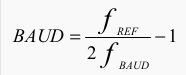
which seems to confirm my suspicion.
solar whale
@slender iron nevermind - I tried it and it seemd to do the trick - now have a clean FS.
slender iron
great @solar whale ! I'm glad it worked out
manic glacierBOT
I just tested this by adding baud = 0 in asf/sam0/drivers/sercom/sercom.c just after it is calculated, and I do get much faster screen updates with that, though I am currently unable to actually measure this with a logic analyzer.
 carmine hornet
Are there any IDEs for circuit python that directly upload to the circuit playground?
idle owl
Mu editor I believe.
carmine hornet
Let me see
idle owl
What OS are you running?
carmine hornet
Windows
idle owl
Try this then: https://github.com/adafruit/mu/releases/tag/1.0.0b13
GitHub
mu - A "micro" editor for MicroPython and the BBC micro:bit. Written in Python and Qt5.
Download the .exe from there
solar whale
Has anyone been using the latest master CP3.0 build on a metro_m4 - I am having some issues where it seems to just hang and die. I tried the same version on the Metro_m0 and it seems OK. It was working a few days ago. I'm looking into recent changes but curious what others are seeing.
idle owl
It's still beta, but it should work with all the CircuitPython M0 boards and it's pretty great!
stuck elbow
I will try it now
idle owl
@solar whale I've been bad, I haven't updated in a while.
solar whale
@idle owl lot of other things to do! The big change is that the master has the SPI Flash enabled. I thought I had a problem with it, but I was able to wipe it and the problems are still occurring.
idle owl
Hmm.
solar whale
When it hangs. it eventually drops the USB connection. Reminiscient of the "old days"
idle owl
Hmm
stuck elbow
@solar whale any particular code you are running on it?
idle owl
@stuck elbow I assume it's not reasonable to just paste the difference from your MicroPython version of that driver into the CircuitPython version of it, but instead of static pixellation, it now looks like it's refreshing repeatedly.
stuck elbow
@idle owl it should actually be reasonable
@idle owl but let me check one more thing
stuck elbow
ah
the write command is different
GitHub
micropython-adafruit-rgb-display - MicroPython library for RGB pixel displays.
solar whale
@stuck elbow ti works OK in REPL and for some code. I have a 16 neopixel ring that kills it every time when I run my test code. but also just reading from a BMP280 fails after a few reads.
idle owl
Hmm. Still refreshing repeatedly.
solar whale
@stuck elbow - do you have a bmp280?
idle owl
I have a NeoPixel ring and strip running on mine
@solar whale Is this current? 36ec29d4e
for the commit I think that is
stuck elbow
@solar whale remind me what it is, pressure sensor?
solar whale
this just hangs and dies - noo lights on the ring ```# Gemma IO demo - NeoPixel
from digitalio import *
from board import *
import neopixel
import time
pixpin = D2
numpix = 16
#led = DigitalInOut(D13)
#led.direction = Direction.OUTPUT
strip = neopixel.NeoPixel(pixpin, numpix, brightness=0.2,auto_write=False)
def wheel(pos):
# Input a value 0 to 255 to get a color value.
# The colours are a transition r - g - b - back to r.
if (pos < 0):
return (0, 0, 0)
if (pos > 255):
return (0, 0, 0)
if (pos < 85):
return (int(pos * 3), int(255 - (pos3)), 0)
elif (pos < 170):
pos -= 85
return (int(255 - pos3), 0, int(pos3))
else:
pos -= 170
return (0, int(pos3), int(255 - pos*3))
def rainbow_cycle(wait):
for j in range(255):
for i in range(len(strip)):
idx = int ((i * 256 / len(strip)) + j)
strip[i] = wheel(idx & 255)
strip.show()
time.sleep(wait)
try:
while True:
rainbow_cycle(0.001)
except:
pass
finally:
for i in range(len(strip)):
strip[i] = (0,0,0)
strip.show()
for bmp280 - this will read 3 or 4 samples then hang ```import board
import digitalio
import busio
import time
import adafruit_bmp280
Create library object using our Bus I2C port
i2c = busio.I2C(board.SCL, board.SDA)
bmp280 = adafruit_bmp280.Adafruit_BMP280_I2C(i2c)
OR create library object using our Bus SPI port
#spi = busio.SPI(board.SCK, board.MOSI, board.MISO)
#bmp_cs = digitalio.DigitalInOut(board.D10)
#bmp280 = adafruit_bmp280.Adafruit_BMP280_SPI(spi, bmp_cs)
change this to match the location's pressure (hPa) at sea level
bmp280.seaLevelhPa = 1013.25
while True:
print("\nTemperature: %0.1f C" % bmp280.temperature)
print("Pressure: %0.1f hPa" % bmp280.pressure)
print("Altitude = %0.2f meters" % bmp280.altitude)
time.sleep(2)```
stuck elbow
@idle owl sure, because the circuitpython driver uses different code and calls that method 'write' not '_write'
@polar tide I'm trying to remember what I actually changed and why
I think the trick is to send the data and command together, without wiggling the cs and dc
solar whale
it's odd thet the bmp280 code always fails on the 4th read. - it print Temperature then hangs.
I have to go for awhile. I'll try to pin it down later. Thanks
idle owl
@stuck elbow So updating it to write, reports dc doesn't exist. Updated that to dc_pin (I thought that was right) and now it's saying "DigitalInOut' not callable" in the display initialisation line in my code.
stuck elbow
should self.dc_pin.value = 0 instead of self.dc(0) etc.
same with cs
and you need with self.spi_device as spi: too
GitHub
Adafruit_CircuitPython_RGB_Display - Drivers for RGB displays for Adafruit CircuitPython.
stuck elbow
@solar whale that neopixel code works for me on metro m4 express with the latest master circuitpython and with a 8-pixel ring
idle owl
    def write(self, command=None, data=None):
        if command is None:
            self.dc_pin.value = 1
        else:
            self.dc_pin.value = 0
        self.cs.value = 0
        with self.spi_device as spi:
            if command is not None:
                self.spi.write(bytearray([command]))
            if data is not None:
                self.spi.write(data)
self.cs.value = 1```That's what it looks like in my code right now
solar whale
@stuck elbow thanks. Looks like it’s my problem!
idle owl
@solar whale I have similar neopixel code and it's running successfully on the newest build (if my CP repo update worked right anyway)
stuck elbow
def write(self, command=None, data=None):
    self.dc_pin.value = command is None
    with self.spi_device as spi:
        if command is not None:
            spi.write(bytearray([command]))
        if data is not None:
            spi.write(data)
something like this
solar whale
@idle owl thanks!
stuck elbow
@solar whale maybe the neopixels take too much current and it resets?
or otherwise browns out
idle owl
AttributeError: 'SSD1331' object has no attribute 'spi' And my editor says it's not using the spi in the with self.spi_device as spi: and the two usages of spi after are saying they're unresolved.
idle owl
Hey!!
stuck elbow
sorry
idle owl
Don't be sorry! It works!
stuck elbow
phew
idle owl
Thank you so much!
stuck elbow
can you make a pull request with this?
idle owl
Yeah I think so. I'll try
Through GitHub right? Like edit the file and then do a PR type thing?
idle owl
I've done it with Git plenty, just never to a current PR from someone else's repo
stuck elbow
it was broken to begin with
stuck elbow
I remember I got pretty scared when I first saw that display misbehaving
especially since it also made noises
idle owl
I had the last two get all messed up too and it was all drivers, so I wasn't as worried. And I ordered them specifically for testing.
stuck elbow
I have cheap chinese knockoffs
idle owl
Ah I see
These are the Adafruit ones, which was the other reason why when you said "some don't work" I was thinking, ok, that's fine, but these probably should 😄
stuck elbow
it's a timing issue with cs pin
it sometimes worked and sometimes not
with the new write() method it works always
idle owl
Ah ok
Never been so happy to see a rather ugly yellow color with a single blinking pixel in the middle.
stuck elbow
this whole library code would need some cleanup, I didn't know what I was doing when I wrote it
this is a well-known secret of IT — the people who actually do things, do them for the first time and have no idea what they are dong — and once they know, they have no time to redo it
stuck elbow
yes, thank you a lot for this
idle owl
No problem! Testing all of this has been fun. I got to work with a lot of breakouts I wouldn't otherwise have thought to do anything with.
I have all, minus one, of the displays that adafruit carries in that library, and the last one is in transit.
stuck elbow
by the way, one display I never got to work is the sharp memory display
the one with mirror pixels
stuck elbow
I think they use it for projectors or something -- hence mirrors

The 1.3" 168x144 SHARP Memory LCD display is a cross between an eInk (e-paper) display and an LCD. It has the ultra-low power usage of eInk and the fast-refresh rates of an LCD. This ...
this one
idle owl
Oh, I see
I swear I had found all the ones they carried, lol
Good to know, then, I didn't get that one anyway
stuck elbow
there are lots of them
idle owl
I have six I think!
Let me know if we want to try to get that one to work and I'll order it up 😃
Seven with the one in transit
idle owl
Huh. Neat!
fading solstice
@stuck elbow @idle owl you figure out the ssd1331 problem, right? will i need to rebase or something?
idle owl
I did figure it out, and yeah, but you can just copy/paste the results of the PR into that file. It's only the ssd1331 file that I'm changing.
You won't need to actually rebase if you copy and paste the change into the file after the new PR is merged. If I remember correctly.
fading solstice
you created a special write method for SSD1331
idle owl
Is that bad?
fading solstice
no, i am just surprised, i thought you were changing DisplaySPI
idle owl
Oh. I see. I was thinking it was just an issue in the ssd1331.py file so I kept trying to edit it.
And that's what @stuck elbow told me to keep changing, so I went with that.
fading solstice
do you have any other SPI devices to test with?
stuck elbow
github can rebase such simple changes automatically on merge
idle owl
Yeah I have another display that does both
But I don't know that it works with this lib
It was for a different lib
stuck elbow
that was just issue with the ssd1331, it requires a different write procedure
fading solstice
ok then. perfect
idle owl
Nice!
stuck elbow
I think we should think about some more general solution for bringing fixes into CircuitPython libraries from the MicroPython libraries they were forked from
idle owl
Hmm. Both editor and pylint are complaining about from micropython import const even though it obviously works. What am I missing here?
stuck elbow
it only works in micropython/circuitpython
but editor/pylint use regular python
you can work around it by creating a micropython.py file with an empty const function in it
idle owl
is it better to do that or disable pylint for that import?
stuck elbow
no idea, I had to do it anyways because I also had some tests
idle owl
Weird because it's not failing on the PR. @fading solstice Did you have to do anything for pylint not to complain about importing micropython?
It's also complaining about dc_pin, which I'm fairly certian I do need to disable
because it's calling that out of rgb.py isn't it?
stuck elbow
I think that Scott has that hack included in the automated pylint
idle owl
Hmm ok
@stuck elbow the write method needed a doc string. I put write procedure specific to SSD1331, do you have a suggestion that's more descriptive or is that correct
stuck elbow
sounds good
idle owl
ok thanks
So we think travis won't have an issue with the micropython import? That's what you mean by built in?
I can do the PR and see what happens
stuck elbow
I think so
stuck elbow
I might be wrong, though, I can't see anything related there
but travis is magic to me
solar whale
@stuck elbow @idle owl my m4 problem appears to be realted to allowing my linux box to update the arm-none-eabi-gcc toolset to gcc 7.2.1 - I rebuit the latest version on my Mac with gcc 6.3.1 and it's all working again....
solar whale
I am relieved, but confused.
idle owl
Fitting for alpha testing. 😃
solar whale
that version of gcc works for m0 and nrf52, just not m4
idle owl
That is odd
solar whale
This si a good note to end the day on - early morning trip to the aitport to pick up my daughter 😉 I'll send a heads up to scott and Dan.
idle owl
Ah ok!
solar whale
<@&370994983664091136> just a heads up - I allowed my linux box to update the arm-none-eabi-gcc tools to 7.2.1 today and everything compiles fine, but I am experienceing some very odd crashes of my Metro-M4 - this is with the 3.0 master. I rebuilt it (on my Mac) with gcc 6.3.1 and everyting resumed working fine. I can execute code compiled with 7.2.1 on my Metro-m0 and on an nRF52 board - only the M4 appears to be impacted.
<@&370994983664091136> the main problem is that while executing, it will hang then eventually the USB connection will disconnect. I have seen the problem while accessing i2c sesnors and when trying to run a neopixel ring. I'll try to gateher more info, but just wanted to put aout a warning about potential issues with the upgrade of the toolset.
@idle owl sounds like you had a good day with your display!
idle owl
Yeah! Fixed it up, thanks to Radomir and got a PR in to fix it.
solar whale
Congratulations!
idle owl
Thanks!
solar whale
I'm off - have agood night!
idle owl
Goodnight! Have a wonderful holiday!
solar whale
You too!
tulip sleet
@solar whale thanks Jerry, we are using 7.2.1 for 2.x (travis updates automatically, and I also took the upgrade), but will watch out on M4
 deft briar
A friend was using a multimeter to check values on my Gemma M0 with Neopixels setup, and the main.py ended up corrupted. I thought, "no problem, I copied the whole directory before messing around". Couldn't overwrite or delete main.py, so I formatted it and restored the files. Code seems to upload when I save, but then all I see is the green LED pulsing... I even went back to https://learn.adafruit.com/adafruit-gemma-m0/circuitpython-neopixel to make sure the code was fine. Any suggestions?

The Gemma M0 will super-charge your wearables! Small, light, and it's easy to use, so you can do more.
tulip sleet
@deft briar if you're having file corruption, you probably want to recreate the CIRCUITPY filesystem. See here, in the the GEMMA section: https://learn.adafruit.com/welcome-to-circuitpython/troubleshooting#circuitpy-drive-issues
deft briar
@tulip sleet, thanks, that worked!
tulip sleet
yw! lots of other good stuff in that guide, which is brand new
deft briar
ooh, nice!
manic glacierBOT
Fill in __version__ when freezing modules. This mimics __version__ processing done when building library bundles.
Added https://github.com/k-bx/python-semver as a submodule, so it doesn't have to be installed by hand.
Pulled all frozen module preprocessing into a single Python script, including the above, and also removing examples/ and conf.py and setup.py
manic glacierBOT
 solar whale
@tulip sleet I have not had any issue (yet) with gcc 7.2.1 on the 2.x branches but since they are all M0, which also seems OK with 3.0.
tulip sleet
@solar whale it may not be a compiler bug, but instead some new optimization or code generation difference which reveals a latent bug (like alignment or undefined var).
there are plenty of existing M4 processors, so it should be pretty well vetted. But I will browse their bug database
solar whale
@tulip sleet agreed! I also wonder if the fact that it disconnects the USB port is a clue ( or just collateral damage). I have not seen any simialr problem on the nrf52 yet and it ais also M4. Main difference is that metro M4 has SPI flash. When it first happened, I thought it was a corrupted FS, hence my attempts to erase it. Since tehn I still get the hang ups so I'm not sure any more.
tulip sleet
do you mean if it just sits for a while it disconnects
solar whale
No - when I run a script( BMP280 demo) it will report 3 good samples then on the 4th it stops partway through and after awhile (30 sec) it disconnects. With my neopixel demo it never turns on the neopixels, but hangs and then disconnects. I did get ti to also hang by executin reads from the BMP280 manually via the REPL- after several succesful reads it hung and disconnected.
tulip sleet
If you could just paste that into a new issue more or less that would help us to keep track of things, and you and other people could add more examples.
Thanks!
solar whale
sure.
manic glacierBOT
After updating my linux system to the latest arm-none-eabi-gcc toolset (7.2.1) I have been experiencing some odd behavior when executing a build of CP 3.0 master on my Metro-m4-express.
The compile and upload run with no problems and I can enter the REPL on the M4. When I execute some scripts, the system will run for awhile then apparently hang and after about 30 seconds, it disconnects the USB port. It can be restored by a RESET.
I recompiled CP 3.0 master with gcc 6.3.1 and everythi...
manic glacierBOT
Looks like the CPX build failed on travis due to exist_ok not existing.
meager fog
im gonna try to build mu for mac next
manic glacierBOT
 manic glacierBOT
I got pre-built Python 3.4 for testing from this PPA: ppa:deadsnakes/ppa :-)
meager fog
welp it works from command line but not double-click woo
any mac people wanna try it?
app doesnt work for me, but exec does (shrug)
 modern zodiac
😬 the mac command line...
wonder how it'd hold up on my 10-year old Macbook
meager fog
you dont need to run it command line, you can doubleclick it - it just doesnt have pretty icon
but wierd the packaged version does not :/
modern zodiac
Yeah -- I'm just more of a CMD line person myself 😁
limber tulip
I tried to run the mu app - it tries to open but fails
I see this error in the log but I'm not familiar with this one: #I handleLSNotitifcation_sync: Application exited: <private>
 lucid arch
hi, i came across feather m0 express .. how does that compare to circuit playground or even huzzah32? anybody has any idea? ta
stuck elbow
it has the same microcontroller as circuit playground express, fewer peripherals on the board, but more pins broken out
it's also more breadboard-friendly
lucid arch
you mean the m0?
stuck elbow
yes, I'm answering your question
stuck elbow
only with the regular esp8266 huzzah, I don't think there is circuitpython for huzzah32 yet
lucid arch
wait, huzzah has circuitpython?
stuck elbow
yes
though it's not as easy to use as the one on the m0 boards, because it doesn't mount as a usb drive: you have to use a special program to copy files onto it
timber mango
Anyone knows if tinyscreen from tinycircuits supports circuitpython? It's a samd21 board with a ssd1331 integrated and some buttons
stuck elbow
never tried it, but it should work — you might need to build a custom firmware version to get access to the pins, though
timber mango
Mmh. I'd rather not modify the official version. The tinyscreen+ seems to be compatible with the arduino zero... I am not sure of taking the risk and buy it, since I only want it to play with circuitpython... A cpx plus a ssd1331 might be a safer bet.
stuck elbow
is there a schematic available?
timber mango

TinyCircuits
DESCRIPTION TinyScreen+ is TinyCircuits' second generation processor board. We took our popular TinyScreen shield and added an Atmel SAMD21 32-bit ARM processor
stuck elbow
looks like the screen is on the default SPI pins
so the metro m0 firmware should work
or feather m0
but there is no extra flash
so you will have a very small filesystem
64kB I think
cunning crypt
Yeah, default M0 has a super tiny filesystem
If you want to just fiddle with Circuit Python, a CPX might be the best best.
stuck elbow
bonus thing: my game library should work with that display, with just some extra code
cunning crypt
On the other hand, if you want to fiddle with a screen, I'm not sure the CPX has the appropriate pins broken out. A Feather M0 Express or Metro M0 Express might work better
stuck elbow
cpx has the pins, but you will use almost all of them
timber mango
Thanks. I will give it a thought...
stuck elbow
feather is the nicest one of them, I made a simple breakout board for connecting screens easily to it: https://cdn.hackaday.io/images/6671491511627538661.jpg

basically a prototype featherwing with two extra rows and staggered headers, so you don't even need to solder it
(of course you still need to solder the connections)
timber mango
Cool
stuck elbow
add some buttons, as on the picture, or the joy featherwing, and you have a simple game console 😃
meager fog
yeah
i dont know why either. so i just put up the cmd line one. you can still doubleclick it
beta software
i updated the guide too - i moved the screen/putty stuff down
idle owl
Oh ok nice
meager fog
so it should be a straight-thru read, just use mu -> things work
idle owl
Ok that makes sense
meager fog
😃
idle owl
😃
meager fog
😃 😃 😃
idle owl
I started the Mu page, but I needed the mac pkg for it
meager fog
https://learn.adafruit.com/welcome-to-circuitpython u dont have to do anything!
New to CircuitPython? This is the place to start.
we can decide later if/what else we want to add
idle owl
Looks great!
meager fog
i think so!
ruby lake
futz, out of feather headers
robust coral
Any way to report doc bugs? https://learn.adafruit.com/welcome-to-circuitpython?view=all#windows-7-drivers. “If you're using Windows 7, you need to a driver before plugging in your board.”
New to CircuitPython? This is the place to start.
solar whale
@robust coral At the bottom of the menu on the left side of the page - there is a link to "Feeback? Corrections?" You are welcome to make comments there to report errors or imporve the doc.
robust coral
@solar whale no such link (at least on iPhone, where I’m viewing). I’ll report through a PC in future though.
solar whale
@robust coral Hah - you are correct. I never noticed that! Posting it here worked as well!
errant grail
@meager fog Just loaded and tested the Adafruit mu on Win10 - on both a desktop and SurfacePro. No issues. I'm really enjoying the convenience of having the REPL/terminal coexist with the code window. Very nice! Thanks! 
meager fog
yay thanks!
ntoll did the hard work, you can leave him a nice note in the mu-editor repo

GitHub
mu - A small, simple editor for beginner Python programmers. Written in Python and Qt5.
@plucky flint wait he's also here on discord 😃
errant grail
@plucky flint Big thanks for all your work on the mu project. The Adafruit derivative is working without issue on a Win10 desktop and SurfacePro. As I told @meager fog , having the REPL/terminal handy while messing with the code is sweet! Thank you!
meager fog
im sure as soon as he's done with his chrismas pudding he'll see it 😃
errant grail
@meager fog Well, I hope he's having a wonderful holiday. And to you and Phil, have a great holiday and festive new year. Thank you for all you do for us!
manic glacierBOT
 flint oyster
Merry Christmas everyone!
I'm playing with file.seek on a CPX and it looks like it will seek from the beginning or end of a file, but not from your current position. Has anyone else seen that?
carmine hornet
Is there any way to access the circuit playground IR transmitter and reciever in circuitpython?
stuck elbow
sure, I think it's the IR_TX and IR_RX pins in board
prime flower
@carmine hornet https://github.com/adafruit/Adafruit_CircuitPython_IRRemote and IRLIB2 (https://github.com/cyborg5/IRLib2)
GitHub
Adafruit_CircuitPython_IRRemote - CircuitPython drivers for IR remote send and receive
carmine hornet
Thank you!
prime flower
np! There are example sketches in there, but I'm going to update the MetroX sketch for the IR Remote to use the IRRemove lib this week instead of irlib2
 languid sage
Merry Christmas, to all... Am I the only one to notice this?? I looked at the CPX tutorial on adafruit.com, then, as is my habbit, I downloaded the PDF version, as it's quite portable to my phone, tablet, other systems (e.g., RPi). While going through the PDF on a PoC I clicked a big green box to "Download the latest drivers" on page 25. All I got from github was "Not Found" I tried the link under the green box, with the same results. Next I tried it in the html tutoral, and it worked. Kinda frustrating, and kinda broke. Please fix in the next version of the PDF. Thanks.
meager fog
hiya jim, we'll take a look!
@carmine hornet see also https://learn.adafruit.com/remote-control-tree-ornament-with-circuit-playground-express

Use an IR remote and CircuitPython to change the colored lights of your holiday tree ornament!
manic glacierBOT
 tulip sleet
@flint oyster Would you be willing to file a bug report with details at https://github.com/adafruit/circuitpython/issues/new (assuming it's CircuitPython)? Thanks!
wraith tiger
By the way, neither version of mu from the amazonaws links ladyada posted will run on my mac mini, apparently because my macOS is a little too far out of date (10.10.5 Yosemite). The error message mentions it being built for 10.12. The latest release of mu from github (0.9.13) runs, though.
Here's the full error message in case it's useful:
[18272] Error loading Python lib '/var/folders/bp/vnb5p0w95l71w5ws97k1x8lh0000gn/T/_MEI8eAdQ9/Python': dlopen: dlopen(/var/folders/bp/vnb5p0w95l71w5ws97k1x8lh0000gn/T/_MEI8eAdQ9/Python, 10): Symbol not found: _clock_getres
Referenced from: /var/folders/bp/vnb5p0w95l71w5ws97k1x8lh0000gn/T/_MEI8eAdQ9/Python (which was built for Mac OS X 10.12)
Expected in: /usr/lib/libSystem.B.dylib
in /var/folders/bp/vnb5p0w95l71w5ws97k1x8lh0000gn/T/_MEI8eAdQ9/Python
meager fog
@wraith tiger waaah ok ill put a note. only mu 1.0.0 has support for adafruits tuff tho 😦
i used pyinstaller to make the binary. not sure it will work with lower ones. another option of course it to run directly from the python source. but i think you'll bump into some other sisue
wraith tiger
@meager fog No problem. I don't really need to run it on macOS, but I thought I'd help test it. I'd more likely use it on my linux or windows computers. I am intending to update the mac soon anyway.
timber mango
Lack of vi keybindings is a big penalty. I generally code only in vim -- did try mu though. Very Arduinoish.
stuck elbow
Yeah, all the other editors have this weird bug where they insert :w randomly into your text.
 jovial wind
@stuck elbow I also get strange issues with conf files having 'ZZ' inserted randomly 😉
@plucky flint mu editor worked great for our code club this year - we had it as a portable app on usb sticks to let kids bypass restrictions on laptops too!
jovial wind
@timber mango my understanding was that mu editor was originally made for kids to use for the micro:bit
@meager fog awesome - just upgraded to 1.0.0 beta 13 on osx and can see the CircuitPython support woohoo
meager fog
@cinder oasis yay!
 cinder oasis
hi
stuck elbow
hello @cinder oasis
manic glacierBOT

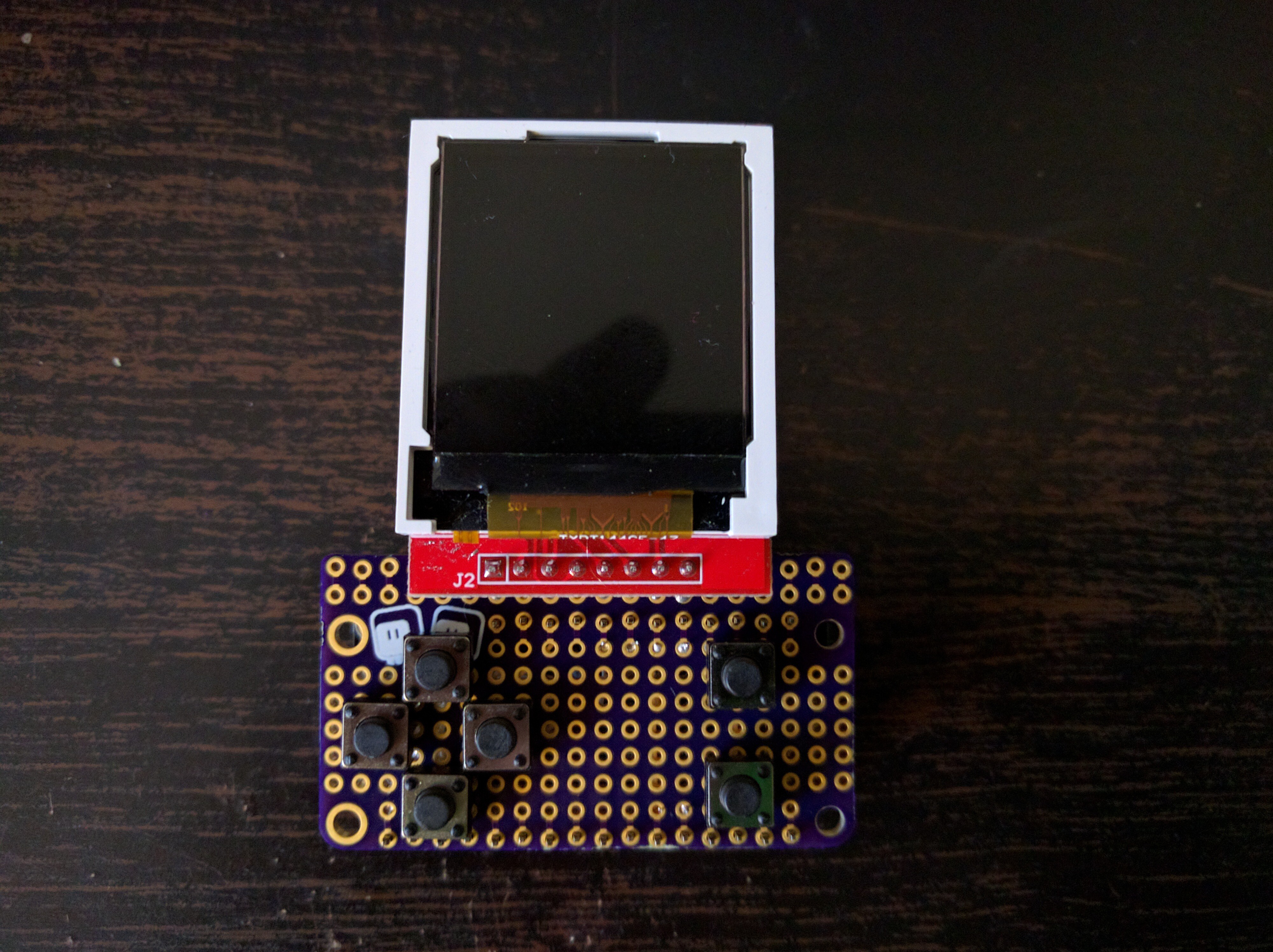
file.seek() does not work from the current position. It does work for seeking from the beginning or end. Example from the REPL:
Adafruit CircuitPython 2.1.0 on 2017-10-17; Adafruit CircuitPlayground Express with samd21g18
f = open('songnight1.mid', 'rb')
f.seek(2)
2
f.seek(4, 0)
4
f.seek(-2, 1)
Traceback (most recent call last):
File "<stdin>", line 1, in <module>
OSError: 95
f.seek(-40, 2)
2116
wraith tiger
Oy! I didn't know what a can of worms I was opening, but I decided to clone mu from github and see if I could get it working on my mac and after what seemed like a bazillion repetitions of pip install __________, it runs!
That mac is in the basement connected to the big screen TV. I haven't really done much serious work on it, as the "10 foot experience" isn't so great. But today I got the bright idea to set up VNC to access it from my other computers. I should have thought of that sooner!
I haven't actually connected any CircuitPython compatible hardware to it to test, but at least mu starts.
manic glacierBOT
The second arg ==1 is deliberately not implemented. Not sure why:
https://github.com/adafruit/circuitpython/blob/36ec29d4e85b19487c868287f09d2492eecc0274/extmod/vfs_fat_file.c#L129
It seems to me it could call f_tell() and then add that value to
s_offset and call f_lseek(). @tannewt, do you know it might not be implemented? I looked in the MicroPython forum and issues and couldn't find a mention of this. I wrote an issue to ask: https://github.com/micropython/micropython/issues/3517...
languid sage
@meager fog @carmine hornet - another bad pdf... i went to https://learn.adafruit.com/remote-control-tree-ornament-with-circuit-playground-express and read the great stuff there. When I went to download the pdf, all I got wad the GIF and two blank pages.
Use an IR remote and CircuitPython to change the colored lights of your holiday tree ornament!
slender iron
@tulip sleet I'm around today to chat if you like
manic glacierBOT
I have no idea. Should we add this to the 3.0 milestone as polish?
I'll see what the MPy folks, say, if anything, but yeah, it's minor.
tulip sleet
@slender iron sure - I was doing cat litter and stuff. now is ok
slender iron
kk 😃
slender iron
@umbral dagger your featherwing is confusing the build tools because it has two top level py files
timber mango
@idle owl heya not sure if you're around but im going to look at CPX
slender iron
@tulip sleet no, its intentional so that a script can check what version of build tools a release was built with
tulip sleet
got it tnx
slender iron
np
tulip sleet
@slender iron Limor is testing tap detection and mic code. also looking at anything else to freeze or include in 2.2. framebuf almost but not quite fits in the small builds (could adjust inlines size to make it fit). Could also turn on array-slice assignment and some other stuff
slender iron
nah, I'd minimize what you change with it
tulip sleet
i'll pass that on
stuck elbow
I have a version of framebuf that can be made much smaller

GitHub
Use a single pixel function with parameters for different number of bits
per pixel, bit order and pixel organization. Allows adding more modes
without writing much extra code.
Note: we specify both...
here
the only down side is that the function that fills the whole screen with a single color is a little bit slower
because I didn't compile a separate version for every mode with the pixel functions inlined
idle owl
@timber mango I'm around now
timber mango
HI!
re: framebuffer, i want to take a look before we add it because ive spent years on gfx code so if we want to change/break api i'd rather do that before freezing 😃
timber mango
noobs welcom 😃
we hvae a great guide here https://learn.adafruit.com/welcome-to-circuitpython
New to CircuitPython? This is the place to start.
cunning crypt
Everyone's a noob at some point in time.
timber mango
check it out, kattni wrote it, and it will get you tons of info!
 barren flint
So a code capable board, I'm assuming a modded ver of regular python?
timber mango
yep!
barren flint
Cool
cunning crypt
It's not as "Complete" or widespread as Arduino, so there are a lot of libraries and the like that aren't ported over.
But that comes with adoption and, more importantly, time. Arduino's been around for years.
barren flint
Nice
cunning crypt
Oh, absolutely. CP has an amazing amount of libraries, especially given its relatively short existence so far.
timber mango
@slender iron how about we sched' framebuf for 3.0?
slender iron
@timber mango thats fine with me
cunning crypt
Depending on what you're looking for, though, sometimes you can find fifty Arduino libraries for the same thing. But Arduino has been around since 2003-ish. Once CP has been around for 14 years or so, it'll probably be in a similar state.
It's not a dig against CP in any way. I love CP. And it has pretty much everything I could want and then more.
idle owl
@timber mango Are you happy with the CPX API? Do you want me to merge it and then update the included docs? I already have an example to include.
idle owl
ok!
timber mango
ok back
idle owl
That was quick
timber mango
it was a cyber errand 😃
idle owl
oh nice 😄
timber mango
ok i have tip of 2.2 installed on my cpx
idle owl
Ok
timber mango
and i need latest cpx.mpy?
idle owl
You'll need the cpx.mpy from the PR
timber mango
im a little slow today, this one right? https://github.com/adafruit/Adafruit_CircuitPython_CircuitPlayground/pull/26#issuecomment-352605010

GitHub
see below!
import time
from adafruit_circuitplayground.express import cpx
Set up the accelerometer to detect tapping ('click')
cpx.detect_taps = 1
while True:
if cpx.tapped: # Look for ...
idle owl
I usually do it the easy way and copy and paste it into an express.py and then mpy-cross it if it's not my repo
lemme check
Yes
idle owl
nice!
timber mango
so yeah the reason i think we cant do both single/double is because the thresh's are so different
idle owl
that bit is fine, I understand that part a lot better now
timber mango
i think its best to just have 'tapped' and be done with it, and you can select single (easy-er to set off) and double (have to get timing right) rather than have to deal with parsing which they want
(and, of course, they can always just get to the lis3 if they're super'vanced)
lemme mpy it - im at work so had to get my cpx alls et up
idle owl
I agree, I think the docs need to be tightened up because of the fact that I immediately tried to use both in a tight loop
It doesn't work if you do it that way 😃
But I have an example of how to use both with specific code, so people can understand better how they work and how they would work together
so I figured make the docs more explicit and include that example as well with an explanation
but I didn't want to try to do it in your current PR
so I offered to merge it first and then update docs.
I totally agree the API is solid as it is, once I worked with it a bunch more and had a bunch of help from Scott
timber mango
yay thanks - if this is good, still mpy'ing - do we want to freeze it into the CPX binary @slender iron @tulip sleet ?
idle owl
Oh we had talked about that and we're thinking we wanted to wait.
It's still being updated enough and still has a couple more things to go into it that we thought we'd wait a bit longer
Well Dan and I had talked about it anyway
idle owl
keen
slender iron
works for me too
tulip sleet
ok by me
timber mango
ok we'll figure out later what version. i think its likely i'll need it for a firmata port
@idle owl ok mpy'd let me get those demo files going now
idle owl
oki! doing the same
timber mango
if we're in the code, do we want to make double-tap allow slightly slower taps
it feels a tiny bit 'fast'
idle owl
We can do yeah. Easy to change.
Up time_window to higher than 110. I tried to make it slower than I was doing it, because I thought I was doing it too fast.
timber mango
you set the set_tap thresh the same (80) for both double/single?
idle owl
Yes. That's all the same. time_window affects only double-tap, the rest are both.
It's looking for two taps inside time_window ms.
timber mango
let me bump to 150
idle owl
I missed maybe 1-2 in 50 taps for either with it set to 80 and it wasn't going off from picking it up with single-tap enabled so I thought it was a good threshold
timber mango
yeah i think this good
idle owl
Above it and we start to lose taps, below and single gets too excited
timber mango
i agree with the 80 thresh
idle owl
excellent
I haven't mpy'd this yet, want me to change time_window to 130 and we start by trying that?
timber mango
ok this is good, can you tweak the timeout to 150 or 200
idle owl
ah ok
timber mango
i think 150 is minimum
idle owl
ok sounds good
timber mango
and i think its good to pull
idle owl
That was my first thought but I always bit myself when I jumped too quick in testing, so I started lower
idle owl
hmm.