#circuitpython-dev
1 messages · Page 126 of 1
 tulip sleet
 idle owl
Oh good to know.
 pastel panther
Hey @tulip sleet, the SAMD51 datasheet doesn't list a SWDIO pin in the pinmux section but mentions it as PA31 on page 35. Should I take that to mean it's whatever PA31 is on the given device?
idle owl
I've had to do the submodule update each time even right after I do a pull.
idle owl
@worn birch Excellent!
 errant grail
I have a beginner's question about converting helper methods into a library. The complication is that the methods need to act on board pins that are defined in the main program. Is there a way to pass the pin defs into the methods or do I need to move the includes and define the pins in the library package?
idle owl
@CGrover#2710 The one I've written has the includes and definitions like that in the library package. But I don't know that it has to be done that way.
 fast hazel
@errant grail , so you'd like motor_speed to be in a library, but be able to act on something like ain01? You can just pass it as a parameter to motor_speed and you should not need the imports in the library. As @idle owl pointed out, it doesn't hurt. But it shouldn't be needed either as long as you're just accesing properties / methods of the thing passed in (e.g., ain01.duty_cycle, etc.).
errant grail
@idle owl @fast hazel Thanks! Yes, I'd prefer to leave the board pin defs if possible, but I'm not sure that there's an advantage to doing that in the long run. You've given me something to think about. Also, I'll need to better understand how an object's properties are passed back and forth with the library methods. Back to the books! 😃
 worn birch
ok any idea how to tell which port the board is attached to on linux? bossac can't find it
is there something similar to deveice manager on windows
idle owl
Yeah, but it's more checking the directory I think. But I don't know know the specifics.
I'm on MacOS.
I'm trying to find it though. Oh, wait, hold on, I might have something that will tell you
/dev/ttyACM* maybe?
The * being a number I think
 hollow tartan
Wow, My Metro Express was flashing these crazy colors at me and I do not know what to do.
It was Green, then Purple, a yellow and two cyan flashes.
I had loaded a main.py that to wanted to run & test. Really stuck in this problem.
idle owl
@hollow tartan It does that when there's an error in main.py. The yellow and cyan are related to the line number. Did you try connecting to the REPL? It should throw an error as well.
idle owl
Yes, it should be fine. But you'll want to figure out what the problem in main.py is. The REPL will give you a line number typically and at least a hint at what's going on.
hollow tartan
So the flashing colors tell what the error is ; how interesting and efficient that is.
idle owl
Yellow and 2 cyans will mean line 2 or line 12, I'd have to see how it's flashing to be sure, but yellow usually counts 10's and cyan counts 1's.
worn birch
Success!
idle owl
@worn birch Yay!
 manic glacierBOT

- Added D4 and moved associated SD_CS so that they are paired within list
- Added D7 and SD_CD which is the SD Card Detect pin
- Added D8 and GREEN_LED
- Added RED_LED associated with D13
hollow tartan
Thanks @idle owl I found the page of colour codes to help me understand.
idle owl
@hollow tartan I was looking for it, glad you found it. Can you link it for me? If I bookmarked it, I must not have categorised it.
hollow tartan
Sure, just a sec.
The Blinking Error Codes are explained near the end of https://learn.adafruit.com/adafruit-metro-m0-express-designed-for-circuitpython/downloads?view=all#m0-boards-faq

CircuitPython, Arduino IDE or even MakeCode with this Metro M0
idle owl
Oh right. Thank you!
hollow tartan
@idle owl I was testing and entered servo = Servo(board.D9)into REPL. Then tried to load the program and it blows up because the pin is already assigned and in use.
Is there a keyboard entry to reset just before a load and run?
idle owl
Using ctrl+d and then reenter the REPL will work, but I'm not sure if there's a keyboard entry to reload it otherwise.
hollow tartan
I will give it a try. thanks.
manic glacierBOT
hollow tartan
Hey, Kattni. I am messing with servo motor on pin D9 and not getting any satisfaction. Can you help?
    time.sleep(1)
    servo.set_angle(90)
    time.sleep(1)
    servo.set_angle(180)
time.sleep(1)```angle __qualname__ deinit __module__
microseconds_to_angle __init__
>>> Servo.angle(0)
Traceback (most recent call last):
File "<stdin>", line 1, in <module>
TypeError: 'property' object is not callable
>>> servo.
angle __qualname__ deinit __module__
microseconds_to_angle __init__
>>> servo.set_angle(0)
Traceback (most recent call last):
File "<stdin>", line 1, in <module>
AttributeError: 'Servo' object has no attribute 'set_angle'
>>> servo.angle()
Traceback (most recent call last):
File "<stdin>", line 1, in <module>
File "libraries/helpers/simpleio/simpleio.py", line 207, in angle
AttributeError: 'Servo' object has no attribute '_angle'```is there a more recent package then CP_bundle_2.1.0_20171019 that has what I need?
tulip sleet
@pastel panther yes, looks like PA30 and PA31 on any package, and you just to have look up the actual pin number. The SWDIO missing from the PA31 line on the SAMD51 datasheet looks to be a typo. It's on the '21 datasheet
manic glacierBOT
Pin confirmation can be made from the Feather M0 Adalogger Pin Out Diagram PDF sourced from here
tulip sleet
@hollow tartan Yes - see this Nov 21 bundle

GitHub
Adafruit_CircuitPython_Bundle - A bundle of useful CircuitPython libraries ready to use from the filesystem.
hollow tartan
cool ... 
tulip sleet
use the bundle pieces all together because there were some naming changes and the bundle is consistent
hollow tartan
>>> import servo.py
Traceback (most recent call last):
  File "<stdin>", line 1, in <module>
  File "servo.py", line 17, in <module>
AttributeError: 'Servo' object has no attribute 'set_angle'
>>>``` not working so good.Link me to the driver. One possibility without looking is that you had servo = Servo(etc), the variable might need to be a name different than the function.
I ran into that twice today.
idle owl
Ah I wasn't sure what it was pulling from. I'll look at the .py file
hollow tartan
C:\AdaFruit_Archive\Metro Experimenter Guide\METROX-Examples-and-Project-Sketches-master\circuitpython\CIRC04 in this folder is servo.py
idle owl
I don't see set_angle in simpleio
hollow tartan
neither do I
idle owl
I see pwm.angle under Servo though
Did you scratch write the code or did you grab it from something?
idle owl
Yeah I see it. The example in simpleio looks just a touch different.
        import simpleio
        import time
        from board import *

    pwm = simpleio.Servo(D9)

    while True:
            pwm.angle = 0
            print("Angle: ", pwm.angle)
            time.sleep(2)
            pwm.angle = pwm.microseconds_to_angle(2500)
            print("Angle: ", pwm.angle)
time.sleep(2)```spacing is off because it's out of the driver
hollow tartan
is that meant to drive a servo?
idle owl
Yeah, as far as I can tell, it's meant to alter the angle of the servo.
It seems like a really simple example, with not much use of what I assume is probably a much more involved driver, but it would at least get you started if it works.
The example is specifically for the Metro M0 Express.
import simpleio
import time
import board

pwm = simpleio.Servo(board.D9)

while True:
    pwm.angle = 0
    print("Angle: ", pwm.angle)
    time.sleep(2)
    pwm.angle = pwm.microseconds_to_angle(2500)
    print("Angle: ", pwm.angle)
time.sleep(2)```Correct spacing and import board instead of from import *. More efficient.
hollow tartan
good enough. thanks.
code seems to be running now, but the above has an error. servo = simpleio.Servo(board.D9) I did not utilize pwm.microseconds_to_angle(2500). Full disclosure.
idle owl
Oh right, because I changed it to import board, sorry about that. Good catch.
Glad you got it working!
I'm headed out. Good night!
pastel panther
night @idle owl !
hollow tartan
Happy Python Dreams.
worn birch
some how lost storage ...
import storage```
doesn't work ... ratshow is that possible?

 slender iron
@worn birch it might be off in master
pastel panther
For when OSHpark would take too long and you're impatient to try the new toys: Hot glue and dead bugs
slender iron
@pastel panther SWDIO is automuxed when a SWCLK signal is received on PA30. it confused me too
now back to gaming
worn birch
@slender iron right ... what exactly does that mean ... is there an easy way to turn on?
pastel panther
It's probably off because it hasn't been updated to work with 3.0. It should be available in 2.x
worn birch
Ah, I see ... so I gather I can cherrypick commits from the master then and test them out in 2.x ... obviously within my own fork
pastel panther
Theoretically yes though if you're talking about SAMD port specific stuff it likely won't work as they changed from using ASF3 to ASF4
worn birch
right ... not sure what that means
pastel panther
Unless you're talking about playing with SAMD51 stuff, you're likely better off just using 2.x. 3.0/master isn't even to beta yet
worn birch
while in the topic does the README.rst within ports/atmet-smad get auto generated or idoes this need manual update
worn birch
well ... i just updated the pins for adalogger and the pull request got accepted ... but if I made the change I should have updated the docs
so if its not auto generated I'll have to go and do it ... I am leaning towards its not
pastel panther
@slender iron can answer your questions when once he grows tired of playing games
worn birch
lol
pastel panther
sorry I cant be of more help
worn birch
all good
slender iron
@worn birch the readme is manual. Please update it 😃
manic glacierBOT
Documentation fixes for #323 and #317:
ports/atmel-samd/README:
- Added D4 and moved associated SD_CS so that they are paired within list
- Added D7 and SD_CD which is the SD Card Detect pin
- Added D8 and GREEN_LED
- Added RED_LED associated with D13
- Added Setup information regarding arm complier packages
README:
Updated to reflect that feather_m0_adalogger microSD is supported
[skip ci] doc updates not code
manic glacierBOT
Code and documentation fixes for #323 and #317 on 2.x:
atmel-samd/boards/feather_m0_adalogger/pins: Added missing pins
atmel-samd/README:
Added D4 and moved associated SD_CS so that they are paired within list
Added D7 and SD_CD which is the SD Card Detect pin
Added D8 and GREEN_LED
Added RED_LED associated with D13
Added Setup information regarding arm complier packages
README:
Updated to reflect that feather_m0_adalogger microSD is supported
manic glacierBOT
I don't think the middle three are actually required. Please also remove the -y and --force-yes arguments since these will be manually run.
Same as #461:
I don't think the middle three are actually required. Please also remove the -y and --force-yes arguments since these will be manually run.
slender iron
@worn birch storage can be re-enabled by moving this line into the define below.
GitHub
circuitpython - CircuitPython - a Python implementation for teaching coding with microcontrollers
 stuck elbow
Some progress. A simple platformer game is now possible.
slender iron
looks awesome @stuck elbow
stuck elbow
I also have a guide on how to build this with a feather m0 and a 128x128 display module
so that you don't need to have uGame

This device I'm building is not very beginner-friendly. It uses all SMD components, a bare displays screen, needs you to flash the bootloader to a bare chip and compile your own CircuitPython, etc. Quite a bit of work, to be honest. On the other hand, I would like the software library I'm making for this to be generally useful, and not just limited to this one device. So I wrote it in a way that lets you use it with pretty much any SPI display with 16-bit colors, and any buttons. Today I went and made a "homebrew" version of µGame, to show that it really doesn't have to be hard.My initial experiments used a Trinket M0, but to really write an interesting game you will probably need much more room, so this time I used a Feather M0 Express, which has an additional flash chip. I also used a breakout board I made for displays, and a bunch of buttons:I had to bend the legs of those buttons a little bit, to pack them on the board tightly enough:A little bit of soldering:And we have out gamepad:Next, we need to wire
pastel panther
@stuck elbow That's awesome!
@stuck elbow I'm working on a m4 board if you're interested in using it to make a m4 version
I got it talking to gdb and jlink commander last night
stuck elbow
nice
I will definitely explore the m4 option once it's all a bit more stable
I need to test SPI and I2C on the metro for now
that platformer barely fits in ram, btw. — larger games will definitely need to be compiled into .mpy
pastel panther
it looks like you're using the same screen as me as well
stuck elbow
ST7735R 128x128
pastel panther
Ya
stuck elbow
I think it's the cheapest RGB LCD you can get
pastel panther
Actually I just checked and I have the 128x160 version of the same
stuck elbow
the 1.8" one?
pastel panther
ya, got it from adafruit
pastel panther
Did you essentially make a custom CP board?
stuck elbow
yes, trinket m0 with flash
pastel panther
is that the trinket_m0_haxpress in the boards directory?
stuck elbow
close, but I also added more pins
I didn't make a pull request with that board, because it's not final yet
things may change
stuck elbow
Fritzing 😃
https://github.com/pewpew-game/circuitpython/tree/ugame/atmel-samd/boards/ugame <-- here is my board definition
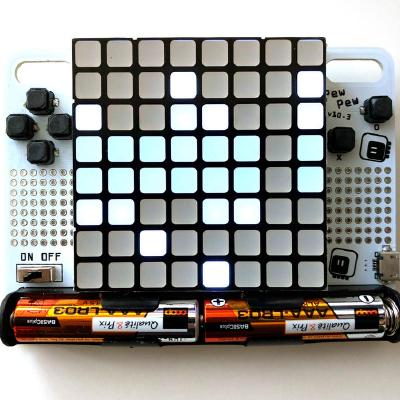
GitHub
circuitpython - CircuitPython - a Python implementation for teaching coding with microcontrollers
pastel panther
Cool
The board I'm working on is essentially a trinket pro m4 express. Or maybe a itsybitsy m4
stuck elbow
nice, I will probably steal from your design for the m4 version of ugame 😃
pastel panther
It's pretty convenient because the samd51G has nearly the same footprint as the 21G that is used on most of the adafruit boards
open source hardware for the win!
pastel panther
I'm going to include the watch crystal but you can always remove it and clean up a few mm^2
I'm just including it because it's on the metro m4 and I'm trying to stay close to that, but I don't think CP uses it
stuck elbow
well, I will make a custom pcb anyways, with the display and buttons and all that
stuck elbow
it fits my workflow much better
I can switch between the pcb and the schematic views, and the changes made in one appear in the other
I can also start with a pcb without a schematic, and add the schematic later
which is nice when doing things like, say, they buttons — I can route them to the nearest pins
without having to decide up front which is which
I also hate kicad's and eagle's 1970s user interface
and the parts library is horrible
pastel panther
I hated eagle's interface when I started but now I have stockholm syndrome so it's all good
stuck elbow
yeah, it's all a matter of what you are used to
pastel panther
KiCad is actually functionally much better but I'm still learning it's quirks. The UI is horrble though
It's got the classic "designed by engineers" look
pastel panther
That would be nice
stuck elbow
I learned to work around most of the bugs by now, but still
and it's buggy in worrying ways, like what gets highlighted on mouse-over doesn't match what actually gets selected — which suggests there are two different code paths for the two, which is just wrong
pastel panther
That would drive me crazy.
stuck elbow
if only there was a project like Fritzing, but written in Python
bonus points for being compatible with Fritzing's file formats
pastel panther
Good luck with that
stuck elbow
nah, I'm too old for such a project
pastel panther
Plus the last thing we need is another fork
pastel panther
Fair enough
stuck elbow
a fork that tries to take over the existing community would be bad, a fork that builds its own community is actually very good
pastel panther
Sure, forks that serve new markets are great, but I think (based on nothing) that they're the minority
stuck elbow
the majority of forks are personal experiments
pastel panther
Sure, but I don't think that's the type of fork we're talking about. I mean forks that indend to 'fix' an issue with the original project
stuck elbow
the "hostile" forks are signs of bad thinks happening in the community, but I think they are just symptoms, not the cause
pastel panther
I agree
stuck elbow
and they sooner or later either take over and kill the original project, or die off themselves
so in the end all is good
pastel panther
I guess. I just look at it and can't help see 'wasted' effort. Perhaps that depends on your definition of waste. Presumably any good ideas would live on?
stuck elbow
can't wait for Mozilla to get merged back into Mosaic 😉
pastel panther
ha
stuck elbow
it's not wasted, it explores possibilities
sure, it's messy, because humans are messy
and emotional
I guess the worst case is when the projects are not really free and open, and the argument is a power struggle — like it was with Arduino just recently
manic glacierBOT
Updated as requested
Updated as requested and my pleasure...initially did it on the master but ran into issues using the resulting firmware because so much is being updated ... the 2.x branch is more stable and I got the firmware working well with the new pins now exposed for use.
worn birch
@slender iron Aha ... a single line of code ... always the case. ... thanks for that ... good to know for the future ... any adalogger specific items you need work done on ?
I'll check out the issues page and see if anything jumps out at me
idle owl
That's the best thing to do
slender iron
thanks @worn birch !
any chance you are free at 11am PT tomorrow? we've got our weekly meeting then
worn birch
PT?
slender iron
pacific time
worn birch
Yea, I can make myself available ... Discord? Chat? Vidcon?
idle owl
Discord audio chat
slender iron
great!
worn birch
Ok, I'll make sure I'm available ... normal length?
worn birch
Ok thanks ... where is the color scheme relational table? 😃
idle owl
You're now a Circuit Python Helper!
If you look on the right side of Discord, it's in the member list
worn birch
Ah right ... I'll do what I can ... still pretty fresh though
idle owl
Part of the role is that you'll be more easily notified when we're up to something. You're not on the hook for anything 😉
slender iron
😃
worn birch
The setup you have going with Discord, Github, Travis and Rosie is a little insane but very cool ... this is my first experience on a continuous integration project ... lets say open source project ...
idle owl
@worn birch That's awesome! This whole thing is my first experience with it too.
I've been involved with open source for a long time, but not at this level.
worn birch
I recon I was about a few hours off having a Adalogger only rosie happening ... lol
idle owl
You got that far, you're not nearly as fresh as you think. Most of us aren't running Travis locally
slender iron
@worn birch I'd be happy ot help you get another rosie going
I don't run travis locally either
worn birch
Yea ... I'm not running locally ... using their system with a free account ... no way I have the computing capacity to do it locally .... unless you mean running it locally off your own forks
idle owl
That's what I was referring to. I don't have a Travis account setup at all.
I had enough trouble getting Sphinx setup... 😄
worn birch
@slender iron ok ... lets do it ... I got up the the point of working out what webhooks were in Github so I could configure the .env
slender iron
what computer are you trying to run it on?
worn birch
Ubuntu x64 VM
slender iron
on your windows box?
slender iron
kk
so there doesn't need to be any webhooks from github to rosie
its all travis to rosie now
worn birch
rightio ... so no need for that secret ... just delete it ... does it need a webhook secret from travis instead then?
slender iron
I don't think so. there is a different way it validates
worn birch
ok so i'll just leave that and move on to the rosie configuration of the readme then
what is a mike instance regard github logs?
slender iron
mike was rosie's old name
worn birch
true ... in the logs of course
... i need a tute on using nano ... gosh ... benn too long lol
slender iron
😃
idle owl
It does not. Only the Express boards do
worn birch
yea ... rosie only supports utf at least that is what he yaml config is telling me
I am assuming that has to do with memory available
slender iron
rosie doesn't know how to load code with bossac
idle owl
@worn birch What caused you to join us? Is the Adalogger your first Adafruit board or have you been doing other things for ages?
worn birch
the issue seems to be getting the board into the bootloader ... not sure if the non-utf boards have an interrupt
idle owl
I haven't flashed a non-uf2 board yet, which is totally on me because I have a few. Unfortunately the only help I'd be with that is linking you to instructions on Adafruit Learn and I'm certain you're way past that.
worn birch
@idle owl elec eng uni assignment ... and mech eng project ... two birds ... mech eng needed a gps logger ... elec eng subject required I work on a project ... hence first intro to adafruit ... haven't touched this stuff since my under grad days ... lol
worn birch
I kinda solved it in arduino ... but have been writing in Pythong for that last 6 month ...soft eng subject ... and saw this CircuitPython gig and dove in ... found the issue with the adalogger pins ... decided to fix it ... and now i'm here ... lol
worn birch
I'll do what I can ... don't get the chance to code enough in the job so might as well find a useful outlet ... and this is just fun ... ok time for food
idle owl
It is so much fun! I'm really glad that you found it. Ok, have a good one!
hollow tartan
I am going to try lighting the bargraph leds with a 74HC595 shift register today.
pastel panther
nice
 formal plover
Hello everyone!
idle owl
Hey @formal plover!
pastel panther
hiya @formal plover
 cunning crypt
@worn birch I see you solved one of 'my' issues! Glad to have you aboard.
formal plover
Rejoice, for I have returned.
cunning crypt
Hoy @formal plover
formal plover
Hi @cunning crypt! Looking forward to getting back in the pun game
cunning crypt
They count as dad jokes for you now, too!
idle owl
lol
formal plover
Haha bonus!
 marble hornet
@pastel panther thank you for the suggestion, have a segger j-link and will be using it for firmware development when I get there. iv'e also hacked the atmel edbg off an arduino zero allowing bootloader burning with just the arduino ide(really fun but nerve racking). do you know how/ if there is an alternate program to atmel sutiods for uploading bin files? or it the requied for atmel chips? thanks so much for your help/ sorry for the delay in responce.
idle owl
@marble hornet Other than the j-link? That has things that load bin files.
pastel panther
jlink commander can do it and I think gdb as well
I'm still fairly new to it though. @idle owl has more experience loading bins with the jlink than I do
@idle owl Do you use jlink commander or something else?
idle owl
I use JLinkExe. Is that the commander executable? Or is commander something else
marble hornet
thanks siddacious, i'll take a look!
pastel panther
@idle owl Ya, thats commander
marble hornet
ps how does one pronounce your username?
pastel panther
me? sid-day-shiss. or just sid
(or bryan)
siddacious is a relic from my IRC days, several ice ages ago
marble hornet
okay, thanks sid!
pastel panther
glad to help
idle owl
@marble hornet Let me know if you need any help with the command syntax. Good luck!
marble hornet
thanks!!
manic glacierBOT
 hollow tartan
any word from MicroChip about getting the PICkit 3 programmer firmware enabled for ATSAMD21 /ATSAMD51 ?
@idle owl I had a weird error report from CP. Way down on line 76 was the start of the Main Loop Forever and the indent got messed up with an extra space. It reported Line 1 as the error location.
idle owl
@hollow tartan It doesn't always get it right. Sometimes it reports an error in main.py when the issue is with a module. I believe it reports where it fails, which isn't always the same place as the problem.
hollow tartan
hmmm, okay, the 74HC595 shift register project worked out very well except for that minor issue. Is there someone working on the Metro Experimenter Guide\METROX-Examples-and-Project-Sketches-master\circuitpython\CIRCxx programs and Learn document. the arduino side is finished. I do know that those project examples are from oomlout.com BTW. They were available years ago when the Arduino Uno first came out.
idle owl
I don't know.
hollow tartan
simpleio.tone(board.D9,222,100)
works from REPL and should work in .py also. correct?
idle owl
I've run into times when it doesn't work in .py even though it worked in the REPL. It ended up being some syntax or somesuch. Theoretically if it works in the REPL, yes, it should work in a .py file, but in practice it doesn't always come out that way.
idle owl
In the grand scheme of things, I'm pretty new to Python. I usually assume it's something I'm doing wrong that's making it fail. I don't remember the exact details of the last time I ran into a file failing but the code working in the REPL, but the fix was something really minor, and I'm fairly sure I stumbled into it. I don't know enough about the code you're writing to be able to look at it and pick up what's going on. Everyone will be back tomorrow, and I know a lot of them are able to pick that stuff out pretty quickly.
hollow tartan
@idle owl do you see anything wrong here tones = {'c': 261.625, 'd': 293.665, 'e': 329.63, 'f': 349.23, 'g': 391.995, 'a': 440, 'b': 493.885, 'C': 523.25} simpleio.tone(board.D9, tones[note], (beat*tempodelay)) I am thinking the curly braces are not right
idle owl
Hmm, no the curly brackets are correct, I think it might be something else, hold on, I have an example like this I think.
hollow tartan
tones['c'] will hopefully pull out the number 261.625
idle owl
No the rest looks right too. Is it possible it's not happy with c and C as different names?
This was meant to work with the touchpads: python tones = { 'A1' : 262, 'A2' : 294, 'A3' : 330, 'A4' : 349, 'A5' : 392, 'A6' : 440, 'A7' : 494, }
The extra space around the colon shouldn't matter, but maybe try that too.
It seems like it might be something in the syntax of simpleio.tone
Where is note in your code?
idle owl
Hmm. I'm not sure. Your dictionary looks correct though. Can you post the entire file? I can try to make sense of it, but I'm definitely having trouble trying to put it together from pieces.
No guarantees either way though.
brb.
hollow tartan
# (Circuit Python)
# this circuit was designed for use with the Metro Express Explorers Guide on Learn.Adafruit.com

# by Limor Fried/Ladyada and Asher Lieber for Adafruit Industries.

# import required libraries
import digitalio
import pulseio
import board
import time
import simpleio

# d9
# a space represents a rest
notes = 'ccdcfeccdcgf '
beats = [ 1, 1, 1, 1, 1, 2, 1, 1, 1, 1, 1, 2, 4]
#notes = 'ccggaagffeeddc ' # a space represents a rest
#beats = [ 1, 1, 1, 1, 1, 1, 2, 1, 1, 1, 1, 1, 1, 2, 4 ]
tones = {'c': 261.625,
         'd': 293.665,
         'e': 329.63,
         'f': 349.23,
         'g': 391.995,
         'a': 440,
         'b': 493.885,
         'C': 523.25}
# bpm
tempo = 300

# play the notes!
for i in range(len(notes)):
    tempodelay = 60 / tempo

    note = notes[i]
    beat = beats[i]
    print(note, end='')
    if note == ' ':
        time.sleep(beat * tempodelay)
    else:
        simpleio.tone(board.D9, tones[note], (beat*tempodelay))
    time.sleep(tempodelay/2)
I think maybe the right hand side of this tempodelay = 60 / tempo
needs to be transposed.
idle owl
Ok back.
 jovial steppe
Can anyone explain to me why there's a DigitalInOut class and not a DigitalIn and DigitalOut class instead (or all three?). If ease of use is a high-want, I don't get that choice at all.
idle owl
Does that last line you posted separately need parens?
jovial steppe
IIRC, that's what they did in mbed.
idle owl
@jovial steppe Is it the carryover from MicroPython? That is a complete guess. The folks who could answer that will be back tomorrow, but I don't know if they'll be around tonight.
jovial steppe
I can only see it if use cases anticipate that one is going to switch back-and-forth between output and input all the time, but that's almost a rarety.
I don't know anything (yet) about MP, but the class is in the CP docs and clearly in the examples. I'll have look in the forums to see if it's discussed there.
idle owl
If you don't find what you're looking for there, I would suggest checking in during the week. Even on weekends sometimes, but with the holiday, everyone's been off.
jovial steppe
I suppose I2C would want the former because it's bi-directional. I just seems to be a stick-in-the-eye to usability for beginners. I'll try to catch @slender iron when he gets back if I don't see it mentioned anywhere. Thanks @idle owl .
idle owl
@jovial steppe Yep! Dan Halbert can also probably explain. Good luck!
jovial steppe
Maybe I'll toss it out in the forums. I don't see anything there already (a mention of DigitalOut comes up pretty much null). tkx
slender iron
@jovial steppe DigitalInOut isn't meant for beginners. The Python/C level API is meant to be the minimum needed to do things so simpler things can be built on top. simpleio has DigitalIn and DigitalOut to make things simpler in this case.
 tidal kiln
@hollow tartan tempo is in bpm = beats per minute = beats / minute
to get the time per beat, invert it -> 1 / tempo = minutes per beat
to convert to seconds, multiply by 60 -> 60 / tempo
hollow tartan
AGREED. 😃 ( Ah well, this was just a place holder, until I could get back with the results of my investigation, you know 'facts'. ) RE: simplio.tone tones = {'c': 261, #tone needs an integer for the second arg 'd': 294, # which is the freq of the note 'e': 330, # to be played (approx.) 'f': 349, 'g': 392, 'a': 440, 'b': 494, 'C': 523}
jovial steppe
@cosmic fractal Thanks that helps. I just found the API documentation after stumbling around through the getting started guide for the MM0E. It wasn't easy to find. I don't see any reference to "simpleio" in the core modules docs (not that I've finished going through all of them yet, which I should have). I gotta admit I'm having trouble finding an easy path to getting stated. Maybe I'll look up the Playground documention that someone else mentioned above earlier today to see if that's a starting point, even though I'm using the MM0E. I wouldn't even know how to use "board" if it weren't for the random example in the MM0E product intro because there's no documentation for it, other than a placeholder.
(sigh)
 cosmic fractal
@Ericwerts you taged the wrong person
jovial steppe
Oops, @slender iron, not @cosmic fractal . (Discord could be smarter about suggesting username completions!)
pastel panther
I got started with some of Tony D's tutorials on SPI and I2C. There are a good amount of guides on the learning system
jovial steppe
I've got a test sketch for an educational shield that I make that I'm converting over from ArduinoC/Uno to CP/MM0E. The test sketch is split up into 20-30 tabs, so it's already pretty object-y. It uses a dozen-plus component types, more than the CircuitPlayground built-in. My Python is a few years rusty, and I don't have any experience with MicroPython yet, let alone CP. I'm just having difficulty getting the lay of the land. Ideally (for me) there'd be 50 pages of API documentation that I could read top-to-bottom to see the whole world. I'll concede that I'm a hater of "cookbooks", which seem to be what (too) many people consider documentation nowadays. I don't think that serves people who want/need the full-on view of the world, but I'm old-timey like that.
Python is just another language, that's not the problem. I've always liked Python, just never had the opportunity to do much serious with it.
idle owl
I see. ReadTheDocs has a lot of information, but it's not going to have everything you're looking for. It usually includes a basic explanation of a module, some details about the available parameters for each module, and some basic examples using the module. But I don't think it'll satisfy your worldview need. Beyond that, there's the Learn Guides, but there's not a central aggregated single guide that includes the detailed CircuitPython guides. As Sid said, TonyD has written up a number of fairly detailed tutorials for a number of the modules, but again, I don't know that he's covered everything yet.
The nice thing about Tony's guides is that he's coming from a solid Arduino background and often has information or guides on both, and some that even include both. I don't know if a comparison would help you better understand it or hinder your further learning.
pastel panther
To be honest, because CP is so geared towards beginners things like a robust, detailed and extensive API documentation aren't prioritized as beginners tend to rely on guides/recipes.
jovial steppe
I've already found three of Tony's videos about MP, but I don't think I've seen/found anything of his on CP. I think that I get the intent of CP over bare-MP. I guess I just wrongly assumed that the docs were more fleshed-out than they were at v2.1.
My plan was to use the MM0E for an intro programming college class and then maybe switch them to MP if students need it later. These guys are engineers but not "programmers".
pastel panther
I think there shold definitely be better documentation but it's one of those un-glamorous jobs that can easily be an endless supply of work if things are constantly changing and being added
On a positive note, help is always appreciated so if you have an idea for improvement we're all ears. PRs welcome
idle owl
I did a search for "Tony D CircuitPython" and found few videos. They're all titled "CircuitPython: Some Topic with Tony D!" if that helps. I'm not certain that's the direction you want to go anyway, but if it is, it's a place to start.
jovial steppe
I can deal with code-as-docs if I need to. I just need to find them in github if the doc isn't there. I only know enough now to know that the stuff in the flash isn't human-readable (semi-complied, at least).
idle owl
Have you looked at ReadTheDocs?
jovial steppe
Yeah, that's what I just found after stumbling in it from a random tutorial link. I never found a link to it from any top-level CP page. That's been part of the frustration.
Two weeks of poking around just to find the API docs.
idle owl
Ok I see part of the situation. The guide for the Metro M0 Express doesn't really have any examples for CircuitPython beyond Blinky. I would suggest something you already said earlier, which is checking out the guide for the Circuit Playground Express. It has a pretty solid section of CircuitPython examples and explanations thereof. I understand it's for a different board, but a lot of it should be the same, and it might be of some help to you.
jovial steppe
Only an hour or two a day though -- not full time!
hollow tartan
RE: simpleio.tone tones = {'c': 261, #tone needs an integer for the second arg 'd': 294, # which is the freq of the note 'e': 330} # to be played (approx.)
idle owl
You're right that there is not a central location with links to the places to seek out information. There's a welcome to the community guide in the works that references Discord, the Forums, Github and ReadTheDocs.
@jovial steppe Like I said, it's a different board, and some of it won't be applicable to the MM0E, but it might be a place to start. https://learn.adafruit.com/adafruit-circuit-playground-express/adafruit2-circuitpython

Make faster and easier than ever with MakeCode, CircuitPython or Arduino!
@hollow tartan Good catch!
hollow tartan
@idle owl how could we have teased that out of the REPL interface?
idle owl
@hollow tartan Sometimes it fails with things like "int cannot be made into float" or something like that, but otherwise I don't know. I'm not sure if running it through on it's own would have caused it to fail with an error as specific as that.
hollow tartan
recall my test case simpleio.tone(board.D9,222,100) surely did hold a clue.
jovial steppe
@idle owl Yeah, someone earlier was in a similar situation with the FM0E and someone suggested he look at the CPlayEx docs, which I was also going to look into. the CPE is actually reasonably representative of what I'm looking write my diagnostic program for.
Thanks for the suggestions.
idle owl
@jovial steppe You're welcome. We're here for questions too.
hollow tartan
Thanks Kattni. Mischief Managed. 😃
jovial steppe
ty
idle owl
@hollow tartan You're welcome. Well done!
pastel panther
hey @tulip sleet , I don't know if you recall the weirdness I was having with my m4 last week but you suggested I try checking out an earlier commit of master and building it to see if that fixed the problem. As it turns out, no it didn't help.
If you have any other ideas I'm game to try them out.
tulip sleet
right, I was worried about USB clocking. DId you try it on that old laptop you had lying around?
pastel panther
Oh no, I didn't. Let me grab it and see what state it's in
pastel panther
welp, it looks like the roaming vortex has claimed the last un-chewed power adaptor for the macbook air
And of course it's dead by now
I can try it with my old work computer tomorrow
Is there anything else I can try in the meanwhile?
tulip sleet
@pastel panther well, you already tried the USB hub, which I hoped might help, but it didn't. I can't think of anything else, short of plugging it into any other computer in the house. (But it sounds like there's only the one functional one now.) I just want to see if CIRCUITPY appears and/or you can get into the REPL. If I remember, you did not see CIRCUITPY, and there was no /dev/tty.usbmodem411.
manic glacierBOT
I'm reluctant to add scan to OneWire because then we'd need to know a bunch more about the protocol. Instead, I think a OneWireBus library could provide scan but also higher level transfer methods to read and write byte arrays.
I also like the idea of the OneWireAddress with two or three properties, serial number and family code.
slender iron
@jovial steppe Trinket guide is good too and holds similar examples: https://learn.adafruit.com/adafruit-trinket-m0-circuitpython-arduino/circuitpython

CircuitPython or Arduino IDE on this tiny little microcontroller board
The Metro M0 Express and Feather M0 Express came first, thats why they don't have as many examples.
Many of the extra libraries are linked here: https://circuitpython.readthedocs.io/en/latest/docs/drivers.html
@hollow tartan what was the issue with your tone code?
hollow tartan
@slender iron \Metro Experimenter Guide\METROX-Examples-and-Project-Sketches-master\circuitpython\CIRC06\piezo_music.py program was using FLOAT values for the note Frequency and simpleio.tone wanted an Integer.
cunning crypt
Does CircuitPython have anything that pulls anything unique but consistent off of the board? IE, serial number, M0 ID, etc
slender iron
@hollow tartan ah! we should fix tone to either handle it or produce a friendly error message. mind filing an issue on the simpleio repo?
@cunning crypt not through python that I know of. we do read the serial number for USB though and could expose it somehow
cunning crypt
@slender iron That would be useful for a potential example. I can absolutely write it without it, but it'd be "Cool" to have it in there. Idea is to show off the fact that Python, in general, can load/modify files on the fly. Idea I had was have the main program create a secondary program based on the unique board it's on.
cunning crypt
Awesome. And I'm about 85% sure there's a self-reset method available somewhere.
slender iron
I think there is an issue to add it
tidal kiln
w.r.t to board ID, could something be added to board ?
hollow tartan
@slender iron you are asking me to post a GitHub 'new issue' against adafruit/Adafruit_CircuitPython_Bundle ? I can do that.
slender iron
GitHub
Adafruit_CircuitPython_SimpleIO - Simple CircuitPython classes to do a wide variety of basic functionality.
hollow tartan
ah I see
slender iron
@tidal kiln @cunning crypt that or microcontroller modules can't have properties though 😕
@hollow tartan thanks!
cunning crypt
@slender iron Simple housecleaning: @worn birch 's PR that you merged... 13 minutes ago should close issues #317 and #323
slender iron
@cunning crypt do you have the ability to close them?
cunning crypt
@slender iron Makes some amount of sense. Perhaps in os then, where... os.uname() sits and you can get the MC from.
Not that I know of?
tidal kiln
what can board have?
slender iron
methods and classes
tidal kiln
so an id class then?
slender iron
er, functions technically
tidal kiln
board.ID.core, board.ID.name, etc.?
slender iron
@cunning crypt you should be able to close them now
cunning crypt
@slender iron Fantastic!
slender iron
thank you!
manic glacierBOT

This is addressed in PR #461 - Marking as closed.
This is addressed in PR #461 - Marking as closed.
slender iron
@cunning crypt w00t, time to pull stats for the weekly 😃
cunning crypt
I'll actually be able to attend tomorrow!
slender iron
GitHub
circuitpython - CircuitPython - a Python implementation for teaching coding with microcontrollers
7 different authors!
pastel panther
wew!
worn birch
@cunning crypt Hey mate, sorry for jumping in on those issues, I really needed them solved for a project I was working on and for some reason the link to your branch just 404'd so I figured I might as well just do it for the experience
cunning crypt
Don't apologize!
Also, had to nuke my branch at one point. That's why it 404'd
I totally meant to work on that... and then the omnious thing at work called The Holidays arrived.
worn birch
lol ... happens to us all
slender iron
@worn birch it looks like some of your commits may not have matched your github email
cunning crypt
Yeah. Working in food service at this time of year is draining, so my free time gets spent doing less brain-active things.
slender iron
you are actually listed twice
worn birch
what does that mean?
slender iron
GitHub
circuitpython - CircuitPython - a Python implementation for teaching coding with microcontrollers
the second to last commit just has your name but doesn't link to your account
hollow tartan
@slender iron tone(pin, freq, duration)
#19 opened just now by microwattbott ```While testing an early beta version of piezo_music.py,
I struggled to understand that freq had to be an integer.
A float value is not going to make the tone() function work.
@tannewt suggested that we try to "fix tone to either handle it or produce a friendly error message."
RE: \Metro Experimenter Guide\METROX-Examples-and-Project-Sketches-master\circuitpython\CIRC06\piezo_music.py ```
worn birch
huh ... how does that happen ... I am using sourcetree I wonder if that has anything to do with it'
manic glacierBOT
This would be super-useful in a few of the examples that I am planning for #345
pastel panther
@slender iron is loadbin the correct jlink commander command to use to program a bin to my m4 board? Something like loadbin blinky.bin 0x00 if I'm loading it to a new bare chip with no bootloader?
pastel panther
I was going to but I couldn't figure out the gdb commands to do so
or does running it with a elf like in your tutorial flash it?
Hmm... it seems the obvious load was staring me in the face
manic glacierBOT
Pulling a unique ID would be useful for an example I have in mind for #345 and @tannewt mentioned in Discord that a Serial Number was pulled for the USB code and that it may be able to be added somewhere.
Personal preference is board.id() but putting it in os along with os.uname() would make sense as well. Perhaps even more sense from a programming standpoint since that's where you get other board information from.
pastel panther
@tidal kiln Does a 'CPU could not be halted' error sound like the reset line isn't working?
tidal kiln
that can happen. what's the board?
pastel panther
It's a samd51 on breakout +hotglue etc. I threw together this weekend:
High likelyhood of a bad connection. I'll have to figure out how to verify that unless you know
tidal kiln
oh. not sure then. i've had it happen working with metro m4 express. there's a reset / usb plug / unplug dance that fixes it.
slender iron
@pastel panther yes if its fresh. I've had more success with a hacked arduino zero in that case htan the jlink
if there is code on it then be wary you turned the SWCLK pin off
or stopped the core clock
tidal kiln
jlink should report that it's connected though, even before you try loadbin
pastel panther
It's fresh from atmel as far as I know
Yea, it said something about identifying it as a m4
Found Cortex-M4 r0p1, Little endian.
FPUnit: 6 code (BP) slots and 2 literal slots
CoreSight components:
ROMTbl[0] @ 41003000
ROMTbl[0][0]: E00FF000, CID: B105100D, PID: 000BB4C4 ROM Table
ROMTbl[1] @ E00FF000
ROMTbl[1][0]: E000E000, CID: B105E00D, PID: 000BB00C SCS
ROMTbl[1][1]: E0001000, CID: B105E00D, PID: 003BB002 DWT
ROMTbl[1][2]: E0002000, CID: B105E00D, PID: 002BB003 FPB
ROMTbl[1][3]: E0000000, CID: B105E00D, PID: 003BB001 ITM
ROMTbl[1][4]: E0040000, CID: B105900D, PID: 000BB9A1 TPIU
ROMTbl[1][5]: E0041000, CID: B105900D, PID: 000BB925 ETM
ROMTbl[1][6]: E0042000, CID: B105900D, PID: 003BB907 ETB
Cortex-M4 identified.
Perhaps I should erase first, just in case?
or try to at least
pastel panther
hmm.. I should probably hook up a reset button
pastel panther
Samd issue, it can't do much since it can't stop the CPU
tidal kiln
double resetting only makes sense for the metro with uf2 bootlaoder, not sure how that'd apply to your setup
pastel panther
oh right, I don't think that would do much, though being able to reset it will probably be handy
tidal kiln
yep
pastel panther
hmmm, gdb is acting like it copied it over...
worn birch
random question can I use a pwm to make and led flash like once every 15 seceonds? ... initial thoughts are it is less that 1 hz so likely not
cunning crypt
@worn birch PWM? No, not really.
Checking the board time and seeing if 15s have elapsed, and then flashing the LED would probably be the best
pastel panther
time.monotonic() is what you want, I think
If you were using the timers directly you could make it work but you're not going to get that level of access to the hardware in CP
worn birch
yes ... I tried that ... how to do it so that it ALWAYS does even if the main loop fails ... ie. like a main.py load heartbeat as such
pastel panther
What do you mean by 'if the main loop fails'?
worn birch
the LED setup on pwm of 1hz with 1/8 duty cycle looks ok ... just wondered if I could got lower but pretty sure the freq is an int
so you load main.py it does imports then setup then most likely enters a while loop or state machine ... so if python throws an error I don't want it to stop flashing the LED ... using the PWM solves this ... where as having to call time.monotonic() could fail in the loop
pastel panther
I'm not sure you can do that without modifying the cp code
Oh, I see what you mean
worn birch
yea I figured ... all good 1 hz will work
pastel panther
because if the timer is working on it's own, presumably it would continue even if CP crashed
You would need to aggressively prescale the clock and then use a large period and I don't the CP has that level of access
(though it would be nice)
What is your use case?
worn birch
Long term GPS logger ... with backup battery ... want to be able to use the red led to say hey I'm on I'm working away but not have it drain the battery
I mean at 1mA draw the LED is not my issue ... the flush after every write to sd is a killer
pastel panther
If it's a heartbeat, wouldn't you want it to stop if something crashed?
worn birch
I guess ... versus ... hey im powered ...
touche
While we're talking LEDs anyone use the LED flash rate to pass on user messages ... like 5 hz flashes means an error or two red then green means xyz
pastel panther
CP has pretty involved error message delivery via the neopixel. It can even report the line number of the bug
might be worth checking out
GitHub
circuitpython - CircuitPython - a Python implementation for teaching coding with microcontrollers
slender iron
<@&356864093652516868> Meeting tomorrow (Monday) at 11am pt / 2pm et here on discord. Talk with you all soon!
errant grail
@river quest Thanks for the CyberMonday CPy-specific discount! There will be 4 more Trinket M0s on the bus headed out of NYC to Washington state to become autonomous StringCar controllers. 😃  😃
😃
stuck elbow
@pastel panther is the metro m4 schematic published anywhere? I couldn't find it on github
manic glacierBOT

Hi team,
I have a Playground Express purchased... in August, I think (in case that makes a difference). This is on a Mac running 10.12.6. The USB cable works with Micro:Bits, and appears to work with the CPE.
My process:
- Double-click to get into bootloader mode. The CPE appears as CPLAYBOOT, as expected.
- I have pulled the current UF2 file from the tutorial, and drag it onto the CPE. This appears to transfer correctly.
- CPLAYBOOT disappears.
- NO NAME appears.
This driv...
pastel panther
@stuck elbow no it's not, though you can find a fair amount out with a magnifier, a multi-meter, the data sheet and a lot of patience 😉
I should probably sketch one up just as a reference though I don't think I have the patience to do the whole thing. I'm kinda just using it to answer questions I have about the samd51
manic glacierBOT
 stuck elbow
@pastel panther I was wondering if the big black capacitor-like smd part bwteen the flash and the mcu is the buck converter inductor
or just a really large capacitor
pastel panther
@tulip sleet I tested my m4 with a old mac mini I found and got a similar "can't enumerate" or similar error and had no CIRCUITPY. I forgot to check for CDC but I doubt it was working
@stuck elbow Yes, that's the inductor
the 'schematic checklist' section of the datasheet was useful for that
I think it's a 1008
tulip sleet
@pastel panther if you could try it on a Windows or Linx box, that would be the key test.
pastel panther
Ok, I'll test my old windows box when I get to work
tulip sleet
It's possible there is something broken about the flash memory on the m4. The bootloader is v1.23.1-adafruit.something, right? If there's a bad spot in the flash above the bootloader, then circuitpython would load but would not run properly. That would explain why you see METROM4BOOT but not CIRCUITPY when you load any version of CircuitPython. Otherwise I don't see a reasonable cause for this behavior. But that's an unlikely scenario, so we've got to rule out all kinds of other things.
pastel panther
Yea, that's the bootloader version.
tulip sleet
if you have time before you go to work, load erase_m4.uf2, and then reload a good build of circuitpython 3.x
manic glacierBOT
I had not been able to find that documentation. It fixed the CPE; thank you.
I will mark this closed, and find somewhere in the documentation where I think this should be mentioned. Then, I'll fork, branch, edit, merge trunk, and make a pull request against that documentation edit from my branch. I'm assuming it will be in one or two places in the CPE tutorials that this would be good to mention. (And, assuming those tutorials/documentation are in Git somewhere... if not, I'll just report ...
tulip sleet
@pastel panther testing one...
5eb7958425b026480486c
that's very recent. all the recent ones have been fine on my boards
pastel panther
ok
tulip sleet
you may need to update to get that one
manic glacierBOT
Don't worry, I had problems finding it myself. I think part of the problem is that it's only in the latest documentation, and not in the "stable" one.
pastel panther
It's back!
tulip sleet
Great?! so what was different?! Maybe the CIRCUITPY filesystem was damaged and the erase fixed it
pastel panther
>>> print("whaaaaat the heck")
whaaaaat the heck
>>>```That's the only thing that makes sense, but why didn't the previous erase fix it?
tulip sleet
I thought you did the same things as previously. Or maybe what you were loading was not really the right circuitpython?!
stuck elbow
folks, does anyone have opinions about merging https://github.com/adafruit/micropython-adafruit-is31fl3731/pull/1 ?
pastel panther
@tulip sleet I think I should try to repro it now, what do you think?
tulip sleet
dunno! If you think you can reproduce it.. do you mean repeat what you just did a few times?
pastel panther
Yea, find whatever commit I had on it and then put it in repel and shut down the computer. I think that's what happened. I had it in repl and I went to sleep and it was borked in the morning
tulip sleet
well, try that with the current commit, since we'd want to test against that.
pastel panther
ok
tulip sleet
@stuck elbow I agree with your comment about the name blit(). I would just call it write() or similar. Looks good otherwise.
stuck elbow
@tulip sleet thanks, I asked the author to rename it
manic glacierBOT

My issue with the OneWireAddress class is that since CircuitPython doesn't support long integers, the 48 bit serial number will just be another byte array. And since the CRC and family code are only 1 byte, they can just be accessed easily and directly from the full byte array, ex: address[7] or address[0]. I think all a OneWireAddress class would do is provide a pretty syntax, ex: address.CRC vs. address[7].
But for now, assume we create a OneWireAddress class along with the OneWireBus li...
 silver tapir
Hi, I need a bit of help.
I have a feather m0, circuitpython version. From the factory it came with 0.10.1 and I'm trying to upgrade to cp version 2
silver tapir
I've copied the uf2 file to the CIRCUITPY folder inside the feather, the neopixel flashes for a second but after reload, I still have 0.10.1
Hi @idle owl 😃
idle owl
Hmm. Are you putting it into the bootloader first by double-tapping reset?
silver tapir
I dunno if I have to upgrade to an intermediate version...
idle owl
You shouldn't have to, no
silver tapir
Ohh I see.
idle owl
Because you should be putting it into FEATHERBOOT or something close to that
silver tapir
@idle owl, thanks a lot... double-tap, got it.
idle owl
@silver tapir Sure!
silver tapir
Now I have 2.1.0. No idea how thankful I am.
idle owl
I'm glad we figured it out!
slender iron
@silver tapir how were you getting the version number? We don't ship the feather with circuitpython as far as I know
manic glacierBOT
"Pretty syntax" is exactly why I think address is OK. Its way easier to discover address.family than address[0].
Neither of the last two actually need to import adafruit_onewirebus because they can access the objects passed in even if they don't know about the type itself. I think you are thinking this because C expects to know the type of everything.
In Python, you can just pretend its a type you expect and as long as it provides the things you expect then it'll work. This flexib...
@jadudm If you find a spot it should go in an Adafruit learn guide feel free to ping me. They are not on github.
 ruby lake
what ype does a conditional expect a varible to be? I read a characters from a uart, ay rcv = uart.read(1) but then an "if rcv > 0xBF and rcv < 0xF8:" gives a TypeError, "TypeError: unsupported types for gt: 'bytes', 'int'"
~type
 glacial bronze
the problem is that bytes and int don't have an implicit cast to be directly comparable
Try casting the byte to an int
silver tapir
@slender iron it is possible I installed CP on that feather a while back.
stuck elbow
@ruby lake conditional accepts pretty much any type, and any "non empty" value will be considered True, but in your case you use a "<" operator, which expects numbers.
@ruby lake try b'\xbf' in place of 0xBF
@ruby lake even better, do rcv=uart.read(1)[0], which will give you the value of the first byte
ruby lake
thanks
slender iron
@silver tapir ah, from may https://github.com/adafruit/circuitpython/releases/tag/0.10.1
GitHub
circuitpython - CircuitPython - a Python implementation for teaching coding with microcontrollers
 opaque patrol
@stuck elbow Is it possible for uart.read(1) to return an empty (null in C++) array? Just curious,
stuck elbow
@opaque patrol let's look at the documentation: http://circuitpython.readthedocs.io/en/2.x/shared-bindings/busio/UART.html#busio.UART.read
yes, it can read fewer bytes than specified, in this case you will get an IndexError — you can avoid it by first checking if it's not empty before applying [0], or by catching that exception
opaque patrol
@stuck elbow I assume None would cause an exception, so you would want to wrap that in a try...except block
stuck elbow
you can do something like:
rcv = uart.read(1)
if not rcv:
    continue # Assuming you are reading it in some kind of a loop
rcv = rcv[0]
...
then it will go back to the beginning of the loop when it gets None or an empty bytes object
(I don't think it can return None, though)
silver tapir
Another quick one. I have some of the old rgb led chains from sparkfun. Do I use the dotstar library for this strips?
(example https://www.sparkfun.com/products/11020)
silver tapir
(oh and there is an adafruit ws2801, but for the full (c) python)
@idle owl Ok, let me check how to I define the two pins with this library.
idle owl
Dotstars are APA102 I think. The NeoPixels are WS2182, which is closer? I don't know if it'll work though. It's worth a try!
@silver tapir If that doesn't work, the python library might work with CircuitPython as-is.
silver tapir
Ohh ok. I'll try that.
idle owl
It'll probably need a little tweaking, but we try to keep them compatible.
worn birch
@opaque patrol yea so the uart object returns None if it timesout hence why the if not rcv: works .. it is handy if you want to do a check and then do something if the uart times out such as:
uart = busio.UART(TX, RX, baudrate=9600, timeout=2000)
sentence = uart.readline()
    if sentence:
        print(str(sentence, 'ascii').strip())
    else:
        print("No Input - UART timed out after 2 seconds")
@silver tapir I don't know what changed between the WS2181 and WS2182. The NeoPixel library might work as is, or with minimal changes.
opaque patrol
@worn birch yeah, I was concerned about the rcv=uart.read(1)[0] could cause an exception and that it should be handled appropriately to avoid a crash
silver tapir
@idle owl One change is that I need to define a clock pin and a data pin. With the neopixel library I can only define the "in-out" pin and that's it.
I'll try with the c python version...
idle owl
@silver tapir Ah, I see why you were thinking DotStar then. Yeah, give the cpython lib a try
silver tapir
@idle owl (a little example with the arduino library. https://github.com/adafruit/Adafruit-WS2801-Library/blob/master/examples/strandtest/strandtest.pde )
GitHub
Adafruit-WS2801-Library - Arduino library for controlling strips/pixels using WS2801 driver chips
worn birch
@opaque patrol yea then separate into the following:
data = uart.read(1)
if data:
    rcv = data[0]
or the response from @stuck elbow works well too
stuck elbow
@worn birch it returns b'' not None
slender iron
@silver tapir you can probably do it with busio.SPI
idle owl
Even better!
slender iron
the dotstar driver sends an extra header and footer that may mess up the colors on that strip
worn birch
@stuck elbow Ok ... so when does it return None ... the docs say the return type is bytes or None https://circuitpython.readthedocs.io/en/latest/shared-bindings/busio/UART.html#busio.UART.read
stuck elbow
I have no idea
let's look at Python's documentation: https://docs.python.org/3/library/io.html#io.RawIOBase.read
no idea if UART is in non-blocking mode by default, though
I guess it is, if it has timeouts
ruby lake
Ideally I'd tie the uart to an isr
hollow tartan
i LEARNED about // math op
ruby lake
but I am just experimenting at this point to see how well I can process midi data
worn birch
Interesting ... so if you get b'' then it is end of file and None if it times out you could check for either condition and then do something useful
slender iron
we're in the voice chat all
hollow tartan
TerminAll app did not work with Feather on Win10. no COM port Reachable. Anyone using it?
tulip sleet
@hollow tartan did you try Tera Term?
hollow tartan
yeah I like it. Putty WAS available so I used it.
tidal kiln
nothing
idle owl
Kitty!
tidal kiln
kitteh!
 solar whale
a very vocal kitty🐱
idle owl
@solar whale CircuitPython assistant.
 sick creek
tulip sleet
sick creek
tulip sleet
not yet
stuck elbow
all the radio modules need their drivers written
worn birch
@slender iron you need to setup push to talk ... lol ... tap tap tap
idle owl
@worn birch It's part of the ambience.
tidal kiln
onewire bus / device stuff, mostly thinking through approach and discussing in issue
yes. thanks.
stuck elbow
This device I'm building is not very beginner-friendly. It uses all SMD components, a bare displays screen, needs you to flash the bootloader to a bare chip and compile your own CircuitPython, etc. Quite a bit of work, to be honest. On the other hand, I would like the software library I'm making for this to be generally useful, and not just limited to this one device. So I wrote it in a way that lets you use it with pretty much any SPI display with 16-bit colors, and any buttons. Today I went and made a "homebrew" version of µGame, to show that it really doesn't have to be hard.
My initial experiments used a Trinket M0, but to really write an interesting game you will probably need much more room, so this time I used a Feather M0 Express, which has an additional flash chip. I also used a breakout board I made for displays, and a bunch of buttons:
---------- more ----------I had to bend the legs of those buttons a little bit, to pack them on the board tightly enough:
A little bit of soldering:
And we have out gamepad:
Next, we
silver tapir
@slender iron Sure, will try it. I'll re-solder the pins into the MOSI MISO and try. Thanks for the help.
hollow tartan
Working through the METRO Express Experimenters Guide (on GitHub) as a way to learn CP. These CIRCxx projects were originally put out at http://www.oomlout.com/a/products/ardx/circ-04.
silver tapir
(And no... now luck with the cpython version)
worn birch
u-blox
errant grail
Thanks!
hollow tartan
is the help() feature implemented in CP? in the libraries? like SimpleIO
slender iron
not really, it doesn't know what the help strings are for objects because of memory contraints
worn birch
haha ... read my mind
tidal kiln
foot switch
hollow tartan
get a keyboard chip embedded in your head
worn birch
really??
idle owl
I'm pretty sure mine is too.
worn birch
yup
hollow tartan
later.
hollow tartan
😃
slender iron

 timber lion
you might find this helpful @idle owl the videos i did on circuit walker sneakers: https://www.youtube.com/watch?v=zr4Pu3F-yJw and https://www.youtube.com/watch?v=cbkroYQVn28 and https://www.youtube.com/watch?v=TTbfEN-r37s i dive deep into some shake detection stuff and look at some advanced algorithsm with low pass filtering, adaptive step detection, etc.

Live stream to http://twitch.tv/adafruit showing part 1 in a series to build step-reactive light-up Circuit Walker Sneakers with Circuit Playground. Using th...

Live stream to http://twitch.tv/adafruit showing the followup video in the Circuit Walker Sneakers project series. This video follows part 1 by digging deepe...

Live stream to http://twitch.tv/adafruit showing part 3 of the Circuit Walker Sneakers project. This is a CircuitPython version of the sneakers that are powe...
in the end i found the tap detection on the LIS3DH works pretty well when you tweak the thresholds a bit 😃
idle owl
Thanks!
tidal kiln
# sum up readings
shake_accel = tuple(map(sum, zip(shake_accel, self.acceleration)))
but something to consider perhaps for the shake detection you're adding, you might find adding a low pass filter helpful in the future if the detection is too sensitive
worth experimenting with later, not really necessary right now
slender iron
<@&356864093652516868> Here is the recording from the meeting today: https://youtu.be/REeKXoromIg Thanks all!

Join here for the chat all week: http://adafru.it/discord The weekly happens normally at 2pm ET/11am PT on Mondays. Check the #circuitpython channel for noti...
cunning crypt
..... I am seriously disappointed in myself.
I completely lost track of time and missed the meeting.
stuck elbow
happened to me last time
slender iron
sorry @cunning crypt I should have pinged you
worn birch
hey so if you rmove an sd card while the system is running ... I assume it is unmounted by the adafruit_sdcard library?
cunning crypt
No worries, @slender iron
worn birch
if a card is then reinserted ... it just needs remounting right ... or does the whole initialization need to be redone?
note CP is running
slender iron
@worn birch I have no idea what it'll do
tidal kiln
@timber lion for the lis3dh, you're thinking you'd set it up for detection and then poll the interrupt line?
worn birch
yea ... it is not doing what i expected ... i'll look into further ... so far I haven't killed the card ... hopefully i wont
stuck elbow
funny things may happen if you insert a different card 😄
tidal kiln
@timber lion also, the averaging is essentially the low pass filter
stuck elbow
for some value of funny
worn birch
yea ... maybe I need to look at deinitliasing the sd card on removeal then initializing again after ... just o make sure I don't get them funnies @stuck elbow
idle owl
@slender iron More like this? # shake_accel creates a list of tuples from acceleration data. # zip takes multiple tuples and zips them together, as in: # In [2]: zip(['a', 'b', 'c'], [1, 2, 3]) # Out[2]: [('a', 1), ('b', 2), ('c', 3)] # map applies sum to each member of the resulting tuple, creating # a single tuple of single members, which is fed into shake_accel # for use in finding the average acceleration
slender iron
it'd be nicer if the example was actual accel values
idle owl
ok
tidal kiln
also:
# map applies sum to each member of the resulting tuple, creating
# a single tuple of single members, which is fed into shake_accel
map return list, not tuple. that's why the tuple() cast is needed
idle owl
oh right. and I guess if we had done shake_accel = [0, 0, 0] we wouldn't have needed tuple() but this is clearer I think.
@tidal kiln so resulting in a 3-member list. tuple converts this list to a tuple which is now used as shake_accel ?
            # zip takes multiple tuples and zips them together, as in:
            # In : zip([-0.2, 0.0, 9.5], [37.9, 13.5, -72.8])
            # Out: [(-0.2, 37.9), (0.0, 13.5), (9.5, -72.8)]
            # map applies sum to each member of this tuple, resulting in a
            # 3-member list. tuple converts this list into a tuple which is
# used as shake_accel.```@slender iron Better? Also, should I explain the rest as well? Or was that the only one you found unclear.
slender iron
that was my main concern
idle owl
Ok keen
timber lion
yeah totally @tidal kiln the click detection checks the click/tap interrupt bit: https://github.com/adafruit/Adafruit_CircuitPython_LIS3DH/blob/master/examples/click.py
GitHub
Adafruit_CircuitPython_LIS3DH - Adafruit CircuitPython module for the LIS3DH accelerometer.
and yeah good point averaging is a good low pass filter
the app note for the chip is really good, check out section 8: http://www.st.com/content/ccc/resource/technical/document/application_note/77/ed/e7/e1/28/5a/45/d6/CD00290365.pdf/files/CD00290365.pdf/jcr:content/translations/en.CD00290365.pdf
it dives deep into how it does click detection
there are actually a lot of knobs to turn to change how it works
tidal kiln
@idle owl tony makes a good point. i was dismissing that approach because cp doesn't have interrupts. but off loading the math (and whatever else) to the lis3dh and then just checking the int pin could be a good approach.
i know there's a latching behavior you can set for the interrupt. and this would allow for free fall, tap, etc.
worn birch
any idea if you could mount the sd card so it is accessible via the CIRCUITPY drive
idle owl
I have no idea how to do that. If that makes more sense, it's out of my abilities. At that point, I should move the code back to the CPX API and call it good for now.
Which is fine, I'd just need to know which approach makes the most sense.
slender iron
@worn birch I was hoping to support that in 3.x but its not going yet
worn birch
so i know when a python function starts with _ it shouldn't be called from outside the class ... but it is doable right ... just could break something if not done without considering the consequences
e.g. if I call _init_card directly on an adafruit_sdcard object after it has been reinserted
idle owl
@tidal kiln @timber lion See my last comment. Is it worth including what we have for now?
slender iron
@worn birch yeah, you can try
tidal kiln
@idle owl @timber lion my two cents - go with what you got, can look at making it fancier later
timber lion
yeah totally agree i like having both options, the software side shake detect and hardware side one with click/tap
tulip sleet
@idle owl 👍
stuck elbow
what is the pinout for the SPI pins on the Metro M4?
which pin is the gnd on that ICSP header?
I'm looking at https://learn.adafruit.com/adafruit-metro-m0-express-designed-for-circuitpython/pinouts but it doesn't say
CircuitPython, Arduino IDE or even MakeCode with this Metro M0
slender iron
its the same as an arduino
stuck elbow
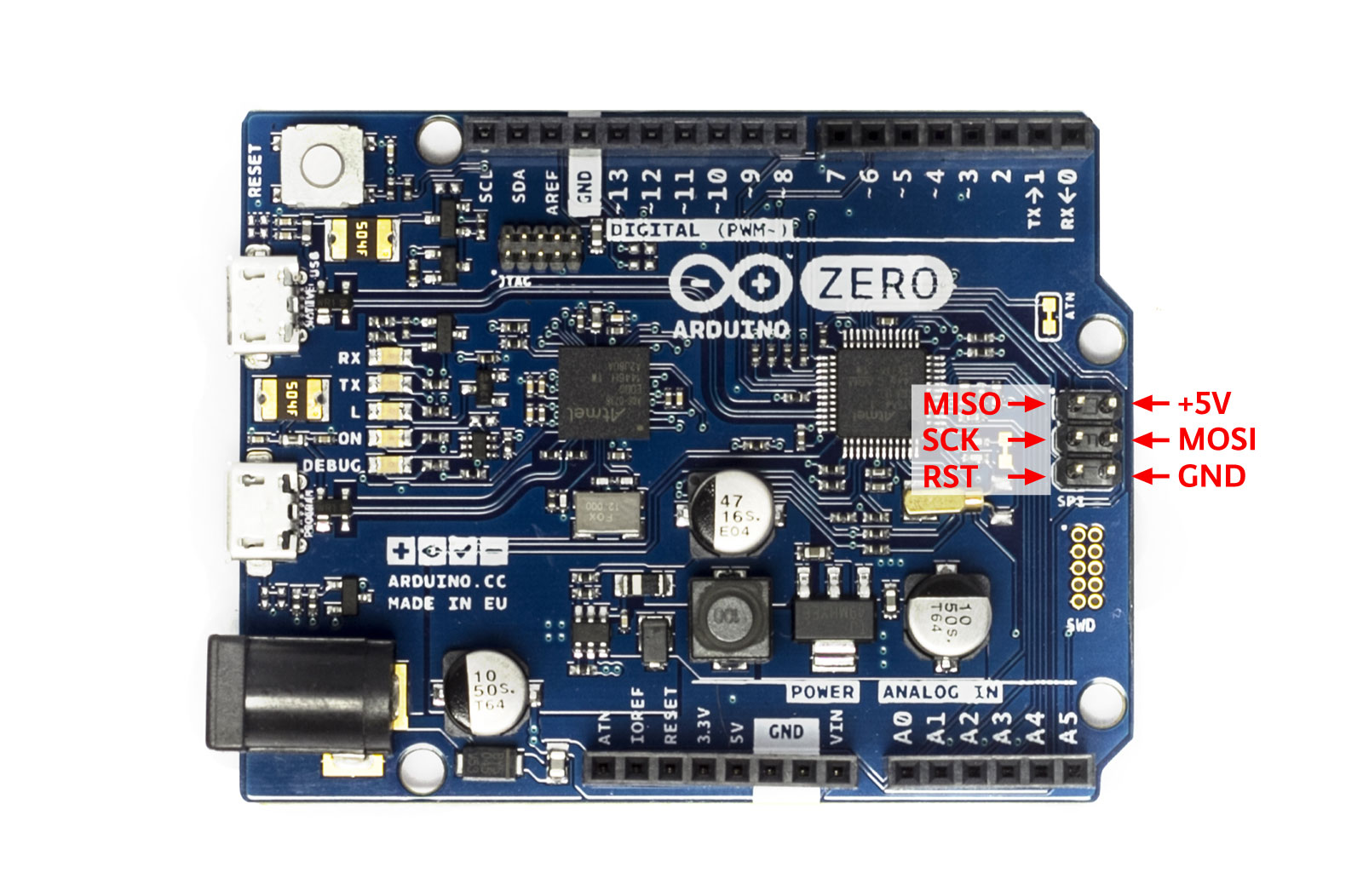
hmm, I have all the pins I need for the display on that header
if I use MISO as DC
slender iron
😃
stuck elbow
the 5V pin is 5V or 3.3V?
slender iron
5v I believe
stuck elbow
ok, so I need to keep that jumper open on the display module
tidal kiln
@stuck elbow just measured on my m4, got 5.1V
stuck elbow
thanks
slender iron
ugh rosie is hung because linux sysfs reads are hanging
idle owl
PDMIn formatting in RTD didn't update with my change, but when I built it locally it was fixed, and it looks fixed in the code. I don't know what's going on with it, but it is what it is at this point. 😄
slender iron
which branch?
idle owl
Oh. Good question.
RTD says "latest". None of the change shows up in the rest of the branches on RTD. On Github it looks like my change was pushed to master. It doesn't make sense because the original change showed up there, but when I fixed a typo, that didn't seem to populate.
stuck elbow
ImportError: no module named 'ustruct' ← is this because there is no SPI flash yet?
slender iron
its struct in 3.x
slender iron
lunchtime for me
stuck elbow
bon apettit
solar whale
Miller time here 😉 but not Miller....
stuck elbow
OK, I have the display working, it lets me set the baudrate to 48MHz, but the resulting clock is only 12MHz
worn birch
What does OSError: 22 mean?
stuck elbow
@worn birch https://docs.python.org/2/library/errno.html
oh, sorry, it doesn't show the numbers
EISDIR
>>> import errno
>>> errno.errorcode[22]
'EINVAL'
off-by-one 😃
worn birch
hmm ... thanks ... frustrating
manic glacierBOT
I just tested the busio.SPI on the M4, and it works with my display, however, there is a minor issue:
I noticed that the clock frequency doesn't match the baudrate setting. At 48MHz, 32MHz and 24MHz I get a 12MHz clock (as measured with a logic analyzer), and at 12MHz I get 8MHz. At 8MHz baudrate I get 6MHz clock, and so on.
stuck elbow
yes, it's about the second most generic error there is
tidal kiln
@worn birch can you post the line thats throwing that?
manic glacierBOT
@tannewt I think we can avoid concurrency with the slave if we make a blocking method that simply waits for the start condition and the address on the bus. Then you can execute the rest of your loop, read/write all the data you need, and go back to waiting for a command. The clock is stretched while your code runs, of course. I have done something like this on an attiny (where I needed to avoid interrupts to have precise timings), and it works quite well.
This restricts the use cases a bit...
manic glacierBOT
An example program could look like this:
import board
import busio

slave_bus = busio.I2CSlave(sda=board.SDA, scl=board.SCL)
register = 0
registers = [0] * 8

while True:
    with slave_bus.wait(0x11, 0x33, timeout=None) as i2c_request:
        if i2c_request.is_write:
           register = slave_bus.read(1)[0]
        else:
           slave_bus.write(registers[register])
Explanation:
First we define which bus we want to use as the slave, and some helper var...
idle owl
So I'd use pulseio for sending IR from the CPX?
stuck elbow
yes, PulseOut more specifically
idle owl
Yeah I'm not trying to clone a remote, I grabbed someone elses cloned remote code so I have somewhere to start. I'm heading towards using the IR for communication. But they used a very different board.
So I'm trying to hack the code apart.
And failing 😄
I assumed REMOTEOUT but that isn't doing anything, and neither are IR_TX and IR_RX. However, there's also a frequency and duty_cycle defined that are probably wrong.
stuck elbow
I think it's board.IR_TX
idle owl
Ok thank you
stuck elbow
REMOTEOUT and IR_TX are the same pin
idle owl
ahhhh ok, that would have made it easier.
stuck elbow
and same for IR_RX and REMOTEIN
I'm looking at https://github.com/adafruit/circuitpython/blob/master/ports/atmel-samd/boards/circuitplayground_express/pins.c by the way
GitHub
circuitpython - CircuitPython - a Python implementation for teaching coding with microcontrollers
 timber mango
Alrighty what feather board should I get as a starter
idle owl
@stuck elbow I only found out about that file a few days ago, I forget it's a good reference.
@timber mango Feather M0 Express if you'd like to get right into CircuitPython.
idle owl
Yeah for sure!
 charred blaze
Yay for getting 2 new Trinket M0's!!!!!
idle owl
Yay!
charred blaze
Since i killed one of my 2 originals and the other was going to a led project for my friend
stuck elbow
Can't wait for the trinket m0 express 😃
charred blaze
Thats a thing already??? dang
stuck elbow
not yet
manic glacierBOT

Thanks - there could easily be a clocking error. Is this at or after commit 6f662e9bbccff2, which changed some clock calcuations? Do you have an M0 board you could test 3.0 SPI on as well, for clock speed?
stuck elbow
that's why I'm waiting 😃
charred blaze
ok back to Cod WW2 for now though lol
errant grail
I'm hoping the Express version isn't released for a while. I'm learning a lot about optimizing CPy code as a result. 😉
errant grail
Yes! I won't need the M4 for at least another three weeks or so...
idle owl
Hey it's transmitting!
But constantly, not on input. Now to figure that out, and figure out how to change the rest of the code!
Thanks @stuck elbow
manic glacierBOT
Exactly the same results on a Feather M0 Express: I can set the baudrate up to 48MHz, but the resulting clock is only 12MHz.
And it's wrong on M0 too? 12 MHz is 8 MHz, 8 is 6, etc.?
Yes, exactly the same numbers.
manic glacierBOT
Interestingly, with CircuitPython 2.1 I am seeing clock rates that are too high: setting to 6 MHz yields about 8 MHz. 8MHz yields about 12Mhz.
 split ocean
anyone else have 500 error on github.com right now?
tulip sleet
@split ocean Yes, just started. I just posted a comment, and then tried 30 seconds later after your note.
idle owl
Yup
split ocean
OK.
tulip sleet
split ocean
ah, I checked that right when it happened and they were still "all systems go!"
I must have hit it as it went down
 tawny creek
@timber mango trinket m0 is a good start :)!
 stoic gazelle
thanks @river quest! my cpx came today! (and other goodies too)
ruby lake
hm, the M0 USB disk mode works fine for "CIRCUITPY" in win7 but I cannot get it to mount as FEATHERBOOT. I have to drop the uf2 on the feather using the macbook, then it sees the USB disk fine under win7.
hollow tartan
what is the guidance on the size (GB) of micro SD card to use with the tft lcd screen + sd card reader? The darn thing just launched my micro SD across the room and I cannot find it!! Do I get a blue smoke badge for that???????
idle owl
There are drivers for Win7, did you install them?
ruby lake
@idle owl, yes those are installed. The CPX works, the feather M0 X does not (yet)
idle owl
@ruby lake Ooh than I'm not sure. I haven't done anything on Windows with this stuff in a while.
Good testing though with checking the CPX.
Unfortunately I have to head out for a bit. Sorry! I hope you get it sorted
split ocean
ooh I just got the "running in safe mode" message for the first time after crashing my CPX!
idle owl
Nice! Congrats!
split ocean
I'll file an issue, but what's the right way to get outta safe mode?
idle owl
Delete the offending code (it's usually code), and then reset.
split ocean
Maybe we can add words to that effect to the safe mode message?
idle owl
Worst case, delete the code and reflash CP, but I've never had to do that. I did it the first time I got it before figuring out it's a code issue.
split ocean
so people don't worry they've done permanent irreversable damage :)
idle owl
yeah that might be a good idea, I'll make a note to look into it!
split ocean
thanks
marble hornet
cpx?
idle owl
Circuit Playground Express
manic glacierBOT
Implemented and tested on Metro M0, Metro M4, and Feather M0 Express.
Note that if you install this, you'll lose access to your old CIRCUITPY drive in internal flash.
A few changes to shared_dma.c, but that work was interrupted to try using non-DMA SPI first. SPI baud rate calculation moved to new file peripherals.c, since it can be shared between SAMD21 and SAMD51.
storage module turned on, but not tested in detail.
worn birch
@tidal kiln it is occuring when I try remount an sd card after it has been pulled out with storage.remount('/sd', False)
I think the issue is that when the sdcard gets removed it is not auto unmounted ... but if I try call storage.umount(sd_mount) I get an OSError: 1 so ... still trying to work it out
Maybe I need to complete reinitilise the adafruit_sdcard ... catch is I got to work out if that means I have to deinit pins etc ... seems over kill
tulip sleet
@worn birch not sure why the .umount doesn't work but you could also try storage.umount('/sd'). See if that works or if you get the same error. It's looking up the argument in the table of mounted filesystems, either by object or by pathname.
worn birch
@tulip sleet I'll give that a go
worn birch
seems I have killed the SD card detect switch ... I'm now getting True regardless if the SD card is in or out .... it still clicks ... but the signal is obviously not being brought low ... strange ... confirmed it in the REPL ...
worn birch
yea not a happy switch ... it'll do for some more testing just ... so @tulip sleet umount didn't work with the string either
tulip sleet
sorry to hear; please file an issue
worn birch
out of interest though I used
                    for item in os.listdir('/'):
                        print(item)
prior to the unmount call and got:
b'sd'
boot_out.txt
System Volume Information
lib
main.py
any idea why the sd is in a byte string?
tulip sleet
it's a minor bug: https://github.com/adafruit/circuitpython/issues/249. I think Scott may have some idea about why.
I think maybe because it's a mountpoint, and it got added to the directory with the wrong object type.
worn birch
interesting thanks
tulip sleet
we appreciate all your testing! testing has been fairly light, and there are a number of use cases we might not have tested. We are planning to add some peripherals to boards on the rosie tester, but haven't gotten to that yet
manic glacierBOT
When the SD card has been mounted and is then removed with power still applied, it remains listed when calling os.listdir('/') (as byte string refer #249)
-
a subsequent call to
storage.umount()parsing either the file system object [vfs where vfs = storage.VfsFat(sd_card)] or the path [str where str = '/sd'] fails with OSError: 22 -
waiting until the card has been reinserted and a subsequent call to
storage.remount()parsing the path [str where str = '/sd'] and False fails with ...
worn birch
lol .... seems you need to delete the adafruit_sdcard object first then unmount that seems to work ... of course I work that out after raising the issue
no idea why that works though
jovial steppe
Regular filesystems work like that on *nix -- you can't unmount an fs until all of the open handles to files on that fs are closed. So if you've got a resource tied-up that's connected to the fs, that might be preventing the unmount from happening. I don't know if there's a similar paradigm in play here with HW pins vs. file handles.
Err, same type of thing on Win/DOS. If you have a file open on an SDcard/flashstick, you can't programatically eject it.
jovial steppe
Well, safely.
manic glacierBOT
I imagine it'd be enough. It shouldn't require a serial connection to be true.
@deshipu I like that! Now we need someone to implement it. ;-)
manic glacierBOT

Radomir,
I was in a hurry, and so I reverted to C to solve my immediate problem.
However, for the record, an implementation per your spec. would have been
entirely good enough for my needs. If someone implements it "Yay!". But
insert your design rationale prominently so followers can make an early
trade-off, and be grateful to you for your expertise. The value of the
honest phrase, "We can't do that", is an undervalued commodity. Thanks for
your contribution.
On Tue, Nov 28, 2017 at 10...
slender iron
haha, adabot released a bundle even though I only changed the build config
solar whale
@slender iron I see the release, but not the bundles. Does it jsut take some time to populate them?
slender iron
it does take a little time but it also failed 😃
trying to fix it now
GitHub
Adafruit_CircuitPython_Bundle - A bundle of useful CircuitPython libraries ready to use from the filesystem.
manic glacierBOT
I deleted it because it looked like something you might have added for debugging. There are no other named pins for the flash chip (e.g., no FLASH_SCK, etc.). And there were no similar named pins on the Feather M0, so I thought it was just for testing.
Ok, that may be a hangover from when the SPI bus was shared. Should the others be added or this deleted?
I'd leave it deleted for now because end-user use of these pins will mess up CIRCUITPY support. If we had some API for enabling/disabling CIRCUITPY on the flash chip, then someone could use the flash chip for something else besides a filesystem, but right now it's dedicated
tulip sleet
<@&356864093652516868> The latest adafruit/circuitpython master commit now uses the SPI flash chip on Express boards (Feather & Metro M0 Express, CPX, Metro M4 Express) for CIRCUITPY. This means your internal-flash CIRCUITPY filesystem will not be accessible and may get erased. So if you build and use the new release (see one msg up ⬆), then copy your old CIRCUITPY before uploading if you want to preserve it.
solar whale
@tulip sleet Nice - looking forward to testing this - hopefully tonight.
tulip sleet
@slender iron I was going to do some debugging of clock rates, given @stuck elbow's SPI clock rate bug and some other issues I saw. I'll just try various clock configs and hook them up to pins to measure them. Lemme know if there's anything you're suspicious of in the current impl. 100 kHz SPI and 1 MHz I2C seemed to be accurate but some things get worse from there.
slender iron
@tulip sleet That sounds good if you feel like you have context. Otherwise, it seems like a lower priority than adding more functionality back to 3.x
tulip sleet
@slender iron E.g., I will generate an 8MHz SPI clock and see why it is 6 or 12 on M0 and M4 (can't remember which is which, but both are wrong). I want to make sure the clocks are OK before I work on other clock-related stuff like PWM.
slender iron
ok, I doubt its the GCLKs that are the problem. I assume its the clock generator in the SERCOM
tulip sleet
I think you're right about that. The GCLKs seem mostly ok but there's a LOT of jitter (like 5%) in the DFLL clock. And if I hook up the internal 32 kHz clock to the DFLL so that it has some ref source when there's no USB present, it doesn't seem to work at all.
slender iron
clocks are a huge rabbit hole so beware
tulip sleet
I won't spend more than a day on this. It does sorta work, but I'd like to understand the SPI rate errors.
slender iron
kk
fresh eyes on it will be good 😃
w00t, community bundle is going too https://github.com/adafruit/CircuitPython_Community_Bundle/releases
GitHub
CircuitPython_Community_Bundle - A bundle of useful CircuitPython libraries from the CircuitPython community.
stuck elbow
so far the spi flash works
@tulip sleet thank you for looking into this. To be honest, I don't much care about the exact clock, I just care about getting it as fast as possible.
slender iron
lunchtime, I'll be on later
solar whale
@slender iron Are the names for the community bundle correct - a bit confusing?
they have the same names as the CircuitPython Bundles...
solar whale
@slender iron thanks - hope you did not mind the "issue"
stuck elbow
seems like there are still some usb trouble
[34334.372017] usb 2-1.3: new full-speed USB device number 73 using ehci-pci
[34334.788031] usb 2-1.3: device not accepting address 73, error -32
[34334.788162] usb 2-1-port3: unable to enumerate USB device
but honestly it may also be my kernel...
tulip sleet
@stuck elbow I saw something like that when the CIRCUITPY drive was not being read properly when first plugged in. Which board are you trying? Is your haxpress one?
@slender iron I just used the auto-generated 3.x bundle. Saved me from mpy-cross'ing something myself. Yay! Thanks!
stuck elbow
metro m4 with the new spi flash
it worked fine, and then disconnected after a while
reconnecting it doesn't help
I'm going to reboot once the kernel updates
tulip sleet
could be clock problems. Are you running some experimental kernel. Is it Ubuntu-base on a vanilla x86 box or something else? I tested on 16.04 on regular Dell PC.
stuck elbow
no, it's the standard ubuntu kernel, I'm just updating it because I'm going to reboot, so I might as well
17.04
slender iron
@solar whale not at all! I like closing issues. 😃
 unique turret
I am puzzeled by an error about "name 'board' is not defined" I have from board import * in my code so I don't know where my mistake is
tidal kiln
@unique turret with that format of import you don't need to use board in code
change it to just import board
tidal kiln
no:
>>> from board import *
>>> type(board.D8)
Traceback (most recent call last):
  File "<stdin>", line 1, in <module>
NameError: name 'board' is not defined
yes:
>>> import board
>>> type(board.D8)
<class 'Pin'>
not recommended:
>>> from board import *
>>> type(D8)
<class 'Pin'>
ahh, the not recomened version is what was working
I will change the the yes: version. Thank you @tidal kiln
stuck elbow
@tulip sleet false alarm, it was the cable
tidal kiln
@unique turret it works, but not recommended because you lose the board namespace and since some of the variables are pretty simple, like D8, might lead to naming conflicts
>>> D8 = 'hello world'
>>> print(D8)
hello world
>>> from board import *
>>> print(D8)
board.NEOPIXEL

oof we have to issues for this, other one is here!
https://github.com/adafruit/circuitpython/issues/411
hiya this was done by @tdicola
https://learn.adafruit.com/adafruit-ultimate-gps/circuitpython-parsing
huzzah!
unique turret
I am having another issue, MemoryError: memory allocation failed, allocating 584 bytes
while trying to poll an ic2 sensor
idle owl
What board?
stuck elbow
what kind of sensor?
unique turret
Feather M0 Express reading a 9808 temp sensor
with busio.I2C(SCL, SDA) as i2c:
t = adafruit_mcp9808.MCP9808(i2c)
def fahrenheit(celsius):
return (celsius * 9 / 5) + 32
# Finally, read the temperature property and print it out
tempf= fahrenheit(t.temperature)
idle owl
If you surround your code with 3 backticks (the one at the top left of your keyboard), it will turn it into a codeblock It can help with readability.
Hmm. Doesn't seem like it should fail. Do you have a lot of other files or libraries on the board? I haven't done enough with i2c to know if that code should cause memory issues.
My suggestions will all be based on other reasons why you'd run into memory issues, unfortunately. But it might be worth checking those as well.
manic glacierBOT
I figured out what is going on here. The SPI clock rate is determined by a clock going into the SERCOM and by the value of an 8-bit countdown register (the BAUD register). The formula for calculating the value of the register is:
baudreg_value = int(f_clock / (2 * spi_clock_freq)) + 0.5)
The choice of clock frequency determines min and max values of spi_clock_freq, and the steps between the values. On the SAMD21, the max value of f_clock is 48 MHz; on the SAMD51 it is 100 MHz. Cur...
unique turret
          t = adafruit_mcp9808.MCP9808(i2c)
          def fahrenheit(celsius):
            return (celsius * 9 / 5) + 32
          # Finally, read the temperature property and print it out
tempf= fahrenheit(t.temperature)```Nice!
Is there anything else being imported into your current file? i.e. is the code doing other things as well.
unique turret
yes,
tidal kiln
@unique turret probably unrelated to memory issue, but move the def outside the with
unique turret
        led.value = True       # turn ON LED
        with busio.I2C(SCL, SDA) as i2c:
          t = adafruit_mcp9808.MCP9808(i2c)

          # Finally, read the temperature property and print it out
          tempf= fahrenheit(t.temperature)
        with busio.I2C(SCL, SDA) as i2c:
          rtc = adafruit_ds3231.DS3231(i2c)
          #print (rtc.datetime)
          dt= rtc.datetime
print (dt.tm_year, "-", dt.tm_mon,"-", dt.tm_mday, " ", dt.tm_hour, ":", dt.tm_min, ":", dt.tm_sec, "," ,tempf, sep='')```try putting all your function defs together up near the top of your code
unique turret
I moved the def up to the helpers section
        led.value = True       # turn ON LED
        with busio.I2C(SCL, SDA) as i2c:
          t = adafruit_mcp9808.MCP9808(i2c)

          # Finally, read the temperature property and print it out
          tempf= fahrenheit(t.temperature)
        with busio.I2C(SCL, SDA) as i2c:
          rtc = adafruit_ds3231.DS3231(i2c)
          #print (rtc.datetime)
          dt= rtc.datetime
print (dt.tm_year, "-", dt.tm_mon,"-", dt.tm_mday, " ", dt.tm_hour, ":", dt.tm_min, ":", dt.tm_sec, "," ,tempf, sep='')```I am trying to build on John Park's chiller code
When the button is pushed, I want it to read the time and temp, print it to the serial (eventually write to a file) and then light up a patern of neopixels based on the value
idle owl
That's a neat idea, I like it
unique turret
The code worked before I started to add some neopixel code, but I must have messed something up.
idle owl
Hmm ok
See, I've had that happen where I start adding another module and the associated code and it gets unhappy. I don't have that sensor or I'd ask for your code and try to run it from here.
If you comment out the neopixel code, does it run again?
unique turret
Will try, my keyboard is acting up. Going to do a restart and try commenting out the Neopixel code. How do you comment multiple lines?
idle owl
Three quotations around the entire thing """ comment """
unique turret
That makes it work again
idle owl
Is the file you're using for the NeoPixel library neopixel.py or neopixel.mpy?
unique turret
Maybe it is because I did not setup my board not to put the extra files MacOS puts on
idle owl
That could be it, but I don't know that you should have hit that point yet.
unique turret
neopixel.mpy
idle owl
Ok that's good (one backtick on either side does inline code)
idle owl
Mmm.... shouldn't be? I mean, you could try putting it in 2 files, and calling one into the other, but I don't think that's it.
What's your NeoPixel code look like?
unique turret
NP = neopixel.NeoPixel(D5, NUMPIXELS, brightness=1, auto_write=False)
        if tempf > 109:
          NP[0]=bluemagenta
          NP[1]=bluemagenta
          NP[2]=bluemagenta
          NP[3]=bluemagenta
          NP[4]=bluemagenta
          NP[5]=bluemagenta
          NP[6]=bluemagenta
          NP[7]=bluemagenta
          NP[8]=bluemagenta
          NP[9]=bluemagenta
          NP[10]=bluemagenta
          NP[11]=bluemagenta
          NP.show()
        elif tempf > 99:
          NP[0]=magenta
          NP[1]=magenta
          NP[2]=magenta
          NP[3]=magenta
          NP[4]=magenta
          NP[5]=magenta
          NP[6]=magenta
          NP[7]=magenta
          NP[8]=magenta
          NP[9]=magenta
          NP[10]=magenta
          NP[11]=off
          NP.show()
        elif tempf > 89:
          NP[0]=redmagenta
          NP[1]=redmagenta
          NP[2]=redmagenta
          NP[3]=redmagenta
          NP[4]=redmagenta
          NP[5]=redmagenta
          NP[6]=redmagenta
          NP[7]=redmagenta
          NP[8]=redmagenta
          NP[9]=redmagenta
          NP[10]=off
          NP[11]=off
NP.show()``` and it repeats like this through the rangebluecyan= (0,0,255)
cyan= (0,255,255)
greencyan=(0,255,255)
green= (0,255,0)
greenyellow= (0,255,0)
yellow= (255,255,0)
orange= (255,255,0)
red= (255,0,0)
redmagenta= (255,0,0)
magenta= (255,0,255)
bluemagenta= (255,0,255)
off= (0,0,0)```These are my colors
unique turret
Revised from 12 to 6 colors
idle owl
Try running it with everything but the first section commented out
unique turret
Can I set the pixels in ranges like ` NP[0:8} = blue
idle owl
So if temp 109, run it, the rest comment
and yes, absolutely you can, I'm not sure that's the exact syntax, but that's the right idea
That's what I was going to suggest, but even I'd have to ask for a little help on that one
Oh I just put together what project you're doing. I was focused in on the discussion and only just now noticed your avatar 😄 Classroom thermometer. Such a neat project!
unique turret
Thank you @idle owl , it has been a fun project. I was never that great with Arduino, but I am starting to really like python
idle owl
I never even got into Arduino and I learned Python on CircuitPython. I love it. I knew just a little programming concepts when I started, and Arduino looked like jibberish to me.
unique turret
Yes, I think circuit python has great potential for schools. I plan on trying to support teachers in using it.
idle owl
That's a great idea!
tidal kiln
@unique turret @idle owl is this the thermometer from show and tell?
 sacred blade
@unique turret NP[0:8] = [blue] * 8 would work. You need to assign a sequence of the same length, so you create a sequence of 8 blue with [blue] * 8. It's still a little bit memory 'heavy' because you're creating this sequence each time. If you want to avoid allocating memory, you'll need a loop:
for idx in range(8):
    NP[idx] = blue
Yep!
tidal kiln
the idea is to turn on more lights for higher temperature? but also have the color change as well?
unique turret
Yes, the color changes every other increment to make the difference in color more noticeable
tidal kiln
thinking out loud....
def set_thermometer_pixels(n, color):
    NP.fill(0)
    NP[0:n] = color
    NP.show()
@sacred blade I will implement that once I get the code running again. I might have an indent problem
          NP[0]=bluemagenta
          NP[1]=bluemagenta
          NP[2]=bluemagenta
          NP[3]=bluemagenta
          NP[4]=bluemagenta
          NP[5]=bluemagenta
          NP[6]=bluemagenta
          NP[7]=bluemagenta
          NP[8]=bluemagenta
          NP[9]=bluemagenta
          NP[10]=bluemagenta
          NP[11]=bluemagenta
          NP.show()
        else:
            NP[0]=blue
            NP[1]=off
            NP[2]=off
            NP[3]=off
            NP[4]=off
            NP[5]=off
            NP[6]=off
            NP[7]=off
            NP[8]=off
            NP[9]=off
            NP[10]=off
            NP[11]=off
NP.show()```If that's your code as is, yes there's an indent problem 😃
unique turret
          NP[0]=bluemagenta
          NP[1]=bluemagenta
          NP[2]=bluemagenta
          NP[3]=bluemagenta
          NP[4]=bluemagenta
          NP[5]=bluemagenta
          NP[6]=bluemagenta
          NP[7]=bluemagenta
          NP[8]=bluemagenta
          NP[9]=bluemagenta
          NP[10]=bluemagenta
          NP[11]=bluemagenta
          NP.show()
        else:
            NP[0]=blue
            NP[1]=off
            NP[2]=off
            NP[3]=off
            NP[4]=off
            NP[5]=off
            NP[6]=off
            NP[7]=off
            NP[8]=off
            NP[9]=off
            NP[10]=off
            NP[11]=off
            NP.show()
"""```This is as is
tidal kiln
that'll work since the indents are consistent within the code blocks, but it's hard to read
idle owl
Ah ok
tidal kiln
"standard" indent is 4 white spaces
unique turret
@tidal kiln could you point me to a place to learn proper indent technique
tidal kiln
pep8
it's where we all go to determine what 'proper' is

Python.org
The official home of the Python Programming Language
unique turret
Thank you @tidal kiln and @idle owl for your help today. The Discord for Adafruit is pretty cool thanks to folks like you for helping troubleshoot.
idle owl
@unique turret You're welcome! I'm glad we could help.
 solar atlas
Hi does anyone know how to get REPL to work for Python in Mu?
idle owl
In Windows ^^
solar atlas
NP, @tidal kiln & thanks @idle owl , yes does anyone know how to get the REPL to work for Python on a Win 10 system?
idle owl
Ok I'm headed out for dinner. Be back later!
tidal kiln
@solar atlas how did you install mu?
solar atlas
I installed it via https://codewith.mu/#download
tidal kiln
@unique turret did you catch that function i posted?
solar atlas
Enjoy ur dinner. 😃 @idle owl
unique turret
@tidal kiln I missed it, but now I grabbed it. Thank you for writing that. Looks slick,
tidal kiln
@solar atlas the mu editor with adafruit support is still in beta, so probably not what get's installed from the main page.
solar atlas
ok, makes sense @tidal kiln. do you know how I could install the Adafruit ver?
tidal kiln
@unique turret now what's needed is a function to provide n and color for a given temp
@solar atlas try per the instructions in the blog post:
https://blog.adafruit.com/2017/11/13/mu-editor-beta-works-with-raspberry_pi-microbit_edu-adafruit-boards-by-ntoll/
mu-editor 1.0.0b12 : Python Package Index. Ok folks, this super-beta, you can check it out now. Feedback welcome. This is an outstanding beta and great work by Nicholas H. Tollervey – (GitHub…
which looks like it's just:
pip3 install mu-editor
assuming you have pip installed