#circuitpython-dev
1 messages · Page 102 of 1
 formal plover
Assuming @tulip sleet's Ampy fix will be in there, so I'll be able to test out adding libraries to the ESP8266. Specifically the ureqests library or module, however you want to call it lol.
 tulip sleet
@formal plover ampy is already fixed independently. If you update adafruit-ampy, you'll get the fixed version of ampy
formal plover
Hmm I'll try it again when I get home. I did that yesterday or two days ago and I still couldn't do ls to see file paths
tulip sleet
pip install adafruit-ampy --upgrade
formal plover
Either which way I did it, it said it was the most recent version. But I'll try later and let you know @tulip sleet.
Obviously it works because you tested it, so I probably wasn't paying attention when I was updating it.
tulip sleet
It was early evening yesterday. The new version is version 1.0.2 (was 1.0.1)
formal plover
Oh yeah, I definitely tried it earlier than that, so that's what's up. Anyhoo... Super excited you guys are already talking about possibly releasing r2 tonight
I'll try to test something labeled "beginner friendly" by @slender iron .
I'm not all that familiar with GitHub, so I might struggle a little bit with some of the terminology
tulip sleet
It's a process. We have a bunch of fixes and a few newly reported but not fatal problems.
formal plover
I'm sure it is @tulip sleet. You guys are doing great work though.
tulip sleet
tnx - we're enjoying it!
formal plover
Awesome! I'm glad you're enjoying your work. That's the dream right there.
 idle owl
@formal plover I'm learning Git and Github right now, heh
formal plover
@idle owl Yay! Haha how's that for wordplay
idle owl
@formal plover I mean not this actual second, but I'm in the process of learning it and writing a presentation for a local user group.
formal plover
@idle owl I figured as much. Oh, awesome.
 slender iron
@tulip sleet at my desk now
tulip sleet
on AE voice channel
formal plover
We have some local user groups for maker and techy stuff, but they've always appeared flakey in the "meetup" app. We have a local maker space, but it's like $60/m
idle owl
I don't know how much our local maker spaces are, but there's two really nice ones. Our user group meets every second tuesday and has for the last 25 years or something?
 drowsy geyser
Are there significant differences between "latest commit image" and the planned rc2? In other words, are there a lot of potential commits in work? @slender iron ?
slender iron
        // Check to see if we've been CTRL-Ced by autoreload or the user.
        if(MP_STATE_VM(mp_pending_exception) == MP_OBJ_FROM_PTR(&MP_STATE_VM(mp_kbd_exception))) {
            break;
        }
@slender iron When you're done with your chat: I have a strip of 12 Dotstars hooked up to my CPX. I don't think my code is right anyway. But like I said I'm getting the error Pin PA20 in use, which is the MOSI pin according to the pinout list you sent me.
slender iron
@idle owl free now
idle owl
@slender iron Ok
slender iron
sorry for being slow, my brain is still waking up
idle owl
I'm having a really fuzzy morning too, so it's totally ok
slender iron
and SCL for the clock
slender iron
are you doing from board import * at the top?
idle owl
It's under import dotstar but yes
slender iron
right, then it'd be SCL and SDA without the board.
idle owl
Ok now we're back to the first error I Got which is in dotstar.py , line 47, in setitem typeError: "int" object is not subscriptable
slender iron
I'm not sure what your current code or library is. would you mind screen sharing with me? I can video chat with you on discord
 manic glacierBOT

We'll have to add an new API for this. Its not well covered in CPython. More background is here: https://stackoverflow.com/questions/2408560/python-nonblocking-console-input
idle owl
@slender iron We'll have to sort screensharing - I've never done it. Otherwise, let's do it!
slender iron
ok, look in your direct messages. I made a friend request
idle owl
Ok accepted
manic glacierBOT

This bug came back as of 2.0.0-rc1 or earlier. Also see the same thing with
while True: pass
then type ctrl-C. Board will soft-reset.
slender iron
found it @idle owl. trying it now
slender iron
so I do get it to light up
idle owl
That's good at least, lol
slender iron
the first pixel isn't the right color though
idle owl
they're backwards sometimes
bgr or whatever. In fact the library I use has them all listed at the top as every possible order to cover all the bases
Mine are all white so I wouldn't have noticed that
slender iron
ah! they are white dot stars?
idle owl
Mine are yes
slender iron
that could be an issue
idle owl
but the same code works, because it's three white LEDs
slender iron
ah
idle owl
I was able to run a series of animations from a strand test on them that was made for RGB when I first got started on the project
slender iron
kk
import time
import adafruit_dotstar

pixels = adafruit_dotstar.DotStar(board.SCL, board.SDA, 30)
pixels[0] = (0, 0, 10)
pixels[1] = (10, 0, 0)
pixels[2] = (0, 10, 0)
print(pixels)
time.sleep(2)
pixels.deinit()
thats my test code
idle owl
omg.
hold on.
lol
The other end of the plug wasn't plugged in either.
They're lighting up
slender iron
😃
idle owl
sigh
My original code works too.
rofl.
So, hey, @slender iron your dotstar library works.
slender iron
why is my first pixel too white though?
idle owl
I have it set to 100000 and it's entirelly too bright for that on mine.
The second and third one in your code were correct. The first one is on max.
slender iron
kk
idle owl
This: pixels[0] = 0x000000 also puts it on max brightness regardless of whether there are other pixels after it.
slender iron
kk
idle owl
Will circuitpython work on the ESP32 as well?
slender iron
eventually
idle owl
nice
slender iron
I can't replicate to the too bright pixel anymore. I fixed the deinit code I think.
idle owl
Nice!
slender iron
kattni are you @idle owl on github too?
idle owl
I am!
slender iron
@idle owl added you as a collaborator on the dotstar library
slender iron
that way you can review code 😛
formal plover
@idle owl you're official/legit now
slender iron
(you need to accept it)
idle owl
@formal plover Evidently!
lol, @slender iron that could be taken two ways... one click a button, the other is like you're giving life advice about accepting new things or something like that. I read it that way first after @formal plover comment, and laughed out loud.
slender iron
lol
formal plover
Hehe😀 
idle owl
Accepted!
manic glacierBOT
I think this problem is plaguing Rosie CI as well. I added something that should monitor the flush through the kernel block device stat but its still having issues.
@jerryneedell do you feel that is new post-1.0?
idle owl
I just crashed Atom so hard it won't reopen. rolls eyes Reboot time evidently!
Wow. That was a pretty solid crash. Had to remove all the perpherals from my computer before it would even start up again.
manic glacierBOT

@tannewt I had not experienced this under 1.0.0 but that is not conclusive, since it also depends on whether I used genitalia or nano and I can't be sure I exercised it on 1.0.0. I'll try reverting to 1.0.0 and see if it is reproducible there. Hopefully later today.
idle owl
Managed to corrupt the CPX. The one time I don't have code backed up. At least it's tiny. I think I can remember it.
Can you explain how to get to the updated adafruit_dotstar file though? I'm having trouble finding it
slender iron
its under files changed here: https://github.com/adafruit/Adafruit_CircuitPython_DotStar/pull/1
idle owl
This isn't good. It wasn't working right so I did the doubletap reset to try to reload the uf2 file on it. It turns green then mounts as cplayboot, when I copy the uf2, it looks like it works, lights go off, it mounts circuitpy. But I go to the drive and there's nothing on it. And it's not even letting me copy the lib folder over.
I redownloaded the uf2 file as well.
And I disconnected everything from the CPX.
slender iron
sounds like the file system got hosed
idle owl
How do I fix it? I've not had it go quite this far before
slender iron
idle owl
Thank you
slender iron
@tulip sleet figured it out. 😃
tulip sleet
yw
idle owl
Worked beautifully
I couldn't remember my own code. So I copied and pasted your test code. It works, the first pixel is the correct brightness!
slender iron
yay!
idle owl
I tried to write up what I had before but it was failing in my code, so I figured use yours.
manic glacierBOT
idle owl
FYI - when using jumper wires, it will sometimes send phantom signals to the dotstar strips and turn on the lights in random ways. Took me a day to figure that out, lol
slender iron
yup yup, the noise will
manic glacierBOT
I think that check_lock was being optimized away during LTO.
idle owl
Ok, so, as I've never done this before, do I click "Add your review" first?
slender iron
if you have individual comments you can add them in the code and hit "start a review"
otherwise you can just do an overview by clicking "add your review"
idle owl
Ok
There's a few nitpicky issues that the linter I'm running in Atom caught. Should I fix them or is that not a huge deal. It's one line too long, or expected 2 lines where there is one sort of things. Doesn't affect the function of the code, just the linter whinging about details.
slender iron
I'm usually not super strict about linting
variable naming is worth changing though
idle owl
which variables? (And what even counts as a variable in Python, I'm realising I don't know that to begin with.)
slender iron
just naming in general 😃
idle owl
ahh hehe
Ok so I don't know that I have any specific comments. So I click add my review, and just put in there that I tested it successfully on a CPX with white dotstars or something like that? I don't know what makes a good review.
slender iron
Yup!
idle owl
Am I just commenting, or approving?
slender iron
approve please 😃
tulip sleet
@slender iron wow - what do you think made the check_lock be optimized away? ! Or maybe common_hal_busio_i2c_has_lock was always returning false?
tulip sleet
Did you add the asm("") in 1.0.0 and it fixed it there? Since 2.0 was already OK
slender iron
yeah
tulip sleet
oh weird. ok ... I am pushed down a level, trying to fix ctrl-C working in input(). Also fixed ctrl-C causing soft-reset when it should just be an exception. Then I have to get back to the original issue about the fake ctrl-D.
slender iron
I'm not sure if LTO recognizes that mp_raise has any side effects
so its not a question of has_lcok but rather if it matters
manic glacierBOT
@tannewt I just reverted to 1.0.0 and I am not able to reduce the problem. I can cause it to occur reliably under 2.0.0 - looks like it is post-1.0.0.
slender iron
@solar whale you rock
tulip sleet
@solar whale @slender iron I have been seeing some delayed writes on Linux as well, not quite same kind as on Windows, but nevertheless delayed.
slender iron
it might be something internally
tulip sleet
internally Linux or vfs in CPy?
slender iron
in cpy I'm thinking
 solar whale
As noted before - it only occurs for me if I use g-edit, not with nano so it also depends o the editor and how it behaves.
tulip sleet
maybe delayed responses to MSC USB queries or something
@solar whale some editors truncate or erase file before rewriting, some just rewrite. That seems to make a difference.
slender iron
Rosie sees it when copying files over
tulip sleet
There's more metadata to change on truncation/rewrite
The data blocks get written quickly. The metadata (directory info and which blocks used) get delayed.
slender iron
k, off for lunch and then a quick errand
solar whale
@tulip sleet FYI - just triggerd a soft reboot by using control-c in a program that has just runs in a while loop but no try/except -- another program with try/except exits fine with contol-c
this is with lastest master
tulip sleet
@solar whale thanks, that's a bug I'm fixing that seems to have been introduced in 2.0.0. Interrupting while True: pass with ctrl-c will cause a soft reboot, for instance
Do you have a skeletal example of the try/except code that does NOT do a soft reboot?
solar whale
I'll make one - just a minute.
try:
    while True:
        pass

except:
    pass

finally:
    pass
@tulip sleet that example works for me - just: while true: pass causes reboot
tulip sleet
@solar whale Thanks, that's very helpul to check my fix in another situation.
solar whale
I forgot - how do you post code here?
tulip sleet
@solar whale I see why that's different: the finally: catches the KeyboardInterrupt exception that is the ctrl-c, so you don't see the KeyboardInterrupt. I see the same behavior in /usr/bin/python3, so it's expected. The other thing you found is definitely a bug. Found while trying to get input() to handle ctrl-c properly
To post code, start with three backticks and then a newline. End with three more.
example code
shift tilde
i mean unshift tilde.
tulip sleet
very nice! same as in stackoverflow
or I think you can indent. let's try that
some indented code
nope
solar whale
don't push your luck 😉
tulip sleet
:lol:
solar whale
off for a bit - good luck with the bugs!
tulip sleet
tnx!
formal plover
Oh sweet, I was wondering how people were posting code
Thanks for that pro tip @tulip sleet
idle owl
@formal plover I was wondering the same thing! Thank you @tulip sleet
tulip sleet
also you can drag a file or click the + sign to upload a file. Let's see.
not just pictures
bold something italic
that was double asterisks, single asterisks, underscores,
- a numbered list
- something
- something
- something
nope no list support

Discord
Want to inject some flavor into your everyday text chat? You're in luck! Discord uses Markdown, a simple plain text formatting system that'll help you make your sentences stand out. Here's how to d...
slender iron
back now
idle owl
wb
slender iron
thanks @idle owl !
@tulip sleet how is your bug hunting going?
@idle owl can you review this for me as well? https://github.com/adafruit/Adafruit_CircuitPython_NeoPixel/pull/10
tulip sleet
@slender iron I just fixed ctrl-c not causing soft-reset. Also you can now ctrl-C when doing an input(). Previously the interrupt did not happen until you pressed enter (return). Was going to go back to Limor's bug and wrap those into it, but maybe I should break them out.
idle owl
@slender iron Yes!
tulip sleet
I asked about whether deinit() should darken all the neopixels/dotstars or not. Thought maybe you might not want to do that (preserve what's turned on). Did you see that?
slender iron
and yeah, I'd like it to turn them off. I think we should try to return the board to default state after a script is run
that way you know what the state is when starting again
tulip sleet
I was thinking about a big installation where you might want to set up a bunch of static neopixels. But that's probably the exception.
slender iron
why not just sleep for a long time then?
it'd be fine after we make sleep actually sleep
idle owl
@slender iron Are the built-in neopixels on the CPX enough or should I rig up an external strip/ring?
tulip sleet
was thinking you might have many strips that you need to switch between, say more than the available memory.
idle owl
I have both options
slender iron
@idle owl on board should be enough
@tulip sleet ah, they can skip calling deinit then 😃
idle owl
@slender iron I'm glad I asked.
tulip sleet
should I wrap up the ctrl-C fixes in one pull request for now and work on the main.py input() bug separately?
formal plover
Are you releasing r2 tonight?
slender iron
tryin
formal plover
Gotcha. Well if you do, I'll hit the ground running on testing on rc2. Unless there's something you would like me to test on the ESP8266 that can be done in time to work into rc2
slender iron
nah, theres nothing on our radar for esp8266. testing after rc.2 would be awesome
formal plover
Gotcha @slender iron. I also have the Feather M0 Express if you need any help with that down the road.
I flashed 1.0 on it and tested blinky on it then swapped it out with the ESP8266 and have been obsessing over that, haha.
slender iron
😃 both are good to obsess over
formal plover
True that.
slender iron
I definitely use the M0 more
idle owl
@slender iron Your example in neopixel.py works!
formal plover
How can you not with that 🔥 bootloader
slender iron
@tulip sleet mind if I submit https://github.com/adafruit/Adafruit_CircuitPython_DotStar/pull/1 ?
yay!
tulip sleet
go ahead
drowsy geyser
@slender iron I'd be happy to test rc2 after you release (or if you need anything tonight after ask an engineer). I'll flash my M0 Adalogger and a couple of Metro M0 Express boards I'm working with. The Adalogger will be interesting since it's the flight computer for a high power rocket. 😃
slender iron
(tryin to do a bundle release to go along with rc.2)
@drowsy geyser have you tried any SD card stuff with 2.0 yet?
manic glacierBOT
Also allow an immediate ctrl-c in input().
Removed special-case handling of KeyboardInterrupt in pyexec.c: that was causing a soft reset.
tulip sleet
I'm off to make dinner. will check back as time permits
drowsy geyser
@slender iron Not yet. I'm actually going to be putting an SD card in tonight and test it.
I'm running "latest" as of about 0500 this morning.
slender iron
test every sd card you can please 😃
drowsy geyser
Will do.
slender iron
someone had a class 2 card fail
I ordered some off of amazon and got them and they were class 4
drowsy geyser
Ouch. All I have are Class 10 for the RPi arrays....
I'll order some lower quality ones from Amazon for testing.
Is capacity an issue or just the card write speeds?
slender iron
don't worry about it then
I have the class 4s to test with 😃
trying a variety is still useful
drowsy geyser
Ok. Happy to help out where needed!
manic glacierBOT
Code looks good but I'll wait for the tests to come back before approving.
slender iron
@formal plover if you have time a simple task would be adding a link to https://circuitpython.readthedocs.io/projects/dotstar/en/latest/

GitHub
circuitpython - CircuitPython - a Python implementation for teaching coding with microcontrollers
formal plover
@slender iron yup, I have time!
@slender iron I'll have to fork it and edit unless you want to add me as a contributor.
tulip sleet
@slender iron rosie broke again
slender iron
@tulip sleet yeah, I had to poke it
fork please @formal plover
contributor is only really needed for reviews I think
formal plover
That's a 10-4, will do.
 tulip sleet
@slender iron Hunh - it appears those fixes might have fixed Limor's #232 bug as well. My previous test case that hung now works. If you have a chance could you try that as well?
manic glacierBOT
6467e3d shared-bindings: Prevent check_lock from being ... - tannewt
e0ddd52 Add Processor to microcontroller documentation ... - dhalbert
formal plover
@slender iron Done! Haha first time I've used my GitHub for anything other than copying code for projects.
slender iron
yay!
idle owl
highfives @formal plover
slender iron
@formal plover did you create a pull request?
manic glacierBOT
formal plover
Haha well there ya go.
slender iron
@tulip sleet I wouldn't be surprised that it fixes it. I can look later. I want to get all of the releases going
tulip sleet
@slender iron Sure. I think it's because I handle pending exceptions during stdin input now.
slender iron
yup yup, and then the ctrl-d is handled elsewhere
slender iron
thanks @formal plover !
formal plover
@slender iron You're welcome!
slender iron
k, gonna wait for travis to catch up and then I'll tag rc.2
manic glacierBOT
The doc just says not to delay for too long. Probably this should explain further that it basically shuts off everything while the delay is happening, and let the user decide whether that's OK or not. It depends on whether delaying some I/O is going to be a problem or not, such a NeoPixel timing or USB input.
slender iron
@tulip sleet appear in time?
manic glacierBOT
slender iron
ok, RC2 is out to test
manic glacierBOT

Addresses #215
This is still a WIP but it restructures the doc build for Circuitpython to minimize warnings and allow local builds to follow a more standard workflow.
Current rendering: http://test-circuitpython.readthedocs.io/en/streamline-docbuild/
- Local build is now down to 9 warnings.
- make linkcheck now only warns on 1 link
- split doc source into CircuitPython and MP
This is currently only the HTML doc version, will add epub and LateX back.
Please review the current...
 nocturne wren
Congrats @formal plover on the pull request. Hopefully, the start of many more 😄
formal plover
@nocturne wren Thank you! I hope so! Very excited to be involved, even if it's just a little here and there.
nocturne wren
A little here and there is a perfect way to start. Feel free to ping with questions on git or python too @formal plover
drowsy geyser
Thank you @slender iron and everyone. Just downloaded rc2 to begin testing.
manic glacierBOT
Adafruit CircuitPython 2.0.0-rc.1 on 2017-09-01; Adafruit Feather M0 Adalogger with samd21g18
>>> import os
>>> import adafruit_sdcard
>>> import busio
>>> import digitalio
>>> import board
>>> import storage
>>> os.listdir()
['boot_out.txt', 'adafruit_sdcard.mpy', 'adafruit_bus_device', 'spi_device.mpy', 'i2c_device.mpy']
>>> spi = busio.SPI(board.SCK, board.MOSI, board.MISO)
>>> cs = digitalio.DigitalInOut(board.SD_CS)
>>> sdcard = adafruit_sdcard.SDCard(spi, cs)
>>> vfs = ...@slender iron RC2 has been successfully flashed to my ESP8266, let's do this!
Make sure you use sudo if you are trying to update Ampy slaps forehead.
tulip sleet
@formal plover If you do pip install blahblah --user it puts it in ~/.local, so you don't have to put stuff in system directories. (I learned that yesterday.)
formal plover
interesting @tulip sleet. haha thanks again
manic glacierBOT

NOT replicated on Feather M0 Adalogger! The above code works without error (Class 10 Sandisk card).
solar whale
@tulip sleet just downladed built/loaded rc2 and bundle - seems ok - control-c works! Well done! And congrats to @slender iron !
tulip sleet
@solar whale Great! Thanks for checking. You check a lot more stuff on the ESP8266 than we have tests for right now.
solar whale
I am checkin on Metero M0 Express now - I can try esp8266 next
formal plover
@solar whale debugs ESP8266 vicariously through me
I'm like halllp, then @solar whale jumps in if @tulip sleet or @slender iron doesn't beat him to it
haha
slender iron
you all rock!
solar whale
Just lurking about....
formal plover
lol always lurking
drowsy geyser
I'm working on the Feather M0 Adalogger - SD card support is working great!
solar whale
hmm - esp8266 bui;d failed at final step:
Create build/firmware-combined.bin
python2: can't open file 'elf2image': [Errno 2] No such file or directory
Makefile:243: recipe for target 'build/firmware-combined.bin' failed
make: *** [build/firmware-combined.bin] Error 2
@solar whale in Makefile, line 244
$(Q)python2 $(shell which esptool.py) elf2image $^
elf2image is something that esptool.py does, so I think your esptool.py is missing (which is returning nothing)
Mine is in my PATH at /home/halbert/bin/esp-open-sdk/xtensa-lx106-elf/bin/esptool.py
solar whale
hmm- yyou are coored - it went away - I just did sudo apt-get install esptool and got version 0.4.6 - should I get it somewhere else - not sure what happened to it?
tulip sleet
Do you have an esp8266 toolchain that you downloaded and set up? This is on your RPi, right?
solar whale
on Ubuntu - its been working but obviouslt something got confused.
formal plover
@tulip sleet I'm the one using it on the Pi
tulip sleet
@solar whale I set up the toolchain within the last couple of weeks with directions from here: https://github.com/pfalcon/esp-open-sdk
Maybe time to refresh if it was a while ago.
@formal plover I think Jerry did dev on RPi for a while. Requires patience...

GitHub
esp-open-sdk - Free and open (as much as possible) integrated SDK for ESP8266/ESP8285 chips
formal plover
Fingers crossed, no problems so far
tulip sleet
@solar whale my esptool.py is version 1.2, so the Ubuntu repo one is way old.
solar whale
just did pip install esptool - trying again - esptool v 2.1 - worked fine! loading
whew! after some struggle - loaded rc2 to esp8266 - WEBREPL works - tested control-c - works ok - ampy works - all is well. not sure what happend re:esptool,. butI'll wrok on that....
@formal plover I use both Ubuntu and RPi for dev/testing. Most on Ubuntu now.
@tulip sleet I think I see what happened to esptool - whwn I was plyaing with ampy, I iinatalled it from @slender iron fork, but in the process, I deleted .local (oops) taht is where esptool .py lived as well. I think I'm OK now.
tulip sleet
@solar whale Makes sense. I have had to clean up .local several times while trying to get the ampy distributable built and tested. I had about three versions on my PATH at one point.
solar whale
oops - I forgot abot live shows tonight - sorry If I was distracting from them...
formal plover
Well I'm having a heck of a time
I can't get anything to work, I might try flashing the board again
slender iron
@formal plover do an erase too
idle owl
I'm getting a syntax error attempting to import from adafruit_circuitplayground.express but I have no idea how to figure out what I'm assuming it's been changed to
slender iron
@idle owl I can help tomorrow. I gotta go make dinner now
idle owl
Oki, @slender iron have a good evening
slender iron
others can probably help though 😃
idle owl
Or I can evidently help myself 😃 Figured it out
formal plover
The wipe fixed it @slender iron
solar whale
@formal plover usually does 😉
solar whale
where is it failing?
solar whale
thy closing webrepl browser screen and reopening - if you have not.
formal plover
@solar whale done that countless times
I'll do webrepl setup.... then do webrepl.start() and it will say webrepl isn't configured
solar whale
are you using the defuelt access point of conecting to a local netwrok?
solar whale
still port :8266
formal plover
sure is
///
import webrepl
webrepl.start()
WebREPL daemon started on ws://192.168.1.211:8266
Started webrepl in normal mode
///
solar whale
but you can't conect - don't do a control-d
idle owl
Will circuitpython work on the Feather M0 Bluetooth LE?
formal plover
Screen flashes and it returns to the ws://192.168.4.1:8266/
solar whale
@idle owl sure - but without the SPI fpash chip it wont have a lot of room.
and no support tof the BLE part 😦
formal plover
I'm so miffed...
Just tried it on my phone and it works
Why would it be cached even if I'm using a incognito tab
idle owl
@solar whale ah thank you. Would I use the feather_m0_basic .bin file to load it? And is lack of BLE support just that it's not included in CP?
solar whale
@idle owl yes - that should work.
idle owl
@solar whale thank you!
solar whale
# This file is executed on every boot (including wake-boot from deepsleep)
def do_connect():
    import network
    sta_if = network.WLAN(network.STA_IF)
    if not sta_if.isconnected():
        print('connecting to network...')
        sta_if.active(True)
        sta_if.connect('SSID', 'password')
        while not sta_if.isconnected():
            pass
    print('network config:', sta_if.ifconfig())
import esp
esp.osdebug(None)
import gc
import webrepl
webrepl.start()
gc.collect()
do_connect()
@formal plover that is my boot.py
After flashing - I use ampy to load it - the run webrepl_setup - then it works fina after a reset or power cycle - not control-d
after control-d it repors webrepl not configured, but it works again after a reset or power cycle
formal plover
I can't use Ampy
 hollow tartan
On older M0 boards like FRDM-KL25Z "Freedom" how do I expand the usable Flash for micro Python execution space?
formal plover
I need
\
import esp
esp.osdebug(None)
\\
in boot.py..... but I can't use Ampy while connected to serial
solar whale
@formal plover - it works for me 😉 - not sure if it is needed anymore or not.
tulip sleet
@hollow tartan Our M0 implementation is for Microchip/Atmel M0 chips; that's an NXP board.
formal plover
I need to be disconnected from serial to use Ampy... but need to connect via serial to get
\
import esp
esp.osdebug(None)
\\
solar whale
disconnect serial - use ampy - then reconnect serial and run webrepl_setup.
formal plover
\
pi@raspberrypi:~ $ ampy --port /dev/ttyUSB0 ls
Traceback (most recent call last):
File "/usr/local/bin/ampy", line 11, in <module>
sys.exit(cli())
File "/usr/local/lib/python2.7/dist-packages/click/core.py", line 722, in call
return self.main(*args, **kwargs)
File "/usr/local/lib/python2.7/dist-packages/click/core.py", line 697, in main
rv = self.invoke(ctx)
File "/usr/local/lib/python2.7/dist-packages/click/core.py", line 1066, in invoke
return _process_result(sub_ctx.command.invoke(sub_ctx))
File "/usr/local/lib/python2.7/dist-packages/click/core.py", line 895, in invoke
return ctx.invoke(self.callback, **ctx.params)
File "/usr/local/lib/python2.7/dist-packages/click/core.py", line 535, in invoke
return callback(*args, **kwargs)
File "/usr/local/lib/python2.7/dist-packages/ampy/cli.py", line 142, in ls
for f in board_files.ls(directory):
File "/usr/local/lib/python2.7/dist-packages/ampy/files.py", line 100, in ls
raise ex
ampy.pyboard.PyboardError: ('exception', '', 'Traceback (most recent call last):\r\n File "<stdin>", line 2, in <module>\r\nImportError: no module named 'uos'\r\n')
pi@raspberrypi:~ $
\\
solar whale
you are usig the old ampy
formal plover
how, I updated it earlier
solar whale
what doe sampy --version report
formal plover
pi@raspberrypi:~ $ sudo pip3 install adafruit-ampy --upgrade
Requirement already up-to-date: adafruit-ampy in /usr/local/lib/python3.4/dist-packages
Cleaning up...
hollow tartan
@tulip sleet you are correct, but in general terms what is can be added to a memory bound developement board? SD card or daughter board with external flash chip?
formal plover
pi@raspberrypi:~ $ ampy --version report
ampy, version 1.0.1
pi@raspberrypi:~ $
solar whale
try sudo pip install adafruit-ampy --- your errors are from python2
tulip sleet
@kurt
@formal plover do which -a ampy to see if you have several copies stashed in different places
formal plover
pi@raspberrypi:~ $ which -a ampy
/usr/local/bin/ampy
solar whale
@tulip sleet is ampy only python3?
tulip sleet
@haughty harness We use an SPI flash chip, but there's special code written to access it. We also will have SD card support. Again, special code. It's formatted as a tiny FAT filesystem.
@solar whale It's supposed to be universal. I built a universal installer.
solar whale
@formal plover do ls ~/.local/bin - see if it ia also there
formal plover
pi@raspberrypi:~ $ ls ~/.local/bin
ls: cannot access /home/pi/.local/bin: No such file or directory
tulip sleet
@formal plover pip install adafruit-ampy --upgrade --user to install to ~/.local, or sudo without --user to instsall to system dirs
I think
solar whale
ok - forgot it was sud o - tye the pip not pip 3 then you should be OK
formal plover
pi@raspberrypi:~ $ sudo pip install adafruit-ampy --upgrade --user
Downloading/unpacking adafruit-ampy from https://pypi.python.org/packages/c6/24/d113da4e61051a958d3e33151a657549a69deaf77e4ce530b850b05b7738/adafruit_ampy-1.0.2-py2.py3-none-any.whl#md5=d651b87bbf015d234e6e8d3838348491
Downloading adafruit_ampy-1.0.2-py2.py3-none-any.whl
Downloading/unpacking pyserial from https://pypi.python.org/packages/0d/e4/2a744dd9e3be04a0c0907414e2a01a7c88bb3915cbe3c8cc06e209f59c30/pyserial-3.4-py2.py3-none-any.whl#md5=0e555d61700e0b95a15d8162092c5299 (from adafruit-ampy)
Downloading pyserial-3.4-py2.py3-none-any.whl (193kB): 193kB downloaded
Requirement already up-to-date: click in /usr/local/lib/python2.7/dist-packages (from adafruit-ampy)
Installing collected packages: adafruit-ampy, pyserial
Successfully installed adafruit-ampy pyserial
Cleaning up...
pi@raspberrypi:~ $ ampy --port /dev/ttyUSB0 ls
Traceback (most recent call last):
File "/usr/local/bin/ampy", line 11, in <module>
sys.exit(cli())
File "/usr/local/lib/python2.7/dist-packages/click/core.py", line 722, in call
return self.main(*args, **kwargs)
File "/usr/local/lib/python2.7/dist-packages/click/core.py", line 697, in main
rv = self.invoke(ctx)
File "/usr/local/lib/python2.7/dist-packages/click/core.py", line 1066, in invoke
return _process_result(sub_ctx.command.invoke(sub_ctx))
File "/usr/local/lib/python2.7/dist-packages/click/core.py", line 895, in invoke
return ctx.invoke(self.callback, **ctx.params)
File "/usr/local/lib/python2.7/dist-packages/click/core.py", line 535, in invoke
return callback(*args, **kwargs)
File "/usr/local/lib/python2.7/dist-packages/ampy/cli.py", line 142, in ls
for f in board_files.ls(directory):
File "/usr/local/lib/python2.7/dist-packages/ampy/files.py", line 100, in ls
raise ex
ampy.pyboard.PyboardError: ('exception', '', 'Traceback (most recent call last):\r\n File "<stdin>", line 2, in <module>\r\nImportError: no module named 'uos'\r\n')
tulip sleet
@formal plover you did --user so now there's a version in ~/.local AND in /usr/local/bin. Do pip uninstall adafruit-ampy --user to get rid of the new version, and then repeat the above without --user. You may have to clean up the .local manually. I did sometimes.
formal plover
pi@raspberrypi:~ $ pip uninstall adafruit-ampy --user
Usage:
pip uninstall [options] <package> ...
pip uninstall [options] -r <requirements file> ...
no such option: --user
tulip sleet
ok, just try uninstal. Then look for .local as Jerry mentioned.
tulip sleet
Now do sudo pip install adafruit-ampy --upgrade
formal plover
ahhhhhhhh
tulip sleet
Finally, do ampy --version to make sure you have 1.0.2
formal plover
@tulip sleet and @solar whale !!!!!!
pi@raspberrypi:~ $ ampy --port /dev/ttyUSB0 ls
boot.py
webrepl_cfg.py
pi@raspberrypi:~ $
It's a miracle
solar whale
woohoo! - that was easy...
formal plover
lol yeah, something like that
tulip sleet
It reminds of when I had to maintain my Windows 3.1 system, install new drivers, etc. Everything took two hours. Everything.
solar whale
experience is learnig to recognize your mistakes when you make them again 😉
formal plover
I used to be really into android rooting
Had to setup the phone every time I flashed a new ROM
idle owl
Earlier I spent an hour trying to get dotstars to work... I remembered to plug the power into them about 15 minutes in. 45 minutes later I realised the other end of the power wasn't plugged into an outlet.
@formal plover It's gotten SO easy now.... OTA updates of nightlies for the ROM I'm using. It's crazy to me. I remember having to wipe everything every time.
solar whale
@idle owl next time it'll ony take 30 minute 😉
idle owl
@solar whale It's true!
formal plover
Okay, so I need to send boot.py back to the board
Or do I just edit boot.py in Ampy?
solar whale
edit it locallyon your RPI then do a put boot.py to upload it.
@formal plover BTW - the esp.debug(None) will do no harm - If I recall correctly iis is disabled on a realeseed build, but enabled on a manual build- In ay case it should be set to None for normal use.
formal plover
@solar whale thanks for that pro tip
solar whale
that may be a micropython holdover - not even sure if it matters in CP.
@formal plover any progress?
formal plover
Meh. Modded boot.py with Ampy, but web repl still isn't working
keeps saying it's not setup
solar whale
hmm - after running webrepl_setup try pressing reset button - then see if you can connect vai webrepl.
also open serial connection then reset and verify thai it gets the correct IP address.
formal plover
No dice
solar whale
if you open serail connection ad reset - doe it look OK - nay erro messages?
formal plover
correct
solar whale
WebREPL daemon started on ws://192.168.4.1:8266
WebREPL daemon started on ws://0.0.0.0:8266
Started webrepl in normal mode
connecting to network...
network config: ('10.0.1.22', '255.255.255.0', '10.0.1.1', '10.0.1.1')


Press any key to enter the REPL. Use CTRL-D to soft reset.


Adafruit CircuitPython 2.0.0-rc.2 on 2017-09-06; ESP module with ESP8266
>>>
that is what I see after some gibberish.
formal plover
Well soft reset does nothing. Reset button does nothing
import machine
machine.reset()
is the only thing that works
or yanking the power
formal plover
It prints out like it's cool
solar whale
reset button does nothing??? that is odd.
solar whale
this is aesp8266 feather?
formal plover
HAmmered it and held it longer
it worked, but still same result as l��|��rrnb��l�b�lb쌜���llb�lrlll��|��rrnb��ll��b�b쌜��bb��lrl�l��|��rrnb��l��b�b쌜��lb�lbl����n�r��n|�llll��r�l�l�l��r�l�l�l��r�l���llrl��rl���b��b�bbr�rb��n�nn�l��l�l��ll������#4 ets_task(40100164, 3, 3fff8390, 4)
boot.py output:
WebREPL daemon started on ws://0.0.0.0:8266
Started webrepl in normal mode
connecting to network...
network config: ('192.168.1.211', '255.255.255.0', '192.168.1.1', '192.168.1.17')
same result as machine rest
reset*
brb. software update for my laptop
solar whale
@formal plover can you post your boot.py
@formal plover sorry - I need to get to bed... - no idea what the problem is. I recommend - startig over - restore orginal boot.py - or just erase and reflash if you dont have it then go back to what has worked in the past. Wish I had better advice. I'm stumped.
formal plover
@solar whale What a cluster that was... Well updated my Google password... then my chromebook updated. Fun fact.. You have to use the previous password to log back into the chromebook...
formal plover
After allllll that. Once I got back in... Webrepl works... and I didn't touch the ESP8266. So something was cached in the browser doing something shifty with webrepl
@tawny creek Will do.
'code'
code
solar whale
@formal plover great news! Lost a few hairs on that!
formal plover
@solar whale Sure did.
I have to do the machine reboot for it to work right. Soft reboot still says webrepl isn't setup
solar whale
Yes, for me as well.
formal plover
okay, I'm not crazy
solar whale
I think that is a "feature " not a bug!
formal plover
Haha, must be
solar whale
Good luck and good night! Enough fun for tonight!
 plucky flint
Here's Damien giving a "state of the [MicroPython] union" talk at PyCon Australia last month: https://www.youtube.com/watch?v=WI-nTf5iM84
Damien George http://2017.pycon-au.org/schedule/presentation/68/ #pyconau This talk was given at PyCon Australia 2017 which was held from 3-8 August, 2017 in...
formal plover
Well I created a /lib directory on my ESP8266 and threw the micropython ureqests module in there as it sits, no modifications. Works right out of the gate.
I'm having the same problem figuring out how handling the json data as I did using http_get, but there's more info on ureqests so I'll figure it out soon.
http_get is a function that the learn guide walks you through creating, not a module/library. Ureqests and the function both use GET, ureqests has some handy functions versus just the GET from the http_get function.
 opal elk
If you ujson.loads(response) I think you get a dict in Python you can access
plucky flint
@formal plover depending on the version of urequests, I believe you can just get the JSON payload as a Python data structure with, say: response.json()
formal plover
Thank you @opal elk and @plucky flint. I'll try both methods and let you know. It won't be till tonight though.
plucky flint
Have fun! 😃
formal plover
@plucky flint thanks!
drowsy geyser
Found two bugs so far. The CCS811 driver throws an exception with "operation requires lock." The bundled SSD1306 driver throws an exception trying to load the framebuf module (it can't find framebuf). The first is not a CircuitPython problem (probably). The second is more a bundled library problem. I opened issues in the respective library repositories....
solar whale
@drowsy geyser Framebuf can be compiled into CP but I think it is only compiled in by default for the Express boards to asve spece. There is partial library that can be laoded, but it does not suppor text. so is of limited use. Text can be written using bitmapfonts - see : https://forums.adafruit.com/viewtopic.php?f=60&t=117162
In any case, using the OLED will use a lot of your avaialble memory!
drowsy geyser
Thanks, @solar whale ! We should probably at least update the dependencies list in the code/documents for the framebuf issue. And yes, memory will be a problem. I will probably use the OLED for testing only; I can really use about three NeoPixels and cover all the status information I need for the actual flight computer. In fact, I should just go design that status PCB today....
solar whale
@drowsy geyser the LED's sound like a great way to go. It's been awhile since I played with the OLED on the M0 but it was prettyr frustrating since one I got it working, there was not room for the sensor librray as well so switched to an ht16k33 14segment display which worked better for me.
drowsy geyser
@solar whale That is incredibly useful information for my design! Thank you! I'm going to go design and build a status LED panel using a few NeoPixels. That will be completely sufficient, particularly since the actual flight data will be logged to the SD card. Oh! And it will give me the opportunity to learn to make boards on the OtherMill....
Heh, or I can just get a small strip of them from Adafruit. That would be faster.
solar whale
the jewel is a cute little array with 7 LEDs. https://www.adafruit.com/product/2226

Be the belle of the ball with the NeoPixel Jewel! We fit seven of our tiny 5050 (5mm x 5mm) smart RGB LEDs onto a beautiful, round PCB with mounting holes and a chainable ...
drowsy geyser
Hmmm, I'll have to give that some thought. I wanted to make them visible from outside the fuselage. I could probably do that with light pipes. Or maybe just a small window to peer through. I'll ponder the best way to do that. It would definitely be good to at least show the explosives arming status from outside the rocket. 😃
solar whale
Big red lights are always good!
opal elk
yeah, maybe I should have a LED panel. I just bought some cheap 16x2 displays yesterday but I don't really need that on my HAB payload. just a "altimeter okay, GPS okay, etc"
drowsy geyser
I have a CircuitPython neopixel_write question. What is the meaning of the bytearray argument? I was assuming it was RGB but I don't think so. Is it an address and a hex color value?
slender iron
its lower level than that
its just bytes at that point and the format depends on the actual strip which the higher level driver manages
drowsy geyser
Ahhh ok. Thanks, @slender iron. I think I'll have to go to a Metro M0 Express. I don't have enough memory on the Feather M0 Adalogger for the NeoPixel library....
drowsy geyser
Yes
 timber mango
@drowsy geyser You are probably fine with just neopixel_write for your purposes.
it's literally just looking for a byte stream, so if you are only controlling a handful of pixels, it's pretty simple.
you send it pixel data, bytes for first pixel, bytes for second, bytes for 3rd, etc.
 sick creek
so MetroM0 Express have more memory for rocket use
timber mango
So warning/good to go lights should be easy to build that stream up. In fact, it's a triple byte of RGB, so you could literally have Red be warning, Green be good (and thus Yellow (half red/green) appears if both, etc. Use Blue byte as needed.
or add more ram, it's just a flash chip, right?
oh maybe not on that one?
yeah, never mind, was thinking of the boards with external flash, not the M0
drowsy geyser
I'm actually not sure. I know I can load the NeoPixel library on my Metro M0 Express boards, but not the Feather M0 Adalogger....
timber mango
according to website, all 3 have 256KB of FLASH + 32KB of RAM
Feather M0, Adalogger and Metro Express M0
slender iron
right, they vary in file system size and the binary "core" size
timber mango
2 MB SPI Flash is on Metro M0 Express
manic glacierBOT

 vast badger
Hello all i have 2 Feather m0 Bluefruit le modules. they both had micropython installed. I was able to install ciruitpython on 1. the other wont go in to dfu when double clicking reset button. any ideas for me to try. thank you
timber mango
weird... bad button?
timber mango
If they have 2 of them, that would strange, unless they lucked out one time.
I'd say confirm one works (flash it again?)... then you've narrowed down to that one board for sure, not cables/etc.
I'd guess bad button, you could try bypassing button (use wire and short it twice?)
vast badger
yes i can flash 1. but the other wont flash.
idle owl
Does connecting it to Arduino actually erase the micropython? Or can you use MP and Arduino sketches in tandem
timber mango
does pressing reset work normally on it?
vast badger
yes
idle owl
Odd. Because in the instructions for the feathers, it says at the bottom to use it with Arduino after instaling MP or CP, you connect it to the IDE and just use it.
So I was thinking maybe connecting it back to the Arduino stuff would erase it. This was all guessing based on glancing at the instructions last night.
So I have no idea if that would be helpful at all - it's just the only troubleshooting type thing I could think of
timber mango
but single of reset works, but not double clicking...
vast badger
yes
timber mango
I'd contact adafruit support... also post in forum.
idle owl
I'd say keep trying, but you did it with one so you know the rhythm. Because that's one I ran into, couldn't get the speed of the double-tap right.
timber mango
Not really a CP problem, if it won't work with Arduino IDE either.
vast badger
it still running micropython. i can still access through mac as a drive. can also change code in main.py and works.
timber mango
yeah, it's a hardware problem, I think.
vast badger
Ok thanks for the help all
tulip sleet
@vast badger Do you get the same "pulsing" LED on both when you double-click? (We have had reports of similar issues recently on some other Feather boards.)
tulip sleet
That's weird. OK, I suggest posting in https://forums.adafruit.com, and mention that you can't get pulsing on one.
vast badger
Ok thanks
formal plover
I'm installing a ceiling fan in the master bedroom... Then I'll continue rc2 testing. My old man is quoting me 1 hour.. Bet Ya'll anything I'll pop back into the channel around in about
4 or 5 hours saying it's done. 😂
idle owl
lol
manic glacierBOT

This adds 3 functions to the samd module for the user to control the behavior of the neopixel:
- enable_dim_neopixel()
- disable_dim_neopixel()
- set_dim_level()
enable_dim_neopixel and disable_dim_neopixel turn on and off dim neopixel mode. set_dim_level takes in an integer from 0-255 and sets the brightness level of dim neopixel mode. The default brightness level for dim neopixel mode is 40. set_dim_level(0) will turn off the neopixel.
manic glacierBOT
Thanks for taking this on Carol! ESP8266 is also a supported port but we haven't put much polish on its APIs (and therefore the docs) yet. I can also get you a blinka without a background for the logo. Let me know when I should take a closer look.
Also, sorry for Rosie CI disliking you. I'll keep poking it.
This error can occur if the card isn't formatted. fabitencourt, does it work when connecting to a computer or in Arduino?
The answer to what is going on here is that MicroPython stores single-precision floats in 30 bits, not 32. The lowest two bits are used to flag the bits as a float value. When a 32-bit float is converted to 30 bits, it is truncated, not rounded. So 0.1 in 30-bits is a little bit less than the normal 32-bit 0.1. I tried extending the print precision to more decimal digits, but it still prints as "0.1", because that's the closest represe...
timber mango
I've just installed 2.0.0 RC 2 on my Huzzah. Jumped all the way ahead from 0.9.0! After making GPIO2 blue LED flash, I try to use the pin again with a different script and get "ValueError: Pin GPIO2 in use". Any way to "release" the pin other than rebooting the Huzzah?
slender iron
@timber mango it should have reset the pin on reload, if not, a had reset should work
timber mango
OK. Prob not appropriate question for here anyway. I'm just digging into the new release and if find anything to contribute will post here or on the GitHub page. Thanks. Also, great job!
slender iron
totally appropriate for here! Keep the questions coming. (I'm headed climbing now though it'll be a bit before I get back to you.)
manic glacierBOT
Fixed by #241. That fixes handling of interrupts during stdin input, and this issue got fixed as a side-effect.
It does not fix main.py getting truncated, etc. That's the old delayed-write problem and is separate.
idle owl
To verify: for the slide switch on the CPX, left is "True" and right is "False". So if, in my code, left mutes it, "True"="Off" correct?
manic glacierBOT

…e adafruit cirtcuitpython area instead of the micropython area.
This was the only place i could find to update. I think this will do it.
 tidal kiln
@idle owl correct in terms of left/right = true/false
idle owl
Ok. I know I coded it right, but I'm trying to explain it in plaintext and confused myself in the explanation.
tidal kiln
but also, i just happened by. not sure what the context is for what you are trying to program.
solar whale
@idle owl by left do you mean closer to the A button - for mine - that is True.
formal plover
@idle owl still working on the ceiling fan lol
solar whale
@formal plover try erasing and reflashimg it - always helps 😉
@slender iron @tulip sleet when building latest master on CPX I get the following warning - is it worth an issue?
build-circuitplayground_express/frozen_mpy.c:53:26: warning: size of 'mp_qstr_const_pool' differ from the size of original declaration [-Wlto-type-mismatch]
 extern const qstr_pool_t mp_qstr_const_pool;
                          ^
../py/qstr.c:98:19: note: 'mp_qstr_const_pool' was previously declared here
 const qstr_pool_t mp_qstr_const_pool = {
                   ^
../py/qstr.c:113:26: warning: size of 'mp_qstr_frozen_const_pool' differ from the size of original declaration [-Wlto-type-mismatch]
 extern const qstr_pool_t MICROPY_QSTR_EXTRA_POOL;
                          ^
build-circuitplayground_express/frozen_mpy.c:54:19: note: 'mp_qstr_frozen_const_pool' was previously declared here
 const qstr_pool_t mp_qstr_frozen_const_pool = {
                   ^

29856 bytes free in flash out of 253440 bytes ( 247.5 kb ).
4812 bytes free in ram for stack out of 32768 bytes ( 32.0 kb ).

Create build-circuitplayground_express/firmware.bin
Create build-circuitplayground_express/firmware.uf2
seems to work OK.
only see it on CPX - gemma_m0,trinket_m0,feather_m0_express,metro_m0_express do not show it.
slender iron
I've been seeing it too
probably worth a "long term" issue
in other news: ```
1 + 1
2
soft reboot
Auto-reload is on. Simply save files over USB to run them or enter REPL to disable.
Adafruit CircuitPython v1.9.2-442-g538a6be3e-dirty on 2017-09-07; Metro M4 Express with samd51j20
print("hello world")
hello world
woohoo!
manic glacierBOT
Compiling for CPX yields some warnings. Does not happen on other boards.
jerryneedell@Ubuntu-Macmini:~/circuitpython/atmel-samd$ make BOARD=circuitplayground_express clean
Use make V=1, make V=2 or set BUILD_VERBOSE similarly in your environment to increase build verbosity.
rm -rf build-circuitplayground_express
jerryneedell@Ubuntu-Macmini:~/circuitpython/atmel-samd$ make BOARD=circuitplayground_express
Use make V=1, make V=2 or set BUILD_VERBOSE similarly in your environment to i...
[adafruit/circuitpython] New comment on issue #248: warnings compiling for CircuitPlayground Express
Those warnings are due to compiling the NeoPixel module as a frozen module for CPX. Frozen modules are not added to any other board build at the current time. There's an apparent bug in gcc when using LTO (link time optimization) that generates spurious warnings for a struct with a flexible array. Bug reported here: https://gcc.gnu.org/bugzilla/show_bug.cgi?id=81440
Normally we treat all warnings as errors, and we've tried to fix anything that causes a warning. In this case we can't. We al...
solar whale
@tulip sleet Thanks for clarifying and closing.
idle owl
@tidal kiln That's what I needed to know, so thank you 😃
@solar whale I do mean closer to A button yes. Thank you!
@formal plover Of course, lol
idle owl
@formal plover Nice! lol
formal plover
Thanks @idle owl!
idle owl
I was laughing at your saga, not at your installation job.
@formal plover So what boards are you testing with? I know you've been talking about this for days, but I've never asked.
formal plover
@idle owl Feather HUZZAH ESP8266 and the Feather M0 Express
idle owl
@formal plover Oh nice!
formal plover
@idle owl Yup, how about you?
idle owl
@formal plover Circuit Playground Express. And whenever the Trinket M0 comes back into stock, a friend is getting one for me.
But right now it's just the CPX.
idle owl
@formal plover The CPX is an amazing little board.
formal plover
@opal elk
`>>> ujson.loads(r)
Traceback (most recent call last):
File "<stdin>", line 1, in <module>
TypeError: can't convert 'Response' object to str implicitly
`
@idle owl It sure is, I have the OG Circuit Playground
idle owl
@formal plover Oh nice!
formal plover
@idle owl yup, bummer I can't use Circuit Python on it
formal plover
Getting somewhere with my open weather API integration
opal elk
@formal plover I think r.json() is what you need to load
formal plover
@opal elk I have it all figured out now. Was too tired to post my findings last night. The data needs to be parsed. r.json was used though.
opal elk
Awesome!
formal plover
@opal elk awesome indeed! I'll post later. Still have a thing or two to figure out.
formal plover
?membercount
 digital shoreBOT
Members
1381
Online
201
Humans
1380
Bots
1
manic glacierBOT

They are formatted fat32. Just saw the properties on my Windows 10 computer.
manic glacierBOT
Press any key to enter the REPL. Use CTRL-D to reload.
Adafruit CircuitPython 2.0.0-rc.1 on 2017-09-01; Adafruit Feather M0 Adalogger with samd21g18
import os
os.listdir()
['boot_out.txt', 'adafruit_sdcard.mpy', 'adafruit_bus_device', '.Trash-1000']
import adafruit_sdcard
import busio
import digitalio
import board
import storage
spi = busio.SPI(board.SCK, board.MOSI, board.MISO)
cs = digitalio.DigitalInOut(board.SD_CS)
sdcard = adafruit_sd...
formal plover
So @slender iron and or @tulip sleet, ureqests module/library from micropython works with CircuitPython without any problems that I can find. What do we with that? Add it to the stock libraries or just indicate its compatible?
manic glacierBOT
Adafruit CircuitPython 2.0.0-rc.1 on 2017-09-01; Adafruit Feather M0 Adalogger with samd21g18
import os
os.listdir()
['boot_out.txt', 'adafruit_sdcard.mpy', 'adafruit_bus_device', '.Trash-1000']
import adafruit_sdcard
import busio
import digitalio
import board
import storage
spi = busio.SPI(board.SCK, board.MOSI, board.MISO)
cs = digitalio.DigitalInOut(board.SD_CS)
sdcard = adafruit_sdcard.SDCard(spi, cs)
vfs = storage.VfsFat(sdcard)
...
Just saw the blue 16G on gparted and it had a 4 M not allowed. I've formatted on fat 32. I'll try with that too.
Hi @willingc Thanks as well! I will make a copy-editing pass at some point, after the structure as stabilized.
How do (and @tannewt , you too) you envision our doc tree meshing with MicroPython's? Or will we not. If you go to http://docs.micropython.org/en/latest/pyboard/index.html, which is the standard top of the tree, there's a bunch of pyboard-specific stuff which we'd obviously omit, and then there are these sections:
- MicroPython libraries
- The MicroPython language
- MicroPython...
You guys are reading my mind. I was just going to ask about this.
Individual comments:
http://test-circuitpython.readthedocs.io/en/streamline-docbuild/shared_bindings_index.html
Support Matrix should have links in the module names and the ports could link to some entry for each port as well.
http://test-circuitpython.readthedocs.io/en/streamline-docbuild/README_cp_doc.html
"Adafruit’s CircuitPython Documentation" is meta-documentation. I first clicked here and thought I might see, say, library. So I think the top-level title should be clearer about what...
tulip sleet
@formal plover We might keep a list somewhere of compatible or near-compatible libraries. Or we could fork the library and label it. Needs some thought.
formal plover
@tulip sleet Gotcha. Thanks!
timber mango
@tulip sleet @formal plover I'd prefer to see a list over a fork. Maybe a github wiki-ish page?
ie: Works with CP 2.0: modulename v1.3
that way if I discover a module change OR a CP change broke something, we know what did work and when.
ideally I still want to use "upip urequests" and just have it work.
drowsy geyser
@timber mango I like the idea of a module/library matrix. I've been running into a number of things that don't work right (and opening issues), but having the table for others would be good.
manic glacierBOT
No way. Neither of Lexar cards are working. The black 4G and the blue 16 G too. Both Lexar cards don't seems to work for now.
tulip sleet
I like the idea of something like a wiki, though my experience is that they get stale unless heavily maintained. There's also this, which you may have seen already: https://github.com/micropython/micropython-lib

I notice there's a urequests (with an s) in there.
timber mango
A github wiki page on circuitpython repo would be awesome. And likely easier than trying doc code
yes, it's urequests, not urequest, and that's the core and current module
I agree, they can go stale, which is why it's CP version, module version. That combo WORKS. Future combos might not.
if I know CP2.0 works with urequests 1.4, but urequests 1.5 is out, I might have to test it, and discover a problem... but at least I know 1.4 worked.
tulip sleet
The reason for forking would be to make near-compatible libraries compatible. I expect that there will a number of those due to our renaming choice of dropping the u (e.g., uos). Then someone needs to maintain that.
timber mango
if a module requires actual forking due to MP->CP changes, then yes, fork it into CP-lib (ala micropython lib)
tulip sleet
or there could be a shim compatibility thing (import os as uos, etc.)
drowsy geyser
Does GitHub have a way to search content of files for things we know changed? That way we can create an "in work" list for people to go "port" to new versions....
timber mango
You guys are renaming (and altering) things to match CPython standards ?
Yes, github does...
sick creek
Git have that
timber mango
Either way, a wiki approach as part of CircuitPython github repo is easy, and clean. Make a Shim page.
"Works with CP2.0, shimmed: modulename v1.x"
Then support requests are just "see this link"
And folks like Kurt can easily add modules as he tests them.
Works with CP 2.0.0rc2, etc.
I think time module is majorly different. @tulip sleet what else?
@slender iron ?
tulip sleet
There are additions and deletions to several modules. @slender iron 's philosophy is to use the CPython module names and make the functionality and names be the same or a subset. The idea is to make it easy to port existing CPython code.
If we need new functionality we would make a new module, not add new stuff to an existing CPython module.
timber mango
Yeah, makes sense. Positive is making CPython code easier to port, negative is Micropython code is harder
given that most micropython modules are tiny by design, and Cpython modules aren't, that can cause some space problems.
but it's a design choice, and I'm not negative on it, just saying there is good and bad in it.
I was happy to see urequest(s) 'just work'... if only cause it's a good tiny module wrapping code youd have write otherwise in most cases.
@tulip sleet Is there a doc page detailing which 'several' modules?
That sounds like an important "Diffferences between CircuitPython and Micropython" topic.
ie module os vs module uos
sick creek
more way to make Circuitpython code smaller in device by design
tulip sleet
timber mango
@tulip sleet that's a start. Question: so utime is not aliased as time, because time module is Cpythonish. Is utime still present? Or only time?
slender iron
hi hi all
I'd suggest a doc to keep track of what modules are compatible. Having a wiki is another thing to maintain and another place for docs. If we put it in docs then it can show on ReadTheDocs as well
@timber mango it is a deliberate decision of mine to choose CPython compatibility over MicroPython compatibility
CPython has a way larger audience, many more resources and is more beneficial for beginners to move to.
I'd love to see urequests become requests on CircuitPython but that would involve making it compatible with CPython's requests. Compatibilty in my mind is the the ability to take CircuitPython code and use it in CPython without adapting code that uses modules available in both.
formal plover
@slender iron hear hear!
I've seen a lot of Micropython examples where it has a condition to import urequests as requests and to use urequests if requests fails to import.
So maybe requests is mostly compatible
tulip sleet
A lot of the u modules are really subsets, but a few add new things (the only that comes to mind is utime)
uos also
formal plover
@tulip sleet interesting
sick creek
@slender iron also arduino makers are able to do Circuitpython with less learning
idle owl
My best friend just ordered me a Metro Express card!
formal plover
@idle owl Nice friend you got there!
idle owl
@formal plover I had a bit of a morning. Happened to get the in-stock email, mentioned it to him as a side note, and he messaged me back with a screenshot of the order, saying he "accidentally ordered something." We've been friends for a long time.
formal plover
@idle owl Haha nice. Well that's awesome. Out of all my friends and family I'm the only technical one. So my gifts are usually either nothing or clothes. My in-laws caught on awhile ago and get me Adafruit gift certificates for birthdays and or holidays.
manic glacierBOT
Did you get it working with a different card? I ended up with a Kodak card instead of Lexar but I'll give it a try today.
idle owl
@formal plover Yeah this was going to be on my xmas list. My parents like to buy actual stuff, even if they don't understand the stuff.
sick creek
if it have use then they buy it? @idle owl
idle owl
@sick creek No, as in they're not into gift certificates or checks. They like to have stuff for gifts for holidays and birthdays.
manic glacierBOT
Looks like the test is failing because the code is too large for the Arduino Zero, Gemma M0 and Trinket M0. How about adding a single set_rgb_status_brightness to rgb_led_status.c and removing the enable/disable calls? 0 can disable and !=0 can enable implicitly.
sick creek
would they buy soldering iron?
idle owl
lol. If I asked for one, probably. That one isn't so far fetched though. My mum used to do stained glass, and my dad built their house and still has a full woodshop in the basement, so tools are already a comfort zone for him.
The funny part of this is that I had been waiting on the Trinket M0. I really don't know much about the Metro board. Have to redirect my potential project plans now!
As in I kind of know nothing about it except what chip it has and that it's designed for CP.
manic glacierBOT
The 2.0.0-rc2 builds have only 56 bytes free on non-Express boards. You can get back some more space by lowering -finline-limit in the Makefile. -finline-limit=57 right now. Lower it only a few at a time (like 2-5), since it will cost a little performance somewhere.
formal plover
@idle owl it'll be a good board to learn Cpython on because it has a ton of GPIO pins, good storage, and that 🔥 🔥 🔥 UF2 Bootloader
idle owl
@formal plover The CPX is pretty solid for that too, but no GPIO - it has alligator pads. So this will open new things up for sure!
formal plover
I'm not sure who designed that Bootloader, but I can't get over how easy it makes things. @slender iron @tulip sleet ,where did that come from? Did either of you develop that?
idle owl
Agreed! I talk about it for 3 minutes every time I use it. I'm certain people are bored with me by now.
tulip sleet

Microsoft MakeCode
idle owl
"Did you see how easy that was?" "YES." lol
formal plover
@tulip sleet wow.
manic glacierBOT
I'll check it out tonight. I think I'll go the set_rgb_status_brightness route and not mess with the -finline-limit.
I agree with @tannewt about the API, though with only 56 bytes left, you may still need to make room by fiddling with -finline-limit.
manic glacierBOT
After an SD card is mounted, os.listdir returns different results depending on if the path name is given or implicit through the current working directory.
print(os.listdir(os.getcwd()))
print(os.listdir())
Produces:
[b'sd', 'boot_out.txt', '.fseventsd', 'adafruit_sdcard.mpy', 'code.py', '._code.py', 'adafruit_bus_device']
['boot_out.txt', '.fseventsd', 'adafruit_sdcard.mpy', 'code.py', '._code.py', 'adafruit_bus_device']
I believe I'm seeing the same thing with a Samsung EVO Select card. It works with my Mac via card reader but produces an OSError 19 in CircuitPython. Looking at it now.
manic glacierBOT

I've downloaded the new version, candidate 2. I'll try it as soon as I can. I've noticed the DS3231 library is already there. Perfect. I'll give a try.
opal elk
@tulip sleet's explanation of the rounding issue is really interesting
drowsy geyser
Agreed, @opal elk . Excellent analysis.
manic glacierBOT

 manic glacierBOT

Good questions @dhalbert. I will leave it to you, Scott, and the rest of the Adafruit team to determine the strategy re: Micropython docs.
My two cents:
- I think @tdicola is on the right track with the programming guide. It's self contained yet can be served with the existing docs.
- I would create separation between the CP docs and the MP docs. The current MP build process is far from standard for Sphinx and will be difficult to maintain over time. For docs, you really want the build ...
idle owl
@formal plover I didn't realise I hadn't done that. I had the bundle starred but not the main repo. Oops.
manic glacierBOT
"Adafruit’s CircuitPython Documentation" is meta-documentation. I first clicked here and thought I might see, say, library. So I think the top-level title should be clearer about what's inside.
Good point @dhalbert. I will change the title to reflect that its how to build the docs themselves.
formal plover
@idle owl No worries!
idle owl
@formal plover How's your project going?
formal plover
@idle owl Not bad, have it about 75% done/figured out. Just need to figure out how to call out single pieces of the json data, like temp and then automate the process with a function.
idle owl
@formal plover Nice!
formal plover
@idle owl Thanks! you have any projects or are you just testing?
manic glacierBOT

Hi,
Ive been experimenting with circuit python and one of yours feather m0 and as far as I can understand the networking stack is all made for wifi usage. Is it possible to write a interface to use it with an GSM module, like fona?
Then most of the already written code for the networking stack like mqtt and sockets can be used.
idle owl
@formal plover I have one that's complete, and I'm doing a writeup of how I did it (tone piano with fruit using the CPX). I'm also trying to finish up a tabletop lightbox photo studio - there's no code left to do on that one, it's the physical bits left. It's running Dotstars on a RPi 0 W.
@formal plover Otherwise, for now, just testing. Still have no idea what to do with my Metro Express though.
formal plover
@idle owl Nice! Haha I have like 7 Adafruit boards that are projectless. So I know the feeling.
idle owl
@formal plover I have some Pis sitting around, and a few Adafruit sensors but no other full boards without a project. I really only started in on this, in it's entirety, a few months ago.
@formal plover Actually I hadn't considered that until just now. That seems crazy to me.
@formal plover As in I got my first Pi less than 5 months ago I think. And my first ever Adafruit order was more recent than that.
formal plover
@idle owl how exciting that you are hitting the ground running though!!!
idle owl
@formal plover A huge part of that can be attributed to how amazing this community is. I didn't even touch the CPX for a few weeks and once I did, I basically dropped everything else. lol
formal plover
@idle owl yeah the community is awesome. So helpful and encouraging.
idle owl
@formal plover I had started working on the Python tutorial - their official one, and stalled at some point because, while it was nice to be learning it, it was really dry and boring. That's when I coincidentally picked up the CPX to check it out. It's so rewarding! I enter some python code, and it does a thing! Sure printing a list of numbers is a result... but not as great as blinking lights or buttons that do things.
@formal plover Then I ended up here and found out how great everyone was so I had no trouble sticking with it.
formal plover
@idle owl That's great! Glad to hear it's been such a great/welcoming experience for you. That's the overall goal, to make it easy for anyone to get started and inspire individuals to keep at it and use their knowledge to give back to those who are just starting out.
idle owl
@formal plover It shows. 😃
Is a section of code including a sine_wave array and a for i in range considered a function?
Section of CP I mean
tidal kiln
a function is a pretty specific thing. "sections of code" can mean many things.
idle owl
Ok
tidal kiln
are you looking at a specific example somewhere?
idle owl
I figured my question was vague. Yeah, a specific part of my code. I am doing a learn guide and am trying to discuss it in regular terms.
sine_wave = array.array("H", [1] * length)
for i in range(length):
sine_wave[i] = int(math.sin(math.pi * 2 * i / 18) * (2 ** 15) + 2 ** 15)```That.
tidal kiln
as shown, that's just some lines of code
formal plover
@idle owl array.array() is the function
idle owl
Thank you @tidal kiln You're quite good at fielding my vague questions 😃
@formal plover ah
That's why I'm asking. So I don't call it something it isn't
tidal kiln
def foo():
    length = 8000 // 440
    sine_wave = array.array("H", [1] * length)
    for i in range(length):
       sine_wave[i] = int(math.sin(math.pi * 2 * i / 18) * (2 ** 15) + 2 ** 15)
I'm not vague intentionally, I don't know how to ask my questions.
tidal kiln
now those lines of code are in a function
tidal kiln
but also what @formal plover said
formal plover
Well yeah what @tidal kiln said as well lol
idle owl
lol
tidal kiln
what @formal plover showed was calling a function
formal plover
@tidal kiln exactly :)
tidal kiln
range() and math.sin() are also function calls
idle owl
I copied that section of code directly from an example, I didn't figure that one out on my own. And I never really looked into the details of how it worked.
formal plover
@idle owl some libraries/modules have functions baked into them that you can call.
slender iron
anybody want to review some SD card code? its not too complex
formal plover
@idle owl if you look up some of the libraries you import, a lot of them have their own GitHub page with all the stuff you can do with it and all the function calls.
@slender iron I don't have a board that has an SD card slot, otherwise I would.
idle owl
@formal plover I did a lot of that when I was first doing the code. I specifically avoided math, lol.
@slender iron Same here.
formal plover
@idle owl Haha yeah, I tend to avoid anything that involves math as well.
slender iron

GitHub
response code and response data. Samsung EVO cards do not work
otherwise.
May fix adafruit/circuitpython#245
can you just sanity check it then?
maybe @drowsy geyser can test
idle owl
I use the same cards too! I use them in Pis though.
drowsy geyser
@slender iron I'm at work without my boards, but I'll test in a couple hours when I get home....
slender iron
kk
manic glacierBOT
@fabitencourt can you please try this mpy (after unzipping)? Its for CircuitPython 2.x. What I found was that the Samsung cards I have don't like the chip select deinit and extra clocks between the read command response and the actual data.
The fix is in this pull request.
sick creek
I use LEVEL 10 cards
manic glacierBOT
Hi @diogoviannaaraujo I have no idea. We've inherited the networking code from Micropython and haven't looked into it ourselves.
Sorry Scott, I can't do it right now. I'll be doing it by tomorrow morning, I'm at work now and I don't have my M0 Adalogger with me.
No rush! Thanks for the quick reply.
manic glacierBOT
How do you guys implement socket on the ESP8266?
Hi @diogoviannaaraujo, I recommend taking a look at the Micropython code. There are some networking examples with sockets in their repo. Hope this helps you.
manic glacierBOT
@diogoviannaaraujo I've used socket exactly how it is in the networking guide for micropython and it works. I'm also researching using urequests. If you have any questions, I may be able to help.
formal plover
It's actually the from the CircuitPython read the docs, Ignore my GitHub comment above haha. In my defense it's the ported micropython guide in the CircuitPython guide.
formal plover
Figured out my urequests CPython project!!!
idle owl
@formal plover Yay!
formal plover
@idle owl Still having a little bit of trouble though... 😦
idle owl
@formal plover Figuring it out but still having a bit of trouble sounds like every project I do.
formal plover
@idle owl Haha yeah, all part of the learning process
some results to look at:
>>> print(parsed['list'][1]['main']) {'pressure': 1000, 'humidity': 87, 'temp_min': 55.4, 'temp_max': 57.2, 'temp': 56.25}
This is where I get stuck, I don't know how to pull one of these out, just all. IE; I can't get just temp, I can only get all of these
idle owl
That was odd.... I thought there were messages posted that didn't. And I responded to you and it didn't post.
formal plover
You got warned by the bot lol
idle owl
Oh. Really?
formal plover
I saw it pop up. We get false positives sometimes
formal plover
If you knew what it blocked you can tell @slender iron he'll fix it
formal plover
lol yay!
tidal kiln
@formal plover what do you mean by getting just one? like you want the pressure value?
formal plover
@tidal kiln Yes any singular value; pressure or temp any one of those
So I can say, what's the main temp or main pressure
tidal kiln
not sure how you're building up to what you've got, but what you have is a dictionary
{key:val}
and you can access by using the key
maybe try
d =  parsed['list'][1]['main']
d['pressure']
etc
formal plover
In the end I want to create a function that grabs the weather and then I can use some of that data for triggers,
example: if main temp > 60, then do THIS
Thanks @tidal kiln That will prob work!
I'll try it
tidal kiln
print(parsed['list'][1]['main']['pressure'])
would probably also work
that's the general idea though
formal plover
BINGO!!!!
`>>> print(parsed['list'][1]['main']['pressure'])
1000
print(parsed['list'][1]['main']['temp'])
56.25`
You are the best @tidal kiln!
tidal kiln
no prob
this smells kind of jsony. there are json dedicated packages, but i'm not sure what circuitpython has supported.
tidal kiln
ha! so you know more than me on that one. guess ujson is the 'micro' version.
formal plover
I just googled my way through this project
tidal kiln
typically it's just a matter of getting it into a python dict, then you're good to go
formal plover
Yup!
Used this to get the json data https://techtutorialsx.com/2017/06/18/esp32-esp8266-micropython-http-post-requests/
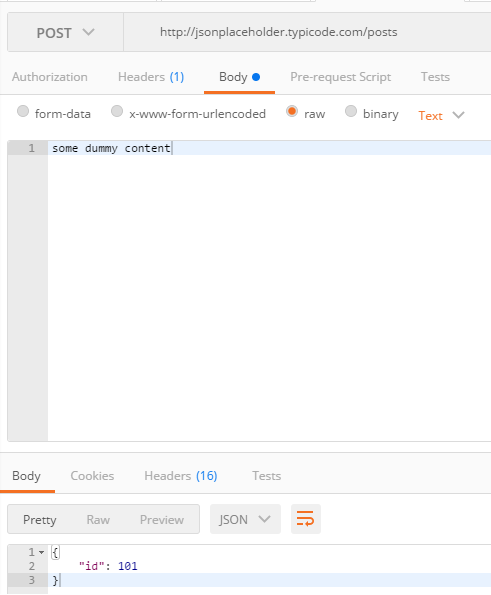
The objective of this post is to explain how to perform HTTP POST requests using MicroPython and the urequests library. This was tested on both the ESP32 and the ESP8266.
Then this to parse it:
https://techtutorialsx.com/2017/05/23/esp32-micropython-parsing-json/
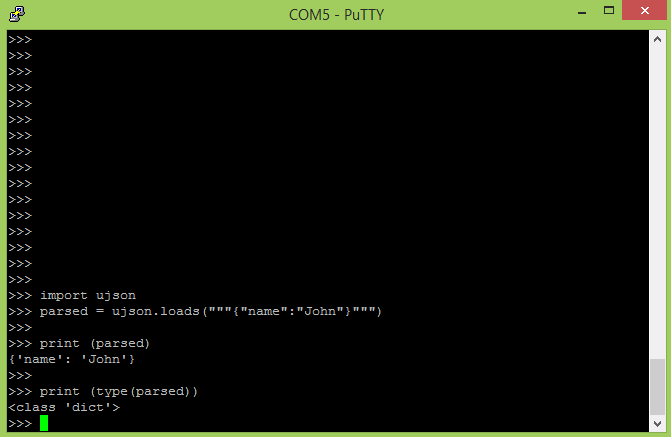
The objective of this post is to explain how to parse a JSON string with MicroPython running on the ESP32.
That lead me to the end where you came through
@tidal kiln FTW
lol
tidal kiln
cool. carry on then.
formal plover
@tidal kiln Yup, thanks again!
formal plover
okay @tulip sleet and @slender iron Need anything tested on the Feather M0 express or Feather HUZZAH ESP8266 for RC2?
manic glacierBOT
@KurticusMaximus @willingc I was asking how do they implement the networking abstraction on the ESP8266 because it is too a "AT" based network stack. So I could try to implement a similar one to SIM808.
Ive done some more research and discovered that micro python implements the Network module witch implements most of the connection, configuring and socket abstraction in a NIC. But at the moment I couldn't find any Python based examples on creating a NIC Class.
Oh and I looks like they...
idle owl
@formal plover Way to go!
formal plover
Thanks! It's really easy to grab the whole current conditions then cherry pick certain things out, like is it cloudy or is it hot etcetera
idle owl
That's really neat
formal plover
@idle owl Thanks!
I could probably even find a way to have it text me saying hey, it's nice out, or hey it's snowing now.
Since I live in Michigan, I will be getting the snow notification all the time in a couple months.
Some Python quickstarts to add SMS and MMS messages to your application. Send, receive, and track text communications with Twilio's API and helper library.
I could prob make this work in CPython
Just the sending part
Depending on the size of the library
manic glacierBOT
 sick creek
have you used PyTorch? https://research.fb.com/facebook-and-microsoft-introduce-new-open-ecosystem-for-interchangeable-ai-frameworks/

Facebook and Microsoft are today introducing Open Neural Network Exchange (ONNX) format, a standard for representing deep learning models that enables models to be transferred between frameworks. ONNX is the first step toward an open ecosystem where AI developers can easily move between state-of-the-art tools and choose the combination that is best for them. When…
 pulsar bloom
Is there a BME280 driver for circuitpython?
manic glacierBOT
@tannewt FYI - I am able to access a SanDisk 8GByte Class 10 card from my M0-Express via an Adalogger Featherwing. Using latest 2.0.0 and library bundle
manic glacierBOT
Oops. I'll fix this soon. Defined some variables in the wrong place relative to #ifdefs.
formal plover
Has anyone tested out MQTT data Adafruit IO on the ESP8266 using circuit python?
timber mango
Not me yet, @formal plover I think you get the honor.
formal plover
@timber mango Haha okay, I'll give it a try some time this weekend.
slender iron
@pulsar bloom not that I know of. it'd likelt be in the bundle if there was
formal plover
@slender iron I think building libraries/drivers for sensors and other components is going to be a huge undertaking, unless there are a lot already available in micropython that can be ported.
drowsy geyser
@Kurt H Especially with the memory available. I am having trouble loading more than one sensor library...
slender iron
@formal plover definitely! That's why I want to get more people helping.
@drowsy geyser the m4 should reduce that issue
drowsy geyser
@slender iron Yup! Waiting anxiously. 😉
formal plover
@slender iron I hear ya! I've been trying to get people involved. Converting people using Arduino on circuit python compatible boards and whatnot, haha.
slender iron
@formal plover awesome! Try beginners too. Arduino users already know something pretty good
formal plover
@slender iron good call/point!
idle owl
raises hand Beginners. That's me.
@formal plover We looked it up. Turns out my first Adafruit order was 30 June. A week before that is when I got started into all off this.
Ok, I think I need some clarification on terminology. What is a driver in python? How does it relate to a library?
@formal plover @drowsy geyser If there's an SD card slot on the board you're using, can you use it to load CircuitPython libararies or does it only use onboard flash memory?
formal plover
@idle owl there's flash storage on the board, very small amount (4MB). Most libraries are packaged with Circuit Python. Others will have to be created or ported from micropython.
idle owl
@formal plover Right, but say you had the Feather Adalogger with an SD card on it. Could you use the SD card as CircuitPython space or does CP only work with on-board flash storage?
I'm thinking no. Because of how it's loaded onto the boards?
Resetting it and getting the .uf2 or .bin file installers...
formal plover
@idle owl as far as the drivers, they are for the PC so it can communicate with a board.
idle owl
Oh
So that is a huge undertaking. Like you said.
@formal plover I was thinking they were .py files that get used in CP code.
formal plover
The libraries and core code will be the biggest undertaking
formal plover
@@idle owl I would explain it, but I'd probably murder the explanation. Libraries simplify things to make it easier to code. Instead of typing a bunch of code, you can call a function from the library. Take NeoPixels for example:
`>>> np[0] = (255, 0, 0) # set to red, full brightness
np[1] = (0, 128, 0) # set to green, half brightness
np[2] = (0, 0, 64) # set to blue, quarter brightness`
np.write()
The interpreter would have no idea what np or np.write() were without importing the NeoPixel library.
So instead of having to define those yourself, the library has stored code that does it for you.
@idle owl but yes they are .py files, they don't have their own special file extension like .lib, and any python file will typical end in .py
Like in the NeoPixel lib, there's most likely a line of code defining the variable NP for you; NP = NeoPixel
 tawny creek
is there a circuitpython library for the TFT Featherwing?
formal plover
@timber mango apparently there is uMQTT for micropython, however there is waning it uses micropython specific shortcuts and not to use it with CPython, So I'll try using the norma/full MQTT lib
 royal ridge
@tawny creek The ILI library works, there's not currently anything for the STMPE610. It's on my list
er ILI is the GFX thing
tawny creek
the screen itself vs. the touch
royal ridge
yeah
tawny creek
had issues using both a TCS34725 sensor and a generic SSD1351 with the ESP8266 so maybe ill have better luck using the TFT featherwing + huzzah
royal ridge
I haven't tried my Huzzah + tft wing with CP..... but drawing works from my M0
You'll have to reroute a pin, IIRC
tawny creek
for the m0 or ESP?
royal ridge
for the ESP
formal plover
The MicroPython MQTT library doesn't port over 100% error free (didn't expect it to) @slender iron . I'll try to figure out what's preventing it from working , Right now I get :
Traceback (most recent call last): File "<stdin>", line 11, in <module> File "/lib/mqtt.py", line 86, in connect MQTTException: 5
idle owl
@formal plover Thank you! That makes a lot of sense.
formal plover
@idle owl You're welcome!
idle owl
@formal plover I meant to tell you, I live in the same state. Never can tell when it'll decide to start snowing, or whether you'll just get sleet notifications for a few months first.
formal plover
@idle owl Haha that's too funny, I look up people's discord user names on Twitter to see if they use the same handle. I found your tweets yelling at home depot or something like that lolol.
tawny creek
side note, it feels weird to not hit the ; button like a period whilst circuitpythoning xD
formal plover
Haha I'm sure it does @tawny creek
idle owl
@formal plover That was such an awful experience. And yes I have the same handle pretty much everywhere. It's my name 😃
formal plover
@idle owl 😃
tawny creek
@idle owl @formal plover sleet notifications sound awful 😫
formal plover
@tawny creek The worst
idle owl
I'm nailing it with false positives over here.
@tawny creek Yes they're awful. And happen often.
Well once we get to that time of year anyway.
timber mango
@formal plover probably still easier to check/port uMQTT
I think a "beginners how to help" Circuit Python doc might be a good building block.... I'm picturing a half guide to CP, half porting document for libraries/modules. Assume a newbie on all of it, but showing new users what to do when something is missing... ie what Kurt did with urequests, or the various asks for specific drivers (ie how to find a working module/driver elsewhere in MP or Cpython and help add to the "works in CP" knowledgebase.
Ultimately, adafruit boards, libraries, and drivers for things adafruit sells will get the most attention/support from CP... but really any person with an itch to scratch can help by making sure whatever itch they have, they can do in CP sooner than later.
drowsy geyser
@timber mango That's a brilliant idea. I think @slender iron started that with his learning system guides, but (sorry to say) I haven't really read them end to end yet. Your list should include "how to build the CircuitPython build toolchain on <platform>" - I've been thinking about doing that on Windows 10 but am pretty intimidated by it (I'm a UNIX guy but I need to learn Windows and the Windows software environment). I should start a OneNote and just dive in, then transcribe the OneNote into a learning system article. I think I'd be pretty comfortable hunting bugs in C++ code (CircuitPython is written in C++, yes?) but it's the environment and build process that has me intimidated. And we should include a link to the Amazon Web Services (AWS) S3 storage with the build-on-commit CircuitPython images; I have it bookmarked but, IIRC, it took a few hops to find it. I think we should ask Scott for his opinion on where the guides/documentation should be, and the structure of the information therein. It would be extra confusing for beginners if we have too many locations for "ground truth" about the project.
Oh, and a "how to use the GitHub repos" for beginners article, too.
formal plover
@timber mango starting in order from your first comment regarding umqtt. I'll check that out. It says it uses micropython specific shortcuts, so I'll just find them and replace them with the CPython equivalent. The normal MQTT library takes up a ton of space anyways.
timber mango
@formal plover as @tulip sleet mentioned above, it might all be fixable with a "shim", such as 'import os as uos' which is much better than lots of search replacement. I worry about missing functionality more, and maybe the question is what micropython functionality is missing from CP, and maybe having a module that adds back that is best approach...
I agree, there is a good space reason for micro libraries...
formal plover
@timber mango right right. And I agree with you on the beginners how to help guide. @slender iron added beginner friendly tag to the GitHub, so that's a start.
@timber mango I think the guide is especially handy for the boards that can run CPython, but don't come with it already loaded.
timber mango
Yes, given the large number of esp8266 variations, I think that's the prime target.
I have nodemcu boards, and wiolinks, both of which runs it great. And those are really common boards, and with Wi-Fi support, the question of all of those network libraries becomes way more important, and so more libraries to verify work, port if not, etc...
drowsy geyser
@timber mango Will the networking libraries fit on the current boards?
timber mango
Some do... that's the nice thing about the micro ports... it allows more to fit, at a potentially reduced to basics functionality.
drowsy geyser
Hmmm. I'll have to go look at those libraries....
timber mango
Ideally, upip means that you can easily add libraries from stock locations with one command. So having a u-library that doesn't work for CP will mean either making another library or coming up with a shim to fix.
I'd really hate to see a whole mess of parallel libraries happen, that's a bad thing in the long run, and slows down potential bugfixes/support compared to just making the original work.
I totally understand the direction toward Cpython that adafruit is taking with CP... the vast majority of code out there is Cpython, and as boards get bigger, that's the right direction. But short term, micropython libraries are space conscious, and nothing is more frustrating than discover you can't build project X due to size constraints.
Now compare that list to this one
https://pypi.python.org/pypi?%3Aaction=search&term=micropython&submit=search
Really the first needs to include all of the second.
As I browse thru that list, I constantly discover new cool things to play. For instance, cloudmanager. It's meant to mass control/manage multiple esp8266 boards, offloading things like package management into some central server more powerful and allowing boards to remain lighter and responsive.

GitHub
Contribute to micropython-cloudmanager development by creating an account on GitHub.
manic glacierBOT
 formal plover
@timber mango I'm excited for CircuitPython to grow. Right now it's in its infancy and you might not be able to use every library, sensor, or add on board out there. However the main CircuitPython supported boards will be great for newbies, they can plug in the board, drag a .py file to it and be on their way.
What's great about the Adafruit express line boards is: oh you want to use Arduino? Cool. You want to use make code? Cool. You want to use CircuitPython? Cool. That's awesome
Might cause some fragmentation issues, but that's where the community comes into play and helps build things up.
timber mango
Agree entirely.
formal plover
There's a IFFFT "Webhooks Channel" (Formerly the maker channel). All you have to do is a GET or POST requests to get it to trigger... I can get the response from IFTTT saying it's been triggered (using urequests in CPython), but it doesn't trigger. Do the same thing with using CURL in normal Python and it works instantly.
manic glacierBOT
I'm not particularly wedded to the MicroPython docs. Most of them seem very board specific or advanced. So, for docs I say we remove most of them. However, we can use intersphinx to link out to pages that we do want to point people to.
@willingc could you elaborate on the standard sphinx build process? I'm wondering if I've set it up correctly in our cookiecutter repo for libraries.
Ok! Thanks for the report @fabitencourt. I will buy some more cards off of Amazon. I expected the newer library to work better. Perhaps they are even pickier about the chip select line. The arduino library is also much faster in talking with the chips.
formal plover
@timber mango maybe, it's weird. Like it tells me I triggered it in the response. The GET in ureqests is supposed to act similar to a CURL request.
timber mango
Check things like id#, token, etc... make sure all are correct.
There is an ifttt discord server, they might have specific advice.
formal plover
@timber mango thanks!
It's really bizarre since it tells me in the http_get response is:
` >>> http_get('https://maker.ifttt.com/trigger/{test}/with/key/Secret key")
HTTP/1.1 200 OK
Server: nginx/1.9.10
Date: Sun, 10 Sep 2017 19:16:11 GMT
Content-Type: text/html; charset=utf-8
Content-Length: 50
Connection: close
X-Powered-By: Sad Unicorns
X-Top-SecreTTT: Secret Key==
ETag: W/"32-ea78498b"
Congratulations! You've fired the %7Btest%7D event`
timber mango
Yeah, I suspect it's an ifttt bug or misconfig
formal plover
It's got to be the difference between a curl X POST vs urequests.get
because when I do it in normal python it works.
manic glacierBOT
 formal plover
@timber mango Figured it out!
soooooooo. {test} is the event name... In curl X POST... IT's like cool I'll pass that on... In http_get or urequests, it's like I have no idea what { } is doing in the URL, screw that noise, I'll turn those into %%.
Got rid of the {} and just put my event name in there without "" and it fired right away.
Dunno why that is, but I don't care now since I've figure it out.
Sooooo! if anyone want's to use IFTTT with the HUZZAH ESP8266, sign up for the webhooks connection.
timber mango
Still, should have given a error on iffttt
You should report the bug, as false saying it was fired.
And congrats, ifttt is awesome.
formal plover
Right it would say Congratulations! You've fired the %7Btest%7D event> So I knew something was jacked up because of the %7Btest%7D event
It's just supposed to be test it's in there as {test} because that's what the instructions say, which it does work if you use curl X POST.
timber mango
Where did the brackets come from?
Oh, yeah, I think they didn't meant to type those.
formal plover
Well it works with the brackets if you use curl X POST
timber mango
Curl must ignore those chars...
formal plover
Must be
That's fly though, the fact that it works using a library I was already using.
The idea is that I can have it trigger a IFTTT event from the OpenWeather API response or any other API response since I'm semi-pro dealing with that stuff now lololol
manic glacierBOT
In my opinion the new library adafruit_sdcard.mpy from bundle candidate 2
is the best I've used. But still doesn't work with my Lexar cards. But they
work very well with my sandisk 16G card. That's the one I'll use. Now I
will try the DS3231 library. That's essential to my logger project. It's
all like Christmas gifts all around....📦🍾🎁👍
2017-09-10 12:54 GMT-04:00 Scott Shawcroft notifications@github.com:
Ok! Thanks for the report @fabitencourt https://github.com/fabitencourt.
I wil...
timber mango
@formal plover nice. Have you signed up for the IFTTT maker (not the webhook) that lets you call multiple things?
formal plover
@timber mango maker channel has been replaced by the webhooks channel
timber mango
No no, they added a new Maker class of user.

We’re opening up the IFTTT platform and Applet building tools — get the details and become a Maker today!
manic glacierBOT
 manic glacierBOT
@tannewt Sounds good to me.
Here's a link to a repo that has a reasonable doc structure which we can use for a cookiecutter https://github.com/willingc/doc-basics :smile:
 jagged crown