#circuitpython-dev
1 messages · Page 101 of 1
 solar whale
 formal plover
Now I just need to figure out how to actually use the WiFi connectivity with CP
 idle owl
Glad you got it sorted!
formal plover
Thanks @idle owl !
 timber mango
@formal plover Kurticus, what don't you understand about using it?
formal plover
@timber mango It acts as its own AP, but how do I program it over WiFi or use it as an IoT device?
That info it available via NodeMCU and Arduino IDE, but not CP that I can tell/find
 hushed plover
@grizzled arch
what i do : use wifi to connect to the micropython wireless network, modify boot.py to login to my network
then tell micropython to start the webrpl after it connects to my network
so its starts it on both my wifi and its own internal network
so i can just access it from my regular wifi
my boot.py
# This file is executed on every boot (including wake-boot from deepsleep)
#import esp
#esp.osdebug(None)
import gc
import webrepl
import esp
from time import sleep as sleep
gc.collect()
def do_connect():
    import network
    sta_if = network.WLAN(network.STA_IF)
    if not sta_if.isconnected():
        print('Connecting to network...')
        sta_if.active(True)
        sta_if.connect('WIFINAME','PASSWORD')
        while not sta_if.isconnected():
            pass
    print('Network config:', sta_if.ifconfig())

try:
    do_connect()
    sleep(1)
    webrepl.start()
I'm good now @hushed plover
hushed plover
oh :p okay
timber mango

GitHub
mpfshell - A simple shell based file explorer for ESP8266 Micropython based devices
timber mango
I just pushed a first 'working' (but really needs rewrite of things) version.
timber mango
You can fuse mount the ESP8266 as a directory, and edit, just as if it's usb mounted like the other CP units do.
it's not QUITE the same (needs work...) but it's closer.
you need to do somthing like ' echo '*' > .commit ' to get it to push files up.
gonna remove and make it more live.
but the stock mpfshell works normally, I'm only working on the fuse stuff.
I really want to use local editor as if it's a local drive.
formal plover
Right right
timber mango
but if you have a working webrepl...
hushed plover
these docs are virtually identical to the micropython docks - wow 
timber mango
you can do mpfmount -p ws:IPADDRESSGOESHERE -m /mountpointgoeshere
and then browse /mountpointwhateveryoudid
(you need fuse support = Linux or Mac...)
sorry Windows 😃
timber mango
it's a nifty bit of code, I didn't write the main stuff, working on the fork
hushed plover
oooo
timber mango
he dropped fuse support a year ago or more, I'm adding it back, and will fix it up to work 'right'
(I dislike the commit thing)
and I don't have the terminal working yet... so you can do serial repl too.
formal plover
How did you mod your boot.py file @hushed plover ?
nvm... i's in the guide
lol just need read before asking lol
 manic glacierBOT
 formal plover
I need to modify boot.py. I understand how to write to the .py file... But I want to make sure if I'm adding the webrepl configuration, that it has the correct snytax. How do I edit it like a text file?
 drowsy geyser
@formal plover It seems like you're asking a couple of questions. First, the webrepl config (which I do not know) and, second, how to edit the file. For the second, I usually copy boot.py to my PC, edit it with a text editor (I use vim under the Windows Bash environment), and then copy it back to the CircuitPython board mounted as a mass storage device.
I also keep a copy of the original as boot.py.orig for if/when I screw it up.
formal plover
@drowsy geyser this is for my ESP8266 Feather HUZZAH. I can't drag and drop files like that. Works great in my Feather M0 Express though!
drowsy geyser
Ahhh, tracking now. Sorry about that. You're obviously right, my way only works for the express boards.
Now I'm trying to remember how to do it for non-Express CircuitPython boards....
formal plover
@drowsy geyser No worries! I'm all over the place in terms of communication, so sorry for that. I'm also being difficult by working on this beta essentially since it's not an express board.
I used to work on Raspberry Pi and Arduino, which I can snag things here and there and not learn with discipline. So that type of usage is hurting me here because I really need to read, read some more, and then some more.. Before just diving in. So if I'm being needy, I apologize; especially to @tulip sleet and @slender iron
And @timber mango & @hushed plover Haha.
drowsy geyser
@formal plover Well, to be honest, they put up with me, so you have nothing to worry about. Especially since you're being productive and contributing!
formal plover
Thanks @drowsy geyser! 😀
timber mango
@formal plover use ampy or mpfshell
Or webrepl (awkward)
The lack of usb "mount on plug in" means you need a tool to access files. That's why the usb mounting is so neat.
All of the above let you copy files from and push files to the esp8266
[And why I am working on the fuse mount stuff, so I don't have to push/pull files but can "edit in place" (well, not really but it fakes it well)]
solar whale
@formal plover I use ampy for uploading to the esp8266 - see: https://learn.adafruit.com/micropython-basics-load-files-and-run-code/install-ampy. It can be done vial webrepl but I find ampy simpler to use.
formal plover
Thanks @solar whale! I installed ampy at like 1am the passed out. Up Wayyyy too late.
solar whale
Sleep is over-rated 😉
 sick creek
Thread.Sleep(  )
)
formal plover
I'll try Ampy when I get home from work today @solar whale and @timber mango. And yes webrepl is awkward
 tulip sleet
@slender iron Pushed latest changes for the processor/cpu/microcontroller stuff. Rosie seems to be having trouble. One thing I found out for classes is that if you simply omit the .make_new member in the class struct, you will automatically get a TypeError exception when you try to instantiate the class: no need to implement a make_new that raises an exception.
There are a lot of warnings in the sphinx doc build about missing links and ambiguous references. Could use a cleanup. I'll add an issue.
manic glacierBOT

There are unconnected pages, ambiguous references, and warnings about the new templates/replace.inc file, which came in with MPy v1.9.2

@dhalbert I noticed that too. I've been refactoring the docs since the build is a bit odd as it stands. Trying to restructure so the docs will be more maintainable over time. Feel free to tackle yourself or I'm happy to take this on.
manic glacierBOT
@willingc If you would like to that would be great! Thanks! It would also be nice to suppress the irrelevant stuff (e.g., pyboard module documentation).
manic glacierBOT

Thanks for doing this! One thing I changed from MicroPython is defaulting the role to any this means more references are missing but some are connected and are more useful.
 slender iron
@formal plover I don't mind questions at all as long as you've taken ten minutes to try it on Google first.
I only get annoyed when its "Ok that worked, but now I get this error."
because I expect people to google the new error before asking me
formal plover
@slender iron right right. I'll keep my questions tamed. Thanks again.
slender iron
You haven't done that at all yet as far as I know. So you are fine @formal plover
formal plover
Did it a little bit last night with @tulip sleet & @solar whale. But in the beginning I didn't have the ESP8266 guide because I didn't realize it was filed under projects. It was in an obvious spot, I dunno what my deal was last night.
slender iron
no worries 😃
formal plover
Thanks. I'll try to actually learn what I'm doing rather than just emulate the guide
slender iron
emulating the guide is how I learn 😃
formal plover
Well that's good! I would too if I switched my brain on while following it. You ever go to a restaurant and just look at the menu but not really read it? Lol I do that sometimes and that's what I did last night with the guide.
manic glacierBOT
fdb97ed Add microcontroller.cpu.temperature, for use as... - dhalbert
[adafruit/circuitpython] branch deleted: issue\_56\_frozen\_neopix\_lib
… visible on boot.
Added to atmel-samd and esp8266. Added license info to atmel-samd/main.c.
manic glacierBOT
@tannewt I am starting to look at this but if you have a hunch let me know.
59faa05 Add ".frozen" to end of sys.path, so that inter... - dhalbert
slender iron
@tulip sleet my day is a bit fragmented so its ok for you to pick up the esp8266 bug. It doesn't trigger any thoughts in my brain.
manic glacierBOT
I was confusing the Gemma which has 3 GPIO with the Trinket which has enough for SPI. Pull request proposed with the names.
17ec02a atmel-samd: Add SPI pin names to the Trinket. F... - tannewt
The link doesn't actually work yet. I think I'll want it to point to a troubleshooting guide or doc. Using the Adafruit URL shortener we can change it as needed.
Fixes #214.
This was a great idea! It should short-circuit a number of queries to support.
4d0dc4b py: Add temporary expanded mpy mismatch message... - tannewt
timber mango
@tulip sleet I was seeing similar errors (but not identical) on my ESP8266 with CP 2.0.0beta... didn't realize it was the 2.0.0beta's issue (it didn't stop my code from working...) I'l try putting older CP on it, if error is gone, I'll put 2.0.0 back and maybe can figure out what's the core issue. (I was getting
File "<stdin>", line 1, in <module>
OSError: [Errno 2] ENOENT
errors)
tulip sleet
@timber mango You mean https://github.com/adafruit/circuitpython/issues/207 ? I was just trying the os.listdir() and os.mkdir() checks, which were giving the wrong answer, but AFTER 2.0.0-beta1. I'm just in the middle of a git bisect to find where something went wrong.

GitHub
The 2.0.0-beta1 release filesystem operations work:
Adafruit CircuitPython 2.0.0-beta.1 on 2017-08-27; ESP module with ESP8266
import os
os.listdir()
['boot.py', 'test']
os.mkdir('test1...
timber mango
yeah, my error could be unrelated, but I don't recall seeing this error on older versions (I did have ESP8266 plugged into usb serial repl while I was doing this, so I might have just not noticed before.)
and I dunno the actual spot that's causing the Error 2 (I get a few of them) but it's gotta be code iterating over filesystem (this was during Fuse stuff I was doing... it didn't stop working, but clearly it was having errors happen too)
tulip sleet
If you can reproduce something on 2.0.0-beta1 that would be great. It might be a different problem. I just noticed this problem when doing some unrelated testing.
Feel free to open an issue or add to #207 (if it's related).
timber mango
Yeah, I will install CP 1 and confirm no such error, so we can confirm it's 2.0, and then I'll track down the spot causing the error.
tulip sleet
Thanks!
timber mango
will do.
hushed plover
so i just manually updated my pixel to android 8 and the phone now boots in about 5 seconds! its amazing 😄
im really impressed! it used to take from 20 to 45 seconds and now it feels almost instant
formal plover
okay, gonna attempt to modify boot.py with Ampy in a sec
Can I not use Ampy when I'm connected to serial and have repl open?
manic glacierBOT

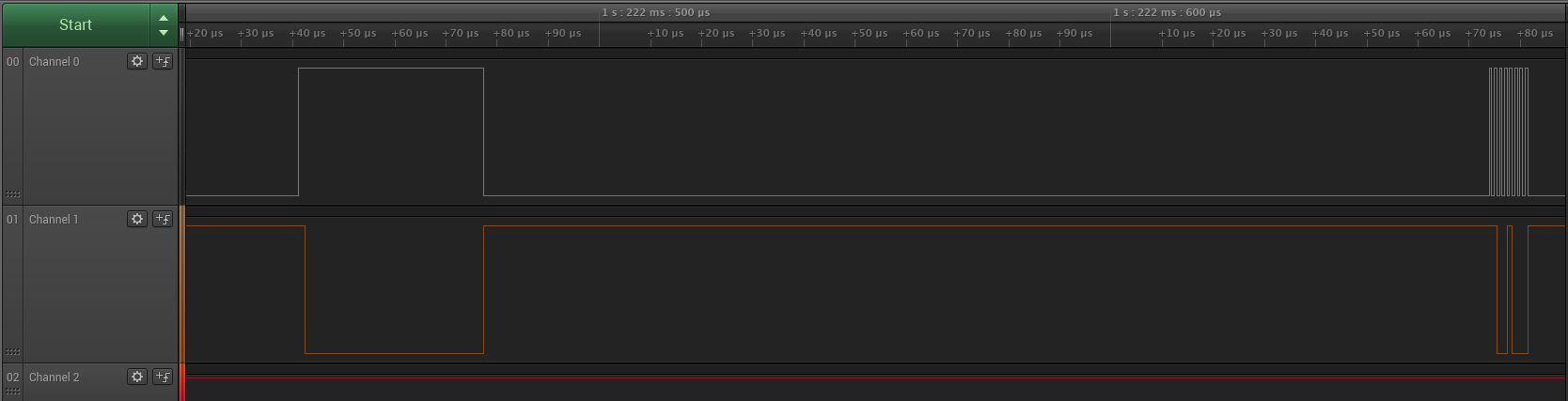
I'm trying to get a ST7735 display to work with Trinket M0, and it seems that Trinket's SPI behaves very strangely. Here is a screenshot of a capture of a fragment of the transmission:
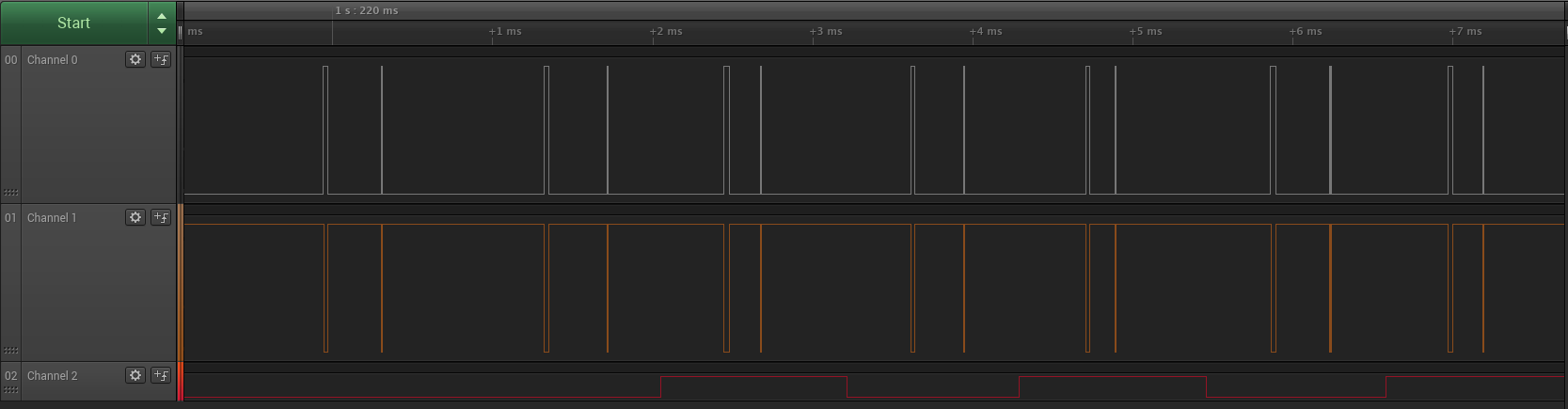
and here is a close-up on one of the fragments:
Here's the complete capture for an...
formal plover
I thought so but I kept getting error when trying just read boot.py
ampy --port /dev/ttyUSB0 get boot.py
Traceback (most recent call last):
File "<stdin>", line 1
SyntaxError: invalid syntax
I googled it, I got nothing
slender iron
i don't know. @timber lion might
solar whale
@slender iron I just built the latest 2.0.0 beta and loaded it onto an esp8266. Also having problems with ampy. In addition when I open screen and reboot REPL it tell sme it can't find _boot.py - Do I have to do sm=oething special to build and include boot.py? As I reported awhile aog some ampy functions require uos but put soed not, but it is not working for me... still digging.
formal plover
So I'm not losing my mind? haha
solar whale
sure - just making sure I did not do something silly.
formal plover
Thanks @solar whale Thought I crazy.
slender iron
ESP8266 might need a little love for 2.0.0
slender iron
😃
solar whale
@slender iron No problem for me - just playing - I was concerned @formal plover would run into issues!
slender iron
hrm ok
manic glacierBOT
Fixes #172. Related to #214.
formal plover
I can't get webrepl to work either. Board is connected to local network any everything
That's why I was like, okay, I'll just use Ampy.
manic glacierBOT
Which channel is which?
formal plover
I'm just horsing around with it. I have a Particle Photon that I'm not even using right now. So it's not like I desperately need a web connected microcontroller right now.
manic glacierBOT
What version of CircuitPython are you using?
solar whale
@slender iron I tried downloading the release 2.0.0.-beta-1 and it includes a boot.py.
and ampy works with it!
formal plover
what the heck...
slender iron
but its broken with a new build?
solar whale
for me it is ...
slender iron
k, I have ~an hour so I'll take a look
solar whale
still ampy ls does not work but get does
formal plover
You're a rockstar @slender iron I promise it's not urgent
solar whale
also ampy put ok - as I found before
slender iron
I'd love to get it sorted before releasing a release candidate
and.... it doesn't compile
slender iron
latest master?
tulip sleet
@slender iron @formal plover If you build with the latest, it still says 2.0.0-beta1 in the REPL version. That's the version with the broken filesystem.
Try git submodule update
solar whale
I did - nothing new
slender iron
maybe my esp stuff is old
formal plover
Well that'd explain it.
tulip sleet
Does it not build with errors mentioning SSL_EXCEPTION and similar? That's an axtls update.
slender iron
gcc  conf.o zconf.tab.o -o conf
ssl/Config.in:8: missing 'endchoice' for this 'choice' statement
ssl/Config.in:19: syntax error, unexpected T_WORD
Config.in errors
tulip sleet
@slender iron haven't seen those, but it is in the ssl dir, which changed.
4d0dc4b is the head of adafruit/circuitpython right now. I just pulled.
so @solar whale is up to date
solar whale
I'm honored 😉
solar whale
@tulip sleet me too- ubuntu
formal plover
I'm on Raspbian
tulip sleet
But it's probably the downloaded toolchain and not so much ubuntu
solar whale
Also attempting to use ampy - hangs the esp8266! need to RESET to get it back!
tulip sleet
Got this a few days ago and followed the instructions: https://github.com/pfalcon/esp-open-sdk

GitHub
esp-open-sdk - Free and open (as much as possible) integrated SDK for ESP8266/ESP8285 chips
formal plover
which is based on Debian
slender iron
I'm updating my stuff through brew
tulip sleet
Latest commit is June 23
solar whale
sorry - I have to run for a bit - do you want me to open a new issue later?
has anything chnge re build - just make clean ; make; make PORT=/dev/ttyUSB0 deploy
tulip sleet
ha, didn't know there was a deploy target. I'm using esptool manually. But the make part is what I am doing.
solar whale
It works great and has been OK in the past
tulip sleet
OK @solar whale your bug is the same one I am working on right now : https://github.com/adafruit/circuitpython/issues/207
GitHub
The 2.0.0-beta1 release filesystem operations work:
Adafruit CircuitPython 2.0.0-beta.1 on 2017-08-27; ESP module with ESP8266
import os
os.listdir()
['boot.py', 'test']
os.mkdir('test1...
I didn't go far back enough in the chat to see your report.
solar whale
@tulip sleet great - sorry - I had not seen it. AS I said, not a prblem for em - just wanted to make sure it was known.
tulip sleet
@slender iron @solar whale Just finished the bisect. It is the commit that added .frozen stuff.
manic glacierBOT
Sorry, channel 0 is the clock, channel 1 is the data (channel 2 is the D/C). Running CircuitPython 1.0.0 that came flashed on the Teensy M0.
solar whale
OK - I do have to go awat=y for a bit -- thatnks @tulip sleet and @slender iron - good luck!
formal plover
Thanks for the help @solar whale
slender iron
ugh, autocrlf and safecrlf changed my line endings which broke the syntax
got it built but gotta run
tulip sleet
ttyl
manic glacierBOT
git bisect shows it's commit f6a702538 (addition of ".frozen" stuff).

4a0cb5d docs: Update analog IO PWM figure. - tdicola
aa819ae docs: Fix wording in analog IO PWM figure refer... - tdicola
formal plover
I'm just running through the guide testing things. Trying to do section 5.1 and this is what happens:
import socket
addr_info = socket.getaddrinfo("towel.blinkenlights.nl", 23)
Traceback (most recent call last):
File "<stdin>", line 1, in <module>
OSError: -2
never mind, fixed my prob
manic glacierBOT
>>> import os
>>> os.mkdir("foo34")
Traceback (most recent call last):
  File "<stdin>", line 1, in <module>
OSError: 30
>>> os.rename("main.py", "foo.py")
Traceback (most recent call last):
  File "<stdin>", line 1, in <module>
OSError: 30
It would be better to give some indication that the filesystem was read-only instead of a numeric error.
formal plover
ctrl+E in repl.... a godsend
It's cut and paste mode
HTTP server on my ESP8266
Man, this is amazing!
manic glacierBOT
Let's put CIRCUITPY inside of ``
With rst, the underlines should match the length of the text above.
manic glacierBOT
I figured out where the "blips" are coming from — the BusDevice library is calling spi.configure before every transmission, and that toggles the clock and data lines.
 lethal abyss
don't know if you saw it but a french company just released a calculator with Micropython inside : https://www.numworks.com/

The graphing calculator that makes learning math easier.
looks fun
 tawny creek
@lethal abyss looks cool 😄 https://www.numworks.com/simulator/ - https://www.numworks.com/resources/engineering/
tawny creek
@lethal abyss have you seen: https://www.desmos.com/
Desmos.com
 lethal abyss
yep, I used it once when I tried to understand a problem in a function I used to move an eye on a small screen (I know, that's not very clear 😃 )
tawny creek
@lethal abyss I'm more curious about the eye on a small screen now than the function xD
lethal abyss

Google Photos
tawny creek
awesome 😄
lethal abyss
thx. I don't know if it's awesome, but it was fun 😃
 worldly wharf
Hello, I'm very new to this hobby so forgive my question, but: why micro- and circuitpython? So far I have only an RPi Zero, but it has, like, a full OS and thus can run a full version of Python, is inexpensive and also pretty darn small.
Are there just occasions that require less "stuff" ?
tawny creek
@worldly wharf its all a matter of use-case imo, what are you trying to accomplish? what does it need to do? how much power will this need? how much space do I have to work with? workflow is also different...
manic glacierBOT
Weird! What settings do you have? Configure shouldn't do anything if the setting are the same as before. Relevant code is here: https://github.com/adafruit/circuitpython/blob/master/atmel-samd/common-hal/busio/SPI.c#L171
tawny creek
@worldly wharf Boards, Boards, Boards: How to Choose the Right One http://makezine.com/comparison/boards/how-we-test/shootout

Make: DIY Projects and Ideas for Makers
Pick the right board for your project! We help you compare features and prices for 40 popular boards, both microcontrollers and single board computers.
worldly wharf
@tawny creek Oh, thanks! I will take a look at that.
manic glacierBOT
I didn't touch the default settings — the code I pasted in this bug is the only thing running since reset. I agree it's weird, especially since it only happens on the Trinket M0 — the Feather M0 Express is fine.
manic glacierBOT
Actually, I don't see you setting the self->current_baudrate anywhere in that code?
manic glacierBOT
Here is what CPython 3.6 does in the REPL and what we should mimic.
>>> import os
>>> os.mkdir("/Volumes/Untitled/test")
Traceback (most recent call last):
  File "<stdin>", line 1, in <module>
OSError: [Errno 30] Read-only file system: '/Volumes/Untitled/test'
Here are the relevant properties on it:
>>> error.errno
30
>>> error.strerror
'Read-only file system'
>>> error.filename
'/Volumes/Untitled/test'
I reworded this to make it clearer.
Thanks for the suggestions!
slender iron
@tulip sleet how is the ESP8266 stuff coming?
manic glacierBOT
I'll turn this on for the SAMD51 boards with #178.
tulip sleet
I figured out the problem. esp8266/main.c does pyexec_frozen_module("_boot.py") . If that doesn't run then all kinds of things are broken. That routine is low-level enough that it does not use sys.path. It could be fixed by doing pyexec_frozen_module(".frozen/_boot.py"), but I can make the lower-level routines a bit smarter. I am just making ".frozen" a #define, and fighting with MP_QSTR_ a bit because of that.
slender iron
sounds good 😃 Sorry I broke it
tulip sleet
It was pretty obscure. I was tracing through the os module routines, but that was looking under the wrong rock. pyexec_frozen_module() is only used a few places. Ideally one should call the import builtin routine, but that routine is a big thing with few lower-level abstractions, so you have to call it with Python objects instead of calling something slightly lower-level. Anyway now I know more about vfs and other stuff, which is good.
slender iron
I'm updating AMPY
tulip sleet
Does ampy take a directory as an arg?
optionally?
I remember it didn't at first, which was annoying, but maybe Tony already added that.
or maybe it only did one file at a time, and I wanted multiple args
slender iron
I can't remember
it uses uos for a number of commands
ampy update here: https://github.com/adafruit/ampy/pull/26

GitHub
CircuitPython 2.0 replaces uos with os so this will work with it.
manic glacierBOT
[adafruit/circuitpython] Pull request opened: #222 Fix issue \#207, esp8266 file operations problems
The frozen module _boot.py was not being loaded on restart
because pyexec_frozen_module() did not know about the new .frozen
pseudo-directory. Updated lower-level routine to look in the right place.
Also made ".frozen" and related values be #defines.
This prevents the SERCOM from blipping the data line on each
transaction and therefore fixes #219.
slender iron
@nocturne wren do you have time to continue the review today? I'm hoping to get it in so I can setup the URL before the RC
formal plover
I love watching the GitHub progress you guys are making right here in the channel ( @slender iron & @tulip sleet)
slender iron
I'm glad @formal plover because it can get a bit noisy
formal plover
A little, but if you want to read strictly chat, they are easy to recognize and skip over.
Could also be because I'm using the beta release of CP and have extra interest in what's getting added, removed, or fixed etcetera.
slender iron
😃
manic glacierBOT
I'm going to pull this now so I can get the link setup. I'll be happy to fix any further comments in a follow up.
slender iron
I'm gonna release 2.0.0-rc.1 and then call it weekend
manic glacierBOT
I don't think we should offer to reformat from within CircuitPython. There is now a troubleshooting post about recovering from this issue: https://circuitpython.readthedocs.io/en/latest/docs/troubleshooting.html#file-system-issues
[adafruit/circuitpython] New tag created: v1\.9\.2
[adafruit/circuitpython] New tag created: 2\.0\.0\-rc\.1
Revising title: on atmel-samd, all errors are reported only numerically. On esp8266 and unix, the errno name is given as well. As @tannewt shows above, both could be better.
>>> os.listdir("main.py")
Traceback (most recent call last):
  File "<stdin>", line 1, in <module>
OSError: 2
esp8266 and unix ports:
>>> os.listdir("boot.py")
Traceback (most recent call last):
  File "<stdin>", line 1, in <module>
OSError: [Errno 2] ENOENT
@tulip sleet it looks like microcontroller.Processor is missing from the docs
slender iron
no problem
manic glacierBOT
tulip sleet
@slender iron I built with sphinx locally. If I go to file:///home/halbert/foo/shared-bindings/microcontroller/init.html then I see microntroller.cpu and in the description it mentions microcontroller.Processor, which is a live link. But it's true it's not listed as a subtopic under microcontroller in the sidebar. I guess it's missing from the TOC.
slender iron
tulip sleet
Well, ByteArray is not visible either except through a link, so it's parallel like that.
slender iron
its visible under nvm
tulip sleet
Oh, I didn't know it would open until I clicked on it. I'll see about fixign that.
tulip sleet
@slender iron We did great! We have a release. Did you build a 2.0 library bundle yet?
slender iron
Yup! its just by date and has two zips
tulip sleet
OK!
slender iron
time to start the weekend early 😃
 devout jolt
Hi! Is the USB_VCP class available in circuitpython? (Or a similar class that lets one do non-blocking reads?)
(and apologies if this is the wrong forum for that question)
slender iron
non-blocking reads over what protocol?
devout jolt
Apologies. serial (USB). Something equivalent to "Serial.available()" in Arduino. In micropython you can do "USB_VCP.any()" for an equivalent test
slender iron
ah, the only way I know is input() which is blocking
formal plover
Have a great weekend @slender iron!
slender iron
thanks @formal plover !
formal plover
You're welcome! 😀
devout jolt
okay thanks @slender iron. circuitpython is amazing. I'm having a lot of fun with it. Thanks to everyone who's been working on it
slender iron
awesome @devout jolt
formal plover
I've been having a lot of fun with it too @devout jolt
idle owl
@devout jolt Same here!
 split ocean
Yay, welcome @devout jolt (one of my favorite people/robots in the whole wide world!)
devout jolt
boop beep
 opal elk
with my order of a gemma m0 and metro m0 today I'm definitely going to try to help out more in this channel!
I'll try to break the 2.0 RCs 😄
formal plover
@opal elk I'm using circuit python beta on a board that wasn't even designed specifically for circuit python, so it's like the ultimate test
opal elk
Cool, which one?
I haven't flashed any chips besides maybe the Feather? To get it to run Arduino instead of Lua
So I figure I should be able to know what I'm doing with the code to be able to troubleshoot better.
idle owl
Ooh I wish I could get more boards to try to help.
I'm good at breaking things. I don't know enough python though to help much. Which is disappointing. I'd love to
formal plover
@opal elk the Feather HUZZAH ESP8266
opal elk
That's one I have! Nice.
formal plover
@idle owl I don't know a lot, I just flashed it and followed the guide for that board, if things don't work I just ask @slender iron and @tulip sleet if I'm an idiot, or if it's legit a bug.
idle owl
@formal plover You've been nailing the bugs though. Well done 😃
formal plover
@idle owl Haha well I've only found one unreported one so far, the others I found were already identified. Fun stuff though. I'm learning a lot in the process.
Here's the circuit python guide for the Feather HUZZAH ESP8266 @opal elk http://circuitpython.readthedocs.io/en/latest/docs/esp8266/tutorial/index.html
idle owl
@formal plover Yeah, I'm happy to even be around for it. I stumbled backwards into getting the Circuit Playground Express, and that's how I ended up here. I've only been working with python for a few months.
formal plover
@idle owl Nice! It's a good language to start with since it's so widely used, lots of resources. I've used Python a lot over the years, but I'm not very disciplined learner, so I'm still pretty much a novice.
idle owl
@formal plover Ooh, I know that feeling.
formal plover
@formal plover you can use Python with the Raspberry Pi to do lots of cool/fun things as well!
idle owl
@formal plover I actually have a tabletop lightbox phoho studio running dotstars from a Pi using Python. The rest of my Pis are running bonnets of some sort or another, mostly blinky things and lights. I was going to setup a timelapse camera, but then I started using the CPX and got into CircuitPython. It was more fun than the camera at the time. 😃
formal plover
@idle owl Haha. Funny how one project can lead to another.
solar whale
@slender iron @tulip sleet Congratualtions on release of 2.0.0 rc1. I did a quick check building the release from master. Works well with one issue. After initial boot, REPL normally states taht webrepl is not enabled and to execute import webrepl_setup. I tried this,but it failed, looking for machine module.
Don't have much time to explore, but I'll do more tomorrow. Ampy get/put work - ls still broken as expected. (looking for uos)
formal plover
@solar whale you're awesome! Thanks for checking it out!
solar whale
@formal plover least I could do!
formal plover
I had a problem with it always telling me web repl wasn't configured on the last release, but I figured it was because I couldn't modify the boot.py file
I guess I should have reported it.
solar whale
Nice thing is taht is it able to connect to my network - so wifi is working!
formal plover
Yeah, I got it to connect to my network as well, that's why I wasn't concerned
Plus it's hooked up to my Pi which I can VNC to, so I don't really need the web repl
solar whale
Nice to see the release - big step - sorry I have to run now - look forward to poking around with it tomorrow - Goodnight!
formal plover
Night @solar whale!
manic glacierBOT

In 2.0.0-rc.1 module machine is not available. webrepl_setup imports machine and fails.
opal elk
it's workiiiiiiing!
and the really cool thing is my feather huzzah is from adabox004, which lost internet connection: even with the default example code it couldn't connect to a network or even find any
but... >>> sta.ifconfig() ('192.168.1.155', '255.255.255.0', '192.168.1.1', '192.168.1.1')
so I guess it's micropython right now and not circuitpython yet, because I don't see a device in my explorer
formal plover
@opal elk you won't ever see it in explorer. It doesn't work the same way it does for express boards
You can use Ampy to mod files and make directories etcetera
opal elk
ahh
well still, I downloaded from micropython and not circuitpython
I'll grab 2.0rc1 now and flash that with esptool
formal plover
@opal elk I'm sure there'll be a huzzah esp8266 express that does fancy drag and drop
Down the road.
@opal elk sweet! You will probably need to wipe the board first, i had to, or else it flipped out.
opal elk
it helps if you disconnect from the serial port first (facepalm)
formal plover
Haha, indeed it does.
manic glacierBOT
The machine module got dropped from esp8266/mpconfigport.h during the v1.9.2 merge. Not sure how that happened but it appears to have been during an automatic merge.
tulip sleet
@solar whale @formal plover Here's a fixed esp8266 2.0.0-rc1 .bin with the machine module included. Try it at your leisure. https://www.dropbox.com/s/513tq1mvy1ztoct/circuitpython-2.0.0-rc1-issue_224_esp8266_machine.firmware-combined.bin?dl=0 (sorry gave wrong link first time)
 formal plover
Thanks @tulip sleet! I'll take it for a test drive tomorrow.
solar whale
@tulip sleet Thanks! for the fix to esp8266. I made the chaneg on my local copy - rebuilt and loaded. machine is now avaialble! I was able to get webrepl working, but not without a bit of struggle getting it to be enabled on boot. I'll see if I can come up with ah repeatable sequence that indicates a problem. before I create an issue. It eventually worked after trying it a few times... Thanks again for the quick fix. Glad it was simepl. I saw in the souce that machie had been omitted, but I thought maybey taht was intentional and wanted to check before just re-enabling it. I guess I need to be more brave 😉
solar whale
@tulip sleet The problem with webrepl appears to be with keeping it enabled after a soft reboot. Once enabled, it comes up fine on power cycle, but if I enter a control-D then it says it is no longer configured. But it is and works on power cycle. I'll commnet in the oopen issue and keep trying it. As with most hings, this is not urgent and not a real problem. I am just checking things out.
tulip sleet
@tulip sleet That's weird, but I'm glad it actually works. Maybe it's making some check which is wrong. We'll look at this, but probably not until after the long weekend. Thanks very much for your testing!
solar whale
@tulip sleet Enjoy the weekend! This is my hobby, not my job! Hopefully I can get some better information for you to use when you look into it!
manic glacierBOT
The fix to make machine available works fine and I am now able to get the web replacement working. There still appears to be some problem with the web real configuration. If I import webrepl_setup and enable it on boot it seems to work OK after a power cycle. However if I enter a control-D then it reports that webrepl has not been configured. It appears to work again after a power cycle.
tulip sleet
@solar whale if you try to connect to it after ctrl-D does it not work again until power-cycle?
solar whale
correct
manic glacierBOT

When using the examples here: https://circuitpython.readthedocs.io/en/latest/shared-bindings/audiobusio/PDMIn.html I get the following error using RC1 of CircuitPython 2.0:
Traceback (most recent call last):
  File "<stdin>", line 1, in <module>
ValueError: Invalid clock pin
I notice that the argument order for instantiating the PDMIn class has changed (MICROPHONE_CLOCK used to come first). Can you confirm that the signature for __init__ is not going to change further?
formal plover
Oh, Ampy is still broken in this release candidate?
manic glacierBOT
This is the first of several PRs to update the docs and the doc build process. The current build process is non-standard which makes it difficult to maintain or be used by contributors. Partially addresses #215.
Ref: Rendered docs on my RTD test account
<img width="261" alt="screenshot 2017-09-02 09 29 49" src="https://user-images.githubusercontent.com/2680980/29996271-5b68ad68-8fc1-11e7-88e1-e1e3a06bf5c2.png">
formal plover
webrepl works, but only if I do a hard reset. It's a holiday weekend @slender iron, @tulip sleet, or anyone else that plans on working on CP better wait till Tuesday to touch this, or I'll have to shame you with emojis for working too hard.
formal plover
I modified boot.py to start web repl, but it does the whole "run webrepl_setup" shenanigans. However... if I do:
import machine
machine.reset()
the board resets and then if I run webrepl.start() it starts no problem lol.
opal elk
So I tried putting rc1 on a huzzah last night and it seemed to get stuck on loading boot.py? It never loaded a repl. But it was late and I didn't really know what I was doing.
I'll try to put 1.0 on it later today and see how that works. I'm fleeing the country right now.
(Living across the Canadian border makes it easy to make day trips sound dramatic)
opal elk
Nope!
opal elk
I had set webrepl to not start when it had micropython on it. It that's the only thing I had done
Yep
idle owl
@formal plover Emoji shaming! That's the first time I've ever heard that threat.
formal plover
@idle owl I'm messing with it because my wife is at work, I don't want them working if they have leisure activities they can be doing.
@opal elk What are using to connect to serial?
opal elk
USB
idle owl
@formal plover I totally get it. I have a couple of questions specifically for Scott and I'm waiting to even ask for the same reason.
formal plover
@idle owl Gotcha. I want to use the Open weather API to have neopixels react to the weather, but import urequests doesn't do anything for HTTP requests
idle owl
@formal plover I love that idea!
idle owl
@formal plover I also love this community. Everyone is so supportive and positive.
@formal plover I was trying to find a channel for Python - I always feel bad asking regular Python questions in here, it's not quite on topic... Anyway the only one I found, the entire list of activity in the right sidebar was people being banned. So either someone is angry up top, or a lot of people who join it are being jerks. Either way, not a great environment to learn.
@formal plover Can't use HTTPS? or is that not even the problem..
or is http get an actual command
idle owl
Ah I see
@formal plover So there's a place to get weather info from an http address and that's how you were going to make the Neopixels react?
formal plover
@idle owl Yup! https://openweathermap.org/api
idle owl
@formal plover Hah! I'm always so excited when I understand any of this. lol
formal plover
@idle owl HAha, right?!
 dusk ether
...openweathermap is what I've been looking for, for ages, ❤ thanks
formal plover
You're welcome @dusk ether !
solar whale
@formal plover For what it s worth - ampy partialy works for 2.0.0-rc1 - get/put work, ls does not. anything that imports uos fails, but it is nice to have get/put at least. It is an ampy issue and not a CP issue. ampy needs to be modified to use os instead of uos for CP. @slender iron has fixed this and submitted it. Hopefully it will be available soon in the released verison. I opened an issue regarding webrepl_setup - it seems to get confused after a soft reboot (control-d). I hope to have more time to play with it tomorrow to get some clear examples of the problem(s).
formal plover
I can't figure out how to pull the data yet
formal plover
I can pull the data now, just have to figure out how to use it in an if statement.
idle owl
Nice!
manic glacierBOT
I'm not really sure why the tests on rosie are failing since these are doc changes with no docstring changes 🤷♀️
manic glacierBOT
@willingc Rosie has been having trouble for a couple of days. You can just ignore these errors until Scott gets a chance to fix it.
sick creek
the https://cntk.ai/ have lots of python API so made me thinking to use it with projects
formal plover
Thanks @sick creek
sick creek
@formal plover does that able you to solve data issue?
manic glacierBOT
Thanks @dhalbert for the heads up 👍
formal plover
No @sick creek. Just thanking you for the link. Options are good
manic glacierBOT
4c151e0 docs: Add I2C & SPI guide (not the code current... - tdicola
d97c522 docs: One more list fix in I2C & SPI. - tdicola
manic glacierBOT
It looks like a doc mistake. Does it work with clock first? I'll fix it up on Tuesday after our long weekend.
I don't think its intended to work across soft reloads. I'll take a harder look at this Tuesday though.
Love the screenshot! We'll look at this on Tuesday. Thanks!
slender iron
@idle owl feel free to ask Python questions here. And no, I'm not working. Just triaging
slender iron
 idle owl
@slender iron Covered the potential emoji shaming with the triaging claim. 😉
@slender iron And thank you. I really wasn't sure about Python questions.
slender iron
Phew! That was close!
Not a problem. 😃
The goal of CircuitPython is to teach Python 😃
idle owl
That's valid.
@slender iron That link is apropos. We were just talking about how great this community is.
slender iron
Yay! I'm trying to be deliberate about maintaining it
everybody else has been super helpful too
idle owl
That's how it's felt to us as well.
slender iron
perfect!
hushed plover
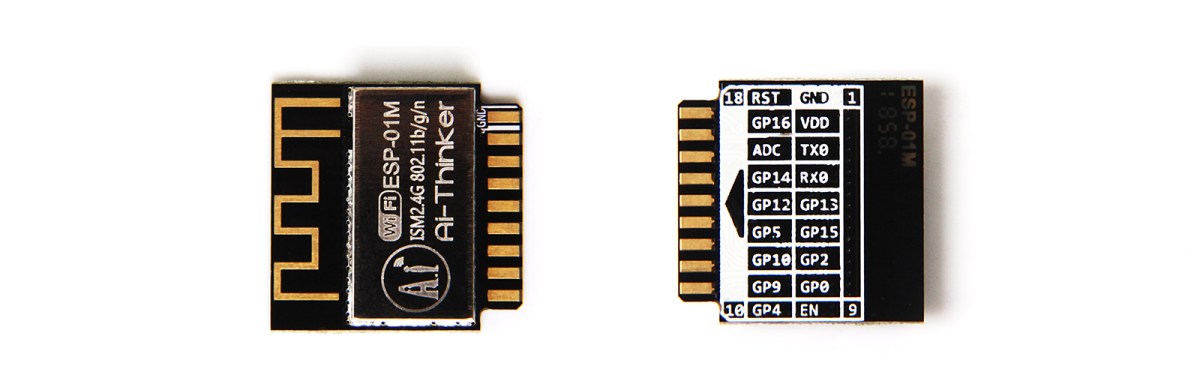
Almost exactly four years ago, we came across a really neat module for sale on SeeedStudios. It was a $5 WiFi chip, able to connect your microcontroller project to the Internet with just a handful …
!!!!!!!!
:O!!
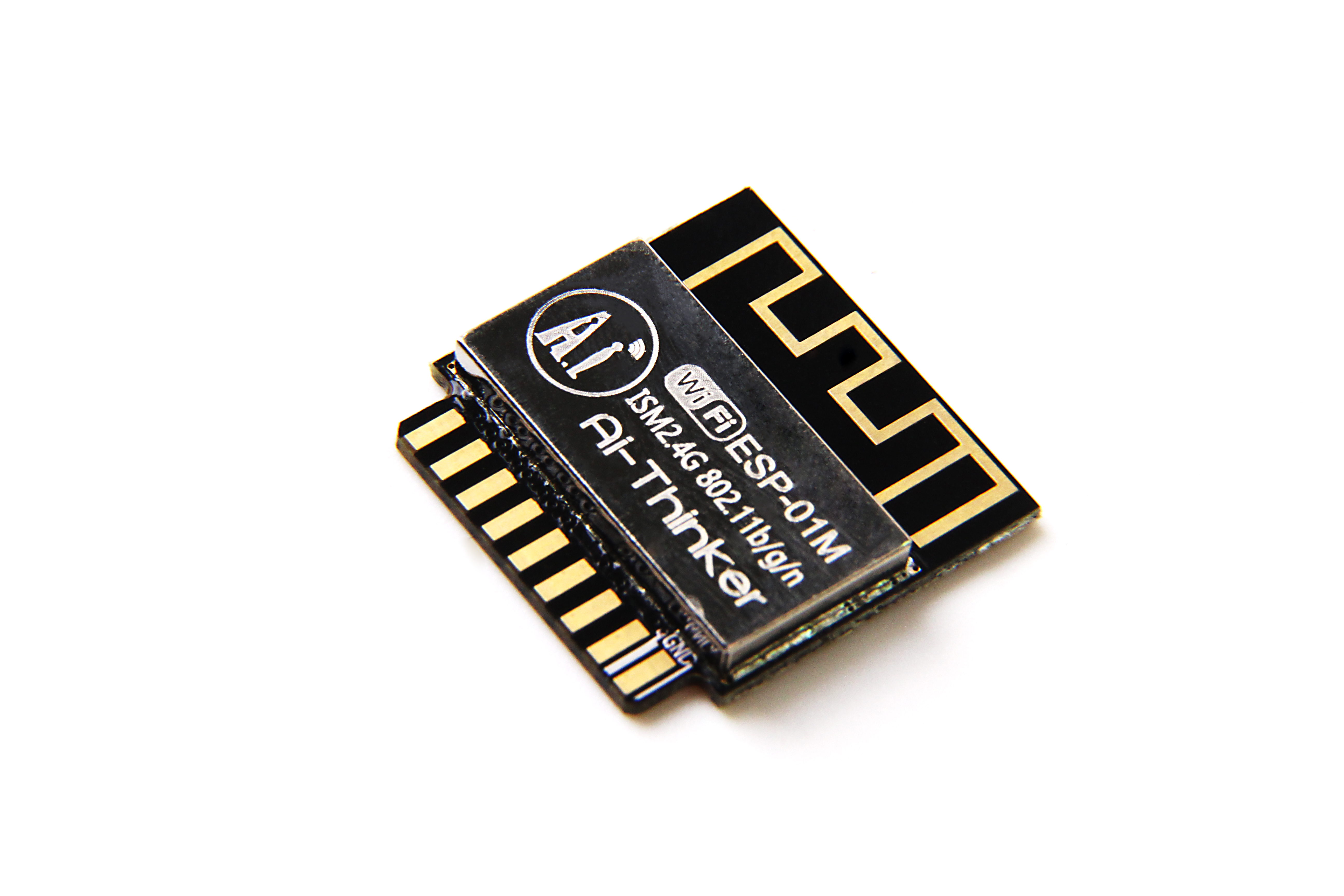
Esp8266, espressif, smart, wireless, wifi, main board,
slender iron
interesting idea @hushed plover
hushed plover
youd think the place selling teh board would have the connector
slender iron
yup
 formal plover
@slender iron come Tuesday I'll have some questions about json data. Trying to work with the data I get from the open weather api and am a little hung up.
opal elk
json and python or json in general?
okay, 1.0 gives me the same hanging boot as 2.0rc1. so that's a start
bcn 0
del if1
usl
add if1
#5 ets_task(4020edc0, 29, 3fff9158, 10)
dhcp server start:(ip:192.168.4.1,mask:255.255.255.0,gw:192.168.4.1)
bcn 100
boot.py output:
(using a feather huzzah)
resetting gives
boot.py output:
the output when I flash: https://pastebin.com/PaxJMkNs

micropython 1.9.2 does work. (shrug)
formal plover
@opal elk json data in Circuit Python. Try to do a json.loads() and it gives me an error, I'll have to look on the specifics later
opal elk
Yeah, the error would help. My first instinct is that it's improper json. json is finicky.
formal plover
So I've noticed Haha. All I need is to get the data, and be able to use it ie if ['weather'] = rain then do this etcetera
manic glacierBOT

It would be nice to be able to initialize uart with a single pin, either transmit or receive. For example I have an app where I only need to receive data from uart on a Gemma M0 so I'd like to be able to do:
uart = busio.UART(-1, D2) and that would leave me D0 and D1 to use for something like dotstars without needing to deinit the uart after receiving a command and then vice-versa to a dotstar strand to get another command, etc, etc.
formal plover
example:
[b'HTTP/1.1 200 OK\r\nServer: openresty\r\nDate: Sun, 03 Sep 2017 05:09:03 GMT\r\nContent-Type: application/json; charset=utf-8\r\nContent-Length: 441\r\nConnection: close\r\nX-Cache-Key: /data/2.5/weather?q=holt\r\nAccess-Control-Allow-Origin: *\r\nAccess-Control-Allow-Credentials: true\r\nAccess-Control-Allow-Methods: GET, POST', b'{"coord":{"lon":-84.52,"lat":42.64},"weather":[{"id":800,"main":"Clear","description":"clear sky","icon":"01n"}],"base":"stations","main":{"temp":287.59,"pressure":1014,"humidity":67,"temp_min":286.15,"temp_max":289.15},"v']
b'{"coord":{"lon":-84.52,"lat":42.64},"weather":[{"id":800,"main":"Clear","description":"clear sky","icon":"01n"}],"base":"stations","main":{"temp":287.59,"pressure":1014,"humidity":67,"temp_min":286.15,"temp_max":289.15},"v'
Traceback (most recent call last):
File "<stdin>", line 7, in <module>
ValueError: syntax error in JSON
data['main']['temp'] -273.15
Traceback (most recent call last):
File "<stdin>", line 1, in <module>
TypeError: bytes indices must be integers, not str
So if I can convert it the string to a integers I'll be set
jason.loads supposedly does that, but I can't get it to work.
formal plover
if urequests existed it would be a lot simpler.
import json
import urequests
r = urequests.get("http://api.openweathermap.org/data/2.5/weather?q=Zurich&appid=XXX").json()
print(r["weather"][0]["description"])
print(r["main"]["temp"] - 273.15)
but since Circuit Python don't have urequests I have to use GET and or http_get
manic glacierBOT

shouldnt work :)
import board
import busio

BYTES_TO_READ = 2

with busio.I2C(board.SCL, board.SDA) as i2c:
    while not i2c.scan():
        pass
    print("I2C addresses found:", [hex(i) for i in i2c.scan()])

    i2c_addr = i2c.scan()[0]

    print("Reading each address")
    for addr in range(255):
        buffer = bytearray(BYTES_TO_READ)  # read n bytes from each addr
        try:
            i2c.writeto(i2c_addr, bytearray([addr]))
i2c.readfrom_into...any thoughts of adding the urequest micro python library to Circuit Python @slender iron ?
slender iron
for the esp8266?
formal plover
yessir!
slender iron
not for 2.0 but feel free to add an issue
I do intend on having a release with a networking focus but it won't be 3.0
formal plover
gotcha. That'd be awesome.
slender iron
3.0 is all of the M4 prep
formal plover
m4?
slender iron
if its easy to turn on, we could do it in 3.0 though
yeah, the new SAMD51 boards
we need to be ready for them with a 3.0 beta
formal plover
ahhhh gotcha
slender iron
so its top priority after getting 2.0 out
slender iron
tryin 😃
formal plover
💯
opal elk
okay, so: I have a metro erxpress m0 with the default blink sketch on it
double clicked the reset button and the neopixel/dotstar (whichever) is red
but I don't see a new device in my explorer, to let me drag the uf2 on
hrm, it's possible it doesn't support the uf2 bootloader? in that case this might need to get clarified https://learn.adafruit.com/adafruit-metro-m0-express-designed-for-circuitpython/circuitpython

CircuitPython, Arduino IDE or even MakeCode with this Metro M0
already tried a different cable, let me try a different port
opal elk
Different computer (easiest way to switch ports for me 🤣) worked
The neopixel is green in boot loader mode, not red
tulip sleet
@opal elk what was the original machine on which you did not see METROBOOT? Was it Windows 7?
opal elk
10 in both cases
It could have been a slightly funky USB port? It's a PC I built and frankly I didn't know what I was doing
 royal ridge
It could be. or one that's wearing out and therfore the pins aren't lining up quite right in the connector
tulip sleet
If you installed the Adafruit drivers package a while ago, you might have installed some superfluous drivers that are interfering. Try uninstalling any Adafruit drivers in the apps list and any Teensy drivers. Leave FTDI, CP2104, etc.
opal elk
I think the last time I did arduino work on that computer was pre-me-getting-adafruit stuff
now for a question that may be obvious to other people: is there an easy way to port an arduino library to circuitpython?
royal ridge
depends on the library, how much C you understand, how much python you understand, and what you call "easy"
opal elk
haha. well.
right now my biggest hurdle is the step from how c gets interpreted into python. I'm sure there's an article somewhere I need to read
royal ridge
That I don't know. I'll leave that for Dan and Scott to point at
opal elk
now that it's been flashed I do see the CIRCUITPY drive
on the first computer. heck yet. let's get to work.
formal plover
@opal elk @slender iron I don't even need to get the data from the open weather as json, I can grab it as HTML
So I'll try handling the api data as HTML instead of json
opal elk
but json is better!
can you post the error again? with three backticks so it's formatted?
tulip sleet
There's an optional json library for CircuitPython/MicroPython. It is not in M0 CPy; not sure re ESP8266. I'm not near something to check. There are some issues getting it to work, but I'd like to eventually.
It converts json to/from objects with attributes.
ujson
opal elk
I think the MPL3115A2 altimeter runs into this issue https://github.com/micropython/micropython/issues/1075

GitHub
Hello,
I have ported micropython on FEZ-CERB40.
When I use i2c on it a OSERROR: 5 appears.
Here is the faulty code:
class Azotec():
def init(self):
# config :
## see the mod...
>>> import board
>>> i2c = busio.I2C(board.SCL, board.SDA)
>>> i2c.try_lock()
True
>>> a = bytearray()
>>> i2c.readfrom_into(0x60, a)
Traceback (most recent call last):
  File "<stdin>", line 1, in <module>
OSError: 5
or I may have messed something up. still looking.
I'm probably just not implementing this properly https://github.com/adafruit/Adafruit_MPL3115A2_Library/blob/master/Adafruit_MPL3115A2.cpp

GitHub
Adafruit_MPL3115A2_Library - Arduino library for the MPL3115A2 sensors in the Adafruit shop
formal plover
@opal elk yes I can get it formatted with three back ticks.
Then I dunno what to do with it after that.
@tulip sleet I actually used ujson on the ESP8266 earlier and it worked.
Did this:
ujson.dumps(obj)
which; Returns obj represented as a JSON string. but to use the string data it needs to be converted to dictionary integers, couldn't figure it out.
@opal elk
ujson.dumps(data)
'"{\"coord\":{\"lon\":-84.52,\"lat\":42.64},\"weather\":[{\"id\":800,\"main\":\"Clear\",\"description\":\"clear sky\",\"icon\":\"01n\"}],\"base\":\"stations\",\"main\":{\"temp\":287.59,\"pressure\":1014,\"humidity\":67,\"temp_min\":286.15,\"temp_max\":289.15},
opal elk
can you post the code surrounding it?
I think you want loads and not dumps
because you want to turn the json string into an object, don't you?
formal plover
json.loads(_)
'{"coord":{"lon":-84.52,"lat":42.64},"weather":[{"id":800,"main":"Clear","description":"clear sky","icon":"01n"}],"base":"stations","main":{"temp":287.59,"pressure":1014,"humidity":67,"temp_min":286.15,"temp_max":289.15}
tulip sleet
Sigafoos has it. You get a string from the API, and turn it into a structured object with loads. https://docs.python.org/3/library/json.html
w = ujson.loads(response)
print(w.weather[0].description, w.main.temp_min)
I hate doing this on my phone.
formal plover
Haha dang @tulip sleet thats 💯 !!!
formal plover
I'm going to try it right now
opal elk
don't make us emoji shame, dan!
tulip sleet
🔕🔙🎵🔀🛂🏧📉📫
formal plover
No dice
Didn't work
b'{"coord":{"lon":-84.52,"lat":42.64},"weather":[{"id":800,"main":"Clear","description":"clear sky","icon":"01n"}],"base":"stations","main":{"temp":291.39,"pressure":1014,"humidity":60,"temp_min":289.15,"temp_max":293.15},"v'
import ujson
paste mode; Ctrl-C to cancel, Ctrl-D to finish
=== w = ujson.loads(data)
=== print(w.weather[0].description, w.main.temp)
Traceback (most recent call last):
File "<stdin>", line 1, in <module>
ValueError: syntax error in JSON
 gaunt shell
are you missing a closing }?
{
"coord": {
"lon": -84.52,
"lat": 42.64
},
"weather": [{
"id": 800,
"main": "Clear",
"description": "clear sky",
"icon": "01n"
}],
"base": "stations",
"main": {
"temp": 291.39,
"pressure": 1014,
"humidity": 60,
"temp_min": 289.15,
"temp_max": 293.15
}
}
That's what you're after right?
formal plover
yes @gaunt shell the json comes in a string, not formatted nice like that, hard to read
gaunt shell
I think that last , before the "v' might need to be a }
at least that should complete the JSON
not sure what the b and v are for
formal plover
Porb, but that's how it comes in
tulip sleet
Could you copy/paste the response you're getting from the server as seen from a browser?
Is this your server or a public one? If latter, what's the URL?
formal plover
It's the API response
right from doing this:
paste mode; Ctrl-C to cancel, Ctrl-D to finish
=== key = '***************************************'
=== import socket
=== s = socket.socket()
=== addr_info = socket.getaddrinfo("api.openweathermap.org", 80)
=== addr = addr_info[0][-1]
=== s = socket.socket()
=== s.connect(addr)
=== s.send(b'GET http://api.openweathermap.org/data/2.5/weather?q=Holt&appid=%s HTTP/1.0\r\n\r\n' % key)
=== s.recv(4000)
109
b'HTTP/1.1 200 OK\r\nServer: openresty\r\nDate: Mon, 04 Sep 2017 02:23:21 GMT\r\nContent-Type: application/json; charset=utf-8\r\nContent-Length: 442\r\nConnection: close\r\nX-Cache-Key: /data/2.5/weather?q=holt\r\nAccess-Control-Allow-Origin: *\r\nAccess-Control-Allow-Credentials: true\r\nAccess-Control-Allow-Methods: GET, POST\r\n\r\n{"coord":{"lon":-84.52,"lat":42.64},"weather":[{"id":800,"main":"Clear","description":"clear sky","icon":"01n"}],"base":"stations","main":{"temp":291.39,"pressure":1014,"humidity":60,"temp_min":289.15,"temp_max":293.15},"v'
=== html = _
=== html
=== html.split(b'\r\n\r\n')
b'HTTP/1.1 200 OK\r\nServer: openresty\r\nDate: Mon, 04 Sep 2017 02:23:21 GMT\r\nContent-Type: application/json; charset=utf-8\r\nContent-Length: 442\r\nConnection: close\r\nX-Cache-Key: /data/2.5/weather?q=holt\r\nAccess-Control-Allow-Origin: *\r\nAccess-Control-Allow-Credentials: true\r\nAccess-Control-Allow-Methods: GET, POST\r\n\r\n{"coord":{"lon":-84.52,"lat":42.64},"weather":[{"id":800,"main":"Clear","description":"clear sky","icon":"01n"}],"base":"stations","main":{"temp":291.39,"pressure":1014,"humidity":60,"temp_min":289.15,"temp_max":293.15},"v'
paste mode; Ctrl-C to cancel, Ctrl-D to finish
=== [-1]
=== data=
b'{"coord":{"lon":-84.52,"lat":42.64},"weather":[{"id":800,"main":"Clear","description":"clear sky","icon":"01n"}],"base":"stations","main":{"temp":291.39,"pressure":1014,"humidity":60,"temp_min":289.15,"temp_max":293.15},"v'
gaunt shell
Can you do something like data = data[:-3]+b'}'
tulip sleet
It looks truncated. Maybe that's the first 4000 bytes. Type it into a browser with the appid key.
tulip sleet
Then it's an issue with how the esp8266 is doing the fetch.
formal plover
Gotcha, here's it with 7000
paste mode; Ctrl-C to cancel, Ctrl-D to finish
=== key = 'c4aec98e50b1f9a6ff925c0f6733a0e6'
=== import socket
=== s = socket.socket()
=== addr_info = socket.getaddrinfo("api.openweathermap.org", 80)
=== addr = addr_info[0][-1]
=== s = socket.socket()
=== s.connect(addr)
=== s.send(b'GET http://api.openweathermap.org/data/2.5/weather?q=Holt&appid=%s HTTP/1.0\r\n\r\n' % key)
=== s.recv(7000)
109
b'HTTP/1.1 200 OK\r\nServer: openresty\r\nDate: Mon, 04 Sep 2017 02:46:10 GMT\r\nContent-Type: application/json; charset=utf-8\r\nContent-Length: 447\r\nConnection: close\r\nX-Cache-Key: /data/2.5/weather?q=holt\r\nAccess-Control-Allow-Origin: *\r\nAccess-Control-Allow-Credentials: true\r\nAccess-Control-Allow-Methods: GET, POST\r\n\r\n{"coord":{"lon":-84.52,"lat":42.64},"weather":[{"id":800,"main":"Clear","description":"clear sky","icon":"01n"}],"base":"stations","main":{"temp":290.36,"pressure":1014,"humidity":63,"temp_min":288.15,"temp_max":292.15},"v'
I don't care if you get my key lol
I can only do pulls every 10mins or the slap me
tulip sleet
I think that's only the first packet. You need to keep receiving until you get the whole response.
And put it all together
formal plover
I was kinda doing that, but I think it gets messed up somehow
gaunt shell
That's done with consecutive s.recv()'s right?
formal plover
html = _
html
html.split(b'\r\n\r\n')
[-1]
data=
import ujson
ujson.loads()
data=
That [-1] pulls the rest
tulip sleet
Can you find a good esp8266 example of fetching a whole web page?
@gaunt shell yes I would think so. I haven't done any ESP coding myself.
formal plover
I've seen tony D do it, but it's just a site, not API data
opal elk
Data is data, yeah
tulip sleet
@formal plover see here. The recv is in a while loop. There's no diff between a page and an API fetch. It's just text that comes back from an http request.
formal plover
Gotcha @tulip sleet I did that section too lol in testing
Just figured I couldn't move on till it was done or it would keep looping
gaunt shell
while True: data = s.recv(100) if data: print(str(data, 'utf8'), end='') else: break s.close()
Yeah it's going to block while it's receiving the data back
tulip sleet
Recv will return None or something when there's no more data. You have to loop. You are reading network packets one at a time. When the last packet is received the connection closes.
formal plover
key = 'c4aec98e50b1f9a6ff925c0f6733a0e6'
import socket
s = socket.socket()
addr_info = socket.getaddrinfo("api.openweathermap.org", 80)
addr = addr_info[0][-1]
s = socket.socket()
s.connect(addr)
s.send(b'GET api.openweathermap.org/data/2.5/find?q=Holt&units=imperial&mode=html&appid=%s HTTP/1.0\r\n\r\n' % key)
while True:
data = s.recv(500)
print(str(data, 'utf8'), end='')
html = _
html
html.split(b'\r\n\r\n')
[-1]
data=
import ujson
w = ujson.loads()
data=
data['main']
tulip sleet
You have to concat all the stuff returned from recv into a single string and then parse that
There are some libraries to help. Look for urequest or other edp8266 urllib/style libraries. Difficult to search well on my phone and I need to say good night
opal elk
''.join(data) is the best way, I think, assuming data is an array of the stuff recv returned
tulip sleet
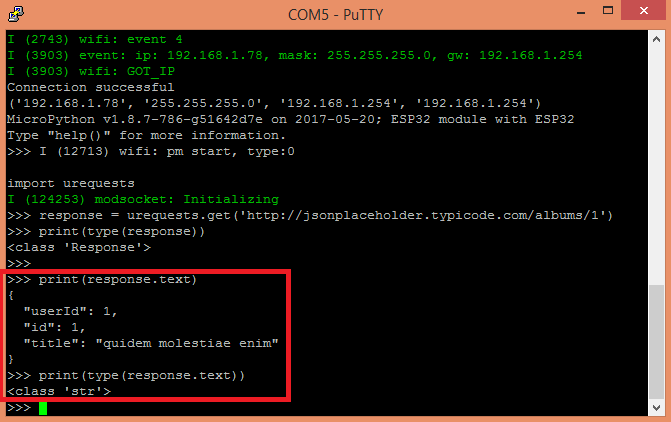
The objective of this post is to explain how to perform HTTP GET requests with MicroPython, using the urequests module. This tutorial was tested with MicroPython running on both the ESP32 and the E…
formal plover
Night @tulip sleet thanks for the help
manic glacierBOT
OK... With clock first I just get a NotImplementedError when I try to instantiate the PDWin class. See the following REPL example:
Adafruit CircuitPython 2.0.0-rc.1 on 2017-09-01; Adafruit CircuitPlayground Express with samd21g18
>>> import audiobusio
>>> from board import *
>>> x = audiobusio.PDMIn(MICROPHONE_CLOCK, MICROPHONE_DATA)
Traceback (most recent call last):
  File "<stdin>", line 1, in <module>
NotImplementedError:
However, if I try:
x = audiobusio.P...@formal plover if you don't want to try urequest , try socket.read() with no arguments which I would hope would read the whole response. http://circuitpython.readthedocs.io/en/stable/docs/library/usocket.html?highlight=Socket.read
formal plover
@tulip sleet I would try ureqests, but the library hasn't been ported. @tannewt might throw it in a 3.0 or later release, which is totally fine. I'll try socket.read() later and let you know my results
idle owl
@formal plover Is this still trying to use the Open Weather data?
formal plover
@idle owl yup sure is. It'd work for any api that spits out a json response though.
opal elk
We could port it ourselves, right?
I don't think urequests would be in the base library anyway. But I'm not sure how that's decided.
opal elk
CP is a weird/great duality of making code much easier for people (using existing libraries) and much more challenging (if you implement libraries yourself). Great for entry level and mid-level after you understand things.
timber mango
so long as upip works, and no serious missing base modules are missing...
formal plover
Well the boards support multiple platforms. I choose Circuit Python because I'm an @river quest fanboy. I'm not an engineer or even the brightest maker, but I feel like I'm contributing to something this way.
timber mango
with upip, you can just install things on the fly, like https://pypi.python.org/pypi/micropython-urequests/0.4.4
(you can also just install that directly, I guess (grin))
tarball of urequest contains urequests.py You can just install that, @formal plover , see if it works?
the only things that need 'porting' should be base modules... @slender iron @tulip sleet correct me if I'm wrong, but I think the worst issue might be the renamed base modules? ie time vs utime sorta stuff? Where CP lacks the core code because it's replaced by something more CPython-ish?
In those cases, porting to use correct (if possible) functions, or if seriously different (again, time functions?) figure out the equiv.
formal plover
@timber mango I'll give it a try. Anything is worth trying. It could either fail and not install, install and not work, or just work. If it doesn't work, I'll just remove it.
timber mango
yeah, and if it doesn't work, we can figure out why later, and fix it.
formal plover
After I download the tarball file, how do I install it @timber mango?
opal elk
@formal plover put it in your device's lib/ folder
formal plover
Thanks @opal elk
slender iron
@timber mango @formal plover @opal elk porting shouldn't be too bad. I can answer questions when you have them
formal plover
@opal elk I'd have to roll back the version if circuit python if I want to install that library. Ampy doesn't work on rc1
slender iron
I have to figure out how to bump the ampy version. I submitted a pull request with it fixed
formal plover
Gotcha @slender iron.
timber mango
@formal plover Unpack tarball, take .py file and put that into /lib
not the tar itself.
formal plover
Roger that @timber mango. Gonna start working on it soon.
 scenic timber
what does frozen mean in context of modules?
slender iron
the source files are stored in flash memory rather than on the file system @scenic timber
scenic timber
ah cool. I was thinking the code was frozen or the api's but I wasn't confident in that..
Thanks
formal plover
@slender iron I'm going to try to install urequest in a bit. Try is the key word
It uses usocket and ujson
timber mango
yes, it imports those, correct, so you'll need those installed too.
it's not really a complicated file: https://github.com/micropython/micropython-lib/blob/master/urequests/urequests.py
 formal plover
They are there. I've used them both. So I just need to install urequest
timber mango
don't forget the s on the end. 😃
formal plover
hahahahah good catch @timber mango
formal plover
according to ampy.... /lib doesn't exist
I ptob need to know the whole file path
I don't know the file architecture
ampy --port /dev/ttyUSB0 ls /lib
Traceback (most recent call last):
File "/usr/local/bin/ampy", line 11, in <module>
sys.exit(cli())
File "/usr/local/lib/python2.7/dist-packages/click/core.py", line 722, in call
return self.main(*args, **kwargs)
File "/usr/local/lib/python2.7/dist-packages/click/core.py", line 697, in main
rv = self.invoke(ctx)
File "/usr/local/lib/python2.7/dist-packages/click/core.py", line 1066, in invoke
return _process_result(sub_ctx.command.invoke(sub_ctx))
File "/usr/local/lib/python2.7/dist-packages/click/core.py", line 895, in invoke
return ctx.invoke(self.callback, **ctx.params)
File "/usr/local/lib/python2.7/dist-packages/click/core.py", line 535, in invoke
return callback(*args, **kwargs)
File "/usr/local/lib/python2.7/dist-packages/ampy/cli.py", line 142, in ls
for f in board_files.ls(directory):
File "/usr/local/lib/python2.7/dist-packages/ampy/files.py", line 100, in ls
raise ex
ampy.pyboard.PyboardError: ('exception', '', 'Traceback (most recent call last):\r\n File "<stdin>", line 2, in <module>\r\nImportError: no module named 'uos'\r\n')
@tulip sleet ?
Or @slender iron
tulip sleet
@formal plover There's an ampy mkdir command. Here's a tutorial on ampy: https://learn.adafruit.com/micropython-basics-load-files-and-run-code/file-operations

Learn a simple workflow for developing code on a MicroPython board.
formal plover
I'll do that @tulip sleet Just wasn't sure if it already existed
tulip sleet
if ampy ls doesn't show it then I don't think it's there.
formal plover
true
It fails
same error as I got trying to ls /lib
I think I am giving up @tulip sleet haha
tulip sleet
@formal plover uos was renamed to os in CPy 2.0.0. @slender iron submitted a request to update ampy but it hasn't happened yet. Are you running on Linux, Windows, or Mac?
It's possible to patch the ampy installation. I just did it myself. Not hard.
formal plover
@tulip sleet Running Linux
formal plover
['', '/usr/lib/python3.4', '/usr/lib/python3.4/plat-arm-linux-gnueabihf', '/usr/lib/python3.4/lib-dynload', '/usr/local/lib/python3.4/dist-packages', '/usr/lib/python3/dist-packages']
tulip sleet
Did you do pip install adafruit-ampy?
tulip sleet
Look for an ampy directory in one of the directories on sys.path. When you find it, cd to that directory, and replace all instances of uos with os in files.py.
sed 's/uos/os/g' -i files.py
btw, did you try usocket.read()
formal plover
@tulip sleet No going to give it a whirl in a sec. wasn;t going to need it if I got urequests working
formal plover
@tulip sleet
usocket.read()
Traceback (most recent call last):
File "<stdin>", line 1, in <module>
AttributeError: 'module' object has no attribute 'read'
tulip sleet
Actually, I was wrong, it's part of socket.
s = socket.socket()
s.connect(addr)
s.send(...)
data = s.read()
something like that
Just substitute it for the recv in your current code. No args (no 4000 etc.).
formal plover
I think something went wrong when messing with Ampy
It's acting like socket library is missing. let's me import it, but keeps saying the attribute doesn't exist
socket.send(500)
Traceback (most recent call last):
File "<stdin>", line 1, in <module>
AttributeError: 'module' object has no attribute 'send'
even with no argument
tulip sleet
socket is the name of the module, not the name of the instance of the class. s = socket.socket() gets you a new socket in variable s
type dir(socket.socket). That will give you all the methods available on a socket instance.
idle owl
@formal plover You're not an idiot.
tulip sleet
Everyone makes mistakes! I have spent hours barking up the wrong tree.
idle owl
Same here.
formal plover
Haha heard that. Thanks @tulip sleet & @idle owl
tulip sleet
I don't know whether it will actually work to do what you want. But I think it will. I tried out a simple example but I was stymied by a redirect on the example website I was using.
solar whale
@formal plover regarding ampy. The issue with ls not working has been fixed by @slender iron but I don't think the new version is released yet. The last line of the error message shows it trying to import uos.
Never mind. I see this was already discussed earlier. Sorry.
formal plover
@solar whale yeah, I knew it was still busted, tried messing with it anyways haha
slender iron
what time tomorrow works for a circuitpython sync? @tulip sleet and everyone else who wants to join @opal elk @idle owl
idle owl
@slender iron I'd like to
slender iron
awesome! what time is best for you?
idle owl
Mid-afternoon EST would work best for me, but I don't want you to have to work it around me
slender iron
thats probably good for dan too. hes EST but I'm in Seattle so I'm PST
idle owl
Right. Ok. That works then 😃
slender iron
yup yup 😃
idle owl
I somehow missed the RC1 release. Just updated my CPX, and it didn't even delete my code! (I had it backed up, but still!)
slender iron
always good to back it up!
idle owl
Of course. It was still a delightful surprise 😃
slender iron
yup! uf2 bootloader is good about it
manic glacierBOT
>>> uos.uname()
(sysname='samd21', nodename='samd21', release='1.0.0', version='1.0.0 on 2017-07-19', machine='Adafruit Feather M0 Express with samd21g18')
>>> 0.001 * 1000
1.0
>>> int(1.0)
1
>>> int(0.001 * 1000)
0
but on desktop...
Python 3.5.2 (v3.5.2:4def2a2901a5, Jun 25 2016, 22:01:18) [MSC v.1900 32 bit (Intel)] on win32
Type "copyright", "credits" or "license()" for more information.
>>> 0.001 * 1000
1.0
>>> int(0.001 * 1000)
1
>>>
i know that...
OK its odd but hear me out :)
python used to allow raw REPL keygrabs (e.g. 'press any key to continue') but deprecated it in 3 for just input() which is blocking and requires a return key
it would be useful for interactive-at-the repl scripts to have a non-input() way of getting raw characters. i mean, you can send individual chars with print("x", end='') so why not have the reverse :D
also, using input() wonks with the REPL history: if you use input() it puts that entry into the his...
slender iron

GitHub
As discussed previously in a few places, eg #1907 and #2401, this PR creates a new sub-directory called "ports/" and moves all the MicroPython ports to that directory.
In the process, "stmhal" has ...
manic glacierBOT
of course i cant replicate it but while writing https://github.com/adafruit/Circuit_Pyrate i somehow REPL reset while the script was saving or ran before something synced and feather locked up, on reboot main.py was 0 bytes.
manic glacierBOT
Try sys.stdin.read(1). I'm not sure if CircuitPython supports it but CPython should. We can add it if its closer to what you want.
Reference: https://docs.python.org/3/library/sys.html#sys.stdin
hushed plover
theres code for the mcp23008 but how do you use the mcp23017?
manic glacierBOT
 formal plover
@slender iron CircuitPython sync, how does that work? Do you guys have power rings that you join together? 😂
sick creek
@idle owl we have talked python events in gitter circuitpython chatroom so why not in here as well
hushed plover
omg i DID IT
sick creek
you did what?
hushed plover
ive never gotten any sort of io expander to work before
i made that 7 segmented display work using the mcp23017 and the esp8266-01 😄 !
two pins becomes 16 pins mwahahaha!

GitHub
micropython-mcp230xx - Micropython I2C-based manipulation of the MCP series GPIO expander, derived from Adafruit_MCP230xx
ive always just made gpio pins work before, ive never used an i/o expander of any kind before
and it took a long time of fiddling to make it work
thats the lib i used - its fantastic
hushed plover
Thanks! :D
I was wondering if I could read a dht22 over i2c next but I don't think so.. Was thinking I could get it to display on the segmented display
formal plover
I have the seven segment backpack that reduces the number of required pins. I would imagine it would be difficult to use without the library for it.
hushed plover
I'd imagine there's 7 pins per.. Display module thing
So two of those would take up soooo many pins.. I was just looking at that backpack too. I'm wondering if micropython would work with it

 true coyote
Looks cool.
formal plover
Ignore the thumbnail photo, that's a dot matrix, but in the guide it talks about the seven segments.
sick creek
data matrix
formal plover
Data matrix* thanks @sick creek
solar whale
@hushed plover FYI - the DHT22 is not an I2C device. It has to be read via some stricly controlled timing. There are several nice I2C temp/humidity sensors.
formal plover
Most of the I2c are more accurate as well, like this one: https://www.adafruit.com/product/2857

Sensiron Temperature/Humidity sensors are some of the finest & highest-accuracy devices you can get. And, finally we have some that have a true I2C interface for easy reading. ...
solar whale
@formal plover @hushed plover the HT16K33 module supports the LED and matrix backpacks under Circuitpython.
hushed plover
I didn't think the dht22 would work but I figured it try it anyway cause I had it on hand. I might end up getting an i2c one though
formal plover
As always @solar whale for the win, haha. Thanks.
@solar whale you're like an anti-troll. You always chime in with the most helpful information
solar whale
@hushed plover I think Micropython does suport the DHT22 for the ESP8266.
@formal plover Thanks!
formal plover
@solar whale you're welcome!
solar whale
@hushed plover Are you using an esp8266? If so the DHT22 is supported - see; http://circuitpython.readthedocs.io/en/latest/docs/esp8266/tutorial/dht.html?highlight=DHT
hushed plover
It is supported but I only have two gpio on the esp8266-01. I'm using micropython not circuitpython. I actually originally came here curious if circuitpy was compatible with the 01 or just adafruit boards
solar whale
@hushed plover try this: http://micropython-on-esp8266-workshop.readthedocs.io/en/latest/advanced.html#temperature-and-humidity - only needs one GPIO -
tulip sleet
@slender iron @idle owl @opal elk 11am ET or after for syncup is fine. @idle owl 's midafternoon suggestion is also fine.
solar whale
@hushed plover Sorry - I now realize that you are using both pins for I2C so none left for other things 😦
opal elk
I'm good with whenever, since I just lurk in the corner 😃
formal plover
@solar whale and @hushed plover. What about this: https://www.adafruit.com/product/2717

You just found the perfect I2C sensor, and you want to wire up two or three or more of them to your Arduino when you realize "Uh oh, this chip has a fixed I2C address, and from what I ...
slender iron
@tulip sleet @idle owl @opal elk how about 2pm est/11am pst? I gotta get up and going here first
tulip sleet
@slender iron sounds good
solar whale
@formal plover That looks like a great tool for adding duplicate senssors especially if they have fixed (or limited:) I2C addresses. Unfortunaltely, it won't free up any pins since it still is an I2C device itself! I have not used one myself, but have seen good reports from others using it.
drowsy geyser
@solar whale I've used them several times when my sensors have I2C address conflicts, and they work like a charm!
tulip sleet
Those of you interested in humidity sensors: This guy has done a lot of testing, and it's still ongoing. In my own limited experience, I have used the SHT31 and the HTU21D successfully. There was a TI sensor that Adafruit discontinued that did not work well.
http://www.kandrsmith.org/RJS/Misc/hygrometers.html
solar whale
@tulip sleet Thanks for the link. Nice information.
drowsy geyser
@tulip sleet I've used all the sensors Adafruit has and find the HTU21D acceptable for most applications. I am about to set out testing barometric pressure sensors/altimeters because I'm building a rocket flight control system with them....
manic glacierBOT

The documentation seems to imply that for circuit python it should be random.
manic glacierBOT
CircuitPython currently does all arithmetic in single-precision, whereas CPython uses double. So I think you're seeing an artifact of that. 0.1 * 10 is not quite 1.0, even though it prints as such. (Same for 0.01 *100, 0.001 * 1000.)
int() truncates. Did you want round()?
You can see the same effect in single-precision C:
#include <stdio.h>
int main() {
    float f;
    int i;
    printf("enter f and i: ");
    scanf("%f %d", &f, &i);
printf("f*i: %f\nint...urandom changed to random from CircuitPython 1.0.0 to 2.0.0.
http://circuitpython.readthedocs.io/en/stable/index.html is the documentation for 1.0.0 ("stable").
http://circuitpython.readthedocs.io/en/latest/index.html is the documentation for 2.0.0, not quite release yet ("latest").
Sorry about the doc naming: it's confusing.
manic glacierBOT
yah im going to use round() but i thought it odd that it prints 1.0 even tho it is not 1.0 :)
Got it. Thanks for quick response. And thanks for the great work helping make embedded programming ever more accessible.
I did some more experiments. It does appear that there's something weird with MicroPython floating-point arithmetic or conversion from decimal. In MicroPython/CircuitPython:
>>> 1.0 -(0.1*10)
2.384186e-07
>>> 1.0 -(0.001*1000)
4.768372e-07
In CPython, the difference is 0.0.
I can't duplicate this in C with single-precision:
#include <stdio.h>
int main() {
    float f;
    int i;
    printf("enter f and i: ");
    scanf("%f %d", &f, &i);
float f_times_...Interesting that the difference is a factor of 2.
`>>> 1.0 -(0.1*10)
2.384186e-07
1.0 -(0.001*1000)
4.768372e-07`
drowsy geyser
@tulip sleet Replicated on Metro M0 Express with "latest" build (as of about 15 minutes ago). Python3 on Windows 10 behaves as expected, however (unsurprisingly).
formal plover
@drowsy geyser very impressive, I'd like to see some footage of your rocket flight control system when you're done. Sounds awesome.
tulip sleet
@drowsy geyser Which? the floating point issue?
drowsy geyser
@tulip sleet Yessir.
@formal plover I'm going to talk about it on Show and Tell if I get it built in time. 😃
And I'll write a blog post and put the code on GitHub.
formal plover
@drowsy geyser Fantastic!
I usually reserve Wednesdays and Thursdays for projects and the live shows.
manic glacierBOT
Tried Arduino float arithmetic on 32u4 and M0. 1.0 - (0.1*10) is zero, not some tiny number.
I'll take a look at the code for MP/CP tomorrow. Looks like a bug to me.
idle owl
@sick creek No idea why not :)... I think most of the questions you guys ask seem much more advanced and I was never sure if they were still tangentially CircuitPython related. But thank you for reinforcing it being ok. I appreciate it!
manic glacierBOT
Hmm.
2.384186e-07 is 1/(0x400000)
big round numbers bother me ;-)
slender iron
@fading solstice why did you close the bundle pull request?
 fading solstice
@slender iron good question. i was trying to get my fork of this project in line with adafruit/master. this was a side affect of going a git push --force origin HEAD:master. i may have over written the changes. i can try unclosing it.
i cannot reopen it. i will have to re-apply the changes with another pull request. sorry
slender iron
k, no worries
fading solstice
@slender iron fortunately this is not the most important thing in the world. i have so much to learn and i am making beginner mistakes.
 plucky flint
👋
slender iron
hi @plucky flint !
@fading solstice I am going to do a bundle by tomorrow probably so it'd be good to get it in for that
fading solstice
@slender iron ok, i wil try
slender iron
ok 😃 there will always be another release too
manic glacierBOT
Array is a bit weird yeah. Its a good way to have an explicit element type though.
I've got a change in the works that should turn on 8-bit support though it might suffer from not being very sensitive. It'll also correct the examples.
not really - its basically input() but it only gives you a char at a time. i wanted something where it was timeout-not-blocking AND you didnt have to hit return
Great stuff. The important thing for me is that what ends up in the book is correct. So once there's some sort of stability in this regard then I can update the code examples to the correct API calls. ;-)
idle owl
Ooooooh I want the Trinket M0 to come back in stock. And stay there long enough for me to get one.
slender iron
I'm in Amelia early
idle owl
Keen!
sick creek
Amelia M4
slender iron
@fading solstice @opal elk @plucky flint we're in the Amelia voice channel
sick creek
@idle owl you remember Commander Keen
plucky flint
@slender iron I'm supposed to be in a PyCon UK call in 2 mins.
idle owl
@sick creek lol. Vaguely yes.
plucky flint
-> PyCon UK meeting... will return when over.
slender iron
kk
opal elk
in general I won't be able to talk much/at all during these, generally because I'm working in an office but today because I have a wife/daughter sleeping on my couches 😃
I also don't think I'll have much/anything to add
sick creek
@idle owl now think Circuitpython project for Commander Keen https://www.commander-keen.com/
plucky flint
yay... PyConUK meeting is over... listening in to Amelia
computers ugh
Ugh... so Linux and audio and having just been in a Google Hangouts (for PyCon UK) appears to have knackered the ability of Firefox to use the mic. 😕
idle owl
I run into weird issues like that all the time. Does the Discord app work on Linux? I think it's an Electron app
slender iron
I can
plucky flint
switching off and on again
slender iron
you can get discord on your phone too
plucky flint
still can't hear me?
slender iron
nope
plucky flint
drat... I'll just listen in and type. 😉
slender iron
kk, you can get a phone app too
plucky flint
I'm in my "home office" (shed) at bottom of my garden so no WiFi and v.slow cell network. I'll install it when I've better mobile connectivity.
tulip sleet
GitHub
I have had problems writing to the onboard filesystem from Windows. I sometimes see complete filesystem corruption, and sometimes just problems with one file. See https://forums.adafruit.com/viewto...

This is a product page for a chip! We thought we'd set up a place for everyone who's as excited as we are for the new Microchip ATSAMD51 chip to read about it, learn about it, and ...
manic glacierBOT
 slender iron
GitHub
Adafruit_CircuitPython_CircuitPlayground - CircuitPython library for CircuitPlayground
idle owl
lol I crashed Discord on the way out.
slender iron
oh no!
idle owl
It sorted itself impressively quickly, at least. It was just mildly entertaining
slender iron
yeah, they are moving fast and breaking things
@tulip sleet https://github.com/adafruit/ampy/pull/26
GitHub
CircuitPython 2.0 replaces uos with os so this will work with it.
tulip sleet
@slender iron I just registered "danhalbert" as a Pypi user.
idle owl
@slender iron It was on ReadTheDocs you wanted the left bar to stay static while scrolling?
formal plover
@slender iron hey hey hey, I see that Ampy post! ;)
slender iron
yeah
idle owl
It does for me in Firefox on Mac.
slender iron
@idle owl I mean the left column in the pinout table
sick creek
@slender iron well discord wasnt scaling so well in the phone for me
manic glacierBOT
Also update the examples.
Fixes #226
manic glacierBOT
Supposedly faster is b = array.array("H", [0] * 200). It should generate less garbage.
array.array("H", [0]) * 200 is supposed to be even faster but doesn't work in CPy.
tulip sleet
@slender iron I'm doing the pypi upload and build. Just making sure you're not.
slender iron
ok cool! nope, doing dotstar
tulip sleet
@slender iron you mean sys.path is not doing the right thing for you in finding neopixel?
slender iron
looks like it
I'm investigating now
thanks for releasing ampy @tulip sleet ! @Kurticus
tulip sleet
I learn something new every day. Found some old procedure which was outdated. Took a bit to find the new way to do it. Had to use a newer version of twine, etc. I took notes for the next time.
slender iron
👍
tulip sleet
I see what you mean about the import. I made a fake neopixel library that just printed something and when I import neopixel the frozen one comes in.
manic glacierBOT
I'm more worried about memory impact than speed. Doing the [0] * 200 inside first creates a list that is then converted to an array.
slender iron
ok, no problem I'll figure it out now
manic glacierBOT
Yah, but will appending to an array.array create a new array of size+1? I thought it was contiguous memory.
slender iron
@tulip sleet I think the frozen thing is a bug of mine
it finds the new file but then loads the old I think because the filenames match
@tulip sleet don't feel like you need to reviews the pulls I'm making tonight. tomorrow is fine.
manic glacierBOT
This allows one to override a built-in module by loading a newer
version onto the file system.
tulip sleet
@slender iron I got a late start so I will work for a while longer. My wife is in the garden until dark.
slender iron
ok, I'm going for a walk and then will be back
manic glacierBOT
@ladyada Do you see the same behavior on master? It looks as if this change upstream may be related.
@willingc The examples I gave above were run on master (2.0.0 past beta1).
formal plover
@slender iron yassss thanks @tulip sleet!
manic glacierBOT
Looks like its len+8 items each time using m_renew which will try to grow in place I believe. https://github.com/adafruit/circuitpython/blob/master/py/objarray.c#L319
Long term we probably want to switch to a multiply of the array array.array("H", [0]) * 200 but its not supported now.
 tidal kiln
@slender iron watch out for falling embers
slender iron
seriously? I saw soot inside windows this morning
tidal kiln
yep. lightly 'snowing' out here.
manic glacierBOT
slender iron
crazy
manic glacierBOT
Could we reduce the maxdepth of this tree and the two below? I think its ok to have people dig into it.
slender iron
I ❤ tests
manic glacierBOT
OK, so never mind for now if you want.
So that we can allocate an array of a particular length without a separate, long initializer.
6d9d683 atmel-samd: Enable 8-bit audio recording suppor... - tannewt
Thanks @dhalbert. If possible, would you mind running exactly the same example? Or did you run the exact same code, receive the same output, and not post it?
absolutely, just let me know what you would like it to be? 2? 1?
On the doc build itself, I think I have it down to about 5-7 warnings after a big refactor. Still not completely happy with it as the build of MP is overly complex. Once I get it stable, I'll send you a link to the rendered docs via a WIP PR.
i added an implementation for this on my fork here. i added 3 functions to the samd module for the user to control the behavior of the neopixel:
- enable_dim_neopixel()
- disable_dim_neopixel()
- set_dim_level()
enable_dim_neopixel and disable_dim_neopixel turn on and off dim neopixel mode. set_dim_level takes in an integer from 0-255 and sets the brightness level of dim neopixel mode. The default brightness level is 40.
I think 1 so just the first level shows.
slender iron
@idle owl if you have a chance, could you review my updates to our dotstar library? https://github.com/adafruit/Adafruit_CircuitPython_DotStar/pull/1
manic glacierBOT
Thanks @asherlie! Could you open a pull request with it so we can discuss it? Thanks!
Here's what it looks like after reducing depth:
slender iron
oops should have squashed. oh well
@tulip sleet have you started on the i2c lock stuff/
tulip sleet
@dan
@slender iron no, I was eating and doing an errand. might not start for a while
slender iron
k, I may pick it up now
tulip sleet
go ahead, you know it better than me right now
slender iron
rosie is so flaky! I wonder is os.sync is actually implemented
ah, its async

I've copied a large file to a USB disk mounted on a Linux system with async. This returns to a command prompt relatively quickly, but when I type sync, of course, it all has to go to disk, and that...
manic glacierBOT
@willingc This is the absolute latest master, with the v1.9.2 merge.
Adafruit CircuitPython 2.0.0-rc.1-2-g6d9d68344 on 2017-09-05; Adafruit CircuitPlayground Express with samd21g18
>>> 0.001 * 1000
1.0
>>> int(1.0)
1
>>> int(0.001 * 1000)
0
>>> 1.0 -(0.1*10)
2.38419e-07
>>> 1.0 -(0.001*1000)
4.76837e-07
>>>
Must have all the express boards...
I have a feeling come Christmas I'll have most of the feather boards and all the express boards.
slender iron
we'll have to keep making more 😃
formal plover
That UF2 bootloader is 🔥 🔥 🔥
slender iron
yeah, totally!
formal plover
Haha yes, it will be a constant struggle to stay on top of all the new boards.
I need more birthdays haha.
idle owl
@slender iron I'm not sure how to review the updates. I can't figure out how to connect SPI to the CPX and the dotstars I have are running off of a RPi. I read through the code but I guarantee if there's a problem I would miss it.
@formal plover I know the feeling of needing all the boards!
slender iron
@idle owl we all miss problems from time to time. just do your best 😃
it should work with any two D# pins
it'll be slower on some than others but should work on any of them
manic glacierBOT
The bits used to represent 0.1 between CPy and regular Python vary in the least significant bit:
CPy master, on atmel-samd and esp8266:
>>> import ustruct
>>> ustruct.calcsize("f")
4
>>> ustruct.pack("f",0.1)
b'\xcc\xcc\xcc='
Python 3.5.2:
>>> import struct
>>> struct.calcsize("f")
4
>>> struct.pack("f",0.1)
b'\xcd\xcc\xcc='
CircuitPython unix port is also b'\xcd\xcc\xcc='.
Notice 0xcc vs. 0xcdin byte [0], the least significant byte (little-endi...
idle owl
@slender iron Wouldn't that mean soldering?
slender iron
do you have alligator clips?
idle owl
Yes I do
slender iron
how are the dot stars connected?
idle owl
They're connected to one of the 4pin connectors soldered to the rasbperry pi
All of the alligator-friendly pads around the outer edge of the CPX appear to be A# or ground or power
My dotstars aren't running from the CPX though
slender iron
oh! they'll work too
idle owl
Oh. Really?
slender iron
I bet SCL can be SCK and SDA as MOSI for the dot stars
yeah, I thought they were labeled as both
manic glacierBOT
What board was this on? On a metro m0 express I get:
Adafruit CircuitPython 2.0.0-rc.1-dirty on 2017-09-05; Adafruit Metro M0 Express with samd21g18
>>>
soft reboot

Auto-reload is on. Simply save files over USB to run them or enter REPL to disable.
code.py output:
Traceback (most recent call last):
  File "code.py", line 24, in <module>
  File "code.py", line 8, in <module>
RuntimeError: Function requires lock.
Ok. I have everything wired. I'm not convinced my code isn't just wrong since I tried to copy the Gemma example you have. However, the error I'm getting at the moment is that PA20 is in use
I called them MOSI and SCK because "dir(board)" showed those as options being imported from board
@slender iron Is it alright to finish trying to test this tomorrow?
manic glacierBOT
I think the checking for ".frozen/" here now means the checking for ".frozen/" in mp_find_frozen_module() is no longer needed. But we can just leave it in. Basically you hoisted that check up to where it was really needed.
This and pyexec_frozen_module() are the only call to mp_find_frozen_module().
slender iron
awesome! thank you for the help @idle owl
idle owl
You're welcome, @slender iron - I'm really excited to be helping!
slender iron
yay!
formal plover
@slender iron need me to test anything?
slender iron
I can always use eyes on the core CircuitPython
especially esp8266
dotstar and neopixel libs got some tweaks today too
also have this issue: https://github.com/adafruit/Adafruit_CircuitPython_LIS3DH/issues/4
trying out a new "Beginner Friendly" label on issues
manic glacierBOT
formal plover
Do commits get added the RC1 file?
tulip sleet
@plucky flint Completely stumbled on this (your book!) when I was looking for something else today: https://www.safaribooksonline.com/library/view/programming-with-micropython/9781491972724/ch04.html

 slender iron
oh no, you'd need to build them yourself. they aren't auto-built yet
formal plover
Haha I thought so
manic glacierBOT
im using 1.0 on trinket
manic glacierBOT
oooh figured it out
ok make a new main.py with:
myname = input("type in a name: ")
now in REPL, ^D or whatnot to run it. when it says type in a name, start typing a few chars BUT DONT HIT RETURN
now in main.py change the code and save file. REPL is hung, but USB MSC is still running. it doesnt zero out my main.py with this script but but it does with a longer script. i can tell you how to do that if you like
its a fairly nasty bug :(
manic glacierBOT
whee! try this on a feather m0 running 1.0.0 for a good time
manic glacierBOT
If you have a ballpark on what is long or short, that may help end users.
manic glacierBOT
This was a doozy!
I thought I had reproduced it in GDB with 2.0 but discovered the MTB was left running. I have a fix for that here: 1ebb5b8cb9d97d73ae1fb9c3794fa64d0ee7ec3f
I went back and tried it with 1.0 and discovered I had already fixed it in fab634e3eeb456e9d5dffa2cabb9ded39c45d6b6 with my change to lib/utils/pyexec.c.
Does this repro in 2.0? I know you've been doing most of your testing on 1.0. Brain is toast for tonight. Will look tomorrow.
manic glacierBOT
Confirming that this is also an issue with 2.0.0-beta1. Following the above process, it locked up my Terminal on the Mac. code.py was not zeroed out.
<img width="669" alt="screenshot 2017-09-06 01 56 25" src="https://user-images.githubusercontent.com/2680980/30103298-0abd259a-92a7-11e7-80bb-07092e453c1e.png">
 manic glacierBOT
That's a good question. Probably this should explain further that it basically shuts off everything while the delay is happening, and let the user decide whether that's OK or not. It depends on whether delaying some I/O is going to be a problem or not, such a NeoPixel timing or USB input.
drowsy geyser
Just finished building the high power rocket flight control hardware prototype. Now to flash the M0 with CircuitPython and start programming! The system consists of: M0 Adalogger, OLED Wing, GPS Wing, Tripler, 2500 mAh LiPo, JST switch, BME280 altimeter, and BNO055 9DOF sensor. Once this part is working I will design a new Tripler (linear instead of rectangular), solder everything together, and design and build a firing circuit for the recovery deployment charges.
drowsy geyser
Status display and flight maximums after landing (max height, max speed, max altitude, max G force).
opal elk
nice!
I just realized the altimeter/pressure sensor I got (MPL3115A2) is only good up to 10k
drowsy geyser
Oops.
opal elk
the MPL is 50-110 kPa whereas the BME280 is 30-110
drowsy geyser
Oh, sorry. MSL = mean sea level and AGL = above ground level.
opal elk
thanks!
MSL seems much more accurate. but maybe we should take this to a different channel since it isn't CP related
on that note: I'm currently not using CP for my HAB build because none of the libraries are ported over. I think my plan is to get it all working in arduino, then probably on my second launch do CP? or once the code works how I expect port it over and write the libraries myself, since I can test if it works the same
drowsy geyser
Moving rocketry discussion to #general-chat ... I only posted here since I'm programming the flight controller in CircuitPython.
opal elk
yeah, and I derailed it! (twirls nonexistent mustache)
manic glacierBOT
Another clue or two:
I have a main.py that's just input(":"). I get it to run by typing ctrl-D at the repl. Then in a shell I do:
$ touch /media/halbert/CIRCUITPY/main.py
If I haven't typed anything at the ":" prompt, it soft-reboots fine.
If I have typed at least one character, it hangs and I have to hard-reset or unplug.
tulip sleet
@slender iron I have been spending some time on #232, the input() bug. I could tell you about I've looked at so far when you get to it.
slender iron
Thanks @tulip sleet. I figure we can release rc.2 today anyway with a warning. Can you reproduce it with a debug build on a metro?
tulip sleet
That's exactly what I was just trying to do. Had to reconstruct how to get the jlink and gdb set up. I'll let you know in a minute.
Yes, still hangs with debug build. Now I'll poke around with gdb.
slender iron
I write a learn guide about it. On my phone so youll have to find it
opal elk

Using GDB to better understand program state and history.
tulip sleet
Found it, thanks.
@slender iron Hmm. Afterh apprent hang, it's still looping inside readline() inside input(), but echoing nothing and not actually responding to ctrl-c, etc. Will let you know more later.
slender iron
Interesting! I'll be back online in an hour or so
tulip sleet
@slender iron readline() calls mp_hal_stdin_rx_chr(). The latter checks for the global reload_next_character being true, and if so, returns ctrl-D immediately. This happens infinitely. So reload_next_character is not being reset to false. Now to find out why.
slender iron
ah good find @tulip sleet !
tulip sleet
wanna voice chat for a minute? not sure of the logic here
if you're back at your desk
slender iron
I'm eating cereal. 😃 I can once I'm at my desk
tulip sleet
np, i'll wait for your connect. I had lunch already.
slender iron
kk