#Fwog and co.
1 messages · Page 3 of 1
 long robin
like a ninja
 shell inlet
I'm not sure how to confirm it's right on paper
but this integrates to 1 and is a uniform PDF

for a circle with radius R
now 1/r does not integrate to 1
this does

1/r integrates to 2piR
but when put into code it's obviously wrong
because it blows up
wait no it's not I just forgot
to remove 2pi from circle mapping weight
ah nah it's losing radius invariance
that's a head scratcher
shell inlet
need to ask criver probably
long robin
he's just gonna tell us to use a better overall method 🐸
long robin
I decided to look at renderdoc's timing numbers a little closely for a laugh
it says my frame takes over 10x longer than it does in reality
every time I click the button, any individual event's timing can vary by up to 5x
 heavy cipher
pile of dogs on ye
 shell inlet

Desmos
I am losing my mind
according to this the pdf is 1/r2piR^2
I made 3 estimators and 1 integral
all to validate this
2 estimate in area measure and 1 in directional, and 1 integrates over hemisphere
 shell inlet
rookie mistake
shell inlet
so the thing to try now is float worldSpaceSampledArea = TWO_PI*rMaxWorld*rMaxWorld;
instead of PI
TWO_PI
this looks fine as far as I can eyeball
long robin
aight
shell inlet
although it's no longer sampled area
because area of a circle is piR^2
you really need cornell box to validate
actually nah that's not going to work because the light source is different lol
need to validate using same scene with blender
some simple one like you have in deferred but with less occlusion screwing it
long robin
man
whenever I watch one of these remote graphics conferences, I am reminded that these people specialize in graphics, not audio
shell inlet
I specialize in audio
long robin
watching HPG and these guys all seem to have $5 mic setups
coupled with the fact that I'm listening through monitor speakers 
shell inlet
what are you watching
long robin
shell inlet
hey that's the guy cem yuksel
long robin
ok actually a couple of them have decent mic setups
shell inlet
the guy involved in making restir pt (GRIS) and stochastic lightcuts papers
lmao clapping
shell inlet
pi vs two pi


 golden schooner
2nd one looks acceptable
long robin
 shell inlet

I consider what I've put in desmos enough evidence and I'm done defending my implementation, I rest my case
long robin
Your paycheck will be in the mail tomorrow
 dire badge
🥧 vs. 🥧🥧
long robin
btw instead of modding the noise after you add them, you can just divide it by two
xi = (xi + noise.xy) / 2;
long robin
adding two uniformly distributed numbers in [0, 1] gives you one uniform random number in [0, 2]
shell inlet
for each sample there is now constant blue noise value and [0; 1/2] lds
blue noise is meant to do toroidal shift on the lds set
so mod is required
repent
long robin
ah
I didn't realize it had more meaning than just being an extra source of randomness
shell inlet
what I want to try now is to distort the distribution even more towards the center
long robin
I also didn't know what a toroidal shift was and the only useful info I found was the docs for some math function for some R package
Applies a random shift simultaneously to all the points of a point pattern, or to selected sub-patterns, with wraparound at the borders of the window.
shell inlet
I have no idea what result it will give
shell inlet
long robin
I also didn't know what a toroidal shift was and the only useful info I found wa...
also known as Cranley-Patterson rotation
long robin
very neat
I thought the mod was just a way to keep the two random numbers in [0, 1] after adding them 😄
shell inlet
in case you want to try more distortion on the mapping
vec2 ExponentialCircleMapping(vec2 uv)
{
    //r^x, x=4
    float r = uv.x;
    r = r*r;//2
    r = r*r;//4
    float theta = uv.y * TWO_PI;
    return vec2(r * cos(theta), r * sin(theta));
}

float ExponentialCircleMappingWeight(float r)
{
    //xr^(2x-1), x=4
    float rpow = r*r;//2
    rpow = rpow*r;//4
    rpow = rpow*r*r*r;//7
    return 4.0*rpow;
}
gives more noise(boiling from moving the camera) in areas removed from the directly illuminated part
also tried uniform and it's just bad, can see boiling when moving the camera all around, even near directly illuminated areas
by the way the 1/2pir integrates to 1 over the expected domain (it doesn't integrate to 1 for R!=1 but we don't need that)

don't need that because we compensate for it by multiplying whole integral by the world space area of the circle
I guess technically divide?
heavy cipher
thats 1/2pir * r
shell inlet
no
heavy cipher
i mean thats what you wrote in the integral
shell inlet
r is the surface element
1/2pir is what we integrate
similarly we would use sin(theta) for integration over sphere
heavy cipher
if it was intended, then all g
long robin
actually it looks like void just wrote 1 the long way
shell inlet
I remember now that we don't really multiply the thing by the area anymore
so there should be R^2 in the pdf
wait it still doesn't make sense
heavy cipher
what is the integral calculating?
shell inlet
validating more like
making sure it integrates to 1 because it's a condition for a valid pdf
long robin
fyi martty is out of the loop
shell inlet
GP::User martty;
for(auto&& thing : all_things)
{
...
}

A small experiment of filtering high resolution Reflective Shadow Maps (RSM) for real time global illumination. This reduces flickering when there is high variance in the geometry.
Note also that basing irradiance in terms of the radiant flux allows us to forgo integrating the area of the light as part of our calculations.
that's very interesting. I wonder how the math backing that up looks /s
 shell inlet
I'm puzzled by uniform estimator diverging
probably numerical issues
it kind of converges with less samples
also I forgot lambertian brdf in the test graph
so everything converges to pi
should converge to 1
golden schooner
subtract 2.1415 from it
shell inlet
almost but divide by 3.141592653589793238462643
golden schooner
hehe
shell inlet
ok so I can't figure out the proof of why weights are the way they are

Desmos
here's the latest test
not much has changed
just made it cleaner and added 1/pi for lambertian brdf
meaning the 2pi change may be wrong
because lambertian brdf cancels it out
but best is to compare to reference
long robin
I see the interactive 3D axes, but I'm not sure what else I'm supposed to see
shell inlet
maths on the left
shell inlet
any visualization is borderline useless
long robin
are the surfaces estimators supposed to integrate to a specific value?
ah nvm
they're numerical versions of the surface integrals
shell inlet
integrals are "symbolic" versions (numerical under the hood anyways) and estimators are numerical monte carlo integrals
I only kinda trust the directional integral and use it as a reference to validate surface ones
long robin
I wonder if the RSM paper is technically correct in their usage of flux and not having to integrate over the sampled area, but it just ends up looking bad in practice with the rMax parameter
the  won't leave me
because the thing is that point lights are already not realistic
but idk, it feels like I need to study radiometry for five years to fully understand
long robin
it would be nice to be able to reflect certain info from shaders
particularly compute shader work group sizes
kinda lame having these magic numbers scattered around the code
const int localSize = 8;
long robin
I pushed my imgui stuff and void's RSM fixes to examples-refactor
https://github.com/JuanDiegoMontoya/Fwog/tree/examples-refactor
long robin
also, I wonder what a good way to bind whole buffers would look like (since that is what you do most of the time)
writing someBuffer.Size() gets annoying, e.g.,
Fwog::Cmd::BindUniformBuffer(0, globalUniformsBuffer, 0, globalUniformsBuffer.Size());
guess I could use a default parameter which is a constant like constexpr uint64_t WHOLE_BUFFER = -1;
also I noticed that Buffer::Size() returns size_t, but all the functions that take a buffer size use uint64_t
that probably won't end well on 32-bit platforms
long robin
it's the only one that I'm aware of
golden schooner
i see
long robin
there are papers that build on it though
golden schooner
and they all have the same outcome i guess
but none of them fight with the math thing you 2 do
long robin
I'm guessing no one questioned the math or something, idk
golden schooner
yeah
long robin
I suspect the math is actually correct for what they claim it does, but just ends up with an ugly and undesirable result
but at the same time, I can't confirm it so it's just pure speculation
golden schooner
: >
long robin
@golden schooner
 golden schooner
ill take a look later
long robin
oh jeez it looks complex nvm
anyways, just gonna save this list for later
https://extremeistan.wordpress.com/2014/05/11/realtime-global-illumination-techniques-collection/
golden schooner
peopl should get punished for making these thin kind of blogs, layout wise
long robin
punished by being forced to read a blog with an even thinner layout
also here's another thing
https://people.mpi-inf.mpg.de/~ritschel/Papers/GISTAR.pdf
golden schooner
Original RSM: https://web.archive.org/web/20160327214626/http://www.vis.uni-stuttgart.de:80/~dachsbcn/download/rsm.pdf
Splatting Indirect Illumination: https://web.archive.org/web/20110907135823/http://www.vis.uni-stuttgart.de/~dachsbcn/download/sii.pdf
MultiRes Splatting https://web.archive.org/web/20140811154504/http://homepage.cs.uiowa.edu/~cwyman/publications/files/multiResSplat4Indirect/multiResolutionSplatting.pdf
Sparse Voxelization https://web.archive.org/web/20220201212921/https://www.seas.upenn.edu/~pcozzi/OpenGLInsights/OpenGLInsights-SparseVoxelization.pdf
long robin
ah you managed to get that link to work
ok I gotta sleep for real now before I get caught up looking at these 😄
golden schooner
when brave cant resolve a link i get a button top right which says "check older versions" 🙂
long robin
Oh that's cool
golden schooner
let me link the other missing ones
shell inlet
long robin
<@194502965749350400>
gotta love how you pinged deccer and I asked you to ping ME
golden schooner
@shell inlet there you go
😄
i also had a huge interest in the debug view facilities
shell inlet
long robin
I pushed my imgui stuff and void's RSM fixes to examples-refactor
<https://githu...
oh no you did not refactor screenshots
on the other hand maybe it's too early for that because of how jank my proofs of correctness are, perhaps there will be more changes later
although I've ran out of ideas
I really insist on running tests with a production renderer
ideally with matching camera and a difference plot
golden schooner
devsh probably has something in his pocket
shell inlet
there is a suspicion that 2pi should be just pi because lambertian brdf cancels out one pi but if it turns out that production renderer matches 2pi then it would make me even more confused
golden schooner
another possiblitlity is that the rsm paper is wrong, author put a typo or whatever
shell inlet
hard to outright say it's wrong because it misses a lot of details
but there are quite a few ass pulls
golden schooner
turn it into a new project 🙂
shell inlet
what do you mean?
golden schooner
creating a reference renderer of sorts, which can be used to test papers against
shell inlet
I mean it's entirely possible to add ray tracing to fwog
I've made opengl ray tracer in the past
golden schooner
thats not what i was saying but ok fair enough
shell inlet
this is opengl with nbidia extensions
for bindless textures and buffers
running on gtx1050
I doubt amd opengl could achieve similar performance
I tried using buffer textures and shit but it caused more indirection in the shader and it was slow as hell
amd only has buffer device address on vulkan
because it's core
golden schooner
bretty cool
shell inlet
jaker your gltf viewer example has broken filtered version
I have no idea why it doesn't work
indirect is all black
shell inlet
also deferred example is missing albedo modulation step
and the shader is missing it as well
did you break albedo demodulation on purpose???
return worldSpaceSampledArea * sumC * surfaceAlbedo / rsm.samples;
it's going to blur textures now awesome
you must have never tried it on a textured model
long robin
shell inlet
gotta love how you pinged deccer and I asked you to ping ME
Sorry, I have dementia
long robin
shell inlet
indirect is all black
Oh it's probably because I removed the final albedo pass
I tested with and without that pass and saw 0 difference, so I removed it from the shader
Oh frog I see what you mean
Yeah I can add that back
shell inlet
lol what a way to see if code is useful or not
long robin
I was just testing in the deferred cube scene 🐸
shell inlet
even though it says "modulate albedo" on the host side
and the albedo term is commented out in illumination computation function
if it was meaningless I wouldn't bother adding it
long robin
shell inlet
even though it says "modulate albedo" on the host side
Well obviously I didn't understand what that meant 😔
shell inlet
so are you going to push changes any time soon?
I wanted to either ask you to add "skip filter passes" checkbox or adding it myself
long robin
I haven't looked at your recent changes
long robin
@shell inlet is this what you meant with "skip filter passes"? (indirect lighting view)
 shell inlet
unfiltered result yes
long robin
ok I will push
shell inlet
I'm assuming you didn't skip albedo modulation pass
long robin
correct
long robin
hmm actually I'll add a checkbox for that too
it seems okay. I can experiment with other noise
2x2 bayer matrix sucked bad when I tested though
4x4 bayer seemed worse than blue noise too
shell inlet
btw "Filter RSM" sounds like it's added on top, I'd name it "Filtered RSM" because it's a technique switch
minor nitpick
you can also add filter iterations settings
it's a loop anyways easy addition
though then you can throw away the skip checkbox because you could set iterations to 0 for all filter passes
also why not use ImGui::InputInt instead of a slider?
and allow more than 20 samples for filtered
long robin
I pushed btw
long robin
shell inlet
also why not use ImGui::InputInt instead of a slider?
slider is easier to use 🤰
btw you can use a slider as an InputInt by ctrl+clicking on it
shell inlet
but it has a hard limit
golden schooner
the "light" in the left corner looks odd compared to the other corners
shell inlet
no input int has +/-
you can click those to increment/decrement or hold to speed it up
long robin
hmm I'll try it
 shell inlet
so I'd replace checkbox with filter iterations via inputint and also replace samples with inputint
just to allow more customization to see how it does
long robin
I still kinda prefer the ergonomics of the slider
golden schooner
add a checkbox to toggle between the two input fidelities 😛
long robin
oh jeez
golden schooner
jk
shell inlet
no add tabs, one tab is everything checkbox, one sliders and one input int
also a radio list
1 sample
5 samples
10 samples
15 samples
or a dropdown list
golden schooner
not 1, 2, 4, 8, 16?
long robin
also a button to randomize samples
shell inlet
wow we now truly a khronos commitee
golden schooner
we do be khronossing in other channels too
golden schooner
heh
shell inlet
can at least filter iterations be inputint
shell inlet
slider is fun and all but if there is a big range it's harder to precisely pick values without typing it in manually
golden schooner
there is dragInt too
long robin
I don't expect anyone to want more than 3-4 blur passes
golden schooner
i believe you can dooble click and enter precise value if need be
long robin
you can double click/ctrl+click most things to turn them into input ints
shell inlet
no I think both box and subsampled iterations should have customizable values, let's go over the top with customization
let the example inspectors express themselves
what if I want to filter everything with a wide box filter and skip subsampled passes
just to hear that pleasant coil whine
shell inlet
long robin
you can double click/ctrl+click most things to turn them into input ints
me said:
without typing it in manually
golden schooner
re ree: no, void makes fair statements
long robin
I wish there was a slider with the + and - things at the end
maybe I can make an InputInt with just those
shell inlet
you can copy the slider widget code and try to marry it with input one
but that's going to beat the purpose of what imgui is for: less work
at least from your perspective
long robin
I wonder if there are "repeat" buttons in imgui
shell inlet
repeat?
shell inlet
there is a state query
I guess you can query smth like ImGui::IsItemActive9) or smth
need to look at the imgui demo for reference
long robin
ImGuiItemFlags_ButtonRepeat = 1 << 1, // false // Button() will return true multiple times based on io.KeyRepeatDelay and io.KeyRepeatRate settings.
long robin
lel
 shell inlet
that damn label
long robin
yeah
there is a way to change where it is, but I forgor
I guess I can just use an ImGui::Text
golden schooner
i think the way to change it is to make the label invisible via ## and use a separate TextUnformatted?
long robin
 golden schooner
- button is to slim, at least 2px
 long robin
or I can figure out how to use PushItemWidth
golden schooner
nah
long robin
god it's so smooth

also now the GUI is a little weird since some elements have text on the left 😄
golden schooner
heh
shell inlet
push push push
golden schooner
how come the transition is so odd on the left and right
but its fine at the back
long robin
edge-avoiding filter does not blur when the normals differ too much
the back wall and the floor are the same color, so it looks like there is a smooth transition
golden schooner
i see
shell inlet
by the way, about the gui...
you could have used a dropdown list for which version to use
and displayed the options for the selected one
just you know
a minor nitpick
long robin
a
long robin
I'm working on the imgui layout since you mentioned the dropdown thing
shell inlet
I was only half serious but it must have sounded like a good idea probably
long robin
fr
long robin
long robin
lel
I also decided that the optimal effort-ugliness ratio can be achieved by having the sample count in the middle like this
ok I pushed
might be easier to use a checkbox instead of the dropdown though 
oh well
now I want to put this gui and full screen pass stuff into a function so I can use it in gltf_viewer without big pasta
golden schooner
hmm can you make it into a Fwog::DebugRsm call of sorts
shell inlet
I had no idea that even 1 subsampled pass is so effective 👀
perhaps varying the kernel offset size between passes is going to make it even more OP

 shell inlet
it's basically pulling samples in from same offsets
long robin
yeah
shell inlet
but what if you make second one 1/2 of the first?
it would in theory bring more new info although from closer pixels
long robin
I can try
shell inlet
I don't understand those lines though

maybe doing cranley patterson rotation is inferior to shifting hammersley seed?
long robin
could also be due to the repeat address mode
shell inlet
it works good with white noise but perhaps low discrepancy sequence is just too deterministic
long robin
when rmax is huge, doesn't it start sampling outside the RSM texture?
 shell inlet
long robin
when rmax is huge, doesn't it start sampling outside the RSM texture?
shell inlet
long robin
when rmax is huge, doesn't it start sampling outside the RSM texture?
rmax is in uv space, no?
so 1 is at best 1 repetition
long robin
I think it's gonna look like ass with a big rMax no matter what
shell inlet
yeah no it's not related to rmax
see for yourself that there is no difference in pattern when you change rmax
it only appears to expand
it's the hammersley LDS most likely
long robin
yeah
maybe the solution is bigger noise
but eh
I think what's happening is that the lines are larger than the blue noise size
if you go closer, the blue noise fails to hide it even more
shell inlet
I tried to offset the seed with blue noise but realized it beats the purpose and it didn't work anyway
if we change the underlying rng with dither mask we break the spatial blue noise properties
long robin
I'm gonna try a massive blue noise texture real quick
shell inlet
it will give better results I'm sure
but it's then harder to filter
need a wider filter size


 shell inlet
tbh expected with that high amount of variance
long robin
I have another idea
long robin
yeah, that's the term
not filtering
then we can have a per-frame random seed
or jitter or whatever
shell inlet
temporal filtering would be, I would imagine, when you filter then store and then next frame filter stored on top of new
maybe
long robin
idk I thought it would be like SVGF or something
shell inlet
we kinda do half of that with iterative filter invocations
oh svgf is this but variance estimation and temporal accumulation
I lowkey pulled atrous part from it
castrated quite a bit
long robin
heh
I didn't recognize it and was about to replace it with my own™️ atrous filter from another paper
I noticed some differences though
yours does a different pattern
shell inlet
inspired by™️ another source code?
long robin
and uses hard cutoffs instead of calculating soft edge weights
long robin
basically I was gonna use the code at the end of this but without the color weighting
https://jo.dreggn.org/home/2010_atrous.pdf
 long robin
that's the "a-trous" part
shell inlet
ye calling it a-hole would be a bit...
by the way, since you evaluate more than 1 sample per pixel, it's possible to calculate variance from that too
SVGF evaluates it temporally but you can have that for free
but I'm not sure if it would give any quality increase for such a low frequency signal as indirect illumination
I'm certain that it would make sense for denoising shadows
long robin
is the variance used for choosing the temporal weight?
shell inlet
variance is used for edge stopping
to not overblur parts that require more sharpness
e.g. shadows (again)
if you were to ignore variance your shadows will become a blurry mess regardless of how far away the shadow caster is
regardless of the actual penumbra size
shell inlet
you need to figure out specular reprojection first
long robin
ye that seems like a tough problem
shell inlet
but if you have more than 1spp (not modern ray tracing) then yes
long robin
so if you have more variance, you want a lower filter width for that pixel?
shell inlet
vice versa
less variance means it's converged
so you don't want to blur it too much
long robin
ah
I don't see how that helps with shadows exactly. Is it because shadowed areas have less variance?
shell inlet

wait that's only tangentially related
basically you have high variance only in the penumbra, so you don't want to blur parts fully in shadow and fully illuminated, because those don't require any filtering as they are converged, otherwise you will lose detail if you mix sharp shadow with illuminated part next to it
I don't really have anything to add to it
long robin
oh that makes sense
long robin
yea so you'd get big variance in penumbras
shell inlet
so you accumulate some samples to get the idea of how much there is variance, if it is either 1 or 0 all the time it's 0 variance, otherwise based on how much there is variance you want to blur more to hide lack of samples
ok you get it all good
long robin
ye thx for explaining
now I'm gonna try this temporal accumulation
stage 1 will be accumulating when the camera is still
shell inlet
maybe port the menu to gltf viewer?
long robin
oh right let me do that stuff first
long robin
maybe it's time to disable this extension

 coral axle
c# version when? 😛
golden schooner
👉 EngineKit 😉 pretty much
long robin
#1019740157798273024 has my official recommendation
coral axle
long robin
maybe it's time to disable this extension
hah, mine does that
heavy cipher
long robin
maybe it's time to disable this extension
it is just showing that that function compiles to the x64 instruction vgrur
just the guarantees of using a low level language
shell inlet
long robin
it be splotchy now
is this blue noise?
somehow under closer look it looks no different than white
long robin
It is blue noise, supposedly
shell inlet
yeah but it doesn't look like it
this is how blue noise is supposed to look

but then there are stupid lines apparent due to not enough randomness being there
this is what happens if you rotate both xi components with one noise value
long robin
that deffo looks bluer
shell inlet
ye all random numbers are correlated with blue noise now
same blue noise
which is how it was supposed to be
how to get rid of the lines tho
shell inlet
this is fine
 golden schooner
this looks beautiful
shell inlet
me feet got cold from the gpu making wind
shell inlet
yep
long robin
turn down the samples
 long robin
woof 117 ms
golden schooner
: D

filtered doesnt really do much on this hardware
fps wiggle from 6 to 23 constantly tho

there should be an RSM off option and just shadows on
shell inlet
is this ubuntu
golden schooner
manjaro
shell inlet
anyways I think the pattern arises from uv sampling
golden schooner
you mean what you can see in the first pic?
shell inlet
never seen anything like that appear in ray tracing
shell inlet
shell inlet
this is how blue noise is supposed to look
I'm talking about this
golden schooner
ah
long robin
Ye it's just sampling a projected circle
Some geometry or sun angles will give worse line artifacts
shell inlet
so it's preferable that there is less correlation in random numbers
I actually think if you were to use white noise xy instead of blue noise xy it will be distributed worse
with blue noise there is at least some correlation even if xy are not correlated
never mind there is no visual difference
just tried white noise texture
turns out blue noise properties are completely destroyed unless you correlate every random number in a sequence with the same blue noise value
long robin
That explains some things
shell inlet
I think we have one pi too many
I said that before but one pi is canceled out by lambertian brdf albedo/pi
so in the end it's just r and the sampled area terms
long robin
one pi, I don't know why
shell inlet
it doesn't even matter how hard you pi
so I think it's true because of how directional integral surrounded by emissive surfaces integrates to 1
without lambertian brdf it ofc integrates to pi
and I use directional integral as a reference for surface one, where it turns out it behaves same way

then estimators converge to the same result too

now look at the estimator with quadratic distribution on the circle
there is 2piR^2 but we also divide the integrated function by pi due to lambertian brdf being there
which means pdf is 1/(rPi), area normalization term is 1/PiR^2 and then lambertian brdf term is 1/Pi, all adds up to rPiR^2 weight if you cancel out one pi from pdf
PiR^2 turns out to be a constant that you can take out of the integrand and multiply whole integral by it (an optimization we do in code)
note that there is some error in what estimators converge to due stochastic nature and then precision issues when there is a lot of samples
shell inlet
ok I am literally an idiot
it cancels out pi
and there is 2pi not pi^2
lmao
so 2 is what's left as a result
so this is apparently the right intensity...?

2R^2?
man idk anymore
this is unfiltered for comparison (2piR^2)

really need blender to see which one is closer
since jaker won't do tests I'm going to have to do that
shell inlet

blender ref with 1 bounce idirect
2R^2 seems to be the right one
so neither pi nor 2pi in the end
you can rename area variable to normalization factor or something
also there is a hidden canceled out pi in it but whatever
long robin
I'm back
shell inlet
I still have no idea why we don't normalize by the area of the circle but whatever
it converges to the right result in my graph that should be enough for me
if anyone asks say it's "empirically proved"
long robin
I'll look at fixing the math with your updated numbers after I finish putting RSM into its own file for ez reuse
long robin
just this line?
float worldSpaceSampledArea = TWO_PI * rMaxWorld * rMaxWorld;
and I'll change the variable name
shell inlet
ye
shell inlet
if you want lines but narrower filter requirements go ahead
blue noise is supposed to allow you to shrink the filter because of how it's distributed
I personally think it looks uglier with lines visible
they won't be lines all the time, basically depends on the scene as you said yourself
long robin
yeah I'll mess with that later
shell inlet
but an artifact is an artifact
long robin
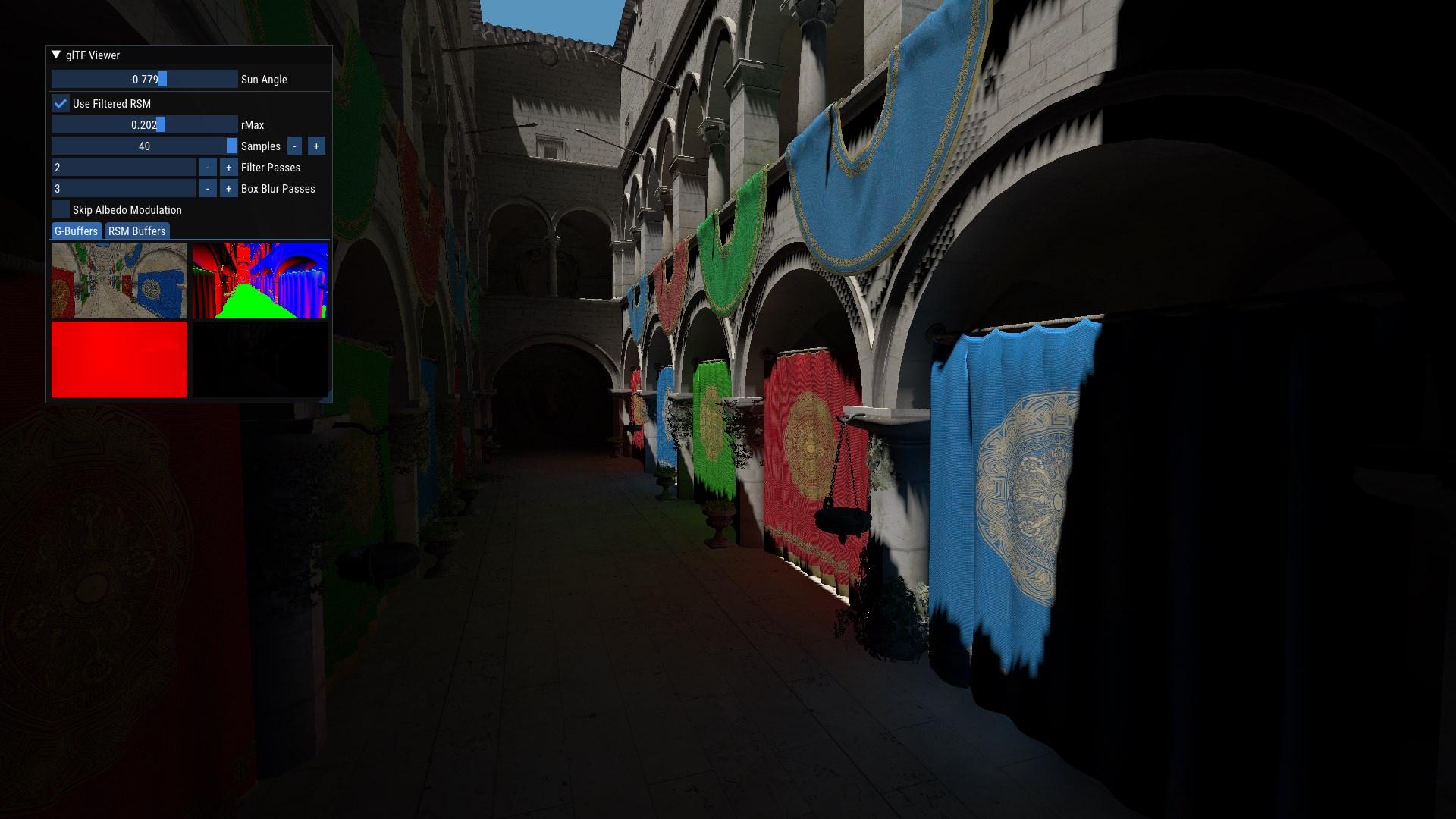 long robin
with mipmaps the annoying aliasing is mostly gone (also increased the sun's brightness a bunch in this one)

 golden schooner
 long robin
temporal blend vs without (though I am basically cheating)


now I "just" need to reproject I guess

without reprojection or sample rejection you get this
golden schooner
Goto settings -> Graphics -> [ ] Motion Blur -> Done
long robin
gonna fumble around with reprojection tomorrow I guess
hmm, I think that means I need the old depth buffer too (and possibly some other old buffers to aid in rejection heuristics)?
not gonna have moving geometry so I can ignore motion vectors
just need to account for the camera's movement
which means I can calculate the motion of a pixel using just the current and previous frame's viewProj matrix 
shell inlet
long robin
with mipmaps the annoying aliasing is mostly gone (also increased the sun's brig...
small rmax small pp
shell inlet
long robin
temporal blend vs without (though I am basically cheating)
very smooth, if only there wasn't that artifact in the distance from my bad filter
btw temporal accumulation is usually done on unfiltered result to avoid excessive bias
here it doesn't matter I guess since the technique is one huge bias due to lack of visibility for indirect
as well as you don't need the unfiltered history for other stuff
I am also going to say that temporal reprojection is going to give you pain if you haven't implemented it before, it's a thing that appears deceptively simple but in practice you will face quite a few stepping stones, so if you want a good reference implementation I suggest you to look at SVGF code https://github.com/NVIDIAGameWorks/Falcor/tree/master/Source/RenderPasses/SVGFPass
dire badge
I think reprojection will always have some issues so I did not even try
Meanwhile MSAA will work just fine for me 🔍🐸
long robin
@dire badge I'm trying to use it to improve the quality of indirect illumination
I'm not gonna try it for antialiasing because I'm aware that's super hard and way more sensitive to small issues 😄
long robin
I also realized I could use variable rate shading for this (instead of just 2x2 shading)
heavy cipher
does ogl have VRS?
long robin
yes (nv extension) but I'm not referring to the hardware kind
I just need to refresh myself on common ways to create the shading rate image
long robin
for calculating indirect illumination
it is an expensive and low-frequency effect, so it would be nice to compute it at a lower res wherever possible
so I am thinking of something akin to software VRS to achieve that
I was reminded of its existence by looking at the most recent post in #showcase
https://github.com/BoyBaykiller/IDKEngine
long robin
shell inlet
btw temporal accumulation is usually done on unfiltered result to avoid excessiv...
so is it recommended to blend with the previous frame's unfiltered result, or should I blend the current frame's unfiltered with the previous frame's filtered?
shell inlet
it is recommended to keep accumulating samples within the estimator effectively extending it across time
accumulating filtered results distorts the estimation
long robin
I see. The filtered result is thrown away at the end of the frame
shell inlet
this is besides the point but it also only really works for view angle invariant brdfs such as lambertian
for view dependent brdfs it is trickier because you need to re-evaluate the brdf for each sample, in restir pt paper this is referred to as shift mapping
long robin
interesting
does that change what you store in each sample?
since you care about the direction the light came from
shell inlet
I would like to say but I need to give restir pt an actual in-depth read first
long robin
yeah I tried reading it, but I got hung up on the "reservoir sampling" part, so I had to take a detour to learn what that is first
pretty sure I know what reservoir sampling is now 😄
shell inlet
for all I know there is a unique set of inputs that varies between different points on a surface spatially(if you try to merge neighboring samples together) and temporally(if it moved and you need to reproject), so you need to remap the results to correct for the change
long robin
is this only addressed in restir pt? it seems like a problem for any temporal filter
or did they previously just not temporally filter specular reflection
long robin
now that I think of it, temporally reprojecting+filtering specular reflection is hard af and there are a lot of hacky ways to address it
shell inlet
svgf seems to ignore bias from reprojection because filtering is inherently adding bias
for ris based techniques starting from restir it's different because it's not only reusing them temporally but also spatially
which is what they say is a gradient domain rendering problem, whatever that means
totally goes over my head
long robin
there was a presentation by EA about their PICA renderer which addressed what they did for reprojecting specular
this is probably it
https://youtu.be/MyTOGHqyquU
shell inlet
if the technique doesn't claim to be unbiased then there should be no concern about any correction
long robin
yeah idk about this presentation
shell inlet
well if it's realtime oriented then you should expect corners to be cut imo
so my guess is that it's prioritized that it looks okay over whether it's mathematically correct or not
long robin
that's what it's all about 👌 👌
shell inlet
well that and that it's fast enough
long robin
💀
    GLM_FUNC_QUALIFIER float uintBitsToFloat(uint const& v)
    {
        union
        {
            uint in;
            float out;
        } u;

        u.in = v;

        return u.out;
    }
    template<length_t L, qualifier Q>
    GLM_FUNC_QUALIFIER vec<L, float, Q> uintBitsToFloat(vec<L, uint, Q> const& v)
    {
        return reinterpret_cast<vec<L, float, Q>&>(const_cast<vec<L, uint, Q>&>(v));
    }
UB? I don't speak C++
well first one is defo UB
those two should have been both just memcpy
shell inlet
enable strict aliasing for "fun" time
long robin
for some reason I am having trouble using glCopyImageSubData with what I'm 99% sure are valid parameters ( moment?)
OpenGL Debug message (1280): GL_INVALID_ENUM error generated. <srcTarget> or <dstTarget> is not a valid texture target.
Source: API
Type: Error
Severity: high
oh well, I don't need to copy anything
long robin
found another bug in Fwog
with the framebuffer cache again 😄
it caches pointers to textures and compares the pointers to see if the textures are the same
but if you swap two textures, the pointers are the same while the texture IDs are different
shit, it's still flickering
ah, the hash was messed up too
long robin
pointers were a mistake
long robin
sweet jesus that was a painful debugging session
framebuffer cache is now two vectors (key and value) so I don't have to implement stupid hashes and also so it's easier to debug
and it's probably faster 99% of the time too
dire badge
Been there, done that, do not use pointers in caching
using explicit framebuffer objects bypasses the need of a framebuffer cache
I don't quite see why the framebuffer object should be hidden
long robin
because it's unnecessary friction imo
it's a lot nicer to just say "draw with this list of render targets" and not have to worry about managing an FBO and binding stuff to it (especially if things change each frame or the window is resized, etc.)
tl;dr: I find framebuffers to be an annoying extra thing to handle, so I copied vulkan dynamic rendering
golden schooner
siding with jaker
 brisk narwhal
why not do a sharedptr
'cept it's not a shared ptr
like
class ReferenceCountable {
    uint64 grab();
    uint64 drop();
    atomic_int ...
};

class Framebuffer : public ReferenceCountable {};
because the user doesn't even know about the existence of framebuffers
the framebuffer cache exists as an optimization so Fwog doesn't create a new FBO every time you start rendering
golden schooner
the only thing exposed to the user is BeginRender/EndRender
brisk narwhal
hmm I understand, I never used VK_KHR_dynamic_rendering
golden schooner
dynamic state just means setting various things willy nilly, but within the bounds of fwog which keeps track of it
(scissor, viewport, ...)
brisk narwhal
with vulkan dynamic rendering you have to manage the images yourself though
typedef struct VkRenderingAttachmentInfo {
    VkStructureType          sType;
    const void*              pNext;
    VkImageView              imageView;
    VkImageLayout            imageLayout;
    VkResolveModeFlagBits    resolveMode;
    VkImageView              resolveImageView;
    VkImageLayout            resolveImageLayout;
    VkAttachmentLoadOp       loadOp;
    VkAttachmentStoreOp      storeOp;
    VkClearValue             clearValue;
} VkRenderingAttachmentInfo;```is it not the case with Fwog?
golden schooner
ok scissor and viewport are the worst examples here
long robin
here's an example of it in action (read until Fwog::BeginRendering(...))
https://github.com/JuanDiegoMontoya/Fwog/blob/examples-refactor/example/02_deferred.cpp#L388
golden schooner
that was the idea
so that the user wont get the idea of using some obscure legacyism
long robin
brisk narwhal
Ah so you don't even let the user manage images
what do you mean by "manage images"?
textures are exposed to the user for them to manipulate as they please
that's what e.g., &frame.gAlbedo.value() is (a pointer to a texture)
long robin
yeah opengl has those as an optimization
you can use regular textures for rendering though
brisk narwhal
Ah you don't have to use them
long robin
and in fact I don't even expose render buffers (or use them internally)
brisk narwhal
fair enough
long robin
maybe I can add a createInfo flag for textures to make them write-only so I can secretly turn them into a renderbuffer
golden schooner
hmm
long robin
it would probably add some buggy edge cases though 😄
golden schooner
that should be part of the framebuffer struct
long robin
what framebuffer struct 
golden schooner
the thing you pass into BeginRender
brisk narwhal
framebuffers don't exist it was all just a dream
golden schooner
renderinfo
long robin
golden schooner
the thing you pass into BeginRender
I can't transmogrify arbitrary textures to suddenly be a renderbuffer though
golden schooner
it shouldnt be a thing for texture creation
long robin
you have to know how the texture is used up-front to know if it can be a renderbuffer
because you can't sample them
long robin
yeah, but specifying that in the renderinfo means you can make mistakes
golden schooner
nah
semantically it has no place in the texturecreateinfo struct
</discussion>
long robin
hmm
golden schooner
that would confuse the consumer for no reason
long robin
in vulkan it's part of the image create info (the usage flags)
long robin
also, specifying it in the renderinfo would mean you have to lazily create textures and renderbuffers, because you don't know which one it is until you try to sample or render to it
golden schooner
but do you not know that upfront as well?
long robin
textures and renderbuffers are two separate types in opengl btw
long robin
golden schooner
but do you not know that upfront as well?
you do! which is why you specify that in the texture create info!!!
golden schooner
yo dont decide in the middle of whenever whether a texture is never sampled from but written to etc?
golden schooner
long robin
textures and renderbuffers are two separate types in opengl btw
yeah, thats why it should be part of the renderinfo in GL
or
you have a renderbuffer type itself (a derivate of texture)
long robin
golden schooner
yeah, thats why it should be part of the renderinfo in GL
I think you have a confusion
renderinfo can be created on-demand
it's a simple wrapper around a real texture
it's not an RAII object and doesn't own anything itself
  struct RenderAttachment
  {
    const Texture* texture = nullptr;
    ClearValue clearValue;
    bool clearOnLoad = false;
  };

  struct RenderInfo
  {
    std::string_view name;
    const Viewport* viewport = nullptr;
    std::span<const RenderAttachment> colorAttachments;
    const RenderAttachment* depthAttachment = nullptr;
    const RenderAttachment* stencilAttachment = nullptr;
  };
i wasnt thinking about raii or ownerhip
ye, it should be part of RenderAttachment, whether Texture is a renderbuffer or not
is what i mean(t)
long robin
why should it not be part of the texture?
is that not just another place where you can put the wrong thing?
golden schooner
when do you use a texture as a renderbuffe outside of fboisms?
long robin
well, never, but when I create a texture, how am I supposed to know it's an OpenGL texture or renderbuffer?
golden schooner
you dont need to know
long robin
or do you mean that texture should be a variant?
golden schooner
you only need to know when you construct a renderinfo, because thats when you decide to slap textureA, B and C in there
golden schooner
long robin
or do you mean that `texture` should be a variant?
it could be an alternative
long robin
okay, here's the least sucky solution (in my mind):
- create a new type called
RenderBufferor something which is internally backed by an actual renderbuffer - change
Texture* textureinRenderAttachmenttostd::variant<Texture*, RenderBuffer*>
golden schooner
if you stick in a RendeBuffer* then renderInfo knows to construct a RENDERBUFFER, if not, then not
long robin
construct
golden schooner
let me put it in quotes
long robin
but yes, it knows how to attach it to the FBO then
golden schooner
"construct"
ye, i could live with that, it saves a possible bool isRenderBuffer of sorts in the RenderAttachment thing
heavy cipher
renderbuffers 💀
golden schooner
what a tangent 😄
long robin
my original idea was to overload Texture by adding a createInfo flag to make it rendertarget-only, which secretly turns it into a renderbuffer
and makes every other operation with it invalid
heavy cipher
have you verified renderbuffers are not just a useless vestige of ogl
golden schooner
if you meant deriving from Texture, then ye 🙂
long robin
heavy cipher
have you verified renderbuffers are not just a useless vestige of ogl
well, graphite said one time that they do something on NV drivers
truly a man of source
heavy cipher
have you verified graphite is not just a useless vestige of ogl
long robin
I agree though, this BS is why I didn't support them in the beginning~~, plus the fact I completely forgot about them~~
golden schooner
blame lvd
long robin
it was a good point to bring up
final decision: Fwog will not be having render buffers because obviously they complicate shit for (probably) little benefit
heavy cipher
tired: supporting some random legacy crap for NV driver
wired: not supporting some random legacy crap and going big, forcing NV to fix driver
brisk narwhal
I didn't even know what renderbuffers were, I just googled "opengl framebuffer images"
long robin
the troll was so subtle that you didn't even know you were doing it 
long robin
brisk narwhal
with vulkan dynamic rendering you have to manage the images yourself though
```c...
FYI (since I didn't answer it earlier), this is indeed the case with Fwog
dire badge
renderbuffer may have been slightly more useful on tiled architecture. Driver could get away without allocating memory for them.
heavy cipher
why could it not for textures?
long robin
after all, it's just one more in the pile of heuristics the driver is already doing 
golden schooner
when do you merge !46 ?
golden schooner
 golden schooner
was hard work
dire badge
heavy cipher
why could it not for textures?
You can do lazy allocation for textures, but I think the idea for textures is that you do sample from them. Meanwhile, depth renderbuffer likely exists only for the depth test, which can work with the on-chip tile memory without having to spill it to memory.
 long robin

mostly works, except for the weird artifacts in the middle when I move straight forward (at the end)
something's wrong with my depth-based rejection
wait, no
something else is wrong

disabled depth rejection
maybe that's just a weird inherent sampling artifact 
I added a debug color to make rejection obvious, and none of the stuff in the middle is getting rejected
long robin
long robin
maybe that's just a weird inherent sampling artifact <:rgbemoji:8478302111015895...
I guess the problem is that when you move forward and the pixels get magnified, multiple pixels end up mapping to the same one (or sampling the same area), giving blocky artifacts like that in the reprojection
long robin
now I need to vary the accumulation rate or something in recently disoccluded areas
because right now they accumulate very slowly
likewise, stable areas need to have a lower blend factor so they can accumulate more samples
maybe if I read the SVGF paper more it will explain these things 😄

 long robin
changes are pushed if anyone else wants to experience this life-changing opportunity
golden schooner
i have a feeling my inductors will jump off of the mainboard
however, i will ive it a try lat0r
long robin
it actually allows you to use fewer samples while still looking good
so it improves perf at the cost of new and exciting visual artifacts
golden schooner
on it already 🙂
heh we need to fix the tbb bs at some point again, its quite annoying, will see if i can find the commit of that thing, which went somewhere
was that gltfviewer?
long robin
Just run 02_deferred
long robin
Yeah 03 and above require multithreading
long robin
golden schooner
8 fps out of the box 😄
Ye I forgor to reduce samples by default
You can also reduce the filter
golden schooner
also the mouse is invisible
long robin
Yup, press `
golden schooner
ah
long robin
aka ~
long robin
I need to change that so the mouse is visible by default
Try 1 sample per pixel
And 1/1 for the filters
It should look decent until you turn the camera 😂
golden schooner
the "artifacts" you see thre flicker like crazy

in the unfiltered view, even with 400 samples, you also still see artifacts a lot
long robin
Flickering?
golden schooner
ye like temporal shit is happening
long robin
Unfiltered should not have those
long robin
Okay
Try changing the temporal alpha
When it's 0 it shouldn't flicker much
When it's 1 it will only take the current frame, which should make it flicker a lot
golden schooner
no effect at all
long robin
Hmm
golden schooner
hmm maybe super slightly
long robin
I probably goofed when I committed
golden schooner
but no big differece
i was trying to record it but the screencap just closes itself when i do 😄
golden schooner
maybe i can employ ffmpeg later and capture it myself
yes it flickers at any codnition when filtered
long robin
What if you increase the samples to 5 or so
golden schooner
tried to play with the samples and filter options too
long robin
Increasing the sample count should've helped
golden schooner
nope
long robin
Maybe it's just harder for me to notice because I get 240 FPS 😂
It's probably not a bug in any case
long robin
If you want to hack, you could try changing this variable to .999
https://github.com/JuanDiegoMontoya/Fwog/blob/examples-refactor/example/shaders/rsm/Reproject.comp.glsl#L52
That should make it more stable
But it will accumulate more slowly
It's also quite amazing that 1 sample per pixel hurts your iGPU this bad
I gotta sleep though. I'll be back in 6 hours
long robin
Time flies like an arrow. Fruit flies like banana
golden schooner
thats what shrimple life is 😛
long robin


nearest vs linear filter for reprojected samples
the former introduces a LOT of artifacts, which were destroying my mind

 shell inlet
did you look into the SVGF source code?
it does software bilinear filtering to reduce these artifacts
this is why I said reprojection appears to be deceptively simple to implement while it's actually tricky
long robin
I've been looking at several things
mostly my own code though
I am enjoying the adventure of winging it so far
shell inlet
biggest offender in this whole technique is still variance though
if only we could sample using a directional estimator
but it's not possible I think
actually it's possible but would require marching the shadow map
to find the intersections from the given visible point to the point of the intersection of the casted ray in an RSM depth buffer
still without any visibility information there
but that's overkill in performance loss for just importance sampling
long robin
sounds brainwormy
shell inlet
it's as stupid of an idea as the screen space visibility test
which I actually made and it performed like poop
not to mention there were ugly ahh artifacts
inherent to screen space techniques
long robin
depth rejection is hard
using a nearest sampler and a hard cutoff makes it reject distant stuff when you merely turn the camera (blue = samples rejected based on depth heuristic)

I'm gonna try something
shell inlet
you can try disabling depth rejection
I was wondering are you accumulating samples or filtered results as of what's currently on github?
long robin
let me check
shell inlet
I just looked into the branch latest commit and saw no changes to the main rsm shader
long robin
yeah I made a new shader
shell inlet
which is weird considering that you want new samples to come in every frame
long robin
the monolithic shader was getting annoying
looks like the github version is accumulating samples
this comment even asserts it
https://github.com/JuanDiegoMontoya/Fwog/blob/examples-refactor/example/common/RsmTechnique.cpp#L150
shell inlet
vec2 noise = rsm.random + textureLod(s_blueNoise, (vec2(gid) + 0.5) / textureSize(s_blueNoise, 0), 0).xy;
can you explain why you allow it to go beyond 1?
shell inlet
you should demand new samples from hammersley instead
using frame count or something
but then you have N in it
vec2 Hammersley(uint i, uint N)
long robin
yeah I need one of those infinite sequences
shell inlet
would it work to put an arbitrarily big number in there
shell inlet
that is due to the circle map
long robin
as shown in my famous visualization
https://www.shadertoy.com/view/7ssfWN
shell inlet
hammersley is a low discrepancy sequence on a unit square
long robin
yeah, but the main issue is the fact that it's ordered like that, no?
shell inlet
a coincidence most likely
a fortunate one
the goal of lds is to have more efficiency in covering the ground on a unit square
or not just square
more efficient as opposed to white noise where there is a total chaos
long robin
you can't choose a random contiguous subset of hammersley and get a uniform sampling of the unit square
shell inlet
and you can sample same-ish place N times in a row by chance
long robin
halton sequence seems to give the desired property
https://www.shadertoy.com/view/3dyyR3

you can take any sequence in it and it seems to produce a nice result
shell inlet
I see what you mean
long robin
oof halton has a while loop in it
float halton(int base, int index)
{
    float result = 0.;
    float f = 1.;
    while (index > 0)
    {
        f = f / float(base);
        result += f * float(index % base);
        index = index / base;
        //index = int(floor(float(index) / float(base)));
    }
    return result;
}
not ideal for GPU evaluation
shell inlet
at this point maybe just rotate the blue noise
cranley patterson again
can't ruin blue noise any more than what it already is anyways
long robin
I'm not sure what's wrong with adding it to the blue noise currently
shell inlet
random numbers should be zero to one
actually yeah there is no difference
there is a mod in the end
when the actual rotation happens
long robin
that's what I was hoping would happen to the noise
shell inlet
I admit I did not think about it as much as I should have
long robin
probably gonna need TAA to deal with these flickering subpixel details 😩
https://gfycat.com/RigidOpulentAiredale

they flicker a lot with movement as well
the flickering is not as bad if I lower rMax
as more samples are concentrated into a smaller area
shell inlet
see svgf
long robin
fine 😂
I'll look at it at work tomorrow
I also think I need normal-based rejection on top of depth
I get funny "temporal contact shadows"

I pushed the bs I was working on
the main new thing is a history length buffer which helps guide the temporal weight (which is not inspired by any paper so it's probably jank)
golden schooner
i like these trippy effects
 shell inlet
that's like restir before restir
spatial reuse kind of
except without maths to correct bias
long robin
They're living on the edge between empirical and physical correctness
shell inlet
you haven't seen A-SVGF yet where they copypaste 1 random pixel between frames in a 3x3 tile to compute temporal gradients
long robin
Huh
shell inlet
technically this could be alleviated via using a separate render target that consists of old pixels to compute new lighting on but that's computationally more expensive
so they just add bias by copypasting pixels into new frame to save on performance
by pixel I mean all surface info
they want to keep every condition same and let only computed illumination change to compare against previous frame's result
that way they have a measure of how much lighting changed and how much of temporal history to drop
heavy cipher
have you considered renaming the main branch to 'inspiration'
would automatically up the threat level of any fwog link
shell inlet
idgi
long robin
the joke is that martty is frightened by frogs
heavy cipher
i just want fwog linkposting to be competitive with nabla
long robin
nabla links gave me an unidentified disease
unrelated, but the code for this sample is so friggin complicated
https://youtu.be/3EdE38iRn2A
https://github.com/microsoft/DirectX-Graphics-Samples/tree/master/Samples/Desktop/D3D12Raytracing/src/D3D12RaytracingRealTimeDenoisedAmbientOcclusion/RTAO/Shaders/Denoising
shell inlet
heavy cipher
i just want fwog linkposting to be competitive with nabla
contribute fun things to fwog and this will happen eventually

 shell inlet
by the way I like how seemingly simple technique grew out of proportions into using modern ray tracing approaches to enhance it
long robin
ye 😄
long robin
long robin
unfortunately I still have a ways to go
 shell inlet
what if we use rsm for specular
long robin
honestly quite amazing
 shell inlet
technically should be possible but very cursed
heavy cipher
shell inlet
contribute fun things to fwog and this will happen eventually
i have my own demons, tyvm
long robin
shell inlet
what if we use rsm for specular
my thoughts:
- the OG paper said it would require many more samples to have specular
- denoising
shell inlet
more samples because yes
long robin
yeah I haven't thought about why tbh
shell inlet
you can turn it into specular by just evaluating specular brdf for each sample, that's it
of course most rays will sample outside of the spot where valuable samples are concentrated
long robin
ah, it probably requires more samples because of that
most samples will contribute nothing
shell inlet
"outside" of the "cone"
yeah
right now the brdf is 1/pi
uniform across the hemisphere
so all samples count
shell inlet
yeah lol
long robin
and we don't even sample a hemisphere, but a weird projected disk