#Saurian Sorcery
1 messages · Page 2 of 1
 main cosmos
 obsidian wolf
seems like a layer on top of the imgui input systems for testing
 urban lantern
International multi golden user identifier
obsidian wolf
ImGuiTest* test = IM_REGISTER_TEST(e, "demo_test", "test1");
test->TestFunc = [](ImGuiTestContext* ctx)
{
    ctx->SetRef("My Window");           // Set a base path so we don't have to specify full path afterwards
    ctx->ItemClick("My Button");        // Click "My Button" inside "My Window"
    ctx->ItemCheck("Node/Checkbox");    // Open "Node", find "Checkbox", ensure it is checked if not checked already.
    ctx->ItemInputValue("Slider", 123); // Find "Slider" and set the value to 123
    IM_CHECK_EQ(app->SliderValue, 123); // Check value on app side
};```what i'd test with this would be like things are damaging as expected, wave spawns are correct,
i'm not used to testing but that's because i haven't really had a good way to do it
urban lantern
usually you test that underneath
the spawner logic itself should work correctly already
"unit tests"
obsidian wolf
it makes sense to me to use the same form of input as in normal use
urban lantern
when the ui is involved you get "end to end" or "ui tests"
the input for unit tests is usually described in the tests themselves
but this imguitest can be used for that as well


 urban lantern
cute little croco
obsidian wolf
i now need to figure out what putting IK + rigs into engine looks like
main cosmos
menacing walk
obsidian wolf
yeah it would help if i did upper body but i dont think i'm importing IK so no point taking the time
jaker you haven't done animation stuff like this, right 
main cosmos
it went into more detail than I would have been able to absorb
obsidian wolf
it's just some tedious math
i mean maybe? but like?
i would think you can get very far with just a rig, weights, IK, and some keyframes
far enough for any indie
main cosmos
and it talked about the minutiae of animation systems in detail like blending animations and compact storage, etc.
(game engine architecture 3rd ed.)
obsidian wolf
i see, yeah, i don't want to store animations
i can't imagine it'd be a good idea for me
main cosmos
I mean storing in memory
main cosmos
how are you gonna animate stuff?
obsidian wolf
for baked animations
just IK
vertex shader takes in a couple matrices, interpolates them based on bone weights
then it's just a matter of controlling the IK control points
main cosmos
what I'm referring to is compressing bones and joints and vertices and stuff
obsidian wolf
don't some games store actual vertex data with baked animations
main cosmos
and using bezier curves for animations (I skipped that part so I don't know exactly what it was talking about)
obsidian wolf
like that one insomniac batman game
main cosmos
obsidian wolf
don't some games store actual vertex data with baked animations
that is one of the 3 major options
obsidian wolf
that shit i am absolutely not doing
main cosmos
that way is probably the most powerful, but by far the most memory-intensive
obsidian wolf
its also a lot more work
obsidian wolf
i'd probably set up morph targets with IK lmao
boneless morph targets?
b💀neless
i'd think it's pose interpolation, IK, and baked animations
main cosmos
If I implemented animations, I'd probably stick to skeletal animation since it seems flexible and there are plenty of tutorials about it
obsidian wolf
do you mean pose interpolation? idk terminology so i'm just saying what makes sense to me
main cosmos
It's the one where you animate joints and each vertex uses a weighted sum of its nearest joints as its local orientation
obsidian wolf
animate how
you can use IK or you can interpolate between poses
im for sure doing one of those already
main cosmos
yes you animate one of those ways
obsidian wolf
think it's worth doing both?
main cosmos
idk
obsidian wolf
yeah
main cosmos
for a tower defense game you probably don't need IK
main cosmos
but how do you get the poses in the first place
obsidian wolf
oh i guess there's always some mix
IK for limbs but the rest probably has to be posed?
unless i misunderstand what you mean
obsidian wolf
hmm, i don't think so, but maybe
ahh yes, #mathematics fuel

https://www.ryanjuckett.com/cyclic-coordinate-descent-in-2d/
i think it's possible to just search for the solution essentially?
RyanJuckett.com
When performing inverse kinematics (IK) on a complicated bone chain, it can become too complex for an analytical solution. Cyclic Coordinate Descent (CCD) is an alternative that is both easy to implement and efficient to process. We will discuss the algorithm works at a high level, followed by a two-dimensional example and sample code.CCD solves...
main cosmos
but what is the solution?
obsidian wolf
The goal of Inverse kinematic is simple, given a target point in space T (blue cube) find the best rotation for each joint so that the tip of the last joint reaches the target.
any where the endpoint is the target
i guess if you're talking about like
energy minimization then you need physics joints
i guess that's the hard part of IK
with poses you kind of define the joint restraints through the poses that you make
and when you test it, if they break it, you change the poses or add another
but with IK, each possibly needs to be explicitly defined
main cosmos
looks like I had no clue what IK was previously
obsidian wolf

 main cosmos
albinism
obsidian wolf
i was told to put a hat on it
 main cosmos
good suggestion, whoever said that
obsidian wolf
i just tried to post a picture of it posed

alright there was a better pose but it was downvoted by clyde

 severe spruce
explicit froges 😳
obsidian wolf
:(
 urban lantern
lol the frog is neat too
obsidian wolf
hmmm
my biggest implementation question atm is whether or not its worth having skeletons be optional for vertex formats
main downside is i believe id have to write and manage two shaders
obsidian wolf
but for what
i think its bikeshed until there is some tangible reason to fix it tbh, pretty easy to tack on after
urban lantern
its shrimple
what do you mean for what
one vertex shader with bone weights, the other without, or just one with #ifdefs
obsidian wolf
i can just have every draw call pass empty bone info for vertices ;)
urban lantern
are you worried about "performance" ?
obsidian wolf
nah, i forgor that i wasn't tho 💀
urban lantern
: )
obsidian wolf
in highschool we called joint accessors "drug dealers"

 obsidian wolf
beard dragon, gonna see what posing him does to make him not just stand, or maybe i'll have some standing some not
 urban lantern
cute 🙂
obsidian wolf
i have been hampered by my lack of practice with modern c++ move semantics
i have a ModelGPU, a SkeletonGPU, and a Renderable
the relevant parts of each
    string mesh_asset_path;
    string material_asset_path;

    SkeletonGPU* skeleton = nullptr;
};```
```struct ModelGPU {
    vector<Renderable*> renderables;
    vector<SkeletonGPU> skeletons;
};```
struct SkeletonGPU {
vector<id_ptr<Bone>> bones;
vuk::Uniquevuk::Buffer buffer = vuk::Uniquevuk::Buffer();
};```
the part where i am confused by said move semantics, i want ModelGPU to own SkeletonGPU, so when ModelGPU is destructed, the skeletons will be too, and the buffer needs to be owned by the SkeletonGPU,
i think the c ptr on the renderable works with this? (if i make the vector vector<unique_ptr<SkeletonGPU>>) but then if this all makes sense with vectors and such is very
i sort of wonder if these move semantics are partially meant to be dealt with by deleting constructors and letting the compiler yell at you when you've done something dumb
main cosmos
as you currently have it, the SkeletonGPUs will be destroyed when ModelGPU is
I'm not sure the relation to move semantics here
obsidian wolf
ok so i can't copy ModelGPUs
because if it contains any skeletons, those need to be moved, since vuk::Unique needs to be moved
but i have no clue why stuff like model_comp.model_gpu = instance_model(scene->render_scene, model_comp.model_cpu); doesn't compile (instance_model returns ModelGPU) with
Error C2280 : 'spellbook::ModelGPU &spellbook::ModelGPU::operator =(const spellbook::ModelGPU &)': attempting to reference a deleted function
obsidian wolf
AFAIK shouldn't this use move assignment, not copy?
since return should be an rvalue
main cosmos
show the signature of it
obsidian wolf
ModelGPU instance_model(RenderScene& render_scene, const ModelCPU& model, bool frame = false);
main cosmos
I'm guessing throwing a std::move on it does nothing
maybe your move assignment operator got deleted somehow
try defaulting it
obsidian wolf
ModelGPU(ModelGPU&& other) { renderables = std::move(other.renderables); skeletons = std::move(other.skeletons); }
i declared it trying to fix it, maybe i need an = move too?...
main cosmos
just put
ModelGPU& operator=(ModelGPU&&) = default;
your linter may ask you to mark it noexcept
obsidian wolf
fuckk the linter
main cosmos
frfr
obsidian wolf
i got so many linter complaints
main cosmos
sign of a bold programmer
obsidian wolf
ok i guess this worked?
main cosmos
I don't think the move assignment operator is implicitly defined
obsidian wolf
i would've assumed that declaring the move constructor also makes an implicit assignment move 🤔

 obsidian wolf
it usually does for me
main cosmos
I can also double click the message and it will take me to the error
obsidian wolf
0>C:\spellbook\src\renderer\assets\model.hpp(49): is the only line number i get, and that's just linking to vector<std::unique_ptr<SkeletonGPU>> skeletons;
so however i'm adding to that isn't correct but
model_gpu.skeletons.push_back(std::make_unique<SkeletonGPU>(game.renderer.upload_skeleton(*skeleton_cpu)));
is incorrect for some reason :)
emplace back

main cosmos
does it work
obsidian wolf

yes
now i just gotta link the actual bone transform UI up and we can see if it all works!
oh wait no i linked it up already

actually it's just bad initial values
i also badly need a transform widget
main cosmos
epic
obsidian wolf
#the-bug-collective message
guessing this has to do with y-up vs z-up, which is incredibly not-epic
uhhh...
also imma prob gonna be spammin this chat cause these skeleton bugs are funny
main cosmos
giraffics
obsidian wolf
giraffes got a fat ass
obsidian wolf
i feel the need to 🙂 that statement
main cosmos
🙂
 main cosmos
ah, that one thing

 main cosmos
when they hit you with that dollar store roadkill
obsidian wolf
i think maybe i should go back to the cylinder...

[main 5c66d1b] Half-working skinning 47 files changed, 1180 insertions(+), 608 deletions(-)
fairly large commit tho :)
skeletons were only like 300 LOC at theend of it
obsidian wolf
nah it just pushes out msvc errors
it doesn't reformat them or anything
well, it does parse them to make hyperlinks and such, but actual message contents should be the same
kinda crazy how far reading the actual spec gets you
urban lantern
i like the dino croco frog dile
obsidian wolf
i gotta actually figure out how to make this usable
i guess i want 3 components
- IK
- pose interpolation
- physics driven
but there's a weird question where.. do i want to interpolate between these?
maybe i don't need #3
i can imagine tracking at least the first two for all bones, and having some mix between then
i have a very large lack of knowledge on how this is handled by other indie games 🙂 i haven't really ever used animation tools in engines
obsidian wolf
#general chat has updated this to be a relatively complete plan of do keyframes/pose interpolation, then layer the other two on after, and that makes sense to me

 obsidian wolf
i have tortured myself by moving from one subject i hardly understand to another :)
doing cmake now :)))
obsidian wolf
man
i hate this shit
it's so fucking terrible
there's no information anywhere that you can actually find
every single google result is some unit-A on a forum where there's pages of non information any time there's a question
there is so much fucking state in regards to all of this
i'm fairly certain that just opening the cmake-gui has invalidated 95% of relevancy of resources online
urban lantern
obsidian wolf
because it's added or removed cache entries
doesn't work
my current problem is not having the cxx/c compiler paths
but of the four ways i've tried to make it work none of them have
obsidian wolf
where do these entries even come from
 urban lantern
and what does that cxx/c compiler paths thing mean
obsidian wolf
are they just what's existing in my cache?
urban lantern
idk, i never used the gui
obsidian wolf
is there a way i can view what's in my cache?
urban lantern
clion or vscode+cmake plugin
obsidian wolf
C:\spellbook\build>cmake .. -- The C compiler identification is unknown -- The CXX compiler identification is unknown CMake Error at CMakeLists.txt:3 (project): No CMAKE_C_COMPILER could be found.
urban lantern
looks like your environment is fucked
what happens if you run vcvarsall and from that prompt run the cmake gui
or from the vs developer prompt, run cmake gui
obsidian wolf
i don't want to use the vs developer prompt
obsidian wolf
i'd rather use the same terminal for everything
obsidian wolf
yeah i did nothing
urban lantern
reinstalling vs should work, then you dont need the vs prompt anymore
obsidian wolf
i fixed it with updating path, but it changing cache like this is really annoying
if i run a command and it works
i should be able to run the same command later and have it work again unless i changed something
explicitly
something like opening the gui and clicking generate, or running it trying to generate for ninja, or similar
unset something
urban lantern
vs' cmake integration is still not the best, compared to clion/vscode+cmake
obsidian wolf
and the thing it unset is what cmake was using to find the compiler
should i be using clion if i want to use ninja?
urban lantern
all you need on windows is also just mkdir build && cd build && cmake -G "Visual Studio..." ../ if you want to generate the solution manually
main cosmos
obsidian wolf
should i be using clion if i want to use ninja?
You can use ninja and vs
It's what I'm doing
obsidian wolf
how does this work
urban lantern
-G ninja instead of -G "Visual Studio
obsidian wolf
are there any steps or does it just work with the -G
main cosmos
You open the directory in visual studio instead of fiddling with cmake commands
obsidian wolf
open the directory after cmake -G Ninja .., instead of cmake -build . or whatever
main cosmos
You never need to type a cmake command if you open in vs
urban lantern
same for the other IDEs
obsidian wolf
where am i asking VS to use ninja
obsidian wolf
after i make the CMakeLists?
urban lantern
yes
obsidian wolf
ok 🙂 ty
urban lantern
you can clone my cmake-glfw repo to test, or jaker's fwog
main cosmos
Btw opening the directory randomly doesn't work on my work computer, so I have to generate the solution myself
So that's a thing
obsidian wolf

severe spruce
first the blood sacrifice, then opening the folder smh
obsidian wolf
this is also epic
 main cosmos
Hey that looks just like what I got
obsidian wolf
did you solve it 🙂
main cosmos

obsidian wolf
i was expecting like
you know the sorts of errors i'd expect out of a poorly configured cmake file
include file "<vuk/Types.hpp>" not found. (in source file SkeletonGPU.cpp:7) shit like this
main cosmos
Instead it fails to compile a shrimple test program
It can find cl.exe, so I don't even know what's failing
Maybe messed up permissions or something
obsidian wolf
trade offer:
u get: 10-15 seconds saved per compile, maybe
i get: multiple days worth of brain rot trouble shooting
nah fuck this shit
it's worse than worthless, this shit siphons actual productivity
waste of my fucking time
main cosmos
Cmake users btfo
urban lantern
do you use an up2date cmake?
main cosmos
When I was having the same issue, I reinstalled cmake and VS and it didn't help
obsidian wolf
i am going to become the game dev joker (jonathan blow)
obsidian wolf
obsidian wolf
trade offer:
u get: 10-15 seconds saved per compile, maybe
i get: multiple days ...
:)
severe spruce
btw you can run vcvars from any terminal
and it will set your env
i use a PS startup script so all my terminals can compile
obsidian wolf
i used imguizmo
integrated it quick
and was reminded why i don't use it :)
NIH time!!!
i really shouldn't though
main cosmos
name a better duo
waste of my fucking time
NIH time!!!
obsidian wolf
i really dislike this task that takes 10 seconds too long
time to spend 3 days
but nah there's like 2 inputs to imguizmo and the input doesn't work 🙂
i feel like there's too much integration for something like it to work smoothly
there's coordinate conventions, there's the input, the rendering (especially depth involvement)
main cosmos
ye I'm just taking the piss
it took me a while to understand cmake enough to not want to commit sudoku, meanwhile NIHing something at least gives you something tangible to work on
severe spruce
i have a PR open to imguizmo for years now
obsidian wolf
:)
PR my incoming pose widget
hehe jk imagine taking the time to make things usable by others
severe spruce
my PR is something more fundamental, such as making it not broken
but thats not worthwhile to merge :3
obsidian wolf
no i know but surely there will be countless math issues
barely related but i actually think a ton of the math for these widgets is super cool
like i was just rewriting my method for projecting the mouse to a 3d circle
main cosmos
severe spruce
my PR is something more fundamental, such as making it not broken
tfw your pr is just one loc
severe spruce
i hope it is fixed otherwise in master
obsidian wolf
    ray3 os_ray = math::transformed_ray(mvp, uv_mouse_position);

    // We intersect our object space ray with the axis' plane, because the intersect is in object space, we can just atan it for angle
        float t = -os_ray.origin[axis] / os_ray.dir[axis];
        vec3 os_intersect = os_ray.origin + t * os_ray.dir;
return_info.angle = math::atan2(os_intersect[(axis + 1) % 3], os_intersect[(axis + 2) % 3]);```where transformed ray is relatively simple too
basically just
r3 transformed_ray(const m44& transform, v2 viewport_UV) {
    m44 transform_inv = math::inverse(transform);
    v4 origin_hpos = transform_inv * v4(u, v, 0.01f, 1.0f);
v4 end_hpos = transform_inv * v4(u, v, 1.0f, 1.0f);```still slightly complicated, but considering how hard finding the closest point on a 3d circle to a mouse conceptually is


 obsidian wolf
yeah this aint quite right
urban lantern
for those moments, the rat-evicts-frog-fromfrogcave-music seems applicable and should be played in the background
obsidian wolf
 urban lantern
yes 😄
obsidian wolf
also, unironically chatGPT has pushed forward my design documents for the game
onenote is weird

then there are the like 10 characters i asked it to generate lmao
the images aren't actual images i'm using, just refs i'm slowly putting onto them
the picture for sauria is the result of asking chat-gpt for a text description, then feeding the result into dall-e lmao
also the transform widget is done-enough :)
actually jk i still need to pull it into it's own renderpass so that it can render transparently over other objects
i added a feature to fade controls when they're basically impossible to use, to keep it visually simpler, i am a big fan of it
there's also more controls, (i.e. rotation around the vector to the camera), i'm just choosing not to expose it :)
main cosmos
nice widget
obsidian wolf
still needs a bit of work for the skeletons lmao
the inverse bind matrix has got it fucked up
obsidian wolf
gltf not naturally supporting z-up is annoying as fuck
fortunately, blender supports gltf with z-up and therefore i am going to force it for anything with a skeleton
cause this is annoying as fuck to debug :)
it's better, but no clue why it's rotated like this at the start when the quaternion should be an axis-aligned rotation
some of my non-glm math is probably fucked :)
urban lantern
thats what you get for using z up 🙂
obsidian wolf
my game is top down
urban lantern
no excuse
obsidian wolf
y-up is dogma :)
unironically tho it feels weird for a modern model format not to express coordinate conventions
it wouldn't really help me here, beyond the fact that blender would probably have those exposed as settings, saving me the work
urban lantern
can you not just multiply with a matrix to transform from y up to z up
obsidian wolf
yes but then every component of the model uses y-up
it works seamlessly if you never have to touch anything within the model
urban lantern
i dont get that, i mean you multiply everything once
obsidian wolf
in the case of skinning, that is most definitely not the case
i would do that but it involves every single component (each vertex pos, each normal, skinning transforms, etc.) and when i tried it was a bucket of issues
spent a good couple days on it
that was a while ago though, i could probably do it a bit easier if i tried again
urban lantern
ah
obsidian wolf
it's the sort of thing though where if you know how to fix it, you don't really need to fix it xD
obsidian wolf
obsidian wolf
trying to figure out how exactly to integrate it with my input system
the main input consumption happens by having a sorted vector of input callbacks which can exit out
void default_scroll_callback(GLFWwindow* window, double x, double y) {
    Input::mouse_wheel = y;
    for (auto ptr = Input::scroll_callback_stack.end() - 1; ptr >= Input::scroll_callback_stack.begin(); ptr--) {
        auto& [fp, name, data] = *ptr;
        bool  esc              = (*fp)(window, x, y, data);
        if (esc)
            return;
    }
}```pushing one of these callbacks for each of the widgets is too annoying to manage, and doesn't really work with immediate mode,
so i think i'm going to have some sort of singleton where widgets submit their id and hovered depth every frame, then read back from the singleton to see if they're pressed
that way it can have one callback, and can decide which widget is pressed
should all work, probably 🙂
obsidian wolf
i actually also sort of need to optimize lmao
:^)

debug + validation, but still horrid
on release with validation off it's still 600fps, but i want debug+validation to be usable
obsidian wolf
ok as much as i've enjoyed doing skinning + widget shit
i need to take a break from it and do something with gameplay to avoid getting lost in what is ultimately not gameplay
so i'm going to reimplement one of the units now that it is not planets and return to fruits dying for the third time
actually
no i'm not
in some of my refactoring since that, i actually wrote in the concept of editor scenes
so now i need game scene, then a state transition between the two, which is cool
main cosmos
are you gonna make a state machine
obsidian wolf
all of the "gameplay" has been in the map editor xD
state machines aren't a real thing
main cosmos
are you gonna build a real physical state machine
 main cosmos
my mlg pro state machines are usually an enum + a switch statement
obsidian wolf
this is only a single line more complicated
tbh i actually like jonathan blow's advice for this
i'm overanalyzing the joke but
main cosmos
I'm not joking. I don't know how to make an overengineered state machine
or whatever the fancy ones are
obsidian wolf
i think it's a really good philosophy to implement the solution to your direct problem as quickly as possible to check it off your list, and go onto the next thing
where you only build up the engineering on something when you have to keep going back to fix it
and even when you go back to fix it for the first or second time, you just retry, and eventually you'll stop coming back to it
when you do, it's well engineered
main cosmos
well-enough engineered
obsidian wolf
i used to care more about stuff like well engineered state machines, because they provide clean solutions for problems
but i don't anymore because of that philosophy
main cosmos
you got mind Blown
obsidian wolf
jonathan.
main cosmos
you got mind jonathaned
obsidian wolf

also, i am accepting ideas for maps :) only restriction is that it has to conceivably be the home or similar of lizards, and grid based
ideally in the form of reference images
main cosmos
for a tower defense game?
obsidian wolf
for a tower defense game where the defenders are the rpg lizard characters yes
main cosmos
rpg lizard character
 obsidian wolf
i'm guessing it'll vaguely end up in this realm (i also just found a really good rabbit hole on pinterest)


 obsidian wolf
main cosmos
rpg lizard character
obsidian wolf
main cosmos
rpg lizard character
this looks AI generated 🧐
main cosmos
it do be
obsidian wolf
which?
main cosmos
stable diffusion
obsidian wolf
:)
 main cosmos
 obsidian wolf
honestly
incredible how many different ways the AI can imagine a corgi wearing a banana
scarf, hoodie, ears, neck down, whole thing
main cosmos
 obsidian wolf
we don't need AI for this one


god i love the human-adjacent nature of monkeys
 obsidian wolf
ah yes, horrors beyond my comprehension
obsidian wolf
just figured out why im on 30 fps with validation off lmao
my meshes weren't being added to the mesh cache so they were being reuploaded from disk every frame
honestly incredible that it was still at 30-60fps
 obsidian wolf
well this is how it's ending this weekend
oh also there's finally a way to edit the z-levels
 obsidian wolf
so true
main cosmos
he's busting it down
obsidian wolf
severe spruce
he losing it
he just like me fr fr
obsidian wolf

 obsidian wolf
damn lol i really looked at this, said "why do i have no output" and opened up renderdoc

there is output, it's just very dark 🙂
was boutta be a 15 minute debugging session if it was sunny outside
obsidian wolf
looking good
obsidian wolf
hmmm yes, shadows

 main cosmos
he's so happy
main cosmos
I see working shadows
obsidian wolf
i gotta figure out what im gonna do to filter these
main cosmos
the shadows?
obsidian wolf
yeah that's what i mean
do people ever blur + posterize as a post process for shadows?
idk how i'd do that on the renderer side, but that might be a look
main cosmos
hmm
obsidian wolf
borderlands only does terrain shadows i believe
 main cosmos
this small piece of code is how I have stochastic disk-sampled shadows (it needs blue noise and maybe a small blur to look good)
https://github.com/JuanDiegoMontoya/Fwog/blob/examples-refactor/example/shaders/ShadeDeferredPbr.frag.glsl#L77
obsidian wolf
and those are sharp, which i think looks
tbh it's probably best to be hard edge
just not pixelated, and i'm not entirely sure what people do for that
main cosmos
someone showed me an algorithm which can be used to upscale hard edges
let me find the link
main cosmos
ok you are thinking of the same thing
obsidian wolf
hqnx
main cosmos
ray traced shadow maps might look okay too, but they have some difficult edge cases
obsidian wolf
not gonna do RT
main cosmos
but at least you can get almost perfect sharp shadows
obsidian wolf
not with skinning
main cosmos
obsidian wolf
not gonna do RT
it only uses a single ray-triangle intersection
no BVH
obsidian wolf
where do you pull the triangle from?
main cosmos
you just store the triangle ID in the shadow map and then ray trace against that triangle when applying shadows
obsidian wolf
could you store vertex data
vertex data is technically 9 floats but
then you'd have the advantage of not having to reapply the vertex shader
main cosmos
your scenes will probably be 🦐le enough that you can get away with some inefficiencies
obsidian wolf
im gonna try hqnx first, i think that's literally just like
main cosmos
it really is like
obsidian wolf
why has no one done hqnx shadowmapping
main cosmos
idk
obsidian wolf
maybe arkham knight?
obsidian wolf
i know the first step is to sample a 3x3 area
i'm not sure how you use the result though
main cosmos
isn't the result a new 3x3 at the current pixel?
I guess that's for the 3x upscaling one
obsidian wolf
the arrangement of neighbors is looked up in a predefined table which contains the necessary interpolation patterns
main cosmos
I'm guessing you can just hardcode the tables into the shader if they're small, or put them into an SSBO otherwise
obsidian wolf

tbh this could match the look pretty well
u dont understand

am i a mastermind or is this gonna get it wrong
main cosmos
it looks incomplete
obsidian wolf
yeah i think it got it wrong

that just looks like some gaussian blur
actually not even gaussian
main cosmos
it do
obsidian wolf
lame
chatGPT would be nice if it was just like "yeah this might be fuckin wrong" sometimes

GitHub
hqx is a fast, high-quality magnification filter designed for pixel art. - hqx/hq3x.c at master · grom358/hqx
what the fuck

 obsidian wolf

GitHub
GPU shader version of HQx filter. Contribute to CrossVR/hqx-shader development by creating an account on GitHub.
main cosmos
no results on shadertoy
obsidian wolf
i think this one is legit
just need to fiugre out what the fuck here is trash
no way the actual implementation is 100 lines, right
main cosmos
idk
obsidian wolf
well
we'll see
The filter was not designed for photographs, but for images with clear sharp edges, like line graphics or cartoon sprites. It was also designed to be fast enough to process 256x256 images in real-time.
i wonder when this was written
main cosmos
1934
 main cosmos
what's the deal with the giant LUT in the OG one?
obsidian wolf
honestly
i have no fucking clue
its just some academia shit i think
i didn't write this i just found the simplest implementation and made it simpler
main cosmos
lol it looks quite cursed when you put a noise texture in
the rock texture looks like frosted glass or something
 obsidian wolf
honestly
kinda sick
this one is very cool

i wonder if there's any way you could modify this a bit to get rid of the grid artifacts
as in like
posterize first
main cosmos
is posterizing the same as quantizing
main cosmos
nearest wot
obsidian wolf
i just mean reducing the amount of colors in the image
main cosmos
ye that's what quantizing is
obsidian wolf
then yes
main cosmos

tried quantizing and it looks like ass

vec4 quantize(vec4 v, int n)
{
    vec4 noise = texelFetch(iChannel1, ivec2(gl_FragCoord.xy) % textureSize(iChannel1, 0), 0);
    return floor((v * vec4(n)) + 2.0 * noise - 0.5) / vec4(n);
}

//draw diagonal line connecting 2 pixels if within threshold
bool diag(sampler2D tex, inout vec4 sum, vec2 uv, ivec2 p1, ivec2 p2, float thickness) {
    vec4 v1 = texelFetch(tex, ivec2(uv)+ivec2(p1.x,p1.y), 0);
    vec4 v2 = texelFetch(tex, ivec2(uv)+ivec2(p2.x,p2.y), 0);
    v1 = quantize(v1, 2);
    v2 = quantize(v2, 2);
    if (length(v1-v2) < THRESHOLD) {
        vec2 dir = vec2(p2-p1);
        vec2 lp = uv-(floor(uv+vec2(p1))+.5);
        dir = normalize(vec2(dir.y,-dir.x));
        float l = clamp((thickness-dot(lp,dir))*AA_SCALE,0.,1.);
        sum = mix(sum,v1,l);
        return true;
    }
    return false;
}
it uses the blue noise texture in iChannel1
obsidian wolf
tbh i dont even knowhow this algo works still so
i aint about to start trying to get funky with it
tomorrow i'll actually use it for shadowmaps
 now though
main cosmos
it would probably look better to quantize after
main cosmos
main cosmos
the rock texture looks like frosted glass or something
quantized to 8 values per channel

removed the noise because it looks too smooth
obsidian wolf
btw were u quantizing the original value?
main cosmos
this one is quantizing at the very end
the nyan cat one is quantizing the texture samples
but the hqx algorithm makes new colors, so it isn't ideal
main cosmos
I put it in the diag function, which is called 12 times
obsidian wolf
this is neat

let me try all 13 i guess
it doesn't achieve the desired effect anyways


this one is my favorite
main cosmos
looks like a 
obsidian wolf
hmmmm

the filtering is working xD
okay

this isnt' bad at all actually
the shadowed edge on the characters isn't great though
 dry monolith
wait what am I doing in this thread again
obsidian wolf
jaker tagged you
obsidian wolf
there is some funky-ness, but i think it's mostly just from the fact that i havent' done any slope bias or anything like that

overall good idea/10 🙂
obsidian wolf
hehe
when i was in my intro graphics course
and our prof told us about bias, i had the idea to try this
i could not figure out the math for like 2 days, tried to find it on google, couldn't and gave up 🤠
i think i mostly had a problem with the different coordinate spaces back then
this server needs a ty emote
dry monolith
btw since this is cel shaded you can safely do cosine cutoff before you reach slope so big that peter panning becomes too big
obsidian wolf
dry monolith
there is something off about my sentence construction
obsidian wolf
just clamping?
i read it twice and got what you mean, i just don't know what cosine cutoff means here
dry monolith
whatever, I mean - 0.08 to dot(n, l) like jaker did later on
so that it becomes fully shaded before 90 degrees slope
this will hide the way too disconnected shadow
you'll also need to add some value back to compensate for the cosine never reaching 1 then
obsidian wolf
ah interesting
 obsidian wolf
i think i managed to disable everything except self shadowing lmao
ah
my bias is in the wrong space
obsidian wolf

interesting side effect of hqx
it makes shadow acne look way cooler
or whatever you want to call this
i think it might be a bit big...
 dry monolith
are you doing slope scale?
obsidian wolf
that's with this
    const float cutoff = 0.1;
    float interior = (dot(normalize(data.normal), normalize(sun_data.xyz)) - cutoff) / (1.0 - cutoff);
    float bias = tan(acos(interior));

    float world_position_depth = clip_planes[0] + position_lightspace.z * (clip_planes[1] - clip_planes[0]) + bias;
    float world_read_depth = clip_planes[0] + texture(s_sun_depth, uv).r * (clip_planes[1] - clip_planes[0]);
yeah
dry monolith
oh my you used the inverse trig version
obsidian wolf
does it actually matter for testing
dry monolith
nah but you also used cosine with cutoff which will likely interfere
you should tamper with the cosine you use for bias calculation
you can do with bias whatever you want after it's calculated
maybe clamp like jaker does (and gets acne back at extreme angles), but I think you can use cutoff for cel shading
also
also also
wasn't there another factor for the bias
your shadow texel size
dry monolith
the slope scale bias is calculated exactly for the texel size
#1019779751600205955 message
then if you look in the graph the bias factor is texel size divided by 2
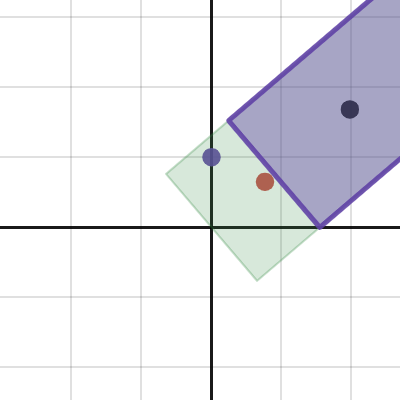
Desmos
dry monolith
dry monolith
you should tamper with the cosine you use for bias calculation
typo, should NOT
obsidian wolf
float bias = 1.01 * (1.0 / max(textureSize(s_sun_depth, 0)));
float slope_bias = length(cross(data.normal, sun_data.xyz)) / dot(data.normal, sun_data.xyz) * bias;
float world_position_depth = clip_planes[0] + position_lightspace.z * (clip_planes[1] - clip_planes[0]) + slope_bias;
float world_read_depth = clip_planes[0] + texture(s_sun_depth, uv).r * (clip_planes[1] - clip_planes[0]);```
the value seems to be too small

i'm missing the / 2 here but that makes it worse ofc
the cutoff ofc also doesn't change anything
if it's in clip space (basically just *20.0 for me because orthographic projection), it looks better, still not good though (and it should be in world space AFAIK?)
 dry monolith
should also offset by 1 precision bit value
depth map is quantized, I also said that at the time of discussion of slope scale bias in fwog thread
and yes I believe all of it should be in world space
so you technically need the bias to be the area one texel covers in world space
man I really am tired
actually let me look up what jaker put in fwog
interesting, I don't see any world space scaling in his code
obsidian wolf
these depth values really shouldn't be floats considering it's orthographic projection, but i've never had issues with depth precision
dry monolith
texel size in uv space accidentally happens to be texel size in world space or something
@main cosmos
you can derive how much of world area one texel covers from ortho projection creation code I believe
but also can do that by unprojecting two pixels and taking difference
obsidian wolf
so you technically need the bias to be the area one texel covers in world space
i don't understand this
is this the quantize value or separate?
obsidian wolf
the diagonal, yeah?
dry monolith
yeah I guess diagonal 💀
obsidian wolf
that should be the width, not max(textureSize())
dry monolith
that would be length(1/textureSize())
obsidian wolf
he's also doing it in clip space
which is how it works for me
    float lightDepth = textureLod(s_rsmDepth, uv + offset, 0).x;

lightDepth += bias;```I am trying to thinl
main cosmos
dry monolith
<@288411937962721305>
 dry monolith
good timing can you tell how your code works
dry monolith
I was trying to remember how shadow mapping works with tex2dproj
main cosmos
ah, I don't use a shadow sampler anymore
but basically with textureProj and a shadow sampler, you pass it a vec4 and it divides xyz by w for you (lol)
dry monolith
main cosmos
was it supposed to be world space?
actually I'm not sure
main cosmos
then it does the shadow test with the z coord and whatever it samples from the shadow map
main cosmos
well I just copied ur formula from desmos
and assumed it was supposed to be an ndc space bias
dry monolith
it was, yeah, I was assuming that too
obsidian wolf
if i do it in NDC with everything now it's not bad
 dry monolith
but it depends on measure of the space where the comparison is happening, or something, I really can't concentrate fr no cap
been working on 1 braincell this whole convo
obsidian wolf
certainly not perfect 🤠
i should figure out if using a shadow sampler would work with hqx
i don't know if vulkan is unique to having slope bias but hehe
main cosmos
opengl has glPolygonOffset, which is identical to vulkan's depth bias stuff in the VkPipelineRasterizationCreateInfo struct
but it's kinda lame for shadows compared to computing it in the fs yourself
main cosmos
the slope bias especially is weird because it depends on the format of the shadow map
and it's even weirder with floating-point depth buffers because the bias depends on the maximum exponent of any vertex in the triangle
dry monolith
you're transforming world by sun viewproj before comparing depth values right
main cosmos
but using void's formula lets you get the perfect bias everytim
dry monolith
so that means our measure is entirely in ndc now
that means we could use ndc texel size
main cosmos
obsidian wolf
why <:monkaHmm:583705655198744593>
I think the depth bias stuff is useful when you are rasterizing decals and other geometry that you don't want to z-fight
obsidian wolf
tbh i just don't know why they look like shit for me right now
dry monolith
I also think that we should use diagonal indeed
severe spruce
main cosmos
and it's even weirder with floating-point depth buffers because the bias depends...
no spoilers
obsidian wolf
it's 2048x2048 with a 10x10x20 frustrum, feels like i shouldn't be having real bias issues
obsidian wolf
Desmos
fwog code doesn't have any additional bias which doesn't make sense to me either
shouldn't you need to add additional bias in order to account for convex objects?
obsidian wolf
if you're using exact bias on a flat surface, the max(textureSize()) should've had clipped corners
dry monolith
 obsidian wolf
if you're using exact bias on a flat surface, the `max(textureSize())` should've...
obsidian wolf
obsidian wolf
if you're using exact bias on a flat surface, the `max(textureSize())` should've...
even here
1.0 / max(textureSize()) < length(1.0 / textureSize())
main cosmos
I see why a constant bias is needed for convex geo
dry monolith
fwog has quantization bias additionally
obsidian wolf
yeah i was thinking that might happen to account for it
dry monolith
1 bit of precision
main cosmos
I actually made the quantization bias a little extra large for some reason
probably paranoia
obsidian wolf
use a curvature map to account for curved surfaces and have the perfect bias every time
dry monolith
dry monolith
jaker do you understand what I mean here
main cosmos
that diagram is hard for me to understand
obsidian wolf
he is just saying the width in 3d is bigger than in 2d
because the width in 3d is diagonal, envision the red line at the origin as the cross section of the texel
and the box in the bottom left as an alternative perspective of it
main cosmos
o
obsidian wolf
obsidian wolf
1.0 / max(textureSize()) < length(1.0 / textureSize())
this
main cosmos
so the texel size should actually be scaled up by sqrt(2)?
obsidian wolf
uhhh you can just do length(0.5 / textureSize())
for the brainworm of non-uniform shadowmaps
and the probably non-existent microoptimization
main cosmos
like perspective shadow maps?
dry monolith
obsidian wolf
use a curvature map to account for curved surfaces and have the perfect bias eve...
but ur gonna need a smooth surface for curvatyre
obsidian wolf
yeah not actually feasible i don't think
dry monolith
I maybe don't understand curvature map
obsidian wolf
they're more of an artist concept than a graphics programmers
main cosmos
what is a non-uniform scale shadow map?
I just thought you meant perspective
parabolic shadow map maybe?
obsidian wolf
main cosmos
what is a non-uniform scale shadow map?
if you used like 2048x1024 res for your shadowmap lamo
main cosmos
oh
void just takes the max of the x and y texel size iirc
seems reasonable to me
but tbh when would you have a non-square shadow map
dry monolith
yes but I don't know if corners can still penetrate in 3d
so maybe diagonal is reasonabler
radius of the circumscribed circle if you will
main cosmos
a small gnome with a protractor is inside our GPUs 
dry monolith
anyways imma take a rest for a bit
obsidian wolf
moving on from shadows for now
these aren't perfect but
good enough for why i needed to do shadows
obsidian wolf
2048
these are the extents

wait
#art-discussion message
djsp does this
i am a follower...

#wip message
 dry monolith
did you figure out the shadow bias
obsidian wolf
obsidian wolf
moving on from shadows for now
its okay, this was the main "inspection"
dry monolith
what's the code is like?
obsidian wolf
    const float maxBias = 0.005;
    const float quantize = 2.0 / (1 << 23);
    float b = length(1.0 / textureSize(s_sun_depth, 0));
    float bias = quantize + b * length(cross(sun_data.xyz, data.normal)) / clamp(dot(sun_data.xyz, data.normal), 0.0, 1.0);
    bias = min(bias, maxBias);

    float world_position_depth = position_lightspace.z + bias;
float world_read_depth = texture(s_sun_depth, uv).r;```the quantize is wrong i am just now realizing
switched to a 16unorm because orthographic
main cosmos
obsidian wolf
the quantize is wrong i am just now realizing
ye
it's either too big or too small, depending on your depth format
dry monolith
that's basically fwogs code
obsidian wolf
yeah
that's where it started from lmao
i had to increase the max bias because of different scene scales though
main cosmos
1.0 / (1 << 16) should be the largest quantization bias needed
obsidian wolf
i did 0.5 over that :^)
dry monolith
jaker did you change max to length
obsidian wolf
yeahhhhhh
dry monolith
again instead of clamping bias you could make surface fully shaded by cutting off the cosine early
but that's more of an artistic decision
main cosmos
I prefer the method of just not having grazing shadows
dry monolith
I prefer the method of just not having rasterized shadows
obsidian wolf
:^)
main cosmos
touche
obsidian wolf
i think i haven't tried the cosine cutoff since i have it working decently
dry monolith
missed the chance to say minor spelling mistake I win
wonder if you can blur shadows so much acne becomes the least of your problems
obsidian wolf
i used hqx to avoid blur
obsidian wolf
never looked into em
main cosmos
or fake ray traced shadow mapping
I think it's called hybrid ray traced shadows or something
obsidian wolf
is that the triangle id method you were talkin about
main cosmos
yuh
it suffers from holes if your triangles are too small, unless you store a list of triangles IDs per-fragment
obsidian wolf
first is clamp, second is cutoff


assuming i'm doing something wrong with the cutoff?
float bias = quantize + b * length(cross(sun_data.xyz, data.normal)) / ((dot(sun_data.xyz, data.normal) - 0.05) / (0.95));
not the same sun angle btw, i dont have it exposed as a value anywhere, teehee
dry monolith
cutoff means not doing something to the bias but to your shading
dry monolith
to hide the panning shadow with early fade to zero
sorry I wasn't clear earlier
for bias calculation you'll always want accurate cosine
obsidian wolf
yeah this makes sense
obsidian wolf
even at 0 it's basically fine
i had some wrap before which would force shadowmaps to be the hard edge
i kinda wish i could still do wrap without diving a ton into shadows
dry monolith
so you are testing/showing off stuff on a complex mesh instead of a synthetic scene, and I can't see anything lol
there are still weird moments but I can't quite catch the frame
ok

got it
obsidian wolf
yeah this is just acne filtered by hqx

cutting off the dot at 0.05 hides it completely
which... i don't believe is perceivable really? so that works
obsidian wolf
the top turning black is from my outline code, i only mean the acne on the sides
16x16x20
each cube (croc sized) is 1 unit
main cosmos
I didn't get that side acne, but maybe I didn't test such an extreme case
obsidian wolf
i already am using reverse z
but the directional shadowmap should already be linear
obsidian wolf
main cosmos
Btw what's the frustum of the other camera
infinite, it's reverse depth
dry monolith
I mean if you go from screen-space to world space by unprojecting there may be an issue with reconstruction caused by depth precision
dry monolith
also reverse z not really linearizes it
just distributes it more evenly than it usually is
and I think it only works with D32F
main cosmos
reverse z + floating point depth makes it even more linearer
obsidian wolf
i am realizing that my depth outline works in clip space so it changes with near plane lmao
 main cosmos
Kej
obsidian wolf
that's unrelated though, player cam is D32F with reverse depth, shadowmap is D16U with orthographic projection
it does slightly better so i guess that's it
#questions message
does this mean there is a reason to store position
i dont think i actually would
main cosmos
It means there is no reason to store position
obsidian wolf
i'd rather fix it with adding some bias factor for reconstructed position inaccuracies
no that's what he said, not storing position has the downside of losing precision
main cosmos
yeah, but if your depth is high quality then it shouldn't matter much
and I suspect it may actually be better in some cases because depth doesn't lose precision as you move away from the origin
obsidian wolf
you'd need to work in some local space to actually make those gains
and at that point, the g-buffer would probably have positions in that same space
main cosmos
you could store view space position for slightly increased precision, but the extra 96 bits in the g buffer is a bruh moment
main cosmos
main cosmos
it suffers from holes if your triangles are too small, unless you store a list o...
the other thing I forgor to mention is that you have to also use conservative rasterization to capture all the small triangles
obsidian wolf
the way that i generate icospheres makes a pretty interesting pattern if culling is enabled
 obsidian wolf
this left my chat list ;(
christmas vacation moment
been working on cleaning up all of my assets to have the sort of "asset editor" working, kind of boring and tedious
it is annoying to get data set up properly to work for managing an animation library
ex; i have a Model component which has a ModelCPU (contains the hierarchy) and ModelGPU (contains the renderer items), the Model component is for moving data from the CPU side to the GPU side
there is also SkeletonCPU which has bones and animation data now, and SkeletonGPU which has the bones buffer pretty much, the ModelCPU has a SkeletonCPU, and then the ModelGPU has ptrs to the SkeletonGPU which also has a ptr to the SkeletonCPU for updating
the point of me explaining it is that it is overly-complicated, and that's after a bit of cleanup (future cleanup will probably be using the model component to move data from SkeletonCPU to SkeletonGPU in the same way as with models, rather than keeping the ptr on SkeletonGPU)
that cleanup point probably isn't actually true, it'll probably stay as is, Model can move data pretty nicely because ModelGPU is a vector of renderer items that can have their transforms set (i.e. it's pre-upload data), but SkeletonGPU is just a buffer, so Model or whatever equivalent would have to upload data and that is renderer side
dry monolith
what happened to fps
obsidian wolf
its debug + validation and the way im doing the skeleton is not friendly with that
still gonna optimize it a bit, but its gonna be like 70 max
uploading the skeleton debug mesh every frame, same with the pose widget mesh
actually, more accurately, i'm not uploading "the" skeleton debug mesh, i'm actually uploading a mesh for each bone ;)
thats the "optimize it a bit" part tho
main cosmos
Leaked image of your game
 obsidian wolf
is that cereal
obsidian wolf
obsidian wolf
hmmm, funny problem
if i want changing elevations, i need to figure out how the dragging (above vid) works across heights
the dragging works by plane intersection with the ray the mouse makes, but if the height changes the plane intersection changes
so i think i could either do some ray voxel intersection, which probably is bad, or i could use the same query that i use for starting it
difference is that'd be every frame and i still don't know the proper way of doing this
actually
i think i need to render a heightmap of the scene for a couple reasons
obsidian wolf
obsidian wolf
need to do animations for this, but i started on the code paths for basic abilities
my plan for abilities is to only allow targeting of squares at most precise, it massively simplifies a lot of gameplay code and gives an interesting restriction to work around
obsidian wolf
flail on the old model
obsidian wolf
she be castin
obsidian wolf
🙂
the asset editor is specifically nice and thats not really demonstratable through the vids unfortunately
thats the part thats been the coolest, being able to open a model and make another pose quick or edit the particle effects feels fairly nice actually
i wanna do water soon
tired of black background
obsidian wolf
i've got some ugly code
that i really want to make not ugly
but i have spent the time to make code like this not ugly before and it wasn't rewarding 🙂
we will see how long i can last

GitHub
C++ tower defense game . Contribute to cajallen/spellbook development by creating an account on GitHub.
this 150 line long switch statement of lambdas for abilities
currently it's only 2.5 abilities, so at ~60 lines per ability, that quickly balloons, obviously this shouldn't be in a switch statement with hard coded values like this
but the intentional thing is just to work in this for a bit more until i actually have a handful of abilities that actually give me a real direction to take it
rather than the hypothetical one that i want to replace it with now and have done in the past
it's funny though because it's such an intellectualization of it, like i have to remind myself that i haven't actually dealt with any friction at this point
it's not like i'm gonna write less code with some abstraction, really the only benefit i get is better system interaction and integration, which if i haven't done any game system interaction then i have no fucking clue of knowing what i need for that
tl;dr this is what peak code looks like 🙂
main cosmos
those animations are froggers fam
obsidian wolf
the effects help, but the actual skinning animation sucks
i just need to actually practice with it and try stuff that is overdone, i've spent hundreds of hours modeling but only a couple posing/animating so practice is needed
also i dropped the witch hat on this one because i think another will be more deserving and i don't want to have like 50% witch/wizard hats xD
dry monolith
health bars literal blocks
obsidian wolf
they used to have another mesh to give them a border but since the outline shader they look relatively fine at gameplay distances lmao
obsidian wolf


An early look at grass billboards. I really like how they add a completely new kind of shape and detail frequency.
Likes
1967
Retweets
119
 Twitter
·
Twitter
·
i might look at this for grass
main cosmos
interesting
obsidian wolf
i was having a very hard time getting grass that looked at all decent
main cosmos
I'm also interested in grass rendering suddenly due to my failed ld52 project
obsidian wolf
assuming you mean actual grass, not stylized grass :^)
main cosmos
ye
obsidian wolf
tbh the main trick with grass is just aligning the normal to the terrain
once you do that it looks good
some fudging with SSAO and other shading can be important but like... relatively... it's just the normals
main cosmos
the grass in valheim looks really flat if you don't have SSAO enabled
but when it is enabled, the grass becomes overblurred in shadowed areas (where SSAO is affecting the only lighting source)
obsidian wolf
what about SSAO + no DOF?
main cosmos
I always have DoF disabled
 main cosmos
ye
 obsidian wolf
tbh it looks like some GI mess
its probably whatever the out of box unity solution is for what its worth
main cosmos
SSAO disabled
 obsidian wolf
i doubt they have anyone doing rendering beyond unity toggling
main cosmos
this game definitely doesn't have very complex GI
at most, it does something interesting for water reflections
they aren't screenspace, and you can see the reflections update occasionally
looks pretty ugly without SSAO lmao
obsidian wolf
yeah but the first screenshot does not look like SSAO to me
well
i guess it could be
main cosmos
it's hard because it seems like there is a lot of video compression
obsidian wolf
trees are way harder than grass FWIW
giving trees any decent shading is really hard
though
if you're doing trees you also need to be an artist for a bit
and i'm not sure if you want to do that x)
i guess the way you'd actually say it is trees are kind of more tech art-y
main cosmos
ye my trees are just cylinders with cones on them
obsidian wolf
trees have: leaves which are a good bit transparent + there's a shit ton of bounce lighting + they're moving
honestly GP's worst nightmare even aside rfom modeling them
and ignoring modeling when talking about trees is ignoring a lot 😬
but do trees!!! 
leaves are basically just grass but on branches instead of dirt 
obsidian wolf
obsidian wolf
trees have: leaves which are a good bit transparent + there's a shit ton of bou...
actually, i'm kind of ranting, but speaking of that comparison, i'm pretty sure a big part of why aligning the grass normal to the terrain works decently well is because it approximates the first two
obsidian wolf
https://twitter.com/OskSta/status/1448248658865049605
more from him that's useful :^)
More talk prep. Gonna have another go at persuading people to cut their tiles along the dual grid instead of the main grid. I genuinely don't understand if this is rare because people don't know about it or if there is some drawback I'm not seeing.
Likes
8081
Retweets
1037
 Twitter
·
Twitter
·

 main cosmos
tiles
obsidian wolf
pov: you're laying under a glass table looking up at your albino frog who is walking on it
 main cosmos
frogcellent