TruckersMP
This is the home of  TruckersMP, where you can meet like-minded truckers, look for a VTC to join, help people with their questions or just hang out.
1 messages · Page 1 of 1 (latest)
 frank lavaBOT
TruckersMP
frank lavaBOT
TruckersMP
This is the home of TruckersMP, where you can meet like-minded truckers, look for a VTC to join, help people with their questions or just hang out.
In order to access more of the server and do things like post images & react, you need to verify your Discord account with your TruckersMP account. We require this to keep the server safe for everyone and free of spammers.
You can get the Verified role by linking your Discord account with your TruckersMP account.
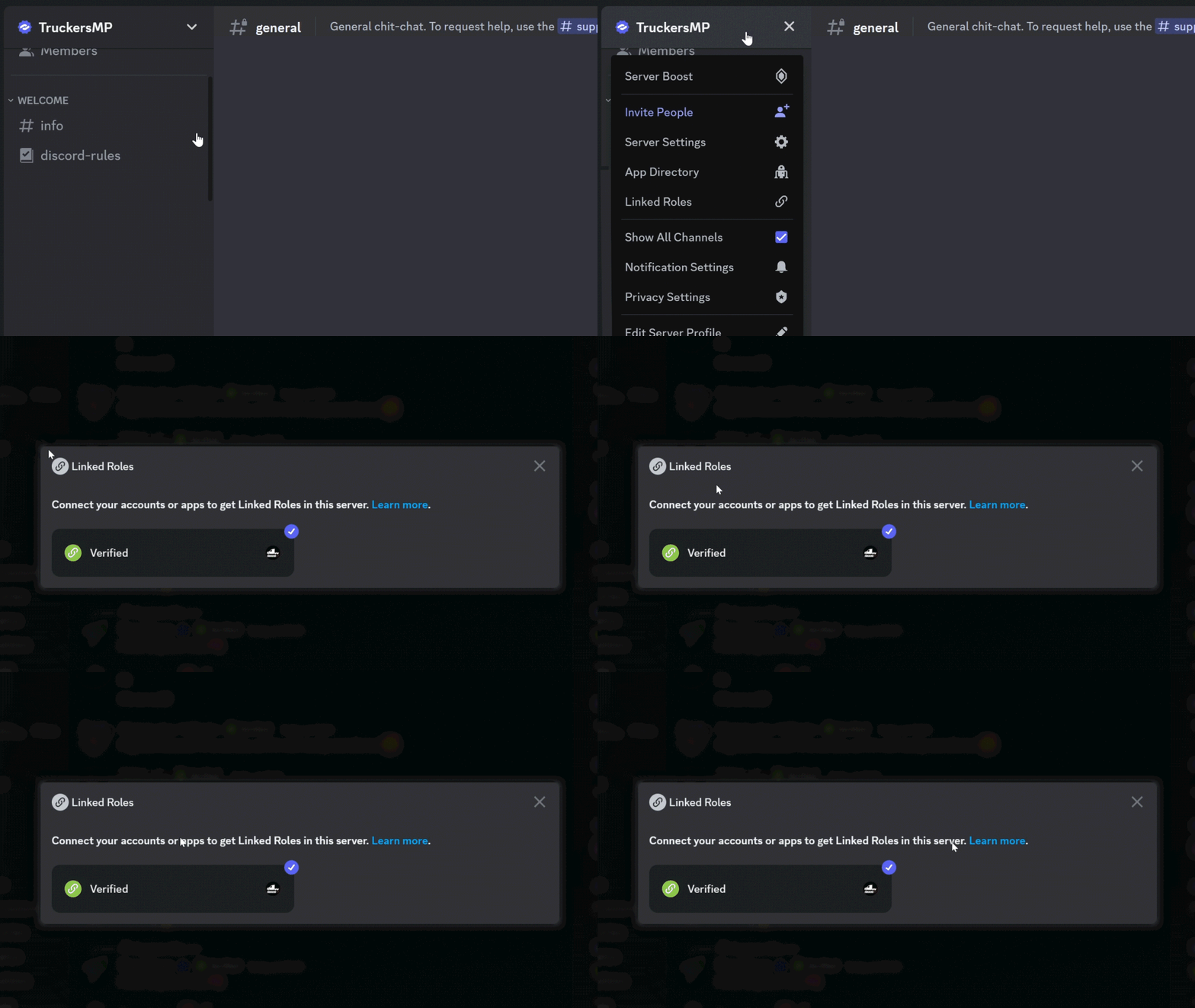
 Click on the server name "TruckersMP",
Select id:linked-roles in the dropdown-menu,
Click on "Verified" (id:linked-roles:1083781004038250546) and follow the steps.
If verification process is successful, you will be given the Verified role, which will grant you access to more channels, posting images, reacting to messages and more!
However, if you cannot complete verification process, open your profile settings at TruckersMP.com and make sure you have the correct Discord linked. If it's not your current one, scroll down further and use "Remove Discord" in your profile settings and add the correct Discord.