#tech
1 messages · Page 48 of 1
 pseudo comet
 tender quartz
Never heard of that 
 sterile crypt
How would baking your gpu fix it 🤔
 remote estuary
Google is your friend 
tender quartz
You better not make food in that ever again @pseudo comet
pseudo comet
 halcyon rune
bruh i need put my gtx 970 in oven but i dont have time
 distant zodiac
I'm guessing you are remelting the solder incase over time you have what's called a dry joint?
Like what they used to do with the original 'fat' ps3 when it would get ylod
but with a hairdryer, or better yet a heat gun
 hidden shell
Your oven is not hot enough to melt lead!
 short urchin
It actually works, if your GPU is having problems. Sometimes heating it up works.
halcyon rune
@pseudo comet tysm
hidden shell
Clean 🙂
 hollow drum
❤️
hollow drum
@hidden shell
hidden shell
G27? I won't post my setup. I've posted it too often now.
 sand valley
No it's the G31 
 sinful monolith
rate my mobile setup: https://pbs.twimg.com/media/EAlDbAhX4AAVWYu?format=jpg&name=medium 
 hidden shell
Haha, nice 🙂 30 thousand feet setup !!
sand valley
Tfw you fly economy 
hidden shell
Done
sinful monolith
economy with complimentary wifi 👌🏼
sand valley

 spiral yew
nice finger reveal beenz 
hollow drum
Oh no
 pure venture
Anyone help me, whenever I teleport into service, I get stuck in pause mode and can't do anything and I have to reopen it all over again
sand valley
how to fix little micro fps stutters in ets2? rx580 and locked the game at 60fps
sterile crypt
What cpu do you have?
sand valley
ryzen5 2600
 cedar grail
I'd say; disable fullscreen optimizations, VSync, and Xbox Game Bar
sand valley
omg i hate Xbox Game Bar....
 chilly imp
^
cedar grail
it's just useless if you don't have a high-end PC and if you're not a recording or streaming the game for some reason
sand valley
closing xbox game bar fixed it
cedar grail
Great, have fun ^^
hollow drum
@sand valley Known issue also I think you'll get better help when posting issues in the support chat 🙂
pseudo comet
MSI
 sick yoke
MATES! I got it. A new laptop. Now, It's not the best but I don't really care. It can run ATS at high everything and 30 FPS.
sand valley

 exotic shadowBOT
@pseudo comet: This is primarily an English Discord, but you can head over to #579776826600325130 and react with the emoji flag of the country with the specified language (e.g. :flag_pl: for Polish). You can then access that language's channel.
sterile crypt
What laptop you got?
 lament carbon
spiral yew
lament carbon
spiral yew
that's not bad cable managment
 sour sleet
@sick yoke I'd rather suggest lowering settings and playing with 60 FPS
distant zodiac
Anyway to go about fixing this? Did a full chkdisk as recommended by forums which did find and fix errors, yet every 3rd or 4th boot it'll blue screen to this
hidden shell
What does the event viewer say about the crash?
distant zodiac
Now that I've not looked at, how does one do that?
I can put together a pc with my eyes closed, but when it comes to troubleshooting I'm hopeless 😂
hidden shell
Or right click the start menu and it's right there at the top
distant zodiac
I'll take a look at that later and update you
 royal forum
I got that error and at a certain point I tried to fix it nothing worked anymore. The only way I could fix it was by reinstalling windows
But that was a bit ago
distant zodiac
Yeah I'm backing everything up, well work and software licenses the rest can be obliterated
Just need it to last the rest of today then I can work on jt
It
 final dagger
@lament carbon is that even a management? 
sick yoke
@sour sleet I will, I just CAN run at max, with my old one, I couldn't run 20 for the life of me on lowest settings
sour sleet
Lol ok
 analog mist
Is someone here firm with cameras? I'm looking to buy a dslr for starters for planespotting and landscape photography mainly. I sadly don't know enough about cameras to know which one would be the best for a maximum of 600-800€ with a proper lens. So far I've had the Canon 250D with the 18-135mm F3.5-5.6 lens that comes with it in mind...
sterile crypt
Landscape photography and planespotting are 2 completely different things
Where the main difference would be in distance to your subject
For landscape photo's you want to get a really wide view so you can capture as much as possible
Meanwhile planespotting is mostly done from some distance for which some zooming capability is handy
sterile crypt
Personally when I went looking around for a camera the only thing on my mind was: 'How does it feel?'
Cause every camera has a different layout which you may or may not like
I'd say it is a decent camera, thing I would not like is that it only has 9 focus points
analog mist
what about the 77D?
sterile crypt
The 77D does have more focus points which is convenient to have from personal experience, the downside to the 77D is that it is a bit of an older camera,
you lose the ability to shoot 4k video
it has an older processor which might result in a 'more worse' image looking at something like denoising
plus the fact that the 77D is more expensive which makes you unable to get your preferred lenses within you stated budget
analog mist
dangit. which camera would you consider that's worth it with a high quality image and video output and decent zooming capabilities?
sterile crypt
I think the 250D is a good starter for the enthusiastic beginner
Furthermore, I recommend getting it as a combo with the 18-55mm and getting the 55-250mm from cannon
This way you have 18-250mm completely covered
Where I live that combo would be just under €800
analog mist
aight, I'll propably go get the 250d and the two lenses you said. Much apprechiated, thank you for your time
sterile crypt
I do still recommend that (if possible) you get a feel of the camera before buying
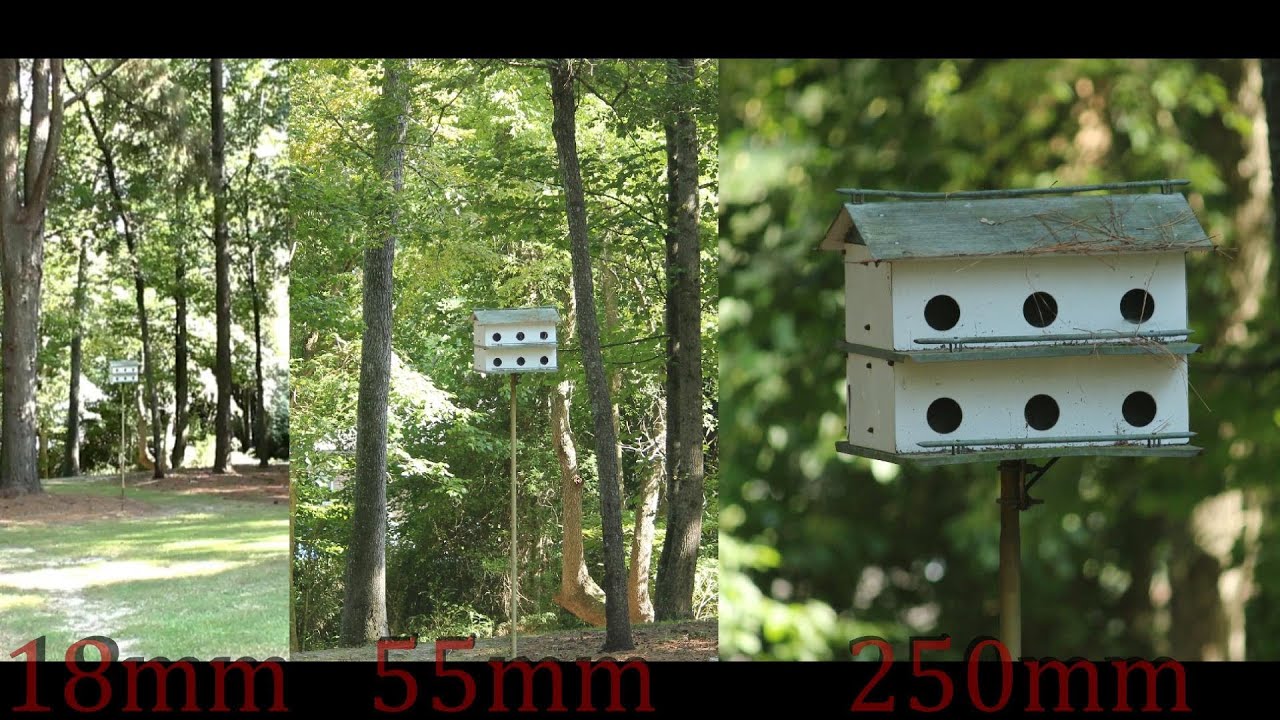
This is a video comparing the different zoom capabilities of a 18mm, 55mm, and 250mm DSLR Lens. The video was shot using a Canon Rebel T3i with a EF-S 18-55m...
Here’s a video I found for reference for 18-250mm
analog mist
yeah you're right. I need both lenses. One for far range and one for close things. Again, thanks for helping me out :)
pseudo comet
Another Graficscards
sterile crypt
Does your gpu collection ever stop
pseudo comet
@sterile crypt No xD
 bright parcel
I want a 1050Ti 😢
 cursive cave
Why do you want a 1050 Ti on December, 2019? 😀
There are some much better price/value VGAs now. 🙂
bright parcel
Because my PC can only take 1050Ti’s
cursive cave
And are you sure can't get a card with same performance for a lower price?
cursive cave
You can OC nearly all VGAs now, especially from the budget level. But your choice.
cursive cave
Hmm.
You can get a RX 570 for the same price, but with much better performance. And if you upgrade other components from your PC later, you will not need to change the VGA again.
distant zodiac
@bright parcel Only a 1050ti? What's the limitations power supply, space?
If you can budget a better card then go for the better card. The 1050ti is a nice entry level gpu for 1080p gaming, although even today I have a 1060 I am finding it to struggle in more modern titles to keep 60fps with somewhat decent settings.
pseudo comet
my 680 4gb is better than 1050ti xd
bright parcel
Ill see if i can get some specs for you
distant zodiac
This is what I'm currently running as my desktop
CPU: Intel i5 6500@4.7GHz
GPU: Palit GTX 1060 3GB OC
RAM: 2x 8GB Corsair DDR4 2666MHz -> 2866MHz OC Dual Channel
MB: Gigabyte Z170 Gaming K3 (One of the few MBs that allow for skylake and kabylake non-k overclocking on bclk)
The bottleneck for me is the GPU, I didn't have the budget to go better and that's hitting me now with the 3GB VRam limitation 😢
I built this in 2017, just shows the advancement in the past few years as it already looks pretty outdated lol
sand valley
I'm running a i5 7400@3.5ghz, gtx 1070 8gb OC, 16gb of God knows what ram xD.
spiral yew
old and new pc's
sand valley
Get an SSD
spiral yew
i have a m.2 just 2 lazy to re-install the OS on it
sand valley
But isn't it way faster
spiral yew
yeah
sand valley
I'd honestly do it just for the convenience
distant zodiac
Further dialing in the RAM. Got it stable running at 3072MHz. Weird frequency as I'm using the bclk to overclock a locked CPU.
This RAM is standard Crucial 2133MHz sticks, I've had them running at 2666MHz for a few years and today decided I could bump it up and really see what they can take. Any further the system becomes unstable and I'm not willing to push the voltage past 1.4V on these sticks due to their lack of cooling
https://www.userbenchmark.com/UserRun/22661208
100th Percentile on the CPU, 100th Percentile on the GPU and 100th Percentile on the RAM not bad
Reported CPU clocks are multiplyer clocks which are locked. CPU is running 4.7GHz on bclk
 sterile crypt
Where do you think the bottleneck is 🤔
 hexed lion
I'm really confused rn.
I was looking at some 2K 144hz monitors and found 2 at about 350 euros. And I don't get why they're are the same price. One is a Dell 2K 144hz 27inch and the other an AOC 2K 144hz 31.5inch,
Oh and the AOC is curved
Searched for some reviews and both have pretty good reviews
Dell is TN panel, AOC is VA
So why the same price ?
hexed lion
Oh shit. I just found a LG 34inch 2K 144hz with Freesync and curved for the same price. Resealed
With a IPS panel
spiral yew
Oh you mean a refurbished monitor
sterile crypt
2K is not 1440p, 2K is 1080p
sterile crypt
Let's just stick to calling it FullHD and QHD
 agile ermine
no
2k is 2k
2560x1440 is QHD
calling this "2k" is a mistake
same goes with 4k, btw
excepted 4k is used all over the place, while saying QHD is usually preferred to 2k
sterile crypt
QHD would be the correct term for 2560x1440, 2K on the other hand isn't
spiral yew
2k and 4k are a marketing term
sterile crypt
Tbh here in the Netherlands I've never seen 2K actively being used to advertise devices
spiral yew
just like microsoft saying the new xbox can play 4k at 60fps
sterile crypt
It can, but only on easier to run games like cuphead XD
It’s mostly race games that can run at 4k60fps on Xbox one x
spiral yew
i find the new claim about the series x xbox to be a bunch of bs
spiral yew
4k at a solid 120fps?
sterile crypt
Again probably in easier to run games like race games
spiral yew
yea but people are come after microsoft for false claims of 4k at 120fps in games like cod
agile ermine
Consoles are using variable resolution, I think... like, if it can't maintain a given framerate, it will lower the resolution
 mighty vine
HQHD is 4K 
sterile crypt

sand valley
Any advise for a good Gaming Headset?
 pastel lodge
one that works? 
 sterile crypt
Which one you got?
sand valley
Logi G Pro X
sand valley
Hi
sterile crypt
👋
distant zodiac
Logitech G430
sterile crypt
Logitech G430?
distant zodiac
Headphones
sterile crypt
Those are rookie numbers, my past laptop got to 99C on cpu when playing even the lightest games
 thorn owl
50C on high quality games xd
 brittle mountain
104 C on AVX tasks, fight me
sterile crypt
104C??? You running AMD or something?
pastel lodge
i run single fan with amd and i dont even reach above 80 lol
( and thats only when its really hot in my room in summer )
spiral yew
You've never pushed your gpu if you only hit 60c
spiral yew
Savage run the 3d mark demo on steam
spiral yew
FH4 lmao
 old shell
but sure lol
spiral yew
The 3d mark demo will test how good your cooling is
 wary warren
nice
brittle mountain
@pastel lodge AVX on 12 cores is lit fam, literally 🔥
@distant zodiac don't forget LTTStore.com
 light palm
I know nothing about PC specs, apart from the fact that ssd is faster 😂. Will this pc run ets2, preferably TMP on a high graphic setting? Also I’m not paying that price, I would be paying £600 from a friend that doesn’t use it. It’s 2 months old. https://uk-store.acer.com/acer-nitro-gaming-desktop-n50-600-black
distant zodiac
1080p, yes
distant zodiac
For £600 that's a steal
 wide temple
yeah definitely
distant zodiac
Plus if he has the receipt you've got a warranty, maybe not with the shop but with the manufacturer
Also since when was multi desktop thing in the alt tab menu?
light palm
would never pay that for my first gaming pc
I’ll custom build once I have more knowledge and finish school
distant zodiac
For £600 your not gonna find anything better at the moment
wide temple
It's been a thing for ages
light palm
that’s reassuring, I’ll need to tell him to hold onto it for after Christmas
distant zodiac
If you are waiting, then it's best to also just keep an eye out for other deals
Amazon is good for those flash sales, especially this time of year
light palm
Yeah I’ll keep a look out, also comes with two sets of keyboard and mouse so I’ll only need to get a monitor
distant zodiac
For 1080P gaming, monitors are cheap enough. If you do decide to go for a higher res just keep in mind that you might need to turn down settings
When I hook my 1060 to a 4k tv it's just lag central, whilst at 1080p i'm holding 70/80fps in most games
light palm
I only really play ets but will probably get into more games with it, not expecting to be able to run every game at max settings would be happy with medium
distant zodiac
Yeah it'll easily provide that, provided Acer haven't locked it down in some way
agile ermine
That should easily run every games at max settings and comfortable framerates as long as you stick with 1080p
It's possible to use it at a 1440p resolution, but you might have to drop the details for a heavy game
chilly imp
the multi-desktop thing is great when there's a teacher over your shoulder let me tell you 😂
 sharp steeple
@peak oracle so what's in your PC?
light palm
@distant zodiac I don’t really understand the 1080p, is it something to do with what monitor you get? As I said I’m pretty clueless
mighty vine
Yes, it's the resolution
agile ermine
It's the resolution of your monitor, basically the number of pixels. The most common is 1920px wide and 1080px high (said 1080p)
The more pixels you have, the sharper the image will look, but it is also harder to run
halcyon rune

toinen käyttäjä jolla pelaan cs : https://steamcommunity.com/profiles/76561198993799973/
its like on my steam
halcyon rune
:o
distant zodiac
Cable manage pls
light palm
are there any reliable websites that sell used gaming pcs? I just don’t want to spend big for my first pc
distant zodiac
So your not going for that Acer?
light palm
I want to keep my options open until I’m ready to purchase, was just curious to see if there’s any websites that sell refurbished ones
that are trustworthy
sterile crypt
If you’re going to look for refurbished things try to look for shops that give like a 2 year warranty
light palm
am I setting the bar to high for specs when I mainly only play tmp? although I would like to be able to play it with full graphics if possible
budget about £650, possible 7 at a push excluding the monitor, etc
distant zodiac
Take a look at Currys Refurbished
light palm
don’t they fill their pcs and that with a load of crap to slow them down in a few years time
might be talking 💩
light palm
can’t find refurbished, typed it in and opened link and said no results found
distant zodiac
oh that doesn't exist anymore? It was there literally a week ago
light palm
can’t find anything on their website
hdd and looks like a crappy processor https://www.currys.co.uk/gbuk/computing/desktop-pcs/desktop-pcs/pc-specialist-vortex-ar-intel-core-i3-gtx-1650-gaming-pc-1-tb-hdd-10199161-pdt.html

currys
Intel® Core™ i3-9100F Processor; RAM: 8 GB / Storage: 1 TB HDD; Graphics: NVIDIA GeForce GTX 1650 4 GB; 145 FPS when playing Fortnite at 1080p
distant zodiac
That i3 is on par with a 6th gen high range i5, it'll play ets2 ultra any day with that gpu
Other more modern games, it'll start to struggle in the future
Oh wrong channel
Just a keyboard for someone else lol
light palm
Went onto their actual website and custom built and this came out cheaper and looks like a better system?
distant zodiac
Pretty nice setup, although add a mechanical drive for storage
light palm
like that?
light palm
lol 1tb hdd was only £1 more
distant zodiac
make sure it's SATA III and 7200RPM
light palm
what’s the purpose of having both, baring in mind I don’t keep a lot of things on my pc
sand valley
dunno your budget but a 500GB SSD seems a bit more comfortable to me
SSD is for the operating system probably
Fast boots n stuff
distant zodiac
500gb is kinda small nowadays, especially if your gonna be gaming
light palm
there’s a 480gb
light palm
still £25 cheaper than the curry’s one
this is the specs from the one at currys that’s 25 more
no ssd
agile ermine
You could try to fit a better gpu, something like a 1660 or 1660 super
Drop windows if you can
light palm
I’ve decided I don’t want to chuck all my Christmas money into a high spec pc.
I’m just wanting one that can run ets2 and a few other games at mid graphics. How’s this
1tb hard drive, 256gb ssd
8gb ram
Nvidia gtx 1060 3gb
i5 7400
It’ll do me a couple years until im done with school and into a job
spiral yew
8GB is pushing it for ram
light palm
possibly but I’m not into any newer titles, I have an xbox for that
spiral yew
more games will benefit from having more than 8GB of ram
light palm
@sand valley do you manage to stay on ultra graphics and how do u handle Duisburg, Kirkenes quarry etc?
sand valley
I have 16 gb of ram and a better cpu i think
lemme check real quick
Mines a tad better
but not much
Only difference is the ram. I handle everything pretty well on 60 FPS but don't expect a perfect performance on ultra. Kirkenes and Duisburg are laggy cause TMP is pretty heavy on performance.
Everything else should be fine tho
 burnt carbon
hi my name is kayla and i barely passed tech in 7th grade
sand valley
But don't trust me man, cause we got different rigs (i5 vs ryzen)
Youll be able to play pretty good on lower graphics tho. like high instead of ultra i bet
light palm
I don’t see much difference between the both so should be fine
and when you say laggy, is it bearable
sand valley
its bearable
I was in rush hour duisburg and could still play the game
but your tolerance might be lower
hollow drum
I highly suggest 16gb ram
sterile crypt
Almost every pc will struggle due to the way ets2 is coded when talking about Kirkenes, Duisburg or Calais
sterile crypt
wdym with Curry's?
light palm
couldn’t I just upgrade the ram, it’s easy enough
that’s if I feel the 8gb isn’t preforming well enough for me
sour sleet
Is anyone good at nanoleaf troubleshooting with experience?
spiral yew
@sour sleet i have the nanoleaf panels
sour sleet
Hey @spiral yew , Ever since firmware update and the app update i can't seem to pair them or let alone reach them, They come up as not connected to internet in the app but there's no indication of network loss on controller. I tried a soft reset but nothing.
I really don't want to do a hard reset but keeping it as a last resort to fix things, Any ideas/Suggestions?
spiral yew
i didn't realize there was a firmware or app update
but i'm updating now and will check mine
@sour sleet do you the light panels or the canvas?
i just updated the app and the firmware and mine still work
sour sleet
Light panels
sour sleet
@ me bro when you reply pls
spiral yew
@sour sleet are you still having issues?
sour sleet
yeah i figured it out what it was though, after a hard reset they started working so luckily nothing wrong w/ the controller, but when i did a restore/cloud sync , they just started to not respond. now im waiting for nanoleaf support to see whats wrong with my cloud though
 drifting pollen
Can someone help me setup a 270 degree wheel
In a way its playeable in ets2
I know its generally trash for the job
But its a gift and its all I got
hidden shell
Maybe try that https://forum.scssoft.com/viewtopic.php?t=248107
drifting pollen
I have, far better than default, still struggle with slider configuration for this thing to be comfy
 buoyant cave
Hello there.
I have just gotten a new pc and I’ve connected the power supply to the computer and monitor and then put in the VGA cable to my PC from Monitor but the monitor is coming up with “no signal”, I suck at pcs and have no idea what the issue can be, anyone able to help?
mighty vine
Do you have an graphics card?
light palm
Am I better off with a 1060 over a 1650 even though it’s 3 years older
buoyant cave
Yes I have a graphics card @mighty vine
sterile crypt
@light palm What version of the 1060 are you talking about, the 3GB or the 6GB version?
light palm
3GB, I don’t play any big titles really. That’s why I’m not getting a crazy system
sterile crypt
From what I can tell, the gtx 1060-3GB delivers more performance that the gtx 1650
https://www.youtube.com/watch?v=-zrkJFq9AN0 I used this video as reference

How does the Nvidia GTX 1650 compare with the older GTX 1060 3GB graphics card? In this video we’ll test out and compare 18 different games at 1080p and 1440p resolutions to help you see the performance difference between them and discuss value for money.
*** Check US Pric...
On the other hand, the gtx 1650 Super delivers more performance than the gtx 1060-3GB
mighty vine
@buoyant cave did you plug the VGA cable into the graphics card?
sterile crypt
@light palm ^^ Hope this helps
light palm
Thanks 👍🏽
kind of struggling to find a pc that has a decent enough system that isn’t a complete rip off.
Budget is about £650 and wouldn’t mind refurbished but would prefer brand new
sterile crypt
@light palm https://www.youtube.com/watch?v=Lfcschg9uwU&feature=youtu.be&t=146 If you put this build together yourself with UK prices it might be a decent start

Visit https://www.squarespace.com/LTT and use offer code LTT for 10% off
Use code LINUS and get 25% off GlassWire at https://lmg.gg/glasswire
Do you want to build a PC this holiday season? We’ve assembled some jumping off points for you to take out some of the guesswork...
light palm
I made up this on pcspecialist and it’s coming in at £651
I don’t think I’m capable of buying separate parts and building it myself
sterile crypt
You got a tech friend that can help you with that?
Or you could try watching some build tutorials
Cause I can almost certainly guaranty you that you won't find a new pre-built pc for that price
final dagger
Does someone have a G920 for PC??
And Using it for ETS2?
Because I can't throttle
final dagger
well somehow i cant shift
im using automatic now
but this works
can someone explain this shit to me? xD
Truck Shifting seems to be very complicated
tender quartz
I use the g920 never had a problem
hollow drum
@buoyant cavemake sure your monitor is set to VGA its probably set to hdmi
light palm
is this alright for £650? not able to buy parts and build my own as idk how
pastel lodge
doesnt look too bad
mighty vine
Maybe the cable is bad
cursive cave
You will lose a lot of performance with single channel ram. Check this video: https://youtu.be/-k5wA7EFwpo

Forza Horizon 4, Battlefield V, Shadow of the Tomb Raider 1x8GB vs. 2x4GB RAM performance comparison.
G.Skill Trident Z RGB DDR4 8GB (1x8GB) 3000MHz CL16.
ADATA XPG Z1 DDR4 8GB (2X4GB) 3000MHz CL16.
Benchmark rig specs...
● CPU: Intel Core i5-8600K 4.1/4.5GHz, Hexa Core / ...
You can clearly see the difference.
buoyant cave
I have tried different cables
light palm
4gb x2 is only a couple more pound so would u suggest going with that @cursive cave
 woven turtle
I would even suggest spending just a bit more so you have 16GB
cursive cave
Sorry, what do you mean? I can't really understand. :D
The main thing is that you will lose a lot of performance if you decide to buy only 1 module. Rather spend a little bit more. 🙂
woven turtle
While 8 is enough for most things, it is handy for some things to have that additional 8GB
cursive cave
exactly.
Of course, it depends on your budget, but if you spend that amount of money for that, add a little bit plus for much better performance.
buoyant cave
any tech people wanna give a guy a hand
buoyant cave
@mighty vine are you able to join a call and you can assist me that way?
mighty vine
I can't sadly
 flat grove
instead of asking if someone could help you, it would be better to tell us what kind of problem you need help with, so that those who want to help can message you @buoyant cave
mighty vine
His display says : No Input or smth like that
He uses a VGA cable
And it's plugged into his GPU
sand valley
why are my fans at 80-90 degree only on 1200rpm max. can i turn the limit or idk off
flat grove
Benjamin, did you check if the graphics card is seated properly and if the BIOS is set to display on dediceted graphics unit (instead of integrated)?
Itsab, cpu or gpu fans?
hidden shell
Are the power plugs connected on the video card, do we know which model it is?
flat grove
i think there is an option or menu in the new radeon software to set the fan curve.
old shell
makig
hollow drum
Every monitor has a settings button or a button to change display the reason for it not displaying is because its not set to too vga @buoyant cave
buoyant cave
I fixed it all
light palm
Apparently cost about £2,000 brand new. Only thing I don’t really know about is the graphics card quality as I usually come across gtx
wide temple
How much is he asking for it?
wide temple
Bit of a rip off in comparison to the PC your friend was offering
light palm
isn’t available anymore, he isn’t keen on selling it now, really annoyed as I was up for getting it. it’s either paying around £450 for that or £650 for this one brand new
wide temple
It's not worth £450, you can get cheaper equivalent specs on eBay
CrossFire is also not something I'd want to deal with
light palm
yeah I guess but it’s who to trust on eBay
this person would test it infront of me etc
wide temple
If you lived near to me, I could sell you my old PC for cheaper of the equivalent spec 
mighty vine
Where do you live Moh 

 mighty vine

wide temple
Processor: Intel Core i5-4690K @ 4.2 GHz
Cooler: Phanteks PH-TC12DX_BL
Motherboard: ASRock Z97 EXTREME4
RAM: Corsair Vengeance Pro (4 x 4GB) DDR3-1866
Storage: Samsung 840 EVO 250GB
Storage: Western Digital Caviar Blue 1TB
Video Card: XFX R9 280
Case: Fractal Design Define R4 w/Window (Black Pearl)
Power Supply: Corsair RM650 80+ Gold Certified Fully-Modular
Optical Drive: Samsung SH-224DB DVD/CD Writer
Fan Controller: NZXT Sentry 3
Fans: 4x Fractal R2 Silent 120mm
Operating System: Windows 10 Pro
light palm
looks good, is i5-4690k better than 9400f or at least at a similar level
light palm
I really only play ets, would it handle okay? I’m looking on eBay and and there’s people who don’t even put all the specs so it’s hard to see
light palm

eBay
Specs:
Intel Core i5 7400
AMD r9 390X 8GB Graphics Card
16GB RAM
240GB SSD
2TB TOTAL HDD STORAGE
Feel free to message me any questions or if you need any more info and I would be happy to accept cash on collection.
no nothing about the graphics card unless it’s gtx
mighty vine
what's the price Moh
wide temple
idk
mighty vine

light palm
is i5 7400 any better?
wide temple
definitely would be
light palm
https://www.ebay.co.uk/itm/MSI-Codex-3-Intel-Core-i5-7400-16GB-Nvidia-Geforce-GTX-1070-Gaming-PC/184090110789?epid=28017525982&hash=item2adca02b45:g:wAwAAOSwCGVdem4n feel like it could be cheaper, then again it has a better graphics card

eBay
Graphics Card: Nvidia Geforce GTX 1070 Armor 8GB. Manufacturer refurbished item. Fully working. Any signs of use will be very minor. Wireless: None. Model Number: 9S6-B91311-033.
agile ermine
not bad for 600£
light palm
think about it overnight, at least it has warranty as well
tender quartz
I'd personally save up more for a better pc depends on what you plan on doing with it tho 🙂
pastel lodge

light palm
don’t play any big titles, no point
wide temple
Anyone have any recommendations for headphones?
Looking for something with the following:
Replaceable battery, replaceable cups, active noise cancelling, Bluetooth
light palm
this is about £70 more than the used one, which I’m willing to pay if it’s worth it.
specs of the used
@wide temple you know what you’re talking about lol
I’ll also upgrade the ram of the new one if I need to in the future
agile ermine
The big point there is the cpu
New games are starting to take advantages of high core count, so getting a i5 9400F can be good. On the other hand, if a quad core cpu is enough for the games you'll play, then the used one with its 16gb ram and a significantly better gpu will have the advantage
Btw, looking at the specs of the new pc, I'm sure you can get better than that for the price
light palm
possibly, but I’ve looked around. I don’t know how to custom build which would save a lot of money
spiral yew
ozzy google pcpartpicker
woven turtle
I would try to get 16GB of RAM from the start @light palm It is definitely worth it.
light palm
16gb and a 😬 case or a good case with 8gb which I could upgrade to 16gb in a few months
tender quartz
I'd go for 16gb 
light palm
If I were to order parts from pcpartpicker and get a company to build it for me will they have everything they need to build it if I order all the right things? I won’t have to order addition wires etc will i
spiral yew
yes but the company will charge you more than what it would cost to build it yourself
 minor lily
If you're a bit shaky on what you're doing, Then probs best to get the company to do it for you. I did it with PCSpecialist and the rig I got kept me going for years
but I spent a good heap of money to futureproof it
tender quartz
I had never worked on a pc before untill 2 months ago.. It was only replacing a graphics card but hey i did some research on how to do it properly and in less then 5 minutes it was in and out
The cpu in my opinion is the sketchiest part of it all.. 😛
light palm
@minor lily Yeah that’s who I planning on going with as you can choose your system and they make sure everything is compatible
am I better with 1 16gb ram or x2 8gb
spiral yew
definitely go with 16GB of RAM cause right now i'm using 10GB while playing Gears 5
light palm
Does it make a difference weather I get one 16gb stick or two 8gb sticks
spiral yew
oh 2 8GB
spiral yew
2x8GB RAM is better than 1x 16GB RAM
light palm
It’s £1 cheaper as well lol
tender quartz
spiral yew
well that depends on the memory company
tender quartz
Uhh, don't think that really matters tbh
spiral yew
does it list a primary storage?
tender quartz
M.2 ssd's are 
light palm
I would presume the first one is the primary
spiral yew
m.2 SSD are stupid fast but expensive
light palm
what if I put the current ssd into the m.2 lol
spiral yew
you can't
tender quartz
m.2's are getting less expensive quick
spiral yew
SSD and M.2 SSD are different
light palm
should I keep it the same or move the hdd into slot one and sdd into slot two as the hdd will be mainly for storage
spiral yew
keep the SSD for your Operating System and use the HDD for storage
minor lily
@spiral yew is talking a lot of sense 👍
light palm
as you can probably tell I know nothing about pcs, hence why I’m not building one myself
spiral yew
i've built both of my pc's
light palm
how will I make sure I keep the ssd for the operating system. With my current laptop I just chuck files into random places,
I’m really bad for that
spiral yew
 tender quartz
ssd's aren't that expensive anymore right?
light palm
It lets me add a 128gb m.2 ssd for £28
 light palm
I don’t really play any big titles, the biggest would probably be gta
spiral yew
if you want to use the M.2 SSD for your primary i would do 250GB or 500GB
tender quartz
Next year im building a new pc myself not sure hwat im getting yet
light palm
So the order of these two don’t matter?
spiral yew
it shouldn't
minor lily
as long as you can specify which drive you want your OS on, you should be fine
tender quartz
ssd for OS for sure
minor lily
defo
light palm
normally it gives you that option when you press proceed but it hasn’t
tender quartz
I don't have an ssd myself cause i have a 7yo pc 
light palm
Yeah it hasn’t gave me the option to choose which I would like the os on
oh wait so if I selected a m.2 ssd they give you the option to put it on there, which they recommend. So without none they automatically put it on the ssd
minor lily
That makes sense
I'd put your SSD as your first storage device anyway
Juuuust to be sure
light palm
yeah cause when I added a m.2 it said next to the 1st storage slot (ssd) nor recommend as I had a m.2 there. It said nothing about the hdd
So obviously they put it on the 1st storage device automatically
I’m presuming
minor lily
To be honest, It'll tell you at check out
Or at least most sites do anyway
Like it might even have a tick box
I'd imagine the reason it offers you when you do m.2 is because it's another SSD
and it can't differentiate outside of normal "SSD/HDD" rules
sand valley
Depends
 icy bronze
hey guys when should i sell my pc in order to make the most profit
i got this prebuilt for 738 US dollars
intel core i7 8700
nvidia gtx 1060 6gb
Memory 8gb ram
237GB SSD 1TB HDD
windows 10 home
with dvd writer, hdmi and 8 usb plugs
sterile crypt
237GB SSD?, weird amount
royal forum
He probably means a 250GB SSD but windows makes the shown amount usually smaller - for me, it says I have 232GB at all but I have a 250GB installed
light palm
I switched the HDD to the primary to see if it would change anything. So it confirms they install the OS on the primary which is the first, so I’ll put the ssd on the first
light palm
ok it’s ordered
woven turtle
What specs did you end up with?
light palm
It was between more ram or a nice case, but I decided to get both as I would regret not getting one of them.
and if I chose a ugly case I would’ve regret it
woven turtle
 good choice to get 16GB of RAM
light palm
what graphic setting will it comfortably run ets on
sterile crypt
Max 🙂
flat grove
ultra settings and scaling between 200 and 400%
(1080p60)
But I would recommend faster RAM (DDR4-2400) is not the optimal choice
sterile crypt
On intel the ram speed doesn’t affect performance that much
flat grove
it does
sterile crypt
If it was AMD it would’ve been another story
flat grove
not as much as on ryzen, but still matters a lot
I tried it on my i7-8700k
Got a Kit with 3600-Rating, but used the 3000-XMP Profile first, before trying the 3600-Profile
I noticed an increased performance of 15-20%
agile ermine
intel doesn't needs 3200mhz or 3600mhz speeds for the ram
but there's still an improvement between 2400 and 3000, not that much at higher speeds
and he doesn't have a monster CPU, so getting really fast ram isn't useful
sterile crypt
The motherboard officially supports ram up to 2666, so he could only upgrade to 2666 anyway
light palm
I don’t require a pc with better specs than that, seen as I don’t play really demanding games
it would be a waste of money
icy bronze
would rather get i5 8400 instead of 9400F
icy bronze
tru but for the same price its better to get ryzen 2600 or x varient
cuz over the years go by more games will need more cores n treads
so
but it depends
just my own opinion
agile ermine
I don't think pcspecialist has the 2600 available... and it's not much better than the 9400F for multithreaded tasks, let alone the fact that you'll need faster ram
sand valley
When I get my ryzen it's gonna be pretty miserable with 2133 mhz RAM until I upgrade the RAM xD
not really, ryzen likes fast ram
but get faster ram yes
3000mhz +
as long as it supports it anyway
Yeah I'm upgrading my storage, cpu and mobo. keeping the GPU and RAM though. When I get money I'll get some nice ram
corsair vengeance is a strong recommendation
16gb+
wait wut
I'm fine xD
It's already 3000 mhz lel
Wait, maybe not. 
https://gyazo.com/679b0d5fc3056e834ad07dc97eef2215 -- Is it NB frequency or DRAM frequency in cpu-z? xD

nb is north bridge
dram is probs ram ye
Uhhh I'm in trouble then

Uhm xD
Wait that must be how much I'm using atm
honestly ive no clue
remote estuary
A 1066mhz stick? Oof
sand valley
cpuz heps lol
your ram is like 2000mhz
I'm using cpu-z lol
since it only reads off 1 stick i gues ?
Oh come on xD
i have 4 sticks
1499mhz
and this is the reason to never buy a pre-built: Rubbish parts xD
ew
if you were in single channel it'd say the full speed
but dual is halfed
I'm in dual channel :P
so 2000mhz then
Welp. Thanks xD

I regret buying a pre-built so bad
I have 16gb's
2 sticks?
Yeah 8x2
remote estuary
Same
sand valley
ye so itll half
2133 approx, so yeah I was right. xD
So yea next on the list after the mobo, psu and cpu upgrade is ram :P
 marsh sparrow
Yall know any way to get a good connect with solder to a cb mic input
cause everytime i try they always just come loose
 ocean hazel
Brush the soldering point brush the wire coat off.
sand valley
Which i5 is the best?
wide temple
price to perf? i5 9500f atm
sand valley
I'd say about 250$
Dunno since I dont use dollars neither euro
Its 200$ so I guess it hits the budget
Any big difference between 9400f and 9500f?
hollow drum
I would rather an i7 but thats just me
All clean
I think im going to overclock back to 5.1
sand valley
Found an i7 , kinda over budged but I guess I will manage
wide temple
Might as well go Ryzen unless you’re just using it for gaming
sand valley
Well I spend most of my time playing games
hollow drum
I would say I stream fine with my i7 but i have 9th gen. I7 6700k is a good one
light palm
not much difference in performance but it’s newer
9700 has slightly better performance though
sand valley
Also is Nvidia Ge Force GT 1030 2GB DDR5 good for its price?
light palm
If I were you I would get a i5-9400f or similar so you can get a better graphics card
what’s your overall budget for the processor and graphics card
sand valley
Well my original budget for the Intel was 200$
But I can go over as long as I dont go too overbaord
Currently building a pc online so that's why I'm asking
They give me a base box intel and a graphics card and then I choose the things left
wide temple
What’s your total budget and what country?
sand valley
Bulgaria aka 200$ are 400 leva
light palm
you might be best buying a good graphics card with all the money and waiting a few months to buy the processor? Cause with that budget for both it’s kind of difficult
sand valley
It's about 1500k
The currency difference is a big pain in the ass
No not for both
Only for the processor @light palm
light palm
what graphics card do you have
light palm
so what’s your budget for the processor
hollow drum
@sand valley If you were to go over how much would you ?
sand valley
50$
hollow drum
so total 250 at most
sand valley
Yes
light palm
kind of same performance as 9400f
I’m not an expert myself
actually, it’s slightly better in all ways compare to the 9400f and it seems it’s a lot cheaper on the usa Amazon
sand valley
I will check it out in a min
hollow drum
@light palm I was looking at that one too for him as I'm in canadian dollars so everything is more
light palm
this one too
that’s better than the 3600 ^
i5-9600k > AMD Ryzen 5 3600 > i5-9400f
Probably best to worst for money in your case
although someone who knows a lot more than me will probably correct that lol
light palm
that’s what I’ve just ordered on my new pc
hollow drum
@sand valley What's your budget max for GPU
sand valley
Found an i5 9400f "coffe lake house" with a 1050
For a pretty good price
U asked me that already I think
Anyways its 250$
And the Nvidia GTX 1050ti 4GB DDR5 is a pretty good option
hollow drum
sand valley
Yeah it does seem better
agile ermine
if you can't afford a powerful computer, you'd better get an i3 or a 2nd gen ryzen instead of picking a cheap GPU...
sand valley
Getting and intel 5 9400f
hollow drum
1660 can run ets2 fine
agile ermine
the 1660 is a good option, you can also look for an amd rx 580 or 590, but it will draw more power
sand valley
Power is not really my concern
agile ermine
your PSU choice depends of it...
sand valley
Power in what way are we talking
sand valley
Oh nvm then lol
light palm
i5-9400f and 1660 6GB is what I went with
sand valley
Yeah seems like a good choice
I think I'm gonna stick with that also thanks for the feedback
agile ermine
a rx 590 can be insanely power hungry compared to the nvidia equivalent... a 940f and a 1660 is a nice combo for 1080p gaming
eventually a 1660 super
light palm
I’ll upgrade in a few years probably
hollow drum
I just upgraded my PC like last year and went overkill
sand valley
I'm doing a big upgrade rn so I think I will not be upgrading in the near future
hollow drum
🙂
sand valley
Also is there a big difference in these two coolers?
Cooler Master HYPER 212X and be quiet! PURE ROCK
light palm
don’t know much about coolers
sand valley
There is barely any price difference
So I'm not sure which one is the best option
Also is it worth getting this hard drive 2TB SATA 7200 оборота/м instead of 1TB SATA 7200 оборота/м
agile ermine
depends, do you need 2TB of storage?
sand valley
Well I do but j dunno if I should get an ssd instead
agile ermine
You can get a 1TB hdd and a 250/500GB boot ssd
sand valley
That's what I was thinking
Getting an additional 500gb ssd
But it does cost more
2TB is only 20$
500gb SSD is 60$
agile ermine
Maybe a 250gb ssd can be enough, most games don't really need an ssd
sand valley
It's still 50$
agile ermine
All is up to the storage you need, if you feel that 1.25TB isn't enough
sand valley
Well I will prob be playing some heavy games and j want to have functional space
If I have no space left that's a big no no
agile ermine
I'd recommend you to get an ssd, but that can also be a future upgrade
sand valley
Yeah
Also the hdd is actually 20$
I used my currency
On accident
So it even cheaper
Nvm I said 20$
Asking me if I want Wjndows pro for 100$
I can just crack it lol
spiral yew
i currently have a 2TB HDD and it's already half full of games
light palm
Is there any point getting a 144hz monitor for ets, I feel 60 is fine for what I play
light palm
1660 6gb
spiral yew
well you can turn off v-sync and see if your gpu can even hit those numbers
sand valley
U stream on twitch?
hollow drum
Maybe
sand valley
Nice
I'm finally not gonna play cs with 30fps
And I will be actually able to play more games
hollow drum
nice
light palm
can all 60hz overclock to 75 and If so, how?
hidden shell
I would say no, each monitor is different, you have to Google your model and try to find if it's feasible
light palm
will a 144hz be beneficial to a 1660 or would I be best with the 60
hidden shell
Benificial no, better looking, yes. If you play a lot of fps games, go for 144 if not, then 60 is fine
hollow drum
144hz gang
sterile crypt
You’ll need a mouse as well
sand valley
I got some headphones and I will prob use the mouse that I'm using rn
light palm
my pc I ordered is coming with a 250w power supply, I totally forgot about upgrading that. Is it a problem and if it is, can it be easily upgraded in the future?
flat grove
what kind of pc/psu is it?
sterile crypt
250w is gonna be too low
agile ermine
depends... but if it's a gaming pc, 250W is definitely not gonna be enough
 light palm
Oh never mind it’s 350w, will that be alright? @sterile crypt
never mind, it’s all good
spiral yew
350w is still low
it's better to have more power than what you need than not having enough power
light palm
I do have more power than what I need and if I do upgrade my processor and graphics card in the future I’ll upgrade the power supply too
spiral yew
i have a 860w PSU even though i have a i7-6700 and a 1080 ti
light palm
I’m not buying for the sake of buying, if I need to upgrade it if I get new components I will do
sterile crypt
A PSU is a very serious component of your pc, for example, gpu fail? new gpu, cpu fail? new cpu, ram fail? new ram. But if your PSU fails it may take everything that is connected to it down to the grave.
So it is recommended to have a reliable PSU and having like 100w of head room may be a real nice thing to have
spiral yew
cassie if they want to risk losing their new pc to a underpowered PSU let em
light palm
I’m sorry but if a big company supplying to huge retailers in the uk and even amazon, are recommending it’s enough, it clearly is. I’ve got 3 years warranty and by then it’ll probably be voided as I’ll have new components in.
they aren’t going to recommend something that’ll go wrong in the long run as they’ll be liable and it’s not underpowered to the extent that it would cause a problem. I would be worried if the power supply was from a company I had never heard of but corsair know what’s acceptable
spiral yew
ozzy if it's a prebuilt they will chose the cheapest components they can find which means nothing will be brand name except for the CPU
ozzy when i built my pc cyberpower pc still has a deal with walmart where you can choose the parts you want and they install it for a cheaper price but nothing was name brand except for the CPU
unless you buy it directly from a pc customization website where you get to choose all of your pc parts everything will be what ever is the cheapest
light palm
I chose everything for that pc, it’s custom built for me but obviously I’m not building it lol. They have pre-built options ready to buy on their website which are a lot more expensive and didn’t have a specification I was satisfied with
and I believe they do keep all the brands, as I’ve watched a few unboxings
spiral yew
you posted this https://cdn.discordapp.com/attachments/378700976733028353/662064170212130869/image0.png which means you didn't get to choose the PSU
 light palm
I did have a choice, I changed it to 550w so I could get that message up to see how much my pc would require, it’s already ordered with the 350w so I just copied the order to see what it required
spiral yew
https://www.corsair.com/us/en/Categories/Products/Systems/c/Cor_Systems is that the site you used
light palm
nonono, https://www.pcspecialist.co.uk
Manufacturer of performance custom computers and laptops. Customise your ideal gaming PC or laptop using our advanced configurator.
it’s a biggish company in the uk that supplies pre-built pcs to big places in the uk
but as I didn’t want to get ripped off and wanted to choose my own components I went with the build your own system option
spiral yew
PCSpecialist is an award winning manufacturer of high quality custom PCs. Configure the Intel Z370 PC to your ideal requirements.
agile ermine
350w should be fine, but you won't have any room for some upgrades
Those vs-series corsair psus are quide bad though, not very good quality
light palm
Yeah, but in a couple years I will most likely upgrade the gpu, cpu and the psu along with it
but when it does come to doing that, how will I know that everything will work fine as other components in the pc might not be powerful enough to handle a really powerful gpu, cpu etc
 inner flame
ey
agile ermine
The only thing that could be an issue is the mobo, if you replace your cpu for one that requires a different socket/chipset, you'll have to replace the board
But if you're not overclocking your cpu, the motherboard usually isn't an issue
Oh, if you replace your cpu in two years, you're gonna have to replace your board anyways, there are no chances for it to be compatible
hollow drum
Before upgrading you should always read up on your motherboard
sand valley
Is a 550W gonna be enough for me?
It comes prebuild in
I can chnage it to a to an updated version of 600W
For the i5 9400F and the GTX 1660
pastel lodge
should be fine
sand valley
Ah alright
pastel lodge
i have 550 watt too with ryzen 5 1400 and a 1060 6gb
pastel lodge

pastel lodge
rgb means better performance you noob
sand valley

 compact cove
blue lights cool the pc, red lights give more performance
green is for energy saving
also
pastel lodge
technicly every monitor is rgb
compact cove
thats the joke 😐
light palm
I managed to upgrade to 450w so I’ve got just under 150 headroom
spiral yew
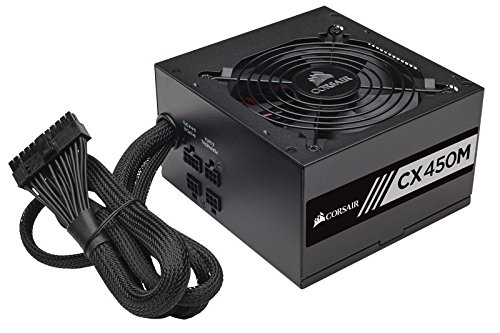
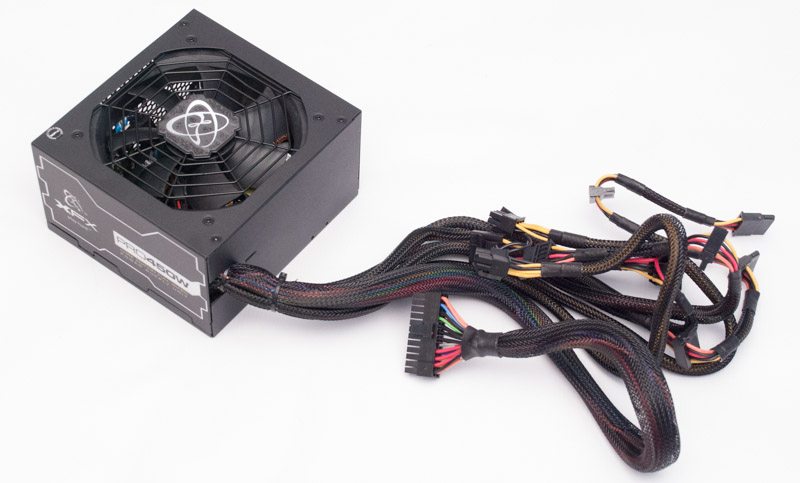
ozzy when you do decide to upgrade see if you can get a modular or semi modular PSU so you don't have like 100 cables in the way
semi modular PSU http://ecx.images-amazon.com/images/I/51yOyAh5xnL.jpg

fully modular PSU https://c1.neweggimages.com/ProductImage/17-116-038-V26.jpg

 light palm
Probably won’t be upgrading for at least 2 years and that’s if I’m still into gaming, but I’ll order the parts myself and get a local place to install it all
and I’ll have a job then so I’ll probably go overboard lol
spiral yew
the best part about semi modular or modular psu's is that you only use the cables needed
marsh sparrow
I got 750watts corsair RM750x
 crisp adder
i hate non modular but they do the job
distant zodiac
rip
old shell
i am speed
spiral yew
18k rpm da fuq 🤔
marsh sparrow
got to redo my 18 speed shifter or at least do some mods to get a better final product switching to a Arduino Uno Nano, but that means about the same work tbh, because of switching from making a box and more mechanical stuff for a USB joystick circuit but then an Arduino takes code which is not too hard but takes less money and less heavy equipment
 wary sinew
yo ,I’m buying a Razer blade 15 RTX 2080, just wondering if any of you have a Razer blade and if so what’s you think of yours? 
spiral yew
for that amount of money you would better off buying a pc
hollow drum
@wary sinew I suggest gaming PC's not laptops
wary sinew
I’m a trucker irl and do long haul so am not at home for 2-3 weeks at a time so need a gaming laptop otherwise I would buy a PC
final dagger
Should I buy a mechanical keyboard
If yes, loud or not
And maybe send me some links, I need some suggestions! 🙂
hollow drum
light palm
I can’t justify paying for much for a keyboard lol
agile ermine
I've got that very one, and it's great
but yeah, a good keyboard is really expensive
I often see some good deals on the peripherals tho
light palm
they’re £100 in the uk
hollow drum
Justify paying that much for good quality stuff
light palm
it’s a keyboard though, they all do the same thing, £30 rgb ones do the job
hollow drum
They are not the same really
final dagger
Well
I don‘t want to give out that much
When I could buy one for 50$ which also makes its job
compact cove
logitech g413, romer-g switches, quite silent, relatively cheap
agile ermine
got a corsair K70 with cherry MX brown switches for 100€, that was a steal for a keyboard of that quality
remote estuary
RGB or not?
agile ermine
rgb
remote estuary
It's 148€ here right now so yea, 100€ is a bargain 
The Mk2
pseudo comet
But can it Run Crisis
hollow drum
@pseudo comet Not even NASA computers can run Crisis
distant zodiac

Whiskey in the Jar (Metallica) cover by The Floppotron, computer hardware orchestra. Which song would you like to hear next?
Patreon: https://www.patreon.com/floppotron PayPalMe: https://paypal.me/floppotron
Like it? Share it! https://www.facebook.com/floppotron/ More info...
light palm
it’s a nightmare when your mum asks what a “gaming pc” is, she thinks it’s a waste of money when people buy ones for up to £2000 if not more
tried to say it’s a more advanced Xbox/PS4 that has better performance and game variety.
sand valley
Why you gotta explain it to here? Just buy it 
light palm
it’s already bought, she was like to me “that money could’ve gone towards a good car”
sand valley
Well yes
light palm
The older generation don’t understand, I’ll be working soon enough to get myself a car
don’t need one until late summer
sand valley
If you still have enough money then, i don't see the problem
light palm
I paid £705 for it, not bad compare to what some people spend
at least when I’ve got my own pay check I won’t need to justify why I’m buying something
light palm
I5 9400f, gtx 1660, 16 gb ram
not the best, but for what I need it’ll do for a few years
 light palm
would’ve gone even better if I didn’t have a car to save for, but as I said in a few years I’ll be in the position to upgrade components
sand valley
I'm gonna get a new one december
distant zodiac
@light palm Personally would've gone for the car and put the pc on hold, but you probably know that from #car-talk 😂
light palm
Yeah lol, hopefully I mange the car to
hollow drum
Car's are expensive with unwanted fixes which cost money plus gas plus insurance plus registration plus license so IMO I would get PC first unless car is a need
light palm
that’s another thing actually, lessons are so expensive so hopefully I don’t need many
some people need like 40+
spiral yew
#car-talk
hollow drum
PC because once you have a car you won't be able to save as much
hollow drum
 agile ivy
 hollow drum
❤️
hollow drum
144hz 1ms @final dagger
final dagger
Holy
light palm
do normal hdmi monitors just have hdmi to hdmi, or is it hdmi to displayport
 clever spire
If a monitor has a HDMI port then any HDMI cable, including HDMI to DP, can be used
light palm
DisplayPort is the best though isn’t it? for high resolution
brittle mountain
HDMI 2.0 and DP 1.4 are on par at the moment
but some stuff only works on DP
like G-sync on Freesync monitors, DP only
light palm
kind of confused when it comes to g sync / free sync, is it something to do with your gpu and cpu
light palm
so it’s best to have g-sync, but I swear some people want free sync or something
tender quartz
340hz is a waste imo for the price at least
hollow drum



 light palm
60hz will do for now, the budget is real
clever spire
144hz is totally worth it btw, you don't need to spend much for it either. My old 144hz monitor was £130 on Amazon
light palm
I have already gone overboard with the pc lol, I’ll possibly upgrade once I’ve got a car. like monitor, desk, chair etc
spiral yew
i have a 165hz 1ms 27 inch curved monitor
tender quartz
If you own a 60hz monitor 144hz is most worth it
340hz is the max though the human eye can't see passed 360hz i believe
agile ermine
Human eye dont have a framerate limit
But most people can't tell the difference between 120hz and 240hz
sterile crypt
It's mostly about feeling a higher refresh rate, let me see a video at 120hz and a video at 240hz and I probably won't see the difference but let me play for example a fast paced game like rocket league or csgo and I'll probably notice a difference
distant zodiac
I've got two 60hz monitors, although my main monitor runs at 74hz using Nvidia's custom resolution settings any further it'll go out of range.
I do see the hype around high refresh rate monitors and I have experienced the difference and whilst it's pretty substantial and I'm not too fussed with my setup. Most games I have I'll adjust the settings so it's around 60 to 70fps. I'd rather have better shadows, textures, etc than super high refresh rates.
brittle mountain
IPS Freesync 75hz monitors, which are cheap AF and have great color range, should be everyone's consideration for non-FPS (shooter) games
brittle mountain
bored waiting for the cpu cooling, so here's some work in progress shots from the gpu cooling upgrade
hollow drum
Why do you have 2 fans on the back coller thing
brittle mountain
push-pull config for the gpu
sand valley
When I'm getting a monitor its totally gonna be a 144 hz, the difference between a 60hz and a 144hz in cs is pretty noticeable
Barely any point in getting a new pc if I'm still gonna get delayed bc of a monitor
Well there is since I'm playing Cs with 20fps
Which ppl consider "unplayable"
spiral yew
30fps or lower is pretty much unplayable
lupus why buy a new monitor if your current hardware can only reach 20fps?
light palm
cause he’s upgrading his gpu and cpu aswell, I think
spiral yew
trying to hit 165fps on games like doom is pretty hard to do when you max out the graphics
spiral yew
is that your connection to the EU servers?
 peak oracle
Yup
spiral yew
feelsbadman
spiral yew
mines like 190
peak oracle
Oh
spiral yew
i'm from the US
peak oracle
Mine worse cuz I'm from AAAAAAUUUUSSSTRRRRAAALLLIIIAAA
spiral yew
you mean hell with all fires surrounding you
distant zodiac
GeForce 210, I'm impressed it actually runs ETS
peak oracle
It does amazing
But it's the TruckersMP server
I wish there was one in Australia
'-'
hollow drum
Im from canada and get 90 lmao and 2 ms on the CND servers
hollow drum
Oof
spiral yew
spiral yew
your upload is better
peak oracle
I get 6ms
hollow drum
Is that to your local?