#tech
1 messages · Page 40 of 1
 eager fossil
 wide temple
Not entirely, 1600x is factory overclocked and has a higher power draw compared to the 2600, the 2600 can also be overclocked to match it, it also comes with a stock cooler, where as the 1600X doesn't.
 agile ermine
the 2600 has better single-thread performances than the 1600x, which makes it better everywhere with a lower power draw.
you don't even need to OC it (even if you can)
eager fossil
That means the 2600 is better?
wide temple
Which one are you looking at?
eager fossil
AMD Ryzen 5 2600
I want to have a 1000/1100€ gaming pc for my birthday
I can send my list if you want
wide temple
What about the Intel one you're considering?
agile ermine
think thats the i5 9400F
eager fossil
i5 9400F and 9600K
And I saw a new Video, a AMD processor is better than a Intel processor for Gaming and Work
agile ermine
not for gaming, for work it depends of the softwares
if the software can handle a big amount of cpu cores, then AMDs will be better, but many softwares like solidworks or everything Java related can't use more than 1 core
eager fossil
I mean when im rendering an Intro the AMD is better
agile ermine
as I said, depends of the woftware you're using... btw, Im pretty sure you can use your GPU to render videos
but I dont think there are any softwares that use only a single thread to render a video, that would be completely stupid...
eager fossil
I want a Ryzen...
agile ermine
then buy a ryzen 😁
eager fossil
Its good for gaming too?
 uncut jacinth
https://pcpartpicker.com/list/YT8mtg current build, recommend anything to upgrade? Used for gaming/Zmodeler etc..
agile ermine
thats already a powerful build, why would you replace anything?
wide temple
add an SSD as a boot drive
uncut jacinth
oops forgot to put i do have 2 ssds, but i need this pc to be more powerful for 1440p, not a fan of 4k 1440p is good enough for me
boot drive is a 1tb samsung 8 or 950 pro and another 1tb seagate ssd for games
agile ermine
if you really want to have a significant upgrade, you'll need a rtx 2080 at the very least...
wide temple
Not worth it IMO, Turing isn’t comparable to Pascal with the performance and price increase. Unless you really need RTX
eager fossil
http://prntscr.com/nb4g2w why is the standart cheaper than the slim?
 eager fossil
whats not?
agile ermine
the standard is not cheaper...
agile ermine
no
eager fossil
whaat 1500 turns in a minute and its still bettr?
agile ermine
the slim is smaller than the standard model, the fan is faster to help a bit, but overall it dissipates less heat and is also louder
compare how both looks, you'll understand
agile ermine
thats the one I've got, and I'm quite happy with it, it is just a bit complicated to understand how you should install it, the instructions aren't very clear... but it does its job
eager fossil
My classmate will help me 
agile ermine
mounted it with a friend, took us a good 20 minutes to mount it X)
agile ermine
why would you update your BIOS? thats not really useful, excepted if you're replacing your CPU by a newer one...
(which will not happen if you're using an intel because older boards aren't compatible with newer CPUs, excepted 9th gen which uses the same motherboards as the 8th gen)
eager fossil
But why is there a BIOS update? I need to update it when I built my pc
agile ermine
you shouldn't need it
motherboards usually have a recent bios when they come out of the factory
 marble forge
you don't need it, you can do it but it's absolutely not necessary
eager fossil
U mean when Im using a i5 8th gen on a 7 gen Mainboard i need to update if for the 8th gen?
agile ermine
no, that works for ryzen, but if you get an 8th gen intel you'll need a new motherboard because it won't work with the board you use with a 7th gen cpu
eager fossil
For ryzens i need to do a bios update?
agile ermine
let's say you have a 1st gen ryzen and and its motherboard, you can upgrade for a 2nd gen ryzen without replacing your board, but you will probably have to update the bios otherwise the board might not recognise your new cpu
but you don't have to spend 100-150€ in a new motherboard
marble forge
I have a be quiet pure power 10 and I can recommend that
agile ermine
Seasonic are the best, but they are usually more expensive than the others
eager fossil
And how can I see how many watt i neeed
agile ermine
you're getting a vega 64 and a ryzen 5 2600x, right?
eager fossil
no x
agile ermine
woops, idk why I put an x there...
so, your gpu will need around 300W, and your cpu needs around 80W, but you also have to take everything else into account (motherboard, RAM, fans, etc...), so I wouldn't recommend getting a power supply that can't deliver at least 600W
650W should be fine
eager fossil
Which SSds should i take? the big cards or the M.2?
eager fossil
Man... my classmate is saying always the other side, the 2.5 card
eager fossil
SATA are the cards?
agile ermine
2.5 SATA SSDs and M.2 SATAs are cheaper than NVMe SSDs, but NVMe is a lot faster... but there's not a huge difference in terms of loading times
marble forge
SATA can be a 2.5" drive but there are also M.2 SATA cards
eager fossil
And doas the Gigabyte - B450 AORUS PRO WIFI (rev. 1.0) ATX AM4 Motherboard have a thermal pad for the M.2 SSDs
marble forge
yes, looks like it
marble forge
No but I can personally recommend Samsungs 970 Evo since I use it myself
NVMe SSDs are also getting cheaper and cheaper, I don't see a reason not to use one
I have this one as my boot drive https://www.mindfactory.de/product_info.php/250GB-Samsung-970-Evo-M-2-2280-NVMe-PCIe-3-0-x4-32Gb-s-3D-NAND-TLC--MZ-_1246503.html

Hersteller: SamsungKapazität: 250GBModellserie: 970 EvoFormfaktor: M.2 2280 NVMeSchnittstelle: PCIe 3.0 x4 32Gb/sLesegeschwindigkeit bis zu: 3400 MB/sSchreibgeschwindigkeit bis zu: 1500 MB/sCache: 512MBController: Samsung PhoenixChiptyp: 3D-NAND TLCMTBF (Lebensdauer): 1.500....
marble forge
too much imo
I have a 250GB SSD and a 3TB HDD, though If I built my PC again I'd go for 500GB one
eager fossil
I have no idea with storage 👀
marble forge
I know you play R6S right? that alone uses like 60GB without the UHD Texture Pack and if you have a few large games that profit from an SSD you're gonna run out of space quickly
eager fossil
http://prntscr.com/nb59ys those are my all games ive installed
 wide temple
Regarding the thing about BIOS updates earlier, if you use a Ryzen CPU its recommended to update if you can
As it's a relatively new platform, there'll be a few issues being worked out, and you might get a performance increase out of updating
Any decent mobo will usually have a dual BIOS anyway, so if it does get corrupted, you'll be able to flick a switch and swap to the backup and flash that
I mean my Z97 mobo from 2014 has it so I can't imagine today's mobo's not coming without it
eager fossil
Okay, which storage do i need?
agile ermine
personally I have a 500gb ssd, on wich I put all the games I play often at the moment, and all the other games I don't play are stored on my HDD, I juste have to move them in my Steam folders when I want to play
250gb doesn't allow you to put a lot of things on it, but I don't think 1tb is really needed... for me, 500gb is the sweet spot, unless you absolutely need to have all your games and softwares always installed on your SSD
eager fossil
500 GB Storage for me?
eager fossil
Is it enough for tge games?
eager fossil
https://de.pcpartpicker.com/list/vP247W I need a be Quiet! power supply and idk which, my case will be the Chieftec Scorpion II (82€)
 pseudo comet
oh yeees a new speedometer from.
a BMW E36
eager fossil
Moh, u have an idea?
 idle nebula
500GB should be enough @eager fossil
eager fossil
500 GB power supply? xD
idle nebula
pseudo comet
@wide temple i have it connected to my PC 😁
eager fossil
Oh yeah, sorry
pseudo comet
for ets2
eager fossil
I took the Samsung evo plus
 spiral yew
why not use an actual truck dashboard if your gonna do that rudolf
pseudo comet
@spiral yew Unfortunately I did not have the money otherwise I would have bought the complete driver's cab from the scania (accident car) but I stay with my e36 tacho
agile ermine
@eager fossil if you really want a be quiet power supply, I'd recommend that one, but you can get another one for cheaper it you go for a 80+ bronze rated model https://de.pcpartpicker.com/product/K3Jtt6/be-quiet-pure-power-11-cm-600-w-80-gold-certified-semi-modular-atx-power-supply-bn298
eager fossil
No, 1312,20$
And I saw on the Intel mainboard are the pins, not on the CPU, is it better?
eager fossil
http://prntscr.com/nbch9q or better i need a 500 Watt PSU
 agile ermine
wouldn't recommend a 500W psu
eager fossil
Why?
agile ermine
Because that's not a lot for a vega 64... 500W is the amount of power recommended for a 1070 ti, I think, and a vega 64 needs at least 100W more than the 1070 ti... also, power supplies tend to be more efficient if you use less than the maximum power your psu can deliver
eager fossil
Is 500GB SSD NVME too much for me when I got a 4TB HDD?
agile ermine
that's not too much, games take a lot of space sometimes
eager fossil
Okay
eager fossil
U want to see my list?
eager fossil
I dont buy i
I have it on my actual PC
And I want to take it out and add it to my PC
 iron tiger
What's wrong with a 4tb drive? I have 2 2TB drives working as 1 (RAID 0), a 4TB drive in a NAS along with a 2TB drive and another 4TB drive that needs an enclosure to act as a backup drive for Beasty (Beasty is the name of my PC)
 hidden shell
Raid 0 is bad, I hope you have good backups of the raid unit.
wide temple
RAID0 
eager fossil
I think when Im building my PC I will do many questions
wide temple
You're more than welcome to ask many as you want
Plenty of people here that would be more than happy to help 😄
iron tiger
raid 0 is ok so long as you know the issues that it brings - namely data integrity but for the performance it brings with it then in some cases it can be worth it if you can't afford an SSD which tbf the prices are coming down so raid 0 may not be necessary sooner rather than later for many people. Fortunately for me Beasty was built by myself and has a 2TB marked up as a spare drive on the off chance that a drive starts to fail plus there are backups elsewhere if I require them 😄
 upper dove
Was gonna say isn’t raid 0 really risky if one drive fails all data goes kaput 
hidden shell
Ya, You double your chances of loosing the stripe.
iron tiger
yup cos if a drive fails then you lose all of the data that was stored on the drives as it's shared 50/50
iron tiger
Exactly, otherwise it's not worth it but then for many they believe that the bigger the drive then the better it will be and stuff like that.
 stone rapids
what settings do people use for their wheel? i have g920 with shifter.
eager fossil
I'm using a G29
wide temple
@sand valley I deleted that screenshot because it showed your full IP address....
wide temple
No worries
 past phoenix
😂
eager fossil
https://www.bequiet.com/de/psucalculator I did it and it came 447 Watt

 flat grove
are you planning on overclocking?
if no, go for 550 watts
if yes, go for 600+ watts, preferably 650+ watts
wide temple
I would say go for 600+ watts regardless, the cost difference is not worth it
eager fossil
Okay I do it again
But
Does my case have coolers on the top?
I'm asking Chieftec now
What is a P-ATA?
I dont know if I have P-ATA or S-ATA in my PC
flat grove
P-ATA = Parallel ATA
S-ATA = Serial ATA
Check your mainboard manual. Most mainboard do actually have SATA only. Number of SATA ports, depends on the motherboard, but mbs do usually have 2 or even more SATA ports
PATA was/is widely used for IDE components which is an fairly old standard. But it's still used in legacy (=old tech) and embedded systems.
SATA is more modern and supports higher bandwidth and is what you should use as a connector fo ryour harddrives/optical drives
eager fossil
Should I buy 2 coolers on the top of my case?
agile ermine
dont trust the calculator numbers, it takes only the cpu tdp into account, not the power consumption... same for the gpu, the consumption may be higher than 295W, if you don't have a reference model from AMD... I still don't recommend to get less than a 600W psu
btw, whats your case?
eager fossil
Chieftec Scorpion II
agile ermine
I don't think 2 more fans on the top are needed, you already have fans at the front and at the back, that should be enough
agile ermine
thats just in case you want to put more fans, but theyre not really needed
usually you put your radiator for a watercooling at the top
eager fossil
But expensive
 remote estuary
50mb 
eager fossil
What happens when I have too much watts im my PC?
wide temple
Nothing, your PC will only use the wattage it requires
Having more watts isn't a bad thing, it just depends on the quality of the PSU, as most are efficient at a certain load
If you want to learn more about PSUs, check out Jonny GURU, he's the de facto PSU reviewer
eager fossil
Okay
 distant zodiac
Now if your power supply cannot meet demand then you'll run into stability issues, or even be unable to start your pc.
spiral yew
that's what happened to me when i got a new graphics card
iron tiger
Yup plus PSU's degrade after a period of time thus it's better to go for a higher wattage 1 - say about 50 to 100 Watts higher plus this gives you room to breathe if say you want a new graphics card or having 2 running at the same time as an example
 gilded stone
You should have about twice the peak wattage of the power supply compared to your component's power draw
My computer has roughly a 260w power draw at peak load but a 400w power supply
pseudo comet

PC Games Hardware
Im US-amerikanischen Bundesstaat New York zerstörte ein ehemaliger Student 66 Hochschul-Rechner mit einem sogenannten USB-Killer. Nun drohen ihm bis zu zehn Jahre Haft und eine Geldstrafe von…
 dusty timber
I don't think German articles will be readable in English chat
gilded stone
There's a thing called instant translation
wide temple
Welcome to Alex Battaglia's Panopticon of Path Tracing! With an able assist from John Linneman, we embark on a journey through the newly ray traced world of ...
eager fossil
Does someone know a RGB RAM? under 100€/112$
eager fossil
Dayum in € it cost 121€ and the Corsair Venegance RGB Pro 16 GB (2x8 GB) DDR4-2666 cost 103€
gilded stone
Trident Z is good
If possible, look for RAM with the Samsung B die. They're really good.
eager fossil
And the corsair?
Or I buy a RAM without RGB, but then I have RGB on my GPU, Motherboard and the case coolers (4 RGB coolers)
Yes, Im taking RAMs without RGB
Later Im buying them🤷
eager fossil
https://de.pcpartpicker.com/list/K9HWkd I think my father dont want 150€, I think 1000€ is okay and I dont know what I need to change
My CPU?
 sinful monolith
seems pretty well balanced as it is
eager fossil
But my dad dont want to pay 150€
eager fossil
I have my birthday on April the 30th
eager fossil
https://de.pcpartpicker.com/list/bL6Qkd is this good?
marble forge
Very nice
flat grove
yes
eager fossil
Okay, 82 for case then 998,47€
flat grove
pretty much on point with 1000€ budget
eager fossil
1,50€ for ice cream and 5 chewing gums xD
marble forge
One thing though, the Crucial SSD is much slower than the Samsung one and essentially wastes your m.2 slot. You might as well get the MX500 in 2.5" Format
The MX500 has ~500MB/s read speed in both form factors and the Samsung Evo 970 has 3500MB/s read speed
eager fossil
I need a ssd, it need to be ggood but i dont want the price over 1000€
marble forge
fair enough, the M.2 variant of the MX500 still has no advantage over the 2.5" variant though and you may actually save a few bucks if you just buy the 2.5" one
oh and do you already have a HDD? 🤔
marble forge
yeah ofc i was just wondering because there's no hdd in your list but if you already have one it's good
eager fossil
So I dont need a SSD?
eager fossil
Chieftec Scorpion II
eager fossil
Yes I think so
marble forge
it's always good to have SSD and HDD. Install windows on your SSD and have the 'Download', 'Documents', 'Pictures' and 'Videos' libraries on your HDD, that way everything you do is on your HDD except the OS and your games
eager fossil
Butbwhich SSD should I buy?
eager fossil
You still there? I need to show it my dad today
marble forge
I'd personally go for the Samsung 970 Evo
https://www.mindfactory.de/product_info.php/500GB-Samsung-970-Evo-M-2-2280-NVMe-PCIe-3-0-x4-32Gb-s-3D-NAND-TLC--MZ-_1246504.html it's not that much more expensive than the MX500 but 7 times as fast (in terms of read speed)

Hersteller: SamsungKapazität: 500GBModellserie: 970 EvoFormfaktor: M.2 2280 NVMeSchnittstelle: PCIe 3.0 x4 32Gb/sLesegeschwindigkeit bis zu: 3400 MB/sSchreibgeschwindigkeit bis zu: 2300 MB/sCache: 512MBController: Samsung PhoenixChiptyp: 3D-NAND TLCMTBF (Lebensdauer): 1.500....
eager fossil
Thats expensive for my dad (my dad would say no)
marble forge
pay it yourself then
eager fossil
I dont have 1000€
marble forge
then only buy the ssd yourself
marble forge
https://discordapp.com/channels/307433337126125568/378700976733028353/569914096787390465
well that one is from the previous generation, doesn't make sense buying since it's like the BX500 but more expensive
same thing for the other one
marble forge
Well then you have to live with the fact that you're getting something that's not really worth your dads money
eager fossil
The SSD is for gaming right?
marble forge
yes and for the OS
eager fossil
And whats with the HDD?
agile ermine
not especially for gaming, that will allow you to launch every software faster
so you can put in it every software that needs a lot of time to launch
marble forge
SSD for OS and Software/Games
HDD for Documents, Videos etc
eager fossil
Damn 😐
agile ermine
yea, dont put all your random documents in the SSD, you'll need all the space depending of your games...
but believe me, your pc will be really FAST to start with a good SSD
eager fossil
But my actually pc doesnt have a ssd
marble forge
an SSD is still good
agile ermine
yeah, thats so comfortable to see your pc starting in literally 15 seconds...
marble forge
I recently upgraded an old thinkpad laptop and it went from unusable to pretty decent
literally starts in less than a minute compared to like two or three minutes
and newer hardware also heavily profits from it
marble forge
If you really want to
eager fossil
Cheap SSD is better than no SSD
marble forge
true but imo it doesn't make sense to spend money on outdated products when you can get something much much better for only a little bit more money
eager fossil
Or should I be like these chinese clorhes trader? xD
 eager fossil
I need a answer :/ when my dad buy everything tomorrow, it will be not good, because my bday is on the 30th and I dont think that everything comes at my birthday
And must I have a SSD or can I play with my HDD?
 analog mist
you can play with a ssd since it's faster, but ets2 for example also works with a hdd too, but slower.
eager fossil
What works slower? The opening of the game?
analog mist
loading in general
ingame you can (depending of the HDD speed) experience minor laggs due to loading etc, but it's nothing to worry about
but I've only seen that in ets so far, nowhere else
Propably because of large loading files... whatever
eager fossil
And can you answer this: https://discordapp.com/channels/307433337126125568/378700976733028353/569959006928502784 ?
analog mist
The only thing that changes is the color isnt it
eager fossil
Color?
analog mist
wait

Based on 35,816 user benchmarks for the Crucial MX500 and the P1 3D NVMe PCIe M.2, we rank them both on effective speed and value for money against the best 996 SSDs.
The P1 seems to be a lot faster
eager fossil
They arent looking as the same
analog mist
well no wonder..., I'd go with the P1 cuz they cost the same
I know, but there's no difference
sinful monolith
playing from HDD is fine
the SSD is much more useful for the operating system itself
Windows these days loves to be installed on an SSD
eager fossil
Oh no
I have Windows on my HDD and i want to take my HDD in my new PC, I dont want to pay Win 10 again (My pc got Win8 but I installed WIn 10 for free)
sinful monolith
if you get the SSD, you should try to move the installation over at some point
Windows licensing is a mess that even their support agents don't fully understand without looking things up, so no idea if it'll work
eager fossil
My dad says yes 😁
He will buy the things
But do you/the most of here know how I need to do a BIOS-update?
agile ermine
you dont need a bios update
btw, an ssd isn't only useful for the system, a lot of games have very long loading times now, and while I was playing on my HDD I had a lot of issues in online games such as world of tanks, where my HDD was too slow to even load the map within the 40s before the beginning of the game...
sinful monolith
there's usually pretty clear instructions on the mobo manufacturer's site
agile ermine
if you choose a cpu and a motherboard from the same gen there's no compatibility issues
sinful monolith
pcpartpicker should already be ensuring compatibility
spiral yew
that's what i used and my ram wasn't compatible
agile ermine
how did u managed that?
spiral yew
well pcpartpicker told me the ram i had chosen was compatible when it wasn't
spiral yew
i had upgraded from DDR3 to DDR4 and a DDR4 mobo
no cpu was a i7-6700
the motherboard kept throwing the not compatible q-code
sinful monolith
as long as it's not wrong ddrX and isn't mixing modules it should pretty much always work
(and with frequencies within mobo supported range)
spiral yew
no the vengance wasn't supported
spiral yew
yes i know it should've but the mobo kept throwing the unsupported ram q-code
and i had the ram in the correct slots so that it would detect the ram as dual channel
agile ermine
again, whats your mobo?
wide temple
@eager fossil I think you can transfer licenses as long as its not an OEM one (by signing into your microsoft account)
I've done that myself
agile ermine
actually you can transfer your OEM licence by signing into your microsoft account, you don't even need that if thats a retail licence
wide temple

I'm pretty sure the license terms for OEM copies dictate they're non-transferrable...
spiral yew
i used my win7 OEM license to activate win 10
agile ermine
thats what I initially thought, but I know someone who transferred his OEM licence like that
spiral yew
i actually used the windows media creation tool get my win 10 license for 2 pc's
wide temple
You can use Win 7 licenses to activate Win10, seems to be intentional
But for pre-installed Win10 copies, I am not so sure about that
agile ermine
it works, thats what I can tell you
@spiral yew the vengeance is officially supported by your mobo... so you probably had a RAM failure, or something like that...
wide temple
👍
distant zodiac
Yeah I had to link my windows license with my Microsoft account when I replaced my motherboard so that it would carry over, I had to call microsoft first and this was the solution they had for me

 placid dragon
what kind of stock cooler were you using?
spiral yew
that looks like a water cooler block
placid dragon
Oh yeah with the X shape coming off it
eager fossil
https://www.youtube.com/watch?v=Jk69Tmc8zUI A video if you want to see my case functions ^^

Chieftec Scorpion II case : https://goo.gl/jkZfVy Special thanks to Chieftec for giving me a chance to do a review of this incredible PC case! #Chieftec #Sco...
stone rapids
be me
decide to watercool raspberry pi
spend ages on getting everything and putting stuff together
finally finished
add red food colouring to make it look cool
put on pi
leak
sad
wide temple
what a wild ride
stone rapids
no more leak now
eager fossil
um whut?
eager fossil
There is standing my name and my e-mail adress, does this say that I have a windows 10 account?
wide temple
Go to settings > update and security > activation (left hand side) and it should say there
 keen yacht
eager fossil
keen yacht
eager fossil
Thanks Moh! My Windows 10 is activated
wide temple
No worries! Enjoy your new build
eager fossil
Thanks 😃
 west lodge
Has anybody experience with watercooled GPUs
I have an overclocked Nvidia GeForce GTX 970 that i have thoughts on adding an AIO to. Somebody that has done this before?
agile ermine
it can work I think, but you have to be careful, if you don't have a correct air flow in your case the VRM may overheat, as you remove the fans...
eager fossil
My dad ordered everything yesterday and it should be there tomorrow, but my case comes later
wide temple
I don't think it's worth buying an AIO for a 970 in 2019
better off saving the money for a new GPU
The 970 is fairly old now, and isn't really that great for performance
west lodge
Misterclic I have looked at reviews and stuff and it seems like it is very effective. The bracket i plan on using has an in built fan for the VRMs. I have also heard that the liquid cooling is very good for the overclocking.
eager fossil
marble forge
nice
 latent aurora

 thin ivy
Surgery successful( charging port was bad and i had a broken controller with spare parts)
eager fossil
https://discordapp.com/channels/307433337126125568/378700976733028353/571340696230035456 I told you (#german) a lot that my budget 1000€ is...
eager fossil
Sexy case
 sand valley
 😍
😍
eager fossil
I'll do a video of building my PC
sand valley
hi
distant zodiac
When you benchmark an overclocked non-k processor things get weird 😂
https://www.3dmark.com/3dm/35719039?
Not bad for a PC I built 2 years ago

3DMark.com
Intel Core i5-6500 Processor, NVIDIA GeForce GTX 1060-3GB x 1, 16384 MB, 64-bit Windows 10}
 velvet wraith
Nearly the same setup
eager fossil
I built my pc but I needed to do a update and then the graphics card was too warm, I turned it off and I knew it was the drivers and I will wait for my friend, he will come to me and help me at the install
Evetything works but one of the graphics card fan was off
marble forge
was it off under full load?
agile ermine
if one of your fans of your graphic card isn't working but the others are fine the problem might come from your card...
if all of the fans are off, thats normal, on many cards now they are enabled only when it gets hotter than a certain temp (like 55 or 60°C)
spiral yew
@eager fossil it's not un common for your GPU to hit 70C
agile ermine
its not uncommon, but still a bit too hot
analog mist
i got my 1070 to nearly 100C using overclocking and it still works, but yeah, 70C is the temp of the gpu being under quite some load. You don't really have to worry about gpus getting too hot cause when they will, they'll shut themselves off. Non-spinning fans could be because of a malfunction of the hardware, but it could also be the drivers. In case of an emergency, you can always ramp up the fans to 100% using some software. With that most cards sound like jets taking off ^^
agile ermine
huh? 100°C is dangerous, you know?
analog mist
nah it's fine as long as you don't keep the temp for too long
wide temple
100c on a 1070 
analog mist
I held it there for about 5 mins, then it shut itself off
wide temple
The Tjmax for the Pascal GPUs is 93c...
Not sure how you passed that
Unless it's a mobile variant
analog mist
its not mobile, I used a special software for that which voids the warranty of the gpu... but it was overdue anyways so
agile ermine
gpu melts
 analog mist
as said, it was overdue since gigabyte gives only about 1-2 years or so
wide temple
I don't get it, do you just destroy your GPU because it ran out of warranty? lol
Or was it already broken
sand valley
could of sold it on ebay and got some money
analog mist
nah it's not broken, i just wanted to test how hot it can get cuz of couriosity
sand valley
should of done that before lol
agile ermine
thats the kind of things you can test only once 😅
analog mist
yeah that's how I lost about 3 older cpus
sand valley
and for a short period of time
analog mist
was worth it tho
sand valley
very short
wide temple
 you must have a lot of disposable income to do that
To kill a perfectly working 1070 because the warranty ran out...
agile ermine
I'll never do that... I already don't like to see by card reaching 75°C... at least, even at 100°C a 1070 doesn't catches fire like a 2080 ti
wide temple
I accidentally set the wrong fan curve for my GPU and it reached 93c 
That was a scary moment
sand valley
my fans dont turn on till 83c
analog mist
actually I dont, I also dont know why I do such things, but frying electronics and pushing it to its limits has always been fun
sand valley
thats set from gigabyte
analog mist
an expensive hobby yes, but a nice one
wide temple
So you're just... reckless 
agile ermine
thats not set from gigabyte, trust me
sand valley
i fried my gpu 3 weeks after i got it lol
wide temple
pls don't touch any of my things haha
sand valley
its on for gaming mode pre set
analog mist
as said, I didnt use the standart software from gigabe or things like nvidia afterburner
cuz that doesnt work
sand valley
just use the integrated intel one 😂
analog mist
lol
sand valley
i spent £700 in 2 days is that too much money spent in a short time?
analog mist
depends on what you spent it on ^^
analog mist
well that's too much for my taste
sand valley
i still need to buy more clothes
sand valley
might get another pair of shoes too that like another £100
and then all the money after that can get spent on my pc
analog mist
how come some people are that obsessed with clothing?
sand valley
im not obsessed i just wear designer 😂
analog mist
well as long if you have enough money to eat :]
sand valley
yeah i got enough
analog mist
can you at least overvolt designer clothing?
sand valley
😂😂🤣🤣
eager fossil
Oh wait wtf
The Gigabyte Aorus B450 Elite does have 2 Thermaguard or?? My does have 1
eager fossil
Oh no, it was a Pro
eager fossil
And what happens if I take my HDD with driver a for Nvidia and my GPU is a Radeon?
 jade trench
Windows will just use default graphics drivers if none are found
Then you can just download the Radeon drivers
eager fossil
But my friend said I need to delete the driviers
One fan of my GPU doesnt work 🤔 then my GPU is broken...
jade trench
Windows just wont use the nVidia drivers if they aren't in use
If any driver doesn't match the one required by the GPU, it will use the default Windows driver
marble forge
if it's really broken send it back
eager fossil
I bought it from Mindfactory and take off the foil
eager fossil
So can I send it bakc or not?
marble forge
yes of course
eager fossil
Okay
wide temple
Are you sure it's broken and its not like that by design?
Sometimes only one fan will spin up until the GPU reaches a certain temperature
agile ermine
Im pretty sure that when a gpu is at low temps all the fans are stopped and not only one (passive cooling)... you should ask the customer service of your GPU's manufacturer to ensure if theres a problem or not
eager fossil
Idk, Im waiting for my friend then I will know
wide temple
You could download MSI afterburner and ramp up the fans manually and see if both spin
eager fossil
But I dont have a MSI GPU
wide temple
Doesn't matter, it works with all GPUs
For example, I have an EVGA 1070 but I still use it to set a custom fan curve and overclock
eager fossil
Okay
but when my friend cant go to me? I have no idea how to do the things on my PC
wide temple
I can help you with installing MSI afterburner if you need
eager fossil
I mean the BIOS or WIndows
wide temple
Have you installed Windows yet? 
eager fossil
No
Because the graphics card was hot and my friend needed to go and he has the WIN 10 Stick...
wide temple
How "hot" was it
eager fossil
Idk but hot
wide temple
Vega cards run hot, a temperature would be nice 
eager fossil
I dont know which temperature it had 🙄
spiral yew
Was it above 50°C?
eager fossil
Idk
I didn't saw it
my friend wanted to install the GPU driver
and then it was hot
wide temple
Mine is sitting at 48c with both fans off, and I can tell you that touching it with my hand, its definitely warm
spiral yew
With my 1080 ti the fans don't spin until it reaches 60c
eager fossil
bruh
i want to see how many degrees it will reach but i dont want to destroy them
And i dont know how to see it
agile ermine
you cant destroy it, it will automatically shut down itself
and a lot of gpus are passively cooled at idle, so you don't risk anything unless you do thinks that need a high gpu usage
you can use MSI afterburner to monitor your temps, or any other software from a gpu manufacturer
eager fossil
So when I need to install my new pc and my gpu is too hot, it will be off?
agile ermine
it shouldn't get too hot begause it's not used a lot
eager fossil
And what would happen when I take my GPU out and install Win 10 and the drivers?
eager fossil
?
flat grove
try it out
It won't break for sure
But, iirc, nvidia checks your system if a gpu is installed, if not it will simply won't allow you to install the driver
agile ermine
you might also simply not be able to turn on our pc, if your cpu doesn't have integrated graphics
flat grove
^nope, because operating systems will use fallback functions like cpu-software rendering which will only decrease (graphics-)performance and increase cpu usage.
placid dragon
You think 9 display outputs is enough 
Even though each gpu can only output to 4 at a time
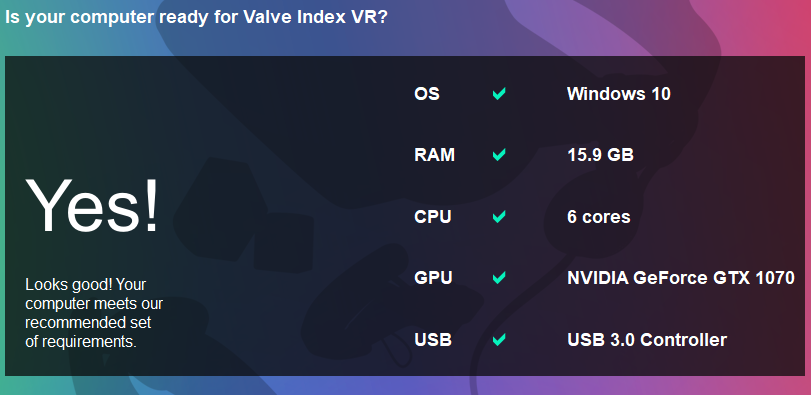
uncut jacinth
https://i.imgur.com/PB70i2g.png geforce experience says otherwise 
 eager fossil
Do you want to see my PC? I can turn it on and send here a photo 😁
idle nebula
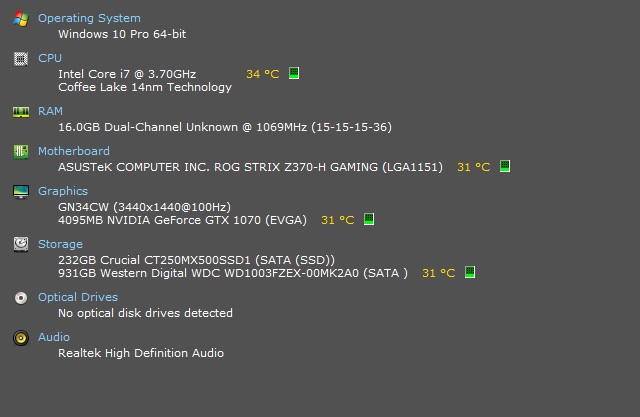
https://prnt.sc/njwlof "Not quite" 

 idle nebula
CPU: AMD Ryzen 7 2700X
GPU: NVIDIA Geforce GTX 1050
uncut jacinth
nice
idle nebula
But seems to be not enough vor VR...
uncut jacinth
surprisingly, maybe the vive? unless they run the same specs
idle nebula
¯_(ツ)_/¯
eager fossil

idle nebula
I am also wondered that my gpu is too bad for VR
uncut jacinth
i wanna upgrade my 1070 before i get the vr, its for my monitor since its 1440p
idle nebula
But I do not intend to use it tbh, so it's not too bad for me 😛
eager fossil
Theyre off but when Im pressing the small button, they are spinning and then I heard peep and they stopped spinning why?
The left button
wide temple
Left button is a reset switch
When you restart your PC, the fans will switch on and then switch back off as they have not reached temperature
As long both spin when the system boots, then it is working correctly
eager fossil
No, all fans are spinning but when they will start spinning?
wide temple
When it reaches 50c
eager fossil
I want the thermogun but i dont have it
I dont want to test it
Without any thing where i can see the temp
wide temple
Sorry, 55c for your GPU, it says on the website here: https://www.asus.com/uk/Graphics-Cards/ROG-STRIX-RXVEGA56-O8G-GAMING/overview/
eager fossil
64
eager fossil
Okay thanks
wide temple
my GPU is sitting at 49c at the moment and both fans are off, it feels warm, but it's completely normal
eager fossil
Idk man... should i let then on to test it
eager fossil
Which gpu was it?
wide temple
EVGA 1070 FTW
eager fossil
It was in fire?!
wide temple

EVGA's overheating VRM issue detailed & list of affected cards : http://wccftech.com/nvidia-gtx-1080-1070-evga-cards-dying/ EVGA's GTX 1080, 1070 & 1060 over...
 rugged mauve
eager fossil
My middle fan doesnt working again -.-
marble forge
does it spin on startup though?
eager fossil
the middle one not
 livid dew
^
eager fossil
But I saw it one time working
I turned it off, it was so hot and I dont know how many C° 😐
livid dew
Better to replace the defective card now than try to fight warranty later
livid dew
Oh, I just scrolled to yesterday and saw that
I would definitely get windows and the drivers installed, see if the problem persists
eager fossil
I dont have windoes installed on it because i dont have an USB for it
I started it again -.- and now im waiting
And how many seconds can i hold my finger in the cooling metal when it is 60 C°
wide temple
Not that long to be honest
livid dew
Lol I try not to stick my fingers on my card when I don't have to

 eager fossil
yes but the middle isnt spinnin
wide temple
what, you said the middle one was?
eager fossil
The middle one fan wont work
wide temple
Try to spin it with your finger, if you feel resistance, something is probably broken
Also, see if the middle fan is "twitching" at all, not all fans will spin all the time, for the Strix cards anyway from what I read
livid dew
I still vote exchange the card. The fans should be spinning even without proper drivers
livid dew
Someone got their first RGB case lol
eager fossil
Yup
livid dew
I do like that design though
marble forge
when did you order your components?
I'm not exactly sure on mindfactory's return policy but remember that you have two weeks time usually
eager fossil
I think 26.4.
marble forge
ok
eager fossil
The middle fan is working again but why didnt it work?
marble forge
I'd just install windows, install the drivers and run a stress test to see if they work at all and if not, return the gpu immediately
livid dew
Maybe that card disengages the middle fan if not needed
Definitely test it with Windows and the drivers installed
marble forge
Asus ROG cards (at least the 1070) turn the fans off completely and they only turn on above liek 60° or somethig
eager fossil
And now its not working (I was pressing the restart button)
marble forge
There's only one way to find out
eager fossil
Im sure that all of the fans are workin
livid dew
Yeah, I personally wouldn't trust that card. Never heard of some fans on and some off
The fans shouldn't be on period if the card isn't under load, except for a test burst when it first starts.
marble forge
one fan not working probably doesn't matter that much but if one thing is broken, you never know what else could be broken
livid dew
Plus you paid good money for it
eager fossil
Supa hot!
livid dew
No good
eager fossil
Not hot anymore!
wide temple
I read that the middle fan on some Strix cards won't spin up until it gets very warm
So your best bet is to run a stress test and see if all 3 fans spin up, if they do, then it's working as intended
spiral yew
Do you have a can of compressed air?
agile ermine
then just install windows...
eager fossil
I dont have an USB with Win 10 and I dont have a can with air
marble forge
make a win10 stick then
eager fossil
I dont want to buy Win 10
marble forge
buying a license has nothing to do with your usb
marble forge
do it now, then it can download in the mean time
eager fossil
And I dont need to uninstall my actual drivers?
marble forge
what drivers
eager fossil
Of my Nvidia GPU
marble forge
what do you think were your drivers are when you don't even have windows installed?
eager fossil
I have Win 10 on my HDD installed but I need to install it on my SSD and the drivers are in the HDD
marble forge
and why don't you use it on your hdd for now?
if you install windows on your ssd your hdd won't even be affected so they are technically not installed on your new installation
eager fossil
I want to install Win 10 on the SSD, then its faster
livid dew
What OS are you using now?
eager fossil
Where do I see it?
marble forge
you literally just said it
livid dew
head explodes
marble forge
win10 home
eager fossil
Oh yeah Win10 Home, sry I didnt know what OS means
eager fossil
On my SSD not
Okay wait, my bad PC has Win 10 Home Nvidia Driver and Nvidia GPU and my new PC needs Win10 and Radeon Driver
livid dew
You could just swap your license to the new machine
If it fails to activate, just call Microsoft and tell them you upgraded the hardware and need help activating
eager fossil
When I delete my HDD, I have Win8
marble forge

eager fossil
...
eager fossil
I have Win8 on my HDD but then Win10 for free
marble forge
he's not unfortunately
eager fossil
Oh wait, I have an account for Win10
livid dew
Haha
eager fossil
Where can I install Win 10 on my USB?
marble forge
Search the world's information, including webpages, images, videos and more. Google has many special features to help you find exactly what you're looking for.
eager fossil
🙄
wide temple

Windows Central
In this guide, we show you the steps to create a USB bootable media to perform an upgrade or clean installation of Windows 10 on computers using UEFI firmware.
follow this guide
eager fossil
But which Win10 is it?
wide temple
Check which version you have right now
marble forge
which is what?
wide temple
It's likely to be Win 10 Home
eager fossil
Its downloading my Win 10?
marble forge
I think you have to select the edition on installation
wide temple

wide temple
It's a global ISO, you can pick which version you want when you start the installer
eager fossil
I was clicking on the Windows chossing thing and there was just Win 10, no Home or Prp
marble forge
Why are you even asking when there's only one choice 
 marble forge
google the error code ffs
do you think we know all answers to everything based on that code?
eager fossil
yes 
eager fossil
Yees ma pc is workiing
eager fossil
Hey, I want to use my HDD in my new pc but it doesnt work so I want to delete everything and I need to delete Windows but I cant
flat grove
why does it not work? What happens fi you try to delete Windows?
agile ermine
you can't delete windows
you can clone your hdd on your ssd, but you'll have to erase everything that's on your hdd after that
eager fossil
How do I clone it? I already have deleted everything but Windows wont go out
And now my Corsair LEDs from the Ram wont go off
flat grove
you can'T really delete the windows folder.
You have to format the harddrive with the windows installation that you want to remove
eager fossil
I formated my HDD and windows is there
flat grove
on the drive that you formatted?
flat grove
probably you didn't format it then or something went wrong
eager fossil
I didi it, no pics or something from me was there, just windows
flat grove
weird, try restarting your pc
if it diesn't work, goto control panel -> managemnt -> computer management -> disk management and format your drive over there
marble forge
So you installed Windows on your SSD now and you formatted your HDD during the installation. Correct?
agile ermine
when you format a drive, it DELETES everything thats on it
to clone your hdd on your ssd (windows included), there are specific softwares
I personally used Macrium Reflect... it might be a bit hard to use, but it works well and I found a lot of tutorials on the internet
eager fossil
Uhm, my CPU and GPU will be very hot when I play F1 or other games with good graphics, I took my glass on the side out, the glass was hot and how do I get them cooled without heating my glass?
placid dragon
Does your cpu use the stock cooler?
eager fossil
yes
placid dragon
Well get a better cooler or an AIO
Also how big is your PC case?
Because you might want more case fans to help move air through it better
eager fossil
I got a Chieftec Scorpion II
4 Case coolers/fans
I will buy a be quiet! Pure Rock
placid dragon
Okay that case has plenty of fans
Yeah get a decent air cooler or AIO for your cpu
What cpu is it anyway?
eager fossil
Ryzen 5 2600
agile ermine
download ryzen master, it'll show the temps of your cpu
thats not surprising that your glass side panel is hot, as your cooler blows hot air directly at it...
spiral yew
@eager fossil I hope you put thermal paste between your cpu and your cpu cooler unless your cpu cooler came pre applied with thermal compound
agile ermine
the gpu temp is fine in my opinion, but the cpu temp is way too low...
spiral yew
there's nothing wrong with a cpu having low temps
agile ermine
obviously, but im pretty sure the temp displayed here is wrong, thats almost impossible to get that low, even with a custom watercooling loop
spiral yew
well the ambient temp/room temp also makes a difference
agile ermine
yeah, but 21°C might be close to ambient temp, so thats weird
agile ermine
nvm, im half blind then
 rapid torrent
x)
remote estuary
I might have to reboot this phone lol
eager fossil
Fck I really need a better CPU cooler, I played F1 2018 and saw my that my RAM said that the CPU was so hot (red)
When I played more... my CPU would be broken
Thanks Corsair!
marble forge
how hot is it
Your CPU won't overheat if you only play F1 and use a stock cooler or a cooler from a reputable brand such as Corsair. Either you're overreacting or you installed your cooler wrong
eager fossil
I didnt look after closing the game
marble forge
then... look
eager fossil
I need to turrn it on again
eager fossil
I installed my CPU with the golden corner down left and installes my cooler wuth a thermal compound
Wkll my CPU turn off auto?
marble forge
Yes
it's pretty much impossible to destroy it by overheating unless you absolutely do it on purpose. Your CPU will limit its performance if it gets too hot and worst case is that it shuts down
I'm saying this as someone who overheated his CPU to almost 100° C on purpose. It's fine
wide temple
Bear in mind that Prime95 is a stress test and nothing else, your CPU will likely never come close to operating at such temperature on heavy workloads
eager fossil
i mean this
eager fossil
okay then start without clicking any point?
marble forge
yes
eager fossil
okay
agile ermine
yes, just click ok
eager fossil
[May 6 19:40] Worker starting
[May 6 19:40] Beginning a continuous self-test on your computer.
[May 6 19:40] Please read stress.txt. Choose Test/Stop to end this test.
[May 6 19:40] Test 1, 68000 Lucas-Lehmer iterations of M4818591 using FMA3 FFT length 240K, Pass1=768, Pass2=320, clm=2.
??
Oh wow my CPU is orange
marble forge
how hot is it
eager fossil
how do i stop it?
agile ermine
how hot is it?
marble forge
click on stop
eager fossil
I dont want to break it
marble forge
but run it for some time
agile ermine
how hot is it again?
eager fossil
52,50°
agile ermine
...
eager fossil
Its being hotter
marble forge
50° is luke warm and not hot
agile ermine
I don't see any problems with those temps...
eager fossil
agile ermine
everything is fine unless it gets hotter than 80°C
marble forge
you should start to worry if your temperature exceeds 80° but even that still won't damage your cpu
eager fossil
I cant see where Stop is
marble forge
leave it running for a few more minutes and tell us the highest temperature you recorded
eager fossil
But where is stop?
eager fossil
oh
marble forge
so did it get any hotter than 52° at all?
eager fossil
54,50°
marble forge
That's a good temperature
eager fossil
When I play F1 2018, it will be hotter
marble forge
no it won't
eager fossil
Yes
marble forge
no
agile ermine
it cant get hotter, thats what stress test are designed for
marble forge
then play F1 and read your temps again
spiral yew
50c is not hot at all
eager fossil
My RAMs showing me orange and while i played F1 they was red
marble forge
Your... RAM?
spiral yew
what program are you using for temps?
eager fossil
ICUE
agile ermine
then play and check again...
eager fossil
I bet it will be hotter
marble forge
my bet is ~45° after 10 minutes of use
spiral yew
61c is pretty cold for a gpu
i've accidentally gotten my gpu up to 80c cause i forgot to change the fan curve
agile ermine
a cpu can stay at 61°C for months without any problems... stop bothering about it
eager fossil
But when im playing F1 1h?
agile ermine
what did I just said?
eager fossil
-.-
 zinc sandal
hello
spiral yew
sup
 rotund sand

This case has it all, from cooling, to RGB it is a steal at the price. Check it out at the links below. DO NOT FORGET TO ENTER THE GIVEAWAY!!! Canada: http:/...
There we go
Yeah that case Is great With tons of Rgbs In it
spiral yew
now you can spam all tech related stuff here
zinc sandal
yay
zinc sandal
yeah
rotund sand
Change colours or Speeds
on the fans or case but anything faster then that is distraction at night
Dance Club Mode XD
spiral yew
rotund sand
That's a nice case
In my Case I could Get a little cabinet that have rgb that Covers the PSU
I can make The Bottom A little prettier


 rotund sand
Pretty
zinc sandal
i love trolling 730 hp scanias with a 750 hp iveco stralis
rotund sand
Haha drag racing
analog mist
148 kmh for anyone caring
rotund sand
Had to Convert it lol
eager fossil
Why do I have this when I start my PC?
placid dragon
Could you translate what it says?
Because I can see something about an E drive
Do you power off your PC weirdly
livid dew
Drive E is being analyzed and repaired: 8% complete
placid dragon
If it happens every time something is bad with that drive
But normally it's windows just running a check to make sure nothing is wrong with it if you powered your PC off in a weird way
And also I get those checks once every few months randomly
eager fossil
I have it every day and I just turned my pc normal off
placid dragon
Your drive might be dying
Download CrystalDiskInfo and check

Crystal Dew World [en]
About CrystalDiskInfo A HDD/SSD utility software which supports a part of USB, Intel RAID and NVMe. Standard Edition Shi...
My drive's show up like this
But you might have something wrong with your E drive
eager fossil
 placid dragon
Hmm I translated the one that is yellow in the list aktuell ausstehende sektoren
And it seems like your drive has bad sectors
eager fossil
😩
marble forge
Yep definitely
placid dragon
Are you using a laptop?
eager fossil
Gaming PC
marble forge
Check if it still has warranty
placid dragon
So desktop?
eager fossil
Yes
eager fossil
My HDD warranty?
placid dragon
I don't speak your language
eager fossil
What do you mean with "what does it say to the left of 8192?"
eager fossil
yes 🤷
placid dragon
My main HDD has been only for a lot longer xD
But yeah how long have you had that HDD for?
eager fossil
5 Years
eager fossil
Yes
placid dragon
But 5 years is expected for HDD's to begin having issues
My 2 that have warnings are 8 years old
placid dragon
But your HDD seems to be dying badly if it keeps doing those checks everytime
I'd recommend backing up what is important on that drive
iron tiger
you could run a chkdsk to re-evaluate the bad sectors - sometimes this can stop this from happening each time you boot up the PC
eager fossil
Im formating my HDD again, I saw that some sites says that I need to format my HDD again then there will be no problems
agile ermine
that may only delay the issue
maybe that was just a "bug" from your hard drive, but if there's really a problem then if will disappear by formating the HDD, but it will come back when the HDD will try to write something on the bad sector
only one or two bad sectors shouldn't be too worrying, especially with a 8k hours HDD... you can format your HDD, and just check sometimes if there are bad sectors again
I had that issue on a 5.5k hours Seagate drive, reformated it and it's still good 1.5k hours later
flat grove
Switch that hard drive asap
3,5" WD Drives from 2014-2016 like to fail after a few thousand hours
I've seen this at work a lot
marble forge
my 3TB WD Blue had the same issue last year, thank god it still had warranty
wide temple
looks at my WD Blue 1TB from 2014
 deft pike
laughs in WD Blue 500 GB SSD
wide temple
MSI Afterburner
 cerulean tinsel
Or just press Windows Sign then Task Manager then either More Details, Performance. Or just Performance
If it looks like this, click more details.
It shows css CPU Memory Disk Ethernet Ethernet Wifi GPU
If you want even more info click
I just don't like showing my stuff.
spiral yew
Added a button and switch for the new ats key commands
idle nebula
I'm still waiting for delivery of my ASP controller 
spiral yew
I found a new button box that I liked but wasn't gonna pay $180 USD plus customs tax since it was gonna be shipped from the UK
placid dragon
Finally got around to updating to vmware workstation 15 and of course it broke the macOS plugin
eager fossil
What the When I play F1 2018, my CPU will be red and when I play Rainbow Six Siege, my GPU will be red...
Oh no, I had Asus AURA off 😅
sand valley
Hello, can someone help me to get my G29 working again?
It was working before, but I didn't play for a few updates/DLC's and now it's no longer being shown as the real Wheel
It only shows this instead of Logitech G29
wide temple
Did you re-install the drivers?
sand valley
Yes I unplugged the wheel, removed everything restarted and installed everything
The wheel tester app also shows everything correct incl gear
wide temple
You could try resetting the controls in ETS by deleting the controls.sii file in your profile folder
wide temple
yeah, just make a backup of that file in case something goes wrong
Deleting it should just reset your controller configuration and any keybinds you've set
sand valley
Just renamed it to controls.sii.OFF
wide temple
😅
sand valley
restarting game now
sand valley
Didn't help :/
wide temple
Did you try creating a new profile and see if that helps at all?
wide temple
Hmm... I can only imagine it to be driver related possibly. Did you try using the controller wizard in the game?
sand valley
Yes, it won't let me input any controls related to that wheel
eager fossil
Do you have the driver on while you playing ETS2?
eager fossil
I think my phone is broken
sand valley
If you talk to me you should ping
distant zodiac
@sand valley Reinstall the Logitech Gaming Software. The program itself looks like this, when you have the wheel plugged in it'll show the wheel. I have my headset plugged in as I've packed away my wheel.
Without this software the wheel does not work unless you are using something third party
Also check you have the slider on the wheel set to PC and not PS4
 sleek star
for use with a pc you select ps4
eager fossil
http://prntscr.com/nnvxau RIP... how do I do the things in my HDD?
 placid dragon

eager fossil
why thisisfine?!