#I'm an idiot. Locked myself out of kernel or some shit.

1 messages · Page 1 of 1 (latest)

tall geode
#

So I'm pretty new to Ubuntu. Running 22.xx whatever the latest version of ubuntu is and was fucking around with permissions. WELL I pasted something into my terminal as the root user:

sudo chown -R www-data:www-data *

and can now no longer even connect to my server via PuTTy. I think I fucked up big time. Any tips (other than reinstalling image)?

coral cloud
#

It depends on where you ran that

#

It may be that the only thing you did was change the permissions on the key file or permissions within the home directory of root, or you may have done it on the entire root fs

#

One is significantly easier to recover

tall geode
#

restarting my hardware seems to have fixed it, i had to change ownership on a few files but everything seems okay now

#

I have another question while you're here tho:

#

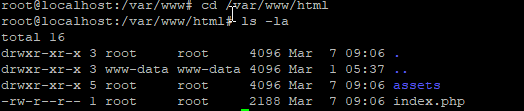
I'm getting 403 Forbidden on my main website. I have checked permissions (I think) and everything looks okay.. :
https://i.imgur.com/KW63j8p.png
And my default nginx sites-available file is here:

server {
    listen 80 default_server;
    listen [::]:80 default_server;

    root /var/www/html;

    index index.html index.htm index.nginx-debian.html index.php;

    server_name neverflaccid.com www.neverflaccid.com;

    location / {
        try_files $uri $uri/ =404;
    }
}
#

Sorry, I'm pretty new to everything Linux. I have never stood up a web server from just a base linux node so I'm kind of figuring it out as I go.

#
  • UPDATE
    So, I can access the specific files of /var/www/html by specifying that in the link.. But I can't display the webpage at the base directory?