#archived-modding-help
1 messages · Page 175 of 1
 wheat orchid
wheat orchid
wheat orchid
?saves
 dense shuttleBOT
Saves
Windows File Paths: (Assumes Default Steam Install Path, Adjust accordingly for DRM Free or Non-Standard Steam Path)
Game Files: C:\Program Files (x86)\Steam\steamapps\common\Hollow Knight\```
** **
Mac File Paths:
```Save Files: ~/Library/Application Support/unity.Team Cherry.Hollow Knight/
Game Files: ~/Library/Application Support/Steam/steamapps/common/Hollow Knight/hollow_knight.app/```
** **
Linux File Paths:
```Save Files: ~/.config/unity3d/Team Cherry/Hollow Knight/
Game Files: ~/.local/share/Steam/steamapps/common/Hollow Knight/```
wheat orchid
If it doesn’t work again, make sure not to restart hk until you send me ModLog.txt located in the save files path
 velvet coral
oh, ok
wheat orchid
That applies to both of you
velvet coral
yes
wheat orchid
Gtg. Ping me once you send them so I don’t forget
 reef blaze
my friend had to leave
 novel bronze
I think I broke MoreSaves
I disabled some other mods and now MoreSaves isn't working at all
And MoreSaves doesn't have a help file that I can use
velvet coral
@wheat orchid hey, i'm baaack
it don't work again
i will send the modlogs
me and my friend
reef blaze
velvet coral
novel bronze
What the fuck? I deleted every file and redownloaded the Mod Installer and somehow it still refuses to let me start over with a clean slate.
wheat orchid
@novel bronze pretty sure it needs modcommon to work. Also it messes up other mods, so I advise not to use it
@novel bronze ?
Wdym
novel bronze
Mod Installer kept refusing to let me uninstall any mods (this is my first time trying mods)
wheat orchid
Are you using mod installer or mod installer 2
novel bronze
I'm using the one from this channel's description, but it doesn't say anything about a 2
wheat orchid
So what happens when you click uninstall on a mod
novel bronze
It acts like it uninstalled properly
But the next time I reopen Mod Installer it's still there
wheat orchid
It’s like this for all mods?
Have you tried running the installer as administrator
Also is the installer on your desktop
novel bronze
No it's in D:/ProgramFiles(x86)
novel bronze
Windows won't let me save it to just normal ProgramFiles
Apparently I don't have permission for that
wheat orchid
?
Why can’t you just put it on the desktop?
First try running it as administrator
Then if it still doesn’t work, put it on your desktop and run as administrator
velvet coral
hey
novel bronze
Oh I didn't realize you were trying to help somebody else
I won't bug you anymore then
Hehe bug
velvet coral
yes
wheat orchid
I have a idea
velvet coral
hmm
wheat orchid
Make sure hamachi and port 26950 are allowed through your firewall(you can find out how to do advanced firewall settings on google or your preferred web browser)
wheat orchid
I meant it towards your friend, but both can’t hurt
velvet coral
yes
wheat orchid
Make sure both Hamachi and the port are allowed both inbound and outbound
velvet coral
ok
novel bronze
This is the only channel where I can get help with modding, right?
wheat orchid
@novel bronze yes and no
novel bronze

Okay
I think this time I cleared out all the modding files
Now I'm going to try again
Yes
It worked
 high gyro
How do I uninstall the mod installer?
novel bronze
It's very complicated
Do you want to uninstall it so you can reinstall with a clean slate?
high gyro
Yes
novel bronze
Okay
Luckily for you, I just spent the last hour trying to figure out how to do that
The built-in "uninstall" mechanic is simply to have Steam verify your game files, so do that first
Then you need to go through your computer files and carefully delete all the modding files.
high gyro
Where will I find those
novel bronze
For me, I think there were some in the Hollow Knight filepath in "managed" then "mods"
I think there were also some in user/appdata
Wait a minute
I can go to my trash bin to see where the files were originally
high gyro
Thanks
novel bronze
So there's going to be a "Mods" folder under ProgramFiles86/Steam/steamapps/common/HollowKnight/hollowknightdata/Managed
There will also be a "ModInstaller" folder under Users/User/AppData/Local
And there will be a whole bunch under Users/User/AppData/LocalLow/TeamCherry/HollowKnight
high gyro
i uninstalled hk a bit ago. its redownloading. do i still need to verify integrity?
high gyro
alrighty. thanks
then im gonna try reinstalling the modinstaller from scratch
do i need to uninstall my custom knight folder
high gyro
under quick access\
high gyro
yes
novel bronze
Just to make sure you get everything, try taking out the sprite files and then deleting CustomKnight as well
high gyro
this came up when i tried clicking on it lol
 alpine salmon
Sooo I got a little problem, some enemies seem to be invisible in my game. Random mobs and Oblobbles were not too much of a pain but fighting invisible Hollow Knight is just BS.
I assume it's due to a bug with a mod because it's the first time it's happened and I have played the game 4 or 5 times, but this time I have a bunch of mods installed : enemyHPbar, Randomizer 3.0, Benchwarp, QoL, SeanprCore, Vasi. I guess the problem must be due to one of those ? Does this ring a bell to anyone ?
 west bane
verify integrity fo game files if you're on steam and just want to get back to unmodded
doesn't matter if the remaining mod files are around or not
west bane
alpine salmon
Sooo I got a little problem, some enemies seem to be invisible in my game. Rando...
VRAM issue, try ridding enemy hpbar
novel bronze
west bane
doesn't matter if the remaining mod files are around or not
I did try that but when I reinstalled it still acted as if my mods were there, but they wouldn't work
west bane
you downlaoded mods that probably made permanent changes to your game
high gyro
novel bronze
So there's going to be a "Mods" folder under ProgramFiles86/Steam/steamapps/comm...
do i delete all of managed or do i need to sort through?
novel bronze
For me there was just one folder labeled "Mods"
high gyro
there isnt for me
 real jacinth
you said you reinstalled the game
high gyro
im opening my game to see if its modded
real jacinth
of course it's gone then
novel bronze
But if you see anything there that's obviously part of a mod, then consider removing that
high gyro
mods are gone and my save files are there now
novel bronze
Is that what you wanted, then?
high gyro
yes. thank you
i had wanted to start modding from scratch due to some issues on my pc. at least now if the issues come up again i know what to do
novel bronze
Sometimes when you have issues you just want to start completely from scratch
At least, that's how I am
Anyway, glad I could help! Have fun with your mods!
high gyro
found it. thanks
novel bronze

alpine salmon
Sooo I got a little problem, some enemies seem to be invisible in my game. Random mobs and Oblobbles were not too much of a pain but fighting invisible Hollow Knight is just BS.
I assume it's due to a bug with a mod because it's the first time it's happened and I have played the game 4 or 5 times, but this time I have a bunch of mods installed : enemyHPbar, Randomizer 3.0, Benchwarp, QoL, SeanprCore, Vasi. I guess the problem must be due to one of those ? Does this ring a bell to anyone ?
Update : he's still invisible even with all mods disabled
Could the mods have broken my game permanently somehow ?
alpine salmon
Is there a way to fix this ?
alpine salmon
(I shut off my PC I'll try tomorrow)
Ah ok
Is there any reason it's happening now and not during my first bunch of runs ?
Also it might be a dumb question but how exactly do I cap FPS ?
real jacinth
with an external program
like rivatuner
assuming you have vsync turned off
so if you've only recently turned off vsync. that could be why
it's also pseudo random
high gyro
modinstaller is working properly for the first time in weeks
thqank you to everyeone who helped me
alpine salmon
so if you've only recently turned off vsync. that could be why
@real jacinth ah yes, I might have messed with the game's settings recently. Thanks
wheat orchid
@novel bronze the installer has a built in thing for uninstalling mods, the revert to vanilla button, or disabling or uninstalling the modding api on modinstaller 2
Also there was a lot wrong with some of the stuff you said regarding uninstalling mods, but I’m too lazy to call all that out rn
 steep salmon
I'm using the custom knight mod and everything works properly, but when I click on the skin and exit the menu the skin doesn't change, anybody know why?
steep salmon
I don't have the modcommon mod
wheat orchid
CustomKnight needs it to work
steep salmon
Oh okay thanks
 ember atlas
how do i find the mod consle commands?
west bane
mod console is used for like code implementation not console commands and stuff
ember atlas
oh ok thanks
ember atlas
with debug mode, is ther any way to reset the keybings for hiding the console?
west bane
dont tag mods for that
ember atlas
sorry
dense shuttleBOT
Saves
Windows File Paths: (Assumes Default Steam Install Path, Adjust accordingly for DRM Free or Non-Standard Steam Path)
Game Files: C:\Program Files (x86)\Steam\steamapps\common\Hollow Knight\```
** **
Mac File Paths:
```Save Files: ~/Library/Application Support/unity.Team Cherry.Hollow Knight/
Game Files: ~/Library/Application Support/Steam/steamapps/common/Hollow Knight/hollow_knight.app/```
** **
Linux File Paths:
```Save Files: ~/.config/unity3d/Team Cherry/Hollow Knight/
Game Files: ~/.local/share/Steam/steamapps/common/Hollow Knight/```
ember atlas
@west bane thank you
 glossy flame
Just checking before I screw myself over like I did with Celeste, do HK mods work on Mac?
 limber egret
Generally you should be able to just download Mod Installer 2 in the pins and just use that.
If you have any specific problems, you can ask here.
If you're looking at speedrunning you will want to make a new install on your computer so you can have a Modded and a clean install, but I've never done that in a Mac so I couldn't help with that
glossy flame
cool, thanks
 digital copper
where to get custom knight skins?
wheat orchid
@digital copper pins
wheat orchid
Yeet elderbug god
digital copper
is that messing it up? sad
wheat orchid
Yeah
wheat orchid
I meant inside the grimm knight folder
wheat orchid
Well that’s a problem
Those need to be directly inside the Grimm knight folder
So just select them all and drag them into the Grimm knight folder
wheat orchid
Probably
novel bronze
are there any methods to mod the standalone gog version (not using gog’s launcher) on mac?
 vernal rain
?i
dense shuttleBOT
Reminder: The mod installer (https://radiance.host/mods/ModInstaller.exe) and other modding resources can be found from the pinned messages.
wheat orchid
@novel bronze you can mod both steam and gog versions on windows, Linux, and Mac. Just use mod installer 2 on Mac.
Not for Grimm knight tmk
Just wait a bit
novel bronze
@wheat orchid when i chose the file path the program closed
and it does that every time
wheat orchid
Hold on
Got a fix for this I think
Try this #archived-modding-help message
And follow the steps 56 gave
Yay
limber egret
Hello
Can you screenshot the folder your skin is in (including the file path) and also your modinstaller
limber egret
The folder with the actual images, and also the file path pls
 shy fable
here you go
and the file path is
Hollow Knight Godmaster\hollow_knight_Data\Managed\Mods
limber egret
So it's
Mods\Custom Knight \ [Skin Name]\knight.png
shy fable
yeb
limber egret
Do you have ModCommon, sfCore, and Seanpr?
limber egret
Make sure you have those three and try again
limber egret
I'm not sure then. If you have the correct mods and the files are in the correct path I'm not sure what the issue could be
high gyro
shy fable
the mod is instailed but when i try to change my skin it doesn't change
make sure in the file location for skins, the folders with skins dont have another folder inside. else it wont be able to read the. what i needed to do was move the inside folder to the skin folder and delete the now empty folder it was in
shy fable
wait forget one mod sorry for the trouble ganna go now bye
novel bronze
when i click install on each mod a check appears, but nothing happens in terms of the game being modded
limber egret
Are you also clicking enable?
wheat orchid
@novel bronze you need the ModdingApi
wheat orchid
Click the out of date button
novel bronze
alright, i did that and the whole modding api window choice disappears
wheat orchid
Look in the m section
novel bronze
its there
wheat orchid
Try running the game
novel bronze
it worked! tysm
wheat orchid
Np
 ivory aurora
Wait a sec
what's this modinstaller?
Mine looks different
is this a newer version?
 ornate crystal
When i enabled mod common and hollow point my hollow knight was weird, basically when it finished loading it just didnt show anything, it played music though
Nevermind, it just loaded
novel bronze
whenever i’m playing with the mod api, if i open inventory i can’t move once i close it
limber egret
ivory aurora
Mine looks different
It is, but mainly it is better for Mac. You can continue using the og one
 royal badger
i would just delete all the mods then reinstall them
novel bronze
ok
wheat orchid
ivory aurora
is this a newer version?
there is mod installer and mod installer 2.
royal badger
yes there is
real jacinth
Debug
 crimson zodiac
Guys, my main save corrupted a few days ago and I have no idea how do I recover it, can anyone helps me?
royal badger
should've backed it up
 dense shuttleBOT
Saves
Windows File Paths: (Assumes Default Steam Install Path, Adjust accordingly for DRM Free or Non-Standard Steam Path)
Game Files: C:\Program Files (x86)\Steam\steamapps\common\Hollow Knight\```
** **
Mac File Paths:
```Save Files: ~/Library/Application Support/unity.Team Cherry.Hollow Knight/
Game Files: ~/Library/Application Support/Steam/steamapps/common/Hollow Knight/hollow_knight.app/```
** **
Linux File Paths:
```Save Files: ~/.config/unity3d/Team Cherry/Hollow Knight/
Game Files: ~/.local/share/Steam/steamapps/common/Hollow Knight/```
 white shuttle
if i turn off my mods and play vanilla on my original save (yes i have a backup) and then turn them back on and go to my modded save, will everything be the same or will there be errors?
royal badger
just try it
west bane
everything should be the same
royal badger
you have a backup so it is fine
crimson zodiac
Thanks guys, I'll try it
white shuttle
should i keep a backup for both? i only have a backup for my original one
my modded one is the 2nd one top to down so it should be dat2?
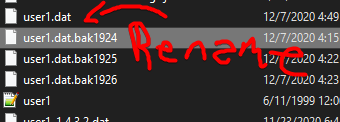
crimson zodiac
I renamed it and didn't work
west bane
then all your backups are correupted as well
west bane
then wdym it "doesn't work"
crimson zodiac
just one was corrupted, I tried to rename it and doesn't work
west bane
what are you trying to rename
crimson zodiac
the file you sent
west bane
screenshot
crimson zodiac
west bane
and what did you rename that to
crimson zodiac
I renamed it to ''user1.dat.bak2863''
west bane
get rid of user1.dat. rename user1.dat.bak2860 to user1.dat
west bane
you didnt get rid of user1.dat
crimson zodiac
I did it, and it became a notepad file called ''user1 (2)''
west bane
rename it to user1
crimson zodiac
limber egret
Delete the old one first
wheat orchid
Wait Zal’s not a mod anymore?
crimson zodiac
and then I rename to user1 again?
It worked
Thanks Zaliant and someone
you helped a lot
wheat orchid
(I didn’t help but np)
crimson zodiac
I'm so glad omg
ivory aurora
wheat orchid
Wait Zal’s not a mod anymore?
Wait really
west bane
just taking a break
ivory aurora
Wonderful, wonderful
limber egret
Is Modinstaller 2 for Mac hosted anywhere other than this Discord? Somebody wants a link but can't use discord
west bane
just download it and give it to them
limber egret
Also fair
 lavish pivot
is there anything for hollow knight on the steam workshop, or is it only external downloads
west bane
external
wheat orchid
Imagine steam workshop mods for hk 
 pulsar grove
where is the link to the mod installer
wheat orchid
As I said, pins and description of this channel
 broken oracle
i forogt the mods you need to install to get the rest ti work, could someone toss me the list?
wheat orchid
@broken oracle what’s rest ti
limber egret
You want mod common, SF core, and Sean pr
Also you need modding api, but that comes when you install Mod Installer
west bane
turn off more saves
west bane
dunno, you can back them up
 whole folio
i'm having trouble with downloading the Grimm Knight skin
i followed the tutorial by fireb0rn, and downloaded the Grimm Knight zip file from the drive skin link in fire's description
i also checked out CrankyTemplar's video on the showcase to see if i could find the skin link in the description, but it was the same as the one in fire's vid, and i have no idea what to do
real jacinth
show your title screen and where you put the skins
whole folio
you mean in the file?
real jacinth
where else would i mean
west bane
wrong grimm knight
whole folio
which is the right one?
west bane
the one in the other folder
whole folio
west bane
yes
whole folio
which folder do i download for grimm knight, or does it not matter?
west bane
the grimm knight one
 latent token
I'm having a problem where the Hollow Knight is actually invisible. I don't really know what's caused it.
unless it's something to do with a file the Kakyoin skin edits
west bane
vram, just disable custom knight
latent token
it's not a custom knight skin
west bane
what mods do you have then
west bane
that's this kakyoin skin edits thing
latent token
oh, I'm assuming that it's a sharedassets file that it overwrote?
west bane
probably indie crossover that you need to disable
real jacinth
THK being invisible is a vanilla bug
tied to VRAM capacity, like zaliant said
so if your fps is uncapped, you need to cap it
latent token
oh, how do I do that?
real jacinth
an external program, like rivatuner
latent token
I can limit it in amd stuff, what's a proper limit?
 sleek phoenix
so when i was testing my skin out on hk yesterday my game froze. after rebooting my pc and loading hollow knight my saves wont load. i thought this was a small bug so i uninstalled and reinstalled. it worked, but my mods wouldn't load. i reinstalled modinstaller.exe and i was stuck with the first problem. is there a way to fix this?
dense shuttleBOT
Saves
Windows File Paths: (Assumes Default Steam Install Path, Adjust accordingly for DRM Free or Non-Standard Steam Path)
Game Files: C:\Program Files (x86)\Steam\steamapps\common\Hollow Knight\```
** **
Mac File Paths:
```Save Files: ~/Library/Application Support/unity.Team Cherry.Hollow Knight/
Game Files: ~/Library/Application Support/Steam/steamapps/common/Hollow Knight/hollow_knight.app/```
** **
Linux File Paths:
```Save Files: ~/.config/unity3d/Team Cherry/Hollow Knight/
Game Files: ~/.local/share/Steam/steamapps/common/Hollow Knight/```
sleek phoenix
thank you, I appreciate it.
 proper bison
did u watch fireb0rn's video
novel bronze
helppppppppppppppp
novel bronze
proper bison
did u watch fireb0rn's video
ive watched the speedrun
proper bison
whatever did you install the modinstaller
proper bison
and i assume you installed customknight?
novel bronze
yes
proper bison
so like where does your issue lie
novel bronze
and idk how to make it work
proper bison
do you have a skin folder
proper bison
you can just use one made by the community
proper bison
CustomKnight Sprite Sheets: https://drive.google.com/open?id=1VlXmvI6KT2vzsGItY2w3rHjeCFx8DN0n
CustomKnight skins created by the group "The White Palace": https://drive.google.com/open?id=16BUDS5e4_5eRId3It318OI4jCCSIZzjx
novel bronze
i dont get it
proper bison
go download a skin from one of those sites
novel bronze
whats what
proper bison
drive folders
novel bronze
then?
proper bison
once you download a skin file (.zip)
proper bison
you go there, right click any skin you want, and click download
if you click the file twice or click preview you can look at the pngs with the modifications inside
you'd want to focus on Knight.png to see how it changes your knight
novel bronze
how do i see it
proper bison
i just told you, click any folder in the drive and look at the files
novel bronze
but everything is confusing cuz its a million pics in one pic
anyways i picked one now what
proper bison
did you download it
proper bison
you're gonna need an unzipping program to open what you downloaded
novel bronze
windows file explorer?
proper bison
like WinRar
novel bronze
ok
proper bison
you can't open a .zip file with that
proper bison
proper bison
like WinRar
download this
proper bison
ok then do it
novel bronze
do what
proper bison
unzip it...?
novel bronze
i mean extract files lol im dumb
proper bison
aight
novel bronze
do i dowload or do it normally
proper bison
try doing it 'normally' first
proper bison
yes
novel bronze
then what
proper bison
it looks like this?
royal badger
do you have hollow knight on steam?
proper bison
you can follow this path C:\Program Files (x86)\Steam\steamapps\common\Hollow Knight\hollow_knight_Data\Managed\Mods\CustomKnight
or you can just open it thru steam
royal badger
or gog
novel bronze
royal badger
do you have hollow knight on steam?
dO i? wHy wOulD i bE dOinG this thEn?
royal badger
you can have it on gog
novel bronze
proper bison
you can follow this path ``C:\Program Files (x86)\Steam\steamapps\common\Hollow ...
wdym
proper bison
you see this thing in file explorer?
novel bronze
um we have different windows but i see the down button and dowloads
proper bison
alright
novel bronze
do i press on it
proper bison
try clicking to the right of windows or at the down arrow icon
it should show just one word or smthn
if you can do that, paste the path i sent into the box
novel bronze
wat wdym, do i press on dowloads?
proper bison
click this
royal badger
copy the path he sent you, then paste it into the search bar in file explorer
novel bronze
proper bison
go here
novel bronze
ok
proper bison
then go into the Steam folder
novel bronze
i dont have x86 i just have program files
proper bison
you don't have a Program Files (x86)?
novel bronze
oh i do
proper bison
ok go there
royal badger
then steamapps
proper bison
and then go to steamapps
novel bronze
common?
royal badger
yes
proper bison
yes a folder called common
royal badger
hollow knight
novel bronze
then
proper bison
hollow knight Data
royal badger
hollow knight data
novel bronze
wait can i make this folder easier to axs later?
royal badger
yeah
novel bronze
how
royal badger
multiple ways
novel bronze
do i copy it to 'this pc'
royal badger
no, go back to common
novel bronze
ok
royal badger
right click hollow knight
novel bronze
ok
royal badger
then click create shortcut
and drag the shortcut to your desktop
now you just have to double click the shortcut
novel bronze
wait
royal badger
mhm
novel bronze
done
proper bison
alright
proper bison
so go copy the Skin folder you downloaded
royal badger
yeah, then hollow_knight_data
novel bronze
ok
proper bison
and then go back to hollow knight
royal badger
then managed
novel bronze
im confused
royal badger
then mods
novel bronze
twwo ppl talking at once.....
royal badger
sorry
novel bronze
so what do i do
proper bison
do you want to continue felix?
royal badger
ok
novel bronze
so where do i go
royal badger
have you went into hollow knight folder
royal badger
ok, then double click hollow_knight_data
then managed
then mods
and you will find custom knight
and some other mods
double click custom knight
royal badger
and drag the skin into the foldefr
novel bronze
drag skin folder?
royal badger
into custom knight folder, yes
novel bronze
ok
proper bison
if you copied it earlier you can just paste it
novel bronze
ok now what
proper bison
that's it
royal badger
open your game
proper bison
you can launch the game and it should be there
novel bronze
ok so i open hk and i can change skin?
proper bison
yes
royal badger
an when you go into your save file, hit esc and click the skin on the left
novel bronze
nice thx and sorry to put u though the trouble lol
 fleet rune
what
fleet rune
yes go on
novel bronze
MY HOLLOW KNGIHT RESTARTED AFTER AN UPDATE
ITS ASKING WHAT LANGUAGE I WANT
NOOOOOOOOOOOOOOOOOOOOOOO
AND RIGHT BEFORE THAT ALL I DID WAS MOD ;c
fleet rune
oh that is really sad
novel bronze
check steam if theres an update for your hollow kngiht
HELPPPPPPPPPPPPPPPPPPPPPPP
#hellp
um sorry abt ping but this is an emergency @proper bison @royal badger
proper bison
what
what happened
try relaunching it that might fix it
if it doesn't you'll haveto verify integrity of game files which deletes the mod
royal badger
what happend
proper bison
probably
novel bronze
read above
proper bison
idk i'm not an expert at these stuff
fleet rune
yeah verify integrity of game files
proper bison
you don't delete the mods manually doe
royal badger
yeah i don't have it on steam, i have it on gog
fleet rune
relaunch first though
royal badger
so i don't know
proper bison

novel bronze
whew now i dont need to delete my mods
aand the mod deosnt even work :/
someone help?
ivory aurora
@novel bronze what's the problem?
royal badger
dude my bosses and minibosses are invisible
royal badger
send a screenshot after you have double clicked grimm knight
royal badger
it looks normal to me
royal badger
i have no idea
novel bronze
did i do sommat wrong
west bane
do you have modcommon
royal badger
idk try redoing everything
novel bronze
yes
novel bronze
royal badger
idk try redoing everything
whaaaaaaaaaaaaaaaaaaaaaaaa
royal badger
copy and paste the skin files into your desktop
novel bronze
wdym
royal badger
the grimm knight files
novel bronze
what do i do with them
royal badger
so when you uninstall and install everything you can just drag them back
royal badger
if it doesn't work with uninstalling and reinstalling
novel bronze
wdym uninstall and install
royal badger
uninstall all mods
novel bronze
ok
royal badger
and restart your computer
novel bronze
not the skins?
royal badger
then install them again
novel bronze
ok
novel bronze
royal badger
and restart your computer
but im in mid class
royal badger
if that doesn't work then i can't help you
if it didnt work then try verifying the integrity of the files in steam
ivory aurora
Oh boy
you told them to do it the long way
Seems like it's supposed to work, though
So maybe you're right
novel bronze
ivory aurora
you told them to do it the long way
wdym
ivory aurora
There has to be some simpler way to do it
Not sure though
You said the problem is when you try to select skins, they just aren't there?
novel bronze
HELPPPPPPPP
it aint workingggggggggggggggggggggggggggggg
i even tried winrar
it aint working tho
 faint torrent
in order to save my files, i just need to copy the userX.dat saves ? Or do i need the others files ?
faint torrent
srry i dont know how to help u
 stable mountain
shinel are you having problems with custom skins too?
stable mountain
i have a problem with it too but could not solve it
novel bronze
whats your problem? maybe i can help even tho i have a problem too if that makes sense
stable mountain
after I downloaded the mod manager my game had no sound. I ran hk as admin and it fixed it but now mod manager is not working at all
novel bronze
oh idk how to solve that
i just cant get the skins to work
can you get ti to work?
i tried fireb0rns tutorial but it aint working
stable mountain
it worked before i ran hk as admin
stable mountain
novel bronze
i tried fireb0rns tutorial but it aint working
did the same too
novel bronze
why did u run it as admin
novel bronze
oh
stable mountain
now even if I run it normally mod manager doesn't start
novel bronze
do you know someone who can help me?
stable mountain
@wheat orchid tried to help me
novel bronze
ok
limber egret
Morning what are the problems you're having shinei? You have Custom Knight installed but when you pause it doesn't give any options to change skin?
I have no idea how to solve the problem your having Snowy, but I can give you very basic pointers to make sure there's nothing you've overlooked.
ivory aurora
faint torrent
in order to save my files, i just need to copy the userX.dat saves ? Or do i nee...
you mean, back up?
@stable mountain are you sure the audio is not a separate problem?
stable mountain
@ivory aurora the audio problem began after I downloaded the mod loader
stable mountain
2
limber egret
Check for the mod called Modding api
Make sure it is installed enabled and not out of date
(Is it's out of date there will be an orange box)
stable mountain
yea it has an orange box
stable mountain
is it?
ivory aurora
theres for windows, too, of course
but they said that if you're on windows just use the first
or something
I don't remember
nevermind
stable mountain
lemme try that then
limber egret
Windows it doesn't matter
I use mod installer 2
I've used both and they're both good
Mod installer 1 has issues in Mac, though apparently
Just update your modding api and it should work
stable mountain
I run the game in admin because of the audio problems. Will it affect the mod loader
limber egret
I don't think so, but I have never had to do that
ivory aurora
yeah, it seems too much
faint torrent
ivory aurora
you mean, back up?
Yes
ivory aurora
oh my god
audio gone
again?
hm
try to start over, snowy
start clean, no mods
make sure the audio works
then follow whichever guide you used very, very, closely
ivory aurora
faint torrent
Yes
then I believe it's simply copying the files, yes, but maybe wait to make sure with others
ivory aurora
stable mountain
delete everything mod related?
Yeah, try that
faint torrent
Ok thx u
ivory aurora
make sure you have your cleanest version of the game
and then start again
fireborn's is the one I used iirc, went smoothly
stable mountain
Should I verify the game files?
ivory aurora
Oh, I don't know if that's necessary
Just make sure your game is as unchanged as possible while not ruining savefiles
stable mountain
ok
ivory aurora
Unless you don't care for your savefiles much, in which case, just uninstall and reinstall or something
stable mountain
If I can I want to save the savefiles
@ivory aurora Unless I run the game as admin there is no sound
ivory aurora
even after removing all mod-related things?
ivory aurora
wdym?
stable mountain
@ivory aurora for some reason the first one works perfectly
digital copper
playing lightbringer rn but somehow geo doesn't show on the ground?
gonna send this if its necessary
stable mountain

 shadow hedge

 limber egret
digital copper
gonna send this if its necessary
limber egret
digital copper
gonna send this if its necessary
Grab the geo png from the default file and copy it into the folder for the skin you're using
It's a Custom Knight issue
 serene beacon
im new here and i wanted to install that moddingApi, where can i find it?
 crude kraken
I can’t get my game to randomise enemies plz help
novel bronze
limber egret
Morning what are the problems you're having shinei? You have Custom Knight insta...
sry for late ping tamijo, but yes it just shows "default"
digital copper
So, I just had gun and item randomizer on but when i started an item rando the gun doesn't show up?
nvm fixed it
novel bronze
can anyone help me wit my problemo
 ashen pumice
Hello hello everybody, posted in Discussion as well, but it is help too :D
I was just looking at the read me for the randomizer mod and i come across this:
With these skips allowed, the player is advised to take care to not lock out of certain required pogos. Obtain:
- No more than 1 nail upgrade before claw or wings
- No more than 3 nail upgrades before claw
what do nail upgrades have to do with skips?
i dont get itttt
royal badger
did you read the read me for custom knight
royal badger
you sometimes have to download other things and extract them there
novel bronze
wdym?
 keen spire
for some reason, the skins for Custom Knight I downloaded don't get loaded in when I click on their respective buttons
this is my first time modding this game so i might have done something wrong lmao
crude kraken
crude kraken
I can’t get my game to randomise enemies plz help
please
 gloomy coral
In the game, go to settings and click mods and see if it's on or off
Is modding API installed?
Maybe it's a problem with the skin
Then remove the second skin and try again
To see if it's the second skins problem or not
gloomy coral
Did you delete it from the skin folder?
novel bronze
gloomy coral
Did you delete it from the skin folder?
wdym
wha
someone help me
someone
gloomy coral
novel bronze
wdym
He said that after he installed second skin, it stopped working so I thought that removing it would work
novel bronze
hewppppp
gloomy coral
Which mod installer 1 or 2?
novel bronze
gloomy coral
He said that after he installed second skin, it stopped working so I thought tha...
well it deosnt work for me even when i installed 1 skin
yes i have it
gloomy coral
I use the modinstaller that's in the pinned comment of this chat
novel bronze
wait does custom knight work for u
how did you make it work
then?
i did all of that a million times with idfferent skins
which skin did you get
that worked
did grimm work
ok
i reallllly hope it works
its downloading
wish me & my pc luck
now ill just launch hk......
moment of truth..... (or lies)
aaaaaand it didnt work
;0;

any1 else help? (ping me if u will cuz i cant see)
lol sry but it didnt work ;-;
at all
not close
i tried 19.7 million times
hhh
imagine how nice it would be to have a custom hk skin.....
ur lucky ;c
u got to try it
hhh
i hate how you need to turn hk off and on 1 mil times
its the worst part
gloomy coral
Maybe the debug mod is messing with it?
novel bronze
i dont have debug mod
gloomy coral
@novel bronze does the custom mod show up on top left
gloomy coral
Does any other mod work?
novel bronze
yes
eevery single one
hhhhhhhh
this is imp
im. po. si. ble.
@sharp fog can u help?
 sharp fog
for me custom knight doesnt work it even shows the skins but it does not regester when I click them
novel bronze
sharp fog
for me custom knight doesnt work it even shows the skins but it does not regeste...
HOW DOES IT SHOW THE SKINS
HELPPPPPPPPPPPPPPPP
 light gyro
hey someone know how to instal randomizer 3?
novel bronze
light gyro
hey someone know how to instal randomizer 3?
yesh
you just install.
do u have modinstaller
light gyro
yes
novel bronze
whats the problemo
sharp fog
you put them into the folder, here ima look up a video for u @novel bronze
light gyro
idk where i found in internet
light gyro
randomizer 3
 frosty grail
how do i install a randomizer ( enemies and items nor rooms)
novel bronze
frosty grail
how do i install a randomizer ( enemies and items nor rooms)
u install randomizer 3 for items and rooms
frosty grail
novel bronze
u install randomizer 3 for items and rooms
how do i do that?
novel bronze
i have ONE and it doesnt even work
sharp fog
@novel bronze this might help with custom knight https://www.youtube.com/watch?v=AKx9Hqzy1OM

A guide that explains how to install the CustomKnight mod and add your very own custom sprites to the game!
ModInstaller: https://radiance.host/mods/ModInstaller.exe
CustomKnight Skins: https://drive.google.com/open?id=1VlXmvI6KT2vzsGItY2w3rHjeCFx8DN0n
CustomKnight Skins (The White Palace Group): https://drive.google.com/open?id=16BUDS5e4_5eRI...
novel bronze
frosty grail
how do i do that?
do you have modinstaller
frosty grail
yes
novel bronze
sharp fog
<@456226577798135808> this might help with custom knight https://www.youtube.co...
ive already followed that
novel bronze
frosty grail
yes
then scroll until you see randomizer 3 and preess install
sharp fog
ok then idk it doesnt work for me either
novel bronze
the skin never worked for me
novel bronze
sharp fog
it just wont let me click on the skins in game
it just wont show th skins in game
uhhhhhhhhhhhhhhhhhhhhhhhhhhhhhhhh
frosty grail
novel bronze
then scroll until you see randomizer 3 and preess install
did it now what?
frosty grail
hollow knight is closed
novel bronze
open it then
frosty grail
i want to randomize enemies and items
novel bronze
frosty grail
i want to randomize enemies and items
whaaaa but you said rooms............
frosty grail
no
novel bronze
frosty grail
uninstall?
you dont need to but if you want to
frosty grail
did it
novel bronze
ok
frosty grail
now?
novel bronze
wait one sec
frosty grail
ok
novel bronze
ok so i never tried this so i dont know if it works but (im very sorry abt this) redownload randomizer 3 and download enemy randomizer too
its on but it only says default
frosty grail
novel bronze
ok so i never tried this so i dont know if it works *but* (im very sorry abt thi...
i better wait for someone who knows more and dont know much about mods
sorry
novel bronze
frosty grail
i better wait for someone who knows more and dont know much about mods
thats probably a better idea i just didnt want to leave ya hanging :/
oop
novel bronze
lol
alpine salmon
So it seems like none of the mods work since I verified the steam files integrity. When i enable and disable mods I still see the files changing in the game folder though. Any idea what could have caused this and how to fix it ?
wheat orchid
I usually read all the messages I missed here but 450+ is a new record of unread messages for me and I don’t want to read all that
gloomy coral
novel bronze
its on but it only says default
Maybe it wasn't extracted properly
wheat orchid
That looks like it in fact did not work
alpine salmon
(It helped making my final boss visible again tho)
novel bronze
wheat orchid
I usually read all the messages I missed here but 450+ is a new record of unread...
its just ppl who need help, most of them are custom knight mods
lmao
frosty grail
at least he exists now
novel bronze
wheat orchid
It is not working
he was being sarcastic................. i think....?
wheat orchid
alpine salmon
(It helped making my final boss visible again tho)
Thk being invisible is a vanilla game bug. It’s not related to mods
alpine salmon
Yea but somehow it got fixed when I verified the files integrity
novel bronze
frosty grail
obviously
cuz he explained it later and i was confused cuz no one explains sarcasm
alpine salmon
But it also made my game unmodded
novel bronze
indeed ;-;
frosty grail
novel bronze
cuz he explained it later and i was confused cuz no one explains sarcasm
yeah people should start using /s to point out sarcasm
novel bronze
uh............................ uhhhhh.... why do the creators of custom knight have to make it SOOO CONFUSINGGGGG
alpine salmon
@wheat orchid so is there a way to be able to put the mods back ? Reinstall the installer perhaps ?
wheat orchid
alpine salmon
<@566029907264667657> so is there a way to be able to put the mods back ? Reinst...
Open mod installer
novel bronze
wheat orchid
<@456226577798135808> it is not confusing
yeah its not, ITS IMPOSSIBLE
gloomy coral
novel bronze
yeah its not, ITS IMPOSSIBLE
It's a mod to a game that doesn't directly support modding
wheat orchid
Also jngo made the mods recent version of CustomKnight, and they have made some of the best mods I know
That is correct
Also jngo made the multiplayer mod
Online multiplayer mod
novel bronze
wheat orchid
That is correct
i have that too but ti doesnt work
WHAA? THERES HK ONLINE????!
wheat orchid
Screenshot the inside of your skin folder and your pause menu
novel bronze
me?
novel bronze
wheat orchid
That looks right
novel bronze
WHAAAAAAAAAAA
wheat orchid
Screenshot your pause menu
novel bronze
up to you
novel bronze
wheat orchid
There is no risk
there is
wheat orchid
There is not
novel bronze
is*
frosty grail
now i shall wait
wheat orchid
That’s a your pc problem then
novel bronze
btw do i make a new save file
wheat orchid
......
wheat orchid
You..... do it the way you always do it
novel bronze
i always load a file
novel bronze
and it never works
wheat orchid
Yeah
frosty grail
just click one empty
novel bronze
it says change skin and the only option i get is default
wheat orchid
Well you put the folder in the wrong place then
novel bronze
nope
wheat orchid
Screenshot the entire path to the skin folder
novel bronze
wdym
wheat orchid
What is the entire path to the skin folder