#archived-modding-help
1 messages · Page 147 of 1
 novel bronze
Does anyone have the source code for the show hitboxes mod?
 glass sequoia
Hey guys im having an issue with customknight mod
i put the skins at the same place as the other ones and only a few of them acctually work
when i try to put them it just go back to the regular hk skin
how do i fix this
 wheat orchid
@glass sequoia did you put the .png files in the right place?
glass sequoia
yes
wheat orchid
@mint otter did you press the button that says enable all installed mods on the installer
glass sequoia
theyre all in the same pls as the skins that work
wheat orchid
Screenshot the inside of a skin folder that doesn’t work
wheat orchid
Screenshot inside one of the skin folders
wheat orchid
Ok
There’s your problem
The .png files aren’t in the right place
They need to be directly in the skin folder
glass sequoia
so i just chose one of these
glass sequoia
and put on the same folder as void knight
wheat orchid
Yes
glass sequoia
k
wheat orchid
You must do that with all mod changes
wheat orchid
Np
glass sequoia

 knotty lily
Anyone know why More Saves mod screws with Debug Mod Cheats/Charms menus?
If I enable MS, then I can't click activate any of the options in either menu except Overcharmed in the Charms menu.
Can still set a hotkey for each option, but thats not the point.
 craggy shuttle
wheat orchid
craggy shuttle
wheat orchid
@knotty lily moresaves is just bad. Some people said they lost saves to it. It’s better to just copy your saves to a different location
knotty lily
Thanks.
knotty lily
Okay new question.
Anyone know why I can't upgrade Glowing Womb charm to the Primal Womb charm? I have Exaltaion installed & most of the other charmes upgraded, but this one won't upgrade no matter which version of Paintmaster Sheo I beat.
Hmm, same issue with Dashmaster to Marathon Master upgrade. Requires beating up Paintmaster Sheo. Nevermind, I do have that upgrade, just looked the same at first.
Though somehow I have the Stagway Coin, which is an upgrade of Sprintmaster, which requires one to beat Pm Sheo. WTF?
wheat orchid
I’ll look at what’s wrong with it when I get the chance
 wet cypress
which is the latest mod installer ?
 vernal rain
?i
 proud quailBOT
Reminder: The mod installer (https://radiance.host/mods/ModInstaller.exe) and other modding resources can be found from the pinned messages.
wet cypress
ty
 grizzled sparrow
i heard that poorly translated isn't on modinstaller anymore is that right?
knotty lily
its there
grizzled sparrow
ok thats good. been meaning to try it
wheat orchid
@grizzled sparrow poorly translated doesn’t work when installed with the installer. You can get it from the google drive, then use manually install mods in the installer though
?mods
proud quailBOT
Mods
Google Drive with Mods - https://drive.google.com/drive/folders/0B_b9PFqx_PR9Um9MeFZMV21oWGs
Installer - https://radiance.host/mods/ModInstaller.exe
Mod Summaries - https://docs.google.com/document/d/1cz5tcggpGofrBcM90XyTkMWjMelDHzugvQM6HpB13Ew
grizzled sparrow
ah ok thx
 arctic wave
im not so sure that the randomizer is working for me, its been randomizing for half an hour and now its froze
well not it worked
wheat orchid
Do you have seanprcore, modcommon, qol and Vasi
Oh
Don’t use cursed with easy
Breaks
arctic wave
well then
novel bronze
I've been trying to get randomizer 3 and enemy randomiser to work together through the mod manager, but it absolutely breaks the game any time I try. Do I have to install one manually, or could there be other problems?
wheat orchid
@novel bronze do you have all the dependencies?
 granite spindle
What does the Vasi mod do? The readme just states 'Library for HK Mods' but doesn't elaborate.
novel bronze
I do, not sure what the problem was, but I got it to work
wheat orchid
That’s what it does
It’s a library for programming mods
It makes making mods easier
granite spindle
Ooooh.
wheat orchid
But any mod that uses it has to have it enabled to work
granite spindle
Ok.
 nimble sky
Is there any reason weavercore is always outdated? I accidentally opened modinstaller twice and the message popped up both times, after I clicked yes to update it. Am I doing something wrong and dumb?
novel bronze
The mods that are on modinstaller don't have source code?
wheat orchid
@novel bronze most do on GitHub
I recently uploaded Uuwuu after giving it the SFCore and not save file killing updates
novel bronze
Is there a link to some of them like show hitboxes? I'm trying to learn and would like to create a mod to gather game data
vernal rain

GitHub
Contribute to seanpr96/HollowKnight.HitboxDraw development by creating an account on GitHub.
novel bronze
Also not much of a C# expert but is it possible to create a socket to python in the dll to send data from the modded game to python?
Thank you guys! Appreciate the direct link as well
wheat orchid
If your making a mod, this is pretty useful https://radiance.host/apidocs/
novel bronze
Thanks mate
wheat orchid
Np
 vapid lintel
hey does anyone know how to install nightmare god grimm mod?
im new to this so i need some help hehe ^^
pin me with a response if that's ok
 safe canopy
its a setting in infinite grimm
wheat orchid
@vapid lintel ^
vapid lintel
aright well, im new to modding so how will i go about installing this?
wheat orchid
What operating system
wheat orchid
Are you on steam or gog
vapid lintel
steam
wheat orchid
?i
Aww
Bot is down
Use the 2nd link in that message
If it is flagged as a virus, click more info, download anyway
Then open it
vapid lintel
alrighty
wheat orchid
Click more info then run anyway
wheat orchid
Ok
vapid lintel
thank you
wheat orchid
Np
 pliant ingot
are there any custom knights that look like this?
wheat orchid
The other is called the hollow knight and is on the 2nd skin drove
Another is called pure vessel and is the same but with a white cloak
Also on the 2nd drive
pliant ingot
ty
 nimble osprey
Is there any way to make a skin stay when I close the game? I have to go back to the menu and apply it every time
wheat orchid
@nimble osprey there was a way to do it at some point, but that seems to have been removed
 neon badger
I've been thinking about getting the modinstaller but I'm a very paranoid person and I'm not sure how safe it is. Is there any risk of getting a virus from it?
neon badger
I have another question
wheat orchid
yes?
neon badger
what do you do with the installer once you download it?
wheat orchid
...you open it
neon badger
aren't you supposed to put it somewhere though
neon badger
everything I've seen says it needs to be where your installation path for the game is
wheat orchid
it seems to be better if you put it on the desktop
oh
no
that's not what it means
it means that after you open it
it will ask you where you installed hk
neon badger
it hasn't done that
neon badger
it just shows this
wheat orchid
oh
neon badger
it did say there was an error when I opened it
neon badger
my pc stopped me from opening it and I clicked run anyway
wheat orchid
ok
that's normal
follow these instructions after you close the installer v
oh come on
I didn't click copy
neon badger
how do you get to the appdata thing?
wheat orchid
just copy and paste the path
neon badger
wdym
neon badger
like the shortcut to the installer?
neon badger
sorry I am very confused
neon badger
yes
wheat orchid
click the large bar in the upper-center
where it says what folder you are in
once it turns into something you can type in, paste the path
wheat orchid
for debug?
 odd hatch
how do i download
wheat orchid
are you on windows?
odd hatch
yeah
wheat orchid
where did you get the game?
wheat orchid
where
odd hatch
its on steam
proud quailBOT
Reminder: The mod installer (https://radiance.host/mods/ModInstaller.exe) and other modding resources can be found from the pinned messages.
wheat orchid
should work
odd hatch
what do i do know
wheat orchid
open it?
odd hatch
this is my first computer so im kinda new at this
 humble apex
Hello! Sorry if I'm butting in on the conversation, can I get some assistance real quick?
When I download the modmanager, I remember it's supposed to download the "modding api" first thing, as I've done on a different pc. However when I run it this time it doesn't download it at all, which I'm assuming means I can't play mods. I have the game on steam and have it installed on an external ssd. Does anyone know why it would do this?
wheat orchid
click enable all installed mods on the installer
humble apex
I feel so stupid that my problem was me not pushing a button 🤦♀️ Thank you so much!!
wheat orchid
np
wheat orchid
f1
odd hatch
thx
neon badger
I'm sorry I am really dumb and confused
neon badger
where do I paste the path to?
neon badger
in that exact place?
wheat orchid
just click somewhere in that bar where there is no icon or text
then all of the text will turn into weirder looking text
neon badger
I meant in quick access
wheat orchid
then paste
oh
this works anywhere
just click around the end of it and you should be good
neon badger
which file though
neon badger
and I'm pasting the installation path for hollow knight, correct?
neon badger
I paste that link?
neon badger
there is no ModInstaller folder
odd hatch
i downloaded a modding api, how do i remove that
wheat orchid
@odd hatch try clicking disable all installed mods on the mod installer
It will stop you from using mods until you click enable all again though
odd hatch
ok thanks
neon badger
@wheat orchid I went to the appdata local folder but there was no ModInstaller folder to delete
what do I do?
neon badger
yes
wheat orchid
Have you tried moving the installer to the desktop folder?
neon badger
yes
neon badger
yes
wheat orchid
Screenshot the error
neon badger
neon badger
I do not know
 copper zinc
is the "map pins being reset" issue a mod-related bug/problem?
all map markers are on that spot, and I can't reach it. Mods installed: Hellmod, Bonfire, Charm overhaul, enemy HP bar
I've searched a bit and I have found someone with the dreamgate marked randomly in a spot on a place where it's not where it actually is - maybe is this related?
wheat orchid
@copper zinc yes, recently that problem with the api was brought up. Choose between the map stuff and mods. There is a mod for extending where you can move your cursor and adding a white palace map, but the message was deleted and I can’t dozens it rn.
copper zinc
I see, so it IS related to mods, I thought it was because I fiddled with the game saves
@wheat orchid is there a mod that's causing that or is it just related to the mod API? So even if I remove all mods and still let the mod libs on it'll still cause that?
neon badger
do you think it might be an issue that I'm using windows 8?
copper zinc
are you opening it on administrator mode? @neon badger
wheat orchid
Can’t believe I forgot about that
copper zinc
Maybe your computer is denying the program to access the internet because he has no permission
windows has those dumb issues
copper zinc
also remember on placing the modinstaller .exe ON the folder where the game .exe is
wheat orchid
Why
copper zinc
idk why, I needed to place it on the same folder or it wouldn't work
neon badger
the folder titled hollow knight?
wheat orchid
But you shouldn’t need to
copper zinc
well, my modinstaller wasn't able to work outside the game's folder
neon badger
so run as administrator?
wheat orchid
Yes
copper zinc
oh yeah btw .net framework sometimes doesn't work so you probably need to install all the versions
wheat orchid
(Was telling them to do this earlier)
copper zinc
I always had problems with .NET
neon badger
I'm just gonna assume run as administrator and open as administrator mean the same thing here
wheat orchid
They should
copper zinc
is there a program/website that tracks your map so you can pin it and save whenever you want?
like a customizable map website/program
neon badger
aight it just did the same thing
wheat orchid
I’ll send you the mod for the map stuff tomorrow unless anyone(yes that’s their name) uploads it for you
neon badger
I can't see why the .net thing would be an issue because I'm pretty sure the framework you recommended was published before the computer I use was made
wheat orchid
Doesn’t mean it isn’t installed
copper zinc
I don't want a mod to retrieve the map markers, I want something that doesn't reset the markers so I can organize myself what I did or what I didn't do
or does that mod fixes that problem?
wheat orchid
Well, choose mods or map
No
It is a modding api problem afaik
So as long as you have the api on, they will be like that
copper zinc
well, so is there a map program/website to do what I explained earlier?
wheat orchid
Not that I know of
copper zinc
I guess I'll be playing non-serious mods then
wheat orchid
Why do you need pins?
They don’t do much after beating the game
I guess I’ll try to make a mod for fixing them tomorrow
Can’t be that hard to save a vector2 to mod settings instead of normal save stuff
Gonna sleep now goodbye
 mint otter
hey what is the "enable all installed mods button" on the mac installer?
 real jacinth
it enables all installed mods
mint otter
but where is it on the installer
real jacinth
At the bottom
The button that says enable all installed mods
Or if you haven't pressed it... "Revert to vanilla"
mint otter
on mine it just says button but ok
mint otter
ok whats the difference?
novel bronze
modinstaller link?
vernal rain
?i
proud quailBOT
Reminder: The mod installer (https://radiance.host/mods/ModInstaller.exe) and other modding resources can be found from the pinned messages.
 astral glen
Hello! Could please someone pass me the poorly translated mod file? The mod installer prompts an unhandled exception when I try to install it
wheat orchid
@astral glen get it from the google drive and use the manually install button on the installer
?mods
proud quailBOT
Mods
Google Drive with Mods - https://drive.google.com/drive/folders/0B_b9PFqx_PR9Um9MeFZMV21oWGs
Installer - https://radiance.host/mods/ModInstaller.exe
Mod Summaries - https://docs.google.com/document/d/1cz5tcggpGofrBcM90XyTkMWjMelDHzugvQM6HpB13Ew
astral glen
Thank you!
 past dome
whenever i try to revert back to unmodded, the mod manager says this. Does anyone know how to fix this?
i managed to fix it myself. I just uninstalled the game and reinstalled it and hoped it worked haha
wheat orchid
@past dome you can also verify the integrity of the files which I think is faster
past dome
i am having an issue where my game looks like this whenever i download the mod installer
i did the verification of the game files, but each time i get the mod installer it messes it up
wheat orchid
@past dome go to your saves path and delete all files with ModdingApi.globalsettings in their name
?saves
proud quailBOT
Saves
Windows File Paths: (Assumes Default Steam Install Path, Adjust accordingly for DRM Free or Non-Standard Steam Path)
Game Files: C:\Program Files (x86)\Steam\steamapps\common\Hollow Knight\```
** **
Mac File Paths:
```Save Files: ~/Library/Application Support/unity.Team Cherry.Hollow Knight/
Game Files: ~/Library/Application Support/Steam/steamapps/common/Hollow Knight/hollow_knight.app/```
** **
Linux File Paths:
```Save Files: ~/.config/unity3d/Team Cherry/Hollow Knight/
Game Files: ~/.local/share/Steam/steamapps/common/Hollow Knight/```
wheat orchid
Go to the save files path not the game files one
past dome
ok i did that
past dome
thank you so much, it worked
wheat orchid
Np
 autumn thorn
i need some help whenever i open the mod installer it sas a mod needs to update and does one of three random things it will turn off open the installer or crash all of my tabs and break
says*
wheat orchid
@autumn thorn what operating system
autumn thorn
i use windows
wheat orchid
Which mod installer did you get and when did you get it
autumn thorn
umm i dont know the name but the icon is a zote and i dont remember when i got it
wheat orchid
That’s not good
If you don’t remember, then it’s probably really old
Delete
Get it again
?i
proud quailBOT
Reminder: The mod installer (https://radiance.host/mods/ModInstaller.exe) and other modding resources can be found from the pinned messages.
autumn thorn
no my memory sucks
autumn thorn
grimmchild
upgrades
i think i got the mod installer a month or 2 ago
i reinstalled it asked me to update grimmchild upgades and then it worked
wheat orchid
Ok
autumn thorn
oh last thing i cant download poorly translated
proud quailBOT
Mods
Google Drive with Mods - https://drive.google.com/drive/folders/0B_b9PFqx_PR9Um9MeFZMV21oWGs
Installer - https://radiance.host/mods/ModInstaller.exe
Mod Summaries - https://docs.google.com/document/d/1cz5tcggpGofrBcM90XyTkMWjMelDHzugvQM6HpB13Ew
 zenith abyss
hey
wheat orchid
Hello
zenith abyss
i have to make an backup of my saves?
wheat orchid
No
zenith abyss
ok thanks
proud quailBOT
Saves
Windows File Paths: (Assumes Default Steam Install Path, Adjust accordingly for DRM Free or Non-Standard Steam Path)
Game Files: C:\Program Files (x86)\Steam\steamapps\common\Hollow Knight\```
** **
Mac File Paths:
```Save Files: ~/Library/Application Support/unity.Team Cherry.Hollow Knight/
Game Files: ~/Library/Application Support/Steam/steamapps/common/Hollow Knight/hollow_knight.app/```
** **
Linux File Paths:
```Save Files: ~/.config/unity3d/Team Cherry/Hollow Knight/
Game Files: ~/.local/share/Steam/steamapps/common/Hollow Knight/```
zenith abyss
thanks mate 👉 👈
wheat orchid
The user1.dat 2 3 and 4 are all the save files
The others are either logs or backups the game made
 uncut barn
Hi ! Is there a way to make the boss hp bar look like the ennemy hp bar in the ennemyhpbar mod ? The hp bar for random ennemies is really beautiful, but i don't really like the big red rectangle at the bottom of the screen for bosses
uncut barn
I'm new to modding Hollow Knight, so I simply used the ModInstaller to install this mod. Is CustomKnight a separate mod ?
 wispy lichen
Why cant i see the UI of DebugMode?
real jacinth
why can't i see the sun right now
 sleek tiger
F1
uncut barn
@wheat orchid Thx for the tip, I figured it out !
 shadow crag
How much of a backup do I need to make?
And also do I just copy it and paste it to a safe place?
real jacinth
backup of....
real jacinth
you don't need to back up your game files
shadow crag
Ok
real jacinth
you might want to copy your saves somewhere
if you care about those, but nothing with your game files
shadow crag
yup
shadow crag
when i use randomizer 3 and do kings pass I dont spawn I just see the screen and a random place in kings pass
I keep getting softlocked even with Benchwarp
real jacinth
sounds like you're missing dependencies
shadow crag
missing what
real jacinth
dependencies
shadow crag
whats that
shadow crag
ah
 strange mirage
Hello, I'm trying to install the "Poorly translated" mod but it says (It's in my language and I'm trying to translate accuratly) "Cannot find the end of central directory record"
Here's the original screenshot
The only other mods I have installed is CustomKnight and DebugMod
The youtuber that had this mod on said I need to install it manualy but I don't know how to do that, so if someone could guide me through that I'd also appreciate it
real jacinth
?mods
proud quailBOT
Mods
Google Drive with Mods - https://drive.google.com/drive/folders/0B_b9PFqx_PR9Um9MeFZMV21oWGs
Installer - https://radiance.host/mods/ModInstaller.exe
Mod Summaries - https://docs.google.com/document/d/1cz5tcggpGofrBcM90XyTkMWjMelDHzugvQM6HpB13Ew
 dapper veldt
Hi there, I've installed randomizer 3 and all the dependencies and it isn't randomized, is there something I've dong wrong with the mod?
real jacinth
is there something I've dong wrong
giggity
and yes. obviously there is
you probably missed a dependency. or you didn't open a new save. or you turned off the api
dapper veldt
ok
real jacinth
I can't provide any further help as I have zero context on what your machine state is
 frigid chasm
Can someone help me, i'm trying to use the installer, and it says it cant find my installation folder, I have the game pass version.
wheat orchid
Oh
 balmy shore
do u guys have link for hornet skin ?
wheat orchid
You can’t mod that
wheat orchid
It’s in the twp drive
Look here
Let me find fireborn’s vid on how to correctly install it because I’m tired of guiding people through it
balmy shore
thanks again ❤️
wheat orchid
Np
 frozen kelp
I have a question, is here a co op mod that doesnt require online just the same monitor and game and stuff?
real jacinth
no
wheat orchid
@frozen kelp the dream shield coop mod allows someone to play as the dreamshield. There is also a setting for grimmchild coop. You can have both at once for 3 players. Very chaotic cramming 3 people into one keyboard. The person playing as the knight can use a controller though
frozen kelp
Ok that a better sumary than help did ty
 quick estuary
Is QoL not working with Rando 3 right now? Every time I start a new game I start in a wall and can't move or open a menu.
quick estuary
No? I don't think so.
https://i.imgur.com/92jttQd.png QoL seems to fail loading
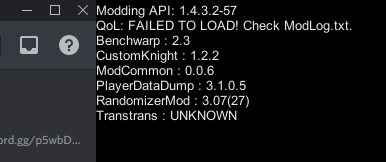
sorry about the discord bleed in the screenshot
 hollow hare
Instal vasi
quick estuary
Ah, didn't know vasi was needed for QoL. It used to be standalone.
Thanks so much!
 quaint jackal
wheat orchid
quaint jackal
wheat orchid
f1
wheat orchid
it's literally called debug mod
wheat orchid
what was it's name?
wheat orchid
hmm
when did they get the mod installer
do they have .new framework 3.5 installed
what operating system
 normal furnace
They tried installing it yesterday and reinstalling it today
wheat orchid
did they put it on their desktop?
normal furnace
They said that maybe the framework thing could be the problem, and theyll try to download it tonight
And yea, its on their desktop
wheat orchid
ok
real jacinth
update to most recent net framework, and update os
 past lava
I tried downloading the mod installer, but the game can't find my directory. Am I able to use it with the Xbox Game Pass version of the game?
real jacinth
no
mint otter
hey is redwing compatible with mac?
real jacinth
yes
 ocean flint
guys what does the sean pr core mod do?
also i need help installing poorly translated
 solar tree
can i have a wiki or something for the exalation mod
sean pr core does nothing in game except basically activate other mods @ocean flint
 lusty yacht
I installed the randomizer 3 mod and when i start a new save file the character does not spawn
anyone knows why?
 elfin jasper
Install QoL
 hushed otter
what are the hotkeys for Debug Mod?
clicking on Cheats or Charms doesn't work for some reason

wheat orchid
@ocean flint seanprcore is a library mod. It helps with the development of other mods, but is required for mods that are made with it to work
Download poorly translated from the google drive then use the manually install mods button on the mod installer
wheat orchid
@solar tree look at the readme
hushed otter
@wheat orchid help?
wheat orchid
@hushed otter get rid of more saves
hushed otter
moresaves screwing with it? o.o
proud quailBOT
Saves
Windows File Paths: (Assumes Default Steam Install Path, Adjust accordingly for DRM Free or Non-Standard Steam Path)
Game Files: C:\Program Files (x86)\Steam\steamapps\common\Hollow Knight\```
** **
Mac File Paths:
```Save Files: ~/Library/Application Support/unity.Team Cherry.Hollow Knight/
Game Files: ~/Library/Application Support/Steam/steamapps/common/Hollow Knight/hollow_knight.app/```
** **
Linux File Paths:
```Save Files: ~/.config/unity3d/Team Cherry/Hollow Knight/
Game Files: ~/.local/share/Steam/steamapps/common/Hollow Knight/```
wheat orchid
To swap out the saves, copy all the user#(number).dat files to a different location, then rename the one you want to use to user#(a number 1-4).dat then put it back in the save files folder
wheat orchid
Try clicking the spot that shows the page
I don’t remember
Also don’t bind anything to mouse click
hushed otter
pressing ` toggle the bind menu
solar tree
how get hollow point
wheat orchid
do you have the mod installer
solar tree
yes
wheat orchid
do you have a steam or gog version of hk?
proud quailBOT
Reminder: The mod installer (https://radiance.host/mods/ModInstaller.exe) and other modding resources can be found from the pinned messages.
wheat orchid
it's on the mod installer
 hollow jungle
hey i have a problem with my controller when launching hollow knight after I modded it
it keeps disconnecting
wheat orchid
are you plugging it in after you get to the main menu
hollow jungle
i tried plugging it after at first but it just kept dc ing afterwards
after a few seconds
although it did sya there was an error when first installing the mod but i continued anyway
wheat orchid
modding api messes with some controllers for some reason
wheat orchid
also always plug it in after reaching the main menu with mods
wheat orchid
you want to re download the api?
hollow jungle
ya
wheat orchid
I don't think that will do anything
hollow jungle
cuz at first i just downloaded it even though it had an error
wheat orchid
on modinstaller click the disable all installed mods button
hollow jungle
hold on im gonna try plugging it in after again
"unable to locate vanilla hollow knight"
hollow jungle
browse local files?
wheat orchid
no
hollow jungle
ok
wheat orchid
verify integrity of local files
wait for 1 file not to validate
close and open modinstaller
solar tree
i downloaded hollowm point and it still wont work
wheat orchid
did you also get modcommon?
hollow jungle
should i download anyway?
wheat orchid
do you have hollow knight on rn?
hollow jungle
nope
wheat orchid
is there another instance of mod installer running?
hollow jungle
i dont think so
wheat orchid
try restarting your pc to make sure
solar tree
how switch to gun?
hollow jungle
wait a sec
i clicked quit
and restart my computer
but when i come back and reopen it its already installed
wheat orchid
which mod?
wheat orchid
?
hollow jungle
whats wrong
wheat orchid
I was asking if modcommon was on
wheat orchid
ok
hollow jungle
i thought it was a file
wheat orchid
did you open the game?
hollow jungle
not yet
wheat orchid
it is
hollow jungle
i wanted to make surte
wheat orchid
all mods are
hollow jungle
i meant like a file just sitting in the hollow knight main folder
 forest nacelle
İs someone knows how to use mods? Because when ı used ModInstaller and open hollow knight, game is going to a forever loading. (sry for my bad english)
 gentle relic
Mod Installer just throws a fatal error when I try to install Poorly Translated.
Are there any required mods for it?
proud quailBOT
Mods
Google Drive with Mods - https://drive.google.com/drive/folders/0B_b9PFqx_PR9Um9MeFZMV21oWGs
Installer - https://radiance.host/mods/ModInstaller.exe
Mod Summaries - https://docs.google.com/document/d/1cz5tcggpGofrBcM90XyTkMWjMelDHzugvQM6HpB13Ew
 azure plinth
ı have a mod idea but i dont know how to create mods is there a good moder that listen to me?(sorry for poor eng)
 muted marsh
How do I install the randomizer mod
I don't have it in the Mod Manager thing
Nvm I've installed it
But now my game is a black screen
I have the ingame cursor still, but nothing else
muted marsh
How do I uninstall these mods so I can play the game smh?
novel bronze
How do i get rid of the modding api in the top left corner?
 teal hazel
Hello
 dusty glen
Is there a way to slow the speed of flying with noclip?
wheat orchid
not unless you decress the timescale
 lime hollow
hello there. how do i install poorly translated ? the one in ModInstaller doesn't work and generates an error
 west bane
manual install, grab the .dll from #archived-modding-development pinned messages
itll be named "translation mod"
 vagrant junco
I am using the randomizer 3 mod, but whenever I try to start the game, the knight doesn't appear and thus I cannot do anything
I have tried several different starting locations
real jacinth
Install QoL, vasi, and modcommon
 fast bough
Hi! I've been trying to install a skin mod to my swithc's hollow knight, but I can't find a wat. Does anyone know how to do it?
fast bough
oh. That's a pity. Thanks 🙂
 sick dune
QoL just wont work?? i tried reinstalling it in the mod installer but when i try go into a save file, i cant see the knight and cant do anything
frigid chasm
Hey, I know this channel is for modding help, but this is just about general game crashes
My game is saying that it cant find unityplayer.dll
I have the microsoft store version
 solid raven
I downloaded the hollow knight randomizer mod and went to the forgotten crossroads stag station and took it to dirtmouth, but now I'm stuck. I can't travel back to the crossroads station and I cant find a way out of the dirtmouth station. am i missing something?
 trail condor
Benchwarp
solid raven
gotcha thanks
so the station are part of the randomized "items" then? like I could find a station somewhere totally random?
wheat orchid
I think so
 rapid night
oh
wheat orchid
Was fun making that
rapid night

sick dune
does qol change the vengeful spirit at all? i just done the greenpath vs skip for the first time and i dont know if i should be proud
real jacinth
no
sick dune
epic
solid raven
where does the spoiler log generate?
real jacinth
saves
solid raven
thx
 torn cloud
where is a safe download link for mods? also does anyone know where to get the gun mod?
 spring bane
?i
proud quailBOT
Reminder: The mod installer (https://radiance.host/mods/ModInstaller.exe) and other modding resources can be found from the pinned messages.
lime hollow
manual install, grab the .dll from #archived-modding-development pinned messages
@west bane ye but there is a bunch of other files in the .zip
 karmic mesa
Is there a mod that lets you move the camera independently of the player? Doesn't seem to be an option in Debug Mod.
west bane
it's a .dll not a .zip
zenith abyss
i connect, but he does not move
we cant interract
he just stands there
even if my friend moves
wheat orchid
Multiplayer issue solved
 versed jolt
 zealous anchor
does any one know how to use debug on a mac ?
I enabled the mod but cant access it
is ther a hot jey?
 trail flint
F1
trail flint
yes
torn cloud
How do I get the gun mod?
trail flint
?i
proud quailBOT
Reminder: The mod installer (https://radiance.host/mods/ModInstaller.exe) and other modding resources can be found from the pinned messages.
trail flint
install modcommon too
spring bane
you have function lock on, that's a Your Keyboard thing not a hollow knight thing
zealous anchor
what do iu mean9?
trail flint
oh yeah, there should be "FN" button on your keyboard
trail flint
all good?
solid raven
are charm overhaul and exaltation compatible?
 lethal arrow

 amber aurora
hey, anyone knows a mod that fucks with steel soul jinn? because i'm doing a steel soul run for the first time, heard that i could sell eggs to jinn, went there and i can't open the damn door even tho i have a key? what the hell. so far i can't seem to find any mention of the message i get at the door anywhere online, and in the help channel they don't know. i'm confused
real jacinth
what mods do you have
amber aurora
bench warp, infinite notches, qol, transtrans, modcommon, seancore (or something, i can't remember the precise name), debug mode, enemy hpbar, more saves, randomizer 3, vasi
spring bane
randomizer makes it so that you need 2 keys to open jiji, or any other place that isn't waterways, so the logic works
amber aurora
ooooh
so randomizer also is the reason i get that prompt text that talks about elderbug?
spring bane
yep
amber aurora
damn
well thanks so much, i was banging my head on the wall right there
as if steel run isn't anxiety-inducing enough
spring bane
confused me the first time too... would be nice for first timers if the text explained itself :V
wheat orchid
@lethal arrow yes. There has been for a while
spring bane
steel soul rando sounds kinda nusts...
amber aurora
doesn't it?
i'm doing it on two diff saves and i had that thought at one point and just nope, nooope
 spark breach
Steel soul, but every enemy does 5 masks of damage sounds just as bad
Which I'm currently working on
 bold vessel
where i find the debug mod?
solid raven
my helper randomizer log says i havent gone to sly or iselda, what does this mean? I assumed it just meant unlocking the shop, is it something else?
solid raven
no, but none of them are key items/required to progress as far as I can tell
well I bought some items but like charms and stuff
real jacinth
okay. then of course it says you haven't got the items from them
solid raven
ok so the sly/iselda marker is for an item from them, not for the shop, got it
 winged isle
where do i get the api
real jacinth
you run the installer
winged isle
oh ok
 proud gale
what .pngs do i need for custom knight to work
novel bronze
If you accedentally get an item that you dont want is there a way to remove it? ( for debug mode )
And also i cant seem to find my shade
 dim patrol
how do you check the spoiler log of an item rando again?
 past swallow
why does modinstaller constantly ask for updates on mods? do they actually have an update or no cause modinstaller crashes once i say yes and it finishes
wheat orchid
Clock the manually install mods button in the mod installer and direct it to the mod or drop the dll in the mods folder
muted marsh
Ah, thank you
past swallow
its been 5 hours can my question be answered please
past swallow
imma try that real quick but i dont think it will work
wheat orchid
Ok discord you do you
past swallow
what
muted marsh
I've installed all mods but how do I start Rando 3?
wheat orchid
Have you installed it?
sleek tiger
okay that makes more sense
wheat orchid
Screenshot the main menu
sleek tiger
there have been a buncha people who like
went ahead and downloaded literally all the mods
wheat orchid
The game can’t handle all mods lol. Thought that would be a thing people can infer from modding in general
muted marsh
Oh wait, the main menu said every single dll failed to load lmao
Says to check some modlog
wheat orchid
Just screenshot it
muted marsh
past swallow
only one of the mods stopped giving an update prompt, the others still ask to update
muted marsh
I guess if I install those two it should work then?
wheat orchid
Yes
muted marsh
Alright, Imma try to do that
wheat orchid
Idk why seanprcore is showing up though
muted marsh
Idk honestly
past swallow
is there like a new modinstaller update that stops those update prompts?
wheat orchid
If you just deleted and got it again, then no
past swallow
hmm
muted marsh
Still the same
wheat orchid
Screenshot again
muted marsh
Only now ModCommon failed to load as well lmao
proud quailBOT
Saves
Windows File Paths: (Assumes Default Steam Install Path, Adjust accordingly for DRM Free or Non-Standard Steam Path)
Game Files: C:\Program Files (x86)\Steam\steamapps\common\Hollow Knight\```
** **
Mac File Paths:
```Save Files: ~/Library/Application Support/unity.Team Cherry.Hollow Knight/
Game Files: ~/Library/Application Support/Steam/steamapps/common/Hollow Knight/hollow_knight.app/```
** **
Linux File Paths:
```Save Files: ~/.config/unity3d/Team Cherry/Hollow Knight/
Game Files: ~/.local/share/Steam/steamapps/common/Hollow Knight/```
wheat orchid
Located directly in your save files path
ModLog.txt
@ me when you send it or if you need help finding it
vernal rain
just send the file
muted marsh
vernal rain
@wheat orchid
muted marsh
I'm literally the first person with these errors lmao?
wheat orchid
Don’t
vernal rain
did the api get updated recently? with the first line, my modlog is already different than yours lol
wheat orchid
Oh lol
vernal rain
like, i don't have the
[INFO]:[API] - Adding GitHub SSL Cert to Allow for Checking of Mod Versions
line
wheat orchid
Was that your first time using hk mods?
muted marsh
Nope
wheat orchid
Did it update the api when you got it yesterday
wheat orchid
Ok
muted marsh
It didn't say anything afaik
wheat orchid
Click enable all installed mods
muted marsh
And now I try starting up the game?
muted marsh
Uh now it just crashes
wheat orchid
Are you using a controller
muted marsh
Nope
muted marsh
Nope
wheat orchid
Hmm
muted marsh
Didnt do anything new
wheat orchid
Did you get the game on steam or gog
muted marsh
Steam
wheat orchid
Close mod installer
Go to steam
Right click hk
Click properties
Click local files
Click verify integrity of local files
Wait for 1 file not to validate
wheat orchid
It didn’t remove mods?
muted marsh
It did, but after installing again it didn't work
 thorn turtle
Are you getting the Central Directory Corrupt as well?
wheat orchid
Different problem with the installer
thorn turtle
Ah then continue and I'll ask my questions after, sorry!
wheat orchid
So once you verify integrity, it returns to unmodded but when you open mod installer and it installs the api it gets buggy?
muted marsh
Yep, pretty much
past swallow
hey so um you know those little mods youtubers sometimes use for small challenges like short slash and wind?i wanna have them but idk if i can get them is there any way i can get one of em without needing to mod the game myself? because they aint on the modinstaller
wheat orchid
I they were posted here at some point probably
past swallow
how do i find them tho
wheat orchid
Bruh
thorn turtle
Try using the search bar.
wheat orchid
It was in the description
past swallow
uuuuh
wheat orchid
At least fireborn’s vid of windy pop had it
thorn turtle
(They mean the description of the videos in question)
past swallow
k but after that what do i do with it
wheat orchid
Manually install with mod installer
thorn turtle
(In the interest of saving time, after Vuk gets his problem figured out can someone just ping me cause I'm at a loss at the moment for what's happening with my installer 😅)
 winged merlin
It is necessary to have the game on steam to put mods in it?
winged merlin
ok thanks
wheat orchid
@muted marsh try manually installing the api by downloading it from the google drive. Go to your game files path and go into the hollow_knight_Data folder then go into the managed folder then replace the AssemblyC-Sharp.dll file with the one you downloaded
?saves
proud quailBOT
Saves
Windows File Paths: (Assumes Default Steam Install Path, Adjust accordingly for DRM Free or Non-Standard Steam Path)
Game Files: C:\Program Files (x86)\Steam\steamapps\common\Hollow Knight\```
** **
Mac File Paths:
```Save Files: ~/Library/Application Support/unity.Team Cherry.Hollow Knight/
Game Files: ~/Library/Application Support/Steam/steamapps/common/Hollow Knight/hollow_knight.app/```
** **
Linux File Paths:
```Save Files: ~/.config/unity3d/Team Cherry/Hollow Knight/
Game Files: ~/.local/share/Steam/steamapps/common/Hollow Knight/```
thorn turtle
Well I keep getting the Central Directory Corrupt error when trying to open/install modinstaller. I've tried verifying game files, uninstalling/re-installing game, uninstalling/re-installing modinstaller, as well as manually removing/redownloading modding api just in case. I'm not too good with manually modding to be honest (aside from using vortex manager often on other games). I'm just confused, and not very well educated on how to fix these things. It is the steam version by the way, bought it just so I could be able to do this. 😅
wheat orchid
Have you tried this? #archived-modding-help message
If that doesn’t work, make sure you only have one instance of mod installer open at a time
thorn turtle
Ah sweet, I didn't even know about that. I'll try right now!
wheat orchid
Also make sure you are on the most recent update of your operating system
thorn turtle
I'll double check but I update daily so that should be covered. (can never be too safe with drive/software/graphics updates)
proud quailBOT
Mods
Google Drive with Mods - https://drive.google.com/drive/folders/0B_b9PFqx_PR9Um9MeFZMV21oWGs
Installer - https://radiance.host/mods/ModInstaller.exe
Mod Summaries - https://docs.google.com/document/d/1cz5tcggpGofrBcM90XyTkMWjMelDHzugvQM6HpB13Ew
past swallow
so i have wind mod on but idk how to turn on the wind how does it work
past swallow
k
thorn turtle
Okay, last question (as that seemed to work, thanks), should the install path just be the "Hollow Knight" folder in steamapps/common or should it be data?
wheat orchid
Idk
Just go with Hollow Knight first
If it doesn’t work, reset the installer again
thorn turtle
Alright, just figured I'd ask before hand. That's how I did it the first time.
Thanks again!
past swallow
wee time for wind pop it worked
 barren oriole
I'm trying to install the ModInstaller but when I open it this page appear, I don't know what to do.
Can someone help me please?
past swallow
?saves
proud quailBOT
Saves
Windows File Paths: (Assumes Default Steam Install Path, Adjust accordingly for DRM Free or Non-Standard Steam Path)
Game Files: C:\Program Files (x86)\Steam\steamapps\common\Hollow Knight\```
** **
Mac File Paths:
```Save Files: ~/Library/Application Support/unity.Team Cherry.Hollow Knight/
Game Files: ~/Library/Application Support/Steam/steamapps/common/Hollow Knight/hollow_knight.app/```
** **
Linux File Paths:
```Save Files: ~/.config/unity3d/Team Cherry/Hollow Knight/
Game Files: ~/.local/share/Steam/steamapps/common/Hollow Knight/```
past swallow
i think it should be here
thats the installation paths, just tell the modinstaller the path is there i think thats what you need to do
im not an expert
barren oriole
Ok, I'll try
 obsidian vigil
so i tryed installing the randomizer. So i could play the room randomizer, but everytime i start the game i am stuck in this screen. can anyone help me?
vernal rain
install vasi (dependency of rando)
obsidian vigil
now it works thanks 🙂
 strange blaze
i have this problem when i use custom knight it sometimes makes geo invisible
wheat orchid
Add a geo.png file from the default folder into the skin folder
strange blaze
ok
past swallow
so i have decided PoP with wind is too hard for me so i want to do a full run with wind but when i got to PoP on a new file (using benchwarp and noclip ofc) it didnt start up the wind but the wind is there on my main file (112%) so i have no idea what triggers it does anyone know?
wheat orchid
Did you restart the game between exiting your first save and going into another
past swallow
umm no does that fix it?
past swallow
imma try it
it did not work
there must be some item that you need to make the wind start up
but what is it uhiuewhfjerhui
it must be an item/skill/charm because it works in my normal, steel soul and godseeker files just fine does nobody know what it is?
wheat orchid
Maybe you need to complete white palace first
past swallow
idk maybe but i tried getting full kingsoul and it didnt work so idk
also on godseeker mode nothing has been done to the rest of the game so WP shouldnt be done which makes me highly doubt that will work
past swallow
i tried all 3 modes
 spice oar
Hello, I'm trying to use custom knight, but when it finishes downloading, it comes up with an error like this
past swallow
i believe manual install fixes that
spice oar
how would I manually install custom knight? is there a video
past swallow
check the pins, theres a drive with mods, download customknight from there
then in modinstaller just click manual install and select customknight wherever the file was downloaded
probably in downloads
spice oar
Thank you, i'll try that now
spice oar
I got the same error :/