#archived-modding-help
1 messages · Page 94 of 1

 real jacinth
default is arrow keys for movement
not wasd
just change what key your nail is on to something not backspace
¯_(ツ)_/¯
 uncut coral
no  i'll just unbind the invis thing in debug
 lapis ruin
I can install ak 47 mod in ps4?
real jacinth
no
lapis ruin
F***
 ancient veldt
Guys where can I get the ak47 mod I'm searching like everywhere but I can't find it. Am I just stupid (probably yes)?
real jacinth
it's not released yet
ancient veldt
Oh, okay, Fireborn said I should ask here, because he already played it, but I'll just wait then 🙂
real jacinth
I just pinned the beta build in #archived-modding-development
you'll have to manually install it
ancient veldt
Nice, thanks
 versed needle
Stick it in your game folder
real jacinth
Stick it in the correct folder
versed needle
The zip is already set up with the folders
 somber arch
which is the "correct" folder
real jacinth
Oh I bet they nested it
somber arch
or do I need to not unzip it?
somber arch
ok
 vernal lichen
Hey, so im new to modding for hollow knight, saw a video from relyea about it... can anyone help?
real jacinth
?i
 proud quailBOT
Reminder: The mod installer (https://radiance.host/mods/ModInstaller.exe) and other modding resources can be found from the pinned messages.
vernal lichen
oh ok, so does it auto install or do i have to drop it in the save folder for hollow knight?
vernal lichen
Ok, thanks!!!
vernal lichen
hey uh, im using the debug mod for the game
and i was wondering how to move around the panels?
@real jacinth any chance you could help again?'
anyone?
real jacinth
You cant
vernal lichen
._.
vernal lichen
i cant click the settings for benchwarp because of it
real jacinth
Click F1
vernal lichen
i know
still cant click it
@real jacinth
what about benchwarp?
can i move that panel under it?
real jacinth
No
vernal lichen
what does that even do?
real jacinth
Benchwarp?
real jacinth
Let's you teleport to any bench you've unlocked
Benchwarp only has the top panel
Mid left is from debug
real jacinth
That's for putting your own bench anywhere
vernal lichen
oh... any way to get rid of it?
real jacinth
Disable the mod
vernal lichen
no, i want the top thing but i dont want those 5 panels that i showed
real jacinth
Rewrite the mod
vernal lichen
oh, there is a section in settings called disable deploy
vernal lichen
hey uh, whats the nail damage for 2nd upgraded nail?
real jacinth
9
vernal lichen
(the channeled nail)
vernal lichen
ok
 atomic zenith
n | d
-----
0 | 5
1 | 9
2 | 13
3 | 17
4 | 21
where n is number of upgrades and d is damage
 covert oasis
no thoughts
head empty
vernal lichen
hey dude
my game doesnt play music no more
help?
like i just played some music and it worked but hollowknight isnt playing any music/sound anymore
 long umbra
I've had problems like that with other games, what service do you use?
long umbra
Is this on steam or am I dumb and it's not on anything else?
long umbra
Some people fixed it by going to the properties tab (right click hollow knight at the bottom of the dropdown) and click local files. Then you'd click something along the lines of "verify files" but I cant remember what it's called right now. Its toward the bottom
It takes a bit but functions for some people
long umbra
You could also try desperately spamming the mute button and hoping something works for it to ultimately not work and you just have to live with it.
vernal lichen
bruh, what you said just deleted the mod off the files
ffs
for FUCKS SAKE
now i gotta download everything again
;-;
long umbra
Woah. This has weird results. A lot of people say that worked, mine did jack, and yours deleted your mods. I'm sorry about that.
I just blamed my computer at the time
vernal lichen
<@&328354344313421825> any support here?
covert oasis
did you try turning up your in-game music volume
 glass meteor
no
 rare rivet
Uninstall mods and see if it works?
vernal lichen
uninstall or disable?
 west bane
after you verified your steam files did you launch the game again to confirm that your sound worked or still did not work
vernal lichen
after i verified... i launched it (without redownloading mods) and sound didnt work
halp
 acoustic tundra
Doesn’t sound like it’s an issue with the mods
vernal lichen
then how?
west bane
i mean if you're in a hurry for an answer backup your saves and reinstall or just wait til someone can help you with much more technical details
vernal lichen
ok, how do i backup the save?
west bane
?saves
proud quailBOT
Saves
Windows File Paths: (Assumes Default Steam Install Path, Adjust accordingly for DRM Free or Non-Standard Steam Path)
Game Files: C:\Program Files (x86)\Steam\steamapps\common\Hollow Knight\```
** **
Mac File Paths:
```Save Files: ~/Library/Application Support/unity.Team Cherry.Hollow Knight/
Game Files: ~/Library/Application Support/Steam/steamapps/common/Hollow Knight/hollow_knight.app/```
** **
Linux File Paths:
```Save Files: ~/.config/unity3d/Team Cherry/Hollow Knight/
Game Files: ~/.local/share/Steam/steamapps/common/Hollow Knight/```
west bane
you're looking for these files
vernal lichen
ok, so do i move it to my desktop and when its reinstalled do i put em back in?
west bane
yes, or a temp folder
vernal lichen
i didnt have any .json files but sure
glass meteor
whymst the fuck are you backing up saves
is the game unmuted in windows volume mixer
glass meteor
very cool caps lock
when in the volume mixer and playing the game does a green bar show up under the slider indicating that the game is trying to output audio?
vernal lichen
yup
glass meteor
Are other applications next to hollow knight in the mixer outputting to the same audio device?
glass meteor
show mixer
glass meteor
and the green bar under spotify's slider shows up for hk when you're playing, yeah?
vernal lichen
yup 2 times
 runic oriole
and you tried without mods, with no success, correct?
glass meteor
idk then 
vernal lichen
yeah
im going through the folders rn and deleting all the mods
ive backed up my save file so yeah
runic oriole
it really doesn't matter if you have mods at this point
just uninstall and reinstall on steam
vernal lichen
im trying
ive done it 2 times but no music still
i need the modinstaller off the pc
cause it keeps redownloading itself
how do i get this off hollow knight
?
covert oasis
verify game files
vernal lichen
anyone else experience this?
i installed all mods (didnt enable all) and then next time i launched i noticed there was audio missing
runic oriole
uninstall the game
covert oasis
what mods did you have installed
vernal lichen
all of them (hadnt had them enabled)
all the mods fro
from
!i
or the fucken mod installer thing
covert oasis
wait did you download and enable literally all the mods
vernal lichen
just download
didnt enable all of them
only enabled the debug mod, benchwarp, the grimmchild upgrade, healthbars, and combos
fucking hell i was expecting this to go smoothly but NOPE
now i can never play the game with sound
cause of this gay ass mod installer
how do i get rid of modcommon.ddl?
TELL ME
IT KEEPS INSTALLING ITSELF
<@&328354344313421825>
rare rivet
Okay...
vernal lichen
-_-
 wide rampart
If you want to revert you can verify steam cache 🙂
vernal lichen
IVE DONE THAT
3 TIMES NOW
BUT MODCOMMON KEEPS COMING BACK
its like a damn virus
glass meteor
Local man verifies game and then reinstalls mods and is confused as to why mods are installed
rare rivet
Okay welp
wide rampart
Aight no need to caps spam
covert oasis

vernal lichen
im pissed.... downloaded a program which i thought was safe and its attached to my game now
even if i re-install it
and verify it...
and restart my computer.....
 next galleon
🤔 I WAS gonna buy HK and mods but now 😱
vernal lichen
fucking hell imma just try something.... but the music is fucked because of that mod installer
vernal lichen
then what is it huh? before i installed it imy HK was fine
 potent atlas
Our master plan has finally come to fruition
All this time we've kept up this ruse, entirely to trick you into turning off audio
 daring peak
the long overdue revenge of 753, after getting his game yeeted by the faulty anti-piracy features of the old installer
vernal lichen
just reinstalled it again... is this how the main file is supposed to look?
vernal lichen
(i download my shit on D: . dont ask)
next galleon
Pf vs x86
vernal lichen
managed?
runic oriole
inside hollow_knight_Data
vernal lichen
fucking hell here
vernal lichen
runic oriole
because you still have the modding api installed
vernal lichen
ive done this 4 times now
runic oriole
in game sliders are at max
mixer gets input audio
they just don't hear it for some reason
vernal lichen
my spotify plays music nicely
runic oriole
I already said that
vernal lichen
runic oriole
if the mixer is detecting audio, then there is audio
rare rivet
Yeah exactly gradow
runic oriole
just run it without running the modinstaller first
vernal lichen
its not detecting anything from HK
runic oriole
uh
runic oriole
I mean
vernal lichen
vernal lichen
NO
wide rampart
Serious
runic oriole
so it's not modding fault
rare rivet
then its not a mod problem
vernal lichen
._.
runic oriole
because the game literally has zero mod interference at this point
vernal lichen
im stressed... idk what to do... checking the folders again
runic oriole
it literally doesn't see the modcommon file
you can just delete the Mods folder if you'd like
makes no difference, the game doesn't see it
vernal lichen
still there as always
covert oasis
sir that is a text document
runic oriole
you know that's a text file right?
wide rampart
surely not talking about the txt
wide rampart
It's a text file telling you what to do... It's not a mod
runic oriole
unless you run the modinstaller
vernal lichen
no music still
vernal lichen
ok... then whats going on?
runic oriole
we have as much idea as you
have you tried lowering all the levels
and then re raising them?
vernal lichen
where is audio devices?
runic oriole
and remove the checkmark that allows programs to take exclusive control of the audio device
settings
system
sound
vernal lichen
ok, checking again
runic oriole
sound control panel
vernal lichen
yeah i did what you said
runic oriole
ok
vernal lichen
i also uninstalled it with control panel if that made a difference
runic oriole
it doesn't
vernal lichen
ok, when it re-installs ill check for sound again
nope
still doesnt work
what is going onnnnn
vernal lichen
bruh i just wanted to play hk... ;-;
 crystal knot
did it work before?
runic oriole
Are you actually playing, or just on the menu?
vernal lichen
the menu... normally you should hear WHOOSHing sounds when you click on options or stuff like that
next galleon
Uninstall again...Try a complete shutdown(maybe power cycle) no restarts, let windows load completely patience is key here. Open steam re-download and re-verify
next galleon
That's not for me to answer I'm merely helping in the modding-help channel, just joined today and saw your messages figured I'd give it a shot
vernal lichen
Ok, testing with @next galleon method
next galleon
Standing by
real jacinth
Are other programs making noise?
next galleon
He said spotify was fine
next galleon
"my spotify plays music nicely"
real jacinth
Okay. Reread it
next galleon
nvm haha
real jacinth
I hadn't seen the most recent iteration
real jacinth
Was thinking maybe it was an incorrect audio source set to default or something
next galleon
Well damn, do you have a previous windows backup?
whatever its called I can't remember, is this win 10, 8, 7?
real jacinth
Ayy we got there. Lol
vernal lichen
ok, so what now
real jacinth
Do other steam games have audio
vernal lichen
lemme check
next galleon
YO that's what we were saying it's not the mod or the game at this point, could be a driver that isn't loading properly for 3D audio... like realtek/nvidia drivers
vernal lichen
i read somewhere that it might be the realtek drivers or smth
realtek drivers are NEEDED for unity based games
what are some unity games i can launch to test>
?
vernal lichen
uh.... to many to list
just give me a common unity based game
(game created with unity
 next galleon
dude clustertruck looks infuriating!
vernal lichen
yeah realtek launchers are up to date
next galleon
ok you mentioned windows updated or something? look for the "view update history" and see what got updated
vernal lichen
ok
nothing related to sound
anyone else have sound problems?
anyone else got any suggestions?
next galleon
what motherboard do you have?
vernal lichen
im so damn sad rn.... thought i could play some HK but nope.... had to have this crap happen
next galleon
I feel ya man I've had sound issues in the past but IT'S ALWAYS WINDOWS BEING WINDOWS
next galleon
K good there's an issue with Asus and unity still
vernal lichen
so... what did you find?
yeah saw that..... its not for windows 10 lol
try it
the option compatability doesnt exist
next galleon
this is an example with diablo3.exe it sure does exist you have to know how to find it though
vernal lichen
next galleon
that is a shortcut buddy
vernal lichen
oh yeah
next galleon
goto the install directory
next galleon
😃 good yes you're learning
next galleon
NO FUCKING WAY! SIIIICK
next galleon
shoot me a follow 🙌
vernal lichen
on your twich? sure!
next galleon
yep I barely stream but I want to start capture carding
next galleon
I play on switch right now... sick dude glad I could be of assistance... randomly joined this discord after watching some HK speedruns today
 vernal lichen
haha, yeah! man idk how 4 modding staff couldnt figure it out but you could lol (no offense to the staff (thanks to those who tried to help :) ))
vernal lichen
nonono
real jacinth
That's a good idea
vernal lichen
i genuinely was just praising cre8
you guys helped too
thanks for spending time helping me solve this staff and cre8
(sorry if it sounded like an insult)
next galleon
hahaha I've been in Tier 1 roles it all paid off tonight
vernal lichen
ok, got the mods working too
if i said anything offensive to the staff/mods just saying im sorry... got stressed and spooped (first time downloading mods for anything)
 molten yew
is there a multiplayer mod?
and if there isnt
can it be made
and if it can
who wants to contribute in making it cause if it can be made i will
 tropic swift
that woud be cool
 obsidian belfry
If I give myself all charms w/debug to replace my grimmchild w/carefree melody, would I be able to get grimmchild back?
obsidian belfry
alright, thank you
tropic swift
or 3
obsidian belfry
hmm when I do that, it equips carefree and works as carefree, but grimmchild also summons
obsidian belfry
does anyone know where i can download anyrad 1.0?
real jacinth
?mods
proud quailBOT
Mods
Google Drive with Mods - https://drive.google.com/drive/folders/0B_b9PFqx_PR9Um9MeFZMV21oWGs
Installer - https://radiance.host/mods/ModInstaller.exe
Mod Summaries - https://docs.google.com/document/d/1cz5tcggpGofrBcM90XyTkMWjMelDHzugvQM6HpB13Ew
obsidian belfry
anyrad isnt there, thats why i asked
real jacinth
then it's not officially supported
I don't know what anyrad is
search the channels. maybe someone posted it to a channel
obsidian belfry
thats,,, why i asked if anyone knew where i could find the download
real jacinth
search from: hedrack; has: file
obsidian belfry
thank you
 midnight crest
I need some help
I want to use the GrimmKnight skin mod
But it does not seem to be working.
real jacinth
Did you follow the pinned guide?
midnight crest
Yes.
I tried to even make a custom knight file and put it in the game's files
I see the mods option in the options
real jacinth
show me a screenshot of your mods folder and your customknight folder
I don't know what you're saying about making a customknight file
real jacinth
no
 midnight crest
I can at least tell ou what I see
you*
So, In mods I see Custom knight, disabled, and ModCommon.dll
real jacinth
real jacinth
or use the prtsc button on a keyboard
real jacinth
so 2 problems
you don't have 8 sprite sheets in your customknight folder
you need the geo.png
real jacinth
you also don't have the mod even installed
midnight crest
wait w h a t
real jacinth
that is the installer, yes
see how customknight isn't installed
click the install button
midnight crest
oh yah
real jacinth
and installing the mod probably just got rid of the sprites you put in there with the vanilla ones
midnight crest
oof
real jacinth
yes, that's what overwrite means
midnight crest
Ok, thanks!
real jacinth
but not the geo.png
leave that one
b/c the grimm pack doesn't have a geo.png
so it won't ask to overwrite it
real jacinth
get rid of that "- copy" on orbfull
and download the vanilla sprites from the google drive
and put the geo one in there
vernal lichen
Hey just wondering, i downloaded the grimmchild upgrades.... where is the menu for that mod?
like my grimmchild shoots better and has the 6 notches (so mod works fine) but i cant find the grimmchild mod menu anywhere
vernal lichen
Hello?
real jacinth

 glacial drift
Hey, so my randomizer saved over my main file somehow, is there a way to recover it? I see versions of the save files that end in like .bak1223 and stuff like that, are those backups? If so, how can I use them
real jacinth
get rid of the bak extension
glacial drift
Should I also move out the old one? And also, theres 1223, 1224, and 1225
Theres also version labeled ones like user1_1.3.1.5
real jacinth
just use the most recent one
and just put it wherever. like user3.dat
to put it in save slot 3
vernal lichen
@real jacinth can you help with the grimmchild situation?
real jacinth
@vernal lichen probably
vernal lichen
@real jacinth sorry about yesterday... was freaking out over a small thing 
real jacinth
you really need to stop pinging
proud quailBOT
Saves
Windows File Paths: (Assumes Default Steam Install Path, Adjust accordingly for DRM Free or Non-Standard Steam Path)
Game Files: C:\Program Files (x86)\Steam\steamapps\common\Hollow Knight\```
** **
Mac File Paths:
```Save Files: ~/Library/Application Support/unity.Team Cherry.Hollow Knight/
Game Files: ~/Library/Application Support/Steam/steamapps/common/Hollow Knight/hollow_knight.app/```
** **
Linux File Paths:
```Save Files: ~/.config/unity3d/Team Cherry/Hollow Knight/
Game Files: ~/.local/share/Steam/steamapps/common/Hollow Knight/```
real jacinth
open it, edit it, and save it with a txt editor
covert oasis
it doesn't have one
real jacinth
it's not in the game
covert oasis
use the config file
real jacinth
i just told you where it is
vernal lichen
Wait really?
covert oasis
yes
real jacinth
jfc

 silent needle
I cant walk
I Just ussing one mod
The enemyHPbar
They are bugging or some problem?
versed needle
Yes that mod is known to have issues
silent needle
Oh thanks
 ocean hull
its my first time modding and i installed the randomizer but its not changing the units that spawn, but it does change what comes out of the chests
west bane
randomizer != enemy randomizer
ocean hull
is this what its supposed to look like
ocean hull
it says enemy randomizer in top left
real jacinth
did you press the "load enemies" button on the main screen?
ocean hull
main screen?
west bane
title screen
ocean hull
where you select the save?
real jacinth
no
ocean hull
alright i clicked it
ocean hull
should the screnn be having a seizure?
real jacinth
it's loading the enemies
ocean hull
its changing spawn by replacing x with y, then a different x with the xame y
if u know what i mean
like all the mosquitos turn into the same thing on a room by room basis
all of gruz mothers babies turned into the same thing
how do i change that
real jacinth
change what type of randomization it's set to
in the options
but your menu will get fucked
so GL
 worn jolt
so im playing through a randomizer run with benchwarp, and for some reason Quirrel's bench in the city of tears won't unlock. Is there any known fix for this?
also, when I save and quit it does not remember that I was at that bench
versed needle
That means you'd be stuck there without benchwarp
The randomizer is disabling the bench to save you
There should probably be a check for benchwarp to disable that feature
worn jolt
oh ok. thanks
worn jolt
So I've run into another problem with my junk pit item randomizer run. I have dash and monarch wings, but no mantis claw and no required skips. But the helper log is showing desolate dive, spell twister, city of tears simple key, city storerooms wanderer's journal, and howling wraiths is accessible. As far as I can tell, there is no way for me to get to those places without luring enemies and doing tricky pogos, which I thought was considered a mild or spicy skip.
Is there a list somewhere of what is considered a mild or spicy skip?
this picture shows my seed as well as the items I've collected. I also collected a second simple key already and used it to open waterways.
 slow mason
The two keys I know about are the one Sly sells and the free one in CoT... Ah, you used them both?
worn jolt
I can't remember where I found the keys tbh
theres a lot of item checks in junk pit
but the keys arent the point. the point is that either im missing something, or the randomizer skipless logic is broken
west bane
@worn jolt https://streamable.com/u2vto
 worn jolt
that would be considered a soft skip wouldnt it?
also, i cant even figure out how to get up that high
even pogoing off of some enemies, which i thought was a soft skip, i cant get up there
 slow mason
I was about to ask how the hell you had the shadow dash but then I remembered you were doing a randomizer
west bane
do you have access to king's station
slow mason
Already asked in discussion but I realize that's probably the wrong room to ask that so I'll ask again here. Is the Bonfire mod supposed to suddenly double the enemy health?
west bane
actually discussion would be a good place to take this so lets go there
worn jolt
ah ok. ill go to discussion then
 zinc zenith
using the infnite notch mode has infected my save file and is now active even when the mod is off. help?
 tawdry dragon
Hello there ! It says on the Github page of Seanpr that the mod adds a toggleable UI, but I can't find it in game -_- Do you you have suggestion? I'd like to give it a try.
@zinc zenith It is always recommended to copy your save files before trying mods in video games. If you don't have copies of your saves, you're probably screwed.
You can try a file repair via Steam.
zinc zenith
oooh thanks that might work
 kind dust
hey guys what's up
so i need a little help
because i used the debug mod
and i want to go back to the original nail damage
which is 21 for the pure nail
but with the mod i can get it back only to 20
now 1 damage isn't that much but it adds up
so how can i reset the damage value on the mod ?
 proper pendant
Set it to 0
Then add it back
when the nail is at zero it won’t go lower. But adding damage at zero sets it to broken nail stats
So you can re-upgrade your nail.
(Pure nail is 21)
@kind dust
real jacinth
Infinite notches changes a value in your save file for how many notches you have. So it's working exactly as intended
To turn it off, either edit your save
Or
Install the mod, open the save in question, turn the mod off via in game options menu, then quit out and uninstall the mod
glass meteor
That's the old one fwiw
The new one just uses a hook
So if yours updated while you were using it you'll have to save edit
tawdry dragon
My first message went away D: It says on the Github page of Seanpr that the mod adds a toggleable UI, but I can't find it in game -_- Does it allow the user to modify rules ingame?
real jacinth
when was it updated?
"the mod"
I'm assuming you're talking about debug
did you use the installer to install it?
tawdry dragon
Yes, it's the debugmod, uptated in last October. I used the installer.
runic oriole
Show the title screen
 ripe quest
;i
real jacinth
?i
proud quailBOT
Reminder: The mod installer (https://radiance.host/mods/ModInstaller.exe) and other modding resources can be found from the pinned messages.
tawdry dragon
So...?
I already installed it and the debug mod, but I don't know how to use it, and the read me in Github doesn't give a clue about it.
runic oriole
^
tawdry dragon
Oh sorry, here it is.
tawdry dragon
There is one.
real jacinth
no it's not
seanprcore is a base mod that provides more hooks for other mods
scroll up
debug mod is up higher
tawdry dragon
I guess I misread the github post x(
tawdry dragon
Ok. It's working, thank you !
I guess I can't tweak any Charm value from here. I only see options to get Charms, not to modify them. Do I need to code if I just want to change simple values?
real jacinth
yes
tawdry dragon
Thank you.
real jacinth
charm overhaul mod might be what you're looking for
and has a config file where you can change numbers on things
tawdry dragon
I've seen this one, but I kinda dislike many of the changes brought with it. I ignored that it is actually configurable.
I see it work on the top left, but no Charm changes in game, and I don't see any UI that could allow me to tweak numbers. Please excuse my ignorance about mods, hoping that you will answer again 🙂
real jacinth
?saves
proud quailBOT
Saves
Windows File Paths: (Assumes Default Steam Install Path, Adjust accordingly for DRM Free or Non-Standard Steam Path)
Game Files: C:\Program Files (x86)\Steam\steamapps\common\Hollow Knight\```
** **
Mac File Paths:
```Save Files: ~/Library/Application Support/unity.Team Cherry.Hollow Knight/
Game Files: ~/Library/Application Support/Steam/steamapps/common/Hollow Knight/hollow_knight.app/```
** **
Linux File Paths:
```Save Files: ~/.config/unity3d/Team Cherry/Hollow Knight/
Game Files: ~/.local/share/Steam/steamapps/common/Hollow Knight/```
 novel bronze
I need help, How do i change the mod installer folder
real jacinth
novel bronze
Thanks
novel bronze
Somebody knows how to install the gun mod?
tawdry dragon
I found this in Locallow, and I checked the 2 txt. files, but I don't see any values that I could change in it. I found the README of Charm Overhaul in the game file, but I guess that's not the good place to look at.
real jacinth
have you opened a save since installing charm overhaul?
 pine jolt
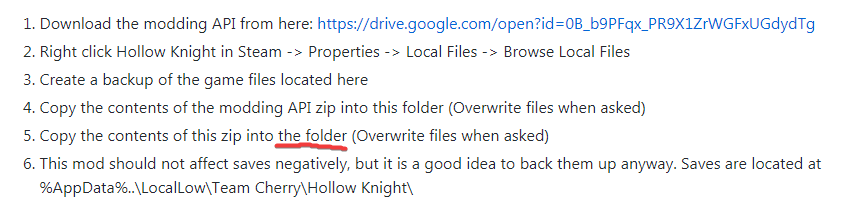
hey i've been trying to install the debug mod, which folder does this refer to? https://i.imgur.com/BKvRpTk.png
 real jacinth
?i
proud quailBOT
Reminder: The mod installer (https://radiance.host/mods/ModInstaller.exe) and other modding resources can be found from the pinned messages.
real jacinth
just use the installer
pine jolt
does that work on 1.2.2.1?
pine jolt
debugmod github
real jacinth
that won't work for 1221 anyways
you need a different version than the one the github tells you
check the pinned messages of this channel. there's manual install instructions in there
tawdry dragon
I have launched a game with the mod and I got no changes whatsoever (except the top left title).
ok nvm
Well, I still can't find the txt. you're talking about. I have only Modlog and output_log which don't seem to be the file you've talked about.
real jacinth
if one wasn't created when starting a save/opening the game, then it might not have one
maybe it was the "charming" mod that had one
tawdry dragon
Do you mean the Charm Notch mod?
proud quailBOT
Mods
Google Drive with Mods - https://drive.google.com/drive/folders/0B_b9PFqx_PR9Um9MeFZMV21oWGs
Installer - https://radiance.host/mods/ModInstaller.exe
Mod Summaries - https://docs.google.com/document/d/1cz5tcggpGofrBcM90XyTkMWjMelDHzugvQM6HpB13Ew
real jacinth
tawdry dragon
It is outdated, and it requires ModCommon. I searched for it, downloaded it, but have no clue about how to install it or even if it works. There is no .exe working :S
 quiet turret
@glass meteor Nothing I try has let me pick up the damned city crest.
If this persists, I'm going to just use Rando2, because I know that has worked in the past for me.
quiet turret
Just tried uninstalling the game and reinstalling. That didn't work.
versed needle
What's the problem?
runic oriole
picking up city crest either crashes of freezes
 elfin jasper
It's a linux issue with rando 3, apparently
runic oriole
something to do with writing the log?
elfin jasper
Yeah
I thought File.Create worked across platforms, but clearly something is breaking on the item pickup
runic oriole
just if linux StopLog();
elfin jasper
On the other hand, you wouldn't expect to be able to start a file if the rando logger is broken, so it might be something else
I don't have linux, or even modlogs for this incident, so I certainly can't fix it
I don't know if it would catch the error though
quiet turret
Well, I just tried with Rando2, and instead of picking up the city crest, I tried grabbing the item in the chest to the left of the False Knight. Same thing.
Complete freeze.
quiet turret
Where are log files placed?
elfin jasper
?saves
proud quailBOT
Saves
Windows File Paths: (Assumes Default Steam Install Path, Adjust accordingly for DRM Free or Non-Standard Steam Path)
Game Files: C:\Program Files (x86)\Steam\steamapps\common\Hollow Knight\```
** **
Mac File Paths:
```Save Files: ~/Library/Application Support/unity.Team Cherry.Hollow Knight/
Game Files: ~/Library/Application Support/Steam/steamapps/common/Hollow Knight/hollow_knight.app/```
** **
Linux File Paths:
```Save Files: ~/.config/unity3d/Team Cherry/Hollow Knight/
Game Files: ~/.local/share/Steam/steamapps/common/Hollow Knight/```
quiet turret
Where should I look for log files?
quiet turret
Ah. I see.
And there we have it.
Finally a useful error.
@elfin jasper Does this help?
Because what I did this time was: Kill False Knight, go to anscestral mound, attempt to pick up item, then get softlocked.
runic oriole
MonoMod.Utils.FastReflectionHelper.CreateFastDelegate
where is that?
is that a seanprcore method?
quiet turret
Is modcommon a thing I can install via the mod installer?
quiet turret
Yes. That has been installed the entire time.
So, I can't pick up anything at all, after beating the False Knight.
runic oriole
can you send me your rando3 dll?
quiet turret
Sure.
runic oriole
just post it here
quiet turret
Here it is.
runic oriole
nvm
runic oriole
cause it's the same
quiet turret
I am doing that.
I can successfully get the item at the fotf location 100% of the time.
quiet turret
@runic oriole @elfin jasper @glass meteor I solved my problem. In July of 2019, I had similar issues with the mods on Linux. 56 had compiled an Assembly-CSharp.dll for me to use, using a zip of my mods folder I sent him. I just went looking through the Discord chats, for that, and I found it. That DLL worked for me.
quiet turret
So, I just got that same sort of softlock when picking up an item in the grubfather room.
Here's the log for that.
Here's the Assembly I'm using that let me pickup some items.
elfin jasper
Your issue is tied to items with pop-up animations that fill the screen. If you started a new playthrough after changing the assembly-csharp, that may explain why you were able to pick up some items
quiet turret
So, I just tried picking up the item just to the left of the baldur in the ancestral mound. That failed. It gave me a softlock.
Yeah. Every single error is connected to this method not being found. MonoMod.Utils.FastReflectionHelper.CreateFastDelegate
IDK what's up with that.
 echo fractal
How do I get to the second page of saves from the More Saves mod?
echo fractal
Can you do it without contoller
covert oasis
brackets iirc
echo fractal
Yep thanks
covert oasis
just press all the buttons something will happen eventually
quiet turret
Anyone got a solution to my problem?
 left dew
Any notable visual changing mods?
 south hill
Is the Gun Mod not out yet?
quiet turret
@glass meteor Do you know what the issue is with my game?
glass meteor
no
quiet turret
Weird. This is so so strange.
glass meteor
might just need to make sure your MonoMod is up to date
think it was moved to MonoMod.Common for a bit
tawdry dragon
@real jacinth Considering that Charming mod is outdated, I can't install it with the Modinstaller. It is said in one of the pinned messages here. Guess I won't be able to tweak values by myself then 😦 I mean not without coding.
quiet turret
@glass meteor How do I make sure that my MonoMod is up to date?
Is MonoMod a system library?
quiet turret
That works if you are running Ubuntu or Debian. I am running neither.
runic oriole
apt-get update pretty-pleasy
quiet turret
Again... my version of Linux doesn't use apt-get. That only works on Ubuntu, Debian, and Linux Mint.
I'm running a thing called NixOS.
quiet turret
I know.
I know.
But is MonoMod a system library or not?
Like, is it something I need to install in this manner?
quiet turret
I didn't think it was.
@glass meteor What did you mean when you said?
might just need to make sure your MonoMod is up to date
think it was moved to MonoMod.Common for a bit
bruh
when you build the API
It has dependencies
So
If you built or had an API built with an old version it would presumably die
quiet turret
Right. But I'm not building the API am I? I'm just trying to use the API.
glass meteor
see the latter statement
glass meteor
build the API
quiet turret
With MonoMod?
quiet turret
How do I build the API?
zinc zenith
does QoL remove the need to search for flames?
also how do i configure QoL with the "api menu"
glass meteor
the instructions are on the repo my dude
and it does not
and there's a settings file in your saves folder
 ancient bridge
I have a message that a mod failed to load (And a message that it was loaded successfully a bit downer). It asks me to find modlog.txt but I can't seem to find one. What do I do?
proud quailBOT
Saves
Windows File Paths: (Assumes Default Steam Install Path, Adjust accordingly for DRM Free or Non-Standard Steam Path)
Game Files: C:\Program Files (x86)\Steam\steamapps\common\Hollow Knight\```
** **
Mac File Paths:
```Save Files: ~/Library/Application Support/unity.Team Cherry.Hollow Knight/
Game Files: ~/Library/Application Support/Steam/steamapps/common/Hollow Knight/hollow_knight.app/```
** **
Linux File Paths:
```Save Files: ~/.config/unity3d/Team Cherry/Hollow Knight/
Game Files: ~/.local/share/Steam/steamapps/common/Hollow Knight/```
quiet turret
So, to rebuild the assembly, I just use MonoMod?
quiet turret
No, I can figure it out.
quiet turret
To recompile the thing, I need visual studio?
runic oriole
yes
quiet turret
Why?
runic oriole
because that's how it's compiled
runic oriole
idk how to compile on linux
ancient bridge
So, there's only one error and error code 0. What's the problem?
 elfin jasper
No, the error doesn't affect anything
Other than generate innumerable #archived-modding-help reports 
ancient bridge
Sorry for disturbing you but I had nowhere to ask other than this place.

 quiet turret
Alright... Does seanpr's modding API repo have it's own version of the assembly-csharp.dll, or do I need to provide my own?
quiet turret
Ive figured out that I use xbuild to do it.
glass meteor
no
quiet turret
Why do you think I should use msbuild instead of xbuild?
@glass meteor The only thing that gives me pause is that the fork with Linux port branch is so far behind the official modding API repo. https://github.com/fifty-six/HollowKnight.Modding/tree/linux-port
quiet turret
Which guy's?
glass meteor
the other man with a pr
runic oriole
sean's pr
quiet turret
You don't remember, and you don't want to look it up.
runic oriole

glass meteor
you are giving me effort
no shit I don't want to look it up I'm in a car on my phone on my way home
quiet turret
Ah. I'll do it myself.
glass meteor

GitHub
Consistent casing and version pinning to allow building on linux
quiet turret
Errors abound: http://dpaste.com/216JX70
I ran the command msbuild -p:Configuration=Debug /restore and those errors spilled out in to the terminal
Oh. I see what I did wrong.
I failed at step 2 of building the API.
Or maybe not. Even with the Vanilla folder in the right spot it fails in the same way.
quiet turret
Well, I cannot figure out how to do this.
 lethal scaffold
Yaaaa moddding! :)
quiet turret
@glass meteor Do you know what's going on?
 hearty trench
hi guys, i just installed the bonfire mod, and by testing i found out that fragile strenght doesn't work. is it intended?
runic oriole
it's supposed to work
quiet turret
Randomizer is being a pain in the ass for me.
hearty trench
@runic oriole well i tried with and without it, and the damage is the same (i used the debug mode to test it out)
maybe is because i upgraded my STR a bit, so now my nail deals 18 dmg (it's been upgraded once by the nailsmith)
while in vanilla it should deal 14 (9 + 5 from FS)
runic oriole
ok, so
2 things
first, you're right, fstr doesn't work
second, debug shouldn't really be a good measure of damage (unless it's been recoded)
because bonfire calculates damage differently from vanilla
hearty trench
oh i didn't know about the dmg change
i just used debug mode to see an enemy hp, then i attacked it and i saw how many hp he had left
runic oriole
oh
ok that works
I thought you were just seeing what debug says the dmg should be
hearty trench
oh no, i realized soon that dmg was different
quiet turret
I hate that the randomizer is broken for me.
runic oriole
don't really trust bonfire
hearty trench
so frstr is useless.. it's intended?
runic oriole
it's a shitty mod
it's not intended
this mod went through so much recodes
that it's honestly a miracle that it somewhat works
it's so much spaghetti
almost worse than TC's code
runic oriole
yes
hearty trench
and you don't like it?
hearty trench
XD
versed needle
Can confirm my mods suck too
hearty trench
well, for now i like it, so i'm gonna thank you @runic oriole
runic oriole
yw! Glad you like it
hearty trench
also, in the readme it says that Vengeful Spirit and Shade Soul spells are unaffected by the Intelligence stat. i don't know about shade soul, but vengeful spirit definetly improved it's dmg when i upped INT
runic oriole
don't trust the readme
like I said, many rewrites
like, MANY
at some point I just stopped caring
hearty trench
oh ok, gotcha 😦
runic oriole
I got too caught up coding the installer
so I just let bonfire to die and rot
as it should
hearty trench
that's a pity, the idea is very nice
real jacinth
Good choice
runic oriole
mick gets me
real jacinth
The installer has helped infinitely more headaches
runic oriole
that was the plan mick
runic oriole
tbh back then we (or at least I) couldn't imagine how many people would come to run mods
it seemed so niche
hearty trench
what is "the installer" ?
real jacinth
?i
proud quailBOT
Reminder: The mod installer (https://radiance.host/mods/ModInstaller.exe) and other modding resources can be found from the pinned messages.
real jacinth
Took long enough, dyno
runic oriole
it was in the pooper
hearty trench
oh that, i just downloaded the modding api and common mod and slap in the folder, with any mod i needed
runic oriole
that's what the installer does
and that's what we used to do back then
but people required detailed instructions
for copy pasting
a zip folder
hearty trench
ahaha