#archived-modding-help
1 messages · Page 59 of 1
 untold elm
I had to delete the installer and reinstall it but that's it
 normal pike
is it in locallow > team cherry > hollowknight?
bc right now im there
and my managed folder isnt even there???
wtf
my mods are all just in the main Hollow Knight folder
uh
someone please help 
 real jacinth
that's your saves location
normal pike
thank you
 deep zodiac
Hello, does anyone know how I can add my own image to the game? Like the lightbringer mod
 novel bronze
Is it true?
 earnest agate
i think there is a bug with the Bonfire mod..?
i did a respec and i put all but 1 point in to strength but i actually tested my damage and i dont do more than default
i had 11 strength or something, which 6 shot a husk guard, but with 14 strength i 13 shot the same enemy
maybe the husk guard suddenly got more health?
maybe respecs dont work until the game is restarted, lets hope that fixes it
does anyone know what "custom knight" or "omnes deorum" do? they dont have readme files and i cant find info on them via google 
earnest agate
okie
ok so custom knight lets you edit the sprites of the game?
do i need to boot the game up first before it will work or can i just jump in to the editing now?
 honest plover
You'll have to ask the mod maker, or wait until the channel is more active
earnest agate
okie dokie ill do a quick boot and go searching for the sprites
 crystal bay
@earnest agate
You don't boot the game to edit the knight's sprite
When you install the mod it puts a Custom Knight folder in your Mods folder which has all the spritesheets that relate to the knight
take those files, edit them, and put them back into the Custom Knight folder
novel bronze
help me
honest plover
It may be more helpful to give the crash report instead
novel bronze
**Saves**
Windows File Paths: (Assumes Default Steam Install Path, Adjust accordingly for DRM Free or Non-Standard Steam Path)
Save Files: %APPDATA%\..\LocalLow\Team Cherry\Hollow Knight\
Game Files: C:\Program Files (x86)\Steam\steamapps\common\Hollow Knight\
Mac File Paths:
Save Files: ~/Library/Application Support/unity.Team Cherry.Hollow Knight/
Game Files: ~/Library/Application Support/Steam/steamapps/common/Hollow Knight/hollow_knight.app/
Linux File Paths:
Save Files: ~/.config/unity3d/Team Cherry/Hollow Knight/
Game Files: ~/.local/share/Steam/steamapps/common/Hollow Knight/
Go to the Game Files path
earnest agate
im in the steamapps\common directory
crystal bay
then hollow_knight_Data\Managed\Mods
earnest agate
okie ty, usually a "mods" folder is directly in the game directory instead of under "managed" so i was confused
crystal bay
ok
novel bronze
@honest plover but it only happened when I use mod
honest plover
I don't know jack on modding, but i think it'd be helpful for those who do to give both the mod you were using, and the error report so they can possibly tell what went wrong
crystal bay
what version of the game are you using?
(found on the bottom left of the title screen)
and are you pirating the game?
 runic oriole
@novel bronze are you on beta? If so disable it
If not, send modlog and outputlog
What version of hk are you running?
It's sad that the base assumption in these cases is piracy. But it's even sadder that that's actually the most common case
crystal bay
well according to AA there are a bunch of people who figure out how to install the mods by themselves (based on download numbers) so it's not as much as it seems
novel bronze
I use ver 1.4.2.4
runic oriole
But, so do I, and gog allows version 1.4.3.2, doesn't it?
Anyway, if you're not on current patch, means that you'll have to manually install
runic oriole
Ok
novel bronze
I can use mod now. Thank you @runic oriole
runic oriole
np!
I added a function to the installer which prevents that breaking in the future
it'll just tell you to update your game
novel bronze
yeah!
 prime halo
how do I install mode
how do i install mods? Is there a guide I can follow?
I'm on PC steam version]
honest plover
Check the pinned messages
prime halo
sorry new to discord. How do I do that?
honest plover
Are you on mobile or desktop
prime halo
desktop
honest plover
On the top bar, there is an icon that looks like a thumbtack, may also have a red circle on it
prime halo
Found it thanks! Will check that out 😃
prime halo
Thanks guys! 😃 was able to install the mod installer. I'll go through the provided google doc to get more details
 warm narwhal
... voidwalker mod?
runic oriole
Wut?
 mental hull
Hello i recently changed my steam folder from one hard drive to another and now the mod installer doesn't recognize my game as having the last update, should i reinstall the game or is there another way (i already did 2 file checks on steam)?
runic oriole
go to appdata/local and delete the ModInstaller folder
 glass meteor
or just rename the installer to something else
that makes it use different settings
I recommend triumph.exe
runic oriole
so, 56. I need ideas
GitHub
API Mod Installer for HK. Contribute to Ayugradow/ModInstaller development by creating an account on GitHub.
here's what I added to check for the patch version
 wheat shore
Ah. So it isn't just me having trouble with the installer all of a sudden then. Thought I'd broken it somehow.
runic oriole
what issue are you having?
also, I'm an undercover weeb, AAA, don't let that info spread
wheat shore
I'm getting the same notification telling me to update the game despite already having the newest version. (No beta.)
runic oriole
try deleting it and redownloading it
wheat shore
Did so and it didn't help. Made sure the local folder was gone too. It's odd because the installer was working fine around two days ago.
wheat shore
I do not, no. Mind pointing me in its direction?
runic oriole
steam?
wheat shore
Yup.
runic oriole
steam/steamapps/common/hollow knight/hollow_knight_data
wheat shore
Ah, okay. Got it.
glass meteor
Gradow no
That'll kill anyone who doesn't have the most up to date api
Which they can't update because they can't open the installer
runic oriole
yeah
that's the idea 56
get on with the program or get out

so, any suggestions?
previously I didn't check for API, but that broke because many people don't have the .vanilla file yet
but I can't not check for it and only check for the vanilla assembly, because, what if people have the api installed and don't have the vanilla assembly?
glass meteor
Load the assembly via reflection
Check if it has the Modding namespace
You can also check game version with that
warm narwhal
about my previous comment
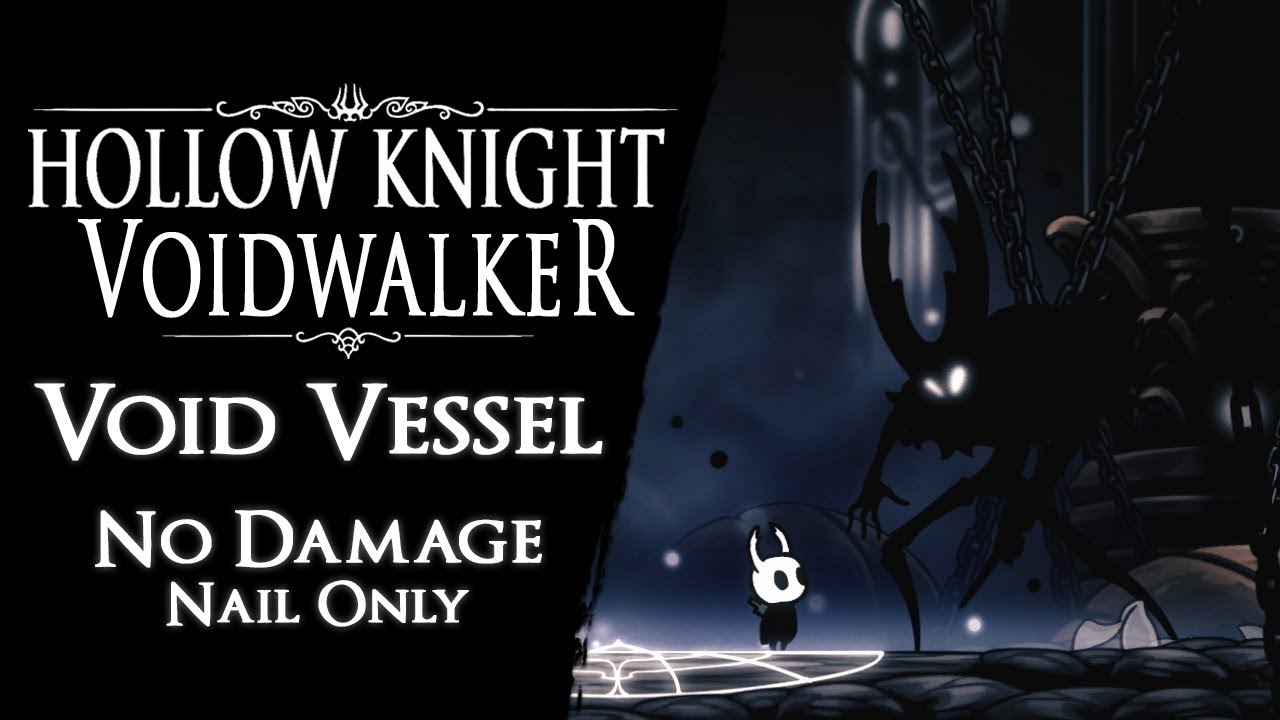
Void Vessel defeated without taking any damage and using magic. It's one of the bosses (Pure Vessel) i have modified for my mod in progress "Voidwalker". It'...
this thing
no idea what
glass meteor
Aeraloth
runic oriole
I don't think aera is a modder
glass meteor
He made that mod
 wide bloom
So uhh how does the AU work for the mod installer
runic oriole
I stand corrected
runic oriole
we're currently having technical difficulties, blackbeard
wide bloom
Aight but downloaded mods work ?
warm narwhal
runic oriole
sure
warm narwhal
especially the hp
wide bloom
That looks cool
warm narwhal
runic oriole
56 how to reflecc when you don't injecc
warm narwhal
doesnt it?
wide bloom
It looks nice
runic oriole
@glass meteor
 gloomy crater
memeing in #archived-modding-help wtf gradow we don't do that here go to #archived-modding-development instead
glass meteor
😤
 astral glen
hey so i came looking for the randomizer mod? anywhere i can find that?
one more question ... i literally just installed the game, and mod installer says i need to update it?
wide bloom
They are having some issues
astral glen
ah i see
ill wait to randomize it then and just stream a full run through first, thanks!
 clear raft
i'm having an issue with the mod installer, it shows a message saying that the access to "AU" is being denied
does someone know how to fix this ?
real jacinth
run as admin
glass meteor
but what was the solution
clear raft
it's something envolvim my whole network and a program error
i tried executing it as a admin
the same message showed up again
apparently my Microsoft .NET Framework was corrupted
glass meteor
huh
clear raft
I Restarted it and this is happening now
 tiny blade
did you pirate the game
clear raft
no
clear raft
ok, thanks
tiny blade

 trim spear
is the voidwalker mod really a thing because i saw a video on it stated as a mod, if so could you link it please?
tiny blade
I dont think aeraloth ever finished or released it so no
trim spear
oh ok thanks
 light frost
That voidwalker looks really good is it just the boss or a full mod of the game??
tiny blade
i think he meant for it to be for the whole game
but one day he just disappeared so im not sure what hes been up to
tiny blade
ye it was cool
runic oriole
@clear raft @astral glen and everyone else: try re downloading the installer
 noble basin
runic oriole
noble basin
runic oriole
did you redownload it manually?
runic oriole
f (!File.Exists(Properties.Settings.Default.APIFolder + @"/Assembly-CSharp.vanilla") &&
                    !nonNullTypes.Any(type => type.Name.Contains("CanvasUtil")) &&
                    (!nonNullTypes.Any(type => type.Name.Contains("Constant")) || (string) nonNullTypes
                         .First(type => type.Name.Contains("Constant") && type.GetFields().Any(f => f.Name == "GAME_VERSION")).GetField("GAME_VERSION").GetValue(null) !=
_currentPatch))```weird
it's working fine for me
noble basin
you're not on linux
runic oriole
weird
noble basin
can you do me a favor
runic oriole
maybe I uploaded the wrong ver?
noble basin
and open this assembly in dnspy and see what GAME_VERSION evaluates to?
or whatever you're using to check it
runic oriole
same
noble basin
so you're looking for Properties.Settings.Default.APIFolder/Assembly-CSharp.dll right?
runic oriole
yup
noble basin
and Properties.Settings.Default.APIFolder is set with the correct slashes?
alright so my rider isn't installed on this pc so I can't really help you directly, but I would greatly appreciate if you could send me a version with some debugging stuff logged
runic oriole
I'll push it real quick
so
Properties.Settings.Default.APIFolder = OSPath(OS);
        internal static string OSPath(string os)
        {
            return os == "MacOS"
                ? $"{Properties.Settings.Default.installFolder}/Contents/Resources/Data/Managed"
                : $"{Properties.Settings.Default.installFolder}/hollow_knight_Data/Managed";
}```I see
runic oriole
so it should be right
clear raft
same error here too
noble basin
I would be so much fucking happier if this error isn't OS specific
but
that would also suck a lot for you
or maybe it'd be better idk
runic oriole
did you redownload it?
clear raft
yes
clear raft
just a sec
runic oriole
GitHub
API Mod Installer for HK. Contribute to Ayugradow/ModInstaller development by creating an account on GitHub.
noble basin
well I know how to bypass it
noble basin
I wonder what
print(type.GetFields().Any(f => f.Name == "GAME_VERSION")).GetField("GAME_VERSION").GetValue(null)) would log
runic oriole
I can test that
noble basin
or whatever the console output is in c#
runic oriole
ok
noble basin
so
runic oriole
I can try removing the if statements progressively
runic oriole
to see which one fails
runic oriole
sure
wut
unexpected tbh
so the last two checks are useless
they are always true
so it's basically just checking for vanilla
this is weird
I had tested that before
ok, fixed the third check
fucking xmleditey
ok, that fixed it
smh
turns out it's not the installer, it's the xml
nice
@clear raft care to try one last time?
clear raft
no problem
actually i already did
i'm trying something first
brb with some feedback
runic oriole
k
runic oriole
one false should be enough
noble basin
why are the other two true
runic oriole
because there's no .vanilla (first check) and the api isn't the main assembly (second check)
those are the three cases it's checking for
regardless of shasums
noble basin
ok well
that exe you sent works
but
revert back to unmodded button doesn't
this pops up and then it quits
runic oriole
I only added the boxes, so the main installer should also
noble basin
it never created a vanilla assembly
runic oriole
how's the folder look like?
real jacinth
it doesn't create one. it stores it for later doesn't it
noble basin
fenrir ~/.steam/steam/steamapps/common/Hollow Knight/hollow_knight_Data/Managed $ ls -la
total 25120
drwxr-xr-x 3 eli eli     4096 Jan 12 12:39 .
drwxr-xr-x 7 eli eli    69632 Nov  5 21:08 ..
-rwxr-xr-x 1 eli eli 13379584 Dec 18 05:18 Assembly-CSharp.dll
-rw-r--r-- 1 eli eli  3514368 Nov  4 14:29 Assembly-CSharp.dll.bak
-rwxr-xr-x 1 eli eli   353792 Nov  4 14:29 Assembly-CSharp-firstpass.dll
-rwxr-xr-x 1 eli eli    27648 Nov  4 14:29 ConditionalExpression.dll
drwxr-xr-x 9 eli eli     4096 Jan 14 19:08 Mods
-rwxr-xr-x 1 eli eli   293376 Nov  4 14:29 Mono.Security.dll
so if you didn't have one at the start....
noble basin
no Assembly-CSharp.vanilla
real jacinth
oic
runic oriole
but it prolly overwrote another api
it needs a vanilla assembly to reference, and I can't provide that for copyright reasons (although the api is basically just that)
noble basin
no
I verified before running the installer
and it crashed before installing the api
clear raft
Didn't work, but the pop-ups were different this time, soon after the last one it simply crashes
noble basin
until this version
runic oriole
if the api overwrites a vanilla dll it's supposed to create a .vanilla
runic oriole
ye
noble basin
oh
well
then ofc it won't work
the linux assembly isn't identical to the windows one
 noble basin
imo use reflection to look for a modding api specific thing
as a way to see if it's vanilla
runic oriole
yeah, that's what I did
noble basin
since you're doing that kinda magic already
runic oriole
yupyup
Kyuu: are you sure you're up-to-date?
that last check should defo be false
clear raft
i downloaded the last one you sent
noble basin
I think gradow means that your game is up to date
clear raft
i'll report here if something goes wrong
Thanks for the help @runic oriole and @noble basin
 noble basin
ok
runic oriole
now I have a global bool for if assembly is api
noble basin
alright so far so good it made a .vanilla
does reverting back to vanilla actually disable all mods
or does it just revert the assembly
real jacinth
assembly
gloomy crater
reverting assembly disables all mods 🤔
runic oriole
don't do that
noble basin
ok
runic oriole
yeah, but it doesn't update the bool
so it still thinks the assembly is api
fixed
runic oriole
yeah, that is only checked on loading the installer
noble basin
I see
runic oriole
to know if it should or not rename that assembly to .vanilla
runic oriole
yeah
it just swaps .vanilla and .mod
which is great for backup, I guess
¯_(ツ)_/¯
runic oriole
yup
runic oriole
since I gotta do _assemblyIsAPI = nonNullTypes.Any(type => type.Name.Contains("CanvasUtil")); early on, I use that to determine if assembly is api or not
so I don't need any further checks down the line
idk why I picked CanvasUtil
don't ask me why
I think I'm gonna host this
it's at least better than what's currently there
glass meteor
time to put CanvasUtil in my vanilla assemblies
 earnest agate
is there a way to fix the issue of the mod installer/manager not opening? o.o
novel bronze
Can I mod Lightbringer and Charm Overhaul at the same time?
runic oriole
@Tuna4242#8101 what's the issue you're having?
tiny blade
nice ping nerd
runic oriole
Pong
glass meteor
no
 sleek tiger
yes
earnest agate
i know this is never gonna get fixed, ive searched for a solution for many hours over several days but the hollow knight mod installer fails to open properly, sometimes open at all, because of false permission errors, and etc
not even gonna follow it up, but its a real problem, but problems dont get solved here, ik that for sure
glass meteor
yeah i'm sure there are no bug fixes ever in here and that we all do nothing
earnest agate
well when i try to get help, i just lose things that i enjoyed in the game
and i cant get them back bc the mod installer simply refuses to run
and people in "help" channels focus more on making the individual in need of help, feel stupid and bad, than actually providing effective solutions
people view losing mods and progress as "help" here, smh im done
runic oriole
I literally pinged you a few hours ago asking what was wrong tho
but the ping failed
earnest agate
cus i left the server
earnest agate
i rlly had enough of some people in this discord, i wanted to know how to fix my dash ability going away and MOST people just made me feel dumb and bad at the game
runic oriole
how did it go away?
earnest agate
i verified the game files, and all my mods are now broken and unusable
and they cannot be reinstalled
runic oriole
can you please redownload the installer and see if that fixes it for you?
runic oriole
yeah, yesterday was a clusterfuck
I spent literally all day fixing it
but it should be working now
earnest agate
several errors occured when opening, mainly due to windows being a pretty poor OS, but i cant rlly use anything else, bc linux is not good for gaming atm
i dont seem to have issues with any other files on my computer except for the mod installer tho
and ive tried giving full permission to everything and running as admin, etc, nothing works
runic oriole
can you show me the error you're getting?
earnest agate
which one? xD one says the file path is denied ( for some reason), and another, nvm ill get some pictures that will be easier
runic oriole
ok
before that
can you please redownload the installer?
like I said all of yesterday's versions are broken
earnest agate
different directories does not fix this btw
i download like 4 times within the last 10 minutes mate
runic oriole
ok
earnest agate
thats one error, its a .net framework thing, which is always super buggy on its own
runic oriole
may I ask where are you downloading the installer from?
earnest agate
the only place its available moddb
runic oriole
nope
tiny blade

earnest agate
thats the only place i could find it
earnest agate
why does that not come up when i google it tho?
earnest agate
D: who that what was a good idea?
runic oriole
the fact that the mods contain some of the game's data says that's a pretty good idea
TC wouldn't be so keen on us hosting their code publicly online now would they?
earnest agate
.< well would it even allow people to pirate the game?
or is it just a copyright thing?
earnest agate
.<
you can still search for that kinda stuff even if its not indexed :/ its just a little more difficult
runic oriole
not that that has ever been an issue before, be the modding community decided some time ago to not do that just to prevent future backlash
yup, and that's enough
so, has that fixed it for you?
runic oriole
okay, one problem solved, onto another one
how did that happen?
when did you lose your dash?
runic oriole
can you describe the issue in more detail for me then? Are you playing normally and suddenly you can't dash anymore?
earnest agate
yes
ill be walking, or jumping, anything, and the dash will suddenly go away, sometimes it also happens after talking to an npc
runic oriole
uh huh
runic oriole
and it doesn't comeback until you restart the game?
okay, I'll ask you to do something for me then
next time you play the game, play until this happens
earnest agate
uh oh >.< do i have to verify again?
runic oriole
then save and quit the game
and send me the outputlog
can you do that for me?
no need to verify
earnest agate
outputlog?
novel bronze
**Saves**
Windows File Paths: (Assumes Default Steam Install Path, Adjust accordingly for DRM Free or Non-Standard Steam Path)
Save Files: %APPDATA%\..\LocalLow\Team Cherry\Hollow Knight\
Game Files: C:\Program Files (x86)\Steam\steamapps\common\Hollow Knight\
Mac File Paths:
Save Files: ~/Library/Application Support/unity.Team Cherry.Hollow Knight/
Game Files: ~/Library/Application Support/Steam/steamapps/common/Hollow Knight/hollow_knight.app/
Linux File Paths:
Save Files: ~/.config/unity3d/Team Cherry/Hollow Knight/
Game Files: ~/.local/share/Steam/steamapps/common/Hollow Knight/
if you already did that, then there's no need to do that again, is there?
earnest agate
ty for not being super mean like certain people
glass meteor
firzen pings 
tiny blade
@glass meteor we can always ping 56
glass meteor

tiny blade

novel bronze
says on the top corner charmingmod didnt load. this means it doesnt work or?
glass meteor
the mod creator had a child so the mod is no longer in dev and no longer works
 trail flint
wait isnt it a dog
tiny blade
both i think
novel bronze
can someone help me out with the settings here on randomizer 2? idk which to turn false or true
i want a normal game just with randomized spells abilities items but not enemies
novel bronze
no i wanna try without
tiny blade
then just use easy preset
novel bronze
ok and the ones in the middle?
tiny blade
you will usually want those off because they are pointless
basically if you turn, say, all skills on you will need every skill to be able to enter the black egg etemple
same with the others
novel bronze
so skills and charms on false will still be randomized
tiny blade
yeah
tiny blade
you will always be able to complete the game
novel bronze
like you can get a charm where an ability is supposed to be
i hink
so you can never get stuck?
runic oriole
yup
the mod has logic to only randomize items in a way that you can always progress
but
since you're playing on easy that restricts that logic by a lot
novel bronze
but how does it work tho. like lets say i pick up a charm in a place. can that pickup be any charm only or any ability as well
runic oriole
so you may find that most useful items aren't randomized at all
tiny blade
charms can replace skills and vice versa
runic oriole
the randomizer scrambles charms, skills and chests
so where there was a charm, now could be a charm, skill or some geo
novel bronze
can it happen so you get double jump at the start for example?
runic oriole
sure
novel bronze
ok trying out bonfire too but that one seems kinda OP
runic oriole
in fact, since you're running on easy it's almost guaranteed that by fungal you'll have either claw, dash or djump
novel bronze
yeah thats cool i dont want a hardcore run
runic oriole
it isn't
the game is already pretty unbalanced as it is
with bonfire it becomes ridiculous, even with enemies' hp scaling
runic oriole
redownload the installer
runic oriole
third link
novel bronze
i have read the summaries but i mean like if anyone has tried them
are they good/work well
novel bronze
and redwing doesnt say much it just says new abilities etc but not exactly what
runic oriole
people seem to like them a lot
lightbringer was actually what inspired me to mod this game
redwing is an homage/addon to blackmoth, another mod
now it has become its own beast, but at least that's what it started as
runic oriole
👀
novel bronze
blackmoth is the dash attack thing right
runic oriole
yeah
it changes other stuffs too
just like lightbringer
some charms
and skills
 frosty lark

 orchid gust
Was just trying out blackmoth but randomly when hit i start floating and lose control of my character?
Was wondering if anyone else had experienced this
@runic oriole
orchid gust
I am running the latest version of the mods and game o:
Is the game meant to be played on an older version
here just check this out, happened like 3 seconds ago
 novel bronze
just go into inventory you'll fall out of that
runic oriole
sup fellow undercover weeb
orchid gust
Oh inventory fixes that? Alright :D thanks man
runic oriole
I thought that was fixed
orchid gust
That was like the one button i didn't press
runic oriole
AA submitted a fix a few months ago
sorry about that
as soon as I get some free time, I'll look into it
orchid gust
no problem 
noble basin
Yes, the swarm is coming
did I actually submit a fix
if not I could
but I thought I did at one point
but I might have just fixed it in redwing if I was a jerk
novel bronze
@orchid gust I just watched your bonfire mod vod. the reason you seemed to be doing less damage at a certain point is because enemy hp scales up slightly with your level. So because most of your stats were in non-dmg, the scaling was much more noticable.
runic oriole
this is what I meant to say by "the balance is too thin"
if you put every level into str/dex/luck, you get very op very fast
novel bronze
he put almost every point into luck
so unless he crit, the enemies took forever to die
runic oriole

this is still not good
but it's way better than it was before
for instance, as it is, you should level stats in this order: str, then lck then dex
novel bronze
also for some reason he thinks enemies drop random amounts of geo??
runic oriole
no, but luck increases geo
novel bronze
and I quote, "I think how luck works, is that it increases the geo dropped by enemies that drop random geo"
 daring peak
some drop different amounts the first kill
orchid gust
Yeah i figured it out afterwards.
I was mixing two mods btw. The random geo is a mod from the enemy randomizer.
Didn't know if it stacked with the luck or not
novel bronze
the random geo quote was from the stream before you put randomizer on
orchid gust
I didn't have the info sheet for the bonfire mod until like two hours ago, so i was like oh shit im an idiot.
Well don't quote me, i suck at talking.
orchid gust
I'll just be doing blackmoth, lightbringer, and then randomizers for fun.
Yeah i 111% the game on my main file. I don't plan on being thorough
novel bronze
like in greenpath there is a breakable wall in the tall room that has the bench behind the toll gate. and behind that breakable wall are 3 geo deposits
or was it 2?
it's not surprising if you miss them tbh
some of them are not easy to notice
novel bronze
like there is a vine you can cut to get to the greenpath grub by cornifer that is hidden
otherwise you need to dash or pogo a squit to reach it
novel bronze
pogoing spikes to reach the grub nowhere near the spikes
that chaos mod super nail could do it
maybe
orchid gust
When i found out there was a mod manager i was so happy. Cause i have already done pretty much everything the base game has to offer.
Super glad this game has a modding community
novel bronze
well, welcome to the world of modding
orchid gust
It's my favorite video game ever.
novel bronze
I am Abyssal Alchemist, maker of Charm Overhaul
that over there is Gradow, maker of Blackmoth and Bonfire
orchid gust
I feel so stupid for not finding that spreadsheet.
I was like damn why my damage getting cut. I thought it was just a, build your own character stat page. Had no idea of the behind the scenes scaling.
novel bronze
yeah that too
runic oriole
without that scaling, bagel, this mod is just absolutely broken
runic oriole
you steamroll everything
orchid gust
I thought that was the point tbh
novel bronze
that is because it has a broken shasum
orchid gust
In my mind, the mod was not going to scale enemy hp, but more so your own output.
novel bronze
it does both
runic oriole
hence the graph I posted before
orchid gust
Yuh
novel bronze
you do scale faster than the enemies if you put more into damage
runic oriole
like I said, you should always level str > lck > dex
orchid gust
It was all based off of ignorance
Had i went in knowing there was scaling like that, it would have been waaaay different
novel bronze
how'd enemy rando go? I didn't watch it yet. I'm sure you noticed the multitude of problems
runic oriole
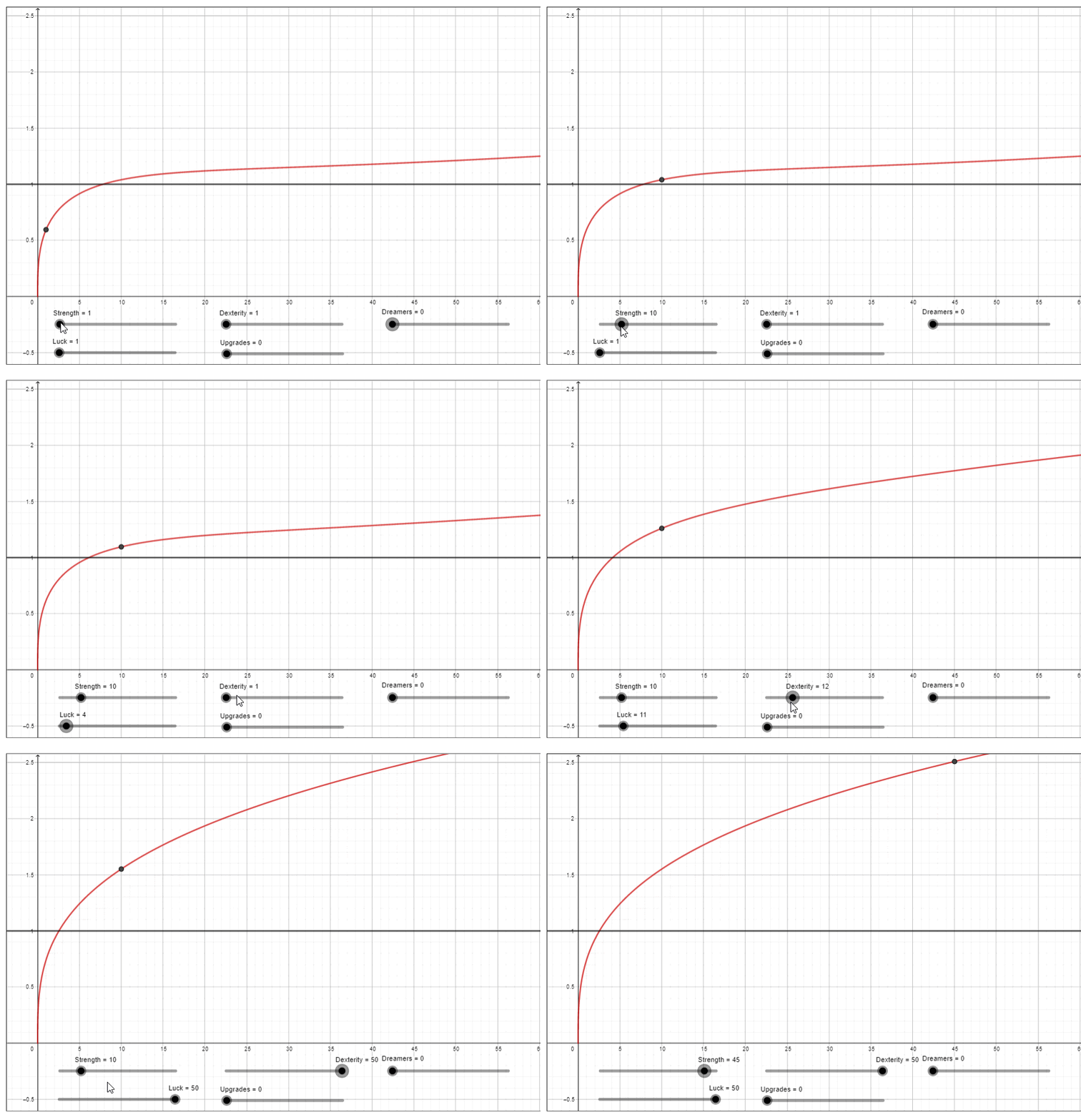 novel bronze
any enemy rando mode other than chaos is basically unplayable because the collector could lock you out of a room
orchid gust
I plan on doing runs with enemy randomizer and randomizer 2
runic oriole
most fun, at least
novel bronze
plus you can get hard locked by combining enemy rando with item rando
novel bronze
because an important item can be flukenest
and enemy rando doesn't let flukemarm spawn where she should
orchid gust
Randomizer 2 was pog. Instead of veng spirit, i ended up with glowing womb.
At first i thought, hmmm how do i go
novel bronze
item rando also tends to need a decent knowledge of item locations and map layouts
orchid gust
Then realized i am silly
novel bronze
so if you still rely on compass it might be bad
 grim bison
hey i got a question is there a way to get the white cloak from lightbringer in the base game ?
grim bison
ah thanks!
that was fast ^^
is it in the drive folder you postet in modding the "customknight sprite packs" folder ?
runic oriole
I think so
grim bison
it is not unfortunately
 little inlet
which one?
custom knight or light bringer, because i just checked, they're both there
Also, do i need to use the modding API for all mods or just the API mods, becasue i tried for 3 straight hours to install light bringer and i couldn't get them to work
novel bronze
yes
little inlet
thanks
novel bronze
put it somewhere that you can easily find it again
little inlet
done
novel bronze
so you can manage your mods
novel bronze
np yw
novel bronze
you're welcome
little inlet
oh
thanks for that too!
also, sorry, for the new mods with just a .dll format, do i just insert that into the mods folder?
if not 0.0 what i do
real jacinth
Use the installer
novel bronze
the installer should do it automatically
little inlet
when i try to execute the installer, an extention will a .exe format appears with a name of AU
real jacinth
Okay
little inlet
Wait, should it be in the hollow knight folder?
grim bison
i have mods installed ( they are great i am very thankful that these exist) but is there a way i can extract the knight outfit from lightbringer and use it for the custom knight mod ?
real jacinth
Yes
little inlet
which one..?
novel bronze
then try au?
novel bronze
um
little inlet
It ran for 30mins
and nothing happened
and still nothing has and idk what to do 0.0
novel bronze
you mean 30 seconds?
real jacinth
Yeah. Cuz you have the most up to date installer
little inlet
no, i ran it at 5
real jacinth
So run the installer
little inlet
just did, it replaced the AU with this...
a new one
just ran that
i'm checking task M
real jacinth
don't run AU
little inlet
oh
little inlet
oooooooh
real jacinth
just ignore that AU exists
little inlet
k
real jacinth
@grim bison the drive of sprite packs now has white cloak
just put those two sheets in the CustomKnight folder
grim bison
aww thank you thats very nice of you 
little inlet
with the dll files in the zip files, do i put the .dll files in my mod file?
and then run mod installer?
untold elm
wtf, mod installer closes immediately when I open it
runic oriole
@untold elm re-download it?
untold elm
works now @runic oriole
runic oriole
Magic
 novel bronze
just relaunch
little inlet
relaunch hollow?
novel bronze
yes
little inlet
i did
novel bronze

little inlet
still stuck on the little hollow knight running animation
novel bronze
which mod did you install?
 upper ocean
oh heck
little inlet
?
novel bronze
uh try without redwing?
little inlet
ok
upper ocean
should of put my thing here oop
hewwo i was wondering if i backup my save to crossroads and then put it on a usb would it be on there still or is there a place that its stored
there we go
little inlet
It says game error
it wants to verify it
i cant click off and i can exit
i have to verify
the game works
thank you for you help
@novel bronze the game works thank you for helping me out
runic oriole
The installer has a button to revert changes too
 ripe parcel
LETS SEE...
 minor terrace
*let's
runic oriole
Ded
 rancid stream
does anyone know how to install mods on mac because i want to try lightbringer and don't know which file to put the mod in
novel bronze
**Mac**
Yes, mods can be installed on a mac.
You can use the installer
To run the installer:
- Open the Terminal
- Type
cd dirname $( - Drag the exe onto the terminal.
- Type
)then hit Return/Enter - Type
mono --arch=32(Note the space at the end) - Drag the exe onto the terminal and then hit Return/Enter
If this fails with bash: mono: command not found then
- install mono here
- Open a new terminal window
- Type/paste in
export PATH=/usr/local/bin:${PATH}and hit Return/Enter - Repeat steps 2-6 above.
crystal bay
@rancid stream ^^^^^^^^^^^^^
rancid stream
thanks
 void comet
hello knight 1.4.3.2 version for the debug mode can give all the files as links link gste is not gog version.and how can I write it.
Google Translate
Google's free service instantly translates words, phrases, and web pages between English and over 100 other languages.
Google Çeviri
Google's free service instantly translates words, phrases, and web pages between English and over 100 other languages.
tiny blade

void comet
mod installer gives error when running. What else do I have to do when I install this program?
tiny blade
whats the error
void comet
I do not remember the pc at the moment I do not have a chance to show it in a picture
runic oriole
When you're at a pc show us the error
void comet
OK, what problem do I have to download after decoding the problem?
runic oriole
I don't understand
 gilded dome
you just download and replace the old modinstaller and that's about all it takes to fix it
just watch out they'll send 'outdated' stuff at you
gilded dome
the modinstaller sennds an error and then it aimlessly searches for an update
when you install it again
itll ask you to install 'outdated' mods again
runic oriole
there's ONE mod that's broken and keeps asking to update when it's already updated
it's not the installer
gilded dome
you can just say 'no fuck you' and itll go away
the three mods are Redwing, Infinite Grimm and Grimmchild Updates
at least thats what i got
runic oriole
lemme check
gilded dome
if it doesnt send an error your way then yours aint broken
runic oriole
it's not the installer, m8
that's what I've been saying
that's an error on the mods part
gilded dome
then the 3 mods crashed the whole installer for me to download it again?
think about it
runic oriole
I just installed them using the installer
tiny blade
runic oriole
sure, they prompt to update when running the installer again
but they don't crash anything
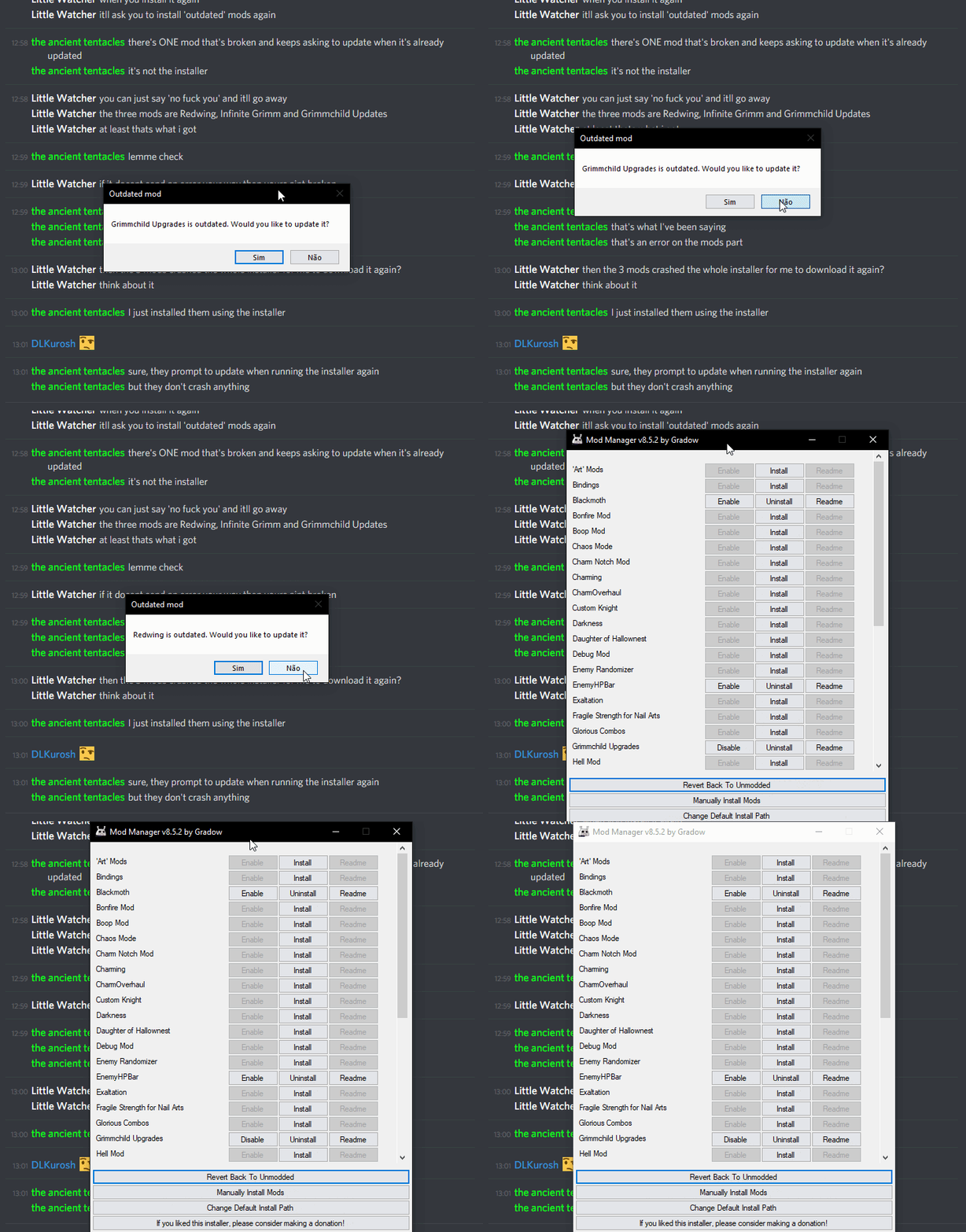 tiny blade
Não
gilded dome
then why did it crash and every time i tried to open it it always endlessly searched for installer updates
runic oriole
when was that?
gilded dome
everytime i tried to open the installer
runic oriole
like... Yesterday?
gilded dome
yeah
runic oriole
https://i.imgur.com/ltBBDY7.gifv there, fixed those mods endlessly updating

you can just run your installer, it should be fine
 sour inlet
Anyone here is familiar with Game Maker 2? 🤔
noble basin
why would anyone here be familiar with game maker 2
sour inlet
Just asking..
sour inlet
yeah im struggling with viewports and such in Game maker 2
And im like few days from submit date so sort of panic mode xD
runic oriole
uhh idk tbh
maybe kerr or KDT would be familiar with it
but kerr has pupper+babby and KDT is KDT
novel bronze
kerr
novel bronze
Hey real quick, for the load normalizing mod, anyone happen to know where it would go for installation?
 buoyant creek
My PC says that mod installer is a virus and doesn't allow me to install it :( There's any option to solve it or I should go to another thing?
noble basin
get a less shit virus scanner
buoyant creek
I'll try it
real jacinth
@novel bronze just plop it in the mods folder where the game files are
novel bronze
👍
 brave otter
Quick and probably dumb question: How do I configure mods that say in the Readme they are configurable (like GrimmChild Upgrades or Charm Overhaul), but do not instruct as to how to do it?
novel bronze
https://drive.google.com/open?id=1kSTRoDuUoDv_-b5M9W3wZd2Qzbbmi0w3pk6yUFun-1E
Charm Overhaul readme, (installer doesn't get the most upto date one because rtf instead of md).
also Charm Overhaul is not configurable
the config for mods that are
are by the saves folder
;help
novel bronze
**Saves**
Windows File Paths: (Assumes Default Steam Install Path, Adjust accordingly for DRM Free or Non-Standard Steam Path)
Save Files: %APPDATA%\..\LocalLow\Team Cherry\Hollow Knight\
Game Files: C:\Program Files (x86)\Steam\steamapps\common\Hollow Knight\
Mac File Paths:
Save Files: ~/Library/Application Support/unity.Team Cherry.Hollow Knight/
Game Files: ~/Library/Application Support/Steam/steamapps/common/Hollow Knight/hollow_knight.app/
Linux File Paths:
Save Files: ~/.config/unity3d/Team Cherry/Hollow Knight/
Game Files: ~/.local/share/Steam/steamapps/common/Hollow Knight/
ty 
 sage latch
hello
im here asking for help
i got the debug menu and i have no idea how to get the menu up at all
i have heard people say backspace or f1 but neither work
runic oriole
are you sure it's installed?
what's it say on the top left of the game's title screen?
sage latch
yes
runic oriole
then you only have the api installed
not the debug mod
get this installer
and install debug
sage latch
Like a folder i keep All my mods in or just hollow knight mods? i dont really like the files that much they are confusing.
runic oriole
hence the installer
well, if you installed debug correctly it would be in a folder called Mods inside Hollow Knight/hollow_knight_Data/Managed
sage latch
oh i kinda want a few of theese other ones too
runic oriole
ok then
runic oriole
well, it's useless now that you've used the installer
I wanted to see if the debugmod was there before you used the installer
sage latch
oh
sage latch
alright
i hope so
i mainly want to fight the sisters of battle
hope this works
thanks
runic oriole
just... Fight them normally?
runic oriole
oh right
runic oriole
well, you're gonna need to anyway
the most debug can help you is giving you infinite hp and attack
sage latch
ok
wooooah
options
thank you
whats the difference between invincibility and infinite HP btw
real jacinth
One you get hit. One you dont
runic oriole
^
 tawny carbon
anyone knows how to use custom knight ?
real jacinth
install it
then put sprite sheets in the folder
you can find pre made packs in the pins of #archived-modding-development
tawny carbon
oh thanks
 sacred wharf
so im trying to get the hollow knight slime rancher mod but i cant find the hollow knight folder
tiny blade
the what
sacred wharf
?
tiny blade
whats the hollow knight slime rancher mod
the hk folder is in Steam\steamapps\common\Hollow Knight
sacred wharf
idk i found it on youtube
novel bronze
link vid plz
runic oriole
wut
daring peak
🤔
tiny blade

runic oriole
google found nothing
 velvet galleon
Hey guys stupid question but how do you downgrade hollow knight to a previous patch?
thanks
novel bronze
is it possible to add a new language / change an existing one?
noble basin
I mean
uhhhhhh
I did make a meme mod that added a whole new language
but as far as you're concerned yes, use the LanguageGetHook
 rough hawk
 pliant seal