#archived-modding-help
1 messages · Page 58 of 1
 teal sleet
I've tried opening the .assets and .resources files with a text editor, but it won't show human-readable code
This is in sharedassets146.assets on Notepad++
 trail flint
you basically get visual studio, download the API and make a mod through VS
theres sample mods that would get you started
teal sleet
Okay
I've found this video: https://www.youtube.com/watch?v=c40y5PSH-sw

Hollow Knight Discord: https://discord.gg/hollowknight
Which I'm gonna do soon/download the API and mods for reference,
I just wasn't sure how to actually view them
To study them.
 wicked flame
Query: Is there any known issue list for lightbringer mod?
Disabled most mods, tried new save and debug-tested unbreakable nightmare, despite my soul is at 99 the lance still do 3 damage only
wicked flame
Also, while Slient Divide cancels the recoil of big lance (as it's firing on both sides), when twin fang also equiped,
recoil exist again and always push me to the left, no matter which side I'm facing...
 runic oriole
@glass meteor
 shell scroll
The installation of the mod manager went smoothlt for me, but is there any place that I can look to see what each md actually does? The readme isn't always helpful, nor is it always there to begin with
 novel bronze
**Mods**
 glass meteor
summaries
shell scroll
Ah, thank you
 lone sleet
how do I install mods? I would like to play bonfire mod
 plucky pewter
i was wondering do i have to download a specific version of the modding api or doesnt it matter which one it is?
 tiny blade
you can just use the installer linked above
plucky pewter
do i have to keep it open to use the mods?
glass meteor
No
plucky pewter
ok thanks
 final jetty
bois, i installed the mod installer and the hp bars mod, but now when i play, the borders of the screen arent locked to i accidentally click out of the game all the time
final jetty
you know how normally your cursor stops at the edge of the game right?
mine just doesnt
glass meteor
Yeah the api disables that
tiny blade
but how are you clicking out oif the game
final jetty
can i enable that?
tiny blade
please do not tell me you play mouse
final jetty
i use my mouse to attack and dash cuz thats what im used to from other games
glass meteor
haha yes
tiny blade
disgusting
glass meteor
same
glass meteor
There's no setting for it
final jetty
guess ill try looking in the config or whatever
glass meteor
I could maybe write a tiny mod for it but I don't think I even have enough space for hk on this computer

tiny blade
70 gb 
glass meteor
Half of it is allocated to linux
final jetty
nah ik
i just want to remove it temporarily while i do some grinding and then enable it again whenever i do bossfights
i only use the hp bars mod
glass meteor
Yeah
Rename Assembly-CSharp.dll in your hollow_knight_Data/Managed/ folder to like
API.dll
And then verify game integrity
It'll redownload the normal one
When you want to swap back
rename the normal one to Assembly_CSharp_V.dll or something
and rename API.dll back to Assembly_CSharp.dll
almost enough space
final jetty
okay im trying, still sorta confused but you can only hope
i renamed the thing and its validating files
glass meteor
Start:
Assembly_CSharp.dll => Modded.dll
Steam => Hollow Knight => Properties => Verify Game Integrity
Play as normal
Assembly_CSharp.dll => Vanilla.dll
Modded.dll => Assembly_CSharp.dll```

```Back to vanilla:
Assembly_CSharp.dll => Modded.dll
Vanilla.dll => Assembly_CSharp.dll```idk if that's more clear or less
tiny blade
consider installing iconoclasts insteazd of hollow knight
glass meteor
yw
final jetty
if you ever end up making that small mod please tell me
 noble basin
did you guys know the api breaks all controller inputs on linux
and I'm still not sure why
you have to compile the api with the linux assembly csharp to fix it
 noble basin
send me the vanilla windows assembly
runic oriole
wait
tiny blade
play kb
runic oriole
it also breaks controllers for me on windows
glass meteor
I don't even have the vanilla windows assembly
tiny blade

runic oriole
dlk to the rescue
glass meteor
😡
runic oriole
also, do we know why api breaks controller support on windows as well?
glass meteor
like @ PrehistoricBanana#9630 was having an issue
and I had to find some random build and it worked

runic oriole
I think it doesn't recognize it as a valid controller or smth
but the vanilla assembly works just fine with it
glass meteor
@tiny blade do you still have ShitComputer.dll
tiny blade
 runic oriole
wut dis
noble basin
what is this assembly even do
tiny blade
runic oriole
assembly even does it what?
glass meteor
And does garbage collection more frequently
noble basin
oh that sounds mildly useful, how does it affect perf
runic oriole
maybe add that to the installer?
glass meteor
I haven't gotten to test it on an actual garbage computer yet
Everyone here has decent computers 😡
noble basin
cuz like my really really low end laptop gets 60+ in all areas except the CoF
glass meteor
But this mac is pretty good at dying when it tries to run hk
Or it was last I checked
Like 15fps
glass meteor
Integrated graphics?
noble basin
yeah
runic oriole
shitty nvidia card
glass meteor
cheats
runic oriole
920mx or some shit
noble basin
vega 8 apu for me
glass meteor
.
 untold elm
ech
 hearty harbor
that's not the one
novel bronze
**Mods**
untold elm
eh, it was just guessing
hearty harbor
I hate to ask this because it's probably asked all the time; is there a place with custom knight sprite sheets?
 steel forum
hey, i'm kinda inexperienced with mods in general, but would there happen to be a list of the charms in the lightbringer mod and their effects somewhere?
noble basin
maybe the readme?
runic oriole
why do you hate cilantro my dude
noble basin
there's a weird genetic thing you can have
that makes you think cilantro tastes the worst
I don't have it
runic oriole
but why h8 m8
 gloomy crater
@noble basin wow i have that
noble basin
I'm sorry
novel bronze
you're supposed to eat parsley?
I thought it was just a decoration for fancy restaurants
gloomy crater
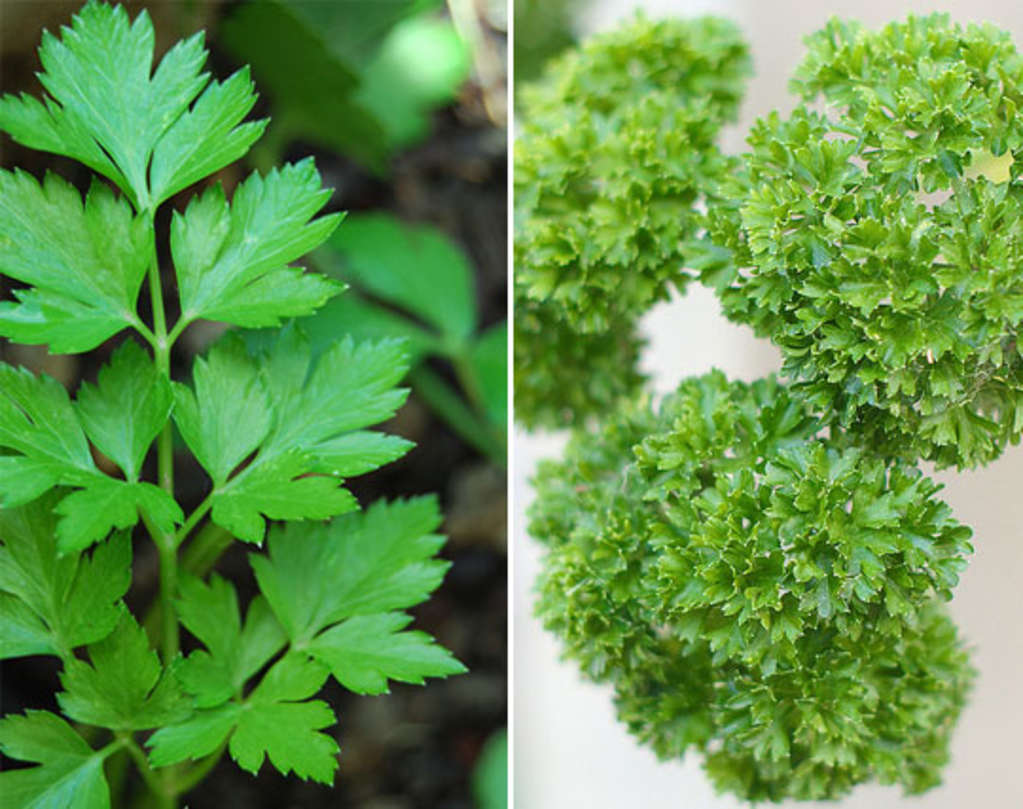
Kitchn
Oftentimes recipes will specify the use of flat-leaf or Italian parsley
noble basin
I love parsley
steel forum
yeah i have the cilantro gene!! i'm glad to hear that someone else knows of it
it makes it taste like soap
i've been told it should taste better
gloomy crater
i wouldn't know because i don't spend my free time eating soap
novel bronze
Parsley also makes food look super damn fancy
 versed needle
runic oriole
versed needle
runic oriole
no u
steel forum
there's a chinese dish that's literally just cilantro stirfried with pork
my family says it's good but i'm uhhhh not a fan
glass meteor
NIce
runic oriole
clearly
novel bronze
#cilantro
glass meteor
Nice sleeping
novel bronze
2 minutes and its shut off time
glass meteor
x
untold elm
I've never even had cilantro lol
I have no idea if it tastes like soap to me
but it probably does since it does for both of my parents
hearty harbor
Is there a list of what scene names map to what screens in the game? For example, I'm looking for the 2nd hornet fight arena's scene name
Or is there some resource with various notes on unpacked things in the game? 😛
Nevermind I... think I found it in the assets explorer
novel bronze
anyone?
 ionic mauve
Hey I'm trying to download a mod, but I'm not sure where to put the mod folder, because the video I'm watching uses a folder that says "Hollow_knight_data". I'm on mac and can't find that folder. Can anyone help?
ionic mauve
thank god
 crystal bay
it lets you install mods with a simple click
ionic mauve
?
crystal bay
you just open it and pick the mod you want to install
@ionic mauve
 primal mason
hey just an fyi to the modding staff the Charming mod wont load
hearty harbor
Is there any documentation on the API, other than the direct source code? I know that's extremely useful but even a small docs would be extremely useful-er
glass meteor
the XML
and the docs in pins

GitHub
HK Modding API Documentation. Contribute to KayDeeTee/HK-Modding-API-Docs development by creating an account on GitHub.
 tropic bronze
Is there documentation for randomizer v2, which explains all the config options?
novel bronze
charming is broke
Kerr no longer works on mods because life
I can explain the config options
for rando
they are pretty simple
ask about a config option and I'll tell you what it does
mag skips you want off at all times unless you are god gamer
because mag skips require an absurd level of precision to pull off
shade skips are where you die, and use your shade to pogo up to an area
acid skips are where you use cheart or something to bypass acid instead of isma's
tropic bronze
All bosses or All skills would require me to visit all those in order to beat the game?
novel bronze
yes
tropic bronze
does it base it on true ending?
novel bronze
the black egg will be locked until requirements are met
so all bosses needs all bosses to open the black egg
ontop of the normal requirement
salubra notches automatically unlocks notches when charm count reaches the requisite amount for that notch to be bought, without having to return to salubra each time and buy them
lemm sell all lets you sell all relics at once by talking to Lemm from behind the counter
and I think the only thing I didn't go over are spike tunnel skips?
tropic bronze
pogo your way to like broken vessel?
novel bronze
spike tunnel skips are when you pogo thru spike tunnels with spell buffering
instead of cheart
I'll find an example

that is a spike tunnel skip
glass meteor
they're easier than they look
 runic oriole
Should be
Shouldn't
It checks all disks
Yup
Just to make sure, you're not running a pirated version, right?
Cause that won't work in that case
It is, and I fail to see the logic in your line of reasoning
novel bronze
**Mac**
Yes, mods can be installed on a mac.
You can use the installer
To run the installer:
- Open the Terminal
- Type
cd dirname $( - Drag the exe onto the terminal.
- Type
)then hit Return/Enter - Type
mono --arch=32(Note the space at the end) - Drag the exe onto the terminal and then hit Return/Enter
If this fails with bash: mono: command not found then
- install mono here
- Open a new terminal window
- Type/paste in
export PATH=/usr/local/bin:${PATH}and hit Return/Enter - Repeat steps 2-6 above.
crystal bay
@ionic mauve ^^^^^^^^
ionic mauve
like what is the terminal
 little perch
so i got the lightbringer mod, which updated Gruz Mother to Empress Muzznik, and while i defeated her, the doors wont open. is this a bug?
little perch
oooooof
glass meteor
Leaving the room and coming back should fix it
If it doesn't I'll take a closer look at it whenever I can
little perch
i cant leave the room im in 
glass meteor
o
little perch
both the doors are closed
glass meteor
Yeah
ionic mauve
okay so it doesn't give a response
glass meteor
One of the commands is missing a quote or bracket
Can you show more of the output?
E.g
I'm missing the ending '
ionic mauve
you mean like this?
glass meteor
Yeah
You're missing step 4
also I just realized I wrote it wrong
it should be cd $(dirname
Fml
ionic mauve
I'll try it again in another window
glass meteor
Alright
ionic mauve
okay so step 2 to 4 already gave a response. now I'm downloading the mono
so and then?
I did those steps
ionic mauve
?
ionic mauve
yes
srry see now that there is a program running that has all the mods
Thank you for all the help!
glass meteor
yw
ionic mauve
you know some good mods?
glass meteor
rando 2
ionic mauve
and what does that do?
tiny blade
i did not expect nathan to be such a toxic individual

 south zenith
Regarding the Bonfire mod, is there a point where the damage reverts to normal? I leveled my strength past 10 and it went back to regular levels of damage
tiny blade
the enemies scale as you progress through the game
south zenith
Huh, is that based on your level or through items that you've picked up?
south zenith
I'm at the start of the game, no dreamers killed 😮
novel bronze
I think dreamers killed increases the difficulty because they give free levels
tiny blade
you are better off just asking gradow if you really want to know exactly what triggers it
 silk plover
I get this message when i try to run the mod manager System.IO.FileNotFoundException: Finner ikke filen C:\WINDOWS\system32\ModInstaller.exe.
Filnavn: C:\WINDOWS\system32\ModInstaller.exe
ved System.IO.__Error.WinIOError(Int32 errorCode, String maybeFullPath)
ved System.IO.FileStream.Init(String path, FileMode mode, FileAccess access, Int32 rights, Boolean useRights, FileShare share, Int32 bufferSize, FileOptions options, SECURITY_ATTRIBUTES secAttrs, String msgPath, Boolean bFromProxy, Boolean useLongPath, Boolean checkHost)
ved System.IO.FileStream..ctor(String path, FileMode mode, FileAccess access, FileShare share)
ved ModInstaller.ModManager.GetSHA1(String file)
ved ModInstaller.ModManager.CheckUpdate()
ved ModInstaller.ModManager.Form2_Load(Object sender, EventArgs e)
ved System.Windows.Forms.Form.OnLoad(EventArgs e)
ved System.Windows.Forms.Form.OnCreateControl()
ved System.Windows.Forms.Control.CreateControl(Boolean fIgnoreVisible)
ved System.Windows.Forms.Control.CreateControl()
ved System.Windows.Forms.Control.WmShowWindow(Message& m)
ved System.Windows.Forms.Control.WndProc(Message& m)
ved System.Windows.Forms.Form.WmShowWindow(Message& m)
ved System.Windows.Forms.NativeWindow.Callback(IntPtr hWnd, Int32 msg, IntPtr wparam, IntPtr lparam)
tiny blade
why is your installer located in system32 
 real jacinth
And did you get the one from here and not moddb
silk plover
i got the one from here and i don't know why it is located in system32
runic oriole
@south zenith enemy hp increases with your level, but slower then your damage. Also, it has faster diminishing returns than your damage
I can send you the graphs when I get home in like 5h
 daring peak
gradow!
runic oriole
pete! (can I call you pete?)
 gilded dome
Hi there, is there a single way to skip the Empress Muzznik fight and get to Sly and Salubra without disabling Lightbringer?
tiny blade
come from blue lake
gilded dome
Dude you cant acces Blue Lake from the other way
gilded dome
The Resting Grounds hatch is closed and the elevator from CoT is up
glass meteor
Don't you just buy it
gilded dome
No I don't that's why I'm here xD
real jacinth
So get to right side of cot, or have dive in resting grounds
Cot right side elevator is always available
runic oriole
Beat soul master, go to crystal peak, go to resting grounds,???, profit
real jacinth
Or go thru waterways, beat dung defender, ride elevator
gilded dome
Yeah Hollow Knight is memorable enough tell me the aproximate location I'll know, thanks cause I'm dumber than a bunch of rocks
novel bronze
real jacinth
Either way, you're going to city
runic oriole
Yup
novel bronze
well you get the idea
runic oriole
The rando mindset is the only true mindset
novel bronze
here's a better one
hearty harbor
I think I'm stuck at a bench in rando... I might be able to baby mantis pogo out, but the bench next to dashmaster, all I have is crystal heart, descending dive, and howling wraiths
daring peak
that bench is horrible and no one should ever take it
hearty harbor
I can't get the mantis claw spot because of a tiny ledge
daring peak
now you know to never take it
hearty harbor
Should that bench be disabled then? @versed needle has some code to disable certain benches without certain items.
daring peak
it's not impossible to get back from it it just sucks ass
hearty harbor
It's not a true lock then
hearty harbor
I'm on easy settings, would that mantis claw location be out of logic?
hearty harbor
what's this air stall move
hearty harbor
you can still move left/right while casting?
real jacinth
Spells reset your gravity
hearty harbor
Thanks!
 raven lake
Hmm. Any have any potential ideas of why my HK is running so poorly? It's going at 140 fps on my Gsync monitor, yet it feels sluggish, like in soup. I have turned off all mods, (though technically the API is still in place) and it's still just running bad. It's not maxing out my i7 8700K, or my geForce 1080., it's just running like trash and I'm not sure why.
glass meteor
Turn off vsync
raven lake
Sure enough, that did it. Thanks.
Interesting though that it was still going at high FPS but felt like it was not.
real jacinth
Might want to cap your fps externally
glass meteor
Vsync sucks
raven lake
Well, Gsync usually goes at full FPS and removes all tearing. But for some reason it just stopped working right in HK. Oh well! Thanks guys!
novel bronze
**Mods**
glass meteor
mod summaries
 split raven
 lofty heron
Excuse me! When I try and install the launcher for the mods, my virus protection seems to think it is a virus. I also get a message that tells me that i am not allowed access to the file, is there a way around this?
lofty heron
runic oriole
oh
panda is killing it
stop panda for a second, then run it?
or white list it
idk
runic oriole
np! Have fun
 steep forge
So I have used the video of https://youtu.be/c40y5PSH-sw, around the point when he talks about setting up API and going into the folder on his computer he had files while in mine there is nothing
runic oriole
just use this
steep forge
So what do I do
runic oriole
just run this exe
steep forge
And?
runic oriole
and... Select which mods you wish to install from it
it auto installs api, if that's all you need
steep forge
Ah so I just click manually and click on what mods I have in my file and I’m good?
runic oriole
there should be a list
steep forge
All it says on my mod manager is manually
steep forge
I have a Microsoft .NET framework notification but that doesn’t seem to be the problem
runic oriole
show
also, run it directly instead of clicking any shortcuts, if that's what you're doing
steep forge
I’m using my google chrome
runic oriole
for some reason, it breaks if you run it from windows search functions and such
glass meteor
It's because it uses the cwd instead of its actual dir
So if you run it from ~
and it's in ~/Downloads
it'll try and access ~/ModInstaller.exe
runic oriole
AA said that last time, 56
steep forge
it’s in downloads
glass meteor
it breaks when running it anywhere which isn't where it is
steep forge
Should I just try manually?
runic oriole
it still doesn't work?
steep forge
I opened it in files
glass meteor
u
runic oriole
weird
glass meteor
It's in CheckUpdate
runic oriole
yup
glass meteor
nice
steep forge
So should I just do manual?
runic oriole
show what you're getting, Meta
runic oriole
yeah, so it's CheckUpdate
glass meteor
Yes
steep forge
I don’t got any editing stuff for screen shots so I’ll just do this
glass meteor
What is _button4
runic oriole
just use the printscreen button
I think that's obsolete 56
or donation
one of those
steep forge
glass meteor

steep forge
Wait shit
runic oriole
glass meteor

steep forge

runic oriole
np
steep forge
I’ll ask for more help most likely when it’s done downloading
runic oriole
we're here to help
glass meteor
AppDomain.CurrentDomain.BaseDirectory
runic oriole
nice
glass meteor
Should I PR it
runic oriole
any new usings?
glass meteor
I don't think so
runic oriole
do you have access to radiance.host?
glass meteor
Yeah
runic oriole
then, sure
glass meteor
Pog
steep forge
I’m still getting the notification
runic oriole
did it finish downloading?
glass meteor
Nevermind I lied
 runic oriole
lie²=truth
 runic oriole

steep forge
Ya it did finish
runic oriole
kms
steep forge
So I’ll just do manual
runic oriole
show me your hollow knight folder, Meta
steep forge
Ok
glass meteor
Yeah it works
runic oriole
hollow knight, hollow_knight_Data and managed
glass meteor
I replaced the updating with "Outdated omegalul"
Should I make it say you don't have the game installed instead of crashing
runic oriole
hmmm
I mean
sure
not the kind of error i was expecting, but
I mean, who would install mods on a game that's not even installed?
glass meteor
I mean what
glass meteor

 harsh yarrow
I'm having trouble installing mods on Mac. I'm fairly new to this so it might be an easy fix. Any help I can get?
novel bronze
**Mac**
Yes, mods can be installed on a mac.
You can use the installer
To run the installer:
- Open the Terminal
- Type
cd dirname $( - Drag the exe onto the terminal.
- Type
)then hit Return/Enter - Type
mono --arch=32(Note the space at the end) - Drag the exe onto the terminal and then hit Return/Enter
If this fails with bash: mono: command not found then
- install mono here
- Open a new terminal window
- Type/paste in
export PATH=/usr/local/bin:${PATH}and hit Return/Enter - Repeat steps 2-6 above.
glass meteor
haha yes
harsh yarrow
Alrighty
glass meteor
Steps 2-4 should be outdated once I update it
harsh yarrow
So I have to use the installer?
steep forge
What’s assembly C sharp
glass meteor
Idk how well wine will work
Probably not well because wine doesn't map to Library paths
so don't
Mono is easier
And actually works
harsh yarrow
I rather not install mono
glass meteor
Why
harsh yarrow
Is there a manual way
glass meteor
Yeah
harsh yarrow
I don't want to install too many things on my computer
especially things that would get root access
steep forge
So it seems whenever I boot up hollow knight now it won’t actually start
I just get a black screen
glass meteor
Did you install 1432 (no public-beta)
steep forge
I don’t think so
glass meteor
Where'd you install the game from
glass meteor
No
Tf
????
Those are unrelated
Because it was crashing
If you tried to load multiple scenes at once
Not the game
harsh yarrow
Ah
steep forge
On where
glass meteor
Steam
steep forge
No
steep forge
Where do I check
glass meteor
bottom-left
steep forge
Add a game?
glass meteor
No
When you open the game
It should say 1432 in the bottom left
after verifying game integrity
If you just look at the game it should be like this but the text would be white
steep forge
Yes it is white
steep forge
when I open it up to play it just goes to a black screen with the shift steam command that goes away and the hollow knight cursor
steep forge
Is assembly C sharp supposed to be installed?
glass meteor
It's a file in the game installation
steep forge
Sheet
steep forge
Thought it was a mod so I disabled
glass meteor
Nice
glass meteor
?
steep forge
The black screen
glass meteor
Download the vanilla assembly from the link
And replace your assembly with it
see if it works at all
steep forge
It says the type of file can harm your computer
glass meteor
Yeah
It'll do that
.dlls contain compiled C#
and ofc you could do stupid stuff
But so could any exe or jar or bin etc
steep forge
so I just say keep and then try playing the game?
glass meteor
No
You keep it
then replace your Assembly-CSharp with it
You'll have to rename it ofc
novel bronze
**Saves**
Windows File Paths: (Assumes Default Steam Install Path, Adjust accordingly for DRM Free or Non-Standard Steam Path)
Save Files: %APPDATA%\..\LocalLow\Team Cherry\Hollow Knight\
Game Files: C:\Program Files (x86)\Steam\steamapps\common\Hollow Knight\
Mac File Paths:
Save Files: ~/Library/Application Support/unity.Team Cherry.Hollow Knight/
Game Files: ~/Library/Application Support/Steam/steamapps/common/Hollow Knight/hollow_knight.app/
Linux File Paths:
Save Files: ~/.config/unity3d/Team Cherry/Hollow Knight/
Game Files: ~/.local/share/Steam/steamapps/common/Hollow Knight/
How to I replace
glass meteor
You want to go to the game files path for Windows (if you're on windows ofc)
then go into hollow_Knight_Data\Managed\
Delete the Assembly-CSharp.dll there
put the Assembly-CSharpVanilla.dll in there
rename it to Assembly-CSharp.dll
then try booting the game
steep forge
Ok
steep forge
Where do I go game integrity
glass meteor
?
steep forge
Verify the game integrity
glass meteor
Right-click Hollow Knight, hit properties, go to the Local Files tab
Then hit verify integrity of game files
If you don't want to replace the assembly manually
steep forge
6 files to validate
glass meteor
nice
glass meteor
Yw
That's the vanilla game though
Unless you re-opened the installer
In the bottom left does it say 1.4.3.2?
steep forge
I didn’t see any of that
glass meteor
Okay great
If you open the installer now, you should be able to install mods
w/ no black screen
glass meteor
Does the installer launch if you ignore it or no
steep forge
No
glass meteor
Oh
glass meteor
Redownload the installer
steep forge
Windows protected my pc
glass meteor
ahh
steep forge
I said run anyway and it said
Folder does not exist! (Game is probably not installed) exiting.
steep forge
Where’s that at
steep forge
This?
glass meteor
Installer should auto-update to the fixed version if you run it
glass meteor
Same error?
steep forge
Huh
glass meteor
Does this work for you
steep forge
modinstaller(1).exe is not commonly downloaded and may be dangerous
And it takes me to a blank chrome tab
steep forge
I’ll press keep
glass meteor
Yeah press keep and try running it
glass meteor
Yeah that's right
steep forge
Ok it’s downloading
glass meteor
glass meteor
Try running the game
glass meteor
In the top-left it should say Modding Api: 1.4.3.2-23 or something
steep forge
Yep
glass meteor
steep forge
so I just start a new run?
steep forge
Ya
glass meteor
then you can just start a new run
steep forge
I did that
steep forge
Cool
I’ll tell you if it works
I can just keep the mod manager on my desktop correct?
glass meteor
Yeah
glass meteor

 cinder swallow
where do I get modcommon?
glass meteor
The installer should auto-install it if you're using that
 stoic moss
im stuck with this tutorial (https://www.youtube.com/watch?v=c40y5PSH-sw) on 4:01, it doesnt let me extract the randomizer file
Hollow Knight Discord: https://discord.gg/hollowknight

anyone, help please ._.
nvm i found it
thanks helpful community 
 normal pike
Use the mod installer my bud
If you’re on the most recent version it’s infinitely better than doing it manually
stoic moss
i was trying to download debug mod but now my screen is stuck like this
please help

wow
i just deleted everything i did today these 3 hours
trying to install mods
i just downloaded mod installer now
and its done
rip 3 hours i will never get back
 jovial seal
excuse me but why cant i open the game
after i install the mod installer
are there any step to do after install??
ionic mauve
Sorry I wish I could help but I don't know anything about how it all works
jovial seal
thx
jovial seal
no
runic oriole
second: are you running a pirated version?
crystal bay
that has happened to me completely randomly sometimes
it usually gets fixed when I open the game again
crystal bay
you can find them in the path for saves:
novel bronze
**Saves**
Windows File Paths: (Assumes Default Steam Install Path, Adjust accordingly for DRM Free or Non-Standard Steam Path)
Save Files: %APPDATA%\..\LocalLow\Team Cherry\Hollow Knight\
Game Files: C:\Program Files (x86)\Steam\steamapps\common\Hollow Knight\
Mac File Paths:
Save Files: ~/Library/Application Support/unity.Team Cherry.Hollow Knight/
Game Files: ~/Library/Application Support/Steam/steamapps/common/Hollow Knight/hollow_knight.app/
Linux File Paths:
Save Files: ~/.config/unity3d/Team Cherry/Hollow Knight/
Game Files: ~/.local/share/Steam/steamapps/common/Hollow Knight/
 cobalt raven
Hi there, does anyone here use the bonfiremod, I am having trouble with that one. After restarting my game it seems not to acknowledge strength and intelligence stats correctly. I am seemingly doing same damage with both nail and 'fireball' as unupgraded.
I first posted this in the wrong channel, this should be the right one.
 crimson girder
I also need help with the Bonfire mod, its doing the exact same thing as stated above for me. :/
@cobalt raven Btw intelligence doesnt affect vengful spirit and shade soul
runic oriole
It should
cobalt raven
I am doing less damage though. I was able to oneshot the moss charger, now i am not.
runic oriole
Don't trust the readme, it lies
crimson girder
So it is supposed to?
runic oriole
Did you level up after one shotting the charger?
@crimson girder I haven't touched it in months, but theoretically it should
cobalt raven
I did level up after that
crimson girder
When I leveled up my strength I was actually doing less damage
cobalt raven
I was doing more damage until game restart
I did some more research with enemies I know. I am doing exactly half damage of what I was doing before the restart
I tried reinstalling the mod but now the mod installer does not work anymore
crimson girder
@cobalt raven Just redownload it
 cobalt raven
Does the mod scale up enemies according to your level? This could explain it
real jacinth
Da
cobalt raven
Ahh ok
runic oriole
yup, but as you can see from the graph, they scale slower than you grow
and
they "stop scaling" faster than you "stop growing"
cobalt raven
After restarting once they doubled for me
runic oriole
idk
cobalt raven
@crimson girder redownloading did not fix it
 wide bloom
me too i tried to open modinstaller that i got from the first pinned message but i can't open it
noble basin
with a username like that my first assumption is you pirated the game
which if so is alright IG but it won't work with the modinstaller
runic oriole
wide bloom
XD but i have the legit game so yeah and somethign called AU randomly appeard on my desktop
runic oriole
that's the auto updater
wide bloom
how to i use it ?
noble basin
oh wait was the sha1sum changed to the new modinstaller @glass meteor so it would stop autoupdating?
it might be trying to autoupdate the old one
cobalt raven
@runic oriole I tried reinstalling the bonfiremod, but it did not help. I can now confirm that I did exactly unupgraded damage% despite having strength 7 at level 12. Also, in this process my levels were lost. So goodbye, geo.
wide bloom
do i need to install modding API
real jacinth
Installer does it automatically
runic oriole
just run the installer. It should set up everything automatically
I remember discussing the merits of even making an installer, mick
noble basin
can I make a request for the mod installer?
It should make a backup of the vanilla assembly csharp
ok that's it
wide bloom
So i dont need to follow those read me things rite ?
wide bloom
Aight
 tacit pivot
Is there a Quick Save mod?
I wanna save the game just on the bosses's door
So when i die i don't have to walk there again
glass meteor
no
normal pike
Try dreamgate
silk plover
i have the bonfire mod dowloaded and enabled but it won't work
silk plover
i know
untold elm
did you get it from the installer?
silk plover
yes
 hearty harbor
Any modders around? I have a buddy who has a bad laptop and the hollow knight room won't load for him. I'm trying to debug what's going on and make a Low End Mod for various rooms that are too laggy for him. The game freezes with the little running Knight sillouette and my guess is that it's hanging on some object. I know I can access all the objects of a scene with the SceneChanged hook, but it would seem I would need to access the objects before that. I'm not super familiar with Unity stuff, so a point in the right direction would be amazing!
noble basin
is this @tiny blade
hearty harbor
I am not him if that's what you mean
glass meteor
it won't help infinite loads
crystal bay
are there specific rooms the game freezes in @hearty harbor
silk plover
i have tried uninstalling and reinstalling the bonfire mod, i have tried downloading it manually but it won't work
crystal bay
(patch number can be found on the bottom left of the menu screen)
silk plover
i got the installer from here and i am on patch 1.4.3.2
silk plover
runic oriole
title screen boi
untold elm
why take the screenshot like that instead of just f12 
untold elm
did you click enable on the bonfire mod?
silk plover
i have the bonfire mod installed and enabled and all other mods work
untold elm
or just install it
real jacinth
Did you close your game when installing mods
silk plover
i don't remember. i might have. But if that is the problem how could i fix it
untold elm
just close it
real jacinth
Close the game, then install mods, then open
untold elm
uninstall probably, then reinstall, then open
 ornate remnant
you can use the dream nail portal
 deep zodiac
Hi, I'm trying to test out the example mods but it isn't working because Visual Studio gives me errors. This is what's shown https://imgur.com/a/Fy9bHy5
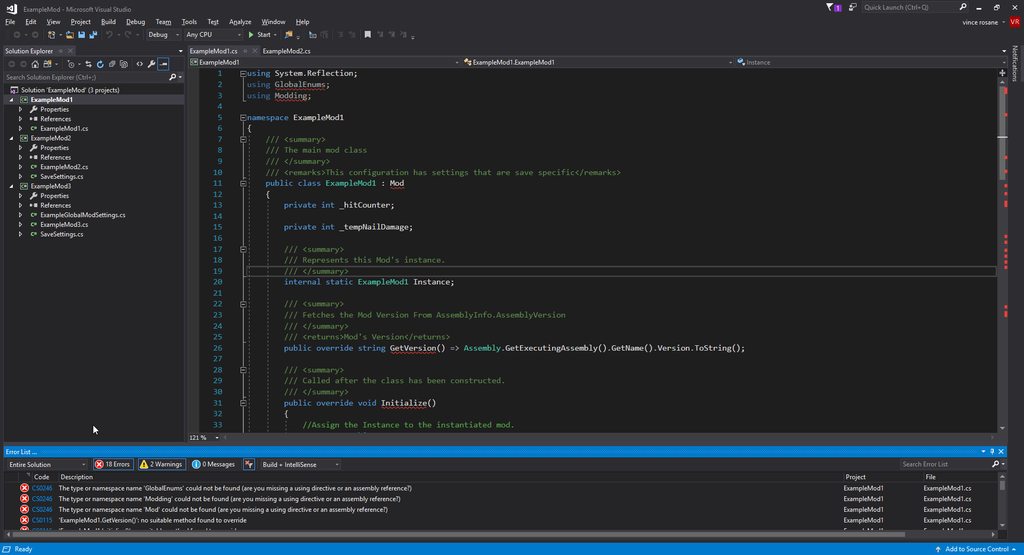
I already built the API from this

GitHub
Contribute to seanpr96/HollowKnight.Modding development by creating an account on GitHub.
tiny blade
#archived-modding-development for this
#archived-modding-help is the tech support channel
deep zodiac
Oh ok
 tribal raptor
I've tried to look at my mods, but when I open this it only shows this. It's been like this for 20 minutes, did I do something wrong?
novel bronze
**Mac**
Yes, mods can be installed on a mac.
You can use the installer
To run the installer:
- Open the Terminal
- Type
cd dirname $( - Drag the exe onto the terminal.
- Type
)then hit Return/Enter - Type
mono --arch=32(Note the space at the end) - Drag the exe onto the terminal and then hit Return/Enter
If this fails with bash: mono: command not found then
- install mono here
- Open a new terminal window
- Type/paste in
export PATH=/usr/local/bin:${PATH}and hit Return/Enter - Repeat steps 2-6 above.
tiny blade
 sand patio
THANKS!!
tiny blade
YOU ARE WELCOME!!
 scenic flower
if i download the light bringer mod do my old save files stay and if so can i disable the mod when i want to?
??
crystal bay
yes but it's always a good idea to save your save files just in case
saves can be found in:
novel bronze
**Saves**
Windows File Paths: (Assumes Default Steam Install Path, Adjust accordingly for DRM Free or Non-Standard Steam Path)
Save Files: %APPDATA%\..\LocalLow\Team Cherry\Hollow Knight\
Game Files: C:\Program Files (x86)\Steam\steamapps\common\Hollow Knight\
Mac File Paths:
Save Files: ~/Library/Application Support/unity.Team Cherry.Hollow Knight/
Game Files: ~/Library/Application Support/Steam/steamapps/common/Hollow Knight/hollow_knight.app/
Linux File Paths:
Save Files: ~/.config/unity3d/Team Cherry/Hollow Knight/
Game Files: ~/.local/share/Steam/steamapps/common/Hollow Knight/
thx
crystal bay
@scenic flower
Yes there is an option in the ModInstaller to disable mods
it's very clear
see
 trim spear
uh is anyone able to help? the mod installer has not been opening for me and idk what to do
runic oriole
show what error you're getting
trim spear
 glass meteor
yw
 scenic jasper
is there somewhere i can find out what all the mods do exactly?
or where i can find more?
novel bronze
**Mods**
glass meteor
summaries
scenic jasper
shots
 languid nova
can someone watch my screen share and help me down patch
 hasty jetty
Does Fragile Strenght work with the Bonfire mod?
runic oriole
should
 dreamy ember
okay
untold elm
and also probably qol
dreamy ember
qol?
untold elm
quality of life
https://rainingchain.com/hollowknight/randomizer this is also helpful @dreamy ember
Randomizer Helper for the game Hollow Knight.
dreamy ember
wow thank you i will check it out
novel bronze
**Mac**
Yes, mods can be installed on a mac.
You can use the installer
To run the installer:
- Open the Terminal
- Type
cd dirname $( - Drag the exe onto the terminal.
- Type
)then hit Return/Enter - Type
mono --arch=32(Note the space at the end) - Drag the exe onto the terminal and then hit Return/Enter
If this fails with bash: mono: command not found then
- install mono here
- Open a new terminal window
- Type/paste in
export PATH=/usr/local/bin:${PATH}and hit Return/Enter - Repeat steps 2-6 above.
untold elm
steps 2-4 aren't required anymore
glass meteor
it's supposed to be
mono --arch=32 /User/sebastian/Desktop/ModInstaller.exe
one command
glass meteor
the installer runs
runic oriole
56 try new installer plz
glass meteor
I would but I don't have hk installed
sand patio
runic oriole
u = satan
glass meteor
sebastian do cd Desktop
gradow did you recompile without the pr
because it crashes for me now
instead of exiting after saying i don't have the game
sand patio
ok after doing cd desktop should i try step 5 and 6 again?
tiny blade
i can test gradow
glass meteor
Yeah
tiny blade
as long as it doesnt involve me actually opening the gam,e
daring peak
no sean stream so we have to test installer 
tiny blade
or my computer will die
glass meteor

tiny blade
 runic oriole
gr8
trim spear
anyone able to help me with the custom knight mod?
gloomy crater
can you be more specific
trim spear
like how do i make the knight's custom sprites and insert them
gloomy crater
there's a folder named CustomKnight in the Hollow Knight game directory
edit the files inside it
real jacinth
or download premade sprite packs from #archived-modding-development pins
and put them in that folder
gloomy crater
why buy overpriced premades when you can build one yourself
normal pike
i need serious help
having big modinstaller issues

Pastebin
modinstaller updates, completes, then gives me this
full error in pastebin
and then this
gonna try a fresh install
untold elm
you need to delete all of it then re-install it
untold elm
that happened for me too
normal pike
Ah ok