
#Issues with JDK in Visual Studio Code
1 messages · Page 1 of 1 (latest)
 sonic canyon
 buoyant muskBOT
<@&987246399047479336> please have a look, thanks.


 modern elm
for the second part id suggest going through this, should fix it:
buoyant muskBOT
Download latest Java from https://adoptium.net/, run the installer.
Open a CMD and type java -version and javac -version, if both show your new Java version, you have successfully installed Java! 🎉
https://i.ibb.co/X8Kms8q/CurMujt.png

In order to prevent issues with old installations you may want to remove them. Type where java and where javac. They should only show the new and no old entries:
https://i.ibb.co/fkKHv0b/x5k1GxG.png

If that is not the case, you may want to clean up. Therefore, type "environment variable" into the Windows search and follow the dialog. You will see two entries for a variable called Path, one for your user and one for the system. This variable tells Windows where to look for commands, like java and javac.
https://i.ibb.co/BwvMpM6/3bN9QE2.png

Edit both. Make sure that they only list the entry to your new Java installation and remove all the old entries you have seen with the where command before:
https://i.ibb.co/9GTnHsm/JAYog1U.png
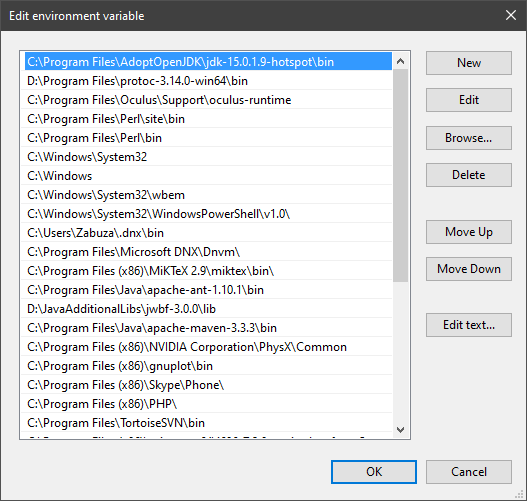
Confirm and close all dialogs. Restart your CMD window and try where java and where javac again. It should only list the new installation now and nothing else.
Congratulation, your Java is now finally ready, happy coding 🎉
zabuzard • used /tag id: install
·

Eclipse Adoptium provides prebuilt OpenJDK binaries from a fully open source set of build scripts and infrastructure.


 modern elm
for the first part... well. there is a reason vsc usage among java devs is below 5% worldwide (with intellij at 70%)
ur ofc free to use it. but be prepared to run into more issues like this. vsc and java is a bumpy road
 wary bramble
IJ has a community edition, which is free, and can be used in commercial projects