#yo
1 messages · Page 1 of 1 (latest)
 dusk spade
 fringe boughBOT
<@&987246399047479336> please have a look, thanks.
You can use </chatgpt:1108714622413963314> to ask ChatGPT about your question while you wait for a human to respond.
dusk spade
I already get 500 fps
 wheat aspen
Or like, an option at all
dusk spade
dont need more
wheat aspen
sure, but Optifine is just annoying in general
if you don't need it, also don't use optifine
wheat aspen
Are you planning to add more mods?
wheat aspen
Aight
dusk spade
i want optifine because its OG
dusk spade
In terms of?
wheat aspen
actual performance gains
dusk spade
Like fps?
wheat aspen
and their code is pretty broken
it sucks for compatibility with other mods, because it's very invasive in the MC code
if u use it alone, it's kind of okay
since it can't break other things
wheat aspen
but currently there's a bunch of mods (Sodium and the likes) that directly replicate everything optifine does
up to the capes
with the added benefit of you being able to pick and choose
but
if you're not a mod person I can see why you would not want that
since it requires a bit of looking around
dusk spade
Im not a mod person
wheat aspen
anyways
the Optifine installer requires Java itself
sooo
I think the same version as MC needs
fringe boughBOT
Download latest Java from https://adoptium.net/, run the installer.
Open a CMD and type java -version and javac -version, if both show your new Java version, you have successfully installed Java! 🎉
https://i.ibb.co/X8Kms8q/CurMujt.png

In order to prevent issues with old installations you may want to remove them. Type where java and where javac. They should only show the new and no old entries:
https://i.ibb.co/fkKHv0b/x5k1GxG.png

If that is not the case, you may want to clean up. Therefore, type "environment variable" into the Windows search and follow the dialog. You will see two entries for a variable called Path, one for your user and one for the system. This variable tells Windows where to look for commands, like java and javac.
https://i.ibb.co/BwvMpM6/3bN9QE2.png

Edit both. Make sure that they only list the entry to your new Java installation and remove all the old entries you have seen with the where command before:
https://i.ibb.co/9GTnHsm/JAYog1U.png
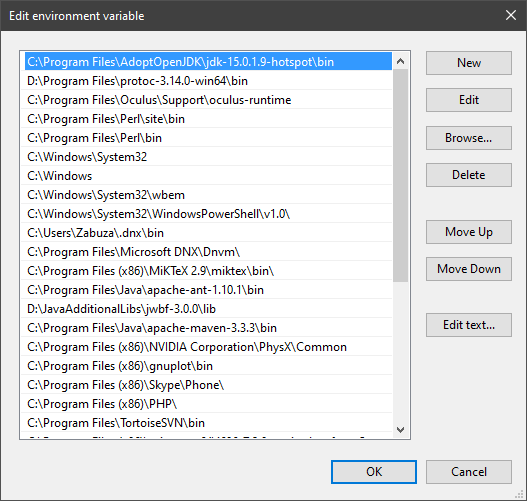
Confirm and close all dialogs. Restart your CMD window and try where java and where javac again. It should only list the new installation now and nothing else.
Congratulation, your Java is now finally ready, happy coding 🎉
thegatesdev • used /tag id: install
·

Eclipse Adoptium provides prebuilt OpenJDK binaries ...


 wheat aspen

dusk spade
Cya
wheat aspen
have fun!
wheat aspen
Haha, sorry I'm not interested currently
quite busy with my own stuff 😅