#game-development
1 messages · Page 68 of 1
 inland arrow
this is usually called something like screen
so in ur case this:
screen = pygame.display.set_mode([500, 500])
 sly agate
i looked and couldnt find any "screen" anywhere
inland arrow
sometimes its also called display
anyway to color your display you need to do that screen = pygame.display.set_mode([500, 500]) in place of pygame.display.set_mode([500, 500])
and then to color the display you just screen.fill(color)
and then just replace the color with an rgb value or for example something like "black" or "red"
you can also do pygame.Color("#ffffff") if you want to use hex values
sly agate
another thing is when i define my colors some tutorials tell me to define alpha for opacity but other say i dont need to
sly agate
thats why i only did it for white
inland arrow
ah ok
sly agate
if i dont does it automatically go to full opacity?
inland arrow
yes
sly agate
k thanks
inland arrow
do you need any more help?
sly agate
red = (255, 0, 0)
green = (0, 255, 0)
blue = (0, 0, 255)
black = (0, 0, 0)
white = (255, 255, 255)
screen = pygame.display.set_mode((500, 500))
pygame.display.set_caption("game")
screen.fill(white)
i tried this and it didnt work
inland arrow
what is the error?
sly agate
there was no error it just didnt change anything
inland arrow
did it just create a 500x500 window that is just white?
sly agate
no it created a black one
sly agate
ohhhhh i remember hearing that
inland arrow
put that after screen.fill
sly agate
it work thank you so much!
inland arrow
no problem :)
 cold storm
@near wedge - upbge just about has 1to1 feature parity with old 2.79 bge now !
youle did soft bodies the other day
loki is working on a async object converter / batch collection loader

GitHub
UPBGE, the best integrated game engine in Blender. Contribute to UPBGE/upbge development by creating an account on GitHub.
 near wedge
Nice!
sly agate
hey guys anyone here to help?
 frank fieldBOT
Hey @cold storm!
It looks like you tried to attach file type(s) that we do not allow (.blend). We currently allow the following file types: .3gp, .3g2, .avi, .bmp, .gif, .h264, .jpg, .jpeg, .mkv, .mov, .mp4, .mpeg, .mpg, .png, .tiff, .wmv, .svg, .psd, .ai, .aep, .xcf, .mp3, .wav, .ogg, .webm, .webp, .flac, .afdesign, .m4a, .csv.
Feel free to ask in #community-meta if you think this is a mistake.
 vernal kettle
Zip it
frank fieldBOT
Hey @cold storm!
It looks like you tried to attach file type(s) that we do not allow (.zip). We currently allow the following file types: .3gp, .3g2, .avi, .bmp, .gif, .h264, .jpg, .jpeg, .mkv, .mov, .mp4, .mpeg, .mpg, .png, .tiff, .wmv, .svg, .psd, .ai, .aep, .xcf, .mp3, .wav, .ogg, .webm, .webp, .flac, .afdesign, .m4a, .csv.
Feel free to ask in #community-meta if you think this is a mistake.
cold storm
nope 😦
vernal kettle
Bro
Zip that file and then upload it to some file sharing sites like mega or something
And share the link here
cold storm
Google Docs
near wedge
@cold storm pasteall supports blend files
Taking a look at the video, that looks pretty neat. Does this have any advantages over using Blender's particles?
near wedge
Ah, I just instance the particle system on export.
cold storm
yeah - everything works in game now
near wedge
Gives pretty good control and randomization options.
cold storm
volumes - TAA - even grease pencil
so this is like giving you instancing
for upbge basically
we can also join meshes now using ops but it's expensive
near wedge
So, why the script instead of particles?
near wedge
Cool 😃
cold storm
                added_mesh = bpy.data.objects['Plane'].data.copy()
                added_mesh.name = "Plane"+str(i)
                object_data_add(bpy.context, added_mesh, operator=None)
                i+=1
                bpy.context.active_object.location = (x,y,0)
                bge.logic.getCurrentController().owner.scene.convertBlenderObject(bpy.context.active_object)
own.scene.convertBlenderObject(bpy.context.active_object)
will duplicate a instance of a mesh - move it to a point - and then process it's game object
(create it's physics shape and initialize it's logic etc)
the engine is all grown up / full circle now
still some kinks to be worked out for sure
we can use blender guts to load meshes from disk
then convert them in game
libFree is still an issue though
(freeing mesh / bpy ob without crashing anything)

chunks using bmesh instead of ops :D
I have been able to generate procedural worlds in game that are performant
but removing old chunks is the next issue
I think I can overwrite their mesh - make a new cube probably
but then I need to run it through the converter again
own.updatePhysicsShape() is handy for stuff like deformations

I think the only advantage @near wedge about the instances here - is you can align the normal to any angle you wish
compared to particles
and also scale
(there is a opportunity to randomize scale as well)
as it's using face data for rot/scale
there is a cube on the scene that can record gameplay to fcurves too
https://upbge.org/ - downloads available here\
GitHub
UPBGE, the best integrated game engine in Blender. Contribute to UPBGE/upbge development by creating an account on GitHub.
I can't share a discord server link eh?
 crimson hound
Discord server: https://discord.gg/cd2zXEa
@cold storm They get automatically deleted because 99% of the time it's some sort of spam. This is absolutely on topic, so it's fine 🙂
 dawn quiver
how do i learn to create a game
 covert monolith
can anyone help me? I am trying to install pygame by writing 'pip install pygame' in my vs code terminal but it is showing some error.
covert monolith
ERROR: Command errored out with exit status 1: python setup.py egg_info Check the logs for full command output.
it is the error
you have to add pip to PATH
@full maple okay i will see
covert monolith
i think pygame is not compatible for python 3.9
 rapid wing
sad
 proper coral
@merry echo which module did you use to make this?
 inner parcel
I'm guessing panda3d?
 merry echo
Its made in Shadertoy (GLSL)
All of the code is in the fragment shader to be run by the GPU
I’m working on making it run on OpenGL using arcade for better performance (and so I can finally say its a python project lol)
dawn quiver
unity
 tranquil girder
?
dawn quiver
this is a project that i've been working on for 10 years...
what do you guys think?
tranquil girder
It's a bit weird how it opens a new window on every click imo
 grave carbon
how do you check fullscreen in pygame
 full maple
make it fullscreen you mean?
full maple
ah
grave carbon
yes
full maple
umm
full maple
does pygame.FULLSCREEN work?
grave carbon
no
full maple
damn
no idea dude
(Unity)
i have a prefab with a mask component. The mask component seems to be working in the prefab editor but not the game. Potential fixes?
Ive tried deleting the Library folder in the project but it still persists.
heres in the prefab editor
Heres it ingame
I have a script that changes the rotation as well as the image but disabling that part of the script doesnt fix the problem
grave carbon
what problem
full maple
i have a prefab with a mask component. The mask component seems to be working in the prefab editor but not the game. Potential fixes?
Ive tried deleting the Library folder in the project but it still persists.
full maple
unity
 fierce wraith
i would suggest asking in the unity discord, this channel is meant for python games @full maple
full maple
i have asked them and there doesnt seem to be any reply
which is why i asked here instead
covert monolith
if i write pygame.init() , it is showing this error "Module 'pygame' has no 'init' member"
inner parcel
if i write pygame.init() , it is showing this error "Module 'pygame' has no 'init' member"
@covert monolith R u using VSCode? If you are then I have the same problem ignore it and run the program it should work
covert monolith
yes i am using vscode
inner parcel
I havent found a fix to that either... just running the program though it works just fine... very weird
does it fail to interpret and run?
or does it just have the annoying squiggley line
covert monolith

Stack Overflow
This is the code I have:
import pygame
pygame.init()
I'm very confused because if I try to run the file, then there seems to be no issue, but pylint says the following:
E1101:Module 'pygame' h...
covert monolith
this one is working for mr
me*
            "--extension-pkg-whitelist=pygame",
            "--erros-only"
]```Its scuffed again 😔
cold storm
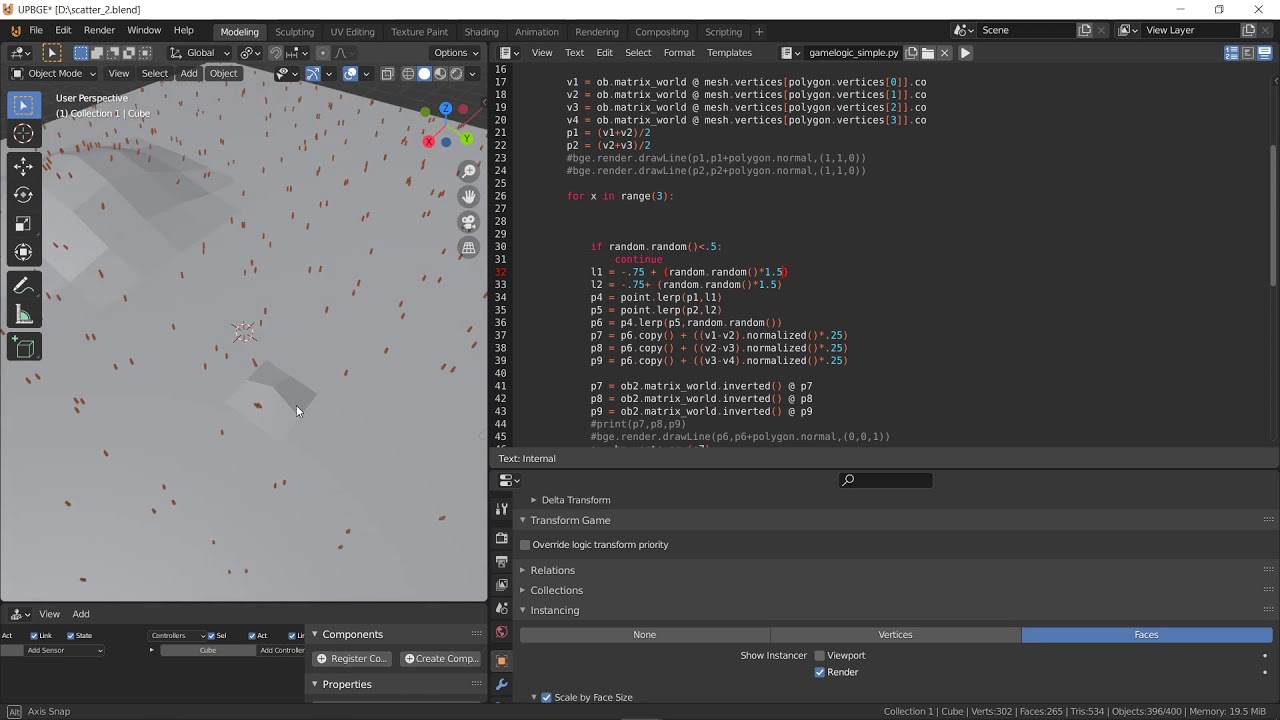
I have a position, scale, and a set of points I want to make a worldTransform matrix from
origin
origin+normal = Z axis
origin + (origin- ((v2+v1)/2) ) = X axis
frank fieldBOT
Hey @cold storm!
It looks like you tried to attach file type(s) that we do not allow (.blend). We currently allow the following file types: .3gp, .3g2, .avi, .bmp, .gif, .h264, .jpg, .jpeg, .mkv, .mov, .mp4, .mpeg, .mpg, .png, .tiff, .wmv, .svg, .psd, .ai, .aep, .xcf, .mp3, .wav, .ogg, .webm, .webp, .flac, .afdesign, .m4a, .csv.
Feel free to ask in #community-meta if you think this is a mistake.

 cobalt trail
import pygame
import random
pygame.init()
Running = True
Screen = pygame.display.set_mode((800, 600))
player_img = pygame.image.load('/Users/kevinhadinata/Downloads/ufo.png')
player_updated = pygame.transform.scale(player_img,(60,60))
enemy_list = []
enemy_img = pygame.image.load('/Users/kevinhadinata/Downloads/alien.png')
SPAWNENEMY = pygame.USEREVENT
pygame.time.set_timer(SPAWNENEMY,1000)
class Player:
def init(self):
self.ypos = 540
self.xpos = 325
self.height = 60
self.width = 60
self.playerUpdated = player_updated
def create_player(self):
Playerss = pygame.Rect(self.xpos,self.ypos,self.height,self.width)
pygame.draw.ellipse(Screen, (0, 0, 0), Playerss)
Screen.blit(player_updated, (Playerss.x, Playerss.y))
sizee = random.randint(10,40)
randomX = random.randint(0,700)
class Enemy:
def init(self):
self.xval = random.randint(0,700)
self.size = random.randint(10,40)
def create_enemy(self):
Enemy = pygame.Rect(self.xval, 0, self.size,self.size)
#enemy_updated = pygame.transform.scale(enemy_img,(self.size,self.size))
enemy_list.append(Enemy)
pygame.draw.ellipse(Screen,(255,255,0),Enemy)
Player = Player()
Enemys = Enemy()
while Running:
for event in pygame.event.get():
if event.type == pygame.QUIT:
Running = False
if event.type == pygame.KEYDOWN:
if event.key == pygame.K_LEFT:
Player.xpos -= 20
if event.key == pygame.K_RIGHT:
Player.xpos += 20
if event.type == SPAWNENEMY:
Enemys.create_enemy()
Player.create_player()
pygame.display.update()
So im trying to make a game where you have to dodge randomly spawned enemies from above
but reached a dead end , where i cant spawn more than one enemy. When I do the screen goes blank, because I keep filling the screen with Black colour so my avatar doesnt leave any trails.
any suggestions? Thanks in advance
sly agate
anyone in the discord to help me?
 tulip barn
I am trying to install pygame using but i keep getting this error.
 ERROR: Command errored out with exit status 1:
     command: 'c:\users\marsel\appdata\local\programs\python\python39\python.exe' -c 'import sys, setuptools, tokenize; sys.argv[0] = '"'"'C:\\Users\\Marsel\\AppData\\Local\\Temp\\pip-install-pbb8mgk6\\pygame\\setup.py'"'"'; __file__='"'"'C:\\Users\\Marsel\\AppData\\Local\\Temp\\pip-install-pbb8mgk6\\pygame\\setup.py'"'"';f=getattr(tokenize, '"'"'open'"'"', open)(__file__);code=f.read().replace('"'"'\r\n'"'"', '"'"'\n'"'"');f.close();exec(compile(code, __file__, '"'"'exec'"'"'))' egg_info --egg-base 'C:\Users\Marsel\AppData\Local\Temp\pip-pip-egg-info-be9r74e8'
         cwd: C:\Users\Marsel\AppData\Local\Temp\pip-install-pbb8mgk6\pygame\
    Complete output (17 lines):


    WARNING, No "Setup" File Exists, Running "buildconfig/config.py"
    Using WINDOWS configuration...


    Download prebuilts to "prebuilt_downloads" and copy to "./prebuilt-x64"? [Y/n]Traceback (most recent call last):
      File "<string>", line 1, in <module>
      File "C:\Users\Marsel\AppData\Local\Temp\pip-install-pbb8mgk6\pygame\setup.py", line 194, in <module>
        buildconfig.config.main(AUTO_CONFIG)
      File "C:\Users\Marsel\AppData\Local\Temp\pip-install-pbb8mgk6\pygame\buildconfig\config.py", line 210, in main
        deps = CFG.main(**kwds)
      File "C:\Users\Marsel\AppData\Local\Temp\pip-install-pbb8mgk6\pygame\buildconfig\config_win.py", line 576, in main
        and download_win_prebuilt.ask(**download_kwargs):
      File "C:\Users\Marsel\AppData\Local\Temp\pip-install-pbb8mgk6\pygame\buildconfig\download_win_prebuilt.py", line 302, in ask
        reply = raw_input(
    EOFError: EOF when reading a line
    ----------------------------------------
ERROR: Command errored out with exit status 1: python setup.py egg_info Check the logs for full command output.
I am trying to install pygame using but i keep getting this error.
tulip barn
So
 neon sparrow
No my thingu lol
tulip barn
pip install pygame
neon sparrow
did it installed ?
 grave charm
use pip3
tulip barn
alr did
grave charm
Pip is for python 2.7
grave charm
Pip3 is python 3
neon sparrow
pip is also for python3
grave charm
Pip3 install pygame
tulip barn
i used all these
pip3 install pygame
pip install pygame
pip install pygame==1.9.6
pip install --upgrade pygame
grave charm
What error ur having
neon sparrow
what error did it throw ?
tulip barn
ERROR: Command errored out with exit status 1:
     command: 'c:\users\marsel\appdata\local\programs\python\python39\python.exe' -c 'import sys, setuptools, tokenize; sys.argv[0] = '"'"'C:\\Users\\Marsel\\AppData\\Local\\Temp\\pip-install-pbb8mgk6\\pygame\\setup.py'"'"'; __file__='"'"'C:\\Users\\Marsel\\AppData\\Local\\Temp\\pip-install-pbb8mgk6\\pygame\\setup.py'"'"';f=getattr(tokenize, '"'"'open'"'"', open)(__file__);code=f.read().replace('"'"'\r\n'"'"', '"'"'\n'"'"');f.close();exec(compile(code, __file__, '"'"'exec'"'"'))' egg_info --egg-base 'C:\Users\Marsel\AppData\Local\Temp\pip-pip-egg-info-be9r74e8'
         cwd: C:\Users\Marsel\AppData\Local\Temp\pip-install-pbb8mgk6\pygame\
    Complete output (17 lines):


    WARNING, No "Setup" File Exists, Running "buildconfig/config.py"
    Using WINDOWS configuration...


    Download prebuilts to "prebuilt_downloads" and copy to "./prebuilt-x64"? [Y/n]Traceback (most recent call last):
      File "<string>", line 1, in <module>
      File "C:\Users\Marsel\AppData\Local\Temp\pip-install-pbb8mgk6\pygame\setup.py", line 194, in <module>
        buildconfig.config.main(AUTO_CONFIG)
      File "C:\Users\Marsel\AppData\Local\Temp\pip-install-pbb8mgk6\pygame\buildconfig\config.py", line 210, in main
        deps = CFG.main(**kwds)
      File "C:\Users\Marsel\AppData\Local\Temp\pip-install-pbb8mgk6\pygame\buildconfig\config_win.py", line 576, in main
        and download_win_prebuilt.ask(**download_kwargs):
      File "C:\Users\Marsel\AppData\Local\Temp\pip-install-pbb8mgk6\pygame\buildconfig\download_win_prebuilt.py", line 302, in ask
        reply = raw_input(
    EOFError: EOF when reading a line
    ----------------------------------------
ERROR: Command errored out with exit status 1: python setup.py egg_info Check the logs for full command output.
how?
tulip barn
Huh?
tulip barn
i just wanna use vscode
tulip barn
alr
grave charm
Try this
python --version # Python 3.7.X
pip install pygame-1.9.6-cp37-cp37m-win_amd64.whl
First check your python version
grave charm
Check it once
grave charm
Kk
Now try installing with wheel
The pip install command
I wrote underneath version command
tulip barn
C:\Users\Marsel>pip install pygame-1.9.6-cp37-cp37m-win_amd64.whl
WARNING: Requirement 'pygame-1.9.6-cp37-cp37m-win_amd64.whl' looks like a filename, but the file does not exist
ERROR: pygame-1.9.6-cp37-cp37m-win_amd64.whl is not a supported wheel on this platform.
Bruh
tulip barn
lol
tulip barn
C:\Users\Marsel>python3 -m pip install pygame==2.0.0.dev

C:\Users\Marsel>
nothing
ops
tulip barn
C:\Users\Marsel>python3 -m pip install pygame==2.0.0.dev6

C:\Users\Marsel>
Okk
tulip barn
no module named "pygame"
grave charm
Reeeeeeeeeeee
frank fieldBOT
Hey @tulip barn!
Uh-oh! It looks like your message got zapped by our spam filter. We currently don't allow .txt attachments, so here are some tips to help you travel safely:
• If you attempted to send a message longer than 2000 characters, try shortening your message to fit within the character limit or use a pasting service (see below)
• If you tried to show someone your code, you can use codeblocks
(run !code-blocks in #bot-commands for more information) or use a pasting service like:
dawn quiver
pip install pygame
tulip barn
doesn't work
grave charm
That didnt work at all
tulip barn
@grave charm i tried pip install pygame==2.0.0.dev6 it downloaded 6.7kb then same error
grave charm
pip install pygame
@dawn quiver hey hazar
dawn quiver
hey
grave charm
@grave charm i tried
pip install pygame==2.0.0.dev6it downloaded 6.7kb then same error
@tulip barn ooof
dawn quiver
oof
tulip barn
also i tried pip install pygame==1.9.6 it installed 37mb then same error
dawn quiver
want help felix
tulip barn
same happened with ==1.9.3
grave charm
Ohhh
tulip barn
want help felix
@dawn quiver yes please
grave charm
This is wierd
dawn quiver
oh lol
tulip barn
VERY WEIRD!
tulip barn
3.9.0
dawn quiver
np
tulip barn
yes
dawn quiver
no
grave charm
Hmmmm
tulip barn
does 3.8 support it?
dawn quiver
i think 3.8 is good too right?
tulip barn
yeah its good
grave charm
Nah 3.8 is not stable
tulip barn
it is
dawn quiver
i use 3.8
grave charm
Its "ok"
dawn quiver
lol
tulip barn
i used it for so long
dawn quiver
3.9 is not stable now
tulip barn
i just decided to upgrade yesterday
grave charm
U can use 3.8
tulip barn
they said it was stab;e
dawn quiver
download 3.8.6
dawn quiver
lol
tulip barn
lmao how am i supposed to know that
tulip barn
ik i just wanna try pygame
grave charm
use unity super good
@dawn quiver but it uses c# lol
tulip barn
you can use js
dawn quiver
yea c# cracked
grave charm
I dont know if it has py support
tulip barn
no
dawn quiver
no it doesnt
tulip barn
js and c#
grave charm
Oh
tulip barn
only
dawn quiver
c# is ez thp
grave charm
Yewh
dawn quiver
no it doesnt support js anymore
grave charm
c# is ez thp
@dawn quiver java is shit
tulip barn
watch brackies tutorials
grave charm
Ik lol
dawn quiver
thats old
tulip barn
if thats how their name is spelled
dawn quiver
brackeys
grave charm
Brackeys
dawn quiver
lol
grave charm
Lmao
dawn quiver
brackeys stoped tho
dawn quiver
😦
tulip barn
yeah
dawn quiver
😭
grave charm
Bro this is going of topic
dawn quiver
lol
grave charm
Let's come back
 little eagle
its becasue 3.9 doesnt support pygame
@dawn quiver That's why it's not working for me ! 😦
dawn quiver
LOL
tranquil girder
just install pygame 2, the dev version
tranquil girder
did you remove the fill()? Because if you draw the image and draw white over it, it's going to be all white
little eagle
just install pygame 2, the dev version
@tranquil girder I don't know it confirmly but when I run a programme it is showing me hi from pygame version 2.
did you remove the fill()? Because if you draw the image and draw white over it, it's going to be all white
@tranquil girder I think i did not do it
little eagle
@dawn quiver That's why it's not working for me ! 😦
@little eagle actually it works for me now
just install pygame 2, the dev version
@tranquil girder It was not there in my pycharm
dawn quiver
bruh
dawn quiver
lol
grave charm
Lmai
tranquil girder
You learn how to do all the small things, like how to draw something on the screen, how to do input, collision and so on. And then you put it all together
dawn quiver
how to make a game
merry echo
pip install game
dawn quiver
oh tanks
grave charm
Nice troll 😂
dawn quiver
Why is it that in python
if "a" or "b" in variable:
  # do this
if "c" in variable:
 # do this
c doesnt run, only the first IF statement passes as true?
tranquil girder
I think you meant
if "a" in variable or "b" in variable:
but it should run, if you have either some code there or pass
dawn quiver
I just dont get why I need to write it that way
merry echo
Because that would be evaluated like this
if ("a") or ("b" in variable):
  # do this
and "a" is evaluated as True
 fallow coral
yes it shouldnt
dawn quiver
Is there a reason why tho?
if "a" or "b" or "c" in variable:
is a lot more clearer code than
if "a" in variable or "b" in variable or "c" in variable:
yes bc these are 3 condition
but even
if ("a") or ("b") in variable:
  # do this
``` doesnt work properly
@dawn quiver and here you mix it
dawn quiver
I'm just curious why each condition needs to be checked in the variable in what seems to be a longer way
fallow coral
it is bc of the or
merry echo
because of the or
fallow coral
after the or you set a new condition
dawn quiver
right right, I see that now, I've gotten messed up from that before
or is different from and in that regard then right?
or is it the same
if "a" and "b" in variable:
would work right
fallow coral
no
dawn quiver
🥴
fallow coral
haha you will get used to it
fallow coral
glad we could help
 plucky folio
hi i have created a game today
frank fieldBOT
Hey @plucky folio!
Uh-oh! It looks like your message got zapped by our spam filter. We currently don't allow .txt attachments, so here are some tips to help you travel safely:
• If you attempted to send a message longer than 2000 characters, try shortening your message to fit within the character limit or use a pasting service (see below)
• If you tried to show someone your code, you can use codeblocks
(run !code-blocks in #bot-commands for more information) or use a pasting service like:
plucky folio
!code-blocks
frank fieldBOT
Discord has support for Markdown, which allows you to post code with full syntax highlighting. Please use these whenever you paste code, as this helps improve the legibility and makes it easier for us to help you.
To do this, use the following method:
```python
print('Hello world!')
```
Note:
• These are backticks, not quotes. Backticks can usually be found on the tilde key.
• You can also use py as the language instead of python
• The language must be on the first line next to the backticks with no space between them
This will result in the following:
print('Hello world!')
no
grave carbon
ok
merry echo
jk what do you need
grave carbon
Im trying to create a randomized spawning system in pygame for blocks
like a block can only spawn if the there is a block next to it and no other block can occupy that place
merry echo
like a terrain generation?
grave carbon
kinda
but its more specific than noise
like a block can only spawn if the there is a block next to it and no other block can occupy that place
for the first layer
then the second layer has different rules
and so on for 4 layers
@merry echo can u help
??
merry echo
ok what do you currently have
grave carbon
I just currently have a list of one block that im drawing
but obviously i need more with those specific rules
merry echo
you can make that using something similar to a kernel mask
like lets say a 3x3 2d array that is used to check the borders of the tile
merry echo
you could do that
that might get big if you decided to add more blocks
you can do that first to test and see before scaling up
grave carbon
I need an infinite amount of blocks
and my game is totally random
so if you generate terrain while going ahead
merry echo
is this a 2d side scroller?
merry echo
is the terrain editable/destructible?
grave carbon
no
and also
it isnt like normal platformers where if you go back while generating terrian you would see the same blocks loaded
its totally random no matter what direction you go
except for the spawning rules
merry echo
ok then
you could divide the world into big chunks and only generate the closest ones near the player
grave carbon
you dont need that tho
bc every single chunk is random no matter where you go
so let me explain
say that you just passed over completly flat terrain in the first chunk
when you go back to the first chunk the terrain could be totally different
merry echo
well you'd still have to store the close ones since you you want to generate it every time
merry echo
yes just how much you need
for the blocks do you only need the adjacent blocks for the rules?
grave carbon
yes
thats it
heres my current code
from assetsLoad import*
pygame.init()
scalingX = 2.7
scalingY = 1.4
fullX = 1365
fullY = 702
screen = pygame.display.set_mode((500,500),pygame.RESIZABLE)
clock = pygame.time.Clock()
class Player:
    def __init__(self,x,y,image):
        self.x = x
        self.y = y
        self.img = pygame.image.load(image)
        self.rect = self.img.get_rect(topleft=(self.x+5,self.y+10))
        self.isJump = False
        self.jumpCount = 4
        self.rect.height -= 10
        self.rect.width -= 10
    def draw(self):
        pygame.draw.rect(screen,(255,0,0),self.rect,1)
        screen.blit(self.img,(self.x,self.y))
    def getRect(self):
         self.rect = self.img.get_rect(topleft=(self.x+5,self.y+10))
         self.rect.height -= 10
         self.rect.width -= 10
    def jump(self):
        if keys[pygame.K_SPACE]:
            self.img = pygame.image.load(jump[0])
        for block in blocks:
            if self.rect.colliderect(block.rect):
                self.img = pygame.image.load(idle[0])
        for block in blocks:
            if not(self.isJump) and not(self.rect.colliderect(block.rect)):
self.y += 3``` def __init__(self,x,y,image):
self.x = x
self.y = y
self.img = pygame.image.load(image)
self.img = pygame.transform.scale(self.img, (70,70))
self.rect = self.img.get_rect(topleft=(self.x,self.y-3))
self.rect.height += 3
def draw(self):
pygame.draw.rect(screen,(255,0,0),self.rect,1)
screen.blit(self.img,(self.x,self.y))
def playerFunctions():
player.draw()
player.getRect()
player.jump()
blocks = []
blocks.append(Block(250,430,"kenney_platformerkit2/Side/blockCornerLarge.png"))
for block in blocks:
if
player = Player(250,320,idle[0])
while True:
for event in pygame.event.get():
if event.type == pygame.QUIT:
pygame.quit()
sys.exit()
keys = pygame.key.get_pressed()
if not(player.isJump):
if keys[pygame.K_SPACE]:
player.isJump = True
else:
if player.jumpCount >= -4:
neg = 1
if player.jumpCount < 0:
neg = -1
player.y -= (player.jumpCount ** 2) * 0.5 * neg
player.jumpCount -= 0.1
else:
player.isJump = False
player.jumpCount = 4
screen.fill((200,200,255))
playerFunctions()
for block in blocks:
block.draw()
pygame.display.update()
clock.tick(60)```those are the two parts @merry echo
merry echo
ok then you'd wanna make a class for the chunk, how large depending on you
dawn quiver
oo this channel is new!
grave carbon
?'
merry echo
you'd want a way to generate the landscape first then and only generate what you see
 smoky walrus
Some guy made an adventure game in Excel. So I'm guessing if you can make a game in Excel, Python would make it much easier since there are libs like pygame...
 alpine sail
but how
near wedge
@alpine sail https://arcade.academy/
 civic burrow
Can anyone help me. Is it possible to use a jpg in pygame as a background?
 wind mica
should be.

Some times, you want to put a background image to the gaming window. Following post explains you, how to put a background image to the wi...
probably google it before asking :)
civic burrow
Alright thanks
wind mica
np!
 long abyss
Hey guys
Is it possible to create a good game with Python on Android?
Or Android is just meh?

 daring vessel
Anyone here fluent in Pygame?
 stark anvil
Anyone here fluent in Pygame?
@daring vessel probably just copy-paste what you asked here
daring vessel
Got a mouse question. In Python and Pygame you can use a mouse. I know there's
pygame.mouse.get_pos() which tells where the mouse is on the screen. My question is what would I have to put to make it move a square on the screen?
ok, lol. Got a little lost, lots of channels here, lol.
sorry, I shortened Pygame to pg, lol.
If someone can help ping me 🙂
again thanks @stark anvil
 lusty oyster
if you'd like to make a console based python hacker game with me dm me
 somber zinc
I qm a begginer and want to learn game dev
 last moon
@somber zinc https://arcade.academy/
It'll be easier to find pygame tutorials but I'd suggest trying out arcade
grave charm
That requires a lot of work
And u cant do it alone
Animation rigging programming and resources
last moon
Watch dogs was developed by a AAA team over a long(idk exactly) period of time (also not in python). If you want to try out 3d dev, pandas3d, opencv, pyglet and ursina are all viable options
last moon
Pyglet is a nice mid point between python and "real world" game dev
grave charm
Is there a way I cna make some noraml game like minecraft ors omething
@dawn quiver yes u can
Unreal is extremely difficult
last moon
Unreal is extremely difficult
no
grave charm
Unity is very fun
And u can make fun games
and then i through my laptop outside the window 🙂
@dawn quiver watch dani on yt
long abyss
Wrong server lol
 sullen sigil
 neon hinge
!tempmute 736820906604888096 "1 day" This is the second time you're spamming nonsensical/off-topic messages to a seemingly random channel. Please try to keep it on-topic
frank fieldBOT
:incoming_envelope: :ok_hand: applied mute to @grave charm until 2020-10-28 20:10 (23 hours and 59 minutes).
neon hinge
!tempmute 694569762553987142 "1 day" This is the second time you're spamming nonsensical/off-topic messages to a seemingly random channel. Please try to keep it on-topic
frank fieldBOT
:incoming_envelope: :ok_hand: applied mute to @dawn quiver until 2020-10-28 20:11 (23 hours and 59 minutes).
 versed topaz
anybody online?
 olive parcel
@versed topaz https://dontasktoask.com/
 merry echo
There should be a command just for that, like !ask
 leaden ingot
Is pygame easy to learn? And is it ever too soon for a beginner to learn pygame without even getting to know about every aspect of the language?
dawn quiver
Is pygame easy to learn? And is it ever too soon for a beginner to learn pygame without even getting to know about every aspect of the language?
I feel pygame is too difficult and it's of no use but I am using pygame too
and I am not able to add images anywhere
 restive mica
@leaden ingot If you want to make games you can use the Godot Engine it is open source, easy to learn
and you can code in C# or in there Built in Language Gd-Script which is a mix of Python and Java Script
and verry easy to learn.
leaden ingot
Oh thank you, very cool
olive parcel
Godot unfortunately isn't Python, alternatives for 2D games are Arcade and PyGame, for 3D games Panda3D and Ursina
restive mica
I know but gd-script is verry simular to Python
leaden ingot
Niceee I'll try my best to learn the basics of those
 runic flax
any link to start learning game development?
olive parcel
It's syntactically a little similar to Python, but you miss out of the vast ecosystem of Python libraries out there
 jovial yoke
Can anyone help me with some collision detection? just with a 2d list of 0 or 1 and two floats for x and y
heres the code i have so far, I just cant get it to work
alpine sail
what do you guys recommend to use to build games using python? pygame or arcade or is there another way?
also can you please do a @alpine sail so I know if you are responding to my question. Thank You!
jovial yoke
@alpine sail you can use pyopengl to make 3d games
olive parcel
@alpine sail 2D or 3D?
Arcade or PyGame are the goto for 2D games, Panda3D or Ursina for 3D games
alpine sail
and you can use Panda3d and Ursina in python?
olive parcel
Yes
dawn quiver
hello
 tough bridge
hey guys i have a question how could u make money from a game made in python
how would u implement ads and ingame purchases?
 dense kernel
does anyone know how to get background text in an entry box in tkinter ???????
 potent ice
FYI: Pygame 2.0 was just released. It's also pygame's 20 year birthday

GitHub
The 28th of October 2020 is the pygame 2.0 release date, because pygame turns 20 years of age.
,--.
| oo|
| ~~| o o o o o o o o o o o o o
|//|
python3 -m pip install pygame...
tough bridge
whats new
potent ice
There is a reason I included a link to the release notes!
last moon
are any of the core devs for pygame in the server?
frank fieldBOT
Hey @cold storm!
It looks like you tried to attach file type(s) that we do not allow (.flv). We currently allow the following file types: .3gp, .3g2, .avi, .bmp, .gif, .h264, .jpg, .jpeg, .mkv, .mov, .mp4, .mpeg, .mpg, .png, .tiff, .wmv, .svg, .psd, .ai, .aep, .xcf, .mp3, .wav, .ogg, .webm, .webp, .flac, .afdesign, .m4a, .csv.
Feel free to ask in #community-meta if you think this is a mistake.
cold storm
Google Docs
 fair tulip
clock*.tick(60)
does this mean if i add x.add(1+1) inside the while loop, x.add gets called 60 times in a second?
alpine sail
@dawn quiver it is a module in python that you can then make games using python.
tranquil girder
yes
 rustic ice
@tranquil girder have you done any projects yet cause i have to learn a little still
inner parcel
does ue4 require the use of blue prints or can u stick to c++
 prisma idol
hey so i was using tiled editor
and im legit trying to find on how to make the tile set re appear in the side bar
can anyone tell me where is it? im probably blind
potent ice
are any of the core devs for pygame in the server?
@last moon Nope. They like to stay in their own discord server / community. I think they are more focused on the code itself. They don't seem interested in doing any partnerships or whatever, but they don't really need to. They are already the default choice for more people.
dawn quiver
someone needs help ?
 proven wharf
olive parcel
proven wharf
olive parcel
I don't see a question
 gray spear
Which language should I choose for my pathfinding program, I've already built a pathfinding system with dijkstra in python but the problem is that it's way too slow, I heard some suggestions about using C/C++ but I'd like to use something a little higher level since I'm not that familiar with these C languages and it'd probably take way too much time to learn them just for this, any suggestions?
potent ice
Why does it need to be faster?
gray spear
I'm using it for quite big simulation and it uses over 10^6 nodes with a lot of paths between them, current speed is quite slow and it simply isn't sufficient
potent ice
Maybe you can get some speedups with cython?
That is a decent middle ground and fairly quick to do
potent ice
Yeah. definitely look into it if you don't want to make C/C++ extensions
gray spear
so with cython I can simply include C code into python?
potent ice
Cython is Python with C data types.
It then generates and compiles C code for you
I don't think there is another solution that requires a lower amount of effort
gray spear
alright, I'll look into it, thanks a lot!
potent ice
There is also numba, but I have not played with that much. Both probably will do fine!
runic flax
i want to make games in android is it possible first thing before i do anything 😅
potent ice
It should be possible with pygame
potent ice
Kivy is another option
potent ice
They did add better android support in 2.0 (released yesterday)
fair tulip
Are you experienced any with pygame @potent ice ?
potent ice
I have never tried making anything for android with pygame, no
But I do know pygame
Even submitted code for it
cold storm
GitHub
UPBGE, the best integrated game engine in Blender. Contribute to UPBGE/upbge development by creating an account on GitHub.
Google Docs
so XR is wrapped in the viewport here
and the headset / empty should draw in 'viewport render mode'
but the rest of the inputs need re-wrapped through a logic brick I think
fair tulip
@last moon
change range = 0.00 | 1.00

max range = 18000
min range = 5000

current number = 12200

expected - change range goes up as current number goes down, reaching 1.00 @ 5000
           change range goes down as current number goes up, reaching 0.00 @ 18000
similar mouseMovemenent -to- mouselook that loki made
fair tulip
So, Say BTC's Max Peak was 18,172 (Our New Max Range Value)
and BTC's Lowest Peak was 4,120 (Our New Min Range Value)
and BTC's Current Price is 13,150 (Our Current Value)
How do i tell a variable (0.00 to 1.00) its value from max and min depending where its at between the range
last moon
So the number is between 4120 and 18172?
seems like a normalization problem
x_norm = (x - x_min)/(x_max - x_min)
altho actually if your range is [1,0] instead of [0,1], you'd need to do abs(x_norm - 1)
 deft stratus
Hello! I am working on a python game engine for pc, and I was thinking about adding the functionality to export the game also for other platforms. I was therefore rethinking to kivi. I looked at it a while ago and read that there were some problems I don't remember well. Is it on now? Anyone is anyone using it for game? pros / cons / alternatives?
little eagle
Where should i paste my code ?
It is showing it is too long
help in pygame collusion
little eagle
hello ?
 steel geyser
@little eagle You should get a help channel. See #❓|how-to-get-help
 karmic egret
 hazy cliff
If I have a completed game, I also made it .exe, so users dont even have to have python and pygame etc... Where can I share it either with you guys or anyone else? Filesize is about 40mb
hazy cliff
Worth a shot

 jolly sparrow
is there a usable/ready and go engine that i can use
 fossil oyster
can anyone make a snake game and change the snake into kermit and the background to pepe
last moon
pip install arcade
 last moon
random.randint(a, b) returns a random integer within [a ,b] (a and b inclusive) so random.randint(1, 6) would simulate a 6 sided die
 south pasture
I was trying to make some ascii art, but it gives me a EOL error. The lines that are commented out are the ones throwing the error. Any help?
Also yes I am developing this on a phone shut up 😆
frank fieldBOT
You are not allowed to use that command here. Please use the #bot-commands channel instead.
last moon
np
just as a rule of thumb, for ascii art I like to use \\ regardless of if it's escaping a char or not
saves a lot of effort trying to figure out why it isn't working right
 signal plank
@last moon how about using a raw string for creating ascii art? is there something wrong with that?
or did I misunderstood something?
!e
print(r"\")
You are not allowed to use that command here. Please use the #bot-commands channel instead.
last moon
I'm not sure I haven't used them
signal plank
@last moon they basically make the special chars you would need to escape not needed to escape anymore.
Only relevant to the input, a raw-string just converts the given string into a "normal" string
last moon
ya I don't do enough for it to have an effect on me
I'll usually draw it and add the escapes at the end
signal plank
with a raw string you can just add an r before the string just like you would do with an fstring and dont need to escape the special characters
 hidden field
Isnt making a game with unity or something easier
signal plank
might be, python is not designed to be used for games in the first place. C++ for example is faster than python by magnitudes
hidden field
Ok
signal plank
but making a game in the first place is hard.
last moon
python game-dev libraries use c hooks so ei: pyglet/arcade uses OpenGl, pygame ||yucky|| uses sdl, etc, etc
signal plank
tried to use pygame once for minesweeper, I got it kinda running in the end. But having no prior game dev experience I already thought "thats not how you run a game"
wind mica
check out ursina! It is a pretty cool and extremely fast game engine for python! (I am not affiliated in any way I just really like it)
versed topaz
i use renpy
 round trail
https://github.com/pygame/pygame/releases/tag/2.0.0
pygame 2.0 released. Yay!
GitHub
The 28th of October 2020 is the pygame 2.0 release date, because pygame turns 20 years of age.
,--.
| oo|
| ~~| o o o o o o o o o o o o o
|//|
python3 -m pip install pygame...
 hearty adder
Does anyone know how to control mouse movement for Minecraft in python
restive mica
you can search it on YT there are some Videos about it
 remote swan
Hey, I have a question; I've been using pygame for making couple of games I heard some info about cocos2d for making videogames in py 2.7+; What other libraries exist for making videogames in py 3+?
last moon
I could be wrong but it looks like cocos is fully depreciated (or at least the docs are out of date), arcade, pyglet as well as (g)ui libraries such as kivy and pyqt are used for 2d python 3.7+ games
pip is the package manager for python, it's not the same as the language and is on I believe v. 20.2.3 but idk if that's accurate for py 3.8
potent ice
@restive mica look up terracraft on github
remote swan
pip is the package manager for python, it's not the same as the language and is on I believe v. 20.2.3 but idk if that's accurate for py 3.8
@last moon You're right it's "py" mb xd and ty
last moon
I haven't used it but arcade seems to be the best choice for 2d
 sand onyx
hello
I want to learn mobile game development
anyone who can sugest revelant modules and libraries to get started?
frank fieldBOT
You are not allowed to use that command here. Please use the #bot-commands channel instead.
 storm minnow
For some reason pygame says that the files im tring to load doesnt exist, can someone help me?
storm minnow
please? I dont understand what im doing wrong...
 fervent cape
Did you write the file path correctly
Keeping all the lower and upper case letters in mind
potent ice
 fathom mirage
hum
 hollow pulsar
guys i wanna use a bot for my server that can control my atternos minecraft server but its very very bugged
ill attach the git hub here: https://github.com/Mekolaos/Aternos-On-Discord.git
Im a noob at python 😂
Any help is appreciated

GitHub
A Discord Bot to manage a minecraft server on Aternos. - Mekolaos/Aternos-On-Discord
dawn quiver
Hello
Someone knows a server for the assembly language
Say we assembly or assembler
?
Thanks you
potent ice
FYI: pygame discord is shutting down tomorrow
If you have friends over there, be sure to add them before the shutdown
 midnight halo
cold storm
midnight halo
cold storm
Google Docs

making vr games while standing in VR
@near wedge - .... you should come back....
near wedge
Switch back to using the BGE/UPBGE? I prefer to not be forced to make my games GPL =/
merry echo
Oh all games made in BGE have to be GPL? How about paid plugins?
cold storm
No
the only thing that is forced GPL is your python
not your assets / music / levels / content etc
I plan on giving away everything anyone needs to make any game anyway
Krum 2 sells on steam and Krum 1 , tomato jones 1,2,3 - Arctic alive and more
you can also use BpPlayer and encrypt your asset cache
import bge
adds gpl to script
import someLib #is not forced gpl
import bge
near wedge
Correct, only the scripts are GPL
merry echo
Are you guys doing nodevember?
 umbral ruin
No
@cold storm hi!.... so... let me see if I understand: tomato jones and krum were made with UPBGE?... if so... if I contact their developers and ask their python code... they are oblged to give it to me becasue it is GPL?
😀 I do not really want their code, but I do want to know what could possibly happen if I make a game with UPBGE
cold storm
everything is already wrapped 10 ways @umbral ruin
you can use modifiers in realtime
VR
bullet physics soft body
navmesh - I wrote my own A* but that is already free
but recast / navmesh in C are included
all bpy api works in game now
I am not sure exactly what you think you could write that need be secret
your code is likely not special
python is like being used to control pieces of the engine
your not making a engine
we need moguri's thesis re-applied
but I think the geometry nodes project will do this
(*hope)
but yea
import myLib
import bge
does not make myLib gpl
umbral ruin
I did not know that... interesting....
so I could put whatever I want to keep "secret" inside myLib ... and let's say the main "game process" that does the import is the one will be GPL ... interesting....
And... just a detail, my code does not need to be secret because is special or magical 😀 , but, I am thinking if I could use this to make data visualizations for clients. There we get into Non-Disclosure agreements and all that stuff (like a regular software project thing) and then it does matter that they (the clients) and only them are the ones with access to the code
cold storm
yeah we have pointclouds
vdb
remeshers / bloom
all sorts of stuff
your stuff could be magical with little effort
and the vulkan port is almost done
and all the draw calls are already behind the abstractions
so one day it will be like a vulkan switch is there soon
near wedge
In that case, I believe myLib still needs to be GPL compatible.
I find the GPL to be a real pain for a library/framework/engine, so I prefer to avoid the GPL for this stuff. This despite the fact that all of my gamedev stuff is open source.
cold storm
I am looking to free up game dev and kind of make it more like science @near wedge
capitalisms is kinda killing everything
 modern marsh
k
s give mne sugestions for which game dev language should i begin with
 deft valve
guys do i need 100 wpm to be game development
potent ice
No. That's a very arbitrary requirement ...
 slow comet
how to change alpha of a surface in pygame?
modern marsh
s give mne sugestions for which game dev module should i begin with
potent ice
@modern marsh If you are fairly new to programming I would suggest https://learn.arcade.academy/
Most things here will translate well to other libraries.
 wise verge
i made call of duty modern warfare in 5 mins
 nimble iron
@wise verge ohh nice send me executive file of your game
little eagle
i made call of duty modern warfare in 5 mins
@wise verge 👍
cold storm

and we have a raycast based on a Controller in XR !
 deft cloud
hello can anyone help with my code
 ruby whale
hey guys i need some help with a code. maybe some suggestions
tranquil girder
cool
deft cloud
can anyone debug my code
 rotund compass
 fervent rose
Yes
 pastel rock
I am brand new to programming but I tried to follow some guys code for making a basic turn based battle system and it has gone wrong and I do not know how to correct it can anyone look over it?
 green plover
Yeah showcase it!!
pastel rock
https://www.youtube.com/watch?v=Pbs6jQZrZA4 <---- firstly I was basically using this guys code but it still took me ages I wanted to do a RPG sim -------> https://www.online-python.com/7PwTx8vYfG

Download Code: https://github.com/rylanpfowers/YouTube
Pokemon in Python
Do you want to be the very best like no one ever was? Well today I’m going to show you how to create your very own python Pokemon battle game.
This video is intended for beginners, and will introduce...
Build and Run your Python code instantly. Online-Python is a quick and easy tool that helps you to build, compile, test your python programs.

 timber tiger
Cool
deft cloud
import sys

import pygame

from settings import Settings
from ship import Ship

class AlienInvasion:
 def __init__(self):
  pygame.init()
  self.settings = Settings()

  self.screen = pygame.display.set_mode(
      (self.settings.screen_width, self.settings.screen_height))
  pygame.display.set_caption("Alien Invasion")

  self.ship = Ship(self)

 def run_game(self):
  while True:
   self._check_events()
   self.ship.update()
   self._update_screen()

 def _check_events(self):
  for event in pygame.event.get():
   if event.type == pygame.QUIT:
     sys.exit()
   elif event.type == pygame.KEYDOWN:
    if event.type == pygame.K_RIGHT:
     self.ship.moving_right = True
    elif event.key == pygame.K_LEFT:
     self.ship.moving_left = True

   elif event.type == pygame.KEYUP:
    if event.key == pygame.K_RIGHT:
     self.ship.moving_right = False
    elif event.key == pygame.K_LEFT:
     self.ship.moving_left = False

 def _update_screen(self):
  #Redraw the screen during each pass throught the loop
   self.screen.fill(self.settings.bg_color)
   self.ship.blitme()
  #Make the most recently drawn screen visible
   pygame.display.flip()

if __name__ == '__main__':
 ai = AlienInvasion()
 ai.run_game()
is there something wrong with my code
cold storm

GitHub
Add-on for real-time collaboration in Blender (mirror only, please post your issues and merge requests at https://gitlab.com/ubisoft-animation-studio/mixer) - ubisoft/mixer

UPBGE_XR - Chaos ensued
all possible - https://www.youtube.com/channel/UCBmFB9pknFLUjtNgmlXbleQ - because of peter K - Lord loki, youle, and all the bf devs
 exotic aurora
@pastel rock if u are new to programming, i would suggest u should first concentrate on the basics of the language, then dive into game dev. @pastel rock
 waxen patio
if i know classes objects variables functions try if else and elif pip and lists dictonery tuples return strings function with lists and more and to make data on other files with python can i learn now how to develop game in python?
little eagle
I have a doubt in pygame : how to remove an object from the screen for you know they are dead or something
 elfin frost
which framework can show 3ds?
I also wonder which would suit to make simulations of models, kinda like openai gym robotic arm
deft cloud
!code
frank fieldBOT
Here's how to format Python code on Discord:
```py
print('Hello world!')
```
These are backticks, not quotes. Check this out if you can't find the backtick key.
cold storm
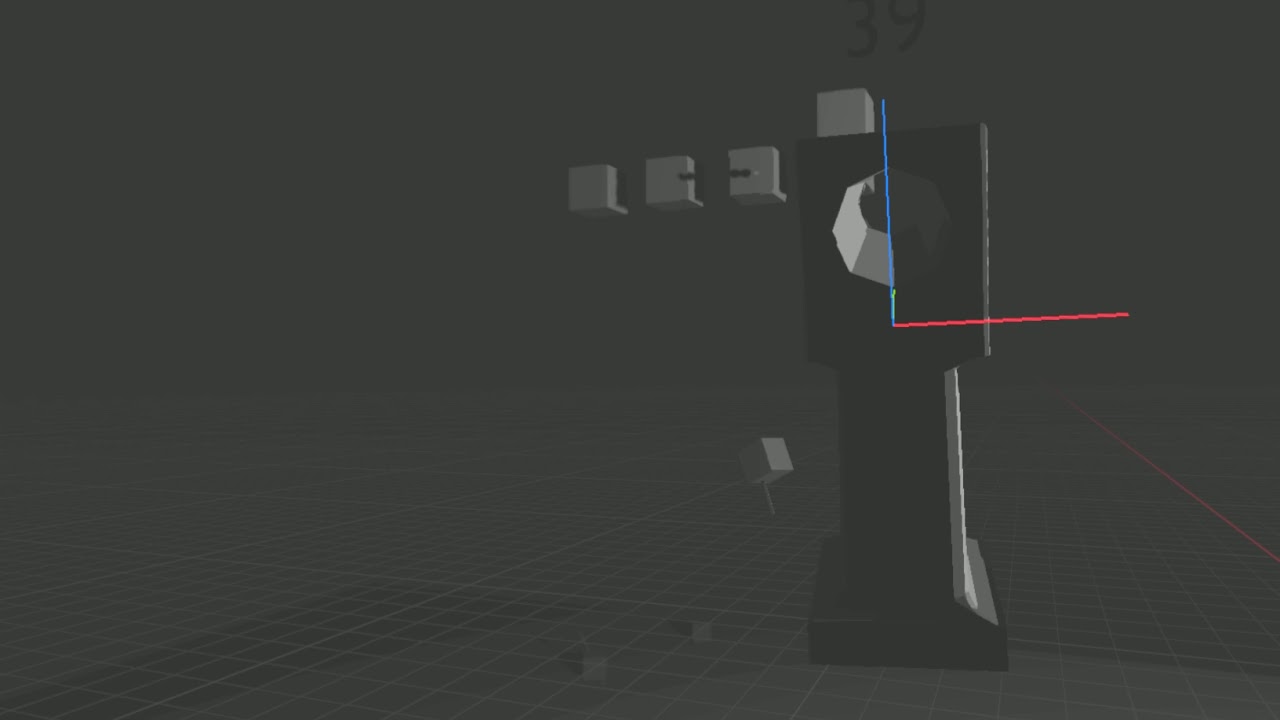
Added impact to harpoons and a aiming window +
@elfin frost pybullet or upbge
 onyx jungle
what is the best tool for developing games in python?
elfin frost
i bet there is no best
dawn quiver
!code
frank fieldBOT
Here's how to format Python code on Discord:
```py
print('Hello world!')
```
These are backticks, not quotes. Check this out if you can't find the backtick key.
potent ice
There is no "best tool". It depends what you are making.
 sage bluff
just made a game engine better than pygame 👌
import XGame
game = XGame.game('windowtest')
@game.code
def mainpoint():
    return XGame.Main(XGame.FreeStyle(XGame.SDL_Init('SDL_INIT_VIDEO'),
                                      XGame.MakeWindow('win','mywin',(0,0),(600,400),'SDL_WINDOW_OPENGL'),
                                      '''
while(true){
    cout << "running" << endl;
    }'''))
game.debug(path=XGame.__path__[0])
``` this will generate a executable file which creates a window!what is the best tool for developing games in python?
@onyx jungle pygame is good for game dev
but you have to code efficiently or your game will be insanely under preforming
potent ice
Now you just need to make all the other features pygame has 😄
 median flower
Hey ! I'm french student and I learn python !
Could someone help my ? I have a mistake
import pygame
import sys


class game:

    def __init__(self):
        self.ecran = pygame.display.set_mode(600, 600)
        self.name = pygame.set_caption("Tic Tac Toe")
        self.is_playing = true


    def play(self):
        while self.is_playing:
            for event in pygame.event.get():
                if event.type == pygame.QUIT:
                    sys.exit()


if __name__ == "__main__":
    pygame.init()
    game().play()
please mention me 😉
olive parcel
@median flower these are fairly basic mistakes that you should be able to investigate on your own… the error message already gives you hints about the issue. It should be set_mode((600, 600)) and not set_mode(600, 600). It should be pygame.display.set_caption instead of pygame.set_caption. And True instead of true.
median flower
thx
median flower
but there is antoher mistake x)
 severe saffron
what's the error
 brave widget
Hello is there anyone that can help me with somehting in pygame
olive parcel
@brave widget we don't know whether there is someone who can help you, because we don't know what problem you need help with
 vagrant jolt
why even use pygame over a game engine?
last moon
personally arcade > pygame but one advantage is that you're working with a higher level language. 'Some' py libraries are also a decent way to learn c(++)/etc style game-dev with sld, OpenGL, ModernGL, etc, etc
It's all the same basic concepts but you have the advantage of not having to worry about mem management, etc, etc
vagrant jolt
yes bro malloc and free is super hard
and pointers 🤮
ok let's not discuss why python is more superior (in some areas) than C, I know why
last moon
imo (and im not the only with this opinion), pygame isn't the best option because it allows you to avoid learning those basics
neither is superior overall
they both have their advantages
olive parcel
pygame is useful if you want to build your own game engine.
last moon
why not use pyglet or panda for that?
olive parcel
Fair enough. I haven't used pyglet/pygame enough to have a meaningful opinion on that.
last moon
same I really need to do something, but from the small amount of pygame i've used + seeing how it's introduced/used it doesn't seem like the best option. Pyglet seems better for it considering it's mostly just opengl hooks
 pale fiber
can someone plz go to help calcium
brave widget
oops I thought I typed out my problem
pale fiber
can someone plz come to help argon
brave widget
so the issue is that I have a 'enemy' and it travels at -2 on the y axis. I want to set it to that if it hits the boundry at the, it goes to the left. (This is done in turtle)
pale fiber
one sec
            if enemyX<= 0:
                enemyX_change = 1
                enemyY += enemyY_change
            elif enemyX >= 736:
                enemyX_change = -1
enemyY += enemyY_change``` this should work@pale fiber
#Create the enemy
enemy = turtle.Turtle()
enemy.color("red")
enemy.shape("circle")
enemy.penup()
enemy.speed(0)
enemy.goto(-200, 250)

enemyspeed = 2

#Main game Loop
while True:
  #Move the Enemy
    x = enemy.xcor()
    x += enemyspeed
    enemy.setx(x)

#move the enemy up and down
    if enemy.xcor() > 280:
        enemyspeed *= -1
    elif enemy.xcor() > -280:
enemyspeed *= -1```for some reason it just gets stuck and it won't move at all
it just bouces at 1 point
last moon
wdym bounces?
brave widget
last moon
like between 2 points?
brave widget
it just stays there
it is vibrating there
Here is the entire code
#Set up on screen
import turtle
import os
import pygame
screen = turtle.Screen()
screen.bgcolor("black")
screen.title("Space Invaders")

#Draw border
border = turtle.Turtle()
border.speed(0)
border.color("white")
border.penup()
border.setposition(-300, -300)
border.pendown()
border.pensize(3)
for side in range(4):
    border.fd(600)
    border.lt(90)
border.hideturtle()

#Create a player
player = turtle.Turtle()
player.color("blue")
player.shape("triangle")
player.penup()
player.speed(0)
player.setposition(0, 0)
player.setheading(90)

#Create the enemy
enemy = turtle.Turtle()
enemy.color("red")
enemy.shape("circle")
enemy.penup()
enemy.speed(0)
enemy.goto(-200, 250)

enemyspeed = 2


#Rotate the player
def rotate_left():
    player.tilt(25)


def rotate_right():
    player.tilt(-25)


#Create keybindings for a keyboard
turtle.listen()
turtle.onkey(rotate_left, "a")
turtle.onkey(rotate_left, "Left")
turtle.onkey(rotate_right, "d")
turtle.onkey(rotate_right, "Right")

#Main game Loop
while True:
  #Move the Enemy
    x = enemy.xcor()
    x += enemyspeed
    enemy.setx(x)

#move the enemy up and down
    if enemy.xcor() > 280:
        enemyspeed *= -1
    elif enemy.xcor() > -280:
        enemyspeed *= -1


delay = input("Press enter to finish")
    if enemy.xcor() > 280:
        enemyspeed *= -1
    elif enemy.xcor() < -280:
enemyspeed *= -1```It still does that
last moon
changed the wrong one try that
brave widget
Omg.... ty lol
I've been trying to get that to work for about an hour and a half lol
I even followed the toutorial line for line to see if I made any mistakes, and it was still making that issue
but the was using v2 while i'm on v3
last moon
you want to change the speed when the sprite is less than your min or greater than your max
usually a rule of thumb is if you're comparing pos to it's boundaries and the signs are the same, you've probably done something wrong
version doesn't matter here
brave widget
hmm
last moon
it's a logic error
last moon
just an fyi + one of my many pet peeves, copying code won't get you very far
you'll learn more through reading the docs and struggling to find what you need
I've actually got a decent video on it (for neural networks but it's the same regardless of the field) that I can try to find if you want
brave widget
yep I completely agree with that, and that is what I did for my other tasks aswell. Its just i'm new to pygame so I was just looking at what he did, and then I would make mine completely off of memory + try to think of the logic behind it
- I'm short on time as I would have noramally gotten 5 weeks to do this assignment - which is to design a game, but because of corona and the teachers lesson plan, I now have 2 days to do this entire thing
last moon
turtle not pygame lol
I get what you're saying and it's ok, you'll just learn more if you're tearing your hair out
brave widget
oh yea lol, we had an opention between the two 😂
last moon
also if you're going 2d, i'd suggest trying arcade
brave widget
hmm
Whats arcade
wait i'll just look into it xD, idw to take up any more of your time
but for sure, I'm planning on doing all these assignments again and expanding my knowledge over the summer
last moon
another game dev library, it's based on pyglet (more lower level game-dev) and from what I've seen/heard, it seems to be better
one major thing I like about it, the docs + tutorials encourage an OOP style approach to the topic, whereas pygame does not
brave widget
ahh thats actually dope
last moon
also the docs aren't green
brave widget
wdym by green
last moon
brave widget
oh lol
last moon
also I haven't heard much about it but it might be worth it to check out ursina, it's an engine made on top of panda3d
idk how beginner friendly it is but it looks pretty good
cold storm
@onyx jungle I think upbge ;D
is best now
it's a whole new animal
panda is good too

plasma FX finished - impact / gfx done - sound is next
last moon
I'll definitely try that out eventually
honestly at this point I think I might as well forget about data-sci
brave widget
Hey, just wondering is there anyway to make the invader in Space Invaders move in a spiral patern towards the origin? (Using turtle)
last moon
noLife I can't remember the name of it, but there're a few math functions that can do the job
for what kind of games nicerrz?
last moon
might want to start with 2d then :)
 signal tapir
Thank you so much @numpy
last moon
r = ae^(θcot(b)) @brave widget that's the equation for the logarithmic spiral
last moon
I've got no clue how to do polar equations in py tho
I think a and b would be x and y?
brave widget
maybe?
last moon
give me a min I'll try to find an answer
brave widget
Wait lemme explain the purpose of my game
So its basically space invaders, except the invaders are trying to get the origin, that is where the shooter is located. And if they get to the origin or colide with the shooter, its game over
and I would have the shooter shooting at where ever the head of the turtle would be
last moon
a.forward(20+i)
a.left(30 - i/1.5)```
smthing like that over a range would do ityou'll have to fiddle with the values tho depending on what you want
brave widget
I see, I have no idea how to impliment that in my code though 😅
last moon
when do you want the spiral?
last moon
so you want them to start at a point and spiral out?
brave widget
because what I'm trying to do right now is that the invaders are moving in a rectangular shaped spiral
spiral inward
towards the origin = 0 (where the shooter is)
and I was wondering if there is a way to make it a direct spiral
last moon
oh ok so it's most of a 4 plane space invaders compared to the original 2 plane?
if you used something like this
you'd have to modify it a bit
but you'd use it to set the position of each turtle (enemy)
brave widget
This is what I am trying to do right now
where the pentagon is the shooter
but I was wondering if I can set it to travel in a spiral instead of that rectangular shape
last moon
welp I found out how to make a pointy circle
brave widget
oh lol
last moon
or whatever you call this
brave widget
Tbh I'm not even sure how I would impliment these in my game itself
Consider me like a complete noob, I have like 3 weeks of experience with python
last moon
well you need to move the enemy forward + left/right each time it updates
the amount depends on the detail of the spiral
pointy donut?
brave widget
Sorry to ask, but would you mind getting in a voice vall? I feel like i could explain / show you on there
last moon
maybe in a bit
brave widget
Alright
last moon
I understand what you're trying to do, I'm just trying to get it to work
brave widget
yep, and I want to get it to try and sprial inwards from a starting point in this case it would be (-200, 250) because that is where the first enemy spawns
last moon
for i in range(1,200):
    xcor.append(enemy.xcor())
    ycor.append(enemy.ycor())
    enemy.right(30 + i / 5)
enemy.forward(150 - i / 1.5)```that's as far as I've gotten
idk how to center it
brave widget
oo
last moon
like it's making spirals, it's just not doing them in the right place/right size
 torn heath
@last moon that's cool