#game-development
1 messages · Page 55 of 1
 sly swift
dude
could you like explain it
i already went through documentation
didnt understand any
 frozen knoll
I can't give much help besides the video.
If you are very lost, might want to back up and work on the basics a bit more.
Everything builds upwards.
sly swift
no i just dont understand how i can immplement these into the code
i implemented these attributes with my past experience in oop
        self.rect.y += 2
        platform_hit_list = pygame.sprite.spritecollide(self, self.level.platform_list, False)
self.rect.y -= 2```like
i dont uınderstand
frozen knoll
This moves the sprite down two pixels. Sees if it collides with something. Then moves it back to the original location.
sly swift
so it isnt jumping
frozen knoll
Often used to see if there is a platform under the player, so the player can jump.
sly swift
oh
frozen knoll
No, it is part of a check to see if you can jump.
If you can, then you'd set the velocity to an appropriate number for jumping.
sly swift
yeah how do we do that
like
i have a few attribute sthat could be used
velocity(horizontal), mass, onair, plrx, plry```how could i implement that code into mine
sly swift
took a look at the video u sent
i implemented gravity and stuff
but couldnt do jumps or stuff
thx anyway
sly swift
nvm
 dawn quiver
help me
 kind tartan
Hey guys I kind of need some help now
I am trying to make a shooting mechanism but all the bullets are getting shot at one click. I am trying to make it shoot one bullet per click.
def primary_weapon_functionality(self, key, bullet_speed, pic, screen):
keys = pygame.key.get_pressed()
if keys[key] and self.power > self.PRIMARY_WEAPON_POWER_REQUIERMENT:
self.power = self.power - self.PRIMARY_WEAPON_POWER_REQUIERMENT
this is pygame btw
 dreamy swan
Maybe have a small timer for each shot?
frozen knoll
Still working on a bloom/glow effect for Arcade:
kind tartan
@dreamy swan thanks!
although I am trying to figure if there is any given functionality like a key down thing which I could use from Pygame
not a bad idea though.
 thorn rock
good evening, beginner adventure with gamedev and chose Godot. Is it a good idea to learn to program in Python first and then switch to GDScript? Is it better to learn GDScript immediately? I will add that I plan to create a small MMORPG game.
 lyric mason
Hey guys, I need some help pls. Do you know how can I take the coordinates of an image ? The method rect always gives me (0,0). I use Pygame btw
 near wedge
@thorn rock Might as well just jump into GDScript.
thorn rock
Thanks :)
 crystal walrus
GDScript is not really Python
By the way, I can reckon Godot has Python bindings which sounds cool
kind tartan
@frozen knoll Thanks!! that helped
I found that
event.type == pygame.MOUSEBUTTONDOWN
does the job
frozen knoll
Great! Glad I was able to help.
kind tartan
It worked, but I felt that I should have just put a timer in between the shots now - its kind of annoying to keep lifting your hand just to shoot multiple times instead of sequential fire.
 upbeat goblet
Is anyone here familiar with ren'py?
dawn quiver
Any chance someone could give me a hand
dreamy swan
@upbeat goblet i work with renpy a lot
 dense marsh
is there a way to get the pos of where you clicked your mouse on the pygame event
 merry echo
Hello fellas I'm trying out the Arcade lib but I seem to have problems with performance
Im only drawing 100 rectangles and the speed is already at a crawl
here's the pastebin https://pastebin.com/cgvcC9HY
merry echo
ok I used the Sprite class instead and it's faster now
I don't know what sorcery it's doing behind the scenes that drawing 100 images is faster than drawing 100 rectangles
dawn quiver
can someone help me? I studying pygame for like 2 days, and I have an error.
When I try to load an image it says:
can't load image
 void sable
You using?:
var = pygame.image.load('file.png')
dawn quiver
and yeah, it's in the same folder where the project file is
yes
yes exp
i'm upload it to pastebin
if want
dawn quiver
where's the image.load is
i tried with the os join thing
so what to do @void sable ?
void sable
don't do os.path
void sable
also, why you have '1.py game' in index 0 for variable walkRight
I think that's wrong
void sable
walkRight = [
    pygame.image.load(os.path.join('1.py game', #<--- Take this out from the list. This is not a file
    'sprite1_right.png')),
    pygame.image.load(os.path.join('sprite2_right.png')),
    pygame.image.load(os.path.join('sprite3_right.png')),
    pygame.image.load(os.path.join('sprite4_right.png')),
    pygame.image.load(os.path.join('sprite5_right.png')),
    pygame.image.load(os.path.join('sprite6_right.png')),
    pygame.image.load(os.path.join('sprite7_right.png')),
    pygame.image.load(os.path.join('sprite8_right.png'))
    ]
so i need to copy it?
void sable
copy this:
walkRight = [
    pygame.image.load('sprite1_right.png'),
    pygame.image.load('sprite2_right.png'),
    pygame.image.load('sprite3_right.png'),
    pygame.image.load('sprite4_right.png'),
    pygame.image.load('sprite5_right.png'),
    pygame.image.load('sprite6_right.png'),
    pygame.image.load('sprite7_right.png'),
    pygame.image.load('sprite8_right.png')
    ]
and replace your variable
with the above
dawn quiver
okay
now i have an another error
Traceback (most recent call last):
  File "f:\cucclik\1.py game\1_pygame.py", line 99, in <module>
    redrawGameWindow()
  File "f:\cucclik\1.py game\1_pygame.py", line 46, in redrawGameWindow
    win.blit(bg, (0,0))
TypeError: argument 1 must be pygame.Surface, not list```@void sable
void sable
mmm
merry echo
what editor are you using?
void sable
@dawn quiver Not sure, seems the code is fine to me.
You loaded the image fine and you put it in blit.
Seems good.
merry echo
try using an absolute path like this:
mypath = os.path.dirname( os.path.realpath( __file__ ) )
then use it like this:
pygame.image.load(os.path.join(mypath, "sprite_name_here.png"))
Does arcade even have a translate() function?
dawn quiver
i done it
but i have an error
VAPING IN THE H00D - リサフランク420 / 現代のコ
oops not this
  File "f:\cucclik\1.py game\1_pygame.py", line 99, in <module>
    redrawGameWindow()
  File "f:\cucclik\1.py game\1_pygame.py", line 46, in redrawGameWindow
    win.blit(bg, (0,0))
TypeError: argument 1 must be pygame.Surface, not list```@merry echo Arcade draws sprites in a batch with SpriteList so they are fast. For shapes, you have to also draw them in a batch with ShapeElementList. Right now the 2.4 branch of code also has a 10x speed improvement even if you don't.
merry echo
Oh ok thanks man
void sable
@dawn quiver can you comment the line out and recompile?
#win.blit(bg, (0,0))
dawn quiver
what do u mean
merry echo
lmao nice music
void sable
I want to see what happens when you remove win.blit(bg,(0,0))
temporarily remove it
we'll put it back after
merry echo
Can we not use transformations when drawing in arcade? or apply them in sprite lists?
most libs usually have those
frozen knoll
I'm not sure what use-case you're looking for.
You move sprites just by changing their location.
If you've got a change_x/change_y you can call update to have them move by that amount.
If you want to move the entire sprite list as one, there's not a command for that. There is for ShapeElementList though.
dense marsh
is there a way to draw an X in pygame or should i use a sprite or something
frozen knoll
Depends on the use case. Probably sprites. Or maybe draw_line
 fervent rose
But a sprite would probably look better
 solid obsidian
Hey can anyone help me with an A* search question?
 quiet finch
Just ask it
solid obsidian
im need to find what A* tree would result in
the parenthetical values are heuristics distances the lines are real
I think i have the right answer am not sure
S - starting point
SA = 15 / SC = 15 / SB = 13 - Thus we choose SB because its the shortest distance, next:
SBC = 6 + 7 = 13- This is the only choice, next:
SBCD = 6 + 3 = 9 / SBCG = 6+ 12 = 18 / SBCE = 6 + 4 = 10 Thus we choose SBCD because its the shortest distance, next:
SBCDG = 9 + 10 = 19. The decision tree is done and this is the path selected
 topaz jay
You're correct
Another way to think about it is bottlenecks.
C and G are bottlenecks points in your tree, this means regardless of what path you take before C or G you must go through those nodes
Then you just need to do optimization for the starting point to bottle neck node 1 and bottleneck node 1 to bottle neck node 2
solid obsidian
thats actually super clever i wont of thought about that
question part of the reason A* isnt working correctly here is because of the hueristics at D right? It says we think its 0 but it ends up being 10 throwing the algorithim out of whack?
topaz jay
Sorry I'm not 100% familiar with the terminology you're using. What do you mean by A*
solid obsidian
A* (pronounced "A-star") is a graph traversal and path search algorithm, which is often used in computer science due to its completeness, optimality, and optimal efficiency. One major practical drawback is its
    O
    (

      b
      ...
Specifically, A* selects the path that minimizes
{\displaystyle f(n)=g(n)+h(n)}
where n is the next node on the path, g(n) is the cost of the path from the start node to n, and h(n) is a heuristic function that estimates the cost of the cheapest path from n to the goal.
A* minimizes F(n) = g(n) + h(n)
topaz jay
I have no idea how they're setting the heuristics but if it's admissable then h should never be overestimates the actual cost
I think E is the problem here, it over estimated the path from EG
Like it predicts EG to be 9, but the actual is 4
solid obsidian
the heurisitics is just the parenthis value
ohhh your right
because its not admissable
yea
topaz jay
But at the same time I don't know if your problem states heuristics will be admissable
solid obsidian
they arent
err they are
it asks why a* is doesnt give the best path
so the heuristics here is a guess which is the value in the brackets
topaz jay
Yea cuz the real path should be SBCEG
topaz jay
Yea
It's also a problem you resolve in operation management
But it's called bottleneck theorems
But it's also slightly different haha
topaz jay
No worries
dreamy swan
Pygame works on Linux correct?
 mossy osprey
Hello
So i am trying to add a .png file to represent the user controllable ship in a space invaders game
I have used a png file for the icon of the pygame window as seen in the top left
The icon is displayed in the window but how come "SpaceInvaders Hero.png" is not appearing in the window
i have set its co-ords as 370,480 in a 600,800 display btw
As you can see above, both pngs are part of the project but for some reason the SpaceInvaders hero is not showing in the pygame window
I have even called player() to appear which should display the hero png but it does not :/
Can anyone help me please ? Mods, Admins anyone ?
i really don't know why it will not work
 round obsidian
@mossy osprey I'm not familiar with PyGame but try adding this line after your .load function for the playerImage
print (playerImage)
and see what it produces on the console when you run the game
mossy osprey
ok, i will try
idk if it will work tho as I searched for a function built into pygame that would allow me to set an image however there apeears to be nothing :/
@round obsidian nothing changes
round obsidian
I didn't ask if anything changed; I asked what it produced on the console (not the window opened by your PyGame script)
at the very least it should say None or something to that effect
round obsidian
It would help if we could see the whole code, post it to pastebin or something
round obsidian

Pastebin
Pastebin.com is the number one paste tool since 2002. Pastebin is a website where you can store text online for a set period of time.
round obsidian
right, that part is puzzling
mossy osprey
it makes no sense
both of the pngs were imported from the same wesbite
in the same way
maybe i should try a different png
round obsidian
yeah, make sure the .png itself isn't trashed
mossy osprey
if that does not work then rip this project :/
round obsidian
or, try the icon .png and see if that works
round obsidian
That is, load the other .PNG and see if that blits to the screen
round obsidian
and the sprite itself is black?
mossy osprey
yes exactly
round obsidian
AHA
mossy osprey
im so retarded
fml
it took me 30mins to realise
rip my brain cells
hey, thanks for ur help man tho, i really appreciate it
round obsidian
+1
 floral root
Does anyone have a guide or something that they recommend to read on game development
 shadow bane
Can anyone show decent examples of unit testing with pygame? I am yet to find some good examples with pytest
merry echo
@frozen knoll Thank you for the reply.
It would be similar to calling translate() in p5.js or making a Camera class in libGDX.
Then all drawing calls after translating would be offset by the amount translated.
I've noticed there's a move() function, but it apparently applies it to the sprite's center position (I use the left and bottom boundaries for positioning).
I found out that arcade.set_viewport() does the job though.
merry echo
By the way, is there a way to contribute to arcade?
A structured reference page could help users get familiarized better
Something like this https://p5js.org/reference/, or https://processing.org/reference/
frozen knoll
@merry echo You can set sprite.left and sprite.bottom to move a sprite.
Docs are open-source. You can certainly contribute!
 still shard
Translation what @frozen knoll said: You can do all the work, if they accept your PR is another question.
I'd try with very small contributions, otherwise you may have a lot of work done just to have it denied because the maintainer has a bad day
frozen knoll
Agreed with the 'small' bit, that way you can get a feel for what the maintainer (me) is looking for.
I'd love to have a new page like the ones you linked.
It is a good idea.
 low tide
Okie I'm trying to follow arcade's tutorial
but I can't place a sprite. I'm doing what they're doing.
And I get "Error: Attempt to draw a sprite without a texture set."
Solved it, I was importing the sprite incorrectly.
 potent ice
Geometry shader circles in arcade 🙂 (without antialiasing. Don't have it on in dev)
dawn quiver
I'm trying to figure out a way to create a branched narrative, where the user can select options to progress the story in their own path... I was suggested to make a finite state machine for that, but how do I do that? I understand what a finite state machine is, but how do i use one to do what I'm trying to accomplish?
I obviously don't want big fat automaton to contain the entire narrative, that's awful.
Something like this, but in a larger scale
https://www.mdpi.com/sustainability/sustainability-11-05615/article_deploy/html/images/sustainability-11-05615-g001-550.jpg

or maybe even this
https://thestoryelement.files.wordpress.com/2014/12/branching_tree_worldstate.png

 tawny stratus
There are a few GDC talks from the guy/people who made Reigns. The way they do it is very interesting, and I'd suggest checking out their talks on YouTube. I can't remember the exact video that discussed their approach to solving the tree-structure narrative problem
https://www.youtube.com/watch?v=tDdtbh-oUTU Might've been this video
I'll try and give you a tl;dw. Their game is oriented around making choices, and when you make a choice, it might have some effect and trigger some global state variable. THen the possible future choices are drawn from a "bag" of all possible choices - and the possible choices are in part defined by the global state that has been set by previous choices.
For example, you might make the choice to slay the vampire, or let him live. If you let him live, it sets off the state of "vampire is alive", and some of the future choices the user gets might be "Do you help the vampire eat someone". Or if you killed him, a state variable of "has murdered vampire", and events/choices like "the vampires pal comes and tries to kill you - what do?" can appear in the future
potent ice
Arcade pip install arcade==2.4a1 is on PyPI if someone wants to try
 ionic citrus
What are the best libraries to work on game development using python?
near wedge
@ionic citrus That will depend on your goals. At the very least you'll want to decide between 2d and 3d, and then, from there, figure out how much you expect the engine to handle for you. In general, I would likely go for Arcade for higher-level 2D and Panda3D (or the higher-level Ursina, which is built on top of Panda3D) for 3D. If you want to get more in the guts of graphics rendering, then maybe something like pyglet or moderngl would be better.
dawn quiver
 civic fox
Anyone know of articles about time systems in always-on games? Like making time matter, having seasons in an MMO, whether things decay while the player isn't logged in, stuff like that?
dense marsh
how do i get pygame do draw a rectangle where i click
pygame.init()
#screen settings
WIN_W = 800
WIN_H = 600
SCREEN = pygame.display.set_mode((WIN_W, WIN_H))
#colors
BLACK = (0, 0, 0)
WHITE = (255, 255, 255)
RED = (255, 0, 0)
#graph
LINES = 80
PIX_SIZE = WIN_W // LINES

def drawGrid():

    x = 0
    y = 0

    for i in range(LINES):
        pygame.draw.line(SCREEN, BLACK, ((x + PIX_SIZE), 0), ((x + PIX_SIZE), 600))
        pygame.draw.line(SCREEN, BLACK, (0, (y + PIX_SIZE)), (800, (y + PIX_SIZE)))

        x += PIX_SIZE
        y += PIX_SIZE

def drawRectangles():

    if event.type == pygame.MOUSEBUTTONDOWN:
        CURSOR_POS = pygame.mouse.get_pos()
        pygame.draw.rect(SCREEN, RED, (CURSOR_POS[0], CURSOR_POS[1], PIX_SIZE, PIX_SIZE))


running = True

while running:
    for event in pygame.event.get():
        if event.type == pygame.QUIT:
            running = False
``` this is my code rn, whenever i click it shows a rectangle but as soon as i let go the rectangle disappearsoh wait i see what i did wrong
but what could i do to prevent this
merry echo
you can set a variable to the mouse position whenever you press the mouse button and then just draw the rectangle using it
_
I've been searching through the arcade docs and I couldn't find a way to center my window. Does anybody know how to do this?
 iron galleon
if i understand correctly, you'll want this https://arcade.academy/arcade.html?highlight=set_viewport#arcade.set_viewport
merry echo
No, that only sets what's displayed inside the window
I've already figured it out, though it needs a bit of pyglet, which arcade should already have
# Get the display screen using pyglet
display = pyglet.canvas.Display()
screen = display.get_default_screen()

# Set variables for use
self.screen_width = screen.width
self.screen_height = screen.height

# Center the window
self.set_location((self.screen_width - WIDTH) // 2, (self.screen_height - HEIGHT) // 2)
This is inside the __init__() function of Window
Here's the code if anyone wants to see
dense marsh
is there a way for pygame to prompt a window or something to take in an input
dreamy swan
I asked before and never got an answer...
This is probably a stupid question... but arcade works on Linux correct?
 dreamy swan
Thanks...
I just recently moved over to Linux so I was just asking
low tide
arcade.DrawText() errors out with an invalid pointer
happened to anyone else? I was following thr tutorial and when I tried to print the score it crashes.

 dusk ibex
hello
Exception has occurred: Exception
Error: Attempt to draw a sprite without a texture set.
I keep getting this error
I even tried running the sample code in the platformer
merry echo
hey yall anyone wanna code buddies?
dusk ibex
You mean a team?
merry echo
no, just somebody to share each other's progress and motivate each other and stuff
low tide
@dusk ibex np!!
 proper tendon
hi, does anyone know how I can find the number of times a number was divided before it returns the modulo value
for example 807 % 10 returns 7
I want to find 8r7
 raven swift
807 // 10
raven swift
floor division
proper tendon
thanks
raven swift
Coding has always been a hobby of mine, I recently started learning game dev... any suggestion on how to really get started with it?
proper tendon
so I use a combination of floor division and modulo I guess
for example, I want to calculate how many pages I need for 807 entries with 10 entries per page
so 807//10 returns 8(pages
807%10 returns 7 (the number on the last page
if there is any remaining
@raven swift what do you want to do, make your own game, or learn the architecture ?
I dont know much about python game dev, but I have worked in the games industry for a while, UE4 and Unity are go-to engines to learn the overall gamedev process, if you want to build it from the ground up you need to write your own engine. RayLib is a popular library which has bindings to python
it abstracts the rendering/input code so you can start coding game systems
if you want full control you want to start learning a graphics API, and build up from there, raylib basically abstracts the graphics API to an easy to use set of classes
raven swift
i just started with pygame... i made some easy stuff like snakes game
i have no idea how to move fwd
@proper tendon
merry echo
aw man you just missed the #693133279674630264 if you wanted to make games
raven swift
thats ok
merry echo
well start from making simple games (Snake, Tetris, etc) then work your way up to more complex stuff
merry echo
if you want to code with python, then you can use pygame
but if you want to use unity, you gotta know either JavaScript, or C#
UE4, on the other hand, uses C++
raven swift
can pygame applications be turned into personal phone apps?
proper tendon
UE4 also has blueprints, which are pretty good for quickly prototyping games
raven swift
My main experience is in api devp and data science... just wanted to tap into this as an interest, not for proffesional purpose
merry echo
well its up to you what you want to use then
proper tendon
it depends on what kind of game you want to make
proper tendon
well, if it's a 2d card game, you can probably write it and it will run smoothly in python, if its a 3d game which uses the latest rendering technologies, you will want to use some engine, or make one
merry echo
honestly I don't know much about mobile support on Python, there doesn't seem to be a community around it, but it can be done as seen here
https://www.reddit.com/r/Python/comments/2ak14j/made_my_first_android_app_in_under_5_hours_using/

reddit
26 votes and 27 comments so far on Reddit
There's also another framework in python which could work in mobile, which is Kivy
merry echo
Who here has used box2D before?
still shard
!ask
 frank fieldBOT
Asking good questions will yield a much higher chance of a quick response:
• Don't ask to ask your question, just go ahead and tell us your problem.
• Don't ask if anyone is knowledgeable in some area, filtering serves no purpose.
• Try to solve the problem on your own first, we're not going to write code for you.
• Show us the code you've tried and any errors or unexpected results it's giving.
• Be patient while we're helping you.
You can find a much more detailed explanation on our website.
 silent spade
Hi guys, I'm using this tutorial: https://ehmatthes.github.io/pcc_2e/beyond_pcc/pygame_sprite_sheets/ to load some sprites from a sprite sheet. However, when I run my game, I get pygame.error: Invalid resolution for Surface at image = pygame.Surface(rect.size).convert(). The full stack trace is here: https://paste.pythondiscord.com/kohudahipu.py can anyone suggest why the error would occur?
The full function load_grid_images: https://paste.pythondiscord.com/alutocusub.py
merry echo
I don't actually have a problem I just want to know if I got anyone uses Box2D
low tide
with arcade can I draw something inside the on_key_press function?
I'm trying with arcade.draw_rectangle_filled but there's nothing
I do have a start_render and finish_render
low tide
I know, I'm just testing out stuff
also, why the heck does the drawing change when I move the mouse?
I'll upload a gif
frozen knoll
Not sure what you mean. on_draw is called roughly 60 times per second. More if you move the mouse.
dawn quiver
Hey guys, so I have decided that I want to create my own Python game. Do you know where I should start?
round obsidian
@dawn quiver Check out a tutorial for one of the existing frameworks (the author of the Arcade framework is in here often), clone that, modify it, use that as a basis for understanding how things work.
 valid seal
anyone know how to get rid of this warning
i had to mess around with some things to get pygame to actually work
{
  "python.linting.pylintArgs": [
          "--extension-pkg-whitelist=pygame"
    ]
}
had to add that to vsc settings.json
which worked and fixed the issue
pygame works
however that warning now pops up everywhere saying it doesn't conform to UPPER_CASE naming style
also tried to add "--disable=C0103"
which fixed a few of the warnings but not all of them
 pale star
hi hi, random question can a pygame game be deployed for mobile?
dawn quiver
@round obsidian sorry for the late reply. But thank you for your advance. Someone else said that same thing
Do you know who the author of the Arcade framework is?
 icy scaffold
Hello, could somebody help me with writing my pay game collision code?
YouTube isn’t very helpful
pygame**
 gusty hinge
Should I be using Panda3d for 2d game development with Python, or is that just a bad idea? I noticed Cocos is a Chinese technology so I passed on it immediately.
And PyGame seems to be too old from what I've read.
It's also not entirely clear to me that Python can be used in place of C# in Unity
 edgy shadow
hey lads do any of you have experience with the pygame GUI module?
near wedge
@gusty hinge Panda3D can be used for 2D game development, but you might want to take a look at Arcade before going down that road.
You'll have a much better experience with an engine that's more tailored to 2D.
gusty hinge
@near wedge awesome thanks!
 empty crescent
                      gameState[(x)     % nxC, (y - 1) % nyC] + \
                      gameState[(x + 1) % nxC, (y - 1) % nyC] + \
                      gameState[(x - 1) % nxC, (y)     % nyC] + \
                      gameState[(x + 1) % nxC, (y)     % nyC] + \
                      gameState[(x - 1) % nxC, (y + 1) % nyC] + \
                      gameState[(x)     % nxC, (y + 1) % nyC] + \
gameState[(x + 1) % nxC, (y + 1) % nyC]```In the first line the ""
Says unexpected character after line continuation character
I dont know why its unexpected
frozen knoll
@dawn quiver http://arcade.academy and learn.arcade.academy were created to try and get people up and running making 2d games with python as quick as possible.
There are a lot of other good libraries out there too, but I can answer questions on Arcade.
dawn quiver
okay thanks @frozen knoll
 ebon osprey
Is it possible to make VR games in python?
near wedge
@ebon osprey Not without quite a bit of work.
ebon osprey
But it is
near wedge
@ebon osprey you'd likely have to write the lense distortion shader yourself and handle the HMD input along with all the tricks to make players not sick.
ebon osprey
Tbh I literally don't understand a single term in that.
near wedge
So, it's possible in a "anything" is possible sense, but I do not know of any python library that has any builtin VR capabilities
ebon osprey
Right now I'm just looking for a field in python where I'm gonna practice and improve as well as focus in that only
So like just gathering up different roads
mossy osprey
If you’re a beginner I would recommend just starting out with 2d games
and then adding layers onto them e.g. lives, health bar, improved HUD
frozen knoll
Yes, keep it very, very simple. Then just add things as you have time.
 wary tiger
How do I learn
 bright jungle
What's the best python game out there?
I'm just comparing python to Haxe/JS/C# to see what's best for making desktop games
 fierce wraith
@frozen knoll can i find the docs for the shader experimental branch somewhere?
frozen knoll
I'll refresh them on arcade.academy.
What's up there now is based on current source.
 cold kestrel
In real life, mechanics is a part of physics. In games, physics is a part of mechanics.
wary tiger
how do i make a jump function that changes by running
frozen knoll
Check your velocity when responding to the jump?
 tulip tinsel
how can i get around the situation where I change the direction the character is moving in from left to right and then release the key to move left and stop moving?
code:
    def on_key_press(self, key, modifiers):
        if key == arcade.key.W:
            self.player_sprite.change_y = PLAYER_MOVEMENT_SPEED
        elif key == arcade.key.S:
            self.player_sprite.change_y = -PLAYER_MOVEMENT_SPEED
        if key == arcade.key.A:
            self.player_sprite.change_x = -PLAYER_MOVEMENT_SPEED
        elif key == arcade.key.D:
            self.player_sprite.change_x = PLAYER_MOVEMENT_SPEED

    def on_key_release(self, key, modifiers):
        if key == arcade.key.W:
            self.player_sprite.change_y = 0
        elif key == arcade.key.A:
            self.player_sprite.change_x = 0
        elif key == arcade.key.D:
            self.player_sprite.change_x = 0
        elif key == arcade.key.S:
            self.player_sprite.change_y = 0
You probably want this:
https://arcade.academy/examples/sprite_move_keyboard_better.html#sprite-move-keyboard-better
tulip tinsel
if I am holding A and then change to D when I release A the character stops because, well it is supposed to
oh, thanks!
I'll take a look
frozen knoll
The logic is a bit more complex, but it covers what you are talking about.
dense marsh
hey i got a pygame problem, is anyone here able to help me out\
it would be m u c h appreciated
it's sorta long ish? but i dont think so, im just new and bad at coding and explaining stuff so
wary tiger
@dense marsh I can try helping
dense marsh
omg thank you so much
wary tiger
I know pygame and turtle but I'm trying to learn whatever the arcade thing is
wary tiger
Or I can help rn
dense marsh
okay
so basically player_y is in the player class right now
and i have the function to update it (move the rectangle on the screen increasing or decreasing player_y) with the key press
so now im trying to set up collisions but i can't without having that up to date player_y value
because when i put player_y into the ball class it just stays at its primary value
how do i fix this
i feel like its a small fix but im just dumb
wary tiger
Wait u put player_y in the ball class what 🤣 show me your code
dense marsh
LMFAOOO
dense marsh
class Ball(): #pong ball class

    def __init__(self, ball_x, ball_y, ball_size, ball_speed_x, ball_speed_y):
        self.ball_x = ball_x
        self.ball_y = ball_y
        self.ball_size = ball_size
        self.ball_speed_x = ball_speed_x
        self.ball_speed_y = ball_speed_y
        self.player_one = Players(player_x=50, player_y=215, xsize=25, ysize=120, yspeed=6)
        self.player_two = Players(player_x=930, player_y=215, xsize=25, ysize=120, yspeed=6)

    def draw(self):
        pygame.draw.circle(SCREEN, WHITE, (self.ball_x, self.ball_y), self.ball_size)

    def move(self):
        self.ball_x += self.ball_speed_x
        self.ball_y += self.ball_speed_y

    def screen_bounds(self):
        if self.ball_y >= S_HEIGHT:
            self.ball_speed_y -= 3

        elif self.ball_y <= 0:
            self.ball_speed_y += 2

    def collision(self):
        pass
class Players(): #two players class

    def __init__(self, player_x, player_y, xsize, ysize, yspeed):
        self.player_x = player_x
        self.player_y = player_y
        self.xsize = xsize
        self.ysize = ysize
        self.yspeed = yspeed

    def player_one(self):

        global foo

        pygame.draw.rect(SCREEN, WHITE, (self.player_x, self.player_y, self.xsize, self.ysize))

        if event.type == pygame.KEYDOWN:

            if event.key == pygame.K_s:
                self.player_y += self.yspeed

            elif event.key == pygame.K_w:
                self.player_y -= self.yspeed

            foo = self.player_y


    def player_two(self):
        pygame.draw.rect(SCREEN, WHITE, (self.player_x, self.player_y, self.xsize, self.ysize))

        if event.type == pygame.KEYDOWN:

            if event.key == pygame.K_UP:
                self.player_y -= self.yspeed

            elif event.key == pygame.K_DOWN:
                self.player_y += self.yspeed
I made pong with turtle but I'll think
dense marsh
there should be a print statement in the collision() function - self.player_one.player_y
okay
dense marsh
okay so its a logic error
its not a i cant run the code error
so when i print player_y in the player class it updates as i move the rectangle up and down on the screen
(i.e. - 150, 166, 178.....)
but when i put the same print statement in the ball class LMFAO it stays at 150
it doesn't update, even though im moving the rectangle up and down
wary tiger
Did you make a while true wn.update or pass
while True:
    wn.update()
Something like that
dense marsh
yes here i'll link it in now
def main(): #runs the program
    SCREEN.fill(BLACK)
    split()
    rectangles()
    pong()
    score()
    pygame.display.update()
clock.tick(FPS)```running = True
while running:
for event in pygame.event.get():
if event.type == pygame.QUIT:
running = False
main()
pygame.quit()```Does it work now?
wary tiger
Did you not define anything
dense marsh
yess
wary tiger
Missing something??
dense marsh
here im just gonna send you my code
import pygame
import random
pygame.init()
#screen
S_WIDTH = 1000
S_HEIGHT = 600
SCREEN = pygame.display.set_mode((S_WIDTH, S_HEIGHT))
pygame.display.set_caption("pong")
#colors
WHITE = (255, 255, 255)
BLACK = (0, 0, 0)
#clock
FPS = 60
clock = pygame.time.Clock()
#for the line in the middle
margin = 5
#ball
ball_x = S_WIDTH//2
ball_y = S_HEIGHT//2
ball_speed = 5
def main(): #runs the program
SCREEN.fill(BLACK)
split()
rectangles()
pong()
score()
pygame.display.update()
clock.tick(FPS)
class Players(): #two players class
def __init__(self, player_x, player_y, xsize, ysize, yspeed):
self.player_x = player_x
self.player_y = player_y
self.xsize = xsize
self.ysize = ysize
self.yspeed = yspeed
def player_one(self):
global foo
pygame.draw.rect(SCREEN, WHITE, (self.player_x, self.player_y, self.xsize, self.ysize))
if event.type == pygame.KEYDOWN:
if event.key == pygame.K_s:
self.player_y += self.yspeed
elif event.key == pygame.K_w:
self.player_y -= self.yspeed
foo = self.player_y
def player_two(self):
pygame.draw.rect(SCREEN, WHITE, (self.player_x, self.player_y, self.xsize, self.ysize))
if event.type == pygame.KEYDOWN:
if event.key == pygame.K_UP:
self.player_y -= self.yspeed
elif event.key == pygame.K_DOWN:
self.player_y += self.yspeed
class Ball(): #pong ball class```
def __init__(self, ball_x, ball_y, ball_size, ball_speed_x, ball_speed_y):
self.ball_x = ball_x
self.ball_y = ball_y
self.ball_size = ball_size
self.ball_speed_x = ball_speed_x
self.ball_speed_y = ball_speed_y
self.player_one = Players(player_x=50, player_y=215, xsize=25, ysize=120, yspeed=6)
self.player_two = Players(player_x=930, player_y=215, xsize=25, ysize=120, yspeed=6)
def draw(self):
pygame.draw.circle(SCREEN, WHITE, (self.ball_x, self.ball_y), self.ball_size)
def move(self):
self.ball_x += self.ball_speed_x
self.ball_y += self.ball_speed_y
def screen_bounds(self):
if self.ball_y >= S_HEIGHT:
self.ball_speed_y -= 3
elif self.ball_y <= 0:
self.ball_speed_y += 2
def collision(self):
pass
def split(): #splits screen in half
line_x = S_WIDTH//2
line_y = S_HEIGHT
for i in range(S_HEIGHT):
pygame.draw.rect(SCREEN, WHITE, (line_x, line_y, margin, margin))
line_y -= 10
def pong():
ball.draw()
ball.move()
ball.screen_bounds()
ball.collision()
def rectangles(): #two player rectangles
Player_one.player_one()
Player_two.player_two()
def score(): #keeps scores
playerone_points = 0
playertwo_points = 0
# RIGHT PLAYERS POINTS
myFont = pygame.font.SysFont("monospace", 80)
text = str(playerone_points)
label = myFont.render(text, 1, WHITE)
SCREEN.blit(label, (S_WIDTH//2 + 75, 500))
#LEFT PLAYERS POINTS
Myfont = pygame.font.SysFont("monospace", 80)
text = str(playertwo_points)
Label = Myfont.render(text, 1, WHITE)
SCREEN.blit(Label, (S_WIDTH//2 - 115, 500))
#objects on screen
Player_one = Players(player_x=50, player_y=215, xsize=25, ysize=120, yspeed=6)
Player_two = Players(player_x=930, player_y=215, xsize=25, ysize=120, yspeed=6)
ball = Ball(ball_x=S_WIDTH//2, ball_y=S_HEIGHT//2, ball_size=20, ball_speed_x=-3, ball_speed_y=random.randrange(0, 2))
running = True

while running:

    for event in pygame.event.get():
        if event.type == pygame.QUIT:
            running = False

    main()

pygame.quit()```while running:
pass
Maybe?
Try that
I'm on mobile rn
I'll hop on PC in about 20min
dense marsh
alright sounds good
also that wont work lol my game would literally not work at all if i pass
nothing would load
wary tiger
Hmmmm
I'm not good at pygame off the top of my head without being on my computer hard to explain
I'm good with turtle tho
Actually hold on
dense marsh
LMAO okay
take your time no rush man
i've been trying to figure this out since this morning
wary tiger
U have something like this???
while True: for event in pygame.event.get(): if event.type == pygame.QUIT: pygame.quit() sys.exit() if event.type == pygame.KEYDOWN: if event.key == pygame.K_UP: player_speed -= 6 if event.key == pygame.K_DOWN: player_speed += 6 if event.type == pygame.KEYUP: if event.key == pygame.K_UP: player_speed += 6 if event.key == pygame.K_DOWN: player_speed -= 6
wary tiger
The while true part
dense marsh
ohh
no
im 99.9% sure that wont work
but i'll try it cause im out of ideas
lol yup didnt work
my game crashed
wary tiger
I'm on mobile so format bad but u should have this after your while true
Game Logic ball_animation() player_animation() opponent_ai() # Visuals screen.fill(bg_color) pygame.draw.rect(screen, light_grey, player) pygame.draw.rect(screen, light_grey, opponent) pygame.draw.ellipse(screen, light_grey, ball) pygame.draw.aaline(screen, light_grey, (screen_width / 2, 0),(screen_width / 2, screen_height)) pygame.display.flip() clock.tick(60)
I'll send code after LMAOOO
dense marsh
LMFAO YES THANK YOU
dense marsh
beautiful
wary tiger
Ok ima brb sit tight before u explode
dense marsh
alright sounds good
wary tiger
ok im on now @dense marsh
while True:
    for event in pygame.event.get():
        if event.type == pygame.QUIT:
            pygame.quit()
            sys.exit()
        if event.type == pygame.KEYDOWN:
            if event.key == pygame.K_UP:
                player_speed -= 6
            if event.key == pygame.K_DOWN:
                player_speed += 6
        if event.type == pygame.KEYUP:
            if event.key == pygame.K_UP:
                player_speed += 6
            if event.key == pygame.K_DOWN:
                player_speed -= 6

    #Game Logic
    ball_animation()
    player_animation()
    opponent_ai()

    # Visuals
    screen.fill(bg_color)
    pygame.draw.rect(screen, light_grey, player)
    pygame.draw.rect(screen, light_grey, opponent)
    pygame.draw.ellipse(screen, light_grey, ball)
    pygame.draw.aaline(screen, light_grey, (screen_width / 2, 0),(screen_width / 2, screen_height))

    pygame.display.flip()
    clock.tick(60)
it should end like that
dense marsh
oh okay i'll try it
wary tiger
wtf did u do lolll
dense marsh
no thats the problem
also yeah that doesnt work because you cant do that
for the pygame.draw.rect
all i want is to be able to get player_y value thats in class player into class ball
 static elbow
If there is anyone out there who knows what SacnturaryRPG is, would it be possible to remake SancturaryRPG with python instead of C++? If so, how would you make the program execute in a whole new tab like in SancturaryRPG? How would you color the text like in SancturaryRPG?
wary tiger
TypeError: list indices must be integers or slices, not tuple
[Finished in 2.6s]
fix???
snake_pos=[[250,250][240,250],[230,250]]
is the line
nvm im dumb
tulip tinsel
is the top left of the screen (0, 0)
and the bottom right (screenwidth, screenheight)
?
potent ice
In arcade 0,0 is bottom left
 gray stump
dense marsh
gray stump
dense marsh
im trying to make like a pause screen in pygame but for some reason
if i make a while loop in the foor loop the game crashes lol
can you not have a while loop in a for loop in another while loop
 leaden minnow
Hi, everyone
tulip tinsel
@potent ice thx
tulip tinsel
I'm just wondering:
when I call:
self.physics_engine.update()
that will handle moving my player so that when I call:
self.player_list.update()
I don't have to do:
self.center_x += self.change_x
self.center_y += self.change_y
inside of the player on_update function
right?
or, that leads me to the question; should I be using self.physics_engine.update() and self.player_list.update()?
because the player update handles going off screen or not
while my physics_engine was handling collisions and stuff
 jovial fable
i think both, physics engine only update your player against 1 list
for example, my characters are animated, and they wouldn't be updated if i didn't call their update i believe
ah that's mainly because i overide update method it seems
tulip tinsel
how does this work?
right_boundary = self.view_left + RIGHT_VIEWPORT_MARGIN
        if self.player_sprite.right > right_boundary:
            self.view_left += self.player_sprite.right - right_boundary
            changed = True
Can someone explain why I have to subtract the right boundary
I'm using code from this script: https://arcade.academy/examples/platform_tutorial/index.html#step-5-add-scrolling
tulip tinsel
I think I got it!
Basically, the right boundary is going to equal the left side of the screen plus the padding (margin). The player will always be right to the left that margin because if he crosses it, it moves forward again, it's like he's chasing it. When he crosses it, the left view is going to equal the right side of the character, minus the old left side of the screen, minus the margin. If we didn't subtract the margin then only the right pixel of the character would be viewable, but, since the right margin is basically the padding we subtract it and everything works fine!
potent ice
Something like that. We should add some kind of Camera to make this easier
That supported scrolling and zooming
tulip tinsel
yeah that would be helpful
potent ice
Also, right now there is no separation between viewport and projection, so it's a bit more tricky to support window resizing if you want your content to stretch with the screen
tulip tinsel
yeah, i can imagine, it would be harder if you also had calculate zooming out, to out of curiosity, do you work on developing the Arcade library?
potent ice
Only recently. Because of this code jam me and paul made the experimental branch. It's kind of a collaboration thing between arcade and the moderngl project. I'm adding a more fancy low level rendering api and helping with optimizing. Both projects benefit from it.
Also new features like post processing and lighting + possibly more
tulip tinsel
oh, i saw those actually, those looked pretty cool!
potent ice
It's a small start, but we have to build on it.
Can do shadows, bump mapping and fun things like that in the future. Also add new light types 🙂
Like a flash light with fog/dust in the light area 🙂
tulip tinsel
that would be very cool :D
flash light's with fog require some pretty hard shaders, i bet
potent ice
In 2D it's not that hard. The hard part is making it look nice.
3D is much harder
With perlin/simplex noise you can combine 2-3 slightly scrolling layers and it can be enough to look decent
It's not anything remotely fancy. You can find ready made functions for that.
But.. all this suff combined is a lot of work of course. It's amazing how much work goes into libraries like arcade over time.
The long term plan was to document and expose the low level rendering api so people could play with it (shaders etc). It's not that scary, and you can do some amazing things.
That's just the small part of arcade I'm really working on. The rest is Paul's work mainly.
- I don't have a decade of experience teaching programming and game dev like he, so it's easier to work on the low level hidden stuff and let him use that to build something that is presentable to the user.
tulip tinsel
it's amazing how there can be a library that great, and that big, with only 2 people working on it
potent ice
There are lots of contributors, but I guess Paul has done like 90% of it.
He's using arcade to teach, so he probably had a lot of time over the last couple of years to iterate on things.
(I've only worked on arcade in the last couple of weeks, and only a smaller part of it)
tulip tinsel
oh, well still, that is really cool
how could i do it where the character is centered on the screen until it gets to the point where if the player is centered it would show below the screen?
im making a 2D platformer.
in other words, the player is centered until a certain point when the bottom of the screen becomes locked in place
my code:
        changed = False

        left_boundary = self.view_left + LEFT_VIEWPORT_MARGIN
        if self.player_sprite.left < left_boundary:
            self.view_left -= left_boundary - self.player_sprite.left
            changed + True

        right_boundary = self.view_left + RIGHT_VIEWPORT_MARGIN
        if self.player_sprite.right > right_boundary:
            self.view_left += self.player_sprite.right - right_boundary
            changed = True

        top_boundary = self.view_bottom + SCREEN_HEIGHT / 2 + TOP_VIEWPORT_MARGIN
        if self.player_sprite.top > top_boundary:
            self.view_bottom += self.player_sprite.top - top_boundary
            changed = True

        bottom_boundary = self.view_bottom + BOTTOM_VIEWPORT_MARGIN
        if self.player_sprite.bottom < bottom_boundary:
            self.view_bottom -= bottom_boundary - self.player_sprite.bottom
            print(self.view_bottom)
            changed = True

        if changed:
            self.view_left = int(self.view_left)
            self.view_bottom = int(self.view_bottom)
            arcade.set_viewport(self.view_left, SCREEN_WIDTH + self.view_left, self.view_bottom, self.view_bottom + SCREEN_HEIGHT)
I usually draw that on paper to figure it out.
tulip tinsel
alright, i'll give it a shot and report back
well, this is actually going well, i now have the character centered
alright, cool! I wrote some code that works and am happy with it!
change the top and bottom boundary parts to this:
top_boundary = self.view_bottom + SCREEN_HEIGHT / 2
        if self.player_sprite.top > top_boundary:
            if self.view_bottom + (self.player_sprite.top - top_boundary) > 0:
                self.view_bottom += self.player_sprite.top - top_boundary
                changed = True
            else:
                self.view_bottom = 0

        bottom_boundary = self.view_bottom + SCREEN_HEIGHT / 2
        if self.player_sprite.bottom < bottom_boundary:
            if self.view_bottom - (bottom_boundary - self.player_sprite.bottom) > 0:
                self.view_bottom -= bottom_boundary - self.player_sprite.bottom
                changed = True
            else:
                self.view_bottom = 0
okay one last thing, is there any built in functionality for smooth scrolling?
 cold storm
@tulip tinsel lerp is nice
<@&267628507062992896> can we add UPBGE to the top bar description?
0.2.5 releases soon - (it's a bug fixing release on the 'legacy' branch)
and 0.3.0 is in alpha
 untold lodge
maybe you can tell us what that is?
cold storm
[blender game engine in blender 2.8x using eevee as a render]
right now it's actually based on blender 2.9x
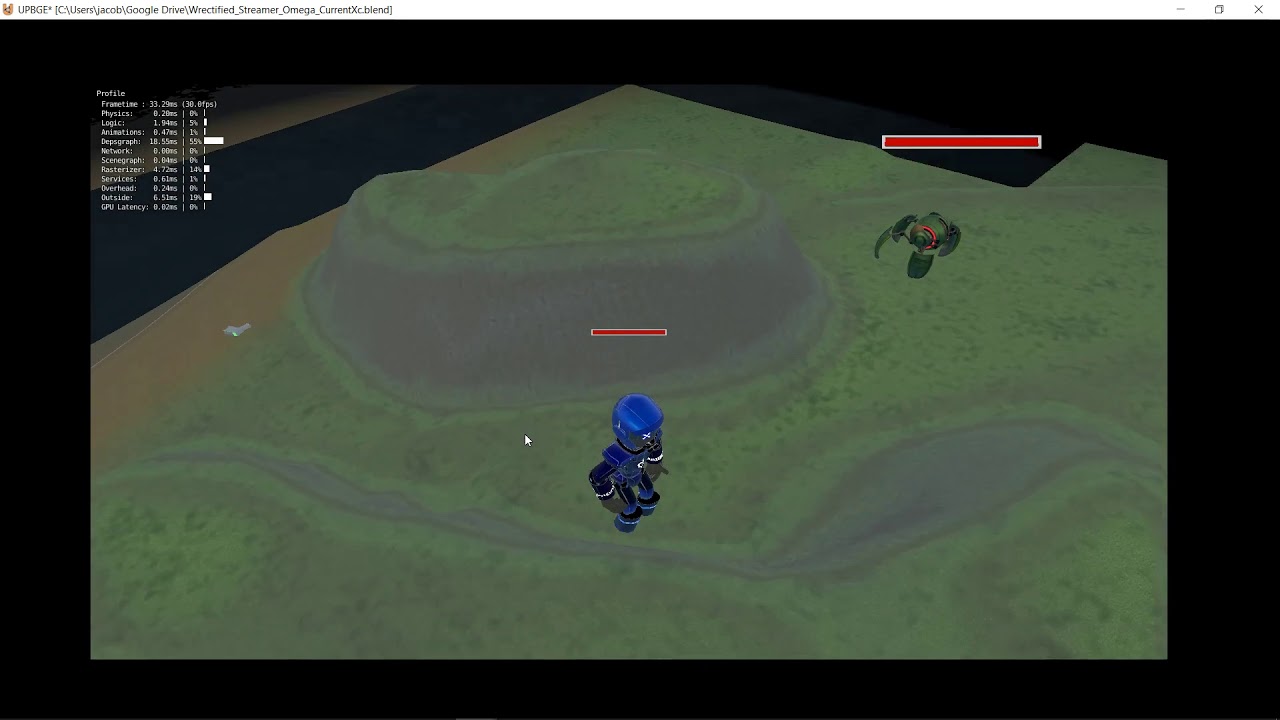
Pathfinder over N frames (10 tiles per frame atm)
this is using python to do everything
including pathfinding etc
untold lodge
since I've never heard of it, and never seen anyone in this community talk about it, it seems like a poor fit for the channel topic.
cold storm
Blender game engine has been around for years
but the whole time it's creators were trying to kill it
while the community was trying to keep it alive
this spawned a fork
UP(BGE)
they have been upgrading / maintaining the engine for like 5+ years now
the alpha version gives you access to using EEVEE to make games
EEVEE is a openGL wrapper for 3.3+
BGL modul is pyOpenGL basically that is built in and GPU module extends it
untold lodge
looks like you've mentioned upbge in this community about 8 million times, but otherwise there are 6 other people who have ever mentioned it and half of them were asking you what it was.
I'm sure it's nice, but the topic is supposed to give a few examples of popular ones.
cold storm
it's popular right now
there are like 4+ lundum dare entries finished using upbge
from this cycles
 ember glade
Sure, but the description isn't meant to be a comprehensive list, just an example of the kinds of stuff we cover
cold storm
well it's robust and exists and is open source
just trying to get the word out

GitHub
UPBGE, the best integrated game engine in Blender. Contribute to UPBGE/upbge development by creating an account on GitHub.
it's growing right along with blender (on a fork using merge commits)
it is getting as good as the big boys but needs a few things finished first
(gpu armature skinning and taming the TAA)
potent ice
0.01% of the people here understand those words
untold lodge
youve mentioned it 158 times in this community so yeah I believe you are trying to get the word out. which is okay, I guess, glad to see you're passionate about it. but I don't think it belongs in the topic.
cold storm
yeah maybe some of you could poke the engine with a stick and see if you like it
bge is like 30 years old
potent ice
BGE is awesome. That I totally agree
potent ice
yes
ember glade
It's not really a matter of liking it or not. We're here for the users and they typically are coming here with specific engines in mind. So having ones that are generally recognizable (not ones that we have to ask "what's that?" on) makes the most sense. Again, not knocking the engine itself, but we've already given our answer about the channel description.
ember glade
Okies
potent ice
For me personally BGE is overkill, but that depends on the project 🙂
.. but if you need the features it provides and it fits the project.. definitely a winner
wary tiger
sup
near wedge
I am not sure that the GPL license makes BGE/UPBGE a great recommendation without a warning/note. The license is one of the main reasons I stopped using the BGE (and thus having a reason to contribute to it). However, it was a pretty fun, easy-to-use engine otherwise. It's hard to beat that asset pipeline. 🙂
potent ice
What restrictions does GPL add for you? (In practice)
wary tiger
ppl
cold storm
to encrypt their assets in a second blend
wary tiger
hello Jacob Merrill
cold storm
Hello
wary tiger
lol
cold storm

Blender Artists Community
Your progress in your game is astonishing. I do believe that its the best game made with the BGE. I have seen the awesome game that Fred is doing with the experimental version of UPBGE with EEVEE. I wander how far you would push it if you make a game with it.
so you can distribute to PC / windows / Linux without much effort
for Mobile we need to have a second shading mode eeveeLite ?
and some work needs to be done on a android blender player again
wary tiger
whos asking???
cold storm
should be easier now that blender is all 3.3+ calls
What restrictions does GPL add for you? (In practice)
@potent ice was asking*
you can't hit PS5 or Xbox15 or whatver atm
but I think switch allows GPL
so really it only keeps you off iphones (garbage) and consoles(at the moment)
except switch*
there is arch linux versions of blender
potent ice
The question was for @near wedge.
cold storm
and the JetsonNano - JetsonXavier etc can run eevee too
so that is a new platform opening up
potent ice
I don't know what those things are
cold storm
NVIDIA Developer
Jetson Xavier NX delivers up to 21 TOPS for running modern AI workloads, consumes as little as 10 watts of power, and has a compact form factor smaller than a credit card. It can run modern neural networks in parallel and process data from multiple high-resolution sensors, ope...
low power- high power chips for mobile
like uber targa chips with tensor cores
near wedge
@potent ice All my code is usually open source anyways, so in practice not a ton. However, I dislike a library/framework/engine forcing a license on me.
potent ice
ah right, so you'd rather see BSD / MIT or something
near wedge
Yup.
potent ice
That is a hard call for projects like blender engine
 limber jewel
Algum BR?
near wedge
@potent ice Yeah, it makes a ton of sense for Blender to be GPL, but that, unfortunately makes the BGE/UPBGE GPL as well, and the license will not change (not sure that it should either).
cold storm
now that I have my pathfinding finished I can assemble a level
potent ice
@cold storm You should make some very basic tutorials. Maybe the best way to get people to the project. No need to show off anything fancy early on and explain properly the terminology and names of things like EEVEE because few people know what it even is.
cold storm
yeah 😄
 echo olive
any 1 ever played a runescape private server ?
potent ice
How is this relevant to game development? 😄
 ember dew
Who has heard of the Game BombSquad?
dawn quiver
I have @ember dew
tulip tinsel
i'm having some difficulty using arcade.View could anyone explain what it is and how to use it with my class which inherits from arcade.Window?
 tulip tulip
Hey guys I have a threading question:
First off let me say I am new to Python so please keep that in mind.
I have a method call that needs to happen every x seconds but it needs to be suspended if a specific condition is fulfilled.
In detail I am programming Tetris and I have this call
piece = piece.gravity(Tetris)
which needs to happen every half second or unless I press "s".
Obviously the code I have now does not work as intended because I cannot move/rotate whilst it sleeps.
while True:
if Tetris.Input.get_key() == "w":
piece.rotate(Tetris)
Tetris.Input.reset_key()
    if Tetris.Input.get_key() == "a" or Tetris.Input.get_key() == "d":
        piece.move(Tetris.Input.get_key(), Tetris)
        Tetris.Input.reset_key()

    while Tetris.Input.get_key() == "s":
        piece = piece.gravity(Tetris)
        Tetris.Input.reset_key()
        time.sleep(0.15)

    piece = piece.gravity(Tetris)
    time.sleep(0.5)
Any help is appreciated!
the while true on top is just for testing purposes but the way it works is that there is a Input thread running that checks what key was last pressed now when a Tetris block falls I want to be able to turn it while it is still on the same level but after .5 seconds it should fall down once
now right now I press a button it turns and then immediately drops down and so on - if I had a thread which I dont know how to do - I could have the inputs react to the key presses and after every .5 seconds the block would fall no matter what
also the return value of the gravity method is vital and since I never did anything with threads I dont know how to realize this correctly
tulip tinsel
Does anyone have any tips for how to organize my game, because right now there is only one python file
and nothing inherits from anything except for the built in arcade classes
dawn quiver
@tulip tinsel for example in my Space Invaders game, I have a seperate file for the ship, alien, bullet, and settings. This could be an example of refactoring the code
if you have different objects that were created in the one file, try creating seperate files for each object
 safe olive
hello
if keys[pygame.K_LEFT] and x > vel:
x -= vel
i dont understand how this works
x = 50
y = 425
width = 40
height = 60
vel = 5 are the variables
the guy explaining the video didnt really explain it well
 clever turtle
hello
my program doesnt work and they said Yes, the error is due to how it's handling the thread
and that i should ask here
import tkinter
import random
import time
import winsound
import threading
canvas = tkinter.Canvas(width=1300 , height=750,bg="#005ce6")
canvas.pack()
def triangle(canvas):
    print("hello world")
    x,y=950,-1
    l=canvas.create_polygon(x,y,x-40,y-40,x+40,y-40,fill="red")
    for i in range(100):
        canvas.move(l,0,2)
        canvas.update()
        canvas.after(5)
def o():
    pass
def l():
    pass
first=[triangle,o,l]
#triangle()
#hlupak=[]
t=threading.Thread(target=first[0], args=(canvas))
t.start()
it should create a triangle that moves down
 solemn reef
Hello,
We're making a lottery game and we have live people in a room.
What is the best approach on how to sync the time across all players so they get the new balls rolled at the same time?
 brittle grove

 spring fractal
@solemn reef
https://medium.com/@qingweilim/how-do-multiplayer-games-sync-their-state-part-1-ab72d6a54043
 solemn reef
@spring fractal thanks! I'll take a look
 dusk bronze
need pygame help on #help-coconut
 thorny salmon
I think more apps
dawn quiver
hi
tulip tinsel
posted a problem I have in #693133279674630264 if any thinks they know
 hearty root
.
 fast cobalt
in pygame, is there anyway to utilize spritesheets?
 torpid pilot
I'm looking into making a video game as a beginner. I was suggested Arcade. Any detailed advice?
round obsidian
@torpid pilot The Arcade site has tutorials on making basic games, so you can start with one of those
They also have their own discord
torpid pilot
ok
iron galleon
dawn quiver
anyone know any good books about coding video games with python?
I wanna learn how to code games
round obsidian
@dawn quiver Look into Arcade's tutorials, as linked above
 sturdy needle
Hi guys, can you fill out this form for me?
https://docs.google.com/forms/d/e/1FAIpQLSd_91_Z6vNkRTnKfCmD8J_hiHDDCbquLBpzyqW2ufO34B-m8w/viewform
 icy scaffold
Are any of you familiar with pygame?
tawny stratus
People here probably will be - your best bet is to just ask your question
dawn quiver
Any recommendations on good video tutorials for PyGame?
potent ice
There's so much out there if you look
Just make sure you pick pygame for the right reasons
The selection of the game library depends heavily on what you want to do.
fierce wraith
im doing some simple world generation, but you notice when the player moves to un-generated terrain, other than multiprocessing, are there any alternatives?
potent ice
Think that's the simplest at least.
 west mortar
Hello, Im trying to make a bouncy ball simulator but it says invalid syntax line 1 and I cant find the issue
import turtle
import random
wn = turtle.Screen()
wn.bgcolor("Black")
wn.title("Bouncyball")
wn.tracer(0)

ball=turtle.Turtle()
ball.shape("circle")
ball.color("Green")
ball.penup()
ball.speed(0)
ball.goto(0, 200)
ball.dy = -2
ball.dx = 2

gravity = 0.1

while True:
    ball.dy -= gravity
    ball.sety(ball.ycor() + ball.dy)

    ball.setx(ball.xcor() + ball.dx)
    # Check for a wall collision
    if ball.xcor() > 300:
        ball.dx *= -1

    if ball.xcor() < -300:
        ball.dx *= -1

    # Check  for a bounce
    if ball.ycor() < -300:
        ball.dy *= -1
 supple fog
Is Godot's GDScipt a python language or a language on its own?
fervent rose
A language on its own
 foggy python
@west mortar are you using PyInstaller?
dreamy swan
GDScript is a language of it's own that has parts of multiple languages, including Python, the C languages, and a bit of Java
west mortar
Wut
dreamy swan
I personally call GDScript a mutant child of multiple languages
fast cobalt
pyinstaller turns python scripts into exe files
 dim bolt
Fellas, i need some help. making a top down 2d game where i want to move the player with arrow keys, shoot with space and aim with mouse. Ive got movement mechanics, hitboxes, bullet and stuff working but i cant get the mouse to work. Got it so far that when i move the mouse, i follows in on about a 90 degree angle and then stops until i move it infront of the character again. Also when i try to use it with py self.rect = self.image.get_rect(center = pos) it says TypeError: invalid rect assignment but not in the demo that i got working, Can provide the full code but im just trying to figure out whats wrong
Would be kind of yall to point me in the right direction 😄
here is the full player class code:
class Player(pg.sprite.Sprite):
    def __init__(self, pos, x, y ):
        super().__init__()
        self.image = pg.Surface([56, 79])
        self.image = pg.image.load("png\chartest2.png")
        self.orig_image = self.image
        self.rect = self.image.get_rect()
        self.rect.y = y
        self.rect.x = x
        self.change_x = 0
        self.change_y = 0
        self.walls = None
        self.pos = Vector2(pos)
    def changespeed(self, x, y):
        self.change_x += x
        self.change_y += y
    def update(self):
        self.rotate()
        self.rect.x += self.change_x
        block_hit_list = pg.sprite.spritecollide(self, self.walls, False)
        for block in block_hit_list:
            if self.change_x > 0:
                self.rect.right = block.rect.left
            else:
                self.rect.left = block.rect.right
        self.rect.y += self.change_y
        block_hit_list = pg.sprite.spritecollide(self, self.walls, False)
        for block in block_hit_list:
            if self.change_y > 0:
                self.rect.bottom = block.rect.top
            else:
                self.rect.top = block.rect.bottom
    def rotate(self):
        direction = pg.mouse.get_pos() - self.pos
        radius, angle = direction.as_polar()
        self.image = pg.transform.rotate(self.orig_image, -angle)
        # Create a new rect with the center of the old rect.
        self.rect = self.image.get_rect(center=self.rect.center)
    def shoot(self):
        bullet = Bullet(self.rect.centerx +30 , self.rect.bottom -53) #where it comes out
        all_sprite_list.add(bullet)
        bullets.add(bullet)
update - used self.rect = self.image.get_rect(centerx = pos) and its working without errors but the fact that it wont follow full 360degrees but 90degrees still remains
dim bolt
found out where one error was. player = Player((640, 360),640, 360 ) but where is (640, 360) is the center of map and when i move around and try to make it point the mouse cursor, it will only point in reference to the middle so i have to find a way to get players coordinates constantly and feed them into that slot?
 crystal bolt
So firstly, I'm not entirely sure if this is supposed to be here, please help me out if it's not, otherwise I'd love any response I get.
Hallo everybody, so firstly, I'm not at all a programmer yet, I recently started teaching myself Python, and I've played games practically my hole life, 1 game in particular is Terraria, love pixel art games, ect.
But I also just out of curiosity I started checking out how games are made, like indie games, and there are 2 engines being use, Unity and Unreal.
But obviously you have to write "scripts" and all that for a certain something to do something else.
I'm just curious wich language is either most used, or best to use when it comes to working with gaming and game engines?
Alot of video's I've watch about programming is that they say if you'd like to start programming, just take a language and start, so I started with Python, but is it a valid programming for game development?
So what I'm trying to get at is:
Unreal or Unity, or both?
Wich language is best suited for game development?
Is python by any chance a valid language for game development/programming?
Again, if this message don't belong here, please tell me, other then that, thanks to any responses.
iron galleon
yes, python is suited for game development. we had a game jam with python that just ended yesterday!
there are other languages more suited for the job though, such as c#/c++. c# for unity and c++ for UE4 (or blueprints). however, python is just fine for many 2d games. arcade and pygame are 2 popular python game frameworks
near wedge
There are also 3D game frameworks for Python (e.g., Panda3D).
iron galleon
yes it’s pretty great, but unity/unreal would give you a much better experience and better performance
dim bolt
As i recall, you can only call out python from c# using IronPython in unity and that is pointless since you have to use their scripting API anyway. At least thats what i remember from my 4 weeks of unity. Feel free to correct me
iron galleon
i personally wouldn’t go into 3d game dev with python
near wedge
For anyone wanting to get into gamedev without regard for the language, I would just recommend Unity. There are tons of tutorials to get going with and the community is huge.
It's probably also a bit easier to grok than Unreal.
iron galleon
agreed
here are some great python games https://dafluffypotato.com/projects

DaFluffyPotato
game developer, pixel artist, tutorialist, and computer science enthusiast developing games since 2013
here’s the game my team and i made for the recent game jam 😉 https://www.github.com/Den4200/game-jam-2020
dim bolt
imma try that one out
potent ice
Lots of games from the jam in the main repo

GitHub
All the submissions for our annual Game Jam event for 2020 - python-discord/game-jam-2020
Just remember these are games made in about a week 😄
iron galleon
also that, haha
crystal bolt
@iron galleon, thank you, I personally don't know much about Pygame and well, frameworks in general, I'm totally new to programming, lol.
But thanks for the response. 😄
Also thanks for the links, will check them out!
@near wedge, Unity just looks visually appealing, thanks for your response to.
Personally, never heard of panda3D, but I think it would be beter with Unity, sins it has a use community and alot of video's. 😁
@dim bolt ,personally, I struggle to understand "... can only call out Pyhton from C# using Ironpython..." and thinks like API, but thanks for the response. 😅
Other then that, thanks again for the response, I'ma head of to bed, sins it's almost 2am, have a nice day/night everyone.
iron galleon
goodnight!
 tranquil girder
In my eight year experience, Unity will give you a much worse experience than using panda3d and Python. Sure, you have to do more yourself, but at least you have control of your pipeline.
 old bane
Would you guys have a class for a creature, that contains their stats, inventory and abilities (such as attack/sleep/hide) that grabs all that stuff from a DB, or have all of those functions in the SQLAlchemy class itself?
I can see both approaches work, the first one also assumes everything is in memory at all times, and only saves/loades ever N minute or on a manual save/load. While the other approach interacts with the DB at all times
Actually writing the question out helped a lot in how I should approach this 😂
 hasty cargo
Hello guys, I have created a little game : https://youtu.be/vUnRtEVLQDM
What do you Think ?

 gleaming estuary
here was a space demo I had going in python pyopengl
Python can manage 3D relatively well, but the C bindings needed to call gl are pretty slow considering the frametime you need for 60fps (16ms per frame).
that was also legacy ff stuff
not glbegin/end legacy, but close 😄
another one I recently abandoned 😄
that one I might finish if I have the time. functionally it all worked (it was a bunny sim) but I didn't really know gameplay loop wise what to do with it
it started in pygame, but eh, I had trouble maintaining consistent performance with enough units on the screen, I know generally the strategy is to only update dirty rects to avoid blitting the entire backbuffer each frame, but with enough units hopping around, the ability for the player to zoom in, the entire backbuffer got updated each frame no matter what :p So I ported to pyopengl which allowed me to have a dynamic directional light for a time of day system w/ normal maps and shaders. "Next gen 2d" kinda stuff
hasty cargo
What is the best framework to develop games with Python ?
near wedge
@hasty cargo The one that meets your needs. In other words, you'll need to be more specific.
@hasty cargo Copying a previous reply of mine to a similar question: That will depend on your goals. At the very least you'll want to decide between 2d and 3d, and then, from there, figure out how much you expect the engine to handle for you. In general, I would likely go for Arcade for higher-level 2D and Panda3D (or the higher-level Ursina, which is built on top of Panda3D) for 3D. If you want to get more in the guts of graphics rendering, then maybe something like pyglet or moderngl would be better.
Oh, and there's also Kivy for 2D.
hasty cargo
Ok thx for your answer @near wedge
icy scaffold
Hello, could anybody help me real quick in creating a camera to follow my pygame character. Ive spent hours on end trying to create one (that fits to my code) but it just isnt working, causing me to feel demotivated. It would be deeply appreciated if anybody could help me!!!
If anybody had the time to help me I would be really grateful!
frozen knoll
I've got an example here:
But I don't really do pygame much anymore, so I don't really have an example beyond that.
It is a bit easier in Arcade.
dreamy swan
he created it...
 young dome
It's wild having the author hanging out here
hasty cargo
Hello guys, I M actually developping a game with pygame. I have an issue when I try to remove the image background with the method convert_alpha().
I tried something like that :
Image = pygame.image.load(myimage).concert_alpha().
Screen.blit(Image, (0, 0))
The background is still Here
Can someone can help me ?
dreamy swan
did you copy paste that from your code?
Because there is a typo
hasty cargo
No, I write here
merry echo
we don't
minecraft can never have a sequel
but if you want 3d graphics there's panda3d, opengl, ogre,any many more.
or if you're a madman, you could create your own 3d engine
fervent rose
Making a pseudo custom engine for a game like minecraft wouldn’t be that hard, as minecraft is plane cubes, so there’s very little vertices, and no displacement
fierce wraith
pseudo engine?
fervent rose
I mean, if you still use some libraries, like for gl bindings and physics
So it is custom, but not really
fierce wraith
but you cant go lower level than opengl
i guess if you use a opengl wrapper like arcade or pygame its not as custom but id say it still counts
fervent rose
I was thinking something more extreme like modernGl, let’s go wild haha
fierce wraith
yeah but moderngl isnt really a wrapper for opengl. its just bindings
it doesnt have things like "draw a sprite" etc
fervent rose
That’s my whole point, aking something from scratch wouldn’t be that hard, and probably be a better way
fierce wraith
yeah i agree
potent ice
Definitely. The biggest challenge I think is having efficient chunk management / updates.
If they are fast enough to update and the buffer data is as small as possible you can draw a lot more chunks at a lower cost
Because of collision you also need the data on the client/python
It's totally doable in python
fervent rose
MC actually divide the game by 16x16x16 rendering chuncks (not logical, they are 16x16x256) to only render what is seen by the camera
But I think that even without that the game would run really smoothly on modern computers
Cubes are just 8 vertices and 16 trigs afterall
 strange belfry
Does anyone stream on twitch?
potent ice
@fervent rose Nice. I didn't know they did 16x16x16 for rendering, but that makes a lot of sense.
I guess they might also separate blocks and objects?
fervent rose
Objects with logic are tile entities, which are loaded with logical chucks, is that what you mean?
potent ice
torches
fervent rose
They are actual blocks iirc
It just has a separate model and a metadata for the light
potent ice
ah ok, so they are written to the to the vertex buffer together with the blocks
fervent rose
I guess so
potent ice
Doesn't work great with my plan using geometry shader 😄
But I guess they can be handled separately
fervent rose
Haha, I think they didn’t even wrote a shader themselves, they use JLWGL
potent ice
I so want to start on arcade-voxels 🙂
potent ice
... but maybe exploring 2d first is a good idea 😛 (I'm mainly done 3d)
Doing a 2d rpg with huge tmx maps, items, combat (weapons/spells), sensor volumes, npcs, quests.... might be more appealing.
fervent rose
I always wanted to do a small 3d rendering engine, but when I think bout displacement, I don't have any freakin idea on how you're supposed to implement this, ND as much as I like maths, I don't have enough knowledge to understand Wikipedia pages haha
I always feel like that 2d games made by one person can be a really "finished" game, as 3d games will tend to lack content and details
jovial fable
There is a revival of small 3D game that have PS1 / Quake style graphics in Indy community i observed
I guess 3D has either become less costly to make or it's just kids that grown up during the late 90's start to make game now
Lacking detail can be a style i would say
Paratopic is a first-person, horror video game by Jessica Harvey, Chris I. Brown, and Doc Burford released for Linux, macOS, and Windows platforms in March 2018. The game uses a graphical style reminiscent of 32-bit era graphics. Later that year, a "Definitive Cut" edition add...
Like this for exemple
fierce wraith
i looove doing the math behind algos. especially if its a really smart trick. but i absolutely hate it when the only resources are on the finished product and i cant figure out how they got there.
fervent rose
That’s the kind of maths I like too, but I just can’t keep up :(
 solemn wagon
I made a simple command-line blackjack program and want to add a GUI, but I don't know which library to choose. Pygame, tkinter, qt?
tulip tinsel
What would be the more efficient way to do this:
    def on_mouse_motion(self, x: float, y: float, dx: float, dy: float):
        column, row = self.get_column_and_row_from_mouse_coords(x, y)

        current_cell = self.grid[COLUMN_COUNT * row + column]
        current_cell.color = self.current_color

        for cell in self.grid:
            if cell.left <= x <= cell.right and cell.bottom <= y <= cell.top:
                cell.color = self.current_color
            else:
                cell.color = BLANK
Because this is obviously really slow and laggy :D
fervent rose
At this point, you would be better using an in-memory SQLite database
Or you could make a better implementation using double logarithmic search
icy scaffold
Hello, Could anybody help me make some projectiles that shoot out of a characters body/coordinates in pygame? Ive tried youtube but that doesnt seem to be helping much. The help would be much appreciated
frozen knoll
or
I don't have a lot of help beyond that though, as I mostly just do Arcade now.
icy scaffold
Thanks, Ill have a look at it
Cant seem to make much of it, does anybody else have any suggestions?
 wicked swift
Hey, guys by any chance do you have any tips for me I'm only a beginner.
frozen knoll
Start with https://learn.arcade.academy maybe? There's a lot of other good books and tutorials. Pick one work through it.
potent ice
yup. Start simple. What you learn using the higher level libraries can be used when/if you move to a lower level one
It causes less suffering in general 😄
dawn quiver
What are some python game engines?
potent ice
Depends what you want to make and if you want it to be low or high level
near wedge
@dawn quiver The channel topic has a few
 manic surge
I'm having trouble getting python to locate pysdl2 for some reason. I installed it with pip and tried setting the environment variable but it can't find it still. Any advice on what to check? I never had this happen with pysfml or pyglet
foggy python
Might as well use Pygame 2. It’s SDL2 with more development behind it and a larger community
manic surge
I've heard mixed things about pygame though
 undone anvil
what is the best python game engine ?
dawn quiver
love2d
potent ice
There is no "best" game engine. It depends on what you want to make and at what level.
Should totally do what Paul suggested making a python game engine called "The best game engine"
 small flare
After hacking together the second semi optional solution to this issue i thought id ask for some help:
Im building a turn based combat simulation for my pen & paper game. (if anyone has done something similiar, it would be great of you too dm me if youre willing to share some experiences and roadblocks)
What is the best practise for storing and processing abilities that players can use, in a database ?
My old solution had different ability types like healing and damaging, which then resulted in different python classes that inherited from "ability".
My problem is that there are abilitys that have such a high varience of effects that it's hard to save them with properties that i can later run through my game engine. Most games deal with this problem flawlessly and i dont quite get how. (Not usually a game developer here)
Most spell have some same properties, (mana cost, learning requirements, cooldown, name, etc.) but then look at 4 abilitys:
Heal: - heal amount, attribute scaling, range, target amount
Fire ball: damage, attribute scaling, damage type, radius of impact, chance of inflicting a status effect
Teleport: range for initial target, range for teleportation position, max weight for target
Bla bla buff: effect type, chance of inflicting a status effect, target amount, values of the effect type
I also tried just smashing all possible attributes inside one model and then just extracting the columns i needed , depending on the skill category but then i ended up with a lot of columns for very specific spells and situations.
I hope i explained my problem good enough :')
(@me)
 inner obsidian
hello everybody, i was programming the society game mastermind, anyone want to try ?
 stable lodge
@inner obsidian #303934982764625920 is more the place for that comment. Make sure you follow the requirements of the channel shown in channel description
foggy python
made water and grass stuffs
potent ice
Nicely done
tulip tinsel
Posted in #help-chocolate if Anyone thinks they might know how to use threading with arcade
undone anvil
Should I learn c++ to do game dev and use it in unreal engine or use it only by code ?
potent ice
That depends on many things
foggy python
If you want to do 3D, you’ll probably want to use an engine. If you want to do stuff that requires a lot of processing power, you may want to use an engine or another language. Everything else should be fine with Python.
 pliant dust
I am new to coding, and apologize if this is the wrong place for this, and got into it because I am interested in game development. I have been using Pygame to learn to game. However, I am struggling to find out how to get a single key input to run an entire command after one press. I have tried the KEYDOWN and KEYUP event.types to fix this, but it still only runs a portion of the animation before stopping, or everything else(movement, jumping, etc) stops entirely. Is there something I should be doing differently than just telling the KEYDOWN to run the animation?
foggy python
that doesn't sound like an issue with input
it sounds like something is wrong with your animation system
pliant dust
I coded it as follows the first time I tried.
event.key == K_k: player_action,player_frame = change_action(-some code- 'attack')
and then the animation may have played the first frame after a key press, and reset to idle.
update: I fixed the non-playing with a True statement and making the idle animation "elif" to the attack animation. Now its that the key must still be held down to play the animation
potent ice
3D can work more that fine in python. It depends how complex you need it do be
If relatively simple stuff it's not that hard to get simple 3D geometry up and running without an "engine" even with pyglet or moderngl.
But there are also panda3d/ursina if you want higher level api
Very few people explore 3D with python it seems. It's a bit of a shame 😉
foggy python
@pliant dust wait, are you using my tutorial? lol
pliant dust
I questioned the name for a moment...
foggy python
but yeah, looks like you just had an issue with setting up flags and stuff to keep track of what animation should be playing
pliant dust
I figured it was that the while loop was running back to the running/idle animation before the attack animation finished/started.
 modest fulcrum
Hi, are there any specific requirements or guidelines one should follow when making 2D images to use as sprite with PyGame?
I'm a bit new to PyGame, but I'm asking because of my understanding of how Rect works
It's based on the original image initially, so if I have a bunch of transparent space around my image, will that be an issue? I figure not as long as the transparent space is roughly the same on all sides.
frozen knoll
My recollection is that basic collision detection includes transparency, so I always advised students to trim it. Bitmasking is totally different thing.
modest fulcrum
But we can work around the extra space, can we not?
We can set trim the transparent space or not have it included in the rect.
fervent rose
The issue with the transparent space is that your engine might think it should be counted as collision
pliant dust
I think, from what I understand, depends a little on how you set up the collision rect for the sprite. If you use a “.get_height/width” of the image to create the rect, then it’ll include the blank space. If you manually input the dimensions it’ll be the right size, but the origin point would probably be off from the sprite.
frozen knoll
Right, you'll need to dive in and spend some time figuring out collisions. If you rotate or scale a sprite, that's also something to consider. I think the simplest solution is to just trim the rect.
But that requires a bit of use of a graphics program, and they don't all make that easy.
This is a common stumbling block for people getting started with python game development, and is one of the reasons Arcade trims out a lot of the transparent space.
fervent rose
You always want to make your assets as small as possible, for the sake of disk and memory usage, so I think it is a good habit to always trim empty space around your assets
frozen knoll
If you work with Unity, or OpenGL, standards practice is to have your assets in powers of 2.
List 32x32 or 64x64 or 128x32.
Scaling is easier, and the graphics card works better with it apparently.
fervent rose
Well, I guess that makes sense
fierce wraith
im pretty sure opengl pads data to be a power of two, so that might be why it works better. dont quote me on this
😉
no, it pads to the nearest multiple of 4 iirc
dawn quiver
I'm doing a game development study and we have to make a 'museum product'. I think I want to do something in python because I want to learn the language but I'm completely out of inspiration. I am looking for ideas on what I could make. It has to be something simple that can be done in a couple of days. I was thinking maybe some image manipulation using pillow that makes a modern 'art work' of an image or something like that.
fierce wraith
@dawn quiver why not something like this:
https://discordapp.com/channels/267624335836053506/303934982764625920/627437178867286026
Leads to images like this:
https://discordapp.com/channels/267624335836053506/303934982764625920/626875340739837972
I found the Mona Lisa one to look pretty cool


 manic canopy
How can I make a mobile application or mobile game with Python?
near wedge
@manic canopy I think Kivy can do this (at least for Android).
frozen knoll
I'd look at Kivy. Haven't done it myself, but I've heard it works.
If you want more of an app than a game, might look at https://beeware.org/
pliant dust
I have a question about attacking, hit boxes, and animations. In a game, is the attack just extending the player/enemies collision box and checking for a hit? or is the attack its own hit box to check collision. on that same note, is the attack "swing" its own sprite, or part of the player animation? is it all based on personal preference?
frozen knoll
I'd probably do one of two things:
Change animation and hitbox of the sprite at the same time.
Check for collisions with extended hitbox.
Resolve.
Or, you could just create a mini, invisible sprite that is a small hitbox in the target area and check for contacts.
That way, only the separate spot would do damage.
So attacking forward would not cause damage to enemies touching your back.
pliant dust
ok, thank you!
frozen knoll
Working on easy Pymunk support in an upcoming Arcade version.
 dense topaz
Wow
dawn quiver
I'm learning pygame and using sublime text for it but whenver I click run it shows up for like 2 seconds and quits
is there something I add to the bottom like with tkinters tk.mainloop()?
so
pygame.init() at the beginning
and pygame.quit() at the end
@dawn quiver
I did
maybe try running it somewhere else and not in sublime
I am trying in vs code
invalid syntax?
import pygame
pygame.init()

win = pygame.display.set_mode((900, 550))

pygame.display.set_caption("Puppers")


x = 50
y = 50
width = 40
height = 60
vel = 5

run = True
while run:
    pygame.time.delay(100) #milliseconds, this is 0.1 second.

    for event in pygame.event.get():
        if event.type == pygame.QUIT:
            run = False

    pygame.draw.rect(win, (255, 0, 0, (x, y, width, height))
    pygame.display.update()

pygame.quit()
are you using tech with tim's tutorial?
yes
i tried it too and it works for me
I am learning pygame
idk why it doesnt work for you
hm
what are you usinh
using
vscode
also
in episode 4 you will get lost spoiler alert
thats where i quit
huh lol
oof
I am oofed lol
wait
let me try last hope
Spyder
oof
I'm starting to wonder if pygame even downloaded properly
because it is giving me errors on the pygame.quit()
dense marsh
def draw(): #draws pixels
    mouse_pos = pygame.mouse.get_pos()
pygame.draw.rect(SCREEN, BLACK, (custom_round(mouse_pos[0]), custom_round(mouse_pos[1]), MARGIN, MARGIN))``` this keeps redrawing rectangles on the screen because its in the for loop but i want it to not redraw and stay on the screen creating multiple rectangleshow do i do that
dawn quiver
someone know how to program app that runs on background?
potent ice
FYI: Pygame 2.0.0.dev8 was just released https://github.com/pygame/pygame/releases/tag/2.0.0.dev8

GitHub
pygame (the library) is a Free and Open Source python programming language library for making multimedia applications like games built on top of the excellent SDL library. C, Python, Native, OpenGL...
 elder forum
how do i load and apply textures in python + pygame?
potent ice
Like sprites?
 supple surge
basically
merry echo
Anyone here interested in collision detection? I came across a very interesing paper which uses Verlet Integration. The example code is in C++ but shouldn't be a problem.
https://www.cs.cmu.edu/afs/cs/academic/class/15462-s13/www/lec_slides/Jakobsen.pdf
Here's a similar tutorial which has interactive pieces
http://datagenetics.com/blog/july22018/index.html

 mild helm
Does anyone know pygame? I have to do my homework but I don't know how to do it😕, if someone is kind enough to help me would be very grateful?
 foggy breach
Hi, I have hopefully a quick one to solve. I'm trying to make a Chip-8 emulator, and part of it involves bit shifting. I have this:
op_code = memory[pc] << 8 | memory[pc + 1]
I'm getting an error that says: TypeError: unsupported operand type(s) for <<: 'bytes' and 'int'
I've tried various things I've read on numerous places online, and nothing is working (casting memory to bin or hex doesn't work, casting the 8 changes it to a string some how, tried wrapping the whole equation inside of hex() or bin(), tried casting memory to int, which caused a different error entirely, i've even reread how shifting is supposed to work, and everything I've read says it should be working already, and I've tried changing the 8 to 1 and 4) memory[pc] should contain hex for the chip 8 code thats stored there. what do I need to do to get this to work?
 unique dragon
The error means that the value at memory[pc] is a byte string, try printing memory to see what it looks like
foggy breach
I did, I changed how I loaded the file, thank you
mild helm
Help me?
Does anyone know pygame? I have to do my homework but I don't know how to do itconfused, if someone is kind enough to help me would be very grateful?
merry echo
!ask
frank fieldBOT
Asking good questions will yield a much higher chance of a quick response:
• Don't ask to ask your question, just go ahead and tell us your problem.
• Don't ask if anyone is knowledgeable in some area, filtering serves no purpose.
• Try to solve the problem on your own first, we're not going to write code for you.
• Show us the code you've tried and any errors or unexpected results it's giving.
• Be patient while we're helping you.
You can find a much more detailed explanation on our website.