#game-development
1 messages · Page 51 of 1
 fierce wraith
 frozen knoll
Good question.
Depends on the size of the sprite. If you have that many, might be worth-while to create a sprite-sheet ahead of time.
frozen knoll
Cool, best of luck. Shout if you need anything.
fierce wraith
will do!
ah! quick question
most of the grid will be empty
so in my moderngl version i used a frag shader to draw the background grid
does arcade have shaders?
or should i just generate a background image and use that as a sprite
 lunar jetty
Paul Craven... the name sounds familiar- oh yep, just checked the roles
The man himself, nice to meet you in person, haha
well, "in person", as much as a discord channel can convey of that meaning- you know what I mean
Now look what I've done
 potent ice
@fierce wraith Arcade is perfect for that project I think. If people just knew how hardcore the rendering in the first version is they would probably not believe you 😄
frozen knoll
@fierce wraith You can either create an image and use it as a sprite, or you can use a ShapeElementList. The ShapeElementList allows you to stuff a bunch of OpenGL drawing commands together and draw as a batch.
lunar jetty
I tried downloading pymunk for some physics with pip install pymunk
but uhh...
so I did python -m pip install -U pymunk instead
will it work? xD
frozen knoll
Hm, interesting. Did the second command work? If so, you might have multiple Python's installed on your computer.
I think the second method is the preferred way to install packages anyway.
lunar jetty
I probably do ngl
no wait-
I actually don't
because last time I had to reinstall it because pip 20.0.0 was broken
this is pretty much what happened
so in theory it installed?
frozen knoll
That looks like a successful install. And yes, pip 20 messed up a lot of code that was platform specific.
lunar jetty
it showed up on stackoverflow very quickly lol
fierce wraith
@potent ice yeah hahah. way to much time spent on getting that stuff to work haha
@frozen knoll is there a easy way to up the sample count?
these lines look kinda pixel-y
frozen knoll
It looks like anti-aliasing isn't turned on. Are you subclassing from Window? What platform are you on?
This is what I get with draw_line on windows:
I don't see any anti-aliasing in what you posted, which is odd.
fierce wraith
windows and im just running the lines example
@potent ice writing to a buffer from the cpu is bad right?
like writing directly
not using a uniform
@frozen knoll its not to big of a problem, i was just wondering 🙂
 surreal furnace
@lunar jetty uninstall it and reinstall it on powershell within the prompt. that's what worked for me!
(if it's not on path, the program can't run it)
lunar jetty
first let me see if it even works
well it imports
rn I can't be bothered to write a test code tho
surreal furnace
just do pygame.init()
lunar jetty
I don't use pygame
surreal furnace
oh, well i'm stuck
lunar jetty
I'm using Arcade
lunar jetty
I'll just test it at leisure
surreal furnace
k
 neon hinge
@lunar jetty That's too far into meme territory and too far out of on-topic territory for me.
lunar jetty
my bad
 quaint fog
Any good book to learn pygame
quaint fog
?
potent ice
@fierce wraith Nothing wrong with writing to buffers. Like with everything else it does have a cost.
quaint fog
Anybody know a good book that teaches you pygame
frozen knoll
You can look at http://ProgramArcadeGames.com it is free on-line.
Or if you aren't set on pygame, see http://arcade.academy/ and https://arcade-book.readthedocs.io/en/latest/
quaint fog
But @frozen knoll if I didn’t want to use a website and buy a paper book. What would you recommend?
 minor mortar
potent ice
minor mortar
potent ice
Exported the default Beat Saber map. Could be fun to make it load light show data and play that with music. (I stripped the materials for now to make it visible)
surreal furnace
@frozen knoll i cannot believe you didn't mention your OWN book
lunar jetty
Guess he doesn't like to plug himself
Also for some reason I don't know how to use transparency in my sprites
Because what hecky would I need the sprite's background for
lunar jetty
also bonus question, if I have 16x16px tiles is there a way to upscale them without them looking like garbage?
because when I try to upscale it while processing the layer...
blurry garbage
frozen knoll
What are you working with library-wise? You'd need to double the size so everything lands on a pixel boundry, and turn off multi-sampling.
lunar jetty
so far I'm only importing arcade
but basically I wanna go for Cave Story (the original, not CS+) style graphics
in a window that's 800x600
it's probably more than 16x16, it's at least 32x32 with the tileset
or that's what it looks like
hold on I need to look at the actual game and not a poorly upscaled image from the web
oh no it's actually 16x16 in the original
either way the point is I don't want 16x16 graphics that'll be 1:1 scale in the window because that'll be microscopic in a 800x600 window
 jovial fable
sprites for ants
lunar jetty
unless it's possible to just stretch the whole thing somehow?
potent ice
I think with pyglet and arcade you can render those tiles with nearest interpolation to make them pixelated when scaled
Default is linear interpolation
So in theory you can render the 16x16 tile covering the entire screen and it will look like the original
lunar jetty
which is pretty much what I wanna achieve
upscale pixel art while keeping original appearance
frozen knoll
When you create an arcade window, you can turn antialiasing to False, which will not blur the pixels.
You'll need to scale in powers of 2 though I think. 2, 4, 8, or whatever.
(Don't update to Arcade 2.2.8. Bad things...bad things. And I'm not smart enough this morning to solve my issues.)
lunar jetty
hold up
when was it released
because I downloaded it I think yesterday or before yesterday
but yeah another issue actually I believe is when I upscale whilst processing a layer, it just goes completely out of the grid, just overlapping one another
(I scaled it 2)
oh ooh
yeah uh
mama
in order to demonstrate more clearly I took a tileset from a well-known block game that everyone knows and has reference for
I got 3 layers, the Ground (which is grass and dirt), Background which is all I'm not supposed to collide with and Leaves layer just for cosmetic reasons because in this tileset leaves are gray
I set them up as such
        test_map = "maps/untitled.tmx"
        leaves_layer_name = "Leaves"
        walls_layer_name = "Ground"
        background_layer_name = "Background"
        test_map = arcade.tilemap.read_tmx(test_map)

        self.leaves_list = arcade.tilemap.process_layer(test_map, leaves_layer_name, 2)
        self.background_list = arcade.tilemap.process_layer(test_map, background_layer_name, 2)
        self.wall_list = arcade.tilemap.process_layer(test_map, walls_layer_name, 2)
I dunno, should I scale it when drawing lists instead or something?
Am I missing something?
and this is what it looks like
instead of this
potent ice
ah looks like linear interpolation. I'm sure there is a way to set nearest interpolation in arcade
Maybe search in docs
lunar jetty
I'll do that
oh the first line doesn't have an indent for some reason
let me fix that to avoid confusion
there
potent ice
The sprite list do have a filter parameter for draw : http://arcade.academy/arcade.html?highlight=gl_nearest#arcade.SpriteList
But I have no idea if that is related to what you are rendering at the moment
It should be possible to set somewhere at least
potent ice
process_layer makes a SpriteList.. then spritelist.draw(filter=gl.GL_NEAREST)
lunar jetty
I gotta import gl from Pyglet?
potent ice
Seems so import pyglet.gl as gl
lunar jetty
okay so that partially solves my problem
because now it's not smoothing
BUT
the tiles still overlap halfway
potent ice
yay. Progress at least 😉
lunar jetty
I mean hell I'll take it
but I'm not done yet
yet the collision detection seems right somehow
well kinda
not sure yet
potent ice
should tile scaling be 2?
lunar jetty
but what I do know is the tiles are upscaled correctly, but I think the problem is their positions aren't updated anyhow
makes me wonder if this is even the right way to go about it
lunar jetty
yeah
I asked already if I'm supposed to do it elsewhere
but no one said anything so I assumed that's how I gotta do it
potent ice
Scaling is set to 0.5 in examples. I don't know why
lunar jetty
🤷♂️
potent ice
Try it?
lunar jetty
I got no idea why would I do that but alright
it probably just has to do with the example sprites though
potent ice
🤷♀️
potent ice
1.0? 🙂
lunar jetty
the issue is it's identical to what you see above size-wise
and I'm not making a game for ants
that's why the whole talk about upscaling in the first place
well not identical per se but still way too small
potent ice
Getting closer at least
lunar jetty
no I do not
I wish to acquire it
lol
problem is it does upscale them but it doesn't put them farther apart once it does
or rather, problem is it upscales tiles individually
@frozen knoll Can you think of any way to solve this issue? Also, why do you say you done goofed with 2.2.8?
Documentation doesn't do me much justice on that front I'm afraid
Otherwise I wouldn't bother you
potent ice
Been digging here as well
The last image you posted looks reasonable
Maybe a good idea to summarize that the problem is now
lunar jetty
I just summarized the problem though
problem is it does upscale them but it doesn't put them farther apart once it does
or rather, problem is it upscales tiles individually
frozen knoll
Oh, I think you are hitting the 2.2.8 bug. I'm working on it.
It is a mess.
Go back to version 2.2.7
I've been banging my head all morning on this.
Right now some of my hitboxes are getting double-scaled:
But not all of them, which I don't understand.
lunar jetty
uuuh, how do I downgrade again?
I am but an aspiring newbie
so this may be a bit of a noob question
if that matters I had no earlier version on this machine
frozen knoll
Using PyCharm or command line?
lunar jetty
oh wait --upgrade can be used for downgrading too
there we go
yep now everything is in order
Thanks for clearing that up
frozen knoll
I think you normally do pip install arcade==2.2.7
I released a 2.2.9 which is the same as 2.2.7 while I sort out my mess-up.
lunar jetty
I wonder how to go about making character movement with momentum
I think I'm generally gonna have to make my own physics engine
I hope I'm wrong
frozen knoll
Pymunk if you want to get fancy.
lunar jetty
I don't really need fancy physics, I just want momentum based character movement
not just running at constant speed and changing direction just like that
like for instance you run in one direction, and you steadily build up speed up until a certain limit, and to run the other way you must first lose the momentum
is that complicated to do?
fierce wraith
No, that's pretty much standard stuff
vel += acc
Pretty much all you need. You might want to set acc to zero evey frame automatically, but maybe not.
jovial fable
I need to finish my boid stuff @fierce wraith, dropped it because of AoC
 dawn quiver
whats the best way to hand 2d movement in pygame, vectors, or rect??
fierce wraith
@ColdEmber#0538 same. Ive learnt a lot in the last few months
lunar jetty
huh. Let me see if I can figure that out in practice
lunar jetty
. . .
what
XD
do I have to bring these into the class first?
but then--
why does jump speed work
I never put THAT inside the class
hmm
removing that line with player acceleration fixes it
jovial fable
can you show your def main():
lunar jetty
should I put it before instead of after?
uh sure
def main():
    window = MyGame()
    window.setup()
    arcade.run()
why though?
lunar jetty
but yeah I can't seem to be able to do this for some reason, or I'm just doing it wrong @fierce wraith
frozen knoll
Constants, that don't change, should be declared at the top of the program.
Check to make sure it is an exact match.
The top screenshot has HEIGTH instead of HEIGHT which would mess that variable up.
lunar jetty
now I see, only constants should be declared at the top
jovial fable
The top screenshot has HEIGTH instead of HEIGHT which would mess that variable up
90% of my errors with any cartesians reference
lunar jetty
not in my case, I complete variables from context actions because it's faster
still, I refactored it
jovial fable
@fierce wraith i have a problem with my boids at the edge of the screen, they kinda stop, i believe it's because, even though i "look" ahead, when they get past the screen and go on the other side via the pacman effect, they're all alone, so they lose their velocity fast since no force applies to them
lunar jetty
now I wonder how to do gravity and collision detection with tile maps without relying on the platformer physics engine
jovial fable
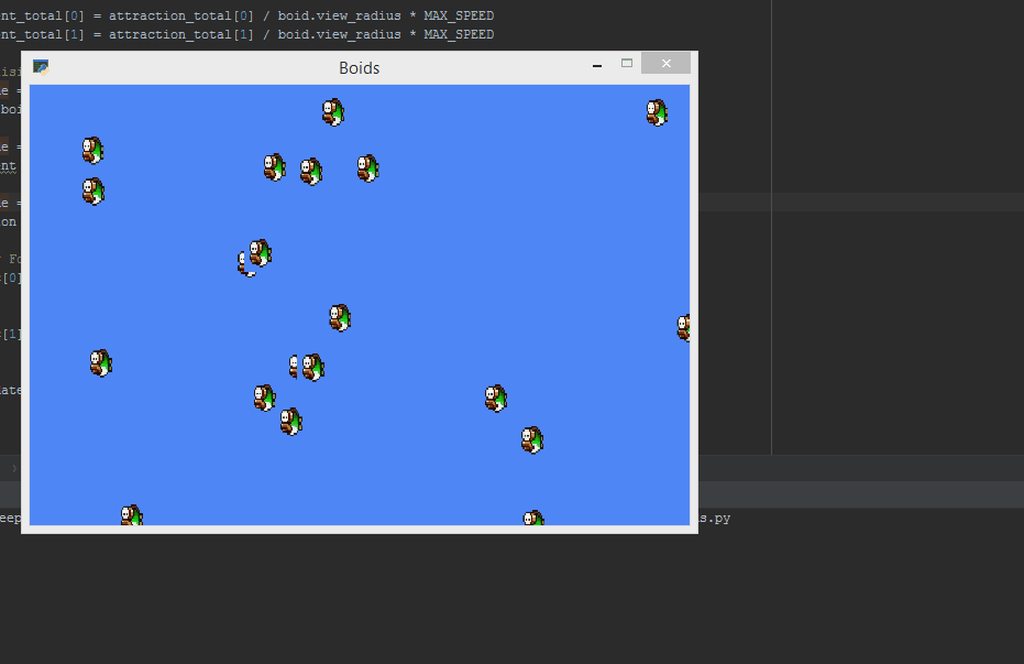
it seems they don't have their won velocity or smthg too
they only move in groups
potent ice
Damn. I also need to complete my version of boids
Me and Leterax was playing with gpu version, but there was some inaccuracies causing trouble
surreal furnace
@jovial fable you should probably give your images a blank background, although that's not really to do with the code
jovial fable
ah yeah, i just print screened something and put the background because i'm lazy af
want the code right before be annoyed with transparency
surreal furnace
fair enough
try making the boids avoid collision but stay close
i think that the problem is that they're overlapping
@jovial fable 
jovial fable
They don't collide i think, but the area where avoidance is applied is smaller than the sprite and round.
I need to play with the coefficients i put between attraction, tracking and avoidance
surreal furnace
run it off the center x and y and make a radius from that
jovial fable
But i'm more concerned with
They always end up going in the right direction
And they get stuck and lose everything on the corner of the screen
surreal furnace
make it so that they are repelled from a certain radius from the edge of the screen
jovial fable
Ah to keep them
That would be a solution
I think my problem comes from, i look ahead of their current direction with euclidian distance
But i'm not sure what happens here when they go on a corner
I only use thoroidal distance for attraction i think
surreal furnace
i'm going to pretend i know what that is
i don't know big words like thoroidal and euclidian
and corner
time for the online dictionary```
corner
/ˈkɔːnə/
Learn to pronounce
noun
1.
a place or angle where two sides or edges meet.
"Jan sat at one corner of the table"
2.
a location or area, especially one regarded as secluded or remote.
"fountains are discovered in quiet corners and sleepy squares"
on another note, what do you think of the art for the weapons in my game?
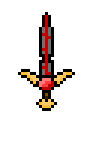
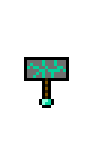
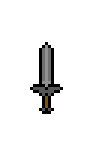
gimme a sec to grab the rest


.png?raw=true)
.png)
 jovial fable
pretty nice
surreal furnace
unfortunately, i am experiencing a bug that seems hell bent on hiding these from my code
jovial fable
just the hammer where the handle is a bit short in my opinion
surreal furnace
ok
jovial fable
surreal furnace
k, cool
surreal furnace
could u help me fix the bug? i've got a vid of it
jovial fable
jsut suggestion
i'd rather look at code, and i have no idea if i can help you 😮
i'm at work so videos erh
surreal furnace
oh, ok
i'll send u the code

GitHub
Contribute to Nightarcher3677/JustAnotherAdventureGame development by creating an account on GitHub.
the bug is that when i press the button, it signals that it activates but it doesn't show/change the image
jovial fable
at what line?
surreal furnace
173, about here: ```python
for event in pygame.event.get():
if event.type == pygame.KEYUP and weapon == True:
pygame.mixer.music.load('button_sound.mp3')
pygame.mixer.music.play(0)
suwrite = open(su, 'w')
s1 = open('save-txts\sword1.txt')
s2 = open('save-txts\sword2.txt')
s3 = open('save-txts\sword3.txt')
s1r = s1.read()
s2r = s2.read()
s3r = s3.read()
snuh = sn.read()
if snuh == '1':
suwrite.write(s1r)
print(suwrite)
print(s1)
elif snuh == '2':
suwrite.write(s2r)
print(suwrite)
print(s2)
elif snuh == '3':
suwrite.write(s3r)
print(suwrite)
print(s3)
that is my estimation of where the error is
also, corrupted bash blade is a legit name for a sword, do not question me
jovial fable
so you sure that the if condition is fulfilled (pressed up)
jovial fable
does "snuh" = smthg
surreal furnace
snuh == sn == sword-num.txt
jovial fable
tried to launch your games, but i didn't went to weapon selection :p
but it looks very pretty and cool
surreal furnace
thx!
i'm working on it with @delicate totem
also, i added more art! https://github.com/Nightarcher3677/JustAnotherAdventureGame/blob/test-levels/rare/weapons-5.png.png?raw=true


anyway, i gtg now, but if u find an answer, private message me? thx 🙂
jovial fable
@surreal furnace did you try with readline? i think the problem is everytime you call snuh you "consume" a line, so the first time you have snuh you get "3", but the second time you get ""
empty strings
surreal furnace
uh, no i didn't!
jovial fable
also you name a variable type
don't do this, type is a builtin
i can't test further because i have work, but maybe your problem was there
jovial fable
maybe not also :p
i just noticed you get a value for snuh only 1 time and not all the other time
potent ice
Good enuff!
lunar jetty
Hmm, should I just reverse engineer arcade's platformer engine for collision detection against tile layers or make it from scratch myself
lunar jetty
also is this a good way to do capped movement speed acceleration?
        elif key == arcade.key.RIGHT:
            self.player_sprite.center_x += self.player_velocity
            while self.player_velocity < 5:
                self.player_velocity += PLAYER_ACCELERATION
actually let me finish the function
oh wait this is the wrong function lmao
  def on_key_press(self, key, modifiers):
        if key == arcade.key.LEFT:
            self.player_sprite.center_x -= self.player_velocity
            while self.player_velocity < 5:
                self.player_velocity += PLAYER_ACCELERATION
        elif key == arcade.key.RIGHT:
            self.player_sprite.center_x += self.player_velocity
            while self.player_velocity < 5:
                self.player_velocity += PLAYER_ACCELERATION
pardon me I just woke up
 olive parcel
@lunar jetty This:
            while self.player_velocity < 5:
                self.player_velocity += PLAYER_ACCELERATION
Is largely equivalent to:
self.player_velocity = 5
(Within rounding error, assuming a small enough value for PLAYER_ACCELERATION)
Maybe you meant to use if?
lunar jetty
self.player_velocity starts as 0 and frame by frame increases by PLAYER_ACCELERATION
and yeah I guess I wanted to use if
but it increases until it hits the cap (here 5) and when it does it stops increasing the speed and just changes position
fierce wraith
@potent ice do compute shaders have a similar limitation to unroll for loops like vertex shaders?
If not we could just try a O(n^2) approach and loop over all of them
fierce wraith
But can they have any size?
potent ice
yes
fierce wraith
II though vertex shaders only went to like 1028 or 4096
Because they somehow unroll the loop
potent ice
Still, it would probably be inefficent to use large loops in a compute shader because each invocation runs in a different shader core and you want to parallelize the execution
But it wil work at least 🙂
Unless you reach the 5-10 second gpu stall limit most drivers have killing the process
I had to disabled that on my computer when doing extremely heavy calculations (compute shader running more than 10s)
I was hoping to make a tutorial on compute shaders covering the basics some time in the near future
I'm not an expert, but at least covering the basics..
fierce wraith
That would be awesome
I get how to use them for easy stuff
But stuff like shared memory???
Or how the workgroups interact with each other
potent ice
Yeah. It's all a bit abstract 😄
fierce wraith
I get the concept of shared mem, but when do I actually need/use it? And is it actually that much faster?
potent ice
It gets a bit easier in 5.6 with image unit support. Easier to visualize what you are doing.
fierce wraith
Nice!
fierce wraith
If only I knew what that means haha
potent ice
That's why you should play with it soon
 summer siren
Is this chanel for talking about PyOpenGl?
 still shard
Is there a recommended way on how to go about scaling fonts? My way would be to design the game at a certain resolution, let's say 1280x720, use that as a fixed point and then simply do e.g. font size 18 * ( higher_res / 1280). Anyone got a better idea?
 foggy python
What’s wrong with that method?
still shard
I am just curious if my thinking is correct.
Maybe there are better ways somebody thought of
fierce wraith
@potent ice when will 5.6 be released? Or ready for me to build
And any other cool features coming with 5.6, or are you saving them for 6.0 hehe
 hidden fog
Hey guys, I'm making a game for my capstone using python. Why do you guys think is the easiest video game controller to implement in python?
Just anything xinput?
 cyan geyser
console text input CYOA is obviously the easiest
hidden fog
I mean a game controller as in a gamepad, sorry
foggy python
what are you using to make the game?
Pygame?
if so, most controllers work, but the layouts differ from controller to controller
hidden fog
I'm coding my game from the ground up without using a game engine, the game is playable with a keyboard, but I was hoping to add controller support without adding something like pygame
foggy python
you might be able to do it with the serial library, idk
 balmy zephyr
Anyone know how to get a walk grid working? I currently have it in my player movement so that when they move in any direction, if they are not on a multiple of 50, they will keep going until they hit the next multiple of 50. Probably better ways of doing this but I keep having errors.
olive parcel
@hidden fog Linux? Windows?
I recommend pulling in pyglet for gamepads, but if you want to do it the hard way:
https://gist.github.com/rdb/8883307 (Windows)
https://gist.github.com/rdb/8864666 (Linux)
@hidden fog if you are fine just supporting Xbox controllers, using the XInput API is more reliable: https://gist.github.com/dcoles/4378653
 mighty rose
Hi all! I've posted this in kivy support as well, but it's not quite related to kivy - it's more of a graphics/math question.
I'm experimenting with switching my game's camera from a simple translate/clip view to something similar to gluLookAt/gluPerspective. I've done this, but then my screen-to-world mouse coordinate translation is no longer working, the translated coordinates always remain within a fraction of a pixel to a few pixels from look_at's eye_x/eye_y/center_x/center_y.
I've spent a few weeks researching and learning more about how this all works, but I'm still at a loss as to what additional step is needed to use the matrices in order to achieve my goal. I've tried many different solutions, but I'm sharing the original screen_to_world method I was originally using, along with the prior camera view method, in an effort to help communicate my goal and not confuse the issue.
Here is a single file that should represent the issue I'm running into, though it will require that you have kivy installed.
https://gist.github.com/spinningD20/951e49cb836f08c434a0e9ab0e90c766
I'd appreciate any help!
fierce wraith
@potent ice its projection * model * camera right?
potent ice
@fierce wraith Normally proj * cam * model
It's extremely obvious when they have the wrong orientation
fierce wraith
i ended up scratching my idea anways hehe. but thanks!
 mortal bridge
I tried a few different orders, with and without calling inverse, without success
I never manage to reason about this
Either it just works or i'm done for
lunar jetty
gosh golly gee
I still can't grasp how to do player movement acceleration in Arcade
nothing works, it goes to capped speed instantly no matter what I try
fierce wraith
Hm. I can take a look if you want me to
lunar jetty
what I currently tried looks like this
def on_key_press(self, key, modifiers):
        if key == arcade.key.LEFT:
            while self.player_velocity < 5:
                self.player_sprite.change_x = -self.player_velocity
                self.player_velocity += PLAYER_ACCELERATION
        elif key == arcade.key.RIGHT:
            while self.player_velocity < 5:
                self.player_sprite.change_x = self.player_velocity
                self.player_velocity += PLAYER_ACCELERATION
Ah.
lunar jetty
am I supposed to do some logic in on_update instead?
lunar jetty
how would the logic look more or less in on_update then?
because I can't visualize it in my head
lunar jetty
so acceleration shouldn't be a constant then?
or did I not understand the previous message
fierce wraith
No, you change it depending on what key the user is pressing
lunar jetty
bleh, I keep getting tangled up in this
by golly this is hard
everyone keeps telling me
vel += acc
pos += vel
but that's much easier said than done
it's never so simple no matter how I try to get to it
lunar jetty
ignoring the fact that the if statement will return an error asking for the "modifiers" parameter, am I doing this right so far?
    def on_update(self, delta_time):
        self.physics_engine.update()
        if self.on_key_press(arcade.key.LEFT):
            if self.player_velocity > -5:
                self.player_velocity += self.player_acceleration
            self.player_sprite.change_x = self.player_velocity
        elif self.on_key_press(arcade.key.RIGHT):
            if self.player_velocity < 5:
                self.player_velocity += self.player_acceleration
            self.player_sprite.change_x = self.player_velocity

    def on_key_press(self, key, modifiers):
        if key == arcade.key.LEFT:
            self.player_acceleration = 0
            self.player_acceleration = self.player_acceleration - PLAYER_ACCELERATION
        elif key == arcade.key.RIGHT:
            self.player_acceleration = 0
            self.player_acceleration = self.player_acceleration + PLAYER_ACCELERATION
the on_key_press is most likely wrong
frozen knoll
There's no sense setting player_acceleration to zero
You'd probably want something like:
self.player.change_x += acceleration
if self.player.change_x > SPEED_LIMIT
self.player.change_x = SPEED_LIMIT
lunar jetty
...in the on_key_press?
what's the point of doing acceleration logic there? it'll instantly rise to the speed cap
and the point is to build up speed
I ain't making an IWBTG
lunar jetty
it's a wonder I can't find any tutorial or stackoverflow or anything really that explains this
and I set it to zero because unless I do I can for example press "left" 5 times and once I press "right" it'll be as though I pressed "left" 4 times still
also how do I even deal with the modifiers parameter in an if statement
if I don't need it
eh, I'm still new so I get lost easily, but I have to start somewhere
if self.on_key_press(arcade.key.LEFT, not arcade.key): this is probably wrong
and if I can't do it this way then I have no idea how to do game logic for that in on_update
frozen knoll
Sorry, in on_update. But there is no reason in on_keypress to set the variable to zero, then immediatly set it to a different value.
lunar jetty
I'm honestly lost at this point
frozen knoll
Something like:
def on_update(self, delta_time):
        """ Movement and game logic """

        # Calculate acceleration based on the keys pressed
        if self.up_pressed and not self.down_pressed:
            self.player_sprite.change_y += ACCELERATION_RATE
        elif self.down_pressed and not self.up_pressed:
            self.player_sprite.change_y += -ACCELERATION_RATE
        if self.left_pressed and not self.right_pressed:
            self.player_sprite.change_x += -ACCELERATION_RATE
        elif self.right_pressed and not self.left_pressed:
            self.player_sprite.change_x += ACCELERATION_RATE

        # Call update to move the sprite
        # If using a physics engine, call update on it instead of the sprite
        # list.
        self.player_list.update()

    def on_key_press(self, key, modifiers):
        """Called whenever a key is pressed. """

        if key == arcade.key.UP:
            self.up_pressed = True
        elif key == arcade.key.DOWN:
            self.down_pressed = True
        elif key == arcade.key.LEFT:
            self.left_pressed = True
        elif key == arcade.key.RIGHT:
            self.right_pressed = True

    def on_key_release(self, key, modifiers):
        """Called when the user releases a key. """

        if key == arcade.key.UP:
            self.up_pressed = False
        elif key == arcade.key.DOWN:
            self.down_pressed = False
        elif key == arcade.key.LEFT:
            self.left_pressed = False
        elif key == arcade.key.RIGHT:
self.right_pressed = False```@potent ice one of the examples is conways game of life right?
Was that done in a compute shader? Or is that another project I can start on hahah
And cs can write to textures like any other shader right?
frozen knoll
@lunar jetty Full working example at: https://github.com/pvcraven/arcade/blob/master/arcade/examples/sprite_move_keyboard_accel.py
lunar jetty
Okay so that works
now the next problem would be lowering the change_x when releasing the key
by the way thank you for spending time and effort to help me, I really appreciate it when someone puts effort in to help me learn
frozen knoll
You want friction?
Something like:
        if self.player_sprite.change_x > FRICTION:
            self.player_sprite.change_x -= FRICTION
        elif self.player_sprite.change_x < FRICTION:
            self.player_sprite.change_x += FRICTION
        else:
            self.player_sprite.change_x = 0

        if self.player_sprite.change_y > FRICTION:
            self.player_sprite.change_y -= FRICTION
        elif self.player_sprite.change_y < FRICTION:
            self.player_sprite.change_y += FRICTION
        else:
self.player_sprite.change_y = 0```not sure what should I set FRICTION to then, because I tried a few values and it ends up slightly moving right after slowing down instead of down to a halt
I solved it though
by doing this:
        if self.player_sprite.change_x > 0:
            self.player_sprite.change_x -= FRICTION
        elif self.player_sprite.change_x < 0:
            self.player_sprite.change_x += FRICTION
        else:
            self.player_sprite.change_x = 0
well
kind of anyway
but that's probably because of my speed limit
yup
fixed it
lunar jetty
meanwhile don't mind me trying to figure out why doesn't the sprite change textures when I change directions
I don't get it, I'm sure everything is done correctly
class Player(arcade.Sprite):

    def __init__(self):
        super().__init__()

        texture = arcade.load_texture("sprites/chad.png", scale=PLAYER_SCALING)
        self.textures.append(texture)
        texture = arcade.load_texture("sprites/chad.png", mirrored=True, scale=PLAYER_SCALING)
        self.textures.append(texture)

        self.set_texture(TEXTURE_RIGHT)

    def update(self):
        self.center_x += self.change_x
        self.center_y += self.change_y

        if self.change_x < 0:
            self.set_texture(TEXTURE_LEFT)
        if self.change_x > 0:
            self.set_texture(TEXTURE_RIGHT)

        if self.left < 0:
            self.left = 0
        elif self.right > SCREEN_WIDTH - 1:
            self.right = SCREEN_WIDTH - 1
every constant in this example is defined correctly
the issue must be outside the player class because I tried legit copy-pasting the example from arcade.academy and it still didn't work
lunar jetty
I guess for some reason I just can't do the character facing direction logic inside the class and have to do it in on_update instead
possible bug question mark?
frozen knoll
Off-hand I can't see anything that looks off.
You might try a graphic that is easy to tell left/right like:
":resources:images/enemies/bee.png"
You might try printing after the lines like self.set_texture(TEXTURE_LEFT)
Just to make sure you get there.
lunar jetty
I think the chad meme is easy enough to tell left from right
and copy-pasting this facing logic code into on_update makes it work
after changing from self to self.player_sprite of course
I honestly don't get it lol
but it works
it just works
potent ice
@fierce wraith CS can write to images. It's a bit different, but yes you could make conway's game of life with fragment or compute. The existing example is using a fragment shader.
mighty rose
Hi all, I'm going to ask just once more here, I'm trying to solve a screen to world coordinate conversion issue, using modelview/projection matrices and normalized screen coordinates. I have made a short video here displaying the issue, and I will link to the standalone example.

How do I fix this? Relevant code example here:
https://gist.github.com/spinningD20/951e49cb836f08c434a0e9ab0e90c766
https://gist.github.com/spinningD20/951e49cb836f08c434a0e9ab0e90c766
If anyone has any ideas, I'm all ears. Thanks!
surreal furnace
sorry to say this, but i have no idea how code in 2d, let alone 3d, so unfortunately, i can't help you 😦
but ask @foggy python and they'll probably be able to help
 keen bison
since we're on arcade is there a way to change the scaling of a sprite? I'm trying to zoom in on a sprite (scale it up) via the scroll wheel. I can increment the sprite's scale property with the on_mouse_scroll() method, but come render time, nothing seems to have changed. If I initialize the sprite with a different scale, it works, but I can't seem to change it dynamically. Am I missing something?
fierce wraith
@potent ice would a cs be any faster than a fs?
potent ice
@fierce wraith Probably slightly faster because you bypass the geometry pipeline, but what matters more is the flexibility it provides. You can do things like order independent transparency and reduce the number of writes in cases were additive blending is used.
fierce wraith
Ah ok
@potent ice is this something I could use to learn about shares mem and workgroups etc?
potent ice
I really need a refresher on the topic myself. Been 5 years since I used any of the fancy features
keen bison
will arcade's on_draw method redraw sprites with updated scale factors? I can't seem to get it to re-render with a different scale
 abstract zephyr
Anyone know a good game engine for python?? Not panda or pygame..
fierce wraith
make your own!
 scenic stag
Hey can anyone help test a text game i made i'm new to python
abstract zephyr
@scenic stagsure send me the .py file😀
scenic stag
i put it in #303934982764625920
scenic stag
just relised i left the cheat code i used for testing in 😕
 thin relic
boblol
scenic stag
😢
abstract zephyr
@scenic stagcan't find it
scenic stag

GitHub
ahhhh i cant code. Contribute to CCronch/jacob7788 development by creating an account on GitHub.
abstract zephyr
I still need a game engine . Please help
abstract zephyr
@scenic stagwhat??
fierce wraith
@potent ice oh wow! i was pretty afraid of running into problems with looking up the texture 9x per cell, but im watching a talk on cs rn and they said the SIMD can run the instructions concurrently. so while one thing is waiting for mem access, the other can do calculations!!
thats so cool
scenic stag
@abstract zephyr what do you use to code python?
abstract zephyr
@scenic stagI still use built in IDE and notepad++. Tried sublime but got bored
@scenic stagwhat about you??
scenic stag
i use pycharm
i dont know how to set up notepad++ put put that file in notepad++ and run it
abstract zephyr
Do you read webnovels??
scenic stag
no what are they?
abstract zephyr
Never mind😅 . Search in google .
fierce wraith
seems kinda off-topic
abstract zephyr
@scenic stagwhat
scenic stag
dw lol
abstract zephyr
@fierce wraithtrue😅
scenic stag
did you get the game to work?
fierce wraith
@abstract zephyr why do you not want to use pandas3d or pygame?
@scenic stag for testing your game, posting it in #303934982764625920 and then talking about it in #360148304664723466 would probably be best.
scenic stag
ok ty
abstract zephyr
@fierce wraithI am bad at all types of c and java . And unity uses c.
abstract zephyr
I used panda for a while
fierce wraith
arcade, is a easy to learn framework
potent ice
pyglet?
fierce wraith
arcade is made by @frozen knoll
fierce wraith
hm, before you get your hopes up, python is a pretty slow language, 3d games are pretty hard to make in pure python
potent ice
Depends how complex they are
fierce wraith
i assume you want something like what you could make with unity
abstract zephyr
@fierce wraithbut its the only language I am good at . I know other languages but am not very good
fierce wraith
well what do you want to make
fierce wraith
hm
abstract zephyr
@fierce wraithso?
potent ice
Just use pyglet or something then? It supports 3d
abstract zephyr
@potent icereally??
abstract zephyr
I am busy with school. So I did not bother testing all of them
@potent iceno problem
fierce wraith
can you get away without writing shaders for pyglet? thats pretty cool
potent ice
Yeah, but it's GL2.1, so no shaders needed
fierce wraith
ah ok
fierce wraith
godot seems to have a python like scripting lang
potent ice
moderngl if you want to go hardcore 😄
fierce wraith
haha yes!
should i use a buffer for the game of life or a texture?
probably a texture right?
potent ice
texture yes, because it's easy to get wrapping on the edges
fierce wraith
is there a bool texture? haha
potent ice
repeat I mean
fierce wraith
i really just need one bit hah
potent ice
Easier to just use 1 component f1 texture
potent ice
.. but you want to use RGB because @hybrid badger will kill you if you don't make the color version
fierce wraith
well i can color afterwards
post processing!
hm in this example i found:
https://github.com/markkilgard/opengl4_examples/blob/master/filter/convolution.glsl#L35 they use a image2D not a sampler
is there a significant difference?
they also have this function:
void retirePhase() { memoryBarrierShared(); barrier(); }
for some reason they are syncing mem for every thread..
potent ice
image2D uses image units, not texture units
fierce wraith
whats the difference?
fierce wraith
ah since i only ever read or write but never both that sounds fine to me
potent ice
Don't fuck up the readonly/writeonly flags.. is my tip. That shit leads straight to hell 😄
potent ice
That's glsl functions
potent ice
oh nvm. image2D is the glsl type. We bind them using Texture.bind_to_image
fierce wraith
gotcha
potent ice
fierce wraith
shared vec4 pixel[NEIGHBORHOOD_HEIGHT][NEIGHBORHOOD_WIDTH];  // pixel values read from input image

void general()
{
  const ivec2 tile_xy = ivec2(gl_WorkGroupID);
  const ivec2 thread_xy = ivec2(gl_LocalInvocationID);
  const ivec2 pixel_xy = tile_xy*tileSize + thread_xy;
  const uint x = thread_xy.x;
  const uint y = thread_xy.y;

  // Phase 1: Read the image's neighborhood into shared pixel arrays.
  for (int j=0; j<NEIGHBORHOOD_HEIGHT; j += TILE_HEIGHT) {
    for (int i=0; i<NEIGHBORHOOD_WIDTH; i += TILE_WIDTH) {
        pixel[y+j][x+i] = imageLoad(input_image, read_at);
      }
    }
  }
  retirePhase();
  // Phase 2: Compute general convolution.
  vec4 result = vec4(0);
  for (int j=0; j<filterHeight; j++) {
    for (int i=0; i<filterWidth; i++) {
      result += pixel[y+j][x+i] * weight[j][i];
    }
  }
  // Phase 3: Store result to output image.
  imageStore(output_image, pixel_xy, result);
}```this looks about like what i want
but i dont get why they are using shared memory. they end up having to sync it with retirePhase
  const ivec2 tile_xy = ivec2(gl_WorkGroupID);
  const ivec2 thread_xy = ivec2(gl_LocalInvocationID);
  const ivec2 pixel_xy = tile_xy*tileSize + thread_xy;
  const uint x = thread_xy.x;
  const uint y = thread_xy.y;```
that part is just black magic to me hahaI would read this carefully: https://www.khronos.org/opengl/wiki/Compute_Shader#Outputs
But probably easier to start playing with visualizing things in a texture first so it's easier to understand the difference between work groups, local and global incovation
fierce wraith
im doing image load store ops right?
potent ice
imageLoad is like a texelFetch
fierce wraith
mhm
my work groups will be the size of the kernel right?
so i think im starting to get how it all fits together.
you have single "threads", they are like what pixels are to the fragment shader
the threads are grouped into thread-/workgroups and are executed in parallel on SIMD chips. but the gpu has a lot of these groups.
potent ice
I'm trying to wrap my head around it as well. Been so long, but I'm busy release stuff now
still shard
I need some help with this issue. If you notice the first box, the first line is a lot shorter than the third. My code allows to set a max width and the string "textbox" did not fit into the first line, but "test " fit into the third. What I need to do is to justify this. I am not quite sure how to go about it. Measure the first line, then restrain the rest to that size? But what if the problem arises in the next line again?
This is the line breaking code: https://hastebin.com/sifayasasi.py
Note: self.multi_line_manual just prints the lines it gets in the list, without any further text formatting
Did what I just said, restricting based on the first line, on the first box it is better now, but on the third the issue reversed itself. But even if I do a recursive to account for that, I may have the issue again on another line. This is hard :D.
potent ice
@fierce wraith moderngl 5.6 is out now. pip install -U moderngl 🥳 (since you asked earlier)
potent ice
You are thinking about moderngl-window
Two different things, but yes.. that will be released very soon as well
fierce wraith
Ah. Right
potent ice
@fierce wraith there is an example for compute shader writing to texture in examples/ in case I did not mention it
fierce wraith
Ah. Thanks!
still shard
Hmm pygame seems to be quite slow
29 fps on a not so slow machine with in i5 6600K and a AMD RX480 8GB
Each of those boxes is one surface and is drawn via blit
Anyone got any experience there?
fierce wraith
@potent ice im gonna want this kind of loop for the kernel right?
for (int j=-1; j<=1; j++) {
  for (int i=-1; i<=1; i++) {
    ...
  }
}```
that will give me values from (-1, -1) to (1, 1) right?Compute shader?
If so.. I would find an example doing something similar and dissect that first
fierce wraith
yeah 🙂
potent ice
It's so easy to approach thing the wrong way with compute shaders in the beginning. Reset everything you know about shaders and start from scratch 😄
fierce wraith
when binding a texture, why would i not allow read and write?
@potent ice
self.texture01.bind_to_image(0, read=True, write=True)
it it just for speed reasons?
still shard
Okay, I have kind of solved it. I have added pygame.HWSURFACE to every surface (I've assumed that is done automatically on a directx surface window) and .convert() to the close button image after loading it. That did the trick. Not that anyone cares.
potent ice
@still shard ah right. I think I had a similar problem before.
fierce wraith
i assume this will fail catastrophically:
# bind the textures
self.texture01.bind_to_image(0, read=True, write=True)
self.texture02.bind_to_image(1, read=True, write=True)

# run the compute shader
self.compute_shader.run(group_x=self.num_group)

# render the result
self.texture01.use(location=0)
self.quad_fs.render(self.program)```but i think that should work.. maybe?
not sure on the group_x thing.
its a 3x3 kernel..
so shouldnt i also have a group_y?
potent ice
Well. read-write is legal at least, but I have no idea about performance
I'm as clueless as you 😓
fierce wraith
only one way to find out then!
potent ice
💣
fierce wraith
haha
0(12) : error C1318: can't apply layout(r8ui) to image type "image2D"
0(12) : error C1314: can't apply layout(size1x8) to float image
0(12) : error C7596: OpenGL requires image variables declared without using the 'writeonly' qualifier to have a format layout qualifier
0(14) : error C1318: can't apply layout(r8ui) to image type "image2D"
0(14) : error C1314: can't apply layout(size1x8) to float image
0(14) : error C7596: OpenGL requires image variables declared without using the 'writeonly' qualifier to have a format layout qualifier
0(29) : error C1115: unable to find compatible overloaded function "imageLoad(struct image2D_bindless, vec2)"
0(41) : error C1115: unable to find compatible overloaded function "imageStore(struct image2D_bindless, ivec2, uint)"```great start
potent ice
How did you create the texture?
fierce wraith
self.texture01 = self.ctx.texture((256, 256), 1, dtype='u1')
still shard
@einarf I am surprised nobody picked up on the slipsum though 😛
fierce wraith
this seems to say r8ui is a fine format
https://www.khronos.org/opengl/wiki/Layout_Qualifier_(GLSL)
potent ice
Try fixing the other errors first.
fierce wraith
the others are complaining about it being a image2D_bindless @potent ice
because it cant bind the image
can't apply layout(size1x8) to float image is complaining about the uint size of 1x8 bytes
OpenGL requires image variables declared without using the 'writeonly' qualifier to have a format layout qualifier is because it then somehow doesnt even use the format
unable to find compatible overloaded function "imageLoad(struct image2D_bindless, vec2)" is because it couldnt even bind the image2D
potent ice
uimage2D maybe?
potent ice
@still shard Sorry. I don't use pygame that often 😦
fierce wraith
still thinks it isnt bound
but i bind them
self.texture01.bind_to_image(0, read=True, write=True)
potent ice
I've mainly worked on RBG8 textures in writeonly mode
For lighting calculations (deferred lighting)
@fierce wraith Start simpler if you get in trouble 😄
fierce wraith
i might be onto something!
@potent ice whats the difference between binding and location?
layout(binding=0, rg32f) uniform image2D input_image;
vs
layout(location=0, rg32f) uniform image2D input_image;
ok
i finally found the bug
its at compile time. not when executing
if i leave the imageLoad call out its fine
nvm
its just my stupidity
imageLoad takes a ivec2 not a vec2
imageRead and write both use gvec4 so there is no point in using the r8ui format, ill just have to write a uvec4(value, 0,0,0) that way.
what format should the data i write to a texture have?
can it just be a np array? should i flatten it?
@potent ice well atleast no more errors. it doesnt do anything i would expect but oh well..
you can run it yourself if you want,
https://github.com/Leterax/Visualization/tree/master/ConwaysGameOfLife
keen bison
in arcade is it preferable to zoom in on a sprite by scaling it or by changing the viewport?
I have basically 2 sprites on screen and I want to be able to "zoom in" on them with the scroll wheel
still shard
in that case zoom the viewport
lunar jetty
bleh, I have trouble doing jumping dependent on how long I hold down the jump key
keen bison
I'm new to this, but could you start some sort of counter on key_down, and then determine how long the held the key
and then resolve it on key_up?
though that means you end up jumping on key_up which might be slightly later than you wanted
 fervent rose
What have you done so far?
lunar jetty
all I tried so far I scrapped and deleted because it hasn't been getting me anywhere
btw I'm doing this in arcade
fervent rose
I think the best way to implement this is to have a jump factor, for example 50, and each tick if the space key is pressed, you augment the player vertical velocity by this factor, and decrease the jump factor of 10, for example. And you reset the factor when the player is back on the ground
lunar jetty
yeah but then I try to do it along with a check for if I can jump (because I don't wanna be able to jump into infinity) and my head becomes mush
fervent rose
Yeah, that's why you should decrease the jump factor
At some point it is going to reach 0
lunar jetty
that's not what I mean
fervent rose
I get it, that sort of things can be really hard at the beginning
keen bison
@still shard I got the zooming to work with set_viewport thanks! A followup: It looks like my mouse-click actions are using the mouse's raw position as opposed to its relative position with respect to the new viewport. Is there a preferred solution to this or do I need to calculate my mouse's relative position by hand?
still shard
I've never used this library, sorry. I don't know which functions they provide
I have just drawn from my experience with systems like that
keen bison
I see. From a quick search, I can't seem to find a built in function. How would I calculate my mouse's relative position in the viewport?
fervent rose
Subtract the widget position to the absolute mouse position?
lunar jetty
I swear how can this be so difficult to do it's such a simple concept I wish I could just figure it out because I'm going out of my mindnightmarenightmarenightmare
for reference I want the jumping to work more or less like in Cave Story
I want the movement to be more floaty, I hate the movement that's in every tutorial I can find
just sliding it at constant speed like I was playing IWBTG
fervent rose
Have you tried my idea? If you multiply the factor by a scalar instead, the jump should be pretty floaty
lunar jetty
I've been at it for hours now and what you said now just flew over my mushy head
frozen knoll
@keen bison Calculate adjusted mouse clicks by 'hand' so to speak. Add in the left/bottom viewport and adjust for scaling.
keen bison
@frozen knoll I'm trying to do the mouse calculation by hand now. One more thing I need to figure out is how to get the 'zooming' centered around the mouse (which can only be solved after I figure out how to get the adjusted mouse position)
I've messed with the scaling factors just to see what would happen
I can get it to zoom "centered" around 0,0 , the center, and the top right corner
I know there's some formula I can extract to make it center around any arbitrary point, but it's just not coming to me right now
frozen knoll
Yes, times like this is when we wish we could go back to the math teacher and ask questions.
Or, at least, that's been my experience.
keen bison
I'm having that experience right now
fervent rose
It should just be more or less an offset
keen bison
What do you mean?
fervent rose
Like, if you want to zoom by 150%, you would just divide the current screen size by 1.5, and you can move it by the difference between the middle of screen and the mouse, divided by 1.5 too
It is for arcade, right?
keen bison
yeah
lunar jetty
god I'm so frustrated at this point
I kid you not
no matter how I try to jam it together it won't work
fervent rose
I don't really know arcade, do you have a link to the docs of whatever function you use to actually zoom the screen?
fervent rose
Thanks
keen bison
along with the analogous get_viewport
fervent rose
get_viewport returns a four element tuple?
keen bison
yeah, the left, width, bottom, and height
fervent rose
Okay, and to get the mouse position?
keen bison
I'm using the coordinates returned by the mouse press handler
err, in this case it's scrolling so
that to be more precise
fervent rose
Okay thanks
keen bison
and I'm using get_size() which returns my window (not viewport) width and height that I'm making a fraction to determine my aspect ratio
that's what I'm using to scale thing by when I zoom for now
fervent rose
I don't really understand what left, width, bottom and height correspond to
keen bison
from what I've seen, left is the coordinate that the left of your viewport is anchored to. As in if your viewport is literally your window, then your left and your bottom is 0
and I think width and height is how many pixels from the original view to show? I'm not entirely sure
nope width and height is just how big the viewport is
somewhat unrelated to the original view
left and bottom is just where the viewport anchors on the original view
fervent rose
zoom_factor = 0.5  # zoom in by 2
m_x, m_y = ... # Mouse coordinate
left, width, bottom, height = get_viewport()
width *= zoom_factor
height *= zoom_factor
left = m_x - (width / 2)
bottom m_y - (height / 2)
set_viewport(left, right, width, height) ```Something like this?If I get all variables and parameters right, which I probably didn't
keen bison
I will try it out. Only thing I've noticed is that if I zoom both width and height by the same factor, it stretches strangely
I had to multiply them by the aspect ratio of the screen
in my case 16:9
lunar jetty
I kinda get it working but now I also need to make it so that if you already jumped and you let go of and press jump again in mid-air it doesn't react
keen bison
yeah any factor of the aspect ratio seemed to work fine
I just used 16:9 in my experiments
lunar jetty
because as it is now, infinite chain jumps
keen bison
perhaps you can set a boolean indicating that you're jumping?
and check the boolean when you attempt to jump?
lunar jetty
that won't work because the function checks for a key press once per every frame
fervent rose
You can just check if you have any vertical velocity when you want to jump, and only jump if it is equal to zero
lunar jetty
weird thing is for whatever reason when I'm touching the ground my vertical velocity is always -0.2
it's really weird
lunar jetty
may be
lunar jetty
omg okay I think I finally got a working prototype
    def on_update(self, delta_time):
        if self.z_pressed:
            if self.can_ext_jump:
                self.player_sprite.change_y = self.player_jump_accel
                self.player_jump_accel -= GRAVITY

        if not self.z_pressed:
            if self.player_sprite.change_y != 0:
                self.player_sprite.change_y -= GRAVITY
                self.can_ext_jump = False
            if self.player_sprite.change_y == 0:
                self.can_ext_jump = True
                self.player_jump_accel = PLAYER_JUMP_POWER
oh yeah forgot one line
there
lunar jetty
@frozen knoll sorry to bother but do you have any idea why would setting the gravity constant to anything less than 0.3 in the platformer engine make glitches? Because for debug purposes I put in a print command that returns the player sprite's change_y every frame and it was jumping from 0.0 to -0.4 or worse (varies with exact value) and rendered any manner of collision check with walls useless
and I'm sure it's because of the gravity constant because all I had to do was to increase it to fix the issue
abstract zephyr
Know how told use ragdoll in pygame. I's it’s possible?
fierce wraith
ok. i am so confused right now..
@potent ice i decided to go as simple as possible, just copying the texture with a cs. so kernel_size of 1
layout(local_size_x=1,local_size_y=1) in;
invoke the cs with full dims of the texture
self.compute_shader.run(720, 720, 1)
and this is my very simple cs:
  const ivec2 pixel_xy = ivec2(gl_GlobalInvocationID.xy);
  vec4 pixel = imageLoad(input_image, pixel_xy);
imageStore(output_image, pixel_xy, pixel);```that produces the image seen above
but if i add a /2 to the pixel_xy in the imageLoad call:
vec4 pixel = imageLoad(input_image, pixel_xy / 2);
it works...
wtf
now i can also up the kernel size and it works fine
but why the /2???
potent ice
@fierce wraith What's the fomat of the texture.. and what format do you use in the shader?
potent ice
paste the lines?
fierce wraith
self.texture01 = self.ctx.texture((720, 720), 1, dtype='f4')
layout(binding=0, rg32f) uniform image2D input_image;
potent ice
Do you see the error in the first line?
potent ice
yes
fierce wraith
and f4 is f64?
potent ice
components refers to RGBA
fierce wraith
i just copied it from:
https://github.com/moderngl/moderngl/blob/master/examples/compute_shader_render_texture.py
nvm, f4 is float32
so why does it work in the example?
layout(binding=0, r32f) uniform image2D input_image; is correct for the texture im using?
fierce wraith
self.texture01 = self.ctx.texture((720, 720), 1, dtype='f4')
means one component f4 texture
so r32f
potent ice
yep
fierce wraith
yeah that fixed it
potent ice
So I guess the image read got clamped when reading outside the image memory area yielding black
fierce wraith
yeah:
Load operations from any texel that is outside of the boundaries of the bound image will return all zeros.
https://www.khronos.org/opengl/wiki/Image_Load_Store
potent ice
bingo
fierce wraith
but why does it work in the example?
they are using a 1 component texture but a 2 component layout
potent ice
oh shit. I need to fix that then 😄
potent ice
I was hoping to only throw 💩 at you, but it came back the other way instead
fierce wraith
haha
potent ice
Probably redoing it using rgb texture instead
generate something slightly more interesting
fierce wraith
so now rainbow waves? hehe
potent ice
yeap, showing the different variables in each channels
fierce wraith
nice
well..
something is happening
no fucking clue what
or why
so first i read the surrounding pixels and then i average them
ah
it works!
@potent ice can i set the components of a texture and the format after loading it from a file?
self.t = self.load_texture_2d('test.png')
self.t.swizzle = 'R000'
self.t.components = 1
self.t.dtype = 'f4'
```?is that good enough?
potent ice
What are you trying to do?
fierce wraith
well rn its a blur kernel so id like to try blurring a image
potent ice
I don't understand how that is related to the texture format 🙂
fierce wraith
well i need to get the image into a texture and then bind it to my cs
and i though they have to match format
or should i just change the cs format to rgba32f?
potent ice
That's probably easier
fierce wraith
self.texture02 = self.ctx.texture((720, 720), 4, dtype='f4')
and
layout(binding=0, rgba32f) uniform image2D input_image;
and
self.texture01 = self.load_texture_2d('test.png')
potent ice
rgba8 I guess
fierce wraith
ah
potent ice
but make sure the texture actually has alpha channel
potent ice
yay 🙂
potent ice
You can do game of life with frag shader as well, but I guess that's less interesting
potent ice
Now you can start throwing around the "GPGPU" word every second sentence!
fierce wraith
hahahaha YES!!
i work with gpgpus hehe
hey @hybrid badger do you have a sec to look over my game of life logic?
    if ((cell_alive == 1) && (neighbours == 2 || neighbours == 3)){
        // we are alive and have 2 or 3 neighbours!
        // stay alive!
    }
    else if (neighbours == 3){
        // we are dead, but have 3 neighbours
        // become alive!
    }
    else{
        // we are either alive or dead, but don't have the right number of neighbours
        // die!
    }
very interesting..
blue means, i was dead before and still am
red means, i was alive and am still alive
green would be, i was dead and am not alive
but i started with a blank screen...
ahh fuck..
my blank screen is white
ofc white is rgb (1,1,1)
and ofc when i try to paint something in red in paint.. paint doesnt use actual red..
potent ice
@fierce wraith https://github.com/moderngl/moderngl/blob/master/examples/conways_game_of_life.py#L46-L85
GitHub
Modern OpenGL binding for python. Contribute to moderngl/moderngl development by creating an account on GitHub.
fierce wraith
@potent ice could you help me with the switching thing?
    def render(self, time: float, frame_time: float) -> None:
        self.ctx.enable(moderngl.BLEND)
        self.ctx.clear(51 / 255, 51 / 255, 51 / 255)

        # render the result
        self.texture01.use(location=0)
        self.quad_fs.render(self.program)

        # bind the textures
        self.texture01.bind_to_image(0, read=True, write=True)
        self.texture02.bind_to_image(1, read=True, write=True)

        # run the compute shader
        w, h = self.texture01.size
        group_size_x = int(ceil(w / self.kernel_size))
        group_size_y = int(ceil(h / self.kernel_size))
self.compute_shader.run(group_size_x, group_size_y, 1)```do i just have to call
self.texture01, self.texture02 = self.texture02, self.texture01?
potent ice
Looks reasonable
potent ice
Could be something else
still shard
That is a broad questin
but yes, it is possible, there are several
You can also do it the other way around and use Python as an embedded scripting language in a C/C++ program
so whatever strikes your fancy
Of course, a python game engine cannot be as extensive as say Id5 and run as fast and look as good
there are limits
but it all depends on what you want to do. A small arcade game will work fine. Programming a game on the graphical level of DOOM 2016? Not so much
@abstract zephyr
abstract zephyr
@still shardsimple platformer
How long will it take
Game will look like mario snes versions
still shard
Idk how long you need
but simply use pygame or arcade
cuts down a lot of time
Or use a 2d engine like https://defold.com/. Not python, but LUA, but it works well
potent ice
Making a "game engine" is a lot of work and requires experience to do right.
but if it's something you are just using personally you can of course make a lot of shortcuts
abstract zephyr
Ragdoll in pygame?
still shard
Write games, not engines
There is no ragdoll physics in pygame. It is a render engine, not a game engine per se
abstract zephyr
Shit
potent ice
It's a graphics / media library
fierce wraith
I agree with einarf, gameengines are easy to hack, but hard to get right and be able to reuse it
still shard
I really want to repeat to use defold. It cuts down the time necessary a lot
or the free version of GameMaker
No, it is not a toy, it is a serious engine
Oh wait, that one is gone
potent ice
It says "The ultimate game engine for web and mobile"
So I guess platform is important to you as well here
still shard
it can also do desktop
BUt it sounds like he is not very experienced and I think an engine like that is a lot better to get your feet wet
Game programming is hard enough as it is, this can at least teach one the principles and concepts of doing so
potent ice
Nothing wrong with that. Start high level and move on when you are restrained by engine limitations.
cyan geyser
About "engine with python". I think Godot does that. It's been a while after i looked at it, though.
potent ice
But yes, you can write games in python. Several engines also have a python interface. Unreal engine, blender / bge etc
fierce wraith
i never thought about this, how will i go about generating the worlds?
@potent ice can i tell moderngl to use cap at a certain framerate?
like 3fps haha
potent ice
Nah. It only supports vsync on/off
fierce wraith
so just sleep x time at the end. fair enough
imageLoad ignores the texture wrap thing right?
so i just need to create my own function for wrapping?
ivec2 wrap(ivec2 p){
  return mod(p, image_size);
}```Never tried it, but I assume images don't follow any of the rules from samplers
fierce wraith
yup
but that was simple enough 🙂
you got any ideas on how to generate a random world?
i think just randomly setting each pixel to alive/dead will yield bad results
potent ice
Look up glsl simplex noise functions
then layer those and you will get something interesting in the end
fierce wraith
is that like perlin noise?
potent ice
similar
can use perlin as well of course

Gist
GLSL Noise Algorithms . GitHub Gist: instantly share code, notes, and snippets.
potent ice
Are you just generating a static texture?
potent ice
Just use noise octaves : https://flafla2.github.io/2014/08/09/perlinnoise.html
Add 3 layers or something
potent ice
then add some threshold
potent ice
in moderngl-window 2.1, but not released yet, but you can just copy the integrations/imgui module locally
Kind of having a burnout today. Need a break 😉
fierce wraith
    def generate_world(self):
        fbo_1 = self.ctx.framebuffer(color_attachments=[self.texture01, self.texture02])
        fbo_1.use()
        self.quad_fs.render(self.world_generation_program)
        self.wnd.fbo.use()```
thats actually pretty cool!and very simple
ok! take a break!
amazing work you've been doing
potent ice
Thanks. Appreciated 🙂
fierce wraith
huh. very weird:
    def generate_world(self):
        fbo_1 = self.ctx.framebuffer(color_attachments=[self.texture02, self.texture01])
        fbo_1.use()
        self.quad_fs.render(self.world_generation_program)
        self.wnd.fbo.use()```
if i first call this:
```py
self.texture01 = self.load_texture_2d('l1.png')
self.texture02 = self.load_texture_2d('l1.png')```
and then the generate function it worksbut if i create the two textures like this:
self.texture01 = self.ctx.texture((720, 720), 4, dtype='f4')
self.texture02 = self.ctx.texture((720, 720), 4, dtype='f4')```
it doesntah its f1 not f4 🙂
 hybrid badger
i have noise generator
 fleet basin
you became a parent?
potent ice
nerf 😄
fierce wraith
haha love the video compression!
potent ice
Yeah I tried to post pixel particlesystem with 1M points last week. I gave up.
potent ice
Now fill that texture with numpy
fierce wraith
yikes thats gonna take for EVER
fierce wraith
@potent ice 3d ca...hmmm hahaha
potent ice
3d?
fierce wraith
Yeah 3d game of life
potent ice
That would probably need some rule adjustments
fierce wraith
ohh i would love to have imgui or whatever its called rn
i can now set a framerate at which the game runs, separate from the screen updating/input handling. it would be so cool to have a slider and go from 1fps to 2500fps haha
fierce wraith
yay. posted it in #303934982764625920 🙂
lunar jetty
        if self.z_pressed:
            if self.can_ext_jump:
                self.player_sprite.change_y = self.player_jump_accel
                self.player_jump_accel -= GRAVITY

        if not self.z_pressed:
            if self.player_sprite.change_y != 0:
                self.player_sprite.change_y -= GRAVITY
                self.can_ext_jump = False
            if self.player_sprite.change_y == 0:
                self.can_ext_jump = True
                self.player_jump_accel = PLAYER_JUMP_POWER
Is there any way to make this jump slower? Other than decreasing Gravity because anything below the current value makes it glitch out when touching ground
(also this is in on_update and I'm using Arcade)
 opal sparrow
which framework should i use if im planning ot make a 2d platformer
quite literally just getting into game dev with python so dont make fun of me

lunar jetty
I don't think it gets any easier
olive parcel
@lunar jetty you probably want to multiply changes to your velocity with dt, otherwise different frame rates will cause different jump speeds.
lunar jetty
ah yes good idea
olive parcel
(Don't know whether that's the cause of your ground glitch though.)
opal sparrow
@fleet basin ty