#game-development
1 messages · Page 15 of 1
 untold ginkgo
 brisk yew
If you wish, but I'd suggest you use pygame-ce then
that's pip install pygame-ce contrary to what most tutorials use which is pip install pygame
although there are new tutorials coming out, some by prominent people in the field that also use pygame-ce
What's pygame-ce?
pygame-ce is better: better maintained, new features, more optimizations, new governance model, core contributors of pygame have moved over to it
Here's the initial announcement on reddit: https://www.reddit.com/r/pygame/comments/1112q10/pygame_community_edition_announcement/
You can follow the latest updates starting from here in the pygame community discord server: #772506385304649738 message
Or of course the GitHub releases: https://github.com/pygame-community/pygame-ce/releases
Docs: https://pyga.me/docs/
Manually kept API differences (might not be up to date): https://gist.github.com/davidpendergast/77e49f8028ce611ac478c38f77f9f72f
Installation (safe method):
pip uninstall pygame
pip install pygame-ce
 pearl linden
brisk yew
If you wish, but I'd suggest you use `pygame-ce` then
that's `pip install pygame...
pearl linden
brisk yew
If you wish, but I'd suggest you use `pygame-ce` then
that's `pip install pygame...
Ok I will do
Cool ad btw
brisk yew
pearl linden
Ok I will do
even though most tutorials still use pygame, that is not to say that they are useless, pygame-ce is rather cross-compatible with it, especially the older version since backwards compatibility is still maintained
this is about the newest tutorial out there if you wish to get started: https://www.youtube.com/watch?v=2gABYM5M0ww (haven't seen it in its entirety so can't exactly vouch for it's quality myself more than he's a trusted source on pygame tutorials in general, but it should be good enough to get you started)
pearl linden
Ok thanks
 pine plinth
brisk yew
If you wish, but I'd suggest you use `pygame-ce` then
that's `pip install pygame...
pine plinth
brisk yew
If you wish, but I'd suggest you use `pygame-ce` then
that's `pip install pygame...
You are so funny. Why are you posting info about pygame-ce after every mention of pygame? Is this so necessary?
Childish behaviour of pygame-ce members is the only thing that stops me from moving to pygame-ce
 knotty hamlet
pine plinth
Childish behaviour of pygame-ce members is the only thing that stops me from mov...
knotty hamlet
pine plinth
Childish behaviour of pygame-ce members is the only thing that stops me from mov...
You didn’t seem to mind when several pygame-ce devs, including Matt here, were helping you compile from source as part of your NoGIL experiment. 🙂
That being said, we really need a good about page so we could just link that and leave it at that.
 tender scaffold
is anyone able to help me with a pygame question?
 vernal kite
tender scaffold
is anyone able to help me with a pygame question?
vernal kite
tender scaffold
is anyone able to help me with a pygame question?
i can try and help depending on what it is, as i am still lerning it my self
tender scaffold
vernal kite
i can try and help depending on what it is, as i am still lerning it my self
i am making a scrolling 2d platformer level, and I want the level to stop scrolling whenever the end of the level is visible. do you know how I can do this? ive already tried to make the scroll variable and the speed variable 0 but thats not working.
vernal kite
maybe have a rectangle made at the end of the level, and when the camara is to colide with it, then have it stop, or not able to go beyond it
this idea is maid with me thinking that character or moving object of the platformer, is not able to move beyond the camara, or map
tender scaffold
vernal kite
maybe have a rectangle made at the end of the level, and when the camara is to c...
i havent worked on the collision aspect of this game yet, atm i just have the level and movement mapped out. I also don't know how to code a camera I kinda just played with the movement and scroll values till it sorta made sense. do you think this is an issue that I need to tackle later once I finish the collision and spawn the enemies?
vernal kite
yes i do think that it is somthing that might bee needed to be look on at a later point, because, as i read it, you were gaving problems with the camara moving beyound the bodories that you might have set for it (if you are to give them any), but what you are talking about seams to be (well i cant realy say) a canvis in a void, but you have yet to frame the picture, so you are still able to draw into nothingness
tender scaffold
I could always just delete the backwords scroll mechanic so once I hit the end i dont have the option of going back
i think thats how mario i coded
vernal kite
yeah i do think that is how the first mrio games worked
now onward to my question, as i have been looking into formationg of text with pygames rendering function, and fell over this line
If you render '\n' an unknown char will be rendered. Usually a rectangle. Instead you need to handle newlines yourself.
so i wish to ask if any one knows "how i do handle the newlines myself"
 dense mica
Hello, Can you help me for decryption this. (AES)
 dense mica
@vernal kite Yes, it works. Game files are encrypted with Zstd and AES. But now I can only Zstd.
vernal kite
dense mica
<@312688140223643649> Yes, it works. Game files are encrypted with Zstd and AES....
that does not tell me much of how to decypte it, as i was thinking it was more akin to a cesar code
dense mica
cuz, i see this. so I think it's AES. (https://github.com/kourain/AOV-Tool/blob/main/aov_zstdv3.1code.py)


GitHub
Some tools help to mod AOV :). Contribute to kourain/AOV-Tool development by creating an account on GitHub.
vernal kite
arr, well i have no idea of what that is, so i do not realy think that i can help
do you by any chacne know how to format text in pygames,
dense mica
sorry, no
knotty hamlet
vernal kite
do you by any chacne know how to format text in pygames,
"Format text" means what?
vernal kite
knotty hamlet
"Format text" means what?
well currently the out but i get is this (image one)
and i wish for it to look like so (image two)
that is what i mean with formatting, i do know it is not quiet the right word, but hard to find one beyond placement, witch can mean so many other things

 knotty hamlet
vernal kite
well currently the out but i get is this (image one)
and i wish for it to look ...
knotty hamlet
vernal kite
well currently the out but i get is this (image one)
and i wish for it to look ...
How are you rendering your text?
vernal kite
knotty hamlet
How are you rendering your text?
currently i am using render.
 knotty hamlet
pygame_testing_area.character_name() returns that string?
knotty hamlet
I would expect a function called character name to return a character name
Just checking
Instead of this prompt thing
So you join text_1 into a big string and render it
Because you have it as a list of strings
vernal kite
come again
vernal kite
indeed
knotty hamlet
So you make it into a single string
And then you render that
Where do you join it into a single string?
 knotty hamlet
Really?
vernal kite
yes
knotty hamlet
I always thought newlines rendered as boxes in pygame
Must depend on the font I guess
vernal kite
it is default font as you can see in image 3
knotty hamlet
Anyways, one solution to your problem is to switch to pygame-ce. It's a drop in replacement for pygame, not even the import needs to change. But it does support \n in font rendering, unlike stock pygame.
pip uninstall pygame && pip install pygame-ce
Try that
vernal kite
cant realy get that to work, seams to have forggotn how to use pip
knotty hamlet
What's the problem?
vernal kite
i do not know how to use what you send
knotty hamlet
Run it in the command line
vernal kite
i do not know why, but i do not know what that is
knotty hamlet
Are you on Windows?
vernal kite
yes, so just cmd
knotty hamlet
Yeah
vernal kite
'pip' is not recognized as an internal or external command,
operable program or batch file.
knotty hamlet
How are you running your code?
vernal kite
what code, i am just placing it dicratly into cmd
knotty hamlet
I'm talking about your code, not the command I'm suggesting you run
vernal kite
i am not running any code
vernal kite
yes but have jet to do anything with pip uninstall pygame & pip install pygame-ce
knotty hamlet
Since you don't know how to use pip, I need to summon the knowledge of how your environment actually works
How you've been running your code is a big part of that
I guess I could just give you a random guess on how to use your pip
python -m pip
vernal kite
no i have used pip before, i have just forgotten it
knotty hamlet
Yes, therefore you do not currently know how to use pip
vernal kite
indeeed, that is how i think forgetting works
knotty hamlet
python -m pip uninstall pygame && python -m pip install pygame-ce
 knotty hamlet
Because you didn't put it cmd
vernal kite
arrr
so yeah it does not seam to be able to find python in cmd
C:\Users\ckrjo>python -m pip uninstall pygame
Python was not found; run without arguments to install from the Microsoft Store, or disable this shortcut from Settings > Manage App Execution Aliases.
C:\Users\ckrjo>python -m pip install pygame-ce
Python was not found; run without arguments to install from the Microsoft Store, or disable this shortcut from Settings > Manage App Execution Aliases.
knotty hamlet
python3 -m pip uninstall pygame && python3 -m pip install pygame-ce
vernal kite
in pycharm mostly
knotty hamlet
I was gonna say earlier...
If you're pycharm none of this will work
Because pycharm doesn't use a system python environment, it has its own environment
This is why I asked
vernal kite
yeah i just did not quiet get what you meant with, "how i run python" but now i do know
knotty hamlet
In pycharm, you should use their special thing: https://www.jetbrains.com/help/pycharm/installing-uninstalling-and-upgrading-packages.html
If you uninstall pygame and install pygame-ce, your text will render with newlines
vernal kite
and is this where i am to tell you that i did at some point install pycharm with out that
knotty hamlet
You could probably use pip in the pycharm shell
Because that would be within the virtual environment
vernal kite
okay, i have a idea of what that means
sooo @knotty hamlet i am just to delete the pygames file form my exspoles manuely, and then get the ce files somewhere,
knotty hamlet
What?
vernal kite
well i am not to give up on a function that i do wish to get, jsut beacuse all we have done with in 1 program does not work, so is kind of asking if this is a option
brisk yew
you go to the Terminal (in PyCharm obvs)
and type these commands
cmd
venv\scripts\activate
pip uninstall pygame
pip install pygame-ce
terminal in PyCharm ?
brisk yew
apparently alt + f12 opens that
but you should be able to see it some place bottom with the other tabs
or like double click shift and then type terminal to find it
vernal kite
found it
PS C:\Users\ckrjo\PycharmProjects\the text game> cmd
Microsoft Windows [Version 10.0.19045.3208]
(c) Microsoft Corporation. All rights reserved.
C:\Users\ckrjo\PycharmProjects\the text game>venv\scripts\activate
(venv) C:\Users\ckrjo\PycharmProjects\the text game>pip uninstall pygame
'pip' is not recognized as an internal or external command,
operable program or batch file.
(venv) C:\Users\ckrjo\PycharmProjects\the text game>
it does not seam to want to work as you might intent to, as pip is semingly not there
brisk yew
python -m pip then
vernal kite
same message as in cmd
Python was not found; run without arguments to install from the Microsoft Store, or disable this shortcut from Settings > Manage App Execution Aliases.
PS C:\Users\ckrjo\PycharmProjects\the text game>
py -m pip, did somthing
brisk yew
alr, well, then venv\scripts\python -m pip
vernal kite
py -m pip, did somthing
knotty hamlet
Your environment only has python as py 😢
vernal kite
apparently
knotty hamlet
py -m pip uninstall pygame && py -m pip install pygame-ce
vernal kite
yes is uninstalling pygame\s now
so it seams that apparntly, by uninstalling pygames, it did also remove all pycharms things
knotty hamlet
Run py -m pip install pygame-ce
Speculation: MadMan4290 actually means linter is freaking out because it can't see pygame
vernal kite
no i mean, that when it was done uninstalling pygames, all other folders that was on my desktop form pycharm, was also removed
vernal kite
okay no worries, it removed the shortcuts that was on the desktop, not the filles that was in the system, witch to me is odd
but found al my filles again
brisk yew
vernal kite
but found al my filles again
great, does PyCharm still yell at you about stuff missing?
vernal kite
yes, have to geet all the chaces, and patches, and packes back
brisk yew
does the code run?
vernal kite
nope, it seams that i am currently missing PIL
brisk yew
and it wasn't missing prior?
vernal kite
no it was not, but it seams that py -m pygames, did uninstall pycharm, as i needed to acturely install it back again, but the fills of mine was still around
brisk yew
that's more unlikely than winning a lottery, wanna hop in a vc rq?
vernal kite
but everything seams to be back now
vernal kite
brisk yew
that's more unlikely than winning a lottery, wanna hop in a vc rq?
sure
UnboundLocalError: cannot access local variable 'fontname' where it is not associated with a value
game_text = pygame_testing_area.make_a_character()
sysfont = pygame.font.get_default_font()
font_1 = pygame.font.SysFont(None, 20)
display_text = font_1.render(game_text, True, GREEN)
Traceback (most recent call last):
  File "C:\Users\ckrjo\PycharmProjects\the text game\display_settings.py", line 44, in <module>
    font_1 = pygame.font.SysFont(None, 20)
             ^^^^^^^^^^^^^^^^^^^^^^^^^^^^^
  File "C:\Users\ckrjo\PycharmProjects\the text game\venv\Lib\site-packages\pygame\sysfont.py", line 498, in SysFont
    return constructor(fontname, size, set_bold, set_italic)
                       ^^^^^^^^
UnboundLocalError: cannot access local variable 'fontname' where it is not associated with a value
pygame.Font(None, 20)
vernal kite
C:\Users\ckrjo\PycharmProjects\the text game\display_settings.py:29: DeprecationWarning: pygame.image.fromstring deprecated since 2.3.0
  image1 = pygame.image.fromstring(left_half.tobytes(), left_half.size, format("RGB"))
C:\Users\ckrjo\PycharmProjects\the text game\display_settings.py:30: DeprecationWarning: pygame.image.fromstring deprecated since 2.3.0
  image2 = pygame.image.fromstring(right_half.tobytes(), right_half.size, format("RGB"))
frombytes
vernal kite


def make_a_character():
    text_1 = ["I------------I",
              "you find yourself sitting on a chair, seemingly placed in a white void?",
              "all there is, except for the white void, is an antique desk of dark wood, a dark silhouette of a humanoid",
              "sitting before you shuffling cards",
              "with them noticing that you have come to your senses, they begin to speak",
              "silhouette: i know you have some questions to ask, but let me ask some first?",
              "what is your name? "]
    return "\n".join(text_1)
!past
 frank fieldBOT
Pasting large amounts of code
If your code is too long to fit in a codeblock in Discord, you can paste your code here:
https://paste.pythondiscord.com/
After pasting your code, save it by clicking the Paste! button in the bottom left, or by pressing CTRL + S. After doing that, you will be navigated to the new paste's page. Copy the URL and post it here so others can see it.
vernal kite
brisk yew
screen.blit(display_text, (text_box_x, text_box_y))
vernal kite


text_surface = font_2.render("your Responds Here: " + input_text, True, GREEN, text_box_width)

!PASTE
frank fieldBOT
Pasting large amounts of code
If your code is too long to fit in a codeblock in Discord, you can paste your code here:
https://paste.pythondiscord.com/
After pasting your code, save it by clicking the Paste! button in the bottom left, or by pressing CTRL + S. After doing that, you will be navigated to the new paste's page. Copy the URL and post it here so others can see it.
vernal kite
brisk yew
wraplength=text_box_width
vernal kite
 vernal kite
 brisk yew
screen.blit(display_text, (text_box_x, text_box_y,), area=(0, 0, display_text.get_width(), 525))
py -m pygame.examples.textinput
 brisk yew
@vernal kite
import pygame

pygame.init()
screen_width = 1200
screen_height = 576
clock = pygame.time.Clock()
screen = pygame.display.set_mode([screen_width, screen_height])
running = True


def make_a_character():
    text_1 = [
        "I------------I",
        "you find yourself sitting on a chair, seemingly placed in a white void?",
        "all there is, except for the white void, is an antique desk of dark wood, a dark silhouette of a humanoid",
        "sitting before you shuffling cards",
        "with them noticing that you have come to your senses, they begin to speak",
        "silhouette: i know you have some questions to ask, but let me ask some first?",
        "what is your name? ",
    ]
    return text_1


game_text = make_a_character()
font_1 = pygame.Font(None, 20)

input_text = ""
font_2 = pygame.Font(None, 40)
input_box_rect = pygame.Rect(292, 525, 620, 50)
game_text_surf = pygame.Surface((620, input_box_rect.y))
current_y = 0
min_y = 0

while running:
    for event in pygame.event.get():
        if event.type == pygame.QUIT:
            running = False
        elif event.type == pygame.KEYDOWN:
            if event.key == pygame.K_RETURN:
                if not input_text:
                    continue
                game_text.append(input_text)
                display_text = font_1.render(
                    "\n".join(game_text), True, "green", wraplength=620
                )
                temp_rect = display_text.get_rect(
                    bottomleft=input_box_rect.topleft
                ).union(game_text_surf.get_rect(x=input_box_rect.x))
                min_y = temp_rect.y
                current_y = min_y
                input_text = ""
            elif event.key == pygame.K_BACKSPACE:
                input_text = input_text[:-1]
        elif event.type == pygame.TEXTINPUT:
            input_text += event.text
        elif event.type == pygame.MOUSEWHEEL:
            current_y += event.y * 20
            current_y = pygame.math.clamp(current_y, min_y, 0)

    screen.fill("black")

    display_text = font_1.render("\n".join(game_text), True, "green", wraplength=620)
    game_text_surf.fill("black")
    game_text_surf.blit(display_text, (0, current_y))
    screen.blit(game_text_surf, (input_box_rect.x, 0))

    pygame.draw.rect(screen, "black", input_box_rect)

    text_surface = font_2.render(f"your Responds Here: {input_text}", True, "green")
    screen.blit(text_surface, input_box_rect)

    pygame.display.flip()
    clock.tick(60)

pygame.quit()
game_text = game_text[-100:]


 brisk yew
!e
def gen():
    yield "hi"
    yield "bye"


g = gen()
print(next(g), next(g))
@brisk yew :white_check_mark: Your 3.11 eval job has completed with return code 0.
hi bye
 slender nacelle
Hello what does it actually imply to make a (2d) game multiplayer using pygame. Generally talking about needed knowledge, libraries and such things? Is it better to add multiplayer to the game after it is already developed or is it better to add it from the beginning?
 oak flint
Mid or after seems best imo
this is just an opinion though
Although if you head to the pygame server there's a guy making a really nice game isometria and he's implemented it mid development
If youd like you can probably talk to him
tender scaffold
!paste
frank fieldBOT
Pasting large amounts of code
If your code is too long to fit in a codeblock in Discord, you can paste your code here:
https://paste.pythondiscord.com/
After pasting your code, save it by clicking the Paste! button in the bottom left, or by pressing CTRL + S. After doing that, you will be navigated to the new paste's page. Copy the URL and post it here so others can see it.
 errant niche
you got some help yet?
 quaint rain
can some 1 help me with importing spritesheets into python?
 finite hearth
https://github.com/ValvePython/steam
anyone here using this?
GitHub
☁️ Python package for interacting with Steam. Contribute to ValvePython/steam development by creating an account on GitHub.
send an @, very interested to hear what youd have to say
 worn obsidian
finite hearth
https://github.com/ValvePython/steam
anyone here using this?
worn obsidian
finite hearth
https://github.com/ValvePython/steam
anyone here using this?
Nouo

 snow hill
worn obsidian
Nice
snow hill
worn obsidian
Nice
thanks 🙂
worn obsidian
snow hill
thanks 🙂
Np😉
pearl linden
wait u can make 3d games in python?!?!?!?!/1/?!?/11?!?!
pine plinth
pearl linden
wait u can make 3d games in python?!?!?!?!/1/?!?/11?!?!
no, i don't let you
untold ginkgo
pearl linden
wait u can make 3d games in python?!?!?!?!/1/?!?/11?!?!
You can do anything you want
Depending on amount of C libraries written for this 😄
 proper peak
you could use an opengl wrapper like pyglet and get, uh, the authentic experience of developing a 3d game with only opengl 😛
(but there's also actual higher-level 3d libraries like panda3d or that other one)
 pallid patio
I've been running into the strangest issue I kid you not
def render(self, screen):
        for tile in self.offgrid_tiles:
            screen.SCREEN.blit(self.assets[tile['type']][tile['variant']], tile['pos'])


        for loc in self.tileMap:
            tile = self.tileMap[loc]
            coords = (tile['pos'][0] * self.tileSize, tile['pos'][1] * self.tileSize)

            screen.SCREEN.blit(self.assets[tile['type']][tile['variant']], coords)
doesn't run
but!
def render(self, screen):
        for tile in self.offgrid_tiles:
            screen.SCREEN.blit(self.assets[tile['type']][tile['variant']], tile['pos'])


        for loc in self.tileMap:
            tile = self.tileMap[loc]
            coords = (tile['pos'][0] * self.tileSize, tile['pos'][1])

            screen.SCREEN.blit(self.assets[tile['type']][tile['variant']], coords)
runs !
like if I do the above, the tiles don't show, and I have absolutely no idea why, there's no error thrown either
I was thinking maybe they're too high up but I can't get them to show up
 wild thunder
im trying to make a top down game without using pygame could anyone help me with getting the screen to follow the player based on key events to simulate a camera
brisk yew
pallid patio
like if I do the above, the tiles don't show, and I have absolutely *no* idea wh...
have you tried printing out tile["pos"]?
pallid patio
Yeah I ended up making a thread for it, the values wrre just way too large (201*16 is definitely off the screen turns out)
 dawn quiver
hi!
what do you think about using a macbook pro (m2) for 3D modelling and ui/ux design or animation stuff?
I'm specifically talking about the apple silicon- how would you compare it to the mid range windows laptops performance wise- is it better or worse?
love to know someone's opinion who's well acquianted with this stuff. thanks
 dire delta
dawn quiver
hi!
what do you think about using a macbook pro (m2) for 3D modelling and ui/ux ...
dire delta
dawn quiver
hi!
what do you think about using a macbook pro (m2) for 3D modelling and ui/ux ...
I don't have firsthand experience with it, but Linus Tech Tips did a performance benchmark for various tasks and it seemed underwhelming compared to anything with a 4080.
dawn quiver
dire delta
I don't have firsthand experience with it, but Linus Tech Tips did a performance...
oh my :(. that’s not good
dire delta
dawn quiver
oh my :(. that’s not good
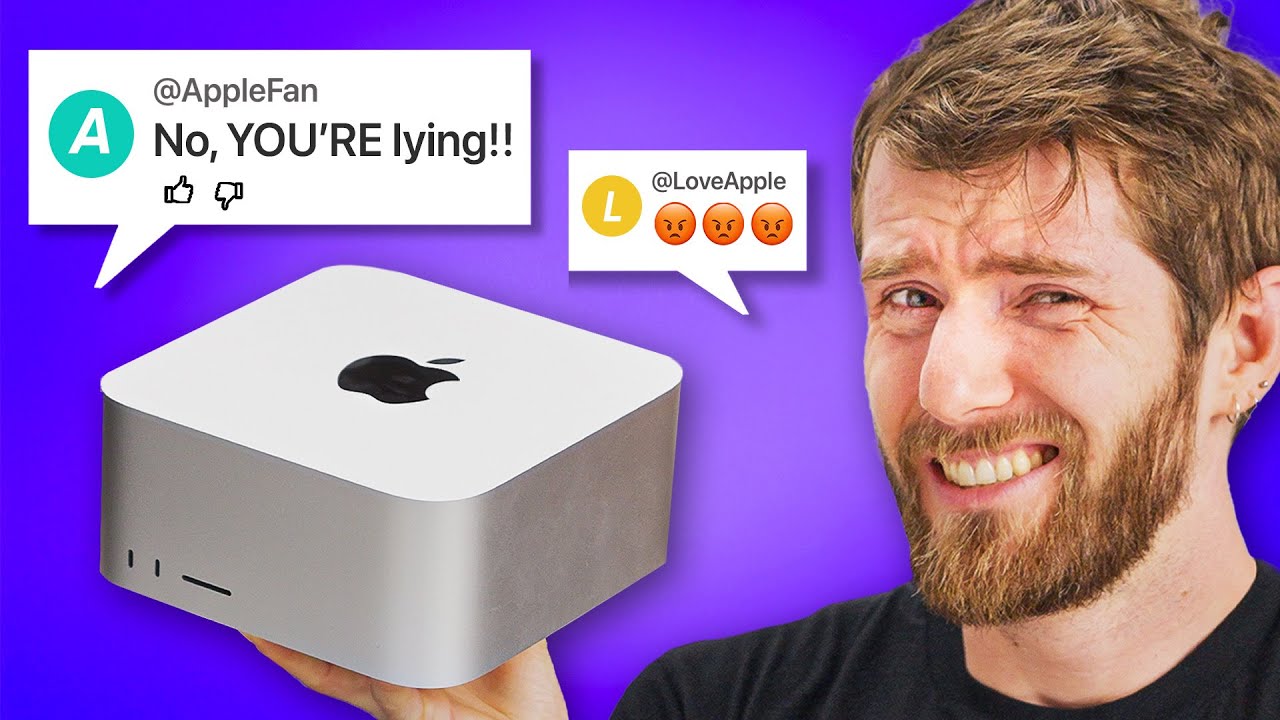
Check out the UGREEN PowerRoam 1200W, 145W Power Bank, and more using the links below:
Ugreen 145W Power Bank (35% OFF 7.11-12) : https://amzn.to/3rgLRVu
Ugreen PowerRoam 1200W ($250 OFF 7.11-12) : https://bit.ly/3XFUzZs
Ugeen Prime Day Deals (Up to 40% OFF 7.11-12): https://bit.ly/3NKnozo
Apple’s Mac Studio got an upgrade with M2 Ultra. Bu...
It's not specifically about macbook pro, but the price vs performance comparison holds true
dawn quiver
dire delta
https://www.youtube.com/watch?v=buLyy7x2dcQ
will definitely check this out ! thankyou💗
 pseudo zenith
I apologize if this is a basic question, but does anyone know of a tutorial to get pygame working on a site like itch.io. In other words, being able to be played online? Thanks!
dawn quiver
@pseudo zenith - If you mean a web build of a Python game made with pygame, I suggest looking at this module: pygbag (https://github.com/pygame-web/pygbag)

GitHub
python and pygame wasm for everyone ( packager + test server + simulator ) - GitHub - pygame-web/pygbag: python and pygame wasm for everyone ( packager + test server + simulator )
pseudo zenith
That’s what I meant. Thank you!
 naive knot
hi
 tranquil girder
Working on a level editor for ursina
 cold storm
 drifting wedge
Yoo
drifting wedge
dawn quiver
<@312424001555136512> - If you mean a web build of a Python game made with `pyga...
Quite interesting
dawn quiver
cold storm
its too interesting and is good job the modelisation is so creative
 shadow tiger
If anyone is looking for an easier or more logical module than pygame, try ursina
 crude ember
Is there a way to make hitboxes smaller cause there are times that it says that my sprites collide but there is a lot of distance between them
 thin pond
im trying to make plinko out of pygame and pymunk
but how the game was coded it kept on letting me win
does anyone know how to make me lose more often?
cold storm
Thanks @dawn quiver its generated in realtime using geometry nodes
Next is buildings / trees / sky / terrain shader
 vast chasm
good evening fellow programmers. Im not really into pygame / gamedev im more a ml guy
could somebody enlighten me why this code fails ```py
import pygame
import numpy as np
from logik import *
pygame.init()
width, height = 1000, 1000
window = pygame.display.set_mode((width, height))
pygame.display.set_caption("Lorenz Attractor Simulation")
x = y = z = 0.0
projectionMatrix = np.array([[1, 0, 0],
[0, 1, 0],
[0, 0, 1]])
def control(x, y, z):
key = pygame.key.get_pressed()
rotation_speed = 0.1
if key[pygame.K_LEFT]:
y += rotation_speed
elif key[pygame.K_RIGHT]:
y -= rotation_speed
elif key[pygame.K_UP]:
x += rotation_speed
elif key[pygame.K_DOWN]:
x -= rotation_speed
elif key[pygame.K_SPACE]:
z += rotation_speed
elif key[pygame.K_RETURN]:
z -= rotation_speed
elif key[pygame.K_r]:
x = y = z = 0
return x, y, z
t = np.linspace(0, 100, 10000)
punkte = projectionMatrixCalculation(*lorenzAttraktor(t))
def draw_points(points):
window.fill((255, 255, 255))
points = points.astype(int)
points[:, 0] = (points[:, 0] - np.min(points[:, 0])) / (np.max(points[:, 0]) - np.min(points[:, 0]))
points[:, 1] = (points[:, 1] - np.min(points[:, 1])) / (np.max(points[:, 1]) - np.min(points[:, 1]))
points[:, 0] = np.clip(points[:, 0], 0, 1) * width
points[:, 1] = np.clip(points[:, 1], 0, 1) * height
pixels = pygame.PixelArray(window)
for x, y in points:
pixels[x, y] = pygame.Color(x % 256, y % 256, 100)
del pixels
while True:
window.fill((255, 255, 255))
for event in pygame.event.get():
if event.type == pygame.QUIT:
exit()
x, y, z = control(x, y, z)
points = rotation(points=punkte, rotX=x, rotY=y, rotZ=z)
draw_points(points)
pygame.display.update()```
when i run the draw point method as a loop im getting hardly over 4 fpspy def draw_points(points): for p in points: x, y = p[0], p[1] x_normalized = (x - np.min(points[:, 0])) / (np.max(points[:, 0]) - np.min(points[:, 0])) y_normalized = (y - np.min(points[:, 1])) / (np.max(points[:, 1]) - np.min(points[:, 1])) color = (int(x_normalized * 255), int(y_normalized * 255), 100) # Use normalized x and y for R and G, and set B to a constant value screen_pos = (int(width / 2 + x * 20), int(height / 2 - y * 20)) pygame.draw.circle(window, color, screen_pos, 1)
but i get a white screen with a beautiful lorenzattractor
for anyone interested in the logik file here:```py
from scipy.integrate import odeint
import numpy as np
import matplotlib.pyplot as plt
def lorenzAttraktor(t, u0 = [1, 1, 1], sigma=10, rho=28, beta=8/3):
def lorenz(u, t):
x, y, z = u
dxdt = sigma * (y - x)
dydt = x * (rho - z) - y
dzdt = x * y - beta * z
return [dxdt, dydt, dzdt]
sol = odeint(lorenz, u0, t)
x = sol[:, 0]
y = sol[:, 1]
z = sol[:, 2]
return x, y, z
def projectionMatrixCalculation(*arg):
projectionMatrix = np.array([[1, 0, 0],
[0, 1, 0],
[0, 0, 1]])
x, y, z = arg[0], arg[1], arg[2]
helpVar = len(x)
x, y, z = x.reshape(-1, 1), y.reshape(-1, 1), z.reshape(-1, 1)
vectoren = np.hstack((x, y, z)).reshape(-1, 3, 1)
return projectionMatrix @ vectoren#np.matmul(projectionMatrix, vectoren)#.squeeze()
def rotation(**kwargs):
rotX, rotY, rotZ, points= kwargs.get("rotX", 0), kwargs.get("rotY", 0), kwargs.get("rotZ", 0), kwargs.get("points")
if rotX:
return _rotationX(points, rotX)
if rotY:
return _rotationY(points, rotY)
if rotZ:
return _rotationZ(points, rotZ)
return points.squeeze()
def _rotationX(points, angle):
matrix = np.array([[1, 0, 0],
[0, np.cos(angle), -np.sin(angle)],
[0, np.sin(angle), np.cos(angle)]])
return np.matmul(matrix, points).squeeze()
def _rotationY(points, angle):
matrix = np.array([[np.cos(angle), 0, np.sin(angle)],
[0, 1, 0],
[-np.sin(angle), 0, np.cos(angle)]])
return np.matmul(matrix, points).squeeze()
def _rotationZ(points, angle):
matrix = np.array([[np.cos(angle), -np.sin(angle), 0],
[np.sin(angle), np.cos(angle), 0],
[0, 0, 1]])
return np.matmul(matrix, points).squeeze()
Profile your code
first you'd want to install snakeviz for displaying the profile output
pip install snakeviz
then do the profiling (in terminal (cmd))
python -m cProfile -o out.prof main.py
play around for a bit, exit the game then display the output using snakeviz
snakeviz out.prof
Alternatively you can
pip install ez-profile
add
import ez_profile
to your main file at the very top, then run your game as usual, play around for a bit, exit and done
Both ways in the end a browser tab would open with a neat output of the profiled stuff
but from what I can see, you're just making it do too much...
brisk yew
vast chasm
when i run the draw point method as a loop im getting hardly over 4 fps```py
def...
also if you're just setting pixels on the screen, drawing circles is probably not the optimal way to do so, you could use pygame.surfarray to get access to surfaces as arrays and then just use numpy to set the pixel values in the necessary locations
because from what I can see, you're drawing about 10k points?
vast chasm
yeah
brisk yew
yeah, calling pygame.draw.anything is probably gonna impact performance a lot if you do it 10k times alone
vast chasm
tbh im kinda emberrassed to see how many calls i make in my program
brisk yew
although I see that you also used PixelArray, which I suppose took much less time to run?
vast chasm
sorry idk if you meant by PixelArray the way I represent my values yes
brisk yew
I meant this

but again, you can gain direct access to a surface as a numpy array via like pygame.surfarray.pixels3d which will return you a reference array, so modifying it, will modify the surface directly, so given how well you can handle numpy I don't think it should be an issue for you to write that efficiently too: https://pyga.me/docs/ref/surfarray.html#pygame.surfarray.pixels3d
also also, probably doesn't matter for your case, but as you may know, numpy is kinda slow with small arrays, so for like matrix operations you could opt for PyGLM: https://github.com/Zuzu-Typ/PyGLM
vast chasm
thank you. Just to be sure i can think of it as a view
brisk yew
yeah
vast chasm
i feel like numpy is performant enough
like yeah youre right but my main point is i dont want to learn a new framework
 brisk yew
vast chasm
like yeah youre right but my main point is i dont want to learn a new framework
brisk yew
vast chasm
like yeah youre right but my main point is i dont want to learn a new framework
that's alright, although I don't think there's too much to pyglm, it's pretty lightweight and probably just has a convenience method to do the matrix thingy you need, but sure, I don't think it even matters for your case now as you seem to be pregenerating that data
vast chasm
alrighty it has become very responsive but its rather small
idk if you can even see it but i guess thats nice
 shadow tiger
LMAOOOOOOOOOOOOOOO
 pearl gull
drifting wedge
You know 2d game.
pearl gull
drifting wedge
You know 2d game.
I can try helping, I'm new to python though but learning with w3 checked pinned messages for a better learning experience for now so I won't be a bother
pine plinth
What is pygame? Never heard of it
drifting wedge
Pygame python best 2D games maker
It's an excellent and beginner friendly library.
drifting wedge
WDYM
 thorny hawk
Does anyone know what books should I read to learn to develop a simple android game/app?
I have decent knowledge of python, HTML and CSS, a little knowledge of SQL and Data Bases.
As far as I know I could be using a frame work like Django to accomplish this, but I am not sure how the process works.
thin pond
how do i remove the line in balls in pygame
 unreal river
thin pond
how do i remove the line in balls in pygame
unreal river
thin pond
how do i remove the line in balls in pygame
What line?
brisk yew
thorny hawk
Does anyone know what books should I read to learn to develop a simple android g...
Specifically Android? Uhh, Kotlin, Flutter and Java (but Java is not used as much anymore ig)
 ember meteor
thin pond
how do i remove the line in balls in pygame
ember meteor
thin pond
how do i remove the line in balls in pygame
castration
brisk yew
brisk yew
Specifically Android? Uhh, Kotlin, Flutter and Java (but Java is not used as muc...
You could use django for the backend of a web app, sure, and webs apps go on any device with a browser and such, but it's not an Android app
If you want Python options, there's Kivy, Pyqt5/6, even pygame and also flet
thorny hawk
And so are there any books that explain the process from skretch?
thin pond
ember meteor
castration
pls explain
thin pond
unreal river
What line?
like the line
brisk yew
thorny hawk
And so are there any books that explain the process from skretch?
Not any books that I know of, but I know for sure that django has a written tutorial on their website: https://docs.djangoproject.com/en/4.2/intro/tutorial01/ so uhh, if web app is what you're after, you can take a look here, although you may need to learn js at some point too, which again, no clue about books or written tutorials for that matter in this case
 tame drum
uhh guys i installed ursina through vscode terminal pip install ursina and it installed succesfully but when i created a main.py file and put import ursina it gives me an error that says theres no module named ursina
ah wait nvm its fixed'
 static fog
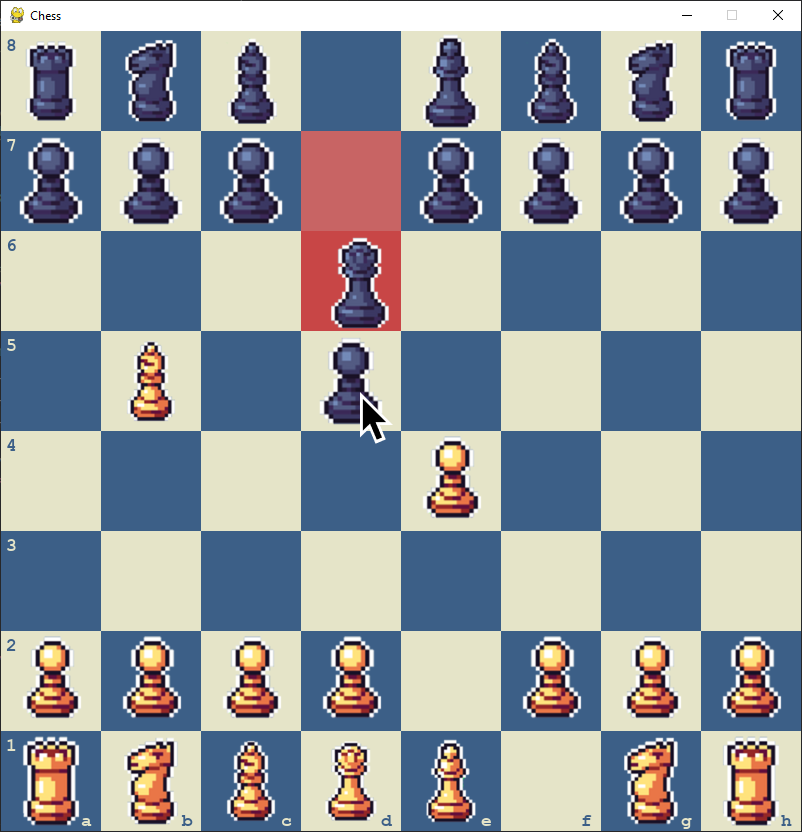
I was following https://github.com/AlejoG10/python-chess-ai-yt tutorial on how to make a chess game, however it has a bug when giving another player a check. The opponent is given incorrect and nonvalid moves as options to play. Could anyone explain why there is a bug and how to fix it?
GitHub
Chess with an Artificial Intelligence gamemode using Python and Pygame - YouTube Tutorial - GitHub - AlejoG10/python-chess-ai-yt: Chess with an Artificial Intelligence gamemode using Python and Pyg...

 drifting wedge
Guys let's make a game in team.
 wispy mason
hey , can anyone help me
i have just resent downloaded a game bot , for a game , but it is showing some error and does not working
can anyone here a profesional software developer fix it for me
it showing this issue
( i also contact the dev of that software , but i think he went far away and not came online from more than 6 month)

 cobalt yoke
its logging to system32?
 remote kayak
drifting wedge
Guys let's make a game in team.
remote kayak
drifting wedge
Guys let's make a game in team.
Yes let's go
drifting wedge
yay
dawn quiver
Chatgpt help me to make that game🔥 Dm me for code🤓☝️

 drifting wedge
Noice
 marble apex
helo
anyone online
guys i have idea for a mega project
we would create a open world 2d adventure game
who ever is intrested dm me
brisk yew
marble apex
who ever is intrested dm me
@pastel current suggested he'd be interested
 pastel current
currently gaming I'll get back to you in a decade

 cold hamlet
Hi 👋
Is there anyone who would help me with programming bot for a browser game?
All I want that bot to do is come to me (to my player model).
Thank you for any help ❤️
dawn quiver
Anyone have suggestions i make that using tkinter (coz i have no life)
 unreal river
 woeful python
What programs are used to make games with python? I'm a beginner
woeful python
What programs are used to make games with python? I'm a beginner
There are many like pygame, pyglet, arcade, ursina, etc.
These are rather Python libraries
 gilded oyster
mostly pygame
brisk yew
pygame-ce
 dense nebula
Whats the best and fastest way to learn pygame confidently within 1 month?
shadow tiger
I think ursina is better than pygame for beginners
I still don't know how to use pygame
 exotic niche

Simulation Made in Pygame!!!
Join me On Discord for Gamedev, physics, simulations, pygame and programming stuff !!!
Get all of my games here :-
https://quantum-hg.itch.io/
#mathematics
#trigonometry
#sinx
#calculus
#derivative
#pygame
#python
#computergraphics
#simulation
#physics
#programming
#coding
...
pine plinth
exotic niche
https://youtu.be/UYP0MiM7ukI
you know that derivative is equal to slope itself, not to "how slope changes"?
speed of change of slope is called second derivative
 exotic niche
pine plinth
you know that derivative is equal to slope itself, not to "how slope changes"?
s...
exotic niche
pine plinth
you know that derivative is equal to slope itself, not to "how slope changes"?
s...
Yes it's added to the pin comments
thanks
lol messed up the script
drifting wedge
Just made some bouncy balls.

Try it.

GitHub
BOUNCE!!! Contribute to Ibrahim-Faisal15/Bouncy-Balls-by-Ibrahim development by creating an account on GitHub.
exotic niche
Sussy balls
drifting wedge
Bad boy
 burnt sail
cold hamlet
All I want that bot to do is come to me (to my player model).
burnt sail
cold hamlet
All I want that bot to do is come to me (to my player model).
Yeah! What kind of game? 2D in Pygame?
 marble jewel
Isometria Devlog 23 - Networking Improvements, Player Sync, Disconnects - https://youtu.be/9UReSuqQYHk

In this week's devlog I discuss changes to world saves, player synchronization, entity removal over the network, disconnects, and other networking improvements.
Check it out!
Be sure to like and subscribe and feel free to follow me on twitter here: https://twitter.com/BigWhoopGames
#indiegamedev #devlog #gamedev #gamedevelopment #indiedev #py...
 twilit cloak
shadow tiger
I think ursina is better than pygame for beginners
twilit cloak
shadow tiger
I think ursina is better than pygame for beginners
I saw someone on Youtube make a tutorial on how to make a basic and tedious-looking Minecraft game. And he used ursina to create it. But that point begs my question; is ursina capable of creating 2D or 3D applications (or both)?
I mean furthermore, I don't even know one rule about pygame. All the modules I know are tkinter/customtkinter, time, datetime and lastly pytz... 😅
proper peak
ursina is mainly a 3d game engine, though it supports some 2d stuff too.
twilit cloak
proper peak
ursina is mainly a 3d game engine, though it supports some 2d stuff too.
Oh, good to acknowledge. Thanks so much for your output. 👍
brisk yew
ursina is just panda3d but simpler
 viscid rampart
brisk yew
ursina is just panda3d but simpler
viscid rampart
brisk yew
ursina is just panda3d but simpler
Your panda2d but simpler
 crimson wyvern
hi im working on a typeracer app on pycharm with tkinter and im really stuck near the finish on my code can someone take a look at it and help me figure out the solution?
shadow tiger
I'm curious, does pygame support 3D?
brisk yew
crimson wyvern
hi im working on a typeracer app on pycharm with tkinter and im really stuck nea...
 brisk yew
shadow tiger
I'm curious, does `pygame` support 3D?
brisk yew
shadow tiger
I'm curious, does `pygame` support 3D?
not sure what you mean by support, sure, people have made 3D games with pygame, but you can't just load in some 3D models out of the box like that
 true basin
How does key remapping work, code-wise? You know, like in most commercial games where the settings allow you to remap an action to a certain key.
In all the exercises and tutorials I've done using Pygame (I'm still relatively new to Python and even more to Pygame though), it looks to me that key/action pairs are hardcoded into the source code.
dawn quiver
DOES ANYINE WANNA PLAY MY GAME THAT IS MADE BY A BEGINNER(ME)?
brisk yew
true basin
How does key remapping work, code-wise? You know, like in most commercial games ...
you can just have like a dictionary sth like so
key_map = {
    "up": pygame.K_w,
    "down": pygame.K_s,
    "left": pygame.K_a,
    "right": pygame.K_d
}
and then you'd use sth like
keys = pygame.key.get_pressed()

if keys[key_map["up"]]:
    ...
if keys[key_map["down"]]:
    ...
...
and done, if user wants to change their keys, codewise you just modify that dictionary and done
obvs you'd have some save and load mechanism for saving and loading user's key config and such, but yeah, this is the general idea
would be great if you could format the code as code
true basin
brisk yew
you can just have like a dictionary sth like so
```py
key_map = {
"up": pyga...
Thanks. That's easier than what I thought it'd be 
drifting wedge
dawn quiver
DOES ANYINE WANNA PLAY MY GAME THAT IS MADE BY A BEGINNER(ME)?
We would love to!
 spice bear
drifting wedge
spice bear
drifting wedge
There are many game modules you can learn in python. I suggest you to learn pygame as it is beginner friendly.
brisk yew
learn pygame, but I suggest using the pygame-ce distribution in particular
also being a game dev is mostly language agnostic, it's a bunch of concepts and whatnot, ig one way to practice those is of course through Python, yeah
 inner falcon
Hello guys, I want to get into game development using Pygame soon, but I am wondering, am I ready to start learning Pygame if I have a solid understanding of:
-Variables and basic data types (integers,strings,floats,lists, objects).
-Loops (for loops and while loops).
-If statements (if, if else, elif).
-Functions.
-Basic Object Oriented Programming (I know how to define classes and methods. I understand what attributes are. I understand how to define objects).
I did not begin learning dictionaries yet.
pine plinth
i think so
(dictionaries are very useful/common, you definitely should learn them in near future)
 wide saddle
I have used tools like unity a lot to develop games. but when it comes to pygame, there is a point where I am confused about how we can design levels, which tools are there, if there is a video or documentation about it, can you send it?
brisk yew
inner falcon
I did not begin learning dictionaries yet.
well I can tell you that classes are just more powerful (at least syntactically) dictionaries
brisk yew
wide saddle
I have used tools like unity a lot to develop games. but when it comes to pygame...
there's Tiled for like map making stuff and also pytmx that can help you with loading all that stuff, but you can also make your own parser for the files Tiled exports and even make your own level editor, pretty sure Clear Code on yt has some tutorial that encompasses using Tiled, maybe the Zelda tutorial??? idk, but yeah, you can take a peek there
wide saddle
thx
drifting wedge
inner falcon
Hello guys, I want to get into game development using Pygame soon, but I am wond...
The most important to learn would be that you should be focusing on for loops and lists.
 soft monolith
brisk yew
pong
soft monolith
brisk yew
pong
Thank you for the suggestion
 proven moss
hello everyone :D
im currently in HS and for years I've been wanting to create my own games with my art/animations but I don't know where to start. I've watched a couple videos, such as Python for Beginners, but I just don't know how to progress beyond the very basics.
Are there any free resources y'all recommend, or any other ways I can improve?
brisk yew
proven moss
hello everyone :D
im currently in HS and for years I've been wanting to create ...
you just start doing projects really
 south anchor
Dm if u can help me
brisk yew
south anchor
Dm if u can help me
no
true basin
proven moss
hello everyone :D
im currently in HS and for years I've been wanting to create ...
there are interesting tutorials for Pygame out there that are good at illustrating how to use concepts like objects, loops, conditionals...
proven moss
brisk yew
you just start doing projects really
okok i’ll start doing that
yeah i’ve watched a couple and i’m feeling a lot better abt python now!
proven moss
true basin
there are interesting tutorials for Pygame out there that are good at illustrati...
ooooo yeah i rly wanna implement graphics but ig i’ll have to master the basics first 😭
thanks for your advice everyone!
proven moss
omg i’m so excited, tysm!!
 sonic night
hii
dawn quiver
drifting wedge
We would love to!
@drifting wedge I'm sorry for replying so late but I'll send the file later.
 daring portal

Learn how to use Pygame to code games with Python. In this full tutorial course, you will learn Pygame by building a space invaders game. The course will help you understand the main game development concepts like moving characters, shooting bullets, and more.
💻 Code: https://github.com/attreyabhatt/Space-Invaders-Pygame
🎥 Course created by bu...
 hoary nebula
guys i started making prototypes in pygame,its possible to make like a the biinding of isaac rip off?
daring portal
the pygame library is not working in VS code for me why? even after installation and test on command prompt
brisk yew
hoary nebula
guys i started making prototypes in pygame,its possible to make like a the biind...
it's more possible than not
hoary nebula
ok ill try for fun ksksks
daring portal
why is pygame not working for me????????????
brisk yew
daring portal
https://www.youtube.com/watch?v=FfWpgLFMI7w
I'd not suggest watching that tutorial
daring portal
but why is pygame not working??????/
hoary nebula
daring portal
why is pygame not working for me????????????
when you run the game,in the terminal apears like "welcome from the pygame comuinity"?
brisk yew
hoary nebula
when you run the game,in the terminal apears like "welcome from the pygame comui...
well, it wouldn't appear for pygame-ce which is the better version of pygame
ironically pygame-ce is more of a community library than pg/pg
brisk yew
daring portal
the command prompt is working but not VS code
you probably have multiple python versions installed, for some reason
right?
daring portal
yes
hoary nebula
brisk yew
well, it wouldn't appear for `pygame-ce` which is the better version of pygame
well,i didint know about pygame-ce
daring portal
brisk yew
you probably have multiple python versions installed, for some reason
what should I do?
hoary nebula
daring portal
what should I do?
unistal?
daring portal
hoary nebula
unistal?
i need all of them
brisk yew
hoary nebula
well,i didint know about pygame-ce
That's understandable, here's the announcement in this server, you can scroll down for more updates, but yeah #python-community message
brisk yew
daring portal
i need all of them
no you don't
brisk yew
don't be silly, anyway, the other option is to select the correct version in vsc
hoary nebula
sorry for the bad engrish guys
brisk yew
somewhere at the bottom right corner
daring portal
ok
brisk yew
there's a button for python versions, click on that and then from the top select the Python version that you installed pygame on
although of course I'm obligated to tell you about pygame-ce, you can install it like so
pip uninstall pygame
pip install pygame-ce
it's basically a better version of pygame and yeah, old tutorials work with it too
hoary nebula
pygame ce is more complicate?
brisk yew
daring portal
https://www.youtube.com/watch?v=FfWpgLFMI7w
anyway, I don't like this tutorial, I'd suggest you watch one from Clear Code or DaFluffyPotato on youtube
daring portal
ok
brisk yew
hoary nebula
pygame ce is more complicate?
no, it just has more features, more bugfixes and more optimizations, it's also a drop-in replacement, so you just need to install it and that's it, it should work out of the box like that
daring portal
I also saw this cool neural networking tutorial from harvard on free code camp
hoary nebula
ok understood
daring portal
is it worth it?
brisk yew
haven't seen it, can't comment on the tech anyway
but for pygame I'd suggest you watch Clear Code or DaFluffyPotato or even CodingWithRuss
hoary nebula
of couse not it must been complicated as potatoes
daring portal
hoary nebula
of couse not it must been complicated as potatoes
of course not, it was very simple
hoary nebula
serius?
daring portal
yes

This course from Harvard University explores the concepts and algorithms at the foundation of modern artificial intelligence, diving into the ideas that give rise to technologies like large language models, game-playing engines, handwriting recognition, and machine translation. Through hands-on projects, students gain exposure to the theory behi...
dawn quiver
is anyone a cheat programer in this server wich can help me learn how to code/programm cheats
marble jewel
Isometria Devlog 24 - Weapon Sync, Toggleables, Better Networking, And Much More! https://youtu.be/BAL-wJuSrU0

In this week's devlog I discuss changes to weapon and item useage, the ability to interact with items over the network, and general improvements to the networking code!
Check it out! Stay tuned for more!
Be sure to like and subscribe and feel free to follow me on twitter here: https://twitter.com/BigWhoopGames
#indiegamedev #devlog #gamedev #...
shadow tiger
I'd say I'm better off with ursina
 arctic wigeon
class Player:
    def __init__(self,health,energy):
        self.health = health
        self.energy = energy

    def attack(self):
        if energy > 0:
            energy -= 1
            print('Player attacks!')

player = Player(100,10)
player.attack()
can someone help, trying to learn classes
UnboundLocalError: cannot access local variable 'energy' where it is not associated with a value
dawn quiver
arctic wigeon
```py
class Player:
def __init__(self,health,energy):
self.health = ...
def attack(self):
        if self.energy > 0:
            self.energy -= 1
            print('Player attacks!')
``` you just need to add 'self.' before 'energy' variablethank you
 manic hawk
Hello brothers, sisters and losers
I'm curious about how people implement collisions for high detailed surfaces that. Like a hill with several bumps, for example.
tranquil girder
For 2d or 3d?
tranquil girder
you just look up the height value in an array based on the player's position
manic hawk
and let's say I already have a blender model for the ground, so it has mesh data like vertices, normals and everything
manic hawk
tranquil girder
you just look up the height value in an array based on the player's position
would that account for slope?
tranquil girder
the way I did of for 3d terrain was that I started with a heightmap, a 2d texture, and the use that to find the height based on xz
no, but there's some math you can do to interpolate between pixels
manic hawk
that seems like a very nice solution, but I kind of want to account for slope in this case
eh I'm quite new to this so I have no idea the traditional ways of doing things
tranquil girder
so it's basically this to interpolate
x, _, z = pos
point = height_values[int(floor(x))][int(floor(z))]

point_e =  height_values[int(min(w-1, ceil(x)))][int(floor(z))]
point_n =  height_values[int(floor(x))][int(min(d-1, ceil(z)))]
point_ne = height_values[int(min(w-1, ceil(x)))][int(min(d-1, ceil(z)))]

u0v0 = point * (ceil(x) - x) * (ceil(z) - z) # interpolated (x0, z0)
u1v0 = point_e * (x - floor(x)) * (ceil(z) - z) # interpolated (x1, z0)
u0v1 = point_n * (ceil(x) - x) * (z - floor(z)) # interpolated (x0, z1)
u1v1 = point_ne * (x - floor(x)) * (z - floor(z)) # interpolated (x1, z1)

point = u0v0 + u1v0 + u0v1 + u1v1  #estimate
I'm not going to pretend I understand it, but that's how to do it
and just moving to some height based on the position on a heightmap is way faster than using 3d colliders for example
manic hawk
yeah what I was kind of thinking was implementing a 3d collider that matches my mesh data
but this could be simpler
I'll try your approach first for sure
tranquil girder
That can work too if it's low poly enough. Like, if you have a terrain that's not really 2d, but has overhangs for example. Then using a mesh collider can be simpler
 formal gull
Can someone help me with a 3d renderer using pygame?
I'm having trouble wit getting the camera to look around properly.
https://paste.pythondiscord.com/HXIQ
manic hawk
Adding a time buffer was trivial, which was the only thing missing from being straight up as good as shadertoy in terms of functionality
 slate crane
manic hawk
Adding a time buffer was trivial, which was the only thing missing from being st...
slate crane
manic hawk
Adding a time buffer was trivial, which was the only thing missing from being st...
is that moderngl?
brisk yew
 celest osprey
does anyone like pygame here
celest osprey
does anyone like pygame here
I love it, I especially like pygame-ce, the better version of pygame... #python-community message
cold storm
Blender geometry nodes / sim nodes work in game in UPBGE fork of blender
import bpy

currentFrame = bpy.data.scenes['Scene'].frame_current
bpy.data.scenes['Scene'].frame_set(currentFrame + 1)
is needed to run the sim
we can use depsgraph /evaulated mesh to get data back out in py
depsgraph = context.evaluated_depsgraph_get()
object_eval = kx_object.blenderObject.evaluated_get(depsgraph)
value = object_eval.attributes['AttributeName'][index]
we can modifiy attributes per vertex in py also each frame
kx_object.attributes['AttributeName'][index] = Value
but im just a noob
celest osprey
 analog tinsel
Hello
vernal kite
some one please tell me why this does not work,
with open("save_file_1.json", "r") as infile:
    game_data = json.load(infile)
    game_input = game_data["data"][0]["pygame_input"]
while game_input not in ("1", "2",):
    time.sleep(1)
    with open("save_file_1.json", "r") as infile:
        game_data = json.load(infile)
        game_input = game_data["data"][0]["pygame_input"]
    if game_input == "1":
        gender_pick()
    elif game_input == "2":
        character_name()
the system just tells me that it breaks because it have reached its limit on how many actions one action can be done
manic hawk
 vernal kite
manic hawk
vernal kite
manic hawk
why are we to look at your balls (joke/pun)
celest osprey
celest osprey
yes
 tardy pendant
Hey guys, so i made a small maze game without any libraries and i wanted to share it
(sorry for the bad video quality)
celest osprey
tardy pendant
Hey guys, so i made a small maze game without any libraries and i wanted to shar...
cool!
tardy pendant
celest osprey
cool!
thx
celest osprey
tardy pendant
thx
🙂
 next imp
does anybody use kivy for basic game development?
celest osprey
whatis kivy
manic hawk
vernal kite
why are we to look at your balls (joke/pun)
cuz their majestic
vernal kite
manic hawk
cuz their majestic
look wooden to me, rather then majestic

 hexed hound
hii
whats the whole point of using rectangle and not surface in making game
brisk yew
rectangles and surfaces are two very different concepts
the only common they share is that they both have a size
 meager hill
Hi any recommendations for ai tool that helps with gamedev graphics?
 honest panther
hello
 summer reef
Are there any python game engines with a gui?
hexed hound
whats an easy way for making a rectangle in the pygame
unreal river
hexed hound
whats an easy way for making a rectangle in the pygame
just simply:
myrect = pygame.Rect(x, y, width, height)
i already have an image
 ripe tulip

Download the Plugin:
https://github.com/Fort-Bonnitar/UE5-Easy-Runtime-Python-Plugin
Easy to Use UE5 Runtime Python Plugin
Python 3.x is required to use this.
Developed with Unreal Engine 5.2
This is a plugin I made to easily use python with Unreal Engine to run python scripts at runtime.
--------------------------------------------...
brisk yew
hexed hound
i already have an image
and?
 minor snow
I have an a good game idea but i don't know where to start or how to find people that would help. I don't have any programing skills and i don't know people that do,Does anyone have any advice?
 vagrant saddle
minor snow
I have an a good game idea but i don't know where to start or how to find people...
vagrant saddle
minor snow
I have an a good game idea but i don't know where to start or how to find people...
if game is not to be sold, then maybe propose idea in a coming gamejam and if people like it they'll probably join you - especially if you have some art ready at the time
you can find lot of game jam events on itch.io
 spring reef
Hello guys, who has used the pyxel framework in their game projects?
What would you recommend, his or pygame or kywi for developing a real game?
What framework or engine is the best on python to date?
vagrant saddle
spring reef
What framework or engine is the best on python to date?
i think the good ones are listed in the channel topic
i'd recommend pygame-ce for start if game is 2D or Panda3D if it is 3D . But they are more raw engines than frameworks with fancy tools/gui
spring reef
ty
 indigo yacht
Hey guys, I'm designing a simple code that's supposed to blip an image, and move it to where your mouse is, and also rotate it in the direction of the movement, here it is:
from math import atan2, pi
from os import _exit as exit

import pygame
import pygame.locals as pg


def __get_rotation_angle(p1: tuple[int, int], p2: tuple[int, int]) -> float:
    x_diff = p2[0] - p1[0]
    y_diff = p2[1] - p1[1]

    return (180 / pi) * -atan2(y_diff, x_diff)


def main():
    SCREEN_SIZE = (800, 600)

    pygame.init()
    screen = pygame.display.set_mode(SCREEN_SIZE, 0, 32)

    tank = pygame.image.load('tanque.jpg').convert()
    rot_tank = tank

    x, y = 0, 0

    while True:
        for event in pygame.event.get():
            match event.type:
                case pg.QUIT:
                    pygame.quit()
                    exit(0)

                case pg.MOUSEMOTION:
                    _x, _y = x, y
                    x, y = pygame.mouse.get_pos()
                    rot_tank = pygame.transform.rotate(tank, __get_rotation_angle((x, y), (_x, _y)))

                case _:
                    pass

            x, y = abs(x % SCREEN_SIZE[0]), abs(y % SCREEN_SIZE[1])

            screen.fill((255, 255, 255))
            screen.blit(rot_tank, rot_tank.get_rect(center=(x, y)))

            pygame.display.update()


if __name__ == '__main__':
    main()
I'm pretty sure I'm calculating the angle correctly, but the image keeps "flickering", any ideas on to why?
 cobalt kayak
Yes, check out panda3d
 fiery apex
Also https://www.ursinaengine.org/ It uses Panda3d, but adds more functionality on top

Ursina, an open source, python powered game engine
marble jewel
Isometria Devlog 25 - Networked Projectiles, Items, Stats, Positional Audio, And More! https://youtu.be/oQi2TlQyotc

In this week's devlog I discuss the implementation of projectiles, item tossing, and stat syncing. I also introduce positional audio and show you the first look at networked enemies.
Check it out! Stay tuned for more!
Be sure to like and subscribe and feel free to follow me on twitter here: https://twitter.com/BigWhoopGames
#indiegamedev #dev...
brisk yew
indigo yacht
Hey guys, I'm designing a simple code that's supposed to blip an image, and move...
one thing: don't use os._exit, that's bizarre, either raise SystemExit or use an exit flag
celest osprey
cool
 clear gazelle
That's what source control software is for
indigo yacht
brisk yew
one thing: don't use os._exit, that's bizarre, either raise SystemExit or use an...
I don't like sys.exit() because it raises an Exception lol
brisk yew
I didn't even mention sys.exit(), I mentioned using an exit flag (e.g., while running:) or just do raise SystemExit
whatever you choose just don't use os._exit because you're clearly not supposed to use it
except the docs mention a particular case
also raising exceptions is not something bad...

currently you're just exerting excessive violence towards the process 
indigo yacht
😿
indigo yacht
brisk yew
I didn't even mention `sys.exit()`, I mentioned using an exit flag (e.g., `while...
also raising exceptions is not something bad...
It's just that if the method is inside a try/except it won't work lol
I don't get what you mean by an exit flag?
brisk yew
indigo yacht
> also raising exceptions is not something bad...
It's just that if the method ...
why would there be a try/except catching a SystemExit? and if there is, then that's intentional, lol, also the stuff about cleanup handlers
indigo yacht
Except with generic exceptions I mean
brisk yew
that's probably bad usage of try/except then
indigo yacht
In my work, some of our internal libs from other teams only raise generic Exceptions 
brisk yew
indigo yacht
I don't get what you mean by an exit flag?
running = True
while running:
    ...
    for event in pygame.event.get():
        if event.type == pygame.QUIT:
            running = False
    ...
that's fine, SystemExit is not a subclass of Exception
indigo yacht
Wait really?
!e
try:
  raise SystemExit
except Exception:
  print('Hello!')
else:
  print('Hi')
@indigo yacht :warning: Your 3.11 eval job has completed with return code 0.
[No output]
Oops
!e
try:
  raise SystemExit()
except Exception:
  print('Hello!')
else:
  print('Hi')
@indigo yacht :warning: Your 3.11 eval job has completed with return code 0.
[No output]
Oh
brisk yew
raise SystemExit("lel")
indigo yacht
!e
try:
  raise SystemExit('Error')
except Exception:
  print('Hello!')
else:
  print('Hi')
@indigo yacht :x: Your 3.11 eval job has completed with return code 1.
Error
well, now ya do
indigo yacht
Tysm:)
brisk yew
also pygame-ce cuz I'm legally required to mention it
brisk yew
brisk yew
```py
running = True
while running:
...
for event in pygame.event.get():...
also ofc this exit method
just don't do pygame.quit() before setting that boolean to False
indigo yacht
brisk yew
also ofc this exit method
Yeah that makes sense, that was some dumb code provided by our professor
I'm taking a digital games elective and this mf suggested we use Python 3.4
Wanted to quit on day one
brisk yew
ya kinda don't need pygame.quit() at all because it's implicit, you probably did need it for your os._exit case cuz I feel like it wouldn't get called then, but otherwise ig it's mostly a good practice to add it anyway, although me to lazy so I don't use it knowing it will be called anyway
indigo yacht
Thanks for the help Matiiss 🙂
summer reef
Why did pygame-ce forked the orginal pygame? And what do they mean with these "impossible challenges" in their description?
It is a fork of the upstream pygame project by its former core developers, and was created after impossible challenges prevented them from continuing development upstream.
There's some info in this video: https://www.youtube.com/watch?v=pYq9edSUaOw
summer reef
proper peak
There's some info in this video: <https://www.youtube.com/watch?v=pYq9edSUaOw>
Thank you very much. Looks like someone needs to grow up lol.
Alr, i've done some research and these are my next 2 terminal commands.
pip uninstall pygame
and
pip install pygame-ce --upgrade
😄
brisk yew

 grizzled river
Hello, I am new here, I heard Python is mostly to creat 2D games... or can i still creat a 3D game as well?
grizzled river
Tnx!
brisk yew
there's Panda3D and ursina too
 vague hatch
yeah but my suggestions better
brisk yew
your suggestion was last updated like 3 years ago, which suggests you ain't gonna get any new features added or bugs fixed anytime soon
vague hatch
brisk yew
your suggestion was last updated like 3 years ago, which suggests you ain't gonn...
true
vague hatch
ursina
grizzled river
Ok
vague hatch
oh wait i thought you said ursina or pyengine3d
either one is good
in fact, try both and see what works for you
grizzled river
Thank you! 😊
vague hatch
np
 blazing dune
ursina is beautiful
grizzled river
How i create main.py file? I started this tutorial thing but
idk how to create file like this... 🤔
brisk yew
mby you need a general computer knowledge tutorial then?
worst case right click in explorer, create really any file from the menu, I usually create text files but it literally doesn't matter
when it asks for naming it, remove everything in that field including the extension and type your file name, hit enter, proceed through the warning and done
 valid dagger
has anyone worked with OpenGL to write a game engine in here?
 feral grove
How do you guys implement saving/loading in your games?
What I'm currently doing is something like this, though IDK if there are pitfalls with this approach down the line
class Saveable:
    def save(self) -> dict:
        # Save any built-ins like int, list, ...
        # Recursively call .save() on attrs which are also Saveable

class Weapon(Saveable):
    ...

class Character(Saveable):
    def __init__(self):
        self.health = 100
        self.weapon = Weapon()
        ...

annie = Character()
...
annie_data = annie.save()
# save to json or smthn
did you ever get any constant 2D graphics rendered to the screen? i.e. a crosshair or UI elements
Ah looking for someone who’s used OpenGL (specifically ModernGL but same principles apply) who’ve written 2D elements to the screen
pine plinth
feral grove
How do you guys implement saving/loading in your games?
What I'm currently doin...
That's a good way to do that.
dawn quiver
grizzled river
Hello, I am new here, I heard Python is mostly to creat 2D games... or can i st...
you can but i advice you not to, 3D games in python are slow asf, just use unity for that
 fallow finch
grizzled river
Hello, I am new here, I heard Python is mostly to creat 2D games... or can i st...
fallow finch
grizzled river
Hello, I am new here, I heard Python is mostly to creat 2D games... or can i st...
python wasnt really created to make games
the bottleneck when writing games in python is stuff like the game logic (like the amount of function calls) or calculation
also, python can't be multithreaded like most other langs
due to the GIL
vagrant saddle
dawn quiver
you can but i advice you not to, 3D games in python are slow asf, just use unity...
but they are fast to write. But anyway most game engines are written in c++ so python or lua are good enough for game logic
fallow finch
the "slow" will most likely not be caused by the fact its 2D or 3D
dawn quiver
vagrant saddle
but they are fast to write. But anyway most game engines are written in c++ so p...
fast to write and your game will run at 15 fps, python is not built for 3D games
fallow finch
its not built for games in general
but you can still make games with it
all games don't have to process a huge amount of things, and like pmp said the heavy things are made by c/cpp/... libs
dawn quiver
fallow finch
its not built for games in general
good for 2D games, if you know how to optimize them
fallow finch
its not a 2D/3D issue
grizzled river
Ok
vagrant saddle
dawn quiver
fast to write and your game will run at 15 fps, python is not built for 3D games
you are making assumptions and obviously did not test much of python based game engine like Panda3D or Harfang3D
fallow finch
you can use opengl for 2d or 3d games, its the same thing
the bottleneck will be the function calls for example
not the fact the graphics are 3d
dawn quiver
vagrant saddle
you are making assumptions and obviously did not test much of python based game ...
make a game in Panda3D and i'll make the same game in unity and lets compare the performance ?
fallow finch
coder space made an excellent 3d minecraft game in python tutorial btw

but then if you add a lot of tickable blocks, mob ai..., it will be slow because python will have to process a lot of things
there's some possible optimization of course, like using multiprocessing to run a local server, but it will not be efficient like in java for example
vagrant saddle
dawn quiver
make a game in Panda3D and i'll make the same game in unity and lets compare the...
sorry, but you are just spreading misinformation about python on a python game channel. and once properly compiled with mypyc : I bet you'll reach acceptable speed for way less complexity on python side.
of course unity tools may be more comfy but it is irrelevant to finished game
fallow finch
a lot of existing games could be written in python, i think the lack of tools to make games and the packaging is a main reason of why its not used for games
vagrant saddle
dawn quiver
make a game in Panda3D and i'll make the same game in unity and lets compare the...
just for the joke, how fast can you make a rotating cube on web from a github gist with unity ? mine is already finished
 past junco
valid dagger
Ah looking for someone who’s used OpenGL (specifically ModernGL but same princip...
past junco
valid dagger
Ah looking for someone who’s used OpenGL (specifically ModernGL but same princip...
No clue what you're after exactly but i can recommend looking into the arcade/pyglet duo; they use OpenGL and are pretty focused on 2D elements
valid dagger
past junco
No clue what you're after exactly but i can recommend looking into the arcade/py...
I'm writing my own engine and didn't know if it can be done using OpenGL, can you mix pyglet and pygame?
past junco
valid dagger
I'm writing my own engine and didn't know if it can be done using OpenGL, can yo...
you can certainly use OpenGL as the graphics api your engine will use to throw stuff onto the screen
mixing pygame with pyglet is likely going to ask for a lot of trouble since both do a lot more than just graphics, both open windows, can load images, have an event loop etc.
i don't even know whether pygame uses opengl tbh, only am aware of the fact it runs on SDL, i'll look into what that is real quick
valid dagger
past junco
you can certainly use OpenGL as the graphics api your engine will use to throw s...
I'm pretty new to writing the engine so was also looking to see if someone here had written some 2d elements in a 3d enviroment before by using PyOpenGL
I have some of it started just making sure I'm working in the right direction while I work through the errors
past junco
what do you mean by 2d elements in a 3d enviroment?
opengl is definitely capable of 3d, so if you write something using pyopengl it should probably work just as normal usage of the opengl api would
valid dagger
past junco
what do you mean by `2d elements in a 3d enviroment`?
opengl is definitely capab...
like drawing a crosshair, or static elements to the screen
past junco
i mean i don't see your exact question: whether it's possible to display graphics using opengl? yeah it is, that's its purpose and it's what pyglet and by extension arcade use
SDL too, but it can apparently also use Vulkan, Metal and Direct3D
so that means you already have something that produces a 3d environment?
and now you want to use specifically opengl to add UI/HUD overlays to that?
valid dagger
past junco
so that means you already have something that produces a 3d environment?
and now...
yes
past junco
Why not modify whatever you have right now that renders a 3d environment so it just adds on a hud?
What exactly is it that you have right now?
valid dagger
past junco
What exactly is it that you have right now?
I have a quite a bit, I'm just unsure how to add the hud since I only have way to render 3d elements
valid dagger
past junco
What exactly is it that you have right now?
https://github.com/poxford3/3DGameEngine here's the repo, I've since added a start to the 2d elements that I'm working on with some errors
GitHub
Contribute to poxford3/3DGameEngine development by creating an account on GitHub.
past junco
typically 2d elements are added to a screen via a seperate draw call with far less complicated view/projection matrices
valid dagger
yeah I found a video that covered the formulas and math required to make the new view/proj mats and made some new vert/frag shaders I'm just having trouble getting the VAO to run @past junco
tranquil girder
dawn quiver
make a game in Panda3D and i'll make the same game in unity and lets compare the...
I've done that before and the Panda3d one was faster. Although that was compared to when playing in the editor. My 3d python games don't get 15fps at least, but several hundred
past junco
valid dagger
yeah I found a video that covered the formulas and math required to make the new...
well, i don't really understand your project, but here's what i see:
You have only one SceneRenderer, and all it seems to do is to just render one scene; i guess depending on what you want scenes to be that should maybe be changed to multiple ones?
The camera looks relatively important, but you also only create one of them for the entire game
I think you should have a camera that's basically a fully-fledged 3d transformer (your current one) but then another that just incorporates matrices producing a pretty simple transform+rotate+scale with which UI objects are then drawn
valid dagger
past junco
well, i don't really understand your project, but here's what i see:
You have on...
so implement a second camera?
 normal silo
valid dagger
so implement a second camera?
normal silo
valid dagger
so implement a second camera?
2D is just orthographic projection instead of perspective.
valid dagger
normal silo
2D is just orthographic projection instead of perspective.
Yes, and I've been trying to implement the ortho proj in the same style that I did the other shaders, would that not be the way to do it?
normal silo
valid dagger
Yes, and I've been trying to implement the ortho proj in the same style that I d...
Learn OpenGL . com provides good and clear modern 3.3+ OpenGL tutorials with clear examples. A great resource to learn modern OpenGL aimed at beginners.
valid dagger
normal silo
https://learnopengl.com/Getting-started/Coordinate-Systems
I've read through the Orthographic projection section of this one, is there something else I should read on here?
normal silo
Moderngl makes this easy for you by providing extra functions.
valid dagger
normal silo
Moderngl makes this easy for you by providing extra functions.
do you know what functions? I'm using ModernGL for my project
normal silo
valid dagger
I've read through the Orthographic projection section of this one, is there some...
No, that's all there is to it.
valid dagger
will see what I can find on their documentation page
normal silo
Basically, there is no 3D. Your screen is 2D. What makes it seem 3D is drawing with perspective illusion, which is accomplished via a transformation of the vertices that tricks your brain into seeing a 3D scene, same as how artists draw perspective "3D objects" on 2D paper.
If you do orthographic, you are not doing that illusion.
valid dagger
normal silo
Basically, there is no 3D. Your screen is 2D. What makes it *seem* 3D is drawing...
This is all just very new to me. Trying to learn as I write the code, biggest thing I'm trying to get my head around is conveying what I want to show up with what shows up
past junco
i can't help too well with 3d stuff, and due to some poor decisions my view matrix is pretty nonstandard so it won't help much, but can at least tell you the precise projection matrix i use:
Mat4.orthogonal_projection(0, CNST.GAME_WIDTH, CNST.GAME_HEIGHT, 0, -1, 1) using https://github.com/pyglet/pyglet/blob/71298baa36adfd16215eab6adc74d87864319702/pyglet/math.py#L746
This results in a pretty simple matrix that converts the plane starting at top left and stretching (W, H) right and down into the NDC
Since the game is pretty much hardcoded to that size, i only set it once
If you wanted your system to start at the lower left it'd be (0, CNST.GAME_WIDTH, 0, CNST.GAME_HEIGHT) i believe
the last 2 parameters are relatively useless for 2d i think
frank fieldBOT
pyglet/math.py line 746
def orthogonal_projection(cls: type[Mat4T], left: float, right: float, bottom: float, top: float, z_near: float, z_far: float) -> Mat4T:```yeeah i hoped i could help with this a bit better but turns out i forgot quite a bit of the process since it's been like a year already
normal silo
vagrant saddle
sorry, but you are just spreading misinformation about python on a python game c...
Panda3D also lets you have your cake and eat it too. It's written in C++, and the C++ side mostly mirrors the Python side (for the core). You can write your entire game in C++ if you want. And Unity (AFAIK) does not let one easily write C++, so if you wrote your game entirely in C++ (although adding some Python would not really change this (which is its purpose, scripting the gameplay parts)), it would most certainly blow Unity C# out of the water in terms of performance. And this is ignoring that Unity is kind of slow to begin with because of bloat (which it trades off with a huge number of features). And also stuff like Cython exists to help if you really want to stick to just Python.
brisk yew
valid dagger
I'm writing my own engine and didn't know if it can be done using OpenGL, can yo...
why would you mix them?
valid dagger
brisk yew
why would you mix them?
not sure, someone had just mentioned using pyglet for text and I'd already used pygame as a base in my engine
brisk yew
valid dagger
not sure, someone had just mentioned using pyglet for text and I'd already used ...
wdym text? pygame can render text, the ce distribution of pygame (which I'd suggest using) can even do text alignment and multiline text rendering
vagrant saddle
and also i18n + bidi + complex script rendering (at least on pygame-ce)
valid dagger
brisk yew
wdym text? pygame can render text, the ce distribution of pygame (which I'd sugg...
Would it be smart to use pygame to render the text as opposed to opengl?
brisk yew
valid dagger
Would it be smart to use pygame to render the text as opposed to opengl?
Depends on your use case ig? It certainly would be more convenient I suppose, does opengl even support text rendering?
valid dagger
brisk yew
Depends on your use case ig? It certainly would be more convenient I suppose, do...
from what I see looking through their documentation they do but now I'm having trouble using pygame to render on top of my open gl visuals
vagrant saddle
valid dagger
from what I see looking through their documentation they *do* but now I'm having...
maybe you could just composite bottom pygame / opengl render to texture / top pygame
valid dagger
vagrant saddle
maybe you could just composite bottom pygame / opengl render to texture / top py...
tips on how to do that?
vagrant saddle
no idea how to do that on opengl, i use panda3d for that
valid dagger
well what method do you use to composite the two? @vagrant saddle
vagrant saddle
it's a 2D layer suitable for pygame surface and it is handled automatically by the engine
no idea how it works internally though
 dense grail
 pine plinth
 lean sleet
What if I posted about gdscript in here?
lean sleet
What if I posted about gdscript in here?
Yes, because gdscript is not related to python
knotty hamlet
lean sleet
What if I posted about gdscript in here?

 minor cloak
is there some course for networking and game development?
im unsure of how to send limited information to the client
like in shooters you don't want the player to have access to all players position right?
although it might be faster to render
dawn quiver
is panda3D docs good? i never used it
arctic wigeon
just kinda wanting to show off my progress learning classes, still pretty fun
 hollow inlet
I've been working on the same project since I started learning python a few months ago. Uses only math and pygame libraries. It supports multiple block types, placing and breaking along with rgb lighting. It has occlusion and backface culling. This scene runs at 45 fps
 vernal kite
arctic wigeon
just kinda wanting to show off my progress learning classes, still pretty fun
vernal kite
arctic wigeon
just kinda wanting to show off my progress learning classes, still pretty fun
a small fuck you for having music that do begin 20 sec in, leaving me to look all over my pc to ficnd out where the fuck it came from
vernal kite
brisk yew
having small in front of such vulgarities doesn't really make it less rude
any recomantdation want to cahnge it to, as i do not find it to be such a culgar word, as it have become kind of like the words smurf for me, it is just somthing that is used every now and then
arctic wigeon
vernal kite
a small fuck you for having music that do begin 20 sec in, leaving me to look al...
Yes my plan worked , er umm im so sorry my project cause you pain. 😆
vernal kite
 arctic wigeon
it was brief but i showed that there would be music

 distant bough
can someone help me modify this py script?

Blender Stack Exchange
I ran the following Python script, from the link below, in Blender and it works very well splitting the selected mesh into 4 equal parts. However, I'd like to cut the mesh at specific locations not...
right now it divides my mesh into 3 part, i need it to do it to at least 8 seperate meshes.
please ping with any help. thank you !
normal silo
valid dagger
well what method do you use to composite the two? <@334096250897170433>
Basically you render your 2D stuff with an orthographic camera, and have it output to a separate buffer. Then use use that buffer as a texture for a quad (two triangles) that you stretch across the whole screen, now you have a HUD.
The most simple way to render text is to have a texture with the characters in it that acts like a sprite sheet, then in the shader it translates character values to UV coordinates (or on the CPU, whatever you prefer).
Where it gets more complicated is when you need more than ASCII, then you need to swap characters in and out of that texture (like a LRU cache), libraries like FreeType give you functions for creating that texture.
(Or stb_truetype, it's a bit more limited though, but much easier to use)
 wicked sail
learn the language, then the framework/library/engine/etc
pygame and moderngl are nice. some people like panda3d too
 jaunty flame
reposting from #pedagogy:
somewhat open-ended question - i've been reading martin fitz patrick's book on PyQt5 development and i'm starting to realize "just the one book" isn't going to be enough to get from "i can tinker a couple things" to "i should be able to, with time and effort, code any app i'm capable of imagining".
for now, the two kinds of applications i'm thinking of creating are:
- video games (2d, the "simple" visual novel / dungeon crawling kind)
- creativity software (focused on text/image, perhaps a paper doll app for instance)
both of these deal with images, so the bigger question on my mind right now is graphics. it looks like PyQt is meant to handle "the wrapping around the content", but i'm having a hard time evaluating whether it can - on its own - handle graphics. could i theoretically compose a game screen in PyQt, or should i include something else such as OpenGL for that kind of thing?
(also, is there any book recommendation around going in that direction? dynamic graphics in python, i mean)
normal silo
jaunty flame
reposting from <#934931964509691966>:
somewhat open-ended question - i've been ...
You can render a OpenGL scene into a PyQt application.
You can also probably embed pygame-ce into it.
jaunty flame
normal silo
You can render a OpenGL scene into a PyQt application.
Thanks. So to clarify, the idea would be to use Python to compute whatever situation I want to represent/paint, throw arguments from Python to OpenGL (creating an OpenGL scene, which I assume is basically a canvas), and then render/display the OpenGL scene in a widget in PyQt?
normal silo
jaunty flame
Thanks. So to clarify, the idea would be to use Python to compute whatever situa...
OpenGL renders into some OpenGL context, which Qt will create for you. If you then start calling OpenGL functions, it will use that context. Basically like a canvas, but OpenGL is more complicated than simple drawing functions you might find in vector graphics libraries.
If you want, you can use some game library that uses OpenGL, and then its scene should be rendered into the widget.
Assuming the game library supports not having its own window (embedding).
Unless you really want Qt it's probably not worth the effort though. I would ditch Qt and just directly use a game library/engine.
Qt is more for applications.
 split harbor
Guys guys my code doesnt work but why ?
Pastebin.pl is a website where you can store code/text online for a set period of time and share to anybody on earth
 young gate
how's this respawn animation?
game made in python and pygame, running on web using pygbag
young gate
thanks!
 ember narwhal
I made an image using Krita that consists of multiple adjacent areas (let's call each color space) that are split by borders and each area has a unique color.
I loaded this image to pygame and blitted it.
I use the get_at function to retrieve the color of a pixel that I click.
The problem is different points in a color space give RGB values with slight variation. I need a color space to be homogenous.
I'm trying to create a world map consists of countries with unique color, so when I click a country I will fetch its data since their RGB value are paired with their data.
Since different points of a country land gives different RGB value, this causes a problem.
If anyone knows why, it would be great. Thanks!
Edit: The problem mostly occurs near the edges of color spaces.
brisk yew
well, then the colors there are just a different shade
Here's a similar thing I did a while ago: https://github.com/Matiiss/wip_pygame_examples/tree/main/examples/map_regions
ember narwhal
I disabled the anti-aliasing while drawing the color spaces so they are fine in krita but not in pygame. I will read your post.
brisk yew
ember narwhal
I disabled the anti-aliasing while drawing the color spaces so they are fine in ...
what format did you save the image as?
ember narwhal
jpg
ember narwhal
brisk yew
use png
Thanks! It worked 😄
marble jewel
Isometria Devlog 26 - Networked Buffs, NPCs, Performance Improvements! https://youtu.be/dqohhTqY2rs
In this week's devlog I discuss additions to multiplayer such as buffs and debuffs, NPC enemies and critters, performance improvements, and more!
Check it out! Stay tuned for more!
Be sure to like and subscribe and feel free to follow me on twitter here: https://twitter.com/BigWhoopGames
#indiegamedev #devlog #gamedev #gamedevelopment #indied...
 feral sequoia
hey im trying to make a game thats essentially a pokemon batttle but without using inbuilt python data structures
we've been given like a skeleton of the code
but im really struggling putting it together
if someone is cool with joining a voice chat where i ask questions about it i would appreciate it very much 🙏
brisk yew
feral sequoia
hey im trying to make a game thats essentially a pokemon batttle but without usi...
the heck are you supposed to use?
feral sequoia
brisk yew
the heck are you supposed to use?
they gave us abstract data structures we can use
i got more information on it here:#1145923301999382558 message
feral sequoia
brisk yew
the heck are you supposed to use?
task 1 which i sthe part im trying to finish doesnt need any structures tho
 main minnow
young gate
how's this respawn animation?
main minnow
young gate
how's this respawn animation?
Maybe you can do the super Mario effect where the circle encroaches around the character before going completely black.
 nimble fern
arctic wigeon
just kinda wanting to show off my progress learning classes, still pretty fun
nimble fern
arctic wigeon
just kinda wanting to show off my progress learning classes, still pretty fun
very cool
nimble fern
young gate
how's this respawn animation?
looks insane!
young gate
nimble fern
looks insane!
thanks!
 summer ivy
Oh daaamn a separate channel for game dev in python.
nimble fern
young gate
thanks!
your welcome
 cinder spire
Anyone interested in helping with an Ursina game? Need a GitHub account and Windows.
 glacial gull
I am having some trouble with pygame: Here is the code snippet involved
import pygame
from settings import *

class Tile(pygame.sprite.Sprite):
    def __init__(self,pos,groups):
        super().__init__(groups)
        self.image = pygame.image.load('../graphics/obstacles/rock.png').convert_alpha()
        self.rect = self.image.get_rect(topleft = pos)
if anyone would help id really appreciate it
vagrant saddle
glacial gull
if anyone would help id really appreciate it
you could help us first to help you by describing your problem in details. Also small portions of code without entry point and assets are rarely usefull. It is better to publish or zip the whole failing program
 nova bloom
Is panda 3D good for making 3D games?
brisk yew
nimble fern
what lib r u going to be useing
ursina...
brisk yew
nova bloom
Is panda 3D good for making 3D games?
what does good mean in this context?
like, you can make 3D games with it, pretty good ones too and they apparently can be really fast
 rancid sigil


 frank fieldBOT
:incoming_envelope: :ok_hand: applied timeout to @graceful lichen until <t:1693471107:f> (10 minutes) (reason: duplicates spam - sent 4 duplicate messages).
The <@&831776746206265384> have been alerted for review.
 tacit geode
in professional sense you have some deadline before which you gotta ship the game
 tiny vault
oh
tacit geode
tiny vault
is it difficult or ez or stuff like that?
its difficult making games is not easy
unless you mean really simple games
tiny vault
whats it like being in a games dev team?
tiny vault
tacit geode
unless you mean really simple games
i c
tiny vault
tiny vault
whats it like being in a games dev team?
?
tacit geode
tiny vault
whats it like being in a games dev team?
stressful
tacit geode
tiny vault
btw almost how much are they paid
well im in ml so idk much abt them but the big studios must pay em a lot
like Rockstar, Ubisoft, Paradox etc
tiny vault
what youd say bout supercell?
tacit geode
tiny vault
what youd say bout supercell?
idk you gotta check their career website
company seems nice
but they make mobile games
tiny vault
tacit geode
?
a carrer website?
brisk yew
tiny vault
btw almost how much are they paid
pretty sure game dev is one of the worst industries you can get into as a software engineer
tiny vault
brisk yew
pretty sure game dev is one of the worst industries you can get into as a softwa...
wait fr
i thought it was the best
💀
i lived in a delusion for so long
tacit geode
brisk yew
pretty sure game dev is one of the worst industries you can get into as a softwa...
They are responsible for building and maintaining digital relationships between brands and their consumers.
tiny vault
tacit geode
They are responsible for building and maintaining digital relationships between ...
wow guys
you really are into these things
brisk yew
tiny vault
i thought it was the best
if you enjoy it maybe, but it's low pay, overtime work, very stressful and whatnot or so I have heard
tacit geode
tiny vault
i thought it was the best
game dev is the last last last option i will ever choose as a career
tiny vault
woah man
brisk yew
tacit geode
They are responsible for building and maintaining digital relationships between ...
isn't that like a lot of software jobs now?
brisk yew
all this stuff being, don't be a game dev at a company, lol
tacit geode
brisk yew
isn't that like a lot of software jobs now?
yeah pretty much but still you have to do things which makes you earn money
brisk yew
if you enjoy making games, sure, go for it, I personally wouldn't choose it as a career tho
tiny vault
I am a computer science student btw 
tacit geode
tiny vault
like knowing all this stuff
lol you will know with time
tiny vault
still learning stuff
tiny vault
tacit geode
lol you will know with time
lets see what the future holds for me :/
tacit geode
tiny vault
lets see what the future holds for me :/
do what you want don't fall into people's recommendation
tiny vault
yes
brisk yew
brisk yew
if you enjoy making games, sure, go for it, I personally wouldn't choose it as a...
I for one, sometimes make games myself using pygame-ce and I also contribute to its source code, FOSS contributions is sth you should try sometime, pretty sure employers look for that too now
tiny vault
i hear from all but listen to me
myself
im self reliant except i take tips about experience from people
so that i can decide for myself
brisk yew
sounds like a good approach, tho don't forget that you don't have to make all the mistakes yourself, you can learn from others too
tacit geode
i remember a lot of students joined ml class
and like 80% of them dropped in the second month
lol
tiny vault
brisk yew
sounds like a good approach, tho don't forget that you don't have to make all th...
so true
tiny vault
tacit geode
and like 80% of them dropped in the second month
lmao
you got to be kidding
brisk yew
tacit geode
and like 80% of them dropped in the second month
why?
tacit geode
brisk yew
why?
they weren't able to understand the stuff that was being teached only joined cuz they heard ml hype
also didn't had any interest in it
only for money
tacit geode
tiny vault
you got to be kidding
kek
brisk yew
tacit geode
only for money
that's an interest, lol, but I gotchu, yeah, motivation to actually learn cs and stuff
I've heard of lots of people dropping out because they were in it just for the money
tacit geode
brisk yew
that's an interest, lol, but I gotchu, yeah, motivation to actually learn cs and...
lol money i think is the biggest motivation for some ppl to learn cs
brisk yew
it's a pretty good motivator ngl, but yeah
pine plinth
cool!
 crimson mirage
young gate
how is this shop?
crimson mirage
young gate
how is this shop?
Pretty cool
In the meanwhile though, would anyone like to share their thoughts on the concept of this collision engine?
 proper peak
so, just iterate over all pairs of objects? that's the basic way, sure.
crimson mirage
proper peak
so, just iterate over all pairs of objects? that's the basic way, sure.
Any thoughts on how I'd optimize it?
proper peak
crimson mirage
Any thoughts on how I'd optimize it?
I think people use spatial partitioning for that. The basic idea is that you put all your objects into an oct-tree (or quad-tree for 2d) that recusively subdivides the space into cells, such that objects that are on a cell boundary are in both cells. Then, only objects in the same cell can possibly overlap, so you only need to check objects in the same cell.
here's a nice overview of different methods: https://www.cs.cmu.edu/~jbruce/thesis/chapters/thesis-ch03.pdf
crimson mirage
proper peak
I think people use spatial partitioning for that. The basic idea is that you put...
I see. Thanks.
 rough crest
young gate
how is this shop?
rough crest
young gate
how is this shop?
looks good
 viscid maple
Hello, everyone,
The rules of this channels allow users to upload GIFS of ongoing projects, but since they are not a very good medium for some specific demonstrations, allow me to use a very tiny video instead.
The software shown above ☝🏽 is completely free, open-source and released to the public domain. I'm sharing it here on the occasion of its 1.4 version release and because I believe it is directly related to the topic of this channel. I myself (the developer) use it to generate some animation data for a game I'm developing. You can download it right now with pip:
pip install --upgrade nodezator
And learn more about it here: https://github.com/IndiePython/nodezator
There's also an online manual which is available within the app as well: https://manual.nodezator.com/
Let me know if you have any questions, I'll be happy to answer them.

GitHub
A multi-purpose visual node editor for the Python programming language - GitHub - IndiePython/nodezator: A multi-purpose visual node editor for the Python programming language
Nodezator app's official manual
 round yarrow
Hi all!
Was hoping you guys could help me with something.
I'm trying to develop some GUI software that would allow me a good bit of flexibility in terms of what can be displayed, but also (and this is important) allows me to create two windows.
My first though was pygame. I have used it several times in the past, and it's pretty easy and straight forward to use. Unfortunately, I read only that pygame does not support multiple windows. Damn...
I then found pyglet. Allegedly it supports dual windows, but I didn't manage to get it to work properly. After pyglet, I found arcade. It looked promising. I was able to open two windows, but the moment I added Views to draw on, I had the same OpenGL problems as I had with pylget. The lack of documentation on some of these features (which I feel are core features) is also a bit off-putting....
So I was wondering... Could any of you suggest me some graphics library that I could use?
In short what I need:
- Be able to display pictures and draw on them
- Be able to have a menu with controls (DIY'ed menu with elements is fine, doesn't need to be tkinter-is)
- Be able to open and draw on two windows
Thanks!
brisk yew
round yarrow
Hi all!
Was hoping you guys could help me with something.
I'm trying to develop ...
Pygame can support multiple windows, the api is still experimental, but pygame-ce 2.4.0 should make the window api official and you'll be able to create as many windows as you wish
currently it's either possible with that same API pretty much, but it's technically experimental and some stuff may change
the other option is to use multiprocessing
brisk yew
round yarrow
pygame-ce? That's a fork?
yep
round yarrow
I always used the vanilla pygame.
Sounds like it's a rebelious forks? In my experience, FOSS projects die when this happens.
brisk yew
well, pg/pg should have roughly the same experimental api anyway
nonetheless pygame-ce is better and pretty much as vanilla as can be
anyway, here are the two solutions of mine I provided in pygame's dc server (the contributing stuff and the whole thing is focused on ce now, pretty much all of the core contributors are now working on pygame-ce, so it def shouldn't die, lol) https://discord.com/channels/772505616680878080/1133140731733749800
round yarrow
Thanks! (I joined that servera minute ago lol)
That looks indeed like what I'm hoping to do.
But do I understand you correctly that these two methods are alternatives to using pygame-ce 2.4.0 API?
brisk yew
well, that new api is not finalized yet, and that version is not released yet, but the given solutions should be compatible with either pygame, yeah
round yarrow
Ye, I noticed it isn't released yet. 2.3.0 is the latest.
Was looking into compiling it from source.
But maybe to be futureproof, I shouldn't do that.
Sounds like it's opening an unnecessary can of worms.
brisk yew
dunno, can't say pg/pg is gonna march too far forward either since it's now one guy who's left there with any kind of power
round yarrow
round yarrow
Sounds like it's a rebelious forks? In my experience, FOSS projects die when thi...
. 😄
brisk yew
round yarrow
Sounds like it's a rebelious forks? In my experience, FOSS projects die when thi...
both the original and the fork?
round yarrow
Often, yes.
brisk yew
well, crap, that's an unfortunate fate
round yarrow
It would be, yes. Because pygame is like "the" library everyone goes to for Python game design.
It's so easy and accesible to beginners.
brisk yew
brisk yew
both the original and the fork?
mmm, why do you think that happens btw?
round yarrow
It's just something that I've seen happen a few times.
Usually projects like these are either carried by a single person (in that case a rebelious fork can't happen, so this case doesn't apply), or by a small group of people. Of that group splits up, not only is the dev work doubled, but the gain is also halved or worse. Because most users will not be aware of the split.
This is assuming a clean 50-50 split of course.
Worst case, no one moves to the neo-version, except for all but one of the devs.
And unfortunately that worst case is something that happens a lot.
Because some devs are very protective of their work, which often results in heated disagreements and disbandments.
brisk yew
round yarrow
Usually projects like these are either carried by a single person (in that case ...
well, so far we've got support from ytbers and other platform "managers" and we have a whole dc server, so people def do find out and move to ce
brisk yew
round yarrow
Hi all!
Was hoping you guys could help me with something.
I'm trying to develop ...
anyway, for pygame multiprocessing and using set_mode currently seems like a safe bet for multiple windows, you just have to manage memory across those processes which shouldn't be too hard, but still has to be done
round yarrow
brisk yew
well, so far we've got support from ytbers and other platform "managers" and we ...
That's a good thing of course. Fingers crossed that it'll be enough! 🙂
round yarrow
brisk yew
anyway, for pygame multiprocessing and using set_mode currently seems like a saf...
Thanks! Am going to see if I can get it to work that way!
round yarrow
What would you advise to create a UI? I was planning to create toolbars with pygame-code, but maybe that's reinventing the wheel?
pine plinth
There is no good GUI lib for python
round yarrow
Mhmmm, how about embedding some pygame in PyQt?
 red tusk
pine plinth
There is no good GUI lib for python
red tusk
pine plinth
There is no good GUI lib for python
Define "good gui lib". For example, TortoiseHg is written with PyQt
normal silo
round yarrow
Mhmmm, how about embedding some pygame in PyQt?
If you want to use a game library that has multiple windows easily, then you could try Panda3D. It has its own GUI.
Not sure if anyone has tried this, but it may be possible (probable) to embed PyGame into Panda3D...
vagrant saddle
yes it's possible
normal silo
Not sure how that would play out with multiple windows, since that is a PyGame side limitation.
vagrant saddle
you can use different pygame surfaces
vagrant saddle
here's a minimal sample with no event passing https://github.com/Schwarzbaer/panda_examples/blob/master/buffer_protocol/pygame_to_panda3d.py
normal silo
PyGame can use OpenGL rather than software render right? I was thinking about that, it would involve setting the OpenGL context for PyGame and calling draw for each window in a task.
vagrant saddle
that would be probably way less portable than just pygame+panda3D dealing with 3d layer
normal silo
vagrant saddle
that would be probably way less portable than just pygame+panda3D dealing with 3...
Yeah, i'm just thinking of avoiding the copy from GPU to CPU and back to GPU.
Although if software rendering is used, it's only CPU to GPU.
I think it can be done via setting the render sort order, having tasks in between that are for the pygame scenes.
vagrant saddle
above sample also seem to work with pygbag so on web browsers
+1 for not using opengl because it is gles on web
young gate
i finished up the shop
 random stratus
young gate
i finished up the shop
random stratus
young gate
i finished up the shop
thats really neat :0
young gate
random stratus
thats really neat :0
thanks!
 meager plover
wow its nice !
hi guys... i want to share my work for we are devloper game using pygame
i gonna try to pblish my demo game for tomorow
if you want to see or try my game you can chek it
i was learning pygame for 1 year dams it was so freaks and tired
but cheers guys 🍻 🍺 !!!
i hope my game was playing correctly on other computer
i am only use 2 module pygame and pyinstaller.
i was create my game coding for 4056 line code.
thankyou python and pygame. frome me as game programer.
i coding this game for 2 month and i enjoy it
unreal river
meager plover
nice game bro, but no offense, is this a fake loading screen?
meager plover
unreal river
nice game bro, but no offense, is this a fake loading screen?
yea it was for make delay game, could it can be a real loading screen but hig coding needed
so it will bring enjoy on the game
dawn quiver
young gate
i finished up the shop
this is your custom ui elements or you are using lib?
young gate
added minecraft style item selection from inventory
young gate
dawn quiver
this is your custom ui elements or you are using lib?
i got them open source from itch.io
 quick granite
anyone know how to add a gravity effect in this code , all the object does is just bounce all around the screen ,wanna make it so it has some gravity logic
 red tusk
@quick granite Physics. The vertical component of the speed (ball_obj_speed[1]), increase it by a tiny bit amount each frame. This is called "uniformly accelerated motion", trajectory is parabola
meager plover
thankyou
meager plover
quick granite
anyone know how to add a gravity effect in this code , all the object does is ju...
you can use increment on screen or object you wanna add into variable
use pygame math.v2 and use
meager plover
x or y on that
dawn quiver
quick granite
anyone know how to add a gravity effect in this code , all the object does is ju...
Try implement games with oop paradigm otherwise your codebase will be trash.
pine plinth
dawn quiver
Try implement games with oop paradigm otherwise your codebase will be trash.
Not necessarily.
Code that uses OOP can be trash, and code that doesn't use OOP can be good
dawn quiver
pine plinth
Not necessarily.
Code that uses OOP can be trash, and code that doesn't use OOP ...
In game dev context oop is the only way out
dawn quiver
quick granite
anyone know how to add a gravity effect in this code , all the object does is ju...
when i made a basic platformer last year, i added a boolean that would check if the sprite was colliding with another sprite/platform
while the collision value was false, the y value of the player would decrease whereas if the player was colliding with soemthing, the y value would stick
let me grab the code rq (its c# but logic still applies)
and yes following an OOP paradigm will help you organise your code

collides function just returns whether the sprite hitbox is intersecting
refer to this
pine plinth
dawn quiver
In game dev context oop is the only way out
Not really. There are a lot of different ways to write code
dawn quiver
pine plinth
Not really. There are a lot of different ways to write code
@pine plinth yes.but i cannot imagine how to implement even simple physics with no oop.oop way just create physcis class and inherit object. And the best part you can implement this logic all classes which has same interface
No.absolutely no i didnt see anybody in my life uses other paradigm in game dev real production projects
Probably bethesda uses other paradigm thats why their games terrible
normal silo
dawn quiver
No.absolutely no i didnt see anybody in my life uses other paradigm in game dev ...
Then I will give you one, Overwatch. It uses an ECS.
(Which falls under data-oriented design (DOD))
 little apex
hey I'm making a 2d tank game for fun. The tank has a turret which is controlled seperately from the body of the tank. Would you suggest the turret being it's own class or a subclass of the tank
normal silo
normal silo
Then I will give you one, Overwatch. It uses an ECS.
Also pretty much every very old game written in assembly. There are a lot of them.
(Can't even afford the vtable lookup used by OOP, too slow)
dawn quiver
little apex
hey I'm making a 2d tank game for fun. The tank has a turret which is controlled...
If your tank game has only one tank then there is no need to create class for each part.other wise i think factory pattern is better in that case.create tank factory class and create classes for each part.also you can create parent class for each part.then use this part classes to build tank object.
dawn quiver
normal silo
Also pretty much every very old game written in assembly. There are a lot of the...
That is another universe.they are genius.
Programmers code 8 bit systems are rockstar of this field
little apex
yes there is only one tank, how should I approach a subclass (i've never done one before)
dawn quiver
Then no need tp create any class except tank class itself.
And interface if you want.
Inheritance is evil if you use pointless
dawn quiver
Hmm.real python website always good resource
little apex
alright
little apex
k ill try it
meager plover
i have some issue that we are using pyinstaller when it compresed into a zip or rar could it be the fill losing something and it make acrash on a game we made...becouse pyintsaller need corectly data on main that was we build. #it just a report and notice
i was download game from de flufy potato and it kind like missing file and game cant run well.
could it be happen when file was extract. ?
marble jewel
Isometria Devlog 27 - Multiple Levels and Networked Chests https://youtu.be/njHemLDLLh4

In this week's devlog I discuss the final additions to multiplayer, the ability for players to be on different levels as well as chest and container content syncing over the network. With these additions multiplayer is officially completed and new content can begin to be created again.
Check it out! Stay tuned for more!
Be sure to like and sub...
brisk yew
dawn quiver
<@575681145929203724> yes.but i cannot imagine how to implement even simple phys...
when C
brisk yew
meager plover
could it be happen when file was extract. ?
using lossy compression for arbitrary file formats is asking for disaster, so no, I mean, it could happen, but probably not because it was lossily compressed
because it uses lossless compression
pine plinth
dawn quiver
<@575681145929203724> yes.but i cannot imagine how to implement even simple phys...
You can implement physics using ECS paradigm.
I think that would be even simpler than OOP
meager plover
brisk yew
using lossy compression for arbitrary file formats is asking for disaster, so no...
ok thankyou
tacit geode
dawn quiver
Try implement games with oop paradigm otherwise your codebase will be trash.
Oop is bad
Just makes things complex
classes for this classes for that
ECS is much better for games takes a bit of time but will help you thousands of hours of debugging
tacit geode
dawn quiver
<@575681145929203724> yes.but i cannot imagine how to implement even simple phys...
I'm making an isometric engine in C didn't had any problems until now
tacit geode
normal silo
Also pretty much every very old game written in assembly. There are a lot of the...
Roller-coaster tycoon
tacit geode
tacit geode
I'm making an isometric engine in C didn't had any problems until now
Also cuz classes in cpp are bad
brisk yew
tacit geode
ECS is much better for games takes a bit of time but will help you thousands of ...
While I agree that ECS is probably one of the best if not the best architecture for making games, you can still use OOP to implement an ECS system. Depending on how broad of a definition you want to use for what counts as OOP.
tacit geode
brisk yew
While I agree that ECS is probably one of the best if not the best architecture ...
Agreed
normal silo
A lot of games also combine multiple styles. E.g. functional reactive programming (FRP) is commonly mixed in, or used as the main driver. It goes by many names: "events," "signals," "listeners."
ECS started out as a variant of it that also used data-oriented designed (before that term was a thing too).
Back then known as act/react systems I think.
If you have a much more loose definition of ECS it can predate the use of OOP in video games (functional programming also can be consider to have predated it).
("OOP" as with inheritance hierarchies)
 sly oak
Hello, I'm trying to start learning about game development, Any expert here that can tell where to start?
pine plinth
sly oak
Hello, I'm trying to start learning about game development, Any expert here that...
Check pins
normal silo
brisk yew
While I agree that ECS is probably one of the best if not the best architecture ...
This is one of the main issues with comparing ECS and OOP. ECS has a pretty strict definition, but it does not seem that developers can agree on what OOP means.