#microcontrollers
1 messages · Page 16 of 1
 red tree
And those add-ons are around $20 each
And I'll need 2 of the DC ones as I need 5 and I think one allowed only 4
That's like $60 itself
 open dock
could you possibly dual-use some of the gates/linkages? that would save you on motors...
red tree
School project :(
Say I remove trash and use only 4 DC motors. That's only 1 HAT
It would go to CA$50 which is still something I'm not willing to spend
And that's assuming the HATs don't need motor drivers
open dock
could you get away with a scaled down proof-of-concept? say, only sort 2 categories vs all of them?
red tree
I have to sort Paper, Plastic, Glass and Metal
I added trash myself which I can remove
Unless I somehow convinxe my teacher
¯\_(ツ)_/¯
open dock
and they have no hardware available for you to use? that sounds...man.
red tree
Nope, no hardware
open dock
i have no words for that. well, nice ones, anyway.
red tree
I'm planning on using the public library where I can get a RPI for 2 hours
And once I'm sure it works, I'm going to buy one
 stuck thicket
Video preview of the latest "Python for microcontrollers” newsletter! SIGN UP! “Python for microcontrollers” newsletter! https://www.adafruitdaily.com ships out Tuesday at 11am ET!
 ebon owl
@red tree I don't think the raspberry pi is terrific for driving servos
They are not exactly real-time
 gleaming helm
Hey anyone online here
 steel aurora
http://justine-haupt.com/rotarycellphone/ This is a fun project.
stuck thicket
WE ARE LIVE! SHOW AND TELL! https://youtu.be/PmD8QVu-T9U

To show and share your project at 7:30pm today, view the chat or in discord https://adafru.it/discord and look for the JOIN link to join.
For best results be on a wired connection and have a headset and mic!
WE ARE LIVE! ASK AN ENGINEER! https://youtu.be/4RfQFaOr4fw

Multistreaming with https://restream.io/?ref=81Mn2
ASK an ENGINEER 2/19/2020
LIVE CHAT IS HERE! http://adafru.it/discord
Adafruit on Instagram: https://www.instagram.com/adafruit
Subscribe to Adafruit on YouTube: http://adafru.it/su...
 normal elm
@steel aurora Thanks for posting. I went through the entire project and data sheets
 hallow igloo
I want to make voice calls using 4G hat for Raspberry pi and report results success/failure to my monitoring. Any suggestions where to start?
 wanton badge
Hello everyone. I have legitimately zero idea on how to code, and my friend and I have a school project where we are making a store security robot, and we are trying to figure out if you can connect a Gopro Hero+ with a Raspberry Pi 3 A+? If not, does anyone have recommendations for a possible replacement camera or a better option of RSPi to get? Thanks all
normal elm
Yes
UHH
This is the camera made for the raspi
it's pretty easy to use and there are loads of python tutorials for the raspi to get this up and running
It takes some advance coding to do really really interesting things
but it's like, a really good start
@hallow igloo You doing do VOIP ?
here is a 4g hat
I have never used it
But the project that Lemon posted showed how someone used a 2g hat to do this project
wanton badge
Thank you, and just clarifying, with a low budget that is the best option? Cause I've looked into it and can't seem to figure out if I can find a way to hook a RSPi to a gopro hero+ specifically
Since for this project we have a pretty damn low budget so we're trying to make do with what we have and can afford
@normal elm
normal elm
I don't know how webcams on linux works, but that might be cheaper than the raspi camera that has a lot of really cool functionality
You could also do image processing on a normal computer with just a webcam and not use a raspi at all FYI
If the gopro doesn't allow you have access to the image data except through their proprietary app, it wont work without some extra effor
open dock
@wanton badge i've seen this (or something like it) in use before. quick glance through the examples on the github, there is one to pipe the video through OpenCV. i'm not clear on if you can tap into the livestream and re-broadcast via HDMI-out/etc. https://pypi.org/project/goprocam/
and most of the ones i've seen use wireless to control the GoPro. not sure if going through USB is possible. good luck on the project!
wanton badge
Alright, thanks for the info guys. This project is over the next several months so the updates and excessive amounts of questions most likely will be over the course of a while.
normal elm
UH
I had a hell of a time piping video stuff over through OPENCV having to rebuild the binary exclusive to a linxus system
but that was a year ago using gstream
Maybe this program solves that issue ?
Eitherway-
 oak wagon
can anyone help me write a code for my Feather M4?
ebon owl
@normal elm I'm facing that issue now 😦
The teardown is so inelegant
But its still a great computer vision library
 mild frigate
I don't know how webcams on linux works, but that might be cheaper than the raspi camera that has a lot of really cool functionality
@normal elm what kind of cool functionality rpi camera has??
was thinkuing to maybe get one...
normal elm
UH
@ebon owl A year ago it took me 2 weeks to use gstream on a linux system to pipe video over into another computer to then use opencv to analyze the data. Gstream isn't native inside of OPENCV and you need to rebuild the binary in linux with it to make it work. It was fucking horrid. It also takes like, 2-3 hours to rebuild the binary on the raspi
Gstream might be updated and the process might be easier or there are other programs that might make it easier. That was just my experience
Opencv is great though
@mild frigate The raspi camera gives you complete control over the camera. You get to control at firmware level, the white auto balance, color balance, control exposure times down the microsecond. It works natively and is almost plug and play.
There is also a very extensive library to support the raspi-camera https://picamera.readthedocs.io/en/release-1.13/install.html
 tawdry birch
Hey guys, I'm planning to make app for raspberry that will fetch some data from different api etc but it doesn't matter right now I came here to ask if you recommend pyqt to make app interface or something other? I will be running it on pi 3 and I want it to work on fullscreen so user will be able to tap on buttons etc
My first thought was to do it in electron but I think it might create some performance issue? and also I wanted to just play a bit with python
 cyan mauve
Are older raspberry pi's still good?
I have a raspberry pi model b+ v1.2
But I don't know if it'll do that job or not.
 fallen night
What's the job you want to do @cyan mauve ?
cyan mauve
Well I don't exactly know yet.
Just in general I guess.
I don't know what you can do really.
fallen night
Well there you go then. Without knowing that's not something that can be clearly answered. But as an overall answer I can state that the older models are still plenty useful. For example the pi zero can be used to make a pihole
That's what I was going to do but then I ended up using it to host my discord bot. Doesn't need much to process it at all
So at the end of the say it basically depends what it is you want to do to determine if the older models will be good enough
 vague depot
Ok i found this code on how to run headless selenium on the rpi:
from pyvirtualdisplay import Display

display = Display(visible=0, size=(800, 600))
display.start()

driver = webdriver.Firefox()```

How would i reverse it and run it with a display? I tried changing the visibility to ```1``` but it just gave me an error


I use the keyboard/pyautogui.typewrite commands so for it to work there needs to be something in the foreground.Hey guysd
I'm planning on writing a "Operating-system" like program on PyBoard 1.1 microcontroller.
I wanted to know if anyone here could give me advice as to if writing a page-file to overcome to 192k memory limit would be a good choice.
"page-file" being a alternative, filesystem way to store memory. If that makes sense.
 fathom bone
Hey guys, anyone on here can point me in the right direction to get video from an arduino camera shield. My Arduino uno is hooked up to a raspberry pi 4 through USB and the camera shield is hooked up to the uno through the rx/tx ports
preferably using python
normal elm
@fathom bone That's a bit weird only because you have a raspi involved which use the camera directly either through usb or the picam that uses a flex cable into the piboard.
But if you must. Here is something cute (only the shield adapter board https://www.robotshop.com/en/arducam-arduino-panorama-360-shield.html?gclid=Cj0KCQiAqNPyBRCjARIsAKA-WFyXMovcU3_vLp2Ue9LlOticLH9En6tjHGRU41_li3Zw3XFIRSBfB7EaAnDwEALw_wcB

www.banggood.com
Online Shopping at Banggood.com!
normal elm
I don't know if all these things are the things that you want
But it is very cloe
vlose
fathom bone
@normal elm ill take a look through this. I added the arduino because I ran out of GPIO/USB ports and I had the arduino and cam shield on hand instead of buying a usb hub and camera
ebon owl
@normal elmI echo your thoughts but I soldier on
 earnest arch
does anyone know how to OpenCV with motor attached to Raspberry Pi GPIO and once the camera detects the trained images.. it will move the motor
im having hard time to code OpenCV using trained model 😦
 gloomy shadow
I am running a discord.py script on my raspberry, but noticed that it seems to go unresponsive/offline after around a day.
Even when I scheduled a reboot, the raspberry seems to ignore that.
Any way for me to force it to not go into that mode?
normal elm
What mode ?
You can auto launch the program on reboot. Maybe it is losing connections?
gloomy shadow
I am already auto-mounting and autostarting the program
It runs perfectly for a while, but every morning I check, the bot is offline
I added an autoreboot that should reboot the pi at around 2am
But while in ??? mode, it doesn't even do that
sudo shutdown -r 01:45 'Automatic Reboot' is how I schedule the reboot if that helps
gloomy shadow
Should I dig into the logs a bit?
normal elm
WEll
gloomy shadow
I am currently guessing that it just goes to sleep
normal elm
Something is going wrong??
normal elm
Right
Uh

Raspberry Pi Stack Exchange
I use "wheezy" latest release. The device provides some web service features and supposes to be active 24/7. However if the server wasn't requested for certain amount of time (it is hard to tell ex...
people are saying that components on the raspi have a sleep mode such as the wifi adapter
Maybe that's the issue
gloomy shadow
It seems to be rebooting at the exact time specified, but doesn't seem to execute anything inside /etc/rc.local
Last thing it does is systemd-fschkd.service: Succeeded
Nothing after that
Unplugging the raspberry and plugging it in after that works just fine and lets it boot normally
normal elm
I don't know what's going on.
That's really weird
I would test your reboot command and make sure to narrow down the problem
I don't know really how to deal with issues of sparse failures that are hard to test
gloomy shadow
Should I try to manually reboot it?
normal elm
Probably not
I mean
Ideally it just runs a
It could be that reboot commands are different than powercycling
gloomy shadow
Running sudo apt-get update && sudo apt-get upgrade currently
Lets hope that fixes a bit
gloomy shadow
Do you know of any other way to automatically reboot a pi? Currently using os.system(), but there might be some inbuild way
stuck thicket
WE ARE LIVE! SHOW AND TELL! https://youtu.be/kMrRTtFP5I8

To show and share your project at 7:30pm today, view the chat or in discord https://adafru.it/discord and look for the JOIN link to join.
For best results be on a wired connection and have a headset and mic!
stuck thicket
WE ARE LIVE! ASK AN ENGINEER! https://youtu.be/GyCE-dsXCvQ
Adafruit Industries, Unique & fun DIY electronics and kits : - Tools Gift Certificates Arduino Cables Sensors LEDs Books Breakout Boards Power EL Wire/Tape/Panel Components & Parts LCDs & Displays Wearables Prototyping Raspberry Pi Wireless Young Engineers 3D printing NeoPixe...

Multistreaming with https://restream.io/?ref=81Mn2
ASK an ENGINEER 2/26/2020
LIVE CHAT IS HERE! http://adafru.it/discord
Adafruit on Instagram: https://www.instagram.com/adafruit
Subscribe to Adafruit on YouTube: http://adafru.it/su...
ebon owl
@normal elm did you ever manage to use opencv's python cuda methods
normal elm
@ebon owl No, I did it on the raspi and only used its four cores
ebon owl
ahh I see, ok I'm really looking to push the envelope here for the python cause
What kind of frame rates did you manage anyways?
I'm using the jetson nano so the gpu is literally just sitting there begging for me to use it
but I'm not worthy rofl
it seems like python is a lost cause when it comes to anything optimised
 shadow glen
Guys, is there ant micro controller I can use to run a python script that use the requests librairy? I have create a web bot but i just feek like leaving my compiter running 24/7 might not be the best
normal elm
@ebon owl I was managing to get 40-60 fps tracking a upto 4-10 bright objects
at maybe 30ms lag
This can run micropython
shadow glen
Thanks👌
ebon owl
@normal elm thats really good! You got a video of it in action? 40-60 fps is phenomenal with opencv
normal elm
Yeah, It was pretty insane. I did a pretty good job on that project.
That was my job for 8 months kinda.
I reduced the frames to 700x400 and did some special image search algorithms to detect objects on the screen, getting around having to threshold the frames by using an IR filter and an IR light.
Maybe it was fast for other reasons because I also did a binary pixel count of the bright object which I think I used some special trick to find the edges of the object and then create a much smaller scanning window for numpy to save some frames
Just last week I made a script to scan a 1000x700 image in a video game to find like, a small 3 pixel configuration on a map by scanning pixel by pixel and even on my i7 6700k it took like, the better part of a second to actually do.
I was pretty surprised.
 pure nacelle
I am trying to connect to a microcontroller via bluetooth with socket. The documentation states that socket.AF_BLUETOOTH exists, but I can't find it. I am running Python 3.8.2. Does it still exist?
normal elm
for micropython?
Program Talk
python code examples for socket.AF_BLUETOOTH. Learn how to use python api socket.AF_BLUETOOTH
maybe this helps
pure nacelle
When I try to use that I get the following error:
Traceback (most recent call last):
  File "<console>", line 1, in <module>
AttributeError: module 'socket' has no attribute 'AF_BLUETOOTH'
Is it in micropython ?
pure nacelle
no? Using default python environment.
normal elm
UHH

GitHub
From @Peque on October 29, 2017 19:31 Although it is part of the Python 3.6 socket module it seems it is missing from the Conda build: $ uname -a Linux xps15 4.13.5-200.fc26.x86_64 #1 SMP Thu Oct 5...

Stack Overflow
I'm trying to use socket.AF_BLUETOOTH as explained here: https://docs.python.org/3.3/library/socket.html
I have Python 3.3.5 :: Anaconda 2.1.0 (x86_64) on Mac OS X 10.10.2
and the socket module d...
GitHub
Python 3 can support bluetooth sockets (AF_BLUETOOTH) on Linux (at least) if built with it: https://docs.python.org/3/library/socket.html Needs bluetooth.h (from e.g. libbluetooth-dev). http://stac...
The last link might describe how to build python with bluetooth support?
pure nacelle
Not using Anaconda.
https://github.com/python/cpython/blob/3.8/Lib/socket.py Couldn't find AF_BLUETOOTH in socket.py.

GitHub
The Python programming language. Contribute to python/cpython development by creating an account on GitHub.
https://github.com/ContinuumIO/anaconda-issues/issues/1035
@normal elm Will take a look at this.
normal elm

GitHub
Python 3 has documentation for support of Bluetooth with AF_BLUETOOTH socket -- docs However, it seems that (at least for linux) it needs bluetooth.h (from e.g. libbluetooth-dev) for that to work, ...
Maybe that is a repost
Not many people have really dealt with this issue
Hmm
Let us know how it goes
 pliant moat
Hey guys, maybe you can help me: What's the best way to switch a 12 volt power line with a raspberry pi? are there relays that can be switched with the 3 volts of the gpio pins?
normal elm
UH
There are
But it depends for what application you need a 12 v rail
If it is a signal there are level shifters
If it is high power, relays will work
If it is something like a solenoid, you can use a transistor circuit
pliant moat
It's for switching an Led strip on and off, so probably around 25 Watts
normal elm
that is like, 2.3 amps ?
What brand of LED strip ?
Sometimes for LED strips they already have an inbuilt circuit that makes it really easy to just connect singal+ground to the micro
pliant moat
It says 3.0 amps on the power supply. It's a simple led strip, no rgb, no remote control, no switch or anything
normal elm
What brand?
pliant moat
uhh hold on
normal elm
(The power supply usually over delivers because 1, activation power has a spike that can cause issues when you turn things on, and 2, you don't have to under power your circuit which can do unexpected and very bad things )
pliant moat
oh thats good to know
normal elm
(Like, a raspi has 1am power supply even if nominal power drain is like 200-400ma
pliant moat
its from the company 'Paulmann'
normal elm
Unless you are doing high computation
pliant moat
I pretty much just want to switch it on and off from my raspi
normal elm
UH
Yeah
So
The company doesn't support hacking these things by showing any documentation for wiring hookup
That doesn't mean you can't figure it out
It is hard to tell what voltage it supports in the 2 signal pins (1 digital, one ground I believe? )
I would guess you need to send a PWM signal to modulate the light intensity for a generic white light strip
pliant moat
there's no internal switch or anything. you plug it in it's on, you pull the plug it off
normal elm
If it is RGB you'd have to figure out how to assign /reverse the protocal of how to assign colors to each LED
You want to digitally control them on/off
pliant moat
it's not rgb, just plain white light
normal elm
and you want to do that through the signal

They have like
4-5 pin??
Like??
It's hard to say what protocol they are using for me at least
RX,TX, grnd?
pliant moat
I have a different kind of strip, mine has just + and -
pliant moat
Like I said, it is a very basic one
pliant moat
well it should be full brightness
normal elm
It is adjustable
pliant moat
nope
pliant moat
uhh not really
pliant moat
oh I see
normal elm
And you can have it on average be on 90% of the time
And that makes it look 90% brightness
or you can have it be on all the time, or 0, or 25 or whatever

A tutorial on using the Arduino to control devices such as motors using PWM or pulse width modulation.
using a mosfet is the way to go
pliant moat
for now I want it at 100%, if I can make it adjustable later on that would be awesome
thanks, I'll have a look
normal elm
There are a lot of sources to figure out the circuit design which is pretty easy
😄
And you can do the duty cycle stuff later

A simple guide to controlling 12 volt LED strips from your Arduino using an N Channel Mosfet.
In my example I'm using PWM to fade the 12v LED strip, but you could just as easily turn the LED strip on and off instead of fading it. Also it doesn't have to be an LED strip and it...
Basically doing exactly what you are doing
pliant moat
Is it ok for the mosfet to run the power through it for a long time?
normal elm
https://electronics.stackexchange.com/questions/394095/is-it-good-practice-to-run-large-amounts-of-current-through-a-mosfet discussion on the mater

Electrical Engineering Stack Exchange
I have been looking for a good way to control the flow of a lot of current in my project. This may at some points be 40-50 amperes at 12-15 V. While relays are a good choice, they are mechanic...
There is degradation in the mosfet from dissipating power if signals are too fast or if the input current is to varied or whatever
So you need to make sure you aren't blowing it up by being careless.
Otherwise they last for a very long time
Typically you solve this problem by using someone else's circuit where they already address this
although you can learn EE and address this yourself
but fuck that.
pliant moat
Ok thanks a lot!
red tree
Can I control DC Motors without an L298N?
normal elm
You can control DC motors without an H-bridge if you really want
red tree
How?
normal elm
A motor just requires some DC current more or less
You could hook it up to a battery with a transistor/mosfet
red tree
Actually, do you know much about rpi?
normal elm
But if you want bi-directional control, you'll essentially be building an h-bridge yourself
Yeah, I do.
red tree
Well, I have this project
And I'm gonna buy the electronics tomorrow
As it's due soon
normal elm
Sure
red tree
But I don't know if it'll work
normal elm
What's up
red tree
So if I just jump to the elecronics...
I want to control 3 servomotors (for flip gates) and 1 dc motor (conveyor belt)
normal elm
flip gates?
red tree
Basically gates that just move up and down
Can I do this with just a raspberry pi, some jumper wires and batteries?
Like will the rpi have enough pins and stuff
normal elm
UHH
The pi is way way more than enough
For control
It has something like 22+ io pins
red tree
So I won't run out of pins?
red tree
Huh?
 dusky gyro
Hmm, there is a bit more need than just the rpi, servos, and dc motor. You can't power a DC motor and it is highly not recommended to power servomotors directly from the rpi
red tree
So I power servomotors with external batteries?
red tree
this is what I'm planning to get
normal elm
If the servo motor is traveling in one direction only, you could use a mosfet or a relay or a number of transistors to supply enough current with an external battery supply while being controlled by the raspi
Sg90 servos are kinda weak but they'll get the job done depending on how heavy your gates are
(if they are made of aluminum your kinda boned. If they are paper based, you're fine )
red tree
I need it to travel 90 degrees and then 90 degrees back to its old position
normal elm
Servos are really good of keeping track of position like that
red tree
But isn't that two directions?
normal elm
Servos are signalled through PWM
red tree
Whats that?
dusky gyro
This video will explain a lot
https://www.youtube.com/watch?v=ddlDgUymbxc

This video outlines both how a servo work, and how to control one using the Raspberry Pi using pulse-width modulation.
Learn more about programming, electronics, and the Raspberry Pi at:
http://cutequbit.zapto.org
normal elm
There are libraries you can use in python to manage the servo
red tree
Alright, thanks
So I'll need -
- Raspberry Pi
- DC Motors
- Servomotors
- Jumper Wires
- Batteries
Thats it?
And I can control the DC motor without a driver or anything?
normal elm
You need something to manage the DC motor
red tree
Like?
normal elm
Either an H-bridge , a series of transistors in parallel, a mosfet, or a relay with a pot
you need to isolate your raspi signal from the power going through the dc motor
red tree
Alright, thanks 🙂
Oh yeah
Also, can I somehow connect my rpi to my laptop without hdmi
cuz my laptop doesnt have a port
ive seen ethernet
normal elm
connect it means what
normal elm
UH
So
What I do is SSH into it
or Remote desktop
You have to hookup you raspi to the network and setup SSH capabilities (there are tutorials)
then you get the ip and connect to it through remote desktop connections
You then can have the raspi just powered across the room and develop on one computer
As long as you are on the same network. (I haven't tried ssh into my raspi across the internet yet, it can be done, I just have never tried it)
red tree
Oh alright
And how do I power my rpi?
Can I just hook it up to my power supply sockets?
red tree
Alright, thanks
 bold socket
would it be possible to run unix if i built a computer with a pdp-11 cpu?
the only problem is that unix would try to use stuff like pdp-11 drive controllers and other controllers which i don't have
 tawny fiber
Apart from the fact that I don't think you'll be easily getting a Unix image nowdays
That is gonna be a huge problem yes
bold socket
unix images are pretty public and widespread
most unix emulators work with the original images
you can also compile the existing source code on a unix emulator
i think
tawny fiber
i mean that depends on whiiiich unix
unix between 1981 and 2005 is prooobably gonna be hard to get your hands on
bold socket
i mean the real unix from bell labs that was developed from 1971-1979
tawny fiber
thaaat unix you can probably get your hands on if you really want to
hallow igloo
Hello folks. Have board with Ethernet asking method to pull the logic. Essentially yes hacking yes have electrical schematic yes have written detailing control requirement.
Yes been asked to 'further' this requirement
 vague crane
I don’t really understand what you’re asking
hallow igloo
Hi.
Been asked to pull firmware from controller
Ethernet available.
I'm fresh meat with this reverse engineering stuff.
They require further capability.
normal elm

Rapid7 Blog
In this blog, we will conduct another firmware extraction exercise dealing with the Nordic RF microcontroller (nRF51822).
No idea how to do it
It'll be micro specific
tawny fiber
you wont get firmware over an ethernet port
either your board is gonna have the firmware on the on MCU flash, then you might be able to get it with SWD or JTAG
or its gonna be on some external flash.....in which case you gotta get access to that one somehow
@normal elm @hallow igloo
vague depot
Anyone know how to fix this?
tawny fiber
id first recommend not running pycharm on such a device
hallow igloo
@Nix so... Ethernet not same behave as serial
vague depot
@tawny fiber 😂 it works I just need to run projects so I needa click start
red tree
Hey
Can someone help me connect to my rpi4 with an ethernet
I just download raspbian onto an sd card and inserted into my rpi
I want to know how I can use it with ssh or rdp
red tree
Im trying to control servo motors
The code runs perfectly with no errors, but there's literally no movement on the motors
dusky gyro
@red tree Can you share your code here?
red tree
# Import libraries
import RPi.GPIO as GPIO
import time

# Set GPIO numbering mode
GPIO.setmode(GPIO.BCM)

# Set pin 11 as an output, and set servo1 as pin 11 as PWM
GPIO.setup(17,GPIO.OUT)
servo1 = GPIO.PWM(17,50) # Note 11 is pin, 50 = 50Hz pulse

#start PWM running, but with value of 0 (pulse off)
servo1.start(0)
print ("Waiting for 2 seconds")
time.sleep(2)

#Let's move the servo!
print ("Rotating 180 degrees in 10 steps")

# Define variable duty
duty = 2

# Loop for duty values from 2 to 12 (0 to 180 degrees)
while duty <= 12:
    servo1.ChangeDutyCycle(duty)
    time.sleep(0.3)
    servo1.ChangeDutyCycle(0)
    time.sleep(0.7)
    duty = duty + 1

# Wait a couple of seconds
time.sleep(2)

# Turn back to 90 degrees
print ("Turning back to 90 degrees for 2 seconds")
servo1.ChangeDutyCycle(7)
time.sleep(0.5)
servo1.ChangeDutyCycle(0)
time.sleep(1.5)

#turn back to 0 degrees
print ("Turning back to 0 degrees")
servo1.ChangeDutyCycle(2)
time.sleep(0.5)
servo1.ChangeDutyCycle(0)

#Clean things up at the end
servo1.stop()
GPIO.cleanup()
print ("Goodbye")
Not mine, got it online
It vibrates and moves sometimes (really less)
omg it worked
finally
dusky gyro
Are your rpi and servo sharing the same ground?
dusky gyro
Where did you read 1MHz?
dusky gyro
His code has it at 50Hz
normal elm
UHH
Yeah, It just seems to me this is where the issue is coming from I think

GitHub
RpiMotorLib : Raspberry Pi Motor Library : A python 3 library for various motors and servos to connect to a raspberry pi - gavinlyonsrepo/RpiMotorLib
Try this
See what happens
@red tree
When you use the raspi dutycycle
If on 100%, the gpio is just 'on' 100% of the time
Every 20 MS the on time needs to be on only 1-2 ms
So I think this is the issue
You can code it yourself or use someone's library
I had this problem too when i was making a 5 axis cnc where I had a camera on a 2 axis platform using sg90's
pliant moat
Can I switch 5 volts with my raspberry pi gpio pins? Or is it just capable of 3.3 volts
normal elm
Raspi only have 3.3 GPIO I think
But you can use a level shifter to increase the voltage if you need to
pliant moat
Nevermind, actually. The relay said it needs 5 V coil voltage but works fine with 3.3 nevertheless
vague crane

CircuitPython 5.0.0 released! adafruit circuitpython https://t.co/d8Env6NELa
 Twitter
Yay!
 steady lintel
would it be any good to try and graph the data received from a couple of ultra sonic sensors on a 3d coordinate system?
to create a UI or will that fail
normal elm
@steady lintel You can do a 3d mapping if you want
You get distance data which you can totally map
steady lintel
im wondering if ultra sonics are accurate enough
normal elm
'accurate enough
is entirey dependent on the application
A lidar is just a light version of a range finder that spins really quickly and scans up and down

Instructables
2D Ultrasonic Mapping: In this instructable we will shows you how to use a sonar sensor to create a 2D maps of surrounding objects. This project is part of the landmine detecting quadcopter project by SRJC Computer Science Club. This part of the project will allow the q...
here is what someone has done using it

Hackster.io
I attempt to map the shape of my room using four HC-SR04 Ultrasonic distance sensors and a magnetic compass to measure the heading. By Param Aggarwal.
another one
cyan mauve
Who has some really cool project ideas, preferably intermediate (since I don't wanna spend a month working on something), that I can do with Arduino?
wanton badge
Does anyone know a way you could hook up an RFID keycard scanner to a RSPi? And any recommendations on a good scanner to use. I can’t seem to find a good one
normal elm
Yes
I created a raspi expander board for RFID
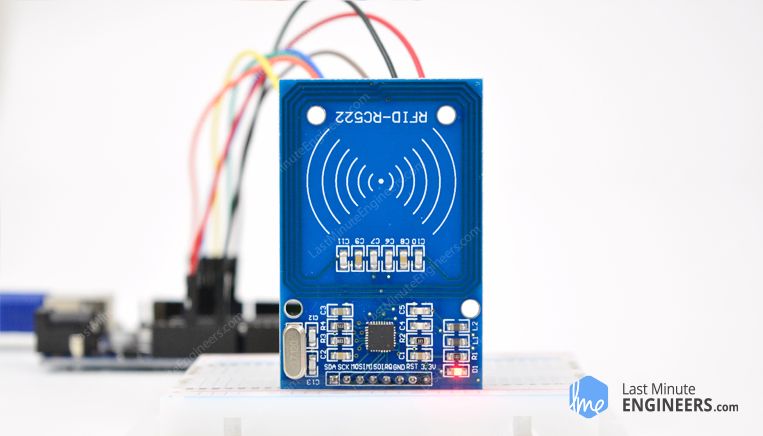
Learn about RC522 RFID Reader Writer Module along with its Working, Active Vs. Passive tags, Applications, Pinout, Wiring, Library, Code & Arduino Project
wanton badge
Or a more reasonable solution possibly a number pad to serve the same function as the keycard scanner
normal elm
This is a very cheap rfid reader costs less than $10
It uses SPI
which your raspi has 2 spi ports I think you can use
You can encode 1KB memory into a RFID tag
Some more some less
Hackerspaces sometimes set these up as sign in / sign out stations
wanton badge
An issue for us is how difficult it would be to code the rfid compared to a number pad.
normal elm
It's really really easy
wanton badge
Since we have very very little coding experience
normal elm
There are raspi / python libraries that make it easy
wanton badge
Plus the need for a custom card for the rfid might be an issue would it not?
Would we need an arduino or just the rpi?
We’d be using a rpi 3a+ most likely
normal elm
??
No
You program the cards
There is a write mode, there is a read mode for the RFID reader
You can use either
Raspi is easier I think
wanton badge
Okay, sorry just neither of us have any true experience with using a raspi or python. I joined this discord for help with this project
normal elm

Look at this
It's pretty easy
Learn about RC522 RFID Reader Writer Module along with its Working, Active Vs. Passive tags, Applications, Pinout, Wiring, Library, Code & Arduino Project
wanton badge
Thank you.
red tree
Is it safe for me to leave my raspberry pi 4 on overnight?
I want to host a couple of discord bots with it. It's in a small shelf, connected to my wifi router with an ethernet cable and it's connected to my power supply.
I'm worried -
- The raspberry pi explodes or comes on fire or something like that overnight, which is going to risk a lot for me.
- The Raspberry Pi gets damaged or destroyed in any way.
And... if I SSH into my raspberry pi and run a py script and then disconnect, does it continue running?
cyan mauve
int red_light_pin = 11;
int blue_light_pin = 10;
int green_light_pin = 9;
char data;

void setup(){
  Serial.begin(9600);
  pinMode(red_light_pin, OUTPUT);
  pinMode(blue_light_pin, OUTPUT);
  pinMode(green_light_pin, OUTPUT);

  RGB_color(255, 0, 0);
  delay(100);
  RGB_color(0, 0, 255); // Blue
  delay(100);
  RGB_color(0, 0, 0);
}


void RGB_color(int red_light_value, int green_light_value, int blue_light_value){
  analogWrite(red_light_pin, red_light_value);
  analogWrite(green_light_pin, green_light_value);
  analogWrite(blue_light_pin, blue_light_value);
}

void loop(){
  while(Serial.available()){
    data = Serial.read();
  }
  // Serial.print(data);

  if (data == '1'){
    RGB_color(255, 0, 0);
  }
  else if (data == '2'){
    RGB_color(255, 0, 0);
  }
}
Nothing in this file is running, I'm using pySerial to connect my Arduino up with discord.py.
But nothing in my .ino file is running.
Here are all the files I have:
Main.py file for discord.py core stuff: https://paste.pythondiscord.com/mozozulizo.py
RGB_Circuit_Code.ino file for Arduino: https://paste.pythondiscord.com/agifowojig.py
LED.py file for discord.py Arduino related commands: https://paste.pythondiscord.com/apojevolos.py
Note that some of the commands in LED.py do work. For example: close start reset all work.
I'm trying to setup discord.py with my Arduino to change an RGB LED's color.
 real terrace
Can I somehow attach a Lipo battery to an ESP8266 board in such a way that it will be the power source and it will also recharge when I plug it in a USB charger?
(the board doesn't have to work while charging)
 violet valve
@red tree Yes the script will continue if you disconnect from SSH. As for leaving it on, I've never had an issue. It's no more likely to explode and catch fire than a desktop computer is. Maybe don't leave it on something super flammable. And consider a heat sink or fan (plenty available for various Pis) if you're really concerned. Previous housemate had four Pi 0Ws in a very small but thick styrofoam cooler to get a baseline on environmental sensing for the basement, and didn't end up doing anything about them for four months. They ran and gathered environmental data from that cooler the entire time. No issues.
normal elm
@real terrace https://www.amazon.com/Micro-USB-Battery-Charger-Over-Discharge/dp/B01LHD9D7E I think this is what you are looking for
normal elm
If the battery is 3.7-4.1v, I don't know if that works for your application
It's a battery charging board with protection circuit that allows it to externally power some project
cyan mauve
I'm giving it 5v.
Well I'm connecting the arduino to my computer with a USB
If that's relevant.
cyan mauve
I'm kinda confused. Why do I need it?
I found something similar to what I'm trying to do on github: https://github.com/Lucas-Turner/DiscordArduinoRGB/blob/master/RGBarduino.ino
And he's not using anything besides his arduino.

GitHub
Remote controlled RGB LED using Discord. Contribute to Lucas-Turner/DiscordArduinoRGB development by creating an account on GitHub.
normal elm
You want to attach a Lipo to esp8266, this is a lipo charging circuit as well as output
cyan mauve
What's a lipo? Sorry if I'm not understanding. @normal elm
normal elm
@real terrace https://www.quora.com/Is-it-okay-to-charge-your-phone-through-a-power-bank-while-the-power-bank-itself-is-being-charged this will also work
Some of the answers make good points here, some don’t. Par for the course on Quora I’m afraid. The key point is that until your phone is getting near to finishing charging, then the chances are that the power bank battery is not charging much, if ...
XDDD
cyan mauve
xd
cyan mauve
What's up?
cyan mauve
😛
Can you read my above question? Maybe you can help? @normal elm
Still trying to figure it out.
normal elm
Is serial always available?
I don't know how C works really
It could be stuck in the while loop?
cyan mauve
Maybe but I don't think the entire file is working tbh.
normal elm
Probably whatever
cyan mauve
It's a .ino
normal elm
Which part is broken?
normal elm
I mean
cyan mauve
But if I use reset it does.
normal elm
There are 3 moving parts
cyan mauve
Right.
normal elm
I am trying to understand which moving part is broken
Or where the break down between the parts are
normal elm
When you open the arduino serial console, does it read the byte info correctly?
I don't know the default baud rate for python serial
normal elm
There is always some weirdness with sending data over serial in terms of formatting the data correctly
It could be the case your byte data format doesn't work
Verifying the data is being received -> processed seems to be the breakdown
cyan mauve
I mean I even tried downloading the repo and using it pretty much exactly the same way the guy does.
And his works 100%
But mine -- nothing.
But I think the entire file isn't working.
The enter .ino file.
normal elm
remove the while loop
cyan mauve
And replace it with?
normal elm
and manually set the data = 1 or two
normal elm
You want to make sure that it is actually doing anything
The Arduino programming language Reference, organized into Functions, Variable and Constant, and Structure keywords.
tawny fiber
You could just have the Arduino send an ACK followed by the command you gave it back to your bot so the bit knows wether the command was correctly transmitted and processed
tawny fiber
Furthermore it should be trivial to just hook up either putty or the Arduino IDE to that serial port as well so you can actually see what's happening on there
normal elm
ACK is a response for the purposes of verifying that commands were received
It's not trivial, it is easy but it takes some time
cyan mauve
So how to I do a 'ACK'?
normal elm
But nix is basically right
cyan mauve
Lemme try the thing you said first
normal elm
They are kinda noobish. Doing anything for the first time is like "AHH"
cyan mauve
void loop() {

data = 1

if (data = '1') {
  RGB_color(255, 0, 0); // Red
}
Yeah nothing happens lol
normal elm
data = '1'
cyan mauve
ohohohoh
tawny fiber
'1' the char has a fundamentally different Mensing than 1 the number
normal elm
It's np
tawny fiber
Furthermore = assigns and doesn't compare
cyan mauve
Yeah, I know. My bad. Lemme try it.
void loop(){
  data = '1';

  if (data == '1'){
    RGB_color(255, 0, 0);
  }
}
Doesn't work.
Idk if I'm missing something
But I don't think so
Idk why my reset command works but anything in the .ino file doesn't.\
Please fix me.
tawny fiber
Well you could just go into the Arduino IDE and openna serial console, then put a line Serial.println("I am here") to check whether communication between you and the Arduino at least works
cyan mauve
@normal elm Not true.
normal elm
You're too kind
tawny fiber
Well
Okay I guess
Arduino is by far the simplest and in open source probably most tested platform you'll find, you can be quite sure the problem is sitting Infront of the keyboard
cyan mauve
No I'm kidding, I'll probably quit for 10 minutes, eat, then go back to working on it.
But I really want to find out why it's not working
Did you by any chance look at my code above? @tawny fiber
cyan mauve
Yeah?
tawny fiber
Pyserial has default baud rate 115200 and your Arduino is talking 9600
tawny fiber
I'm gonna eat in the mean time I guess
cyan mauve
Sure, I'll ping you if anything happens, reply on your own time 😄
cyan mauve
@tawny fiber I have a different problem now...
The PWM's aren't providing any voltage.
Aren't they supposed to provide 5v's?
The LED just randomly stopped working.
tawny fiber
well that could also me that the PWM is too high frequent and you can actually see that its doing something
but measuring that without an osci or logic analyzer is kinda hard
cyan mauve
Well when I plug the wires into the + it works.
But when I plug them into the pwm's they don't.
Lemme get a schematic.
This is the circuit.
cyan mauve
Wym?
tawny fiber
it doesnt matter theyre PWMs
cyan mauve
Shouldn't they provide voltage?
I mean the circuit was working earlier.
Idk why it just stopped now.
tawny fiber
well as long as you dont tell them to be a PWM pin the atmega chip will just treat them like normal digital pins
tawny fiber
The Arduino programming language Reference, organized into Functions, Variable and Constant, and Structure keywords.
although the arduino way of doing PWM is kinda shit
in general
arduino is kinda shit
speed wise
tawny fiber
but i guess if youre on a python server that has a #microcontrollers channel you dont care about how fast you can get an arduino with regular c lol
sure i guess
cyan mauve
Lol I just wanna make an LED change color haha
So I don't understand how to tell them to be PWM pins
Because for some reason I feel like the arduino is broken
tawny fiber
the analogWRite part does that kinda automagically
tawny fiber
well
yes
but you cant find out what the issue is
becaus eyou dont have the equipment to debug PWM
cyan mauve
What's the equipment?
tawny fiber
osci or logic analyzer
tawny fiber
i dont think a multimeter is capable of debugging PWMs
at least not any multimeter i know
tawny fiber
well thats not said
coudl be your LED, could be your cables, could be that your code is wrong because of something
cyan mauve
Right, so what can I do to fix it?
tawny fiber
you cant do anything becaus eyou dont know and cant find out the issue
cyan mauve
Well there should'nt be any code.
It doesn't need code to turn the LED on
And I check everything and it's working
Besides the pwm's
I check the wire that connects the pwm to the resistor but there is no voltage.
tawny fiber
there might be voltage, your multimeter just cant measure it
because of how PWM works
cyan mauve
Oh?
tawny fiber
PWM is high frequent switching the pin on and off
so your multimeter cant measure that
cyan mauve
Right, so what are my options?
tawny fiber
in order to see that you need an oscilloscope or a logic analyer or something that can measure analog voltage faster than the PWM frequency of your arduino
tawny fiber
well i guess you can try another RGB led if you have one
tawny fiber
that would eliminate the error source RGB LED then
well that means either code, wiring or the arduino
cyan mauve
Okay we can rule out the wiring I think because it works when I plug the wires into the 5v and gnd.
But when I move it back to the pwm pins it stops working.
I closed all Arduino IDE'S and everything else that has code .
So it can't be the code.
So the PWM's might be broken but idk.
normal elm
I actually think you might be able to as long as you have protection diodes on each pin
hMMM
pliant moat
I dont think it will work since gpios are always relative to ground
might be hard to put them in series
pliant moat
the problem is that I wanted to power a 5 v relais with it. it actually works with 3.3 volts but the gpio current is too low
normal elm
raspi not giving out 3.3 ?
You could always boost convert or transistor your way to victory
pliant moat
Might as well order a 3 volt relay then, I had the 5 volt ones on hand so I tried it with them
pliant moat
I probably could, but I now I already ordered the relays
normal elm
pliant moat
I don't have diodes on hand however, so I'd have to order those
normal elm
No diode
pliant moat
ah i mean transistor
normal elm
Oh
boo
If you plan on doing a bunch of random work
I built a parts library for electronics, it's an investment if you are into the subject, I got this thing and it's been easy
pliant moat
I've got a transistor that says IRF4905 on it, apparently its rated for like 50V tho, would it work anyway?
cyan mauve
I mean nothing is working now.
Not even the LED
This can run without any code, right?
pliant moat
Is it harmful for a raspi if I wire two (or more) pins in parallel? I might be able to get it working with a higher current
tawny fiber
if you got kathode and anode wired up correctly yes
i mean
as you can see ther eis only a ground
and your digital pins
as long as there isnt any software on the arduino of course nothing is gonna happen
where is the power supposed to come from
but
if you wired up a GND and for example a 5v pin to one of those other pins it should light up in one of R G or B
cyan mauve
I fixed it, the problem is the code isn't running in my original program.
But when I ran just the .ino file in arduino ide it worked.
The problem with everything is that the .ino file isn't communicating with the .py file.
From the start ^
red tree
@red tree Yes the script will continue if you disconnect from SSH. As for leaving it on, I've never had an issue. It's no more likely to explode and catch fire than a desktop computer is. Maybe don't leave it on something super flammable. And consider a heat sink or fan (plenty available for various Pis) if you're really concerned. Previous housemate had four Pi 0Ws in a very small but thick styrofoam cooler to get a baseline on environmental sensing for the basement, and didn't end up doing anything about them for four months. They ran and gathered environmental data from that cooler the entire time. No issues.
@violet valve Thanks 🙂
violet valve
You're welcome!
violet valve
That's odd. I have a Pi running a script that controls DotStar LEDs and it stays going when I disconnect. I might not understand how it all works though.
I haven't done a lot with Pi's and Python scripts though. That's sort of the extent of my experience.
tawny fiber
@red tree looking into either tmux or screen or a systemd service to accomplish that, scripts should definitely not run once you disconnect from a ssh shell
. @violet valve for you too if you care....I dunno how your script keeps running but without one of the three it should not
real terrace
@normal elm Thank you very much 🙂
Now that you've linked this board, I've remembered that I've ordered one of these, just in case, for my 18650 batteries 🙂 So this is awesome news 😄
cyan mauve
@tawny fiber I fixed it!
tawny fiber
@cyan mauve yeah I already saw, good job!
cyan mauve
Ty! 😄
violet valve
@tawny fiber Thanks! I'm assuming I had help somewhere along the line and one of those things is happening, and I didn't realise it. That whole setup was created when I was only barely into programming, so there was a lot that was done that seemed pretty magical to me. I probably missed one of those things being set up.
normal elm
UH
Stepper motors have voltage rating btw
In this article, we will show how you can reduce voltage to any amount by using resistors in a voltage divider
circuit.
You can make a voltage divider which is probably fine for a low stepper, but it isn't good practice because the equation changes depending on the internal resistance of the stepper that changes depending on the work that the stepper is doing
pliant moat
Quick question: What current can a Raspberry Pi (Zero W) output on its gpio pins? Can I power a 0.36W relay with them?
pliant moat
Nvm, I just wired two outputs together and now it works
normal elm
I think for the raspi it is 3.3v at 40ma
with a max total output at 200?ma?
I would guess that it is the same as it is defined by the MCU architecture
Although typically you wouldn't want to approach that amount.
pliant moat
As I said, i just used two outputs and now my lightcontrol is working perfectly
hallow igloo
What are the advantages for Python on micro controllers? I always thought that microcontrollers used something like C/C++ or Java because of their speed...
Will even python work well on them?
I am honestly surprised...
vague crane
The advantage is you can program them with Python
open dock
the major advantage imo is the iteration speed of development. not having to wait on compilation is a breath of fresh air.
vague crane
More time to sit and scratch your head at the hardware side 🙂
tawny fiber
i mean for almost all projects here a equivalent c/c++/assembly/rust/whatever is popoular right now (ada?) program is gonna take a few seconds to compile too no? @open dock
bold socket
most microcontrollers don't have enough memory to fit a python interpreter and then by some way hold python files in it's memory
C, C++, rust and other languages compile to that microprocessor assembly then get assembled to machine code which is very compact
and machine code doesn't need an interpreter running it
normal elm
There are 50 cent micros that can really only be programmed in C that do some really amazing stuff that you would almost never be able to put python onboard
For consumer hardware products, the final product will roughly be 4x the cost of your Bom parts
and the lowest cost of a pythonable micro is like, $1.50- $2.50? I haven't exactly checked.
So you can save/lower the price of your final product by almost $8.00 if you use a better micro
And this is a real challenge being faced by python in embedded systems
but there are some cases where you are doing Business to Business or business to corporate where the biggest expense is developer time.
You might produce only 300 units max, which means the price difference between these micros is like, $8.00*300 = $2,400.00 dollars which is like, 48 hours of development time work
So if you can save 48 hours, it is worth using a more expensive controller
Which isn't unreasonable when you talk about not just implementing features, but revising features and doing a bunch of other stuff
And that is if you produce 300 units, sometimes you only produce 50 or less, and it becomes even more in favor of python development TBH
 distant trail
Theres plenty of 8 bit mcu that only have a few bytes of ram. Youd never be able to get python on it and theyre used quite extensively as its cheaper to use them than buy discrete logic ics
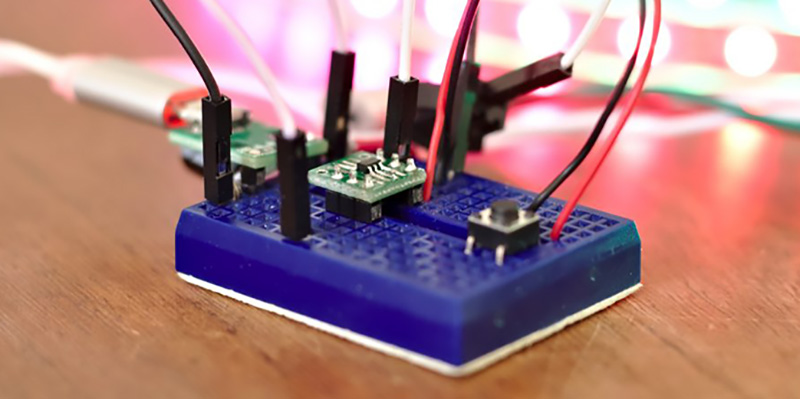
The Padauk PMS150C is a terrible microcontroller. There are only six pins, there’s only one kiloword of Flash, 64 bytes of RAM, and it doesn’t do multiplication. You can only write code…
 mild palm
Got to do a different idea for my coursework. The idea is that it's a tower with a screen and a camera with xyz rotation. You can use a mobile app to rotate the camera and zoom it and it will show the cameras output on a screen. There would be a mode for the camera to auto-centre a users face so that they'll be in the centre of the image that's taken.
I need a small LCD screen that works with a gen 3 rpi for the output. Does anybody have any recommendations?
Basic idea for now
I found this which may be good:
https://www.adafruit.com/product/1601

Is this not the cutest little display for the Raspberry Pi? It features a 2.8" display with 320x240 16-bit color pixels and a resistive touch overlay. The plate uses the high speed SPI ...
And would this be a decent camera?:
https://www.adafruit.com/product/3099

Snap, snap! The Camera v2 is the new official camera board released by the Raspberry Pi Foundation!The Raspberry Pi Camera Board v2 is a high quality 8 megapixel Sony IMX219 image sensor ...
mild palm
I also somehow need a way to have 3 axis of rotation with said camera
Was thinking 3 servos but then the wiring of the camera would get in the way
hallow igloo
i always wondered if i could take an old phone screen, with the digitizer, and use it on a raspi
do they all have the same number of pins or are some incompatible
normal elm
You might want to use something like this
Also, that raspi camera is something I used to do really good opencv work on.
I personally like it
(That camera platform is 'okay' at a best, it's a bit loose but it can get the job done..kinda. Of course you can always spend more money to get a better setup but maybe that isn't the point)
 karmic parrot
Hello i have a problem with gpio input floating values
Someone can help me with resistors etc?
normal elm
@karmic parrot Input floating values?
OH
Sure.
So what you do is connect the floating point GPIO to a 10k resister either tied to VCC or GND
Depending if it you want the GPIO normally high or low
stuck thicket
WE ARE LIVE! SHOW AND TELL! https://youtu.be/iFtLRo6kqZ8

To show and share your project at 7:30pm today, view the chat or in discord https://adafru.it/discord and look for the JOIN link to join.
For best results be on a wired connection and have a headset and mic!
stuck thicket
WE ARE LIVE! ASK AN ENGINEER! https://youtu.be/B8NTcZsA96U

Multistreaming with https://restream.io/?ref=81Mn2
Visit the Adafruit shop online - http://www.adafruit.com
LIVE CHAT IS HERE! http://adafru.it/discord
Adafruit on Instagram: https://www.instagram.com/adafruit
Subscribe to Adafruit...
mild palm
@stuck thicket what exactly is Adafruit. I’ve seen it pop up as a company that sells hardware, in general for Cura Ultimaker (3D printing software) and for Circuitpython
stuck thicket
@mild palm please check out https://www.adafruit.com/about that's all about what we do and who we are, an open-source hardware company that manufacturers electronics in NYC, USA - 100% woman owned
Adafruit Industries, Unique & fun DIY electronics and kits : - Tools Gift Certificates Arduino Cables Sensors LEDs Books Breakout Boards Power EL Wire/Tape/Panel Components & Parts LCDs & Displays Wearables Prototyping Raspberry Pi Wireless Young Engineers 3D printing NeoPixe...
mild palm
Ah, cheers
 regal belfry
heya, total rasp pi newbie :D i ordered an LED matrix but have never put anything on to the pins
it feels like its not really "clicking" in. I cant put it deep enough so that it holds + the screws would be too short to fixate it
can someone maybe help me with this without me breaking the pins of the pi :D?
this doesnt feel right ...
normal elm
@regal belfry You need to make sure that like
the pins are in all the way just based on how far they've gone into the holes on the hat (led board)
There could be some extra distance and maybe the screws can't reach far enough
But that just speaks to the bad engineering of whoever made the hat IMHO
Maybe it is supposed to fit, maybe ti sin't ?
it isn't?*
cyan mauve
How much voltage can an arduino give off?
I want to use a 12v relay with it, is that possible?
mild palm
I’ve found this camera pan-tilt mount and it says it can fit a “28*28 camera”. What on Earth is that?
stuck thicket
The biggest worldwide online Show and Tell begins Wednesday March 18th, 2020 at 7pm ET
https://youtu.be/VmVkX_7PkLs
https://discord.gg/adafruit

To show and share your project at 7pm today, view the chat or in discord https://adafru.it/discord and look for the JOIN link to join.
For best results be on a wired connection and have a headset and mic!
 red hinge
@cyan mauve depending on the board, actual ones are just 3.3v,
UNO and MEGA operates a 5v
if you want to control a 12v relay I suggest you to use a transitor to control the relay coil.
stuck thicket
The biggest worldwide online Show and Tell begins NOW! Wednesday March 18th, 2020 at 7pm ET @stuck thicket #showandtell PLEASE SHARE! https://youtu.be/VmVkX_7PkLs
To show and share your project at 7pm today, view the chat or in discord https://adafru.it/discord and look for the JOIN link to join.
For best results be on a wired connection and have a headset and mic!
stuck thicket
WE ARE LIVE! ASK AN ENGINEER! https://youtu.be/WOGu9LctYXE

Multistreaming with https://restream.io/?ref=81Mn2
Visit the Adafruit shop online - http://www.adafruit.com
LIVE CHAT IS HERE! http://adafru.it/discord
Adafruit on Instagram: https://www.instagram.com/adafruit
Subscribe to Adafruit...
 noble flare
Arduino cant run python though?
I have spent about 8-9~ hours looking at a bunch of different micro-controllers
Has anyone tried M5STACK?
normal elm
It looks like it is something made for children
Maybe some people are developing shit for it
Tries to be a esp32 version of an arduino
HMm
 grim narwhal
@noble flare are you looking for a board to run Python, MicroPython or CircuitPython ?
BRB...
noble flare
The best point of the board is how nice it looks without any extra work
I wish it was able to be coded a little more professionally though
It runs a sort of python but you still need to use the kiddies IDE for it to work
 little field
why can my pi host a vnc for my phone but not my computer
 wind tinsel
Could I get some help with micropython's uasyncio library?
 steady juniper
just ask. if someone knows, they'll reply
wind tinsel
I'm trying to build out a control module for a air hockey table using a PyBoard. I understand the goal sensors (ir sensors) and air control (relay), but first i need to figure out how to fork the countdown timer into its own thread. I found uasyncio, but can't wrap my head around where to put the various calls.
Trying to get uasyncio working on a PyBoard, but don't know where to place the various calls and methods. Basically want to thread off a timer while checking sensors.
  ...
    async def countdown():
        # init min/sec to any int > 0
        min = 5
        sec = 0
        endTime = 60 * min + sec + utime.time()
        enableColon = True
        while True:
            # update the 4x7seg with the time remaining
            min = abs(int((endTime - utime.time()) / 60))
            sec = (endTime - utime.time()) % 60
            print(str(min), str(sec), sep=':' )
            enableColon = not enableColon  # alternately blink the colon
            tm.numbers(min, sec, colon = enableColon)
            if(min + sec == 0):  # once both reach zero, turn off relay & break
                ## stopFanRelay()
                break
            await uasyncio.sleep(500)

...
    # clock init check
    startClock = False

    # start time via select button
    while True:
        # Only run the clock once, regardless of button presses
        if(button.value() and (not startClock)):  # Start
            startClock = True
            ## startFanRelay()
            loop = uasyncio.get_event_loop()
            loop.create_task(countdown())
            break

    ### thread countdown clock
    loop = uasyncio.get_event_loop()  #??
    loop.create_task(countdown())   #??
    loop.run_until_complete(countdown()) #??
where do I put the loop init, run until, and create task lines?
stuck thicket
we are back (sorta!) https://blog.adafruit.com/2020/03/22/covid/

Adafruit Industries - Makers, hackers, artists, designers and engineers!
Please note: We are back! Sorta … We are Shipping a limited number of orders for health care professionals / urgent needs only. All other orders are being held for now. Adafruit is a 100% wom…
 topaz bridge
any body here use miropython
normal elm
I'm looking to get into it
 finite furnace
What is an average rpm and torque for an RC car motor?
 woeful thunder
Hello I have a problem with my Raspberry Pi 4 Model B...I had used it about a week ago and it worked fine but today I've turned my raspberry pi on and it didn't boot up so I thought it is just something wrong with SD card so I will change it but it did not helped I have tried Reinstalling os on SD cards but still unsuccessful. I think something is wrong with Raspberry cause when it was without SD card there was no green light showing.
stuck thicket
WE ARE LIVE! SHOW AND TELL! https://youtu.be/Sv2-kXnGyag

To show and share your project at 7pm today, view the chat or in discord https://adafru.it/discord and look for the JOIN link to join.
For best results be on a wired connection and have a headset and mic!
 rugged jolt
grim narwhal
rugged jolt
grim narwhal
I'm lurking too... Feels more like the Adafruit repost channel... I'm surprised there's not a MicroPython Discord server covering all the boards, major language forks...
vague crane
There's plenty of conversation & development feeds for CircuitPython on Adafruit's server
You can find an invite in #315249263103967242
grim narwhal
I'm on there too... 😉 But I'm not using any Adafruit boards (yet)
bold socket
@stuck thicket can i ask a question?
 cunning grotto
hii someone here maybe did projects that deals with rpi3 as server which talks with 5 clients via wifi? thnx
grim narwhal
Hi @cunning grotto what OS are you running your RPI3? I think you should jump over to #unix and ask a more specific question about your problem \ thing you're tying to do.
cunning grotto
ok im need to build server on rpi3 which at start sends initaliztion to 5 rpz clients remotly via wifi using sockets/socketio and each client is rpz which connects to couple of sensors like accelemetor and ultarasinic and make some analyze and than sends back to server the results for analyze at server side
os is NOOBS for all rpi(UNIX)
grim narwhal
@cunning grotto By RPZ you mean you have all Raspberry PIs ?
cunning grotto
yers rpz->rpi zero w
grim narwhal
@bold socket if you want to ask adafruit a question, check the pinned topics, there's a person in the channel you can @. I don't want to mention them by name.... I'll let you do that.
cunning grotto
i need a backbone script for server and clinet for the situation i described
grim narwhal
OK @cunning grotto My answer would be "write it all in python" but If there is an off the shelf script or command-line tool for you to use, the folks in #unix would be the ones to know. I would ask there.
cunning grotto
ok at the moment im using sokcetio python for communictaion between server and client
grim narwhal
OK, so to help you a long keep in mind you have a Python Socketio question. That you're using a raspbery Pi or Wifi is not really important. Since you're already coding, what is your Python SocketIO question. What have you tried so far and what's not working ?
cunning grotto
@grim narwhal thnx for reply my question
how can i specify on server which client i want to send message
on sio.emit()..
grim narwhal
I've not built anything down at the Socket layer so I don't have a specific answer for you sorry.
I did find this nice looking tutorial though https://realpython.com/python-sockets/

In this in-depth tutorial you'll learn how to build a socket server and client with Python. By the end of this tutorial, you'll understand how to use the main functions and methods in Python's socket module to write your own networked client-server applications.
cunning grotto
@grim narwhal i know this article but it doesnt help me much(im using socketio)
but if you know about script using this info that would works for me i would like to know thnx !
althogh i didnt understand the subject of the selectors there becasue im using multiple comm of clients (1 server to 5 clients)
 burnt spear
I am working on a project that will have a total 2 ds18b20 water proof sensors. I have look for examples on coding them with Micropython but have only found how to read one. I have all the bytearray for each sensors. Looking for a little guidance coding all three. bytearray(b'(e\xedU\x08\x00\x00|')
22.875
bytearray(b'(l\x05V\x08\x00\x00\x86')
22.125
grim narwhal
@burnt spear what board are you running micropython on?
burnt spear
Esp32
cunning grotto
this is my flow chart to my problem(1 server vs 5 clients) can anyone help please?
 floral spruce
does anyone here have experience controlling arduinos with python?
just wondering if its worth using python or if i should just learn arduinos version of c++
floral spruce
nevermind i'll just use a raspberry pi
 lean valve
 long orbit
@grim narwhal There is a MicroPython Discord server but it is very quiet. The slack server is more active.
thanks @lean valve !
I believe this is how to join the MicroPython slack: https://slack-micropython.herokuapp.com/
@bold socket I can answer adafruit questions. (I work for them.) Feel free to mention me when asking your question. Please include your full question so we can reply even when you aren't around.
grim narwhal
Thanks @long orbit . Its a shame they're using Slack. I won't use it unless it is required for work\client.
https://www.eff.org/deeplinks/2018/02/revolution-and-slack

Electronic Frontier Foundation
UPDATE (2/16/18): We have corrected this post to more accurately reflect the limits of Slack's encryption of user data at rest. We have also clarified that granular retention settings are only available on paid Slack workspaces. The revolution will not be televised, but it may...
long orbit
@grim narwhal Yup, I much prefer Discord due to the account madness of Slack. The MicroPython forum is the other place I follow.
grim narwhal
@burnt spear Here's an ESP32 Tutorial for you about reading one or several DS18B20 sensors.
https://randomnerdtutorials.com/micropython-ds18b20-esp32-esp8266/
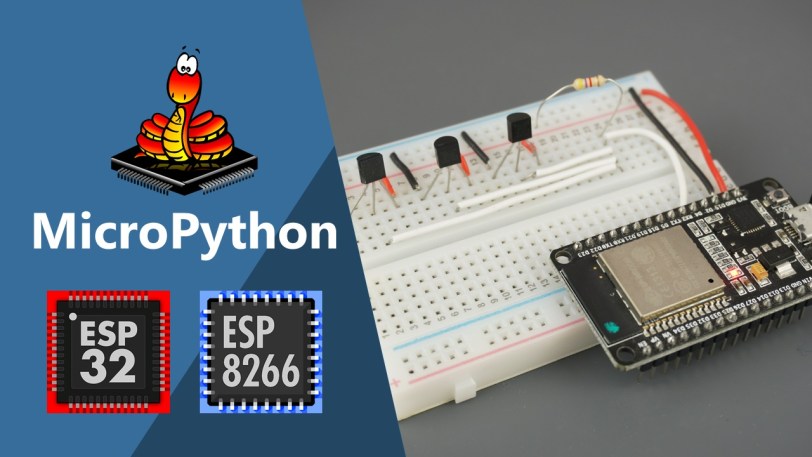
DS18B20 Temperature sensor with ESP32 and ESP8266 using MicroPython. Learn how to read temperature from one or multiple sensors and build a web server to display sensor readings.
does anyone here have experience controlling Arduinos with python?
@floral spruce I know you mentioned you were going to use a Raspberry Pi. If you want to look at a microcontroller solution, I suggest you look at Adafruit's boards which support CircuitPython. CircuitPython is the same (sorta) thing as a MicroPython and it has INFINITELY better (and I mean WAY WAY better) libraries for all the other components you may choose to use in your project.
stuck thicket
WE ARE LIVE! SHOW AND TELL! https://youtu.be/EO2z-IKRQmA

To show and share your project at 7:00pm today, view the chat or in discord https://adafru.it/discord and look for the JOIN link to join.
For best results be on a wired connection and have a headset and mic!
stuck thicket
WE ARE LIVE! ASK AN ENGINEER! https://youtu.be/N0mSnLsiEAw

Adafruit Industries, Essential service and business: Critical Manufacturing, NYC – Executive Order 202.6
https://adafruit.com/covid
How to place an essential, COVID-19 related order at Adafruit
https://adafruit.com/covidorders
noble flare
@woeful thunder Can I have some more information. Have you checked the SD card? maybe you should reflash it
woeful thunder
Well So I have SanDisk SD Card 32 GB and SanDisk SD Card 16 GB...I have reflashed both of them to FAT32 format like 4 times using some converters and then the Raspberry Pi Downloader to reflash it and then on the 16 GB downloaded Bootloader and on the 32 GB Raspbian...I've repeated this process 5 times
bold socket
cunning grotto
hey somone can help with ADXL345 accelemetor i need to understand his readings because i see that if i put him on x axis so i get readings for example of 10 approximetly and if upside down i get -10 aproximetly can someone explain it? and also my usage for this sensor is to indicate if was a impact/coliision with somone.. i mean i use it as an obstacle which man need to pass so if he collids it so it should noticed me about that by initating buzzer for 1 sec /led on...thnx for the help
 young phoenix
I've not built anything down at the Socket layer so I don't have a specific answer for you sorry.
I did find this nice looking tutorial though https://realpython.com/python-sockets/
@grim narwhal Thks
In this in-depth tutorial you'll learn how to build a socket server and client with Python. By the end of this tutorial, you'll understand how to use the main functions and methods in Python's socket module to write your own networked client-server applications.
 fathom jewel
Does anyone here know what is the version of python installed on latest raspbian OS?
 dark hornet
hey guys I have a question about Real Mode. Wikipedia says in Real Mode cpu can only access 1 mb of ram. Is it true for modern computers as well considering address bus width and registers being 64 bits?
 wheat loom
So, I made an hotfix for an arduino script used inside a button box, but I don't have a physical access to the board now, because our customers have it, and they aren't really close to us. So I take the compiled binary of the code, the uploader executable, and a small batch script, and packaged them. But, the thing is that the board we use, an arduino Leonardo have an active connection to the computer to be able to send button presses, and the arduino IDE uploader (not the upload executable that I've bundled) send a small empty package to the board to make it reboot accept the new code. I tried to include it in the batch script, I used a function that loop over all the connected devices, and when it found the arduino, send the package. But (they is always a but) most of our customers use a laptop, and it happens that the laptop only list one generic USB connector, and all connection goes through here, so I can't access the board directly. I am pretty tired about this, do you have any fucking idea of a possible workaround? (that wouldn't involve reading the arduino IDE source code, which I will probably do)
 tall birch
@fathom jewel 3.7.3
stuck thicket
WE ARE LIVE! SHOW AND TELL! https://youtu.be/XYHLkdl-BB8

To show and share your project at 7:30pm today, view the chat or in discord https://adafru.it/discord and look for the JOIN link to join.
For best results be on a wired connection and have a headset and mic!
stuck thicket
WE ARE LIVE! ASK AN ENGINEER! https://youtu.be/tefm1uRHldI

Adafruit Industries, Essential service and business: Critical Manufacturing, NYC – Executive Order 202.6
https://adafruit.com/covid
How to place an essential, COVID-19 related order at Adafruit
https://adafruit.com/covidorders
 hexed river
 untold sparrow
buy an arduino
 primal geode
Is it possible to convert a linux program that uses socketcan over to windows?
For example, 'canprog' supports the PEAK PCAN Usb device via socketcan, and that hardware works works with linux and windows...
but I have no idea if it would be trivial to make 'canprog' work under windows, or if it would be a major effort.but I have no idea if it would be trivial to make 'canprog' work under windows, or if it would be a major effort.
stuck thicket
WE ARE LIVE! #DeskofLadyada https://youtu.be/gdkvf2nxx20

Adafruit Industries, Essential service and business: Critical Manufacturing, NYC – Executive Order 202.6
https://adafruit.com/covid
How to place an essential, COVID-19 related order at Adafruit
https://adafruit.com/covidorders
 final geyser
 real terrace
Can anyone help me to set up an SPI communication between a PS2 controller and a ESP3286 board using micropython. There is a C library that does it, but I don't know C. I think I have a good understanding of how it should work in micropython, but it doesn't 😐
 foggy burrow
@cunning grotto Acceleration due to gravity is 9.8m/s/s
what you were seeing on your accelerometer was basically gravity
real terrace
Pleeeeeease 😄
 gleaming copper
hi, im trying to make a raspberry pi move a dc motor using an ESC but somethings not working. Im using the L298n H-bridge ESC and 2 fairly cheap motors that run off 1.5 - 6 volts. Ive connected a 9 volt battery to the ESC and then the 2 motors to the ESC and then i connected the ESC to a raspberry pi 3 model B. So far ive attempted to program the ESC using python with PWM and a light goes put for however long i program it to be running indicating that it recieves the message but then neither of the motors do anything?
import RPi.GPIO as gpio
import time

gpio.setmode(gpio.Board)
gpio.setup(7, gpio.OUT)
p = gpio.PWM(7, 50)

p.start(50)
time.sleep(5)
p.ChangeDutyCycle(100)
time.sleep(5)
p.stop()

gpio.cleanup()
when i change the frequancy and pulse width it sort of quitly vibrates/buzzes
i have no idea what going on
real terrace
Do the motors turn if you connect them directly to 9V? It might be too much for them if they should be powered 6V max.
@gleaming copper
I have no experience with RPi PWM, but my ESP3286 board won't turn the motor with PWM if the frequency is too low.
But when I crank it up towards 60%-70% it starts rotating.
gleaming copper
the motors work when i use them directly with the 9volt battery but once i plug them into the esc and plug in the battery it doeasnt
what frequancy is thatr?
@real terrace
real terrace
I can set the max number I usually put it to 1000 and then the motor starts spinning at 600-700, depends which one.
If the frequency is too low it doesn't have enough power to turn. I've also heard the kind of noise you were talking about (maybe? 🙂 )
gleaming copper
okay so, ive tried all those frequancies but they all just give me different noises depending on how high i go
if i set the frequancy to 1, i can feel it start to sort of nudge a bit but them if i increase it it just stops and buzzes
and the light on the ESP flashed everytime it moves
@real terrace
real terrace
Have you tried it with just one motor at a time?
gleaming copper
yeah, thats what im doing at the moment
real terrace
You have the A and B motors enabled with those pins?
gleaming copper
which pins?
enable A has a cover which connects 2 pins that i have left on because they have not made a difference when i took them off
same with enable B
real terrace
Ok, yes those ones.
gleaming copper
what do i do with them?
real terrace
You need to have them on. If you remove one, you disconnect that part from the board, so if oyu only need to turn one motor, you don't need the other half to drain the power.
gleaming copper
ok
real terrace
Is this: p = gpio.PWM(7, 50) meaning that you have pin 7 and 50 is the frequency?
gleaming copper
yeah
real terrace
And then p.start(50) tries to run on frequency 50?
real terrace
Ok, which you set to be the max
gleaming copper
the max is 100
open dock
0 to 100 is the duty cycle, not the frequency.
real terrace
Have you tried to set it low? like 10 or so?
gleaming copper
when i set it to 1 it buzzes slightly and when its at 100 nothing
yeah the duty cycle is what i meant
real terrace
maybe @open dock can help out? I'm not familiar with RPi 😄
gleaming copper
the buzzing gets quiter the higher the duty cycle
open dock
i'm reading up a bit. never driven an ESC from a Pi. and, is this motor brushless, or brushed?
gleaming copper
i think its brushless
but im not 100%
its those
i dont know if theyre brushed or not
real terrace
Measure the resistance with a very low voltage (100 mV). Most DMMs will work. If the resistance is high (more than a few kilo-ohms) it is probably brushless. If it is low (less than 100 ohms) it probably has brushes.
open dock
i've never seen an ESC drive a small hobby motor like that. not saying its wrong, just never seen it.
gleaming copper
i didnt want to get an expensive motor because i just want to build a simple little robot with 2 wheels