#microcontrollers
1 messages · Page 12 of 1
 steel aurora
 stuck thicket
@steel aurora working with other companies in EU that could deliver them, shipping sub boxes internationally does not work out well so we're only able to offer to USA and a few locations outside of that. that said, we have a stand-alone box for sale after each one too, so it's always available in some way.
steel aurora
@stuck thicket that's true, I will probably order a few of the standalones at some point, but part of the appeal is not knowing what you get! everyone loves a mystery box.
 vague crane
This could be a neat PyPortal thing https://www.confluent.io/blog/noise-mapping-ksql-raspberry-pi-software-defined-radio

Confluent
Our new cat, Snowy, is waking early. She is startled by the noise of jets flying over our house. Can I determine which plane is upsetting her by utilizing open source streaming solutions (Apache Kafka®), KSQL (the streaming SQL engine for Apache Kafka) and a Raspberry Pi?
 opal mason
I'm visiting one of the Dutch Adafruit distributors tomorrow to pick up some parts
So I can join in the fun as well
vague crane
My pyportal comes tomorrow!
vague crane
I have poor impulse control
opal mason
I have a poor man's bank account
vague crane
That's what credit cards are for!
 lavish echo
Credit cards aren't common over here.
vague crane
It was my first adafruit purchase in 6 years 
 past epoch
my son made his first thing using CPE
found a project and guide on makecode
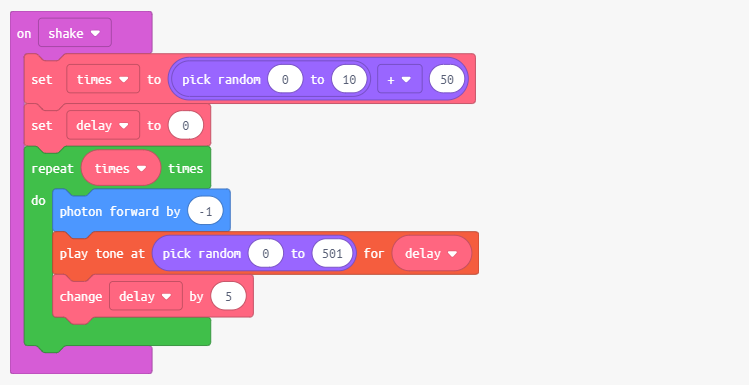
looks very user friendly
now when does my pyportal get here
Estimated Delivery:
Friday, March 01, 2019
By End of Day
I just love those shipping times
stuck thicket
SHOW AND TELL is LIVE NOW #showandtell - https://youtu.be/zCPMfCjFZeE

To show and share your project at 7:30pm today, view the chat here or in discord https://adafru.it/discord and look for the JOIN link to join the Google Hang...
stuck thicket
LIVE! 10% off all items in stock code is USBC expires 2/27/19 @ 11:59pm ET #askanengineer https://youtu.be/1LV2_QvuWN4 & http://www.adafruit.com

Multistreaming with https://restream.io/ ASK AN ENGINEER 2/20/19 LIVE! ----------------------------------------- LIVE CHAT IS HERE! http://adafru.it/discord ...
Adafruit Industries, Unique & fun DIY electronics and kits : - Tools Gift Certificates Arduino Cables Sensors LEDs Books Breakout Boards Power EL Wire/Tape/Panel Components & Parts LCDs & Displays Wearables Prototyping Raspberry Pi Wireless Young Engineers 3D printing NeoPix...
 clear vapor
I am stuck at an hackathon and I need help with raspi! I tried to do object detection but my pi cam stopped working! so I need anything that could be related to security
steel aurora
you may find more expeditious help over at https://discord.gg/adafruit in their #help-with-raspberry-pi channel
unless it's specifically related to python code you're writing for the device
steel aurora
give that a try. they're great.
 violet valve
@steel aurora and anyone else who might like to know, FYI, much of the Adafruit Discord server is US based and it's often quite slow in what would be the "middle of the night" in most of the US. Same with weekends, depending on the weekend. Most of our server is made up of community members, so it's most active when they're available. So you might get an answer at off times, but it's more likely that you won't.
steel aurora
good to know
we have better coverage during EU primetime here
but we don't have much coverage at all for raspberries I think.
no matter what time it is
steel aurora
hopefully at some point, we will.
violet valve
I haven't done much with Raspi on our server, but I've seen a lot of conversation going by so there's at least discussion. Whether it's been helpful or not, I don't know. We added that channel recently because we felt there was enough discussion to warrant it.
opal mason
Rpi's are very diverse. Some people use it as some kind of mini-computer and mainly have linux/rasbian questions; others are busy with the GPIO pins and displays and general maker stuff
I was active on the raspberry pi forum a couple of years ago when I bought mine
 heady crescent
i should set up my rpi
i got one for christmas but i haven't set it up because I don't currently have proper wifi (i'm using my comcast account, which is set up at my brothers' address, to leech off my neighbors' xfinity hotspot thing)
 patent barn
My RPI is going to be a bedroom screen controller and a docker runner with ansible
Although I don't know if the PI is powerful enough to deal with that
 languid hill
i dont know about docker on the pi, but it can easily display graphics and act as a touch input
at least, it has the power. making it do that easily is a different thing
docker is just containers though which are pretty light weight. technically it shouldnt be much of an issue in of itself.
stuck thicket
 open dock
🎉 new toys are the bestest!
 tulip comet
@opal mason keep us updated on the shenanigans you make with it :D
past epoch
@opal mason for my pyportal im making a weather status thing. the only important thing for me is that "will it rain from now and until i get home from work" if this is true, bring an umbrella. I hate rain
opal mason
The last time I was near where you lived there was a lot of rain, so that's understandable
past epoch
I used to have a microcontroller with a single LED that lighted up whenever more then 0.5mm rain during the next 9 hours was predicted. but I lost it when I moved to my new house
I also need to build a loudness sensor hand stick it on the wall in front of my son, he yells while playing fortnite. Not sure what I need for that project.
does the CPE have mic on it?
opal mason
1 x Sound sensor (MEMS microphone)
brilliant 😄
opal mason
I'm just preparing mine now
past epoch
@stuck thicket was kind to send me 2-3 extra CPE for free 😄
guessing there is a tier system for getting some extra things 😄
opal mason
You did buy a lot of stuff in their store
Look at the beautiful stuff you've got
I probably need to build CircuitPython, right?
past epoch
not sure, I helped my son with his, he had to flash the board with a firmware, guess it will run python files out of the box
opal mason
Was that on Windows? I'm on Ubuntu and following the Linux guide
past epoch
yes, on windows. but he used a visual code editor for this project. guess the firmware was to read those files
opal mason
I think you need the firmware anyway, so the board works with circuitpython
Now that I think of it, I probably could have just downloaded it and loaded it onto the board instead of building it myself
But, hey, building stuff is also interesting
Probably nice to know as well, for if I ever want to customize something in CircuitPython and build that
So far, the process is really straightforward
So far, so good
I've build and moved the firmware to the board and it has restarted itself and now mounts as CIRCUITPY
Cool
I love this
past epoch
im going to finish laying out my new floor in my electronics workshop and then ill do some soldering.. 😄
opal mason
It works! I've got the most useless code running on my board, but, hey, flashing leds rhythmically is nice
opal mason
So, it's easy to play tones by frequency and duration
Now I obiously have to write something to play a random song at the press of a button
opal mason
That looks so good. You 3d-printed that, right?
I've been playing around with the Playground Express I've picked up a couple of hours ago
Wrote a simplistic music script for

Wrote a very simple script to play songs on the Adafruit Playground Express. There's a slight delay between the tones, so the rhythm isn't that tight, but as...
past epoch
yes and cool
tulip comet
that's pretty neat ves! it's a good starting point :D
opal mason
It's now also doing a light show alongside it
It's fun to experiment with this little thing
steel aurora
@opal mason I'll be mailing you a dock just like that soonish. if I don't break all those microusb connectors trying to solder them.
opal mason
Oh, that would be so cool
opal mason
Okay, I've ran into a little problem. I'm trying to program a Pomodoro work timer on my Playground Express and it works very well, except for one thing. Whenever I instantiate my class with four arguments, it throws a RuntimeError: maximum recursion depth exceeded:
Traceback (most recent call last):
  File "code.py", line 1, in <module>
  File "/lib/pomodoro.py", line 3, in <module>
  File "adafruit_circuitplayground/express.py", line 700, in <module>
  File "adafruit_circuitplayground/express.py", line 123, in __init__
  File "adafruit_lis3dh.py", line 327, in __init__
  File "adafruit_lis3dh.py", line 106, in __init__
  File "adafruit_lis3dh.py", line 132, in data_rate
  File "adafruit_lis3dh.py", line 306, in _read_register_byte
  File "adafruit_lis3dh.py", line 331, in _read_register
RuntimeError: maximum recursion depth exceeded
The instantiation:
from pomodoro import Pomodoro

pomodoro = Pomodoro(work=0.1, sbreak=0.2, lbreak=0.05, usb_down=True)
pomodoro.start()
The __init__ in pomodoro.py:
from time import monotonic, sleep

from adafruit_circuitplayground.express import cpx


class Pomodoro:
    def __init__(
        self, work=45, sbreak=5, lbreak=0.2,
        schedule=["w", "sb", "w", "lb", "w", "sb", "w"], usb_down=True,
    ):
        self.work_duration = work
        self.short_break = sbreak
        self._long_break = lbreak * 60
        self.schedule = schedule

        self.intervals = {
            "w": (self._work_duration, (0, 0, 5)),
            "sb": (self._short_break, (0, 5, 0)),
            "lb": (self._long_break, (0, 5, 5)),
        }

        # Settings related to idle led
        self.idle_update = 0.5
        self.idle_led = 0
        self.idle_time = monotonic()

        # Decide start_led based on orientation
        self.start_led = 4 if usb_down else 9
        self.stop_led = 5 if usb_down else 0
If I call it with three arguments, it's fine, but as soon as I add a fourth (whichever permutation), it throws the Exception above
Is that because of a memory limitation I'm not aware of?
I guess probably, I'll experiment some more in the mean time
opal mason
I'm now just setting the attributes after instantiating the object. That works fine, but I do wonder what's causing the Exception.
 lean valve
That stack trace seems to indicate it's the import that threw the exception, rather than the instantiation
Which doesn't make a whole lot of sense
Given that you said changing the instantiation parameters eliminates the exception?
But code.py line 1 and pomodoro.py line 3 is before the instantiation
opal mason
Yes, that's what's weird and I don't understand it
I'm only changing the number of arguments when instantiating
I'll try to isolate it later in a simple file without any other code in it
open dock
@opal mason appears to be a known, and fixed in 4.x, issue. the number of arguments may be tripping the stack limit. https://github.com/adafruit/circuitpython/issues/1085
although, if you're on 4.x (couldn't tell from your posts), then obviously its not fixed. 😄
open dock
you could give the latest beta a try...
opal mason
Yeah, I will. It's not really an issue for me, I was mainly wondering what was going on
I've had the Playground Express less than a day, so it could very well have been just me
open dock
it is a confusing message, given the possible causes. there is some discussion, but its unresolved. https://github.com/adafruit/circuitpython/issues/1086
opal mason
Ah, yes, I did see that issue, but I'm new to this, so I wasn't really sure if it was related to my problem
Thanks for answering my question, I'll look into the beta of 4.x
open dock
i've watched a few of those recursion issue threads. so i knew there'd be some meat on the bone... 😄
opal mason
So, I wrote a little Pomodoro script for the Circuit Playground Express. It's a timer for the Pomodoro time management technique that works by breaking your work down into interals with breaks in between. It's something I use almost every day to keep me focussed on my work and I think I'm going to like this new toy.
At the moment, it's fairly simple:
- It's has an idle mode with spinning LED animation;
- During a work session, the LEDs will count down the remaining time and you can pause the current interval (blinking LEDs) or skip ahead to the next;
- You can toggle sound notifications by using the onboard switch.
The settings (work session schedule and interval durations) can only be set with a PC at the moment, but I'm going to add functionality for that in the future. I just haven't decided on a strategy for that yet.
I've made a video with short interval durations to show it, but the quality of my phone's camera is crap: https://www.youtube.com/watch?v=KFPAKBqlgh0
The code is here: https://github.com/SebastiaanZ/cpx-pomodoro
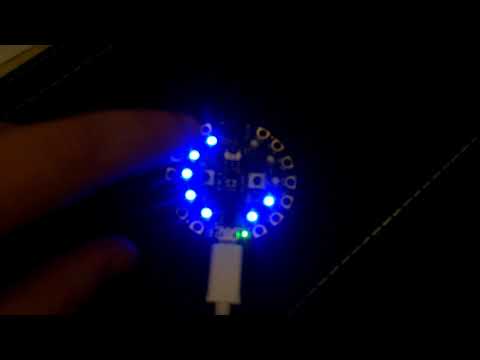
Pomodoro application written in CircuitPython 3.0 for the Adafruit Playground Express. For this video, I've set the schedule to "work session - short break -...
languid hill
@opal mason so did you do all that stuff with cexpress so that you can override the single press functions to do the monotonic stuff?
opal mason
I wanted to add a single press property yeah, but I actually just wanted to know how to do it
So I can add more custom functionality later
Tried to subclass it first, but it complained about multiple hardware bindings since the original module already instantiates the class
So, I just downloaded the .py from GH, removed the instantiation at the bottom and cross-compiled it again
languid hill
ah yea icic
patent barn
I might be being silly here...
But isn't python not really the language that would be most optimal for this sort of thing?
I understand it's uses, but there are better languages for this... right?
languid hill
depends on your goal
python is more optimal for faster and easier coding
but c++ is going to be more optimal for performance and memory usage
a lot of stuff is circuitpython is handled by c++ code or buffers anyway. like sending data to serialports/usb and a lot of the protocol code
so if you structure your code around just telling the micro what to do and some basic logic, python is fine
open dock
yeah, the biggest "selling points" are iteration speed, and ease of learning.
patent barn
Yeah ok, so python is for the "ease of use"
Which is fair, opening up stuff like this to a wider audience is a really good thing
open dock
yeah. i mean 15-20 years ago, it was PIC with C or assembly as the only real documented option. things have come a long way. 😄
lean valve
This is a huge improvement over the old high-level-language-on-a-microcontroller, which was BASIC
stuck thicket
Working on the upcoming Python on Microcontrollers newsletter, watch the live updates here 😃 https://githistory.xyz/adafruit/circuitpython-weekly-newsletter/blob/gh-pages/_drafts/2019-03-05-draft.md and let us know what else to add...
stuck thicket
Python powered flexible E-Ink display
opal mason
Oh, very nice!
 steady juniper
wow, that's cool
 open dock
they're like little lemon cakes! they look yummy. nice work! 
steady juniper
reminds me more of soap bars than of lemons 😛 but yeah, looks useful
tulip comet
soap bars are pretty yummy too
steel aurora
gonna superglue little 3d printed python logos onto them soon
and then I am sending them to some staff members who expressed interest.
=)
lean valve
solder soldier o7
 vague copper
installing numpy on my rpi, never seen it go this nuts before lmao
 outer obsidian
@hallow igloo @stuck thicket (a partner of this server) has the Zero W for $10: https://www.adafruit.com/product/3400
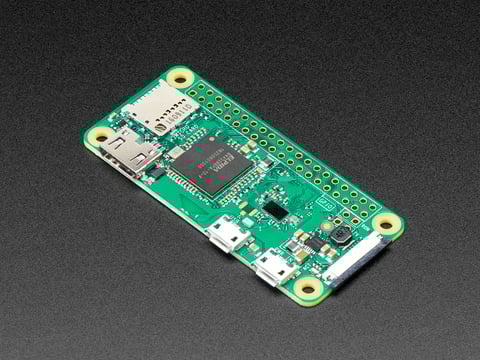
If you didn't think that the Raspberry Pi Zero could possibly get any better, then boy do we have a pleasant surprise for you! The new Raspberry Pi Zero W offers all the benefits of ...
 tawdry birch
Hey, I want to make lib in upy. Should I follow python steps for creating lib and just use it with upy (for example ujson instead of json) libs so I could use it in micropython?
already I made it like https://packaging.python.org/tutorials/packaging-projects/ said
tawdry birch
btw. running micropython on raspberry pi is a good idea?
 inner radish
may I ask why you would to that, instead of using "regluar" python?
tawdry birch
I want to test my code before ESP will be delivered to me
inner radish
I mean, even if you build micropython on the rasp it will run atop the OS, not "baremetal" like the other micropython microcontollers
 inner radish
I was just asking out of curiosity: I don't have much experience with microphyton, so I just use C with micro and regular python if my project involves a raspberry pi
tawdry birch
I'm just starting with this stuff co I'm courios
If I'm giving too much questions just said I'm annoying. When I'm learning something new I'm asking for everything 
If I posted lib in pypi can I download it by upip? 
stuck thicket
@tawdry birch may want to check out: https://learn.adafruit.com/circuitpython-on-raspberrypi-linux/overview

Make hardware and interface with sensors super easy using CircuitPython
tawdry birch
Thanks ;)
 humble kraken
@tawdry birch only if it is a pretty vanilla library with no special shenanigans going on in setup.py for example
tawdry birch
you mean about lib for micropython?
tawdry birch
someone have pi 0? I can't connect via ssh
I can use monitor but I can't plug keyboard (I don't have adapter to microusb from usb)
lean valve
@tawdry birch Did you put a file called ssh into the boot partition of the SD card?
Need to access a Raspberry Pi, but don’t have a monitor spare? This section provides basic instructions for setting up remote access.
There are instructions on how to enable SSH there.
See section 3
tawdry birch
I get this today, download rasbian img and boot to micro sd card. Trying to connect right now
@lean valve I can't use system
I can't use mouse or keyboard on it ;/
lean valve
You take the SD card out of the Pi and use a different computer to change it
lean valve
Did you set it up to connect to your wireless?
tawdry birch
not yet, I'm trying to connect via usb
lean valve
SSH over USB?
tawdry birch
yes

In this video, I'm going to show you how to connect to a Raspberry Pi Zero W via USB without the need of a micro HDMI cable! Grab your Raspberry Pi Zero from...
like here
lean valve
Interesting, I have not done it like this before
tawdry birch
I'm trying to do this but it seems that I need to adapter from micro usb to usb
lean valve
Come again?
tawdry birch
it's still saying I can't open connection to raspberrypi.local and I can't see it in network devices
ehh, it's boring 
I can't format it right now ;/ meh ubuntu
lean valve
I'm confused, you said you haven't created a file called ssh, but there are instructions on doing that in the video you linked
lean valve
So what are the steps you have done so far?
tawdry birch
everything to connect it to pc then I can't connect it via putty
and I'm connecting it to right usb port for sure
lean valve
You edited config.txt and cmdline.txt?
lean valve
Why did you say that you need to adapt from micro USB to USB?
tawdry birch
to connect wirleless keyboard and mouse
lean valve
When you attach the Pi to the computer, do any lights come on on the board?
lean valve
Good
I would like to try this for you but my Raspberry Pi Zero is at home and I am at work
If you're still around in 3 hours I can give it a try.
tawdry birch
ok, thanks
I will sleeping I think but I can read that tommorow
and I was trying with other cables too
lean valve
Actually.
Is there a chance that the USB cable you are using is a charging-only cable?
tawdry birch
hmm, I think not I was using it when I was making mobile apps
lean valve
Ok, that should be fine then
One other thing you could do is just put your Pi on your wireless, you don't need keyboard or monitor to do that
tawdry birch
how can I do this?
lean valve
Instructions are here https://www.raspberrypi.org/documentation/configuration/wireless/headless.md
Documentation in this section includes basic guides to configuring your Raspberry Pi.
tawdry birch
ok thanks
tawdry birch
but I need to use keyboard for it
lean valve
Nope
That link is to give you the correct format for wpa_supplicant.conf
But you are going to create the file on the SD card using your other computer instead of on the Pi, as described in the first link
`Setting up wireless networking
You will need to define a wpa_supplicant.conf file for your particular wireless network. Put this file in the boot folder, and when the Pi first boots, it will copy that file into the correct location in the Linux root file system and use those settings to start up wireless networking.
More information on the wpa_supplicant.conf file can be found here.
`
tawdry birch
I take a look right now and I've got only these files on SD
it's not even installed system?
lean valve
This is only the boot partition, you're not supposed to see an entire Linux filesystem here
tawdry birch
yes, but I should here add this file with config? or somewhere else
lean valve
The boot partition is meant to be seen from other operating systems as well so that you can do things like create a file called wpa_supplicant.conf
The file goes here
tawdry birch
and just paste network={ ssid="testing" psk="testingPassword" } yes?
I know that I need to change ssid and psk
lean valve
This article might be easier for you to follow https://www.raspberrypi-spy.co.uk/2017/04/manually-setting-up-pi-wifi-using-wpa_supplicant-conf/

This tutorial explains how to setup WiFi on a Raspberry Pi without a monitor, keyboard and mouse connected to the Pi. Very easy once you know how.
tawdry birch
thanks
lean valve
There is a sample file there
tawdry birch
It's not working I bought adapter for keyboard and I will make it just with screen. Maybe there is wifi module broken 
steel aurora
used some heatshrink tubing to make a softer grip for the helping hands, the clips were scratching the board a bit.
 polar sluice
nice
steel aurora
seems to work well.
polar sluice
smart thinking
steel aurora
they bite through the little silicon stranded 30AWG cables I'm using for this project, too.
hopefully not anymore, though
 ancient schooner
Hello, any python hardware projects I can do while spending minimum money
lean valve
@ancient schooner What do you have at your disposal already? And do you have a budget?
 hallow igloo
What are some good books for Arduino beginners
I’m starting Univeristy / college next year but I just want to get started now and learn about it
lean valve
I have a copy of the Arduino Cookbook from O'Reilly, which is sort of a long list of example projects. If learning by example is your thing then you might want to check that out.
ancient schooner
@lean valve I don’t really have a budget I just need the cheapest price about £35
 stuck sentinel
I have a raspberry pi 3b with a 5 inch touchscreen (although I haven't been able to get that to work) What would be a good beginner project that wouldn't require much Linux knowledge?
open dock
@steel aurora that's the ticket! I need to replace mine; the teeth have worn through...
hallow igloo
Everyone asking about beginner projects :P. @lean valve I prefer to learn via theory but I’m not sure where to start
violet valve
@hallow igloo This was recommended to me. I purchased it but haven't had a chance to go through it, so I can't give much information about it past that. https://smile.amazon.com/gp/product/B00E1EA6XM/ref=oh_aui_search_asin_title?ie=UTF8&psc=1
Buy Exploring Arduino: Tools and Techniques for Engineering Wizardry: Read 277 Books Reviews - Amazon.com
lean valve
@hallow igloo If you want to learn theory and apply it to an Arduino, then my serious advice is to learn the C programming language. That's a bit outside our scope here and I'm not sure what resources to recommend.
@ancient schooner There are quite a few boards capable of running Python inside that budget. The Raspberry Pi Zero comes to mind, as does the Circuit Playground Express from Adafruit.
If you want to bump your budget up a bit, you can get a full computer on a Raspberry Pi 3B+, with keyboard, mouse and monitor connectors, and still be able to drive hardware off the GPIO pins through Python
In terms of the low end boards, the Circuit Playground Express has way more toys built-in for doing hardware projects, just check out the list of features on the Adafruit site. The Raspberry Pi Zero just gives you a row of pins and it's on you to hook toys up to it.
Do you have any specific projects in mind?
On the other hand (still talking about the two low-end boards I mentioned) the Pi Zero is a full computer with an operating system booting off SD. The CPE is not.
opal mason
I've had a lot of fun with my Playground Express so far. The fun thing is that it has a lot of stuff built-in to play around with. Sensors (temp, light, sound, motion sensor), LEDs (full-colorNeoPixels), a IR-transmitter/receiver, two buttons, 7 things can act as captive touch inputs (or regular IO). It's a great thing to play around with.
So, for a light budget, it has a lot of stuff to play around with and to explore
Hence the name Playground, I guess
I've bought mine for around 28 euros at my local distributor
That's a great deal for all that it offers
I think the official price on the Adafruit website is something like 24 dollars
That's a lot of text. I'm just enthusiastic.
tulip comet
i can agree that it's a fantastic device
very much a "batteries included" sort of thing (except batteries aren't actually included, you have to buy those separately if you don't want to power from micro USB)
:^)
steel aurora
Circuit Playground Express: The only batteries that aren't included are batteries.
this beautiful thing arrived today
I can't wait to build something awesome with it.
@stuck thicket my kid loved the CircuitPython tattoo
rockin that ink
tulip comet
haha :D
lean valve
Is that a PyPortal?
steel aurora
running beta software on my own kid? what kind of monster do you think I am.
opal mason
Well, they are still in development
steel aurora
yes but I would prefer it if he didn't crash.
opal mason
Hmm, kids do that from time to time. And then they have great dads to help them deal with the flu and all kinds of viruses/bacteria/bugs.
Anyway, I'm getting off-topic.
violet valve
Children are incredibly resilient. They're perfect for beta software. Crash bug found? Bounce right back!
Anyway, we're days away from release candidate phase, you'd be fine 😉
steel aurora
you're not wrong. but to be on the safe side I'm gonna wait until he's a bit older before I start soldering components into his arm or whatever. he doesn't even have a microUSB port yet.
but who knows what the future holds ~~~
violet valve
Truth!
ancient schooner
LOL
what is the best but cheapest rasberry pi for about 15 to 20 pounds
and how good is the pi zero
stuck thicket
next week microchip is giving away 5 PyPortals during their live video, it will likely be as easy as just watching to win... here are the details we posted: https://blog.adafruit.com/2019/03/06/iot-design-week-with-microchip-and-adafruit-pyportal-giveaway-microchiptech-microchipmakes-adafruit-iotdesignweek2019/

Adafruit Industries - Makers, hackers, artists, designers and engineers!
During the LIVE Microchip Livestream event on March 12, 2019 at 9am PDT / 12pm EDT Microchip will be giving away 5 Adafruit PyPortals! You can also register here for other prizes if you can’t…
steady juniper
Wow, nice. You guys are really generous. I'll see if I can free the time to watch 😃
ancient schooner
@stuck thicket thank you for notifying me i am reading it rn. do u have any recommendations?
what is the best but cheapest rasberry pi for about 15 to 20 pounds
and how good is the pi zero
lean valve
I have a pi zero, do you have any specific questions about it?
stuck thicket
SHOW-AND-TELL LIVE VIDEO! 3/6/19 (video) https://youtu.be/yfiu2-nHhZI

To show and share your project at 7:30pm today, view the chat here or in discord https://adafru.it/discord and look for the JOIN link to join the Google Hang...
stuck thicket
WE ARE LIVE 10% off all items in stock code is iotdesignweek expires 3/6/19 @ 11:59pm ET #askanengineer https://youtu.be/3Ji8--b8Ceo & http://www.adafruit.com

Multistreaming with https://restream.io/ ASK AN ENGINEER 3/6/19 ----------------------------------------- LIVE CHAT IS HERE! http://adafru.it/discord Adafrui...
Adafruit Industries, Unique & fun DIY electronics and kits : - Tools Gift Certificates Arduino Cables Sensors LEDs Books Breakout Boards Power EL Wire/Tape/Panel Components & Parts LCDs & Displays Wearables Prototyping Raspberry Pi Wireless Young Engineers 3D printing NeoPix...
polar sluice
ancient schooner
@lean valve is the pi zero good to have attachments etc so I can add basic stuff like flashing lights to program?
lean valve
@ancient schooner You can do that, but you need some extra parts. See this example: https://thepihut.com/blogs/raspberry-pi-tutorials/27968772-turning-on-an-led-with-your-raspberry-pis-gpio-pins The Circuit Playground Express has built in multicolor lights.
ancient schooner
@lean valve thanks. Will this help me progress and maybe get a job in python?
lean valve
Assuming you use it, it will help you progress. You might want to ask in #career-advice about career paths to a Python job.
ancient schooner
Ah ok
lean valve
I am working on eventually getting a Python job right now. There's lots to learn.
ancient schooner
Good luck
lean valve
Thanks
lean valve
I just participated in the week long Code Jam on this server and learned a lot of skills
ancient schooner
Wow ok
lean valve
I have a Raspberry Pi B+ and a Raspberry Pi Zero W
ancient schooner
Because the pi zero is pretty cheap on amazon but idk if it’s worth it
Can u link me one that’s around 10 pounds?
lean valve
You in UK?
ancient schooner
Yes
lean valve
I don't know for sure, but check the pinned message in this channel for a link to Pimoroni
ancient schooner
Ah ok
lean valve
That's the nice thing about Raspberry Pi, you can have an internet connected server in your house that has no wires except one power plug
lean valve
It has a camera cable, but does it include the camera?
And does it have a power adapter?
The micro HDMI and micro USB adapters allow you to hook it up to keyboard, mouse and monitor if you want. Those are all optional with the Zero W though because you can just hook it up to wireless and connect to it that way
ancient schooner
I should get one with more USB ports
If possible can u send me a link that isn’t wireless for usb?
And it had wireless WiFi
Has*
@lean valve
ancient schooner
Anyone???
vague crane
Circuit Playground Express is the next step towards a perfect introduction to electronics and programming. We've taken the original Circuit Playground Classic and made it even better! ...
opal mason
If you're not located in the United States, then you may want to consider a local distributor
The Adafruit website has a list of them
It will save you some shipping costs, although the unit price will probably be slightly higher
ancient schooner
is the py zero compatibal with a usb hub?
lavish echo
Yes, I have used them that way.
ancient schooner
ah ok
@lavish echo do you think i could make something like a functional screen or maybe a camera or something along them lines with it?
and to start with making traffic lights or something?
lavish echo
I've seen multiple traffic lights used to indicate things powered by pi's
ancient schooner
ah ok
lavish echo
Mine is used to display the time, weather, news etc
ancient schooner
as i do like making computers but also programming as i think the pi will help with both
and i*
do u have some sort of weather station to check the weather?
lavish echo
open weather api
lavish echo
It's a good choice for many projects.
ancient schooner
okie dokie, thanks!
lavish echo
However depending on the project an alternative could also be good
lavish echo
Could be, my own one just dangles from the back of a monitor. It really depends on what the project is and how you want it to look
ancient schooner
i dont have a project for it its just for practising
is this vital?
and does the pi zero come with in built wifi?
sorry to laod you with a hella lot of questionss
lavish echo
The pi zero w(ireless) does come with wifi.
ancient schooner
ah gotcha
lavish echo
You can connect sensors and such through those pins, but they would be pretty cheap at a local electronics shop if you end up wanting to use one.
lavish echo
The first line says a thing about wireless
lavish echo
I don't know tbh.
lean valve
All you need to get started is really just the main board and any microSD card. The rest is extra.
What you pay for in a kit is the ability to hook up a keyboard, mouse, monitor
ancient schooner
Oooooh gotcha
tawdry birch
for pi 0 you can need adapter for usb (micro usb -> usb) to connect keyboard or mouse. If're just starting just get the board and microsd card. Find something that you want to do and if you need anything for it you can just buy it so you won't waste money on other staff that you won't use 😉
hallow igloo
What’s a good place to start learning electronics? I’m getting kinda overwhelmed. I remember some vague things from HS but it’s been a while. I really want to know more about how it all works and design circuits.
humble kraken
steel aurora

made a button that plays spicy sound effects.
detailed instructions on how to build one can be found on adafruits website. I followed this, with some modifications and obviously with my own code.

Press the button to play sound!
ancient schooner
Any free raspberry pi projects ? Hi
ancient schooner
Can u use different ide for a pi and any beginner projects for a raspberry pi that don’t need any extra components and have I set up my pi properly?
tawdry birch
I'm making spotify client for raspberry
lean valve
@ancient schooner You have a lot of options - once you set up wifi, you can copy files directly to the raspberry pi from your normal IDE
ancient schooner
oh gotcha
lean valve
There's a good doc on how to do that here https://www.raspberrypi.org/documentation/configuration/wireless/wireless-cli.md
@ancient schooner from DM: you can set up a full Python 3 dev environment on the Pi Zero W
lean valve
For hosting a Discord bot? Yes, you can run it that way. You can write code on the Pi with keyboard/mouse/montior, or you can use ssh to connect to it and use a text mode editor, or you can edit on your desktop and save files and copy them over the Pi
Just think of it as a very small PC
How are you connecting to it right now? USB and HDMI?
ancient schooner
oh kk
im using
a micro hdmi or small hdmi to hdmi for the display and a usb hub for keybaord and mouse
lean valve
And you're logged in as pi correct?
ancient schooner
yes
lean valve
So to get the latest version of Python on there you should do a command like apt install python3.7 python3-pip
ancient schooner
ohhh
lean valve
or actually sudo apt install python3.7 python3-pip
ancient schooner
ive nto got my pi on rn so ill have to do that tommorow
lean valve
the sudo runs it as root
ancient schooner
ah
lean valve
root = admin
lean valve
Depends what you want to do next. If you want to copy Python files from your IDE then do the wireless setup next. https://www.raspberrypi.org/documentation/configuration/wireless/wireless-cli.md
If you want to run a test Python program then edit it using nano or vim with your keyboard
ancient schooner
oh, i want to do the coding on the pi
lean valve
You'll have to pick a text editor to use then, like nano, vim or emacs, there are millions of documents on how to do that on the web
lean valve
Are you booting to a desktop on the raspberry pi right now?
ancient schooner
no
lean valve
What do you mean by the normal one then?
ancient schooner
like the normal ide u get when u install python
lean valve
IDLE?
You need a desktop environment running in order to use that, it doesn't run in text mode
ancient schooner
oh
so i will install a text editor
i think there is one on the pi
its this beginners one or soemthing
lean valve
It comes with nano, which is easy for a beginner to use
lean valve
OK
lean valve
... to do what?
ancient schooner
to get it to host my bot
lean valve
Set up wifi
ancient schooner
done that
lean valve
Do you have your bot code on github?
lean valve
Is the code on your PC?
ancient schooner
yes
lean valve
Is your main PC Windows?
lean valve
Do you want to copy files to the Pi the easy way or the hard way? 😄
ancient schooner
easy xD
lean valve
ancient schooner
but i dont have anything to read my sd card
lean valve
Since you have wireless set up you don't have to take the SD card out
lean valve
Download that, and use it to connect to the Raspberry Pi's IP, with username pi and the password whatever you set it to
Yes
You can drag and drop files from your PC to the Pi
ancient schooner
ah gotcha
oooo
do i need the pi on
and do i do that command on a terminal or cmds
lean valve
Yes, and connected to wireless, and you have to know its IP on your network
What command?
ancient schooner
command prompt
lean valve
I don't understand your question, sorry
ancient schooner
hang on
Ok back
So, do I do that command on the pi or on command prompt on windows
lean valve
Which command?
ancient schooner
The pi username one
The pi username one
The pi username one
OOF my phone sorry
lean valve
Do you mean when I said "with username pi"? I just meant that when you run WinSCP, it will ask you for a username. Use pi.
ancient schooner
And it said I have an update but it wouldn’t fully update and left my pi on for an hour but still, no fix so I just skipped it
Oh kk
Oh kk i
Got u
Got u
lean valve
This is part of WinSCP
lean valve
Host name will be the IP of the Raspberry Pi Zero W on your network
User name will be pi
Password will be whatever you set the password to
ancient schooner
So do I send the .py file to my pi
lean valve
Yes, it will be pretty obvious once you run it how to do that
lean valve
By hosting, do you mean running the bot? Or something else
lean valve
When you get your Python files on the Pi, you would cd into that directory and run something that might look like, python3 bot.py
There's more stuff you can do to make it automatically start up when the Pi starts up, but it's probably best to leave that until you get it to work manually
I have to run out to the store, I'll be back in a little while
stuck thicket
ancient schooner
Wow
past epoch
so a wet-ness sensor and a light sensor on that would be amazing 😄
lean valve
Forbes: How Sony Sped Up A Factory With These Tiny, $35 Computers.
https://www.forbes.com/sites/parmyolson/2019/03/10/how-sony-sped-up-a-factory-with-these-tiny-35-computers/

Forbes
Hobbyists and teachers were the first big fans of the Raspberry Pi. Now industrialists are using it as a cheap way to spy on their robots, potentially boosting the Internet of Things market.
 clever lintel
I have a Pi 3 I don't know what to do with 🤔
vague crane
Time to build your very own Sony factory!
stuck thicket
REMINDER! IoT Design Week with Microchip and Adafruit! PyPortal GIVEAWAY! - https://youtu.be/0yxtECtDrCA

Find out the winners of today’s daily giveaway, an Arduino Wi-Fi Rev 2. Stay tuned after the announcement for a demonstration of a Weather Station that can b...
hallow igloo
uhh
my pi broke
it just did
like just now
and now it cant find any networks
just says "no APs found - scanning" forever
Fixed, A simple restart
wow 🤦
lean valve
😓
hallow igloo
sorry 😛
hallow igloo
how would i reprogram a car key to open my garage or my friends
opal mason
Like I said in the other channel, that's not something we're going to help you with
Since trying to find some kind of master key to open someone else's property is not something we assist with
!rules 5
 hasty zealotBOT
5. We will not help you with anything that might break a law or the terms of service of any other community, site, service, or otherwise - No piracy, brute-forcing, captcha circumvention, sneaker bots, or anything else of that nature.
hallow igloo
im not old enough to steal or break any laws
and im not going to in the first place
my dad wants me to program stuff
opal mason
That's not really relevant. Trying to find some kind of masterkey to open locks of other people is not something we assist with.
hallow igloo
.
just wanna do something creative
cri
arduino is cool but i don't have enough parts and i dont know it's coding
opal mason
Anyway, feel free to ask Python-related question on this server, but make sure to follow our rules. Also, I've pointed you to our nickname policy in the other channel, please make sure that your nickname for this server follows it. The rule that I'm specifically talking about is the one about having a nickname that's easy to ping for others using only characters found on a regular keyboard.
hallow igloo
oof
i love this already
oh
oK beFore anyone starts assuming stuff im not using this for theft i just wanna open my garage in a fun way
r00d
i dont even have the materials
arduino is the closest thing i can get to it
@idle mason
dude thanks i just stole my neighbors lambo w0w
lololol
jk im not gonna do this, this is impossible
lean valve
@idle mason Don't dig up cracking articles for someone after an admin told them they couldn't get help on that here.
It doesn't matter if they can google it or not, I'm deleting your message because you should have clearly seen not to do that.
opal mason
Okay, I want to add something to that
!warn 556563428442112011 I don't care if you're joking or not, but don't encourage illegal behavior on this server.
hasty zealotBOT
:incoming_envelope: :ok_hand: warned @idle mason (I don't care if you're joking or not, but don't encourage illegal behavior on this server.).
ancient schooner
How do I set up lights?
 civic hornet
Have you tried turning it on and off?
ancient schooner
My pi?
civic hornet
😆
civic hornet
Maybe find one
civic hornet
Oof
civic hornet
Try adafruit #315249263103967242
ancient schooner
Mhm I have but still no help
civic hornet
They know this stuff
ancient schooner
People link me sites and stuff but it doesn’t show u anything it just shows u a bunch of other sites xD
civic hornet
Mmm
 sturdy ridge
@ancient schooner show me the circuit clearly, it looks like your thing straight up isn't connected d
You want the non-ground pin of your Pi going to one end of the resistor, then the other end going to the longer of the led terminals and then the other LED terminal going to the ground pin
 worldly hare
you might want to place your led in the same column as your resistor
ancient schooner
Oh ok. @sturdy ridge is this better, and do u have a circuit picture I can follow?
@worldly hare
ancient schooner
Ah kk @sturdy ridge u know the part where I connect the pins to the raspberry pi. How do I do that as mine are lined up together like this
 tawny fiber
youd have to solder that thing to the pi
hallow igloo
the dude didn't even help me lol
who in the actual hell is gonna open somebody's garage on a saturday and steal a car
tawny fiber
- bored people
- people who want to steal cars
hallow igloo
counter examples:
- dude is at home
- dude has a gun and is not afraid to use it
- dude has a afraid and is not gun to use it
ancient schooner
@tawny fiber I don’t. It can just go on an off it but how do I connect the wires like what part do I need to connect following this example
tawny fiber
i mean its already a circuit diagram you just gotta take a look at https://pinout.xyz/ and match your pis ground pins with the ones in the diagram and your GPIO pin with the one in the diagram
The comprehensive Add-on boards & GPIO Pinout guide for the Raspberry Pi
ancient schooner
Ty
stuck thicket
we'll have even more about this later, however - here is a preview, python in space! https://blog.adafruit.com/2019/03/17/circuitpython-in-space-pythonaut-circuitpython-adafruit-maholli404-zacinaction-smallsat-kicksat/
hallow igloo
@stuck thicket whoever is behind your account better be paid alot of money to be advertising like this
props to you
stuck thicket
hi hi, it's not an ad, but thank you 😃
tulip comet
i'm like 99% sure that's actually adafruit, to be honest. :D
stuck thicket
yep, no one really wants to be us anyway, it's a lot of work
hallow igloo
@tulip comet of course it is adafruit, but whoever is behind the discord account itself is who I am talking about
lean valve
@hallow igloo Adafruit is a server partner, and that actually is the author of the article posting it
hallow igloo
hmm interesting
I understood it was a server partner
but the author of the article
hmm
tawny fiber
adafruit does things based on arduinos
however they are not the people who actually make the original ones as far as i know
hallow igloo
ik that
tawny fiber
well then why do you ask wether adafruit is arduino
hallow igloo
i meant like
they specialize mostly in arduino
i forgot but i joined their servers like a year ago
steel aurora
no, they make their own stuff.
they do make microcontrollers, though
and you can also buy arduinos from the adafruit website. and they have arduino support in their community.
tawny fiber
do they actually make their own microcontrollers or "just" boards around others?
steel aurora
but the adafruit microcontrollers are really fun. you can run python on a bunch of them!
they make a lot of stuff, nix. they manufacture a ton of hardware.
huge factory in NYC
tawny fiber
yeah i know my question is do they actually make their own microcontrollers as in the chip which is actually called microcontroller or "just" build boards around already existing ones
hallow igloo
uhh
steel aurora
I'm probably not qualified to answer that but I think it's the latter.
hallow igloo
I thought the board was the microcontroller too
steel aurora
pretty sure the actual controller is made by other people.
tawny fiber
no the board is a PCB build around a chip (well actually several) which is the microcontroller
steady juniper
don't most of these boards have Atmel chips on them?
tawny fiber
yeah
https://hobbydistrict.com/image/cache/catalog/Products/p00131/1-400x400.jpeg <- microcontroller
https://www.elektor.de/media/catalog/product/cache/2/image/9df78eab33525d08d6e5fb8d27136e95/a/r/arduino_uno_r3_board.jpg -> board build around that microcontroller


@hallow igloo
steel aurora
https://www.microchip.com/wwwproducts/en/ATmega32u4 I think this is the controller that their circuitplayground express board uses
ATmega32U4
languid hill
they dont have a chip foundry or whatever no
most of their products are built around a generally available chip
which is very typical for this kind of product
tulip comet
lemon, is that not the controller for the circuit playground classic? i think the one on the express is an ATSAMD21G18A of sorts. https://www.microchip.com/wwwproducts/en/ATSAMD21G18A
ATSAMD21G18A
sturdy ridge
@tawny fiber Arduino and their ilk use atmega microcontrollers which have the AVR architecture. Both manufacturing and architecture are controlled by Atmel. Arduino boards are basic wrappers around atmega chips that barely add anything other than like, physical pins, voltage regulators and other basic stuff. Arduino makes those designs and open sources them and let's anyone use them to make their own clones with the exception that they can't they use the Arduino branding
stuck thicket
Coming up this week on the ALL THINGS PYTHON & HARDWARE newsletter! Python in SPACE, a sight for THOR eyes, new hardware, and more! Will be sent out in the am - Sign up now "Python for microcontrollers" https://www.adafruitdaily.com
stuck thicket
WE ARE LIVE! SHOW-AND-TELL LIVE VIDEO! 3/20/19 (video) https://youtu.be/_DA2nXyhyv8

To show and share your project at 7:30pm today, view the chat here or in discord https://adafru.it/discord and look for the JOIN link to join the Google Hang...
stuck thicket
WE ARE LIVE! 10% off all items in stock code is SNAKESINSPACE expires 3/20/19 @ 11:59pm ET #askanengineer https://youtu.be/zcnUSze0XPo & http://www.adafruit.com

Multistreaming with https://restream.io/ Visit the Adafruit shop online - http://www.adafruit.com ----------------------------------------- LIVE CHAT IS HERE...
Adafruit Industries, Unique & fun DIY electronics and kits : - Tools Gift Certificates Arduino Cables Sensors LEDs Books Breakout Boards Power EL Wire/Tape/Panel Components & Parts LCDs & Displays Wearables Prototyping Raspberry Pi Wireless Young Engineers 3D printing NeoPix...
hallow igloo
are they allowed to advertise and stuff
steady juniper
Adafruit is officially partnered with our Discord server. We appreciate them sharing their events and news here.
steel aurora
they're legitimately fun events. you should check some of them out.
their show and tells are great for finding inspiration to do an embedded python project.
ancient schooner
I want a good raspberry pi project that I can do, I don’t have a limit for money and I am a beginner
 oak badger
sturdy ridge
oak badger
sturdy ridge
r o b o t
languid hill
buy 50,000 of them and give each one a single led and turn it in to a display
realtalk though, one of the easiest ones to get started with is a pihole
then move on to learning to use its io
ancient schooner
ok thanks
stuck thicket
latest Make: magazine ... #1 tech trend, PYTHON! https://blog.adafruit.com/2019/03/23/make-vol-68-april-may-2019-is-here-guide-to-boards-tech-trend-1-the-push-for-python-make-adafruit-circuitpython/

Adafruit Industries - Makers, hackers, artists, designers and engineers!
Make: Vol. 68 April / May 2019 is here! Guide to Boards! Here are some of the highlights that include some Adafruit boards and more! Cover features: Metro Express, Feather and Circuit Playground, a…
lean valve
hell yeah.
ancient schooner
mmm
 clever karma
I really want to get into electronics but rasberry pi seems too complicated/too much work and I don't think I have the drive to spend that much time and effort on something like that
should I start out with arduino
I've used it a few times
sturdy ridge
@clever karma A pi isnt very complicated. it's literally just a tiny computer. you plug it into power, connect a mouse/keyboard to it and a display and it's got linux installed
barely different from a small desktop pc
sturdy ridge
that's fair, it's not really close to electronics
arduino is a better option in that case
clever karma
I dont really want to put a lot of time into learning about pi
ok thanks
and how should I get started with it
sturdy ridge
there's not much to learn about a pi. if you can use linux, you already know how to use it
clever karma
yeah I want something that's just more electronics
I was thinking of first buying the starter kit
for arduino
sturdy ridge
just buy an arduino, download the arduino IDE. Preferably buy it in a small kit because that gives you something to play around with
something like this https://www.sparkfun.com/products/14265

The fourth edition of our popular SIK, fully reworked from the ground up for a better learning experience!
is an amusing beginner option
all hobbyist parts
ancient schooner
i wanna buy like a small electronics kit that has items like a breadboard wires and modules i want to use it for my raspberry pi 0w. my budget is about 10-15 pounds
lean valve
There are lots of kits like that online, you can also get that stuff pretty cheaply if you have an electronics store near you
just as one example
ancient schooner
Thanks
stuck thicket
@clever karma since you are here in python discord, python runs on many electronic platforms now
if you are looking to get started fast, you can get a board that runs python and get things going very quickly
here are ones we make at adafruit - https://www.adafruit.com/circuitpython
Adafruit Industries, Unique & fun DIY electronics and kits : - Tools Gift Certificates Arduino Cables Sensors LEDs Books Breakout Boards Power EL Wire/Tape/Panel Components & Parts LCDs & Displays Wearables Prototyping Raspberry Pi Wireless Young Engineers 3D printing NeoPix...
 celest bone
Okay so im coding my microbit using Python
while True:
    if button_a.is_pressed():
        pin1.write_analog(55)
        pin0.write_analog(50)
    if button_b.is_pressed():
        pin1.write_analog(0)
        pin0.write_analog(0)```

this is the current code i have and i would like to add in these lines
```sleep(1000)
pin1.write_analog(54)
pin0.write_analog(50)
sleep(1000)
pin1.write_analog(53)
pin0.write_analog(50)```
 but i dont know where to put it without messing with the button press to start and stop
button_a starts and button_b stops the process but when i add in the other lines above it just makes it so it takes longer to stop@celest bone Either use a tick counter function of some sort, or use interrupts. Interrupts are generally the standard way to do things like that but I have no idea what the microbit python API exposes
open dock
@celest bone
import time
from microbit import *

interval = 1000
current_time = time.monotonic()
last_time = current_time
while True:
    current_time = time.monotonic()
    if button_a.is_pressed():
        pin1.write_analog(55)
        pin0.write_analog(50)
    if button_b.is_pressed():
        pin1.write_analog(0)
        pin0.write_analog(0)

    if ((current_time - last_time) > interval):
        last_time = current time
        pin1.write_analog(54)
        pin0.write_analog(50)

        # if you want the 2nd set to trail behind
        # in a similar non-blocking fashion,
        # setup another interval and time keeper
        pin1.write_analog(53)
        pin0.write_analog(50)
I think this is close to what @sturdy ridge was talking about wrt to a tick counter. this will be non-blocking and only trigger the additional commands every second.
and ISRs are available in MicroPython...
sturdy ridge
pretty much, yep. far from an elegant solution since it doesnt scale very well to many timers but it works decently
open dock
yeah. and i have no idea what the millisecond drift is like, if there is any, on the micro:bit.
sturdy ridge
as with many things in embedded programming, writing in a state-machine like manner is probably the nicest way to deal with things. i imagine having python OOP constructs available would make writing state machines sliiiightly easier
celest bone
this is what @molten cosmos came up with ```python
from microbit import *
brake = True
def stop():
pin1.write_analog(0)
pin0.write_analog(0)
def brake_check():
global brake
if button_b.is_pressed():
brake = True
if button_a.is_pressed():
brake = False
def write_motor(value):
pin1.write_analog(value)
pin0.write_analog(50)
def wait(ms):
for _ in range(ms):
sleep(1)
brake_check()
if brake:
stop()
while True:
brake_check()
write_motor(55)
wait(1000)
stop()
write_motor(54)
wait(1000)
stop()
write_motor(53)```
struggling with the last part tho as i want after "a" is pressed for the wheels to turn for 3 seconds then stop for 1 second then go for 3 seconds again etc etc
open dock
that works too, if you wanted blocking routines. i'd have the functions return values though, instead of global.
sturdy ridge
i've had many hours of my time destroyed by global variables in embedded. mostly in C and in some very complicated code, but yeah
never getting lazy with global variables again
celest bone
do you guys know why the wait(1000) part isnt actually stopping the wheels from turning?
open dock
slightly-educated guess: because wait() is missing the global brake...so it isn't reading any state changes. (good time to switch brake_check() to return the state. 😄)
celest bone
not really sure how to do that 🤔
open dock
def brake_check():
    if button_b.is_pressed():
        brake = True
    if button_a.is_pressed():
        brake = False
    return brake

def write_motor(value):
    pin1.write_analog(value)
    pin0.write_analog(50)


def wait(ms):
    for _ in range(ms):
        sleep(1)
        if brake_check():
            stop()
that didnt seem to work
open dock
oh, and you'll need to drop that break_check at the start of the while loop.
celest bone
from microbit import *


brake = True


def stop():
    pin1.write_analog(0)
    pin0.write_analog(0)


def brake_check():
    if button_b.is_pressed():
        brake = True
    if button_a.is_pressed():
        brake = False
        return brake


def write_motor(value):
    pin1.write_analog(value)
    pin0.write_analog(50)


def wait(ms):
    for _ in range(ms):
        sleep(1)
        brake_check()
        if brake:
            stop()


while True:
    write_motor(55)
    wait(1000)
    stop()
    write_motor(54)
    wait(1000)
    stop()
write_motor(53)```when it looks like this nothing at all works
@open dock
open dock
@celest bone in brake_check(), the return statement is indented too far to the right. it needs to be at the same indent as the if statements.
in wait(), remove the if brake: line, and place an if before brake_check(), and place a colon at the end of the line.
celest bone
 from microbit import *


brake = True


def stop():
    pin1.write_analog(0)
    pin0.write_analog(0)


def brake_check():
    if button_b.is_pressed():
        brake = True
    if button_a.is_pressed():
        brake = False
return brake

def write_motor(value):
    pin1.write_analog(value)
    pin0.write_analog(50)


def wait(ms):
    for _ in range(ms):
        sleep(1)
        brake_check()
        if before brake_check():
            stop()


while True:
    write_motor(55)
    wait(1000)
    stop()
    write_motor(54)
    wait(1000)
    stop()
write_motor(53)```is this correct?
open dock
de-indented the return one too far. and closer on wait..not sure where...oh, my bad if i confused you with the place an if before. should look like this:
def brake_check():
    if button_b.is_pressed():
        brake = True
    if button_a.is_pressed():
        brake = False
    return brake

def wait(ms):
    for _ in range(ms):
        sleep(1)
        if brake_check():
            stop()
from microbit import *


brake = True


def stop():
    pin1.write_analog(0)
    pin0.write_analog(0)


def brake_check():
    if button_b.is_pressed():
        brake = True
    if button_a.is_pressed():
        brake = False
    return brake

def write_motor(value):
    pin1.write_analog(value)
    pin0.write_analog(50)


def wait(ms):
    for _ in range(ms):
        sleep(1)
        if brake_check():
            stop()


while True:
    write_motor(55)
    wait(1000)
    stop()
    write_motor(54)
    wait(1000)
    stop()
write_motor(53)```this comes back with an error on the microbit
open dock
whats the error?
celest bone
something to do with line 17
celest bone
line 17 is the return brake part
open dock
doh. was skipping blank lines. i tend to do that sometimes. 😄
celest bone
it gives the error on the screen of the microbit and its very hard to read
its a 5by5 of led's
open dock
yeah, i'm aware of the micro:bit, just never used one. are you editing just the main.py, or are you using an IDE (like Mu)?
celest bone
im using Mu
open dock
if you open the REPL with the Serial button, you should see the error there. at least i hope it works like that for the micro:bit.
might need to hit the ctrl+d keys to restart it for the error to print though.
celest bone
 open dock
from microbit import *

def stop():
    pin1.write_analog(0)
    pin0.write_analog(0)

def brake_check():
    brake = False
    if button_b.is_pressed():
        brake = True
    if button_a.is_pressed():
        brake = False
    return brake

def write_motor(value):
    pin1.write_analog(value)
    pin0.write_analog(50)


def wait(ms):
    for _ in range(ms):
        sleep(1)
        if brake_check():
            stop()


while True:
    write_motor(55)
    wait(1000)
    stop()
    write_motor(54)
    wait(1000)
    stop()
    write_motor(53)
try that.
celest bone
now when the battery is on it starts without having to press button a
thats why there was the brake = True at the start
and also when the button b is pressed it no longer fully stops it
it just stops it for a second and then it goes again
@open dock
open dock
i'm not entirely sure what you're wanting it to do. you can go back to global brake, if that's how you want the state to work. without knowing what particular actions you're seeking, i can't really expand on what to change in while True:.
also, in looking at the microbit API, button_x.was_pressed() might work better since is_pressed() only returns true if the button is currently pressed at the time it's called.
https://microbit-micropython.readthedocs.io/en/latest/button.html
celest bone
open dock
i do apologize if i've led you off course. globals just really turn nasty at a certain point.
celest bone
so this is what i am trying to code for
basically what im trying to do is
when I press the button a
it starts
both wheels turning
for about 3 seconds
then i want both wheels to stop for 1 second
stuck thicket
preview -- PyperCard (Hypercard like thing for CircuitPython) and/or CYOA ... Choose your own adventure
celest bone
and then wheels to go again but at a slightly different speed hence the write motor (55) (54) etc etc
and i want the b button which acts as a stop
to be able to stop the sequence at any time
thats pretty much what I was trying to do
@open dock
open dock
i was following along. 😄
celest bone
yeah does that explain it better?
open dock
it does. let me ponder a sec.
celest bone
okay 😄
open dock
i mean...the easy way is using global as was advised before. i will concede that. but its a bad practice to get into.
celest bone
yeah at this point i just want to make it work and go to sleep lmao
open dock
then, yeah, just go back to using the global, and add global brake to the wait() function.
from microbit import *


brake = True


def stop():
    pin1.write_analog(0)
    pin0.write_analog(0)


def brake_check():
    global brake
    if button_b.is_pressed():
        brake = True
    if button_a.is_pressed():
        brake = False


def write_motor(value):
    pin1.write_analog(value)
    pin0.write_analog(50)


def wait(ms):
    global brake
    for _ in range(ms):
        sleep(1)
        brake_check()
        if brake:
            stop()


while True:
    brake_check()
    write_motor(55)
    wait(1000)
    stop()
    write_motor(54)
    wait(1000)
    stop()
    write_motor(53)
that should do it.
celest bone
yes this one works well but the last part does not
the wheels do not pause for a second and then go again at a different speed
they stay going at a constant speed but the start and stop buttons do work
open dock
put some wait()s after the stops?
celest bone
that actually works 😮
open dock
the way i'm seeing this in my head...is creating a class so that your bot has some attributes that can be tracked for state logic.
celest bone
    brake_check()
    write_motor(55)
    wait(500)
    stop()
    wait(500)
    write_motor(54)
    wait(500)
    stop()
    wait(50)
    write_motor(53)
    wait(500)
    stop()
    wait(50)
write_motor(52)```how does that look to you
it seems to be going faster and slower at certain parts
and im not sure if the wheel speeds are correct
open dock
i noticed that write_motor will always produce a wobble, since it has pin0.write_analog(50) hardcoded.
celest bone
what would you suggest then?
and i noticed that too but wouldnt think it would impact it that much as i dont need to change that number
open dock
well, if it doesn't affect it, then i guess its fine. i allowed the possibility that it could be a trim adjustment or something.
open dock
@celest bone this is kind of what i was seeing when i talked about creating a class for the bot. it allows you to keep track of attributes and act upon them (among other things). this is from the hip with no testing, so it would probably need some tweaks.
from microbit import *

class botty_mc_bot_bot():
    def __init__(self, left_pin, right_pin):
        self._left = left_pin
        self._right = right_pin
        self.brake = True
        self.last_action = "stop"

    def stop(self):
        self._left.write_analog(0)
        self._right.write_analog(0)
        self.last_action = "stop"

    def brake_check(self):
        if button_b.was_pressed():
            self.brake = True
        if button_a.was_pressed():
            self.brake = False

    def drive_motor(self, left=50, right=50):
        self._left.write_analog(left)
        self._right.write_analog(right)

        self.last_action = "drive"

    def wait(self, ms):
        for _ in range(ms):
            sleep(1)
            brake_check(self)
            if self.brake:
                stop(self)

# initialize our bot object
josh_bot = botty_mc_bot_bot(pin1, pin0)

while True:
    # check the brakes at the top of the loop
    # this isn't needed after this, since the
    # wait loops will run brake checks
    josh_bot.brake_check()
    if not josh_bot.brake:
        write_motor(left=55, right=55)
        wait(3000)
        stop()
        wait(1000)
    # only wobble if the brake is off, and we last drove straight
    if not josh_bot.brake and josh_bot.last_action != "stop":
        write_motor(left=54, right=52)
        wait(1000)
        stop()
        wait(50)
oh cool ill check that out in a second, if i wanted to change the value of the pin0 at the bottom which was hard coded in how would i do so
open dock
with the current code?
celest bone
yeah with the one im currently on
open dock
you'd have to change the function def. i would use keywords, so that you can define defaults. like so:
def write_motor(pin1_value=50, pin0_value=50):
    pin1.write_analog(pin1_value)
    pin0.write_analog(pin0_value)
then you can call it like this:
# assign both values upon calling
write_motor(pin1_value=55, pin0_value=55)

# assign only one value, and use the default for the other
write_motor(pin1_value=55)

# use defaults for both
write_motor()
you could also just use positional arguments, and/or iterables:
def write_motor(val_1, val_2):
    pin1.write_analog(val_1)
    pin0.write_analog(val_2)
    # called with 'write_motor(50, 50)'
-------------------------------
def write_motor(value):
    val_1 = value[0]
    val_2 = value[1]
    pin1.write_analog(val_1)
    pin0.write_analog(val_2)
    # called with 'write_motor((50, 50))', or 'write_motor([50, 50])
and, i'm off for the evening. hope the bot scoots-n-wobbles how you want!
celest bone
thank you very much you've been great help enjoy your evening 😄
stuck thicket
Coming up this week on the ALL THINGS PYTHON & HARDWARE newsletter! #1 Trend - The Push for Python makes' it, Pyboard D-series, Squeezing Python Into Microcontrollers! Will be sent out in the am - Sign up now "Python for microcontrollers" https://www.adafruitdaily.com
opal mason
Nice, I've signed up. Work's been a bit busy, but I need to get back to my Playground Express
Still have some ideas for projects I want to do and I want to add a button menu to my Pomodoro timer
lean valve

ZDNet
Low-power but high-priced Pyboard is now on sale for making Python-based robots.
ancient schooner
Does a raspberry pi 0w work with 40 pin gpio cable ???
And @lean valve which raspberry pi do u have
tawny fiber
rasperry pi 0 w do have 40 gpio pins too so there is no reason they shouldnt
lavish echo
Very useful to have around, you never know when you'll need it.
ancient schooner
Okie dokie thanks guys
stuck thicket
WE ARE LIVE! SHOW-AND-TELL LIVE VIDEO! 3/27/19 (video) https://youtu.be/eIdlUM_Dx90

To show and share your project at 7:30pm today, view the chat or in discord https://adafru.it/discord and look for the JOIN link to join the Google Hangout O...
lavish echo
That's awesome.
stuck thicket
WE ARE LIVE - 10% off all items in stock code is ESPEYE expires 3/27/19 @ 11:59pm ET #askanengineer https://youtu.be/oTCVcxmDe-Y & http://www.adafruit.com

Multistreaming with https://restream.io/ ----------------------------------------- LIVE CHAT IS HERE! http://adafru.it/discord Adafruit on Instagram: https:/...
Adafruit Industries, Unique & fun DIY electronics and kits : - Tools Gift Certificates Arduino Cables Sensors LEDs Books Breakout Boards Power EL Wire/Tape/Panel Components & Parts LCDs & Displays Wearables Prototyping Raspberry Pi Wireless Young Engineers 3D printing NeoPix...
 open reef
Anyone here use a bno055 in their projects before?
 cobalt hatch
can anyone make a recomendation for what i can do with a microbit? i am not allowed to attach anything to it i am just wondering what i can do
it is owned by the school
stuck thicket
@cobalt hatch we have these guides and there are a ton more online - https://learn.adafruit.com/category/micro-bit
 rotund canyon
i saw a conversation here or maybe on #491524019825278977 about microbit
got a few and they are so fun!
 foggy cliff
Hey guys! Noob here, coming from arduino world.
Was trying to understand how to control stepper motors from the metro m0 express but could find much beside the servo documentation. Maybe someone can point me in the right direction?
open dock
foggy cliff
Saw that one but was concerned about all the warnings and deprecation alerts on top
@open dock
tawny fiber
Does somebody happen to know a way to create Bluetooth LE services with python on a raspberry pi. I have been looking around the web and found dozens of libraries which implement functionalities to connect to one but I couldnt find one which actually hosts a service yet
stuck thicket
more python on hardware, TI calcs in france - https://blog.adafruit.com/2019/03/31/use-circuitpython-boards-on-the-ti-83-premium-ce-calculator-tiplanetnews-ticalculators-circuitpython-circuitpython/

Adafruit Industries - Makers, hackers, artists, designers and engineers!
The new Texas Instruments TI-Python external module for the TI-83 Premium CE calculator runs CircuitPython and has an Atmel ATSAMD21E18 chip, some calculator hackers at TI Planet figured out how to…
steel aurora
hahaha that's crazy
vague crane
That's awesome
There was another calculator built from the ground up with Python but I can't remember the name

The graphing calculator that makes learning math easier.
foggy cliff
anyone has an idea how to connect an esp32 board to metro m0?
(using SPI)
 stable rune
@vague crane these are pretty good
Kids today have it easy with these nice calculators and shit 
sturdy ridge
calculators dont make maths easy
sturdy ridge
yeah, we were only allowed them in intro maths
thank god, I hate putting stuff into calculators
vague crane
I use a hammer and chisel like the gods intended
tawdry birch
@stable rune only Basic calculators are allowed
in my country for kids
In exams etc.
stable rune
@tawdry birch depends, after HS I was not allowed using calculator for every single math exam
Basic calculators were allowed for physics though
(tfw HS has you buy a $70 scientific calc you'll be denied using later)


 long orbit

Surf the 'net with Blinka!
foggy cliff
@long orbit yeah, been there, it doesnt explain wiring on an esp32, only esp8266 which is not supported anymore... im kinda losing my hopes, the metro m0 cant even hold the esp32 library without running out of memory
long orbit
ya, I think we mostly use it with the m4
the ram limits the data size you can load too
foggy cliff
but the m4's been out of stock for while
hallow igloo

balena
Have you ever been interested in monitoring the air quality in your home or outside where you live and work? This project, which we’ve dubbed balenaSense, will get you up and running with a setup to take readings of temperature, humidity, barometric pressure, and air qualit...
this looks fun, can't wait to set this up for my grow
ancient schooner
Hello, so I have recently bought a raspberry pi breadboard kit and wanted to ask if there where any projects I could do. Some of the items included in this kit where:
Breadboard
Pixel module
LCD screen
Motor
Something like a button but you turn it to make it on and off
Digit module
And many more. Please give me a tutorial or some ideas on what I can make. Thanks
tawdry birch
You can build for example clock or calculator
Make server for your files
Use google assistant on pi
steel aurora
there's a ton of projects here: https://learn.adafruit.com/search?q=raspberry maybe one of those could inspire you
tawdry birch
^
steel aurora
it's usually a good idea to find a project first, and then buy the parts you need
rather than just buying parts and then asking us for a project :P
tawdry birch
^
steel aurora
but when you're starting out, honestly, just make anything at all so you can get familiar with breadboarding and with the controller
the other lemon seems to have made some decent suggestions already
tawdry birch
There're a lot of things that you can made with pi or other board. You just need to be creative
ancient schooner
Thanks lemon(s). I bought a starter kit for the raspberry pi so that’s why I don’t really care what I do with it
I just want to practise and then I’ll hopefully make something big
 indigo ruin
can a esp32 handle a sqlite3?
and are there like some web framworks for it with python, something like flask?
tawny fiber
an esp32 is not really meant to be used with any sort of sql db
at least not as a db server
you could maybe connect to one with it i dont know if it has enough memory for the software to do that though
hallow igloo
how do you open a .sh file on raspbian?
it just opens in the text editor
if I try to open with
and select terminal
the cursor loads for a while
and then stops
and nothing happened
tawny fiber
go in a terminal and do nano /path/to/file.sh
well then do bash script.sh or ./script.sh
hallow igloo
yeah but I can't just click on it to run?
ok looks like I cant
rip
extra question
is there a way
tawny fiber
clicking on it to run is not the way in linux
gui in general is just a crip in linux
hallow igloo
I see
tawny fiber
at least for file interaction
hallow igloo
ok
I should really get linux then
hmm
I can run a python file through a .sh but seperately, like as a seperate executed run
like it calls the python file to be run, so it is run in a fresh terminal with no connection to the run.sh terminal
and I want that sh terminal to close
tawny fiber
you can do
pythons script.py &
thats gonna run it in a detached way
so its not gonna block the terminal anymore
hallow igloo
pythons
hmm
@tawny fiber can you do pythons3.7?
and uhh it says pythons3.7 command not found
but python3.7 works fine
tawny fiber
yeah because it has an s after python
hallow igloo
you said pythons
if I do python script.py it does block the terminal
wait
you mean the & at the end?
ok that worked
but now its weird because I cant really seem to see what is going on
like I had to quit by opening task manager and killing at the port
or what I think is the port
can you have it open in a new window also?
tawny fiber
well I guess you could open a new terminal emulator if you knew its name but Im not really sure why youd want to do that
hallow igloo
@tawny fiber what do you mean by that? I want to know.
 stoic summit
hey all, I need help configuring the registers of an IMU through circuitpython
I've figured out through the documentation how to read the registers
but I haven't figured out how to write to them
This is a L3GD20 sensor connected to a Trinket M0 with CircuitPython
If I'm doing this right, then the writeto method in the I2C libary is used to point at the register value before actually reading it with the readfrom_into method
So by that logic, would I use writeto to point at it, then writeto again to overwrite what's in there?
stoic summit
hey all, I've been bashing my head against this code all afternoon and I'm about ready to give up... Can someone take a look at it and see if there are any glaring mistakes? I'm embarassed to say it's not even 50 lines
fair warning, I have no formal training as a programmer
So this might make o sense whatsoever
tawny fiber
what about actually showing us the code so we can actually try and help you with it
code errors etc
tawdry birch
^
hallow igloo
@stoic summit nobody can take a look at the code if they don't have it, can you actually post the code
open dock
we actually got it straightened out on Adafruit's server.
stoic summit
I meant to come back sooner, it's working smoothly now... Strangely if I record the streaming data from MATLAB, there's formatting errors every 20 lines or so lines being blended together or truncated
I don't need to do anything on real-time though, and it works like a dram when I record it at the terminal window
Thanks again for all your help!
 twilit nest
Hi, i've got a micropython project i've been working on and i'm trying to do wss:// client, am i just supposed to wrap a socket in ssl? I can't find much documentation on wss as a protocol in general or even a test mirror
sturdy ridge
 @hallow igloo
hallow igloo
yes
i just bought an uno
i wanna learn about pins ,
and how to do wiring
@sturdy ridge
sturdy ridge
arduino has tutorials
more hobbyist intro here http://www.ladyada.net/learn/arduino/
stuck thicket
SHOW AND TELL is LIVE! https://youtu.be/ZsXdVOWkWNg
To show and share your project at 7:30pm today, view the chat here or in discord https://adafru.it/discord and look for the JOIN link to join the Google Hang...
 patent parcel
hello!
I am wondering if anyone has worked with the si47xx family? I am looking to create a hat (not to standard) for an rpi with the si4731, for an android auto project I am working on
stuck thicket
There are now over 53+ boards supported by CircuitPython - check'em all out! https://circuitpython.org/downloads
CircuitPython Organization
hallow igloo
@stuck thicket are you adafruit
stuck thicket
hiya, yep
it's either pt (me) or limor (ladyada) who run this account on this server and ours on discord
stuck thicket
python on hardware newsletter preview - https://github.com/adafruit/circuitpython-weekly-newsletter/blob/gh-pages/_drafts/2910-04-16-draft.md

GitHub
Community newsletter for python on microcontrollers - adafruit/circuitpython-weekly-newsletter
 rich peak
So much great stuff in there 😍
steel aurora
Hackulele
stuck thicket

Codecademy
The perfect introduction to electronics and programming. ⚡️
stuck thicket
Preview of Python on Hardware newsletter - Will be sent out in the am - Sign up now "Python for microcontrollers" https://www.adafruitdaily.com
stuck thicket
This is not real, just testing out 8-bit Game of Thrones fan art and audio on the Python gamer
steel aurora
haha oh man. I never knew I needed an 8bit GoT game until now.
long orbit
@vague crane "Minimum Requirements: 1.7GHz 2-core CPU (tested on Intel Core i3-4010U)"
I think that is a no
looks like it comes with the source so I'm tempted to try it though
heh
 mystic nova
@stuck thicket I just read one of your posts: Precise GPS GNSS positioning with a Raspberry Pi and the RTKLIB and was wondering if you had some more info on it.
Im working on a drone right now and the only thing missing is a accurate positioning system
And I would prefer gps over lidar or even some form of slam positioning
stuck thicket
@mystic nova the post is all we know about it at this time, that said, if there is more/other updates we'll post'em here (and on the blog too)
mystic nova
thx!
stuck thicket
WE ARE LIVE! SHOW AND TELL! https://youtu.be/wDzhbaHb34g

To show and share your project at 7:30pm today, view the chat here or in discord https://adafru.it/discord and look for the JOIN link to join the Google Hang...
stuck thicket
WE ARE LIVE! ASK AN ENGINEER! https://youtu.be/AMOBcxkC2HQ

Multistreaming with https://restream.io/ ASK AN ENGINEER! ----------------------------------------- LIVE CHAT IS HERE! http://adafru.it/discord Adafruit on I...
 zinc anvil
Heya, i was wondering what is the best (yet cheap) way to communicate with arduino through android? Must be cheap, because it will only be used for learning purposes. Bluetooth seems the cheapest and easiest but it has a very limited range so... I am open to all ideas
lean valve
Are you intending to do arduino development on the android, or have them work together as part of your project?
It looks like if the android device has USB OTG (the ability to host a USB connection) you can just connect them directly with a USB cable.
zinc anvil
I want them to work together.
lean valve
@zinc anvil Check out this article - it looks like exactly what you are looking for https://www.allaboutcircuits.com/projects/communicate-with-your-arduino-through-android/
@stuck thicket that kind of rules
I could see that being a big deal in the classroom
zinc anvil
thanks, checking it out 😃