#unix
1 messages · Page 44 of 1
 heady shore
 tender plinth
yes @heady shore
heady shore
That's an issue with irccloud itself, so you might want to see if others have had the same issue
 prime atlas
do dmesg | tail, to see what failed. do ulimit -c unlimited, re run, gdb /snap/bin/irccloud core, bt to see the stack trace
 desert plank
I have a little problem
i am lazy so I attempted to make a little script to activate my venv
the script is just a call to os.system
os.system("source env/bin/activate")
 deft patrol
why can't you do alias evenv="source venv/bin/activate" as a bash alias?
using python seems superfluous
desert plank
that sounds simpler, thanks
I still would like to know why this fails tho
error I get is sh: 1 : source: not found
deft patrol
because you are attempting to execute the contents of env/bin/activate within the sh instance spawned by os.system
source is a bash command, not an executable, to load the contents of a file in the current bash environment
whereas doing ./venv/bin/activate will create a distinct process and not modify the calling process
deft patrol
[birb@beelzebub]: /tmp/tmp.7CQiXjihPc>$ cat t.sh
#!/bin/bash
cd foo
[birb@beelzebub]: /tmp/tmp.7CQiXjihPc>$ ./t.sh
[birb@beelzebub]: /tmp/tmp.7CQiXjihPc>$ source t.sh
[birb@beelzebub]: /tmp/tmp.7CQiXjihPc/foo>$
notice that the source version actually changes the directory of the executing bash instance
you can use a bash alias to do evenv which implicitly expands to source ...
it's the easiest way if you ask me
 lunar shell
Hello, I want to run a pip installed module in my terminal as in this exemple : https://github.com/hellman/xortool with this module
Im running on ubuntu, python and pip are installed, the module is installed too

GitHub
A tool to analyze multi-byte xor cipher. Contribute to hellman/xortool development by creating an account on GitHub.
I want to do it in my terminal : python xortool <arguments>
or just xortool <arguments>
according to the exemple in the github, it seems possible
 simple copper
What's a good VNC client that has good touchscreen/multitouch/pen input support?
Ive been using Remmina and it works well with basic VNC stuff but struggles with my wacom pen and just doesn't do multitouch
 limpid flint
hm
heady shore
RealVNC is what I use. Works well with touch @simple copper
 main olive
@formal schooner Oh ok. So you guess that is it likely that is was a one-off thing that a program/software for the first and last time accidentally messed with my cache or I opened the file and accidentally edited in vim. Thanks
 formal schooner
Yes
 digital haven
how to view subprocesses that I've started - so I don't want all processes, just those which might be paused with ctrl+z and returned to with fg, i'm not sure what these are referred to as though
jobs -l
 frosty patrol
can you clarify a bit more about what you're trying to do? job control is a function of your shell. you want to access that from python?
digital haven
@frosty patrol no i wanted to access it from the shell
frosty patrol
oh, so you answered yourself? 🙂
digital haven
@frosty patrol yeah 🙂 though - i don't know how to manage the output of this list
for example - if i wanted to return to the ith process in the jobs list without killing all those before it, i don't know how
frosty patrol
you can pass as "jobspec" to fg if you want to foreground a specific process
frosty patrol
%5 is job 5 for example
this seems to be the best doc i can find on it https://mywiki.wooledge.org/BashGuide/JobControl
digital haven
oh right, so fg %5
frosty patrol
i'm not sure why i can't find a good reference to jobspec in official docs
digital haven
I've met that site before it's helpful
idk lol the man man pages for some of these are rubbish
fg %4 works 😄
frosty patrol
yeah, i'm just surpirsed that everything refers to jobspec but nothing defines it
that's uncommon for the massive bash man page
heh
digital haven
i was looking at the script command - not the nicest to google
bash script :I
I only just realised that zshell gives a timestamped history with history -E which is super useful
frosty patrol
ah, it's under JOB CONTROL in man bash
frosty patrol
       There  are a number of ways to refer to a job in the shell.  The character % introduces a job specification (jobspec).  Job number n may be referred to as %n.  A job may also be referred to using a prefix of
       the name used to start it, or using a substring that appears in its command line.  For example, %ce refers to a stopped ce job.  If a prefix matches more than one job, bash reports an error.  Using %?ce,  on
       the  other  hand, refers to any job containing the string ce in its command line.  If the substring matches more than one job, bash reports an error.  The symbols %% and %+ refer to the shell's notion of the
       current job, which is the last job stopped while it was in the foreground or started in the background.  The previous job may be referenced using %-.  If there is only a single job, %+ and  %-  can  both  be
       used  to  refer to that job.  In output pertaining to jobs (e.g., the output of the jobs command), the current job is always flagged with a +, and the previous job with a -.  A single % (with no accompanying
       job specification) also refers to the current job.

       Simply naming a job can be used to bring it into the foreground: %1 is a synonym for ``fg %1'', bringing job 1 from the background into the foreground.  Similarly, ``%1 &'' resumes job 1 in  the  background,
       equivalent to ``bg %1''.
man job control? 🤔
frosty patrol
man bash
digital haven
cool, didn't think to look in there, for some reason
have you used script?
or a process to save stdout rather than just commands
I've not used before, but i'm wondering if people do it much and what a decent approach might be
frosty patrol
i've not really had a need for script in my career
so not super familiar with it
i've read way to much about how shells work in general though heh
digital haven
that history thing was great
I've buggered up timesheets a few times and had to go through git logs
but that's more granular 😄
Only issue i seem to see with script is it saves all the special characters, so you can literally replay the session and all the formatting is there, which is cool, but i think I'd prefer plain text
gnu screen can also log things, the output wasn't as nice as script tho
 slow edge
Yeah
I'm following a tensorflow tutorial on windows so i'm really confused, thank you for the help
I'm wondering if the manual
only needs me to do the 2nd one..?
Second one works fine
cause yeah I saw cp and I've never seen that before so maybe?
 robust cave
can you send the screenshot again?
robust cave
no, you have to copy this file: object_detection\packages\tf2\setup.py into this directory: Tensorflow\models\research
the object_detection folder is probably in the research directory
slow edge
ohhh
How would you do it in a cmd terminal? I tried copy but I guess i used the syntax improperly
or I guess I can manually move it with file explorer right?
robust cave
hm, you're using cmd?
or I guess I can manually move it with file explorer right?
@slow edge you could
slow edge
Yeah I'm using an anaconda prompt sorry
@robust cave Sorry for the additional question, but is it copying just setup.py into Tensorflow\models\research?
slow edge
Ok, thank you so much!
 plush sparrow

 tawdry sonnet
"...Generally speaking, there is no such thing as a “driver disk” in Linux.
Either the kernel supports a device or it doesn’t, and the Linux kernel supports
a lot of devices..."
Does this mean that unlike windows, you don't need to install drivers for things like a microphone, a new pcie wifi adapter, mouse/keyboard, etc? It's either a yes/no support?
For example I have a logitach webcam and it doesn't mention Linux support. I was under the impression it wouldn't work on one, but if the distro has created the drivers for it and included it in their kernal then I'm in luck?
 summer trail
@tawdry sonnet no - drivers definitely still exist, in the same way as they do on Windows, in the form of kernel modules. The Linux kernel can have support for a device statically compiled into it, but it can also dynamically load a kernel module adding support for a new device at runtime.
Those kernel modules are generally packaged up by your distro, and installed using your distro's package manager.
 fresh saddle
If you bind mount a block device, you are just making the block device being able to be mounted from somewhere else, you aren't actually accessing its content, right?
 steady sluice
hey guys, i need some help with the module "os", i need to create a variable that gonna read the output of the os.system('X'):
Ex.:
os.system(f'host {site}')
a = result (???) # i want that the variable "a" receive the result (the output) of "os.system(f'host {site}')"
sorry about my english (im brazilian)
thank you guys
steady sluice
@formal schooner thank you
prime atlas
import subprocess
p = subprocess.Popen(["host", site], stdout=subprocess.PIPE)

print(p.communicate())
hi
steady sluice
@prime atlas thank you guy
 covert crescent
Hi guys, I'm facing a little problem, can someone help me?
 shy yokeBOT
Asking good questions will yield a much higher chance of a quick response:
• Don't ask to ask your question, just go ahead and tell us your problem.
• Don't ask if anyone is knowledgeable in some area, filtering serves no purpose.
• Try to solve the problem on your own first, we're not going to write code for you.
• Show us the code you've tried and any errors or unexpected results it's giving.
• Be patient while we're helping you.
You can find a much more detailed explanation on our website.
covert crescent
Ok, thanks ^^
I'll give the example with modue: Cowsay, i have Cowsay installed in my virtual env, if I use it on the shell all work fine, but il I run my script with my Virtualenv activate, they show me the error that they don't fint the module
More advanced, the shell us the correct Pythonpath which is the path of my virtualenv but the terminal didn't
If I import sys and use sys.path to debug I have 2 different output depend on where I run the code
From the shell - The correct path -:
['', '/usr/lib/python38.zip', '/usr/lib/python3.8', '/usr/lib/python3.8/lib-dynload', '/home/bihab/Envs/structure-website/lib/python3.8/site-packages']
From the terminal - The wrong Path -:
['/home/bihab/Devel/structure-website', '/usr/lib/python38.zip', '/usr/lib/python3.8', '/usr/lib/python3.8/lib-dynload', '/usr/lib/python3.8/site-packages', '/usr/lib/python3.8/site-packages/virtualenv-20.0.29-py3.8.egg', '/usr/lib/python3.8/site-packages/filelock-3.0.12-py3.8.egg']
PS: The Virtualenv is activated when I run the script, and the path of site package is incorrect
formal schooner
i dont have an answer offhand but thats a lot of good detail so hopefully someone can help
covert crescent
Thanks, I'll wait ^^
digital haven
anyone had a nice solution to local aliases in shell?
I'd like the same command to do different things depending on which directory it was in, basically
 viscid sage
I wrote something like that I while ago, but really, it was just an interpreter over the shell
It's not trivial lol
I'm sure you can do it other ways though
formal schooner
@digital haven  example?
main olive
Sounds like something you really want to avoid
formal schooner
doesnt sound any different than shell functions being defined and unset with conda activate
but can definitely be messy
 gloomy yarrow
hey, im having a problem with getting pycharm, im always getting this error message https://hastebin.com/layicoboca.bash
 still yacht
i can fix it
gloomy yarrow
yay
still yacht
okay so
gloomy yarrow
???
shy yokeBOT
Hey @still yacht!
Uh-oh! It looks like your message got zapped by our spam filter. We currently don't allow .txt attachments, so here are some tips to help you travel safely:
• If you attempted to send a message longer than 2000 characters, try shortening your message to fit within the character limit or use a pasting service (see below)
• If you tried to show someone your code, you can use codeblocks
(run !code-blocks in #bot-commands for more information) or use a pasting service like:
still yacht
bruh
still yacht
I sent you it in DM's
 hollow linden
Guys I have a question :
I wanted to build an application from source , and while running make , it gave this error :
monst.c:6:10: fatal error: config.h: No such file or directory
    6 | #include "config.h"
      |          ^~~~~~~~~~
compilation terminated.
make[1]: *** [Makefile:605: monst.o] Error 1
And after some minutes , I found out that the header files are located in a folder called include/ and my code tried to #include it without the makefile telling the directory of header files . And now idk what to do
So could someone please help?
formal schooner
@hollow linden what program?
hollow linden
nvm it fixed
formal schooner
usually they provide you with instructions for compiling
hollow linden
And it was Nethack
formal schooner
nice
hollow linden
Yes I read that and it fixed
formal schooner
👍
 thorny solar
I've posted this before, but even now it's still a really good resource
https://www.youtube.com/watch?v=Z56Jmr9Z34Q&list=PLyzOVJj3bHQuloKGG59rS43e29ro7I57J

You can find the lecture notes and exercises for this lecture at https://missing.csail.mit.edu/2020/course-shell/
Help us caption & translate this video!
 vast orchid
K
thorny solar
np
thorny solar
linux
 stuck gazelle
Linux != Unix
🍍
ty @thorny solar shell is awesome. In my last Job we wrote a custom big data database that used sed, awk, join, etc. w/ shell commands and pipes, embedded in c for some mmap'iness, you can do many awesome things w/ the shell.
thorny solar
ah right, for some reason I said "linux", but this does cover a bunch of useful stuff within the shell
stuck gazelle
These days Linux mights as well == Unix
thorny solar
I mean he did want shell commands, so I guess it does work out
stuck gazelle
Technically speaking Linux is a Unix workalike, but I'm picking nits
thorny solar
It really do be like that sometimes
this playlist also covers git, vim, and more things within the shell
there's like 11 videos
stuck gazelle
Yeah, gotta have some grep and stuff, I got to interview Dennis Ritchie of Kernigan and Ritchie one time. Shell and STDIN/STDOUT was their idea.
Making devices act like files and pipes, those were the basis of Unix
and now Linux

Dennis MacAlistair Ritchie (September 9, 1941 – c. October 12, 2011) was an American computer scientist. He created the C programming language and, with long-time colleague Ken Thompson, the Unix operating system and B programming language. Ritchie and Thompson were awarded th...
thorny solar
damn
stuck gazelle
Although his beard was much longer, he had on birkenstocks and was wearing rainbow suspenders and talking about is new OS Plan 9.
I'm old and stuff farts some dust
 fiery tulip
Here is a good interview last year w/ Kernighan: https://www.youtube.com/watch?v=O9upVbGSBFo

Brian Kernighan is a professor of computer science at Princeton University. He co-authored the C Programming Language with Dennis Ritchie (creator of C) and has written a lot of books on programming, computers, and life including the Practice of Programming, the Go Programming...
stuck gazelle
Yup those two are pretty much the giants shoulders we stand on when we do anything on the Internet, they invented C and Unix.
fiery tulip
Ken Thompson actually wrote the first Unix in 3 weeks - Brian talks about it - he said programmer productivity has gone down ever since lolz
stuck gazelle
I still got that one on my bookshelf
One thing and do it well, combine that w/ pipes and you can do just about anything in a single line.
fiery tulip
pipes in unix are actually credited to another one of the bell labs guys, Douglas McIlroy, funny quote from wikipedia: The pipeline concept was invented by Douglas McIlroy .... His ideas were implemented in 1973 when ("in one feverish night", wrote McIlroy) Ken Thompson added the pipe() system call and pipes to the shell and several utilities in Version 3 Unix. "The next day", McIlroy continued, "saw an unforgettable orgy of one-liners as everybody joined in the excitement of plumbing."
stuck gazelle
Writing a bunch of mmap'd little c programs and joining them together with pipes while sprinkling in things like awk and grep and join and comm with lots and lots of data give me paroxisms of geek joy, wrap those up in some threads or multi-processing and EMERGERD!!!
Now you can take that concept into the cloud. Python in Lambdas and Glue Jobs in AWS. Plug them into step functions, or use destinations to make the work like virtual pipes between ephemeral functions.
fiery tulip
good point
stuck gazelle
It's pretty amazing, you can attach the first one to any kind of trigger or stream, and most of the calls from boto3 can be streamed. You just have to use emit and you can get the low memory footprint types of pipelines you can w/ the shell, just virtually and w/ unlimitted scale.
All using Python where you can just click and there's the source then you can modify it and click save and run for easy on the fly kludging goodness.
simple copper
Damn I was born in the wrong generation
Working on the original Unix seems like it would have been the most amazing thing
tawdry sonnet
History can always be studied, but the future is something you have live to find out. I'm glad I was born when I was, but if it where up to me I would've waited at-least a few centuries to see how we progressed as a species. Not worried about dying, im just pissed I won't get to know how it all ends.
hollow linden
Guys I do :
export PATH=$PATH:~/directory
And when I close the terminal , it just resets the path
Like I've never defined PATH
Why is it like this?
tawdry sonnet
Anyone know how to keep CREATION time with rsync? The -t flag only works for the modification time.
formal schooner
huh, i always assumed rsync was able to do that
it seems that this is by design

Unix & Linux Stack Exchange
Related to this question
Short description of the problem:
When source tree has a mounted point inside it, then time stamps on files inside that mounted point when copied to target tree are not
@tawdry sonnet ^
frosty patrol
there's no creation time
ctime is change time and tracks changes including metadata vs mtime with tracks only changes to the content
there's not really a sane way to change a files ctime
 chrome fjord
I am on arch. And used package manager to install pyperclip but i had to use pip install again to use pyperclip. Why so ?
frosty patrol
i think you mentioned the wrong person?
oh i guess they changed their name and my client didn't update it
haha
chrome fjord
python 2 got removed from the arch system a while back.
yes i think pip is the right way
if i want to use python modules
thanks :)
 wheat cradle
Hey everyone, I'm trying to add the python header files to my project, but I can't figure out where they're installed. If I run "sudo apt-get install python3-dev", apt replies that python3-dev is already at the latest version. However, searching /usr for "python.h" yields no results... Any suggestions on how to sort this out?
frosty patrol
@wheat cradle dpkg -L python3-dev will list the files the package installed
wheat cradle
Doh! Capitalization... Thanks guys
 tender parrot
So I have a bot that compiles the code sent, uploads it online and then dms the user the download. My problem with hosting is within windows I can copy the path and sorted. With ssh and centos you dont see the paths. Anyone know which path I would use?
 neon burrow
Which path?
tender parrot
whatever path I can use. If I do ls I just get this
actually I know
upload my own file and use that path
neon burrow
You can use "pwd" to print the current path, for example
ls just lists the contents of the current directory
tender parrot
alrighty thanks
 shrewd blade
hi people
 haughty cipher
noob question, I started an airflow server on an ec2 instance and closed my window. Is that server still running and how can I end that server?
fiery tulip
how did you start airflow? something like this? airflow webserver -p 8080 -D True
formal schooner
How do I send email from python or just a command line tool, using an external smtp server like gmail? I feel like there is zero information on the internet about how this all works, just garbage tutorials that don't explain anything
I found one guide using postfix, but it had me type in my username and password in a file in /etc which just feels wrong, seeing as I'd need to be a root user in order to send email. Is that the only way?
I guess I'll start here https://docs.python.org/3/library/smtplib.html#smtp-example
Still looking for some more structured explanations of existing tooling
 zenith glade
@formal schooner https://stackoverflow.com/questions/53765711/how-to-read-email-using-python-and-smtplib, I found that

Stack Overflow
Found a lot of examples how to send mail, but how can I read inbox? For example yandex.
import smtplib as smtp
email = "me@example.com"
password = "password"
server = smtp.SMTP_SSL('smtp.yandex....
formal schooner
Cool will take a look
 untold kite
exactly
 static cosmos
gmail is a little tricky, they have captchas that you need to fill out manually sometimes
formal schooner
Yeah im not actually using gmail so that's fine
But is there seriously no way to relay outgoing emails to an external smtp server w/ some command line tool, that doesn't require me to have root access for storing my smtp account password?
And is that ehlo/login/auth flow correct? I dont see any good docs on that in smtplib
static cosmos
wdym
sendmail usually runs as a service I think, so it will have access to the folder
as far as smtplib, you just have to login and then sendmail
little bit more involved for starttls or smtps
If you don't care about the security of your auth info you could always just make it point to a file in a different directory than /etc/...
formal schooner
ah that i didnt know
well i was hoping to keep it in my home dir at least
i think i will need to use smtps, pretty sure thats what my email service uses
maybe i'll reach out to their tech support and just ask
p sure it's not against their ToS
 tiny lava
Well you could do that, you just point the config to the file in your home directory
The problem is any programs running under your account can access it, which isn't great for security
But if you don't care then go for ot
summer trail
you could create a new account just for the script that sends the emails, to mitigate that a bit.
you sudo to some user to run the script, the script reads some credentials file that's only readable by the new user you run it as.
formal schooner
Hmm
I guess now im reconsidering how passwords should be treated anyway
Presumably this is the same risk as when eg thunderbird stores your smtp password in cleartext locally?
Also to be clear, what i am looking to use is an "smtp client" right? Is this considered part of what a MTA does?
Whereas an imap client would be a MRA?
And is there any strong reason to prefer exim, sendmail, qmail, postfix, or something hand-rolled with smtplib
formal schooner
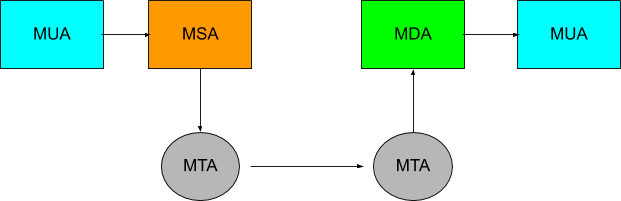

so am i supposed to use an "MSA" to send emails to the remote SMTP server to be sent out?
i feel like the blind men and the elephant, every document explains only a slice of what's happening
hollow linden
Guys I am updating my Ubuntu 19.10 distro to 20.04 LTS . And it's been 4 hours that it's installing the upgrades . Still not 50% . is that a problem?
fiery tulip
@hollow linden - maybe you can open up a console to the install and see if there is more info: https://askubuntu.com/questions/735410/how-to-open-cli-during-installation

Ask Ubuntu
I am maybe an idiot but I cannot find a standard bulletproof keyboard shortcut for opening the CLI / Terminal during ubuntu 14.* desktop installation.
and how to close it after im done?
so please...
hollow linden
I downloaded the files needed and I can't cancel it
GUI
Not terminal
Nonono
It is going
But like it is taking too long
Like it reached 50% in 4 hours
Nono
It's dual boot
HDD
Not SSD
With 100 mb/s read speed
And 25 mb/s write
Oh
Not a lot
Like about 10
or 1
5
15
the download has finished
It's the installation taking time
Oh
I am in Iran and sometimes the browser lags
And the download finished as I said
So sudo apt upgrade must not have probs
Oh
About 140 gb
Intel core i7 8th gen
With a GeForce MX110
And 8 gb ram + 4 gb virtual
It was all ok
No problems at all
formal schooner
@main olive real project, i took orders for a product thru a google form, now i want to send order confirmations automatically w/ a script
formal schooner
ideally i'll have invoicing automated w/ paypal too but that's probably more work
yep
thats why i was looking for either 1) the right command line tool, or 2) i guess smtplib if absolutely necessary
chrome fjord
try updating mirror links
formal schooner
@main olive yeah i was looking at mailx et alia
the problem is that idk how any of this shit works 😅
there seem to be a zillion overlapping similar tools out there
and i was looking for a starting point
- also some kind of high level understanding how how all this stuff works
ah it looks like i can just pass all that info to mailx on the command line
username and password
!code-block
shy yokeBOT
Discord has support for Markdown, which allows you to post code with full syntax highlighting. Please use these whenever you paste code, as this helps improve the legibility and makes it easier for us to help you.
To do this, use the following method:
```python
print('Hello world!')
```
Note:
• These are backticks, not quotes. Backticks can usually be found on the tilde key.
• You can also use py as the language instead of python
• The language must be on the first line next to the backticks with no space between them
This will result in the following:
print('Hello world!')
yep i saw this https://www.binarytides.com/linux-mail-with-smtp/
This tutorial shows how to specify and use external smtp servers to send emails from command line on Linux using commands like mailx and swaks, along with support for authentication and encryption.
but it took me a while to even figure out that mailx was a tool i should use
or what exactly mailx is and how it relates to the million other tools on a typical unix-flavored system
to email, yes
well.. to the technical aspects of it
yeah i know broadly what smtp, imap, and pop are
its more the tooling
and the details of how these things actually work
yep thank you
there is quite a terminology soup out there
and not too many "high level here is how it all works" documents
yep hahaha
As mailx is a mail user agent, it provides only basic SMTP services. If it fails to contact its upstream SMTP server, it will not make further attempts to transfer the message at a later time, and it does not leave other information about this condition than an error message on the terminal and a 'dead.letter' file. This is usually not a problem if the SMTP server is located in the same local network as the computer on which mailx is run. However, care should be taken when using a remote server of an ISP; it might be better to set up a local SMTP server then which just acts as a proxy.
care should be taken when using a remote server of an ISP; it might be better to set up a local SMTP server then which just acts as a proxy.
why is this? because then a local smtp server can re-send the email later or something?
this is from the man page btw https://linux.die.net/man/1/mailx
Mailx is an intelligent mail processing system, which has a command syntax reminiscent of ed(1) with lines replaced by messages.
hollow linden
So guys I'm trying to build a linux application from source in windows and I'm getting this error :
                  ||
The command I ran \/
mingw32-make -f Makefile.gcc
Output ||
       \/
'test' is not recognized as an internal or external command,
operable program or batch file.
creating directory o
'test' is not recognized as an internal or external command,
operable program or batch file.
A subdirectory or file o already exists.
mingw32-make: *** [Makefile.gcc:908: objdir.tag] Error 1
hello i have qustions Can anyone answer?
I installed arch linux and my package manager is not working
no i'm install package example pacman install tmux is downloaded and downladed app does' not work
for every apps
tmux
Sorry I took your time is fixed
im restart system and login again it's workIn a stupid way
hollow linden
Actually @main olive What command do you run?
I could help
I say run pacman -Syu
Then run pacman -S tmux
main olive
@hollow linden TNX solved
hollow linden
np
chrome fjord
for arch read their forums , most of queries are already solved there
 muted sandal
hey i kind of learned linux guys
basics one
is there any sources or exercises that can keep me praticed?
muted sandal
@main olive hey thanks but any alternate you know ?
i kind of already know the site
thanks
 native sluice
I've just bought a raspberry pi 4 to self host, my trial on google cloud is running out. Is there a way to transfer all my server data on google cloud to my pi?
chrome fjord
the linux command line is very good book
and then working on sed expressions
i still don't know anything about seds smh
heady shore
Personally, I'd just rsync the important stuff @native sluice
native sluice
@heady shore wdym
heady shore
Use rsync to copy the files from the cloud remote to your pi
native sluice
alr thx
heady shore
👍
 supple harbor
anyone ever work with the guestfs api?
 summer tangle
i'm getting a ModuleNotFoundError when trying to import cryptography:
ModuleNotFoundError: No module named '_cffi_backend'
anyone know how i can fix this?
 clear sorrel
Stack Overflow
I have python2.6 in my Linux rhel-5. I have installed pip and required CFFI packages. When i try to run a sample CFFI program it says :
ffi = FFI()
File "/usr/lib/python2.6/site-packages/cffi/api...
formal schooner
python 2.6 yikes
heady shore
That was asked over 4 years ago
fresh saddle
The pip CLI will probably never change anyway
 bronze basalt
is it safe and reliable to install python from deadsnakes ppa?????????
 wheat ridge
If anyone is here that knows anything about setting up Python 3 with VSCode in Ubuntu, I would really appreciate some help or insight in help-carbon. Thanks. Haven't gotten any answers.
Disregard^
fresh saddle
@bronze basalt it is reported to be safe yes
bronze basalt
thx
formal schooner
@bronze basalt use pyenv
static cosmos
@bronze basalt There may or may not be security issues that have not been found yet in new versions of python
fresh saddle
pyenv might not always be a good choice since it is harder to install and slower
(eg. inside containers or CI)
formal schooner
Yeah true
 river estuary
Hi, I am using Python inotify to watch a directory for changes. Looking at the add_watch function, it takes a path_unicode in form of a string and therefore throws an error if a data structure such as a list is passed to it. I am interested to know whether anyone knows if it possible to watch more than one directory at the same time, and if so how?
formal schooner
threading sounds reasonable to me too
wait... can't you add_watch multiple times?
adapted from their docs:
import inotify.adapters

files = ['/var/a.log', '/var/b.log', '/var/c.log']

inotifier = inotify.adapters.Inotify()
for file in files:
    inotifier.add_watch(file)

for event in inotifier.event_gen(yield_nones=False):
    (_, type_names, path, filename) = event
    print(f"PATH=[{path}] FILENAME=[{filename}] EVENT_TYPES={type_names}")
@river estuary
alternatively you can create one instance of inotify.adapters.Inotify per thread...
from concurrent.futures import ThreadPoolExecutor
import inotify.adapters

def watch_file(file):
    inotifier = inotify.adapters.Inotify()
    inotifier.add_watch(file)
    for event in inotifier.event_gen(yield_nones=False):
        (_, type_names, path, filename) = event
        print(f"PATH=[{path}] FILENAME=[{filename}] EVENT_TYPES={type_names}")

files = ['/var/a.log', '/var/b.log', '/var/c.log']
with ThreadPoolExecutor(len(files)) as executor:
    futures = [executor.submit(watch_file, file) for file in files]
Didn’t realise that I can add_watch multiple times. It works, thanks @formal schooner
 prisma anchor
i removed a partition but after that i can't boot into my other linux partition pls help
basically
how do i merge those two
fresh saddle
Just extend the left one?
prisma anchor
the extend volume option is greyed out @fresh saddle
fresh saddle
Lol, Google is telling me that the built in partition tool can't extend partitions based on their position on the disk
You have to use an external tool
fresh saddle
GParted is pretty popular I think
chrome fjord
Ur previous volume is in fat32. So u will hv to use diskpart
prisma anchor
@fresh saddle so now when i reboot i get to some grub menu
that says press TAB
@fresh saddle
fresh saddle
Well, do that?
prisma anchor
kk
 versed ether
I'm playing around with os.system() to execute bash commands from within my python script. I've noticed that the cd command does not seem to work (or doesnt work as I assume it would). It does not seem to "remember" that I changed the directory and instead executes commands from the initial path each time (the path from where the script was called)
Is there a way to enable this?
fresh saddle
cd isn't an "actual" executable, it is a way to ask the shell to change its directory that's all
It is executing the chdir() kernel call
subprocess also have an option for it I think
versed ether
Right now it always executes commands from where my python script was executed. Is there a way to modify this initial path within the python script?
If so, I could built my own cd command and not actually execute it in bash
let me try
perfect!
thanks
 random mirage
can anyone help me in flask deployment with wsgi in ubuntu
 balmy depot
I just learned that theres more than one type of linux https://en.wikipedia.org/wiki/List_of_Linux_distributions
This page provides general information about notable Linux distributions in the form of a categorized list. Distributions are organized into sections by the major distribution they are based on, or the package management system they are based around.
i always thought i was just Ubuntu
static cosmos

formal schooner
🥴
tawdry sonnet
Fun fact: Ubuntu is a "child" of Debian.
formal schooner
fun fact: debian is named after the creator and his then-girlfriend, debra and ian
does canonical re-build every package that debian supports? or do they just copy some packages without building from scratch?
tawdry sonnet
You're telling me this woman has her name all over the internet and engraved in history, and he didn't even put a ring on it? That's worse than getting someone's name tattooed on you.
summer trail
They got married later.
@formal schooner they rebuild everything. But, I mean, so does Debian. Each distribution rebuilds every package (so, Ubuntu 20.04 and 20.10 each have their own independent copy of every package).
Every package specifies, as part of its source, which other packages it has a build dependency on. Every time new source for one of those packages is uploaded, every other package that depends on it, recursively, is rebuilt. Only if all succeed in being built does the initial upload succeed, otherwise the attempted change is rejected.
 soft rose
I have a repo with python scripts working on my windows machine, so I pip freezed a requirements.txt. I then cloned this repo on a Linux machine and when I went to pip install -r requirements.txt, a lot of the package versions I had couldn’t be found, so I had to go back a few versions. Is this normal?
When I ran my script (just processes data in a large amount of text files), I eventually ran into a segmentation fault. I didn’t really understand this when I looked it up but a website mentioned it was trying to access memory beyond reach. I was running this on a low spec VM, so would a higher spec VM prevent this?
fresh saddle
It was probably a memory error yeah, even though python should have raised the right exception
tender plinth
Hello , Im having this issue of low speaker sound on linux always , but on windows its absolutely fine
are there any sound drivers im missing ?
or are there any good tweaks with the existing drivers that I can apply?
 round shuttle
@soft rose I don't think a segmentation fault can be linked to low-end hardware. Either you're out of memory, and you get a MemoryError, or you're fine. Segmentation fault only occur when trying to look at a memory that wasn't allocated for you (the image you can have is you can't look at your neighbour process's memory). It's likeky a bug in C binary, either Python's or you library's.
@tender plinth I didn't ever need to install sepcific sound drivers on Linux (Ubuntu). What kind of hardware / distro have you got ? We need more data to answer...
tender plinth
ah @round shuttle I actually fixed it using pactl , thank u so much for taking the time to reply , much appreciated
main olive
can anyone help me change my default python version to 3.x on my mac
formal schooner
Do NOT use the built in python on mac
 jagged lake
why not?
fresh saddle
Because the OS assumes that python points to a 2.x interpreter, and if it does change, your OS won't be able to even boot
 radiant lotus
DId you guys know that you can make a game that can be read on a qr code??????????????
 alpine cave
yep. on a really big qr code.
formal schooner
not even that @fresh saddle @jagged lake , it's because it's required by your system and you do not want to mess that up
always install your own python using the official installer, homebrew, pyenv, or something else. and try to always use a venv/virtualenv
formal schooner
i didnt mean even installing a new python or changing path
even just sudo pip install can break everything
hell, apparently even pip install --user can break things in the right context, as i learned recently, because your user path comes before the system path by default
fresh saddle
Damn, that's pretty harsh
tiny lava
Mac requires python to boot? Seems pretty unlikely to me
versed ether
I'm trying to execute a python script and redirect the output to a log file in bash like this: ./my_script.py > my_log.txt. This works as expected for stuff that gets printed out, but when an Exception gets raised, that does not get written to the file and instead displayed in the terminal. Is there a way to change this? (Either in shell or in python)
To be clear, I want the full error traceback to also appear in my log
tiny lava
You need to redirect stderr too, > just redirects stdout
Lemme Google how to do that again tho lmao
Put 2>&1 at the end of the comand
Which means redirect stderr (2) into the current location of stdout (1)
versed ether
nice, thank you!
tiny lava
Yw
versed ether
Is there a way to have both stdout and stderr on screen and in the log file?
tiny lava
I think you can use tee, which just writes to a file
./myfile.py 2>&1 | tee output
It can have problems with buffers tho if the stream isn't getting flushed, you can use something like unbuffer for that
versed ether
Hmm, even with unbuffer, the output seems buffered
tiny lava
What command are you using
versed ether
python3 my_script.py 2>&1 | unbuffer -p tee -a log.txt
tiny lava
You need to unbuffer the output of the script, not tee
versed ether
thanks again, dude :P
formal schooner
i think python does its own buffering as well as the OS
 wintry rapids
m trying to run slenium python on linux
it works but send_keys is not wortking
on shell
 frank coral
@main olive just add an alias for python and you'll be good 👍 It won't break your system
heady shore
Any error messages? Are you sure you're selecting the right element? @wintry rapids
random mirage
I am deploying gunicorn flask app reversed proxy on apache2 , gunicorn is running fine, but I try the reverse proxy with apache2 it doesn't works, and gives 404 not found
Can anybody help me in this?
wintry rapids
yes @heady shore
t worked on my home windows machine
wd u like to see the error message?
heady shore
@random mirage I'd need more details to help more, but I suggest using nginx instead of apache2, apache2 isn't great as a reverse proxy
@wintry rapids I mean yea, I can't help much if I don't see an error message :]
shy yokeBOT
Hey @random mirage!
Uh-oh! It looks like your message got zapped by our spam filter. We currently don't allow .txt attachments, so here are some tips to help you travel safely:
• If you attempted to send a message longer than 2000 characters, try shortening your message to fit within the character limit or use a pasting service (see below)
• If you tried to show someone your code, you can use codeblocks
(run !code-blocks in #bot-commands for more information) or use a pasting service like:
random mirage
@heady shore
Not Found
The requested URL was not found on this server.
Apache/2.4.29 (Ubuntu) Server at 127.0.0.1 Port 80
This is the error coming
The problem is that our existing projects are running on apache2 itself
heady shore
Oh, you have multiple vhosts?
heady shore
Not much ATM as I'm working - check your apache2 logs, make sure you have the correct vhost enabled
random mirage
vhosts are enabled and apache logs doesn't show any error
wintry rapids
ok @heady shore ll send the error message just a min
driver.find_element_by_name("search_query").send_keys('elton')
File "/home/ec2-user/.local/lib/python2.7/site-packages/selenium/webdriver/remote/webelement.py", line 479, in send_keys
'value': keys_to_typing(value)})
File "/home/ec2-user/.local/lib/python2.7/site-packages/selenium/webdriver/remote/webelement.py", line 633, in _execute
return self._parent.execute(command, params)
File "/home/ec2-user/.local/lib/python2.7/site-packages/selenium/webdriver/remote/webdriver.py", line 321, in execute
self.error_handler.check_response(response)
File "/home/ec2-user/.local/lib/python2.7/site-packages/selenium/webdriver/remote/errorhandler.py", line 242, in check_response
raise exception_class(message, screen, stacktrace)
selenium.common.exceptions.WebDriverException: Message: unknown error: unknown sessionId
(Session info: headless chrome=84.0.4147.125)
(Driver info: chromedriver=2.37.544315 (730aa6a5fdba159ac9f4c1e8cbc59bf1b5ce12b7),platform=Linux 4.14.186-110.268.amzn1.x86_64 x86_64)
@heady shore this
 opal prairie
A_SCORE = 90
B_SCORE = 80
C_SCORE = 70
D_SCORE = 60

grade = int(input("Enter your score: "))

if grade >= A_SCORE:
    print ("Your grade is: A")
    if grade >= B_SCORE:
        print ("Your grade is: B")
    elif grade >= C_SCORE:
        print ("Your grade is: C")
    elif grade >= D_SCORE:
        print ("Your grade is: D")
    else:
        print ("You failed")
else:
    print ("You have entered a invalid score")
For some reason if i enter a grade less than 90, my if statements fails and prints out the last else but if i enter a grade of 95, it prints out grade A and B. Does anyone know why ?
Interesting.. python really cares about indents. Problem fixed, thank you!
tiny lava
indents replace brackets in python
 mellow narwhal
Brackets = []
Braces = {}
wintry rapids
you know how to solve this issue:
I'm trying to run selenium python on Linux (AWS EC2)
u get only command line no UI
it works for scrapping with a given URL but send_keys doesnt work.
fresh saddle
Are you running it in headless mode?
fresh saddle
Do you get any traceback?
wintry rapids
u mean error message?
driver.find_element_by_name("search_query").send_keys('elton')
File "/home/ec2-user/.local/lib/python2.7/site-packages/selenium/webdriver/remote/webelement.py", line 479, in send_keys
'value': keys_to_typing(value)})
File "/home/ec2-user/.local/lib/python2.7/site-packages/selenium/webdriver/remote/webelement.py", line 633, in _execute
return self._parent.execute(command, params)
File "/home/ec2-user/.local/lib/python2.7/site-packages/selenium/webdriver/remote/webdriver.py", line 321, in execute
self.error_handler.check_response(response)
File "/home/ec2-user/.local/lib/python2.7/site-packages/selenium/webdriver/remote/errorhandler.py", line 242, in check_response
raise exception_class(message, screen, stacktrace)
selenium.common.exceptions.WebDriverException: Message: unknown error: unknown sessionId
(Session info: headless chrome=84.0.4147.125)
(Driver info: chromedriver=2.37.544315 (730aa6a5fdba159ac9f4c1e8cbc59bf1b5ce12b7),platform=Linux 4.14.186-110.268.amzn1.x86_64 x86_64)
see
@fresh saddle
fresh saddle
You should try with python 3 instead, python 2 is deprecated since the beginning of the year
wintry rapids
im using python 3
o wait
the thing is didnt know there already py 2 on the sever pc
i installed py3 and tried running
but how come it works for scrapping?
@fresh saddle
fresh saddle
Is it working now?
wintry rapids
i didnt try
so your suggestion is i uninstall the python 2
and then try running?
i thought the issue was ,as it has no UI so it cant send keys
i may sound silly,i have no prior experience @fresh saddle
wintry rapids
i just followed an online tutrial
just type python filename.py
it works ,irrespective of root user or not

Medium
Tutorial on how to install ChromeDriver and Selenium in an AWS EC2 instance
just a 2min read this code had worked with me however theres no sendkeys used in here
fresh saddle
Can you try with python3 filename.py?
random mirage
Can anyone help me with apache2 with unix sock reverse proxy
wintry rapids
alternatives --set python /usr/bin/python3.6
i did this @fresh saddle
in the roor user
now I ll run my python in non root
tis not working
the thing is to get it done, i tried many different stuff my have messed up some fle location
im thnking of terminatng the nstance ,and nstall py and all agan
fresh saddle
Yeah, if it is messed up, it is best to start back from scratch
fresh saddle
Ah, it sounds like something that'd be against their ToS and therefore rule 5, I'm afraid we can't help you with that
wintry rapids
i wrote selenium pythnon ran on home pc it worked
o lord
actully it doesnt
cuz i use pyautogui
where it doesnt work
but atleast since ve done all this
i learnt some linnux
im thinkng of keepng it ,ive also connected it with my phone using SSH
I do run some timpass scripts
fresh saddle
Even if you are using pyautogui, you are accessing it using a script, which is still forbidden
wintry rapids
o
but say if i want to do a testing on my website
i mean my college project website, i need to test the backend ,by registering multiple users
i would require a UI, i tried phantomjs idk it didnt work
i tried pyvirtdisplay didnt work ether
fresh saddle
Well, you'll have to do that manually
fresh saddle
Not for that, but that's still illegal
wintry rapids
whats the worst thing that can happen? 1.huge fine amount 2.account suspend 3.both
well im not 18 yet so they wont do alll this
anyways thx
main olive
So I'm trying to update my aws ubuntu instance and I'm getting this error: ```
$ sudo apt update
Hit:1 http://security.ubuntu.com/ubuntu bionic-security InRelease
Hit:2 http://eu-west-2.ec2.archive.ubuntu.com/ubuntu bionic InRelease
Get:3 http://eu-west-2.ec2.archive.ubuntu.com/ubuntu bionic-updates InRelease [88.7 kB]
Get:4 http://eu-west-2.ec2.archive.ubuntu.com/ubuntu bionic-backports InRelease [74.6 kB ]
Fetched 163 kB in 0s (501 kB/s)
Traceback (most recent call last):
File "/usr/lib/cnf-update-db", line 8, in <module>
from CommandNotFound.db.creator import DbCreator
File "/usr/lib/python3/dist-packages/CommandNotFound/db/creator.py", line 11, in <modu le>
import apt_pkg
ModuleNotFoundError: No module named 'apt_pkg'
Reading package lists... Done
E: Problem executing scripts APT::Update::Post-Invoke-Success 'if /usr/bin/test -w /var/ lib/command-not-found/ -a -e /usr/lib/cnf-update-db; then /usr/lib/cnf-update-db > /dev/ null; fi'
E: Sub-process returned an error code
I have no idea what I'm doing wrong
tender plinth
Hello , is there any way I can debug a segfault handler function with gdb?
the issue is , when the segfault hits , gdb halts and is unable to pass control to the signal handler function
ah sorry nvm handle SIGSEGV nostop pass worked
 velvet schooner
@green iron can you give more detail?
main olive
Try
sudo apt-get install --reinstall python3-apt. Note: Did not examinate thoroughly. Google forNo module named 'apt_pkg'! Hope you get it solved. Post feedback if do. Good night! EDIT: @main olive Any luck?
@main olive I gave up and went to bed before you sent this, I'll try again in a minute 🙃
velvet schooner
Does anybody know if there's a CPU monitoring tool for Ubuntu as in the task manager in Windows? All I can find are tools for the linux bash
chrome fjord
press alt+1
velvet schooner
@green iron sorry I'm not sure what's happening.. can't help
 clever skiff
I am deeply confused, I ak trying to install a package in vagrant, and I get a permission error, when I look at the permissions, all users have all of the permissions
I can list the things I have tried if that helps
And the exact error
 green iron
@velvet schooner ok
formal schooner
@clever skiff just go ahead and list it, maybe someone can help
green iron
@trim girder I did close an application with ctrl + f4 and a terminal like window appeard so I just tried to restart and it's not happening
@trim girder it is not starting
Stuck here
 trim girder
Oh yeah that's something else. Let that run.
trim girder
Did you try to press the keys I mentioned above?
green iron
When should I press them?
trim girder
You can try now.
trim girder
Try right now and let us know if anything happened.
green iron
I think it's stuck because it's not even cancelled when I press ctrl + c
trim girder
Did you try and press the keys I mentioned yet?
green iron
Yes
trim girder
And?
trim girder
Please try CTRL+ALT+F2 as well.
You may have a message of some failure on another TTY
green iron
I pressed ctrl + alt +f1
trim girder
Now try CTRL+ALT+F2 please.
clever skiff
Tghis is in relation to what I posted earlier
```ERROR: Error [Errno 13] Permission denied: '/vagrant/.venv/bin/python' while executing command python setup.py egg_info ERROR: Could not install packages due to an EnvironmentError: [Errno 13] Permission denied: '/vagrant/.venv/bin/python' Consider using the --user option or check the permissions.
`ERROR: Can not perform a '--user' install. User site-packages are not visible in this virtualenv`
Have also tried using sudo but without success
`WARNING: The directory '/home/vagrant/.cache/pip' or its parent directory is not owned or is not writable by the current user. The cache has been disabled. Check the permissions and owner of that directory. If executing pip with sudo, you may want sudo's -H flag. ` This is what I get from using sudo, in my permissions for vagarant/.venv I get -rwxrwxrwx.

Sorry if this is interrupting someones question/conversation.Okay, now press CTRL+ALT+F7
Your computer is responding to changing TTY, and often errors/debugging will be on a separate TTY while the "pretty" loading screens will be the default. Usually there's 1-7 which can be accessed with CTRL+ALT+F#
(Changing TTYs isn't destructive and shouldn't exacerbate any problems, btw)
green iron
When should I press ,While I am on that black window?
trim girder
It should work on any screen at any time once the kernel has loaded for the most part
But yes, you can try on that screen.
@clever skiff What does stat /vagrant/.venv/bin/python say
trim girder
@green iron Try pressing each combination of CTRL+ALT+F1 through CTRL+ALT+F7
green iron
On f1 the blinking stops
F2 it's back
And that pic is from f7
Others don't show anything
trim girder
@green iron You could try CTRL+D when you are at the "Filesystem checks in progress" -- do you have a live CD/USB you can boot from?
green iron
No, I don't
It's a dual boot btw, I have windows working, of that can help fix it in any way
trim girder
If it were me, at this point I would drop into single user mode and try to check out any logs and run an fsck
trim girder
@green iron Please follow the instructions here to enter single user mode: https://askubuntu.com/a/132983
Ask Ubuntu
After changing a few lines in xorg.conf, I can no longer boot Ubuntu (I assume it breaks when trying to load up X), so I need a way to boot into a single-user mode. However, there seems to be zero ...
green iron
Ok
Btw I just came to the root by recovery options
Is there anything I should do there@trim girder
trim girder
@green iron You'll want to find a document outlining how to fsck your disks and/or look around in /var/log for logs indicating errors.
green iron
Okay
trim girder
@clever skiff There are a lot more directories used during installation. Might want to see if there's a --verbose or something option, or a log, that you can see what action, and to where the error comes from.
green iron
@trim girder can't I check the logs and other things from tty
@trim girder I'm into single user mode
What do I do now
clever skiff
Alright will look into it
trim girder
@green iron did you run a fsck ?
green iron
trim girder
@green iron you'll need to unmount that device before fsck: do umount /dev/sda11
clever skiff
By --verbose, can I possibly run the same command just adding that to the end of the command?
Also about feom where it is comming from, doesnt the error say that when it says check permissions for the vagrant/.venv
trim girder
@clever skiff I mean you'll need to look at the documentation/help for the command and see if there's a way to get a more verbose/debug output of whats going on
@green iron no action
green iron
trim girder
@green iron same deal.
clever skiff
Could this be what I am looking for?
green iron
trim girder
@clever skiff that looks promising, yeah.
@green iron Awesome, it's saying that device is good. You can run mount to see all currently mounted devices
green iron
main olive
what happened?
trim girder
@green iron umount /dev/sda1; fsck -a /dev/sda1
main olive
wait why is ubuntu like this 🤔
green iron
@main olive it's single user mode.
chrome fjord
live boot maybe and add users
green iron
main olive
🤔
green iron
@chrome fjord I don't have anything to do a live boot TT
main olive
did you remove gui from it?
main olive
is it like login loop?
trim girder
@green iron Run again without the -a
trim girder
Hmmm. You said this was dual boot though, correct?
green iron
Yeah
trim girder
Yeah don't touch that then. I don't know enough about dual boot situations to be able to speak authoritatively.
green iron
Ohh
trim girder
It said it's a FAT format, which means it's likely Window's
trim girder
That could be normal for all I know. In the mount screenshot it had a /home path, you could try fsck -a against that and see if maybe that's holding it up. But I've found a boot error is usually because... well something more boot related.
main olive
i see
green iron
@trim girder what should I do now 😦
green iron
Ask Ubuntu
I have an Asus Zenbook 14 with graphics card: Intel Corporation Device [8086:3ea0].
I tried to install ubuntu 19.04 but I'm getting stuck on boot with a purple screen. The install disk also got s...
Will this be any good?
tiny lava
anything obvious in journalctl -b -1 -n 25
main olive
Try
sudo apt-get install --reinstall python3-apt. Note: Did not examinate thoroughly. Google forNo module named 'apt_pkg'! Hope you get it solved. Post feedback if do. Good night! EDIT: @main olive Any luck?
@main olive I tried this and got the same error :/
tiny lava
anything interesting the the output of that command?
green iron
@tiny lava you asking me?
tiny lava
Yep
green iron
Yeah it was all [ok]
clever skiff
After checking even more permissions, I could not find a single one where it wasn rwxrwxrwx, and the current user is vagrant which I guess is also the owner of the files
 brave plume
Hello! I need some help with a unix related project
round shuttle
Hello! I need some help with a unix related project
What kind of project ? Give details !
 zealous wyvern
Hi there, folks !!
I have an issue with the mac, where i try to do things in py3 but it's pointing to 2.7 any way so it points to 3 instad
doing py3 or pip3 doesn't work it just installs the modules and then doesn't work
heady shore
python3 does not point to 3?
 sick patrol
sudo rm /usr/bin/python2
sick patrol
😛
zealous wyvern
Damn okay, any idea for a work around ?
heady shore
Well, what does python3 give you?
sick patrol
Yes sudo rm /usr/bin/python3
zealous wyvern
It dowloads the modules and everything
zealous wyvern
Then shows satisfied req when trying to execute a file
And doesn't really execute it at all
And shows module not found
heady shore
Can you please stop suggesting people use rm foolishly, @sick patrol? It is not appreciated.
zealous wyvern
When trying to download the module it will just show module satisfied
zealous wyvern
Yeah i won't use, don't wanna burn the mac
heady shore
Hmm... What happens when you literally just run python3 in your term, not trying to execute anything?
zealous wyvern
Hmm it shows the version
heady shore
Is it the correct version, python3?
zealous wyvern
yeah 3.8.2
When i do python it gives 2.7
When i run python3 smthing.py
It doesn't run
heady shore
Yes, and that's good. That is how it is supposed to work ^^^
That however is not how it's supposed to work
Just know that your default python version on a mac should not deviate from 2.7
If it does, your mac will not boot
Can you give an example of the output when you run python3 something.py?
zealous wyvern
So it will show for e.g :
Module error "html2text" not found
Then i go to install it
Boom requirement is satisfied
heady shore
And you're using pip3, right?
heady shore
Run pip3 --version, and post the output, than
If it doesn't match your python3 ver, there's your issue.
sick patrol
You had an issue with your path this is how to fix it:
fix=rm && which python3 | xargs $fix
That is not how to fix the issue, that will eval to rm /path/to/python3
zealous wyvern
This guy just wants me brick my mac that's it lol
I'll try it tomorrow and update you guys
Thanks for helping
heady shore
No problem, good luck.
 orchid steeple
!ban 350376946426839041 First you try to get people to run a command so you can ssh into their machine, now you're trying to get people to run more malicious code to delete things from their system. You've clearly only come here to troll. You are not welcome here.
shy yokeBOT
:incoming_envelope: :ok_hand: applied ban to @sick patrol permanently.
green iron
@trim girder removing all the nvidia drivers from tty1 worked. Thanks for your help
 tranquil steeple
How would i send the output of a command to a variable cat something.txt | grep -0 "something"
something likes this
so i can compare this output to make an if statement
the file is a log
summer trail
From Python? subprocess.check_output() is probably what you want. https://docs.python.org/3/library/subprocess.html#subprocess.check_output
@tranquil steeple
fresh saddle
Although you could do that with python code pretty easily
formal schooner
@tranquil steeple ```bash
grep -o 'something' something.txt | read -r -d '' something_result
Not sure if read syntax is different in bash vs zsh but something like that
tranquil steeple
@formal schooner the -o for grep is what i figured out
works now
I forgot you dont have to cat and the grep
i should change that
formal schooner
👍 grep supports the filename as an argument and reading from stdin
tranquil steeple
because right now its something like this cat log.txt | grep -o "asdfasdfasdf "
formal schooner
grep -o something < filename.txt
You almost never need to actually start a command line pipe sequence with cat
Because redirecting stdin from the file does the same exact thing
formal schooner
< in.txt cmd1 | cmd2 | cmd3 > out.txt
Spicyyyyyyyyyyyyyyyyyyy
fiery tulip
How about the mentally unstable version ;-):
cat <(cat <(cat t.txt)) | cmd1 | cmd2 | cmd3 > out.txt
cats belong in my lap, not in my command line!!
fiery tulip
lolz - so i was trying to dig it up but i swear way back in the 90s there was a guy that scoured usenet and found all the redundant scripts/examples of cat in them and used a perl script to send a form email to each author
fresh saddle
you can also chain some cat - haha
fiery tulip
cat t.txt | ssh server-a "cat > t.txt; cat t.txt" | cmd1 | cmd2 ... lolz
lets make it distributed
formal schooner
@fiery tulip i love it
the auto emailing perl thing, i mean
imagine, distributed computing via ssh
sounds like a great front page hacker news thread
Show HN: Distributed Computing Platform using only Bash and SSH
fiery tulip
the closest I could find from my memory is this - http://porkmail.org/era/unix/award.html#cat
main olive
what ur reffering to as linux is actually
zealous wyvern
@heady shore So the idea that worked is to actually remove 3.8 and work with 2.7 completely
I can run 2 separate using pyenv as well now
tiny lava
side note: don't use python 2, its EOL
heady shore
Yep, there's really not many reasons to use 2 anymore
 warped wing
what does | operator do on unix
cat file.txt | less makes it prettier
but what odes it actually do
 warped nimbus
@warped wing It connects the inputs and outputs of multiple commands
It's called "piping"
Instead of cat file.txt printing the file content to your terminal, it "pipes" the content to the less command
By the way, cat is not necessary there. less file.txt works too.
formal schooner
or less < file.txt if you want to eliminate the use of cat without assuming the software developer wrote their own file i/o code
summer trail
Or less file.txt | less if you know that the developer of less wrote way too much code 😄
(that works because less detects if it's not displaying to the user's screen, and behaves like cat when it isn't, just reading its input(s) and writing to its output)
formal schooner
"do one thing and do it well"
 solar belfry
Quick question: Anybody familiar with BSD here? I want to know what os.uname() outputs on BSD. I'm checking for XDG compliant OSes in a Python script, and want to include Linux and BSD and not include Darwin/Windows.
solar belfry
Nevermind, figured it out - there's a different thing I can do.
from sys import platform as platform_detect

if "darwin" in platform_detect or "win32" in platform_detect or "cygwin" in platform_detect: # If code is running on non-XDG compliant OS...
    print("NOT on a XDG compliant OS! Checking for environment variable anyways.")
    return
else:
    print("Likely on an XDG compliant OS! Checking environment variable.")
    return
 humble onyx
I accidently killed the terminal on which openvpn is running. I thought it would just die without a controlling terminal but it still exist in the memory. tun0 interface still shows up with ifconfig. Does that mean openvpn has hangup signal handling? or is it some kind of bug that I need to disconnect the pts somehow?
Edit: It died after a while. I don't understand what happened
steady sluice
hello guys, i need some help!
i need a module that can listen me and give me the text.
(sorry about my english 🇧🇷 )
heady shore
@steady sluice I've had success with Google's speech to text API, below a certain limit it's free and it's very simple to interact with
tiny lava
Google is really good with speech recognition
heady shore
It's the best, but it's still only like, okay at it. Not amazing
Maybe it's gotten better since I last used it, though
fresh saddle
@humble onyx it has probably received SIGHUP but took some time to cleanup some tasks, in fact, the process doesn't have to close when they receive it, it is up to the process
Only SIGTERM SIGKILL will kill the process, because the process doesn't actually receive it, it is caught by the kernel which just end it
fiery tulip
I think thats SIGKILL not SIGTERM
fresh saddle
Yup
fiery tulip
typically, I would try to kill the process with a SIGTERM first, then if it doesn't shut down, send a SIGKILL - that way if it wants to do some shutdown routine it has the option
fresh saddle
My bad
fiery tulip
In practice... kill <pid> (default: SIGTERM [15]) wait a few, run a ps, then kill -9 <pid> (SIGKILL [9])
man -s7 signal shouild have all the different signals and their symbols, numbers
fresh saddle
That's funny how you can use kill to send any kind of signal, like USR1 or whatever
fiery tulip
yeah its a violent sounding command 🙂
heady shore
KILL... with love!
 trim agate
i'm trying to check if a $USER is in a list
and I have no idea how to do it
Goal is
if $USER is in a list do something
if $USER is not check another list
tiny lava
Google will answer this question for you
heady shore
And? Do we really want to tell everyone asking a question to just "Google it"?
You can read through the list, @trim agate, and check each element
trim agate
Yeah but there are so many ways (most of them I don't get like this one for example : [[ $list =~ (^|[[:space:]])$x($|[[:space:]]) ]] && echo 'yes' || echo 'no')
heady shore
There's no way to do it in one statement AFAIK. Bash really is just... bad for stuff like this
Oh god lmao
trim agate
regex are my archnemesis so this one just give mes headache
so I tried the "easier" way
heady shore
I'd just loop through it and check each element.
Or grep for it? No regex, still a terrible solution
steady sluice
@steady sluice I've had success with Google's speech to text API, below a certain limit it's free and it's very simple to interact with
@heady shore thank you guy
fiery tulip
I used this in scripts before (encapsulating what @trim agate mentioned above):
in_list() {
  local item=$1 list=$2
  [[ ${list} =~ (^|[[:space:]])${item}($|[[:space:]]) ]]
}

USERLIST="user1 user2 user3 user4"

if in_list $USER "$USERLIST"; then
  do_something
fi
note u have to quote the second argument so it all goes into $2 inside the function
another way might be to use grep with the --line-regexp option which matches the whole line - so you could do something like this:
$ cat users.txt
userbar1
userbar2

$ grep --line-regexp userbar users.txt
<no output>

$ grep --line-regexp userbar1 users.txt
userbar1
Then finally wrap it in a quiet if block:
if grep --quiet --line-regexp ${user} users.txt; then
  do_something
fi
or just re-write in python 🙂
fresh saddle
python -c "exit 0 if '$USER' in '$USERLIST'.split(',') else 1" and then checking %? would also be a solution
trim agate
I found an ugly way with grep
heady shore
Yea, grep would clearly work, yea. In the end the end it's best just to loop through, IMO.
Or, yea, just do it in Python 😄
opal prairie
In a if statement in python, how do you always print something out wether the statement is true or false
warped wing
you put it outside of the if statement
orchid steeple
@little spire please don't post random memes here
 dull nymph
Can I get sendmail/postfix to create a file from a mail it received?
 white musk
anyone know good website where u can learn kali linux
main olive
@white musk https://www.discudemy.com/search then go into search and either find free courses on linux as a whole or kali
You can see your search result. Discudemy free udemy coupons.
in particular
white musk
ty
muted sandal
I used this in scripts before (encapsulating what @trim agate mentioned above):
in_list() {
  local item=$1 list=$2
  [[ ${list} =~ (^|[[:space:]])${item}($|[[:space:]]) ]]
}

USERLIST="user1 user2 user3 user4"

if in_list $USER "$USERLIST"; then
  do_something
fi
@fiery tulip hey what does thing do
??
round shuttle
line 1-4 is a function definition
line 3 is the core of the stuff : it builds a regexp, and matches the list against it.
In this case, it would make the regexp something like (^| )$USER($| ), meaning "look [in the list] for $USER, either surrounder in spaces, or at the beginning/end of the string"
The remainder is just the function call in a nice "if".
muted sandal
dude
i am an amateur in linux
learning for 2 weeks
can some one help me to pratice
fiery tulip
@muted sandal - if you haven't watched this - check this one out: https://missing.csail.mit.edu/2020/course-shell/
the missing semester of your cs education
chrome fjord
i will reccoment tlcl , a great book
muted sandal
i will reccoment tlcl , a great book
@chrome fjord tlcl?
fiery tulip
Ah cool - available for free under creative commons: http://linuxcommand.org/tlcl.php
The Linux Command Line by William Shotts
I never looked at this one but scanning through it looks pretty solid
 rough violet
guyssss
i just passed from windows to ubuntu
and the colors are way off
at least some of them
so i googled a solution and using xgamma -(r/g/b)gamma <value> i should be able to customize colors a bit
but i run it, it shows that it has changed, and it still looks the same
heady shore
Have you tried using xrandr instead, @rough violet?
rough violet
uhh i'll google it and see what it is
sorry i just got ubuntu i don't know any of this 😦
heady shore
Xgamma doesn't work for me, xrandr however, does. I forgot what the two commands do differently
rough violet
thanks for the suggestion 🙂
something tells me the author of these (https://www.x.org/releases/X11R7.5/doc/man/man1/xrandr.1.html#:~:text=Xrandr is used to set,'*' after the current mode.) docs doesn't know what readability is
godzilla just had a fucking stroke trying to read that and died
rough violet
hmm i'll google that instead
the same page that i was just looking at came up first
lmfao
heady shore
Yes, but it should be formatted correctly.
rough violet
it's... it's the exact same
heady shore
https://wiki.archlinux.org/index.php/Xrandr
Maybe this'll be of more help, than.
rough violet
ok i give up xrandr is so confusing
steady sluice
ok guys, i need some help (again)
i want that my code can change him(??)
ex:
def change():
if x = 1:
line[25] = light()
else:
line[25] = dark()
def light():
root["bg"] = "white"
 button = Button(root, text="dark mode", command=change)

 x = 1
def dark():
root["bg"] = "black"
 button = Button(root, text="light mode", command=change)

 x = 2
light()
(🇧🇷 )
i am using tkinter, but you guys can understand me
main olive
@steady sluice look at the name of a channel, you can only ask unix related questions there #❓|how-to-get-help
steady sluice
@steady sluice look at the name of a channel, you can only ask unix related questions there #❓|how-to-get-help
@main olive because i don't know if i'll use some of the terminal's command (with the "os") 🇧🇷
steady sluice
Also, you have a mistake in change(). It's not
if x = 1. That's assignment. It needs to be double equation marks.if x == 1. That's comparison.
@main olive what i really wanted is one code that change the, like:
line[25] == dark()
but I think that I found a way (if it works I'll tell u)🇧🇷
@main olive what i really wanted is one code that change the, like:
line[25] == dark()but I think that I found a way (if it works I'll tell u)🇧🇷
@steady sluice change the same code**
steady sluice
I am making a program that have the dark mode and the light mode, but when you close it and open again, it starts on the mode that you saved (that you choiced(I don't know speak english)) I think you understood(???)
formal schooner
@steady sluice you can save the setting to a file
steady sluice
hmmm
I had an idea
I'll save 2 programs, one with the dark mode, and the other with the light mode, and I can make that when I press a button (tkinter) it will rename this one.
like:
I am using the dark mode, and I press a button called by "light mode", and the name of the python file that I'm using (whit the dark mode) is called by "assistant.py" and the light mode is "assistantother.py", with the "os" I'll make the program rename this files and invert them like:
dark mode will be "assistantother.py" and the light will be "assistant.py", and it will close the python file opened and will open the new "assistant.py"
🇧🇷
@steady sluice you can save the setting to a file
@formal schooner but how can I do that ?
formal schooner
you need to decide on a file format
then if you want to save the settings, you overwrite the settings file with new settings
TOML is a good format imo
 steady sluice
thank you guy
formal schooner
@steady sluice if you need to change a lot of settings frequently, or use multithreading, then you should consider a key-value database instead, or even a relational database like sqlite
steady sluice
@steady sluice if you need to change a lot of settings frequently, or use multithreading, then you should consider a key-value database instead, or even a relational database like sqlite
@formal schooner ok
 lucid crescent
looking to automate some linux tasks I need to perform using python on a Raspberry Pi. Any ideas. I need to run an Nmap scan on a network and pull only the IP addresses so I can use them in another script. Any ideas? Nmap returns more than just IP's
static cosmos
@lucid crescent Can you paste what the output looks like?
static cosmos
actually use -oG
lucid crescent
I am using something like Nmap but for bluetooth
static cosmos
and then you can use grep for them
lucid crescent
sorry?
lucid crescent
ah sick
I cant remember the name of the tool sorry
it basically pulls bluetooth MACs of nearby devices
but I cannot remember the name
so a greppable output is going to let me do what?
dull nymph
Hi. Can you help me choose a db server? It's for an app that only I will use (mostly invoicing and some deadline management)
actually a frontend recommendation will also be welcome.
 pallid shadow
Why do you need a server @dull nymph, what's wrong with something like SQLite
SQLite will be perfect for anything you're doing for personal use
dull nymph
Hi @pallid shadow I'll check this out, thanks a lot for the tip!
pallid shadow
you can use it with the sqlite3 that's part of the python standard library, there's a ridiculous amount of tutorials out there for it. and your data can be saved in a single file that you can keep under version control
dull nymph
actually it's more of a shell script as of this moment, but will be pythonized for sure later on
I was kinda thinking, from perspective of very small experience, that perhaps a non-relational database method would be more comfortable, and perhaps better performing, than sql?
pallid shadow
You really really need to push hard before SQLite performance becomes a problem.
fresh saddle
From what I've hear, you don't need to push it that hard
After a thousand objects, it starts struggling
dull nymph
I have 2500 atm. Though most of these are archived. But I do like to have something robust, yet simple as I'm a noob
pallid shadow
<shrug> I've stored tens of GB in them without a problem
dull nymph
is it normal for yum update to take so long for the kernel package? It's been like 10 minutes
viscid sage
@dull nymph depends on your connection and a few other things, but maybe.
dull nymph
aws is just acting weird
i'm starting new instances and it won't let me connect with the key I set
oh i see the problem. decided i need to use 'ubuntu' username rather than ec2-user. strange
 jade mulch
Trying to change directoy in python 3 in lunix
i got a file in root then a folder git / then abcfolder
summer trail
os.chdir("/path/to/directory") is the way to do that.