#unix
1 messages · Page 32 of 1
 eternal coyote
I recently made my iMac dual boot Ubuntu/macOS
 wary edge
ok so i tried to dual boot ubuntu and windows i put ubuntu onto a bootable usb then when i was done with ubuntu i took my usb out restarted the pc and it opened ubuntu
so how do i get windows back
eternal coyote
So
I am unsure how it is w/ windows but
I experienced this exact same issue with macOS
I had to change the boot order so that macOS booted first
Because my boot manager was on macOS
So whenever I changed it and booted into it after changing it I was presented with the option to select the OS (I used reFIND).
wary edge
so how do i change the boot order
wary edge
kk thanks
wary edge
kk ill try it
eternal coyote
I am unsure if I had to install it or not
 sage solar
Efibootmgr is just gonna work on efi systems, it's not very common anymore but it could still be a regular BIOS
eternal coyote
It worked for my use case when I dual booted Ubuntu 18.04 and macOS Mojave
I am not too keen on the technical details though
I just know it worked
sage solar
That's not a your case software thing, that's a question of the hardware he is running on
wary edge
eternal coyote
So
Make 0 come first
Do you have a boot manager on windows?
I just did this the other day so like
i am just trying to help you based off what i did
eternal coyote
I mean you can go into your bios and select a drive to boot off of right?
sage solar
Windows does have its default bootloader which will load into windows and windows only
eternal coyote
Or partition
sage solar
You'll want to run grub2 or shim
wary edge
i cant access windows at all i turn on my pc and it goes straight into ubuntu
sage solar
Preferably grub2, shim is a PITA to set up (even though more secure)
 grave jolt
you might have to hit a key to get the grub menu to come up. if grub was installed [and it usually is] then the installer likely also added an entry in grub for windows.
if grub is not installed then its possible they went with a pure efi boot [but unlikely] and you need to use your motherboards efi menu to boot windows
 obtuse rapids
Ok im random person just on my phone i was able to get the default bios
grave jolt
if windows is installed with a legacy mbr and ubuntu is set up for efi, then its more complicated
yeah youll need that menu if both are installed as efi bootloaders
obtuse rapids
Ok nvm i was able to get windows to load i thought i overrided windows with ubuntu but thanks anyway
 ancient cargo
iirc without the "-" you just "impersonate" the user
but don't get their env
and stuff
 zinc bobcat
Just ask your question
 main olive
Just I was not sure if I should ask it in this channel..
Now I am.
I have been trying for like 2 hours now to get my usb wifi adapter to work on a kali linux Virtual Box
it blinks sometimes
it even sometimes shows networks
but it always fails to connect to them,
I have also tried VM's network adapter
and unpluging it and into different ports of my laptop..
Anyone knows how to fix that?
main olive
ye
might..
Perhaps I should just create another OS on my drive
oh I forgot I can't do that
sage solar
.....you can do that?
grave jolt
what are you trying to do? do you want to access promiscuous mode or do you just want to give the vm internet access?
main olive
I meant I am not allowed to turn my own computer os
I am currently trying to give my VM kali linux a interent access through my wifi adapter
SO I can install something and put my adapter in monitor mode
grave jolt
so you want promiscuous mode
main olive
promiscuous mode? I have literally never heard of that before.
grave jolt
accessing the internet doesnt need any special settings. you just connect to the internet on the host and the default config would give the vm internet access
its 'monitor mode'
but monitor mode/promiscuous mode requires direct access to the hardware
main olive
Are you telling me I actually need no wifi adapter if I am on a laptop?
grave jolt
so you would indeed need to use usb passthrough or something to give control of the device to the vm
but you also need the relevent drivers on the vm
grave jolt
if your host computer already has internet access you DONT need a separate network device to just access the internet
main olive
I have not figure out how sharing folders works for VirtualBox -_- thus I can not share drivers
how?
but I can not access anything on the internet
grave jolt
the default config of virtual box guests are already configured correctly. you just need to tell the vm guest os to bring up the interface
if you changed the vm config or virtualbox settings then you might have to revert them to get it again
grave jolt
idk what you did but yes the network settings and the host bridge settings
i run kali in a vm on virtualbox and i didnt have to do anything at all to get internet access working
just told kali to bring up the network
on the vm's network settings i have "enable network adapter" checked and attach to: NAT
and yeah shared folders are a pain
main olive
I know..I had VMs before..
may have to create a new machine
or reinstall
:/
oh
why to NAT?
grave jolt
this wont let you use monitor mode but itll let you figure out what drivers you need in the guest to make your wifi adaptor work when you tell virtualbox to give it to the guest
main olive
oh
grave jolt
because it makes it magically work without having to worry about how the hosts network connection is configured
grave jolt
the tldr is that it gets a private network on your computer that has a router that can access the wifi network/router your host is connected to
sage solar
Today in, nix does bsd things
OpenBSD has decided that sudo has too many flags, making the code too complex and thus replaced it with their own implementation called doas
sage solar
OpenBSD reimplements Just about everything
main olive
oof NAT is weird
sage solar
What's weird about NAT
main olive
I had promiscuous mode denied
I mean I can not use NAT
bridged adapter should do fine?
@sage solar doas is not sudo and can coexist
sage solar
But sudo isn't there on our systems by default ;(
sage solar
No it's not I spent half an hour figuring that shit out
sage solar
Just because I had to get rid off the stupid filecop thingies
Well I guess they're not stupid
main olive
they're not stupid 
sage solar
I know I know
The best thing is when your installer fails at some point and it drops down to runlevel 0 but you have to check the output of a networking command to find out why it failed
main olive
Do you people recommend making a persistent kali linux? I have to install a lot of things to put my adapter in monitor mode,it would seem(by one video,at least.._)
I have done it in the past
no
 tiny yarrow
which os would be good for a newbie
grave jolt
linux mint, ubuntu, fedora
a lot of instructions assume ubuntu
linux mint is just ubuntu with extra paint on it
tiny yarrow
thanks
main olive
Can someone explain to me what Unix is is it just an operating system? And what is Unix based systems
 little onyx
@main olive this explains it pretty well: https://en.wikipedia.org/wiki/Unix

Unix (; trademarked as UNIX) is a family of multitasking, multiuser computer operating systems that derive from the original AT&T Unix, development starting in the 1970s at the Bell Labs research center by Ken Thompson, Dennis Ritchie, and others.Initially intended for use in...
its an operating system. written entirely in C. It offered the Unix filesystem and the Unix shell
many OSes are based of that. basically Unix is the base and you have things built on top of it like the GUI (if you need it)
as well as other tools and what not.
main olive
Yup,pretty cool
ancient cargo
has anyone had this fun little thing where 'systemctl enable --now serviced" doesn't create a symlink
main olive
how do I set up port forwarding from something running on localhost to an external ip
i'm running this on docker and have trouble figuring it out.. the docker is running on a vm
main olive
@main olive ssh tunnels
you can tunnel from target to host or host to target, using the -R or -L flag
Google it, it's very useful
 blazing wolf
i get this error
E: Package 'pgadmin4' has no installation candidate E: Unable to locate package pgadmin4-apache2 when i run sudo apt install pgadmin4 pgadmin4-apache2
i do have postgresql installed on my machine
main olive
idk, reboot?
I have a question about services in Linux:
What is a difference between %i and %I?
How do I check how much my kali linux took space? It says no space in device?
I gave it like 10GB
and I do df
but I do not know for what to look :d
 tight zodiac
You could try du -ahd1 | sort -hr
If it takes too long, you can remove the pipe and it will print as it finds stuff, but in the end you're still waiting.
main olive
Seriously..I gave it 20GB of storage,still no enough space on the device
am I supposed to dedicate some manually?
what is it? virtual machine or a partition on a physical drive?
VM
you can resize virtual disk
on a physical drive it is no probs,but on VM problem
I DID
from 10 GB to 20GB
still says no space on the device
wtf, give it 30
20 GB is a minimum for Kali
so give it 10 more
WHAT
I HAVE NO MORE SPACE LMFAO
trust me
wtf, download lite kali linux without all those programs
a few megabytes file will not work even if it had 2000gb of space
something is wrong
A minimum of 20 GB disk space for the Kali Linux install. RAM for i386 and amd64 architectures, minimum: 1GB, recommended: 2GB or more.
oh
without all those programs..oky :d
np, now help me
how? 🤔
what is %i and %I in systemd services
good question 😂
I am new sorry
if you are creating a service with a parameter, who knows?
which version did you take? Kali? Kali Large?
bruh
I think yeah 😂
LOL You can be connected to internet with a laptop wifi and with a wifi adapter at the same time? 😂
LMFAO
Can that bring problems
idk, I am not an expert, but you will use one connection at the same time I think
why do you need an adapter? wifi hacking started?
I did it on my built in wifi card in my laptop
if you will be cracking, use you graphic card, instead of CPU
ok i found it:
"%I" Unescaped instance name Same as "%i", but with escaping undone.```yeah
 torn hollow
k
 formal schooner
Is there a way to see CPU utilization for one specific process
I cant tell from htop because other people are using the machine
main olive
htop, top
What is the problem with other users, so you can't usse htop?
@formal schooner
 somber stirrup

Stack Overflow
I want to get the CPU and memory usage of a single process on Linux - I know the PID. Hopefully, I can get it every second and write it to a CSV using the 'watch' command. What command can I use ...
formal schooner
@main olive cant tell whose process is being run on which CPU
I have my suspicions that my program isnt parallelizing correctly
But i cant eyeball the CPU meters cause theyre all moving constantly
@somber stirrup im hoping for some way to see which cpus its running on, to the extent that such a concept exists
formal schooner
Cool i got it
Cant tell if the visual meters are accurate but it does say somewhere between 100 and 1000% of CPU so i guess its working
I wonder if this code is multithreaded or vectorized internally and somehow causing the processor to slow down by some form of context switching
Idk how cpu scheduling works in that case
main olive
idk which code - your program's code?
formal schooner
Yeah
Its using pylbfgs, which is bindings for some C lbfgs library
Trying to run multiple optimization routines in parallel
main olive
and I am reading C theory, when there is so much better things to do
formal schooner
Yeah im pretty sure this aint working right
 stray sun
main olive
stray sun
main olive
Why doesn't it make sense for me? How does recurtion work in this case, can someone explain it to me:
"
GNU -> Expand
GNU’s Not Unix -> Expand
(GNU’s Not Unix)’s Not Unix -> Expand
((GNU’s Not Unix’)s Not Unix)’s Not Unix -> Expand
(((((GNU’s Not Unix’)s Not Unix)’s Not Unix)’s Not Unix…

Until you Segfault.
"

source: https://www.quora.com/Why-was-GNU-Project-named-GNU
 robust cave
GNU stands for GNU's Not Unix, so that's how you get from the first line to the second line
 uneven silo
its infinite
robust cave
the rest is simply replacing the GNU in GNU's Not Unix with GNU's Not Unix
and so on and so forth
main olive
i should be blind, thank you
formal schooner
@stray sun im not sure. how do i diagnose that kind of thing
 torpid ridge
Hey everyone! I'm kait and I'm new to this server and to coding! I'm currently enrolled in a CS class where I am learning python on a Linux computer. We get labs every week and I am currently working on one of them. However I'm having a bit of trouble actually completing this lab. In this lab we are supposed to approximate the value of pi issuing the Monte Carlo Simulation using Turtle in Python. So our first step was to create functions that: outlined a dart not, drew axes, drew a circle and set up the dart board. I'm having a bit of trouble understanding why my turtle will not draw when I called and defined all of my functions? I checked the Stack Overflow and could not find anything that worked through this problem using functions so I'm not so sure what to do here. I will attach my code in the following message:
'''wn = turtle.Screen()
darty = turtle.Turtle
def setUpDartboard(wn, darty):
setworldcoordinates(-1, -1, 1, 1)
drawSquare(darty, 2, -1, 1)
drawLine(darty, -1, 0, 1, 0)
drawLine(darty, 0, 1, 0, -1)
drawCircle(darty, 1)
def drawSquare(darty, width, top_left_x, top_left_y):
x = 360/4
darty.up()
darty.goto(top_left_x, top_left_y)
darty.down()
for i in range(4):
darty.fd(top_left_x, top_left_y)
darty.right(x)
def drawLine(darty, x_start, y_start, x_end, y_end):
darty.up()
darty.goto(x_start, y_start)
darty.down()
darty.goto(x_end,y_end)
def drawCircle(darty, radius):
darty.up()
darty.goto(-1,0)
darty.down()
darty.circle(radius)'''
 warped nimbus
Hi Kait and welcome. I think your question is more appropriate for a help channel than this unix channel
torpid ridge
oop! okie i'm sorry about that! i'll delete and repost! thank you mark!!
torpid ridge
Alrighty! Thank you again!
 hearty scarab
Does anybody know if it's possible to scroll horizontally using libinput-gestures ? I can't find it
 simple citrus
Cant install an application from ubuntu software (ubuntu 16.04) and there is an error like ; Detailed errors from the package manager follow:
snapd returned status code 409: Conflict
 green depot
Guys I'm trying to dual booting windows 7 with Ubuntu 18 , I have created free space in windows but the allocated space does not listed in partition table, is there any solution?
main olive
@green depot creating free space isn't enough, you actually need to shrink the windows partition to make room for the Linux partiton(s)
you can accomplish this using gparted
green depot
I shrink the c drive too
But it doesn't listed as free space while I install
Gparted,you mean should I shrink with Ubuntu?
obtuse rapids
Why do i keep getting this message when i try to install something from ubuntu software?
main olive
try to install that app using cmd
and look here for your problem (it's about snap working in the background):
https://askubuntu.com/questions/1029117/unable-to-install-package-snap-package-has-install-snap-change-in-pro?rq=1

Ask Ubuntu
I just finished the installation of the Ubuntu 18.04, but whenever I try to install any application from Ubuntu Software the same error occurs (for example "vlc"):
unable to install "vlc": snap ...
 tired swift
So i have a vm on my pc running ubuntu. Is there a way to connect to amazon aws server? I want to be able to use amazon aws server with gui
 real arch
Normally server OSes on AWS instances don't have GUIs. Instead you can connect by using SSH. You need to set up the appropriate security group rules to allow port 22 to your server.
If it is a Windows Server, you could open up RDP ports or something.
@tired swift Would command line access to your server be sufficient?
tired swift
@real arch thanks for the response. I have no idea how to use linux commands but the only thing i needed to do was add .py file. I didn't realize you can sftp to it so thats what i did and it worked.
the issue now is installing a library on my windows pc
i don't understand where to put
python3 -m pip install -U discord.py[voice]
either cmd or powershell, but you probably want python instead of python3 unless you installed python from the microsoft store
main olive
python has plenty of versions, python --version will tell you which one you have
tired swift
C:\Users\Nick>python3 -m pip install -U discord.py[voice]
'python3' is not recognized as an internal or external command,
operable program or batch file.
didnt work
im confused
main olive
try it with python instead of python3 as i suggested before
tired swift
C:\Users\Nick>python -m pip install -U discord.py[voice]
'python' is not recognized as an internal or external command,
operable program or batch file.
do you have python installed on that machine?
tired swift
Python 3.7.4 (tags/v3.7.4:e09359112e, Jul  8 2019, 20:34:20) [MSC v.1916 64 bit (AMD64)] on win32
Type "help", "copyright", "credits" or "license" for more information.
>>>
i have python
did I not install it correctly or something?
main olive
did you start the repl through the commandline?
main olive
then python is not in your path
tired swift
idk what repl is
or how to fix this
I've been using pycharm
so all the libraries i added were there
except this discord voice one
main olive
not sure if pycharm offers a way to pip install stuff
where is your python.exe located?
main olive
rightclick the shortcut and it should have an option "open file location" or something
might have to do that twice in order to find the proper folder
tired swift
C:\Users\Nick\AppData\Local\Programs\Python\Python37
main olive
open that folder, hold shift and rightclick somewhere and select "open powershell window here"
main olive
uh, what windows you using?
tired swift
10
main olive
not sure I am on the browser version of discord
tired swift
o
 heady seal
You can use the terminal inside pycharm to use pip install whatever
real arch
PyCharm also supports pipenv.
main olive
yes
tired swift
I could not get that working
Discord.py[voice] is installed on my pc but cannot get it on pycharm
Discord.py[voice] is installed on my pc but cannot get it on pycharm
hearty scarab
Does anybody know what will happen if i compile a package that is already installed through pkg manager ?
sage solar
If you compile it nothing
If you install it, depends on the package manager and how it was packaged and, for stuff build with makefiles and such, wether you have decided a prefix
tired swift
        ^
SyntaxError: invalid syntax
``` what does this mean?the error is on async
I coded this prgram in pycharm and i put it into linux and this happened
formal schooner
@tired swift did you run it with python 2?
async syntax only works for python 3.5+
formal schooner
@tired swift i personally recommend using pyenv to install and manage python versions
ignore the ones in your package manager
tired swift
Traceback (most recent call last):
  File "/usr/local/lib/python3.7/site-packages/discord/ext/commands/core.py", line 79, in wrapped
    ret = await coro(*args, **kwargs)
  File "main.py", line 25, in join
    await ctx.author.voice.channel.connect()
  File "/usr/local/lib/python3.7/site-packages/discord/abc.py", line 1029, in connect
    voice = VoiceClient(state=state, timeout=timeout, channel=self)
  File "/usr/local/lib/python3.7/site-packages/discord/voice_client.py", line 114, in __init__
    self.encoder = opus.Encoder()
  File "/usr/local/lib/python3.7/site-packages/discord/opus.py", line 224, in __init__
    raise OpusNotLoaded()
discord.opus.OpusNotLoaded

The above exception was the direct cause of the following exception:

Traceback (most recent call last):
  File "/usr/local/lib/python3.7/site-packages/discord/ext/commands/bot.py", line 863, in invoke
    await ctx.command.invoke(ctx)
  File "/usr/local/lib/python3.7/site-packages/discord/ext/commands/core.py", line 728, in invoke
    await injected(*ctx.args, **ctx.kwargs)
  File "/usr/local/lib/python3.7/site-packages/discord/ext/commands/core.py", line 88, in wrapped
    raise CommandInvokeError(exc) from exc
discord.ext.commands.errors.CommandInvokeError: Command raised an exception: OpusNotLoaded:
``` hmmmdid you install discord.py or discord.py[voice]
try adding the voice bit when you install if you didn't already
tired swift
I have both installed @uneven silo
@formal schooner any idea for why this error is happening
formal schooner
no sorry
uneven silo
uninstall the standard one
 obsidian light
@limber sinew hello there
 limber sinew
Shoot
obsidian light
Let me preface everything following:
I am a windows user
I am working on installing arch linux. I have been running into many errors which I have overcome. But now upon every boot I am receiving "Missing Operating System". I have been trying to install grub which I suppose will fix that. I am lost, lol.
I found this one tutorial I am following because it specifies what I think my fix my issue. I will let you know if it does, indeed.
little onyx
yeah the bootloader is gone prob or it cant find what its supposed to boot off
limber sinew
Probably uefi misconfiguration
Also made tricky by the fact that every bios is different...
Specially n laptops they tend to be... "special" in a lot of ways
Often itll be broken, broken, broken... Until you flip just the right switches
obsidian light
I am trying to join the smart people table at lunch
And I hear arch was the way to do it
little onyx
I mean just build arch once or a few times but later its really just a waste of time
limber sinew
@Psuedo#2187 use the boot usb you can inspect efi state with efibootmgr IIRC
little onyx
its great for learning tho
obsidian light
I just have it on a server computer
I am on the boot usb right now install grub
I didn't grub-install to a dir. So let me try that
Rebooting now
Welcome to GRUB!
Yay
little onyx
well you got grub, can it find your installation?
limber sinew
Well that was easier than i expected
obsidian light
Lol you did great
obsidian light
Will do
obsidian light
network is no work
limber sinew
Use usb boot again, get network running, pacstrap into install, install correct drivers and any network management you want
 upbeat badger
@obsidian light probably too late but did it also install the linux firmware?
And a network manager
Also don't forget stuff like graphic drivers
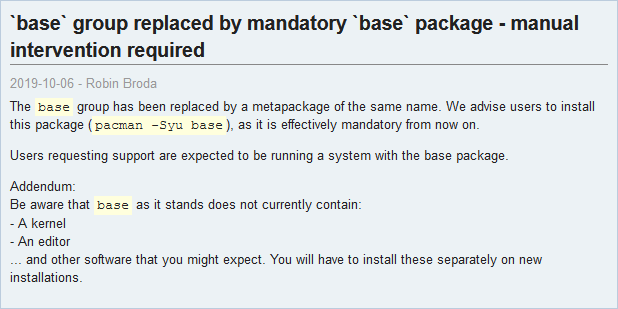
And I'm pretty sure base doesn't comes with a text editor now so you may want to install nano or vim
uneven silo
base should have vi
obsidian light
the base I installed would not let me use vi or vim, I tried both. This is all super new to me. When I get home today I am more than likely going to re format the drives and start again.
formal schooner
when ive installed arch it "just worked" so likely something did go wrong w/ pacstrap
main olive
no, base does not have any editor
this is a new thing
base is now also a metapackage, not a group
further, base doesn't have any fs utilities
 worn apex
weird to have no editor
I'd expect it to at least require an editor, even if not any specific editor (assuming there's a way to do that with metapackages)
er a virtual package, not metapackage
 worn apex
that doesn't really make it not weird
they just kind of half-assed it, they shouldn't have removed vi from it without setting up an editor virtual package and setting up provides on all all the editor packages
 pulsar thicket
Can some1 help me with a linux installation ? im struggling a few days
PCIe Bus error severity=Corrected ..... Fixed it with pci=nomsi (also tried pci=noaer, and nomodeset)
Cant get past the login screen now........ Before it was crashing after i enter the password, now it doesnt crash, but it asks me again (Doesnt get me in ubuntu after login)
warped nimbus
My pi got absolutely fucked out of nowhere
I notice the pihole admin panel website was rendering strangely, so I figured I'd update pihole. Then I get an error with pihole -up
/usr/local/bin/pihole: line 62: /opt/pihole/update.sh: cannot execute binary file: Exec format error```Figured OK, I'll just update packages
Try to open neovim, get a segmentation fault
tried sudo apt-get update and got some error, managed to fix it
now sudo apt-get upgrade
dpkg: warning: files list file for package 'libstdc++6:armhf' missing; assuming package has no files currently installed
bunch of those
at the end
dpkg: unrecoverable fatal error, aborting:
 files list file for package 'xxd' is missing final newline
E: Sub-process /usr/bin/dpkg returned an error code (2)
and at the start I see this
Traceback (most recent call last):
  File "/usr/bin/apt-listchanges", line 38, in <module>
    import apt_listchanges, DebianFiles, ALCApt, ALCConfig, ALCSeenDb
ValueError: source code string cannot contain null bytes
debconf: Perl may be unconfigured (Can't locate IO/File.pm in @INC (you may need to install the IO::File module) (@INC contains: /etc/perl /usr/local/lib/arm-linux-gnueabihf/perl/5.28.1 /usr/local/share/perl/5.28.1 /usr/lib/arm-linux-gnueabihf/perl5/5.28 /usr/share/perl5 /usr/lib/arm-linux-gnueabihf/perl/5.28 /usr/share/perl/5.28 /usr/local/lib/site_perl /usr/lib/arm-linux-gnueabihf/perl-base) at /usr/share/perl/5.28/FileHandle.pm line 9.
Compilation failed in require at (eval 1) line 3.
BEGIN failed--compilation aborted at (eval 1) line 3.
) -- aborting
I have no fucking clue what happened, but it just imploded. It was working fine when I left it and I haven't touch it in a few weeks probably
I think I have to abandon ship and re-install. Everything is so broken
Like python is missing the stat module
ah I rebooted and now I can't even ssh into it
main olive
the sd is probably fucked @warped nimbus
try checking it with some software externally
warped nimbus
Any recommendations?
I've used that sd in my cellphone for years and had no issues
main olive
hm not really, haven't done this in a while
old sds just do that sometimes
it is known
warped nimbus
how convenient
main olive
I've had three SanDisks die on me
main olive
@warped nimbus so what's the diagnosis
 prime violet
Im getting No module named 'encodings' when running python3.4.10 as root on a CentOS7 box. No virtual environment, are there common causes for this? I need python3.4 running as root
Could not find platform independant libraries <prefix>
Could not find platform dependant libraries <exec_prefix>
Consider setting $PYTHONHOME to <prefix>[:<exec_prefix]
Fatal Python error: Py_Initialize: Unable to get the locale encoding
ImportError: No module named 'encodings'
warped nimbus
@main olive ran a tool called f3 and it didn't find anything, but I don't think I used it correctly.
So, I still don't know
I'm gonna try again today I think or try badblocks
That's all I've really seen for tools that can help
obsidian light
I can't get my network going on ubuntu can someone help ?
 gilded basalt
Can you share more details?
little onyx
he prob isnt wired up and needs to connect to wifi headless
obsidian light
I installed Ubuntu server on a Dell Poweredge R210. When it's booting, it shows the ip as 192.168.0.120, I can ping it. Once ubuntu launches I can still ping it, but it won't let me sudo apt update. On launch it says Failed to connect to https://changelogs.ubuntu.com/meta-release-its. Check your internet connection or proxy settings
I am wired
little onyx
192.168.0.120 is a local ip
obsidian light
I am aware
little onyx
can you ping google?
obsidian light
Not from the server
little onyx
list your interfaces. does the eth show up?
little onyx
hmmm.
obsidian light
But I atleast know it's connecting to LAN because it the bios tells me the ip
gilded basalt
Can you ping your gateway from the server?
gilded basalt
What is output of running ip a
obsidian light
want me to type it all out?
gilded basalt
You may need to do sudo ip link set eno1 up
gilded basalt
There should be an 'up' or 'down' on the far right for each
And it should show an ip for each if it has one
obsidian light
lo: down
eno1: up
eno2: down
I don't see any ips
Other than 127.0.0.1/8 but ya know
obsidian light
someone gave me this machine so maybe? but there is no ip listed for eno1
lo is 127.0.0.1
little onyx
wait then where is that 192 ip coming from?
obsidian light
you know when you launch a machine and your bios displays some information? That's where
little onyx
it should show with eno1 since its "up"
obsidian light
Let me reboot and see if that changes anything
little onyx
did you install ubuntu directly to the machine or in a vm?
obsidian light
Are eno1 and eno2 just my ethernet ports? And directly
little onyx
yeah they should be your ethernet ports
obsidian light
I think eno1 was down until running the command sudo ip link set eno1 up
little onyx
well after reboot see what it says
obsidian light
yes
little onyx
@gilded basalt ?
little onyx
my experience is mostly with VMs 😅 so its usally just a NIC config
obsidian light
could it be an issue of a static ip? and if so, what should I do?
little onyx
well you said you didnt set it. did you install ubuntu to the system yourself?
obsidian light
I did intall ubuntu myself, about 30 minutes ago
little onyx
can you ping the router that the wire is connected to?
obsidian light
From where
little onyx
from the ubuntu system
obsidian light
No
little onyx
what does your /etc/network/interfaces look like?
or /etc/netplan/{file here} ?
on mine its usually 50-cloud-init.yaml
gilded basalt
Oh
Is it a static IP or DHCP?
If it's static you need to configure the gateway and DNS
obsidian light
I don't recall setting a static ip, but I'm thinking it may be
That would be configured in my router, right ?
little onyx
try putting
network:
    ethernets:
        ens0:
           dhcp4: true
    version: 2
well yeah
lets see if dhcp works cause that would be easiest
obsidian light
ens0? or eno1
gilded basalt
Put that in /etc/netplan/99-config.yaml
gilded basalt
Then sudo netplan apply
little onyx
^
gilded basalt
That's I use from the Ubuntu docs
little onyx
mine is 50
obsidian light
tabs aren't allowed so I just need to space it over? lol
 obsidian light
now, all this talk about a static ip
should I make it static?
perks to doing that?
little onyx
well yeah
also never uninstall python
cause apparently netplan uses that
learned the hard way
obsidian light
I code so never lol
little onyx
well I was doing something and it wasnt working so I decided ill just remove all python and reinstall
nope
gilded basalt
You're on the python server btw
Removing python is taboo
Yes, OpenSSH is fine
It's what Ansible officially recommends and uses
little onyx
I was gonna reinstall it
obsidian light
I broke my openssh
I set a static ip, and forwarded port 22
now everytime I try to ssh from my desktop, I get permission denied
Is prompts for my password
Then says Permission denied, please try again
little onyx
are you loging in with the right password?
obsidian light
I've looked online a few places and tried the responses but to no avail
And yes. I created a test user with 67 as the pass to make sure lol
obsidian light
Well, I have the acc I was using prior to the static ip change. And it isn't working either
It's one of my more common passes so I don't think I'm mistyping it
little onyx
well if it isnt working locally then obv something went wrong
try removing the account
obsidian light
Instead could I make a new user ?
obsidian light
I am in the machine right now
As in, it's not headless
I would like it to be, but not yet lol
I can login in locally to the ubuntu machine. But not via ssh from my desktop
little onyx
wait so locally it works but not through ssh?
obsidian light
Correct
little onyx
huh
obsidian light
So
little onyx
i mean you can also do a login via a key instead
I usually do it that way
have you tried making the password longer?
obsidian light
I honestly don't think that's the problem it's more than 8 chars
little onyx
oh i thought you said it was "67"
obsidian light
For the test account it was
For my account it's much longer
One sec and Ill upload a debug pic
little onyx
and both are not working?
obsidian light
Correct
little onyx
show me ssh debug
 little onyx
wait are you using windows ssh or cygwins ssh?
obsidian light
windows
little onyx
cause windows ssh doesnt work
obsidian light
It did
I was using it before setting static ip
And my friends server I can connect to
little onyx
weird
obsidian light
But I can download the other
little onyx
reading online that windows ssh doesnt work for some reason
wait maybe was another issue
dont think i know what the issue is tbh.
obsidian light
No
obsidian light
Is there a certain section? Because without ssh I can't type all that lol
obsidian light
It is not commented out
obsidian light
it said file exists, but when I do: cat /dev/tty it just loads and loads
No result
little onyx
and ssh still not work?
obsidian light
let me go test
Permission denied, please try again
This has been a lot of work lmao
little onyx
huh
i mean you having errors that ive never seen before
what version of ubuntu btw?
obsidian light
18.04.3 LTS
obsidian light
how do I check that
little onyx
latest stable
lts
um
let me check lol.
prob ls -l /dev/tty
but imma check
yeah type that
obsidian light
crw-rw-rw- 1 root tty 5, 0 Oct 10 02:32 /dev/tty
That's the output of that command
little onyx
huh. it looks fine
@gilded basalt any idea?
you better not have caps lock on, on your windows pc
little onyx
good lol
gilded basalt
On the server, does ssh localhost work?
obsidian light
Seemed to have
gilded basalt
What changes did you make to sshd config, if any?
obsidian light
I did not change anything
In my netplan I see this, dhcp4: true
I set it to false to retain the static ip
little onyx
yeah we told you to put that there yesterday
obsidian light
Should I set it false again
gilded basalt
What is the ListenInterface set to
little onyx
leave it there lol
obsidian light
ok ok ok lol
little onyx
no. that turns off internet
gilded basalt
In sshd config ensure ListenInterface is not commented out and is set to 0.0.0.0
gilded basalt
You need to run as root
obsidian light
ok got it
gilded basalt
sudo nano /etc/ssh/sshd_config
obsidian light
I did
little onyx
waits for result
obsidian light
what lol
gilded basalt
Just joking around
little onyx
/speakup
obsidian light
I thought so lol
gilded basalt
Not sure what could be causing it
At this point I recommend googling and trying a few things to see if anything sticks
obsidian light
I have done that lol
gilded basalt
Linux troubleshooting 101
obsidian light
Tried that the better half of today
little onyx
bascially what ive been doing lol
obsidian light
There's not much
gilded basalt
Vary your searches a bit
It may not even be ssh, though in this case it probably is since localhost works
obsidian light
Could it be a misconfiguration with the static ip stuff?
little onyx
its def not the ip stuff
obsidian light
I messed with ip stuff
obsidian light
I got the mac address and set it to a certain ip with my router
But dhcp is still in netplan
is that an issue
obsidian light
one inet ip
little onyx
if you just reroute to local ip in your router then it will stay 1 ip
obsidian light
do i need to do that
little onyx
um yes?
obsidian light
Wait
little onyx
how would your router know where to point to?
obsidian light
I set the mac address in my router to 192.168.0.120
little onyx
its your router that needs to point to your local ip
obsidian light
And if I do ip a
gilded basalt
What is the IP of your Windows client?
gilded basalt
Your router doesn't matter then
gilded basalt
Also networking likely isn't the issue here since you can connect, but authentication fails
obsidian light
ive also went to the .ssh folder on my windows machine
and removes the line for the ip
little onyx
Yeah it seems to be something funky with ssh itself
or it could just be windows
can you use another device to try and login?
obsidian light
I can give me a minute or two
gilded basalt
On the server, try ssh 192.168.0.120
obsidian light
it worked
little onyx
yep def your windows issue
wait. what did you try. what @gilded basalt said or what I said?
little onyx
ah
obsidian light
I will try yours momentarily
little onyx
i mean if localhost work I would assume the local ip would work as well
gilded basalt
It rules out some things
little onyx
oh like accepting only localhost?
gilded basalt
Among other things
Listen address, firewalls, etc
Though since Auth is failing...
little onyx
lets see if its windows doing stuff
obsidian light
same thing
little onyx
😦
little onyx
can you ssh using root?
obsidian light
how would I do that ? ssh root@192.168.0.120?
obsidian light
I think so. I did the su - root earlier remember
But it said the same thing regardless
little onyx
yeah but sometimes root itself doesnt have a password
so its basically inaccessible except through su
gilded basalt
Isn't there a authorized users thingy sometimes?
gilded basalt
Is that though PAM or what
little onyx
or that normal users can do specific sudo commands
gilded basalt
For ssh specifically
little onyx
in in the sudoers file
idk.
i never dealt with PAM tbh
PAM actually broke on my ubuntu laptop. idk how. i get a PAM error with the ubuntu store
@gilded basalt you mean like a user can be locked for ssh?
gilded basalt
Yes
obsidian light
 little onyx
i mean would be weird if that happened
obsidian light
any suggestions
little onyx
im kinda hit a dead end
obsidian light
das no good
little onyx
are these values set in ssh config?
PermitRootLogin yes
PasswordAuthentication yes
UseLogin yes
sudo systemctl restart ssh
or sudo systemctl restart sshd
one of those should work
obsidian light
Permission denied with my acc and root
little onyx
sshd
obsidian light
ok good
little onyx
/etc/ssh/sshd_config
obsidian light
so I should just uninstall and reinstall? will that reset the config ?
obsidian light
"could not open lock file"
little onyx
use sudo
little onyx
when doing anything with apt use sudo
obsidian light
now apt install openssh?
obsidian light
says that as I run the command
little onyx
before that just rm /etc/ssh/sshd_config
just in case
my bad lol
well doesnt hurt to apt remove again
obsidian light
i done it all
and after installing
it says unable to locate package openssh
should it be openssh-server
lol
little onyx
sudo apt-get install openssh-server
obsidian light
let me do that with the remove first lol
obsidian light
it is



 little onyx
reinstall the whole system?
obsidian light
I have a decent amount of data on it 😛
um
Let me try some other things. Ill come back
obsidian light
Thanks
little onyx
😉
 fringe crystal
Does anyone know how to use "rrdtool" (especially rrdfetch)?
Im having issues with the resolution. Trying to fetch a RRD file: with "rrdtool fetch <file.rrd> MAX -r 12h -s -1w -a" but i don't get 12 hours samples
It seems the max resolution i can get is 6h
but i dont know why
 late meadow
Just a quick QoL question: I have a user (on Debian 10) with which I always use a venv. Is it possible to automatically activate the venv when logging in as this user? I thought about adding the command source [...]/activate to .bashrc but is there a more elegant way to do this?
 oak shell
I don't think so. Why would bashrc be not elegant enough?
formal schooner
You would be shocked if you knew just how much of Debian was run by Bash scripts running other Bash scripts
That said, you might want to consider using pyenv
Which will free you from the constraints of using the same python version as APT
obsidian light
Still no luck with the ssh fyi lol
obsidian light
Yes
I don't even know what to do other than reinstalling ubuntu
but I don't really wanna do that
little onyx
Might be your only choice if it's still not working
obsidian light
Fuck it lets go
one sec
before I do this, is there any other os that I should consider?
full terminal for a server?
little onyx
Lol
Cause I had a dedicated server before and it was pretty big
4tb disk, 12 cores, 128gb ram
So I obv went the route to use esxi and just run vms on it
little onyx
The. Yeah just Ubuntu on it
obsidian light
8gb ram
little onyx
Then*
obsidian light
it's a slightly upgraded dell poweredge r210
little onyx
Well install again
And when you get to network, set it up for dhcp
So you don't have to do later
Then it can download stuff for you while it installs
Like updates and such
First things I do is install, update, upgrade and then install all the stuff I want to use
obsidian light
should i remove the "static ip" from my router?
Or no
When configuring my interface, I chose DHCP and it just says timed out
why is this so difficult lmao
little onyx
I'm kinda having lunch now 😅
little onyx
I'll be available in like 30 min
obsidian light
I may be lol
little onyx
Yeah try removing the static ip
little onyx
yeah if it was that you wouldnt be able to even hit the 22 port
but you were able to get the prompt
obsidian light
Gotcha
So I am on the Network Configuration page of the initial setup and there's no done option when I manually enter information. And when I try with dhcp it just says timed out. ugh
little onyx
is back
obsidian light
yay
little onyx
oh so you removed the static ip from your router?
obsidian light
Correct
obsidian light
obsidian light
I have also restarted my router countless times
little onyx
can you drop to shell and try to ping your router?
obsidian light
from my windows machine?
obsidian light
I am in the setup, so I don't really know how to do that without clicking continue without network which I don't think I should
And yes
18.04
obsidian light
how do i use that thingy
little onyx

Unix & Linux Stack Exchange
My xorg session is on tty1 and if I want to issue a command from tty (because I cannot do it from xorg session for some reasons), I press Ctrl+Alt+F2, for example, and type a command. But I cannot ...
ctrl+alt+F2
and that drops you to a shell
obsidian light
there we are
little onyx
now ping your router
obsidian light
network is unreachable
little onyx
huh.
obsidian light
I have multiple things on my router and none of those are static
The server was the only thing I tried doing that with
little onyx
so weird
obsidian light
you know when you were in like primary school and hurt your foot and was like "i just wanna be normal like all the other kids and be able to play" that's how I am with other OSs lmao
obsidian light
it shouldn't be this hard though
little onyx
yeah. i dont know why its so difficult
im actually gonna go home tonight and try this out
lol
I have a spare laptop and will try to do it with the same config as you
obsidian light
guarantee itll work
little onyx
yeah I have that feeling too
its either your router or your server thats the issue imo
obsidian light
i don't think it's my router bc multiple things are and have been using it
little onyx
tho I think I had this issue with ubuntu 18.04 before
obsidian light
it very well could be the server
little onyx
but in a vm
ok I guess you can just skip it for now and do like we did that other day
little onyx
???
obsidian light
"Domain Name from DHCP .... Off"
Should that be on ?
"DNS Servers from DHCP .... Off"
obsidian light
The server
little onyx
is this in the bios or?
obsidian light
ye
little onyx
I guess turn that on
obsidian light
What is an Active LOM? do you know? lol
little onyx
no idea
obsidian light
Changed IPv4 Address Source from static to dhcp
obsidian light
pretty sure that was the issue
obsidian light
It still keeps booting into this system services thing every boot
Trying to figure how to turn that off
little onyx
well turn on Active LOM
little onyx
oh ok