#tools-and-devops
1 messages · Page 44 of 1
 rough marlin
 delicate sinew
yes, to an extent, and it also ensures that whenever (and wherever) you install dependencies, you're getting the exact same ones every time
this is useful in CI/deploy situations
you want to have the exact dependencies on the developers machine as well as on the CI server and the prod server and so on
pip only ensures top level dependencies versions, but nothing more
 finite fulcrum
@round escarp set your app to show the console, it should contain the error
finite fulcrum
take out the --noconsole or how it's set
when creating the exe, it should be enabled by defualt
 round escarp
I'll be honest I completely closed everything out when I first gave up
Could you send me the whole string if possible
finite fulcrum
should just be pyinstaller yourfile.py for a simple app
finite fulcrum
yeah that ought to do it
round escarp
alright
finite fulcrum
I'm gonna go afk for a tiny bit
finite fulcrum
@round escarp here now, did you get an error?
round escarp
Ah ah
I got a Pygame error actually
NotImplementedError: Can't preform this operation for unregistered loader type
Not sure what this means
It works in the .py version
Ill send a image of it
finite fulcrum
is the font a file you have with your script or a system font?
finite fulcrum
alright so you don't have a file named that somewhere next to your script?
finite fulcrum
Is the script's structure simple something simple?
round escarp
Oh like how I wrote it?
Hmm
I think it is
If you're talking about like where the files are then I think so
finite fulcrum
looks good...
don't think it's the error here but do you package those resources with the app?
finite fulcrum
you have the audio and sprites, but when you package the script it'll only take the script itself
round escarp
Package as in, run the pyinstaller line?
finite fulcrum
yes
finite fulcrum
you'll need to include those to your app for it to run properly but it looks like it's erroring out before that
try taking out the -F and run that
finite fulcrum
it could need a hidden import (if it can't spot an import you can tell it explicitly) but I'm not familiar with pygame well enough to have an idea on what's going on here
maybe try #game-development
I'm sure people usually package their games, and could have ran into that too
round escarp
Oh wait
I think it's actually a different error
sorry
Alright I'll go check there
finite fulcrum
it probably just triggers at a different line because it's triggered on something internal in the background when it's executed
finite fulcrum
don't think that's the issue but worth a try
finite fulcrum
pip uninstall
round escarp
Ahh
finite fulcrum
what version of python is that btw?
round escarp
3.8.1
finite fulcrum
and got pyinstaller through pip?
finite fulcrum
ah I'm not sure why it ran but I believe the latest release still doesn't support 3.8
round escarp
oh
finite fulcrum
(used to it erroring out instantly when packaging so didn't think to ask)
try 3.7
round escarp
Wait
I don't use Andaconda
How would I switch versions lol
I only ever use one version of python
finite fulcrum
you can install second python alongside, without doing the path stuff etc.
round escarp
Would that work?
finite fulcrum
and then access it like so py -3.7 if you make sure to install the python launcher
round escarp
Wouldn't it get the two python versions mixed up
finite fulcrum
try doing py in the terminal
finite fulcrum
yep
round escarp
oh lmao
finite fulcrum
py gets you latest python or you can specify the version like above
finite fulcrum
yep
finite fulcrum
it should detect it automatically
round escarp
Alright
I'm like
really scared to do this lmao
alright
What command now should I run
pip install pyinstaller?
finite fulcrum
because pyinstaller from the command line points to 3.8's pyinstaller (which it should) you'll need to install it again for that python and then use it from it too
so
py -3.7 -m pip install pyinstaller
py -3.7 -m PyInstaller ...
like this, mind the case on the second one
finite fulcrum
oh and you should also get the dependencies of your script
round escarp
oh
finite fulcrum
3.7 should suffice
finite fulcrum
pygame etc.
finite fulcrum
random and sys come with python
finite fulcrum
no, because they are separate python install that you run separately
each have their own site-packages directory where the modules you install go
and then they look into that when you import things
round escarp
Oh um
For some reason
My code can't run anymore in Vscode after I got 3.7.7
Do images or sounds open from the script, or from the whole directory?
My file is in a folder which has 2 folders inside but
For some reason it cant open one of the folders
this only happens in vscode though
finite fulcrum
the paths are relative to your "current working directory" which is usually from where you launch your file from if you meant that
round escarp
oh yeah mhm
finite fulcrum
but vscode can set a different cwd for your workspace or how it's called
finite fulcrum
yeah, can you do print(os.getcwd()) ( after importing os)
finite fulcrum
maybe vscode switched somehow if it started happening after the install but I never used vscode
finite fulcrum
run it from vscode (with the print at the top)
round escarp
Ah alright
Man
NameError: name 'os' is not defined
OH WAIT
nvm nvm
Alright thats what that said
finite fulcrum
you can see that it's one dir up from what you have above, so it can't see your directories
you could specify the full path to them, or set the cwd to be what you get normally
round escarp
Yes
finite fulcrum
no idea for the second one so you'd have to ask around or google ab it
round escarp
Oh alright lol
I mean
hm
I dont think the first one will suffice cause this file will be like in and out of directories
Ill search it
finite fulcrum
but to get to the initial thing, how are you doing on the pyinstaller?
round escarp
AH
Right
Lol I forgot about that
So, do I do
py 3.7 install pygame
py 3.7 install pyinstaller
Like that
finite fulcrum
py -3.7 -m pip install pyinstaller
py -3.7 -m PyInstaller ...
you have to do it like this with the -m or python will think you're trying to run the script install
finite fulcrum
the second one is equivalent to you doing pyinstaller but for the right python isntall
round escarp
alright
Ah
Okay so, it did it but it doesnt open
When I click on the .exe it just instantly closes
finite fulcrum
the terminal?
round escarp
The pyinstaller .exe
I think I havent gotten Pygame yet thats the reason why its closing
Should I do
py -3.7 -m pip install pygame
finite fulcrum
yes
then open your exe through an open command line instance (just path_to_exe inside it) to let it stay open
round escarp
Alright
How do I do that
This is the path
C:\My VSCode Projects\Duck Runner\dist\DuckRunner
finite fulcrum
shift right click and open command line here or open powershell here
in the directory
round escarp
Ah mhm
finite fulcrum
and then do "C:\My VSCode Projects\Duck Runner\dist\DuckRunner\DuckRunner.exe"
finite fulcrum
put it in quotes, I'm not sure if it'll work in powershell though
round escarp
oh alright
finite fulcrum
if it doesn't open up cmd and put it in there
oh you can also drag the file into cmd and it'll put the path there for you
round escarp
finite fulcrum
did you package it again after you installed pygame?
finite fulcrum
like before through pyinstaller
finite fulcrum
¯_(ツ)_/¯
It always errored out at first, maybe the 3.8x versions changed that somehow
finite fulcrum
no idea like before if you ran this through 3.7
round escarp
Lmao danggg
alright
Hmm
Can you teach me how to uninstall 3.7
Ill do this at a later time lol
finite fulcrum
you can do it through the uninstall program thingy
but it can come in handy (and probabl will for the pyinstaller)
round escarp
Ah I see
Lolol
Ill just uninstall it
Will this also get rid of like, all of the packages I got for it
finite fulcrum
yes
 strong urchin
any idea, How can i put two figues in two colum?
in latex
fig1 | fig2
same page in the bottom
 dense crag
@strong urchin subfigures
https://www.latex-tutorial.com/tutorials/figures/
Learn how to insert images and caption them. Examples for a single figure, and multiple figures next to each other, using the subfigure environment.
 twin hull
I've a PR which doesn't contain the last commit of my branch, how that's possible?
Maybe it's Github still having issues
delicate sinew
did you push the commit from your local clone to the remote?
twin hull
yes, I can see it on my fork on Github
 buoyant canopy
github is having a very large outage right now
Welcome to GitHub's home for real-time and historical data on system performance.
 thorny shell
not much detail there
 warm pollen
Oh hey, it is back
 mild lance
can I say git repository or is repository only used for github repository or are the both different things (hopefully)
so, do you host a git repository on a github repository?
or would I say git project?
I think it is: git repository is hosted on GitHub (no term github repository)
 tawny temple
Both git and GitHub repository are correct
GitHub repository would specifically mean it's being hosted on GitHub
mild lance
alright, thanks!
 pastel mountain
 blazing otter
 heavy knot
^
heavy knot
in Visual Studio Code, if you make a branch and merge that branch into main
are you stuck seeing that branch forever?
 empty pasture
A merge just means a copy, not a move
You're free to delete that branch if you no longer need it for anything
 tulip cosmos
@heavy knot i remember that pain. you brought me a good laugh with that "are you stuck seeing that branch forever?"
round escarp
Ahhhhh
Guys
I accidentally just deleted everything in my workplace
How do I take something off of git
Or like
In VSCode, the third panel, how to I undo that?
thorny shell
at the command line, you can type git checkout -- .
round escarp
Ah
thorny shell
I think that'll restore your missing files; not 100% sure
thorny shell
yeah I just tried it; it restores missing files
now if they had uncommitted changes, those are probably gone
round escarp
"fatal: not a git repository (or any of the parent directories): .git"
thorny shell
well ...
you gotta run the command when your working directory is the relevant git repo
thorny shell
so cd \where\ever\it\is first
round escarp
fatal: you are on a branch yet to be born
thorny shell
not sure what that means
round escarp
hmm
thorny shell
I fear it means "you have never committed anything into this repo"
round escarp
i think clicked
i think i clicked*
"discard all changes"
but
honestly, im really new to git
and vscode in general
i thought that would like, uninitilize my workspace
but apparently that deleted everything lmao
cause i didnt mean to initilize my workspace
how do i uninitilize?
if thats a thing
thorny shell
if you have a directory that's a git repo, but you want to get rid of the git stuff, you can simply delete .git -- rd /s /q .git on Windows (I think); rm -rf .git on *nix. Of course that's ultra-dangerous, and (unless you've pushed the repo someplace like github) irreversible
thorny shell
it'll turn a git repo into an ordinary directory, like it was before you ran "git init" (or did the equivalent through your IDE)
heavy knot
@heavy knot (beginner) i remember that pain. you brought me a good laugh with that "are you stuck seeing that branch forever?"
glad I brought someone joy @tulip cosmos
You're free to delete that branch if you no longer need it for anything
so if I ever needed to come back and do something with it or roll back to it? @empty pasture
 red epoch
what is this
it only appears when i create a python project in visual studio 2019
it never appears otherwise
 vapid torrent
That's a minimap
 topaz aspen
can i have the same project open in two vscode windows?
 covert kindle
Yes, just drag the tab to the other side
topaz aspen
@covert kindle that'll be two tabs, not two windows
tulip cosmos
Yes you can still open the same thing twice if you wanted
Though I'd still just do the normal split down the middle and have separate files on each in one window
 prisma nexus
pipenv scripts arent working for me if i havent activated the shell, im getting a 'list has no .read() attribute'
it works if ive activated the shell, or if i type out pipenv run python main.py
in my pipfile i have
...
[scripts]
start = "python manage.py"
...
pipenv run start
rough marlin
i think its supposed to work that way
rough marlin
I frankly find the tool confusing
and don't understand what value it adds
it doesn't handle setup.py out of the box
i noticed it does something with hashes so i guess that may be useful for getting 100% deterministic behavior, but it seems to be mostly a headache for smaller projects
heavy knot
The system cannot execute the specified program.
[Finished in 0.1s with exit code 1]
Would anyone know why I am getting this error?
heavy knot
I have added python to path*
covert kindle
In VS Code, does anyone know what the setting would be to keep these icons in the explorer visible when the mouse isn't hovering over...
Don't care about the ones for the individual files, just the ones in the header.
 signal crest
anyone know how I can define an @abc.abstractmethod where the return type is defined but the parameters are not?
Given something like this:
@abstractmethod
def mymethod(variable arguments) -> Optional[int]:
  pass
These should pass:
def mymethod(self, a, b, c, d) -> None: pass
def mymethod(self) -> int: pass
This should not:
def mymethod(self, a, b) -> bool: pass
signal crest
hm. maybe it is. what I'd really want to accomplish with this is to make sure that the subclasses of a class has a method with this name. perhaps I need to find another way though
thorny shell
oh you can define the method in the base class, but have it just raise an exception that says "Yo dude you forgot to override me"
@signal crest 
signal crest
that will only cause an error on runtime though right? and mypy probably won't detect it either? so it will still run the program until that error is raised
I think I'll just have to define a method that's applicable to both subclasses, seems like the best solution.
thorny shell
true but runtime errors are generally the best you can hope for in python
that's the price of not having to declare variable types all over
signal crest
Yeah, I'm kind of hoping that if I use type hints well enough and have mypy linting my code I can sort of opt-in to having to declare variable types all over. But perhaps this one of those cases where that's not an option.
thorny shell
I have found mypy to be fiddly
topaz aspen
goes go to symbol in workspace work with python, this is a vs code command
this... rather can it work, it doesn't seem to do anything for me at the moment
topaz aspen
Another vsc question - i have a split, so there's a file a.py open in one split, b.py in the other. If I'm in a.py, what's the quickest way to move to b.py? I'm not sure what the key command is for this
topaz aspen
round escarp
how do you install pygame for one specific version of pygame?
say if you had multiple
thorny shell
pip install pygame==1.2.3 or something like that
 eager lichen
Hey guys, Im in search of a preview window for VSCodium. I want to have the same functionality as jupyterlab, if thats clarifying it a bit better. So when I create a dataframe, it will be shown when file is run
Neuron doesnt show anything and Python Preview stops at importing packages 😦
 vivid valley
When I installed jupyter notebook and wanted to open the files in the browser came this: (file x y) is not UTF-8 encoded
and this in every file in the notebook
mild lance
anyone know why my PyCharm play button:
Would give the version 2.3.15
when I run my arcade game
but when I run it from the command line I get: 2.4a3
The version I want is 2.3.15
My pipfile says i have that
and so does my lock file:
But, I still get the 2 different versions
 hollow pier
I did this using W&B,, super cool for model config and metrics tracking https://twitter.com/theNeomatrix369/status/1253621253677756418
 sage robin
Hi guys what do you think vscode or pycharm? 🤔
delicate sinew
both are good; give each a try and see what works for you. Personally, I'm a PyCharm person because it's a lot easier to set up launch/debug configurations and I'm more used to the IDE as a whole
 flint pollen
Anybody have experience with py2app? My .app file keeps crashing. I'm following step by step instructions from http://www.marinamele.com/from-a-python-script-to-a-portable-mac-application-with-py2app
I've checked Console, it shows a lot of errors that say something like, "nw_path_closefd Failed to close guarded necp fd 9 [9: Bad file descriptor]
Literally, the code is only 2 lines. value = str(input("Type anything and it'll mirror)) with a print(value) at the end. If I try to run py2app with just a print statement, it works. Also... if I go into the MacOS when I hit show contents, I see the .app, and it works perfectly there. Not sure what's going on. I'm also so sorry, I'm just teaching myself python, no really training and I'm a complete noob with this stuff.
flint pollen
Ah nvm, figured out. I believe py2app doesn't use terminal window at all so it'll crash.
 knotty basin
How can I convert a string such as "8:00 AM" into a datetime object?
thorny shell
>>> import datetime
>>> datetime.datetime.strptime("8:00 AM", "%H:%M %p")
datetime.datetime(1900, 1, 1, 8, 0)
>>>
@knotty basin
 mint otter
question-i want to use selenium on my vsc i have downloaded the chromeDriver yet when i run my program it promps me to download chromedriver. how do i fix this
 digital trout
can someone help me with the discord status thing with visual studio? i downloaded the rich presence extension on vsc and it doesn't work
heavy knot
@digital trout you mean like status for the bot?
digital trout
like spotify status for example
i want it to display that im in vsc editing any file
heavy knot
I mean idk about putting in any images so it looks like he really is listening to Spotify but I know the code so it says he is
heavy knot
Yes
digital trout
ok
heavy knot
okay so
@client.event
async def on_ready():
await client.change_presence(status=discord.Status.online, activity=discord.Game('Listening to Spotify'))
heavy knot
your own status you change in discord my man
digital trout
to get an elaborate status such as @civic hound 's i dont think u do that in discordx
heavy knot
i think that only works for editing on the discord site
 civic hound
?
heavy knot
when you go to applications
civic hound
oh my status thing?
digital trout
yes
civic hound
its a custom tool
civic hound
it uses discord rich precence to modify the original behaviour
heavy knot
rich presence art i think?
civic hound
i use a plugin for my editor
civic hound
using sublime?
digital trout
vsc
civic hound
on what os?
digital trout
windows
civic hound
so you run windows 10, have discord installed, and the vsc extention.
digital trout
ok
civic hound
are you running any of these applications in admin mode?
digital trout
just restarted my computer so probably not
civic hound
im not sure if you need to have vscode as admin mode or not, im not a vsc user
but i would start there, and see if it improves
digital trout
doesnt work
 languid ermine
hi ,Where can I ask my questions about opencv
digital trout
into vsc no
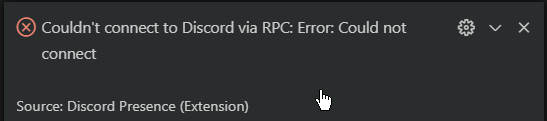 digital trout
if i dont get it that means something is off
digital trout
vsc?
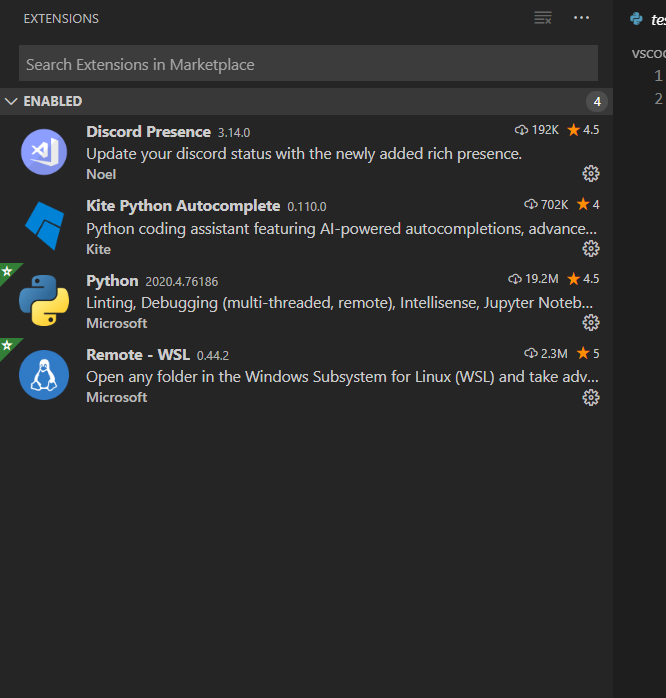 digital trout
civic hound
digital trout
civic hound
pylint is useful, you should install it
digital trout
  File "c:\Users\User", line 1
    ------------------------------------start------------------------------------
                                                                                ^
SyntaxError: invalid syntax```i get this while installing pylint
civic hound
maybe you have messed up your vscode installation?
digital trout
so what 3 should i use for pylint
civic hound
why did you install python 2?
civic hound
python2 is dead you see.. 😄
nothing new will ever work with it. so just download the latest python3
setup vscode to use python3
digital trout
i get the same error
heavy knot
yoo i am back and maybe not useful but is this what you meant https://www.youtube.com/watch?v=MJc-uyK-o0I

Show More of this description for the required links! If this tutorial helped you out on making Custom Discord Rich Presence with Timer, please leave a like and subscribe to this channel to show your support! ❤
★ Discord Developer Console: https://discordapp.com/developers/ap...
civic hound
run it as admin and enable the discord presence extention
heavy knot
cause you can do it that way too
digital trout
doesnt work
civic hound
you get the same error? what error?
digital trout
i dont get an error
digital trout
with pylint?
civic hound
we are talking about discord presence right?
digital trout
yeah but u told me to install pylint and i go this error
  File "c:\Users\User", line 1
    ------------------------------------start------------------------------------
                                                                                ^
SyntaxError: invalid syntax```
@digital trout
civic hound
to be clear, i do not know anything about vscode. and as i said earlier, you might have messed up your vscode installation.
why dont you start from scratch?
i installed vscode just to install this extension to see if it needed admin mode or not
and it did needed it
digital trout
where do i install the vsc after i reinstall it then?
civic hound
so i would uninstall vsc and python2
then install the latest python 3 version (64-bit version if you have that)
digital trout
should i put it in C: or D:
civic hound
then install vscode again from their homepage
the default location is fine
its normally C:
when installing python3, remember to check the box "add to PATH`
digital trout
i installed it in D: to save space maybe it was the problem all along?
what does adding to Path do?
digital trout
but i use an interpreter on vsc and it works without the python3 being in path
civic hound
that is because vscode uses an virtual environment, meaning the python executable are part of your workspace
but python should also work outside of vscode
digital trout
where should i install python 2
digital trout
i need it for the book..
civic hound
well... then the default location is fine
remember to setup vscode to use the correct python version once you get there
digital trout
i just remembered that i had bunch of modules installed
now i forgot
for some reason it didnt ask me to put it in path
civic hound
python 2 or 3 installer?
digital trout
3
civic hound
then im sure you missed it
digital trout
same for 2.7?
it's just installs python2.7 in C:\Python27\
and visual studio code default?
civic hound
yes, sounds great
python 2 is so old, you cant have anything like a user installed location
digital trout
about vsc, it installs it in the C: driver in some random place that i think i might forget on later and im afraid it will start taking up a lot of space off my C: driver which is already lacking
what do i do
civic hound
you can change it to D:
digital trout
does it matter where
civic hound
should not be a problem, it will store some files on C: anyways
civic hound
i did that
digital trout
it is beneficial ?
civic hound
i always do that on windows tbh
i find the oposite to be worse, not having path if i ever need it
civic hound
well.. that does sound good
create or open a new workspace
and edit a file to see if it works
digital trout
doesnt
C:\Users\User\AppData\Local\Programs\Python\Python38-32\python.exe: can't open file 'c:\Users\User': [Errno 2] No such file or directory
PS C:\Users\User\source\networks_book_psagot> ```iget this error
when installing linter
civic hound
try to create a new terminal window inside vscode
digital trout
still
civic hound
from that terminal window, run pip install -U pylint --user
and if that does not do anything, do pip install pylint
digital trout
oh it worked i think pip install -U pylint --user
does it matter where i installed that ?
where the terminal was placed
civic hound
it will be installed inside your environment
civic hound
did you start vscode as administrator?
civic hound
do that, and reinstall or reactivate the discord prencense
digital trout
civic hound
thats promising at least
make a new workspace
create a new file
write something in it and save
lets see if it updates discord after that
digital trout
ok
civic hound
im not sure if you need a workspace, but thats what i used to make it work
digital trout
doesnt work
digital trout
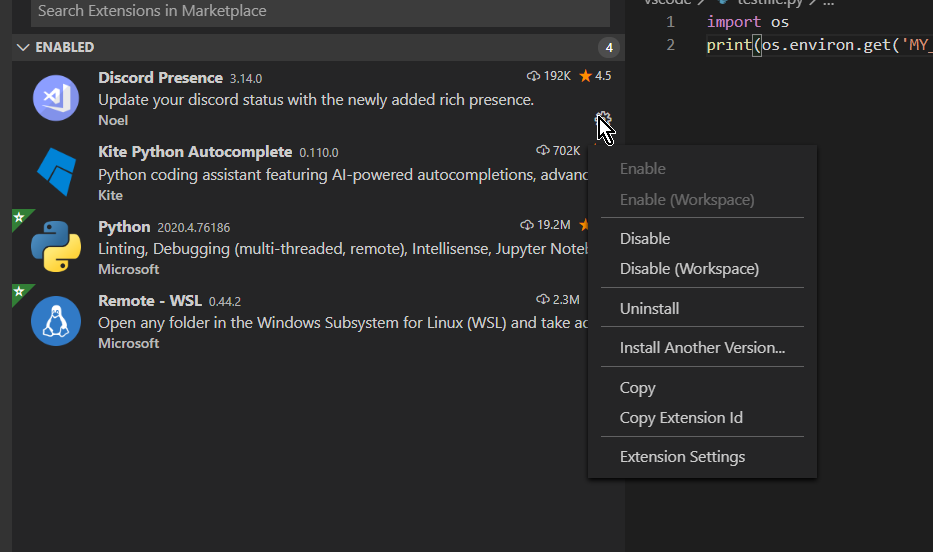 digital trout
civic hound
digital trout
civic hound
and if you go to extensions settings, do you have a Client ID (please no need to share it) ?
digital trout
yeah it's there
civic hound
well... then... i have no more ideas what could be the problem.
are you running the newest version of the discord client?
civic hound
sorry, cant help you out more. I have so limited expereince with vscode, so i do not know if the problem is with vscode or with discord
how did you try to install it?
digital trout
digital trout
pip install Pillow?
how do i install it for 2.7.17?
python2.7 pip install Pillow
?
civic hound
so to install a package when you have multiple python version installed you have to use the python executable
python3 -m pip install pillow
python -m pip install pillow
digital trout
civic hound
you can check if your python is the right version with python -V
since python2 probably is not in your path, you have to add it or use its full location
c:\Python2\python.exe -V
im guessing the names here
digital trout
civic hound
do you have a file named python.exe in that dir?
digital trout
this works
civic hound
yeah, use the full location
digital trout
what's a better way to speed this up?
civic hound
use python3 instead
digital trout
like can i change my py to refer to python2 where python in cmd will refer to python3?
that's what i had before
civic hound
py -2 maybe
civic hound
py is a windows application for managing python versions
since windows is unique with its PATH feature
civic hound
yes
 digital trout
yeah i remember that
civic hound
no idea whats wring with your current setup or why its not working when it says its connected
civic hound
im very sure you cant have two discords installed for this to work
so i would remove the alpha version if you do not need it for anything
digital trout
alpha as in canary?
digital trout
yeah
civic hound
if you work with discord to test features, you need that build
vscode is probably connected to the wrong discord client ID
digital trout
yeah i have it installed since i have 2 discord users i use at the same time
how do i get my own client id?
civic hound
this is why I asked if you only had the latest discord installed
civic hound
try your other discord and see if it has vscode precense
digital trout
it doesnt
i just chcked and the client id that is in vsc is different from both users
civic hound
its not a user id
civic hound
i do not think you do. and you should not really. its for the developer of the app your using.
digital trout
should i uninstall canary then?.
civic hound
i would try and see
civic hound
remove the extension and reinstall it.
digital trout
i did that
civic hound
but do that after you have removed the other discord
civic hound
well.. guess you have to live without that extension. maybe look for another discord extension?
digital trout
i cant get my client id?
i clicked this
i reset it
and it's back to before i think\
civic hound
sounds reasonable.
digital trout
it still doesnt work omg
civic hound
your setup is to blame i think. but im not sure if reverting to a standard setup would work.
digital trout
vsc setup?
civic hound
no, machine setup. you have to conflicting python version installed, you have two discord clients installed. .. even going back and undoing everything might not work
digital trout
i deleted the canary
civic hound
I have python3 installed (3-4 different versions) and i have discord installed (the original client)
when i installed vscode and the extension it worked when i ran it in admin mode.
civic hound
you should restart you computer yes.
if its important to you, you should also uninstall yes.
civic hound
i got that error as well, when i ran it as admin it worked
 meager forge
I use pipenv because it's easiest
There's also poetry, which does a little bit more around packaging if you want to put your project on pypy
covert kindle
Anyone know of a tool that hovers always on-top and lets you click icons to activate keystrokes on the window you were using?
 lethal flax
@meager forge are you experienced with pipenv? I have some nasty problems that I can't figure out and I want some help setting everything up. Willing to pay.
or anyone else for that matter, feel free to DM me
 vivid cargo
good afternoon folks
so for the past week i've been adjusting my workflow to use vim (really loving it ❤️ ) and i've started to add plugins to customize and optimize vim for python, js and zsh
what vim extensions are you guys using that are worth checking out?
 thick linden
yay @vivid cargo
vim ftw
unfortunately I can't help you as I use vim without any plugins at all
vivid cargo
barebones vim? that feels awful
vivid cargo
of course it's better than emacs
 scenic lance
How do i make heroku specify a certain runtime :/
vivid cargo
you can set that up with a buildpack
finite fulcrum
With pycharm on python 2, is there any way to stop it inserting spaces after print with from __future__ import print_function imported?
scenic lance
oh thanks
meager forge
@lethal flax sure dm'd you
 rancid schoonerBOT
 :ok_hand: applied mute to @mild lance until 2020-04-29 17:18 (9 minutes and 59 seconds) (reason:
 mentions rule: sent 10 mentions in 10s).
 stable cloak
There's no need to try and mention multiple people just to try and get your question answered. Have patience, people will get to you when they can.
!unmute 523662958916665361
rancid schoonerBOT
:ok_hand: pardoned infraction mute for @mild lance.
thick linden
who pinged me where?
 supple tendon
hey guys I am kinda lost with git.
so I think I messed up my code
and I think I know what commit
and there I only changed one single file
is there a way to not revert the whole repo to back then
but like checkout that one file
or smth like that
thorny shell
you could try reverting just that one commit
git revert deadbeef
that will make a change but not commit it. You can then test it
supple tendon
I was confused like I had an impression it will revert all the way bak there
so reverting all comits after deadbeef to?
thorny shell
no, it just takes that one commit, and sort of applies its inverstion or something. Try it
supple tendon
hm
thorny shell
no, it doesn't touch subsequent commits
supple tendon
ok if so it should work
thorny shell
you can do that, too, if you want; but that's a different command
supple tendon
gonna test now. I hope I am right about specific commit....
altthough I am in a bit of trouble either way
thorny shell
well breathe deeply and remain calm; git does a very good job of keeping your stuff safe
supple tendon
sure. I mean that if it is the right commit I am in trouble cause I will have to find out alternative solution there 😂
supple tendon
@thorny shell ok I think it elped
but it was not the commit I thought
so my search continues
 crude bloom
anyone know why my VSCode function autocomplete wont work
I will try to call a function but the intellisense window doesnt show up showing the possible arguments/docs
or well, it does, just not all the time
for example, it generally works well with pandas, but if I try it with numpy it wont show anything np.ones( for example
oh, I think its because the member I am accessing is a module, not a function, in intellisense
in this case it is np.arange(0,100,2)
is there some auto-complete information when accessing the arange module?
well, same thing is happening for np.random.randint which is listed as a func in intellisense : /
crude bloom
ok, Installed Kite, autocomplete seems to show all members of a class now,and displays function input params when brackets are opened, buuuuuuuut... this only works in .py files, Apparently Kite does not work with notebooks.
Does anyone know if it's possible to get it working with ipynb files, OR, Some way to fix IntelliCode/Jedi so it lists all members of a class
 iron basalt
I think that's a notebook limitation rather than then language engine
I've never been able to get good autocomplete working with notebooks, but most of the time I felt it wasn't necessary
If you're not using jupyterlab yet it may interest you, it will probably provide some more tooling in that area since it's meant to be a more IDE-like jupyter experience (although I still use plain notebooks since I think I just prefer the simplicity)
Autocomplete will never be perfect for Python as due to its dynamicity it's pretty difficult to infer some things statically
crude bloom
yeah, it seems like kite is working in generic .py files, I am using the jupyter notebook VSC integration, I am not sure if that is JupyterLab?
but if I disable Kite and try using MS/Jedi language server, the autocomplete wont even show a modules members fully
like, it does sometimes, and other times it doesnt, it seems pretty unstable
it wont complete np.array but will complete np.random.random
np.random.randint wont show, and np.random.random wont show a function signature, but some other functions in the module show a signature
hovering over some modules/funcs show docs, others dont, seemingly randomly
sorry it wont capture my cursor even though it set to capture it
in that video I hover the cursor over the .array and .randint() funcs, nothing shows up
.array wont even show up in the autocomplete, and one of the functions doesnt show in autocomplete too, but it turns blue and shows the docs when hovered
 rain belfry
could someone help me out with VSCode and venv please?
VSCode always needs to installs pylint and black when I create a new venv, which causes me a problem with pip freeze > requirements.txt because it gets all of those extra entries :
appdirs==1.4.3
astroid==2.4.0
attrs==19.3.0
black==19.10b0
click==7.1.2
colorama==0.4.3
isort==4.3.21
lazy-object-proxy==1.4.3
mccabe==0.6.1
pathspec==0.8.0
pylint==2.5.0
regex==2020.4.4
six==1.14.0
toml==0.10.0
typed-ast==1.4.1
wrapt==1.12.1
Is there a way to get VSCode to use pylint and black from the main python installation, or any different solution to this?
 lunar fjord
Somebody know a sublime text 3 plugin that allows me to make # TODO comment for writing all todos and help me viewing it in a list?
iron basalt
@crude bloom I haven't tried the VCS integration, but the PyCharm one was pretty bad last time I checked
I use a web browser to open them, running the jupyter server via the command line
I've never found a good integration, there must be some technical difficulties that make it difficult to work with
Jupyterlab is an evolution of the browser-based interface
crude bloom
ok thanks
thick linden
@vivid cargo https://www.youtube.com/watch?v=XA2WjJbmmoM

Vim is big; so big that it does some very useful things that are often overlooked. Plugins can buy us a lot of functionality, but they can add a lot of burden in the form of dependency complexity. In this talk, we'll explore some of the tradeoffs we can make between plugins an...
crude bloom
vscode seems to have the notebook integration but yeah, the autocomplete functionality was that of the intellicode (which is apparently terrible) after I installed kite, it would only run in generic python files
vivid cargo
i think i've seen all of the talks from thoughtbot in 3 days pyro 😂
thick linden
ah nice one
 jagged jetty
I am looking at using black for formatting my code but it doesn't appear to do anything to doctrings
is there something that will?
 vocal portal
I really need to master vim keybindings. So fast moving around text and a lot less moving hand to mouse. VSC has good VIM extension.
heavy knot
VSCode, I am having trouble finding a direct way of ignoring warnings like this.
I searched the settings and there are a lot of very particular options but... I just want this one thing in this one file to shhush
rain belfry
@zealous dome will check it out
heavy knot
I dont think it understands that I am using jinja2 inside of inline style attribute purposely in this case.
I feel like I have to be narrowly missing the, "Ignore this by clicking here" button
I believe the technical term for what it should be is a context menu option. 😛
heavy knot
can some1 please help me with cs hw pls. Its about flowcharts. dm for details
 dense shard
does any1 know how to play mp3s in python idle
heavy knot
Hi, How can I make pycharm start faster ?
finite fulcrum
Depends on how your project structure looks, and only opening on project
You can exclude folders that only contain resources etc. So it doesn't index them
mild lance
Anyone know how to get the PyCharm / IDEA icons into VS Code (is there an icon theme)?
mild lance
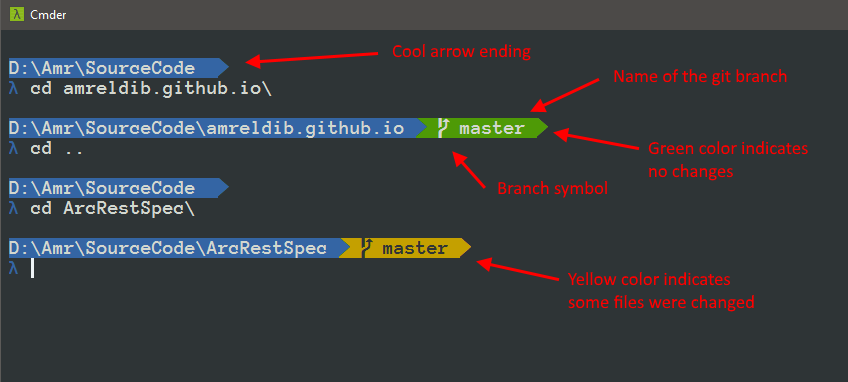
Give your Windows command line a cool new look
Followed this tutorial and never got the end results
I get File not found - D:\Program Files\cmder\config\aliases
thick linden
import DateTime at the top of the file
heavy knot
i have
heavy knot
yes
thick linden
okay you prob don't have it installed there
heavy knot
i did
thick linden
hmmm
heavy knot
uninstalled and reinstalled
thick linden
is that VS Code?
heavy knot
yes
thick linden
how are you running it?
thick linden
okay so your VS Code is prob configured to use a diff Python
heavy knot
how can i change that?
thick linden
is there anything in your settings.json or perhaps a newly installed plugin extension?
heavy knot
this will sound stupid but i will say it
 fading yacht
Hi guys, I'm trying to make a file transfer program using sockets based on some code I saw on a tutorial but I'm stuck with this error, someone has any idea?
Here's the code btw
And when I keep spaming the commands sometimes it works
 tepid ridge
You need to replace SEPARATOR with an actual character that you can use to separate your data
 sour star
Hi, I'm not completly sure if this is the right chat. I want to do a little interative simulation. So some sliders, input fields and then kind of a map and some people moving around (simple geometric 2D shapes, nothing complex). Any recommendation for a good library to achieve that?
 charred field
guys, im coding a file handling project, there is folder i want to runn this code in and there is many folders in this folder-- the code should open each folder and get a specific file name then add the name that it tooks to others with hyphen like [the folder we took his name(test.ytd) = (test) then change to others (handle.meta0 🙂 (test-handle.meta)] , i got the name then removed the file type by splitext and save it in value , how could i back to the first folder and change at other files ?
it's hard with os.walk() .. is there any ways ?
for root, dirs, files in os.walk(".", topdown=False):
   for name in files:
      if name.endswith('.ytd'):
        OldDeku = name
        Deku = name

      elif name.endswith('.meta') :
        Deku = os.path.splitext(str(Deku))
        newame = str(root) + '\\' + str(Deku[0])
        oldname = str(root) + '\\' + str(OldDeku)
        print(oldname, newame)
I was testing the folder and file locations so there is too man prints...
sour star
Graphics should be simple as I said, I though about something in the stil of the game mini metro, but kind of smooth (doesn't have to be perfect, but I saw some circles with tkinter canvas and you could really see every pixel of it)
I thought about some gaming lib maybe like pygame / arcade ... but well it's for gaming and perhaps not the perfect tool, I'm not sure though. Any recommendations?
 upper egret
hi guys
sorry if is the wrong channel
i have this error with spyder
i cannot start it even if i reinstalled all anaconda
when ii write spyder --show-console this error appears: from IPython.core.inputtransformer2 import TransformerManager
ModuleNotFoundError: No module named 'IPython.core.inputtransformer2''
can you help me please i need to complete my final year project and i can't run anything related to python ....before this i installed the package Google Collab using pip i think is related because i didn't had problems before
tawny temple
Try updating or reinstalling ipython
upper egret
hi @tawny temple i already did that and nothing happend i just don't understand
if i use pip in anaconda console i can ruin things ?
sorry if it is a dumb question i'm pretty new at this
at using anaconda*
tawny temple
Not sure, maybe it can
I have my doubts though. It should be fine.
You said you reinstalled all of anaconda anyway
You can try creating a new env in conda
conda create -n spyder_env spyder
You can also try using an older version of spyder
like spyder==3
It might be a single equals sign, don't remember
upper egret
i will try your suggestion for now i managed to open my project right from anaconda console an is doing a training session,after that i will try what you said and i will come back
thank you for helping
 quasi river
covert kindle
quasi river
covert kindle
Did you create a task file to run scripts?
I remember having to create one when I was setting it up. Didn't run python out of the box
@quasi river
charred field
guys, im defending a value as global in function
and Enter in this Vaule a path in if syntax
but when I try to call it back it says error because the value is not defined why ?
thorny shell
can't answer unless you !paste
also you should ask that in one of the available help channels -- #❓|how-to-get-help
charred field
ok thanks
 errant bough
heavy knot
errant bough
heavy knot
is there a plugin in pycharm that tells you information about the word you are hovering over
for example if you hover over fish in fish = 5 it would say fish type: variable or something like that
 wide plover
so i was working on git and created this .gitignore file and put it in the dev branch .....i put venv/* in that file ...but when i did git add myprojectfolder ...it is showing all the files added inside the venv folder..what am i doing wrong here?
 charred schooner
Hey folks.
I am looking at the API for the StreamDeck platform and they ask for a compiled binary that has a main() in it. Is it possible to supply the Python Interpreter for this, and forward the arguments along to a python script that has a main() implemented?
vocal portal
for what?
they offer JS, C++, and C#
if you want to use python you can search for SWIG or pyrex
 fallow geode
how do i open a bot file in visual studio code??
heavy knot
hi does anyone know how to move the terminal from vs code the the bottom
 modest heron
i need some help with pycharm
i have python 3.7.7 on my windows but pycharm uses it own python i tried to change path
but still it says no module found
even though i have install the package on my pc with the help of cmd
but pycharm throws me error
😦
upper egret
Hi guys ,i have a question related with anvil
can i link my local scripts with an anvil application ?
i've seen a lot of tutorials online and they use jupyter but my jupyter and all releated to anaconda decided to betray me and not start ,already tried to unistall and fresh install all again so now i try to link my local sscripts with anvil but i have this error
anvil.server.NoServerFunctionError: No server function matching "classify_image" has been registered at Form1, line 15
'import anvil.server
anvil.server.connect("key")`
@anvil.server.callable def classify_image(file): with anvil.media.TempFile(file) as filename: img = load_img(filename) img = img.resize((128, 128), resample=PIL.Image.BICUBIC) arr = img_to_array(img) arr = np.expand_dims(arr, axis=0) arr /= 255 score = model.predict(arr) return ("Positive " if pred == 0 else "Negative", float(score))
and this is the code o have in my script training scripts
 ionic ridge
@upper egret do you see the connection succeeding when you run your script? Also, there is an active anvil forum where you may get help: https://anvil.works/forum/

Anvil Community Forum
A place to ask questions and contribute to the Anvil community. Anvil is a tool for building full-stack Web apps with nothing but Python.
upper egret
no it doesn't shows the connection
i think this is related that i try do link a script ,and not a notebook
is this different or should work the same
?
ionic ridge
No, it doesn't need to be a notebook. A script should work fine.
I don't see a loop running in your code. Is that all of it?
upper egret
yeah i this is one of the tutorials they have i'm very new with anvil i just started it
bassically i have my training scripts that does the classification
that script works
and then i have the code i send
ionic ridge
You need a loop to keep the connection alive. Here's the docs on uplink code:
https://anvil.works/docs/uplink



 ionic ridge
How are you running your script?
upper egret
ok so i manage to find something i have an error of indentation somehow i think is because i copy pasted that code from their tutorial ,i will write it myself and get back to you in a minute
ionic ridge
Aha! That would do it! Fingers crossed...
upper egret
ok..
i solved that
but i have this now with anvil.media.TempFile(file) as filename
^
SyntaxError: invalid syntax
sorry not that
this
from IPython.core.inputtransformer2 import TransformerManager ModuleNotFoundError: No module named 'IPython.core.inputtransformer2
it happens when i try to open spyder
ionic ridge
Sorry. Ive never used spyder, so no idea
upper egret
ok ,no problem thanks for the help
upper egret
hmm so anvil.server.UplinkDisconnectedError: The uplink server for "classify_image" has been discon
disconnect *
this happens now
ionic ridge
I take it your script now runs OK and shows the successful connection messages?
upper egret
yes no error when i run the script there is this error when i run the application in anvil
ionic ridge
And your script is still running at that point?
ionic ridge
No. It needs to be running. It acts like a server for the app
upper egret
it happens right after i select the image
i did a file uploader ,i press run ,i open the image then the error appears
is somethig wrong with the image like size too big or something ?
is a medical image of lungs doesn't have a very high resolution
ionic ridge
There are a few similar questions on the anvil forum. You might want to ask there and see if the anvil staff will look at it for you. They often do.
I suspect files size might be the problem here.
upper egret
yeah i've read them also i will resize a image just to check then if not i will contact them
thanks @ionic ridge
ionic ridge
You're welcome. Sorry I couldn't fix it.
lethal flax
I make a dist with setuptools and setup.py
It turns my 'dev' version into a 'dev0' suffix which I guess is nice because I want distinguishable dev builds
But how do I get it to eventually make a dev1 and dev2 and dev3 .... ?
How are the numberings tracked?
ionic ridge
Anvil have open sourced their app server!
https://anvil.works/forum/t/the-anvil-app-server-is-now-open-source/5101/3

Anvil Community Forum
That’s great news and now doubt a huge effort behind the scenes @meredydd - thanks and congratulations! IMHO this is a really shrewd move commercially and will make Anvil more attractive to CIOs I’ve spoken with about Anvil. It addresses a common nervousness I’ve heard about...
 frank oxide
if you build with pyinstaller and do -F do you still need all the folders it builds?
i sent my file to my friend and it just ran instanly
printed all the print commands
and closed asap
topaz aspen
with visual studio code - i can open a file in a right split. Is it possible to open a file in a new window? so that I could move it to a different screen
open active file in new window 👍
covert kindle
Spent all day yesterday learning the basics of Git and how to push/pull from GitHub. I'm about to start a new exercise in my textbook and want to continue practicing Git and GitHub as I go.
From my understanding, the proper way to use Git is to make a branch while developing, and then merge it into the master after you're done with the feature/bug. This way your master branch doesn't get cluttered. Is that right? I plan to submit pull requests to my own project so that I can also practice managing online repos.
tawny temple
It's not to prevent clutter
Branching is for facilitating working on different features simultaneously
It keeps things isolated, thus preventing conflicts between features until they are ready to be merged
covert kindle
So if I wanted to keep things tidy I would have to rebase correct?
thorny shell
you could do that. Rebasing and merging are roughly equivalent
Git is a distributed version control system – a tool for tracking changes made to a set of files or coordinating work over time. It is often used by programmers
I haven't read that but the big diagram looks right
you rebase if
- you want to smoosh a bunch of commits together into one bigger commit (e.g. if you commit every two seconds like I do 🙂 )
- you want the public branch to not have any merge commits in it
you merge if
- you want to preserve all those commits you did (like, to demonstrate how you went about solving a problem)
- you want the public branch to have all those commits preserved, but still make it clear where your chunk of work started and ended
the choice is up to you
||'cuz they come in two classes -- rhinestone shades or cheap sunglasses. 🎶 Oh yeah.||
since it's your project it is really up to you. If you were contributing to a public project, they'd probably say "we prefer merges" or "we prefer rebases".
covert kindle
Thanks. I think I'll try using both just for the experience. Merging when learning new code and rebasing for code I'm already confident in.
thorny shell
x l n t
Now go out and get yourself some thick, black frames, with the glass so dark, they won't even know your name.
covert kindle
I wasn't cool enough to know what 'x l n t' meant.
https://www.urbandictionary.com/define.php?term=xlnt
thorny shell
nuts, I thought I invented that myself
covert kindle
Yesterday while I was practicing pushing/pulling to GitHub, a little GitHub window popped up and had me enter my credentials the first time. I did and that was it.
Today, it was asking me with every push/pull, but the window looked crappy and the title said SSH (I was using HTTP). I finally found someone online saying git config --global credential.helper manager would fix it. It did work, I'm not getting asked again, but I'd like to know what would cause my global config to change its own settings. I was using a new repo (and created a local user.name/email instead of the global) but other than that it was all the same. Any ideas?
 tough stratus
So, anyone ever had this happen with pycharm when adding an existing venv?
tough stratus
Had to reinstall python
 brittle tide
quick question the python interactive shell is there a way to have that reload automatically because as of now when i make a change to a file and save it it does not reflect in the shell unless i restart it