#tools-and-devops
1 messages · Page 41 of 1
 true vapor
 civic hound
the problem lies in how the brain works, how you save new memories
true vapor
but being distracted by another 100 is bad
civic hound
you are not able to mentally focus on more then 5-9 pieces of information. no matter who you are
this is how short-term memory works
you see this time and time again in all facets of human nature when it comes to teaching.
when you know what x or y means, then its no big deal, but when everything is new..
look at a photo of a Boing 747s cockpit, its pretty overwhelming.
does not matter if the plane can be flown by a few buttons or not.
true vapor
I'm still not entirely convinced. Someone who is used to using tools like Photoshop, or even Excel, which have a million in your face features that most users don't know how to use are pretty good at tuning out the visual noise in interfaces. And the thing that you do need in pycharm is very intuitive, its the play/run button
which is a universal symbol
civic hound
have you ever thought excel to a beginner that does not know anything before? I have.
moving the mouse, clicking takes up 2 of the 5-9 slots of information they have available
true vapor
No, but thats kinda my point. For someone who is used to using computers/advanced programs, starting with Pycharm might be fine. But for someone who isn't already a power user to some extent, it is going to be too noisy
civic hound
on a bad day if you show them 4 things, they will forget half of it
true vapor
But I take your point and don't think I'd reccomend Pycharm to someone unless I thought they would be able to jump into it semi-effectively
civic hound
yes, but a beginner are not used to anything of these kind of programs
thats what make them a beginner
any that knows their way around on a computer can ofc start with a more advance editor
but this is due to the fact im saying.
beginners use all their mental capacity on visual noise (or verbose visual inputs)
heck, in the help channels people fall apart if they have to open the terminal for something
if I explain two many concepts at once, it gets forgotten in a few moments
if i paste 5 lines of code, they fall apart.
if i do the five lines of code one at the time, they are with me.
true vapor
Yeah, I definitely take your point. I wouldn't recommend PyCharm in a vacuum again
 pure pulsar
vim has the least visual clutter, we should teach that 🙂
 gloomy hemlock

GitHub
All of the ad-hoc things you're doing to manage incidents today, done for you, and much more! - Netflix/dispatch
 heavy knot
I'm working with AWS ECS.
Should I have two containers: 1st is based on Docker image of my web chat app and 2nd is chatbot ML model docker image that returns answers
OR should I have 1 container that is built on docker image of both combined?
heavy knot
why does systemctl only show you like 4 lines and you have to use the arrow keys to scroll?
is there a way to just print everything?
 delicate gorge
systemctl what?
which subcommand
besides you dont have to use arrow keys there is also jk
heavy knot
nvm It's my terminal, not systemctl
 topaz aspen
anyone know if it's possible to have an excel file update when the file on the disk changes?
 atomic nacelle
So I read up on flit and poetry, and as far as I can tell poetry makes flit redundant. flit is basically an installer for your module, and poetry can do the same but can also manage dependencies and other stuff. Is that correct or am I missing something?
heavy knot
Docker-compose - https://github.com/xtrc/rasa-docker/blob/master/docker-compose.yml
Dockerfile - https://github.com/xtrc/rasa-docker/blob/master/conf/rasa/Dockerfile
Can someone explain to me when the production phase comes (AWS) what should I do with docker-compose?
I understand that I can build an image from Dockerfile and push it to AWS ECR and then connect it later on with AWS ECS.
But what should I do with docker-compose when in production phase?

GitHub
Contribute to xtrc/rasa-docker development by creating an account on GitHub.
GitHub
Contribute to xtrc/rasa-docker development by creating an account on GitHub.
GitHub
Contribute to xtrc/rasa-docker development by creating an account on GitHub.
 obtuse saddle
Do you know how to make Pycharm see right expected type when decorator effectively changes the type signature?
 acoustic epoch
Hello, i get remote: Invalid username or password. fatal: Authentication failed forwhen i try to run git outside pycharm
But i did enter my valid name and pass
I think there is a problem with my ssh
 warm pollen
Do you have something after the for?
warm pollen
Do you use 2FA?
warm pollen
Okay, you have to use your github username as your login and an access token as your password
Yes, that’s weird, I know
You can create a personal access token and use it in place of a password when performing Git operations over HTTPS with Git on the command line or the API.
 blazing condor
i though that was only over https
blazing condor
he said this above
I think there is a problem with my ssh
i'm not sure
probably meant there was a problem with his terminal or something
 steel perch
i'm trying to make files in a folder untracked in git, but keeping the folder tracked, not sure how
warm pollen
Keep the folder but not the content?
steel perch
yeah
warm pollen
Is there at least one file in the folder that you want to keep?
blazing condor
you'd have to have a placeholder file being tracked i think
steel perch
nope
warm pollen
I don’t think you can, but what is really the point?
You could just re-create the file
steel perch
well i could create a placeholder... Done!
i want to make my script automatically create files in there, but when people check the github i want them to see the folder lol
warm pollen
You should have the script generate the folder then
blazing condor
you could create the folder in your script -oh
blazing condor
too fast
warm pollen
Plus I’m on mobile :D
 warm pollen
Again, you probably don’t want to leave an example in the output folder
You’d loose the ability to CTRL + A the folder
steel perch
alright, thanks!
acoustic epoch
@warm pollen I tried a token
Mhm
But how can i save it so i won't need to paste it everytime
I tried saving globally, but
 lost rock
common practice is to place an empty .gitkeep file in otherwise empty folders that you need to be preserved in git anyway
that name doesn't have any special effects or properties, it's just a convention to hint that this file is explicitly a placeholder for that single purpose.
 maiden breach
Is this the right topic to ask for some help/advice with RTD parsing of my Sphinx documentation?
 stable cloak
@maiden breach What's your question about it?
Usually better to just ask and if it's not the right channel we'll guide you to the right one
maiden breach
@stable cloak if you look at the build on this page: https://readthedocs.org/projects/eldonationtracker/builds/10518492/ you'll see that it errors out looking for libpulse-mainloop-glib.so.0. Far as I can tell, that's a pulse audio (linux audio system) shared library; not something you'd expect to pip install. The documentation builds fine on my computer (which makes sense, I've got pulse audio installed). I'd like to be able to audodoc the two files that fail on this: call_tracker and gui, but I'm not sure what to do to fix that. I thought that pulling in this line (see diff https://github.com/djotaku/ELDonationTracker/commit/45e40f0cc6b0cd87cd8e1052de7d16eac0fe6506#diff-afe10607ade7d0654fb1f09ec0b93c86 ) where I pull in the config file would mean that eveythign is protected by if name == "main and therefore it should be fine.

GitHub
Adding update checker and documenation
 tawny temple
It's likely that the shared library is being loaded upon the import of one of the modules
Is it not feasible to install the library as a build step? That may be a simpler fix
maiden breach
@tawny temple your first sentence is what I guessed was happening. But I have no idea how to do the second step with read the docs
tawny temple
I'm not familiar with rtd but I did a little digging for you
Looks like there is some sort of way to mock imports
maiden breach
thanks! It's one of those things I should have found, but I wasn't sure what to search for
thanks a ton
 remote ruin
its probably pointless to ask, but does anyone here use ghidra with FlatLaf dark theme?
or any custom LaF for that matter
 kind chasm
In a .gitignore, isn't directory/** supposed to ignore the whole directory and subdirectory?
 twin hull
Not sure if it's the best place to post this, but when you share code on Github, why is there Copyright© at the top of files?
 thorny shell
dunno what you mean
pretty sure github doesn't insert a copyright notice into your files, if that's what you mean
twin hull
@thorny shell See https://github.com/thephpleague/oauth2-server/blob/master/src/CodeChallengeVerifiers/CodeChallengeVerifierInterface.php

GitHub
A spec compliant, secure by default PHP OAuth 2.0 Server - thephpleague/oauth2-server
For example
thorny shell
ok, I see a file that has some copyright info in it. Do you think that Github put that copyright info there?
twin hull
np, I ask why
thorny shell
I have no idea what you mean
topaz aspen
why would i use merge over rebase 🤔
typically i use merge, and haven't thought much about it, but having just used rebase instead it seems to make more sense as the ordering is preserved.
I can't really think why I would want to lose this ordering ( as happens with a merge ) though
hrm, i need a pastebin
!paste
 rancid schoonerBOT
Pasting large amounts of code
If your code is too long to fit in a codeblock in discord, you can paste your code here:
https://paste.pydis.com/
After pasting your code, save it by clicking the floppy disk icon in the top right, or by typing ctrl + S. After doing that, the URL should change. Copy the URL and post it here so others can see it.
acoustic epoch
Hello, anybody knows how to apply colored logs in pycharm's terminal?
topaz aspen
OK I have a re-producible example : https://paste.pythondiscord.com/kiqufikola.py
 finite fulcrum
pycharm's builtin terminal supports ansi codes
topaz aspen
having run the above script - then run
git merge branch_one; git log --oneline
the output is:
90a4625 (HEAD -> master) Merge branch 'branch_one'
48178f2 added file 10 to master
020d321 (branch_one) update file 1 branch one
2c186ae added file 8 to master
f675a28 added file 4 to branch_one
87b7b40 added file 7 to master
05a7701 added file 3 to master
6ab2537 added file 5 to master
6de52e3 added file 2 to master
427dd4e added file 1 to master
if instead one does
git rebase branch_one; git log --oneline
the output is
db6804c (HEAD -> master) added file 10 to master
aa00a80 added file 8 to master
181b6b4 added file 7 to master
537496f added file 5 to master
b9def89 (branch_one) update file 1 branch one
080402f added file 4 to branch_one
1aebf0a added file 3 to master
c031e9d added file 2 to master
fef96a2 added file 1 to master
which seems to make more sense with the ordering?
acoustic epoch
@finite fulcrum Mhm, weird, my logs are all red
finite fulcrum
is it being sent to stderr?
acoustic epoch
Is it related?
Im unsure, i think no
@finite fulcrum
To this ^
logging.basicConfig(
    handlers=[LoggingHandler(), logging.FileHandler(filename="logs/log.log")],
    level=logging.INFO,
    format="%(asctime)s | %(name)s | %(levelname)s | %(funcName)s:%(lineno)d | %(message)s",
    datefmt="%H:%M:%S",
)```These are my settings for now
I don't think that's stderr
finite fulcrum
How does the whole logger setup look like?
finite fulcrum
LoggingHandler being?
acoustic epoch
logging.StreamHandler
finite fulcrum
!d logging.StreamHandler
rancid schoonerBOT
class logging.StreamHandler(stream=None)```
Returns a new instance of the [`StreamHandler`](#logging.StreamHandler "logging.StreamHandler") class. If *stream* is specified, the instance will use it for logging output; otherwise, *sys.stderr* will be used.

`emit`(*record*)[](#logging.StreamHandler.emit "Permalink to this definition") If a formatter is specified, it is used to format the record. The record is then written to the stream with a terminator. If exception information is present, it is formatted using [`traceback.print_exception()`](traceback.html#traceback.print_exception "traceback.print_exception") and appended to the stream.... [read more](https://docs.python.org/3/library/logging.handlers.html#logging.StreamHandler)If stream is specified, the instance will use it for logging output; otherwise, sys.stderr will be used
you're printing to stderr unless you specified stdout
acoustic epoch
Yeah i will just use stdout
finite fulcrum
@topaz aspen totally not experienced with git, but rebasing seems like something you'd do alone as it can look nice; but merges on anything larger where other people can be pushing commits in prs
acoustic epoch
class LoggingHandler(logging.StreamHandler):
    def __init__(self):
super().__init__(stream=sys.stdout)```Huh
Still
finite fulcrum
print_exception also does stderr but that shouldn't affectn normal logigng
and I'm unsure where you're using it
(maybe more suited to a help channel instead of here)
acoustic epoch
Yeah
heavy knot
Hey @tawny temple I'm having an issue with opening files and systemctl
Basically if I go into the repo root and type python run.py it works fine, but when I run systemctl --user restart offthedialbot it says it can't open the file
the file is in the root of the repo
tawny temple
How's the service running it?
heavy knot
Well I just went into the service file, and this line:
ExecStart=/home/LeptoSpira/offthedialbot/.venv/bin/python /home/LeptoSpira/offthedialbot/run.py
I'm assuming the working directory isn't where I want it to be?
heavy knot
ye
tawny temple
If you use a relative path with open then it's relative to the current working directory, which will not necessarily be the same directory as the current module
heavy knot
I just do with open('config.yml')
tawny temple
Either use an absolute path or set the cwd in the service with WorkingDirectory=. It can go right next to execstart
tawny temple
Well yes, that's where ExecStart is.
heavy knot
right ok
topaz aspen
anyone use tmux with osx?
i find that all the resizing commands and stuff are system defaults, meaning i end up moving views about ( or whatever osx calls them ) instead of resizing tmux panes, not sure if i'm missing something obvious though
 plush tree
You can change the defaults in the config file
heavy knot
@clever raven thats the problem I was tryin to configure it but idk I've Python 3.8 and its not workin
 clever raven
it's probably not in your PATH
heavy knot
here Sir
 brittle tide
if you run the command python in your terminal does anything show up?
heavy knot
yeah it works there
clever raven
did you restart sublime after installing it?
heavy knot
yes Sir and I've reinstalled it for 3 time
also I'm having issues with Pycharm
oh and one thing whenever I follow the given link it redirects me to Python 3.7 not 3.8
clever raven
hmm. well, when Sublime tries to execute your code, it just runs python. The message you're seeing (about how you can install it in the Microsoft Store) is what windows 10 will display by default now when python isn't installed.
did you install it with that Microsoft Store install, or from https://python.org ?

I don't know if 3.8 is on Microsoft Store yet
I'd check but I'm not a Windows user
heavy knot
Sir I've downloaded it from the official site not from Microsoft store
clever raven
please stop calling me Sir.
the official site sounds like the right approach. it's weird this isn't working for you, then.
heavy knot
I can call you Sir cuz I'm newbie also only 19
clever raven
you could, but I'd prefer if you didn't.
brittle tide
if it is working in your terminal at least there is a nice package for sublime called terminus that will open a terminal instance inside of sublime this is what i use to run python in sublime and here is a nice easy to follow setup video to get it woking
https://www.youtube.com/watch?v=_fjCMYX4Abs
In this video we will set up and configure Terminus - an awesome cross platform terminal emulator for my favorite cross platform text editor - Sublime Text.
Terminus is here:
https://packagecontrol.io/packages/Terminus
Fira Code is here:
https://github.com/tonsky/FiraCode
S...
heavy knot
okay I'll try that but I need a lil bit help with Pycharm
don't mind its like a habit if I call you Sir
clever raven
are you using the latest sublime text? did you restart your computer?
You could try to edit the Python\Python.sublime-build package to point directly at the 3.8 executable as a last resort, that's where sublime gets the information about what to do
what's the issue with PyCharm?
 frozen coral
done is not a function that exists in the global namespace
I think ^ is the correct way of saying it
what do you except done() to do for you here?
heavy knot
its do end the import code
@frozen coral you have any idea how to import the Turtle in Pycharm?
frozen coral
you did int the first line
no need to use done()
not sure what langauge you are getting that from
frozen coral
get rid of the import *
heavy knot
idk how?
frozen coral
select and delete
heavy knot
what that suppose to be ?
frozen coral
it means import everythign from the turle lib into the global namespace
heavy knot
can you do that and send me S.S here?
heavy knot
please I don't even understand what you said thats why I'm asking
heavy knot
frozen coral
rename your file
heavy knot
dude its not defining turtle nothing is wrong with "from import"
heavy knot
Now
pure pulsar
Well you also need to change it on the command line
frozen coral
did you install the turtle lib?
heavy knot
okay I got something I guess the main problem wait ....
frozen coral
does python 3 even have that?
frozen coral
is turtle maybe with an uppercase instead?
pure pulsar
Did you configure your project before?
frozen coral
i doubt you even have turtle installed
heavy knot
Did you configure your project before?
Nope Sir
pure pulsar
How does it know what to do when you click the run button?
heavy knot
is turtle maybe with an uppercase instead?
didn't work either
frozen coral
no idea what you just did to your settings files
heavy knot
How does it know what to do when you click the run button?
Sir I've just named the config and I've selected the Python 3.8 interpreter nothin else
heavy knot
like I said its a habit
pure pulsar
Edit the line that says turtle.py
Since you renamed it to Nikk.py
Then try to run again
heavy knot
oh it worked
pure pulsar
\o/
pure pulsar
😬
frozen coral
perfect now I have a conda question
(base) [julius@joy bin]$ conda update --all

NoBaseEnvironmentError: This conda installation has no default base environment. Use
'conda create' to create new environments and 'conda activate' to
activate environments.
it says base on the left
pure pulsar
(I know habits are hard, but i think you'll benefit of losing this one.)
frozen coral
I am 90% I activated my env
heavy knot
okay dude 😂
heavy knot
@pure pulsar can you help with Sublime text?
pure pulsar
Not really, but just ask your question
I'm not a pycharm user either, but i still helped you with common sense :)
twin hull
@heavy knot I use Subl as well, I may be able to help you
heavy knot
oh thanks look thats the problem
 gilded kayak
i use pycharm
heavy knot
@pure pulsar @twin hull
https://cdn.discordapp.com/attachments/463035462760792066/683594402072887326/unknown.png

I'm not being able to configure it
twin hull
ah, I don't use the interpreter
I run my script from the command line, you could do the same @heavy knot
pure pulsar
maybe you want python to be in the PATH
i don't know how sublime text looks up for python.
i didn't even know it could run your code, i though it just allowed to edit it
pure pulsar
i would just use a normal cmd or the new terminal to run python normaly
heavy knot
I run my script from the command line, you could do the same @heavy knot
@twin hull and what should I write in cmd?
twin hull
@heavy knot When you're in the repertory where your script/prog is, write python3 my_script.py
Or simply python if you don't have python2 in your system
twin hull
What do you want me to do? I don't know what S.S means
heavy knot
Screen Shot
twin hull
what do you need in it?
heavy knot
drop it now I'll deal with it later
true vapor
You don't need to ping anyone. You can just post your question and someone will come along and answer
I probably can't help, but I might be able to. Just post your question
!ask
rancid schoonerBOT
ask
Asking good questions will yield a much higher chance of a quick response:
• Don't ask to ask your question, just go ahead and tell us your problem.
• Don't ask if anyone is knowledgeable in some area, filtering serves no purpose.
• Try to solve the problem on your own first, we're not going to write code for you.
• Show us the code you've tried and any errors or unexpected results it's giving.
• Be patient while we're helping you.
You can find a much more detailed explanation on our website.
heavy knot
I just need help with the graphical calculator divide button I missed it now idk whats the command for divide
heavy knot
/
heavy knot
oh great I figured it
civic hound
did you need something moderated @heavy knot ?
im guessing no since the ping has been deleted, but all moderators still have the ping in their history as a ghost ping.
heavy knot
look up I said I needed help and I tried to ping helpers thats why I deleted that
 violet belfry
How about not pinging anyone?
heavy knot
Aaaah sowwy 🙏🏼
heavy knot
How people do stuff here? I do this:
- Write code in an editor
- switch to ipython running in an X-Terminal to run the code.
- switch to editor copy the code
- paste code on the web
it is not slow but not that fast either
tawny temple
- The same.
- Same but I use CPython. Sometimes I run code via an IDE.
3 & 4. Use git to push code to an online repository (GitHub)
finite fulcrum
- write code in pycharm 2. run code through pycharm 3 push to git with pycharm
tawny temple
Basically yes @heavy knot
heavy knot
I am looking at Spyder for IDE now, let's see how it works out
been trying Atom/VScode instead of Emacs
tricky to copy code from and back to web from Emacs
tawny temple
I recommend version control instead of copy pasting code around
tawny temple
Ah in that case you do need to paste it into their website
heavy knot
🙂
true vapor
Do they not have an editor on their site?
heavy knot
Will sleep now. else I will fall on keyboard
finite fulcrum
Don't they allow some level of interaction through your own ide/editor?
topaz aspen
@heavy knot same - i'll typically code in vscode and then run it in an ipython session in iterm2... never really got in the habit of using the built in stuff with vsc for running sections
heavy knot
Why this works from AWS Console but this same command doesn't work from my local console!? How can I make it work in my local console?
 frank compass
What is not working exactly ? What do you expect to get ?
frank compass
Do you have something running on your local machine on port 5005 ?
127.0.0.1 is loopback/local ip, not public, if nothing is running on your pc you'll get that message
acoustic epoch
Hello guys, my pipenv doesn't load any of my env variables properly, is this a known issue?
I run my bot as a module, like @rancid schooner
It seems to load all the line, and not ignoring comments
If i remove all my comments its fine
kind chasm
Any of you hosting your own git web? I am using the pearl script that comes with git, but I'd like something with more functionality. Any recommendations for a light package for git? Preferring apache support.
warm pollen
Your own git?
kind chasm
I have a git server running on my nas and gitweb on my pi
warm pollen
What does this has to do with pearl?
kind chasm
yeah
just wondering if anyone knows a few alternatives that are apache friendly
I am running 4 apache vhosts on that pi
including bind9 and own domain
Found something: https://gitbucket.herokuapp.com/ (demo)
Needs it's own binary but with a reverse proxy it should work
thorny shell
I'd think you'd want gitlab
dunno if it works with apache, but it might
it's probably complex
true vapor
Gitlab is quite resource intensive. I believe there are better solutions out there, although I don't know what
 tired aspen
gogs is pretty simple to get started with
 mental mason
Just want an opinion, is atomic commit better than a large commit?
Imo atomic commit is better especially to track changes and maybe if u need to reset
But what about the others?
finite fulcrum
If you can do it incrementally atomic seems much better to me, you know the reason why it was added, can revert a single feature etc.
frank compass
Atomic during feature dev, squash all commits into 1 when feature goes into release
 vivid cargo
Not necessarily
It can mean your project has bad or incorrect history
And force pushing can be fatal
warm pollen
Force pushing cannot be fatal
I mean, you just replicate your local history to the remote
Yeah, if your local is broken, the remote will be too
But force pushing doesn't cause the issue
mental mason
It prob wont cause issue if im working alone anyway
thorny shell
if you're working alone, force-pushing is fine
I even do it sometimes when working in "semi-public"
i.e., other people can see my work, but it's in a personal area as opposed to the "OK I've gotten this code-reviewed and y'all can go ahead and us it" area
acoustic epoch
Is there a way to make IDEA's buttons bigger without material theme?
warm pollen
You could use a custom theme
warm pollen
There is a built in support in the pro edition (free for student) https://www.jetbrains.com/help/pycharm/template-languages.html
kind chasm
Yeah I am not a student. Thanks though.
true vapor
I have a 3 month pycharm Pro code if you want it @kind chasm ?
kind chasm
appreciate it, but that is probably best spent on someone else. I am just going use vs code for the templates 🙂
@true vapor
finite fulcrum
the trial is pretty long if you want to try it out
true vapor
Well. It expires in a couple of weeks, and I'm a student so don't need it. If anyone else wants it, @ me
kind chasm
@finite fulcrum Isn't that 30 days?
finite fulcrum
something like that, yes
 soft agate
What is the advantage and the point of converting strings to bytes?
 weak herald
It all depends on what you are doing with it.
soft agate
Hmm
pure pulsar
strings are to work in python memory, as long as you communicate with anything else, you need to convert to/from bytes
@soft agate
soft agate
Ok
 jovial cove
hey, i am having a problem with maintaining a python app on an old raspberry pi, one of the dependencies is tablib, the pi has python 3.4 so the current version of tablib doesn't work, i got around that by installing tablib==0.12.1, the problem is that as one of its dependencies tablib is installing openpyxl with no specified version, which doesn't work on python 3.4. Is there any way around this sort of just manually cloning tablib and editing its requirements? Can I tell pip (or some other dependency manager) to install tablib but override it's dependencies to some specific version?
tawny temple
@jovial cove Install openpyxl yourself before installing tablib. Pip will recognise that openpyxl already exists and won't install it again.
jovial cove
@tawny temple Thanks, I'll do that. Taking the time to update all the dependencies and python version to current ones is something I know I'll need to do, just need to get it up and running first.
warm pollen
A bad commit?
I guess a commit that isn’t atomic, it contains too much unrelated changes,, or have a bad commit message
thorny shell
that's like asking "what is considered bad code"
violet belfry
Not really
true vapor
also, there are some solid answers to "what is considered bad code"
Clearly you can't give a detailed explanation in two sentences. But you can point to stuff like readability, repetition of information, modularity
stable cloak
@jaunty cloak Okay, so
 jaunty cloak
Ok
stable cloak
Go to File -> New Project and when that window pops up, click on the Project Interpreter: New Virtualenv environment line to expand it
Let's see which one it's pointing to
stable cloak
Ah, that second one is what we want to change
Click the second option
Then it should be good to create the project
jaunty cloak
It worked so now I can import open cv and other modules?
stable cloak
You'll have to redownload them for that specific venv. Bottom left hand corner there should be a tab that says Terminal
You'll type in the py -m pip install commands there
And it'll toss them into the venv and you'll be ready to rock and roll
jaunty cloak

@stable cloak
Is this good or bad?
Is it already being used or something else
stable cloak
@jaunty cloak Oh that's not a huge deal. So instead you'd want to do:
py -m pip install -U setuptools --user
The reason you get that error is because Python normally tries to install to places it doesn't have permissions for, so you'd have to run the terminal as Administrator
But doing the --user flag prevents needing that
topaz aspen
tmux ruins scrolling - is there a settingfor that?
kinda makes it unusable
as in - if i do something that prints output, i can't scroll up to see it if it was longer than a screen
 rain belfry
I am trying to run a venv inside VSCode using python -m venv testproject , this works fine , the venv is functional and the packages are being installed in it and all.
But I have 2 issues:
1- VSCode is looking for pylint andblack inside the venv not the standard python library.
2- when I initialize the venv, there are packages preinstalled so if I try to pip freeze to create my requirements.txt I see about 15 packages I didn't install.
Anyway I can fix those 2 issues?
topaz aspen
@rain belfry i always just installed them in the venv, pylint and black that is
(is that a bad thing? seems ok 🤔 )
 wide belfry
Hi, hoping that someone can just clarify something for me, I'm pretty novice and have been using pyCharm, and I consider myself more of a "hacker" than "programmer" since I'm not building anything sustainable, it's all just one-off jobs so that I can automate something. But I find myself getting tired of launching a python terminal and then having to import pandas, and os, and re, and anything else that I need. Is this what a virtual environment is for? So that I can set up an "environment" where all of those dependencies are already available for me?
atomic nacelle
no. In a virtual environment you can install modules without affecting other virtual environments, but when you launch python they won't be automatically imported
what you want is a PYTHONSTARTUP script https://docs.python.org/3/using/cmdline.html#envvar-PYTHONSTARTUP
wide belfry
Thank you, I'll give that a read. That would make it easier for me.
rain belfry
@topaz aspen well as I stated in the post, if i use pip freeze I end up with loads of packages including the ones I installed, so its difficult to create a requirements.txt file for my project
rain belfry
appdirs==1.4.3
asgiref==3.2.3
astroid==2.3.3
attrs==19.3.0
black==19.10b0
certifi==2019.11.28
chardet==3.0.4
Click==7.0
colorama==0.4.3
et-xmlfile==1.0.1
idna==2.9
isort==4.3.21
jdcal==1.4.1
lazy-object-proxy==1.4.3
mccabe==0.6.1
pathspec==0.7.0
pylint==2.4.4
python-dateutil==2.8.1
pytz==2019.3
six==1.14.0
sqlparse==0.3.1
toml==0.10.0
typed-ast==1.4.1
urllib3==1.25.8
wrapt==1.11.2
These packages are installed in the venv, I didnt install them
except for black and pylint
acoustic epoch
Hey, how can i set my pipenv to a certain existing venv?
wide belfry
@atomic nacelle I tried giving that a shot, wasn't very successful, but PyCharm has a preference setting that will let me do the same thing (probably) and that worked for me. Thanks for the direction.
 quick night
I have a question about Jupyter Lab (version 1.2.4)
I'm trying to disable autoClosingBrackets because it's been very disruptive. I have tried almost every solution under the sun, from editing the JSON preferences in the advanced settings editor in every category, to trying to write a GreaseMonkey script to delete the one Event Handler that causes autoClosingBrackets.
I have found that, for some reason, despite changing all of my settings, autoClosingBrackets (under the keypress Event Handler for every textarea) has a value of {}, which in JS is a truth value. Meaning that somehow the setting is still set to true even though I've gone out of my way to have it set to false in every place I can. If anybody could help me that would be amazing, I've been trying to fix this issue for the past 4 hours with no results.
Alternatively, if you could help me figure out why getEventListeners(some element) won't work in a GreaseMonkey script despite running in the Chrome console, that would be great and would also solve my problem
mental mason
Im actually wondering which merge is used at which case? Sry bad English
Cuz i see that there are fast forward merge and normal merge
It does say "fast forward" doesnt actually merge but it moves the tip of the branch
I dont exactly get the difference between them
The only thing i realized is that without fast forward, u create a merge commit
thorny shell
@mental mason "Fast forward" really isn't a merge.
It's just that, when you say "git merge", it might give you a fast forward.
a merge, to me, is any commit with two or more parents.
 livid gyro
Hello, I did something weird and my bracket pair colorization disappeared on visual studio code. when it was working 100% of the time recently...
blazing condor
what extension are you using?
livid gyro
livid gyro
@blazing condor
blazing condor
oh sorry
hm i'm not too sure. what did you do before it started not working?
well, i'm off now since it's quite late for me and my head is not acting right lol. i'll see if i can help you another time
quick night
@violet belfry Oh wow, that worked. Huh. Thanks so much!!
atomic nacelle
Does anyone know of a way to nicely display a file/folder structure with sphinx? I'd rather not use an image, and the only other thing I can think of is a code block. Please @ me if you respond
 thin oriole
This might be the wrong channel, but with OpenAPI/Swagger, are you typically supposed to manually update the spec whenever you make a code change that affects an endpoint? I know there's some software to automatically generate the spec, but from what I can find they don't always work great. I'm just confused about what the "standard" workflow is
 tawdry sapphire
Does anyone here have much experience with coverage/pytest-cov?
violet belfry
What is the question?
 worthy geyser
hi, I started using VS code for python na c++ recently and I have problem with auto code formating. I use Prettier extention but it doesnt work, in json files it works fine, but as soon as I open cpp or py file the Prettier ✔️ icon in the bottom right corner disaperes and when I click right on the Status bar prettier is not there, did anyone have such problem? Any fix?
violet belfry
I don't think cpp or py files are supported by the extension
JavaScript · TypeScript · Flow · JSX · JSON
CSS · SCSS · Less
HTML · Vue · Angular
GraphQL · Markdown · YAML
worthy geyser
damn, I was trying to resolve this problem for 1h at least XDD
Any cpp formating extention you recommend?
and python
tawny temple
Only auto formatter for Python that comes it mind is black, but it's not really customisable. Surely there are others out there, I just don't know of them.
For c++, use clang format. There's probably an extension for it
violet belfry
autopep8 is another one for Python
warm pollen
I used autopep8 in the past, it was quite decent, and gave better looking results than black imo
 tepid ridge
Hey!
Anyone willing to help me with Visual Studio Code?
Just need to set up some things but I don't know how to do it well
tawdry sapphire
@violet belfry I'm trying to get coverage working for Cython. coverage run works, but then when I do coverage report it complains that there is no source for the pyx files. When I add the pyx files to the directory then it errors with "Couldn't parse <filename> as Python source: invalid syntax at line 1"
Obviously it doesn't make sense to parse the pyx files as a Python source, since they aren't Python source files
I read somewhere that coverage should be getting all of the information from the compiled binaries, which are being compiled with linetrace on, CYTHON_TRACE=1, and CYTHON_TRACE_NOGIL=1
I've been able to profile these files, and my understanding was that the requirements for generating coverage of Cython files is the same as those for profiling them
tawdry sapphire
Got it working. As far as I can tell Coverage version 5 is incompatible with the Cython.Coverage plugin. Downgrading Coverage to version 4.5.4 fixed it
kind chasm
In Pycharm, I have authorized Trello. Can I somehow have all TODO: sent to trello?
or custom TODO tags?
 hollow flicker
Hi
I have a project that I need to run on multiple machines. The problem is that whenever I have to run it on a new machine, I have to setup everything from scratch for example installing packages and it does take a lot of time. I was wondering, if there is a way, I could package my working virtualenv directory and just use it on the other machine without going through the whole installation process. I do NOT have sudo access.
finite fulcrum
Have you tried anything so far?
This sounds like a simple requirements.txt ought to do it
maybe a script to make a venv, activate it and do the pip install with requirements to make it a bit less tedious
hollow flicker
I tried requirement.txt
doesnt install all packages, still have to do fair bit of manual installation, also, some machines have python 3.5 installed
most of the code is in python3.6
so if there is a way, i could just package together everything and use it, it will be great.
thorny shell
doubt it
seems to me that you could get 90% of the way there by just fixing requirements.txt
unless there's something unusually complex about your thing
"pipenv" might help with this, but it's pretty complex itself, and you still have to install it
finite fulcrum
Do you use some weird dependencies that you can't put it into a requirementx?
if multiple python versions are an issue you could have two of them
atomic nacelle
Using the intersphinx extension, I want to create a link to reference/simple_stmts.html#grammar-token-import-stmt. The target is import_stmt, but neither :obj:`import_stmt` nor :ref:`import_stmt` generate an actual hyperlink. Anyone know how to make this work?
heavy knot
Can someone help me identify the name of the option to remove these lines? They irritate me and I end up focusing too heavily on why the lines aren't going all the way to the close tag and its a waste of my time.
PyCharm.
finite fulcrum
indent guide
heavy knot
Thank you
twin hull
Do some people have feedbacks about using Github's secret feature to store token? https://help.github.com/en/actions/configuring-and-managing-workflows/creating-and-storing-encrypted-secrets
Encrypted secrets allow you to store sensitive information, such as access tokens, in your repository.
heavy knot
I got a thing called VScode on my chromebook and just need help with beggining to code
blazing condor
what do you need help with?
heavy knot
@blazing condor Setting up my first code on VScode
blazing condor
well all you need to do is make sure you have python installed with vs code and you're all set

 timid jolt
@twin hull I have some pgp encrypted files on Github (not the key though). At some poin, running stuff on any I/PaaS or something will require putting some secrets or keys online. I probably would trust Github to know what they're doing.
@heavy knot
```print('Hello world!')````
Also look at !resources for some great beginner info.
heavy knot
Alright Thanks
topaz aspen
If I have a series of local commits as:
7a9a0d2 (HEAD -> master) IMPORTANT 2
5eb7803 unimportant 4
7b37955 unimportant 3
f47da20 IMPORTANT 1
990e09a unimportant 2
294d4e7 unimportant 1
77ba257 commit 1
and want to have
7a9a0d2 (HEAD -> master) IMPORTANT 2
5eb7803 unimportant 2
f47da20 IMPORTANT 1
294d4e7 unimportant 1
77ba257 commit 1
this would be a case for using re-base?
presumably having
7a9a0d2 (HEAD -> master) IMPORTANT 2
f47da20 IMPORTANT 1
990e09a unimportant
77ba257 commit 1
would not be an option, as the order is messed up
thorny shell
yes except your commit hashes will change
you can order the commits any way you'd like
topaz aspen
@thorny shell oh ok, cool - so if it's only local i don't care about the hashes changing.
i can order the commits differently even if one builds off another?
thorny shell
well you might be able to but it sounds like a bad idea
in a perfect world, each commit would build and work on its own
tawny temple
If a commit makes changes to the same line as a previous commit, I imagine that reversing their order will result in a conflict that you will be asked to fix manually.
 frail sundial
how can i set terminal (ubuntu's default) on atom-python-run package (it doesn't run after i installed budgie desktop environment) (don't forget to mention)?
 final burrow
Anyone interested in better support for type hinting in Pycharm ? If yes, you might want to vote for that issue: https://youtrack.jetbrains.com/issue/PY-39703
mental mason
Sry another git question, is it good to seperate patches? What i mean by that is. Say i have to fix A, B and update C. So say A is 0.0.1, B is 0.0.2 and C is 0.0.3
Is this a good thing?
Or is it better to have them in 1 patch?
warm pollen
A git patch?
What do you want to use them for?
It is a pretty unused feature those days haha
 somber lion
Generally speaking, each commit should be one concrete thing / idea. That way you can revert or apply one of those things individually later. For patches/merges, those tend to be a larger collection. But really it depends on what you're doing - would it be likely that someone is going to want to reject one half, and accept the other?
It's much more annoying to disentangle the changes later.
mental mason
Not git patch, i mean just the versioning
Like do i increment the patch number for each different fix or do i just do multiple fixes and increment once
warm pollen
It depends on how you want to release your app
Generally speaking, you should create a new release when every issue is patched
mental mason
Since its a discord bot project my plan for the minor number is to increment it per feature such as Music related commands
But im not sure for patch number
warm pollen
I’d say that if you have 3 patches to make, release them at once
mental mason
Ah alright, although i asked this when i already released them seperately
Shouldve asked earlier, thank you
For next patches im probably gonna do what u said
Since i already released it, theres no use of reverting it back
heavy knot
Anyone have a script where it scans for projectors and your able to control them?
warm pollen
Projectors?
heavy knot
Yes


 kind chasm
Does it allow to be controlled over the network? @heavy knot
For something like that to work or to do it, you need to know the protocol
 muted cobalt
I'd like to remove this inspection from PyCharm Professional
I dont see the option to do so in the problem menu (Alt + Enter)
finite fulcrum
What's pycharm complaining about here? with this code I get Expected type 'Type[_T]', got 'FirstHash' instead on the cls in __new__ but if it's replaced by FirstHash it's happy
class FirstHash(tuple):
    def __new__(cls, *args):
        return super().__new__(cls, args)
not sure, but you definitely need to write return super().__new__(cls, *args) (with a *)
finite fulcrum
tuple's constructor accepts an iterable
lost rock
yeah, but you have to pass the arguments though in the same way you obtained them - otherwise you always wrap them in another list
oh, and the cls parameter needs to be gone, I think, if you use super() 🤔
atomic nacelle
In __new__ it's required for some reason, never understood why
finite fulcrum
The code works fine, I'm passing arguments to the constructor separately and a tuple is constructed from that
FirstHash(1,3) -> (1,3)
lost rock
wait no, I was wrong. It needs the cls...
but regarding the missing *, compare these:
FirstHash([1,2,3])
([1, 2, 3],)
tuple([1,2,3])
(1, 2, 3)
Yes, I'm not aiming for the same behaviour
Just don't know what pycharm is complaining about or means with that warning
lost rock
hmm, could it be a bug? because cls will be a class/type, but the warning makes it look like it thinks it gets an instance of FirstHash there... like with self in normal methods
it only happens when the base class is tuple though. Changing that to e.g. list makes the warning disappear
finite fulcrum
ah right it's showing the type there, I through FirstHash means as me passing FirstHash
not at my pc rn, does it happen for other immutables like str or frozenset?
or just the tuple for some mysterious reason
lost rock
I don't see a warning for those two types either
finite fulcrum
Strange, guess it'll continue annoying me
muted cobalt
topaz aspen
hint: Updates were rejected because the tip of your current branch is behind
hint: its remote counterpart. Integrate the remote changes (e.g.
hint: 'git pull ...') before pushing again.
hint: See the 'Note about fast-forwards' in 'git push --help' for details.
I'm just wondering about this - when I'm sure there's nothing on the master that I don't have locally, so I must be misunderstanding.
when I run
git diff --stat origin/master
there are a bunch of changes, but they're all the changes that I've made locally
atomic nacelle
How can I tell sphinx to leave my text as-is instead of replacing my commas with stupid ugly commas? My rst contains regular , commas, but in the html output they're ¸ commas. I found the smartquotes config value that disables this behavior for quotes and dashes, but nothing for commas
Apparently that character is called "Cedilla" and is actually not a comma at all. Goddamnit, sphinx
atomic nacelle
False alarm, it wasn't sphinx's fault. My compose key program was acting up and creating cedillas instead of commas.
warm pollen
@topaz aspen have you tried to simply pull the changes? Git doesn't look at changes, it check commit IDs
muted cobalt
Hey, can I disable all the SQL-related helpers in PyCharm Professional?
delicate gorge
@warm pollen @topaz aspen your versionof origin/master is behind the actual one, oriign/master is inly upadted locally after a pull or fetch
 iron basalt
@slow marlin let's continue here: the problem that you likely have is that you don't have discord.py installed for the interpreter that you're using to run the code, but I'm having a little bit of trouble figuring out how exactly you run your code
finite fulcrum
create env with python -m venv venv_dir, activate with activate.bat and you're using your venv
finite fulcrum
virtualenv is a third party package with a couple more options
 neat haven
ah and in this website/guide i have open it says i should do .\env\script\activate
but that doesnt work for me is there any reason?
finite fulcrum
I brlievr it's scripts, and you need activate.bat on win
You can find it there, just open it from the terminal and then you're in your venv
twin hull
venv ≠ virtualenv
neat haven
i mean yeah but i was using this website https://packaging.python.org/guides/installing-using-pip-and-virtual-environments/
and it tells me to do .\env\Scripts\activate which doesnt work at all
finite fulcrum
From where are you doing and how are you doing it? Is your venv named env?
You just need to do the path to your venv's activate, doesn't have to be exactly as there
neat haven
well no and i changed that of course and im using visual studio code terminal both powershell and cmd
anyway it works now thank you so much!
 sharp geyser
It feels painful to realize I was right years ago criticizing Git Flow. Nobody was listening, some people even called me stupid for denying widely adopted best practices. And now just one article "Please stop recommending Git Flow!" has changed lots of minds regarding what the best practice is.
atomic nacelle
oho, George Stocker wrote that. That certainly lends it credibility
warm pollen
The git flow is okay in itself imo, but you have to deviate from it sometimes
And having another long running branch is f*** okay
atomic nacelle
So I'm not particularly experienced with git, but it seems like it's standard practice to have release branches in addition to release tags. Can someone explain what the point of a release branch is? Isn't a tag enough?
warm pollen
I personally do both, because you can open a PR to the release branch and leave reviews on it, and have a CI creating the tag and the release assets when the PR is merged
atomic nacelle
I see. So for how long do you keep the release branch around? Forever?
warm pollen
Yeah forever
I usually just create it when I want to do my first release, and then protect it to avoid any issue
atomic nacelle
Alright, thanks
acoustic epoch
How can i view emojis in pycharm?
acoustic epoch
Hmm
true vapor
here's how 😃 comes out
true vapor
Might be the font you have selected
acoustic epoch
Can be
finite fulcrum
have no place in the code in the first place, but that's usually how they get displayed in normal text fonts
true vapor
They're absolutely fine as part of strings
true vapor
hm, the point above is valid
but at the same time
they're much easier than unicode escapes
I guess a plugin that autoconverts to unicode escapes is correct - but thats not fun
finite fulcrum
What do you mean with them being easier?
true vapor
Easier to insert into code
can just paste them directly
and know what they're going to look like
warm pollen
You can !charinfo them here, unicode points tend to be safer
finite fulcrum
I'd have no idea how to do an emoji on my system without googling for the char, might as well use the unicode name then like "\N{SMILING FACE WITH OPEN MOUTH}"
warm pollen
I mean, unicode points are also fine
 elder crane
I am having trouble with setup of a jupyter lab environment, anyone available to give me a hand?
iron basalt
it's best if you just explain your problem in as much detail as possible
elder crane
Sure, I am repeating the steps I am taking and recording them exactly, one moment
here is what I am doing at the moment on Windows 10 with miniconda:
conda create --name jupyterlab python=3.7 nodejs
conda activate jupyterlab
pip install jupyterlab ipympl ipywidgets matplotlib
jupyter labextension install @jupyter-widgets/jupyterlab-manager --debug
jupyter labextension install jupyter-matplotlib --debug
jupyter lab
that is resulting in an error when I start jupyter lab:
<only showing the last part due to character limit>
  File "C:\Users\droidicus\Miniconda3\envs\discord\lib\site-packages\zmq\backend\__init__.py", line 27, in <module>
    _ns = select_backend(first)
  File "C:\Users\droidicus\Miniconda3\envs\discord\lib\site-packages\zmq\backend\select.py", line 28, in select_backend
    mod = __import__(name, fromlist=public_api)
  File "C:\Users\droidicus\Miniconda3\envs\discord\lib\site-packages\zmq\backend\cython\__init__.py", line 6, in <module>
    from . import (constants, error, message, context,
ImportError: DLL load failed: The specified module could not be found.
I am trying to run a kernel in a different conda environment (registered with ipykernel), but it seems to be the same problem even with the local kernel
I can upload a full log if that would be helpful
tawny temple
Have you tried reinstalling pyzmq?
I suggest you install all packages possible through conda rather than pip
elder crane
I started using pip since installing everything through conda was giving me different issues 😕
I tried re-installing pyzqm with both pip and conda, didn't help, I am creating a new environment now with pyzmq installed through conda, one moment
ok, so it looks like the following is working now:
conda create --name jupyterlab python=3.7 nodejs pyzmq
conda activate jupyterlab
pip install jupyterlab ipympl ipywidgets matplotlib
jupyter labextension install @jupyter-widgets/jupyterlab-manager --debug
jupyter labextension install jupyter-matplotlib --debug
jupyter lab
installing pyzmq with conda
yea, I tried moving all of the installs back to conda, and I am getting "Loading widget..." when I try to play something in jupyter lab and the following error on the javascript console: Error: Module jupyter-matplotlib, semver range ^0.7.2 is not registered as a widget module
any ideas how to fix that, or should I just continue with the conda/pip setup from above?
tawny temple
This has been reported https://github.com/matplotlib/ipympl/issues/130
GitHub
Possibly related to #124, I am trying to run a super simple example after following the installation instructions: pip install ipympl # If using JupyterLab # Install nodejs: https://nodejs.org/en/d...
Try some of the suggestions in the comments
But if the above setup already works then you can stick with it if you wish
elder crane
yikes, if that really is the same issue from almost a year ago (that is still open...) that is truly unacceptable
every time I need to make a new python environment for a project it is a nightmare... I think the community REALLY needs to get serious about not pushing breaking builds
elder crane
the conda-forge version of pyzmq looks to be broken for me as well
elder crane
OK! Thanks for the help @tawny temple I finally got a recipe that happens to work today for both interactive Matplotlib AND plotly in Jupyter Lab using only conda...
conda create --name jupyterlab python jupyterlab "ipywidgets=7.5" matplotlib nodejs
conda activate jupyterlab
conda install -c conda-forge ipympl
conda install -c plotly plotly=4.5.4
set NODE_OPTIONS=--max-old-space-size=4096
jupyter labextension install @jupyter-widgets/jupyterlab-manager@1.1 --debug
jupyter labextension install jupyter-matplotlib --no-build --debug
jupyter labextension install jupyterlab-plotly@1.5.4 --no-build --debug
jupyter labextension install plotlywidget@1.5.4 --no-build --debug
jupyter lab build --debug
set NODE_OPTIONS=
Good to hear. Thanks for sharing the solution.
finite fulcrum
@dire urchin It seems to be using typeshed... didn't work for me and I removed it so can't check now but it works if you replace the current stubs with pathlib from https://github.com/python/typeshed

 dire urchin
thank you, i'll give that a shot
finite fulcrum
could be some outdated version, not sure how it's updated on pycharm but missing_ok was introduced 2 months ago according to the blame
In the project view, typeshed is behind external Libraries->your interpreter->typeshed and then the 3 which has all the pyi files
dire urchin
@finite fulcrum Thanks, that's what it was, just have to why on mypy/typeshed to update 🙂
 limber cloud
I am curious what people think of atom vs sublime text
I've mostly used IDE's exclusively so far
iron basalt
you can just give them a try yourself and see whether you like them
i didn't like atom personally, felt oddly chunky and slow for what it does
topaz aspen
Any one use vscode and have different settings for different projects?
Like, code base A has a line limit of 90 and code base B has limit of 120
delicate gorge
no
but you are probably asking for what you can dow with the file .vscode/settings.json placed in project roots
@topaz aspen
topaz aspen
@delicate gorgeah ok, you can just override, cool
rancid schoonerBOT
Hey @open forge!
It looks like you tried to attach file type(s) that we do not allow (.txt). We currently allow the following file types: .3gp, .3g2, .avi, .bmp, .gif, .h264, .jpg, .jpeg, .m4v, .mkv, .mov, .mp4, .mpeg, .mpg, .png, .tiff, .wmv, .svg, .psd, .ai, .aep, .xcf, .mp3, .wav, .ogg, .md.
Feel free to ask in #community-meta if you think this is a mistake.
 open forge
http://haste.dragdev.xyz:8080/umirovo.sh Im getting this error whenever i try to pip install git+ my local package (at https://github.com/dragdev-studios/guildmanager/). What does it mean and how do i fix it
open forge
hold up i think i done it
elder crane
I use VSCode pretty extensively, I like it better than Atom (which I used to use) @limber cloud
@topaz aspen you can add settings to a workspace, the vertical rulers are controlled by "editor.rulers": [80,120] (you can put as many ruler lines as you wish in there)
for something like a pylint rule on line limit, you can put that in the pylint config file for the project
topaz aspen
@elder crane how'd the workspaces work? and do you typically version control them?
is this different to the previous .vscode with settings.json in it?
elder crane
@topaz aspen
- Go to File > Preferences > Settings
- On this page there are two tabs at the top, select "workspace"
- Search for "ruler"
- Click "edit in settings.json"
- Make changes to the json
- This change is stored in the
.vscode/settings.json filewhich can be version controlled if you would like
topaz aspen
- This change is stored in the .vscode/settings.json file which can be version controlled if you would like
cool - so in future i would make this dir / file, and version control it in order for others to have the same settings
thanks
elder crane
yes, but I could go through the vscode GUI to make sure it is created and used properly
topaz aspen
@elder crane hrm, it does some magic then?
as in - the definition of a workspace isn't simply a project root with .vscode/settings.json within it
elder crane
I am not sure, haven't tried it the other way I just know it will work going through the GUI 🙂
topaz aspen
ah ok, maybe I'll A/B it, as if i can just set files up that's better for me
elder crane
it will likely work either way I just wanted to let you know what worked for me
in case there are any issues
topaz aspen
@elder crane thats cool, thank you. If it works the same and i remember I'll try to ping you
 rough marlin
@wooden ibex @obtuse saddle is vscode comparable in features to pychram pro if not sheer comfort ?
obtuse saddle
Raw - hell no.
rough marlin
im on outdated pycharm pro and its chafing
during the last codejam stuff broke for me all the time
obtuse saddle
With various plugins - maybe, I used Visual Studio for C#, not VS Code, different programs
rough marlin
hm , ok
obtuse saddle
Just get Pycharm community
Pro has its merits, but not everyone need them
Or get it in other ways, like a student license. Or Stepik free course gave me a free 2-month trial code.
rough marlin
not a student anymore
i'm a former QA automator / internal tool developer trying to get back into the job market
i used jetbrains stuff at a previous job and got used to it
 wooden ibex
No
VSCode is editor
reason I use it is I don't write extensive python and I need to write Powershell so one editor better then IDE and Editor
rough marlin
hm, makes sense
wooden ibex
Like I'm writing Powershell right now
obtuse saddle
There's def plugin for Bash in PC, and i think i saw Powershell plugin too.
But PC is a slow monstrosity, not for weak rigs.
obtuse saddle
How hard is to write Powershell code?
wooden ibex
not hard at all
obtuse saddle
I thought it was similar to bash = longer scripts become nighmares
obtuse saddle
Basically, lacking stuff for structuring code
Getting more on-topic
Is it possible to integrate GUI designer into IDE?
I'd love to quickly throw together some widgets like "radio button for a variable" or "choose a file to load", but it seems that QT designer is only option.
wooden ibex
Powershell has functions
frank compass
Look into Live Templates and create the ones you need @obtuse saddle
obtuse saddle
Hmm... Should work, by the way.
obtuse saddle
Of course, I'd have to write them myself, but at least i would be able to copypaste them.
Nah, for Python scripts.
frank compass
You wouldn't copy/paste them anymore, you'd type your shortcut (exemple gui-radio press tab and then fill the variables that you created in your live template, like the name of the button)
rough marlin
i used it during the codejam a few months ago and i can say it might be ok for a quick gui for a utility, but it's very mobile-centric
obtuse saddle
I use CLI because making good GUI myself is too much trouble for too little gain, but if i could make quick and dirty GUIs, it would be a nice feature.
rough marlin
bu utility, i mean something really small
there are some issues on os x btw
nobody under linux or windows on my team had them though
frank compass
github or git ?
topaz aspen
is it possible to have git log --all -p display the following:
commit <commit hash>
Author: <name>
Date:   Wed Feb 5 10:50:44 2020 +0000
Branch : <branch name>
instead of just
commit <commit hash>
Author: <name>
Date:   Wed Feb 5 10:50:44 2020 +0000
@topaz aspen maybe but I've never seen that. FWIW, a given commit might be on a bunch of branches, not just one, so it's not clear how it'd pick a single branch to display
topaz aspen
ah, that's true
thorny shell
you could kludge something up where you run "git log" and then run each output commit ID into "git-describe"
topaz aspen
i needed to piece together a time sheet
mental mason
Can u have tags for each branch? Im wondering if u could have like same tag v0.3.5, set on different branch and commit
Ik this prob is stupid but just curious
thorny shell
you can put a tag on any commit you like
tags and branches are pretty much the same thing, except that branches automatically "move" when you check them out and make some more commits; tags stay put
also, you can syndicate any boat you row. I told you so!
mental mason
Hmm
Ok another dumb question, can u have a new branch that is empty but its parent isnt empty?
Wait no
Uh
Nvm
 spare matrix
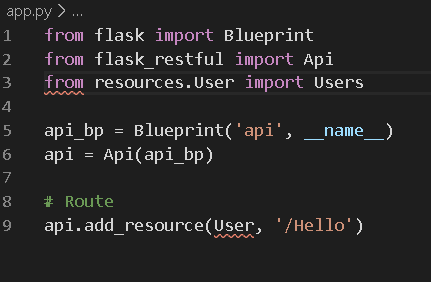
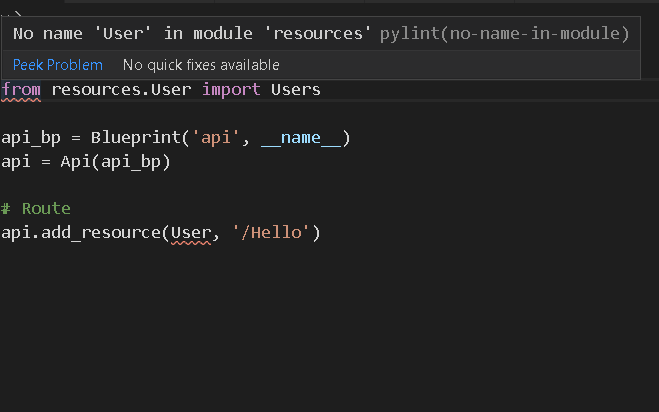
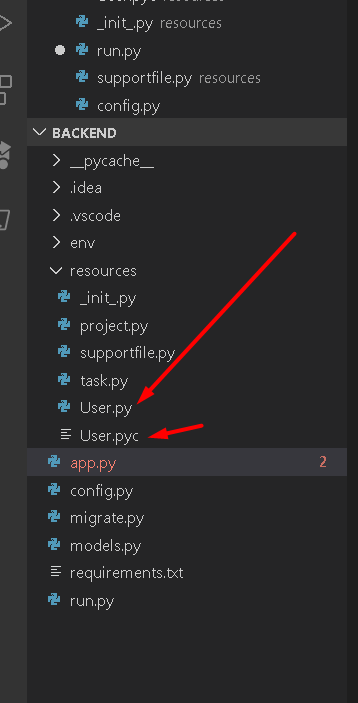
Trying to make a REST API but i keep getting an error
Say's that there's no "user" in the module resources ut i have a folder named user
 lavish cosmos
__init__.py is the file that makes the folder be a python package, but alas, you named your file _init_.py
you need two underscores at start and end
lavish cosmos
the lint error says "module resources" - but resources is a package - that is what is tipping me off
maybe try running the code to see the real error - linters often make mistakes
spare matrix

Keep in mind I don't know what I'm doing
So I might not be showing you the full picture here
lavish cosmos
yeah the error is totally unrelated with the code and the lint error you were getting 🙅♂️
 sturdy palm
How can i run bash commands such as "touch" etc. in Pycharm terminal in W10? I was able to run these commands in Pycharm in my old laptop which was using W7.
(venv) D:\Python Projects\Django\API\Stock Management>touch dafuq.txt
'touch' is not recognized as an internal or external command,
operable program or batch file.
I get this error.
finite fulcrum
does it work outside?
sturdy palm
No.
C:\Users\Burak>touch dafuq.txt
'touch' is not recognized as an internal or external command,
operable program or batch file.
finite fulcrum
Where does touch come from?
sturdy palm
What do you mean?
finite fulcrum
touch is not a program that comes with win afaik
finite fulcrum
Then you or some of your tools installed it somewhere on your PATH
sturdy palm
How can i do that?
Also commands like rm rf .git also doesn't work.
I don't know why. I installed git bash.
finite fulcrum
They'll only work from there
sturdy palm
Can't i integrate git bash to the Pycharm terminal?
finite fulcrum
you can change the shell path in the settings under Tools/Terminal, don't know how well it works
sturdy palm
Thanks.
vivid cargo
change up the shell in settings
wsl works, i doubt git bash will
i had a lot of problems integrating it on vscode
tawny temple
Git bash works fine in PyCharm
heavy knot
My least favorite thing about PyCharm is this
While I can easily scroll up and down the size of the text in my editor, I dont know how to adjust the size of the explorer. The further the depth is inside directories, the more unreasonable it is with space wasting.
It should fit all of that in the space alotted.
The only way I manage to deal with it is alt+1
Is there a way to actually make it display in a more compact fashion?
true vapor
I'm not entirely sure if this is what you're asking. But you can just drag to give it more/less width of you hover at the space between it and the line numbers
heavy knot
I want it to be like this
but PyCharm
I realize that I could give it more width but its a massive waste of space for no reason
I'm tempted to just use atom but PyCharm has some nice Python linting by default without any effort.
the days of being attached to one editor are over for me. I have a variety now for what Im in the mood for. Am I in the mood for linting and fixing every PEP8 infraction in my code? Am I in the mood for seing all the things in my package structure very clearly? Do I need the snippets installed on that other editor or would I prefer vim to not accidently edit important system files.
 idle lance
@everyone i have found and successfully reported a bug in PyCharm. Please Upvote it and help me and the PyCharm Community fix it.
You Can Upvote the issue by hitting the 👍 symbol near the right hand top corner of the Bug Report
Link : https://youtrack.jetbrains.com/issue/IDEA-233745
Bug : No Microphone access in mac while writing speech recognition code
 cold gate
!mute 686154009542656012 1d Please don't attempt to send notifications ("pings") to the 35000+ members of this server.
rancid schoonerBOT
:incoming_envelope: :ok_hand: applied mute to @idle lance until 2020-03-19 12:34 (23 hours and 59 minutes).
 empty fable
I remember theres a feature on vscode lets you hover on function provides definition or description, how to enable it?
 civic walrus
That is what kite does

Kite is a free AI-powered autocomplete for Python developers. Code faster with the Kite plugin for your code editor, featuring Intelligent Snippets, Line-of-Code Completions, Python docs, and cloudless processing.
empty fable
I dont think it require another extension but thanks
iron basalt
you will probably need the python extension
i'm not sure if vscode can parse python without it
if you have it then just hovering should give you something, or you can try holding ctrl and hover, it'll be something like that
empty fable
Installed python extension, Ctrl doesnt work
empty fable
I cant see your cursor
enabled kite cursor description doesnt work too...
reinstall python extension didnt help
 leaden flame
Kite is awesome for the most part, I just wish that it embedded the copilot as a VSCode pane, and was more intelligent about reading Docstrings
 inner thorn
Kite slows my old laptop down 😭 so I’ve uninstalled it and never looked back
leaden flame
😦
I have Kite, Python, and several other plugins installed. I love VSCode extensions. I just got code coverage, pytest, and debugging working on it.
I'm so happy with that
inner thorn
I find extensions start to slow vs code down I don’t realize it until I use sublime and see the difference
leaden flame
The only thing is the coverage is supposed to be set to only show in green what code has been covered, rather than uncovered in red, but it doesn't work.
shrug. I try to only download highly rated ones
 stone apex
@royal granite
 trail geyser
I am working on an auto itch.io to steam library shortcut maker but I am not sure how to do some things
for one I have it spit out a path to the .exe that is something like "Drive:\itch games\game\game.exe"
is there a way I can split this up into different variables such as (FullPath = Drive:\itch games\game\game.exe), (PathToExe = Drive:\itch games\game), (NameOfGame = game)
oh
wrong chat
my bad
 boreal kindle
Anybody here ever used GraphQL or GraphiQL?
heavy knot
@heavy knot What is docker?
hello
its a tool that help run any application virutally anywhere
its attractive because it allows you to set up local developments that runs like a live server
and you can run multiple different development environments from the same computer and allow anybody to work on that same project with same exact settings as you
@heavy knot
Oh sorry
I was not focusing here
I still don't get the advantages of it
 rare mirage
Doesn't it happen to you that you feel ashamed of your commits in Git?
For example
I'm trying to deploy to heroku
i made like two mistakes in a row
Which leaded me to make more commits
But those commits commit soo little changes that it makes me ashamed, what if someone looked into the commit history and said "haha what an unprofessional prick?"
warm pollen
You can squash them with the previous commit and pretend that nothing happened
vivid cargo
@boreal kindle i have
graphql is a data access specification and graphiql is a graphical interface that uses graphql
what bothers you
boreal kindle
@vivid cargo I was thinking about using it for my project but im not sure how. Would it be possible for you to talk me through it?
boreal kindle
Sooo the basic idea for GraphQL is, if I use it when I make an api request, it won't make me download the tons of data that it usually does and only get what I request for?
vivid cargo
yes, core idea of graphql is to get data what you are looking for, nothing more, nothing less
so technically you can traverse through whole db with only 1 request to the api
boreal kindle
I was playing with GraphiQL last night using the pokemon API and it seemed to download all the data just fine. But when I try using it for the api endpoint for my project with my key it just keeps going around in circles
And I dont see any data
So Im just wondering if Im using it correctly
boreal kindle
Sure give me a sec, would you like my api key as well?
vivid cargo
nah
boreal kindle
http://datamine.mta.info/mta_esi.php?key={key goes here}&feed_id=21
But the api needs a key I think
vivid cargo
can you dm me the key just for testing?
boreal kindle
Yeahhhh give me a sec. My laptop is taking a bit.
vivid cargo
no hurry
heavy knot
Hey, I'm trying to set up Docker, I got most of it to work, but the part of my code that tries to open a file can't find the directory. It can when I run the code normally tho
warm pollen
What your DOckerfile looks like? You probably forgot to add the file to your container
heavy knot
well first I didn't have the file
but then I added it, and when I reran my container, it still said the file didn't exist
warm pollen
You rebuilt the container?
heavy knot
oh you have to do that
@warm pollen it worked 😂
Ok step 2, when I push my container it says permission denied
warm pollen
Try to sudo it
heavy knot
wait, will my config.yml file also be part of the container? and if so, how do I make it not part of the container while still not needing to rebuild the container and all that
cuz I have my api keys and stuff in there
warm pollen
What is your dockerfile?
I can't help you if you don't share it
It is the same thing as code
heavy knot
FROM python:3

WORKDIR /usr/src/app

COPY requirements.txt ./
RUN pip install --no-cache-dir -r requirements.txt

COPY . .

CMD [ "python", "run.py"]
I just copied the python image template, is that what I'm supposed to do?
warm pollen
Yes your config file will be inside your container
I mean, you have to access it somewhere
finite fulcrum
No idea about docker but sounds like you'd want env vars
heavy knot
but I don't do that, I use a config.yml
tawny temple
What are you trying to avoid? Publishing an image with secrets in it?
If you're using a file to store your secrets then the only way I can think of avoiding including it in the image is by passing its entire contents to your Python app via stdin
But I don't think that's a particularly nice solution. You really should just use environment variables for them
Or pass secrets individually as command line options to your Python app
heavy knot
is that really the only option?
tawny temple
Well storing the file inside the image is out the question. There isn't a way to make it only visible to you or something.
It's either there for everyone or not at all
You can also copy the file over to the container after you start the container
heavy knot
so no gitignore feature or anything
tawny temple
Well yes there is, but I don't see how that would help
heavy knot
i'd just docker ignore the config.yml file right?
tawny temple
Doesn't your program rely on the config?
heavy knot
yeah
tawny temple
Well yes there is a .dockerignore. If you ignore the file then it wont be in the image, but then your program will complain there's no config file...
heavy knot
ok
so
when I create the image
I have to rebuild the container right?
is there a way so I don't need to rebuild the container, for just that file
cuz rn I just git clone the repo, make sure I have all the dependencies, and then create the file, then run
since the file is in the gitignore
tawny temple
I am a little confused cause you're terminology is incorrect, hold on
heavy knot
whoops
tawny temple
Let me clarify. Images are built. Container are not built. Containers are instances of images. They can be stopped or started. If stopped, they still retain their state. They can be restarted. They can also be removed.
OK they don't exactly retain their state. What I mean is they maintain changes to files.
Can you rephrase your question now?
...
If you have a running container, you can use docker cp to copy a new file over to it. However, if you want to update a file in the image without re-building it, that isn't possible.
If you do the copy for that file near the end of the dockerfile, then Docker will be able to use the cache of the previous layers when re-building the image. That may save you some time assuming nothing for the other layers has changed and invalidated the cache.
heavy knot
whoops, sorry I had to go do smth
ok wait ima reask my question
Right now, my current workflow involves me cloning the repo, and creating the file, because the file is in the gitignore.
What I want my docker workflow to include is pulling the docker repo, build the image, creating the file, and then docker run, I want to not need to rebuild the image, for that specific file.
tawny temple
You could use docker cp then
Just keep in mind it only modifies the container, not the image. So if you stopped & deleted the container, then created a new container, the file you copied would not exist.
heavy knot
how do I use docker cp?
tawny temple
Have you looked at the docs for it?
heavy knot
I literally just started learning docker
tawny temple
The docs are a good place to learn.
heavy knot
I tried...
tawny temple
What's causing you trouble with the docs for docker cp?
heavy knot
not specifically docker cp, just everything in general
I don't really get docker
I get it more than I did yesterday, but I still don't really get docker
tawny temple
Well if you have questions I can try to answer
heavy knot
the FROM keyword, right now mine says "FROM python:3" but is it always that simple? Why do I do that, why don't I do FROM ubuntu:latest or smth.
how do you decide what your parent image is?
tawny temple
It depends on which software you need
You're deploying a Python app, hence you're using a Python image
You could use ubuntu and install Python yourself, but that's more work and makes your builds slower.
heavy knot
what if you are deploying like, a half python half node app
tawny temple
If you were a PHP dev thrn you'd find a base image with PHP installed
You'd try to find a base image with both of those dependencies, create your own base image, or just install whatever is missing in the same image as everything else.
heavy knot
the python base image feels like it's just doing all of the work for me right?
tawny temple
In a sense yes
heavy knot
ok, idk i'm just uncomfortable with the concept that there's an image that installs python and everything for me just like that, wow
ok yeah I think I have another issue
there's no consistency in base images, some are OS's some are languages, some are frameworks, some are databases
like there's the ubuntu image, a python image, mongodb image
but in theory
you could have a python app that you want run on a ubuntu machine, that uses mongodb
so how would that work?
tawny temple
Isn't this the same question as the python + node one?
tawny temple
Cause that's just what the maintainers of the base images decided on
heavy knot
why are the images from software that have radically different uses
why is there images where some are OSs some are languages, and some are databases?
tawny temple
To provide a lot of choices for developers
heavy knot
it makes it seem like base images don't have a unified purpose
tawny temple
They're not meant to
heavy knot
then how do you choose what image is best for your app?
tawny temple
Like I said, it depends on the software your app needs
heavy knot
but your app could need like, 12 different kinds of software
tawny temple
You can also run multiple containers together and communicate between them