#tools-and-devops
1 messages · Page 38 of 1
 rancid schoonerBOT
 violet belfry
You do realize self-bots are a bannable offense, right?
 twin hull
?
violet belfry
Handled
 ruby plover
On PyCharm project structure window is it possible to make custom sections, with comments for example?
Hmm, figured I can define None variable as section name, but it's kinda stupid
 finite fulcrum
 dire quartz
@tawny temple Nope. I actually marked the directory as a source directory (which I don't think is technically necessary).
dire quartz
@tawny temple Didn't work either. I invalidated the cache and restarted the IDE.
dire quartz
It's a pipenv interpreter, not sure if that matters.
 tawny temple
If it did then I would imagine invalidating cache would have fixed issues related to that
But you could try recreating the venv if you'd like
I feel like that isn't the problem though
dire quartz
I tried deleting the .idea directory and reopening the project folder, still nothing.
tawny temple
Wtf
Is it just that file? What about other new files?
Maybe it doesn't like the directory it is in
What if you moved it
Just throwing out ideas
 hardy cedar
whats the issue
dire quartz
I created a new file under the root and still nothing.
@hardy cedar I'm not getting quickfix suggestions to add imports in a Pycharm project.
hardy cedar
and it's pointing at a valid interpreter?
sorry if i repeat anything, i can't see context before you moved here
dire quartz
No problem. Yeah, I mean, I can run the project. Everything else is working normally as far as I can tell.
Sorry, I have daily standup now, brb.
ruby plover
@finite fulcrum it doesn't appear in structure window, though can navigate with hotkey, thanks, still handy
dire quartz
@tawny temple @hardy cedar Ok, sorry, done now. But yeah, moving the file doesn't seem to help. I was going to ask if either of you know how the automatic file inspection is configured? Y'know, the one that gives rise to this checkmark:
Because I think maybe it's not running properly for these files.
I'd think I would get a complaint about the missing import, among other things.
Ah-hah!
Ok, so, I had configured an alternative project default inspection, and apparently the default inspection also controls the quick fix suggestions
When I reverted to the default and invalidated the cache, I got the import suggestions back
 barren jetty
screenshot of file>settings>project>project interpreter please
 bleak barn
bleak barn
bleak barn
script name being 'better working calculator'?
bleak barn
okay
barren jetty
use ""s to surround the filename
bleak barn
okay
barren jetty
also don't make your filenames so long and try not to include spaces if possible lol
next time
barren jetty
oh
where is hello world anyway
drag it into your project directory
didn't notice but it's not even there lmfao
bleak barn
what do you mean
barren jetty
yeah your active project is better working calculator
bleak barn
oh okaay
barren jetty
it can't find your file
bleak barn
barren jetty
yep
barren jetty
right click the script on the left and there's no run option?
barren jetty
should look like this:
bleak barn
yeah it works now
barren jetty
grats, welcome to pycharm
barren jetty
you're supposed to set it up when you create your project
it's already saved, check up the options when you create your project
existing interpreter = keep old version
new interpreter = venv the existing interpreter
bleak barn
ah okay thank you 🙂
so when i want to open a new file should i just open it or will it do somet weird like last time
barren jetty
you can make a project that has all your scripts if you wish
just be wary of clashing namespaces
(if something doesn't compile and should, check that one of your names isn't referenced elsewhere)
bleak barn
okay thank you
 topaz aspen
I've a Git question -
if i'm in a branch and start doing some work, then realise that I should do it in another branch, what's the process at that point?
I don't want to commit things in this branch, but if i create an issue then pull that branch down and switch i'll lose my local work.
of course i can copy paste the code, but this feels a bit clunky
git stash then checkout, git stash apply, this worked... that seems like the best approach
 pulsar otter
Why am I getting this error? It doesn't affect running the actual script but it's just annoying.
 stable cloak
Well part of the issue is that you don't have self set as a parameter, so that's why two of those are showing up. And also method, url, and **kwargs aren't defined within that method's scope
They're not defined, so Python doesn't know what you want it to do
pulsar otter
Thanks, I released that it wasnt the VSC error after that, if I get it again, I'll send it here!
 fair heron
I'm looking to move some of my Python development from Windows to Ubuntu, which I have little real experience with, but I want to continue to use PyCharm. Am I best off using Ubuntu Desktop rather than Server?
 tired aspen
yes
 delicate gorge
I don't see how you were to use a GUI program on Ubuntu server so yeah desktop
 mental mason
Not sure abt this, say u made a mistake but alrdy pushed it to repo, is it more preferable to fix then push the fix or reset the commit then redo?
delicate gorge
youd make a commit fixing the mess because overwriting commits that already have been pushed could probably mess with others history
 cosmic wave
I would like to fully validate some python on appveyor, however it is run embedded, and as such a lot of the modules/classes/functions are being provided by the hosting process directly (via boost::python). What is the best approach for validation? I noticed pylint is most highly recommended for static analysis, however:
a) I already run it in VSCode, it works okay, but of course it doesn't understand the host provided interfaces.
b) I couldn't see anything related to using it in an embedded context on some preliminary searching
cosmic wave
I also tried the pylint documentation but it appears to be incomplete.
 signal crest
Has anyone here used coc (vim language server client) with pyenv virtualenv? If I set the interpreter to /usr/bin/python all works fine, but it doesn't recognise the packages installed in the venv. If I set it to my virtual env "starting coc.nvim service" never finishes.
I haven't made any coc/python settings myself, just using the coc-python plugin for coc.
signal crest
nm, solved it. using pipenv instead seems to have done the trick!
fair heron
I'm experiencing some serious performance issues in PyCharm on Ubuntu and trying to figure out if this is "normal" or if something is wrong. I've got Ubuntu running in Hyper-V on Windows 10. The VM has access to 8GB of RAM and two processor cores. But when I type in PyCharm, there's a noticeable delay between characters and the CPU spikes to 80-100% during typing. Surely that's not normal right?
twin hull
I know that Pycharm does take a lot of ressources
 kind chasm
@fair heron Since, by default, you have no accel. graphics support there, that is normal. Try Add-VMRemoteFx3dVideoAdapter -VMName <MyVM> on powershell
topaz aspen
I was under the impression that if i was in a git repo i could change my history using rebase... Is this not the case?
for example - if i'm on a branch and have made 8 commits, i might want to rebase in order to change the number of commits to 5 (by squashing 3 of them) and then change the order of them a bit.
Does this work if I'm just on a local repo? as in - there's no remote
 cold gate
Yes, that should work just fine
You can do an interactive rebase and pick the commits you want to squash
topaz aspen
@cold gate ok, i just set an example up and it seems to work 🤔
mkdir gitt
cd gitt
git init

echo "first" >> f1.txt
git add f1.txt; git commit -m 'first commit'

echo "second" >> f1.txt
git add f1.txt; git commit -m 'second commit'

echo "third" >> f1.txt
git add f1.txt; git commit -m 'third commit'

echo "fourth" >> f1.txt
git add f1.txt; git commit -m 'fourth commit'

echo "fifth" >> f1.txt
git add f1.txt; git commit -m 'fifth commit'
then running git rebase -i HEAD~3 brings up :
third, fourth, fifth
Is this just used for messages / order, or can i edit content as well?
before this example I was getting the following error :
▶ git rebase -i HEAD~3
fatal: invalid upstream 'HEAD~3'
does this mean that git is unable to reach HEAD~3 from the position that it's currently at?
So if that was on a different branch that had been merged in or something perhaps
cold gate
can you do !git log --oneline and try the commit hash of the commit you want to rebase to?
topaz aspen
I'm trying to write a shell script to reproduce the error now and I can't 😩
what's the ! bang for there?
( why not just git log --oneline)
I know this in the context of accessing bash history commands, not sure what it does here
cold gate
error on my part
topaz aspen
oh ok, all good
cold gate
I'm not sure, but I need to go to bed, unfortunately. I've never tried this before myself
topaz aspen
@cold gate no worries, i'm just going to try and make a reproducible example
often i end up learning the thing in the process anyway... thanks!
fair heron
@kind chasm Thanks for the ping! I've got some follow-up questions if you're willing.
- The Hyper-V Manager GUI indicates that "We no longer support the RemoteFX 3D video adapter (with some further text as well)". Is there some other more suitable approach to adding graphics acceleration?
- I did use the PowerShell command to add it to this VM, and the PyCharm performance appears a little better! It's able to keep up with the typing. It still pretty much pegs out the CPU though - does that seem odd to you or no?
- After adding the graphics acceleration, I'm again unable to change the screen resolution, even though the fix I previously performed as shown here (https://blogs.msdn.microsoft.com/virtual_pc_guy/2014/09/19/changing-ubuntu-screen-resolution-in-a-hyper-v-vm/) appears to still be intact. Any ideas? Something tells me I need to replace that "hyperv_fb" string, but I'm not sure with what.
Thanks!
fair heron
@kind chasm on second thought, I've scrapped this VM altogether. After reading more about this issue it really just looks like Hyper-V does a real poor job supporting Ubuntu, and I don't have a serious enough need to want to jump through but so many hoops to deal with that fact. Thanks for your help though!
 split oak
I have a git question about PR. There is this issue I was working on which has like 500 different issues within it. I fixed several and setup a PR which got approved, now if I want to make any more changes to that same issue should I setup a new PR now with the changes or commit to the old PR since its the same issue?
violet belfry
Sounds like a question best answered by the maintainer of the project
By approved do you mean merged?
or just approved
 heavy knot
Hi there I was wondering if aneyone knew a packege for atom with makes those vertical lines when you tab out like this
cold gate
They are called "indentation guides" or "indent guides"; I think they're built into atom
If you go to preferences, there should be a checkbox to enable them
 surreal sphinx
Does anyone know the state of 3.8 support in Pyinstaller?
finite fulcrum

GitHub
This will be more effort than for Python 3.7 since the Python initialization sequence has been changes and the bootloader needs quite some changes. Anybody going to fund this development? Otherwise...
surreal sphinx
Thanks. Looks like a big job.
 abstract hound
mmm I'm having issues with pipenv, first time using it - no idea why, I've found many similar issues but I haven't been able to solve this:
[manuel@6500 bot]$ pipenv sync --dev
Warning: Python 3.7 was not found on your system…
Would you like us to install CPython 3.7.5 with pyenv? [Y/n]: y
Installing CPython 3.7.5 with pyenv (this may take a few minutes)…
✔ Success!

Warning: The Python you just installed is not available on your PATH, apparently.```keeps complaining about _Python not being on my PATH_, regardless of how it is installed - and it doesn't seem to care about pyenv either if I install it from thereI already forgot where it installed the thing, but iirc I was able to check and the new, installed one was on my PATH, but maybe I did it wrong
abstract hound
got it, I was missing the PYENV_ROOT environment variable
 random breach
@tawdry pelican secrets is in the stdlib so you dont need to install it
unless this is what you're trying to install https://pypi.org/project/secrets
which i doubt, since it hasnt been updated since 2012
 tawdry pelican
oh ok
 dusty hill
learn to use your tools. Your editor is a tool, most of them have regex, learn to use your regex.
tawdry pelican
yeah xD
abstract hound
I tried to fetch and merge to an old clone of a fork I had of the bot, since I was having the issues affecting discord.py (<= 1.2.3?) but I'm not sure why my repository isn't using that version, it's still grabbing 1.2.3 from somewhere instead of 1.2.5
if I do the following:
[root@6500 bot]# pipenv shell
Launching subshell in virtual environment…
[root@6500 bot]#  . /root/.local/share/virtualenvs/bot-QLMI9Ka6/bin/activate
(bot) [root@6500 bot]# python
Python 3.7.5 (default, Nov 23 2019, 22:42:55)
[GCC 9.2.0] on linux
Type "help", "copyright", "credits" or "license" for more information.
>>> import discord
>>> discord.__version__
'1.2.5'
I would assume that's the version it should use (but maybe I'm wrong?)
once the bot is running, it uses 1.2.3 from somewhere
this looks correct to me too:
(bot) [root@6500 bot]# git log --oneline
f96631e (HEAD -> master, upstream/master) Relock to d.py 1.2.5 due to API breaking change for emoji.```I might have (I totally have) a poor understanding of pipenv though
hardy cedar
genuinely unsure how it could be using a different dpy than the one installed in the environment
can you do pipenv graph
abstract hound
ah yes, I did that too:
let me repeat
(bot) [root@6500 bot]# pipenv graph | grep discord
discord.py==1.2.5```and how are you running the bot?
abstract hound
docker-compose up, not sure if there would be a difference but I tried both from pipenv shell and without it
hardy cedar
they both have two different environments
abstract hound
here I go
hardy cedar
the docker image you can think of as a virtual machine
abstract hound
ah, yes, I know the concept
but not the internals
I know it uses my kernel and such
hardy cedar
whenever it builds the image, it installed the deps with pipenv for it's own environment separately
so if there's a difference if deps, it needs to reinstall them
the only way to have the image reinstall the deps is to rebuild it as it's a stage in the dockerfile
 pulsar linden
anyone know how they build mac os wheels for 10.6 – 10.10 for psycopg2 https://pypi.org/project/psycopg2-binary/#files

i tried and just got a 10_13 specific wheel not a range
bleak barn
!tools
rancid schoonerBOT
Tools
The Tools page on our website contains a couple of the most popular tools for programming in Python.
https://pythondiscord.com/pages/tools
 livid schooner
in vscode, is there any way to make the outline more sensible, i.e not showing class variables as function variables?

most of this is self.height, self.width, etc
violet belfry
There are a bunch of outline.xyz settings where you can turn certain things on and off https://code.visualstudio.com/docs/getstarted/settings#_default-settings
tawny temple
There are different ways of thinking regarding that
I'm of the opinion that yes you should commit frequently
And atomic commits are a good thing
mental mason
Hmm yeah, i think it would be bad to make such a big change say in 2 files and then commit
finite fulcrum
I usually code a bigger things, working the quirks along the way and then commit it in batches of changes
random breach
it can become really confusing to work out a cohesive commit if you wait too long
i.e. you end up with changes in like 10 different files that could be categorised as part of 4 separate features, and then you have to go through and figure out which changes should be grouped together into a commit
random breach
oh, and it increases the chances of royal mistakes like this: https://discordapp.com/channels/267624335836053506/463035462760792066/599148218022100992
mental mason
Also what exactly does REBASE do?i wanted to change an old commit message and people told me to use REBASE
mental mason
Ahh thanks
Sry this question probably far from the topic of the channel but is there a solution to this issue?
So apparently my builds on Travis is a success but on github it gives me a red crossmark (fail), any idea?
 frozen coral
how can I make my python console in the pycharm console tab be ipython>
finite fulcrum
Install ioython and it should change
 sand thistle
how can i see the tree map of my git
tawny temple
I don't think it has anything built in for that
What would it even be a tree map of?
file types?
contributors?
 vivid cargo
I think he wants to see graph
 thorny shell
I think "tig" can draw a graph
git log --all --graph --simplify-by-decoration --format='format:%C(yellow)%h%C(reset) %C(blue)"%an" <%ae>%C(reset) %C(magenta)%ar%C(reset)%C(auto)%d%C(reset)%n%s' --date-order
that seems to do a tolerable job
tawny temple
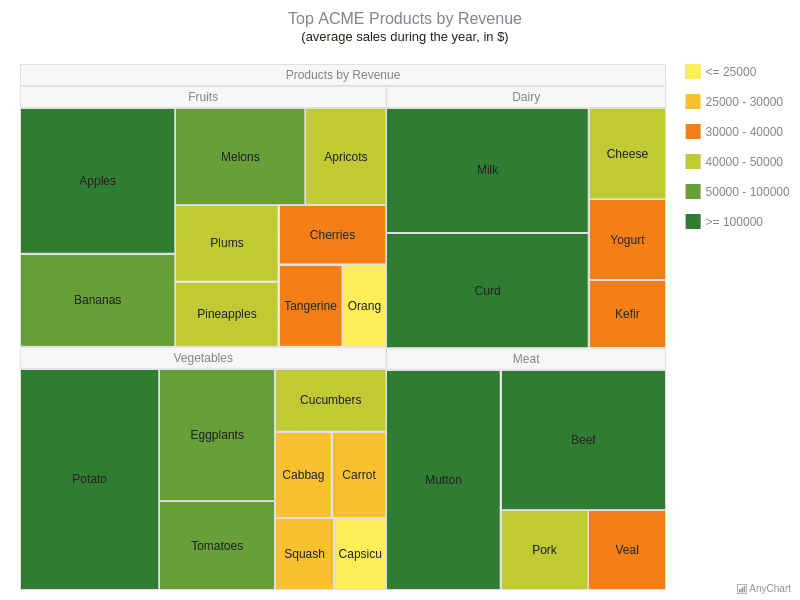
I thought they meant one of these https://static.anychart.com/images/gallery/staging/tree-map-charts-acme-products-by-revenue.png
 tawny temple
they probably meant to say a graph not a tree map so yeah git log --graph
topaz aspen
does anyone know how to change git commit times for a series of commits?
git rebase --ignore-date <branch> doesn't seem to work for m e
thorny shell
I vaguely recall that you have to use a dangerous and powerful script to do that ... lemme see if I can find it
@topaz aspen I think you want https://git-scm.com/docs/git-filter-branch
topaz aspen
@thorny shell thanks 🙂 they don't seem to be encouraging it from the first paragraph ha
tawny temple
You could create patches and then use grep and sed to change dates probably
that's the hacky way to do it
thorny shell
@topaz aspen I suspect there's no danger if your repo is safely backed up before you start
mental mason
say i want to create a branch from v0.2.0 but my HEAD is alrd far ahead, can i just checkout that tag and create branch from there?
mental mason
thx
heavy knot
Hey guys! So I'm trying to use the Wine app to open a .exe file but when I tap open with>other>wine it opens it for 1 sec then closes it immediately. Can someone please help me?
I'm on macos
hardy cedar
!warn 501950248831418369 Wine isn't related to Python so is offtopic here. If you want general help that's not related to python or the toolkits related to it, you're welcome to ask in an off topic channel, but it's entirely up to members if they wish to help with it.
rancid schoonerBOT
:incoming_envelope: :ok_hand: applied warning to @heavy knot.
 neat herald
Hi! I'm wondering if there is a tool to test color range filtering on a picture, but with "sliders" tu tinker with it and find the perfect values easily :)
Thx in advance!
 spring trench
good day; would this be a good place to ask questions about pyinstaller?
tawny temple
Yes
 long hazel
Is there anyway to autocomplete suggestions for variables or files not imported in pycharm?
long hazel
Yeah, it also checks your files too. If I know I have a function somewhere called clamp, it'll look in your files too
I just didn't know if it was possible to do this, save me a lot of time because I have like 50 different modules
long hazel
Hmmm darn
frozen coral
Can't believe Eclipse has something python doesn't
eclipse is the worst IDE for python
long hazel
Yeah it's the single biggest feature I've seen lacking as it's usually my most time saving feature, but now I have to search for it.
Had such high hopes too!
lol
long hazel
I'm getting closer atleast
ctrl alt space will do it
To atleast bring up the menu
I guess I can re-key it, still would be nice to autopopup but it's workable
Or if you just hit ctrl space twice
mental mason
Might be a bit weird but, i have my py project on github with an open source license but im planning to change the license, is this okay?or its really not recommended
tawny temple
Licenses can be a head ache
For all you know your current license may not even let you change licenses
And there's the question of must the old code remain under the old license?
I've had my fair share of confusion with licenses and it's hard to get answers usually unless you want to pay a lawyer
mental mason
License is exactly a headache, i guess ill stick with gnu agplv3 for this current project
heavy knot
Do someone actually payed for something like ps of fl
dusty hill
you'd be amazed at what people will pay for
sand thistle
hello, I am having some issues with git
I started a project, and added a scratch file (I'm using pycharm) into the repo by mistake
I know this because when I tried to create a separate directory for the scratch file; I got a warning that it was being used elsewhere
dusty hill
git rm scratch
dusty hill
that removes a file
sand thistle
it didn't work btw
dusty hill
not sure the actual problem. Do you have a file checked into git that you no longer want checked into git?
sand thistle
I did git rm name_of_file
sand thistle
basically told me did not match any files
dusty hill
when you type git status what does it say?
sand thistle
Changes to be committed:
  (use "git reset HEAD <file>..." to unstage)

        modified:   .idea/workspace.xml

Changes not staged for commit:
  (use "git add <file>..." to update what will be committed)
  (use "git checkout -- <file>..." to discard changes in working directory)

        modified:   .idea/workspace.xml
okay, so what file is the problem? (Name)
sand thistle
CasePack_Grabber.py
dusty hill
and do you want to delete it altogether or just from git
dusty hill
git rm --cached CasePack_Grabber.py
sand thistle
fatal: pathspec 'CasePack_Grabber.py' did not match any files
dusty hill
is the file in that directory?
sand thistle
I am not sure
sand thistle
mac
dusty hill
then it isn't there
sand thistle
yikes
dusty hill
was it committed?
dusty hill
okay how about if you do git log
dusty hill
so this is a pretty new git repository
sand thistle
can i check what code is in the repo
dusty hill
is it a remote repo like GitHub or GitLab or is it just a local one
sand thistle
local
dusty hill
git ls-tree --full-tree -r --name-only HEAD
try that
sand thistle
I see no python files
dusty hill
then you don't have any committed or checked in on that repo
are you sure you are in the right place?
like in the right folder?
sand thistle
I am not really sure anymore
I think what happened was
I created the file while in another directory
and then logged that
then moved the file to it's own project
and attempted created its own log
dusty hill
well it is not in this particular repo. You have tools for finding files on Mac this might be a good time to use one of them 🙂
dusty hill
or you can try to use "find"
find / -type f -name 'CasePack_Grabber.py'
you will get noise if you are not root on that machine as it tries to look through all your subdirectorues
Oh, ok, so what do you want to do with it now
sand thistle
I guess just add the file to its own repo
dusty hill
create a folder where you want it, and move the file there
change to that folder:
git init
git add .
git commit -m'initial commit'
 vapid kayak
Would this be a better place to ask a Conda-related question than on the subreddit? Just posted https://www.reddit.com/r/Python/comments/e61cpk/conda_guarantee_that_a_package_will_be_sourced/ but not sure if it's too niche

reddit
I've been messing around with Conda packages with dependencies from multiple channels. It's my understanding that these channels should be scanned...
 fading monolith
my vscode isnt outputing the code into the terminal
 plush tree
There might be a separate tab for that
fading monolith
@plush tree no it just keeps giving me a syntax error
even for a simple code
like
print("hello")
so idk
mental mason
Well its hard to solve the problem if u dont show us a picture of it

 mental mason
That gives u syntax error?
tired aspen
yes love it when it works as soon as you try to reproduce it to someone else
fading monolith
yuppp
mental mason
the magic of code
fading monolith
"magic"
tired aspen
I heard an old story recently about a web server being slow but whenever the dev examined the server it would seem fast - turns out the problem was a very slow screensaver running on the server
heavy knot
 reef summit
heavy knot
reef summit
heavy knot
Someone here to help me with the Anaconda?
 lyric granite
@heavy knot If you want to open Anaconda and can't find an icon for it, you might be able to do this:
Press windows key + r key at the same time
Type Anaconda into the box
Press Enter
If you have Anaconda installed, it should run this way
You can then right click the icon on the taskbar, and click either "Pin to Start" or "Pin to Taskbar"
Both will save a way to get to it
From then on you should be able to click the taskbar icon or the start menu icon
lyric granite
Then it either isn't installed, or the name "Anaconda" is wrong. Either try reinstalling it or using a different name
Ok, try a different name. If that doesn't work, there's another method
lyric granite
Are there any new entries in the right click menu? I know some IDEs allow you to use a folder as a workspace if you right click it
Maybe _conda is the exe? Have you tried running that?
heavy knot
So I should type _conda on the windows + r?
ooh i see
at the folder
But it shouldn't be
lyric granite
yeah, if you click it it's the same as win+r
heavy knot
all the video I see on youtube shows the Anaconda shortcut at the windows menu
The conda doesnt open
lyric granite
Hmm
heavy knot
could you try to install it?
lyric granite
Where did you get the download from?
 dreamy onyx
have u made an streamlabs chatbot script on python for twitch?
lyric granite
If you send the link then sure, I'll try to install it, @heavy knot
lyric granite
is downloading, I'll let you know when I get it installed, or at least attempt to
lyric granite
It's installing currently. Did you do install for All Users or for Just Me?
heavy knot
Just Me
lyric granite
And you are on the same profile that you clicked 'Just Me' on, correct?
heavy knot
Yeah
lyric granite
Try this: Make a file called test.py, and right click it. Click "open with", and then click "Browse". In the "Browse" menu, find the _conda application mentioned earlier, and use it to open that file
It's still installing for me here though*, but once it does I'll do this too if I don't see an EXE
After you try that, if i doesn't work, then do win + r and type cmd into the Run box and hit enter
In that window, type Anaconda and see if it works
My install has quite a ways to go here so it'll be a bit before I'll be up to date
heavy knot
could that file be a text file?
lyric granite
You could try, but if you already have a txt file, just change the .txt to .py
I'm not sure if a text file would work or not, but it's worth a try
heavy knot
Are you with the 3.8 python?
heavy knot
so maybe that could be my problem:?
lyric granite
Maybe? Did you have python installed before you installed Anaconda?
lyric granite
From what I saw in the installer, it seems that Anaconda tries to make itself the standard python version on your machine. From this I assume it can be used to open .py type files. Have you tried editing a .py file?
There should be an option when you right click like 'Edit With...'
heavy knot
Did you installed?
lyric granite
It's still unpacking multiple files, no
lyric granite
well, before I knew what you chose, I chose "Install for all users"
So that might explain the difference in time to install
heavy knot
yeah
lyric granite
Have you tried this:
heavy knot
Yeah
heavy knot
Just Pycharm
lyric granite
What about Rightclick -> open with... > Choose another app> More Apps > Look for another app on this PC
Can you navigate to the _conda exe then?
lyric granite
oh, sorry
Mine's still unpacking tar files. I'll see what I'm able to do on my install once it finishes
lyric granite
Have you gotten any general how-to information on Anaconda? Info like how to run it, how it's supposed to work, etc? I've personally not used it, I've just been running on general windows 7 knowledge so far
to try to help
heavy knot
Yeah, i've seen videos and blogs
and they sey for you to search for Anaconda Navigator at the windows searcher
lyric granite
by the way it's just finished installing but continue
lyric granite
It came up for me, but ;et's see if there's still the conda thing
If I read correctly, conda is basically like pip but for anaconda
lyric granite
so maybe you can use that to bootstrap the Navigator
heavy knot
I saw it can update the anaconda
lyric granite
Have you tried using it to update Anaconda?
heavy knot
It should open at the Anaconda terminal
so I should at least open it
Maybe it isn't working for Window 7
Windows*
lyric granite
Maybe you can run conda commands by navigating to the directory where conda is at and then running _conda <commands> in cmd?
That's what I'm currently trying, I just need to find the location of _conda`
lyric granite
Alright, this should work:
In Explorer, go to the folder that has _conda.exe in it
then, shift + rightclick it and press "Copy as path"
Open Command Prompt by doing win + r and typing CMD and pressing enter
type cd and then press CTRL+V to paste the path
Delete _conda.exe off the end of the path and press enter
be sure to leave the quotes though
heavy knot
and then?
lyric granite
You can run any command that the conda part accepts by doing _conda.exe <commands>
So then it's a matter of googling to try and see what commands the conda piece has
lyric granite
do it, see if it works
lyric granite
I'd guess it should be
conda.exe update anaconda
<something> means a placeholder for a spot called 'something'
mistake: _conda.exe update anaconda
that should be the correct way
heavy knot
It does nothing
heavy knot
heavy knot
That's so weid
weird
I remember I did install it last year
and it was fine

Alura
O Instalador para Windows no site da Anaconda é diferente do curso e não instala o Anaconda Navigator. Você precisa usar o Anaconda Prompt para instalar o Navigator, só que existe um bug
Can you translate it for english?
lyric granite
I can try translate.google.com and see if the site does english translation
I might be able to skim I assume spanish, or is this portugese?
heavy knot
portuguese
lyric granite
Also, you've had to translate on your own between my english menus and your portugese ones, so yeah
Did you do as they said and use Miniconda?
Translated:"In Anaconda's github (below) they recommend downloading Miniconda and installing the full Anaconda via the command line."
Original:"No github da Anaconda (abaixo) eles recomendam baixar o Miniconda e fazer a instalação do Anaconda completo via linha de comando."
If you installed Miniconda then that might be why there are issues
lyric granite
Did you install full anaconda before trying miniconda? I assume so, just want to doublecheck
lyric granite
So their entire setup didn't work?
heavy knot
yeah
lyric granite
Maybe reinstall full anaconda but install it for all users
Maybe that would work?
I'm grasping at straws here. This looks like it's more of a problem with Anaconda's installer than windows, so I don't know if I'll be able to help more*
lyric granite
If these don't work, I'm sorry but other than googling things, I don't know how else I could help.
lyric granite
Yeah that's odd
heavy knot
I've tried these 2 things, but didn't work
I'll try it on another version of Anaconda
or python
Thank you for you try
lyric granite
Try searching around for how to uninstall anaconda
Also you're welcome :>
Good luck with this, it seems like a mess
heavy knot
yeah
mental mason
What's the recommended way to restart a repo?
I had a bot repo and ive been working on it for few weeks, now i realized it kinda look like a mess..
Is it preferred to keep all the history and branch and make a new branch called smth like "rewrite"? Or git reset?or maybe re initialize the repo itself?
 minor herald
Open a new branch and start your restructure there if you want to stop working on whatever you have atm instantly
Then you can work on it until it's functional, then you can merge over
mental mason
I guess that actually a great idea, i currently have master and develop branch
minor herald
I mean that's how I usually do stuff, just clone master branch and do crazy stuff on it
If it works, I'll merge over lol
mental mason
I think what im gonna do is create a new branch rewrite, do all the new stuff there, merge to develop then master. Not quite sure if that's a great idea
Or might aswell stop master branch and set rewrite branch as the new default branch..
tawny temple
Once the history has been pushed to the remote it shouldn't be touched because it could disrupt anyone else who had cloned it. But if you're working on it alone then in practice It is irrelevant.
It wasn't clear if you were asking about rewriting history as an option but figured I'd cover it anyway
mental mason
im working alone although someone already forked it, i'm thinking of leaving master behind and let rewrite branch act like the new master cuz the changes will be pretty big and merging rewrite to master will throw a merge conflict
heavy knot
So, whenever I try to type a function decorator my intellisense stops working
you can see it (briefly) pops up then when I type it it stops working and when I do CTRL space I just get "Loading...." and that's it
I have to restart vsc in order to fix this, and it happens every time i do it :/
https://gyazo.com/86ebf3ac4dd56e79c50daa78113e9759
and this does it everywhere too, so like i can go do another file, and try to def something, and it wont pop up, its not just at this place right here either

and ive tried uninstalling it too, removing and reloading my extensions, etc
and ive tried uninstalling it too, removing and reloading my extensions, etc
mental mason
That's normal, it sometimes doesnt show up but then later on it will show up again
 true vapor
I can't install black on ubuntu. None of the google results I can find are particularly helpful.
     #include "Python.h"
              ^~~~~~~~~~
    compilation terminated.
    error: command 'x86_64-linux-gnu-gcc' failed with exit status 1
``` is the most relevant part of the console output that I can seeCan you @ me if you reply
tawny temple
@true vapor you need the python3-dev package on ubuntu (not sure of the exact name) so that you have the headers needed
true vapor
Thanks - that fixed it
tawny temple
I suggest you use version control
mental mason
Idk if i should ask this here?sorry if its not allowed, how do u rebuild your dist and wheels?
random breach
updated pycharm to 2019.3 and the run button in the top left is now gone
anyone else got the same?
random breach
oops yes, top right
i messed around with menus/toolbars config and readded the button
now it seems to be back
not sure what happened there
 heavy berry
Anyone famillair with PyCharm know what I'm talking about here: I used to have a window (purely output, I couldnt type in it like a terminal) that would show Hi when I put print("HI") and ran my script (for me shift + alt + F10) but now I can't find where that went, instead I'm greeted with an interactive console that if I type a = 1
oops if I type a = 1 than type a it says 1
I have that the terminal and an event log but none of them are popping up that old window I used to get and love that only had output and no interactiveness
almost feels like i've changed a default preference without knowing about it
or maybe I turned on interaction with the default output screen?
Also instead of running again in that same window that it just printed to it's opening another window to print to
thorny shell
I don't use pycharm, but that output window is so fundamental that I'm pretty sure it's still available
there are probably 150 different ways to hide it; you have to figure out how to get it to reappear
 elder river
So in Spyder, I found I can change the In[4]: prefix in the ipython console to the classic >>> prompt by fiddling in the settings, but how do I remove the Out[4]? Replacing it works, but I want it just gone, zero-width. Leaving the selection empty means "use default"
heavy knot
Visual Studio Code or PyCharm?
tawny temple
@elder river don't think it's possible, here's the code: ```py
# Prompts
in_prompt_o = self.get_option('in_prompt')
out_prompt_o = self.get_option('out_prompt')
if in_prompt_o:
spy_cfg.JupyterWidget.in_prompt = in_prompt_o
if out_prompt_o:
spy_cfg.JupyterWidget.out_prompt = out_prompt_o
maybe if you put a zero width space or something?
tawny temple
patch the source code yourself 😈
finite fulcrum
can you modify text after the space?
elder river
I might attempt some hacking on it, just feel like this should be an easy thing.
Not sure what you mean, Numerlor
finite fulcrum
if you could place a \r after the space that gets put there you could avoid it
elder river
Don't think I can, without delving into the source code. But I guess I have to
tawny temple
I really don't think you can without tricking it with some sort of special character or changing the source code
Because the default value is controlled by a library they use rather than spyder itself, your only avenue is to define a value for that setting.
elder river
Yeah, I think the zero-wid space thing half-works. It does use it as the prompt, but then Spyder (or perhaps ipython?) always adds a space so that people's prompts look like >>> print(5) rather than >>>print(5). So I guess i'll look for that space-suffix in the source
tawny temple
That's interesting, because the default value already has a space at the end
see JupyterWidget.out_promptUnicode
tawny temple
You're welcome
It may be a stylesheet thing but I didn't look into how they're using it
It'd probably be possible to set space between those elements using Qt style sheets
There are also these output_sepUnicode output_sep2Unicode but I don't remember if Spyder used them
 strange knoll
Hi, I am trying to run a python script in atom and have the output appear from atom as well but it just says 'python' is not recognized as an internal or external command
as for packages, i have the script and atom python run package installed
heavy knot
Hey guys, trying to run some py code on my android, need a good compiler, lol. Preferably has pip and whatever, already tried qpython but it is pretty bad.
 green lodge
You can install Termux as an app on an android: https://play.google.com/store/apps/details?id=com.termux
From there you can get python: https://wiki.termux.com/wiki/Python
pip etc also works.
Not sure which compiler is running but it works. I use that to create ebooks.

Termux combines powerful terminal emulation with an extensive Linux package collection.
• Enjoy the bash and zsh shells.
• Edit files with nano and vim.
• Access servers over ssh.
• Develop in C with clang, make and gdb.
• Use the python console as a pocket calcula...
@heavy knot
heavy knot
Ty
sand thistle
I am kind of new
curious if I have multiple "scratch" files (I'm using PyCharm) open, and I am trying to commit one of them, will the fact that I have multiple tabs/scratch files technically open; will they all be committed or just the one that I am currently on?
 empty pasture
I'm not sure how git integration works with PyCharm, but generally the idea is you only commit explicitly the files you tell it to commit.
tawny temple
I don't believe the scratch files are even in the same directory as your project
Unless you mean scratch in the general sense rather than the PyCharm feature
empty pasture
If it's not in the project directory it won't even be considered for a commit.
tawny temple
If you want to commit it then create a new file in your project and paste the code over
sand thistle
gotcha
on a separate note
I accidentally dropped a .py file in the project directory
and I may have accidentally hit update git
my git is a mess lmao
empty pasture
If you remove it from the directory and commit again, it won't be removed from earlier commits, if that's what you're wondering.
But unless it has something sensitive in it, like a key or a secret, it's not worth worrying about.
sand thistle
oh gotcha, but i hope it doesn't get deleted entirely
just don't want it in the directory
empty pasture
Copy it back out, recommit
That way you'll still have it, and it won't be littering future commits
sand thistle
thank you! both!
empty pasture
YW
It IS possible to remove a file from an entire commit history for a repo, but it is not intuitive.
It's also not good practice, as the commit history for a repo is supposed to be continuous.
I learned about how to do this at one point when I mistakenly committed a file that contained a plaintext API password to a public git repo. After some futzing around, I gave up, deleted the entire repo, recommitted it from scratch with that file missing, and called it a day. Only because I owned the repo could I get away with such an extreme solution.
mental mason
Can u push a specific commit?
Say
commit A -> commit B -> current HEAD
I want to push the previous commit only (commit A), is that possible?
tawny temple
Not sure if you can specify that with push directly
You could checkout a new local branch and drop the commits you don't want
You can still push to the remote branch from the new branch because push lets you specify the destination
mental mason
Hmm alright thx
dire quartz
Does anybody have a recommendation for a forward proxy solution for TCP (currently SSH and most likely other protocols in the future)?
I looked at HAProxy, nginx and Squid, but they seem to either be mainly reverse proxy or mainly for HTTP.
heavy knot
Ok I'm getting this crazy weird problem with IntelliJ
whenever I type a character, it will delete it immediately
if I spam characters, it overwrites the 1 character before deleting itself shortly after
 vague silo
@dire quartz I think Squid is more of a caching server. I would recommend HAProxy
maybe IPVS is what you want http://www.linuxvirtualserver.org/software/ipvs.html
dire quartz
@vague silo I looked at HAProxy, but it seemed like it was primarily a reverse proxy solution. I browsed the docs, but I didn't see any obvious way of configuring it as a forward proxy.
We're currently looking at a SOCKS5 server, though. Seems like that might work.
IPVS also seems to be a reverse proxy.
 blissful geode
@dire quartz if you mean you want to connect outbound and bypass a firewall, just put ssh on tcp 443..
dire quartz
The problem I'm trying to solve is that we need to do an SFTP file transfer from an app engine instance, which does not have a static IP, to an external server which requires the incoming connection to have a static IP (that needs to be whitelisted by their firewall), so the idea is to run a forward proxy on a server with a static IP and route the SFTP connection via it.
vague silo
hm right
@heavy knot if you start vim you're in normal mode by default
where < means "dedent this line"
you need to press i to enter insert mode, then ESC once you're done
random breach
is there a way to make jupyter automatically name new notebooks based on date/time of creation?
 bright crest
is this a better channel to ask about anaconda in?
stable cloak
Yep yep
tawdry pelican
hey
so i have a small pycharm error that wont disapear
now ive recently linked github to my actual files and now it works really well
however, on pycharm, it displays this error in the bottom right
how do i remove this or how do i fix it
i have no idea where git.exe is or what its doing
 feral hornet
@tawdry pelican have you tried downloading it? There's a download button
I mean
maybe you should download it from packages?
tawdry pelican
as in
add it as an enviorment package?
it takes me to another page
as in
is it necessary i download it? what is it even trying to do?
 leaden terrace
@tawdry pelican you need a git client to commit your code to github
git-scm is the git client
leaden terrace
well, pycharm integrates directly with the git client so it can commit, branch and do any VCS action required directly from Pycharm
I mean, you can do all that manually of course
is just not that handy
leaden terrace
you just need to install it. Then from console you can run "git". When Pycharm detects the client, it uses the client to execute those actions. Like creating a new repo, commiting, branching, etc, etc
tawdry pelican
yeah
leaden terrace
you can see those actions in the VCS menu
tawdry pelican
i just need to set pycharm as the deafult editor
leaden terrace
well, you can without git. Git is used for version control
tawdry pelican
ok ive installed it
leaden terrace
actually I believe that github desktop installs git client
just reading about it. I do not use the desktop app
tawdry pelican
should i set the path
to git executable
in pycharm, to the file location of git?
done that anyway
oh ffs
@leaden terrace how do i fix this?
leaden terrace
did you click on the test button?
tawdry pelican
no
leaden terrace
open a cmd
tawdry pelican
in administrator or normal
leaden terrace
normal
leaden terrace
try to run: where git
it will tell you where is git.exe
that is the path you need to pass in pycharm
leaden terrace
that one 🙂
tawdry pelican
tested
leaden terrace
works?
leaden terrace
great
git-bash is git with unix like command line
it should work technically but does not seem to like it
np, have fun!
tawdry pelican
will do
 pallid schooner
Can anyone here tell me if its possible to globally enable your interpreter of choice, your testing framework of choice, and your linter of choice for VS Code... so that the setting affects all python projects open..... currently, I have to keep setting these things up per project, which I don't want. I'd rather have a global setting for them.
pallid schooner
I guess its possible to set it all up globally, except the interpreter. Coudn't find a global setting for that
plush tree
pyenv is a good tool for that
topaz aspen
Curious if anyone uses OSX? I want iTerm2 tabs to change colour depending on which git project they're in
anyone know if something like that is available?
 sinful zinc
do you already have git prompt stuff set up
look at https://superuser.com/questions/403650/programmatically-set-the-color-of-a-tab-in-iterm2 for how to set the color, but I don't know how to detect the git repository to do it automatically

Super User
My daily workflow includes me
Launching iTerm2
Creating 3 tabs
Setting one tab each to red, orange and yellow
Changing to a specific path in each tab
I would like to script this process; shell,
https://www.iterm2.com/documentation-escape-codes.html has the code to reset the default too, for when you're not in a repo
topaz aspen
@sinful zinc not sure about git prompt - i have zshell ?
main reason was so that i could see which project a tab was from within a different one
sinful zinc
what i'm asking is basically if you have anything already installed that prints git status information in the prompt
topaz aspen
in the prompt yes
sinful zinc
if so you can look at the code that's using and build off that to add something to print the color codes in the pages i linked
topaz aspen
@sinful zinc cool, thanks 😄
sinful zinc
sorry i couldn't help in more detail than that
i'm not really familiar with that aspect of git
topaz aspen
@sinful zinc np, i guess it's more iTerm2 / OSX than git specifically? Whatever it is the link seems like a good starting point 👍
sinful zinc
basically you've got three aspects:
determining the git repository
changing the color [which these links provide information for]
running it at least every time you change directories
since you already have git stuff in your prompt, you've already got stuff doing the other two steps so you just need to figure out how to hook the color codes into that
heavy knot
Been trying to find a discord server for visual studio but cant, would anyone be able to help me ?
heavy knot
Hey, question, would it be possible to design a terraria-like platform in pygame/arcade, and if so, which one should I use? Or is there another one which is better? (Just python stuff tho, unity is too professional for me rn. Just experimenting)
@ me if you can respond please. Thank you!
true vapor
pygame is pretty beginner friendly - but I haven't used it myself - and this is probably a fine question to ask in #python-discussion
@heavy knot
heavy knot
Oh, got it. Thanks!
 worldly otter
hey guys can someone help me link a function from a file in pycharm
its a funciton in data
can someone please help me link the function
vivid cargo
From data import article
tawny temple
Is it possible to configure PyCharm to use certain environment variables for all run configurations, even new ones that are created?
I often want to run a subset of tests and that creates a new run configuration, but none of the environment variables are present so I have to manually add them to the configuration.
Well of course I figure it out after asking
All the run configurations are put under the "tests" folder and that folder can have environment variables specified among other things. That gets applied to all its children configurations.
tired aspen

abstract hound
what counts as part of a "project" for pipenv? working on @rancid schooner, this is its directory tree: [manuel@6500 bot]$ tree -d . ├── bot │ ├── cogs │ │ ├── moderation │ │ ├── sync │ │ └── watchchannels │ ├── patches │ ├── resources │ ├── rules │ └── utils ├── logs └── tests ├── bot │ ├── cogs │ │ └── sync │ ├── patches │ ├── resources │ ├── rules │ └── utils └── utilsyet pipenv doesn't work if I'm at ./bot/cogs/moderation
or maybe it doesn't look for pipenv files in that many parent directories?
"doesn't work" meaning "I need to activate it somewhere else", it's not really broken
https://github.com/pypa/pipenv/issues/1634#issuecomment-371811226 got the answer
We only check 2 or 3 levels above. This is configurable by setting the
PIPENV_MAX_DEPTHenvironment variable.
mental mason
How do u rewrite the whole branch history?
So currently i have 3 branch
master, develop and rewrite
The codes in master seem to be kinda messy and rewrite is created to solve that. Im planning to replace the entire master history with rewrite one. How do i do that?
tawny temple
Ifyou want it locally first, it can be done with git reset --hard rewrite
(When master is checked out)
If you want to just push right away then checkout rewrite and git push origin master -f
-f may need to be before origin. Refer to the docs
livid schooner
i accidentally pushed a commit which had staged files i didn't want to push. i reversed the commit on my end, but how do i make it push what i have now?
since the githib repo has more files, it won't let me push
tawny temple
Do you want to rewrite history or preserve it?
The former means it'll look like you never made a mistake. The latter will just add a new commit over the old ones that fixes the mistakes
tawny temple
What exactly did you do to reverse the commit?
livid schooner
i used vscode's "undo commit" and unstaged what i wanted to

 tawny temple
Ah ok did you amend the commit after unstaging the files?
That's what it looks like
If yes, then a force push with git push -f should do it
 lost dust

lost dust
oki
 timid echo
Hey all! New to this discord channel and just wanted to do a sanity check about VS Code specifically. Is it just me or does VS Code's python extension not necessarily "Find All References" across all files in a project properly? Especially in the case of a bigger project size.
 frank stone
Hi.
In VS Code, how to set it up so when I click Run, it will run the current py file normally like if I were double clicking it? (windows 10)
 ripe citrus
@timid echo You shouldn't rely on that Python extension. I've had multiple problems with it and I just omit it altogether because (imo) its a pain in the ass
timid echo
Ok which python extension can I rely on then?
VSCode itself doesn't have the ability to "Find All References"
ripe citrus
im not sure if there is an alternative
timid echo
Yeah...
Well, the python extension gets updated every couple of months though...
Pycharm's equivalent of "Fin All Usages" is a lost more robust.
At least if find usages more appropriately compare to vscode.
ripe citrus
microsoft isnt really known for good quality software 🤷
timid echo
Maybe the python extension will get updated to become better 😛
 hexed maple
Why do you use VSC then :D
ripe citrus
VSC is an exception
timid echo
Haha yeah vscode is Microsoft 😉
hexed maple
OK so we talk about VSC and some problems with it, and within that context you say MS isn't known for good quality software only to follow it up with VSC being an exception xD
timid echo
I switched to vscode because it runs way faster due to pycharm's super slow indexing...
timid echo
You don't have that extension installed?
ripe citrus
no
hexed maple
I can't say anything about VSC other that I never used it :D well and maybe that I see people more often having problems with VSC than Pycharm, and typically I'm able to resolve their problems with PyCharm, and I don't see them getting help in regards to VSC problems
timid echo
Then yeah I guess you're not really using all of the capabilities of its usage in vscode, eh?
ripe citrus
what's the best linter for it
timid echo
pylint.
hexed maple
Try PyCharm and Visual Studio Code, pretty much the only contenders as far as I see
I mean, there is Sublime
hexed maple
it doesn't?
 shrewd willow
no
hexed maple
VSC is a general purpose editor, so why not
shrewd willow
man
ripe citrus
@timid echo its working for me just fine
ripe citrus
@timid echo just kidding
timid echo
@ripe citrus Find All References seem to typically work fine but at work, I'm working with much bigger project and that's where it fell apart.
ripe citrus
its ass
shrewd willow
can anyone give me python docs in portuguese?
timid echo
When I got time, I will need to try to reproduce it on a smaller scale and see.
hexed maple
Allegedly Pycharm 2018.3.7 is 32 bit https://www.jetbrains.com/pycharm/download/other.html

JetBrains
Intelligent Python IDE with refactorings, debugger, code completion, on-the-fly code analysis and coding productivity orientation
frank stone
@shrewd willow this? https://wiki.python.org.br/DocumentacaoPython
shrewd willow
oh thks
ripe citrus
@timid echo Yeah this is a problem for multiple people. https://github.com/microsoft/python-language-server/issues/1114

GitHub
@LittleLittleCloud commented on Tue May 21 2019 Environment data VS Code version: 1.33 Extension version (available under the Extensions sidebar): latest OS and version: windows 10 Python version (...
frank stone
So...
In VS Code, how to set it up so when I click Run, it will run the current py file normally like if I were double clicking it? (windows 10)
shrewd willow
@hexed maple
hexed maple
Yes?
shrewd willow
this happens
hexed maple
In that 2018 version too?
shrewd willow
how i download older versions?
timid echo
@ripe citrus lmao
timid echo
I also hate different vocabulary usage between the two IDE, haha
Fold/unfold versus collapse/expand.
Usages versus references
Just stick to one naming convention 🙂
hexed maple
@shrewd willow I gave you a link above
shrewd willow
oh
timid echo
@ripe citrus Looks like it's an issue on the jedi server? Guess I will give Microsoft Python Language Server a try...
timid echo
@ripe citrus switched from Jedi to Microsoft Python Language Server on my personal computer's vscode now. Wish me luck~
ripe citrus
how do you do that?
timid echo
I guess you just mainly use Find functionalities, eh?
ripe citrus
no i just dont lol
timid echo
In the python extension, there is a "Jedi Enabled" setting.
ripe citrus
if i need to change something i literally go in and ctrl-f for every file
timid echo
Disabling that switches from jedi server to MPLS, which is supposedly the one used by big bro visual basics.
timid echo
Well, that might not work when you got a few hundred files in the project 😛
timid echo
Yeah I have the next two weeks off from work... so won't really be able to test it in work setting till afterward.
Like I said before, on smaller scale like my personal projects, it worked fine.
Rip jedi, haha
ripe citrus
@timid echo you cant access the project from home?
ripe citrus
you never work from home?
timid echo
Nope
ripe citrus
why
timid echo
because I need time to turn my brain off from work, haha
Otherwise I'd get too obsessed with it.
That's really my fault.
ripe citrus
no i mean work from home instead of going to work
timid echo
Work allows for remote, but I'm just like... no I can't, haha
ripe citrus
not in addition to
timid echo
Yeah it's optional but I just chose not to.

We are pleased to announce that the May 2019 release of the Python Extension for Visual Studio Code is now available. You can download the Python extension from the Marketplace, or install it directly from the extension gallery in Visual Studio Code.
This release includes bug fixes and enhancements to the “Find All References “ and ”Go to Definition” features, such as handling of relative imports. We also made continued improvements to the Python Language Server’s loading time, CPU and memory usage. We’re working hard on decreasing memory consumption, so if you run into problems, please provide more details on the Python Language Server GitHub page or directly on the “high memory usage” issue page.

As a reminder, to opt into the Language Server, change the python.jediEnabled setting to false in File > Preferences > User Settings. We are working towards making the language server the default in the next few releases.
Seems like switching from jedi to MPLS may fix this because that's where they're pushing the update now.
ripe citrus
ill try it
ripe citrus
what do you do on your personal projects?
timid echo
Right now I just have the advent of code 2019 project opened.
ripe citrus
um it seems like its still borked
timid echo
But for myself, I develop tools and plugins for specific softwares. Lots of learning along the way!
How so?
Did you set jediEnabled to false?
timid echo
Alright so what's borked now?
ripe citrus
5 results in 1 file
timid echo
That same bot?
timid echo
So in other files, you from index import bot or something?
ripe citrus
no
timid echo
Oh you just carry the bot in as a parameter?
ripe citrus
it is the same bot but idk what exactly d-py does in the background
yeah thats handled by d-py
i cant import anything from index
otherwise it creates a circular import
timid echo
I'd imagine the reference would only work if say, d-py import from index.py?
and then other files are importing from d-py.
ripe citrus
yeah
seems like my conn object is working fine
ignore the fact that i used an f-string in a db query
timid echo
Ok that's interesting then. So what's the difference between the bot and conn that's causing this inconsistency?
ripe citrus
im importing conn to other files
timid echo
Ok so straight import obviously works.
ripe citrus
bot is being passed as a parameter by discord-py
ripe citrus
yeah its not the same symbol i guess
timid echo
Hold on let's think one moment.
So you have somewhere in another file that is basically like
blah = System(bot)
Now, that is not in the same file as the index.py, obviously. Is it in the same file that declared the System class?
timid echo
and in that file with the bot, did you have a from index import bot or something along that line?
timid echo
So where does d-py get the bot object?
ripe citrus
d-py gets it from index
which is probably why i cant import from index
or else a circular import is caused
timid echo
So in d-py, there is a from index from bot or import index?
timid echo
Yeah if you import from index, it would execute all that codes immediately, I think.
ripe citrus
it cant import from index
timid echo
You should probably put that into a function of its own.
ripe citrus
that would make my index file run twice
timid echo
You can use ``if name == ""main":
ripe citrus
ive tried everything to avoid a circular import and its impossible
if i do that then i cant access inside the if statement
because that code will never run from something that isnt "__main__"
ripe citrus
yes
timid echo
Wouldn't that make it __main__?
timid echo
Yeah
ripe citrus
and that code inside the if block would never run
and the from index import bot would fail