#tools-and-devops
1 messages · Page 29 of 1
 copper compass
 languid helm
Did you open the project from src instead of the root?
 slow wasp
the root is the correct place for a pipfile
depends, you might have nginx configuration also on the root
copper compass
I'd put that in etc/nginx
slow wasp
yes
copper compass
or maybe a resources folder
slow wasp
my point is that all the python related things should bbe under src
and pipfile is python related
it sohuld not go to the root
which pycharm does not allow me to do
copper compass
that logic doesn't make any sense
your project is either a python project, or it isn't
no need to overcomplicate it
slow wasp
ok let me show example:
- flask_web_app_sources
- custom_database_docker_image_for_dev_only
- vagrant_dev_stuff
- JenkinsFile
in this case my python sources are not in the root, therefore I don't want to put any python dependencies to the root.
copper compass
pysite/
  __init__.py

etc/
  docker/
    Dockerfile.prod
    Dockerfile.dev

  vagrant/

Pipfile
Pipfile.lock
JenkinsFile
or, heck, don't even use an etc/
just have the docker/vagrant dirs in the root
this is the standard.
we have standards for a reason.
slow wasp
well the standard would also be to have env/ in the root which you create locally for virtual_env and put to the gitignore, but regardless of that pycharm provides a way to select virtualenv path for me, but for some reason it does not provide such thing for pipenv
also it does allow me to have requirements.txt file under any custom folder which I would mark as sources and it will understand that I have some missing requirements in my env
copper compass
because this is how pipenv was intended to be used
it's for application deployment
it's not just a requirements file
languid helm
do you put your envs in the project?
copper compass
I don't
languid helm
I've always seen people use one place to store all their v envs
copper compass
yeah, I have one spot as well
slow wasp
that really depends on preference, you might easily find that people put env to the root just by looking at .gitignore of known python projects
slow wasp
well there was virtualenvwapper before
copper compass
I don't think anyone really used that though
it was never as convenient as pipenv
slow wasp
no double pipenv beats any other way of managing your dependencies just say it's not a first one
copper compass
well yeah, it's an iteration
and it has its own problems
the location of the pipfile isn't one of those, though
the pipfile goes in your cwd
slow wasp
alright-alright I get it, thanks
copper compass
actually if you want to look at it another way
when you run pipenv, you run it in the same directory as your pipfile
which usually is also the root of the project
 heavy knot
How do I not make a project in pycharm
just a single script
what's wrong with having a project
in the end, a project is just a folder
cause it's super confusing
well yea i guess
if I do this
    print('Hello World')
hi()```It does not let me run it
the green button is shaded over
ctrl+alt + s
and configure your interpreter
im on mac
file -> settings
oh no it let me run dw
thanks
alright xd
 sharp frigate
Hi all. I had a few questions about Git and Pycharm. I'm pretty new to Python and programming as a whole, so I'm afraid I might be looking over something.
 inner zealot
Henlo what is your problem
sharp frigate
I'm trying to sync a project across my main compy and my laptop via GitHub, preferibly over Pycharm so that I can push with a single key shortcut. I'm using a virtual enviroment because I need to be using an older version of python due to some of the modules I have, and because I think it makes things a bit cleaner. I've successfully figured out how to push my project with pycharm and git up into github, but I'm having trouble checking out on my laptop.
I've got more or less a duplicate of my project set up on my laptop, with all of my modules installed, exact same ver, with the same version of python and pycharm, ect. At this point, I'd like to pull my changes.
Trying to "checkout" via VCS -> Checkout from Version Control -> Git tells me that I need to create an empty project folder. Alright, so I create a new project, and checkout from the start. This imports my files from git, but from there...an interpreter isn't set by default. I try and set one, and I get an "please specify a different sdk name" error, and it sets my interpreter back to "no interpreter". One way or another, Pycharm doesn't want to cooperate with me. How do I solve this? am I just selecting the wrong options?
 tawny temple
So the real issue is that you can't set an interpreter for your project?
sharp frigate
I can, but only with a new envrioment. But when I create a new enviroment, I can't import my project. It's a catch 22 situation.
tawny temple
Yeah this is why I prefer the command line 😄
can you manage to get to this screen at least?
you're saying you get an error when you try to add a new interpreter?
or you're trying to use an existing interpreter instead of a new one?
I assume new since you said you're using a virtual environment
sharp frigate
I was trying to avoid the command line because to my understanding I'd have to add a whole bunch of files and folders to gitignore or something like that
tawny temple
well ideally you should be using a .gitignore anyway
but im not gonna force you to use command line if you dont want to dont worry haha
sharp frigate
Here's what I see, in case this helps at all.
tawny temple
So what's the deal? Did you already set up the venv or not yet?
If not, just make a new one there
Otherwise, try selecting "existing environment" and browsing for it
Worst case you may have to delete your existing venv and let pycharm recreate it
and hopefully you have a requirements.txt so it wont be too bad to set up again
sharp frigate
That's part of what I've been attempting to explain. Creating a new envrioment puts me in a situation where I cannot pull or checkout anything.
Also, I have no idea what requirements.txt is. Does that ensure that I don't have to reinstall all of these modules manually every single time? 😅
tawny temple
Requirements.txt is just a list of your dependencies and their versions
and it's easy to run a command with pip to have it read the file
and install the right stuff for you
sharp frigate
I should clarify even further, making a new virtual env and asking to checkout prompts me that my project dir isn't empty, that's why I'm checking out from the start, and this happens.
Ooouh, I'll ahve to read up on that.
tawny temple
I thought you first try to create a new project by checking out
and it makes the project then tells you that your interpreter is invalid
if that's the case, then you should have already checked out and have your project
so once you create a new environment, you shouldnt need to check out again
And is it saying your project dir isn't empty,
or that your environment location is not empty
for the latter, i think if you just delete the current venv folder you have it should stop complaining
tawny temple
!t no-dm
 rancid schoonerBOT
no-dm
Can I send you a private message?
No. We do not provide one-on-one tutoring - you can hire someone locally if you really need that. We also prefer that questions are answered in a public channel as it means that everyone else present is able to learn from them. If you're working with code that you are unable to disclose for any reason, you should try to make your question more general and write a separate, small piece of code to illustrate your problem.
sharp frigate
Ah. I was gonna post my github project there because it contains private keys.
tawny temple
o.o
don't commit your private keys then
big no-no
what's stopping anyone else from seeing your repo
it's public after all
sharp frigate
I can just request new ones, this is just a personal project in the end.
tawny temple
It's just really bad practice to do that
sharp frigate
Whatever, the point I was getting at was because my github project consists of a venv folder with two python folders inside. I didn't include any of the extra libs cause I haven't developed them and I'll never need them edited. Must I have these uploaded in order for the project to work?
tawny temple
It's also bad practice to commit your venv
sharp frigate
I obviously have no idea what I'm doing.
tawny temple
The way it works is you include a requirements.txt and whoever clones your repo sets up the venv themselves
you can include scripts to help create the venv if thats too cumbersome
but you dont commit the entire thing
sharp frigate
Okay, that's useful to know.
tawny temple
I'm guessing that's why your interpreter is invalid
you must have excluded some required files
and messed it up
sharp frigate
I guess so. I'll have to read up on how requirements.txt and how that works to get this working without messing everything up like I've been doing.
I'm not even sure what reads requirements.txt, where would I find documentation?
tawny temple
if you're gonna be working with a venv I suggest using pipenv instead of requirements.txt
docs on requirements.txt
sharp frigate
Alright, looks like I've got some research to do. Thanks for all your help~!
tawny temple
and pipenv https://pipenv.readthedocs.io/en/latest/
you're welcome
btw, regarding the private keys
sharp frigate
and sorry for cluttering #tools-and-devops 😅
tawny temple
the way to handle that is to use environment variables
or to put them in a separate file
that your program reads at runtime
and then you just gitignore the file with your keys
sharp frigate
That's what I was already thinking about doing, glad to hear that's common practice ^^
tawny temple
and you'd put instructions in your readme saying that private keys need to be put in a file named "xyz" and have the format so and so...
that readme isn't needed since you said it's a personal project but it's nice to do it anyway
tawny temple
yw
heavy knot
Easy install, setuptools, pip, pipenv, who's next? 😃
 forest bay
Distutils
heavy knot
Oh yeah right
forest bay

heavy knot
Who knows, maybe we'll have a standard some days... 😉
 dusk flax
Hey guys, would anyone be so kind to help me with a github + vsCode problem?
languid helm
how did you set your github credentials
dusk flax
I initially tried to refresh the master so that vsCode would ask for my credentials
(after cloning locally)
but vscode returned an error
so I set my credentials with the git console
languid helm
if you push with the console does this also happen?
dusk flax
I didn't try, how would I do that?
languid helm
git push origin master, if you ae pushing to the master branch
dusk flax
nope, still dummy account
@languid helm fixed
I forgot that my github email was something different so it wasn't linking correctly to my profile, after changing the email in git bash it commits with my account
languid helm
so it was that 😛
 random breach
is there a way to make pycharm's heap size unlimited?
nevermind. got it
help -> edit custom vm options -> add '-Xmx32g'
copper compass
that could cause crashes when it uses too much
the heap size is limited for a reason :P
random breach
it's okay. i have a system managed swap file size
so it should be fine... right?
let windows handle the swapping instead of jvm
i think max heap size might be a vestigial design choice left over from when 64bit OSes weren't the norm
 mossy crown
since when does pycharm use the jvm?
languid helm
since always?
mossy crown
for what lmao
languid helm
The entire thing is written in java
 delicate gorge
Every jet brains IDE is written in Java
mossy crown
oh you mean for the editor
delicate gorge
For everything
 barren iron
@delicate gorge what do you mean obviously pycharm is coded in python
delicate gorge
@barren iron staph da ping
 lost rock

delicate gorge
Yeah what ghost commander said
lost rock
👻
 hidden jolt

 heavy knot
Hmmm a meme server? 👀
I'm just here to backtest my cryptobots
Anyone heard of this kind of talk in here
heavy knot

 hushed orbit
How exactly does Pipenv work with environment variables?
Do i have to add them to the pipenv environment for my script to recognize the paths?
I'm trying to get FFmpeg to work in a pipenv, it works in a terminal but my script keeps erroring saying ffprobe or avprobe was not found :(
tawny temple
try using pipenv shell
pipenv also supports .env files
which I prefer
Oh I think I misread your question.
You're talking about stuff in your path
Does the path look correct when you do os.environ through pipenv? It looks fine on my end
forest bay
You're looking at his environment from your end?
Your GitHub profile pic checks out then
hushed orbit
Didn't think to try printing it, May try that if I revisit the project
 narrow slate
What could it be if vscode doesnt show me the right syntax coloration ?
like fstring are not displayed as they should ? Interpreter or linter ?
languid helm
Did you install the official python plugin?
barren iron
@narrow slate Color theme????
narrow slate
I use the same at home and it does works
 near basin
hello, how do i specify the python version of the virtual environment i create ?
 pliant geode
I got into some trouble, I cant install for example netifaces in pycharm. Im using py 3.6.5 and I successfully installed it in the terminal. Now someone told me I were supposed to install this in the pycharm terminal, because it wouldnt work the other way around. However I seems that pycharm is trying to install it in py 3.7. How can that be? http://prntscr.com/l9514w
Im currently using py3.6
And I dont know how to install it properly.
http://prntscr.com/l9523l
That is btw the error message I receive

 mossy crown
lol that doesnt tell you anything rip
mossy crown
the message doesnt give any useful info
 coarse rapids
@pliant geode In PyCharm, if you open the Terminal at the bottom you are really just getting a command prompt. It doesn't guarantee that you will get the project interpreter when you type "python".
lost rock
(unless you use a virtualenv as interpreter and have the default settings of activating those in the shell)
coarse rapids
Right. On mine, I have a project that uses the system 3.6 interpreter for the project, but if I open the Terminal and type python --version, I get 3.7.0 - which is normal
@pliant geode Can you share the instructions that tell you you have to install it using PyCharm?
The fact that you don't have a (project-name) in front of your command prompt indicates that you're not in a virtualenv
hushed orbit
@near basin what virtual env? Pipenv has a --python flag you can set for.
pipenv --python 3.6.4 e.g
pliant geode
@hushed orbit @coarse rapids
I tried to install the lib "netifaces" via pip. It didnt work on 3.7 so I installed 3.6.5 and installed it. It worked, however I installed it in my normal terminal with "py -3.6 -m pip install netifaces"
If I then type in "python" to write code into my terminal and type "import netifaces", it works.
However it doesnt work in pycharm. Then someone told me I should install it right in the pycharm terminal. And you can see the result of that above.
So I dont know what to do know
coarse rapids
@pliant geode do a python --version in the normal terminal where it imports properly, and run the same command in the pycharm terminal where it's not working
Or rather than the second part I guess you need to check the project interpreter, my bad
You're using a different python interpreter between the two places, is what I'm saying
pliant geode
@coarse rapids
U know its kinda weird. idk if thats just the case on my computer, however somehow in python 3.7 "python" gets replaced by just "py", so to call python in 3.7 i just need to type "py" and in the older versions type "python"
So this is my result in the cmd and terminal, respectively
http://prntscr.com/l9lxv3
 lost rock
Isn't py on windows the generic launcher for all versions?
pliant geode
idk, does that change anything?
lost rock
not sure how stuff on windows works in detail. head over to #491524019825278977 probably, people watching that channel would know more, I assume.
pliant geode
kk
coarse rapids
@pliant geode So your problem should be fixed by setting the project interpreter to 3.6.5 in PyCharm like so https://i.imgur.com/3KbtCL0.png
I say this because you said that typing python at cmd.exe gets you version 3.6.5, and you also said that starting python this way allows you to import netifaces successfully. So if you can successfully set your project interpreter this will work.

I see in the screenshot you posted above that you are editing your python interpreter in the run configurations of the project - don't touch that
pliant geode
@coarse rapids http://prntscr.com/l9mkyk
it is already, someone told me that already yesterday

but nothing chnaged
coarse rapids
what if you type where python in CMD?
pliant geode
 coarse rapids
So the python 3.6 that has netifaces is installed under C:\Users\Laptop\AppData\Local but you have ANOTHER python 3.6 installed in a folder on your desktop for some reason which you set as your project interpreter in pycharm
that might be the root of the problem
and the one on your desktop appears to be in a virtualenv as well, given that it says (project) after it - it may have been created because you answered "yes" to "create a new virtualenv" when you started this pycharm project
pliant geode
okay let me try to fix that
coarse rapids
if you go to File -> New Project, you get an option to either create a "New Environment" or "Existing interpreter"
pick the second one and make sure it's the python 3.6 in AppData
pliant geode
yeaaa
its working
wuhu thank you so much
if we were on amazon id give u 5 stars
coarse rapids
yay
 snow snow
What chat should i go in for assistance with Wireshark? 😮
 civic hound
wireshark sounds like something that is not related to python in any way. you can do non python discussions in an off-topic channel.
snow snow
Thanks
 livid schooner
i'm trying to get the discord module on a raspi, but pip install discord gives me an error saying i need python 3.4.2. the pi has 3.5.3 installed, but it doesn't seem to be using it. how can i fix this?
 unique merlin
I wanted to reset variables but I think I reset some of the function in python. So I uninstall anaconda and reinstall anaconda but spder variable exploer still doesn't work, anyone know how to fix it?
I also tried to just uninstall and reinstall spyder but it doesnt work either
mossy crown
@livid schooner dont use discord
discord.py is the apropro module name
@unique merlin wat
unique merlin
I ran the code but spyder variable explorer shows no variables were saved, even though if i do print the variables, they are there
mossy crown
idk how spyder works
livid schooner
@mossy crown been a while since last time i installed it, it's imported with import discord, so i assumed that's what it was
anyway, what do
livid schooner
i've already done that
importing with discord works fine in my code on my pc, but apparently not on the pi
languid helm
what version of python do you have on your pi
livid schooner
several lol
mossy crown
you did summat wrong then
livid schooner
among them 3.6 and 2.7
mossy crown
discord.py is the pip package name, discord is the python package name
livid schooner
dude, i get it
i've already tried that
it's using the wrong python version for whatever reason https://gyazo.com/7420cdf2cb92da03e662ddfe3592342b
 mossy crown
dunno what to tell you then, besides making sure you're installing to the same python version you're running
you are using the wrong package name
mossy crown
i just told you, use discord.py
livid schooner
i just did
mossy crown
no
mossy crown
thats some wrapper/fake package
livid schooner
same error
mossy crown
make sure you're using 3.5+
livid schooner
and how do i do that
livid schooner
pip3 install discord.py ?
mossy crown
pip3 -V should tell you what pip3 points to
livid schooner
then what should i do
mossy crown
you're running a different python version then you used pip with
mossy crown
use the -V flag on python and pip to see what version each is
is it 3.4 or 3.5 or 3.6 or 3.7?
"3" is a pretty big range
livid schooner
3.5.3
mossy crown
but it wont install to 3.5.3 when you're using pip from 3.5
livid schooner
Alright, so how do I fix this
mossy crown
use the command for the python version you want
languid helm
if you install useing python -m pip it will install to that python
 sick basalt
I think I'm in correct channel, and have a question about git & github. Not really get what's the best path of merging feature branch with master. I'm not really sure how I should do that. Let's say I have two branches locally and on github "master" & "feature" branch, I push all the changes to "feature" branch locally & to github, when I'm done with new feature I push final changes to github from feature branch, then locally first fetch master branch, and then merge "feature" branch with master locally, and push master to github, and then delete feature branch locally & github. Or I should do merging on github?
sick basalt
Yeah outcome the same. I'm currently doing everything in terminal, and how exactly could UI help overall?
And if I understand everything correctly, it's just a preference thing, how to merge branches?
 violet belfry
The UIs help you more easily visualize what’s going on with the Repo and help abstract away the terminal commands so you don’t have to remember them all and can just click through rather than constantly typing. It’s mostly convenience, though the UIs can sometimes get you in trouble if you don’t understand what’s going on in the background
It’s generally good, though not explicitly necessary, to be familiar with command line git so you can bail yourself out or do some quick tasks in the terminal
I use sourcetree and the command line fairly interchangeably
delicate gorge
interesting
 arctic thunder
I'm making a custom website
What's the best way to make a unified kinda template/structure for displaying some stuff
or should I just customize the site/frontend, then just use like a wiki thing for a specific page?
barren iron
@terse timber https://mcadesigns.co.uk/i/sa9y.png
That's what vscode looks like
built in terminal
And git support when you get to that
 terse timber
@barren iron Is it a cumbersome IDE?
barren iron
No
Its just like atom
but better
:^)
Honestly try it, and ill help you set it up!
barren iron
np!
terse timber
Just sent you a PM @barren iron
 tranquil topaz
Anybody knows if theres a way to make it so jupyter only fires up a kernel when you execute a cell for the first time within a notebook and not when you just open a notebook?
tranquil topaz
nvm, found culling functionality in jupyter config, will do for me
hm actually no, if anyone knows the answer to the original q I'll still be glad to hear it
barren iron
I am trying to automate my code.
I am at the stage now where i want to check if my dockerfile has updated since the last git pull
I have no idea how to go around finding that out
git pull

if last_git(file=sharpbot.dockerfile) has_changes():
    do this()
(thats roughly what i want to do)
lost rock
git diff --quiet -- HEAD^ Dockerfile
barren iron
What will that output?
lost rock
exit code 0 if same, 1 if different since last commit
delicate gorge
git fetch
$(git rev-parse HEAD) == $(git rev-parse @{u})
might also work
barren iron
I think what byte said is what the python bot uses?
lost rock
I dunno
delicate gorge
ask inver about that
lost rock
just made that up on the fly
barren iron
@lost rock The code you gave me yesterday... how do i get it to check a difference between commits?
So if a commit a different dockerfile on my windows PC, it will update the dockerfile
Since i commited a difference
lost rock
what?
you mean compare the current checked out revision with an arbitrary commit instead of the previous?
just replace HEAD^ with a commit hash or branch name or whatever
barren iron
@lost rock like if im on my pc
And commit a change to the local git
Should that piece of code trigger?
Even if its not from a git pull?
lost rock
the command I gave you compares your current HEAD and its immediate ancestor, HEAD^
where a change comes from does not matter
it's just the difference in that file between the current and last commit
barren iron
Ok... i must've coded it wrong
@lost rock https://mcadesigns.co.uk/i/yl64.png

Should it be giving no output like this?

 barren iron
(fixed it with git diff HEAD^ sharpbot.Dockerfile)
lost rock
¯_(ツ)_/¯
 winged lodge
TIL lets encrypt has limit to 10 same certificates per week. I've been testing my docker setup, starting site, tearing it down and restarting
lost rock
don't they have a "testing environment" where you can get unlimited test certs?
winged lodge
learned that too late :x
 real hedge
how do we stop python from profiling every time we run a program?
lost rock
profiling? what do you mean?
real hedge
real hedge
i'm runing the python run.py
i'm also executing that script while in python vitualenv
lost rock
and what application is it?
real hedge
basic flask hello world
lost rock
I have never seen such output yet, so I'm in doubt whether it is Python or the application...
did you compile that Python interpreter yourself?
real hedge
Yes.
lost rock

Stack Overflow
In jenkins output I am getting the following errors. Is this a problem or can it be silenced?
profiling:/opt/Python-3.6.1/Python/structmember.gcda:Cannot open
profiling:/opt/Python-3.6.1/Python/
real hedge
ah makes sense
lost rock
then it's because of the --enable-optimizations switch, and because the user running it does not have rights to write in the location where the interpreter is installed
real hedge
I will need to recompile again. Debian does not have version 3.7 repo yet.
real hedge
i'm not familiar with PPA.
 cold gate
Compiling it shouldn't be too difficult, though. I've done it on my system (Ubuntu 18.10).
 vague silo
pretty sure there's a package for 3.7
cold gate
The highest version of Python in a stable release (stretch) is 3.5.
3.7 is in buster (testing) and sid (unstable)
vague silo
oh, til my rpi is on testing
cold gate
According to this 3.6 is the default in buster and sid. 3.7.1 is listed as experimental: https://packages.debian.org/experimental/python3
 craggy bramble
Hi, has anyone ever try to create Jupyter widgets before? I'm curious what approach, lib, or js-framework that people use 🤔
 blazing prawn
Does python-for-android work in 32bit?
 shy fern
Hi, I have downloaded tensorflow for python. I want to use gpu but I only got AMD(2gb). I did look into ROCm but its only avail for ubuntu while I use win10. So any suggestion?
heavy knot
How do I specify pipenv to install a package and put it under dev-packages
I could do this manually but wondering if there is any command, didn't find anything on the docs
violet belfry
pipenv install --dev <package>
 umbral otter
how would you go about checking you global pip for unnecessary packages? I have 4 packages i keep installed globally, but when i did pip freeze i noticed some packages like matplotlib and pillow which I don't think are dependencies of the 4 packages
violet belfry
Depends on what your criteria are for "unnecessary"
This is why virtual environments are a good idea, so things like pip freeze are only relevant to the project
umbral otter
like packages that aren't dependencies of the 4 packages
i think matplotlib and pillow are installed globally because my venv was glitched
for instance when I activated the venv i didn't check which python before installing stuff
pip show is what i was looking for
heavy knot
I should try pipenv, didn't yet have the need for it
umbral otter
same here i just use python -m venv
after exploring some more, i realized i can't uninstall these "unnecessary" pip packages
without superuser privileges
when i did pip show matplotlib, it showed as not being a dependency. when i did pip uninstall matplotlib it prompted me to say y/n to removing a few files in /usr/bin/python3/dist-packages so I said yes, because they were related to matplotlib. after saying yes, i immediately got a Permission Denied error
so i'll just leave them how they are.
because with my logic, if i accidentally installed matplotlib outside of a virtualenv, with pip install matplotlib, i shouldn't need superuser privileges to uninstall it. so something else must have installed it, and it must not have been my mistake
i tested this with numpy, matplotlib, and pillow, all of which aren't dependencies of any of my packages. they all give me permission denied when i try to uninstall without superuser privileges
heavy knot
That's the problem with Debian and Ubuntu
Those packages were probably installed by apt as python-packagename
The coexistence of apt and its python-* packages and pip is a MESS
 sinful zinc
shouldn't apt use dist-packaes and pip site-packages?
why is pip even trying to touch dist-packages
heavy knot
I meant about the permission denied for uninstalling the packages, that's probably because those were apt packages
umbral otter
@heavy knot thanks for mentioning that. i installed docker and noticed there were docker packages in my pip freeze as well. i didn't know why!
heavy knot
You can dpkg -l | grep python 😃
 molten wind
Is anyone familiar with getting pycharm set up correctly? I wanted to tinker around with python in relation to cassandra/influx management and data mining but PIP doesnt seem to work correctly and if install tools via the shell they arent viable in pycharm
(this is a windows host)
real hedge
Thanks @heavy knot I compiled from source and running very well.
forest bay
Use pyenv
curl -L https://github.com/pyenv/pyenv-installer/raw/master/bin/pyenv-installer | bash
pyenv update
Then you can do pyenv install -l to see the versions available, and pyenv install <version> to install the version you want
It downloads and compiles Python for you, and manages the environment for the various versions
Including cpython, pypy, pyston, stackless, etc etc
much easier than doing yourself from scratch let me tell you
tawny temple
sounds like off topic?
vague silo
yes
 crisp moss
i uploaded my project to github or pushed it a couple months ago, just checked it now and it doesn't have any code just the shell of the files? Is there a way I can repush i guess all my files into the repo? [Figured it out]
 flint trail
Does anyone have any experience with using the setuptools openembedded layer?
I have a recipe for an application I wrote. The setuptools layer installs my application's packages, but doesn't install any of the required packages. Is this by design, or do I have something configured incorrectly?
 wild haven
need some help with LaTeX
after a new line, I want to indent the text but it won't let me because of the new line slashes
if it wasn't a new line, it works fine
\\{\hspace{6ex}}Test
This is what i have right now and it incompletely ignores the \hspace command
any help?
 dry forum
What if you try \hspace*{6ex}?
From the unofficial LaTeX reference manual, sec. 20.1:
LaTeX normally removes horizontal space that comes at the beginning or end of a line. To preserve this space, use the optional * form [of \hspace].
 twin plover
how can i make sublime text show me which arguments i ahve to pass into a method?
like os.path.join()
in pycharm it would show me what i have to put into the ()
i might be mixing up terms as i ahve no clue what im doing basically 😄
 plush tree
You're talking about intellisense

GitHub
💡 Full-featured code intelligence and smart autocomplete for Sublime Text - SublimeCodeIntel/SublimeCodeIntel
Looks like what you want
the sublime version of intellisense

Super User
I would like to plug IntelliSense-like functionality into Sublime Text 2. Is there a package that does this?
twin plover
yes, thanks a lot!
forest bay
TIL you can script Notepad++ with Python: http://npppythonscript.sourceforge.net/
real hedge
Is pyenv better than pipenv?
civic hound
those tools are not exactly comparable @real hedge
real hedge
Stack Overflow
Python 3.3 includes in its standard library the new package venv. What does it do, and how does it differ from all the other packages that seem to match the regex (py)?(v|virtual|pip)?env?
civic hound
pyenv is for isolating your python version. so you can test your code on python 3.6, 3.5 and so on
pipenv is the combination of pip, pipfile and virtualenv
pipenv is the thing to use currently
it is made by
oh yeah.. that SO goes much more in depth
real hedge
thanks. I will try pipenv
real hedge
after installing pipenv using pip install --user pipenv I am unable to run the pipenv command
I tried install my packages from a txt file calling
pipenv install -r requirements.txt
Im on a vanilla Debian machine
delicate gorge
try
python -m pipenv install -r requirements.txt
also why use sudo if you already have the user flag enabled lol
thats pointless
real hedge
I think i screwed something up with pip. I needed to remove my site-packages files and reinstall and now pipenv works.
not sure what happened but I may just tear it all down and start the steps over
copper compass
@desert otter Quick question for you; are there any good ways to optimise pipenv in docker? I'm noticing that it takes about 4 minutes longer, just when being used as part of a docker container build
 clever raven
it's super fast outside of docker, much slower inside docker. running an alpine environment in the docker.
real hedge
while using pipenv inside a freshly installed Debian system using python2.7 as the default python.
How do we install python 3.7.1 using pipenv without compiling python 3.7.1 from source?
I've been at this all morning and continue to have issues and need a clear step by step on the setup process for Debian
delicate gorge
we dont install python 3.7.1 using pipenv because that is not the job of pipenv
forest bay
That's what pyenv is useful for
It'll download and compile any version of almost any Python interpreter in existence, and manage all those versions in your environment.
real hedge
ahh ... smh pyenv is what we need. Although I'm in the midst of compiling 3.7.1
barren iron
@copper compass i find pipenv sync is faster?
copper compass
Hmm
I mean, we used to use sync but I guess it's worth a go
Yeeeep that was it
weird
it used to be slower
copper compass
--deploy --system
barren iron
what does --deploy do?
copper compass
Good question!
But sync doesn't have it actually so let's try again without
gotta move back to install with --system and --deploy, but adding PIPENV_SKIP_LOCK
copper compass
Disabling locking via env var made it 30s slower for me @barren iron
copper compass
I guess so
barren iron
:/
@desert otter America Explain!!!!!!!
(On a more formal note: Do you have any tricks to speed up pipenv inside docker?)
violet belfry
Didn’t someone ask this like an hour ago
 cosmic dune
Having issues with PyCharm, new .rst files aren't being recognized.
I checked the File Types and rst seems to be in there
restarting PyCharm didn't have any effect
 frail quartz
Anyone use termux and python? Would life to have a separate thread for that. Perhaps there is? I only know of a termux thread on glitter. I am using my note 9, and I want python on it cuz my laptop is too big to fit in my pocket. 😜
 desert otter
@copper compass try —sequential, might be a swapping issue
copper compass
You on a mac? That dash :P
OK, I'll try it now
@desert otter It was ~1 minute slower
desert otter
are you locking in your dockerfile?
copper compass
I'm running install --deploy --system --sequential, which locks I think
copper compass
but setting the env var to skip locking slows it down by another 30s somehow
ah, yeah, there's a lockfile
desert otter
well there’s no cache in docker
it’s downloading all those packages
how many do you have?
normally pip has everything pre-downloaded
you could mount your pip cache into docker
that’d speed things up tons
i wouldn’t recommend it though for production obviously
copper compass
I mean, we're trying to build the prod container :P
desert otter
sounds like everything’s working properly
copper compass
I noticed though that running the same command outside of docker on a fresh VM takes about 45 seconds
and I was like "maybe I should just copy the cache into the container"
not sure if that's a good idea though with different python versions
desert otter
it’s just an http cache
copper compass
I wonder where azure puts it
Mm, I think I'm gonna have a look at that in the morning, see where it gets me
Thanks for the advice
real hedge
Why doesn't this command deactivate the pyenv virtualenv? pyenv deactivate
 soft tree
maybe pipenv?
tawny temple
if you have a virtualenv activated you just deactivate normally
with pipenv you dont activate/deactivate it though
you either relay commands through pipenv run
soft tree
yeh
tawny temple
or use pipenv shell
of course behind the scenes its just a virtualenv so you could so source .venv/bin/activate
soft tree
^
tawny temple
in which case I think to deactivate you just typedeactivate
hope that helps @real hedge
I think it adds that bin directory to path when you activate
and the deactivate script is in that bin dir too
soft tree
it does
tawny temple
hence you dont need to specify the path
 cyan herald
do you guys have any idea if some diff software could do better than https://www.diffchecker.com/TLqdW5pj which simply does not gave me the correct diff output ?
delicate gorge
git?
cyan herald
@delicate gorge what ?
delicate gorge
git's diff is a good diff
cyan herald
can git do better than this ? I have tried meld
delicate gorge
I mean git is certainly right usually
if it wasnt the software world wouldve got lots of problems
cyan herald
ok
heavy knot
Instead of git I use getversioncontrol...
sinful zinc
@cyan herald that specific diff suffers from the fact that whitespace is tabs on one side and spaces on the other
most diff tools can be told to ignore whitespace
(I'm actually unsure why the tool you linked does so badly even after the whitespace option is changed)
anyway, for that scenario I would probably use git difftool with vimdiff and force change the whitespace on one side to match
that gives you something like this, which is reasonably navigable
you could probably get acceptable results out of meld that way, too
disabling whitespace gets reasonably good results in vimdiff too, though then you've got to train yourself to spot when the whitespace change is significant
cyan herald
@sinful zinc ok, sure. I am now using kompare with the option -w on
 unkempt peak
Anyone got any resources on learning slicing, dictionaries and importing fils
its for school
I kinda wanna brush up on that and practice problems so I can understand it better
 plush jasper
compression libraries in py besides gzip??
 deep estuary
@plush jasper zlib
@unkempt peak we have resources which could help you on our site
!resources
rancid schoonerBOT
Resources
The Resources page on our website contains a list of hand-selected goodies that we regularly recommend to both beginners and experts.
https://pythondiscord.com/info/resources
plush jasper
Hey Joseph.. Gzip is made over zlib.. I need a different algorithm cause the compression isn't that good.
slow wasp
@plush jasper what are you compressing? have you tried to play around window size of gzip? alternatively you could use zipfile lib
plush jasper
I'm compressing PDF, XLSX, DOC, basically all document formats..
I did set the compression to 9 (max) for gzip.. But i don't know if that's what you mean by window size..
slow wasp
in addition to compression level you can define wBits which is a size of your sliding window for the compression algorithm.
Also you can try to play around with strategies, but if those documents are not something similar, it won't make much sense to do it
because you can only optimise compression if you know the patterns of your data.
you could try to use zipfile with LZMA algorithm for the random data.
sinful zinc
@plush jasper XLSX is already compressed. Don't know about the others but it wouldn't surprise me
plush jasper
Yeah, that's true. But not so sure abot the others.They can be compressed, or atleast I'd like to compress them
 lyric tulip
weird issue with Pycharm guys. I load up my django project and I saw that the manage.py tasks are not there. I go to settings and see that the "Django" setting is unchecked. I re-do the check and map the main directory. manage.py appears. However when I try to run makemigrations on a model I edited it says "File Tracking is Disabled." If I close pycharm and reopen the django settings are gone again.
Anyone run into this before?
heavy knot
does anyone here use typora?
copper compass
It's that time again, folks! https://www.jetbrains.com/pycharm/whatsnew/

JetBrains
Docker Compose on Windows, SSH Agent, Amazon Redshift, Azure database support, and more...
coarse rapids
That pull requests feature looks pretty helpful
coarse rapids
@winged mason You needed help with PyCharm?
 winged mason
Hi, I have updated PyCharm last night and prior to this update I could drag/drop ipynb files and read the content properly. After the update the text is missing. All I am looking for is to read it, not running the cells or anything else. Here is a snap of what it looks like now
any advice would be helpful, thank you
coarse rapids
I updated pycharm yesterday too and I have some ipynbs lying around, I'll try it out too
winged mason
cool, I guess there are some options I need to check? But didn't do anything, just updated->restarted IDE->and now this
coarse rapids
I loaded up my notes from a deep learning course and all the text is definitely missing
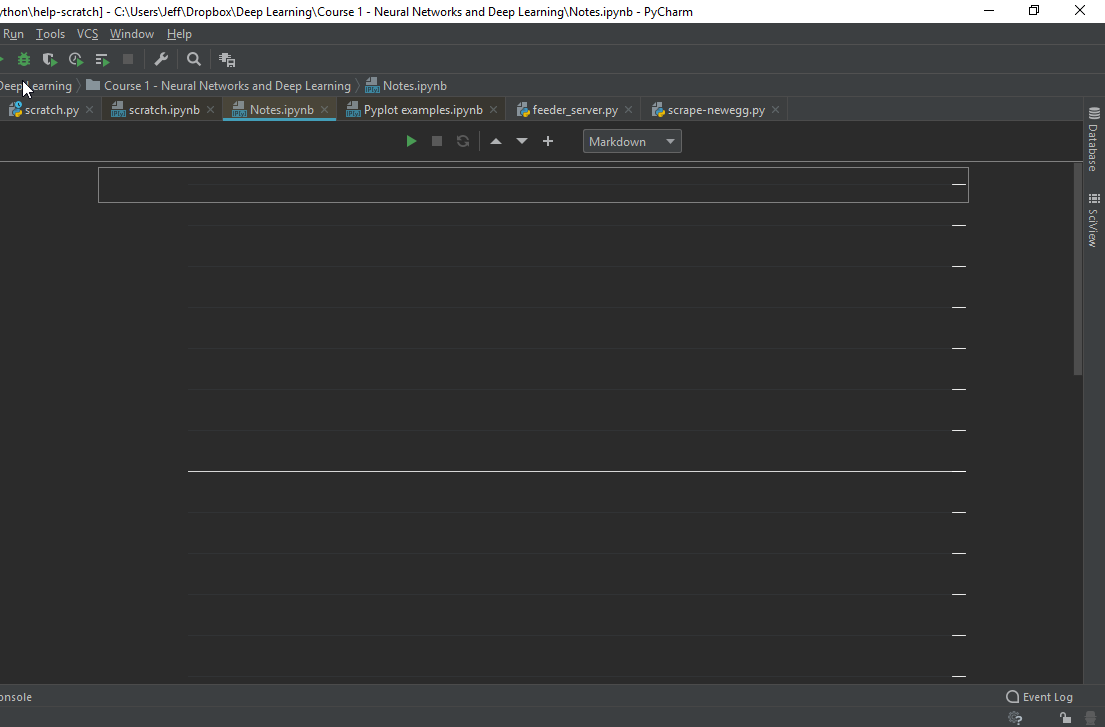
Here is the parent thread about notebook support in PyCharm just basically being trash, they say they were planning on dropping and rewriting the entire notebook system for 2018.3 but it looks like it didn't happen. https://intellij-support.jetbrains.com/hc/en-us/community/posts/360000094190-PyCharm-support-for-Jupyter-Notebooks-is-simply-terrible

IDEs Support (IntelliJ Platform) | JetBrains
I spent a couple of hours today working on a Jupyter Notebook with PyCharm and this is a quick list of the issues I found:
- BUG: If you add a cell and select the option Markdown, if you add a ...
the disappearing text bug is linked from there by someone using 2018.3 early access in September 😦
winged mason
right...so its not just me
now, is there a way to open this files without having Jupyter installed?
coarse rapids
No way to do it locally that I can see, without installing something. I just tried pasting my notebook into a gist and then using Jupyter NBviewer online to view it, which works, but you wouldn't want to do with a bunch of files
This looks promising https://kokes.github.io/nbviewer.js/viewer.html
it does not, however, render LaTeX
coarse rapids
Oh nice, good
Too bad Jetbrains isn't on top of the PyCharm support, although it does look like they're slowly working on it
winged mason
I am doing some exercises and all I need was to be able to read the content of the exercise with some additional info
As a rookie in this 'industry' can't really comment much, but from a logical point of view I believe there wasn't a lot of request for this, hence why they didn't spend any resources developing this properly
coarse rapids
PyCharm is top dog in the development space, but Jupyter is top dog in the data science and research space. They need to keep on top of that, in my opinion, unless they want to get left behind - even though their traditional base may not be into it yet
Scientists are increasingly adopting notebooks for reproducible research
winged mason
I see, currently I am learning data science but so far I am happy with PyCharm...will see if in the future I will have to transition to notebook
 iron basalt
Github will also display Jupyter Notebooks, which is very useful
I've discovered so many bugs with Jupyter Notebooks in PyCharm that I just don't bother anymore
I love using both but they don't mix well sadly
My workflow now is to run the Notebook through PyCharm but edit and run code in my web browser
I'm used to version control with PyCharm/Github so that works for me
You can also write your code in PyCharm and then execute it separately in a Notebook if you wish, but I find that for data science once you get comfortable with the packages you're using you don't really need the IDE that much anymore
winged mason
useful information, thanks
 primal basin
hi i am trying to import pandas but it says the module isnt found? i have pip and anaconda package installed
in terminal / IDLE
File "/Users/woojc/Documents/Python/pandas_testing.py", line 1, in <module>
    import pandas as pd
ModuleNotFoundError: No module named 'pandas'
@primal basin can you run the following right before the import statement?
import sys
print sys.path```I suspect you're in a venv
Do that, then run it in IDLE (where import pandas works) and compare the results
primal basin
i don't think i am in an venv, wouldnt i see [(venv)woojc$:] that would tell me im in a venv?
but ill try the above ^
['/Users/woojc/Documents/Python', '/Users/woojc/Documents', '/Library/Frameworks/Python.framework/Versions/3.7/lib/python37.zip', '/Library/Frameworks/Python.framework/Versions/3.7/lib/python3.7', '/Library/Frameworks/Python.framework/Versions/3.7/lib/python3.7/lib-dynload', '/Users/woojc/Library/Python/3.7/lib/python/site-packages', '/Library/Frameworks/Python.framework/Versions/3.7/lib/python3.7/site-packages']
``` get this response when putting import sys in the .py filewhen i try import pandas in IDLE python shell I get
Try ```
python3.7 -m pip install pandas
or whatever the name of your python3.7 isAs far as I'm concerned, I need to precise since I have Python 3.4, 3.5, 3.6 and 3.7 installed on my computer
primal basin
i think that worked, cuz now im gettin a new error lol
ModuleNotFoundError: No module named 'pandas.io.data' woo
ah pandas no longer accepts the above input
thanks @heavy knot
heavy knot
Cool 😉
primal basin
is it advisable to completely reset my python set up some how? i keep running into issues in my terminal. I assume it's a lot to do with past packages i've passively downloaded when i begun learning python
 valid aurora
you're not using a virtualenv?
primal basin
i dont believe so
valid aurora
that's the answer then
virtualenvs allow you to install packages specifically for a project
so what you have installed for other projects don't conflict
primal basin
ah ok, so dont reset anything, just create a venv for every new project?
why is this information not the first thing in python crash course book lmao
valid aurora
it pretty much is, IMO
fairly standard operating procedure
if its not in the course you're using, take it p with the author
¯_(ツ)_/¯
violet belfry
Running with all of your site packages shouldn't cause issues with your terminal, running a virtual environment isn't going to magically fix it
It would be easier to answer the question if you provide some context to the issues you're encountering
primal basin
just a continuation from the above ^^ if you scroll up a few.
The new error is trying to pip install pandas-datareader
getting:
Could not install packages due to an EnvironmentError: [Errno 2] No such file or directory: '/anaconda3/lib/python3.6/site-packages/dask-0.17.5.dist-info/METADATA'``` looked at github and they recommended to try installing pandas-datareader that way but no further helpagain, i am confident i have anaconda3 installed
hushed orbit
Can you whip up a "anonymous" file in pycharm? That is not associated with a file until you save. Sorta like VSC does with ctrl + n
valid aurora
 glossy flint
Guys, has anyone tried to work with numpy module within PyCharm IDLE? It simply doesn’t let me to import it in the editor, it works only when using the python console. What might be wrong? Thanks
primal basin
is numpy in your pycharm packages?
glossy flint
yeah, when I run "pip list" it's there, when I check it in File > Settings > Project Interpreter, it's there. Any other module works both via the editor and the built in python console.
The autocompletion feature offers me "numpy" when I start writing "nu" so it expects it to work
I even tried "pip install --upgrade --force-reinstall numpy"
barren iron
@glossy flint wrong version of python?
glossy flint
@barren iron It’s python 3.7.0 with the last version of numpy
barren iron
Its got to be a pycharm problem if it works in terminal.
It works in terminal right?
tawny temple
Is your run configuration set to use the correct python interpreter?
glossy flint
It works in the built in python console of pycharm with no problem I will try it via terminal outside of pycharm
Ok so I checked the configuration and it’s correct, it uses python 3.7 and then I activated the virtual environment through the console outside of the pycharm and I wasn’t able to run the script with numpy imported either but I couldn’t even run it via the python console (still out of the pycharm) so I can import and use numpy only via the python console within pycharm. Seriously I have no idea what going on.
coarse rapids
@glossy flint can you do something for me? go to the Python console where you can import numpy, and run python import sys print(sys.path)
then go to PyCharm and run the same thing.
I mean, run the same thing where numpy works, and where it doesn't.
wherever that might be.
 dusky blaze
Man visual studio code is awesome
I tried to extract a variable. It says "rope is not installed, would you like to install it"
And I say yes, and it goes
pipenv install rope --dev
Magic
glossy flint
@coarse rapids Sure, this is the output from running a script in PyCharm: ['/home/standa/PycharmProjects/scraping_book', '/home/standa/PycharmProjects/scraping_book', '/home/standa/.pyenv/versions/3.7.0/lib/python37.zip', '/home/standa/.pyenv/versions/3.7.0/lib/python3.7', '/home/standa/.pyenv/versions/3.7.0/lib/python3.7/lib-dynload', '/home/standa/PycharmProjects/scraping_book/venv/lib/python3.7/site-packages'] and this is from the Python Console in Pycharm: ['/home/standa/Binaries/pycharm-community-2018.1.4/helpers/pydev', '/home/standa/Binaries/pycharm-community-2018.1.4/helpers/third_party/thriftpy', '/home/standa/Binaries/pycharm-community-2018.1.4/helpers/pydev', '/home/standa/.pyenv/versions/3.7.0/lib/python37.zip', '/home/standa/.pyenv/versions/3.7.0/lib/python3.7', '/home/standa/.pyenv/versions/3.7.0/lib/python3.7/lib-dynload', '/home/standa/PycharmProjects/scraping_book/venv/lib/python3.7/site-packages', '/home/standa/PycharmProjects/scraping_book']
so it works only with these "helpers" apparently
in any other case it throws a Traceback at me when trying to import it
I'm using pyenv to create a venv of version 3.7.0 because in Solus (linux distro) the last Python is not natively supported yet
barren iron
@glossy flint Have yopu made sure you have installed numpy in the correct pyenv and venv?
/home/standa/Binaries/pycharm-community-2018.1.4/helpers/third_party/thriftpy'
'/home/standa/Binaries/pycharm-community-2018.1.4/helpers/pydev'
Those are the differences between the first output and second
glossy flint
@barren iron I even checked it in a file manager if a folder named “numpy” is found in venv folder and it is. And the venv is activated
barren iron
Well it can't be correct ;D
Or itll work
/home/standa/Binaries/pycharm-community-2018.1.4/helpers/third_party/thriftpy'
'/home/standa/Binaries/pycharm-community-2018.1.4/helpers/pydev'
These 2 are in a enitirely different directory
glossy flint
Dammit, I will try to create a new venv just to try it with numpy then. I don’t know what else to try.
glossy flint
That’s venv alternative, right?
glossy flint
Ok 😉
glossy flint
ok so I followed the instructions in the link you sent me and can't make PyCharm to autodetect the pipenv's bin folder. I have done the following: 1) pip install --user pipenv 2) sudo nano .bashrc to add this line: export PATH="$PATH:/home/standa/.local/bin" 3) tried to create a new project in PyCharm but it doesn't auto detect it
could it be because of this? standa@e330 ~ $ source ~./bashrc bash: ~./bashrc: No such file or directory
ok nevermind, I set it manually once and now it remembers pipenv file path for new projects but is it possible to use pipenv without pyenv? As I said I need python 3.7.0 because the last version of Python natively in the Linux I use is Python 3.6
sorry for a dumb question, but how do I transfer all the modules from the previous venv to the pipenv? So i would not need to install each module one by one again to the new pipenv interpreter
coarse rapids
In the old environment, export the list of installed packages with pip freeze > requirements.txt
In the new environment, import this with pipenv install -r path/to/requirements.txt
@glossy flint
 blissful horizon
How do I open spyder? I just downloaded it along with anaconda
coarse rapids
Show us what you've got, did you run an installer already?
coarse rapids
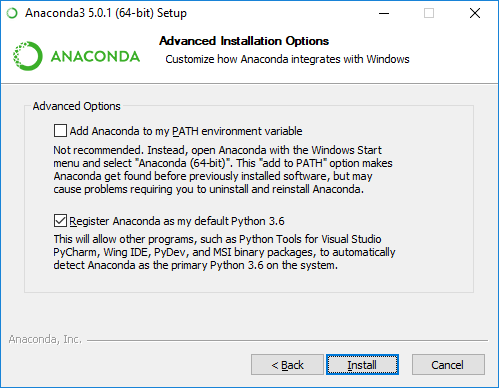
When you ran the Anaconda installer, did you pick the option to add it to your PATH?
blissful horizon
Iiiiiii don't think so
coarse rapids
This might be a little out of date but it would have looked something like https://pythonforundergradengineers.com/images/anaconda_path2.png
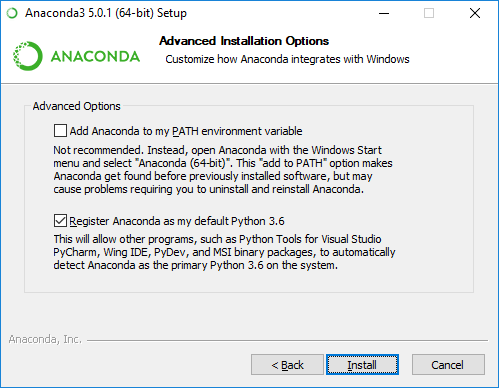
And have you checked your start menu?
blissful horizon
Start menu?
coarse rapids
You're on Windows. Have you checked the start menu for Spyder?
Not using Anaconda at the moment, though I used to, so I can't check where it goes
coarse rapids
ok I'm going to install Anaconda and find it
 halcyon crag
afaik it should be under the Anaconda3 (64-bit) folder (in my case at least)
iirc this folder is preinstalled to the start menu
coarse rapids
@blissful horizon Do you have that? Mine is still installing...
halcyon crag
Yup thats what I thought
coarse rapids
Yeah, I just installed Anaconda and... https://i.imgur.com/OTEcNxg.png

It's literally at the top of the list
blissful horizon
lemme check
blissful horizon
i looked inside the anaconda folder
not here
I'll just ping you, hope you don't mind, and sorry for afking @coarse rapids
glossy flint
@coarse rapids thanks!
coarse rapids
@blissful horizon open the start menu and start typing the word "Spyder" to make it search - I know it installs by default because I just installed anaconda from the package on their web site, with all default settings, and it added it to my start menu.
coarse rapids
I'm on mobile right now but I can look into how to let you launch it without a start menu option when I get home
Maybe someone else has anaconda installed who can help now?
halcyon crag
@blissful horizon May you try something out for me?
blissful horizon
ok
halcyon crag
Start the Anaconda Prompt
blissful horizon
its open
halcyon crag
type in anaconda-navigator
And wait for some time max 1 1/2 minutes I just want to know if it works
Because when theres a prompt it should be able to start the navigator by this
blissful horizon
halcyon crag
Thats really unfortunate
 hoary shore
Not to jump in here, but did you install anaconda or miniconda?
blissful horizon
i looked up spyder on google, it told me to download anaconda with it so i did
i dont think i downloaded miniconda
halcyon crag
https://www.anaconda.com/ obviously from this website?
hoary shore
What does your add/remove programs window have in it?
coarse rapids
Anaconda doesn't add to $PATH by default anymore, in fact they recommend against it
halcyon crag
Didn't do it here as well, prompt still works though
Well if it wont work I would recommend uninstalling, restarting, reinstalling?
hoary shore
Does anaconda prompt even start in c:\users as his screenshot shows?
halcyon crag
yup
hoary shore
Been a while, couldn't remember if it started in the anaconda folder somewhere
halcyon crag
as seen here
coarse rapids
I just don't think @blissful horizon installed Anaconda correctly. The Anaconda Prompt is wrong and some start menu options like Spyder are missing. This is the installer that you should get and run.
blissful horizon
i clicked that exact button
coarse rapids
OK, but there's something wrong with your installation, because when you ran "Anaconda Prompt" you didn't get what Cyrol shows above.
You should have gotten (base) before your prompt, but your screenshot shows that you don't
Also I ran a default install of that exact download and got start menu options that you are missing. Therefore it is not properly installed on your computer. Don't know how to make that any clearer. I suggest uninstalling it completely and starting over.
hoary shore
Shot in the dark, but are you on a school/work computer that might be blocking a lot of the install?
coarse rapids
Anybody know how to merge upstream git into your fork in PyCharm without manually running git? I added an upstream remote but it only seems to show in "Remotes", it doesn't show in the merge window or anywhere else
And "Fetch" takes no options, so you can't specify the upstream remote
lost rock
When you do "update project" it should fetch from all remotes, I think
after that you should be able to select branches from the other remote in the log view
coarse rapids
hmm, I did that, but still only have local branches in the log view in version control
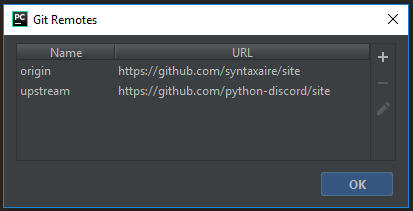
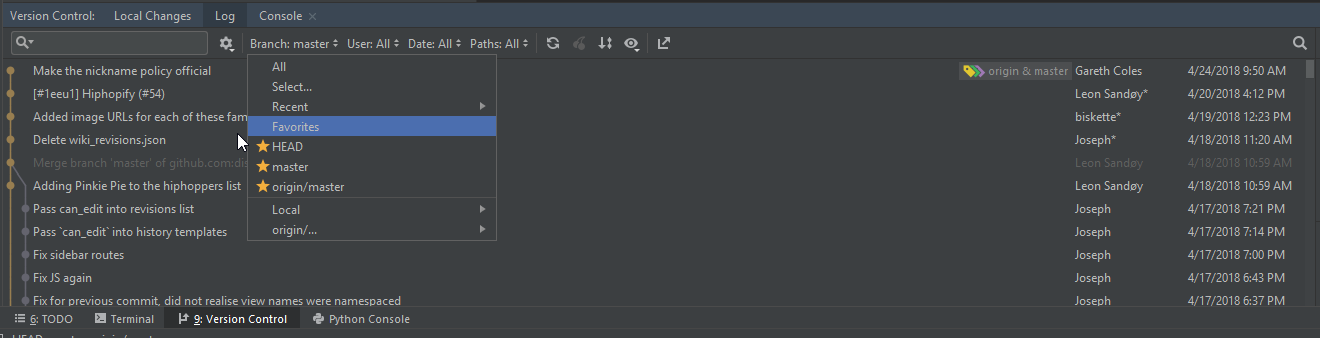




Looks like the good folks at jetbrains have the answer https://youtu.be/o-2fvj7GsOQ
Yeah, that video already had the upstream branch as well - looks like the solution is to do a pull of upstream, rather than a fetch as in the github documentation https://help.github.com/articles/syncing-a-fork/
glossy flint
Sorry for bothering again, but I am currently trying the Pipenv in replace of pyenv + venv + pip and can’t figure out why I cannot make work the following command “pipenv —python 3.7.0” it returns a pretty long traceback report. I have installed pyenv with python 3.7.0 installed. Actually it does t let me to specify any specific version of python at all. What do I have to fix in order to make the different versions of python in my computer to be found? Thanks
halcyon crag
@glossy flint A long traceback you said? what does it say at the end of it?
 sand canopy
So - I'm not 100% sure if this is IDE related or not, but when I'm using the behave framework, I don't have intellisense in PyCharm. Really, only when I'm accessing the context variable. So, if I add a custom variable inside of context, and then try to access it; there is no intellisense.
Has anyone had this issue before?
An example would be something like this:
def step_impl(context):
    context.variable.????? (? represents no intellisense)
But one that does have intellisense is my browser variable. (I'm using it in conjunction with selenium.
def step_impl(context):
    context.browser.visit()
browser is the only custom variable that has intellisense.
glossy flint
@halcyon crag this happens when I try to run it: ```standa@e330 ~ $ pipenv shell
Creating a virtualenv for this project…
Pipfile: /home/standa/Pipfile
Using /usr/bin/python3.6 (3.6.7) to create virtualenv…
✔ Complete
Already using interpreter /usr/bin/python3.6
Using base prefix '/usr'
New python executable in /home/standa/.local/share/virtualenvs/standa-bCeiJKnw/bin/python3.6
Also creating executable in /home/standa/.local/share/virtualenvs/standa-bCeiJKnw/bin/python
Installing setuptools, pip, wheel...done.
Virtualenv location: /home/standa/.local/share/virtualenvs/standa-bCeiJKnw
Creating a Pipfile for this project…
Traceback (most recent call last):
File "/home/standa/.local/bin/pipenv", line 11, in <module>
sys.exit(cli())
File "/home/standa/.local/lib/python3.6/site-packages/pipenv/vendor/click/core.py", line 764, in call
return self.main(*args, **kwargs)
File "/home/standa/.local/lib/python3.6/site-packages/pipenv/vendor/click/core.py", line 717, in main
rv = self.invoke(ctx)
File "/home/standa/.local/lib/python3.6/site-packages/pipenv/vendor/click/core.py", line 1137, in invoke
return _process_result(sub_ctx.command.invoke(sub_ctx))
File "/home/standa/.local/lib/python3.6/site-packages/pipenv/vendor/click/core.py", line 956, in invoke
return ctx.invoke(self.callback, **ctx.params)
File "/home/standa/.local/lib/python3.6/site-packages/pipenv/vendor/click/core.py", line 555, in invoke
return callback(*args, **kwargs)
File "/home/standa/.local/lib/python3.6/site-packages/pipenv/vendor/click/decorators.py", line 64, in new_func
return ctx.invoke(f, obj, *args, **kwargs)
File "/home/standa/.local/lib/python3.6/site-packages/pipenv/vendor/click/core.py", line 555, in invoke
return callback(*args, **kwargs)
File "/home/standa/.local/lib/python3.6/site-packages/pipenv/cli/command.py", line 383, in shell
pypi_mirror=state.pypi_mirror,
    three=three, python=python, validate=False, pypi_mirror=pypi_mirror,
  File "/home/standa/.local/lib/python3.6/site-packages/pipenv/core.py", line 604, in ensure_project
    validate=validate, skip_requirements=skip_requirements, system=system
  File "/home/standa/.local/lib/python3.6/site-packages/pipenv/core.py", line 320, in ensure_pipfile
    project.create_pipfile(python=python)
  File "/home/standa/.local/lib/python3.6/site-packages/pipenv/project.py", line 722, in create_pipfile
    required_python = self.which("python", self.virtualenv_location)
  File "/home/standa/.local/lib/python3.6/site-packages/pipenv/project.py", line 1074, in which
    result = next(iter(filter(None, (find(finder) for finder in self.finders))), None)
  File "/home/standa/.local/lib/python3.6/site-packages/pipenv/project.py", line 1074, in <genexpr>
    result = next(iter(filter(None, (find(finder) for finder in self.finders))), None)
  File "/home/standa/.local/lib/python3.6/site-packages/pipenv/vendor/pythonfinder/pythonfinder.py", line 67, in which
    return self.system_path.which(exe)
  File "/home/standa/.local/lib/python3.6/site-packages/pipenv/vendor/pythonfinder/pythonfinder.py", line 54, in system_path
    ignore_unsupported=self.ignore_unsupported,
  File "/home/standa/.local/lib/python3.6/site-packages/pipenv/vendor/pythonfinder/models/path.py", line 451, in create
    ignore_unsupported=ignore_unsupported,
  File "<attrs generated init 75e45f144e3d5510d54dd5fca6730b98fa0220a9>", line 38, in __init__
  File "/home/standa/.local/lib/python3.6/site-packages/pipenv/vendor/pythonfinder/models/path.py", line 116, in __attrs_post_init__
self._setup_pyenv()``` version_glob_path="versions/*", ignore_unsupported=self.ignore_unsupported
File "/home/standa/.local/lib/python3.6/site-packages/pipenv/vendor/pythonfinder/models/python.py", line 154, in create
sort_function=sort_function, version_glob_path=version_glob_path)
File "<attrs generated init e3f30216396515d292f01e4bbc5b17e6e64e3da0>", line 17, in __init__
File "/home/standa/.local/lib/python3.6/site-packages/pipenv/vendor/pythonfinder/models/python.py", line 98, in get_versions
for p in self.get_version_order():
File "/home/standa/.local/lib/python3.6/site-packages/pipenv/vendor/pythonfinder/models/python.py", line 70, in get_version_order
version_order = [versions[v] for v in parse_pyenv_version_order()]
File "/home/standa/.local/lib/python3.6/site-packages/pipenv/vendor/pythonfinder/models/python.py", line 70, in <listcomp>
version_order = [versions[v] for v in parse_pyenv_version_order()]
KeyError: 'system'
Well it seems to be a bug in pipenv. https://github.com/pypa/pipenv/issues/3224

GitHub
Issue description We use pyenv to support multiple Python versions on one machine. When using any command with pipenv (version 2018.11.14) it fails with the below traceback. Expected result pipenv ...
Dammit, and I just needed to make numpy to be working in my venv with python 3.7. That’s why I decided to give pipenv a shot.
halcyon crag
Yep its definitely a coding error, as you can see in the KeyError it throws
 tired nacelle
i recently want to install pocketsphinx in my python3.6 using pip but i always get this error message saying
error: command 'x86_64-linux-gnu-gcc' failed with exit status 1
i already look for solution on the internet and so far none of them are worked :/
deep estuary
@pallid sluice https://i.seph.club/f7wsf.png


yep, you have to buy a license to get dark theme lol
 pallid sluice
🤦
never seen hat
dark theme>
better on the eyes
especially color blind ones like me XD
 fading glen
PyCharm has a dark theme by default, and it's free

copper compass
!resources
rancid schoonerBOT
Resources
The Resources page on our website contains a list of hand-selected goodies that we regularly recommend to both beginners and experts.
https://pythondiscord.com/info/resources
copper compass
@earnest steppe
civic hound
@tropic jay here
 tropic jay
OK
civic hound
i use Tomorrow color scheme
tropic jay
// Settings in here override those in "Default/Preferences.sublime-settings",
// and are overridden in turn by syntax-specific settings.
{
    "font_face": "Ubuntu Mono",
    "font_size": 14,
}
 stable cloak
I'm the fun killer, I apologize
civic hound
and i use SodaReloaded or boxy, depends on what system i am using
here i think i am using sodareloaded
Predawn, Material Nil, Boxy are all great themes
cold gate
I've got a very basic Sublime setup, but I still like it a lot
tropic jay
how do I install tomorrow color scheme
civic hound
Luxi Mono, Source Code Pro and Ubuntu Mono are great fonts as well
tropic jay
cool
civic hound
you should install package control first
tropic jay
Ok
civic hound
yeah, that is one way of doing it 😄
tropic jay
lol
civic hound
sublime text 3 has a command for it without using console
civic hound
activate package control -> write : install pacage -> Tomorrow Color Schemes
adjust for my typing errors
tropic jay
thanks ill try it after I walk my dog lol
tropic jay
@civic hound how do I active package control
nvm
@civic hound what font are you using here?


because it looks pretty different to mine
I think I'm using Ubuntu Mono
these are my prefrences
I dont think its the same font as you
civic hound
tropic jay
whenever I change the font nothing changes
civic hound
restart 😄
tropic jay
Ok
nope no change
I changed it to "Deja Vu Sans Mono" just to see if it changed
and it didn't
Unable to open /C/Users/----/AppData/Roaming/Sublime Text 3/Packages/Default/Preferences.sublime-settings
nvm i got it to work
@civic hound can you send me all stuff to do with fonts in your settings? I would appreciate it thanks lol
I got the error fixed btw
like how did you get that nice purple and yellow theme lol
if you sent me your settings I could probably figure it out from there (I understand if you don't want to like if its private or something lol)
civic hound
the settings would not help you im sad to say. there are alot of dependencies, just keep an eye out for my workshop
tropic jay
Ok
all I want atm is to have my syntax highlighting colors and theme the same as yours lol
@civic hound
because like this is mine
and this is yours


is it boxy monokai?
civic hound
yes a modified version of boxy monokai theme
i added a green carret
text i select is green, and the carrot blinks green instead of white :;D
tropic jay
Cool
ive gone with
Tomorrow Night - Eighties as the color scheme and
Boxy Monokai as the theme, it goes good together and its not too bright
i'm happy with that
how would I install this?
https://github.com/DamnWidget/anaconda

GitHub
Anaconda turns your Sublime Text 3 in a full featured Python development IDE including autocompletion, code linting, IDE features, autopep8 formating, McCabe complexity checker Vagrant and Docker s...
fading glen
AnacondaST3 Python IDE
civic hound
yeah that is one of the many dependencies
I do not have time now to go trough it, maybe tomorrow or this weekend..
just ping me when you see me active in the help channels
tropic jay
alright btw i fixed the white boxes
heavy knot
Binary to Decimal convertor.
number = 0; sum = 0

binarynum = "00010101"

for i in binarynum[::-1]:
	if i == '1':
		sum += 2 ** number
	number += 1

print(sum)
Alternatively print(int(input("enter binary number: "),2))
And if you want big endian like you did add [::-1] to the input
barren iron


Does anyone know how i change where vscode does import checks from?
The problem is that i execute my code inside a folder, not from the root directory.
So vscode throws up errors.
tropic jay
is anyone here good with regex?
how would I in notepad++ make it so
this
1    White    242 243 243
5    Brick Yellow    215 197 154
9    Light Reddish Violet    232 186 200
11    Pastel Blue    128 187 219
18    Nougat    204 142 105
21    Bright Red    196 40 28
23    Bright Blue    13 105 172
24    Bright Yellow    245 208 48
26    Black    27 42 53
turns into this
1
5
9
11
18
21
23
24
26
nevermind
 broken venture
in linux the cut command is good for that too
tropic jay
@broken venture would you be able to help me with something
broken venture
never hurts to ask
tropic jay
OK, so here's a list of colors
thats a specific list, not a complete list
and I want to get the color number of them all
you can find the color number list here
and I don't know how id do it
I want to get the color numbers of all the colors in that pastebin
but I dont know how i will filter them
broken venture
So first you would want to get a file of all colors and color number and read it into memory, probably a dictionary
then read in your pastebin file and look up each record in that dictionary
tropic jay
yeah thats what I dont know how to do
broken venture
I would google to find a csv file with the colors and their numbers
then google on how to read a csv file into a dictionary
should be tons of examples out there
tropic jay
I managed to write a script in lua that does it
here it is
local colors = {"Dirt brown",
    "Reddish brown",
    "Brown",
    "Sand red",
    "Linen",
    "Burlap",
    "Brick yellow",
    "Medium red",
    "Dusty Rose",
    "CGA brown",
    "Dark orange",
    "Nougat",
    "Light orange",
    "Pastel brown",
    "Neon orange",
    "Bright orange",
    "Br. yellowish orange",
    "Deep orange",
    "Bright yellow",
    "Daisy orange",
    "Cool yellow",
    "Earth green",
    "Camo",
    "Dark green",
    "Bright green",
    "Shamrock",
    "Moss",
    "Br. yellowish green",
    "Navy blue",
    "Deep blue",
    "Really blue",
    "Bright blue",
    "Steel blue",
    "Medium blue",
    "Light blue",
    "Bright bluish green",
    "Teal",
    "Pastel blue-green",
    "Toothpaste",
    "Cyan",
    "Pastel Blue",
    "Pastel light blue",
    "Bright violet",
    "Lavender",
    "Lilac",
    "Magenta",
    "Royal purple",
    "Alder",
    "Pastel violet",
    "Bright red",
    "Really red",
    "Hot pink",
    "Pink",
    "Carnation pink",
    "Light reddish violet",
    "Pastel orange",
    "Dark taupe",
    "Cork",
    "Olive",
    "Medium green",
    "Grime",
    "Sand green",
    "Sand blue",
    "Lime green",
    "Pastel green",
    "New Yeller",
    "Pastel yellow",
    "Really black",
    "Black",
    "Dark stone grey",
    "Medium stone grey",
    "Mid gray",
    "Light stone grey",
    "White",
    "Institutional white"
}

for i,v in pairs(colors) do
    print(BrickColor.new(v).Number)
end
hi guys i need a python script that can decode this 957d0c320c4f18b577c2a72f065a7ed21a626d3ddc326df94e65024013318c43
i dont know what hash it is but i have been given more ive tried md5 and even SHA-256
forest bay
Are you trying to determine what type of hash algorithm generated it?
How do you know it's a hash?
delicate gorge
If it's a hash you cannot decode it as the thing that makes a hashing algorithm a hashing algorithm is that it's not reversible
 bitter falcon
Where should I look if I want to implement a GUI for my Python app?
delicate gorge
the pins in #user-interfaces @bitter falcon
bitter falcon
Thank you. (Oh damn, I'm blind I didn't notice that channel earlier.)
heavy knot
I'm trying to build a cmake package that relies on NumPy and I'm encountering this error https://paste.fedoraproject.org/paste/oQZzj7FFlBwm5SHtMH-26w
I can't seem to find other examples of NumPy in a cmake lists
the project I'm building is https://github.com/ildoonet/simulated-annealing-for-tsp

GitHub
This code is to solve traveling salesman problem by using simulated annealing meta heuristic. - ildoonet/simulated-annealing-for-tsp
heavy knot
I'm fairly certain the problem is line 16 of https://paste.fedoraproject.org/paste/fviphHAL~Q5JnFJWWcsY1g
I just don't know what the expected way is
heavy knot
I think I made progress, capitalizing to NumPy seems to make that build error go away, now I'm having problems with swig
I have cmake 3.11.2 and swig 3.0.12
I believe cmake expects me to have a more recent version of swig
cold gate
So, since I've started to use git again: What's the best way to set up a virtualenv in combination with git? Set it up in a subdirectory of the project entirely so you can .gitignore all the virtualenv stuff by excluding that one folder? Or is there a better way?
violet belfry
Yes
Some tools, like pipenv will default to building the environment in a central location so you don't have to ignore it, but either way it should be its own directory
cold gate
Okay, thanks. I've been looking into pipenv after watching Kenneth Reitz's PyCon talk. Maybe I should switch.
violet belfry
It's a very practical abstraction of the workflow
I go back and forth but that's mostly because I'm used to the more manual style
slow wasp
does anyone use newrelic together with aiohttp?
It does calculations for the time spent in a bit weird way, e.g if you run 100requests using aiohttp it will show that the time spent is sum of time for every of those 100 calls, but that is actually not true, and now how async work.
 waxen bear
Anyone using Atom? I've been using PyCharm for a few months but Atom has my interest, it's so modular and the themes are great.
vague silo
When I got into Programming I used to use Atom. Eventually the insane loading times for every trivial task and the excessive resource usage made me switch
waxen bear
Good to know. i'll stick with PyCharm for now.
vague silo
it's probably good to note that my laptop isn't really state-of-the art, it's an early 2014 macbook air
but pycharm runs pretty well on it
pycharm is a very integrated and fluid experience
iron basalt
I have the same experience
I've given Atom many tries over the past years and it just doesn't work for me
waxen bear
What IDE do either of you prefer?
iron basalt
PyCharm definitely, but I mainly work with Jupyter Notebooks so I work from browser
And for small scripts I don't have a problem working in notepad++
tired nacelle
I using Atom and yes the package and themes are awesome to have, and on the side note its really slow to start
But i already using it for 3 years and just can't get away from it .-.
Beside, the icon are cool xD
violet belfry
I remember trying Atom back when it was first released and it had a 2MB file limit 😵
waxen bear
Ouch. PyCharm it is lol.
forest bay
I use PyCharm for project work, and VSCode/Notepad++/gedit/nano for everything else
forest bay
If you like Vim
heavy knot
I use vim, which is not an IDE, but well 😃
barren iron
Vscode is great. Has refactoring, has a nice debugging tool, yet it still looks really minimal, and is really customizable
Perfect for my dockerized projects w/ remote debugging
 stoic kelp
I don't see anyone mentioning it, so I'll recommend Sublime Text 3. It's highly customizable with python. You can make an IDE for any language, with a lot of automation and custom utility.
blazing prawn
I like sublime too.
It loads faster than VSCode
Also does python-for-android work in 32bit?
 mint briar
Can confirm
barren iron
I don't know why. But i find vscode is just as fast as sublime
(Probs cause i have a hardrive)
coarse rapids
I use PyCharm at home and VSCode for a casual editor, dropped Atom completely
VSCode is surprisingly feature complete in terms of debugging, linting, and so on
heavy knot
VSCode doesn't have semantic highlighting, AFAIK
which is kind of a deal breaker
I hope they'll implement it fast
violet belfry
That would be nice
It does it in the gutter for some languages, at least in C, so it's certainly feasible
heavy knot
Oh you mean there are extensions for specific languages for semantic highlighting ?
violet belfry
It's not highlighting, at least not in Microsoft's extensions
Oh, it looks like Python does it too
it's not really the most helpful but it's at least recognizing where the occurrences are
maybe there are extensions that do it
 limpid mulch
!t ask