#web-development
2 messages · Page 97 of 1
 marble carbon
 devout coral
Yeah the idea is for this to be an internal tool for the company
devout coral
Yes
marble carbon
thought so haha
 topaz widget
@marble carbon What do you think about this? (non-responsive, full-window only) https://perasperadesign.com/extras/experiments/social/home/
 devout coral
That page is so overwhelming
marble carbon
took me back to 80s haha
topaz widget
Are you serious?
topaz widget
Should look fairly modern.
topaz widget
can you screenshot?
marble carbon
topaz widget
Yeah, it's a social media page. That's how it's supposed to look.
marble carbon
i mean, it terms of layout it's cool
topaz widget
You don't like the design scheme, though?
marble carbon
if you wanna add shadows, you can tweak them up a lil bit
devout coral
@marble carbon The employee information page should work now.
devout coral
@topaz widget For me it is the people icons and then the top nav bar color and icons.
marble carbon
👀
devout coral
@marble carbon Django TABles?
marble carbon
hmm nvm
topaz widget
You don't like the icons? @devout coral
devout coral
Now I am curious what is django tables
@topaz widget I don't really, I think it is the colors
topaz widget
Hm, okay.
devout coral
Try stock photos perhaps? Or only one set icon for all of them?
marble carbon
hmm i can do u one better
there's this : https://uifaces.co/

UI Faces aggregates various free avatar placeholder sources that you can use in your design mockups by copy—paste, API, plugins for Sketch, Adobe XD and Figma.
topaz widget
You mean for the users? The photos can be whatever since that's up to users to decide.
I wanted to do colors because it gets rid of any potential racial / sex bias.
devout coral
@topaz widget Yes, but i think having those icons takes away from the design
Put all the races lol
marble carbon
i mean the colors
topaz widget
I didn't want there to be any implicit favoritism of any kind.
marble carbon
are standard ones with no contrast to the rest of the theme
topaz widget
I'm not sure what you mean.
devout coral
Also, @marble carbon I cannot believe I did not know about django tables. Just looked it up and this would probaly have been easier.
marble carbon
but there's a catch 🙂
no tutorials or videos, just the docs which i dont think are the best to go with
I'm not sure what you mean.
@topaz widget try using https://jdenticon.com/ maybe, no bias or anything
Library for rendering identicons in the browser using JavaScript, and server-side using Node.js, ASP.NET or PHP.
devout coral
I normally don't do videos tbh. But if the docs are bad then rip.
marble carbon
yeah, if u already have what u wanted working, then u should be fine
devout coral
Oh no worries, I was not planning on changing it lmao
marble carbon
uh why did it download this file without telling me
or warning me
neither did the button tell me it's a download 😐
marble carbon
yea, wasn't obvious to me
devout coral
It isn't obvious tbh
marble carbon
maybe add a pdf or a download icon
devout coral
On the assign button?
marble carbon
i clicked on seniority list
devout coral
Oh yeah
devout coral
@marble carbon That is probably what I will do. Little tip that says it will download
marble carbon

MDN Web Docs
The title global attribute contains text representing advisory information related to the element it belongs to.
ah wait
are these, exports, being done dynamically??
marble carbon
no, the phones list, seniority list and other buttons on employee information page
devout coral
Yes, those are like export buttons
marble carbon
then simply add export icon next to all
devout coral
Inside the button?
topaz widget
@marble carbon Can I ask how old you are?
marble carbon
21
topaz widget
Okay, thanks
marble carbon
why tho 🤨
topaz widget
Demographic purposes.
 winter spindle
is there a way i can show you guys my webiste live without hosting it ?
topaz widget
People of different age groups have different aesthetic preferences.
marble carbon
hmm
topaz widget
Yeah I think github pages would be good.
winter spindle
is there any othery way ?
marble carbon
netlify should be easier ig, just drop your folder with an index.html file?
winter spindle
ohh okay thanks
devout coral
@marble carbon So, what icon library do you suggest? I currently have iconic which is bootstrap recommended but it seems so limited. No export icon.
marble carbon
font awesome?

The world’s most popular and easiest to use icon set just got an upgrade. More icons. More styles. More Options.
here 🤷♂️
font awesome has everything
devout coral
SVG or webfont?
winter spindle
https://blissful-noether-fccb28.netlify.app/
@winter spindle @topaz widget have a look
@winter spindle is that all?
@marble carbon yeah i said no only one page
marble carbon
okayy, looks good, maybe next thing you can work is mobile responsiveness ig
topaz widget
As far as color and layout go, I think it's a good start @winter spindle
winter spindle
ohh okay the things i changed are i changed the hover and button hover
topaz widget
And the hover animations on the title borders are nice
topaz widget
I'm not jazzed on the font for the main heading
winter spindle
@topaz widget i was suggesting that kind of hovers only
devout coral
@marble carbon This is what i get when trying the following code
<a class="nav-link dropdown-toggle" href="#" id="navbarDropdownMenuLink" data-toggle="dropdown" aria-haspopup="true" aria-expanded="false">


<i class="fas fa-user"></i>
</a>
Yeah, I think that's a nice animation on the hovers
topaz widget
@winter spindle You've got a lot to do on this page, though. It's not even responsive yet.
marble carbon
he probably just started learning
marble carbon
no, you can do responsive without bootstrap as well, checkout media queries
topaz widget
kk
marble carbon
yea 👌
winter spindle
how long will that take
marble carbon
idk
winter spindle
like estimate ?
marble carbon
upto you aha, maybe 2 days?
winter spindle
wtf ? 😂
topaz widget
It's probably easier to use bootstrap
winter spindle
yeah so i would prefer easy things 😂
topaz widget
It will take you more than 2 days to make the site compatible with all device sizes and orientations.
winter spindle
ohh 😂
topaz widget
You basically have to design like 4 or 5 different websites.
topaz widget
Some things won't change between sizes, though.
Fonts and colors and stuff will stay pretty much the same.
But almost every css property that involves size in some way will most likely change.
winter spindle
ohh !
topaz widget
stuff like borders might not change between sizes.
topaz widget
Yeah, there's a lot to building a responsive web page.
marble carbon
@devout coral use this https://fontawesome.com/v4.7.0/cheatsheet/
Font Awesome, the iconic font and CSS framework
winter spindle
font awesome is sick !
marble carbon
topaz widget
You also have to make sure your site is cross-browser compatible which is not always so easy.
winter spindle
ohhh ohkay thts a lot to take in tbh
marble carbon
yep
topaz widget
Yeah, it's pretty tough to design a fully responsive website.
winter spindle
hahahh lol
topaz widget
That webpage of mine you checked out has over 1200 lines of CSS
marble carbon
@winter spindle try this maybe https://www.youtube.com/playlist?list=PL4cUxeGkcC9ivBf_eKCPIAYXWzLlPAm6G

YouTube
topaz widget
And almost that much javascript.
winter spindle
actually i asked how much time will it take to make it responsive cause i thought it will take only half and hour and i will do it and sleep
marble carbon
oh nah
winter spindle
😂 silly me
devout coral
@marble carbon I was dumb, forgot to put the script part to use my icons.
topaz widget
If you want to make a fully responsive page as nice as I think you do, I think it will take you a month.
topaz widget
yes
winter spindle
bro here it is 2:30 night so i thought half and hour and i am done 😂
devout coral
@marble carbon How would I scale these icons to be bigger ?
marble carbon
The world’s most popular and easiest to use icon set just got an upgrade. More icons. More styles. More Options.
these classes fa-sm and so on
topaz widget
If you're just starting, it will take more than a week for sure.
topaz widget
bye
topaz widget
how long did it take you to put that together Mr. Robot?
topaz widget
Okay, maybe a week for a full web page with all the sections. I'm guessing more though.
winter spindle
bro i aint making all sections 😂
i am done !
now i will make another single page website after i learn something else
😂
topaz widget
alright, goodnight.
marble carbon
MDN Web Docs
Welcome to the MDN learning area. This set of articles aims to provide complete beginners to web development with all that they need to start coding websites.
follow this instead of w3schools
topaz widget
yes, ^
winter spindle
@marble carbon thanks for the suggestion 👍
devout coral
Any ideas how I can make this look better?
topaz widget
borders @devout coral
 quick cargo
contrast, maybe a bigger colour range, 2 tone is pretty bland and makes it look more like a blank screen,
more distinctive seperators as @topaz widget says with borders etc...
topaz widget
could be organized in a much more orderly fashion @devout coral
The organization of everything looks haphazard.
quick cargo
nav bar text actually being aligned in the center
 native tide
Everything in the center
devout coral
@quick cargo What do you mean?
quick cargo
your nav bar text isnt vertically center
devout coral
@topaz widget How would you organizee it?
topaz widget
I won't speak to specifics, but it doesn't look very organized.
devout coral
Bad picture I guess. But I think it is centered vertically
native tide
It doesn't look organized because there only bit of spacing
topaz widget
Your spacing on your nav bar could be a lot better.
quick cargo
everything looks the same which shouldnt really be the case
topaz widget
No, it's the overall organization of divs that needs improvement.
The spacing also could be improved upon, too.
quick cargo
personally i prefer more open plan styles ig you could say
native tide
Like make a good background image
quick cargo
rather than being very boxy
topaz widget
like those blue buttons/links on the left... what are they anchored to?
devout coral
So have different things being bold? Like titles?
topaz widget
Their vertical alignment is curious.
devout coral
@topaz widget Actions for this specific employee
native tide
The background colour is just boring add a image to background
devout coral
@native tide I could explore that.
topaz widget
@devout coral Yes, I know what they're supposed to do. Why is it like caddycorner to the employee profile bar?
topaz widget
Its vertical alignment is way off.
devout coral
@topaz widget Idk, just what I thought worked.
topaz widget
It doesn't for me.
quick cargo
i would move that top bar and far left box with general info into one
because its a bit of a space filler that doesnt really do much
devout coral
If anyone want's to log in and test it.
https://75.112.84.140/
username: mickey.mouse
password: Testing321
topaz widget
I think either you should expand the employee profile and have the buttons below it or align the buttons to the top.
native tide
I would give more space to text box
topaz widget
its vertical alignment makes no sense.
native tide
And margin bottom aswell
devout coral
@quick cargo The idea of the top box is like a summary of totals that you will need to see at a glance ifthat makes sense.
quick cargo
could easily do something like this merging that big bar and the general info making it look a bit more useful and meaning fulk
topaz widget
Isn't that the guy who coded Vue?
native tide
Create a card using css
topaz widget
lol
devout coral
@topaz widget Good point, I think expanding the top rectangle to encompass all of it is the way to go
topaz widget
That would be one sensible approach.
topaz widget
Honestly, though, I think stacking the little stats vertically makes more sense.
devout coral
@quick cargo Maybe I can do this on the left that takes up the entire height? Then do other smaller boxes to the right> (The picute you posted.)
native tide
Like small description about the user and the image like pulled to the mouse cursor
topaz widget
Like, I don't think it makes sense to have attendance points and safety points positioned horizontally relative to each other.
devout coral
@topaz widget Should it probably be like part of the title of the boxs with the individual "records"?
quick cargo
pycharm not linting my freaking file :(
topaz widget
If I'm being critical, I think you should shrink that card way down. It doesn't need to be that big.
devout coral
@topaz widget Which one?
topaz widget
the white box with the picture
native tide
If I'm being critical, I think you should shrink that card way down. It doesn't need to be that big.
@topaz widget agreed
topaz widget
It's a lot of wasted space.
native tide
I think the card should be that the bottom
devout coral
How about if I put it to the left how the other user was saying? make it take up the entire height and put thegeneral info under the picture/
topaz widget
I'd put the buttons under the picture and points section.
devout coral
@native tide Well the idea was for you to be able to see the total attendance, and safety points at a glance.
topaz widget
Move it all to the left.
native tide
Hmmm
topaz widget
@devout coral Do it like this
devout coral
@topaz widget So the buttons spread horizontally?
topaz widget
on left side of page:
picture
attendance points
safety points
blue button stack
No buttons are stacked vertically but you just move the "profile" over on top of them.
That clears up more space for the panels with heavy information.
devout coral
@topaz widget So then have all the other stuff on the right?
 plucky tapir
If I’m using an authentication form for login, can I just throw that in the main homepage, could it still work and function in there?
topaz widget
Have the other stuff where it is currently, just move the profile picture, name, and points on top of the blue buttons.
@plucky tapir Yes.
@plucky tapir I assume you're talking about Django?
regardless, the answer is yes.
plucky tapir
@topaz widget my bad yes
topaz widget
You can go about this in a few ways.
I think the easiest way would just be to make your home page a LoginView
I'm not sure how you're doing it currently, though. @plucky tapir
devout coral
This is what I thought of with all the feedback. What do you think? @topaz widget
Not even sure why that came out sideways
topaz widget
I can't read the small stuff at the top
devout coral
Basically on the left you would have that card which the other user posted.
THen on the right the other cards
And since there are 4 I can do like a 2x2 to make it look better
topaz widget
@devout coral I'm drawing you a sketch just a minute
devout coral
@topaz widget Ok thanks
topaz widget
@devout coral
quick cargo
hmm
topaz widget
@plucky tapir Just use your home template in your login view and include your login form.
devout coral
@topaz widget could you explain what is on the left from top to bottom?
That is sort of what I was thinking though
I think
topaz widget
Profile picture, name and basic information in top rectangle
General information below that
Then blue edit/etc... buttons
devout coral
Alright, yeah sort of what I was thinking. Except I was thinking of putting all the employee info on one long vertical card.
topaz widget
Honestly, I don't like those buttons being in a separate panel from the rest of the interface.
I think there should be a button next to each field.
devout coral
Yeah.. they feel out of place.
topaz widget
a small button
devout coral
Maybe like an icon?
topaz widget
Yeah, with a title if you know how to do that
devout coral
Like on attendance point box I can add a + to the top right
topaz widget
Just an edit icon for each field, yeah
I wouldn't use a plus sign unless you're adding something.
devout coral
Or should I just have an edit icon on the entire general info.
topaz widget
Either way. I just don't think you need huge separate buttons for that.
devout coral
Yeah for the attendance and safety points there is a assign button which can turn into a little +
Yeah perfect
I got the idea, thank you a million all of you.
plucky tapir
@topaz widget in my login views, add homepage html instead of login html,
And add my login template into my homepage html page?
topaz widget
basically, yeah.
just copy and paste the form in there essentially (not exactly, though)
quick cargo
ik we've massively moved on
but i got distracted
i think cards like these sorta things
ignore that horric line though i havent found a good colour match for it
topaz widget
I think he's gone now @quick cargo
quick cargo
😩
topaz widget
But yes, I like yours better
although this might be a little too slick for his use case.
topaz widget
His is more business environment, so I'd think more conservative in the styling
quick cargo
you can always de slick things :P
topaz widget
true
quick cargo
think the card itself would look better in white
topaz widget
I think yours looks pretty good, just not for a business application.
quick cargo
i recon it would if you re arranged in the layout i was aiming for
topaz widget
Maybe with a different background.
The blue is a little loud for a business casual environment.
quick cargo
you could do a mini pop out tbh
quick cargo
depends what sort
if you have a really sharp gradient youll get line marking when you resize which is annoying
but yeah they can give you a bit more to work with
topaz widget
true
devout coral
Yeah that looks good
But how would that fit in with the rest
Of the design.
I’m going to try the design me and sciencecomoliance spoke of with the card you showed. Hopefully I can work on it tomorrow and I will show you guys how it comes out
 granite obsidian
when i create an instance of a flask webapp and run it, does my computer essentially become teh host/server for the webapp until i stop running script
granite obsidian
so then is it normal that i can only access the webapp from the same computer i am running the script on?
topaz widget
Well, it is possible to access from another computer, but that would involve some additional work.
I think you would need to configure your router.
Actually, if you're just running on localhost, I think you can only access from your computer.
 versed python
you need to get it to run on 0.0.0.0:5000
topaz widget

Stack Overflow
I just recently downloaded WAMP Server to view and edit php webpages but now I would also like other people in my network (connected to the same wifi) to be able to access localhost and all the files
plucky tapir
with django, To get the main page to have a login feature, I have the main urls.py home url pointing at my views.login function. When originally it was pointing to a function just called home which pointed to my mainpages html. Will this backfire eventually or is it safe to have it point to views.login?
topaz widget
It's probably not best practice but it's the simplest to do for now. What you actually want to do is put an authentication form on your home page, but that is a little more complicated, and I think what you did will work fine for now.
How big is this website going to be @plucky tapir ?
plucky tapir
hmm would that be through html or templates? to put authentication form. I dont believe it'll be that big
topaz widget
You would have to do it in your view.
python file.
It's not that hard, it's just easier the way you've already done it.
Unless your site is going to be really big with lots of pages, it will be fine.
Like I said, not best practice in the long run but works.
plucky tapir
My bad I thought it would jump back to the message if I did that. Is it a lot different than that? for authentication form in django
topaz widget
I mean in your view, not your template
so yes it's different
Wait, sorry
No, it is similar
I apologize, I just glanced at the code.
@plucky tapir I'm sorry, yes it's similar to that. You need to put that logic in your home function regarding the AuthenticationForm
I glanced at the template and thought that's what you were talking about.
That's probably the better way to do it to be honest
for the sake of consistency
plucky tapir
@topaz widget no worries. Ahh I see I didnt even think of that for some reason
okay brb thanks
topaz widget
What do you have as your login redirect url @plucky tapir ?
plucky tapir
For now it’ll head to users landing page
topaz widget
So you log in on the home page, and it sends you back to the home page? @plucky tapir
plucky tapir
@topaz widget I have a users homepage that’s more of a dashboard.
I need to learn more about using static files for better design next
W/ css and bootstraps
topaz widget
Does it make sense to go to the landing page?
I guess the reason I was asking is if you return to the same page, you should give the user some feedback that they've logged in.
Probably if you go to the landing page, too.
Do you know how to use messages in Django?
 outer pier
I want to accept the image from user from frontend . but whenever i tried to give response it is showing me: ValueError: too many values to unpack (expected 2)
'''
class SelfieViewset(generics.GenericAPIView):
serializer_class = SelfieSerializer

permission_classes = [
    permissions.AllowAny
]

def post(self, request, *args, **kwargs):
    selfie_serializer = SelfieSerializer(data=request.data)
    selfie_serializer.is_valid(raise_exception=True)
    selfie_serializer.save()
    data = serializers.serialize("json", selfie.objects.filter("verified"))
    return Response(status=status.HTTP_201_CREATED)

'''
could anyone trace me out
plucky tapir
It does have a little hello user logged in, in DTL but I believe that was one of the possible options I was thinking too.
I don’t! They’re very useful/recommended? @topaz widget
topaz widget
Well, if you can't access the landing page without logging in then I guess that works.
Messages can be really handy, though.
I use them on my website.
@plucky tapir Here's what it looks like when you log into my website. It has a little pop-up message in the lower left-hand corner.
plucky tapir
@topaz widget ahh looks good I could see that being real useful.
Would you say tough to implement or roughly around the same as other (built-in) features?
topaz widget
Well, the way I've done it is pretty slick and uses a bit of JavaScript. You can do it more simply pretty easily.
@plucky tapir If you want to try it out, I created an account for you, and I can DM you the link and the password.
Just let me know.
plucky tapir
@topaz widget yeah that’d be cool
 opal fulcrum
can someone suggest me a good tutorial for HTML CSS please ?
versed python
@opal fulcrum https://www.internetingishard.com/html-and-css
A free web development tutorial for complete beginners
versed python
I'm mostly inclined towards written material so I can't be much help there
opal fulcrum
np man thanks for this .. i will use it as a document if i forget something along the way
But anyone please that can suggest me a good video tutorial for HTML CSS would appreciate it
topaz widget
@opal fulcrum You're just going to have to do a lot of googling probably I'm afraid.
native tide
let password = "abc123";
let checkPass = /(?=\w{3,6})(?=\D*\d)/;
checkPass.test(password); // Returns true
Can someone help me understand this
topaz widget
Why are you checking passwords manually?
That's a regular expression by the way.
@native tide Do you want to know what that regular expression means?
marble carbon
can someone suggest me a good tutorial for HTML CSS please ?
@opal fulcrum https://developer.mozilla.org/en-US/docs/Learn
MDN Web Docs
Welcome to the MDN learning area. This set of articles aims to provide complete beginners to web development with all that they need to start coding websites.
native tide
@topaz widget
Yeah
topaz widget
(?=\w{3,6}) means any "word" with between 3 and 6 characters
Actually, you know what. I think it might be different in JavaScript. Let me check on that.
topaz widget
@native tide Read this:
https://developer.mozilla.org/en-US/docs/Web/JavaScript/Guide/Regular_Expressions
MDN Web Docs
Regular expressions are patterns used to match character combinations in strings. In JavaScript, regular expressions are also objects. These patterns are used with the exec() and test() methods of RegExp, and with the match(), matchAll(), replace(), replaceAll(), search(), and...
native tide
@topaz widget Thank you
marble carbon
they can just read from the page 🤨
topaz widget
@native tide So basically this regular expression is saying that you need 3-6 characters and at least one character has to be a number.
It's on 3 different pages.
I thought I would probably have a much easier time finding the right thing than TheEnd.
Since I have learned regular expressions before.
marble carbon
\w{3,6} means alphanumeric 3 to 6 characters
topaz widget
(?=\D*\d)/ means 0 or more non-numeric characters and a numeric character.
marble carbon
haven't seen ?= before 🤨
topaz widget
It's a positive look ahead assertion.
marble carbon
meaning?
topaz widget
check the first picture I posted.
marble carbon
ah okay
so 3-6 alphanumeric characters followed by non digits and then a digit
🤔
topaz widget
It just means there must be at least one digit.
The first group checks for the length and no whitespace, and the second group checks for the presence of a digit.
marble carbon
okayy
topaz widget
group meaning within ( )
marble carbon
yeah capture groups I know that part
topaz widget
ok
outer pier
does anybody knows how to sent only one data as response from all the datas recieved as serialized data
{'id': 26, 'live_selfie': '/media/media/selfie1/9636e729-a85.jpg', 'id_selfie': '/media/media/selfie2/a2d80ce6-a20.jpg', 'created_at': '2020-10-07T07:32:39.040648Z', 'verified': False, 'user': 1}
i just want to sent 'verified': False as response . how to fetch that one .
versed python
@outer pier the received data is just a python dictionary. You can modify it as you like, and send it back.
winter spindle
heyyy
can someone telll a way how can we stop the deployment of website for a while ?
i have deployed on netlify
 viscid roost
Netlify is good
versed python
Doesn't netlify have any kind of "maintenance mode"?
I am sure it does, that is an essential feature of any hosting service.
 scarlet perch
anyone familiar with quart_discord ?
winter spindle
@marble carbon Yeah thanks !
marble carbon
be aware, you'll have to manually deploy after that
winter spindle
i dont know what i have done @marble carbon
i have just somehow managed to stop the hosting
i think i did delete website !
is that correct ? 😕
versed python
doesn't sound like it
native tide
hi everyone, just a question, how to maintain the log ? situation is, let's say a particular user is login in my website and i need to store information like time of login, time of useagae and how long he remained in the system, also he has access to certain modules/functionalities in system so it's record are also need to be saved, so question is how should i save the deatils, like keep record of everylogin and histoy table for module access thing in database or a log file ?
versed python
@native tide i think django already stores login time, last login etc for default user model
outer pier
I have a table named won_count in my model . so that whenever a user upload screenshot of his play, and if the admin verified that he has won then i have to increment this won_count by 1 . currently the won_count is located in accounts app and the screenshot verification model is in another table. so how do i do this . I also want the user to know that he loose the match using drf . can somebody suggest me a good way of doing this problem.
outer pier
hii
 ruby shell
i keep getting this error when ever i have an upload file input
outer pier
is it the admin panel
outer pier
show ur end points
ruby shell
end points?
ruby shell
from django.contrib import admin
from django.urls import path, include
from django.conf import settings
from django.conf.urls.static import static
from . import views
urlpatterns = [
path('', include('UserAccount.urls')),
path('dashboard/', include('Dashboard.urls')),
path('admin/', include('Admin.urls')),
path('tester/', include('Tester.urls')),
path('paystack', views.paystack, name='paystack'),
]
if settings.DEBUG:
urlpatterns += static(settings.MEDIA_URL, document_root=settings.MEDIA_ROOT)
Admin (APP URL)
from django.urls import path
from . import views
urlpatterns = [
path('', views.admin, name='admin'),
path('dashboard', views.dashboard, name='dashbaord'),
path('create-category', views.category, name='category'),
path('create-category/<id>', views.category, name='category'),
path('upload-document', views.upload, name='upload-document'),
path('upload-document/<id>', views.upload, name='upload-document'),
path('upload-document/<setup>/<id>', views.upload, name='upload-document')
]
yeah that's my endpoint regarding this challenge
outer pier
ok which app contains this views
outer pier
admin/upload-document
ruby shell
yeah
outer pier
i want to know how you are hitting the url
outer pier
but i guess it is not entering into your admin url
 jolly bone
Can anyone help me, I am using psycopg2 and when I submit the form, the server closes without any error log.
Django framework on PyPy
ruby shell
but i guess it is not entering into your admin url
@outer pier yes it is not going to admin. i guess
can you jump on an audio channel so i can explain better to you
outer pier
you have to change admin to some other things
ruby shell
not really let me try that
outer pier
ok ... try it may be it is having clash with django default admin
ruby shell
ok
outer pier
@jolly bone postgressql ?
jolly bone
yes, with psycopg2
outer pier
did you configured it rightly on your system ?
outer pier
what is the error
jolly bone
No erro, that is the problem
ruby shell
ok ... try it may be it is having clash with django default admin
@outer pier same error
outer pier
@ruby shell does it working on your local host
ruby shell
yes it does perfectly
outer pier
@jolly bone that is strange
jolly bone
Yes it is indeed
outer pier
may be some issue with the configuration on the server
ruby shell
yes i taught so too, but what configuration with the server will be conflicting with media file.
Especially with input file upload
Or what are the alternative approach to render this input field.
outer pier
sorry bro . i am not a good one with server . may be someone with better knowledge will help you
ruby shell
ok. have you uploaded django project on server before?
did you use passenger_wsgi.py configuration file?
If yes, how did you configure it
outer pier
only on python anywhere
jolly bone
@outer pier thanks for trying
ruby shell
ok thanks @outer pier
 glad patrol
hi i need help
regarding sockets
my server not display the client output
import socket

s = socket.socket(socket.AF_INET, socket.SOCK_STREAM)
s.bind(('localhost', 52000))
s.listen(1)
print('started the server.')

def recieve(conn):
    conn.send(bytes('hi', 'utf-8'))

while True:
    conn, addr = s.accept()
recieve(conn)```this is server
from socket import *
import subprocess, string, time
import getpass
import os

host = '192.168.10.10'  # '127.0.0.1' can also be used
port = 52000
username = os.uname()[1]
ipaddr = gethostbyname(username)

sock = socket()
# Connecting to socket
sock.connect((host, port))  # Connect takes tuple of host and port

def detect_device(previous):

    total = subprocess.run(' lsblk | grep disk | wc -l', shell=True, stdout=subprocess.PIPE).stdout
    time.sleep(3)

# if conditon if new device add
    if total>previous:
     response = "Device Added in" + " " + username + " " + "with IP:" + ipaddr
     sock.send(response.encode())
# if no new device add or remove
    elif total==previous:
     detect_device(previous)
# if device remove
    else:
     response = "Device Removed from" + " " + username + " " + "with IP:" + ipaddr
     sock.send(response.encode())
# Infinite loop to keep client running.


while True:
    data = sock.recv(1024)
    if (data == b'hi'):
        while True:
            detect_device(subprocess.run(' lsblk | grep disk | wc -l', shell=True, stdout=subprocess.PIPE).stdout)

sock.close()```this is client
client output not show on server side
 nova crest
Hello, does anyone have experience with the Google Python API client?
I am building the API service btween 5 and 50 times when my app is used, and I wonder if that's a problem at all
jolly bone
Is it the google search module?
jolly bone
Sorry, @nova crest not experienced
nova crest
alright, np
native tide
This is basically an account section of a page I am planning to build.
Build with Django
What do you guys think?
 tame thorn
Why does the color change when you zoom in ^^
also at some res the username and password strings move their position
glad patrol
can someone help
 blazing jetty
how can I run stuff in the background from the same file I'm running flask from
versed python
What kind of stuff do you want to run?
blazing jetty
it'll use requests to fetch some data and update a dict every x hours
versed python
Yeah celery should work better. Or a cron job if your environment supports it
devout coral
Can I get some feedback on this?
There will be other stuff on the right
@topaz widget I have started work on this, what do you think so far?
marble carbon
maybe the image can be smaller
devout coral
@marble carbon What would be a good way to do this? Because Right now I just have it set to width=100%
marble carbon
make a class
maybe img-sm
MDN Web Docs
This lesson has given you a rundown of some key issues that you might run into when sizing things on the web. When you move onto CSS Layout, sizing will become very important in mastering the different layout methods, so it is worth understanding the concepts here before movin...
devout coral
Yeah but if I resize only one dimension would it not look squished? Better to just crop it when it gets brought in?
Because now I am cropping them to be square for easy centering when making them circles, I could instead crop them to be rectangular
devout coral
Image looks better but now should I just center this img?
marble carbon
ahh not like that
devout coral
Lol I know that looks terrible\
devout coral
alright
 acoustic oyster
Just some input, you can leave img width at 100, but add some padding to shrink it down, should look really nice.
native tide
@native tide i think django already stores login time, last login etc for default user model
@versed python i am not using django, flask is my main for backend
versed python
Flask must have it too, but I don't know how.
marble carbon
hm probably not
you'll need to build the logic yourself, simply update the field every time authentication check passes?
devout coral
What would be the best approach to trigger a bootstrap modal from a card item? Right now I am using buttons but I want to switch to use the cards from bootstrap
nvm I got it
 twilit dagger
Is there a way I where I can have all the newest videos from a YouTube channel displayed
In Django
devout coral
Yes, you just need the youtube api and then use that to put the videos on the website.
quick cargo
aye that looks a bit better
twilit dagger
Thanks
native tide
Flask must have it too, but I don't know how.
@versed python flask login has it, but i have other user record and his little data which is changeable need to store so, using database is betetr or simple log file
twilit dagger
Btw why is Django hosting so hard
marble carbon
Is there a way I where I can have all the newest videos from a YouTube channel displayed
@twilit dagger try RSS feeds
devout coral
@quick cargo THis is what I have so far
devout coral
Like that?
quick cargo
i think it needs the white border around the image
marble carbon
yeah match the radius about the same as card
quick cargo
otherwise it sorta blends into the bg too much
quick cargo
think it would throw everything else off
marble carbon
try border then
devout coral
Trying to figure out how to enable the shadow utility in bootstrap one sec
devout coral
Have not done the circle thing just yet
Now I think I need a bg color for the nav bar other than white
@quick cargo There it is.
quick cargo
mm starting to look nice
probably need to work on the nav a bit more to fix with everything else
devout coral
So each of these boxes will have the records for the employee and it could be a lot. How do i set a max height so I can get a scroll bar for this? I used the max-height property before on a div for my last one and it worked. Does not seem to work here.
Let me know if you need my code to help me out.
marble carbon
is that ur picture?
marble carbon
okay because
his face is round, and you made the image round too
so it looks funny
😆
also yes
instead of max-height use height on the container
then set overflow-y: auto;
devout coral
Which container? THe card one?
 tepid lark
so I'm doing django authn through a saml idp, although this would apply to ldap or any external auth as well
what's the difference between set_unusable_password and not setting a password?
nova crest
Real stupid question: is there a module to hash a string that will ALWAYS be the same?
 dapper tusk
you could use hashlib
quick cargo
simple sha1 yer
nova crest
I'm looking into it, thanks!
devout coral
I have this so far. What would be the best way to make those rectangles on the right always be 50% of the rectangle on the right.
 little furnace
@app.route('/home')
def createGraph():
    import matplotlib.pyplot as plt
    plt.plot([5,6,2], [5,6,7])
    plt.savefig("english-stats-bar.png")


def home():
    return render_template('index2.html')
this is the python code file
 <p class="card-text">English! The most global language in the world!</p>
      <a href="#" class="btn btn-primary">START LEARNING</a>

      <img src="english-stats-bar.png" width="40" height="40" alt="English Stats">
and this is the html code, for some reason this runs into a Type error in jinja
nova crest
@dapper tusk @quick cargo I got it to work and it's exactly what I needed. Thanks again!
marble carbon
I have this so far. What would be the best way to make those rectangles on the right always be 50% of the rectangle on the right.
@devout coral using bootstrap?
then col-6
i believe
but for that
devout coral
Well that is for the width that is done. I am wanting for the height
devout coral
I was able to achieve it but once I fill up the ul tag the overflow does not work properly
50vh
@marble carbon ?
marble carbon
through css
wait

Viewport units have been around for several years now, with near-perfect support in the major browsers, but I keep finding new and exciting ways to use
here
devout coral
This is what I got. I set the height for the parent div of the two rectangles to 100% then each individual box got 100% as well then the things inside got 15% 70% and 15% respectively.
marble carbon
ohh
uh nvm
can u make a paint sketch for what u want to acheive
i cant understand / visualize atm
devout coral
This is what I want to achieve
marble carbon
uh
hightlight the exact thing
the cards on right?
ah so u mean when u fill the ul list contents it increases height?
devout coral
Yes, you see how they are equal in height relative to the card on the lrft?
ah so u mean when u fill the ul list contents it increases height?
@marble carbon Correct, and I want it to have a scroll instead
devout coral
Ok One sec
 proven orchid
does anyone know how to ping a site.wordpress.com?
marble carbon
hm lemme try
proven orchid
sure
marble carbon
works for me
 marble carbon
wait what kinda response r u expcting?
proven orchid
what i get is Ping request could not find host https://5blogs.wordpress.com. Please check the name and try again.
marble carbon
3 packets transmitted, 3 received, 0% packet loss, time 2002ms
lol
put this
ping 5blogs.wordpress.com
no http, only domain
marble carbon
curl however will need http
native tide
By default it is not secured
It is just http
I want it to go to https://beefykenny.pythonanywhere.com/login/?user_login=/ when I give someone the link or if they visit my site.
marble carbon
hmm ok
@native tide django?
if yes then here https://stackoverflow.com/a/49112565/12970867
Stack Overflow
I am running:
python manage.py runserver localhost:44100
And this is redirecting me to https:
» http http://localhost:44100/
HTTP/1.0 301 Moved Permanently
Content-Type: text/html; charset=utf-8...
devout coral
Working on making this page live... Gotta install my bash for a pc over where the server is and of course the windows version is out of date to do so. And cherry on top Microsoft Update service is also broken. So lots to fix lol
topaz widget
@devout coral That looks a lot better
Sorry, wasn't on earlier. I was doing brainstorming for a new home page on my own website.
@native tide Don't handle the redirection within Django
Handle it within Apache or whatever your server is.
What kind of server are you using?
native tide
Can you give an example?
topaz widget
If you're going to be redirecting http to https, you should do that in your server configuration file.
What service are you using for deployment?
marble carbon
uh
he's using pythonanywhere
don't have access to that
that's why I suggested
😄
topaz widget
I don't know what pythonanywhere is.
topaz widget
I'm sure there's some way to alter those settings within that service, though.
It might even be a security issue to handle that within Django.
Because the requests are going to go through the server before WSGI and then Django.
 frank nebula
Hello, do someone know django core email system?
Im getting "ConnectionRefusedError:" no matter what i try
topaz widget
I'm sure they have some way to alter those settings in the server config file even if you can't access NGINX or Apache or whatever directly.
@frank nebula What mail service are you trying to use? Gmail?
frank nebula
I tried Gmail, Yahoo
topaz widget
So gmail didn't work?
frank nebula
No, i dont know if i am testing wrong... im gonna send you some screens
topaz widget
Don't do that
I probably know what's wrong.
Did you go into your gmail account settings and "allow insecure apps" access?
frank nebula
yeah
topaz widget
Are you sure it's enabled?
frank nebula
im sure
topaz widget
What port are you using?
topaz widget
Okay, can I see what's in your settings.py file regarding this? (without username and password of course)
frank nebula
im running the server locally
topaz widget
That's irrelevant
marble carbon
@native tide helloo
open pythonanywhere dashboard
do this
don't change django, leave it as well
👍
topaz widget
@frank nebula Show me the section of your settings.py file regarding this, without username, password, secret key, as you should keep those private.
devout coral
@marble carbon Finally got it.
https://75.112.84.140/
username: mickey.mouse
password: Testing321
marble carbon
I'll give it a shot tmrw, better just DM me
topaz widget
@devout coral This is a lot better. If I could make one suggestion, though, I think you need to do something about the spacing of the items in the top nav bar.
marble carbon
he didn't work on nav yet
devout coral
@topaz widget Well, before I get to that. Want to take a look at my current problem? https://75.112.84.140/employees/account/662532/
topaz widget
@devout coral I went to the link
devout coral
Use the credentials above
topaz widget
okay
 hidden mantle
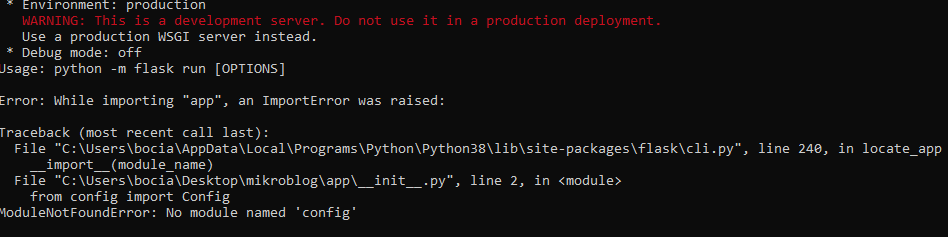
https://prnt.sc/uv1rbk i have a problem with VSCode and Flask, ```python
from flask import Flask
from config import Config
app = Flask(name)
app.config.from_object(Config)
from app import routesit says that it cant find a module named "config" but i have this file in the same subfolder as initpython
import os
class Config(object):
SECRET_KEY = os.environ.get('SECRET_KEY') or 'something'``` code for config.py, https://prnt.sc/uv1svd this is the problem im talking about, my help channel dissapered for me lol
 topaz widget
@devout coral Are these real people?
devout coral
Yes
topaz widget
Okay, you shouldn't be sharing their information with random strangers on the internet. I'd use stand-ins when sharing with strangers online.
If the app is user-friendly, it should be easy to put the real people in later.
topaz widget
I'm not going to do anything, but just for future reference.
devout coral
Alright, there is no information but their name and picture
topaz widget
Even their name is too much information..
devout coral
Ok
marble carbon
Is this for a client or ur workplace?
topaz widget
It's kind of a breach of trust.
those look like real phone numbers too
As far as the UI is concerned, I think this looks a lot better.
Do you know about overflow-y: scroll; in css? You should use that for the records containers.
marble carbon
already told them, but they can't figure out
which container's height to be set to fixed
topaz widget
Those are definitely real phone numbers, too. Looks like the company is located in Florida. I didn't search the individual numbers but did search the area codes. Big no-no. on that. I'd make ALL that information random fake avatars.
topaz widget
I just searched the area codes to see if they were probably real information.
marble carbon
just read and forget, also yes better remove those credentials from the chat as well, or change them if anything
devout coral
Alright I am back
topaz widget
Yeah, script kiddies like to hang out in here, don't give away information like that.
devout coral
Yes I am using the overflow-y: autol
marble carbon
try scroll
devout coral
@topaz widget I deleted all the info
topaz widget
Okay, just FYI, though, I've talked to hacker kids bragging about their hacking exploits in here before.
topaz widget
This is not a safe forum even if some people are.
devout coral
Lol
topaz widget
Cool. I'm just giving you a little anecdote. I talked to an 18 year old guy who wanted to pay me in bitcoin to write a hacking program for him here.
marble carbon
@devout coral try using Faker next time for testing database
https://faker.readthedocs.io/en/master/providers/faker.providers.python.html
faker.providers.python — Faker 4.5.0 documentation
i use it too 👍
devout coral
It is that I had just finished testing the import feature. That was mb
marble carbon
good catch tho
I didn't really pay attention to it, thought it probably was dummy data
topaz widget
@devout coral So I'd put the points on the same line as the titles for safety and attendance.
just make your headings display: inline-block; for the css
(headings default to display: block;)
devout coral
@topaz widget You mean the totals?
topaz widget
actually, nevermind, it looks like its container is a flexbox.
Yes
Forget what I said about inline-block. You don't need to worry about that since its container is a flexbox.
You just need to set justify-content: space-between; for its parent container
by the way i'm sweaty af cause i just went on a bike ride, so i finna take a shower.
devout coral
@topaz widget It is set to that
 nova shadow
How would I use Expires Headers in flask?
devout coral
@marble carbon This makes no sense, on my development server it is not working but on the live one it is... I did nothing but copy files.
topaz widget
The development server and the live server handle static files differently.
Yeah, that looks better now. I get why the points are at the bottom.
Anyway, I've got an idea for an image gallery I need to focus on right now, but I'll probably be back on later.
devout coral
I don't even know. I am getting off for the day I guess.
devout coral
This is pissing me off. No ssh
devout coral
Also it is acting different for some reason. But still not working 100%
I mean... ssh works just fine
one command and done
devout coral
Just sending my files to the server using ssh
marble carbon
but it always good to have a backup somewhere remote imo, it's up to u tho
what is acting different btw
devout coral
No I think it is acting the same. Just the height is increasing dependent on the amount of records
marble carbon
ah can u show screenshot?
devout coral
I justwalkes away from the computer
If you want, tomorrow I can send some actual code to look at and see if we can figure this out.
devout coral
Lol yeah
native tide
i need help with flask and heroku:
i have simple {% include "snippets/filter.html %} in my template. it works great locally on my machine. but when i push it to heroku I get "template not found" Error
the funny thing is i have multiple include statements in that template that work in the other cases. they are all in the same snippets folder. no typos. locally everything works as it should. but when i push it to heroku i get for this single include statement an error
any suggestions what is wrong?
what can i look at? because at this point i dont even know what to investigate
 rough barn
did you git add the file?
native tide
yes
its in my github as well as in the heroku git repo
i pushed multiple times and renamed it back and forth
rough barn
look for debug options to get more info then
native tide
you mean the logs?
i just get the ordinary "template not found" error like it couldnt find the html file in the folder
jinja2.exceptions.TemplateNotFound: snippets/k-filter.html
the funny thing is i include multiple filters in this template. the are all in the snippets folder and based on a variable i include the corresponding filter
                                {% if p_filter == "kamin": %}
                                    {% include "snippets/k-filter.html "%}
                                {% endif %}


                                {% if p_filter == "rahmen": %}
                                    {% include "snippets/rahmen-filter.html" %}
                                {% endif %}


                                {% if p_filter == "ofen": %}
                                    {% include "snippets/ofen-filter.html" %}
                                {% endif %}
it works for all except for the k-filter.html
i am so stupid
it will work now probably
found the error
 harsh seal
😁
 plush steeple
Can you run Powershell commands from a python website? I want to start a project and want to see if python is a viable solution for this soI can learn it in the process as well
 brisk spindle
Look at subprocess.run, it's possible to run any program with any parameters, including powershell.
plush steeple
Great, thanks!
native tide
open pythonanywhere dashboard
@marble carbon thx man! You were a huge help. Have a nice day.
marble carbon
👍
 glossy girder
Hey guys, hope you are having a good day/ night.
My name is Vilian and I am a complete noobie when it comes to websites.
I watched some videos over at YouTube, but it's just a big mess with terms that i do not understand and they keep on using their wordpress/ webhosting/ server hosting jargon.
Is there like, a series of tutorials that explain everything step by step?
marble carbon
are you looking to get started in web development with Python?
glossy girder
Yes
I want to host my own website
using my own pc as a server
but every single video i see, uses a different method of doing so
and they never explain what anything does
So i was wondering if there is a that hidden golden tutorial series or something
that explains everything, how it connects, how it works
and so on
devout coral
@glossy girder https://www.youtube.com/watch?v=UmljXZIypDc&list=PL-osiE80TeTtoQCKZ03TU5fNfx2UY6U4p If you want a video this is probably the best.

In this Python Django Tutorial, we will be learning how to get started using the Django framework. We will install the necessary packages and get a basic application running in our browser. Let's get started...
The code for this series can be found at:
https://github.com/Core...
marble carbon
your own pc as a server?
glossy girder
In a lot of these tutorials
marble carbon
sounds like a bad idea unless you really know what you're doing
devout coral
He can worry about that later
glossy girder
people buy server hosting from other companies right?
marble carbon
do you know Python though?
glossy girder
they buy a % of their hardware to use for their own site
marble carbon
yeah there's different providers like heroku, aws, gcp etc
marble carbon
yeah you'll need to build a website first, unless you already have one
devout coral
So this is the page with only a few records. Let me show you what happens when I add a bunch.
See how now I have to scroll and the bottom rectangles are past the bottom of the left most rectangle?
marble carbon
oh
devout coral
Even more if I add records to the bottom left rectangle.
The idea is for the records to stay in the rsmall rectangle shown in the first picture and jus t have a scroll
marble carbon
and this works fine on server?
marble carbon
wow u liar
native tide
@devout coral wow ur website improved alot
devout coral
@native tide Thanks
devout coral
I can just paste bin it. I spent the last few minutes turning the templates into just one html file and a css file.
devout coral
uhhh
ok
How do I share this?

A live pastebin for HTML, CSS & JavaScript and a range of processors, including SCSS, CoffeeScript, Jade and more...
marble carbon
u just did wym
devout coral
Yeah I got it
devout coral
Pastebin
Pastebin.com is the number one paste tool since 2002. Pastebin is a website where you can store text online for a set period of time.
Pastebin
Pastebin.com is the number one paste tool since 2002. Pastebin is a website where you can store text online for a set period of time.
There is the html and css
I am not really sure how that paste bin works
Here is the profile pic too
marble carbon
okk
.scroll
{
height: 100%
}
change this to pixel or viewport units
try pixel first
devout coral
But pixel would be fixed
The idea is to have a variable height to the card all the way to the left/
marble carbon
yeah it needs Fixed value for scrollable
ok think of it this way
how will the browser determine whether to show srcollbar if the height of card keeps changing
marble carbon
yep
marble carbon
if you need it to determine based on screen size
but still manage scrollable
try viewport units, they sometimes work
percentage probably doesn't work like you'd expect it
devout coral
25vh worked perfectly
marble carbon
ye but don't use them without knowing what they are
devout coral
Ok
Any other suggestions on how I could improve this? Or it is good?
I don't really want to overdue it either
 fiery crypt
can anyone help me with an html problem I'm having with a python flask site I'm working on?
I submitted the question in a help room but no one has answered
 broken mantle
Question: if I want to make a personal website with a small blog using Python, what would be the easiest/simplest way of making it?
 vestal hound
Question: if I want to make a personal website with a small blog using Python, what would be the easiest/simplest way of making it?
@broken mantle sounds like Django
can anyone help me with an html problem I'm having with a python flask site I'm working on?
@fiery crypt just post the problem.
broken mantle
@vestal hound I'll check out Django, much appreciated! 🙇
vestal hound
yw!
 lilac root
Hey I need a bit of help understanding djangos built in user authentication system
(app)urls.py
path('login/', auth_views.LoginView.as_view(template_name='ecom/login.html'), name="login"),
path('register/', views.register, name="register"),

views.py
def register(request):
    if request.method == 'POST':
        form = createUserForm(request.POST)
        if form.is_valid():
            form.save()
            username = form.cleaned_data.get('username')

            user = User.objects.get(username=username)
            Customer.objects.create(user= user, name=user.username, email=user.email)

            messages.success(request, username + ' welcome')
            return redirect('login')
    else:
        form = createUserForm()

    context = {'form':form}
    return render(request, 'ecom/register.html', context)
I getting a bit confused here, so when I created a registration page and used the custom register form, I passed it using the context variable. I then went on to create the login page, login.html, so when creating it, it allowed me to use the {{ form }} template code, I'm not sure how it's letting me do this.
acoustic oyster
hmmm, I'm not totally sure what you are confused about.
you are passing the form through context, if the user makes a POST request, the form in python is filled with the info from the html form that is being passed and displayed using your template.
lilac root
I guess my question is, how can I access the context variable from another html page
versed python
You cannot really render two different html documents at once
lilac root
I'm passing context = {'from':form} to register, but I'm also able to access the same form variable in login.html,
<div class="container mt-6">
    <div class="columns is-centered">
        <div class="column is-one-third">
            <div class="box">
                <form method="POST" action="">
                    {% csrf_token %}
                    <p class="is-size-4">Log In</p>
                    <br>
                    <div class="field">
                        <div class="control">
                            <p>Username</p>
                            {{ form.username }}
                        </div>
                    </div>

                    <div class="field">
                        <div class="control">
                            <p>Password</p>
                            {{ form.password }}
                        </div>
                    </div>

                    <br>
                    <input type="submit" class="button is-success is-light is-outlined" value="Login">
                </form>
            </div>
        </div>
    </div>
this is a snippet of login.html
versed python
Are you talking about {% include 'base.html' %}?
lilac root
create user form in forms.py -> import it in views.py -> use the new form in def register -> pass the form as a context variable to register.py i.e context = {'form':form}
I'm guessing forms is something like the user variable, the user variable can be user on the frontend on any page, like {% if user.is_authenticated %}
versed python
django makes the {{ user }} variable available by default in all templates. There is no such thing for forms unless you are using FormView or something subclassing FormMixin
 nocturne ruin
Hi, can I have some direction or resources to understand these advanced things?
Tools used: pymongo, flask, mongodb, csv
- I managed to upload a .csv file into the webpage and I am able to read .read() and spit it out in the webpage. But my ultimate goal is to upload this .csv file (no headers) into the mongodb.
So I was intending to put all this .csv data into a dictionary = {} and have it iterate through a loop with dictionary[0] positionals to insert into my mongodb. But I am not successful in putting it into a dict file. No pandas, sorry. School VM doesn't seem to let me install it.
- I can query data from my mongodb but I am having trouble turning it into a string to paste it into my chart.js labels and data. How can I learn this better?
 stable kite
@outer pier can you explain it more broadly
outer pier
I am doing a bet app that user can create bets and challenge each others . i want to list the bets which where scheduled today under todays bets and the bets that were not today as upcoming bets ...
def get_queryset(self):
        today = datetime.datetime.today()
        return CreateBet.objects.filter(scheduled_datetime__gt=today)
```this is the one i do so far . But it is listing every bets
including that were not scheduled today
def get_queryset(self):
        today = datetime.datetime.today()
        return CreateBet.objects.filter(Q(scheduled_datetime__gte=today))
also tried this
but both the result were same.... both printing every bets including today
stable kite
can you send the code of your model
outer pier
sure
stable kite
have you entered the date of bet while creating data?
outer pier
class CreateBet(models.Model):
    owner = models.ForeignKey(settings.AUTH_USER_MODEL,related_name="bets",null=True, on_delete=models.CASCADE)
    bet_name= models.CharField(max_length=255)
    amount = models.CharField(max_length=255)
    scheduled_datetime = models.DateTimeField()
it is because you are using datetime field