#web-development
2 messages · Page 35 of 1
 native tide
native tide
native tide
lol
for design at least, there are two large fields centered around that, UI and UX. user interface, and user experience
I'm not an expert in it, but you're essentially wanting to build a clean intuitive interface that is both enjoyable to use and fast to get what you want
 icy wharf
So would we need to code in a particular language
native tide
for the backend?
all websites are html/css/js
there are many backend languages you can run a web app on, python is a great option
depending on the scope of your project, flask and django are two great choices for frameworks
native tide
of course, and for your particular use case that might be all you need
however with services like that, you're more or less stuck with using static information on the page(s)
web applications are mostly used to display and interact with dynamic data
what are you trying to accomplish?
 soft chasm
hey i've a question about how flask deals with logging. there have been occasions where there are situations where if i had just run the given python routine without the flask server part it would throw some exception to the screen, but with flask it appears to fail silently. am i missing some logging/piping configuration i should be doing to make sure i get all the normal exceptions?
 prime fox
where if i had just run the given python routine without the flask server
if your piece of code doesn't touch any of the flask's code, then flask won't know and won't catch/log your error
you can try some helper to borrow the logger, and log into flask logs, e.g. https://github.com/bbelyeu/flask-logger

GitHub
Flask app Logging helper. Contribute to bbelyeu/flask-logger development by creating an account on GitHub.
soft chasm
Ah righto, ta!
 small gazelle
Hello guys, I am trying to make a basic web interface which allows the user to schedule events but I have been struggling trying to put a list of the events(name - time - date) in the interface
using flask module
how would i be able to achieve this with very minimal html knowledge
prime fox
Front:
- make a
<form action="/your-endppoint" method="POST"> - inside form, there are inputs for each field of an event:
<input name="date" type="date" />, the other 2 as well <input type="submit" />to add a Submit button
Back:
- have your Controller to accept the above POST request to make a new event, e.g.
@app.post('/your-endpoint')
def addNewEvent():
  # start dicing your submitted form, using request.form dict
  # save your event
  # return a redirect for success
  pass
 mild lion
Hi all , have question i am developing an app in flask and css file which i have created in static folder is not getting picked up not sure what's wrong ..any pointers will appreciate
 shell pewter
Okay, so I'm starting to learn web dev in python with flask. I'm doing a bug tracker as a first project because it's reasonably useful, doesn't seem to be too big of a project, and it'll teach me a bunch of things. I have a few problems though :
I have the following jinja2 templates : base.html, index.html, issues/issue.html, issues/issue_base.html, auth/signin.html

index.html looks like this :

{% extends "base.html" %}
{% block title %}
    Index
{% endblock %}

{% block login %}
    {% include 'auth/signin.html' %}
{% endblock %}

{% block content %}
    {% include 'issues/issue_base.html' %}
{% endblock %}

issue_base.html :

<thead>
    <tr>
        <th colspan="2">Issue</th>
        <th>Status</th>
        <th>Priority</th>
        <th>Reported By</th>
        <th>Version</th>
        <th>OS</th>
    </tr>
</thead>
<tbody>
    {% for issue in issues %}
        <tr>
            {% block issue scoped %}
                {{ issue }}
            {% endblock %}
        </tr>
    {% endfor %}
</tbody>

issue.html :

{% extends "issue_base.html" %}
{% block issue %}
    <tr>
        <td>
            <div>
                <div class="upvote">
                    <button>▲</button>
                </div>
                <div class="downvote">
                    <button>▼</button>
                </div>
            </div>
        </td>
        {% for value in issue.values() %}
            <td>value</td>
        {% endfor %}
    </tr>
{% endblock %}
The question is that the table doesn't show up properly when I view the page in my browser
the thead, tr, th, td tags don't show up when I inspect the source HTML in chrome
which is kinda problematic. Any idea why ?
Here's what shows up instead : https://i.imgur.com/jV2Kiwq.png
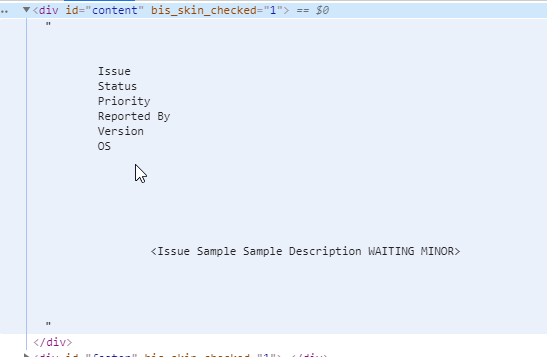
 tired root
set <table border="1">, but please stop using tables for formatting. use css for that @shell pewter
display: table or table-cell
 bleak bobcat
early 2000's hello
 rigid laurel
Random general question - is bootstrap still particularly relevant/useful?
 shut hare
I use bootstrap almost everyday for work and personal
Can anyone tell me if the free version of Pycharm allows you to seperate your CSS and JS into seperate folders? No matter what, I can't get them called.
"GET /templates/css/all.css HTTP/1.1" 404 -
/templates/scripts/scripts.js HTTP/1.1" 404
shut hare
yes
tired root
Flask expects css and js in a folder called static
shut hare
within the template folder?
tired root
    css/
        lib/
            bootstrap.css
        style.css
        home.css
        admin.css
    js/
        lib/
            jquery.js
        home.js
        admin.js
    img/
        logo.svg
favicon.ico```awesome, thank you
tired root
When you call up an image use <link rel="shortcut icon" href="{{ url_for('static', filename='img/favicon.ico') }}">
Same applies to css etc
shut hare
interesting. Yeah I just had everything as part of my html page while learning. Its getting chaotic, so I figured I would split them out.
thanks @tired root
native tide
@native root thanks so much for your help! I really appreciate that!
 queen river
Can someone try uploading a file? I try doing it myself but it just fails since I have low mem on my phone
Site: https://proxipi--proxneon.repl.co/upload
Repl: https://repl.it/@ProxNeon/ProxiPi
GitHub: https://github.com/IpProxyNeon/ProxiPi/blob/master/main.py


GitHub
An API I'm making so user's can request images for their discord bot - IpProxyNeon/ProxiPi
I also need a way to send and request data
Anyone have an idea on how to do that?
And there's also the problem if me being able to tag data TwT
shut hare
@queen river I got server error when attempting to upload
The server encountered an internal error and was unable to complete your request. Either the server is overloaded or there is an error in the application.
Hmmm
What file?
It allows gif files only (I forgot to mention that)
@shut hare
Hmmmm
Server over loaded tho...
#web-development is hard aaaaaaaa
 native root
Logging is very important
I would suggest utilizing sys.excepthook, and a reporting mechanism of some kind
 jade egret
@queen river you're missing the route for uploaded_file there.
add that then you can use requests to upload a file & get the file back as a response
jade egret
from flask import send_from_directory
@app.route('/uploads/<filename>')
def uploaded_file(filename):
return send_from_directory(app.config['UPLOAD_FOLDER'], filename)```in your/the dics upload_file route you redirect to uploaded_file.
you can use requests by sending .post(url, file={'file': open('image.gif', 'rb')})
it mimics the same thing that page/button does
native tide
why does my website load so slow in the browser
i've come to the conclusion that it's the background image
how do i fix that?
this is the website https://kenny-hoft.herokuapp.com/
Kenny's portfolio website created with Flask.
shut hare
@queen river it was a gif
 dawn heath
how can I old login logic into a new login using form_valid?
I am trying to use the same logic as my old login to perform a more fancy login using sessions , and group permissions , but I want to achieve something. I want to send login messages as 'login_message' : 'The user has been removed' or 'login_message' : 'invalid', and later add custom html messages based on the response , but how can I grab the logic from my old login to my new login as I am using form_valid
new login
class Login(LoginView):

    authentication_form = CustomAuthenticationForm

    form_class = CustomAuthenticationForm

    template_name = 'login.html'

    def form_valid(self, form):
        login(self.request, form.get_user())
        return HttpResponseRedirect(self.get_success_url())
old login
  class LoginView(View):
    def get(self, request):
        return render(request, 'login.html', { 'form':  AuthenticationForm })

    def post(self, request):
        form = AuthenticationForm(request, data=request.POST)
        if form.is_valid():
            user = authenticate(
                request,
                username=form.cleaned_data.get('username'),
                password=form.cleaned_data.get('password')
            )

            if user is not None:
                if user.is_active:
                    login(request, user)
                    return redirect('/') # home page
                else:
                    return HttpResponse("A") # account disabled
            else:
                return HttpResponse("invalid_creds")
settings
LOGIN_REDIRECT_URL = '/account/profile'

LOGOUT_REDIRECT_URL = '/'
I am just getting into Flask, and I am just learning now that these databases are not going to be fun all the time
native tide
sqlite vs sqlalchemy?
native root
The question is not really sqlite vs sqlalchemy--one is a database, the other is a database interface. You can use sqlalchemy with sqlite, or just sqlite all by itself. If you're wondering whether acessing the database alone is easier than using sqlalchemy, the answer is that it depends on what you're going to do. Some things get more complex when you introduce sqlalchemy, other things get easier. I would suggest a look at ponyorm as well, while it's not as popular it is much simpler and in my opinion easier to work with.
native tide
Thanks for clarifying. I was just reading that.
Basically, I'm following along doing a textbook Flask application and this is my first time doing anything with a real database
I have always stored data in json until now
without relationships, etc
It has me using SQLAlchemy so I guess I'll learn that first
but it seems annoying
 wide gulch
I'm having a problem managing user sessions when integrating TFA (which is optional for users to enable). The issue is how can I let the user login first (with username and password) and if tfa is enabled then present an extra form (on a separate http request) to verify their code? How would this work with @login_required decorator.
@frontend.route('/auth/login', methods=['GET', 'POST'])
def auth_login():
    if current_user.is_authenticated:
        return redirect(url_for('frontend.dashboard'))
    form = LoginForm()
    if form.validate_on_submit():
        user = user_service.first_or_404(username=form.username.data)
        # Do I log the user in when TFA is enabled?
        login_user(user, remember=False)
        if user.is_otp_enabled():
            return redirect(url_for('frontend.auth_tfa'))
        return redirect(url_for('frontend.dashboard'))
    return render_template('auth/login.html',
                           form=form
                           )


@frontend.route('/auth/login/tfa', methods=['GET', 'POST'])
def auth_tfa():
    if not current_user.is_authenticated:
        return redirect(url_for('frontend.login'))
    if not current_user.is_otp_enabled():
        return redirect(url_for('frontend.dashboard'))
    form = OTPCodeForm()
    if form.validate_on_submit():

    return render_template('auth/tfa.html',
                           form=form
                           )
you need to add some extra details to the user session
after user logged in with first factor, you don't login_user, but give session['login_status'] some value like 2fa_pending
you then redirect them to auth_2fa, where you check the session again to see if they're 2fa_pending
then you validate the OTP, and finally call login_user, and free up session[]
wide gulch
That worked, thanks @prime fox
Anyway to make the session['login_status'] key timeout after a certain duration?
wide gulch
I'd like to expire that after say 5 minutes, but i dont want to expire the user session
prime fox
you can always hack your own, if you're familiar with date time,
so session['login_status'] and session['login_expires_at'] <- calculate this
then when you check session['login_status'], check session['login_expires_at'] in the past and do a custom response
but i'll look up the doc
wide gulch
smart, thanks
prime fox
agh, can't find an easy way
why can't every key-value implementation be like Redis 
native tide
i heard that there are websites which allow you to upload a photo and then reduce its size in kb's so you can put it as a background picture so your website won't load so slow
can i get some suggestions
native tide
👀
prime fox
so just a regular image resizing?
native tide
yeh @prime fox
native tide
you can mention me when ever you want
 flat elk
hello, i need some advice on Django
I'm working on a simple food delivery website, and right now i'm stumped at the User part
so there are 2 parts:
(Front)
Customer can sign-up and place orders for the meal they want.
(Admin)
So this is where the orders are received and processed when a Customer placed an order. I plan on using the django.contrib.admin for this.
So here's the issue:
i want to have different USERNAME_FIELD for both of them. Customer will be using email, while Staff uses username. is there any way to achieve this?
tired root
@native tide Have a look at this: https://pnggauntlet.com/ or https://pngquant.org/ It reduces the size of images drastically, without actual resizing. Keep your hands off weird websites, many of them use bad algorithms. Also have a look at https://developers.google.com/speed/webp
@flat elk Since you should have 2 different vhosts for both functions anyway,use different databases and different code for both user types.
prime fox
i believe it's doable with USERNAME_FIELD
https://docs.djangoproject.com/en/2.2/topics/auth/customizing/#django.contrib.auth.models.CustomUser.USERNAME_FIELD
small gazelle
def list_to_links(events):
    s = ''
    for e in events:
        s = s + '<a href="/delete">' + str(e) + '</a>'
    return s
how can i use the specific clicked word in another function. Example: I click in the word 'hello' which then uses another function that removes the word itself from the list.
tired root
Use a form and post the element to be removed from the list to a function handling that post
then redirect back and display as wished
small gazelle
could you give an example
i am not very familiar with some of the terms you said
im kind of new to this sorry
@tired root
tired root
You are doing a website here, right?
So the terms GET and POST are really mandatory. But it basically means that parameters are passed either to the server or back to the frontend
POST means in this context a form is sending data to the server
<form action='/my-handler' method='POST'>
<input name='my-text-input' type='text'>
<input type='submit'>
</form> ```yes
tired root
this would be the basic example for a form
small gazelle
is the 'my-text-input' the word that i clicked?
tired root
You'd need to add a route to flask for this form like ```python
@app.route('/my-handler', methods=['POST'])
def handle_post:
text = request.form['my-text-input']
wait may i send u my whole program
cause i just copied one function from the program
tired root
I gave you pointers, you need to figure the rest out by yourself
tired root
Please don't try to make me feel guilty for not doing your work for you. That is a dick move.
small gazelle
no
its not that
dont feel
i understand
so in my program I already have this which im not sure if it is the form that you were talking about
@app.route('/')
def hello():
    s.run(blocking=False)
    alarm = request.args.get("alarm")
    if alarm:
        now = datetime.now()
        target = datetime.strptime(alarm.replace('T', ' '), '%Y-%m-%d %H:%M')
        dif = (target - now).total_seconds()
        print(dif)
        s.enter(dif, 1, print_job_name, ["Your event has been scheduled to", target])
        print(s.queue)
    form_html = '<form action="/setalarm" method="get"> \
    <input type="datetime-local" name="alarm"> \
    <input name="two"> \
    <input type="submit"> \
    </form>'
    list_below = 'List of notifications:'
    return form_html + list_below + list_to_links(list_events)
isnt the form_html the same thing u sent me
but with a datetime thing?
is it possible to clarify that for me?
small gazelle
@tired root i just understood the pointers but it wasnt really what i was looking for. Do you mind if i ask you one more questioN? and im sorry for making u feel guilty in any way
 hoary spruce
So I'm using f = request.form to pull all values from every input. On my local version that works fine. But on my online version hosted on my vps, it randomly selects only a few of them.
Does anyone know why this is happening
 proven blade
whats the best generator for a flask app?
i'm using flask app builder. It that one good for beginners
 vagrant adder
flask cookiecutter is good too
proven blade
What's the most used folder structure for Flask?
vagrant adder
app_name_here/
├── LICENSE
├── Procfile
├── README.md
├── app
│   ├── __init__.py
│   ├── config.py
│   ├── errors
│   │   ├── __init__.py
│   │   └── handlers.py
│   ├── main
│   │   ├── __init__.py
│   │   └── routes.py
│   ├── models.py
│   ├── posts
│   │   ├── __init__.py
│   │   ├── forms.py
│   │   └── routes.py
│   ├── site.db
│   ├── static
│   │   ├── assets
│   │   │   ├── favicon.ico
│   │   │   └── icon.png
│   │   ├── css
│   │   │   ├── about.css
│   │   │   ├── main.css
│   │   │   └── post.css
│   │   ├── js
│   │   │   ├── post.js
│   │   │   └── user_posts.js
│   │   └── profile_pics
│   │       ├── 432d079d4a0eb11a.png
│   │       └── default.jpg
│   ├── templates
│   │   ├── about.html
│   │   ├── create_post.html
│   │   ├── error_page.html
│   │   ├── home.html
│   │   ├── layout.html
│   │   ├── login.html
│   │   ├── post.html
│   │   ├── register.html
│   │   ├── reset_request.html
│   │   ├── reset_token.html
│   │   └── user_posts.html
│   ├── tests
│   │   ├── __init__.py
│   │   ├── tests_errors.py
│   │   ├── tests_main.py
│   │   ├── tests_posts.py
│   │   └── tests_users.py
│   └── users
│       ├── __init__.py
│       ├── forms.py
│       ├── routes.py
│       └── utils.py
├── coverage.xml
├── empty_create_db.py
├── github
│   ├── about.png
│   ├── account_page.png
│   ├── icon.png
│   ├── main.png
│   ├── main_page.png
│   └── register.png
├── manage.py
├── requirements.txt
└── run.py
@proven blade
dawn heath
how can I code it like this ??
class Login(LoginView):

    authentication_form = CustomAuthenticationForm

    form_class = CustomAuthenticationForm

    template_name = 'login.html'

    def form_valid(self, form):
        if form.is_valid():
            user = authenticate(
                self.request,
                username=form.cleaned_data.get('username'),
                password=form.cleaned_data.get('password')
            )
            if user is not None:
                if user.is_active:
                    login(self.request, form.get_user())
                else:
                    return render(self.request, 'profile.html',{'login_message' : 'The user has been removed',})
            else:
                return render(self.request, 'profile.html',{'login_message' : 'The user has been removed',})
            return HttpResponseRedirect(self.get_success_url())
        #login(self.request, form.get_user())
        #return HttpResponseRedirect(self.get_success_url())
I just want to return login_message to main in json format
 versed gale
Anyone has experince with viewvc and SVN authentication?
native tide
Do I need to know html, css, or js, to be able to use django
prime fox
basic level
native tide
To be good with django will I need to know them
prime fox
on a basic level
@dawn heath if you mean returning a json to an Ajax request from browser, literally return a dict, browser specifies Accept: application/json header
@dawn heath i was wrong, use jsonify from flask to make dict into json
 idle sentinel
Hello everyone!
I'm kinda stuck working on a django app and could really use some help.
Please take a look at this question if you've got time.
https://stackoverflow.com/questions/58882888/how-to-create-interactable-filters-on-the-template-that-filters-the-queryset-bas

Stack Overflow
I'm new to django and I'm trying to create a webapp that displays products in the database and allows users to filter through them.
For example, consider a model class Products and it has attribute...
small gazelle
How can i get data from a url and implement it into my website? (for example get the weather from another website and make it show on my website)
jade egret
find an api to get info from
hoary spruce
https://stackoverflow.com/questions/58884770/flask-python-request-form-acting-different-on-live-version-vs-local?noredirect=1#comment104036800_58884770
Anyone maybe has an idea?
Stack Overflow
I currently have a form on my flask web app that has +- 100 inputs. To request every value in 1 line I use: f = request.form. If I print it on my local version, I'll end up with a complete list of ...
 reef canopy
Hello 🙂
import yagmail
import imapclient
import imaplib
import pyzmail
import time


def fetch_emails():
    # IMAPclient login
    server = imapclient.IMAPClient('imap.gmail.com')
    server.login('jakubdonovan@gmail.com', 'NONONONONONONO')
    print('Logged in')

    # Fetching emails
    uids = server.search(['All'])
    server.select_folder('Inbox', readonly=True)
    server.gmail_search(['ALL'])
    raw_messages = server.fetch(uids, ['Body'])
    imaplib.MAXLINE = 100000  # This sets the limit to 10,000,000 bytes instead of 10,000

    # Parse the emails
    # Still need to change the uid number inside raw_messages
    message = pyzmail.PyzMessage.factory(raw_messages[100]['Body[]'])
    message.get_subject()
    message.get_address('from')

    message.text_part != None
    message.text_part.get_payload().decode(msg.text_part.charset)

fetch_emails() ```File "/Library/Frameworks/Python.framework/Versions/3.7/lib/python3.7/ssl.py", line 1139, in do_handshake
self._sslobj.do_handshake()
ssl.SSLCertVerificationError: [SSL: CERTIFICATE_VERIFY_FAILED] certificate verify failed: unable to get local issuer certificate (_ssl.c:1076)
Did anyone deal with this issue before?
Essentially, what i'm trying to do is fetch all emails from the Inbox
reef canopy
I fixed it using this tutorial https://www.dev2qa.com/how-to-fix-python-error-certificate-verify-failed-unable-to-get-local-issuer-certificate-in-mac-os/

When i run python code in mac os, i meet a certificate verify failed error like this ssl.SSLCertVerificationError: [SSL: CERTIFICATE_VERIFY_FAILED] certificate verify failed: unable to get local issuer certificate (_ssl.c:1056). …
 tight shadow
Hi, I am trying to make custom Django form field, any chance to force CheckboxSelectMultiple on a JsonField to write the currently selected/unselected values when saving? At the moment I managed to get only the last checked values as string, what I need is to have all the values save as json array aka python list.
wide gulch
If I want SSO on my flask app do I have to write all of the oauth code to interface with Google/Apple/FB? Or is there a module that can do that and I provide the client ID's/secret keys?
vagrant adder
Sso?
wide gulch
single sign on
small gazelle
import requests
import json

base_url = "http://api.openweathermap.org/data
api_key = "<api-key-here>"
city_name = input("Enter city name: ")

complete_url = base_url + "appid=" + api_key +
print(requests.get(complete_url).json())
why when i run this with an actual api key it gives me this?
Enter city name: Manchester
{'cod': 401, 'message': 'Invalid API key. Please see http://openweathermap.org/faq#error401 for more info.'}

Process finished with exit code 0
I got the api key from the website itself
(note: im new to this not sure what an API key does either)
sorry for noob question 🙂
 boreal beacon
Does it go away without border-radius?
wide gulch
@small gazelle
A: You can get the error 401 in the following cases:

    You did not specify your API key in API request.
    Your API key is not activated yet. Within the next couple of hours, it will be activated and ready to use.
    You are using wrong API key in API request. Please, check your right API key in personal account.
    You have FREE subscription and try to get access to our paid services (for example, 16 days/daily forecast API, any historical weather data, Weather maps 2.0, etc). Please, check your tariff in your personal account and pay attention at our price and condition.
directly from that link in the error lol
native tide
Regarding Django file structure, if i make an app with manage.py startapp <appname>.. i get a structure right, and if within that url/app i have a file which wants to read a csv, in what folder do i place this? what is the relative path within the app if i run it by default?
like say i want pandas to do: df = pd.read_csv("data/file.csv").. where would django look?
tight shadow
when clean is called in a Django form, if I modify the values, it still raises exception for a given field that is required, although I set the values
tight shadow
I thing I got it, I subclassed the Field in question and overrided the prepare_value, and there I added all defaults I want. I need to look for some execution flow diagrams for the form validation :D.
native root
@native tide see here: https://stackoverflow.com/questions/13067107/read-a-local-file-in-django
Stack Overflow
I'm quite stuck on this one!
I am writing a Django view that reads data from an external database. To do this, I am using the standard MySQLdb library.
Now, to load the data, I must do a very long...
native tide
thanks
boreal beacon
Give the item you want to jump to an id.
In your link, set the href to #id.
<a href="#jump">Jump!</a>
<p id="jump">Hello World</p>```If you want to make the jump smooth instead of instant, use scroll-behavior: smooth;
 strong patio
Hello,
I am working a new website and i will appreciate some feedback.
Don't hesitate to try my website at https://python.paladinschallenge.com and visit my github repositorie at https://github.com/pytchoun/eSport
Python is a community website dedicated to the game Paladins of Hi-Rez Studios. We are focused on the competition between the players and to do this we provide different functionalities.
 native tide
hey which one is better for frontend. js or python(Django,Flask)?
 somber abyss
Hi, i wanted to make python web app that will write sin and cos graph, which is done and everything is working, but i am running into flask problem. I wanted to be able for user to write down variables and get graph in other tab, so i copied my sin and cos graph generator into if request.method == "POST": .Now i dont know if i shoud put i there or somewhere else. If anybody have any understanding in flask i can send my small source code so u can have better view and help me with this project. Thank you!
Traceback (most recent call last):
File "c:/Users/Korisnik/Desktop/Trigonometrijaa/app.py", line 2, in <module>
import matplotlib.pyplot as plt
File "D:\Spyder\lib\site-packages\matplotlib__init.py", line 138, in <module>
from . import cbook, rcsetup
File "D:\Spyder\lib\site-packages\matplotlib\cbook__init.py", line 31, in <module>
import numpy as np
File "D:\Spyder\lib\site-packages\numpy__init__.py", line 140, in <module>
from . import _distributor_init
File "D:\Spyder\lib\site-packages\numpy_distributor_init.py", line 34, in <module>
from . import _mklinit
ImportError: DLL load failed: The specified module could not be found.
this is "error" i get from running
amd this is how my code looks like
native tide
what the user will write down should be in 'POST'
i think
what you want the user to see, should be in if method == 'GET':
small gazelle
Hi guys could anyone help me understand why my schedule command is not triggering when the time comes in my url? program: https://paste.pythondiscord.com/ekumolizoq.py
native tide
I want to know which one is better for frontend, JS or python(Django,Flask)?
 marsh canyon
Python is for backend
Js is the only option for front end
But there are many frameworks to go with
Like react, angular or vue
I don't have any experience in those but I hear react is very popular
somber abyss
probably background image
native tide
A beziercurve
 ripe pecan
 peak thicket
EPIC_DEVICE=X; EPIC_FUNNEL_ID=X; EPIC_SESSION_ID=X; EPIC_SSO_SESSION=X; XSRF-TOKEN=X
This would be a correct “Cookie” header right?
native root
yes
native tide
hi guys
i'm using django and i want to create a detailview where i have multiple url parameters
like http://x/str:entity/str:data/detail
class DataDetailView(LoginRequiredMixin, DetailView):
    model = Entity_Data
    template_name = 'seed/datadetailview.html'
    pk_url_kwarg = 'entity'
    slug_url_kwarg = 'entity'
    slug_field = 'entity'

    #https://stackoverflow.com/questions/42653039/django-detailview-how-to-change-the-get-object-to-check-a-field

    """def get_object(self, queryset=None):
        #print(self.kwargs)
        entity = Entity.objects.get(entity=self.kwargs['entity'])
        #print(entity.id)
        obj = get_object_or_404(Entity_Data, entity=entity.id, data_type=self.kwargs['data'])
        print(obj)
        return obj"""

    def get_object(self, queryset=None):

        obj = super(DataDetailView, self).get_object(queryset=queryset)
        return obj

    def get_queryset(self):
        print(self.kwargs)
        entity = Entity.objects.get(entity=self.kwargs['entity'])
        obj = get_object_or_404(Entity_Data, entity=entity.id, data_type=self.kwargs['data'])
        return obj
entity is the foreign key for there entity_data
i want to match foreign key and data from url parameters
if i uncomment the commented part it works but in the template i'm getting access to the entity queryset and not to the entity_data querysetù
peak thicket
It doesn’t seem to work for requests.
native root
https://stackoverflow.com/questions/31385737/multi-parameters-in-url-django May also be of use
Stack Overflow
maybe this question is repeated but I can't find any solution exactly what I need. I need to pass two differents parameters to one url in a DetailView (Im not working with function views, mostly of
 cyan wolf
hi
python question
i have a login route that is following:
@app.route("/login", methods=['GET', 'POST'])
def login():
    if current_user.is_authenticated:
        flash('You have already logged in!', 'danger')
        return redirect(url_for('home'))
    form = LoginForm()
    if form.validate_on_submit():
        user = User.query.filter_by(email=form.email.data).first()
        if user and bcrypt.check_password_hash(user.password, form.password.data):
            login_user(user, remember=form.remember.data)
            flash('You have been logged in!', 'success')
            next_page = request.args.get('next')
            return redirect(next_page) if next_page else redirect(url_for('home'))
        else:
            flash('Login unsuccessful. Please check email and password', 'danger')
return render_template('login.html', title='Login', form=form)```this is my settings file
@app.route("/settings")
@login_required
def settings():
return render_template('settings.html', title='Account Settings')```now the basis is, if youre not logged in and try to access /settings, youll be redirected to the login page
when you then log in, you get sent back to the settings page (the link you tried to access)
this doesnt work and instead returns me home
this is what was happening before i put in the code so i know its something here:
next_page = request.args.get('next')
return redirect(next_page) if next_page else redirect(url_for('home'))```these are the imports too:
from flask import render_template, url_for, flash, redirect, request
from flaskblog import app, db, bcrypt
from flaskblog.forms import RegistrationForm, LoginForm
from flaskblog.models import User, Post
from flask_login import login_user, current_user, logout_user, login_required```@gilded monolith what were you saying?
 gilded monolith
actually nvm i need to test out :p
cyan wolf
ok xD
gilded monolith
what is the value of next page when you do that ?
gilded monolith
just trying to run it through my head, if you say that it returns you home from the code you added, that means next_page is None or False ?
cyan wolf
oh wait
i know
wait no i dont
i guess so
but it shouldnt be
after you log in, it should direct you to the settings page you tried to access
i gtg but ping me what you think
gilded monolith
next_page = request.args.get('next')
return redirect(next_page) if next_page else redirect(url_for('home'))```i tried this on my own app and it seemed to work
you sure you don't try to access setting instead of settings :p
native tide
Is it ok to save logins in cookies?
 brave karma
I want a button to send a post request to a url. that url requires an Authorization header to work. How do I do that without using js? this one only uses js: https://stackoverflow.com/questions/48875072/how-do-i-add-basic-auth-headers-to-a-post-request-that-returns-html
or is that not possible?
Stack Overflow
For one of the projects I am working on, there is a POST endpoint protected by basic auth that returns a HTML form. This is hosted using a express server and protected using passport's basic auth. ...
i wanna use python to do it cuz thats where all my requests are handled and thats where i can access stuff in a .env file from a config class
app.config
 opaque vigil
Guys could how can i return different serializer based on my categoryname value. I have tried something like this ```
def get_serializer_class(self):
    categoryname = Role.objects.filter(categoryname=categoryname, pk=pk, owner=owner)
    if self.request.method == 'GET' and self.request.user.has_perm('user.view_user'):
         return RoleSerializerDepth
    if self.request.method == 'PUT' and 'Developer' in categoryname:
       return RoleSerializerDeveloper
    if self.request.method == 'PUT' and 'Investor' in categoryname:
       return RoleSerializerInvestor
    if self.request.method == 'PUT' and 'Auditor' in categoryname:
        return RoleSerializerAuditor
    if self.request.method == 'PUT' and 'Educational' in categoryname:
       return RoleSerializerEducationalInstitution
    return RoleSerializerBasic
I have also tried using validated_data['categoryname], but it does not work in get_serializer_classprint categoryname/1 if thats not a typo
opaque vigil
Basically it is
What i am trying to do is, to return different serializers based on my Role model field categoryname value
jade egret
what does that value print as, & when does/can it change
opaque vigil
local variable 'categoryname' referenced before assignment
 hallow moat
That means you're trying to read from that variable, but it hasn't been set.
 shy dove
hi all, how would i go about having a grid and list/table button on my django site, if it's on grid view, it'll show 6 cards paginated, but if the list/table button is clicked, it shows all on one list in a table and no pagination
i have the grid view done and working, just wondering about how to get a list view without pagination
 last lily
Yo guys, I've been learning flask with Corey Schafer's series. Hes a really good teacher but he skips over the html / bootstrap part. I was wondering if any of you could direct me to the right place to find good course or tutorial on html stuff like this, my level is knowing all the html easy basics and getting confused by the more advanced stuff
rigid laurel
w3schools is pretty great
https://www.youtube.com/watch?v=pQN-pnXPaVg is probably pretty solid if you want a video

Learn the basics of HTML5 and web development in this awesome course for beginners. ⭐️ Contents ⭐️ ⌨️ (0:00:00) Introduction ⌨️ (0:01:54) Choosing a Text Edi...
native tide
Hi guys I’m trying to add additional values/fields to a django queryset in a listview.
I read some stackoverflow and documentation and it seems that I have to override get_context_data
But I can’t access data from another model inside the get_context_data and access it in the template
Using {% for i in object_list %}
{{i.newfield}}
 mint hedge
hey all. i am writing a flask app and am wondering if you could point me to the right location
I have a json file of data in this layout
{
    "brand":
        {
            "mounting type1":
                   {
                        "item1": "value1",
                        "item2": "value2",
                        "item3": "value3"
                     },
            "mounting type2":
                   {
                        "item1": "value1",
                        "item2": "value2",
                        "item3": "value3"
                     },
              },
       "brand2":
etc etc etc
I want to load the "brands" as radio buttons, the "mounting type" as a label and the "items" as labels with a numerical entry.
If you could point me to a link or concept that does something like this, i would greatly appreciate it
mint hedge
nevermind. think i have it figured out
dawn heath
how can I reproduce timeout error on django?
 shut igloo
First time Django. Hate web dev :> - When running:
C:\Users\rohan\Desktop\website\myportfolio>```

Just throws back an empty line and then another prompt for text.No worries.
It was due to Windows alias perms
 main juniper
has somebody worked with django and Azure blob storage?
 vocal oyster
I have a discord bot that outputs a json file, and I want it to also put it onto my website, how would I do that
 proper hinge
add an endpoint you can POST the data to
vocal oyster
@proper hinge wdym
proper hinge
Create a simple http API endpoint so you can send an http post request to that endpoint along with the json data
Then your site back-end can send the json off to somewhere it can be rendered as a web page
vocal oyster
I have the data saved in a file
native tide
can anyone tell me why my website looks different on google chrome than on edge?
on edge it looks right!
but on chrome the media queries don't work.
why?
 stiff totem
Hey guys, I am using django-oauth-toolkit to make a custom oauth2 provider. Also python-social-auth's social-auth-app-django to make some other (facebook, google) login. So in my case, when user logged in using facebook or google i have to provide oauth token as a response to user right?
 eager root
https://hastebin.com/eyaxazelev.xml
there is an error that keeps on saying wordguesser.html:68 Uncaught TypeError: Cannot set property 'innerHTML' of null
at guess (wordguesser.html:68)
at HTMLButtonElement.onclick (wordguesser.html:92)
vagrant adder
There isn't an element with an id of "game"
 grave latch
hi I was working with flask sqlalchemy on heroku...can u give me a hint on how to create tables in webapp......I currently have to create table manually before deploying app or it creashes
grave latch
@vagrant adder heroku postgre db...
..that is another this is the app

GitHub
Flask Heroku Sample Application. Contribute to yefim/flask-heroku-sample development by creating an account on GitHub.
oh thank you , I think i got what the problem was...when deployed my app instantly directs to route(/index)...tries a query to view all the elements in database. So my app did not have any chance to run the code db.create_all()
which resulted in searching an uncreated table
vagrant adder
You got it sorted out?
grave latch
yes
vagrant adder
👍
grave latch
Hi....do u guys have source of a good,easy to extend flask boilerplate app with user signin, register fucntionality.
 coral sorrel
this belongs in an offtopic channel. you're not asking for help
native tide
i was just about to delete all this and move it to off-topic
coral sorrel
go for it, when i see it i'll reply
 fair wraith
When I try and run from flask_socketio import SocketIO, send, I get this error:
File "main.py", line 2, in <module>
from flask_socketio import SocketIO, send
File "C:\Users\Ryan's Gaming Pc\AppData\Local\Programs\Python\Python37-32\lib\site-packages\flask_socketio\__init__.py", line 9, in <module>
from socketio import socketio_manage
File "C:\Users\Ryan's Gaming Pc\AppData\Local\Programs\Python\Python37-32\lib\site-packages\socketio\__init__.py", line 3, in <module>
from .client import Client
File "C:\Users\Ryan's Gaming Pc\AppData\Local\Programs\Python\Python37-32\lib\site-packages\socketio\client.py", line 6, in <module>
import engineio
File "C:\Users\Ryan's Gaming Pc\AppData\Local\Programs\Python\Python37-32\lib\site-packages\engineio\__init__.py", line 8, in <module>
from .asyncio_client import AsyncClient
File "C:\Users\Ryan's Gaming Pc\AppData\Local\Programs\Python\Python37-32\lib\site-packages\engineio\asyncio_client.py", line 10, in <module>
import websockets
File "C:\Users\Ryan's Gaming Pc\AppData\Local\Programs\Python\Python37-32\lib\site-packages\websockets\__init__.py", line 3, in <module>
from .client import *
File "C:\Users\Ryan's Gaming Pc\AppData\Local\Programs\Python\Python37-32\lib\site-packages\websockets\client.py", line 12, in <module>
from .protocol import CONNECTING, OPEN, WebSocketCommonProtocol
File "C:\Users\Ryan's Gaming Pc\AppData\Local\Programs\Python\Python37-32\lib\site-packages\websockets\protocol.py", line 17, in <module>
from .compatibility import asyncio_ensure_future
File "C:\Users\Ryan's Gaming Pc\AppData\Local\Programs\Python\Python37-32\lib\site-packages\websockets\compatibility.py", line 9
asyncio_ensure_future = asyncio.async # Python < 3.5
^
SyntaxError: invalid syntax ```
Here is my code too so far: https://pastebin.com/raw/6nhqux4F
How can I fix this? I’m not sure why it is not working but help is appreciated! Thanks sly canyon
@fair wraith Can you share compability.py file?
native tide
Anybody know PHP/MySQL ?
fair wraith
@sly canyon got you
 lavish prismBOT
@fair wraith, it looks like you tried to attach a Python file - please use a code-pasting service such as https://paste.pythondiscord.com/ instead.
fair wraith
@sly canyon https://paste.pythondiscord.com/qaxuqayawa.py
sly canyon
@fair wraith I'm not familiar with asyncio, but I've been quick reading the docs here, can you explain why u decided to parse only the method?
Seems like you have to parse a coroutine along with it
fair wraith
I did not edit that code for the compability.py. It came with that when I installed flask-socketio @sly canyon
sly canyon
@wraith shoal Tough question, I've started with Flask and I'm pretty satisfied with it, plus it is very minimalistic, seems like django is pre-loaded with a lot of stuff. I'd advise you to go through this tutorial right here: https://blog.miguelgrinberg.com/post/the-flask-mega-tutorial-part-i-hello-world if you decide to start with Flask
 wraith shoal
Thanks ! @edug
sly canyon
@quartz lily are you using bootstrap?
 quartz lily
Yes
sly canyon
@quartz lily https://getbootstrap.com/docs/4.3/components/card/

Bootstrap’s cards provide a flexible and extensible content container with multiple variants and options.
 floral isle
Wrong Ice 😜
sly canyon
Sorry
quartz lily
Lol
sly canyon
Check the Dark card title
quartz lily
Alright
sly canyon
@fair wraith very strange, if you're using Py 37 I think it should not even go through that line, as asyncio.ensure_future() should be up and running. Try to insert a print('something') after asyncio_ensure_future = asyncio.ensure_future and see if it prints it in your console.
quartz lily
Can I change the color of the card?
sly canyon
@quartz lily there are some pre-made colors, but you can customize in your own custom *.css if you want
quartz lily
Alright
fair wraith
@sly canyon put a print statement on which line of compability.py?
native tide
Can anybody assist me with problem, I am using proxmoxer module to interact with my cluster to list all of VMs and LXC containers, my goal is to setup web interface where I can monitor my containers and VMs along with Slack bot to alert if VM or container crashes.
My goal now is to make function to list all containers and VMs on website, this is current error
Traceback (most recent call last):

   return self.view_functions[rule.endpoint](**req.view_args)
  File "/Users/domandric/Projects/slackops-bot/main.py", line 22, in main
    return render_template('index.html', list_vms=list_vms)
  File "/Users/domandric/Projects/slackops-bot/venv/lib/python3.8/site-packages/flask/templating.py", line 136, in render_template
    ctx.app.update_template_context(context)
  File "/Users/domandric/Projects/slackops-bot/venv/lib/python3.8/site-packages/flask/app.py", line 838, in update_template_context
    context.update(func())
I will add code in sec
sly canyon
@fair wraith after the current line 7
native tide
I just need to edit out login for server
fair wraith
@sly canyon got u
native tide
from bot import sendfile
from bot import sendmsg
import requests
from flask import Flask
from flask import render_template
import proxmoxer
from proxmoxer import ProxmoxAPI

app = Flask(__name__)

server = ProxmoxAPI('poweredge-server.andric.com', user="root@pam", password='password', verify_ssl=False)

@app.context_processor
def list_vms():
    for node in server.nodes.get():
        for vm in server.nodes(node['node']).qemu.get():
            print("{0}. {1} {2}".format(vm['vmid'], vm['name'], vm['status']))

@app.route("/")
def main():
    return render_template('index.html', list_vms=list_vms)

if __name__ == "__main__":
    app.run(debug=True)
@sly canyon testing the print statement rn but also I am running python 37
ok so it didn't even print the statement
What should I do now?
sly canyon
Well, I'm also a rookie, just to make it clear. But I think it means it couldn't find asyncio.ensure_future
fair wraith
Thats fine. So why would you think it couldn't find it. Because I do have async installed
sly canyon
Try re-installing asyncio
fair wraith
ok
sly canyon
@fair wraith try pip install --upgrade --force-reinstall asyncio
dawn heath
help / tips https://stackoverflow.com/questions/59010337/why-am-i-not-getting-the-tokens-created-when-i-tell-django-to-do-it ?
Stack Overflow
I am trying to create a password reset in Django, but once the input finds the email in the database then send an email with their token similar to http://localhost:8000/account/account-recovery/pr...
fair wraith
alr I got it to reinstall https://gyazo.com/f5d32233452128c7d654efc710a3229c

I am going to try and re run my script
sly canyon
@fair wraith yeah 😅
sly canyon
@fair wraith I've seen here https://stackoverflow.com/questions/51292523/why-does-asyncio-ensure-future-asyncio-async-raise-a-syntaxerror-invalid-synt that there's some incompatibilities between Python 3.7 and some libs, maybe that might be it.
Stack Overflow
i've been looking all over the the internet and back for an answer, but nothing comes up.
i assume this may or may not be a very rare.
it seems im the only one with this probably to be honest.
he...
@fair wraith Can you try with Py 3.6 or 3.8?
fair wraith
alr I am updating to 3.8 rn. Give me a moment
sly canyon
@dawn heath I've read it very quickly, but in your method
def verify_password_token(token):
    try:
        token = get_user_model().objects.get(token=token)
    #....
you're parsing a token arg in verify_password_token() and then modifying your token with a token extracted from your User object. Isn't the purpose of the verifying function to compare what's being parsed by the user with the token you've previously stored? Can you share your thoughts on it?
dawn heath
I think it is because the signal once created the user via signup a new token is generated , but when people try to reset that token is kind of replaced by pre_save
recommendation from a user Just create a reset_token method on your User model to re-generate (and save) a new token without changing the user
how can I do this in a code level?
sly canyon
Does the User.token match what's being emailed to the user at this point @dawn heath ?
dawn heath
yes
sly canyon
Cool.
dawn heath
do you mean the part of the email confirmation to activate account?
sly canyon
No, your question isn't about activating accounts, right? Is about allowing password resetting
dawn heath
nvm http://localhost:8000/account/account-recovery/process-reset/7d498a893edc45aa921a48f81f4826d3 this is my token generated by the token generated via email 7d498a893edc45aa921a48f81f4826d3
sly canyon
And to reset a password, a user has to open an email and click on a link that comes with a token for verification, right?
dawn heath
this is the token isnt stored in the db
sly canyon
It then redirects the user to a route which should compare the token being parsed by the user when it clicks on the link with a token stored in the DB, if I'm getting it right
dawn heath
yes
sly canyon
@dawn heath is your flask shell set up?
sly canyon
Oh, is there anything like a django shell, then?
dawn heath
sure
this is the token generated via forgotten password
>>> verify_password_token('41813f9c35db467bb13d280da94f37fb')
False
Try accesing that User object you generated this token and see if that user.token is storing something
Check what's coming out of user.token
dawn heath
def verify_password_token(token):
    try:
        token = get_user_model().objects.get(token=token)
    except (TypeError, ValueError, OverflowError, get_user_model().DoesNotExist):
        return False
    if token is not None:
        return True
    else:
        return False
yes
>>> token = get_user_model().objects.get(token='41813f9c35db467bb13d280da94f37fb')
apps.account.models.DoesNotExist: User matching query does not exist.
the token isnt stored in the dabase at all
fair wraith
https://paste.pythondiscord.com/boqemigoci.py
@sly canyon I have updated to 3.8 but I still get it 😦
sly canyon
How can that be @dawn heath , if you can access user.token in your helper.py
#....
  html_message = render_to_string('email/account-recovery.html', {
        'domain': current_site.domain,
        'token': user.token
the token is stored in user.token
dawn heath
user = get_user_model().objects.get(email=email)
from django.contrib.auth import authenticate, login, get_user_model
sly canyon
Does get_user_model().objects.get(email=email) retrieves a User object or only the email from that user?
sly canyon
So, how can that be that you are assining user to it and still it can find user.token?
That means get_user_model().objects.get(email=email).token is working, and it shouldn't, right?
sly canyon
usershould be assigned to the user object, and later you could be accessing user.token or user.email
dawn heath
exactly
sly canyon
I'm not familiar with pre_save, I actually don't know anything about Django, only flask, but I find your code somehow familiar
So, do you use something like SQLAlchemy in Django?
dawn heath
sqlite
sly canyon
OK, that's your db type, but I can see Django has its own ORM
You can query stuff like Entry.objects.filter(pub_date__year=2006)
quartz lily
how can i line these two up by the icon
im using display: flex but since the length is different, its spacing differently
sly canyon
@quartz lily try to wrap both cards into a div and Stretch both cards to its width limits, then center.
quartz lily
alright
ill do the width part
rest is already done
.questions {
    display: flex;
    justify-content: center;
    padding-right: 30px;
}

.questions-2 {
    display: flex;
    justify-content: center;
    padding-top: 50px;
    padding-left: 10px;
}
questions is the top 3
questions-2 is the bottom 3
.question {
    margin: 0 30px;
    color: #ffffff;
}

.question h3 {
    margin-bottom: 5px;
}
Are they all wrapped inside a div?
dawn heath
edug example
sly canyon
@dawn heath I'll come back to you in a moment
dawn heath
I think this hack will work def reset_token(self):
class User(AbstractUser):

    username = None
    email = models.EmailField(_('email address'), unique=True)
    token = models.CharField(max_length=36, blank=False, unique=True, null=False)
    signup_confirmation = models.BooleanField(default=False)

    USERNAME_FIELD = 'email'
    REQUIRED_FIELDS = []

    objects = UserManager()

    @receiver(pre_save, sender='account.User')
    def generate_token(sender, instance, **kwargs):
        instance.token = str(uuid4()).replace('-', '')

    def reset_token(self):
        self.token = hashlib.md5(os.urandom(16)).hexdigest()
        self.save()
<div class="faq">
        <h1>Frequently Asked Questions</h1>
        <div class="questions">
            <div class="question" id="faq">
                <i class="far fa-question-circle fa-3x"></i>
                <h3>How much does it cost?</h3>
                <p>Waffler costs $35 per month with an initial entrance fee of $50</p>
            </div>
            <div class="question">
                <i class="far fa-question-circle fa-3x"></i>
                <h3>When do you restock?</h3>
                <p>Restocks are planned a few days before. You can find information on our Twitter</p>
            </div>
            <div class="question">
                <i class="far fa-question-circle fa-3x"></i>
                <h3>What stores do you support?</h3>
                <p>We currently support SNS, END, BSTN, Naked, and many more</p>
            </div>
        </div>
        <div class="questions-2">
            <div class="question">
                <i class="far fa-question-circle fa-3x"></i>
                <h3>What systems are supported?</h3>
                <p>Waffler is only operable on Windows 10. Support for other systems will be added</p>
            </div>
            <div class="question">
                <i class="far fa-question-circle fa-3x"></i>
                <h3>Do you provide groupbuys?</h3>
                <p>We exclusively provide groupbuys to groups. You can contact us through Twitter for a groupbuy</p>
            </div>
            <div class="question">
                <i class="far fa-question-circle fa-3x"></i>
                <h3>Can I resell my license?</h3>
                <p>Yes! You can choose to rent or resell your license, and can be unbound through the dashboard</p>
            </div>
        </div>
    </div>
thats the html
sly canyon
@quartz lily Try creating a parent Row, then 3 columns inside it
quartz lily
thats what i have it as basically, im using display: flex to create the row
sly canyon
@quartz lily paste your HTML code plz
quartz lily
i did
sly canyon
Oh, you already did, sorry
quartz lily
Np
.faq {
    padding: 0 5%;
    background-repeat: no-repeat;
    background-position: left center;
    background-size: 80%;
    height: 800px;
    min-height: 800px;
    background: #171721;
    text-align: center;
}

.faq h1 {
    padding-top: 300px;
    color: #ffffff;
    width: 60%;
    margin: 0 auto 30px auto;
}

.faq i {
    color: #ffffff;
}

.questions {
    display: flex;
    justify-content: center;
}

.questions-2 {
    display: flex;
    justify-content: center;
    padding-top: 50px;
}

.question {
    margin: 0 30px;
    color: #ffffff;
}

.question h3 {
    margin-bottom: 5px;
}
thats the css code
fair wraith
https://paste.pythondiscord.com/boqemigoci.py
@sly canyon I have updated to 3.8 but I still get it 😦 What do I do?
sly canyon
@fair wraith I would try py 3.6 just to make sure it's not the version :/ you can also try stackoverflow to see if anyone knows the answer, because ensure_future should be accessible after py 3.4 (I believe that's what the docs state)
@quartz lily use Devtools to check if your margins and paddings are consistent between the columns
fair wraith
ok let me try
quartz lily
How do i do that
native root
@quartz lily you need to specify equal flex-basis values, by default they adjust to the ( different) content
Also your padding for both row must be the same
native root
Flex-basis: 33% on the items
quartz lily
Okay
.questions {
    text-align: center;
    display: flex;
    flex-basis: 33%;
    justify-content: center;
}

.questions-2 {
    text-align: center;
    display: flex;
    flex-basis: 33%;
    justify-content: center;
    padding-top: 50px;
}
like so?
Nvm i got it
native root
No, you’d need to apply flex-basis to the question items, not the container
native root
👍
sly canyon
@quartz lily Check what flex-direction does
sly canyon
OK @dawn heath did you find a way through it?
You have to store and commit your token within user by the time you send the token to its mail
dawn heath
class User(AbstractUser):

    username = None
    email = models.EmailField(_('email address'), unique=True)
    token = models.CharField(max_length=36, blank=False, unique=True, null=False)
    signup_confirmation = models.BooleanField(default=False)

    USERNAME_FIELD = 'email'
    REQUIRED_FIELDS = []

    objects = UserManager()

    @receiver(pre_save, sender='account.User')
    def generate_token(sender, instance, **kwargs):
        instance.token = str(uuid4()).replace('-', '')

    def reset_token(self):
        self.token = hashlib.md5(os.urandom(16)).hexdigest()
        self.save()
I dont think this is a good way to do it @sly canyon
sly canyon
@dawn heath check https://blog.miguelgrinberg.com/post/the-flask-mega-tutorial-part-x-email-support , maybe that can englighten you since flask is somehow similar to django
Look for the topic Requesting a Password Reset
fair wraith
@sly canyon it didnt work. What now?
sly canyon
@fair wraith not even in py 3.6?
fair wraith
no
sly canyon
Dang!
fair wraith
😦
dawn heath
edug , would you create a separate table for paswords resets or the same as user?
sly canyon
@dawn heath When it comes to models.py I would def a method for it inside the user object, just like in the tutorial.
dawn heath
I am trying to expire tokens from forgot password requests, but token from PasswordReset becomes NULL after the user updates their password, however, I was thinking on some kind of solution, but I want to expire the token usage after 1 minute or max 5 minutes to meet security requirements, but I also got created_at . how can I set up an is_expire function to invalid the token?
if self.token == None:
  return False
do_expire
class PasswordReset(models.Model):
    email = models.ForeignKey(User, on_delete=models.CASCADE)
    token = models.CharField(max_length=100, null=True, blank=True)
    created_at = models.DateTimeField(auto_now_add=True, blank=True)
    updated_at = models.DateTimeField(auto_now=True, blank=True)
@dawn heath not sure if that's appropriate but you could implement some kind of checking in your route before allowing the user to change the password such as
def is_token_still_valid(created_at):
    if  created_at + datetime.timedelta(minutes=5) >= datetime.datetime.now():
        return True
    else:
        return False
Hi guys
I plan to build a notes web app
Where at the home page ,it should ask me to enter password to proceed
Next page it should take me to the notes page ,where it should me my notes
How to proceed ..the authentication stuff
sly canyon
@wraith shoal django? flask?
wraith shoal
Django
sly canyon
maybe @dawn heath can help you on that one.
marsh canyon
U have quite a few options here
The easiest will be to use inbuilt django auth views
Or u can build ur custom login/register forms
Or use something like all auth
I think the inbuilt django auth views will do, they give u a login and logout view ready to use
Lemme get a link
dawn heath
@wraith shoal yeah
I am not using built it system , but how can I add the timeout in the model ?
is there a way to make a is_token_expired function , and call itself ?
marsh canyon

YouTube
Python Django Tutorials. In this series, we will be learning how to build a full-featured Django application for scratch. We will learn how to get started wi...
Yr reference, u can look at the registration and login videos
wraith shoal
Thank you @marsh canyon @dawn heath
@sly canyon
Implement user authentication with login and logout in Django 2.2.
Found this
dawn heath

Simple is Better Than Complex
This is a blog about Python, Django and Web Development. New posts every week.
this guy is also good
wraith shoal
👌
I have wasted a lot of time by switching to other Lang's like ruby , golang , scala
And practically building nothing
I'm back to where it all started for me (py) and now I'll build .
Had built this for my girlfriend under 10 mins when I was traveling in bus .. she was visibly flattered😂
dawn heath
I started in C / c+ +. university PHP /Codeigniter and the street take me to python
wraith shoal
Woah!
Python hits a sweet spot ..
People bash it for being slow
But it's okay ..it works most of time(speed)
wraith shoal
How to connect heroku mysql to Django app
quartz lily


Anyone know why my card shows up like that ^ on my website
The 1st is the correct card
With correct html and styling on a blank page
But implementing it on my site creates issues
 nocturne grail
Conflicting classes maybe?
like you may have classes that override, whereas on your test site you dont have those overriding classes
quartz lily
    <div class="card-container">

        <div class="upper-container">
            <div class="image-container">
                <img src="images/logo.png"/>
            </div>
        </div>

        <div class="lower-container">
            <div>
                <h3>Test Name</h3>
                <h4>Front-end Developer</h4>
            </div>
            <div>
                <p>sodales accumsan ligula. Aenean sed diam tristique, fermentum mi nec, ornare arcu.</p>
            </div>
            <div>
                <a href="#" class="btn">View profile</a>
            </div>
        </div>

    </div>
the html doesnt include any other classes
the only thing i could think of is the <body> and <html> tags its included in
but the html i sent is the same in both my website and the blank page i designed it in
* {
    margin: 0px;
    padding: 0px;
    box-sizing: border-box;
    font-family: 'Montserrat', sans-serif;
    scroll-behavior: smooth;
    overflow: scroll;
    overflow-x: hidden;
    animation: transitionIn 1.5s;
}

body {
    background: #171721;
    margin: 0px;
    padding: 0px;
    box-sizing: border-box;
}
im thinking its the margin and padding
which is messing with everything in that card
nocturne grail
potentially, what browser you using?
because if it is chrome, the easiest way to check for things like that is using the f12 debug menu
you can enable and disable class items like that and see what is messing things up
nocturne grail
Yeah it is a lifesaver
@quartz lily if you go to styles, you can check and uncheck boxes
which enables and disables the classes
Oh hang on, I think your issue is that you are setting the margins and padding to zero
for everything
Do you do that on your blank page?
quartz lily
no
that is probably it
but I need those margins and padding set to 0
for the rest of my site
wraith shoal
Python anywhere gives only one web app for free account?
 safe garden
according to their site, yes (https://www.pythonanywhere.com/pricing/)
wraith shoal
👌
 unborn elm
do you guys work with webbrowser Module here??
vagrant adder
I used to do some
 civic cape
Hey, would anyone be able to assist me in debugging a Django form issue? The underlying issue has no error message so I am unsure where to start.
What is happening is my form won't recognize an uploaded image for an imagefield. When I click post(submit) it bounces back that the field is required and ignores the submitted file.
The form works from the admin page which suggests it's something about my html.
<fieldset class="password_change">
    <legend>Create New Blog Post</legend>
    <form action="" method="post" class="edit-article">
        {% csrf_token %}
        <div class="userinput">
            {% for field in form %}
            <div class="fieldWrapper">
                {{ field.errors }}
                {{ field.label_tag }} {{ field }}
                {% if field.help_text %}
                <p class="help">{{ field.help_text|safe }}</p>
                {% endif %}
            </div>
            <br />
            {% endfor %}
        </div>
        <button type="submit">Post</button>
    </form>
</fieldset>
anyone can help me with selenium
sly canyon
@unborn elm what's the issue
quartz lily
Hey guys I have this card I designed on a blank html tab and it shows up properly
On my website it's all messed up
sly canyon
@civic cape I'm not used to django, but in your routes, how is your form validation set up? are you really extracting the data from the field?
quartz lily
* {
    font-family: 'Montserrat', sans-serif;
    scroll-behavior: smooth;
    overflow: scroll;
    overflow-x: hidden;
    animation: transitionIn 1.5s;
}

body {
    background: #171721;
}
this is the only css code that could conflict with it
cause the rest of the css code between my test file and my website are the exact same besides a few small color changes
sly canyon
@quartz lily try using z-index and/or showing whatever is overflowing
quartz lily
What's z-index?
unborn elm
I was thinking of importing selenium to open new tab in chrome for example then to fill information (in a certain page) like pass and user name
is that possible and how
?
sly canyon
@quartz lily it tells which object is on top of which other object
controlling the "z" axis
quartz lily
How can I use it
sly canyon
in your CSS, in whatever class you want to be on top of the others you just increase the z-index
quartz lily
Okay
sly canyon
But the overflow hidden is cropping your content anyways
unborn elm
👆
sly canyon
@unborn elm it's possible, do you know anything about selenium?
unborn elm
not really
sly canyon
@unborn elm you can do even better by saving your cookings and loading to a browser's session so you don't have to type username and password
using pickle
sly canyon
For the first time, yes. Not afterwards
unborn elm
because I really want to do a program that signes me in a site every 30 min
even when I'm not with my computer
sly canyon
Can you further explain what exactly do you want from Selenium?
unborn elm
So..
sly canyon
What's your requirements for this project?
civic cape
@sly canyon i am not 100% what your asking. I did find on stackoverflow after many different googling attempts. that i needed to add an enctype="multipart/form-data" to my HTML form tag
that seems to have solved the issue not sure why
unborn elm
The more often I sign into my school webpage the better my grade in geographi gets
and I just want to sign in and quit every like 30 min 4 example
but remotley
not manually
sly canyon
@unborn elm you can just flood http POST requests then, don't need selenium for that
unborn elm
Whats that
quartz lily
right now it looks like that
im trying to make it like 3 in one row
i tried display: flex but it was messing stuff up
unborn elm
@sly canyon what'sflood hhtp post?
sly canyon
@quartz lily try wrapping all of them into a div and use justify-content: space-between;
civic cape
@sly canyon also, just becuase i found that on the django documentation.
Note that request.FILES will only contain data if the request method was POST and the <form> that posted the request has the attribute enctype="multipart/form-data". Otherwise, request.FILES will be empty.
quartz lily
Alright.
sly canyon
@unborn elm Do you know what is a POST and GET ?
sly canyon
@unborn elm Do you mind private chatting? 'cause I don't want to flood the channel
unborn elm
sure
quartz lily
also @sly canyon u pinged the wrong ice
sly canyon
Sorry ^^
quartz lily
Lol
sly canyon
Too many ices here
quartz lily
.about-cards {
    justify-content: space-between;
}
so i made a div which includes 3 sets of the image container and added that
thats what happened
sly canyon
@civic cape that's it then, I'm not used to Django as I told you, Flask functioning is different rom that. We extract data on the routes like form.some_form.data
@quartz lily Did you have 3 of those cards before? I don't get it, make sure .about-cards display: flexand flex-direction: column
quartz lily
that makes them go off the page
and i had 1 before but i need 3 now in the same row
I got it to space properly
but now they are off centered
.about-cards {
    justify-content: space-around;
    display: flex;
}

.card-container {
    flex-basis: 25%;
i used flex-basis
oh nvm flex basis is ruining the size
sly canyon
OK, so all the cards are wrapped in about-cards
Is each card wrapped in card-container?
quartz lily
Yeah
Yeah
Each card-container has a upper-container and lower-container
there are 3 sets of the card-container with the upper and lower
and they are all wrapped in one about-cards
sly canyon
So, you want each cards content (header, text, description) to be evenly spaced between?
Is that what you want?
sly canyon
Then you ned to justify card-container like I said
quartz lily
i did that
justify-content: space-around;
i added that in card-container but its not doing anything
.about-cards {
    margin-left: 275px;
    justify-content: space-around;
    display: flex;
}
I got it centered like this, but the space between is too small
needs to be a bit bigger
sly canyon
you have applied justify-content: space-around in about-cards
I mean, you have to apply justify-content: space-between in card-container
quartz lily
oh
sly canyon
In order to do the spacing within each card
sly canyon
@quartz lily can you share a Code Pen snippet with everything put togheter?
quartz lily
yes
quartz lily
@sly canyon thats how the cards should look
like length X between them
and then length Y from the right card to the edge and left card to the edge
sly canyon
so @quartz lily , are you satisfied with the alignment of each card contents individually? you just want to space them between each other, is that it?
quartz lily
between
sly canyon
@quartz lily
.about-cards {
  display: flex;
  flex-direction: flex-row;
  justify-content: space-around;
}

.card-container {
  width: 300px;
  height: 430px;
  background: #FFF;
  border-radius: 6px;
  box-shadow: 0px 1px 10px 1px #000;
  margin-top: 300px;
  font-family: arial;
}
Seems to work
sly canyon
@quartz lily try assigning a class to <a class="btn"> parent div such as:
<div class="card-button">
    <a href="#" class="btn">Twitter</a>
#....
and then in your CSS
.card-button {
  padding-top: 20px;
}
i used positioning instead
dawn heath
@quartz lily what are you using for this?
native tide
hey
i'm trying to remove a django model field
but when i do so... and try to make migrations
i'm getting this error 'django.core.exceptions.FieldError: Unknown field'
i have already deleting whole migrations folder and recreating the model but it's the same
native tide
I have some trouble
When I go on my HTML page locally, the Google Maps map shows up. When I try to access it online, there is no Google Map
here is the online site
here is a link to the html page and its JS files: https://hastebin.com/kejuzunase.xml , (script.js: https://hastebin.com/olibarusev.js) (map-script.js: https://hastebin.com/nayarezeyu.js)
Can I get help please ?
native tide
What type of technology is being used to develop and implement these kind of graphs ?
quartz lily
these both have height set to 40px
anyone know why they look different heights though
native root
if you have not set box-sizing, height will not include padding
and different padding will give different sizes
box-sizing border-box is the best solution here
quartz lily
thanks
 near harbor
Hey I'm using flask and a fetch request
I'm getting this
Access to fetch at 'http://87466804-e84d-413e-abd1-74dc56624149-ide.cs50.xyz/sell' from origin 'http://127.0.0.1:5000' has been blocked by CORS policy: Response to preflight request doesn't pass access control check: No 'Access-Control-Allow-Origin' header is present on the requested resource. If an opaque response serves your needs, set the request's mode to 'no-cors' to fetch the resource with CORS disabled.
Take a look at flask-cors extension for flask
near harbor
solved i made a silly errkr
 rare anchor
Hey when working with Flask I have seen several ways to structure an app
either use the init.py file and create an app factory or create it in a file like app.py and do everything there
for example https://github.com/Pushjet

GitHub
Open source push notifications. Pushjet has 5 repositories available. Follow their code on GitHub.
is there a preferred method?
rare anchor
I know that, I am asking for the structure of the app
should I use init.py
or is application.py ok?
tired root
Maybe I don't get what you are asking
rare anchor
all the tutorials show using init.py and an app factory
but I have seen people not do it that way like pushjet
is one better then the other?
tired root
I only use __init__.py for my blueprint modules. Then I simply use
backend.app_context().push()
backend.register_blueprint(bp_login)``` to register them. If that does not help, then better wait for someone more capable of answering.thanks but I am not talking about blueprints, more the overall structure
do you use def create_app() in init.py?
tired root
No, I initialize my app in the wsgi file and run it via apache, which then follows the wsgi protocol to invoke my script. I simple create an instance of flask in the main script.
backend = Flask(__name__)
rare anchor
do you have a repo i could look at?
tired root
not at the moment, sorry
rare anchor
np
native tide
Hello guys! Have someone worked with Grafana?
vagrant adder
@rare anchor app factory is probably the best way
fair wraith
Im using flask-mail to send an email. I have allowed less secure apps on the email and have verified the credentials. But I get this error: ConnectionRefusedError: [WinError 10061] No connection could be made because the target machine actively refused it
What should I do to fix this. I am using ssl and port 465 and the server of 'smtp.googlemail.com'.
vagrant adder
same?
vagrant adder
can i see your config?
fair wraith
sure
    #EMAIL SETTINGS
    MAIL_SERVER = 'smtp.gmail.com',
    MAIL_PORT = 465,
    MAIL_USE_SSL = True,
    MAIL_USE_TLS = False,
    MAIL_USERNAME = '',
    MAIL_PASSWORD = ''
)```@vagrant adder
do you think its a firewall issue?
fair wraith
no
I do not
When I enter the credentials incorrectly, I get a different error so I don't think its that. But when I searched the error I couldn't find much
what do u think is the issue @vagrant adder
vagrant adder
to be fair i think it might be the ssl connection itself
i think to use python to send emails you'd need to enable
3rd party apps
fair wraith
how did you get yours to work if I may ask?
vagrant adder
uuuuh
vagrant adder
i think i just googled it
fair wraith
I did too lol. I just looked at the flask-mail documentation
followed it
but it didnt't work
vagrant adder
yes?
vagrant adder
uuuuuuuh
vagrant adder
ssl works?
vagrant adder
i can't believe
 bold citrus
hi, im trying to make a password protected raffle using flask. i want to be able to change the password and close the raffle without restarting the server. i tried defining a variable called password and would set it on and off when i hit another endpoint of my site. this didn't change the variable state in the global scope though (don't know if i'm saying it right) and i also feel that this isn't the right way to do it. i preferable want to be able to change the password and close the raffle using a discord bot.
also please @ me if you are replying :)
mild lion
hi i have query reg pls let me know if i can post here
if request.method == 'POST':
if request.form['bookname'] == 'test' or request.form['isbncode'] =='123' or request.form ['author'] == 'test':
searchresult = request.form.get()
this is for search functionality where input form has bookname , isbncode and author name is as input
i want capture and return values depending on user inputs
will appreciate any inputs
 fiery portal
To what extent should packages in a Monorepo interact with one another? My understanding is that they're just microservices but all in the same Git repo. In a microservices architecture, we're supposed to pull Config information from a common config server microservice... but is it the same in a monorepo?
sly canyon
@bold citrus I may be able to help, can you share any relevant parts of your code ( routes.py, models.py, raffle.py # [?] ) with us?
sly canyon
@mild lion you've inserted a inappropriate whitespace here request.form ['author'] . Is searchresult intended to capture json data? Did you tried working with request.form.data instead?
How are you trying to render searchresult?
mild lion
Thanks @sly canyon yeah I am trying to render search results
Also I wanted that search to be smart enough so that if user give any of search parameters I get values and captured in search results variable
sly canyon
But how are you trying to render searchresult?
are you updating some tables in your route? are you trying to do it from a javascript async request?
mild lion
Currently have hard coded but idea is to query database which has books table
sly canyon
Are you using Flask?
mild lion
Yes. using flask
sly canyon
Right
What's the name of the object in your models.py that you're trying to retrieve?
mild lion
It’s books
Sorry I am not in my front of computer so that’s why not able to get exact model name
But it’s SQLite dB table
sly canyon
Try Books.query.filter_by(bookname=form.bookname.data).first()
It should return the appropriate book
Then you can render_template(#.... it as long you have your template all set up
mild lion
Yeah have templates and route set up for search results I was first trying to render hard coded value n than move to dB
Many thanks @sly canyon
Let me try as suggested
sly canyon
NP
mild lion
How can I make my search more user friendly so that rather giving any of param it provide me result
sly canyon
Remember to parse the appropriate book torender_template(#..., if you're calling it
book=Books.query.filter_by(bookname=form.bookname.data).first()
you should then render_template('sometemplate.html', book=book) and in your templateyou have to build stuff using {{book.somemapper}}
mild lion
Ok got it thanks again will try it out
sly canyon
Oh, and also make sure you are importing the Books object from your models.py in your routes.py.
from appname.models import Books, otherwise routes.py will not be aware of what is the object Books
mild lion
Yeah I have so far not separated them and running from same file but idea is to segregate them sooner than later as currently I have just 2 tables😀
All inputs helpful I will give try to them today and update here
quartz lily
How do I fix my site when the width and height of the screen change
the elements become all messed up
Meaning responsive i guess
 gleaming vault
hey anyone here who has experience in micro service architecture? I think i got the grasp of it, but there are still some things weird to me, regarding their implementation
vagrant adder
@gleaming vault what bothers you
gleaming vault
lets say i want to build a web app which i would like to structure as microservices. I'll use flask. The microservices are UserService andCoreService1. Am i correct in assuming that i would then build a flask app for each individual service? How do these services then talk to each other? How can the CoreService1 ask UserService if a user is registered, for example?
vagrant adder
of course
you'd send a request which targets that
nice thing about microservices and docker-compose is that dns records are established between containers
Engineerman posted a great vid regarding docker-compose and microservices
gleaming vault
ah, so if i wrap them in docker containers, i can just request them like any other url resource?
gleaming vault
alright, thx. Should read up more on containers then. Didnt think it was that easy 😄
vagrant adder
👍
sly canyon
@quartz lily with media queries in your css file, you can also use bootstrap's classes lg sm md to specify sizing behaviors directly from your html
 visual ibex
how do i start a serch example 411.com/+user_input (in this case a phone number) how do i start to look it up on le world wide web
vagrant adder
it depends what are you searching
sly canyon
@quartz lily
https://developer.mozilla.org/en-US/docs/Web/CSS/Media_Queries/Using_media_queries
https://www.w3schools.com/css/css_rwd_mediaqueries.asp
https://getbootstrap.com/docs/4.0/layout/overview/#responsive-breakpoints

MDN Web Docs
Media queries are useful when you want to modify your site or app depending on a device's general type (such as print vs. screen) or specific characteristics and parameters (such as screen resolution or browser viewport width).

Components and options for laying out your Bootstrap project, including wrapping containers, a powerful grid system, a flexible media object, and responsive utility classes.
fair wraith
I was wondering if there is a way to make my website mobile friendly. I was hosting it and checked on my phone and it looked awful compared to desktop view. Are there any known ways to make my website mobile friendly in flask?
 gleaming herald
fair wraith
gleaming herald
fair wraith
I’m using bootstrap currently but I’m not sure how to make it mobile friendly. The main parts that aren’t mobile friendly are my 3 embeds that I made of youtube, twitch, and twitter.
native tide
I am making some plugins for the Django-cms, and i noticed that i disrispect DRY to the maximum. How you would make this code more in the DRY standards: https://pastebin.com/CqrGetvZ

Pastebin
just qurious if someone has some nice suggestions
curious*
native tide
If anyone interested i decided to go with inheritance, made few base classes and just inherited them, however i was thinking about using mixin
 late gale
 thick light
Has anyone here played with csgo gamestate integration?
fair wraith
I was wondering if there is a way to make my website mobile friendly. I was hosting it and checked on my phone and it looked awful compared to desktop view. Are there any known ways to make my website mobile friendly in flask? I’m using bootstrap currently but I’m not sure how to make it mobile friendly. The main parts that aren’t mobile friendly are my 3 embeds that I made of youtube, twitch, and twitter.
vagrant adder
one tip:
use percentages, not pixels
that's what i have heard, i don't do frontend :p
fair wraith
@vagrant adder everything else looks fine it’s just embeds I have made of Twitter, twitch, and YouTube that look really bad on the phone.
For positioning I do use %
vagrant adder
can you take a pic
fair wraith
Of how the website looks or the HTML code? @vagrant adder
vagrant adder
website pic
 fair wraith
Haha yes
It looks fine on the desktop side but a mess on mobile. How can I fix this @vagrant adder
vagrant adder
i would say, try to ask someone who knows html and css because i usually don't do frontend
i think Bast is good with frontend
fair wraith
Ok but if I change the HTML and css wouldn’t that mess up the desktop view?
Because the css is fine on desktop view so wouldn’t that mess it up?
@vagrant adder
native root
This depends, but in general it's possible to fix issues that appear on mobile without altering the desktop layout significantly
What does the page look like on desktop?
fair wraith
Let me give you a screenshot real quick


It looks as it is supposed to on the desktop view
native root
How are you forming the columns?
fair wraith
They are divs
native root
I mean how are they styled, normal divs are just vertically down the page
What it looks like you've done is set them as position: absolute, relative to each side of the page
fair wraith
style= "position: absolute; top: 45%; left: 50%; transform: translate(-50%, -50%);"
native root
yep
native root
While this would still technically work on mobile, your issue is that the sizes of your videos are not being adjusted appropriately
fair wraith
Yes correct
native root
So they are still being placed in the (relatively) same spots. You'd have to set sizes on the videos
fair wraith
Wdym by sizes
native root
I believe a max-width: 40vw would serve you well honestly
native root
Set a width, or a max-width, for the divs that are too big
fair wraith
Alr I’ll mess around with that in a bit and see what I can come up with
native root
If you set a max width, that means that is the maximum width the div/contents can grow to. You'd want that one to be relative to the size of the page, so either in % or vw/vh
fair wraith
Ahh I see
native root
Also keep in mind that video embeds do not by default adjust to the sizes of their containers, so you'd need something like
embed {
    max-width: 100%
}
Ok got it
native root
good luck!
native root
yes
fair wraith
Ok thanks for the help!
fair wraith
Thx
cyan wolf
how would one go about fixing an UnboundLocalError: local variable 'image_file' referenced error
figured it out
 tame cradle
hello, what is the main difference between hosting my site with linode vps server vs : https://zeit.co/dashboard , still new to back end stuff


 vagrant adder
linode is one of the biggest company that does that
i have crossed across a lot of those services, but never heard of zeit
linode is one of the biggest company that does that
 frail pond
need help on using messages.. i always get this output "django.contrib.messages.storage.fallback.FallbackStorage object at xxxxxxxx"
marsh canyon
Show code
marsh canyon
Does ur template have something like this?
Atleast a loop
U have to loop over messages and display each message
marsh canyon
5th line from the bottom, it's message and not messages
frail pond
@marsh canyon thanks for the help.. got it
marsh canyon
👍
 random kiln
Hi, flask/jinja question here. I'm sending data to my jinja (the result of an sqlalchemy query, to be displayed). Among the data, there's a number corresponding to a duration in seconds. {{ object.duration }} will display something like "7846". Is there a convenient way to format this number to something more readable? (2h21m54s or something)
Something like datetime.timedelta would do
 patent cobalt
You could write a filter that takes that value and returns the representation you want to have
random kiln
I'd rather not modify the data from the models, but only inside jinja
patent cobalt
If you have a filter, you could apply it as {{ object.duration | human_duration }} or however you call the filter
random kiln
Yes, ok. I will go read the manual about it. A filter allows me to "import" a function and use it directly in jinja, is that it?
I'm very new to flask
patent cobalt
That's basically it. You write a function that takes the value as an argument and returns the representation you want. You register it as a filter with jinja and then use it after that | character.
This page has an example: https://uniwebsidad.com/libros/explore-flask/chapter-8/custom-filters
random kiln
Yes, I was just reading that page
patent cobalt
I'm not intimately familiar with Flask, though, but if it's just a one-off change you want to make data and don't need a filter at multiple places, you maybe able to transform the data between the query and sending it to the template in the part that handles the request.
random kiln
There are no filter to format dates in the basic flask/jinja package?
patent cobalt
These are the built-in filters: https://jinja.palletsprojects.com/en/2.10.x/templates/#builtin-filters
random kiln
I see strftime is a default filter. It doesn't do the job I need though. I will do a custom filter then
@app.template_filter()
def duration(time):
seconds = int(time)
minute, sec = divmod(seconds, 60)
hour, minute = divmod(minute, 60)
return f"{hour}h{minute}m{sec}s"
Works well
thank you
(quick unrelated question, I don't use discord a lot, what tool dyou guys use to make code screenshot on the fly?)
patent cobalt
I use Flameshot on my own machine (Ubuntu); if I'm sitting behind a random Windows machine, I use the built-in snipping tool.
random kiln
got it. Thanks
Oh man these custom filters are great! I wasted so much time hacking my way around in jinja for nothing haha
That'll make things easier
mild lion
hi all on project 1 currently my results are rendering in this ugly format (None, [], [Result ('1439152802', 'The Secret Keeper','Kate Morton','2012',), Result ('0330449605', 'The Forgotten Garden','Kate Morton','2008',), Result ('0330448447', 'The Shifting Fog','Kate Morton','2006',), Result ('1439152780', 'The Distant Hours','Kate Morton','2010',)], [])
how can i make it user friendly
i am using flask
this is how my query looks like if request.method == 'POST':
if form.validate_on_submit():
#results = Books.query.all()
book = Books.query.filter_by(title=form.Book.data).first()
year = Books.query.filter_by(year=form.Year.data).all()
isbn = Books.query.filter_by(isbn=form.ISBN.data).all()
author = Books.query.filter_by(author=form.Author.data).all()
return render_template('results.html',book=book, year=year,isbn=isbn,author=author)
i am assuming i can format it through Jinja
tired root
@mild lion Well, you are already using render_template and you are also giving it a template file, so I am not sure I understand where you are stuck on
mild lion
@tired root thanks for reply actually i am results which are not looking user friendly i want them to be form of proper list without any unwanted characters n all
there are NONE , [] etc returned by query which i don't want to show
tired root
Put it into a HTML table. To check if a variable has a value, you can use {% if variable is defined %}.
Also have a look at this: https://stackoverflow.com/questions/29706099/how-to-make-a-for-loop-in-jinja/29706232
If you need to walk through all your lists simultaniously, expose zip to Jinja by adding python flask_app.jinja_env.globals.update(zip=zip)
Then you can do {% for a, b, c, d in zip(title, year, isbn, author %}
mild lion
Let me give a try many thanks @tired root
 scenic timber
howya is there anyone here familiar with flask restplus?
scenic timber
is this posible?
mild lion
@tired root when i am trying to iterate it is giving me an error that TypeError: 'Books' object is not iterable
mild lion
i figured out what was the issue
patent cobalt
They are both nice to learn. I really enjoyed the official tutorial in the Django docs and I like the Django documentation, but Django has a lot more batteries built-in than Flask. This means that you don't have to worry too much about having to implement features/use packages that extend the functionality, but it does mean there's more to learn in one framework.
I can't say which one is easier. I've spend more time with Django myself, but I enjoyed Flask as well
 cerulean vapor
I have a problem with wsgiref.simple_server. When I create a server with it for local use (0.0.0.0 or 127.0.0.1, etc.), it works fine when I use one web browser to connect with it. But if I try to access it with two different browsers -- like, a Chrome instance and another one running incognito mode -- the response for the second one hangs for a long time before returning anything. I suspect what's going on is that it's limiting the number of connections per host. Is there any way to tweak this provisionally for local testing?
 wet kite
tired ip address : 8000?
cerulean vapor
The port number makes no difference.
(That's a port number you posted, not an IP address)
visual ibex
is it up? idk if its only local for me its .onion so u need tor
sscvrufc7keon4vx.onion
 rigid turtle
!warn 309558039881580545 "No advertising"
lavish prismBOT
:incoming_envelope: :ok_hand: applied warning to @sharp abyss.
 drowsy stratus
hello server 😀
I need some help with django and ajax
i am having with using $.ajax to access a view
i keep on loading the main view, when i want to load another one
i am new to django and any web development , so i probably do not know any better, but is their a better way to pass variables from javascript to python
sly canyon
@drowsy stratus Hi :)